JPEG
What is JPEG?
 JPEG is sophisticated lossy/lossless
compression method for color or greyscale
still images. It works best on contineous
tone images where adjacent pixels have
similar colors. One advantage of JPEG is the
use of many parameters, allowing the use
to adjust the amount of data lost over a
wide variety range.
Main Goals of JPEG
 High Compression Ratio in such cases where
images quality is judged as very good to
excellent.
 The use of many parameters allowing user to
experiment and achieve the desired level of
compression.
 Obtaining good results any kind of continuous
tone images.
 Sophisticated but not too complex compression
method, allowing software and hardware
implementation on many platform.
 Saveral modes of operations.
Modes of JPEG
 Sequential Mode: each image component is
compressed in a single left to right, top to bottom
scan.
 Progressive Mode: the images is compressed in
multiple blocks to be viewed from coarse to final
detail.
 Lossless Mode: important for cases where the
user decides no pixel should be lost.
 Hierarchical Mode: the image is compressed at
multiple resolution allowing lower resolution blocks
to be viewed without first having to decompressed
the following higher-resolution blocks.
Basic JPEG Compression
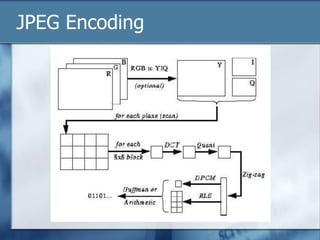
 JPEG compression involves the following:
 Colour Space Transform and subsampling (YIQ)
 DCT (Discrete Cosine Transformation)
 Quantization
 Zigzag Scan
 DPCM on DC component
 RLE on AC Components
 Entropy Coding — Huffman or Arithmetic
JPEG Encoding
Colour Space Transform and sub-sampling
(YIQ)
 The images values are transformed from RGB to
luminance/chrominance color space.
 The eye is sensitive to small changes in luminance
but not in chrominance. So chrominance values
can be used to compress the data.
 This step is optional but important since the
remainder of the algorithm works on each color
component saperately.
 Without transforming the color space, none of the
three color components will tolerate the much loss
leading to worse compression.
DCT (Discrete Cosine Transformation)
 The DCT is applied to each data unit to
create an 8x8 map of frequency component.
 They represent the average pixel value and
successive higher frequency changes within
the group.
 This prepares the images data for the
crucial step of losing information.
Quantization
 Each of the 64 frequency component in a
data unit is divided by a separate number
called its quantization coefficient (QC) and
then rounded to an integer.
 This is the step where the information is
lost.
 Large QCs cause more loss. So high
frequency components typically have larger
QCs.
Quantization
 Why do we need to quantise:
 To throw out bits from DCT.
Example: 101101 = 45 (6 bits).
Truncate to 4 bits: 1011 = 11.
Truncate to 3 bits: 101 = 5.
 Quantization error is the main source of Lossy
Compression.
 • DCT itself is not Lossy
 • How we throw away bits in Quantization
Step is Lossy
Quantization Methods
 Uniform quantization
 Divide by constant N and round result (N =
4 or 8 in examples on previous page).
• Non powers-of-two gives fine control
(e.g., N = 6 loses 2.5 bits)
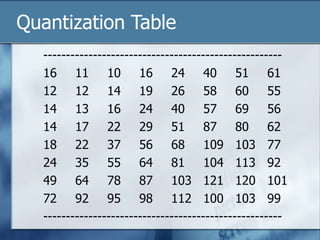
Quantization Tables
 In JPEG, each F[u,v] is divided by a constant q(u,v).
 Table of q(u,v) is called quantization table.
 Eye is most sensitive to low frequencies (upper left
corner), less sensitive to high frequencies (lower right
corner)
 JPEG Standard defines 2 default quantization tables, one
for luminance (below), one for chrominance. E.g Table
below
Quantization Table
-----------------------------------------------------
16 11 10 16 24 40 51 61
12 12 14 19 26 58 60 55
14 13 16 24 40 57 69 56
14 17 22 29 51 87 80 62
18 22 37 56 68 109 103 77
24 35 55 64 81 104 113 92
49 64 78 87 103 121 120 101
72 92 95 98 112 100 103 99
-----------------------------------------------------
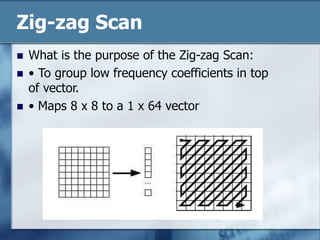
Zig-zag Scan
 What is the purpose of the Zig-zag Scan:
 • To group low frequency coefficients in top
of vector.
 • Maps 8 x 8 to a 1 x 64 vector
Differential Pulse Code Modulation
(DPCM) on DC Component
 Another encoding method is employed
 • DPCM on the DC component at least.
 • Why is this strategy adopted:
 DC component is large and varies, but often
close to previous value (like lossless JPEG).
 Encode the difference from previous 8x8 blocks
– DPCM
Run Length Encode (RLE) on AC
Components
 Yet another simple compression technique is
applied to the AC component:
 1x64 vector has lots of zeros in it
 Encode as (skip, value) pairs, where skip is the
number of zeros and value is the next non-zero
component.
 • Send (0,0) as end-of-block sentinel value.
Huffman (Entropy) Coding
 DC and AC components finally need to be
represented by a
 smaller number of bits (Arithmetic coding also
supported in place of Huffman coding):
 (Variant of) Huffman coding: Each DPCM-coded DC
coefficient is represented by a pair of symbols : (Size,
Amplitude) where Size indicates number of bits needed
to represent coefficient and Amplitude contains actual
bits.
 • Size only Huffman coded in JPEG:
 Size does not change too much, generally smaller Sizes
occur frequently (= low entropy so is suitable for
coding,
 Amplitude can change widely so coding no real
benefit

image processing for jpeg presentati.ppt

  • 1.
  • 2.
    What is JPEG? JPEG is sophisticated lossy/lossless compression method for color or greyscale still images. It works best on contineous tone images where adjacent pixels have similar colors. One advantage of JPEG is the use of many parameters, allowing the use to adjust the amount of data lost over a wide variety range.
  • 3.
    Main Goals ofJPEG  High Compression Ratio in such cases where images quality is judged as very good to excellent.  The use of many parameters allowing user to experiment and achieve the desired level of compression.  Obtaining good results any kind of continuous tone images.  Sophisticated but not too complex compression method, allowing software and hardware implementation on many platform.  Saveral modes of operations.
  • 4.
    Modes of JPEG Sequential Mode: each image component is compressed in a single left to right, top to bottom scan.  Progressive Mode: the images is compressed in multiple blocks to be viewed from coarse to final detail.  Lossless Mode: important for cases where the user decides no pixel should be lost.  Hierarchical Mode: the image is compressed at multiple resolution allowing lower resolution blocks to be viewed without first having to decompressed the following higher-resolution blocks.
  • 5.
    Basic JPEG Compression JPEG compression involves the following:  Colour Space Transform and subsampling (YIQ)  DCT (Discrete Cosine Transformation)  Quantization  Zigzag Scan  DPCM on DC component  RLE on AC Components  Entropy Coding — Huffman or Arithmetic
  • 6.
  • 7.
    Colour Space Transformand sub-sampling (YIQ)  The images values are transformed from RGB to luminance/chrominance color space.  The eye is sensitive to small changes in luminance but not in chrominance. So chrominance values can be used to compress the data.  This step is optional but important since the remainder of the algorithm works on each color component saperately.  Without transforming the color space, none of the three color components will tolerate the much loss leading to worse compression.
  • 8.
    DCT (Discrete CosineTransformation)  The DCT is applied to each data unit to create an 8x8 map of frequency component.  They represent the average pixel value and successive higher frequency changes within the group.  This prepares the images data for the crucial step of losing information.
  • 9.
    Quantization  Each ofthe 64 frequency component in a data unit is divided by a separate number called its quantization coefficient (QC) and then rounded to an integer.  This is the step where the information is lost.  Large QCs cause more loss. So high frequency components typically have larger QCs.
  • 10.
    Quantization  Why dowe need to quantise:  To throw out bits from DCT. Example: 101101 = 45 (6 bits). Truncate to 4 bits: 1011 = 11. Truncate to 3 bits: 101 = 5.  Quantization error is the main source of Lossy Compression.  • DCT itself is not Lossy  • How we throw away bits in Quantization Step is Lossy
  • 11.
    Quantization Methods  Uniformquantization  Divide by constant N and round result (N = 4 or 8 in examples on previous page). • Non powers-of-two gives fine control (e.g., N = 6 loses 2.5 bits)
  • 12.
    Quantization Tables  InJPEG, each F[u,v] is divided by a constant q(u,v).  Table of q(u,v) is called quantization table.  Eye is most sensitive to low frequencies (upper left corner), less sensitive to high frequencies (lower right corner)  JPEG Standard defines 2 default quantization tables, one for luminance (below), one for chrominance. E.g Table below
  • 13.
    Quantization Table ----------------------------------------------------- 16 1110 16 24 40 51 61 12 12 14 19 26 58 60 55 14 13 16 24 40 57 69 56 14 17 22 29 51 87 80 62 18 22 37 56 68 109 103 77 24 35 55 64 81 104 113 92 49 64 78 87 103 121 120 101 72 92 95 98 112 100 103 99 -----------------------------------------------------
  • 14.
    Zig-zag Scan  Whatis the purpose of the Zig-zag Scan:  • To group low frequency coefficients in top of vector.  • Maps 8 x 8 to a 1 x 64 vector
  • 15.
    Differential Pulse CodeModulation (DPCM) on DC Component  Another encoding method is employed  • DPCM on the DC component at least.  • Why is this strategy adopted:  DC component is large and varies, but often close to previous value (like lossless JPEG).  Encode the difference from previous 8x8 blocks – DPCM
  • 16.
    Run Length Encode(RLE) on AC Components  Yet another simple compression technique is applied to the AC component:  1x64 vector has lots of zeros in it  Encode as (skip, value) pairs, where skip is the number of zeros and value is the next non-zero component.  • Send (0,0) as end-of-block sentinel value.
  • 17.
    Huffman (Entropy) Coding DC and AC components finally need to be represented by a  smaller number of bits (Arithmetic coding also supported in place of Huffman coding):  (Variant of) Huffman coding: Each DPCM-coded DC coefficient is represented by a pair of symbols : (Size, Amplitude) where Size indicates number of bits needed to represent coefficient and Amplitude contains actual bits.  • Size only Huffman coded in JPEG:  Size does not change too much, generally smaller Sizes occur frequently (= low entropy so is suitable for coding,  Amplitude can change widely so coding no real benefit