Illinois workNet Update
Supporting the Technology Road Map of WIOA
Implementation
August 12, 2015
Topics
Illinois workNet’s role to provide, coordinate, and integrate services for program success:
• What’s Available Now
• Customer, employer, and partner resources, guidance and tools to support
• Youth Services and Career Services Adults and Dislocated Workers
• WIOA certified training programs
• Providers
• Demand Occupations
• WIOA-funded sites management and public access
• What in Process Now
• WIOA Policy and Board Certifications
• Building off DEI
• WIOA pre-application
• Dashboard integrated services and teams
• Personalized Career Planner
What’s Available Now
www.illinioisworknet.com
Open access to career, training and employment resources, services, and
tools for all citizens, employers, and workforce and education partners.
• Career Pathways, wages
and trends
• Prepare your resume
• Market your skills and
credentials
• Explore, plan for, and select a
training program
• Find and apply
for jobs
• Prepare for
interviews
• Attend events
• Connect to service locations
and referrals
• Network with social media
• Create resumes
• Complete Employment 101
• Take and save Career Interest
Surveys
• Get the job, keep it, and grow
in a career
5
Area Icon Resource and tools …
Explore
Careers
To explore careers, their skills and interests, and to plan for their
future or job/career transition.
Training &
Credentials
Plan and participate in training opportunities and connect to financial support to become
qualified in your career field.
Job Openings
& Recruiting
Help job seekers get a job and to help employers recruit and hire.
Qualify for
Jobs
Get real life experiences and understand employer expectations to become prepared to
demonstrate how your experience, skills, and credentials qualify you for a job.
Network &
Connect
Reinforce connections to help you get into, and stay, in your chosen career field.
Layoff
Assistance
Help individuals impacted by a layoff through job or career transition, as well as provide
employers the legal requirements for reporting layoffs and resources to voluntarily help
employees impacted.
Updates &
Help
Additional guides and work support resources to help people meet their employment and
training goals. 6
Explore Careers** Training &
Credentials**
Qualify for Jobs** Job Openings &
Recruitment**
Network &
Connect**
Layoff Assistance** Updates & Help**
Skill & Interest
Surveys
Training Programs Job Skills Guides Illinois workNet
JobFinder
Event Calendar Company Layoff
Search
News & Updates
Quick Start Guide
Careers, Wages &
Trends
Apprenticeship
Opportunities
Digital Literacy
Guides
Illinois JobLink Illinois workNet
Service Finder
Recovery Step
Guide
Download & Print
Materials
Labor Market
Information (LMI)
Adult Education
Opportunities
Prepare Your
Resume
Featured Employers Student & Trade
Connections
Rapid Response
Layoff Reporting &
Services
disabilityworks
Employment 101 Employer-Based
Training Programs
Marketing Your
Skills
Start a Business Social Media Guide WARN Reporting &
Services
Veteran’s Guide
Planning Your Career Credentials Job Qualifications
Videos
Recruiting & Hiring Networking for
Success
Trade Layoff
Reporting &
Services
jobPrep Mobile App
Career Exploration
Videos
Planning &
Financing Training
Job Qualifications
Resources
Employer Hiring
Credits
Networking Videos Layoff Assistance
Videos
Success Stories
Career Exploration
Resources
Training & Financial
Aid Videos
Employment & Hiring
Planning
Networking
Resources
Layoff Assistance
Resources
FAQ
Training & Financial
Aid Resources
Job Searching & Hiring
Videos
Glossary
**User Guide are available from the home page and all main
navigation pages.
Additional topics will be added as content is developed.
Employment & Hiring
Planning Resources
Managing Your Work
Success
Work Success Support
Videos
Work Success Support
Resources 7
Connect to WIOA Programs and Core
Partner Services
Connect to WIOA Programs and Core
Partner Services
Partner Guides
Linked from the footer, bottom of the site.
WIOA Approved Training Programs
WIOA/Illinois workNet Centers, Affiliates, and
Community Partners
My Dashboard –
Customers
Global tools available to everyone:
1. My Bookmarks
2. Employment 101 – Career, Training, and Job Search
Plan, Assessment, and Certificate of Completion
3. Resume Builder
4. Career Interest Surveys
5. Programs Participating in:
• ATIM
• SYEP
• My Notes**
• Messages**
** Coming Soon
13
1. 2.
3. 4.
5.
Customers - My
Assessments
Customers can see their results from
Assessments they have taken within Illinois
workNet all in one area.
• Skills & Interests Surveys
• Employment 101 Pre-/Post-
Assessment
• NOCTI 21st Century Skills Assessment
• Observational Assessment
• Worksite Evaluation
14
My Dashboard –
Partner Tools
Partner Tools – Option Only Shows for
Partner Accounts
• Customer Groups
• Incumbent Worker Tracking System
(IWTS)
• Services Locator Administration
• NOCTI Administration
• Event Calendar Administration
MORE COMING SOON!
• Observational Assessment
• Worksite Evaluation
15
Account Benefits for Partners
Being an Illinois workNet partner is free and open to organizations who, as a part of their services, help individuals,
employers, or other service organizations achieve their career, training, and employment goals. All organizational staff can
setup a partner account and access guides and tools for free.
16
Organizations will:
• Benefit from great resources and tools so you
won't have to "reinvent the wheel."
• Save time and money.
• Enhance your customer services and
community outreach.
• Use no-cost online guides and training to help
your staff, volunteers, and partners.
• Be part of a network of professionals.
Ways to Integrate Illinois workNet:
• Advertise Local Services & Events
• Marketing Materials
• Resource Rooms
• Job Clubs
• Training & Workshops
• College & Career Readiness
• Local Website Setup
What’s in Process Now
www.illinoisworknet.com
WIOA Policy App
18
Plan has been completed and WIOA partner
advisory committee formed to work with
DCEO and workNet team to provide ongoing
feedback and develop the public access to
new policy format:
• Read, print, follow policy and access all
related documents and websites.
• Use the policy guide, glossary, and
contacts.
DCEO manages policy:
• Adds, updates, tracks, uploads
documents, and provides guidance.
WIOA Local Board
Certification Process App
19
Plan has been completed and WIOA partner
advisory committee formed to work with DCEO
and workNet team to provide ongoing feedback
and develop the public access to new policy
format:
• The public interface will provide screens to
view board members for each LWIA and
submit online nomination form.
WIOA Local Board
Certification Process App
20
Plan has been completed and WIOA partner
advisory committee formed to work with DCEO
and workNet team to provide ongoing feedback
and develop the public access to new policy
format:
• The public interface will provide screens to
view board members for each LWIA and
submit online nomination form.
• CEO, board staff, and DCEO manage board
member information and composition.
Building Off DEI
21
Integrated services for individuals with disabilities. One of the goals is for the processes and tools are to be integrated
in day-to-day local WIOA activities beyond the end of the grant period
• Online pre-WIOA starter and complete application
• Populates IWDS application
• Career Planners access applications through workNet and can update them.
• Customers see, submit and return to application.
• WIOA pre-application
• Dashboard integrated services and teams
• Personalized Career Planner
The DEI program goal is to increase outreach and services to
individuals with disabilities to achieve career, training and employment goals.
Staff-assisted WIA services are provided and coordinated
through the regions’ integrated network of partners using DEI tools in Illinois workNet.
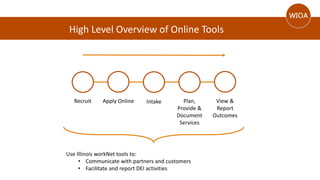
High Level Overview of Online Tools
Recruit Apply Online Intake Plan,
Provide &
Document
Services
View &
Report
Outcomes
Use Illinois workNet tools to:
• Communicate with partners and customers
• Facilitate and report DEI activities
Scenario 1: Anna’s Story
Anna is a female with a disability in LWIA 25.
She received a DEI flyer and went to the DEI customer website (www.illinoisworknet.com/aboutdei).
She decided to complete the full online application because she needs a job and support services to
help her take care of her daughter.
Recruit
Scenario 1: Anna’s Story
• View information for specific customers, such as
assessments, training plans, job search plans, etc.
• Identify services that are or have been provided to the
customer.
• Communicate with the customer and other partners
for the purpose of helping the customer reach their
career, training and employment goals.
Dan, a DEI Career Planner in LWIA 25, uses his DEI dashboard along with his daily tasks to
ensure all DEI customers are assigned to integrated resource teams.
This allows his regional partners to:
Intake
Dan looks at the completed application and sees Anna
submitted the online application.
Scenario 1: Anna’s Story Services
Have IWDS Access Do Not Have IWDS AccessOptions:
• Complete Guided Application
for Anna and enter services
into IWDS.
• Have Anna stay at the
customer level in IWDS (no
application) and enter services
through Illinois workNet.*
Options:
• Enter services through Illinois
workNet.
z
Definitions let you know where the
system is pulling information and
what is included in the count.
Services that are entered into IWDS and Illinois workNet populate the DEI Dashboard.
* Note: Financial Asset Development and Integrated Resource Team are entered at the customer level in IWDS. These services are local services for LWIA 1 and 25.
Scenario 1: Anna’s Story Services
CommunicationServicesProvided
Partners enter services,
referrals, notes and
reminders through Illinois
workNet.
Mock-up:
DEI Progress
Thank you!
Jeanne Kitchens, SIUC CWD, Associate
Director jkitchens@siuccwd.com
General email info@siuccwd.com, checked
each business day by workNet team.

Illinois workNet Update

  • 1.
    Illinois workNet Update Supportingthe Technology Road Map of WIOA Implementation August 12, 2015
  • 2.
    Topics Illinois workNet’s roleto provide, coordinate, and integrate services for program success: • What’s Available Now • Customer, employer, and partner resources, guidance and tools to support • Youth Services and Career Services Adults and Dislocated Workers • WIOA certified training programs • Providers • Demand Occupations • WIOA-funded sites management and public access • What in Process Now • WIOA Policy and Board Certifications • Building off DEI • WIOA pre-application • Dashboard integrated services and teams • Personalized Career Planner
  • 3.
  • 4.
    Open access tocareer, training and employment resources, services, and tools for all citizens, employers, and workforce and education partners.
  • 5.
    • Career Pathways,wages and trends • Prepare your resume • Market your skills and credentials • Explore, plan for, and select a training program • Find and apply for jobs • Prepare for interviews • Attend events • Connect to service locations and referrals • Network with social media • Create resumes • Complete Employment 101 • Take and save Career Interest Surveys • Get the job, keep it, and grow in a career 5
  • 6.
    Area Icon Resourceand tools … Explore Careers To explore careers, their skills and interests, and to plan for their future or job/career transition. Training & Credentials Plan and participate in training opportunities and connect to financial support to become qualified in your career field. Job Openings & Recruiting Help job seekers get a job and to help employers recruit and hire. Qualify for Jobs Get real life experiences and understand employer expectations to become prepared to demonstrate how your experience, skills, and credentials qualify you for a job. Network & Connect Reinforce connections to help you get into, and stay, in your chosen career field. Layoff Assistance Help individuals impacted by a layoff through job or career transition, as well as provide employers the legal requirements for reporting layoffs and resources to voluntarily help employees impacted. Updates & Help Additional guides and work support resources to help people meet their employment and training goals. 6
  • 7.
    Explore Careers** Training& Credentials** Qualify for Jobs** Job Openings & Recruitment** Network & Connect** Layoff Assistance** Updates & Help** Skill & Interest Surveys Training Programs Job Skills Guides Illinois workNet JobFinder Event Calendar Company Layoff Search News & Updates Quick Start Guide Careers, Wages & Trends Apprenticeship Opportunities Digital Literacy Guides Illinois JobLink Illinois workNet Service Finder Recovery Step Guide Download & Print Materials Labor Market Information (LMI) Adult Education Opportunities Prepare Your Resume Featured Employers Student & Trade Connections Rapid Response Layoff Reporting & Services disabilityworks Employment 101 Employer-Based Training Programs Marketing Your Skills Start a Business Social Media Guide WARN Reporting & Services Veteran’s Guide Planning Your Career Credentials Job Qualifications Videos Recruiting & Hiring Networking for Success Trade Layoff Reporting & Services jobPrep Mobile App Career Exploration Videos Planning & Financing Training Job Qualifications Resources Employer Hiring Credits Networking Videos Layoff Assistance Videos Success Stories Career Exploration Resources Training & Financial Aid Videos Employment & Hiring Planning Networking Resources Layoff Assistance Resources FAQ Training & Financial Aid Resources Job Searching & Hiring Videos Glossary **User Guide are available from the home page and all main navigation pages. Additional topics will be added as content is developed. Employment & Hiring Planning Resources Managing Your Work Success Work Success Support Videos Work Success Support Resources 7
  • 8.
    Connect to WIOAPrograms and Core Partner Services
  • 9.
    Connect to WIOAPrograms and Core Partner Services
  • 10.
    Partner Guides Linked fromthe footer, bottom of the site.
  • 11.
  • 12.
    WIOA/Illinois workNet Centers,Affiliates, and Community Partners
  • 13.
    My Dashboard – Customers Globaltools available to everyone: 1. My Bookmarks 2. Employment 101 – Career, Training, and Job Search Plan, Assessment, and Certificate of Completion 3. Resume Builder 4. Career Interest Surveys 5. Programs Participating in: • ATIM • SYEP • My Notes** • Messages** ** Coming Soon 13 1. 2. 3. 4. 5.
  • 14.
    Customers - My Assessments Customerscan see their results from Assessments they have taken within Illinois workNet all in one area. • Skills & Interests Surveys • Employment 101 Pre-/Post- Assessment • NOCTI 21st Century Skills Assessment • Observational Assessment • Worksite Evaluation 14
  • 15.
    My Dashboard – PartnerTools Partner Tools – Option Only Shows for Partner Accounts • Customer Groups • Incumbent Worker Tracking System (IWTS) • Services Locator Administration • NOCTI Administration • Event Calendar Administration MORE COMING SOON! • Observational Assessment • Worksite Evaluation 15
  • 16.
    Account Benefits forPartners Being an Illinois workNet partner is free and open to organizations who, as a part of their services, help individuals, employers, or other service organizations achieve their career, training, and employment goals. All organizational staff can setup a partner account and access guides and tools for free. 16 Organizations will: • Benefit from great resources and tools so you won't have to "reinvent the wheel." • Save time and money. • Enhance your customer services and community outreach. • Use no-cost online guides and training to help your staff, volunteers, and partners. • Be part of a network of professionals. Ways to Integrate Illinois workNet: • Advertise Local Services & Events • Marketing Materials • Resource Rooms • Job Clubs • Training & Workshops • College & Career Readiness • Local Website Setup
  • 17.
    What’s in ProcessNow www.illinoisworknet.com
  • 18.
    WIOA Policy App 18 Planhas been completed and WIOA partner advisory committee formed to work with DCEO and workNet team to provide ongoing feedback and develop the public access to new policy format: • Read, print, follow policy and access all related documents and websites. • Use the policy guide, glossary, and contacts. DCEO manages policy: • Adds, updates, tracks, uploads documents, and provides guidance.
  • 19.
    WIOA Local Board CertificationProcess App 19 Plan has been completed and WIOA partner advisory committee formed to work with DCEO and workNet team to provide ongoing feedback and develop the public access to new policy format: • The public interface will provide screens to view board members for each LWIA and submit online nomination form.
  • 20.
    WIOA Local Board CertificationProcess App 20 Plan has been completed and WIOA partner advisory committee formed to work with DCEO and workNet team to provide ongoing feedback and develop the public access to new policy format: • The public interface will provide screens to view board members for each LWIA and submit online nomination form. • CEO, board staff, and DCEO manage board member information and composition.
  • 21.
    Building Off DEI 21 Integratedservices for individuals with disabilities. One of the goals is for the processes and tools are to be integrated in day-to-day local WIOA activities beyond the end of the grant period • Online pre-WIOA starter and complete application • Populates IWDS application • Career Planners access applications through workNet and can update them. • Customers see, submit and return to application. • WIOA pre-application • Dashboard integrated services and teams • Personalized Career Planner
  • 22.
    The DEI programgoal is to increase outreach and services to individuals with disabilities to achieve career, training and employment goals. Staff-assisted WIA services are provided and coordinated through the regions’ integrated network of partners using DEI tools in Illinois workNet.
  • 23.
    High Level Overviewof Online Tools Recruit Apply Online Intake Plan, Provide & Document Services View & Report Outcomes Use Illinois workNet tools to: • Communicate with partners and customers • Facilitate and report DEI activities
  • 24.
    Scenario 1: Anna’sStory Anna is a female with a disability in LWIA 25. She received a DEI flyer and went to the DEI customer website (www.illinoisworknet.com/aboutdei). She decided to complete the full online application because she needs a job and support services to help her take care of her daughter. Recruit
  • 25.
    Scenario 1: Anna’sStory • View information for specific customers, such as assessments, training plans, job search plans, etc. • Identify services that are or have been provided to the customer. • Communicate with the customer and other partners for the purpose of helping the customer reach their career, training and employment goals. Dan, a DEI Career Planner in LWIA 25, uses his DEI dashboard along with his daily tasks to ensure all DEI customers are assigned to integrated resource teams. This allows his regional partners to: Intake Dan looks at the completed application and sees Anna submitted the online application.
  • 26.
    Scenario 1: Anna’sStory Services Have IWDS Access Do Not Have IWDS AccessOptions: • Complete Guided Application for Anna and enter services into IWDS. • Have Anna stay at the customer level in IWDS (no application) and enter services through Illinois workNet.* Options: • Enter services through Illinois workNet. z Definitions let you know where the system is pulling information and what is included in the count. Services that are entered into IWDS and Illinois workNet populate the DEI Dashboard. * Note: Financial Asset Development and Integrated Resource Team are entered at the customer level in IWDS. These services are local services for LWIA 1 and 25.
  • 27.
    Scenario 1: Anna’sStory Services CommunicationServicesProvided Partners enter services, referrals, notes and reminders through Illinois workNet.
  • 28.
  • 29.
    Thank you! Jeanne Kitchens,SIUC CWD, Associate Director jkitchens@siuccwd.com General email info@siuccwd.com, checked each business day by workNet team.