Using Iowa ePolicy
December 2, 2019
ePOLICY
Accessing Iowa ePolicy
Think of the Iowa ePolicy as
an e-book! You have the
ability to jump to a specific
chapter or section using the
Policy Chapters and Sections
menu. Or, if you're not sure
what you're looking for, you
can flip through each
chapter and section, one
policy at a time using the
left/right menu.
Go to https://epolicy.iwd.iowa.gov/Policy/Home to get started.
Viewing Current Iowa ePolicy Listing
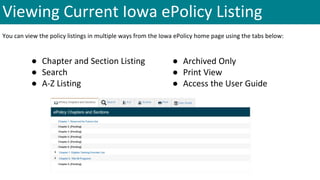
You can view the policy listings in multiple ways from the Iowa ePolicy home page using the tabs below:
● Chapter and Section Listing
● Search
● A-Z Listing
● Archived Only
● Print View
● Access the User Guide
A-Z View
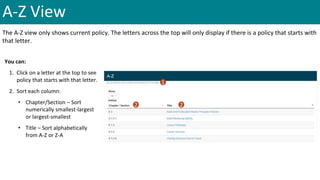
The A-Z view only shows current policy. The letters across the top will only display if there is a policy that starts with
that letter.
You can:
1. Click on a letter at the top to see
policy that starts with that letter.
2. Sort each column:
• Chapter/Section – Sort
numerically smallest-largest
or largest-smallest
• Title – Sort alphabetically
from A-Z or Z-A
1
2 2
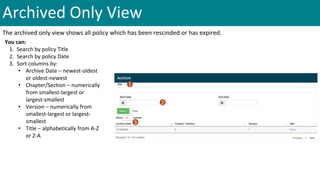
Archived Only View
The archived only view shows all policy which has been rescinded or has expired.
You can:
1. Search by policy Title
2. Search by policy Date
3. Sort columns by:
• Archive Date – newest-oldest
or oldest-newest
• Chapter/Section – numerically
from smallest-largest or
largest-smallest
• Version – numerically from
smallest-largest or largest-
smallest
• Title – alphabetically from A-Z
or Z-A
1
2
3
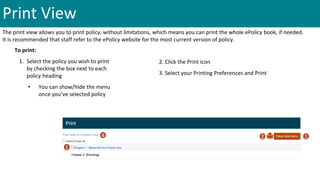
Print View
The print view allows you to print policy, without limitations, which means you can print the whole ePolicy book, if needed.
It is recommended that staff refer to the ePolicy website for the most current version of policy.
To print:
1. Select the policy you wish to print
by checking the box next to each
policy heading
• You can show/hide the menu
once you’ve selected policy
2. Click the Print icon
3. Select your Printing Preferences and Print
1
2 14
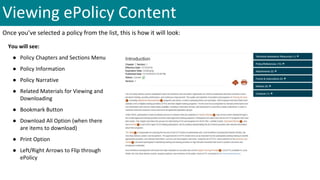
Viewing ePolicy Content
Once you’ve selected a policy from the list, this is how it will look:
You will see:
● Policy Chapters and Sections Menu
● Policy Information
● Policy Narrative
● Related Materials for Viewing and
Downloading
● Bookmark Button
● Download All Option (when there
are items to download)
● Print Option
● Left/Right Arrows to Flip through
ePolicy
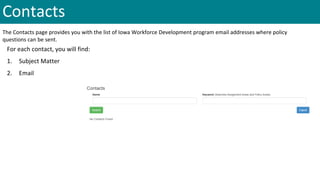
Contacts
The Contacts page provides you with the list of Iowa Workforce Development program email addresses where policy
questions can be sent.
For each contact, you will find:
1. Subject Matter
2. Email
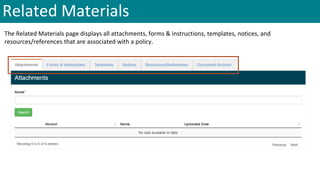
Related Materials
The Related Materials page displays all attachments, forms & instructions, templates, notices, and
resources/references that are associated with a policy.
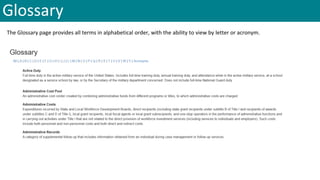
Glossary
The Glossary page provides all terms in alphabetical order, with the ability to view by letter or acronym.
Sponsored by Iowa Workforce Development
Iowa Workforce Development is an equal opportunity employer/program. Auxiliary aids and services are available upon request to
individuals with disabilities. For deaf and hard of hearing, use Relay 711.

Using Iowa ePolicy

  • 1.
  • 2.
    Accessing Iowa ePolicy Thinkof the Iowa ePolicy as an e-book! You have the ability to jump to a specific chapter or section using the Policy Chapters and Sections menu. Or, if you're not sure what you're looking for, you can flip through each chapter and section, one policy at a time using the left/right menu. Go to https://epolicy.iwd.iowa.gov/Policy/Home to get started.
  • 3.
    Viewing Current IowaePolicy Listing You can view the policy listings in multiple ways from the Iowa ePolicy home page using the tabs below: ● Chapter and Section Listing ● Search ● A-Z Listing ● Archived Only ● Print View ● Access the User Guide
  • 4.
    A-Z View The A-Zview only shows current policy. The letters across the top will only display if there is a policy that starts with that letter. You can: 1. Click on a letter at the top to see policy that starts with that letter. 2. Sort each column: • Chapter/Section – Sort numerically smallest-largest or largest-smallest • Title – Sort alphabetically from A-Z or Z-A 1 2 2
  • 5.
    Archived Only View Thearchived only view shows all policy which has been rescinded or has expired. You can: 1. Search by policy Title 2. Search by policy Date 3. Sort columns by: • Archive Date – newest-oldest or oldest-newest • Chapter/Section – numerically from smallest-largest or largest-smallest • Version – numerically from smallest-largest or largest- smallest • Title – alphabetically from A-Z or Z-A 1 2 3
  • 6.
    Print View The printview allows you to print policy, without limitations, which means you can print the whole ePolicy book, if needed. It is recommended that staff refer to the ePolicy website for the most current version of policy. To print: 1. Select the policy you wish to print by checking the box next to each policy heading • You can show/hide the menu once you’ve selected policy 2. Click the Print icon 3. Select your Printing Preferences and Print 1 2 14
  • 7.
    Viewing ePolicy Content Onceyou’ve selected a policy from the list, this is how it will look: You will see: ● Policy Chapters and Sections Menu ● Policy Information ● Policy Narrative ● Related Materials for Viewing and Downloading ● Bookmark Button ● Download All Option (when there are items to download) ● Print Option ● Left/Right Arrows to Flip through ePolicy
  • 8.
    Contacts The Contacts pageprovides you with the list of Iowa Workforce Development program email addresses where policy questions can be sent. For each contact, you will find: 1. Subject Matter 2. Email
  • 9.
    Related Materials The RelatedMaterials page displays all attachments, forms & instructions, templates, notices, and resources/references that are associated with a policy.
  • 10.
    Glossary The Glossary pageprovides all terms in alphabetical order, with the ability to view by letter or acronym.
  • 11.
    Sponsored by IowaWorkforce Development Iowa Workforce Development is an equal opportunity employer/program. Auxiliary aids and services are available upon request to individuals with disabilities. For deaf and hard of hearing, use Relay 711.