Application Gateway
Agenda
● What is Application Gateway?
● Usage of Application Gateway?
● Difference between Load Balancer and Application Gateway
What is Application Gateway?
Azure Application Gateway is a web traffic (OSI layer 7) load balancer that enables you to manage traffic to
your web applications. Traditional load balancers operate at the transport layer (OSI layer 4 - TCP and UDP)
and route traffic based on source IP address and port, to a destination IP address and port.
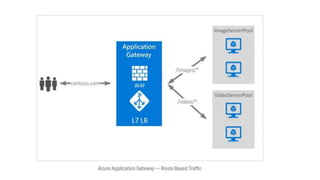
With AGW, on top of load balancing your workloads, you can make routing decisions based on URI path or
host headers. For example, you can route traffic based on the incoming URL. If /images are in the inbound
URL, you can route traffic to a specific set of servers (or pool) configured for images. If /video is in the URL,
that traffic is routed to another pool.
It can be used to do TLS/SSL termination. TLS/SSL termination can be useful to allow unencrypted traffic
between AGW and backend servers saving some of processing load needed to encrypt and decrypt said
traffic. However, sometimes unencrypted communication to the servers is not acceptable because of
security requirements, compliance requirements, or application may only accept a secure connection. In
these situations, Application Gateway also supports end-to-end TLS/SSL encryption.
Usage of Application Gateway?
With AGW, on top of load balancing your workloads, you can make routing decisions based on URI path or
host headers. For example, you can route traffic based on the incoming URL. If /images are in the inbound
URL, you can route traffic to a specific set of servers (or pool) configured for images. If /video is in the URL,
that traffic is routed to another pool.
It can be used to do TLS/SSL termination. TLS/SSL termination can be useful to allow unencrypted traffic
between AGW and backend servers saving some of processing load needed to encrypt and decrypt said
traffic. However, sometimes unencrypted communication to the servers is not acceptable because of
security requirements, compliance requirements, or application may only accept a secure connection. In
these situations, Application Gateway also supports end-to-end TLS/SSL encryption.
Difference of Application Gateway and Load
Balancer
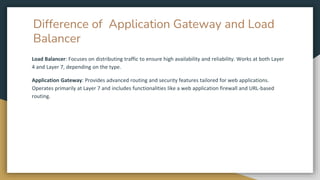
Load Balancer: Focuses on distributing traffic to ensure high availability and reliability. Works at both Layer
4 and Layer 7, depending on the type.
Application Gateway: Provides advanced routing and security features tailored for web applications.
Operates primarily at Layer 7 and includes functionalities like a web application firewall and URL-based
routing.
Thank You

6.Application Gateway by Techserverglobal

  • 1.
  • 2.
    Agenda ● What isApplication Gateway? ● Usage of Application Gateway? ● Difference between Load Balancer and Application Gateway
  • 3.
    What is ApplicationGateway? Azure Application Gateway is a web traffic (OSI layer 7) load balancer that enables you to manage traffic to your web applications. Traditional load balancers operate at the transport layer (OSI layer 4 - TCP and UDP) and route traffic based on source IP address and port, to a destination IP address and port. With AGW, on top of load balancing your workloads, you can make routing decisions based on URI path or host headers. For example, you can route traffic based on the incoming URL. If /images are in the inbound URL, you can route traffic to a specific set of servers (or pool) configured for images. If /video is in the URL, that traffic is routed to another pool. It can be used to do TLS/SSL termination. TLS/SSL termination can be useful to allow unencrypted traffic between AGW and backend servers saving some of processing load needed to encrypt and decrypt said traffic. However, sometimes unencrypted communication to the servers is not acceptable because of security requirements, compliance requirements, or application may only accept a secure connection. In these situations, Application Gateway also supports end-to-end TLS/SSL encryption.
  • 4.
    Usage of ApplicationGateway? With AGW, on top of load balancing your workloads, you can make routing decisions based on URI path or host headers. For example, you can route traffic based on the incoming URL. If /images are in the inbound URL, you can route traffic to a specific set of servers (or pool) configured for images. If /video is in the URL, that traffic is routed to another pool. It can be used to do TLS/SSL termination. TLS/SSL termination can be useful to allow unencrypted traffic between AGW and backend servers saving some of processing load needed to encrypt and decrypt said traffic. However, sometimes unencrypted communication to the servers is not acceptable because of security requirements, compliance requirements, or application may only accept a secure connection. In these situations, Application Gateway also supports end-to-end TLS/SSL encryption.
  • 6.
    Difference of ApplicationGateway and Load Balancer Load Balancer: Focuses on distributing traffic to ensure high availability and reliability. Works at both Layer 4 and Layer 7, depending on the type. Application Gateway: Provides advanced routing and security features tailored for web applications. Operates primarily at Layer 7 and includes functionalities like a web application firewall and URL-based routing.
  • 7.