Introduction
Amazon EC2 AutoScaling helps you maintain application availability and lets you automatically add or
remove EC2 instances using scaling policies that you define. Dynamic or predictive scaling policies let you add
or remove EC2 instance capacity to service established or real-time demand patterns. The fleet management
features of Amazon EC2 Auto Scaling help maintain the health and availability of your fleet.
5.
Types of AutoScaling
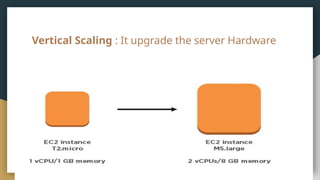
● Vertical Scaling
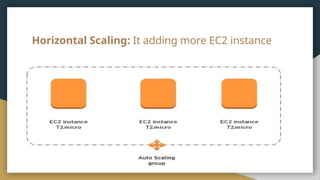
● Horizontal Scaling
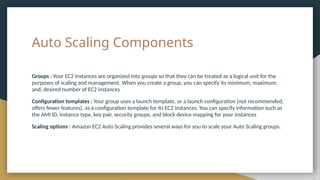
Auto Scaling Components
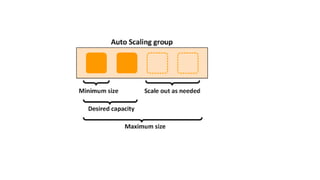
Groups: Your EC2 instances are organized into groups so that they can be treated as a logical unit for the
purposes of scaling and management. When you create a group, you can specify its minimum, maximum,
and, desired number of EC2 instances
Configuration templates : Your group uses a launch template, or a launch configuration (not recommended,
offers fewer features), as a configuration template for its EC2 instances. You can specify information such as
the AMI ID, instance type, key pair, security groups, and block device mapping for your instances
Scaling options : Amazon EC2 Auto Scaling provides several ways for you to scale your Auto Scaling groups.
9.
Launch Templates andLaunch Configurations are both used to define the specifications of EC2 instances in Auto Scaling groups, but they have some key
differences:
Launch Configuration:
1. Features:
○ Basic, older method for defining instance configuration.
○ Includes settings like the AMI ID, instance type, key pair, security groups, and block storage mappings.
○ Static, meaning once created, it cannot be modified. To update, you need to create a new launch configuration.
2. Flexibility:
○ Limited options compared to launch templates.
○ Does not support newer features such as T2/T3 Unlimited, multiple instance types, and advanced networking options.
3. Versioning:
○ Does not support versioning. Any change requires creating a new launch configuration.
Launch Template:
4. Features:
○ Newer and more advanced than launch configurations.
○ Includes all settings available in launch configurations plus additional options like instance metadata, T2/T3 Unlimited, multiple
instance types, placement groups, and network interfaces.
○ Supports more features like Spot Instances, Elastic Graphics, and Elastic GPUs.
5. Flexibility:
○ Highly flexible, allowing you to define multiple versions of a template.
○ You can use different versions of a template in different Auto Scaling groups or at different times.
6. Versioning:
○ Supports versioning, making it easy to update or roll back to a previous version without disrupting the Auto Scaling group.
7. Future-Proof:
○ AWS is focusing on adding new features to launch templates, so they are generally recommended for new deployments.
10.
Summary
● Launch Configurationis simpler and might still be used in some legacy setups, but
it lacks the flexibility and features of Launch Templates.
● Launch Template is the more modern and feature-rich option, supporting newer
AWS features and providing more flexibility through versioning.




![Introduction to EC2 [Elastic Compute Cloud]](https://cdn.slidesharecdn.com/ss_thumbnails/ec2-240618071154-26c9dd9f-thumbnail.jpg?width=640&height=640&fit=bounds)


