Introduction to AWS Identity
and Access Management
Paul Allen
CIT Cloudification Services Team
August 3, 2016
• Basics
– What is IAM?
– IAM concepts
• Shibboleth Integration
• Cornell Policy and IAM Best Practices
• AWS Security Outside IAM
Agenda
• Fine-grained control of who can do what
– direct interaction
• user Bob can launch new EC2 instances
– delegation
• EC2 instance i-123456 can read S3 buckets
What is IAM?
• free
• centralized AWS service
• default scope is AWS account
• deny by default
IAM Characteristics
• Root User
– the identity used to create AWS account
– complete access
• Best practices
– don’t use this account for the everyday
– setup physical MFA and lock it away
– connect to a Cornell EGA, not an individual
– don’t use your Amazon.com shopping account
IAM Concepts – Users
• IAM Users
– an identity with assigned permissions (via policies or
groups)
– can have username/password access to AWS console
– can have (secret) key-based access to AWS APIs
• Best Practices
– rotate credentials (keys, passwords)
– MFA
– password policy
IAM Concepts – Users
• collection of IAM users
• operates like you’d think
• Best practices
– manage permissions with groups
• i.e., assign policies to groups instead of users
IAM Concepts – Groups
• set of permissions to
be granted or denied
• JSON documents
• can be assigned
directly to IAM users
IAM Concepts – Policies
{
"Version": "2012-10-17",
"Statement": [ {
"Effect": "Allow",
"Action": "s3:ListAllMyBuckets",
"Resource": "arn:aws:s3:::*"
}, {
"Effect": "Allow",
"Action": [
"s3:ListBucket",
"s3:GetBucketLocation"],
"Resource":
"arn:aws:s3:::EXAMPLE-BUCKET-NAME”
}, {
"Effect": "Allow",
"Action": [
"s3:PutObject",
"s3:GetObject",
"s3:DeleteObject" ],
"Resource":
"arn:aws:s3:::EXAMPLE-BUCKET-NAME/*"
} ] }
• can be extremely complex
• policy versioning supported
• polices effects can “deny” or “allow”
• policy scoping
– by service, resource, region, AWS account, IAM
users/groups/roles, federated users
• conditions
– by dates, IP address, MFA presence, principal type, etc.
IAM Concepts – Policies
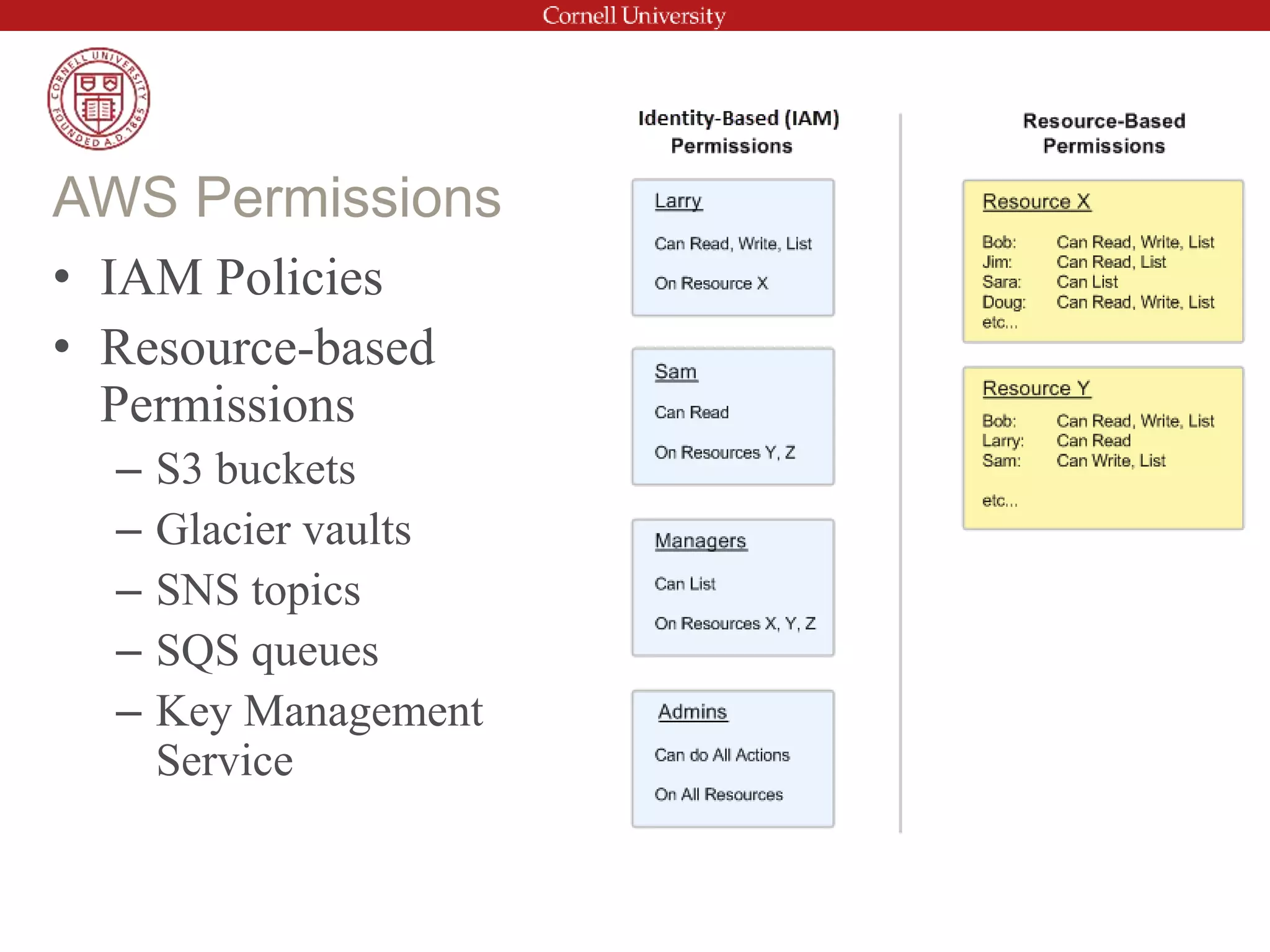
• IAM Policies
• Resource-based
Permissions
– S3 buckets
– Glacier vaults
– SNS topics
– SQS queues
– Key Management
Service
AWS Permissions
• a 2nd type of AWS identity
– also has assigned permissions
– similar to IAM users
• designed to be temporarily assumed
– e.g. by an EC2 instance
– e.g. by federated Shibboleth user
• no associated credentials
• Instance Profiles
– assigned to EC2 instance
– container for one or more IAM roles
IAM Concepts – Roles
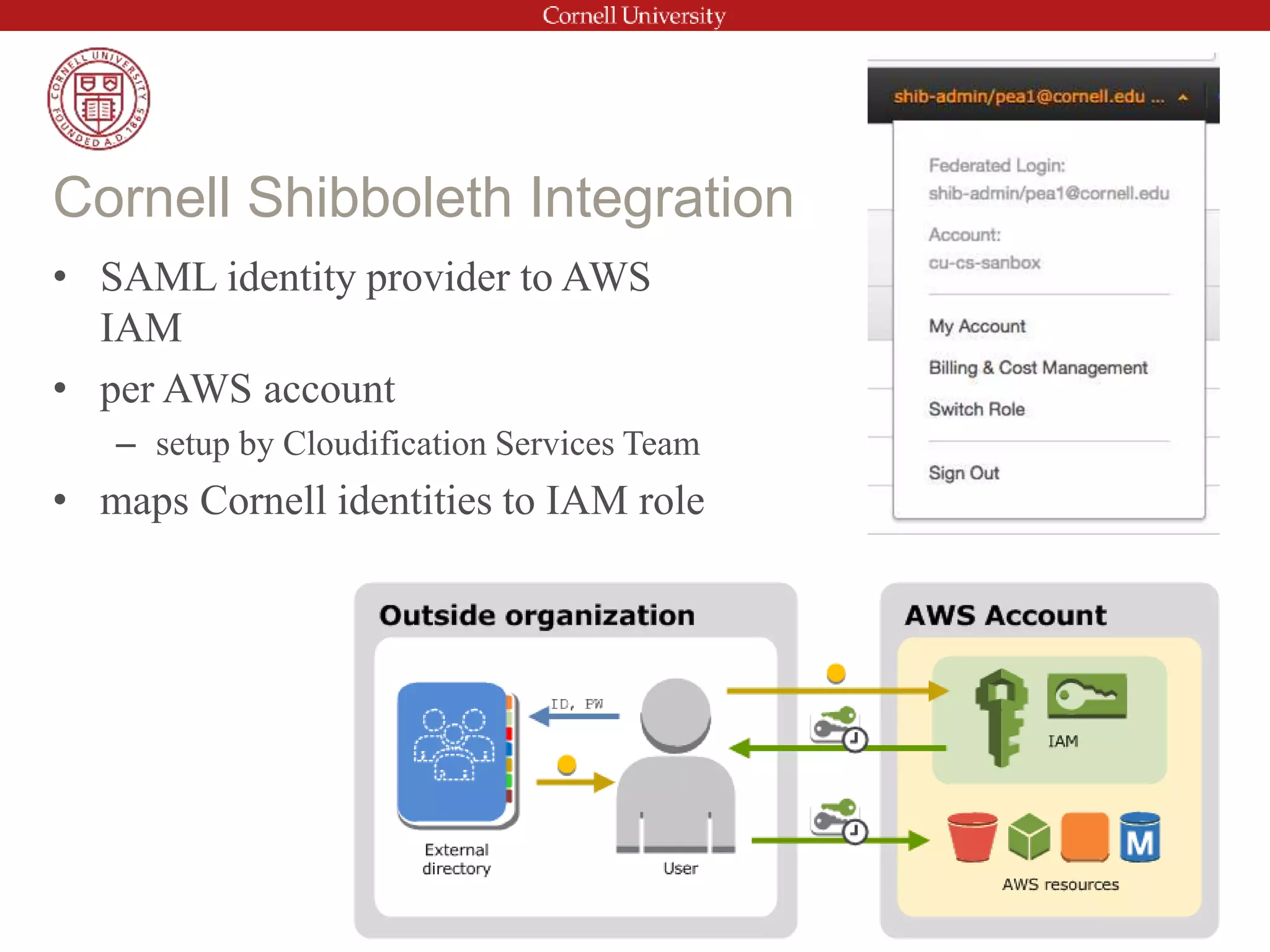
• SAML identity provider to AWS
IAM
• per AWS account
– setup by Cloudification Services Team
• maps Cornell identities to IAM role
Cornell Shibboleth Integration
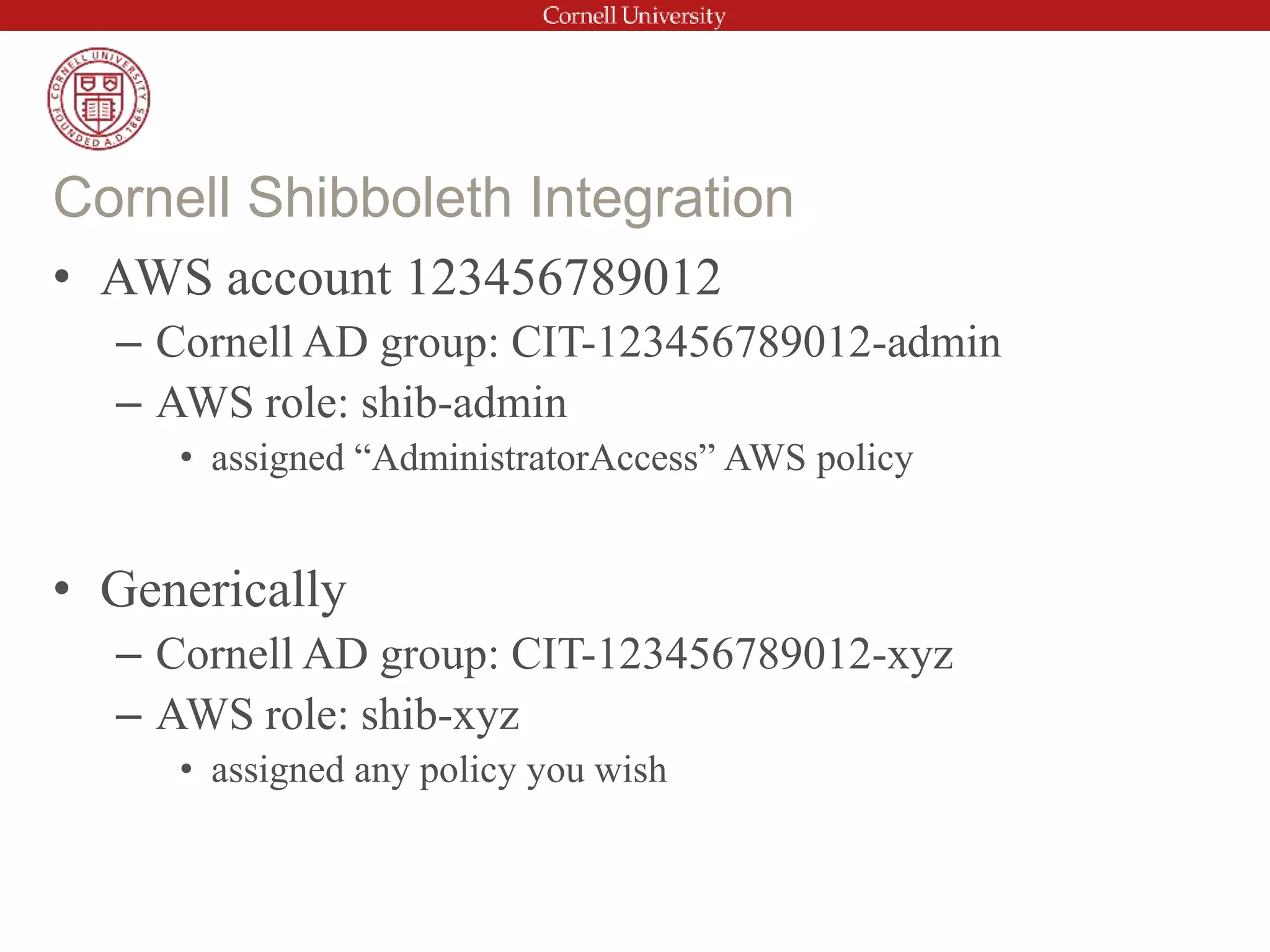
• AWS account 123456789012
– Cornell AD group: CIT-123456789012-admin
– AWS role: shib-admin
• assigned “AdministratorAccess” AWS policy
• Generically
– Cornell AD group: CIT-123456789012-xyz
– AWS role: shib-xyz
• assigned any policy you wish
Cornell Shibboleth Integration
• root account
– MFA enabled
– no access keys
– no everyday use
• use of IAM users (extremely) limited
• use Shibboleth-mapped roles instead of IAM users
– Two-Step Login (Duo) required
• strong IAM password policy
– when IAM users cannot be avoided
Cornell IAM-related Policies
• rotate access keys for IAM users
• use Shibboleth for temporary access keys
– Using Shibboleth for AWS API and CLI access
(Cornell Cloud Tech Blog)
Cornell IAM-related Ideals likely to be
policy soon
IAM controls access to create and manage resources
– does not control identity and access within those resources
• Elastic Compute Cloud (EC2)
– access instances using key pairs (Linux) or password (Windows)
– configure instance users separately
• Relational Database Service (RDS)
– username/passwords tied to database
• Virtual Private Cloud
– security groups, network ACLS, etc.
– controls connectivity resources
Security Outside of IAM
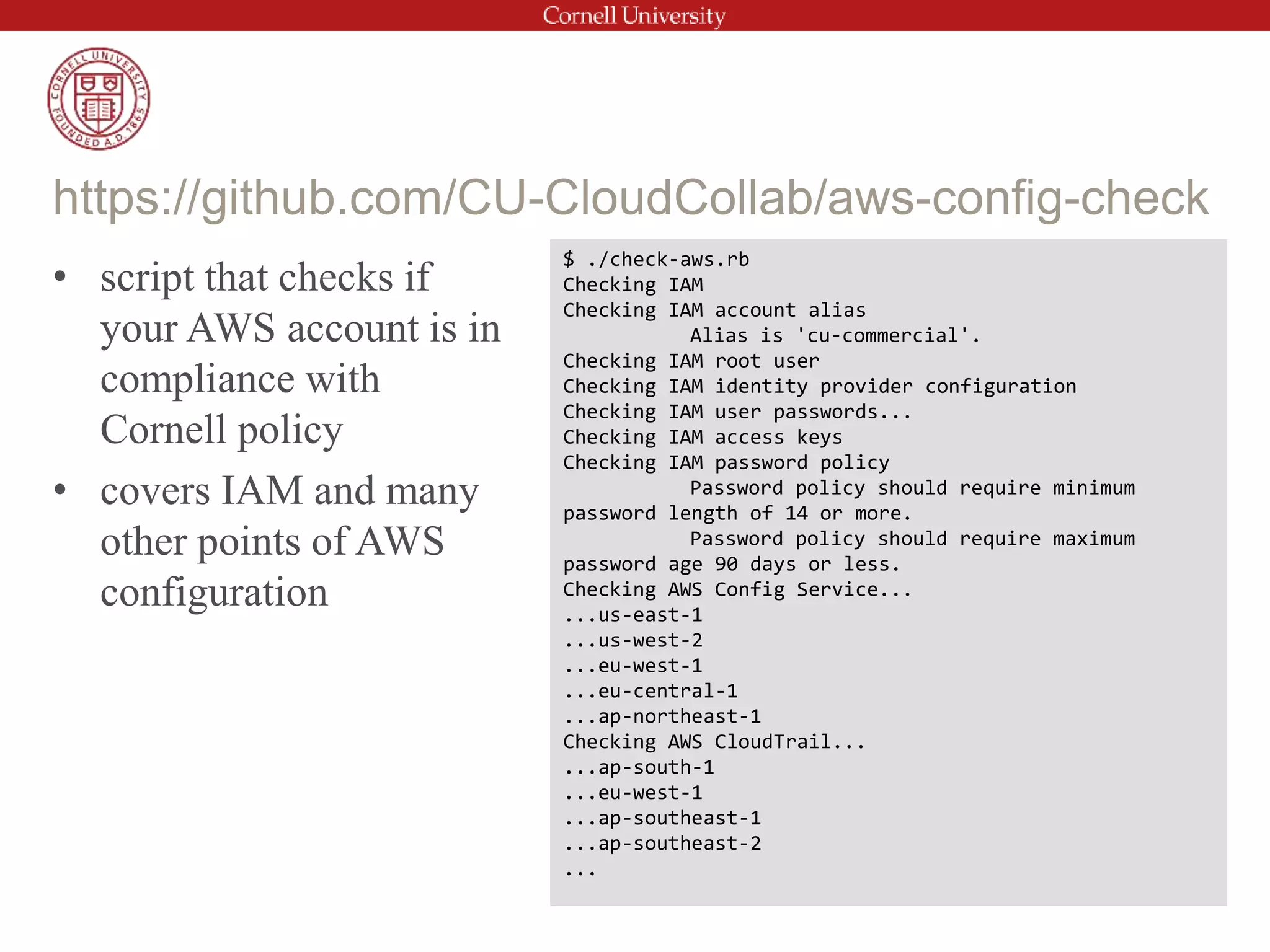
• script that checks if
your AWS account is in
compliance with
Cornell policy
• covers IAM and many
other points of AWS
configuration
https://github.com/CU-CloudCollab/aws-config-check
$ ./check-aws.rb
Checking IAM
Checking IAM account alias
Alias is 'cu-commercial'.
Checking IAM root user
Checking IAM identity provider configuration
Checking IAM user passwords...
Checking IAM access keys
Checking IAM password policy
Password policy should require minimum
password length of 14 or more.
Password policy should require maximum
password age 90 days or less.
Checking AWS Config Service...
...us-east-1
...us-west-2
...eu-west-1
...eu-central-1
...ap-northeast-1
Checking AWS CloudTrail...
...ap-south-1
...eu-west-1
...ap-southeast-1
...ap-southeast-2
...
• Users – Create individual users.
• Permissions – Grant least privilege.
• Groups – Manage permissions with groups.
• Conditions – Restrict privileged access further with conditions.
• Auditing – Enable AWS CloudTrail to get logs of API calls.
• Password – Configure a strong password policy.
• Rotate – Rotate security credentials regularly.
• MFA – Enable MFA for privileged users.
• Sharing – Use IAM roles to share access.
• Roles – Use IAM roles for Amazon EC2 instances.
• Root – Reduce or remove use of root.
Top IAM Best Practices (from AWS)
• Advanced Policies
• Policy Analysis
• Cross account-permissions
• Security Token Service - temporary credentials
• IAM server certificate management
• Related Services
– AWS Key Management Service
– AWS CloudTrail
– AWS Config
IAM Advanced Topics
Resources
– AWS re:Invent 2015 Security presentations
– Cornell Standard AWS Account Configurations
– Cornell Cloudification Services Wiki
– Cornell Cloudification Tech Blog
Questions?

AWS-IAM-intro-2016-08-03.pptx

  • 1.
    Introduction to AWSIdentity and Access Management Paul Allen CIT Cloudification Services Team August 3, 2016
  • 2.
    • Basics – Whatis IAM? – IAM concepts • Shibboleth Integration • Cornell Policy and IAM Best Practices • AWS Security Outside IAM Agenda
  • 3.
    • Fine-grained controlof who can do what – direct interaction • user Bob can launch new EC2 instances – delegation • EC2 instance i-123456 can read S3 buckets What is IAM?
  • 4.
    • free • centralizedAWS service • default scope is AWS account • deny by default IAM Characteristics
  • 5.
    • Root User –the identity used to create AWS account – complete access • Best practices – don’t use this account for the everyday – setup physical MFA and lock it away – connect to a Cornell EGA, not an individual – don’t use your Amazon.com shopping account IAM Concepts – Users
  • 6.
    • IAM Users –an identity with assigned permissions (via policies or groups) – can have username/password access to AWS console – can have (secret) key-based access to AWS APIs • Best Practices – rotate credentials (keys, passwords) – MFA – password policy IAM Concepts – Users
  • 7.
    • collection ofIAM users • operates like you’d think • Best practices – manage permissions with groups • i.e., assign policies to groups instead of users IAM Concepts – Groups
  • 8.
    • set ofpermissions to be granted or denied • JSON documents • can be assigned directly to IAM users IAM Concepts – Policies { "Version": "2012-10-17", "Statement": [ { "Effect": "Allow", "Action": "s3:ListAllMyBuckets", "Resource": "arn:aws:s3:::*" }, { "Effect": "Allow", "Action": [ "s3:ListBucket", "s3:GetBucketLocation"], "Resource": "arn:aws:s3:::EXAMPLE-BUCKET-NAME” }, { "Effect": "Allow", "Action": [ "s3:PutObject", "s3:GetObject", "s3:DeleteObject" ], "Resource": "arn:aws:s3:::EXAMPLE-BUCKET-NAME/*" } ] }
  • 9.
    • can beextremely complex • policy versioning supported • polices effects can “deny” or “allow” • policy scoping – by service, resource, region, AWS account, IAM users/groups/roles, federated users • conditions – by dates, IP address, MFA presence, principal type, etc. IAM Concepts – Policies
  • 10.
    • IAM Policies •Resource-based Permissions – S3 buckets – Glacier vaults – SNS topics – SQS queues – Key Management Service AWS Permissions
  • 11.
    • a 2ndtype of AWS identity – also has assigned permissions – similar to IAM users • designed to be temporarily assumed – e.g. by an EC2 instance – e.g. by federated Shibboleth user • no associated credentials • Instance Profiles – assigned to EC2 instance – container for one or more IAM roles IAM Concepts – Roles
  • 12.
    • SAML identityprovider to AWS IAM • per AWS account – setup by Cloudification Services Team • maps Cornell identities to IAM role Cornell Shibboleth Integration
  • 13.
    • AWS account123456789012 – Cornell AD group: CIT-123456789012-admin – AWS role: shib-admin • assigned “AdministratorAccess” AWS policy • Generically – Cornell AD group: CIT-123456789012-xyz – AWS role: shib-xyz • assigned any policy you wish Cornell Shibboleth Integration
  • 14.
    • root account –MFA enabled – no access keys – no everyday use • use of IAM users (extremely) limited • use Shibboleth-mapped roles instead of IAM users – Two-Step Login (Duo) required • strong IAM password policy – when IAM users cannot be avoided Cornell IAM-related Policies
  • 15.
    • rotate accesskeys for IAM users • use Shibboleth for temporary access keys – Using Shibboleth for AWS API and CLI access (Cornell Cloud Tech Blog) Cornell IAM-related Ideals likely to be policy soon
  • 16.
    IAM controls accessto create and manage resources – does not control identity and access within those resources • Elastic Compute Cloud (EC2) – access instances using key pairs (Linux) or password (Windows) – configure instance users separately • Relational Database Service (RDS) – username/passwords tied to database • Virtual Private Cloud – security groups, network ACLS, etc. – controls connectivity resources Security Outside of IAM
  • 17.
    • script thatchecks if your AWS account is in compliance with Cornell policy • covers IAM and many other points of AWS configuration https://github.com/CU-CloudCollab/aws-config-check $ ./check-aws.rb Checking IAM Checking IAM account alias Alias is 'cu-commercial'. Checking IAM root user Checking IAM identity provider configuration Checking IAM user passwords... Checking IAM access keys Checking IAM password policy Password policy should require minimum password length of 14 or more. Password policy should require maximum password age 90 days or less. Checking AWS Config Service... ...us-east-1 ...us-west-2 ...eu-west-1 ...eu-central-1 ...ap-northeast-1 Checking AWS CloudTrail... ...ap-south-1 ...eu-west-1 ...ap-southeast-1 ...ap-southeast-2 ...
  • 18.
    • Users –Create individual users. • Permissions – Grant least privilege. • Groups – Manage permissions with groups. • Conditions – Restrict privileged access further with conditions. • Auditing – Enable AWS CloudTrail to get logs of API calls. • Password – Configure a strong password policy. • Rotate – Rotate security credentials regularly. • MFA – Enable MFA for privileged users. • Sharing – Use IAM roles to share access. • Roles – Use IAM roles for Amazon EC2 instances. • Root – Reduce or remove use of root. Top IAM Best Practices (from AWS)
  • 19.
    • Advanced Policies •Policy Analysis • Cross account-permissions • Security Token Service - temporary credentials • IAM server certificate management • Related Services – AWS Key Management Service – AWS CloudTrail – AWS Config IAM Advanced Topics
  • 20.
    Resources – AWS re:Invent2015 Security presentations – Cornell Standard AWS Account Configurations – Cornell Cloudification Services Wiki – Cornell Cloudification Tech Blog Questions?

Editor's Notes

  • #3 HUGE topic
  • #5 applies across Regions/Zones can allow access by other AWS accounts/roles/users new users, resources have no privs
  • #12 no associated credentials -- temporary credentials are usually automatically defined