Introduction to Docker
Agenda
● What is Docker?
● Difference between container and VM
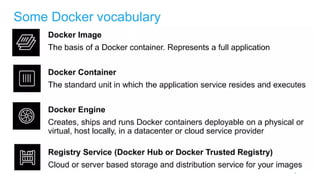
● Docker Vocabulary
● Container Architecture
● Docker Compose
● Dockerfile
● Docker Swarm
● Docker Networking
What is Docker
Docker is an open source platform that enables developers to build, deploy, run, update and manage
containers—standardized, executable components that combine application source code with the operating
system (OS) libraries and dependencies required to run that code in any environment.
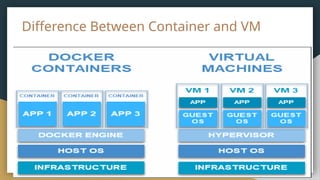
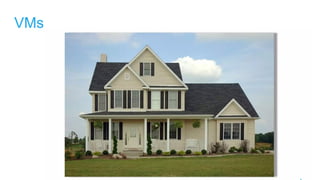
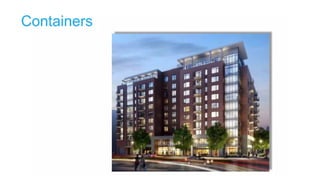
Difference Between Container and VM
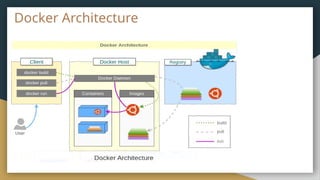
Docker Architecture
Docker Compose
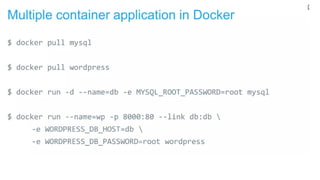
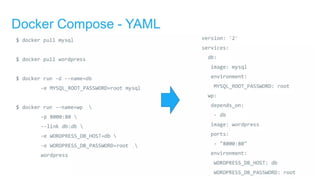
Docker Compose is a tool for defining and running multi-container applications. It is the key to unlocking a
streamlined and efficient development and deployment experience.
Dockerfile
Dockerfile is a simple text file that consists of instructions to build Docker images.
The advantage of a Dockerfile over just storing the binary image (or a snapshot/template in other
virtualization systems) is that the automatic builds will ensure you have the latest version available.
Dockerfile Example to Setup React Application with
Nginx
# Setup React Application using Node 18
FROM node:18 AS build
WORKDIR /app
COPY package.json package-lock.json ./
RUN npm install
COPY . ./
RUN npm run build
# Serve the application using Nginx
FROM nginx:alpine
COPY --from=build /app/build /usr/share/nginx/html
EXPOSE 80
CMD ["nginx", "-g", "daemon off;"]
Docker Swarm
A Docker Swarm is a container orchestration tool running the Docker application. It has been configured to
join together in a cluster. The activities of the cluster are controlled by a swarm manager, and machines that
have joined the cluster are referred to as nodes.
Docker Networking
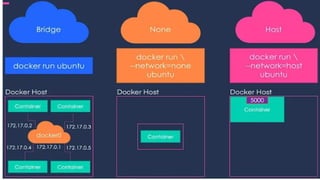
Docker Networking allows you to create a Network of Docker Containers managed by a master node called
the manager. Containers inside the Docker Network can talk to each other by sharing packets of information.
In this article, we will discuss some basic commands that would help you get started with Docker Networking.
Thank You

Introduction to Docker by Techserverglobal

  • 1.
  • 2.
    Agenda ● What isDocker? ● Difference between container and VM ● Docker Vocabulary ● Container Architecture ● Docker Compose ● Dockerfile ● Docker Swarm ● Docker Networking
  • 3.
    What is Docker Dockeris an open source platform that enables developers to build, deploy, run, update and manage containers—standardized, executable components that combine application source code with the operating system (OS) libraries and dependencies required to run that code in any environment.
  • 4.
  • 8.
  • 9.
    Docker Compose Docker Composeis a tool for defining and running multi-container applications. It is the key to unlocking a streamlined and efficient development and deployment experience.
  • 12.
    Dockerfile Dockerfile is asimple text file that consists of instructions to build Docker images. The advantage of a Dockerfile over just storing the binary image (or a snapshot/template in other virtualization systems) is that the automatic builds will ensure you have the latest version available.
  • 13.
    Dockerfile Example toSetup React Application with Nginx # Setup React Application using Node 18 FROM node:18 AS build WORKDIR /app COPY package.json package-lock.json ./ RUN npm install COPY . ./ RUN npm run build # Serve the application using Nginx FROM nginx:alpine COPY --from=build /app/build /usr/share/nginx/html EXPOSE 80 CMD ["nginx", "-g", "daemon off;"]
  • 14.
    Docker Swarm A DockerSwarm is a container orchestration tool running the Docker application. It has been configured to join together in a cluster. The activities of the cluster are controlled by a swarm manager, and machines that have joined the cluster are referred to as nodes.
  • 15.
    Docker Networking Docker Networkingallows you to create a Network of Docker Containers managed by a master node called the manager. Containers inside the Docker Network can talk to each other by sharing packets of information. In this article, we will discuss some basic commands that would help you get started with Docker Networking.
  • 17.