Inside a computer
Word processing
(Check password on Slide 3)
 You should use the same
User Name and Password as
you used in week 1
The LEFT
mouse button
to select
Recap Dummies videos:
Section 1 – Start a Program
Hardware or Software?
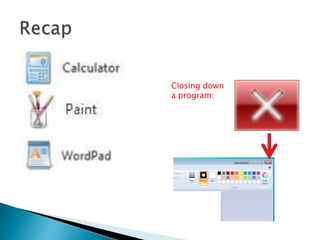
Closing down
a program:
 Portable – so you can work from anywhere
 Small – takes up less space at home or at
work
 Runs off rechargeable batteries
 Tend to be cheaper – you get more for your
money
 Tend to be more comfortable to use
 Easier to upgrade or repair…
 A computer is basically a box with several
separate electronic components wired
together inside…
Video on next slide…
The Processor or CPU:
The brain of the computer
The Processor or CPU:
The brain of the computer
Random Access Memory (RAM):
Short term memory used
by the CPU (volatile!)
The Processor or CPU:
The brain of the computer
Random Access Memory (RAM):
Short term memory used
by the CPU (volatile!)
Hard Drive:
Long term storage
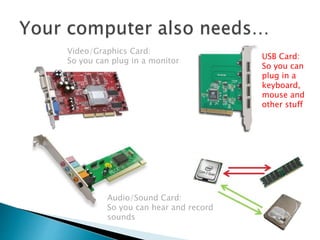
Video/Graphics Card:
So you can plug in a monitor
Video/Graphics Card:
So you can plug in a monitor
Audio/Sound Card:
So you can hear and record
sounds
Video/Graphics Card:
So you can plug in a monitor
Audio/Sound Card:
So you can hear and record
sounds
USB Card:
So you can
plug in a
keyboard,
mouse and
other stuff
Your PC
 …everything is connected together on a
motherboard… (see next slide)
PSU (Power Supply Unit):
The mains adaptor
Fan:
Keeps everything from
over heating
 …laptops are exactly the same except they
make the parts smaller!
 Any questions so far?
Some of this
should look
familiar from
using Paint:
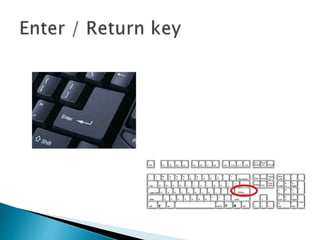
Be warned… these keys can
change location slightly
depending on the
manufacturer of the
keyboard
5 John Street
Manchester
M12 3RR
13 April 2014
Dear Sir
I wish to thank you for your kindness during my recent visit to your hotel.
I was very impressed with the quality of your staff and would not hesitate to
stay again.
Many thanks
Joe
Save
or
Save As…?
 So far you have saved files to the Documents
folder
 These will be erased when you shutdown the
computer
 To keep your work you should Save As to a
folder on the network
 (We’ll cover this more in-depth next week…)
 Next Week:
◦ Microsoft Windows
◦ Advanced use of the mouse
◦ Playing and recording sound
◦ Playing videos
ICT for Beginners - session 2 (C&G 4249 iTQ) - Inside a PC

ICT for Beginners - session 2 (C&G 4249 iTQ) - Inside a PC

  • 1.
    Inside a computer Wordprocessing (Check password on Slide 3)
  • 3.
     You shoulduse the same User Name and Password as you used in week 1
  • 4.
    The LEFT mouse button toselect Recap Dummies videos: Section 1 – Start a Program
  • 5.
  • 6.
  • 13.
     Portable –so you can work from anywhere  Small – takes up less space at home or at work  Runs off rechargeable batteries
  • 14.
     Tend tobe cheaper – you get more for your money  Tend to be more comfortable to use  Easier to upgrade or repair…
  • 15.
     A computeris basically a box with several separate electronic components wired together inside… Video on next slide…
  • 16.
    The Processor orCPU: The brain of the computer
  • 17.
    The Processor orCPU: The brain of the computer Random Access Memory (RAM): Short term memory used by the CPU (volatile!)
  • 18.
    The Processor orCPU: The brain of the computer Random Access Memory (RAM): Short term memory used by the CPU (volatile!) Hard Drive: Long term storage
  • 20.
    Video/Graphics Card: So youcan plug in a monitor
  • 21.
    Video/Graphics Card: So youcan plug in a monitor Audio/Sound Card: So you can hear and record sounds
  • 22.
    Video/Graphics Card: So youcan plug in a monitor Audio/Sound Card: So you can hear and record sounds USB Card: So you can plug in a keyboard, mouse and other stuff
  • 26.
  • 27.
     …everything isconnected together on a motherboard… (see next slide) PSU (Power Supply Unit): The mains adaptor Fan: Keeps everything from over heating
  • 29.
     …laptops areexactly the same except they make the parts smaller!
  • 30.
  • 32.
    Some of this shouldlook familiar from using Paint:
  • 33.
    Be warned… thesekeys can change location slightly depending on the manufacturer of the keyboard
  • 36.
    5 John Street Manchester M123RR 13 April 2014 Dear Sir I wish to thank you for your kindness during my recent visit to your hotel. I was very impressed with the quality of your staff and would not hesitate to stay again. Many thanks Joe
  • 37.
  • 39.
     So faryou have saved files to the Documents folder  These will be erased when you shutdown the computer  To keep your work you should Save As to a folder on the network  (We’ll cover this more in-depth next week…)
  • 41.
     Next Week: ◦Microsoft Windows ◦ Advanced use of the mouse ◦ Playing and recording sound ◦ Playing videos