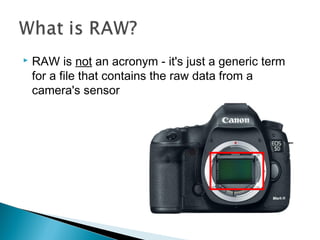
 RAW is not an acronym - it's just a generic term
for a file that contains the raw data from a
camera's sensor
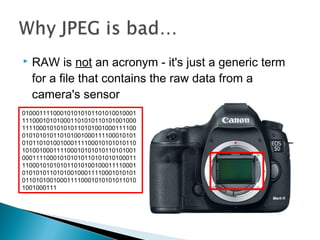
 RAW is not an acronym - it's just a generic term
for a file that contains the raw data from a
camera's sensor
010001111000101010101101010010001
111000101010001101010110101001000
111100010101010110101001000111100
010101010110101001000111100010101
010110101001000111100010101010110
101001000111100010101010110101001
000111100010101010110101010100011
110001010101011010100100011110001
010101011010100100011110001010101
011010100100011110001010101011010
1001000111
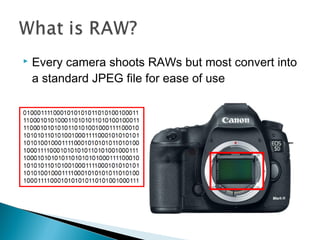
 Every camera shoots RAWs but most convert into
a standard JPEG file for ease of use
 When you shoot in JPEG adjustments are applied
to the image via the camera's image processor at
the time of capture
01000111100010101010110
10100100011110001010100
01101010110101001000111
10001010101011010100100
01111000101010101101010
01000111100110101001000
11101010110101010001101
011101
Converted by camera
RAW FILE JPEG FILE
 Then the RAW data is deleted – LOST!
01000111100010101010110
10100100011110001010100
01101010110101001000111
10001010101011010100100
01111000101010101101010
01000111100110101001000
11101010110101010001101
011101
X JPEG FILE
 Leaving you with a nicely exposed JPEG photo –
but you’ve lost all the extra RAW data!
JPEG FILE
 You can adjust colour
temperature, contrast,
shadow depth,
highlight brightness,
saturation, sharpening,
exposure...
…without ‘degrading’
the image
 RAW file is a bit like a digital version of an old
negative
 These adjustments take place in special RAW
conversion software
 In traditional photography you always get the best
quality photo by printing from a neg…
35mm NEGATIVE
PHOTO / PRINT
 Likewise in digital photography – using RAW
means you expose the JPEG not your camera!
35mm NEGATIVE
PHOTO / PRINT
RAW FILE
JPEG FILE
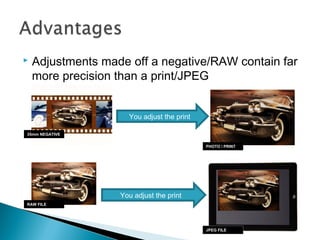
 Adjustments made off a negative/RAW contain far
more precision than a print/JPEG
You adjust the print
35mm NEGATIVE
PHOTO / PRINT
RAW FILE
JPEG FILE
RAW FILEJPEG FILE
RAW FILEJPEG FILE
RAW FILEJPEG FILE
RAW FILEJPEG FILEORGINALS
 Imported through Adobe Camera RAW (ACR)
plug-in
 Software that came with your camera
 UFRaw for GIMP or RAW Therapee
 If you just want to quickly view RAW images
before properly converting them use an image
viewer such as XnView:
 Or the software
that came with
your camera
Photography: 7 - Raw Format

Photography: 7 - Raw Format

  • 2.
     RAW isnot an acronym - it's just a generic term for a file that contains the raw data from a camera's sensor
  • 3.
     RAW isnot an acronym - it's just a generic term for a file that contains the raw data from a camera's sensor 010001111000101010101101010010001 111000101010001101010110101001000 111100010101010110101001000111100 010101010110101001000111100010101 010110101001000111100010101010110 101001000111100010101010110101001 000111100010101010110101010100011 110001010101011010100100011110001 010101011010100100011110001010101 011010100100011110001010101011010 1001000111
  • 4.
     Every camerashoots RAWs but most convert into a standard JPEG file for ease of use
  • 5.
     When youshoot in JPEG adjustments are applied to the image via the camera's image processor at the time of capture 01000111100010101010110 10100100011110001010100 01101010110101001000111 10001010101011010100100 01111000101010101101010 01000111100110101001000 11101010110101010001101 011101 Converted by camera RAW FILE JPEG FILE
  • 6.
     Then theRAW data is deleted – LOST! 01000111100010101010110 10100100011110001010100 01101010110101001000111 10001010101011010100100 01111000101010101101010 01000111100110101001000 11101010110101010001101 011101 X JPEG FILE
  • 7.
     Leaving youwith a nicely exposed JPEG photo – but you’ve lost all the extra RAW data! JPEG FILE
  • 8.
     You canadjust colour temperature, contrast, shadow depth, highlight brightness, saturation, sharpening, exposure... …without ‘degrading’ the image
  • 9.
     RAW fileis a bit like a digital version of an old negative
  • 10.
     These adjustmentstake place in special RAW conversion software
  • 11.
     In traditionalphotography you always get the best quality photo by printing from a neg… 35mm NEGATIVE PHOTO / PRINT
  • 12.
     Likewise indigital photography – using RAW means you expose the JPEG not your camera! 35mm NEGATIVE PHOTO / PRINT RAW FILE JPEG FILE
  • 13.
     Adjustments madeoff a negative/RAW contain far more precision than a print/JPEG You adjust the print You adjust the print 35mm NEGATIVE PHOTO / PRINT RAW FILE JPEG FILE
  • 14.
  • 15.
  • 16.
  • 17.
  • 18.
  • 19.
     Imported throughAdobe Camera RAW (ACR) plug-in
  • 20.
     Software thatcame with your camera  UFRaw for GIMP or RAW Therapee
  • 21.
     If youjust want to quickly view RAW images before properly converting them use an image viewer such as XnView:  Or the software that came with your camera