Chapter 6.
Computer Operation
6.1 Computer User
 A user is a person who uses a computer or network service.
 Users generally use a system or a software product without the
technical expertise required to fully understand it.
 A user often has a user account and is identified to the system by
a username (or user name). Other terms for username include login
name, screen name (or screenname), nickname (or nick)
and handle, which is derived from the identical Citizen's Band
radio term.
How the computer users think about
computers?
 Computers offer themselves as models of mind and as "objects to think with."
They do this in several ways.
 first, the world of computational theories. Some artificial intelligence
researchers explicitly endeavor to build machines that model the human mind.
Proponents of artificial life use computational processes capable of replication
and evolution to redraw the boundaries of what counts as "alive.“
 And second, there is the world of computational objects themselves:
everything from toys and games to simulation software and Internet
connections. Such mundane objects of the computer culture influence thinking
about self, life, and mind no less than the models of the computational
philosophers. Computers in everyday life make possible a theoretical tinkering
similar to what Claude Levi-Strauss (1968) described as bricolage- the process
by which individuals and cultures use the objects around them to reconfigure
the boundaries of their cognitive categories.
6.2 System booting
 What is Booting?
1. Booting is a process or set of operations that
loads and hence starts the operating system,
starting from the point when user switches on the
power button.
2. Booting or loading an operating system is
different than installing it, which is generally an
initial one-time activity.
Types of booting
1. Hard Disk Boot: In this boot process machine is started for normal
operations.
2. Disk less Network Boot: In this boot process A disk less or dateless
workstation is started remotely over a network. A machine is started for normal
operations. One or more remote file servers provide the files and programs that disk less
or dateless workstations need to boot.
3. Maintenance Boot : In this boot process A machine is started from a
hard disk, network, tape, or CD-ROM in maintenance mode. A system administrator
can perform tasks such as installing new or updated software and running diagnostic
checks.
6.3 Occupation Health and Safety
6.3.1 Basic Description of occupation health and safe
 Occupational safety and health (OSH) also commonly referred to
as occupational health and safety (OHS) or workplace health and
safety (WHS) is an area concerned with
the safety, health and welfare of people engaged in work or
employment. The goals of occupational safety and health
programs include to foster a safe and healthy work environment
 OSH may also protect co-workers, family members, employers,
customers, and many others who might be affected by the
workplace environment. In the United States the term
occupational health and safety is referred to as occupational
health and occupational and non-occupational safety and includes
safety for activities outside work.
Basic aim of occupational health and
safety.
 to secure and promote the health, safety and welfare of
people at work,
 to protect people at a place of work against risks to health or
safety,
 to promote a safe and healthy work environment that
protects workers from injury and illness and that is adapted
to their physiological and psychological needs,
 to provide for consultation and co-operation between
employers and employees in achieving the objects of this
Act,
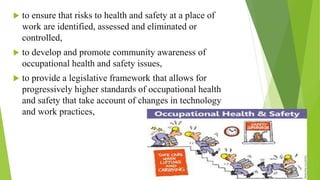
 to ensure that risks to health and safety at a place of
work are identified, assessed and eliminated or
controlled,
 to develop and promote community awareness of
occupational health and safety issues,
 to provide a legislative framework that allows for
progressively higher standards of occupational health
and safety that take account of changes in technology
and work practices,
6.3.2 Regulations for maintaining
Health and Safety.
 Maintain a safe and healthy ICT working environment Safety and Health
Regulations and Requirement
1. Comply with organizational Safety and Health regulations
2. Name correctly and locate the persons responsible for safety and health in the
workplace.
3. Carry out your working practices in accordance with legal requirements. Safety
and health risk.
4. Identify those aspects of the workplace which present a health or safety risks and
could harm yourself or other persons.
5. Report to the persons responsible for those hazard which present a high risks to
safety and health in the worksheet.
6. Rectify those safety and health risks within your capability and the scope for your job
responsibility Safety and Health workplace policies.
7. Identify which workplace policies are relevant to your working place.
8. Show that your personal conduct in the workplace does not endanger the safety and health
of yourself or other persons.
9. Follow the workplace policies and suppliers’ or manufacturers’ instructions for the safe
use of equipment, and materials.
10. Prepare a personal statement on how a safe and healthy ICT work environment in
maintained. Safe and manufacturers’ instructions as appropriate.
11. Follow safety and health regulations and organizational procedures in the event of a fire
or even requiring evacuation Ergonomic principles.
12.Practice ergonomic principles so as to avoid poor work habits which contribute to
musculoskeletal disorders for many pope who spend long hours seated at a computer
6.3.3Philippines OHS Laws or Bill
13th Congress
Senate Bill No. 621
PHILIPPINE OCCUPATIONAL SAFETY AND HEALTH CODE OF 2004
Filed on June 30, 2004 by Villar Jr., Manuel B.
AN ACT INSTITUTING AN OCCUPATIONAL SAFETY AND HEALTH
CODE, THEREBY REVISING AND CONSOLIDATING OCCUPATIONAL
SAFETY AND HEALTH LAWS AND STANDARDS FOR THE PROTECTION,
MAINTENANCE AND ENHANCEMENT OF THE PHYSICAL AND MENTAL
HEALTH OF WORKERS, AND FOR OTHER PURPOSES
6.3.4Why Occupational Health and Safety?
Because occupational health deals with all aspects of health and safety in
the workplace and has a strong focus on primary prevention of hazards.“
Health has been defined as "a state of complete physical, mental and
social well-being and not merely the absence of disease or infirmity.“
Occupational health is a multidisciplinary field of healthcareconcerned
with enabling an individual to undertake their occupation, in the way that
causes least harm to their health. Health has been defined as It contrasts,
for example, with the promotion of health and safety at work, which is
concerned with preventing harm from any incidental hazards, arising in
the workplace.
6.3.5Safety and Health Hazard
 What is Hazard?
1. A hazard is something that can cause harm if not controlled.
2. The outcome is the harm that results from an uncontrolled
hazard.
The measures that employers should take
to reduce to minimize occupational health
hazard in a business organization
• A reduction in the number of working days lost due to illness and
injury
• Retain your staff
• Motivate your workers and boost productivity
• Protect the reputation of your company
• Shield yourself from potential legal action and reduce your
insurance premiums.
Computer
Health
and
Safety
. With the increase in computer use, a number of health and safety
concerns related to vision and body aches and pains have arisen. Many
problem with computer use are temporary and can be revolved by
adopting simple corrective action. Most problem related to computer use
are completely preventable. However it is important to seek medical
attention if you do experience sysmtom including:
• Continual or recurring discomfort
• Aches and pain
• Throbbing
• Numbness
• Burning sensation
• Or stiffneck
The main risks associated with using
computers
1. Musculoskeletal problems
 These can range from general aches and pains to more serious problem and
includes:
o Upper limb disorders such as repetitive strain injury(RSI) and carpal tunnel
syndrome.
o Back and neck pain and discomfort.
o Tension, stress headaches and related ailments
These types of problem can be caused by:
• Maintaining an unnatural or unhealthy posture while using the
computers
• Inadequate lower back support
• Sitting in the same position for an extended period of time.
• An ergonomically poor work situation set up.
2. Eye strain
 Computer users can experience a number of symptoms related to
vision including:
o Visual fatigue
o Blurred or double vision
o Burning and watering eyes
o Headache and frequent changes in prescription glasses.
Precaution to prevent risks associated with
computer
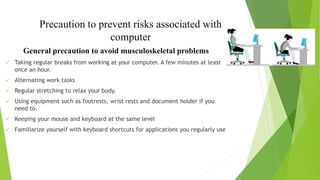
General precaution to avoid musculoskeletal problems
 Taking regular breaks from working at your computer. A few minutes at least
once an hour.
 Alternating work tasks
 Regular stretching to relax your body.
 Using equipment such as footrests, wrist rests and document holder if you
need to.
 Keeping your mouse and keyboard at the same level
 Familiarize yourself with keyboard shortcuts for applications you regularly use
General Precautions to avoid eyestrain
 Blinking regularly
 Adjusting the screen height
 Adjusting the brightness and contrast on your monitor
 Keeping the monitor have a right distance away from your eyes.
 Regular eye testing
Relation between computer ergonomics and
computer hazard.
 A work station outfitted with the proper furniture and equipment
can lead to a more comfortable and safer work environment.
Ergonomics injuries occur at workstations are designed properly,
most ergonomics hazard can be reduced if not eliminated.
 Computer are essential tool in the work of organization. Although
problem can occurred through their use, with the proper
equipment, ergonomics workstation design, proper techniques
and working practices, the risks of the problems can be.

ICT

  • 1.
  • 2.
    6.1 Computer User A user is a person who uses a computer or network service.  Users generally use a system or a software product without the technical expertise required to fully understand it.  A user often has a user account and is identified to the system by a username (or user name). Other terms for username include login name, screen name (or screenname), nickname (or nick) and handle, which is derived from the identical Citizen's Band radio term.
  • 3.
    How the computerusers think about computers?  Computers offer themselves as models of mind and as "objects to think with." They do this in several ways.  first, the world of computational theories. Some artificial intelligence researchers explicitly endeavor to build machines that model the human mind. Proponents of artificial life use computational processes capable of replication and evolution to redraw the boundaries of what counts as "alive.“  And second, there is the world of computational objects themselves: everything from toys and games to simulation software and Internet connections. Such mundane objects of the computer culture influence thinking about self, life, and mind no less than the models of the computational philosophers. Computers in everyday life make possible a theoretical tinkering similar to what Claude Levi-Strauss (1968) described as bricolage- the process by which individuals and cultures use the objects around them to reconfigure the boundaries of their cognitive categories.
  • 4.
    6.2 System booting What is Booting? 1. Booting is a process or set of operations that loads and hence starts the operating system, starting from the point when user switches on the power button. 2. Booting or loading an operating system is different than installing it, which is generally an initial one-time activity.
  • 6.
    Types of booting 1.Hard Disk Boot: In this boot process machine is started for normal operations. 2. Disk less Network Boot: In this boot process A disk less or dateless workstation is started remotely over a network. A machine is started for normal operations. One or more remote file servers provide the files and programs that disk less or dateless workstations need to boot. 3. Maintenance Boot : In this boot process A machine is started from a hard disk, network, tape, or CD-ROM in maintenance mode. A system administrator can perform tasks such as installing new or updated software and running diagnostic checks.
  • 7.
    6.3 Occupation Healthand Safety 6.3.1 Basic Description of occupation health and safe  Occupational safety and health (OSH) also commonly referred to as occupational health and safety (OHS) or workplace health and safety (WHS) is an area concerned with the safety, health and welfare of people engaged in work or employment. The goals of occupational safety and health programs include to foster a safe and healthy work environment  OSH may also protect co-workers, family members, employers, customers, and many others who might be affected by the workplace environment. In the United States the term occupational health and safety is referred to as occupational health and occupational and non-occupational safety and includes safety for activities outside work.
  • 8.
    Basic aim ofoccupational health and safety.  to secure and promote the health, safety and welfare of people at work,  to protect people at a place of work against risks to health or safety,  to promote a safe and healthy work environment that protects workers from injury and illness and that is adapted to their physiological and psychological needs,  to provide for consultation and co-operation between employers and employees in achieving the objects of this Act,
  • 9.
     to ensurethat risks to health and safety at a place of work are identified, assessed and eliminated or controlled,  to develop and promote community awareness of occupational health and safety issues,  to provide a legislative framework that allows for progressively higher standards of occupational health and safety that take account of changes in technology and work practices,
  • 10.
    6.3.2 Regulations formaintaining Health and Safety.  Maintain a safe and healthy ICT working environment Safety and Health Regulations and Requirement 1. Comply with organizational Safety and Health regulations 2. Name correctly and locate the persons responsible for safety and health in the workplace. 3. Carry out your working practices in accordance with legal requirements. Safety and health risk. 4. Identify those aspects of the workplace which present a health or safety risks and could harm yourself or other persons. 5. Report to the persons responsible for those hazard which present a high risks to safety and health in the worksheet.
  • 11.
    6. Rectify thosesafety and health risks within your capability and the scope for your job responsibility Safety and Health workplace policies. 7. Identify which workplace policies are relevant to your working place. 8. Show that your personal conduct in the workplace does not endanger the safety and health of yourself or other persons. 9. Follow the workplace policies and suppliers’ or manufacturers’ instructions for the safe use of equipment, and materials. 10. Prepare a personal statement on how a safe and healthy ICT work environment in maintained. Safe and manufacturers’ instructions as appropriate. 11. Follow safety and health regulations and organizational procedures in the event of a fire or even requiring evacuation Ergonomic principles. 12.Practice ergonomic principles so as to avoid poor work habits which contribute to musculoskeletal disorders for many pope who spend long hours seated at a computer
  • 12.
    6.3.3Philippines OHS Lawsor Bill 13th Congress Senate Bill No. 621 PHILIPPINE OCCUPATIONAL SAFETY AND HEALTH CODE OF 2004 Filed on June 30, 2004 by Villar Jr., Manuel B. AN ACT INSTITUTING AN OCCUPATIONAL SAFETY AND HEALTH CODE, THEREBY REVISING AND CONSOLIDATING OCCUPATIONAL SAFETY AND HEALTH LAWS AND STANDARDS FOR THE PROTECTION, MAINTENANCE AND ENHANCEMENT OF THE PHYSICAL AND MENTAL HEALTH OF WORKERS, AND FOR OTHER PURPOSES
  • 13.
    6.3.4Why Occupational Healthand Safety? Because occupational health deals with all aspects of health and safety in the workplace and has a strong focus on primary prevention of hazards.“ Health has been defined as "a state of complete physical, mental and social well-being and not merely the absence of disease or infirmity.“ Occupational health is a multidisciplinary field of healthcareconcerned with enabling an individual to undertake their occupation, in the way that causes least harm to their health. Health has been defined as It contrasts, for example, with the promotion of health and safety at work, which is concerned with preventing harm from any incidental hazards, arising in the workplace.
  • 14.
    6.3.5Safety and HealthHazard  What is Hazard? 1. A hazard is something that can cause harm if not controlled. 2. The outcome is the harm that results from an uncontrolled hazard.
  • 15.
    The measures thatemployers should take to reduce to minimize occupational health hazard in a business organization • A reduction in the number of working days lost due to illness and injury • Retain your staff • Motivate your workers and boost productivity • Protect the reputation of your company • Shield yourself from potential legal action and reduce your insurance premiums.
  • 16.
  • 17.
    . With theincrease in computer use, a number of health and safety concerns related to vision and body aches and pains have arisen. Many problem with computer use are temporary and can be revolved by adopting simple corrective action. Most problem related to computer use are completely preventable. However it is important to seek medical attention if you do experience sysmtom including: • Continual or recurring discomfort • Aches and pain • Throbbing • Numbness • Burning sensation • Or stiffneck
  • 18.
    The main risksassociated with using computers 1. Musculoskeletal problems  These can range from general aches and pains to more serious problem and includes: o Upper limb disorders such as repetitive strain injury(RSI) and carpal tunnel syndrome. o Back and neck pain and discomfort. o Tension, stress headaches and related ailments
  • 19.
    These types ofproblem can be caused by: • Maintaining an unnatural or unhealthy posture while using the computers • Inadequate lower back support • Sitting in the same position for an extended period of time. • An ergonomically poor work situation set up.
  • 20.
    2. Eye strain Computer users can experience a number of symptoms related to vision including: o Visual fatigue o Blurred or double vision o Burning and watering eyes o Headache and frequent changes in prescription glasses.
  • 21.
    Precaution to preventrisks associated with computer General precaution to avoid musculoskeletal problems  Taking regular breaks from working at your computer. A few minutes at least once an hour.  Alternating work tasks  Regular stretching to relax your body.  Using equipment such as footrests, wrist rests and document holder if you need to.  Keeping your mouse and keyboard at the same level  Familiarize yourself with keyboard shortcuts for applications you regularly use
  • 22.
    General Precautions toavoid eyestrain  Blinking regularly  Adjusting the screen height  Adjusting the brightness and contrast on your monitor  Keeping the monitor have a right distance away from your eyes.  Regular eye testing
  • 23.
    Relation between computerergonomics and computer hazard.  A work station outfitted with the proper furniture and equipment can lead to a more comfortable and safer work environment. Ergonomics injuries occur at workstations are designed properly, most ergonomics hazard can be reduced if not eliminated.  Computer are essential tool in the work of organization. Although problem can occurred through their use, with the proper equipment, ergonomics workstation design, proper techniques and working practices, the risks of the problems can be.