Cheat Sheet
IBM Notes 9 Cheat Sheet


1. Content Assist within the XPages Source Editor
Notes 9 introduces new content assist functionality in the XPages source editor. This
functionality allows you to use content assist when working in 'source mode' in an XPage.
Similar to other Eclipse editors, pressing CTRL+SPACE will activate the content assist
functionality.

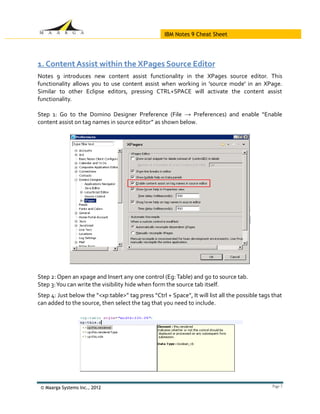
Step 1: Go to the Domino Designer Preference (File → Preferences) and enable “Enable
content assist on tag names in source editor” as shown below.


Step 2: Open an xpage and Insert any one control (Eg: Table) and go to source tab.
Step 3: You can write the visibility hide when form the source tab itself.
Step 4: Just below the “<xp:table>” tag press “Ctrl + Space”, It will list all the possible tags that
can added to the source, then select the tag that you need to include.


 © Maarga Systems Inc., 2012                                                                     Page 2
IBM Notes 9 Cheat Sheet

2. XPages Source Editor Hyperlink Navigation
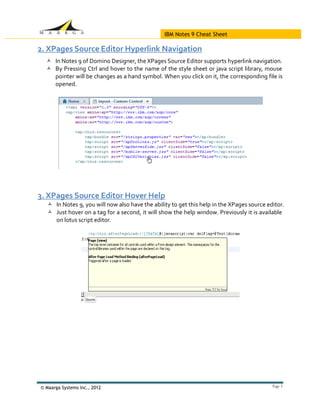
   In Notes 9 of Domino Designer, the XPages Source Editor supports hyperlink navigation.
   By Pressing Ctrl and hover to the name of the style sheet or java script library, mouse
    pointer will be changes as a hand symbol. When you click on it, the corresponding file is
    opened.


3. XPages Source Editor Hover Help
   In Notes 9, you will now also have the ability to get this help in the XPages source editor.
   Just hover on a tag for a second, it will show the help window. Previously it is available
    on lotus script editor.


© Maarga Systems Inc., 2012                                                                Page 3
IBM Notes 9 Cheat Sheet


4. PNG File Support for Image Resources
In Notes 9, you now have the ability to import PNG files into Designer as image resources. This
file type is now a selection choice in the Image type combo box.

5. "Close Application" Applications' Navigator Menu Option

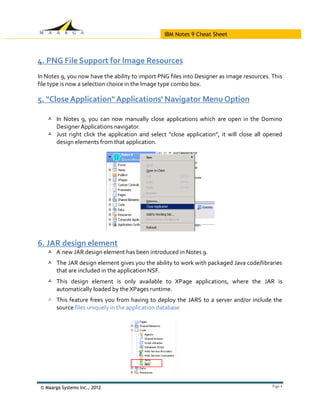
    In Notes 9, you can now manually close applications which are open in the Domino
     Designer Applications navigator.
    Just right click the application and select “close application”, it will close all opened
     design elements from that application.


6. JAR design element
    A new JAR design element has been introduced in Notes 9.
    The JAR design element gives you the ability to work with packaged Java code/libraries
     that are included in the application NSF.
    This design element is only available to XPage applications, where the JAR is
     automatically loaded by the XPages runtime.
    This feature frees you from having to deploy the JARS to a server and/or include the
     source files uniquely in the application database


 © Maarga Systems Inc., 2012                                                               Page 4
IBM Notes 9 Cheat Sheet

7. Send Mail Simple Action
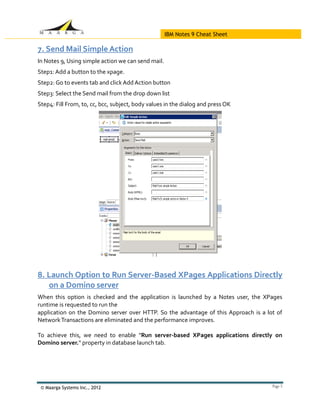
In Notes 9, Using simple action we can send mail.
Step1: Add a button to the xpage.
Step2: Go to events tab and click Add Action button
Step3: Select the Send mail from the drop down list
Step4: Fill From, to, cc, bcc, subject, body values in the dialog and press OK


8. Launch Option to Run Server-Based XPages Applications Directly
   on a Domino server
When this option is checked and the application is launched by a Notes user, the XPages
runtime is requested to run the
application on the Domino server over HTTP. So the advantage of this Approach is a lot of
Network Transactions are eliminated and the performance improves.

To achieve this, we need to enable "Run server-based XPages applications directly on
Domino server." property in database launch tab.


 © Maarga Systems Inc., 2012                                                         Page 5
IBM Notes 9 Cheat Sheet


9.New Calendaring and Scheduling (C&S) back end classes
In Notes 9, we are provided with the ability to create, read, update, and remove calendar data
in a personal mail file using standardized iCalendar (RFC 5545) data format. Using two classes
     Notes Calendar
     NotesCalendarEntry

10. Spell checker added to CKEditor

A spell checker has now been added to the CKEditor in Xpages. It will be available on both the
server and the client.


   Disclaimer: All these features are based on Notes 9 public beta and not the GA product. IBM reserves the rights to hold,
   change or remove the above features in the general release


 © Maarga Systems Inc., 2012                                                                                                  Page 6

IBM Notes 9 Social Edition Cheat Sheet

  • 1.
  • 2.
    IBM Notes 9Cheat Sheet 1. Content Assist within the XPages Source Editor Notes 9 introduces new content assist functionality in the XPages source editor. This functionality allows you to use content assist when working in 'source mode' in an XPage. Similar to other Eclipse editors, pressing CTRL+SPACE will activate the content assist functionality. Step 1: Go to the Domino Designer Preference (File → Preferences) and enable “Enable content assist on tag names in source editor” as shown below. Step 2: Open an xpage and Insert any one control (Eg: Table) and go to source tab. Step 3: You can write the visibility hide when form the source tab itself. Step 4: Just below the “<xp:table>” tag press “Ctrl + Space”, It will list all the possible tags that can added to the source, then select the tag that you need to include. © Maarga Systems Inc., 2012 Page 2
  • 3.
    IBM Notes 9Cheat Sheet 2. XPages Source Editor Hyperlink Navigation  In Notes 9 of Domino Designer, the XPages Source Editor supports hyperlink navigation.  By Pressing Ctrl and hover to the name of the style sheet or java script library, mouse pointer will be changes as a hand symbol. When you click on it, the corresponding file is opened. 3. XPages Source Editor Hover Help  In Notes 9, you will now also have the ability to get this help in the XPages source editor.  Just hover on a tag for a second, it will show the help window. Previously it is available on lotus script editor. © Maarga Systems Inc., 2012 Page 3
  • 4.
    IBM Notes 9Cheat Sheet 4. PNG File Support for Image Resources In Notes 9, you now have the ability to import PNG files into Designer as image resources. This file type is now a selection choice in the Image type combo box. 5. "Close Application" Applications' Navigator Menu Option  In Notes 9, you can now manually close applications which are open in the Domino Designer Applications navigator.  Just right click the application and select “close application”, it will close all opened design elements from that application. 6. JAR design element  A new JAR design element has been introduced in Notes 9.  The JAR design element gives you the ability to work with packaged Java code/libraries that are included in the application NSF.  This design element is only available to XPage applications, where the JAR is automatically loaded by the XPages runtime.  This feature frees you from having to deploy the JARS to a server and/or include the source files uniquely in the application database © Maarga Systems Inc., 2012 Page 4
  • 5.
    IBM Notes 9Cheat Sheet 7. Send Mail Simple Action In Notes 9, Using simple action we can send mail. Step1: Add a button to the xpage. Step2: Go to events tab and click Add Action button Step3: Select the Send mail from the drop down list Step4: Fill From, to, cc, bcc, subject, body values in the dialog and press OK 8. Launch Option to Run Server-Based XPages Applications Directly on a Domino server When this option is checked and the application is launched by a Notes user, the XPages runtime is requested to run the application on the Domino server over HTTP. So the advantage of this Approach is a lot of Network Transactions are eliminated and the performance improves. To achieve this, we need to enable "Run server-based XPages applications directly on Domino server." property in database launch tab. © Maarga Systems Inc., 2012 Page 5
  • 6.
    IBM Notes 9Cheat Sheet 9.New Calendaring and Scheduling (C&S) back end classes In Notes 9, we are provided with the ability to create, read, update, and remove calendar data in a personal mail file using standardized iCalendar (RFC 5545) data format. Using two classes  Notes Calendar  NotesCalendarEntry 10. Spell checker added to CKEditor A spell checker has now been added to the CKEditor in Xpages. It will be available on both the server and the client. Disclaimer: All these features are based on Notes 9 public beta and not the GA product. IBM reserves the rights to hold, change or remove the above features in the general release © Maarga Systems Inc., 2012 Page 6