© Copyright IBM Corporation 2018.
IBM Z and DS8880 IO Infrastructure
Modernization
Brian Sherman
IBM Distinguished Engineer
bsherman@ca.ibm.com
© Copyright IBM Corporation 2018.
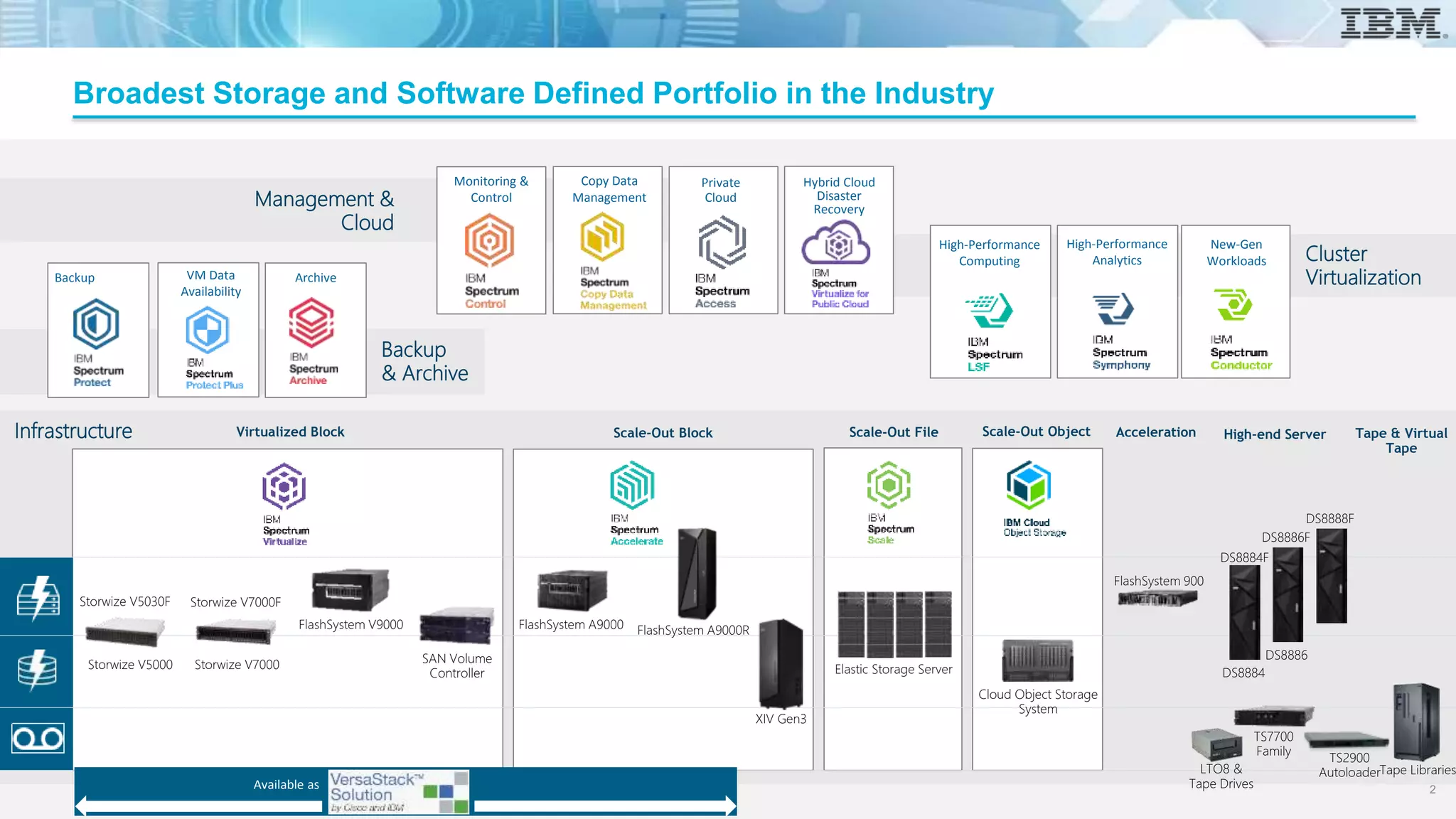
Broadest Storage and Software Defined Portfolio in the Industry
2
Infrastructure Scale-Out FileScale-Out Block Scale-Out ObjectVirtualized Block
ArchiveBackup
Monitoring &
ControlManagement &
Cloud
Backup
& Archive
Copy Data
Management
Cloud Object Storage
System
Elastic Storage Server
XIV Gen3
High-Performance
Computing
New-Gen
Workloads
High-Performance
Analytics Cluster
Virtualization
Available as
FlashSystem A9000 FlashSystem A9000RFlashSystem V9000
Storwize V7000FStorwize V5030F
SAN Volume
Controller
Storwize V5000 Storwize V7000
High-end Server Tape & Virtual
Tape
TS7700
Family
TS2900
AutoloaderTape LibrariesLTO8 &
Tape Drives
VM Data
Availability
Acceleration
FlashSystem 900
DS8884
DS8884F
DS8886
DS8886F
DS8888F
Private
Cloud
Hybrid Cloud
Disaster
Recovery
2
© Copyright IBM Corporation 2018.
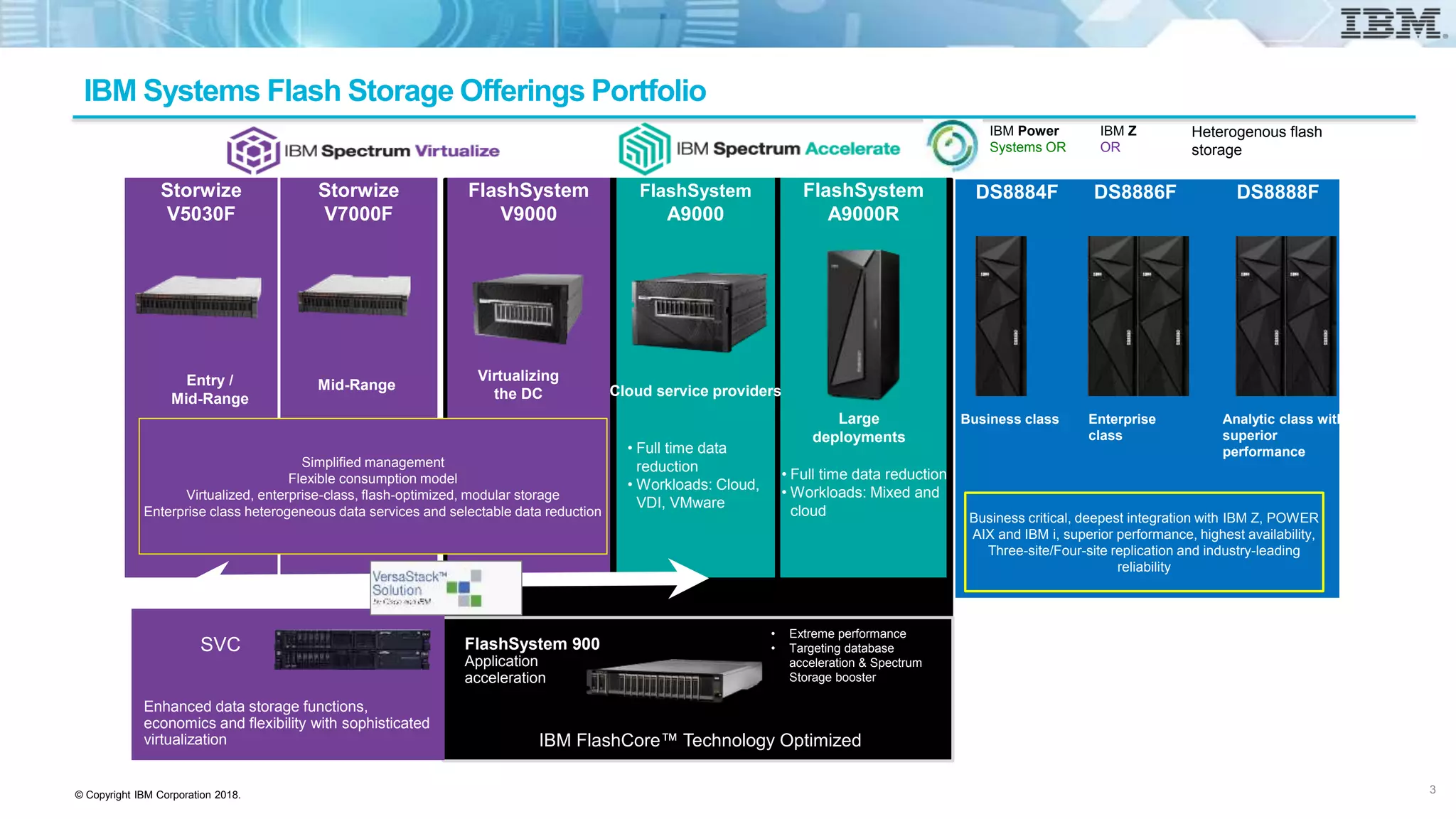
IBM Systems Flash Storage Offerings Portfolio
DS8888F
• Extreme performance
• Targeting database
acceleration & Spectrum
Storage booster
FlashSystem 900
Application
acceleration
IBM FlashCore™ Technology Optimized
FlashSystem
A9000
FlashSystem
A9000R
• Full time data
reduction
• Workloads: Cloud,
VDI, VMware
Large
deployments
FlashSystem
V9000
Virtualizing
the DC Cloud service providers
• Full time data reduction
• Workloads: Mixed and
cloud
Storwize
V7000F
Mid-Range
Storwize
V5030F
Entry /
Mid-Range
Enhanced data storage functions,
economics and flexibility with sophisticated
virtualization
SVC
Simplified management
Flexible consumption model
Virtualized, enterprise-class, flash-optimized, modular storage
Enterprise class heterogeneous data services and selectable data reduction
DS8884F
Business class
DS8886F
Enterprise
class
Analytic class with
superior
performance
Business critical, deepest integration with IBM Z, POWER
AIX and IBM i, superior performance, highest availability,
Three-site/Four-site replication and industry-leading
reliability
IBM Power
Systems OR
IBM Z
OR
Heterogenous flash
storage
3
© Copyright IBM Corporation 2018.
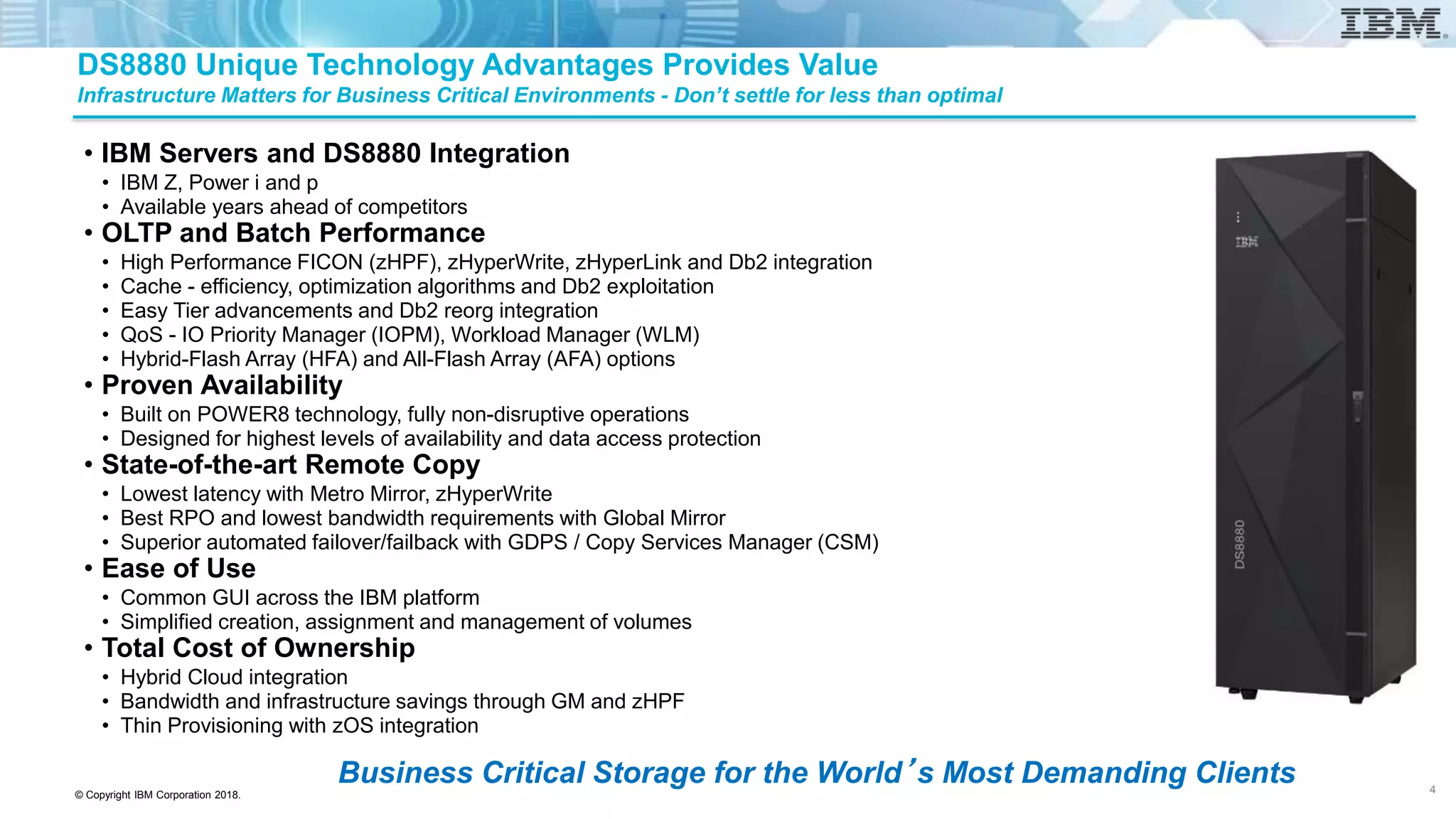
DS8880 Unique Technology Advantages Provides Value
Infrastructure Matters for Business Critical Environments - Don’t settle for less than optimal
• IBM Servers and DS8880 Integration
• IBM Z, Power i and p
• Available years ahead of competitors
• OLTP and Batch Performance
• High Performance FICON (zHPF), zHyperWrite, zHyperLink and Db2 integration
• Cache - efficiency, optimization algorithms and Db2 exploitation
• Easy Tier advancements and Db2 reorg integration
• QoS - IO Priority Manager (IOPM), Workload Manager (WLM)
• Hybrid-Flash Array (HFA) and All-Flash Array (AFA) options
• Proven Availability
• Built on POWER8 technology, fully non-disruptive operations
• Designed for highest levels of availability and data access protection
• State-of-the-art Remote Copy
• Lowest latency with Metro Mirror, zHyperWrite
• Best RPO and lowest bandwidth requirements with Global Mirror
• Superior automated failover/failback with GDPS / Copy Services Manager (CSM)
• Ease of Use
• Common GUI across the IBM platform
• Simplified creation, assignment and management of volumes
• Total Cost of Ownership
• Hybrid Cloud integration
• Bandwidth and infrastructure savings through GM and zHPF
• Thin Provisioning with zOS integration
Business Critical Storage for the World’s Most Demanding Clients 4
© Copyright IBM Corporation 2018.
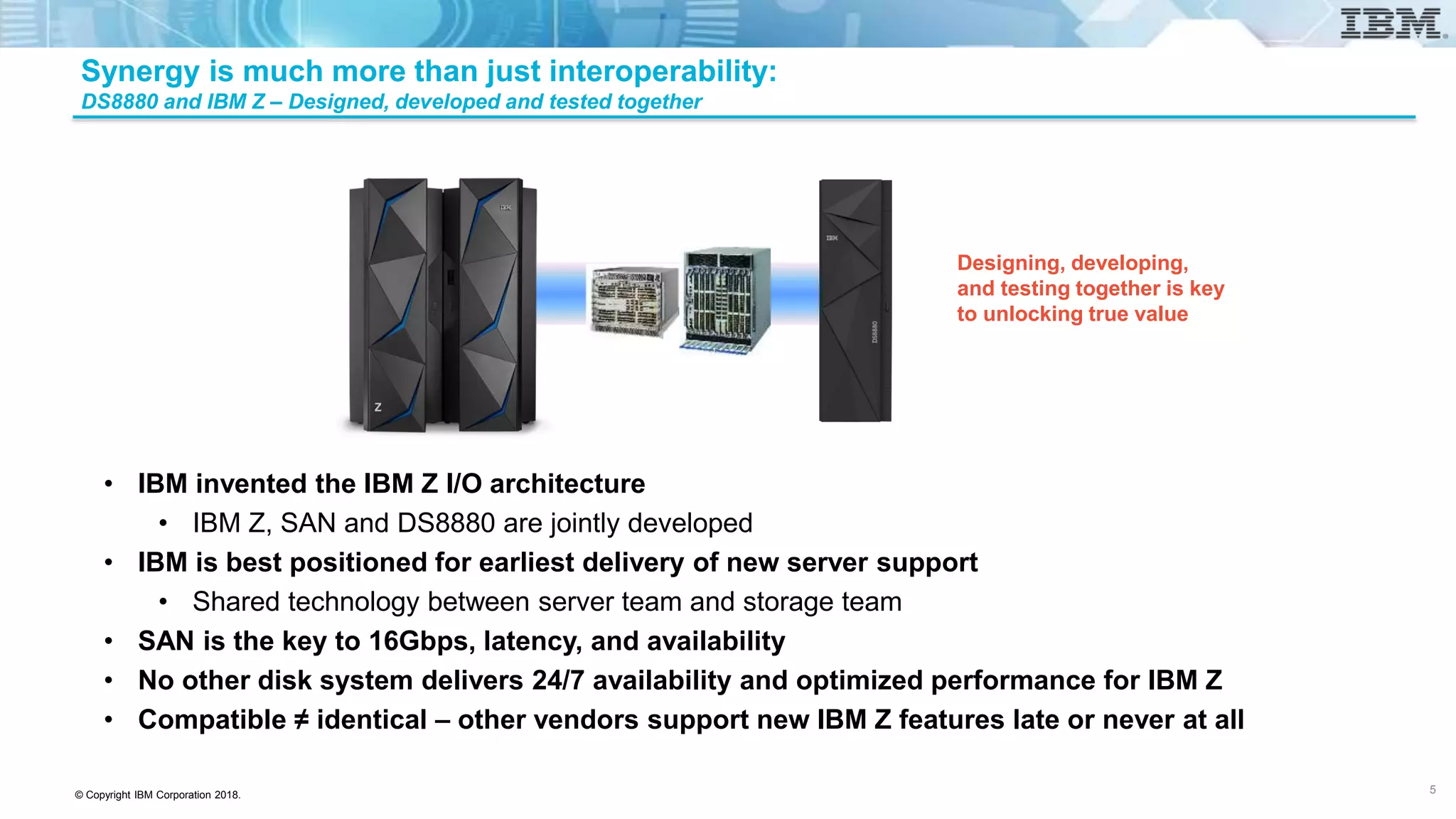
Designing, developing,
and testing together is key
to unlocking true value
Synergy is much more than just interoperability:
DS8880 and IBM Z – Designed, developed and tested together
• IBM invented the IBM Z I/O architecture
• IBM Z, SAN and DS8880 are jointly developed
• IBM is best positioned for earliest delivery of new server support
• Shared technology between server team and storage team
• SAN is the key to 16Gbps, latency, and availability
• No other disk system delivers 24/7 availability and optimized performance for IBM Z
• Compatible ≠ identical – other vendors support new IBM Z features late or never at all
5
© Copyright IBM Corporation 2018.
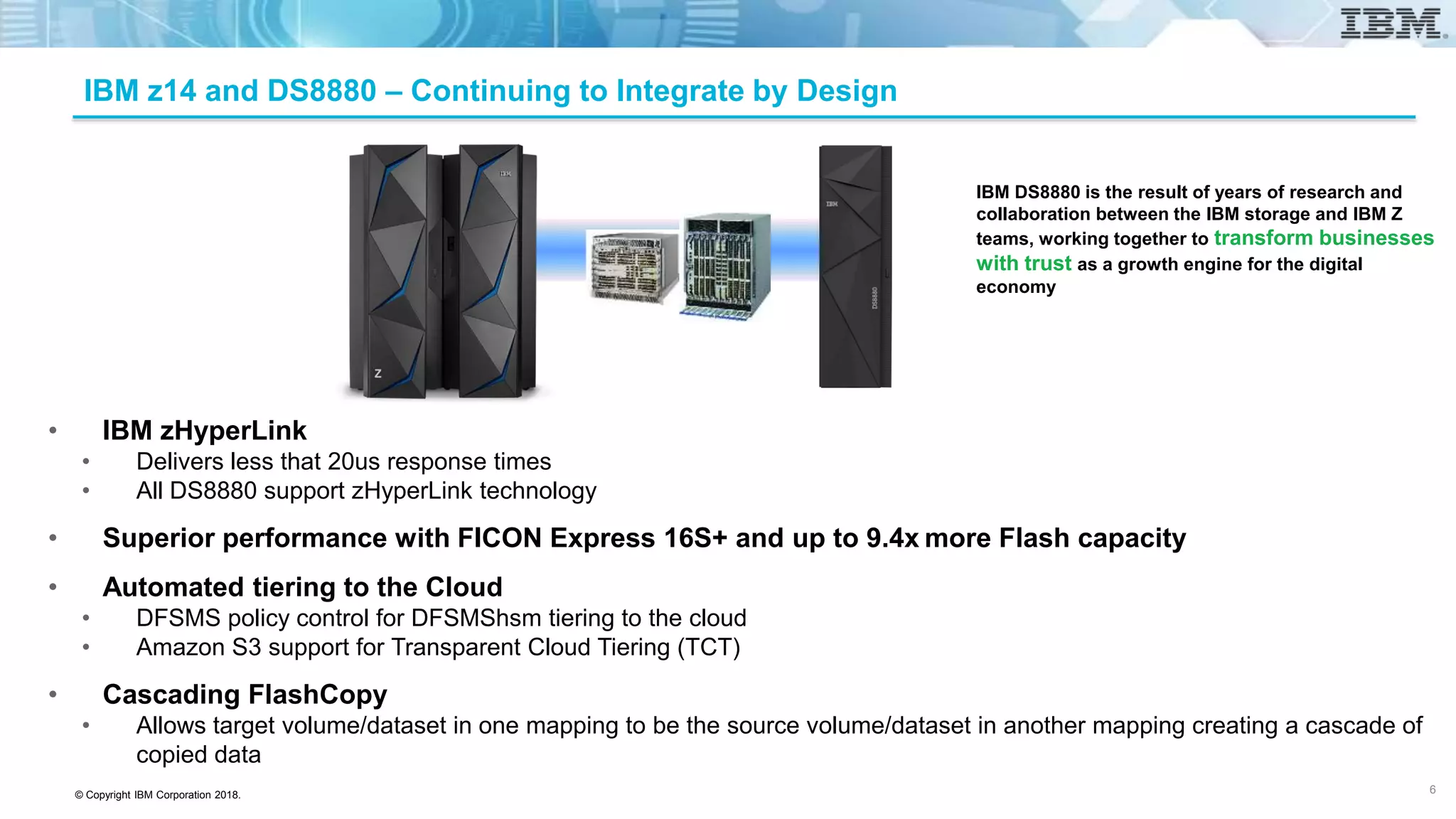
IBM z14 and DS8880 – Continuing to Integrate by Design
• IBM zHyperLink
• Delivers less that 20us response times
• All DS8880 support zHyperLink technology
• Superior performance with FICON Express 16S+ and up to 9.4x more Flash capacity
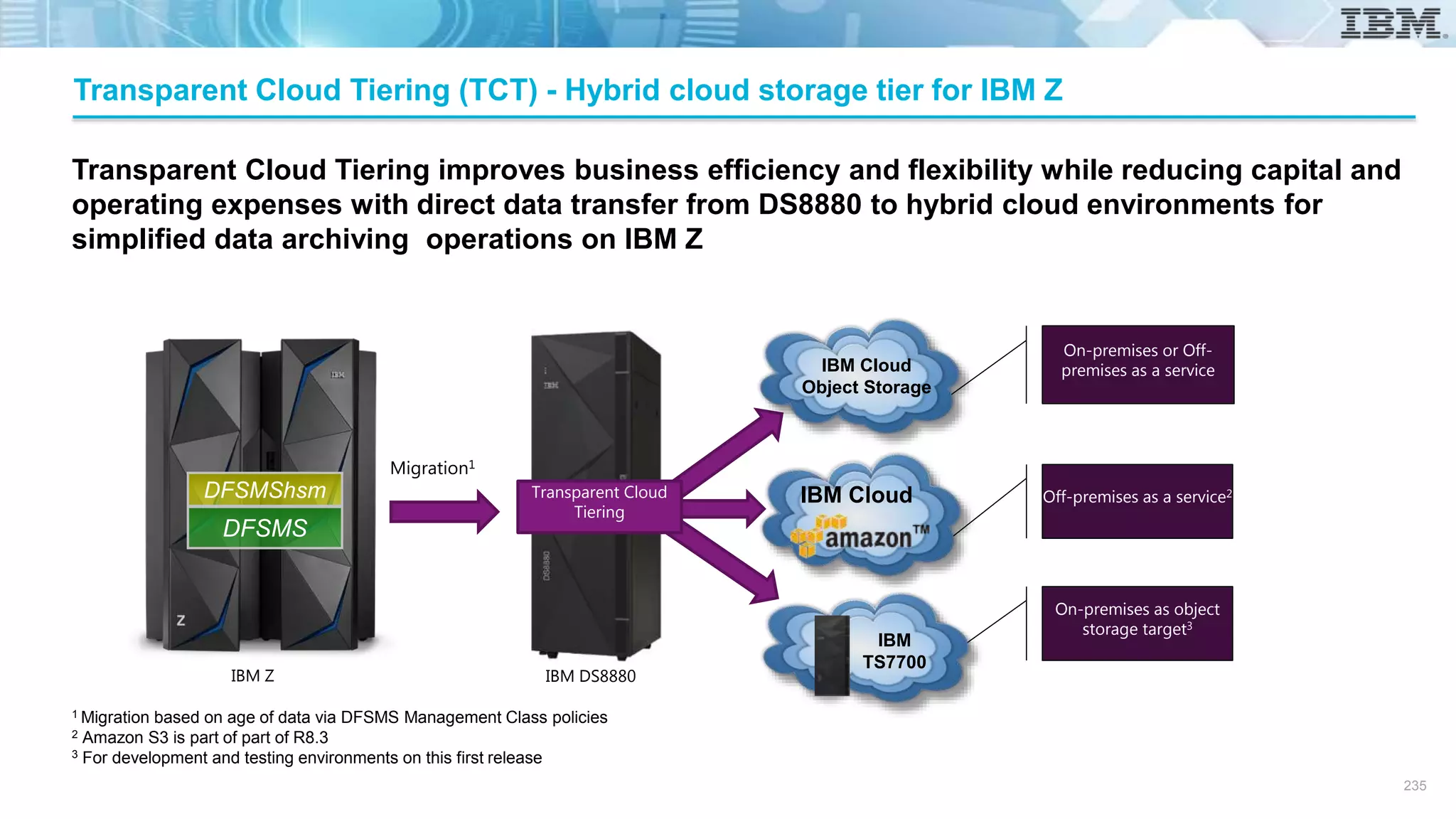
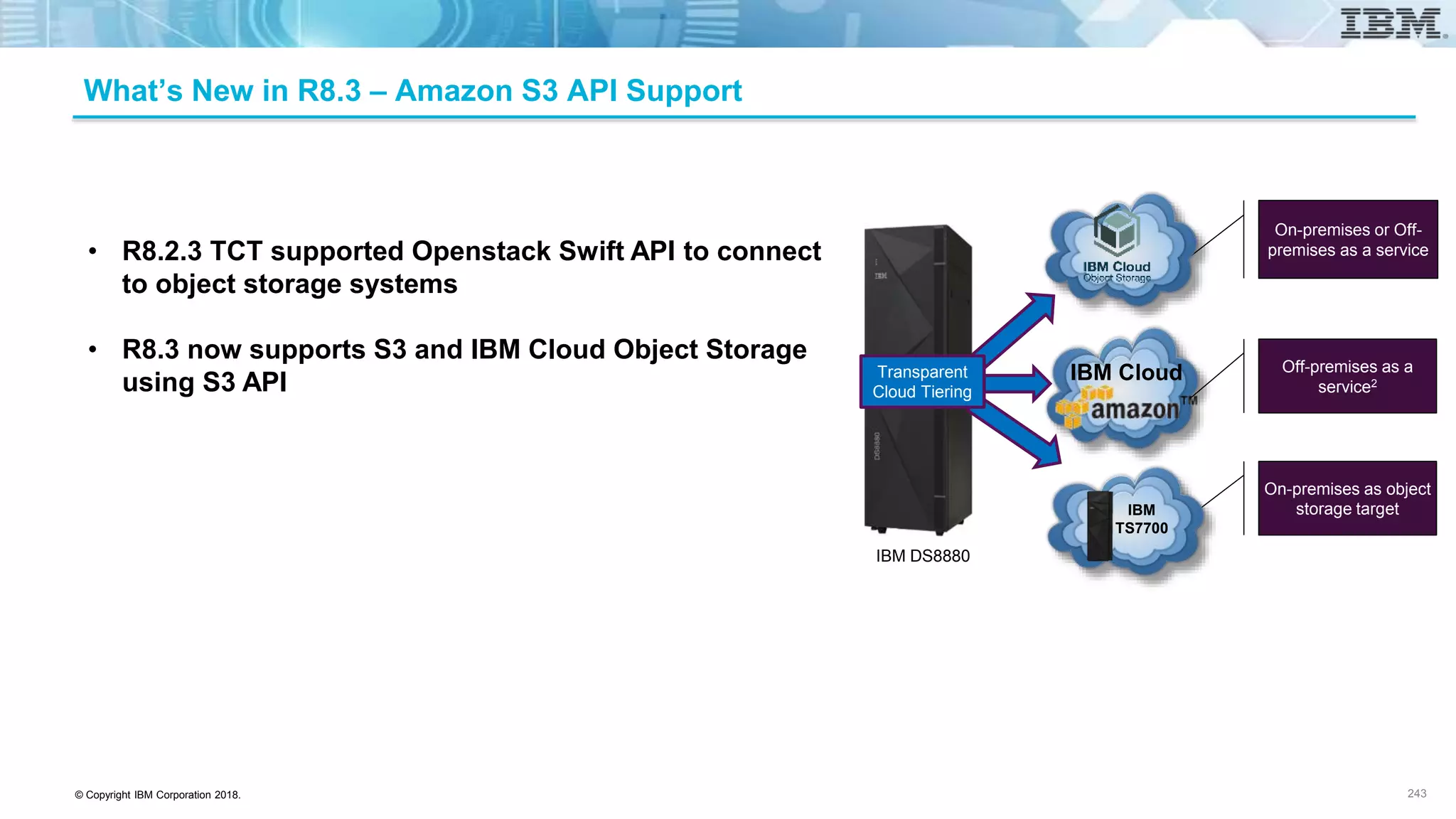
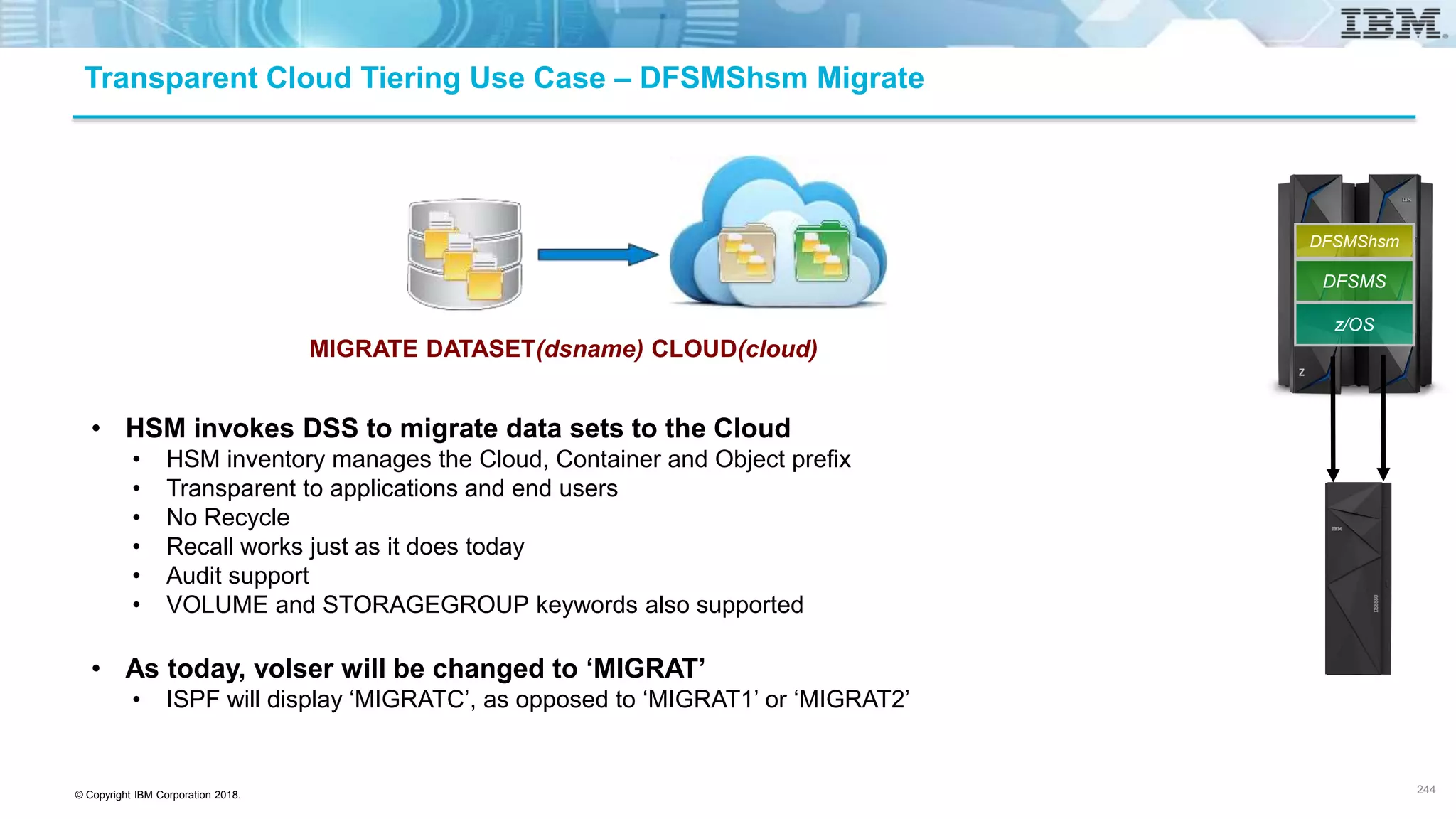
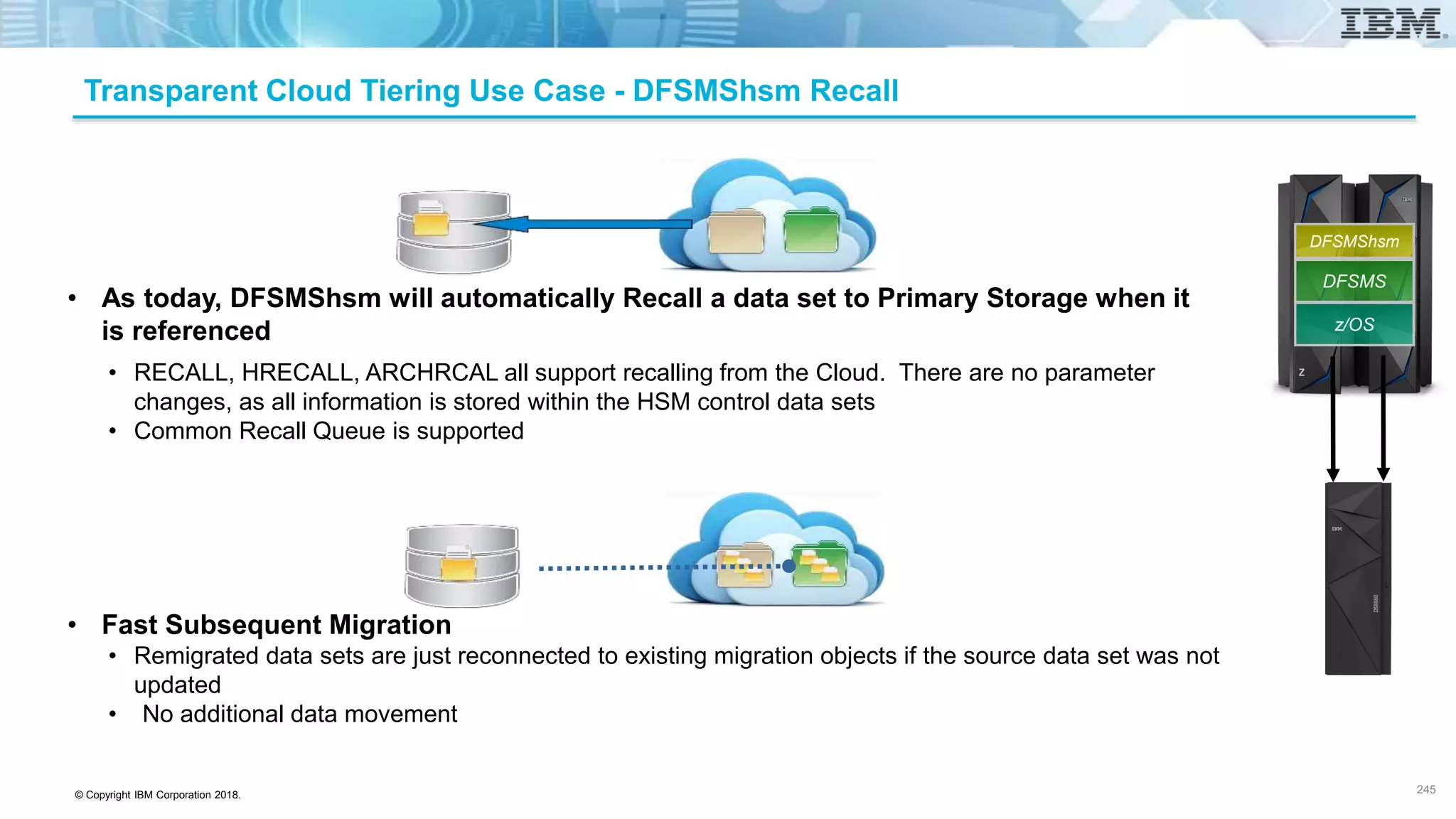
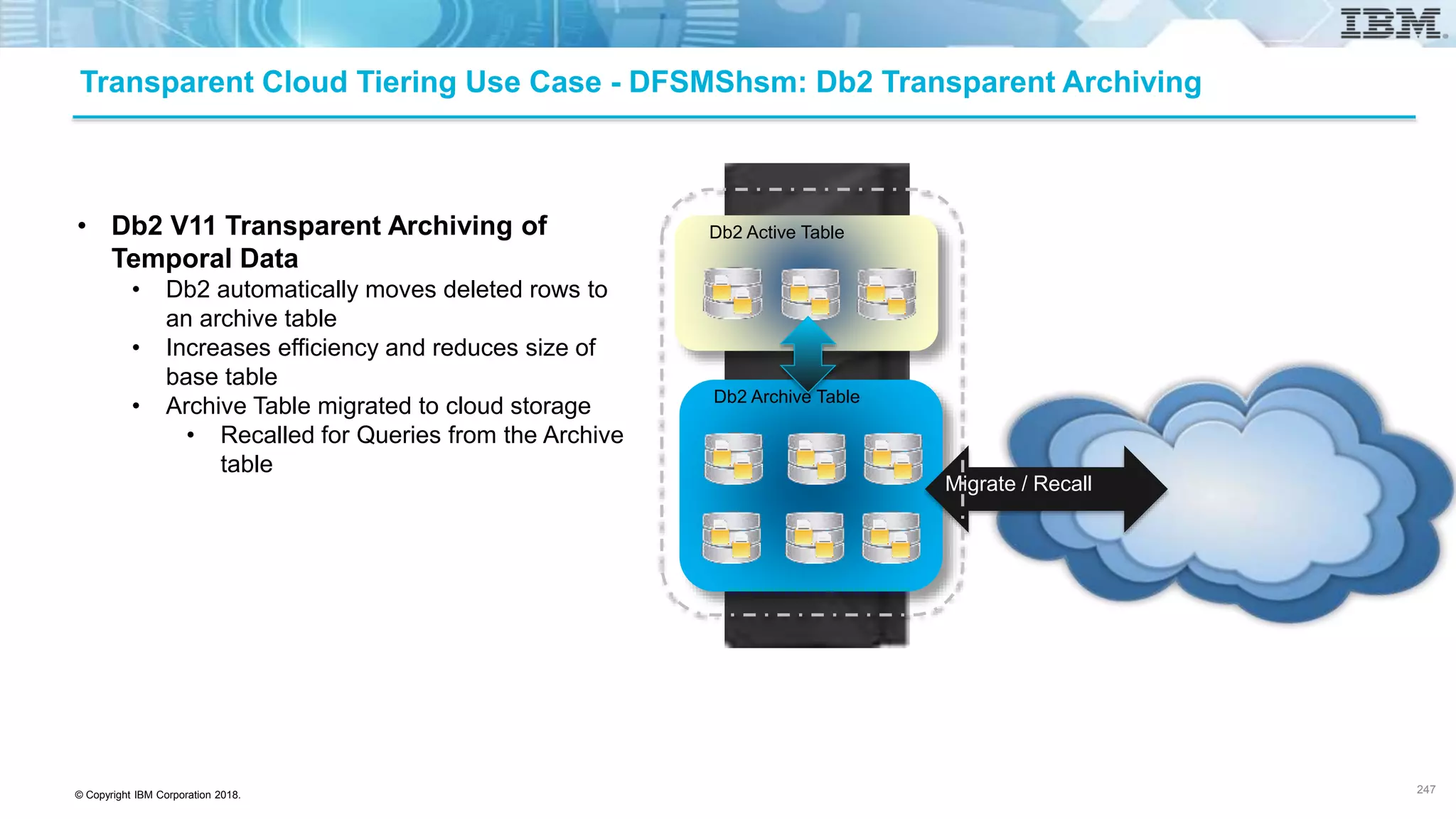
• Automated tiering to the Cloud
• DFSMS policy control for DFSMShsm tiering to the cloud
• Amazon S3 support for Transparent Cloud Tiering (TCT)
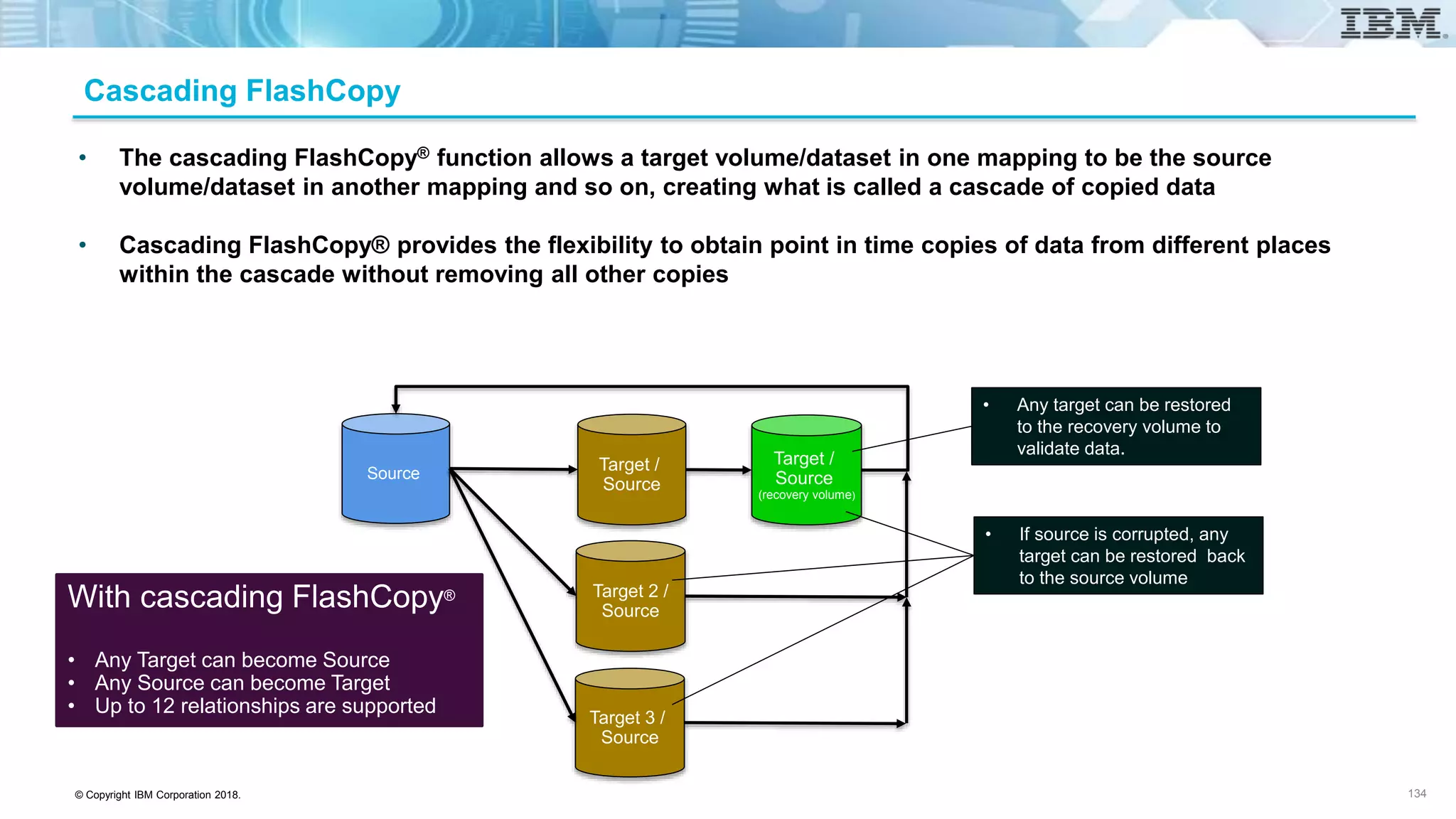
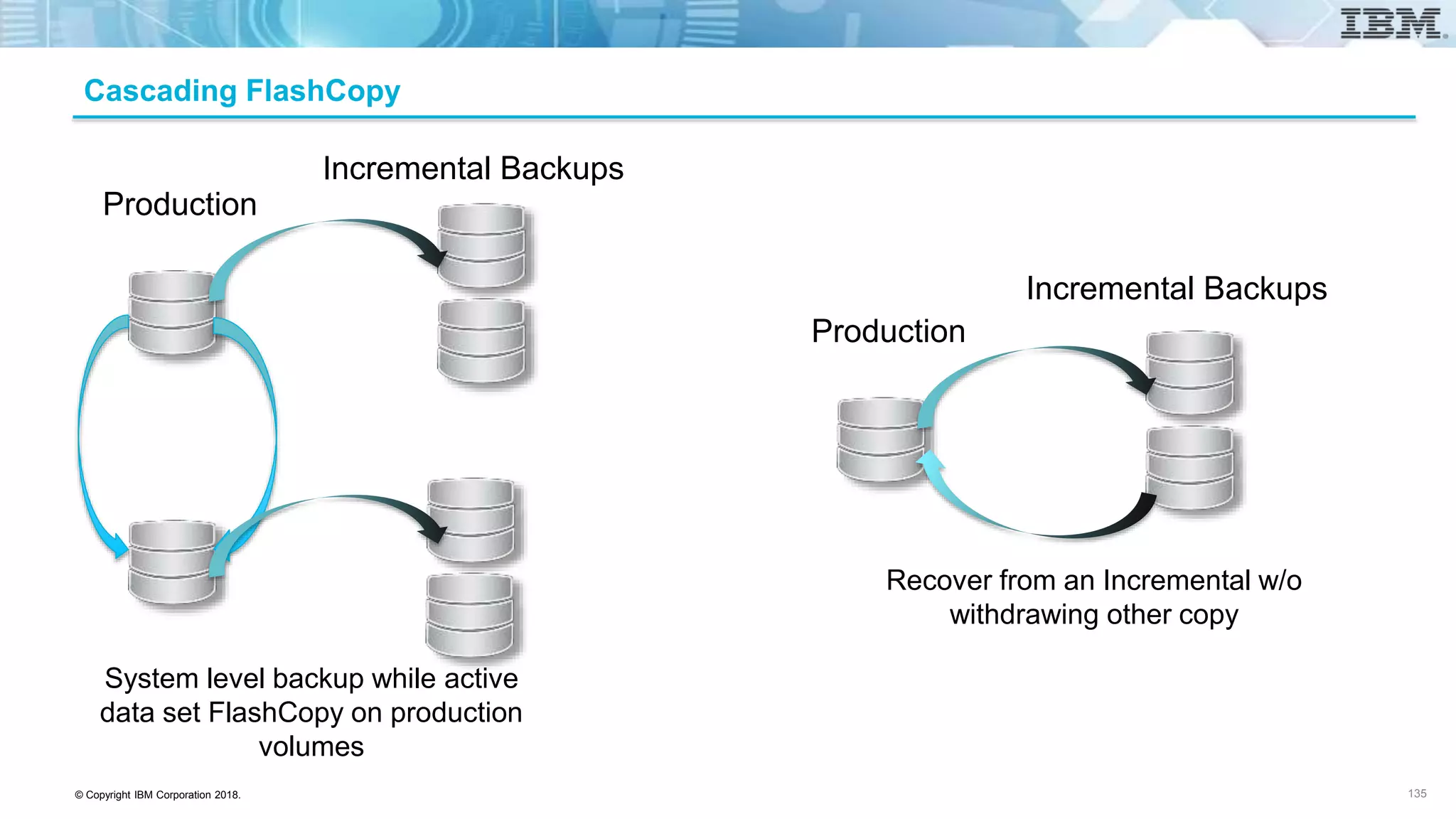
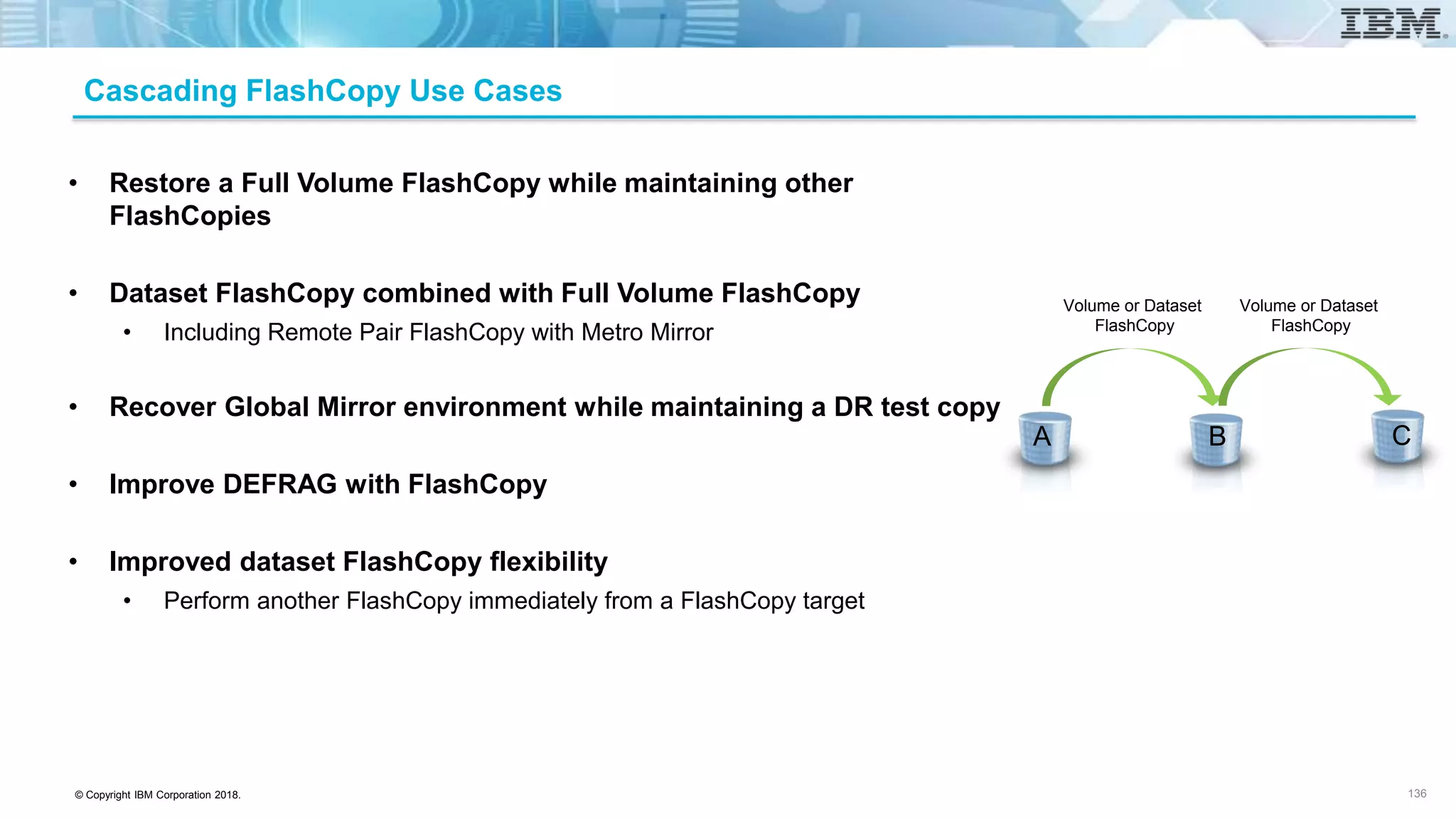
• Cascading FlashCopy
• Allows target volume/dataset in one mapping to be the source volume/dataset in another mapping creating a cascade of
copied data
IBM DS8880 is the result of years of research and
collaboration between the IBM storage and IBM Z
teams, working together to transform businesses
with trust as a growth engine for the digital
economy
6
© Copyright IBM Corporation 2018.
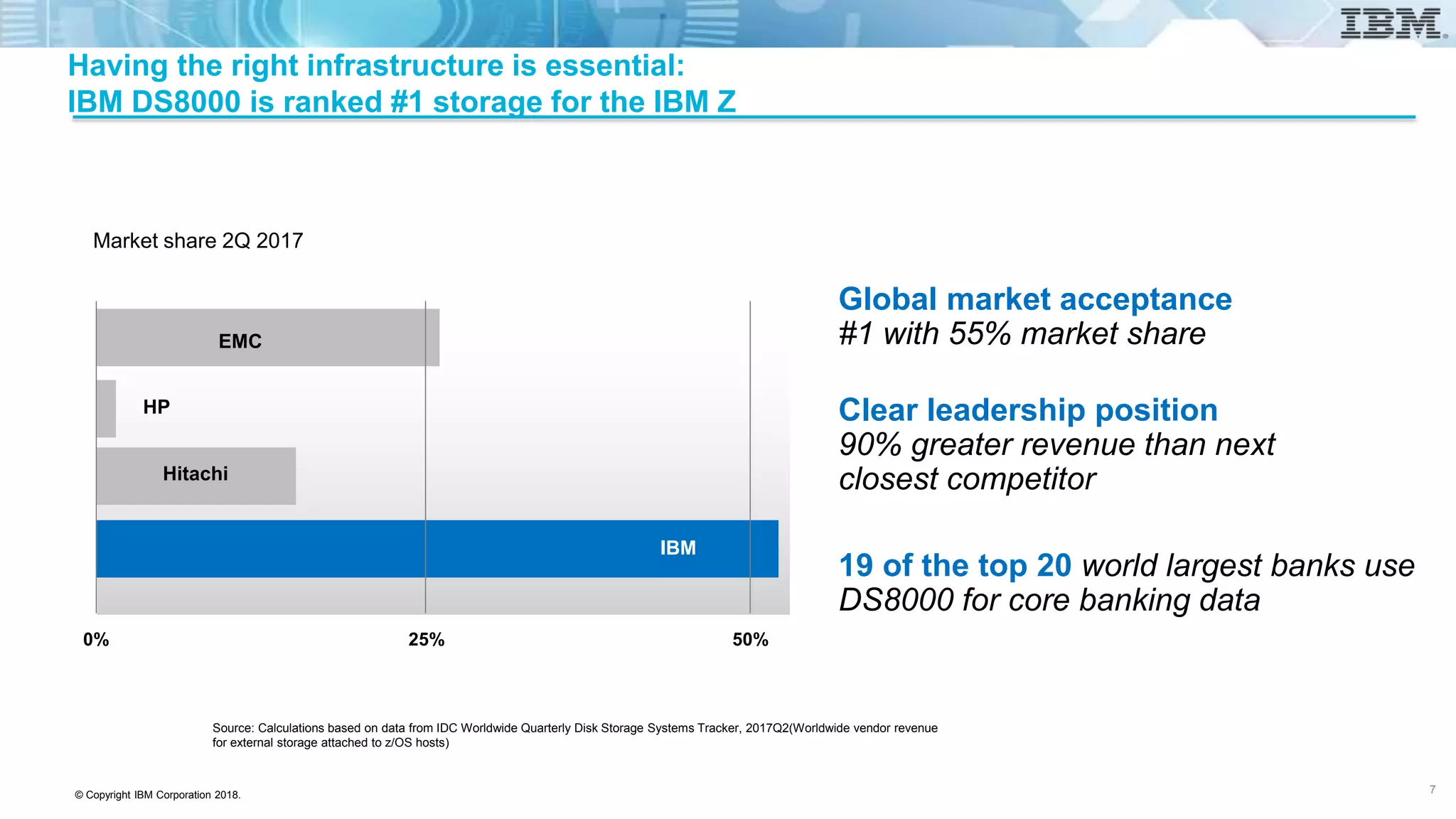
Clear leadership position
90% greater revenue than next
closest competitor
Global market acceptance
#1 with 55% market share
19 of the top 20 world largest banks use
DS8000 for core banking data
Having the right infrastructure is essential:
IBM DS8000 is ranked #1 storage for the IBM Z
Market share 2Q 2017
0% 25% 50%
EMC
HP
Hitachi
IBM
Source: Calculations based on data from IDC Worldwide Quarterly Disk Storage Systems Tracker, 2017Q2(Worldwide vendor revenue
for external storage attached to z/OS hosts)
7
© Copyright IBM Corporation 2018.
DS8000 is the right infrastructure for Business Critical environments
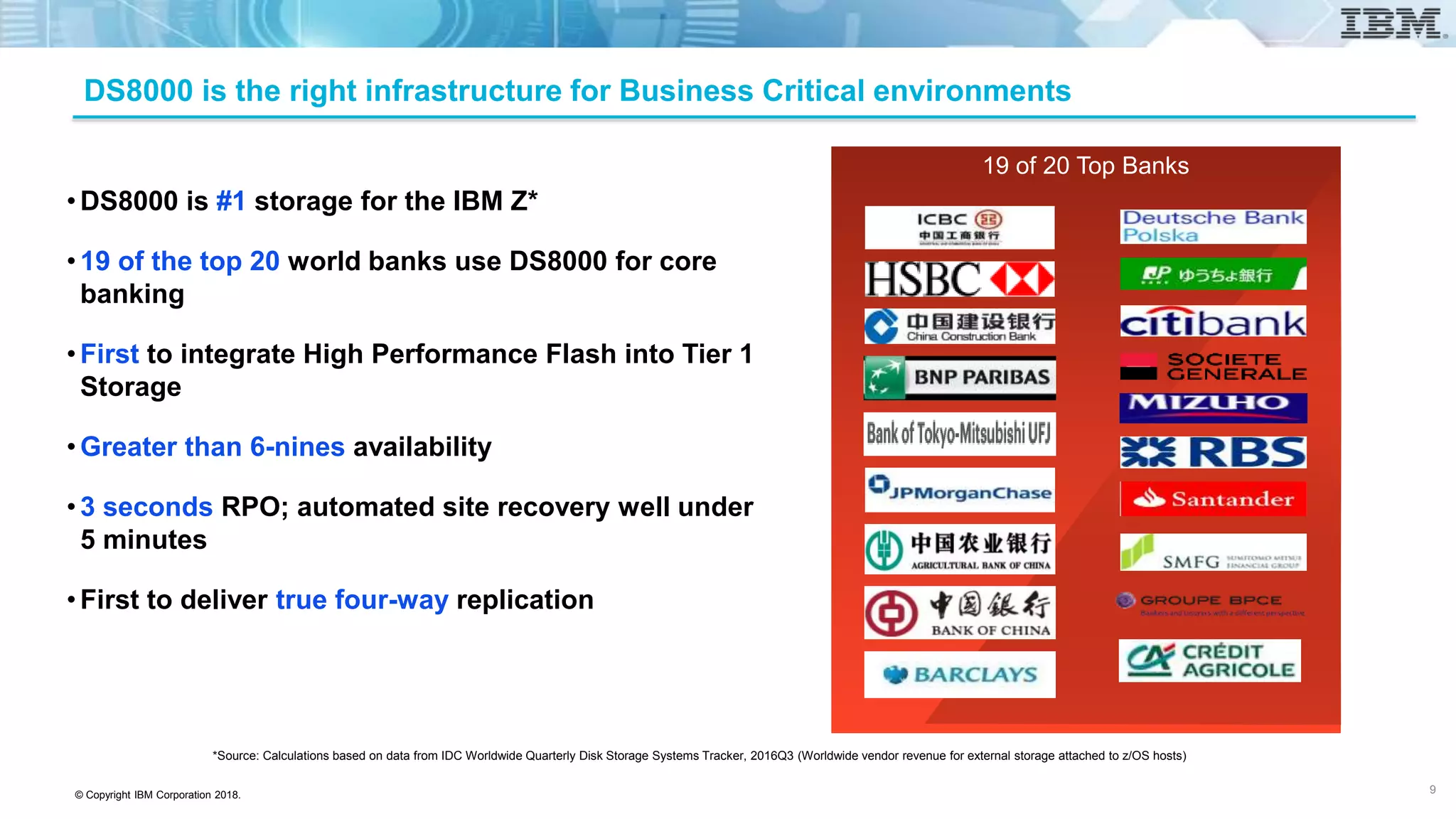
•DS8000 is #1 storage for the IBM Z*
•19 of the top 20 world banks use DS8000 for core
banking
•First to integrate High Performance Flash into Tier 1
Storage
•Greater than 6-nines availability
•3 seconds RPO; automated site recovery well under
5 minutes
•First to deliver true four-way replication
19 of 20 Top Banks
*Source: Calculations based on data from IDC Worldwide Quarterly Disk Storage Systems Tracker, 2016Q3 (Worldwide vendor revenue for external storage attached to z/OS hosts)
9
© Copyright IBM Corporation 2018.
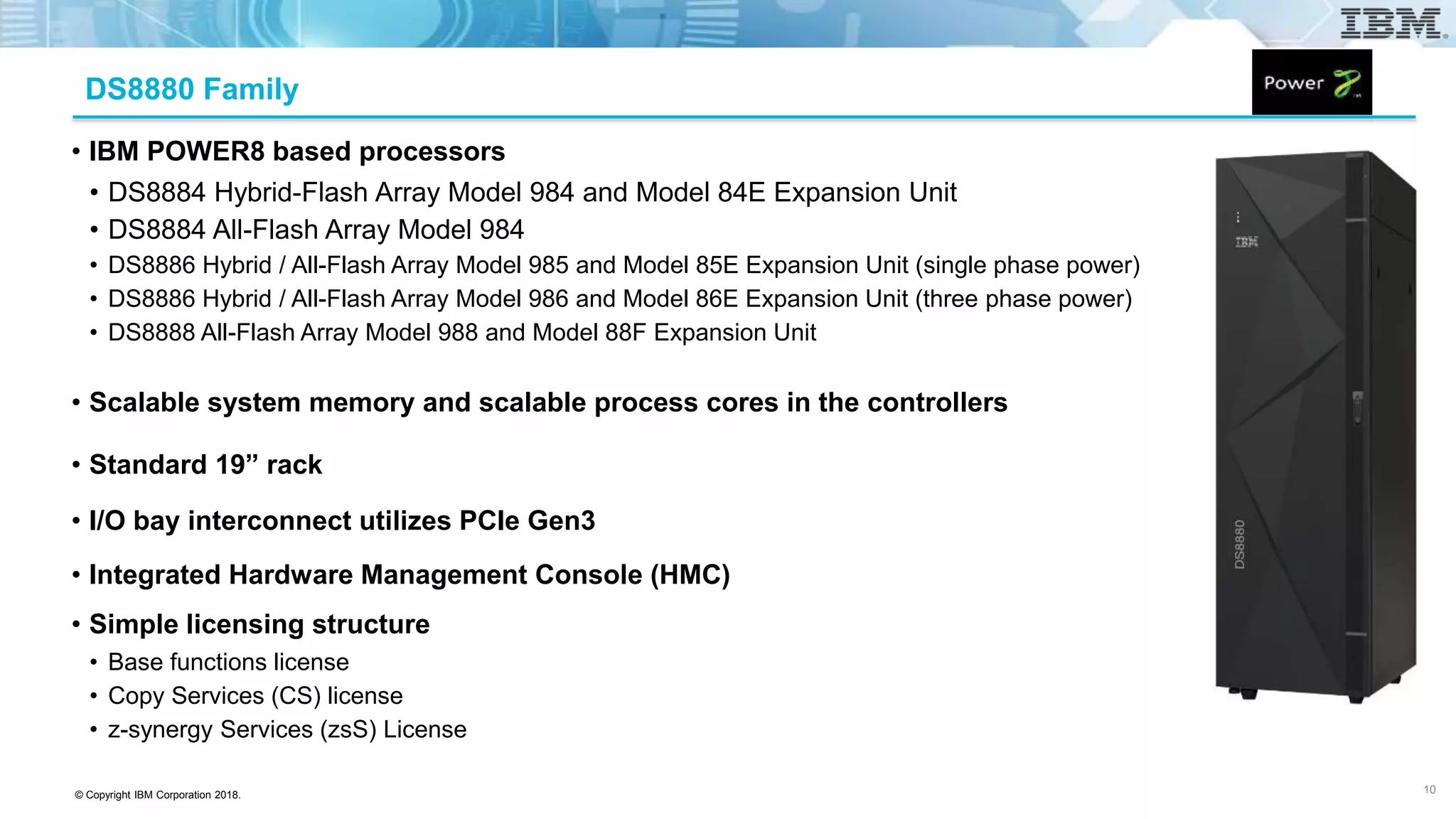
DS8880 Family
• IBM POWER8 based processors
• DS8884 Hybrid-Flash Array Model 984 and Model 84E Expansion Unit
• DS8884 All-Flash Array Model 984
• DS8886 Hybrid / All-Flash Array Model 985 and Model 85E Expansion Unit (single phase power)
• DS8886 Hybrid / All-Flash Array Model 986 and Model 86E Expansion Unit (three phase power)
• DS8888 All-Flash Array Model 988 and Model 88F Expansion Unit
• Scalable system memory and scalable process cores in the controllers
• Standard 19” rack
• I/O bay interconnect utilizes PCIe Gen3
• Integrated Hardware Management Console (HMC)
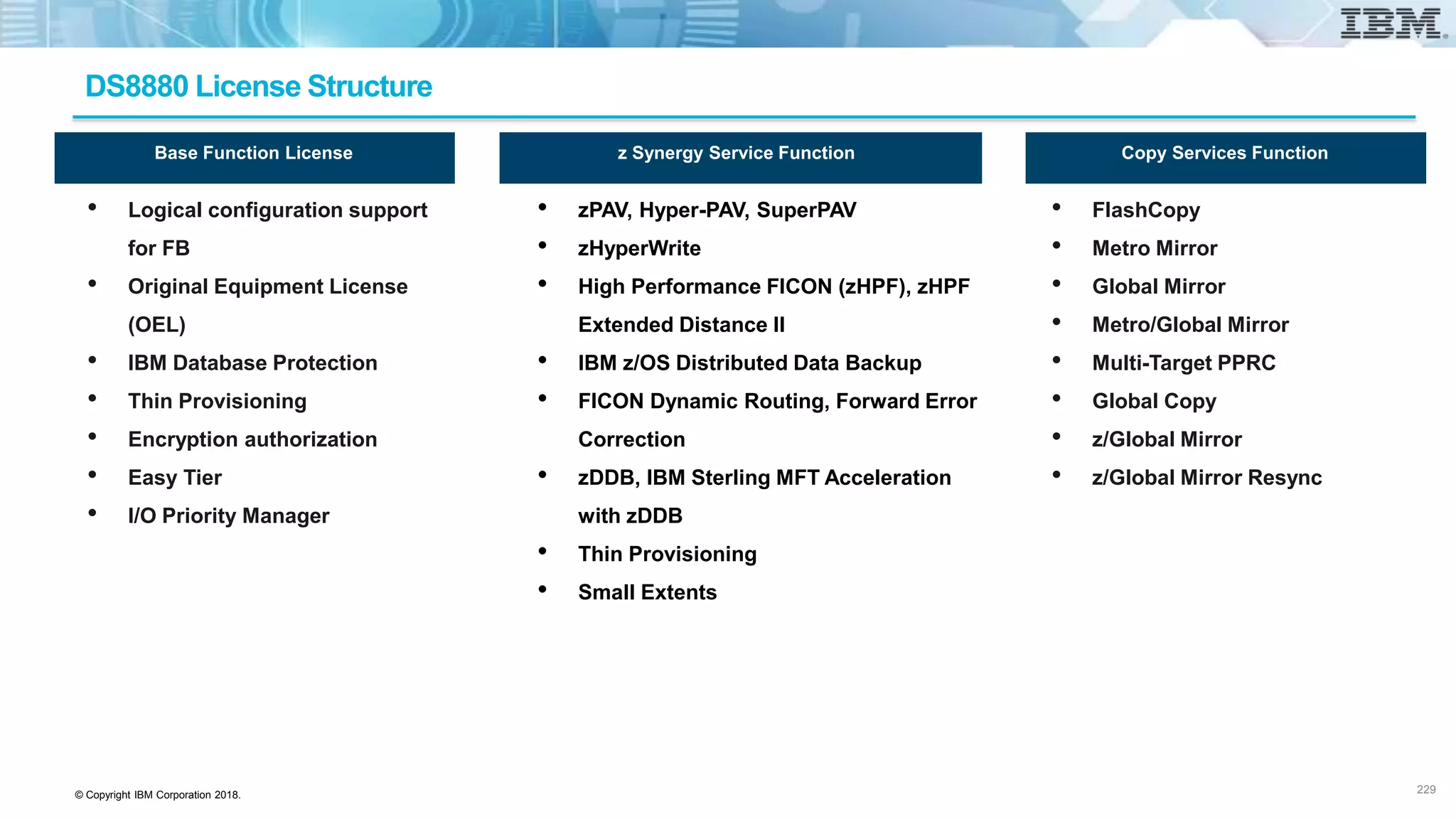
• Simple licensing structure
• Base functions license
• Copy Services (CS) license
• z-synergy Services (zsS) License
10
© Copyright IBM Corporation 2018.
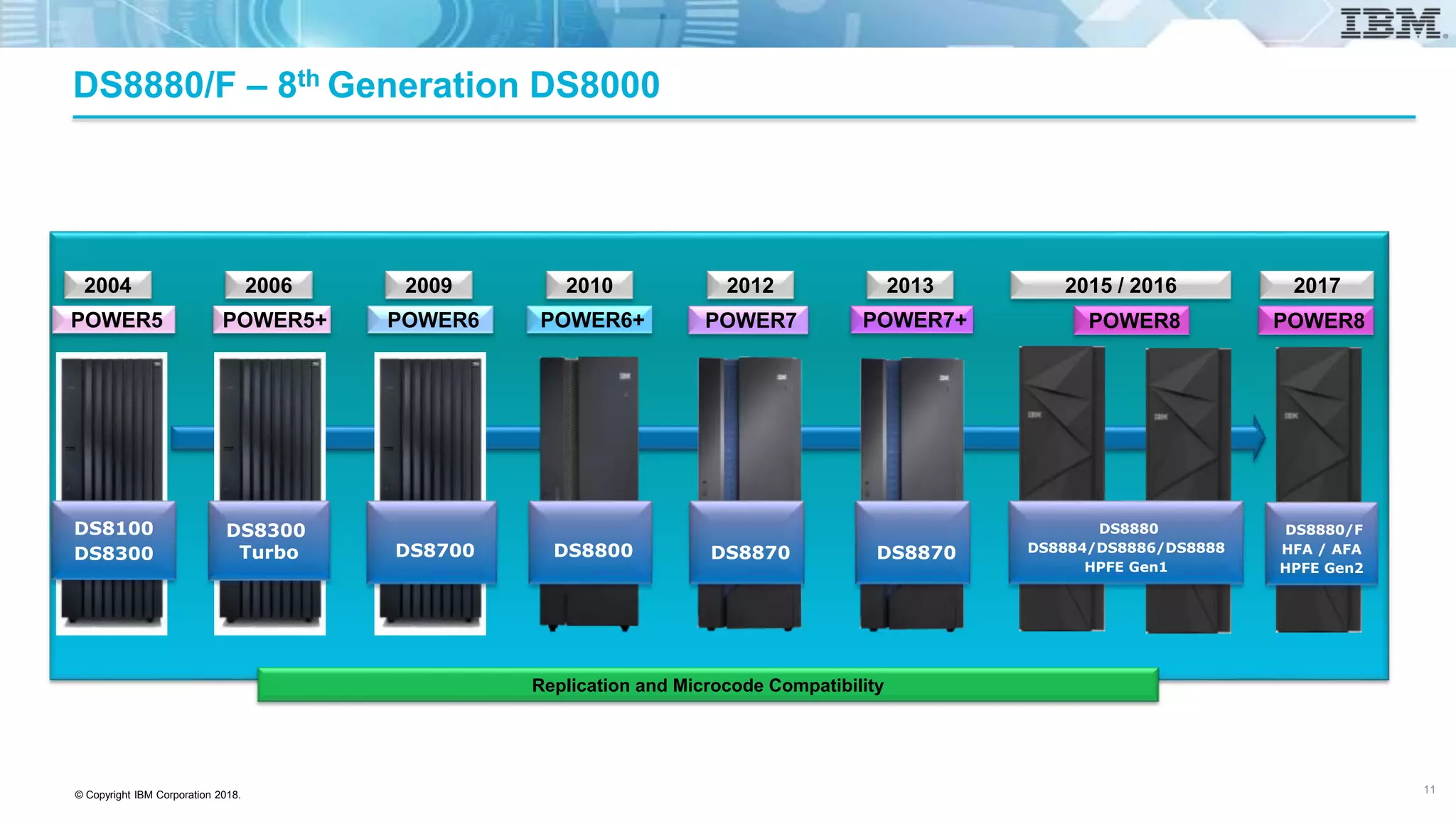
DS8880/F – 8th Generation DS8000
Replication and Microcode Compatibility
2004
POWER5
DS8100
DS8300
2012
POWER7
DS8870
2013
POWER7+
2015 / 2016
POWER8
DS8870
DS8880
DS8884/DS8886/DS8888
HPFE Gen1
2017
POWER8
DS8880/F
HFA / AFA
HPFE Gen2
2010
POWER6+
DS8800
2009
POWER6
DS8700
2006
POWER5+
DS8300
Turbo
11
© Copyright IBM Corporation 2018.
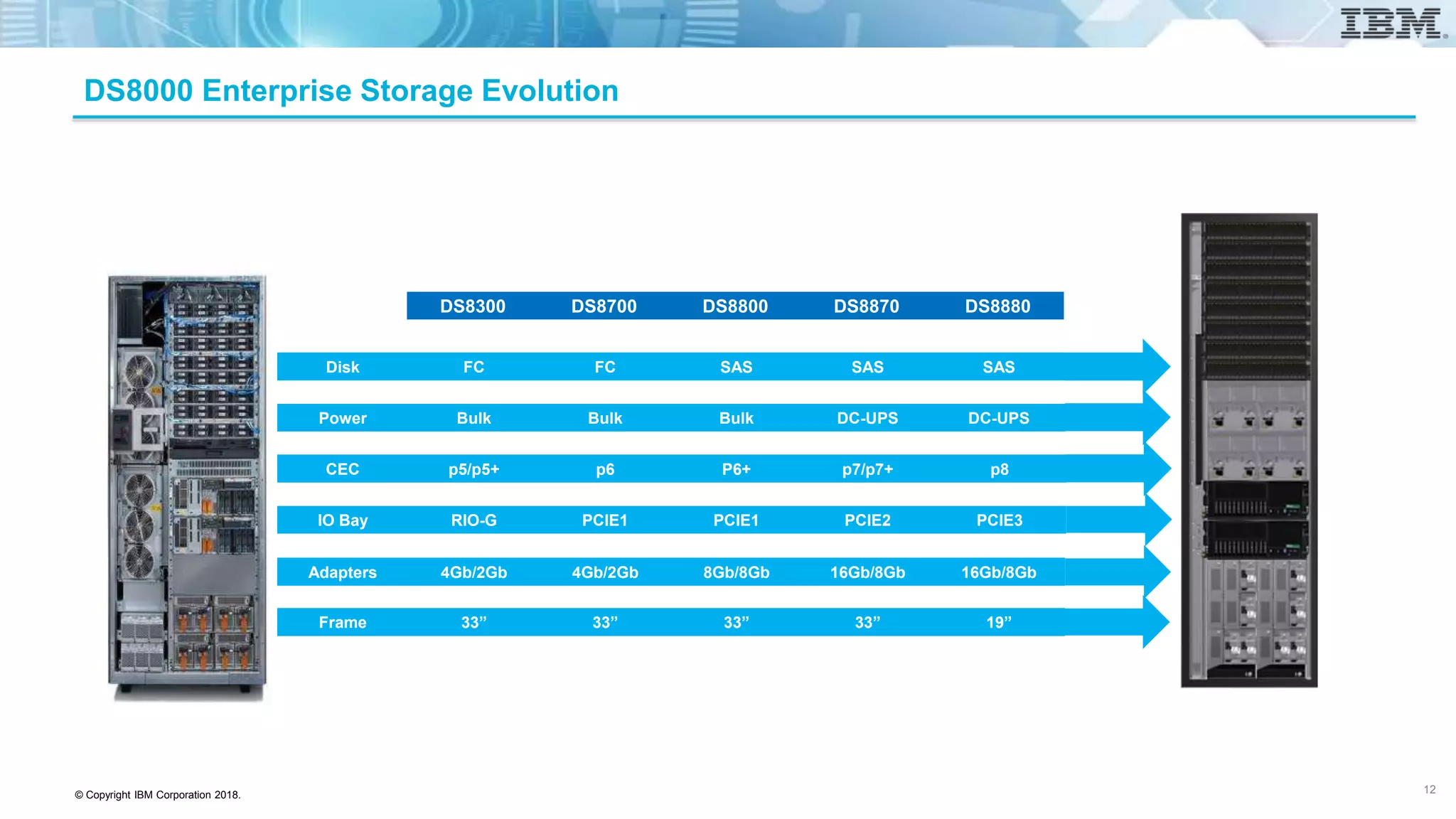
DS8000 Enterprise Storage Evolution
DS8880DS8870DS8800DS8700DS8300
SASSASSASFCFCDisk
DC-UPSDC-UPSBulkBulkBulkPower
p8p7/p7+P6+p6p5/p5+CEC
PCIE3PCIE2PCIE1PCIE1RIO-GIO Bay
16Gb/8Gb16Gb/8Gb8Gb/8Gb4Gb/2Gb4Gb/2GbAdapters
19”33”33”33”33”Frame
12
© Copyright IBM Corporation 2018.
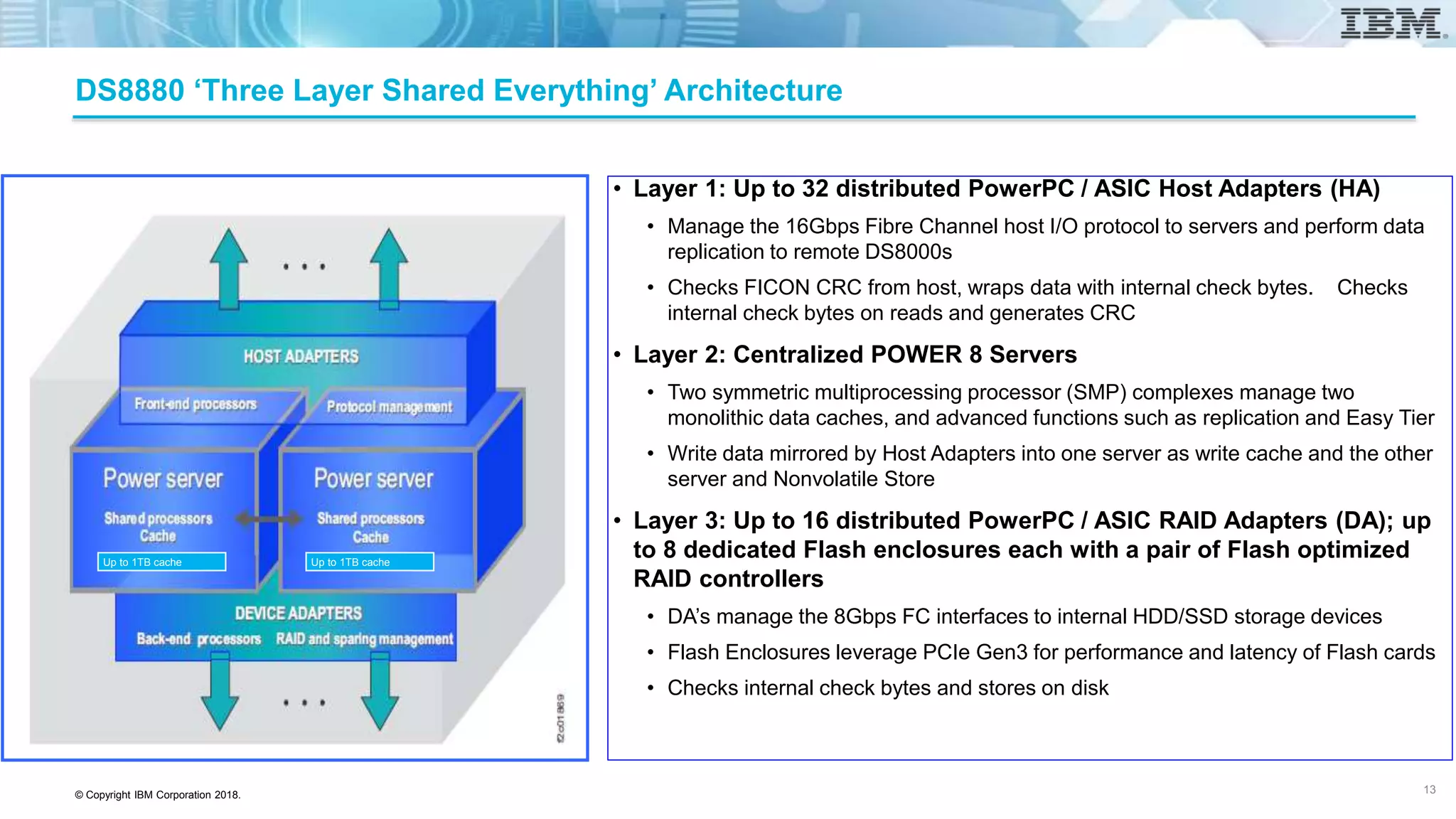
DS8880 ‘Three Layer Shared Everything’ Architecture
• Layer 1: Up to 32 distributed PowerPC / ASIC Host Adapters (HA)
• Manage the 16Gbps Fibre Channel host I/O protocol to servers and perform data
replication to remote DS8000s
• Checks FICON CRC from host, wraps data with internal check bytes. Checks
internal check bytes on reads and generates CRC
• Layer 2: Centralized POWER 8 Servers
• Two symmetric multiprocessing processor (SMP) complexes manage two
monolithic data caches, and advanced functions such as replication and Easy Tier
• Write data mirrored by Host Adapters into one server as write cache and the other
server and Nonvolatile Store
• Layer 3: Up to 16 distributed PowerPC / ASIC RAID Adapters (DA); up
to 8 dedicated Flash enclosures each with a pair of Flash optimized
RAID controllers
• DA’s manage the 8Gbps FC interfaces to internal HDD/SSD storage devices
• Flash Enclosures leverage PCIe Gen3 for performance and latency of Flash cards
• Checks internal check bytes and stores on disk
13
Up to 1TB cache Up to 1TB cache
© Copyright IBM Corporation 2018.
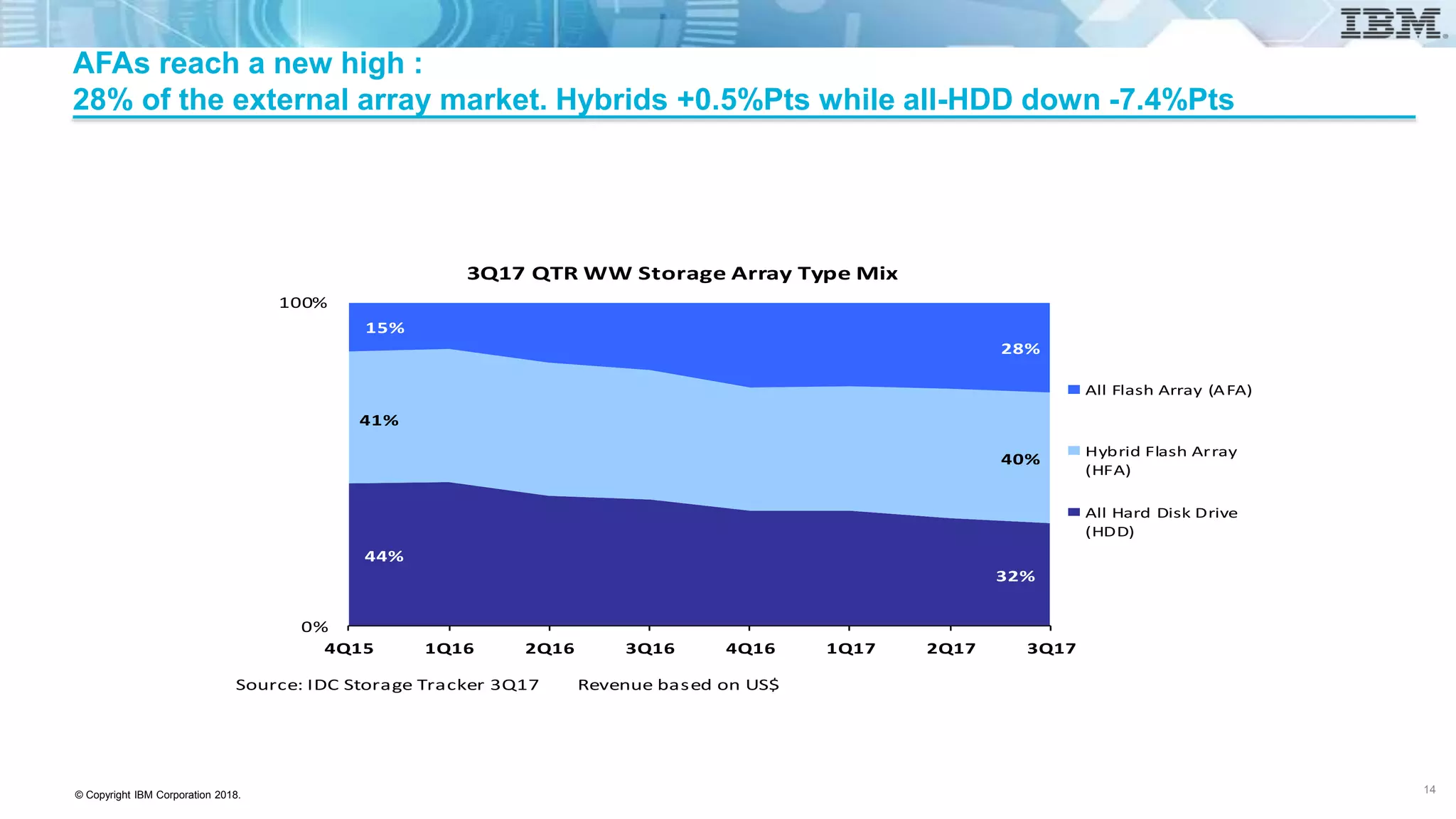
AFAs reach a new high :
28% of the external array market. Hybrids +0.5%Pts while all-HDD down -7.4%Pts
Source: IDC Storage Tracker 3Q17 Revenue based on US$
44%
32%
41%
40%
15%
28%
0%
100%
4Q15 1Q16 2Q16 3Q16 4Q16 1Q17 2Q17 3Q17
3Q17 QTR WW Storage Array Type Mix
All Flash Array (AFA)
Hybrid Flash Array
(HFA)
All Hard Disk Drive
(HDD)
14
© Copyright IBM Corporation 2018.
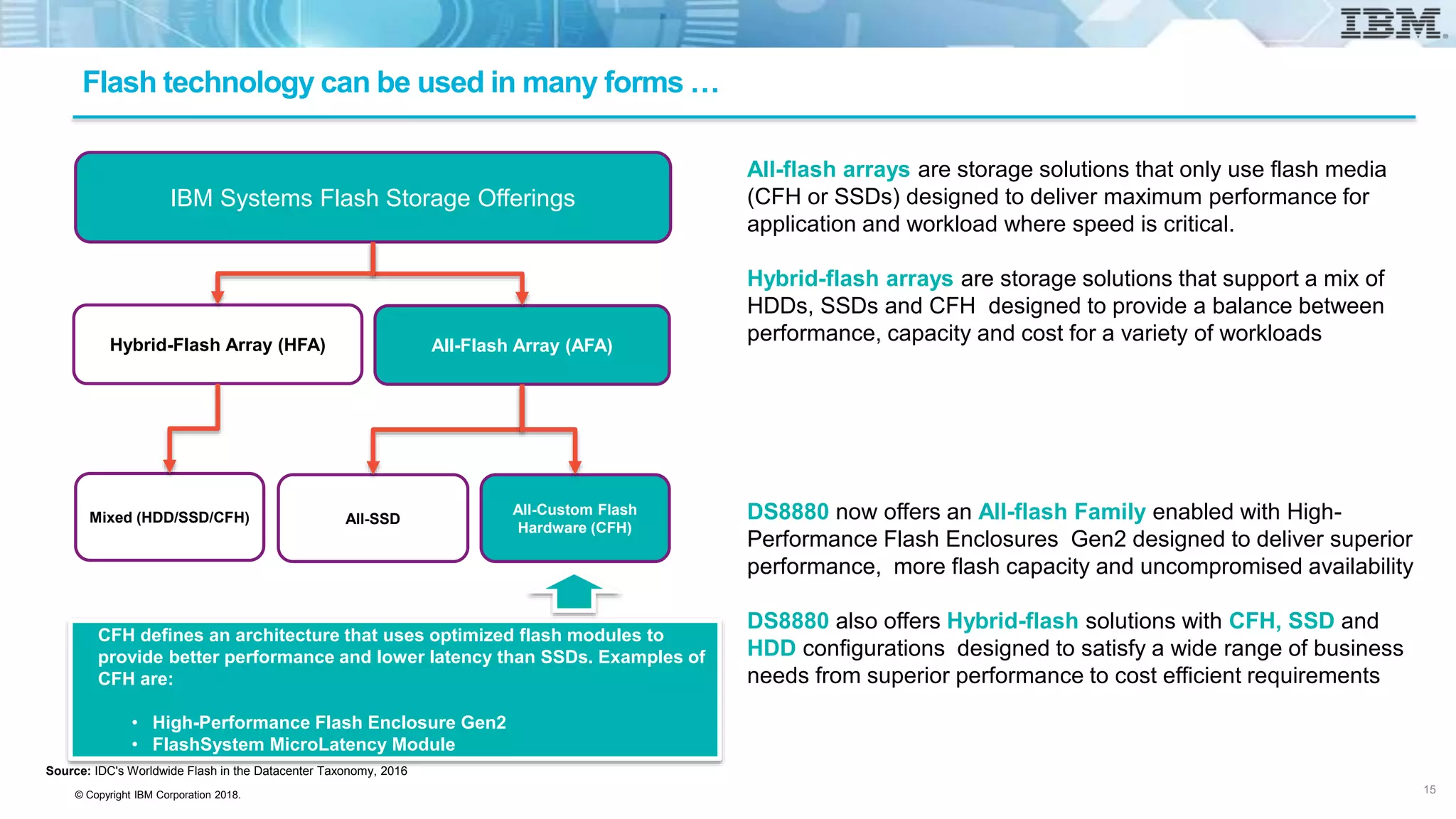
Flash technology can be used in many forms …
IBM Systems Flash Storage Offerings
All-Flash Array (AFA)
Mixed (HDD/SSD/CFH)
All-Custom Flash
Hardware (CFH)
All-SSD
Hybrid-Flash Array (HFA)
CFH defines an architecture that uses optimized flash modules to
provide better performance and lower latency than SSDs. Examples of
CFH are:
• High-Performance Flash Enclosure Gen2
• FlashSystem MicroLatency Module
All-flash arrays are storage solutions that only use flash media
(CFH or SSDs) designed to deliver maximum performance for
application and workload where speed is critical.
Hybrid-flash arrays are storage solutions that support a mix of
HDDs, SSDs and CFH designed to provide a balance between
performance, capacity and cost for a variety of workloads
DS8880 now offers an All-flash Family enabled with High-
Performance Flash Enclosures Gen2 designed to deliver superior
performance, more flash capacity and uncompromised availability
DS8880 also offers Hybrid-flash solutions with CFH, SSD and
HDD configurations designed to satisfy a wide range of business
needs from superior performance to cost efficient requirements
Source: IDC's Worldwide Flash in the Datacenter Taxonomy, 2016
15
© Copyright IBM Corporation 2018.
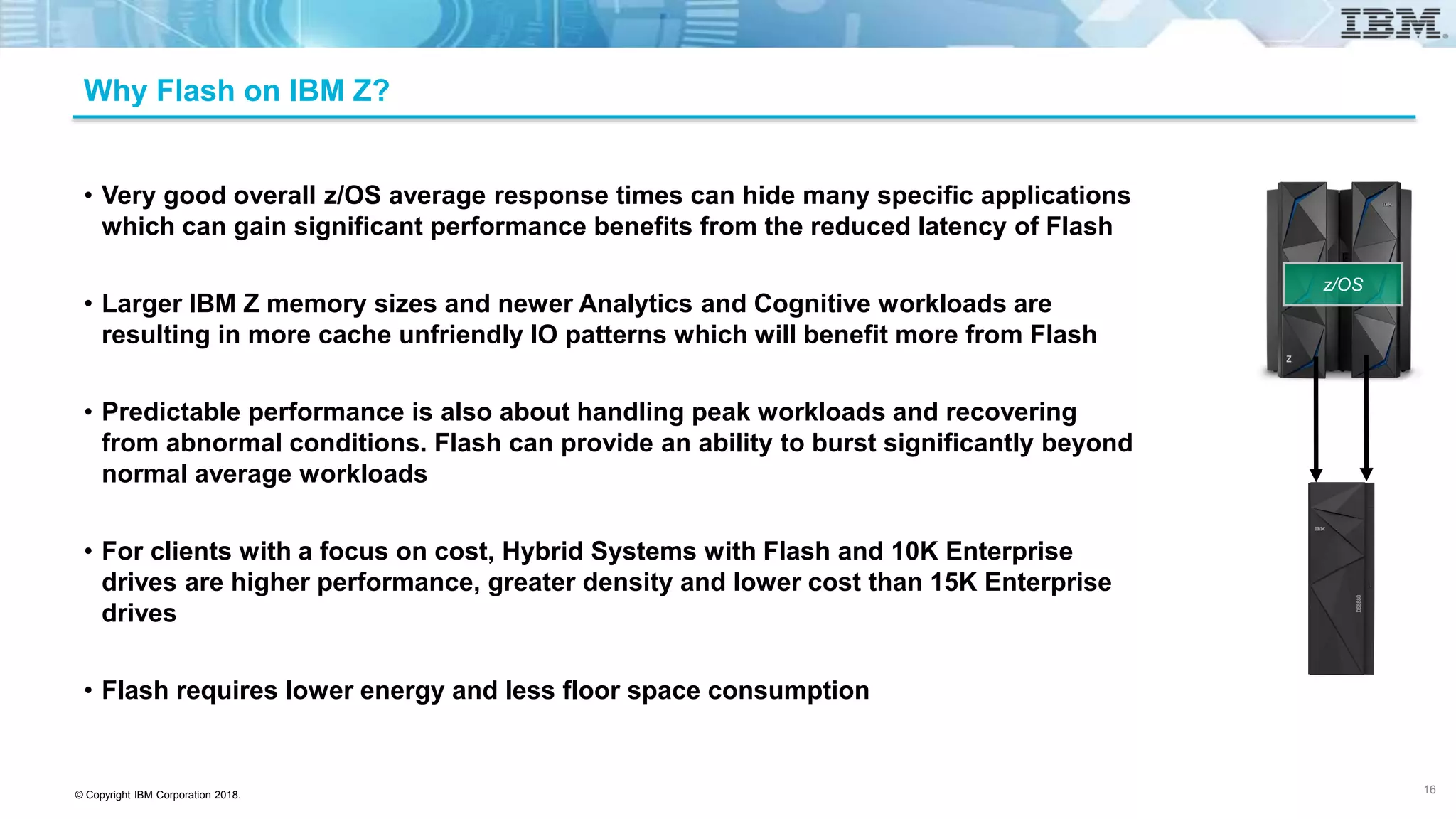
Why Flash on IBM Z?
• Very good overall z/OS average response times can hide many specific applications
which can gain significant performance benefits from the reduced latency of Flash
• Larger IBM Z memory sizes and newer Analytics and Cognitive workloads are
resulting in more cache unfriendly IO patterns which will benefit more from Flash
• Predictable performance is also about handling peak workloads and recovering
from abnormal conditions. Flash can provide an ability to burst significantly beyond
normal average workloads
• For clients with a focus on cost, Hybrid Systems with Flash and 10K Enterprise
drives are higher performance, greater density and lower cost than 15K Enterprise
drives
• Flash requires lower energy and less floor space consumption
16
z/OS
© Copyright IBM Corporation 2018.
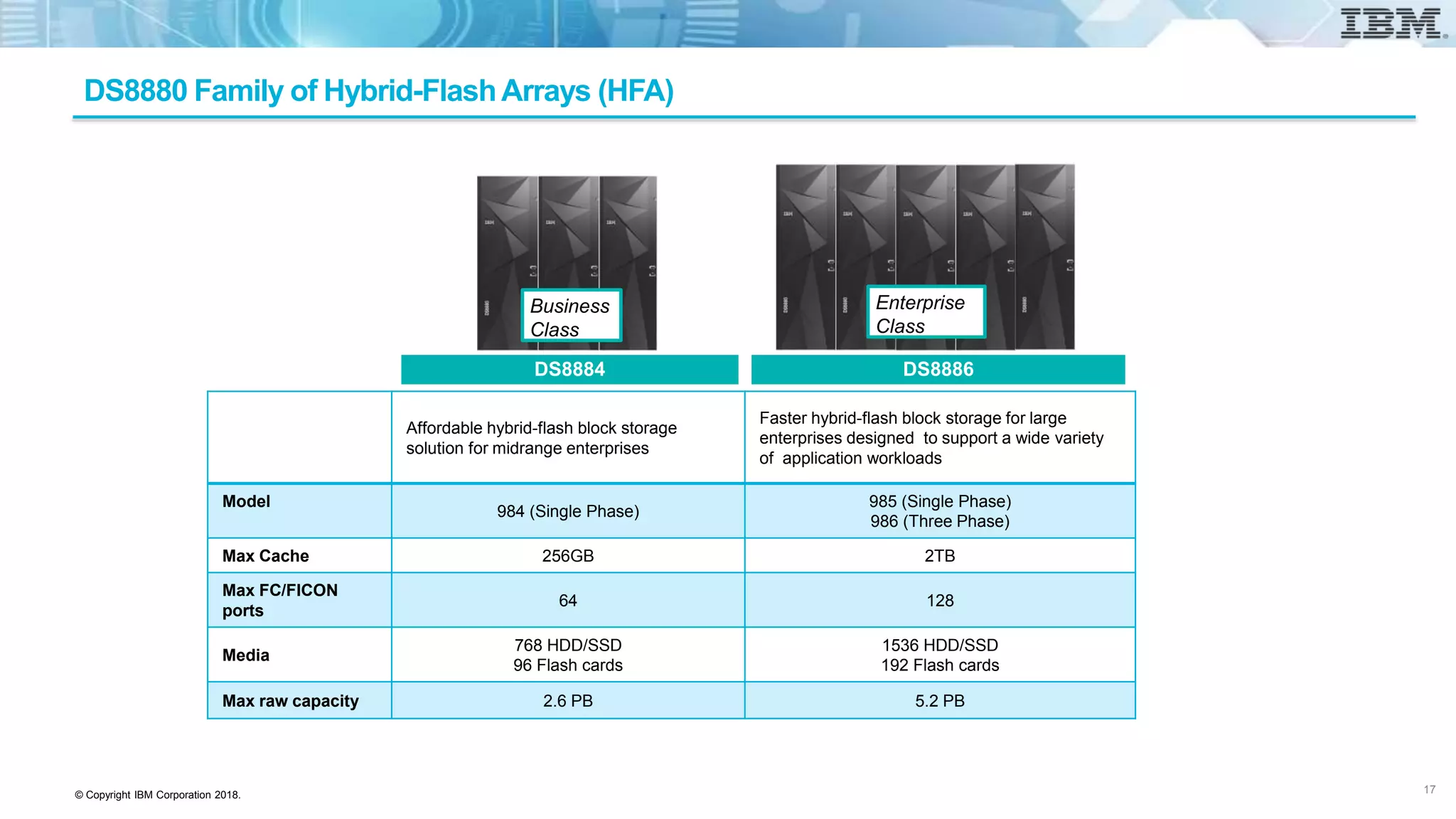
DS8880 Family of Hybrid-FlashArrays (HFA)
DS8884 DS8886
Affordable hybrid-flash block storage
solution for midrange enterprises
Faster hybrid-flash block storage for large
enterprises designed to support a wide variety
of application workloads
Model
984 (Single Phase)
985 (Single Phase)
986 (Three Phase)
Max Cache 256GB 2TB
Max FC/FICON
ports
64 128
Media
768 HDD/SSD
96 Flash cards
1536 HDD/SSD
192 Flash cards
Max raw capacity 2.6 PB 5.2 PB
17
Business
Class
Enterprise
Class
© Copyright IBM Corporation 2018.
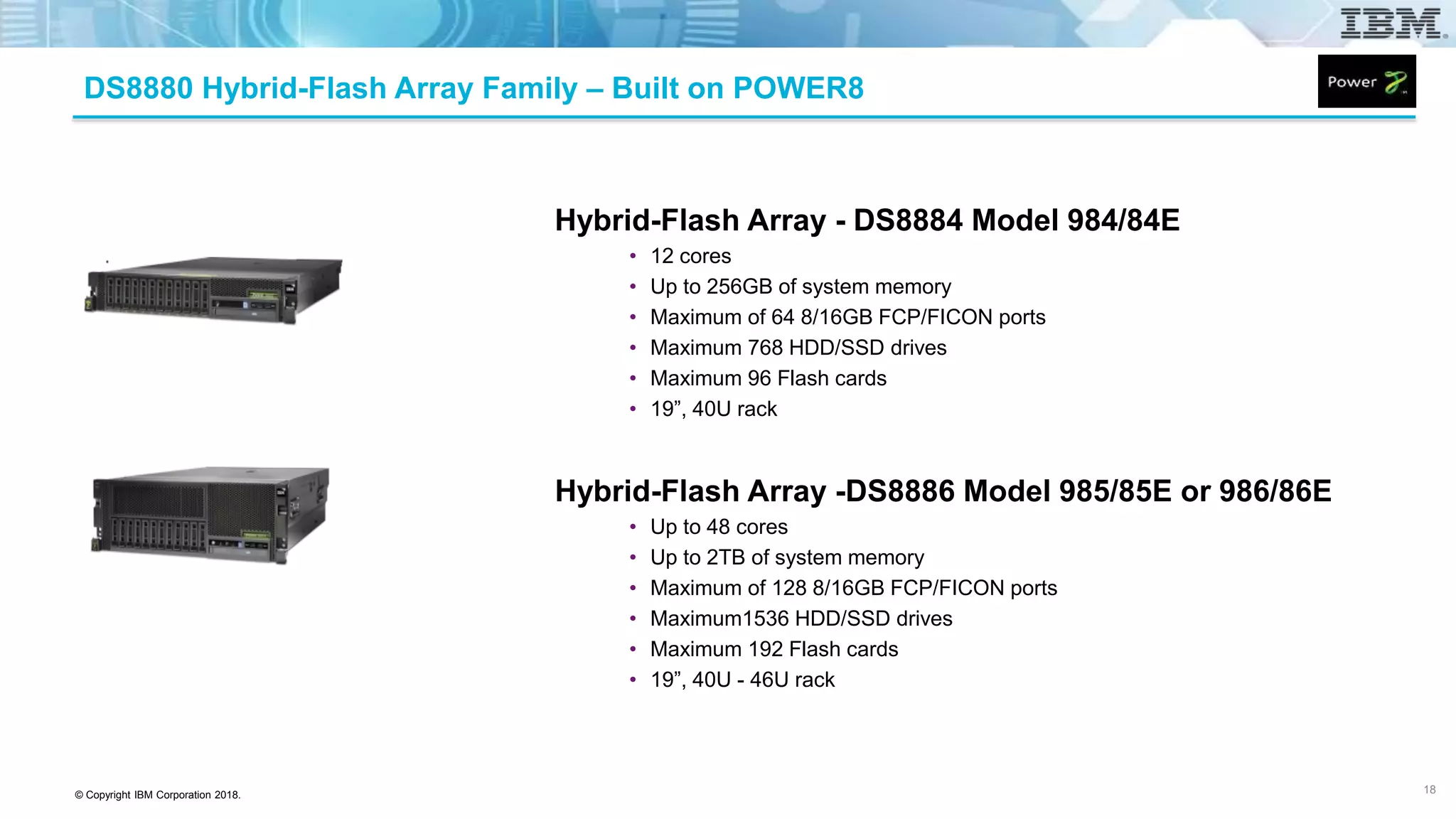
Hybrid-Flash Array - DS8884 Model 984/84E
• 12 cores
• Up to 256GB of system memory
• Maximum of 64 8/16GB FCP/FICON ports
• Maximum 768 HDD/SSD drives
• Maximum 96 Flash cards
• 19”, 40U rack
Hybrid-Flash Array -DS8886 Model 985/85E or 986/86E
• Up to 48 cores
• Up to 2TB of system memory
• Maximum of 128 8/16GB FCP/FICON ports
• Maximum1536 HDD/SSD drives
• Maximum 192 Flash cards
• 19”, 40U - 46U rack
18
DS8880 Hybrid-Flash Array Family – Built on POWER8
© Copyright IBM Corporation 2018.
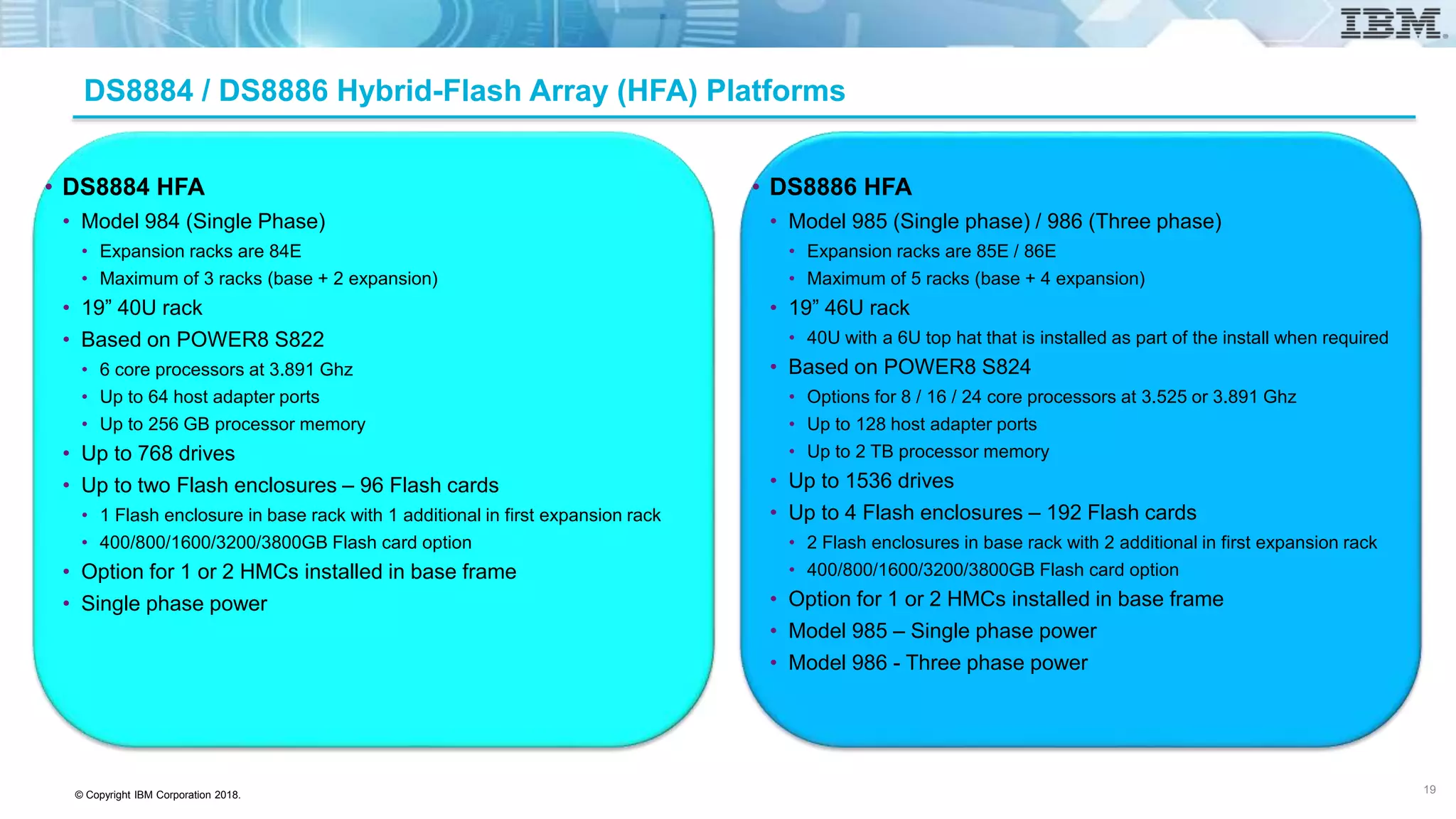
DS8884 / DS8886 Hybrid-Flash Array (HFA) Platforms
• DS8884 HFA
• Model 984 (Single Phase)
• Expansion racks are 84E
• Maximum of 3 racks (base + 2 expansion)
• 19” 40U rack
• Based on POWER8 S822
• 6 core processors at 3.891 Ghz
• Up to 64 host adapter ports
• Up to 256 GB processor memory
• Up to 768 drives
• Up to two Flash enclosures – 96 Flash cards
• 1 Flash enclosure in base rack with 1 additional in first expansion rack
• 400/800/1600/3200/3800GB Flash card option
• Option for 1 or 2 HMCs installed in base frame
• Single phase power
• DS8886 HFA
• Model 985 (Single phase) / 986 (Three phase)
• Expansion racks are 85E / 86E
• Maximum of 5 racks (base + 4 expansion)
• 19” 46U rack
• 40U with a 6U top hat that is installed as part of the install when required
• Based on POWER8 S824
• Options for 8 / 16 / 24 core processors at 3.525 or 3.891 Ghz
• Up to 128 host adapter ports
• Up to 2 TB processor memory
• Up to 1536 drives
• Up to 4 Flash enclosures – 192 Flash cards
• 2 Flash enclosures in base rack with 2 additional in first expansion rack
• 400/800/1600/3200/3800GB Flash card option
• Option for 1 or 2 HMCs installed in base frame
• Model 985 – Single phase power
• Model 986 - Three phase power
19
© Copyright IBM Corporation 2018.
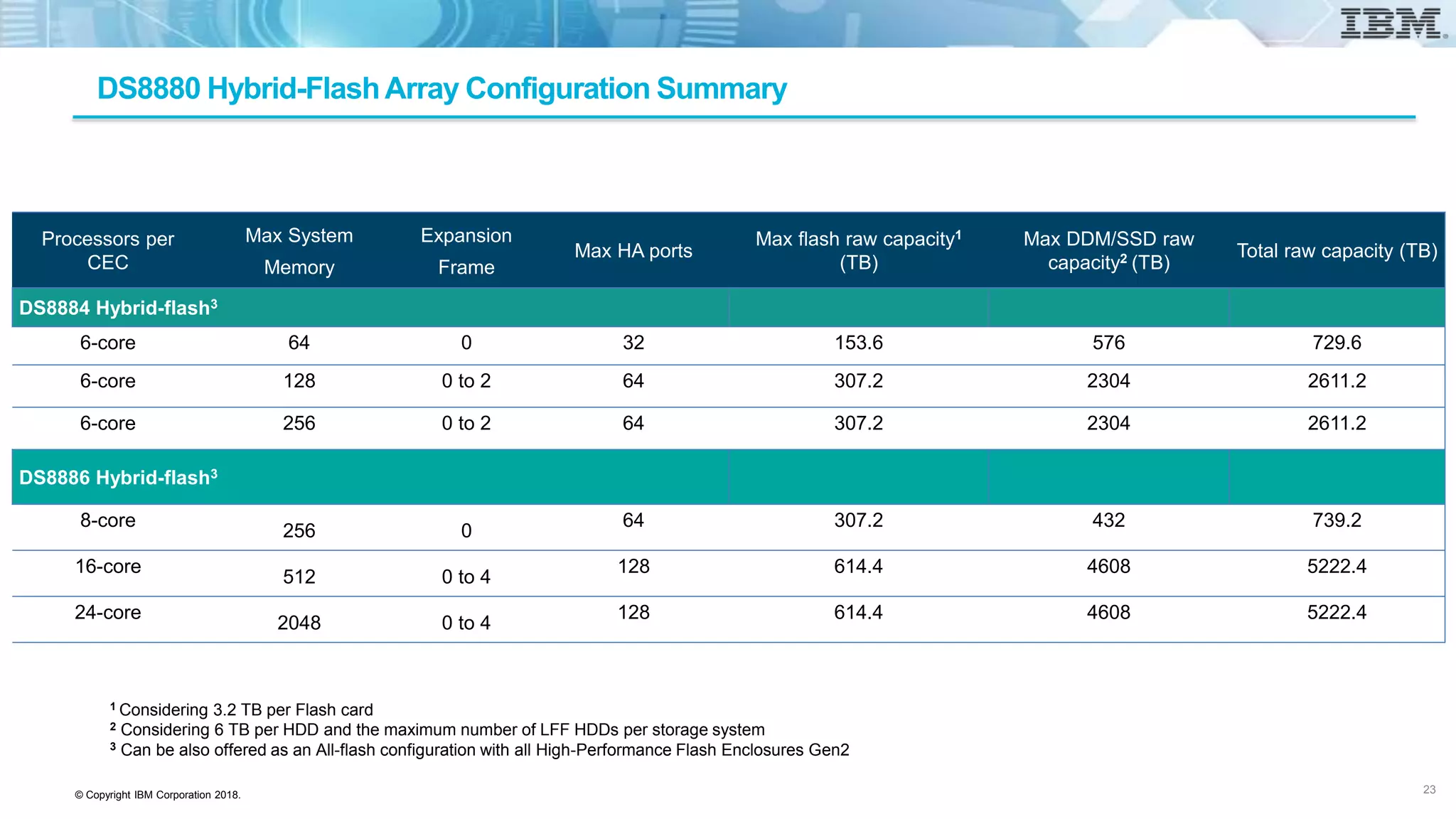
DS8880 Hybrid-FlashArray Configuration Summary
Processors per
CEC
Max System
Memory
Expansion
Frame
Max HA ports
Max flash raw capacity1
(TB)
Max DDM/SSD raw
capacity2 (TB)
Total raw capacity (TB)
DS8884 Hybrid-flash3
6-core 64 0 32 153.6 576 729.6
6-core 128 0 to 2 64 307.2 2304 2611.2
6-core 256 0 to 2 64 307.2 2304 2611.2
DS8886 Hybrid-flash3
8-core
256 0
64 307.2 432 739.2
16-core
512 0 to 4
128 614.4 4608 5222.4
24-core
2048 0 to 4
128 614.4 4608 5222.4
1 Considering 3.2 TB per Flash card
2 Considering 6 TB per HDD and the maximum number of LFF HDDs per storage system
3 Can be also offered as an All-flash configuration with all High-Performance Flash Enclosures Gen2
23
© Copyright IBM Corporation 2018.
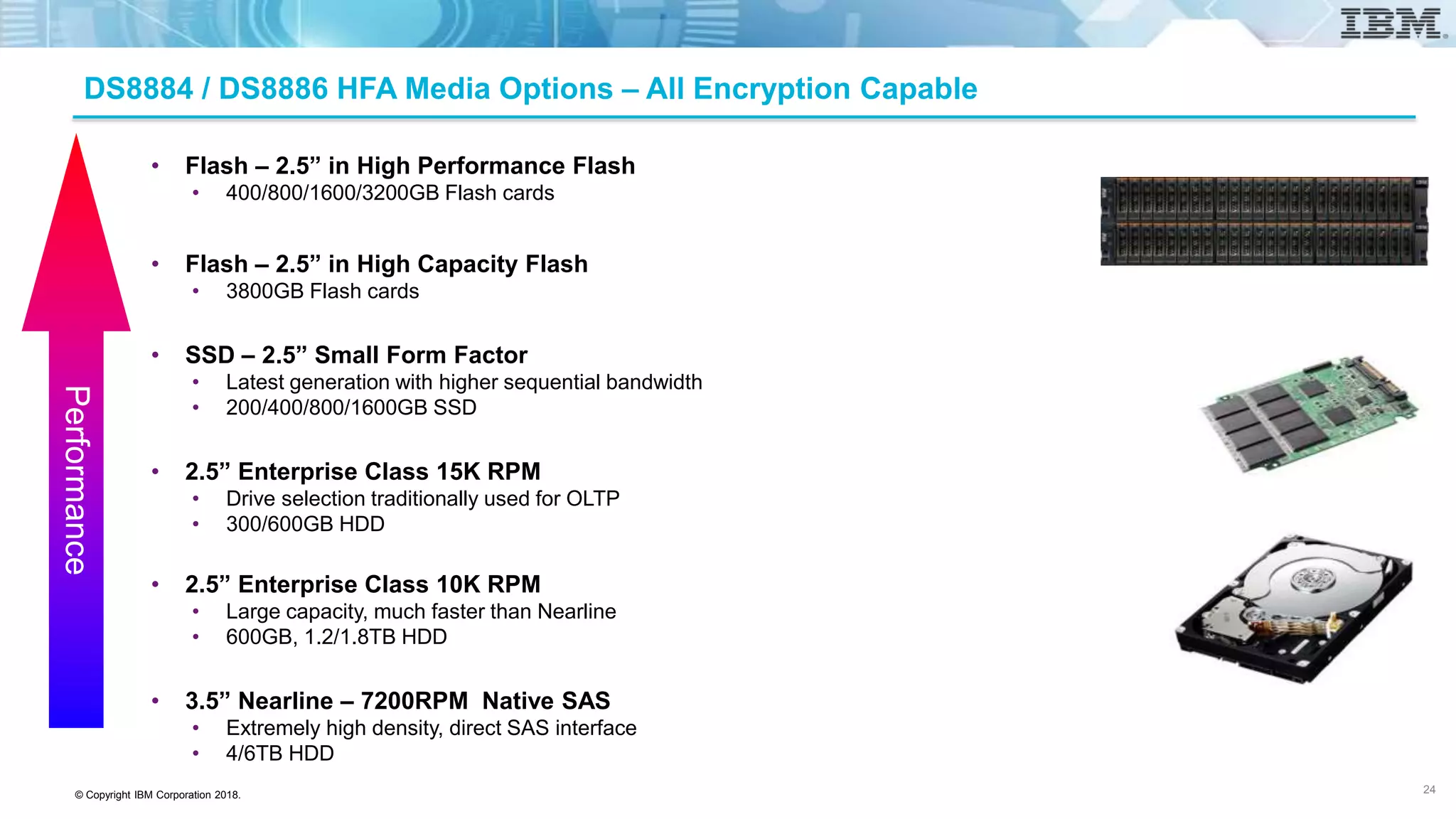
DS8884 / DS8886 HFA Media Options – All Encryption Capable
• Flash – 2.5” in High Performance Flash
• 400/800/1600/3200GB Flash cards
• Flash – 2.5” in High Capacity Flash
• 3800GB Flash cards
• SSD – 2.5” Small Form Factor
• Latest generation with higher sequential bandwidth
• 200/400/800/1600GB SSD
• 2.5” Enterprise Class 15K RPM
• Drive selection traditionally used for OLTP
• 300/600GB HDD
• 2.5” Enterprise Class 10K RPM
• Large capacity, much faster than Nearline
• 600GB, 1.2/1.8TB HDD
• 3.5” Nearline – 7200RPM Native SAS
• Extremely high density, direct SAS interface
• 4/6TB HDD
Performance
24
© Copyright IBM Corporation 2018.
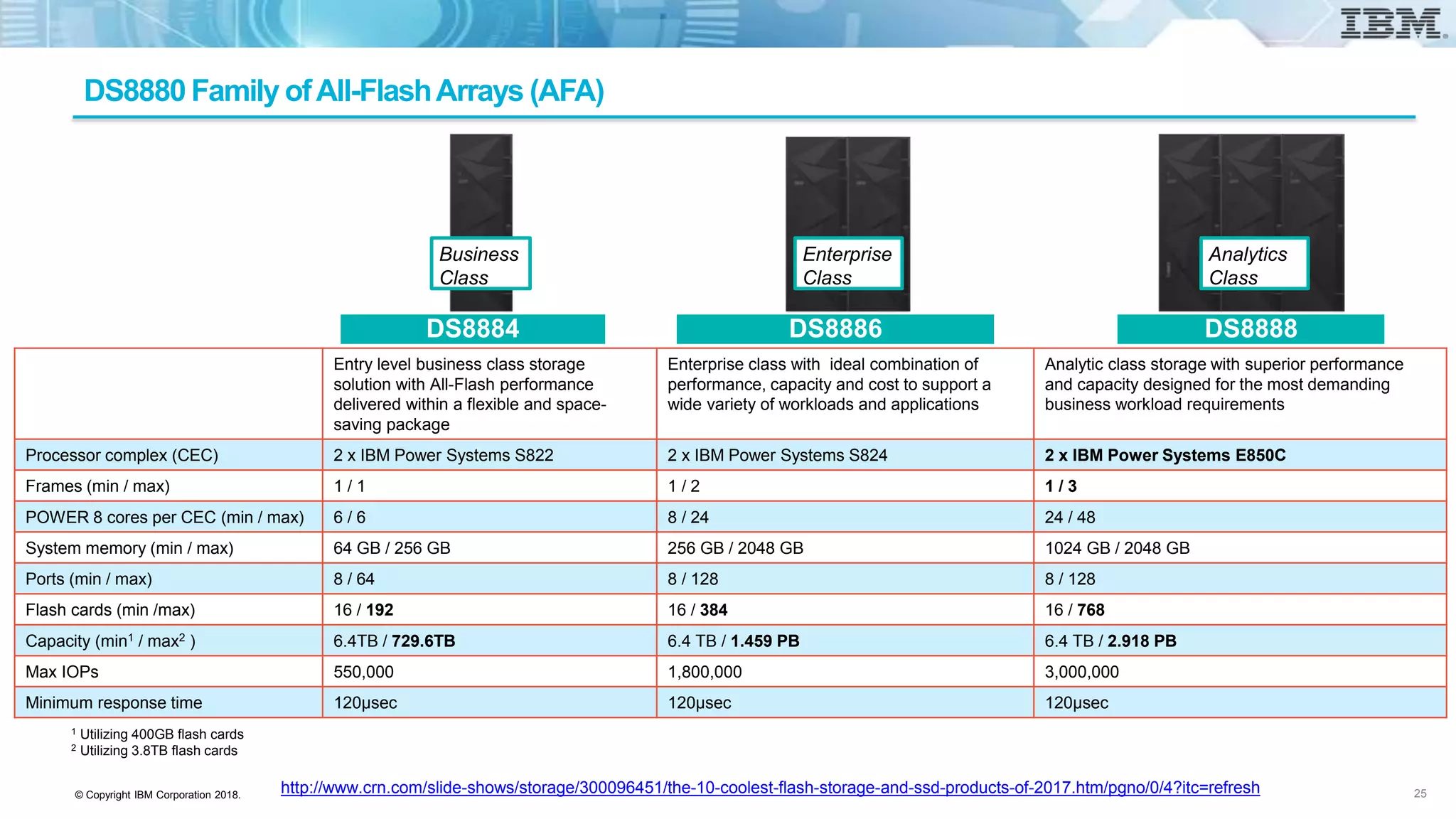
Entry level business class storage
solution with All-Flash performance
delivered within a flexible and space-
saving package
Enterprise class with ideal combination of
performance, capacity and cost to support a
wide variety of workloads and applications
Analytic class storage with superior performance
and capacity designed for the most demanding
business workload requirements
Processor complex (CEC) 2 x IBM Power Systems S822 2 x IBM Power Systems S824 2 x IBM Power Systems E850C
Frames (min / max) 1 / 1 1 / 2 1 / 3
POWER 8 cores per CEC (min / max) 6 / 6 8 / 24 24 / 48
System memory (min / max) 64 GB / 256 GB 256 GB / 2048 GB 1024 GB / 2048 GB
Ports (min / max) 8 / 64 8 / 128 8 / 128
Flash cards (min /max) 16 / 192 16 / 384 16 / 768
Capacity (min1 / max2 ) 6.4TB / 729.6TB 6.4 TB / 1.459 PB 6.4 TB / 2.918 PB
Max IOPs 550,000 1,800,000 3,000,000
Minimum response time 120µsec 120µsec 120µsec
1 Utilizing 400GB flash cards
2 Utilizing 3.8TB flash cards
Business
Class
Enterprise
Class
Analytics
Class
DS8884 DS8886 DS8888
http://www.crn.com/slide-shows/storage/300096451/the-10-coolest-flash-storage-and-ssd-products-of-2017.htm/pgno/0/4?itc=refresh
DS8880 Family ofAll-FlashArrays (AFA)
25
© Copyright IBM Corporation 2018.
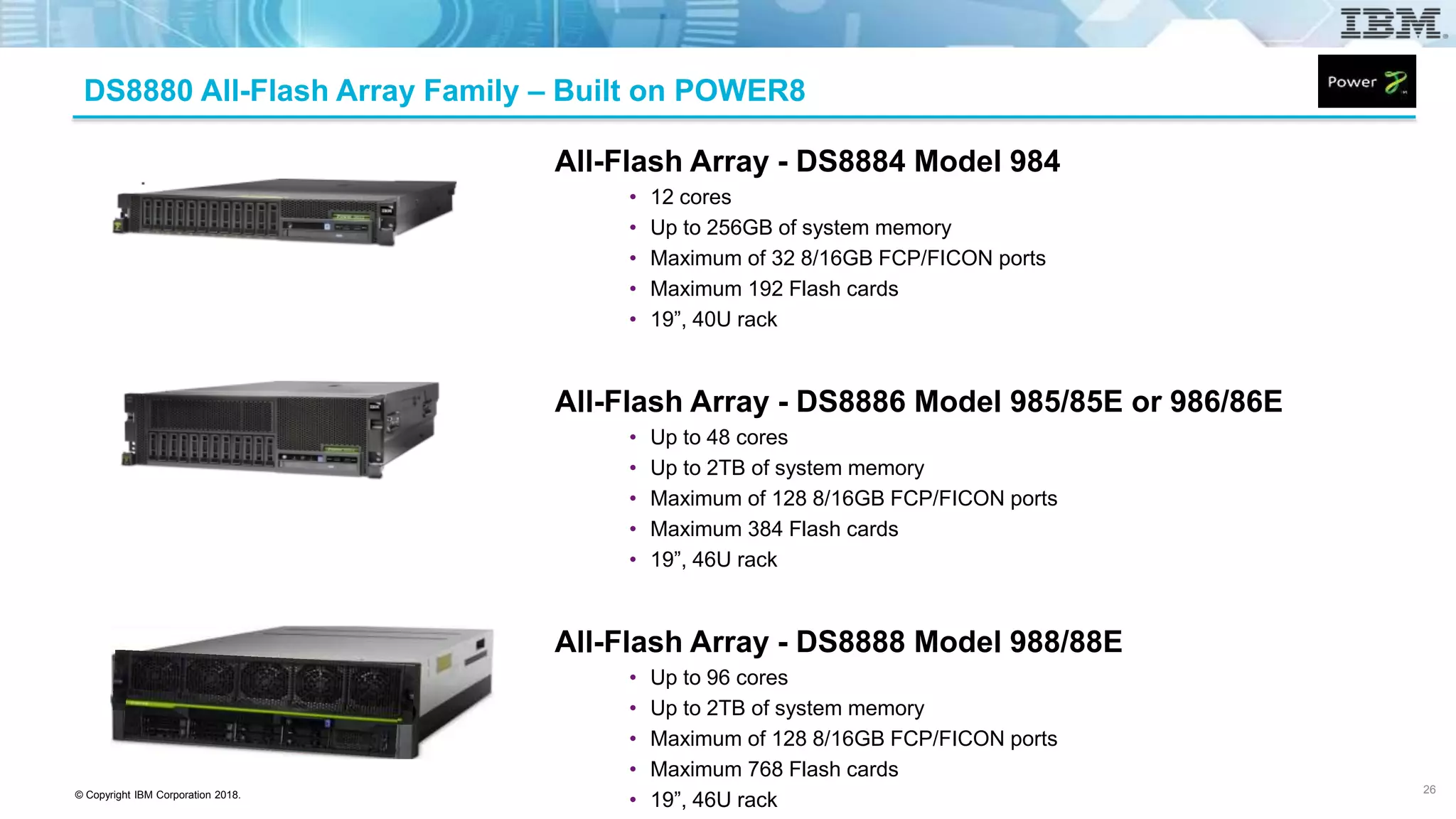
All-Flash Array - DS8884 Model 984
• 12 cores
• Up to 256GB of system memory
• Maximum of 32 8/16GB FCP/FICON ports
• Maximum 192 Flash cards
• 19”, 40U rack
All-Flash Array - DS8886 Model 985/85E or 986/86E
• Up to 48 cores
• Up to 2TB of system memory
• Maximum of 128 8/16GB FCP/FICON ports
• Maximum 384 Flash cards
• 19”, 46U rack
All-Flash Array - DS8888 Model 988/88E
• Up to 96 cores
• Up to 2TB of system memory
• Maximum of 128 8/16GB FCP/FICON ports
• Maximum 768 Flash cards
• 19”, 46U rack
26
DS8880 All-Flash Array Family – Built on POWER8
© Copyright IBM Corporation 2018.
DS8884 / DS8886 All-Flash Array (AFA) Platforms
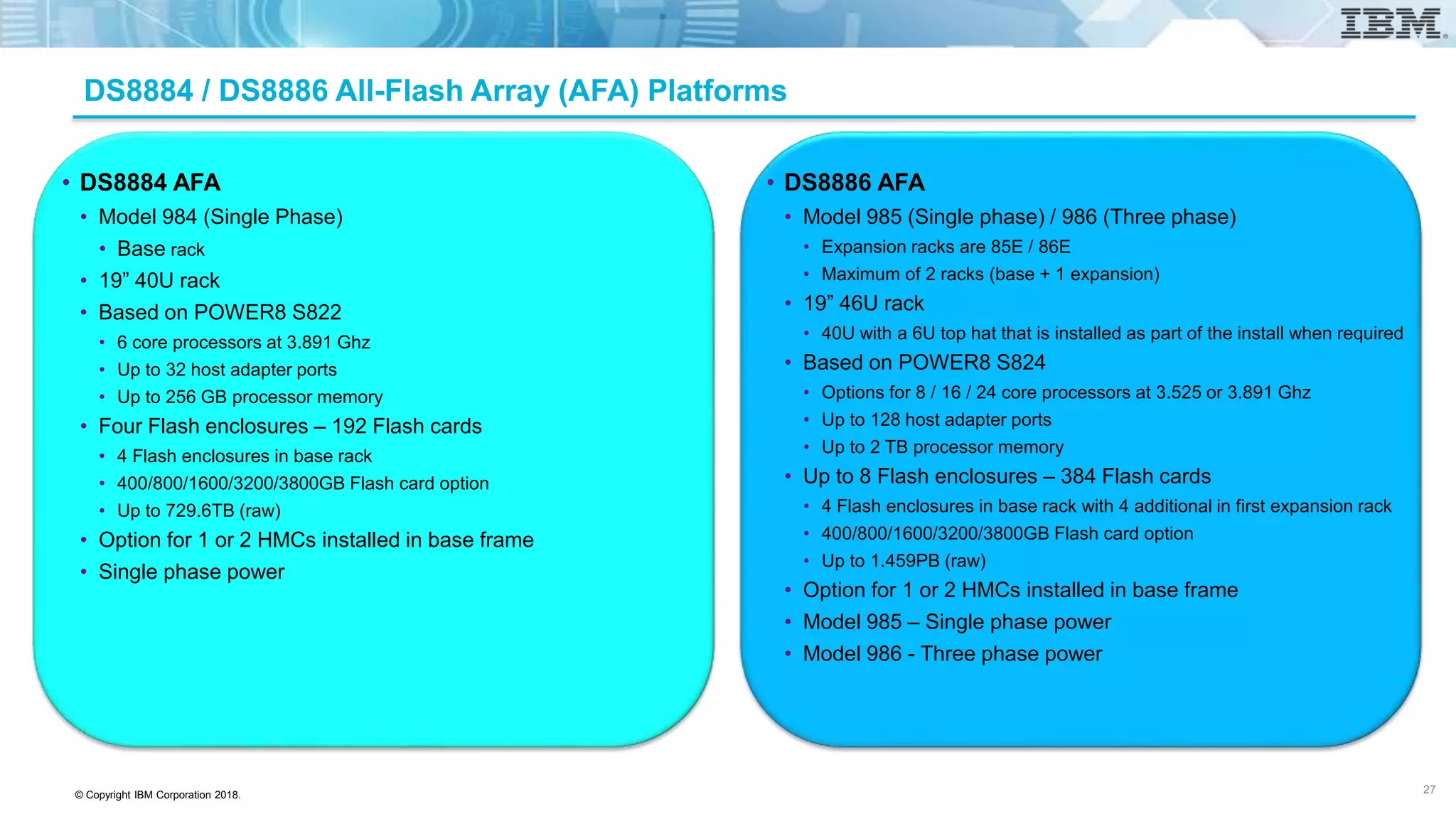
• DS8884 AFA
• Model 984 (Single Phase)
• Base rack
• 19” 40U rack
• Based on POWER8 S822
• 6 core processors at 3.891 Ghz
• Up to 32 host adapter ports
• Up to 256 GB processor memory
• Four Flash enclosures – 192 Flash cards
• 4 Flash enclosures in base rack
• 400/800/1600/3200/3800GB Flash card option
• Up to 729.6TB (raw)
• Option for 1 or 2 HMCs installed in base frame
• Single phase power
• DS8886 AFA
• Model 985 (Single phase) / 986 (Three phase)
• Expansion racks are 85E / 86E
• Maximum of 2 racks (base + 1 expansion)
• 19” 46U rack
• 40U with a 6U top hat that is installed as part of the install when required
• Based on POWER8 S824
• Options for 8 / 16 / 24 core processors at 3.525 or 3.891 Ghz
• Up to 128 host adapter ports
• Up to 2 TB processor memory
• Up to 8 Flash enclosures – 384 Flash cards
• 4 Flash enclosures in base rack with 4 additional in first expansion rack
• 400/800/1600/3200/3800GB Flash card option
• Up to 1.459PB (raw)
• Option for 1 or 2 HMCs installed in base frame
• Model 985 – Single phase power
• Model 986 - Three phase power
27
© Copyright IBM Corporation 2018.
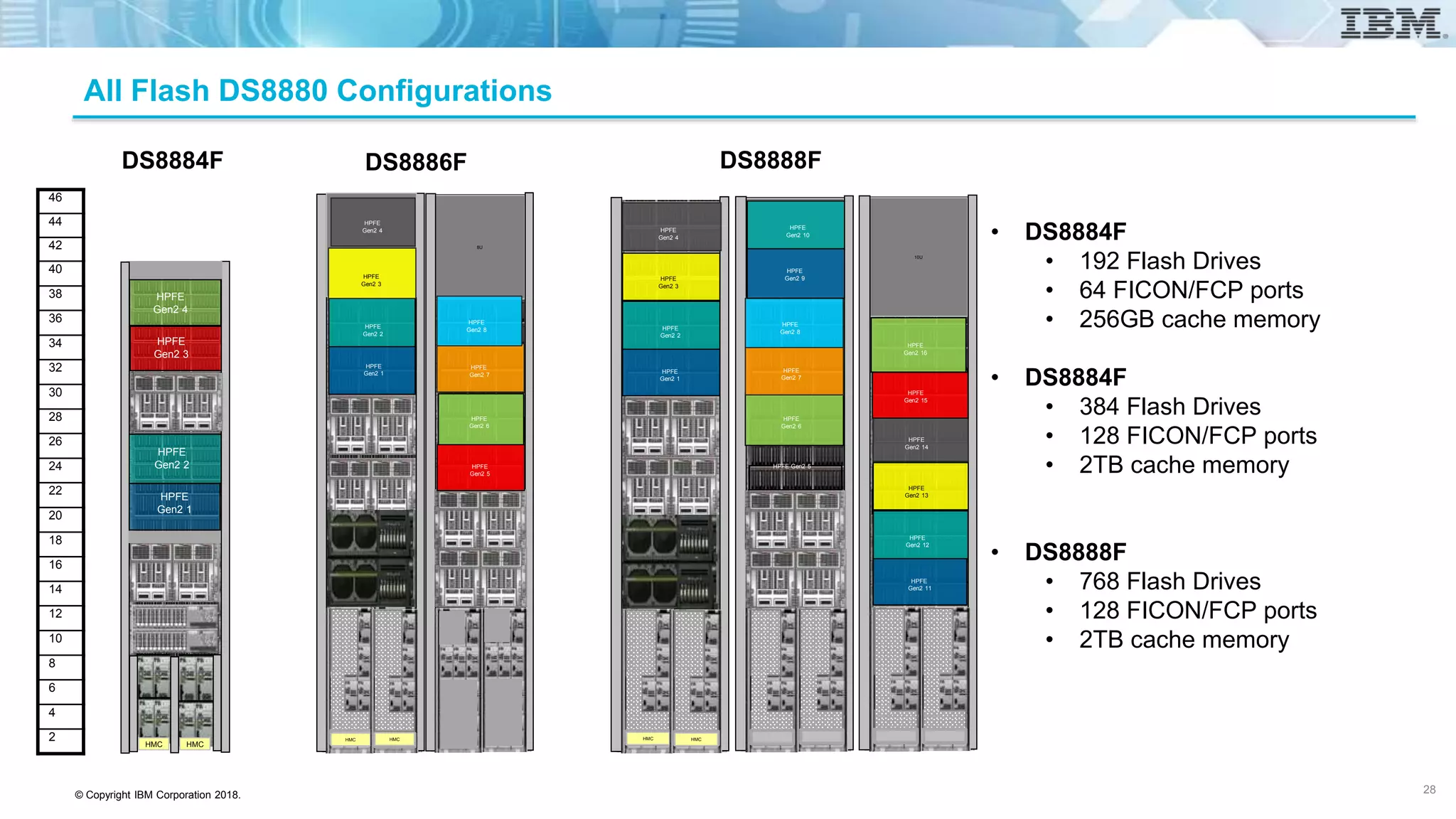
All Flash DS8880 Configurations
HMC HMC
HPFE
Gen2 1
HPFE
Gen2 2
HPFE
Gen2 3
HPFE
Gen2 4
46
44
42
40
38
36
34
32
30
28
26
24
22
20
18
16
14
12
10
8
6
4
2 HMC HMCHMC HMC
TH 3
TH 4
TH 4
8U
HPFE
Gen2 1
HPFE
Gen2 2
HPFE
Gen2 3
HPFE
Gen2 4
8U
HPFE
Gen2 5
HPFE
Gen2 6
HPFE
Gen2 7
HPFE
Gen2 8
8U
HMC HMC
HMC HMC
HPFE
Gen2 1
HPFE
Gen2 2
HPFE
Gen2 3
HPFE
Gen2 4
HPFE Gen2 5
HPFE
Gen2 6
HPFE
Gen2 7
HPFE
Gen2 8
HPFE
Gen2 9
HPFE
Gen2 10
HPFE Gen2 15
HPFE Gen2 16
10U
HPFE
Gen2 11
HPFE
Gen2 12
HPFE
Gen2 13
HPFE
Gen2 14
HPFE
Gen2 15
HPFE
Gen2 16
DS8886FDS8884F DS8888F
• DS8884F
• 192 Flash Drives
• 64 FICON/FCP ports
• 256GB cache memory
• DS8884F
• 384 Flash Drives
• 128 FICON/FCP ports
• 2TB cache memory
• DS8888F
• 768 Flash Drives
• 128 FICON/FCP ports
• 2TB cache memory
28
© Copyright IBM Corporation 2018.
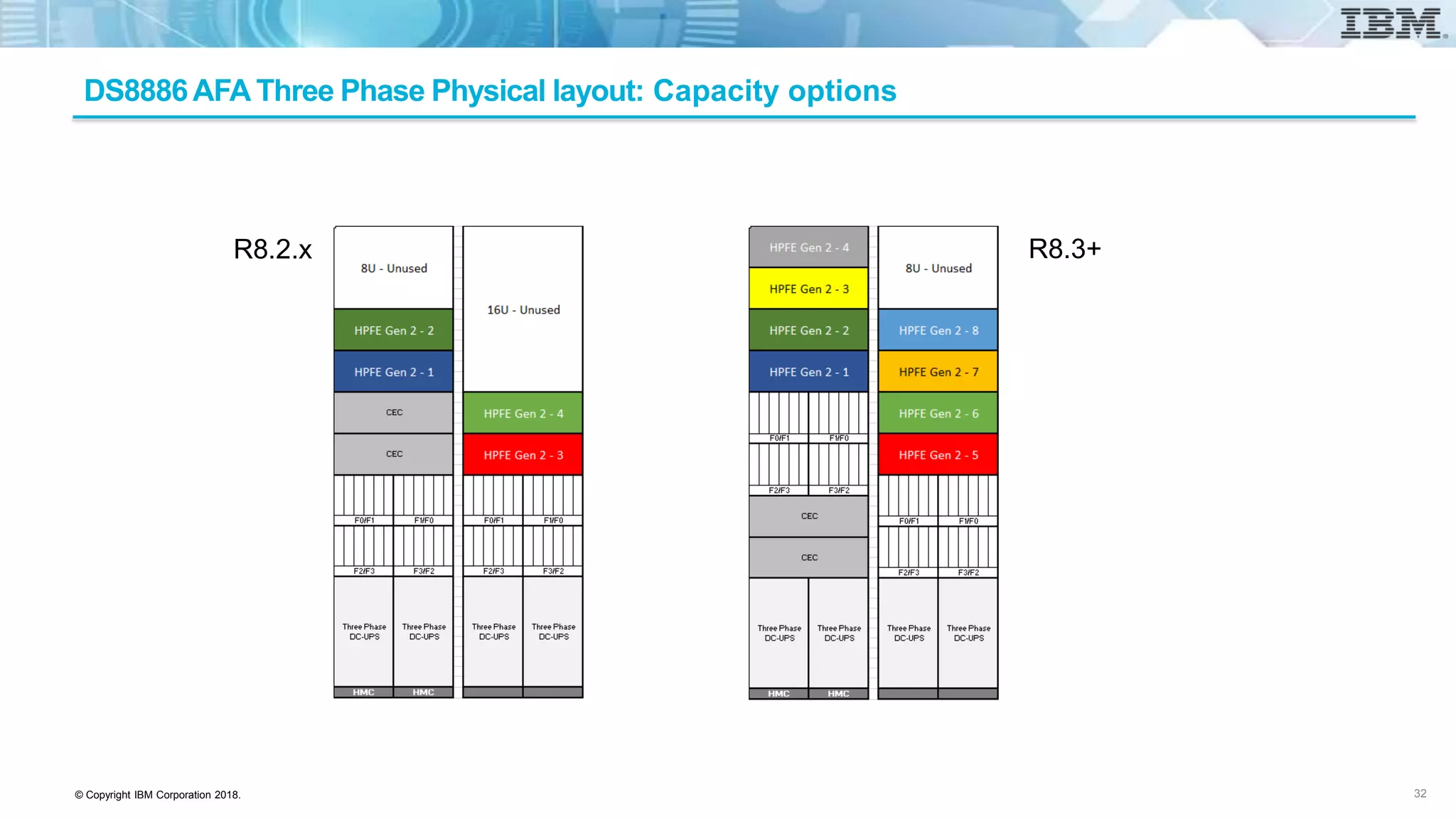
DS8886AFA Three Phase Physical layout: Capacity options
32
R8.2.x R8.3+
© Copyright IBM Corporation 2018.
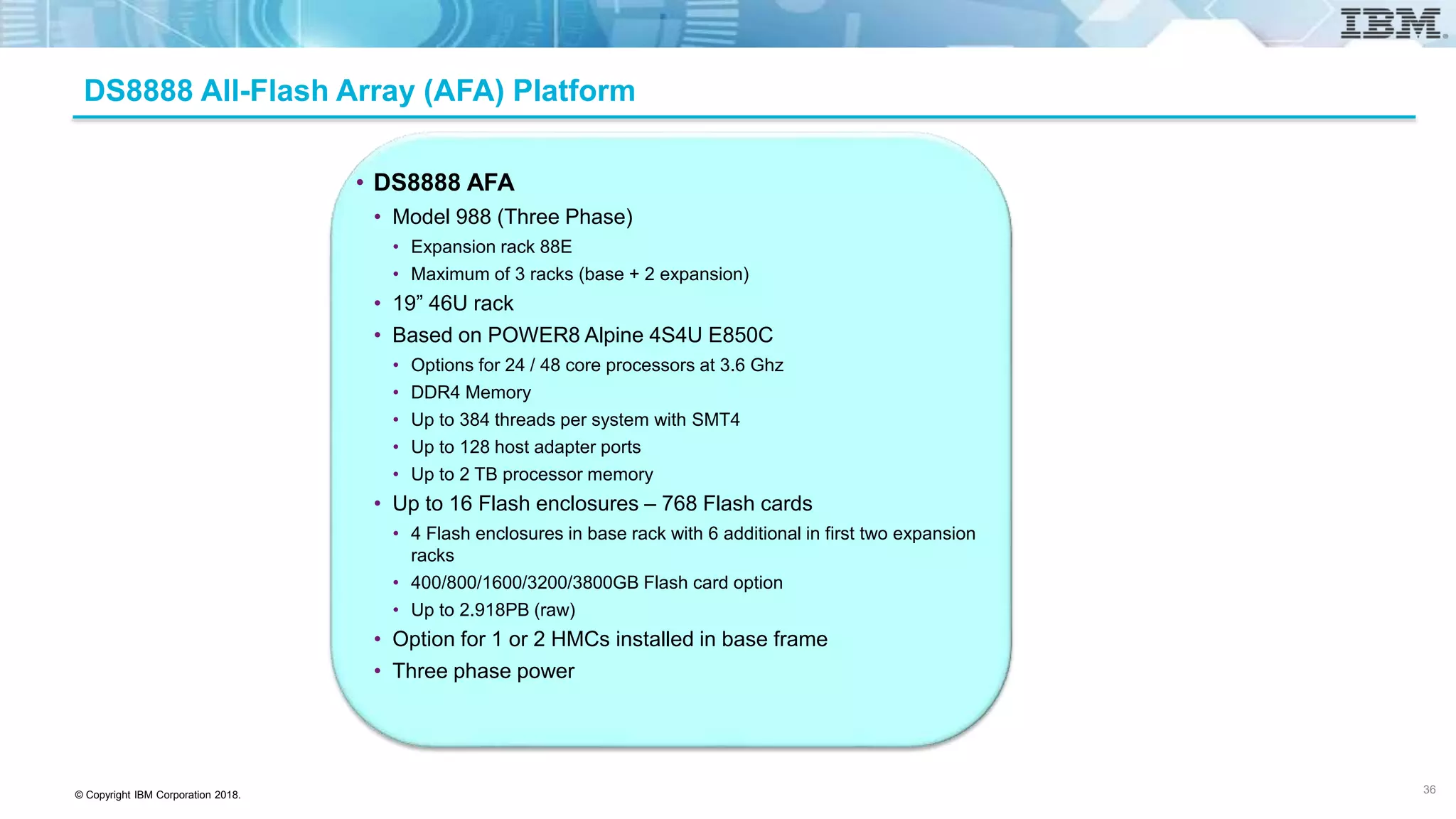
DS8888 All-Flash Array (AFA) Platform
• DS8888 AFA
• Model 988 (Three Phase)
• Expansion rack 88E
• Maximum of 3 racks (base + 2 expansion)
• 19” 46U rack
• Based on POWER8 Alpine 4S4U E850C
• Options for 24 / 48 core processors at 3.6 Ghz
• DDR4 Memory
• Up to 384 threads per system with SMT4
• Up to 128 host adapter ports
• Up to 2 TB processor memory
• Up to 16 Flash enclosures – 768 Flash cards
• 4 Flash enclosures in base rack with 6 additional in first two expansion
racks
• 400/800/1600/3200/3800GB Flash card option
• Up to 2.918PB (raw)
• Option for 1 or 2 HMCs installed in base frame
• Three phase power
36
© Copyright IBM Corporation 2018.
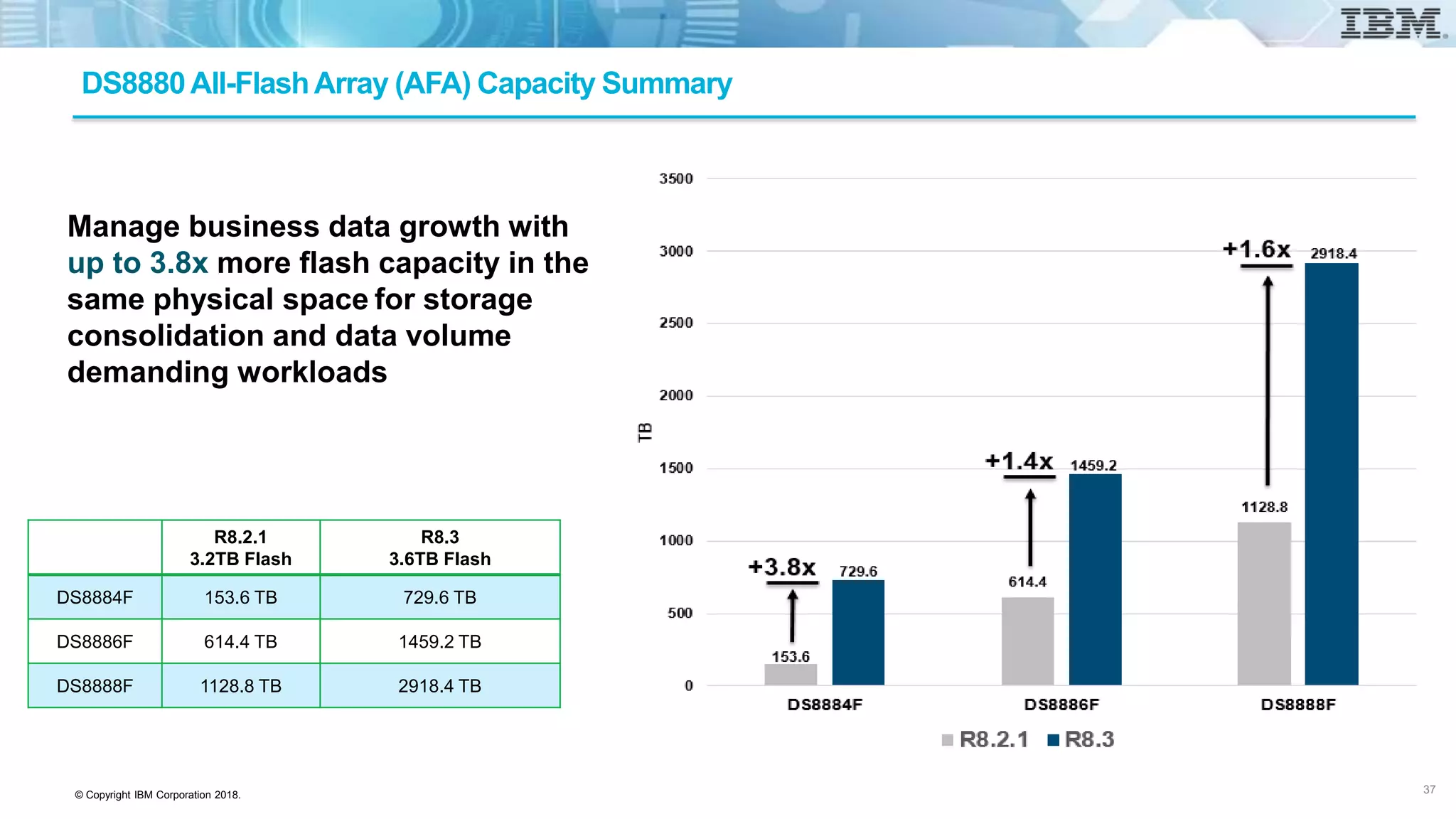
DS8880All-FlashArray (AFA) Capacity Summary
R8.2.1
3.2TB Flash
R8.3
3.6TB Flash
DS8884F 153.6 TB 729.6 TB
DS8886F 614.4 TB 1459.2 TB
DS8888F 1128.8 TB 2918.4 TB
Manage business data growth with
up to 3.8x more flash capacity in the
same physical space for storage
consolidation and data volume
demanding workloads
37
© Copyright IBM Corporation 2018.
DS8880 AFA Media Options – All Encryption Capable
• Flash – 2.5” in High Performance Flash
• 400/800/1600/3200GB Flash cards
• Flash – 2.5” in High Capacity Flash
• 3800GB Flash cards
• Data is always encrypted on write to Flash and then decrypted on read
• Data stored on Flash is encrypted
• Customer data in flight is not encrypted
• Media does the encryption at full data rate
• No impact to response times
• Uses AES 256 bit encryption
• Supports cryptographic erasure data
• Change of encryption keys
• Requires authentication with key server before access to data is granted
• Key management options
• IBM Security Key Lifecycle Manager (SKLM)
• z/OS can also use IBM Security Key Lifecycle Manager (ISKLM)
• KMIP compliant key manager such as Safenet KeySecure
• Key exchange with key server is via 256 bit encryption
38
© Copyright IBM Corporation 2018.
DS8880 High Performance Flash Enclosure (HPFE) Gen2
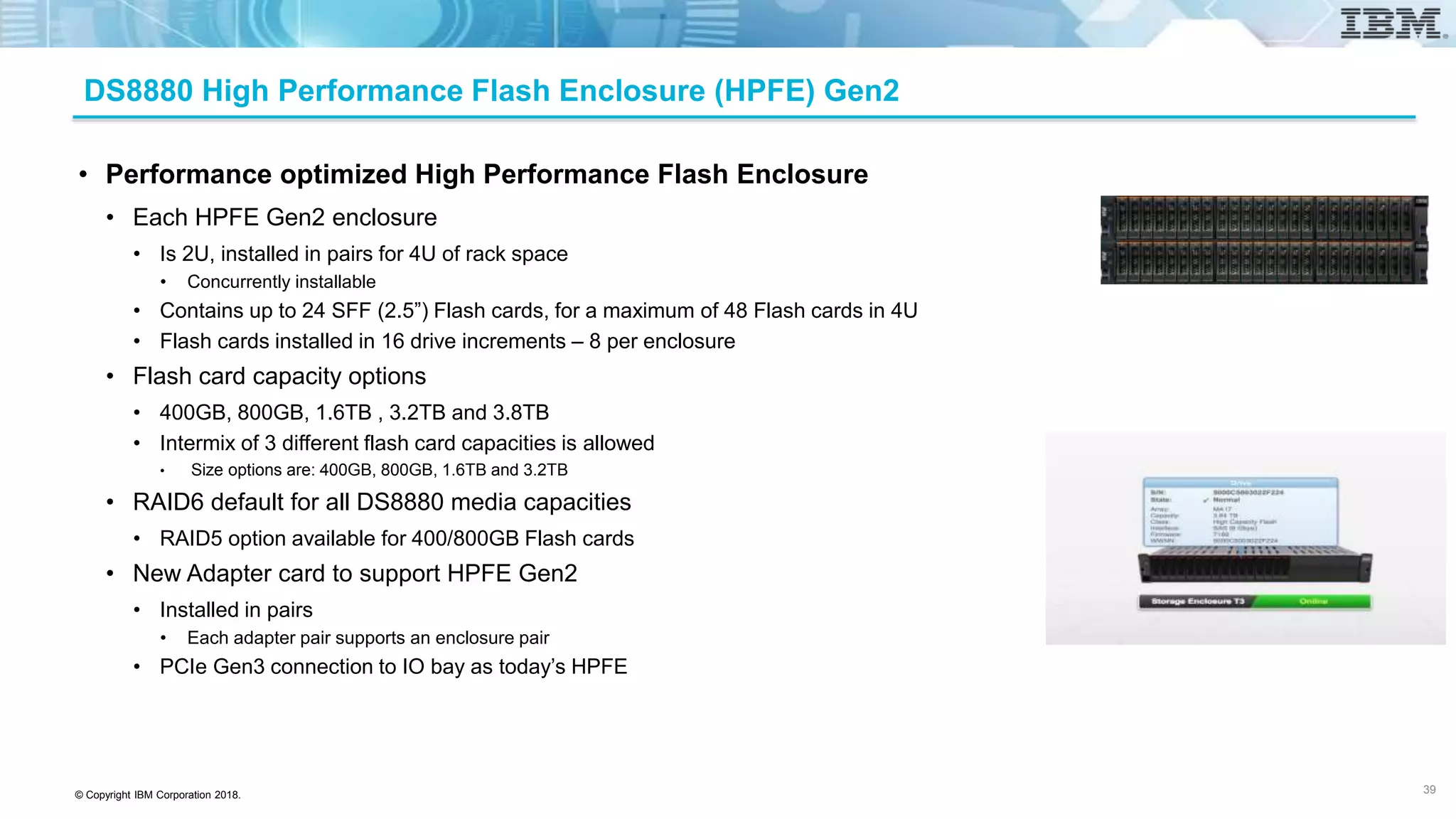
• Performance optimized High Performance Flash Enclosure
• Each HPFE Gen2 enclosure
• Is 2U, installed in pairs for 4U of rack space
• Concurrently installable
• Contains up to 24 SFF (2.5”) Flash cards, for a maximum of 48 Flash cards in 4U
• Flash cards installed in 16 drive increments – 8 per enclosure
• Flash card capacity options
• 400GB, 800GB, 1.6TB , 3.2TB and 3.8TB
• Intermix of 3 different flash card capacities is allowed
• Size options are: 400GB, 800GB, 1.6TB and 3.2TB
• RAID6 default for all DS8880 media capacities
• RAID5 option available for 400/800GB Flash cards
• New Adapter card to support HPFE Gen2
• Installed in pairs
• Each adapter pair supports an enclosure pair
• PCIe Gen3 connection to IO bay as today’s HPFE
39
© Copyright IBM Corporation 2018.
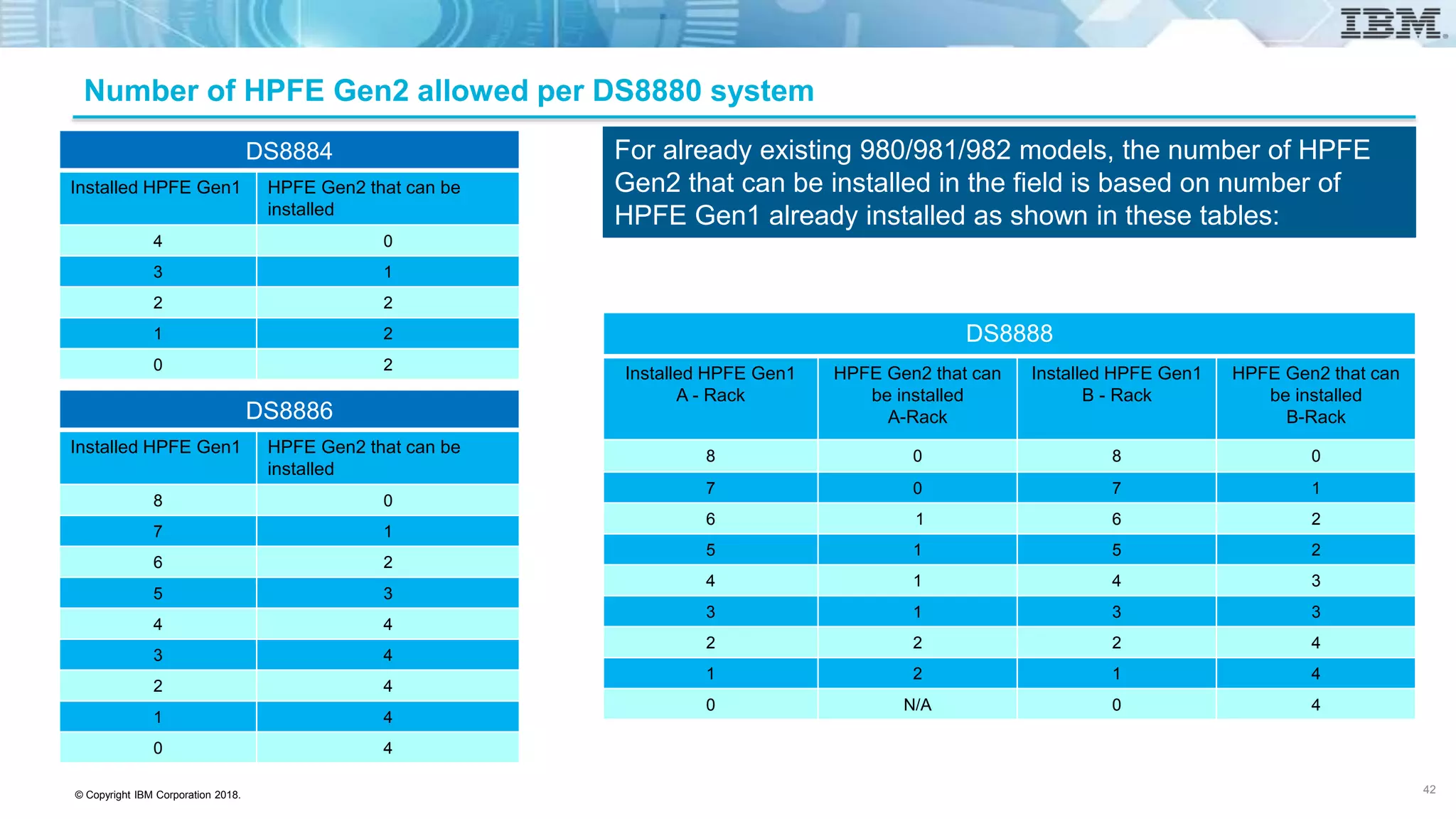
Number of HPFE Gen2 allowed per DS8880 system
DS8884
Installed HPFE Gen1 HPFE Gen2 that can be
installed
4 0
3 1
2 2
1 2
0 2
DS8886
Installed HPFE Gen1 HPFE Gen2 that can be
installed
8 0
7 1
6 2
5 3
4 4
3 4
2 4
1 4
0 4
DS8888
Installed HPFE Gen1
A - Rack
HPFE Gen2 that can
be installed
A-Rack
Installed HPFE Gen1
B - Rack
HPFE Gen2 that can
be installed
B-Rack
8 0 8 0
7 0 7 1
6 1 6 2
5 1 5 2
4 1 4 3
3 1 3 3
2 2 2 4
1 2 1 4
0 N/A 0 4
For already existing 980/981/982 models, the number of HPFE
Gen2 that can be installed in the field is based on number of
HPFE Gen1 already installed as shown in these tables:
42
© Copyright IBM Corporation 2018.
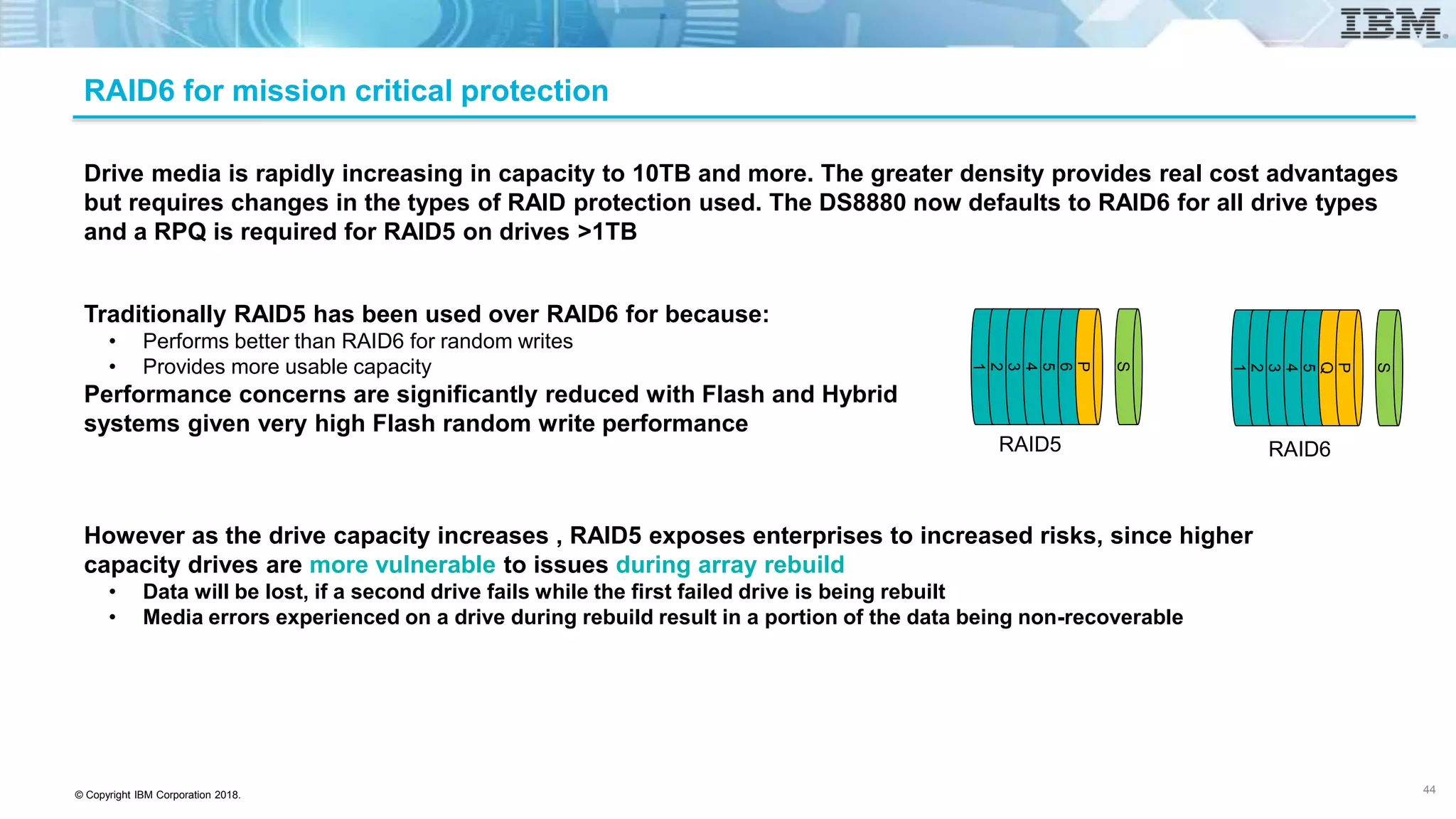
Drive media is rapidly increasing in capacity to 10TB and more. The greater density provides real cost advantages
but requires changes in the types of RAID protection used. The DS8880 now defaults to RAID6 for all drive types
and a RPQ is required for RAID5 on drives >1TB
1
2
3
4
5
6
P
S
Traditionally RAID5 has been used over RAID6 for because:
• Performs better than RAID6 for random writes
• Provides more usable capacity
Performance concerns are significantly reduced with Flash and Hybrid
systems given very high Flash random write performance
RAID5
However as the drive capacity increases , RAID5 exposes enterprises to increased risks, since higher
capacity drives are more vulnerable to issues during array rebuild
• Data will be lost, if a second drive fails while the first failed drive is being rebuilt
• Media errors experienced on a drive during rebuild result in a portion of the data being non-recoverable
1
2
3
4
5
Q
P
S
RAID6
RAID6 for mission critical protection
44
© Copyright IBM Corporation 2018.
HPFE Gen 2 – RAID 6 Configuration
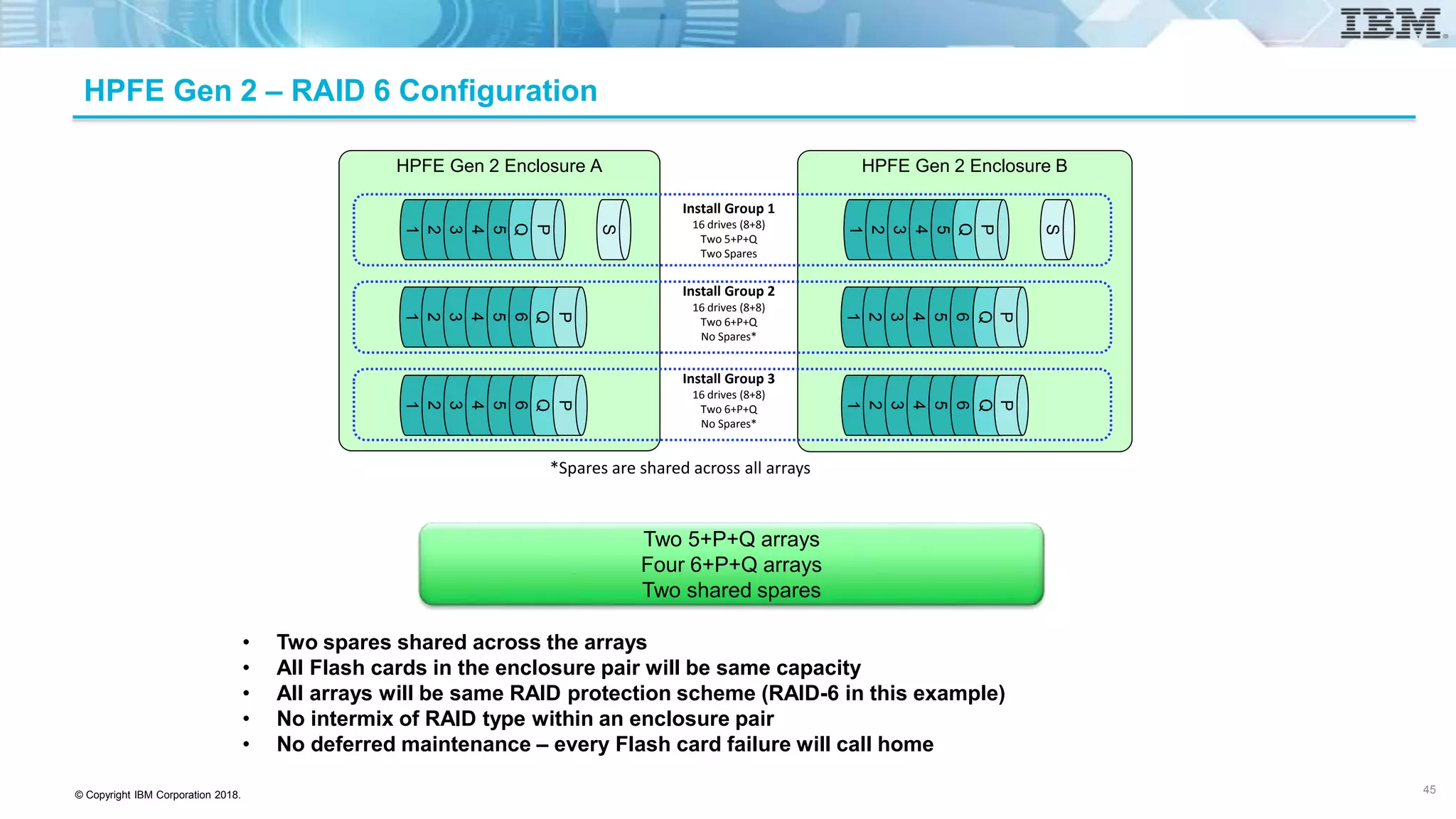
• Two spares shared across the arrays
• All Flash cards in the enclosure pair will be same capacity
• All arrays will be same RAID protection scheme (RAID-6 in this example)
• No intermix of RAID type within an enclosure pair
• No deferred maintenance – every Flash card failure will call home
HPFE Gen 2 Enclosure A
S
1
2
3
4
5
6
HPFE Gen 2 Enclosure B
S
Install Group 1
16 drives (8+8)
Two 5+P+Q
Two Spares
Install Group 2
16 drives (8+8)
Two 6+P+Q
No Spares*
Install Group 3
16 drives (8+8)
Two 6+P+Q
No Spares*
Q
1
2
3
4
5
P
Q
P
1
2
3
4
5
6
1
2
3
4
5
6
Q
P
Q
P
*Spares are shared across all arrays
1
2
3
4
5
6
1
2
3
4
5
6
Q
P
Q
P
Two 5+P+Q arrays
Four 6+P+Q arrays
Two shared spares
45
© Copyright IBM Corporation 2018.
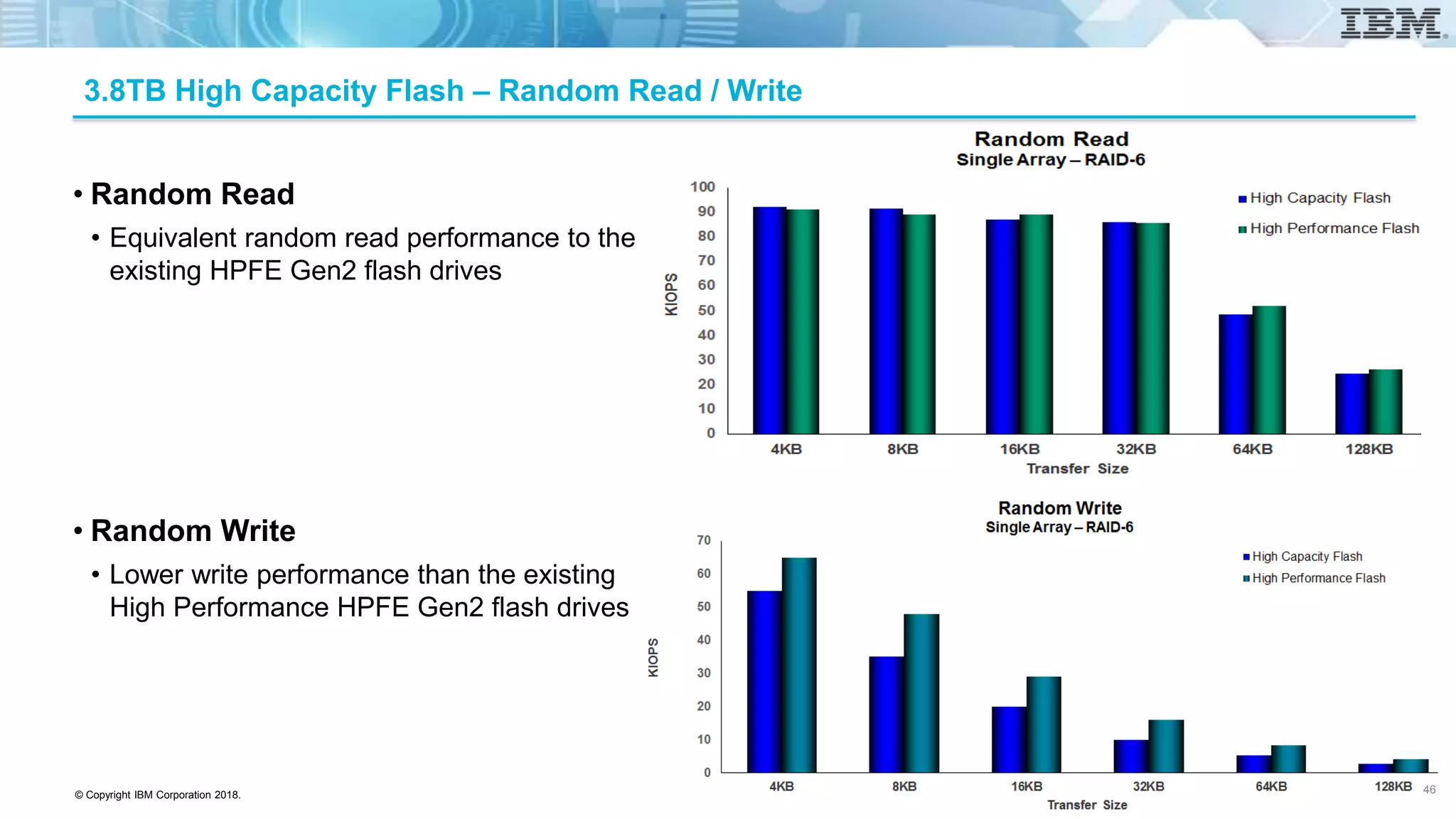
3.8TB High Capacity Flash – Random Read / Write
• Random Read
• Equivalent random read performance to the
existing HPFE Gen2 flash drives
• Random Write
• Lower write performance than the existing
High Performance HPFE Gen2 flash drives
46
© Copyright IBM Corporation 2018.
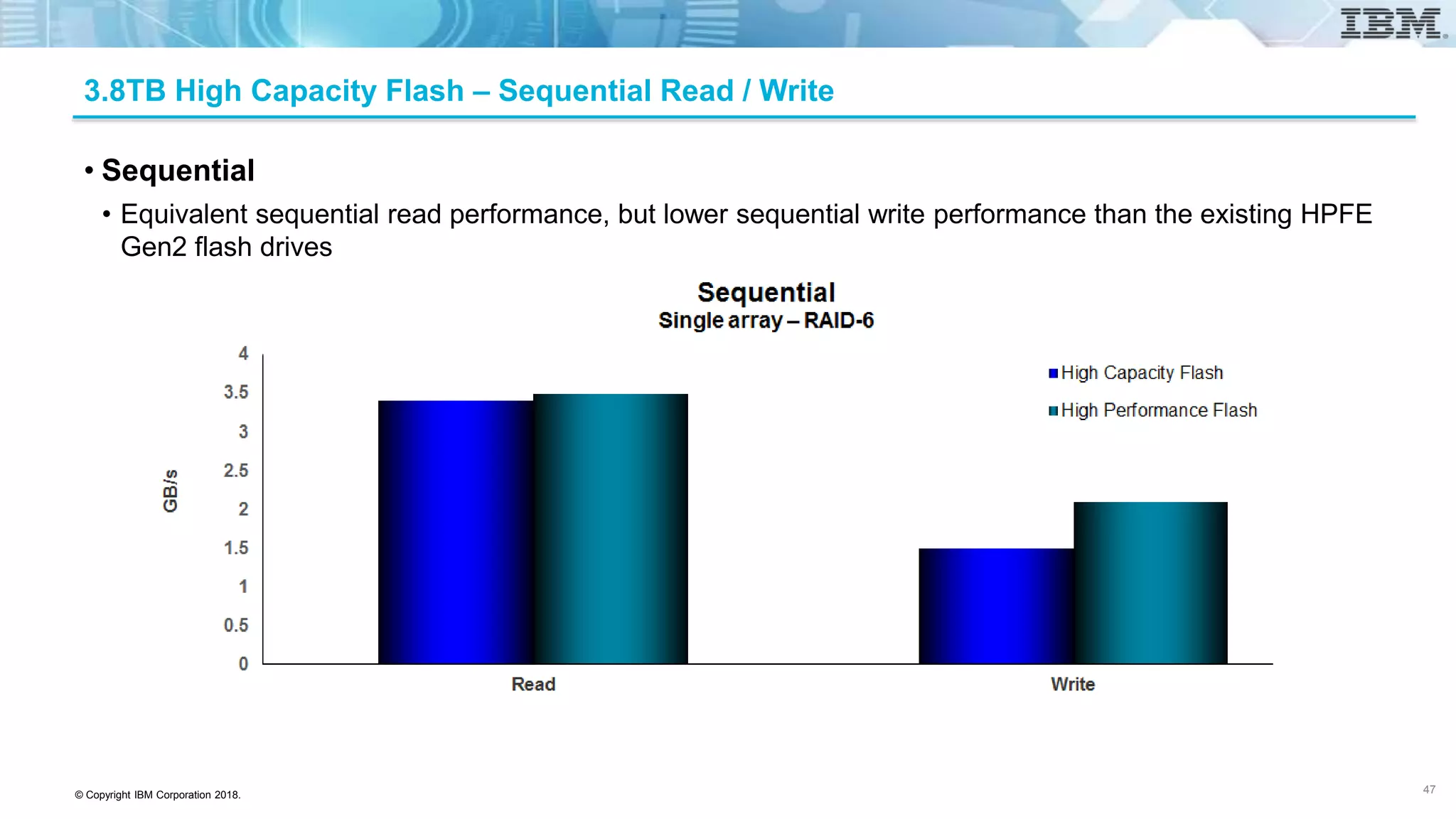
3.8TB High Capacity Flash – Sequential Read / Write
• Sequential
• Equivalent sequential read performance, but lower sequential write performance than the existing HPFE
Gen2 flash drives
47
© Copyright IBM Corporation 2018.
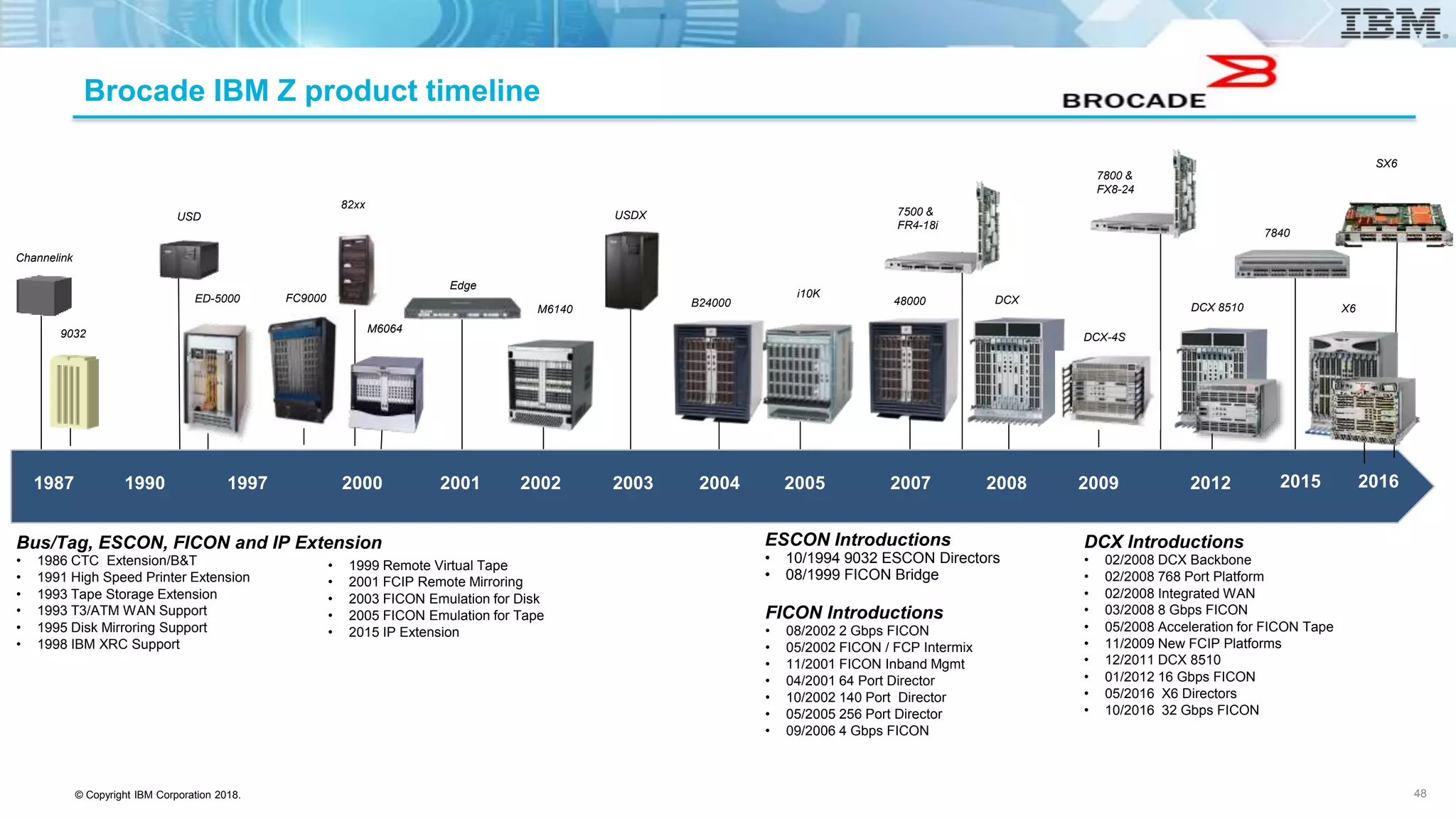
Brocade IBM Z product timeline
48
FICON Introductions
• 08/2002 2 Gbps FICON
• 05/2002 FICON / FCP Intermix
• 11/2001 FICON Inband Mgmt
• 04/2001 64 Port Director
• 10/2002 140 Port Director
• 05/2005 256 Port Director
• 09/2006 4 Gbps FICON
ESCON Introductions
• 10/1994 9032 ESCON Directors
• 08/1999 FICON Bridge
Bus/Tag, ESCON, FICON and IP Extension
• 1986 CTC Extension/B&T
• 1991 High Speed Printer Extension
• 1993 Tape Storage Extension
• 1993 T3/ATM WAN Support
• 1995 Disk Mirroring Support
• 1998 IBM XRC Support
• 1999 Remote Virtual Tape
• 2001 FCIP Remote Mirroring
• 2003 FICON Emulation for Disk
• 2005 FICON Emulation for Tape
• 2015 IP Extension
1987 1990 2000 2001 2002 2003 2004 2005 2007 2008 20091997 2012
ED-5000
M6140
M6064
i10K
9032
48000B24000 DCXFC9000
DCX-4S
DCX 8510
2015
Channelink
USD
82xx
Edge
USDX 7500 &
FR4-18i
7800 &
FX8-24
7840
DCX Introductions
• 02/2008 DCX Backbone
• 02/2008 768 Port Platform
• 02/2008 Integrated WAN
• 03/2008 8 Gbps FICON
• 05/2008 Acceleration for FICON Tape
• 11/2009 New FCIP Platforms
• 12/2011 DCX 8510
• 01/2012 16 Gbps FICON
• 05/2016 X6 Directors
• 10/2016 32 Gbps FICON
2016
SX6
X6
© Copyright IBM Corporation 2018.
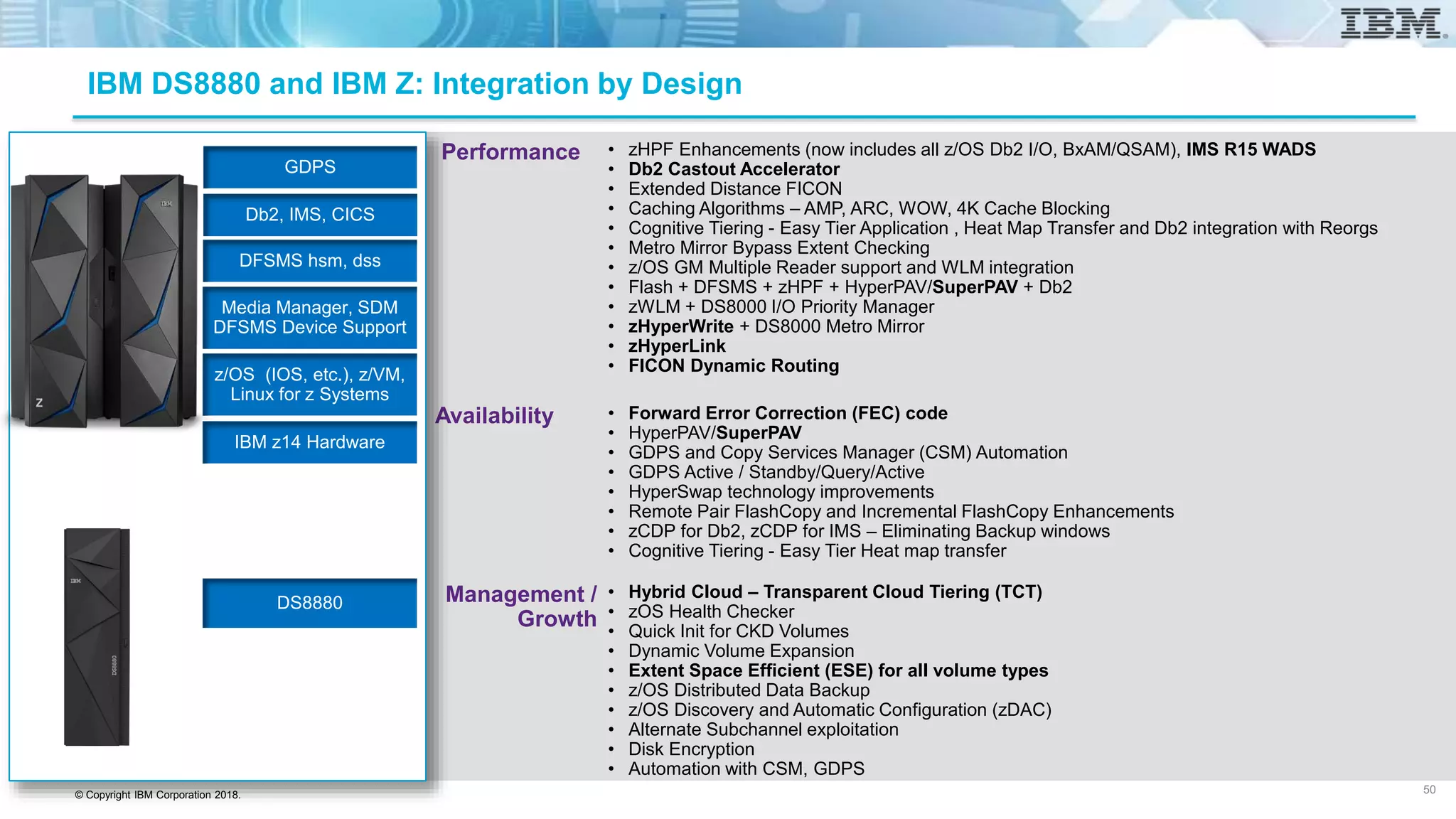
Current Brocade / IBM Z Portfolio
49
16 Gbps FC Fabric
Extension Switches
Extension Blades
Gen 5 - FX8-24 Gen 6 – SX6
X6-4 X6-8DCX-8510-4
6510
G620
32/128 Gbps FC Fabric
DCX-8510-8
FC16-32
Blade
FC16-48
Blade
FC32-48 Blade
7840
7800
© Copyright IBM Corporation 2018.
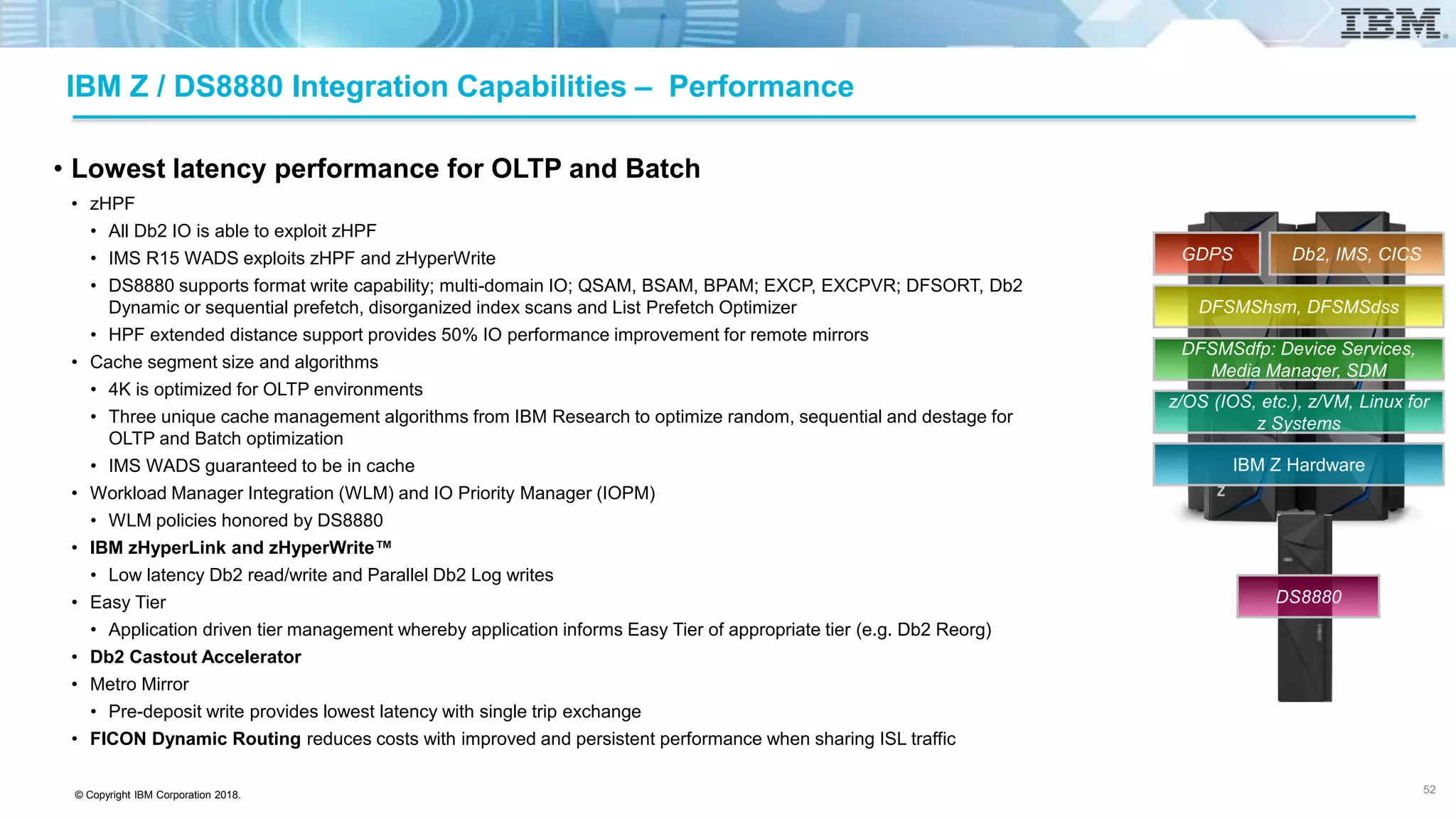
Performance
Availability
Management /
Growth
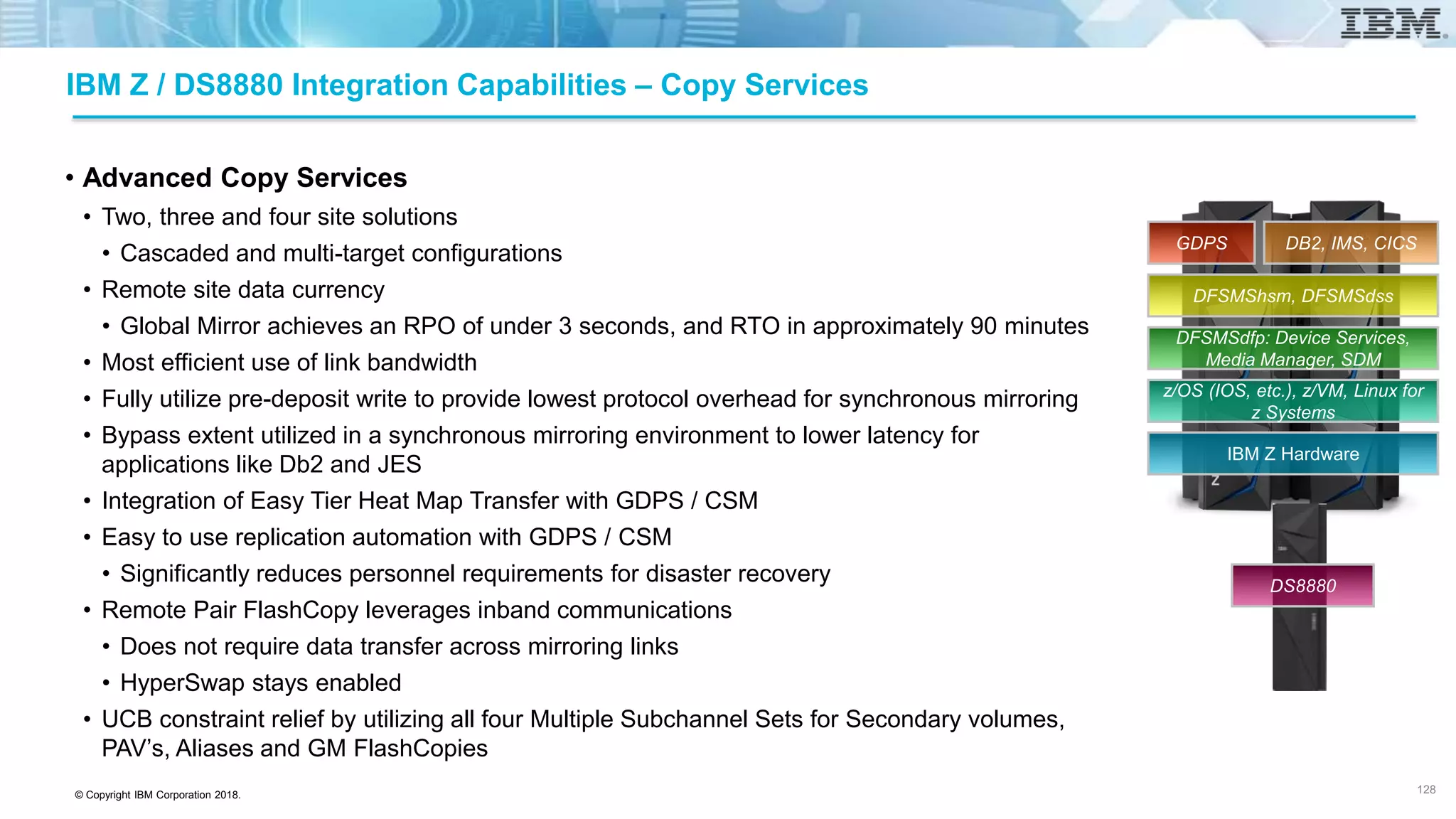
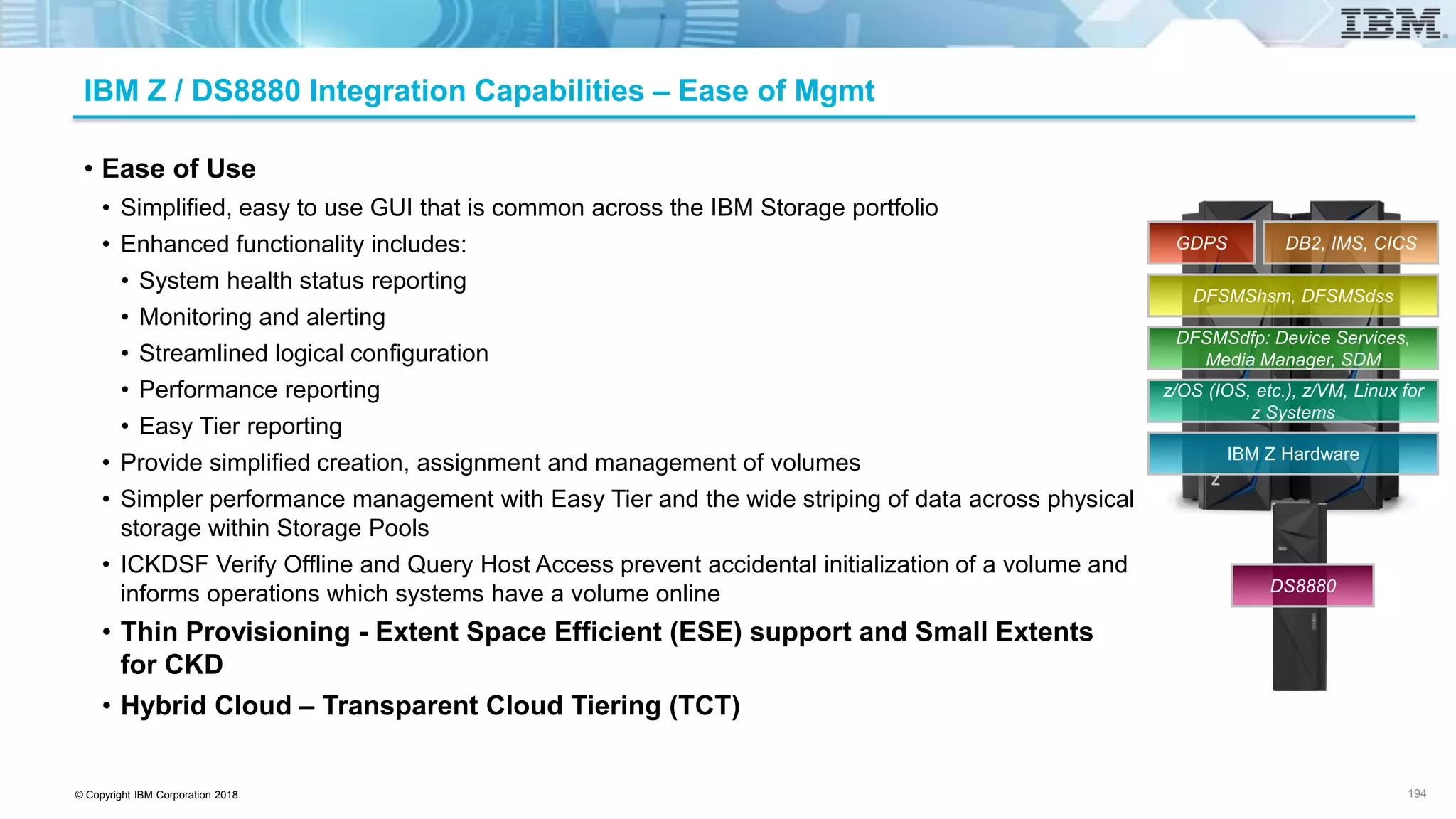
IBM DS8880 and IBM Z: Integration by Design
• zHPF Enhancements (now includes all z/OS Db2 I/O, BxAM/QSAM), IMS R15 WADS
• Db2 Castout Accelerator
• Extended Distance FICON
• Caching Algorithms – AMP, ARC, WOW, 4K Cache Blocking
• Cognitive Tiering - Easy Tier Application , Heat Map Transfer and Db2 integration with Reorgs
• Metro Mirror Bypass Extent Checking
• z/OS GM Multiple Reader support and WLM integration
• Flash + DFSMS + zHPF + HyperPAV/SuperPAV + Db2
• zWLM + DS8000 I/O Priority Manager
• zHyperWrite + DS8000 Metro Mirror
• zHyperLink
• FICON Dynamic Routing
• Forward Error Correction (FEC) code
• HyperPAV/SuperPAV
• GDPS and Copy Services Manager (CSM) Automation
• GDPS Active / Standby/Query/Active
• HyperSwap technology improvements
• Remote Pair FlashCopy and Incremental FlashCopy Enhancements
• zCDP for Db2, zCDP for IMS – Eliminating Backup windows
• Cognitive Tiering - Easy Tier Heat map transfer
• Hybrid Cloud – Transparent Cloud Tiering (TCT)
• zOS Health Checker
• Quick Init for CKD Volumes
• Dynamic Volume Expansion
• Extent Space Efficient (ESE) for all volume types
• z/OS Distributed Data Backup
• z/OS Discovery and Automatic Configuration (zDAC)
• Alternate Subchannel exploitation
• Disk Encryption
• Automation with CSM, GDPS
50
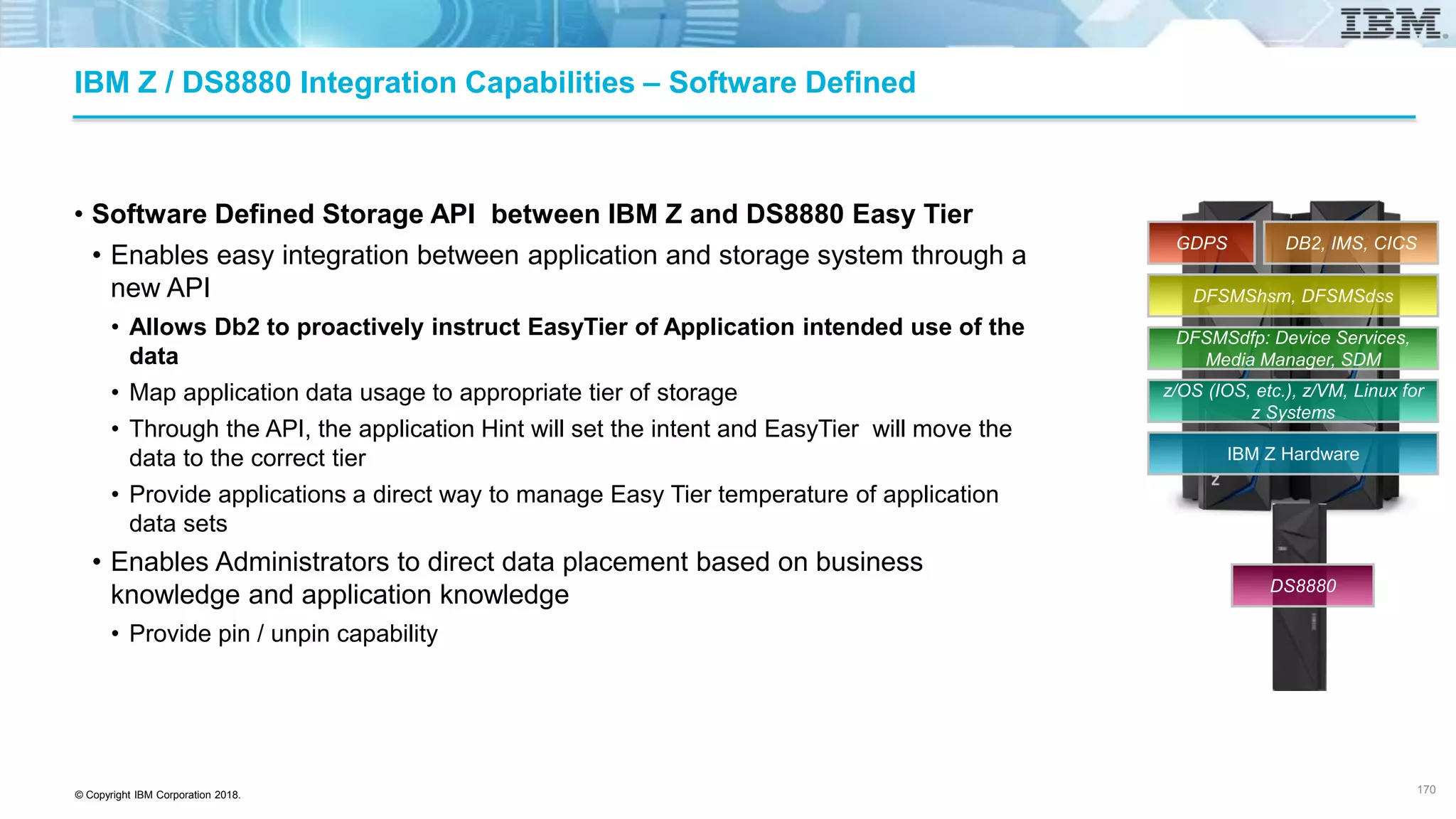
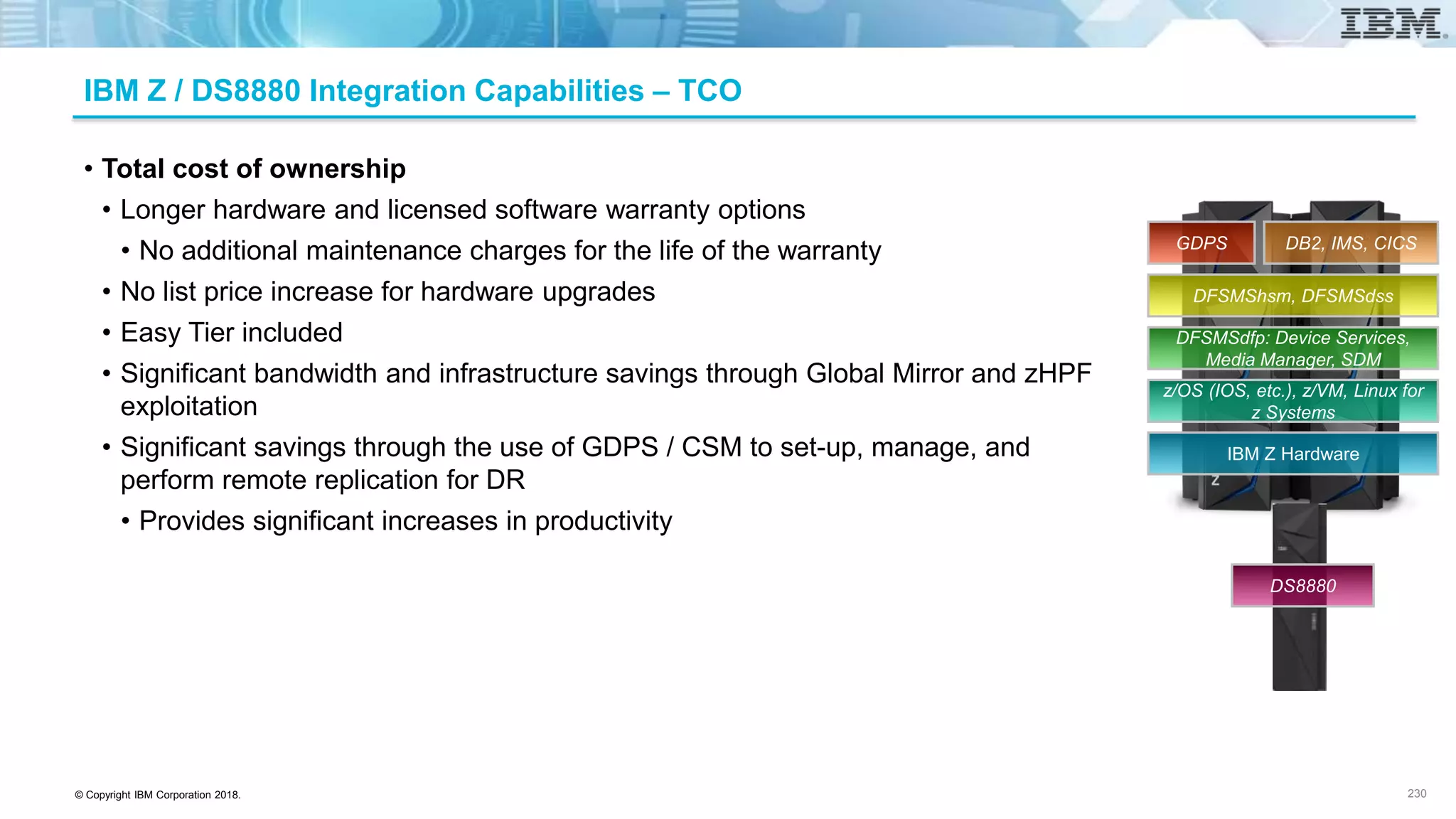
IBM z14 Hardware
z/OS (IOS, etc.), z/VM,
Linux for z Systems
Media Manager, SDM
DFSMS Device Support
DFSMS hsm, dss
Db2, IMS, CICS
GDPS
DS8880
© Copyright IBM Corporation 2018.
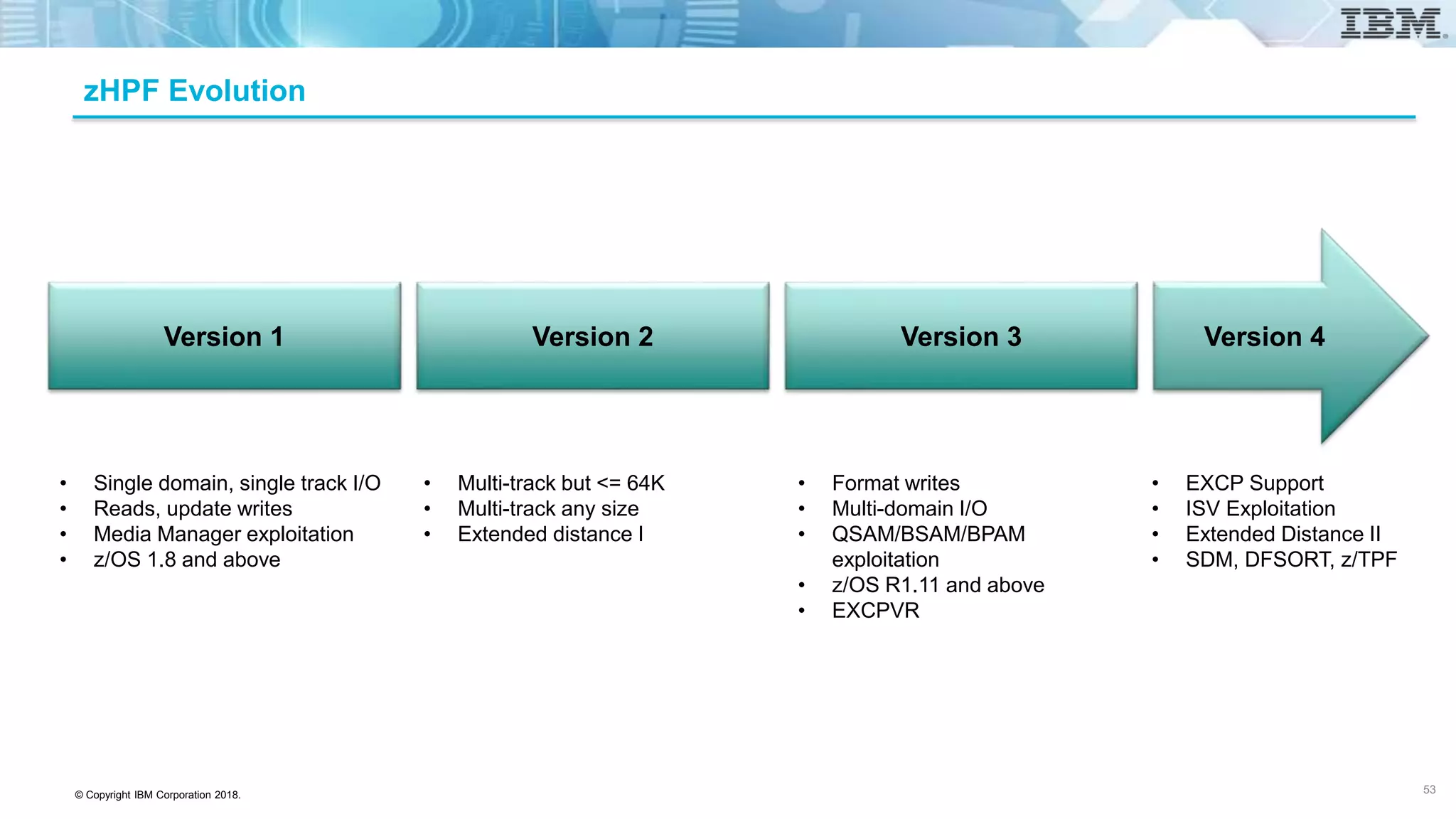
IBM Z / DS8880 Integration Capabilities – Performance
• Lowest latency performance for OLTP and Batch
• zHPF
• All Db2 IO is able to exploit zHPF
• IMS R15 WADS exploits zHPF and zHyperWrite
• DS8880 supports format write capability; multi-domain IO; QSAM, BSAM, BPAM; EXCP, EXCPVR; DFSORT, Db2
Dynamic or sequential prefetch, disorganized index scans and List Prefetch Optimizer
• HPF extended distance support provides 50% IO performance improvement for remote mirrors
• Cache segment size and algorithms
• 4K is optimized for OLTP environments
• Three unique cache management algorithms from IBM Research to optimize random, sequential and destage for
OLTP and Batch optimization
• IMS WADS guaranteed to be in cache
• Workload Manager Integration (WLM) and IO Priority Manager (IOPM)
• WLM policies honored by DS8880
• IBM zHyperLink and zHyperWrite™
• Low latency Db2 read/write and Parallel Db2 Log writes
• Easy Tier
• Application driven tier management whereby application informs Easy Tier of appropriate tier (e.g. Db2 Reorg)
• Db2 Castout Accelerator
• Metro Mirror
• Pre-deposit write provides lowest latency with single trip exchange
• FICON Dynamic Routing reduces costs with improved and persistent performance when sharing ISL traffic
52
IBM Z Hardware
z/OS (IOS, etc.), z/VM, Linux for
z Systems
DFSMSdfp: Device Services,
Media Manager, SDM
DFSMShsm, DFSMSdss
Db2, IMS, CICSGDPS
DS8880
© Copyright IBM Corporation 2018.
zHPF Evolution
Version 1 Version 4Version 2 Version 3
• Single domain, single track I/O
• Reads, update writes
• Media Manager exploitation
• z/OS 1.8 and above
• Multi-track but <= 64K
• Multi-track any size
• Extended distance I
• Format writes
• Multi-domain I/O
• QSAM/BSAM/BPAM
exploitation
• z/OS R1.11 and above
• EXCPVR
• EXCP Support
• ISV Exploitation
• Extended Distance II
• SDM, DFSORT, z/TPF
53
© Copyright IBM Corporation 2018.
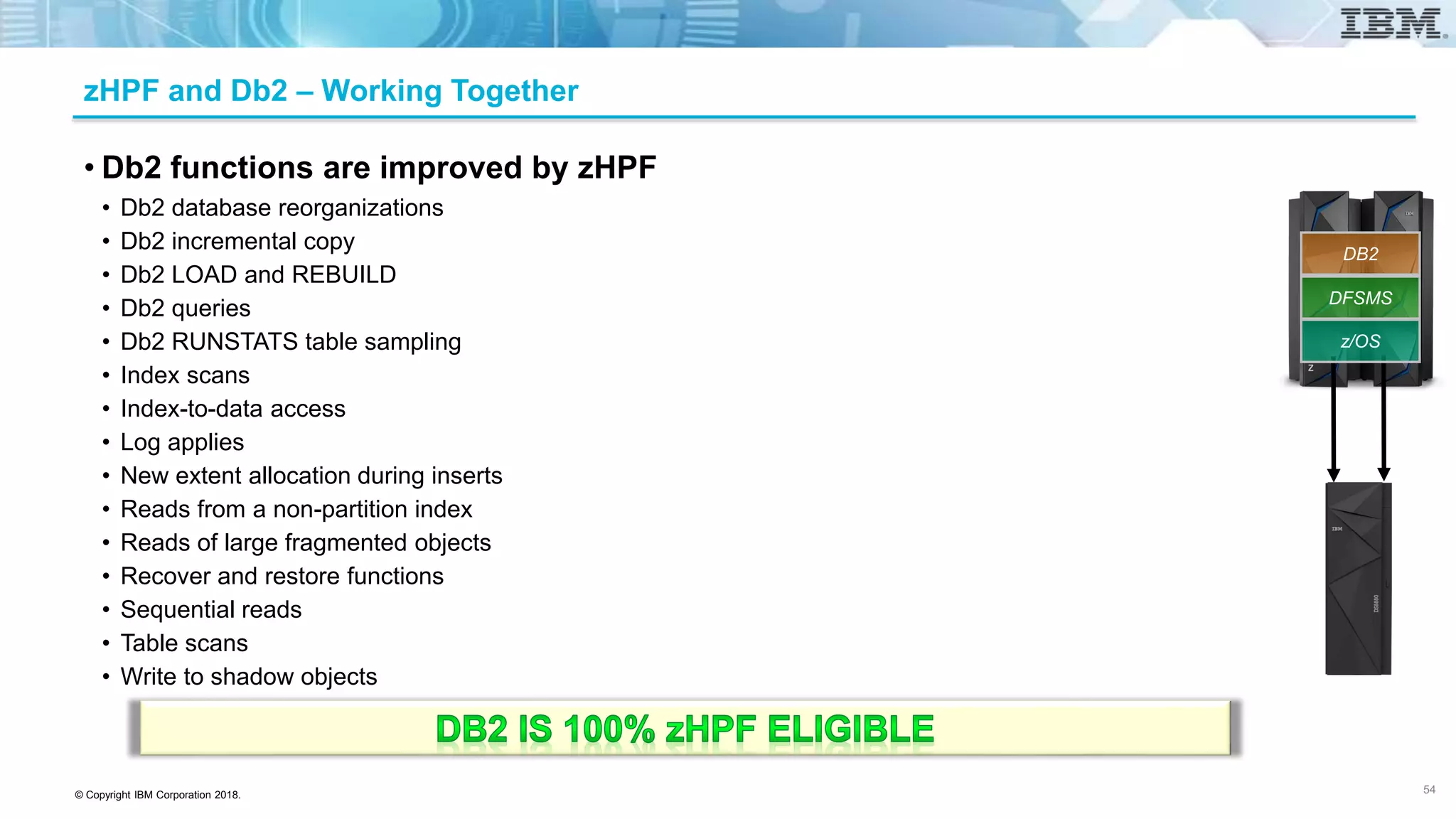
zHPF and Db2 – Working Together
• Db2 functions are improved by zHPF
• Db2 database reorganizations
• Db2 incremental copy
• Db2 LOAD and REBUILD
• Db2 queries
• Db2 RUNSTATS table sampling
• Index scans
• Index-to-data access
• Log applies
• New extent allocation during inserts
• Reads from a non-partition index
• Reads of large fragmented objects
• Recover and restore functions
• Sequential reads
• Table scans
• Write to shadow objects
54
z/OS
DFSMS
DB2
© Copyright IBM Corporation 2018.
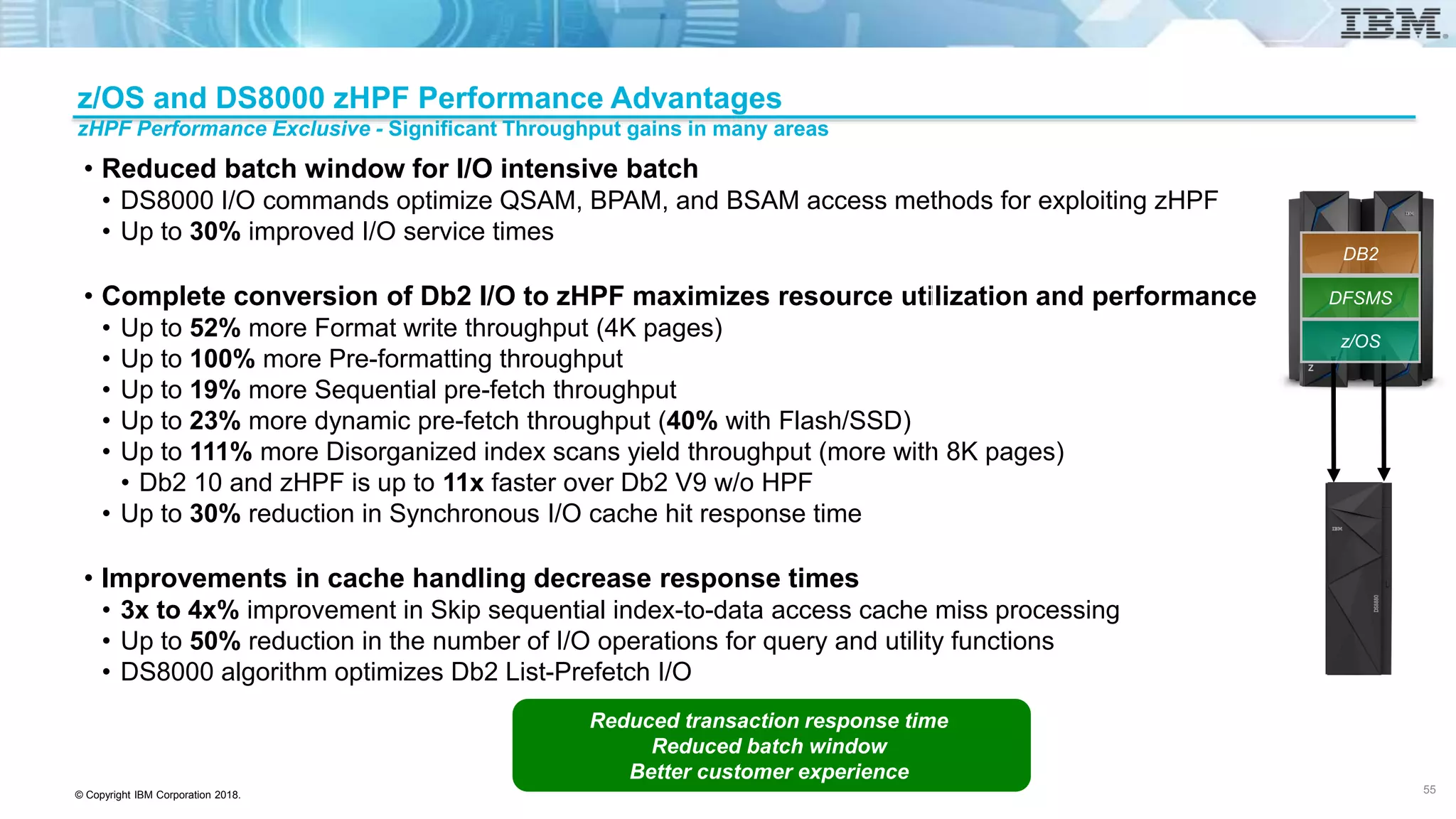
• Reduced batch window for I/O intensive batch
• DS8000 I/O commands optimize QSAM, BPAM, and BSAM access methods for exploiting zHPF
• Up to 30% improved I/O service times
• Complete conversion of Db2 I/O to zHPF maximizes resource utilization and performance
• Up to 52% more Format write throughput (4K pages)
• Up to 100% more Pre-formatting throughput
• Up to 19% more Sequential pre-fetch throughput
• Up to 23% more dynamic pre-fetch throughput (40% with Flash/SSD)
• Up to 111% more Disorganized index scans yield throughput (more with 8K pages)
• Db2 10 and zHPF is up to 11x faster over Db2 V9 w/o HPF
• Up to 30% reduction in Synchronous I/O cache hit response time
• Improvements in cache handling decrease response times
• 3x to 4x% improvement in Skip sequential index-to-data access cache miss processing
• Up to 50% reduction in the number of I/O operations for query and utility functions
• DS8000 algorithm optimizes Db2 List-Prefetch I/O
55
z/OS and DS8000 zHPF Performance Advantages
zHPF Performance Exclusive - Significant Throughput gains in many areas
Reduced transaction response time
Reduced batch window
Better customer experience
55
z/OS
DFSMS
DB2
© Copyright IBM Corporation 2018.
DFSORT zHPF Exploitation in z/OS2.2
• DFSORT zHPF Exploitation
• DFSORT normally uses EXCP for processing of basic and large format sequential input and
output data sets (SORTIN, SORTOUT, OUTFIL)
• DFSORT already uses BSAM for extended format sequential input and output data sets
(SORTIN, SORTOUT and OUTFIL). BSAM already supports zHPF
• New enhancement: Update DFSORT to prefer BSAM for SORTIN/SORTOUT/OUTFIL when
zHPF is available
• DFSORT will automatically take advantage of zHPF if it is available on your system; no user actions are
necessary.
• Why it Matters: Taking advantage of the higher start rates and bandwidth available
with zHPF is expected to provide significant performance benefits on systems where
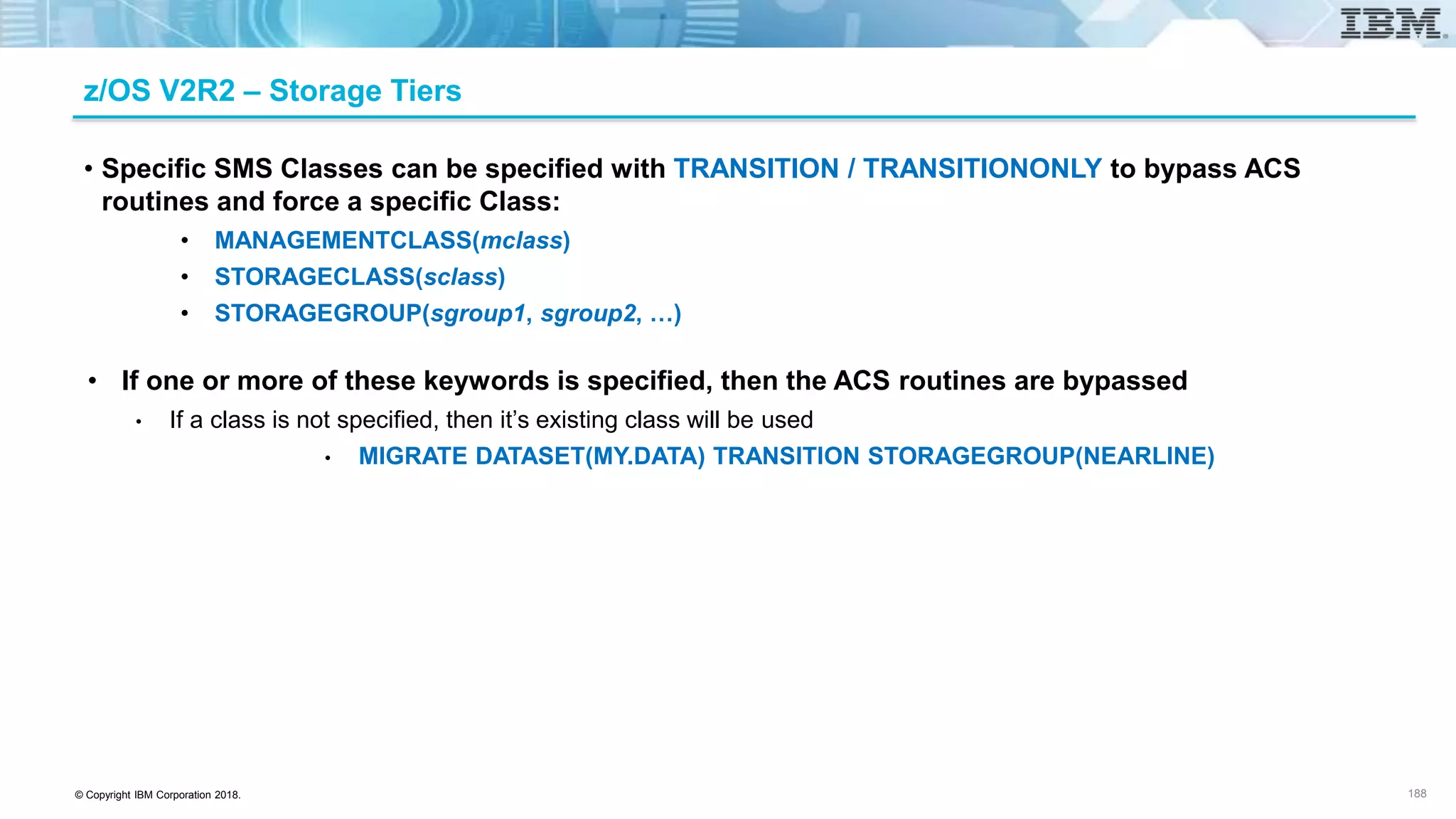
zHPF is available
56
z/OS
© Copyright IBM Corporation 2018.
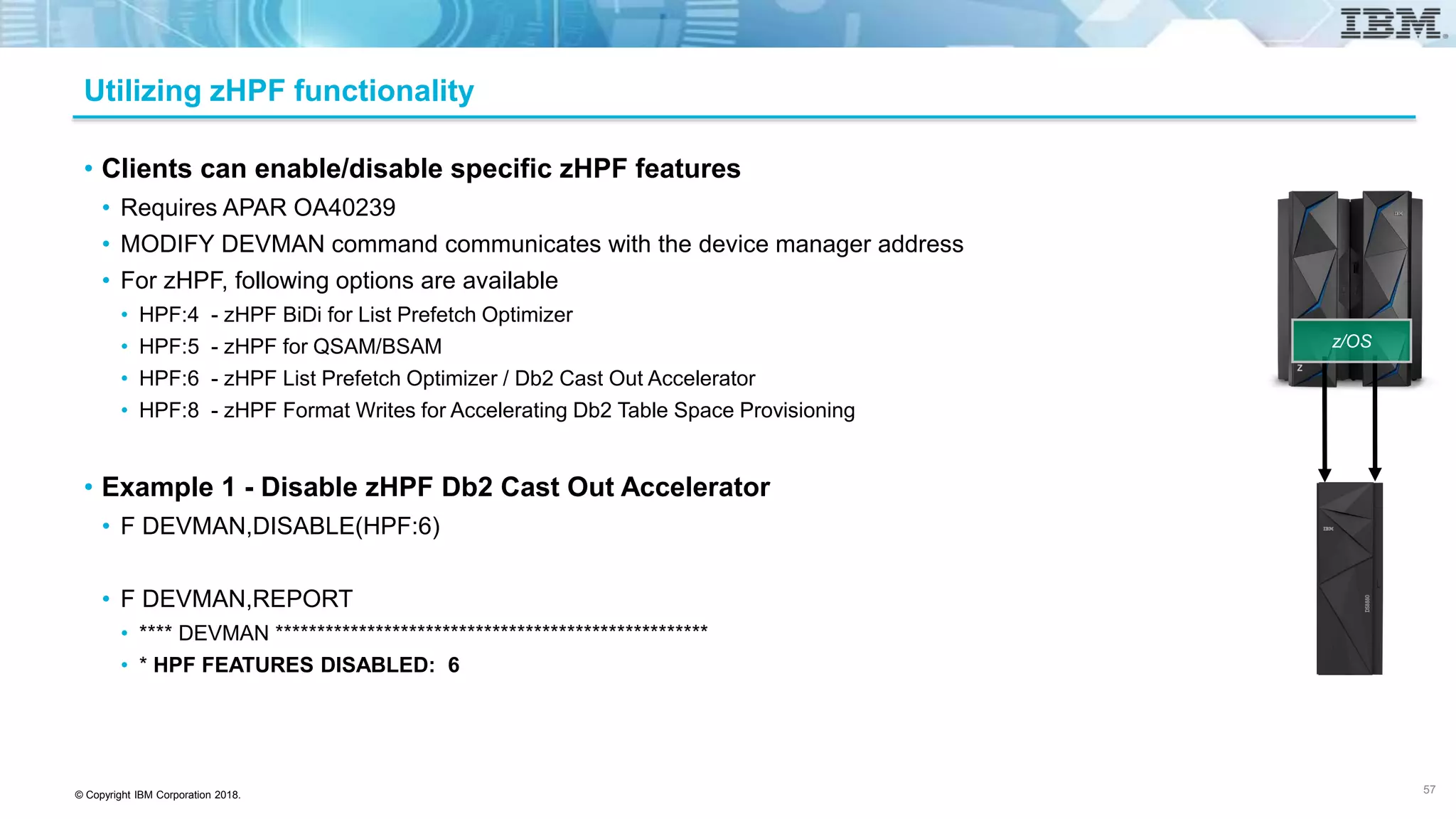
Utilizing zHPF functionality
• Clients can enable/disable specific zHPF features
• Requires APAR OA40239
• MODIFY DEVMAN command communicates with the device manager address
• For zHPF, following options are available
• HPF:4 - zHPF BiDi for List Prefetch Optimizer
• HPF:5 - zHPF for QSAM/BSAM
• HPF:6 - zHPF List Prefetch Optimizer / Db2 Cast Out Accelerator
• HPF:8 - zHPF Format Writes for Accelerating Db2 Table Space Provisioning
• Example 1 - Disable zHPF Db2 Cast Out Accelerator
• F DEVMAN,DISABLE(HPF:6)
• F DEVMAN,REPORT
• **** DEVMAN ****************************************************
• * HPF FEATURES DISABLED: 6
57
z/OS
© Copyright IBM Corporation 2018.
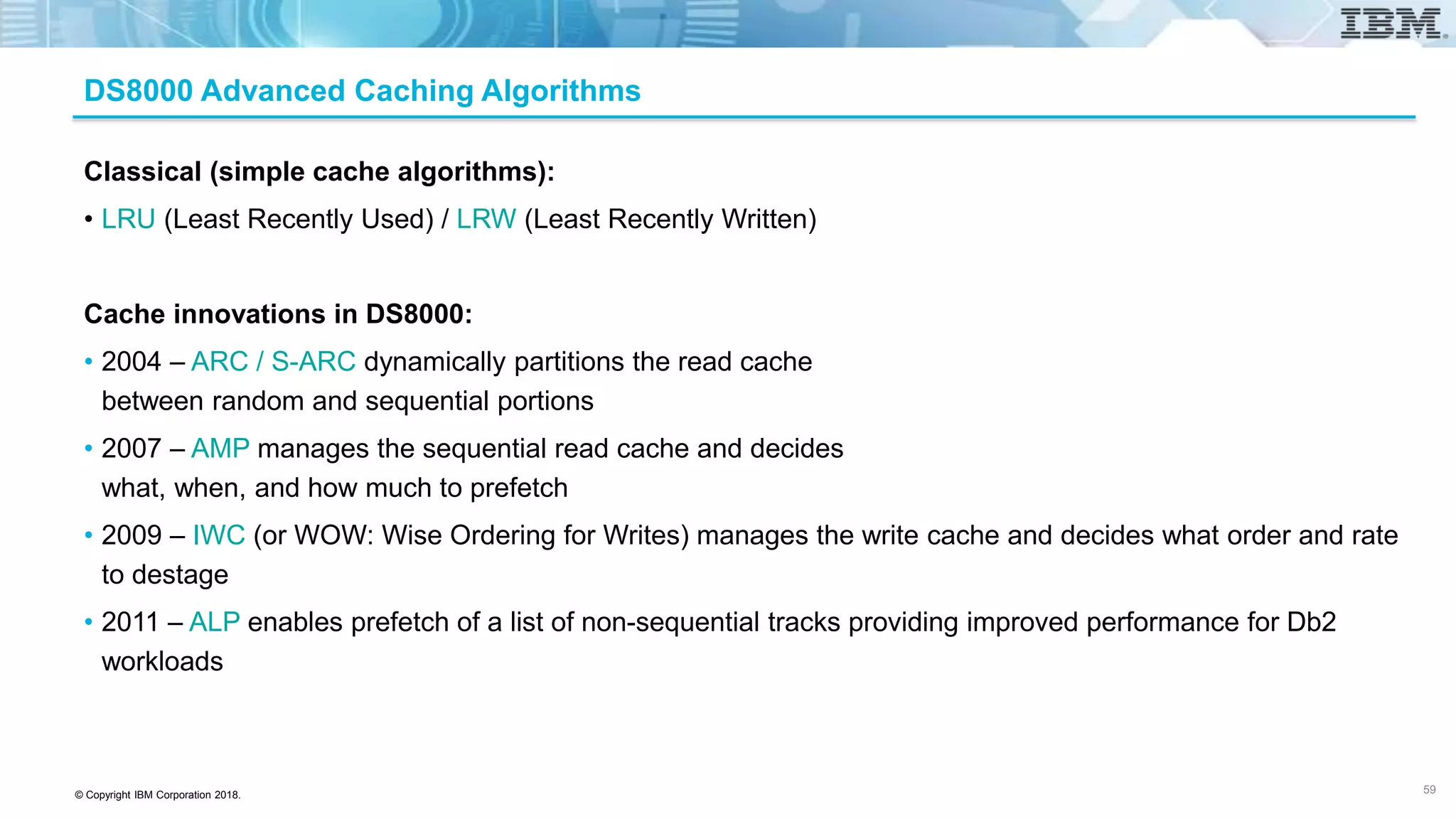
DS8000 Advanced Caching Algorithms
Classical (simple cache algorithms):
• LRU (Least Recently Used) / LRW (Least Recently Written)
Cache innovations in DS8000:
• 2004 – ARC / S-ARC dynamically partitions the read cache
between random and sequential portions
• 2007 – AMP manages the sequential read cache and decides
what, when, and how much to prefetch
• 2009 – IWC (or WOW: Wise Ordering for Writes) manages the write cache and decides what order and rate
to destage
• 2011 – ALP enables prefetch of a list of non-sequential tracks providing improved performance for Db2
workloads
59
© Copyright IBM Corporation 2018.
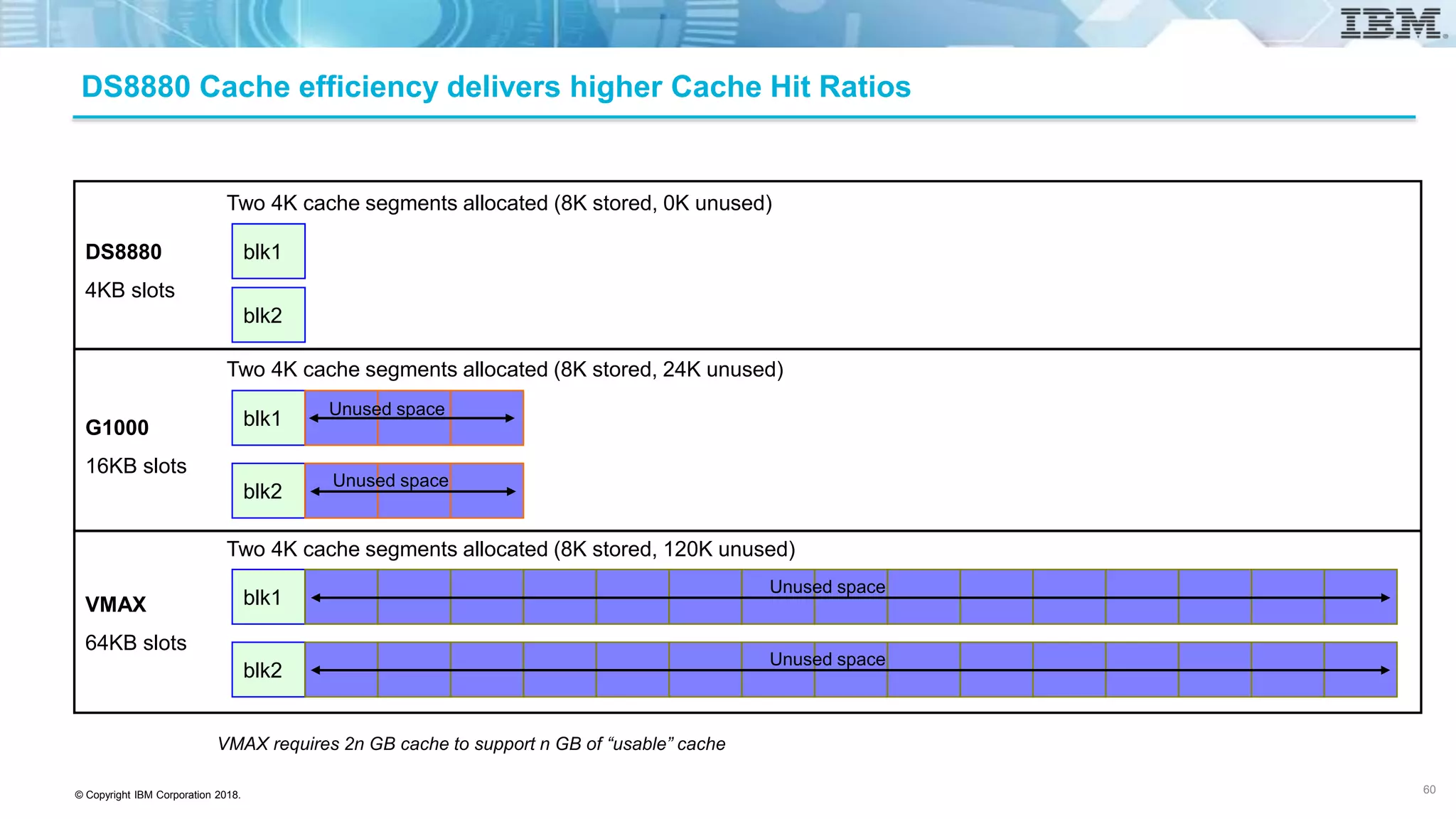
DS8880 Cache efficiency delivers higher Cache Hit Ratios
VMAX requires 2n GB cache to support n GB of “usable” cache
blk1
blk2
blk1
blk1
blk2
DS8880
4KB slots
G1000
16KB slots
VMAX
64KB slots
blk2
Two 4K cache segments allocated (8K stored, 24K unused)
Two 4K cache segments allocated (8K stored, 0K unused)
Two 4K cache segments allocated (8K stored, 120K unused)
Unused space
Unused space
Unused space
Unused space
60
© Copyright IBM Corporation 2018.
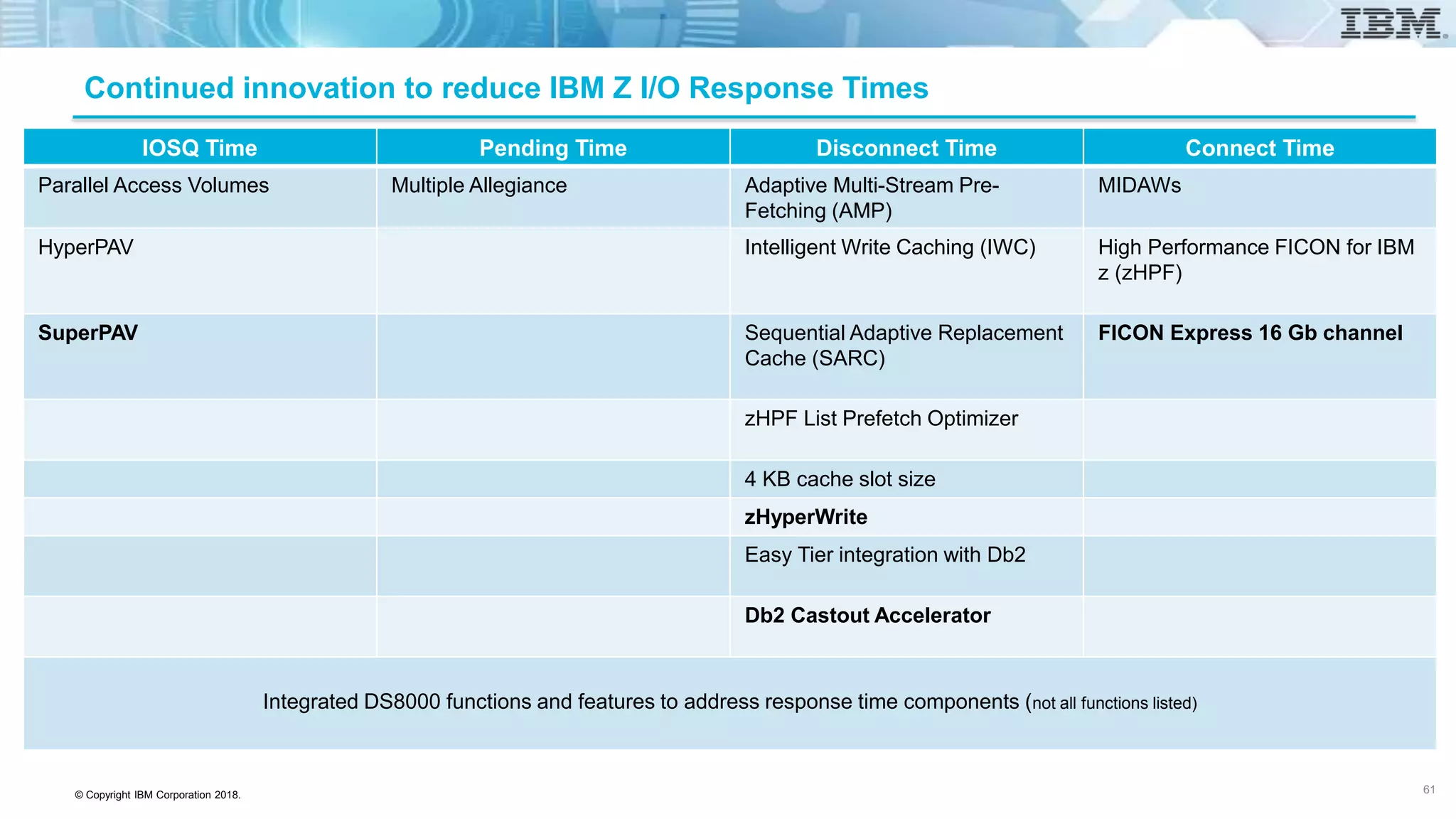
Continued innovation to reduce IBM Z I/O Response Times
IOSQ Time Pending Time Disconnect Time Connect Time
Parallel Access Volumes Multiple Allegiance Adaptive Multi-Stream Pre-
Fetching (AMP)
MIDAWs
HyperPAV Intelligent Write Caching (IWC) High Performance FICON for IBM
z (zHPF)
SuperPAV Sequential Adaptive Replacement
Cache (SARC)
FICON Express 16 Gb channel
zHPF List Prefetch Optimizer
4 KB cache slot size
zHyperWrite
Easy Tier integration with Db2
Db2 Castout Accelerator
Integrated DS8000 functions and features to address response time components (not all functions listed)
61
© Copyright IBM Corporation 2018.
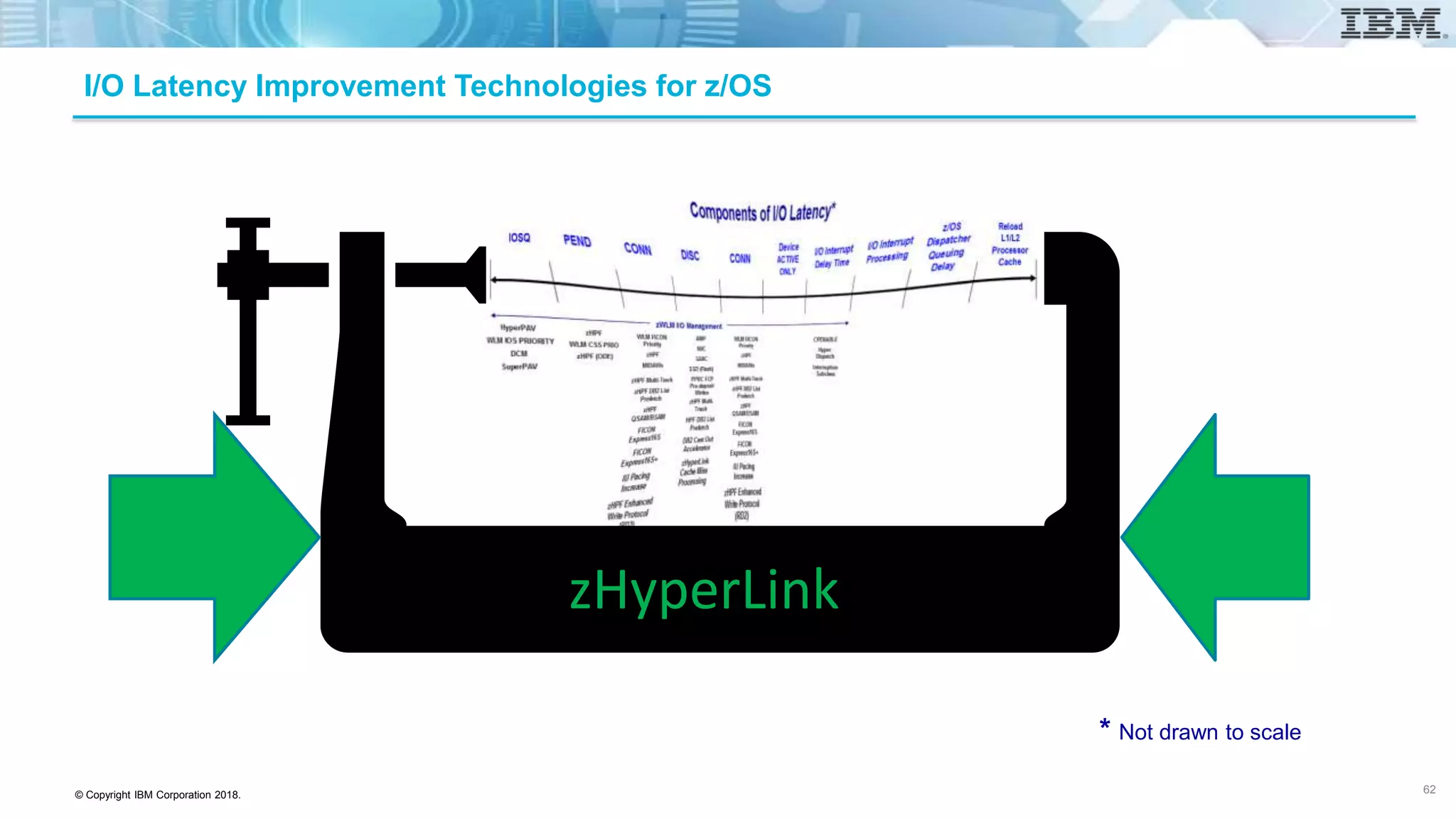
I/O Latency Improvement Technologies for z/OS
* Not drawn to scale
zHyperLink
62
© Copyright IBM Corporation 2018.
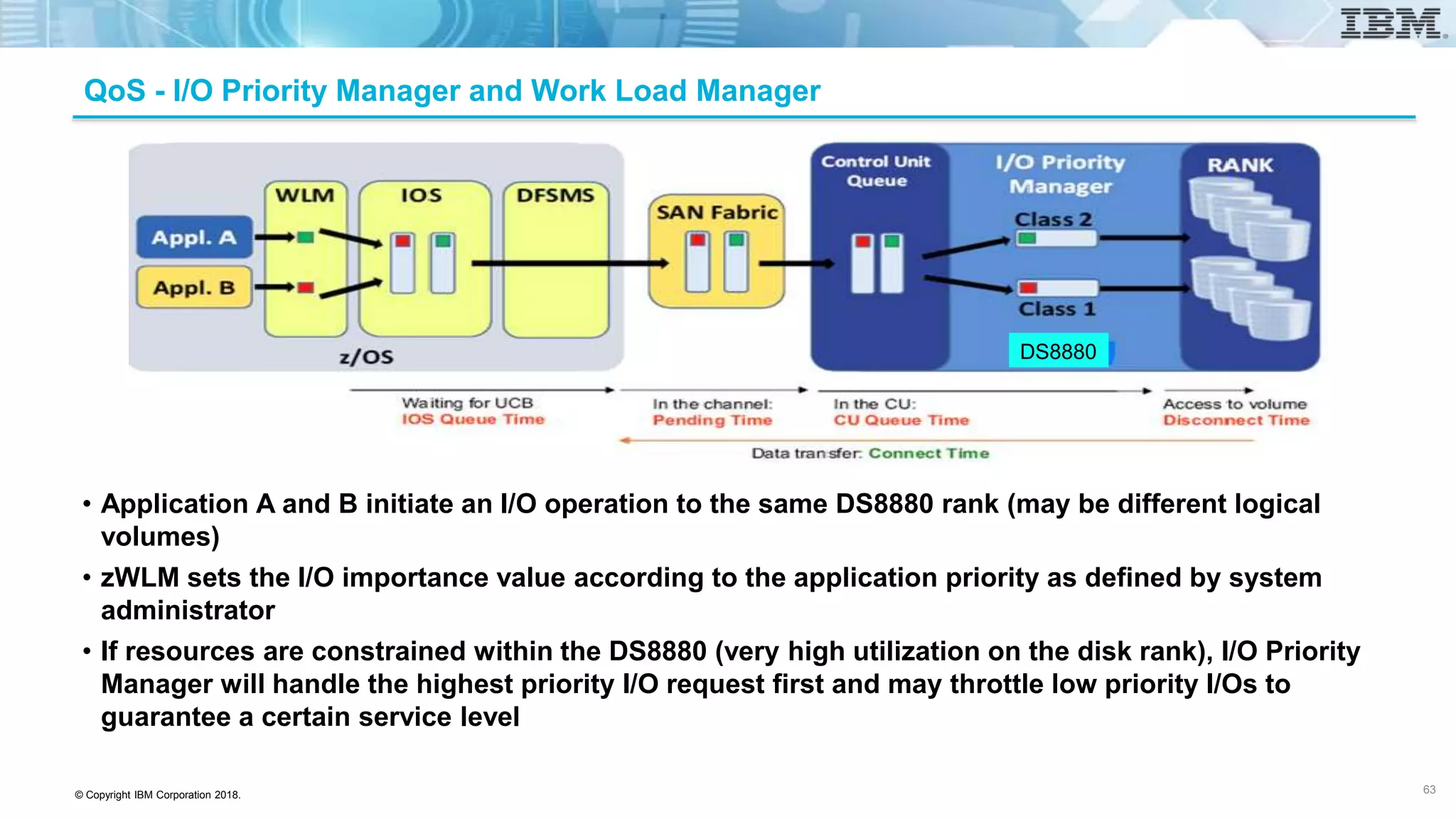
QoS - I/O Priority Manager and Work Load Manager
• Application A and B initiate an I/O operation to the same DS8880 rank (may be different logical
volumes)
• zWLM sets the I/O importance value according to the application priority as defined by system
administrator
• If resources are constrained within the DS8880 (very high utilization on the disk rank), I/O Priority
Manager will handle the highest priority I/O request first and may throttle low priority I/Os to
guarantee a certain service level
63
DS8880
© Copyright IBM Corporation 2018.
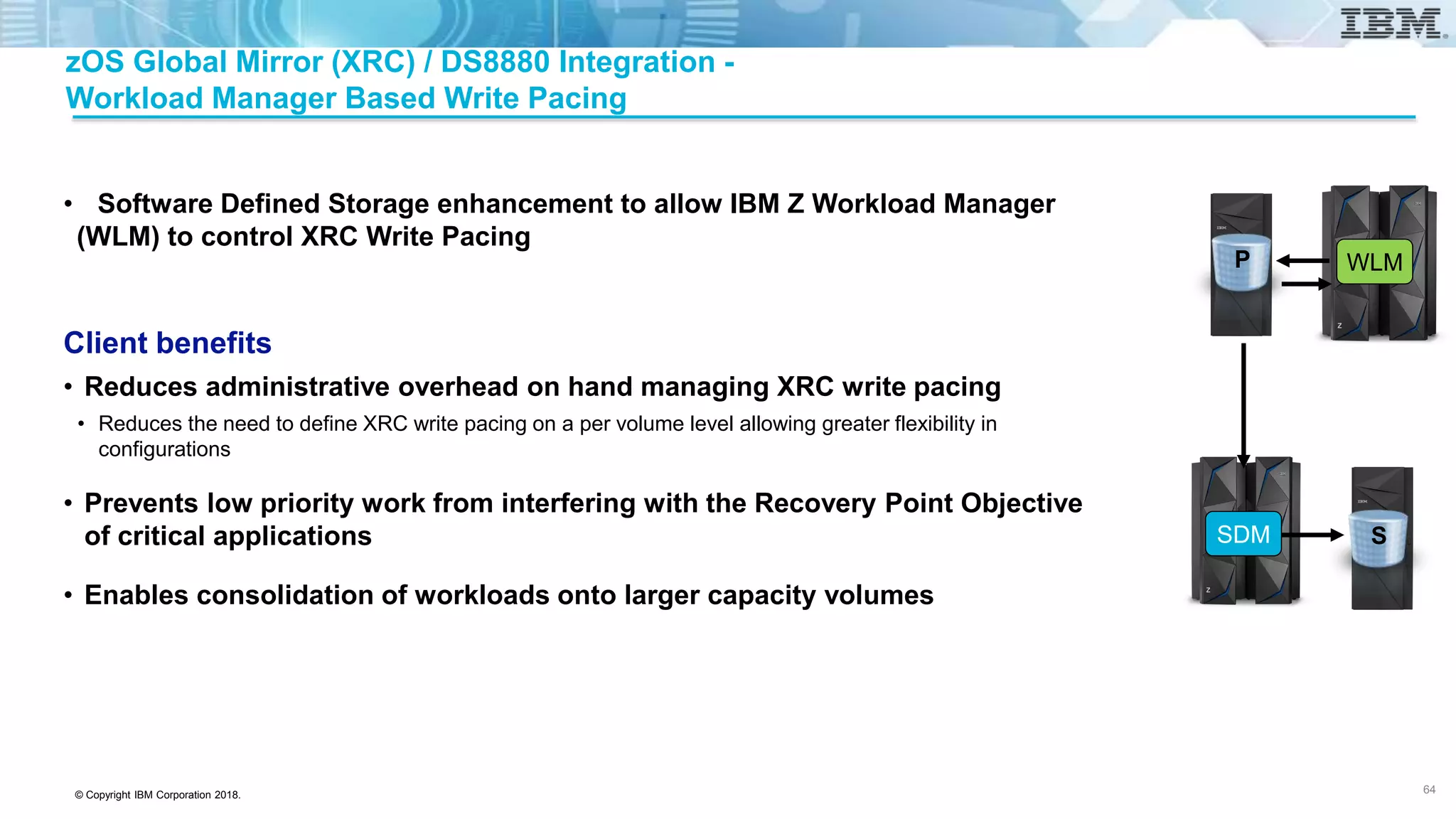
zOS Global Mirror (XRC) / DS8880 Integration -
Workload Manager Based Write Pacing
• Software Defined Storage enhancement to allow IBM Z Workload Manager
(WLM) to control XRC Write Pacing
Client benefits
• Reduces administrative overhead on hand managing XRC write pacing
• Reduces the need to define XRC write pacing on a per volume level allowing greater flexibility in
configurations
• Prevents low priority work from interfering with the Recovery Point Objective
of critical applications
• Enables consolidation of workloads onto larger capacity volumes
64
SDM
WLMP
S
© Copyright IBM Corporation 2018.
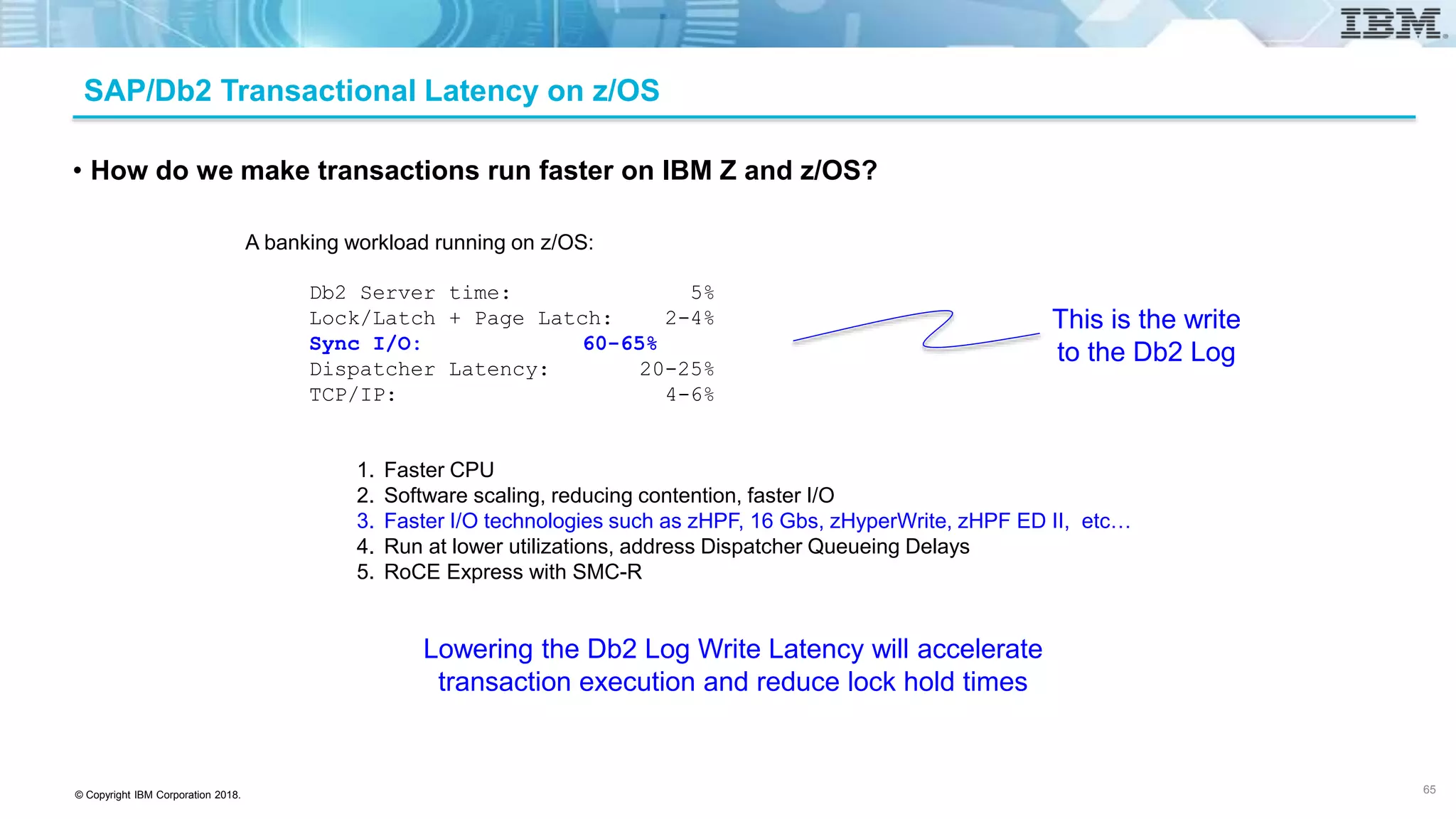
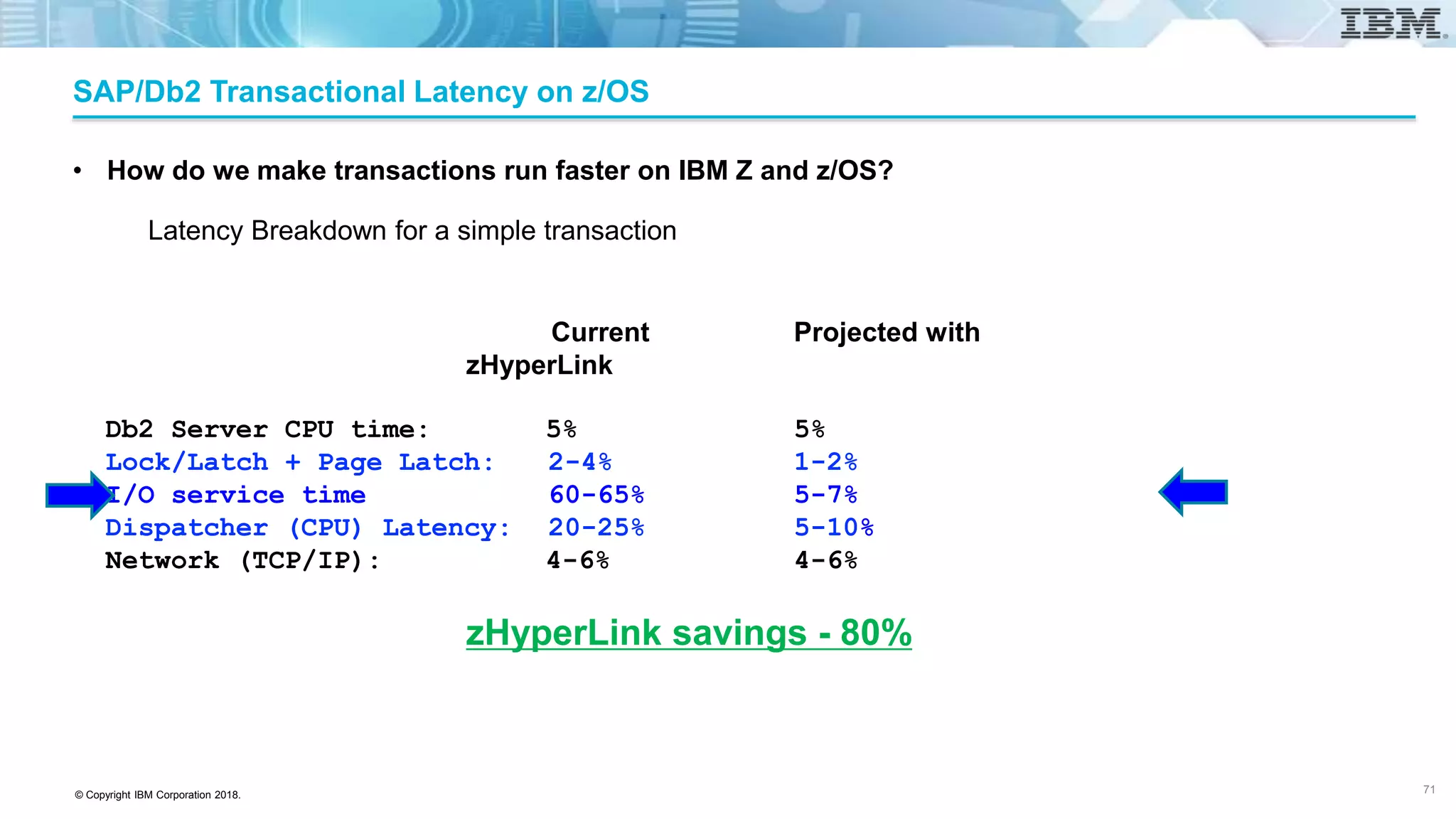
SAP/Db2 Transactional Latency on z/OS
• How do we make transactions run faster on IBM Z and z/OS?
A banking workload running on z/OS:
Db2 Server time: 5%
Lock/Latch + Page Latch: 2-4%
Sync I/O: 60-65%
Dispatcher Latency: 20-25%
TCP/IP: 4-6%
This is the write
to the Db2 Log
Lowering the Db2 Log Write Latency will accelerate
transaction execution and reduce lock hold times
1. Faster CPU
2. Software scaling, reducing contention, faster I/O
3. Faster I/O technologies such as zHPF, 16 Gbs, zHyperWrite, zHPF ED II, etc…
4. Run at lower utilizations, address Dispatcher Queueing Delays
5. RoCE Express with SMC-R
65
© Copyright IBM Corporation 2018.
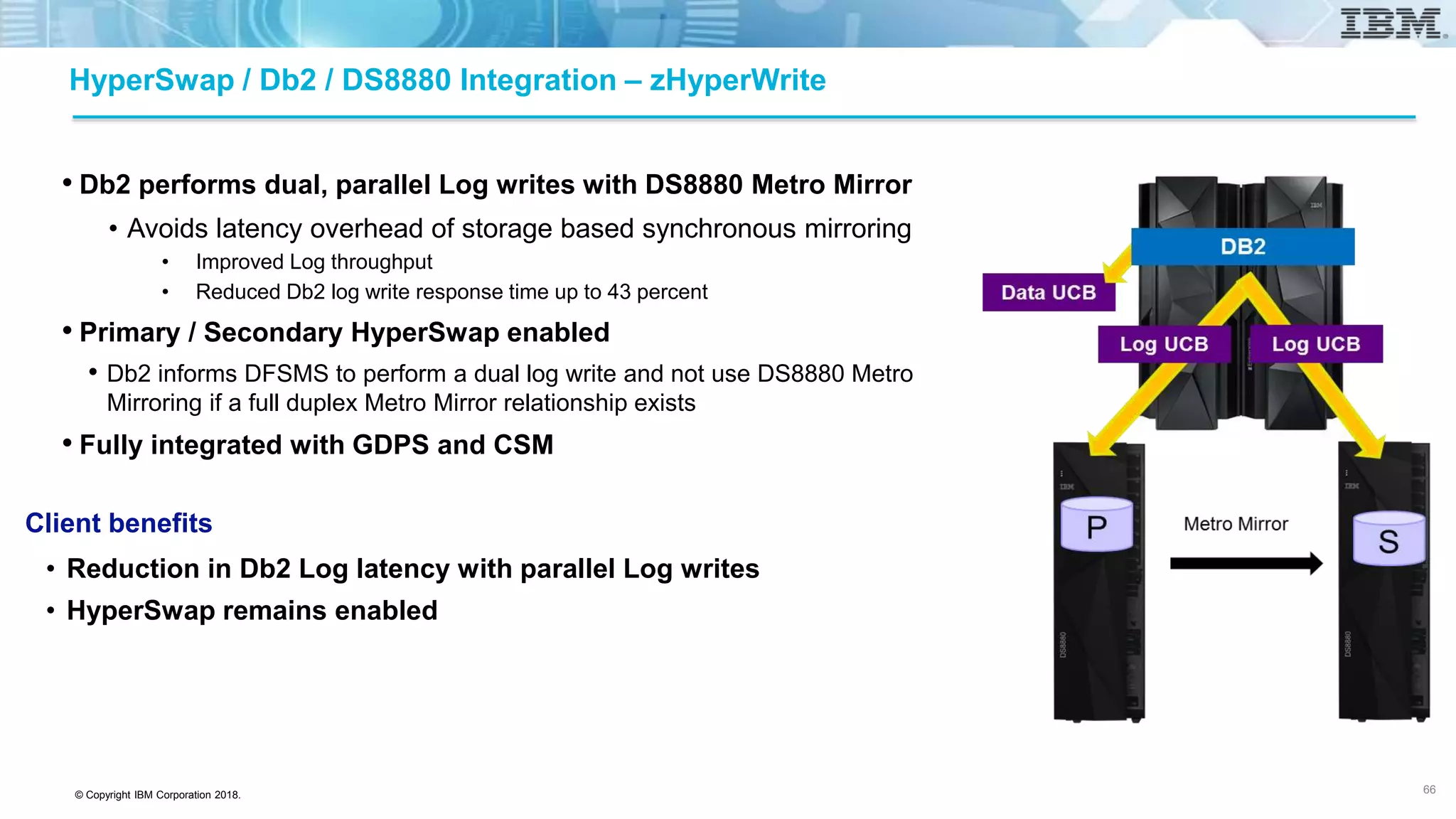
HyperSwap / Db2 / DS8880 Integration – zHyperWrite
• Db2 performs dual, parallel Log writes with DS8880 Metro Mirror
• Avoids latency overhead of storage based synchronous mirroring
• Improved Log throughput
• Reduced Db2 log write response time up to 43 percent
• Primary / Secondary HyperSwap enabled
• Db2 informs DFSMS to perform a dual log write and not use DS8880 Metro
Mirroring if a full duplex Metro Mirror relationship exists
• Fully integrated with GDPS and CSM
Client benefits
• Reduction in Db2 Log latency with parallel Log writes
• HyperSwap remains enabled
66
© Copyright IBM Corporation 2018.
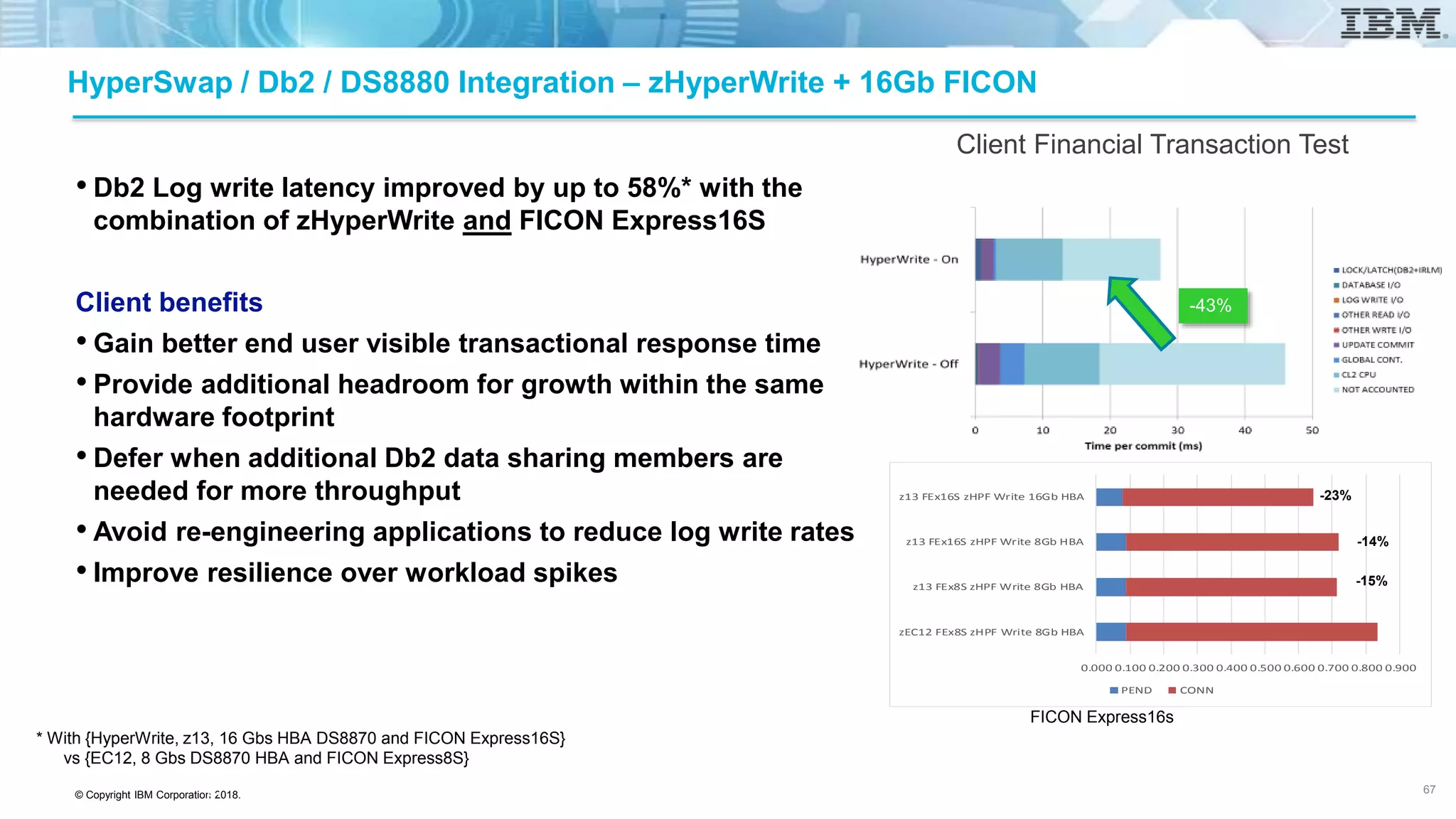
HyperSwap / Db2 / DS8880 Integration – zHyperWrite + 16Gb FICON
• Db2 Log write latency improved by up to 58%* with the
combination of zHyperWrite and FICON Express16S
Client benefits
• Gain better end user visible transactional response time
• Provide additional headroom for growth within the same
hardware footprint
• Defer when additional Db2 data sharing members are
needed for more throughput
• Avoid re-engineering applications to reduce log write rates
• Improve resilience over workload spikes
Client Financial Transaction Test
-43%
* With {HyperWrite, z13, 16 Gbs HBA DS8870 and FICON Express16S}
vs {EC12, 8 Gbs DS8870 HBA and FICON Express8S}
0.000 0.100 0.200 0.300 0.400 0.500 0.600 0.700 0.800 0.900
zEC12 FEx8S zHPF Write 8Gb HBA
z13 FEx8S zHPF Write 8Gb HBA
z13 FEx16S zHPF Write 8Gb HBA
z13 FEx16S zHPF Write 16Gb HBA
PEND CONN
-23%
-14%
-15%
FICON Express16s
67 67
© Copyright IBM Corporation 2018.
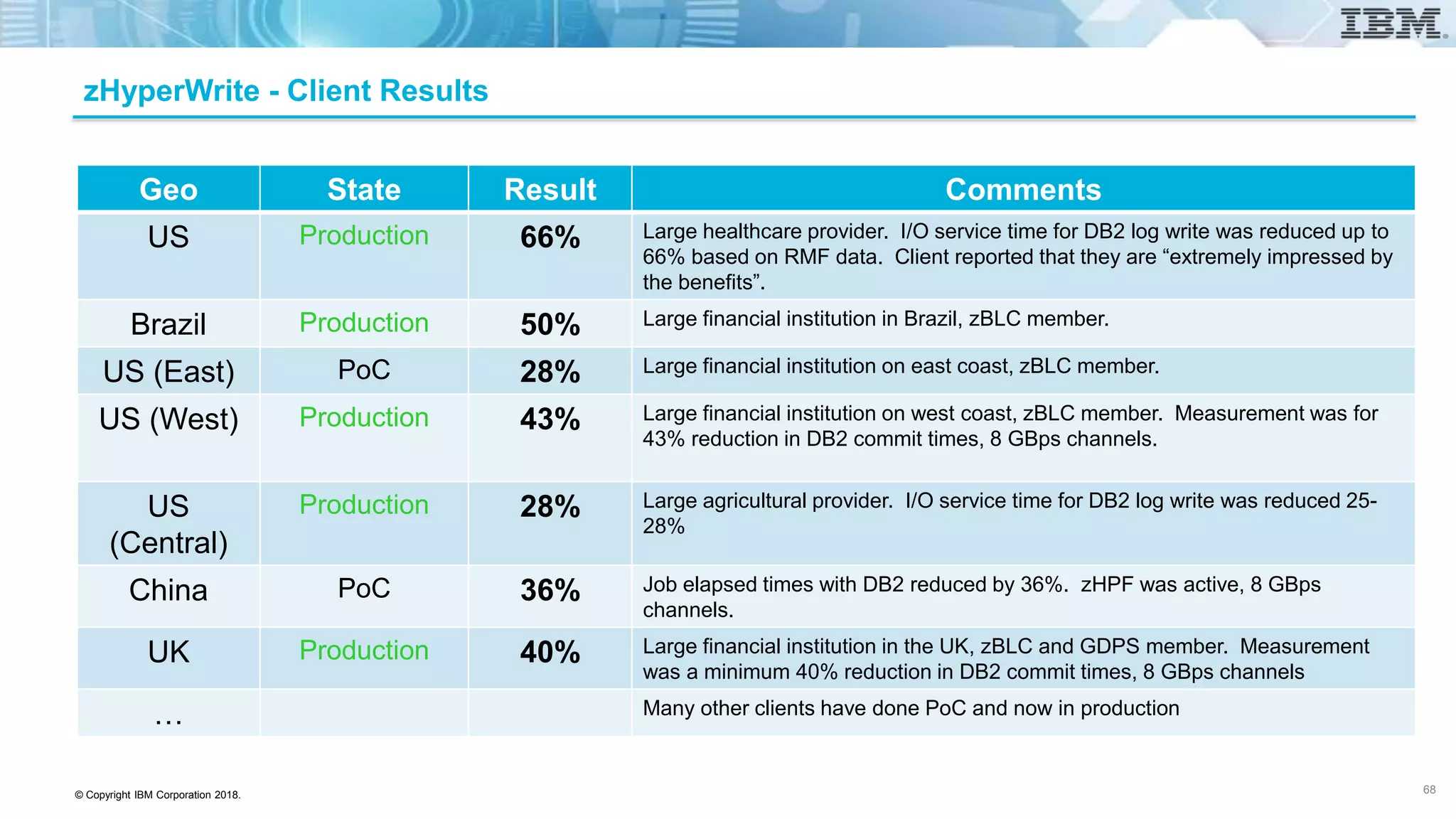
zHyperWrite - Client Results
68
Geo State Result Comments
US Production 66% Large healthcare provider. I/O service time for DB2 log write was reduced up to
66% based on RMF data. Client reported that they are “extremely impressed by
the benefits”.
Brazil Production 50% Large financial institution in Brazil, zBLC member.
US (East) PoC 28% Large financial institution on east coast, zBLC member.
US (West) Production 43% Large financial institution on west coast, zBLC member. Measurement was for
43% reduction in DB2 commit times, 8 GBps channels.
US
(Central)
Production 28% Large agricultural provider. I/O service time for DB2 log write was reduced 25-
28%
China PoC 36% Job elapsed times with DB2 reduced by 36%. zHPF was active, 8 GBps
channels.
UK Production 40% Large financial institution in the UK, zBLC and GDPS member. Measurement
was a minimum 40% reduction in DB2 commit times, 8 GBps channels
… Many other clients have done PoC and now in production
© Copyright IBM Corporation 2018.
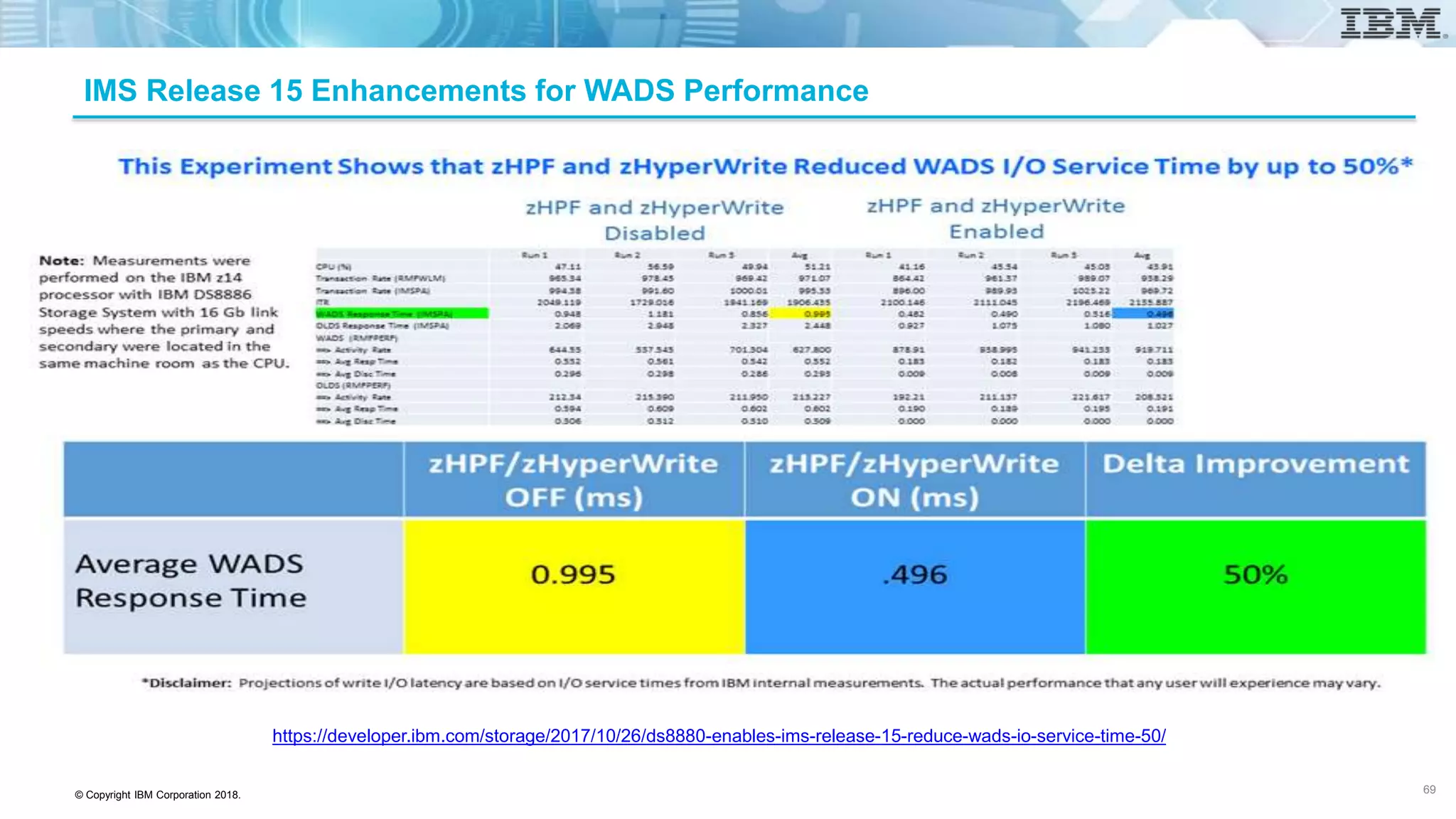
IMS Release 15 Enhancements for WADS Performance
https://developer.ibm.com/storage/2017/10/26/ds8880-enables-ims-release-15-reduce-wads-io-service-time-50/
69
© Copyright IBM Corporation 2018.
SAP/Db2 Transactional Latency on z/OS
Current Projected with
zHyperLink
Db2 Server CPU time: 5% 5%
Lock/Latch + Page Latch: 2-4% 1-2%
I/O service time 60-65% 5-7%
Dispatcher (CPU) Latency: 20-25% 5-10%
Network (TCP/IP): 4-6% 4-6%
zHyperLink savings - 80%
Latency Breakdown for a simple transaction
• How do we make transactions run faster on IBM Z and z/OS?
71
© Copyright IBM Corporation 2018.
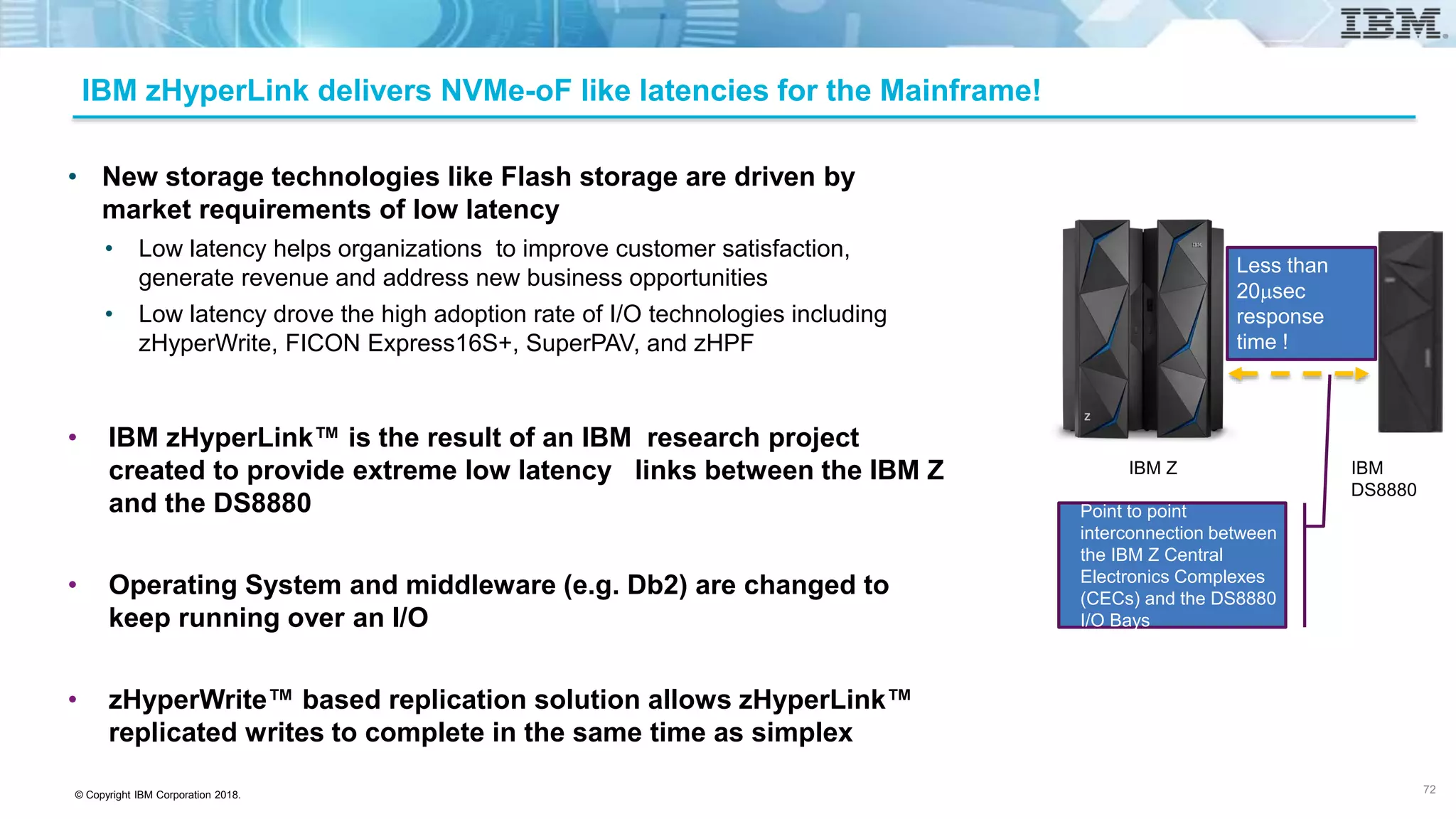
IBM zHyperLink delivers NVMe-oF like latencies for the Mainframe!
• New storage technologies like Flash storage are driven by
market requirements of low latency
• Low latency helps organizations to improve customer satisfaction,
generate revenue and address new business opportunities
• Low latency drove the high adoption rate of I/O technologies including
zHyperWrite, FICON Express16S+, SuperPAV, and zHPF
• IBM zHyperLink™ is the result of an IBM research project
created to provide extreme low latency links between the IBM Z
and the DS8880
• Operating System and middleware (e.g. Db2) are changed to
keep running over an I/O
• zHyperWrite™ based replication solution allows zHyperLink™
replicated writes to complete in the same time as simplex
72
IBM Z IBM
DS8880
Point to point
interconnection between
the IBM Z Central
Electronics Complexes
(CECs) and the DS8880
I/O Bays
Less than
20msec
response
time !
© Copyright IBM Corporation 2018.
New business requirements demand fast and consistent application response times
• New storage technologies like Flash storage are driven by market
requirements of low latency
• Low latency helps organizations to improve customer satisfaction, generate revenue
and address new business opportunities
• Low latency drove the high adoption rate of I/O technologies including zHyperWrite,
FICON Express16S+, SuperPAV, and zHPF
• IBM zHyperLink™ is the result of an IBM research project created to
provide extreme low latency links between the IBM Z and the DS8880
• Operating System and middleware (e.g. Db2) are changed to keep running
over an I/O
• zHyperWrite™ based replication solution allows zHyperLink™ replicated
writes to complete in the same time as simplex
73
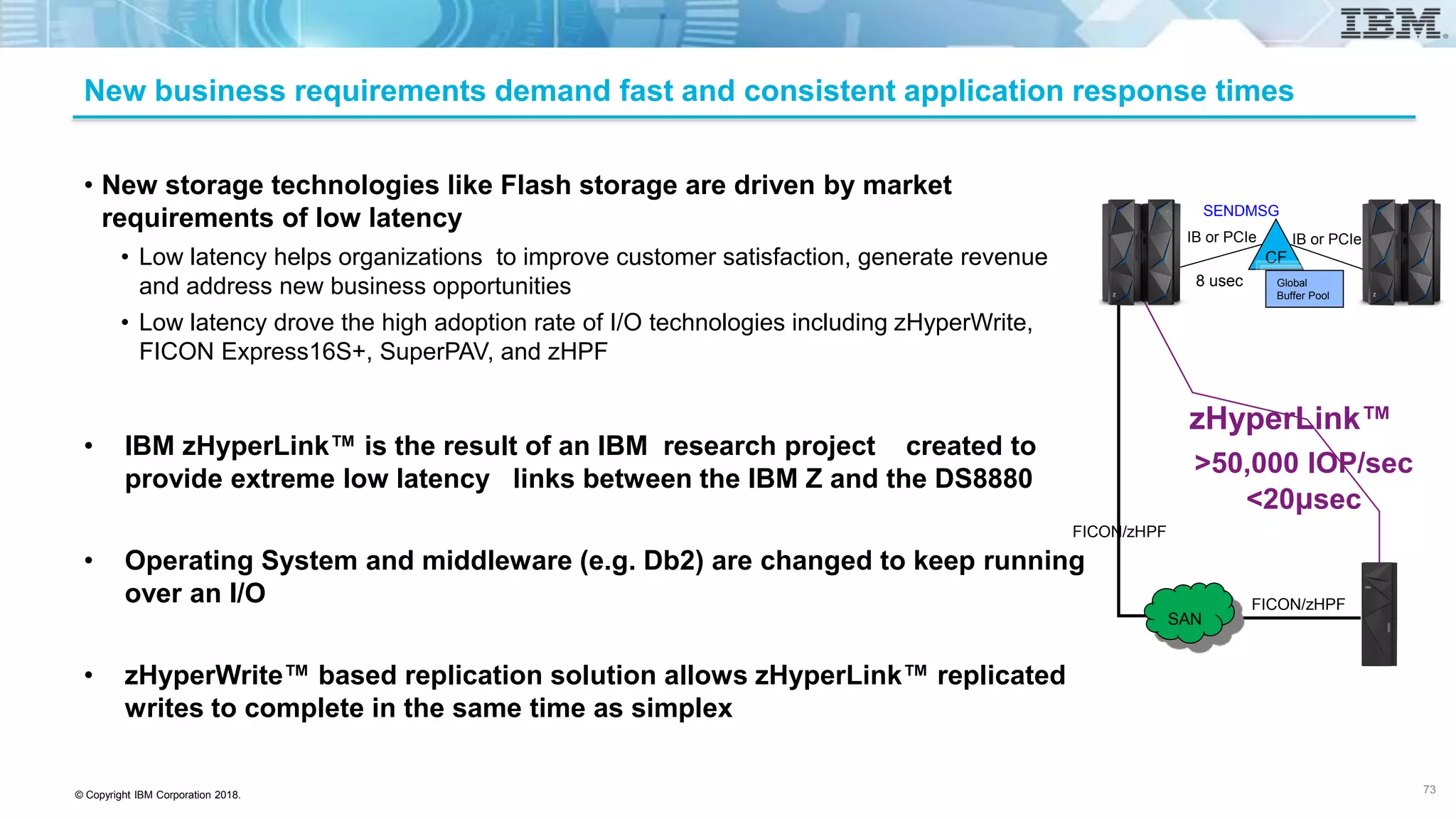
CF
Global
Buffer Pool
IB or PCIe IB or PCIe
8 usec
SENDMSG
FICON/zHPF
SAN
>50,000 IOP/sec
<20μsec
zHyperLink™
FICON/zHPF
© Copyright IBM Corporation 2018.
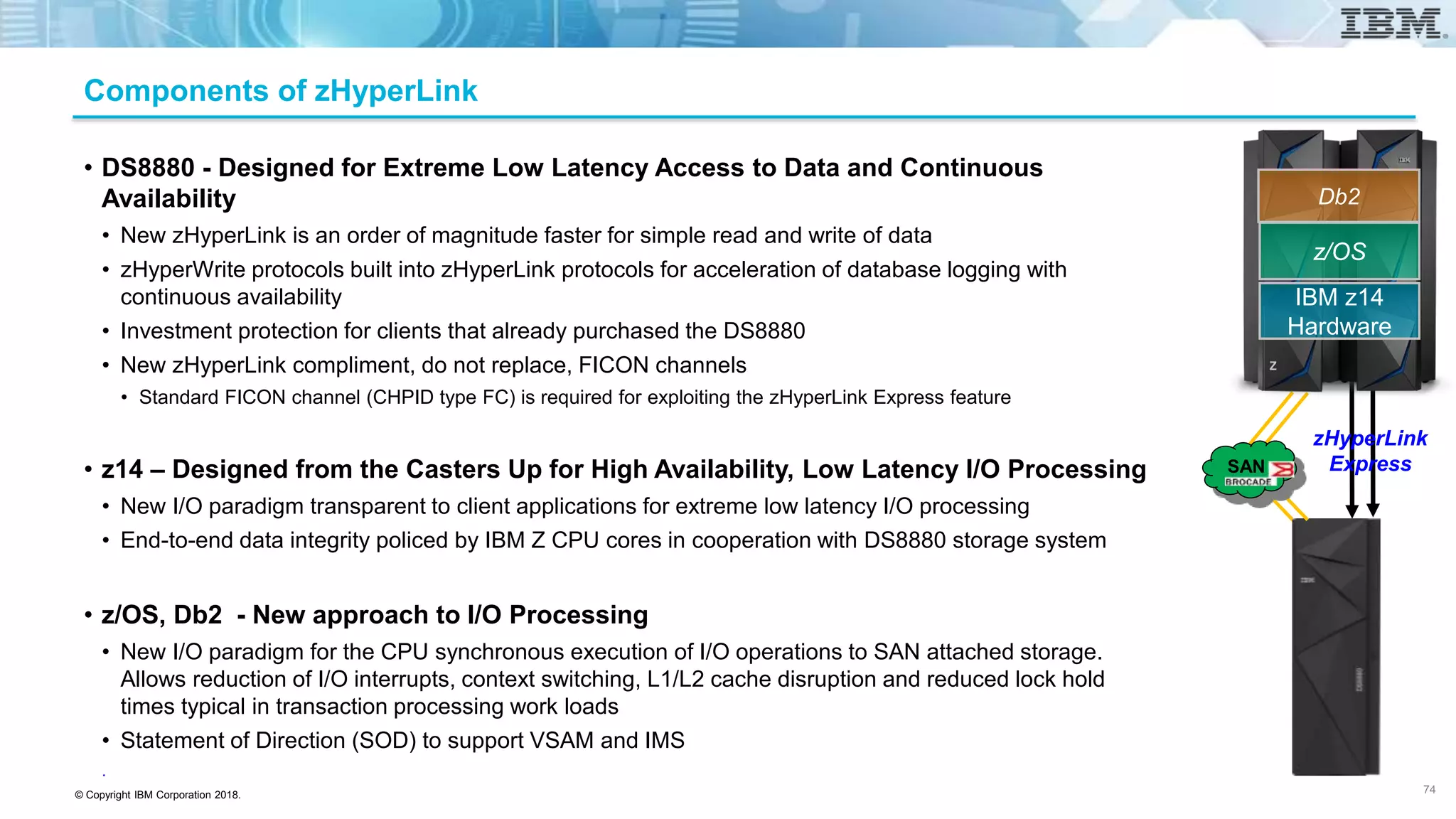
Components of zHyperLink
• DS8880 - Designed for Extreme Low Latency Access to Data and Continuous
Availability
• New zHyperLink is an order of magnitude faster for simple read and write of data
• zHyperWrite protocols built into zHyperLink protocols for acceleration of database logging with
continuous availability
• Investment protection for clients that already purchased the DS8880
• New zHyperLink compliment, do not replace, FICON channels
• Standard FICON channel (CHPID type FC) is required for exploiting the zHyperLink Express feature
• z14 – Designed from the Casters Up for High Availability, Low Latency I/O Processing
• New I/O paradigm transparent to client applications for extreme low latency I/O processing
• End-to-end data integrity policed by IBM Z CPU cores in cooperation with DS8880 storage system
• z/OS, Db2 - New approach to I/O Processing
• New I/O paradigm for the CPU synchronous execution of I/O operations to SAN attached storage.
Allows reduction of I/O interrupts, context switching, L1/L2 cache disruption and reduced lock hold
times typical in transaction processing work loads
• Statement of Direction (SOD) to support VSAM and IMS
.
74
z/OS
IBM z14
Hardware
Db2
zHyperLink
ExpressSAN
© Copyright IBM Corporation 2018.
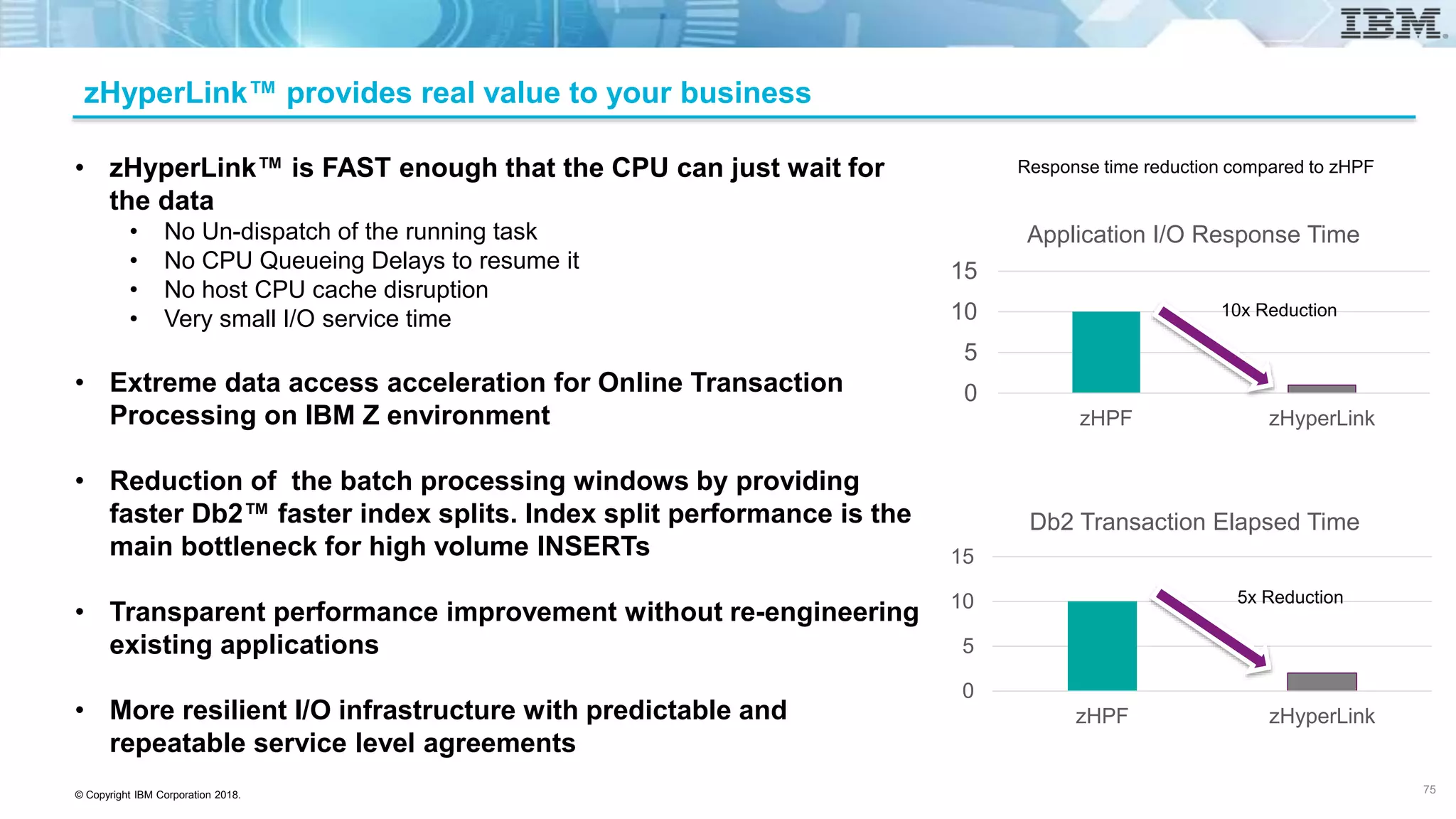
zHyperLink™ provides real value to your business
0
5
10
15
zHPF zHyperLink
Application I/O Response Time
0
5
10
15
zHPF zHyperLink
Db2 Transaction Elapsed Time
10x Reduction
5x Reduction
Response time reduction compared to zHPF• zHyperLink™ is FAST enough that the CPU can just wait for
the data
• No Un-dispatch of the running task
• No CPU Queueing Delays to resume it
• No host CPU cache disruption
• Very small I/O service time
• Extreme data access acceleration for Online Transaction
Processing on IBM Z environment
• Reduction of the batch processing windows by providing
faster Db2™ faster index splits. Index split performance is the
main bottleneck for high volume INSERTs
• Transparent performance improvement without re-engineering
existing applications
• More resilient I/O infrastructure with predictable and
repeatable service level agreements
75
© Copyright IBM Corporation 2018.
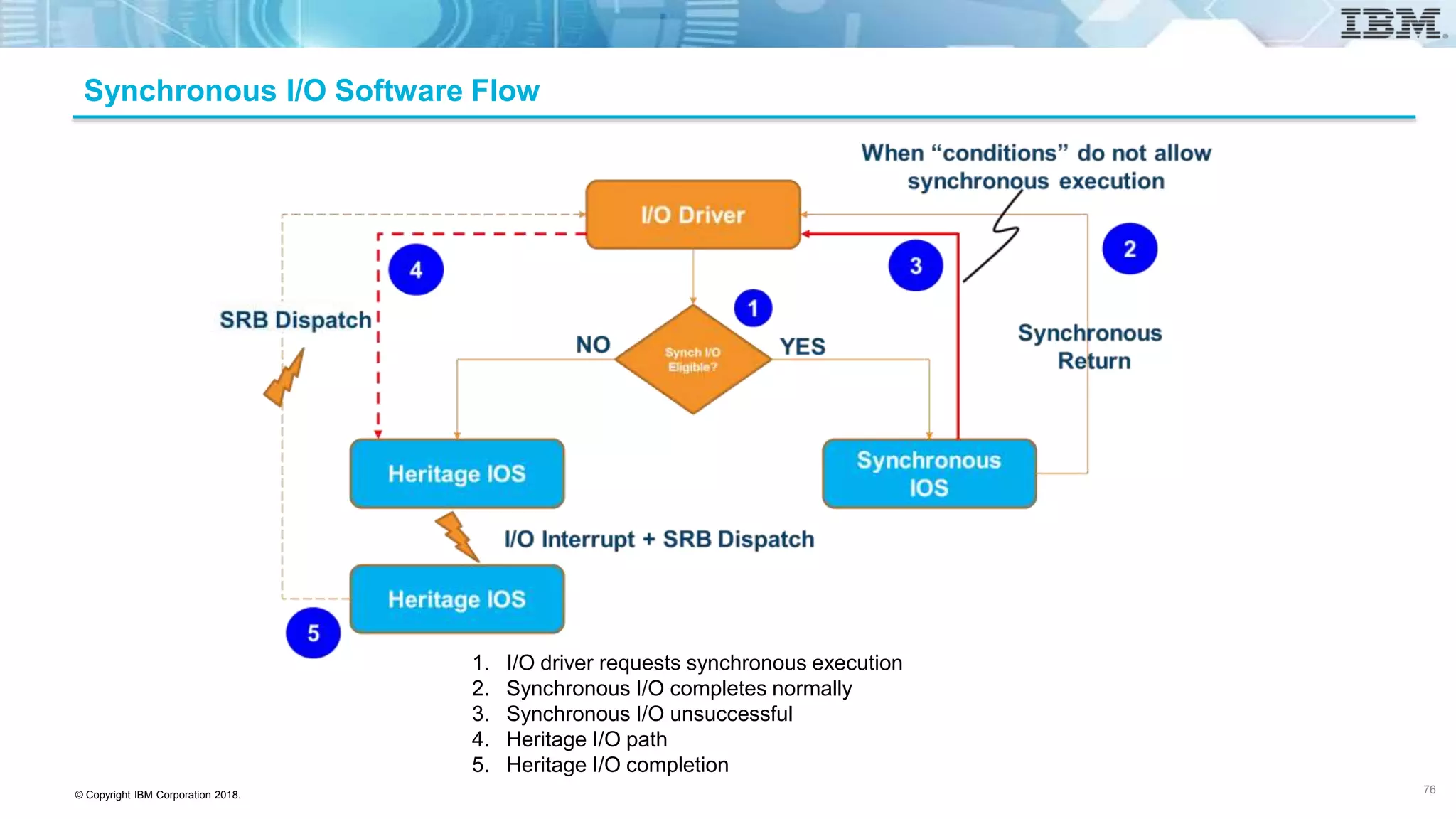
1. I/O driver requests synchronous execution
2. Synchronous I/O completes normally
3. Synchronous I/O unsuccessful
4. Heritage I/O path
5. Heritage I/O completion
Synchronous I/O Software Flow
76
© Copyright IBM Corporation 2018.
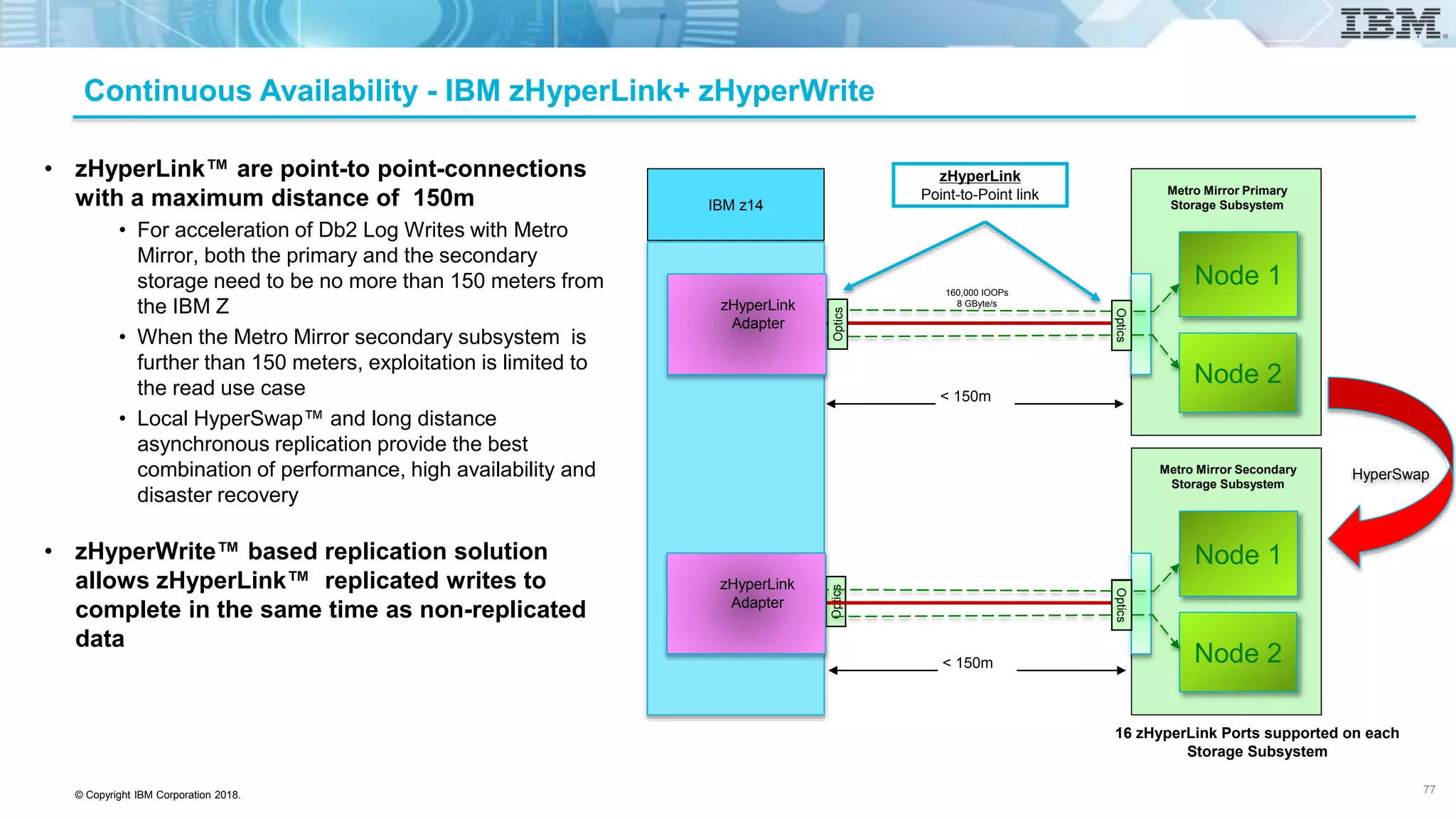
Continuous Availability - IBM zHyperLink+ zHyperWrite
Metro Mirror Primary
Storage Subsystem
Node 1
Node 2
Optics
HyperSwap
< 150m
zHyperLink
Point-to-Point link
• zHyperLink™ are point-to point-connections
with a maximum distance of 150m
• For acceleration of Db2 Log Writes with Metro
Mirror, both the primary and the secondary
storage need to be no more than 150 meters from
the IBM Z
• When the Metro Mirror secondary subsystem is
further than 150 meters, exploitation is limited to
the read use case
• Local HyperSwap™ and long distance
asynchronous replication provide the best
combination of performance, high availability and
disaster recovery
• zHyperWrite™ based replication solution
allows zHyperLink™ replicated writes to
complete in the same time as non-replicated
data
Optics
Node 1
Node 2
Optics
Optics
IBM z14
zHyperLink
Adapter
zHyperLink
Adapter
Optics
< 150m
Metro Mirror Secondary
Storage Subsystem
160,000 IOOPs
8 GByte/s
16 zHyperLink Ports supported on each
Storage Subsystem
77
© Copyright IBM Corporation 2018.
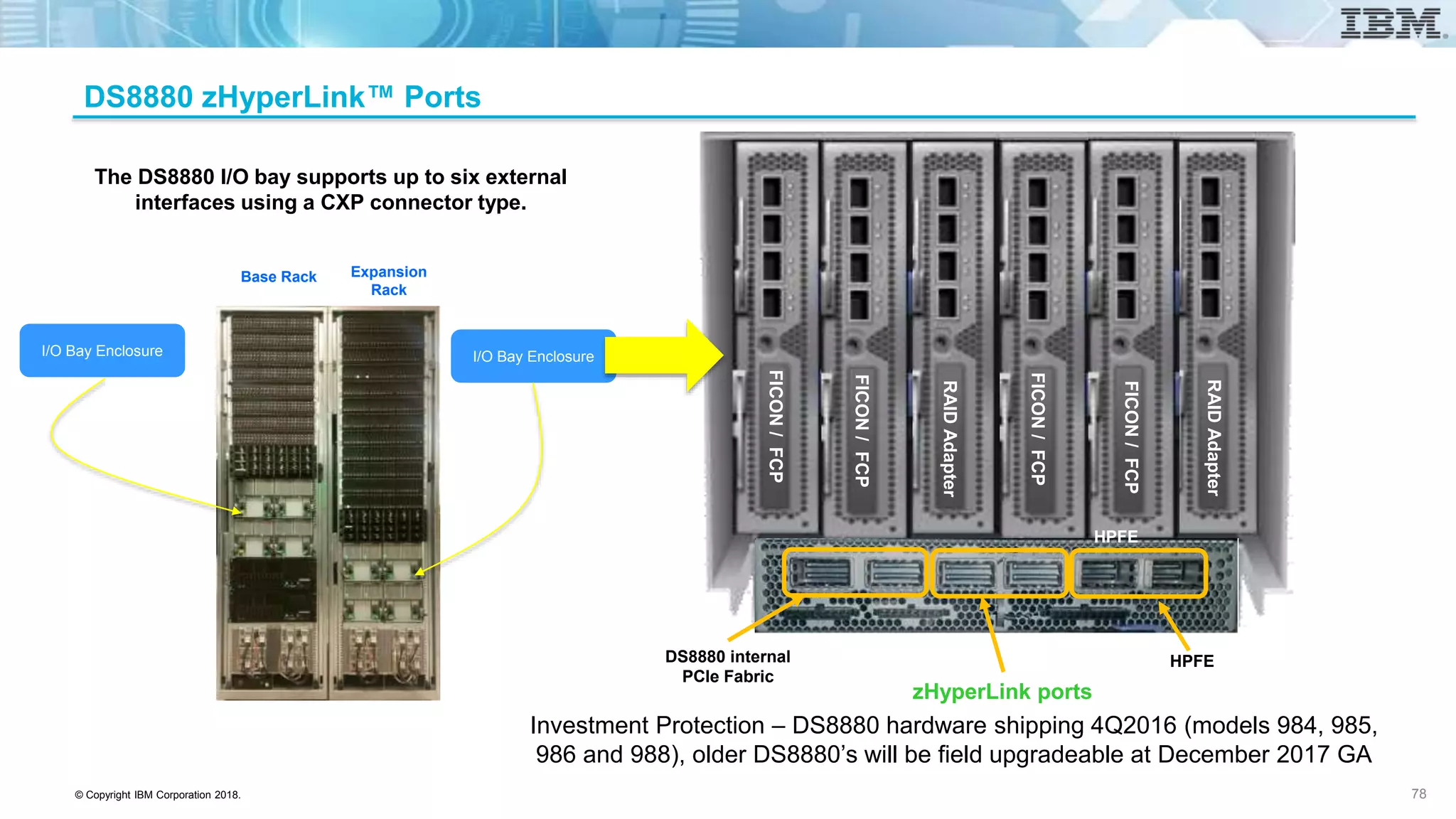
The DS8880 I/O bay supports up to six external
interfaces using a CXP connector type.
I/O Bay EnclosureI/O Bay Enclosure
Base Rack Expansion
Rack
FICON/FCP
HPFE
DS8880 internal
PCIe Fabric
zHyperLink ports
HPFE
FICON/FCP
FICON/FCP
FICON/FCP
RAIDAdapter
RAIDAdapter
DS8880 zHyperLink™ Ports
Investment Protection – DS8880 hardware shipping 4Q2016 (models 984, 985,
986 and 988), older DS8880’s will be field upgradeable at December 2017 GA
78
© Copyright IBM Corporation 2018.
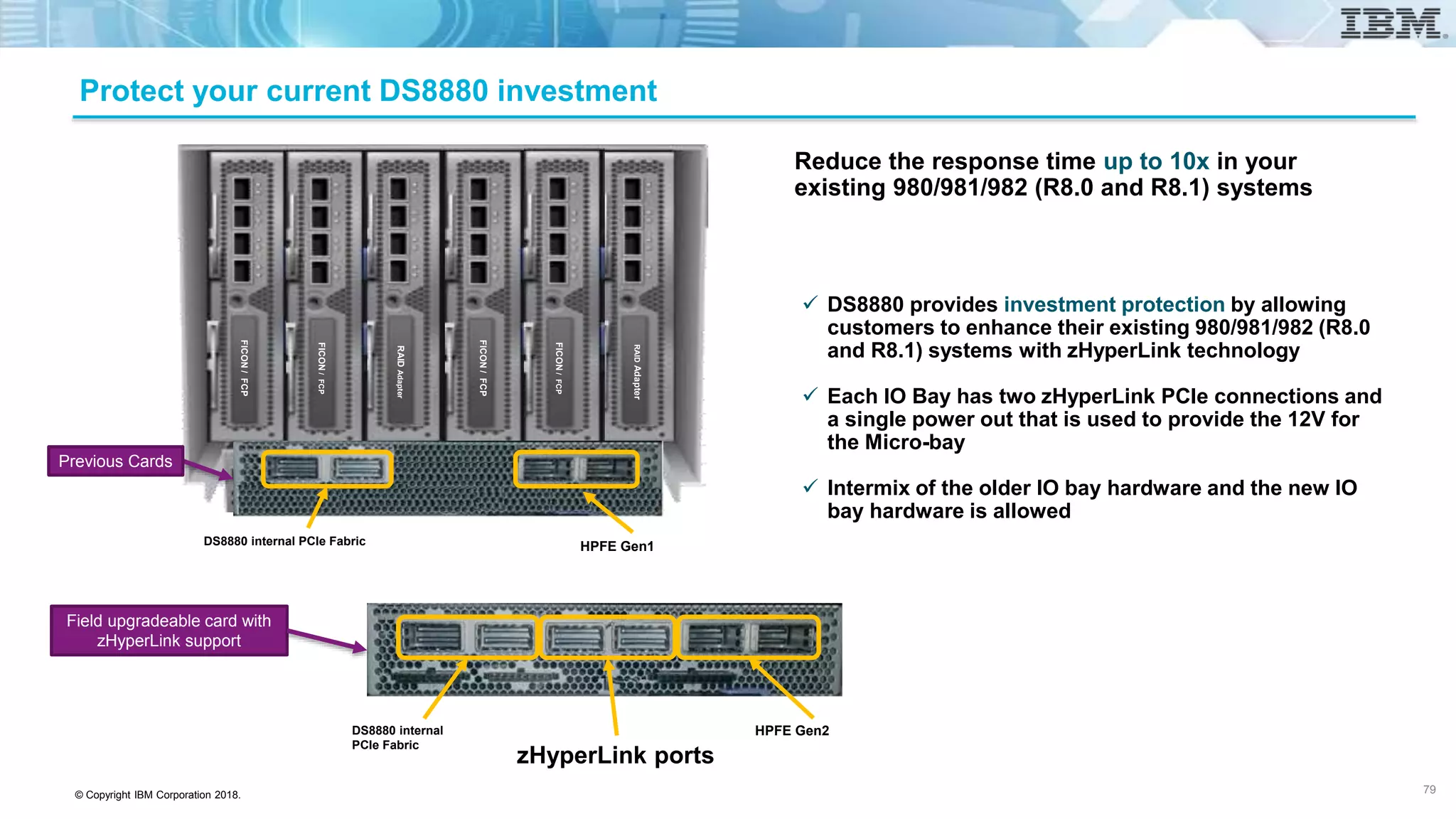
Protect your current DS8880 investment
 DS8880 provides investment protection by allowing
customers to enhance their existing 980/981/982 (R8.0
and R8.1) systems with zHyperLink technology
 Each IO Bay has two zHyperLink PCIe connections and
a single power out that is used to provide the 12V for
the Micro-bay
 Intermix of the older IO bay hardware and the new IO
bay hardware is allowed
Reduce the response time up to 10x in your
existing 980/981/982 (R8.0 and R8.1) systems
HPFE Gen1
RAIDAdapter
FICON/FCP
FICON/FCP
FICON/FCP
RAIDAdapter
FICON/FCP
DS8880 internal PCIe Fabric
Previous Cards
Field upgradeable card with
zHyperLink support
DS8880 internal
PCIe Fabric
HPFE Gen2
zHyperLink ports
79
© Copyright IBM Corporation 2018.
Continuous Availability – Synchronous zHyperWrite
IBM z14
Metro Mirror Primary
Storage Subsystem
Optics
zHyperLink
Adapter
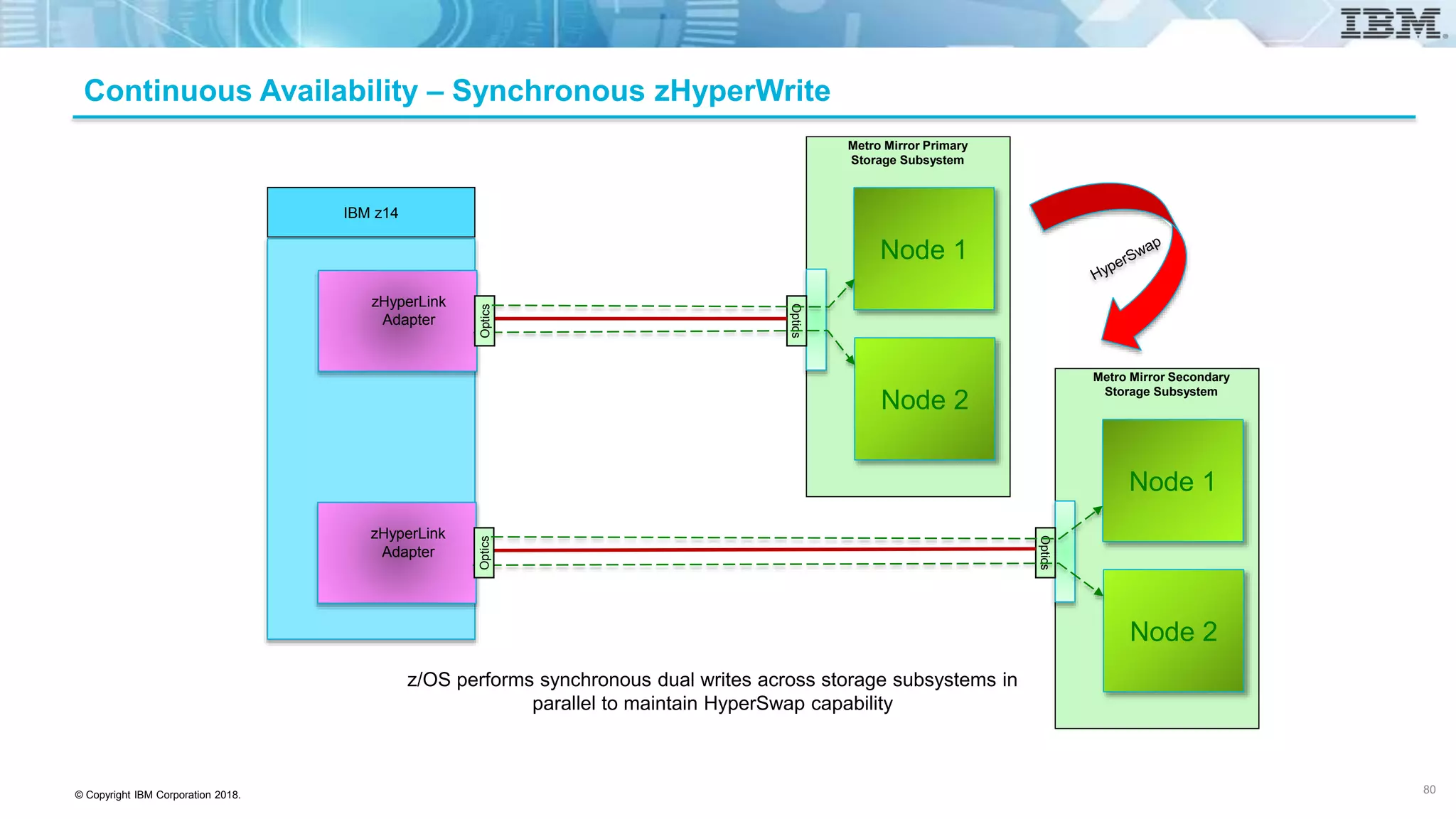
z/OS performs synchronous dual writes across storage subsystems in
parallel to maintain HyperSwap capability
Node 1
Node 2
Optics
Optics
zHyperLink
Adapter
Node 1
Node 2
Optics
Metro Mirror Secondary
Storage Subsystem
80
© Copyright IBM Corporation 2018.
Performance (Latency and Bandwidth)
IBM z14
Metro Mirror Primary
Storage Subsystem
Optics
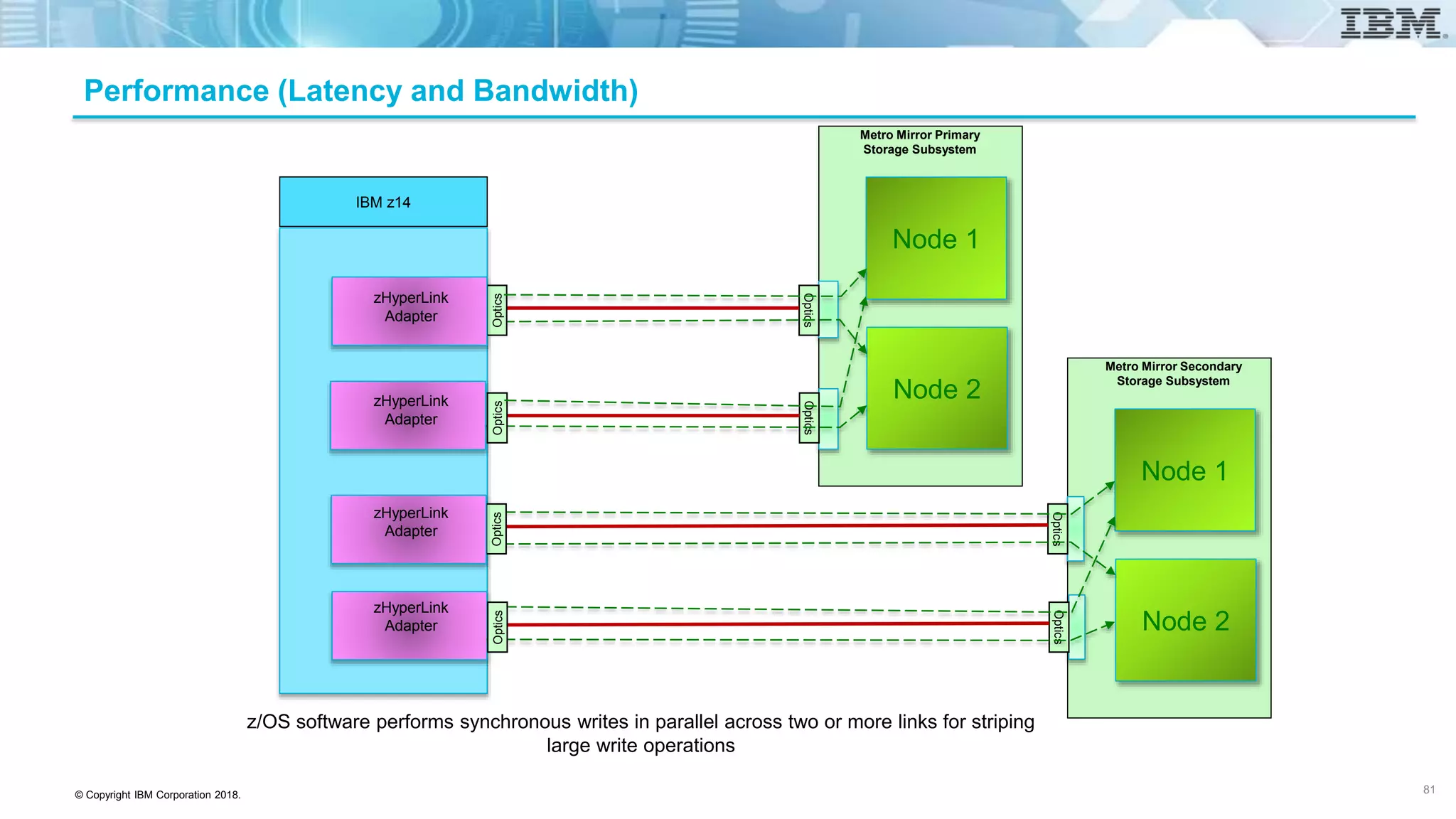
z/OS software performs synchronous writes in parallel across two or more links for striping
large write operations
Node 1
Node 2
Optics
Optics
Node 1
Node 2
Metro Mirror Secondary
Storage Subsystem
Optics
OpticsOptics
Optics
Optics
zHyperLink
Adapter
zHyperLink
Adapter
zHyperLink
Adapter
zHyperLink
Adapter
81
© Copyright IBM Corporation 2018.
Local Primary/Remote Secondary
IBM z14
Metro Mirror Primary
Storage Subsystem
Optics
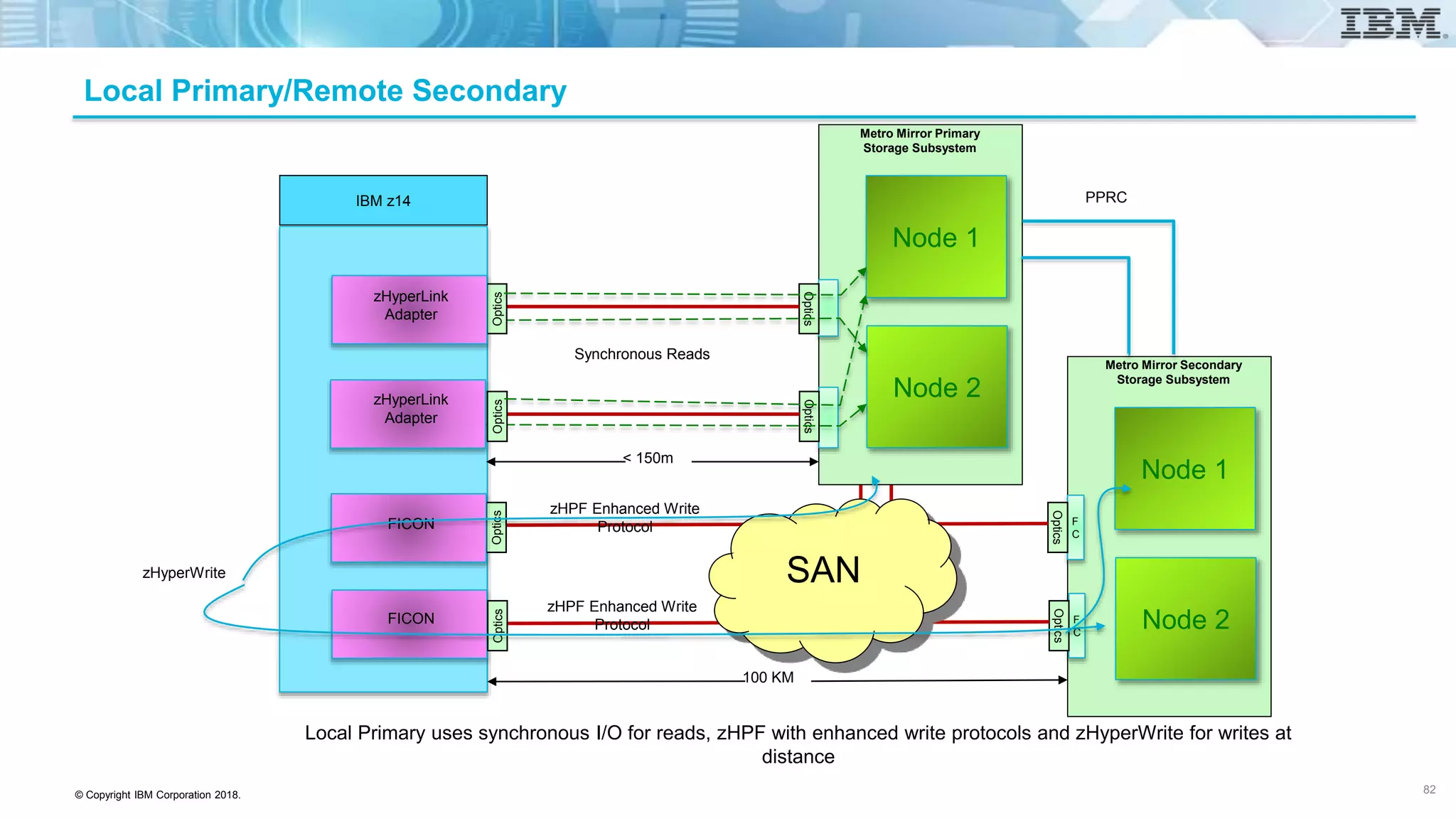
Local Primary uses synchronous I/O for reads, zHPF with enhanced write protocols and zHyperWrite for writes at
distance
Node 1
Node 2
Optics
F
C
Optics
Node 1
Node 2
Metro Mirror Secondary
Storage Subsystem
Optics
OpticsOptics
F
C
Optics
Optics
zHyperLink
Adapter
zHyperLink
Adapter
FICON
FICON
zHPF Enhanced Write
Protocol
SAN
100 KM
< 150m
zHPF Enhanced Write
Protocol
zHyperWrite
Synchronous Reads
PPRC
82
© Copyright IBM Corporation 2018.
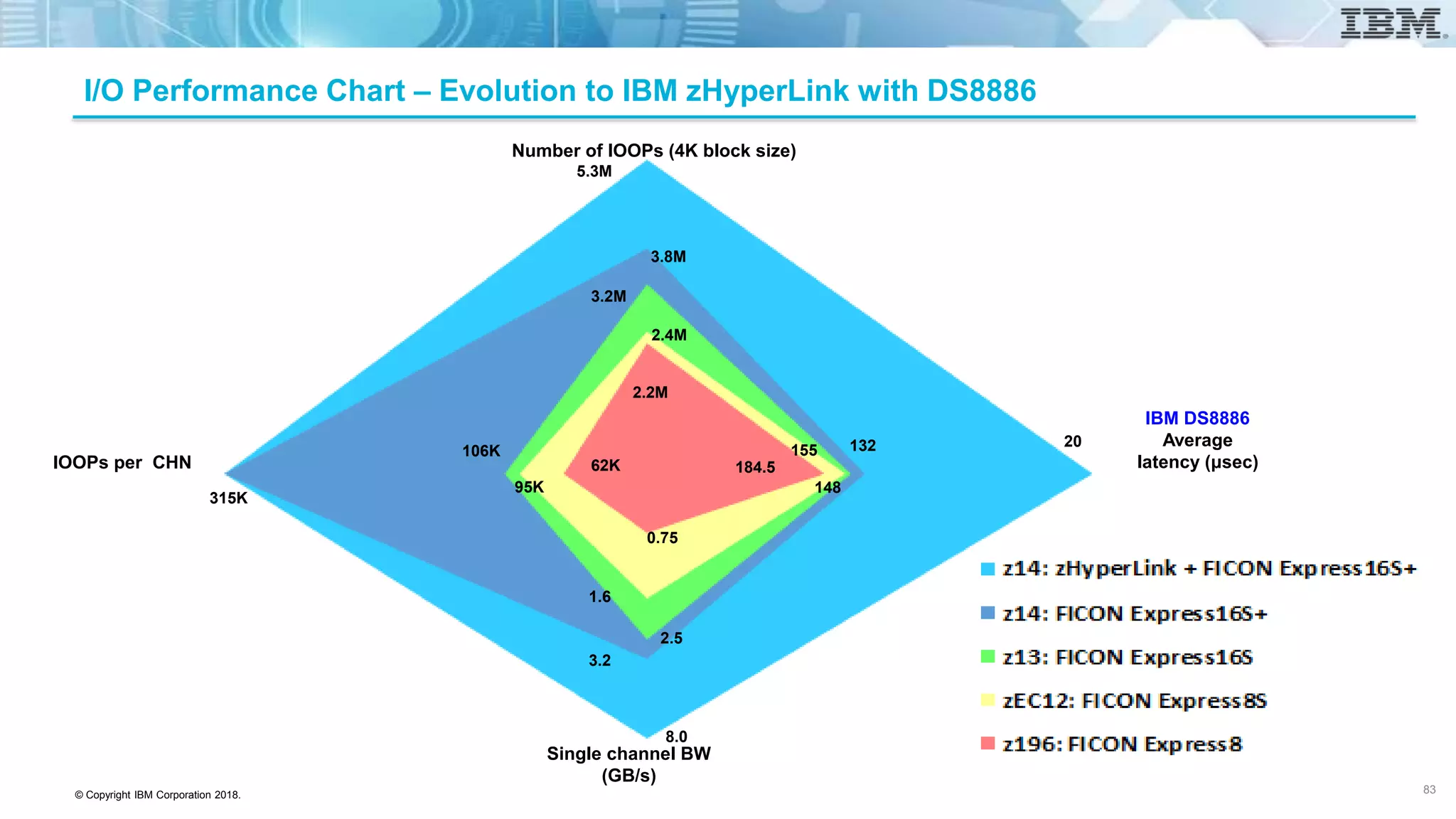
I/O Performance Chart – Evolution to IBM zHyperLink with DS8886
IOOPs per CHN
IBM DS8886
Average
latency (μsec)
Single channel BW
(GB/s)
Number of IOOPs (4K block size)
184.5
155
148
132 20
62K
95K
106K
315K
2.2M
2.4M
3.2M
3.8M
5.3M
0.75
1.6
2.5
3.2
8.0
83
© Copyright IBM Corporation 2018.
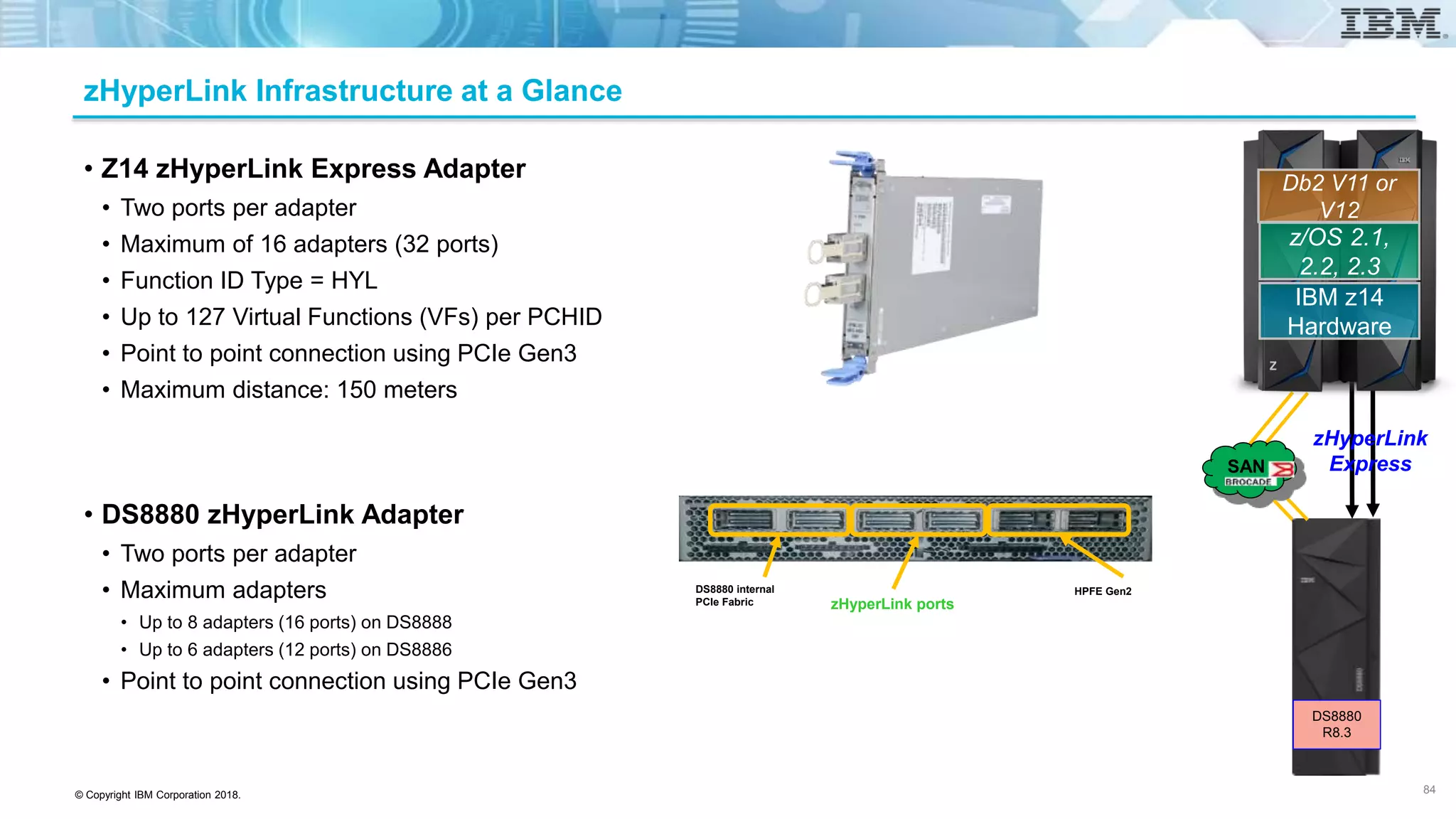
zHyperLink Infrastructure at a Glance
• Z14 zHyperLink Express Adapter
• Two ports per adapter
• Maximum of 16 adapters (32 ports)
• Function ID Type = HYL
• Up to 127 Virtual Functions (VFs) per PCHID
• Point to point connection using PCIe Gen3
• Maximum distance: 150 meters
• DS8880 zHyperLink Adapter
• Two ports per adapter
• Maximum adapters
• Up to 8 adapters (16 ports) on DS8888
• Up to 6 adapters (12 ports) on DS8886
• Point to point connection using PCIe Gen3
DS8880 internal
PCIe Fabric zHyperLink ports
HPFE Gen2
84
z/OS 2.1,
2.2, 2.3
IBM z14
Hardware
Db2 V11 or
V12
zHyperLink
ExpressSAN
DS8880
R8.3
© Copyright IBM Corporation 2018.
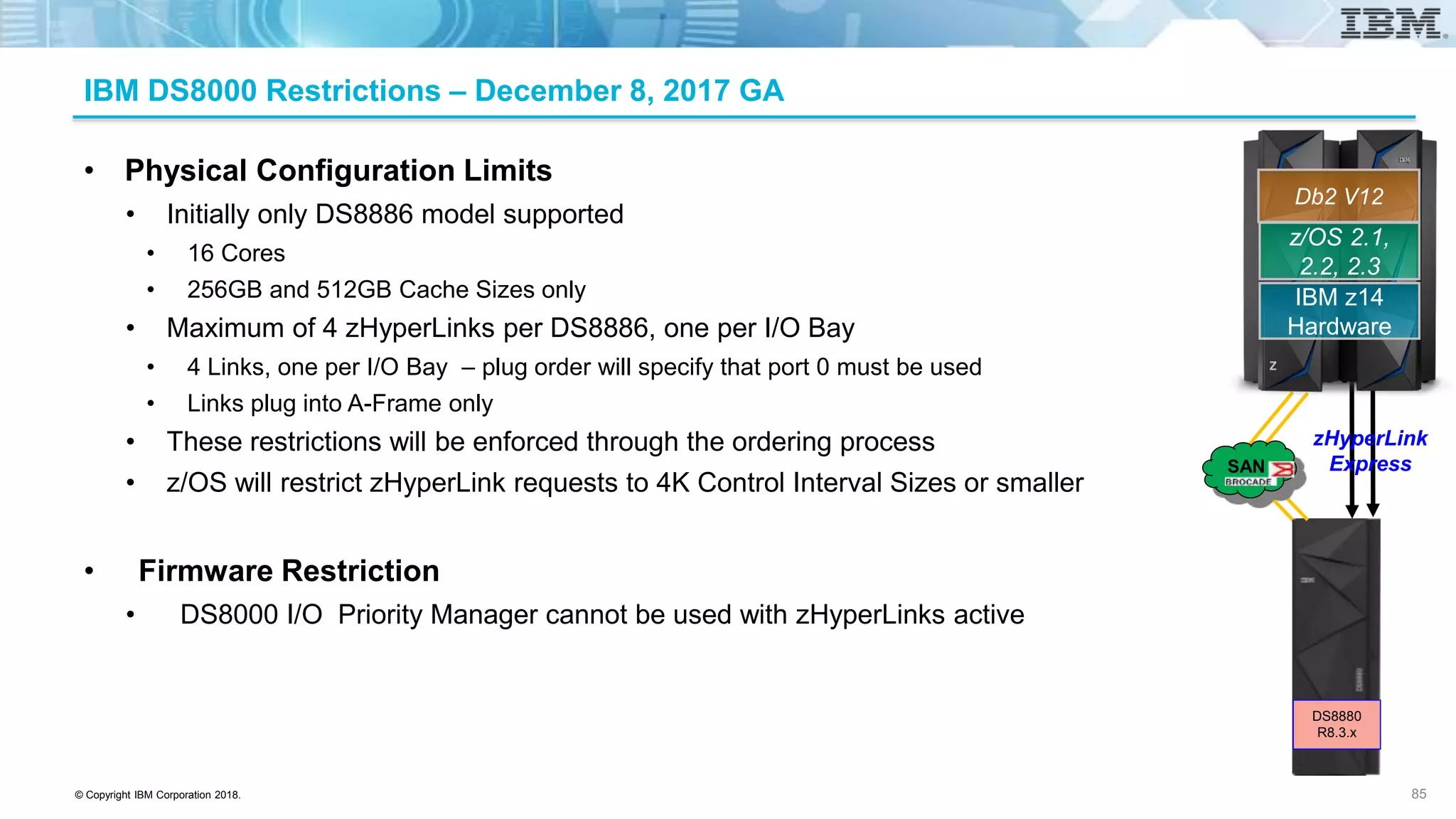
IBM DS8000 Restrictions – December 8, 2017 GA
• Physical Configuration Limits
• Initially only DS8886 model supported
• 16 Cores
• 256GB and 512GB Cache Sizes only
• Maximum of 4 zHyperLinks per DS8886, one per I/O Bay
• 4 Links, one per I/O Bay – plug order will specify that port 0 must be used
• Links plug into A-Frame only
• These restrictions will be enforced through the ordering process
• z/OS will restrict zHyperLink requests to 4K Control Interval Sizes or smaller
• Firmware Restriction
• DS8000 I/O Priority Manager cannot be used with zHyperLinks active
85
z/OS 2.1,
2.2, 2.3
IBM z14
Hardware
Db2 V12
zHyperLink
ExpressSAN
DS8880
R8.3.x
© Copyright IBM Corporation 2018.
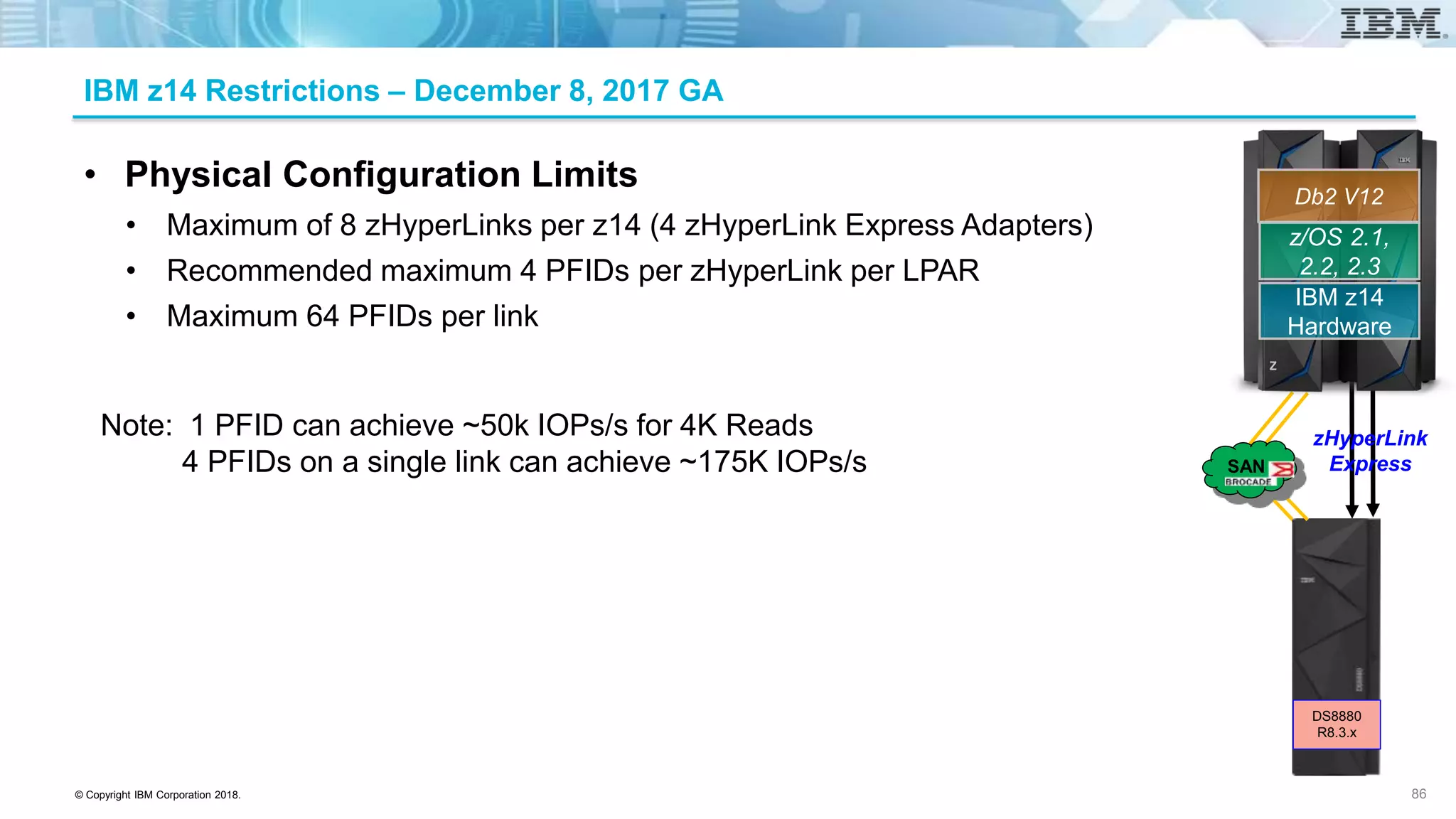
IBM z14 Restrictions – December 8, 2017 GA
• Physical Configuration Limits
• Maximum of 8 zHyperLinks per z14 (4 zHyperLink Express Adapters)
• Recommended maximum 4 PFIDs per zHyperLink per LPAR
• Maximum 64 PFIDs per link
Note: 1 PFID can achieve ~50k IOPs/s for 4K Reads
4 PFIDs on a single link can achieve ~175K IOPs/s
86
z/OS 2.1,
2.2, 2.3
IBM z14
Hardware
Db2 V12
zHyperLink
ExpressSAN
DS8880
R8.3.x
© Copyright IBM Corporation 2018.
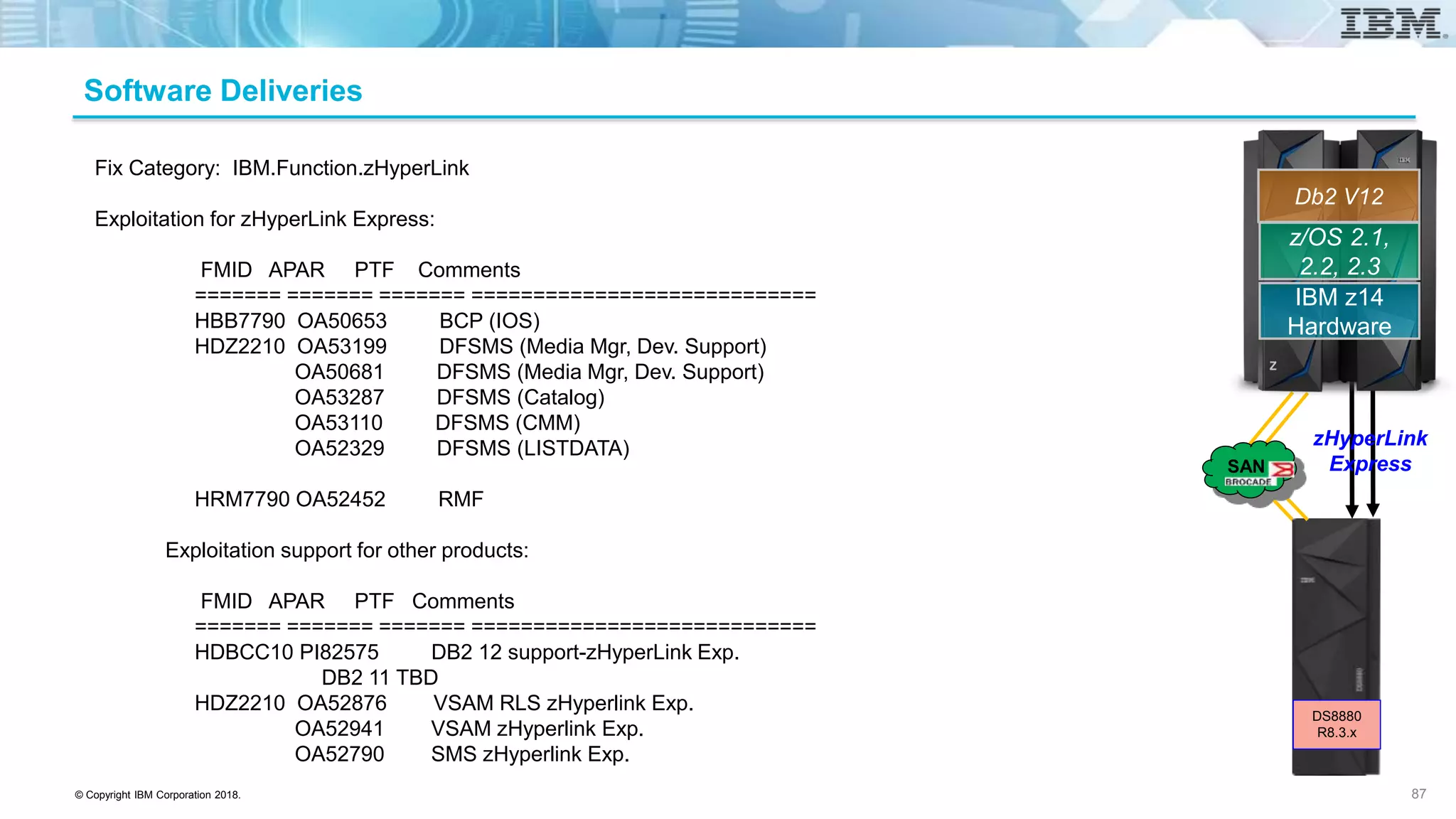
Fix Category: IBM.Function.zHyperLink
Exploitation for zHyperLink Express:
FMID APAR PTF Comments
======= ======= ======= ============================
HBB7790 OA50653 BCP (IOS)
HDZ2210 OA53199 DFSMS (Media Mgr, Dev. Support)
OA50681 DFSMS (Media Mgr, Dev. Support)
OA53287 DFSMS (Catalog)
OA53110 DFSMS (CMM)
OA52329 DFSMS (LISTDATA)
HRM7790 OA52452 RMF
Exploitation support for other products:
FMID APAR PTF Comments
======= ======= ======= ============================
HDBCC10 PI82575 DB2 12 support-zHyperLink Exp.
DB2 11 TBD
HDZ2210 OA52876 VSAM RLS zHyperlink Exp.
OA52941 VSAM zHyperlink Exp.
OA52790 SMS zHyperlink Exp.
Software Deliveries
87
z/OS 2.1,
2.2, 2.3
IBM z14
Hardware
Db2 V12
zHyperLink
ExpressSAN
DS8880
R8.3.x
© Copyright IBM Corporation 2018.
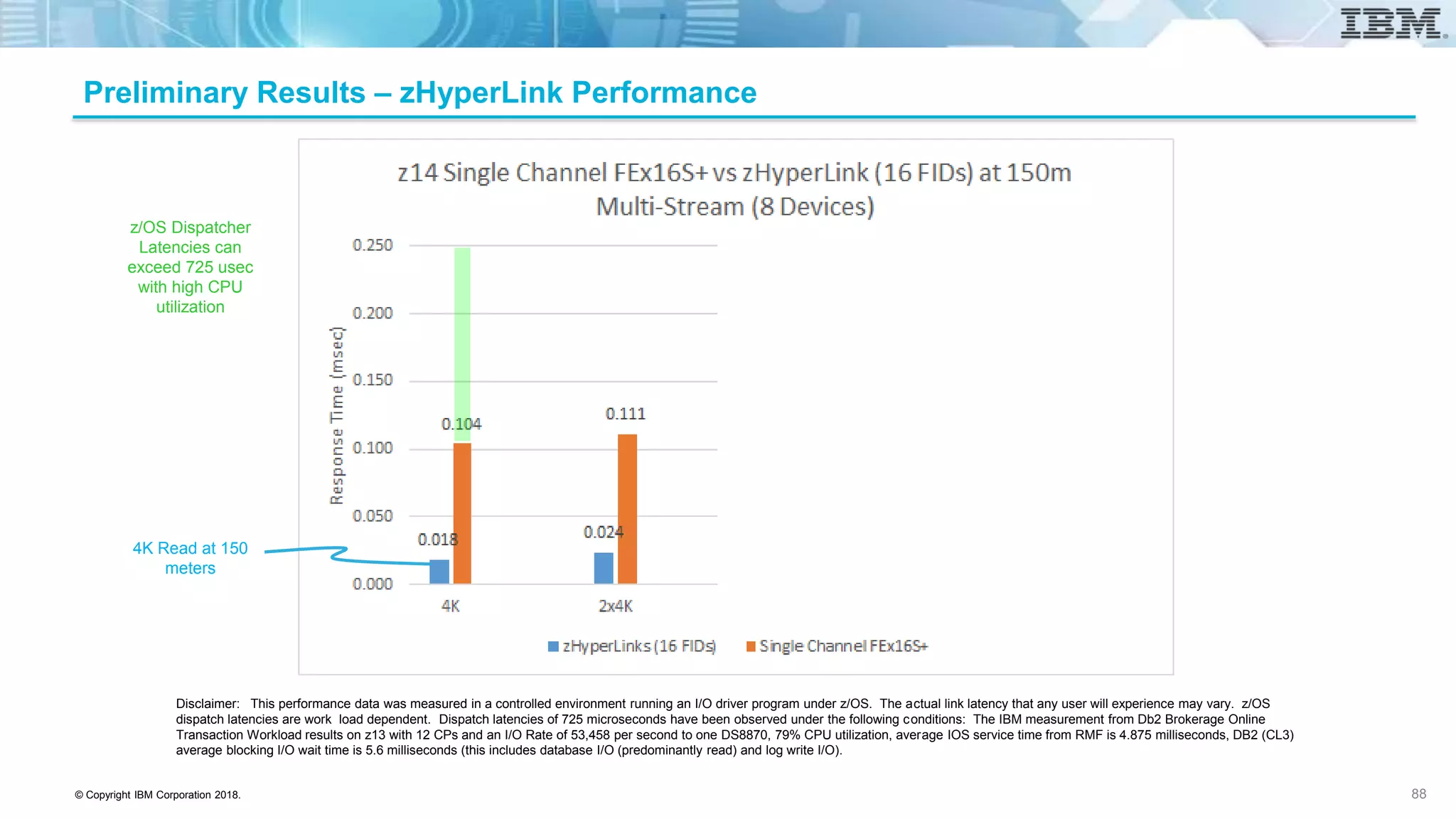
Preliminary Results – zHyperLink Performance
z/OS Dispatcher
Latencies can
exceed 725 usec
with high CPU
utilization
Disclaimer: This performance data was measured in a controlled environment running an I/O driver program under z/OS. The actual link latency that any user will experience may vary. z/OS
dispatch latencies are work load dependent. Dispatch latencies of 725 microseconds have been observed under the following conditions: The IBM measurement from Db2 Brokerage Online
Transaction Workload results on z13 with 12 CPs and an I/O Rate of 53,458 per second to one DS8870, 79% CPU utilization, average IOS service time from RMF is 4.875 milliseconds, DB2 (CL3)
average blocking I/O wait time is 5.6 milliseconds (this includes database I/O (predominantly read) and log write I/O).
4K Read at 150
meters
88
© Copyright IBM Corporation 2018.
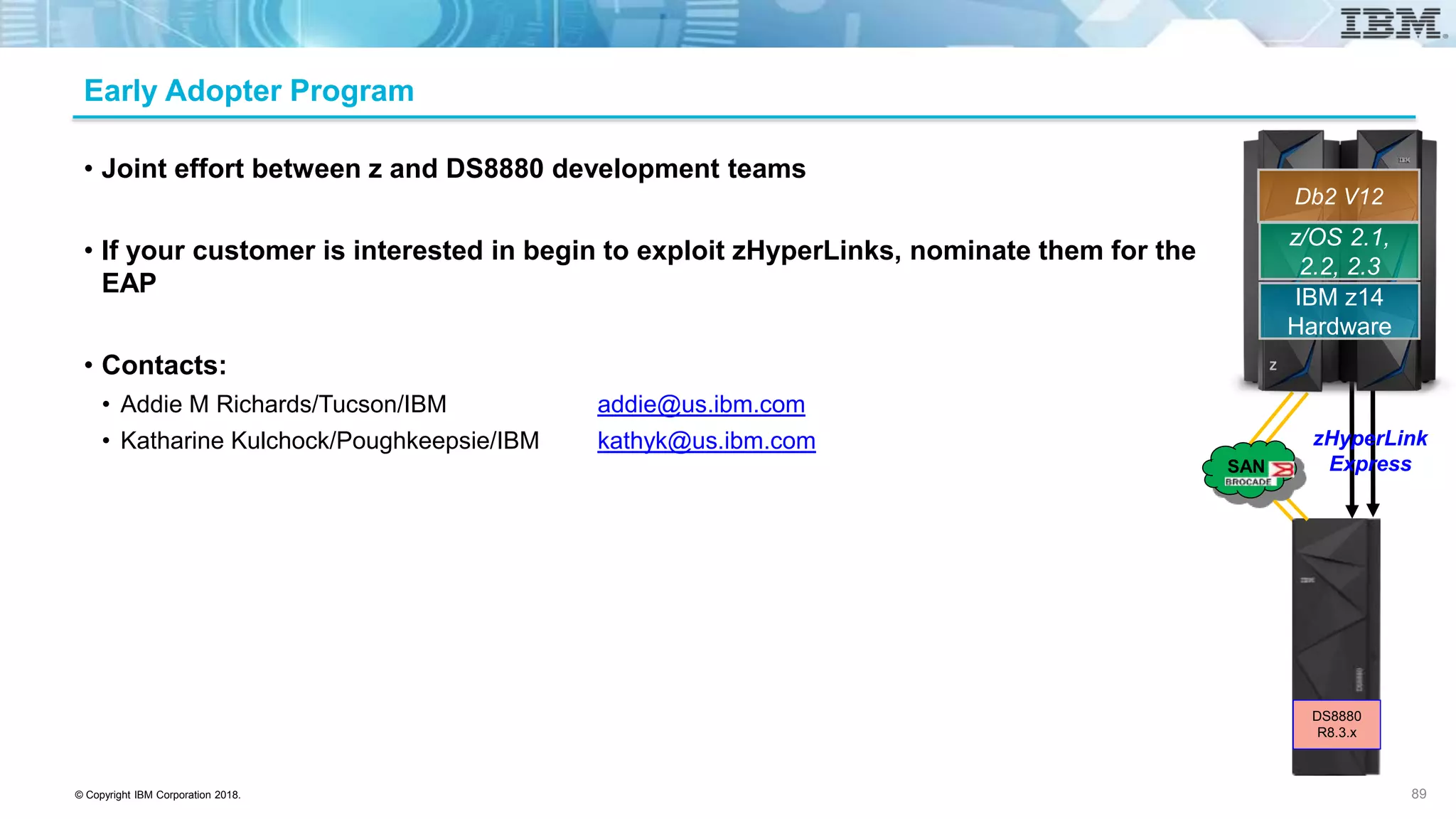
Early Adopter Program
• Joint effort between z and DS8880 development teams
• If your customer is interested in begin to exploit zHyperLinks, nominate them for the
EAP
• Contacts:
• Addie M Richards/Tucson/IBM addie@us.ibm.com
• Katharine Kulchock/Poughkeepsie/IBM kathyk@us.ibm.com
89
z/OS 2.1,
2.2, 2.3
IBM z14
Hardware
Db2 V12
zHyperLink
ExpressSAN
DS8880
R8.3.x
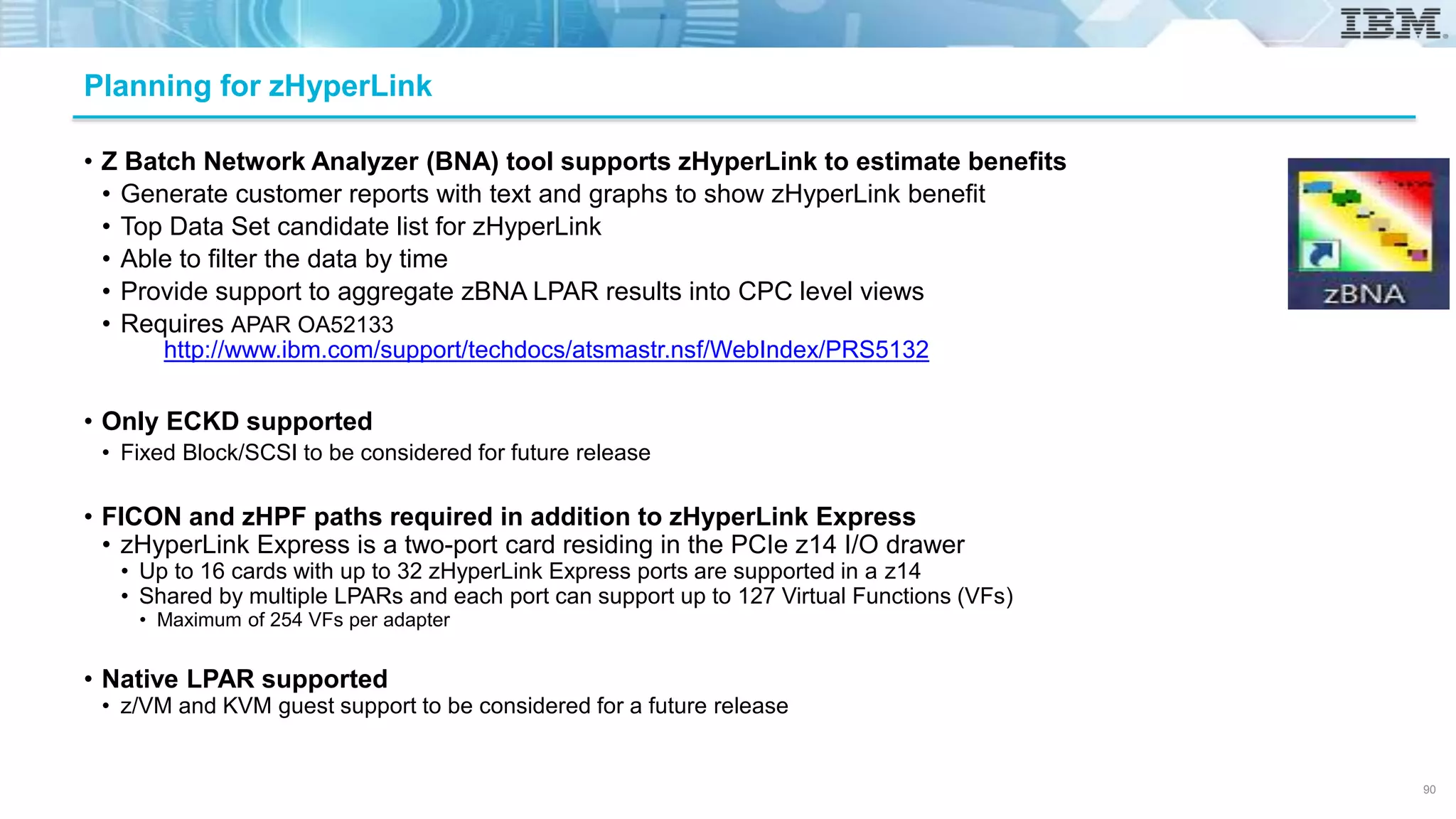
• Z Batch Network Analyzer (BNA) tool supports zHyperLink to estimate benefits
• Generate customer reports with text and graphs to show zHyperLink benefit
• Top Data Set candidate list for zHyperLink
• Able to filter the data by time
• Provide support to aggregate zBNA LPAR results into CPC level views
• Requires APAR OA52133
• Only ECKD supported
• Fixed Block/SCSI to be considered for future release
• FICON and zHPF paths required in addition to zHyperLink Express
• zHyperLink Express is a two-port card residing in the PCIe z14 I/O drawer
• Up to 16 cards with up to 32 zHyperLink Express ports are supported in a z14
• Shared by multiple LPARs and each port can support up to 127 Virtual Functions (VFs)
• Maximum of 254 VFs per adapter
• Native LPAR supported
• z/VM and KVM guest support to be considered for a future release
Planning for zHyperLink
http://www.ibm.com/support/techdocs/atsmastr.nsf/WebIndex/PRS5132
90
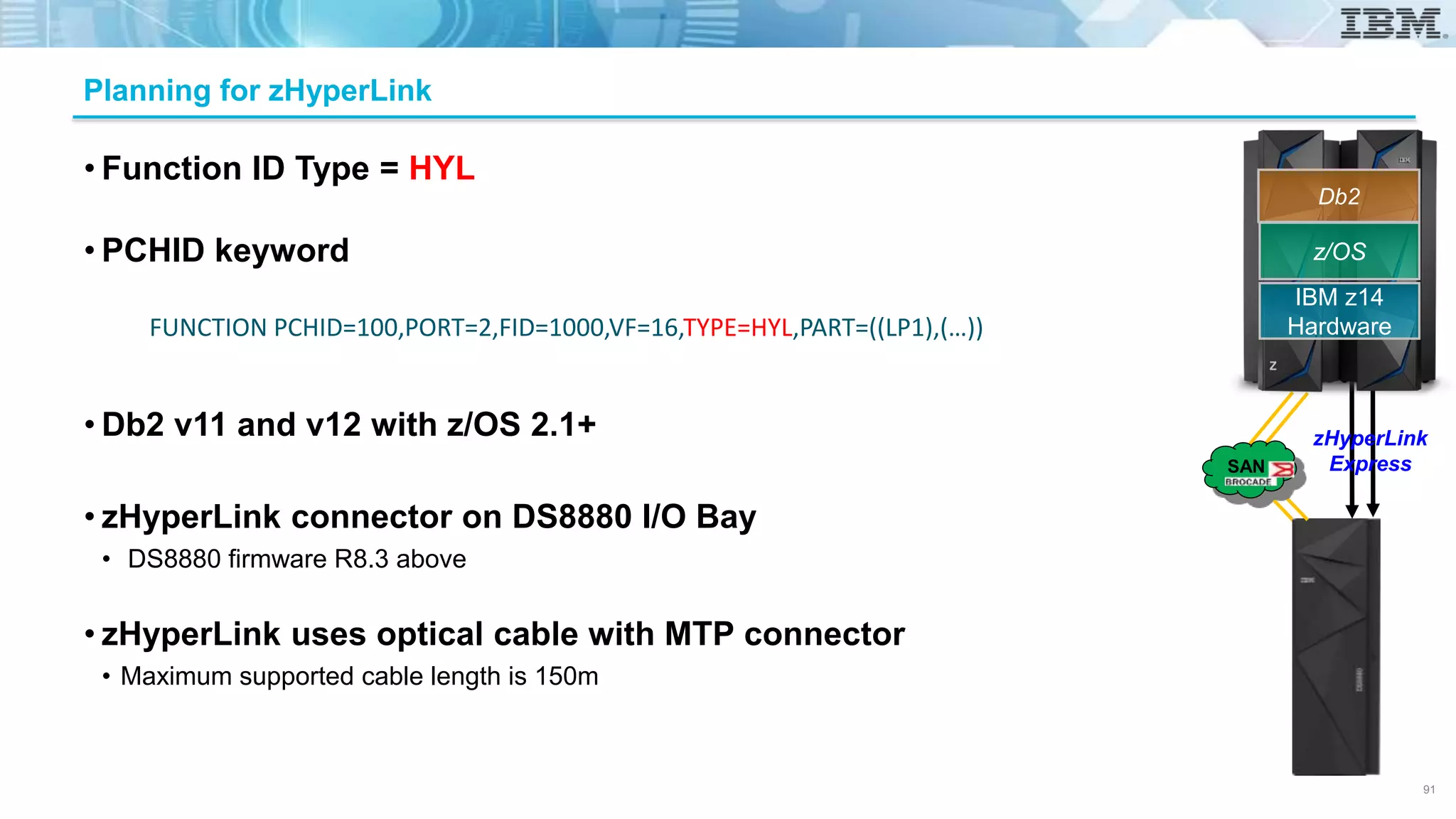
• Function ID Type = HYL
• PCHID keyword
• Db2 v11 and v12 with z/OS 2.1+
• zHyperLink connector on DS8880 I/O Bay
• DS8880 firmware R8.3 above
• zHyperLink uses optical cable with MTP connector
• Maximum supported cable length is 150m
Planning for zHyperLink
FUNCTION PCHID=100,PORT=2,FID=1000,VF=16,TYPE=HYL,PART=((LP1),(…))
91
z/OS
IBM z14
Hardware
Db2
zHyperLink
ExpressSAN
© Copyright IBM Corporation 2018.
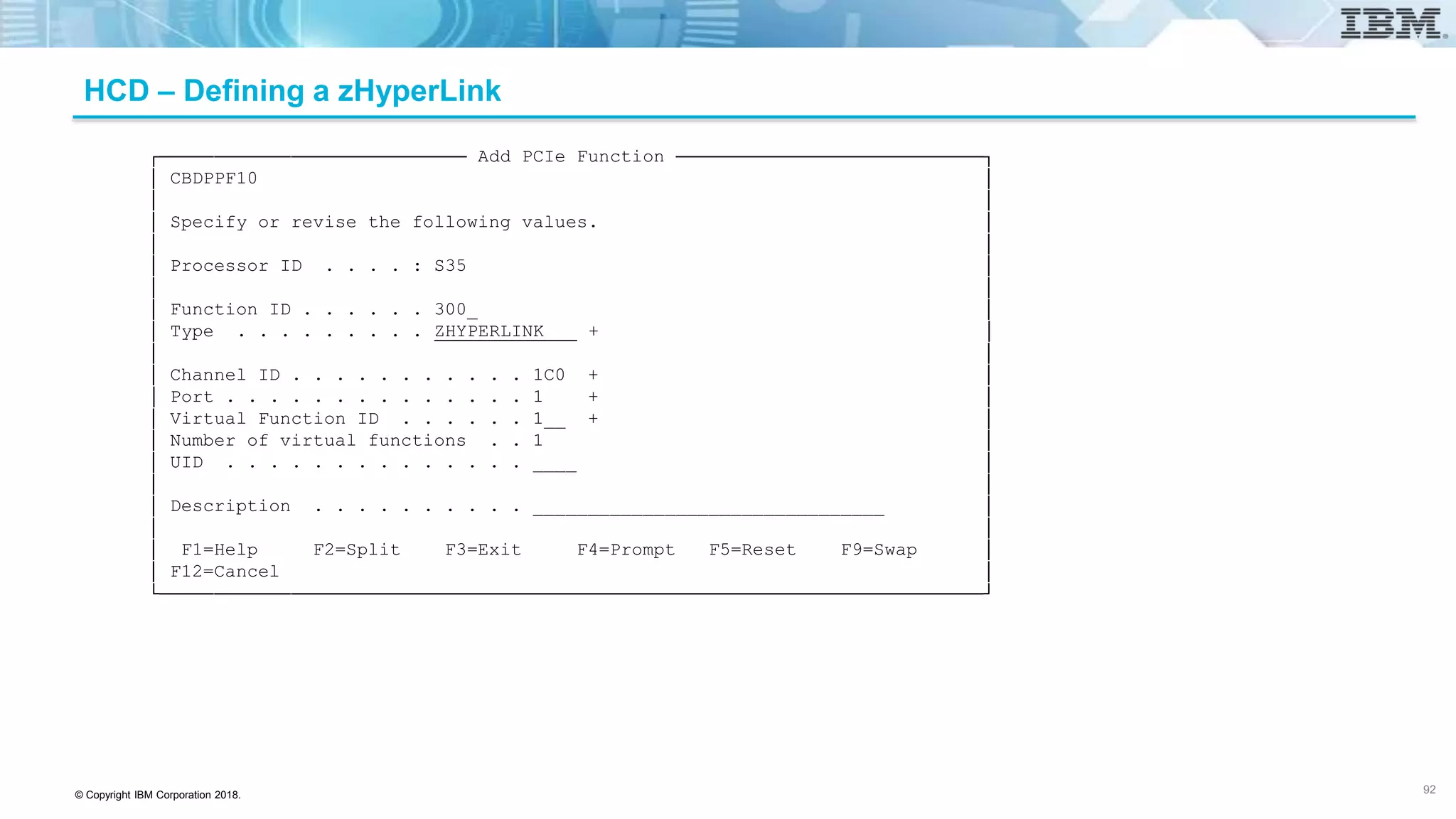
HCD – Defining a zHyperLink
┌──────────────────────────── Add PCIe Function ────────────────────────────┐
│ CBDPPF10 │
│ │
│ Specify or revise the following values. │
│ │
│ Processor ID . . . . : S35 │
│ │
│ Function ID . . . . . . 300_ │
│ Type . . . . . . . . . ZHYPERLINK + │
│ │
│ Channel ID . . . . . . . . . . . 1C0 + │
│ Port . . . . . . . . . . . . . . 1 + │
│ Virtual Function ID . . . . . . 1__ + │
│ Number of virtual functions . . 1 │
│ UID . . . . . . . . . . . . . . ____ │
│ │
│ Description . . . . . . . . . . ________________________________ │
│ │
│ F1=Help F2=Split F3=Exit F4=Prompt F5=Reset F9=Swap │
│ F12=Cancel │
└───────────────────────────────────────────────────────────────────────────┘
92
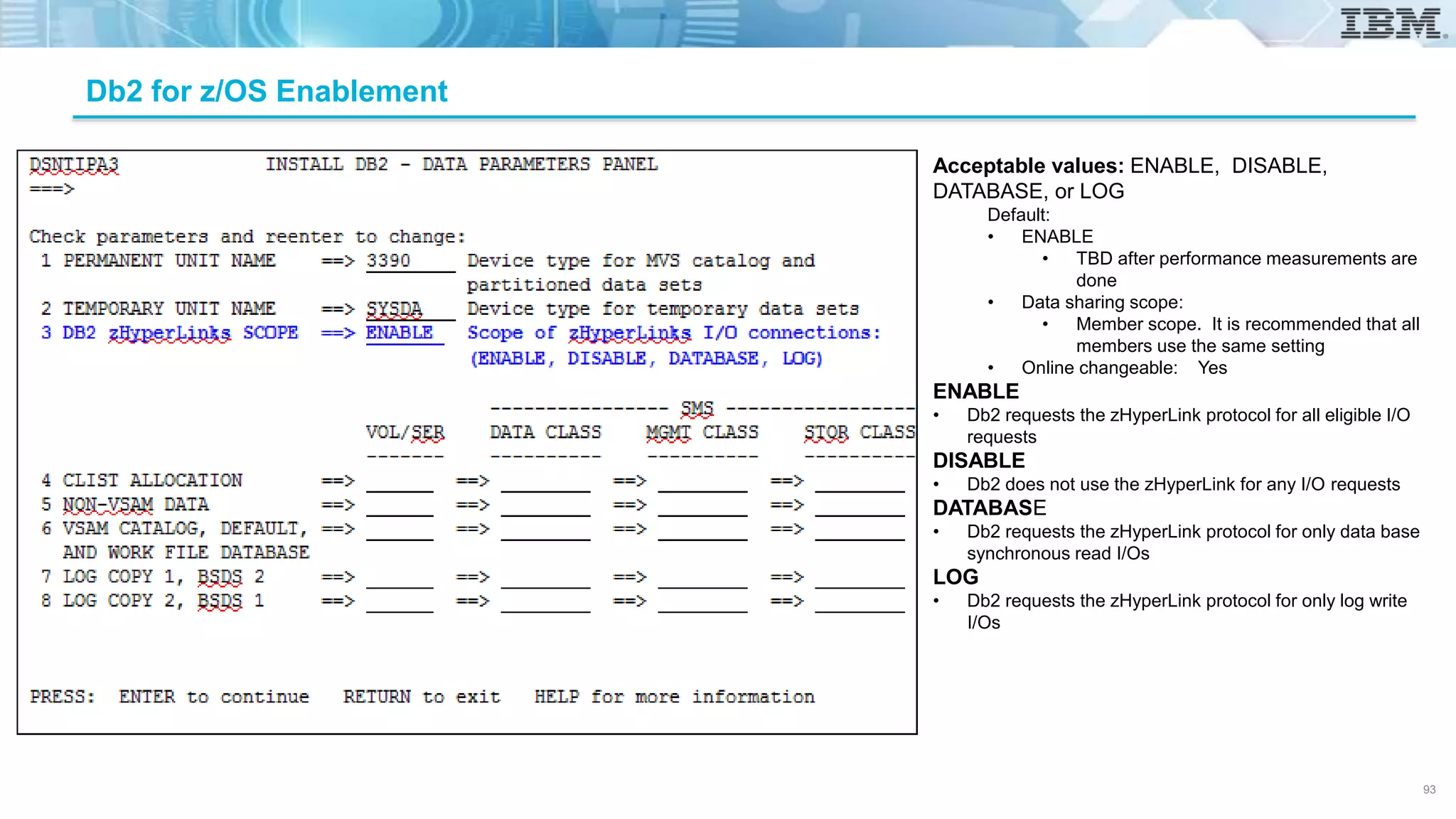
Db2 for z/OS Enablement
Acceptable values: ENABLE, DISABLE,
DATABASE, or LOG
Default:
• ENABLE
• TBD after performance measurements are
done
• Data sharing scope:
• Member scope. It is recommended that all
members use the same setting
• Online changeable: Yes
ENABLE
• Db2 requests the zHyperLink protocol for all eligible I/O
requests
DISABLE
• Db2 does not use the zHyperLink for any I/O requests
DATABASE
• Db2 requests the zHyperLink protocol for only data base
synchronous read I/Os
LOG
• Db2 requests the zHyperLink protocol for only log write
I/Os
93
© Copyright IBM Corporation 2018.
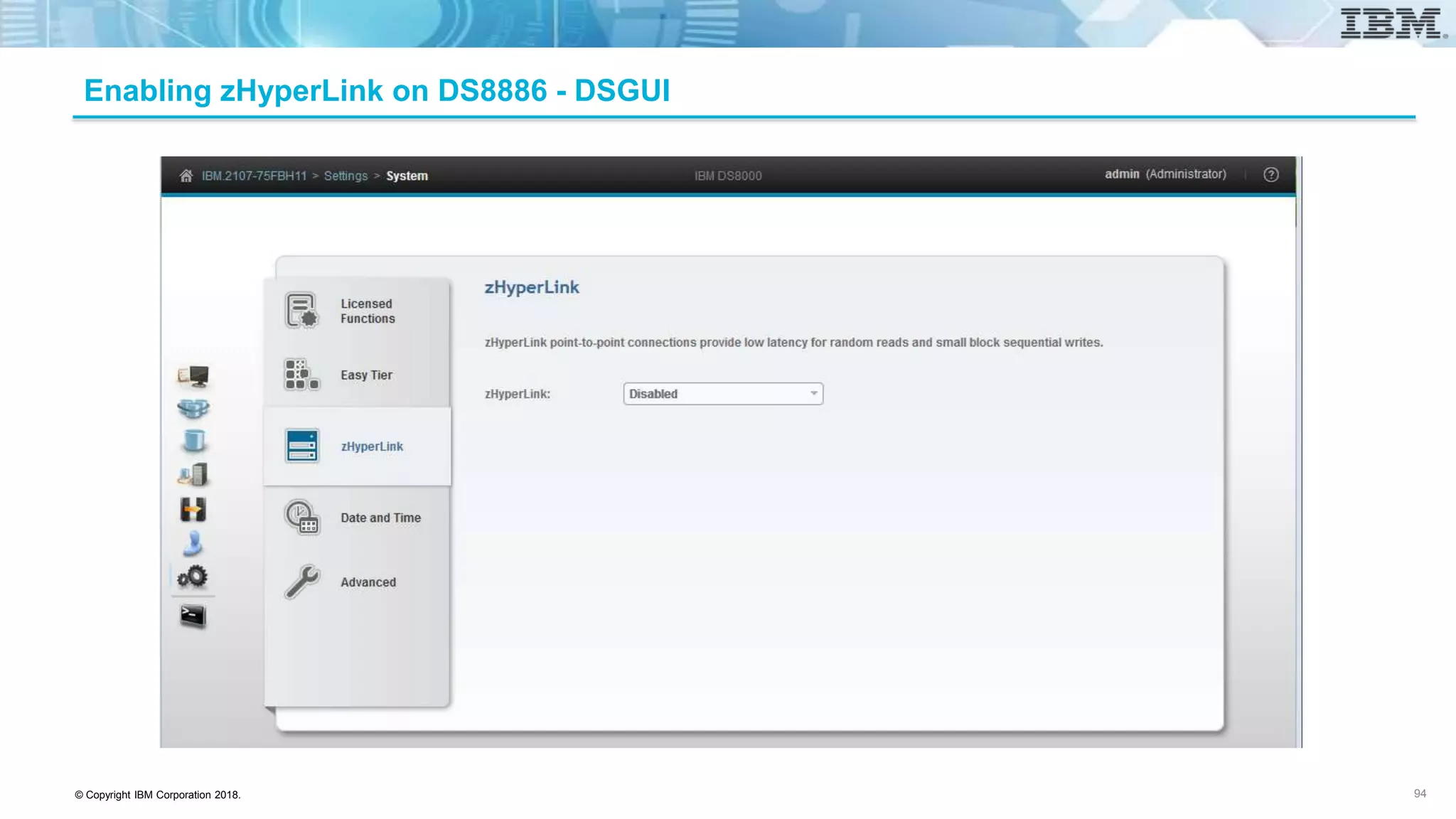
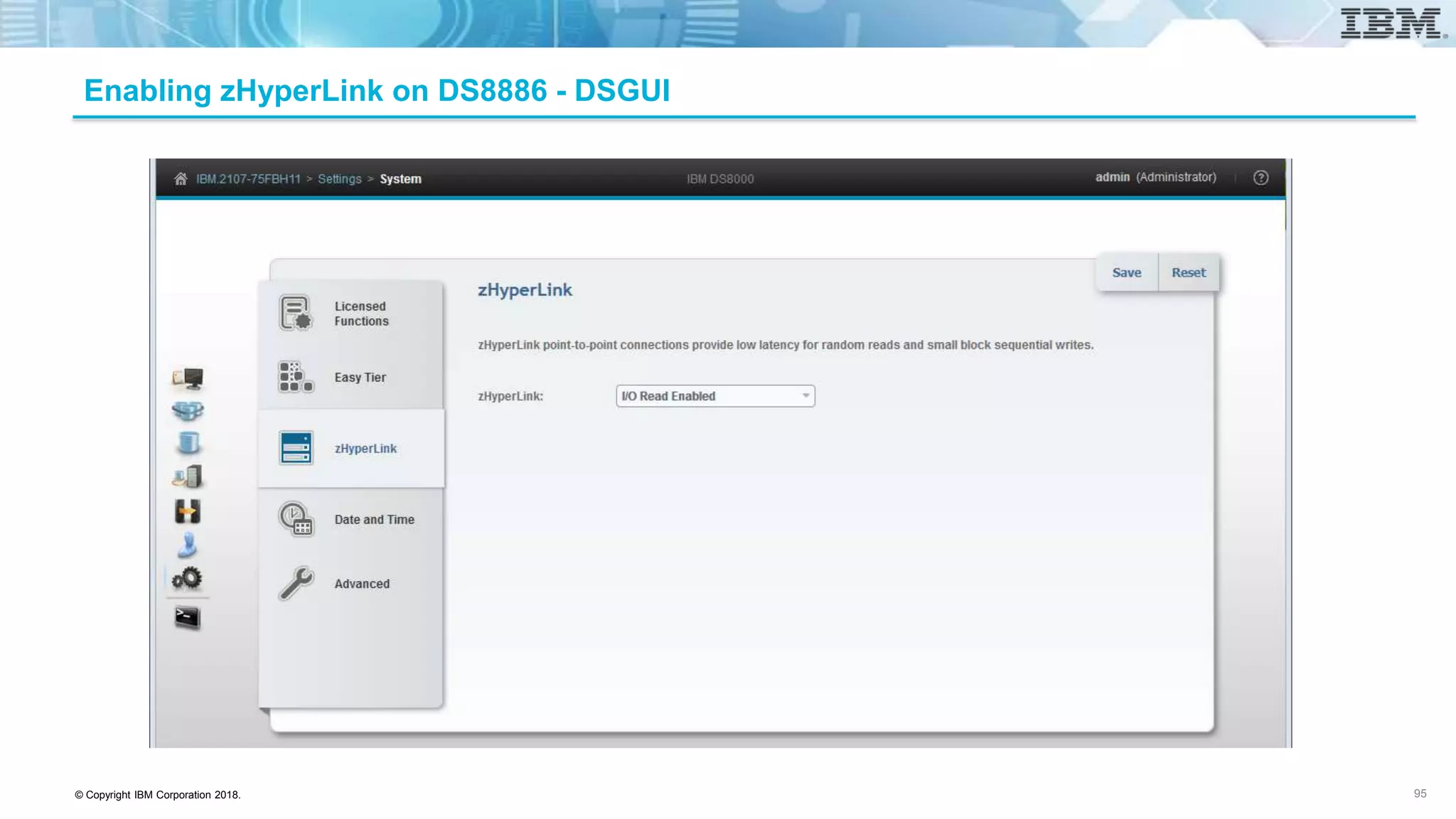
Enabling zHyperLink on DS8886 - DSGUI
94
© Copyright IBM Corporation 2018.
Enabling zHyperLink on DS8886 - DSGUI
95
© Copyright IBM Corporation 2018.
DSCLI zHyperLink Commands
96
chzhyperlink
Description: Modify zHyperLink switch
Syntax:
chzhyperlink [-read enable | disable] [-write enable | disable] storage_image_ID |
Example:
dscli > chzhyperlink –read enable IBM.2107-75FA120
Aug 11 02:23:49 PST 2004 IBM DS CLI Version: 5.0.0.0 DS: IBM.2107-75FA120
CMUC00519I chzhyperlink: zHyperLink read is successfully modified.
© Copyright IBM Corporation 2018.
DSCLI zHyperLink Commands
97
lszhyperlink
Description:
Display the status of zHyperLink switch for a given Storage Image
Syntax:
lszhyperlink [ -s | -l ] [ storage_image_ID […] | -]
Example:
dscli > lszhyperlink
Date/Time: July 21, 2017 1:18:19 PM MST IBM DSCLI Version: 7.8.30.364 DS: -
ID Read Write
===============================
IBM.2107-75FBH11 enable disable
© Copyright IBM Corporation 2018.
DSCLI zHyperLink Commands
98
lszhyperlinkport
Description:
Display a list of zHyperLink ports for the given storage image
Syntax:
lszhyperlinkport [-s | -l] [-dev storage_image_ID] [port_ID […] | -]
Example:
dscli> lszhyperlinkport
Date/Time: July 12, 2017 9:54:02 AM CST IBM DSCLI Version: 0.0.0.0 DS: -
ID State loc Speed Width
=============================================================
HL0028 Connected U1500.1B3.RJBAY03-P1-C7-T3 GEN3 8
HL0029 Connected U1500.1B3.RJBAY03-P1-C7-T4 GEN3 8
HL0038 Disconnected U1500.1B4.RJBAY04-P1-C7-T3 GEN3 8
HL0039 Disconnected U1500.1B4.RJBAY04-P1-C7-T4 GEN3 8
© Copyright IBM Corporation 2018.
DSCLI zHyperLink Commands
99
showzhyperlinkport
Description:
Displays detailed properties of an individual zHyperLink port
Syntax:
showzhyperlinkport [-dev storage_image_ID] [-metrics] “ port_ID” | -
Example:
dscli> showzhyperlinkport –metrics HL0068
Date/Time: July 12, 2017 9:59:05 AM CST IBM DSCLI Version: 0.0.0.0 DS: -
ID HL0068
Date Fri Jun 23 11:26:15 PDT 2017
TxLayerErr 2
DataLayerErr 3
PhyLayerErr 4
================================
Lane RxPower (dBm) TxPower (dBm)
================================
0 0.4 0.5884
1 0.1845 -0.2909
2 -0.41 -0.0682
3 0.114 -0.4272
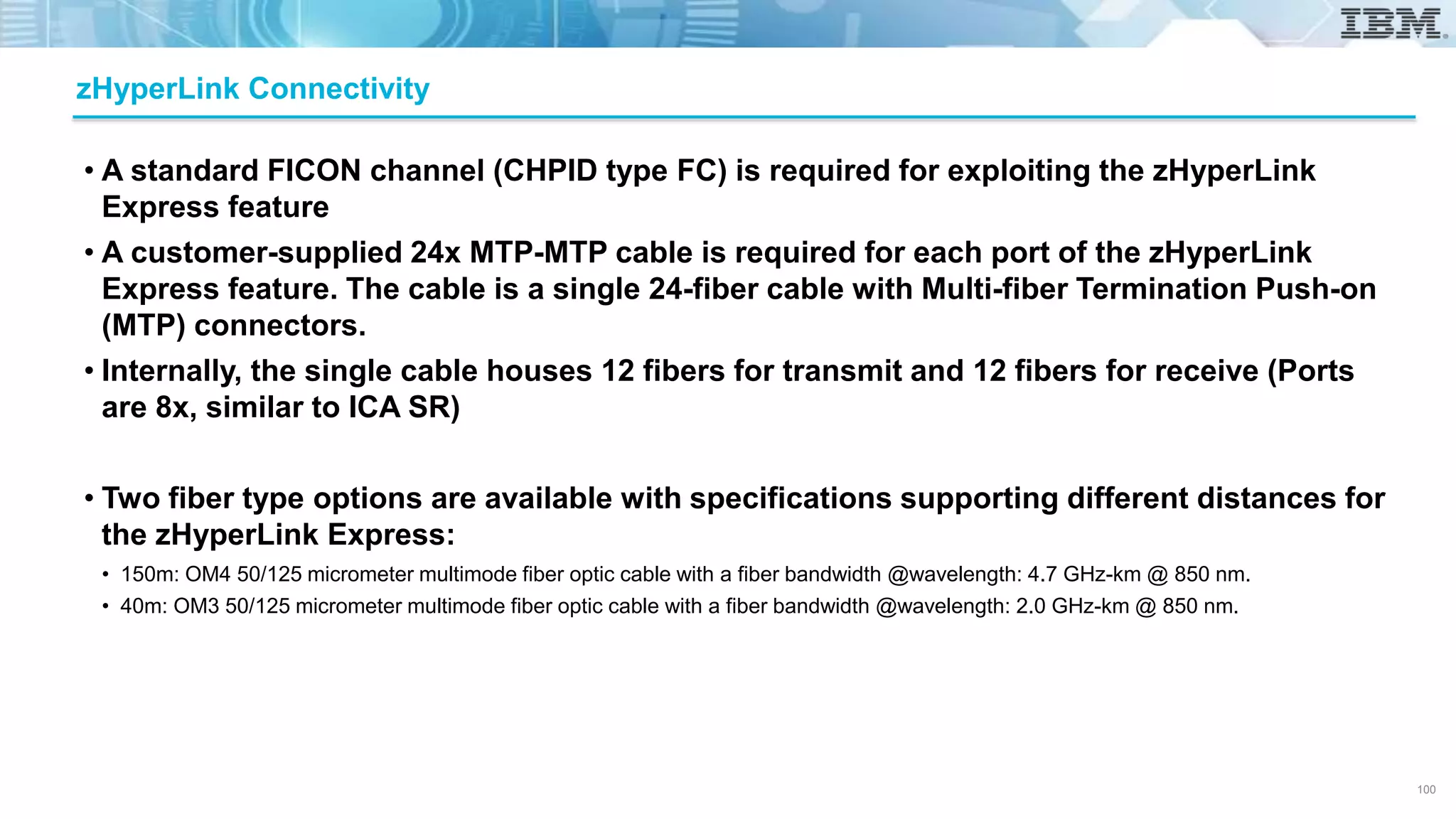
• A standard FICON channel (CHPID type FC) is required for exploiting the zHyperLink
Express feature
• A customer-supplied 24x MTP-MTP cable is required for each port of the zHyperLink
Express feature. The cable is a single 24-fiber cable with Multi-fiber Termination Push-on
(MTP) connectors.
• Internally, the single cable houses 12 fibers for transmit and 12 fibers for receive (Ports
are 8x, similar to ICA SR)
• Two fiber type options are available with specifications supporting different distances for
the zHyperLink Express:
• 150m: OM4 50/125 micrometer multimode fiber optic cable with a fiber bandwidth @wavelength: 4.7 GHz-km @ 850 nm.
• 40m: OM3 50/125 micrometer multimode fiber optic cable with a fiber bandwidth @wavelength: 2.0 GHz-km @ 850 nm.
zHyperLink Connectivity
100
© Copyright IBM Corporation 2018.
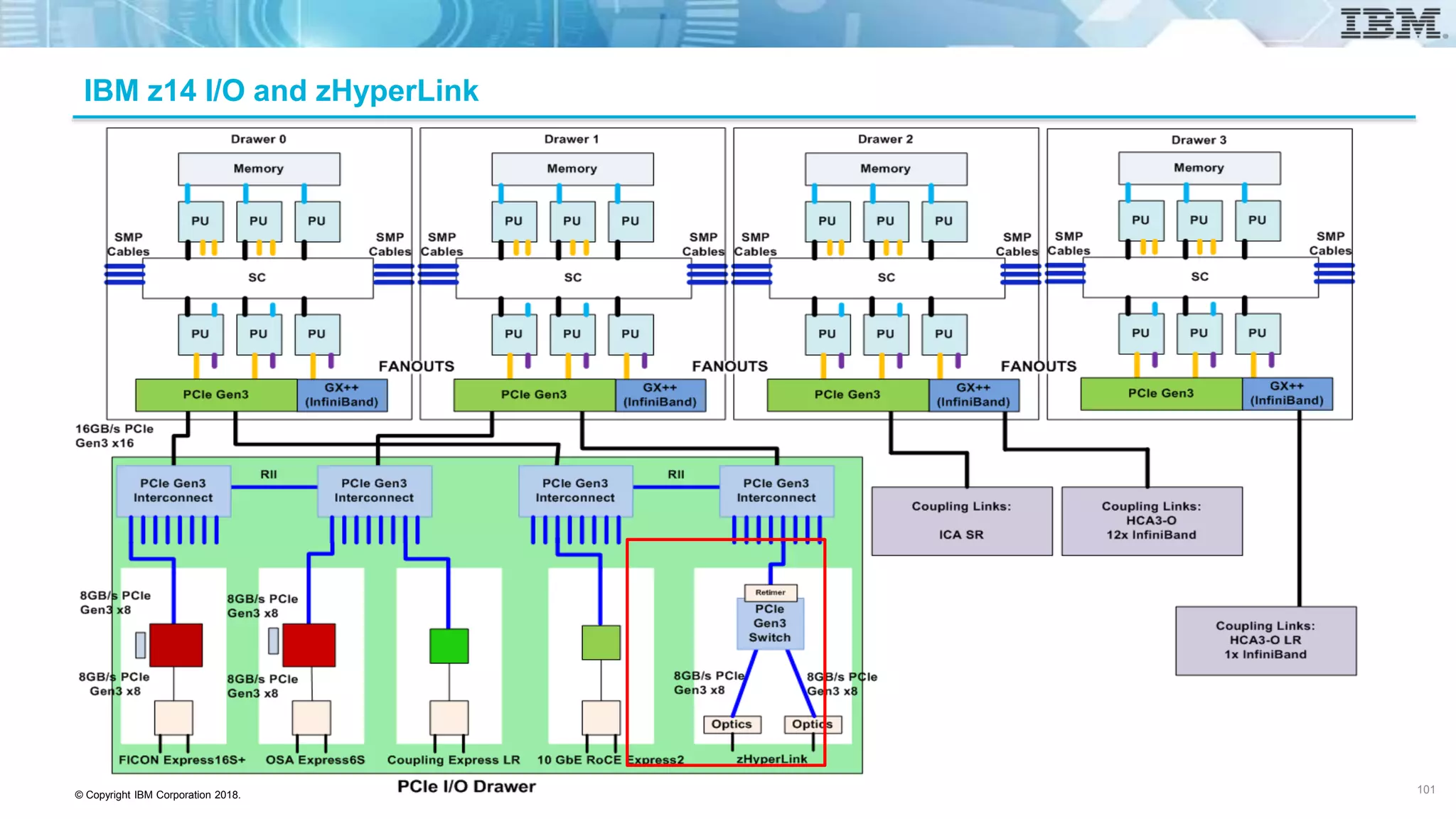
IBM z14 I/O and zHyperLink
101
© Copyright IBM Corporation 2018.
SuperPAV / DS8880 Integration
• Building upon IBM’s success with PAVs and HyperPAV, SuperPAVs which provide cross
control unit aliases
• Previously aliases must be from within the logical control unit (LCU)
• 3390 devices + aliases ≤ 256 could be a limiting factor
• LCUs with many EAVs could potential require additional aliases
• LCUs with many logical devices and few aliases required reconfiguration if they required additional aliases
• SuperPAVs, an IBM DS8880 exclusive, extends aliases beyond the LCU barrier
• SuperPAVs can cross control unit boundaries and enable aliases to be shared among multiple LCUs provided
that:
• The 3390 devices and the aliases are assigned to the same DS8000 server (even/odd LCU)
• The devices share a common path group on the z/OS system
• Even numbered control units with the exact same paths (CHPIDs [and destination addresses]) are considered peer
control units and may share aliases
• Odd numbered control units with the exact same paths (CHPIDs [and destination addresses]) are considered peer
control units and may share aliases
• There is still a requirement to have a least one base device per LCU so it is not possible to define a LCU with
nothing but aliases.
• Using SuperPAVs will provide benefits to clients especially with a large number of systems
(LPARs) or many LCUs sharing a path group
102
z/OS
© Copyright IBM Corporation 2018.
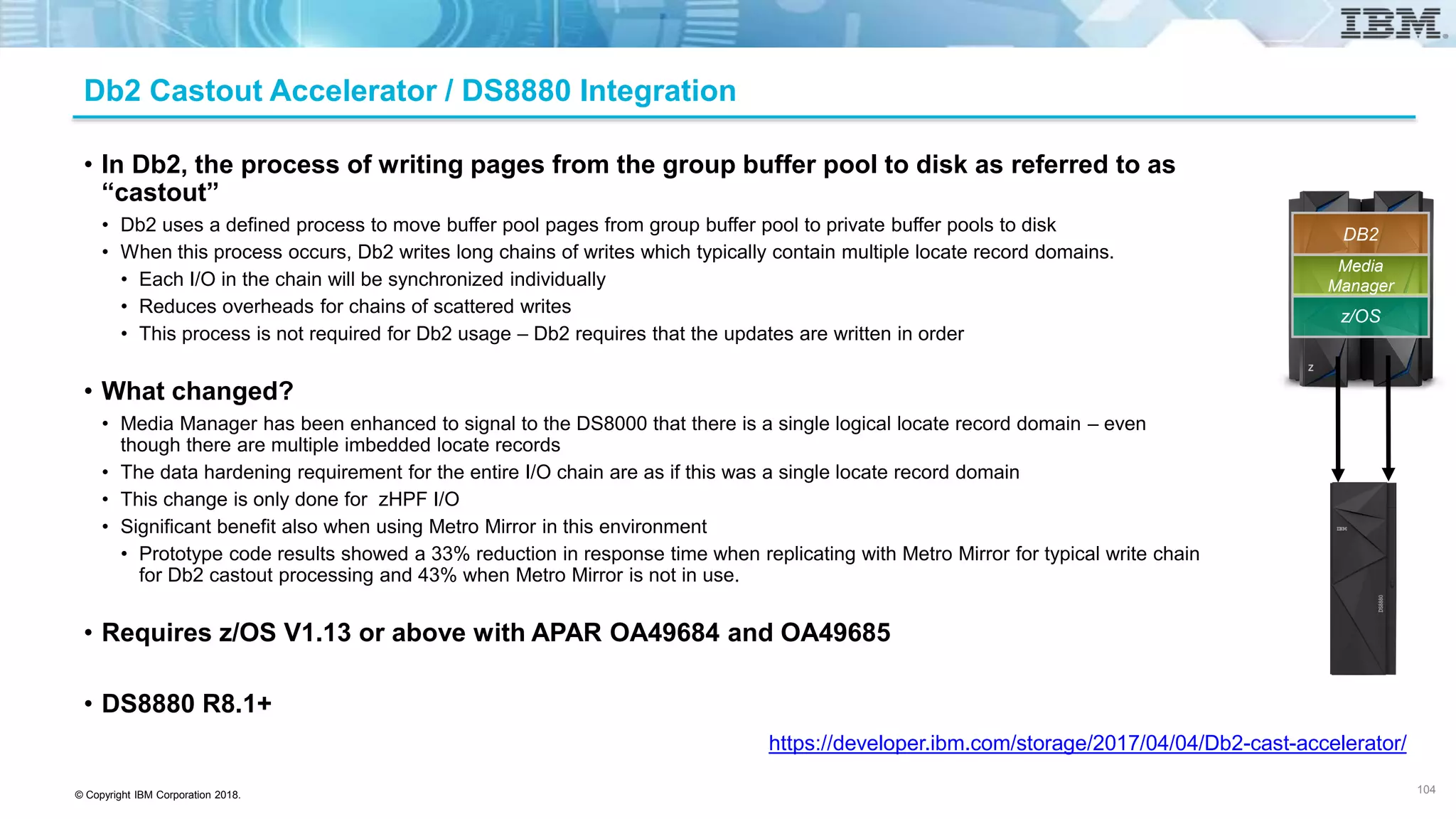
Db2 Castout Accelerator / DS8880 Integration
• In Db2, the process of writing pages from the group buffer pool to disk as referred to as
“castout”
• Db2 uses a defined process to move buffer pool pages from group buffer pool to private buffer pools to disk
• When this process occurs, Db2 writes long chains of writes which typically contain multiple locate record domains.
• Each I/O in the chain will be synchronized individually
• Reduces overheads for chains of scattered writes
• This process is not required for Db2 usage – Db2 requires that the updates are written in order
• What changed?
• Media Manager has been enhanced to signal to the DS8000 that there is a single logical locate record domain – even
though there are multiple imbedded locate records
• The data hardening requirement for the entire I/O chain are as if this was a single locate record domain
• This change is only done for zHPF I/O
• Significant benefit also when using Metro Mirror in this environment
• Prototype code results showed a 33% reduction in response time when replicating with Metro Mirror for typical write chain
for Db2 castout processing and 43% when Metro Mirror is not in use.
• Requires z/OS V1.13 or above with APAR OA49684 and OA49685
• DS8880 R8.1+
104
https://developer.ibm.com/storage/2017/04/04/Db2-cast-accelerator/
104
z/OS
Media
Manager
DB2
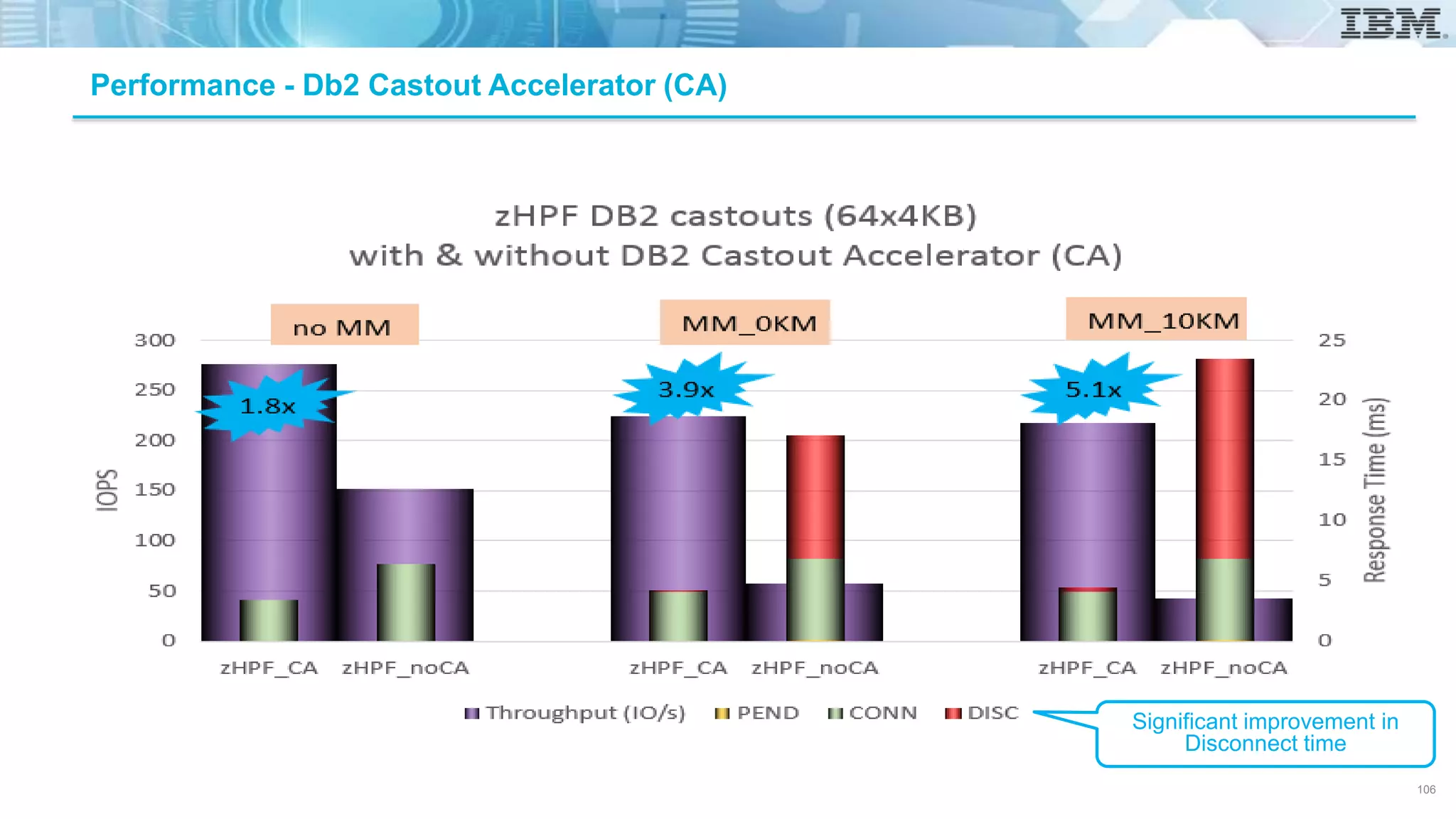
Performance - Db2 Castout Accelerator (CA)
Significant improvement in
Disconnect time
106
© Copyright IBM Corporation 2018.
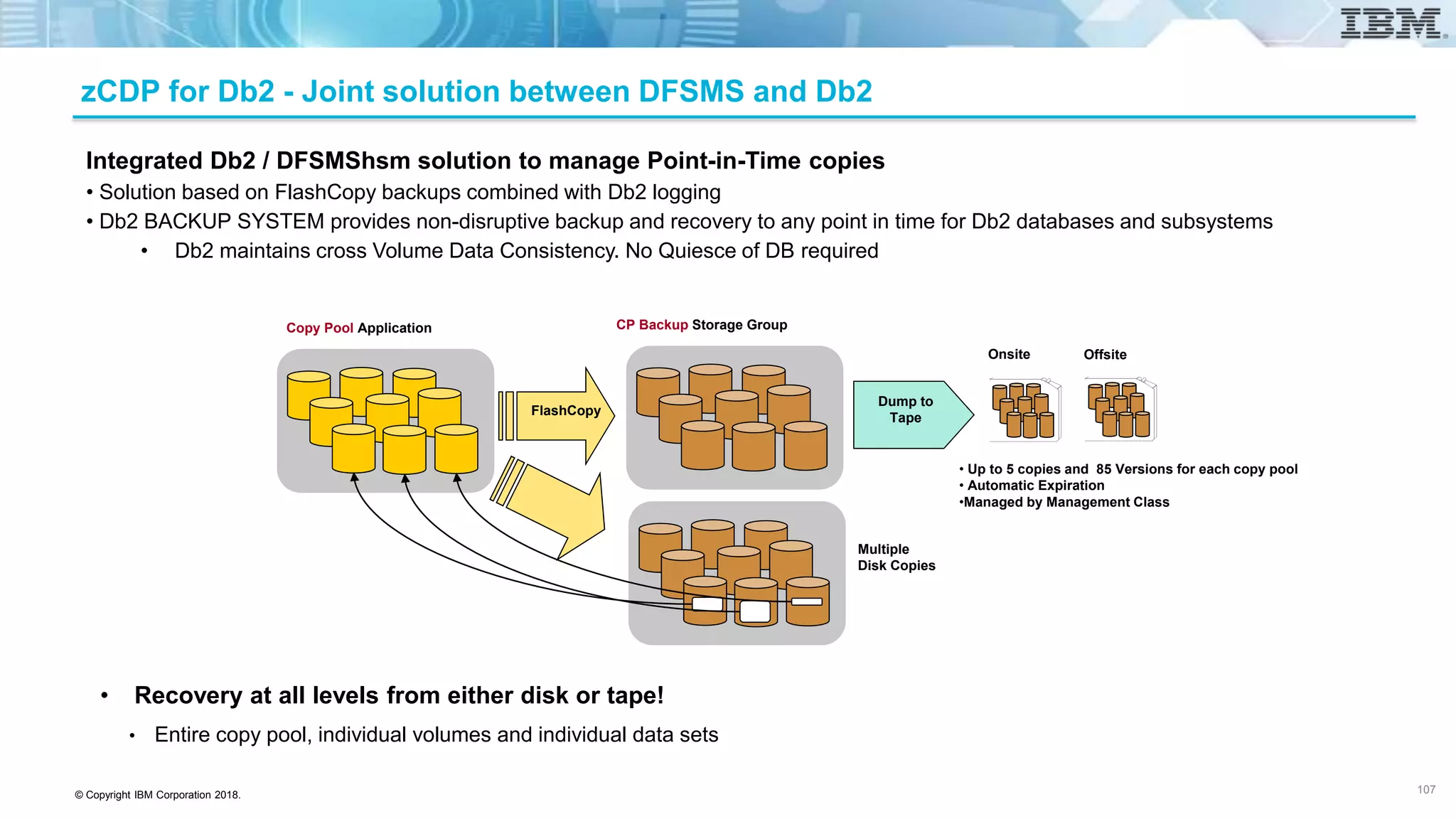
Copy Pool Application CP Backup Storage Group
FlashCopy
Multiple
Disk Copies
Dump to
Tape
Onsite Offsite
• Up to 5 copies and 85 Versions for each copy pool
• Automatic Expiration
•Managed by Management Class
Integrated Db2 / DFSMShsm solution to manage Point-in-Time copies
• Solution based on FlashCopy backups combined with Db2 logging
• Db2 BACKUP SYSTEM provides non-disruptive backup and recovery to any point in time for Db2 databases and subsystems
• Db2 maintains cross Volume Data Consistency. No Quiesce of DB required
• Recovery at all levels from either disk or tape!
• Entire copy pool, individual volumes and individual data sets
zCDP for Db2 - Joint solution between DFSMS and Db2
107
© Copyright IBM Corporation 2018.
Db2 RESTORE SYSTEM
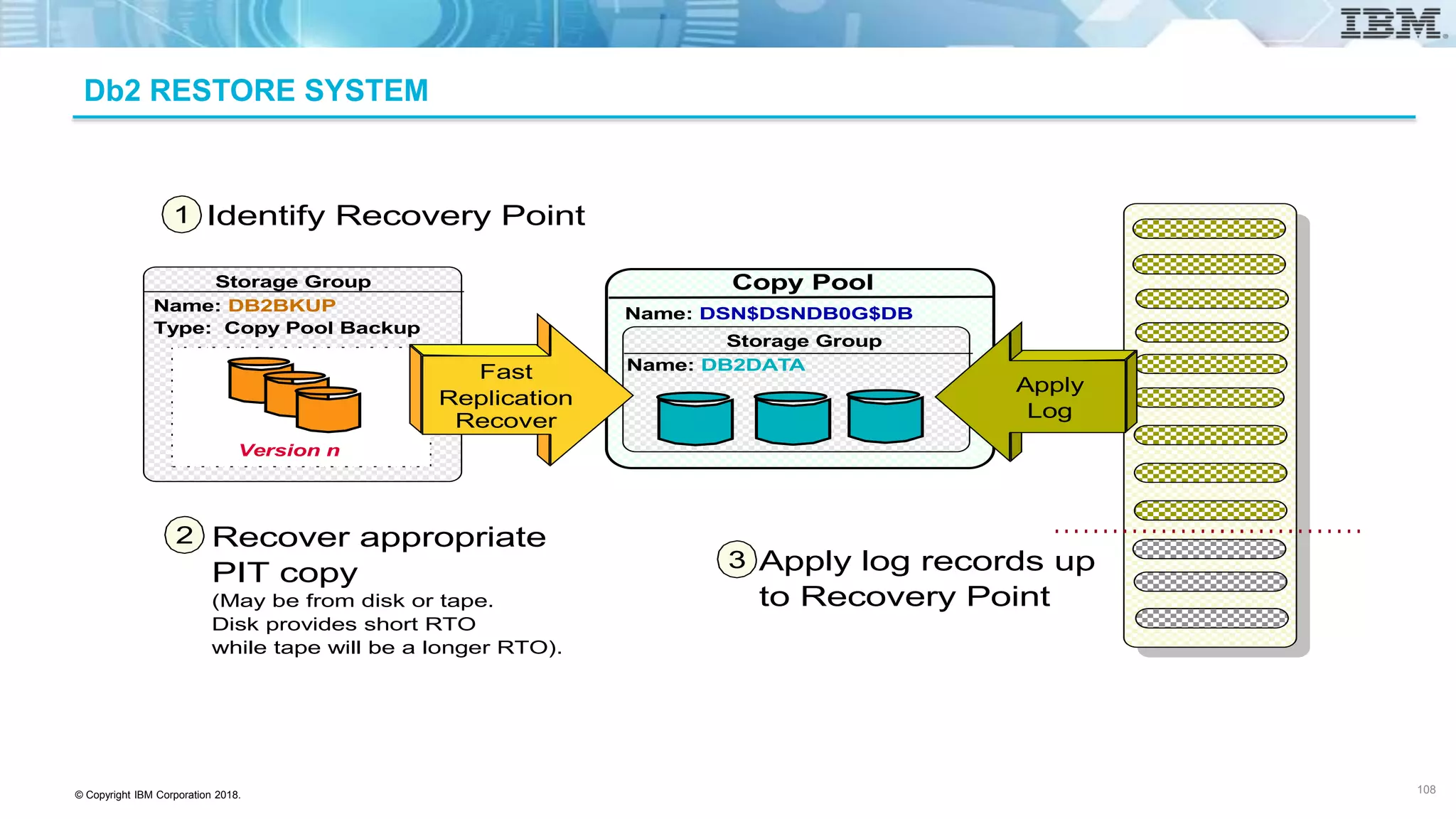
Copy Pool
Name: DSN$DSNDB0G$DB
Name: DB2DATA
Storage Group
Copy Pool
Name: DB2BKUP
Type: Copy Pool Backup
Storage Group
Version n
Fast
Replication
Recover
Apply
Log
Identify Recovery Point
Recover appropriate
PIT copy
(May be from disk or tape.
Disk provides short RTO
while tape will be a longer RTO).
Apply log records up
to Recovery Point
1
2
3
108
© Copyright IBM Corporation 2018.
16Gb Host Adapter – FCP and FICON
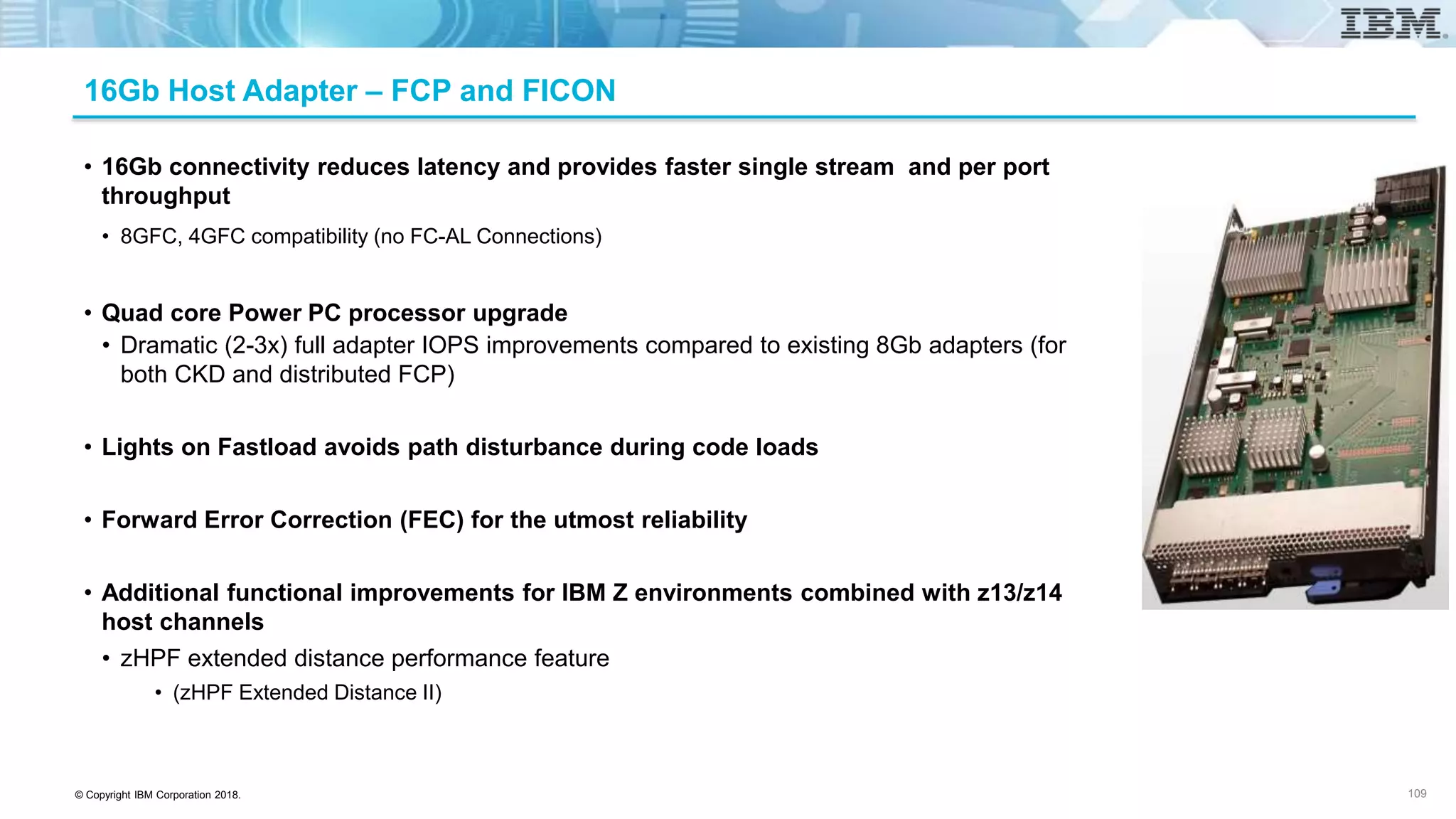
• 16Gb connectivity reduces latency and provides faster single stream and per port
throughput
• 8GFC, 4GFC compatibility (no FC-AL Connections)
• Quad core Power PC processor upgrade
• Dramatic (2-3x) full adapter IOPS improvements compared to existing 8Gb adapters (for
both CKD and distributed FCP)
• Lights on Fastload avoids path disturbance during code loads
• Forward Error Correction (FEC) for the utmost reliability
• Additional functional improvements for IBM Z environments combined with z13/z14
host channels
• zHPF extended distance performance feature
• (zHPF Extended Distance II)
109
© Copyright IBM Corporation 2018.
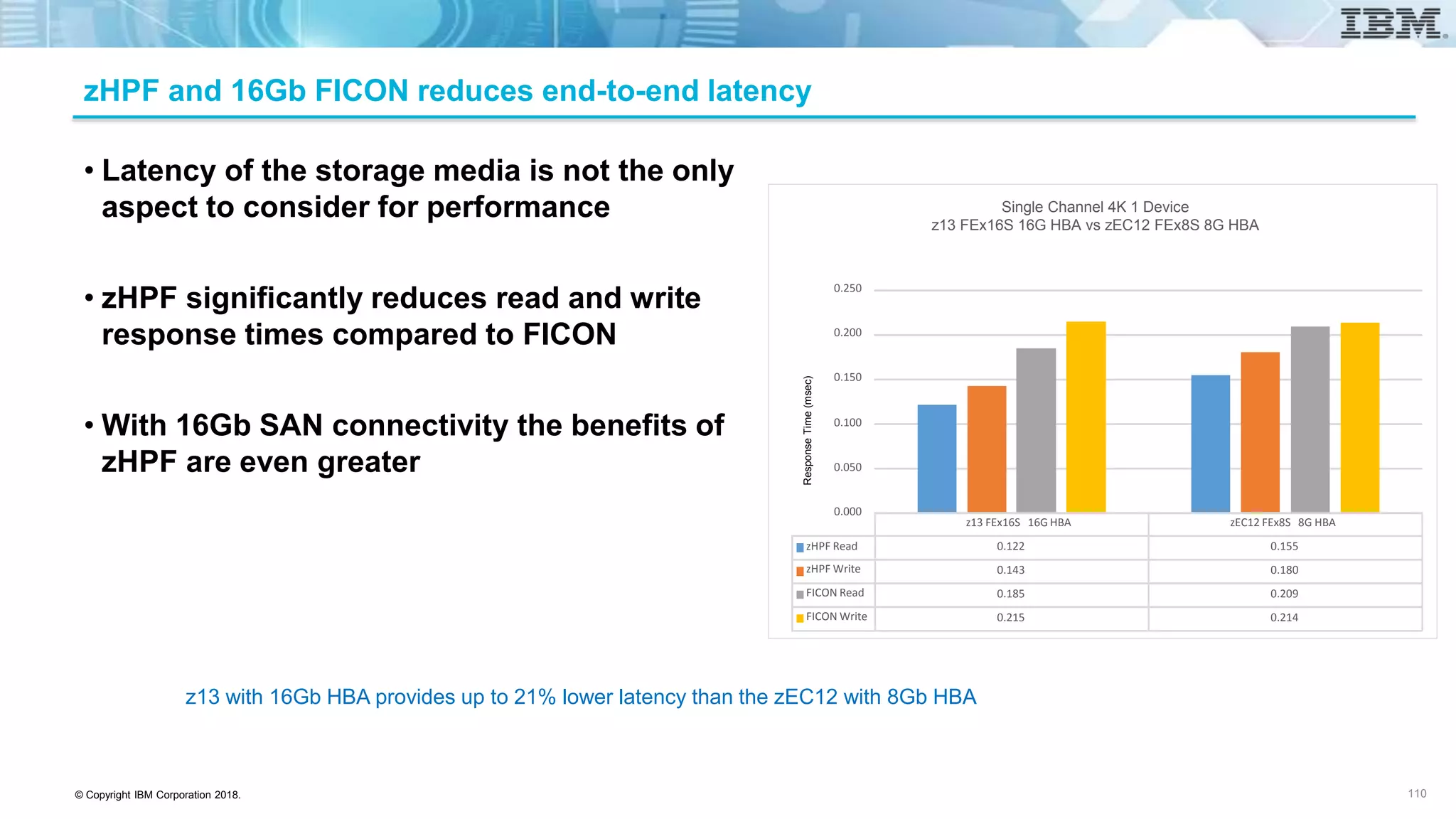
zHPF and 16Gb FICON reduces end-to-end latency
• Latency of the storage media is not the only
aspect to consider for performance
• zHPF significantly reduces read and write
response times compared to FICON
• With 16Gb SAN connectivity the benefits of
zHPF are even greater
110
z13 with 16Gb HBA provides up to 21% lower latency than the zEC12 with 8Gb HBA
z13 FEx16S 16G HBA zEC12 FEx8S 8G HBA
zHPF Read 0.122 0.155
zHPF Write 0.143 0.180
FICON Read 0.185 0.209
FICON Write 0.215 0.214
0.000
0.050
0.100
0.150
0.200
0.250
Single Channel 4K 1 Device
z13 FEx16S 16G HBA vs zEC12 FEx8S 8G HBA
ResponseTime(msec)
© Copyright IBM Corporation 2018.
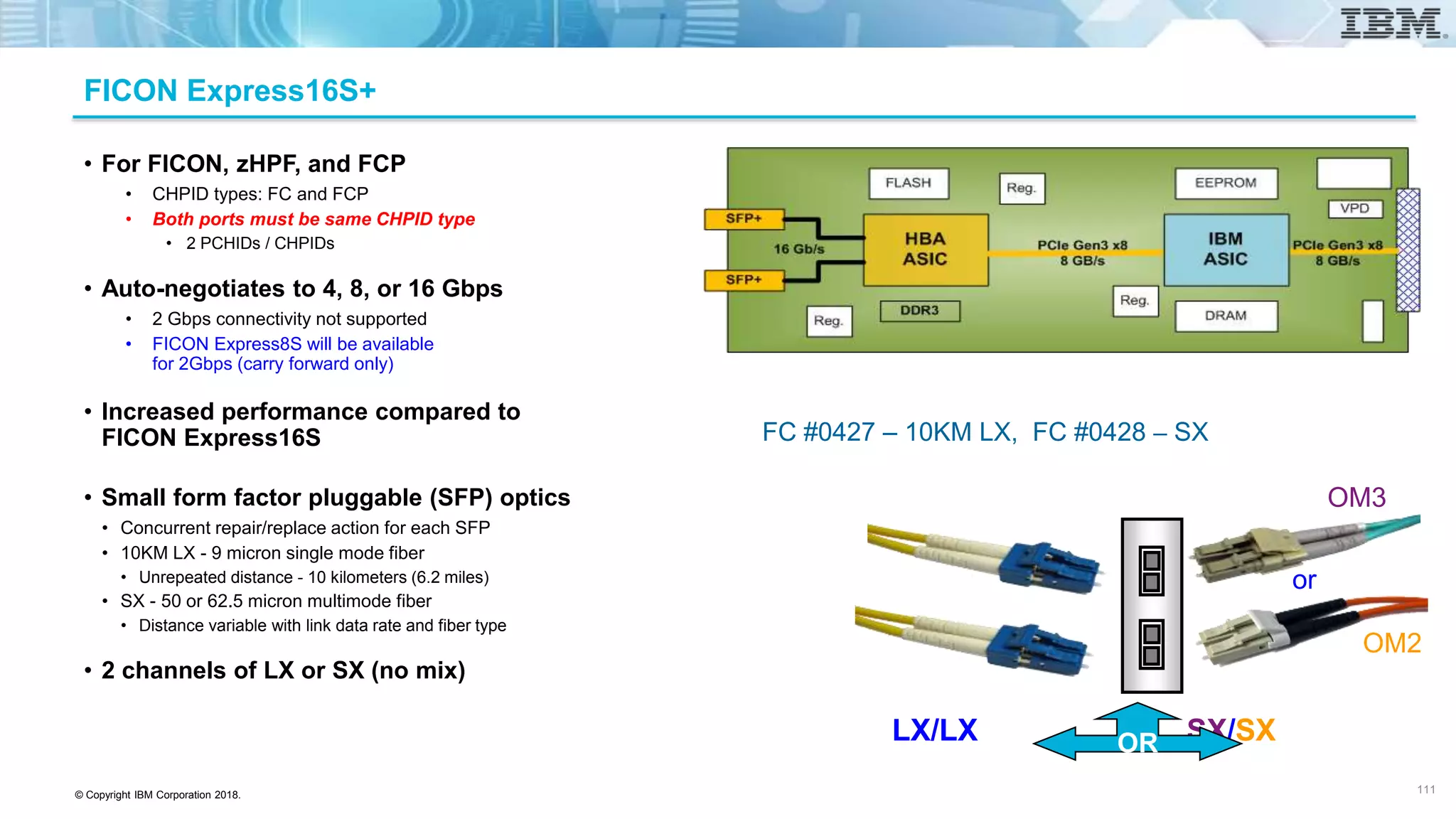
FICON Express16S+
• For FICON, zHPF, and FCP
• CHPID types: FC and FCP
• Both ports must be same CHPID type
• 2 PCHIDs / CHPIDs
• Auto-negotiates to 4, 8, or 16 Gbps
• 2 Gbps connectivity not supported
• FICON Express8S will be available
for 2Gbps (carry forward only)
• Increased performance compared to
FICON Express16S
• Small form factor pluggable (SFP) optics
• Concurrent repair/replace action for each SFP
• 10KM LX - 9 micron single mode fiber
• Unrepeated distance - 10 kilometers (6.2 miles)
• SX - 50 or 62.5 micron multimode fiber
• Distance variable with link data rate and fiber type
• 2 channels of LX or SX (no mix)
FC #0427 – 10KM LX, FC #0428 – SX
LX/LX SX/SXOR
or
OM3
OM2
111
© Copyright IBM Corporation 2018.
20000
52000
20000 23000 23000
92000 98000
300000
0
50000
100000
150000
200000
250000
300000
350000
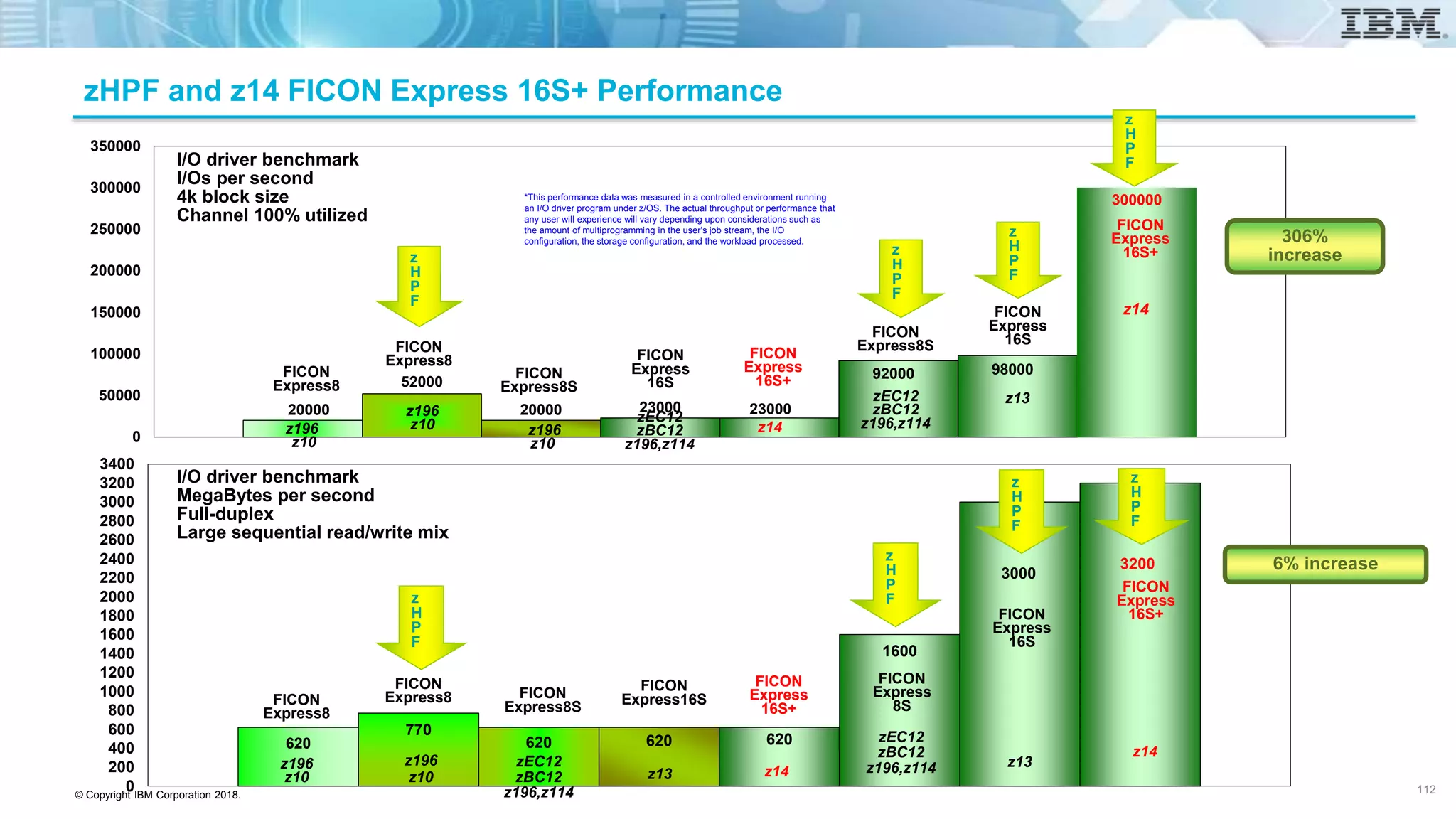
I/O driver benchmark
I/Os per second
4k block size
Channel 100% utilized
z
H
P
F
FICON
Express8
z
H
P
F
FICON
Express8
z
H
P
F
FICON
Express8S
FICON
Express8S
z196
z10
z196
z10 z196
z10
zEC12
zBC12
z196,z114
zEC12
zBC12
z196,z114
620
770
620 620 620
1600
3000
3200
0
200
400
600
800
1000
1200
1400
1600
1800
2000
2200
2400
2600
2800
3000
3200
3400
FICON
Express8
I/O driver benchmark
MegaBytes per second
Full-duplex
Large sequential read/write mix
FICON
Express8
FICON
Express8S
FICON
Express16S
FICON
Express
16S+
FICON
Express
16S
z196
z10
z196
z10 z14z13
zEC12
zBC12
z196,z114
z
H
P
F
z
H
P
F
z
H
P
F
zEC12
zBC12
z196,z114
z13
z
H
P
F
FICON
Express
16S+
z14
FICON
Express
16S
z14
z13
FICON
Express
8S
FICON
Express
16S+
z
H
P
F
6% increase
z14
FICON
Express
16S+
FICON
Express
16S
306%
increase
*This performance data was measured in a controlled environment running
an I/O driver program under z/OS. The actual throughput or performance that
any user will experience will vary depending upon considerations such as
the amount of multiprogramming in the user's job stream, the I/O
configuration, the storage configuration, and the workload processed.
zHPF and z14 FICON Express 16S+ Performance
112
© Copyright IBM Corporation 2018.
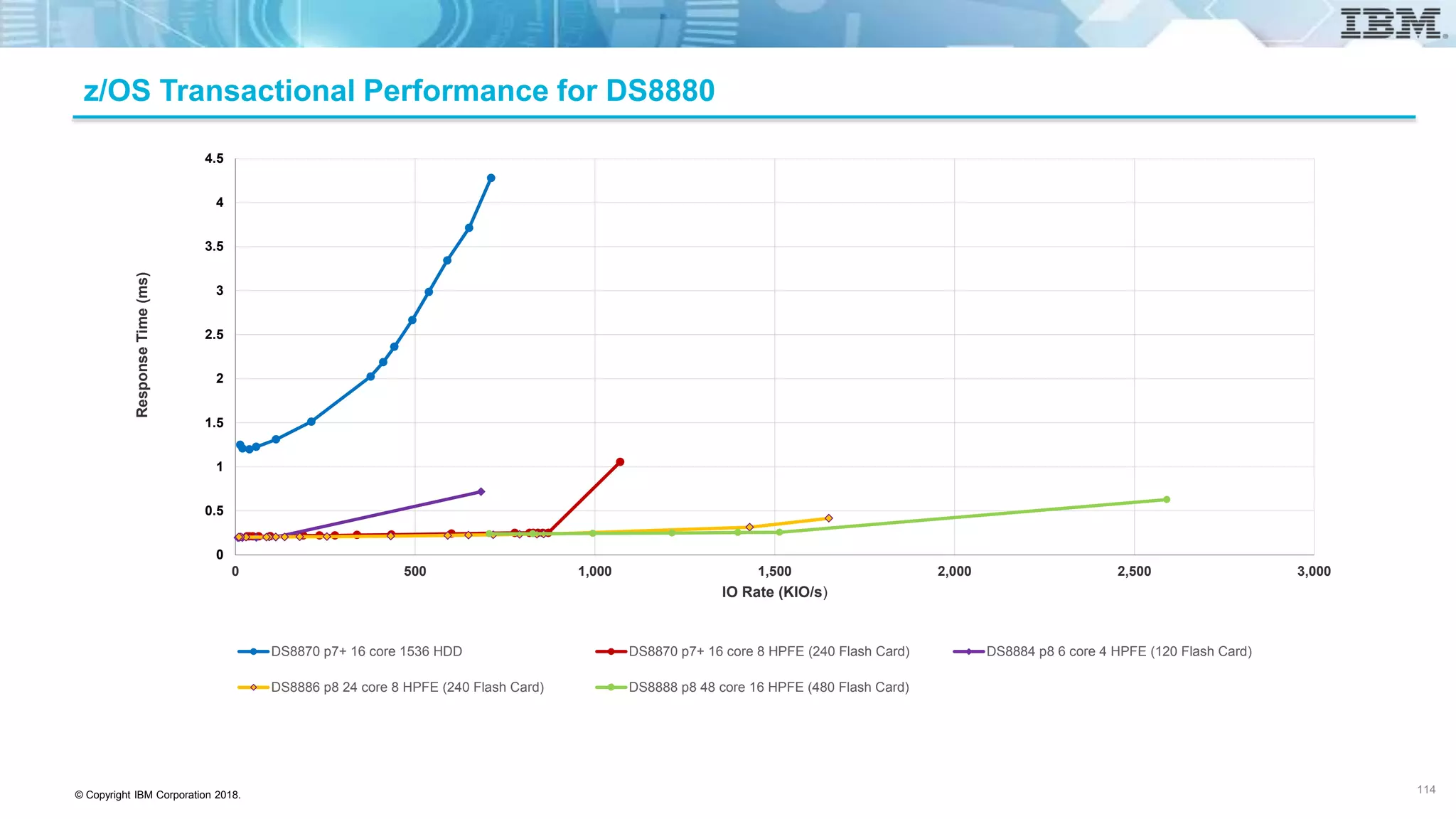
z/OS Transactional Performance for DS8880
0
0.5
1
1.5
2
2.5
3
3.5
4
4.5
0 500 1,000 1,500 2,000 2,500 3,000
ResponseTime(ms)
IO Rate (KIO/s)
DS8870 p7+ 16 core 1536 HDD DS8870 p7+ 16 core 8 HPFE (240 Flash Card) DS8884 p8 6 core 4 HPFE (120 Flash Card)
DS8886 p8 24 core 8 HPFE (240 Flash Card) DS8888 p8 48 core 16 HPFE (480 Flash Card)
114
© Copyright IBM Corporation 2018.
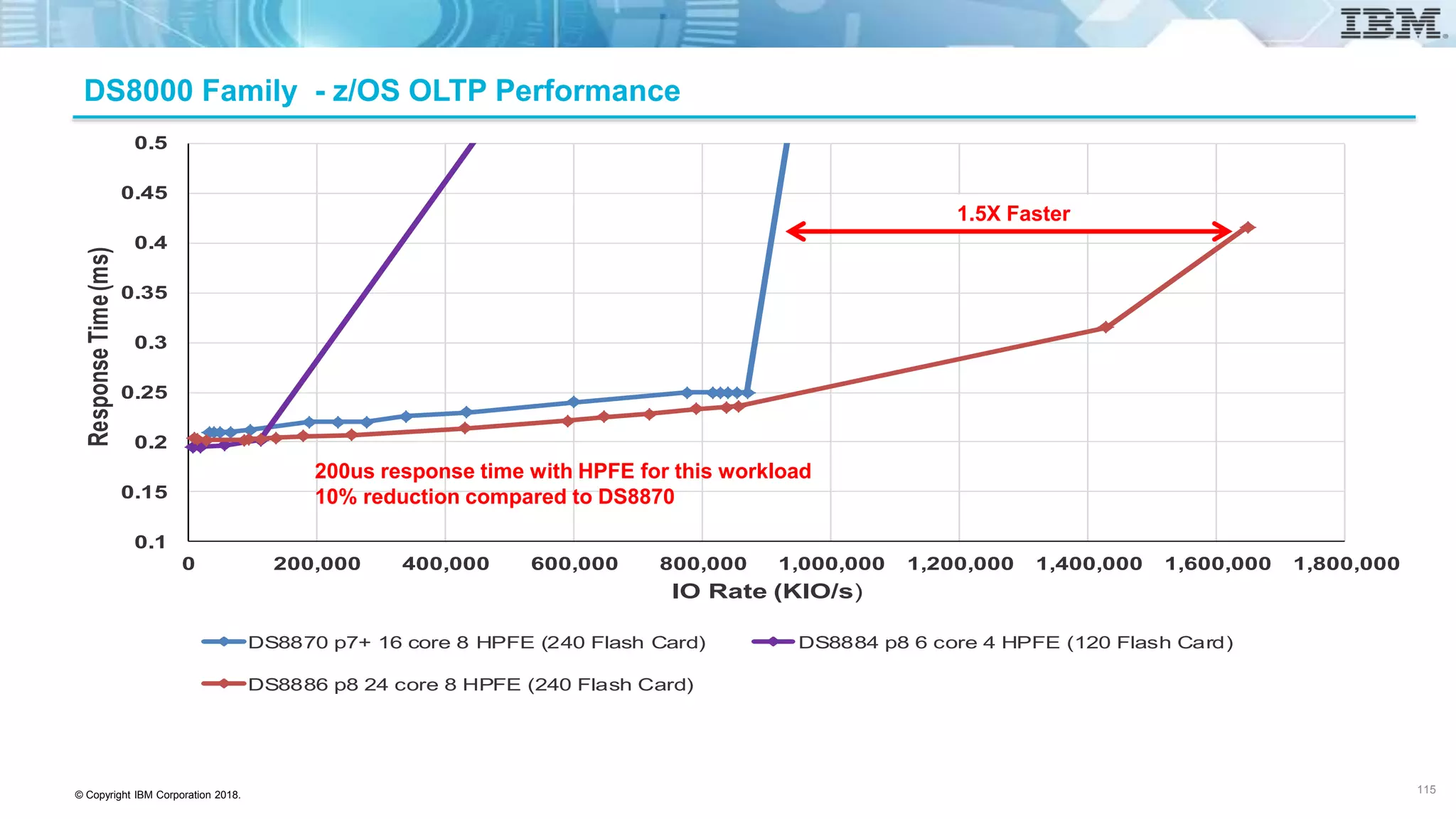
DS8000 Family - z/OS OLTP Performance
0.1
0.15
0.2
0.25
0.3
0.35
0.4
0.45
0.5
0 200,000 400,000 600,000 800,000 1,000,000 1,200,000 1,400,000 1,600,000 1,800,000
ResponseTime(ms)
IO Rate (KIO/s)
DS8870 p7+ 16 core 8 HPFE (240 Flash Card) DS8884 p8 6 core 4 HPFE (120 Flash Card)
DS8886 p8 24 core 8 HPFE (240 Flash Card)
1.5X Faster
200us response time with HPFE for this workload
10% reduction compared to DS8870
115
© Copyright IBM Corporation 2018.
DS8000 Sequential Read – Max Bandwidth
116 116
© Copyright IBM Corporation 2018.
DS8000 Sequential Write – Max Bandwidth
117 117
© Copyright IBM Corporation 2018.
Optimized for enterprise-scale data from multiple platforms and devices
• FICON Express16S links reduce latency for workloads such as Db2 and can
reduce batch elapsed job times
• Reduce up to 58% of Db2 write operations with IBM zHyperWrite and
16Gb links – technology for DS8000 and z/OS for Metro Mirror environment
• First system to use a standards based approach for enabling Forward
Error Correction for a complete end to end solution
• zHPF Extended Distance II provides multi-site configurations with up to 50%
I/O service time improvement when writing data remotely which can benefit
HyperSwap
• FICON Dynamic Routing uses Brocade EBR or CISCO OxID routing across
cascaded FICON directors
• Clients with multi-site configurations can expect I/O service time improvement
when writing data remotely which can benefit GDPS or CSM HyperSwap
• Extend z/OS workload management policies into FICON fabric to manage
the network congestion
• New Easy Tier API removes requirement from application/administrator to
manage hardware resources
Continued innovation - z13 / DS8000 Intelligent and Resilient IO
Unparalleled Resilience and Performance for IBM Z
118
http://www.redbooks.ibm.com/abstracts/redp5134.html?Open
Interface Verification - SFP Health through Read Diagnostics Parameter
• New z13 Channel Subsystem function
• A T11 committee standard
• Read Diagnostic Parameters (RDP)
• Created to enhance path evaluation and improve fault isolation
• Periodic polling from the channel to the end points for the logical paths
established
• Automatically differentiate between errors caused by dirty links and
those errors caused by failing optical components
• Provides the optical characteristics for the ends of the link:
• Enriches the view of Fabric components
• z/OS Commands can display optical signal strength and other
metrics without having to manually insert light meters
123
© Copyright IBM Corporation 2018.
R8.1 - Read Diagnostic Parameters (RDP) Enhancements
• Enhancements have been made in the standard to provide additional information in the Read
Diagnostic Parameters (RDP) response
• Buffer-to-buffer credit
• Round trip latency for a measure of link length
• A configured speed indicator to indicate that a port is configured for a specific link speed
• Forward Error Correction (FEC) status
• Alarm and warning levels that can be used to determine when power levels are out of specification without any prior
knowledge of link speeds and types and the expected levels for these
• SFP vendor identification including the name, part number and serial numbers
• APAR OA49089 provides additional support to exploit this function
• Enhancements to D M=DEV command processing and to z/OS Health Checker utility
124 124
© Copyright IBM Corporation 2018.
IBM Z / DS8880 Integration Capabilities – Availability
• Availability
• Designed for greater than 99.9999% - extreme availability
• Hardware Service Console Redundancy
• Built on high performance/redundant POWER8 technology
• Fully non-disruptive operations
• Fully redundant hardware components
• HyperSwap
• Hardware and software initiated triggers
• Data integrity after a swap
• Consistent time stamps for coordinated recovery of Sysplex and DS8000
• Comprehensive automation management with GDPS or Copy Services Manager (CSM)
• Preserve data reliability with additional redundancy on the information transmitted via
16Gb adapters with Forward Error Connection
126
IBM Z Hardware
z/OS (IOS, etc.), z/VM, Linux for
z Systems
DFSMSdfp: Device Services,
Media Manager, SDM
DFSMShsm, DFSMSdss
DB2, IMS, CICSGDPS
DS8880
© Copyright IBM Corporation 2018.
HyperSwap / DS8880 Integration –
Continuous Availability - Multi-Target Mirroring
• Multiple Site Disaster Recovery / High Availability Solution
• Mirrors data from a single primary site to two secondary sites
• Builds upon and extends current Metro Mirror, Global Mirror and Metro
Global Mirror configurations
• Increased capability and flexibility in Disaster Recovery solutions
• Synchronous replication
• Asynchronous replication
• Combination of both Synchronous and Asynchronous
• Provides for an Incremental Resynchronization between the two secondary
sites
• Improved management for a cascaded Metro/Global Mirror configuration
127
Mirror
H2
H3
H1
© Copyright IBM Corporation 2018.
IBM Z / DS8880 Integration Capabilities – Copy Services
• Advanced Copy Services
• Two, three and four site solutions
• Cascaded and multi-target configurations
• Remote site data currency
• Global Mirror achieves an RPO of under 3 seconds, and RTO in approximately 90 minutes
• Most efficient use of link bandwidth
• Fully utilize pre-deposit write to provide lowest protocol overhead for synchronous mirroring
• Bypass extent utilized in a synchronous mirroring environment to lower latency for
applications like Db2 and JES
• Integration of Easy Tier Heat Map Transfer with GDPS / CSM
• Easy to use replication automation with GDPS / CSM
• Significantly reduces personnel requirements for disaster recovery
• Remote Pair FlashCopy leverages inband communications
• Does not require data transfer across mirroring links
• HyperSwap stays enabled
• UCB constraint relief by utilizing all four Multiple Subchannel Sets for Secondary volumes,
PAV’s, Aliases and GM FlashCopies
128
IBM Z Hardware
z/OS (IOS, etc.), z/VM, Linux for
z Systems
DFSMSdfp: Device Services,
Media Manager, SDM
DFSMShsm, DFSMSdss
DB2, IMS, CICSGDPS
DS8880
© Copyright IBM Corporation 2018.
Business continuity and resiliency protects the reputation of financial firms
129
Statistics from the Ponemon Institute Cost of Data Breach Study 2017; sponsored by IBM.
Visit: http://www-03.ibm.com/security/data-breach
USD141
Average cost
per record compromised
2% increase
Average size of a data breach increased
to 24,089 records
USD 3.62 million
Average total cost
per data breach
© Copyright IBM Corporation 2018.
The largest component of the total cost of a data breach is lost business
130
Detection and escalation
$0.99 million
Notification
$0.19 million
Lost business cost
$1.51 million
Ex-post response
$0.93 million
Components of the $3.62 million cost per data breach
$3.62
million
Forensics, root cause
determination, organizing incident
response team, identifying victims
Disclosure of data breach to victims
and regulators
Help desk, inbound communications, special
investigations, remediation, legal expenditures, product
discounts, identity protection service, regulatory
interventions
Abnormal turnover of customers,
increased customer acquisition
cost, reputation losses, diminished
goodwill
Currencies converted to US dollars
© Copyright IBM Corporation 2018.
What you can do to help reduce the cost of a data breach
$2.90
$5.10
$5.20
$5.40
$5.70
$6.20
$6.80
$8.00
$10.90
$12.50
$16.10
$19.30
CPO appointed
Board-level involvement
CISO appointed
Insurance protection
Data classification
Use of DLP
Use of security analytics
Participation in threat sharing
Business Continuity Management involvement
Employee training
Extensive use of encryption
Incident response team
Amount by which the cost-per-record was lowered
Currencies converted to US dollars
Savings are higher than 2016
*
No comparative data
*
*
*
$262,570 savings per avg breach
131
© Copyright IBM Corporation 2018.
Download your copy of the Report:
ibm.biz/PonemonBCM
Visit www.ponemon.org
to learn more about Ponemon
Institute research programs
Ponemon Institute 2017 Cost of a Data Breach Reports
For country-level 2017 Cost of Data Breach
reports, go to:
ibm.com./security/data-breach
132
© Copyright IBM Corporation 2018.
DS8880 Copy Services solutions for your Business Resiliency requirements
133
Out of
Region
Site C
Metro / Global Mirror
Three and four site cascaded
and multi-target synchronous
and asynchronous mirroring
FlashCopy
Point in time
copy
Within the
same
Storage
System
Out of Region
Site B
Global Mirror
Asynchronous
mirroring
Primary
Site A
Primary
Site A
Metro distance
Site B
Metro Mirror
Synchronous
mirroring
Primary
Site A
Metro
Site B
DS8000 Copy Services fully integrated with GDPS and CSM to provide simplified CA and DR operations
© Copyright IBM Corporation 2018.
• The cascading FlashCopy® function allows a target volume/dataset in one mapping to be the source
volume/dataset in another mapping and so on, creating what is called a cascade of copied data
• Cascading FlashCopy® provides the flexibility to obtain point in time copies of data from different places
within the cascade without removing all other copies
Cascading FlashCopy
134
Target 3 /
Source
With cascading FlashCopy®
• Any Target can become Source
• Any Source can become Target
• Up to 12 relationships are supported
Source
Target 2 /
Source
Target /
Source
(recovery volume)
Target /
Source
• Any target can be restored
to the recovery volume to
validate data.
• If source is corrupted, any
target can be restored back
to the source volume
© Copyright IBM Corporation 2018.
Cascading FlashCopy
Production
Incremental Backups
Production
Incremental Backups
System level backup while active
data set FlashCopy on production
volumes
Recover from an Incremental w/o
withdrawing other copy
135
© Copyright IBM Corporation 2018.
Cascading FlashCopy Use Cases
• Restore a Full Volume FlashCopy while maintaining other
FlashCopies
• Dataset FlashCopy combined with Full Volume FlashCopy
• Including Remote Pair FlashCopy with Metro Mirror
• Recover Global Mirror environment while maintaining a DR test copy
• Improve DEFRAG with FlashCopy
• Improved dataset FlashCopy flexibility
• Perform another FlashCopy immediately from a FlashCopy target
Volume or Dataset
FlashCopy
Volume or Dataset
FlashCopy
A B C
136
© Copyright IBM Corporation 2018.
Using IBM FlashCopy Point-in-Time Copies on DS8000 for Logical Corruption Protection (LCP)
137 137
H1 F2a
F2b
F2c
Prod
Systems
Recovery
Systems
R2
Direct FlashCopy from the Production Copy to the
Recovery Copy for DR or general application testing
Cascaded FlashCopy from one of the
Protection Copies to the Recovery Copy
to enable Surgical or Forensic Recovery
Cascaded FlashCopy back to the Production Copy
from either one of the Protection Copies or the
Recovery Copy for Catastrophic Recovery
Periodic FlashCopy from the
Production Copy to the Protection
Copies
© Copyright IBM Corporation 2018.
IBM Z / GDPS Solution - Proposed Logical Corruption Protection (LCP) Topology
RS1 RS2 RS2
FC1
RS2
FC2
RS2
FC3
Metro Mirror
Prod
Sysplex
Prod
Sysplex
Recovery
Sysplex
RS2
RC1
RS2
RS2
FC1
Prod
Sysplex
RS2
Prod
Sysplex
Recovery
Sysplex
RS2
RC1
Minimal Configuration with a single logical
protection FC1 copy and no Recovery
copy. Can also be used for resync golden
copy
Minimal Configuration with a Recovery
Copy only to enable isolated Disaster
Recovery testing scenarios
FCn devices provide one or more thin
provisioned logical protection copies.
Recovery devices enable IPL of systems
for forensic analysis or other purposes
Logical protection copies can
be defined in any or all sites
(data centers) as desired. This
example shows the LCP copies
in normal secondary site.
138 138
© Copyright IBM Corporation 2018.
Logical Corruption Protection (LCP) with TS7760 Virtual Tape
• Proactive Functions
• Copy Export – Dual physical tape data copies, one can be isolated. True “air gap”
solution; no access to exported volumes from z/OS or Web
• Physical Tape – Single physical tape data copy not directly accessible from IBM Z
hosts. Partial “air gap” solution; manipulation of DFSMS, tape management system
and TS7760 settings required to delete virtual tape volumes
• Delete Expired – Delay (from 1 to 32,767 hours) the actual deletion of data (in disk
cache or physical) for any logical volume moved to scratch status. Transparent
protection from accidental or malicious volume deletion
• Logical Write Once Read Many (LWORM) – TS7760 enforced preservation of data
stored on private logical volumes. Immutability (i.e. no change once created) assured
• Reactive Function
• FlashCopy with Write Protect – “Freeze” the contents of production TS7760 systems
during an emergency situation (such as with an active cyber intruder). Read activity
can continue
139 139
© Copyright IBM Corporation 2018.
DS8880 Remote Mirroring options
• Metro Mirror (MM) – Synchronous Mirroring
• Synchronous mirroring with consistency at remote site
• RPO of 0
• Global Copy (part of MM and GM) – Asynchronous Mirroring
• Asynchronous mirroring without consistency at remote site
• Consistency manually created by user
• RPO determined by how often user is willing to create consistent data at the remote
• Global Mirror (GM) – Asynchronous Mirroring
• Asynchronous mirroring with consistency at the remote site
• RPO between 3-5 seconds
• Metro/Global Mirror – Synchronous / Asynchronous Mirroring
• Three site mirroring solution using Metro Mirror between site 1 and site 2 and Global Mirror between site 2 and site 3
• Consistency maintained at sites 2 and 3
• RPO at site 2 near 0
• RPO at site 3 near 0 if site 1 is lost
• RPO at site 3 between 3-5 seconds if site 2 is lost
• z/OS Global Mirror (XRC)
• Asynchronous mirroring with consistency at the remote site
• RPO between 3-5 seconds
• Timestamp based
• Managed by System Data Mover (SDM)
• Data moved by System Data Mover (SDM) address space(s) running on z/OS
• Supports heterogeneous disk subsystems
• Supports z/OS, z/VM and Linux for z Systems data
140
© Copyright IBM Corporation 2018.
Remote Mirroring Configurations
• Within a single subsystem
• Fibrechannel ‘loopback’
• Typically used only for testing
• 2 subsystems in the same location
• Protection against hardware subsystem failure
• Hardware migration
• High Availability
• 2 sites in a metro region
• Protection against local datacenter disaster
• Migration to new or additional data center
• 2 sites at global distances
• Protection against regional disaster
• Migration to a new data center
• 3 or 4 sites
• Metro Mirror for high availability
• Global Mirror for disaster recovery
141
© Copyright IBM Corporation 2018.
Metro Mirror Overview
•2-site, 2-volume hardware replication
• Continuous synchronous replication with consistency
• Metro distances
• 303 km standard support
• Additional distance via RPQ
• Minimal RPO
• Designed for 0 data loss
• Application response time impacted by copy latency
• 1 ms per 100 km round trip
• Secondary access requires suspension of replication
• IBM Z, distributed systems and IBM i volume replication in one
or multiple consistency groups
142
Metro Mirror
Metro Distances
Local Site Remote Site
Metro Mirror
Local Site Remote Site
© Copyright IBM Corporation 2018.
DS8880 Metro Mirror normal operation
143
• Synchronous mirroring with data consistency
• Can provide an RPO of 0
• Application response time affected by remote mirroring distance
• Leverage pre-deposit write to provide single round trip communication
• Metro Distance (up to 303 KM without RPQ)
2
3
1. Write to local
2. Primary sends Write IO to the
Secondary (cache to cache
transfer)
3. Secondary responds to the
Primary Write completed
4. Primary acknowledges Write
complete to application
1
4
Local DS8880
Application Server
P S
Remote DS8880
Metro Mirror
© Copyright IBM Corporation 2018.
Global Mirror Overview
•2-site, 3-volume hardware replication
•Near continuous asynchronous replication with consistency
• Global Copy + FlashCopy + built-in automation to create consistency
• Minimal application impact
• Unlimited global distances
• Efficient use of network bandwidth
• No additional cache required
•Low Recovery Point Objective (RPO)
• Designed to be as low as 2-5 seconds
• Depends on bandwidth, distance, user specification
• Secondary access requires suspension of replication
• IBM Z, distributed systems and IBM i volume replication in same
or different consistency groups
144
Global Mirror
Global Distances
Local Site Remote Site
Flash
Copy
Global Copy
Global Mirror
© Copyright IBM Corporation 2018.
DS8880 Global Mirror normal operation
145
6
1. Write to local
2. Write complete to application
3. Autonomically or on a user-specified interval,
consistency group formed on local
4. CG sent to remote via Global Copy (drain)
• If writes come in to local, IDs of tracks with changes are
recorded
5. After all consistent data for CG is received at
remote, FlashCopy with 2-phase commit
6. Consistency complete to local
7. Tracks with changes (after CG) are copied to
remote via Global Copy, and FlashCopy Copy-
on-Write preserves consistent image
1
2
Application
Server
4 (CG only)
Global Copy
Flash
Copy
5
3
7 (changes after CG)
Local
DS8880
Remote
DS8880
Global Mirror
• Asynchronous mirroring with data consistency
• RPO of 3-5 seconds realistic
• Minimizes application impact
• Uses bandwidth efficiently
• RPO/currency depends on workload, bandwidth and requirements
• Global Distance
© Copyright IBM Corporation 2018.
Metro/Global Mirror Cascaded Configurations
146
• Metro Mirror within a single location plus Global
Mirror long distance
• Local high availability plus regional disaster protection
• 2-site
Metro Mirror
Metro Distances
Metro Mirror
Metro Distances
Global Mirror
Global Distances
Global Mirror
Global Distances
• Metro Mirror within a metro region plus Global
Mirror long distance
• Local high availability or local disaster protection plus
regional disaster protection
• 3-site
Local Site Remote Site
Local Site Intermediate
Site
Remote Site
© Copyright IBM Corporation 2018.
Metro/Global Mirror Cascaded and Multi Target PPRC
147
• Metro Global Mirror Cascaded
• Local HyperSwap capability
• Asynchronous replication – Out of region disaster recovery capability
• Metro Global Mirror Multi Target PPRC
• Local HyperSwap capability
• Asynchronous replication – Out of region disaster recovery capability
• 2 MM
• 2 GC
• 1 MM / 1 GC
• 1 MM / 1 GM
• 1 GC / 1 GM
• Software support
• GDPS / CSM support MM and MM, MM and GM
Global Mirror
Global Distance
Intermediate Site Remote Site
Metro Mirror
Metro Distance
Local Site
MM
GM
© Copyright IBM Corporation 2018.
Metro/Global Mirror Overview
• 3-site, volume-based hardware replication
• 4-volume design (Global Mirror FlashCopy target may be Space Efficient)
• Synchronous (Metro Mirror) + Asynchronous (Global Mirror)
• Continuous + near-continuous replication
• Cascaded or multi-target
• Metro Distance + Global Distance
• RPO as low as 0 at intermediate or remote for local failure
• RPO as low as 3-5 seconds at remote for failure of both local and intermediate sites
• Application response time impacted only by distance between local and intermediate
• Intermediate site may be co-located at local site
• Fast resynchronization of sites after failures and recoveries
• Single consistency group may include open systems, IBM Z and IBM i volumes
148
Global Mirror
Global Distance
Intermediate Site Remote Site
Metro Mirror
Metro Distance
Local Site
Local Site Intermediate
Site
Remote Site
© Copyright IBM Corporation 2018.
Metro/Global Mirror Normal Operation
149
Application Server
Local DS8000 Intermediate DS8000 Remote DS8000
1. Write to local DS8000
2. Copy to intermediate DS8000 (Metro Mirror)
3. Copy complete to local from intermediate
4. Write complete from local to application
On user-specified interval or autonomically (asynchronously)
5. Global Mirror consistency group formed on intermediate, sent to remote, and
committed on FlashCopies
6. GM consistency complete from remote to intermediate
7. GM consistency complete from intermediate to local (allows for incremental resynch
from local to remote)
1
2
3
4
5
67
© Copyright IBM Corporation 2018.
4-site topology with Metro Global Mirror
150
Metro
Mirror
Global Copy in secondary site
converted to Metro Mirror in
case of disaster or planned site
switch
Global
Copy
Region A Region B
Site2
Site1
Site2
Site1
Incremental Resynchronisation
in case of HyperSwap or
secondary site failure
© Copyright IBM Corporation 2018.
Performance Enhancement - Bypass Extent Serialization
• Certain applications like JES and starting in Db2 V7, Db2
began to use Bypass Extent Serialization to avoid extent
conflicts
• However, Bypass Serialization was not honored when using Metro
Mirror
• Starting with DS8870 R7.2 LIC, the DS8870/DS8880 honors
Bypass Extent Serialization with Metro Mirror
• Especially beneficial with Db2 data sharing, because the
extent range for each cast out I/O is unlimited
• Described in Db2 11 z/OS Performance Topics, chapter 6.8,
http://www.redbooks.ibm.com/abstracts/sg248222.html?Open
• http://blog.intellimagic.com/eliminating-data-set-contention/
151
0
0.5
1
1.5
2
2.5
Extent Conflict
w/Bypass Extent Check
Set
Extent Conflict
w/Bypass Extent Check
NOTSet
No Extent Conflict
Time(ms)
4KB FullTrack UpdateWrite
DISCTIME
CONN TIME
PEND -DV BSY
DV BSYDELAY
QUETIME
3,448
IOps
1,449
IOps
3,382
IOps
Performance based on measurements and projections using IBM benchmarks in a controlled environment.
© Copyright IBM Corporation 2018.
Disaster Recovery / Easy Tier Integration
• Primary site:
• Optimize the storage allocation according to the customer workload (normal Easy Tier process at least once
every 24 hours develops migration plan)
• Save the learning data
• Transfer the learning data from the Primary site to the Secondary site
• Secondary site:
• Without learning, only optimize the storage allocation according to the Replication work load
• With learning, Easy Tier can merge the checkpoint learning data from the primary site
• Following Primary storage data placement to optimize for the customer workload
• Client benefits
• Performance optimized DR sites in the event of a disaster
152
HMT software
GDPS
CSM
© Copyright IBM Corporation 2018.
Easy Tier Heat Map Transfer – GDPS configurations
• GDPS 3.12+ provided HeatMap transfer support for
GDPS/XRC and GDPS/MzGM configurations
• Easy Tier HeatMap can be transferred to either the XRC secondary or
FlashCopy target devices
• GDPS/GM and GDPS/MGM 3/4-site supported for
transferring the HeatMap to FlashCopy target devices
• GDPS HeatMap Transfer supported for all GDPS
configurations
153
Replication
z/OS
HMT software
HMC
H1
HMC
H2
HMC
H3
GDPS
H4
HMC
© Copyright IBM Corporation 2018.
GDPS for IBM Z High Availability and Disaster Recovery
• GDPS provides a complete solution for high availability and
disaster recovery in IBM Z environments
• Replication management, system management, automated
workflows and deep integration with z/OS and parallel sysplex
• DS8000 provides significant benefits for GDPS users with
close cooperation between development teams
• Over 800 GDPS installations worldwide with high
penetration in financial services and some of the
largest IBM Z environments
• 112 3-site GDPS installations and 11 4-site GDPS
installations
• Over 90% of GDPS installations are currently using
IBM disk subsystems
154
© Copyright IBM Corporation 2018.
product Installs
GDPS/MzGM 3-site* 49
GDPS/MGM 3-site ** 71
GDPS/MzGM 4-site *** 4
GDPS/MGM 4-site **** 11
sector installs Percentage
Communications 48 5.7%
Distribution 47 5.2%
Finance 637 73.8%
Industrial 37 4.5%
Public 77 8.7%
Internal IBM 11 1.4%
SMB 6 0.7%
Total 863 100.0%
major geo installs Percentage
AG 264 31.2%
AP 116 13.0%
EMEA 462 55.8%
Totals 863 100.0%
* GDPS/MzGM 3-site consists of GDPS/PPRC HM or GDPS/PPRC and GDPS/XRC. 36-49 have PPRC in the same site.
** GDPS/MGM 3-site consists of GDPS/PPRC or GDPS/MTMM and GDPS/GM. 30-71 have PPRC in the same site.
*** GDPS/MzGM 4-sites consists of GDPS/PPRC, GDPS/XRC, and GDPS/PPRC. 1-4 have PPRC in the same site.
**** GDPS/MGM 4-sites consists of GDPS/PPRC or GDPS/MTMM, GDPS/GM, and GDPS/PPRC or GDPS/MTMM. 5-9 have PPRC in the same site.
GDPS solution by Industry sector
GDPS solution by geography
GDPS installations by product type
Three/four site GDPS installations by product type
product installs percentage
RCMF/PPRC & RCMF/XRC 77 8.2%
GDPS/PPRC HM 89 10.8%
GDPS/PPRC 437 50.8%
GDPS/MTMM 9 0.5%
GDPS/XRC 118 14.0%
GDPS/GM 139 15.2%
GDPS/A-A 4 0.4%
Totals 863 100.0%
155
GDPS Demographics (thru 5/17)
© Copyright IBM Corporation 2018.
There are many IBM GDPS service products to help meet various business requirements
Near-continuous availability of
data within a data center
Near-continuous availability (CA)
and disaster recovery (DR) within
a metropolitan region
Single data center
Applications can remain active
Near-continuous access to data in the event of a storage
subsystem outage
RPO equals 0 and RTO equals 0
Two data centers
Systems can remain active
Multisite workloads can withstand
site and storage failures
DR RPO equals 0 and RTO is
less than 1 hour or
CA RPO equals 0 and RTO minutes
GDPS/PPRC HM1 GDPS/PPRC
1Peer-to-peer remote copy (PPRC) 2Multi-Target Metro Mirror
Near-continuous availability (CA) and disaster
recovery (DR) within a metropolitan region
Two/three data centers (2 server sites,
3 disk locations)
Systems can remain active
Multi-site workloads can withstand site and/or storage
failures
DR RPO equals 0 and RTO is less than 1 hour or CA RPO
equals 0 and RTO minutes
A B
PPRC
GDPS/MTMM2
RPO – recovery point objective
RTO – recovery time objective
Synch replication
Asynch replication
156
© Copyright IBM Corporation 2018.
There are many IBM GDPS service products to help meet various business requirements
(continued)
RPO – recovery point objective
RTO – recovery time objective
Synch replication
Asynch replication
GDPS®/MGM3 and GDPS/MzGM4
(3 or 4-site configuration)
Near-continuous availability (CA) regionally
and disaster recovery at extended distances
Three or four data centers
High availability for site disasters
Disaster recovery (DR) for regional disasters
DR RPO equals 0 and RTO less than 1 hour or CA RPO equals 0 and RTO
minutes
and RPO seconds and RTO less than 1 hour
A B
C D
2Global Mirror (GM) 2Extended Remote Copy (XRC) 3Metro Global Mirror (MGM) 4Metro z/OS Global Mirror (MzGM)
Disaster recovery at
extended distance
Two data centers
More rapid systems disaster recovery with “seconds” of data loss
Disaster recovery for out-of-region interruptions
RPO seconds and RTO less than 1 hour
GDPS/GM1 and GDPS/XRC2
157
© Copyright IBM Corporation 2018.
There are many IBM GDPS service products to help meet various business requirements
(continued)
GDPS Virtual Appliance (VA)
Near-continuous availability and disaster recovery within metropolitan
regions
Two data centers
z/VM and Linux on IBM z Systems can remain active
Near-continuous access to data in the event of a storage subsystem
outage
RPO equals 0 and
RTO is less than 1 hour
1Multi-Target Metro Mirror
A B
PPRC
z/VM & Linux
GDPS VA
GDPS/Active-Active
Near-continuous availability, disaster recovery and
cross-site workload balancing at extended distances
Two data centers
Disaster recovery for out-of -region interruptions
All sites active
RPO seconds and RTO seconds
RPO – recovery point objective
RTO – recovery time objective
Synch replication
Asynch replication
158
© Copyright IBM Corporation 2018.
Global Continuous Availability and Disaster Recovery Offering for IBM Z – over 18
years and still going strong
159
Technology
System Automation for z/OS
NetView for z/OS
SA Multi-Platform
SA Application Manager
Multi-site Workload Lifeline
Manage and Automate
• Central Point of Control
• IBM Z and Distributed Servers
• xDR for z/VM and Linux on z Systems
• Replication Infrastructure
• Real-time Monitoring and Alert
Management
• Automated Recovery
• HyperSwap for Continuous Availability
• Planned & Unplanned Outages
• Configuration Infrastructure Mgmt
• Single site, 2-site, 3-site, 4-site
• Automated Provisioning
• IBM Z CBU / OOCoD
First GDPS installation 1998, now more than 860 in 49 countries
Automation
Disk & Tape
Metro Mirror
z/OS Global Mirror
Global Mirror
DS8000/TS7700
Software
IBM InfoSphere Data
Replication (IIDR) for DB2
IIDR for IMS
IIDR for VSAM
Replication
Solutions
PPRC HyperSwap ManagerGDPS/PPRC HM
PPRC (Metro Mirror)GDPS/PPRC
XRC (z/OS Global Mirror)GDPS/XRC
Global MirrorGDPS/GM
Active-ActiveGDPS/A-A
Metro Global Mirror
3-site and 4-site
GDPS/MGM
Metro z Global Mirror
3-site and 4-site
GDPS/MzGM
Multi-target Metro MirrorGDPS/MTMM
PPRC (Metro Mirror)GDPS Appliance
A
C
B
D
z/OS
xDR
DCM
© Copyright IBM Corporation 2018.
IBM Copy Services Manager (CSM)
• Volume level Copy Service Management
• Manages Data Consistency across a set of volumes with logical dependencies
• Supports multiple devices (ESS, DS6000, DS8000, XIV, A9000, SVC, Storwize, Flash System)
• Coordinates Copy Service Functionalities
• FlashCopy
• Metro Mirror
• Global Mirror
• Metro Global Mirror
• Multi Target PPRC (MM and GC)
• Ease of Use
• Single common point of control
• Web browser based GUI and CLI
• Persistent Store Data Base
• Source / Target volume matching
• SNMP Alerts
• Wizard based configuration
• Business Continuity
• Site Awareness
• High Availability Configuration – active and standby management server
• No Single point of Failure
• Disaster Recovery Testing
• Disaster Recovery Management
160
© Copyright IBM Corporation 2018.
CSM 6.1.1 new features and enhancements at a glance
• DS8000 enhancements
• HyperSwap and Hardened Freeze Enablement for DS8000 Multi-Target Metro Mirror - Global
Mirror session types
• Multi-Target Metro Mirror Global Mirror (MM-GM)
• Multi-Target Metro Mirror - Global Mirror with Practice (MM-GM w/ Practice)
• Support for target box not having the Multi-target feature for DS8000 RPQ
• Support for Multi Target Migration scenario to replace pre DS8870 secondary
• Common CSM improvements
• New Standalone PID (5725-Z54) for distributed platform installations
• available for ordering via Passport Advantage (PPA)
• Small footprint offering for replication only customers (No need for Spectrum Control)
• Modernized GUI Look and Feel
• Setup of LDAP configuration through the CSM GUI
• Support for RACF keyring certificate configuration (optionally replaces GUI certificate)
161
© Copyright IBM Corporation 2018.
Support for Native LDAP Client on DS8000
• Enabled in CSM by default
• No cost to DS8000 customer
• Software license acceptance (T&Cs) on initial CSM logon
• Replaces Spectrum Control (TPC) as the LDAP provider
• CSM provides the same interface as Spectrum Control (TPC)
• Same DS8000 LDAP steps except now CSM is the provider
• Resides on DS8000 HMC or wherever CSM is installed
162
• LDAP provider must be configured in CSM
• Both HMCs if dual HMCs
• CSM GUI support for LDAP setup is found in the Administration panel
• https://<hmc-ip>/CSM/
• csmadmin / passw0rd
162
© Copyright IBM Corporation 2018.
CSM 6.1.2 new features and enhancements at a glance
• DS8000 enhancements
• Copy Services Manager pre-installed on DS8000 HMC providing LDAP support
• Replaces DS8000 LDAP support through TPC
• Multi Incremental Flash Copy support in Flash Copy and Practice sessions
• Support for MT MM-GM session with GM capabilities from Site 3
• Copy Services Manager with AIX PowerHA HyperSwap in 3 site environments
• Common CSM improvements
• Email notifications setup through CLI commands
• Backup Copy Services Manager database via the GUI
163
© Copyright IBM Corporation 2018.
CSM 6.1.3 new features and enhancements at a glance
• DS8000 enhancements
• Display Copy Services pokeables and product switches of DS8000 hardware
• IBM Copy Services Manager z/OS FlashCopy Manager release
• Separate tool on z/OS to integrate IBM DS8000 FlashCopy Services into the z/OS batch environment
• z/OS FlashCopy Manager delivers tools to discover, document and auto generate FlashCopy configurations and build
batch invocation jobs to be included in complex job streams that include other applications
• Ability to control the entire FlashCopy process using standard z/OS job scheduling facilities
164
© Copyright IBM Corporation 2018.
CSM 6.1.4 new features and enhancements at a glance
• DS8000 enhancements
• Support for Extent Space Efficient (ESE) to standard volume Peer-to-Peer Copy (PPRC)
• Other enhancements
• Support for FlashSystem A9000 and A9000R
• Support for Ubuntu Linux distributions
• DSCLI for z/OS installations included with Copy Services Manager for z/OS
• Ability to setup SNMP and email notifications through the Copy Services Manager GUI
• Single direction support in port pairing CSV file
• New events for SVC auto restart solution
165
© Copyright IBM Corporation 2018.
CSM 6.2
• Copy Services Manager R6.2 GA in July 2017
• Highlights
• Support for user defined GROUP names on CSM sessions
• Support for managing z/OS HyperSwap across multiple sessions with different session types
(asymmetric configurations) within the same Sysplex
• Support for installing CSM on Windows 2016
• Ability to download Global Mirror statistics in CSV file format via a remote CSMCLI connection
• Improvements in remove copy set GUI wizard to allow for filtering, sorting and removal via
CSV file
• Performance improvements
• Ability to edit the port pairing CSV file via the CSM GUI
• Ability to set a property on multi-target sessions to support remote pair FlashCopy in a
MTPPRC environment
• Support for restore on DS8000 FlashCopy sessions
• Changes to Global Mirror dynamic images to more clearly depict Global Mirror versus Global
Copy phases
166
© Copyright IBM Corporation 2018.
Various Ways to Order Copy Services Manager
• 5698-E01 – IBM Copy Services Manager for IBM Z via ShopZ
• 5698-E02 – IBM Copy Services Manager Basic Edition of IBM Z via ShopZ
• Not a valid license for CSM on the HMC
• 5725-Z54 – IBM Copy Services Manager via Passport Advantage
• 5641-CSM – IBM Copy Services Manager via AAS
• Note: Direct entitlement of CSM via Spectrum Control or VSC will not be enabled for CSM to run on the HMC. A
separate license of CSM is required in this case
• If you have Spectrum Control or VSC and have CSM/TPC-R as part of that product, submit an RPQ to see if your client is eligible for a
no charge license for CSM running on the DS8880 HMC.
• Supported platforms and web browsers for IBM Copy Services Manager
• http://www-01.ibm.com/support/docview.wss?uid=ssg1S7005238
• IBM Copy Services Manager is licensed by source TB under control of CSM
• 1 TB = 1,000,000,000,000 bytes or 1012
bytes
167
© Copyright IBM Corporation 2018.
Link to CSM – Log-in page
Link to CSM is shown when CSM is
installed on HMC.
Does not support external CSM server
now.
168
© Copyright IBM Corporation 2018.
HyperSwap / DS8880 Integration – UCB Constraint Relief
Multi-Target Mirroring, HyperSwap and z13
• Ability to leverage all four subchannel sets to maximize available UCB’s
• MT Mirroring with two synchronous mirrors maintains HyperSwap readiness after the primary or a secondary
fails
169
© Copyright IBM Corporation 2018.
IBM Z / DS8880 Integration Capabilities – Software Defined
• Software Defined Storage API between IBM Z and DS8880 Easy Tier
• Enables easy integration between application and storage system through a
new API
• Allows Db2 to proactively instruct EasyTier of Application intended use of the
data
• Map application data usage to appropriate tier of storage
• Through the API, the application Hint will set the intent and EasyTier will move the
data to the correct tier
• Provide applications a direct way to manage Easy Tier temperature of application
data sets
• Enables Administrators to direct data placement based on business
knowledge and application knowledge
• Provide pin / unpin capability
170
IBM Z Hardware
z/OS (IOS, etc.), z/VM, Linux for
z Systems
DFSMSdfp: Device Services,
Media Manager, SDM
DFSMShsm, DFSMSdss
DB2, IMS, CICSGDPS
DS8880
© Copyright IBM Corporation 2018.
Easy Tier optimizes performance and costs across tiers
• Easy Tier measures and manages activity
• 24 hour learning period
• Every five minutes: up to 8 extents moved
• New allocations placed initially by user preference (Home Tier)
• Option to assign a logical volume to a specific tier
• Extent Pools can have mixed media
• Flash / Solid-State Drives (Flash / SSD)
• Differentiates between High Performance and High Capacity Flash (R8.3)
• Enterprise HDD (15K and 10K RPM)
• Nearline HDD (7200 RPM)
• Currently, 25%-30% Flash being leveraged to dramatically reduce
response times and increase IOPS
• No charge, no additional software needed
• Heat Map and IO density reports available
• Easy Tier Monitoring built into DSGUI (R8.3)
FLASH/SSD RAID Array
SAS RAID Array(s)
Nearline RAID Array(s)
171
© Copyright IBM Corporation 2018.
Db2 / Easy Tier Integration – Proactive Notification
• Software Defined Storage API between IBM Z and DS8880 Easy Tier
• Enables easy integration between application and storage system through new API
Client benefits
• Allows Db2 to proactively instruct Easy Tier of application intended use of the data
• Map application data usage to appropriate tier of storage
• Removes requirement from application/administrator to manage hardware resources
directly
• Through the API, the application Hint will set the intent and EasyTier will move the data to
the correct tier
• Provides applications a direct way manage Easy Tier temperature of application datasets
172
z/OS
Media
Manager
DB2
© Copyright IBM Corporation 2018.
DS8000 Easy Tier Cognitive Learning Architecture Enhancements
Introduced By Tier Support Auto Data Relocation Manual Data Relocation Comments
DS8700 (R5.1) Two tier
SSD+ENT / SSD+NL
• Promotion and swap • Pool merge
• Volume migration
• Base Easy Tier functionality
DS8700 (R6.1)
DS8800 (R6.1)
Any two tier
SSD+ENT, SSD+NL
ENT+NL
• Warm demotion and cold demotion
• Auto rebalance (hybrid pool only)
• Manual capacity rebalance
• Rank depopulation
• Any two tier support
• Better agility
• Storage admin features
DS8700 (R6.2)
DS8800 (R6.2)
Any three tier • Three tier support
• Auto rebalance homogeneous pool
• Three tier support
• Improved SSD utilization
• Capable of full system auto rebalance for
performance
DS8870 (R7.0) Any three tier • Encryption support
DS8870 (R7.1) Easy Tier directive data
placement
Easy Tier Heat Map Transfer
• Allows storage administrator to control data placement
via CLI
• Provides directive data placement API to enable SW
integration solutions
• Learning data capture and apply
• Storage Administrator interface to direct data
placement
• Easy Heat Map Transfer for replication
DS8870 (R7.3) Easy Tier on High
Performance Flash
• Recognize and support high performance flash modules
as Tier 0
DS8870 (R7.4) Easy Tier Application for IBM
Z
Easy Tier Control
• Allow applications from z/OS to give hints of data
placement at dataset
• Allow customer control ET learning/migration behavior at
pool/volume level
• Z application hint interface to direct data
placement
• Storage Administrator interface to allow user
control ET learning / migration activity
DS8870 (R7.5) More replication options for
Heat Map Transfer
• Support for Metro/Global Mirror
• Integration with GDPS and CSM
• Performance optimized DR sites in the event of a
disaster
• Full GDPS support for 3 and 4 site MGM
environments
DS8880 (R8.1) Small extent support
(16 MB or 21 cylinder)
• Warm promote
• Home tier
• Automatic reserve of ET space
DS8880 (R8.3) High Capacity Flash support • Easy Tier will map the different physical media types
to the 3-tiers architecture
• 3.8TB Flash will be treated as a separate tier
174
© Copyright IBM Corporation 2018.
Cognitive Analytics allows Easy Tier to move data for multiple reasons
Flash/SSD
Enterprise
Nearline
•Promote / Swap
•Move hot data to higher performing tiers
•Warm Demote
•Prevent performance overload of a tier by demoting
warm extent to the lower tier
•Triggered when bandwidth or IOPS thresholds are
exceeded
•Warm Promote
•Prevent performance overload of a tier by promoting
warm extents to the higher tier
•Triggered when IOPS thresholds are exceeded
•Cold Demote
•Identify coldest data and move it to lower tier
•Expanded Cold Demote
• Demotes appropriate sequential workload to the lower
tier to optimize bandwidth
•Auto-Rebalance
•Re-distribute extents within a tier to balance utilization
across ranks for maximum performance
•Move and swap capability
SSD
DISK 1
SSD
DISK2
…
SSD
DISKn
Warm
DemotePromote
Swap
ENT HDD
DISK 1
ENT HDD
DISK2
…
ENT HDD
DISKn
NL HDD
DISK 1
NL HDD
DISK2
…
NL HDD
DISKn
Promote
Swap
Auto
Rebalance
Cold Demote
Auto
Rebalance
Warm
Demote
Auto
Rebalance
Cold Demote
Auto
Rebalance
Warm
Promote
Warm
Promote
175
© Copyright IBM Corporation 2018.
DS8880 Storage Pools Options (3 tier maximum in a single storage pool)
Valid Storage Pool Options
High Performance
Flash and Legacy
SSD
High Capacity
Flash
Enterprise Class
Drives (10k / 15k)
Nearline Class
Drives (7.2k)
Single Tier Storage Pool Two Tier Storage Pool Three Tier Storage Pool
Empty
Pool
176
© Copyright IBM Corporation 2018.
Easy Tier Data Migration Across Tiers
High Performance Flash High Capacity Flash ENT HDD NL HDD
High Performance
Flash
RB_MOVE
RB_SWAP
Warm Demote
Warm Demote
Cold Demote*
Expanded Cold Demote*
Warm Demote
Cold Demote*
Expanded Cold Demote*
High Capacity Flash
Promote
Sequential Promote
Swap
Warm Promote
RB_MOVE
RB_SWAP
Warm Demote
Cold Demote*
Expanded Cold Demote*
Warm Demote
Cold Demote*
Expanded Cold Demote*
ENT HDD
Promote
Swap
Warm Promote
Promote
Swap
Warm Promote
RB_MOVE
RB_SWAP
Warm Demote
Cold Demote
Expanded Cold Demote
NL HDD
Promote
Sequential Promote
Swap
Warm Promote
Promote
Sequential Promote
Swap
Warm Promote
Promote
Sequential Promote
Swap
Warm Promote
RB_MOVE
RB_SWAP
Source Tier
Target Tier
Among Same Tier (Rank Rebalance) From Higher to Lower Tier
* Enabled when SSD Home Tier
From Lower Tier to Higher
177
© Copyright IBM Corporation 2018.
• Client flexibility to influence Easy Tier learning at the pool and
volume level
• Volumes can be matched up with their application requirements
• Suspend, resume or reset learning for a specified pool, volume or set of
volumes
• Suspend, resume ET migration for a specified pool
• Assign a volume not to the NL tier
Client benefits
• Ability to customize a hybrid pool to different workload requirements if
required
• Provide consistent performance for important applications by not allowing
data to reside on the NL tier
Easy Tier / Application Integration – Pool and Volume control
178
FLASH/SSD RAID Array
SAS RAID Array(s)
Nearline RAID Array(s)
© Copyright IBM Corporation 2018.
R8.1 - Easy Tier enhancement – Warm Promote
• Clients using Nearline drives have occasionally seen problems where
there is a significant amount of data on Nearline that suddenly becomes
active
• This is not exclusive to Nearline drives
• Warm Promote will act in a similar way to Warm Demote and if the 5
minute average performance shows a rank is overloaded will immediately
start to promote extents until the condition is relieved
179
179
FLASH/SSD RAID Array
SAS RAID Array(s)
Nearline RAID Array(s)
© Copyright IBM Corporation 2018.
Easy Tier – Home Tier
• The SSD/Flash Home tier directs initial allocations in a hybrid pool
• GUI: Easy Tier Allocation Order
• High Utilization (Default): Allocation order is Enterprise – Nearline – Flash
• High Performance: Allocation order is Flash –Enterprise – Nearline
• CLI: chsi command has new parameter
• -ettierorder highutil | highperf
R8.3
• High Performance / High Capacity
• Exclude Enterprise
• Exclude Nearlline
• Easy Tier Space Reservation allows you to automatically reserve space for Easy Tier
operation
• Current guidelines 10 extents/rank – new option defaults to reserve space automatically
• CLI: etsrmode enable | disable
• Not externalized in GUI – default is to reserve space
Flash
Enterprise
NearlineFlash
Enterprise
Nearline
OR
180
© Copyright IBM Corporation 2018.
Easy Tier enhancement – Managing Small Extents
• The number of small extents that can exist means that it is not practical to
monitor each extent individually as Easy Tier does today
• For Small Extents we introduce the concept of a Track Group which is a
contiguous LBA range of small extents. For R8.1 the track group size is
equivalent to a large extent
• Easy Tier will maintain statistics for each Track Group and for every tier that the
Track Group is present on
• This could mean that a track group exists on three tiers each of which is independently
monitored
• In order to further optimize efficiency Easy Tier will also keep track of Idle
Extents at the Small Extent level. These are extents which have not had any IO
within a defined time period
181
z/OS
Media
Manager
DB2
© Copyright IBM Corporation 2018.
Easy Tier Example with Small Extents
System maintains performance counters for each small extent on a volume. If the volume
is thin provisioned not all extents may exist
0 1 2 3 6 7 .. n
Track Group
0 1
2 3
6 7
.. n
Easy Tier aggregates performance
counters to a single entry for each tier that
is being used by a Track Group. These
are incorporated into the Easy Tier history
statistics with one entry per tier
0
1
2
Idle extents with no IO are tracked and
will be treated differently from the other
extents within the extent group (see
next slide)
Migration decisions are made on the basis of all extents in a track group
that are on a particular tier. For fully provisioned volumes non-idle extents
will tend to be on a single tier
0 1 4 5 6 .. n2 3.. n
n
n
n
n
Hot Track group – bucket 3-11
Warm Track group – bucket 2
Cold Track group – bucket 1
Idle Extent – tracked separately
Track Group across three tiers
182
© Copyright IBM Corporation 2018.
Easy Tier Reporting is now integrated into DSGUI
• Monitor Easy Tier directly from DSGUI using the workload categorization report and migration report
• Directly offload the 3 CSV files and the Excel tool from both DSGUI and DSCLI. This will enable you to:
• Get the skew curve CSV file for DiskMagic modeling
• View the detailed data for Easy Tier planning, monitoring and debugging
• As of R8.3, you are no longer able to offload the binary heat data and use STAT to parse it
• Can still parse the heat data from prior R8.3 release use the R8.2 version STAT tool
 dscli> offloadfile -etdataCSV /tmp
Date/Time: July 20, 2017 11:48:13 PM MST IBM DSCLI Version: 7.8.30.314 DS: IBM.2107-75DMC81
CMUC00428I offloadfile: The etdataCSV file has been offloaded to
/tmp/et_data_20170720234813.zip.
183
© Copyright IBM Corporation 2018.
Easy Tier Data Activity Report
184
© Copyright IBM Corporation 2018.
DFSMS Storage Tiers z/OS V2R1
Automated, policy-based space management that moves data
from tier to tier within the Primary (Level 0) Hierarchy
• Automated movement provided via the existing DFSMShsm
Space Management function
• Movement is referred to as a ‘Class Transition’
• Data remains in its original format and can be immediately accessed after
the movement is complete
• Policies implemented via existing Class Transition policies
and updated Management Class policies
• Enhanced support for Db2, CICS and zFS data
• Open data sets are temporarily closed to enable movement
185
Migration Hierarchy
ML2
(VTS)
Allocate
Transition
Tier 0:
SSD /
Enterprise
With
Easy Tier
Tier 1:
Enterprise /
Nearline
With Easy
Tier
© Copyright IBM Corporation 2018.
z/OS V2R2 – Storage Tiers
• The various Migrate commands are enhanced to support class transitions at the data set, volume
and storage group level
• The default behavior is to perform both migration and transition processing for VOLUME and STORAGEGROUP
operations
• BOTH – default, both migrations and transitions are performed
• MIGRATIONONLY – a data set is only processed if it is eligible for migration
• TRANSITIONONLY – a data set is only processed if it is eligible for a class transition
• If a data set is eligible for both migration and transition processing, then it will be migrated
• The default for MIGRATE DATASET is to perform a migration. The TRANSITION keyword indicates that a
transition should be performed
187
© Copyright IBM Corporation 2018.
z/OS V2R2 – Storage Tiers
• Specific SMS Classes can be specified with TRANSITION / TRANSITIONONLY to bypass ACS
routines and force a specific Class:
• MANAGEMENTCLASS(mclass)
• STORAGECLASS(sclass)
• STORAGEGROUP(sgroup1, sgroup2, …)
• If one or more of these keywords is specified, then the ACS routines are bypassed
• If a class is not specified, then it’s existing class will be used
• MIGRATE DATASET(MY.DATA) TRANSITION STORAGEGROUP(NEARLINE)
188
© Copyright IBM Corporation 2018.
z/OS V2R2 – Data Migration
• Use Case
• Move Db2 data from existing smaller volumes to the new larger, newly defined EAVs
• Step 1: Management Class Serialization Error logic indicates that the data is Db2
• Step 2: Place current volumes into a DISNEW state
• Step 3: MIGRATE VOLUME(vol1, vol2, …) MOVE
• DFSMShsm will process every data set on every volume
• If the Db2 object is open, Db2 will be invoked to close the object, Fast Replication can be used for the data
movement in a Preserve Mirror environment, and then the Db2 object reopened
• Since the EAVs have the most free space, they will be selected for the movement
MIGRATE VOLUME(VOL1, VOL2, VOL3) MOVE
• With Preserve Mirror, movement complete in minutes!
Minimal Downtime at the object level!
191
© Copyright IBM Corporation 2018.
Looking Forward…
Interlock between DFSMS and DS8000 Tiering to provide automated, policy-based transitions of open data at the
data set level
DFSMS Tiering Controller Tiering
Movement Boundary Data Set Level Physical Extent Level
Scope
Sysplex (across
controllers)
Intra-controller
Level of Management Data Policy based Extent Temperature based
Access Closed Data Only Open and Closed Data
Impact Data must be quiesced Transparent
Cost Host based MIPS No host based MIPS
193
DFSMS
© Copyright IBM Corporation 2018.
IBM Z / DS8880 Integration Capabilities – Ease of Mgmt
• Ease of Use
• Simplified, easy to use GUI that is common across the IBM Storage portfolio
• Enhanced functionality includes:
• System health status reporting
• Monitoring and alerting
• Streamlined logical configuration
• Performance reporting
• Easy Tier reporting
• Provide simplified creation, assignment and management of volumes
• Simpler performance management with Easy Tier and the wide striping of data across physical
storage within Storage Pools
• ICKDSF Verify Offline and Query Host Access prevent accidental initialization of a volume and
informs operations which systems have a volume online
• Thin Provisioning - Extent Space Efficient (ESE) support and Small Extents
for CKD
• Hybrid Cloud – Transparent Cloud Tiering (TCT)
194
IBM Z Hardware
z/OS (IOS, etc.), z/VM, Linux for
z Systems
DFSMSdfp: Device Services,
Media Manager, SDM
DFSMShsm, DFSMSdss
DB2, IMS, CICSGDPS
DS8880
© Copyright IBM Corporation 2018.
DS8000 Virtualization Concepts
HDD /
Flash
Storage Pool (CKD/FB)
DS8000 Server 0
(Cluster 0)
DS8000 Server 1
(Cluster 1)
Storage Pool
27 Extents
9 Extents 9 Extents
3 Extents
Logical Volumes
Array
Site
Managed Array (RAID-5/6/10)
195
© Copyright IBM Corporation 2018.
Extended Address Volume (EAV)
• Continued exploitation by z/OS
• Non-VSAM extended format datasets
• Sequential datasets
• PDS
• PDSE
• BDAM
• BCS/VVDS
• Large volumes to reduce management efforts
• Create EAV dynamically with dynamic volume expansion from smaller to
larger volumes
• Up to 1,182,006 cylinders in size (1 TB) versus old limit of 65,520 cylinders
Track managed region uses 16 bit cylinder and 16 bit track address (CCCCHHHH)
Cylinder managed region uses 28 bit cylinder and 4 bit track address (CCCCCCCH)
196
Cylinder Region
Track Region
© Copyright IBM Corporation 2018.
Extent Allocation Size Options
• The DS8880 supports two data formats and two extent sizes
• Extents come from a storage pool (sometimes referred to as an “extent pool”)
• A storage pool contains one or more ranks (RAID arrays)
• The definition of the storage pool defines whether the storage pool is CKD or FB
• A storage pool is either CKD or FB
• The definition of the storage pool defines whether the storage pool uses small or large extents
• A storage pool can be made up of small extents or large extents – but not both in the same pool
• Overall capacity of the DS8000 is decided by the allocation of small and/or large extents
• DS8880 Capacity considerations
Data Type Large Extent Size Small Extent Size Small Extents per Large Extent
Count Key Data 1113 cylinders 21 cylinders 53
Fixed Block 1 GiB 16 MiB 64
CKD extent size matches the minimum allocation unit in the EAS of CKD EAV on z/OS
System
Memory
Maximum Number of
Physical Extents
Maximum Number of
Volume Extents
Maximum Physical Size Small Extent
(FB/CKD)
Maximum Virtual Size Small
Extents (FB/CKD)
<= 256 GB 32 Million 64 Million 512 TiB (FB)
560 TiB (CKD)
1024 TiB (FB)
1120 TiB (CKD)
> 256 GB 128 Million 256 Million 2024 TiB (FB)
2240 TiB (CKD)
4096 TiB (FB)
4480 TiB (CKD)
IBM DS8880 configuration limits for large extents - 8PiB of capacity for FB and 7.4PiB for CKD
197
© Copyright IBM Corporation 2018.
Planning Considerations for Extent Pools
• Choosing an extent size:
• General recommendation – use Small Extents whether using Thin Provisioning or not
• Space Efficient Volumes – select small extents for better ESE capacity utilization
• Use Large Extents for larger total capacity of DS8000
• Extent Pool Configurations and ESE Volumes
• Monitor free extents and be ready to add capacity if needed (set an extent limit)
• By default, the DS8880 will send out SNMP warnings when an extent pool threshold is exceeded
• DFSMS provides pool utilization alerts for storage pools (see message IEA499E)
• DFSMS with z/OS 2.2 also provides storage group utilization which can be helpful with thin provisioning
• IDCAMS reports have been enhanced to show thin provisioning statistics
• Minimize the number of extent pools - Helps avoid out-of-space conditions.
• Include Flash Ranks in the pool to improve performance – recommend at least 20%
199
z/OS
DFSMS
© Copyright IBM Corporation 2018.
DS8000 System Memory, Metadata and Flash Tier
• While volume metadata is permanently stored on backend media, some DS8000 operations require
metadata to be brought into system memory
• Volume metadata is stored on the fastest tier available within the storage pool whenever possible
• If flash or SSD tier is available in the pool, then volume metadata will be stored there
• Metadata is not allowed to use all of the flash or SSD space, only a portion of it
• Performance recommendation is that flash or SSD be at least 10% of the storage pool if possible – 20% is better
• This will ensure that all volume metadata extents can be stored in flash tier
200
© Copyright IBM Corporation 2018.
Thin Provisioning for CKD Volumes
• CKD volumes can be defined as thin provisioned volumes
• Utilizes Extent Space Efficient (ESE) capability of the DS8880
• Small extents are the same size as EAV extents (21 cylinders)
• Same performance as Standard volumes
• More efficient use of capacity – free capacity is available to all volumes
• Simplify configuration by standardizing device sizes
• Allows for sharing of spare capacity across sysplexes
• Faster volume replication - unallocated extents do not have to be copied
• Space release at a volume and extent level is supported
• ICKDSF can be used to release space when an ESE volume is initialized
• The initckdvol DSCLI command can be used to free space
• initckdvol –dev storage_image_ID -action releasespace -quiet volume_ID
• DFSMSdss utility available for extent level space release
201
z/OS
DFSMS
R8.2 - DFSMSdss Space Release Command
• A new DFSMSdss SPACEREL command will provide storage administrators a
volume-level command that they can issue to scan and release free extents from
volumes back to the extent pool
• The SPACEREL command can be issued for volumes or storage groups and has
the following format
• SPACERel
• DDName (ddn)
• DYNam(volser,unit)
• STORGRP(groupname)
• A new RACF FACILITY Class profile, STGADMIN.ADR.SPACEREL will be
provided to protect the new command
• This will be provided on z/OS V2.1 and V2.2 with PTFs for OA50675
202
z/OS
DFSMS
© Copyright IBM Corporation 2018.
Setting Thresholds and Warnings
• By default, the DS8880 will send out SNMP warnings when an extent pool threshold is exceeded
• Threshold is set as a percentage of the number of remaining available extents (default is 15%). Will trigger SNMP alert
when remaining capacity falls below specified percentage
• A SNMP warning is sent at 15% remaining space in the pool
• A SNMP warning is sent at 0% remaining space in the pool
• You can also set your own custom warning threshold with the DSCLI chextpool –threshold % command
• You must also define SNMP settings via the DSCLI chsp command
Status Code Description Condition
10 %Available real capacity = 0 Storage pool full
01 Extent threshold >= %available. Real capacity > 0 Alert threshold exceeded
00 %Available real capacity > extent threshold Storage pool below threshold
203
© Copyright IBM Corporation 2018.
Thin Provisioning Concept in DS8000
• Thin provisioned volume is referred to as Extent Space Efficient (ESE) volume
• With the first write operation to the volume, real capacity from the extent pool will be allocated to the volume
• Real Capacity is just the sum of all extents available in extent pools
• Virtual Capacity is the sum of all defined host volumes capacity (and can be much larger than the
real capacity
• Ratio between virtual and real capacity represents the storage over-provisioning
• Thin provisioning makes it easier to manage and also monitor system capacity
204
© Copyright IBM Corporation 2018.
Thin Provisioning Planning Considerations
• Usage
• If you plan on using thin provisioning , do it with small extents
• If you want to go with fully provisioned volumes and do not plan to use thin-provisioned volumes use
extent pools with large extents
• Thin provisioning is an attribute that you specify when creating a volume.
• Licensing
• Thin-provisioned volume support is contained in the Base Function license group
205
© Copyright IBM Corporation 2018.
Thin Provisioning in DS GUI
Create FB Extent Pool Create CKD Extent Pool
-> Select extent size
206
Copy Services and Thin Provisioning
• Global Mirror is supported only for like volume types (full to full / thin to thin)
• R8.2 introduces the ability to establish a Metro Mirror relationship from a Standard volume to an ESE
volume
• If the volumes are the same size the ESE volume will become fully provisioned when the PPRC copy is performed
• The extent level space release function can be used after a failover or terminate of the PPRC to free any unallocated
extents
• FlashCopy is any to any
• ESE target must be specified, if desired (i.e. SETGTOK (YES) in FCESTABL)
• If ESE target, space is released during FlashCopy establish
• When FlashCopy is withdrawn , space is also released on target (if -nocopy)
• ESE would be fine for an z/GM primary
• If you use ESE on a secondary it will become fully provisioned
• ESE not supported with Resource Groups
207
© Copyright IBM Corporation 2018.
Copy Services and Thin Provisioning
1 2
8
3
9
4 5 6 7 1 2
8
3
9
4 5 6 7 1
8 9
H2H1 J2
Global Mirror FlashCopy
Extents are allocated on
FlashCopy target only when
tracks copied with Copy on
Write or Background Copy
Only allocated extents are
copied from primary to
secondary and all extents
are freed on initial copy
Global Mirror primary is
Extent Space Efficient
with mix of allocated and
unallocated extents
With Global Mirror extents
are freed on a regular
basis as consistency
groups are formed
208
© Copyright IBM Corporation 2018.
Space Release with Copy Services
• Depending on the Copy Services relationships that exist on a device Space Release command may
be allowed or rejected
Type State Result
Metro Mirror Duplex Executed on primary and secondary
Metro Mirror Suspended Executed on primary
Metro Mirror Pending Rejected
Global Copy or Global
Mirror
Suspended Executed on primary
Global Copy or Global
Mirror
Pending Rejected
FlashCopy Source Rejected
XRC Source Rejected
Items in red are new with DS8880 R8.3 microcode
209
© Copyright IBM Corporation 2018.
Thin Provisioning in DS GUI
-> Select Advanced Volume
-> Click Allocation Settings
-> Select Extent Pool
Create FB Volume Create CKD Volume
210
© Copyright IBM Corporation 2018.
Thin Provisioning – z/OS Software
• ICKDSF full volume release on INIT
• PI47180
• Alerting of storage pool thresholds via SYSLOG messages
• OA48710, OA48723
• Reporting of thin provisioning via IDCAMS LISTDATA reports
• OA48711
• Pre-allocate FlashCopy target tracks for Copy with Delete (Move operation)
• OA48709, OA48707
• TDMF supports thick to thin migration for host volumes
• FASTCOPY option and will now auto-detect ESE targets
• OA50453
• DFSMSdss space release command (SPACEREL)
• z/OS V2.1 and V2.2 with PTFs for OA50675
211
z/OS
DFSMS
© Copyright IBM Corporation 2018.
z/OS Software Support for Thin Provisioning
• DFSMS provides pool utilization alerts for storage pools (see message IEA499E)
• DFSMS with z/OS 2.2 also provides storage group utilization which can be helpful with thin provisioning
• IDCAMS reports have been enhanced to show thin provisioning statistics
• DFSMSdss move will request that DS8000 pre-allocates extents using FlashCopy for the
move to prevent data loss if the storage pool runs out of extents
• TDMF able to migrate from thick to thin volumes using the FASTCOPY option
• Linux on z does not support thin provisioned CKD devices as Linux will format of each
track will result in a device becoming fully provisioned
• APARs (check FIXCAT or PSP buckets for latest updates)
• DFSMSdss – APAR OA48707 and OA50675
• SDM – APAR OA48709
• Device Support/AOM – APARs OS48710 and OA48723
• IDCAMS – APAR OA47811
212
z/OS
DFSMS
© Copyright IBM Corporation 2018.
IDCAMS LISTDATA output
213
LISTDATA VOLSPACE VOLUME(IN9029) UNIT(3390) ALL LEGEND
2107 STORAGE CONTROL
VOLUME SPACE REPORT
STORAGE FACILITY IMAGE ID 002107.961.IBM.75.0000000DKA61
SUBSYSTEM ID X'2400'
..........STATUS...........
CAPUSED CAP EXTENT
DEVICE VOLSER (CYL) (CYL) POOL ID SAM
900F IN900F 3339 3339 0000 STD
902A IN902A 2226 3339 0000 ESE
2107 STORAGE CONTROL
VOLUME SPACE REPORT
STORAGE FACILITY IMAGE ID 002107.961.IBM.75.0000000DKA61
SUBSYSTEM ID X'2403'
..........STATUS...........
CAPUSED CAP EXTENT
DEVICE VOLSER (CYL) (CYL) POOL ID SAM
9127 INF45 21 1113 0001 ESE
9129 INF49 21 3339 0001 ESE
TOTAL NUMBER OF EXTENT SPACE EFFICIENT VOLUME(S): 3
TOTAL NUMBER OF STANDARD VOLUME(S): 1
• IDCAMS has been enhanced to provide
information about thin provisioned
volumes
© Copyright IBM Corporation 2018.
RMF Reports
• Extent pool usage statistics have always existed in the ESS reports and in the Type 74:8 RMF
records
• With thin provisioning these reports now provide additional value as they will show the variation of
capacity used by thin provisioned volumes
---------- ESS EXTENT POOL STATISTICS SECTION ------------------
--- EXTENT POOL --- ------- REAL EXTENTS -------
ID ---- TYPE --- CAPACITY EXTENT ALLOC
(GBYTES) COUNT EXTENTS
0000 CKD 1Gb 1,560 1,771 1,771
0001 CKD 1Gb 1,560 1,771 1,771
214
© Copyright IBM Corporation 2018.
Storage Pool Utilization Alerts
IEA499E dev,volser,epid,ssid,pcnt EXTENT POOL CAPACITY THRESHOLD: AT pcnt% CAPACITY REMAINING
IEA499E dev,volser,epid,ssid,15% EXTENT POOL CAPACITY WARNING: AT 15 % CAPACITY REMAINING
IEA499E dev,volser,epid,ssid,pcnt EXTENT POOL CAPACITY EXHAUSTED
• z/OS Storage Pool Utilization Alerts are issued when capacity
thresholds defined on the DS8000 are reached
215
© Copyright IBM Corporation 2018.
Global Mirror and ESE Volumes
• ESE Volumes for Global Mirror Journal volumes (J2)
• Reduces physical capacity requirements
• Space release occurs periodically on Journal Volumes
• ESE Volumes for Global Mirror source and target volumes (H1, I2)
• Target space is released during establish of the Global Copy Pairs
• Only allocated space is copied during initialization
• ESE Volumes for Global Mirror practice volumes (H2)
• FlashCopy to the target volumes will release space
• Sizing ESE Volume physical capacity
• Very workload dependent – Detailed Easy Tier data will give some information
• J2 Extent Pools with <50% free capacity may need performance tuning (by development)
• Best to consider 30%-50% of the planned virtual capacity
• This should include at least 20% HPFE / SSD capacity per Pool for better performance
216
© Copyright IBM Corporation 2018.
Global Mirror Journal FlashCopy volume
• Flash Copy with Global Mirror can use Small Extents and Thin Provisioning
• Global Mirror will perform Space release on an occasional basis while Global Mirror is running
Source (production) Volumes Global Mirror Target Global Mirror Journal
Virtual capacity - 100%
Physical capacity – 100%
Used capacity – 50%
Virtual capacity – 100%
Physical capacity – <50%
Virtual capacity - 100%
Physical capacity – 100%
Used capacity – 50%
217 217
© Copyright IBM Corporation 2018.
Performance – Standard vs ESE Volumes GM Journals
• GM secondary: Standard Volume
• GM Journal: Standard or Space Efficient Volume
• Global Metadata on HPFE ranks
ESE performance is equivalent to
Standard Volumes
218
© Copyright IBM Corporation 2018.
DS8880 Enhanced User Interface
https://www.youtube.com/watch?v=5RS9IGbm9NI
https://www.ibm.com/developerworks/community/blogs/accelerate/entry/Accelerate_with_IBM_Storage_IBM_DS8000_R8_3_DSGUI_Live_Demo?lang=en
219
• Next generation user interface providing unified interface
and workflow for IBM storage products
• Enhanced functionality including
• System health status reporting
• Monitoring and alerting
• Logical configuration
• Performance monitoring and export ability
• Integrated Easy Tier reporting
• Streamlined enabling of encryption through the GUI
• View Copy Services environment
Goal is to have a DS8880 fully configured in under an hour
© Copyright IBM Corporation 2018.
Simplicity matters: DS8880 user interface enhancements
• Additional performance reporting and
export ability to the DS8880 user
interface
• Reporting available on pools, array, ports
and overall disk subsystem
• Range of metrics with granularity down
to 1 minute
• Also includes power, temperature and
capacity reports
220
© Copyright IBM Corporation 2018.
Improved IBM Z Support – Create Volumes
Step 1. In “Volumes by LSS”, Create LSSs Step 2. In “Volumes”, Create Volumes
Step 3. In “Volumes by LSS ”, Create Aliases
Current behavior New behavior
221
© Copyright IBM Corporation 2018.
Multiple Layers of Encryption to meet Clients Requirements
Robust data protection
222
Coverage
ComplexityandSecurityControl
Protection against
intrusion, tamper or
removal of physical
infrastructure
Broad protection and privacy managed
by OS… ability to eliminate storage
admins from compliance scope
Granular protection and privacy managed by
database… selective encryption and granular
key management control of sensitive data
Data protection and privacy provided and managed by
the application… encryption of sensitive data when
lower levels of encryption not available or suitable
© Copyright IBM Corporation 2018.
DS8880 Encryption for data at rest
• The DS8000 uses special drives, known as Full Drive Encryption (FDE) to encrypt data at rest
• All DS8880 media types support FDE encryption
• All data on Flash/SSD/HDD is encrypted
• Data is always encrypted on write to the media and then decrypted on read
• Data stored on the media is encrypted
• Customer data in flight is not encrypted
• Media does the encryption at full data rate
• No impact to response times
• Uses AES 256 bit encryption
• Supports cryptographic erasure data
• Change of encryption keys
• Requires authentication with key server before access to data is granted
• Key management options
• IBM Security Key Lifecycle Manager (SKLM)
• z/OS can also use IBM Security Key Lifecycle Manager (ISKLM)
• KMIP compliant key manager such as Safenet KeySecure
• Key exchange with key server is via 256 bit encryption
• Key attack methods addressed
• Protection for disk removal (repair, replace or stolen)
• Protection for disk subsystem removal (retired, replaced or stolen)
223
© Copyright IBM Corporation 2018.
QSAM/BSAM Data Set Compression with zEDC
• Reduce the cost of keeping your sequential data online
• zEDC compresses data up to 4X, saving up to 75% of your sequential
data disk space
• Capture new business opportunities due to lower cost of keeping data
online
• Better I/O elapsed time for sequential access
• Potentially run batch workloads faster than either uncompressed or
QSAM/BSAM current compression
• Sharply lower CPU cost over existing compression
• Enables more pervasive use of compression
• Up to 80% reduced CPU cost compared to tailored and generic
compression options
• Simple Enablement
• Use a policy to enable the zEDC
Example Use Cases
SMF Archived Data can be stored
compressed to increase the amount of
data kept online up to 4X
zSecure output size of Access Monitor
and UNLOAD files reduced up to 10X
and CKFREEZE files reduced by up to
4X
Up to 5X more XML data can be stored
in sequential files
The IBM Employee Directory was stored
in up to 3X less space
z/OS SVC and Stand Alone DUMPs can
be stored in up to 5X less space
Disclaimer: Based on projections and/or measurements completed in a controlled environment. Results may vary by customer
based on individual workload, configuration and software levels.
224
© Copyright IBM Corporation 2018.
QSAM/BSAM Data Set Compression with zEDC
• Setup is similar to setup for existing types of compression (generic and tailored)
• It can be selected at either or both the data class level or system level.
• Data class level
In addition to existing tailored (T) and generic (G) values, new zEDC Required (ZR) and zEDC Preferred (ZP) values
are available on the COMPACTION option in data class.
When COMPACTION=Y in data class, the system level is used
• System level
In addition to existing TAILORED and GENERIC values, new zEDC Required (ZEDC_R) and zEDC Preferred
(ZEDC_P) values are available on the COMPRESS parameter found in IGDSMSxx member of SYS1.PARMLIB.
• Activated using SET SMS=xx or at IPL
Data class continues to take precedence over system level. The default continues to be GENERIC.
• zEDC compression for extended format data sets is Optional
• All previous compression options are still supported
• For the full zEDC benefit, zEDC should be active on ALL systems that might access or share compressed
format data sets. This eliminates instances where software inflation would be used when zEDC is not
available
225
© Copyright IBM Corporation 2018.
*Measurements completed in a controlled environment. Results may vary by customer based on individual workload, configuration and software levels.
Large Extended Generic Tailored zEDC
0
5
10
15
20
25
30
Size (GB)
Elapsed (10 s)
CPU (10 s)
Data Set Type
Gigabytesor10Seconds
Current Compression
Uncompressed
zEDC
QSAM/BSAM zEDC Compression Results
226
© Copyright IBM Corporation 2018.
zBNA Identifies zEDC Compression Candidates
• Post-process customer provided SMF records, to identify jobs and their
BSAM/QSAM data sets which are zEDC compression candidates across a
specified 24 hour time window, typically a batch window
• Help estimate utilization of a zEDC feature and help size number of features
needed
• Consider availability requirements to determine number of features to order
• Generate a list of data sets by job which already do hardware compression and
may be candidates for zEDC
• Generate a list of data sets by job which may be zEDC candidates but are not in
extended format
227
• Encrypted data does not compress!
• Any compression downstream from encryption will be ineffective
• Where possible compress first, and then encrypt
• zEDC will significantly reduce the CPU cost of encryption
• Great compression ratios (5X or more for most files)
• Less data to encrypt means lower encryption costs
• Compressed data sets use large block size for IO (57K)
• Applicable to QSAM, and BSAM access methods
Compression and Encryption
+
228
© Copyright IBM Corporation 2018.
DS8880 License Structure
• Logical configuration support
for FB
• Original Equipment License
(OEL)
• IBM Database Protection
• Thin Provisioning
• Encryption authorization
• Easy Tier
• I/O Priority Manager
Base Function License
• zPAV, Hyper-PAV, SuperPAV
• zHyperWrite
• High Performance FICON (zHPF), zHPF
Extended Distance II
• IBM z/OS Distributed Data Backup
• FICON Dynamic Routing, Forward Error
Correction
• zDDB, IBM Sterling MFT Acceleration
with zDDB
• Thin Provisioning
• Small Extents
z Synergy Service Function
• FlashCopy
• Metro Mirror
• Global Mirror
• Metro/Global Mirror
• Multi-Target PPRC
• Global Copy
• z/Global Mirror
• z/Global Mirror Resync
Copy Services Function
229
© Copyright IBM Corporation 2018.
IBM Z / DS8880 Integration Capabilities – TCO
• Total cost of ownership
• Longer hardware and licensed software warranty options
• No additional maintenance charges for the life of the warranty
• No list price increase for hardware upgrades
• Easy Tier included
• Significant bandwidth and infrastructure savings through Global Mirror and zHPF
exploitation
• Significant savings through the use of GDPS / CSM to set-up, manage, and
perform remote replication for DR
• Provides significant increases in productivity
230
IBM Z Hardware
z/OS (IOS, etc.), z/VM, Linux for
z Systems
DFSMSdfp: Device Services,
Media Manager, SDM
DFSMShsm, DFSMSdss
DB2, IMS, CICSGDPS
DS8880
© Copyright IBM Corporation 2018.
DS8880 data migration in IBM Z environments
IBM TDMF z/OS and zDMF: effective storage migration with continuous
availability
• IBM Transparent Data Migration Facility (TDMF) z/OS and IBM z/OS Data Set Mobility
Facility provide end-to-end, host-based, vendor independent data migration while
applications remain online
• Migrate data to DS8880 systems more effectively, with reduced complexity, on time and
within budget
• Avoid the risk of data loss and reduce your overall storage costs - regardless of
vendor and disk capacity
• TDMF z/OS migrates data at the volume level, while zDMF migrates data at the data set
level
231
© Copyright IBM Corporation 2018.
TDMF z/OS v5.7 Overview
• TDMF z/OS is host based, non disruptive, vendor agnostic data migration software
• Host based: runs on IBM Z server
• Non disruptive: allows application to remain online while migrating data and during swap over
• Vendor agnostic: Supports data migrations between vendors
• TDMF z/OS v5.7 has these improvements (since v5.6)
• z/VM Agent supporting non-disruptive data migration on z/VM
• Easy Tier Heat Map Transfer support
• Thin Provisioning support on DS8000 series
• Improvements in GDPS/xDR support
• Expansion of the IGNOREGDPS keyword value
• IBM Services continue to remain available to assist you in performing the data migration planning
and performance of your data migration projects
232
© Copyright IBM Corporation 2018.
Amazon S3
Transparent Cloud Tiering (TCT)
Replicated
Rackspace
Microsoft
Azure
Private Cloud
Compressed
Encrypted
Integrity
Validated
Integrated Cloud Connectivity
Backup
DR
Tiering
Archive
Data
sharing
Spectrum
Virtualize
Spectrum
Scale
DS8880
TS7700
TS7760
IBM Cloud
Object Storage
IBM Cloud
Object Storage
234
IBM Systems
Off-premises as a service2
Transparent Cloud Tiering (TCT) - Hybrid cloud storage tier for IBM Z
Transparent Cloud Tiering improves business efficiency and flexibility while reducing capital and
operating expenses with direct data transfer from DS8880 to hybrid cloud environments for
simplified data archiving operations on IBM Z
On-premises or Off-
premises as a service
IBM Z IBM DS8880
Migration1
1 Migration based on age of data via DFSMS Management Class policies
2 Amazon S3 is part of part of R8.3
3 For development and testing environments on this first release
IBM Cloud
Object Storage
On-premises as object
storage target3
Transparent Cloud
Tiering
IBM
TS7700
IBM Cloud
DFSMS
DFSMShsm
235
IBM Systems
Data archiving processes as it works today
Small Medium Large Extra Large
PreProcessing Data Movement Post Processing
Data Set Size
• Data movement requires a large amount of CPU resources
• The following graphic shows the CPU utilization required
on this process
1 Hierarchical Storage Manager component of Data Facility Storage Management Subsystem
236
Data movement from the storage to
tape is done by IBM Z consuming
important CPU resources
IBM DS8880
Physical or Virtual tape
DFSMShsm1
DFSMS
© Copyright IBM Corporation 2018.
• Transparent Cloud Tiering Off-loads the data
movement responsibility to the DS8880 without
any impact on performance
• Allows the IBM Z to free CPU resources to be
used instead for business-focused applications
like cognitive computing, business intelligence
and real-time analytics
• Leverages existing DS8880 data systems avoiding
the need for additional hardware infrastructure
• Does not require an additional server or gateway
• Uses the existing Ethernet ports to access the
cloud resources
0
500
1000
1500
2000
2500
3000
3500
4000
Without TCT With TCT
Seconds
IBM Z CPU utilization per day
More than 50% savings in
CPU utilization !
Focus on client value with DS8880 and Transparent Cloud Tiering
237
© Copyright IBM Corporation 2018.
Transparent Cloud Tiering – Client Value
238
TCT for DS8000 and DFSMShsm saves z/OS CPU utilization by eliminating constraints that are tied
to original tape methodologies
Direct data movement from DS8000 to cloud object storage without data going through the host
Transparency via full integration with DFSMShsm for migrate/recall of z/OS datasets
IBM TS7700
IBM Cloud
Object Storage
 Reduce CPU Utilization
16K Blocksizes
Dual data movement
Recycle
Serial Access to Tape
 Co-location
 HSM inventory
(Eliminates OCDS)
Migrate with Tape Migrate with TCT &
Cloud Storage
© Copyright IBM Corporation 2018.
IF TAPE
• Select a tape (partial, full, scratch?)
• Allocate a drive
• Invoke DSS
• DSS Reads data and passes to HSM
• HSM reblocks the data into 16K blocks
• 16K blocks are written over the Channel
• SYNCH data on tape
• Tape flushes buffers and stops streaming
• Handle EOV, Spanning, FBID
RECYCLE processing
• Continuously rewrites older data to new tapes
• Each object represents a dataset instead of a
tape volume
• Allows for parallelism for migrate and recall
(eliminates serial access to tape)
• Storage tiers are not new
• Cloud is a new storage tier (MIGRATC)
• Not meant to replace ML2 but additive
• Data does not have to go through ML1 or ML2 to go
to MIGRATC
Cloud Simplicity and Differentiation
239
© Copyright IBM Corporation 2018.
Transparent Cloud Tiering for DS8000
• Server-less direct data transfer from DS8880 to cloud storage
• No additional appliances in data path
• Integrated and optimized for DFSMShsm - saving IBM Z MIPS
• Software Using Existing DS8000 Infrastructure
• Microcode upgrade only – no additional Hardware required
• Uses existing Ethernet ports in DS8870 and DS8880 CECs
• Supports Openstack Swift / Amazon S3 Object Store connectivity
• Auditing / Security
• Ethernet Ports are Outbound Ports only – No method to access DS8000 CECs
• Support of IBM Z Audit Logging
• Architected with IBM Z security (RACF, Top Secret)
IBM Cloud
240
Transparent
Cloud
Tiering
DFSMS
DFSMShsm
© Copyright IBM Corporation 2018.
TCT updates delivered to date
4Q2016
• Initial RPQ only solution for DS8870
• APAR OA51622 (zOS 2.1)
2Q2017
• Support on DS8880 family with R8.2.3
• APARs OA51622 (zOS 2.1) and OA50677 (zOS 2.2)
• SWIFT API connection to the cloud
• Simplex volumes only
3Q2017
• DS8880 family with R8.3
• Metro Mirror and HyperSwap volumes now eligible
• Add IBM Cloud Object Storage as a new cloud type
• Add Amazon S3 API
241
© Copyright IBM Corporation 2018.
What’s New in R8.3 – Metro Mirror Support
• R8.2.3 TCT restricted recall of data from cloud object storage to only
Simplex volumes
• R8.3 TCT allows for migrate and recall of data to volumes in both Simplex
and 2-Site Metro Mirror relationships
• Flashcopy, Global Mirror, XRC continue to be restricted
• When data is recalled to a volume in a Metro Mirror relationship, it will automatically
be synchronized to the MM Secondary
• Supports HyperSwap (Planned/Unplanned) and PPRC Failover (DR)
• Both DS8880s must be connected to the same cloud object storage
242
Metro Mirror
(Fiber Channel)
Ethernet Ethernet
HyperSwap / DR
Supported
© Copyright IBM Corporation 2018.
• R8.2.3 TCT supported Openstack Swift API to connect
to object storage systems
• R8.3 now supports S3 and IBM Cloud Object Storage
using S3 API
What’s New in R8.3 – Amazon S3 API Support
243
Off-premises as a
service2
On-premises or Off-
premises as a service
IBM DS8880
On-premises as object
storage target
Transparent
Cloud Tiering
IBM
TS7700
IBM Cloud
© Copyright IBM Corporation 2018.
Transparent Cloud Tiering Use Case – DFSMShsm Migrate
MIGRATE DATASET(dsname) CLOUD(cloud)
• HSM invokes DSS to migrate data sets to the Cloud
• HSM inventory manages the Cloud, Container and Object prefix
• Transparent to applications and end users
• No Recycle
• Recall works just as it does today
• Audit support
• VOLUME and STORAGEGROUP keywords also supported
• As today, volser will be changed to ‘MIGRAT’
• ISPF will display ‘MIGRATC’, as opposed to ‘MIGRAT1’ or ‘MIGRAT2’
244
z/OS
DFSMS
DFSMShsm
© Copyright IBM Corporation 2018.
Transparent Cloud Tiering Use Case - DFSMShsm Recall
• As today, DFSMShsm will automatically Recall a data set to Primary Storage when it
is referenced
• RECALL, HRECALL, ARCHRCAL all support recalling from the Cloud. There are no parameter
changes, as all information is stored within the HSM control data sets
• Common Recall Queue is supported
• Fast Subsequent Migration
• Remigrated data sets are just reconnected to existing migration objects if the source data set was not
updated
• No additional data movement
245
z/OS
DFSMS
DFSMShsm
© Copyright IBM Corporation 2018.
Transparent Cloud Tiering Use Case - DFSMShsm: Db2 Image Copy Offload
Db2 Source Objects Db2 Image Copies
FlashCopy
CloudTier
• Step 1: Create PiT Db2 Images Copies using FlashCopy
• Step 2: Wait for background FlashCopy to complete
• Step 3: MIGRATE STORAGEGROUP(Db2IMGC) CLOUD(MYCLOUD)
• Db2 Offline PiT Image Copies with the Data never going through the host
z/OS
DFSMS
DFSMShsm
Db2
246
© Copyright IBM Corporation 2018.
Transparent Cloud Tiering Use Case - DFSMShsm: Db2 Transparent Archiving
Db2 Active Table
Db2 Archive Table
• Db2 V11 Transparent Archiving of
Temporal Data
• Db2 automatically moves deleted rows to
an archive table
• Increases efficiency and reduces size of
base table
• Archive Table migrated to cloud storage
• Recalled for Queries from the Archive
table
Migrate / Recall
247
© Copyright IBM Corporation 2018.
DUMP DS(INCL(dsname*)) CLOUD(cloud) CONTAINER(container)
OBJECTPREFIX(objectprefix) CLOUDCREDENTIALS(credentials) …
Transparent Cloud Tiering Use Case - DFSMSdss DUMP/RESTORE Support
RESTORE DS(INCL(dsname)) CLOUD(cloud) CONTAINER(container) OBJECTPREFIX(objectprefix)
CLOUDCREDENTIALS(credentials)
• Objects are not cataloged
• User required to keep track of cloud, container, objectprefix
• Password is passed for every call
• Supported, but not expected to be widely used for first release
248
z/OS
DFSMS
DFSMShsm
© Copyright IBM Corporation 2018.
IBM has a tool to estimate the CPU savings
• HSM writes various statistics to SMF record specified by SETSYS SMF(smfid)
• Recommended smfid is 240
• FSR records are written to smfid+1 (241)
• FSRCPU records CPU time
• Fields include dataset size and amount of data written
With a few days worth of SMF data, the estimator can determine:
1. Size of datasets to target for greatest cost savings
2. Estimated amount of CPU cycles saved by using Transparent Cloud Tiering
Transparent Cloud Tiering - CPU Efficiency Estimator
Tool is publically available and WSC Storage ATS available to assist:
• ftp://public.dhe.ibm.com/eserver/zseries/zos/DFSMS/HSM/zTCT
249
© Copyright IBM Corporation 2018.
Client DFSMShsm Production Environment – Projected Improvement
Based on projections, approximations and internal IBM data measurements.
Results will vary by customer based on particular workloads, configurations and software levels applied.
250
© Copyright IBM Corporation 2018.
• z/OS V2R1 (2.1) or V2R2 (2.2)– PTFs for DFSMS
• DS8870/DS8880 Microcode
• R7.5SP5 (RPQ) or DS8880 R8.2.3+
• Software/Microcode CCL Only – No additional hardware required
• Uses existing Ethernet ports in the back of the DS8000 CECs
• Cloud Storage
• Account defined, Username/Password, SSL Credentials (Optional), Endpoint (URL), Port, API
used (Swift, S3)
• z/OS DFSMS Using the New Functions (SC23-6857)
• https://www-304.ibm.com/servers/resourcelink/svc00100.nsf/pages/zOSV2R3sc236857?OpenDocument
z/OS V2R1 (4Q16)
OA51622
z/OS V2R2 (1H17)
OA50667
So what do I need?
251
© Copyright IBM Corporation 2018.
Setup on DS8870/DS8880
252
• Plug in Ethernet cables into both free CEC Ethernet ports
• Two empty ports per card today
• Use DSCLI to import your certificates if you plan to use TLS
• Use DSCLI to configure TCPIP on Ethernet cards
• setnetworkport [-ipaddr IP_address] [-subnet IP_mask] [-gateway IP_address] Port_ID
• This will automatically set up the firewall – outgoing ports only
• Use DSCLI to configure DS8000 to the Cloud Storage
• mkcloudserver -type cloud_type [–ssl tls_version] -account account_name -user user_name -pw
user_password -endpoint location_address –port # cloud_name
© Copyright IBM Corporation 2018.
Configure Cloud in SMS
• Same cloud_name specified in ISMF panels, defining the DS8000 HMC as the endpoint
DS8000 userid for authenticating to GUI or
DSCLI
253
Configure Cloud in SMS (continued)
Specifies the name of the key store to be used. The value
can be one of the following:
- A SAF keyring name, in the form of
userid/keyring
- A PKCS #11 token, in the form of
*TOKEN*/token_name
HTTPs – authentication port information
Uniform Resource Identifier –
authentication endpoint
254
Configure Cloud in SMS
Uniform Resource Identifier –
authentication endpoint
255
© Copyright IBM Corporation 2018.
DS8880 and TS7700 Offload via Transparent Cloud Tiering
• Build upon DS8880 TCT enhancements
• TS7700 Grid is streamlined target
• z/OS offloads data to your private Grid Cloud
• DFSMShsm Datasets
• DFSMShsm Backup
• Full Volume Dumps
• Others
• Benefit from TS7700 Functions
• Full DFSMS policy management
• Grid replication
• Integration with physical tape
• Analytics offloading, e.g ISO 8583 for zSpark
• Further tier to on prem or off prem cloud
256
zSeries
GRID
Cloud
FICON
Optional
FICON
DS8000
TS7700
IP
Storage
Objects
© Copyright IBM Corporation 2018.
TS7700 Cloud Tier via Transparent Cloud Tier
• Leverage TCT for off load to public or private cloud
• Physical tape and cloud tier are both policy managed options
• Move to neither, both or just one of the two
• Timed movement from one to the other
• Store in standard format making it accessible to distributed
systems
• Use for DR restore point when grid is not an option or as an
additional level of redundancy
• Use for migration between grids
• Optionally encrypt all data that enters the cloud
257
Private
or
Public Cloud
IP
Cloud
Tier
TS3500/TS4500
Optional
Tape Tier
Migration
Distributed Systems
Import Cloud
DR Restore
Import
TS7700
TS7700
Restore Box
Amazon S3
OpenStack
Swift
© Copyright IBM Corporation 2018.
TS7700 Transparent Cloud Tier
• Leverage IBM’s Transparent Cloud Tier software for off load
to public or private cloud
• Physical tape and cloud tier are both policy managed options
• Move to both, one of the two or neither
• Timed movement from one to the other
• Manual movement to the cloud for archive
• Once in the cloud, accessible by distributed systems
• Use for DR restore point when grid is not an option or as an
additional level of redundancy
• Use for migration between grids
• Optionally encrypt all data that enters the cloud
258
Private
or
Public Cloud
IP
Cloud
Tier
TS3500/TS4500
Optional
Tape Tier
Migration
Distributed Systems
Import Cloud
DR Restore
Import
TS7700
TS7700
Restore Box
Amazon S3
OpenStack
Swift
© Copyright IBM Corporation 2018.
DS8880 Object Offload to TS7700
• Take advantage of TCT for DS8880 and DFSMShsm
with TS7700 as an object store
• Data stored on TS7700 as objects, not tape volumes
• Embeds GRID data movement engine within DS8000 to
move data
• Supports 2x2 GRID for redundant data
• Note: Current TCT/object configuration cannot be with
existing GRID configurations
Transparent
Cloud
Tiering
GRID Data
Movement
Engine
GRID Data
Movement
Engine
Ethernet
IBM DS8880 IBM TS7700
GRID Links
259
© Copyright IBM Corporation 2018.
Transparent Cloud Tiering with TS7700 Initial Support
• MI will still show cache utilization based on object consumption
• Initially targeted for Test / Development Data – Not for production
• Proof of concept, measure MIPs reductions, understand technology
• Tapeless Standalone System Only (VEB (P7), VEC (P8) Models)
• No intermix of host data (tape volumes) and objects initially
• Manufacturing Cleanup and initial configuration required
• Data replication via DS8880 data forking mechanism
• DS8880 will fork writes to two TS7700s for two copies of the data
• No initial GRID replication available
• DS8k will be in charge of resynchronization in case one TS7700 is offline
Additional features/functions delivered incrementally in 2018
260
IBM Z + DS8000 Synergy - First to Market vs. EMC VMAX
1q
09
2q
09
3q
09
4q
09
1q
10
2q
10
3q
10
4q
10
1q
11
2q
11
3q
11
4q
11
1q
12
2q
12
3q
12
4q
12
1q
13
2q
13
3q
13
4q
13
1q
14
2q
14
3q
14
4q
14
1q
15
2q
15
3q
15
4q
15
1q
16
2q
16
3q
16
4q
16
1q
17
2q
17
3q
17
4Q
17
Dynamic Volume Expansion – 3390s
Basic HyperSwap
HyperSwap soft fence
zGM Enhanced Reader
Adaptive Multi-Stream Prefetching
Large 3390 Volumes (EAV) – 1TB
zHPF (High Performance FICON) initial function
zHPF – multitrack
zHPF – QSAM, BSAM, BPAM, format writes
zHPF Extended Distance
zHyperWrite
zHyperLink
FEC, Dynamic Routing, Read Diagnostics
ICKDSF volume format overwrite protection
GDPS Heat Map Transfer
SSDs identified to DFSMS
Remote Pair FlashCopy (Preserve Mirror)
Sub-volume tiering for CKD volumes
IBM Z / DS8000 Easy Tier Application
IMS WADS enhanced performance
Workload Manager I/O performance support
Metro Mirror suspension – message aggregation
Metro Mirror bypass extent checking
SuperPAV and DB2 Castout Accelerator
= DS8000 support = VMAX support
IBM Z + DS8000 Synergy - First to Market vs. HDS VSP
1q
09
2q
09
3q
09
4q
09
1q
10
2q
10
3q
10
4q
10
1q
11
2q
11
3q
11
4q
11
1q
12
2q
12
3q
12
4q
12
1q
13
2q
13
3q
13
4q
13
1q
14
2q
14
3q
14
4q
14
1q
15
2q
15
3q
15
4q
15
1q
16
2q
16
3q
16
4q
16
1q
17
2q
17
3q
17
4q
17
Space-efficient volume copy
Mix FB & CKD vols. in async remote mirroring congroup
Dynamic Volume Expansion – 3390s
Basic HyperSwap
HyperSwap soft fence
zGM Enhanced Reader
Large 3390 Volumes (EAV) – 223GB
Large 3390 Volumes (EAV) – 1TB
Adaptive Multi-Stream Prefetching
zHPF – multitrack
inconclusiv
e
inconclusive
zHPF – QSAM, BSAM, BPAM, format write, Db2 List
Prefetch
zHyperWrite
Forward Error Correction, Dynamic Routing
Read Diagnostic Parameter
Z14 HyperLink
ICKDSF volume format overwrite protection
GDPS Heat Map Transfer
SSDs identified to DFSMS
Remote Pair FlashCopy (Preserve Mirror)
Sub-volume tiering for CKD volumes
zDDB (support by Innovation FDRSOS)
IBM Z / DS8000 Easy Tier Application
IMS WADS enhanced performance
Workload Manager I/O performance support
Metro Mirror suspension – message aggregation
Metro Mirror enhanced perf – bypass extent checking
SuperPAV and Db2 Castout Accelerator
= DS8000 support = HDS support
262
© Copyright IBM Corporation 2018.
zBenefit Estimator - what can a IBM Z / DS8880 infrastructure do for you
IBM Z and DS8880 unique
performance enhancers
• zHyperLink
• Read
• Write
• Improved Cache hit
• Z14 FICON 16Gbs Express+
• SuperPAV
• Db2 Castout Accelerator
• Easy Tier / Db2 Reorg
• Metro Mirror Bypass Extent
MSU Savings per month
Response Time improvements
IBM Z and DS8880 IBM Z and other vendor storage
vs
263
• Factors determining the savings
• How much batch workload with IO delay does the client have
• What is the current response time
• Where to get the data from
• RMF Reports
• CP3000
• Disk Magic
• zBNA
• SCRT Report
• zBenefit Estimator available for IBM and BP use with
clients
zBenefit Estimator – Study requirements
264
IBM Z Hardware
z/OS (IOS, etc.), z/VM, Linux for
z Systems
DFSMSdfp: Device Services,
Media Manager, SDM
DFSMShsm, DFSMSdss
Db2, IMS, CICSGDPS
DS8880
© Copyright IBM Corporation 2018.
Watson
Explorer
Design Build Deliver
Watson APIs*
IBM Cognos Analytics
Watson Content
Analytics
IBM Z Power Systems Distributed Systems
DS8880F
IBM SPSS
SAS business intelligence
IBM Db2
Oracle
SAP
Cognitive Analytics Database and traditional
Elasticsearch
IBM InfoSphere BigInsights
Apache Solr
MariaDB
MongoDB
PostgreSQL
Cassandra
Redis CouchDB
DS8884F
Business class
DS8886F
Enterprise class
DS8888F
Analytic class
Consolidate your workloads under a single all-flash storage
265
Mission Critical acceleration
2x improved acceleration for mission-critical with next-generation design and
enterprise-class flash
Uncompromising availability
Greater than 6-9’s availability for 24x7 access to data and applications with bulletproof
data systems and industry-leading capabilities
Unparalleled integration
Enable your data center for systems of insight and cloud with unparalleled integration
with IBM Z and IBM POWER servers
Transformational efficiency
Streamline operations and reduce TCO with next-generation data systems in a wide
range of configurations, delivering 30% less footprint
DS8880 family: bulletproof data systems made for the future of business
266
© Copyright IBM Corporation 2018.
Questions
267
© Copyright IBM Corporation 2018.
DS8000 Recorded Demos on WSC Storage YouTube
• Copy Services Manager initial setup demonstration
• DS8000 FlashCopy demonstration using Copy Services Manager
• DS8000 Metro Mirror demonstration using Copy Services Manager
• DS8000 Metro Mirror and z/OS HyperSwap demonstration using Copy Services Manager on z/OS
• DS8000 Global Mirror demonstration using Copy Services Manager
• DS8000 Metro/Global Mirror (cascaded) demonstration using Copy Services Manager
• Exporting and formatting the DS8000 system summary and logical configuration information
• Exporting and formatting the DS8000 system performance information
• Using HyperPAVs on the DS8000 demonstration
https://apps.na.collabserv.com/wikis/home?lang=en-
us#!/wiki/Wac8d2b29fa3f_4d72_b5ac_da6716f03c1b/page/DS8000%20Recorded%20Demos%20on%20WSC%20Storage%20YouTube
© Copyright IBM Corporation 2018.
References
• DB2 for z/OS and List Prefetch Optimizer, REDP-4862
• http://www.redbooks.ibm.com/abstracts/redp4862.html?Open
• DFSMSdss Storage Administration, SC23-6868
• http://www-03.ibm.com/systems/z/os/zos/library/bkserv/v2r1pdf/
• DFSMShsm Fast Replication Technical Guide, SG24-7069
• https://www.redbooks.ibm.com/abstracts/sg247069.html?Open
• DS8000 I/O Priority Manager, REDP-4760
• http://www.redbooks.ibm.com/abstracts/redp4760.html?Open
• Get More Out of Your I/T Infrastructure with IBM z13 I/O Enhancements, REDP-5134
• http://www.redbooks.ibm.com/abstracts/redp5134.html?Open
• How Does the MIDAW Facility Improve the Performance of FICON, REDP-4201
• http://www.redbooks.ibm.com/abstracts/redp4201.html?Open
• IBM DS8880 Architecture and Implementation, SG24-8323
• http://www.redbooks.ibm.com/redpieces/abstracts/sg248323.html?Open
• IBM DS8870 Architecture and Implementation, SG24-8085
• http://www.redbooks.ibm.com/abstracts/SG248085.html?Open
• IBM DS8870 Copy Services for IBM z Systems, SG24-6787
• http://www.redbooks.ibm.com/abstracts/SG246787.html?Open
• IBM DS8870 and IBM z Systems Synergy, REDP-5186
• http://www.redbooks.ibm.com/abstracts/redp5186.html?Open
• IBM System Storage DS8000 Remote Pair FlashCopy (Preserve Mirror) REDP-4505
• http://www.redbooks.ibm.com/abstracts/redp4504.html?Open
• Effective zSeries Performance Monitoring Using Resource Measurement Facility, SG24-6645
• http://www.redbooks.ibm.com/abstracts/sg246645.html?Open
© Copyright IBM Corporation 2018.
Additional Material
• IBM z13 and the DS8870 Series: Multi Target Metro Mirror and the IBM z13
https://www.youtube.com/watch?v=HokhHmAUhZY
• IBM z13 and the DS8870 Series: Fabric Priority https://www.youtube.com/watch?v=o6cV7L14XSU
• IBM z13 and the DS8870 Series: zHyperWrite and DB2 Log Write Acceleration https://www.youtube.com/watch?v=y96-
cTwVHzs&index=3
• IBM z13 and the DS8870 Series: IBM FICON Dynamic Routing https://www.youtube.com/watch?v=H70pZvR6EQo
• IBM z13 and the DS8870 Series: zHPF Extended Distance II https://www.youtube.com/watch?v=pBEY-lYM2YY

IBM DS8880 and IBM Z - Integrated by Design

  • 1.
    © Copyright IBMCorporation 2018. IBM Z and DS8880 IO Infrastructure Modernization Brian Sherman IBM Distinguished Engineer bsherman@ca.ibm.com
  • 2.
    © Copyright IBMCorporation 2018. Broadest Storage and Software Defined Portfolio in the Industry 2 Infrastructure Scale-Out FileScale-Out Block Scale-Out ObjectVirtualized Block ArchiveBackup Monitoring & ControlManagement & Cloud Backup & Archive Copy Data Management Cloud Object Storage System Elastic Storage Server XIV Gen3 High-Performance Computing New-Gen Workloads High-Performance Analytics Cluster Virtualization Available as FlashSystem A9000 FlashSystem A9000RFlashSystem V9000 Storwize V7000FStorwize V5030F SAN Volume Controller Storwize V5000 Storwize V7000 High-end Server Tape & Virtual Tape TS7700 Family TS2900 AutoloaderTape LibrariesLTO8 & Tape Drives VM Data Availability Acceleration FlashSystem 900 DS8884 DS8884F DS8886 DS8886F DS8888F Private Cloud Hybrid Cloud Disaster Recovery 2
  • 3.
    © Copyright IBMCorporation 2018. IBM Systems Flash Storage Offerings Portfolio DS8888F • Extreme performance • Targeting database acceleration & Spectrum Storage booster FlashSystem 900 Application acceleration IBM FlashCore™ Technology Optimized FlashSystem A9000 FlashSystem A9000R • Full time data reduction • Workloads: Cloud, VDI, VMware Large deployments FlashSystem V9000 Virtualizing the DC Cloud service providers • Full time data reduction • Workloads: Mixed and cloud Storwize V7000F Mid-Range Storwize V5030F Entry / Mid-Range Enhanced data storage functions, economics and flexibility with sophisticated virtualization SVC Simplified management Flexible consumption model Virtualized, enterprise-class, flash-optimized, modular storage Enterprise class heterogeneous data services and selectable data reduction DS8884F Business class DS8886F Enterprise class Analytic class with superior performance Business critical, deepest integration with IBM Z, POWER AIX and IBM i, superior performance, highest availability, Three-site/Four-site replication and industry-leading reliability IBM Power Systems OR IBM Z OR Heterogenous flash storage 3
  • 4.
    © Copyright IBMCorporation 2018. DS8880 Unique Technology Advantages Provides Value Infrastructure Matters for Business Critical Environments - Don’t settle for less than optimal • IBM Servers and DS8880 Integration • IBM Z, Power i and p • Available years ahead of competitors • OLTP and Batch Performance • High Performance FICON (zHPF), zHyperWrite, zHyperLink and Db2 integration • Cache - efficiency, optimization algorithms and Db2 exploitation • Easy Tier advancements and Db2 reorg integration • QoS - IO Priority Manager (IOPM), Workload Manager (WLM) • Hybrid-Flash Array (HFA) and All-Flash Array (AFA) options • Proven Availability • Built on POWER8 technology, fully non-disruptive operations • Designed for highest levels of availability and data access protection • State-of-the-art Remote Copy • Lowest latency with Metro Mirror, zHyperWrite • Best RPO and lowest bandwidth requirements with Global Mirror • Superior automated failover/failback with GDPS / Copy Services Manager (CSM) • Ease of Use • Common GUI across the IBM platform • Simplified creation, assignment and management of volumes • Total Cost of Ownership • Hybrid Cloud integration • Bandwidth and infrastructure savings through GM and zHPF • Thin Provisioning with zOS integration Business Critical Storage for the World’s Most Demanding Clients 4
  • 5.
    © Copyright IBMCorporation 2018. Designing, developing, and testing together is key to unlocking true value Synergy is much more than just interoperability: DS8880 and IBM Z – Designed, developed and tested together • IBM invented the IBM Z I/O architecture • IBM Z, SAN and DS8880 are jointly developed • IBM is best positioned for earliest delivery of new server support • Shared technology between server team and storage team • SAN is the key to 16Gbps, latency, and availability • No other disk system delivers 24/7 availability and optimized performance for IBM Z • Compatible ≠ identical – other vendors support new IBM Z features late or never at all 5
  • 6.
    © Copyright IBMCorporation 2018. IBM z14 and DS8880 – Continuing to Integrate by Design • IBM zHyperLink • Delivers less that 20us response times • All DS8880 support zHyperLink technology • Superior performance with FICON Express 16S+ and up to 9.4x more Flash capacity • Automated tiering to the Cloud • DFSMS policy control for DFSMShsm tiering to the cloud • Amazon S3 support for Transparent Cloud Tiering (TCT) • Cascading FlashCopy • Allows target volume/dataset in one mapping to be the source volume/dataset in another mapping creating a cascade of copied data IBM DS8880 is the result of years of research and collaboration between the IBM storage and IBM Z teams, working together to transform businesses with trust as a growth engine for the digital economy 6
  • 7.
    © Copyright IBMCorporation 2018. Clear leadership position 90% greater revenue than next closest competitor Global market acceptance #1 with 55% market share 19 of the top 20 world largest banks use DS8000 for core banking data Having the right infrastructure is essential: IBM DS8000 is ranked #1 storage for the IBM Z Market share 2Q 2017 0% 25% 50% EMC HP Hitachi IBM Source: Calculations based on data from IDC Worldwide Quarterly Disk Storage Systems Tracker, 2017Q2(Worldwide vendor revenue for external storage attached to z/OS hosts) 7
  • 8.
    © Copyright IBMCorporation 2018. DS8000 is the right infrastructure for Business Critical environments •DS8000 is #1 storage for the IBM Z* •19 of the top 20 world banks use DS8000 for core banking •First to integrate High Performance Flash into Tier 1 Storage •Greater than 6-nines availability •3 seconds RPO; automated site recovery well under 5 minutes •First to deliver true four-way replication 19 of 20 Top Banks *Source: Calculations based on data from IDC Worldwide Quarterly Disk Storage Systems Tracker, 2016Q3 (Worldwide vendor revenue for external storage attached to z/OS hosts) 9
  • 9.
    © Copyright IBMCorporation 2018. DS8880 Family • IBM POWER8 based processors • DS8884 Hybrid-Flash Array Model 984 and Model 84E Expansion Unit • DS8884 All-Flash Array Model 984 • DS8886 Hybrid / All-Flash Array Model 985 and Model 85E Expansion Unit (single phase power) • DS8886 Hybrid / All-Flash Array Model 986 and Model 86E Expansion Unit (three phase power) • DS8888 All-Flash Array Model 988 and Model 88F Expansion Unit • Scalable system memory and scalable process cores in the controllers • Standard 19” rack • I/O bay interconnect utilizes PCIe Gen3 • Integrated Hardware Management Console (HMC) • Simple licensing structure • Base functions license • Copy Services (CS) license • z-synergy Services (zsS) License 10
  • 10.
    © Copyright IBMCorporation 2018. DS8880/F – 8th Generation DS8000 Replication and Microcode Compatibility 2004 POWER5 DS8100 DS8300 2012 POWER7 DS8870 2013 POWER7+ 2015 / 2016 POWER8 DS8870 DS8880 DS8884/DS8886/DS8888 HPFE Gen1 2017 POWER8 DS8880/F HFA / AFA HPFE Gen2 2010 POWER6+ DS8800 2009 POWER6 DS8700 2006 POWER5+ DS8300 Turbo 11
  • 11.
    © Copyright IBMCorporation 2018. DS8000 Enterprise Storage Evolution DS8880DS8870DS8800DS8700DS8300 SASSASSASFCFCDisk DC-UPSDC-UPSBulkBulkBulkPower p8p7/p7+P6+p6p5/p5+CEC PCIE3PCIE2PCIE1PCIE1RIO-GIO Bay 16Gb/8Gb16Gb/8Gb8Gb/8Gb4Gb/2Gb4Gb/2GbAdapters 19”33”33”33”33”Frame 12
  • 12.
    © Copyright IBMCorporation 2018. DS8880 ‘Three Layer Shared Everything’ Architecture • Layer 1: Up to 32 distributed PowerPC / ASIC Host Adapters (HA) • Manage the 16Gbps Fibre Channel host I/O protocol to servers and perform data replication to remote DS8000s • Checks FICON CRC from host, wraps data with internal check bytes. Checks internal check bytes on reads and generates CRC • Layer 2: Centralized POWER 8 Servers • Two symmetric multiprocessing processor (SMP) complexes manage two monolithic data caches, and advanced functions such as replication and Easy Tier • Write data mirrored by Host Adapters into one server as write cache and the other server and Nonvolatile Store • Layer 3: Up to 16 distributed PowerPC / ASIC RAID Adapters (DA); up to 8 dedicated Flash enclosures each with a pair of Flash optimized RAID controllers • DA’s manage the 8Gbps FC interfaces to internal HDD/SSD storage devices • Flash Enclosures leverage PCIe Gen3 for performance and latency of Flash cards • Checks internal check bytes and stores on disk 13 Up to 1TB cache Up to 1TB cache
  • 13.
    © Copyright IBMCorporation 2018. AFAs reach a new high : 28% of the external array market. Hybrids +0.5%Pts while all-HDD down -7.4%Pts Source: IDC Storage Tracker 3Q17 Revenue based on US$ 44% 32% 41% 40% 15% 28% 0% 100% 4Q15 1Q16 2Q16 3Q16 4Q16 1Q17 2Q17 3Q17 3Q17 QTR WW Storage Array Type Mix All Flash Array (AFA) Hybrid Flash Array (HFA) All Hard Disk Drive (HDD) 14
  • 14.
    © Copyright IBMCorporation 2018. Flash technology can be used in many forms … IBM Systems Flash Storage Offerings All-Flash Array (AFA) Mixed (HDD/SSD/CFH) All-Custom Flash Hardware (CFH) All-SSD Hybrid-Flash Array (HFA) CFH defines an architecture that uses optimized flash modules to provide better performance and lower latency than SSDs. Examples of CFH are: • High-Performance Flash Enclosure Gen2 • FlashSystem MicroLatency Module All-flash arrays are storage solutions that only use flash media (CFH or SSDs) designed to deliver maximum performance for application and workload where speed is critical. Hybrid-flash arrays are storage solutions that support a mix of HDDs, SSDs and CFH designed to provide a balance between performance, capacity and cost for a variety of workloads DS8880 now offers an All-flash Family enabled with High- Performance Flash Enclosures Gen2 designed to deliver superior performance, more flash capacity and uncompromised availability DS8880 also offers Hybrid-flash solutions with CFH, SSD and HDD configurations designed to satisfy a wide range of business needs from superior performance to cost efficient requirements Source: IDC's Worldwide Flash in the Datacenter Taxonomy, 2016 15
  • 15.
    © Copyright IBMCorporation 2018. Why Flash on IBM Z? • Very good overall z/OS average response times can hide many specific applications which can gain significant performance benefits from the reduced latency of Flash • Larger IBM Z memory sizes and newer Analytics and Cognitive workloads are resulting in more cache unfriendly IO patterns which will benefit more from Flash • Predictable performance is also about handling peak workloads and recovering from abnormal conditions. Flash can provide an ability to burst significantly beyond normal average workloads • For clients with a focus on cost, Hybrid Systems with Flash and 10K Enterprise drives are higher performance, greater density and lower cost than 15K Enterprise drives • Flash requires lower energy and less floor space consumption 16 z/OS
  • 16.
    © Copyright IBMCorporation 2018. DS8880 Family of Hybrid-FlashArrays (HFA) DS8884 DS8886 Affordable hybrid-flash block storage solution for midrange enterprises Faster hybrid-flash block storage for large enterprises designed to support a wide variety of application workloads Model 984 (Single Phase) 985 (Single Phase) 986 (Three Phase) Max Cache 256GB 2TB Max FC/FICON ports 64 128 Media 768 HDD/SSD 96 Flash cards 1536 HDD/SSD 192 Flash cards Max raw capacity 2.6 PB 5.2 PB 17 Business Class Enterprise Class
  • 17.
    © Copyright IBMCorporation 2018. Hybrid-Flash Array - DS8884 Model 984/84E • 12 cores • Up to 256GB of system memory • Maximum of 64 8/16GB FCP/FICON ports • Maximum 768 HDD/SSD drives • Maximum 96 Flash cards • 19”, 40U rack Hybrid-Flash Array -DS8886 Model 985/85E or 986/86E • Up to 48 cores • Up to 2TB of system memory • Maximum of 128 8/16GB FCP/FICON ports • Maximum1536 HDD/SSD drives • Maximum 192 Flash cards • 19”, 40U - 46U rack 18 DS8880 Hybrid-Flash Array Family – Built on POWER8
  • 18.
    © Copyright IBMCorporation 2018. DS8884 / DS8886 Hybrid-Flash Array (HFA) Platforms • DS8884 HFA • Model 984 (Single Phase) • Expansion racks are 84E • Maximum of 3 racks (base + 2 expansion) • 19” 40U rack • Based on POWER8 S822 • 6 core processors at 3.891 Ghz • Up to 64 host adapter ports • Up to 256 GB processor memory • Up to 768 drives • Up to two Flash enclosures – 96 Flash cards • 1 Flash enclosure in base rack with 1 additional in first expansion rack • 400/800/1600/3200/3800GB Flash card option • Option for 1 or 2 HMCs installed in base frame • Single phase power • DS8886 HFA • Model 985 (Single phase) / 986 (Three phase) • Expansion racks are 85E / 86E • Maximum of 5 racks (base + 4 expansion) • 19” 46U rack • 40U with a 6U top hat that is installed as part of the install when required • Based on POWER8 S824 • Options for 8 / 16 / 24 core processors at 3.525 or 3.891 Ghz • Up to 128 host adapter ports • Up to 2 TB processor memory • Up to 1536 drives • Up to 4 Flash enclosures – 192 Flash cards • 2 Flash enclosures in base rack with 2 additional in first expansion rack • 400/800/1600/3200/3800GB Flash card option • Option for 1 or 2 HMCs installed in base frame • Model 985 – Single phase power • Model 986 - Three phase power 19
  • 19.
    © Copyright IBMCorporation 2018. DS8880 Hybrid-FlashArray Configuration Summary Processors per CEC Max System Memory Expansion Frame Max HA ports Max flash raw capacity1 (TB) Max DDM/SSD raw capacity2 (TB) Total raw capacity (TB) DS8884 Hybrid-flash3 6-core 64 0 32 153.6 576 729.6 6-core 128 0 to 2 64 307.2 2304 2611.2 6-core 256 0 to 2 64 307.2 2304 2611.2 DS8886 Hybrid-flash3 8-core 256 0 64 307.2 432 739.2 16-core 512 0 to 4 128 614.4 4608 5222.4 24-core 2048 0 to 4 128 614.4 4608 5222.4 1 Considering 3.2 TB per Flash card 2 Considering 6 TB per HDD and the maximum number of LFF HDDs per storage system 3 Can be also offered as an All-flash configuration with all High-Performance Flash Enclosures Gen2 23
  • 20.
    © Copyright IBMCorporation 2018. DS8884 / DS8886 HFA Media Options – All Encryption Capable • Flash – 2.5” in High Performance Flash • 400/800/1600/3200GB Flash cards • Flash – 2.5” in High Capacity Flash • 3800GB Flash cards • SSD – 2.5” Small Form Factor • Latest generation with higher sequential bandwidth • 200/400/800/1600GB SSD • 2.5” Enterprise Class 15K RPM • Drive selection traditionally used for OLTP • 300/600GB HDD • 2.5” Enterprise Class 10K RPM • Large capacity, much faster than Nearline • 600GB, 1.2/1.8TB HDD • 3.5” Nearline – 7200RPM Native SAS • Extremely high density, direct SAS interface • 4/6TB HDD Performance 24
  • 21.
    © Copyright IBMCorporation 2018. Entry level business class storage solution with All-Flash performance delivered within a flexible and space- saving package Enterprise class with ideal combination of performance, capacity and cost to support a wide variety of workloads and applications Analytic class storage with superior performance and capacity designed for the most demanding business workload requirements Processor complex (CEC) 2 x IBM Power Systems S822 2 x IBM Power Systems S824 2 x IBM Power Systems E850C Frames (min / max) 1 / 1 1 / 2 1 / 3 POWER 8 cores per CEC (min / max) 6 / 6 8 / 24 24 / 48 System memory (min / max) 64 GB / 256 GB 256 GB / 2048 GB 1024 GB / 2048 GB Ports (min / max) 8 / 64 8 / 128 8 / 128 Flash cards (min /max) 16 / 192 16 / 384 16 / 768 Capacity (min1 / max2 ) 6.4TB / 729.6TB 6.4 TB / 1.459 PB 6.4 TB / 2.918 PB Max IOPs 550,000 1,800,000 3,000,000 Minimum response time 120µsec 120µsec 120µsec 1 Utilizing 400GB flash cards 2 Utilizing 3.8TB flash cards Business Class Enterprise Class Analytics Class DS8884 DS8886 DS8888 http://www.crn.com/slide-shows/storage/300096451/the-10-coolest-flash-storage-and-ssd-products-of-2017.htm/pgno/0/4?itc=refresh DS8880 Family ofAll-FlashArrays (AFA) 25
  • 22.
    © Copyright IBMCorporation 2018. All-Flash Array - DS8884 Model 984 • 12 cores • Up to 256GB of system memory • Maximum of 32 8/16GB FCP/FICON ports • Maximum 192 Flash cards • 19”, 40U rack All-Flash Array - DS8886 Model 985/85E or 986/86E • Up to 48 cores • Up to 2TB of system memory • Maximum of 128 8/16GB FCP/FICON ports • Maximum 384 Flash cards • 19”, 46U rack All-Flash Array - DS8888 Model 988/88E • Up to 96 cores • Up to 2TB of system memory • Maximum of 128 8/16GB FCP/FICON ports • Maximum 768 Flash cards • 19”, 46U rack 26 DS8880 All-Flash Array Family – Built on POWER8
  • 23.
    © Copyright IBMCorporation 2018. DS8884 / DS8886 All-Flash Array (AFA) Platforms • DS8884 AFA • Model 984 (Single Phase) • Base rack • 19” 40U rack • Based on POWER8 S822 • 6 core processors at 3.891 Ghz • Up to 32 host adapter ports • Up to 256 GB processor memory • Four Flash enclosures – 192 Flash cards • 4 Flash enclosures in base rack • 400/800/1600/3200/3800GB Flash card option • Up to 729.6TB (raw) • Option for 1 or 2 HMCs installed in base frame • Single phase power • DS8886 AFA • Model 985 (Single phase) / 986 (Three phase) • Expansion racks are 85E / 86E • Maximum of 2 racks (base + 1 expansion) • 19” 46U rack • 40U with a 6U top hat that is installed as part of the install when required • Based on POWER8 S824 • Options for 8 / 16 / 24 core processors at 3.525 or 3.891 Ghz • Up to 128 host adapter ports • Up to 2 TB processor memory • Up to 8 Flash enclosures – 384 Flash cards • 4 Flash enclosures in base rack with 4 additional in first expansion rack • 400/800/1600/3200/3800GB Flash card option • Up to 1.459PB (raw) • Option for 1 or 2 HMCs installed in base frame • Model 985 – Single phase power • Model 986 - Three phase power 27
  • 24.
    © Copyright IBMCorporation 2018. All Flash DS8880 Configurations HMC HMC HPFE Gen2 1 HPFE Gen2 2 HPFE Gen2 3 HPFE Gen2 4 46 44 42 40 38 36 34 32 30 28 26 24 22 20 18 16 14 12 10 8 6 4 2 HMC HMCHMC HMC TH 3 TH 4 TH 4 8U HPFE Gen2 1 HPFE Gen2 2 HPFE Gen2 3 HPFE Gen2 4 8U HPFE Gen2 5 HPFE Gen2 6 HPFE Gen2 7 HPFE Gen2 8 8U HMC HMC HMC HMC HPFE Gen2 1 HPFE Gen2 2 HPFE Gen2 3 HPFE Gen2 4 HPFE Gen2 5 HPFE Gen2 6 HPFE Gen2 7 HPFE Gen2 8 HPFE Gen2 9 HPFE Gen2 10 HPFE Gen2 15 HPFE Gen2 16 10U HPFE Gen2 11 HPFE Gen2 12 HPFE Gen2 13 HPFE Gen2 14 HPFE Gen2 15 HPFE Gen2 16 DS8886FDS8884F DS8888F • DS8884F • 192 Flash Drives • 64 FICON/FCP ports • 256GB cache memory • DS8884F • 384 Flash Drives • 128 FICON/FCP ports • 2TB cache memory • DS8888F • 768 Flash Drives • 128 FICON/FCP ports • 2TB cache memory 28
  • 25.
    © Copyright IBMCorporation 2018. DS8886AFA Three Phase Physical layout: Capacity options 32 R8.2.x R8.3+
  • 26.
    © Copyright IBMCorporation 2018. DS8888 All-Flash Array (AFA) Platform • DS8888 AFA • Model 988 (Three Phase) • Expansion rack 88E • Maximum of 3 racks (base + 2 expansion) • 19” 46U rack • Based on POWER8 Alpine 4S4U E850C • Options for 24 / 48 core processors at 3.6 Ghz • DDR4 Memory • Up to 384 threads per system with SMT4 • Up to 128 host adapter ports • Up to 2 TB processor memory • Up to 16 Flash enclosures – 768 Flash cards • 4 Flash enclosures in base rack with 6 additional in first two expansion racks • 400/800/1600/3200/3800GB Flash card option • Up to 2.918PB (raw) • Option for 1 or 2 HMCs installed in base frame • Three phase power 36
  • 27.
    © Copyright IBMCorporation 2018. DS8880All-FlashArray (AFA) Capacity Summary R8.2.1 3.2TB Flash R8.3 3.6TB Flash DS8884F 153.6 TB 729.6 TB DS8886F 614.4 TB 1459.2 TB DS8888F 1128.8 TB 2918.4 TB Manage business data growth with up to 3.8x more flash capacity in the same physical space for storage consolidation and data volume demanding workloads 37
  • 28.
    © Copyright IBMCorporation 2018. DS8880 AFA Media Options – All Encryption Capable • Flash – 2.5” in High Performance Flash • 400/800/1600/3200GB Flash cards • Flash – 2.5” in High Capacity Flash • 3800GB Flash cards • Data is always encrypted on write to Flash and then decrypted on read • Data stored on Flash is encrypted • Customer data in flight is not encrypted • Media does the encryption at full data rate • No impact to response times • Uses AES 256 bit encryption • Supports cryptographic erasure data • Change of encryption keys • Requires authentication with key server before access to data is granted • Key management options • IBM Security Key Lifecycle Manager (SKLM) • z/OS can also use IBM Security Key Lifecycle Manager (ISKLM) • KMIP compliant key manager such as Safenet KeySecure • Key exchange with key server is via 256 bit encryption 38
  • 29.
    © Copyright IBMCorporation 2018. DS8880 High Performance Flash Enclosure (HPFE) Gen2 • Performance optimized High Performance Flash Enclosure • Each HPFE Gen2 enclosure • Is 2U, installed in pairs for 4U of rack space • Concurrently installable • Contains up to 24 SFF (2.5”) Flash cards, for a maximum of 48 Flash cards in 4U • Flash cards installed in 16 drive increments – 8 per enclosure • Flash card capacity options • 400GB, 800GB, 1.6TB , 3.2TB and 3.8TB • Intermix of 3 different flash card capacities is allowed • Size options are: 400GB, 800GB, 1.6TB and 3.2TB • RAID6 default for all DS8880 media capacities • RAID5 option available for 400/800GB Flash cards • New Adapter card to support HPFE Gen2 • Installed in pairs • Each adapter pair supports an enclosure pair • PCIe Gen3 connection to IO bay as today’s HPFE 39
  • 30.
    © Copyright IBMCorporation 2018. Number of HPFE Gen2 allowed per DS8880 system DS8884 Installed HPFE Gen1 HPFE Gen2 that can be installed 4 0 3 1 2 2 1 2 0 2 DS8886 Installed HPFE Gen1 HPFE Gen2 that can be installed 8 0 7 1 6 2 5 3 4 4 3 4 2 4 1 4 0 4 DS8888 Installed HPFE Gen1 A - Rack HPFE Gen2 that can be installed A-Rack Installed HPFE Gen1 B - Rack HPFE Gen2 that can be installed B-Rack 8 0 8 0 7 0 7 1 6 1 6 2 5 1 5 2 4 1 4 3 3 1 3 3 2 2 2 4 1 2 1 4 0 N/A 0 4 For already existing 980/981/982 models, the number of HPFE Gen2 that can be installed in the field is based on number of HPFE Gen1 already installed as shown in these tables: 42
  • 31.
    © Copyright IBMCorporation 2018. Drive media is rapidly increasing in capacity to 10TB and more. The greater density provides real cost advantages but requires changes in the types of RAID protection used. The DS8880 now defaults to RAID6 for all drive types and a RPQ is required for RAID5 on drives >1TB 1 2 3 4 5 6 P S Traditionally RAID5 has been used over RAID6 for because: • Performs better than RAID6 for random writes • Provides more usable capacity Performance concerns are significantly reduced with Flash and Hybrid systems given very high Flash random write performance RAID5 However as the drive capacity increases , RAID5 exposes enterprises to increased risks, since higher capacity drives are more vulnerable to issues during array rebuild • Data will be lost, if a second drive fails while the first failed drive is being rebuilt • Media errors experienced on a drive during rebuild result in a portion of the data being non-recoverable 1 2 3 4 5 Q P S RAID6 RAID6 for mission critical protection 44
  • 32.
    © Copyright IBMCorporation 2018. HPFE Gen 2 – RAID 6 Configuration • Two spares shared across the arrays • All Flash cards in the enclosure pair will be same capacity • All arrays will be same RAID protection scheme (RAID-6 in this example) • No intermix of RAID type within an enclosure pair • No deferred maintenance – every Flash card failure will call home HPFE Gen 2 Enclosure A S 1 2 3 4 5 6 HPFE Gen 2 Enclosure B S Install Group 1 16 drives (8+8) Two 5+P+Q Two Spares Install Group 2 16 drives (8+8) Two 6+P+Q No Spares* Install Group 3 16 drives (8+8) Two 6+P+Q No Spares* Q 1 2 3 4 5 P Q P 1 2 3 4 5 6 1 2 3 4 5 6 Q P Q P *Spares are shared across all arrays 1 2 3 4 5 6 1 2 3 4 5 6 Q P Q P Two 5+P+Q arrays Four 6+P+Q arrays Two shared spares 45
  • 33.
    © Copyright IBMCorporation 2018. 3.8TB High Capacity Flash – Random Read / Write • Random Read • Equivalent random read performance to the existing HPFE Gen2 flash drives • Random Write • Lower write performance than the existing High Performance HPFE Gen2 flash drives 46
  • 34.
    © Copyright IBMCorporation 2018. 3.8TB High Capacity Flash – Sequential Read / Write • Sequential • Equivalent sequential read performance, but lower sequential write performance than the existing HPFE Gen2 flash drives 47
  • 35.
    © Copyright IBMCorporation 2018. Brocade IBM Z product timeline 48 FICON Introductions • 08/2002 2 Gbps FICON • 05/2002 FICON / FCP Intermix • 11/2001 FICON Inband Mgmt • 04/2001 64 Port Director • 10/2002 140 Port Director • 05/2005 256 Port Director • 09/2006 4 Gbps FICON ESCON Introductions • 10/1994 9032 ESCON Directors • 08/1999 FICON Bridge Bus/Tag, ESCON, FICON and IP Extension • 1986 CTC Extension/B&T • 1991 High Speed Printer Extension • 1993 Tape Storage Extension • 1993 T3/ATM WAN Support • 1995 Disk Mirroring Support • 1998 IBM XRC Support • 1999 Remote Virtual Tape • 2001 FCIP Remote Mirroring • 2003 FICON Emulation for Disk • 2005 FICON Emulation for Tape • 2015 IP Extension 1987 1990 2000 2001 2002 2003 2004 2005 2007 2008 20091997 2012 ED-5000 M6140 M6064 i10K 9032 48000B24000 DCXFC9000 DCX-4S DCX 8510 2015 Channelink USD 82xx Edge USDX 7500 & FR4-18i 7800 & FX8-24 7840 DCX Introductions • 02/2008 DCX Backbone • 02/2008 768 Port Platform • 02/2008 Integrated WAN • 03/2008 8 Gbps FICON • 05/2008 Acceleration for FICON Tape • 11/2009 New FCIP Platforms • 12/2011 DCX 8510 • 01/2012 16 Gbps FICON • 05/2016 X6 Directors • 10/2016 32 Gbps FICON 2016 SX6 X6
  • 36.
    © Copyright IBMCorporation 2018. Current Brocade / IBM Z Portfolio 49 16 Gbps FC Fabric Extension Switches Extension Blades Gen 5 - FX8-24 Gen 6 – SX6 X6-4 X6-8DCX-8510-4 6510 G620 32/128 Gbps FC Fabric DCX-8510-8 FC16-32 Blade FC16-48 Blade FC32-48 Blade 7840 7800
  • 37.
    © Copyright IBMCorporation 2018. Performance Availability Management / Growth IBM DS8880 and IBM Z: Integration by Design • zHPF Enhancements (now includes all z/OS Db2 I/O, BxAM/QSAM), IMS R15 WADS • Db2 Castout Accelerator • Extended Distance FICON • Caching Algorithms – AMP, ARC, WOW, 4K Cache Blocking • Cognitive Tiering - Easy Tier Application , Heat Map Transfer and Db2 integration with Reorgs • Metro Mirror Bypass Extent Checking • z/OS GM Multiple Reader support and WLM integration • Flash + DFSMS + zHPF + HyperPAV/SuperPAV + Db2 • zWLM + DS8000 I/O Priority Manager • zHyperWrite + DS8000 Metro Mirror • zHyperLink • FICON Dynamic Routing • Forward Error Correction (FEC) code • HyperPAV/SuperPAV • GDPS and Copy Services Manager (CSM) Automation • GDPS Active / Standby/Query/Active • HyperSwap technology improvements • Remote Pair FlashCopy and Incremental FlashCopy Enhancements • zCDP for Db2, zCDP for IMS – Eliminating Backup windows • Cognitive Tiering - Easy Tier Heat map transfer • Hybrid Cloud – Transparent Cloud Tiering (TCT) • zOS Health Checker • Quick Init for CKD Volumes • Dynamic Volume Expansion • Extent Space Efficient (ESE) for all volume types • z/OS Distributed Data Backup • z/OS Discovery and Automatic Configuration (zDAC) • Alternate Subchannel exploitation • Disk Encryption • Automation with CSM, GDPS 50 IBM z14 Hardware z/OS (IOS, etc.), z/VM, Linux for z Systems Media Manager, SDM DFSMS Device Support DFSMS hsm, dss Db2, IMS, CICS GDPS DS8880
  • 38.
    © Copyright IBMCorporation 2018. IBM Z / DS8880 Integration Capabilities – Performance • Lowest latency performance for OLTP and Batch • zHPF • All Db2 IO is able to exploit zHPF • IMS R15 WADS exploits zHPF and zHyperWrite • DS8880 supports format write capability; multi-domain IO; QSAM, BSAM, BPAM; EXCP, EXCPVR; DFSORT, Db2 Dynamic or sequential prefetch, disorganized index scans and List Prefetch Optimizer • HPF extended distance support provides 50% IO performance improvement for remote mirrors • Cache segment size and algorithms • 4K is optimized for OLTP environments • Three unique cache management algorithms from IBM Research to optimize random, sequential and destage for OLTP and Batch optimization • IMS WADS guaranteed to be in cache • Workload Manager Integration (WLM) and IO Priority Manager (IOPM) • WLM policies honored by DS8880 • IBM zHyperLink and zHyperWrite™ • Low latency Db2 read/write and Parallel Db2 Log writes • Easy Tier • Application driven tier management whereby application informs Easy Tier of appropriate tier (e.g. Db2 Reorg) • Db2 Castout Accelerator • Metro Mirror • Pre-deposit write provides lowest latency with single trip exchange • FICON Dynamic Routing reduces costs with improved and persistent performance when sharing ISL traffic 52 IBM Z Hardware z/OS (IOS, etc.), z/VM, Linux for z Systems DFSMSdfp: Device Services, Media Manager, SDM DFSMShsm, DFSMSdss Db2, IMS, CICSGDPS DS8880
  • 39.
    © Copyright IBMCorporation 2018. zHPF Evolution Version 1 Version 4Version 2 Version 3 • Single domain, single track I/O • Reads, update writes • Media Manager exploitation • z/OS 1.8 and above • Multi-track but <= 64K • Multi-track any size • Extended distance I • Format writes • Multi-domain I/O • QSAM/BSAM/BPAM exploitation • z/OS R1.11 and above • EXCPVR • EXCP Support • ISV Exploitation • Extended Distance II • SDM, DFSORT, z/TPF 53
  • 40.
    © Copyright IBMCorporation 2018. zHPF and Db2 – Working Together • Db2 functions are improved by zHPF • Db2 database reorganizations • Db2 incremental copy • Db2 LOAD and REBUILD • Db2 queries • Db2 RUNSTATS table sampling • Index scans • Index-to-data access • Log applies • New extent allocation during inserts • Reads from a non-partition index • Reads of large fragmented objects • Recover and restore functions • Sequential reads • Table scans • Write to shadow objects 54 z/OS DFSMS DB2
  • 41.
    © Copyright IBMCorporation 2018. • Reduced batch window for I/O intensive batch • DS8000 I/O commands optimize QSAM, BPAM, and BSAM access methods for exploiting zHPF • Up to 30% improved I/O service times • Complete conversion of Db2 I/O to zHPF maximizes resource utilization and performance • Up to 52% more Format write throughput (4K pages) • Up to 100% more Pre-formatting throughput • Up to 19% more Sequential pre-fetch throughput • Up to 23% more dynamic pre-fetch throughput (40% with Flash/SSD) • Up to 111% more Disorganized index scans yield throughput (more with 8K pages) • Db2 10 and zHPF is up to 11x faster over Db2 V9 w/o HPF • Up to 30% reduction in Synchronous I/O cache hit response time • Improvements in cache handling decrease response times • 3x to 4x% improvement in Skip sequential index-to-data access cache miss processing • Up to 50% reduction in the number of I/O operations for query and utility functions • DS8000 algorithm optimizes Db2 List-Prefetch I/O 55 z/OS and DS8000 zHPF Performance Advantages zHPF Performance Exclusive - Significant Throughput gains in many areas Reduced transaction response time Reduced batch window Better customer experience 55 z/OS DFSMS DB2
  • 42.
    © Copyright IBMCorporation 2018. DFSORT zHPF Exploitation in z/OS2.2 • DFSORT zHPF Exploitation • DFSORT normally uses EXCP for processing of basic and large format sequential input and output data sets (SORTIN, SORTOUT, OUTFIL) • DFSORT already uses BSAM for extended format sequential input and output data sets (SORTIN, SORTOUT and OUTFIL). BSAM already supports zHPF • New enhancement: Update DFSORT to prefer BSAM for SORTIN/SORTOUT/OUTFIL when zHPF is available • DFSORT will automatically take advantage of zHPF if it is available on your system; no user actions are necessary. • Why it Matters: Taking advantage of the higher start rates and bandwidth available with zHPF is expected to provide significant performance benefits on systems where zHPF is available 56 z/OS
  • 43.
    © Copyright IBMCorporation 2018. Utilizing zHPF functionality • Clients can enable/disable specific zHPF features • Requires APAR OA40239 • MODIFY DEVMAN command communicates with the device manager address • For zHPF, following options are available • HPF:4 - zHPF BiDi for List Prefetch Optimizer • HPF:5 - zHPF for QSAM/BSAM • HPF:6 - zHPF List Prefetch Optimizer / Db2 Cast Out Accelerator • HPF:8 - zHPF Format Writes for Accelerating Db2 Table Space Provisioning • Example 1 - Disable zHPF Db2 Cast Out Accelerator • F DEVMAN,DISABLE(HPF:6) • F DEVMAN,REPORT • **** DEVMAN **************************************************** • * HPF FEATURES DISABLED: 6 57 z/OS
  • 44.
    © Copyright IBMCorporation 2018. DS8000 Advanced Caching Algorithms Classical (simple cache algorithms): • LRU (Least Recently Used) / LRW (Least Recently Written) Cache innovations in DS8000: • 2004 – ARC / S-ARC dynamically partitions the read cache between random and sequential portions • 2007 – AMP manages the sequential read cache and decides what, when, and how much to prefetch • 2009 – IWC (or WOW: Wise Ordering for Writes) manages the write cache and decides what order and rate to destage • 2011 – ALP enables prefetch of a list of non-sequential tracks providing improved performance for Db2 workloads 59
  • 45.
    © Copyright IBMCorporation 2018. DS8880 Cache efficiency delivers higher Cache Hit Ratios VMAX requires 2n GB cache to support n GB of “usable” cache blk1 blk2 blk1 blk1 blk2 DS8880 4KB slots G1000 16KB slots VMAX 64KB slots blk2 Two 4K cache segments allocated (8K stored, 24K unused) Two 4K cache segments allocated (8K stored, 0K unused) Two 4K cache segments allocated (8K stored, 120K unused) Unused space Unused space Unused space Unused space 60
  • 46.
    © Copyright IBMCorporation 2018. Continued innovation to reduce IBM Z I/O Response Times IOSQ Time Pending Time Disconnect Time Connect Time Parallel Access Volumes Multiple Allegiance Adaptive Multi-Stream Pre- Fetching (AMP) MIDAWs HyperPAV Intelligent Write Caching (IWC) High Performance FICON for IBM z (zHPF) SuperPAV Sequential Adaptive Replacement Cache (SARC) FICON Express 16 Gb channel zHPF List Prefetch Optimizer 4 KB cache slot size zHyperWrite Easy Tier integration with Db2 Db2 Castout Accelerator Integrated DS8000 functions and features to address response time components (not all functions listed) 61
  • 47.
    © Copyright IBMCorporation 2018. I/O Latency Improvement Technologies for z/OS * Not drawn to scale zHyperLink 62
  • 48.
    © Copyright IBMCorporation 2018. QoS - I/O Priority Manager and Work Load Manager • Application A and B initiate an I/O operation to the same DS8880 rank (may be different logical volumes) • zWLM sets the I/O importance value according to the application priority as defined by system administrator • If resources are constrained within the DS8880 (very high utilization on the disk rank), I/O Priority Manager will handle the highest priority I/O request first and may throttle low priority I/Os to guarantee a certain service level 63 DS8880
  • 49.
    © Copyright IBMCorporation 2018. zOS Global Mirror (XRC) / DS8880 Integration - Workload Manager Based Write Pacing • Software Defined Storage enhancement to allow IBM Z Workload Manager (WLM) to control XRC Write Pacing Client benefits • Reduces administrative overhead on hand managing XRC write pacing • Reduces the need to define XRC write pacing on a per volume level allowing greater flexibility in configurations • Prevents low priority work from interfering with the Recovery Point Objective of critical applications • Enables consolidation of workloads onto larger capacity volumes 64 SDM WLMP S
  • 50.
    © Copyright IBMCorporation 2018. SAP/Db2 Transactional Latency on z/OS • How do we make transactions run faster on IBM Z and z/OS? A banking workload running on z/OS: Db2 Server time: 5% Lock/Latch + Page Latch: 2-4% Sync I/O: 60-65% Dispatcher Latency: 20-25% TCP/IP: 4-6% This is the write to the Db2 Log Lowering the Db2 Log Write Latency will accelerate transaction execution and reduce lock hold times 1. Faster CPU 2. Software scaling, reducing contention, faster I/O 3. Faster I/O technologies such as zHPF, 16 Gbs, zHyperWrite, zHPF ED II, etc… 4. Run at lower utilizations, address Dispatcher Queueing Delays 5. RoCE Express with SMC-R 65
  • 51.
    © Copyright IBMCorporation 2018. HyperSwap / Db2 / DS8880 Integration – zHyperWrite • Db2 performs dual, parallel Log writes with DS8880 Metro Mirror • Avoids latency overhead of storage based synchronous mirroring • Improved Log throughput • Reduced Db2 log write response time up to 43 percent • Primary / Secondary HyperSwap enabled • Db2 informs DFSMS to perform a dual log write and not use DS8880 Metro Mirroring if a full duplex Metro Mirror relationship exists • Fully integrated with GDPS and CSM Client benefits • Reduction in Db2 Log latency with parallel Log writes • HyperSwap remains enabled 66
  • 52.
    © Copyright IBMCorporation 2018. HyperSwap / Db2 / DS8880 Integration – zHyperWrite + 16Gb FICON • Db2 Log write latency improved by up to 58%* with the combination of zHyperWrite and FICON Express16S Client benefits • Gain better end user visible transactional response time • Provide additional headroom for growth within the same hardware footprint • Defer when additional Db2 data sharing members are needed for more throughput • Avoid re-engineering applications to reduce log write rates • Improve resilience over workload spikes Client Financial Transaction Test -43% * With {HyperWrite, z13, 16 Gbs HBA DS8870 and FICON Express16S} vs {EC12, 8 Gbs DS8870 HBA and FICON Express8S} 0.000 0.100 0.200 0.300 0.400 0.500 0.600 0.700 0.800 0.900 zEC12 FEx8S zHPF Write 8Gb HBA z13 FEx8S zHPF Write 8Gb HBA z13 FEx16S zHPF Write 8Gb HBA z13 FEx16S zHPF Write 16Gb HBA PEND CONN -23% -14% -15% FICON Express16s 67 67
  • 53.
    © Copyright IBMCorporation 2018. zHyperWrite - Client Results 68 Geo State Result Comments US Production 66% Large healthcare provider. I/O service time for DB2 log write was reduced up to 66% based on RMF data. Client reported that they are “extremely impressed by the benefits”. Brazil Production 50% Large financial institution in Brazil, zBLC member. US (East) PoC 28% Large financial institution on east coast, zBLC member. US (West) Production 43% Large financial institution on west coast, zBLC member. Measurement was for 43% reduction in DB2 commit times, 8 GBps channels. US (Central) Production 28% Large agricultural provider. I/O service time for DB2 log write was reduced 25- 28% China PoC 36% Job elapsed times with DB2 reduced by 36%. zHPF was active, 8 GBps channels. UK Production 40% Large financial institution in the UK, zBLC and GDPS member. Measurement was a minimum 40% reduction in DB2 commit times, 8 GBps channels … Many other clients have done PoC and now in production
  • 54.
    © Copyright IBMCorporation 2018. IMS Release 15 Enhancements for WADS Performance https://developer.ibm.com/storage/2017/10/26/ds8880-enables-ims-release-15-reduce-wads-io-service-time-50/ 69
  • 55.
    © Copyright IBMCorporation 2018. SAP/Db2 Transactional Latency on z/OS Current Projected with zHyperLink Db2 Server CPU time: 5% 5% Lock/Latch + Page Latch: 2-4% 1-2% I/O service time 60-65% 5-7% Dispatcher (CPU) Latency: 20-25% 5-10% Network (TCP/IP): 4-6% 4-6% zHyperLink savings - 80% Latency Breakdown for a simple transaction • How do we make transactions run faster on IBM Z and z/OS? 71
  • 56.
    © Copyright IBMCorporation 2018. IBM zHyperLink delivers NVMe-oF like latencies for the Mainframe! • New storage technologies like Flash storage are driven by market requirements of low latency • Low latency helps organizations to improve customer satisfaction, generate revenue and address new business opportunities • Low latency drove the high adoption rate of I/O technologies including zHyperWrite, FICON Express16S+, SuperPAV, and zHPF • IBM zHyperLink™ is the result of an IBM research project created to provide extreme low latency links between the IBM Z and the DS8880 • Operating System and middleware (e.g. Db2) are changed to keep running over an I/O • zHyperWrite™ based replication solution allows zHyperLink™ replicated writes to complete in the same time as simplex 72 IBM Z IBM DS8880 Point to point interconnection between the IBM Z Central Electronics Complexes (CECs) and the DS8880 I/O Bays Less than 20msec response time !
  • 57.
    © Copyright IBMCorporation 2018. New business requirements demand fast and consistent application response times • New storage technologies like Flash storage are driven by market requirements of low latency • Low latency helps organizations to improve customer satisfaction, generate revenue and address new business opportunities • Low latency drove the high adoption rate of I/O technologies including zHyperWrite, FICON Express16S+, SuperPAV, and zHPF • IBM zHyperLink™ is the result of an IBM research project created to provide extreme low latency links between the IBM Z and the DS8880 • Operating System and middleware (e.g. Db2) are changed to keep running over an I/O • zHyperWrite™ based replication solution allows zHyperLink™ replicated writes to complete in the same time as simplex 73 CF Global Buffer Pool IB or PCIe IB or PCIe 8 usec SENDMSG FICON/zHPF SAN >50,000 IOP/sec <20μsec zHyperLink™ FICON/zHPF
  • 58.
    © Copyright IBMCorporation 2018. Components of zHyperLink • DS8880 - Designed for Extreme Low Latency Access to Data and Continuous Availability • New zHyperLink is an order of magnitude faster for simple read and write of data • zHyperWrite protocols built into zHyperLink protocols for acceleration of database logging with continuous availability • Investment protection for clients that already purchased the DS8880 • New zHyperLink compliment, do not replace, FICON channels • Standard FICON channel (CHPID type FC) is required for exploiting the zHyperLink Express feature • z14 – Designed from the Casters Up for High Availability, Low Latency I/O Processing • New I/O paradigm transparent to client applications for extreme low latency I/O processing • End-to-end data integrity policed by IBM Z CPU cores in cooperation with DS8880 storage system • z/OS, Db2 - New approach to I/O Processing • New I/O paradigm for the CPU synchronous execution of I/O operations to SAN attached storage. Allows reduction of I/O interrupts, context switching, L1/L2 cache disruption and reduced lock hold times typical in transaction processing work loads • Statement of Direction (SOD) to support VSAM and IMS . 74 z/OS IBM z14 Hardware Db2 zHyperLink ExpressSAN
  • 59.
    © Copyright IBMCorporation 2018. zHyperLink™ provides real value to your business 0 5 10 15 zHPF zHyperLink Application I/O Response Time 0 5 10 15 zHPF zHyperLink Db2 Transaction Elapsed Time 10x Reduction 5x Reduction Response time reduction compared to zHPF• zHyperLink™ is FAST enough that the CPU can just wait for the data • No Un-dispatch of the running task • No CPU Queueing Delays to resume it • No host CPU cache disruption • Very small I/O service time • Extreme data access acceleration for Online Transaction Processing on IBM Z environment • Reduction of the batch processing windows by providing faster Db2™ faster index splits. Index split performance is the main bottleneck for high volume INSERTs • Transparent performance improvement without re-engineering existing applications • More resilient I/O infrastructure with predictable and repeatable service level agreements 75
  • 60.
    © Copyright IBMCorporation 2018. 1. I/O driver requests synchronous execution 2. Synchronous I/O completes normally 3. Synchronous I/O unsuccessful 4. Heritage I/O path 5. Heritage I/O completion Synchronous I/O Software Flow 76
  • 61.
    © Copyright IBMCorporation 2018. Continuous Availability - IBM zHyperLink+ zHyperWrite Metro Mirror Primary Storage Subsystem Node 1 Node 2 Optics HyperSwap < 150m zHyperLink Point-to-Point link • zHyperLink™ are point-to point-connections with a maximum distance of 150m • For acceleration of Db2 Log Writes with Metro Mirror, both the primary and the secondary storage need to be no more than 150 meters from the IBM Z • When the Metro Mirror secondary subsystem is further than 150 meters, exploitation is limited to the read use case • Local HyperSwap™ and long distance asynchronous replication provide the best combination of performance, high availability and disaster recovery • zHyperWrite™ based replication solution allows zHyperLink™ replicated writes to complete in the same time as non-replicated data Optics Node 1 Node 2 Optics Optics IBM z14 zHyperLink Adapter zHyperLink Adapter Optics < 150m Metro Mirror Secondary Storage Subsystem 160,000 IOOPs 8 GByte/s 16 zHyperLink Ports supported on each Storage Subsystem 77
  • 62.
    © Copyright IBMCorporation 2018. The DS8880 I/O bay supports up to six external interfaces using a CXP connector type. I/O Bay EnclosureI/O Bay Enclosure Base Rack Expansion Rack FICON/FCP HPFE DS8880 internal PCIe Fabric zHyperLink ports HPFE FICON/FCP FICON/FCP FICON/FCP RAIDAdapter RAIDAdapter DS8880 zHyperLink™ Ports Investment Protection – DS8880 hardware shipping 4Q2016 (models 984, 985, 986 and 988), older DS8880’s will be field upgradeable at December 2017 GA 78
  • 63.
    © Copyright IBMCorporation 2018. Protect your current DS8880 investment  DS8880 provides investment protection by allowing customers to enhance their existing 980/981/982 (R8.0 and R8.1) systems with zHyperLink technology  Each IO Bay has two zHyperLink PCIe connections and a single power out that is used to provide the 12V for the Micro-bay  Intermix of the older IO bay hardware and the new IO bay hardware is allowed Reduce the response time up to 10x in your existing 980/981/982 (R8.0 and R8.1) systems HPFE Gen1 RAIDAdapter FICON/FCP FICON/FCP FICON/FCP RAIDAdapter FICON/FCP DS8880 internal PCIe Fabric Previous Cards Field upgradeable card with zHyperLink support DS8880 internal PCIe Fabric HPFE Gen2 zHyperLink ports 79
  • 64.
    © Copyright IBMCorporation 2018. Continuous Availability – Synchronous zHyperWrite IBM z14 Metro Mirror Primary Storage Subsystem Optics zHyperLink Adapter z/OS performs synchronous dual writes across storage subsystems in parallel to maintain HyperSwap capability Node 1 Node 2 Optics Optics zHyperLink Adapter Node 1 Node 2 Optics Metro Mirror Secondary Storage Subsystem 80
  • 65.
    © Copyright IBMCorporation 2018. Performance (Latency and Bandwidth) IBM z14 Metro Mirror Primary Storage Subsystem Optics z/OS software performs synchronous writes in parallel across two or more links for striping large write operations Node 1 Node 2 Optics Optics Node 1 Node 2 Metro Mirror Secondary Storage Subsystem Optics OpticsOptics Optics Optics zHyperLink Adapter zHyperLink Adapter zHyperLink Adapter zHyperLink Adapter 81
  • 66.
    © Copyright IBMCorporation 2018. Local Primary/Remote Secondary IBM z14 Metro Mirror Primary Storage Subsystem Optics Local Primary uses synchronous I/O for reads, zHPF with enhanced write protocols and zHyperWrite for writes at distance Node 1 Node 2 Optics F C Optics Node 1 Node 2 Metro Mirror Secondary Storage Subsystem Optics OpticsOptics F C Optics Optics zHyperLink Adapter zHyperLink Adapter FICON FICON zHPF Enhanced Write Protocol SAN 100 KM < 150m zHPF Enhanced Write Protocol zHyperWrite Synchronous Reads PPRC 82
  • 67.
    © Copyright IBMCorporation 2018. I/O Performance Chart – Evolution to IBM zHyperLink with DS8886 IOOPs per CHN IBM DS8886 Average latency (μsec) Single channel BW (GB/s) Number of IOOPs (4K block size) 184.5 155 148 132 20 62K 95K 106K 315K 2.2M 2.4M 3.2M 3.8M 5.3M 0.75 1.6 2.5 3.2 8.0 83
  • 68.
    © Copyright IBMCorporation 2018. zHyperLink Infrastructure at a Glance • Z14 zHyperLink Express Adapter • Two ports per adapter • Maximum of 16 adapters (32 ports) • Function ID Type = HYL • Up to 127 Virtual Functions (VFs) per PCHID • Point to point connection using PCIe Gen3 • Maximum distance: 150 meters • DS8880 zHyperLink Adapter • Two ports per adapter • Maximum adapters • Up to 8 adapters (16 ports) on DS8888 • Up to 6 adapters (12 ports) on DS8886 • Point to point connection using PCIe Gen3 DS8880 internal PCIe Fabric zHyperLink ports HPFE Gen2 84 z/OS 2.1, 2.2, 2.3 IBM z14 Hardware Db2 V11 or V12 zHyperLink ExpressSAN DS8880 R8.3
  • 69.
    © Copyright IBMCorporation 2018. IBM DS8000 Restrictions – December 8, 2017 GA • Physical Configuration Limits • Initially only DS8886 model supported • 16 Cores • 256GB and 512GB Cache Sizes only • Maximum of 4 zHyperLinks per DS8886, one per I/O Bay • 4 Links, one per I/O Bay – plug order will specify that port 0 must be used • Links plug into A-Frame only • These restrictions will be enforced through the ordering process • z/OS will restrict zHyperLink requests to 4K Control Interval Sizes or smaller • Firmware Restriction • DS8000 I/O Priority Manager cannot be used with zHyperLinks active 85 z/OS 2.1, 2.2, 2.3 IBM z14 Hardware Db2 V12 zHyperLink ExpressSAN DS8880 R8.3.x
  • 70.
    © Copyright IBMCorporation 2018. IBM z14 Restrictions – December 8, 2017 GA • Physical Configuration Limits • Maximum of 8 zHyperLinks per z14 (4 zHyperLink Express Adapters) • Recommended maximum 4 PFIDs per zHyperLink per LPAR • Maximum 64 PFIDs per link Note: 1 PFID can achieve ~50k IOPs/s for 4K Reads 4 PFIDs on a single link can achieve ~175K IOPs/s 86 z/OS 2.1, 2.2, 2.3 IBM z14 Hardware Db2 V12 zHyperLink ExpressSAN DS8880 R8.3.x
  • 71.
    © Copyright IBMCorporation 2018. Fix Category: IBM.Function.zHyperLink Exploitation for zHyperLink Express: FMID APAR PTF Comments ======= ======= ======= ============================ HBB7790 OA50653 BCP (IOS) HDZ2210 OA53199 DFSMS (Media Mgr, Dev. Support) OA50681 DFSMS (Media Mgr, Dev. Support) OA53287 DFSMS (Catalog) OA53110 DFSMS (CMM) OA52329 DFSMS (LISTDATA) HRM7790 OA52452 RMF Exploitation support for other products: FMID APAR PTF Comments ======= ======= ======= ============================ HDBCC10 PI82575 DB2 12 support-zHyperLink Exp. DB2 11 TBD HDZ2210 OA52876 VSAM RLS zHyperlink Exp. OA52941 VSAM zHyperlink Exp. OA52790 SMS zHyperlink Exp. Software Deliveries 87 z/OS 2.1, 2.2, 2.3 IBM z14 Hardware Db2 V12 zHyperLink ExpressSAN DS8880 R8.3.x
  • 72.
    © Copyright IBMCorporation 2018. Preliminary Results – zHyperLink Performance z/OS Dispatcher Latencies can exceed 725 usec with high CPU utilization Disclaimer: This performance data was measured in a controlled environment running an I/O driver program under z/OS. The actual link latency that any user will experience may vary. z/OS dispatch latencies are work load dependent. Dispatch latencies of 725 microseconds have been observed under the following conditions: The IBM measurement from Db2 Brokerage Online Transaction Workload results on z13 with 12 CPs and an I/O Rate of 53,458 per second to one DS8870, 79% CPU utilization, average IOS service time from RMF is 4.875 milliseconds, DB2 (CL3) average blocking I/O wait time is 5.6 milliseconds (this includes database I/O (predominantly read) and log write I/O). 4K Read at 150 meters 88
  • 73.
    © Copyright IBMCorporation 2018. Early Adopter Program • Joint effort between z and DS8880 development teams • If your customer is interested in begin to exploit zHyperLinks, nominate them for the EAP • Contacts: • Addie M Richards/Tucson/IBM addie@us.ibm.com • Katharine Kulchock/Poughkeepsie/IBM kathyk@us.ibm.com 89 z/OS 2.1, 2.2, 2.3 IBM z14 Hardware Db2 V12 zHyperLink ExpressSAN DS8880 R8.3.x
  • 74.
    • Z BatchNetwork Analyzer (BNA) tool supports zHyperLink to estimate benefits • Generate customer reports with text and graphs to show zHyperLink benefit • Top Data Set candidate list for zHyperLink • Able to filter the data by time • Provide support to aggregate zBNA LPAR results into CPC level views • Requires APAR OA52133 • Only ECKD supported • Fixed Block/SCSI to be considered for future release • FICON and zHPF paths required in addition to zHyperLink Express • zHyperLink Express is a two-port card residing in the PCIe z14 I/O drawer • Up to 16 cards with up to 32 zHyperLink Express ports are supported in a z14 • Shared by multiple LPARs and each port can support up to 127 Virtual Functions (VFs) • Maximum of 254 VFs per adapter • Native LPAR supported • z/VM and KVM guest support to be considered for a future release Planning for zHyperLink http://www.ibm.com/support/techdocs/atsmastr.nsf/WebIndex/PRS5132 90
  • 75.
    • Function IDType = HYL • PCHID keyword • Db2 v11 and v12 with z/OS 2.1+ • zHyperLink connector on DS8880 I/O Bay • DS8880 firmware R8.3 above • zHyperLink uses optical cable with MTP connector • Maximum supported cable length is 150m Planning for zHyperLink FUNCTION PCHID=100,PORT=2,FID=1000,VF=16,TYPE=HYL,PART=((LP1),(…)) 91 z/OS IBM z14 Hardware Db2 zHyperLink ExpressSAN
  • 76.
    © Copyright IBMCorporation 2018. HCD – Defining a zHyperLink ┌──────────────────────────── Add PCIe Function ────────────────────────────┐ │ CBDPPF10 │ │ │ │ Specify or revise the following values. │ │ │ │ Processor ID . . . . : S35 │ │ │ │ Function ID . . . . . . 300_ │ │ Type . . . . . . . . . ZHYPERLINK + │ │ │ │ Channel ID . . . . . . . . . . . 1C0 + │ │ Port . . . . . . . . . . . . . . 1 + │ │ Virtual Function ID . . . . . . 1__ + │ │ Number of virtual functions . . 1 │ │ UID . . . . . . . . . . . . . . ____ │ │ │ │ Description . . . . . . . . . . ________________________________ │ │ │ │ F1=Help F2=Split F3=Exit F4=Prompt F5=Reset F9=Swap │ │ F12=Cancel │ └───────────────────────────────────────────────────────────────────────────┘ 92
  • 77.
    Db2 for z/OSEnablement Acceptable values: ENABLE, DISABLE, DATABASE, or LOG Default: • ENABLE • TBD after performance measurements are done • Data sharing scope: • Member scope. It is recommended that all members use the same setting • Online changeable: Yes ENABLE • Db2 requests the zHyperLink protocol for all eligible I/O requests DISABLE • Db2 does not use the zHyperLink for any I/O requests DATABASE • Db2 requests the zHyperLink protocol for only data base synchronous read I/Os LOG • Db2 requests the zHyperLink protocol for only log write I/Os 93
  • 78.
    © Copyright IBMCorporation 2018. Enabling zHyperLink on DS8886 - DSGUI 94
  • 79.
    © Copyright IBMCorporation 2018. Enabling zHyperLink on DS8886 - DSGUI 95
  • 80.
    © Copyright IBMCorporation 2018. DSCLI zHyperLink Commands 96 chzhyperlink Description: Modify zHyperLink switch Syntax: chzhyperlink [-read enable | disable] [-write enable | disable] storage_image_ID | Example: dscli > chzhyperlink –read enable IBM.2107-75FA120 Aug 11 02:23:49 PST 2004 IBM DS CLI Version: 5.0.0.0 DS: IBM.2107-75FA120 CMUC00519I chzhyperlink: zHyperLink read is successfully modified.
  • 81.
    © Copyright IBMCorporation 2018. DSCLI zHyperLink Commands 97 lszhyperlink Description: Display the status of zHyperLink switch for a given Storage Image Syntax: lszhyperlink [ -s | -l ] [ storage_image_ID […] | -] Example: dscli > lszhyperlink Date/Time: July 21, 2017 1:18:19 PM MST IBM DSCLI Version: 7.8.30.364 DS: - ID Read Write =============================== IBM.2107-75FBH11 enable disable
  • 82.
    © Copyright IBMCorporation 2018. DSCLI zHyperLink Commands 98 lszhyperlinkport Description: Display a list of zHyperLink ports for the given storage image Syntax: lszhyperlinkport [-s | -l] [-dev storage_image_ID] [port_ID […] | -] Example: dscli> lszhyperlinkport Date/Time: July 12, 2017 9:54:02 AM CST IBM DSCLI Version: 0.0.0.0 DS: - ID State loc Speed Width ============================================================= HL0028 Connected U1500.1B3.RJBAY03-P1-C7-T3 GEN3 8 HL0029 Connected U1500.1B3.RJBAY03-P1-C7-T4 GEN3 8 HL0038 Disconnected U1500.1B4.RJBAY04-P1-C7-T3 GEN3 8 HL0039 Disconnected U1500.1B4.RJBAY04-P1-C7-T4 GEN3 8
  • 83.
    © Copyright IBMCorporation 2018. DSCLI zHyperLink Commands 99 showzhyperlinkport Description: Displays detailed properties of an individual zHyperLink port Syntax: showzhyperlinkport [-dev storage_image_ID] [-metrics] “ port_ID” | - Example: dscli> showzhyperlinkport –metrics HL0068 Date/Time: July 12, 2017 9:59:05 AM CST IBM DSCLI Version: 0.0.0.0 DS: - ID HL0068 Date Fri Jun 23 11:26:15 PDT 2017 TxLayerErr 2 DataLayerErr 3 PhyLayerErr 4 ================================ Lane RxPower (dBm) TxPower (dBm) ================================ 0 0.4 0.5884 1 0.1845 -0.2909 2 -0.41 -0.0682 3 0.114 -0.4272
  • 84.
    • A standardFICON channel (CHPID type FC) is required for exploiting the zHyperLink Express feature • A customer-supplied 24x MTP-MTP cable is required for each port of the zHyperLink Express feature. The cable is a single 24-fiber cable with Multi-fiber Termination Push-on (MTP) connectors. • Internally, the single cable houses 12 fibers for transmit and 12 fibers for receive (Ports are 8x, similar to ICA SR) • Two fiber type options are available with specifications supporting different distances for the zHyperLink Express: • 150m: OM4 50/125 micrometer multimode fiber optic cable with a fiber bandwidth @wavelength: 4.7 GHz-km @ 850 nm. • 40m: OM3 50/125 micrometer multimode fiber optic cable with a fiber bandwidth @wavelength: 2.0 GHz-km @ 850 nm. zHyperLink Connectivity 100
  • 85.
    © Copyright IBMCorporation 2018. IBM z14 I/O and zHyperLink 101
  • 86.
    © Copyright IBMCorporation 2018. SuperPAV / DS8880 Integration • Building upon IBM’s success with PAVs and HyperPAV, SuperPAVs which provide cross control unit aliases • Previously aliases must be from within the logical control unit (LCU) • 3390 devices + aliases ≤ 256 could be a limiting factor • LCUs with many EAVs could potential require additional aliases • LCUs with many logical devices and few aliases required reconfiguration if they required additional aliases • SuperPAVs, an IBM DS8880 exclusive, extends aliases beyond the LCU barrier • SuperPAVs can cross control unit boundaries and enable aliases to be shared among multiple LCUs provided that: • The 3390 devices and the aliases are assigned to the same DS8000 server (even/odd LCU) • The devices share a common path group on the z/OS system • Even numbered control units with the exact same paths (CHPIDs [and destination addresses]) are considered peer control units and may share aliases • Odd numbered control units with the exact same paths (CHPIDs [and destination addresses]) are considered peer control units and may share aliases • There is still a requirement to have a least one base device per LCU so it is not possible to define a LCU with nothing but aliases. • Using SuperPAVs will provide benefits to clients especially with a large number of systems (LPARs) or many LCUs sharing a path group 102 z/OS
  • 87.
    © Copyright IBMCorporation 2018. Db2 Castout Accelerator / DS8880 Integration • In Db2, the process of writing pages from the group buffer pool to disk as referred to as “castout” • Db2 uses a defined process to move buffer pool pages from group buffer pool to private buffer pools to disk • When this process occurs, Db2 writes long chains of writes which typically contain multiple locate record domains. • Each I/O in the chain will be synchronized individually • Reduces overheads for chains of scattered writes • This process is not required for Db2 usage – Db2 requires that the updates are written in order • What changed? • Media Manager has been enhanced to signal to the DS8000 that there is a single logical locate record domain – even though there are multiple imbedded locate records • The data hardening requirement for the entire I/O chain are as if this was a single locate record domain • This change is only done for zHPF I/O • Significant benefit also when using Metro Mirror in this environment • Prototype code results showed a 33% reduction in response time when replicating with Metro Mirror for typical write chain for Db2 castout processing and 43% when Metro Mirror is not in use. • Requires z/OS V1.13 or above with APAR OA49684 and OA49685 • DS8880 R8.1+ 104 https://developer.ibm.com/storage/2017/04/04/Db2-cast-accelerator/ 104 z/OS Media Manager DB2
  • 88.
    Performance - Db2Castout Accelerator (CA) Significant improvement in Disconnect time 106
  • 89.
    © Copyright IBMCorporation 2018. Copy Pool Application CP Backup Storage Group FlashCopy Multiple Disk Copies Dump to Tape Onsite Offsite • Up to 5 copies and 85 Versions for each copy pool • Automatic Expiration •Managed by Management Class Integrated Db2 / DFSMShsm solution to manage Point-in-Time copies • Solution based on FlashCopy backups combined with Db2 logging • Db2 BACKUP SYSTEM provides non-disruptive backup and recovery to any point in time for Db2 databases and subsystems • Db2 maintains cross Volume Data Consistency. No Quiesce of DB required • Recovery at all levels from either disk or tape! • Entire copy pool, individual volumes and individual data sets zCDP for Db2 - Joint solution between DFSMS and Db2 107
  • 90.
    © Copyright IBMCorporation 2018. Db2 RESTORE SYSTEM Copy Pool Name: DSN$DSNDB0G$DB Name: DB2DATA Storage Group Copy Pool Name: DB2BKUP Type: Copy Pool Backup Storage Group Version n Fast Replication Recover Apply Log Identify Recovery Point Recover appropriate PIT copy (May be from disk or tape. Disk provides short RTO while tape will be a longer RTO). Apply log records up to Recovery Point 1 2 3 108
  • 91.
    © Copyright IBMCorporation 2018. 16Gb Host Adapter – FCP and FICON • 16Gb connectivity reduces latency and provides faster single stream and per port throughput • 8GFC, 4GFC compatibility (no FC-AL Connections) • Quad core Power PC processor upgrade • Dramatic (2-3x) full adapter IOPS improvements compared to existing 8Gb adapters (for both CKD and distributed FCP) • Lights on Fastload avoids path disturbance during code loads • Forward Error Correction (FEC) for the utmost reliability • Additional functional improvements for IBM Z environments combined with z13/z14 host channels • zHPF extended distance performance feature • (zHPF Extended Distance II) 109
  • 92.
    © Copyright IBMCorporation 2018. zHPF and 16Gb FICON reduces end-to-end latency • Latency of the storage media is not the only aspect to consider for performance • zHPF significantly reduces read and write response times compared to FICON • With 16Gb SAN connectivity the benefits of zHPF are even greater 110 z13 with 16Gb HBA provides up to 21% lower latency than the zEC12 with 8Gb HBA z13 FEx16S 16G HBA zEC12 FEx8S 8G HBA zHPF Read 0.122 0.155 zHPF Write 0.143 0.180 FICON Read 0.185 0.209 FICON Write 0.215 0.214 0.000 0.050 0.100 0.150 0.200 0.250 Single Channel 4K 1 Device z13 FEx16S 16G HBA vs zEC12 FEx8S 8G HBA ResponseTime(msec)
  • 93.
    © Copyright IBMCorporation 2018. FICON Express16S+ • For FICON, zHPF, and FCP • CHPID types: FC and FCP • Both ports must be same CHPID type • 2 PCHIDs / CHPIDs • Auto-negotiates to 4, 8, or 16 Gbps • 2 Gbps connectivity not supported • FICON Express8S will be available for 2Gbps (carry forward only) • Increased performance compared to FICON Express16S • Small form factor pluggable (SFP) optics • Concurrent repair/replace action for each SFP • 10KM LX - 9 micron single mode fiber • Unrepeated distance - 10 kilometers (6.2 miles) • SX - 50 or 62.5 micron multimode fiber • Distance variable with link data rate and fiber type • 2 channels of LX or SX (no mix) FC #0427 – 10KM LX, FC #0428 – SX LX/LX SX/SXOR or OM3 OM2 111
  • 94.
    © Copyright IBMCorporation 2018. 20000 52000 20000 23000 23000 92000 98000 300000 0 50000 100000 150000 200000 250000 300000 350000 I/O driver benchmark I/Os per second 4k block size Channel 100% utilized z H P F FICON Express8 z H P F FICON Express8 z H P F FICON Express8S FICON Express8S z196 z10 z196 z10 z196 z10 zEC12 zBC12 z196,z114 zEC12 zBC12 z196,z114 620 770 620 620 620 1600 3000 3200 0 200 400 600 800 1000 1200 1400 1600 1800 2000 2200 2400 2600 2800 3000 3200 3400 FICON Express8 I/O driver benchmark MegaBytes per second Full-duplex Large sequential read/write mix FICON Express8 FICON Express8S FICON Express16S FICON Express 16S+ FICON Express 16S z196 z10 z196 z10 z14z13 zEC12 zBC12 z196,z114 z H P F z H P F z H P F zEC12 zBC12 z196,z114 z13 z H P F FICON Express 16S+ z14 FICON Express 16S z14 z13 FICON Express 8S FICON Express 16S+ z H P F 6% increase z14 FICON Express 16S+ FICON Express 16S 306% increase *This performance data was measured in a controlled environment running an I/O driver program under z/OS. The actual throughput or performance that any user will experience will vary depending upon considerations such as the amount of multiprogramming in the user's job stream, the I/O configuration, the storage configuration, and the workload processed. zHPF and z14 FICON Express 16S+ Performance 112
  • 95.
    © Copyright IBMCorporation 2018. z/OS Transactional Performance for DS8880 0 0.5 1 1.5 2 2.5 3 3.5 4 4.5 0 500 1,000 1,500 2,000 2,500 3,000 ResponseTime(ms) IO Rate (KIO/s) DS8870 p7+ 16 core 1536 HDD DS8870 p7+ 16 core 8 HPFE (240 Flash Card) DS8884 p8 6 core 4 HPFE (120 Flash Card) DS8886 p8 24 core 8 HPFE (240 Flash Card) DS8888 p8 48 core 16 HPFE (480 Flash Card) 114
  • 96.
    © Copyright IBMCorporation 2018. DS8000 Family - z/OS OLTP Performance 0.1 0.15 0.2 0.25 0.3 0.35 0.4 0.45 0.5 0 200,000 400,000 600,000 800,000 1,000,000 1,200,000 1,400,000 1,600,000 1,800,000 ResponseTime(ms) IO Rate (KIO/s) DS8870 p7+ 16 core 8 HPFE (240 Flash Card) DS8884 p8 6 core 4 HPFE (120 Flash Card) DS8886 p8 24 core 8 HPFE (240 Flash Card) 1.5X Faster 200us response time with HPFE for this workload 10% reduction compared to DS8870 115
  • 97.
    © Copyright IBMCorporation 2018. DS8000 Sequential Read – Max Bandwidth 116 116
  • 98.
    © Copyright IBMCorporation 2018. DS8000 Sequential Write – Max Bandwidth 117 117
  • 99.
    © Copyright IBMCorporation 2018. Optimized for enterprise-scale data from multiple platforms and devices • FICON Express16S links reduce latency for workloads such as Db2 and can reduce batch elapsed job times • Reduce up to 58% of Db2 write operations with IBM zHyperWrite and 16Gb links – technology for DS8000 and z/OS for Metro Mirror environment • First system to use a standards based approach for enabling Forward Error Correction for a complete end to end solution • zHPF Extended Distance II provides multi-site configurations with up to 50% I/O service time improvement when writing data remotely which can benefit HyperSwap • FICON Dynamic Routing uses Brocade EBR or CISCO OxID routing across cascaded FICON directors • Clients with multi-site configurations can expect I/O service time improvement when writing data remotely which can benefit GDPS or CSM HyperSwap • Extend z/OS workload management policies into FICON fabric to manage the network congestion • New Easy Tier API removes requirement from application/administrator to manage hardware resources Continued innovation - z13 / DS8000 Intelligent and Resilient IO Unparalleled Resilience and Performance for IBM Z 118 http://www.redbooks.ibm.com/abstracts/redp5134.html?Open
  • 100.
    Interface Verification -SFP Health through Read Diagnostics Parameter • New z13 Channel Subsystem function • A T11 committee standard • Read Diagnostic Parameters (RDP) • Created to enhance path evaluation and improve fault isolation • Periodic polling from the channel to the end points for the logical paths established • Automatically differentiate between errors caused by dirty links and those errors caused by failing optical components • Provides the optical characteristics for the ends of the link: • Enriches the view of Fabric components • z/OS Commands can display optical signal strength and other metrics without having to manually insert light meters 123
  • 101.
    © Copyright IBMCorporation 2018. R8.1 - Read Diagnostic Parameters (RDP) Enhancements • Enhancements have been made in the standard to provide additional information in the Read Diagnostic Parameters (RDP) response • Buffer-to-buffer credit • Round trip latency for a measure of link length • A configured speed indicator to indicate that a port is configured for a specific link speed • Forward Error Correction (FEC) status • Alarm and warning levels that can be used to determine when power levels are out of specification without any prior knowledge of link speeds and types and the expected levels for these • SFP vendor identification including the name, part number and serial numbers • APAR OA49089 provides additional support to exploit this function • Enhancements to D M=DEV command processing and to z/OS Health Checker utility 124 124
  • 102.
    © Copyright IBMCorporation 2018. IBM Z / DS8880 Integration Capabilities – Availability • Availability • Designed for greater than 99.9999% - extreme availability • Hardware Service Console Redundancy • Built on high performance/redundant POWER8 technology • Fully non-disruptive operations • Fully redundant hardware components • HyperSwap • Hardware and software initiated triggers • Data integrity after a swap • Consistent time stamps for coordinated recovery of Sysplex and DS8000 • Comprehensive automation management with GDPS or Copy Services Manager (CSM) • Preserve data reliability with additional redundancy on the information transmitted via 16Gb adapters with Forward Error Connection 126 IBM Z Hardware z/OS (IOS, etc.), z/VM, Linux for z Systems DFSMSdfp: Device Services, Media Manager, SDM DFSMShsm, DFSMSdss DB2, IMS, CICSGDPS DS8880
  • 103.
    © Copyright IBMCorporation 2018. HyperSwap / DS8880 Integration – Continuous Availability - Multi-Target Mirroring • Multiple Site Disaster Recovery / High Availability Solution • Mirrors data from a single primary site to two secondary sites • Builds upon and extends current Metro Mirror, Global Mirror and Metro Global Mirror configurations • Increased capability and flexibility in Disaster Recovery solutions • Synchronous replication • Asynchronous replication • Combination of both Synchronous and Asynchronous • Provides for an Incremental Resynchronization between the two secondary sites • Improved management for a cascaded Metro/Global Mirror configuration 127 Mirror H2 H3 H1
  • 104.
    © Copyright IBMCorporation 2018. IBM Z / DS8880 Integration Capabilities – Copy Services • Advanced Copy Services • Two, three and four site solutions • Cascaded and multi-target configurations • Remote site data currency • Global Mirror achieves an RPO of under 3 seconds, and RTO in approximately 90 minutes • Most efficient use of link bandwidth • Fully utilize pre-deposit write to provide lowest protocol overhead for synchronous mirroring • Bypass extent utilized in a synchronous mirroring environment to lower latency for applications like Db2 and JES • Integration of Easy Tier Heat Map Transfer with GDPS / CSM • Easy to use replication automation with GDPS / CSM • Significantly reduces personnel requirements for disaster recovery • Remote Pair FlashCopy leverages inband communications • Does not require data transfer across mirroring links • HyperSwap stays enabled • UCB constraint relief by utilizing all four Multiple Subchannel Sets for Secondary volumes, PAV’s, Aliases and GM FlashCopies 128 IBM Z Hardware z/OS (IOS, etc.), z/VM, Linux for z Systems DFSMSdfp: Device Services, Media Manager, SDM DFSMShsm, DFSMSdss DB2, IMS, CICSGDPS DS8880
  • 105.
    © Copyright IBMCorporation 2018. Business continuity and resiliency protects the reputation of financial firms 129 Statistics from the Ponemon Institute Cost of Data Breach Study 2017; sponsored by IBM. Visit: http://www-03.ibm.com/security/data-breach USD141 Average cost per record compromised 2% increase Average size of a data breach increased to 24,089 records USD 3.62 million Average total cost per data breach
  • 106.
    © Copyright IBMCorporation 2018. The largest component of the total cost of a data breach is lost business 130 Detection and escalation $0.99 million Notification $0.19 million Lost business cost $1.51 million Ex-post response $0.93 million Components of the $3.62 million cost per data breach $3.62 million Forensics, root cause determination, organizing incident response team, identifying victims Disclosure of data breach to victims and regulators Help desk, inbound communications, special investigations, remediation, legal expenditures, product discounts, identity protection service, regulatory interventions Abnormal turnover of customers, increased customer acquisition cost, reputation losses, diminished goodwill Currencies converted to US dollars
  • 107.
    © Copyright IBMCorporation 2018. What you can do to help reduce the cost of a data breach $2.90 $5.10 $5.20 $5.40 $5.70 $6.20 $6.80 $8.00 $10.90 $12.50 $16.10 $19.30 CPO appointed Board-level involvement CISO appointed Insurance protection Data classification Use of DLP Use of security analytics Participation in threat sharing Business Continuity Management involvement Employee training Extensive use of encryption Incident response team Amount by which the cost-per-record was lowered Currencies converted to US dollars Savings are higher than 2016 * No comparative data * * * $262,570 savings per avg breach 131
  • 108.
    © Copyright IBMCorporation 2018. Download your copy of the Report: ibm.biz/PonemonBCM Visit www.ponemon.org to learn more about Ponemon Institute research programs Ponemon Institute 2017 Cost of a Data Breach Reports For country-level 2017 Cost of Data Breach reports, go to: ibm.com./security/data-breach 132
  • 109.
    © Copyright IBMCorporation 2018. DS8880 Copy Services solutions for your Business Resiliency requirements 133 Out of Region Site C Metro / Global Mirror Three and four site cascaded and multi-target synchronous and asynchronous mirroring FlashCopy Point in time copy Within the same Storage System Out of Region Site B Global Mirror Asynchronous mirroring Primary Site A Primary Site A Metro distance Site B Metro Mirror Synchronous mirroring Primary Site A Metro Site B DS8000 Copy Services fully integrated with GDPS and CSM to provide simplified CA and DR operations
  • 110.
    © Copyright IBMCorporation 2018. • The cascading FlashCopy® function allows a target volume/dataset in one mapping to be the source volume/dataset in another mapping and so on, creating what is called a cascade of copied data • Cascading FlashCopy® provides the flexibility to obtain point in time copies of data from different places within the cascade without removing all other copies Cascading FlashCopy 134 Target 3 / Source With cascading FlashCopy® • Any Target can become Source • Any Source can become Target • Up to 12 relationships are supported Source Target 2 / Source Target / Source (recovery volume) Target / Source • Any target can be restored to the recovery volume to validate data. • If source is corrupted, any target can be restored back to the source volume
  • 111.
    © Copyright IBMCorporation 2018. Cascading FlashCopy Production Incremental Backups Production Incremental Backups System level backup while active data set FlashCopy on production volumes Recover from an Incremental w/o withdrawing other copy 135
  • 112.
    © Copyright IBMCorporation 2018. Cascading FlashCopy Use Cases • Restore a Full Volume FlashCopy while maintaining other FlashCopies • Dataset FlashCopy combined with Full Volume FlashCopy • Including Remote Pair FlashCopy with Metro Mirror • Recover Global Mirror environment while maintaining a DR test copy • Improve DEFRAG with FlashCopy • Improved dataset FlashCopy flexibility • Perform another FlashCopy immediately from a FlashCopy target Volume or Dataset FlashCopy Volume or Dataset FlashCopy A B C 136
  • 113.
    © Copyright IBMCorporation 2018. Using IBM FlashCopy Point-in-Time Copies on DS8000 for Logical Corruption Protection (LCP) 137 137 H1 F2a F2b F2c Prod Systems Recovery Systems R2 Direct FlashCopy from the Production Copy to the Recovery Copy for DR or general application testing Cascaded FlashCopy from one of the Protection Copies to the Recovery Copy to enable Surgical or Forensic Recovery Cascaded FlashCopy back to the Production Copy from either one of the Protection Copies or the Recovery Copy for Catastrophic Recovery Periodic FlashCopy from the Production Copy to the Protection Copies
  • 114.
    © Copyright IBMCorporation 2018. IBM Z / GDPS Solution - Proposed Logical Corruption Protection (LCP) Topology RS1 RS2 RS2 FC1 RS2 FC2 RS2 FC3 Metro Mirror Prod Sysplex Prod Sysplex Recovery Sysplex RS2 RC1 RS2 RS2 FC1 Prod Sysplex RS2 Prod Sysplex Recovery Sysplex RS2 RC1 Minimal Configuration with a single logical protection FC1 copy and no Recovery copy. Can also be used for resync golden copy Minimal Configuration with a Recovery Copy only to enable isolated Disaster Recovery testing scenarios FCn devices provide one or more thin provisioned logical protection copies. Recovery devices enable IPL of systems for forensic analysis or other purposes Logical protection copies can be defined in any or all sites (data centers) as desired. This example shows the LCP copies in normal secondary site. 138 138
  • 115.
    © Copyright IBMCorporation 2018. Logical Corruption Protection (LCP) with TS7760 Virtual Tape • Proactive Functions • Copy Export – Dual physical tape data copies, one can be isolated. True “air gap” solution; no access to exported volumes from z/OS or Web • Physical Tape – Single physical tape data copy not directly accessible from IBM Z hosts. Partial “air gap” solution; manipulation of DFSMS, tape management system and TS7760 settings required to delete virtual tape volumes • Delete Expired – Delay (from 1 to 32,767 hours) the actual deletion of data (in disk cache or physical) for any logical volume moved to scratch status. Transparent protection from accidental or malicious volume deletion • Logical Write Once Read Many (LWORM) – TS7760 enforced preservation of data stored on private logical volumes. Immutability (i.e. no change once created) assured • Reactive Function • FlashCopy with Write Protect – “Freeze” the contents of production TS7760 systems during an emergency situation (such as with an active cyber intruder). Read activity can continue 139 139
  • 116.
    © Copyright IBMCorporation 2018. DS8880 Remote Mirroring options • Metro Mirror (MM) – Synchronous Mirroring • Synchronous mirroring with consistency at remote site • RPO of 0 • Global Copy (part of MM and GM) – Asynchronous Mirroring • Asynchronous mirroring without consistency at remote site • Consistency manually created by user • RPO determined by how often user is willing to create consistent data at the remote • Global Mirror (GM) – Asynchronous Mirroring • Asynchronous mirroring with consistency at the remote site • RPO between 3-5 seconds • Metro/Global Mirror – Synchronous / Asynchronous Mirroring • Three site mirroring solution using Metro Mirror between site 1 and site 2 and Global Mirror between site 2 and site 3 • Consistency maintained at sites 2 and 3 • RPO at site 2 near 0 • RPO at site 3 near 0 if site 1 is lost • RPO at site 3 between 3-5 seconds if site 2 is lost • z/OS Global Mirror (XRC) • Asynchronous mirroring with consistency at the remote site • RPO between 3-5 seconds • Timestamp based • Managed by System Data Mover (SDM) • Data moved by System Data Mover (SDM) address space(s) running on z/OS • Supports heterogeneous disk subsystems • Supports z/OS, z/VM and Linux for z Systems data 140
  • 117.
    © Copyright IBMCorporation 2018. Remote Mirroring Configurations • Within a single subsystem • Fibrechannel ‘loopback’ • Typically used only for testing • 2 subsystems in the same location • Protection against hardware subsystem failure • Hardware migration • High Availability • 2 sites in a metro region • Protection against local datacenter disaster • Migration to new or additional data center • 2 sites at global distances • Protection against regional disaster • Migration to a new data center • 3 or 4 sites • Metro Mirror for high availability • Global Mirror for disaster recovery 141
  • 118.
    © Copyright IBMCorporation 2018. Metro Mirror Overview •2-site, 2-volume hardware replication • Continuous synchronous replication with consistency • Metro distances • 303 km standard support • Additional distance via RPQ • Minimal RPO • Designed for 0 data loss • Application response time impacted by copy latency • 1 ms per 100 km round trip • Secondary access requires suspension of replication • IBM Z, distributed systems and IBM i volume replication in one or multiple consistency groups 142 Metro Mirror Metro Distances Local Site Remote Site Metro Mirror Local Site Remote Site
  • 119.
    © Copyright IBMCorporation 2018. DS8880 Metro Mirror normal operation 143 • Synchronous mirroring with data consistency • Can provide an RPO of 0 • Application response time affected by remote mirroring distance • Leverage pre-deposit write to provide single round trip communication • Metro Distance (up to 303 KM without RPQ) 2 3 1. Write to local 2. Primary sends Write IO to the Secondary (cache to cache transfer) 3. Secondary responds to the Primary Write completed 4. Primary acknowledges Write complete to application 1 4 Local DS8880 Application Server P S Remote DS8880 Metro Mirror
  • 120.
    © Copyright IBMCorporation 2018. Global Mirror Overview •2-site, 3-volume hardware replication •Near continuous asynchronous replication with consistency • Global Copy + FlashCopy + built-in automation to create consistency • Minimal application impact • Unlimited global distances • Efficient use of network bandwidth • No additional cache required •Low Recovery Point Objective (RPO) • Designed to be as low as 2-5 seconds • Depends on bandwidth, distance, user specification • Secondary access requires suspension of replication • IBM Z, distributed systems and IBM i volume replication in same or different consistency groups 144 Global Mirror Global Distances Local Site Remote Site Flash Copy Global Copy Global Mirror
  • 121.
    © Copyright IBMCorporation 2018. DS8880 Global Mirror normal operation 145 6 1. Write to local 2. Write complete to application 3. Autonomically or on a user-specified interval, consistency group formed on local 4. CG sent to remote via Global Copy (drain) • If writes come in to local, IDs of tracks with changes are recorded 5. After all consistent data for CG is received at remote, FlashCopy with 2-phase commit 6. Consistency complete to local 7. Tracks with changes (after CG) are copied to remote via Global Copy, and FlashCopy Copy- on-Write preserves consistent image 1 2 Application Server 4 (CG only) Global Copy Flash Copy 5 3 7 (changes after CG) Local DS8880 Remote DS8880 Global Mirror • Asynchronous mirroring with data consistency • RPO of 3-5 seconds realistic • Minimizes application impact • Uses bandwidth efficiently • RPO/currency depends on workload, bandwidth and requirements • Global Distance
  • 122.
    © Copyright IBMCorporation 2018. Metro/Global Mirror Cascaded Configurations 146 • Metro Mirror within a single location plus Global Mirror long distance • Local high availability plus regional disaster protection • 2-site Metro Mirror Metro Distances Metro Mirror Metro Distances Global Mirror Global Distances Global Mirror Global Distances • Metro Mirror within a metro region plus Global Mirror long distance • Local high availability or local disaster protection plus regional disaster protection • 3-site Local Site Remote Site Local Site Intermediate Site Remote Site
  • 123.
    © Copyright IBMCorporation 2018. Metro/Global Mirror Cascaded and Multi Target PPRC 147 • Metro Global Mirror Cascaded • Local HyperSwap capability • Asynchronous replication – Out of region disaster recovery capability • Metro Global Mirror Multi Target PPRC • Local HyperSwap capability • Asynchronous replication – Out of region disaster recovery capability • 2 MM • 2 GC • 1 MM / 1 GC • 1 MM / 1 GM • 1 GC / 1 GM • Software support • GDPS / CSM support MM and MM, MM and GM Global Mirror Global Distance Intermediate Site Remote Site Metro Mirror Metro Distance Local Site MM GM
  • 124.
    © Copyright IBMCorporation 2018. Metro/Global Mirror Overview • 3-site, volume-based hardware replication • 4-volume design (Global Mirror FlashCopy target may be Space Efficient) • Synchronous (Metro Mirror) + Asynchronous (Global Mirror) • Continuous + near-continuous replication • Cascaded or multi-target • Metro Distance + Global Distance • RPO as low as 0 at intermediate or remote for local failure • RPO as low as 3-5 seconds at remote for failure of both local and intermediate sites • Application response time impacted only by distance between local and intermediate • Intermediate site may be co-located at local site • Fast resynchronization of sites after failures and recoveries • Single consistency group may include open systems, IBM Z and IBM i volumes 148 Global Mirror Global Distance Intermediate Site Remote Site Metro Mirror Metro Distance Local Site Local Site Intermediate Site Remote Site
  • 125.
    © Copyright IBMCorporation 2018. Metro/Global Mirror Normal Operation 149 Application Server Local DS8000 Intermediate DS8000 Remote DS8000 1. Write to local DS8000 2. Copy to intermediate DS8000 (Metro Mirror) 3. Copy complete to local from intermediate 4. Write complete from local to application On user-specified interval or autonomically (asynchronously) 5. Global Mirror consistency group formed on intermediate, sent to remote, and committed on FlashCopies 6. GM consistency complete from remote to intermediate 7. GM consistency complete from intermediate to local (allows for incremental resynch from local to remote) 1 2 3 4 5 67
  • 126.
    © Copyright IBMCorporation 2018. 4-site topology with Metro Global Mirror 150 Metro Mirror Global Copy in secondary site converted to Metro Mirror in case of disaster or planned site switch Global Copy Region A Region B Site2 Site1 Site2 Site1 Incremental Resynchronisation in case of HyperSwap or secondary site failure
  • 127.
    © Copyright IBMCorporation 2018. Performance Enhancement - Bypass Extent Serialization • Certain applications like JES and starting in Db2 V7, Db2 began to use Bypass Extent Serialization to avoid extent conflicts • However, Bypass Serialization was not honored when using Metro Mirror • Starting with DS8870 R7.2 LIC, the DS8870/DS8880 honors Bypass Extent Serialization with Metro Mirror • Especially beneficial with Db2 data sharing, because the extent range for each cast out I/O is unlimited • Described in Db2 11 z/OS Performance Topics, chapter 6.8, http://www.redbooks.ibm.com/abstracts/sg248222.html?Open • http://blog.intellimagic.com/eliminating-data-set-contention/ 151 0 0.5 1 1.5 2 2.5 Extent Conflict w/Bypass Extent Check Set Extent Conflict w/Bypass Extent Check NOTSet No Extent Conflict Time(ms) 4KB FullTrack UpdateWrite DISCTIME CONN TIME PEND -DV BSY DV BSYDELAY QUETIME 3,448 IOps 1,449 IOps 3,382 IOps Performance based on measurements and projections using IBM benchmarks in a controlled environment.
  • 128.
    © Copyright IBMCorporation 2018. Disaster Recovery / Easy Tier Integration • Primary site: • Optimize the storage allocation according to the customer workload (normal Easy Tier process at least once every 24 hours develops migration plan) • Save the learning data • Transfer the learning data from the Primary site to the Secondary site • Secondary site: • Without learning, only optimize the storage allocation according to the Replication work load • With learning, Easy Tier can merge the checkpoint learning data from the primary site • Following Primary storage data placement to optimize for the customer workload • Client benefits • Performance optimized DR sites in the event of a disaster 152 HMT software GDPS CSM
  • 129.
    © Copyright IBMCorporation 2018. Easy Tier Heat Map Transfer – GDPS configurations • GDPS 3.12+ provided HeatMap transfer support for GDPS/XRC and GDPS/MzGM configurations • Easy Tier HeatMap can be transferred to either the XRC secondary or FlashCopy target devices • GDPS/GM and GDPS/MGM 3/4-site supported for transferring the HeatMap to FlashCopy target devices • GDPS HeatMap Transfer supported for all GDPS configurations 153 Replication z/OS HMT software HMC H1 HMC H2 HMC H3 GDPS H4 HMC
  • 130.
    © Copyright IBMCorporation 2018. GDPS for IBM Z High Availability and Disaster Recovery • GDPS provides a complete solution for high availability and disaster recovery in IBM Z environments • Replication management, system management, automated workflows and deep integration with z/OS and parallel sysplex • DS8000 provides significant benefits for GDPS users with close cooperation between development teams • Over 800 GDPS installations worldwide with high penetration in financial services and some of the largest IBM Z environments • 112 3-site GDPS installations and 11 4-site GDPS installations • Over 90% of GDPS installations are currently using IBM disk subsystems 154
  • 131.
    © Copyright IBMCorporation 2018. product Installs GDPS/MzGM 3-site* 49 GDPS/MGM 3-site ** 71 GDPS/MzGM 4-site *** 4 GDPS/MGM 4-site **** 11 sector installs Percentage Communications 48 5.7% Distribution 47 5.2% Finance 637 73.8% Industrial 37 4.5% Public 77 8.7% Internal IBM 11 1.4% SMB 6 0.7% Total 863 100.0% major geo installs Percentage AG 264 31.2% AP 116 13.0% EMEA 462 55.8% Totals 863 100.0% * GDPS/MzGM 3-site consists of GDPS/PPRC HM or GDPS/PPRC and GDPS/XRC. 36-49 have PPRC in the same site. ** GDPS/MGM 3-site consists of GDPS/PPRC or GDPS/MTMM and GDPS/GM. 30-71 have PPRC in the same site. *** GDPS/MzGM 4-sites consists of GDPS/PPRC, GDPS/XRC, and GDPS/PPRC. 1-4 have PPRC in the same site. **** GDPS/MGM 4-sites consists of GDPS/PPRC or GDPS/MTMM, GDPS/GM, and GDPS/PPRC or GDPS/MTMM. 5-9 have PPRC in the same site. GDPS solution by Industry sector GDPS solution by geography GDPS installations by product type Three/four site GDPS installations by product type product installs percentage RCMF/PPRC & RCMF/XRC 77 8.2% GDPS/PPRC HM 89 10.8% GDPS/PPRC 437 50.8% GDPS/MTMM 9 0.5% GDPS/XRC 118 14.0% GDPS/GM 139 15.2% GDPS/A-A 4 0.4% Totals 863 100.0% 155 GDPS Demographics (thru 5/17)
  • 132.
    © Copyright IBMCorporation 2018. There are many IBM GDPS service products to help meet various business requirements Near-continuous availability of data within a data center Near-continuous availability (CA) and disaster recovery (DR) within a metropolitan region Single data center Applications can remain active Near-continuous access to data in the event of a storage subsystem outage RPO equals 0 and RTO equals 0 Two data centers Systems can remain active Multisite workloads can withstand site and storage failures DR RPO equals 0 and RTO is less than 1 hour or CA RPO equals 0 and RTO minutes GDPS/PPRC HM1 GDPS/PPRC 1Peer-to-peer remote copy (PPRC) 2Multi-Target Metro Mirror Near-continuous availability (CA) and disaster recovery (DR) within a metropolitan region Two/three data centers (2 server sites, 3 disk locations) Systems can remain active Multi-site workloads can withstand site and/or storage failures DR RPO equals 0 and RTO is less than 1 hour or CA RPO equals 0 and RTO minutes A B PPRC GDPS/MTMM2 RPO – recovery point objective RTO – recovery time objective Synch replication Asynch replication 156
  • 133.
    © Copyright IBMCorporation 2018. There are many IBM GDPS service products to help meet various business requirements (continued) RPO – recovery point objective RTO – recovery time objective Synch replication Asynch replication GDPS®/MGM3 and GDPS/MzGM4 (3 or 4-site configuration) Near-continuous availability (CA) regionally and disaster recovery at extended distances Three or four data centers High availability for site disasters Disaster recovery (DR) for regional disasters DR RPO equals 0 and RTO less than 1 hour or CA RPO equals 0 and RTO minutes and RPO seconds and RTO less than 1 hour A B C D 2Global Mirror (GM) 2Extended Remote Copy (XRC) 3Metro Global Mirror (MGM) 4Metro z/OS Global Mirror (MzGM) Disaster recovery at extended distance Two data centers More rapid systems disaster recovery with “seconds” of data loss Disaster recovery for out-of-region interruptions RPO seconds and RTO less than 1 hour GDPS/GM1 and GDPS/XRC2 157
  • 134.
    © Copyright IBMCorporation 2018. There are many IBM GDPS service products to help meet various business requirements (continued) GDPS Virtual Appliance (VA) Near-continuous availability and disaster recovery within metropolitan regions Two data centers z/VM and Linux on IBM z Systems can remain active Near-continuous access to data in the event of a storage subsystem outage RPO equals 0 and RTO is less than 1 hour 1Multi-Target Metro Mirror A B PPRC z/VM & Linux GDPS VA GDPS/Active-Active Near-continuous availability, disaster recovery and cross-site workload balancing at extended distances Two data centers Disaster recovery for out-of -region interruptions All sites active RPO seconds and RTO seconds RPO – recovery point objective RTO – recovery time objective Synch replication Asynch replication 158
  • 135.
    © Copyright IBMCorporation 2018. Global Continuous Availability and Disaster Recovery Offering for IBM Z – over 18 years and still going strong 159 Technology System Automation for z/OS NetView for z/OS SA Multi-Platform SA Application Manager Multi-site Workload Lifeline Manage and Automate • Central Point of Control • IBM Z and Distributed Servers • xDR for z/VM and Linux on z Systems • Replication Infrastructure • Real-time Monitoring and Alert Management • Automated Recovery • HyperSwap for Continuous Availability • Planned & Unplanned Outages • Configuration Infrastructure Mgmt • Single site, 2-site, 3-site, 4-site • Automated Provisioning • IBM Z CBU / OOCoD First GDPS installation 1998, now more than 860 in 49 countries Automation Disk & Tape Metro Mirror z/OS Global Mirror Global Mirror DS8000/TS7700 Software IBM InfoSphere Data Replication (IIDR) for DB2 IIDR for IMS IIDR for VSAM Replication Solutions PPRC HyperSwap ManagerGDPS/PPRC HM PPRC (Metro Mirror)GDPS/PPRC XRC (z/OS Global Mirror)GDPS/XRC Global MirrorGDPS/GM Active-ActiveGDPS/A-A Metro Global Mirror 3-site and 4-site GDPS/MGM Metro z Global Mirror 3-site and 4-site GDPS/MzGM Multi-target Metro MirrorGDPS/MTMM PPRC (Metro Mirror)GDPS Appliance A C B D z/OS xDR DCM
  • 136.
    © Copyright IBMCorporation 2018. IBM Copy Services Manager (CSM) • Volume level Copy Service Management • Manages Data Consistency across a set of volumes with logical dependencies • Supports multiple devices (ESS, DS6000, DS8000, XIV, A9000, SVC, Storwize, Flash System) • Coordinates Copy Service Functionalities • FlashCopy • Metro Mirror • Global Mirror • Metro Global Mirror • Multi Target PPRC (MM and GC) • Ease of Use • Single common point of control • Web browser based GUI and CLI • Persistent Store Data Base • Source / Target volume matching • SNMP Alerts • Wizard based configuration • Business Continuity • Site Awareness • High Availability Configuration – active and standby management server • No Single point of Failure • Disaster Recovery Testing • Disaster Recovery Management 160
  • 137.
    © Copyright IBMCorporation 2018. CSM 6.1.1 new features and enhancements at a glance • DS8000 enhancements • HyperSwap and Hardened Freeze Enablement for DS8000 Multi-Target Metro Mirror - Global Mirror session types • Multi-Target Metro Mirror Global Mirror (MM-GM) • Multi-Target Metro Mirror - Global Mirror with Practice (MM-GM w/ Practice) • Support for target box not having the Multi-target feature for DS8000 RPQ • Support for Multi Target Migration scenario to replace pre DS8870 secondary • Common CSM improvements • New Standalone PID (5725-Z54) for distributed platform installations • available for ordering via Passport Advantage (PPA) • Small footprint offering for replication only customers (No need for Spectrum Control) • Modernized GUI Look and Feel • Setup of LDAP configuration through the CSM GUI • Support for RACF keyring certificate configuration (optionally replaces GUI certificate) 161
  • 138.
    © Copyright IBMCorporation 2018. Support for Native LDAP Client on DS8000 • Enabled in CSM by default • No cost to DS8000 customer • Software license acceptance (T&Cs) on initial CSM logon • Replaces Spectrum Control (TPC) as the LDAP provider • CSM provides the same interface as Spectrum Control (TPC) • Same DS8000 LDAP steps except now CSM is the provider • Resides on DS8000 HMC or wherever CSM is installed 162 • LDAP provider must be configured in CSM • Both HMCs if dual HMCs • CSM GUI support for LDAP setup is found in the Administration panel • https://<hmc-ip>/CSM/ • csmadmin / passw0rd 162
  • 139.
    © Copyright IBMCorporation 2018. CSM 6.1.2 new features and enhancements at a glance • DS8000 enhancements • Copy Services Manager pre-installed on DS8000 HMC providing LDAP support • Replaces DS8000 LDAP support through TPC • Multi Incremental Flash Copy support in Flash Copy and Practice sessions • Support for MT MM-GM session with GM capabilities from Site 3 • Copy Services Manager with AIX PowerHA HyperSwap in 3 site environments • Common CSM improvements • Email notifications setup through CLI commands • Backup Copy Services Manager database via the GUI 163
  • 140.
    © Copyright IBMCorporation 2018. CSM 6.1.3 new features and enhancements at a glance • DS8000 enhancements • Display Copy Services pokeables and product switches of DS8000 hardware • IBM Copy Services Manager z/OS FlashCopy Manager release • Separate tool on z/OS to integrate IBM DS8000 FlashCopy Services into the z/OS batch environment • z/OS FlashCopy Manager delivers tools to discover, document and auto generate FlashCopy configurations and build batch invocation jobs to be included in complex job streams that include other applications • Ability to control the entire FlashCopy process using standard z/OS job scheduling facilities 164
  • 141.
    © Copyright IBMCorporation 2018. CSM 6.1.4 new features and enhancements at a glance • DS8000 enhancements • Support for Extent Space Efficient (ESE) to standard volume Peer-to-Peer Copy (PPRC) • Other enhancements • Support for FlashSystem A9000 and A9000R • Support for Ubuntu Linux distributions • DSCLI for z/OS installations included with Copy Services Manager for z/OS • Ability to setup SNMP and email notifications through the Copy Services Manager GUI • Single direction support in port pairing CSV file • New events for SVC auto restart solution 165
  • 142.
    © Copyright IBMCorporation 2018. CSM 6.2 • Copy Services Manager R6.2 GA in July 2017 • Highlights • Support for user defined GROUP names on CSM sessions • Support for managing z/OS HyperSwap across multiple sessions with different session types (asymmetric configurations) within the same Sysplex • Support for installing CSM on Windows 2016 • Ability to download Global Mirror statistics in CSV file format via a remote CSMCLI connection • Improvements in remove copy set GUI wizard to allow for filtering, sorting and removal via CSV file • Performance improvements • Ability to edit the port pairing CSV file via the CSM GUI • Ability to set a property on multi-target sessions to support remote pair FlashCopy in a MTPPRC environment • Support for restore on DS8000 FlashCopy sessions • Changes to Global Mirror dynamic images to more clearly depict Global Mirror versus Global Copy phases 166
  • 143.
    © Copyright IBMCorporation 2018. Various Ways to Order Copy Services Manager • 5698-E01 – IBM Copy Services Manager for IBM Z via ShopZ • 5698-E02 – IBM Copy Services Manager Basic Edition of IBM Z via ShopZ • Not a valid license for CSM on the HMC • 5725-Z54 – IBM Copy Services Manager via Passport Advantage • 5641-CSM – IBM Copy Services Manager via AAS • Note: Direct entitlement of CSM via Spectrum Control or VSC will not be enabled for CSM to run on the HMC. A separate license of CSM is required in this case • If you have Spectrum Control or VSC and have CSM/TPC-R as part of that product, submit an RPQ to see if your client is eligible for a no charge license for CSM running on the DS8880 HMC. • Supported platforms and web browsers for IBM Copy Services Manager • http://www-01.ibm.com/support/docview.wss?uid=ssg1S7005238 • IBM Copy Services Manager is licensed by source TB under control of CSM • 1 TB = 1,000,000,000,000 bytes or 1012 bytes 167
  • 144.
    © Copyright IBMCorporation 2018. Link to CSM – Log-in page Link to CSM is shown when CSM is installed on HMC. Does not support external CSM server now. 168
  • 145.
    © Copyright IBMCorporation 2018. HyperSwap / DS8880 Integration – UCB Constraint Relief Multi-Target Mirroring, HyperSwap and z13 • Ability to leverage all four subchannel sets to maximize available UCB’s • MT Mirroring with two synchronous mirrors maintains HyperSwap readiness after the primary or a secondary fails 169
  • 146.
    © Copyright IBMCorporation 2018. IBM Z / DS8880 Integration Capabilities – Software Defined • Software Defined Storage API between IBM Z and DS8880 Easy Tier • Enables easy integration between application and storage system through a new API • Allows Db2 to proactively instruct EasyTier of Application intended use of the data • Map application data usage to appropriate tier of storage • Through the API, the application Hint will set the intent and EasyTier will move the data to the correct tier • Provide applications a direct way to manage Easy Tier temperature of application data sets • Enables Administrators to direct data placement based on business knowledge and application knowledge • Provide pin / unpin capability 170 IBM Z Hardware z/OS (IOS, etc.), z/VM, Linux for z Systems DFSMSdfp: Device Services, Media Manager, SDM DFSMShsm, DFSMSdss DB2, IMS, CICSGDPS DS8880
  • 147.
    © Copyright IBMCorporation 2018. Easy Tier optimizes performance and costs across tiers • Easy Tier measures and manages activity • 24 hour learning period • Every five minutes: up to 8 extents moved • New allocations placed initially by user preference (Home Tier) • Option to assign a logical volume to a specific tier • Extent Pools can have mixed media • Flash / Solid-State Drives (Flash / SSD) • Differentiates between High Performance and High Capacity Flash (R8.3) • Enterprise HDD (15K and 10K RPM) • Nearline HDD (7200 RPM) • Currently, 25%-30% Flash being leveraged to dramatically reduce response times and increase IOPS • No charge, no additional software needed • Heat Map and IO density reports available • Easy Tier Monitoring built into DSGUI (R8.3) FLASH/SSD RAID Array SAS RAID Array(s) Nearline RAID Array(s) 171
  • 148.
    © Copyright IBMCorporation 2018. Db2 / Easy Tier Integration – Proactive Notification • Software Defined Storage API between IBM Z and DS8880 Easy Tier • Enables easy integration between application and storage system through new API Client benefits • Allows Db2 to proactively instruct Easy Tier of application intended use of the data • Map application data usage to appropriate tier of storage • Removes requirement from application/administrator to manage hardware resources directly • Through the API, the application Hint will set the intent and EasyTier will move the data to the correct tier • Provides applications a direct way manage Easy Tier temperature of application datasets 172 z/OS Media Manager DB2
  • 149.
    © Copyright IBMCorporation 2018. DS8000 Easy Tier Cognitive Learning Architecture Enhancements Introduced By Tier Support Auto Data Relocation Manual Data Relocation Comments DS8700 (R5.1) Two tier SSD+ENT / SSD+NL • Promotion and swap • Pool merge • Volume migration • Base Easy Tier functionality DS8700 (R6.1) DS8800 (R6.1) Any two tier SSD+ENT, SSD+NL ENT+NL • Warm demotion and cold demotion • Auto rebalance (hybrid pool only) • Manual capacity rebalance • Rank depopulation • Any two tier support • Better agility • Storage admin features DS8700 (R6.2) DS8800 (R6.2) Any three tier • Three tier support • Auto rebalance homogeneous pool • Three tier support • Improved SSD utilization • Capable of full system auto rebalance for performance DS8870 (R7.0) Any three tier • Encryption support DS8870 (R7.1) Easy Tier directive data placement Easy Tier Heat Map Transfer • Allows storage administrator to control data placement via CLI • Provides directive data placement API to enable SW integration solutions • Learning data capture and apply • Storage Administrator interface to direct data placement • Easy Heat Map Transfer for replication DS8870 (R7.3) Easy Tier on High Performance Flash • Recognize and support high performance flash modules as Tier 0 DS8870 (R7.4) Easy Tier Application for IBM Z Easy Tier Control • Allow applications from z/OS to give hints of data placement at dataset • Allow customer control ET learning/migration behavior at pool/volume level • Z application hint interface to direct data placement • Storage Administrator interface to allow user control ET learning / migration activity DS8870 (R7.5) More replication options for Heat Map Transfer • Support for Metro/Global Mirror • Integration with GDPS and CSM • Performance optimized DR sites in the event of a disaster • Full GDPS support for 3 and 4 site MGM environments DS8880 (R8.1) Small extent support (16 MB or 21 cylinder) • Warm promote • Home tier • Automatic reserve of ET space DS8880 (R8.3) High Capacity Flash support • Easy Tier will map the different physical media types to the 3-tiers architecture • 3.8TB Flash will be treated as a separate tier 174
  • 150.
    © Copyright IBMCorporation 2018. Cognitive Analytics allows Easy Tier to move data for multiple reasons Flash/SSD Enterprise Nearline •Promote / Swap •Move hot data to higher performing tiers •Warm Demote •Prevent performance overload of a tier by demoting warm extent to the lower tier •Triggered when bandwidth or IOPS thresholds are exceeded •Warm Promote •Prevent performance overload of a tier by promoting warm extents to the higher tier •Triggered when IOPS thresholds are exceeded •Cold Demote •Identify coldest data and move it to lower tier •Expanded Cold Demote • Demotes appropriate sequential workload to the lower tier to optimize bandwidth •Auto-Rebalance •Re-distribute extents within a tier to balance utilization across ranks for maximum performance •Move and swap capability SSD DISK 1 SSD DISK2 … SSD DISKn Warm DemotePromote Swap ENT HDD DISK 1 ENT HDD DISK2 … ENT HDD DISKn NL HDD DISK 1 NL HDD DISK2 … NL HDD DISKn Promote Swap Auto Rebalance Cold Demote Auto Rebalance Warm Demote Auto Rebalance Cold Demote Auto Rebalance Warm Promote Warm Promote 175
  • 151.
    © Copyright IBMCorporation 2018. DS8880 Storage Pools Options (3 tier maximum in a single storage pool) Valid Storage Pool Options High Performance Flash and Legacy SSD High Capacity Flash Enterprise Class Drives (10k / 15k) Nearline Class Drives (7.2k) Single Tier Storage Pool Two Tier Storage Pool Three Tier Storage Pool Empty Pool 176
  • 152.
    © Copyright IBMCorporation 2018. Easy Tier Data Migration Across Tiers High Performance Flash High Capacity Flash ENT HDD NL HDD High Performance Flash RB_MOVE RB_SWAP Warm Demote Warm Demote Cold Demote* Expanded Cold Demote* Warm Demote Cold Demote* Expanded Cold Demote* High Capacity Flash Promote Sequential Promote Swap Warm Promote RB_MOVE RB_SWAP Warm Demote Cold Demote* Expanded Cold Demote* Warm Demote Cold Demote* Expanded Cold Demote* ENT HDD Promote Swap Warm Promote Promote Swap Warm Promote RB_MOVE RB_SWAP Warm Demote Cold Demote Expanded Cold Demote NL HDD Promote Sequential Promote Swap Warm Promote Promote Sequential Promote Swap Warm Promote Promote Sequential Promote Swap Warm Promote RB_MOVE RB_SWAP Source Tier Target Tier Among Same Tier (Rank Rebalance) From Higher to Lower Tier * Enabled when SSD Home Tier From Lower Tier to Higher 177
  • 153.
    © Copyright IBMCorporation 2018. • Client flexibility to influence Easy Tier learning at the pool and volume level • Volumes can be matched up with their application requirements • Suspend, resume or reset learning for a specified pool, volume or set of volumes • Suspend, resume ET migration for a specified pool • Assign a volume not to the NL tier Client benefits • Ability to customize a hybrid pool to different workload requirements if required • Provide consistent performance for important applications by not allowing data to reside on the NL tier Easy Tier / Application Integration – Pool and Volume control 178 FLASH/SSD RAID Array SAS RAID Array(s) Nearline RAID Array(s)
  • 154.
    © Copyright IBMCorporation 2018. R8.1 - Easy Tier enhancement – Warm Promote • Clients using Nearline drives have occasionally seen problems where there is a significant amount of data on Nearline that suddenly becomes active • This is not exclusive to Nearline drives • Warm Promote will act in a similar way to Warm Demote and if the 5 minute average performance shows a rank is overloaded will immediately start to promote extents until the condition is relieved 179 179 FLASH/SSD RAID Array SAS RAID Array(s) Nearline RAID Array(s)
  • 155.
    © Copyright IBMCorporation 2018. Easy Tier – Home Tier • The SSD/Flash Home tier directs initial allocations in a hybrid pool • GUI: Easy Tier Allocation Order • High Utilization (Default): Allocation order is Enterprise – Nearline – Flash • High Performance: Allocation order is Flash –Enterprise – Nearline • CLI: chsi command has new parameter • -ettierorder highutil | highperf R8.3 • High Performance / High Capacity • Exclude Enterprise • Exclude Nearlline • Easy Tier Space Reservation allows you to automatically reserve space for Easy Tier operation • Current guidelines 10 extents/rank – new option defaults to reserve space automatically • CLI: etsrmode enable | disable • Not externalized in GUI – default is to reserve space Flash Enterprise NearlineFlash Enterprise Nearline OR 180
  • 156.
    © Copyright IBMCorporation 2018. Easy Tier enhancement – Managing Small Extents • The number of small extents that can exist means that it is not practical to monitor each extent individually as Easy Tier does today • For Small Extents we introduce the concept of a Track Group which is a contiguous LBA range of small extents. For R8.1 the track group size is equivalent to a large extent • Easy Tier will maintain statistics for each Track Group and for every tier that the Track Group is present on • This could mean that a track group exists on three tiers each of which is independently monitored • In order to further optimize efficiency Easy Tier will also keep track of Idle Extents at the Small Extent level. These are extents which have not had any IO within a defined time period 181 z/OS Media Manager DB2
  • 157.
    © Copyright IBMCorporation 2018. Easy Tier Example with Small Extents System maintains performance counters for each small extent on a volume. If the volume is thin provisioned not all extents may exist 0 1 2 3 6 7 .. n Track Group 0 1 2 3 6 7 .. n Easy Tier aggregates performance counters to a single entry for each tier that is being used by a Track Group. These are incorporated into the Easy Tier history statistics with one entry per tier 0 1 2 Idle extents with no IO are tracked and will be treated differently from the other extents within the extent group (see next slide) Migration decisions are made on the basis of all extents in a track group that are on a particular tier. For fully provisioned volumes non-idle extents will tend to be on a single tier 0 1 4 5 6 .. n2 3.. n n n n n Hot Track group – bucket 3-11 Warm Track group – bucket 2 Cold Track group – bucket 1 Idle Extent – tracked separately Track Group across three tiers 182
  • 158.
    © Copyright IBMCorporation 2018. Easy Tier Reporting is now integrated into DSGUI • Monitor Easy Tier directly from DSGUI using the workload categorization report and migration report • Directly offload the 3 CSV files and the Excel tool from both DSGUI and DSCLI. This will enable you to: • Get the skew curve CSV file for DiskMagic modeling • View the detailed data for Easy Tier planning, monitoring and debugging • As of R8.3, you are no longer able to offload the binary heat data and use STAT to parse it • Can still parse the heat data from prior R8.3 release use the R8.2 version STAT tool  dscli> offloadfile -etdataCSV /tmp Date/Time: July 20, 2017 11:48:13 PM MST IBM DSCLI Version: 7.8.30.314 DS: IBM.2107-75DMC81 CMUC00428I offloadfile: The etdataCSV file has been offloaded to /tmp/et_data_20170720234813.zip. 183
  • 159.
    © Copyright IBMCorporation 2018. Easy Tier Data Activity Report 184
  • 160.
    © Copyright IBMCorporation 2018. DFSMS Storage Tiers z/OS V2R1 Automated, policy-based space management that moves data from tier to tier within the Primary (Level 0) Hierarchy • Automated movement provided via the existing DFSMShsm Space Management function • Movement is referred to as a ‘Class Transition’ • Data remains in its original format and can be immediately accessed after the movement is complete • Policies implemented via existing Class Transition policies and updated Management Class policies • Enhanced support for Db2, CICS and zFS data • Open data sets are temporarily closed to enable movement 185 Migration Hierarchy ML2 (VTS) Allocate Transition Tier 0: SSD / Enterprise With Easy Tier Tier 1: Enterprise / Nearline With Easy Tier
  • 161.
    © Copyright IBMCorporation 2018. z/OS V2R2 – Storage Tiers • The various Migrate commands are enhanced to support class transitions at the data set, volume and storage group level • The default behavior is to perform both migration and transition processing for VOLUME and STORAGEGROUP operations • BOTH – default, both migrations and transitions are performed • MIGRATIONONLY – a data set is only processed if it is eligible for migration • TRANSITIONONLY – a data set is only processed if it is eligible for a class transition • If a data set is eligible for both migration and transition processing, then it will be migrated • The default for MIGRATE DATASET is to perform a migration. The TRANSITION keyword indicates that a transition should be performed 187
  • 162.
    © Copyright IBMCorporation 2018. z/OS V2R2 – Storage Tiers • Specific SMS Classes can be specified with TRANSITION / TRANSITIONONLY to bypass ACS routines and force a specific Class: • MANAGEMENTCLASS(mclass) • STORAGECLASS(sclass) • STORAGEGROUP(sgroup1, sgroup2, …) • If one or more of these keywords is specified, then the ACS routines are bypassed • If a class is not specified, then it’s existing class will be used • MIGRATE DATASET(MY.DATA) TRANSITION STORAGEGROUP(NEARLINE) 188
  • 163.
    © Copyright IBMCorporation 2018. z/OS V2R2 – Data Migration • Use Case • Move Db2 data from existing smaller volumes to the new larger, newly defined EAVs • Step 1: Management Class Serialization Error logic indicates that the data is Db2 • Step 2: Place current volumes into a DISNEW state • Step 3: MIGRATE VOLUME(vol1, vol2, …) MOVE • DFSMShsm will process every data set on every volume • If the Db2 object is open, Db2 will be invoked to close the object, Fast Replication can be used for the data movement in a Preserve Mirror environment, and then the Db2 object reopened • Since the EAVs have the most free space, they will be selected for the movement MIGRATE VOLUME(VOL1, VOL2, VOL3) MOVE • With Preserve Mirror, movement complete in minutes! Minimal Downtime at the object level! 191
  • 164.
    © Copyright IBMCorporation 2018. Looking Forward… Interlock between DFSMS and DS8000 Tiering to provide automated, policy-based transitions of open data at the data set level DFSMS Tiering Controller Tiering Movement Boundary Data Set Level Physical Extent Level Scope Sysplex (across controllers) Intra-controller Level of Management Data Policy based Extent Temperature based Access Closed Data Only Open and Closed Data Impact Data must be quiesced Transparent Cost Host based MIPS No host based MIPS 193 DFSMS
  • 165.
    © Copyright IBMCorporation 2018. IBM Z / DS8880 Integration Capabilities – Ease of Mgmt • Ease of Use • Simplified, easy to use GUI that is common across the IBM Storage portfolio • Enhanced functionality includes: • System health status reporting • Monitoring and alerting • Streamlined logical configuration • Performance reporting • Easy Tier reporting • Provide simplified creation, assignment and management of volumes • Simpler performance management with Easy Tier and the wide striping of data across physical storage within Storage Pools • ICKDSF Verify Offline and Query Host Access prevent accidental initialization of a volume and informs operations which systems have a volume online • Thin Provisioning - Extent Space Efficient (ESE) support and Small Extents for CKD • Hybrid Cloud – Transparent Cloud Tiering (TCT) 194 IBM Z Hardware z/OS (IOS, etc.), z/VM, Linux for z Systems DFSMSdfp: Device Services, Media Manager, SDM DFSMShsm, DFSMSdss DB2, IMS, CICSGDPS DS8880
  • 166.
    © Copyright IBMCorporation 2018. DS8000 Virtualization Concepts HDD / Flash Storage Pool (CKD/FB) DS8000 Server 0 (Cluster 0) DS8000 Server 1 (Cluster 1) Storage Pool 27 Extents 9 Extents 9 Extents 3 Extents Logical Volumes Array Site Managed Array (RAID-5/6/10) 195
  • 167.
    © Copyright IBMCorporation 2018. Extended Address Volume (EAV) • Continued exploitation by z/OS • Non-VSAM extended format datasets • Sequential datasets • PDS • PDSE • BDAM • BCS/VVDS • Large volumes to reduce management efforts • Create EAV dynamically with dynamic volume expansion from smaller to larger volumes • Up to 1,182,006 cylinders in size (1 TB) versus old limit of 65,520 cylinders Track managed region uses 16 bit cylinder and 16 bit track address (CCCCHHHH) Cylinder managed region uses 28 bit cylinder and 4 bit track address (CCCCCCCH) 196 Cylinder Region Track Region
  • 168.
    © Copyright IBMCorporation 2018. Extent Allocation Size Options • The DS8880 supports two data formats and two extent sizes • Extents come from a storage pool (sometimes referred to as an “extent pool”) • A storage pool contains one or more ranks (RAID arrays) • The definition of the storage pool defines whether the storage pool is CKD or FB • A storage pool is either CKD or FB • The definition of the storage pool defines whether the storage pool uses small or large extents • A storage pool can be made up of small extents or large extents – but not both in the same pool • Overall capacity of the DS8000 is decided by the allocation of small and/or large extents • DS8880 Capacity considerations Data Type Large Extent Size Small Extent Size Small Extents per Large Extent Count Key Data 1113 cylinders 21 cylinders 53 Fixed Block 1 GiB 16 MiB 64 CKD extent size matches the minimum allocation unit in the EAS of CKD EAV on z/OS System Memory Maximum Number of Physical Extents Maximum Number of Volume Extents Maximum Physical Size Small Extent (FB/CKD) Maximum Virtual Size Small Extents (FB/CKD) <= 256 GB 32 Million 64 Million 512 TiB (FB) 560 TiB (CKD) 1024 TiB (FB) 1120 TiB (CKD) > 256 GB 128 Million 256 Million 2024 TiB (FB) 2240 TiB (CKD) 4096 TiB (FB) 4480 TiB (CKD) IBM DS8880 configuration limits for large extents - 8PiB of capacity for FB and 7.4PiB for CKD 197
  • 169.
    © Copyright IBMCorporation 2018. Planning Considerations for Extent Pools • Choosing an extent size: • General recommendation – use Small Extents whether using Thin Provisioning or not • Space Efficient Volumes – select small extents for better ESE capacity utilization • Use Large Extents for larger total capacity of DS8000 • Extent Pool Configurations and ESE Volumes • Monitor free extents and be ready to add capacity if needed (set an extent limit) • By default, the DS8880 will send out SNMP warnings when an extent pool threshold is exceeded • DFSMS provides pool utilization alerts for storage pools (see message IEA499E) • DFSMS with z/OS 2.2 also provides storage group utilization which can be helpful with thin provisioning • IDCAMS reports have been enhanced to show thin provisioning statistics • Minimize the number of extent pools - Helps avoid out-of-space conditions. • Include Flash Ranks in the pool to improve performance – recommend at least 20% 199 z/OS DFSMS
  • 170.
    © Copyright IBMCorporation 2018. DS8000 System Memory, Metadata and Flash Tier • While volume metadata is permanently stored on backend media, some DS8000 operations require metadata to be brought into system memory • Volume metadata is stored on the fastest tier available within the storage pool whenever possible • If flash or SSD tier is available in the pool, then volume metadata will be stored there • Metadata is not allowed to use all of the flash or SSD space, only a portion of it • Performance recommendation is that flash or SSD be at least 10% of the storage pool if possible – 20% is better • This will ensure that all volume metadata extents can be stored in flash tier 200
  • 171.
    © Copyright IBMCorporation 2018. Thin Provisioning for CKD Volumes • CKD volumes can be defined as thin provisioned volumes • Utilizes Extent Space Efficient (ESE) capability of the DS8880 • Small extents are the same size as EAV extents (21 cylinders) • Same performance as Standard volumes • More efficient use of capacity – free capacity is available to all volumes • Simplify configuration by standardizing device sizes • Allows for sharing of spare capacity across sysplexes • Faster volume replication - unallocated extents do not have to be copied • Space release at a volume and extent level is supported • ICKDSF can be used to release space when an ESE volume is initialized • The initckdvol DSCLI command can be used to free space • initckdvol –dev storage_image_ID -action releasespace -quiet volume_ID • DFSMSdss utility available for extent level space release 201 z/OS DFSMS
  • 172.
    R8.2 - DFSMSdssSpace Release Command • A new DFSMSdss SPACEREL command will provide storage administrators a volume-level command that they can issue to scan and release free extents from volumes back to the extent pool • The SPACEREL command can be issued for volumes or storage groups and has the following format • SPACERel • DDName (ddn) • DYNam(volser,unit) • STORGRP(groupname) • A new RACF FACILITY Class profile, STGADMIN.ADR.SPACEREL will be provided to protect the new command • This will be provided on z/OS V2.1 and V2.2 with PTFs for OA50675 202 z/OS DFSMS
  • 173.
    © Copyright IBMCorporation 2018. Setting Thresholds and Warnings • By default, the DS8880 will send out SNMP warnings when an extent pool threshold is exceeded • Threshold is set as a percentage of the number of remaining available extents (default is 15%). Will trigger SNMP alert when remaining capacity falls below specified percentage • A SNMP warning is sent at 15% remaining space in the pool • A SNMP warning is sent at 0% remaining space in the pool • You can also set your own custom warning threshold with the DSCLI chextpool –threshold % command • You must also define SNMP settings via the DSCLI chsp command Status Code Description Condition 10 %Available real capacity = 0 Storage pool full 01 Extent threshold >= %available. Real capacity > 0 Alert threshold exceeded 00 %Available real capacity > extent threshold Storage pool below threshold 203
  • 174.
    © Copyright IBMCorporation 2018. Thin Provisioning Concept in DS8000 • Thin provisioned volume is referred to as Extent Space Efficient (ESE) volume • With the first write operation to the volume, real capacity from the extent pool will be allocated to the volume • Real Capacity is just the sum of all extents available in extent pools • Virtual Capacity is the sum of all defined host volumes capacity (and can be much larger than the real capacity • Ratio between virtual and real capacity represents the storage over-provisioning • Thin provisioning makes it easier to manage and also monitor system capacity 204
  • 175.
    © Copyright IBMCorporation 2018. Thin Provisioning Planning Considerations • Usage • If you plan on using thin provisioning , do it with small extents • If you want to go with fully provisioned volumes and do not plan to use thin-provisioned volumes use extent pools with large extents • Thin provisioning is an attribute that you specify when creating a volume. • Licensing • Thin-provisioned volume support is contained in the Base Function license group 205
  • 176.
    © Copyright IBMCorporation 2018. Thin Provisioning in DS GUI Create FB Extent Pool Create CKD Extent Pool -> Select extent size 206
  • 177.
    Copy Services andThin Provisioning • Global Mirror is supported only for like volume types (full to full / thin to thin) • R8.2 introduces the ability to establish a Metro Mirror relationship from a Standard volume to an ESE volume • If the volumes are the same size the ESE volume will become fully provisioned when the PPRC copy is performed • The extent level space release function can be used after a failover or terminate of the PPRC to free any unallocated extents • FlashCopy is any to any • ESE target must be specified, if desired (i.e. SETGTOK (YES) in FCESTABL) • If ESE target, space is released during FlashCopy establish • When FlashCopy is withdrawn , space is also released on target (if -nocopy) • ESE would be fine for an z/GM primary • If you use ESE on a secondary it will become fully provisioned • ESE not supported with Resource Groups 207
  • 178.
    © Copyright IBMCorporation 2018. Copy Services and Thin Provisioning 1 2 8 3 9 4 5 6 7 1 2 8 3 9 4 5 6 7 1 8 9 H2H1 J2 Global Mirror FlashCopy Extents are allocated on FlashCopy target only when tracks copied with Copy on Write or Background Copy Only allocated extents are copied from primary to secondary and all extents are freed on initial copy Global Mirror primary is Extent Space Efficient with mix of allocated and unallocated extents With Global Mirror extents are freed on a regular basis as consistency groups are formed 208
  • 179.
    © Copyright IBMCorporation 2018. Space Release with Copy Services • Depending on the Copy Services relationships that exist on a device Space Release command may be allowed or rejected Type State Result Metro Mirror Duplex Executed on primary and secondary Metro Mirror Suspended Executed on primary Metro Mirror Pending Rejected Global Copy or Global Mirror Suspended Executed on primary Global Copy or Global Mirror Pending Rejected FlashCopy Source Rejected XRC Source Rejected Items in red are new with DS8880 R8.3 microcode 209
  • 180.
    © Copyright IBMCorporation 2018. Thin Provisioning in DS GUI -> Select Advanced Volume -> Click Allocation Settings -> Select Extent Pool Create FB Volume Create CKD Volume 210
  • 181.
    © Copyright IBMCorporation 2018. Thin Provisioning – z/OS Software • ICKDSF full volume release on INIT • PI47180 • Alerting of storage pool thresholds via SYSLOG messages • OA48710, OA48723 • Reporting of thin provisioning via IDCAMS LISTDATA reports • OA48711 • Pre-allocate FlashCopy target tracks for Copy with Delete (Move operation) • OA48709, OA48707 • TDMF supports thick to thin migration for host volumes • FASTCOPY option and will now auto-detect ESE targets • OA50453 • DFSMSdss space release command (SPACEREL) • z/OS V2.1 and V2.2 with PTFs for OA50675 211 z/OS DFSMS
  • 182.
    © Copyright IBMCorporation 2018. z/OS Software Support for Thin Provisioning • DFSMS provides pool utilization alerts for storage pools (see message IEA499E) • DFSMS with z/OS 2.2 also provides storage group utilization which can be helpful with thin provisioning • IDCAMS reports have been enhanced to show thin provisioning statistics • DFSMSdss move will request that DS8000 pre-allocates extents using FlashCopy for the move to prevent data loss if the storage pool runs out of extents • TDMF able to migrate from thick to thin volumes using the FASTCOPY option • Linux on z does not support thin provisioned CKD devices as Linux will format of each track will result in a device becoming fully provisioned • APARs (check FIXCAT or PSP buckets for latest updates) • DFSMSdss – APAR OA48707 and OA50675 • SDM – APAR OA48709 • Device Support/AOM – APARs OS48710 and OA48723 • IDCAMS – APAR OA47811 212 z/OS DFSMS
  • 183.
    © Copyright IBMCorporation 2018. IDCAMS LISTDATA output 213 LISTDATA VOLSPACE VOLUME(IN9029) UNIT(3390) ALL LEGEND 2107 STORAGE CONTROL VOLUME SPACE REPORT STORAGE FACILITY IMAGE ID 002107.961.IBM.75.0000000DKA61 SUBSYSTEM ID X'2400' ..........STATUS........... CAPUSED CAP EXTENT DEVICE VOLSER (CYL) (CYL) POOL ID SAM 900F IN900F 3339 3339 0000 STD 902A IN902A 2226 3339 0000 ESE 2107 STORAGE CONTROL VOLUME SPACE REPORT STORAGE FACILITY IMAGE ID 002107.961.IBM.75.0000000DKA61 SUBSYSTEM ID X'2403' ..........STATUS........... CAPUSED CAP EXTENT DEVICE VOLSER (CYL) (CYL) POOL ID SAM 9127 INF45 21 1113 0001 ESE 9129 INF49 21 3339 0001 ESE TOTAL NUMBER OF EXTENT SPACE EFFICIENT VOLUME(S): 3 TOTAL NUMBER OF STANDARD VOLUME(S): 1 • IDCAMS has been enhanced to provide information about thin provisioned volumes
  • 184.
    © Copyright IBMCorporation 2018. RMF Reports • Extent pool usage statistics have always existed in the ESS reports and in the Type 74:8 RMF records • With thin provisioning these reports now provide additional value as they will show the variation of capacity used by thin provisioned volumes ---------- ESS EXTENT POOL STATISTICS SECTION ------------------ --- EXTENT POOL --- ------- REAL EXTENTS ------- ID ---- TYPE --- CAPACITY EXTENT ALLOC (GBYTES) COUNT EXTENTS 0000 CKD 1Gb 1,560 1,771 1,771 0001 CKD 1Gb 1,560 1,771 1,771 214
  • 185.
    © Copyright IBMCorporation 2018. Storage Pool Utilization Alerts IEA499E dev,volser,epid,ssid,pcnt EXTENT POOL CAPACITY THRESHOLD: AT pcnt% CAPACITY REMAINING IEA499E dev,volser,epid,ssid,15% EXTENT POOL CAPACITY WARNING: AT 15 % CAPACITY REMAINING IEA499E dev,volser,epid,ssid,pcnt EXTENT POOL CAPACITY EXHAUSTED • z/OS Storage Pool Utilization Alerts are issued when capacity thresholds defined on the DS8000 are reached 215
  • 186.
    © Copyright IBMCorporation 2018. Global Mirror and ESE Volumes • ESE Volumes for Global Mirror Journal volumes (J2) • Reduces physical capacity requirements • Space release occurs periodically on Journal Volumes • ESE Volumes for Global Mirror source and target volumes (H1, I2) • Target space is released during establish of the Global Copy Pairs • Only allocated space is copied during initialization • ESE Volumes for Global Mirror practice volumes (H2) • FlashCopy to the target volumes will release space • Sizing ESE Volume physical capacity • Very workload dependent – Detailed Easy Tier data will give some information • J2 Extent Pools with <50% free capacity may need performance tuning (by development) • Best to consider 30%-50% of the planned virtual capacity • This should include at least 20% HPFE / SSD capacity per Pool for better performance 216
  • 187.
    © Copyright IBMCorporation 2018. Global Mirror Journal FlashCopy volume • Flash Copy with Global Mirror can use Small Extents and Thin Provisioning • Global Mirror will perform Space release on an occasional basis while Global Mirror is running Source (production) Volumes Global Mirror Target Global Mirror Journal Virtual capacity - 100% Physical capacity – 100% Used capacity – 50% Virtual capacity – 100% Physical capacity – <50% Virtual capacity - 100% Physical capacity – 100% Used capacity – 50% 217 217
  • 188.
    © Copyright IBMCorporation 2018. Performance – Standard vs ESE Volumes GM Journals • GM secondary: Standard Volume • GM Journal: Standard or Space Efficient Volume • Global Metadata on HPFE ranks ESE performance is equivalent to Standard Volumes 218
  • 189.
    © Copyright IBMCorporation 2018. DS8880 Enhanced User Interface https://www.youtube.com/watch?v=5RS9IGbm9NI https://www.ibm.com/developerworks/community/blogs/accelerate/entry/Accelerate_with_IBM_Storage_IBM_DS8000_R8_3_DSGUI_Live_Demo?lang=en 219 • Next generation user interface providing unified interface and workflow for IBM storage products • Enhanced functionality including • System health status reporting • Monitoring and alerting • Logical configuration • Performance monitoring and export ability • Integrated Easy Tier reporting • Streamlined enabling of encryption through the GUI • View Copy Services environment Goal is to have a DS8880 fully configured in under an hour
  • 190.
    © Copyright IBMCorporation 2018. Simplicity matters: DS8880 user interface enhancements • Additional performance reporting and export ability to the DS8880 user interface • Reporting available on pools, array, ports and overall disk subsystem • Range of metrics with granularity down to 1 minute • Also includes power, temperature and capacity reports 220
  • 191.
    © Copyright IBMCorporation 2018. Improved IBM Z Support – Create Volumes Step 1. In “Volumes by LSS”, Create LSSs Step 2. In “Volumes”, Create Volumes Step 3. In “Volumes by LSS ”, Create Aliases Current behavior New behavior 221
  • 192.
    © Copyright IBMCorporation 2018. Multiple Layers of Encryption to meet Clients Requirements Robust data protection 222 Coverage ComplexityandSecurityControl Protection against intrusion, tamper or removal of physical infrastructure Broad protection and privacy managed by OS… ability to eliminate storage admins from compliance scope Granular protection and privacy managed by database… selective encryption and granular key management control of sensitive data Data protection and privacy provided and managed by the application… encryption of sensitive data when lower levels of encryption not available or suitable
  • 193.
    © Copyright IBMCorporation 2018. DS8880 Encryption for data at rest • The DS8000 uses special drives, known as Full Drive Encryption (FDE) to encrypt data at rest • All DS8880 media types support FDE encryption • All data on Flash/SSD/HDD is encrypted • Data is always encrypted on write to the media and then decrypted on read • Data stored on the media is encrypted • Customer data in flight is not encrypted • Media does the encryption at full data rate • No impact to response times • Uses AES 256 bit encryption • Supports cryptographic erasure data • Change of encryption keys • Requires authentication with key server before access to data is granted • Key management options • IBM Security Key Lifecycle Manager (SKLM) • z/OS can also use IBM Security Key Lifecycle Manager (ISKLM) • KMIP compliant key manager such as Safenet KeySecure • Key exchange with key server is via 256 bit encryption • Key attack methods addressed • Protection for disk removal (repair, replace or stolen) • Protection for disk subsystem removal (retired, replaced or stolen) 223
  • 194.
    © Copyright IBMCorporation 2018. QSAM/BSAM Data Set Compression with zEDC • Reduce the cost of keeping your sequential data online • zEDC compresses data up to 4X, saving up to 75% of your sequential data disk space • Capture new business opportunities due to lower cost of keeping data online • Better I/O elapsed time for sequential access • Potentially run batch workloads faster than either uncompressed or QSAM/BSAM current compression • Sharply lower CPU cost over existing compression • Enables more pervasive use of compression • Up to 80% reduced CPU cost compared to tailored and generic compression options • Simple Enablement • Use a policy to enable the zEDC Example Use Cases SMF Archived Data can be stored compressed to increase the amount of data kept online up to 4X zSecure output size of Access Monitor and UNLOAD files reduced up to 10X and CKFREEZE files reduced by up to 4X Up to 5X more XML data can be stored in sequential files The IBM Employee Directory was stored in up to 3X less space z/OS SVC and Stand Alone DUMPs can be stored in up to 5X less space Disclaimer: Based on projections and/or measurements completed in a controlled environment. Results may vary by customer based on individual workload, configuration and software levels. 224
  • 195.
    © Copyright IBMCorporation 2018. QSAM/BSAM Data Set Compression with zEDC • Setup is similar to setup for existing types of compression (generic and tailored) • It can be selected at either or both the data class level or system level. • Data class level In addition to existing tailored (T) and generic (G) values, new zEDC Required (ZR) and zEDC Preferred (ZP) values are available on the COMPACTION option in data class. When COMPACTION=Y in data class, the system level is used • System level In addition to existing TAILORED and GENERIC values, new zEDC Required (ZEDC_R) and zEDC Preferred (ZEDC_P) values are available on the COMPRESS parameter found in IGDSMSxx member of SYS1.PARMLIB. • Activated using SET SMS=xx or at IPL Data class continues to take precedence over system level. The default continues to be GENERIC. • zEDC compression for extended format data sets is Optional • All previous compression options are still supported • For the full zEDC benefit, zEDC should be active on ALL systems that might access or share compressed format data sets. This eliminates instances where software inflation would be used when zEDC is not available 225
  • 196.
    © Copyright IBMCorporation 2018. *Measurements completed in a controlled environment. Results may vary by customer based on individual workload, configuration and software levels. Large Extended Generic Tailored zEDC 0 5 10 15 20 25 30 Size (GB) Elapsed (10 s) CPU (10 s) Data Set Type Gigabytesor10Seconds Current Compression Uncompressed zEDC QSAM/BSAM zEDC Compression Results 226
  • 197.
    © Copyright IBMCorporation 2018. zBNA Identifies zEDC Compression Candidates • Post-process customer provided SMF records, to identify jobs and their BSAM/QSAM data sets which are zEDC compression candidates across a specified 24 hour time window, typically a batch window • Help estimate utilization of a zEDC feature and help size number of features needed • Consider availability requirements to determine number of features to order • Generate a list of data sets by job which already do hardware compression and may be candidates for zEDC • Generate a list of data sets by job which may be zEDC candidates but are not in extended format 227
  • 198.
    • Encrypted datadoes not compress! • Any compression downstream from encryption will be ineffective • Where possible compress first, and then encrypt • zEDC will significantly reduce the CPU cost of encryption • Great compression ratios (5X or more for most files) • Less data to encrypt means lower encryption costs • Compressed data sets use large block size for IO (57K) • Applicable to QSAM, and BSAM access methods Compression and Encryption + 228
  • 199.
    © Copyright IBMCorporation 2018. DS8880 License Structure • Logical configuration support for FB • Original Equipment License (OEL) • IBM Database Protection • Thin Provisioning • Encryption authorization • Easy Tier • I/O Priority Manager Base Function License • zPAV, Hyper-PAV, SuperPAV • zHyperWrite • High Performance FICON (zHPF), zHPF Extended Distance II • IBM z/OS Distributed Data Backup • FICON Dynamic Routing, Forward Error Correction • zDDB, IBM Sterling MFT Acceleration with zDDB • Thin Provisioning • Small Extents z Synergy Service Function • FlashCopy • Metro Mirror • Global Mirror • Metro/Global Mirror • Multi-Target PPRC • Global Copy • z/Global Mirror • z/Global Mirror Resync Copy Services Function 229
  • 200.
    © Copyright IBMCorporation 2018. IBM Z / DS8880 Integration Capabilities – TCO • Total cost of ownership • Longer hardware and licensed software warranty options • No additional maintenance charges for the life of the warranty • No list price increase for hardware upgrades • Easy Tier included • Significant bandwidth and infrastructure savings through Global Mirror and zHPF exploitation • Significant savings through the use of GDPS / CSM to set-up, manage, and perform remote replication for DR • Provides significant increases in productivity 230 IBM Z Hardware z/OS (IOS, etc.), z/VM, Linux for z Systems DFSMSdfp: Device Services, Media Manager, SDM DFSMShsm, DFSMSdss DB2, IMS, CICSGDPS DS8880
  • 201.
    © Copyright IBMCorporation 2018. DS8880 data migration in IBM Z environments IBM TDMF z/OS and zDMF: effective storage migration with continuous availability • IBM Transparent Data Migration Facility (TDMF) z/OS and IBM z/OS Data Set Mobility Facility provide end-to-end, host-based, vendor independent data migration while applications remain online • Migrate data to DS8880 systems more effectively, with reduced complexity, on time and within budget • Avoid the risk of data loss and reduce your overall storage costs - regardless of vendor and disk capacity • TDMF z/OS migrates data at the volume level, while zDMF migrates data at the data set level 231
  • 202.
    © Copyright IBMCorporation 2018. TDMF z/OS v5.7 Overview • TDMF z/OS is host based, non disruptive, vendor agnostic data migration software • Host based: runs on IBM Z server • Non disruptive: allows application to remain online while migrating data and during swap over • Vendor agnostic: Supports data migrations between vendors • TDMF z/OS v5.7 has these improvements (since v5.6) • z/VM Agent supporting non-disruptive data migration on z/VM • Easy Tier Heat Map Transfer support • Thin Provisioning support on DS8000 series • Improvements in GDPS/xDR support • Expansion of the IGNOREGDPS keyword value • IBM Services continue to remain available to assist you in performing the data migration planning and performance of your data migration projects 232
  • 203.
    © Copyright IBMCorporation 2018. Amazon S3 Transparent Cloud Tiering (TCT) Replicated Rackspace Microsoft Azure Private Cloud Compressed Encrypted Integrity Validated Integrated Cloud Connectivity Backup DR Tiering Archive Data sharing Spectrum Virtualize Spectrum Scale DS8880 TS7700 TS7760 IBM Cloud Object Storage IBM Cloud Object Storage 234
  • 204.
    IBM Systems Off-premises asa service2 Transparent Cloud Tiering (TCT) - Hybrid cloud storage tier for IBM Z Transparent Cloud Tiering improves business efficiency and flexibility while reducing capital and operating expenses with direct data transfer from DS8880 to hybrid cloud environments for simplified data archiving operations on IBM Z On-premises or Off- premises as a service IBM Z IBM DS8880 Migration1 1 Migration based on age of data via DFSMS Management Class policies 2 Amazon S3 is part of part of R8.3 3 For development and testing environments on this first release IBM Cloud Object Storage On-premises as object storage target3 Transparent Cloud Tiering IBM TS7700 IBM Cloud DFSMS DFSMShsm 235
  • 205.
    IBM Systems Data archivingprocesses as it works today Small Medium Large Extra Large PreProcessing Data Movement Post Processing Data Set Size • Data movement requires a large amount of CPU resources • The following graphic shows the CPU utilization required on this process 1 Hierarchical Storage Manager component of Data Facility Storage Management Subsystem 236 Data movement from the storage to tape is done by IBM Z consuming important CPU resources IBM DS8880 Physical or Virtual tape DFSMShsm1 DFSMS
  • 206.
    © Copyright IBMCorporation 2018. • Transparent Cloud Tiering Off-loads the data movement responsibility to the DS8880 without any impact on performance • Allows the IBM Z to free CPU resources to be used instead for business-focused applications like cognitive computing, business intelligence and real-time analytics • Leverages existing DS8880 data systems avoiding the need for additional hardware infrastructure • Does not require an additional server or gateway • Uses the existing Ethernet ports to access the cloud resources 0 500 1000 1500 2000 2500 3000 3500 4000 Without TCT With TCT Seconds IBM Z CPU utilization per day More than 50% savings in CPU utilization ! Focus on client value with DS8880 and Transparent Cloud Tiering 237
  • 207.
    © Copyright IBMCorporation 2018. Transparent Cloud Tiering – Client Value 238 TCT for DS8000 and DFSMShsm saves z/OS CPU utilization by eliminating constraints that are tied to original tape methodologies Direct data movement from DS8000 to cloud object storage without data going through the host Transparency via full integration with DFSMShsm for migrate/recall of z/OS datasets IBM TS7700 IBM Cloud Object Storage  Reduce CPU Utilization 16K Blocksizes Dual data movement Recycle Serial Access to Tape  Co-location  HSM inventory (Eliminates OCDS) Migrate with Tape Migrate with TCT & Cloud Storage
  • 208.
    © Copyright IBMCorporation 2018. IF TAPE • Select a tape (partial, full, scratch?) • Allocate a drive • Invoke DSS • DSS Reads data and passes to HSM • HSM reblocks the data into 16K blocks • 16K blocks are written over the Channel • SYNCH data on tape • Tape flushes buffers and stops streaming • Handle EOV, Spanning, FBID RECYCLE processing • Continuously rewrites older data to new tapes • Each object represents a dataset instead of a tape volume • Allows for parallelism for migrate and recall (eliminates serial access to tape) • Storage tiers are not new • Cloud is a new storage tier (MIGRATC) • Not meant to replace ML2 but additive • Data does not have to go through ML1 or ML2 to go to MIGRATC Cloud Simplicity and Differentiation 239
  • 209.
    © Copyright IBMCorporation 2018. Transparent Cloud Tiering for DS8000 • Server-less direct data transfer from DS8880 to cloud storage • No additional appliances in data path • Integrated and optimized for DFSMShsm - saving IBM Z MIPS • Software Using Existing DS8000 Infrastructure • Microcode upgrade only – no additional Hardware required • Uses existing Ethernet ports in DS8870 and DS8880 CECs • Supports Openstack Swift / Amazon S3 Object Store connectivity • Auditing / Security • Ethernet Ports are Outbound Ports only – No method to access DS8000 CECs • Support of IBM Z Audit Logging • Architected with IBM Z security (RACF, Top Secret) IBM Cloud 240 Transparent Cloud Tiering DFSMS DFSMShsm
  • 210.
    © Copyright IBMCorporation 2018. TCT updates delivered to date 4Q2016 • Initial RPQ only solution for DS8870 • APAR OA51622 (zOS 2.1) 2Q2017 • Support on DS8880 family with R8.2.3 • APARs OA51622 (zOS 2.1) and OA50677 (zOS 2.2) • SWIFT API connection to the cloud • Simplex volumes only 3Q2017 • DS8880 family with R8.3 • Metro Mirror and HyperSwap volumes now eligible • Add IBM Cloud Object Storage as a new cloud type • Add Amazon S3 API 241
  • 211.
    © Copyright IBMCorporation 2018. What’s New in R8.3 – Metro Mirror Support • R8.2.3 TCT restricted recall of data from cloud object storage to only Simplex volumes • R8.3 TCT allows for migrate and recall of data to volumes in both Simplex and 2-Site Metro Mirror relationships • Flashcopy, Global Mirror, XRC continue to be restricted • When data is recalled to a volume in a Metro Mirror relationship, it will automatically be synchronized to the MM Secondary • Supports HyperSwap (Planned/Unplanned) and PPRC Failover (DR) • Both DS8880s must be connected to the same cloud object storage 242 Metro Mirror (Fiber Channel) Ethernet Ethernet HyperSwap / DR Supported
  • 212.
    © Copyright IBMCorporation 2018. • R8.2.3 TCT supported Openstack Swift API to connect to object storage systems • R8.3 now supports S3 and IBM Cloud Object Storage using S3 API What’s New in R8.3 – Amazon S3 API Support 243 Off-premises as a service2 On-premises or Off- premises as a service IBM DS8880 On-premises as object storage target Transparent Cloud Tiering IBM TS7700 IBM Cloud
  • 213.
    © Copyright IBMCorporation 2018. Transparent Cloud Tiering Use Case – DFSMShsm Migrate MIGRATE DATASET(dsname) CLOUD(cloud) • HSM invokes DSS to migrate data sets to the Cloud • HSM inventory manages the Cloud, Container and Object prefix • Transparent to applications and end users • No Recycle • Recall works just as it does today • Audit support • VOLUME and STORAGEGROUP keywords also supported • As today, volser will be changed to ‘MIGRAT’ • ISPF will display ‘MIGRATC’, as opposed to ‘MIGRAT1’ or ‘MIGRAT2’ 244 z/OS DFSMS DFSMShsm
  • 214.
    © Copyright IBMCorporation 2018. Transparent Cloud Tiering Use Case - DFSMShsm Recall • As today, DFSMShsm will automatically Recall a data set to Primary Storage when it is referenced • RECALL, HRECALL, ARCHRCAL all support recalling from the Cloud. There are no parameter changes, as all information is stored within the HSM control data sets • Common Recall Queue is supported • Fast Subsequent Migration • Remigrated data sets are just reconnected to existing migration objects if the source data set was not updated • No additional data movement 245 z/OS DFSMS DFSMShsm
  • 215.
    © Copyright IBMCorporation 2018. Transparent Cloud Tiering Use Case - DFSMShsm: Db2 Image Copy Offload Db2 Source Objects Db2 Image Copies FlashCopy CloudTier • Step 1: Create PiT Db2 Images Copies using FlashCopy • Step 2: Wait for background FlashCopy to complete • Step 3: MIGRATE STORAGEGROUP(Db2IMGC) CLOUD(MYCLOUD) • Db2 Offline PiT Image Copies with the Data never going through the host z/OS DFSMS DFSMShsm Db2 246
  • 216.
    © Copyright IBMCorporation 2018. Transparent Cloud Tiering Use Case - DFSMShsm: Db2 Transparent Archiving Db2 Active Table Db2 Archive Table • Db2 V11 Transparent Archiving of Temporal Data • Db2 automatically moves deleted rows to an archive table • Increases efficiency and reduces size of base table • Archive Table migrated to cloud storage • Recalled for Queries from the Archive table Migrate / Recall 247
  • 217.
    © Copyright IBMCorporation 2018. DUMP DS(INCL(dsname*)) CLOUD(cloud) CONTAINER(container) OBJECTPREFIX(objectprefix) CLOUDCREDENTIALS(credentials) … Transparent Cloud Tiering Use Case - DFSMSdss DUMP/RESTORE Support RESTORE DS(INCL(dsname)) CLOUD(cloud) CONTAINER(container) OBJECTPREFIX(objectprefix) CLOUDCREDENTIALS(credentials) • Objects are not cataloged • User required to keep track of cloud, container, objectprefix • Password is passed for every call • Supported, but not expected to be widely used for first release 248 z/OS DFSMS DFSMShsm
  • 218.
    © Copyright IBMCorporation 2018. IBM has a tool to estimate the CPU savings • HSM writes various statistics to SMF record specified by SETSYS SMF(smfid) • Recommended smfid is 240 • FSR records are written to smfid+1 (241) • FSRCPU records CPU time • Fields include dataset size and amount of data written With a few days worth of SMF data, the estimator can determine: 1. Size of datasets to target for greatest cost savings 2. Estimated amount of CPU cycles saved by using Transparent Cloud Tiering Transparent Cloud Tiering - CPU Efficiency Estimator Tool is publically available and WSC Storage ATS available to assist: • ftp://public.dhe.ibm.com/eserver/zseries/zos/DFSMS/HSM/zTCT 249
  • 219.
    © Copyright IBMCorporation 2018. Client DFSMShsm Production Environment – Projected Improvement Based on projections, approximations and internal IBM data measurements. Results will vary by customer based on particular workloads, configurations and software levels applied. 250
  • 220.
    © Copyright IBMCorporation 2018. • z/OS V2R1 (2.1) or V2R2 (2.2)– PTFs for DFSMS • DS8870/DS8880 Microcode • R7.5SP5 (RPQ) or DS8880 R8.2.3+ • Software/Microcode CCL Only – No additional hardware required • Uses existing Ethernet ports in the back of the DS8000 CECs • Cloud Storage • Account defined, Username/Password, SSL Credentials (Optional), Endpoint (URL), Port, API used (Swift, S3) • z/OS DFSMS Using the New Functions (SC23-6857) • https://www-304.ibm.com/servers/resourcelink/svc00100.nsf/pages/zOSV2R3sc236857?OpenDocument z/OS V2R1 (4Q16) OA51622 z/OS V2R2 (1H17) OA50667 So what do I need? 251
  • 221.
    © Copyright IBMCorporation 2018. Setup on DS8870/DS8880 252 • Plug in Ethernet cables into both free CEC Ethernet ports • Two empty ports per card today • Use DSCLI to import your certificates if you plan to use TLS • Use DSCLI to configure TCPIP on Ethernet cards • setnetworkport [-ipaddr IP_address] [-subnet IP_mask] [-gateway IP_address] Port_ID • This will automatically set up the firewall – outgoing ports only • Use DSCLI to configure DS8000 to the Cloud Storage • mkcloudserver -type cloud_type [–ssl tls_version] -account account_name -user user_name -pw user_password -endpoint location_address –port # cloud_name
  • 222.
    © Copyright IBMCorporation 2018. Configure Cloud in SMS • Same cloud_name specified in ISMF panels, defining the DS8000 HMC as the endpoint DS8000 userid for authenticating to GUI or DSCLI 253
  • 223.
    Configure Cloud inSMS (continued) Specifies the name of the key store to be used. The value can be one of the following: - A SAF keyring name, in the form of userid/keyring - A PKCS #11 token, in the form of *TOKEN*/token_name HTTPs – authentication port information Uniform Resource Identifier – authentication endpoint 254
  • 224.
    Configure Cloud inSMS Uniform Resource Identifier – authentication endpoint 255
  • 225.
    © Copyright IBMCorporation 2018. DS8880 and TS7700 Offload via Transparent Cloud Tiering • Build upon DS8880 TCT enhancements • TS7700 Grid is streamlined target • z/OS offloads data to your private Grid Cloud • DFSMShsm Datasets • DFSMShsm Backup • Full Volume Dumps • Others • Benefit from TS7700 Functions • Full DFSMS policy management • Grid replication • Integration with physical tape • Analytics offloading, e.g ISO 8583 for zSpark • Further tier to on prem or off prem cloud 256 zSeries GRID Cloud FICON Optional FICON DS8000 TS7700 IP Storage Objects
  • 226.
    © Copyright IBMCorporation 2018. TS7700 Cloud Tier via Transparent Cloud Tier • Leverage TCT for off load to public or private cloud • Physical tape and cloud tier are both policy managed options • Move to neither, both or just one of the two • Timed movement from one to the other • Store in standard format making it accessible to distributed systems • Use for DR restore point when grid is not an option or as an additional level of redundancy • Use for migration between grids • Optionally encrypt all data that enters the cloud 257 Private or Public Cloud IP Cloud Tier TS3500/TS4500 Optional Tape Tier Migration Distributed Systems Import Cloud DR Restore Import TS7700 TS7700 Restore Box Amazon S3 OpenStack Swift
  • 227.
    © Copyright IBMCorporation 2018. TS7700 Transparent Cloud Tier • Leverage IBM’s Transparent Cloud Tier software for off load to public or private cloud • Physical tape and cloud tier are both policy managed options • Move to both, one of the two or neither • Timed movement from one to the other • Manual movement to the cloud for archive • Once in the cloud, accessible by distributed systems • Use for DR restore point when grid is not an option or as an additional level of redundancy • Use for migration between grids • Optionally encrypt all data that enters the cloud 258 Private or Public Cloud IP Cloud Tier TS3500/TS4500 Optional Tape Tier Migration Distributed Systems Import Cloud DR Restore Import TS7700 TS7700 Restore Box Amazon S3 OpenStack Swift
  • 228.
    © Copyright IBMCorporation 2018. DS8880 Object Offload to TS7700 • Take advantage of TCT for DS8880 and DFSMShsm with TS7700 as an object store • Data stored on TS7700 as objects, not tape volumes • Embeds GRID data movement engine within DS8000 to move data • Supports 2x2 GRID for redundant data • Note: Current TCT/object configuration cannot be with existing GRID configurations Transparent Cloud Tiering GRID Data Movement Engine GRID Data Movement Engine Ethernet IBM DS8880 IBM TS7700 GRID Links 259
  • 229.
    © Copyright IBMCorporation 2018. Transparent Cloud Tiering with TS7700 Initial Support • MI will still show cache utilization based on object consumption • Initially targeted for Test / Development Data – Not for production • Proof of concept, measure MIPs reductions, understand technology • Tapeless Standalone System Only (VEB (P7), VEC (P8) Models) • No intermix of host data (tape volumes) and objects initially • Manufacturing Cleanup and initial configuration required • Data replication via DS8880 data forking mechanism • DS8880 will fork writes to two TS7700s for two copies of the data • No initial GRID replication available • DS8k will be in charge of resynchronization in case one TS7700 is offline Additional features/functions delivered incrementally in 2018 260
  • 230.
    IBM Z +DS8000 Synergy - First to Market vs. EMC VMAX 1q 09 2q 09 3q 09 4q 09 1q 10 2q 10 3q 10 4q 10 1q 11 2q 11 3q 11 4q 11 1q 12 2q 12 3q 12 4q 12 1q 13 2q 13 3q 13 4q 13 1q 14 2q 14 3q 14 4q 14 1q 15 2q 15 3q 15 4q 15 1q 16 2q 16 3q 16 4q 16 1q 17 2q 17 3q 17 4Q 17 Dynamic Volume Expansion – 3390s Basic HyperSwap HyperSwap soft fence zGM Enhanced Reader Adaptive Multi-Stream Prefetching Large 3390 Volumes (EAV) – 1TB zHPF (High Performance FICON) initial function zHPF – multitrack zHPF – QSAM, BSAM, BPAM, format writes zHPF Extended Distance zHyperWrite zHyperLink FEC, Dynamic Routing, Read Diagnostics ICKDSF volume format overwrite protection GDPS Heat Map Transfer SSDs identified to DFSMS Remote Pair FlashCopy (Preserve Mirror) Sub-volume tiering for CKD volumes IBM Z / DS8000 Easy Tier Application IMS WADS enhanced performance Workload Manager I/O performance support Metro Mirror suspension – message aggregation Metro Mirror bypass extent checking SuperPAV and DB2 Castout Accelerator = DS8000 support = VMAX support
  • 231.
    IBM Z +DS8000 Synergy - First to Market vs. HDS VSP 1q 09 2q 09 3q 09 4q 09 1q 10 2q 10 3q 10 4q 10 1q 11 2q 11 3q 11 4q 11 1q 12 2q 12 3q 12 4q 12 1q 13 2q 13 3q 13 4q 13 1q 14 2q 14 3q 14 4q 14 1q 15 2q 15 3q 15 4q 15 1q 16 2q 16 3q 16 4q 16 1q 17 2q 17 3q 17 4q 17 Space-efficient volume copy Mix FB & CKD vols. in async remote mirroring congroup Dynamic Volume Expansion – 3390s Basic HyperSwap HyperSwap soft fence zGM Enhanced Reader Large 3390 Volumes (EAV) – 223GB Large 3390 Volumes (EAV) – 1TB Adaptive Multi-Stream Prefetching zHPF – multitrack inconclusiv e inconclusive zHPF – QSAM, BSAM, BPAM, format write, Db2 List Prefetch zHyperWrite Forward Error Correction, Dynamic Routing Read Diagnostic Parameter Z14 HyperLink ICKDSF volume format overwrite protection GDPS Heat Map Transfer SSDs identified to DFSMS Remote Pair FlashCopy (Preserve Mirror) Sub-volume tiering for CKD volumes zDDB (support by Innovation FDRSOS) IBM Z / DS8000 Easy Tier Application IMS WADS enhanced performance Workload Manager I/O performance support Metro Mirror suspension – message aggregation Metro Mirror enhanced perf – bypass extent checking SuperPAV and Db2 Castout Accelerator = DS8000 support = HDS support 262
  • 232.
    © Copyright IBMCorporation 2018. zBenefit Estimator - what can a IBM Z / DS8880 infrastructure do for you IBM Z and DS8880 unique performance enhancers • zHyperLink • Read • Write • Improved Cache hit • Z14 FICON 16Gbs Express+ • SuperPAV • Db2 Castout Accelerator • Easy Tier / Db2 Reorg • Metro Mirror Bypass Extent MSU Savings per month Response Time improvements IBM Z and DS8880 IBM Z and other vendor storage vs 263
  • 233.
    • Factors determiningthe savings • How much batch workload with IO delay does the client have • What is the current response time • Where to get the data from • RMF Reports • CP3000 • Disk Magic • zBNA • SCRT Report • zBenefit Estimator available for IBM and BP use with clients zBenefit Estimator – Study requirements 264 IBM Z Hardware z/OS (IOS, etc.), z/VM, Linux for z Systems DFSMSdfp: Device Services, Media Manager, SDM DFSMShsm, DFSMSdss Db2, IMS, CICSGDPS DS8880
  • 234.
    © Copyright IBMCorporation 2018. Watson Explorer Design Build Deliver Watson APIs* IBM Cognos Analytics Watson Content Analytics IBM Z Power Systems Distributed Systems DS8880F IBM SPSS SAS business intelligence IBM Db2 Oracle SAP Cognitive Analytics Database and traditional Elasticsearch IBM InfoSphere BigInsights Apache Solr MariaDB MongoDB PostgreSQL Cassandra Redis CouchDB DS8884F Business class DS8886F Enterprise class DS8888F Analytic class Consolidate your workloads under a single all-flash storage 265
  • 235.
    Mission Critical acceleration 2ximproved acceleration for mission-critical with next-generation design and enterprise-class flash Uncompromising availability Greater than 6-9’s availability for 24x7 access to data and applications with bulletproof data systems and industry-leading capabilities Unparalleled integration Enable your data center for systems of insight and cloud with unparalleled integration with IBM Z and IBM POWER servers Transformational efficiency Streamline operations and reduce TCO with next-generation data systems in a wide range of configurations, delivering 30% less footprint DS8880 family: bulletproof data systems made for the future of business 266
  • 236.
    © Copyright IBMCorporation 2018. Questions 267
  • 237.
    © Copyright IBMCorporation 2018. DS8000 Recorded Demos on WSC Storage YouTube • Copy Services Manager initial setup demonstration • DS8000 FlashCopy demonstration using Copy Services Manager • DS8000 Metro Mirror demonstration using Copy Services Manager • DS8000 Metro Mirror and z/OS HyperSwap demonstration using Copy Services Manager on z/OS • DS8000 Global Mirror demonstration using Copy Services Manager • DS8000 Metro/Global Mirror (cascaded) demonstration using Copy Services Manager • Exporting and formatting the DS8000 system summary and logical configuration information • Exporting and formatting the DS8000 system performance information • Using HyperPAVs on the DS8000 demonstration https://apps.na.collabserv.com/wikis/home?lang=en- us#!/wiki/Wac8d2b29fa3f_4d72_b5ac_da6716f03c1b/page/DS8000%20Recorded%20Demos%20on%20WSC%20Storage%20YouTube
  • 238.
    © Copyright IBMCorporation 2018. References • DB2 for z/OS and List Prefetch Optimizer, REDP-4862 • http://www.redbooks.ibm.com/abstracts/redp4862.html?Open • DFSMSdss Storage Administration, SC23-6868 • http://www-03.ibm.com/systems/z/os/zos/library/bkserv/v2r1pdf/ • DFSMShsm Fast Replication Technical Guide, SG24-7069 • https://www.redbooks.ibm.com/abstracts/sg247069.html?Open • DS8000 I/O Priority Manager, REDP-4760 • http://www.redbooks.ibm.com/abstracts/redp4760.html?Open • Get More Out of Your I/T Infrastructure with IBM z13 I/O Enhancements, REDP-5134 • http://www.redbooks.ibm.com/abstracts/redp5134.html?Open • How Does the MIDAW Facility Improve the Performance of FICON, REDP-4201 • http://www.redbooks.ibm.com/abstracts/redp4201.html?Open • IBM DS8880 Architecture and Implementation, SG24-8323 • http://www.redbooks.ibm.com/redpieces/abstracts/sg248323.html?Open • IBM DS8870 Architecture and Implementation, SG24-8085 • http://www.redbooks.ibm.com/abstracts/SG248085.html?Open • IBM DS8870 Copy Services for IBM z Systems, SG24-6787 • http://www.redbooks.ibm.com/abstracts/SG246787.html?Open • IBM DS8870 and IBM z Systems Synergy, REDP-5186 • http://www.redbooks.ibm.com/abstracts/redp5186.html?Open • IBM System Storage DS8000 Remote Pair FlashCopy (Preserve Mirror) REDP-4505 • http://www.redbooks.ibm.com/abstracts/redp4504.html?Open • Effective zSeries Performance Monitoring Using Resource Measurement Facility, SG24-6645 • http://www.redbooks.ibm.com/abstracts/sg246645.html?Open
  • 239.
    © Copyright IBMCorporation 2018. Additional Material • IBM z13 and the DS8870 Series: Multi Target Metro Mirror and the IBM z13 https://www.youtube.com/watch?v=HokhHmAUhZY • IBM z13 and the DS8870 Series: Fabric Priority https://www.youtube.com/watch?v=o6cV7L14XSU • IBM z13 and the DS8870 Series: zHyperWrite and DB2 Log Write Acceleration https://www.youtube.com/watch?v=y96- cTwVHzs&index=3 • IBM z13 and the DS8870 Series: IBM FICON Dynamic Routing https://www.youtube.com/watch?v=H70pZvR6EQo • IBM z13 and the DS8870 Series: zHPF Extended Distance II https://www.youtube.com/watch?v=pBEY-lYM2YY