• Click to edit Master text styles
• Second level
• Third level
• Fourth level
AVAILABILITY BUSINESS
ON MODERNIZE DATA CENTER
Tanawit Chansuchai
Channel System Engineer, Thailand
Tanawit.chansuchai@veeam.com
AVAILABILITY
virtual physical cloud
24.7.365
Founded in 2006,
Veeam currently has
+2,800
employees worldwide
255,000
paid customers
49,000
ProPartners
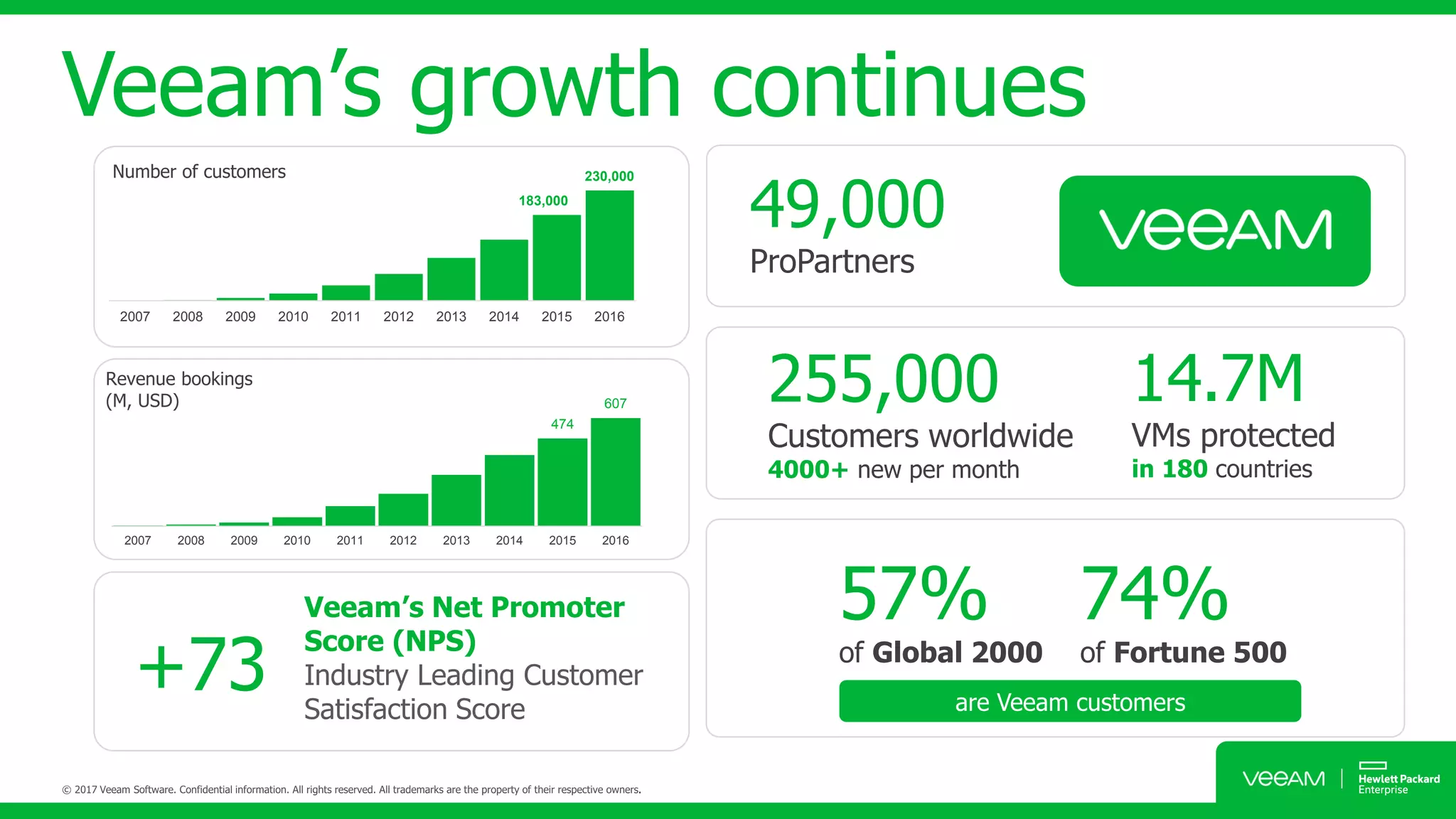
Veeam’s growth continues
474
607
2007 2008 2009 2010 2011 2012 2013 2014 2015 2016
Revenue bookings
(M, USD)
183,000
230,000
2007 2008 2009 2010 2011 2012 2013 2014 2015 2016
Number of customers
255,000
Customers worldwide
4000+ new per month
14.7M
VMs protected
in 180 countries
are Veeam customers
57%
of Global 2000
74%
of Fortune 500
Veeam’s Net Promoter
Score (NPS)
Industry Leading Customer
Satisfaction Score
+73
49,000
ProPartners
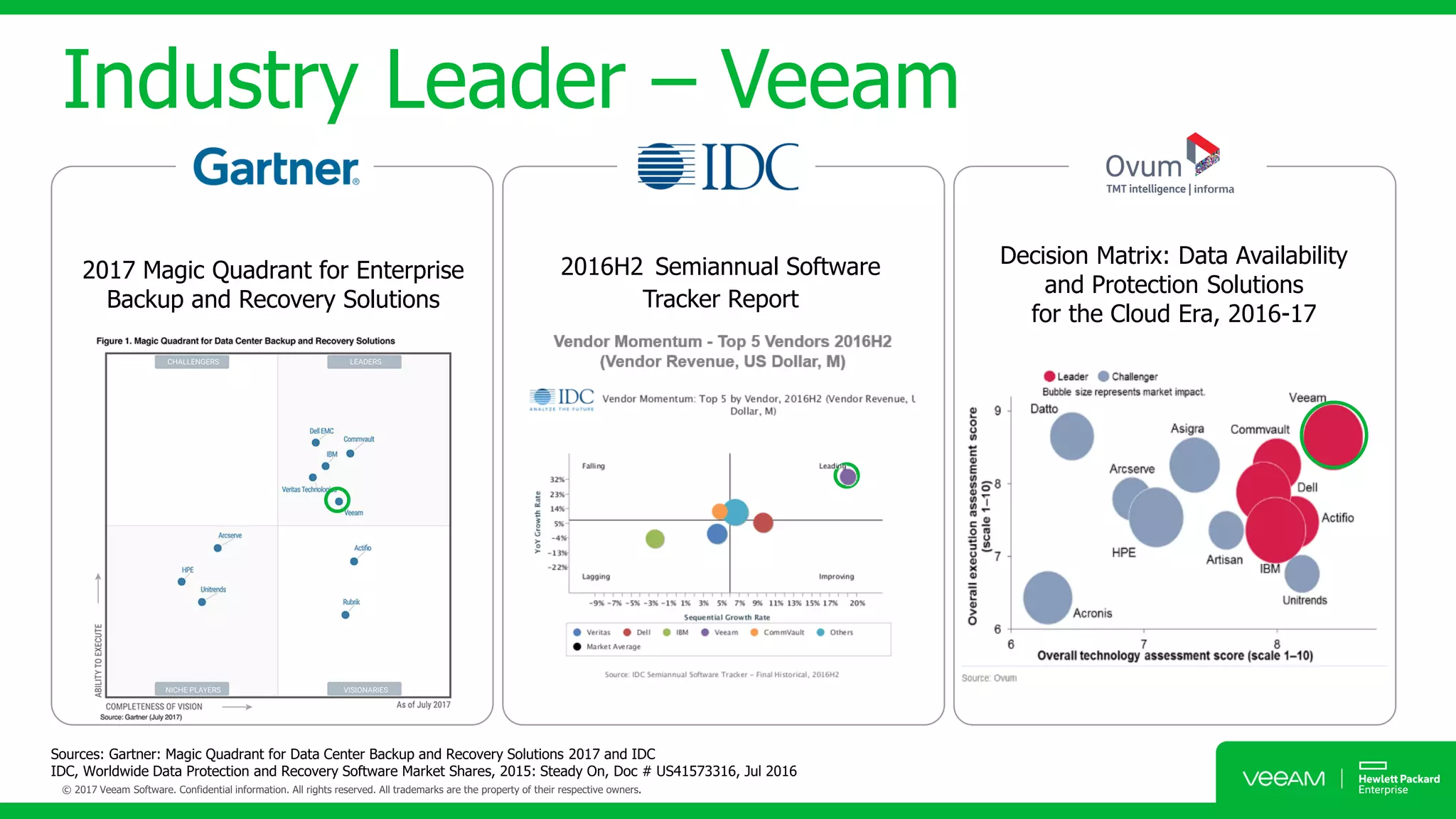
Sources: Gartner: Magic Quadrant for Data Center Backup and Recovery Solutions 2017 and IDC
IDC, Worldwide Data Protection and Recovery Software Market Shares, 2015: Steady On, Doc # US41573316, Jul 2016
2017 Magic Quadrant for Enterprise
Backup and Recovery Solutions
Decision Matrix: Data Availability
and Protection Solutions
for the Cloud Era, 2016-17
2016H2 Semiannual Software
Tracker Report
Industry Leader – Veeam
IDC Market Share
Source: IDC Worldwide Semiannual Software Tracker in the Data Protection and Recovery Software Market – Final Historical, 2016H2
Top 5 Vendor Performance 2016H2
(Vendor Revenue, US Dollar, M)
Vendor Momentum - Top 5 Vendors 2016H2
(Vendor Revenue, US Dollar, M)
Veeam leader in momentum!
Non-Stop
Business Continuity
2.5 x less Failures
3 x more Speed
91% SLA
AVAILABILITY
SUITE
Veeam
Availability
Suite
Availability for the
Always-On Enterprise™
Meet SLAs for RTPO™ of < 15 minutes for
ALL applications
and data
Complete visibility — Proactive monitoring
and alerting of issues before operational
impact
Data loss avoidance — Low RPOs and
streamlined disaster recovery
High speed recovery — What you want,
the way you want it
Leveraged data — Low-risk deployment
with a production-like test environment
Verified recoverability — Guaranteed
recovery of every file, application,
or virtual server, every time
Availability for The Always-ON Enterprise
Agentless protection
High-speed Recovery
instant VM recovery
vPower
migrate online
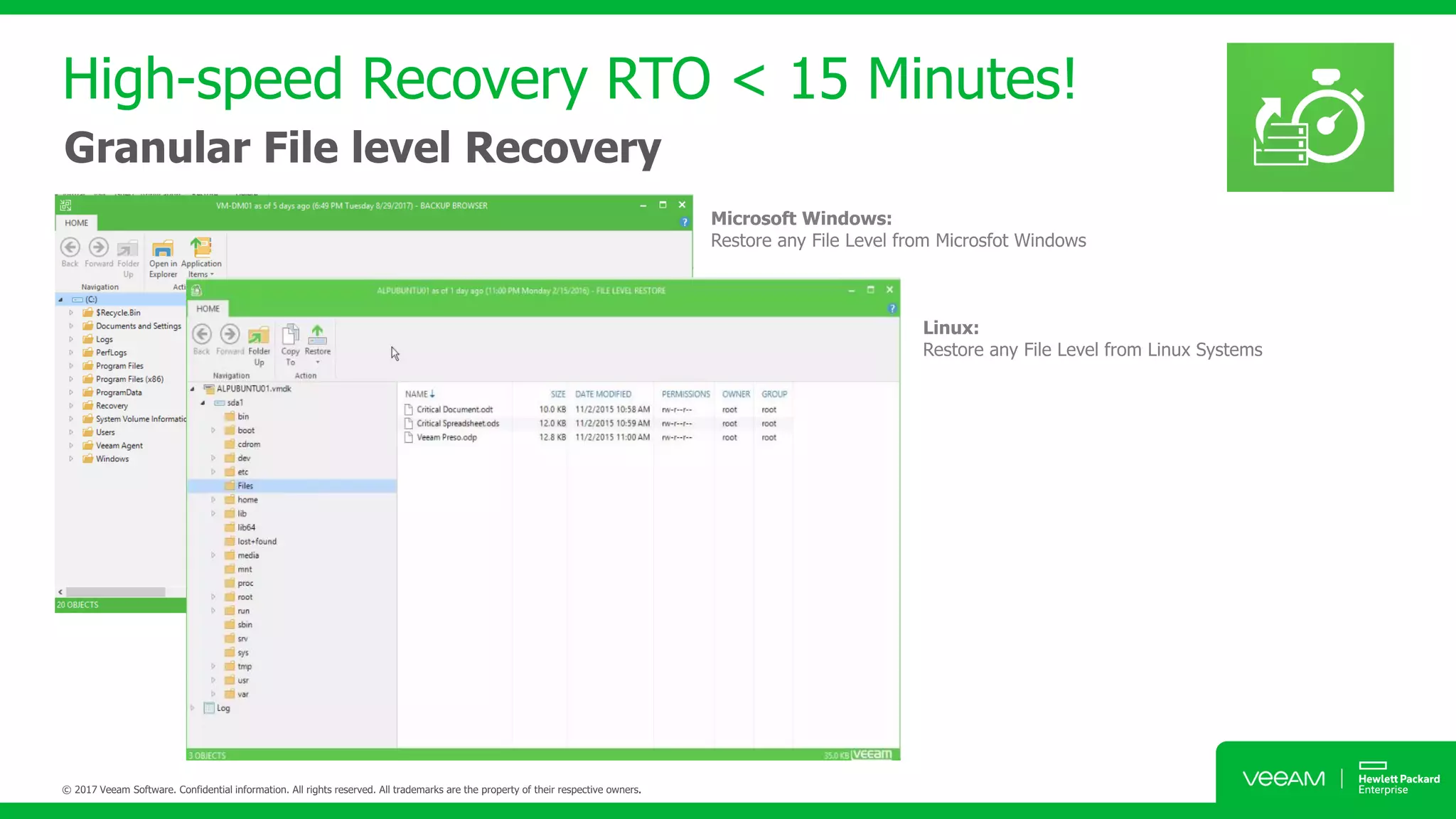
High-speed Recovery RTO < 15 Minutes!
Granular File level Recovery
High-speed Recovery RTO < 15 Minutes!
Application File Level Recovery
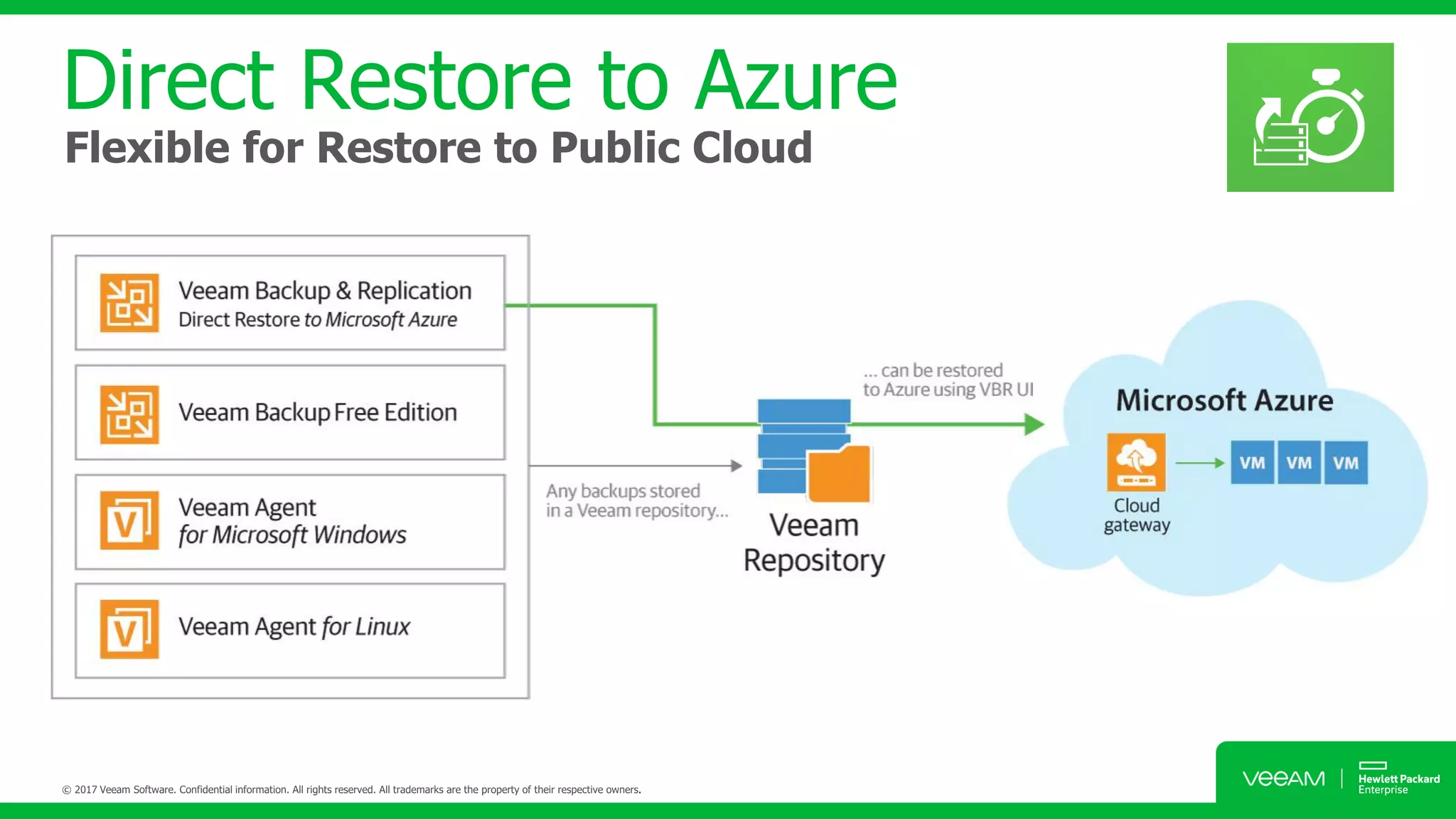
Direct Restore to Azure
Flexible for Restore to Public Cloud
Veeam Explorer for Storage Snapshots
Restore VM / File / Mailbox from Storage Snapshots
Recovery from Veeam Backup
Nightly
Backup
Nightly
Backup
Unprotected
8 AM 9 AM 10 AM 11 AM 12 PM 1 PM 2 PM 3 PM 4 PM 5 PM
Veeam Leveraging Modern Storage Snapshots
snapsnapsnapsnapsnapsnapsnapsnapsnapsnap
Microsoft
Exchange
Microsoft
Active Directory
Microsoft
SQL Server
Microsoft
SharePoint
Oracle
Veeam Explorer Series – Enables full or granular restores
2Different media
3Different copies
of data
1of which is off-site
cloud
Data Loss Avoidance
3-2-1 Rule with veeam
Tape
Device
Storage
To insure data recoverability against ransomware:
Have three copies
of your data
Store on two
different media types
Keep one copy
off site
Veeam Cloud
Connect
Database, Applications,
Files & Data
Backup copy
Hyper-converge System
Data Loss Avoidance
3-2-1 Rule with Veeam
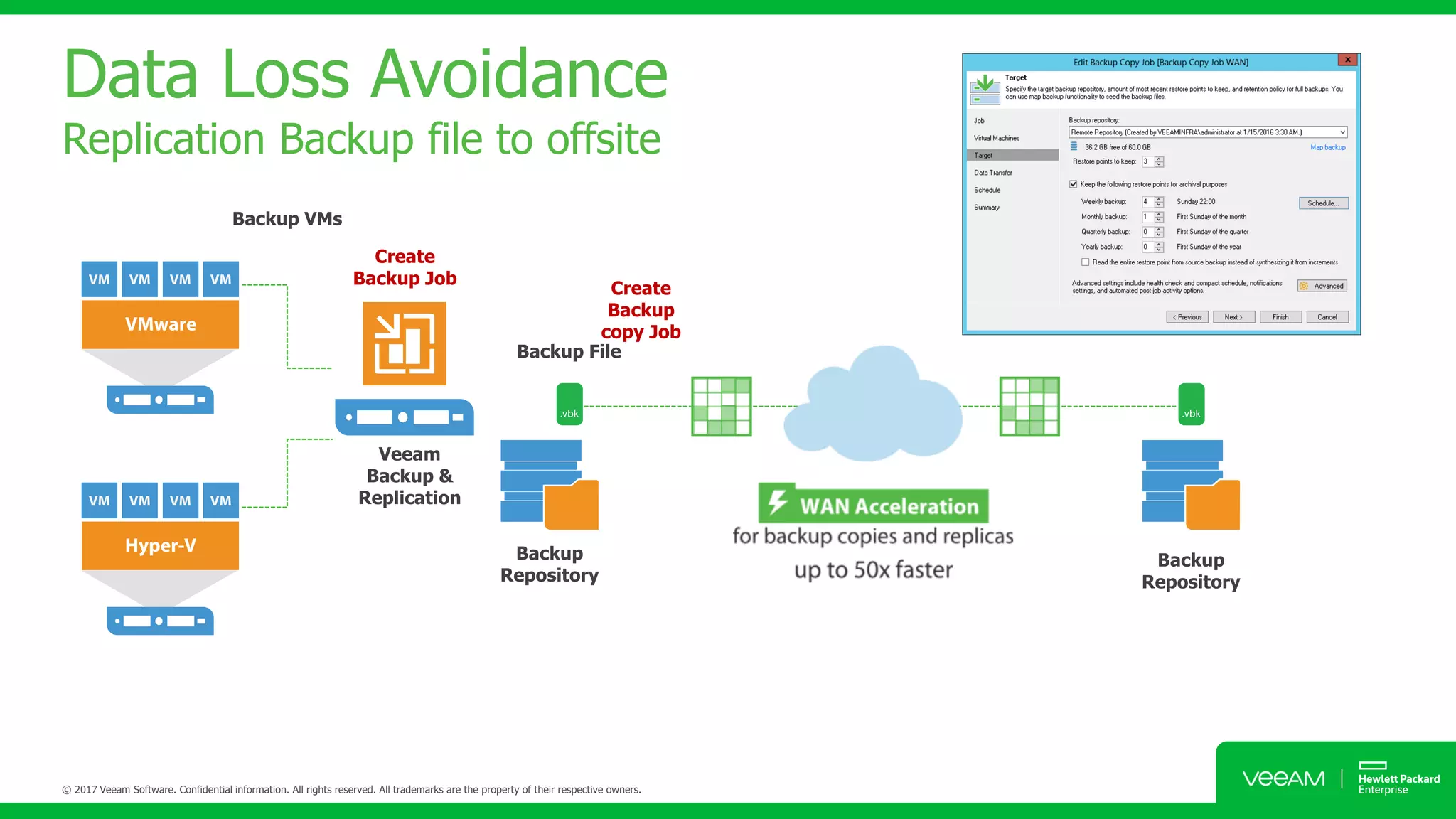
Data Loss Avoidance
Replication Backup file to offsite
Create
Backup Job
Create
Backup
copy Job
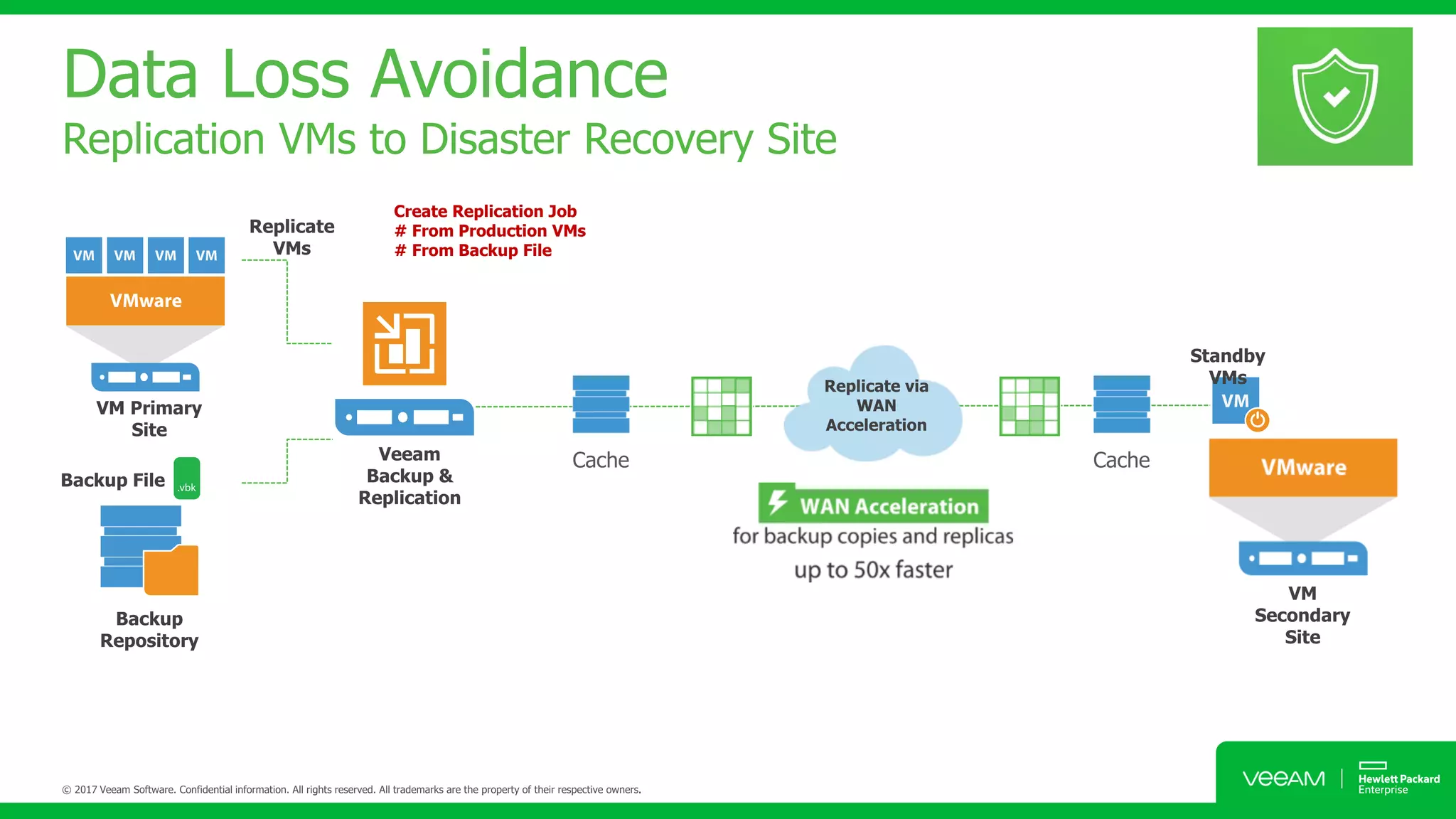
Data Loss Avoidance
Replication VMs to Disaster Recovery Site
Create Replication Job
# From Production VMs
# From Backup File
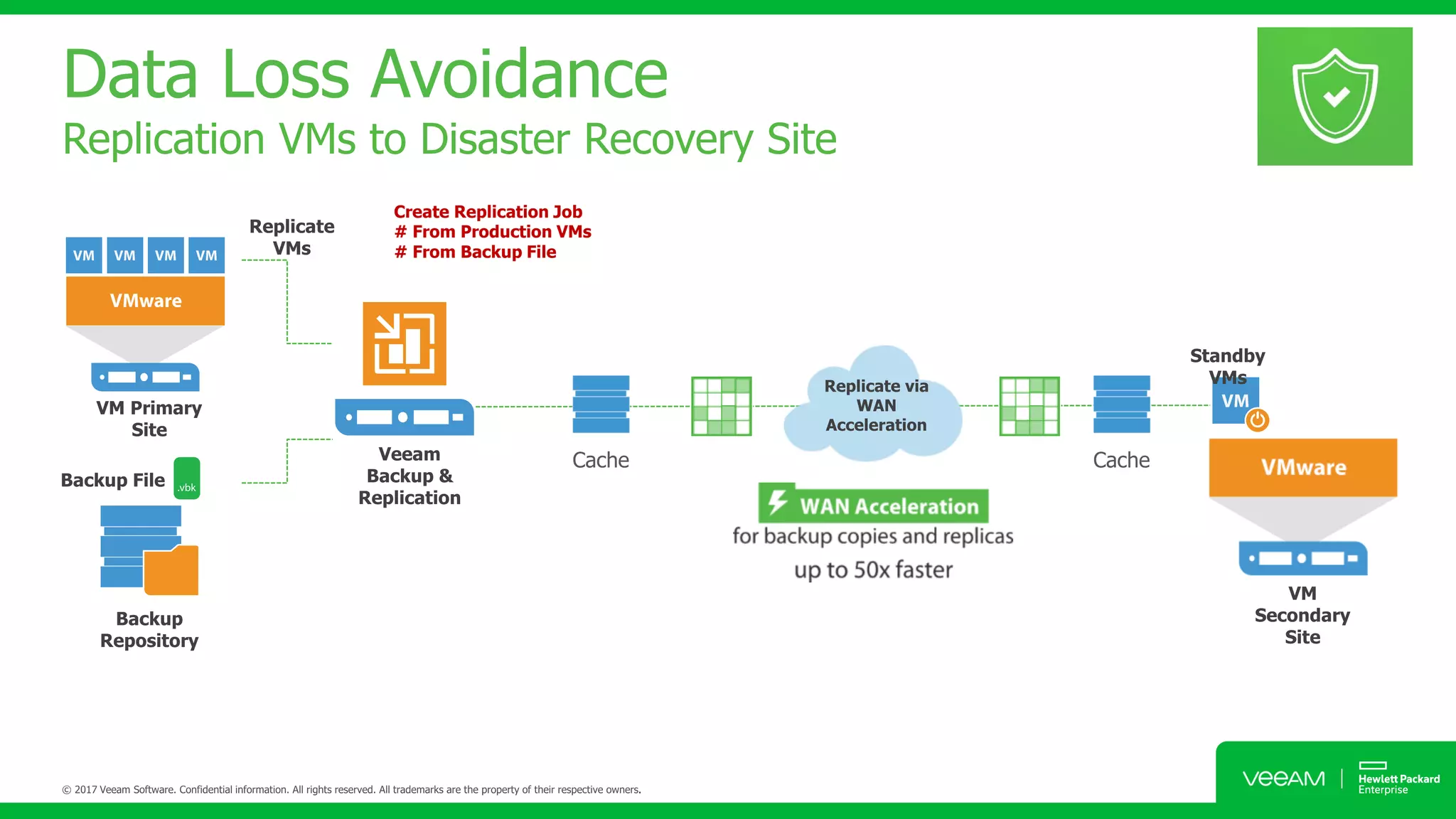
Data Loss Avoidance
Replication VMs to Disaster Recovery Site
Create Replication Job
# From Production VMs
# From Backup File
Data Loss Avoidance
Replication VMs to Disaster Recovery Site (Fail-Back)
Fail back to Production
# Fail back to production
# Undo Fail over
Data Loss Avoidance
Failover Plans (Pre-Post Script)
Data Loss Avoidance
Re-IP GUI
For Microsoft VMs, Veeam Backup & Replication also
automates reconfiguration of VM IP addresses. If the IP
addressing scheme in the production site differs from the
DR site scheme, you can create a number of Re-IP rules for
the replication job.
When you fail over to the
replica, Veeam Backup & Replication checks if any of the
specified Re-IP rules apply to the replica. If a rule
applies, Veeam Backup & Replication mounts VM disks of
the replica to the backup server and changes its IP address
configuration via the Microsoft Windows registry. The
whole operation takes less than a second. If failover is
undone for any reason or if you fail back to the original
location, replica IP address is changed back to the pre-
failover state.
Data Loss Avoidance
Failover Plans (Set Delays of Sequence Power On)
• You can perform permanent failover to leave the
workload on the target host and let the replica
VM act as the original VM. Permanent failover is
suitable if the source and target hosts are nearly
equal in terms of resources and are located on
the same HA site.
• You can perform failback to recover the original
VM on the source host or in a new location.
Failback is used in case you failed over to a DR
site that is not intended for continuous
operations and would like to move the
operations back to the production site when the
consequences of a disaster are eliminated.
Data Loss Avoidance
Wan Acceleration (Full Replication)
Host-based replication
Assisted failover
Real failback
Host-based Replication
Verified Protection & Leveraged Data
SureBackup & On Demand Sandbox
Host-based
Replication
Verified Protection & Leverage Data
SureReplica & On Demand Sandbox
VM
Verification job
OS
Report
App
NAT SWITCH
• Test update patch
• Troubleshoot issues
• Train IT Staff
• Provision dev application
Verified Protection & Leverage Data
SureReplica & On Demand Sandbox
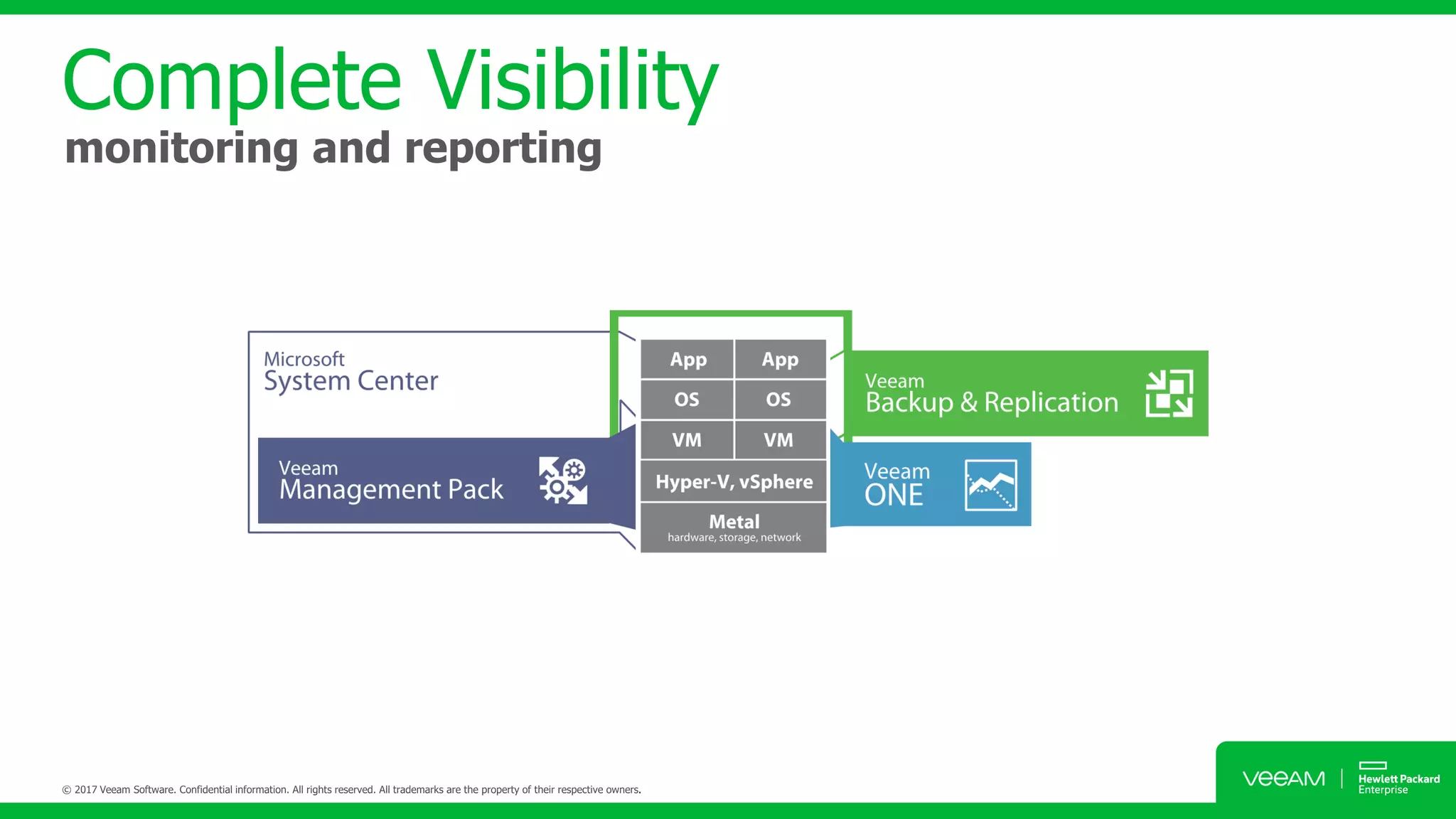
Complete Visibility
monitoring and reporting
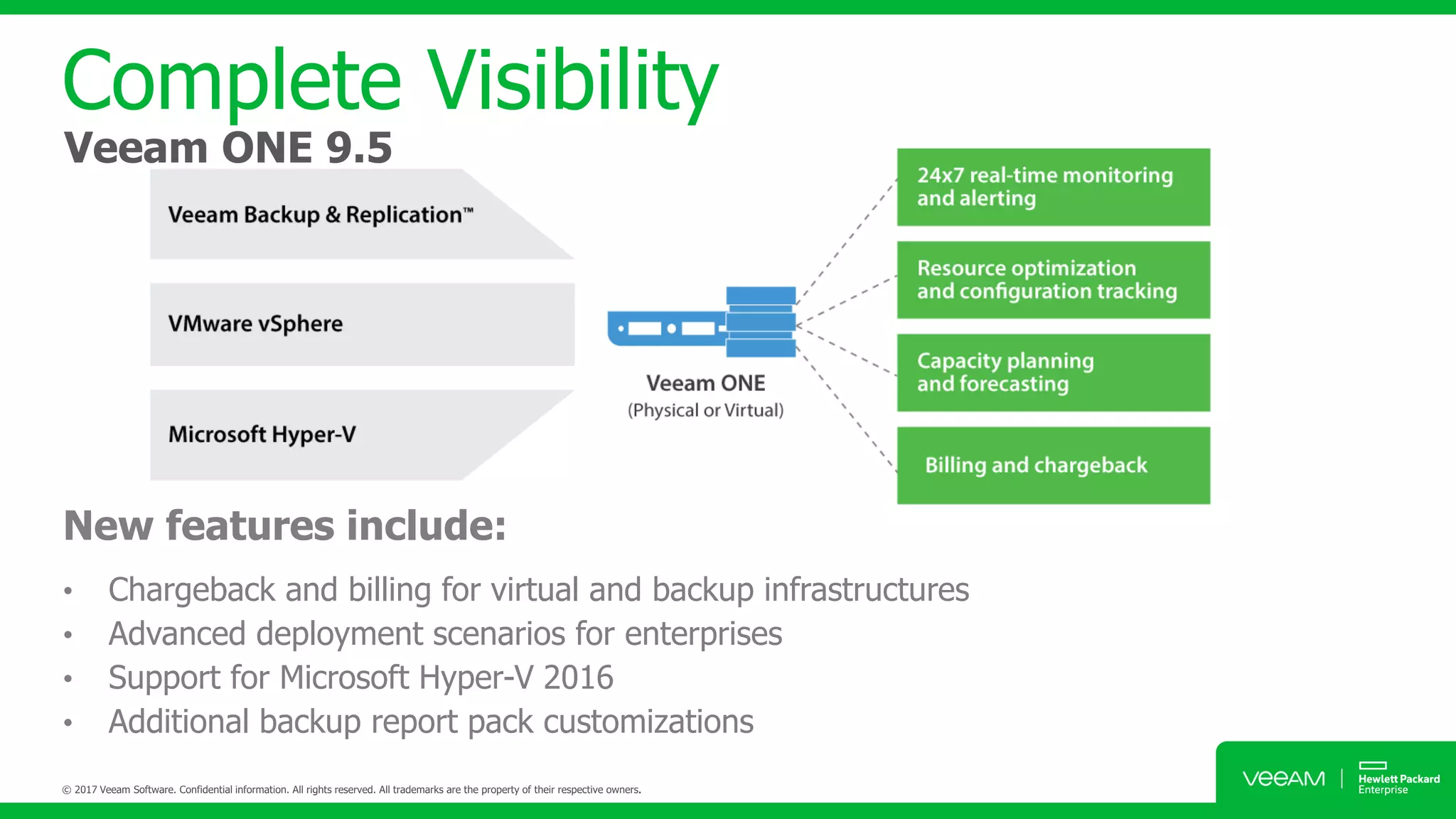
New features include:
• Chargeback and billing for virtual and backup infrastructures
• Advanced deployment scenarios for enterprises
• Support for Microsoft Hyper-V 2016
• Additional backup report pack customizations
Complete Visibility
Veeam ONE 9.5
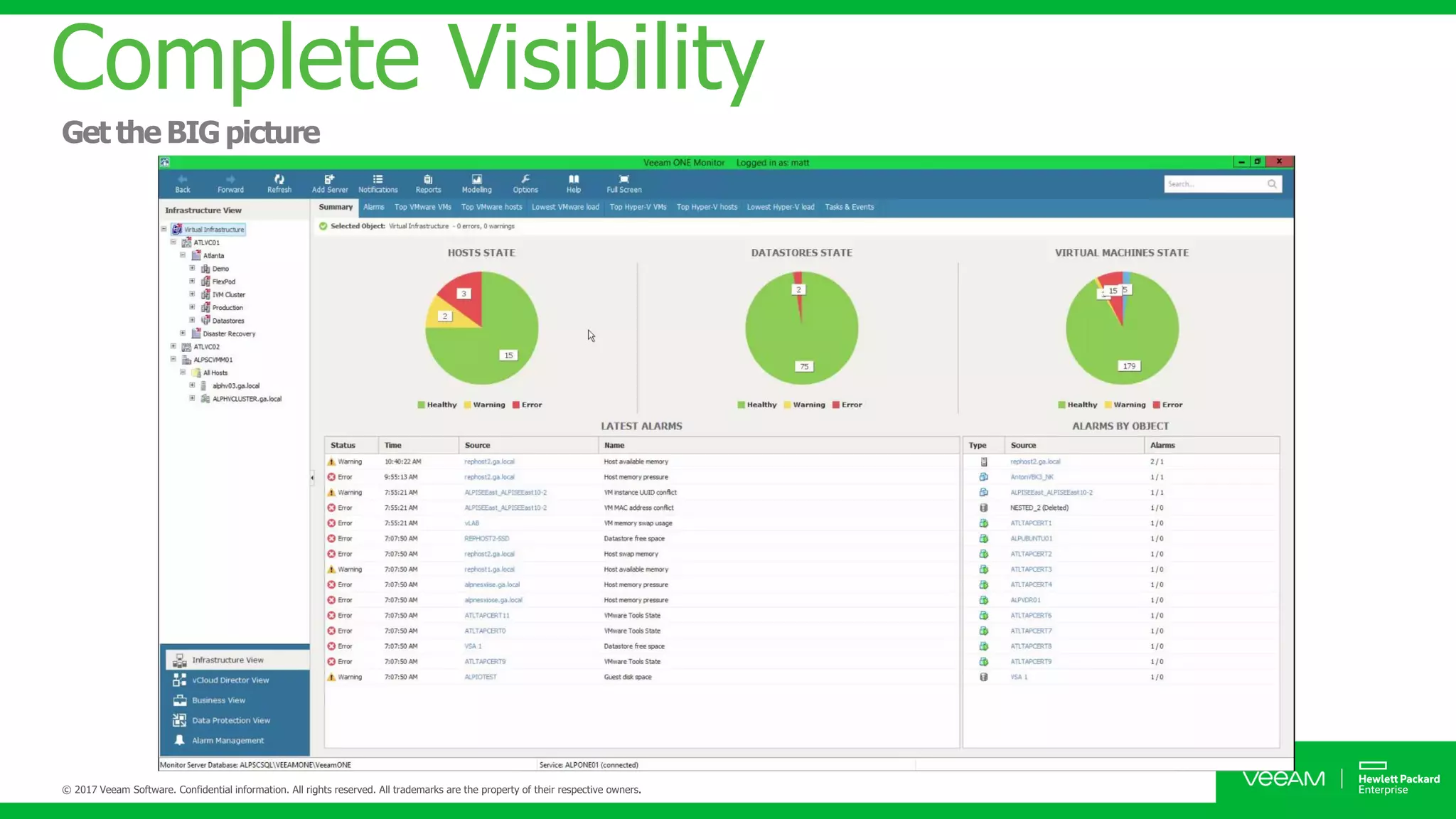
Complete Visibility
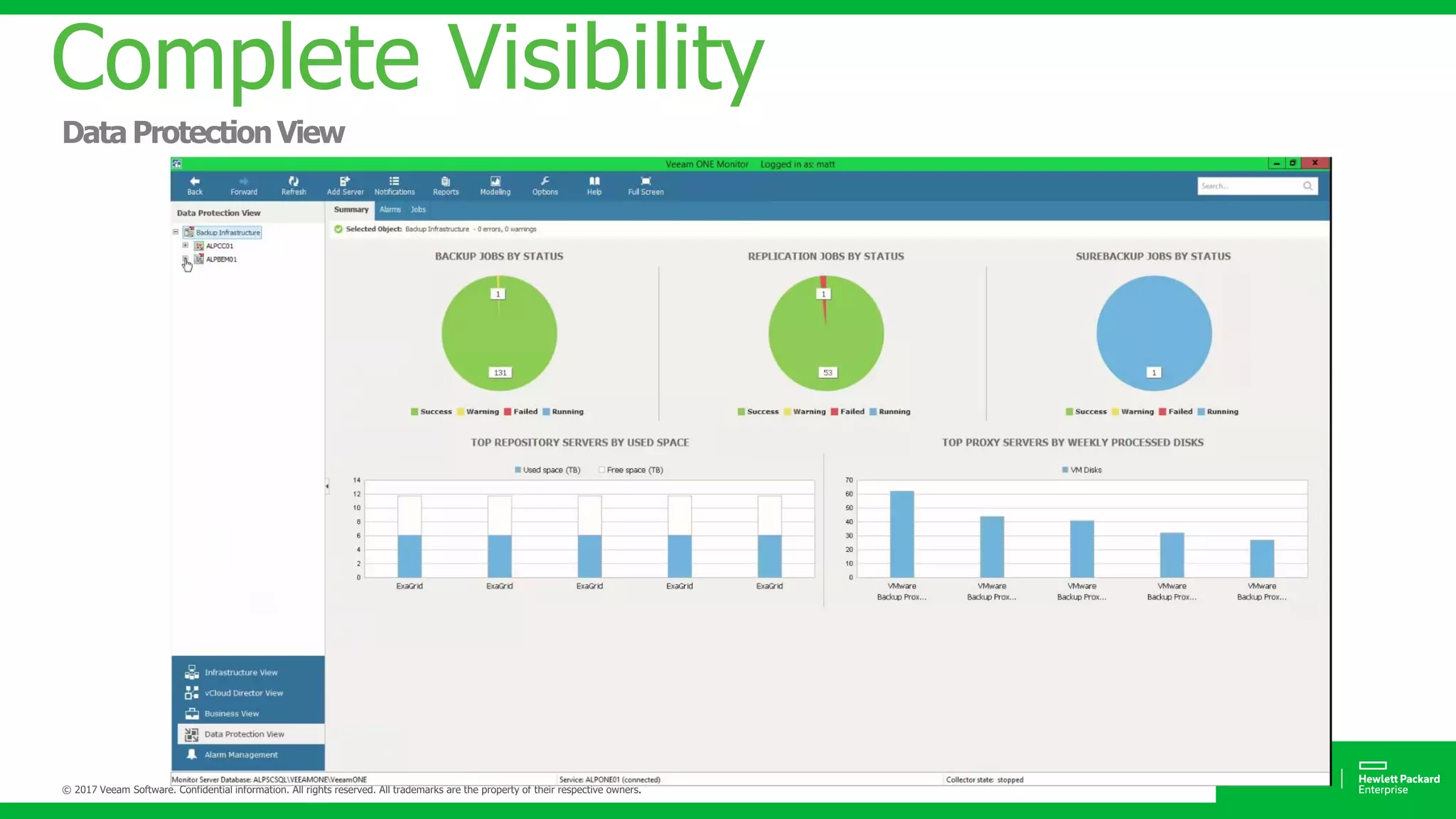
Complete Visibility
Complete Visibility
Complete Visibility
Complete Visibility
Complete Visibility
Complete Visibility
Complete Visibility
Complete Visibility
Complete Visibility
Complete Visibility
Complete Visibility
Non-Stop
Business Continuity
Digital Transformation
Agility
Analytics and
Visibility
2.5 x less Failures
3 x more Speed
91% SLA
Your cloud, your way
Monitor, analyze
and act with
confidence
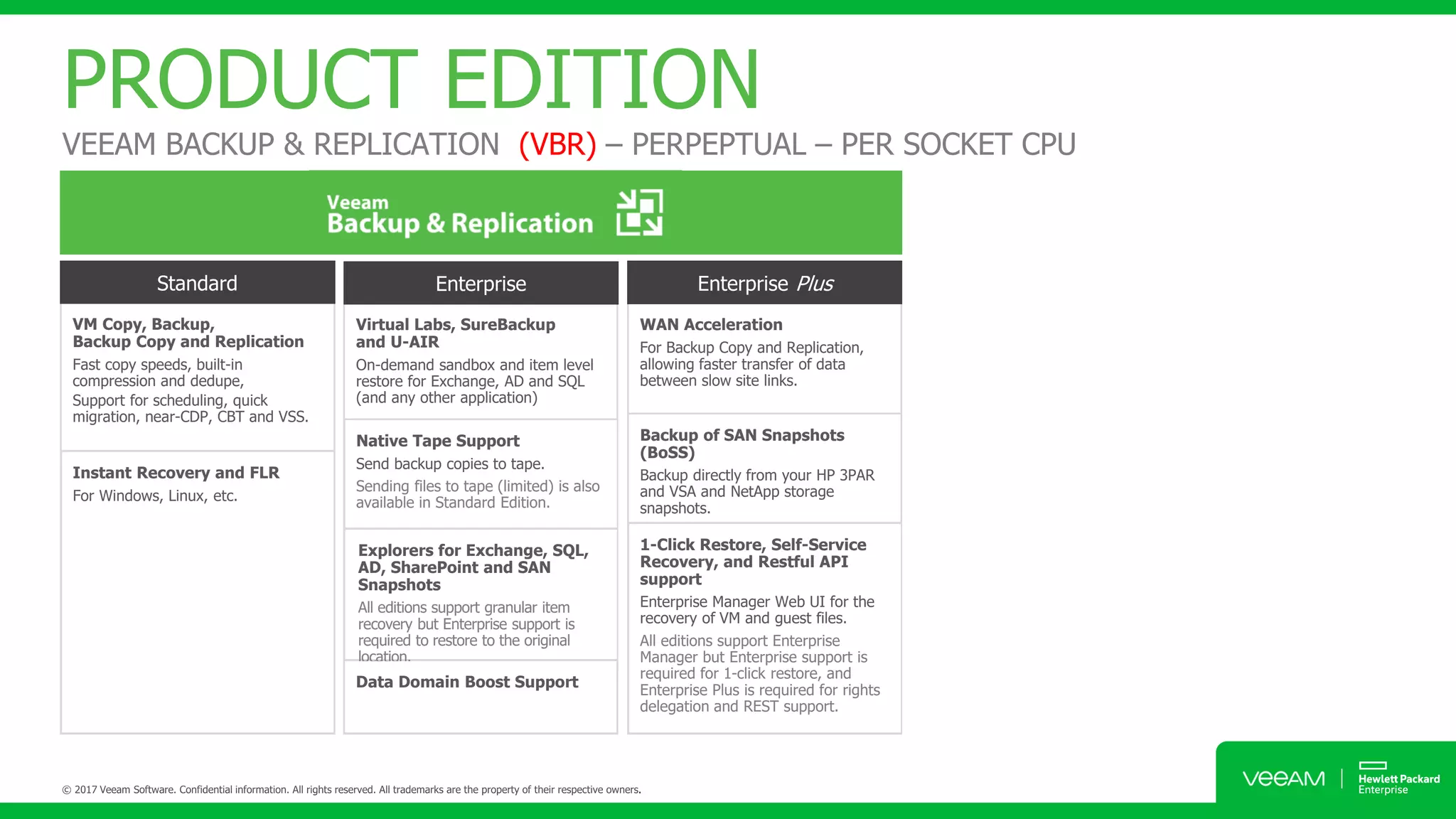
PRODUCT EDITION
VM Copy, Backup,
Backup Copy and Replication
Fast copy speeds, built-in
compression and dedupe,
Support for scheduling, quick
migration, near-CDP, CBT and VSS.
Instant Recovery and FLR
For Windows, Linux, etc.
Virtual Labs, SureBackup
and U-AIR
On-demand sandbox and item level
restore for Exchange, AD and SQL
(and any other application)
Native Tape Support
Send backup copies to tape.
Sending files to tape (limited) is also
available in Standard Edition.
Explorers for Exchange, SQL,
AD, SharePoint and SAN
Snapshots
All editions support granular item
recovery but Enterprise support is
required to restore to the original
location.
WAN Acceleration
For Backup Copy and Replication,
allowing faster transfer of data
between slow site links.
Backup of SAN Snapshots
(BoSS)
Backup directly from your HP 3PAR
and VSA and NetApp storage
snapshots.
1-Click Restore, Self-Service
Recovery, and Restful API
support
Enterprise Manager Web UI for the
recovery of VM and guest files.
All editions support Enterprise
Manager but Enterprise support is
required for 1-click restore, and
Enterprise Plus is required for rights
delegation and REST support.
Data Domain Boost Support
PRODUCT EDITION
VEEAM BACKUP & REPLICATION (VBR) – PERPEPTUAL – PER SOCKET CPU
• Infrastructure health and
configuration assessment tools
• 24x7 monitoring and alertingOn-
demand reporting and
documentation
• siness categorization
• VM change rate estimation
• Infrastructure health and
configuration assessment tools
• 24x7 monitoring and alertingOn-
demand reporting and
documentation
• siness categorization
• VM change rate estimation
• Guest process monitoring and
management
• Performance and utilization reporting
• Predefined dashboards
• Advanced monitoring and reporting
for Veeam Backup & Replication
• Backup infrastructure assessment
• Hyper-V performance and
configuration assessment
• Capacity planning for vSphere and
Hyper-Vplanning with “what if”
analysis and resource reservations
• Report customization
• Multi-tenant reporting and
monitoring
PRODUCT EDITION
VEEAM ONE – PERPEPTUAL – PER SOCKET CPU
VM Copy, Backup,
Backup Copy and Replication
Fast copy speeds, built-in
compression and dedupe,
Support for scheduling, quick
migration, near-CDP, CBT and VSS.
Instant Recovery and FLR
For Windows, Linux, etc.
Virtual Labs, SureBackup
and U-AIR
On-demand sandbox and item level
restore for Exchange, AD and SQL
(and any other application)
Native Tape Support
Send backup copies to tape.
Sending files to tape (limited) is also
available in Standard Edition.
Explorers for Exchange, SQL,
AD, SharePoint and SAN
Snapshots
All editions support granular item
recovery but Enterprise support is
required to restore to the original
location.
WAN Acceleration
For Backup Copy and Replication,
allowing faster transfer of data
between slow site links.
Backup of SAN Snapshots
(BoSS)
Backup directly from your HP 3PAR
and VSA and NetApp storage
snapshots.
1-Click Restore, Self-Service
Recovery, and Restful API
support
Enterprise Manager Web UI for the
recovery of VM and guest files.
All editions support Enterprise
Manager but Enterprise support is
required for 1-click restore, and
Enterprise Plus is required for rights
delegation and REST support.
Data Domain Boost Support
+ =
• Infrastructure health and
configuration assessment tools
• 24x7 monitoring and alertingOn-
demand reporting and
documentation
• siness categorization
• VM change rate estimation
• Guest process monitoring and
management
• Performance and utilization reporting
• Predefined dashboards
• Advanced monitoring and reporting
for Veeam Backup & Replication
• Backup infrastructure assessment
• Hyper-V performance and
configuration assessment
• Capacity planning for vSphere and
Hyper-Vplanning with “what if”
analysis and resource reservations
• Report customization
• Multi-tenant reporting and
monitoring
PRODUCT EDITION
VEEAM AVAILABILITY SUITE (VAS) – PERPEPTUAL – PER SOCKET CPU
• Click to edit Master text styles
• Second level
• Third level
• Fourth level
Thank you
Tanawit chansuchai, ++66 909 615 246
www.veeam.com
http://era-cloud.blogspot.com/

HPE + Veeam Technical Hands ON Workshop #1

  • 1.
    • Click toedit Master text styles • Second level • Third level • Fourth level AVAILABILITY BUSINESS ON MODERNIZE DATA CENTER Tanawit Chansuchai Channel System Engineer, Thailand Tanawit.chansuchai@veeam.com
  • 2.
  • 3.
    Founded in 2006, Veeamcurrently has +2,800 employees worldwide 255,000 paid customers 49,000 ProPartners
  • 4.
    Veeam’s growth continues 474 607 20072008 2009 2010 2011 2012 2013 2014 2015 2016 Revenue bookings (M, USD) 183,000 230,000 2007 2008 2009 2010 2011 2012 2013 2014 2015 2016 Number of customers 255,000 Customers worldwide 4000+ new per month 14.7M VMs protected in 180 countries are Veeam customers 57% of Global 2000 74% of Fortune 500 Veeam’s Net Promoter Score (NPS) Industry Leading Customer Satisfaction Score +73 49,000 ProPartners
  • 5.
    Sources: Gartner: MagicQuadrant for Data Center Backup and Recovery Solutions 2017 and IDC IDC, Worldwide Data Protection and Recovery Software Market Shares, 2015: Steady On, Doc # US41573316, Jul 2016 2017 Magic Quadrant for Enterprise Backup and Recovery Solutions Decision Matrix: Data Availability and Protection Solutions for the Cloud Era, 2016-17 2016H2 Semiannual Software Tracker Report Industry Leader – Veeam
  • 6.
    IDC Market Share Source:IDC Worldwide Semiannual Software Tracker in the Data Protection and Recovery Software Market – Final Historical, 2016H2 Top 5 Vendor Performance 2016H2 (Vendor Revenue, US Dollar, M) Vendor Momentum - Top 5 Vendors 2016H2 (Vendor Revenue, US Dollar, M) Veeam leader in momentum!
  • 8.
    Non-Stop Business Continuity 2.5 xless Failures 3 x more Speed 91% SLA AVAILABILITY SUITE
  • 9.
    Veeam Availability Suite Availability for the Always-OnEnterprise™ Meet SLAs for RTPO™ of < 15 minutes for ALL applications and data Complete visibility — Proactive monitoring and alerting of issues before operational impact Data loss avoidance — Low RPOs and streamlined disaster recovery High speed recovery — What you want, the way you want it Leveraged data — Low-risk deployment with a production-like test environment Verified recoverability — Guaranteed recovery of every file, application, or virtual server, every time
  • 10.
    Availability for TheAlways-ON Enterprise Agentless protection
  • 11.
    High-speed Recovery instant VMrecovery vPower migrate online
  • 12.
    High-speed Recovery RTO< 15 Minutes! Granular File level Recovery
  • 13.
    High-speed Recovery RTO< 15 Minutes! Application File Level Recovery
  • 14.
    Direct Restore toAzure Flexible for Restore to Public Cloud
  • 15.
    Veeam Explorer forStorage Snapshots Restore VM / File / Mailbox from Storage Snapshots
  • 16.
    Recovery from VeeamBackup Nightly Backup Nightly Backup Unprotected 8 AM 9 AM 10 AM 11 AM 12 PM 1 PM 2 PM 3 PM 4 PM 5 PM Veeam Leveraging Modern Storage Snapshots snapsnapsnapsnapsnapsnapsnapsnapsnapsnap Microsoft Exchange Microsoft Active Directory Microsoft SQL Server Microsoft SharePoint Oracle Veeam Explorer Series – Enables full or granular restores
  • 17.
    2Different media 3Different copies ofdata 1of which is off-site cloud Data Loss Avoidance 3-2-1 Rule with veeam
  • 18.
    Tape Device Storage To insure datarecoverability against ransomware: Have three copies of your data Store on two different media types Keep one copy off site Veeam Cloud Connect Database, Applications, Files & Data Backup copy Hyper-converge System Data Loss Avoidance 3-2-1 Rule with Veeam
  • 19.
    Data Loss Avoidance ReplicationBackup file to offsite Create Backup Job Create Backup copy Job
  • 20.
    Data Loss Avoidance ReplicationVMs to Disaster Recovery Site Create Replication Job # From Production VMs # From Backup File
  • 21.
    Data Loss Avoidance ReplicationVMs to Disaster Recovery Site Create Replication Job # From Production VMs # From Backup File
  • 22.
    Data Loss Avoidance ReplicationVMs to Disaster Recovery Site (Fail-Back) Fail back to Production # Fail back to production # Undo Fail over
  • 23.
    Data Loss Avoidance FailoverPlans (Pre-Post Script)
  • 24.
    Data Loss Avoidance Re-IPGUI For Microsoft VMs, Veeam Backup & Replication also automates reconfiguration of VM IP addresses. If the IP addressing scheme in the production site differs from the DR site scheme, you can create a number of Re-IP rules for the replication job. When you fail over to the replica, Veeam Backup & Replication checks if any of the specified Re-IP rules apply to the replica. If a rule applies, Veeam Backup & Replication mounts VM disks of the replica to the backup server and changes its IP address configuration via the Microsoft Windows registry. The whole operation takes less than a second. If failover is undone for any reason or if you fail back to the original location, replica IP address is changed back to the pre- failover state.
  • 25.
    Data Loss Avoidance FailoverPlans (Set Delays of Sequence Power On) • You can perform permanent failover to leave the workload on the target host and let the replica VM act as the original VM. Permanent failover is suitable if the source and target hosts are nearly equal in terms of resources and are located on the same HA site. • You can perform failback to recover the original VM on the source host or in a new location. Failback is used in case you failed over to a DR site that is not intended for continuous operations and would like to move the operations back to the production site when the consequences of a disaster are eliminated.
  • 26.
    Data Loss Avoidance WanAcceleration (Full Replication)
  • 27.
    Host-based replication Assisted failover Realfailback Host-based Replication
  • 28.
    Verified Protection &Leveraged Data SureBackup & On Demand Sandbox
  • 29.
    Host-based Replication Verified Protection &Leverage Data SureReplica & On Demand Sandbox VM Verification job OS Report App
  • 30.
    NAT SWITCH • Testupdate patch • Troubleshoot issues • Train IT Staff • Provision dev application Verified Protection & Leverage Data SureReplica & On Demand Sandbox
  • 31.
  • 32.
    New features include: •Chargeback and billing for virtual and backup infrastructures • Advanced deployment scenarios for enterprises • Support for Microsoft Hyper-V 2016 • Additional backup report pack customizations Complete Visibility Veeam ONE 9.5
  • 33.
  • 34.
  • 35.
  • 36.
  • 37.
  • 38.
  • 39.
  • 40.
  • 41.
  • 42.
  • 43.
  • 44.
  • 45.
    Non-Stop Business Continuity Digital Transformation Agility Analyticsand Visibility 2.5 x less Failures 3 x more Speed 91% SLA Your cloud, your way Monitor, analyze and act with confidence PRODUCT EDITION
  • 46.
    VM Copy, Backup, BackupCopy and Replication Fast copy speeds, built-in compression and dedupe, Support for scheduling, quick migration, near-CDP, CBT and VSS. Instant Recovery and FLR For Windows, Linux, etc. Virtual Labs, SureBackup and U-AIR On-demand sandbox and item level restore for Exchange, AD and SQL (and any other application) Native Tape Support Send backup copies to tape. Sending files to tape (limited) is also available in Standard Edition. Explorers for Exchange, SQL, AD, SharePoint and SAN Snapshots All editions support granular item recovery but Enterprise support is required to restore to the original location. WAN Acceleration For Backup Copy and Replication, allowing faster transfer of data between slow site links. Backup of SAN Snapshots (BoSS) Backup directly from your HP 3PAR and VSA and NetApp storage snapshots. 1-Click Restore, Self-Service Recovery, and Restful API support Enterprise Manager Web UI for the recovery of VM and guest files. All editions support Enterprise Manager but Enterprise support is required for 1-click restore, and Enterprise Plus is required for rights delegation and REST support. Data Domain Boost Support PRODUCT EDITION VEEAM BACKUP & REPLICATION (VBR) – PERPEPTUAL – PER SOCKET CPU
  • 47.
    • Infrastructure healthand configuration assessment tools • 24x7 monitoring and alertingOn- demand reporting and documentation • siness categorization • VM change rate estimation • Infrastructure health and configuration assessment tools • 24x7 monitoring and alertingOn- demand reporting and documentation • siness categorization • VM change rate estimation • Guest process monitoring and management • Performance and utilization reporting • Predefined dashboards • Advanced monitoring and reporting for Veeam Backup & Replication • Backup infrastructure assessment • Hyper-V performance and configuration assessment • Capacity planning for vSphere and Hyper-Vplanning with “what if” analysis and resource reservations • Report customization • Multi-tenant reporting and monitoring PRODUCT EDITION VEEAM ONE – PERPEPTUAL – PER SOCKET CPU
  • 48.
    VM Copy, Backup, BackupCopy and Replication Fast copy speeds, built-in compression and dedupe, Support for scheduling, quick migration, near-CDP, CBT and VSS. Instant Recovery and FLR For Windows, Linux, etc. Virtual Labs, SureBackup and U-AIR On-demand sandbox and item level restore for Exchange, AD and SQL (and any other application) Native Tape Support Send backup copies to tape. Sending files to tape (limited) is also available in Standard Edition. Explorers for Exchange, SQL, AD, SharePoint and SAN Snapshots All editions support granular item recovery but Enterprise support is required to restore to the original location. WAN Acceleration For Backup Copy and Replication, allowing faster transfer of data between slow site links. Backup of SAN Snapshots (BoSS) Backup directly from your HP 3PAR and VSA and NetApp storage snapshots. 1-Click Restore, Self-Service Recovery, and Restful API support Enterprise Manager Web UI for the recovery of VM and guest files. All editions support Enterprise Manager but Enterprise support is required for 1-click restore, and Enterprise Plus is required for rights delegation and REST support. Data Domain Boost Support + = • Infrastructure health and configuration assessment tools • 24x7 monitoring and alertingOn- demand reporting and documentation • siness categorization • VM change rate estimation • Guest process monitoring and management • Performance and utilization reporting • Predefined dashboards • Advanced monitoring and reporting for Veeam Backup & Replication • Backup infrastructure assessment • Hyper-V performance and configuration assessment • Capacity planning for vSphere and Hyper-Vplanning with “what if” analysis and resource reservations • Report customization • Multi-tenant reporting and monitoring PRODUCT EDITION VEEAM AVAILABILITY SUITE (VAS) – PERPEPTUAL – PER SOCKET CPU
  • 49.
    • Click toedit Master text styles • Second level • Third level • Fourth level Thank you Tanawit chansuchai, ++66 909 615 246 www.veeam.com http://era-cloud.blogspot.com/