Veeam Backup & Replication
v12.0
© 2016 Veeam Software. All rights reserved. All trademarks are the property of their respective owners.
AGENDA
• Introductions
• Backup & Replication Techniques
• Veeam Refresher
• What’s New With v12.0
• Installation & Configuration of Veeam
• Customizations of Backup Schedules
• Questions
What is Veeam Backup & Replication ?
Veeam Backup & Replication is a comprehensive data protection and
disaster recovery solution.
With Veeam Backup & Replication, you can create image-level backups of
virtual, physical and cloud machines and restore from them.
Technology used in the product optimizes data transfer and resource
consumption, which helps to minimize storage costs and the recovery time
in case of a disaster.
Veeam Backup & Replication provides a centralized console for
administering backup, restore and replication operations in all supported
platforms (virtual, physical, cloud).
Also, the console allows you to automate and schedule routine data
protection operations and integrate with solutions for alerting and
generating compliance reports.
Main Features;
Main functionality of Veeam Backup & Replication includes:
• Backup: creating image-level backups of virtual, physical, cloud machines
and backups of file shares and object storage repositories. • Restore:
performing restore from backup files to the original or a new location.
Veeam Backup & Replication offers a number of recovery options for
various disaster recovery scenarios, including Instant Recovery, image-
level restore, file-level restore, restore of application items and so on.
• Replication: creating an exact copy of a VM and maintaining the copy in
sync with the original VM.
• Continuous Data Protection (CDP): replication technology that helps
you protect mission-critical VMs and reach recovery point objective (RPO)
up to seconds.
• Backup Copy: copying backup files to a secondary repository.
Main Features;
• Storage Systems Support: backing up and restoring VMs using
capabilities of native snapshots created on storage systems. For
more information, see the Storage System Snapshot Integration
Guide.
• Tape Devices Support: storing copies of backups in tape devices.
• Recovery Verification: testing VM backups and replicas before
recovery.
• Scale-Out Backup Repositories: a repository system that allows
you to distribute data between performance, capacity and archive
tiers
With Veeam Backup & Replication, you can back up and restore the
following objects:
• Virtual machines: VMware vSphere VMs, Microsoft Hyper-V VMs,
Nutanix AHV VMs (requires an additional plug-in)
• Cloud VMs: o AWS EC2 instances
• Microsoft Azure VMs o Google Cloud VMs
• Unstructured data: File shares, Object storage repositories
• Physical machines. To back up machines running Windows, Linux
or macOS operating systems.
Veeam Backup & Replication uses backup agents installed on each
computer. Veeam Backup & Replication operates as a centralized
control center for deploying and managing Veeam Agent for Microsoft
Windows, Veeam Agent for Linux, Veeam Agent for Mac, Veeam
Agent for Oracle Solaris and Veeam Agent for IBM AIX.
© 2016 Veeam Software. All rights reserved. All trademarks are the property of their respective owners.
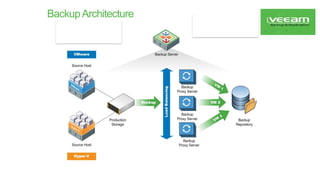
BackupArchitecture
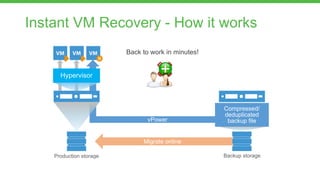
Instant VM Recovery - How it works
Back to work in minutes!
Migrate online
Compressed/
deduplicated
backup file
vPower
Backup storage
Production storage
Hypervisor
SureBackup - How it works
Compressed/
deduplicated
backup file
vPower
Backup storage
Production storage
Hypervisor
VM
OS
App
Report
SureBackup job
Virtual lab
Application group
VM, File, Object and DB Restore
Snaps.
*.vbk
Win Files
Linux Files
(19 FS, btrfs, XFS,
LVM1/2 friendly names)
AD
Exchange
Sharepoint
MS SQL
VLAB
Universal
Applicatio
n
Recovery
Domino
Single
‘Mail
Oracle
11/12
RMAN
support
Exchange
MS SQL
UI/CLI (Admins & Restore Operators)
Web Interface (UHD & VM Admins)
and
more
VM, VM Files,
Instant VM
Recovery, Single VM
disks
Win Files
Linux Files
(19 FS, btrfs, XFS,
LVM1/2 friendly names)
VM
On-Demand Sandbox
- Instantly start a group of VMs in a Virtual Lab
- Start from any restore point (full or incremental)
- Or from any replica point
- Run directly from the backup file,
without changing the backup file
- Put your backups to work!
– Troubleshooting
– Testing workarounds and patches
– Training
Virtual Lab for replicas (VMware)
Reduce risk and put replicas to work
SureReplica: automatically verify every restore
point in every replica
Turn standby replicas and resources into powerful
tools for:
- U-AIR: fastest recovery of items from any virtualized
application
- On-Demand Sandbox: utilize disaster recovery
environments for testing, training and troubleshooting
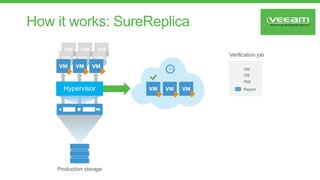
How it works: SureReplica
Production storage
Hypervisor
VM
OS
App
Report
Verification job
© 2016 Veeam Software. All rights reserved. All trademarks are the property of their respective owners.
NEW Enterprise Scalability
Enhancements
The exponential growth of data and provisioned IT services is forcing businesses of all sizes to rethink
their Availability strategy. Through a host of new enterprise enhancements, Veeam is now capable of
helping enterprises scale more efficiently and effectively, regardless of environment size and number of
VMs including:
• Backup acceleration technologies
• Full VM restore acceleration technologies
• Processing engine enhancements
© 2016 Veeam Software. All rights reserved. All trademarks are the property of their respective owners.
NEW Direct Restore to Microsoft
Azure
Direct Restore to Microsoft Azure delivers cloud restore for Veeam
backups to optimize resource allocation and minimize cost. This new
solution enables businesses to take on-premises Windows- and Linux-
based VMs, physical servers and endpoints, and restore or migrate
them to Azure.
© 2016 Veeam Software. All rights reserved. All trademarks are the property of their respective owners.
NEW Full Integration with Microsoft
2016 Datacenter Technologies
Businesses can modernize their private cloud platform and enterprise applications through FULL integration with
Microsoft 2016 data center technologies including:
• Windows Server 2016 support for installing Veeam components on and in protected VMs
• Microsoft Hyper-V 2016 support, including Resilient Change Tracking (RCT), Nano Server hosts, and
Storage Spaces Direct
• Support for 2016 releases of Microsoft enterprise applications
© 2016 Veeam Software. All rights reserved. All trademarks are the property of their respective owners.
NEW Integration Nimble Storage
Snapshots
Veeam delivers Availability for the Always-On Enterprise through integrations with enterprise storage
offerings from HPE, NetApp and EMC, and now extends this integration to Nimble Storage in Veeam
Availability Suite 9.5. Reduce the impact on production environments and achieve lower
recovery time and point objectives (RTPO™) with:
• Backup from Storage Snapshots
• Veeam Explorer™ for Storage Snapshots
• On-Demand Sandbox™ for Storage Snapshots
© 2016 Veeam Software. All rights reserved. All trademarks are the property of their respective owners.
NEW Advanced ReFS Integration
Advanced ReFS integration offers greater performance and capacity efficiencies for large-scale datasets
while ensuring backup data resiliency and the protection of business critical applications through:
• Fast cloning Veeam backups
• Spaceless full backups
• Ensuring backup integrity
© 2016 Veeam Software. All rights reserved. All trademarks are the property of their respective owners.
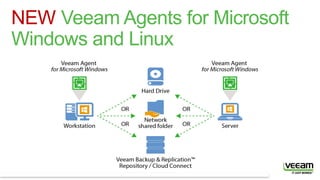
NEW Veeam Agents for Microsoft
Windows and Linux
© 2016 Veeam Software. All rights reserved. All trademarks are the property of their respective owners.
NEW Veeam Agents for Microsoft
Windows
Veeam Agent for Microsoft Windows delivers all-new functionality for physical and cloud-based workloads. It
provides greater protection for mobile workforces and leverages the hybrid cloud for backup and recovery,
including:
• Enterprise-level backup and recovery for physical and cloud-based workloads. Including full support for
Windows Server 2016 and Windows 10. The evolution of Veeam Endpoint Backup™ FREE sees added
support for application-aware processing, flexible scheduling, and additional retention options.
• Cloud-based backup and recovery through Veeam-powered cloud gateways. With Veeam Cloud
Connect, physical and cloud-based workloads can be backed up directly to a cloud service provider. This is
especially useful for mobile workforces that do not visit a corporate office regularly.
• Cached restore points minimize data loss and meet RPOs for laptops outside of the corporate
network. Backups can be stored locally in a temporary space to allow for protection of roaming endpoints.
© 2016 Veeam Software. All rights reserved. All trademarks are the property of their respective owners.
NEW Veeam Agents for Linux
Veeam Agent for Linux is a simple backup agent for Linux that is designed to ensure the Availability of
your Linux server instances, whether they reside in the public cloud or on-premises. With Veeam Agent
for Linux, you get the following benefits:
Backup anywhere: Protect an entire computer or create volume-level and file-level backups of Linux
instances running in the cloud or on-premises
Flexible recovery: Perform on-premises restores from backups of individual cloud instances, or cloud
restores of on-premises backups
Integration with Veeam Backup & Replication™: Take full advantage of Veeam backup repositories as
target locations, leverage existing capabilities for granular recovery — and more!
© 2016 Veeam Software. All rights reserved. All trademarks are the property of their respective owners.
NEW Veeam Backup for Microsoft Office 365
With Office 365, the data is owned and controlled by the business so the business is also responsible for
protecting it. The new Veeam Backup for Microsoft Office 365 mitigates the risk of losing access to email
data and ensures email data Availability to users and the business. With this product, customers can:
• Securely back up Office 365 email data back to their environment.
• Quickly recover individual mailbox items with best-of-breed granularity.
• Efficiently perform eDiscovery of email archives with advanced search capabilities and flexible recovery
and export options
© 2016 Veeam Software. All rights reserved. All trademarks are the property of their respective owners.
NEW Veeam Availability Orchestrator
Veeam Availability Orchestrator provides enterprises with a DR orchestration engine for
either Veeam Backup & Replication or Veeam Availability Suite. Capabilities include:
• Orchestration of Veeam backups and replicas through a defined disaster recovery plan.
• Automated, non-disruptive disaster recovery testing to maintain reliability and avoid
expensive manual processes.
• Built-in documenting, updating and reporting of DR plans to satisfy compliance
requirements.

VeeamBackup-Replication-12-0-Sample-ppt.pptx

  • 1.
    Veeam Backup &Replication v12.0
  • 2.
    © 2016 VeeamSoftware. All rights reserved. All trademarks are the property of their respective owners. AGENDA • Introductions • Backup & Replication Techniques • Veeam Refresher • What’s New With v12.0 • Installation & Configuration of Veeam • Customizations of Backup Schedules • Questions
  • 3.
    What is VeeamBackup & Replication ? Veeam Backup & Replication is a comprehensive data protection and disaster recovery solution. With Veeam Backup & Replication, you can create image-level backups of virtual, physical and cloud machines and restore from them. Technology used in the product optimizes data transfer and resource consumption, which helps to minimize storage costs and the recovery time in case of a disaster. Veeam Backup & Replication provides a centralized console for administering backup, restore and replication operations in all supported platforms (virtual, physical, cloud). Also, the console allows you to automate and schedule routine data protection operations and integrate with solutions for alerting and generating compliance reports.
  • 4.
    Main Features; Main functionalityof Veeam Backup & Replication includes: • Backup: creating image-level backups of virtual, physical, cloud machines and backups of file shares and object storage repositories. • Restore: performing restore from backup files to the original or a new location. Veeam Backup & Replication offers a number of recovery options for various disaster recovery scenarios, including Instant Recovery, image- level restore, file-level restore, restore of application items and so on. • Replication: creating an exact copy of a VM and maintaining the copy in sync with the original VM. • Continuous Data Protection (CDP): replication technology that helps you protect mission-critical VMs and reach recovery point objective (RPO) up to seconds. • Backup Copy: copying backup files to a secondary repository.
  • 5.
    Main Features; • StorageSystems Support: backing up and restoring VMs using capabilities of native snapshots created on storage systems. For more information, see the Storage System Snapshot Integration Guide. • Tape Devices Support: storing copies of backups in tape devices. • Recovery Verification: testing VM backups and replicas before recovery. • Scale-Out Backup Repositories: a repository system that allows you to distribute data between performance, capacity and archive tiers
  • 6.
    With Veeam Backup& Replication, you can back up and restore the following objects: • Virtual machines: VMware vSphere VMs, Microsoft Hyper-V VMs, Nutanix AHV VMs (requires an additional plug-in) • Cloud VMs: o AWS EC2 instances • Microsoft Azure VMs o Google Cloud VMs • Unstructured data: File shares, Object storage repositories • Physical machines. To back up machines running Windows, Linux or macOS operating systems. Veeam Backup & Replication uses backup agents installed on each computer. Veeam Backup & Replication operates as a centralized control center for deploying and managing Veeam Agent for Microsoft Windows, Veeam Agent for Linux, Veeam Agent for Mac, Veeam Agent for Oracle Solaris and Veeam Agent for IBM AIX.
  • 7.
    © 2016 VeeamSoftware. All rights reserved. All trademarks are the property of their respective owners. BackupArchitecture
  • 8.
    Instant VM Recovery- How it works Back to work in minutes! Migrate online Compressed/ deduplicated backup file vPower Backup storage Production storage Hypervisor
  • 9.
    SureBackup - Howit works Compressed/ deduplicated backup file vPower Backup storage Production storage Hypervisor VM OS App Report SureBackup job Virtual lab Application group
  • 10.
    VM, File, Objectand DB Restore Snaps. *.vbk Win Files Linux Files (19 FS, btrfs, XFS, LVM1/2 friendly names) AD Exchange Sharepoint MS SQL VLAB Universal Applicatio n Recovery Domino Single ‘Mail Oracle 11/12 RMAN support Exchange MS SQL UI/CLI (Admins & Restore Operators) Web Interface (UHD & VM Admins) and more VM, VM Files, Instant VM Recovery, Single VM disks Win Files Linux Files (19 FS, btrfs, XFS, LVM1/2 friendly names) VM
  • 11.
    On-Demand Sandbox - Instantlystart a group of VMs in a Virtual Lab - Start from any restore point (full or incremental) - Or from any replica point - Run directly from the backup file, without changing the backup file - Put your backups to work! – Troubleshooting – Testing workarounds and patches – Training
  • 12.
    Virtual Lab forreplicas (VMware) Reduce risk and put replicas to work SureReplica: automatically verify every restore point in every replica Turn standby replicas and resources into powerful tools for: - U-AIR: fastest recovery of items from any virtualized application - On-Demand Sandbox: utilize disaster recovery environments for testing, training and troubleshooting
  • 13.
    How it works:SureReplica Production storage Hypervisor VM OS App Report Verification job
  • 14.
    © 2016 VeeamSoftware. All rights reserved. All trademarks are the property of their respective owners. NEW Enterprise Scalability Enhancements The exponential growth of data and provisioned IT services is forcing businesses of all sizes to rethink their Availability strategy. Through a host of new enterprise enhancements, Veeam is now capable of helping enterprises scale more efficiently and effectively, regardless of environment size and number of VMs including: • Backup acceleration technologies • Full VM restore acceleration technologies • Processing engine enhancements
  • 15.
    © 2016 VeeamSoftware. All rights reserved. All trademarks are the property of their respective owners. NEW Direct Restore to Microsoft Azure Direct Restore to Microsoft Azure delivers cloud restore for Veeam backups to optimize resource allocation and minimize cost. This new solution enables businesses to take on-premises Windows- and Linux- based VMs, physical servers and endpoints, and restore or migrate them to Azure.
  • 16.
    © 2016 VeeamSoftware. All rights reserved. All trademarks are the property of their respective owners. NEW Full Integration with Microsoft 2016 Datacenter Technologies Businesses can modernize their private cloud platform and enterprise applications through FULL integration with Microsoft 2016 data center technologies including: • Windows Server 2016 support for installing Veeam components on and in protected VMs • Microsoft Hyper-V 2016 support, including Resilient Change Tracking (RCT), Nano Server hosts, and Storage Spaces Direct • Support for 2016 releases of Microsoft enterprise applications
  • 17.
    © 2016 VeeamSoftware. All rights reserved. All trademarks are the property of their respective owners. NEW Integration Nimble Storage Snapshots Veeam delivers Availability for the Always-On Enterprise through integrations with enterprise storage offerings from HPE, NetApp and EMC, and now extends this integration to Nimble Storage in Veeam Availability Suite 9.5. Reduce the impact on production environments and achieve lower recovery time and point objectives (RTPO™) with: • Backup from Storage Snapshots • Veeam Explorer™ for Storage Snapshots • On-Demand Sandbox™ for Storage Snapshots
  • 18.
    © 2016 VeeamSoftware. All rights reserved. All trademarks are the property of their respective owners. NEW Advanced ReFS Integration Advanced ReFS integration offers greater performance and capacity efficiencies for large-scale datasets while ensuring backup data resiliency and the protection of business critical applications through: • Fast cloning Veeam backups • Spaceless full backups • Ensuring backup integrity
  • 19.
    © 2016 VeeamSoftware. All rights reserved. All trademarks are the property of their respective owners. NEW Veeam Agents for Microsoft Windows and Linux
  • 20.
    © 2016 VeeamSoftware. All rights reserved. All trademarks are the property of their respective owners. NEW Veeam Agents for Microsoft Windows Veeam Agent for Microsoft Windows delivers all-new functionality for physical and cloud-based workloads. It provides greater protection for mobile workforces and leverages the hybrid cloud for backup and recovery, including: • Enterprise-level backup and recovery for physical and cloud-based workloads. Including full support for Windows Server 2016 and Windows 10. The evolution of Veeam Endpoint Backup™ FREE sees added support for application-aware processing, flexible scheduling, and additional retention options. • Cloud-based backup and recovery through Veeam-powered cloud gateways. With Veeam Cloud Connect, physical and cloud-based workloads can be backed up directly to a cloud service provider. This is especially useful for mobile workforces that do not visit a corporate office regularly. • Cached restore points minimize data loss and meet RPOs for laptops outside of the corporate network. Backups can be stored locally in a temporary space to allow for protection of roaming endpoints.
  • 21.
    © 2016 VeeamSoftware. All rights reserved. All trademarks are the property of their respective owners. NEW Veeam Agents for Linux Veeam Agent for Linux is a simple backup agent for Linux that is designed to ensure the Availability of your Linux server instances, whether they reside in the public cloud or on-premises. With Veeam Agent for Linux, you get the following benefits: Backup anywhere: Protect an entire computer or create volume-level and file-level backups of Linux instances running in the cloud or on-premises Flexible recovery: Perform on-premises restores from backups of individual cloud instances, or cloud restores of on-premises backups Integration with Veeam Backup & Replication™: Take full advantage of Veeam backup repositories as target locations, leverage existing capabilities for granular recovery — and more!
  • 22.
    © 2016 VeeamSoftware. All rights reserved. All trademarks are the property of their respective owners. NEW Veeam Backup for Microsoft Office 365 With Office 365, the data is owned and controlled by the business so the business is also responsible for protecting it. The new Veeam Backup for Microsoft Office 365 mitigates the risk of losing access to email data and ensures email data Availability to users and the business. With this product, customers can: • Securely back up Office 365 email data back to their environment. • Quickly recover individual mailbox items with best-of-breed granularity. • Efficiently perform eDiscovery of email archives with advanced search capabilities and flexible recovery and export options
  • 23.
    © 2016 VeeamSoftware. All rights reserved. All trademarks are the property of their respective owners. NEW Veeam Availability Orchestrator Veeam Availability Orchestrator provides enterprises with a DR orchestration engine for either Veeam Backup & Replication or Veeam Availability Suite. Capabilities include: • Orchestration of Veeam backups and replicas through a defined disaster recovery plan. • Automated, non-disruptive disaster recovery testing to maintain reliability and avoid expensive manual processes. • Built-in documenting, updating and reporting of DR plans to satisfy compliance requirements.

Editor's Notes

  • #3 Veeam’s availability for the modern data center provides organizations with 5 key capabilities enabling the Always-On Business High-Speed Recovery: Rapid recovery of what you want, the way you want it Data Loss Avoidance: Near-continuous data protection and streamlined disaster recovery Verified Protection: Guaranteed recovery of every file, application or virtual server, every time Leveraged Data: Low-risk deployment with a production-like test environment Complete Visibility: Proactive monitoring and alerting of issues before operational impact
  • #4 Veeam’s availability for the modern data center provides organizations with 5 key capabilities enabling the Always-On Business High-Speed Recovery: Rapid recovery of what you want, the way you want it Data Loss Avoidance: Near-continuous data protection and streamlined disaster recovery Verified Protection: Guaranteed recovery of every file, application or virtual server, every time Leveraged Data: Low-risk deployment with a production-like test environment Complete Visibility: Proactive monitoring and alerting of issues before operational impact
  • #5 Veeam’s availability for the modern data center provides organizations with 5 key capabilities enabling the Always-On Business High-Speed Recovery: Rapid recovery of what you want, the way you want it Data Loss Avoidance: Near-continuous data protection and streamlined disaster recovery Verified Protection: Guaranteed recovery of every file, application or virtual server, every time Leveraged Data: Low-risk deployment with a production-like test environment Complete Visibility: Proactive monitoring and alerting of issues before operational impact
  • #6 Veeam’s availability for the modern data center provides organizations with 5 key capabilities enabling the Always-On Business High-Speed Recovery: Rapid recovery of what you want, the way you want it Data Loss Avoidance: Near-continuous data protection and streamlined disaster recovery Verified Protection: Guaranteed recovery of every file, application or virtual server, every time Leveraged Data: Low-risk deployment with a production-like test environment Complete Visibility: Proactive monitoring and alerting of issues before operational impact
  • #7 Veeam’s availability for the modern data center provides organizations with 5 key capabilities enabling the Always-On Business High-Speed Recovery: Rapid recovery of what you want, the way you want it Data Loss Avoidance: Near-continuous data protection and streamlined disaster recovery Verified Protection: Guaranteed recovery of every file, application or virtual server, every time Leveraged Data: Low-risk deployment with a production-like test environment Complete Visibility: Proactive monitoring and alerting of issues before operational impact
  • #8 This is how we enable Availability for the Always-On Enterprise. Lets have a look at how Veeam Availability Suite provides best practices for customers looking to meet SLAs for RTPO < 15 minutes for ALL applications and data.
  • #13 On-demand sandbox with replicas is new for v7