How we got domain
admin
Carsten Maartmann-Moe
GRC 2016, may 19
Agenda
• introduction
• the steps of a breach
• why we care about domain admin
• how we got it
• demonstrations
• key take-away
©TranscendentGroup2016
Introduction
Name: Carsten Maartmann-Moe
Profession: White hat hacker and penetration tester
Nationality: Norwegian
Hobby: My daughter
Why I’m here: To talk about techniques that attackers use to gain
unrestrained privileges to your Microsoft active directory (AD)
domain after an initial breach. I will explain common pitfalls as well
as tricks to secure a modern AD environment.
©TranscendentGroup2016
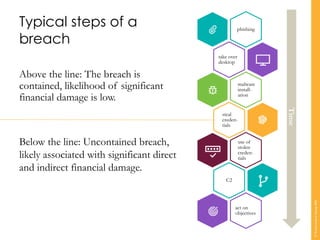
phishing
take over
desktop
malware
install-
ation
steal
creden-
tials
use of
stolen
creden-
tials
C2
act on
objectives
Typical steps of a
breach
Above the line: The breach is
contained, likelihood of significant
financial damage is low.
Below the line: Uncontained breach,
likely associated with significant direct
and indirect financial damage.
Time
©TranscendentGroup2016
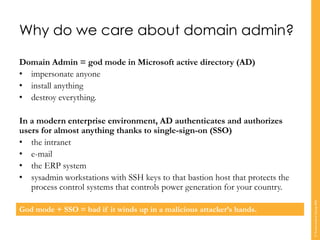
Why do we care about domain admin?
Domain Admin = god mode in Microsoft active directory (AD)
• impersonate anyone
• install anything
• destroy everything.
In a modern enterprise environment, AD authenticates and authorizes
users for almost anything thanks to single-sign-on (SSO)
• the intranet
• e-mail
• the ERP system
• sysadmin workstations with SSH keys to that bastion host that protects the
process control systems that controls power generation for your country.
God mode + SSO = bad if it winds up in a malicious attacker’s hands.
©TranscendentGroup2016
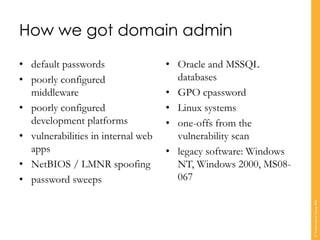
How we got domain admin
• default passwords
• poorly configured
middleware
• poorly configured
development platforms
• vulnerabilities in internal web
apps
• NetBIOS / LMNR spoofing
• password sweeps
• Oracle and MSSQL
databases
• GPO cpassword
• Linux systems
• one-offs from the
vulnerability scan
• legacy software: Windows
NT, Windows 2000, MS08-
067
©TranscendentGroup2016
Demo: from Oracle to domain
admin
©TranscendentGroup2016
Demo: from weak passwords to
domain admin
©TranscendentGroup2016
Demo: from JBoss to domain
admin
©TranscendentGroup2016
Take-away
To reduce the risk of a major
breach, focus on the basics:
• patching
• configuration management
• passwords and credentials
• segmentation and segregation
• vulnerability management
• logging and monitoring.
©TranscendentGroup2016
www.transcendentgroup.com

How we got domain admin

  • 1.
    How we gotdomain admin Carsten Maartmann-Moe GRC 2016, may 19
  • 2.
    Agenda • introduction • thesteps of a breach • why we care about domain admin • how we got it • demonstrations • key take-away ©TranscendentGroup2016
  • 3.
    Introduction Name: Carsten Maartmann-Moe Profession:White hat hacker and penetration tester Nationality: Norwegian Hobby: My daughter Why I’m here: To talk about techniques that attackers use to gain unrestrained privileges to your Microsoft active directory (AD) domain after an initial breach. I will explain common pitfalls as well as tricks to secure a modern AD environment. ©TranscendentGroup2016
  • 4.
    phishing take over desktop malware install- ation steal creden- tials use of stolen creden- tials C2 acton objectives Typical steps of a breach Above the line: The breach is contained, likelihood of significant financial damage is low. Below the line: Uncontained breach, likely associated with significant direct and indirect financial damage. Time ©TranscendentGroup2016
  • 5.
    Why do wecare about domain admin? Domain Admin = god mode in Microsoft active directory (AD) • impersonate anyone • install anything • destroy everything. In a modern enterprise environment, AD authenticates and authorizes users for almost anything thanks to single-sign-on (SSO) • the intranet • e-mail • the ERP system • sysadmin workstations with SSH keys to that bastion host that protects the process control systems that controls power generation for your country. God mode + SSO = bad if it winds up in a malicious attacker’s hands. ©TranscendentGroup2016
  • 6.
    How we gotdomain admin • default passwords • poorly configured middleware • poorly configured development platforms • vulnerabilities in internal web apps • NetBIOS / LMNR spoofing • password sweeps • Oracle and MSSQL databases • GPO cpassword • Linux systems • one-offs from the vulnerability scan • legacy software: Windows NT, Windows 2000, MS08- 067 ©TranscendentGroup2016
  • 7.
    Demo: from Oracleto domain admin ©TranscendentGroup2016
  • 8.
    Demo: from weakpasswords to domain admin ©TranscendentGroup2016
  • 9.
    Demo: from JBossto domain admin ©TranscendentGroup2016
  • 10.
    Take-away To reduce therisk of a major breach, focus on the basics: • patching • configuration management • passwords and credentials • segmentation and segregation • vulnerability management • logging and monitoring. ©TranscendentGroup2016
  • 11.