Secure Active Directory
in one day without spending
a single dollar
1
David Rowe @customes
david_rowe [@] Harvard.edu
#infosec #nercomp #security
©2019
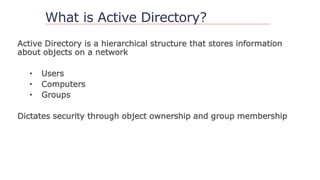
What is Active Directory?
Active Directory is a hierarchical structure that stores information
about objects on a network
• Users
• Computers
• Groups
Dictates security through object ownership and group membership
Why access is important
Active directory is set up as a discretionary access control model
• Based on the individual
• Each person has an account
• Accounts have access to objects
Why access is important
RBAC
• As administrators shift and rotate roles, they create different role
groups with different access across the domain(s)
• Ex: Helpdesk – reset passwords
• Ex: Server Team – log on to servers
Privilege creep
• Over time accounts gain more and more to objects.
• The rights are often overlooked and unknown by owners of AD
Why access is important
With users gaining more and more access to objects; computers,
groups and other users, attackers have more areas to exploit
A.D. – What usually happens
More and more users on the domain have privileges
User rights sit idle and can be used by anyone with access to that
account, group, or computer
Microsoft’s Solution – ESAE
Enhanced Security Administrative Environment
• Helps prevent compromise of administrative credentials from
cyber-attacks
• Thwart attacks by limiting exposure of admin credentials
(Cached Credentials)
Source:
https://goo.gl/UqHTJA
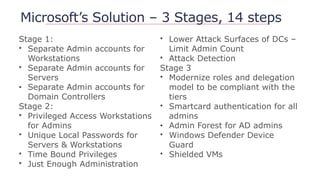
Microsoft’s Solution – 3 Stages, 14 steps
Stage 1:
• Separate Admin accounts for
Workstations
• Separate Admin accounts for
Servers
• Separate Admin accounts for
Domain Controllers
Stage 2:
• Privileged Access Workstations
for Admins
• Unique Local Passwords for
Servers & Workstations
• Time Bound Privileges
• Just Enough Administration
• Lower Attack Surfaces of DCs –
Limit Admin Count
• Attack Detection
Stage 3
• Modernize roles and delegation
model to be compliant with the
tiers
• Smartcard authentication for all
admins
• Admin Forest for AD admins
• Windows Defender Device
Guard
• Shielded VMs
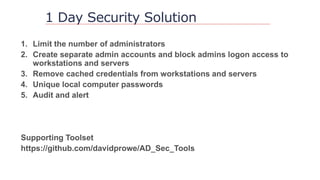
1 Day Security Solution
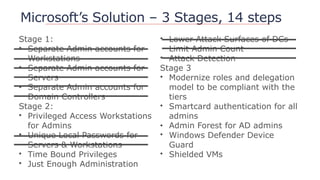
Microsoft’s Solution – 3 Stages, 14 steps
Stage 1:
• Separate Admin accounts for
Workstations
• Separate Admin accounts for
Servers
• Separate Admin accounts for
Domain Controllers
Stage 2:
• Privileged Access Workstations
for Admins
• Unique Local Passwords for
Servers & Workstations
• Time Bound Privileges
• Just Enough Administration
• Lower Attack Surfaces of DCs –
Limit Admin Count
• Attack Detection
Stage 3
• Modernize roles and delegation
model to be compliant with the
tiers
• Smartcard authentication for all
admins
• Admin Forest for AD admins
• Windows Defender Device
Guard
• Shielded VMs
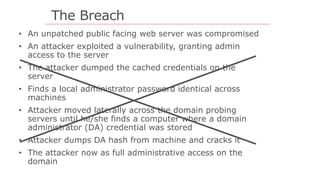
The Breach
• An unpatched public facing web server was compromised
• An attacker exploited a vulnerability, granting admin
access to the server
• The attacker dumped the cached credentials on the
server
• Finds a local administrator password identical across
machines
• Attacker moved laterally across the domain probing
servers until he/she finds a computer where a domain
administrator (DA) credential was stored
• Attacker dumps DA hash from machine and cracks it
• The attacker now as full administrative access on the
domain
Step #1 Limit Admins
1. Limit Admins
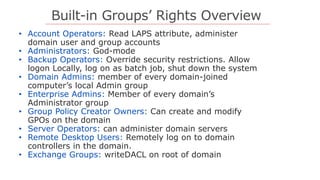
Built-in Groups’ Rights Overview
• Account Operators: Read LAPS attribute, administer
domain user and group accounts
• Administrators: God-mode
• Backup Operators: Override security restrictions. Allow
logon Locally, log on as batch job, shut down the system
• Domain Admins: member of every domain-joined
computer’s local Admin group
• Enterprise Admins: Member of every domain’s
Administrator group
• Group Policy Creator Owners: Can create and modify
GPOs on the domain
• Server Operators: can administer domain servers
• Remote Desktop Users: Remotely log on to domain
controllers in the domain.
• Exchange Groups: writeDACL on root of domain
What is a Shadow Admin?
shadow admin
sensitive privileges.
granted directly using ACLs on AD objects.
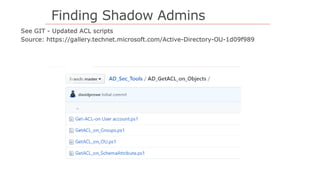
Finding Shadow Admins
Why find and limit # of admins
Step #2 Separate Admin Accounts
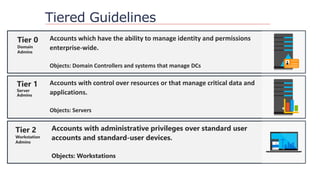
Tiered Guidelines
Accounts which have the ability to manage identity and permissions
enterprise-wide.
Objects: Domain Controllers and systems that manage DCs
Tier 0
Domain
Admins
Tier 1
Server
Admins
Accounts with control over resources or that manage critical data and
applications.
Objects: Servers
Tier 2
Workstation
Admins
Accounts with administrative privileges over standard user
accounts and standard-user devices.
Objects: Workstations
Step #2: Block Admins
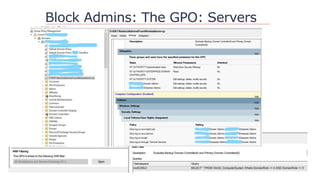
Block Admins: The GPO: Servers
Step #3: Cached Creds GPO
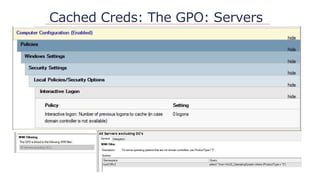
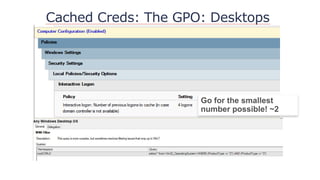
Cached Creds Defined
Computer level setting:
Interactive logon: Number of previous logons to cache
[store in memory] (in case domain controller is not
available) 1
Value indicates stored users credentials on device – (10)
Default stored as RC4 hash on system
Cached Creds Vulnerabilities
Targeted Pass-the-hash -If you can’t crack it, encapsulate
and pass it
RC4 Nomore – one type of RC4 Exploit – 52 Hrs to crack
One incident I observed evidence a plaintext password 9
minutes after the hash was compromised
Common tools to exploit Cached Creds
Mimikatz
Impacket
JtR
Hashcat
Ophcrack
Taskmanager… + lsass.exe
Pwdumpx + passwordPro
Cached Creds: The GPO: Servers
Cached Creds: The GPO: Desktops
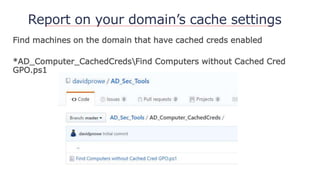
Report on your domain’s cache settings
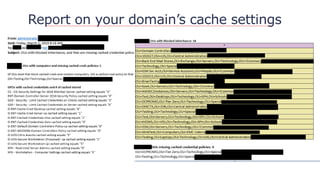
Find machines on the domain that have cached creds enabled
*AD_Computer_CachedCredsFind Computers without Cached Cred
GPO.ps1
Report on your domain’s cache settings
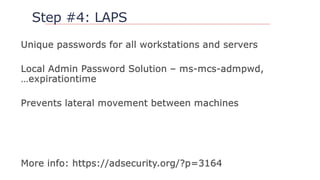
Step #4: LAPS
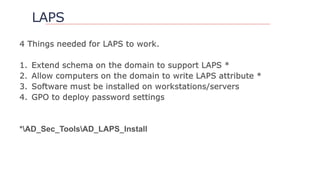
LAPS
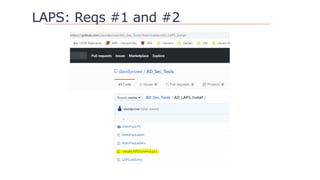
LAPS: Reqs #1 and #2
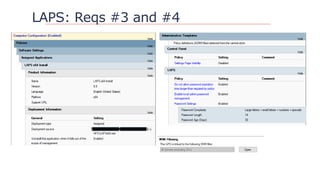
LAPS: Reqs #3 and #4
Step #5: Audit and Alert
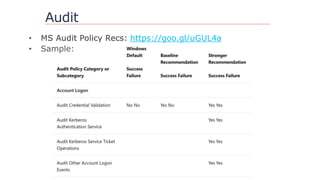
Audit
https://goo.gl/uGUL4a
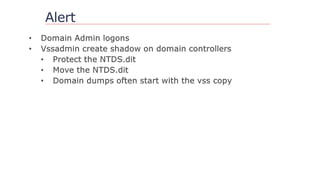
Alert
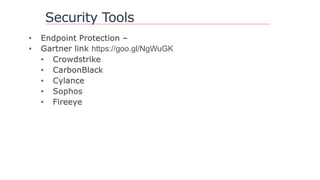
Security Tools
https://goo.gl/NgWuGK
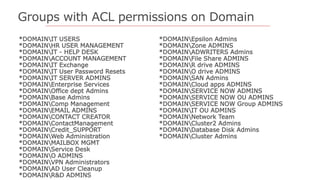
Groups with ACL permissions on Domain
*DOMAINIT USERS
*DOMAINHR USER MANAGEMENT
*DOMAINIT - HELP DESK
*DOMAINACCOUNT MANAGEMENT
*DOMAINIT Exchange
*DOMAINIT User Password Resets
*DOMAINIT SERVER ADMINS
*DOMAINEnterprise Services
*DOMAINOffice dept Admins
*DOMAINBase Admins
*DOMAINComp Management
*DOMAINEMAIL ADMINS
*DOMAINCONTACT CREATOR
*DOMAINContactManagement
*DOMAINCredit_SUPPORT
*DOMAINWeb Administration
*DOMAINMAILBOX MGMT
*DOMAINService Desk
*DOMAINO ADMINS
*DOMAINVPN Administrators
*DOMAINAD User Cleanup
*DOMAINR&D ADMINS
*DOMAINEpsilon Admins
*DOMAINZone ADMINS
*DOMAINADWRITERS Admins
*DOMAINFile Share ADMINS
*DOMAINR drive ADMINS
*DOMAINO drive ADMINS
*DOMAINSAN Admins
*DOMAINCloud apps ADMINS
*DOMAINSERVICE NOW ADMINS
*DOMAINSERVICE NOW OU ADMINS
*DOMAINSERVICE NOW Group ADMINS
*DOMAINIT OU ADMINS
*DOMAINNetwork Team
*DOMAINCluster2 Admins
*DOMAINDatabase Disk Admins
*DOMAINCluster Admins
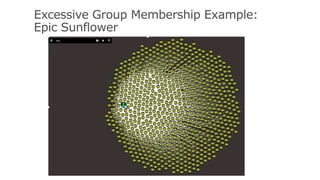
Excessive Group Membership Example:
Epic Sunflower
Questions?
https://github.com/davidprowe/AD_Sec_Tools
@customes
david_rowe [@] Harvard.edu
Secure Active Directory in one Day Without Spending a Single Dollar

Secure Active Directory in one Day Without Spending a Single Dollar

  • 1.
    Secure Active Directory inone day without spending a single dollar 1 David Rowe @customes david_rowe [@] Harvard.edu #infosec #nercomp #security ©2019
  • 4.
    What is ActiveDirectory? Active Directory is a hierarchical structure that stores information about objects on a network • Users • Computers • Groups Dictates security through object ownership and group membership
  • 5.
    Why access isimportant Active directory is set up as a discretionary access control model • Based on the individual • Each person has an account • Accounts have access to objects
  • 6.
    Why access isimportant RBAC • As administrators shift and rotate roles, they create different role groups with different access across the domain(s) • Ex: Helpdesk – reset passwords • Ex: Server Team – log on to servers Privilege creep • Over time accounts gain more and more to objects. • The rights are often overlooked and unknown by owners of AD
  • 7.
    Why access isimportant With users gaining more and more access to objects; computers, groups and other users, attackers have more areas to exploit
  • 8.
    A.D. – Whatusually happens More and more users on the domain have privileges User rights sit idle and can be used by anyone with access to that account, group, or computer
  • 9.
    Microsoft’s Solution –ESAE Enhanced Security Administrative Environment • Helps prevent compromise of administrative credentials from cyber-attacks • Thwart attacks by limiting exposure of admin credentials (Cached Credentials) Source: https://goo.gl/UqHTJA
  • 11.
    Microsoft’s Solution –3 Stages, 14 steps Stage 1: • Separate Admin accounts for Workstations • Separate Admin accounts for Servers • Separate Admin accounts for Domain Controllers Stage 2: • Privileged Access Workstations for Admins • Unique Local Passwords for Servers & Workstations • Time Bound Privileges • Just Enough Administration • Lower Attack Surfaces of DCs – Limit Admin Count • Attack Detection Stage 3 • Modernize roles and delegation model to be compliant with the tiers • Smartcard authentication for all admins • Admin Forest for AD admins • Windows Defender Device Guard • Shielded VMs
  • 12.
  • 13.
    Microsoft’s Solution –3 Stages, 14 steps Stage 1: • Separate Admin accounts for Workstations • Separate Admin accounts for Servers • Separate Admin accounts for Domain Controllers Stage 2: • Privileged Access Workstations for Admins • Unique Local Passwords for Servers & Workstations • Time Bound Privileges • Just Enough Administration • Lower Attack Surfaces of DCs – Limit Admin Count • Attack Detection Stage 3 • Modernize roles and delegation model to be compliant with the tiers • Smartcard authentication for all admins • Admin Forest for AD admins • Windows Defender Device Guard • Shielded VMs
  • 14.
    The Breach • Anunpatched public facing web server was compromised • An attacker exploited a vulnerability, granting admin access to the server • The attacker dumped the cached credentials on the server • Finds a local administrator password identical across machines • Attacker moved laterally across the domain probing servers until he/she finds a computer where a domain administrator (DA) credential was stored • Attacker dumps DA hash from machine and cracks it • The attacker now as full administrative access on the domain
  • 15.
  • 16.
  • 17.
    Built-in Groups’ RightsOverview • Account Operators: Read LAPS attribute, administer domain user and group accounts • Administrators: God-mode • Backup Operators: Override security restrictions. Allow logon Locally, log on as batch job, shut down the system • Domain Admins: member of every domain-joined computer’s local Admin group • Enterprise Admins: Member of every domain’s Administrator group • Group Policy Creator Owners: Can create and modify GPOs on the domain • Server Operators: can administer domain servers • Remote Desktop Users: Remotely log on to domain controllers in the domain. • Exchange Groups: writeDACL on root of domain
  • 18.
    What is aShadow Admin? shadow admin sensitive privileges. granted directly using ACLs on AD objects.
  • 19.
  • 20.
    Why find andlimit # of admins
  • 21.
    Step #2 SeparateAdmin Accounts
  • 22.
    Tiered Guidelines Accounts whichhave the ability to manage identity and permissions enterprise-wide. Objects: Domain Controllers and systems that manage DCs Tier 0 Domain Admins Tier 1 Server Admins Accounts with control over resources or that manage critical data and applications. Objects: Servers Tier 2 Workstation Admins Accounts with administrative privileges over standard user accounts and standard-user devices. Objects: Workstations
  • 23.
  • 24.
    Block Admins: TheGPO: Servers
  • 25.
    Step #3: CachedCreds GPO
  • 26.
    Cached Creds Defined Computerlevel setting: Interactive logon: Number of previous logons to cache [store in memory] (in case domain controller is not available) 1 Value indicates stored users credentials on device – (10) Default stored as RC4 hash on system
  • 27.
    Cached Creds Vulnerabilities TargetedPass-the-hash -If you can’t crack it, encapsulate and pass it RC4 Nomore – one type of RC4 Exploit – 52 Hrs to crack One incident I observed evidence a plaintext password 9 minutes after the hash was compromised
  • 28.
    Common tools toexploit Cached Creds Mimikatz Impacket JtR Hashcat Ophcrack Taskmanager… + lsass.exe Pwdumpx + passwordPro
  • 29.
    Cached Creds: TheGPO: Servers
  • 30.
    Cached Creds: TheGPO: Desktops
  • 31.
    Report on yourdomain’s cache settings Find machines on the domain that have cached creds enabled *AD_Computer_CachedCredsFind Computers without Cached Cred GPO.ps1
  • 32.
    Report on yourdomain’s cache settings
  • 33.
  • 34.
  • 35.
  • 36.
  • 37.
    Step #5: Auditand Alert
  • 38.
  • 39.
  • 40.
  • 41.
    Groups with ACLpermissions on Domain *DOMAINIT USERS *DOMAINHR USER MANAGEMENT *DOMAINIT - HELP DESK *DOMAINACCOUNT MANAGEMENT *DOMAINIT Exchange *DOMAINIT User Password Resets *DOMAINIT SERVER ADMINS *DOMAINEnterprise Services *DOMAINOffice dept Admins *DOMAINBase Admins *DOMAINComp Management *DOMAINEMAIL ADMINS *DOMAINCONTACT CREATOR *DOMAINContactManagement *DOMAINCredit_SUPPORT *DOMAINWeb Administration *DOMAINMAILBOX MGMT *DOMAINService Desk *DOMAINO ADMINS *DOMAINVPN Administrators *DOMAINAD User Cleanup *DOMAINR&D ADMINS *DOMAINEpsilon Admins *DOMAINZone ADMINS *DOMAINADWRITERS Admins *DOMAINFile Share ADMINS *DOMAINR drive ADMINS *DOMAINO drive ADMINS *DOMAINSAN Admins *DOMAINCloud apps ADMINS *DOMAINSERVICE NOW ADMINS *DOMAINSERVICE NOW OU ADMINS *DOMAINSERVICE NOW Group ADMINS *DOMAINIT OU ADMINS *DOMAINNetwork Team *DOMAINCluster2 Admins *DOMAINDatabase Disk Admins *DOMAINCluster Admins
  • 42.
    Excessive Group MembershipExample: Epic Sunflower
  • 43.