INTRODUCTION
If you are new to digital advertising universe you might be thinking that Facebooks Ads is witchcraft.
However, this is why here at Sociality.io we’ve prepared this guide for you. We will show you how to
launch ads from scratch without any previous experience with Facebook Ads. Open this article and
Facebook Ad Manager at the same time and simply follow each step. Becoming a master of Facebook
ads is not rocket science, but you definitely can turn into a Jedi of reaching your social media
marketing goals.
STEP 0: PREPARATION
Speaking of which… Determine your goals. What are you planning to achieve with Facebook ads? Do
you want to increase application downloads, boost website traffic or build a strong community on
Facebook itself? The success of your Facebook advertising campaign will depend on this step.
However, don’t be misled by your assumptions. How to know exactly what objectives going to benefit
the growth of your company the most? For example, as a new company, you might want to reach as
many people as possible. Or increase catalog sales by advertising catalog items via Facebook ads.
First of all, listen to your current audience. Who are these new customers you are trying to reach via
Facebook? Imagine these people and create a complete profile. What they like, dislike, enjoy doing,
occupation, demographic factors, etc. The more you understand these potential clients the more
successful is your campaign going to be.
And lastly, prepare copywriting and visuals beforehand. If you are investing money to digital
advertising it makes sense to invest money by hiring a freelance graphic designer or copywriter to
increases success chances of your campaigns. Also, make sure that the size of files is correct and
avoid being too wordy. People on the internet tend to have a short attention span. (As you probably
know, since you are scanning this article yourself).
STEP 1: OBJECTIVE
“What is the most important outcome I want from this as?”. We don’t recommend you to choose
objectives randomly. By choosing a certain objective, you tell the algorithm to encourage ad viewers
to perform specific targeted actions. Here is what we mean by that:
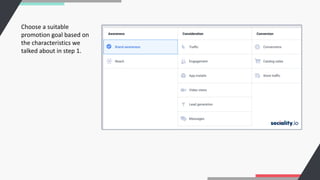
1. Brand awareness – helps to increase the brand recognition of your company, reaching people
who are more likely to be interested in the ad.
2. Reach – show ads to the largest number of Facebook and Instagram users to attract attention to
the brand. This goal does not guarantee a high rate of final target actions. The idea here is to
show the ad to as many people as possible.
3. App Installs – allows you to redirect users to the store to download the application.
4. Traffic – encourages and redirect users to your website, blog, app or messenger conversions.
5. Lead Generation – collects contact details of users within the platform.
6. Messages – invites users to exchange messages. You can answer questions and showcase our
superior customer support teams’.
7. Engagement – increases user interaction with a particular post to get comments, likes, shares,
event responses. Helps with the promotion of pages and events on Facebook.
8. Video Views – promotes video content, enhances brand awareness.
9. Conversions – helps to get valuable actions on the site.
10. Store Visits – suitable for promoting offline stores, with this purpose you can attract people
nearby your store.
11. Catalog Sales – promotion of goods from your facebook catalog.
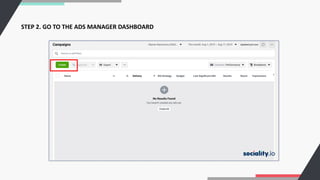
STEP 2. GO TO THE ADS MANAGER DASHBOARD
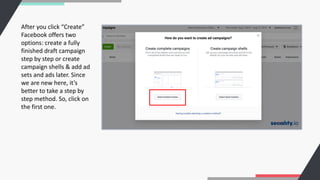
After you click “Create”
Facebook offers two
options: create a fully
finished draft campaign
step by step or create
campaign shells & add ad
sets and ads later. Since
we are new here, it’s
better to take a step by
step method. So, click on
the first one.
Choose a suitable
promotion goal based on
the characteristics we
talked about in step 1.
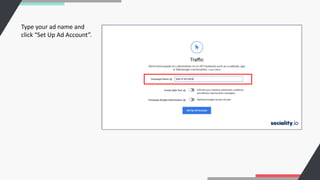
Type your ad name and
click “Set Up Ad Account”.
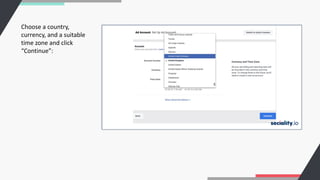
Choose a country,
currency, and a suitable
time zone and click
“Continue”:
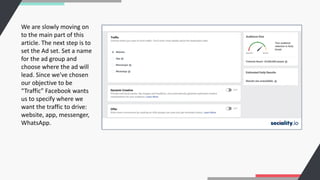
We are slowly moving on
to the main part of this
article. The next step is to
set the Ad set. Set a name
for the ad group and
choose where the ad will
lead. Since we’ve chosen
our objective to be
“Traffic” Facebook wants
us to specify where we
want the traffic to drive:
website, app, messenger,
WhatsApp.
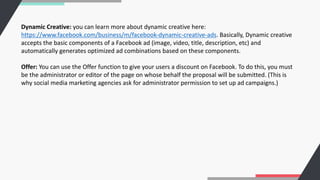
Dynamic Creative: you can learn more about dynamic creative here:
https://www.facebook.com/business/m/facebook-dynamic-creative-ads. Basically, Dynamic creative
accepts the basic components of a Facebook ad (image, video, title, description, etc) and
automatically generates optimized ad combinations based on these components.
Offer: You can use the Offer function to give your users a discount on Facebook. To do this, you must
be the administrator or editor of the page on whose behalf the proposal will be submitted. (This is
why social media marketing agencies ask for administrator permission to set up ad campaigns.)
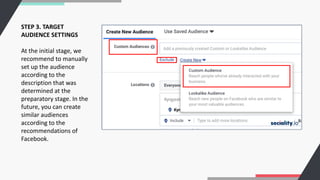
STEP 3. TARGET
AUDIENCE SETTINGS
At the initial stage, we
recommend to manually
set up the audience
according to the
description that was
determined at the
preparatory stage. In the
future, you can create
similar audiences
according to the
recommendations of
Facebook.
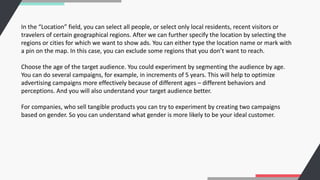
In the “Location” field, you can select all people, or select only local residents, recent visitors or
travelers of certain geographical regions. After we can further specify the location by selecting the
regions or cities for which we want to show ads. You can either type the location name or mark with
a pin on the map. In this case, you can exclude some regions that you don’t want to reach.
Choose the age of the target audience. You could experiment by segmenting the audience by age.
You can do several campaigns, for example, in increments of 5 years. This will help to optimize
advertising campaigns more effectively because of different ages – different behaviors and
perceptions. And you will also understand your target audience better.
For companies, who sell tangible products you can try to experiment by creating two campaigns
based on gender. So you can understand what gender is more likely to be your ideal customer.
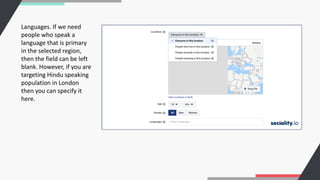
Languages. If we need
people who speak a
language that is primary
in the selected region,
then the field can be left
blank. However, if you are
targeting Hindu speaking
population in London
then you can specify it
here.
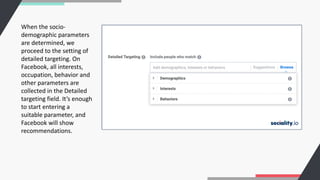
When the socio-
demographic parameters
are determined, we
proceed to the setting of
detailed targeting. On
Facebook, all interests,
occupation, behavior and
other parameters are
collected in the Detailed
targeting field. It’s enough
to start entering a
suitable parameter, and
Facebook will show
recommendations.
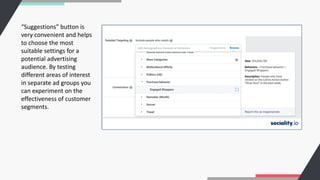
“Suggestions” button is
very convenient and helps
to choose the most
suitable settings for a
potential advertising
audience. By testing
different areas of interest
in separate ad groups you
can experiment on the
effectiveness of customer
segments.
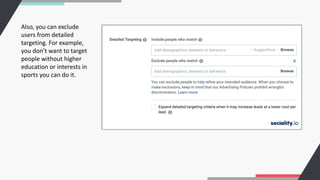
Also, you can exclude
users from detailed
targeting. For example,
you don’t want to target
people without higher
education or interests in
sports you can do it.
Basically, you can almost niche your advertising to people who for example have already interacted
with your page, application or have attended your events.
After you have configured all the parameters of the target audience save the segment for future
advertising campaigns.
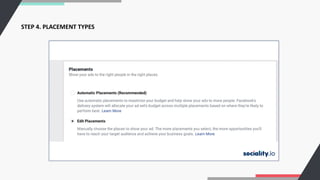
STEP 4. PLACEMENT TYPES
You have probably guessed it right. Placements are the placement of ads. Since the acquisition of
Instagram Facebook offers a different kind of places where your ads can appear.
You can choose Facebook automatic placement. But at Sociality.io we believe in full control over
where you want to display ads. For example, some placements are less effective than others and
maybe are not suitable for your needs.
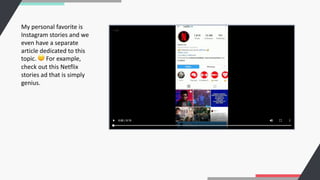
My personal favorite is
Instagram stories and we
even have a separate
article dedicated to this
topic. 🙂 For example,
check out this Netflix
stories ad that is simply
genius.
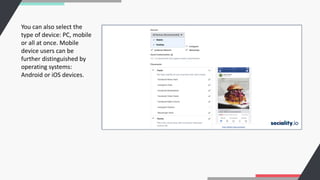
You can also select the
type of device: PC, mobile
or all at once. Mobile
device users can be
further distinguished by
operating systems:
Android or iOS devices.
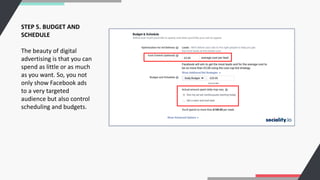
STEP 5. BUDGET AND
SCHEDULE
The beauty of digital
advertising is that you can
spend as little or as much
as you want. So, you not
only show Facebook ads
to a very targeted
audience but also control
scheduling and budgets.
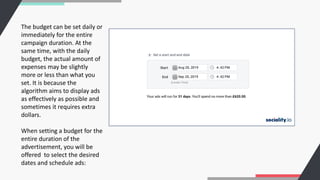
The budget can be set daily or
immediately for the entire
campaign duration. At the
same time, with the daily
budget, the actual amount of
expenses may be slightly
more or less than what you
set. It is because the
algorithm aims to display ads
as effectively as possible and
sometimes it requires extra
dollars.
When setting a budget for the
entire duration of the
advertisement, you will be
offered to select the desired
dates and schedule ads:
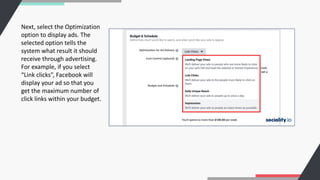
Next, select the Optimization
option to display ads. The
selected option tells the
system what result it should
receive through advertising.
For example, if you select
“Link clicks”, Facebook will
display your ad so that you
get the maximum number of
click links within your budget.
4 optimization options are offered:
1. Link clicks
2. Landing page views
3. Impressions
4. Daily reach among unique users
The choice will depend on your original advertising campaign objective.
You can learn more about cost control here:
https://www.facebook.com/business/help/1619591734742116
Facebook’s payment models are standard: for impressions (CPM) or for clicks (CPM). If advertising
needs to be shown on a schedule, for example, only on weekdays from 9 to 18, then you can set the
appropriate settings in the “Schedule an ad schedule” field.
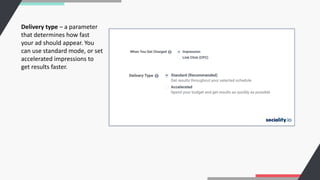
Delivery type – a parameter
that determines how fast
your ad should appear. You
can use standard mode, or set
accelerated impressions to
get results faster.
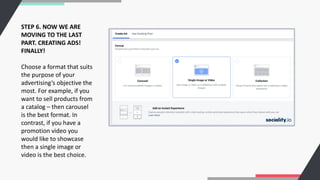
STEP 6. NOW WE ARE
MOVING TO THE LAST
PART. CREATING ADS!
FINALLY!
Choose a format that suits
the purpose of your
advertising’s objective the
most. For example, if you
want to sell products from
a catalog – then carousel
is the best format. In
contrast, if you have a
promotion video you
would like to showcase
then a single image or
video is the best choice.
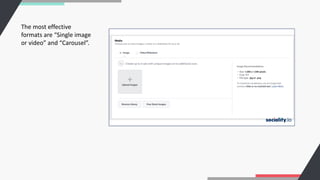
The most effective
formats are “Single image
or video” and “Carousel”.
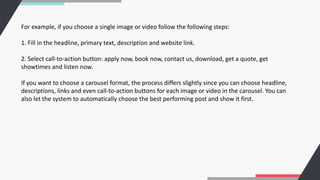
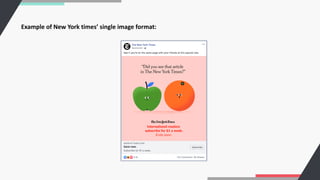
For example, if you choose a single image or video follow the following steps:
1. Fill in the headline, primary text, description and website link.
2. Select call-to-action button: apply now, book now, contact us, download, get a quote, get
showtimes and listen now.
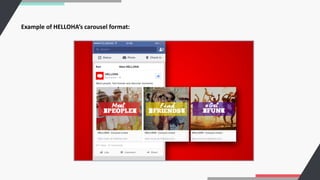
If you want to choose a carousel format, the process differs slightly since you can choose headline,
descriptions, links and even call-to-action buttons for each image or video in the carousel. You can
also let the system to automatically choose the best performing post and show it first.
Example of HELLOHA’s carousel format:
Example of New York times’ single image format:
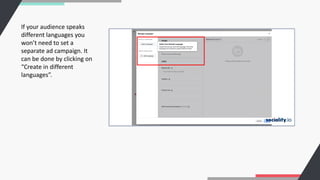
If your audience speaks
different languages you
won’t need to set a
separate ad campaign. It
can be done by clicking on
“Create in different
languages”.
To wrap it all up,
You’ve made it to the end. Hurray! Hopefully, by this point, you are able to launch your first Facebook
Ad campaign. In this article, we looked at how to run ads without prior experience with the platform.
Takeouts from Facebook ads guide:
1. What are you planning to achieve with Facebook ads?
2. Who are the potential customers you are trying to reach?
3. How your ads are going to look like? Prepare your visuals and copywriting beforehand.
4. Choose your target audience wisely by benefiting from a comprehensive algorithm and Facebook
data
5. Set up your budget and bidding strategy. Facebook will always strive to get the best results for
you, but it’s important to set limits within which it needs to optimize the advertising campaign.
Sociality.io
All in one social media management platform.
Learn more at Sociality.io

How to Use Facebook Ads for Beginners

  • 2.
    INTRODUCTION If you arenew to digital advertising universe you might be thinking that Facebooks Ads is witchcraft. However, this is why here at Sociality.io we’ve prepared this guide for you. We will show you how to launch ads from scratch without any previous experience with Facebook Ads. Open this article and Facebook Ad Manager at the same time and simply follow each step. Becoming a master of Facebook ads is not rocket science, but you definitely can turn into a Jedi of reaching your social media marketing goals.
  • 3.
    STEP 0: PREPARATION Speakingof which… Determine your goals. What are you planning to achieve with Facebook ads? Do you want to increase application downloads, boost website traffic or build a strong community on Facebook itself? The success of your Facebook advertising campaign will depend on this step. However, don’t be misled by your assumptions. How to know exactly what objectives going to benefit the growth of your company the most? For example, as a new company, you might want to reach as many people as possible. Or increase catalog sales by advertising catalog items via Facebook ads. First of all, listen to your current audience. Who are these new customers you are trying to reach via Facebook? Imagine these people and create a complete profile. What they like, dislike, enjoy doing, occupation, demographic factors, etc. The more you understand these potential clients the more successful is your campaign going to be.
  • 4.
    And lastly, preparecopywriting and visuals beforehand. If you are investing money to digital advertising it makes sense to invest money by hiring a freelance graphic designer or copywriter to increases success chances of your campaigns. Also, make sure that the size of files is correct and avoid being too wordy. People on the internet tend to have a short attention span. (As you probably know, since you are scanning this article yourself).
  • 5.
    STEP 1: OBJECTIVE “Whatis the most important outcome I want from this as?”. We don’t recommend you to choose objectives randomly. By choosing a certain objective, you tell the algorithm to encourage ad viewers to perform specific targeted actions. Here is what we mean by that: 1. Brand awareness – helps to increase the brand recognition of your company, reaching people who are more likely to be interested in the ad. 2. Reach – show ads to the largest number of Facebook and Instagram users to attract attention to the brand. This goal does not guarantee a high rate of final target actions. The idea here is to show the ad to as many people as possible. 3. App Installs – allows you to redirect users to the store to download the application. 4. Traffic – encourages and redirect users to your website, blog, app or messenger conversions. 5. Lead Generation – collects contact details of users within the platform. 6. Messages – invites users to exchange messages. You can answer questions and showcase our superior customer support teams’.
  • 6.
    7. Engagement –increases user interaction with a particular post to get comments, likes, shares, event responses. Helps with the promotion of pages and events on Facebook. 8. Video Views – promotes video content, enhances brand awareness. 9. Conversions – helps to get valuable actions on the site. 10. Store Visits – suitable for promoting offline stores, with this purpose you can attract people nearby your store. 11. Catalog Sales – promotion of goods from your facebook catalog.
  • 7.
    STEP 2. GOTO THE ADS MANAGER DASHBOARD
  • 8.
    After you click“Create” Facebook offers two options: create a fully finished draft campaign step by step or create campaign shells & add ad sets and ads later. Since we are new here, it’s better to take a step by step method. So, click on the first one.
  • 9.
    Choose a suitable promotiongoal based on the characteristics we talked about in step 1.
  • 10.
    Type your adname and click “Set Up Ad Account”.
  • 11.
    Choose a country, currency,and a suitable time zone and click “Continue”:
  • 12.
    We are slowlymoving on to the main part of this article. The next step is to set the Ad set. Set a name for the ad group and choose where the ad will lead. Since we’ve chosen our objective to be “Traffic” Facebook wants us to specify where we want the traffic to drive: website, app, messenger, WhatsApp.
  • 13.
    Dynamic Creative: youcan learn more about dynamic creative here: https://www.facebook.com/business/m/facebook-dynamic-creative-ads. Basically, Dynamic creative accepts the basic components of a Facebook ad (image, video, title, description, etc) and automatically generates optimized ad combinations based on these components. Offer: You can use the Offer function to give your users a discount on Facebook. To do this, you must be the administrator or editor of the page on whose behalf the proposal will be submitted. (This is why social media marketing agencies ask for administrator permission to set up ad campaigns.)
  • 14.
    STEP 3. TARGET AUDIENCESETTINGS At the initial stage, we recommend to manually set up the audience according to the description that was determined at the preparatory stage. In the future, you can create similar audiences according to the recommendations of Facebook.
  • 15.
    In the “Location”field, you can select all people, or select only local residents, recent visitors or travelers of certain geographical regions. After we can further specify the location by selecting the regions or cities for which we want to show ads. You can either type the location name or mark with a pin on the map. In this case, you can exclude some regions that you don’t want to reach. Choose the age of the target audience. You could experiment by segmenting the audience by age. You can do several campaigns, for example, in increments of 5 years. This will help to optimize advertising campaigns more effectively because of different ages – different behaviors and perceptions. And you will also understand your target audience better. For companies, who sell tangible products you can try to experiment by creating two campaigns based on gender. So you can understand what gender is more likely to be your ideal customer.
  • 16.
    Languages. If weneed people who speak a language that is primary in the selected region, then the field can be left blank. However, if you are targeting Hindu speaking population in London then you can specify it here.
  • 17.
    When the socio- demographicparameters are determined, we proceed to the setting of detailed targeting. On Facebook, all interests, occupation, behavior and other parameters are collected in the Detailed targeting field. It’s enough to start entering a suitable parameter, and Facebook will show recommendations.
  • 18.
    “Suggestions” button is veryconvenient and helps to choose the most suitable settings for a potential advertising audience. By testing different areas of interest in separate ad groups you can experiment on the effectiveness of customer segments.
  • 19.
    Also, you canexclude users from detailed targeting. For example, you don’t want to target people without higher education or interests in sports you can do it.
  • 20.
    Basically, you canalmost niche your advertising to people who for example have already interacted with your page, application or have attended your events. After you have configured all the parameters of the target audience save the segment for future advertising campaigns.
  • 21.
  • 22.
    You have probablyguessed it right. Placements are the placement of ads. Since the acquisition of Instagram Facebook offers a different kind of places where your ads can appear. You can choose Facebook automatic placement. But at Sociality.io we believe in full control over where you want to display ads. For example, some placements are less effective than others and maybe are not suitable for your needs.
  • 23.
    My personal favoriteis Instagram stories and we even have a separate article dedicated to this topic. 🙂 For example, check out this Netflix stories ad that is simply genius.
  • 24.
    You can alsoselect the type of device: PC, mobile or all at once. Mobile device users can be further distinguished by operating systems: Android or iOS devices.
  • 25.
    STEP 5. BUDGETAND SCHEDULE The beauty of digital advertising is that you can spend as little or as much as you want. So, you not only show Facebook ads to a very targeted audience but also control scheduling and budgets.
  • 26.
    The budget canbe set daily or immediately for the entire campaign duration. At the same time, with the daily budget, the actual amount of expenses may be slightly more or less than what you set. It is because the algorithm aims to display ads as effectively as possible and sometimes it requires extra dollars. When setting a budget for the entire duration of the advertisement, you will be offered to select the desired dates and schedule ads:
  • 27.
    Next, select theOptimization option to display ads. The selected option tells the system what result it should receive through advertising. For example, if you select “Link clicks”, Facebook will display your ad so that you get the maximum number of click links within your budget.
  • 28.
    4 optimization optionsare offered: 1. Link clicks 2. Landing page views 3. Impressions 4. Daily reach among unique users The choice will depend on your original advertising campaign objective. You can learn more about cost control here: https://www.facebook.com/business/help/1619591734742116 Facebook’s payment models are standard: for impressions (CPM) or for clicks (CPM). If advertising needs to be shown on a schedule, for example, only on weekdays from 9 to 18, then you can set the appropriate settings in the “Schedule an ad schedule” field.
  • 29.
    Delivery type –a parameter that determines how fast your ad should appear. You can use standard mode, or set accelerated impressions to get results faster.
  • 30.
    STEP 6. NOWWE ARE MOVING TO THE LAST PART. CREATING ADS! FINALLY! Choose a format that suits the purpose of your advertising’s objective the most. For example, if you want to sell products from a catalog – then carousel is the best format. In contrast, if you have a promotion video you would like to showcase then a single image or video is the best choice.
  • 31.
    The most effective formatsare “Single image or video” and “Carousel”.
  • 32.
    For example, ifyou choose a single image or video follow the following steps: 1. Fill in the headline, primary text, description and website link. 2. Select call-to-action button: apply now, book now, contact us, download, get a quote, get showtimes and listen now. If you want to choose a carousel format, the process differs slightly since you can choose headline, descriptions, links and even call-to-action buttons for each image or video in the carousel. You can also let the system to automatically choose the best performing post and show it first.
  • 33.
    Example of HELLOHA’scarousel format:
  • 34.
    Example of NewYork times’ single image format:
  • 35.
    If your audiencespeaks different languages you won’t need to set a separate ad campaign. It can be done by clicking on “Create in different languages”.
  • 36.
    To wrap itall up, You’ve made it to the end. Hurray! Hopefully, by this point, you are able to launch your first Facebook Ad campaign. In this article, we looked at how to run ads without prior experience with the platform. Takeouts from Facebook ads guide: 1. What are you planning to achieve with Facebook ads? 2. Who are the potential customers you are trying to reach? 3. How your ads are going to look like? Prepare your visuals and copywriting beforehand. 4. Choose your target audience wisely by benefiting from a comprehensive algorithm and Facebook data 5. Set up your budget and bidding strategy. Facebook will always strive to get the best results for you, but it’s important to set limits within which it needs to optimize the advertising campaign.
  • 37.
    Sociality.io All in onesocial media management platform. Learn more at Sociality.io