SLIDE SECTION
HOW TO TRANSLATE
YOUR POWERPOINT
CRISIS EXERCISE INTO
A TEAMXP
SIMULATION
# A practical step-by-step guide
MARIA TORRES GARCIA, CREATIVE CONSULTANT
EMAIL: MARIA@TSTORYTELLER.COM
WWW.CONDUCTTR.COM
www.floraladdress.com

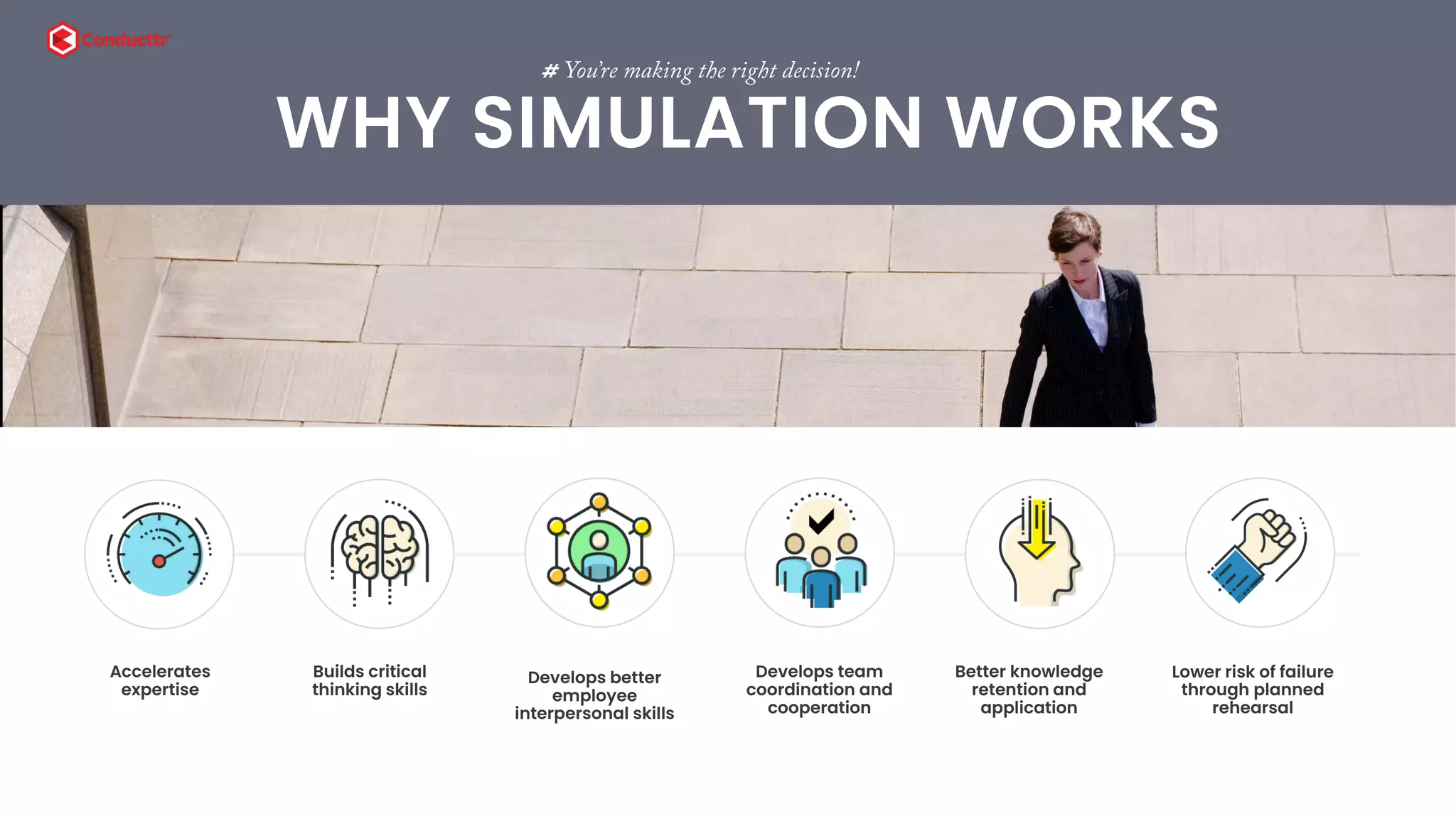
Accelerates
expertise
 
t
# You’re making the right decision!
WHY SIMULATION WORKS
  
Builds critical
thinking skills
Develops better
employee
interpersonal skills
Develops team
coordination and
cooperation
Better knowledge
retention and
application
Lower risk of failure
through planned
rehearsal
3
# TeamXp Crisis Simulation
TRANSFORMING YOUR
EXERCISES
At the end of this document your will know
how to transform your PowerPoint-based
exercise into a TeamXp crisis simulation.
6 STEPS TO IMMERSION
ADD
EVENTS
1
ADD
INCIDENTS
2
ADD
DECISIONS
4
ADD
CONTENT
5
ADD
PERSONAS
3
ADD
INJECTS
6
4
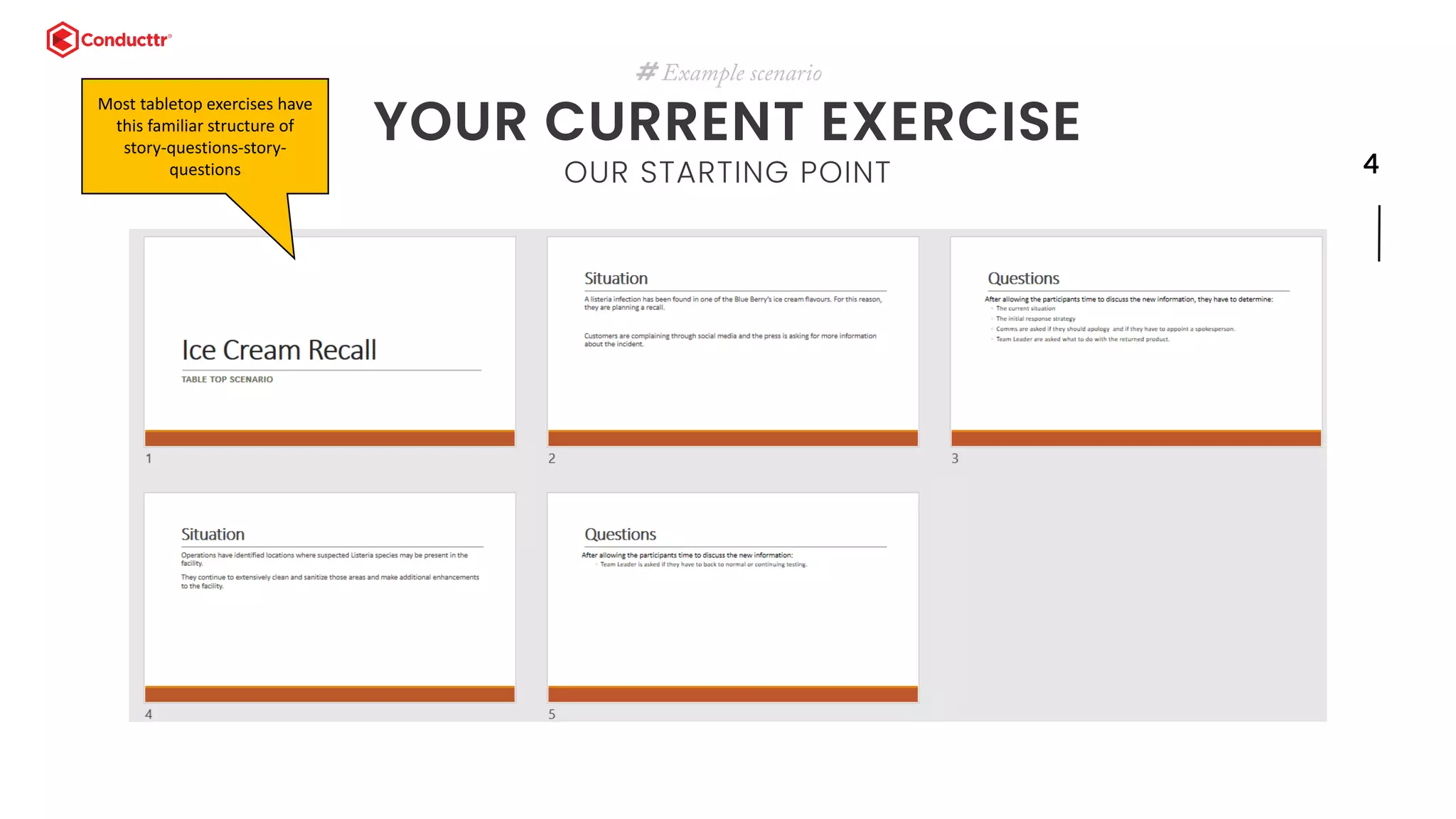
# Example scenario
YOUR CURRENT EXERCISE
OUR STARTING POINT
Most tabletop exercises have
this familiar structure of
story-questions-story-
questions
5
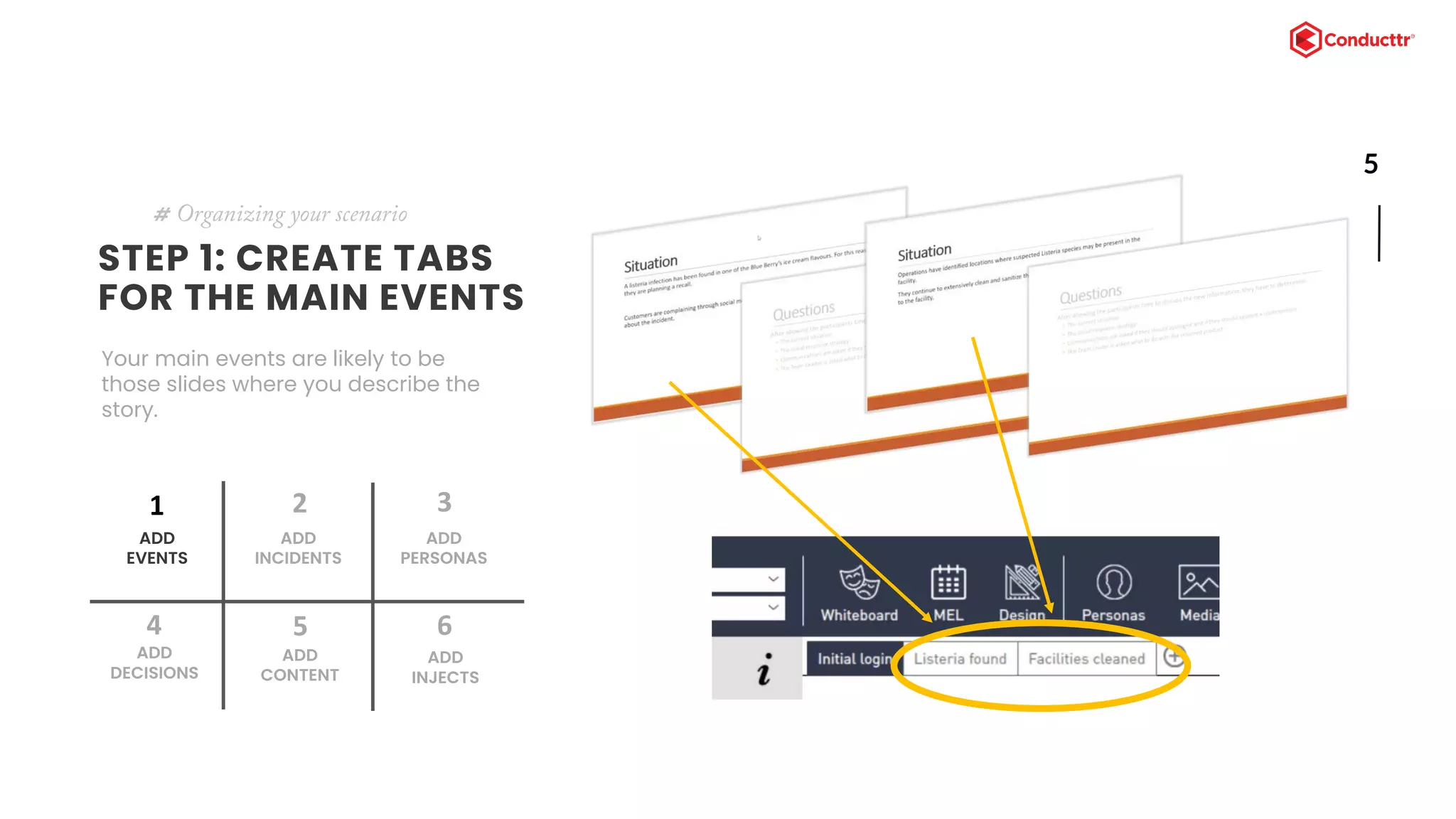
STEP 1: CREATE TABS
FOR THE MAIN EVENTS
Your main events are likely to be
those slides where you describe the
story.
# Organizing your scenario
ADD
EVENTS
1
ADD
INCIDENTS
2
ADD
DECISIONS
4
ADD
CONTENT
5
ADD
PERSONAS
3
ADD
INJECTS
6
6
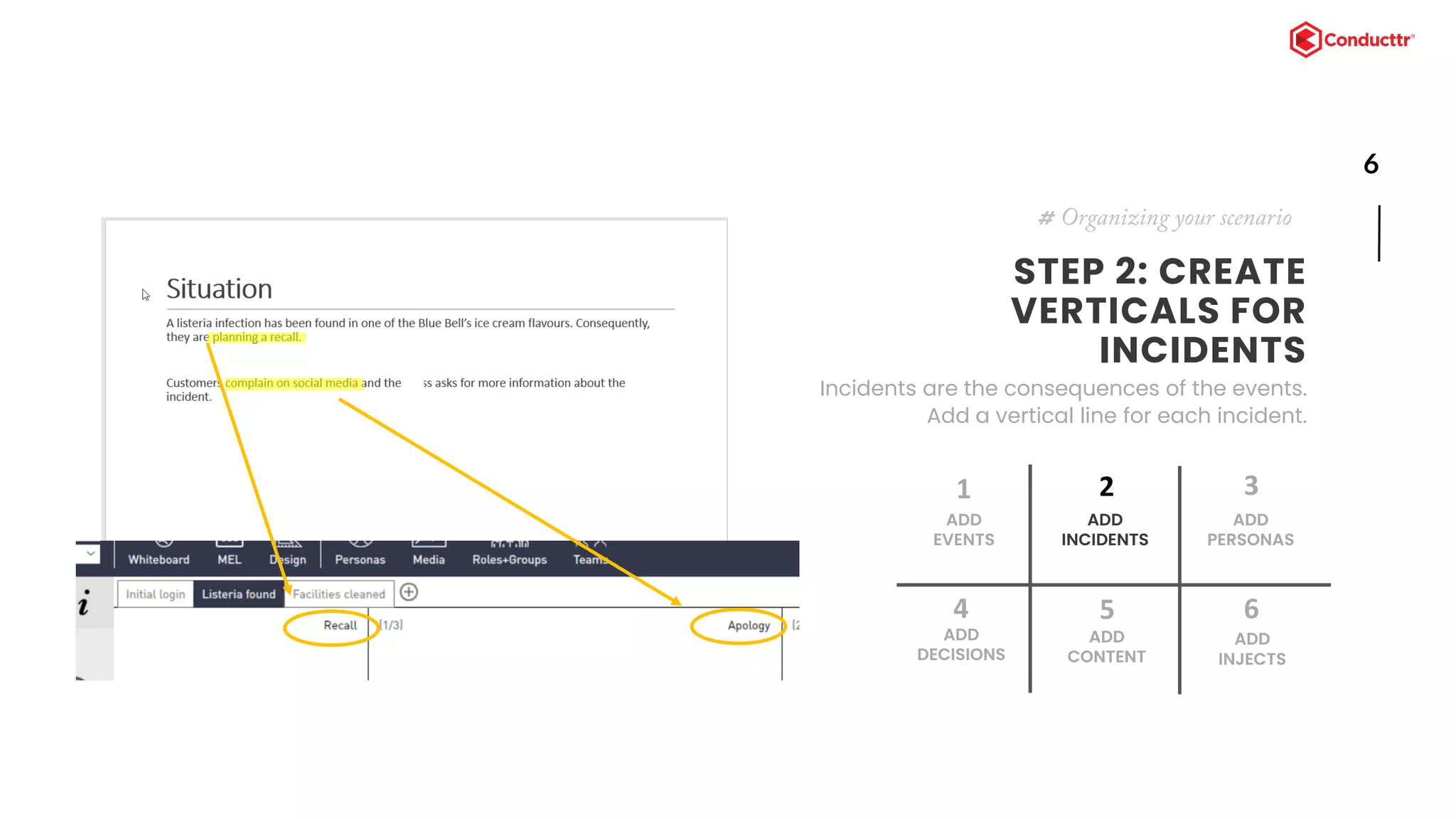
STEP 2: CREATE
VERTICALS FOR
INCIDENTS
Incidents are the consequences of the events.
Add a vertical line for each incident.
# Organizing your scenario
ADD
EVENTS
1
ADD
INCIDENTS
2
ADD
DECISIONS
4
ADD
CONTENT
5
ADD
PERSONAS
3
ADD
INJECTS
6
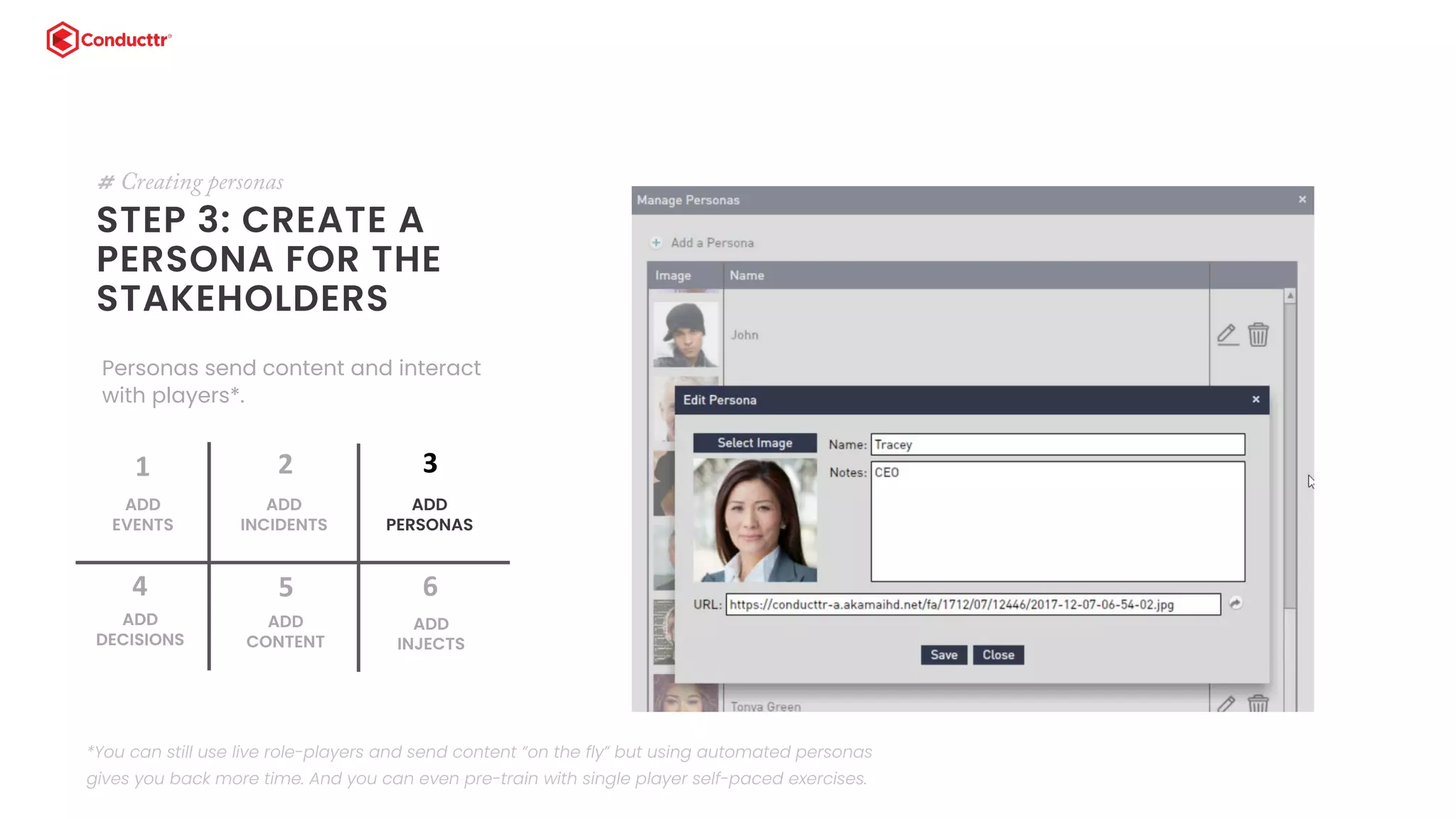
STEP 3: CREATE A
PERSONA FOR THE
STAKEHOLDERS
# Creating personas
Personas send content and interact
with players*.
ADD
EVENTS
1
ADD
INCIDENTS
2
ADD
DECISIONS
4
ADD
CONTENT
5
ADD
PERSONAS
3
ADD
INJECTS
6
*You can still use live role-players and send content “on the fly” but using automated personas
gives you back more time. And you can even pre-train with single player self-paced exercises.
8
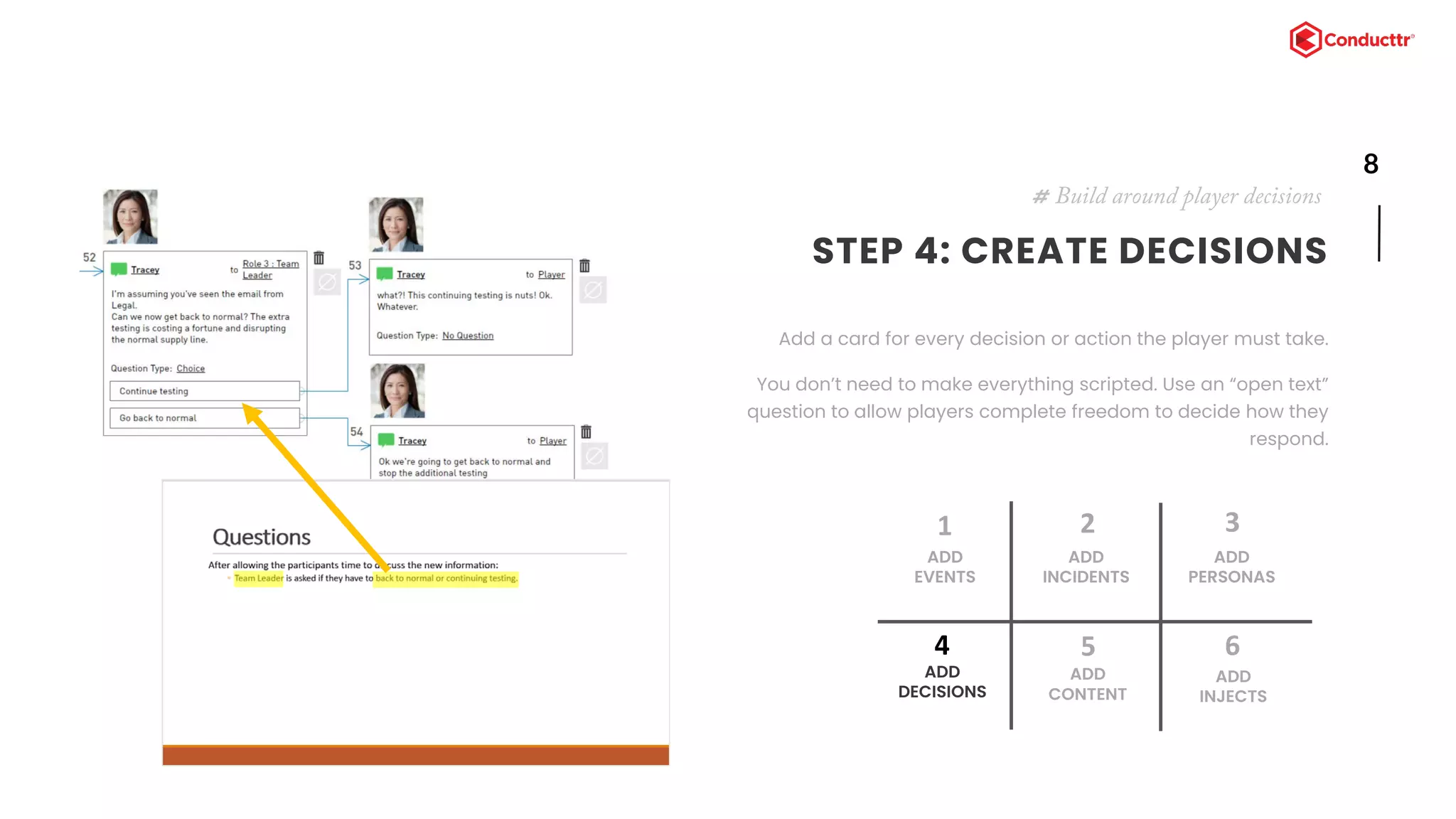
STEP 4: CREATE DECISIONS
Add a card for every decision or action the player must take.
You don’t need to make everything scripted. Use an “open text”
question to allow players complete freedom to decide how they
respond.
# Build around player decisions
ADD
EVENTS
1
ADD
INCIDENTS
2
ADD
DECISIONS
4
ADD
CONTENT
5
ADD
PERSONAS
3
ADD
INJECTS
6
9
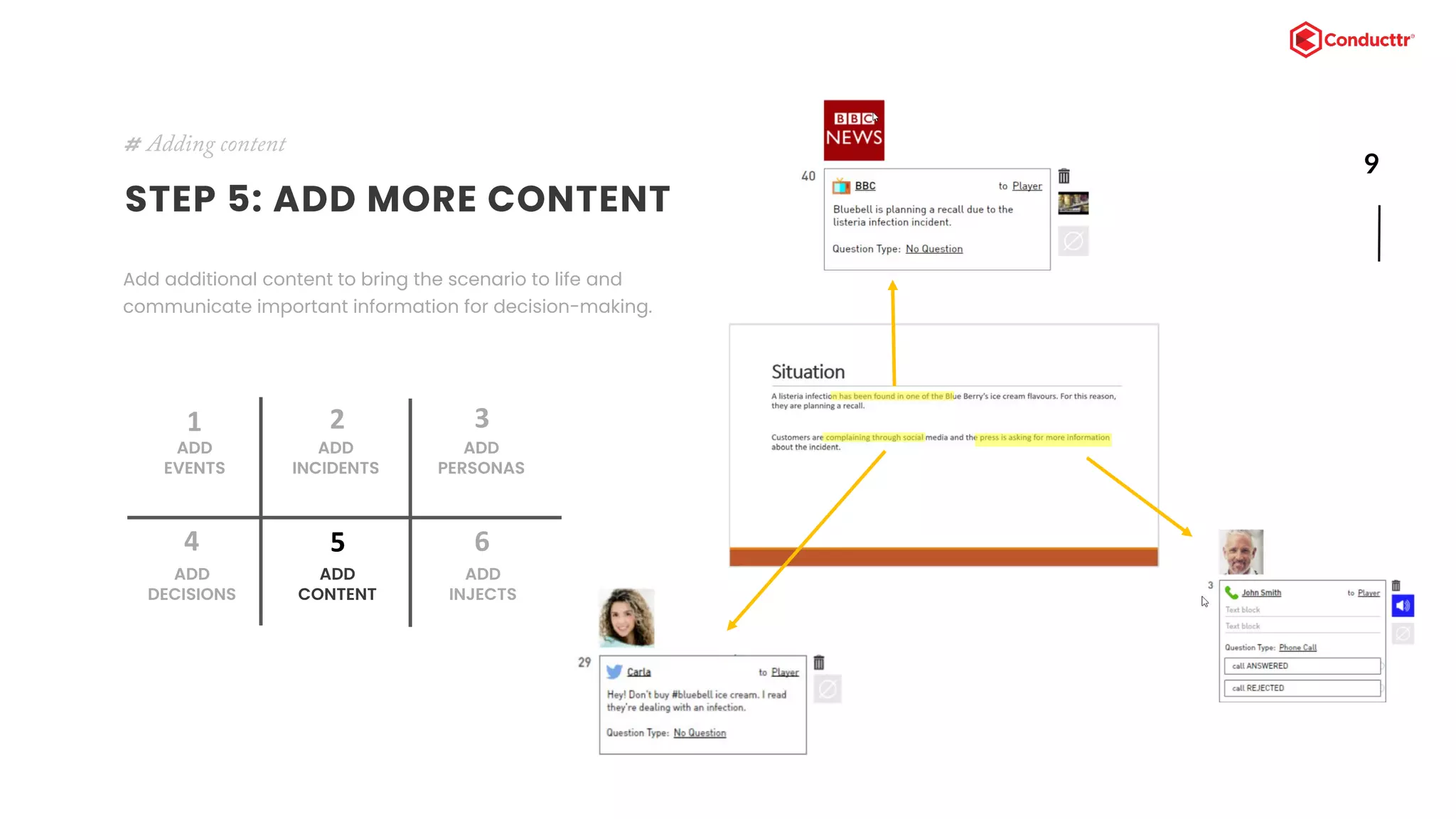
STEP 5: ADD MORE CONTENT
Add additional content to bring the scenario to life and
communicate important information for decision-making.
# Adding content
ADD
EVENTS
1
ADD
INCIDENTS
2
ADD
DECISIONS
4
ADD
CONTENT
5
ADD
PERSONAS
3
ADD
INJECTS
6
10
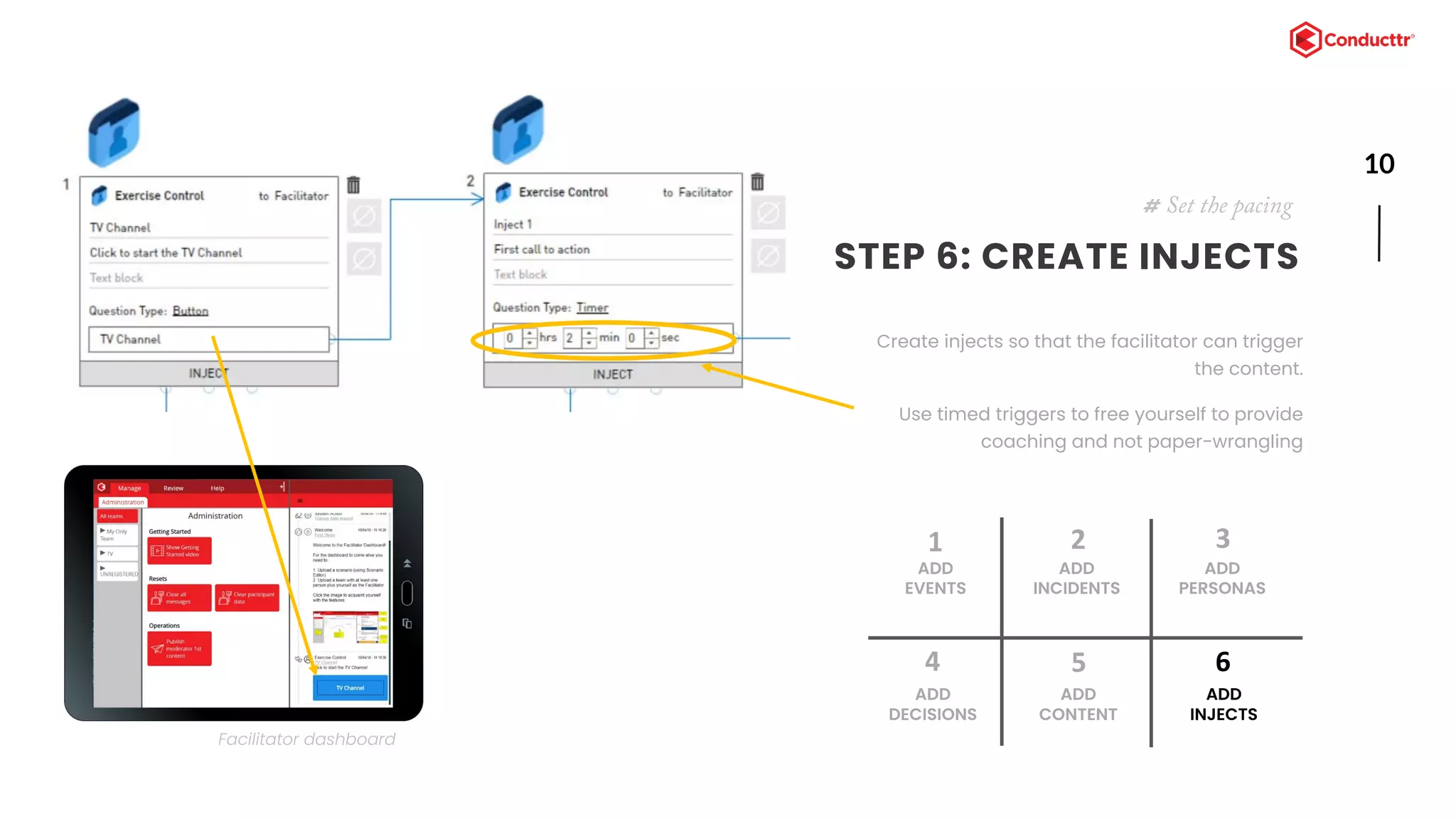
STEP 6: CREATE INJECTS
Create injects so that the facilitator can trigger
the content.
Use timed triggers to free yourself to provide
coaching and not paper-wrangling
# Set the pacing
ADD
EVENTS
1
ADD
INCIDENTS
2
ADD
DECISIONS
4
ADD
CONTENT
5
ADD
PERSONAS
3
ADD
INJECTS
6
Facilitator dashboard
11TRY IT NOW!
# Tools for engagement
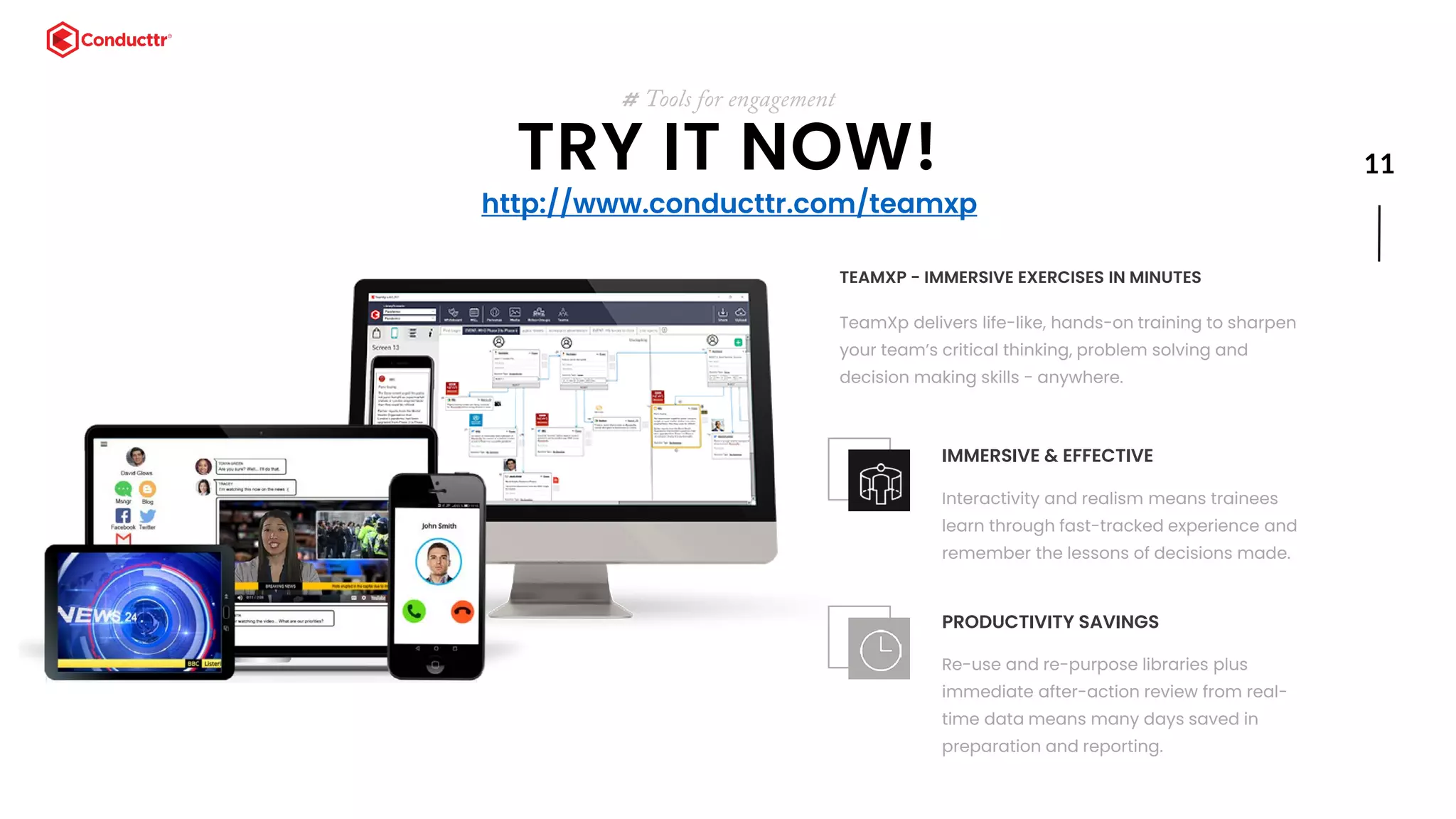
TEAMXP - IMMERSIVE EXERCISES IN MINUTES
TeamXp delivers life-like, hands-on training to sharpen
your team’s critical thinking, problem solving and
decision making skills - anywhere.
IMMERSIVE & EFFECTIVE
Interactivity and realism means trainees
learn through fast-tracked experience and
remember the lessons of decisions made.
PRODUCTIVITY SAVINGS
Re-use and re-purpose libraries plus
immediate after-action review from real-
time data means many days saved in
preparation and reporting.
http://www.conducttr.com/teamxp
Final thought..
BE REMARKABLE
MARIA TORRES GARCIA, CREATIVE CONSULTANT
EMAIL: MARIA@TSTORYTELLER.COM
WWW.CONDUCTTR.COM

How To Translate Your Powerpoint Crisis Exercise Into A TeamXp Simulation

  • 1.
    SLIDE SECTION HOW TOTRANSLATE YOUR POWERPOINT CRISIS EXERCISE INTO A TEAMXP SIMULATION # A practical step-by-step guide MARIA TORRES GARCIA, CREATIVE CONSULTANT EMAIL: MARIA@TSTORYTELLER.COM WWW.CONDUCTTR.COM
  • 2.
    www.floraladdress.com  Accelerates expertise   t # You’remaking the right decision! WHY SIMULATION WORKS    Builds critical thinking skills Develops better employee interpersonal skills Develops team coordination and cooperation Better knowledge retention and application Lower risk of failure through planned rehearsal
  • 3.
    3 # TeamXp CrisisSimulation TRANSFORMING YOUR EXERCISES At the end of this document your will know how to transform your PowerPoint-based exercise into a TeamXp crisis simulation. 6 STEPS TO IMMERSION ADD EVENTS 1 ADD INCIDENTS 2 ADD DECISIONS 4 ADD CONTENT 5 ADD PERSONAS 3 ADD INJECTS 6
  • 4.
    4 # Example scenario YOURCURRENT EXERCISE OUR STARTING POINT Most tabletop exercises have this familiar structure of story-questions-story- questions
  • 5.
    5 STEP 1: CREATETABS FOR THE MAIN EVENTS Your main events are likely to be those slides where you describe the story. # Organizing your scenario ADD EVENTS 1 ADD INCIDENTS 2 ADD DECISIONS 4 ADD CONTENT 5 ADD PERSONAS 3 ADD INJECTS 6
  • 6.
    6 STEP 2: CREATE VERTICALSFOR INCIDENTS Incidents are the consequences of the events. Add a vertical line for each incident. # Organizing your scenario ADD EVENTS 1 ADD INCIDENTS 2 ADD DECISIONS 4 ADD CONTENT 5 ADD PERSONAS 3 ADD INJECTS 6
  • 7.
    STEP 3: CREATEA PERSONA FOR THE STAKEHOLDERS # Creating personas Personas send content and interact with players*. ADD EVENTS 1 ADD INCIDENTS 2 ADD DECISIONS 4 ADD CONTENT 5 ADD PERSONAS 3 ADD INJECTS 6 *You can still use live role-players and send content “on the fly” but using automated personas gives you back more time. And you can even pre-train with single player self-paced exercises.
  • 8.
    8 STEP 4: CREATEDECISIONS Add a card for every decision or action the player must take. You don’t need to make everything scripted. Use an “open text” question to allow players complete freedom to decide how they respond. # Build around player decisions ADD EVENTS 1 ADD INCIDENTS 2 ADD DECISIONS 4 ADD CONTENT 5 ADD PERSONAS 3 ADD INJECTS 6
  • 9.
    9 STEP 5: ADDMORE CONTENT Add additional content to bring the scenario to life and communicate important information for decision-making. # Adding content ADD EVENTS 1 ADD INCIDENTS 2 ADD DECISIONS 4 ADD CONTENT 5 ADD PERSONAS 3 ADD INJECTS 6
  • 10.
    10 STEP 6: CREATEINJECTS Create injects so that the facilitator can trigger the content. Use timed triggers to free yourself to provide coaching and not paper-wrangling # Set the pacing ADD EVENTS 1 ADD INCIDENTS 2 ADD DECISIONS 4 ADD CONTENT 5 ADD PERSONAS 3 ADD INJECTS 6 Facilitator dashboard
  • 11.
    11TRY IT NOW! #Tools for engagement TEAMXP - IMMERSIVE EXERCISES IN MINUTES TeamXp delivers life-like, hands-on training to sharpen your team’s critical thinking, problem solving and decision making skills - anywhere. IMMERSIVE & EFFECTIVE Interactivity and realism means trainees learn through fast-tracked experience and remember the lessons of decisions made. PRODUCTIVITY SAVINGS Re-use and re-purpose libraries plus immediate after-action review from real- time data means many days saved in preparation and reporting. http://www.conducttr.com/teamxp
  • 12.
    Final thought.. BE REMARKABLE MARIATORRES GARCIA, CREATIVE CONSULTANT EMAIL: MARIA@TSTORYTELLER.COM WWW.CONDUCTTR.COM