




Learn How
ServiceNow – Azure DevOps
Integration Helps Teams
Collaborate Better
Why ServiceNow – Azure DevOps Integration
The integration of Azure DevOps with ServiceNow enhances collaboration between the customer
service and development teams. This, in turn, helps resolve the customer issues faster and gives
visibility to both teams into customer priorities.
ServiceNow – Azure DevOps Integration brings:
Rich functionalities
to the ecosystem
Cross-functional
collaboration
Real-time Visibility Get full
Traceability
OpsHub Integration Manager integrates Azure DevOps and ServiceNow
bi-directionally. It ensures that all historical and current data is available
to each user, in that user’s preferred system, with full context, in real-
time. All ‘tickets’ from ServiceNow automatically synchronize to Azure
DevOps and all the entities and details associated with the ‘tickets’
synchronize back to Azure DevOps.
Popularly synchronized entities between ServiceNow – Azure DevOps Systems
How to Integrate
ServiceNow – Azure
DevOps
Bi-directionally
How ServiceNow and Azure DevOps Integration Helps Teams Collaborate Better
Problem statement: The support team receives a ticket from a
customer, identifies it as a ‘problem’, and shares the details of the
‘problem’ with the development team via email. Three days later,
a support team representative writes a follow-up email to the
development team to check the status of the ‘problem’. The
development team, then, updates the support team
representative that the ‘problem’ was resolved two days back.
Solution: When Azure DevOps and ServiceNow are bi-
directionally integrated using OpsHub Integration Manager, the
status of the ‘problem’ would automatically change in ServiceNow
as soon as its status is changed to ‘resolved’ in Azure DevOps.
Download Detailed ServiceNow Azure DevOps Integration Datasheet
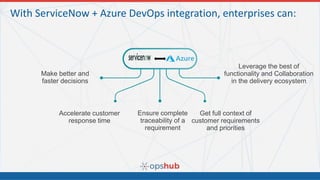
With ServiceNow + Azure DevOps integration, enterprises can:
Make better and
faster decisions
Accelerate customer
response time
Ensure complete
traceability of a
requirement
Get full context of
customer requirements
and priorities
Leverage the best of
functionality and Collaboration
in the delivery ecosystem
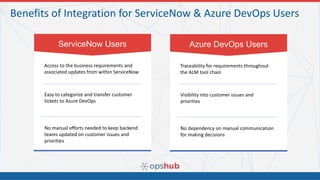
Benefits of Integration for ServiceNow & Azure DevOps Users
Access to the business requirements and
associated updates from within ServiceNow
ServiceNow Users
Easy to categorize and transfer customer
tickets to Azure DevOps
No manual efforts needed to keep backend
teams updated on customer issues and
priorities
Traceability for requirements throughout
the ALM tool chain
Azure DevOps Users
Visibility into customer issues and
priorities
No dependency on manual communication
for making decisions
Contact information:
OpsHub Inc.
1000 Elwell Ct,
#101, Palo Alto,
CA 94303
Phone: +1.650.701.1800
Email: sales@opshub.com
Website: OpsHub

How to Integrate ServiceNow with Azure DevOps

  • 1.
    Learn How ServiceNow –Azure DevOps Integration Helps Teams Collaborate Better
  • 2.
    Why ServiceNow –Azure DevOps Integration The integration of Azure DevOps with ServiceNow enhances collaboration between the customer service and development teams. This, in turn, helps resolve the customer issues faster and gives visibility to both teams into customer priorities. ServiceNow – Azure DevOps Integration brings: Rich functionalities to the ecosystem Cross-functional collaboration Real-time Visibility Get full Traceability
  • 3.
    OpsHub Integration Managerintegrates Azure DevOps and ServiceNow bi-directionally. It ensures that all historical and current data is available to each user, in that user’s preferred system, with full context, in real- time. All ‘tickets’ from ServiceNow automatically synchronize to Azure DevOps and all the entities and details associated with the ‘tickets’ synchronize back to Azure DevOps. Popularly synchronized entities between ServiceNow – Azure DevOps Systems How to Integrate ServiceNow – Azure DevOps Bi-directionally
  • 4.
    How ServiceNow andAzure DevOps Integration Helps Teams Collaborate Better Problem statement: The support team receives a ticket from a customer, identifies it as a ‘problem’, and shares the details of the ‘problem’ with the development team via email. Three days later, a support team representative writes a follow-up email to the development team to check the status of the ‘problem’. The development team, then, updates the support team representative that the ‘problem’ was resolved two days back. Solution: When Azure DevOps and ServiceNow are bi- directionally integrated using OpsHub Integration Manager, the status of the ‘problem’ would automatically change in ServiceNow as soon as its status is changed to ‘resolved’ in Azure DevOps. Download Detailed ServiceNow Azure DevOps Integration Datasheet
  • 5.
    With ServiceNow +Azure DevOps integration, enterprises can: Make better and faster decisions Accelerate customer response time Ensure complete traceability of a requirement Get full context of customer requirements and priorities Leverage the best of functionality and Collaboration in the delivery ecosystem
  • 6.
    Benefits of Integrationfor ServiceNow & Azure DevOps Users Access to the business requirements and associated updates from within ServiceNow ServiceNow Users Easy to categorize and transfer customer tickets to Azure DevOps No manual efforts needed to keep backend teams updated on customer issues and priorities Traceability for requirements throughout the ALM tool chain Azure DevOps Users Visibility into customer issues and priorities No dependency on manual communication for making decisions
  • 7.
    Contact information: OpsHub Inc. 1000Elwell Ct, #101, Palo Alto, CA 94303 Phone: +1.650.701.1800 Email: sales@opshub.com Website: OpsHub