Test Automation using UiPath
Test Suite – Developer Series
Part 4 of 4
Diana Gray
Community Marketing
Manager AMER
@UiPath
Meet today’s team:
Atul Trikha
RPA Architect, COE Lead
& Account Chief Technologist
@Peraton
About today’s UiPath developer meeting:
• AMER Developer Community sessions
• Managed by UiPath MVPs in Canada, Latin America & USA
• You are encouraged to network with MVPs and share your
LinkedIn in the chat box. We want to get to know you
• These sessions are for you to engage with us on topics that
interest you or that you want to share with the UiPath Developer
Community
• Please use the chat to place questions until Q&A
• If you have any topics that you want us to cover, please email
diana.gray@uipath.com
Community.uipath.com
Date/Time Topic Status
July 12,
5 PM EDT
Test Automation using UiPath Test Suite - Developer Series -
Part 1 of 4
Recorded
July 19,
5 PM EDT
Test Automation using UiPath Test Suite - Developer Series -
Part 2 of 4
Recorded
July 26,
5 PM EDT
Test Automation using UiPath Test Suite - Developer Series -
Part 3 of 4
Recorded
Aug 2,
5 PM EDT
Test Automation using UiPath Test Suite - Developer Series -
Part 4 of 4
Happening
Register for Events at community.uipath.com
Date/Time Topic Status
September 12,
6 PM EDT
REFramework: Overview - Developer Series - Part 1
of 4
Register
September 19,
6 PM EDT
REFramework: Modify the Framework - Developer Series -
Part 2 of 4
Register
October 3,
6 PM EDT
REFramework: Queues, Configuration and Creating within
the States - Developer Series - Part 3 of 4
Register
October 10,
6 PM EDT
REFramework: Debugging/Workflow Analyzer/Validation -
Developer Series - Part 4 of 4
Register
Register for Events at community.uipath.com
Coming Soon !!!!!!
8
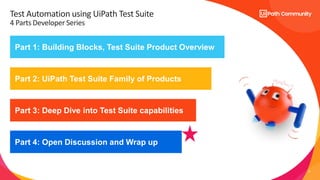
Part 1: Building Blocks, Test Suite Product Overview
Part 2: UiPath Test Suite Family of Products
Part 3: Deep Dive into Test Suite capabilities
Test Automation using UiPath Test Suite
4 Parts Developer Series
Part 4: Open Discussion and Wrap up
9
Part 4: Test Suite Open Discussion and Wrap up
• Wrap-up with open Q&A
Create a simpler, smoother, and more productive testing experience.
End-to-End
Walkthrough
Q & A
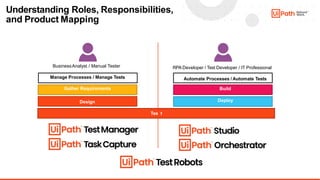
Understanding Roles, Responsibilities,
and Product Mapping
BusinessAnalyst / Manual Tester
Manage Processes / Manage Tests
Gather Requirements
Design
RPA Developer / Test Developer / IT Professional
Automate Processes / Automate Tests
Build
Deploy
Tes t
16
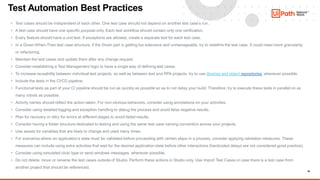
Test Automation Best Practices
• Test cases should be independent of each other. One test case should not depend on another test case’s run.
• A test case should have one specific purpose only. Each test workflow should contain only one verification.
• Every feature should have a unit test. If exceptions are allowed, create a separate test for each test case.
• In a Given-When-Then test case structure, if the Given part is getting too extensive and unmanageable, try to redefine the test case. It could need more granularity
or refactoring.
• Maintain the test cases and update them after any change request.
• Consider establishing a Test Management logic to have a single way of defining test cases.
• To increase reusability between individual test projects, as well as between test and RPA projects, try to use libraries and object repositories, whenever possible.
• Include the tests in the CI/CD pipeline.
• Functional tests as part of your CI pipeline should be run as quickly as possible so as to not delay your build. Therefore, try to execute these tests in parallel on as
many robots as possible.
• Activity names should reflect the action taken. For non-obvious behaviors, consider using annotations on your activities.
• Consider using detailed logging and exception handling to debug the process and avoid false negative results.
• Plan for recovery or retry for errors at different stages to avoid failed results.
• Consider having a folder structure dedicated to testing and using the same test case naming convention across your projects.
• Use assets for variables that are likely to change and used many times.
• For scenarios where an application’s state must be validated before proceeding with certain steps in a process, consider applying validation measures. These
measures can include using extra activities that wait for the desired application state before other interactions (hardcoded delays are not considered good practice).
• Consider using simulated click/ type or send windows messages, whenever possible.
• Do not delete, move or rename the test cases outside of Studio. Perform these actions in Studio only. Use Import Test Cases in case there is a test case from
another project that should be referenced.
14
UiPath Test Suite vs Selenium
15
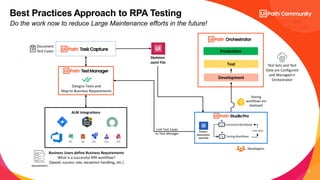
Production
Designs Tests and
Map to Business Requirements
Test
Development
Test Sets and Test
Data are Configured
and Managed in
Orchestrator
Testing
workflows are
deployed
Best Practices Approach to RPA Testing
ALM Integrations
Do the work now to reduce Large Maintenance efforts in the future!
Business Users define Business Requirements
What is a successful RPA workflow?
(Speed, success rate, exception handling, etc.)
Document
Test Cases
Skeleton
.xaml File
Link Test Cases
to Test Manager
Developers
Functional Workflows
Testing Workflows
Unit Tests
BUILD TIME
PROCESS FLOW
16
Test
Production
Testing Bot Results
Execute Tests
Development
Developers
Functional Workflows
Testing Workflows
Unit Tests
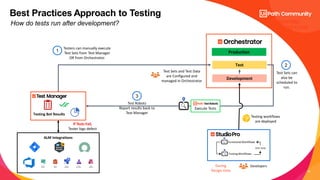
Test Sets and Test Data
are Configured and
managed in Orchestrator
During
Design-time
Testing workflows
are deployed
Best Practices Approach to Testing
ALM Integrations
How do tests run after development? RUNTIME
PROCESS FLOW
If Tests Fail,
Tester logs defect
Testers can manually execute
Test Sets from Test Manager
OR from Orchestrator.
1
Test Sets can
also be
scheduled to
run.
2
Test Robots
Report results back to
Test Manager
3
17
Version Control System
CI/CD Tools
Test
Production
Testing Bot Results
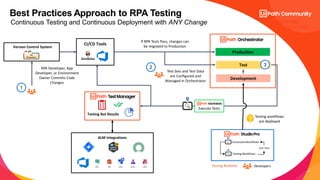
If RPA Tests Pass, changes can
be migrated to Production
Execute Tests
Development
Developers
Functional Workflows
Testing Workflows
Unit Tests
Test Sets and Test Data
are Configured and
Managed in Orchestrator
RPA Developer, App
Developer, or Environment
Owner Commits Code
Changes
1
3
During Runtime
Testing workflows
are deployed
2
Best Practices Approach to RPA Testing
ALM Integrations
Continuous Testing and Continuous Deployment with ANY Change RUNTIME
PROCESS FLOW

Test Automation using UiPath Test Suite - Developer Circle Part-4.pdf

  • 1.
    Test Automation usingUiPath Test Suite – Developer Series Part 4 of 4
  • 2.
    Diana Gray Community Marketing ManagerAMER @UiPath Meet today’s team: Atul Trikha RPA Architect, COE Lead & Account Chief Technologist @Peraton
  • 3.
    About today’s UiPathdeveloper meeting: • AMER Developer Community sessions • Managed by UiPath MVPs in Canada, Latin America & USA • You are encouraged to network with MVPs and share your LinkedIn in the chat box. We want to get to know you • These sessions are for you to engage with us on topics that interest you or that you want to share with the UiPath Developer Community • Please use the chat to place questions until Q&A • If you have any topics that you want us to cover, please email diana.gray@uipath.com
  • 4.
  • 5.
  • 6.
    Date/Time Topic Status July12, 5 PM EDT Test Automation using UiPath Test Suite - Developer Series - Part 1 of 4 Recorded July 19, 5 PM EDT Test Automation using UiPath Test Suite - Developer Series - Part 2 of 4 Recorded July 26, 5 PM EDT Test Automation using UiPath Test Suite - Developer Series - Part 3 of 4 Recorded Aug 2, 5 PM EDT Test Automation using UiPath Test Suite - Developer Series - Part 4 of 4 Happening Register for Events at community.uipath.com
  • 7.
    Date/Time Topic Status September12, 6 PM EDT REFramework: Overview - Developer Series - Part 1 of 4 Register September 19, 6 PM EDT REFramework: Modify the Framework - Developer Series - Part 2 of 4 Register October 3, 6 PM EDT REFramework: Queues, Configuration and Creating within the States - Developer Series - Part 3 of 4 Register October 10, 6 PM EDT REFramework: Debugging/Workflow Analyzer/Validation - Developer Series - Part 4 of 4 Register Register for Events at community.uipath.com Coming Soon !!!!!!
  • 8.
    8 Part 1: BuildingBlocks, Test Suite Product Overview Part 2: UiPath Test Suite Family of Products Part 3: Deep Dive into Test Suite capabilities Test Automation using UiPath Test Suite 4 Parts Developer Series Part 4: Open Discussion and Wrap up
  • 9.
    9 Part 4: TestSuite Open Discussion and Wrap up • Wrap-up with open Q&A Create a simpler, smoother, and more productive testing experience.
  • 10.
  • 11.
  • 12.
    Understanding Roles, Responsibilities, andProduct Mapping BusinessAnalyst / Manual Tester Manage Processes / Manage Tests Gather Requirements Design RPA Developer / Test Developer / IT Professional Automate Processes / Automate Tests Build Deploy Tes t
  • 13.
    16 Test Automation BestPractices • Test cases should be independent of each other. One test case should not depend on another test case’s run. • A test case should have one specific purpose only. Each test workflow should contain only one verification. • Every feature should have a unit test. If exceptions are allowed, create a separate test for each test case. • In a Given-When-Then test case structure, if the Given part is getting too extensive and unmanageable, try to redefine the test case. It could need more granularity or refactoring. • Maintain the test cases and update them after any change request. • Consider establishing a Test Management logic to have a single way of defining test cases. • To increase reusability between individual test projects, as well as between test and RPA projects, try to use libraries and object repositories, whenever possible. • Include the tests in the CI/CD pipeline. • Functional tests as part of your CI pipeline should be run as quickly as possible so as to not delay your build. Therefore, try to execute these tests in parallel on as many robots as possible. • Activity names should reflect the action taken. For non-obvious behaviors, consider using annotations on your activities. • Consider using detailed logging and exception handling to debug the process and avoid false negative results. • Plan for recovery or retry for errors at different stages to avoid failed results. • Consider having a folder structure dedicated to testing and using the same test case naming convention across your projects. • Use assets for variables that are likely to change and used many times. • For scenarios where an application’s state must be validated before proceeding with certain steps in a process, consider applying validation measures. These measures can include using extra activities that wait for the desired application state before other interactions (hardcoded delays are not considered good practice). • Consider using simulated click/ type or send windows messages, whenever possible. • Do not delete, move or rename the test cases outside of Studio. Perform these actions in Studio only. Use Import Test Cases in case there is a test case from another project that should be referenced.
  • 14.
  • 15.
    15 Production Designs Tests and Mapto Business Requirements Test Development Test Sets and Test Data are Configured and Managed in Orchestrator Testing workflows are deployed Best Practices Approach to RPA Testing ALM Integrations Do the work now to reduce Large Maintenance efforts in the future! Business Users define Business Requirements What is a successful RPA workflow? (Speed, success rate, exception handling, etc.) Document Test Cases Skeleton .xaml File Link Test Cases to Test Manager Developers Functional Workflows Testing Workflows Unit Tests BUILD TIME PROCESS FLOW
  • 16.
    16 Test Production Testing Bot Results ExecuteTests Development Developers Functional Workflows Testing Workflows Unit Tests Test Sets and Test Data are Configured and managed in Orchestrator During Design-time Testing workflows are deployed Best Practices Approach to Testing ALM Integrations How do tests run after development? RUNTIME PROCESS FLOW If Tests Fail, Tester logs defect Testers can manually execute Test Sets from Test Manager OR from Orchestrator. 1 Test Sets can also be scheduled to run. 2 Test Robots Report results back to Test Manager 3
  • 17.
    17 Version Control System CI/CDTools Test Production Testing Bot Results If RPA Tests Pass, changes can be migrated to Production Execute Tests Development Developers Functional Workflows Testing Workflows Unit Tests Test Sets and Test Data are Configured and Managed in Orchestrator RPA Developer, App Developer, or Environment Owner Commits Code Changes 1 3 During Runtime Testing workflows are deployed 2 Best Practices Approach to RPA Testing ALM Integrations Continuous Testing and Continuous Deployment with ANY Change RUNTIME PROCESS FLOW