AWS 
Speed & Scaling with Magento 
Florian Aschenbrenner
About me 
• 2 years Java dev – ATM/Host comms 
• 6 years of sysadmin and security admin 
• 3 years of Head of Tech/CTO for Wedo 
• freelance projects 
• musician
Structure 
• Concepts 
• Example for local environment 
• Proposal for AWS buildout 
• Highlight on individual technologies 
• Example for infrastructure buildout
Let‘s go 
to the cloud (1)
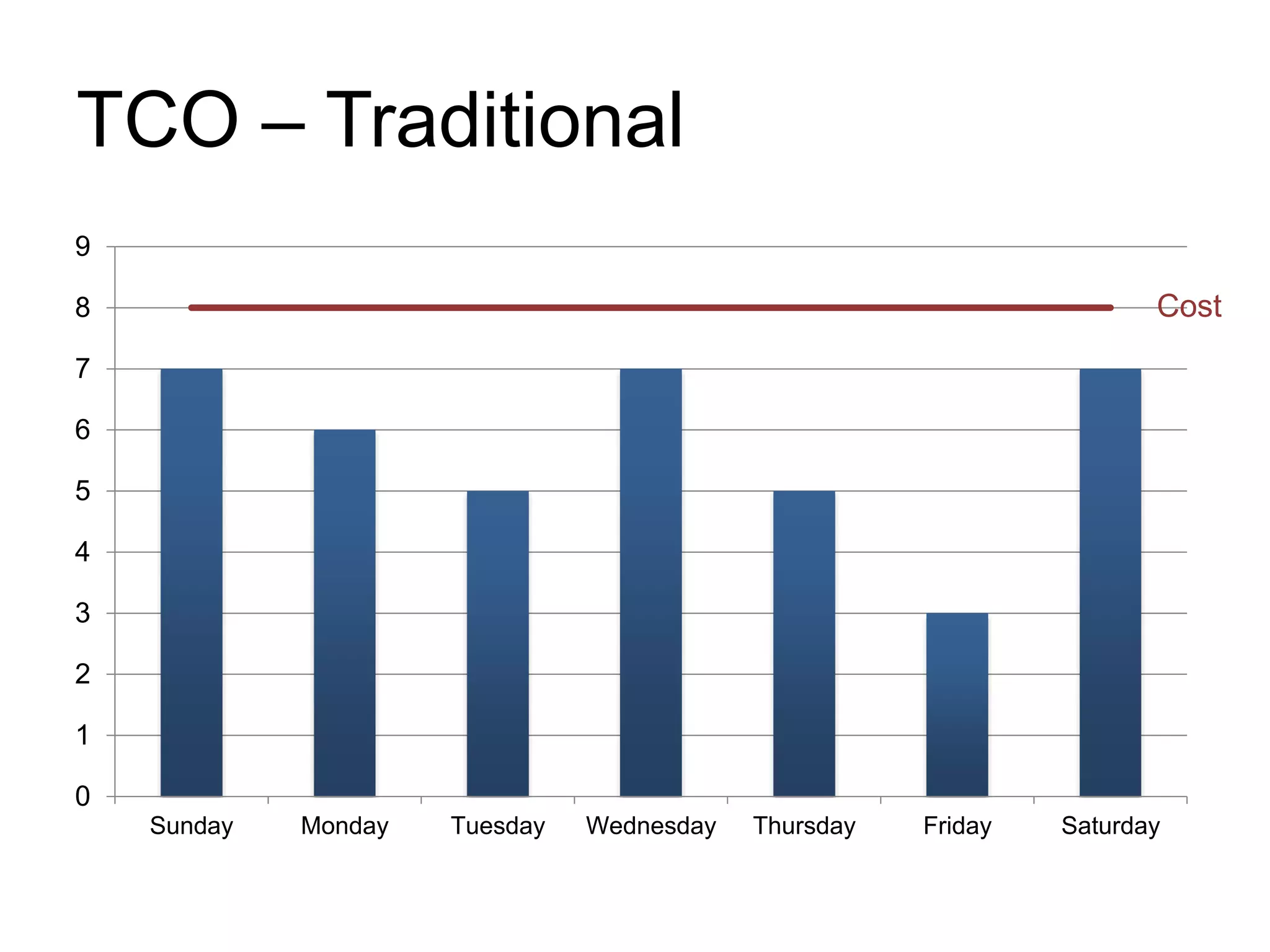
TCO – Traditional 
9 
8 
7 
6 
5 
4 
3 
2 
1 
0 
Cost 
Sunday Monday Tuesday Wednesday Thursday Friday Saturday
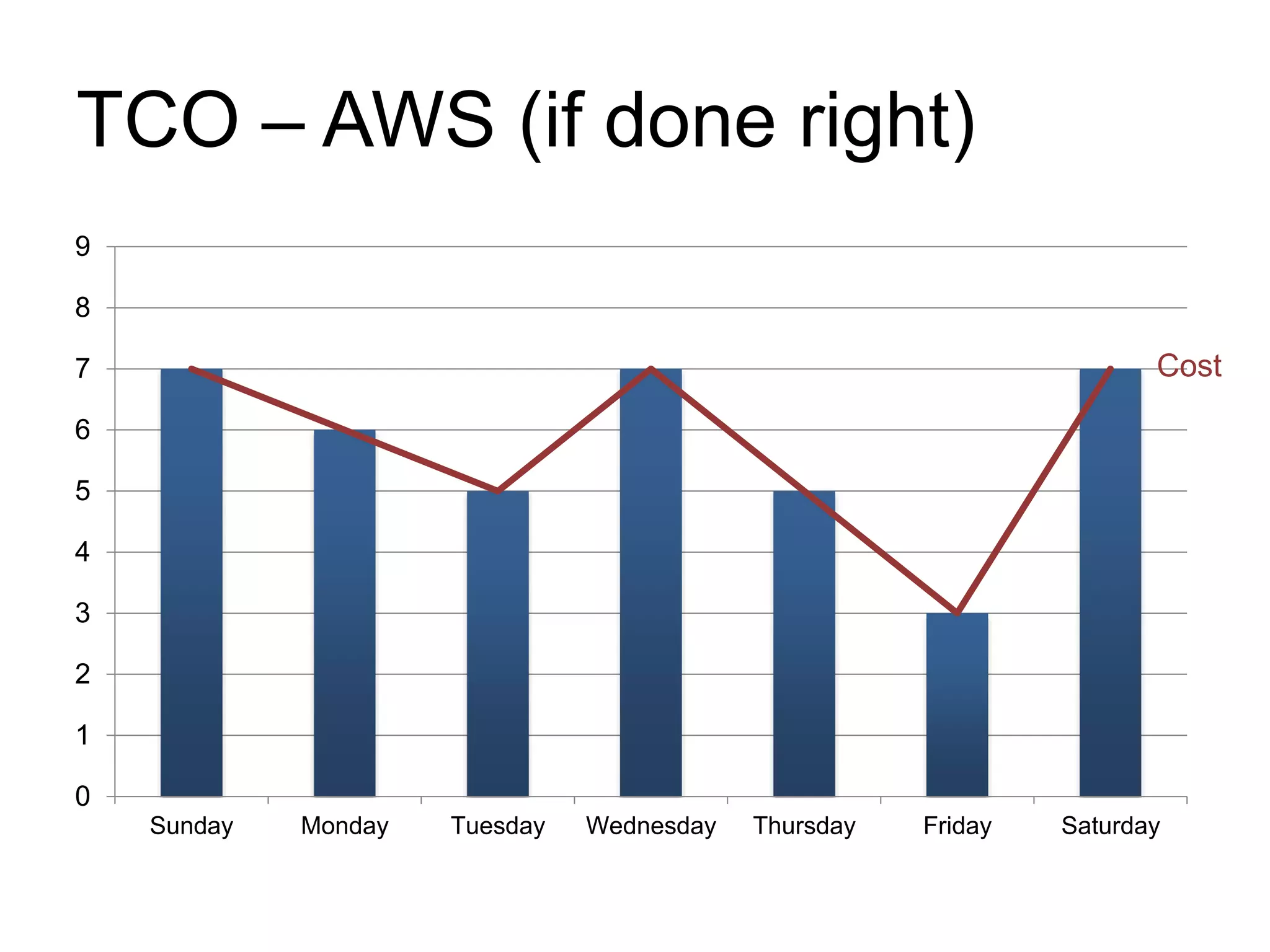
TCO – AWS (if done right) 
9 
8 
7 
6 
5 
4 
3 
2 
1 
0 
Cost 
Sunday Monday Tuesday Wednesday Thursday Friday Saturday
High Availability 
• Cost of downtime? 
• DNS availability? 
• Server replacement time? 
• Disaster recovery?
Scalability / Automation 
• Adding additional hardware? 
• Identical systems? 
• More hardware than needed? 
• Dev machines = live environment? 
• 2x the load? 3x? 4x?
What to consider before moving 
• Is your application ready? 
– do you store information locally? 
– can you handle turning off one node? 
– how high is your IO usage? 
• Are your current app components ready? 
– look for cloud service alternatives
Magento and the Cloud (1) 
• Magento (per default) 
– uses lots of resources and IO requests 
– saves information locally 
– can get really heavy with lots of SKUs 
– uses a combined frontend / backend system
Magento and the Cloud (2) 
• Ideal scenario 
– separate backend / frontend / cron jobs 
– don’t save any important data locally 
– centralized session storage 
– centralized cache storage 
– lower IO usage (1.7+) 
– use a proper search engine 
– use full(!) page caches = no hits to AWS 
– completely automated
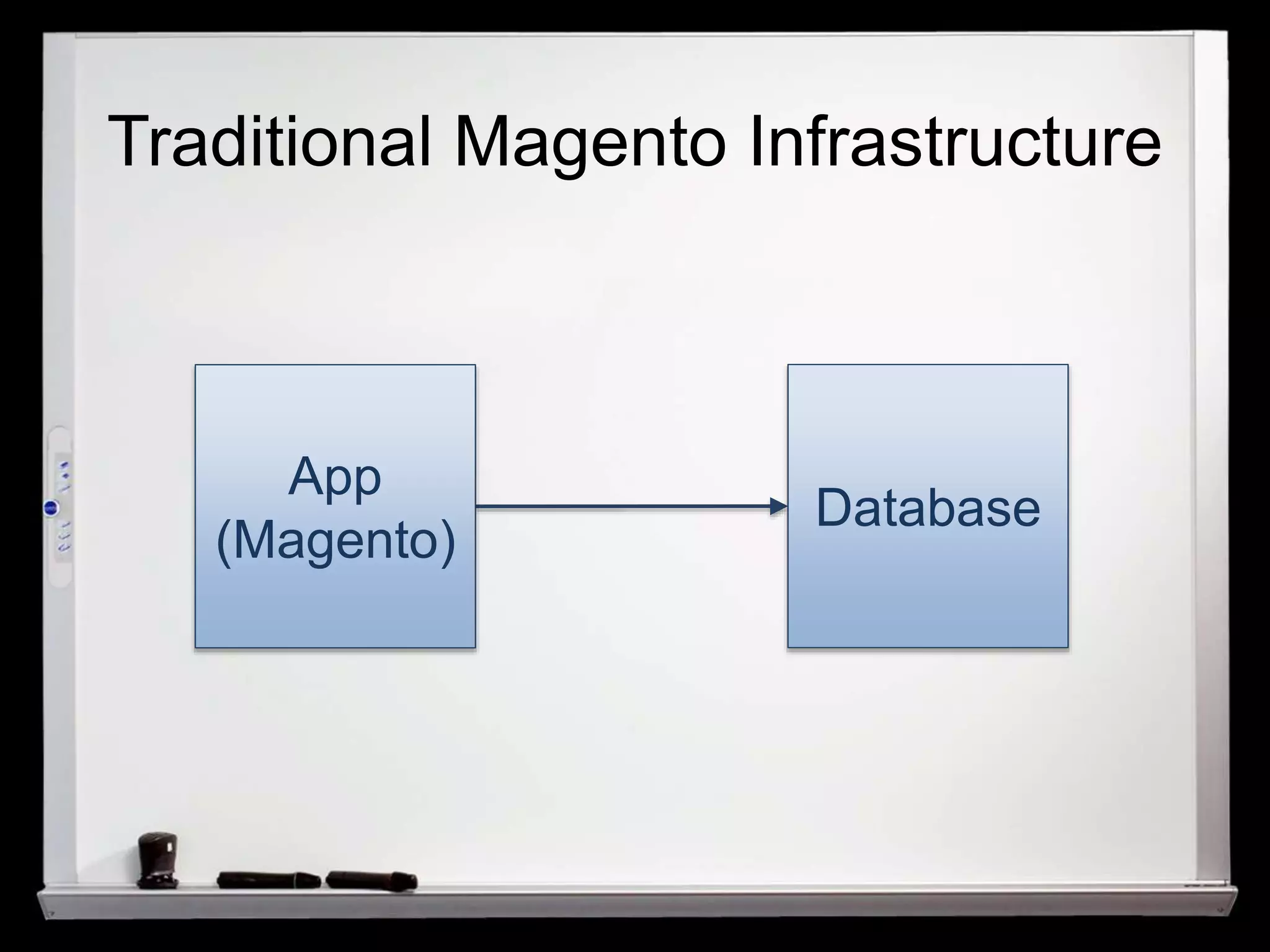
Traditional Magento Infrastructure 
App 
(Magento) 
Database
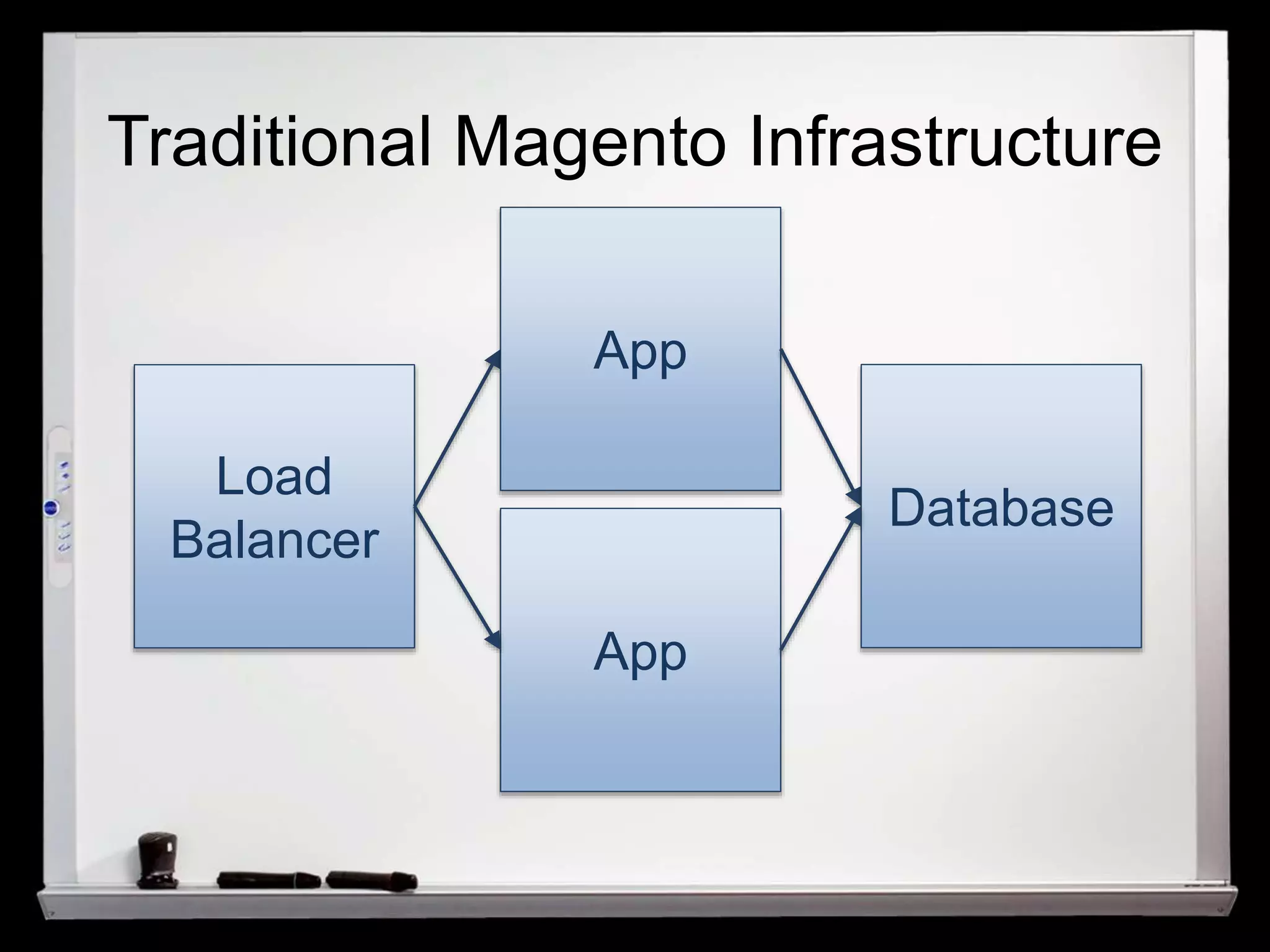
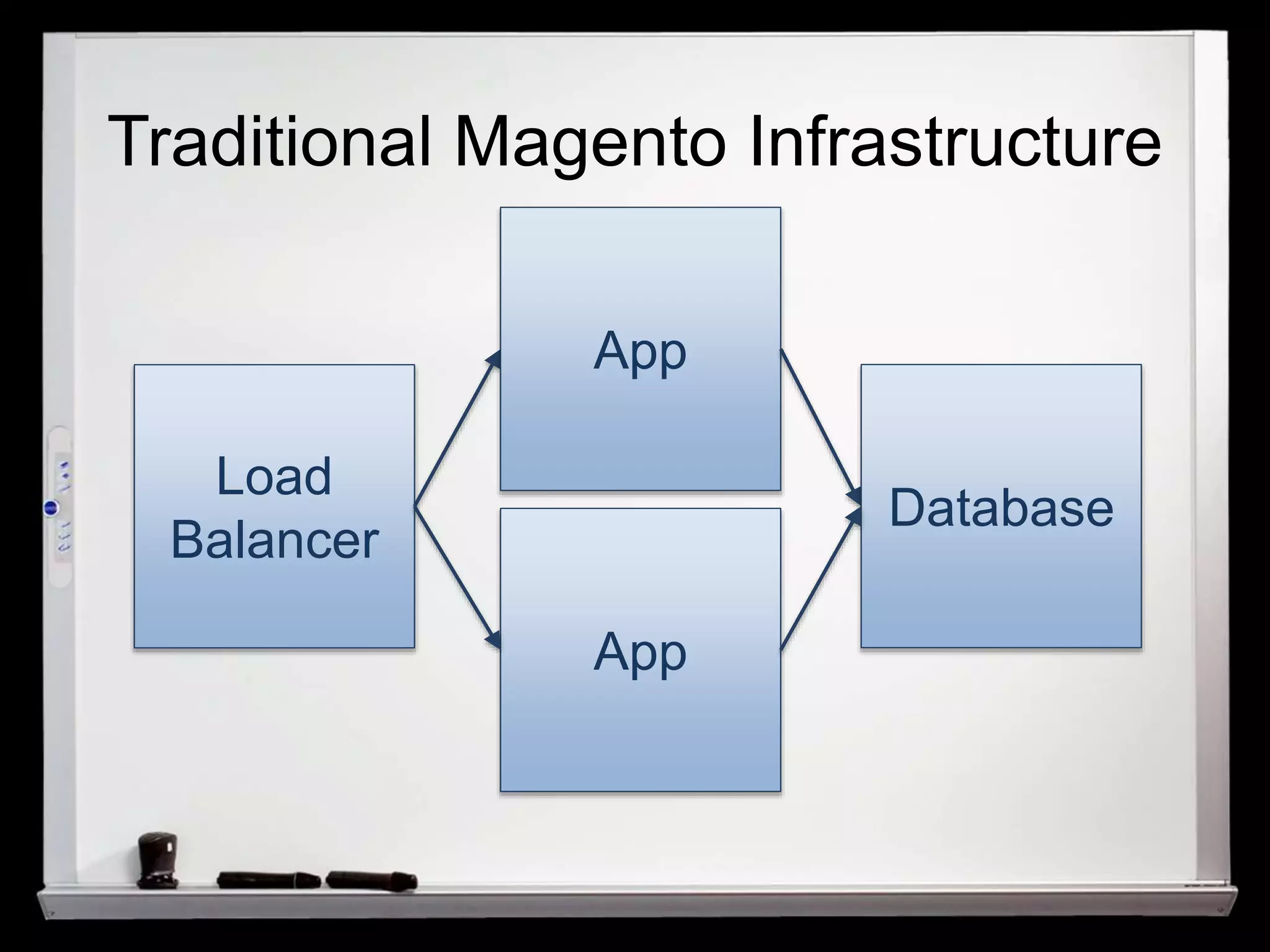
Traditional Magento Infrastructure 
Load 
Balancer 
App 
App 
Database
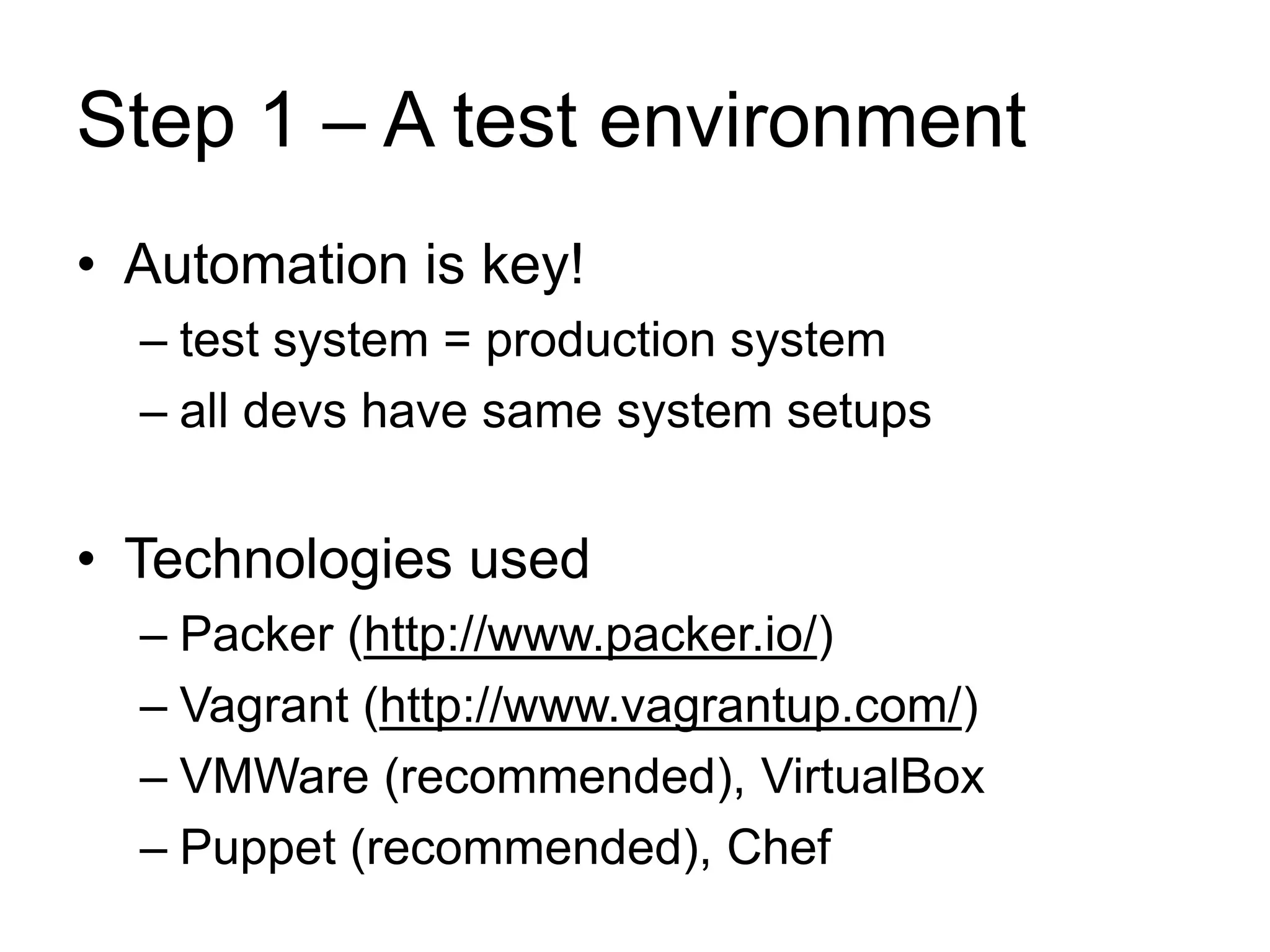
Step 1 – A test environment 
• Automation is key! 
– test system = production system 
– all devs have same system setups 
• Technologies used 
– Packer (http://www.packer.io/) 
– Vagrant (http://www.vagrantup.com/) 
– VMWare (recommended), VirtualBox 
– Puppet (recommended), Chef
Traditional Magento Infrastructure 
Load 
Balancer 
App 
App 
Database
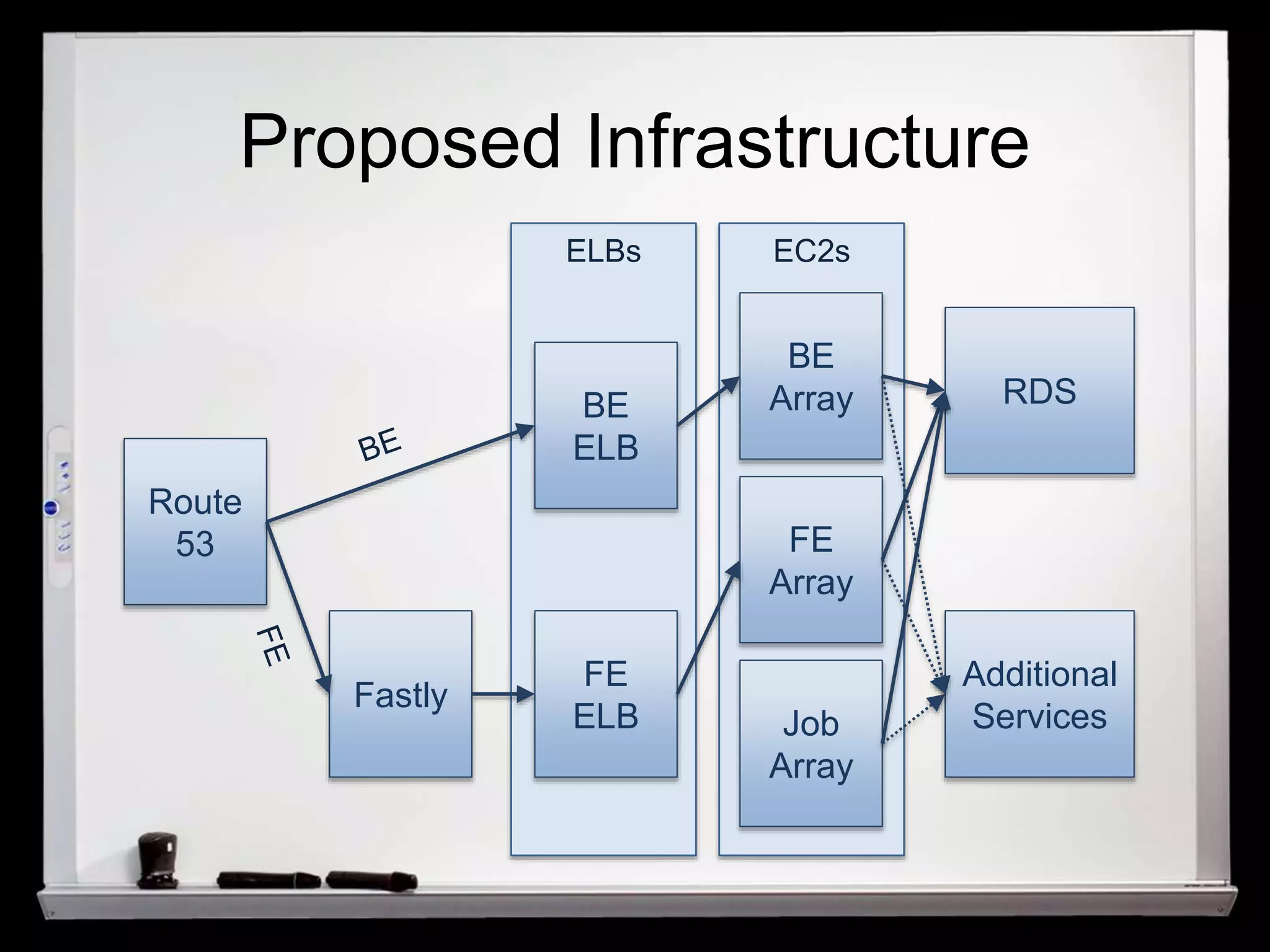
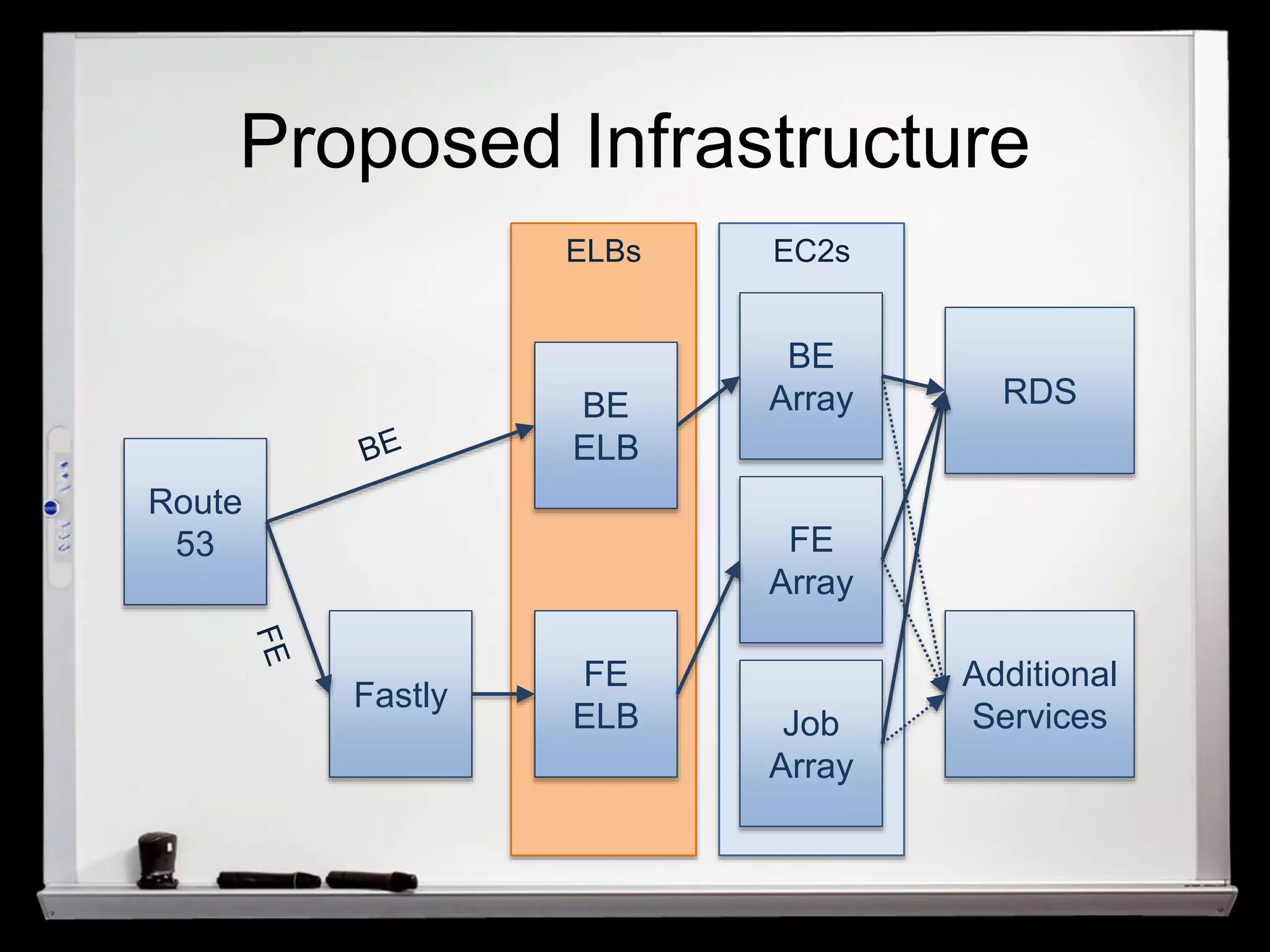
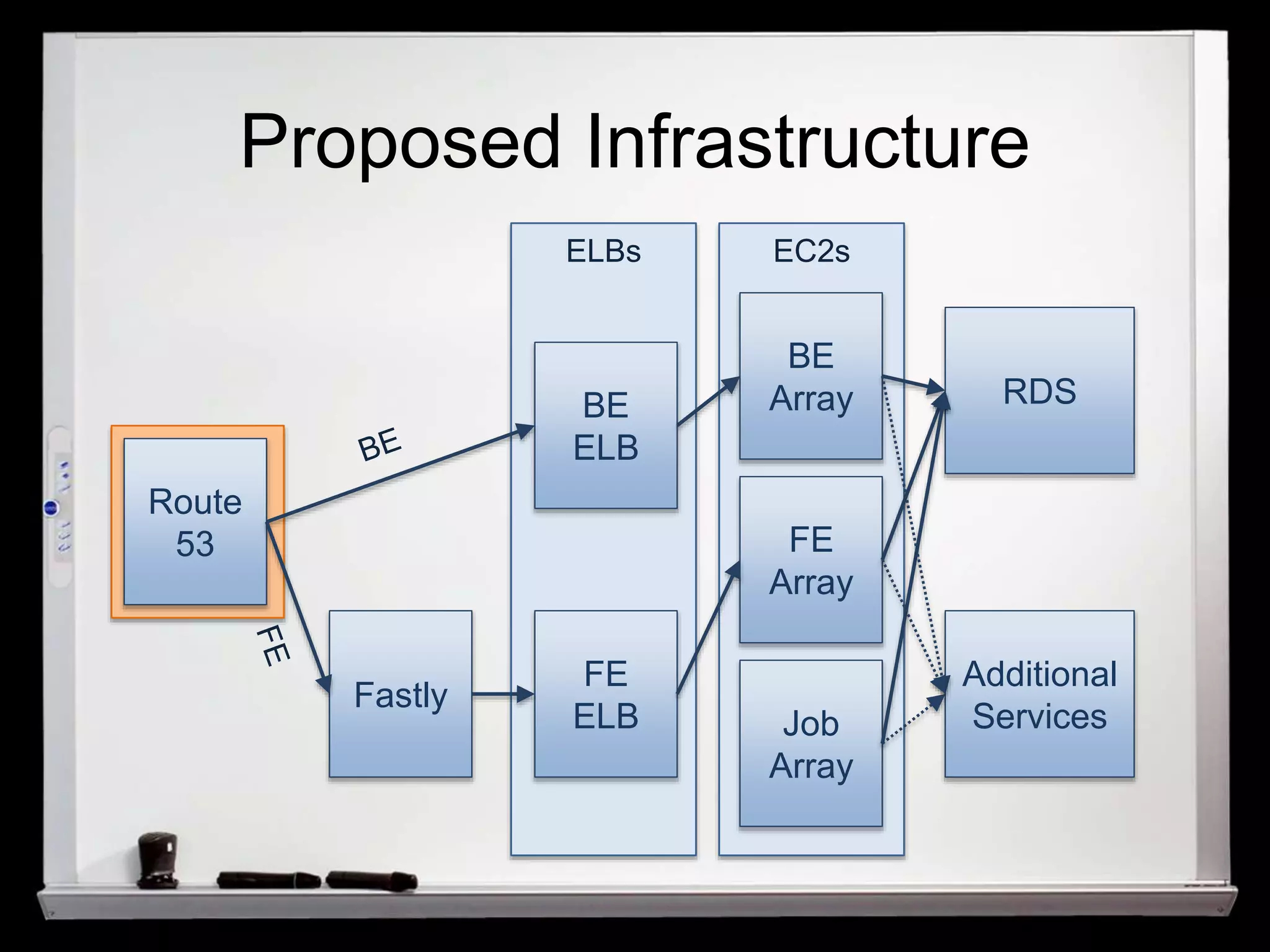
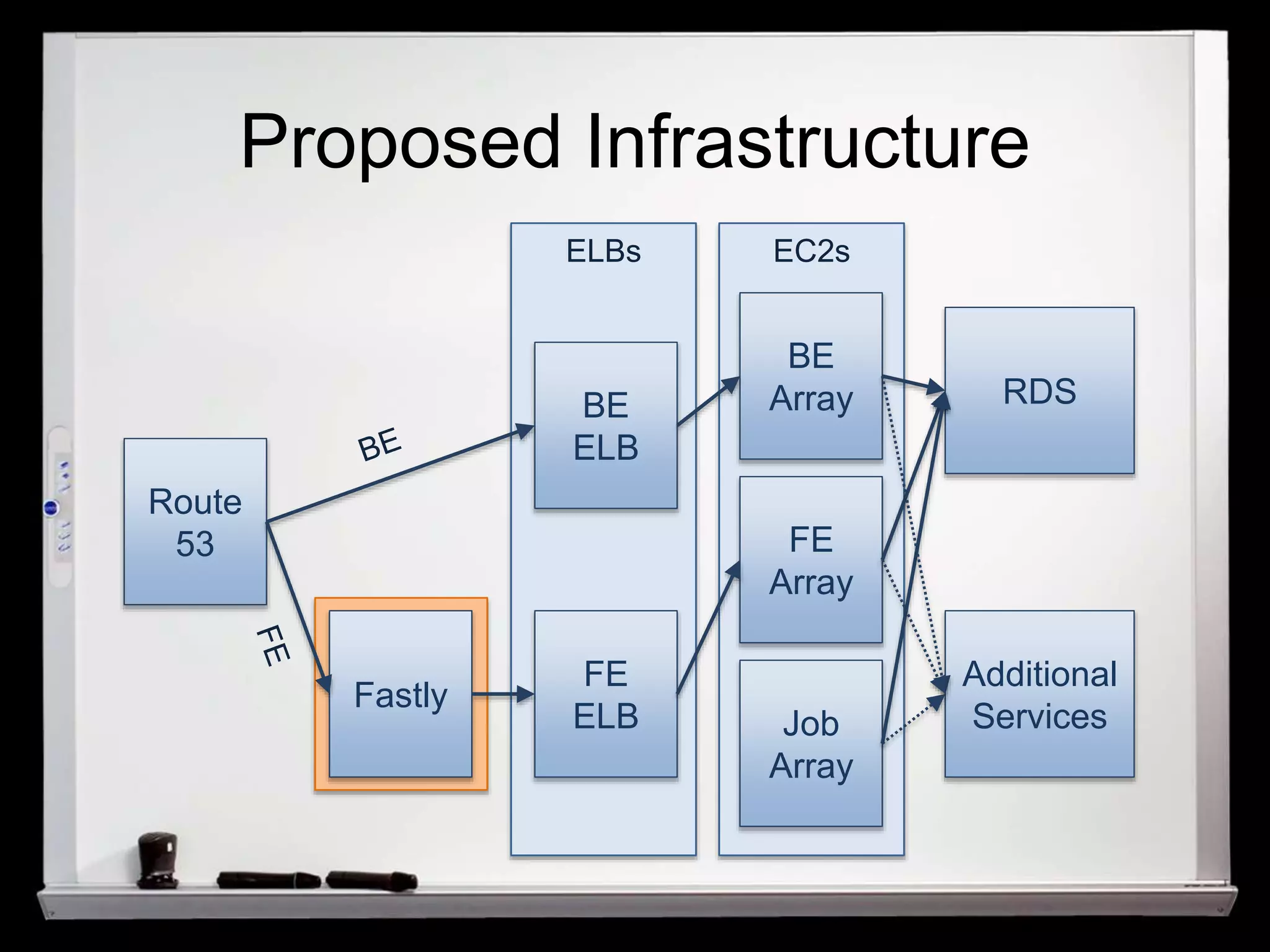
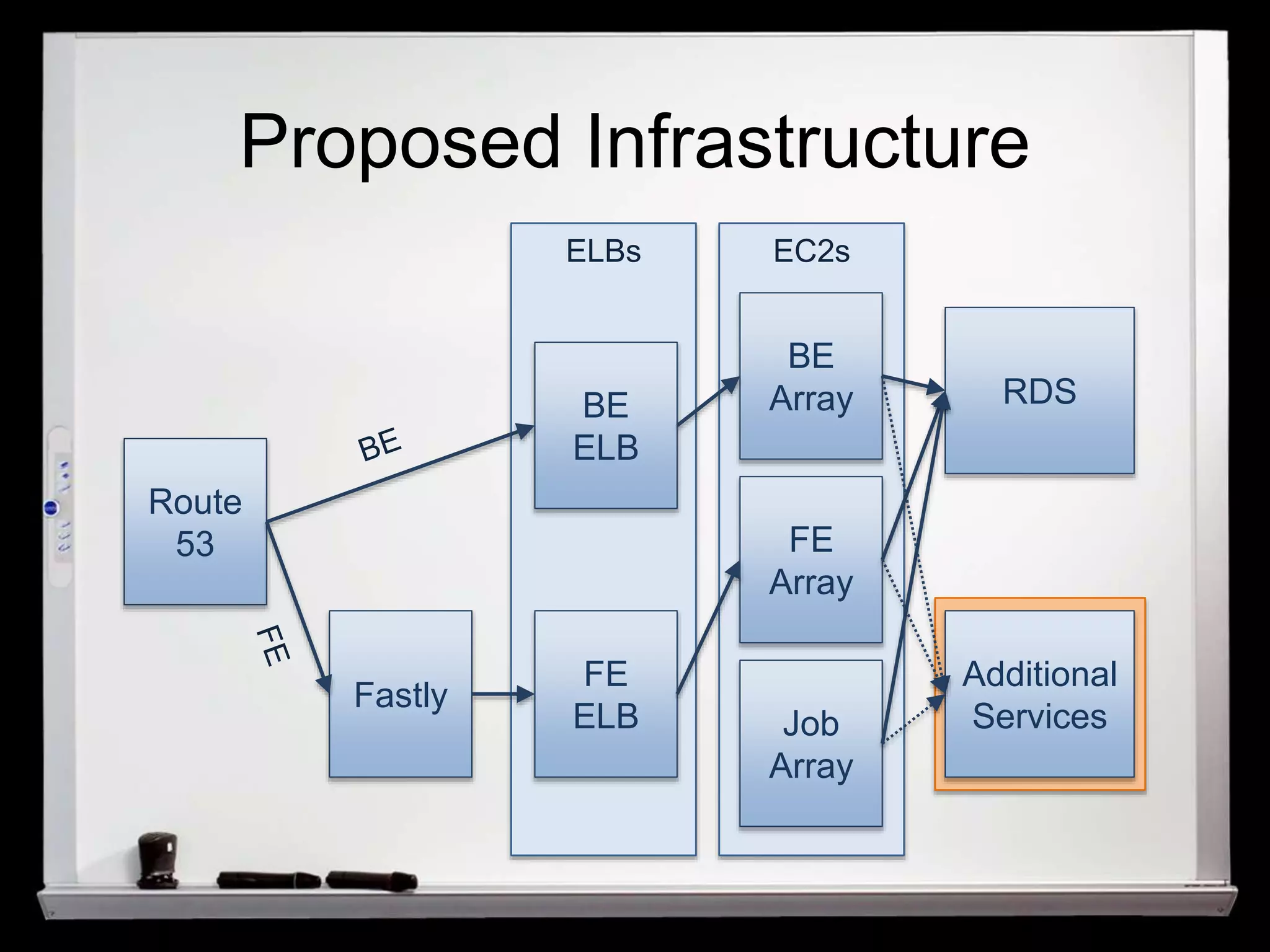
Proposed Infrastructure 
Route 
53 
Fastly 
BE 
ELB 
FE 
ELB 
BE 
Array 
FE 
Array 
Job 
Array 
RDS 
Additional 
Services 
ELBs EC2s
Proposed Infrastructure 
Route 
53 
Fastly 
BE 
ELB 
FE 
ELB 
BE 
Array 
FE 
Array 
Job 
Array 
RDS 
Additional 
Services 
ELBs EC2s
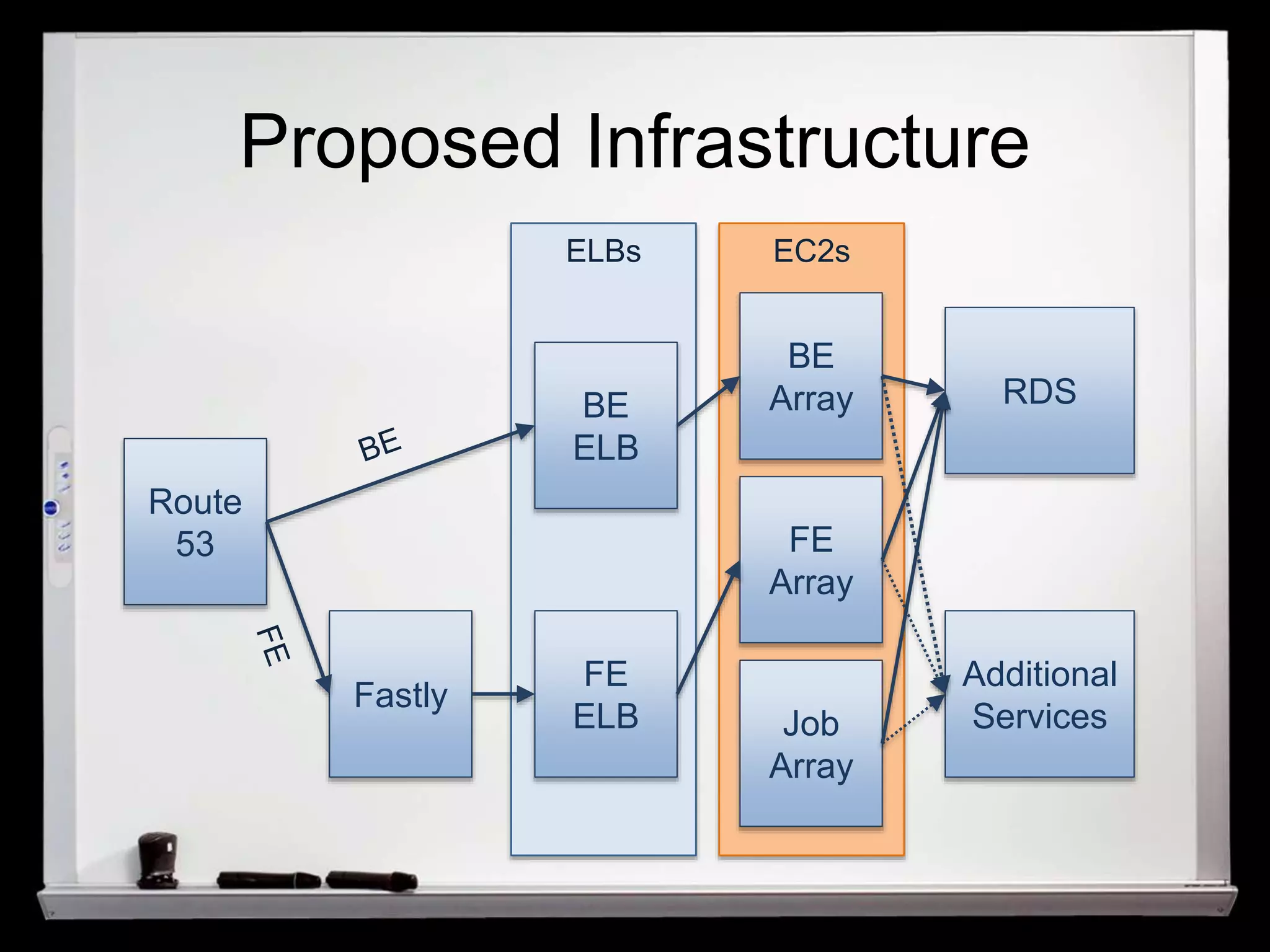
Tech – EC2 
• ephemeral vs. EBS-backed storage 
• compute vs. memory heavy instances 
• EBS vs. network optimized instances 
• SSD vs. non-SSD storage
Tech – EC2 Frontend 
• test with expected traffic + more 
– capture and replay 
– simulate crawling 
– test with real people (!) 
• 2 large instances vs. 4 smaller instances
Tech – EC2 Backend / EC2 Job 
• split out to not take away processing 
power for customers 
• Backend roles 
– admin work 
– API connections 
• Job roles 
– periodical jobs 
– usually 1 instance
Autoscaling 
• min, max and desired amounts of 
EC2 instances 
• rule-based system 
• Launch Groups for launching AMIs
Proposed Infrastructure 
Route 
53 
Fastly 
BE 
ELB 
FE 
ELB 
BE 
Array 
FE 
Array 
Job 
Array 
RDS 
Additional 
Services 
ELBs EC2s
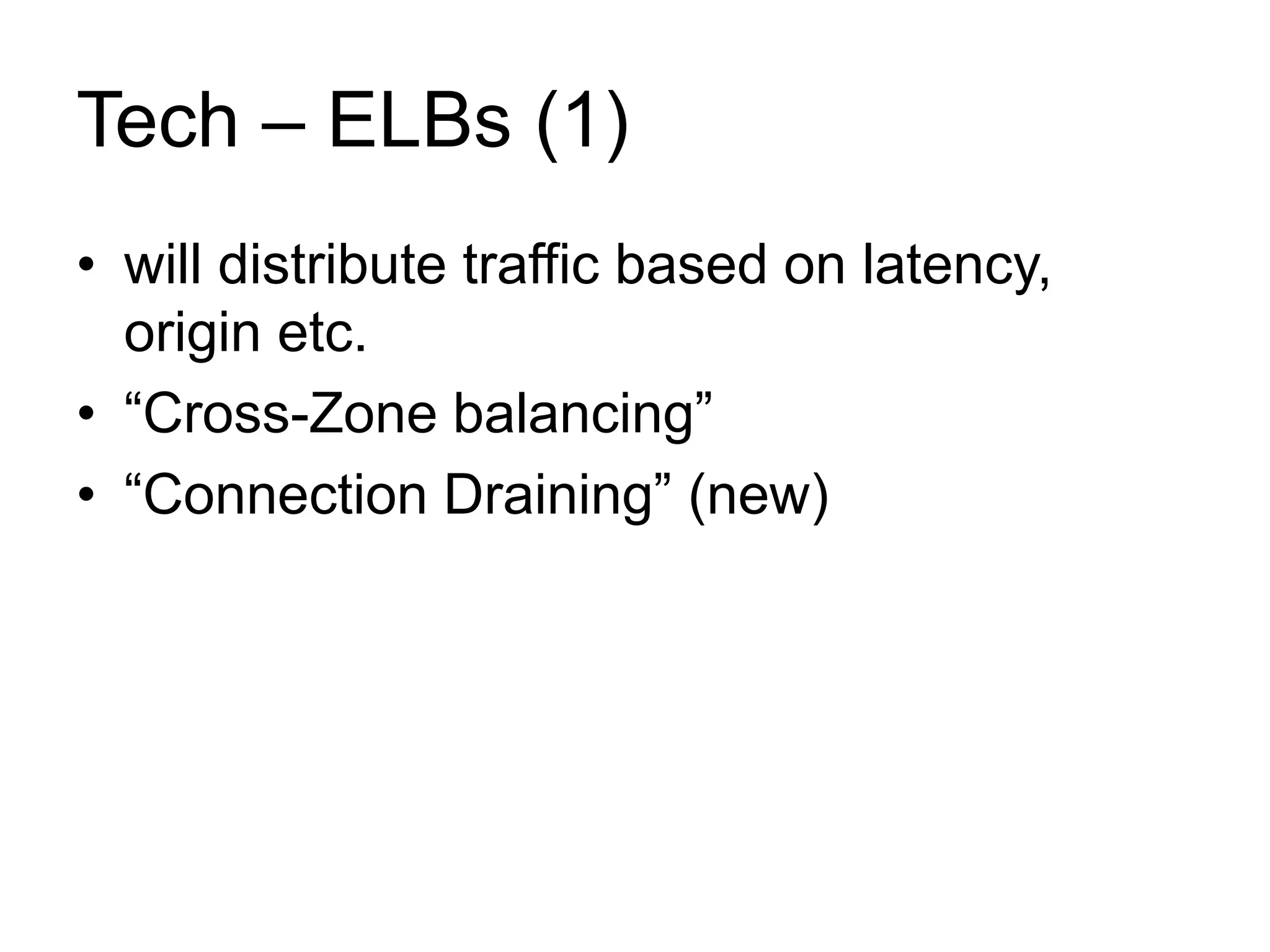
Tech – ELBs (1) 
• will distribute traffic based on latency, 
origin etc. 
• “Cross-Zone balancing” 
• “Connection Draining” (new)
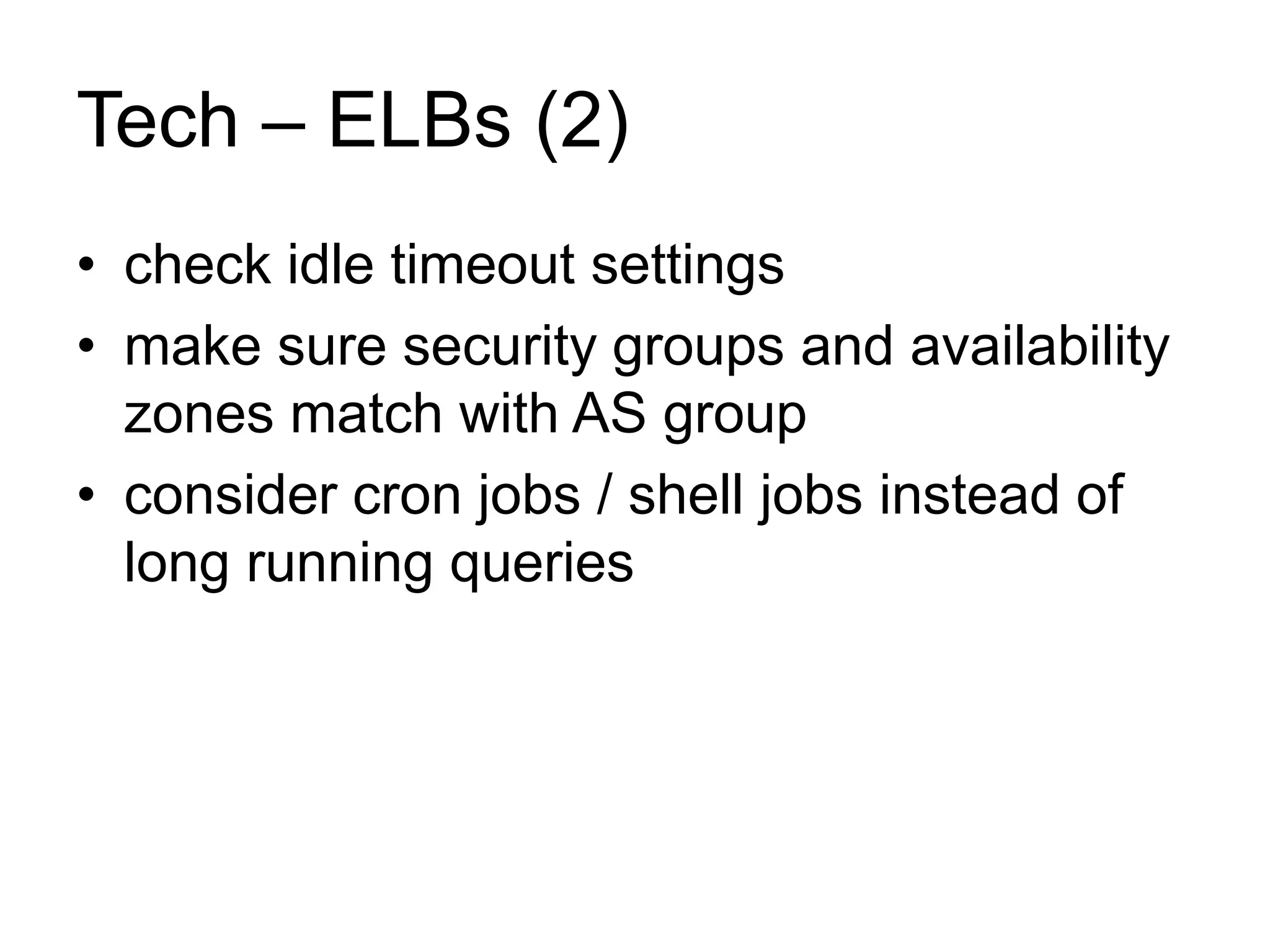
Tech – ELBs (2) 
• check idle timeout settings 
• make sure security groups and availability 
zones match with AS group 
• consider cron jobs / shell jobs instead of 
long running queries
Proposed Infrastructure 
Route 
53 
Fastly 
BE 
ELB 
FE 
ELB 
BE 
Array 
FE 
Array 
Job 
Array 
RDS 
Additional 
Services 
ELBs EC2s
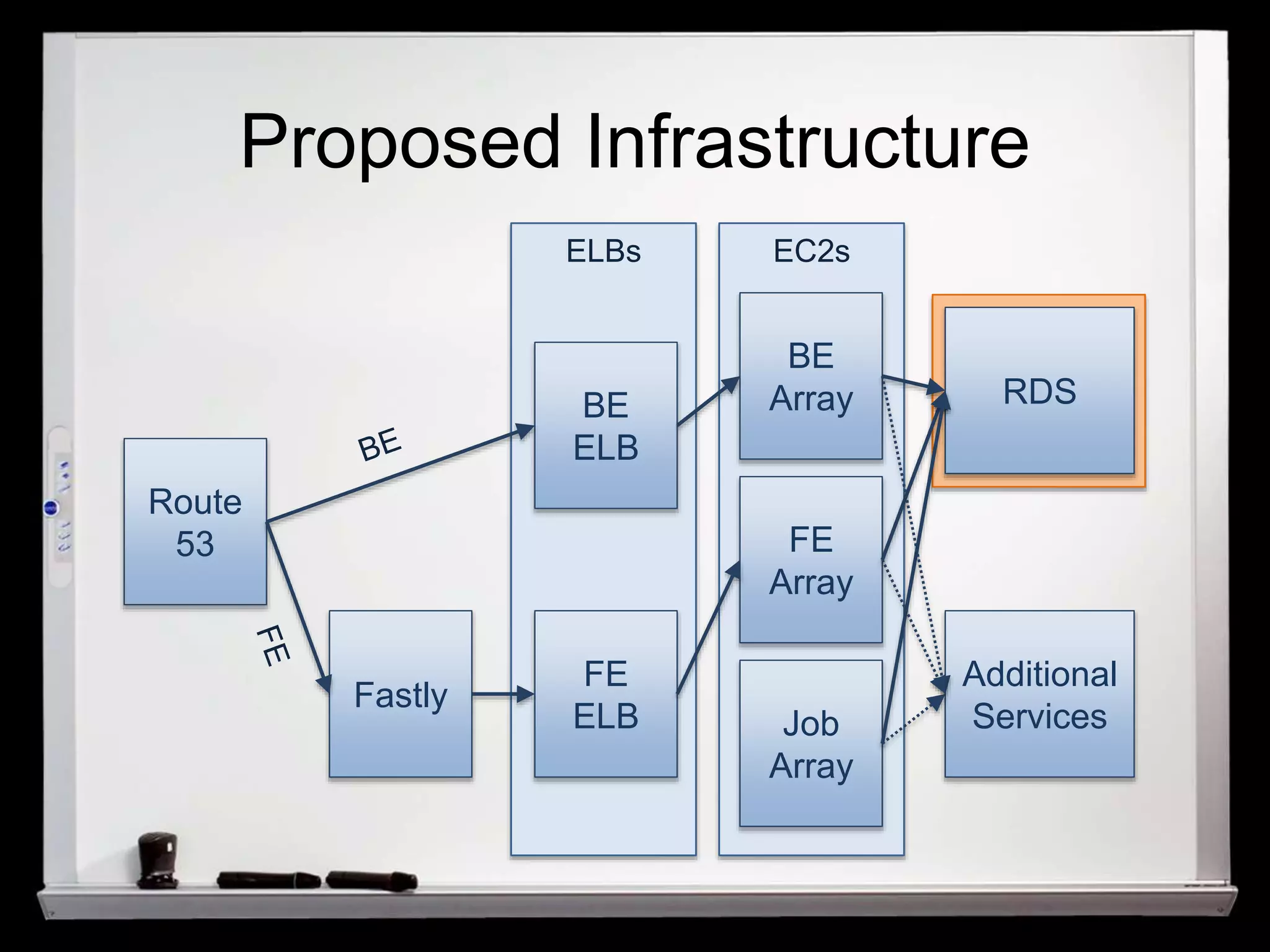
Tech - RDS (1) 
• Reserved IOPS vs. Standard Storage 
• Reserved IOPS 
– start at 1000 IOPS 
– have to be paid in full 
• watch CloudWatch metric „Disk Queue 
Depth“
Tech - RDS (2) 
• go for Multi-AZ 
– High Availability 
– DB changes don‘t need downtime 
• check your Configuration Sets (!) 
– Query Cache might be disabled 
– further optimizations need to be done
Proposed Infrastructure 
Route 
53 
Fastly 
BE 
ELB 
FE 
ELB 
BE 
Array 
FE 
Array 
Job 
Array 
RDS 
Additional 
Services 
ELBs EC2s
Tech - Route 53 
• „Delegation Set“ 
• needs registrar with support for 
4 name servers (new: register via AWS) 
• Routing policies 
– Simple 
– Latency
Proposed Infrastructure 
Route 
53 
Fastly 
BE 
ELB 
FE 
ELB 
BE 
Array 
FE 
Array 
Job 
Array 
RDS 
Additional 
Services 
ELBs EC2s
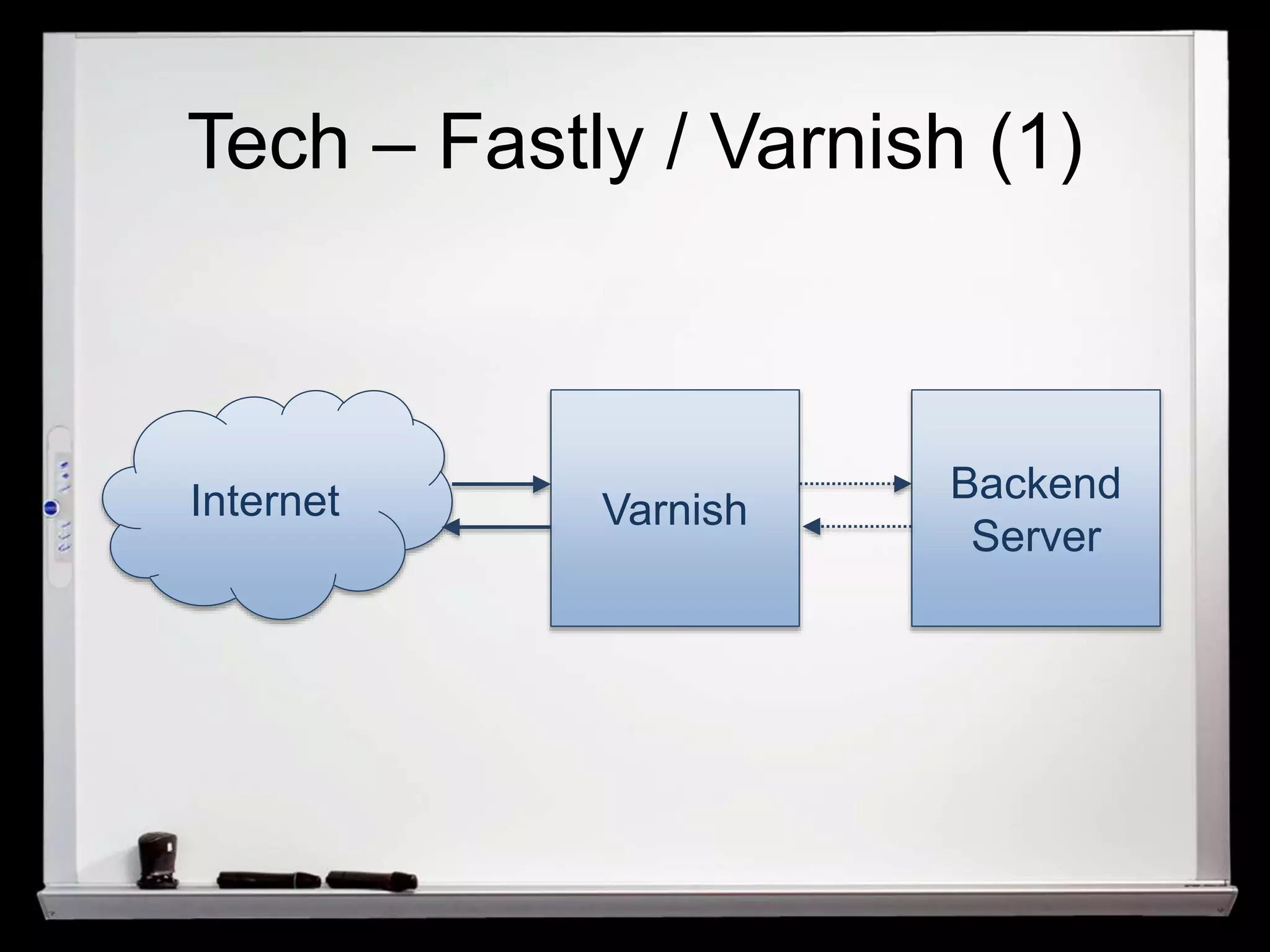
Tech – Fastly / Varnish (1) 
Internet Varnish Backend 
Server
Tech – Fastly / Varnish (2) 
• hosted Varnish solution 
• „distributed“ Varnish 
• complete purge support 
• complete VCL support 
• Magento implementation 
– Phoenix PageCache for Magento 
– implement Fastly API
Tech – Fastly / Varnish (3) 
• pages HAVE to be fully cacheable 
• hole-punching: negative performance 
impact 
• go for AJAX 
• store information locally 
(HTML5 local storage, cookies)
Tech – Fastly / Varnish (4) 
• Examples: 
– recently viewed products 
– amount of products in basket 
• might need layout changes 
• use some form of pre-caching 
• normalize user agents (!)
Proposed Infrastructure 
Route 
53 
Fastly 
BE 
ELB 
FE 
ELB 
BE 
Array 
FE 
Array 
Job 
Array 
RDS 
Additional 
Services 
ELBs EC2s
Tech - S3 / CloudFront (1) 
• do not use local storage for persistent data 
• do not use EBS for persistent data 
• S3 is available to all instances 
• will host 
– CMS uploaded files (static pages) 
– product images 
– image caches
Tech - S3 / CloudFront (2) 
• great for write-heavy operations (save) 
• slow for read-heavy operations 
– use CloudFront 
• Magento implementation: 
– OnePica ImageCDN 
– custom code for backend data storage
Tech - S3 / CloudFront (3) 
• Magento provides 2 data storages 
– file based storage 
– database based storage 
• rewrite database storage to use 
aws-php-sdk 
• combine with OnePica extension
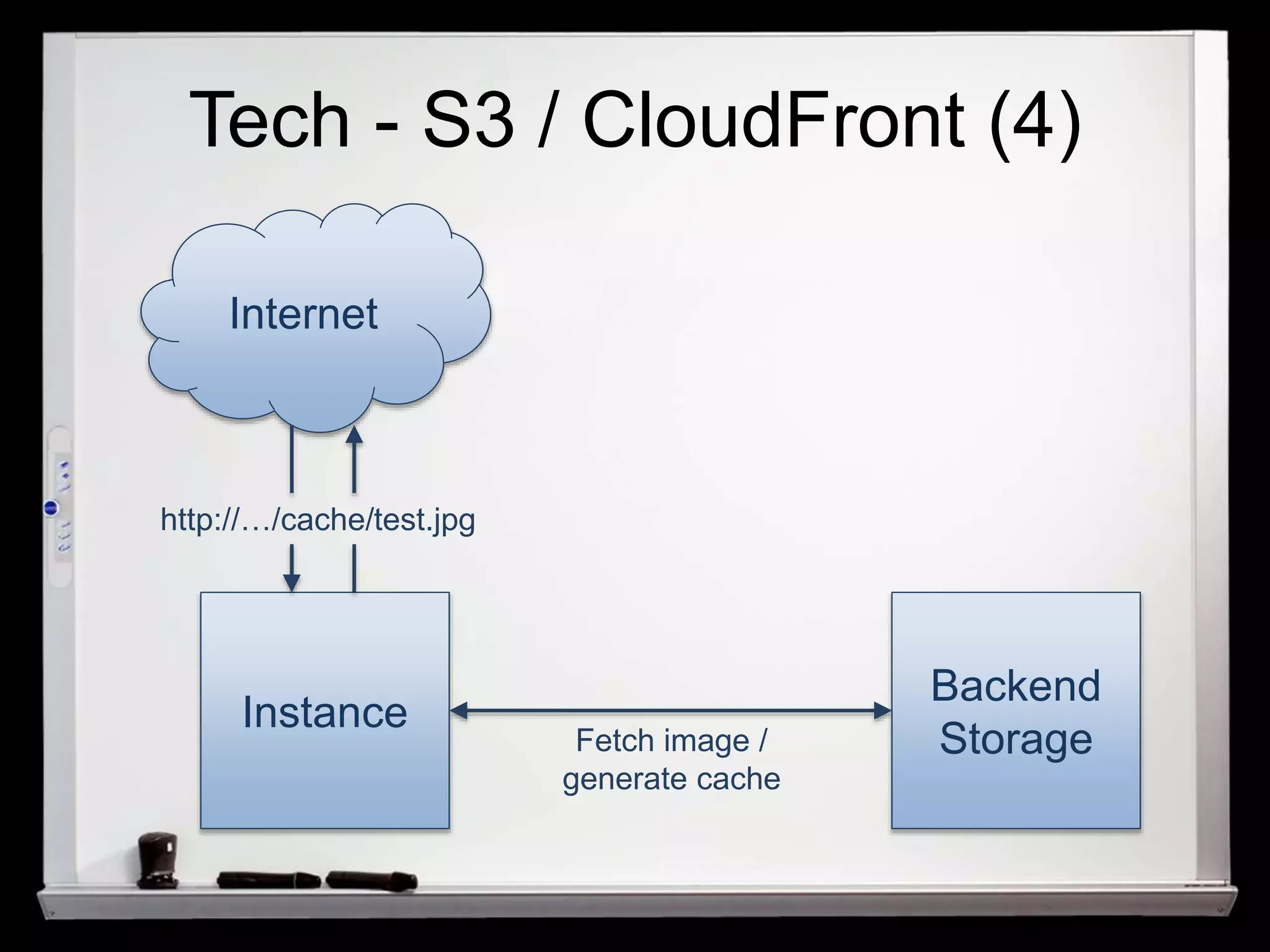
Tech - S3 / CloudFront (4) 
Internet 
Instance 
Backend 
Fetch image / Storage 
generate cache 
http://…/cache/test.jpg
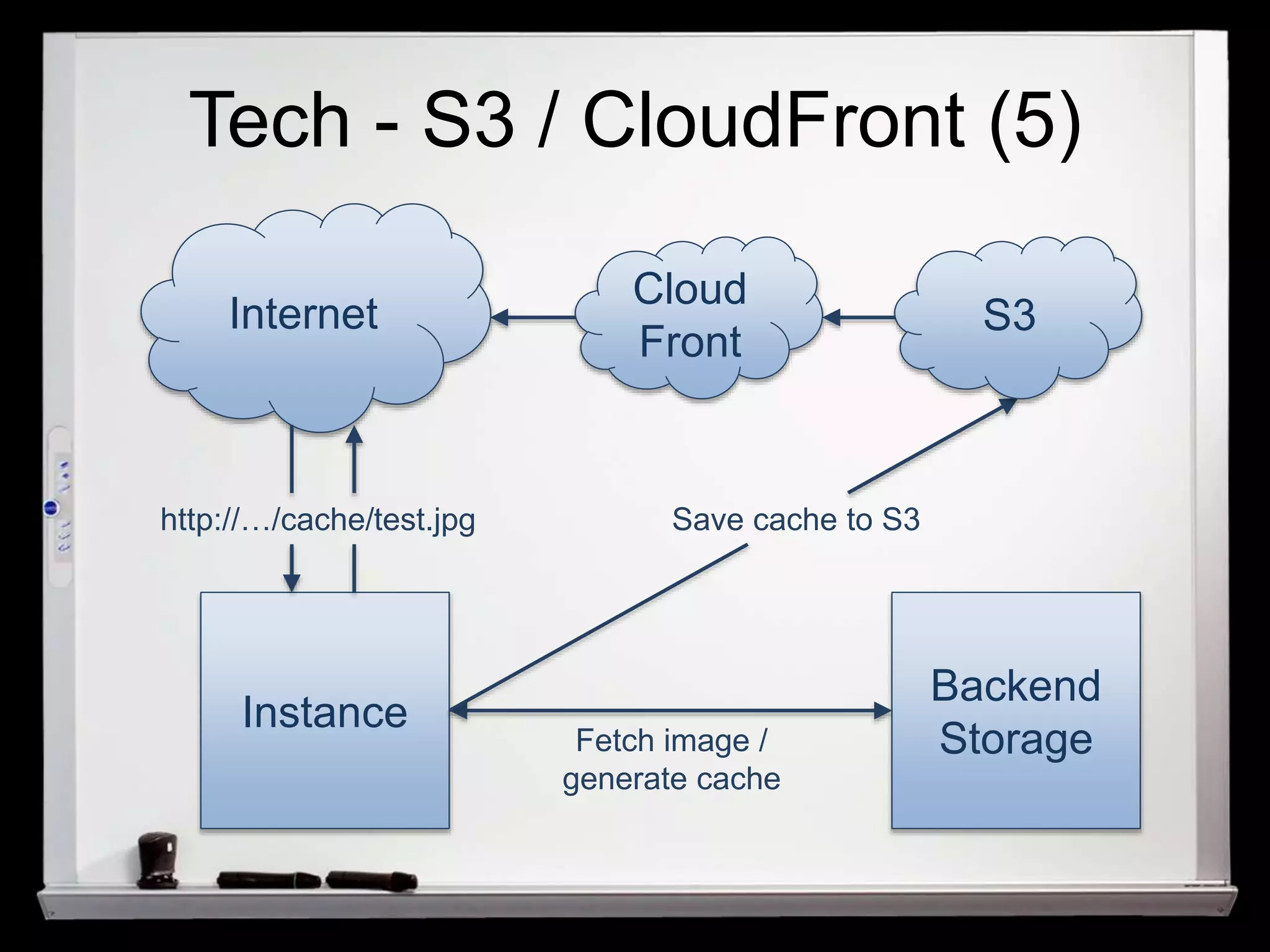
Tech - S3 / CloudFront (5) 
Cloud 
Front 
S3 
Save cache to S3 
Internet 
Instance 
Backend 
Fetch image / Storage 
generate cache 
http://…/cache/test.jpg
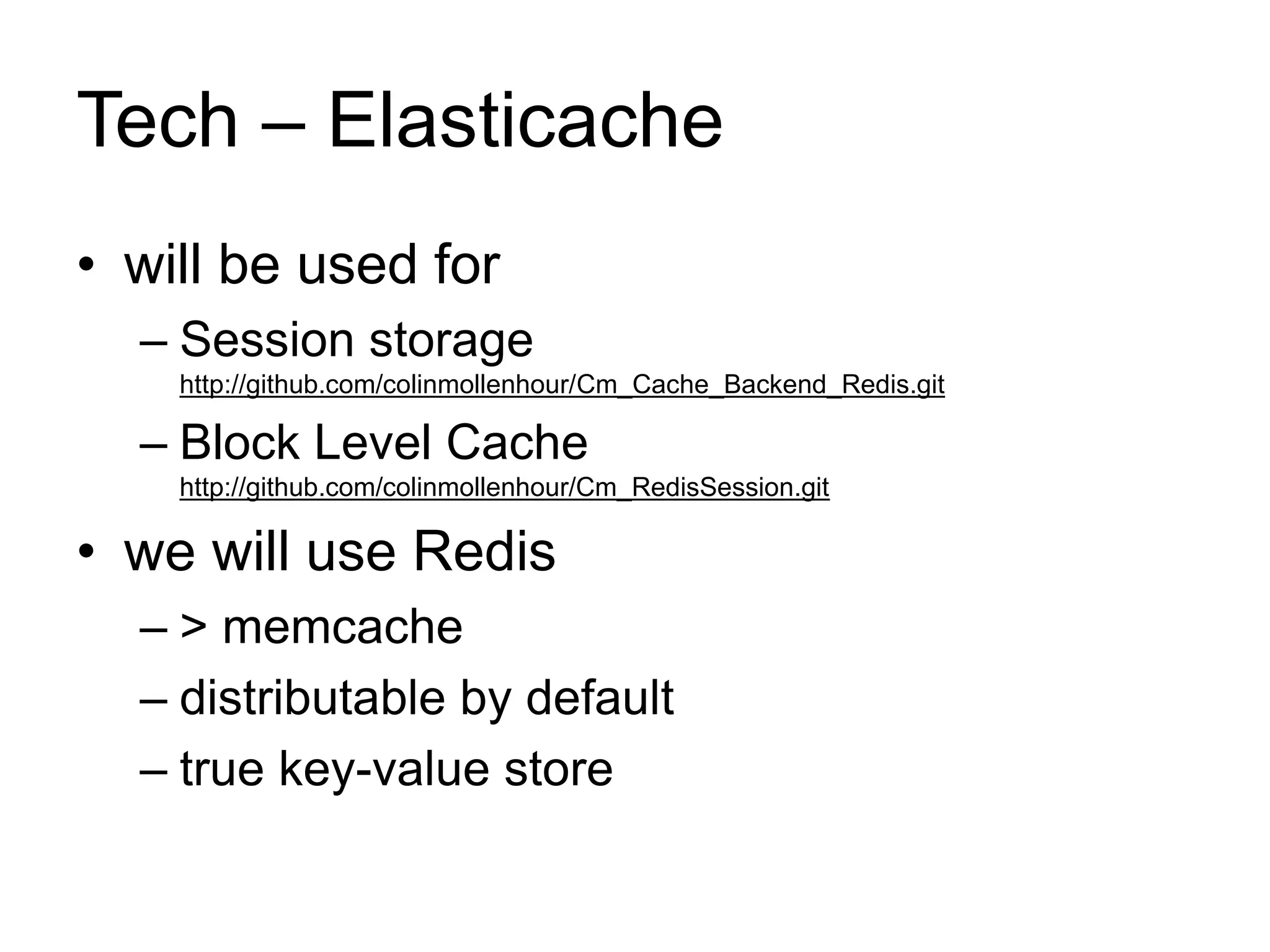
Tech – Elasticache 
• will be used for 
– Session storage 
http://github.com/colinmollenhour/Cm_Cache_Backend_Redis.git 
– Block Level Cache 
http://github.com/colinmollenhour/Cm_RedisSession.git 
• we will use Redis 
– > memcache 
– distributable by default 
– true key-value store
Tech – Search 
• slow on large catalogues 
• Elasticsearch (Bubblesearch) / Solar 
• offload search traffic to dedicated service 
/server
Security 
• use VPCs (now per default) 
• don’t assign public IPs to your servers 
• don’t use public RDS distributions 
• set strict security groups 
• use VPN to connect to your infrastructure 
– AWS Direct Connect 
– small EC2 instance that runs VPN service 
– only VPN servers should have external IPs
Tech – Rollouts (1) 
• previously: 
– Capistrano 
– rpm packages 
– git pull 
– svn up 
• now: server names might be unknown
Tech – Rollouts (2) 
• Options 
– bake an AMI for every change 
– use messaging systems to roll out 
releases across servers (ActiveMQ etc.) 
• use a Capistrano-like system to ensure 
fast rollbacks if needed
Tech – Rollouts (3) 
• always aim for a 1-click deployment 
• use Jenkins etc. to build/verify your project 
• OS Packages 
– bake AMIs every time you want to install 
something 
– use puppet master/client architecture
Step 2 - Infrastructure (1) 
• go a step further: 
automate your infrastructure 
• quickly build new test environments 
• quickly move to another provider if needed 
• automatically document your infrastructure 
• “check in” your infrastructure
Step 2 - Infrastructure (2) 
• build your base AMI with packer 
• use same CM tools and classes as for test 
environment 
• use tech such as 
– Fog (http://fog.io) 
– build-cloud 
(https://github.com/scalefactory/build-cloud)
Thanks! 
• Check out the demos on 
– https://github.com/Fireflake/tech4africa 
• Get in touch 
– http://www.linkedin.com/pub/florian-aschenbrenner/ 
79/368/566

Tech4Africa 2014

  • 1.
    AWS Speed &Scaling with Magento Florian Aschenbrenner
  • 2.
    About me •2 years Java dev – ATM/Host comms • 6 years of sysadmin and security admin • 3 years of Head of Tech/CTO for Wedo • freelance projects • musician
  • 3.
    Structure • Concepts • Example for local environment • Proposal for AWS buildout • Highlight on individual technologies • Example for infrastructure buildout
  • 4.
    Let‘s go tothe cloud (1)
  • 6.
    TCO – Traditional 9 8 7 6 5 4 3 2 1 0 Cost Sunday Monday Tuesday Wednesday Thursday Friday Saturday
  • 7.
    TCO – AWS(if done right) 9 8 7 6 5 4 3 2 1 0 Cost Sunday Monday Tuesday Wednesday Thursday Friday Saturday
  • 8.
    High Availability •Cost of downtime? • DNS availability? • Server replacement time? • Disaster recovery?
  • 9.
    Scalability / Automation • Adding additional hardware? • Identical systems? • More hardware than needed? • Dev machines = live environment? • 2x the load? 3x? 4x?
  • 11.
    What to considerbefore moving • Is your application ready? – do you store information locally? – can you handle turning off one node? – how high is your IO usage? • Are your current app components ready? – look for cloud service alternatives
  • 12.
    Magento and theCloud (1) • Magento (per default) – uses lots of resources and IO requests – saves information locally – can get really heavy with lots of SKUs – uses a combined frontend / backend system
  • 13.
    Magento and theCloud (2) • Ideal scenario – separate backend / frontend / cron jobs – don’t save any important data locally – centralized session storage – centralized cache storage – lower IO usage (1.7+) – use a proper search engine – use full(!) page caches = no hits to AWS – completely automated
  • 14.
    Traditional Magento Infrastructure App (Magento) Database
  • 15.
    Traditional Magento Infrastructure Load Balancer App App Database
  • 16.
    Step 1 –A test environment • Automation is key! – test system = production system – all devs have same system setups • Technologies used – Packer (http://www.packer.io/) – Vagrant (http://www.vagrantup.com/) – VMWare (recommended), VirtualBox – Puppet (recommended), Chef
  • 17.
    Traditional Magento Infrastructure Load Balancer App App Database
  • 18.
    Proposed Infrastructure Route 53 Fastly BE ELB FE ELB BE Array FE Array Job Array RDS Additional Services ELBs EC2s
  • 19.
    Proposed Infrastructure Route 53 Fastly BE ELB FE ELB BE Array FE Array Job Array RDS Additional Services ELBs EC2s
  • 20.
    Tech – EC2 • ephemeral vs. EBS-backed storage • compute vs. memory heavy instances • EBS vs. network optimized instances • SSD vs. non-SSD storage
  • 21.
    Tech – EC2Frontend • test with expected traffic + more – capture and replay – simulate crawling – test with real people (!) • 2 large instances vs. 4 smaller instances
  • 22.
    Tech – EC2Backend / EC2 Job • split out to not take away processing power for customers • Backend roles – admin work – API connections • Job roles – periodical jobs – usually 1 instance
  • 23.
    Autoscaling • min,max and desired amounts of EC2 instances • rule-based system • Launch Groups for launching AMIs
  • 24.
    Proposed Infrastructure Route 53 Fastly BE ELB FE ELB BE Array FE Array Job Array RDS Additional Services ELBs EC2s
  • 25.
    Tech – ELBs(1) • will distribute traffic based on latency, origin etc. • “Cross-Zone balancing” • “Connection Draining” (new)
  • 26.
    Tech – ELBs(2) • check idle timeout settings • make sure security groups and availability zones match with AS group • consider cron jobs / shell jobs instead of long running queries
  • 27.
    Proposed Infrastructure Route 53 Fastly BE ELB FE ELB BE Array FE Array Job Array RDS Additional Services ELBs EC2s
  • 28.
    Tech - RDS(1) • Reserved IOPS vs. Standard Storage • Reserved IOPS – start at 1000 IOPS – have to be paid in full • watch CloudWatch metric „Disk Queue Depth“
  • 29.
    Tech - RDS(2) • go for Multi-AZ – High Availability – DB changes don‘t need downtime • check your Configuration Sets (!) – Query Cache might be disabled – further optimizations need to be done
  • 31.
    Proposed Infrastructure Route 53 Fastly BE ELB FE ELB BE Array FE Array Job Array RDS Additional Services ELBs EC2s
  • 32.
    Tech - Route53 • „Delegation Set“ • needs registrar with support for 4 name servers (new: register via AWS) • Routing policies – Simple – Latency
  • 34.
    Proposed Infrastructure Route 53 Fastly BE ELB FE ELB BE Array FE Array Job Array RDS Additional Services ELBs EC2s
  • 35.
    Tech – Fastly/ Varnish (1) Internet Varnish Backend Server
  • 36.
    Tech – Fastly/ Varnish (2) • hosted Varnish solution • „distributed“ Varnish • complete purge support • complete VCL support • Magento implementation – Phoenix PageCache for Magento – implement Fastly API
  • 37.
    Tech – Fastly/ Varnish (3) • pages HAVE to be fully cacheable • hole-punching: negative performance impact • go for AJAX • store information locally (HTML5 local storage, cookies)
  • 38.
    Tech – Fastly/ Varnish (4) • Examples: – recently viewed products – amount of products in basket • might need layout changes • use some form of pre-caching • normalize user agents (!)
  • 39.
    Proposed Infrastructure Route 53 Fastly BE ELB FE ELB BE Array FE Array Job Array RDS Additional Services ELBs EC2s
  • 40.
    Tech - S3/ CloudFront (1) • do not use local storage for persistent data • do not use EBS for persistent data • S3 is available to all instances • will host – CMS uploaded files (static pages) – product images – image caches
  • 41.
    Tech - S3/ CloudFront (2) • great for write-heavy operations (save) • slow for read-heavy operations – use CloudFront • Magento implementation: – OnePica ImageCDN – custom code for backend data storage
  • 42.
    Tech - S3/ CloudFront (3) • Magento provides 2 data storages – file based storage – database based storage • rewrite database storage to use aws-php-sdk • combine with OnePica extension
  • 43.
    Tech - S3/ CloudFront (4) Internet Instance Backend Fetch image / Storage generate cache http://…/cache/test.jpg
  • 44.
    Tech - S3/ CloudFront (5) Cloud Front S3 Save cache to S3 Internet Instance Backend Fetch image / Storage generate cache http://…/cache/test.jpg
  • 45.
    Tech – Elasticache • will be used for – Session storage http://github.com/colinmollenhour/Cm_Cache_Backend_Redis.git – Block Level Cache http://github.com/colinmollenhour/Cm_RedisSession.git • we will use Redis – > memcache – distributable by default – true key-value store
  • 46.
    Tech – Search • slow on large catalogues • Elasticsearch (Bubblesearch) / Solar • offload search traffic to dedicated service /server
  • 48.
    Security • useVPCs (now per default) • don’t assign public IPs to your servers • don’t use public RDS distributions • set strict security groups • use VPN to connect to your infrastructure – AWS Direct Connect – small EC2 instance that runs VPN service – only VPN servers should have external IPs
  • 49.
    Tech – Rollouts(1) • previously: – Capistrano – rpm packages – git pull – svn up • now: server names might be unknown
  • 50.
    Tech – Rollouts(2) • Options – bake an AMI for every change – use messaging systems to roll out releases across servers (ActiveMQ etc.) • use a Capistrano-like system to ensure fast rollbacks if needed
  • 51.
    Tech – Rollouts(3) • always aim for a 1-click deployment • use Jenkins etc. to build/verify your project • OS Packages – bake AMIs every time you want to install something – use puppet master/client architecture
  • 52.
    Step 2 -Infrastructure (1) • go a step further: automate your infrastructure • quickly build new test environments • quickly move to another provider if needed • automatically document your infrastructure • “check in” your infrastructure
  • 53.
    Step 2 -Infrastructure (2) • build your base AMI with packer • use same CM tools and classes as for test environment • use tech such as – Fog (http://fog.io) – build-cloud (https://github.com/scalefactory/build-cloud)
  • 54.
    Thanks! • Checkout the demos on – https://github.com/Fireflake/tech4africa • Get in touch – http://www.linkedin.com/pub/florian-aschenbrenner/ 79/368/566

Editor's Notes

  • #5 you just managed to get a rented VM space Lowering TCO High Availability Scalability Automation Reproducibility
  • #21 in my experience C3 > M3 for frontend server M1 as a cheap alternative for backend server
  • #29 Reserved IOPS vs. Standard Storage (±100 IOPS with spikes) Reserved IOPS start at 1000 IOPS (no spikes, each page read/write 1 IOP, > 16KB = multiple IO requests) Queue Depth of 5 per 1000 IOPS is good Queue Depth of 1-2 IOPS for standard storage
  • #30 further optimizations need to be done table_cache etc. be wary about changes from mysql 5.5 to 5.6 (query execution plans)
  • #33 4 redundant DNS servers („Delegation Set“)
  • #39 Crawlers/Bots will pre-cache your store
  • #41 do not use local storage for persistent data turning off an instance will loose you data! do not use EBS for persistent data same as introducing NFS -> slow!
  • #42 CloudFront s3 meta data needs to be correct
  • #45 configure „origin-pull“ from s3 buckets
  • #46 Memcache: not persistent! Redis: very easy garbage collection circumvents core_cache_tags table