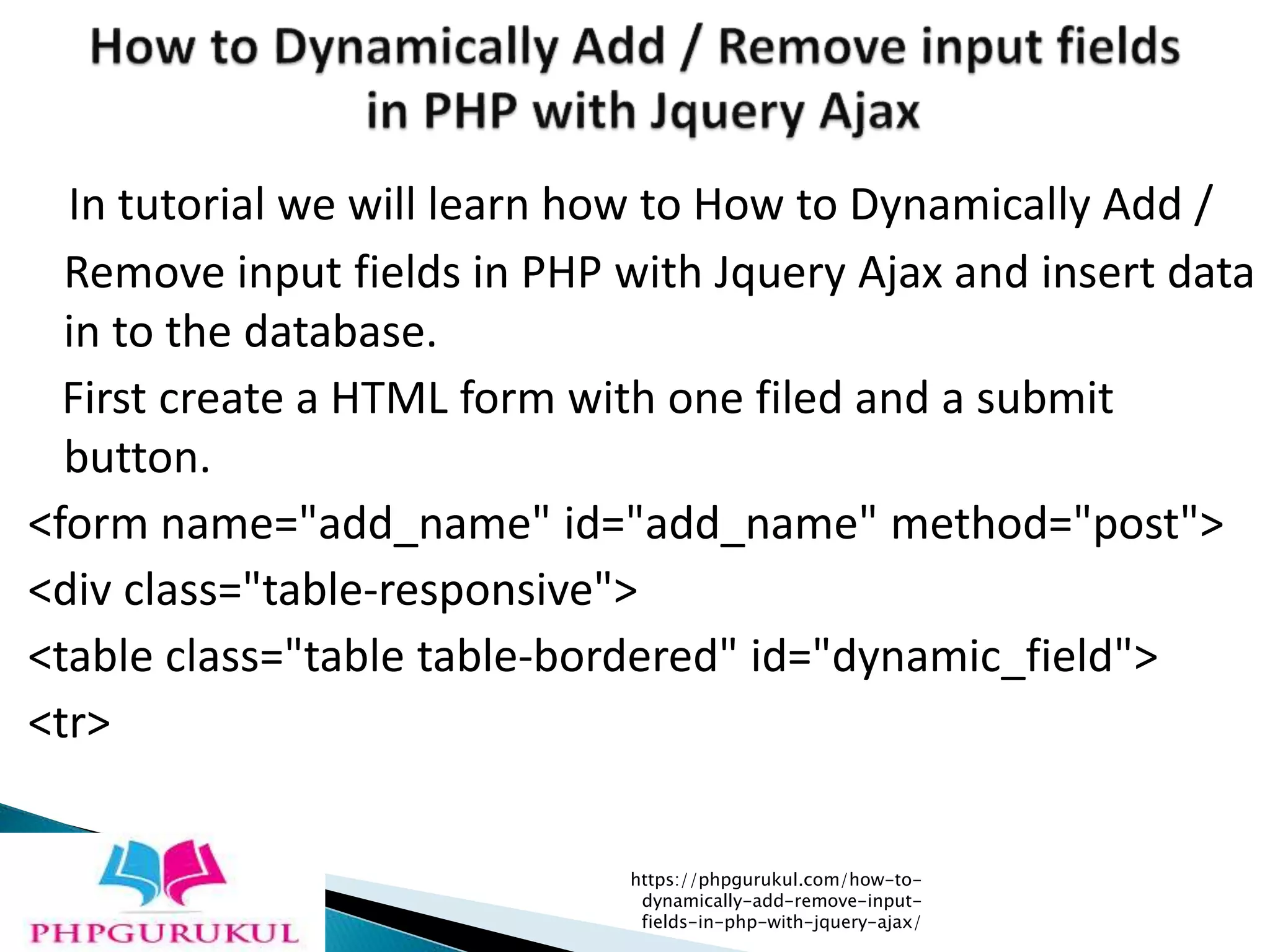
In tutorial we will learn how to How to Dynamically Add /
Remove input fields in PHP with Jquery Ajax and insert data
in to the database.
First create a HTML form with one filed and a submit
button.
<form name="add_name" id="add_name" method="post">
<div class="table-responsive">
<table class="table table-bordered" id="dynamic_field">
<tr>
https://phpgurukul.com/how-to-
dynamically-add-remove-input-
fields-in-php-with-jquery-ajax/
<td><input type="text" name="skill[]"
placeholder="Enter your Skill" class="form-control
name_list" /></td>
<td><button type="button" name="add" id="add"
class="btn btn-success">Add More</button></td>
</tr>
</table>
<input type="submit" name="submit" id="submit"
class="btn btn-info" value="Submit" />
</div>
</form>
https://phpgurukul.com/how-to-
dynamically-add-remove-input-
fields-in-php-with-jquery-ajax/
<script> $(document).ready(function(){ var i=1;
$('#add').click(function(){ i++;
$('#dynamic_field').append('<tr
id="row'+i+'"><td><input type="text"
name="skill[]" placeholder="Enter your Skill"
class="form-control name_list"
/></td><td><button type="button"
name="remove" id="'+i+'" class="btn btn-danger
btn_remove">X</button></td></tr>'); });
$(document).on('click', '.btn_remove', function(){
var button_id = $(this).attr("id");
$('#row'+button_id+'').remove(); }); }); </script>
https://phpgurukul.com/how-to-
dynamically-add-remove-input-
fields-in-php-with-jquery-ajax/
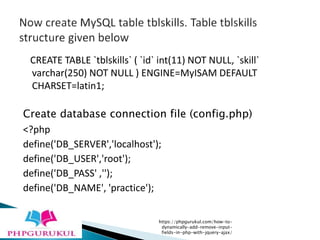
CREATE TABLE `tblskills` ( `id` int(11) NOT NULL, `skill`
varchar(250) NOT NULL ) ENGINE=MyISAM DEFAULT
CHARSET=latin1;
Create database connection file (config.php)
<?php
define('DB_SERVER','localhost');
define('DB_USER','root');
define('DB_PASS' ,'');
define('DB_NAME', 'practice');
https://phpgurukul.com/how-to-
dynamically-add-remove-input-
fields-in-php-with-jquery-ajax/
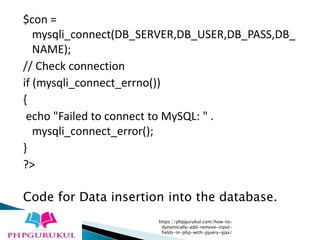
$con =
mysqli_connect(DB_SERVER,DB_USER,DB_PASS,DB_
NAME);
// Check connection
if (mysqli_connect_errno())
{
echo "Failed to connect to MySQL: " .
mysqli_connect_error();
}
?>
Code for Data insertion into the database.
https://phpgurukul.com/how-to-
dynamically-add-remove-input-
fields-in-php-with-jquery-ajax/
<?php
//Databse connection file
include('config.php');
if(isset($_POST['submit']))
{
// Counting No fo skilss
$count = count($_POST["skill"]);
//Getting post values
$skill=$_POST["skill"];
if($count > 1)
{
https://phpgurukul.com/how-to-
dynamically-add-remove-input-
fields-in-php-with-jquery-ajax/
for($i=0; $i<$count; $i++)
{
if(trim($_POST["skill"][$i] != ''))
{
$sql =mysqli_query($con,"INSERT INTO
tblskills(skill) VALUES('$skill[$i]')");
}
}
echo "<script>alert('Skills inserted
successfully');</script>";
}
else
{
echo "<script>alert('Please enter skill');</script>";
}
}
?>
https://phpgurukul.com/how-to-
dynamically-add-remove-input-
fields-in-php-with-jquery-ajax/
<?php
//Database connection file
include('config.php');
if(isset($_POST['submit']))
{
// Counting No fo skilss
$count = count($_POST["skill"]);
//Getting post values
$skill=$_POST["skill"];
if($count > 1)
{
https://phpgurukul.com/how-to-
dynamically-add-remove-input-
fields-in-php-with-jquery-ajax/
for($i=0; $i<$count; $i++)
{
if(trim($_POST["skill"][$i] != ''))
{
$sql =mysqli_query($con,"INSERT INTO
tblskills(skill) VALUES('$skill[$i]')");
}
}
echo "<script>alert('Skills inserted
successfully');</script>";
}
else
{
echo "<script>alert('Please enter skill');</script>";
}
https://phpgurukul.com/how-to-
dynamically-add-remove-input-
fields-in-php-with-jquery-ajax/
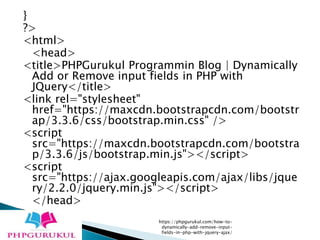
}
?>
<html>
<head>
<title>PHPGurukul Programmin Blog | Dynamically
Add or Remove input fields in PHP with
JQuery</title>
<link rel="stylesheet"
href="https://maxcdn.bootstrapcdn.com/bootstr
ap/3.3.6/css/bootstrap.min.css" />
<script
src="https://maxcdn.bootstrapcdn.com/bootstra
p/3.3.6/js/bootstrap.min.js"></script>
<script
src="https://ajax.googleapis.com/ajax/libs/jque
ry/2.2.0/jquery.min.js"></script>
</head>
https://phpgurukul.com/how-to-
dynamically-add-remove-input-
fields-in-php-with-jquery-ajax/
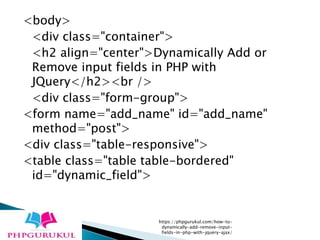
<body>
<div class="container">
<h2 align="center">Dynamically Add or
Remove input fields in PHP with
JQuery</h2><br />
<div class="form-group">
<form name="add_name" id="add_name"
method="post">
<div class="table-responsive">
<table class="table table-bordered"
id="dynamic_field">
https://phpgurukul.com/how-to-
dynamically-add-remove-input-
fields-in-php-with-jquery-ajax/
<tr>
<td><input type="text" name="skill[]"
placeholder="Enter your Skill" class="form-
control name_list" /></td>
<td><button type="button" name="add"
id="add" class="btn btn-success">Add
More</button></td>
</tr>
</table>
<input type="submit" name="submit"
id="submit" class="btn btn-info"
value="Submit" />
</div>
https://phpgurukul.com/how-to-
dynamically-add-remove-input-
fields-in-php-with-jquery-ajax/
</form>
</div>
</div>
</body>
<script>
$(document).ready(function(){
var i=1;
$('#add').click(function(){
i++;
$('#dynamic_field').append('<tr
id="row'+i+'"><td><input type="text"
name="skill[]" placeholder="Enter your Skill"
class="form-control name_list"
/></td><td><button type="button"
name="remove" id="'+i+'" class="btn btn-danger
btn_remove">X</button></td></tr>');
});
https://phpgurukul.com/how-to-
dynamically-add-remove-input-
fields-in-php-with-jquery-ajax/
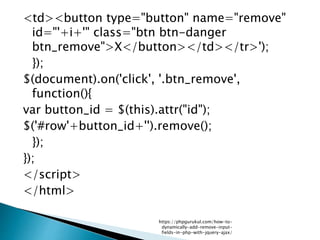
<td><button type="button" name="remove"
id="'+i+'" class="btn btn-danger
btn_remove">X</button></td></tr>');
});
$(document).on('click', '.btn_remove',
function(){
var button_id = $(this).attr("id");
$('#row'+button_id+'').remove();
});
});
</script>
</html>
https://phpgurukul.com/how-to-
dynamically-add-remove-input-
fields-in-php-with-jquery-ajax/
For More Info Visit:
https://phpgurukul.com/how-to-dynamically-
add-remove-input-fields-in-php-with-
jquery-ajax/
https://phpgurukul.com/how-to-
dynamically-add-remove-input-
fields-in-php-with-jquery-ajax/

How to dynamically add remove input fields in php with jquery ajax

  • 1.
    In tutorial wewill learn how to How to Dynamically Add / Remove input fields in PHP with Jquery Ajax and insert data in to the database. First create a HTML form with one filed and a submit button. <form name="add_name" id="add_name" method="post"> <div class="table-responsive"> <table class="table table-bordered" id="dynamic_field"> <tr> https://phpgurukul.com/how-to- dynamically-add-remove-input- fields-in-php-with-jquery-ajax/
  • 2.
    <td><input type="text" name="skill[]" placeholder="Enteryour Skill" class="form-control name_list" /></td> <td><button type="button" name="add" id="add" class="btn btn-success">Add More</button></td> </tr> </table> <input type="submit" name="submit" id="submit" class="btn btn-info" value="Submit" /> </div> </form> https://phpgurukul.com/how-to- dynamically-add-remove-input- fields-in-php-with-jquery-ajax/
  • 3.
    <script> $(document).ready(function(){ vari=1; $('#add').click(function(){ i++; $('#dynamic_field').append('<tr id="row'+i+'"><td><input type="text" name="skill[]" placeholder="Enter your Skill" class="form-control name_list" /></td><td><button type="button" name="remove" id="'+i+'" class="btn btn-danger btn_remove">X</button></td></tr>'); }); $(document).on('click', '.btn_remove', function(){ var button_id = $(this).attr("id"); $('#row'+button_id+'').remove(); }); }); </script> https://phpgurukul.com/how-to- dynamically-add-remove-input- fields-in-php-with-jquery-ajax/
  • 4.
    CREATE TABLE `tblskills`( `id` int(11) NOT NULL, `skill` varchar(250) NOT NULL ) ENGINE=MyISAM DEFAULT CHARSET=latin1; Create database connection file (config.php) <?php define('DB_SERVER','localhost'); define('DB_USER','root'); define('DB_PASS' ,''); define('DB_NAME', 'practice'); https://phpgurukul.com/how-to- dynamically-add-remove-input- fields-in-php-with-jquery-ajax/
  • 5.
    $con = mysqli_connect(DB_SERVER,DB_USER,DB_PASS,DB_ NAME); // Checkconnection if (mysqli_connect_errno()) { echo "Failed to connect to MySQL: " . mysqli_connect_error(); } ?> Code for Data insertion into the database. https://phpgurukul.com/how-to- dynamically-add-remove-input- fields-in-php-with-jquery-ajax/
  • 6.
    <?php //Databse connection file include('config.php'); if(isset($_POST['submit'])) { //Counting No fo skilss $count = count($_POST["skill"]); //Getting post values $skill=$_POST["skill"]; if($count > 1) { https://phpgurukul.com/how-to- dynamically-add-remove-input- fields-in-php-with-jquery-ajax/
  • 7.
    for($i=0; $i<$count; $i++) { if(trim($_POST["skill"][$i]!= '')) { $sql =mysqli_query($con,"INSERT INTO tblskills(skill) VALUES('$skill[$i]')"); } } echo "<script>alert('Skills inserted successfully');</script>"; } else { echo "<script>alert('Please enter skill');</script>"; } } ?> https://phpgurukul.com/how-to- dynamically-add-remove-input- fields-in-php-with-jquery-ajax/
  • 8.
    <?php //Database connection file include('config.php'); if(isset($_POST['submit'])) { //Counting No fo skilss $count = count($_POST["skill"]); //Getting post values $skill=$_POST["skill"]; if($count > 1) { https://phpgurukul.com/how-to- dynamically-add-remove-input- fields-in-php-with-jquery-ajax/
  • 9.
    for($i=0; $i<$count; $i++) { if(trim($_POST["skill"][$i]!= '')) { $sql =mysqli_query($con,"INSERT INTO tblskills(skill) VALUES('$skill[$i]')"); } } echo "<script>alert('Skills inserted successfully');</script>"; } else { echo "<script>alert('Please enter skill');</script>"; } https://phpgurukul.com/how-to- dynamically-add-remove-input- fields-in-php-with-jquery-ajax/
  • 10.
    } ?> <html> <head> <title>PHPGurukul Programmin Blog| Dynamically Add or Remove input fields in PHP with JQuery</title> <link rel="stylesheet" href="https://maxcdn.bootstrapcdn.com/bootstr ap/3.3.6/css/bootstrap.min.css" /> <script src="https://maxcdn.bootstrapcdn.com/bootstra p/3.3.6/js/bootstrap.min.js"></script> <script src="https://ajax.googleapis.com/ajax/libs/jque ry/2.2.0/jquery.min.js"></script> </head> https://phpgurukul.com/how-to- dynamically-add-remove-input- fields-in-php-with-jquery-ajax/
  • 11.
    <body> <div class="container"> <h2 align="center">DynamicallyAdd or Remove input fields in PHP with JQuery</h2><br /> <div class="form-group"> <form name="add_name" id="add_name" method="post"> <div class="table-responsive"> <table class="table table-bordered" id="dynamic_field"> https://phpgurukul.com/how-to- dynamically-add-remove-input- fields-in-php-with-jquery-ajax/
  • 12.
    <tr> <td><input type="text" name="skill[]" placeholder="Enteryour Skill" class="form- control name_list" /></td> <td><button type="button" name="add" id="add" class="btn btn-success">Add More</button></td> </tr> </table> <input type="submit" name="submit" id="submit" class="btn btn-info" value="Submit" /> </div> https://phpgurukul.com/how-to- dynamically-add-remove-input- fields-in-php-with-jquery-ajax/
  • 13.
    </form> </div> </div> </body> <script> $(document).ready(function(){ var i=1; $('#add').click(function(){ i++; $('#dynamic_field').append('<tr id="row'+i+'"><td><input type="text" name="skill[]"placeholder="Enter your Skill" class="form-control name_list" /></td><td><button type="button" name="remove" id="'+i+'" class="btn btn-danger btn_remove">X</button></td></tr>'); }); https://phpgurukul.com/how-to- dynamically-add-remove-input- fields-in-php-with-jquery-ajax/
  • 14.
    <td><button type="button" name="remove" id="'+i+'"class="btn btn-danger btn_remove">X</button></td></tr>'); }); $(document).on('click', '.btn_remove', function(){ var button_id = $(this).attr("id"); $('#row'+button_id+'').remove(); }); }); </script> </html> https://phpgurukul.com/how-to- dynamically-add-remove-input- fields-in-php-with-jquery-ajax/
  • 15.
    For More InfoVisit: https://phpgurukul.com/how-to-dynamically- add-remove-input-fields-in-php-with- jquery-ajax/ https://phpgurukul.com/how-to- dynamically-add-remove-input- fields-in-php-with-jquery-ajax/