How to Create the
Perfect Facebook Post
Does the content serve your audience?
Does it education, entertain, or inspire?
No one wants opts-in to advertisements. In fact, today everyone is actively using
technology to block ads. If your Facebook posts come across as an advertisement, not only do
you risk turning off your audience, you also risk negatively affecting the Facebook algorithms
that decide how much organic reach your posts will get. Facebook penalizes the reach of a
page based on whether or not the page is being used predominately for advertising as well as
based on how many followers hide a post, unfollow the page, or simply ignores the posts.
According to Facebook, posts that are too promotional include:
•Posts that solely push people to buy a product or install an app (including sending people to
your website constantly)
•Posts that push people to enter promotions and sweepstakes with no real context
•Posts that reuse the exact same content from ads
You want you Facebook posts to be brand relevant but one the elicits a positive reaction from
your audience. To do this, include ideas, information and images that educates, entertains, or
inspires.
The various weights of engagement
Focus on creating content that people will engage with. You want
people to share your content, like or “react” to your content, and
comment on your content. Facebook also recently included time spent
on content as part of the algorithm that decides the level of reach each
post receives.
Even though engagement is important, you want to resist the urge to
ask you audience to like or share a post. Facebook has been known to
penalize such calls to action. Instead ask questions in your posts such
as “who wants to…?” or “how would it feel to…?”
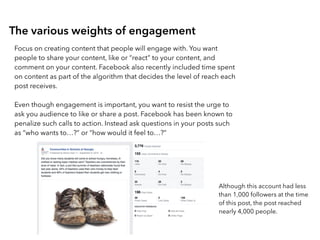
Although this account had less
than 1,000 followers at the time
of this post, the post reached
nearly 4,000 people.
Videos receive priority attention
Over the past couple of years Facebook has been investing heavily in video and
more recently the focus has been on live streaming video. Because they are trying
to encourage more brands to leverage the platform for video Facebook gives more
weight to posts that include video. A couple of things to keep in mind:
- Videos autoplay with the sound off in the newsfeed stream. You want to make
sure your video captures your audience’s attention within the first couple of
seconds and you want to include closed captions.
A picture is worth a thousand words
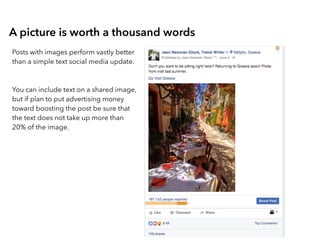
Posts with images perform vastly better
than a simple text social media update.
You can include text on a shared image,
but if plan to put advertising money
toward boosting the post be sure that
the text does not take up more than
20% of the image.
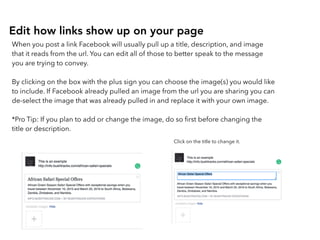
Edit how links show up on your page
When you post a link Facebook will usually pull up a title, description, and image
that it reads from the url. You can edit all of those to better speak to the message
you are trying to convey.
By clicking on the box with the plus sign you can choose the image(s) you would like
to include. If Facebook already pulled an image from the url you are sharing you can
de-select the image that was already pulled in and replace it with your own image.
*Pro Tip: If you plan to add or change the image, do so first before changing the
title or description.
Click on the title to change it.
Click on the description to change it
Finally, once Facebook pulls the
information about the article in, you
can delete the actual url from the
post so that the update is nice and
clean.
Want to learn more?
Visit
www.senseiproject.com
Subscribe to our blog
Sign up for our newsletter
or
Request a free consultation

How to create the perfect Facebook post

  • 1.
    How to Createthe Perfect Facebook Post
  • 2.
    Does the contentserve your audience? Does it education, entertain, or inspire? No one wants opts-in to advertisements. In fact, today everyone is actively using technology to block ads. If your Facebook posts come across as an advertisement, not only do you risk turning off your audience, you also risk negatively affecting the Facebook algorithms that decide how much organic reach your posts will get. Facebook penalizes the reach of a page based on whether or not the page is being used predominately for advertising as well as based on how many followers hide a post, unfollow the page, or simply ignores the posts. According to Facebook, posts that are too promotional include: •Posts that solely push people to buy a product or install an app (including sending people to your website constantly) •Posts that push people to enter promotions and sweepstakes with no real context •Posts that reuse the exact same content from ads You want you Facebook posts to be brand relevant but one the elicits a positive reaction from your audience. To do this, include ideas, information and images that educates, entertains, or inspires.
  • 3.
    The various weightsof engagement Focus on creating content that people will engage with. You want people to share your content, like or “react” to your content, and comment on your content. Facebook also recently included time spent on content as part of the algorithm that decides the level of reach each post receives. Even though engagement is important, you want to resist the urge to ask you audience to like or share a post. Facebook has been known to penalize such calls to action. Instead ask questions in your posts such as “who wants to…?” or “how would it feel to…?” Although this account had less than 1,000 followers at the time of this post, the post reached nearly 4,000 people.
  • 4.
    Videos receive priorityattention Over the past couple of years Facebook has been investing heavily in video and more recently the focus has been on live streaming video. Because they are trying to encourage more brands to leverage the platform for video Facebook gives more weight to posts that include video. A couple of things to keep in mind: - Videos autoplay with the sound off in the newsfeed stream. You want to make sure your video captures your audience’s attention within the first couple of seconds and you want to include closed captions.
  • 5.
    A picture isworth a thousand words Posts with images perform vastly better than a simple text social media update. You can include text on a shared image, but if plan to put advertising money toward boosting the post be sure that the text does not take up more than 20% of the image.
  • 6.
    Edit how linksshow up on your page When you post a link Facebook will usually pull up a title, description, and image that it reads from the url. You can edit all of those to better speak to the message you are trying to convey. By clicking on the box with the plus sign you can choose the image(s) you would like to include. If Facebook already pulled an image from the url you are sharing you can de-select the image that was already pulled in and replace it with your own image. *Pro Tip: If you plan to add or change the image, do so first before changing the title or description. Click on the title to change it.
  • 7.
    Click on thedescription to change it Finally, once Facebook pulls the information about the article in, you can delete the actual url from the post so that the update is nice and clean.
  • 8.
    Want to learnmore? Visit www.senseiproject.com Subscribe to our blog Sign up for our newsletter or Request a free consultation