How to burn your GPU with CUDA9.1
2018/02/19 SAKURA Internet, Inc. Research Center SR / Naoto MATSUMOTO
(C) Copyright 1996-2017 SAKURA Internet Inc
How to burn your GPU with CUDA9.1
2
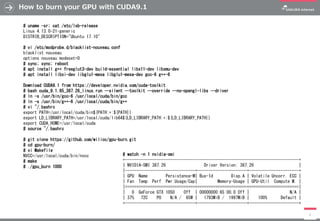
# uname -sr; cat /etc/lsb-release
Linux 4.13.0-21-generic
DISTRIB_DESCRIPTION="Ubuntu 17.10"
# vi /etc/modprobe.d/blacklist-nouveau.conf
blacklist nouveau
options nouveau modeset=0
# sync; sync; reboot
# apt install g++ freeglut3-dev build-essential libx11-dev libxmu-dev
# apt install libxi-dev libglu1-mesa libglu1-mesa-dev gcc-6 g++-6
Download CUDA9.1 from https://developer.nvidia.com/cuda-toolkit
# bash cuda_9.1.85_387.26_linux.run --silent --toolkit --override --no-opengl-libs --driver
# ln -s /usr/bin/gcc-6 /usr/local/cuda/bin/gcc
# ln -s /usr/bin/g++-6 /usr/local/cuda/bin/g++
# vi ~/.bashrc
export PATH=/usr/local/cuda/bin${PATH:+:${PATH}}
export LD_LIBRARY_PATH=/usr/local/cuda/lib64${LD_LIBRARY_PATH:+:${LD_LIBRARY_PATH}}
export CUDA_HOME=/usr/local/cuda
# source ~/.bashrc
# git clone https://github.com/wilicc/gpu-burn.git
# cd gpu-burn/
# vi Makefile
NVCC=/usr/local/cuda/bin/nvcc
# make
# ./gpu_burn 1000
# watch -n 1 nvidia-smi
+-----------------------------------------------------------------------------+
| NVIDIA-SMI 387.26 Driver Version: 387.26 |
|-------------------------------+----------------------+----------------------+
| GPU Name Persistence-M| Bus-Id Disp.A | Volatile Uncorr. ECC |
| Fan Temp Perf Pwr:Usage/Cap| Memory-Usage | GPU-Util Compute M. |
|===============================+======================+======================|
| 0 GeForce GTX 1050 Off | 00000000:65:00.0 Off | N/A |
| 37% 72C P0 N/A / 65W | 1793MiB / 1997MiB | 100% Default |
+-------------------------------+----------------------+----------------------+
How to burn your GPU with CUDA9.1 (MapD Community Edition 3.4.0)
3
# apt install -y curl apt-transport-https
# useradd -U mapd
# ufw disable; ufw enable; ufw allow 9092/tcp; ufw allow 22/tcp
# curl https://releases.mapd.com/ce/mapd-ce-cuda.list | sudo tee /etc/apt/sources.list.d/mapd.list
# curl https://releases.mapd.com/GPG-KEY-mapd | sudo apt-key add -
# apt update
# apt install -y mapd
# vi ~/.bashrc
export MAPD_USER=mapd
export MAPD_GROUP=mapd
export MAPD_STORAGE=/var/lib/mapd
export MAPD_PATH=/opt/mapd
# source ~/.bashrc
# mkdir -p $MAPD_STORAGE
# chown -R $MAPD_USER $MAPD_STORAGE
# cd $MAPD_PATH/systemd
# ./install_mapd_systemd.sh
# cd $MAPD_PATH
# systemctl start mapd_server; systemctl enable mapd_server
# systemctl start mapd_web_server; systemctl enable mapd_web_server
# $MAPD_PATH/insert_sample_data
2) Flights (2008) 10k
2
# $MAPD_PATH/bin/mapdql -t
Password: HyperInteractive
mapdql> SELECT origin_city AS "Origin", dest_city AS "Destination", AVG(airtime) AS "Average Airtime" FROM flights_2008_10k
WHERE distance <= 33 GROUP BY origin_city, dest_city;
Execution time: 1268 ms, Total time: 1269 ms
SOURCE: https://www.mapd.com/platform/download-community/
+----------------------------------------------------------
| NVIDIA-SMI 387.26 Driver Version: 387.26
|-------------------------------+----------------------+---
| GPU Name Persistence-M| Bus-Id Disp.A |
| Fan Temp Perf Pwr:Usage/Cap| Memory-Usage |
|===============================+======================+===
| 0 GeForce GTX 1050 Off | 00000000:65:00.0 Off |
| 29% 27C P0 N/A / 65W | 1449MiB / 1997MiB |
+-------------------------------+----------------------+---
|==========================================================
| 0 5828 C /opt/mapd/bin/mapd_server
+----------------------------------------------------------
Origin|Destination|Average Airtime
West Palm Beach|Tampa|33.81818181818182
Norfolk|Baltimore|36.07142857142857
Ft. Myers|Orlando|28.66666666666667
Indianapolis|Chicago|39.53846153846154
Tampa|West Palm Beach|33.25
Orlando|Ft. Myers|32.58333333333334
Austin|Houston|33.05555555555556
Chicago|Indianapolis|32.7
Baltimore|Norfolk|31.71428571428572
Houston|Austin|29.61111111111111

How to burn your GPU with CUDA9.1

  • 1.
    How to burnyour GPU with CUDA9.1 2018/02/19 SAKURA Internet, Inc. Research Center SR / Naoto MATSUMOTO (C) Copyright 1996-2017 SAKURA Internet Inc
  • 2.
    How to burnyour GPU with CUDA9.1 2 # uname -sr; cat /etc/lsb-release Linux 4.13.0-21-generic DISTRIB_DESCRIPTION="Ubuntu 17.10" # vi /etc/modprobe.d/blacklist-nouveau.conf blacklist nouveau options nouveau modeset=0 # sync; sync; reboot # apt install g++ freeglut3-dev build-essential libx11-dev libxmu-dev # apt install libxi-dev libglu1-mesa libglu1-mesa-dev gcc-6 g++-6 Download CUDA9.1 from https://developer.nvidia.com/cuda-toolkit # bash cuda_9.1.85_387.26_linux.run --silent --toolkit --override --no-opengl-libs --driver # ln -s /usr/bin/gcc-6 /usr/local/cuda/bin/gcc # ln -s /usr/bin/g++-6 /usr/local/cuda/bin/g++ # vi ~/.bashrc export PATH=/usr/local/cuda/bin${PATH:+:${PATH}} export LD_LIBRARY_PATH=/usr/local/cuda/lib64${LD_LIBRARY_PATH:+:${LD_LIBRARY_PATH}} export CUDA_HOME=/usr/local/cuda # source ~/.bashrc # git clone https://github.com/wilicc/gpu-burn.git # cd gpu-burn/ # vi Makefile NVCC=/usr/local/cuda/bin/nvcc # make # ./gpu_burn 1000 # watch -n 1 nvidia-smi +-----------------------------------------------------------------------------+ | NVIDIA-SMI 387.26 Driver Version: 387.26 | |-------------------------------+----------------------+----------------------+ | GPU Name Persistence-M| Bus-Id Disp.A | Volatile Uncorr. ECC | | Fan Temp Perf Pwr:Usage/Cap| Memory-Usage | GPU-Util Compute M. | |===============================+======================+======================| | 0 GeForce GTX 1050 Off | 00000000:65:00.0 Off | N/A | | 37% 72C P0 N/A / 65W | 1793MiB / 1997MiB | 100% Default | +-------------------------------+----------------------+----------------------+
  • 3.
    How to burnyour GPU with CUDA9.1 (MapD Community Edition 3.4.0) 3 # apt install -y curl apt-transport-https # useradd -U mapd # ufw disable; ufw enable; ufw allow 9092/tcp; ufw allow 22/tcp # curl https://releases.mapd.com/ce/mapd-ce-cuda.list | sudo tee /etc/apt/sources.list.d/mapd.list # curl https://releases.mapd.com/GPG-KEY-mapd | sudo apt-key add - # apt update # apt install -y mapd # vi ~/.bashrc export MAPD_USER=mapd export MAPD_GROUP=mapd export MAPD_STORAGE=/var/lib/mapd export MAPD_PATH=/opt/mapd # source ~/.bashrc # mkdir -p $MAPD_STORAGE # chown -R $MAPD_USER $MAPD_STORAGE # cd $MAPD_PATH/systemd # ./install_mapd_systemd.sh # cd $MAPD_PATH # systemctl start mapd_server; systemctl enable mapd_server # systemctl start mapd_web_server; systemctl enable mapd_web_server # $MAPD_PATH/insert_sample_data 2) Flights (2008) 10k 2 # $MAPD_PATH/bin/mapdql -t Password: HyperInteractive mapdql> SELECT origin_city AS "Origin", dest_city AS "Destination", AVG(airtime) AS "Average Airtime" FROM flights_2008_10k WHERE distance <= 33 GROUP BY origin_city, dest_city; Execution time: 1268 ms, Total time: 1269 ms SOURCE: https://www.mapd.com/platform/download-community/ +---------------------------------------------------------- | NVIDIA-SMI 387.26 Driver Version: 387.26 |-------------------------------+----------------------+--- | GPU Name Persistence-M| Bus-Id Disp.A | | Fan Temp Perf Pwr:Usage/Cap| Memory-Usage | |===============================+======================+=== | 0 GeForce GTX 1050 Off | 00000000:65:00.0 Off | | 29% 27C P0 N/A / 65W | 1449MiB / 1997MiB | +-------------------------------+----------------------+--- |========================================================== | 0 5828 C /opt/mapd/bin/mapd_server +---------------------------------------------------------- Origin|Destination|Average Airtime West Palm Beach|Tampa|33.81818181818182 Norfolk|Baltimore|36.07142857142857 Ft. Myers|Orlando|28.66666666666667 Indianapolis|Chicago|39.53846153846154 Tampa|West Palm Beach|33.25 Orlando|Ft. Myers|32.58333333333334 Austin|Houston|33.05555555555556 Chicago|Indianapolis|32.7 Baltimore|Norfolk|31.71428571428572 Houston|Austin|29.61111111111111