Downloaded 26 times











![HOOKS EXAMPLE
NO WRAPPER HELL
const MyComponent = () => {
const [time] = useClock();
const [x, y] = useMouseMove();
// do something with those values
return (
<>
<div>Current time: {time}</div>
<div>Mouse coordinates: {x},{y}</div>
</>
);
}
<Clock render={({time}) => (
<MousePosition render={({x, y}) => (
<MyComponent time={time} x={x} y={y} />
)} />
)} />
withMousePosition(withClock(MyComponent))
RENDER PROPS
HOC HOOKS](https://image.slidesharecdn.com/preacthookscopy-200318035214/85/How-do-we-use-hooks-21-320.jpg)
![HOOKS EXAMPLE
NO GIANT COMPONENT
class FriendStatus extends React.Component {
constructor(props) {
super(props);
this.state = { isOnline: null };
this.handleStatusChange =
this.handleStatusChange.bind(this);
}
componentDidMount() {
ChatAPI.subscribeToFriendStatus(
this.props.friend.id,
this.handleStatusChange
);
}
componentWillUnmount() {
ChatAPI.unsubscribeFromFriendStatus(
this.props.friend.id,
this.handleStatusChange
);
}
handleStatusChange(status) {
this.setState({
isOnline: status.isOnline
});
}
render() {
if (this.state.isOnline === null) {
return 'Loading...';
}
return this.state.isOnline ? 'Online' : 'Offline';
}
}
function FriendStatus(props) {
const [isOnline, setIsOnline] = useState(null);
useEffect(() => {
function handleStatusChange(status) {
setIsOnline(status.isOnline);
}
ChatAPI.subscribeToFriendStatus(props.friend.id, handleStatusChange);
// Specify how to clean up after this effect:
return function cleanup() {
ChatAPI.unsubscribeFromFriendStatus(props.friend.id, handleStatusChange);
};
});
if (isOnline === null) {
return 'Loading...';
}
return isOnline ? 'Online' : 'Offline';
}](https://image.slidesharecdn.com/preacthookscopy-200318035214/85/How-do-we-use-hooks-22-320.jpg)

![useState
▸ Manage states in your functional components
import { h, useState } from 'preact/hooks';
function Example() {
// Declare a new state variable, which we'll call "count"
const [count, setCount] = useState(0);
return (
<div>
<p>You clicked {count} times</p>
<button onClick={() => setCount(count + 1)}>
Click me
</button>
</div>
);](https://image.slidesharecdn.com/preacthookscopy-200318035214/85/How-do-we-use-hooks-24-320.jpg)
![useEffect
▸ componentDidMount + componentDidUpdate + componentWillUnmount
useEffect(() => {
function handleStatusChange(status) {
setIsOnline(status.isOnline);
}
ChatAPI.subscribeToFriendStatus(props.friend.id,
handleStatusChange);
return () => {
ChatAPI.unsubscribeFromFriendStatus(props.friend.id,
handleStatusChange);
};
}, [props.friend.id]); // Only re-subscribe if
props.friend.id changes
componentDidMount() {
ChatAPI.subscribeToFriendStatus(
this.props.friend.id,
this.handleStatusChange
);
}
componentDidUpdate(prevProps) {
// Unsubscribe from the previous friend.id
ChatAPI.unsubscribeFromFriendStatus(
prevProps.friend.id,
this.handleStatusChange
);
// Subscribe to the next friend.id
ChatAPI.subscribeToFriendStatus(
this.props.friend.id,
this.handleStatusChange
);
}
componentWillUnmount() {
ChatAPI.unsubscribeFromFriendStatus(
this.props.friend.id,
this.handleStatusChange
);
}](https://image.slidesharecdn.com/preacthookscopy-200318035214/85/How-do-we-use-hooks-25-320.jpg)

![useMemo
▸ Cache expensive calculations to make the render faster
▸ Similar to reselect for redux
▸ Fuzzy Highlighter Example
export default function FuzzyHighlighter(props) {
const { query, children, color, style } = props;
function highlight(text, query) {
// calculate highlight text
}
const highlightedResult = useMemo(
() => highlight(children, query),
[query, children]
);
return (
<Text color={color} style={style}>
{highlightedResult}
</Text>
);
}
CACHE DEPENDENCY
RESULT CACHED](https://image.slidesharecdn.com/preacthookscopy-200318035214/85/How-do-we-use-hooks-27-320.jpg)
![useCallback
▸ useCallback(fn, deps) is equivalent to useMemo(() => fn, deps).
const memoizedCallback = useCallback(
() => {
doSomething(a, b);
},
[a, b],
);](https://image.slidesharecdn.com/preacthookscopy-200318035214/85/How-do-we-use-hooks-28-320.jpg)





![IMPLEMENT IT WITH HOOKS
export default function useHash(initialValue = null) {
// init state with current hash value
const [hash, setHash] = useState(window.location.hash);
// change the url hash
const setHashValue = value => {
window.location.hash = value ? `#${value}` : '';
};
useEffect(() => {
function handleHashChange() {
// update state value with current hash
setHash(window.location.hash);
}
window.addEventListener('hashchange', handleHashChange);
return function cleanup() {
window.removeEventListener('hashchange', handleHashChange);
};
});
return [hash, setHashValue];
}
export function DoNotSell() {
const [hash, setHash] = useHash();
const open = hash === '#do-not-sell'
return (
<Dialog
open={open}
onClose={() => setHash('')}
>
...
</Dialog>
);
}](https://image.slidesharecdn.com/preacthookscopy-200318035214/85/How-do-we-use-hooks-39-320.jpg)



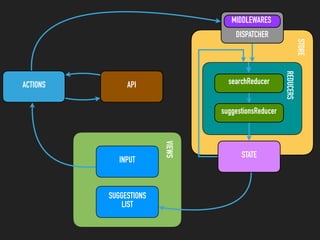

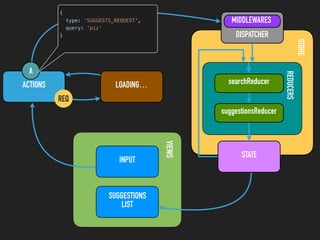
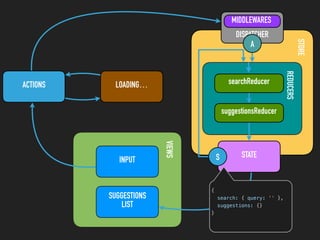
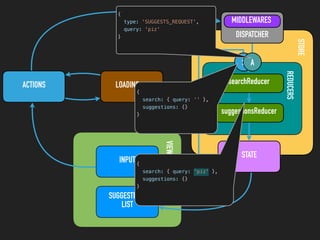
![STORE
REDUCERS
ACTIONS LOADING…
VIEWSINPUT
SUGGESTIONS
LIST
STATE
DISPATCHER
MIDDLEWARES
searchReducer
suggestionsReducer
S A
{
search: { query: 'piz' },
suggestions: {
'piz': {
loading: true,
items: []
}
}
}](https://image.slidesharecdn.com/preacthookscopy-200318035214/85/How-do-we-use-hooks-49-320.jpg)


![STORE
REDUCERS
ACTIONS API
VIEWSINPUT
SUGGESTIONS
LIST
STATE
DISPATCHER
MIDDLEWARES
searchReducer
suggestionsReducer
RES
A
{
type: 'SUGGESTS_SUCCESS',
query: 'piz',
items: [
'pizza',
'jets pizza',
'nicks pizza'
]
}](https://image.slidesharecdn.com/preacthookscopy-200318035214/85/How-do-we-use-hooks-52-320.jpg)
![STORE
REDUCERS
ACTIONS API
VIEWSINPUT
SUGGESTIONS
LIST
STATE
DISPATCHER
MIDDLEWARES
searchReducer
suggestionsReducer
S
A
{
search: { query: 'piz' },
suggestions: {
'piz': {
loading: true,
items: []
}
}
}](https://image.slidesharecdn.com/preacthookscopy-200318035214/85/How-do-we-use-hooks-53-320.jpg)
![STORE
REDUCERS
ACTIONS API
VIEWSINPUT
SUGGESTIONS
LIST
STATE
DISPATCHER
MIDDLEWARES
searchReducer
suggestionsReducer
S A
{
search: { query: 'piz' },
suggestions: {
'piz': {
loading: false,
items: [
'pizza',
'jets pizza',
'nicks pizza'
]
}
}
}](https://image.slidesharecdn.com/preacthookscopy-200318035214/85/How-do-we-use-hooks-54-320.jpg)
![STORE
REDUCERS
ACTIONS API
VIEWSINPUT
SUGGESTIONS
LIST
STATE
DISPATCHER
MIDDLEWARES
searchReducer
suggestionsReducer
{
search: { query: 'piz' },
suggestions: {
'piz': {
loading: false,
items: [
'pizza',
'jets pizza',
'nicks pizza'
]
}
}
}
S A](https://image.slidesharecdn.com/preacthookscopy-200318035214/85/How-do-we-use-hooks-55-320.jpg)
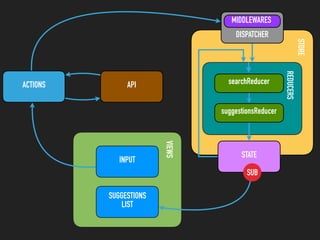


![SUGGESTIONS
LIST
STATE
search suggestions
{
query: 'piz'
}
{
piz: {
loading: false,
items: [
'pizza',
'jets pizza',
'nicks pizza'
]
}
}
props
{
loading: false,
items: [
'pizza',
'jets pizza',
'nicks pizza'
]
}](https://image.slidesharecdn.com/preacthookscopy-200318035214/85/How-do-we-use-hooks-59-320.jpg)


![TEXT
DEALING WITH ASYNC
▸ But we can use custom hooks. 😄
const [query, setQuery] = useState('');
const {loading, suggestions} = useSuggestions(query);
if (loading) {
return 'loading...'
}
return (
<ul>
{suggestions.map(renderSuggstion)}
</ul>
)](https://image.slidesharecdn.com/preacthookscopy-200318035214/85/How-do-we-use-hooks-66-320.jpg)

![render
Functional component
useState
useSuggestions(query)
INPUT
SUGGESTIONS
LIST
query: “preact”
useSuggestions(query)
loadingMap: {}useState
useState suggestionsMap: {}
useEffect(() => {}, [query])
FETCH
loading: false,
suggestions: []
loading: false,
suggestions: []](https://image.slidesharecdn.com/preacthookscopy-200318035214/85/How-do-we-use-hooks-68-320.jpg)
![render
Functional component
useState
useSuggestions(query)
INPUT
SUGGESTIONS
LIST
query: “preact”
useSuggestions(query)
loadingMap: {}useState
useState suggestionsMap: {}
useEffect(() => {}, [query])
FETCH
loading: true,
suggestions: []
API
loadingMap: {
preact: true
}
loading: true,
suggestions: []](https://image.slidesharecdn.com/preacthookscopy-200318035214/85/How-do-we-use-hooks-69-320.jpg)
![render
Functional component
useState
useSuggestions(query)
INPUT
SUGGESTIONS
LIST
query: “preact”
useSuggestions(query)
useState
useState suggestionsMap: {}
useEffect(() => {}, [query])
FETCH
loading: false,
suggestions: […]
API
loadingMap: {
preact: true
}
loadingMap: {
preact: false
}
suggestionsMap: {
preact: […]
}loading: false,
suggestions: […]](https://image.slidesharecdn.com/preacthookscopy-200318035214/85/How-do-we-use-hooks-70-320.jpg)
![render
Functional component
useState
useSuggestions(query)
INPUT
SUGGESTIONS
LIST
query: “preact”
useSuggestions(query)
loadingMap: {}useState
useState
suggestionsMap: {
preact: […]
}
useEffect(() => {}, [query])
FETCH
loading: false,
suggestions: []
API
loadingMap: {
preact: false
}
loading: false,
suggestions: []
query: “react”](https://image.slidesharecdn.com/preacthookscopy-200318035214/85/How-do-we-use-hooks-71-320.jpg)
![render
Functional component
useState
useSuggestions(query)
INPUT
SUGGESTIONS
LIST
query: “react”
useSuggestions(query)
loadingMap: {
preact: true
}
useState
useState
suggestionsMap: {
preact: […]
}
useEffect(() => {}, [query])
FETCH
loading: true,
suggestions: []
API
loadingMap: {
preact: false,
react: true
}
loading: true,
suggestions: []](https://image.slidesharecdn.com/preacthookscopy-200318035214/85/How-do-we-use-hooks-72-320.jpg)
![render
Functional component
useState
useSuggestions(query)
INPUT
SUGGESTIONS
LIST
query: “react”
useSuggestions(query)
useState
useState
suggestionsMap: {
preact: […]
}
useEffect(() => {}, [query])
FETCH
loading: false,
suggestions: […]
API
loadingMap: {
preact: false,
react: true
}
loadingMap: {
preact: false,
react: false
}
suggestionsMap: {
preact: […],
react: […]
}loading: false,
suggestions: […]](https://image.slidesharecdn.com/preacthookscopy-200318035214/85/How-do-we-use-hooks-73-320.jpg)


This document discusses how to use React hooks to share logic between components and manage state in functional components. It provides examples of using the useState, useEffect, useContext, useMemo, useCallback, and useReducer hooks. Custom hooks like useHash and useSuggestions are demonstrated to encapsulate reusable stateful logic and avoid needing Redux for some cases like fetching autocomplete suggestions.


![Lect 1 Number systems and base conversions. [Autosaved].pptx](https://cdn.slidesharecdn.com/ss_thumbnails/lect1numbersystemsandbaseconversions-260111134109-67c2d865-thumbnail.jpg?width=640&height=640&fit=bounds)
