Population Health Honours:
Researching the Literature
Population Health Honours:
Researching the Literature
Lucia Ravi, Librarian
Medical & Dental Library
Lucia Ravi, Librarian
Medical & Dental Library
Expanding upon your skills to problem solve, conduct research and
communicate that research to broader literature context and community.
Learning Outcomes:
Locate information – comprehensively and efficiently
 Break down your topic to build an effective search
 Use OneSearch and specialist databases
 Construct subject specific searches – MeSH and EmTree
 Search for Grey Literature from government and organisations
 Use citation databases to explore communities of practice
Manage, evaluate and store your information
 Save results and searches and send to reference software
Honours: a whole new world, kind of…
 Borrow an unlimited number of print books
 Loan period to the end of semester (subject to recalls/renewals)
 Access Get It: inter-library loans and document delivery
http://www.library.uwa.edu.au/information-resources/get-it
 Utilise our postgraduate rooms (Med, Reid, Science)
• Map location in J Robin Warren Library
• Map location in Barry J Marshall Library
• Map location in Reid Library
Access UniDrive networked storage drive from home.
http://www.bits.uwa.edu.au/it-help/storage
New to UWA guide; PostGrad Tab:
https://guides.library.uwa.edu.au/newtouwalibrary2018
As an Honours student you can…
Searching: Core concepts & synonyms
Breaking down your search:
Topic: Links between child health, obesity and urban design
Library Guide: Composing a Search link
Consider:
What other keywords would an author use?
concept 1 concept 2 concept 3
Key concepts Child health Obesity Urban design
Synonyms Child development Obese, overweight Urban planning
Environment
Urban design
Boolean searching techniques?
OR to join similar concepts
AND to join unique concepts
“quotation marks” for phrase searching
(brackets) for grouping and ordering
* to truncate words, e.g. child* and children
? wild card, e.g urbani?ation
Subject headings that might be used by the resource
Building your search string
Breaking down your search:
Topic: Links between child health, obesity and urban design
concept 1 concept 2 concept 3
Key concepts Child health Obesity Urban design
Synonyms Child development Obese, overweight Urban planning
Environment
Search String: (“child health” OR “child development”)
AND (“urban design” OR “urban planning” OR
environment) AND obesity
Activity 1:
 Write up your focus research topic or interest
 Break this down to identify key concepts
 Identify synonyms for your key concepts
 Develop a search string strategy for your topic
using Boolean logic and punctuation
View: OneSearch
Simple Tour
And:
OneSearch Guide
Subject Headings & Synonyms
Breaking down your search:
Topic: Links between child health, obesity and urban design
concept 1 concept 2 concept 3
Key concepts Child health Obesity Urban design
Synonyms Child development Obese, overweight Urban planning
Environment
Urban design
OneSearch Public health Child Obesity Urbani?ation
Built Environment
Index terms:
MeSH
Embase
Others…..
Activity 2:
 Sign in and build your search strategy in
OneSearch advanced search
 Review results and identify other key words and
subject indexing terms
 Save your search and some of good results to My
Favourites – saved records
Subject Specific Databases
Database Content focus:
AUSTHealth/Informit &
Health Collection
Australian biomedical literature, from 9 databases
Full text health research from Informit (Select Subject)
CINAHL Plus/Ebsco Nursing and allied health literature
Global Health/Ovid Public health, environmental & occupational health,
infectious diseases, nutrition
EMBASE/Ovid Broad biomedical and drug literature
MEDLINE/Ovid
PUBMED
Selected biomedical and health sciences
Broader biomedical and health sciences
PsycINFO/Ovid Psychological and behavioural sciences
Public Health/Proquest
Health & Medical
Complete
Core public health literature, dissertations & news
Full text for up to 200 Medline titles
View Find Databases: Population Health
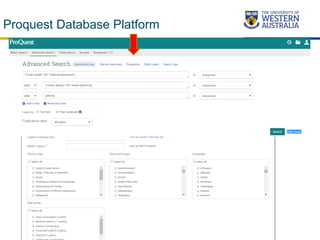
Proquest Database Platform
Activity 3:
 Go to one of the databases within the Population
Health Database list – Proquest or Ebsco
 See if you are able to change or add additional
databases in this platform
 Carry out your search strategy in this database
 Use limits, and modify your search
 Investigate if you can set up a personal folder to
save records and searches.
Ovid Medline Database Searching
Ovid Medline – MeSH headings–
Join all
similar
terms with
OR
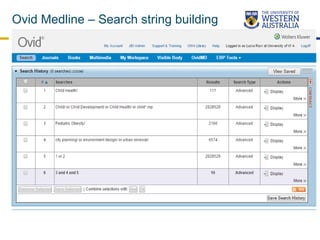
Ovid Medline – Search string building–
Ovid Medline – Additional limits Medline
Activity 4 (optional):
 Go to a Ovid Database and search either Medline
or Embase
 Make sure “map to search terms” is selected and
build up term based individual concept search
 Join these with AND or OR to create your search
string
 Apply some of the additional limits available to
your search results
 Investigate if you can set up a personal folder to
save records and searches.
Government information
• Australian Institute of Health and Welfare
• Australian Bureau of Statistics
• World Health Organization
• Google and Scholar
–try limiting your search to .org.au or .gov.au or
.edu.au domains using the Advanced Search
View:
Library Guide: Health and Medical statistics online
And: Indigenous Health Information Sources
Use
Boolean &
Google
Operators
and
Google to
limit
searches
Search terms, then
site:org
site:edu
http://www.googleguide.com/
using_advanced_operators.ht
ml
1. Find Article
2. Search references in original article
3. Search articles that cite original article
4. Search
references listed
in the citing article
forwards
backwards
Citation searching
Activity 5:
 Locate one of these to specialist citation databases from
OneSearch.
 Either from a peer review article link
 Or by directly searching for an article or topic
 Undertake a search for the high quality scholarly resource
article you have found or do a topic search
 Review the citation and reference reporting options
available to you.
Managing results and keeping up to date
Personal folders:
 Saved searches
 Saved Results
Set up alerts for the latest publications:
•Search alerts, author and citation alerts
•Jouranl Table of contents alerts
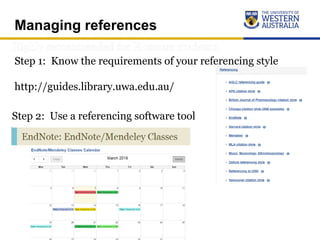
Managing references
Step 1: Know the requirements of your referencing style
http://guides.library.uwa.edu.au/
Step 2: Use a referencing software tool
hmslibrarians-lib@uwa.edu.au
More Help

Honours Research Process

  • 1.
    Population Health Honours: Researchingthe Literature Population Health Honours: Researching the Literature Lucia Ravi, Librarian Medical & Dental Library Lucia Ravi, Librarian Medical & Dental Library
  • 2.
    Expanding upon yourskills to problem solve, conduct research and communicate that research to broader literature context and community. Learning Outcomes: Locate information – comprehensively and efficiently  Break down your topic to build an effective search  Use OneSearch and specialist databases  Construct subject specific searches – MeSH and EmTree  Search for Grey Literature from government and organisations  Use citation databases to explore communities of practice Manage, evaluate and store your information  Save results and searches and send to reference software Honours: a whole new world, kind of…
  • 3.
     Borrow anunlimited number of print books  Loan period to the end of semester (subject to recalls/renewals)  Access Get It: inter-library loans and document delivery http://www.library.uwa.edu.au/information-resources/get-it  Utilise our postgraduate rooms (Med, Reid, Science) • Map location in J Robin Warren Library • Map location in Barry J Marshall Library • Map location in Reid Library Access UniDrive networked storage drive from home. http://www.bits.uwa.edu.au/it-help/storage New to UWA guide; PostGrad Tab: https://guides.library.uwa.edu.au/newtouwalibrary2018 As an Honours student you can…
  • 4.
    Searching: Core concepts& synonyms Breaking down your search: Topic: Links between child health, obesity and urban design Library Guide: Composing a Search link Consider: What other keywords would an author use? concept 1 concept 2 concept 3 Key concepts Child health Obesity Urban design Synonyms Child development Obese, overweight Urban planning Environment Urban design
  • 5.
    Boolean searching techniques? ORto join similar concepts AND to join unique concepts “quotation marks” for phrase searching (brackets) for grouping and ordering * to truncate words, e.g. child* and children ? wild card, e.g urbani?ation Subject headings that might be used by the resource
  • 6.
    Building your searchstring Breaking down your search: Topic: Links between child health, obesity and urban design concept 1 concept 2 concept 3 Key concepts Child health Obesity Urban design Synonyms Child development Obese, overweight Urban planning Environment Search String: (“child health” OR “child development”) AND (“urban design” OR “urban planning” OR environment) AND obesity
  • 7.
    Activity 1:  Writeup your focus research topic or interest  Break this down to identify key concepts  Identify synonyms for your key concepts  Develop a search string strategy for your topic using Boolean logic and punctuation
  • 8.
  • 9.
    Subject Headings &Synonyms Breaking down your search: Topic: Links between child health, obesity and urban design concept 1 concept 2 concept 3 Key concepts Child health Obesity Urban design Synonyms Child development Obese, overweight Urban planning Environment Urban design OneSearch Public health Child Obesity Urbani?ation Built Environment Index terms: MeSH Embase Others…..
  • 10.
    Activity 2:  Signin and build your search strategy in OneSearch advanced search  Review results and identify other key words and subject indexing terms  Save your search and some of good results to My Favourites – saved records
  • 11.
    Subject Specific Databases DatabaseContent focus: AUSTHealth/Informit & Health Collection Australian biomedical literature, from 9 databases Full text health research from Informit (Select Subject) CINAHL Plus/Ebsco Nursing and allied health literature Global Health/Ovid Public health, environmental & occupational health, infectious diseases, nutrition EMBASE/Ovid Broad biomedical and drug literature MEDLINE/Ovid PUBMED Selected biomedical and health sciences Broader biomedical and health sciences PsycINFO/Ovid Psychological and behavioural sciences Public Health/Proquest Health & Medical Complete Core public health literature, dissertations & news Full text for up to 200 Medline titles View Find Databases: Population Health
  • 12.
  • 13.
    Activity 3:  Goto one of the databases within the Population Health Database list – Proquest or Ebsco  See if you are able to change or add additional databases in this platform  Carry out your search strategy in this database  Use limits, and modify your search  Investigate if you can set up a personal folder to save records and searches.
  • 14.
  • 15.
    Ovid Medline –MeSH headings– Join all similar terms with OR
  • 16.
    Ovid Medline –Search string building–
  • 17.
    Ovid Medline –Additional limits Medline
  • 18.
    Activity 4 (optional): Go to a Ovid Database and search either Medline or Embase  Make sure “map to search terms” is selected and build up term based individual concept search  Join these with AND or OR to create your search string  Apply some of the additional limits available to your search results  Investigate if you can set up a personal folder to save records and searches.
  • 19.
    Government information • AustralianInstitute of Health and Welfare • Australian Bureau of Statistics • World Health Organization • Google and Scholar –try limiting your search to .org.au or .gov.au or .edu.au domains using the Advanced Search View: Library Guide: Health and Medical statistics online And: Indigenous Health Information Sources
  • 21.
    Use Boolean & Google Operators and Google to limit searches Searchterms, then site:org site:edu http://www.googleguide.com/ using_advanced_operators.ht ml
  • 22.
    1. Find Article 2.Search references in original article 3. Search articles that cite original article 4. Search references listed in the citing article forwards backwards Citation searching
  • 23.
    Activity 5:  Locateone of these to specialist citation databases from OneSearch.  Either from a peer review article link  Or by directly searching for an article or topic  Undertake a search for the high quality scholarly resource article you have found or do a topic search  Review the citation and reference reporting options available to you.
  • 24.
    Managing results andkeeping up to date Personal folders:  Saved searches  Saved Results Set up alerts for the latest publications: •Search alerts, author and citation alerts •Jouranl Table of contents alerts
  • 25.
    Managing references Step 1:Know the requirements of your referencing style http://guides.library.uwa.edu.au/ Step 2: Use a referencing software tool
  • 26.

Editor's Notes

  • #4 Perhaps show example of get it within a catalogue record using this example: https://ap01.alma.exlibrisgroup.com/discovery/fulldisplay?docid=alma9988716802101&context=L&vid=61UWA_INST:UWA&search_scope=MyInst_and_CI&tab=Everything&lang=en
  • #5 The core skill in developing an effective search strategy is to break down your core concepts and then identify other possible synonyms for describing these. This will prepare you for preparing an effective search that includes a range of ways in which your topic might be described.
  • #6 Show Venn diagram example on Compose a Search guide: https://guides.library.uwa.edu.au/c.php?g=474541&p=3247188
  • #9 Go to search saved in OneSearch (Searches 1 & 2) Show logging in and saving of search option and saving of item options View ways to refine results – focus on year and collection type and then subject heading limits Use of extra field to add in and refine by more than one subject term Link to online article from related content and make sure students familiar with jumping to full text databases.
  • #10 Can you add in specific OneSearch subject terms relevant to your topic that might refine your search OR use subject limit facet (based on Library Congress classification system)
  • #13 Show where to find help in Proquest – point out LibGuides – Health and Medical Complete, basic and advance search and boolean Run saved search Show how to search change and select databases that can be searched within the platform . Demonstrate added terms from thesaurus and correcting search string using boolean logic ("child health" OR "child development") AND ("urban design" OR "urban planning" OR MAINSUBJECT.EXACT"Urban planning") Discuss similar principles being used in Proquest.. Buidling up and testing your search concepts, joining similar terms with OR, distinct concepts with AND. Show how to apply limits, save search and records in this type of database. Show modify search options also
  • #15 Perhaps demonstrate in Medline
  • #16 Demonstrate finding out more about subject headings.
  • #17 Joining with AND happens once your concepts have been built. Not great results for Medline – perhaps to focused on medical care rather than social/preventative.
  • #18 Hard to demonstrate as results from Medline are poor – possibly not the correct database. Could show applying this search to Psych Info.. No results because subject terms do not apply.
  • #20 Take to guide. Demonstrate simple boolean searching in AIHW and ABS
  • #23 How you can use citations to expand your search How many are familiar with?