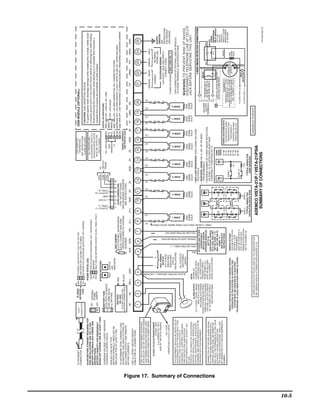
ADEMCO VISTA SERIES
                       VISTA-21iP / VISTA-21iPSIA
                                        Security Systems


                              Installation and Setup Guide


K14488V2 6/09 Rev. A
RECOMMENDATIONS FOR PROPER PROTECTION
      The Following Recommendations for the Location of Fire and Burglary Detection Devices
                    Help Provide Proper Coverage for the Protected Premises.

     Recommendations For Smoke And Heat Detectors
     With regard to the number and placement of smoke/heat detectors, we subscribe to the recommendations
     contained in the National Fire Protection Association's (NFPA) Standard #72 noted below.
     Early warning fire detection is best achieved by the installation of fire detection equipment in all rooms
     and areas of the household as follows: For minimum protection a smoke detector should be installed
     outside of each separate sleeping area, and on each additional floor of a multi-floor family living unit,
     including basements. The installation of smoke detectors in kitchens, attics (finished or unfinished), or in
     garages is not normally recommended.
     For additional protection the NFPA recommends that you install heat or smoke detectors in the living
     room, dining room, bedroom(s), kitchen, hallway(s), attic, furnace room, utility and storage rooms,
     basements and attached garages.
     In addition, we recommend the following:
     • Install a smoke detector inside every bedroom where a smoker sleeps.
     • Install a smoke detector inside every bedroom where someone sleeps with the door partly or
       completely closed. Smoke could be blocked by the closed door. Also, an alarm in the hallway outside
       may not wake up the sleeper if the door is closed.
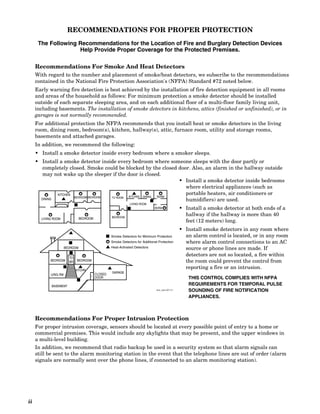
                                                                  • Install a smoke detector inside bedrooms
                                                                    where electrical appliances (such as
              KITCHEN                                               portable heaters, air conditioners or
                      BEDROOM BEDROOM TV ROOM KITCHEN DINING BDRM
       DINING                                                       humidifiers) are used.
                                                               LIVING ROOM
                                                                               BDRM                 • Install a smoke detector at both ends of a
                                                   BEDROOM
                                                                                                      hallway if the hallway is more than 40
       LIVING ROOM              BEDROOM
                                                                                                      feet (12 meters) long.
                                                                                                    • Install smoke detectors in any room where
                                                   Smoke Detectors for Minimum Protection             an alarm control is located, or in any room
                                                   Smoke Detectors for Additional Protection          where alarm control connections to an AC
                      BEDROOM                      Heat-Activated Detectors                           source or phone lines are made. If
                                                                                                      detectors are not so located, a fire within
                        TO
            BEDROOM     BR   BEDROOM                                                                  the room could prevent the control from
                             KTCHN
                                                                                                      reporting a fire or an intrusion.
                                                   GARAGE
            LVNG RM                  .    CLOSED
                                          DOOR                                                         THIS CONTROL COMPLIES WITH NFPA
            BASEMENT                                                                                   REQUIREMENTS FOR TEMPORAL PULSE
                                                                                floor_plan-001-V1      SOUNDING OF FIRE NOTIFICATION
                                                                                                       APPLIANCES.


     Recommendations For Proper Intrusion Protection
     For proper intrusion coverage, sensors should be located at every possible point of entry to a home or
     commercial premises. This would include any skylights that may be present, and the upper windows in
     a multi-level building.
     In addition, we recommend that radio backup be used in a security system so that alarm signals can
     still be sent to the alarm monitoring station in the event that the telephone lines are out of order (alarm
     signals are normally sent over the phone lines, if connected to an alarm monitoring station).


ii
Table Of Contents
Section 1. Features and Installation Highlights........................................................................................ 1-1
    Capabilities and Functions ............................................................................................................................................... 1-1
    Compatible Devices ........................................................................................................................................................... 1-2
    Important Installation Highlights (Installer Please Read)............................................................................................. 1-2
Section 2. Mounting and Wiring the Control ............................................................................................. 2-1
    Installing the Control Cabinet and PC Board ................................................................................................................. 2-1
       Cabinet and Lock......................................................................................................................................................... 2-1
       Mounting the PC Board Alone (no RF Receiver) ....................................................................................................... 2-1
       Mounting Board with RF Receiver ............................................................................................................................. 2-1
       AUXILIARY DEVICE CURRENT DRAW WORKSHEET ........................................................................................ 2-2
    AC Power, Battery, and Ground Connections ................................................................................................................. 2-3
       1361 Transformer ........................................................................................................................................................ 2-3
       1361X10 Transformer ................................................................................................................................................. 2-3
       Battery Connections .................................................................................................................................................... 2-3
       Battery Saver Feature................................................................................................................................................. 2-3
       Earth Ground............................................................................................................................................................... 2-3
    Sounder (Bell) Connections .............................................................................................................................................. 2-4
       Basic Connections........................................................................................................................................................ 2-4
       Supervised output ....................................................................................................................................................... 2-4
    Connecting the Keypads and Other Addressable Devices .............................................................................................. 2-4
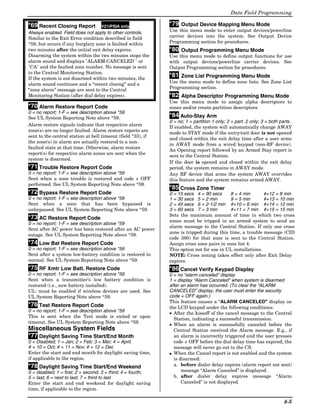
       Connections.................................................................................................................................................................. 2-4
       Supplementary Power (optional) ................................................................................................................................ 2-4
       Keypad Notes............................................................................................................................................................... 2-5
       Optional VISTA-GSM Module .................................................................................................................................... 2-5
    Table of Device Addresses................................................................................................................................................. 2-5
    Hardwire Zones and Zone Expansion .............................................................................................................................. 2-6
       Hardwire Zones ........................................................................................................................................................... 2-6
       Double-Balanced Zones ............................................................................................................................................... 2-6
       Zone Doubling.............................................................................................................................................................. 2-6
       Smoke Detectors .......................................................................................................................................................... 2-6
       Smoke Detector Notes ................................................................................................................................................. 2-7
       4219/4229 Expansion Zones........................................................................................................................................ 2-7
    Installing the RF Receiver and Wireless Transmitter Zones.......................................................................................... 2-8
       Compatible Receivers .................................................................................................................................................. 2-8
       Receiver Connections .................................................................................................................................................. 2-8
       RF Receiver Notes ....................................................................................................................................................... 2-8
       Installing a 5800TM Module....................................................................................................................................... 2-9
       Installing the Transmitters ........................................................................................................................................ 2-9
       Transmitter Battery Life ............................................................................................................................................ 2-9
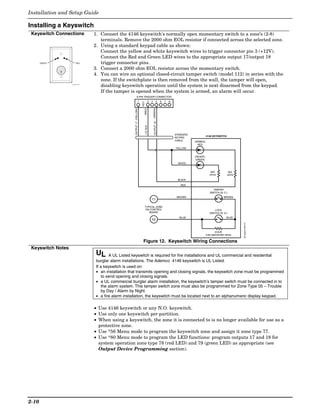
    Installing a Keyswitch .................................................................................................................................................... 2-10
       Keyswitch Connections ............................................................................................................................................. 2-10
       Keyswitch Notes ........................................................................................................................................................ 2-10
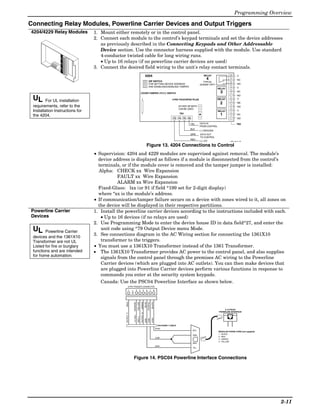
    Connecting Relay Modules, Powerline Carrier Devices and Output Triggers ............................................................. 2-11
       4204/4229 Relay Modules.......................................................................................................................................... 2-11
       Powerline Carrier Devices ........................................................................................................................................ 2-11
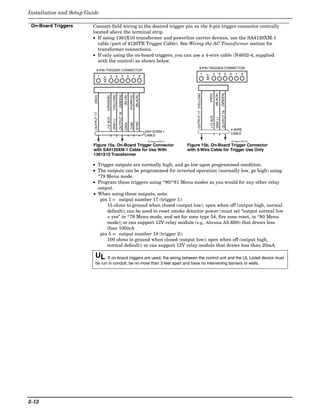
       On-Board Triggers..................................................................................................................................................... 2-12
    Phone Line/Phone Module, Audio Alarm Verification (AAV), and Internet (IP) Connections .................................... 2-13
       Phone Line ................................................................................................................................................................. 2-13
       4286 Phone Module ................................................................................................................................................... 2-13
       Phone Module Problems............................................................................................................................................ 2-13
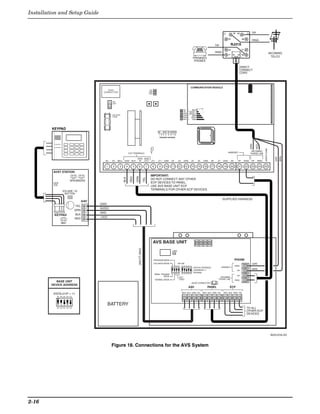
       Audio Alarm Verification Connections ..................................................................................................................... 2-14
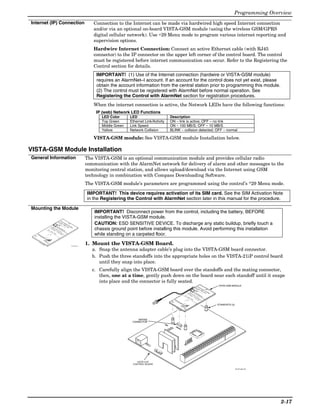
       Internet (IP) Connection ........................................................................................................................................... 2-17
    VISTA-GSM Module Installation ................................................................................................................................... 2-17
       General Information.................................................................................................................................................. 2-17
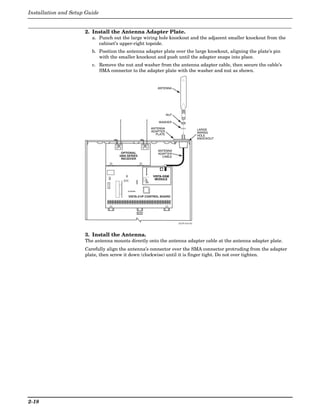
       Mounting the Module ................................................................................................................................................ 2-17
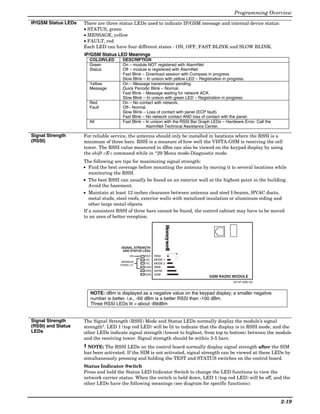
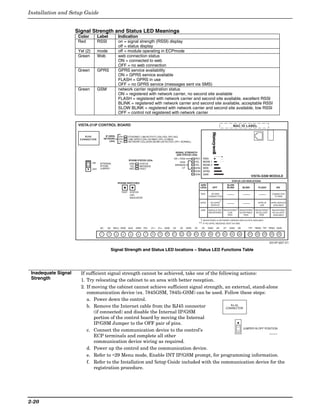
       IP/GSM Status LEDs ................................................................................................................................................ 2-19
       Signal Strength (RSSI).............................................................................................................................................. 2-19
       Signal Strength (RSSI) and Status LEDs ................................................................................................................ 2-19
       Status Indicator Switch............................................................................................................................................. 2-19
       Signal Strength and Status LED locations – Status LED Functions Table........................................................... 2-20


                                                                                                                                                                                    iii
Section 3. Programming Overview ............................................................................................................. 3-21
     About Programming........................................................................................................................................................ 3-21
     Mechanics of Programming ............................................................................................................................................ 3-21
        Data Field Programming Procedures ....................................................................................................................... 3-21
        Interactive Mode Programming (∗56, *57, ∗58, ∗79, ∗80, ∗81, ∗82) ........................................................................ 3-22
        Loading Factory Defaults/Initializing for Download ............................................................................................... 3-22
        Exiting the Programming Mode ............................................................................................................................... 3-22
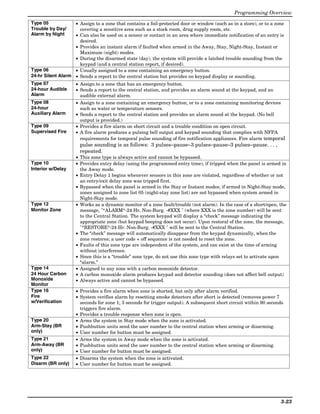
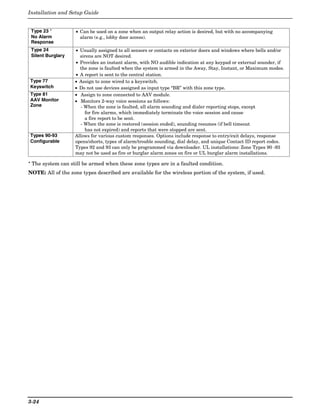
     Zone Type Definitions ..................................................................................................................................................... 3-22
Section 4. Data Field Programming ............................................................................................................. 4-1
     About Data Field Programming ....................................................................................................................................... 4-1
     System Setup Fields (∗20 – ∗29)....................................................................................................................................... 4-1
     Zone Sounds & Timing (∗31–∗39)..................................................................................................................................... 4-1
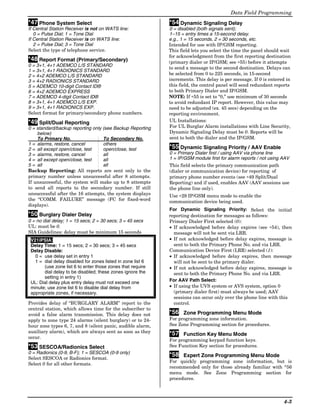
     Dialer Programming (∗40 – ∗50) ...................................................................................................................................... 4-2
     System Status Report Codes ............................................................................................................................................ 4-4
     Miscellaneous System Fields............................................................................................................................................ 4-5
     Pager Programming Fields ............................................................................................................................................... 4-7
     Miscellaneous System Fields............................................................................................................................................ 4-8
     Configurable Zone Type Fields ......................................................................................................................................... 4-9
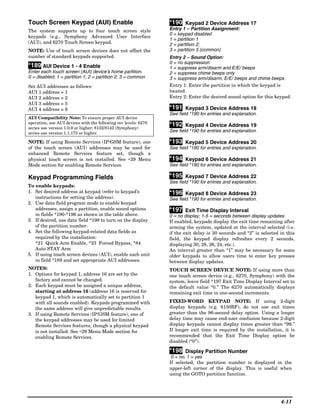
     Touch Screen Keypad (AUI) Enable............................................................................................................................... 4-11
     Keypad Programming Fields .......................................................................................................................................... 4-11
Section 5. Menu Mode Programming ........................................................................................................... 5-1
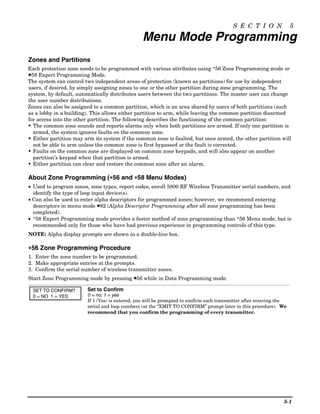
     Zones and Partitions ......................................................................................................................................................... 5-1
     About Zone Programming (∗56 and ∗58 Menu Modes).................................................................................................... 5-1
     ✱56 Zone Programming Procedure .................................................................................................................................. 5-1
     Completing Zone Programming........................................................................................................................................ 5-4
     ∗58 Expert Programming Mode Procedures .................................................................................................................... 5-4
     Wireless Key Programming Templates............................................................................................................................ 5-6
     About Output Device Programming (*79/*80 Menu Mode) ............................................................................................ 5-8
     Programming Output Devices .......................................................................................................................................... 5-8
     *79 Menu Mode: Output Device Mapping........................................................................................................................ 5-8
     *80 Menu Mode: Defining Output Functions................................................................................................................. 5-10
     About Zone Lists (*81 Menu Mode) ................................................................................................................................ 5-12
     Zone List Programming .................................................................................................................................................. 5-13
     About Function Keys (*57 Menu Mode) ......................................................................................................................... 5-14
     Programming Function Keys.......................................................................................................................................... 5-14
     About Descriptor Programming (*82 Menu Mode)........................................................................................................ 5-15
     Programming Zone Descriptors (Menu Mode ∗82) ........................................................................................................ 5-15
     Adding Custom Words (will not be annunciated by 4286 Phone Module).................................................................... 5-16
     ∗29 Menu Mode for IP and GSM Module Programming ............................................................................................... 5-18
     IP/GSM Diagnostic Commands (∗29 Menu Mode)......................................................................................................... 5-23
     Registering the Control with AlarmNet......................................................................................................................... 5-25
     Upload/Download via the Internet ................................................................................................................................. 5-25
     Programming Installer and User Schedules.................................................................................................................. 5-26
Section 6. System Communication and Operation ................................................................................... 6-1
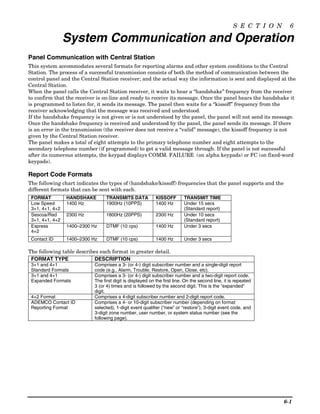
     Panel Communication with Central Station.................................................................................................................... 6-1
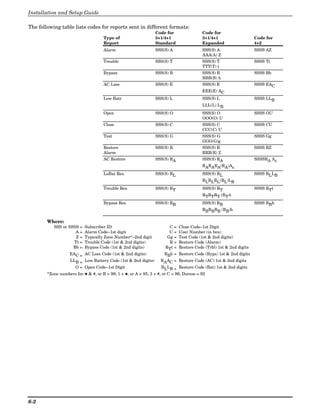
     Report Code Formats ........................................................................................................................................................ 6-1
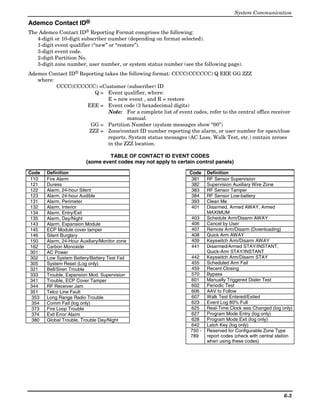
     Ademco Contact ID® ......................................................................................................................................................... 6-3
     System Security Codes...................................................................................................................................................... 6-4
     Panic Keys ......................................................................................................................................................................... 6-6
     Setting the Real-Time Clock............................................................................................................................................. 6-6
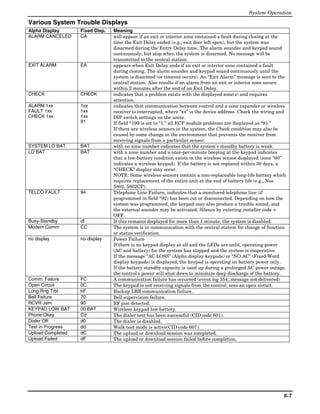
     Various System Trouble Displays .................................................................................................................................... 6-7
Section 7. Testing the System......................................................................................................................... 7-1
     About Test Procedures ...................................................................................................................................................... 7-1
     System Test ....................................................................................................................................................................... 7-1
     Checking Transmitter Enrollment (Sniffer Mode) .......................................................................................................... 7-1
     Go/No Go Test Mode.......................................................................................................................................................... 7-2
     Dialer Communication Test and Periodic Test Reports .................................................................................................. 7-2
     Automatic Standby Battery Tests .................................................................................................................................... 7-2
Section 8. Specifications & Accessories....................................................................................................... 8-1
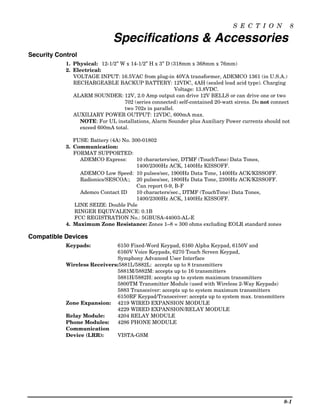
     Security Control ................................................................................................................................................................ 8-1
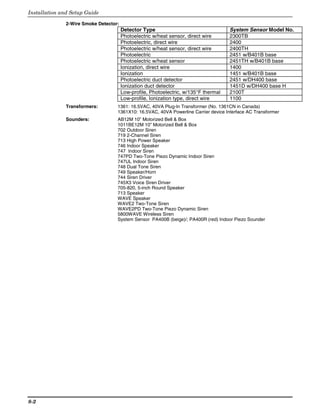
     Compatible Devices ........................................................................................................................................................... 8-1
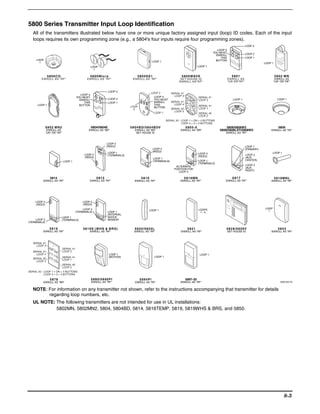
     5800 Series Transmitter Input Loop Identification......................................................................................................... 8-3
Section 9. Regulatory Agency Statements .................................................................................................. 9-1
Section 10. Limitations and Warranty ....................................................................................................... 10-1
iv
S E C T I O N               1

              Features and Installation Highlights
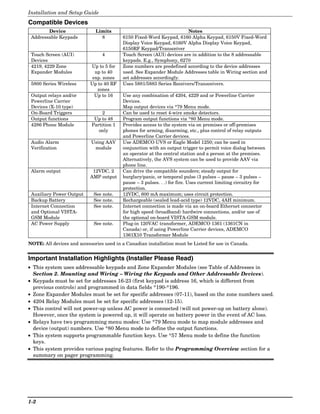
Features and procedures apply to both the VISTA-21iP and VISTA-21iPSIA, except where differences
are noted.
SIA Installations: The VISTA-21iPSIA is a certified SIA-compliant control that meets SIA
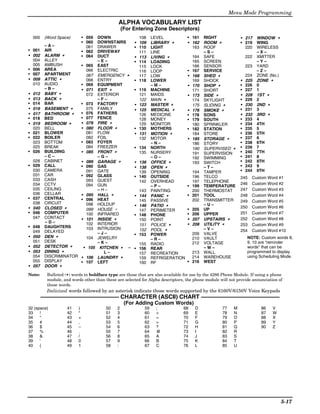
specifications for False Alarm Reduction. The VISTA-21iP is not certified as SIA-compliant, but can
be programmed for False Alarm Reduction. To program for False Alarm Reduction, follow the SIA
Guidelines noted in the applicable programming fields.

   NOTE: Throughout this manual, device model numbers are ADEMCO model numbers unless
         otherwise noted.

Capabilities and Functions
 Feature/Function      Description
 Partitions            • 2 partitions, can protect two independent areas
                       • Common zone option allows either partition to arm, while leaving a common area
                         (ex. lobby or foyer) disarmed for access into the other partition.
 Zones                 Up to 48 protection zones plus 16 keyfob zones (zones 49-64) for total of 64 zones:
                      • 8 basic hardwired zones (zones 1-8) with optional zone-doubling feature
                      • Up to 40 additional wired zones (zones 9-48) using up to 5 4219/4229 modules
                      • Up to 40 wireless transmitter zones (5800 series; zones 9-48)
                      • Up to 4 configurable zone types
 Security Codes        Up to 48 Security Codes, with separate authority levels and partition access
 One-button arming     Dedicated keys can arm the system.
 Schedules             Up to 32; can control devices and/or auto-arm/disarm
 Keypad macros         Up to 4; activated by wired keypads
 Paging                Up to 4 pagers; certain system conditions can report to pagers; can use a dedicated
                       key on keypads to send a signal to a pager
 Event Logging         100 events; log display is done via Compass Downloader software or installer/master
                       code at Keypad
 Zone descriptors      Can assign for all zones (for alpha display keypads and/or 4286 Phone Module).
 Bell supervision      Optional, detects external sounder wiring short (when in alarm) or open (when bell is
                       off); causes a trouble condition, keypad display, and sends a report to the central
                       monitoring station, if enabled.
 RF jam detection      Optional, for wireless systems detects a condition that may impede proper RF
                       reception (i.e., jamming or other RF interference); causes keypad display, and sends a
                       report to the central monitoring station (if trouble reporting is enabled).
 Telephone Line        Built-in option can monitor the telephone line voltage and can cause a local display,
 Monitoring            or a display and trouble/alarm sound
 Downloading via       • Via Standard Phone Line: Using an IBM compatible computer, Compass
 Phone Line or           downloading software, and a compatible HAYES or CIA modem specified by
 Internet                Honeywell.
                       • Via Internet: Supports upload/download programming capability via the Internet
                         using the AlarmNet network and Compass downloading software. This allows site
                         maintenance independent of central station monitoring, and modification to sites
                         globally via the Internet. Also see Internet Reporting below and Internet
                         Connection on the next page.
 Internet Reporting    Primary telephone number messages can be reported over the Internet via hardwired
                       high speed Internet connection and/or via an optional on-board VISTA-GSM module
                       (using the wireless GSM/GPRS digital cellular network). The Internet connection and
                       optional module are collectively referred to as the Internal IP/GSM Device.


                                                                                                                    1-1
Installation and Setup Guide
Compatible Devices
        Device                Limits                                   Notes
 Addressable Keypads            8         6150 Fixed-Word Keypad, 6160 Alpha Keypad, 6150V Fixed-Word
                                          Display Voice Keypad, 6160V Alpha Display Voice Keypad,
                                          6150RF Keypad/Transceiver
 Touch Screen (AUI)              4        Touch Screen (AUI) devices are in addition to the 8 addressable
 Devices                                  keypads. E.g., Symphony, 6270
 4219, 4229 Zone           Up to 5 for    Zone numbers are predefined according to the device addresses
 Expander Modules            up to 40     used. See Expander Module Addresses table in Wiring section and
                            exp. zones    set addresses accordingly.
 5800 Series Wireless      Up to 40 RF    Uses 5881/5883 Series Receivers/Transceivers.
                              zones
 Output relays and/or        Up to 16     Use any combination of 4204, 4229 and or Powerline Carrier
 Powerline Carrier                        Devices.
 Devices (X-10 type)                      Map output devices via *79 Menu mode.
 On-Board Triggers               2        Can be used to reset 4-wire smoke detectors.
 Output functions            Up to 48     Program output functions via *80 Menu mode.
 4286 Phone Module          Partition 1   Provides access to the system via on premises or off-premises
                               only       phones for arming, disarming, etc., plus control of relay outputs
                                          and Powerline Carrier devices.
 Audio Alarm                Using AAV     Use ADEMCO UVS or Eagle Model 1250; can be used in
 Verification                module       conjunction with an output trigger to permit voice dialog between
                                          an operator at the central station and a person at the premises.
                                          Alternatively, the AVS system can be used to provide AAV via
                                          phone line.
 Alarm output               12VDC, 2      Can drive the compatible sounders; steady output for
                           AMP output     burglary/panic, or temporal pulse (3 pulses – pause – 3 pulses –
                                          pause – 3 pulses. . .) for fire. Uses current limiting circuitry for
                                          protection.
 Auxiliary Power Output      See note.    12VDC, 600 mA maximum; uses circuit protection.
 Backup Battery              See note.    Rechargeable (sealed lead-acid type) 12VDC, 4AH minimum.
 Internet Connection         See note.    Internet connection is made via an on-board Ethernet connector
 and Optional VISTA-                      for high speed (broadband) hardwire connections, and/or use of
 GSM Module                               the optional on-board VISTA-GSM module.
 AC Power Supply             See note.    Plug-in 120VAC transformer, ADEMCO 1361 (1361CN in
                                          Canada) or, if using Powerline Carrier devices, ADEMCO
                                          1361X10 Transformer Module
NOTE: All devices and accessories used in a Canadian installation must be Listed for use in Canada.


Important Installation Highlights (Installer Please Read)
• This system uses addressable keypads and Zone Expander Modules (see Table of Addresses in
  Section 2. Mounting and Wiring – Wiring the Keypads and Other Addressable Devices).
• Keypads must be set for addresses 16-23 (first keypad is address 16, which is different from
  previous controls) and programmed in data fields *190-*196.
• Zone Expander Modules must be set for specific addresses (07-11), based on the zone numbers used.
• 4204 Relay Modules must be set for specific addresses (12-15).
• This control will not power-up unless AC power is connected (will not power-up on battery alone).
  However, once the system is powered up, it will operate on battery power in the event of AC loss.
• Relays have two programming menu modes: Use *79 Menu mode to map module addresses and
  device (output) numbers. Use *80 Menu mode to define the output functions.
• This system supports programmable function keys. Use *57 Menu mode to define the function
  keys.
• This system provides various paging features. Refer to the Programming Overview section for a
  summary on pager programming.


1-2
S E C T I O N                                                      2

                            Mounting and Wiring the Control
Installing the Control Cabinet and PC Board
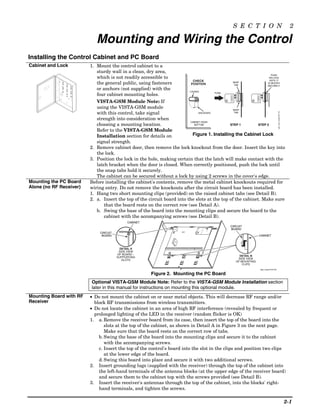
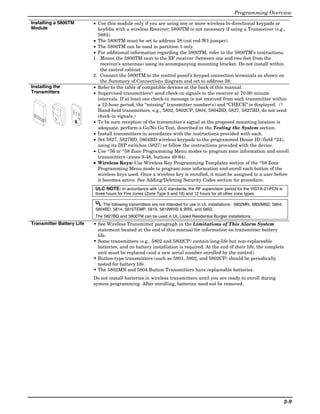
Cabinet and Lock         1. Mount the control cabinet to a
                            sturdy wall in a clean, dry area,
                                                                                                                    PUSH
                            which is not readily accessible to                                                    ON LOCK
                                                                            CHECK                                 UNTIL IT
                            the general public, using fasteners           POSITION
                                                                                               SNAP
                                                                                                TAB
                                                                                                                 IS SEATED
                                                                                                                SECURELY
                            or anchors (not supplied) with the           LOCKED
                                                                                         PUSH
                            four cabinet mounting holes.


                                                                                                                                                                                  ADEMCO


                                                                                                                                                                                                         ADEMCO
                            VISTA-GSM Module Note: If
                            using the VISTA-GSM module                                         SNAP
                            with this control, take signal


                                                                                                                                                                                                                                     cab_lock_snap-001-V0
                                                                                UNLOCKED        TAB


                            strength into consideration when
                                                                          CABINET DOOR
                            choosing a mounting location.                    BOTTOM           STEP 1       STEP 2
                            Refer to the VISTA-GSM Module
                            Installation section for details on            Figure 1. Installing the Cabinet Lock
                            signal strength.
                         2. Remove cabinet door, then remove the lock knockout from the door. Insert the key into
                            the lock.
                         3. Position the lock in the hole, making certain that the latch will make contact with the
                            latch bracket when the door is closed. When correctly positioned, push the lock until
                            the snap tabs hold it securely.
                            The cabinet can be secured without a lock by using 2 screws in the cover's edge.
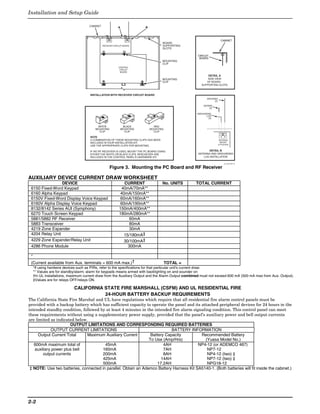
Mounting the PC Board    Before installing the cabinet's contents, remove the metal cabinet knockouts required for
Alone (no RF Receiver)   wiring entry. Do not remove the knockouts after the circuit board has been installed.
                         1. Hang two short mounting clips (provided) on the raised cabinet tabs (see Detail B).
                         2. a. Insert the top of the circuit board into the slots at the top of the cabinet. Make sure
                                that the board rests on the correct row (see Detail A).
                            b. Swing the base of the board into the mounting clips and secure the board to the
                                cabinet with the accompanying screws (see Detail B).
                                             CABINET
                                                                                                                                                                                  CIRCUIT
                                                                                                                                                                                  BOARD
                              CIRCUIT
                               BOARD                                                                                                                                                                          CABINET


                                          DETAIL A            1   2   3   4   5   6   7   8   9   10   11   12   13   14   15   16   17   18   19   20   21   22   23   24   25


                                         SIDE VIEW                    +                                                                                            +
                                        OF BOARD
                                        SUPPORTING                                                                                                                                           DETAIL B
                                           SLOTS                                                                                                                                            SIDE VIEW
                                                                                                                                                                                           OF MOUNTING
                                                                                                                                                                                               CLIPS
                                                                                                                                                                                                                  pcb_mount-012-V0

                                                       Figure 2. Mounting the PC Board
                         Optional VISTA-GSM Module Note: Refer to the VISTA-GSM Module Installation section
                         later in this manual for instructions on mounting this optional module.
Mounting Board with RF   • Do not mount the cabinet on or near metal objects. This will decrease RF range and/or
Receiver                   block RF transmissions from wireless transmitters.
                         • Do not locate the cabinet in an area of high RF interference (revealed by frequent or
                           prolonged lighting of the LED in the receiver (random flicker is OK)
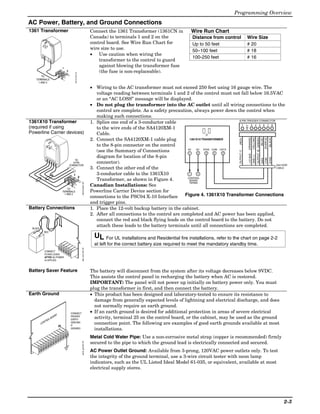
                         1. a. Remove the receiver board from its case, then insert the top of the board into the
                                slots at the top of the cabinet, as shown in Detail A in Figure 3 on the next page.
                                Make sure that the board rests on the correct row of tabs.
                             b. Swing the base of the board into the mounting clips and secure it to the cabinet
                                with the accompanying screws.
                             c. Insert the top of the control's board into the slot in the clips and position two clips
                                at the lower edge of the board.
                             d. Swing this board into place and secure it with two additional screws.
                         2. Insert grounding lugs (supplied with the receiver) through the top of the cabinet into
                             the left-hand terminals of the antenna blocks (at the upper edge of the receiver board)
                             and secure them to the cabinet top with the screws provided (see Detail B).
                         3. Insert the receiver's antennas through the top of the cabinet, into the blocks' right-
                             hand terminals, and tighten the screws.

                                                                                                                                                                                                                                                            2-1
Installation and Setup Guide

                                     CABINET               A               B


                                                                                                                        CABINET
                                                                                       BOARD
                                               RECEIVER CIRCUIT BOARD                  SUPPORTING
                                                                                       SLOTS
                                               +                +
                                                                                                     CIRCUIT
                                                                                                      BOARD
                                                                                       MOUNTING
                                                                                       CLIP
                                                            CONTROL
                                                             CIRCUIT
                                                             BOARD
                                                                                                               DETAIL A
                                                                                       MOUNTING            SIDE VIEW
                                                                                       CLIP               OF BOARD -
                                                                                                       SUPPORTING SLOTS


                                      INSTALLATION WITH RECEIVER CIRCUIT BOARD
                                                                                                           ANTENNA
                                                                                                                (2)

                                                                                                        SCREW
                                                                                                            (2)

                                                                                                    GROUNDING
                                                                                                          LUG
                                                                                                           (2)


                                          WHITE                 BLACK            RED
                                         MOUNTING              MOUNTING        MOUNTING
                                           CLIP                  CLIP            CLIP

                                      NOTE
                                      A COMBINATION OF THESE MOUNTING CLIPS HAS BEEN                                   ANTENNA
                                      INCLUDED IN YOUR INSTALLATION KIT.                                                MOUNT
                                                                                                                      (2 PLACES)
                                      USE THE APPROPRIATE CLIPS FOR MOUNTING.

                                      IF NO RF RECEIVER IS USED, MOUNT THE PC BOARD USING                      DETAIL B
                                      EITHER THE WHITE OR BLACK CLIPS, WHICHEVER ARE                 ANTENNA AND GROUNDING
                                      INCLUDED IN THE CONTROL PANEL'S HARDWARE KIT.                     LUG INSTALLATION

                                                                                                                           pc_mount-001-V1


                                                    Figure 3. Mounting the PC Board and RF Receiver

AUXILIARY DEVICE CURRENT DRAW WORKSHEET
                 DEVICE                                        CURRENT                 No. UNITS    TOTAL CURRENT
 6150 Fixed-Word Keypad                                      40mA/70mA**
 6160 Alpha Keypad                                           40mA/150mA**
 6150V Fixed-Word Display Voice Keypad                       60mA/160mA**
 6160V Alpha Display Voice Keypad                            60mA/190mA**
 8132/8142 Series AUI (Symphony)                            150mA/400mA**
 6270 Touch Screen Keypad                                   180mA/280mA**
 5881/5882 RF Receiver                                            60mA
 5883 Transceiver                                                 80mA
 4219 Zone Expander                                               30mA
 4204 Relay Unit                                               15/180mA‡
 4229 Zone Expander/Relay Unit                                 30/100mA‡
 4286 Phone Module                                               300mA

 *
 (Current available from Aux. terminals = 600 mA max.)†                                   TOTAL =
     *If using hardwire devices such as PIRs, refer to the specifications for that particular unit's current draw.
     ** Values are for standby/alarm; alarm for keypads means armed with backlighting on and sounder on
     †In UL installations, maximum current draw from the Auxiliary Output and the Alarm Output combined must not exceed 600 mA (500 mA max from Aux. Output).
     ‡Values are for relays OFF/relays ON.

                             CALIFORNIA STATE FIRE MARSHALL (CSFM) AND UL RESIDENTIAL FIRE
                                        24-HOUR BATTERY BACKUP REQUIREMENTS
The California State Fire Marshal and UL have regulations which require that all residential fire alarm control panels must be
provided with a backup battery which has sufficient capacity to operate the panel and its attached peripheral devices for 24 hours in the
intended standby condition, followed by at least 4 minutes in the intended fire alarm signaling condition. This control panel can meet
these requirements without using a supplementary power supply, provided that the panel’s auxiliary power and bell output currents
are limited as indicated below.
                        OUTPUT LIMITATIONS AND CORRESPONDING REQUIRED BATTERIES
             OUTPUT CURRENT LIMITATIONS                                     BATTERY INFORMATION
      Output Current Total     Maximum Auxiliary Current         Battery Capacity         Recommended Battery
                                                                To Use (Amp/Hrs)            (Yuasa Model No.)
   600mA maximum total of               45mA                            4AH              NP4-12 (or ADEMCO 467)
    auxiliary power plus bell          160mA                            7AH                  NP7-12
         output currents               200mA                            8AH                  NP4-12 (two) ‡
                                       425mA                           14AH                  NP7-12 (two) ‡
                                       500mA                         17.2AH                  NPG18-12
 ‡ NOTE: Use two batteries, connected in parallel. Obtain an Ademco Battery Harness Kit SA5140-1. (Both batteries will fit inside the cabinet.)


2-2
Programming Overview
AC Power, Battery, and Ground Connections
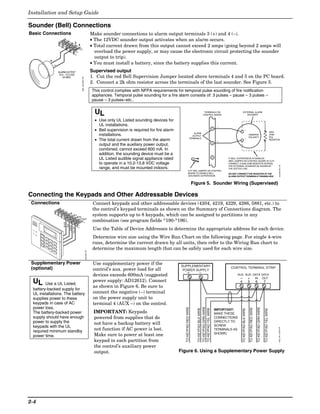
1361 Transformer                                                                                         Connect the 1361 Transformer (1361CN in             Wire Run Chart
                                                                                                         Canada) to terminals 1 and 2 on the                  Distance from control                Wire Size
                                                                                                         control board. See Wire Run Chart for                Up to 50 feet                        # 20
                                                                                                         wire size to use.                                    50–100 feet                          # 18
                                                                                                         • Use caution when wiring the
                                                                                                                                                              100-250 feet                         # 16
                                                                                                             transformer to the control to guard
                                                     1
                                                                                                             against blowing the transformer fuse
                                                         2                                                   (the fuse is non-replaceable).
        TO                                                       1321X10-001-V0

   TERMINALS
     1 AND 2

                                                                                                         • Wiring to the AC transformer must not exceed 250 feet using 16 gauge wire. The
                                                                                                            voltage reading between terminals 1 and 2 of the control must not fall below 16.5VAC
                                                                                                            or an “AC LOSS” message will be displayed.
                                                                                                         • Do not plug the transformer into the AC outlet until all wiring connections to the
                                                                                                            control are complete. As a safety precaution, always power down the control when
                                                                                                            making such connections.
1361X10 Transformer                                                                                      1. Splice one end of a 3-conductor cable                               8-PIN TRIGGER CONNECTOR
                                                                                                                                                                                  1      3 4 5 6 7 8


                                                                                                                                                                                                  KEY
(required if using                                                                                          to the wire ends of the SA4120XM-1
Powerline Carrier devices)                                                                                  Cable.
                                                                                                         2. Connect the SA4120XM-1 cable plug


                                                                                                                                                                                                                   (YELLOW)
                                                                                                                                                                                                                              OUTPUT 18 (GREEN)
                                                                                                                                                                                                        (ORANGE)


                                                                                                                                                                                                                                                  (PURPLE)
                                                                                                                                                                                                                                                             (BLACK)
                                                                                                                                                                                                                                                    (BLUE)
                                                                                                                                                                                      (RED)
                                                                                                                                                         1361X10 TRANSFORMER

                                                                                                            to the 8-pin connector on the control
                                                                                                                                                        AC   AC   SYNC COM DATA
                                                                                                            (see the Summary of Connections


                                                                                                                                                                                      OUTPUT 17
                                                                                                                                                         1    2     3   4    5


                                                                                                                                                                                                        +12 AUX.
                                                                                                            diagram for location of the 8-pin


                                                                                                                                                                                                                   GND (-)
               AC


                                                                                                                                                                                                                                                             SYNC
                    AC


                                                                                                                                                                                                                                                  COM
                                                                                                                                                                                                                                                  DATA
                          Sy
                         Outnc
                             put Sign
                                                                 TO
                                                                                                            connector).
                                Com al
                                    mon X1
                                           0
                                        Dat
                                            a                   8-PIN
                                                             CONNECTOR                                                                                                                                  SA412OXM
                                                                                                         3. Connect the other end of the                                                                CABLE

                                                               1                                            3-conductor cable to the 1361X10             1    2
                                                                                  2                                                                     CONTROL
                                                                                                            Transformer, as shown in Figure 4.           BOARD
                                                                                                                                                         TERMS.
                                                                                      1361X10-001-V0


                                                                                                         Canadian Installations: See
                                                          TO
                                                     TERMINALS                                           Powerline Carrier Device section for
                                                       1 AND 2
                                                                                                         connections to the PSC04 X-10 Interface       Figure 4. 1361X10 Transformer Connections
                                                                                                         and trigger pins.
Battery Connections                                                                                      1. Place the 12-volt backup battery in the cabinet.
                                                                                                         2. After all connections to the control are completed and AC power has been applied,
                                                                                                            connect the red and black flying leads on the control board to the battery. Do not
 BLACK
                                                                                                            attach these leads to the battery terminals until all connections are completed.
              RED
                                                                                                           UL For UL installations and Residential fire installations, refer to the chart on page 2-2
                                                                                                           at left for the correct battery size required to meet the mandatory standby time.
                                                                                      batt_conn-001-V0


              CONNECT
              FLYING LEADS
              AFTER AC POWER
              IS APPLIED


Battery Saver Feature                                                                                    The battery will disconnect from the system after its voltage decreases below 9VDC.
                                                                                                         This assists the control panel in recharging the battery when AC is restored.
                                                                                                         IMPORTANT: The panel will not power up initially on battery power only. You must
                                                                                                         plug the transformer in first, and then connect the battery.
Earth Ground                                                                                             • This product has been designed and laboratory-tested to ensure its resistance to
                                                                                                           damage from generally expected levels of lightning and electrical discharge, and does
                                                                                                           not normally require an earth ground.
                                                             CONNECT                                     • If an earth ground is desired for additional protection in areas of severe electrical
                                           D
                           AR                                PROPER
                                                                                                           activity, terminal 25 on the control board, or the cabinet, may be used as the ground
                         BO
              OL                                             EARTH
           NTR                                               GROUND
                                                                                                           connection point. The following are examples of good earth grounds available at most
         CO                                                  IF
                                                25
                                                             DESIRED                                       installations.
                                                                                                         Metal Cold Water Pipe: Use a non-corrosive metal strap (copper is recommended) firmly
                                                                                                         secured to the pipe to which the ground lead is electrically connected and secured.
                                                                                      earth_gnd-001-V0


                                                                                                         AC Power Outlet Ground: Available from 3-prong, 120VAC power outlets only. To test
                                                                                                         the integrity of the ground terminal, use a 3-wire circuit tester with neon lamp
                                                                                                         indicators, such as the UL Listed Ideal Model 61-035, or equivalent, available at most
                                                                                                         electrical supply stores.


                                                                                                                                                                                                                                                                       2-3
Installation and Setup Guide

Sounder (Bell) Connections
Basic Connections                                                                   Make sounder connections to alarm output terminals 3 (+) and 4 (–).
                                                                                    • The 12VDC sounder output activates when an alarm occurs.
                                          3
                                               4                                    • Total current drawn from this output cannot exceed 2 amps (going beyond 2 amps will
                                                                                      overload the power supply, or may cause the electronic circuit protecting the sounder
                                                                                      output to trip).
                                                                                    • You must install a battery, since the battery supplies this current.
               ALARM OUTPUT                                                         Supervised output
                10.5 - 13.5 VDC
                   2A MAX.                                                          1. Cut the red Bell Supervision Jumper located above terminals 4 and 5 on the PC board.
                                                   spkr_conn-001-V0                 2. Connect a 2k ohm resistor across the terminals of the last sounder. See Figure 5.
                                                                                    This control complies with NFPA requirements for temporal pulse sounding of fire notification
                                                                                    appliances. Temporal pulse sounding for a fire alarm consists of: 3 pulses – pause – 3 pulses –
                                                                                    pause – 3 pulses–etc..


                                                                                      UL                                                                                TERMINALS ON
                                                                                                                                                                       CONTROL BOARD
                                                                                                                                                                                                               EXTERNAL ALARM
                                                                                                                                                                                                                  SOUNDER

                                                                                      • Use only UL Listed sounding devices for
                                                                                        UL installations.                                                                                 _
                                                                                      • Bell supervision is required for fire alarm                                                  4                                _
                                                                                                                                                                                                                                                                                                     2000
                                                                                                                                                            ALARM
                                                                                        installations.                                                     OUTPUT
                                                                                                                                                                                                                                  OBSERVE
                                                                                                                                                                                                                                  POLARITY
                                                                                                                                                                                                                                                                                                     OHM
                                                                                                                                                                                                                                                                                                     EOL
                                                                                      • The total current drawn from the alarm                           TERMINALS
                                                                                                                                                                                          +
                                                                                                                                                                                                                        +                                                                            RESISTOR
                                                                                                                                                                                     3
                                                                                        output and the auxiliary power output,
                                                                                        combined, cannot exceed 600 mA. In
                                                                                        addition, the sounding device must be a
                                                                                                                                                                                     2
                                                                                        UL Listed audible signal appliance rated                                                                IF BELL SUPERVISION IS ENABLED
                                                                                                                                                                                                (RED JUMPER ON CONTROL BOARD IS CUT)
                                                                                        to operate in a 10.2-13.8 VDC voltage                                                                   CONNECT A 2000 OHM RESISTOR ACROSS


                                                                                                                                                                                                                                                                                                               sounder-001-V0
                                                                                                                                                                                                THE EXTERNAL SOUNDER AS SHOWN BY
                                                                                        range, and must be mounted indoors.                                                                     THE DOTTED LINE.
                                                                                                                                                   CUT RED JUMPER ON CONTROL
                                                                                                                                                   BOARD TO ENABLE BELL                         DO NOT CONNECT THE RESISTOR AT THE
                                                                                                                                                   (SOUNDER) SUPERVISION.                       ALARM OUTPUT TERMINALS THEMSELVES!


                                                                                                                                                              Figure 5. Sounder Wiring (Supervised)

Connecting the Keypads and Other Addressable Devices
 Connections                                                                         Connect keypads and other addressable devices (4204, 4219, 4229, 4286, 5881, etc.) to
                                                                                     the control’s keypad terminals as shown on the Summary of Connections diagram. The
                                4_
                                       5+
                                              6 IN
                                                                                     system supports up to 8 keypads, which can be assigned to partitions in any
                                                  7 OUT
                                                                                     combination (see program fields *190-*196).
                    BLACK
                               RED
                            GREEN
                                     YELLOW


 AR
      MED
                                                                                     Use the Table of Device Addresses to determine the appropriate address for each device.
 RE
      AD
        Y


                                                                                     Determine wire size using the Wire Run Chart on the following page. For single 4-wire
                                                                                     runs, determine the current drawn by all units, then refer to the Wiring Run chart to
                                                                                     determine the maximum length that can be safely used for each wire size.
                                                                      conn-001-V0


 Supplementary Power                                                                 Use supplementary power if the                   SUPPLEMENTARY
 (optional)                                                                          control’s aux. power load for all                 POWER SUPPLY
                                                                                                                                                                                                 CONTROL TERMINAL STRIP
                                                                                                                                               +                  –
                                                                                     devices exceeds 600mA (suggested                                                                                  AUX. AUX. DATA DATA
                                                                                                                                                                                                         – + IN OUT
 UL     Use a UL Listed,
                                                                                     power supply: AD12612). Connect                                                                                     4                        5                        6                    7
                                                                                     as shown in Figure 6. Be sure to
 battery-backed supply for
 UL installations. The battery                                                       connect the negative (–) terminal
 supplies power to these                                                             on the power supply unit to
 keypads in case of AC                                                               terminal 4 (AUX –) on the control.
 power loss.
                                                                                                                                                                TO KEYPAD GRN WIRE
                                                                                                                                         TO KEYPAD RED WIRE


                                                                                                                                                                                                                                                           TO KEYPAD GRN WIRE
                                                                                                                                                                                                                                      TO KEYPAD RED WIRE
                                                                                                                                                                TO KEYPAD BLK WIRE

                                                                                                                                                                TO KEYPAD YEL WIRE


                                                                                                                                                                                                             TO KEYPAD BLK WIRE


                                                                                                                                                                                                                                                                                TO KEYPAD YEL WIRE


                                                                                                                                                                                         IMPORTANT:
 The battery-backed power                                                            IMPORTANT: Keypads                                                                                  MAKE THESE
 supply should have enough                                                           powered from supplies that do                                                                       CONNECTIONS
 power to supply the                                                                 not have a backup battery will                                                                      DIRECTLY TO
 keypads with the UL                                                                                                                                                                     SCREW
                                                                                                                                                                                                                                                                                                            supp_pwr_supply-V0


 required minimum standby                                                            not function if AC power is lost.                                                                   TERMINALS AS
                                                                                     Make sure to power at least one                                                                     SHOWN.
 power time.
                                                                                     keypad in each partition from
                                                                                     the control’s auxiliary power
                                                                                     output.                                          Figure 6. Using a Supplementary Power Supply


2-4
Programming Overview
 Keypad Notes                                                                                                                                                                                 Set device addresses. Refer to the instructions included with the devices and set each
                                                                                                                                                                                              address according to the Table of Device Addresses.
                                                                                                                                                                                              See Keypad Programming Fields (fields *190-*196) in Section 4. Data Field
                     AR


                     RE
                          ME
                               D
                                                                                                                                                                                              Programming for details on enabling keypad addresses, assigning keypad partitions
                          AD


                                                                                                                                                                                              and selecting keypad sounding options.
                               Y


                                                             1     OF
                                                                         F

                                                                                       2
                                                             4    MA
                                                                                             AW
                                                                                                  AY
                                                                         X
                                                                                                               3
                                                                                       5                             STA
                                                             7    INST
                                                                                              TES
                                                                                                    T
                                                                                                                           Y


                                                                                                                                                                                              IMPORTANT: Each keypad must be assigned a unique, predefined address, from 16 to
                                                                         ANT
                                                                                                               6
                                                                                       8     CO
                                                                                                                    BYP
                                                                                                                       ASS
                                                                                                  DE
                                                                  REA
                                                                         DY
                                                                                                               9
                                                                                       0                            CH
                                                                                                                         IME


                                                                                                              #


                                                                                                                                                                                              23. The first keypad is address 16 (default = partition 1, all sounds enabled).
                                                                                                                                                                                              TOUCH SCREEN KEYPAD (AUI) NOTES:
                                                                                                                                                                                              • Use of up to four AUI devices (e.g., 6270, Symphony) is independent from standard
                                                                                                                                                                                                keypads and does not affect the number of standard keypads the system can support.
                                                                                                                                                                                              • AUI devices must be set for address 1 or 2, or address 5 or 6 depending on which unit
                                                                                                                                                                                                is enabled in field *189.
                                                                                                                                                                                              • To ensure proper AUI device operation, use AUI devices with the following rev levels:
                                                                                                                                                                                                6270 series use version 1.0.9 or higher; 8132/8142 (Symphony) series use version
                                                                                                                                                                                                1.1.175 or higher.
 Optional VISTA-GSM                                                                                                                                                                           Refer to the VISTA-GSM Module Installation section later in this manual for
 Module                                                                                                                                                                                       detailed explanation of its installation.
                                                                                                        F


                                                                                                                                                                                              The module’s address is internally set to 03 and cannot be changed.
                                                                                                             O
                                                                                                                  R
                                                                                             5
                                                                                                 0


                                                                               E
                                                                                 X
                                                                                                         O


                                                                                   T
                                                                                                              H


                                                                                     E
                                                                                                                   M


                                                                                       R
                                                                                        ,


                                                                                         N
                                                                                           A
                                                                                           M


                                                                                             L
                                                                                             M


                                                                                                                                                               A
                                                                                               C


                                                                                                                                                                   N
                                                                                                 X
                                                                                                  7


                                                                                                                                                                       T
                                                                                                   7


                                                                                                    O
                                             P


                                                                                                                                                                       E
                                                                                                    2
                                              N
                                              R


                                                                                                     0


                                                                                                                                                                           N
                                                                                                                                                           N
                                                                                                      P
                                               O
                                                IM
                                                 B


                                                                                                        T


                                                                                                        P


                                                                                                                                                                           N
                                                                                                                                                                   L
                                                  A


                                                   A


                                                                                                          R
                                                                                                          F


                                                                                                                                                                   Y
                                                    T


                                                    R


                                                                                                                                                                               A
                                            F


                                                                                                           O


                                                                                                           O
                                                     T


                                                      Y
                                             C


                                                      E


                                                                                                            R


                                                                                                            G
                                                        C


                                                        P
                                                        R


                                                                                                              R
                                                                                                              T
                                                          O
                                                          Y


                                                                                                               A
                                                          ID


                                                                                                                E
                                                           :


                                                            W


                                                                                                                 M
                                                                                                                 L
                                                             :


                                                             6


                                                                                                                  E


                                                                                                                   M
                                                                                                                   E
                                                               G


                                                               V


                                                                                                                    P
                                                                                                                    R


                                                                                                                     E
                                                                 IP


                                                                .
                                    M


                                                                                                                     H


                                                                                                                      R
                                                                  3


                                                                                                                       :


                                                                                                                         O
                                                                   M


                                                                    .1


                                                                                                                         9
                                        A


                                                                                                                          P
                                                                                                                          N
                                                                      C


                                                                                                                           -
                                        C


                                                                                                                           O
                                                                                                                            A


                                                                                                                             E
                                                                        5


                                                                                                                             1


                                                                                                                              R
                                                                                                                              H
                                                                          6


                                                                                                                               6


                                                                                                                               S


                                                                                                                                T
                                                                                                                                r


                                                                                                                                 .5
                                            L


                                                                                                                                  E
                                                                                                                                   F


                                                                                                                                   R
                                             A


                                                                                                                                    V
                                                                                                                                    O


                                                                                                                                     V
                                                                                                                                     IC
                                                 B


                                                                                                                                      A
                                                                                                                                      R


                                                                                                                                       IC
                                                                                                                                        C
                                                  E


                                                                                                                                        :


                                                                                                                                          2


                                                                                                                                          E
                                                                                                                                          Y
                                                     L


                                                                                                                                            4
                                                                                                                                             2


                                                                                                                                             U
                                                                                                                                              H
                                                                                                                                               6


                                                                                                                                                S
                                                                                                                                                 7
                                                          H


                                                                                                                                                 r


                                                                                                                                                  E
                                                                                                                                                   W


                                                                                                                                                   B
                                                             E


                                                                                                                                                    !
                                                                                                                                                      A
                                                                                                                                                       -
                                                                R


                                                                                                                                                        C
                                                                                                                                                         M


                                                                                                                                                          K
                                                                   E


                                                                                                                                                           C


                                                                                                                                                           U
         H


                                   TX        RX
                                                                                                                                                             5


                                                                                                                                                             P
                                                                                                                                                               6
         o
             n
             e
                 y
                 w
                     e
                          ll


                              RS
                            M
                          M OD SI
                         W OD E
                       GP EB
                      GS PS E 2 1
                        M


                                                                                                                                                                               V21iP-008-V0


                                                                                                                                        Wire Run Chart For Devices* Drawing Aux Power From The Control (12V+ & 12V–)
       Wire                                                                                                                                     TOTAL CURRENT DRAWN BY ALL DEVICES CONNECTED TO A SINGLE WIRE RUN
       Size                                                                                                                           50 mA or less        100 mA              300 mA            500 mA              600 mA
       #22                                                                                                                            900 ft (274m)        450 ft (137m)       150 ft (46m)      90 ft (27m)         75 ft (23m)
       #20                                                                                                                            1400 ft (427m)       700 ft (213m)       240 ft (73m)      140 ft (43m)        120 ft (37m)
       #18                                                                                                                            1500 ft (457m)       1100 ft (335m)      350 ft (107m)     220 ft (67m)        170 ft (52m)
       #16                                                                                                                            1500 ft (457m)       1500 ft (457m)      550 ft (168m)     350 ft (107m)       270 ft (82m)
 * Includes Keypads, RF Receivers, Zone Expander/Relay Units, and 4286 Phone Module.
  Maximum wire lengths for any device that is homerun to the control can also be determined from the Wiring Run Chart, based on the current draw of that device
  alone.
  The length of all wire runs for both partitions combined must not exceed 1500 feet (457m) when unshielded quad conductor cable is used (750 feet if shielded
  cable is used). This restriction is due to the capacitive effect on the data lines when quad cable is used.

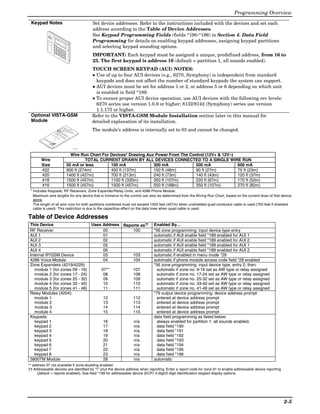
Table of Device Addresses
 This Device                                                                                                                                                                                  Uses Address Reports as††   Enabled By…
 RF Receiver                                                                                                                                                                                       00          100        *56 zone programming: input device type entry
 AUI 1                                                                                                                                                                                             01                     automatic if AUI enable field *189 enabled for AUI 1
 AUI 2                                                                                                                                                                                             02                     automatic if AUI enable field *189 enabled for AUI 2
 AUI 3                                                                                                                                                                                             05                     automatic if AUI enable field *189 enabled for AUI 1
 AUI 4                                                                                                                                                                                             06                     automatic if AUI enable field *189 enabled for AUI 2
 Internal IP/GSM Device                                                                                                                                                                            03          103        automatic if enabled in menu mode *29
 4286 Voice Module                                                                                                                                                                                 04          104        automatic if phone module access code field *28 enabled
 Zone Expanders (4219/4229):                                                                                                                                                                                              *56 zone programming: input device type, entry 2, then:
    module 1 (for zones 09 - 16)                                                                                                                                                                  07**          107         automatic if zone no. 9-16 set as AW type or relay assigned
    module 2 (for zones 17 - 24)                                                                                                                                                                   08           108         automatic if zone no. 17-24 set as AW type or relay assigned
    module 3 (for zones 25 - 32)                                                                                                                                                                   09           109         automatic if zone no. 25-32 set as AW type or relay assigned
    module 4 (for zones 33 - 40)                                                                                                                                                                   10           110         automatic if zone no. 33-40 set as AW type or relay assigned
    module 5 (for zones 41 - 48)                                                                                                                                                                   11           111         automatic if zone no. 41-48 set as AW type or relay assigned
 Relay Modules (4204):                                                                                                                                                                                                    *79 output device programming: device address prompt:
    module 1                                                                                                                                                                                       12           112         entered at device address prompt
    module 2                                                                                                                                                                                       13           113         entered at device address prompt
    module 3                                                                                                                                                                                       14           114         entered at device address prompt
    module 4                                                                                                                                                                                       15           115         entered at device address prompt
 Keypads:                                                                                                                                                                                                                 data field programming as listed below:
    keypad 1                                                                                                                                                                                       16            n/a        always enabled for partition 1, all sounds enabled.
    keypad 2                                                                                                                                                                                       17            n/a        data field *190
    keypad 3                                                                                                                                                                                       18            n/a        data field *191
    keypad 4                                                                                                                                                                                       19            n/a        data field *192
    keypad 5                                                                                                                                                                                       20            n/a        data field *193
    keypad 6                                                                                                                                                                                       21            n/a        data field *194
    keypad 7                                                                                                                                                                                       22            n/a        data field *195
    keypad 8                                                                                                                                                                                       23            n/a        data field *196
 5800TM Module                                                                                                                                                                                     28            n/a      automatic
** address 07 not available if zone-doubling enabled
†† Addressable devices are identified by “1” plus the device address when reporting. Enter a report code for zone 91 to enable addressable device reporting
      (default = reports enabled). See field *199 for addressable device (ECP) 3-digit/2-digit identification keypad display options.


                                                                                                                                                                                                                                                                                           2-5
Installation and Setup Guide

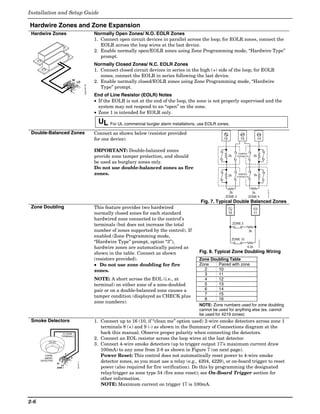
Hardwire Zones and Zone Expansion
 Hardwire Zones                                                  Normally Open Zones/ N.O. EOLR Zones
                                                                 1. Connect open circuit devices in parallel across the loop; for EOLR zones, connect the
                                                                    EOLR across the loop wires at the last device.
                                                                 2. Enable normally open/EOLR zones using Zone Programming mode, “Hardwire Type”
                                                                    prompt.
                                                                 Normally Closed Zones/ N.C. EOLR Zones
                                                                 1. Connect closed circuit devices in series in the high (+) side of the loop; for EOLR
                                                                    zones, connect the EOLR in series following the last device.
                               HI
                                    LO                           2. Enable normally closed/EOLR zones using Zone Programming mode, “Hardwire
                                                  zones-001-V0
                                                                    Type” prompt.
                                                                 End of Line Resistor (EOLR) Notes
                                                                 • If the EOLR is not at the end of the loop, the zone is not properly supervised and the
                                                                   system may not respond to an “open” on the zone.
                                                                 • Zone 1 is intended for EOLR only.

                                                                   UL For UL commercial burglar alarm installations, use EOLR zones.
 Double-Balanced Zones                                           Connect as shown below (resistor provided
                                                                 for one device).                                                12            13                 14


                                                                 IMPORTANT: Double-balanced zones
                                                                                                                                              TAMPER
                                                                 provide zone tamper protection, and should                           2k     CONTACTS        2k
                                                                 be used as burglary zones only.
                                                                 Do not use double-balanced zones as fire
                                                                 zones.                                                               2k      TAMPER
                                                                                                                                                             2k
                                                                                                                                             CONTACTS


                                                                                                                                                                                zone-002-V0
                                                                                                                                    2k                2k
                                                                                                                                  ZONE 3            ZONE 4
                                                                                                                     Fig. 7. Typical Double Balanced Zones
 Zone Doubling                                                   This feature provides two hardwired
                                                                 normally closed zones for each standard                              10                     11
                                                                 hardwired zone connected to the control’s
                                                                 terminals (but does not increase the total                                ZONE 2

                                                                 number of zones supported by the control). If                                          3k
                                                                 enabled (Zone Programming mode,
                                                                                                                                       ZONE 10


                                                                                                                                                                  zone-004-V0
                                                                 “Hardwire Type” prompt, option “3”),
                                                                 hardwire zones are automatically paired as                                         6.2k

                                                                 shown in the table. Connect as shown                Fig. 8. Typical Zone Doubling Wiring
                                                                 (resistors provided).                               Zone Doubling Table
                                                                 • Do not use zone doubling for fire                 Zone      Paired with zone
                                                                 zones.                                                 2      10
                                                                                                                        3      11
                                                                 NOTE: A short across the EOL (i.e., at                 4      12
                                                                 terminal) on either zone of a zone-doubled             5      13
                                                                 pair or on a double-balanced zone causes a             6      14
                                                                                                                        7      15
                                                                 tamper condition (displayed as CHECK plus
                                                                                                                        8      16
                                                                 zone numbers).
                                                                                                                     NOTE: Zone numbers used for zone doubling
                                                                                                                     cannot be used for anything else (ex. cannot
                                                                                                                     be used for 4219 zones)
 Smoke Detectors                                                 1. Connect up to 16 (10, if “clean me” option used) 2-wire smoke detectors across zone 1
                                                                    terminals 8 (+) and 9 (-) as shown in the Summary of Connections diagram at the
                        TO ZONE 1                                   back this manual. Observe proper polarity when connecting the detectors.
                       TERMINALS
                                                                 2. Connect an EOL resistor across the loop wires at the last detector.
                                                                 3. Connect 4-wire smoke detectors (up to trigger output 17’s maximum current draw
                                                                    100mA) to any zone from 2-8 as shown in Figure 7 (on next page).
                           8
         2-WIRE
         SMOKE                 9
                                                                    Power Reset: This control does not automatically reset power to 4-wire smoke
      DETECTOR
                                                                    detector zones, so you must use a relay (e.g., 4204, 4229), or on-board trigger to reset
                                    5806-001-V0


                  HI
                     LO
                  ZONE 1                                            power (also required for fire verification). Do this by programming the designated
                                                                    relay/trigger as zone type 54 (fire zone reset); see On-Board Trigger section for
                                                                    other information.
                                                                    NOTE: Maximum current on trigger 17 is 100mA.


2-6
Programming Overview
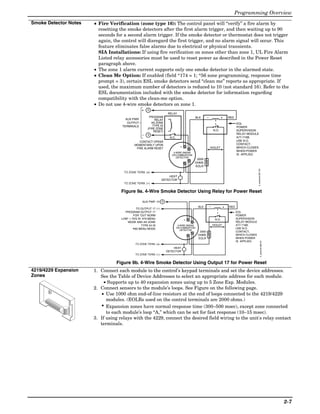
Smoke Detector Notes      • Fire Verification (zone type 16): The control panel will “verify” a fire alarm by
                            resetting the smoke detectors after the first alarm trigger, and then waiting up to 90
                            seconds for a second alarm trigger. If the smoke detector or thermostat does not trigger
                            again, the control will disregard the first trigger, and no alarm signal will occur. This
                            feature eliminates false alarms due to electrical or physical transients.
                            SIA Installations: If using fire verification on zones other than zone 1, UL Fire Alarm
                            Listed relay accessories must be used to reset power as described in the Power Reset
                            paragraph above.
                          • The zone 1 alarm current supports only one smoke detector in the alarmed state.
                          • Clean Me Option: If enabled (field *174 = 1; *56 zone programming, response time
                            prompt = 3), certain ESL smoke detectors send “clean me” reports as appropriate. If
                            used, the maximum number of detectors is reduced to 10 (not standard 16). Refer to the
                            ESL documentation included with the smoke detector for information regarding
                            compatibility with the clean-me option.
                          • Do not use 4-wire smoke detectors on zone 1.
                                                    +    5
                                                                        RELAY
                                                          PROGRAM                               BLK       _               +    RED
                                         AUX PWR               RELAY
                                          OUTPUT            AS ZONE                                                                  EOL
                                       TERMINALS             TYPE 54                                                                 POWER
                                                         (FIRE ZONE
                                                              RESET)                                              N.O.               SUPERVISION
                                                     _   4                                                                           RELAY MODULE
                                                                         N.C.                                                        A77-716B.
                                                  CONTACT OPENS                                                                      USE N.O.
                                               MOMENTARILY UPON                                                                      CONTACT,
                                                                                  +       _                   VIOLET                 WHICH CLOSES
                                                FIRE ALARM RESET
                                                                                                                                     WHEN POWER
                                                                           4-WIRE SMOKE
                                                                          OR COMBUSTION                                              IS APPLIED.
                                                                             DETECTOR
                                                                                               2000
                                                                                              OHMS
                                                                                              EOLR


                                                                                                                                                    4_wiresmk-007-V0
                                        TO ZONE TERM. (+)
                                                                        HEAT
                                                                    DETECTOR
                                        TO ZONE TERM. (_)

                                       Figure 9a. 4-Wire Smoke Detector Using Relay for Power Reset

                                                     AUX PWR (+) 5
                                                                                                              _
                                                 TO OUTPUT 17 (_)
                                                                                                  BLK                      +   RED
                                         PROGRAM OUTPUT 17                                                                           EOL
                                               FOR "OUT NORM                                                                         POWER
                                       LOW" = YES IN 79 MENU                          +                            N.O.              SUPERVISION
                                          MODE AND AS ZONE                                    _                                      RELAY MODULE
                                                    TYPE 54 IN                   4-WIRE SMOKE                     VIOLET             A77-716B.
                                                80 MENU MODE                    OR COMBUSTION                                        USE N.O.
                                                                                   DETECTOR
                                                                                                   2000                              CONTACT,
                                                                                                  OHMS                               WHICH CLOSES
                                                                                                  EOLR                               WHEN POWER
                                                                                                                                     IS APPLIED.


                                                                                                                                                              4_wiresmk-008-V0
                                                TO ZONE TERM. (+)
                                                                           HEAT
                                                                       DETECTOR
                                                TO ZONE TERM. (_)


                                    Figure 9b. 4-Wire Smoke Detector Using Output 17 for Power Reset
4219/4229 Expansion       1. Connect each module to the control’s keypad terminals and set the device addresses.
Zones                        See the Table of Device Addresses to select an appropriate address for each module.
                               • Supports up to 40 expansion zones using up to 5 Zone Exp. Modules.
                          2. Connect sensors to the module’s loops. See Figure on the following page.
                              • Use 1000 ohm end-of-line resistors at the end of loops connected to the 4219/4229
                                modules. (EOLRs used on the control terminals are 2000 ohms.)
                              • Expansion zones have normal response time (300–500 msec), except zone connected
                                to each module’s loop “A,” which can be set for fast response (10–15 msec).
                          3. If using relays with the 4229, connect the desired field wiring to the unit's relay contact
                             terminals.
      ©
©


                      ©


                                                                                                                                                                                 2-7
Installation and Setup Guide

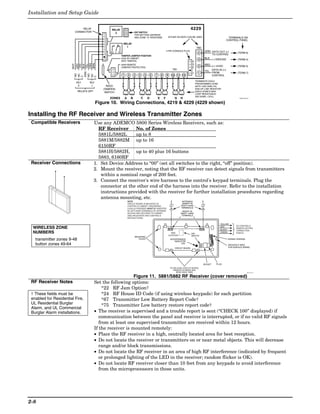
                                 RELAY              RELAY                                                                                             4229
                             CONNECTOR                2                      DIP SWITCH
                                                                             FOR SETTING ADDRESS
                                                                             AND ZONE "A" RESPONSE                       EITHER OR BOTH CAN BE USED                                       TERMINALS ON
                                                                                                                                                                                         CONTROL PANEL
                                                             RELAY
                                                               1                                                                                              TB2
                                                                                                                     4-PIN CONSOLE PLUG                                GRN DATA OUT (>)
                                                   NO C NC                                                                                                       4                               (TERM 6)
                                                                                                                                                                           TO CONTROL
                                                            TAMPER JUMPER POSITION
                                                            4229 IN CABINET                                                                                            BLK
                                                                                                                                                                 3         (–) GROUND            (TERM 4)
                                                            (NOT TAMPER)                                                                                 4


                             ORG
                             BRN
                             GRY
                                                                                                                                                         3


                       WHT


                             YEL
                             VIO
                             BLK
                                                            4229 REMOTE                                                                                                RED
                                                            (TAMPER PROTECTED)                                                                           2       2         (+) 12VDC             (TERM 5)
                                                                                                                            TB1
                                                                                                                                                                       YEL DATA IN (<)


                         GND
                                                                                                                                                         1       1         FROM                  (TERM 7)
                         NO


                         NO
                         NC


                         NC
                                                             1       2       3   4       5       6   7       8       9     10    11      12                                CONTROL

                         C


                         C
                                                                                                                                                             TERMINATE EACH
                             RLY     RLY                                                                                                                     PROGRAMMED ZONE
                              2       1          REED                                                                                                        WITH 1000 OHM (1K)
                                               (TAMPER)                                                                                                      END-OF-LINE RESISTOR
                              RELAYS OFF        SWITCH                                                                                                       (EACH ZONE'S MAX.
                                                                                                                                                             LOOP RESISTANCE
                                                                                                                                                             300 OHMS + EOL)
                                                   ZONES         A       B           C       D           E       F              G      H                                                           4229-002-V0


                                           Figure 10. Wiring Connections, 4219 & 4229 (4229 shown)

Installing the RF Receiver and Wireless Transmitter Zones
 Compatible Receivers                      Use any ADEMCO 5800 Series Wireless Receivers, such as:
                                             RF Receiver      No. of Zones
                                             5881L/5882L      up to 8
                                             5881M/5882M up to 16
                                             6150RF
                                             5881H/5882H, up to 40 plus 16 buttons
                                             5883, 6160RF
 Receiver Connections                      1. Set Device Address to “00” (set all switches to the right, “off” position).
                                           2. Mount the receiver, noting that the RF receiver can detect signals from transmitters
                                              within a nominal range of 200 feet.
                                           3. Connect the receiver's wire harness to the control's keypad terminals. Plug the
                                              connector at the other end of the harness into the receiver. Refer to the installation
                                              instructions provided with the receiver for further installation procedures regarding
                                              antenna mounting, etc.
                                                                     NOTE                                                                ANTENNAS
                                                                     CIRCUIT BOARD IS MOUNTED IN                                         (INSERT IN
                                                                     CONTROL'S CABINET. GROUNDING                                       RIGHT-HAND
                                                                     LUGS (2) PROVIDED MUST BE INSERTED                                 TERMINALS)
                                                                     IN LEFT-HAND TERMINALS OF ANTENNA                                   INSERT IN
                                                                     BLOCKS AND SECURED TO CABINET.                                    RIGHT- HAND
                                                                     (SEE RECEIVER'S AND CONTROL'S                                      TERMINALS
                                                                     INSTRUCTIONS)


                                                                                                                                                                                  YELLOW
                                                                                                                                                                                                TO CONTROL'S
  WIRELESS ZONE                                                                                                             MODEL NO. IS INDICATED ON CIRCUIT BOARD
                                                                                                                                                                                  RED
                                                                                                                                                                                  BLACK
                                                                                                                                                                                                REMOTE KEYPAD
                                                                                                                                                                                                CONNECTION
  NUMBERS                                                                                                                  5882                        DIP
                                                                                                                                                                                  GREEN         POINTS.
                                                                                                                         LOCATION                      SWITCH
                                                                             MOUNTING
   transmitter zones 9-48                                                       HOLES                                     INTERFERENCE
                                                                                                                              INDICATOR
                                                                                                                                                                                          WIRING OPENING

   button zones 49-64                                                                                                               LED
                                                                                                                                                                                          KNOCKOUT AREA
                                                                                                                                CIRCUIT BOARD                                             FOR SURFACE WIRING


                                                                                                                                                                      SOCKET   PLUG
                                                                                                                          TO RELEASE CIRCUIT BOARD,
                                                                                                                             REMOVE SCREWS AND
                                                                                                                               BEND BACK TABS                                                               5881-003-V0


                                                               Figure 11. 5881/5882 RF Receiver (cover removed)
 RF Receiver Notes                         Set the following options:
                                                *22 RF Jam Option†
 † These fields must be                         *24 RF House ID Code (if using wireless keypads) for each partition
 enabled for Residential Fire,                  *67 Transmitter Low Battery Report Code†
 UL Residential Burglar
                                                *75 Transmitter Low battery restore report code†
 Alarm, and UL Commercial
 Burglar Alarm installations.              • The receiver is supervised and a trouble report is sent (“CHECK 100” displayed) if
                                              communication between the panel and receiver is interrupted, or if no valid RF signals
                                              from at least one supervised transmitter are received within 12 hours.
                                           If the receiver is mounted remotely:
                                           • Place the RF receiver in a high, centrally located area for best reception.
                                           • Do not locate the receiver or transmitters on or near metal objects. This will decrease
                                              range and/or block transmissions.
                                           • Do not locate the RF receiver in an area of high RF interference (indicated by frequent
                                              or prolonged lighting of the LED in the receiver; random flicker is OK).
                                           • Do not locate RF receiver closer than 10 feet from any keypads to avoid interference
                                              from the microprocessors in those units.


2-8
Programming Overview
Installing a 5800TM        • Use this module only if you are using one or more wireless bi-directional keypads or
Module                       keyfobs with a wireless Receiver; 5800TM is not necessary if using a Transceiver (e.g.,
                             5883).
                           • The 5800TM must be set to address 28 (cut red-W1 jumper).
                           • The 5800TM can be used in partition 1 only.
                           • For additional information regarding the 5800TM, refer to the 5800TM’s instructions.
                           1. Mount the 5800TM next to the RF receiver (between one and two feet from the
                              receiver’s antennas) using its accompanying mounting bracket. Do not install within
                              the control cabinet.
                           2. Connect the 5800TM to the control panel’s keypad connection terminals as shown on
                              the Summary of Connections diagram and set to address 28.
Installing the             • Refer to the table of compatible devices at the back of this manual.
Transmitters               • Supervised transmitters† send check-in signals to the receiver at 70-90 minute
                             intervals. If at least one check-in message is not received from each transmitter within
                             a 12-hour period, the “missing” transmitter number(s) and “CHECK” is displayed. (†
                             Hand-held transmitters, e.g., 5802, 5802CP, 5804, 5804BD, 5827, 5827BD, do not send
                             check-in signals.)
                           • To be sure reception of the transmitter's signal at the proposed mounting location is
                             adequate, perform a Go/No Go Test, described in the Testing the System section.
                           • Install transmitters in accordance with the instructions provided with each.
                           • Set 5827, 5827BD, 5804BD wireless keypads to the programmed House ID (field *24),
                             using its DIP switches (5827) or follow the instructions provided with the device.
                           • Use *56 or *58 Zone Programming Menu modes to program zone information and enroll
                             transmitters (zones 9-48, buttons 49-64).
                           • Wireless Keys: Use Wireless Key Programming Templates section of the *58 Zone
                             Programming Menu mode to program zone information and enroll each button of the
                             wireless keys used. Once a wireless key is enrolled, it must be assigned to a user before
                             it becomes active. See Adding/Deleting Security Codes section for procedure.
                            ULC NOTE: In accordance with ULC standards, the RF supervision period for the VISTA-21iPCN is
                            three hours for Fire zones (Zone Type 9 and 16) and 12 hours for all other zone types.

                            UL The following transmitters are not intended for use in UL installations: 5802MN, 5802MN2, 5804,
                            5804BD, 5814, 5816TEMP, 5819, 5819WHS & BRS, and 5850.
                            The 5827BD and 5800TM can be used in UL Listed Residential Burglar installations.
Transmitter Battery Life   • See Wireless Transmitter paragraph in the Limitations of This Alarm System
                             statement located at the end of this manual for information on transmitter battery
                             life.
                           • Some transmitters (e.g., 5802 and 5802CP) contain long-life but non-replaceable
                             batteries, and no battery installation is required. At the end of their life, the complete
                             unit must be replaced (and a new serial number enrolled by the control).
                           • Button-type transmitters (such as 5801, 5802, and 5802CP) should be periodically
                             tested for battery life.
                           • The 5802MN and 5804 Button Transmitters have replaceable batteries.
                           Do not install batteries in wireless transmitters until you are ready to enroll during
                           system programming. After enrolling, batteries need not be removed.


                                                                                                                                 2-9
Installation and Setup Guide

Installing a Keyswitch
 Keyswitch Connections                1. Connect the 4146 keyswitch's normally open momentary switch to a zone’s (2-8)
                                         terminals. Remove the 2000 ohm EOL resistor if connected across the selected zone.
                                      2. Using a standard keypad cable as shown:
                                         Connect the yellow and white keyswitch wires to trigger connector pin 3 (+12V).
                                         Connect the Red and Green LED wires to the appropriate output 17/output 18
       GREEN              RED            trigger connector pins.
                                      3. Connect a 2000 ohm EOL resistor across the momentary switch.
                                      4. You can wire an optional closed-circuit tamper switch (model 112) in series with the
                                         zone. If the switchplate is then removed from the wall, the tamper will open,
                   keyswitch-001-V1
                                         disabling keyswitch operation until the system is next disarmed from the keypad.
                                         If the tamper is opened when the system is armed, an alarm will occur.
                                                                     8-PIN TRIGGER CONNECTOR
                                                                          1                   3   4          5     6   7   8


                                                                                KEY


                                                                                                      (GREEN)
                                                           OUTPUT 17 (YELLOW)


                                                                                      (RED)


                                                                                                       OUTPUT 18
                                                                                      +12 AUX.
                                                                                                                               STANDARD
                                                                                                                                                    4146 KEYSWITCH
                                                                                                                               KEYPAD
                                                                                                                               CABLE      (ARMED)
                                                                                                                                            RED
                                                                                                                               YELLOW


                                                                                                                                          (READY)
                                                                                                                                           GREEN
                                                                                                                                 WHITE


                                                                                                                                                        820             820
                                                                                                                                                       ohms            ohms

                                                                                                                                BLACK

                                                                                                                                  RED
                                                                                                                                                         TAMPER
                                                                                                                                                       SWITCH (N. C.)
                                                                                                                                BROWN                               BROWN
                                                                                                  11

                                                                                      TYPICAL ZONE
                                                                                      ON CONTROL                                                           LOCK
                                                                                         BOARD                                                         SWITCH (N. O.)
                                                                                                                                 BLUE                                 BLUE
                                                                                                  10


                                                                                                                                                                              00-trigcon-004-V1
                                                                                                                                                            EOLR
                                                                                                                                                    (use appropriate value)

                                                                                 Figure 12. Keyswitch Wiring Connections
 Keyswitch Notes
                                       UL     A UL Listed keyswitch is required for fire installations and UL commercial and residential
                                       burglar alarm installations. The Ademco 4146 keyswitch is UL Listed.
                                       If a keyswitch is used on:
                                       • an installation that transmits opening and closing signals, the keyswitch zone must be programmed
                                          to send opening and closing signals.
                                       • a UL commercial burglar alarm installation, the keyswitch’s tamper switch must be connected in to
                                          the alarm system. This tamper switch zone must also be programmed for Zone Type 05 – Trouble
                                          by Day / Alarm by Night.
                                       • a fire alarm installation, the keyswitch must be located next to an alphanumeric display keypad.

                                      • Use 4146 keyswitch or any N.O. keyswitch.
                                      • Use only one keyswitch per partition.
                                      • When using a keyswitch, the zone it is connected to is no longer available for use as a
                                        protective zone.
                                      • Use *56 Menu mode to program the keyswitch zone and assign it zone type 77.
                                      • Use *80 Menu mode to program the LED functions: program outputs 17 and 18 for
                                        system operation zone type 78 (red LED) and 79 (green LED) as appropriate (see
                                        Output Device Programming section).


2-10
Programming Overview

Connecting Relay Modules, Powerline Carrier Devices and Output Triggers
4204/4229 Relay Modules          1. Mount either remotely or in the control panel.
                                 2. Connect each module to the control’s keypad terminals and set the device addresses
                                    as previously described in the Connecting Keypads and Other Addressable
                                    Device section. Use the connector harness supplied with the module. Use standard
                                    4-conductor twisted cable for long wiring runs.
                                    • Up to 16 relays (if no powerline carrier devices are used)
                                 3. Connect the desired field wiring to the unit's relay contact terminals.
                                                                                                    4204                                                                            RELAY                             C


                                                                                                                                                                                                           10 11 12
                                                                                                                                                                                       4                              NC
                                                                                                               DIP SWITCH                                                           TYPICAL
                                                                                                               FOR SETTING DEVICE ADDRESS                                        (SHOWN "OFF")                        NO
                                                                                                               AND ENABLING/DISABLING TAMPER                                                                          C


                                                                                                                                                                                                           9
                                                                                                                                                                                                 RELAY
                                                                                                                                                                                                  3                   NC


                                                                                                                                                                                                           8
                                                                                        COVER TAMPER (REED) SWITCH


                                                                                                                                                                                                           7
                                                                                                                                                                                                                      NO
 UL                                                                                                                                                                                                                   C


                                                                                                                                                                                                           6
                                                                                                                                                    4-PIN TOUCHPAD PLUG                          RELAY
         For UL installation
                                                                                                                                                                                                  2                   NC


                                                                                                                                                                                                           5
 requirements, refer to the                                                                                                                                EITHER OR BOTH                                             NO


                                                                                                                                                                                                           4
                                                                                                                                                           CAN BE USED
 Installation Instructions for                                                                                                                                                                                        C


                                                                                                                                                                                                           3
                                                                                                                                                                                                 RELAY
                                                                                                                                                            TB1
                                                                                                                                                                                                  1


                                                                                                                                                                                                           2
                                                                                                                                                                                                                      NC
 the 4204.


                                                                                                                                                                                                           1
                                                                                                                                                     13    14   15   16                                               NO

                                                                                                                                                                          YEL    DATA IN                              TB2
                                                                                                                                                                                 FROM CONTROL
                                                                                                                                                                          BLK
                                                                                                                                                                                 (–) GROUND
                                                                                                                                                                          GRN    DATA OUT
                                                                                                                                                                                 TO CONTROL
                                                                                                                                                                          RED
                                                                                                                                                                                 (+) 12V                   4204_conn-1-V0


                                                                                                             Figure 13. 4204 Connections to Control
                                 • Supervision: 4204 and 4229 modules are supervised against removal. The module’s
                                   device address is displayed as follows if a module is disconnected from the control’s
                                   terminals, or if the module cover is removed and the tamper jumper is installed:
                                   Alpha: CHECK xx Wire Expansion
                                            FAULT xx Wire Expansion
                                            ALARM xx Wire Expansion
                                   Fixed-Glass: lxx (or 91 if field *199 set for 2-digit display)
                                   where “xx is the module’s address.
                                 • If communication/tamper failure occurs on a device with zones wired to it, all zones on
                                   the device will be displayed in their respective partitions.
Powerline Carrier                1. Install the powerline carrier devices according to the instructions included with each.
Devices                             • Up to 16 devices (if no relays are used)
                                 2. Use Programming Mode to enter the device house ID in data field*27, and enter the
 UL     Powerline Carrier
                                    unit code using *79 Output Device menu Mode.
                                 3. See connections diagram in the AC Wiring section for connecting the 1361X10
 devices and the 1361X10
 Transformer are not UL             transformer to the triggers.
 Listed for fire or burglary     • You must use a 1361X10 Transformer instead of the 1361 Transformer.
 functions and are intended      • The 1361X10 Transformer provides AC power to the control panel, and also supplies
 for home automation.
                                    signals from the control panel through the premises AC wiring to the Powerline
                                    Carrier devices (which are plugged into AC outlets). You can then make devices that
                                    are plugged into Powerline Carrier devices perform various functions in response to
                                    commands you enter at the security system keypads.
                                    Canada: Use the PSC04 Powerline Interface as shown below.
                                                       8-PIN TRIGGER CONNECTOR
                                                        1                3          4         5          6              7         8
                                                            KEY


                                                                                        (GREEN)
                                                                                                    (BLUE)


                                                                                                                            (BLACK)
                                                (RED)


                                                                             (YELLOW)


                                                                                                             (PURPLE)
                                                                  (ORANGE)


                                                                                                                                                                                                     X-10 PSC04
                                                                                                                                                                                                 POWERLINE INTERFACE
                                                                                        OUTPUT 18
                                                OUTPUT 17


                                                                  +12 AUX.
                                                                             GND (-)


                                                                                                                            SYNC
                                                                                                             COM
                                                                                                    DATA


                                                                                                                                                                                                         1234


                                                                                                                                        SA4120XM-1 CABLE
                                                                                                                                      SYNC
                                                                                                                                                                           BLK
                                                                                                                                                                                                 MODULAR PHONE CORD (not supplied)
                                                                                                                                                                                                 1 - BLACK
                                                                                                                                                                           GRN
                                                                                                                                                                                                 2 - RED
                                                                                                                                      COM
                                                                                                                                                                                                 3 - GREEN
                                                                                                                                                                                                 4 - YELLOW
                                                                                                                                                                           RED
                                                                                                                                      DATA
                                                                                                                                                                           YEL


                                                                  Figure 14. PSC04 Powerline Interface Connections


                                                                                                                                                                                                                                      2-11
Installation and Setup Guide

 On-Board Triggers       Connect field wiring to the desired trigger pin on the 8-pin trigger connector centrally
                         located above the terminal strip.
                         • If using 1361X10 transformer and powerline carrier devices, use the SA4120XM-1
                           cable (part of 4120TR Trigger Cable). See Wiring the AC Transformer section for
                           transformer connections.
                         • If only using the on-board triggers, you can use a 4-wire cable (N4632-4, supplied
                           with the control) as shown below.
                                                                                                                                              8-PIN TRIGGER CONNECTOR
                               8-PIN TRIGGER CONNECTOR
                                                                                                                                                    1                  3          4           5     6   7     8


                                                                                                                                                           KEY
                                 1                 3          4         5          6         7          8


                                      KEY


                                                                                                                                                                                       (GREEN)
                                                                                                                                      OUTPUT 17 (YELLOW)


                                                                                                                                                                 (RED)
                                                                                                                                                                            (BLACK)
                                                                  (GREEN)


                                                                                                  (BLACK)
                                                       (YELLOW)


                                                                                       (PURPLE)
                                                                              (BLUE)
                                            (ORANGE)
                          (RED)


                                                                                                                                                                                        OUTPUT 18
                                                                  OUTPUT 18
                          OUTPUT 17


                                                                                                                                                                 +12 AUX.
                                            +12 AUX.


                                                                                                                                                                             GND (-)
                                                       GND (-)


                                                                                                  SYNC
                                                                                       COM
                                                                              DATA
                                                                                                                                                                                                    4-WIRE
                                                                                                            SA412OXM-1
                                                                                                                                                                                                    CABLE
                                                                                                            CABLE
                                                                                                             00-trigcon-003-V1                                                                      00-trigcon-005-V2

                         Figure 15a. On-Board Trigger Connector                                                                  Figure 15b. On-Board Trigger Connector
                         with SA4120XM-1 Cable for Use With                                                                      with 4-Wire Cable for Trigger Use Only
                         1361X10 Transformer

                         • Trigger outputs are normally high, and go low upon programmed condition.
                         • The outputs can be programmed for inverted operation (normally low, go high) using
                           *79 Menu mode.
                         • Program these triggers using *80/*81 Menu modes as you would for any other relay
                           output.
                         • When using these outputs, note:
                            pin 1 = output number 17 (trigger 1):
                               15 ohms to ground when closed (output low), open when off (output high, normal
                               default); can be used to reset smoke detector power (must set “output normal low
                               = yes” in *79 Menu mode, and set for zone type 54, fire zone reset, in *80 Menu
                               mode); or can support 12V relay module (e.g., Altronix AX-RBS) that draws less
                               than 100mA
                            pin 5 = output number 18 (trigger 2):
                               100 ohms to ground when closed (output low); open when off (output high,
                               normal default); or can support 12V relay module that draws less than 20mA

                           UL    If on-board triggers are used, the wiring between the control unit and the UL Listed device must
                           be run in conduit, be no more than 3 feet apart and have no intervening barriers or walls.


2-12
Programming Overview

Phone Line/Phone Module, Audio Alarm Verification (AAV), and Internet (IP) Connections
Phone Line                      Connect incoming phone line and handset wiring to the main terminal block (via an RJ31X
                                jack) as shown in the Summary of Connections diagram at the back of this manual.
                                Wire colors represent the colors of the cable to the RJ31X jack.
4286 Phone Module               1. Make 12V (+) and (–) and data in and data out connections from the phone module to
                                   the control, using the connector cable supplied with the phone module, then insert
                                   the keyed connector at the other end of the connector cable into the header on the
                                   phone module.
                                2. Connect Phone Module terminals as shown below. Use an RJ31X jack with a direct-
                                   connect cord and make all connections exactly as shown.
                                3. Caller ID Units: If a Caller ID unit is being used, connect the unit directly to the
                                   “Handset” terminals (21 & 22) on the control, as shown.
 Compatibility: 4286 Phone                                                                 INCOMING                                                    GROUND
 Modules must have                                                                HANDSET TELCO LINE


                                                                                  {
                                                                                  {
 software version WA4286-
                                                        TERMINALS
 15.1 or higher (refer to the                          ON CONTROL
                                                                                    21       22              23              24                  25           TO EARTH GROUND (COLD WATER PIPE, ETC.)
 label on the square 4286                                                                                                                                                  INCOMING TELCO LINE
                                               CALLER ID


                                                                                                    GREEN (TIP)


                                                                                                                        RED (RING)
 microprocessor chip).


                                                                                                                                                                    RING
                                                                                                                                                              TIP
                                                 UNIT                                                                                             DIRECT
                                                                                                                                                 CONNECT


                                                                                          (RING)
                                                                                                                                                   CORD


                                                                                  (TIP)
                                        IMPORTANT NOTE FOR                                                                                                                 TIP
                                        EXISTING INSTALLATIONS:                                                                                                 RJ31X
                                                                                                                                                                           RING
                                                                                                                                                                JACK
 UL      The 4286 modules
                                        EXISTING WIRES
                                        CONNECTED TO THE
                                        "HANDSET" TERMINALS ON                                                                                                 CA38A                  PREMISES ANSWERING
                                                                                                                                                                 IN
 are UL Listed only for use             CONTROL MUST BE MOVED                                                                                      PLUG
                                                                                                                                                              CANADA
                                                                                                                                                                                      MACHINE AND PHONES
                                        FROM THERE TO TERMINALS
 on residential fire and UL             3 AND 4 ON THE 4286.
                                                                                                                                                                                         ANSWERING
 residential burglar alarm


                                                                                                                                     BROWN (T)
                                                                                                                                                                                          MACHINE


                                                                                                                  GREY (R)
 installations.
                                        4286 VIP MODULE
                                                                      12345 6 7


                                                                                                                                                                                                 *

                                          LOUDER

                                                                                                                                                                                                 *
                                          VOLUME
                                                      KEYED
                                                      HEADER                                                                                          * NOTE: IF THE TELEPHONE HAS BUILT-IN CALLER ID,
                                                                                                                                                             THE CALLER ID FUNCTION MAY NOT WORK .

                                     UNUSED
                                                                                                                                                                           4286 TERMINAL ASSIGNMENTS
                                                       YELLOW: TO DATA OUT (term. 7)               TO CONTROL
                                                                                                                                                                           1 - TIP
                                        CONNECTOR
                                                       NO CONNECTION
                                                       RED:    TO AUX (+) (term. 5)
                                                                                                   PANEL
                                                                                                   TERMINALS
                                                                                                                                                                                  }
                                                                                                                                                                           2 - RING
                                                                                                                                                                                      PHONE INPUT
                                                                                                                                                                           3 - TIP
                                                                                                                                                                                  }


                                                                                                                                                                                                           4286_cntrl-001-V1
                                        WITH FLYING    BLACK: TO AUX. GROUND (–) (term.4)          USED FOR                                                                           PHONE OUTPUT
                                                       GREEN: TO DATA IN (term. 6)                                                                                         4 - RING
                                              LEADS                                                KEYPAD
                                                                                                                                                                           5 - NO CONNECTION
                                                                                                   CONNECTIONS
                                                                                                                                                                           6-
                                                                                                                                                                           7- }   AUDIO OUT


                                                   Figure 16. 4286 Phone Module Wiring Connections
                                • Only one phone module can be used and it can only be connected to partition 1.
                                • The phone lines must be in service for the phone module to function, even when
                                  accessing the system from an on-premises phone.
                                • If you are also using an Audio Alarm Verification (AAV) unit, refer to Audio Alarm
                                  Verification (AAV) section for special wiring connections.
                                CAUTION: To reduce the risk of fire, use only No. 26 AWG or larger telecommunication
                                line cord for phone line connections.
Phone Module Problems           If no touch tones are produced following access to the security system from on-premises
                                (this problem may arise in rare cases), it may be necessary to reverse the wires connected
                                to terminals 3 and 4 on the phone module and the wires connected to terminals (21) &
                                (22) on the control. The wiring diagram shows the wiring connections that will provide
                                proper operation in most cases.
                                Connection to the incoming telco line via a RJ31X jack and direct-connect cord, as shown,
                                is essential, even if the system is not connected to a central station. The 4286 will not
                                function if this is not done and an error signal (fast busy signal) will occur when trying to
                                access the system via the phone.
                                The house phone lines (gray and brown wires) must be wired to the phone module
                                terminals; not to the control terminals. Otherwise, an error signal (fast busy signal) will
                                occur when trying to access the system from an on-premises phone.


                                                                                                                                                                                                                               2-13
Installation and Setup Guide


 Audio Alarm Verification                Using the UVS System with UVCM Module
 Connections                             The UVS system provides audio alarm verification via the phone line.
 (UVS System)                            • Refer to the connection diagrams below. One diagram shows connections when a 4286
                                           Phone Module is used, the other shows connections when the 4286 is not used.
                                         • Connections use one of the on-board triggers.
                                         • Set field *91 for AAV and program the appropriate output (output 17 or 18) using *80
                                           Menu mode: select zone type 60 and output action 1 (close for 2 seconds)).
                                         • For voice session monitoring, connect an EOLR zone to UVCM module terminals 6 & 7,
                                           and program the zone as zone type 81 (*56 Menu mode).
                                           E.g., Using output 18 for the trigger, program an output function in *80 Menu mode as:
                                           ZT = 60, P = 0, Action = 1, Device = 18
                                         • Suggested AAV Module: ADEMCO UVS (shown) or Eagle 1250


                                         UL UL installations using the AAV feature must use the ADEMCO UVCM module (part of the
                                         ADEMCO UVS system).


                                                                                                                                                                            TRIGGER
                                                                                                                                                                        5   CONNECTOR


                                                                                                                                                            OUTPUT 18
                                                                                                                                                                                                                                       EARTH
                                                                                                                                                                              ZONE                                                    GROUND

                                                                                                                                CONTROL                                     TERMINALS
                                                   AUXILIARY                                                                               4            5                                               21   22   23   24 25
                                                  AUDIO LEVEL
                                                  ADJUSTMENT
                                                                                                                                     GND


                                                   TRIM POT                                                                                      +12VDC
                                                                                                                                                                                        EOL


                                            UVCM                                                                                                                                              RING
                                                                                                            29 30 31 32 33 34


                                            MODULE                                                                                                                                                TIP

                                                                                                                                                                                                                         RED (R)

                                                                                                                                                                                                                         GREEN (T)

                                                                                                                                                                                                                         GREY (R)     RJ31X
                                                                                                                                                                                                                         BROWN (T)
                 NOTE:
                 REFER TO UVCM MODULE
                 INSTRUCTIONS FOR
                 CONNECTIONS TO AUDIO
                                                                                                            10 11


                                                                                                                                                                                        OPTIONAL
                 SPEAKERS AND MICROPHONE.
                                                                                                                                                                                        MONITORING ZONE
                                                    1 2 3 4 5 6 7 8
                                                                      SWITCH BANK 2


                                                                                                                                                                                        CONNECTION
                                                                                                                                                                                        (USE ZONE TYPE 81)
                                                                                                            9


                    SWITCH     SWITCH                                                                                                                                                                                         TO
                                                                                                            8


                    BANK 1     BANK 2                                                                                                                                                                                      PREMISES
                                                                                                                                                                                                                           HANDSET
                                                                                                            7


                               1 = ON
                                             ON


                    1 = OFF
                    2 = OFF    2 = ON                                                                                                                                                                                                  INCOMING
                                                                                                            6


                    3 = OFF    3 = OFF                                                                                                                                                                                                PHONE LINE
                                                                                       FALLING VOICE TRIG
                                                                                                            5


                    4 = OFF    4 = ON
                                                                      SWITCH BANK 1
                                                    1 2 3 4 5 6 7 8


                    5 = OFF    5 = ON
                                                                                                            4


                    6 = OFF    6 = ON
                               7 = ON
                                                                                                            3


                    7 = OFF
                    8 = ON     8 = ON
                                                                                                            2


                                                                                                     GND


                                                                                                                                                                                                                                                 aav_uvcm-003-V0
                                             ON


                                                                                                +12VDC IN
                                                                                                            1


                       Figure 17a. Connection of AAV Unit When Not Using a 4286 Phone Module
                                                                                                                                                                            TRIGGER
                                                                                                                                                                        5   CONNECTOR
                                                                                                                                                            OUTPUT 18


                                                                                                                                                                                                                                       EARTH
                                                                                                                                                                              ZONE                                                    GROUND

                                                                                                                                CONTROL                                     TERMINALS
                                                   AUXILIARY                                                                               4            5                                               21   22   23   24 25
                                                  AUDIO LEVEL
                                                  ADJUSTMENT
                                                                                                                                    GND


                                                                                                                                               +12VDC


                                                   TRIM POT
                                                                                                                                                                                        EOL


                                            UVCM                                                                                                                                              RING
                                                                                                            29 30 31 32 33 34


                                                                                                    RING
                                            MODULE                                                    TIP
                                                                                                                                                                                                  TIP

                                                                                                                                                                                                                         RED (R)

                                                                                                                                                                                                                         GREEN (T)

                                                                                                                                                                                                                         GREY (R)     RJ31X
                                                                                                                                                                                        OPTIONAL
                                                                                                                                                                                                                         BROWN (T)
                                                                                                                                                                                        MONITORING
                                                                                                                                                                                        ZONE
                 NOTE:                                                                                                                                                                  CONNECTION
                 REFER TO UVCM MODULE                                                                                                                                                   (USE ZONE
                                                                                                            10 11


                 INSTRUCTIONS FOR                                                                                                                                                       TYPE 81)
                 CONNECTIONS TO AUDIO
                                                  1 2 3 4 5 6 7 8
                                                                      SWITCH BANK 2


                 SPEAKERS AND MICROPHONE.
                                                                                                            9


                    SWITCH     SWITCH                                                                                                                                                                                         TO
                                                                                                            8


                    BANK 1     BANK 2                                                                                                                                                                                      PREMISES
                                                                                                                                                                                                                           HANDSET
                                                                                                            7
                                             ON


                    1 = OFF    1 = ON
                    2 = OFF    2 = ON
                                                                                                            6


                                                                                                                                                                                                                                       INCOMING
                    3 = OFF    3 = OFF                                                                                                                                                                                                PHONE LINE
                                                                                       FALLING VOICE TRIG
                                                                                                            5


                    4 = OFF    4 = ON
                                                  1 2 3 4 5 6 7 8
                                                                       SWITCH BANK 1


                                                                                                                                                                               4286
                    5 = OFF    5 = ON
                                                                                                            4


                    6 = OFF    6 = ON
                               7 = ON                                                                                                                                                         4
                                                                                                            3


                    7 = OFF
                    8 = ON     8 = ON
                                                                                                                                                                                              3
                                                                                                            2


                                                                                                     GND
                                                                                                                                                                                                                                               aav_uvcm-004-V1
                                             ON


                                                                                                +12VDC IN
                                                                                                            1


                                                                                                                                                                                              2

                                                                                                                                                                                              1


                              Figure 17b. Connection of AAV Unit When Using a 4286 Phone Module


2-14
Programming Overview

Audio Alarm Verification   Using the AVS System with AVS Module and AVST Remote Stations
Connections                The AVS system provides audio alarm verification via the phone line.
(AVS System)               Refer to the instructions included with the AVS system for installation procedures. The
                           following is a summary.
                            Mounting the AVS Base Unit
                            As shipped, the AVS Base unit board
                            comes pre-mounted on its mounting
                            bracket, which is designed to mount
                            inside the control cabinet.                                                           SECURE
                                                                                                                  WITH TWO (2)
                            Refer to the diagram at right.                                                        SELF-TAP SCREWS
                                                                                                                  (SUPPLIED)
                            a. Position the mounting plate/PC
                                board assembly in the bottom of
                                the control’s cabinet.                                                            CABINET
                                                                        SYSTEM                                    TIE-WRAP
                            b. Slide the mounting plate to the          BATTERY                                   LOOP

                                right so that the plate’s left-hand
                                                                                                                  ON

                                                                                                 ON                            4   5
                                                                                                                       2   3
                                                                                                                  1
                                                                                                          3   4
                                                                                                 1    2


                                tang slides under the cabinet’s tie-       TANG
                                                                       BENEATH
                                                                      MOUNTING
                                wrap loop.                                PLATE

                            c. Secure the assembly to the cabinet                          SLIDE ASSEMBLY TO RIGHT UNTIL
                                using the two self-tapping screws                         TANG SLIPS UNDER CABINET LOOP
                                                                                                                                                      AVS-003-V0

                                provided.
                           BATTERY NOTE: When using a 7AH battery, mount the battery vertically on the
                           bottom left-hand side of the cabinet, with the terminals facing down and right (negative
                           terminal closest to the PC board bracket).
                           Wiring the AVS to the Control
                           The AVS Base unit board has several terminal blocks for making connections to remote
                           stations, telephone lines, and to the control panel. The AVS base unit connects to the
                           control’s ECP terminals, with all other ECP devices connecting to the AVS base unit ECP
                           terminals. See the diagram on the next page for specific wiring connections.
                           DIP Switch: Set the address AVS DIP switch to device address 11.
                            IMPORTANT: The AVS should be the only ECP device connected to the control’s
                            ECP terminals. Connect all other ECP devices (keypads, expander modules, etc.) to
                            the ECP terminals on the AVS board.

                           The following summarizes the programming steps for AVS operation (refer to the
                           Programming Guide for details of the AVS Quick Command options):
                           a. Install the AVS module according to its instructions.
                           b. Use one of the control’s AVS Quick Program commands as follows :
                               • installer code + [#] + 03: enable AVS operation without panel sounds on the AVST
                               • installer code + [#] + 04: enable AVS operation and enable panel sounds on the
                                AVST speaker
                            c. Use data field ∗55 Dynamic Signaling Priority to select the desired reporting paths.


                                                                                                                                                        2-15
Installation and Setup Guide


                                                                                                                                                                                                                                               TIP


                                                                                                                                                                                                                        4
                                                                                                                                                                                                                        5
                                                                                                                                                                                                                                    6
                                                                                                                                                                                                                    3
                                                                                                                                                                                                                                               RING
                                                                                                                                                                                                      TIP              RJ31X


                                                                                                                                                                                                                                    7
                                                                                                                                                                                                                    2
                                                                                                                                                                                                      RING                                                               INCOMING


                                                                                                                                                                                                                    1


                                                                                                                                                                                                                                    8
                                                                                                                                                                                                                                                                           TELCO
                                                                                                                                                                                PREMISES
                                                                                                                                                                                 PHONES

                                                                                                                                                                                                                               DIRECT
                                                                                                                                                                                                                               CONNECT
                                                                                                                                                                                                                               CORD


                                                                                                                                                                            COMMUNICATION MODULE
                                                   RJ45                                                         YEL
                                                CONNECTOR                                                       GRN
                                                                                                                GRN


                                                        ON
                                                        OFF


                                                                                                                                                              YEL            RSSI
                                                                                                                                                              YEL          MODE 1
                                                                                                                                                              GRN          MODE 2
                                                        BATTERY                                                                                               GRN            WEB
                                                        FUSE                                                                                                  GRN           GPPS
                                                                                                                                                              RED            GSM


         KEYPAD
                                                                                                                          1 2 3 4   5 6 7 8
                                                                                                                          TRIGGER HEADER


                                                                                                                                                                                                                                             GRN

                                                                                                                                                                                                                                                     RED


                                                                                                                                                                                                                                                             EARTH GND
                                                                                                                                                                                                                                              INCOMING
                                                                         ECP TERMINALS                                                                                                                              HANDSET
                                                                                                                                                                                                                                             PHONE LINE


                                                                                                                                                                                                                                                                                   BRN
                                                                                                                                                                                                                                                                             GRY
                                                                                     DATA DATA
                                                 AC     AC    BELL GND     AUX        IN  OUT                     Z1+    Z1-   GND     Z2           Z3         GND             Z4   Z5   GND     Z6     Z7    GND      Z8     TIP   RING      TIP     RING

                                                    1   2      3     4          5     6                     7     8       9    10      11           12         13           14      15   16      17    18     19       20     21        22    23       24    25
          AVST STATION
                                                                                                                 IMPORTANT:
                                                                                    GRN
                                                                          RED
                                                                   BLK


                                                                                                      YEL


                                                                                                                 DO NOT CONNECT ANY OTHER
                              SPEAKERS
          LED                                                                                                    ECP DEVICES TO PANEL.
                                                                                                                 USE AVS BASE UNIT ECP
                     VOLUME / ID
                                                                                                                 TERMINALS FOR OTHER ECP DEVICES.
                      BUTTON

                                                                                                                                                                                                             SUPPLIED HARNESS
                                        AAV
                                              DATA
                                  YEL
                                              AUDIO
                                  GRN
                                              GND
          KEYPAD                  BLK
                                  RED         +VDC

                 MIC


                                                                                                                      AVS BASE UNIT
                                                                                      (200 FT. MAX)


                                                                                                                                        LED


                                                                                                                      PROGRAM MODE                                                                                          PHONE
                                                                                                                      CALLBACK MODE                 DIP SW                                                                                     GRY
                                                                                                                                                                                                                            RING
                                                                                                                                       ON                 ON                    DEVICE ADDRESS               HANDSET
                                                                                                                                                                                (ADDRESS 11                                                    BRN
                                                                                                                                       1    2   3   4     1    2   3   4   5
                                                                                                                                                                                                                             TIP
                                                                                                                                                                                SHOWN)
                                                                                                                      PANEL TRIGGER
                                                                                                                               MODE                                                                                          TIP
                                                                                                                                                        NOT                                              INCOMING
                                                                                                                       NORMAL MODE                      USED                                            PHONE LINE
                                                                                                                                                                                                                            RING
            BASE UNIT                                                                                                                                                          AUDIO CONNECTOR
         DEVICE ADDRESS
                                                                                                                                                                       AAV                    PANEL                  ECP
                                                                                                                                                          RED BLK GRN YEL RED BLK GRN YEL                     RED BLK GRN YEL
          VISTA-21iP = 11
            ON


             1   2    3   4   5                     BATTERY
                                                                                                                                                                                                                                         TO ALL
                                                                                                                                                                                                                                         OTHER ECP
                                                                                                                                                                                                                                         DEVICES


                                                                                                                                                                                                                                                                          AVS-018-V0


                                                        Figure 18. Connections for the AVS System


2-16
Programming Overview
Internet (IP) Connection                                                                                                                                  Connection to the Internet can be made via hardwired high speed Internet connection
                                                                                                                                                          and/or via an optional on-board VISTA-GSM module (using the wireless GSM/GPRS
                                                                                                                                                          digital cellular network). Use ∗29 Menu mode to program various internet reporting and
                                                                                                                                                          supervision options.
                                                                                                                                                          Hardwire Internet Connection: Connect an active Ethernet cable (with RJ45
                                                                                                                                                          connector) to the IP connector on the upper left corner of the control board. The control
                                                                                                                                                          must be registered before internet communication can occur. Refer to the Registering the
                                                                                                                                                          Control section for details.
                                                                                                                                                           IMPORTANT! (1) Use of the Internet connection (hardwire or VISTA-GSM module)
                                                                                                                                                           requires an AlarmNet–I account. If an account for the control does not yet exist, please
                                                                                                                                                           obtain the account information from the central station prior to programming this module.
                                                                                                                                                           (2) The control must be registered with AlarmNet before normal operation. See
                                                                                                                                                           Registering the Control with AlarmNet section for registration procedures.
                                                                                                                                                          When the internet connection is active, the Network LEDs have the following functions:
                                                                                                                                                           IP (web) Network LED Functions
                                                                                                                                                              LED Color      LED                      Description
                                                                                                                                                              Top Green      Ethernet Link/Activity   ON – link is active; OFF – no link
                                                                                                                                                              Middle Green   Link Speed               ON – 100 MB/S; OFF – 10 MB/S
                                                                                                                                                              Yellow         Network Collision        BLINK – collision detected; OFF – normal

                                                                                                                                                          VISTA-GSM module: See VISTA-GSM module Installation below.

VISTA-GSM Module Installation
General Information                                                                                                                                    The VISTA-GSM is an optional communication module and provides cellular radio
                                                                                                                                                       communication with the AlarmNet network for delivery of alarm and other messages to the
                                                                                                                                                       monitoring central station, and allows upload/download via the Internet using GSM
                                                                                                                                                       technology in combination with Compass Downloading Software.
                                                                                                                                                       The VISTA-GSM module’s parameters are programmed using the control’s *29 Menu mode.

                                                                                                                                                       IMPORTANT! This device requires activation of its SIM card. See the SIM Activation Note
                                                                                                                                                       in the Registering the Control with AlarmNet section later in this manual for the procedure.

Mounting the Module
                                                                                                                                                           IMPORTANT! Disconnect power from the control, including the battery, BEFORE
                                                                                                                                                           installing the VISTA-GSM module.
                                                                        F
                                                                            O
                                                                                R


                                                                                                                                                           CAUTION: ESD SENSITIVE DEVICE. To discharge any static buildup, briefly touch a
                                                                  50
                                                                                    E
                                                                        O               X
                                                                            H               T
                                                                                M               E
                                                                                                    R
                                                                                    ,                   N
                                                                                        M                   A
                                                                                            M                   L
                                                                                                C                   A
                                                                                                    X                   N
                                                            77
                                                                                                   O                        T
                                           PR                   20                                                              E
                                                       N                                              N                             N


                                                                                                                                                           chassis ground point before installing this module. Avoid performing this installation
                                             IM           O        P
                                      BA
                                                AR          T        PR                                 LY                              N
                                 FC     TT
                                                   Y
                                                               FO        O                                                                  A
                                    C      ER                      R        G
                                                     PO              TE      R
                                      ID       Y:                              AM
                                         :G       6V      W              LE
                                                            ER              PH      M
                           M                IP       . 3.         :9             O
                                                                                      ER
                             A                 M
                                                 C        1                        N     PO
                               C                   56       AH       -
                                                                       16           E
                                                                                       SE    R
                                  LA                             r
                                                                   FO     .5
                                                                                         R
                                                                                               T
                                                                             VA
                                      B                    IC          R                    VI
                                        E                     : Y2       24       C           C
                                                                                               E
                                          L


                                                                                                                                                           while standing on a carpeted floor.
                                                                    67       H                   U
                                              H                        W       r                  SE
                                                 E                               BA                 !
                                                   R                      -
                                                                            M        C
                                                      E                       C        KU
                                                                                 56       P
  H


                      TX           RX
   o
      n
       e
          y
           w
              e
               ll
               R E1

               M OD E S
                SS
                O E B
                 M W PR M
                 D 2
                   I


                                                                                                                                                       1. Mount the VISTA-GSM Board.
                     G S
                       G


                                                                                                                                        V21iP-008-V0


                                                                                                                                                          a. Snap the antenna adapter cable’s plug into the VISTA-GSM board connector.
                                                                                                                                                          b. Push the three standoffs into the appropriate holes on the VISTA-21iP control board
                                                                                                                                                             until they snap into place.
                                                                                                                                                          c. Carefully align the VISTA-GSM board over the standoffs and the mating connector,
                                                                                                                                                             then, one at a time, gently push down on the board near each standoff until it snaps
                                                                                                                                                             into place and the connector is fully seated.
                                                                                                                                                                                                                                                                                                                                                            VISTA-GSM MODULE
                                                                                                                                                                                                                                                                                             F
                                                                                                                                                                                                                                                                                                 O
                                                                                                                                                                                                                                                                                                     R
                                                                                                                                                                                                                                                                                     5
                                                                                                                                                                                                                                                                                        0


                                                                                                                                                                                                                                               E
                                                                                                                                                                                                                                                 X
                                                                                                                                                                                                                                                 O


                                                                                                                                                                                                                                                   T
                                                                                                                                                                                                                                                    H


                                                                                                                                                                                                                                                     E
                                                                                                                                                                                                                                                      M


                                                                                                                                                                                                                                                       R
                                                                                                                                                                                                                                                        ,


                                                                                                                                                                                                                                                         N
                                                                                                                                                                                                                                                           A
                                                                                                                                                                                                                                                           M


                                                                                                                                                                                                                                                             L
                                                                                                                                                                                                                                                             M


                                                                                                                                                                                                                                                                                                                                       A
                                                                                                                                                                                                                                                               C


                                                                                                                                                                                                                                                                                                                                           N
                                                                                                                                                                                                                                                                 X
                                                                                                                                                                                                                                                                  7


                                                                                                                                                                                                                                                                                                                                               T
                                                                                                                                                                                                                                                                   7


                                                                                                                                                                                                                                                                    O
                                                                                                                                                                                                                                                                    P


                                                                                                                                                                                                                                                                                                                                               E
                                                                                                                                                                                                                                                                    2
                                                                                                                                                                                                                                                                     N
                                                                                                                                                                                                                                                                      R


                                                                                                                                                                                                                                                                      0


                                                                                                                                                                                                                                                                                                                                                   N
                                                                                                                                                                                                                                                                                                                                    N
                                                                                                                                                                                                                                                                       P
                                                                                                                                                                                                                                                                        O
                                                                                                                                                                                                                                                                        IM
                                                                                                                                                                                                                                             B


                                                                                                                                                                                                                                                                         T


                                                                                                                                                                                                                                                                          P


                                                                                                                                                                                                                                                                                                                                                   N
                                                                                                                                                                                                                                                                                                                                           L
                                                                                                                                                                                                                                                                          A


                                                                                                                                                                                                                                                                           A


                                                                                                                                                                                                                                                                           R
                                                                                                                                                                                                                                                                            F


                                                                                                                                                                                                                                                                                                                                           Y
                                                                                                                                                                                                                                                                            T


                                                                                                                                                                                                                                                                             R


                                                                                                                                                                                                                                                                                                                                                       A
                                                                                                                                                                                                                                       F


                                                                                                                                                                                                                                                                             O


                                                                                                                                                                                                                                                                             O
                                                                                                                                                                                                                                                                              T


                                                                                                                                                                                                                                                                               Y
                                                                                                                                                                                                                                         C


                                                                                                                                                                                                                                                                                E


                                                                                                                                                                                                                                                                                R


                                                                                                                                                                                                                                                                                G
                                                                                                                                                                                                                                           C


                                                                                                                                                                                                                                                                                 P
                                                                                                                                                                                                                                                                                  R


                                                                                                                                                                                                                                                                                  R
                                                                                                                                                                                                                                                                                  T
                                                                                                                                                                                                                                                                                   O
                                                                                                                                                                                                                                                                                    Y


                                                                                                                                                                                                                                                                                    A
                                                                                                                                                                                                                                                                                    ID


                                                                                                                                                                                                                                                                                    E
                                                                                                                                                                                                                                                                                     :


                                                                                                                                                                                                                                                                                      W


                                                                                                                                                                                                                                                                                      M
                                                                                                                                                                                                                                                                                      L
                                                                                                                                                                                                                                                                                       :


                                                                                                                                                                                                                                                                                       6


                                                                                                                                                                                                                                                                                        E


                                                                                                                                                                                                                                                                                         M
                                                                                                                                                                                                                                                                                         E
                                                                                                                                                                                                                                                                                         G


                                                                                                                                                                                                                                                                                         V


                                                                                                                                                                                                                                                                                          P
                                                                                                                                                                                                                                                                                           R


                                                                                                                                                                                                                                                                                           E
                                                                                                                                                                                                                                                                                           IP


                                                                                                                                                                                                                                                                                           .
                                                                                                                                                                                                                                M


                                                                                                                                                                                                                                                                                            H


                                                                                                                                                                                                                                                                                             R
                                                                                                                                                                                                                                                                                             3


                                                                                                                                                                                                                                                                                             :


                                                                                                                                                                                                                                                                                               O
                                                                                                                                                                                                                                                                                               M


                                                                                                                                                                                                                                                                                               .1


                                                                                                                                                                                                                                                                                               9
                                                                                                                                                                                                                                   A


                                                                                                                                                                                                                                                                                                P
                                                                                                                                                                                                                                                                                                N
                                                                                                                                                                                                                                                                                                 C


                                                                                                                                                                                                                                                                                                  -
                                                                                                                                                                                                                                     C


                                                                                                                                                                                                                                                                                                  O
                                                                                                                                                                                                                                                                                                   A


                                                                                                                                                                                                                                                                                                    E
                                                                                                                                                                                                                                                                                                    5


                                                                                                                                                                                                                                                                                                    1


                                                                                                                                                                                                                                                                                                     R
                                                                                                                                                                                                                                                                                                     H
                                                                                                                                                                                                                                                                                                      6


                                                                                                                                                                                                                                                                                                      6


                                                                                                                                                                                                                                                                                                      S


                                                                                                                                                                                                                                                                                                       T
                                                                                                                                                                                                                                                                                                       r


                                                                                                                                                                                                                                                                                                        .5
                                                                                                                                                                                                                                         L


                                                                                                                                                                                                                                                                                                         E
                                                                                                                                                                                                                                                                                                          F


                                                                                                                                                                                                                                                                                                          R
                                                                                                                                                                                                                                           A


                                                                                                                                                                                                                                                                                                           V
                                                                                                                                                                                                                                                                                                            O


                                                                                                                                                                                                                                                                                                            V
                                                                                                                                                                                                                                                                                                             IC
                                                                                                                                                                                                                                                                                                             B


                                                                                                                                                                                                                                                                                                              A
                                                                                                                                                                                                                                                                                                              R


                                                                                                                                                                                                                                                                                                               IC
                                                                                                                                                                                                                                                                                                                C
                                                                                                                                                                                                                                                                                                                E


                                                                                                                                                                                                                                                                                                                :


                                                                                                                                                                                                                                                                                                                  2


                                                                                                                                                                                                                                                                                                                  E
                                                                                                                                                                                                                                                                                                                  Y
                                                                                                                                                                                                                                                                                                                   L


                                                                                                                                                                                                                                                                                                                    4
                                                                                                                                                                                                                                                                                                                     2


                                                                                                                                                                                                                                                                                                                     U
                                                                                                                                                                                                                                                                                                                      H
                                                                                                                                                                                                                                                                                                                       6


                                                                                                                                                                                                                                                                                                                        S
                                                                                                                                                                                                                                                                                                                        7
                                                                                                                                                                                                                                                                                                                         H


                                                                                                                                                                                                                                                                                                                         r


                                                                                                                                                                                                                                                                                                                          E
                                                                                                                                                                                                                                                                                                                           W


                                                                                                                                                                                                                                                                                                                           B
                                                                                                                                                                                                                                                                                                                           E


                                                                                                                                                                                                                                                                                                                            !
                                                                                                                                                                                                                                                                                                                              A
                                                                                                                                                                                                                                                                                                                               -
                                                                                                                                                                                                                                                                                                                               R


                                                                                                                                                                                                                                                                                                                                C
                                                                                                                                                                                                                                                                                                                                 M


                                                                                                                                                                                                                                                                                                                                  K
                                                                                                                                                                                                                                                                                                                                  E


                                                                                                                                                                                                                                                                                                                                   C


                                                                                                                                                                                                                                                                                                                                    U
                                                                                                                                                                                                        H


                                                                                                                                                                                                                              TX           RX
                                                                                                                                                                                                                                                                                                                                     5


                                                                                                                                                                                                                                                                                                                                      P
                                                                                                                                                                                                                                                                                                                                       6
                                                                                                                                                                                                         o
                                                                                                                                                                                                            n
                                                                                                                                                                                                             e
                                                                                                                                                                                                                y
                                                                                                                                                                                                                 w
                                                                                                                                                                                                                    e


                                                                                                                                                                                                                                                                                                                                                           STANDOFFS (3)
                                                                                                                                                                                                                      ll


                                                                                                                                                                                                                             R
                                                                                                                                                                                                                           M SS
                                                                                                                                                                                                                         M O I
                                                                                                                                                                                                                        W O D
                                                                                                                                                                                                                      GPPEB DE E 1
                                                                                                                                                                                                                     GSM       2
                                                                                                                                                                                                                         S


                                                                                                                                                                                  MATING
                                                                                                                                                                              CONNECTOR


                                                                                                                                                                                VISTA-21iP
                                                                                                                                                                              CONTROL BOARD

                                                                                                                                                                                                                                                                                                                                                                           V21iP-004-V0


                                                                                                                                                                                                                                                                                                                                                                                          2-17
Installation and Setup Guide


                      2. Install the Antenna Adapter Plate.
                         a. Punch out the large wiring hole knockout and the adjacent smaller knockout from the
                            cabinet’s upper-right topside.
                         b. Position the antenna adapter plate over the large knockout, aligning the plate’s pin
                            with the smaller knockout and push until the adapter snaps into place.
                         c. Remove the nut and washer from the antenna adapter cable, then secure the cable’s
                            SMA connector to the adapter plate with the washer and nut as shown.


                                                             ANTENNA


                                                                    NUT

                                                              WASHER

                                                          ANTENNA                        LARGE
                                                          ADAPTER                        WIRING
                                                            PLATE                        HOLE
                                                                                         KNOCKOUT


                                                             ANTENNA
                                      OPTIONAL               ADAPTER
                                     5800 SERIES               CABLE
                                      RECEIVER


                                                   RSSI    VISTA-GSM
                                                            MODULE
                                                   M0
                                                   M1
                                                   GPRS
                                                   IBS


                                          VISTA-21iP CONTROL BOARD


                                                                          V21iP-010-V0


                      3. Install the Antenna.
                      The antenna mounts directly onto the antenna adapter cable at the antenna adapter plate.
                      Carefully align the antenna’s connector over the SMA connector protruding from the adapter
                      plate, then screw it down (clockwise) until it is finger tight. Do not over tighten.


2-18
Programming Overview
IP/GSM Status LEDs   There are three status LEDs used to indicate IP/GSM message and internal device status:
                     • STATUS, green
                     • MESSAGE, yellow
                     • FAULT, red
                     Each LED can have four different states - ON, OFF, FAST BLINK and SLOW BLINK.
                     IP/GSM Status LED Meanings
                       COLOR/LED       DESCRIPTION
                       Green           On – module NOT registered with AlarmNet
                       Status          Off – module is registered with AlarmNet
                                       Fast Blink – Download session with Compass in progress
                                       Slow Blink – In unison with yellow LED – Registration in progress.
                       Yellow          On – Message transmission pending.
                       Message         Quick Periodic Blink – Normal.
                                       Fast Blink – Message waiting for network ACK.
                                       Slow Blink – In unison with green LED – Registration in progress.
                       Red             On – No contact with network.
                       Fault           Off– Normal.
                                       Slow Blink – Loss of contact with panel (ECP fault).
                                       Fast Blink – No network contact AND loss of contact with the panel.
                       All             Fast Blink – In unison with the RSSI Bar Graph LEDs – Hardware Error. Call the
                                                    AlarmNet Technical Assistance Center.

Signal Strength      For reliable service, the antenna should only be installed in locations where the RSSI is a
(RSSI)               minimum of three bars. RSSI is a measure of how well the VISTA-GSM is receiving the cell
                     tower. The RSSI value measured in dBm can also be viewed on the keypad display by using
                     the shift <E> command while in *29 Menu mode-Diagnostic mode.
                     The following are tips for maximizing signal strength:
                     • Find the best coverage before mounting the antenna by moving it to several locations while
                        monitoring the RSSI.
                     • The best RSSI can usually be found on an exterior wall at the highest point in the building.
                        Avoid the basement.
                     • Maintain at least 12 inches clearance between antenna and steel I-beams, HVAC ducts,
                        metal studs, steel roofs, exterior walls with metalized insulation or aluminum siding and
                        other large metal objects.
                     If a consistent RSSI of three bars cannot be found, the control cabinet may have to be moved
                     to an area of better reception.


                                      SIGNAL STRENGTH
                                       AND STATUS LEDs
                                           ON      RED   RSSI
                                                   YEL   MODE 1
                                      MINIMUM
                                                   YEL   MODE 2
                                     THREE LIT
                                                   GRN   WEB
                                                   GRN   GPRS
                                                   GRN   GSM
                                                                                    GSM RADIO MODULE
                                                                                                 V21iP-006-V0


                        NOTE: dBm is displayed as a negative value on the keypad display; a smaller negative
                        number is better. i.e., -60 dBm is a better RSSI than -100 dBm.
                        Three RSSI LEDs lit = about -89dBm


Signal Strength      The Signal Strength (RSSI) Mode and Status LEDs normally display the module’s signal
(RSSI) and Status    strength†. LED 1 (top red LED) will be lit to indicate that the display is in RSSI mode, and the
LEDs                 other LEDs indicate signal strength (lowest to highest, from top to bottom) between the module
                     and the receiving tower. Signal strength should be within 3-5 bars.
                     † NOTE: The RSSI LEDs on the control board normally display signal strength after the SIM
                     has been activated. If the SIM is not activated, signal strength can be viewed at these LEDs by
                     simultaneously pressing and holding the TEST and STATUS switches on the control board.
                     Status Indicator Switch
                     Press and hold the Status LED Indicator Switch to change the LED functions to view the
                     network carrier status. When the switch is held down, LED 1 (top red LED) will be off, and the
                     other LEDs have the following meanings (see diagram for specific functions):


                                                                                                                        2-19
Installation and Setup Guide


                     Signal Strength and Status LED Meanings
                      Color           Label                 Indication
                      Red             RSSI                  on = signal strength (RSSI) display
                                                            off = status display
                      Yel (2)         mode                  off = module operating in ECPmode
                      Green           Web                   web connection status
                                                            ON = connected to web
                                                            OFF = no web connection
                      Green           GPRS                  GPRS service availability
                                                            ON = GPRS service available
                                                            FLASH = GPRS in use
                                                            OFF = no GPRS service (messages sent via SMS)
                      Green           GSM                   network carrier registration status
                                                            ON = registered with network carrier, no second site available
                                                            FLASH = registered with network carrier and second site available, excellent RSSI
                                                            BLINK = registered with network carrier and second site available, acceptable RSSI
                                                            SLOW BLINK = registered with network carrier and second site available, low RSSI
                                                            OFF = control not registered with network carrier

                      VISTA-21iP CONTROL BOARD                                                                                                                  MAC ID LABEL


                          RJ45               IP (WEB)       GRN    ETHERNET LINK/ACTIVITY (ON=YES; OFF=NO)
                       CONNECTOR            NETWORK         GRN    LINK SPEED (ON=100 MB/S; OFF=10 MB/S)
                                                 LEDs       YEL    NETWORK COLLISION (BLINK=DETECTED; OFF= NORMAL)


                                                                                                           SIGNAL STRENGTH
                                                                                                            AND STATUS LEDs
                                                                                                      ON = RSSI          RED     RSSI
                                                                   IP/GSM STATUS LEDs
                                                                                                           RSSI          YEL     MODE 1
                                ON     INTERNAL                     GRN     STATUS
                                       IP/GSM                                                          MINIMUM           YEL     MODE 2
                                                                    YEL     MESSAGE
                                       JUMPER                       RED     FAULT                           LIT          GRN     WEB
                                OFF
                                                                                                                         GRN     GPRS
                                                                                                                         GRN     GSM
                                                                                                                                                                                     VISTA-GSM MODULE
                                                                                                                                                               STATUS LED INDICATIONS
                                                            IP/GSM SWITCHES
                                                                                                                               GRN                          SLOW
                                                                                                                               LEDs        OFF              BLINK            BLINK           FLASH                ON
                                                              TEST STATUS
                                                                                                                               WEB      NO WEB                                                               CONNECTED
                                                                   LED
                                                                                                                                      CONNECTION                                                               TO WEB
                                                                   INDICATOR
                                                                                                                                                  ††
                                                                                                                              GPRS     NO GPRS                                               GPRS IN        GPRS SERVICE
                                                                                                                                       SERVICE                                                USE            AVAILABLE
                                                                                                                                                                    †                  †                †
                                                                                                                               GSM    MODULE NOT REGISTERED              REGISTERED        REGISTERED        REGISTERED
                                                                                                                                      REGISTERED    LOW                  ACCEPTABLE        EXCELLENT         NO 2nd SITE
                                                                                                                                                    RSSI                    RSSI              RSSI            AVAILABLE

                                                                                                                                † REGISTERED w/ NETWORK CARRIER AND 2nd SITE AVAILABLE
                                                                                                                              † † IF NO GPRS, MESSAGE SENT VIA SMS

                                       AC      AC   BELL GND AUX        GRN YEL     Z1+   Z1-   GND   Z2      Z3   GND   Z4     Z5    GND    Z6        Z7    GND        Z8       TIP       RING TIP RING GND

                                       1       2        3      4    5     6    7    8      9    10    11      12   13    14     15    16     17        18     19        20       21        22    23         24         25


                                                                                                                                                                                                        V21iP-007-V1

                                                   Signal Strength and Status LED locations – Status LED Functions Table


 Inadequate Signal     If sufficient signal strength cannot be achieved, take one of the following actions:
 Strength              1. Try relocating the cabinet to an area with better reception.
                       2. If moving the cabinet cannot achieve sufficient signal strength, an external, stand-alone
                          communication device (ex. 7845GSM, 7845i-GSM) can be used. Follow these steps:
                          a. Power down the control.
                          b. Remove the Internet cable from the RJ45 connector                  RJ-45
                                                                                             CONNECTOR
                              (if connected) and disable the Internal IP/GSM
                              portion of the control board by moving the Internal
                              IP/GSM Jumper to the OFF pair of pins.
                                                                                                      JUMPER IN OFF POSITION
                          c. Connect the communication device to the control’s
                                                                                                                                                                                                        V21iP-012-V0

                              ECP terminals and complete all other
                              communication device wiring as required.
                          d. Power up the control and the communication device.
                          e. Refer to ∗29 Menu mode, Enable INT IP/GSM prompt, for programming information.
                          f. Refer to the Installation and Setup Guide included with the communication device for the
                              registration procedure.


2-20
Programming Overview


                                                                                             S E C T I O N               3

                                                         Programming Overview
About Programming
• You can program the system at any time, even at the installer's premises prior to the actual installation.
• Programming can also be performed remotely from the installer’s office/home, using an IBM personal
  computer, a modem, and Compass downloading software.
• The Real-Time Clock must be set before completing the installation.
The following is a list of the various Programming modes used to program this system.
Programming Mode…               Used to …
Data Field Programming          Program basic data fields used for setting the various system options.
                                Most of the data fields in this system have been programmed for specific default
                                values. However, some fields must be programmed for each particular installation to
                                establish its specific alarm and reporting features.
∗29 Menu Mode for IP/GSM        For programming the IP/GSM options.
∗56 Zone Programming            Assign zone characteristics, report codes, alpha descriptors, and serial numbers for
                                5800 RF transmitters. See *56 Zone Programming in Section 5. Menu Mode
                                Programming for procedures for programming zones.
∗57 Function Key                Program each of the four alphabet function keys to perform one of several system
Programming                     operations.
∗58 Zone Programming            Similar to ∗56 mode, but provides a faster programming procedure and is intended for
(Expert Mode)                   those more experienced in programming controls of this type.
∗79 Output Device Mapping       Assign device addresses used by 4229 or 4204 Relay modules and map specific relays
                                and device outputs, and assign unit codes for Powerline Carrier devices.
                                See About Output Device Programming in Section 5. Menu Mode
                                Programming for details on setting devices for manual/automatic operation.
∗80 Output Definitions          Define up to 48 output definitions which can control the output relays mapped using
                                *79 Output Device Mapping mode.
∗81 Zone List Programming       Create Zone Lists for relay/powerline carrier zones, chime, night-stay, cross zones,
                                and pager zones.
∗82 Alpha Programming           Create alpha descriptors for easy zone identification.
Scheduling Mode                 Create schedules to automate various system functions.
(code + [#] +64)

Mechanics of Programming
                 To program the system from a keypad:
                 • You must use a 2-line Alpha display keypad.
                 • Both partitions must be disarmed.

Data Field Programming Procedures
 Task                   Procedure
 Entering Program Mode A) Press both [∗] and [#] at the same time within 50 seconds after power is applied,
                        OR
                        B) After power-up, enter [Installer code (4-1-1-2)] + 8 0 0 (long beep indicates one of the
                        partitions is armed and system cannot enter program mode).
                        (method “B” is disabled if you exit Program mode using ∗98)
 Go to a Data Field     Press [∗] + [Field Number]. A display of “EE” or “Entry Error” means you have entered a
                        nonexistent field. Simply re-enter [∗] plus a valid field number.
 Entering Data          When the desired field number appears, simply enter the digits required. The keypad
                        beeps three times after the last digit is entered and automatically displays the next data
                        field in sequence.
                        If entering less than the maximum digits available (e.g., phone number field), enter the
                        desired digits, then press [∗] to end the entry.
 Review a Data Field    Press [#] + [Field Number]. The field’s data is displayed, but no changes can be made.
 Deleting an Entry      Press [∗] + [Field No.] + [∗] (applies only to phone number, account number, and pager
                        character fields).


                                                                                                                      3-21
Installation and Setup Guide

Interactive Mode Programming (∗56, *57, ∗58, ∗79, ∗80, ∗81, ∗82)
                               ∗
  Entering Interactive Mode Press [∗] + [Interactive Mode No.] (for example, ∗56) while in Program Mode. The Alpha
                            display keypad will display the first of a series of prompts.
                            After making the appropriate entry, press the [∗] key to accept the entry and continue to
                            the next prompt.

Loading Factory Defaults/Initializing for Download
 To Load Default Entries     Press ∗97 while in Program Mode. This resets all data fields to the default values shown
                             on the Program Form. Use ∗97 only if you wish to return to the original factory-
                             programmed defaults.
 To Initialize Download ID   Press ∗96 while in Program Mode. This initializes the system for downloading and resets
                             all the subscriber account numbers and CSID.

                 Do not press ✱97 to load defaults if any programming has been done previously—data already
                 programmed into the system will be changed!
Exiting the Programming Mode
 Prevent installer code   Press ∗98. Exits Programming Mode and prevents re-entry by:
 reentry                  Installer Code + [8] + [0] + [0]. To enter the programming mode if ∗ 98 was used to exit,
                          you must first power the system down. Then power up again, and press [∗] and [#] at the
                          same time, within 50 seconds of powering up.
                          See field *88 for other Program mode lockout options.
 Allow installer code     Press ∗99. Exits Programming Mode and allows re-entry by:
 reentry                  Installer Code + [ 8] + [0] + [0] or by: Pressing [∗] and [#] at the same time, within 50
                          seconds of power-up.


Zone Type Definitions
Zone types define the way in which the system responds to faults in each zone.
    Zone Type        Description
 Type 00             Program a zone with this zone type if the zone is not used.
 Zone Not Used
 Type 01             • Assign to zones that are used for primary entry and exit.
 Entry/Exit          • Provides entry delay when zone is faulted if control is armed in the Away, Stay, or Night-Stay
 Burglary #1           modes.
                     • No entry delay provided when the panel is armed in the Instant/Maximum mode.
                     • Entry delay #1 is programmable for each partition (field *35).
                     • Exit delay begins whenever the control is armed, regardless of the arming mode selected, and
                       is programmable (field ✱34).
 Type 02             • Assign to zones that are used for entry and exit and require more time than the primary
 Entry/Exit            entry/exit point.
 Burglary #2         • Provides a secondary entry delay, in same manner as entry delay #1.
                     • Entry delay #2 is programmable for each partition (field *36).
                     • Exit delay is same as described for Type 01.
 Type 03             • Assign to all sensors or contacts on exterior doors and windows.
 Perimeter           • Provides an instant alarm if the zone is faulted when the panel is armed in the Away, Stay,
 Burglary              Night-Stay, Instant or Maximum modes.
 Type 04             • Assign to a zone covering an area such as a foyer, lobby, or hallway through which one must
 Interior Follower     pass upon entry (to and from the keypad).
                     • Provides a delayed alarm (using the programmed entry 1 time) if the entry/exit zone is faulted
                       first. Otherwise this zone type gives an instant alarm.
                     • Active when the panel is armed in the Away mode.
                     • Bypassed automatically when the panel is armed in the Stay or Instant modes;
                       if armed in Night-Stay mode, zones assigned to zone list 05 (night-stay zone list) are not
                       bypassed when system armed in Night-Stay mode.


3-22
Programming Overview
Type 05            • Assign to a zone that contains a foil-protected door or window (such as in a store), or to a zone
Trouble by Day/      covering a sensitive area such as a stock room, drug supply room, etc.
Alarm by Night     • Can also be used on a sensor or contact in an area where immediate notification of an entry is
                     desired.
                   • Provides an instant alarm if faulted when armed in the Away, Stay, Night-Stay, Instant or
                     Maximum (night) modes.
                   • During the disarmed state (day), the system will provide a latched trouble sounding from the
                     keypad (and a central station report, if desired).
Type 06            • Usually assigned to a zone containing an emergency button.
24-hr Silent Alarm • Sends a report to the central station but provides no keypad display or sounding.
Type 07            • Assign to a zone that has an emergency button.
24-hour Audible    • Sends a report to the central station, and provides an alarm sound at the keypad, and an
Alarm                audible external alarm.
Type 08            • Assign to a zone containing an emergency button, or to a zone containing monitoring devices
24-hour              such as water or temperature sensors.
Auxiliary Alarm    • Sends a report to the central station and provides an alarm sound at the keypad. (No bell
                     output is provided.)
Type 09            • Provides a fire alarm on short circuit and a trouble condition on open circuit.
Supervised Fire    • A fire alarm produces a pulsing bell output and keypad sounding that complies with NFPA
                     requirements for temporal pulse sounding of fire notification appliances. Fire alarm temporal
                      pulse sounding is as follows: 3 pulses–pause–3 pulses–pause–3 pulses–pause. . . ,
                      repeated.
                    • This zone type is always active and cannot be bypassed.
Type 10             • Provides entry delay (using the programmed entry time), if tripped when the panel is armed in
Interior w/Delay      the Away mode.
                    • Entry Delay 1 begins whenever sensors in this zone are violated, regardless of whether or not
                      an entry/exit delay zone was tripped first.
                    • Bypassed when the panel is armed in the Stay or Instant modes; if armed in Night-Stay mode,
                      zones assigned to zone list 05 (night-stay zone list) are not bypassed when system armed in
                      Night-Stay mode.
Type 12             • Works as a dynamic monitor of a zone fault/trouble (not alarm). In the case of a short/open, the
Monitor Zone          message, "*ALARM*-24 Hr. Non-Burg. -#XXX " (where XXX is the zone number) will be sent
                      to the Central Station. The system keypad will display a “check” message indicating the
                      appropriate zone (but keypad beeping does not occur). Upon restoral of the zone, the message,
                      "*RESTORE*-24 Hr. Non-Burg. -#XXX " will be sent to the Central Station.
                    • The “check” message will automatically disappear from the keypad dynamically, when the
                      zone restores; a user code + off sequence is not needed to reset the zone.
                    • Faults of this zone type are independent of the system, and can exist at the time of arming
                      without interference.
                    • Since this is a “trouble” zone type, do not use this zone type with relays set to activate upon
                      “alarm.”
Type 14             • Assigned to any zone with a carbon monoxide detector.
24 Hour Carbon      • A carbon monoxide alarm produces keypad and detector sounding (does not affect bell output)
Monoxide            • Always active and cannot be bypassed.
Monitor
Type 16             • Provides a fire alarm when zone is shorted, but only after alarm verified.
Fire                • System verifies alarm by resetting smoke detectors after short is detected (removes power 7
w/Verification        seconds for zone 1; 3 seconds for trigger output). A subsequent short circuit within 90 seconds
                      triggers fire alarm.
                    • Provides a trouble response when zone is open.
Type 20             • Arms the system in Stay mode when the zone is activated.
Arm-Stay (BR        • Pushbutton units send the user number to the central station when arming or disarming.
only)               • User number for button must be assigned.
Type 21             • Arms the system in Away mode when the zone is activated.
Arm-Away (BR        • Pushbutton units send the user number to the central station when arming or disarming.
only)               • User number for button must be assigned.
Type 22             • Disarms the system when the zone is activated.
Disarm (BR only)    • User number for button must be assigned.


                                                                                                                    3-23
Installation and Setup Guide


 Type 23 *          • Can be used on a zone when an output relay action is desired, but with no accompanying
 No Alarm             alarm (e.g., lobby door access).
 Response
 Type 24           • Usually assigned to all sensors or contacts on exterior doors and windows where bells and/or
 Silent Burglary     sirens are NOT desired.
                   • Provides an instant alarm, with NO audible indication at any keypad or external sounder, if
                     the zone is faulted when the system is armed in the Away, Stay, Instant, or Maximum modes.
                   • A report is sent to the central station.
Type 77            • Assign to zone wired to a keyswitch.
Keyswitch          • Do not use devices assigned as input type “BR” with this zone type.
Type 81            • Assign to zone connected to AAV module.
AAV Monitor        • Monitors 2-way voice sessions as follows:
Zone                  - When the zone is faulted, all alarm sounding and dialer reporting stops, except
                        for fire alarms, which immediately terminate the voice session and cause
                        a fire report to be sent.
                      - When the zone is restored (session ended), sounding resumes (if bell timeout
                        has not expired) and reports that were stopped are sent.
Types 90-93        Allows for various custom responses. Options include response to entry/exit delays, response
Configurable       opens/shorts, types of alarm/trouble sounding, dial delay, and unique Contact ID report codes.
                   Types 92 and 93 can only be programmed via downloader. UL installations: Zone Types 90 -93
                   may not be used as fire or burglar alarm zones on fire or UL burglar alarm installations.

* The system can still be armed when these zone types are in a faulted condition.
NOTE: All of the zone types described are available for the wireless portion of the system, if used.


3-24
S E C T I O N                 4

                                                      Data Field Programming
About Data Field Programming
The following pages list this control’s data fields in numerical order. Valid entries for each field are shown in
italics. Explanations and special notes are presented below the entries.

                 Use the separate Programming Guide to record the data for this installation.

Data field programming involves making the appropriate entries for each of the data fields.
Start Data Field programming by entering the installer code + 8 + 0 + 0.
SIA Guidelines: Notes in certain fields give instructions for programming the VISTA-21iP for False Alarm Reduction.
Fields unique to the VISTA-21iPSIA are indicated by heavy borders and reverse type heading “V21iPSIA” for easy
identification.

System Setup Fields (∗20 – ∗29)
*20 Installer Code                                            *27 Powerline Carrier Device (X-10) House ID
Enter 4 digits, 0-9                                           0 = A; 1 = B; 2 = C; 3 = D; 4 = E; 5 = F; 6 = G; 7 = H;
The Installer Code can perform all system functions           8 = I; 9 = J; # + 10 = K; # + 11 = L; # + 12 = M;
except it cannot disarm the system unless it was used         # + 13 = N; # + 14 = O; # + 15 = P
to arm the system.                                            Powerline Carrier devices require a House ID,
                                                              identified in this field. Program Powerline Carrier
*21 Quick Arm Enable                                          devices in interactive modes ∗79, *80 and *81.
0 = do not allow quick arm; 1 = allow quick arm               Not intended for fire or UL installations.
If enabled, a user code is not needed to arm the system.
Instead, users can press the [#] followed by an arming        *28 Access Code for Phone Module
key to arm the system. However, the user code is always       1-9 = first digit of access code
needed to disarm the system.                                  ∗ or # = second digit of access code
                                                                       (# +11 for “∗”, or # +12 for “#”)
*22 RF Jam Option                                             You must assign a 2-digit access code for the 4286
0 = no RF jam detection; 1 = send RF jam report               Phone Module, if used. Example: If desired access code
If enabled, a report is sent if the system detects an RF      is 7∗, then 7 is the first entry, and [#] + 11 (for ∗) is the
jamming signal.                                               second entry.
UL installations must be 1 if wireless devices are used.
                                                              NOTE: A 0 in either digit disables the phone module.
*23 Quick (Forced) Bypass                                     Must be 00 for UL Commercial Burglar Alarm
0 = no quick bypass                                           installations.
1 = allow quick bypass (code + [6] + [#] )
Zones bypassed by this function will be displayed after
                                                              *29 Menu Mode for IP/GSM Enable
the bypass is initiated.                                      For programming IP/GSM options. See ∗29 Menu Mode
UL installations must be 0 (no forced bypass)                 section for procedures.
                                                                                         ∗
                                                              Zone Sounds & Timing (∗31–∗39)  ∗
*24 RF House ID Code
00 = disable all wireless keypad usage                        *31 Single Alarm Sounding Per Zone (per armed period)
01–31 = House ID for partition 1, 2 and common                0 = no limit on alarm sounding per zone
The House ID identifies receivers and wireless keypads.       1 = limit alarm sounding at the bell output to once per
If a 5827 or 5827BD Wireless Keypad or 5804BD                     arming period for a given zone
Transmitter is being used, a House ID code must be                 V21iPSIA: If “0” selected, “alarm sounding per zone”
entered and the keypad set to the same House ID. You               will be the same as the “number of reports in armed
can assign RF house ID for each partition.                         period” set in field *93 (1 if one report, 2 if 2 reports,
                                                                   unlimited for zones in zone list 7).
*26 Chime By Zone List
0 = no zone list (chimes on fault of any entry/exit or
     perimeter zone when chime mode on)
1 = use zone list (chimes on fault of specific zones
     programmed in zone list 3 when Chime mode on)
If enabled, you can define the specific zones intended to
chime when faulted while the system is in Chime mode.
Use zone list 3 to assign these zones (see ∗81 Zone List
Programming section for details).


                                                                                                                         4-1
Installation and Setup Guide

*32 Fire Alarm Sounder Timeout                                 *38 Confirmation Of Arming Ding
0 = yes; sounder timeout after time selected in field ∗33      0 = no ding; 1 = confirmation ding after arming system
1 = no timeout; sounds until manually turned off               2 = ding after arming from RF button or RF keypad only
This control complies with NFPA requirements for                   (except 5827/5827BD)
temporal pulse sounding of fire notification appliances.       Confirmation of arming is 1/2-sec external sounder “ding.”
Temporal pulse sounding for a fire alarm consists of the       If 1 selected, ding occurs when closing report is sent if
following: 3 pulses – pause – 3 pulses – pause – 3 pulses.     open/close reporting is enabled, or at the end of Exit
UL fire alarm installations: must be 1.                        Delay. If 2 selected, ding occurs upon reception of the
                                                               wireless arming command.
*33 Alarm Sounder Timeout                                      UL Installations: must be 1 for UL Commercial Burglar
0 = No timeout; 1 = 4 min; 2 = 8 min; 3 = 12 min; 4 = 16 min   Alarm installations.
This field determines whether the external sounder will
shut off after time allotted, or continue until manually       *39 Power-Up In Previous State
turned off.                                                    0 = always power-up in a disarmed state
                                                               1 = assume the system status prior to power down
UL Installations: For residential fire alarm installation,
                                                               When the system powers up armed, an alarm will occur
must be set for a minimum of 4 min (option 1); for UL
                                                               1 minute after arming if a zone is faulted.
Commercial Burglary installations, must be minimum
of 16 min (option 4).                                          Note that if the previous state was armed Away or Stay,
                                                               the system ignores sensor changes for 1 minute, which
*34 Exit Delay                                                 allows sensors such as PIRs to stabilize.
00 - 96 = 0 - 96 seconds; 97 = 120 seconds                     UL Installations: must be 1 (power-up in previous state)
 V21iPSIA: 45 - 96 = 45 - 96 secs; 97 = 120 secs               SIA Guidelines: must be 1
 NOTE: Entries less than 45 will result in a 45-sec delay.      V21iPSIA: Feature must be enabled.
The system waits the time entered before arming
entry/exit zones. If the entry/exit door is left open after    Dialer Programming (∗40 – ∗50)
this time expires, an alarm will occur. Common zones
use same delay as partition 1.
                                                               *40 PABX Access Code or Call Waiting Disable
                                                               Enter up to 6 digits if PABX is needed to access an
UL installations: For UL Commercial Burglar Alarm
                                                               outside line. Do not fill unused spaces. 0–9, # + 11 for ‘∗’,
and UL Residential Burglar Alarm installations with
                                                               # + 12 for ‘#’, # + 13 for a pause (2 seconds)
line security, total exit time must not exceed 60
                                                               To clear entries from field, press ∗40∗. If fewer than 6
seconds.
                                                               digits need to be entered, exit by pressing [∗].
SIA Guidelines: minimum exit delay is 45 seconds
                                                               Call Waiting: If the subscriber’s phone service has
*35 Entry Delay 1 (*35), Entry Delay 2 (*36)                   “call waiting” (and is not using PABX), enter “*70” (“# +
                                                               11”) plus “# + 13” (pause) as the PABX entry to disable
*36 00 - 96 = 0 - 96 seconds; 97 = 120 secs; 98 = 180
                                                               “call waiting” during control panel calls. If the
      secs; 99 = 240 secs
                                                               subscriber does not have “call waiting” and is not using
 V21iPSIA: 30-96 = 30 - 96 secs;                               PABX, make no entry in this field.
 97 = 120 secs; 98 = 180 secs; 99 = 240 secs                   NOTES: 1. The call waiting disable feature cannot be
 NOTE: Entries less than 30 will result in a 30-sec delay.     used on a PABX line. 2. Using Call Waiting Disable on
                                                               a non-call waiting line will prevent successful
Upon entering, the system must be disarmed before the
                                                               communication to the central station.
time entered expires, otherwise it sounds an alarm.
Common zones use same delay as partition 1.                     V21iPSIA: If call waiting is used, enter call waiting disable digits
UL Installations: For UL Residential Burglary Alarm             as described above, and also set Call Waiting Disable option in
                                                                field *91.
installations, must be set for a maximum of 30 seconds;
entry delay plus dial delay should not exceed 1 min. For
UL Commercial Burglar Alarm, total entry delay may             *41 Primary (*41) and Secondary (*42) Phone No.
not exceed 45 seconds.                                         *42 Enter up to 20 digits. 0–9, # + 11 = ‘∗’, # + 12 = ‘#’,
SIA Guidelines: minimum entry delay is 30 seconds                    # + 13 = pause (2 secs)
                                                               If entering fewer than 20 digits, exit by pressing [∗] +
*37 Audible Exit Warning                                       next field number. To clear entries, press ∗41∗ or *42*
0 = no; 1 = yes                                                respectively. Do not fill unused spaces.
Warning sound consists of slow continuous beeps until          NOTE: Backup reporting (see field *49) is automatic
the last 10 seconds, and then it changes to fast beeps.        only if there is a secondary phone number (field ∗42).
Sound ends when exit time expires.
SIA Guidelines: must be enabled (enter 1)                      *43 Primary/Secondary Account Numbers
                                                               *44 Enter 4 or 10 digits, depending on selection in
 V21iPSIA: Feature always enabled; field does not exist.
                                                               *45 *48 Report Format field. Enter 0–9; # + 11 = B,
                                                               *46 # + 12 = C, # + 13 = D, # + 14 = E, # + 15 = F.
                                                                 *43: Partition 1 primary. To clear entries: ∗43∗.
                                                                 *44: Partition 1 secondary. To clear entries: ∗44∗.
                                                                 *45: Part. 2 prim. To clear entries: ∗45∗.
                                                                 *46: Part. 2 second. To clear entries: ∗46∗.


4-2
Data Field Programming
*47 Phone System Select                                      *54 Dynamic Signaling Delay
If Central Station Receiver is not on WATS line:             0 = disabled (both signals sent);
   0 = Pulse Dial; 1 = Tone Dial                             1–15 = entry times a 15-second delay.
If Central Station Receiver is on WATS line:                 e.g., 1 = 15 seconds, 2 = 30 seconds, etc.
   2 = Pulse Dial; 3 = Tone Dial                             Intended for use with IP/GSM reporting.
Select the type of telephone service.                        This field lets you select the time the panel should wait
                                                             for acknowledgment from the first reporting destination
*48 Report Format (Primary/Secondary)                        (primary dialer or IP/GSM; see ∗55) before it attempts
0 = 3+1, 4+1 ADEMCO L/S STANDARD
                                                             to send a message to the second destination. Delays can
1 = 3+1, 4+1 RADIONICS STANDARD
2 = 4+2 ADEMCO L/S STANDARD                                  be selected from 0 to 225 seconds, in 15-second
3 = 4+2 RADIONICS STANDARD                                   increments. This delay is per message. If 0 is entered in
5 = ADEMCO 10-digit Contact ID®                              this field, the control panel will send redundant reports
6 = 4+2 ADEMCO EXPRESS                                       to both Primary Dialer and IP/GSM.
7 = ADEMCO 4-digit Contact ID®                               NOTE: If ∗55 is set to “0,” use minimum of 30 seconds
8 = 3+1, 4+1 ADEMCO L/S EXP.                                 to avoid redundant IP report. However, this value may
9 = 3+1, 4+1 RADIONICS EXP.                                  need to be adjusted (ex. 45 secs) depending on the
Select format for primary/secondary phone numbers.           reporting environment.
*49 Split/Dual Reporting                                     UL Installations:
0 = standard/backup reporting only (see Backup Reporting     For UL Burglar Alarm installations with Line Security,
    below)                                                   Dynamic Signaling Delay must be 0. Reports will be
    To Primary No.                 To Secondary No.          sent to both the dialer and the IP/GSM.
1 = alarms, restore, cancel        others
2 = all except open/close, test    open/close, test          *55 Dynamic Signaling Priority / AAV Enable
3 = alarms, restore, cancel        all                       0 = Primary Dialer first / using AAV via phone line
4 = all except open/close, test    all                       1 = IP/GSM module first for alarm reports / not using AAV
5 = all                            all                       This field selects the primary communication path
Backup Reporting: All reports are sent only to the           (dialer or communication device) for reporting of
primary number unless unsuccessful after 8 attempts.         primary phone number events (see ∗49 Split/Dual
If unsuccessful, the system will make up to 8 attempts       Reporting) and if used, enables AAV (AAV sessions use
to send all reports to the secondary number. If still        the phone line only).
unsuccessful after the 16 attempts, the system displays      Use ∗29 IP/GSM menu mode to enable the
the “COMM. FAILURE” message (FC for fixed-word               communication device being used.
displays).
                                                             For Dynamic Signaling Priority: Select the initial
*50 Burglary Dialer Delay                                    reporting destination for messages as follows:
0 = no dial delay; 1 = 15 secs; 2 = 30 secs; 3 = 45 secs     Primary Dialer First selected (0):
UL: must be 0.                                               • If acknowledged before delay expires (see ∗54), then
SIA Guidelines: delay must be minimum 15 seconds               message will not be sent via LRR.
 V21iPSIA:                                                   • If not acknowledged before delay expires, message is
 Delay Time: 1 = 15 secs; 2 = 30 secs; 3 = 45 secs             sent to both the Primary Phone No. and via LRR.
 Delay Disable:                                              Communication Device First (LRR) selected (1):
   0 = use delay set in entry 1                              • If acknowledged before delay expires, then message
   1 = dial delay disabled for zones listed in zone list 6     will not be sent to the primary dialer.
       (use zone list 6 to enter those zones that require    • If not acknowledged before delay expires, message is
       dial delay to be disabled; these zones ignore the       sent to both the Primary Phone No. and via LRR.
       setting in entry 1)
 UL: Dial delay plus entry delay must not exceed one         For AAV Path Select:
 minute; use zone list 6 to disable dial delay from          • If using the UVS system or AVS system, option 0
 appropriate zones, if necessary.                              (primary dialer first) must always be used; AAV
                                                               sessions can occur only over the phone line with this
Provides delay of “BURGLARY ALARM” report to the               control.
central station, which allows time for the subscriber to
avoid a false alarm transmission. This delay does not        *56 Zone Programming Menu Mode
apply to zone type 24 alarms (silent burglary) or to 24-     For programming zone information.
hour zone types 6, 7, and 8 (silent panic, audible alarm,    See Zone Programming section for procedures.
auxiliary alarm), which are always sent as soon as they      *57 Function Key Menu Mode
occur.
                                                             For programming keypad function keys.
*53 SESCOA/Radionics Select                                  See Function Key section for procedures.
0 = Radionics (0-9, B-F); 1 = SESCOA (0-9 only)
                                                             *58 Expert Zone Programming Menu Mode
Select SESCOA or Radionics format.
                                                             For quickly programming zone information, but is
Select 0 for all other formats.
                                                             recommended only for those already familiar with *56
                                                             menu mode. See Zone Programming section for
                                                             procedures.


                                                                                                                   4-3
Installation and Setup Guide

System Status Report Codes                                           *60 Trouble Report Code
Zone report codes are programmed using interactive ✱56               (0 = no report; 1-F = see description above *59
or ✱58 Zone Programming modes, while system status                   Sent if a zone has a trouble condition. See UL System
(non-alarm) codes and restore codes are entered in data              Reporting Note above *59.
fields *59 - *68, *70 - *76, *89. The actual report code             *61 Bypass Report Code
digits that you enter depend upon the particular                     0 = no report; 1-F = see description above *59
installation, and should agree with the Central Station              Sent when a zone is manually bypassed. See UL System
office receiving the signals.                                        Reporting Note above *59.
3+1 or 4+1 Standard Format: Enter a code in the
first box: 1–9, A, B, C, D, E, or F. Enter #+10 for A (this          *62 AC Loss Report Code
reports a 0 on some receivers), #+11 for B, #+12 for C,              0 = no report; 1-F = see description above *59
#+13 for D, #+14 for E, #+15 for F.                                  Timing of this report is random with up to a 4-hour
An entry of 0 in the first box disables a report. Entering           delay. If AC restores before the report goes out, there is
0 in the second box advance to the next field.                       no “AC LOSS” report. See UL System Reporting Note
Expanded or 4+2 Format: Enter codes in both boxes                    above *59.
(first/second digits) for 1–9 or A–F, as described above.            *63 Low Bat Report Code
A 0 in the first box disables a report. A 0 in the second            0 = no report; 1-F = see description above *59
box eliminates the expanded message for that report.                 Sent when the system’s backup battery has a low-battery
ADEMCO Contact ID® Reporting: Enter a digit in                       condition. See UL System Reporting Note above *59.
the first box to enable the zone to report. Use a different
digit for each zone until you have used up available                 *64 Test Report Code
digits. If the number of zones exceeds the number of                 0 = no report; 1-F = see description above *59
available digits, begin with digit 1 again. This is an               Sent periodically to test that the communicator and
“enabling” code only and is not the actual code sent to              phone lines are operational. See System Reporting UL
the Central Station office. Entries in the second boxes              Note above *59. Frequency of report is set in Scheduling
are ignored. An entry of 0 in the first box disables the             mode (event 11) or by the following key commands:
report.                                                                installer code + [#] + 0 + 0 = test report sent every 24 hrs
                                                                       installer code + [#] + 0 + 1 = test report sent once per week
UL     Report codes are required in fields *61, *65, *71, *72, for
                                                                       installer code + [#] + 0 + 2 = test report sent every 28 days
                                                                     Each of these modes sets schedule 32 to the selected
UL Commercial Burglar Alarm installations.
                                                                     repeat option; first test report sent 12 hours after
Report codes are required in fields *60, *62, *63, *64, *70, *73,
*74, *75, *76, for UL Commercial Burglar Alarm installations and     command†.
required for Residential Fire Alarm installations.                   † NOTE: Make sure the Real-Time Clock is set to the proper
                                                                     time before entering the test report schedule command to
*59 Exit Error Report Code                                           ensure that test reports are sent when expected. (see Setting
0 = no report; 1-F = see description above                           the Real-Time Clock section)

V21iPSIA: [1] Always enabled. Also see field *69.                    *65 Open Report Code
                                                                     0 = no report; 1-F = see description above *59
After arming the system, entry/exit and interior zones
                                                                     Sent upon disarming the system in the selected
remaining open after exit delay expires cause an alarm
                                                                     partitions. See UL System Reporting Note above *59.
sound at the keypad and external sounder (keypad also
displays “EXIT ALARM”), and entry delay begins.                      *66 Arm Away/Stay Report Code
Disarming before the end of the entry delay stops the                0 = no report; 1-F = see description above *59
alarm sounding and no message is sent to the central                 This option allows for independent programming of
station. The keypad will display “CA” (fixed-word) or                Away and Stay reports for each partition, including the
“ALARM CANCELED” (alpha display).                                    common lobby.
If the system is not disarmed before entry delay expires,            NOTE: “OPEN” reports are not sent if the associated
an “EXIT ALARM” message (V21iPSIA: also zone alarm                   closing report is not enabled.
message) will be sent to the central station. The keypad
will display “EA” (fixed-word ) or “EXIT ALARM” (alpha               *67 RF Trans. Low Batt. Report Code
display), and alarm sounding continues until the system              0 = no report; 1-F = see description above *59
is disarmed (or timeout occurs).                                     Sent when a transmitter low-battery condition exists.
                                                                     UL installations: must be enabled if wireless devices
An Exit Alarm condition will also result if a fault occurs
                                                                     are used.
in an exit or interior zone within 2 minutes following the
end of the exit delay, and an “EXIT ALARM” message                   *68 Cancel Report Code
will be sent to the central station (except for V21iPSIA,            0 = no report; 1-F = see description above *59
see field *69 Recent Closing report). With Contact ID                Sent upon disarming the system after an alarm
format, the message will contain the zone number                     condition was reported.
and error code 374 (“ALARM–EXIT ERROR”).                             V21iPSIA: [10] Report enabled.


4-4
Data Field Programming

*69 Recent Closing Report          V21iPSIA only
                                                              *79 Output Device Mapping Menu Mode
Always enabled. Field does not apply to other controls.       Use this menu mode to enter output devices/powerline
Similar to the Exit Error condition described in field        carrier devices into the system. See Output Device
*59, but occurs if any burglary zone is faulted within        Programming section for procedures.
two minutes after the initial exit delay expires.             *80 Output Programming Menu Mode
Disarming the system within the two minutes stops the         Use this menu mode to define output functions for use
alarm sound and displays "ALARM CANCELED " or                 with output devices/powerline carrier devices. See
"CA" and the faulted zone number. No message is sent          Output Programming section for procedures.
to the Central Monitoring Station.
If the system is not disarmed within two minutes, the
                                                              *81 Zone List Programming Menu Mode
alarm sound continues and a “recent closing” and a            Use the menu mode to define zone lists. See Zone List
“zone alarm” message are sent to the Central                  Programming section.
Monitoring Station (after dial delay expires).                *82 Alpha Descriptor Programming Menu Mode
                                                              Use this menu mode to assign alpha descriptors to
*70 Alarm Restore Report Code                                 zones and/or create partition descriptors.
0 = no report; 1-F = see description above *59
See UL System Reporting Note above *59.                       *84 Auto-Stay Arm
                                                              0 = no; 1 = partition 1 only; 2 = part. 2 only; 3 = both parts.
Alarm restore signals indicate that respective alarm
                                                              If enabled, the system will automatically change AWAY
zone(s) are no longer faulted. Alarm restore reports are
                                                              mode to STAY mode if the entry/exit door is not opened
sent to the central station at bell timeout (field *33), if
                                                              and closed within the exit delay time after a user arms
the zone(s) in alarm are actually restored to a non-
                                                              in AWAY mode from a wired keypad (non-RF device).
faulted state at that time. Otherwise, alarm restore
                                                              An Opening report followed by an Armed Stay report is
report(s) for respective alarm zones are sent when the
                                                              sent to the Central Station.
system is disarmed.
                                                              If the door is opened and closed within the exit delay
*71 Trouble Restore Report Code                               period, the system remains in AWAY mode.
0 = no report; 1-F = see description above *59                Any RF device that arms the system AWAY overrides
Sent when a zone trouble is restored and code + OFF           this feature and the system remains armed AWAY.
performed. See UL System Reporting Note above *59.
                                                              *85 Cross Zone Timer
*72 Bypass Restore Report Code                                0 = 15 secs 4 = 90 secs      8 = 4 min       #+12 = 8 min
0 = no report; 1-F = see description above *59                1 = 30 secs 5 = 2 min        9 = 5 min       #+13 = 10 min
Sent when a zone that has been bypassed is                    2 = 45 secs 6 = 2-1/2 min #+10 = 6 min #+14 = 12 min
unbypassed. See UL System Reporting Note above *59.           3 = 60 secs 7 = 3 min        #+11 = 7 min #+15 = 15 min
                                                              Sets the maximum amount of time in which two cross
*73 AC Restore Report Code
                                                              zones must be tripped in an armed system to send an
0 = no report; 1-F = see description above *59
                                                              alarm message to the Central Station. If only one cross
Sent after AC power has been restored after an AC power
                                                              zone is tripped during this time, a trouble message (CID
outage. See UL System Reporting Note above *59.
                                                              code 380) for that zone is sent to the Central Station.
*74 Low Bat Restore Report Code                               Assign cross zone pairs in zone list 4.
0 = no report; 1-F = see description above *59                This option not for use in UL installations.
Sent after a system low-battery condition is restored to      NOTE: Cross zoning takes effect only after Exit Delay
normal. See UL System Reporting Note above *59.               expires.
*75 RF Xmtr Low Batt. Restore Code                            *86 Cancel Verify Keypad Display
0 = no report; 1-F = see description above *59                0 = no “alarm canceled” display
Sent when a transmitter’s low battery condition is            1 = display “Alarm Canceled” when system is disarmed
restored (i.e., new battery installed).                       after an alarm has occurred. (To clear the “ALARM
UL: must be enabled if wireless devices are used. See         CANCELED” display, the user must enter the security
UL System Reporting Note above *59.                           code + OFF again.)
                                                              This feature causes a “ALARM CANCELED” display on
*76 Test Restore Report Code                                  the LCD keypad under the following conditions:
0 = no report; 1-F = see description above *59                • After the kissoff of the cancel message to the Central
This is sent when the Test mode is exited or upon
                                                                Station, indicating a successful transmission.
timeout. See UL System Reporting Note above *59.
                                                              • When an alarm is successfully canceled before the
Miscellaneous System Fields                                     Central Station received the Alarm message. E.g., if
*77 Daylight Saving Time Start/End Month                        an alarm is incorrectly triggered and the user presses
0 = Disabled; 1 = Jan; 2 = Feb; 3 = Mar; 4 = April;             code + OFF before the dial delay time has expired, the
# + 10 = Oct; # + 11 = Nov; # + 12 = Dec                        message will never go out to the CS.
Enter the start and end month for daylight saving time,       • When the Cancel report is not enabled and the system
if applicable to the region.                                    is disarmed:
*78 Daylight Saving Time Start/End Weekend                      a. before dialer delay expires (alarm report not sent)
0 = disabled; 1 = first; 2 = second; 3 = third; 4 = fourth;         message “Alarm Canceled” is displayed.
5 = last; 6 = next to last; 7 = third to last                   b. after dialer delay expires message “Alarm
Enter the start and end weekend for daylight saving                 Canceled” is not displayed.
time, if applicable to the region.

                                                                                                                        4-5
Installation and Setup Guide

*87 Misc. Fault Delay Time                                  *91 Option Selection
0 = 15 secs 4 = 90 secs 8 = 4 min         #+12 = 8 min      0 = none
1 = 30 secs 5 = 2 min        9 = 5 min    #+13 = 10 min     1 = Bell Supervision Processing†
2 = 45 secs 6 = 2-1/2 min #+10 = 6 min #+14 = 12 min        4 = using Audio Alarm Verification (AAV) unit
3 = 60 secs 7 = 3 min        #+11 = 7 min #+15 = 15 min     8 = Enable Exit delay restart/reset ††
Used with zones assigned to a configurable zone type        Select by adding the values of each option. E.g., for both
with fault delay on (configurable zone type digit “6”),     AAV and Exit delay restart, enter # + 12 (4 + 8).
and sets a zone response time of 15 seconds to 15 min.
                                                             V21iPSIA: Options: Same as listed above.
It can be assigned to zones with sensors that provide a
                                                             Call Waiting Disable: 0 = call waiting not used
trouble indication when an oil tank is low, or similar        1 = call waiting disable digits (*70) entered in field *40;
applications for critical condition monitoring where a              (when selected, the system dials the entry in field *40 only
non-alarm response is desired.                                      on alternate dial attempts; this allows proper dialing in the
UL: May only be used on non-burglar alarm and non-                  event call waiting service is later canceled by the user).
fire alarm zones when used on a fire and/or UL burglar
                                                            † If bell supervision is selected, you must also cut the red PCB Bell
alarm installation.                                         Supervision jumper.

*88 Program Mode Lockout Options                            ††“Exit Delay Restart/reset” option allows use of the [∗] key to restart
                                                            the exit delay at any time when the system is armed STAY or
0 = standard *98 installer code lockout                     INSTANT. This feature also enables automatic exit delay reset, which
1 = lockout [∗] + [#] reentry after *98 exit (reentry via   resets exit delay if the entry/exit door is re-opened and closed before exit
   installer code only)                                     delay time expires after arming AWAY. Automatic Exit Delay Reset
2 = not used; 3 = lockout all local programming after *98   occurs only once during an armed AWAY period.
   exit (reentry via downloader only)                       IMPORTANT: AAV should not be used when Paging or Alarm
                                                            Reports are sent to a secondary number unless the monitoring
The following table summarizes the Program mode
                                                            zone option is used (which pauses calls). Otherwise, the call to
lockout options:                                            the secondary number by the communicator after the alarm
Exit    *88   Reentry By:                                   report will prevent the AAV from taking control of the telephone
Command Entry Installer Power-up† Downloader                line, and the AAV “Listen in” session cannot take place.
*99           n/a      yes         yes           yes
                                                             UL     UL installations using the AAV feature must use the
*98           0        no          yes           yes
                                                             ADEMCO UVCM module (part of the ADEMCO UVS system).
*98           1        yes         no            yes         Exit Delay Restart/Reset must be disabled.
 *98           3        no          no            yes        SIA Guidelines: Exit delay should be enabled.
† pressing [∗] + [#] within 50 seconds of power up
                                                            *92 Phone Line Monitor Enable
*89 Event Log Full Report Code                              Entry 1–Timeout:
0 = no report; 1-F = see description above *59              0 = disabled; 1-15 = 1 minute to 15 minutes respectively
If an Event Logging selection is made in field ∗90, a       (2 = 2 min, 3 = 3 min, etc.; # + 10 =10 min, # + 11 = 11 min,
message can be sent to the central station receiver         # + 12 = 12 min, # + 13 = 13 min, # + 14 = 14 min, # + 15 = 15 min)
when the log is 80% full. If the log becomes full, new      Entry 2–Display/Sound:
messages overwrite the oldest messages in the log.          0 = keypad display only when phone line is faulted.
                                                            1 = keypad display plus keypad trouble sound when line is
*90 Event Log Enables                                           faulted. Each partition turns off its own trouble sound. No
0 = no event logging; 1 = log Alarm and Restore; 2 = log         automatic timeout.
     Trouble and Restore                                    2 = Same as “1” plus programmed output device STARTS.
4 = log Bypass and Restore; 8 = log Open/Close                   If either partition is armed, external sounder activates. External
                                                                 sounder will be turned off by normal bell timeout, or by security
x = log combination of events (add value of entries)             code plus OFF from either partition (it does not have to be the
This system can record up to 100 system events in a              one that was armed).
history log. At any time, the downloader operator can       Entry 1: Sets the length of time a phone line fault must
then upload the log and view or print out all or selected   remain after detected before the second digit option is
categories of the log. The downloader operator can also     activated.
clear the log. Event log can also be viewed at an alpha     Entry 2: Selects the desired phone line fault response.
keypad. The display/printout at the central station will    Option 2 may be used even if a relay unit or Powerline
show the date, time, event, and description of the          carrier device is not connected to the control.
occurrences.                                                If option 2 used, programmed Output Device must
Data Entry Example: To select Alarm/Alarm Restore”
                                                            either be programmed to be STOPPED in field ∗80 or
and “Open/Close”, enter 9 (1+ 8); to select all events,
                                                            STOPPED by entry of [security code] + [#] + 8 + device
enter #15.
                                                            number. Partition in ∗80 should be set to “0,” for STOP.
                                                             UL     Field *92 must be enabled for fire alarm installations, UL
                                                             commercial burglar alarm installations and UL residential
                                                             burglar alarm installations.
                                                             If the control unit is used on a UL commercial burglar alarm
                                                             system which requires 2 methods of remote communication,
                                                             then the control unit’s DACT and the other method of signal
                                                             transmission must monitor each other against communication
                                                             failure and line fault. The fault must be received and
                                                             annunciated within 200 seconds of its occurrence.


4-6
Data Field Programming
*93 No. of Reports In Armed Period per Zone                        *97 Command to Reset System to Factory
(Swinger Suppression)                                              Default Values
0 = unlimited number of reports                                    Pressing ∗97 resets all data fields to the factory default
1 = 1 report pair per zone per armed period                        values (shown on the Program Form).
2 = 2 report pairs per zone per armed period                       IMPORTANT: Do not press ∗97 to load defaults if any
Selection limits the number of alarm/alarm restore                 programming has been done previously—data already
message pairs per zone sent to the CS in an armed                  programmed into the system will be changed!
period and applies to burglary zones only.
SIA Guidelines: Must be set for option 1 or 2.                     *98 Command to Exit Program Mode (with
                                                                   installer code lockout)
 V21iPSIA:                                                         Exits Programming Mode and prevents re-entry by:
 Report Pairs: 1 = 1 report pair; 2 = 2 report pairs
                                                                   Installer Code + [8] + [0] + [0].
 Unlimited Reports Enable:
   0 = restrict reports to the setting in entry 1                  To enter the programming mode if ∗ 98 was used to
   1 = unlimited reports for zones listed in zone list 7;          exit, you must first power down the system. Then power
        (use zone list 7 to list zones that require unlimited      up again, and press [∗] and [#] at the same time, within
        reporting; these zones ignore the setting in entry 1)      50 seconds of powering up. See field *88 for other
                                                                   Program mode lockout options.
*94 Download Phone Number
Enter up to 20 digits as follows: 0–9, # +11 for “∗”,              *99 Command to Exit Program Mode
 # + 12 for “#”, # + 13 for a pause.                               Exits Programming Mode and allows re-entry by:
Enter the phone number of the downloading computer.                Installer Code + [ 8] + [0] + [0]
Do not fill unused spaces. End field by entering ∗. To             or by: Pressing [∗] and [#] at the same time, within 50
clear entries from field, press ∗94∗.                              seconds of power-up.
 UL: Up/downloading via phoneline may be performed                 Pager Programming Fields
     only if a technician is at the site.                          The system can send various reports to up to four
     Up/downloading via the Internet has not been                  pagers.
     evaluated by UL.                                              To program pager reporting, do the following:
                                                                   1. Enter the pager phone number(s), preface characters,
*95 Ring Count For Downloading                                        and pager report options in data fields *160 - *171:
0–15 = number of rings before control picks up phone line.
                                                                   2. Enable Pager Delay, if desired, in field *172 (delays
Refer to the chart below and program accordingly.
phone      answer       down-                                         alarm reporting for ALL pagers).
module     machine      loading     Set field ∗95 to…              3. Make sure appropriate user open/close pager reports
yes        no           no          1-14 (not 0)                      are enabled (see Security Codes, Assigning
yes        yes          no          higher than number of             Attributes in Section 6. System Communication
                                    rings set on answer               and Operation). Users that perform actions in
                                    machine (e.g., if ans.
                                    machine is 4 rings, set this
                                                                      partition 1 will, if enabled, attempt to report to all
                                    field to 5). This allows          pagers enabled for open/close reporting in partition
                                    access to the phone               1. Users that perform actions in partition 2 will, if
                                    module if the answer              enabled, attempt to report to all pagers enabled for
                                    machine is off.                   open/close reporting in partition 2.
yes        no           yes         1-14 (not 0)
yes        yes          yes         15    (bypasses     answer
                                                                   4. If using latchkey pager report, define the latchkey
                                    machine†)                         report schedule using Scheduling mode (master code
no         no           no          0                                 + [#] [6] [4] then select event type 03). System must
no         yes          no          0                                 be armed for the Latchkey report to be sent.
no         no           yes         1-14                           5. If using a function key to manually send a message
no         yes          yes         15                                to a pager, use *57 Function Key Menu mode to
† NOTE: If “15” is entered to bypass an answering machine,            define the key (function 01).
 and a 4286 Phone Module is included in the system, you            6. If reporting zone alarms and troubles to a pager, use
 should note the following:                                           *81 Zone List menu mode to assign the zones
 When calling in from an off-premises phone, the user                 associated with each pager (zone lists 9-12).
 should make the initial call, allow 1 or 2 rings only, then
 hang up, then call again. The phone module will now seize         *160 Pager 1 Phone No.
 the line, and 2 long tones sound, followed by the usual voice     Enter up to 20 digits.
 prompt for the access code. If this procedure is not followed,
                                                                   If entering fewer than 20 digits, exit by pressing [∗] +
 phone module operation will not be possible.
                                                                   next field number. To clear entries, press ∗160∗.
*96 Command to Initialize CSID and Subscriber
Account Number
Use this command, if necessary, to reset all subscriber
account numbers and the internal CSID to the factory
default values.


                                                                                                                         4-7
Installation and Setup Guide

*161 Pager 1 Characters                                        *167 Pager 3 Characters
Enter up to 16 characters.                                     Enter up to 16 characters
Up to 16 optional characters may be sent as a prefix to        See field ∗161 for explanation of entries. If fewer than
the 7-digit system status code sent to Pager #1 (if used).     16 characters, exit by pressing [∗] and next field
Phone number in field *160 must have been entered. If          number. To clear entries, press ∗167∗.
fewer than 16 characters, exit by pressing [∗] and next
field number. To clear entries: press ∗161∗.                   *168 Pager 3 Report Options
The 16 characters may be composed of the following:            See pager 1 reports, field *162, except use zone list 11
   PIN number, Subscriber account number,                      *169 Pager 4 Phone No.
   ∗ (enter # + 11 to send ∗), # (enter # + 12 to send #),     Enter up to 20 digits
   Pause (enter # + 13 to allow a 2-second pause),†            If entering fewer than 20 digits, exit by pressing [∗] +
   special character(s) the user may decide to transmit        next field number. To clear entries, press ∗169∗.
† Some paging systems require pause(s) before the prefix.
The Pager format for the 7-digit status code is defined        *170 Pager 4 Characters
as follows: XXX-YYYY where:                                    Enter up to 16 characters
   XXX = 3-digit event code: 911 = Alarm, 811 =                See field ∗161 for explanation of entries. If fewer than
            Trouble, 101 = Opening (disarm), 102 =             16 characters, exit by pressing [∗] and next field
            Closing (arm AWAY)                                 number. To clear entries, press ∗170∗.
   YYYY = 4-digit user or zone number (depending on
   type of event). The first digit indicates partition (0 =    *171 Pager 4 Report Options
   system, 1 = part 1, 2 = part 2, 3 = common), followed       See pager 1 reports, field *162, except use zone list 12
   by the 3-digit user or zone number.                         *172Pager Delay Option for Alarms
Display Example 1. 9 1 1 – 1 0 0 4 Indicates an alarm          0 = none; 2 = 2 minutes; 1 = 1 minute; 3 = 3 minutes
(911) caused by a fault in zone 4 (0004) in part. 1.           This field determines the delay of alarm reports to the
Display Example 2. 1 0 2 – 2 0 0 5 Indicates the system        pager. This gives the Central Station enough time to
is reporting a closing–system arming (102) by User 5           verify the alarm report that it received, before the
(0005) in partition 2.                                         dialer attempts to dial the pager.
*162 Pager 1 Report Options                                    This delay is for ALL pagers in the system
0 = No reports sent; 1 = Open/close for all users enabled      Miscellaneous System Fields
    to page†; 4 = All alarms and troubles
5 = All alarms, troubles, and open/close for all users         *174 Clean Me Option
    enabled to page                                            0 = disable; 1 = enable
12 = Alarms and troubles for zones entered in zone list 9      This is a maintenance feature for ESL 2-wire smoke
13 = Alarms and troubles for zones listed in zone list 9       detectors on Zone 1. If used, this option limits the
      and open/close for all users enabled to page
                                                               number of smoke detectors to a maximum of 10, rather
Enter the types of reports to be sent to Pager 1 for each
                                                               than 16. To enable the “clean me” feature, a time
partition.
                                                               response setting of “3” (1.2 seconds) must be entered in
† Reports to pager only when arming (close)/disarming (open)
                                                               ∗56 Zone Programming for zone 1.
from a keypad using a security code; auto-arming/disarming,
arming with assigned button, and keyswitch arming do not       *177 Device Duration 1, 2
send pager messages.
                                                               0 = 15 secs 4 = 90 secs      8 = 4 min      #+12 = 8 min
*163 Pager 2 Phone No.                                         1 = 30 secs 5 = 2 min        9 = 5 min      #+13 = 10 min
up to 20 digits                                                2 = 45 secs 6 = 2-1/2 min #+10 = 6 min #+14 = 12 min
                                                               3 = 60 secs 7 = 3 min        #+11 = 7 min #+15 = 15 min
If entering fewer than 20 digits, exit by pressing [∗] +
                                                               These entries set the duration for output action options
next field number. To clear entries, press ∗163∗.
                                                               5 (duration 1) and 6 (duration 2) programmed in ∗80
*164 Pager 2 Characters                                        Output Function Programming.
up to 16 characters
See field ∗161 for explanation of entries. If fewer than
                                                               *181 50/60 Hz AC Operation
                                                               0 = 60 Hz; 1 = 50 Hz
16 characters, exit by pressing [∗] and next field
                                                               Select the type of AC power applied to the control
number. To clear entries, press ∗164∗.
                                                               (option is used for Real-Time Clock synchronization)
*165 Pager 2 Report Options
See pager 1 reports, field *162 for entries, except use
zone list 10
*166 Pager 3 Phone No.
Enter up to 20 digits
If entering fewer than 20 digits, exit by pressing [∗] +
next field number. To clear entries, press ∗166∗.


4-8
Data Field Programming
Configurable Zone Type Fields                                      Configurable Zone Type Options
                                                                   Auto Restore (entry 2): Faults on zones set for this option are
• The system allows you to define up to four custom                cleared; restore messages sent upon restoral of faults.
  zone types based on the options described at right.
                                                                   Vent Zone (entry 2): Zones set for this option are ignored if
• All configurable zone types can be programmed via                faulted when arming the system, but are protected if the zone
  the downloader.                                                  is later restored (e.g., an open window can be ignored when
• Configurable zone types 90 and 91 can also be                    arming, but if the window is later closed, it will be protected;
  programmed from a keypad using data fields *182-                 opening the window again causes an alarm.)
  *185.                                                            Bypass Disarmed (entry 4): Zones set for this option can be
• IMPORTANT: Be careful when selecting combinations                bypassed only while the system is disarmed.
  of options for configurable zone types. Contradictory            Bypass Armed (entry 4): Zones set for this option can be
  options can cause unpredictable results.                         bypassed when the system is armed.
UL installations: Do not configure zones as fire alarm             Dial Delay (entry 6): Alarms on zones set for this option
or UL burglar alarm zones.                                         participate in dial delay central station reporting, if system
                                                                   dial delay enabled in field *50.
*182 Configurable Zone Type 90                                     Fault Delay (entry 6): Faults on zones set for this option are
0-15 = values for each of 10 entries (0-9, # + 10 = 10,            delayed by the time set in field *87. Do not use this option if
# + 11 = 11, # + 12 = 12, # + 13 = 13, # + 14 = 14, # + 15 = 15)   using entry/exit delay for this zone type.
Enter the appropriate value for each entry, 1-10, based            Faults Display (entry 7): Selects how faults on zones set for
on the charts on the next page. To calculate the value             this zone type are displayed.
for each entry, add the values of the selected options in          Power Reset/Verification (entry 7): Selects whether the
each of the entry’s columns shown in the respective                system resets power (when user enters code + OFF), and
chart (one option per column). For example, to program             whether the system performs alarm verification (see
entry 2 for “alarm response to short,” “auto restore on,”          description for zone type 16 in Zone Type Definitions section)
but not a “vent zone,” enter 5 (“1” for alarm short + “4”          when a fault occurs on these zones.
for auto restore-yes + “0” for vent zone-no).                      Use Entry Delay (entry 8): Selects whether to use the
                                                                   system’s entry delay times.
*183 Zone Type 90 Report Codes                                     Use Exit Delay (entry 8): Selects whether to use the system’s
90 ALARM ID: XXX                                                   exit delay time.
TROUBLE ID: XXX                                                    Interior Type (entry 8): Zones set for this option are treated
                                                                   same as standard zone type 4 (bypasses when armed STAY,
Enter the desired 3-digit Contact ID® report codes for             faults displayed).
alarms and troubles occurring on zones assigned to this            Alarm Sounds (entry 9): Selects the type of alarms sound for
zone type. Use existing Contact ID® codes, if                      zones set for this zone type.
appropriate, or define unique codes in CID code range
                                                                   Bell Timeout (entry 9): Alarm sounding on zones set for this
750-789. Press [∗] to accept and continue.                         option remain for the duration set in fields *32 / *33.
NOTE: Zone alarm report codes (prompt in ∗56 Menu                  Fire Zone (entry 9): Zones set for this option respond in the
mode) and trouble report code (∗60) and relevant                   same manner as if programmed for zone type 9. Do not set fire
restore codes (∗70, ∗71) must be enabled in order for the          zones to respond as a “fault” in entries 1-6.
configurable zone type codes to be reported.                       Trouble Sounds (entry 10): Selects the type of trouble sounds
Important Notice on Report Codes: To avoid                         for zones set for this zone type (periodic beeps = once every 30
confusion at the central station, it is recommended that           seconds; trouble beeps = rapid beeping).
existing Contact ID® codes be used with configurable               Chime Enable (entry 10): Zones set for this option cause a
zone types whenever possible. See list in System                   chime when Chime mode is on.
Communication section and/or check with the central
station for a complete list of Contact ID® report codes.
If none of the codes are suitable, choose a code in the
reserved range of 750-789 and make sure to define the
code with your central station.
*184 Configurable Zone Type 91
0-15 = values for each of 10 entries (see field *182 for
explanation of entries.)
*185 Zone Type 91 Report Codes
91 ALARM ID: XXX       See field *183 for explanation of
TROUBLE ID: XXX        entries and read the Important
                       notice on using these codes.


                                                                                                                                4-9
Installation and Setup Guide

Configurable Zone Type Charts
 ENTRY 1                ENTRY 2
 Response when system disarmed and zone is:                   Auto
   Intact EOL       Open         Shorted                     Restore          Vent Zone
  RF zone normal      RF zone N/A      RF zn off-normal
 0 = normal       0 = normal           0 = normal       0 = no            0 = no                      INTACT    OPEN     SHORTED
                                                                                                        EOL
 1 = alarm        4 = alarm            1 = alarm        4 = yes           8 = yes                                            ZONE-003-V0


 2 = trouble      8 = trouble          2 = trouble                                              Zone Conditions Represented
 3 = fault        12 = fault           3 = fault                                                       in Entries 1-6
                  see note 5           see note 6
 Entry 1 = EOL + Open                  Entry 2 = Short + auto restore + vent zone
                                                                                               Configurable Zone Type Notes
 ENTRY 3                               ENTRY 4
                                                                                               1. Do not use the “fault delay” option
 Response when armed STAY and zone is:                      Byp. when         Byp. when           with a configurable zone type if it
   Intact EOL      Open         Shorted                     disarmed            armed
                                                                                                  is set for an entry or exit delay,
  RF zone normal      RF zone N/A      RF zn off-normal
                                                                                                  otherwise unpredictable results
 0 = normal       0 = normal           0 = normal       0 = no           0 = no
 1 = alarm        4 = alarm            1 = alarm        4 = yes          8 = yes                  may occur.
 2 = trouble      8 = trouble          2 = trouble                                             2. To create an interior type zone,
 3 = fault        12 = fault           3 = fault
                                                                                                  select “respond as interior zone
                  see note 5           see note 6
                                                                                                  type” (entry 8, interior type = yes),
 Entry 3 = EOL + Open                  Entry 4 = Short + byp. disarmed + byp. armed
                                                                                                  and set zone response to “fault” in
 ENTRY 5                               ENTRY 6                                                    entries 3-4 to ensure fault
 Response when armed AWAY and zone is:                      Dial Delay        Fault Delay         displays; do not set as “normal,”
   Intact EOL      Open         Shorted                   (see field *50)    (see field *87)      “alarm,” or “trouble.”
  RF zone normal      RF zone N/A      RF zn off-normal
 0 = normal       0 = normal           0 = normal       0 = no              0 = no             3. Do not set fire zones to respond as
 1 = alarm        4 = alarm            1 = alarm        4 = use delay       8 = use delay         a “fault” (entries 1-6), otherwise
 2 = trouble      8 = trouble          2 = trouble                                                faults will not display unless the
 3 = fault        12 = fault           3 = fault                            see note 1            [∗] key is pressed.
                  see note 5           see note 6
 Entry 5 = EOL + Open                  Entry 6 = Short + dial delay + fault delay              4. 4219/4229 modules must use
                                                                                                  EOLRs or unpredictable results
 ENTRY 7                                ENTRY 8                                                   may occur.
 Display Faults       Power Reset/         Use Entry          Use Exit         Respond as      5. RF Zones: The “open” options in
                     Verification          Delay 1/2           Delay          Interior Type       entries 1, 3, and 5 are not
 0 = show alarms 0 = no                 0 = no             0 = no           0 = no                applicable for RF zones. Use the
     when armed 4 = power reset         1 = delay 1        4 = use exit     8 = yes               “intact EOL” option for normal RF
     & disarmed          after fault    2 = delay 2           delay
                       (with code +
                                                                                                  zone conditions and “shorted” for
 1 = don’t show                                                             see note 2
     alarms when       OFF)                                                                       off-normal RF zone conditions.
     armed (show 12 = verification                                                             6. a. Zone-Doubling/Double-
     alarms, trbles,     (see zone
     faults when         type 16)                                                                    Balanced: A short on either
    disarmed)                                                                                        zone of a zone-doubled pair or
 3 = never show                                                                                      on a double-balanced zone
     any alarms,                                                                                     causes a tamper condition.
     trbles, faults                                                                               b. For double-balanced zones, this
 Entry 7 = fault display + power        Entry 8 = entry delay 1/entry delay 2 + exit delay +         entry must be “0”.
 reset/verification                     interior zone type
                                                                                                  c. For zone-doubled zones, both
 ENTRY 9                                                  ENTRY 10                                   zones of the doubled pair must
 Alarm Sounds          Use Bell          Respond as           Trouble       Chime when Chime         be assigned the same response
                       Timeout            Fire Zone           Sounds              Mode On            to a short.
 0 = none          0 = no              0 = no             0 = none          0 = no
 1 = steady        4 = yes             8 = yes            1 = periodic      4 = yes
     keypad                                                 beep
 2 = steady bell see fields *32,    see zone type         2 = trouble
     and keypad *33                 09; see note 4          beeps
 3 = pulsing bell
     and keypad
 Entry 9 = alarm sounds + bell timeout + fire zone        Entry 10 = trouble sounds + chime


4-10
Touch Screen Keypad (AUI) Enable                                 *190 Keypad 2 Device Address 17
The system supports up to four touch screen style                Entry 1 – Partition Assignment:
                                                                 0 = keypad disabled
keypads (e.g., Symphony Advanced User Interface
                                                                 1 = partition 1
(AUI), and 6270 Touch Screen keypad.                             2 = partition 2;
NOTE: Use of touch screen devices does not affect the            3 = partition 3 (common)
number of standard keypads supported.                            Entry 2 – Sound Option:
                                                                 0 = no suppression
*189 AUI Device 1 - 4 Enable                                     1 = suppress arm/disarm and E/E/ beeps
Enter each touch screen (AUI) device’s home partition.           2 = suppress chime beeps only
0 = disabled; 1 = partition 1; 2 = partition 2; 3 = common       3 = suppress arm/disarm, E/E/ beeps and chime beeps
Set AUI addresses as follows:                                    Entry 1: Enter the partition in which the keypad is
AUI 1 address = 1                                                located.
AUI 2 address = 2                                                Entry 2: Enter the desired sound option for this keypad.
AUI 3 address = 5
AUI 4 address = 6                                                *191 Keypad 3 Device Address 18
                                                                 See field *190 for entries and explanation.
AUI Compatibility Note: To ensure proper AUI device
operation, use AUI devices with the following rev levels: 6270
series use version 1.0.9 or higher; 8132/8142 (Symphony)
                                                                 *192 Keypad 4 Device Address 19
series use version 1.1.175 or higher.
                                                                 See field *190 for entries and explanation.

NOTE: If using Remote Services (IP/GSM feature), one             *193 Keypad 5 Device Address 20
of the touch screen (AUI) addresses may be used for              See field *190 for entries and explanation.
enhanced Remote Services feature set, though a
physical touch screen is not installed. See ∗29 Menu             *194 Keypad 6 Device Address 21
Mode section for enabling Remote Services.                       See field *190 for entries and explanation.

Keypad Programming Fields                                        *195 Keypad 7 Device Address 22
                                                                 See field *190 for entries and explanation.
To enable keypads:
1. Set desired address at keypad (refer to keypad’s              *196 Keypad 8 Device Address 23
   instructions for setting the address).                        See field *190 for entries and explanation.
2. Use data field program mode to enable keypad
   addresses, assign a partition, enable sound options           *197 Exit Time Display Interval
   in fields *190-*196 as shown in the table above.              0 = no display; 1-5 = seconds between display updates
3. If desired, use data field *198 to turn on the display        If enabled, keypads display the exit time remaining after
   of the partition number.                                      arming the system, updated at the interval selected (i.e.
4. Set the following keypad-related data fields as               if the exit delay is 30 seconds and “2” is selected in this
   required by the installation:                                 field, the keypad display refreshes every 2 seconds,
   *21 Quick Arm Enable, *23 Forced Bypass, *84                  displaying 30, 28, 26, 24, etc.).
   Auto STAY Arm                                                 An interval greater than “1” may be necessary for some
5. If using touch screen devices (AUI), enable each unit         older keypads to allow users time to enter key presses
   in field *189 and set appropriate AUI addresses.              between display updates.
NOTES:                                                           TOUCH SCREEN DEVICE NOTE: If using more than
1. Options for keypad 1, address 16 are set by the               one touch screen device (e.g., 6270, Symphony) with the
   factory and cannot be changed.                                system, leave field *197 Exit Time Display Interval set to
2. Each keypad must be assigned a unique address,                the default value “0.” The 6270 automatically displays
   starting at address 16 (address 16 is reserved for            remaining exit time in one-second increments.
   keypad 1, which is automatically set to partition 1
   with all sounds enabled). Keypads programmed with             FIXED-WORD KEYPAD NOTE: If using 2-digit
   the same address will give unpredictable results.             display keypads (e.g. 6150RF), do not use exit times
3. If using Remote Services (IP/GSM feature), one of             greater than the 96-second delay option. Using a longer
   the keypad addresses may be used for limited                  delay time may cause end-user confusion because 2-digit
   Remote Services features, though a physical keypad            display keypads cannot display times greater than “99.”
   is not installed. See ∗29 Menu Mode section for               If longer exit time is required by the installation, it is
   enabling Remote Services.                                     recommended that the Exit Time Display option be
                                                                 disabled (“0”).

                                                                 *198 Display Partition Number
                                                                  0 = no; 1 = yes
                                                                 If selected, the partition number is displayed in the
                                                                 upper-left corner of the display. This is useful when
                                                                 using the GOTO partition function.


                                                                                                                     4-11
Installation and Setup Guide

*199 ECP Fail Display
0 = 3-digit display (“1” + device address)
1 = 2-digit fixed-display as “91”
Select “0” if using Alpha keypads and/or 3-digit Fixed-
Word Display keypads. ECP faults will display “1” plus
the device address (00-15) of device causing the fault
(e.g., faults on device 07 display as “107”).
Select “1” if using 2-digit Fixed-Word Display keypads
(e.g., certain 6128 series keypads). If selected, ECP faults
for all devices will display as “91” on 2-digit displays, and
“191” on 3-digit or Alpha keypads.


4-12
S E C T I O N               5

                                                Menu Mode Programming
Zones and Partitions
Each protection zone needs to be programmed with various attributes using *56 Zone Programming mode or
✱58 Expert Programming Mode.
The system can control two independent areas of protection (known as partitions) for use by independent
users, if desired, by simply assigning zones to one or the other partition during zone programming. The
system, by default, automatically distributes users between the two partitions. The master user can change
the user number distributions.
Zones can also be assigned to a common partition, which is an area shared by users of both partitions (such
as a lobby in a building). This allows either partition to arm, while leaving the common partition disarmed
for access into the other partition. The following describes the functioning of the common partition:
• The common zone sounds and reports alarms only when both partitions are armed. If only one partition is
  armed, the system ignores faults on the common zone.
• Either partition may arm its system if the common zone is faulted, but once armed, the other partition will
  not be able to arm unless the common zone is first bypassed or the fault is corrected.
• Faults on the common zone are displayed on common zone keypads, and will also appear on another
  partition’s keypad when that partition is armed.
• Either partition can clear and restore the common zone after an alarm.

About Zone Programming (∗56 and ∗58 Menu Modes)
                        ∗
• Used to program zones, zone types, report codes, enroll 5800 RF Wireless Transmitter serial numbers, and
  identify the type of loop input device(s).
• Can also be used to enter alpha descriptors for programmed zones; however, we recommend entering
  descriptors in menu mode ✱82 (Alpha Descriptor Programming after all zone programming has been
  completed).
• *58 Expert Programming mode provides a faster method of zone programming than *56 Menu mode, but is
  recommended only for those who have had previous experience in programming controls of this type.
NOTE: Alpha display prompts are shown in a double-line box.

∗56 Zone Programming Procedure
1. Enter the zone number to be programmed.
2. Make appropriate entries at the prompts.
3. Confirm the serial number of wireless transmitter zones.
Start Zone Programming mode by pressing ✱56 while in Data Programming mode.

  SET TO CONFIRM?       Set to Confirm
  0 = NO 1 = YES        0 = no; 1 = yes
                        If 1 (Yes) is entered, you will be prompted to confirm each transmitter after entering the
                        serial and loop numbers (at the “XMIT TO CONFIRM” prompt later in this procedure). We
                        recommend that you confirm the programming of every transmitter.


                                                                                                                5-1
Installation and Setup Guide


 Enter Zn Num.           Zone Number
 (00 = Quit)        10   wired 01-08 (and 09-48†); wireless 09-48; RF button zones 49-64
                         91 = addr. device report enable; 92 = duress report enable; 95, 96, 99 =emerg. zones
                         [∗] to continue; 00 to quit       † if zone expanders are used.
                         Enter the zone number that you wish to program. Zone 10 has been entered in the example
                         display at left.
                         Enter a report code for zone 91 to enable addressable device reporting.
                         Enter a report code for zone 92 to enable duress reporting.
                         95, 96, 99 are emergency (panic) key zones.
 Zn ZT P RC      In: L   Summary Screen
 10 00 1 10     RF: 1
                         [∗] to continue
                         A summary display appears.
 OR
                         “IN: L” appears for wireless zones and indicates input type and loop.
 Zn ZT P RC In: AD       “IN: AD” appears for hardwire expansion zones (AW) and indicates the module’s address
 10 00 1 10 AW: 07       (AD), which is based on the zone number.
 OR                      “HW: RT” appears for hardwire zones and indicates configuration (EOL, NO, NC, zone
 Zn ZT P RC     HW: RT   doubling, double-balanced) and response time selection.
 10 00 1 10     EL 1

                         Zone Type (ZT)
 10 Zone Type            See table below.
 Perimeter          03   Each zone must be assigned to a zone type, which defines the way in which the system
                         responds to faults in that zone. Enter the Zone Type code from the list below:
                         Note: If 00 is entered, Delete Zone ? will be displayed.
                         00 = Not used                         07 = 24-Hr Audible                 20 = Arm–STAY*
                         01 = Entry/exit #1                    08 = 24-Hr Aux                     21 = Arm–AWAY*
                         02 = Entry/exit #2                    09 = Fire                          22 = Disarm*
                         03 = Perimeter                        10 = Interior w/Delay              23 = No Alarm Resp
                         04 = Interior Follower                12 = Monitor Zone                  24 = Silent Burglary
                         05 = Day/Night                        14 = Carbon Monoxide**             77 = Keyswitch
                         06 = 24-Hr Silent                     16 = Fire w/Verify                 81 = AAV Mon. Zone
                         *5800 button-type transmitters only                                      90-91 = Configurable
                         ** For wireless zones set for zone type 14, use only compatible wireless carbon monoxide detectors (ex. 5800C0)

 10 Partition            Partition No. (P)
                         1-3 = partition (3 = common); [∗] to continue
                    1    Enter the Partition number for this zone. Partition 1 is shown entered.

 10 Report Code          Report Code (RC)
                         First Digit: 1-9, 10 for 0, 11 for B, 12 for C, 13 for D, 14 for E, 15 for F
 1st 01 2nd 00 10        00 to disable
                         Second Digit: same as above; [∗] to continue
                         Enter the report code for this zone, which consists of 2 hexadecimal digits, each in turn
                         consisting of 2 numerical digits. For example, for a report code of “10,” enter 01 and 00.
                         For Contact ID®, entering any non-zero entry as the first digit enables the report code for
                         this zone. Refer to the System Communication section for information about report codes
                         and formats.

 02 HARDWIRE TYPE        Hardwire Type
                         0 = EOL; 1 = NC; 2 = NO; 3 = zn doubling (ZD); 4 = dble-balanced (DB)
 EOL            0
                         [∗] to continue
                         This prompt appears only for zone numbers 02-08.
                         Zone 1 is automatically set for EOL operation.

 02 Response Time        Response Time (RT)
                         0 = 10mSec; 1 = 350mSec; 2 = 700mSec; 3 = 1.2 seconds; [∗] to continue
                1        This prompt appears only for hard-wired zones 01-08 (zone 02 is the display shown).
                         Option 3: used for “clean me” option on zone 1 (see field ∗174).
                         NOTE: If zone doubling is being used, the response time selected for zones 02-08
                         automatically applies to each zone’s associated doubled zone.


5-2
Menu Mode Programming

10 INPUT TYPE         Input Device Type (In)
                      2 = AW (Aux wired zone)
RF TRANS      3       3 = RF (supervised RF transmitter)
                      4 = UR (unsupervised RF transmitter)
                      5 = Button type RF transmitter (unsupervised).
                      [∗] to continue
                      This prompt is skipped for zones 2-8, or 2-16 if zone-doubling was enabled at “Hardwire
                      Type” prompt.
                      All of the RF transmitters have one or more unique factory-assigned input (loop) ID codes.
                      Each of the inputs requires its own programming zone (e.g., a 5804's four inputs require
                      four programming zones).
                      RF Transmitters can be enrolled as one of the following types:
                        Type                Description
                        RF                  Sends periodic check-in signals, as well as fault, restore, and low-
                        (Supervised RF)     battery signals. The trans. must stay within receiver's range.
                        UR                  Sends all the signals that the “RF” type does, but the control does
                        (Unsupervised RF) not supervise the check-in signals. The transmitter may therefore be
                                            carried off-premises.
                        BR                  Sends only fault signals. It will not send a low-battery signal until it
                        (Unsupervised       is activated. The transmitter may be carried off-premises.
                       Button RF)

                      NOTE:
                      • For the built-in hardwired zones, the Input Device type is automatically displayed as HW
                        and cannot be edited.
                      • To change the input type of a previously programmed wireless device (type RF, UR, BR)
                        to a wired zone (type AW), you must first delete transmitter’s serial number (see To
                        Delete A Serial Number prompt on next page)

10 INPUT S/N:   L     Serial number Entry and Loop Number Entry
                      [∗] to continue
A022-4064     1       Used only when enrolling wireless transmitters.
                      a. Transmit two open/close sequences. If using a button-type transmitter, press and
                         release the button twice, but wait about 4 seconds before pressing the button the second
                         time.
                       OR
                      b. Manually enter the 7-digit serial number printed on the label of the transmitter. Then
                         press the [✱] key – the cursor will move to the “L” position. You can edit the loop
                         number, if necessary. When the loop number is acceptable, press [✱].
                      c. Press key [C] to copy the serial number previously enrolled (used when programming a
                         transmitter with several input loops).

10 INPUT S/N   L      Loop Number Change
                      [∗] to continue
A022-4064      ?      NOTE: If the [C] key is used to copy the previously enrolled serial number, the cursor will
                      move to the Loop column (L) with the previous serial number displayed, and display a
                      highlighted question mark for the loop number.
                      Enter the loop number and press [✱]. The system will now check for a duplicate serial/loop
                      number combination.

10 INPUT S/N      L   Enroll Summary
                      [∗] to continue
   A022-4064      1   If the serial/loop number combination is not a duplicate in the system, a display showing
                      the serial number and loop number entry will appear.

XMIT TO CONFIRM       Confirmation Option
                      [∗] to continue
PRESS ✱ TO SKIP       This prompt will only appear if you answered “Yes” at the first prompt in this section.
                      The system will enter a confirmation mode so that the operation of the actual programmed
                      input can be confirmed.
                      Activate the loop input or button that corresponds to this zone.


                                                                                                                       5-3
Installation and Setup Guide


 Entd A022-4063 1       If Serial or Loop Numbers do not match after activating the transmitter
 Rcvd A022-4064 1
                        [∗] to continue
                        If the serial number transmitted does not match the serial number entered, a display
                        similar to the one shown appears. If the loop number does not match, it will also be
                        displayed.
                        If so, activate the loop input or button on the transmitter once again. If a match is not
                        obtained (i.e., summary display does not appear), press the [#] key twice and then enter (or
                        transmit) the correct serial number.

 10 INPUT S/N:      L   To Delete a Serial No.
                        0 in loop number field = delete serial number; # = undo deletion; [∗] to continue
   A000-0000        0   To delete an existing serial number, enter 0 in the loop number field. The serial number
                        will change to 0's.
                        If 0 was entered in error, simply re-enter the loop number or press [#], and the serial
                        number will return to the display.

 Zn ZT RC In: L         Summary Screen
                        [∗] to continue
 10 03 10 RF: 1s        If the serial number transmitted matches the serial number entered, the keypad will
                        beep 3 times and a summary display will appear, showing that zone's programming.
                        Note that an “s” indicates that a transmitter’s serial number has been enrolled.
                        Press [∗] to accept the zone information and continue.

 PROGRAM ALPHA?         Alpha Descriptors
                        0 = no; 1 = yes; [∗] to continue
 0 = NO 1 = YES 0
                        If you want to program descriptors for zones now, enter 1 (Yes) and refer to the Alpha
                        Descriptor Programming section for available descriptors.

 E N TE R Z N N U M .   Next Zone Number
                        [∗] to continue; 00 = quit
 (00 = QUIT) 11         If 0 (No) was entered above, the system will return you to the ENTER ZN NUM. prompt
                        for the next zone.
                        When all zones have been programmed, enter 00 to quit.

Completing Zone Programming
• When you have finished programming all zones, test each zone using the system’s TEST mode.
• Do not use the Transmitter ID Sniffer Mode for checking wireless transmitting devices, as it will
  only check for transmission of one zone on a particular transmitter, NOT the zones assigned to each
  additional loop.
NOTE: Following the successful enrollment of each wireless device, note the device serial number in the
appropriate column on the ENROLLED TRANSMITTERS worksheet in the Programming Form; then enter
the other information (zone number, zone type, loop number, etc.) relevant to that device.

∗58 Expert Programming Mode Procedures
This method is designed for use by installers with previous experience in programming ADEMCO control
panels. This mode is also used to program wireless keys using pre-defined templates.
Start Expert Programming mode by pressing ✱58 while in Data Programming mode.


 SET TO CONFIRM?        Confirm?
                        0 = no; 1 = yes; [∗] to continue
 0 = NO 1 = YES 0       This display appears upon entry into this mode.
                        The default is 0 (No).
                        If 1 (Yes) is entered, you will be prompted to confirm each transmitter after entering the
                        serial and loop numbers (at the “XMIT TO CONFIRM” prompt later).


5-4
Menu Mode Programming

Zn ZT P RC HW: RT     Summary Screen
01 09 1 10 EL 1
                      01-64 = zone number; [∗] to continue; 00 = quit
                      OR [D] to go to prompts for wireless key programming templates
                      A summary screen appears, showing zone 1’s currently programmed values.
Zn ZT P RC IN: L      Enter the zone number being programmed, then press [∗], which displays a summary
10 00 1 10 :RF –      screen for that zone. See next prompt (zone 10 in this example).
                      If programming a wireless key, press the [D] key then skip to the Wireless Key
                      Programming Templates section following this section. When [D] is pressed, you can choose
                      from a series of preset templates for easy programming of wireless key zones.
                      When all zones have been programmed, press 00 at this prompt to quit this menu mode.

Zn ZT P RC IN: L      Zone Programming
                      ZT = see Zone Type chart shown in *56 Menu Mode “Zone Type” prompt
10 00 1 10 RF 1       P = partition 1, 2, 3 (common); RC = 1 (send CID report); 0 (no report)
                      IN = input type; L = loop number
                      [∗] to continue
                      A summary screen with the selected zone’s current programming appears.
                      Begin programming zone information as follows:
                      • Enter Zone Type (ZT), Partition (P), Report Code (RC; 0-9 only; use *56 mode to enter
                        hex codes), and Input Device Type (IN)* sequentially, but not the Loop No. (L).
                      • Use the [A] (Advance) and [B] (Back) keys on the keypad to move the cursor within the
                        screen.
                      • Use the [C] key to copy the previous zone’s attributes.
                      Press [✱] to save the programming and continue to the serial number/loop number prompt.
                      If needed, you can press the [#] key to back up without saving.
                      * If HW (hardwired) or AW (Auxiliary) is entered for Input Device Type, the next screen
                      will be similar to the prompt shown, except that HW or AW will be displayed under “IN”.
                      If RF, BR, or UR is entered, a prompt for Serial and Loop number will be displayed, as
                      follows.

10 INPUT S/N:     L   Serial number
                      S/N = serial number; L = loop number; [∗] to continue
   AXXX-XXX       –   Manually enter the serial number (found on the transmitter label), by typing digits in the
                      “X” locations, using the [A] (advance) or [B] (back) keys as required. You can also perform
                      two open and close sequences; for button-type transmitters that means pressing and
                      releasing the button twice.
                      NOTE: If you want to copy the previous zone’s serial number, press the [C] key.
                      Press [✱] to advance to the loop number, then enter loop number.
                      Press [✱] to accept the existing serial and loop number and continue to the “Confirm”
                      prompt below. If necessary, press [#] to back up and re-enter or edit the serial number.

10 INPUT S/N:     L   To Delete a Serial Number
                      [∗] to continue
  A000-0000       0   To delete an existing serial number, enter 0 in the loop number field. The serial number
                      will change to all 0's as shown.
                      If 0 was entered in error, simply re-enter the loop number, and the serial number will
                      return to the display.
10 XMIT TO CONFIRM    Confirm
PRESS ✱ TO SKIP
                      [∗] to continue
                      The prompt to confirm appears. This prompt will only appear if the first prompt after
                      entering ✱58 was answered “Yes.” To confirm, activate the loop input or button that
                      corresponds to this zone.
                      The system checks for duplicate. If a duplicate exists, a long error beep will sound.
                      Press [#] to back up and re-enter the serial and/or loop number.


                                                                                                                    5-5
Installation and Setup Guide


 Entd      A022-4063           If Serial or Loop Numbers do not match after activating the transmitter
                               [∗] to continue
 Rcvd      A022-4064           If the serial/loop number combination transmitted does not match the serial and loop
                               number entered, a display similar to the one below will appear. If the loop number does
                               not match, it will also be displayed. If so, activate the transmitter’s loop input or
                               button one or more times.
                               If a match is still not obtained (i.e., summary display does not appear), press the [#] key
                               twice and enter the correct loop input or, if correct, press [#] again and then enter the
                               correct serial number.

 Zn ZT P RC In L               Summary Screen
                               If the serial number transmitted matches the serial number entered, the keypad will beep
 10 03 1 10 RF: 1s             3 times and a summary display will appear, showing the programmed information for that
 Note that an “s” indicates    zone.
 that a transmitter’s serial
 number has been               Press [∗] to begin programming the next zone. See first “Summary Screen” prompt
 enrolled.                     paragraph on previous page.
                               To exit this mode, enter 00 at the Summary Screen prompt.

Wireless Key Programming Templates
This procedure programs the wireless keys, but a key is not active for arming/disarming until it is
assigned to a user number (see System Operation section, assigning attributes command).
Enter this mode by pressing the D key while at the *58 Menu mode Summary Screen. The following prompts
appear.

 TEMPLATE ?                    Template Number
                               1–3 = 5804 templates; 4–6 = 5804BD templates
 1–6                  1        • Enter Template number 1–6 (see chart on next page).
                                  See the defaults provided for each template in the chart that follows these procedures.
                               • Select from templates. Press [∗] to display template (1 shown selected).
                                  NOTE: If necessary, press [#] to back up and re-enter template number.
                               • Press [#] if you want to return to *58 Menu mode summary screen.

 L    01   02    03 04         Template Display
                               • When [∗] is pressed, the selected template will be displayed.
 T    23   22    21 23
                                 Top line of display represents loop numbers; bottom line represents zone type assigned
                                 for each loop.
                               • Press [∗] to accept template.

 PARTITION                     Partition
                               1 = partition 1; 2 = partition 2
                        1      • Enter the partition in which the key is to be active, then press [∗] to continue.

 ENTER START ZONE              Start Zone Number
                               • The system will search for the highest available consecutive 4-zone group (the four zones
 00 = QUIT           36
                                 in the case of the 5804 and 5804BD), and display the lowest zone number of the group.
                                 If you want to start at a different zone, enter the zone desired, and press [✱]. If that zone
                                 number is displayed, the system has the required number of consecutive zones available,
                                 beginning with the zone you entered. If not, the system will again display a suggested
                                 zone that can be used.
                                 If the required number of consecutive zones is not available at all, the system will display
                                 “00”.
                                 To quit this mode and return to *58 Menu mode, enter 00 at this prompt.
                               • Press [∗] to accept.

 INPUT S/N              L      Serial Number
                               • Manually enter the serial number printed on the label for the wireless key or press and
 AXXX-XXXX              –
                                 release the button to transmit its serial number.
                               • Press [∗] to accept the serial number. The system will check for a duplicate.
                               • If necessary, press the [#] key to back up without saving, and re-enter the serial number.
                               • Use the [A] key to move forward within the screen, and the [B] key to move backward.


5-6
Menu Mode Programming


XMIT TO CONFIRM              Confirm
                             [∗] to continue
PRESS ✱ TO SKIP
                             • If “Yes” was entered at the SET TO CONFIRM? prompt previously (see first prompt
                                  following entry into the ∗58 Expert Programming Mode), the display on the left will
                                  appear. Confirm serial and loop numbers by activating the wireless key.
                             IMPORTANT:
                             When confirmed, the key is not active for arming/disarming until it is assigned to a user
                             number (using the assigning attributes command, attribute “4”). See System Operation
                             section for procedure.

Entd A022-4063               Not Confirmed
                             [∗] to continue
Rcvd A022-4064               If the serial number transmitted does not match the serial number entered, a display
                             similar to the one shown will appear. If the loop number does not match, it will also be
                             displayed.
                             If so, activate the button on the wireless key once again. If a match is not obtained (i.e.,
                             summary display does not appear), press the [#] key and then enter the correct serial
                             number.
                             If the serial number transmitted matches the serial number entered, the keypad will beep
                             3 times and will return you to the Zone Number prompt to enter the starting zone for the
                             next wireless key.
                             Or you can return to *58 Menu mode by pressing 00 at the Zone Number prompt.

                             NOTE: Following the successful enrollment of each wireless device, remove ONE of the
                             serial number labels from the device and affix it in the appropriate column on the ZONE
                             PROGRAMMING worksheet of the Programming Form; then enter the other information
                             (zone number, zone type, loop number, etc.) relevant to that device.

                                Wireless Key Predefined Default Templates
                                        LOOP 3                                               GREEN/YELLOW
                                                                                                 LED                 LOOP 2

       YOU MUST                OFF      LOOP 2
       PROGRAM          ON
     THIS BUTTON                                                Note:              RED/YELLOW
           LOOP 4                       LOOP 1                                                                            LOOP 4
                                                       These transmitters                  LED                            (YOU MUST
                                                       are not intended for                                               PROGRAM
                                                                                                                          THIS BUTTON)
                                                       use in UL
                                                       installations.                   LOOP 3


                                                                                                                          LOOP 1
                                                                                                        ••
                                                                                                              ••
                                                                                                         •  • • ••
                                                                                                        ••  • • ••
                                                                                                              ••
                                                                                                                 •
           ENROLL AS "BR"                                                                                     •
                                                                                    ENROLL AS "BR"                            5804BD-007-V0
                                         5804-001-V1


       5804 Wireless Key Transmitter                                                     5804BD 2-Way Wireless Key
                                                                                                Transmitter
                        For 5804                                                      For 5804BD
  TEMPLATE 1          Loop Function                    Zone Type      TEMPLATE 4     Loop     Function                    Zone Type
                        1     No Response                 23                           1      No Response                     23
                        2     Disarm                      22                           2      No Response                     23
                        3     Arm Away                    21                           3      Arm Away                        21
                        4     No Response                 23                           4      Disarm                          22
  TEMPLATE 2          Loop    Function                 Zone Type      TEMPLATE 5     Loop     Function                    Zone Type
                        1     No Response                 23                           1      No Response                     23
                        2     Disarm                      22                           2      Arm Stay                        20
                        3     Arm Away                    21                           3      Arm Away                        21
                        4     Arm Stay                    20                           4      Disarm                          22
  TEMPLATE 3          Loop    Function                 Zone Type      TEMPLATE 6     Loop     Function                    Zone Type
                        1     24-hour audible             7                            1      24-hour audible                 7
                        2     Disarm                      22                           2      Arm Stay                        20
                        3     Arm Away                    21                           3      Arm Away                        21
                        4     Arm Stay                    20                           4      Disarm                          22


                                                                                                                                              5-7
Installation and Setup Guide

About Output Device Programming (*79/*80 Menu Mode)
Output Devices:       The system supports up to 16 relays and/or Powerline Carrier devices (X-10 devices)
                      plus 2 built-in trigger outputs in any combination. These 18 “outputs” are assigned to
                      system-wide output numbers (01-18). Use *79 Menu Mode to assign output numbers
                      and map them to device addresses.
Output Functions: The system also provides installer-defined output functions, which can be assigned to
                  any of the physical outputs. Therefore, the action of any one of the outputs can be
                  based on as many of these functions as desired. This lets a single relay or X-10 device
                  perform many functions.
                  The controls support up to 48 output functions.
                  Use *80 Menu Mode to define output functions.

                 Relays and output devices are not recommended for life safety applications.


NOTE: When navigating the *79 and *80 menus: The [✱] key is used to accept an entry and advance to the
next prompt. The [#] key is used to revert back to the last question to check or change an entry. Press [✱] to
go forward again.

Programming Output Devices
1. Use *79 Menu Mode to assign module and output numbers and map them to device addresses.
   NOTE: You must map output devices using *79 Menu Mode before you can use *80 menu Mode.
2. Use *80 Menu Mode to create output definitions, which control the output devices, if desired.
3. Use *81 Zone List Menu mode to define zone lists for use with output devices if the device action is based
   on more than one zone.
• To program a device for manual activation (user code + [#] [7] / [#] [8] + 2-digit device number) or for
  scheduled automatic activation, simply map the device using *79 Menu mode.
• To program a device to automatically activate upon a system event (or function key), use *79 Menu mode to
  map the device, then use *80 Menu mode to define the automated device action.

*79 Menu Mode: Output Device Mapping
Use this menu to assign Relay Module device addresses and specific relay numbers, and Powerline Carrier
unit numbers. The system is based on predefined module addresses for 4204 and 4229 modules. Refer to the
table shown at the “Module Address” prompt on the next page and set the modules’ addresses (via module DIP
switches) accordingly.
The following table shows how these outputs are identified.
Output Identification
  This output…        is identified by…
  Relays              the Relay Module’s device address and the relay position on that module (i.e. the physical relay
                      number, 1-4, on that module).
  X-10 Device         a house ID (entered in data field *27) and the unit number of the device.
  Built-in Outputs    the output number assigned, 17 for Trigger 1 and/or 18 for Trigger 2.


5-8
Menu Mode Programming
Start Output Device Mapping by pressing *79 while in Data Programming Mode.

∗79 Output Device Menu Mode

 ENTER OUTPUT NO.      Device Output Number
                       01-18 = relays/X-10
 00 = QUIT     xx
                       [∗] to continue; 00 to quit
                       This is the logical (or reference) relay number as used in the system. Relays and X-10
                       devices are numbered 01-16; the on-board triggers are numbered 17 and 18 and can be
                       programmed for inverted output, if required.

 17 OUT NORM LOW       Output Normally Low (prompt appears only for Triggers 17 and 18)
                       0 = no (standard default); 1 = yes
 0 = NO 1 = YES  0
                       [∗] to continue
                       Selecting 0 (no) sets the output level normally high (default setting).
                       Selecting 1 (yes) sets the output normally low.
                       Output Trigger 17 can be used for resetting 4-wire smoke detectors by connecting it to the
                       negative power terminal of the smoke detector, selecting 1 at this prompt, and setting as
                       zone type 54, fire zone reset, in *80 Menu mode.
                       After entry, display returns to Output Number prompt. Use *80 Menu mode to program
                       the function of the trigger.

 XX OUTPUT TYPE        Output Type
                       0 = delete; 1 = relay on 4204/4229 module; 2 = Powerline Carrier device (X-10)
 DELETE         0
                       [∗] to continue
                       Select whether this is a relay or a Powerline Carrier (X-10) device.
                       If Powerline Carrier is selected, go to “A” prompt.
                       If relay is selected, skip to “B” prompt.
“A”
 XX UNIT No.           Unit Number (prompt appears if X-10 is selected)
                       01-16 = predefined address
                  yy
                       [∗] to continue
                       Enter the unit code (set at the device) and press [∗].
                       The system returns to the Output Number prompt.
“B”
 XX MODULE ADDR        Module Address (prompt appears if relay is selected)
                       07-15 = predefined address
 07-15            yy
                       [∗] to continue
                       Enter the predefined address for this module as listed below. Make sure the module’s DIP
                       switches are set to the selected address.
                       NOTE: If using Multi-Mode (IP/GSM feature), select one of the 4204 addresses, though a
                       physical 4204 module is not installed. If using 2-4204 multi-mode option, the second 4204
                       address is automatically one number higher than the first one selected. Make sure these
                       addresses are not used by physical 4204 modules that may be installed. See ∗29 Menu
                       Mode section for enabling Multi-Mode.
                       Module Addresses
                       Address    Module
                        07        1st 4229 (with zones 09-16)
                        08        2nd 4229 (with zones 17-24)
                        09        3rd 4229 (with zones 25-32)
                        10        4th 4229 (with zones 33-40)
                        11        5th 4229 (with zones 41-48)
                        12        1st 4204
                        13        2nd 4204
                        14        3rd 4204
                        15        4th 4204


                                                                                                                    5-9
Installation and Setup Guide


  XX REL POSITION           Relay Position
                            1-4 = relay position
  1-4               zz
                            [∗] to continue
                            This is the actual (or physical) relay number with respect to the Relay Module upon which
                            it is located. For 4204 modules, relay numbers are 1-4. For 4229 modules, relay numbers
                            are 1-2.
                            The system returns to the Output Number prompt for programming the next device.
                            NOTE: If using multi-mode, program the relays to trigger on those system events to be sent
                            to the user’s email address. See ∗29 Menu Mode section for enabling Multi-Mode.


*80 Menu Mode: Defining Output Functions
Use this mode to program output function definitions (up to 48 functions) that provide automated control of
any of the output devices, based on events occurring on individual zones or zones with certain zone types.
Each output definition is identified by an output function number, and includes the following components:
Output Definition Components
Component                Description
Output Function No.      A reference number that defines an output’s characteristics.
Activated By             Determines whether the initiating event occurs on a zone, a zone list, or a zone type.
Event                    Event that triggers the output action. Can be an event occurring on a specific zone number or
                         a zone list, or a specific zone type.
Partition                If the output is activated by zone type, this defines the partition in which the programmed
                         event is to cause the device action.
Output Action            Defines the action of the relay/X-10 device when the defined event occurs. Can close for 2
                         seconds, stay closed until reset, continuously pulse (1-second close-open-close-open, etc.),
                         toggle the device state, or activate for a defined duration (set in data field *177).
Output No.               Assigns this function to a specific output number (defined in *79 Menu Mode). This is the
                         output number that will perform this function upon the triggering event. Note that each
                         defined function is associated with only one output number. This means that if more than one
                         output device needs to perform this particular function, you need to define another output
                         function number with the same attributes, but assign the appropriate output number. (i.e.
                         output devices can be assigned more than one function number, but each function number can
                         only be assigned a single output number.
For example, if you want to pulse a strobe light upon fire alarms on zone 4 using a relay mapped to output
number 2 (as programmed in *79 Menu Mode), program the following in *80 Menu Mode:
Prompt                     Entry
Output Funct. #     =      01 (assuming this is the first output function)
Activated By:       =      3 (zone number)
Enter Zn No.        =      04 (requires 2-digit zone numbers)
Output Action       =      3 (continuous pulse)
Output Number       =      02 (device mapped in *79 Menu Mode)
Start Output Definition mode by pressing ✱80 while in Data Programming mode.
∗80 Output Function Menu Mode

  Output Funct. #           Output Function No.
                            01-48 = output function number
  (00 = Quit)     01        [∗] to continue; 00 to quit
                            Enter the output function number to be defined (or 00 to exit).

  01 A E P Trig             Summary Screen
                            [∗] to continue
  ?00 0 0 – ZL=00           This screen displays a summary of the current output programming (for this example, Zone
                            List has been selected-this is the default screen).
                            A = Output Action; E = Triggering event; P = Partition; Trig = Trigger type
                            NOTE: A question mark in the summary screen indicates that the device number shown
                            has not been mapped. Use *79 Menu mode to map the device.


5-10
Menu Mode Programming

  01 Activated By:       Activated By
                         0 = delete
  Zone List              1 = zone list (go to “A” prompt)
                         2 = zone type (go to “B” prompt)
                         3 = zone number (go to “C” prompt;)
                         [∗] to continue
                         Select where the initiating event for this output definition is to occur as follows:
                         If you enter “0,” the following prompt appears:
                             Delete?                                 Press 1 to delete this output definition. The system
                             0 = NO, 1 = YES                         deletes the output function and any previous programming.
“A”
  01 Zn List             Zone List (prompt appears if zone list was selected)
                         01-08 = zone list; [∗] to continue
                     1   Enter the desired zone list number associated with this output number.
                         NOTE: Do not use pager zone lists 09-12 in output definitions.
                         Enter the zone list event that will activate this output.

                             Enter Event                          0 = restore; 1 = alarm;
                             Alarm                       1        2 = fault; 3= trouble
                         NOTE: For alarm, fault, and trouble, an event on ANY zone in the list activates the output,
                         but ALL zones in the list must be restored before the output is restored.
                         Press [✱] to continue and skip to the “Output Action” prompt.
“B”
  01 Enter Zn type       Zone Type (prompt appears if zone type was selected)
                         Enter the desired zone type associated with this output number. See below for a list of
  Perimeter        03    available zone types.
                         CHOICES FOR ZONE TYPES:
                         00 = Not Used            05 = Day/Night          12 = Monitor Zone
                         01 = Ent/Exit #1         06 = 24 Hr Silent       14 = Carbon Monoxide††
                         02 = Ent/Exit #2         07 = 24 Hr Audible      16 = Fire w/verification
                         03 = Perimeter           08 = 24 Hr Aux          23 = No Alarm Response
                         04 = Interior Follower   09 = Fire               24 = Silent Burglary
                                                  10 = Interior w/Delay   77 = Keyswitch Zone
                                                                          81 = AAV Monitor Zone
                                                                          90-91 = Configurable
                         CHOICES FOR SYSTEM OPERATION:
                         20 = Arming–Stay           36 = **At Bell Timeout***   58 = Duress
                         21 = Arming–Away           38 = Chime                  60 = AAV
                         22 = Disarming             39 = Any Fire Alarm         61 = AVS session begin §
                         31 = End of Exit Time      40 = Bypassing              62 = AVS session end §
                         32 = Start of Entry Time   41 = **AC Power Failure     66 = Function Key†
                         33 = Any Burglary Alarm    42 = **System Battery Low   67 = Bell Fail
                                                    43 = Comm. Failure          68 = Telco Line Cut
                                                    52 = Kissoff                78 = Keyswitch Red LED
                                                    54 = Fire Zone Reset        79 = Keyswitch Green LED
                         ** Use 0 (Any) for Partition No. (P) entry.
                         *** Or at Disarming, whichever occurs earlier.
                         † Use *57 Menu Mode to assign the function key (function “07”).

                         †† when used with an output function, the carbon monoxide zone type activates upon CO alarms only.
                         Does not activate for trouble conditions.
                         § automatically set when appropriate AVS Quick Command performed.


                         Note: In normal operation mode:
                         Code + # + 7 + NN Key Entry starts Device NN.
                         Code + # + 8 + NN Key Entry stops Device NN.
                           Enter the partition in which this zone type will occur.

                              01 Partition                        0 = any partition; 1 = partition 1;
                              Any partition          0            2 = partition 2; 3 = common
                         Press [✱] to continue and skip to the “Output Action” prompt.


                                                                                                                            5-11
Installation and Setup Guide

“C”
  01 Enter Zn No.          Zone Number (prompt appears if zone number was selected)
                           Enter the desired zone number associated with this output number.
                    12     Press [✱] to continue.
                           Enter the zone event that will activate this output.

                               01 Enter Event                 0 = restore; 1 = alarm/fault/trouble
                               Restore            0
                           Press [✱] to continue to the “Output Action” prompt

  01 Output Action         Output Action
                           0 = off                       4 = Change Device State
  Close for 2 sec  1       1 = Close for 2 seconds       5 = Duration 1 (see data field *177)
                           2 = Stay Closed               6 = Duration 2 (see data field *177)
                           3 = Pulse on & off (1 sec ON, 1 sec OFF)
                           Enter the desired device action as listed above. Press the [✱] key to continue.

  Enter Output No.         Output Number
                           01-16 = output no.; 17-18 = on-board triggers
  R02              02      Enter the device output number (programmed in *79 Menu Mode) you want associated with
                           this output. Press [✱] to continue.

  02 A E P TRIG            Summary Screen
                           A summary screen appears showing the programmed settings.
  R02 1 1 3 ZL=00          Press [✱] to continue.

About Zone Lists (*81 Menu Mode)
 Zone lists let you group individual zones for use with certain system actions. The following table shows the
 available zone lists and their purposes:
  List No.   Used for…                                          Notes
  1, 2       general purpose (GP)                               • Any list may include any or all of the system's zone
  3          chime-by-zone (see field *26 to enable option)       numbers.
  4          cross zones (see note at right)                    • A zone list can be assigned to more than one output relay.
  5          night stay zones                                   • Zone List 4: When creating zone list 4 for cross zoning,
  6          general purpose                                      include only zones assigned to zone types 3, 4, or 5. Do not
             V21iPSIA: dial delay disable                         include zones that have delays (entry/exit zones, interior
  7          general purpose                                      w/delay) or 24-hour zones, as these zone types may produce
             V21iPSIA: unlimited reports                          unpredictable operation and may not function as intended.
  8          general purpose                                      See field *85 for Cross Zone Timer option.
  9          zones that activate Pager 1                        • Zone List 6: V21iPSIA: See field *50 for Dial Delay Disable
  10         zones that activate Pager 2                          option.
  11         zones that activate Pager 3                        • Zone List 7: V21iPSIA: See field *93 for Unlimited Reports
  12         zones that activate Pager 4                          option.


5-12
Menu Mode Programming

Zone List Programming
1. Select an appropriate zone list number.
2. Add the desired zone numbers to be included in that list.
Start Zone List Program Mode by pressing ✱81 while in Data Programming mode.
*81 Menu Mode
 Zone List No.          Zone List Number
                        01-12 = zone list number; [∗] to continue
 (00 = Quit)       01   Enter the Zone List Number to program (or 00 to quit). Press [✱] to advance.
                        In the following displays, zone list 01 has been selected for programming.

 01 Enter Zn Num.       Zone Number
                        01-64 = zone numbers followed by [∗] to accept each zone; 00 to continue
 (00 = Quit)    00      Enter each zone number to add to the zone list, followed by pressing [✱] (example, 01✱,
                        02✱, 03✱). After all zones are entered, press 00 to continue.
                        IMPORTANT: Do not include fire zones in zone lists that are used to STOP device actions.

 01 Del Zn List?        Deleting Zone Lists
                        0 = don’t delete list; 1 = delete this zone list; [∗] to continue
 0 = No 1 = Yes     0   To delete the zone list, enter 1. All zones in the zone list will be deleted automatically and
                        the system returns to the Zone List No. prompt.
                        To save the zone list, enter 0.

 01 Delete Zone?        Deleting a Zone
                        0 = don’t delete zones; 1 = go to next prompt to delete zones; [∗] to continue
 0 = No 1 = Yes     0   To save the zone list, enter 0 and the system returns to the Zone List No. prompt.
                        To delete a zone or zones in a zone list, enter 1 to continue.

 01 Zn to Delete?       Delete the Zone
                        01-64 = zones to be deleted from list followed by [∗] to accept each zone; 00 to continue
 (00 = Quit)      00    Enter each zone to be deleted from the list, followed by [✱]. After all zones to be deleted are
                        entered, enter 00 to return to the Zone List No. prompt so that another list can be
                        programmed, if desired.


                                                                                                                     5-13
Installation and Setup Guide

About Function Keys (*57 Menu Mode)
The system provides the ability to program each of the four keypad function keys to perform one of 12
system operations. The end user can then activate the function by simply pressing and holding the
programmed key for 2 seconds. Typical functions (listed below) include single-button arming, turning lights
on/off, or single-button paging.
To assign emergency key functions (function key option “00”), first program the respective emergency zone
number (95 for “A” key, 96 for “C” key, 99 for “B” key) with the desired zone type using *56 Zone
Programming mode, then use *57 Function Key menu mode to assign the desired key.
To use a function key to activate a relay action (*57 Menu mode key function 07), use *79 Menu mode to map
the output, and use *80 Menu mode to define the output’s action; select system operation type “66.”
To use a function key for a user macro, use *57 menu mode to activate the desired key, then define the
actual macro functions using the user code + [#] + [6] [6] command.
Programming Function Keys
1. Assign the function key number and partition.
2. Select the desired function for that key.
Start Function Key Programming mode by pressing ∗57 while in Data Programming mode.

  Press Key to Pgm             Function Key
                               Press the desired function key, A-D.            A                  1   OFF       2   AWAY   3   STAY

  0 = Quit         0           [∗] to continue
                               0 = Exit this mode                              B                  4   MAX       5   TEST   6   BYPASS


                                                                                                                                        keypad_keys-00-001-V0
                               Press the desired function key (A-D) you
                               want to program.                                C                  7   INSTANT   8   CODE   9   CHECK


                               NOTE: A key programmed as a function
                                                                               D                                0          #
                               key is no longer available to be used as
                               an end-user macro key or panic key.
                                                                                                  *   READY


  Partition                    Partition Number
                               1 = partition 1
                         1     2 = partition 2
                               3 = common partition
                               [∗] to continue
                               Enter the partition in which the function key is active.

  Key "A" Func                 Define Key Function
  Zone 95               00     00† = For the Function key selected, the functions are pre-defined as follows:
                                       If A selected = Zone 95 (emergency key, same as [1] [∗] pair)
                                       If B selected = Zone 99 (emergency key, same as [∗] [#] pair)
                                       If C selected = Zone 96 (emergency key, same as [3] [#] pair)
  † System defaults to                 If D selected = Single-button paging
  these function key           01 = Single-button paging (sends a 999-9999 message to pager)
  settings.                    02 = Display time
                               03 = Arm AWAY (reports as User 00 if closing reports are enabled)
                               04 = Arm STAY (reports as User 00 if closing reports are enabled)
                               05 = Arm NIGHT-STAY (reports as User 00 if closing reports enabled)
                               06 = Step Arming (arms STAY, then NIGHT-STAY††, then AWAY)
  †† If Night-Stay zones       07 = Output Device Command (for device programmed as system operation type 66–function
  are listed in zone list 5.           key in *80 Menu Mode)
                               08 = Communication Test (sends Contact ID code 601)
                               09 = Macro Key 1 (define macro by user code + [#] [6] [6] command)
                               10 = Macro Key 2 (define macro by user code + [#] [6] [6] command)
                               11 = Macro Key 3 (define macro by user code + [#] [6] [6] command)
                               12 = Macro Key 4 (define macro by user code + [#] [6] [6] command)
                               [∗] to continue
                               Enter the desired function for this key, 00 to 12, from the options listed. (00 selected for
                               example display shown at left). Press [∗] to returns to key number prompt with the next
                               function key letter displayed.


5-14
Menu Mode Programming
About Descriptor Programming (*82 Menu Mode)
The system lets you assign zone descriptors for protection zones, keypad panics, and RF receiver supervision
faults. Each description can be composed of a combination of words (up to 3) selected from a vocabulary of 196
words stored in memory (see a following page). In addition, up to 10 installer-defined words can be added to
those already in memory, plus 3 additional words can be assigned as partition descriptors. Thus, when an
alarm or trouble occurs in a zone, an appropriate description for that zone's location can be displayed at the
keypad. Zone descriptors are recommended for systems using Alpha display keypads, and are necessary if a
4286 Phone Module is used.
NOTE: You can enter zone descriptors when the zone is being defined in ✱56 Menu mode, but we
recommend you do it using ✱82 Menu mode.
                If using a 4286 Phone Module, select from those words in the Alpha Vocabulary List shown in boldface
                type. The phone module will not provide annunciation of the other words.
                If a 4286 Phone Module is added to an existing system, the Alpha descriptors presently in the system
                should be reprogrammed, selecting from those words shown in boldface type in the Alpha Vocabulary
                List. The phone module will not provide annunciation of any other words.

Programming Zone Descriptors (Menu Mode ∗82)
1. Enter index numbers for up to three words from the Alpha Vocabulary List for each descriptor by
   following the prompts.
2. Enter up to ten 10-digit custom words, if desired, which can then be used in descriptors.
 When defining descriptors:
 Pressing...   Does This...
    [6]        Accepts the entered index number and moves the cursor to the next position for a descriptor.
    [8]        Saves the entered descriptor and moves to the next descriptor.
Start Zone Descriptor Programming mode by pressing *82 while in Data Programming mode.

 Program Alpha ?          Program Alpha
                          0 = no; 1 = yes; [∗] to continue
 0=No, 1=Yes 00           The “Program Alpha ?” prompt will appear. Press 1 to continue.

 Custom W ords ?          Custom Words
                          0 = no; 1 = yes; [∗] to continue
 0=No, 1=Yes 00           The “Custom Words” prompt will appear.
                          Press 0 to program standard alpha descriptors from the fixed vocabulary. The system will
                          then automatically display the descriptor for zone 1.
                          Press 1 to define custom words (described later in “Adding Custom Words” section).

 ✱ ZN 01                  Summary Screen
                          [∗] to continue
                          Note that this is a “Summary mode,” and that no entries can be made. Entries can be made
                          only when the display contains a flashing cursor, which signifies the “Entry mode.”
                          To exit the Alpha descriptor mode, press ✱ + 0 + 0 at the summary display.
                          Flashing Cursor
 ✱ ZN 01
                          [∗] to continue
                          To delete or change the default descriptor for zone 1, press the same zone number (01). This
                          will clear that descriptor and allow changes to be made at the flashing cursor.
                          NOTE: If you do not wish to change the existing descriptor for zone 1, enter the next zone
                          number for which you wish to enter (or check) a descriptor. A summary display for that
                          zone will appear. You must then press [✱] plus the same zone number again to gain access
                          to the entry mode (flashing cursor) for that zone.
                          First 3-Digit Index No.
 ✱ ZN 01 B ACK            see index for entries; [∗] to continue
                          Press [#] plus the 3-digit number for the first word from the Alpha Vocabulary List.
                          Example: If the descriptor for zone 1 is BACK DOOR. From the list, BACK = 013.
                          Therefore, you would enter #013. If you accidentally enter the wrong word, simply press [#]
                          plus the correct 3-digit number for the word you want.


                                                                                                                       5-15
Installation and Setup Guide


   ✱ ZN 01 BACK                 Accept First Word
                                6 = save word and go to next word in this descriptor; 8 = save word and go to next zone
                                Press [6] to accept the selected word and continue to the next word, or press [8] if this is
                                the only word you are using for the descriptor.

   ✱ ZN 01 BACK
                                Second 3-Digit Index No.
                                see index for entries; [∗] to continue
    D OOR                       Enter the 3-digit number for the next word. In our example, the word is DOOR, whose
                                number is “057.” Enter # 0 5 7.

   ✱ ZN 01 BACK
                                Accept Second Word
                                6 = save word and go to last word in this descriptor; 8 = save word and go to next zone
   DOOR                         Press [6] to accept the selected word and continue to the next word, or press [8] if these are
                                the only words you are using for the descriptor.
                                When descriptor is finished, press [8] to save all words in memory.

   ✱ ZN 01      BACK            Summary Screen
                                [∗] to continue
   DOOR                         The flashing cursor will disappear, indicating that the word(s) are stored in memory for
                                that zone, as shown in the summary display at the left.
                                To enter a descriptor for the next zone, press [✱] plus the desired zone number. The
                                summary display appears. Repeat the previous steps to enter the descriptor for the zone.

 Adding Custom Words (will not be annunciated by 4286 Phone Module)
 You can add up to 10 installer-defined words to the built-in vocabulary, which can then be used when
 programming zone descriptors. Each of the 10 words can actually consist of a word string of one or more
 words, but no more than ten characters can be used for each word or word string.
 When adding custom words, the keypad keys perform the following functions:
        [4] Moves cursor one space to the left.
        [6] Moves cursor one space to the right.
        [8] Saves the new word in the system's memory.
1. Select Custom Word mode (enter 1) when the prompt “CUSTOM WORD ?” is displayed.
2. Enter the number (01–10†) of the custom word or word string to be created, corresponding to index
   numbers 245 - 254 respectively (for example, if you are creating the first custom word or word-string,
   enter 01, for the second, enter 02, etc.). A cursor will now appear at the beginning of the second line.
        † or 11, 12, 13 for partition 1, partition 2 and common lobby descriptors respectively. See Assigning Partition Descriptors
        paragraph below.
   NOTE: Custom words 8, 9, and 10 are “reminder words” that are programmed using Scheduling Mode.
3. Refer to the Character List of letters, numbers, and symbols on a following page.
   Press [#], followed by the two-digit entry for the first letter you would like to display (e.g., # 65 for “A”).
   The cursor will then move to the right, in position for the next character.
   To delete a character, simply enter the SPACE character (#32).
4. Repeat Step 3 to create the desired word(s). Note that the “4” key can be used to move the cursor to the
   left, if necessary. Remember, no word or word-string can exceed 10 characters.
5. Press the [8] key to save the custom word(s) and return to the “CUSTOM WORD ?” display.
   Repeat Steps 2–5 for other custom words to be entered. To change a custom word, just overwrite it. If no
   more are to be entered now, press [0] to return to the Descriptor entry. The custom word(s) will be
   automatically added to the built-in vocabulary.

 Assigning Partition/Custom Message Descriptors
 You can assign a partition descriptor (up to 16 characters) for each partition plus the common lobby. The
 system displays the appropriate partition’s word instead of “DISARMED READY TO ARM.”
 Use the same procedure as for adding custom words (described above), but use these word numbers in step 2:
         11 = partition 1 ___________________________________________
         12 = partition 2 ___________________________________________
         13 = common lobby ________________________________________
 Once a custom word is entered in any of these word locations (11-13), the system displays the appropriate
 partition’s word instead of the default “DISARMED READY TO ARM” message.


 5-16
Menu Mode Programming
                                                    ALPHA VOCABULARY LIST
                                                        (For Entering Zone Descriptors)
    000    (Word Space)         • 059        DOWN              108    LEVEL           • 161     RIGHT            • 217     WINDOW ∗
                                • 060        DOWNSTAIRS      • 109    LIBRARY ∗       • 162     ROOM ∗           • 219     WING
           –A–                    061        DRAWER          • 110    LIGHT             163     ROOF               220     WIRELESS
• 001      AIR                  • 062        DRIVEWAY          111    LINE                      –S–                        –X–
• 002      ALARM ∗              • 064        DUCT            • 113    LIVING ∗            164   SAFE                 222   XMITTER
  004      ALLEY                             –E–             • 114    LOADING             165   SCREEN                     –Y–
  005      AMBUSH               •       065 EAST               115    LOCK                166   SENSOR               223   YARD
• 006      AREA                         066 ELECTRIC           116    LOOP            •   167   SERVICE                    –Z–
• 007      APARTMENT                    067 EMERGENCY ∗        117    LOW             •   168   SHED ∗               224   ZONE (No.)
• 009      ATTIC ∗                      068 ENTRY            • 118    LOWER               169   SHOCK            •   225   ZONE ∗
  010      AUDIO                •       069 EQUIPMENT                 –M–             •   170   SHOP ∗           •   226   0
           –B–                  •       071 EXIT ∗           • 119    MACHINE             171   SHORT            •   227   1
• 012      BABY ∗                       072 EXTERIOR           121    MAIDS           •   173   SIDE ∗           •   228   1ST ∗
• 013      BACK ∗                            –F–               122    MAIN ∗              174   SKYLIGHT         •   229   2
• 014      BAR                  •       073 FACTORY          • 123    MASTER ∗            175   SLIDING ∗        •   230   2ND ∗
• 016      BASEMENT ∗                   075 FAMILY           • 125    MEDICAL ∗       •   176   SMOKE ∗          •   231   3
• 017      BATHROOM ∗           •       076 FATHERS            126    MEDICINE        •   178   SONS             •   232   3RD ∗
• 018      BED                  •       077 FENCE              128    MONEY           •   179   SOUTH            •   233   4
• 019      BEDROOM ∗            •       079 FIRE ∗             129    MONITOR             180   SPRINKLER        •   234   4TH
  020      BELL                 •       080 FLOOR ∗          • 130    MOTHERS         •   182   STATION          •   235   5
• 021      BLOWER                       081 FLOW             • 131    MOTION ∗            184   STORE            •   236   5TH
• 022      BOILER                       082 FOIL               132    MOTOR           •   185   STORAGE ∗        •   237   6
  023      BOTTOM               •       083 FOYER                     –N–                 186   STORY            •   238   6TH
  025      BREAK                        084 FREEZER          • 134    NORTH               190   SUPERVISED ∗     •   239   7
• 026      BUILDING             •       085 FRONT ∗            135    NURSERY             191   SUPERVISION      •   240   7TH
           –C–                               –G–                      –O–                 192   SWIMMING         •   241   8
  028      CABINET              •       089 GARAGE ∗         • 136    OFFICE ∗            193   SWITCH           •   242   8TH
• 029      CALL                 •       090 GAS              • 138    OPEN ∗                    –T–              •   243   9
  030      CAMERA                       091 GATE               139    OPENING           194     TAMPER           •   244   9TH
  031      CAR                  •       092 GLASS            • 140    OUTSIDE           196     TELCO
  033      CASH                                                                                                  245   Custom Word #1
                                        093 GUEST              142    OVERHEAD          197     TELEPHONE
  034      CCTV                         094 GUN                                                                  246   Custom Word #2
                                                                      –P–             • 199     TEMPERATURE
  035      CEILING                           –H–               143    PAINTING          200     THERMOSTAT       247   Custom Word #3
  036      CELLAR                       095 HALL ∗
                                •                            • 144    PANIC ∗         • 201     TOOL             248   Custom Word #4
• 037      CENTRAL              •       096 HEAT                                        202     TRANSMITTER
                                                               145    PASSIVE                                    249   Custom Word #5
  038      CIRCUIT                      098 HOLDUP           • 146    PATIO ∗                   –U–
• 040      CLOSED ∗                     099 HOUSE ∗                                   •   205   UP
                                                                                                                 250   Custom Word #6
                                                               147    PERIMETER
• 046      COMPUTER                     100 INFRARED                                  •   206   UPPER            251   Custom Word #7
                                                             • 148    PHONE
  047      CONTACT              •       101 INSIDE ∗                                  •   207   UPSTAIRS ∗       252   Custom Word #8
                                                               150    POINT
           –D–                          102 INTERIOR           151    POLICE ∗        •   208   UTILITY ∗        253   Custom Word #9
• 048      DAUGHTERS                    103 INTRUSION
  049      DELAYED                                             152    POOL ∗                    –V–              254   Custom Word #10
                                             –J–             • 153    POWER               209   VALVE
• 050      DEN ∗                        104 JEWELRY                                       210   VAULT                NOTE: Custom words 8,
                                                                      –R–
  051      DESK                              –K–                                          212   VOLTAGE              9, 10 are “reminder
                                                               155    RADIO
• 052      DETECTOR ∗               •    105 KITCHEN ∗ –     • 156    REAR                      –W–                  words” that can be
• 053      DINING ∗                            L–              157    RECREATION        213     WALL                 programmed to display
  054      DISCRIMINATOR        •       106 LAUNDRY ∗          159    REFRIGERATION     214     WAREHOUSE            using Scheduling Mode.
  055      DISPLAY              •       107 LEFT               160    RF              • 216     WEST
• 057      DOOR ∗

Note:       Bulleted (•) words in boldface type are those that are also available for use by the 4286 Phone Module. If using a phone
            module, and words other than these are selected for Alpha descriptors, the phone module will not provide annunciation of
            those words.
            Italicized words followed by an asterisk indicate those words supported by the 6160V/6150V Voice Keypads
          ––––––––––––––––––––––––––– CHARACTER (ASCII) CHART –––––––––––––––––––––––––––
                                       (For Adding Custom Words)
32 (space)            41    )                  50   2            59     ;         68       D           77    M              86   V
33    !               42    *                  51   3            60     <         69       E           78    N              87   W
34    “               43    +                  52   4            61     =         70       F           79    O              88   X
35    #               44    ,                  53   5            62     >         71       G           80    P              89   Y
36    $               45    –                  54   6            63     ?         72       H           81    Q              90   Z
37    %               46    .                  55   7            64     @         73       I           82    R
38    &               47    /                  56   8            65     A         74       J           83    S
39    '               48    0                  57   9            66     B         75       K           84    T
40    (               49    1                  58   :            67     C         76       L           85    U


                                                                                                                                        5-17
Installation and Setup Guide


∗29 Menu Mode for IP and GSM Module Programming
This mode is for programming the Internet connection (IP) and optional GSM Module configuration,
collectively referred to as the Internal Device.
NOTE: The Internal Device is automatically set to address 3 and cannot be changed.
The following section describes the programming of the Internal Device using an alpha keypad.
Alternatively, these options can be programmed via the AlarmNet Direct website. After programming is
complete, the control must be registered with AlarmNet via the Internet connection. Refer to the
Registration with AlarmNet section for procedures.

 IMPORTANT: The use of the IP connection or the VISTA-GSM module requires an AlarmNet–I account.
 Please obtain the account information from the central station prior to programming this module.

Using an Alpha Keypad as a 7720P Programming Tool
When programming IP/GSM features (with ∗29
menu mode), the alpha keypad mimics the
functions of the 7720P Programming Tool. See
figure at right and table below for 7720P key
functions. Each key has two possible functions: a
normal function and a SHIFT function.
Normal functions: The numeric values labeled                                                                              A             B          C

directly on the keys and the left-hand functions                                      ARMED        (A)      BS/ESC    1    OFF      2   AWAY   3   STAY

                                                                                                                          D             E          F
shown in diagram on the ABC keys. To perform a                                         READY       (B)        /       4   MAX       5   TEST   6   BYPASS

normal key function, simply press the desired key.                                                                        S             T          X

                                                                                       SHIFT
                                                                                                   (C)       N/Y      7   INSTANT   8   CODE   9   CHIME

SHIFT functions: Those functions shown in                                            FUNCTION                          SPACE                   ENTER
                                                                                     WHEN LIT      (D)      SHIFT         READY     0          #
diagram above the numerical keys and the right-
hand functions shown on the ABC keys. To
perform a SHIFT key function, press SHIFT key                                                                                                          6160-7720P-001-V0

(D key), then press the desired function key (shift                                       7720P Emulation Template for Alpha Keypads
function is indicated by the lit READY LED).
Normal and SHIFT key Functions While in ∗29 Menu Mode
  Key               Normal Key Function                                          SHIFT Key Function
  (A) = BS/ESC      [BS]: Press to delete entry                                  [ESC]: Press to quit Program Mode
                                                      †
                    Also, can reset EEPROM defaults
  (B) = ↓/↑         [↓]: Scroll down programming                                 [↑]: Scroll up programming
  (C) = N/Y         [N]: Press for "NO" answer                                   [Y]: Press SHIFT-Y for "YES" answer
  (D) = SHIFT       Press before pressing a SHIFT key function. Will light READY LED. LED goes out once a key is pressed. Press again
                    for each SHIFT function desired.
  1/A               [1]: For entering the number 1                               [A]: Used for entering C.S. ID number
  2/B               [2]: For entering the number 2                               [B]: Used for entering C.S. ID number
  3/C               [3]: For entering the number 3                               [C]: Used for entering C.S. ID number
  4/D               [4]: For entering the number 4                               [D]: Used for entering C.S. ID number
  5/E               [5]: For entering the number 5                               [E]: Used for entering C.S. ID number
  6/F               [6]: For entering the number 6                               [F]: Used for entering C.S. ID number
  7/S               [7]: For entering the number 7                               [S]: Press to display diagnostic status
  8/T               [8]: For entering the number 8                               [T]: Press to send TEST messages
  9/X               [9]: For entering the number 9                               [X]: Press to reset the IP/GSM
  [∗] / SPACE       [∗]: Used to select programming options                      [SPACE]: Not used
  0                 [0]: For entering the number 0
  [#] / ENTER       [#] / ENTER: Press to accept entries                         No SHIFT function
       † Active only when the "REVIEW?" prompt is displayed


5-18
Menu Mode Programming

Internal Device (Ip and GSM) Default Values
The programming default values for ∗29 Menu Mode are listed in the Table below.
        OPTION                               STANDARD DEFAULT VALUE                                 ACTUAL ENTRY
    1   Internal Device                      IP
    2   Primary City ID                      ??
    3   Primary CS ID                        ??
    4   Primary Sub ID                       ????
    5   Supervision                          24 Hours
    6   GSM Rollover Y/N                     N (if GSM enabled)
    7   GSM 24Hr Tst Y/N                     N (if GSM enabled)
    8   Old Alarm Time                       10 Minutes
    9   IP Fault Time                        00 Minutes
   10   GSM Fault Time                       00 Minutes (if GSM enabled)
   11   Notify Panel Of                      Neither Fault (if IP and GSM enabled)
   12   Use DHCP Y/N                         Y (if IP or IP/GSM enabled)
   13   NIC IP Address                       255.255.255.255 (if DHCP not used)
   14   Subnet Mask                          255.255.255.255 (if DHCP not used)
   15   Gateway IP Addr                      255.255.255.255 (if DHCP not used)
   16   DNS IP Addr.                         255.255.255.255 (if DHCP not used)

Status and Contact ID Reporting Codes
The Internal Device (IP/GSM) sends status messages to the control panel for network connectivity failures.
Trouble messages are displayed on the keypad as “Check 103,” with status displayed as “LngRng Radio”
followed by a 4-digit keypad display status code, defined below.
 Keypad Display Status Codes                                                  Contact ID Codes (as displayed at 685) sent to CS via IP/GSM
   CODE                             DESCRIPTION                                   CODE                           DESCRIPTION
   0000         Control panel lost communication with internal device           E339 C803                        Power-on reset
   0005             internal device has lost contact with AlarmNet              E350 C951       Primary communication path failure (Ethernet) **
   000F        internal device is not registered; account not activated         R350 R951       Primary communication path restore (Ethernet) **
   0019                        GSM module shut down                             E350 C952       Secondary communication path failure (GSM) **
   0400      internal device Power-on reset AND the control panel lost          R350 C952       Secondary communication path restore (GSM) **
                             communications with IP/GSM                         E355 C000          Module lost ECP communication with control
                                                                                R355 C000        Module restore ECP communication with control
                                                                                E353 C103              Long range transmitter fault trouble
                                                                                R353 C103              Long range transmitter fault restore
                                                                                 ** reports only if IP and GSM enabled


Start ∗29 Menu Mode by pressing *29 while in Data Programming mode.

  ENABLE IP/GSM?               Enable INT IP/GSM?
  0=No, 1=Yes
                               0 = no, not using either IP or GSM; 1 = yes using IP and/or GSM module; [∗] to continue
                               NOTE: Default = 1 (IP and/or GSM)
                               IMPORTANT: If using an external communication device, first follow the instructions in
                               the Inadequate Signal Strength paragraph in the VISTA-GSM Module Installation section
                               for physical installation of an external communication device. When complete, enter 1 at
                               this prompt and enter 1-Prog at the next prompt. Then program the external device using
                               the Installation and Setup Guide included with the external communication device.

  1=PROG 2=DIAG                Programming/Diagnostics Select
                               1= Prog (program the IP/GSM options)
  0=QUIT
                               2 = Diag (enter diagnostic mode) NOTE: If using an external communicator, Diagnostic
                                   mode option available only for communicators with firmware version 2.4.16 or higher.
                               0 = Quit; return to data field programming mode

Internal Device Programming Prompts
The keys used to select and enter options now follow 7720P keypad emulation. Refer to the table on the
previous page for detailed key functions. The following is a summary:
  [∗] = scroll the options of a particular prompt
  [#] = accept the entry and move to the next prompt
  [A] = backspace or shift-[A} for escape
  [B] = scroll to next prompt or shift-[B] scroll to previous prompt
  [C] = answer No or shift-[C] answer Yes to prompt
  [D] = shift key


                                                                                                                                                   5-19
Installation and Setup Guide


 Internal Device       Internal Device Selection
                       Disable – IP – GSM – IP & GSM
 IP                    Select the desired type of internal device usage, IP and/or GSM (press [∗] to scroll choices).
                       Press [#] to continue

 Multi mode            Multi-Mode (email reporting)
                       Disabled =      no email reporting of events
 Disabled              4204 Sourced = up to four types of events reported (relay numbers 1-4 report as events 1-4
                                           respectively)
                       2-4204 Sourced = up to eight types of events reported (first module’s relay numbers 1-4 report
                                           as events 1-4 respectively; second module’s relay numbers 1-4 report as
                                           events 5-8 respectively)
                       [#] to continue
                       Select the desired multi mode option (press [∗] to scroll choices).
                       This feature is available only after authorization for it is set via the web-based programming
                       tool on the AlarmNet Direct website.
                       Multi-mode emulates 4204 Relay Module outputs to send up to four (4204 sourced) or up to
                       eight (2-4204 sourced) reports of system events to the user via email (email address is
                       entered at the AlarmNet Direct website). Use the AlarmNet Direct website to customize
                       event titles, if desired. If enabled, a multi-mode address must be entered in the next prompt.
                       Use *79/*80 Menu modes to program each emulated relay output to trigger a desired system
                       event that, upon occurrence, will be sent to the user’s email address.
                       NOTES:
                       1. Multi-mode has not been evaluated by UL.
                       2. Multi-mode (email notification) is intended as a convenience for the user, and does not
                          replace Central Station reporting of critical events (alarms, troubles, etc.).

 Multi mode Addr       Multi-Mode Address
                       This prompt appears if Multi Mode is enabled.
 (12)                  12-15 =emulated 4204 Relay Module address.
                       Select the desired address. If using “2-4204-sourced,” the address of the second module is
                       automatically assigned an address one higher than the first module’s address.
                       NOTE: A 4204 Relay module address is required for multi-mode purposes, but an actual
                       4204 Relay module is not used.

 Primary City ID       Primary City ID
                       NOTE: Account information is provided by the central station administrator.
 (??)                  01-99 (decimal) = 2-digit primary city code


 Primary CS ID         Primary CS ID
                       01-FE (HEX)
 (??)                  Enter the primary central station's system ID number,


 Primary Sub ID        Primary Subscriber ID
                       0001-9999 (decimal)
 (????)                Enter the 4-digit customer account number.

 Remote AccessY/N      Remote Access
 (N)
                       This feature is available only after authorization for it is set via the web-based
                       programming tool on the AlarmNet Direct website.
                       [Y] = use remote services
                       [N] = do not use remote services
                       [#] to continue
                       Remote Services allow the end user to access their security system from their
                       computer via the remote services website. Most system functions can then be
                       performed.


5-20
Menu Mode Programming


K e yp a d A d d r e s s   Keypad Address (for Remote Access)
                           This prompt appears if remote access is enabled.
(28)                       1, 2, 5, 6 = emulated AUI address
                           17-23 = emulated standard keypad address
                           For enhanced remote access features, choose an AUI address. If no AUI addresses are
                           available (all four AUIs are being used), choose an available standard keypad address (some
                           remote access features will be unavailable).
                           NOTE: An AUI or standard keypad address is required for remote access purposes, but an
                           actual AUI device or keypad is not used.

Supervision                Supervision
                           if using IP and/or GSM        if using IP only (not for GSM usage)
24 Hours                   • 30 day                      • US UL Line (6 Min)
                           • 24-hours                    • US UL Line (90 Sec)
                           • None (no supervision)       • CN UL Line Lv1 3 (3 Min)
                                                         • CN UL Line Lv1 4 (90 Sec)
                                                         • CN UL Line Lv1 5 (75 Sec)
                                                         • 1 hour
                           To scroll the choices: [∗] key scrolls forward; [backspace] key scrolls backward
                           [#] to continue
                           The supervising station must hear from the IP/GSM at least once during the supervision
                           period. AlarmNet transmits a communications failure alarm to the central station if the
                           supervision message is not received within the period.
                           This selection sets the supervision timing for one of the following values:

GSM Rollover Y/N           GSM Rollover
                           Appears only if IP & GSM is selected as Internal Device option.
(N)
                           [Y] = all messages (including AlarmNet network supervisory messages) are sent over the GSM
                                 network in the event of an Internet failure
                           [N] = all messages (except AlarmNet network supervisory messages) are sent automatically
                                 over the GSM network in the event of an Internet failure
GSM 24Hr Tst Y/N           GSM 24Hr Tst
N                           Appears only if IP & GSM is selected as Internal Device option.
                           [Y] = have a message sent once a day to verify GSM operation. A "secondary communication
                                 path loss" message is generated if the message is not successfully delivered.
                           [N] = disable 24hr test

O l d A l a r m Ti m e     Old Alarm Time
                           The old alarm time sets how long an undeliverable alarm is retried for delivery to
1 0 Mi n u t e s           AlarmNet. If the message is not validated, it is retried until the old alarm time is reached
                           or the message is validated. The choices available are:
                           • 10 Minutes                  • 4 Hours
                           • 15 Minutes                  • 8 Hours
                           • 30 Minutes                  • 12 Hours
                           • 1 Hour                      • 24 Hours
                           • 2 Hours
                           To scroll the choices: [∗] key scrolls forward; [backspace] key scrolls backward
                           [#] to continue

I P F a u l t Ti m e       IP Fault Time
                           Appears only if IP or IP & GSM is selected as Internal Device option.
(00 mins)                  00-99 = time delay (in minutes) before the control notifies the central station that there is a loss
                                of contact with the network over the Ethernet (IP) connection.
                           0 = no delay (valid only If using IP only)
                           Must be two (2) minutes for UL installations.

G S M F l t Ti m e         GSM Flt Time
                           Appears only if GSM or IP & GSM is selected as Internal Device option.
(00 mins)                  00-99 = time delay (in minutes) before the control notifies the central station that a loss of
                                contact with AlarmNet network has occurred.
                           0 = no delay (valid only if using GSM only)
                           Must be two (2) minutes for UL installations.


                                                                                                                             5-21
Installation and Setup Guide


 Notify Panel Of _          Notify Panel Of
                            Appears only if IP & GSM is selected as Internal Device option.
 Neither Fault              Select from the following choices:
                            • Neither Fault
                            • Both IP and GSM must fail before fault code is sent (status code 4005 displayed); panel
                              receives primary and secondary path failure messages. No message sent if only one or the
                              other path fails.
                            To scroll the choices: [∗] key scrolls forward; [backspace] key scrolls backward
                            • [#] to continue
                            NOTE: IP failure will always be sent to the central station as Primary Path Failure, and
                            GSM failure will always be sent as Secondary Path Failure.
IP address information prompts
The following prompts appear only if IP or IP & GSM is selected as Internal Device.
It is recommended to use dynamically allocated IP addresses, but if fixed IP addresses are desired, contact your
network administrator for the appropriate information.
NOTE: A valid IP address must be entered in each prompt before the system continues to the next prompt.
Entries cannot be left with the default values.

 Use DHCP          Y/ N     Use DHCP
                            [Y] = have the IP addresses dynamically allocated (recommended), skip to Review prompt.
 ( Y)                       [N] = use fixed IP addresses; continue with next prompt
                            [#] to continue

 NIC IP Address             NIC IP Address
                            Enter the 4-part IP address for this device, separating each part with a space ([∗] key,
 255.255.255.255
                            displayed as periods).
                            [#] to continue

 Subnet Mask                Subnet Mask
                            Enter the 32-bit address mask used to indicate the portion (bits) of the IP address that is
 255.255.255.255
                            being used for the subnet address, separating each part with a space ([∗] key, displayed as
                            periods).
                            [#] to continue

 G a t e wa y I P A d d r   Gateway IP Addr
                            Enter the 4-part IP address assigned to the Gateway, separating each part with a space
 255.255.255.255
                            ([∗] key, displayed as periods). If unused set to 0.0.0.0.
                            [#] to continue

 DNS IP Addr                DNS IP Addr
                            Enter the 4-part IP address assigned to the DNS (Domain Name System) server,
 255.255.255.255
                            separating each part with a space ([∗] key, displayed as periods). If unused set to 0.0.0.0.
                            [#] to continue

 Review?        Y/ N        Review (and Exit ∗29 Menu mode or Reset Defaults)
                            You can review the ∗29 Menu mode options to ensure that the correct responses have been
                            made. When satisfied with entries, select [N] to exit ∗29 Menu mode.
                            To review prompts or exit ∗29 Menu mode:
                            [Y] = review prompts and entries, starting with Internal Device. Use the up/down arrow keys to
                                  scroll through the program fields without changing any of the values. If a value requires
                                  change, simply type in the correct value. When the last field is displayed, the “REVIEW?”
                                  prompt again appears.
                            [N] = Exit *29 menu mode and return to data field programming mode. The prompt briefly
                                  displays “DONE” before returning to data field mode prompt “Enter ∗ or #.”
                            [#] to accept Y or N selection (# alone exits same as N)
                            To reset ∗29 Menu mode defaults:
                            Press [ESC] at the Review prompt to display the “Reset Factory Defaults” prompt.
                            [Y] = reset ∗29 menu mode options to factory values; if selected, all programmed ∗29 Menu
                                 mode options are reset to the factory settings
                            [N] = cancel reset defaults function


5-22
Menu Mode Programming

Programming IP/GSM Options via AlarmNet Direct Website
To program the IP/GSM options via the AlarmNet Direct website (if you are already signed up for this
service), go to: https://services.alarmnet.com/AlarmNetDirect/userlogin.aspx
If you are not signed up for this service, click on “Dealer Sign-Up.
Log in and follow the on-screen prompts.
Please have the following information available:
1. Primary City ID (two-digit number)
2. Primary Central Station ID (two-digit hexadecimal number)
3. Primary Subscriber ID (four-digit number)
4. MAC ID and MAC CRC number (located on the outside of box and on label inside module) or MIN number
   of the device you are replacing
5. Mode of operation of existing module if replacing a "C" series radio.
After programming is complete, you must transfer the data to the module and the module must be registered.
Refer to the Registration section for details.

                                  ∗
IP/GSM Diagnostic Commands (∗29 Menu Mode)
Diagnostic commands can be used to quickly view your Internet and GSM connectivity settings and options.
For each command (except [↓] and [0]) press the [shift] key and then the designated command key. For
example, press [shift] then [1/A] to display the software revision screen.
To enter Diagnostic mode:
1. Press ∗29 while in data field programming mode.
2. Enter “1” at the “Enable IP/GSM” prompt then press [∗].
3. Select “2” (Diag) at the next prompt.
4. Enter the desired command at the “Sel Key Command” prompt.
  For subsequent commands, enter the next command at the currently displayed screen.
To exit Diagnostic mode, press ESC (shift-[A]).
  Key   Prompt              Function                       Key   Prompt             Function
                            Software Revision              [D]   Physical Link      Physical Link
  [A]    INTERNAL IP/GSM    "x.x.xx" indicates the               Good/Bad           Only if IP or IP/GSM
         x.x.xx  mm/dd/yy   installed software                                      enabled. Indicates whether
                            Revision. Mm/dd/yy                                      the device has detected a
                            indicates month, day and                                physical connection to the
                            year of the revision.                                   internet. [∗] to continue to
                            MAC, SCID, IMEI                                         NIC IP address.
 [B]    MAC xxxxxxxxxxxx
        MAC CRC     yyyy    “xxxxxxxxxxxx” indicates             NIC IP Address     IP Information Displays
                            the IP/GSM’s unique                  xxx.xxx.xxx.xxx    Displays the IP address
                            identification number.                                  assigned to this device.
                            Yyyy indicates the 4 digit                              [∗] to go to subnet mask.
                            MAC CRC needed to enroll                                Displays the 32-bit address
                            the device in dealer direct.         Subnet Mask
                                                                 xxx.xxx.xxx.xxx    mask used to indicate the
                            [∗] to go to SCID.                                      portion (bits) of the IP
        SCID xxxxx xxxxx    Only if GSM or IP/GSM                                   Address that is being used
             xxxxx xxxxx    enabled. Displays the                                   for the subnet address.
                            identification number                                   [∗] to go to gateway IP.
                            assigned to the SIM card                                Displays the IP Address
                            (SCID) in this device.               Gateway IP Addr
                                                                 xxx.xxx.xxx.xxx    assigned to the Gateway.
                            [∗] to go to IMEI.                                      [∗] to go to DNS server IP.
        IMEI   xxxxxxxx     Only if GSM or IP/GSM                                   Displays the IP Address
                            enabled. Displays the                DNS Serv IP
               Xxxxxx x                                          xxx.xxx.xxx.xxx    assigned to the DNS
                            identification number                                   (Domain Name System)
                            assigned to the GSM                                     server.
                            module in this device.                                  [∗] to go to encryption test.
                            [∗] returns to MAC.
                                                                 Encryption Test    Performs a self-test of the
  [C]   Mon 01 Jan 2006     Time                                                    AES encryption algorithm.
                                                                 AES Passed!
        05:48:39 am         Retrieves the current date                              [∗] to go to DHCP.
                            and time from the
                            AlarmNet network in                                     DHCP (Dynamic Host
                            Greenwich Mean Time                  DHCP               Configuration Protocol)
                                                                 OK                 indicates server is okay.
                            (GMT). This display
                            confirms that the module                                [∗] returns to Physical Link
                            is in sync with network.                                prompt.


                                                                                                                5-23
Installation and Setup Guide

IP/GSM Diagnostic Commands (continued)
                                                        Key   Prompt                Function
 [E]                     GSM Status Displays
        PriRSSI GPRS REG   Only if GSM or IP/GSM        [S]                         Status request
        -xxxdbm x     x    enabled.                           FLT                   OK = normal
                           PriRSSI – Primary Site             OK                    i = IP off line
                           RSSI level in dbm                                        I = IP fault reported
                           GPRS – GPRS Service                                      g = GSM off line
                           availability where “x” can                               G = GSM fault reported
                           be:                                                      Test Alarm
                                                        [T]
                           “Y” if GPRS is available           Test Msg Sent         Sends a Test alarm to
                            “N” if GPRS not available                               AlarmNet. Functional for a
                           REG – Registration status                                registered IP/GSM only. If
                           from GSM module where                                    the device is not
                            “x” can be:                                             registered, a message is
                           N – Not Registered                                       displayed indicating that
                           H – Registered Home                                      the command cannot be
                           S – Searching                                            executed.
                           D – Registration Denied
                           R – Registered Roaming       [X]
                           ? – Unknown Reg. State             Reset CPU Y/N         Reset the IP/GSM.
                           [∗] to continue to next                                  [N] = return to diagnostic
                           screen.                                                       mode (blank screen =
                           Cntry – Country Code                                          enter next command
        Cntry Netw LAC     Netw – Network Code                                           or escape).
         xxx xxx xxxxx     LAC – Reg. status from                                   [Y] = resets the module
                           GSM.                                                          (blank screen = when
                           [∗] to continue to next                                       reset complete, enter
                           screen.                                                       next command or
                                                                                         escape).
                           Cell – Base Station ID
        Cell BaseSt Chan   BaseSt – Base Station
        Xxxxx    x xxx                                   ↑
                                                        [↑]   Registering …         Registration
                           Antenna Sector
                           Chan – Control Channel
                                                                                    (Shift-UP arrow)
                                                                                    Registers a programmed
                           in use
                                                                                    IP/GSM with AlarmNet. If
                           [∗] to continue to next
                                                                                    it is configured to report to
                           screen.
                                                                                    AlarmNet, the IP/GSM will
                           Secondary GSM Site RSSI                                  register with AlarmNet.
        Second Site RSSI   level in dbm.
        -xxxdbm            [∗] to continue to next
                           screen.                       ↓
                                                        [↓]   Enter PIN#            Registration with PIN
                                                                                    for Replacement
  [F]                      Network Diagnostic                                       Module (DN arrow)
        Testing Gateway    Test
        Redir 1                                                                     Registers a programmed
                           Only if IP or IP/GSM
                                                                                    IP/GSM with AlarmNet if
                           enabled.
                                                                                    it is configured to report to
                           Performs a set of network
                                                                                    AlarmNet.
                           diagnostics that tests the
                           integrity of the links
                           between the IP/GSM and       [0]                         Force Upload of
                                                              Force Server Update
                           the various connection             Y/N                   Configuration File to
                           points (Redirs) to                                       Server
                           AlarmNet.                                                [Y] = force the device to
                                                                                    upload its entire
                                                                                    configuration file to the
                                                                                    server.
                                                                                    [N] = cancel the operation.
                                                                                    NOTE: If the internet is
                                                                                    not available, and the
                                                                                    module is not initialized
                                                                                    when you enter this
                                                                                    command, the following
                                                                                    screen will be displayed:

                                                                                     Cannot Upload
                                                                                     Try Later! _
                                                                                    Wait for the RSSI LEDs to
                                                                                    light, indicating the
                                                                                    module has completed its
                                                                                    initialization, and try
                                                                                    again.


5-24
Registering the Control with AlarmNet
The control must be registered with AlarmNet before internet communication (via IP or GSM) can occur.
To register, the control must be connected to the Internet.
Register the control by using one of these methods:
Register by phone
1. Call 1-800-222-6525
   You will need the following information:
   • MAC ID and MAC CRC number (found on the label)
   • Subscriber information (provided by the central station), including a city code, CSID, and a
     subscriber ID
   • Activation ID (AID) and AID CRC numbers (found on the module’s label or on its carton)
2. When instructed to do so, triple-click the Test switch to complete the registration.

Register with AlarmNet Direct Website
To register via AlarmNet Direct Website, please go to:
https://services.alarmnet.com/AlarmNetDirect/userlogin.aspx.
 Log in and follow the on-screen prompts. Please have the following information available:
 • Primary City ID (two-digit number provided by central station)
 • Primary Central Station ID (two-digit hexadecimal number provided by central station)
 • Primary Subscriber ID (four-digit number provided by central station)
 • MAC ID and MAC CRC number (located on outside of box and on label on control’s PC board)
 • Activation ID (AID) and AID CRC numbers (found on the module’s label or on its carton)
 If you are not signed up for this service, click on “Dealer Signup” from the login screen to gain access to the
 Honeywell web-based programming.
 Dealer Sign-Up Direct Link: https://services.alarmnet.com/AlarmNetDirectP_Sign-Up.
 You will be instructed how to proceed upon completing the sign-up form. Only one sign-up per dealer is
 required. Once an initial user is established, additional logins may be created by that user.
 Once the control is registered, you may log out of the AlarmNet Direct website.
Register with Alpha Keypad using *29 Menu mode
1. Enter *29 Menu mode, select Diagnostic mode, then press Shift then [↑] key (D key followed by the B
   key). The registration message is sent (“Registering” displayed) and the control waits for the
   acknowledgment.
2. “Registration SUCCESS” displayed, indicating successful registration.
Register with Test Switch on control’s PCB (triple-click)
1. Click the switch three times.
2. Watch the GSM Status LEDs: The Message (yellow) LED and the Status (green) LED will blink slowly
   in unison while registration is in progress.
3. When registration is complete, the Status (green) LED goes out.

Upload/Download via the Internet
This control supports upload/download programming capability via the Internet by using the AlarmNet
network and Compass downloading software. The control must be connected to the Internet (via the on-board
RJ45 connector or VISTA-GSM module), have all IP features programmed (∗29 Menu mode), and be registered
with AlarmNet. The following is required at the Downloading Office:
• Broadband Internet Access and Broadband (Cable/DSL) Modem
• Broadband (Cable/DSL) Router (optional, if connecting more than one device to the Internet)
• Computer running Compass Downloading Software version that supports Internet upload/download for this
  control.
To perform upload/download functions:
1. Connect the computer to the Internet and start the Compass downloading software.
2. Open the control’s account, then select the Communications function and click the Connect button.
3. At the Connect screen, check that the control’s MAC address is entered and the TCP/IP checkbox is checked.
4. Click Connect. The Internet connection to the control is made automatically via AlarmNet.
5. Once connected, use the Compass downloading software as normal to perform upload/download functions.

                                                                                                            5-25
Installation and Setup Guide

Programming Installer and User Schedules
The system provides up to 32 schedules, which can be used to automatically control 11 types of system events
at pre-defined times. Some events are reserved for the installer only.
There are 16 schedules for use by the end-user, 16 for use by the installer.
NOTES:
• The master code can only access schedules 01-16 and events 00-07.
• System clock must be set before schedules can be used.
• Programmed schedules do not take effect until the next scheduled “start” time. (e.g., if programming a
  schedule time window for 8AM to 5PM, the schedule does not take effect until 8AM after the schedule has
  been programmed.)

Start Scheduling mode by entering installer code + [#] + [6] [4] while in normal operating mode.


 ENTER SCHED NO.          Schedule Number
                          01-16 = end-user schedules
 00=QUIT           00
                          17-32 = installer-only schedules
                          [∗] to continue
                          Enter the desired schedule number.
 ENTER EVENT              Enter Event
                          00 = clear event                           05 = Forced Away Arming†
                          01 = Relay On/Off                          06 = Auto Disarm
                          02 = User Access                           07 = Display “Reminder”
 NOTE: Events 07 and      03 = Latch Key Report to Pager             10 = Display custom words ††
 10 cause the keypad to   04 = Forced Stay Arming†                   11 = Periodic Test Report†††
 beep every 30 seconds    Press [∗] to continue
 when messages are        Enter the desired event number for event you want to occur at a specified time.
 displayed. Stop the
                          Events 10-11 are reserved for the installer only.
 beeps by pressing any
 key.                     Latch key report (option 03) is sent to all pagers in the user’s partition and is active only
                          when the system is armed (message sent is 777-7777). User must be enabled for paging
                          (see User Attributes in System Operation section).
                          † Forced bypass is automatically enabled regardless of setting in field *23.
                          †† If selected, system displays custom words 8, 9, and 10 at defined time. Can be used as
                          installer’s reminder message to the end user.
                          ††† See key commands in Testing the System section to quickly set periodic test
                          reporting intervals.

 DEVICE NUMBER            Device Number (For event 01-relay on/off)
                   XX
                          01-18 = device number; press [∗] to continue
                          Enter the physical device number as programmed in ∗79 Menu Mode, then press [*] to
                          continue to the “Start” prompt.
                          Device numbers 17 and 18 designate built-in triggers 1 and 2 respectively.

 GROUP NUMBER             Group Number (For event 02-user access)
             X
                          1-8 = group number; press [∗] to continue to the “Start” prompt

 PARTITION                Partition (For events 03-07, 10)
                          0 = all partitions; 1 = partition 1; 2 = partition 2; 3 = common
                    X
                          Press [*] to continue to the “Start” prompt.
 START      SMTW TFS      Start Time
                          01-12 = hour; 00-59 = minute; 0 = AM; 1 = PM; Days = place “1” under days
 HH MMA M 0 0 1 0 0 0 0
                          Press [∗] to continue.
                          Enter the event’s start time and days of the week to occur.
                          To select days, position the cursor under the desired days using the [∗] key to move
                          forward, then press “1” to select the day.


5-26
Menu Mode Programming


STOP    SMTW TFS          Stop Time (For events 01-relay on/off; 02-user access; 03-latch key report)
                          01-12 = hour; 00-59 = minute; 0 = AM; 1 = PM; Days = place “1” under days
HH MMA M 0 0 1 0 0 0 0
                          Press [∗] to continue.
                          Enter the event’s stop time and days of the week to occur.
                          To select days, position the cursor under the desired days using the [∗] key to move
                          forward, then press “1” to select the day.
REPEAT OPTION             Repeat Option
0-4                   X
                          0 = do not repeat; 1 = repeat weekly; 2 = repeat biweekly (every other week)
                          3 = repeat every third week; 4 = repeat every fourth week
                          Press [∗] to continue.
                          Enter the desired repeat option for this schedule.
                          e.g., To make a schedule that happens everyday you would select all days with a repeat
                          count of 1. To make a schedule that runs for one week then stops, select everyday with a
                          repeat count of 0.

RANDOMIZE                 Randomize (For events 01 and 11)
0=NO 1=YES        X
                          0 = no; 1 = yes
                          Press [∗] to continue.
                          If selected, the scheduled start and stop times will vary within 60 minutes of the “hour”
                          time. For example, if a schedule is set to start at 6:15pm, it will do so the first time 6:15pm
                          arrives, but on subsequent days it will start anytime between 6:00 and 6:59 p.m.
                          NOTE: Do not use the random option if the start and stop times are within the same “hour”
                          setting, otherwise unpredictable results may occur (e.g., the randomized stop time may occur
                          before the start time).


                                                                                                                       5-27
Installation and Setup Guide


AVS System Enable and Quick Programming Commands
Applies to an AVS system using an ECP connection to the control.

1. Install the AVS module according to its instructions.
2. Use one of the control’s AVS Quick Program commands as follows (see Quick Program Command Results below for
   results of each command):
   • installer code + [#] + 0 + 3: enable AVS operation without panel sounds on the AVST speaker
   • installer code + [#] + 0 + 4: enable AVS operation and enable panel sounds on the AVST speaker
3. Use data field ∗55 Dynamic Signaling Priority to enable the reporting path for AAV communication.
4. To undo the Quick Command programming, use the following commands:
   • installer code + [#] + 0 + 5: remove all options set by [#] + 03 quick command
   • installer code + [#] + 0 + 6: remove all options set by [#] + 04 quick command

Quick Program Command Results
When either the #03 or #04 Quick Program command is used, the following are automatically programmed and no longer
available for other control panel purposes.
Pre-Programmed     #03 Command                   #04 Command
Output Function    46 (zone type 60, relay 15)   Same as #03 plus:
No.                47 (zone type 61, relay 16)   41 (zone type 14, relay 13)
(∗80 mode)         48 (zone type 62, relay 16)   42 (zone type 22, relay 13)
                                                 43 (zone type 39, relay 14)
                                                 44 (zone type 33, relay 14)
                                                 45 (zone type 22, relay 14
Output Relay No.   15 (addr 11, relay pos 2)     Same as #03 plus:
(∗79 mode)         16 (addr 11, relay pos 1)     13 (addr 11, relay pos 4)
                                                 14 (addr 11, relay pos 3)
Protection Zone    4229 zn 48 (zt 81, addr 11)   Same as #03 command
(∗56/∗58 mode)
Device Address     address 11 (AVS module)       Same as #03 command
Data Field ∗91     AAV enabled                   AAV enabled


5-28
S E C T I O N     6

                 System Communication and Operation
Panel Communication with Central Station
This system accommodates several formats for reporting alarms and other system conditions to the Central
Station. The process of a successful transmission consists of both the method of communication between the
control panel and the Central Station receiver; and the actual way the information is sent and displayed at the
Central Station.
When the panel calls the Central Station receiver, it waits to hear a “handshake” frequency from the receiver
to confirm that the receiver is on-line and ready to receive its message. Once the panel hears the handshake it
is programmed to listen for, it sends its message. The panel then waits for a “kissoff” frequency from the
receiver acknowledging that the message was received and understood.
If the handshake frequency is not given or is not understood by the panel, the panel will not send its message.
Once the handshake frequency is received and understood by the panel, the panel sends its message. If there
is an error in the transmission (the receiver does not receive a “valid” message), the kissoff frequency is not
given by the Central Station receiver.
The panel makes a total of eight attempts to the primary telephone number and eight attempts to the
secondary telephone number (if programmed) to get a valid message through. If the panel is not successful
after its numerous attempts, the keypad displays COMM. FAILURE (on alpha keypads) or FC (on fixed-word
keypads).

Report Code Formats
The following chart indicates the types of (handshake/kissoff) frequencies that the panel supports and the
different formats that can be sent with each.
 FORMAT          HANDSHAKE        TRANSMITS DATA            KISSOFF       TRANSMIT TIME
 Low Speed       1400 Hz          1900Hz (10PPS)            1400 Hz       Under 15 secs
 3+1, 4+1, 4+2                                                            (Standard report)
 Sescoa/Rad      2300 Hz          1800Hz (20PPS)            2300 Hz       Under 10 secs
 3+1, 4+1, 4+2                                                            (Standard report)
 Express         1400–2300 Hz     DTMF (10 cps)             1400 Hz       Under 3 secs
 4+2
 Contact ID      1400–2300 Hz     DTMF (10 cps)             1400 Hz       Under 3 secs

The following table describes each format in greater detail.
 FORMAT TYPE                DESCRIPTION
 3+1 and 4+1                Comprises a 3- (or 4-) digit subscriber number and a single-digit report
 Standard Formats           code (e.g., Alarm, Trouble, Restore, Open, Close, etc).
 3+1 and 4+1                Comprises a 3- (or 4-) digit subscriber number and a two-digit report code.
 Expanded Formats           The first digit is displayed on the first line. On the second line, it is repeated
                            3 (or 4) times and is followed by the second digit. This is the “expanded”
                            digit.
 4+2 Format                 Comprises a 4-digit subscriber number and 2-digit report code.
 ADEMCO Contact ID          Comprises a 4- or 10-digit subscriber number (depending on format
 Reporting Format           selected), 1-digit event qualifier (“new” or “restore”), 3-digit event code, and
                            3-digit zone number, user number, or system status number (see the
                            following page).


                                                                                                                    6-1
Installation and Setup Guide

The following table lists codes for reports sent in different formats:
                                                                 Code for                 Code for
                                      Type of                    3+1/4+1                  3+1/4+1                    Code for
                                      Report                     Standard                 Expanded                   4+2
                                      Alarm                      SSS(S) A                 SSS(S) A                   SSSS AZ
                                                                                          AAA(A) Z
                                      Trouble                    SSS(S) T                 SSS(S) T                   SSSS Tt
                                                                                          TTT(T) t
                                      Bypass                     SSS(S) B                 SSS(S) B                   SSSS Bb
                                                                                          BBB(B) b
                                      AC Loss                    SSS(S) E                 SSS(S) E                   SSSS EAC
                                                                                          EEE(E) AC
                                      Low Batt                   SSS(S) L                 SSS(S) L                   SSSS LLB
                                                                                          LLL(L) LB
                                      Open                       SSS(S) O                 SSS(S) O                   SSSS OU
                                                                                          OOO(O) U
                                      Close                      SSS(S) C                 SSS(S) C                   SSSS CU
                                                                                          CCC(C) U
                                      Test                       SSS(S) G                 SSS(S) G                   SSSS Gg
                                                                                          GGG(G)g
                                      Restore                    SSS(S) R                 SSS(S) R                   SSSS RZ
                                      Alarm                                               RRR(R) Z
                                      AC Restore                 SSS(S) RA                SSS(S) RA                  SSSSRA Ac
                                                                                          RARARA(RA)Ac
                                      LoBat Res.                 SSS(S) RL                SSS(S) RL                  SSSS RLLB
                                                                                          RLRLRL(RL)LB
                                      Trouble Res.               SSS(S) RT                SSS(S) RT                  SSSS RTt
                                                                                          RTRTRT (RT)t
                                      Bypass Res.                SSS(S) RB                SSS(S) RB                  SSSS RBb
                                                                                          RBRBRB (RB)b

        Where:
           SSS or SSSS =    Subscriber ID                               C=    Close Code–1st Digit
                     A=     Alarm Code–1st digit                        U=    User Number (in hex)
                     Z=     Typically Zone Number*–2nd digit           Gg =   Test Code (1st & 2nd digits)
                    Tt =    Trouble Code (1st & 2nd digits)             R=    Restore Code (Alarm)
                    Bb =    Bypass Code (1st & 2nd digits)            RTt =   Restore Code (Trbl) 1st & 2nd digits
                    EAC = AC Loss Code (1st & 2nd digits)            RBb = Restore Code (Byps) 1st & 2nd digits
                    LLB = Low Battery Code (1st & 2nd digits)       RAAC = Restore Code (AC) 1st & 2nd digits
                       O = Open Code–1st Digit                      RLLB = Restore Code (Bat) 1st & 2nd digits
        *Zone numbers for: ✱ & #, or B = 99; 1 + ✱, or A = 95; 3 + #, or C = 96; Duress = 92


6-2
System Communication

Ademco Contact ID®
The Ademco Contact ID® Reporting Format comprises the following:
   4-digit or 10-digit subscriber number (depending on format selected).
   1-digit event qualifier (“new” or “restore”).
   3-digit event code.
   2-digit Partition No.
   3-digit zone number, user number, or system status number (see the following page).
Ademco Contact ID® Reporting takes the following format: CCCC(CCCCCC) Q EEE GG ZZZ
   where:
          CCCC(CCCCCC) =Customer (subscriber) ID
                        Q = Event qualifier, where:
                              E = new event , and R = restore
                      EEE = Event code (3 hexadecimal digits)
                              Note: For a complete list of event codes, refer to the central office receiver
                                      manual.
                       GG = Partition Number (system messages show “00”)
                      ZZZ = Zone/contact ID number reporting the alarm, or user number for open/close
                              reports. System status messages (AC Loss, Walk Test, etc.) contain zeroes
                              in the ZZZ location.

                                  TABLE OF CONTACT ID EVENT CODES
                         (some event codes may not apply to certain control panels)

Code   Definition                                                 Code    Definition
 110   Fire Alarm                                                  381    RF Sensor Supervision
 121   Duress                                                      382    Supervision Auxiliary Wire Zone
 122   Alarm, 24-hour Silent                                       383    RF Sensor Tamper
 123   Alarm, 24-hour Audible                                      384    RF Sensor Low-battery
 131   Alarm, Perimeter                                            393    Clean Me
 132   Alarm, Interior                                             401    Disarmed, Armed AWAY, Armed
 134   Alarm, Entry/Exit                                                  MAXIMUM
 135   Alarm, Day/Night                                            403    Schedule Arm/Disarm AWAY
 143   Alarm, Expansion Module                                     406    Cancel by User
 145   ECP Module cover tamper                                     407    Remote Arm/Disarm (Downloading)
 146   Silent Burglary                                             408    Quick Arm AWAY
 150   Alarm, 24-Hour Auxiliary/Monitor zone                       409    Keyswitch Arm/Disarm AWAY
 162   Carbon Monoxide                                             441    Disarmed/Armed STAY/INSTANT,
 301   AC Power                                                           Quick-Arm STAY/INSTANT
 302   Low System Battery/Battery Test Fail                       442     Keyswitch Arm/Disarm STAY
 305   System Reset (Log only)                                    455     Scheduled Arm Fail
 321   Bell/Siren Trouble                                         459     Recent Closing
 333   Trouble, Expansion Mod. Supervision                        570     Bypass
 341   Trouble, ECP Cover Tamper                                  601     Manually Triggered Dialer Test
 344   RF Receiver Jam                                            602     Periodic Test
 351   Telco Line Fault                                           606     AAV to Follow
 353   Long Range Radio Trouble                                   607     Walk Test Entered/Exited
 354   Comm Fail (log only)                                       623     Event Log 80% Full
 373   Fire Loop Trouble                                          625     Real-Time Clock was Changed (log only)
 374   Exit Error Alarm                                           627     Program Mode Entry (log only)
 380   Global Trouble, Trouble Day/Night                          628     Program Mode Exit (log only)
                                                                  642     Latch Key (log only)
                                                                  750 -   Reserved for Configurable Zone Type
                                                                  789     report codes (check with central station
                                                                          when using these codes)


                                                                                                              6-3
Installation and Setup Guide

System Security Codes
The systems provides one Installer code, one System Master code, plus a set of other user codes intended for
other users of the system. These codes can each be assigned one of 5 authority levels, which determine the
functions each code can perform as listed in the table below.
Number of Codes: Provides 48 security codes (plus Installer code), including one System Master code, two
                   Partition Master codes, and 45 general user codes.
Authority Levels (can be assigned to users 03-49 only; users 1 and 2 cannot be changed)
Level         User No.      Functions
Installer     01            (default=4112) perform all security functions except can disarm only if used to arm; can
                            enter program mode; can change System Master code; cannot assign any other user
                            codes
System        02            (default 1234) only one system master code per system; can perform all security
Master                      functions, add/delete users in either partition, change system master code, view event
                            log, set system clock, program keypad macro, program scheduled events, activate output
                            devices (triggers/relays)
Partition     P1 = 03       Same as Master, except add/delete users limited to assigned partition only, (these
Master        P2 = 33       users can be assigned different authority levels, if desired; any user can be assigned
(default)                   the partition master authority level)
0-User        03-49         perform security functions (arm, disarm, etc.) only; cannot add/delete users, view event
                            log, set system clock or program scheduled events
1-Arm Only    see “user”    arm system only
2-Guest       see “user”    can disarm the system only if it was used to arm the system
3-Duress      see “user”    performs security functions, but also silently sends a duress message to the central
                            station; reports as duress code user number.
4-Partition   see “user”    See Partition Master paragraph above; used to assign other user numbers as partition
Master                      masters


Refer to the user guide for detailed procedures on adding/deleting security codes and changing user
attributes.
The following is a brief description of how to add user codes.
 Changing the System Master code...
      Using Installer code: Installer code + [8] + 02 + new code
      Using current System Master code: System Master code + [8] + 02 + new code + new code again
 Adding a User Code: Master code + [8] + 2-digit user no. + user’s code
 Deleting a User Code: Master code + [8] + 2-digit user no. + [#] [0]
 Assigning Attributes: Master code + [8] + 2-digit user no. + [#] [attribute no.] + value
                Attributes:                  Values
                1 = Authority Level          0-4 (see Authority Level table above)
                2 = Access Group             0-8 (0 = not assigned to a group)
                3 = Active Partition(s)      1, 2, 3 (common)
                     for this user;          Enter partitions consecutively if more than one and press [#] to
                                             end the entries.
                4 = RF Zone No.              Assigns user number to button type zone for arm/disarm (keyfob
                                             must be enrolled in system first; see Wireless Key
                                             Templates section).
                5 = Open/Close Paging        1 for yes, 0 for no


6-4
System Operation
Keypad Functions
The following is a brief list of system commands. For detailed information concerning system functions, refer
to the User's Manual. For Touch Screen style keypad users, refer to the separate Touch Screen keypad (AUI)
User’s Guide.
Voice Keypads
The 6150V/6160V Voice Keypads provide the following features:
• Message Center, which lets the user record and playback one message.
• Voice Status, which can announce system status by using the STATUS key.
• Voice Chime, which can alert users to the opening of doors/windows while the system is disarmed.
Refer to the User Guide for specific procedures for activating and using these features.
Keypad Commands
 Function                 Description
 Silence Burglary         Pressing any key will silence the keypad sounder for 10 seconds. Disarming the system will
 Alarms                   silence both keypad and external sounders.
 Silence Fire or Carbon   Press the OFF [1] key to silence the keypad sounder and, for fire alarms, the external
 Monoxide Alarms          sounder. The detector sounding stops when the contaminated air is cleared from the
                          detector; see the detector’s instructions for further information.
 Quick Arm                If enabled (field ∗21), you can press [#] in place of the system's security code, plus the
                          desired arming key (Away, Stay, Instant, Maximum)
 Single-Button arming     If programmed (*57 Function Key menu mode), lettered keys A-D can be used for arming,
                          using options 3-AWAY, 4-STAY, 5-NIGHT-STAY, or 6-Step-Arming
                          If used, no security code is required to arm the system.
 Alarm Memory             When the system is disarmed, any zones that were in an alarm condition during the armed
                          period will be displayed. To clear this display, simply repeat the disarm sequence (enter
                          the security code and press the OFF key) again.
 Arming Away              Enter code + AWAY [2] or simply press appropriate lettered key on the keypads (see
                          “Single-Button Arming” above). If the “Auto-Stay Arm” feature is enabled (field *84) and
                          the entry/exit door is not opened and closed within the programmed exit delay time, the
                          system will automatically arm in STAY mode if armed from a wired keypad (non-RF
                          device). If the door is opened and closed within the exit delay period, the system arms in
                          AWAY mode.
 Arming Stay              Enter code + STAY [3] or simply press appropriate key on the keypads (see “Single-Button
                          Arming” above). See “Arming Away” above for Auto-Stay arming feature.
 Arming Night-Stay        Enter code + STAY [3] + STAY [3] or simply press appropriate key on the keypads (see
                          “Single-Button Arming” above).
 Arming Instant           Enter code + INSTANT [7].
 Arming Maximum           Enter code + MAXIMUM [4] or simply press appropriate lettered key on the keypads (see
                          “Single-Button Arming” above).
 Disarming                Enter code + OFF [1]. If entry delay or an alarm is active, you do not need to press
                          OFF.
 Bypassing Zones          Enter code + BYPASS [6] + zone number(s).
 Forced (Quick) Bypass    To automatically bypass all faulted zones, use the “Quick Bypass” method. Enter code +
                          BYPASS + [#], then wait for all open zones to be displayed. Arm when display indicates
                          “ZONE BYPASSED” and “READY TO ARM”.
 Chime Mode               Enter code + CHIME [9]. To turn chime off, enter code + CHIME again.
 Activate Output          If relay outputs (via a 4204, or 4229), or Powerline Carrier devices are used, two keypad
 Devices                  entries available to the user are included. If programmed, these entries can be used to
                          manually activate or deactivate the device(s) for starting or stopping some action, such as
                          turning lights on or off, etc. These keypad entries are:
                          [Security Code] + # + 7 + [2-digit Device #] activates (starts) that device.
                          [Security Code] + # + 8 + [2-digit Device #] deactivates (stops) that device.


                                                                                                                        6-5
Installation and Setup Guide

                                            SUMMARY OF ARMING MODES
        Arming Mode                               Features for Each Arming Mode
                              Exit Delay          Entry Delay    Perimeter Armed   Interior Armed
            AWAY                    Yes              Yes              Yes                Yes
            STAY                    Yes              Yes              Yes                 No
         NIGHT-STAY                 Yes              Yes              Yes          only those zones
                                                                                    listed in Night-
                                                                                     Stay zone list
          INSTANT                   Yes               No              Yes                 No
          MAXIMUM                   Yes               No              Yes                Yes


Panic Keys
There are three Panic keys (A, B, and C) that, if programmed, can be used to manually initiate alarms and
send a report to the central station.
Each key can be programmed for 24-hour Silent, 24-hour Audible, Fire, or Personal Emergency responses.
The programmed Panic response is activated when the appropriate key is pressed for at least 2 seconds.
The Panic keys are identified by the system as follows:
                      Keys                Displayed as Zone
                             ∗
                        [A] (∗/1)                 95
                             ∗
                        [B] (∗/#)                 99
                        [C] (3/#)                 96
IMPORTANT: For a Silent panic function (if programmed) to be of practical value, you must program a
report code for the zone and the system must be connected to a central station.

Setting the Real-Time Clock
NOTE: All partitions must be disarmed before date/time can be set.
Set the time and date by doing the following:
 1.                    +[#] + [6] [3]                                                    Alpha Display:

      (Master Code)                                                                        DISARMED
                                                                                           READY TO ARM

 2. Press [∗] when the time/date is displayed.
                                                                                           TIME/DATE     SAT
    A cursor appears under the first digit of the hour.
                                                                                           04:04PM 10/17/00
    To move cursor ahead, press [∗]. To go back, press [#].
                                                                                         Current time display
    • Enter the 2-digit hour setting.
    • Enter the 2-digit minute setting.
                                                                                           TIME/DATE    SAT
    • Press [1] for PM or [2] for AM.
                                                                                           04:04P2000/10/17
    • Enter the last two digits of the current year.                                     Time/date editing display
    • Enter the 2-digit month setting.
    • Enter the 2-digit day setting.
 3. To exit, press [∗] when cursor is at the last digit, or wait 30 seconds.


6-6
System Operation
Various System Trouble Displays
Alpha Display      Fixed Disp.   Meaning
ALARM CANCELED     CA            will appear if an exit or interior zone contained a fault during closing at the
                                 time the Exit Delay ended (e.g., exit door left open), but the system was
                                 disarmed during the Entry Delay time. The alarm sounder and keypad sound
                                 continuously, but stop when the system is disarmed. No message will be
                                 transmitted to the central station.
EXIT ALARM         EA            appears when Exit Delay ends if an exit or interior zone contained a fault
                                 during closing. The alarm sounder and keypad sound continuously until the
                                 system is disarmed (or timeout occurs). An “Exit Alarm” message is sent to the
                                 central station. Also results if an alarm from an exit or interior zone occurs
                                 within 2 minutes after the end of an Exit Delay.
CHECK              CHECK         indicates that a problem exists with the displayed zone(s) and requires
                                 attention.
ALARM 1xx          1xx           indicates that communication between control and a zone expander or wireless
FAULT 1xx          1xx           receiver is interrupted, where “xx” is the device address. Check the wiring and
CHECK 1xx          1xx           DIP switch settings on the units.
                   91            If field *199 is set to “1,” all ECP module problems are displayed as “91.”
                                 If there are wireless sensors in the system, the Check condition may also be
                                 caused by some change in the environment that prevents the receiver from
                                 receiving signals from a particular sensor.
SYSTEM LO BAT      BAT           with no zone number indicates that the system's standby battery is weak.
LO BAT             BAT           with a zone number and a once-per-minute beeping at the keypad indicates
                                 that a low-battery condition exists in the wireless sensor displayed (zone “00”
                                 indicates a wireless keypad). If the battery is not replaced within 30 days, a
                                 “CHECK” display may occur.
                                 NOTE: Some wireless sensors contain a non-replaceable long-life battery which
                                 requires replacement of the entire unit at the end of battery life (e.g., Nos.
                                 5802, 5802CP).
TELCO FAULT        94            Telephone Line Failure, indicates that a monitored telephone line (if
                                 programmed in field *92) has been cut or disconnected. Depending on how the
                                 system was programmed, the keypad may also produce a trouble sound, and
                                 the external sounder may be activated. Silence by entering installer code +
                                 OFF.
Busy-Standby       dl            If this remains displayed for more than 1 minute, the system is disabled.
Modem Comm         CC            The system is in communication with the central station for change of function
                                 or status verification.
no display         no display    Power Failure
                                 If there is no keypad display at all and the LEDs are unlit, operating power
                                 (AC and battery) for the system has stopped and the system is inoperative.
                                 If the message “AC LOSS” (Alpha display keypads) or “NO AC” (Fixed-Word
                                 display keypads) is displayed, the keypad is operating on battery power only.
                                 If the battery standby capacity is used up during a prolonged AC power outage,
                                 the control's power will shut down to minimize deep discharge of the battery.
Comm. Failure      FC            A communication failure has occurred (event log 354;.message not delivered)
Open Circuit       0C            The keypad is not receiving signals from the control; sees an open circuit.
Long Rng Trbl      bF            Backup LRR communication failure.
Bell Failure       70            Bell supervision failure.
RCVR Jam           90            RF jam detected.
KEYPAD LOW BAT     00 BAT        Wireless keypad low battery.
Phone Okay         Cd            The dialer test has been successful (CID code 601).
Dialer Off         d0            The dialer is disabled.
Test in Progress   dd            Walk test mode is active(CID code 607).
Upload Completed   dC            The upload or download session was completed.
Upload Failed      dF            The upload or download session failed before completion.


                                                                                                               6-7
Installation and Setup Guide


6-8
S E C T I O N             7

                                                                      Testing the System
About Test Procedures
 After the installation is complete, you should perform the following tests:
System Test:          Checks that all zones have been installed properly and the system responds to faults.
Dialer Test:          Checks that the phone connection to the central station is working properly.
Go/No Go Test:        Checks that transmissions can be received from transmitters. Should be performed
                      before permanently mounting transmitters.
RF Sniffer Mode: Checks that RF transmitter serial numbers have been properly enrolled.
Battery Tests:        Automatic battery tests are performed by the system.

System Test
NOTE: Test mode can be entered from any keypad. However, faulted zones appear only on those keypads
assigned to the partition to which the zone is assigned (i.e., partition 1 zones appear only on partition 1
keypads, etc.). To see another partition’s faulted zones, view a keypad assigned to that partition or use the
GOTO command (code +[∗] + partition number 0-3, where 0 is the keypad’s home partition).
With the system in the disarmed state, check that all zones are intact (not faulted). Doors and windows with
contacts should be closed, PIRs should be covered (use a cloth to mask them temporarily if necessary). If a
“NOT READY” message is displayed, press [∗] to display the faulted zone(s). Restore faulted zone(s) if
necessary, so that the “READY” message is displayed.
1. Enter Installer Code + 5 [TEST] , then press “0” at the prompt to start Walk Test mode.
      1=DIAL, 0=WALK               (no special display on Fixed-Word keypads)

   The following will be displayed on the initiating keypad and a Contact ID report will be sent (code 607):
      TEST IN PROGRESS             (“dd” displayed on Fixed-Word Display Keypads)


2. Upon entering the system test mode, the outside sounder should sound for 1 second.
   If the backup battery is discharged or missing, the sounder may not turn on and a “LOW BATTERY”
   report will be transmitted with a “TEST” report.
   The keypad will beep about every 30 seconds as a reminder that the system is in the Test mode.
   NOTE: Wireless motion detectors (Passive Infrared units) will send signals out only if they have been
   inactive for 3 minutes (conserves battery life).
3. Test all sensors using the procedure described in the User’s Guide “Testing the System” section.
4. After checking sensors, turn off the test mode by entering installer code + OFF.
   NOTE: Test mode automatically ends after 4 hours. During the final 5 minutes (after 3 hours 55
   minutes of Test mode), the keypad emits a double-beep every 30 seconds to alert that the end of Test
   mode is nearing.

Checking Transmitter Enrollment (Sniffer Mode)
Use this mode to verify that all transmitters have been properly programmed. Make sure both partitions are
disarmed before trying to enter this mode, since this is a system-wide command.
1. From a keypad in partition 1, press [Installer code] + [#] + 3.
   (sniffer mode can be started only from partition 1)
   NOTE: If the communicator is in the process of sending a report to the central station, the system will
            not go into the Sniffer mode. If so, wait a few minutes, and try again.
   The keypads in both partitions will display all zone numbers of wireless units (in both partitions)
   programmed into the system. Fault each transmitter in turn, causing each one to send a signal. As the
   system receives a signal from each of the transmitters, the zone number of that transmitter disappears
   from the display.
2. After all transmitters have been checked, exit the sniffer mode by keying [Installer code] + OFF.
   IMPORTANT: Sniffer mode does not automatically expire. You must manually exit Sniffer mode (by
   entering [Installer code] + OFF) to return to normal operation.

                                                                                                            7-1
Installation and Setup Guide

      NOTES: • All BR type units must physically be activated to clear the display.
             • When one button of a transmitter (RF, UR, or BR) is activated, all zones assigned to other
               buttons on that transmitter are cleared from the display. This also applies to 5816 and 5817
               transmitters, which have multiple loops (zones).
             • Any transmitter that is not “enrolled” will not turn off its zone number.

Go/No Go Test Mode
The Go/No Go Test verifies adequate RF signal strength from the proposed transmitter location, and allow
you to reorient or relocate transmitters if necessary, before mounting the transmitters permanently. This
mode is similar to the Transmitter Test mode, except that the wireless receiver gain is reduced. This will
enable you to make sure that the RF signal from each transmitter is received with sufficient signal
amplitude when the system is in the normal operating mode.
1. Enter [Installer code] + [#] + 4 from the partition being tested. For multi-partition systems, repeat this
   test for each partition.
2. After you have placed transmitters in their desired locations and the approximate length of wire to be run
   to sensors is connected to the transmitter's screw terminals (if used), fault each transmitter. Do not
   conduct this test with your hand wrapped around the transmitter, as this will cause inaccurate results.
   a. The keypad will beep three times to indicate signal reception and display the zone number.
   b. If the keypad does not beep, you should reorient or move the transmitter to another location. Usually
       a few inches in either direction is all that is required.
4. If each transmitter produces the proper keypad response when it is faulted, you can then permanently
    mount each of the transmitters according to the instructions provided with them.
5. Exit the Go/No Go Test mode by entering: [any user code (partition-specific)] + OFF.

Dialer Communication Test and Periodic Test Reports
1. Enter Installer Code + 5 [TEST], then press “1” at the prompt to start the Dialer Test (checks phone line
   integrity only; does not confirm report transmissions).
       1=DIAL, 0=WALK                 (no special display on Fixed-Word keypads)

      The keypad beeps twice and displays the following if test is successful:
       PHONE OKAY                     (“Cd” displayed on Fixed-Word Display Keypads)

    A Contact ID report will also be sent (code 601)
    If the dialer test is unsuccessful, “COMM FAILURE” (or FC) is displayed.
2. Enter Installer code + OFF to clear the display and exit.
Automatic Periodic Test Report
The system can be set to automatically send test reports (enabled in field *64; Contact ID code 602) at
specified intervals. Frequency of the reports is set in Scheduling mode (event 11) or by the following key
commands: installer code + [#] + 0 + 0 = test report sent every 24 hours
               installer code + [#] + 0 + 1 = test report sent once per week
               installer code + [#] + 0 + 2 = test report sent every 28 days
Each mode sets schedule 32 to the selected repeat option; the first test report is sent 12 hours after command.
To ensure that test reports are sent at the times expected, set the Real-Time Clock to the proper time before
entering the test report schedule command.

Automatic Standby Battery Tests
1. An automatic test is conducted every 3 minutes to ensure that a standby battery is present and properly
   connected. If a battery is not present or is not properly connected, a “LOW BATTERY” message is
   displayed and, if so programmed, will be reported to the central station.
2. A battery capacity test is automatically conducted for 2 minutes every 4 hours, beginning 4 hours after
   exiting the Programming mode or after powering up the system. In addition, entry into the Test mode
   will also cause a battery capacity test to be initiated. If the battery cannot sustain a load, a “Low
   Battery” message is displayed and, if so programmed, will be reported to the central station.


7-2
S E C T I O N             8

                              Specifications & Accessories
Security Control
            1. Physical: 12-1/2” W x 14-1/2” H x 3” D (318mm x 368mm x 76mm)
            2. Electrical:
               VOLTAGE INPUT: 16.5VAC from plug-in 40VA transformer, ADEMCO 1361 (in U.S.A.)
               RECHARGEABLE BACKUP BATTERY: 12VDC, 4AH (sealed lead acid type). Charging
                                                        Voltage: 13.8VDC.
               ALARM SOUNDER: 12V, 2.0 Amp output can drive 12V BELLS or can drive one or two
                                  702 (series connected) self-contained 20-watt sirens. Do not connect
                                  two 702s in parallel.
               AUXILIARY POWER OUTPUT: 12VDC, 600mA max.
                 NOTE: For UL installations, Alarm Sounder plus Auxiliary Power currents should not
                 exceed 600mA total.

               FUSE: Battery (4A) No. 300-01802
            3. Communication:
               FORMAT SUPPORTED:
                 ADEMCO Express:        10 characters/sec, DTMF (TouchTone) Data Tones,
                                        1400/2300Hz ACK, 1400Hz KISSOFF.
                 ADEMCO Low Speed: 10 pulses/sec, 1900Hz Data Tone, 1400Hz ACK/KISSOFF.
                 Radionics/SESCOA:; 20 pulses/sec, 1800Hz Data Tone, 2300Hz ACK/KISSOFF.
                                        Can report 0-9, B-F
                 Ademco Contact ID      10 characters/sec., DTMF (TouchTone) Data Tones,
                                        1400/2300Hz ACK, 1400Hz KISSOFF.
               LINE SEIZE: Double Pole
               RINGER EQUIVALENCE: 0.1B
               FCC REGISTRATION No.: 5GBUSA-44003-AL-E
            4. Maximum Zone Resistance: Zones 1–8 = 300 ohms excluding EOLR standard zones

Compatible Devices
            Keypads:           6150 Fixed-Word Keypad, 6160 Alpha Keypad, 6150V and
                               6160V Voice Keypads, 6270 Touch Screen Keypad,
                               Symphony Advanced User Interface
            Wireless Receivers: 5881L/5882L: accepts up to 8 transmitters
                               5881M/5882M: accepts up to 16 transmitters
                               5881H/5882H: accepts up to system maximum transmitters
                               5800TM Transmitter Module (used with Wireless 2-Way Keypads)
                               5883 Transceiver: accepts up to system maximum transmitters
                               6150RF Keypad/Transceiver: accepts up to system max. transmitters
            Zone Expansion: 4219 WIRED EXPANSION MODULE
                               4229 WIRED EXPANSION/RELAY MODULE
            Relay Module:      4204 RELAY MODULE
            Phone Modules:     4286 PHONE MODULE
            Communication
            Device (LRR):      VISTA-GSM


                                                                                                   8-1
Installation and Setup Guide

              2-Wire Smoke Detector:
                                       Detector Type                                 System Sensor Model No.
                                       Photoelectric w/heat sensor, direct wire      2300TB
                                       Photoelectric, direct wire                    2400
                                       Photoelectric w/heat sensor, direct wire      2400TH
                                       Photoelectric                                 2451 w/B401B base
                                       Photoelectric w/heat sensor                   2451TH w/B401B base
                                       Ionization, direct wire                       1400
                                       Ionization                                    1451 w/B401B base
                                       Photoelectric duct detector                   2451 w/DH400 base
                                       Ionization duct detector                      1451D w/DH400 base H
                                       Low-profile, Photoelectric, w/135°F thermal   2100T
                                       Low-profile, Ionization type, direct wire     1100
              Transformers:        1361: 16.5VAC, 40VA Plug-In Transformer (No. 1361CN in Canada)
                                   1361X10: 16.5VAC, 40VA Powerline Carrier device Interface AC Transformer
              Sounders:            AB12M 10” Motorized Bell & Box
                                   1011BE12M 10” Motorized Bell & Box
                                   702 Outdoor Siren
                                   719 2-Channel Siren
                                   713 High Power Speaker
                                   746 Indoor Speaker
                                   747 Indoor Siren
                                   747PD Two-Tone Piezo Dynamic Indoor Siren
                                   747UL Indoor Siren
                                   748 Dual Tone Siren
                                   749 Speaker/Horn
                                   744 Siren Driver
                                   745X3 Voice Siren Driver
                                   705-820, 5-inch Round Speaker
                                   713 Speaker
                                   WAVE Speaker
                                   WAVE2 Two-Tone Siren
                                   WAVE2PD Two-Tone Piezo Dynamic Siren
                                   5800WAVE Wireless Siren
                                   System Sensor PA400B (beige)/; PA400R (red) Indoor Piezo Sounder


8-2
5800 Series Transmitter Input Loop Identification
   All of the transmitters illustrated below have one or more unique factory assigned input (loop) ID codes. Each of the input
   loops requires its own programming zone (e.g., a 5804's four inputs require four programming zones).
                                                                                                                                                                                                      LOOP 3
                                                                                                                                                                LOOP 4
                                                                                                                                                             YOU MUST
                                                                                                                                                               ENROLL                                 LOOP 2
                                                                                                                                                                  THIS                                LOOP 1
     LOOP                                                                                                                                                      BUTTON
       1                                                                                                  LOOP 1
                                                                                                                                                                                                                  LOOP 1
                                                       LOOP                                                                                      LOOP 1
                                                         1

               5800CO                                  5800Micra                           5800SS1                              5 8 0 0 WAV E                                      5801                                    5802 MN
         ENROLL AS "RF"                           ENROLL AS "RF"                       E N RO L L A S " R F "                  SET HOUSE ID                               E N RO L L A S                                  ENROLL AS
                                                                                                                              E N RO L L A S " R F "                      "UR OR"RF"                                     "UR" OR "RF"


                                                                       LOOP 3
                                                                                                         LOOP 2          SERIAL #1
                                              LOOP 4                                                                       LOOP 3
                                           YOU MUST      ON                                                LOOP 4                                SERIAL #1
                                             ENROLL
                                                              OF
                                                                   F   LOOP 2                              YOU MUST                   ON
                                                                                                                                           OF    LOOP 2                            LOOP 1                                   LOOP 1
                                                                                                                                             F
                                                THIS                   LOOP 1                              ENROLL        SERIAL #1     1
                                                                                                                                            2

      LOOP 1                                 BUTTON                                                        THIS            LOOP 4
                                                                                     LOOP                                                        SERIAL #1
                                                                                                           BUTTON                      3
                                                                                                                                                 LOOP 1
                                                                                       3       ••
                                                                                                 •
                                                                                                                         SERIAL #2          4

                                                                                                •• •
                                                                                                                           LOOP 3
                                                                                                •
                                                                                                •• •••
                                                                                               ••• ••
                                                                                                 ••        LOOP 1                                SERIAL #2
                                                                                                                                                 LOOP 2
                                                                                                                     SERIAL #2 - LOOP 1 = ON + 4 BUTTONS
                                                                                                                                 LOOP 4 = 3 + 4 BUTTONS
              5802 MN2                                 5804/5804E                    5 8 0 4 B D / 5 8 0 4 B DV                      5805-6                          5806/5806W3                                            5809
               ENROLL AS                           ENROLL AS "BR"                        ENROLL AS "BR"                        ENROLL AS "BR"                    5808/5808LST/5808W3                                  ENROLL AS "RF"
              "UR" OR "RF"                                                                SET HOUSE ID                                                               ENROLL AS "RF"


                                                                       LOOP 2
                                                                       (REED)                                                                                                                         LOOP 1
                                                                                                           LOOP 2                                                                                     (PRIMARY)
                                                                       LOOP 1                              (REED)                                                                                                        LOOP 1
                                                LOOP 2                                                                                           LOOP 2                                               LOOP 2
                                                                       (TERMINALS)                                                               (REED)
                                                (REED)                                                     LOOP 1                                                                                     (AUX.
                                                                                                           (TERMINALS)                           LOOP 1                                               CENTER)
                               LOOP 1
                                                                                                                                                 (TERMINALS)
                                                                                                                            ALTERNATE                                                                 LOOP 3
                                                                                                                           POSITION FOR                                                               (AUX.
                                                                                                                              LOOP 2                                                                  RIGHT)

                 5814                                     5815                                5816                                   5816MN                                        5817                                    5818MNL
          ENROLL AS "RF"                            ENROLL AS "RF"                      ENROLL AS "RF"                         ENROLL AS "RF"                        ENROLL AS "RF"                                   ENROLL AS "RF"


     LOOP 2                                    LOOP 2
     (REED)                                    (REED)                                                                                                                AR
                                                                                                                                                                          ME
                                                                                                                                                                               D

                                                                                                                                                                     RE
                                                                                                                                                                          AD
                                                                                                                                                                               Y


                                                LOOP 3                                                                                           LOOPS                                        MIC                 LOOP
                                                                                                         LOOP 1                                                                             MESS
                                                                                                                                                                                                AGE
                                                                                                                                                                                                                    1
                                           (TERMINALS)                 LOOP 1                                                                     1-3
                                                                       (INTERNAL
                               LOOP 1                                  SHOCK
     LOOP 3                    (TERMINALS)                             SENSOR
(TERMINALS)

                 5819                           5819S (WHS & BRS)                       5820/5820L                                    5821                           5828/5828V                                             5853
          ENROLL AS "RF"                            ENROLL AS "RF"                      ENROLL AS "RF"                         ENROLL AS "RF"                             SET HOUSE ID                                ENROLL AS "RF"


   SERIAL #1
     LOOP 3
                 AW
                   AY          SERIAL #1
   SERIAL #1            ST
                          AY   LOOP 2
     LOOP 4       1

                         2
                                                                        LOOP 1                                                                    LOOP 1
                               SERIAL #1                                (MOTION)                            LOOP 1
   SERIAL #2      3

                         4     LOOP 1
     LOOP 3
                               SERIAL #2
                               LOOP 2
SERIAL #2 - LOOP 1 = ON + 4 BUTTONS
            LOOP 4 = 3 + 4 BUTTONS

                 5878                                  5890/5890PI                           5894PI                                  5897-35
          ENROLL AS "BR"                               ENROLL AS "RF"                    ENROLL AS "RF"                        ENROLL AS "RF"                                                                                 5800-003-V0


   NOTE: For information on any transmitter not shown, refer to the instructions accompanying that transmitter for details
         regarding loop numbers, etc.
   UL NOTE: The following transmitters are not intended for use in UL installations:
            5802MN, 5802MN2, 5804, 5804BD, 5814, 5816TEMP, 5819, 5819WHS & BRS, and 5850.


                                                                                                                                                                                                                                  8-3
Installation and Setup Guide


8-4
S E C T I O N                      9

                                    Regulatory Agency Statements
FEDERAL COMMUNICATIONS COMMISSION (FCC) PART 15 STATEMENTS
The user shall not make any changes or modifications to the equipment unless authorized by the Installation Instructions or User's Manual.
Unauthorized changes or modifications could void the user's authority to operate the equipment.
CLASS B DIGITAL DEVICE STATEMENT
NOTE: This equipment has been tested and found to comply with the limits for a Class B digital device, pursuant to part 15 of the FCC Rules.
These limits are designed to provide reasonable protection against harmful interference in a residential installation. This equipment generates,
uses and can radiate radio frequency energy and, if not installed and used in accordance with the instructions, may cause harmful interference
to radio communications. However, there is no guarantee that interference will not occur in a particular installation. If this equipment does
cause harmful interference to radio or television reception, which can be determined by turning the equipment off and on, the user is
encouraged to try to correct the interference by one or more of the following measures:
•     Reorient or relocate the receiving antenna.
•     Increase the separation between the equipment and receiver.
•     Connect the equipment into an outlet on a circuit different from that to which the receiver is connected.
•     Consult the dealer or an experienced radio/TV technician for help.
INDUSTRY CANADA (IC) STATEMENTS
This device complies with RSS210 of Industry Canada. Operation is subject to the following two conditions: (1) This device may not cause
harmful interference, and (2) This device must accept any interference received, including interference that may cause undesired operation.
This Class B digital apparatus complies with Canadian ICES-003.
Cet appareil numérique de la classe B est conforme à la norme NMB-003 du Canada.


                                             TELEPHONE/MODEM INTERFACE
FCC Part 68
This equipment complies with Part 68 of the FCC rules. On the front cover of this equipment is a label that contains the FCC registration
number and Ringer Equivalence Number (REN). You must provide this information to the telephone company when requested.
This equipment uses the following USOC jack: RJ31X
This equipment may not be used on telephone-company-provided coin service. Connection to party lines is subject to state tariffs. This
equipment is hearing-aid compatible.
Industry Canada
NOTICE: The Industry Canada Label identifies certified equipment. This certification means that the equipment meets telecommunications
network protective, operational and safety requirements as prescribed in the appropriate Terminal Equipment Technical Requirements
document(s). The Department does not guarantee the equipment will operate to the user’s satisfaction.
Before installing this equipment, users should ensure that it is permissible to be connected to the facilities of the local telecommunications
company. The equipment must also be installed using an acceptable method of connection. The customer should be aware that compliance with
the above conditions may not prevent degradation of service in some situations.
Repairs to certified equipment should be coordinated by a representative designated by the supplier. Any repairs or alterations made by the
user to this equipment, or equipment malfunctions, may give the telecommunications company to request the user to disconnect the equipment.
Users should ensure for their own protection that the electrical ground connections of the power utility, telephone lines and internal metallic
water pipe system, if present, are connected together, This precaution may be particularly important in rural areas.
Caution: Users should not attempt to make such connections themselves but should contact appropriate electric inspection authority, or
electrician, as appropriate.

Ringer Equivalence Number Notice:
The Ringer Equivalence Number (REN) assigned to each terminal device provides an indication of the maximum number of terminals
allowed to be connected to a telephone interface. The termination on an interface may consist of any combination of devices subject only to the
requirement that the sum of the Ringer Equivalence Numbers of all the devices does not exceed 5.


Industrie Canada
AVIS: l’étiquette d’Industrie Canada identifie le matériel homologué. Cette étiquette certifie que le matériel est conforme aux normes de
protection, d’exploitation et de sécurité des réseaux de télécommunications, comme le prescrivent les documents concernant les exigences
techniques relatives au matériel terminal. Le Ministère n’assure toutefois pas que le matériel fonctionnera à la satisfaction de l’utilisateur.
Avant d’installer ce matériel, l’utilisateur doit s’assurer qu’il est permis de le raccorder aux installations de l’enterprise locale de
télécommunication. Le matériel doit également être installé en suivant une méthode acceptée da raccordement. L’abonné ne doit pas oublier
qu’il est possible que la conformité aux conditions énoncées ci-dessus n’empêche pas la dégradation du service dans certaines situations.
Les réparations de matériel nomologué doivent être coordonnées par un représentant désigné par le fournisseur. L’entreprise de
télécommunications peut demander à l’utilisateur da débrancher un appareil à la suite de réparations ou de modifications effectuées par
l’utilisateur ou à cause de mauvais fonctionnement.
Pour sa propre protection, l’utilisateur doit s’assurer que tous les fils de mise à la terre de la source d’energie électrique, de lignes téléphoniques
et des canalisations d’eau métalliques, s’il y en a, sont raccordés ensemble. Cette précaution est particulièrement importante dans les régions
rurales.
Avertissement : L’utilisateur ne doit pas tenter de faire ces raccordements lui-même; il doit avoir racours à un service d’inspection des
installations électriques, ou à un électricien, selon le cas.
AVIS : L’indice d’équivalence de la sonnerie (IES) assigné à chaque dispositif terminal indique le nombre maximal de terminaux qui
peuvent être raccordés à une interface. La terminaison d’une interface téléphonique peut consister en une combinaison de quelques dispositifs, à
la seule condition que la somme d’indices d’équivalence de la sonnerie de tous les dispositifs n’excède pas 5.


                                                                                                                                                          9-1
Installation and Setup Guide


                                                 UL NOTICES
 1.     Entry Delay No. 1 and No. 2 (fields ∗35, ∗36) cannot be greater than 30 seconds for UL Residential
        Burglar Alarm installations, and entry delay plus dial delay should not exceed 1 minute. For UL
        Commercial Burglar Alarm installations, total entry delay may not exceed 45 seconds.
 2.     For UL Commercial Burglar Alarm and UL Residential Burglar Alarm installations with line
        security, total exit delay time must not exceed 60 seconds. For UL Burglar Alarm installations
        without line security, total exit delay time must not exceed 120 seconds.
 3.     The maximum number of reports per armed period (field ∗93) must be set to “0” (unlimited) for UL
        installations.
 4.     Periodic testing (see scheduling mode) must be at least every 24 hours.
 5.     Alarm Sounder plus Auxiliary Power currents must not exceed 600mA total for UL installations
        (Aux power 500mA max.).
 6.     All partitions must be owned and managed by the same person(s).
 7.     All partitions must be part of one building at one street address.
 8.     If used, the audible alarm device(s) must be placed where it/they can be heard by all partitions.
 9.     For UL commercial burglar alarm installations the control unit must be protected from unauthorized
        access. The tamper switch installed to protect the control unit enclosure door is suitable for this
        purpose.
 10.    Remote downloading without an alarm company technician on-site (unattended downloading) is not
        permissible for UL installations.
 11.    Auto-disarming is not a UL Listed feature.
 12.    As SIA limits for delay of alarm reporting and sounding can exceed UL limits for commercial and
        residential applications, the following UL requirements per UL681 are provided:
        The maximum time that a control unit shall be programmed to delay the transmission of a signal to
        a remote monitoring location, or to delay the energizing of a local alarm sounding device to permit
        the alarm system user to enter and disarm the system, or to arm the system and exit shall not
        exceed:
        a) 60 seconds for a system with standard line security or encrypted line security,
        b) 120 seconds for a system without standard line security or encrypted line security, or
        c) 120 seconds for a system that does not transmit an alarm signal to a remote monitoring location.
 13.    This control is not intended for bank safe and vault applications.


                                          SIA Quick Reference Guide
  1.     *31 Single Alarm Sounding per Zone: If “0” selected, “alarm sounding per zone” will be the same as
         the “number of reports in armed period” set in field *93 (1 if one report, 2 if 2 reports, unlimited for
         zones in zone list 7).
  2.     *34 Exit Delay: Minimum exit delay is 45 seconds.
  3.     *35/*36 Entry Delay 1 and 2: Minimum entry delay is 30 seconds.
  4.     *37 Audible Exit Warning: Feature always enabled; field does not exist.
  5.     *39 Power Up in Previous State: Must be “1,” power up in previous state.
  6.     *40 PABX Access Code or Call Waiting Disable: If call waiting is used, call waiting disable option in
         field *91 must be set.
  7.     *50 Burglary Dial Delay: Delay must be minimum of 30 seconds.
  8.     *59 Exit Error Alarm Report Code: Always enabled.
  9      *68 Cancel Report Code: Default is “code enabled.”
  10.    *69 Recent Closing Report Code: Always enabled.
  11.    *91 Option Selection: Exit Delay option should be enabled. If call waiting is used, Call Waiting
         Disable must be set to “1” (enabled).
  12.    *93 No. reports in Armed Period: Must be set for 1 or 2 report pairs.
  13.    Cross zone timer programming is set in field ∗85; cross zone pairs are assigned in zone list 4 using
         ∗81 Zone List mode.
  14.    Duress code is assigned by using the “add a user code” procedure found in the User Guide. Enable
         Duress code reporting by programming zone 92 using ∗56 Zone Programming mode.
  15.    Fire alarm verification is a built-in system feature when a zone is programmed for zone type 16.


9-2
Notes


        9-3
Installation and Setup Guide


                               Notes


9-4
Notes


        9-5
Installation and Setup Guide


                               Notes


9-6
S E C T I O N                1 0

                                                Limitations and Warranty
                                         WARNING
                           THE LIMITATIONS OF THIS ALARM SYSTEM
While this System is an advanced design security system, it does not offer guaranteed protection against
burglary, fire or other emergency. Any alarm system, whether commercial or residential, is subject to
compromise or failure to warn for a variety of reasons. For example:
• Intruders may gain access through unprotected openings or have the technical sophistication to bypass an
  alarm sensor or disconnect an alarm warning device.
• Intrusion detectors (e.g., passive infrared detectors), smoke detectors, and many other sensing devices will
  not work without power. Battery-operated devices will not work without batteries, with dead batteries, or if
  the batteries are not put in properly. Devices powered solely by AC will not work if their AC power supply is
  cut off for any reason, however briefly.
• Signals sent by wireless transmitters may be blocked or reflected by metal before they reach the alarm
  receiver. Even if the signal path has been recently checked during a weekly test, blockage can occur if a
  metal object is moved into the path.
• A user may not be able to reach a panic or emergency button quickly enough.
• While smoke detectors have played a key role in reducing residential fire deaths in the United States, they
  may not activate or provide early warning for a variety of reasons in as many as 35% of all fires, according to
  data published by the Federal Emergency Management Agency. Some of the reasons smoke detectors used in
  conjunction with this System may not work are as follows. Smoke detectors may have been improperly
  installed and positioned. Smoke detectors may not sense fires that start where smoke cannot reach the
  detectors, such as in chimneys, in walls, or roofs, or on the other side of closed doors. Smoke detectors also
  may not sense a fire on another level of a residence or building. A second floor detector, for example, may not
  sense a first floor or basement fire. Finally, smoke detectors have sensing limitations. No smoke detector can
  sense every kind of fire every time. In general, detectors may not always warn about fires caused by
  carelessness and safety hazards like smoking in bed, violent explosions, escaping gas, improper storage of
  flammable materials, overloaded electrical circuits, children playing with matches, or arson. Depending on
  the nature of the fire and/or location of the smoke detectors, the detector, even if it operates as anticipated,
  may not provide sufficient warning to allow all occupants to escape in time to prevent injury or death.
• Passive Infrared Motion Detectors can only detect intrusion within the designed ranges as diagrammed in
  their installation manual. Passive Infrared Detectors do not provide volumetric area protection. They do
  create multiple beams of protection, and intrusion can only be detected in unobstructed areas covered by
  those beams. They cannot detect motion or intrusion that takes place behind walls, ceilings, floors, closed
  doors, glass partitions, glass doors, or windows. Mechanical tampering, masking, painting or spraying of any
  material on the mirrors, windows or any part of the optical system can reduce their detection ability. Passive
  Infrared Detectors sense changes in temperature; however, as the ambient temperature of the protected area
  approaches the temperature range of 90° to 105°F (32° to 40°C), the detection performance can decrease.
• Alarm warning devices such as sirens, bells or horns may not alert people or wake up sleepers if they are
  located on the other side of closed or partly open doors. If warning devices are located on a different level of
  the residence from the bedrooms, then they are less likely to waken or alert people inside the bedrooms.
  Even persons who are awake may not hear the warning if the alarm is muffled by noise from a stereo, radio,
  air conditioner or other appliance, or by passing traffic. Finally, alarm warning devices, however loud, may
  not warn hearing-impaired people.
• Telephone lines needed to transmit alarm signals from a premises to a central monitoring station may be out
  of service or temporarily out of service. Telephone lines are also subject to compromise by sophisticated
  intruders.
• Even if the system responds to the emergency as intended, however, occupants may have insufficient time to
  protect themselves from the emergency situation. In the case of a monitored alarm system, authorities may
  not respond appropriately.
• This equipment, like other electrical devices, is subject to component failure. Even though this equipment is
  designed to last as long as 10 years, the electronic components could fail at any time.
                                                                                                       (Continued)


                                                                                                                     10-1
Installation and Setup Guide


                                            WARNING
                              THE LIMITATIONS OF THIS ALARM SYSTEM
                                                    (Continued)

   The most common cause of an alarm system not functioning when an intrusion or fire occurs is inadequate
   maintenance. This alarm system should be tested weekly to make sure all sensors and transmitters are working
   properly. The security keypad (and remote keypad) should be tested as well.
   Wireless transmitters (used in some systems) are designed to provide long battery life under normal operating
   conditions. Longevity of batteries may be as much as 4 to 7 years, depending on the environment, usage, and
   the specific wireless device being used. External factors such as humidity, high or low temperatures, as well as
   large swings in temperature, may all reduce the actual battery life in a given installation. This wireless system,
   however, can identify a true low-battery situation, thus allowing time to arrange a change of battery to
   maintain protection for that given point within the system.
   Installing an alarm system may make the owner eligible for a lower insurance rate, but an alarm system is not
   a substitute for insurance. Homeowners, property owners and renters should continue to act prudently in
   protecting themselves and continue to insure their lives and property.
   We continue to develop new and improved protection devices. Users of alarm systems owe it to themselves and
   their loved ones to learn about these developments.


10-2
1321 AC Transformer....... 1-2, 2-3, 2-11
                                                                    – INDEX –
                                                              Defining Output Functions .............. 5-10                PABX Access Code.......................... 4-2
1361X10 ................. 2-3, 2-11, 2-12, 8-2                Descriptor Programming................. 5-15                 Pager #1 Phone No.................. 4-7, 4-8
24-Hour Audible Alarm ................... 3-21                Device address 2-5, 2-11, 3-19, 4-12, 5-                     Pager Programming ......................... 4-7
24-Hour Auxiliary Alarm ................. 3-21                   8, 6-7                                                    Pager Programming Fields............... 4-7
24-Hour Silent Alarm ...................... 3-21              Device number ............................... 5-26           Pager Report Options....................... 4-8
3+1 and 4+1 Standard Formats........ 6-1                      Dialer Communication Test .............. 7-2                 Paging.............................................. 4-6
3-Digit Number...................... 5-15, 5-16               DIP Switches.................................... 2-9         Panic Keys ....................................... 6-6
4204.. 1-2, 2-2, 2-6, 2-11, 3-19, 5-8, 5-9,                   Disarm ........................................... 3-21      Partitions .......................................... 5-1
   5-10, 6-5, 8-1                                             Disarming................................ 5-11, 6-5          Perimeter Burglary ......................... 3-20
4219.............. 1-1, 1-2, 2-2, 2-7, 2-8, 8-1               Double-Balanced.............................. 2-6            Periodic Test Reports....................... 7-2
4229 1-1, 1-2, 2-2, 2-6, 2-7, 2-8, 2-11, 3-                                                                                Phone Line..................................... 2-13
   19, 5-8, 5-9, 5-10, 6-5, 8-1                               Enrolling .................................... 2-9, 5-1      Phone Module . 1-1, 2-2, 2-5, 2-13, 2-14,
4286...................................... 2-14, 5-16         Entering serial number ..................... 5-5                2-15, 4-1, 4-7, 5-15, 5-16, 17, 8-1
4286 Phone Module ....................... 5-15                Entry Delay ............... 3-21, 4-9, 6-6, 6-7              Phone Module Access Code ............ 4-1
5800 Series Transmitters ................. 2-9                Entry Delay 02.................................. 4-2         Power Failure .......................... 5-11, 6-7
5800TM..................................... 2-9, 8-1          Entry/Exit Burglary.......................... 3-20           power supply .................... 2-2, 2-4, 10-1
5801................................................. 2-9     Entry/Exit Burglary.................................         Power Up In Previous State.............. 4-2
5802.......................................... 2-9, 6-7       Entry/Exit Burglary.................................         Powerline Carrier Device (X-10) House
5802CP..................................... 2-9, 6-7          EOLR ........................................ 2-6, 8-1          ID................................................. 4-1
5827.......................................... 2-9, 4-1       Event Logging .................................. 4-6         Powerline Carrier Devices 1-2, 2-11, 6-5
5827BD..................................... 2-9, 4-1          Exit Delay............. 4-2, 4-6, 4-9, 6-6, 6-7              Primary Phone No. ........................... 4-3
5881.......................................... 2-2, 2-8       Exit Error Alarm................................... 3        Primary Phone No. ........................... 4-2
9-pin connector .............................. 2-10           Exit Error Alarm................................ 6-7         prompt to confirm ............................. 5-5
                                                              Exit Error Report Code ..................... 4-4             PSC04 Powerline Interface............. 2-11
AC Power Supply ............................. 1-2             Expansion Zones ............................. 2-7
AC Transformer................ 2-3, 2-12, 8-2                 Expert Programming Mode. 5-1, 5-4, 5-7                       Quick Arm Enable .......................... 4-11
Ademco Contact ID .......................... 6-3
Alarm Bell Timeout........................... 4-2             Factory Defaults ............................. 3-20          Registering the Control................... 2-15
Alarm Output............................. 2-2, 2-4            Fast Busy Signal ............................ 2-13           Relay Modules ........................ 1-2, 2-11
Alarm Sounder Timeout ................... 4-2                 Fault Delay Time .............................. 4-6          Relay Programming........................ 3-19
Alpha Descriptor............... 5-1, 5-4, 5-15                Fire Sounder Timeout....................... 4-2              Report Code. 4-4, 4-5, 4-6, 4-9, 5-2, 5-5,
Alpha Vocabulary ........................... 5-15             Forced Bypass Function................... 4-1                   6-1
Alpha Vocabulary ........................... 5-15             Function Key Programming ............ 5-14                   Report Code Formats....................... 6-1
Alpha Vocabulary List..................... 5-15               Function Keys ......................... 4-7, 5-14            Reports In Armed Period .................. 4-7
ALPHA VOCABULARY LIST.......... 5-17                                                                                       Response time ................... 2-7, 4-6, 5-2
Arm Away/Stay Report Code............ 4-4                     Go/No Go Test Mode ....................... 7-2               RF House ID Code .................... 2-8, 4-1
Arm–Away...................................... 3-21                                                                        RF Interference ................................ 2-8
Arming Away.................................... 6-5           Handshake....................................... 6-1         RF jam detection ....................... 1-1, 4-1
Arming Instant.................................. 6-5          Hardwired zones ....................... 1-1, 5-3             RF Jam Option ................................. 2-8
Arming Modes.................................. 6-6            HAYES Modem ................................ 1-1             RF Receiver ............ 2-1, 2-2, 2-5, 2-8, 3
Arming Stay ..................................... 6-5         House ID................................... 2-9, 4-1         RF System ....................................... 4-1
Arm–Stay ....................................... 3-21                                                                      Ring Detection Count For Downloading
Audio Alarm Verification .......... 2-13, 4-6                 Ideal Model 61–035.......................... 2-3                .................................................... 4-7
Audio Alarm Verification (AAV)....... 2-13                    Input Device Type ............................ 5-5           RJ31X Jack.................................... 2-13
AUI................................................... 2-5    Installer Code ............ 3-20, 4-7, 7-1, 7-2
Authority Levels................................ 6-4          Interior Follower ............. 3-20, 5-2, 5-11              SA4120XM-1 Cable.......................... 2-3
Auxiliary Output................................ 2-2          Interior w/Delay .............. 3-21, 5-2, 5-11              Schedules ...................................... 5-26
                                                                                                                           Security Codes.......................... 1-1, 6-4
Backup Battery................................. 1-2           Keypad addresses................... 2-5, 4-11                Silent Burglary............ 3-22, 5-2, 5-11, 3
Battery Life....................................... 2-9       Keypad Programming Fields .......... 4-11                    Silent Panic ...................................... 6-6
Battery Tests............................. 7-1, 7-2           Keyswitch................... 2-10, 3-22, 5-2, 3              Single Alarm Sounding Per Zone...... 4-1
Bell Supervision ............................... 2-4          Kissoff ..................................... 5-11, 6-1      Sniffer Mode.............................. 5-4, 7-1
Bell Supervision Jumper................... 2-4                                                                             Sounder connections........................ 2-4
Bypassing Zones.............................. 6-5             Lock ................................................. 2-1   Supervised Fire .............................. 3-21
                                                              Long Range Radio ................ 4-3, 3, 8-1                Supplementary Power ...................... 2-4
CA.................................................... 4-5    Low Battery Message....................... 7-2               Swinger Suppression ....................... 4-7
Cabinet ............................................ 2-1                                                                   System Communication...... 4-9, 5-2, 6-1
CALIFORNIA STATE FIRE MARSHALL                                Model 112 ...................................... 2-10        System Operation.... 5-6, 5-7, 5-11, 5-26
   .................................................... 2-2   Modem ............................................. 6-7      System Status Report Codes ........... 4-4
Caller ID Unit.................................. 2-13         Module Addresses............................ 5-9             System Test ..................................... 7-1
CANCELED ALARM ........................ 4-5                   Momentary switch .......................... 2-10
Character (ASCII) Chart .....................17
Character List................................. 5-16          No Alarm Response .............. 3-22, 5-11
Charging Voltage ............................. 8-1
Chime By Zone ................................ 4-1            On-Board triggers........................... 2-14
Chime Mode............................ 4-10, 6-5              Output Device Mapping .... 3-19, 5-8, 5-9
Clean Me Option .............................. 2-7            Output Devices................................. 5-8
Common zone.................................. 5-1             Output Functions.............................. 5-8
Communication ................ 5-14, 6-1, 8-1                 Output relays.................................... 1-2
Configurable Zone Type Programming
   Fields........................................... 4-9
Confirmation Of Arming Ding............ 4-2
Contact ID Reporting........................ 8-1
CSFM............................................... 2-2
Custom Message ........................... 5-16
Custom Words5-15, 5-16, 17, 5-19, 5-20

                                                                                                                                                                             10-3
Installation and Setup Guide

Tamper switch......................... 2-10, 9-2        UL ............................. 2-2, 2-4, 2-11, 8-1          Zone Doubling.................................. 2-6
Telco Line ...................................2-13, 3                                                                 Zone Lists .................... 3-19, 5-12, 5-13
Telephone Line Monitoring ............... 1-1           Verify Operation ............................... 2-7          Zone Not Used ............................... 3-20
Temporal pulse sounding ............... 3-21            Vocabulary List............................... 5-15           Zone Programming Procedure ......... 5-1
Test Mode ................................. 7-1, 7-2                                                                  Zone Type........................................ 5-5
Test Restore Report Code................ 4-5            Wire Run Chart ......................... 2-4, 2-5             Zone Types .................... 3-20, 5-2, 5-11
Touch Screen Device (AUI) Enable 4-11                   Wireless Key Predefined Default
Touchpads ....................................... 4-4     Templates.................................... 5-7
Transmitter Input Types ................... 5-3         Wireless Key Programming Templates..
Trigger outputs ............................... 2-12       .................................................... 5-6
Trouble by Day/.............................. 3-21      Wireless key templates..................... 5-6
Trouble Displays ................ 6-6, 6-7, 6-8         Word String .................................... 5-16
                                                        Worksheet........................................ 2-2


10-4
IP (WEB)      GRN        ETHERNET LINK/ACTIVITY (ON=YES; OFF=NO)                                                                                                                                                                                                                                                                    FOR COMPLETE
                                           TO INTERNET                                 RJ45                                                                                                                                                                                                                                                                                                                                                                                         GSM MODULE (OPTIONAL)
                                                                                                   NETWORK        GRN        LINK SPEED (ON=100 MB/S; OFF=10 MB/S)                                                                                                                                                                                                                                                                       INFORMATION,
                                           CONNECTION                               CONNECTOR
                                                                                                        LEDs      YEL        NETWORK COLLISION (BLINK=DETECTED; OFF= NORMAL)                                                                                                                                                                                                                                                          SEE INSTRUCTIONS
                                                                                                                                                                                                                                                                                                                                                                                                                                       K14488 OR LATER.                                CAUTION: ESD SENSITIVE DEVICE
                                           24-HR BATTERY STANDBY REQUIRED FOR                                           IP/GSM STATUS LEDs                                                                                                                                                                                                                                                                                                                                             To guard against static discharge damage while installing this module, briefly touch
                                           FIRE INSTALLATIONS. USE 12V, 17.2AH                                                                                                                                                                                                                                                                                                                                                         ALL DEVICES AND
                                                                                             ON                         GRN                                      STATUS (ON=NOT REGISTERED; OFF = REGISTERED)                                                                                                                                                                                                                       ACCESSORIES USED IN A                              a chassis ground point in the Control Panel cabinet to discharge any static buildup.
                                           BATTERY FOR 600mA AUX POWER. SEE                      INTERNAL
                                                                                                                        YEL                                      MESSAGE                                                                                                                                                                                                                                                            CANADIAN INSTALLATION                              Avoid performing this installation while standing on a carpeted floor because a
                                           INSTRUCTIONS.                                         IP/GSM
                                                                                                                        RED                                      FAULT (ON=NO NETWORK CONTACT; BLINK = PANEL FAULT)                                                                                                                                                                                                                  MUST BE LISTED FOR                                carpeted floor increases the possibility of static buildup.
                                           BATTERY CAPACITY FOR EMERGENCY                    OFF JUMPER
                                           BURGLARY STANDBY USE AT LEAST 4 HRS                                                                                                                                                                                                                                                                                                                    DATA                                  USE IN CANADA
                                                                                                                       IP/GSM SWITCHES                                                                                                                                                                                                                                                                          TO
                                                                                           BATTERY FUSE                                                                                                                                                                                                                                                                                        COM              1361X10                                                            STATUS LED INDICATIONS
                                           CHARGING VOLTAGE 13.8VDC. MAXIMUM                                                                                                                                                                                                                                                                                                                                    TRANS
                                                                                                                                                                                                                                                                                                                                                                                              SYNC                                     ON = RSSI           RED                     RSSI      OFF = STATUS; ON = RSSI


                                                                                                                                                                                                                                                                                                                                                                  +12 AUX
                                                                                                                                                                                                                                                                                                                                                                            GND
                                                                                                                                                                                                                                                                                                                                                                            OUTPUT 18
                                                                                                                                                                                                                                                                                                                                                                            (TRIG. 2)


                                                                                                                                                                                                                                                                                                                                                     OUTPUT 17
                                                                                                                                                                                                                                                                                                                                                     (TRIG. 1)
                                           CHARGING CURRENT 650mA.                      4A FOR REPLACEMENT,
                                                                                           USE SAME VALUE                 TEST                                   STATUS                                                                                                                                                                                                                                                                     RSSI           YEL                     MODE 1
                                                                                                                                                                                                                                                                                                                                                                                                                                                                                             OFF = ECP MODE
                                           SEALED LEAD-ACID TYPE.                          (e.g. 300-01802)                                                      LED                                                                                                                                                                                                                                                                    MINIMUM            YEL                     MODE 2
                                           BATTERY NORMALLY NEED NOT BE                                                                                          INDICATOR                                                                                                                                                                                                                                                                   LIT           GRN                     WEB               OFF = NO WEB CONNECTION; ON = CONNECTED TO WEB
                                           REPLACED FOR AT LEAST 3 YRS.                                                                                                                RED JUMPER                                                                                                                                                      12 3 4    5 6 7 8
                                                                                               BATTERY                                                                                                                                                                                                                                                                                                                                                     GRN                     GPRS              OFF = NO GPRS SERVICE; FLASH = GPRS IN USE; ON = GPRS AVAILABLE
                                                                                                                       RED                                                             CUT FOR BELL SUPERVISION.                                                                                                                                        8-PIN CONNECTOR
                                                                                               12V, 4AH                                                                                                                                                                                                                                                FOR 1361X10 TRANS.                                                                                  GRN                     GSM               OFF = NOT REGISTERED w/CARRIER; BLINK/ON = REGISTERED w/NETWORK CARRIER
                                           TO DETERMINE TOTAL STANDBY LOAD                                                                                                             ALSO, CONNECT 2000 OHM
                                           ON BATTERY, ADD 100mA TO TOTAL OF              (FLYING LEADS FOR                                                                            RESISTOR DIRECTLY ACROSS                                                                                                                                      AND ON-BOARD TRIGGERS                                                                     SIGNAL STRENGTH
                                                                                        BATTERY CONNECTION)            BLACK
                                                                                                                                                                                       SOUNDER.                                                                                                                                                        SEE INSTRUCTIONS.                                                                        AND STATUS LEDs
                                           AUX. POWER OUTPUT AND REMOTE
                                           KEYPAD CURRENTS.
                                                                                             AC         AC        BELL                         GND                               AUX                             GRN                                               YEL                                                      Z1+                 Z1-               GND                  Z2    Z3                GND             Z4        Z5                   GND             Z6       Z7             GND             Z8                     TIP        RING       TIP        RING        GND
                                           USE UL LISTED LIMITED ENERGY
                                           CABLE FOR ALL CONNECTIONS
                                                                                              1             2      3                                       4                     5                               6                                                  7                                                       8                   9                 10                   11     12               13              14         15                  16              17       18              19             20                      21         22         23         24          25
                                            USE 1361X10 TRANSFORMER INTERFACE
                                            IN PLACE OF 1361 OR 1361CN WHEN POWER
                                            LINE CARRIER DEVICES ARE BEING USED.


                                                                                                                                                                                                                                                                                                                                           LO
                                                                                                                                                                                                                                                                                                                                                                                             HI
                                                                                                                                                                                                                                                                                                                                                                                                                    LO


                                                                                                                                                                                                                                                                                                                                                                            LO
                                                                                                                                                                                                                                                                                                                                                                                        HI
                                                                                                                                                                                                                                                                                                                                                                                                                                                                               HI


                                                                                                                                                                                                                                                                                                         HI
                                                                                                                                                                                                                                                                                                                                                                                                                                                                                      HI


                                                                                                                                                                                                                                                                                                                                                                                                                                HI
                                                                                                                                                                                                                                                                                                                                                                                                                                                         LO
                                                                                                                                                                                                                                                                                                                                                                                                                                                                                                                           HI


                                                                                                                                                                                                                                                                                                                                                                                                                                         HI
                                                                                                                                                                                                                                                                                                                                                                                                                                                                    LO
                                                                                                                                                                                                                                                                                                                                                                                                                                                                                                 LO


                                                                                                                                                                                                                                                                                                                                                                                                        LO
                                                                                                                                                                                                                                                                                                                                                                                                                                                                                                            LO


                                            (SEE INSTRUCTIONS FOR CONNECTIONS)                                                                                                                                                                                                                                                                                                                                                                                                                                                                                    (GREEN)     (RED)
                                                                                                                                                                                                                                                                                                                                                                                                                                                                                                                                            (BROWN) (GRAY)
                                                                                                                                                                                                                                                                                                                                                                                                                                                                                                                                            }
                                                                                                                                                                                                                                                                                                                                                                                                                                                                                                                                            }


                                                  CLASS 2 PLUG-IN TRANSFORMER
                                                                    16.5VAC, 40VA                                                                                  –       +                                                                                                                                                                                                                                                                                                                                                                   HANDSET           INCOMING
                                                                                                                                                                                                                                                                                                                                                                                                                                                                                                                                                                PHONE LINE                EARTH


                                                                                                                                                                 }
                                                           (e.g. ADEMCO No. 1361)
                                                      (USE No. 1361CN IN CANADA)                                                                                   AUX. POWER                                                                                                                                                                                                                                                                                                                                                                      TELEPHONE WIRING                       GROUND
                                                                                                                                                                      OUTPUT                                                                                                                                                                                                                                                                                                                                                                                                              SEE
                                                                                                                                                                                                                                                                                                                                                                                                                                                                                                                                              (VIA RJ31X* JACK AND DIRECT
                                                                                                                                                                   10.5-13.8VDC                                                                                                                                                                                                                                                                                                                                                                                                           INSTRUCTIONS
                                                                 TO 110VAC                                                                                                                                                                                                                                                                                                                                                                                                                                                                           CONNECT CORD)
                                                                                                                                                                    600mA MAX.                                                                                                                                                                                                                                                                                                                                                                                                            FOR PROPER
                                                   UNSWITCHED OUTLET (24HR)                                                                                                                                                                                                                                                                                                                                                                                                                                                                                                               GROUNDING
                                                                                                                                                                   (500mA MAX.                                                                                                                                                                                                                                                                                                                                                      *CA38A IN CANADA DOC LOAD NO.: 3
                                                                                                                                                                      FOR UL
                                            THIS EQUIPMENT SHOULD BE INSTALLED IN                                                                                INSTALLATIONS)                                                                                                                                                                                                                                                                                                                                                         FOR CONNECTION OF OPTIONAL 4286 VIP MODULE
                                            ACCORDANCE WITH THE NATIONAL FIRE                                                                                                                                                                                                                                                                                                                                                                                                                                                           TO PHONE TERMINALS, SEE INSTRUCTIONS.
                                                                                                                                                                                                                                                                                                                                                                                                                                                                                            ZONE 7
                                                                                                                                                                                                                                                                                                                                                                                                                                                                                                             ZONE 8


                                                                                                                                                                                                                                                                                                                                  ZONE 1
                                                                                                                                                                                                                                                                                                                                                                              ZONE 2
                                                                                                                                                                                                                                                                                                                                                                                                   ZONE 3
                                                                                                                                                                                                                                                                                                                                                                                                                      ZONE 4
                                                                                                                                                                                                                                                                                                                                                                                                                                                ZONE 5
                                                                                                                                                                                                                                                                                                                                                                                                                                                                     ZONE 6


                                            PROTECTION ASSOCIATION'S                                +                                                             ALL OUTPUTS
                                            STANDARD 72, CHAPTER 2 (NATIONAL                                                                                       ARE POWER


                                                                                                                              BLACK: KEYPAD GROUND (- ) RETURN
                                            FIRE PROTECTION ASSOCIATION,                                                                                                                                                                                                                                                                                                                                                                                                                                                            WARNING:TO PREVENT RISK OF SHOCK,
                                                                                                        –                                                           LIMITED.                                                                                                                                                                                                                                                                                                              2000              2000
                                            BATTERYMARCH PARK, QUINCY, MA                                                                                                                                                                                                                                                    2000                                           2000              2000                  2000                       2000                 2000                                                            DISCONNECT TELEPHONE LINE AT TELCO
                                            02169).                                                                                                                                                                                                                                                                          OHMS                                           OHMS              OHMS                  OHMS                       OHMS                 OHMS                  OHMS              OHMS
                                            PRINTED INFORMATION DESCRIBING                                               NOTE:                                                                                                                                                                                               EOLR                                           EOLR              EOLR                  EOLR                       EOLR                 EOLR                  EOLR              EOLR                    JACK BEFORE SERVICING THIS UNIT.
                                            PROPER INSTALLATION, OPERATION,                         ALARM OUTPUT         KEYPAD (S)


                                                                                                                                                                                                                     GREEN: DATA IN FROM KEYPAD
                                                                                                                                                                                                                                                  YELLOW: KEYPAD DATA OUT


                                                                                                                                                                                BLK
                                                                                                                                                                                         RED: KEYPAD PWR ( + )
                                            TESTING, MAINTENANCE, EVACUATION           10.5–13.8VDC, 2A MAX. (600mA      CURRENT (IN BOTH                                                                                                                                                                                                                                                    • MAX LOOP RESISTANCE: (EACH ZONE) 300 OHMS
                                            PLANNING AND REPAIR SERVICE IS TO BE                MAX. FOR UL USAGE,       PARTITIONS) AND                                                                                                                                                                                                                                                       (PLUS EOLR)                                                                                                                                               4-WIRE SMOKE DETECTOR CONNECTIONS
                                                                                                                                                                                  KEYPADS AND OTHER                                                                                                                                                                                                                                                                                                                             +   5
                                            PROVIDED WITH THIS EQUIPMENT.                    INCLUDING AUX POWER)        ALL OTHER DEVICES                                           ADDRESSABLE                                                                                                                                                                                             • RESPONSE, ZONES 1-8: 10, 350, OR 700 MSEC
                                                                                      STEADY FOR BURGLARY/PANIC,         DRAWING POWER                                              DEVICES AND/OR                                                                                                                                                                                                                                                                                                                                                    RELAY
                                                                                                                                                                                                                                                                                                                                                                                               (PROGRAMMABLE)                                                                                           AUX PWR               PROGRAM RELAY
                                                                                       TEMPORAL PULSE SOUNDING           FROM TERMS 4 & 5                                         EXPANDER MODULES                                                                                                                                                                                                                                                                                                       OUTPUT                                                    BLK   _           +   RED
                                                                                        FOR FIRE. CAN USE ADEMCO         MUST BE INCLUDED                                                                                                                                                                                                  12                13                   14         • MAXIMUM NUMBER OF 2-WIRE SMOKE DETECTORS                                                                                       AS ZONE TYPE 54
                                            CONNECTION OF THE FIRE ALARM SIGNAL                                                                                                          (UP TO 40                                                                                                                                                                                                                                                                                                    TERMINALS             (FIRE ZONE RESET)
                                                                                        No. 702 SIREN, OR 12V BELL).     IN AUX CURRENT                                                                                                                                                                                                                                                        ON ZONE 1 IS 16; DETECTORS MUST HAVE                                                                                                                                                        EOL


                                                                                                                                                                                                                                                                            ZONE 1 CAN BE USED FOR 2-WIRE SMOKE DETECTORS
                                            TO A FIRE ALARM HEADQUARTERS OR A                                                                                                     ADDITIONAL ZONES)                                                                                                                                                                                                                                                                                                                                                                                        POWER
                                                                                                SEE INSTRUCTIONS.        DRAIN CALCULATIONS.                                      4219, 4229, 4204: SET                                                                                                                                                                                        COMPATIBILITY IDENTIFIER AS "A".                                                                                              _ 4
                                            CENTRAL STATION SHALL BE PERMITTED                                                                                                                                                                                                                                                                                                                                                                                                                                                                                                N.O.         SUPERVISION


       Figure 17. Summary of Connections
                                                                                                                                                                                                                                                                                                                                                                                                                                                                                                                                                       N.C.
                                            ONLY WITH THE PERMISSION OF THE LOCAL                                                                                                   DIP SW ADDR. 7-15                                                                                                                                                                                                                                                                                                        OR                                                                            RELAY MODULE
                                            AUTHORITY HAVING JURISDICTION.                                                                                                         5881: SET DIP SW TO                                                                                                                                                  TAMPER                                                                        ZONE                                                                                      CONTACT OPENS MOMENTARILY                                  A77-716B.
                                                                                                                                                                                                                                                                                                                                                2k     CONTACTS              2k                                                       PAIRS                                                                                     UPON FIRE ALARM RESET
                                            THE BURGLAR ALARM SIGNAL SHALL NOT                                                                                                          ADDR. "0".                                                                                                                                                                                                                                                                                                                                                                                         USE N.O.
                                            BE CONNECTED TO A POLICE EMERGENCY                                                                                                        SEE MODULE'S                                                                                                                                                                                                10                       11                                                                                                                                                              CONTACT,
                                                                                                                                                                                                                                                                                                                                                                                                                                      2 / 10             POWER SHUTDOWN NOTE:                                                                                                VIOLET        WHICH CLOSES
                                            NUMBER.                                                                                                                                   INSTRUCTIONS                                                                                                                                                                                                                                                                                                                             TO OUTPUT 17                   +
                                                                                                                                                                                                                                                                                                                                                                                                                                      3 / 11              SYSTEM SHUTS DOWN                                          PROGRAM OUTPUT 17 FOR                         _                       WHEN POWER
                                                                                                                                                                                                                                                                                                                                                                                                       ZONE 2                                                                                                        "OUT NORM LOW" = YES IN             4-WIRE SMOKE                      IS APPLIED.
                                                                                                                                                                                                                                                                                                                                                                                                                                      4 / 12               SENSOR DETECTION                                       79 MENU MODE AND AS ZONE
                                                                                        WEEKLY TESTING IS REQUIRED TO ENSURE PROPER                                                   REMOTE KEYPADS                                                                                                                                                    TAMPER                                                                                                                                                                                          OR COMBUSTION        2000
                                                                                                                                                                                                                                                                                                                                                2k                           2k                                                       5 / 13                 PROCESSING IF                                         TYPE 54 IN 80 MENU MODE                 DETECTOR          OHMS
                                                                                          OPERATION OF THIS SYSTEM. IN ADDITION, THIS                                                 CAN USE 6150 OR 6160                                                                                                                                             CONTACTS                                                                       6 / 14                                                                           MAX. CURRENT = 100 mA
                                                                                                                                                                                      KEYPADS. LOCAL                                                                                                                                                                                                                3k                                     CONTROL'S VOLTAGE                                                                                                 EOLR
                                                                                           SYSTEM MUST BE CHECKED BY A QUALIFIED                                                                                                                                                                                                                                                                                                      7 / 15
                                                                                                                                                                                      PROGRAMMING                                                                                                                                                                                                                                                          DROPS BELOW 9.6V.
                                                                                       TECHNICIAN AT LEAST ONCE EVERY THREE (3) YEARS.                                                                                                                                                                                                                                                                                                8 / 16
                                                                                                                                                                                      MUST BE DONE WITH A                                                                                                                                                                                          ZONE 10                                                                                                            TO ZONE TERM. ( +)
                                                                                                                                                                                      6160, BUT NEED NOT                                                                                                                                                                                                                                                                                                                                               HEAT
                                                                                                                                                                                                                                                                                                                                         2k           2k                                                                                                                                                                                           DETECTOR
                                                                                                                                                                                      REMAIN IN THE SYSTEM                                                                                                                                                                                                          6.2k                                                                                              TO ZONE TERM. ( _)
                                                                                                                                                                                                                                                                                                                                       ZONE 3       ZONE 4
                                                                                                                                                                                      (SET TO ADDRESS 16).
                                                                                                                                                                                                                                                                                                                                        TYPICAL WIRING FOR                                                  TYPICAL WIRING FOR
                                                                                                                                                                                                                                                                                                                                      DOUBLE BALANCED ZONE                                                    ZONE DOUBLING
                                                                                                        COMPLIES WITH FCC RULES, PART 68. FCC REGISTRATION                                                                                                                                                                                                                                                                                                               ASSEMBLED IN MEXICO
                                                                                                        NO. 5GBUSA-44003-AL-E RINGER EQUIVALENCE: 0.1B.                                                                                                                                                                                    ADEMCO VISTA-21iP / VISTA-21iPSIA
                                                                                                                                                                                                                                                                                                                                             SUMMARY OF CONNECTIONS                                                                                                                                                                                                                            V21iPSIA-SOC-V2


10-5
WARRANTY INFORMATION
                       For the latest warranty information, please go to:
                       www.honeywell.com/security/hsc/resources/wa


                                2 Corporate Center Drive, Suite 100
                                P.O. Box 9040, Melville, NY 11747
                            Copyright © 2008 Honeywell International Inc.
                                    www.honeywell.com/security


ÊK14488V2mŠ
K14488V2 6/09 Rev. A

Honeywell Vista 21IP Install guide

  • 1.
    ADEMCO VISTA SERIES VISTA-21iP / VISTA-21iPSIA Security Systems Installation and Setup Guide K14488V2 6/09 Rev. A
  • 2.
    RECOMMENDATIONS FOR PROPERPROTECTION The Following Recommendations for the Location of Fire and Burglary Detection Devices Help Provide Proper Coverage for the Protected Premises. Recommendations For Smoke And Heat Detectors With regard to the number and placement of smoke/heat detectors, we subscribe to the recommendations contained in the National Fire Protection Association's (NFPA) Standard #72 noted below. Early warning fire detection is best achieved by the installation of fire detection equipment in all rooms and areas of the household as follows: For minimum protection a smoke detector should be installed outside of each separate sleeping area, and on each additional floor of a multi-floor family living unit, including basements. The installation of smoke detectors in kitchens, attics (finished or unfinished), or in garages is not normally recommended. For additional protection the NFPA recommends that you install heat or smoke detectors in the living room, dining room, bedroom(s), kitchen, hallway(s), attic, furnace room, utility and storage rooms, basements and attached garages. In addition, we recommend the following: • Install a smoke detector inside every bedroom where a smoker sleeps. • Install a smoke detector inside every bedroom where someone sleeps with the door partly or completely closed. Smoke could be blocked by the closed door. Also, an alarm in the hallway outside may not wake up the sleeper if the door is closed. • Install a smoke detector inside bedrooms where electrical appliances (such as KITCHEN portable heaters, air conditioners or BEDROOM BEDROOM TV ROOM KITCHEN DINING BDRM DINING humidifiers) are used. LIVING ROOM BDRM • Install a smoke detector at both ends of a BEDROOM hallway if the hallway is more than 40 LIVING ROOM BEDROOM feet (12 meters) long. • Install smoke detectors in any room where Smoke Detectors for Minimum Protection an alarm control is located, or in any room Smoke Detectors for Additional Protection where alarm control connections to an AC BEDROOM Heat-Activated Detectors source or phone lines are made. If detectors are not so located, a fire within TO BEDROOM BR BEDROOM the room could prevent the control from KTCHN reporting a fire or an intrusion. GARAGE LVNG RM . CLOSED DOOR THIS CONTROL COMPLIES WITH NFPA BASEMENT REQUIREMENTS FOR TEMPORAL PULSE floor_plan-001-V1 SOUNDING OF FIRE NOTIFICATION APPLIANCES. Recommendations For Proper Intrusion Protection For proper intrusion coverage, sensors should be located at every possible point of entry to a home or commercial premises. This would include any skylights that may be present, and the upper windows in a multi-level building. In addition, we recommend that radio backup be used in a security system so that alarm signals can still be sent to the alarm monitoring station in the event that the telephone lines are out of order (alarm signals are normally sent over the phone lines, if connected to an alarm monitoring station). ii
  • 3.
    Table Of Contents Section1. Features and Installation Highlights........................................................................................ 1-1 Capabilities and Functions ............................................................................................................................................... 1-1 Compatible Devices ........................................................................................................................................................... 1-2 Important Installation Highlights (Installer Please Read)............................................................................................. 1-2 Section 2. Mounting and Wiring the Control ............................................................................................. 2-1 Installing the Control Cabinet and PC Board ................................................................................................................. 2-1 Cabinet and Lock......................................................................................................................................................... 2-1 Mounting the PC Board Alone (no RF Receiver) ....................................................................................................... 2-1 Mounting Board with RF Receiver ............................................................................................................................. 2-1 AUXILIARY DEVICE CURRENT DRAW WORKSHEET ........................................................................................ 2-2 AC Power, Battery, and Ground Connections ................................................................................................................. 2-3 1361 Transformer ........................................................................................................................................................ 2-3 1361X10 Transformer ................................................................................................................................................. 2-3 Battery Connections .................................................................................................................................................... 2-3 Battery Saver Feature................................................................................................................................................. 2-3 Earth Ground............................................................................................................................................................... 2-3 Sounder (Bell) Connections .............................................................................................................................................. 2-4 Basic Connections........................................................................................................................................................ 2-4 Supervised output ....................................................................................................................................................... 2-4 Connecting the Keypads and Other Addressable Devices .............................................................................................. 2-4 Connections.................................................................................................................................................................. 2-4 Supplementary Power (optional) ................................................................................................................................ 2-4 Keypad Notes............................................................................................................................................................... 2-5 Optional VISTA-GSM Module .................................................................................................................................... 2-5 Table of Device Addresses................................................................................................................................................. 2-5 Hardwire Zones and Zone Expansion .............................................................................................................................. 2-6 Hardwire Zones ........................................................................................................................................................... 2-6 Double-Balanced Zones ............................................................................................................................................... 2-6 Zone Doubling.............................................................................................................................................................. 2-6 Smoke Detectors .......................................................................................................................................................... 2-6 Smoke Detector Notes ................................................................................................................................................. 2-7 4219/4229 Expansion Zones........................................................................................................................................ 2-7 Installing the RF Receiver and Wireless Transmitter Zones.......................................................................................... 2-8 Compatible Receivers .................................................................................................................................................. 2-8 Receiver Connections .................................................................................................................................................. 2-8 RF Receiver Notes ....................................................................................................................................................... 2-8 Installing a 5800TM Module....................................................................................................................................... 2-9 Installing the Transmitters ........................................................................................................................................ 2-9 Transmitter Battery Life ............................................................................................................................................ 2-9 Installing a Keyswitch .................................................................................................................................................... 2-10 Keyswitch Connections ............................................................................................................................................. 2-10 Keyswitch Notes ........................................................................................................................................................ 2-10 Connecting Relay Modules, Powerline Carrier Devices and Output Triggers ............................................................. 2-11 4204/4229 Relay Modules.......................................................................................................................................... 2-11 Powerline Carrier Devices ........................................................................................................................................ 2-11 On-Board Triggers..................................................................................................................................................... 2-12 Phone Line/Phone Module, Audio Alarm Verification (AAV), and Internet (IP) Connections .................................... 2-13 Phone Line ................................................................................................................................................................. 2-13 4286 Phone Module ................................................................................................................................................... 2-13 Phone Module Problems............................................................................................................................................ 2-13 Audio Alarm Verification Connections ..................................................................................................................... 2-14 Internet (IP) Connection ........................................................................................................................................... 2-17 VISTA-GSM Module Installation ................................................................................................................................... 2-17 General Information.................................................................................................................................................. 2-17 Mounting the Module ................................................................................................................................................ 2-17 IP/GSM Status LEDs ................................................................................................................................................ 2-19 Signal Strength (RSSI).............................................................................................................................................. 2-19 Signal Strength (RSSI) and Status LEDs ................................................................................................................ 2-19 Status Indicator Switch............................................................................................................................................. 2-19 Signal Strength and Status LED locations – Status LED Functions Table........................................................... 2-20 iii
  • 4.
    Section 3. ProgrammingOverview ............................................................................................................. 3-21 About Programming........................................................................................................................................................ 3-21 Mechanics of Programming ............................................................................................................................................ 3-21 Data Field Programming Procedures ....................................................................................................................... 3-21 Interactive Mode Programming (∗56, *57, ∗58, ∗79, ∗80, ∗81, ∗82) ........................................................................ 3-22 Loading Factory Defaults/Initializing for Download ............................................................................................... 3-22 Exiting the Programming Mode ............................................................................................................................... 3-22 Zone Type Definitions ..................................................................................................................................................... 3-22 Section 4. Data Field Programming ............................................................................................................. 4-1 About Data Field Programming ....................................................................................................................................... 4-1 System Setup Fields (∗20 – ∗29)....................................................................................................................................... 4-1 Zone Sounds & Timing (∗31–∗39)..................................................................................................................................... 4-1 Dialer Programming (∗40 – ∗50) ...................................................................................................................................... 4-2 System Status Report Codes ............................................................................................................................................ 4-4 Miscellaneous System Fields............................................................................................................................................ 4-5 Pager Programming Fields ............................................................................................................................................... 4-7 Miscellaneous System Fields............................................................................................................................................ 4-8 Configurable Zone Type Fields ......................................................................................................................................... 4-9 Touch Screen Keypad (AUI) Enable............................................................................................................................... 4-11 Keypad Programming Fields .......................................................................................................................................... 4-11 Section 5. Menu Mode Programming ........................................................................................................... 5-1 Zones and Partitions ......................................................................................................................................................... 5-1 About Zone Programming (∗56 and ∗58 Menu Modes).................................................................................................... 5-1 ✱56 Zone Programming Procedure .................................................................................................................................. 5-1 Completing Zone Programming........................................................................................................................................ 5-4 ∗58 Expert Programming Mode Procedures .................................................................................................................... 5-4 Wireless Key Programming Templates............................................................................................................................ 5-6 About Output Device Programming (*79/*80 Menu Mode) ............................................................................................ 5-8 Programming Output Devices .......................................................................................................................................... 5-8 *79 Menu Mode: Output Device Mapping........................................................................................................................ 5-8 *80 Menu Mode: Defining Output Functions................................................................................................................. 5-10 About Zone Lists (*81 Menu Mode) ................................................................................................................................ 5-12 Zone List Programming .................................................................................................................................................. 5-13 About Function Keys (*57 Menu Mode) ......................................................................................................................... 5-14 Programming Function Keys.......................................................................................................................................... 5-14 About Descriptor Programming (*82 Menu Mode)........................................................................................................ 5-15 Programming Zone Descriptors (Menu Mode ∗82) ........................................................................................................ 5-15 Adding Custom Words (will not be annunciated by 4286 Phone Module).................................................................... 5-16 ∗29 Menu Mode for IP and GSM Module Programming ............................................................................................... 5-18 IP/GSM Diagnostic Commands (∗29 Menu Mode)......................................................................................................... 5-23 Registering the Control with AlarmNet......................................................................................................................... 5-25 Upload/Download via the Internet ................................................................................................................................. 5-25 Programming Installer and User Schedules.................................................................................................................. 5-26 Section 6. System Communication and Operation ................................................................................... 6-1 Panel Communication with Central Station.................................................................................................................... 6-1 Report Code Formats ........................................................................................................................................................ 6-1 Ademco Contact ID® ......................................................................................................................................................... 6-3 System Security Codes...................................................................................................................................................... 6-4 Panic Keys ......................................................................................................................................................................... 6-6 Setting the Real-Time Clock............................................................................................................................................. 6-6 Various System Trouble Displays .................................................................................................................................... 6-7 Section 7. Testing the System......................................................................................................................... 7-1 About Test Procedures ...................................................................................................................................................... 7-1 System Test ....................................................................................................................................................................... 7-1 Checking Transmitter Enrollment (Sniffer Mode) .......................................................................................................... 7-1 Go/No Go Test Mode.......................................................................................................................................................... 7-2 Dialer Communication Test and Periodic Test Reports .................................................................................................. 7-2 Automatic Standby Battery Tests .................................................................................................................................... 7-2 Section 8. Specifications & Accessories....................................................................................................... 8-1 Security Control ................................................................................................................................................................ 8-1 Compatible Devices ........................................................................................................................................................... 8-1 5800 Series Transmitter Input Loop Identification......................................................................................................... 8-3 Section 9. Regulatory Agency Statements .................................................................................................. 9-1 Section 10. Limitations and Warranty ....................................................................................................... 10-1 iv
  • 5.
    S E CT I O N 1 Features and Installation Highlights Features and procedures apply to both the VISTA-21iP and VISTA-21iPSIA, except where differences are noted. SIA Installations: The VISTA-21iPSIA is a certified SIA-compliant control that meets SIA specifications for False Alarm Reduction. The VISTA-21iP is not certified as SIA-compliant, but can be programmed for False Alarm Reduction. To program for False Alarm Reduction, follow the SIA Guidelines noted in the applicable programming fields. NOTE: Throughout this manual, device model numbers are ADEMCO model numbers unless otherwise noted. Capabilities and Functions Feature/Function Description Partitions • 2 partitions, can protect two independent areas • Common zone option allows either partition to arm, while leaving a common area (ex. lobby or foyer) disarmed for access into the other partition. Zones Up to 48 protection zones plus 16 keyfob zones (zones 49-64) for total of 64 zones: • 8 basic hardwired zones (zones 1-8) with optional zone-doubling feature • Up to 40 additional wired zones (zones 9-48) using up to 5 4219/4229 modules • Up to 40 wireless transmitter zones (5800 series; zones 9-48) • Up to 4 configurable zone types Security Codes Up to 48 Security Codes, with separate authority levels and partition access One-button arming Dedicated keys can arm the system. Schedules Up to 32; can control devices and/or auto-arm/disarm Keypad macros Up to 4; activated by wired keypads Paging Up to 4 pagers; certain system conditions can report to pagers; can use a dedicated key on keypads to send a signal to a pager Event Logging 100 events; log display is done via Compass Downloader software or installer/master code at Keypad Zone descriptors Can assign for all zones (for alpha display keypads and/or 4286 Phone Module). Bell supervision Optional, detects external sounder wiring short (when in alarm) or open (when bell is off); causes a trouble condition, keypad display, and sends a report to the central monitoring station, if enabled. RF jam detection Optional, for wireless systems detects a condition that may impede proper RF reception (i.e., jamming or other RF interference); causes keypad display, and sends a report to the central monitoring station (if trouble reporting is enabled). Telephone Line Built-in option can monitor the telephone line voltage and can cause a local display, Monitoring or a display and trouble/alarm sound Downloading via • Via Standard Phone Line: Using an IBM compatible computer, Compass Phone Line or downloading software, and a compatible HAYES or CIA modem specified by Internet Honeywell. • Via Internet: Supports upload/download programming capability via the Internet using the AlarmNet network and Compass downloading software. This allows site maintenance independent of central station monitoring, and modification to sites globally via the Internet. Also see Internet Reporting below and Internet Connection on the next page. Internet Reporting Primary telephone number messages can be reported over the Internet via hardwired high speed Internet connection and/or via an optional on-board VISTA-GSM module (using the wireless GSM/GPRS digital cellular network). The Internet connection and optional module are collectively referred to as the Internal IP/GSM Device. 1-1
  • 6.
    Installation and SetupGuide Compatible Devices Device Limits Notes Addressable Keypads 8 6150 Fixed-Word Keypad, 6160 Alpha Keypad, 6150V Fixed-Word Display Voice Keypad, 6160V Alpha Display Voice Keypad, 6150RF Keypad/Transceiver Touch Screen (AUI) 4 Touch Screen (AUI) devices are in addition to the 8 addressable Devices keypads. E.g., Symphony, 6270 4219, 4229 Zone Up to 5 for Zone numbers are predefined according to the device addresses Expander Modules up to 40 used. See Expander Module Addresses table in Wiring section and exp. zones set addresses accordingly. 5800 Series Wireless Up to 40 RF Uses 5881/5883 Series Receivers/Transceivers. zones Output relays and/or Up to 16 Use any combination of 4204, 4229 and or Powerline Carrier Powerline Carrier Devices. Devices (X-10 type) Map output devices via *79 Menu mode. On-Board Triggers 2 Can be used to reset 4-wire smoke detectors. Output functions Up to 48 Program output functions via *80 Menu mode. 4286 Phone Module Partition 1 Provides access to the system via on premises or off-premises only phones for arming, disarming, etc., plus control of relay outputs and Powerline Carrier devices. Audio Alarm Using AAV Use ADEMCO UVS or Eagle Model 1250; can be used in Verification module conjunction with an output trigger to permit voice dialog between an operator at the central station and a person at the premises. Alternatively, the AVS system can be used to provide AAV via phone line. Alarm output 12VDC, 2 Can drive the compatible sounders; steady output for AMP output burglary/panic, or temporal pulse (3 pulses – pause – 3 pulses – pause – 3 pulses. . .) for fire. Uses current limiting circuitry for protection. Auxiliary Power Output See note. 12VDC, 600 mA maximum; uses circuit protection. Backup Battery See note. Rechargeable (sealed lead-acid type) 12VDC, 4AH minimum. Internet Connection See note. Internet connection is made via an on-board Ethernet connector and Optional VISTA- for high speed (broadband) hardwire connections, and/or use of GSM Module the optional on-board VISTA-GSM module. AC Power Supply See note. Plug-in 120VAC transformer, ADEMCO 1361 (1361CN in Canada) or, if using Powerline Carrier devices, ADEMCO 1361X10 Transformer Module NOTE: All devices and accessories used in a Canadian installation must be Listed for use in Canada. Important Installation Highlights (Installer Please Read) • This system uses addressable keypads and Zone Expander Modules (see Table of Addresses in Section 2. Mounting and Wiring – Wiring the Keypads and Other Addressable Devices). • Keypads must be set for addresses 16-23 (first keypad is address 16, which is different from previous controls) and programmed in data fields *190-*196. • Zone Expander Modules must be set for specific addresses (07-11), based on the zone numbers used. • 4204 Relay Modules must be set for specific addresses (12-15). • This control will not power-up unless AC power is connected (will not power-up on battery alone). However, once the system is powered up, it will operate on battery power in the event of AC loss. • Relays have two programming menu modes: Use *79 Menu mode to map module addresses and device (output) numbers. Use *80 Menu mode to define the output functions. • This system supports programmable function keys. Use *57 Menu mode to define the function keys. • This system provides various paging features. Refer to the Programming Overview section for a summary on pager programming. 1-2
  • 7.
    S E CT I O N 2 Mounting and Wiring the Control Installing the Control Cabinet and PC Board Cabinet and Lock 1. Mount the control cabinet to a sturdy wall in a clean, dry area, PUSH which is not readily accessible to ON LOCK CHECK UNTIL IT the general public, using fasteners POSITION SNAP TAB IS SEATED SECURELY or anchors (not supplied) with the LOCKED PUSH four cabinet mounting holes. ADEMCO ADEMCO VISTA-GSM Module Note: If using the VISTA-GSM module SNAP with this control, take signal cab_lock_snap-001-V0 UNLOCKED TAB strength into consideration when CABINET DOOR choosing a mounting location. BOTTOM STEP 1 STEP 2 Refer to the VISTA-GSM Module Installation section for details on Figure 1. Installing the Cabinet Lock signal strength. 2. Remove cabinet door, then remove the lock knockout from the door. Insert the key into the lock. 3. Position the lock in the hole, making certain that the latch will make contact with the latch bracket when the door is closed. When correctly positioned, push the lock until the snap tabs hold it securely. The cabinet can be secured without a lock by using 2 screws in the cover's edge. Mounting the PC Board Before installing the cabinet's contents, remove the metal cabinet knockouts required for Alone (no RF Receiver) wiring entry. Do not remove the knockouts after the circuit board has been installed. 1. Hang two short mounting clips (provided) on the raised cabinet tabs (see Detail B). 2. a. Insert the top of the circuit board into the slots at the top of the cabinet. Make sure that the board rests on the correct row (see Detail A). b. Swing the base of the board into the mounting clips and secure the board to the cabinet with the accompanying screws (see Detail B). CABINET CIRCUIT BOARD CIRCUIT BOARD CABINET DETAIL A 1 2 3 4 5 6 7 8 9 10 11 12 13 14 15 16 17 18 19 20 21 22 23 24 25 SIDE VIEW + + OF BOARD SUPPORTING DETAIL B SLOTS SIDE VIEW OF MOUNTING CLIPS pcb_mount-012-V0 Figure 2. Mounting the PC Board Optional VISTA-GSM Module Note: Refer to the VISTA-GSM Module Installation section later in this manual for instructions on mounting this optional module. Mounting Board with RF • Do not mount the cabinet on or near metal objects. This will decrease RF range and/or Receiver block RF transmissions from wireless transmitters. • Do not locate the cabinet in an area of high RF interference (revealed by frequent or prolonged lighting of the LED in the receiver (random flicker is OK) 1. a. Remove the receiver board from its case, then insert the top of the board into the slots at the top of the cabinet, as shown in Detail A in Figure 3 on the next page. Make sure that the board rests on the correct row of tabs. b. Swing the base of the board into the mounting clips and secure it to the cabinet with the accompanying screws. c. Insert the top of the control's board into the slot in the clips and position two clips at the lower edge of the board. d. Swing this board into place and secure it with two additional screws. 2. Insert grounding lugs (supplied with the receiver) through the top of the cabinet into the left-hand terminals of the antenna blocks (at the upper edge of the receiver board) and secure them to the cabinet top with the screws provided (see Detail B). 3. Insert the receiver's antennas through the top of the cabinet, into the blocks' right- hand terminals, and tighten the screws. 2-1
  • 8.
    Installation and SetupGuide CABINET A B CABINET BOARD RECEIVER CIRCUIT BOARD SUPPORTING SLOTS + + CIRCUIT BOARD MOUNTING CLIP CONTROL CIRCUIT BOARD DETAIL A MOUNTING SIDE VIEW CLIP OF BOARD - SUPPORTING SLOTS INSTALLATION WITH RECEIVER CIRCUIT BOARD ANTENNA (2) SCREW (2) GROUNDING LUG (2) WHITE BLACK RED MOUNTING MOUNTING MOUNTING CLIP CLIP CLIP NOTE A COMBINATION OF THESE MOUNTING CLIPS HAS BEEN ANTENNA INCLUDED IN YOUR INSTALLATION KIT. MOUNT (2 PLACES) USE THE APPROPRIATE CLIPS FOR MOUNTING. IF NO RF RECEIVER IS USED, MOUNT THE PC BOARD USING DETAIL B EITHER THE WHITE OR BLACK CLIPS, WHICHEVER ARE ANTENNA AND GROUNDING INCLUDED IN THE CONTROL PANEL'S HARDWARE KIT. LUG INSTALLATION pc_mount-001-V1 Figure 3. Mounting the PC Board and RF Receiver AUXILIARY DEVICE CURRENT DRAW WORKSHEET DEVICE CURRENT No. UNITS TOTAL CURRENT 6150 Fixed-Word Keypad 40mA/70mA** 6160 Alpha Keypad 40mA/150mA** 6150V Fixed-Word Display Voice Keypad 60mA/160mA** 6160V Alpha Display Voice Keypad 60mA/190mA** 8132/8142 Series AUI (Symphony) 150mA/400mA** 6270 Touch Screen Keypad 180mA/280mA** 5881/5882 RF Receiver 60mA 5883 Transceiver 80mA 4219 Zone Expander 30mA 4204 Relay Unit 15/180mA‡ 4229 Zone Expander/Relay Unit 30/100mA‡ 4286 Phone Module 300mA * (Current available from Aux. terminals = 600 mA max.)† TOTAL = *If using hardwire devices such as PIRs, refer to the specifications for that particular unit's current draw. ** Values are for standby/alarm; alarm for keypads means armed with backlighting on and sounder on †In UL installations, maximum current draw from the Auxiliary Output and the Alarm Output combined must not exceed 600 mA (500 mA max from Aux. Output). ‡Values are for relays OFF/relays ON. CALIFORNIA STATE FIRE MARSHALL (CSFM) AND UL RESIDENTIAL FIRE 24-HOUR BATTERY BACKUP REQUIREMENTS The California State Fire Marshal and UL have regulations which require that all residential fire alarm control panels must be provided with a backup battery which has sufficient capacity to operate the panel and its attached peripheral devices for 24 hours in the intended standby condition, followed by at least 4 minutes in the intended fire alarm signaling condition. This control panel can meet these requirements without using a supplementary power supply, provided that the panel’s auxiliary power and bell output currents are limited as indicated below. OUTPUT LIMITATIONS AND CORRESPONDING REQUIRED BATTERIES OUTPUT CURRENT LIMITATIONS BATTERY INFORMATION Output Current Total Maximum Auxiliary Current Battery Capacity Recommended Battery To Use (Amp/Hrs) (Yuasa Model No.) 600mA maximum total of 45mA 4AH NP4-12 (or ADEMCO 467) auxiliary power plus bell 160mA 7AH NP7-12 output currents 200mA 8AH NP4-12 (two) ‡ 425mA 14AH NP7-12 (two) ‡ 500mA 17.2AH NPG18-12 ‡ NOTE: Use two batteries, connected in parallel. Obtain an Ademco Battery Harness Kit SA5140-1. (Both batteries will fit inside the cabinet.) 2-2
  • 9.
    Programming Overview AC Power,Battery, and Ground Connections 1361 Transformer Connect the 1361 Transformer (1361CN in Wire Run Chart Canada) to terminals 1 and 2 on the Distance from control Wire Size control board. See Wire Run Chart for Up to 50 feet # 20 wire size to use. 50–100 feet # 18 • Use caution when wiring the 100-250 feet # 16 transformer to the control to guard 1 against blowing the transformer fuse 2 (the fuse is non-replaceable). TO 1321X10-001-V0 TERMINALS 1 AND 2 • Wiring to the AC transformer must not exceed 250 feet using 16 gauge wire. The voltage reading between terminals 1 and 2 of the control must not fall below 16.5VAC or an “AC LOSS” message will be displayed. • Do not plug the transformer into the AC outlet until all wiring connections to the control are complete. As a safety precaution, always power down the control when making such connections. 1361X10 Transformer 1. Splice one end of a 3-conductor cable 8-PIN TRIGGER CONNECTOR 1 3 4 5 6 7 8 KEY (required if using to the wire ends of the SA4120XM-1 Powerline Carrier devices) Cable. 2. Connect the SA4120XM-1 cable plug (YELLOW) OUTPUT 18 (GREEN) (ORANGE) (PURPLE) (BLACK) (BLUE) (RED) 1361X10 TRANSFORMER to the 8-pin connector on the control AC AC SYNC COM DATA (see the Summary of Connections OUTPUT 17 1 2 3 4 5 +12 AUX. diagram for location of the 8-pin GND (-) AC SYNC AC COM DATA Sy Outnc put Sign TO connector). Com al mon X1 0 Dat a 8-PIN CONNECTOR SA412OXM 3. Connect the other end of the CABLE 1 3-conductor cable to the 1361X10 1 2 2 CONTROL Transformer, as shown in Figure 4. BOARD TERMS. 1361X10-001-V0 Canadian Installations: See TO TERMINALS Powerline Carrier Device section for 1 AND 2 connections to the PSC04 X-10 Interface Figure 4. 1361X10 Transformer Connections and trigger pins. Battery Connections 1. Place the 12-volt backup battery in the cabinet. 2. After all connections to the control are completed and AC power has been applied, connect the red and black flying leads on the control board to the battery. Do not BLACK attach these leads to the battery terminals until all connections are completed. RED UL For UL installations and Residential fire installations, refer to the chart on page 2-2 at left for the correct battery size required to meet the mandatory standby time. batt_conn-001-V0 CONNECT FLYING LEADS AFTER AC POWER IS APPLIED Battery Saver Feature The battery will disconnect from the system after its voltage decreases below 9VDC. This assists the control panel in recharging the battery when AC is restored. IMPORTANT: The panel will not power up initially on battery power only. You must plug the transformer in first, and then connect the battery. Earth Ground • This product has been designed and laboratory-tested to ensure its resistance to damage from generally expected levels of lightning and electrical discharge, and does not normally require an earth ground. CONNECT • If an earth ground is desired for additional protection in areas of severe electrical D AR PROPER activity, terminal 25 on the control board, or the cabinet, may be used as the ground BO OL EARTH NTR GROUND connection point. The following are examples of good earth grounds available at most CO IF 25 DESIRED installations. Metal Cold Water Pipe: Use a non-corrosive metal strap (copper is recommended) firmly secured to the pipe to which the ground lead is electrically connected and secured. earth_gnd-001-V0 AC Power Outlet Ground: Available from 3-prong, 120VAC power outlets only. To test the integrity of the ground terminal, use a 3-wire circuit tester with neon lamp indicators, such as the UL Listed Ideal Model 61-035, or equivalent, available at most electrical supply stores. 2-3
  • 10.
    Installation and SetupGuide Sounder (Bell) Connections Basic Connections Make sounder connections to alarm output terminals 3 (+) and 4 (–). • The 12VDC sounder output activates when an alarm occurs. 3 4 • Total current drawn from this output cannot exceed 2 amps (going beyond 2 amps will overload the power supply, or may cause the electronic circuit protecting the sounder output to trip). • You must install a battery, since the battery supplies this current. ALARM OUTPUT Supervised output 10.5 - 13.5 VDC 2A MAX. 1. Cut the red Bell Supervision Jumper located above terminals 4 and 5 on the PC board. spkr_conn-001-V0 2. Connect a 2k ohm resistor across the terminals of the last sounder. See Figure 5. This control complies with NFPA requirements for temporal pulse sounding of fire notification appliances. Temporal pulse sounding for a fire alarm consists of: 3 pulses – pause – 3 pulses – pause – 3 pulses–etc.. UL TERMINALS ON CONTROL BOARD EXTERNAL ALARM SOUNDER • Use only UL Listed sounding devices for UL installations. _ • Bell supervision is required for fire alarm 4 _ 2000 ALARM installations. OUTPUT OBSERVE POLARITY OHM EOL • The total current drawn from the alarm TERMINALS + + RESISTOR 3 output and the auxiliary power output, combined, cannot exceed 600 mA. In addition, the sounding device must be a 2 UL Listed audible signal appliance rated IF BELL SUPERVISION IS ENABLED (RED JUMPER ON CONTROL BOARD IS CUT) to operate in a 10.2-13.8 VDC voltage CONNECT A 2000 OHM RESISTOR ACROSS sounder-001-V0 THE EXTERNAL SOUNDER AS SHOWN BY range, and must be mounted indoors. THE DOTTED LINE. CUT RED JUMPER ON CONTROL BOARD TO ENABLE BELL DO NOT CONNECT THE RESISTOR AT THE (SOUNDER) SUPERVISION. ALARM OUTPUT TERMINALS THEMSELVES! Figure 5. Sounder Wiring (Supervised) Connecting the Keypads and Other Addressable Devices Connections Connect keypads and other addressable devices (4204, 4219, 4229, 4286, 5881, etc.) to the control’s keypad terminals as shown on the Summary of Connections diagram. The 4_ 5+ 6 IN system supports up to 8 keypads, which can be assigned to partitions in any 7 OUT combination (see program fields *190-*196). BLACK RED GREEN YELLOW AR MED Use the Table of Device Addresses to determine the appropriate address for each device. RE AD Y Determine wire size using the Wire Run Chart on the following page. For single 4-wire runs, determine the current drawn by all units, then refer to the Wiring Run chart to determine the maximum length that can be safely used for each wire size. conn-001-V0 Supplementary Power Use supplementary power if the SUPPLEMENTARY (optional) control’s aux. power load for all POWER SUPPLY CONTROL TERMINAL STRIP + – devices exceeds 600mA (suggested AUX. AUX. DATA DATA – + IN OUT UL Use a UL Listed, power supply: AD12612). Connect 4 5 6 7 as shown in Figure 6. Be sure to battery-backed supply for UL installations. The battery connect the negative (–) terminal supplies power to these on the power supply unit to keypads in case of AC terminal 4 (AUX –) on the control. power loss. TO KEYPAD GRN WIRE TO KEYPAD RED WIRE TO KEYPAD GRN WIRE TO KEYPAD RED WIRE TO KEYPAD BLK WIRE TO KEYPAD YEL WIRE TO KEYPAD BLK WIRE TO KEYPAD YEL WIRE IMPORTANT: The battery-backed power IMPORTANT: Keypads MAKE THESE supply should have enough powered from supplies that do CONNECTIONS power to supply the not have a backup battery will DIRECTLY TO keypads with the UL SCREW supp_pwr_supply-V0 required minimum standby not function if AC power is lost. TERMINALS AS Make sure to power at least one SHOWN. power time. keypad in each partition from the control’s auxiliary power output. Figure 6. Using a Supplementary Power Supply 2-4
  • 11.
    Programming Overview KeypadNotes Set device addresses. Refer to the instructions included with the devices and set each address according to the Table of Device Addresses. See Keypad Programming Fields (fields *190-*196) in Section 4. Data Field AR RE ME D Programming for details on enabling keypad addresses, assigning keypad partitions AD and selecting keypad sounding options. Y 1 OF F 2 4 MA AW AY X 3 5 STA 7 INST TES T Y IMPORTANT: Each keypad must be assigned a unique, predefined address, from 16 to ANT 6 8 CO BYP ASS DE REA DY 9 0 CH IME # 23. The first keypad is address 16 (default = partition 1, all sounds enabled). TOUCH SCREEN KEYPAD (AUI) NOTES: • Use of up to four AUI devices (e.g., 6270, Symphony) is independent from standard keypads and does not affect the number of standard keypads the system can support. • AUI devices must be set for address 1 or 2, or address 5 or 6 depending on which unit is enabled in field *189. • To ensure proper AUI device operation, use AUI devices with the following rev levels: 6270 series use version 1.0.9 or higher; 8132/8142 (Symphony) series use version 1.1.175 or higher. Optional VISTA-GSM Refer to the VISTA-GSM Module Installation section later in this manual for Module detailed explanation of its installation. F The module’s address is internally set to 03 and cannot be changed. O R 5 0 E X O T H E M R , N A M L M A C N X 7 T 7 O P E 2 N R 0 N N P O IM B T P N L A A R F Y T R A F O O T Y C E R G C P R R T O Y A ID E : W M L : 6 E M E G V P R E IP . M H R 3 : O M .1 9 A P N C - C O A E 5 1 R H 6 6 S T r .5 L E F R A V O V IC B A R IC C E : 2 E Y L 4 2 U H 6 S 7 H r E W B E ! A - R C M K E C U H TX RX 5 P 6 o n e y w e ll RS M M OD SI W OD E GP EB GS PS E 2 1 M V21iP-008-V0 Wire Run Chart For Devices* Drawing Aux Power From The Control (12V+ & 12V–) Wire TOTAL CURRENT DRAWN BY ALL DEVICES CONNECTED TO A SINGLE WIRE RUN Size 50 mA or less 100 mA 300 mA 500 mA 600 mA #22 900 ft (274m) 450 ft (137m) 150 ft (46m) 90 ft (27m) 75 ft (23m) #20 1400 ft (427m) 700 ft (213m) 240 ft (73m) 140 ft (43m) 120 ft (37m) #18 1500 ft (457m) 1100 ft (335m) 350 ft (107m) 220 ft (67m) 170 ft (52m) #16 1500 ft (457m) 1500 ft (457m) 550 ft (168m) 350 ft (107m) 270 ft (82m) * Includes Keypads, RF Receivers, Zone Expander/Relay Units, and 4286 Phone Module. Maximum wire lengths for any device that is homerun to the control can also be determined from the Wiring Run Chart, based on the current draw of that device alone. The length of all wire runs for both partitions combined must not exceed 1500 feet (457m) when unshielded quad conductor cable is used (750 feet if shielded cable is used). This restriction is due to the capacitive effect on the data lines when quad cable is used. Table of Device Addresses This Device Uses Address Reports as†† Enabled By… RF Receiver 00 100 *56 zone programming: input device type entry AUI 1 01 automatic if AUI enable field *189 enabled for AUI 1 AUI 2 02 automatic if AUI enable field *189 enabled for AUI 2 AUI 3 05 automatic if AUI enable field *189 enabled for AUI 1 AUI 4 06 automatic if AUI enable field *189 enabled for AUI 2 Internal IP/GSM Device 03 103 automatic if enabled in menu mode *29 4286 Voice Module 04 104 automatic if phone module access code field *28 enabled Zone Expanders (4219/4229): *56 zone programming: input device type, entry 2, then: module 1 (for zones 09 - 16) 07** 107 automatic if zone no. 9-16 set as AW type or relay assigned module 2 (for zones 17 - 24) 08 108 automatic if zone no. 17-24 set as AW type or relay assigned module 3 (for zones 25 - 32) 09 109 automatic if zone no. 25-32 set as AW type or relay assigned module 4 (for zones 33 - 40) 10 110 automatic if zone no. 33-40 set as AW type or relay assigned module 5 (for zones 41 - 48) 11 111 automatic if zone no. 41-48 set as AW type or relay assigned Relay Modules (4204): *79 output device programming: device address prompt: module 1 12 112 entered at device address prompt module 2 13 113 entered at device address prompt module 3 14 114 entered at device address prompt module 4 15 115 entered at device address prompt Keypads: data field programming as listed below: keypad 1 16 n/a always enabled for partition 1, all sounds enabled. keypad 2 17 n/a data field *190 keypad 3 18 n/a data field *191 keypad 4 19 n/a data field *192 keypad 5 20 n/a data field *193 keypad 6 21 n/a data field *194 keypad 7 22 n/a data field *195 keypad 8 23 n/a data field *196 5800TM Module 28 n/a automatic ** address 07 not available if zone-doubling enabled †† Addressable devices are identified by “1” plus the device address when reporting. Enter a report code for zone 91 to enable addressable device reporting (default = reports enabled). See field *199 for addressable device (ECP) 3-digit/2-digit identification keypad display options. 2-5
  • 12.
    Installation and SetupGuide Hardwire Zones and Zone Expansion Hardwire Zones Normally Open Zones/ N.O. EOLR Zones 1. Connect open circuit devices in parallel across the loop; for EOLR zones, connect the EOLR across the loop wires at the last device. 2. Enable normally open/EOLR zones using Zone Programming mode, “Hardwire Type” prompt. Normally Closed Zones/ N.C. EOLR Zones 1. Connect closed circuit devices in series in the high (+) side of the loop; for EOLR zones, connect the EOLR in series following the last device. HI LO 2. Enable normally closed/EOLR zones using Zone Programming mode, “Hardwire zones-001-V0 Type” prompt. End of Line Resistor (EOLR) Notes • If the EOLR is not at the end of the loop, the zone is not properly supervised and the system may not respond to an “open” on the zone. • Zone 1 is intended for EOLR only. UL For UL commercial burglar alarm installations, use EOLR zones. Double-Balanced Zones Connect as shown below (resistor provided for one device). 12 13 14 IMPORTANT: Double-balanced zones TAMPER provide zone tamper protection, and should 2k CONTACTS 2k be used as burglary zones only. Do not use double-balanced zones as fire zones. 2k TAMPER 2k CONTACTS zone-002-V0 2k 2k ZONE 3 ZONE 4 Fig. 7. Typical Double Balanced Zones Zone Doubling This feature provides two hardwired normally closed zones for each standard 10 11 hardwired zone connected to the control’s terminals (but does not increase the total ZONE 2 number of zones supported by the control). If 3k enabled (Zone Programming mode, ZONE 10 zone-004-V0 “Hardwire Type” prompt, option “3”), hardwire zones are automatically paired as 6.2k shown in the table. Connect as shown Fig. 8. Typical Zone Doubling Wiring (resistors provided). Zone Doubling Table • Do not use zone doubling for fire Zone Paired with zone zones. 2 10 3 11 NOTE: A short across the EOL (i.e., at 4 12 terminal) on either zone of a zone-doubled 5 13 pair or on a double-balanced zone causes a 6 14 7 15 tamper condition (displayed as CHECK plus 8 16 zone numbers). NOTE: Zone numbers used for zone doubling cannot be used for anything else (ex. cannot be used for 4219 zones) Smoke Detectors 1. Connect up to 16 (10, if “clean me” option used) 2-wire smoke detectors across zone 1 terminals 8 (+) and 9 (-) as shown in the Summary of Connections diagram at the TO ZONE 1 back this manual. Observe proper polarity when connecting the detectors. TERMINALS 2. Connect an EOL resistor across the loop wires at the last detector. 3. Connect 4-wire smoke detectors (up to trigger output 17’s maximum current draw 100mA) to any zone from 2-8 as shown in Figure 7 (on next page). 8 2-WIRE SMOKE 9 Power Reset: This control does not automatically reset power to 4-wire smoke DETECTOR detector zones, so you must use a relay (e.g., 4204, 4229), or on-board trigger to reset 5806-001-V0 HI LO ZONE 1 power (also required for fire verification). Do this by programming the designated relay/trigger as zone type 54 (fire zone reset); see On-Board Trigger section for other information. NOTE: Maximum current on trigger 17 is 100mA. 2-6
  • 13.
    Programming Overview Smoke DetectorNotes • Fire Verification (zone type 16): The control panel will “verify” a fire alarm by resetting the smoke detectors after the first alarm trigger, and then waiting up to 90 seconds for a second alarm trigger. If the smoke detector or thermostat does not trigger again, the control will disregard the first trigger, and no alarm signal will occur. This feature eliminates false alarms due to electrical or physical transients. SIA Installations: If using fire verification on zones other than zone 1, UL Fire Alarm Listed relay accessories must be used to reset power as described in the Power Reset paragraph above. • The zone 1 alarm current supports only one smoke detector in the alarmed state. • Clean Me Option: If enabled (field *174 = 1; *56 zone programming, response time prompt = 3), certain ESL smoke detectors send “clean me” reports as appropriate. If used, the maximum number of detectors is reduced to 10 (not standard 16). Refer to the ESL documentation included with the smoke detector for information regarding compatibility with the clean-me option. • Do not use 4-wire smoke detectors on zone 1. + 5 RELAY PROGRAM BLK _ + RED AUX PWR RELAY OUTPUT AS ZONE EOL TERMINALS TYPE 54 POWER (FIRE ZONE RESET) N.O. SUPERVISION _ 4 RELAY MODULE N.C. A77-716B. CONTACT OPENS USE N.O. MOMENTARILY UPON CONTACT, + _ VIOLET WHICH CLOSES FIRE ALARM RESET WHEN POWER 4-WIRE SMOKE OR COMBUSTION IS APPLIED. DETECTOR 2000 OHMS EOLR 4_wiresmk-007-V0 TO ZONE TERM. (+) HEAT DETECTOR TO ZONE TERM. (_) Figure 9a. 4-Wire Smoke Detector Using Relay for Power Reset AUX PWR (+) 5 _ TO OUTPUT 17 (_) BLK + RED PROGRAM OUTPUT 17 EOL FOR "OUT NORM POWER LOW" = YES IN 79 MENU + N.O. SUPERVISION MODE AND AS ZONE _ RELAY MODULE TYPE 54 IN 4-WIRE SMOKE VIOLET A77-716B. 80 MENU MODE OR COMBUSTION USE N.O. DETECTOR 2000 CONTACT, OHMS WHICH CLOSES EOLR WHEN POWER IS APPLIED. 4_wiresmk-008-V0 TO ZONE TERM. (+) HEAT DETECTOR TO ZONE TERM. (_) Figure 9b. 4-Wire Smoke Detector Using Output 17 for Power Reset 4219/4229 Expansion 1. Connect each module to the control’s keypad terminals and set the device addresses. Zones See the Table of Device Addresses to select an appropriate address for each module. • Supports up to 40 expansion zones using up to 5 Zone Exp. Modules. 2. Connect sensors to the module’s loops. See Figure on the following page. • Use 1000 ohm end-of-line resistors at the end of loops connected to the 4219/4229 modules. (EOLRs used on the control terminals are 2000 ohms.) • Expansion zones have normal response time (300–500 msec), except zone connected to each module’s loop “A,” which can be set for fast response (10–15 msec). 3. If using relays with the 4229, connect the desired field wiring to the unit's relay contact terminals. © © © 2-7
  • 14.
    Installation and SetupGuide RELAY RELAY 4229 CONNECTOR 2 DIP SWITCH FOR SETTING ADDRESS AND ZONE "A" RESPONSE EITHER OR BOTH CAN BE USED TERMINALS ON CONTROL PANEL RELAY 1 TB2 4-PIN CONSOLE PLUG GRN DATA OUT (>) NO C NC 4 (TERM 6) TO CONTROL TAMPER JUMPER POSITION 4229 IN CABINET BLK 3 (–) GROUND (TERM 4) (NOT TAMPER) 4 ORG BRN GRY 3 WHT YEL VIO BLK 4229 REMOTE RED (TAMPER PROTECTED) 2 2 (+) 12VDC (TERM 5) TB1 YEL DATA IN (<) GND 1 1 FROM (TERM 7) NO NO NC NC 1 2 3 4 5 6 7 8 9 10 11 12 CONTROL C C TERMINATE EACH RLY RLY PROGRAMMED ZONE 2 1 REED WITH 1000 OHM (1K) (TAMPER) END-OF-LINE RESISTOR RELAYS OFF SWITCH (EACH ZONE'S MAX. LOOP RESISTANCE 300 OHMS + EOL) ZONES A B C D E F G H 4229-002-V0 Figure 10. Wiring Connections, 4219 & 4229 (4229 shown) Installing the RF Receiver and Wireless Transmitter Zones Compatible Receivers Use any ADEMCO 5800 Series Wireless Receivers, such as: RF Receiver No. of Zones 5881L/5882L up to 8 5881M/5882M up to 16 6150RF 5881H/5882H, up to 40 plus 16 buttons 5883, 6160RF Receiver Connections 1. Set Device Address to “00” (set all switches to the right, “off” position). 2. Mount the receiver, noting that the RF receiver can detect signals from transmitters within a nominal range of 200 feet. 3. Connect the receiver's wire harness to the control's keypad terminals. Plug the connector at the other end of the harness into the receiver. Refer to the installation instructions provided with the receiver for further installation procedures regarding antenna mounting, etc. NOTE ANTENNAS CIRCUIT BOARD IS MOUNTED IN (INSERT IN CONTROL'S CABINET. GROUNDING RIGHT-HAND LUGS (2) PROVIDED MUST BE INSERTED TERMINALS) IN LEFT-HAND TERMINALS OF ANTENNA INSERT IN BLOCKS AND SECURED TO CABINET. RIGHT- HAND (SEE RECEIVER'S AND CONTROL'S TERMINALS INSTRUCTIONS) YELLOW TO CONTROL'S WIRELESS ZONE MODEL NO. IS INDICATED ON CIRCUIT BOARD RED BLACK REMOTE KEYPAD CONNECTION NUMBERS 5882 DIP GREEN POINTS. LOCATION SWITCH MOUNTING transmitter zones 9-48 HOLES INTERFERENCE INDICATOR WIRING OPENING button zones 49-64 LED KNOCKOUT AREA CIRCUIT BOARD FOR SURFACE WIRING SOCKET PLUG TO RELEASE CIRCUIT BOARD, REMOVE SCREWS AND BEND BACK TABS 5881-003-V0 Figure 11. 5881/5882 RF Receiver (cover removed) RF Receiver Notes Set the following options: *22 RF Jam Option† † These fields must be *24 RF House ID Code (if using wireless keypads) for each partition enabled for Residential Fire, *67 Transmitter Low Battery Report Code† UL Residential Burglar *75 Transmitter Low battery restore report code† Alarm, and UL Commercial Burglar Alarm installations. • The receiver is supervised and a trouble report is sent (“CHECK 100” displayed) if communication between the panel and receiver is interrupted, or if no valid RF signals from at least one supervised transmitter are received within 12 hours. If the receiver is mounted remotely: • Place the RF receiver in a high, centrally located area for best reception. • Do not locate the receiver or transmitters on or near metal objects. This will decrease range and/or block transmissions. • Do not locate the RF receiver in an area of high RF interference (indicated by frequent or prolonged lighting of the LED in the receiver; random flicker is OK). • Do not locate RF receiver closer than 10 feet from any keypads to avoid interference from the microprocessors in those units. 2-8
  • 15.
    Programming Overview Installing a5800TM • Use this module only if you are using one or more wireless bi-directional keypads or Module keyfobs with a wireless Receiver; 5800TM is not necessary if using a Transceiver (e.g., 5883). • The 5800TM must be set to address 28 (cut red-W1 jumper). • The 5800TM can be used in partition 1 only. • For additional information regarding the 5800TM, refer to the 5800TM’s instructions. 1. Mount the 5800TM next to the RF receiver (between one and two feet from the receiver’s antennas) using its accompanying mounting bracket. Do not install within the control cabinet. 2. Connect the 5800TM to the control panel’s keypad connection terminals as shown on the Summary of Connections diagram and set to address 28. Installing the • Refer to the table of compatible devices at the back of this manual. Transmitters • Supervised transmitters† send check-in signals to the receiver at 70-90 minute intervals. If at least one check-in message is not received from each transmitter within a 12-hour period, the “missing” transmitter number(s) and “CHECK” is displayed. († Hand-held transmitters, e.g., 5802, 5802CP, 5804, 5804BD, 5827, 5827BD, do not send check-in signals.) • To be sure reception of the transmitter's signal at the proposed mounting location is adequate, perform a Go/No Go Test, described in the Testing the System section. • Install transmitters in accordance with the instructions provided with each. • Set 5827, 5827BD, 5804BD wireless keypads to the programmed House ID (field *24), using its DIP switches (5827) or follow the instructions provided with the device. • Use *56 or *58 Zone Programming Menu modes to program zone information and enroll transmitters (zones 9-48, buttons 49-64). • Wireless Keys: Use Wireless Key Programming Templates section of the *58 Zone Programming Menu mode to program zone information and enroll each button of the wireless keys used. Once a wireless key is enrolled, it must be assigned to a user before it becomes active. See Adding/Deleting Security Codes section for procedure. ULC NOTE: In accordance with ULC standards, the RF supervision period for the VISTA-21iPCN is three hours for Fire zones (Zone Type 9 and 16) and 12 hours for all other zone types. UL The following transmitters are not intended for use in UL installations: 5802MN, 5802MN2, 5804, 5804BD, 5814, 5816TEMP, 5819, 5819WHS & BRS, and 5850. The 5827BD and 5800TM can be used in UL Listed Residential Burglar installations. Transmitter Battery Life • See Wireless Transmitter paragraph in the Limitations of This Alarm System statement located at the end of this manual for information on transmitter battery life. • Some transmitters (e.g., 5802 and 5802CP) contain long-life but non-replaceable batteries, and no battery installation is required. At the end of their life, the complete unit must be replaced (and a new serial number enrolled by the control). • Button-type transmitters (such as 5801, 5802, and 5802CP) should be periodically tested for battery life. • The 5802MN and 5804 Button Transmitters have replaceable batteries. Do not install batteries in wireless transmitters until you are ready to enroll during system programming. After enrolling, batteries need not be removed. 2-9
  • 16.
    Installation and SetupGuide Installing a Keyswitch Keyswitch Connections 1. Connect the 4146 keyswitch's normally open momentary switch to a zone’s (2-8) terminals. Remove the 2000 ohm EOL resistor if connected across the selected zone. 2. Using a standard keypad cable as shown: Connect the yellow and white keyswitch wires to trigger connector pin 3 (+12V). Connect the Red and Green LED wires to the appropriate output 17/output 18 GREEN RED trigger connector pins. 3. Connect a 2000 ohm EOL resistor across the momentary switch. 4. You can wire an optional closed-circuit tamper switch (model 112) in series with the zone. If the switchplate is then removed from the wall, the tamper will open, keyswitch-001-V1 disabling keyswitch operation until the system is next disarmed from the keypad. If the tamper is opened when the system is armed, an alarm will occur. 8-PIN TRIGGER CONNECTOR 1 3 4 5 6 7 8 KEY (GREEN) OUTPUT 17 (YELLOW) (RED) OUTPUT 18 +12 AUX. STANDARD 4146 KEYSWITCH KEYPAD CABLE (ARMED) RED YELLOW (READY) GREEN WHITE 820 820 ohms ohms BLACK RED TAMPER SWITCH (N. C.) BROWN BROWN 11 TYPICAL ZONE ON CONTROL LOCK BOARD SWITCH (N. O.) BLUE BLUE 10 00-trigcon-004-V1 EOLR (use appropriate value) Figure 12. Keyswitch Wiring Connections Keyswitch Notes UL A UL Listed keyswitch is required for fire installations and UL commercial and residential burglar alarm installations. The Ademco 4146 keyswitch is UL Listed. If a keyswitch is used on: • an installation that transmits opening and closing signals, the keyswitch zone must be programmed to send opening and closing signals. • a UL commercial burglar alarm installation, the keyswitch’s tamper switch must be connected in to the alarm system. This tamper switch zone must also be programmed for Zone Type 05 – Trouble by Day / Alarm by Night. • a fire alarm installation, the keyswitch must be located next to an alphanumeric display keypad. • Use 4146 keyswitch or any N.O. keyswitch. • Use only one keyswitch per partition. • When using a keyswitch, the zone it is connected to is no longer available for use as a protective zone. • Use *56 Menu mode to program the keyswitch zone and assign it zone type 77. • Use *80 Menu mode to program the LED functions: program outputs 17 and 18 for system operation zone type 78 (red LED) and 79 (green LED) as appropriate (see Output Device Programming section). 2-10
  • 17.
    Programming Overview Connecting RelayModules, Powerline Carrier Devices and Output Triggers 4204/4229 Relay Modules 1. Mount either remotely or in the control panel. 2. Connect each module to the control’s keypad terminals and set the device addresses as previously described in the Connecting Keypads and Other Addressable Device section. Use the connector harness supplied with the module. Use standard 4-conductor twisted cable for long wiring runs. • Up to 16 relays (if no powerline carrier devices are used) 3. Connect the desired field wiring to the unit's relay contact terminals. 4204 RELAY C 10 11 12 4 NC DIP SWITCH TYPICAL FOR SETTING DEVICE ADDRESS (SHOWN "OFF") NO AND ENABLING/DISABLING TAMPER C 9 RELAY 3 NC 8 COVER TAMPER (REED) SWITCH 7 NO UL C 6 4-PIN TOUCHPAD PLUG RELAY For UL installation 2 NC 5 requirements, refer to the EITHER OR BOTH NO 4 CAN BE USED Installation Instructions for C 3 RELAY TB1 1 2 NC the 4204. 1 13 14 15 16 NO YEL DATA IN TB2 FROM CONTROL BLK (–) GROUND GRN DATA OUT TO CONTROL RED (+) 12V 4204_conn-1-V0 Figure 13. 4204 Connections to Control • Supervision: 4204 and 4229 modules are supervised against removal. The module’s device address is displayed as follows if a module is disconnected from the control’s terminals, or if the module cover is removed and the tamper jumper is installed: Alpha: CHECK xx Wire Expansion FAULT xx Wire Expansion ALARM xx Wire Expansion Fixed-Glass: lxx (or 91 if field *199 set for 2-digit display) where “xx is the module’s address. • If communication/tamper failure occurs on a device with zones wired to it, all zones on the device will be displayed in their respective partitions. Powerline Carrier 1. Install the powerline carrier devices according to the instructions included with each. Devices • Up to 16 devices (if no relays are used) 2. Use Programming Mode to enter the device house ID in data field*27, and enter the UL Powerline Carrier unit code using *79 Output Device menu Mode. 3. See connections diagram in the AC Wiring section for connecting the 1361X10 devices and the 1361X10 Transformer are not UL transformer to the triggers. Listed for fire or burglary • You must use a 1361X10 Transformer instead of the 1361 Transformer. functions and are intended • The 1361X10 Transformer provides AC power to the control panel, and also supplies for home automation. signals from the control panel through the premises AC wiring to the Powerline Carrier devices (which are plugged into AC outlets). You can then make devices that are plugged into Powerline Carrier devices perform various functions in response to commands you enter at the security system keypads. Canada: Use the PSC04 Powerline Interface as shown below. 8-PIN TRIGGER CONNECTOR 1 3 4 5 6 7 8 KEY (GREEN) (BLUE) (BLACK) (RED) (YELLOW) (PURPLE) (ORANGE) X-10 PSC04 POWERLINE INTERFACE OUTPUT 18 OUTPUT 17 +12 AUX. GND (-) SYNC COM DATA 1234 SA4120XM-1 CABLE SYNC BLK MODULAR PHONE CORD (not supplied) 1 - BLACK GRN 2 - RED COM 3 - GREEN 4 - YELLOW RED DATA YEL Figure 14. PSC04 Powerline Interface Connections 2-11
  • 18.
    Installation and SetupGuide On-Board Triggers Connect field wiring to the desired trigger pin on the 8-pin trigger connector centrally located above the terminal strip. • If using 1361X10 transformer and powerline carrier devices, use the SA4120XM-1 cable (part of 4120TR Trigger Cable). See Wiring the AC Transformer section for transformer connections. • If only using the on-board triggers, you can use a 4-wire cable (N4632-4, supplied with the control) as shown below. 8-PIN TRIGGER CONNECTOR 8-PIN TRIGGER CONNECTOR 1 3 4 5 6 7 8 KEY 1 3 4 5 6 7 8 KEY (GREEN) OUTPUT 17 (YELLOW) (RED) (BLACK) (GREEN) (BLACK) (YELLOW) (PURPLE) (BLUE) (ORANGE) (RED) OUTPUT 18 OUTPUT 18 OUTPUT 17 +12 AUX. +12 AUX. GND (-) GND (-) SYNC COM DATA 4-WIRE SA412OXM-1 CABLE CABLE 00-trigcon-003-V1 00-trigcon-005-V2 Figure 15a. On-Board Trigger Connector Figure 15b. On-Board Trigger Connector with SA4120XM-1 Cable for Use With with 4-Wire Cable for Trigger Use Only 1361X10 Transformer • Trigger outputs are normally high, and go low upon programmed condition. • The outputs can be programmed for inverted operation (normally low, go high) using *79 Menu mode. • Program these triggers using *80/*81 Menu modes as you would for any other relay output. • When using these outputs, note: pin 1 = output number 17 (trigger 1): 15 ohms to ground when closed (output low), open when off (output high, normal default); can be used to reset smoke detector power (must set “output normal low = yes” in *79 Menu mode, and set for zone type 54, fire zone reset, in *80 Menu mode); or can support 12V relay module (e.g., Altronix AX-RBS) that draws less than 100mA pin 5 = output number 18 (trigger 2): 100 ohms to ground when closed (output low); open when off (output high, normal default); or can support 12V relay module that draws less than 20mA UL If on-board triggers are used, the wiring between the control unit and the UL Listed device must be run in conduit, be no more than 3 feet apart and have no intervening barriers or walls. 2-12
  • 19.
    Programming Overview Phone Line/PhoneModule, Audio Alarm Verification (AAV), and Internet (IP) Connections Phone Line Connect incoming phone line and handset wiring to the main terminal block (via an RJ31X jack) as shown in the Summary of Connections diagram at the back of this manual. Wire colors represent the colors of the cable to the RJ31X jack. 4286 Phone Module 1. Make 12V (+) and (–) and data in and data out connections from the phone module to the control, using the connector cable supplied with the phone module, then insert the keyed connector at the other end of the connector cable into the header on the phone module. 2. Connect Phone Module terminals as shown below. Use an RJ31X jack with a direct- connect cord and make all connections exactly as shown. 3. Caller ID Units: If a Caller ID unit is being used, connect the unit directly to the “Handset” terminals (21 & 22) on the control, as shown. Compatibility: 4286 Phone INCOMING GROUND Modules must have HANDSET TELCO LINE { { software version WA4286- TERMINALS 15.1 or higher (refer to the ON CONTROL 21 22 23 24 25 TO EARTH GROUND (COLD WATER PIPE, ETC.) label on the square 4286 INCOMING TELCO LINE CALLER ID GREEN (TIP) RED (RING) microprocessor chip). RING TIP UNIT DIRECT CONNECT (RING) CORD (TIP) IMPORTANT NOTE FOR TIP EXISTING INSTALLATIONS: RJ31X RING JACK UL The 4286 modules EXISTING WIRES CONNECTED TO THE "HANDSET" TERMINALS ON CA38A PREMISES ANSWERING IN are UL Listed only for use CONTROL MUST BE MOVED PLUG CANADA MACHINE AND PHONES FROM THERE TO TERMINALS on residential fire and UL 3 AND 4 ON THE 4286. ANSWERING residential burglar alarm BROWN (T) MACHINE GREY (R) installations. 4286 VIP MODULE 12345 6 7 * LOUDER * VOLUME KEYED HEADER * NOTE: IF THE TELEPHONE HAS BUILT-IN CALLER ID, THE CALLER ID FUNCTION MAY NOT WORK . UNUSED 4286 TERMINAL ASSIGNMENTS YELLOW: TO DATA OUT (term. 7) TO CONTROL 1 - TIP CONNECTOR NO CONNECTION RED: TO AUX (+) (term. 5) PANEL TERMINALS } 2 - RING PHONE INPUT 3 - TIP } 4286_cntrl-001-V1 WITH FLYING BLACK: TO AUX. GROUND (–) (term.4) USED FOR PHONE OUTPUT GREEN: TO DATA IN (term. 6) 4 - RING LEADS KEYPAD 5 - NO CONNECTION CONNECTIONS 6- 7- } AUDIO OUT Figure 16. 4286 Phone Module Wiring Connections • Only one phone module can be used and it can only be connected to partition 1. • The phone lines must be in service for the phone module to function, even when accessing the system from an on-premises phone. • If you are also using an Audio Alarm Verification (AAV) unit, refer to Audio Alarm Verification (AAV) section for special wiring connections. CAUTION: To reduce the risk of fire, use only No. 26 AWG or larger telecommunication line cord for phone line connections. Phone Module Problems If no touch tones are produced following access to the security system from on-premises (this problem may arise in rare cases), it may be necessary to reverse the wires connected to terminals 3 and 4 on the phone module and the wires connected to terminals (21) & (22) on the control. The wiring diagram shows the wiring connections that will provide proper operation in most cases. Connection to the incoming telco line via a RJ31X jack and direct-connect cord, as shown, is essential, even if the system is not connected to a central station. The 4286 will not function if this is not done and an error signal (fast busy signal) will occur when trying to access the system via the phone. The house phone lines (gray and brown wires) must be wired to the phone module terminals; not to the control terminals. Otherwise, an error signal (fast busy signal) will occur when trying to access the system from an on-premises phone. 2-13
  • 20.
    Installation and SetupGuide Audio Alarm Verification Using the UVS System with UVCM Module Connections The UVS system provides audio alarm verification via the phone line. (UVS System) • Refer to the connection diagrams below. One diagram shows connections when a 4286 Phone Module is used, the other shows connections when the 4286 is not used. • Connections use one of the on-board triggers. • Set field *91 for AAV and program the appropriate output (output 17 or 18) using *80 Menu mode: select zone type 60 and output action 1 (close for 2 seconds)). • For voice session monitoring, connect an EOLR zone to UVCM module terminals 6 & 7, and program the zone as zone type 81 (*56 Menu mode). E.g., Using output 18 for the trigger, program an output function in *80 Menu mode as: ZT = 60, P = 0, Action = 1, Device = 18 • Suggested AAV Module: ADEMCO UVS (shown) or Eagle 1250 UL UL installations using the AAV feature must use the ADEMCO UVCM module (part of the ADEMCO UVS system). TRIGGER 5 CONNECTOR OUTPUT 18 EARTH ZONE GROUND CONTROL TERMINALS AUXILIARY 4 5 21 22 23 24 25 AUDIO LEVEL ADJUSTMENT GND TRIM POT +12VDC EOL UVCM RING 29 30 31 32 33 34 MODULE TIP RED (R) GREEN (T) GREY (R) RJ31X BROWN (T) NOTE: REFER TO UVCM MODULE INSTRUCTIONS FOR CONNECTIONS TO AUDIO 10 11 OPTIONAL SPEAKERS AND MICROPHONE. MONITORING ZONE 1 2 3 4 5 6 7 8 SWITCH BANK 2 CONNECTION (USE ZONE TYPE 81) 9 SWITCH SWITCH TO 8 BANK 1 BANK 2 PREMISES HANDSET 7 1 = ON ON 1 = OFF 2 = OFF 2 = ON INCOMING 6 3 = OFF 3 = OFF PHONE LINE FALLING VOICE TRIG 5 4 = OFF 4 = ON SWITCH BANK 1 1 2 3 4 5 6 7 8 5 = OFF 5 = ON 4 6 = OFF 6 = ON 7 = ON 3 7 = OFF 8 = ON 8 = ON 2 GND aav_uvcm-003-V0 ON +12VDC IN 1 Figure 17a. Connection of AAV Unit When Not Using a 4286 Phone Module TRIGGER 5 CONNECTOR OUTPUT 18 EARTH ZONE GROUND CONTROL TERMINALS AUXILIARY 4 5 21 22 23 24 25 AUDIO LEVEL ADJUSTMENT GND +12VDC TRIM POT EOL UVCM RING 29 30 31 32 33 34 RING MODULE TIP TIP RED (R) GREEN (T) GREY (R) RJ31X OPTIONAL BROWN (T) MONITORING ZONE NOTE: CONNECTION REFER TO UVCM MODULE (USE ZONE 10 11 INSTRUCTIONS FOR TYPE 81) CONNECTIONS TO AUDIO 1 2 3 4 5 6 7 8 SWITCH BANK 2 SPEAKERS AND MICROPHONE. 9 SWITCH SWITCH TO 8 BANK 1 BANK 2 PREMISES HANDSET 7 ON 1 = OFF 1 = ON 2 = OFF 2 = ON 6 INCOMING 3 = OFF 3 = OFF PHONE LINE FALLING VOICE TRIG 5 4 = OFF 4 = ON 1 2 3 4 5 6 7 8 SWITCH BANK 1 4286 5 = OFF 5 = ON 4 6 = OFF 6 = ON 7 = ON 4 3 7 = OFF 8 = ON 8 = ON 3 2 GND aav_uvcm-004-V1 ON +12VDC IN 1 2 1 Figure 17b. Connection of AAV Unit When Using a 4286 Phone Module 2-14
  • 21.
    Programming Overview Audio AlarmVerification Using the AVS System with AVS Module and AVST Remote Stations Connections The AVS system provides audio alarm verification via the phone line. (AVS System) Refer to the instructions included with the AVS system for installation procedures. The following is a summary. Mounting the AVS Base Unit As shipped, the AVS Base unit board comes pre-mounted on its mounting bracket, which is designed to mount inside the control cabinet. SECURE WITH TWO (2) Refer to the diagram at right. SELF-TAP SCREWS (SUPPLIED) a. Position the mounting plate/PC board assembly in the bottom of the control’s cabinet. CABINET SYSTEM TIE-WRAP b. Slide the mounting plate to the BATTERY LOOP right so that the plate’s left-hand ON ON 4 5 2 3 1 3 4 1 2 tang slides under the cabinet’s tie- TANG BENEATH MOUNTING wrap loop. PLATE c. Secure the assembly to the cabinet SLIDE ASSEMBLY TO RIGHT UNTIL using the two self-tapping screws TANG SLIPS UNDER CABINET LOOP AVS-003-V0 provided. BATTERY NOTE: When using a 7AH battery, mount the battery vertically on the bottom left-hand side of the cabinet, with the terminals facing down and right (negative terminal closest to the PC board bracket). Wiring the AVS to the Control The AVS Base unit board has several terminal blocks for making connections to remote stations, telephone lines, and to the control panel. The AVS base unit connects to the control’s ECP terminals, with all other ECP devices connecting to the AVS base unit ECP terminals. See the diagram on the next page for specific wiring connections. DIP Switch: Set the address AVS DIP switch to device address 11. IMPORTANT: The AVS should be the only ECP device connected to the control’s ECP terminals. Connect all other ECP devices (keypads, expander modules, etc.) to the ECP terminals on the AVS board. The following summarizes the programming steps for AVS operation (refer to the Programming Guide for details of the AVS Quick Command options): a. Install the AVS module according to its instructions. b. Use one of the control’s AVS Quick Program commands as follows : • installer code + [#] + 03: enable AVS operation without panel sounds on the AVST • installer code + [#] + 04: enable AVS operation and enable panel sounds on the AVST speaker c. Use data field ∗55 Dynamic Signaling Priority to select the desired reporting paths. 2-15
  • 22.
    Installation and SetupGuide TIP 4 5 6 3 RING TIP RJ31X 7 2 RING INCOMING 1 8 TELCO PREMISES PHONES DIRECT CONNECT CORD COMMUNICATION MODULE RJ45 YEL CONNECTOR GRN GRN ON OFF YEL RSSI YEL MODE 1 GRN MODE 2 BATTERY GRN WEB FUSE GRN GPPS RED GSM KEYPAD 1 2 3 4 5 6 7 8 TRIGGER HEADER GRN RED EARTH GND INCOMING ECP TERMINALS HANDSET PHONE LINE BRN GRY DATA DATA AC AC BELL GND AUX IN OUT Z1+ Z1- GND Z2 Z3 GND Z4 Z5 GND Z6 Z7 GND Z8 TIP RING TIP RING 1 2 3 4 5 6 7 8 9 10 11 12 13 14 15 16 17 18 19 20 21 22 23 24 25 AVST STATION IMPORTANT: GRN RED BLK YEL DO NOT CONNECT ANY OTHER SPEAKERS LED ECP DEVICES TO PANEL. USE AVS BASE UNIT ECP VOLUME / ID TERMINALS FOR OTHER ECP DEVICES. BUTTON SUPPLIED HARNESS AAV DATA YEL AUDIO GRN GND KEYPAD BLK RED +VDC MIC AVS BASE UNIT (200 FT. MAX) LED PROGRAM MODE PHONE CALLBACK MODE DIP SW GRY RING ON ON DEVICE ADDRESS HANDSET (ADDRESS 11 BRN 1 2 3 4 1 2 3 4 5 TIP SHOWN) PANEL TRIGGER MODE TIP NOT INCOMING NORMAL MODE USED PHONE LINE RING BASE UNIT AUDIO CONNECTOR DEVICE ADDRESS AAV PANEL ECP RED BLK GRN YEL RED BLK GRN YEL RED BLK GRN YEL VISTA-21iP = 11 ON 1 2 3 4 5 BATTERY TO ALL OTHER ECP DEVICES AVS-018-V0 Figure 18. Connections for the AVS System 2-16
  • 23.
    Programming Overview Internet (IP)Connection Connection to the Internet can be made via hardwired high speed Internet connection and/or via an optional on-board VISTA-GSM module (using the wireless GSM/GPRS digital cellular network). Use ∗29 Menu mode to program various internet reporting and supervision options. Hardwire Internet Connection: Connect an active Ethernet cable (with RJ45 connector) to the IP connector on the upper left corner of the control board. The control must be registered before internet communication can occur. Refer to the Registering the Control section for details. IMPORTANT! (1) Use of the Internet connection (hardwire or VISTA-GSM module) requires an AlarmNet–I account. If an account for the control does not yet exist, please obtain the account information from the central station prior to programming this module. (2) The control must be registered with AlarmNet before normal operation. See Registering the Control with AlarmNet section for registration procedures. When the internet connection is active, the Network LEDs have the following functions: IP (web) Network LED Functions LED Color LED Description Top Green Ethernet Link/Activity ON – link is active; OFF – no link Middle Green Link Speed ON – 100 MB/S; OFF – 10 MB/S Yellow Network Collision BLINK – collision detected; OFF – normal VISTA-GSM module: See VISTA-GSM module Installation below. VISTA-GSM Module Installation General Information The VISTA-GSM is an optional communication module and provides cellular radio communication with the AlarmNet network for delivery of alarm and other messages to the monitoring central station, and allows upload/download via the Internet using GSM technology in combination with Compass Downloading Software. The VISTA-GSM module’s parameters are programmed using the control’s *29 Menu mode. IMPORTANT! This device requires activation of its SIM card. See the SIM Activation Note in the Registering the Control with AlarmNet section later in this manual for the procedure. Mounting the Module IMPORTANT! Disconnect power from the control, including the battery, BEFORE installing the VISTA-GSM module. F O R CAUTION: ESD SENSITIVE DEVICE. To discharge any static buildup, briefly touch a 50 E O X H T M E R , N M A M L C A X N 77 O T PR 20 E N N N chassis ground point before installing this module. Avoid performing this installation IM O P BA AR T PR LY N FC TT Y FO O A C ER R G PO TE R ID Y: AM :G 6V W LE ER PH M M IP . 3. :9 O ER A M C 1 N PO C 56 AH - 16 E SE R LA r FO .5 R T VA B IC R VI E : Y2 24 C C E L while standing on a carpeted floor. 67 H U H W r SE E BA ! R - M C E C KU 56 P H TX RX o n e y w e ll R E1 M OD E S SS O E B M W PR M D 2 I 1. Mount the VISTA-GSM Board. G S G V21iP-008-V0 a. Snap the antenna adapter cable’s plug into the VISTA-GSM board connector. b. Push the three standoffs into the appropriate holes on the VISTA-21iP control board until they snap into place. c. Carefully align the VISTA-GSM board over the standoffs and the mating connector, then, one at a time, gently push down on the board near each standoff until it snaps into place and the connector is fully seated. VISTA-GSM MODULE F O R 5 0 E X O T H E M R , N A M L M A C N X 7 T 7 O P E 2 N R 0 N N P O IM B T P N L A A R F Y T R A F O O T Y C E R G C P R R T O Y A ID E : W M L : 6 E M E G V P R E IP . M H R 3 : O M .1 9 A P N C - C O A E 5 1 R H 6 6 S T r .5 L E F R A V O V IC B A R IC C E : 2 E Y L 4 2 U H 6 S 7 H r E W B E ! A - R C M K E C U H TX RX 5 P 6 o n e y w e STANDOFFS (3) ll R M SS M O I W O D GPPEB DE E 1 GSM 2 S MATING CONNECTOR VISTA-21iP CONTROL BOARD V21iP-004-V0 2-17
  • 24.
    Installation and SetupGuide 2. Install the Antenna Adapter Plate. a. Punch out the large wiring hole knockout and the adjacent smaller knockout from the cabinet’s upper-right topside. b. Position the antenna adapter plate over the large knockout, aligning the plate’s pin with the smaller knockout and push until the adapter snaps into place. c. Remove the nut and washer from the antenna adapter cable, then secure the cable’s SMA connector to the adapter plate with the washer and nut as shown. ANTENNA NUT WASHER ANTENNA LARGE ADAPTER WIRING PLATE HOLE KNOCKOUT ANTENNA OPTIONAL ADAPTER 5800 SERIES CABLE RECEIVER RSSI VISTA-GSM MODULE M0 M1 GPRS IBS VISTA-21iP CONTROL BOARD V21iP-010-V0 3. Install the Antenna. The antenna mounts directly onto the antenna adapter cable at the antenna adapter plate. Carefully align the antenna’s connector over the SMA connector protruding from the adapter plate, then screw it down (clockwise) until it is finger tight. Do not over tighten. 2-18
  • 25.
    Programming Overview IP/GSM StatusLEDs There are three status LEDs used to indicate IP/GSM message and internal device status: • STATUS, green • MESSAGE, yellow • FAULT, red Each LED can have four different states - ON, OFF, FAST BLINK and SLOW BLINK. IP/GSM Status LED Meanings COLOR/LED DESCRIPTION Green On – module NOT registered with AlarmNet Status Off – module is registered with AlarmNet Fast Blink – Download session with Compass in progress Slow Blink – In unison with yellow LED – Registration in progress. Yellow On – Message transmission pending. Message Quick Periodic Blink – Normal. Fast Blink – Message waiting for network ACK. Slow Blink – In unison with green LED – Registration in progress. Red On – No contact with network. Fault Off– Normal. Slow Blink – Loss of contact with panel (ECP fault). Fast Blink – No network contact AND loss of contact with the panel. All Fast Blink – In unison with the RSSI Bar Graph LEDs – Hardware Error. Call the AlarmNet Technical Assistance Center. Signal Strength For reliable service, the antenna should only be installed in locations where the RSSI is a (RSSI) minimum of three bars. RSSI is a measure of how well the VISTA-GSM is receiving the cell tower. The RSSI value measured in dBm can also be viewed on the keypad display by using the shift <E> command while in *29 Menu mode-Diagnostic mode. The following are tips for maximizing signal strength: • Find the best coverage before mounting the antenna by moving it to several locations while monitoring the RSSI. • The best RSSI can usually be found on an exterior wall at the highest point in the building. Avoid the basement. • Maintain at least 12 inches clearance between antenna and steel I-beams, HVAC ducts, metal studs, steel roofs, exterior walls with metalized insulation or aluminum siding and other large metal objects. If a consistent RSSI of three bars cannot be found, the control cabinet may have to be moved to an area of better reception. SIGNAL STRENGTH AND STATUS LEDs ON RED RSSI YEL MODE 1 MINIMUM YEL MODE 2 THREE LIT GRN WEB GRN GPRS GRN GSM GSM RADIO MODULE V21iP-006-V0 NOTE: dBm is displayed as a negative value on the keypad display; a smaller negative number is better. i.e., -60 dBm is a better RSSI than -100 dBm. Three RSSI LEDs lit = about -89dBm Signal Strength The Signal Strength (RSSI) Mode and Status LEDs normally display the module’s signal (RSSI) and Status strength†. LED 1 (top red LED) will be lit to indicate that the display is in RSSI mode, and the LEDs other LEDs indicate signal strength (lowest to highest, from top to bottom) between the module and the receiving tower. Signal strength should be within 3-5 bars. † NOTE: The RSSI LEDs on the control board normally display signal strength after the SIM has been activated. If the SIM is not activated, signal strength can be viewed at these LEDs by simultaneously pressing and holding the TEST and STATUS switches on the control board. Status Indicator Switch Press and hold the Status LED Indicator Switch to change the LED functions to view the network carrier status. When the switch is held down, LED 1 (top red LED) will be off, and the other LEDs have the following meanings (see diagram for specific functions): 2-19
  • 26.
    Installation and SetupGuide Signal Strength and Status LED Meanings Color Label Indication Red RSSI on = signal strength (RSSI) display off = status display Yel (2) mode off = module operating in ECPmode Green Web web connection status ON = connected to web OFF = no web connection Green GPRS GPRS service availability ON = GPRS service available FLASH = GPRS in use OFF = no GPRS service (messages sent via SMS) Green GSM network carrier registration status ON = registered with network carrier, no second site available FLASH = registered with network carrier and second site available, excellent RSSI BLINK = registered with network carrier and second site available, acceptable RSSI SLOW BLINK = registered with network carrier and second site available, low RSSI OFF = control not registered with network carrier VISTA-21iP CONTROL BOARD MAC ID LABEL RJ45 IP (WEB) GRN ETHERNET LINK/ACTIVITY (ON=YES; OFF=NO) CONNECTOR NETWORK GRN LINK SPEED (ON=100 MB/S; OFF=10 MB/S) LEDs YEL NETWORK COLLISION (BLINK=DETECTED; OFF= NORMAL) SIGNAL STRENGTH AND STATUS LEDs ON = RSSI RED RSSI IP/GSM STATUS LEDs RSSI YEL MODE 1 ON INTERNAL GRN STATUS IP/GSM MINIMUM YEL MODE 2 YEL MESSAGE JUMPER RED FAULT LIT GRN WEB OFF GRN GPRS GRN GSM VISTA-GSM MODULE STATUS LED INDICATIONS IP/GSM SWITCHES GRN SLOW LEDs OFF BLINK BLINK FLASH ON TEST STATUS WEB NO WEB CONNECTED LED CONNECTION TO WEB INDICATOR †† GPRS NO GPRS GPRS IN GPRS SERVICE SERVICE USE AVAILABLE † † † GSM MODULE NOT REGISTERED REGISTERED REGISTERED REGISTERED REGISTERED LOW ACCEPTABLE EXCELLENT NO 2nd SITE RSSI RSSI RSSI AVAILABLE † REGISTERED w/ NETWORK CARRIER AND 2nd SITE AVAILABLE † † IF NO GPRS, MESSAGE SENT VIA SMS AC AC BELL GND AUX GRN YEL Z1+ Z1- GND Z2 Z3 GND Z4 Z5 GND Z6 Z7 GND Z8 TIP RING TIP RING GND 1 2 3 4 5 6 7 8 9 10 11 12 13 14 15 16 17 18 19 20 21 22 23 24 25 V21iP-007-V1 Signal Strength and Status LED locations – Status LED Functions Table Inadequate Signal If sufficient signal strength cannot be achieved, take one of the following actions: Strength 1. Try relocating the cabinet to an area with better reception. 2. If moving the cabinet cannot achieve sufficient signal strength, an external, stand-alone communication device (ex. 7845GSM, 7845i-GSM) can be used. Follow these steps: a. Power down the control. b. Remove the Internet cable from the RJ45 connector RJ-45 CONNECTOR (if connected) and disable the Internal IP/GSM portion of the control board by moving the Internal IP/GSM Jumper to the OFF pair of pins. JUMPER IN OFF POSITION c. Connect the communication device to the control’s V21iP-012-V0 ECP terminals and complete all other communication device wiring as required. d. Power up the control and the communication device. e. Refer to ∗29 Menu mode, Enable INT IP/GSM prompt, for programming information. f. Refer to the Installation and Setup Guide included with the communication device for the registration procedure. 2-20
  • 27.
    Programming Overview S E C T I O N 3 Programming Overview About Programming • You can program the system at any time, even at the installer's premises prior to the actual installation. • Programming can also be performed remotely from the installer’s office/home, using an IBM personal computer, a modem, and Compass downloading software. • The Real-Time Clock must be set before completing the installation. The following is a list of the various Programming modes used to program this system. Programming Mode… Used to … Data Field Programming Program basic data fields used for setting the various system options. Most of the data fields in this system have been programmed for specific default values. However, some fields must be programmed for each particular installation to establish its specific alarm and reporting features. ∗29 Menu Mode for IP/GSM For programming the IP/GSM options. ∗56 Zone Programming Assign zone characteristics, report codes, alpha descriptors, and serial numbers for 5800 RF transmitters. See *56 Zone Programming in Section 5. Menu Mode Programming for procedures for programming zones. ∗57 Function Key Program each of the four alphabet function keys to perform one of several system Programming operations. ∗58 Zone Programming Similar to ∗56 mode, but provides a faster programming procedure and is intended for (Expert Mode) those more experienced in programming controls of this type. ∗79 Output Device Mapping Assign device addresses used by 4229 or 4204 Relay modules and map specific relays and device outputs, and assign unit codes for Powerline Carrier devices. See About Output Device Programming in Section 5. Menu Mode Programming for details on setting devices for manual/automatic operation. ∗80 Output Definitions Define up to 48 output definitions which can control the output relays mapped using *79 Output Device Mapping mode. ∗81 Zone List Programming Create Zone Lists for relay/powerline carrier zones, chime, night-stay, cross zones, and pager zones. ∗82 Alpha Programming Create alpha descriptors for easy zone identification. Scheduling Mode Create schedules to automate various system functions. (code + [#] +64) Mechanics of Programming To program the system from a keypad: • You must use a 2-line Alpha display keypad. • Both partitions must be disarmed. Data Field Programming Procedures Task Procedure Entering Program Mode A) Press both [∗] and [#] at the same time within 50 seconds after power is applied, OR B) After power-up, enter [Installer code (4-1-1-2)] + 8 0 0 (long beep indicates one of the partitions is armed and system cannot enter program mode). (method “B” is disabled if you exit Program mode using ∗98) Go to a Data Field Press [∗] + [Field Number]. A display of “EE” or “Entry Error” means you have entered a nonexistent field. Simply re-enter [∗] plus a valid field number. Entering Data When the desired field number appears, simply enter the digits required. The keypad beeps three times after the last digit is entered and automatically displays the next data field in sequence. If entering less than the maximum digits available (e.g., phone number field), enter the desired digits, then press [∗] to end the entry. Review a Data Field Press [#] + [Field Number]. The field’s data is displayed, but no changes can be made. Deleting an Entry Press [∗] + [Field No.] + [∗] (applies only to phone number, account number, and pager character fields). 3-21
  • 28.
    Installation and SetupGuide Interactive Mode Programming (∗56, *57, ∗58, ∗79, ∗80, ∗81, ∗82) ∗ Entering Interactive Mode Press [∗] + [Interactive Mode No.] (for example, ∗56) while in Program Mode. The Alpha display keypad will display the first of a series of prompts. After making the appropriate entry, press the [∗] key to accept the entry and continue to the next prompt. Loading Factory Defaults/Initializing for Download To Load Default Entries Press ∗97 while in Program Mode. This resets all data fields to the default values shown on the Program Form. Use ∗97 only if you wish to return to the original factory- programmed defaults. To Initialize Download ID Press ∗96 while in Program Mode. This initializes the system for downloading and resets all the subscriber account numbers and CSID. Do not press ✱97 to load defaults if any programming has been done previously—data already programmed into the system will be changed! Exiting the Programming Mode Prevent installer code Press ∗98. Exits Programming Mode and prevents re-entry by: reentry Installer Code + [8] + [0] + [0]. To enter the programming mode if ∗ 98 was used to exit, you must first power the system down. Then power up again, and press [∗] and [#] at the same time, within 50 seconds of powering up. See field *88 for other Program mode lockout options. Allow installer code Press ∗99. Exits Programming Mode and allows re-entry by: reentry Installer Code + [ 8] + [0] + [0] or by: Pressing [∗] and [#] at the same time, within 50 seconds of power-up. Zone Type Definitions Zone types define the way in which the system responds to faults in each zone. Zone Type Description Type 00 Program a zone with this zone type if the zone is not used. Zone Not Used Type 01 • Assign to zones that are used for primary entry and exit. Entry/Exit • Provides entry delay when zone is faulted if control is armed in the Away, Stay, or Night-Stay Burglary #1 modes. • No entry delay provided when the panel is armed in the Instant/Maximum mode. • Entry delay #1 is programmable for each partition (field *35). • Exit delay begins whenever the control is armed, regardless of the arming mode selected, and is programmable (field ✱34). Type 02 • Assign to zones that are used for entry and exit and require more time than the primary Entry/Exit entry/exit point. Burglary #2 • Provides a secondary entry delay, in same manner as entry delay #1. • Entry delay #2 is programmable for each partition (field *36). • Exit delay is same as described for Type 01. Type 03 • Assign to all sensors or contacts on exterior doors and windows. Perimeter • Provides an instant alarm if the zone is faulted when the panel is armed in the Away, Stay, Burglary Night-Stay, Instant or Maximum modes. Type 04 • Assign to a zone covering an area such as a foyer, lobby, or hallway through which one must Interior Follower pass upon entry (to and from the keypad). • Provides a delayed alarm (using the programmed entry 1 time) if the entry/exit zone is faulted first. Otherwise this zone type gives an instant alarm. • Active when the panel is armed in the Away mode. • Bypassed automatically when the panel is armed in the Stay or Instant modes; if armed in Night-Stay mode, zones assigned to zone list 05 (night-stay zone list) are not bypassed when system armed in Night-Stay mode. 3-22
  • 29.
    Programming Overview Type 05 • Assign to a zone that contains a foil-protected door or window (such as in a store), or to a zone Trouble by Day/ covering a sensitive area such as a stock room, drug supply room, etc. Alarm by Night • Can also be used on a sensor or contact in an area where immediate notification of an entry is desired. • Provides an instant alarm if faulted when armed in the Away, Stay, Night-Stay, Instant or Maximum (night) modes. • During the disarmed state (day), the system will provide a latched trouble sounding from the keypad (and a central station report, if desired). Type 06 • Usually assigned to a zone containing an emergency button. 24-hr Silent Alarm • Sends a report to the central station but provides no keypad display or sounding. Type 07 • Assign to a zone that has an emergency button. 24-hour Audible • Sends a report to the central station, and provides an alarm sound at the keypad, and an Alarm audible external alarm. Type 08 • Assign to a zone containing an emergency button, or to a zone containing monitoring devices 24-hour such as water or temperature sensors. Auxiliary Alarm • Sends a report to the central station and provides an alarm sound at the keypad. (No bell output is provided.) Type 09 • Provides a fire alarm on short circuit and a trouble condition on open circuit. Supervised Fire • A fire alarm produces a pulsing bell output and keypad sounding that complies with NFPA requirements for temporal pulse sounding of fire notification appliances. Fire alarm temporal pulse sounding is as follows: 3 pulses–pause–3 pulses–pause–3 pulses–pause. . . , repeated. • This zone type is always active and cannot be bypassed. Type 10 • Provides entry delay (using the programmed entry time), if tripped when the panel is armed in Interior w/Delay the Away mode. • Entry Delay 1 begins whenever sensors in this zone are violated, regardless of whether or not an entry/exit delay zone was tripped first. • Bypassed when the panel is armed in the Stay or Instant modes; if armed in Night-Stay mode, zones assigned to zone list 05 (night-stay zone list) are not bypassed when system armed in Night-Stay mode. Type 12 • Works as a dynamic monitor of a zone fault/trouble (not alarm). In the case of a short/open, the Monitor Zone message, "*ALARM*-24 Hr. Non-Burg. -#XXX " (where XXX is the zone number) will be sent to the Central Station. The system keypad will display a “check” message indicating the appropriate zone (but keypad beeping does not occur). Upon restoral of the zone, the message, "*RESTORE*-24 Hr. Non-Burg. -#XXX " will be sent to the Central Station. • The “check” message will automatically disappear from the keypad dynamically, when the zone restores; a user code + off sequence is not needed to reset the zone. • Faults of this zone type are independent of the system, and can exist at the time of arming without interference. • Since this is a “trouble” zone type, do not use this zone type with relays set to activate upon “alarm.” Type 14 • Assigned to any zone with a carbon monoxide detector. 24 Hour Carbon • A carbon monoxide alarm produces keypad and detector sounding (does not affect bell output) Monoxide • Always active and cannot be bypassed. Monitor Type 16 • Provides a fire alarm when zone is shorted, but only after alarm verified. Fire • System verifies alarm by resetting smoke detectors after short is detected (removes power 7 w/Verification seconds for zone 1; 3 seconds for trigger output). A subsequent short circuit within 90 seconds triggers fire alarm. • Provides a trouble response when zone is open. Type 20 • Arms the system in Stay mode when the zone is activated. Arm-Stay (BR • Pushbutton units send the user number to the central station when arming or disarming. only) • User number for button must be assigned. Type 21 • Arms the system in Away mode when the zone is activated. Arm-Away (BR • Pushbutton units send the user number to the central station when arming or disarming. only) • User number for button must be assigned. Type 22 • Disarms the system when the zone is activated. Disarm (BR only) • User number for button must be assigned. 3-23
  • 30.
    Installation and SetupGuide Type 23 * • Can be used on a zone when an output relay action is desired, but with no accompanying No Alarm alarm (e.g., lobby door access). Response Type 24 • Usually assigned to all sensors or contacts on exterior doors and windows where bells and/or Silent Burglary sirens are NOT desired. • Provides an instant alarm, with NO audible indication at any keypad or external sounder, if the zone is faulted when the system is armed in the Away, Stay, Instant, or Maximum modes. • A report is sent to the central station. Type 77 • Assign to zone wired to a keyswitch. Keyswitch • Do not use devices assigned as input type “BR” with this zone type. Type 81 • Assign to zone connected to AAV module. AAV Monitor • Monitors 2-way voice sessions as follows: Zone - When the zone is faulted, all alarm sounding and dialer reporting stops, except for fire alarms, which immediately terminate the voice session and cause a fire report to be sent. - When the zone is restored (session ended), sounding resumes (if bell timeout has not expired) and reports that were stopped are sent. Types 90-93 Allows for various custom responses. Options include response to entry/exit delays, response Configurable opens/shorts, types of alarm/trouble sounding, dial delay, and unique Contact ID report codes. Types 92 and 93 can only be programmed via downloader. UL installations: Zone Types 90 -93 may not be used as fire or burglar alarm zones on fire or UL burglar alarm installations. * The system can still be armed when these zone types are in a faulted condition. NOTE: All of the zone types described are available for the wireless portion of the system, if used. 3-24
  • 31.
    S E CT I O N 4 Data Field Programming About Data Field Programming The following pages list this control’s data fields in numerical order. Valid entries for each field are shown in italics. Explanations and special notes are presented below the entries. Use the separate Programming Guide to record the data for this installation. Data field programming involves making the appropriate entries for each of the data fields. Start Data Field programming by entering the installer code + 8 + 0 + 0. SIA Guidelines: Notes in certain fields give instructions for programming the VISTA-21iP for False Alarm Reduction. Fields unique to the VISTA-21iPSIA are indicated by heavy borders and reverse type heading “V21iPSIA” for easy identification. System Setup Fields (∗20 – ∗29) *20 Installer Code *27 Powerline Carrier Device (X-10) House ID Enter 4 digits, 0-9 0 = A; 1 = B; 2 = C; 3 = D; 4 = E; 5 = F; 6 = G; 7 = H; The Installer Code can perform all system functions 8 = I; 9 = J; # + 10 = K; # + 11 = L; # + 12 = M; except it cannot disarm the system unless it was used # + 13 = N; # + 14 = O; # + 15 = P to arm the system. Powerline Carrier devices require a House ID, identified in this field. Program Powerline Carrier *21 Quick Arm Enable devices in interactive modes ∗79, *80 and *81. 0 = do not allow quick arm; 1 = allow quick arm Not intended for fire or UL installations. If enabled, a user code is not needed to arm the system. Instead, users can press the [#] followed by an arming *28 Access Code for Phone Module key to arm the system. However, the user code is always 1-9 = first digit of access code needed to disarm the system. ∗ or # = second digit of access code (# +11 for “∗”, or # +12 for “#”) *22 RF Jam Option You must assign a 2-digit access code for the 4286 0 = no RF jam detection; 1 = send RF jam report Phone Module, if used. Example: If desired access code If enabled, a report is sent if the system detects an RF is 7∗, then 7 is the first entry, and [#] + 11 (for ∗) is the jamming signal. second entry. UL installations must be 1 if wireless devices are used. NOTE: A 0 in either digit disables the phone module. *23 Quick (Forced) Bypass Must be 00 for UL Commercial Burglar Alarm 0 = no quick bypass installations. 1 = allow quick bypass (code + [6] + [#] ) Zones bypassed by this function will be displayed after *29 Menu Mode for IP/GSM Enable the bypass is initiated. For programming IP/GSM options. See ∗29 Menu Mode UL installations must be 0 (no forced bypass) section for procedures. ∗ Zone Sounds & Timing (∗31–∗39) ∗ *24 RF House ID Code 00 = disable all wireless keypad usage *31 Single Alarm Sounding Per Zone (per armed period) 01–31 = House ID for partition 1, 2 and common 0 = no limit on alarm sounding per zone The House ID identifies receivers and wireless keypads. 1 = limit alarm sounding at the bell output to once per If a 5827 or 5827BD Wireless Keypad or 5804BD arming period for a given zone Transmitter is being used, a House ID code must be V21iPSIA: If “0” selected, “alarm sounding per zone” entered and the keypad set to the same House ID. You will be the same as the “number of reports in armed can assign RF house ID for each partition. period” set in field *93 (1 if one report, 2 if 2 reports, unlimited for zones in zone list 7). *26 Chime By Zone List 0 = no zone list (chimes on fault of any entry/exit or perimeter zone when chime mode on) 1 = use zone list (chimes on fault of specific zones programmed in zone list 3 when Chime mode on) If enabled, you can define the specific zones intended to chime when faulted while the system is in Chime mode. Use zone list 3 to assign these zones (see ∗81 Zone List Programming section for details). 4-1
  • 32.
    Installation and SetupGuide *32 Fire Alarm Sounder Timeout *38 Confirmation Of Arming Ding 0 = yes; sounder timeout after time selected in field ∗33 0 = no ding; 1 = confirmation ding after arming system 1 = no timeout; sounds until manually turned off 2 = ding after arming from RF button or RF keypad only This control complies with NFPA requirements for (except 5827/5827BD) temporal pulse sounding of fire notification appliances. Confirmation of arming is 1/2-sec external sounder “ding.” Temporal pulse sounding for a fire alarm consists of the If 1 selected, ding occurs when closing report is sent if following: 3 pulses – pause – 3 pulses – pause – 3 pulses. open/close reporting is enabled, or at the end of Exit UL fire alarm installations: must be 1. Delay. If 2 selected, ding occurs upon reception of the wireless arming command. *33 Alarm Sounder Timeout UL Installations: must be 1 for UL Commercial Burglar 0 = No timeout; 1 = 4 min; 2 = 8 min; 3 = 12 min; 4 = 16 min Alarm installations. This field determines whether the external sounder will shut off after time allotted, or continue until manually *39 Power-Up In Previous State turned off. 0 = always power-up in a disarmed state 1 = assume the system status prior to power down UL Installations: For residential fire alarm installation, When the system powers up armed, an alarm will occur must be set for a minimum of 4 min (option 1); for UL 1 minute after arming if a zone is faulted. Commercial Burglary installations, must be minimum of 16 min (option 4). Note that if the previous state was armed Away or Stay, the system ignores sensor changes for 1 minute, which *34 Exit Delay allows sensors such as PIRs to stabilize. 00 - 96 = 0 - 96 seconds; 97 = 120 seconds UL Installations: must be 1 (power-up in previous state) V21iPSIA: 45 - 96 = 45 - 96 secs; 97 = 120 secs SIA Guidelines: must be 1 NOTE: Entries less than 45 will result in a 45-sec delay. V21iPSIA: Feature must be enabled. The system waits the time entered before arming entry/exit zones. If the entry/exit door is left open after Dialer Programming (∗40 – ∗50) this time expires, an alarm will occur. Common zones use same delay as partition 1. *40 PABX Access Code or Call Waiting Disable Enter up to 6 digits if PABX is needed to access an UL installations: For UL Commercial Burglar Alarm outside line. Do not fill unused spaces. 0–9, # + 11 for ‘∗’, and UL Residential Burglar Alarm installations with # + 12 for ‘#’, # + 13 for a pause (2 seconds) line security, total exit time must not exceed 60 To clear entries from field, press ∗40∗. If fewer than 6 seconds. digits need to be entered, exit by pressing [∗]. SIA Guidelines: minimum exit delay is 45 seconds Call Waiting: If the subscriber’s phone service has *35 Entry Delay 1 (*35), Entry Delay 2 (*36) “call waiting” (and is not using PABX), enter “*70” (“# + 11”) plus “# + 13” (pause) as the PABX entry to disable *36 00 - 96 = 0 - 96 seconds; 97 = 120 secs; 98 = 180 “call waiting” during control panel calls. If the secs; 99 = 240 secs subscriber does not have “call waiting” and is not using V21iPSIA: 30-96 = 30 - 96 secs; PABX, make no entry in this field. 97 = 120 secs; 98 = 180 secs; 99 = 240 secs NOTES: 1. The call waiting disable feature cannot be NOTE: Entries less than 30 will result in a 30-sec delay. used on a PABX line. 2. Using Call Waiting Disable on a non-call waiting line will prevent successful Upon entering, the system must be disarmed before the communication to the central station. time entered expires, otherwise it sounds an alarm. Common zones use same delay as partition 1. V21iPSIA: If call waiting is used, enter call waiting disable digits UL Installations: For UL Residential Burglary Alarm as described above, and also set Call Waiting Disable option in field *91. installations, must be set for a maximum of 30 seconds; entry delay plus dial delay should not exceed 1 min. For UL Commercial Burglar Alarm, total entry delay may *41 Primary (*41) and Secondary (*42) Phone No. not exceed 45 seconds. *42 Enter up to 20 digits. 0–9, # + 11 = ‘∗’, # + 12 = ‘#’, SIA Guidelines: minimum entry delay is 30 seconds # + 13 = pause (2 secs) If entering fewer than 20 digits, exit by pressing [∗] + *37 Audible Exit Warning next field number. To clear entries, press ∗41∗ or *42* 0 = no; 1 = yes respectively. Do not fill unused spaces. Warning sound consists of slow continuous beeps until NOTE: Backup reporting (see field *49) is automatic the last 10 seconds, and then it changes to fast beeps. only if there is a secondary phone number (field ∗42). Sound ends when exit time expires. SIA Guidelines: must be enabled (enter 1) *43 Primary/Secondary Account Numbers *44 Enter 4 or 10 digits, depending on selection in V21iPSIA: Feature always enabled; field does not exist. *45 *48 Report Format field. Enter 0–9; # + 11 = B, *46 # + 12 = C, # + 13 = D, # + 14 = E, # + 15 = F. *43: Partition 1 primary. To clear entries: ∗43∗. *44: Partition 1 secondary. To clear entries: ∗44∗. *45: Part. 2 prim. To clear entries: ∗45∗. *46: Part. 2 second. To clear entries: ∗46∗. 4-2
  • 33.
    Data Field Programming *47Phone System Select *54 Dynamic Signaling Delay If Central Station Receiver is not on WATS line: 0 = disabled (both signals sent); 0 = Pulse Dial; 1 = Tone Dial 1–15 = entry times a 15-second delay. If Central Station Receiver is on WATS line: e.g., 1 = 15 seconds, 2 = 30 seconds, etc. 2 = Pulse Dial; 3 = Tone Dial Intended for use with IP/GSM reporting. Select the type of telephone service. This field lets you select the time the panel should wait for acknowledgment from the first reporting destination *48 Report Format (Primary/Secondary) (primary dialer or IP/GSM; see ∗55) before it attempts 0 = 3+1, 4+1 ADEMCO L/S STANDARD to send a message to the second destination. Delays can 1 = 3+1, 4+1 RADIONICS STANDARD 2 = 4+2 ADEMCO L/S STANDARD be selected from 0 to 225 seconds, in 15-second 3 = 4+2 RADIONICS STANDARD increments. This delay is per message. If 0 is entered in 5 = ADEMCO 10-digit Contact ID® this field, the control panel will send redundant reports 6 = 4+2 ADEMCO EXPRESS to both Primary Dialer and IP/GSM. 7 = ADEMCO 4-digit Contact ID® NOTE: If ∗55 is set to “0,” use minimum of 30 seconds 8 = 3+1, 4+1 ADEMCO L/S EXP. to avoid redundant IP report. However, this value may 9 = 3+1, 4+1 RADIONICS EXP. need to be adjusted (ex. 45 secs) depending on the Select format for primary/secondary phone numbers. reporting environment. *49 Split/Dual Reporting UL Installations: 0 = standard/backup reporting only (see Backup Reporting For UL Burglar Alarm installations with Line Security, below) Dynamic Signaling Delay must be 0. Reports will be To Primary No. To Secondary No. sent to both the dialer and the IP/GSM. 1 = alarms, restore, cancel others 2 = all except open/close, test open/close, test *55 Dynamic Signaling Priority / AAV Enable 3 = alarms, restore, cancel all 0 = Primary Dialer first / using AAV via phone line 4 = all except open/close, test all 1 = IP/GSM module first for alarm reports / not using AAV 5 = all all This field selects the primary communication path Backup Reporting: All reports are sent only to the (dialer or communication device) for reporting of primary number unless unsuccessful after 8 attempts. primary phone number events (see ∗49 Split/Dual If unsuccessful, the system will make up to 8 attempts Reporting) and if used, enables AAV (AAV sessions use to send all reports to the secondary number. If still the phone line only). unsuccessful after the 16 attempts, the system displays Use ∗29 IP/GSM menu mode to enable the the “COMM. FAILURE” message (FC for fixed-word communication device being used. displays). For Dynamic Signaling Priority: Select the initial *50 Burglary Dialer Delay reporting destination for messages as follows: 0 = no dial delay; 1 = 15 secs; 2 = 30 secs; 3 = 45 secs Primary Dialer First selected (0): UL: must be 0. • If acknowledged before delay expires (see ∗54), then SIA Guidelines: delay must be minimum 15 seconds message will not be sent via LRR. V21iPSIA: • If not acknowledged before delay expires, message is Delay Time: 1 = 15 secs; 2 = 30 secs; 3 = 45 secs sent to both the Primary Phone No. and via LRR. Delay Disable: Communication Device First (LRR) selected (1): 0 = use delay set in entry 1 • If acknowledged before delay expires, then message 1 = dial delay disabled for zones listed in zone list 6 will not be sent to the primary dialer. (use zone list 6 to enter those zones that require • If not acknowledged before delay expires, message is dial delay to be disabled; these zones ignore the sent to both the Primary Phone No. and via LRR. setting in entry 1) UL: Dial delay plus entry delay must not exceed one For AAV Path Select: minute; use zone list 6 to disable dial delay from • If using the UVS system or AVS system, option 0 appropriate zones, if necessary. (primary dialer first) must always be used; AAV sessions can occur only over the phone line with this Provides delay of “BURGLARY ALARM” report to the control. central station, which allows time for the subscriber to avoid a false alarm transmission. This delay does not *56 Zone Programming Menu Mode apply to zone type 24 alarms (silent burglary) or to 24- For programming zone information. hour zone types 6, 7, and 8 (silent panic, audible alarm, See Zone Programming section for procedures. auxiliary alarm), which are always sent as soon as they *57 Function Key Menu Mode occur. For programming keypad function keys. *53 SESCOA/Radionics Select See Function Key section for procedures. 0 = Radionics (0-9, B-F); 1 = SESCOA (0-9 only) *58 Expert Zone Programming Menu Mode Select SESCOA or Radionics format. For quickly programming zone information, but is Select 0 for all other formats. recommended only for those already familiar with *56 menu mode. See Zone Programming section for procedures. 4-3
  • 34.
    Installation and SetupGuide System Status Report Codes *60 Trouble Report Code Zone report codes are programmed using interactive ✱56 (0 = no report; 1-F = see description above *59 or ✱58 Zone Programming modes, while system status Sent if a zone has a trouble condition. See UL System (non-alarm) codes and restore codes are entered in data Reporting Note above *59. fields *59 - *68, *70 - *76, *89. The actual report code *61 Bypass Report Code digits that you enter depend upon the particular 0 = no report; 1-F = see description above *59 installation, and should agree with the Central Station Sent when a zone is manually bypassed. See UL System office receiving the signals. Reporting Note above *59. 3+1 or 4+1 Standard Format: Enter a code in the first box: 1–9, A, B, C, D, E, or F. Enter #+10 for A (this *62 AC Loss Report Code reports a 0 on some receivers), #+11 for B, #+12 for C, 0 = no report; 1-F = see description above *59 #+13 for D, #+14 for E, #+15 for F. Timing of this report is random with up to a 4-hour An entry of 0 in the first box disables a report. Entering delay. If AC restores before the report goes out, there is 0 in the second box advance to the next field. no “AC LOSS” report. See UL System Reporting Note Expanded or 4+2 Format: Enter codes in both boxes above *59. (first/second digits) for 1–9 or A–F, as described above. *63 Low Bat Report Code A 0 in the first box disables a report. A 0 in the second 0 = no report; 1-F = see description above *59 box eliminates the expanded message for that report. Sent when the system’s backup battery has a low-battery ADEMCO Contact ID® Reporting: Enter a digit in condition. See UL System Reporting Note above *59. the first box to enable the zone to report. Use a different digit for each zone until you have used up available *64 Test Report Code digits. If the number of zones exceeds the number of 0 = no report; 1-F = see description above *59 available digits, begin with digit 1 again. This is an Sent periodically to test that the communicator and “enabling” code only and is not the actual code sent to phone lines are operational. See System Reporting UL the Central Station office. Entries in the second boxes Note above *59. Frequency of report is set in Scheduling are ignored. An entry of 0 in the first box disables the mode (event 11) or by the following key commands: report. installer code + [#] + 0 + 0 = test report sent every 24 hrs installer code + [#] + 0 + 1 = test report sent once per week UL Report codes are required in fields *61, *65, *71, *72, for installer code + [#] + 0 + 2 = test report sent every 28 days Each of these modes sets schedule 32 to the selected UL Commercial Burglar Alarm installations. repeat option; first test report sent 12 hours after Report codes are required in fields *60, *62, *63, *64, *70, *73, *74, *75, *76, for UL Commercial Burglar Alarm installations and command†. required for Residential Fire Alarm installations. † NOTE: Make sure the Real-Time Clock is set to the proper time before entering the test report schedule command to *59 Exit Error Report Code ensure that test reports are sent when expected. (see Setting 0 = no report; 1-F = see description above the Real-Time Clock section) V21iPSIA: [1] Always enabled. Also see field *69. *65 Open Report Code 0 = no report; 1-F = see description above *59 After arming the system, entry/exit and interior zones Sent upon disarming the system in the selected remaining open after exit delay expires cause an alarm partitions. See UL System Reporting Note above *59. sound at the keypad and external sounder (keypad also displays “EXIT ALARM”), and entry delay begins. *66 Arm Away/Stay Report Code Disarming before the end of the entry delay stops the 0 = no report; 1-F = see description above *59 alarm sounding and no message is sent to the central This option allows for independent programming of station. The keypad will display “CA” (fixed-word) or Away and Stay reports for each partition, including the “ALARM CANCELED” (alpha display). common lobby. If the system is not disarmed before entry delay expires, NOTE: “OPEN” reports are not sent if the associated an “EXIT ALARM” message (V21iPSIA: also zone alarm closing report is not enabled. message) will be sent to the central station. The keypad will display “EA” (fixed-word ) or “EXIT ALARM” (alpha *67 RF Trans. Low Batt. Report Code display), and alarm sounding continues until the system 0 = no report; 1-F = see description above *59 is disarmed (or timeout occurs). Sent when a transmitter low-battery condition exists. UL installations: must be enabled if wireless devices An Exit Alarm condition will also result if a fault occurs are used. in an exit or interior zone within 2 minutes following the end of the exit delay, and an “EXIT ALARM” message *68 Cancel Report Code will be sent to the central station (except for V21iPSIA, 0 = no report; 1-F = see description above *59 see field *69 Recent Closing report). With Contact ID Sent upon disarming the system after an alarm format, the message will contain the zone number condition was reported. and error code 374 (“ALARM–EXIT ERROR”). V21iPSIA: [10] Report enabled. 4-4
  • 35.
    Data Field Programming *69Recent Closing Report V21iPSIA only *79 Output Device Mapping Menu Mode Always enabled. Field does not apply to other controls. Use this menu mode to enter output devices/powerline Similar to the Exit Error condition described in field carrier devices into the system. See Output Device *59, but occurs if any burglary zone is faulted within Programming section for procedures. two minutes after the initial exit delay expires. *80 Output Programming Menu Mode Disarming the system within the two minutes stops the Use this menu mode to define output functions for use alarm sound and displays "ALARM CANCELED " or with output devices/powerline carrier devices. See "CA" and the faulted zone number. No message is sent Output Programming section for procedures. to the Central Monitoring Station. If the system is not disarmed within two minutes, the *81 Zone List Programming Menu Mode alarm sound continues and a “recent closing” and a Use the menu mode to define zone lists. See Zone List “zone alarm” message are sent to the Central Programming section. Monitoring Station (after dial delay expires). *82 Alpha Descriptor Programming Menu Mode Use this menu mode to assign alpha descriptors to *70 Alarm Restore Report Code zones and/or create partition descriptors. 0 = no report; 1-F = see description above *59 See UL System Reporting Note above *59. *84 Auto-Stay Arm 0 = no; 1 = partition 1 only; 2 = part. 2 only; 3 = both parts. Alarm restore signals indicate that respective alarm If enabled, the system will automatically change AWAY zone(s) are no longer faulted. Alarm restore reports are mode to STAY mode if the entry/exit door is not opened sent to the central station at bell timeout (field *33), if and closed within the exit delay time after a user arms the zone(s) in alarm are actually restored to a non- in AWAY mode from a wired keypad (non-RF device). faulted state at that time. Otherwise, alarm restore An Opening report followed by an Armed Stay report is report(s) for respective alarm zones are sent when the sent to the Central Station. system is disarmed. If the door is opened and closed within the exit delay *71 Trouble Restore Report Code period, the system remains in AWAY mode. 0 = no report; 1-F = see description above *59 Any RF device that arms the system AWAY overrides Sent when a zone trouble is restored and code + OFF this feature and the system remains armed AWAY. performed. See UL System Reporting Note above *59. *85 Cross Zone Timer *72 Bypass Restore Report Code 0 = 15 secs 4 = 90 secs 8 = 4 min #+12 = 8 min 0 = no report; 1-F = see description above *59 1 = 30 secs 5 = 2 min 9 = 5 min #+13 = 10 min Sent when a zone that has been bypassed is 2 = 45 secs 6 = 2-1/2 min #+10 = 6 min #+14 = 12 min unbypassed. See UL System Reporting Note above *59. 3 = 60 secs 7 = 3 min #+11 = 7 min #+15 = 15 min Sets the maximum amount of time in which two cross *73 AC Restore Report Code zones must be tripped in an armed system to send an 0 = no report; 1-F = see description above *59 alarm message to the Central Station. If only one cross Sent after AC power has been restored after an AC power zone is tripped during this time, a trouble message (CID outage. See UL System Reporting Note above *59. code 380) for that zone is sent to the Central Station. *74 Low Bat Restore Report Code Assign cross zone pairs in zone list 4. 0 = no report; 1-F = see description above *59 This option not for use in UL installations. Sent after a system low-battery condition is restored to NOTE: Cross zoning takes effect only after Exit Delay normal. See UL System Reporting Note above *59. expires. *75 RF Xmtr Low Batt. Restore Code *86 Cancel Verify Keypad Display 0 = no report; 1-F = see description above *59 0 = no “alarm canceled” display Sent when a transmitter’s low battery condition is 1 = display “Alarm Canceled” when system is disarmed restored (i.e., new battery installed). after an alarm has occurred. (To clear the “ALARM UL: must be enabled if wireless devices are used. See CANCELED” display, the user must enter the security UL System Reporting Note above *59. code + OFF again.) This feature causes a “ALARM CANCELED” display on *76 Test Restore Report Code the LCD keypad under the following conditions: 0 = no report; 1-F = see description above *59 • After the kissoff of the cancel message to the Central This is sent when the Test mode is exited or upon Station, indicating a successful transmission. timeout. See UL System Reporting Note above *59. • When an alarm is successfully canceled before the Miscellaneous System Fields Central Station received the Alarm message. E.g., if *77 Daylight Saving Time Start/End Month an alarm is incorrectly triggered and the user presses 0 = Disabled; 1 = Jan; 2 = Feb; 3 = Mar; 4 = April; code + OFF before the dial delay time has expired, the # + 10 = Oct; # + 11 = Nov; # + 12 = Dec message will never go out to the CS. Enter the start and end month for daylight saving time, • When the Cancel report is not enabled and the system if applicable to the region. is disarmed: *78 Daylight Saving Time Start/End Weekend a. before dialer delay expires (alarm report not sent) 0 = disabled; 1 = first; 2 = second; 3 = third; 4 = fourth; message “Alarm Canceled” is displayed. 5 = last; 6 = next to last; 7 = third to last b. after dialer delay expires message “Alarm Enter the start and end weekend for daylight saving Canceled” is not displayed. time, if applicable to the region. 4-5
  • 36.
    Installation and SetupGuide *87 Misc. Fault Delay Time *91 Option Selection 0 = 15 secs 4 = 90 secs 8 = 4 min #+12 = 8 min 0 = none 1 = 30 secs 5 = 2 min 9 = 5 min #+13 = 10 min 1 = Bell Supervision Processing† 2 = 45 secs 6 = 2-1/2 min #+10 = 6 min #+14 = 12 min 4 = using Audio Alarm Verification (AAV) unit 3 = 60 secs 7 = 3 min #+11 = 7 min #+15 = 15 min 8 = Enable Exit delay restart/reset †† Used with zones assigned to a configurable zone type Select by adding the values of each option. E.g., for both with fault delay on (configurable zone type digit “6”), AAV and Exit delay restart, enter # + 12 (4 + 8). and sets a zone response time of 15 seconds to 15 min. V21iPSIA: Options: Same as listed above. It can be assigned to zones with sensors that provide a Call Waiting Disable: 0 = call waiting not used trouble indication when an oil tank is low, or similar 1 = call waiting disable digits (*70) entered in field *40; applications for critical condition monitoring where a (when selected, the system dials the entry in field *40 only non-alarm response is desired. on alternate dial attempts; this allows proper dialing in the UL: May only be used on non-burglar alarm and non- event call waiting service is later canceled by the user). fire alarm zones when used on a fire and/or UL burglar † If bell supervision is selected, you must also cut the red PCB Bell alarm installation. Supervision jumper. *88 Program Mode Lockout Options ††“Exit Delay Restart/reset” option allows use of the [∗] key to restart the exit delay at any time when the system is armed STAY or 0 = standard *98 installer code lockout INSTANT. This feature also enables automatic exit delay reset, which 1 = lockout [∗] + [#] reentry after *98 exit (reentry via resets exit delay if the entry/exit door is re-opened and closed before exit installer code only) delay time expires after arming AWAY. Automatic Exit Delay Reset 2 = not used; 3 = lockout all local programming after *98 occurs only once during an armed AWAY period. exit (reentry via downloader only) IMPORTANT: AAV should not be used when Paging or Alarm Reports are sent to a secondary number unless the monitoring The following table summarizes the Program mode zone option is used (which pauses calls). Otherwise, the call to lockout options: the secondary number by the communicator after the alarm Exit *88 Reentry By: report will prevent the AAV from taking control of the telephone Command Entry Installer Power-up† Downloader line, and the AAV “Listen in” session cannot take place. *99 n/a yes yes yes UL UL installations using the AAV feature must use the *98 0 no yes yes ADEMCO UVCM module (part of the ADEMCO UVS system). *98 1 yes no yes Exit Delay Restart/Reset must be disabled. *98 3 no no yes SIA Guidelines: Exit delay should be enabled. † pressing [∗] + [#] within 50 seconds of power up *92 Phone Line Monitor Enable *89 Event Log Full Report Code Entry 1–Timeout: 0 = no report; 1-F = see description above *59 0 = disabled; 1-15 = 1 minute to 15 minutes respectively If an Event Logging selection is made in field ∗90, a (2 = 2 min, 3 = 3 min, etc.; # + 10 =10 min, # + 11 = 11 min, message can be sent to the central station receiver # + 12 = 12 min, # + 13 = 13 min, # + 14 = 14 min, # + 15 = 15 min) when the log is 80% full. If the log becomes full, new Entry 2–Display/Sound: messages overwrite the oldest messages in the log. 0 = keypad display only when phone line is faulted. 1 = keypad display plus keypad trouble sound when line is *90 Event Log Enables faulted. Each partition turns off its own trouble sound. No 0 = no event logging; 1 = log Alarm and Restore; 2 = log automatic timeout. Trouble and Restore 2 = Same as “1” plus programmed output device STARTS. 4 = log Bypass and Restore; 8 = log Open/Close If either partition is armed, external sounder activates. External sounder will be turned off by normal bell timeout, or by security x = log combination of events (add value of entries) code plus OFF from either partition (it does not have to be the This system can record up to 100 system events in a one that was armed). history log. At any time, the downloader operator can Entry 1: Sets the length of time a phone line fault must then upload the log and view or print out all or selected remain after detected before the second digit option is categories of the log. The downloader operator can also activated. clear the log. Event log can also be viewed at an alpha Entry 2: Selects the desired phone line fault response. keypad. The display/printout at the central station will Option 2 may be used even if a relay unit or Powerline show the date, time, event, and description of the carrier device is not connected to the control. occurrences. If option 2 used, programmed Output Device must Data Entry Example: To select Alarm/Alarm Restore” either be programmed to be STOPPED in field ∗80 or and “Open/Close”, enter 9 (1+ 8); to select all events, STOPPED by entry of [security code] + [#] + 8 + device enter #15. number. Partition in ∗80 should be set to “0,” for STOP. UL Field *92 must be enabled for fire alarm installations, UL commercial burglar alarm installations and UL residential burglar alarm installations. If the control unit is used on a UL commercial burglar alarm system which requires 2 methods of remote communication, then the control unit’s DACT and the other method of signal transmission must monitor each other against communication failure and line fault. The fault must be received and annunciated within 200 seconds of its occurrence. 4-6
  • 37.
    Data Field Programming *93No. of Reports In Armed Period per Zone *97 Command to Reset System to Factory (Swinger Suppression) Default Values 0 = unlimited number of reports Pressing ∗97 resets all data fields to the factory default 1 = 1 report pair per zone per armed period values (shown on the Program Form). 2 = 2 report pairs per zone per armed period IMPORTANT: Do not press ∗97 to load defaults if any Selection limits the number of alarm/alarm restore programming has been done previously—data already message pairs per zone sent to the CS in an armed programmed into the system will be changed! period and applies to burglary zones only. SIA Guidelines: Must be set for option 1 or 2. *98 Command to Exit Program Mode (with installer code lockout) V21iPSIA: Exits Programming Mode and prevents re-entry by: Report Pairs: 1 = 1 report pair; 2 = 2 report pairs Installer Code + [8] + [0] + [0]. Unlimited Reports Enable: 0 = restrict reports to the setting in entry 1 To enter the programming mode if ∗ 98 was used to 1 = unlimited reports for zones listed in zone list 7; exit, you must first power down the system. Then power (use zone list 7 to list zones that require unlimited up again, and press [∗] and [#] at the same time, within reporting; these zones ignore the setting in entry 1) 50 seconds of powering up. See field *88 for other Program mode lockout options. *94 Download Phone Number Enter up to 20 digits as follows: 0–9, # +11 for “∗”, *99 Command to Exit Program Mode # + 12 for “#”, # + 13 for a pause. Exits Programming Mode and allows re-entry by: Enter the phone number of the downloading computer. Installer Code + [ 8] + [0] + [0] Do not fill unused spaces. End field by entering ∗. To or by: Pressing [∗] and [#] at the same time, within 50 clear entries from field, press ∗94∗. seconds of power-up. UL: Up/downloading via phoneline may be performed Pager Programming Fields only if a technician is at the site. The system can send various reports to up to four Up/downloading via the Internet has not been pagers. evaluated by UL. To program pager reporting, do the following: 1. Enter the pager phone number(s), preface characters, *95 Ring Count For Downloading and pager report options in data fields *160 - *171: 0–15 = number of rings before control picks up phone line. 2. Enable Pager Delay, if desired, in field *172 (delays Refer to the chart below and program accordingly. phone answer down- alarm reporting for ALL pagers). module machine loading Set field ∗95 to… 3. Make sure appropriate user open/close pager reports yes no no 1-14 (not 0) are enabled (see Security Codes, Assigning yes yes no higher than number of Attributes in Section 6. System Communication rings set on answer and Operation). Users that perform actions in machine (e.g., if ans. machine is 4 rings, set this partition 1 will, if enabled, attempt to report to all field to 5). This allows pagers enabled for open/close reporting in partition access to the phone 1. Users that perform actions in partition 2 will, if module if the answer enabled, attempt to report to all pagers enabled for machine is off. open/close reporting in partition 2. yes no yes 1-14 (not 0) yes yes yes 15 (bypasses answer 4. If using latchkey pager report, define the latchkey machine†) report schedule using Scheduling mode (master code no no no 0 + [#] [6] [4] then select event type 03). System must no yes no 0 be armed for the Latchkey report to be sent. no no yes 1-14 5. If using a function key to manually send a message no yes yes 15 to a pager, use *57 Function Key Menu mode to † NOTE: If “15” is entered to bypass an answering machine, define the key (function 01). and a 4286 Phone Module is included in the system, you 6. If reporting zone alarms and troubles to a pager, use should note the following: *81 Zone List menu mode to assign the zones When calling in from an off-premises phone, the user associated with each pager (zone lists 9-12). should make the initial call, allow 1 or 2 rings only, then hang up, then call again. The phone module will now seize *160 Pager 1 Phone No. the line, and 2 long tones sound, followed by the usual voice Enter up to 20 digits. prompt for the access code. If this procedure is not followed, If entering fewer than 20 digits, exit by pressing [∗] + phone module operation will not be possible. next field number. To clear entries, press ∗160∗. *96 Command to Initialize CSID and Subscriber Account Number Use this command, if necessary, to reset all subscriber account numbers and the internal CSID to the factory default values. 4-7
  • 38.
    Installation and SetupGuide *161 Pager 1 Characters *167 Pager 3 Characters Enter up to 16 characters. Enter up to 16 characters Up to 16 optional characters may be sent as a prefix to See field ∗161 for explanation of entries. If fewer than the 7-digit system status code sent to Pager #1 (if used). 16 characters, exit by pressing [∗] and next field Phone number in field *160 must have been entered. If number. To clear entries, press ∗167∗. fewer than 16 characters, exit by pressing [∗] and next field number. To clear entries: press ∗161∗. *168 Pager 3 Report Options The 16 characters may be composed of the following: See pager 1 reports, field *162, except use zone list 11 PIN number, Subscriber account number, *169 Pager 4 Phone No. ∗ (enter # + 11 to send ∗), # (enter # + 12 to send #), Enter up to 20 digits Pause (enter # + 13 to allow a 2-second pause),† If entering fewer than 20 digits, exit by pressing [∗] + special character(s) the user may decide to transmit next field number. To clear entries, press ∗169∗. † Some paging systems require pause(s) before the prefix. The Pager format for the 7-digit status code is defined *170 Pager 4 Characters as follows: XXX-YYYY where: Enter up to 16 characters XXX = 3-digit event code: 911 = Alarm, 811 = See field ∗161 for explanation of entries. If fewer than Trouble, 101 = Opening (disarm), 102 = 16 characters, exit by pressing [∗] and next field Closing (arm AWAY) number. To clear entries, press ∗170∗. YYYY = 4-digit user or zone number (depending on type of event). The first digit indicates partition (0 = *171 Pager 4 Report Options system, 1 = part 1, 2 = part 2, 3 = common), followed See pager 1 reports, field *162, except use zone list 12 by the 3-digit user or zone number. *172Pager Delay Option for Alarms Display Example 1. 9 1 1 – 1 0 0 4 Indicates an alarm 0 = none; 2 = 2 minutes; 1 = 1 minute; 3 = 3 minutes (911) caused by a fault in zone 4 (0004) in part. 1. This field determines the delay of alarm reports to the Display Example 2. 1 0 2 – 2 0 0 5 Indicates the system pager. This gives the Central Station enough time to is reporting a closing–system arming (102) by User 5 verify the alarm report that it received, before the (0005) in partition 2. dialer attempts to dial the pager. *162 Pager 1 Report Options This delay is for ALL pagers in the system 0 = No reports sent; 1 = Open/close for all users enabled Miscellaneous System Fields to page†; 4 = All alarms and troubles 5 = All alarms, troubles, and open/close for all users *174 Clean Me Option enabled to page 0 = disable; 1 = enable 12 = Alarms and troubles for zones entered in zone list 9 This is a maintenance feature for ESL 2-wire smoke 13 = Alarms and troubles for zones listed in zone list 9 detectors on Zone 1. If used, this option limits the and open/close for all users enabled to page number of smoke detectors to a maximum of 10, rather Enter the types of reports to be sent to Pager 1 for each than 16. To enable the “clean me” feature, a time partition. response setting of “3” (1.2 seconds) must be entered in † Reports to pager only when arming (close)/disarming (open) ∗56 Zone Programming for zone 1. from a keypad using a security code; auto-arming/disarming, arming with assigned button, and keyswitch arming do not *177 Device Duration 1, 2 send pager messages. 0 = 15 secs 4 = 90 secs 8 = 4 min #+12 = 8 min *163 Pager 2 Phone No. 1 = 30 secs 5 = 2 min 9 = 5 min #+13 = 10 min up to 20 digits 2 = 45 secs 6 = 2-1/2 min #+10 = 6 min #+14 = 12 min 3 = 60 secs 7 = 3 min #+11 = 7 min #+15 = 15 min If entering fewer than 20 digits, exit by pressing [∗] + These entries set the duration for output action options next field number. To clear entries, press ∗163∗. 5 (duration 1) and 6 (duration 2) programmed in ∗80 *164 Pager 2 Characters Output Function Programming. up to 16 characters See field ∗161 for explanation of entries. If fewer than *181 50/60 Hz AC Operation 0 = 60 Hz; 1 = 50 Hz 16 characters, exit by pressing [∗] and next field Select the type of AC power applied to the control number. To clear entries, press ∗164∗. (option is used for Real-Time Clock synchronization) *165 Pager 2 Report Options See pager 1 reports, field *162 for entries, except use zone list 10 *166 Pager 3 Phone No. Enter up to 20 digits If entering fewer than 20 digits, exit by pressing [∗] + next field number. To clear entries, press ∗166∗. 4-8
  • 39.
    Data Field Programming ConfigurableZone Type Fields Configurable Zone Type Options Auto Restore (entry 2): Faults on zones set for this option are • The system allows you to define up to four custom cleared; restore messages sent upon restoral of faults. zone types based on the options described at right. Vent Zone (entry 2): Zones set for this option are ignored if • All configurable zone types can be programmed via faulted when arming the system, but are protected if the zone the downloader. is later restored (e.g., an open window can be ignored when • Configurable zone types 90 and 91 can also be arming, but if the window is later closed, it will be protected; programmed from a keypad using data fields *182- opening the window again causes an alarm.) *185. Bypass Disarmed (entry 4): Zones set for this option can be • IMPORTANT: Be careful when selecting combinations bypassed only while the system is disarmed. of options for configurable zone types. Contradictory Bypass Armed (entry 4): Zones set for this option can be options can cause unpredictable results. bypassed when the system is armed. UL installations: Do not configure zones as fire alarm Dial Delay (entry 6): Alarms on zones set for this option or UL burglar alarm zones. participate in dial delay central station reporting, if system dial delay enabled in field *50. *182 Configurable Zone Type 90 Fault Delay (entry 6): Faults on zones set for this option are 0-15 = values for each of 10 entries (0-9, # + 10 = 10, delayed by the time set in field *87. Do not use this option if # + 11 = 11, # + 12 = 12, # + 13 = 13, # + 14 = 14, # + 15 = 15) using entry/exit delay for this zone type. Enter the appropriate value for each entry, 1-10, based Faults Display (entry 7): Selects how faults on zones set for on the charts on the next page. To calculate the value this zone type are displayed. for each entry, add the values of the selected options in Power Reset/Verification (entry 7): Selects whether the each of the entry’s columns shown in the respective system resets power (when user enters code + OFF), and chart (one option per column). For example, to program whether the system performs alarm verification (see entry 2 for “alarm response to short,” “auto restore on,” description for zone type 16 in Zone Type Definitions section) but not a “vent zone,” enter 5 (“1” for alarm short + “4” when a fault occurs on these zones. for auto restore-yes + “0” for vent zone-no). Use Entry Delay (entry 8): Selects whether to use the system’s entry delay times. *183 Zone Type 90 Report Codes Use Exit Delay (entry 8): Selects whether to use the system’s 90 ALARM ID: XXX exit delay time. TROUBLE ID: XXX Interior Type (entry 8): Zones set for this option are treated same as standard zone type 4 (bypasses when armed STAY, Enter the desired 3-digit Contact ID® report codes for faults displayed). alarms and troubles occurring on zones assigned to this Alarm Sounds (entry 9): Selects the type of alarms sound for zone type. Use existing Contact ID® codes, if zones set for this zone type. appropriate, or define unique codes in CID code range Bell Timeout (entry 9): Alarm sounding on zones set for this 750-789. Press [∗] to accept and continue. option remain for the duration set in fields *32 / *33. NOTE: Zone alarm report codes (prompt in ∗56 Menu Fire Zone (entry 9): Zones set for this option respond in the mode) and trouble report code (∗60) and relevant same manner as if programmed for zone type 9. Do not set fire restore codes (∗70, ∗71) must be enabled in order for the zones to respond as a “fault” in entries 1-6. configurable zone type codes to be reported. Trouble Sounds (entry 10): Selects the type of trouble sounds Important Notice on Report Codes: To avoid for zones set for this zone type (periodic beeps = once every 30 confusion at the central station, it is recommended that seconds; trouble beeps = rapid beeping). existing Contact ID® codes be used with configurable Chime Enable (entry 10): Zones set for this option cause a zone types whenever possible. See list in System chime when Chime mode is on. Communication section and/or check with the central station for a complete list of Contact ID® report codes. If none of the codes are suitable, choose a code in the reserved range of 750-789 and make sure to define the code with your central station. *184 Configurable Zone Type 91 0-15 = values for each of 10 entries (see field *182 for explanation of entries.) *185 Zone Type 91 Report Codes 91 ALARM ID: XXX See field *183 for explanation of TROUBLE ID: XXX entries and read the Important notice on using these codes. 4-9
  • 40.
    Installation and SetupGuide Configurable Zone Type Charts ENTRY 1 ENTRY 2 Response when system disarmed and zone is: Auto Intact EOL Open Shorted Restore Vent Zone RF zone normal RF zone N/A RF zn off-normal 0 = normal 0 = normal 0 = normal 0 = no 0 = no INTACT OPEN SHORTED EOL 1 = alarm 4 = alarm 1 = alarm 4 = yes 8 = yes ZONE-003-V0 2 = trouble 8 = trouble 2 = trouble Zone Conditions Represented 3 = fault 12 = fault 3 = fault in Entries 1-6 see note 5 see note 6 Entry 1 = EOL + Open Entry 2 = Short + auto restore + vent zone Configurable Zone Type Notes ENTRY 3 ENTRY 4 1. Do not use the “fault delay” option Response when armed STAY and zone is: Byp. when Byp. when with a configurable zone type if it Intact EOL Open Shorted disarmed armed is set for an entry or exit delay, RF zone normal RF zone N/A RF zn off-normal otherwise unpredictable results 0 = normal 0 = normal 0 = normal 0 = no 0 = no 1 = alarm 4 = alarm 1 = alarm 4 = yes 8 = yes may occur. 2 = trouble 8 = trouble 2 = trouble 2. To create an interior type zone, 3 = fault 12 = fault 3 = fault select “respond as interior zone see note 5 see note 6 type” (entry 8, interior type = yes), Entry 3 = EOL + Open Entry 4 = Short + byp. disarmed + byp. armed and set zone response to “fault” in ENTRY 5 ENTRY 6 entries 3-4 to ensure fault Response when armed AWAY and zone is: Dial Delay Fault Delay displays; do not set as “normal,” Intact EOL Open Shorted (see field *50) (see field *87) “alarm,” or “trouble.” RF zone normal RF zone N/A RF zn off-normal 0 = normal 0 = normal 0 = normal 0 = no 0 = no 3. Do not set fire zones to respond as 1 = alarm 4 = alarm 1 = alarm 4 = use delay 8 = use delay a “fault” (entries 1-6), otherwise 2 = trouble 8 = trouble 2 = trouble faults will not display unless the 3 = fault 12 = fault 3 = fault see note 1 [∗] key is pressed. see note 5 see note 6 Entry 5 = EOL + Open Entry 6 = Short + dial delay + fault delay 4. 4219/4229 modules must use EOLRs or unpredictable results ENTRY 7 ENTRY 8 may occur. Display Faults Power Reset/ Use Entry Use Exit Respond as 5. RF Zones: The “open” options in Verification Delay 1/2 Delay Interior Type entries 1, 3, and 5 are not 0 = show alarms 0 = no 0 = no 0 = no 0 = no applicable for RF zones. Use the when armed 4 = power reset 1 = delay 1 4 = use exit 8 = yes “intact EOL” option for normal RF & disarmed after fault 2 = delay 2 delay (with code + zone conditions and “shorted” for 1 = don’t show see note 2 alarms when OFF) off-normal RF zone conditions. armed (show 12 = verification 6. a. Zone-Doubling/Double- alarms, trbles, (see zone faults when type 16) Balanced: A short on either disarmed) zone of a zone-doubled pair or 3 = never show on a double-balanced zone any alarms, causes a tamper condition. trbles, faults b. For double-balanced zones, this Entry 7 = fault display + power Entry 8 = entry delay 1/entry delay 2 + exit delay + entry must be “0”. reset/verification interior zone type c. For zone-doubled zones, both ENTRY 9 ENTRY 10 zones of the doubled pair must Alarm Sounds Use Bell Respond as Trouble Chime when Chime be assigned the same response Timeout Fire Zone Sounds Mode On to a short. 0 = none 0 = no 0 = no 0 = none 0 = no 1 = steady 4 = yes 8 = yes 1 = periodic 4 = yes keypad beep 2 = steady bell see fields *32, see zone type 2 = trouble and keypad *33 09; see note 4 beeps 3 = pulsing bell and keypad Entry 9 = alarm sounds + bell timeout + fire zone Entry 10 = trouble sounds + chime 4-10
  • 41.
    Touch Screen Keypad(AUI) Enable *190 Keypad 2 Device Address 17 The system supports up to four touch screen style Entry 1 – Partition Assignment: 0 = keypad disabled keypads (e.g., Symphony Advanced User Interface 1 = partition 1 (AUI), and 6270 Touch Screen keypad. 2 = partition 2; NOTE: Use of touch screen devices does not affect the 3 = partition 3 (common) number of standard keypads supported. Entry 2 – Sound Option: 0 = no suppression *189 AUI Device 1 - 4 Enable 1 = suppress arm/disarm and E/E/ beeps Enter each touch screen (AUI) device’s home partition. 2 = suppress chime beeps only 0 = disabled; 1 = partition 1; 2 = partition 2; 3 = common 3 = suppress arm/disarm, E/E/ beeps and chime beeps Set AUI addresses as follows: Entry 1: Enter the partition in which the keypad is AUI 1 address = 1 located. AUI 2 address = 2 Entry 2: Enter the desired sound option for this keypad. AUI 3 address = 5 AUI 4 address = 6 *191 Keypad 3 Device Address 18 See field *190 for entries and explanation. AUI Compatibility Note: To ensure proper AUI device operation, use AUI devices with the following rev levels: 6270 series use version 1.0.9 or higher; 8132/8142 (Symphony) *192 Keypad 4 Device Address 19 series use version 1.1.175 or higher. See field *190 for entries and explanation. NOTE: If using Remote Services (IP/GSM feature), one *193 Keypad 5 Device Address 20 of the touch screen (AUI) addresses may be used for See field *190 for entries and explanation. enhanced Remote Services feature set, though a physical touch screen is not installed. See ∗29 Menu *194 Keypad 6 Device Address 21 Mode section for enabling Remote Services. See field *190 for entries and explanation. Keypad Programming Fields *195 Keypad 7 Device Address 22 See field *190 for entries and explanation. To enable keypads: 1. Set desired address at keypad (refer to keypad’s *196 Keypad 8 Device Address 23 instructions for setting the address). See field *190 for entries and explanation. 2. Use data field program mode to enable keypad addresses, assign a partition, enable sound options *197 Exit Time Display Interval in fields *190-*196 as shown in the table above. 0 = no display; 1-5 = seconds between display updates 3. If desired, use data field *198 to turn on the display If enabled, keypads display the exit time remaining after of the partition number. arming the system, updated at the interval selected (i.e. 4. Set the following keypad-related data fields as if the exit delay is 30 seconds and “2” is selected in this required by the installation: field, the keypad display refreshes every 2 seconds, *21 Quick Arm Enable, *23 Forced Bypass, *84 displaying 30, 28, 26, 24, etc.). Auto STAY Arm An interval greater than “1” may be necessary for some 5. If using touch screen devices (AUI), enable each unit older keypads to allow users time to enter key presses in field *189 and set appropriate AUI addresses. between display updates. NOTES: TOUCH SCREEN DEVICE NOTE: If using more than 1. Options for keypad 1, address 16 are set by the one touch screen device (e.g., 6270, Symphony) with the factory and cannot be changed. system, leave field *197 Exit Time Display Interval set to 2. Each keypad must be assigned a unique address, the default value “0.” The 6270 automatically displays starting at address 16 (address 16 is reserved for remaining exit time in one-second increments. keypad 1, which is automatically set to partition 1 with all sounds enabled). Keypads programmed with FIXED-WORD KEYPAD NOTE: If using 2-digit the same address will give unpredictable results. display keypads (e.g. 6150RF), do not use exit times 3. If using Remote Services (IP/GSM feature), one of greater than the 96-second delay option. Using a longer the keypad addresses may be used for limited delay time may cause end-user confusion because 2-digit Remote Services features, though a physical keypad display keypads cannot display times greater than “99.” is not installed. See ∗29 Menu Mode section for If longer exit time is required by the installation, it is enabling Remote Services. recommended that the Exit Time Display option be disabled (“0”). *198 Display Partition Number 0 = no; 1 = yes If selected, the partition number is displayed in the upper-left corner of the display. This is useful when using the GOTO partition function. 4-11
  • 42.
    Installation and SetupGuide *199 ECP Fail Display 0 = 3-digit display (“1” + device address) 1 = 2-digit fixed-display as “91” Select “0” if using Alpha keypads and/or 3-digit Fixed- Word Display keypads. ECP faults will display “1” plus the device address (00-15) of device causing the fault (e.g., faults on device 07 display as “107”). Select “1” if using 2-digit Fixed-Word Display keypads (e.g., certain 6128 series keypads). If selected, ECP faults for all devices will display as “91” on 2-digit displays, and “191” on 3-digit or Alpha keypads. 4-12
  • 43.
    S E CT I O N 5 Menu Mode Programming Zones and Partitions Each protection zone needs to be programmed with various attributes using *56 Zone Programming mode or ✱58 Expert Programming Mode. The system can control two independent areas of protection (known as partitions) for use by independent users, if desired, by simply assigning zones to one or the other partition during zone programming. The system, by default, automatically distributes users between the two partitions. The master user can change the user number distributions. Zones can also be assigned to a common partition, which is an area shared by users of both partitions (such as a lobby in a building). This allows either partition to arm, while leaving the common partition disarmed for access into the other partition. The following describes the functioning of the common partition: • The common zone sounds and reports alarms only when both partitions are armed. If only one partition is armed, the system ignores faults on the common zone. • Either partition may arm its system if the common zone is faulted, but once armed, the other partition will not be able to arm unless the common zone is first bypassed or the fault is corrected. • Faults on the common zone are displayed on common zone keypads, and will also appear on another partition’s keypad when that partition is armed. • Either partition can clear and restore the common zone after an alarm. About Zone Programming (∗56 and ∗58 Menu Modes) ∗ • Used to program zones, zone types, report codes, enroll 5800 RF Wireless Transmitter serial numbers, and identify the type of loop input device(s). • Can also be used to enter alpha descriptors for programmed zones; however, we recommend entering descriptors in menu mode ✱82 (Alpha Descriptor Programming after all zone programming has been completed). • *58 Expert Programming mode provides a faster method of zone programming than *56 Menu mode, but is recommended only for those who have had previous experience in programming controls of this type. NOTE: Alpha display prompts are shown in a double-line box. ∗56 Zone Programming Procedure 1. Enter the zone number to be programmed. 2. Make appropriate entries at the prompts. 3. Confirm the serial number of wireless transmitter zones. Start Zone Programming mode by pressing ✱56 while in Data Programming mode. SET TO CONFIRM? Set to Confirm 0 = NO 1 = YES 0 = no; 1 = yes If 1 (Yes) is entered, you will be prompted to confirm each transmitter after entering the serial and loop numbers (at the “XMIT TO CONFIRM” prompt later in this procedure). We recommend that you confirm the programming of every transmitter. 5-1
  • 44.
    Installation and SetupGuide Enter Zn Num. Zone Number (00 = Quit) 10 wired 01-08 (and 09-48†); wireless 09-48; RF button zones 49-64 91 = addr. device report enable; 92 = duress report enable; 95, 96, 99 =emerg. zones [∗] to continue; 00 to quit † if zone expanders are used. Enter the zone number that you wish to program. Zone 10 has been entered in the example display at left. Enter a report code for zone 91 to enable addressable device reporting. Enter a report code for zone 92 to enable duress reporting. 95, 96, 99 are emergency (panic) key zones. Zn ZT P RC In: L Summary Screen 10 00 1 10 RF: 1 [∗] to continue A summary display appears. OR “IN: L” appears for wireless zones and indicates input type and loop. Zn ZT P RC In: AD “IN: AD” appears for hardwire expansion zones (AW) and indicates the module’s address 10 00 1 10 AW: 07 (AD), which is based on the zone number. OR “HW: RT” appears for hardwire zones and indicates configuration (EOL, NO, NC, zone Zn ZT P RC HW: RT doubling, double-balanced) and response time selection. 10 00 1 10 EL 1 Zone Type (ZT) 10 Zone Type See table below. Perimeter 03 Each zone must be assigned to a zone type, which defines the way in which the system responds to faults in that zone. Enter the Zone Type code from the list below: Note: If 00 is entered, Delete Zone ? will be displayed. 00 = Not used 07 = 24-Hr Audible 20 = Arm–STAY* 01 = Entry/exit #1 08 = 24-Hr Aux 21 = Arm–AWAY* 02 = Entry/exit #2 09 = Fire 22 = Disarm* 03 = Perimeter 10 = Interior w/Delay 23 = No Alarm Resp 04 = Interior Follower 12 = Monitor Zone 24 = Silent Burglary 05 = Day/Night 14 = Carbon Monoxide** 77 = Keyswitch 06 = 24-Hr Silent 16 = Fire w/Verify 81 = AAV Mon. Zone *5800 button-type transmitters only 90-91 = Configurable ** For wireless zones set for zone type 14, use only compatible wireless carbon monoxide detectors (ex. 5800C0) 10 Partition Partition No. (P) 1-3 = partition (3 = common); [∗] to continue 1 Enter the Partition number for this zone. Partition 1 is shown entered. 10 Report Code Report Code (RC) First Digit: 1-9, 10 for 0, 11 for B, 12 for C, 13 for D, 14 for E, 15 for F 1st 01 2nd 00 10 00 to disable Second Digit: same as above; [∗] to continue Enter the report code for this zone, which consists of 2 hexadecimal digits, each in turn consisting of 2 numerical digits. For example, for a report code of “10,” enter 01 and 00. For Contact ID®, entering any non-zero entry as the first digit enables the report code for this zone. Refer to the System Communication section for information about report codes and formats. 02 HARDWIRE TYPE Hardwire Type 0 = EOL; 1 = NC; 2 = NO; 3 = zn doubling (ZD); 4 = dble-balanced (DB) EOL 0 [∗] to continue This prompt appears only for zone numbers 02-08. Zone 1 is automatically set for EOL operation. 02 Response Time Response Time (RT) 0 = 10mSec; 1 = 350mSec; 2 = 700mSec; 3 = 1.2 seconds; [∗] to continue 1 This prompt appears only for hard-wired zones 01-08 (zone 02 is the display shown). Option 3: used for “clean me” option on zone 1 (see field ∗174). NOTE: If zone doubling is being used, the response time selected for zones 02-08 automatically applies to each zone’s associated doubled zone. 5-2
  • 45.
    Menu Mode Programming 10INPUT TYPE Input Device Type (In) 2 = AW (Aux wired zone) RF TRANS 3 3 = RF (supervised RF transmitter) 4 = UR (unsupervised RF transmitter) 5 = Button type RF transmitter (unsupervised). [∗] to continue This prompt is skipped for zones 2-8, or 2-16 if zone-doubling was enabled at “Hardwire Type” prompt. All of the RF transmitters have one or more unique factory-assigned input (loop) ID codes. Each of the inputs requires its own programming zone (e.g., a 5804's four inputs require four programming zones). RF Transmitters can be enrolled as one of the following types: Type Description RF Sends periodic check-in signals, as well as fault, restore, and low- (Supervised RF) battery signals. The trans. must stay within receiver's range. UR Sends all the signals that the “RF” type does, but the control does (Unsupervised RF) not supervise the check-in signals. The transmitter may therefore be carried off-premises. BR Sends only fault signals. It will not send a low-battery signal until it (Unsupervised is activated. The transmitter may be carried off-premises. Button RF) NOTE: • For the built-in hardwired zones, the Input Device type is automatically displayed as HW and cannot be edited. • To change the input type of a previously programmed wireless device (type RF, UR, BR) to a wired zone (type AW), you must first delete transmitter’s serial number (see To Delete A Serial Number prompt on next page) 10 INPUT S/N: L Serial number Entry and Loop Number Entry [∗] to continue A022-4064 1 Used only when enrolling wireless transmitters. a. Transmit two open/close sequences. If using a button-type transmitter, press and release the button twice, but wait about 4 seconds before pressing the button the second time. OR b. Manually enter the 7-digit serial number printed on the label of the transmitter. Then press the [✱] key – the cursor will move to the “L” position. You can edit the loop number, if necessary. When the loop number is acceptable, press [✱]. c. Press key [C] to copy the serial number previously enrolled (used when programming a transmitter with several input loops). 10 INPUT S/N L Loop Number Change [∗] to continue A022-4064 ? NOTE: If the [C] key is used to copy the previously enrolled serial number, the cursor will move to the Loop column (L) with the previous serial number displayed, and display a highlighted question mark for the loop number. Enter the loop number and press [✱]. The system will now check for a duplicate serial/loop number combination. 10 INPUT S/N L Enroll Summary [∗] to continue A022-4064 1 If the serial/loop number combination is not a duplicate in the system, a display showing the serial number and loop number entry will appear. XMIT TO CONFIRM Confirmation Option [∗] to continue PRESS ✱ TO SKIP This prompt will only appear if you answered “Yes” at the first prompt in this section. The system will enter a confirmation mode so that the operation of the actual programmed input can be confirmed. Activate the loop input or button that corresponds to this zone. 5-3
  • 46.
    Installation and SetupGuide Entd A022-4063 1 If Serial or Loop Numbers do not match after activating the transmitter Rcvd A022-4064 1 [∗] to continue If the serial number transmitted does not match the serial number entered, a display similar to the one shown appears. If the loop number does not match, it will also be displayed. If so, activate the loop input or button on the transmitter once again. If a match is not obtained (i.e., summary display does not appear), press the [#] key twice and then enter (or transmit) the correct serial number. 10 INPUT S/N: L To Delete a Serial No. 0 in loop number field = delete serial number; # = undo deletion; [∗] to continue A000-0000 0 To delete an existing serial number, enter 0 in the loop number field. The serial number will change to 0's. If 0 was entered in error, simply re-enter the loop number or press [#], and the serial number will return to the display. Zn ZT RC In: L Summary Screen [∗] to continue 10 03 10 RF: 1s If the serial number transmitted matches the serial number entered, the keypad will beep 3 times and a summary display will appear, showing that zone's programming. Note that an “s” indicates that a transmitter’s serial number has been enrolled. Press [∗] to accept the zone information and continue. PROGRAM ALPHA? Alpha Descriptors 0 = no; 1 = yes; [∗] to continue 0 = NO 1 = YES 0 If you want to program descriptors for zones now, enter 1 (Yes) and refer to the Alpha Descriptor Programming section for available descriptors. E N TE R Z N N U M . Next Zone Number [∗] to continue; 00 = quit (00 = QUIT) 11 If 0 (No) was entered above, the system will return you to the ENTER ZN NUM. prompt for the next zone. When all zones have been programmed, enter 00 to quit. Completing Zone Programming • When you have finished programming all zones, test each zone using the system’s TEST mode. • Do not use the Transmitter ID Sniffer Mode for checking wireless transmitting devices, as it will only check for transmission of one zone on a particular transmitter, NOT the zones assigned to each additional loop. NOTE: Following the successful enrollment of each wireless device, note the device serial number in the appropriate column on the ENROLLED TRANSMITTERS worksheet in the Programming Form; then enter the other information (zone number, zone type, loop number, etc.) relevant to that device. ∗58 Expert Programming Mode Procedures This method is designed for use by installers with previous experience in programming ADEMCO control panels. This mode is also used to program wireless keys using pre-defined templates. Start Expert Programming mode by pressing ✱58 while in Data Programming mode. SET TO CONFIRM? Confirm? 0 = no; 1 = yes; [∗] to continue 0 = NO 1 = YES 0 This display appears upon entry into this mode. The default is 0 (No). If 1 (Yes) is entered, you will be prompted to confirm each transmitter after entering the serial and loop numbers (at the “XMIT TO CONFIRM” prompt later). 5-4
  • 47.
    Menu Mode Programming ZnZT P RC HW: RT Summary Screen 01 09 1 10 EL 1 01-64 = zone number; [∗] to continue; 00 = quit OR [D] to go to prompts for wireless key programming templates A summary screen appears, showing zone 1’s currently programmed values. Zn ZT P RC IN: L Enter the zone number being programmed, then press [∗], which displays a summary 10 00 1 10 :RF – screen for that zone. See next prompt (zone 10 in this example). If programming a wireless key, press the [D] key then skip to the Wireless Key Programming Templates section following this section. When [D] is pressed, you can choose from a series of preset templates for easy programming of wireless key zones. When all zones have been programmed, press 00 at this prompt to quit this menu mode. Zn ZT P RC IN: L Zone Programming ZT = see Zone Type chart shown in *56 Menu Mode “Zone Type” prompt 10 00 1 10 RF 1 P = partition 1, 2, 3 (common); RC = 1 (send CID report); 0 (no report) IN = input type; L = loop number [∗] to continue A summary screen with the selected zone’s current programming appears. Begin programming zone information as follows: • Enter Zone Type (ZT), Partition (P), Report Code (RC; 0-9 only; use *56 mode to enter hex codes), and Input Device Type (IN)* sequentially, but not the Loop No. (L). • Use the [A] (Advance) and [B] (Back) keys on the keypad to move the cursor within the screen. • Use the [C] key to copy the previous zone’s attributes. Press [✱] to save the programming and continue to the serial number/loop number prompt. If needed, you can press the [#] key to back up without saving. * If HW (hardwired) or AW (Auxiliary) is entered for Input Device Type, the next screen will be similar to the prompt shown, except that HW or AW will be displayed under “IN”. If RF, BR, or UR is entered, a prompt for Serial and Loop number will be displayed, as follows. 10 INPUT S/N: L Serial number S/N = serial number; L = loop number; [∗] to continue AXXX-XXX – Manually enter the serial number (found on the transmitter label), by typing digits in the “X” locations, using the [A] (advance) or [B] (back) keys as required. You can also perform two open and close sequences; for button-type transmitters that means pressing and releasing the button twice. NOTE: If you want to copy the previous zone’s serial number, press the [C] key. Press [✱] to advance to the loop number, then enter loop number. Press [✱] to accept the existing serial and loop number and continue to the “Confirm” prompt below. If necessary, press [#] to back up and re-enter or edit the serial number. 10 INPUT S/N: L To Delete a Serial Number [∗] to continue A000-0000 0 To delete an existing serial number, enter 0 in the loop number field. The serial number will change to all 0's as shown. If 0 was entered in error, simply re-enter the loop number, and the serial number will return to the display. 10 XMIT TO CONFIRM Confirm PRESS ✱ TO SKIP [∗] to continue The prompt to confirm appears. This prompt will only appear if the first prompt after entering ✱58 was answered “Yes.” To confirm, activate the loop input or button that corresponds to this zone. The system checks for duplicate. If a duplicate exists, a long error beep will sound. Press [#] to back up and re-enter the serial and/or loop number. 5-5
  • 48.
    Installation and SetupGuide Entd A022-4063 If Serial or Loop Numbers do not match after activating the transmitter [∗] to continue Rcvd A022-4064 If the serial/loop number combination transmitted does not match the serial and loop number entered, a display similar to the one below will appear. If the loop number does not match, it will also be displayed. If so, activate the transmitter’s loop input or button one or more times. If a match is still not obtained (i.e., summary display does not appear), press the [#] key twice and enter the correct loop input or, if correct, press [#] again and then enter the correct serial number. Zn ZT P RC In L Summary Screen If the serial number transmitted matches the serial number entered, the keypad will beep 10 03 1 10 RF: 1s 3 times and a summary display will appear, showing the programmed information for that Note that an “s” indicates zone. that a transmitter’s serial number has been Press [∗] to begin programming the next zone. See first “Summary Screen” prompt enrolled. paragraph on previous page. To exit this mode, enter 00 at the Summary Screen prompt. Wireless Key Programming Templates This procedure programs the wireless keys, but a key is not active for arming/disarming until it is assigned to a user number (see System Operation section, assigning attributes command). Enter this mode by pressing the D key while at the *58 Menu mode Summary Screen. The following prompts appear. TEMPLATE ? Template Number 1–3 = 5804 templates; 4–6 = 5804BD templates 1–6 1 • Enter Template number 1–6 (see chart on next page). See the defaults provided for each template in the chart that follows these procedures. • Select from templates. Press [∗] to display template (1 shown selected). NOTE: If necessary, press [#] to back up and re-enter template number. • Press [#] if you want to return to *58 Menu mode summary screen. L 01 02 03 04 Template Display • When [∗] is pressed, the selected template will be displayed. T 23 22 21 23 Top line of display represents loop numbers; bottom line represents zone type assigned for each loop. • Press [∗] to accept template. PARTITION Partition 1 = partition 1; 2 = partition 2 1 • Enter the partition in which the key is to be active, then press [∗] to continue. ENTER START ZONE Start Zone Number • The system will search for the highest available consecutive 4-zone group (the four zones 00 = QUIT 36 in the case of the 5804 and 5804BD), and display the lowest zone number of the group. If you want to start at a different zone, enter the zone desired, and press [✱]. If that zone number is displayed, the system has the required number of consecutive zones available, beginning with the zone you entered. If not, the system will again display a suggested zone that can be used. If the required number of consecutive zones is not available at all, the system will display “00”. To quit this mode and return to *58 Menu mode, enter 00 at this prompt. • Press [∗] to accept. INPUT S/N L Serial Number • Manually enter the serial number printed on the label for the wireless key or press and AXXX-XXXX – release the button to transmit its serial number. • Press [∗] to accept the serial number. The system will check for a duplicate. • If necessary, press the [#] key to back up without saving, and re-enter the serial number. • Use the [A] key to move forward within the screen, and the [B] key to move backward. 5-6
  • 49.
    Menu Mode Programming XMITTO CONFIRM Confirm [∗] to continue PRESS ✱ TO SKIP • If “Yes” was entered at the SET TO CONFIRM? prompt previously (see first prompt following entry into the ∗58 Expert Programming Mode), the display on the left will appear. Confirm serial and loop numbers by activating the wireless key. IMPORTANT: When confirmed, the key is not active for arming/disarming until it is assigned to a user number (using the assigning attributes command, attribute “4”). See System Operation section for procedure. Entd A022-4063 Not Confirmed [∗] to continue Rcvd A022-4064 If the serial number transmitted does not match the serial number entered, a display similar to the one shown will appear. If the loop number does not match, it will also be displayed. If so, activate the button on the wireless key once again. If a match is not obtained (i.e., summary display does not appear), press the [#] key and then enter the correct serial number. If the serial number transmitted matches the serial number entered, the keypad will beep 3 times and will return you to the Zone Number prompt to enter the starting zone for the next wireless key. Or you can return to *58 Menu mode by pressing 00 at the Zone Number prompt. NOTE: Following the successful enrollment of each wireless device, remove ONE of the serial number labels from the device and affix it in the appropriate column on the ZONE PROGRAMMING worksheet of the Programming Form; then enter the other information (zone number, zone type, loop number, etc.) relevant to that device. Wireless Key Predefined Default Templates LOOP 3 GREEN/YELLOW LED LOOP 2 YOU MUST OFF LOOP 2 PROGRAM ON THIS BUTTON Note: RED/YELLOW LOOP 4 LOOP 1 LOOP 4 These transmitters LED (YOU MUST are not intended for PROGRAM THIS BUTTON) use in UL installations. LOOP 3 LOOP 1 •• •• • • • •• •• • • •• •• • ENROLL AS "BR" • ENROLL AS "BR" 5804BD-007-V0 5804-001-V1 5804 Wireless Key Transmitter 5804BD 2-Way Wireless Key Transmitter For 5804 For 5804BD TEMPLATE 1 Loop Function Zone Type TEMPLATE 4 Loop Function Zone Type 1 No Response 23 1 No Response 23 2 Disarm 22 2 No Response 23 3 Arm Away 21 3 Arm Away 21 4 No Response 23 4 Disarm 22 TEMPLATE 2 Loop Function Zone Type TEMPLATE 5 Loop Function Zone Type 1 No Response 23 1 No Response 23 2 Disarm 22 2 Arm Stay 20 3 Arm Away 21 3 Arm Away 21 4 Arm Stay 20 4 Disarm 22 TEMPLATE 3 Loop Function Zone Type TEMPLATE 6 Loop Function Zone Type 1 24-hour audible 7 1 24-hour audible 7 2 Disarm 22 2 Arm Stay 20 3 Arm Away 21 3 Arm Away 21 4 Arm Stay 20 4 Disarm 22 5-7
  • 50.
    Installation and SetupGuide About Output Device Programming (*79/*80 Menu Mode) Output Devices: The system supports up to 16 relays and/or Powerline Carrier devices (X-10 devices) plus 2 built-in trigger outputs in any combination. These 18 “outputs” are assigned to system-wide output numbers (01-18). Use *79 Menu Mode to assign output numbers and map them to device addresses. Output Functions: The system also provides installer-defined output functions, which can be assigned to any of the physical outputs. Therefore, the action of any one of the outputs can be based on as many of these functions as desired. This lets a single relay or X-10 device perform many functions. The controls support up to 48 output functions. Use *80 Menu Mode to define output functions. Relays and output devices are not recommended for life safety applications. NOTE: When navigating the *79 and *80 menus: The [✱] key is used to accept an entry and advance to the next prompt. The [#] key is used to revert back to the last question to check or change an entry. Press [✱] to go forward again. Programming Output Devices 1. Use *79 Menu Mode to assign module and output numbers and map them to device addresses. NOTE: You must map output devices using *79 Menu Mode before you can use *80 menu Mode. 2. Use *80 Menu Mode to create output definitions, which control the output devices, if desired. 3. Use *81 Zone List Menu mode to define zone lists for use with output devices if the device action is based on more than one zone. • To program a device for manual activation (user code + [#] [7] / [#] [8] + 2-digit device number) or for scheduled automatic activation, simply map the device using *79 Menu mode. • To program a device to automatically activate upon a system event (or function key), use *79 Menu mode to map the device, then use *80 Menu mode to define the automated device action. *79 Menu Mode: Output Device Mapping Use this menu to assign Relay Module device addresses and specific relay numbers, and Powerline Carrier unit numbers. The system is based on predefined module addresses for 4204 and 4229 modules. Refer to the table shown at the “Module Address” prompt on the next page and set the modules’ addresses (via module DIP switches) accordingly. The following table shows how these outputs are identified. Output Identification This output… is identified by… Relays the Relay Module’s device address and the relay position on that module (i.e. the physical relay number, 1-4, on that module). X-10 Device a house ID (entered in data field *27) and the unit number of the device. Built-in Outputs the output number assigned, 17 for Trigger 1 and/or 18 for Trigger 2. 5-8
  • 51.
    Menu Mode Programming StartOutput Device Mapping by pressing *79 while in Data Programming Mode. ∗79 Output Device Menu Mode ENTER OUTPUT NO. Device Output Number 01-18 = relays/X-10 00 = QUIT xx [∗] to continue; 00 to quit This is the logical (or reference) relay number as used in the system. Relays and X-10 devices are numbered 01-16; the on-board triggers are numbered 17 and 18 and can be programmed for inverted output, if required. 17 OUT NORM LOW Output Normally Low (prompt appears only for Triggers 17 and 18) 0 = no (standard default); 1 = yes 0 = NO 1 = YES 0 [∗] to continue Selecting 0 (no) sets the output level normally high (default setting). Selecting 1 (yes) sets the output normally low. Output Trigger 17 can be used for resetting 4-wire smoke detectors by connecting it to the negative power terminal of the smoke detector, selecting 1 at this prompt, and setting as zone type 54, fire zone reset, in *80 Menu mode. After entry, display returns to Output Number prompt. Use *80 Menu mode to program the function of the trigger. XX OUTPUT TYPE Output Type 0 = delete; 1 = relay on 4204/4229 module; 2 = Powerline Carrier device (X-10) DELETE 0 [∗] to continue Select whether this is a relay or a Powerline Carrier (X-10) device. If Powerline Carrier is selected, go to “A” prompt. If relay is selected, skip to “B” prompt. “A” XX UNIT No. Unit Number (prompt appears if X-10 is selected) 01-16 = predefined address yy [∗] to continue Enter the unit code (set at the device) and press [∗]. The system returns to the Output Number prompt. “B” XX MODULE ADDR Module Address (prompt appears if relay is selected) 07-15 = predefined address 07-15 yy [∗] to continue Enter the predefined address for this module as listed below. Make sure the module’s DIP switches are set to the selected address. NOTE: If using Multi-Mode (IP/GSM feature), select one of the 4204 addresses, though a physical 4204 module is not installed. If using 2-4204 multi-mode option, the second 4204 address is automatically one number higher than the first one selected. Make sure these addresses are not used by physical 4204 modules that may be installed. See ∗29 Menu Mode section for enabling Multi-Mode. Module Addresses Address Module 07 1st 4229 (with zones 09-16) 08 2nd 4229 (with zones 17-24) 09 3rd 4229 (with zones 25-32) 10 4th 4229 (with zones 33-40) 11 5th 4229 (with zones 41-48) 12 1st 4204 13 2nd 4204 14 3rd 4204 15 4th 4204 5-9
  • 52.
    Installation and SetupGuide XX REL POSITION Relay Position 1-4 = relay position 1-4 zz [∗] to continue This is the actual (or physical) relay number with respect to the Relay Module upon which it is located. For 4204 modules, relay numbers are 1-4. For 4229 modules, relay numbers are 1-2. The system returns to the Output Number prompt for programming the next device. NOTE: If using multi-mode, program the relays to trigger on those system events to be sent to the user’s email address. See ∗29 Menu Mode section for enabling Multi-Mode. *80 Menu Mode: Defining Output Functions Use this mode to program output function definitions (up to 48 functions) that provide automated control of any of the output devices, based on events occurring on individual zones or zones with certain zone types. Each output definition is identified by an output function number, and includes the following components: Output Definition Components Component Description Output Function No. A reference number that defines an output’s characteristics. Activated By Determines whether the initiating event occurs on a zone, a zone list, or a zone type. Event Event that triggers the output action. Can be an event occurring on a specific zone number or a zone list, or a specific zone type. Partition If the output is activated by zone type, this defines the partition in which the programmed event is to cause the device action. Output Action Defines the action of the relay/X-10 device when the defined event occurs. Can close for 2 seconds, stay closed until reset, continuously pulse (1-second close-open-close-open, etc.), toggle the device state, or activate for a defined duration (set in data field *177). Output No. Assigns this function to a specific output number (defined in *79 Menu Mode). This is the output number that will perform this function upon the triggering event. Note that each defined function is associated with only one output number. This means that if more than one output device needs to perform this particular function, you need to define another output function number with the same attributes, but assign the appropriate output number. (i.e. output devices can be assigned more than one function number, but each function number can only be assigned a single output number. For example, if you want to pulse a strobe light upon fire alarms on zone 4 using a relay mapped to output number 2 (as programmed in *79 Menu Mode), program the following in *80 Menu Mode: Prompt Entry Output Funct. # = 01 (assuming this is the first output function) Activated By: = 3 (zone number) Enter Zn No. = 04 (requires 2-digit zone numbers) Output Action = 3 (continuous pulse) Output Number = 02 (device mapped in *79 Menu Mode) Start Output Definition mode by pressing ✱80 while in Data Programming mode. ∗80 Output Function Menu Mode Output Funct. # Output Function No. 01-48 = output function number (00 = Quit) 01 [∗] to continue; 00 to quit Enter the output function number to be defined (or 00 to exit). 01 A E P Trig Summary Screen [∗] to continue ?00 0 0 – ZL=00 This screen displays a summary of the current output programming (for this example, Zone List has been selected-this is the default screen). A = Output Action; E = Triggering event; P = Partition; Trig = Trigger type NOTE: A question mark in the summary screen indicates that the device number shown has not been mapped. Use *79 Menu mode to map the device. 5-10
  • 53.
    Menu Mode Programming 01 Activated By: Activated By 0 = delete Zone List 1 = zone list (go to “A” prompt) 2 = zone type (go to “B” prompt) 3 = zone number (go to “C” prompt;) [∗] to continue Select where the initiating event for this output definition is to occur as follows: If you enter “0,” the following prompt appears: Delete? Press 1 to delete this output definition. The system 0 = NO, 1 = YES deletes the output function and any previous programming. “A” 01 Zn List Zone List (prompt appears if zone list was selected) 01-08 = zone list; [∗] to continue 1 Enter the desired zone list number associated with this output number. NOTE: Do not use pager zone lists 09-12 in output definitions. Enter the zone list event that will activate this output. Enter Event 0 = restore; 1 = alarm; Alarm 1 2 = fault; 3= trouble NOTE: For alarm, fault, and trouble, an event on ANY zone in the list activates the output, but ALL zones in the list must be restored before the output is restored. Press [✱] to continue and skip to the “Output Action” prompt. “B” 01 Enter Zn type Zone Type (prompt appears if zone type was selected) Enter the desired zone type associated with this output number. See below for a list of Perimeter 03 available zone types. CHOICES FOR ZONE TYPES: 00 = Not Used 05 = Day/Night 12 = Monitor Zone 01 = Ent/Exit #1 06 = 24 Hr Silent 14 = Carbon Monoxide†† 02 = Ent/Exit #2 07 = 24 Hr Audible 16 = Fire w/verification 03 = Perimeter 08 = 24 Hr Aux 23 = No Alarm Response 04 = Interior Follower 09 = Fire 24 = Silent Burglary 10 = Interior w/Delay 77 = Keyswitch Zone 81 = AAV Monitor Zone 90-91 = Configurable CHOICES FOR SYSTEM OPERATION: 20 = Arming–Stay 36 = **At Bell Timeout*** 58 = Duress 21 = Arming–Away 38 = Chime 60 = AAV 22 = Disarming 39 = Any Fire Alarm 61 = AVS session begin § 31 = End of Exit Time 40 = Bypassing 62 = AVS session end § 32 = Start of Entry Time 41 = **AC Power Failure 66 = Function Key† 33 = Any Burglary Alarm 42 = **System Battery Low 67 = Bell Fail 43 = Comm. Failure 68 = Telco Line Cut 52 = Kissoff 78 = Keyswitch Red LED 54 = Fire Zone Reset 79 = Keyswitch Green LED ** Use 0 (Any) for Partition No. (P) entry. *** Or at Disarming, whichever occurs earlier. † Use *57 Menu Mode to assign the function key (function “07”). †† when used with an output function, the carbon monoxide zone type activates upon CO alarms only. Does not activate for trouble conditions. § automatically set when appropriate AVS Quick Command performed. Note: In normal operation mode: Code + # + 7 + NN Key Entry starts Device NN. Code + # + 8 + NN Key Entry stops Device NN. Enter the partition in which this zone type will occur. 01 Partition 0 = any partition; 1 = partition 1; Any partition 0 2 = partition 2; 3 = common Press [✱] to continue and skip to the “Output Action” prompt. 5-11
  • 54.
    Installation and SetupGuide “C” 01 Enter Zn No. Zone Number (prompt appears if zone number was selected) Enter the desired zone number associated with this output number. 12 Press [✱] to continue. Enter the zone event that will activate this output. 01 Enter Event 0 = restore; 1 = alarm/fault/trouble Restore 0 Press [✱] to continue to the “Output Action” prompt 01 Output Action Output Action 0 = off 4 = Change Device State Close for 2 sec 1 1 = Close for 2 seconds 5 = Duration 1 (see data field *177) 2 = Stay Closed 6 = Duration 2 (see data field *177) 3 = Pulse on & off (1 sec ON, 1 sec OFF) Enter the desired device action as listed above. Press the [✱] key to continue. Enter Output No. Output Number 01-16 = output no.; 17-18 = on-board triggers R02 02 Enter the device output number (programmed in *79 Menu Mode) you want associated with this output. Press [✱] to continue. 02 A E P TRIG Summary Screen A summary screen appears showing the programmed settings. R02 1 1 3 ZL=00 Press [✱] to continue. About Zone Lists (*81 Menu Mode) Zone lists let you group individual zones for use with certain system actions. The following table shows the available zone lists and their purposes: List No. Used for… Notes 1, 2 general purpose (GP) • Any list may include any or all of the system's zone 3 chime-by-zone (see field *26 to enable option) numbers. 4 cross zones (see note at right) • A zone list can be assigned to more than one output relay. 5 night stay zones • Zone List 4: When creating zone list 4 for cross zoning, 6 general purpose include only zones assigned to zone types 3, 4, or 5. Do not V21iPSIA: dial delay disable include zones that have delays (entry/exit zones, interior 7 general purpose w/delay) or 24-hour zones, as these zone types may produce V21iPSIA: unlimited reports unpredictable operation and may not function as intended. 8 general purpose See field *85 for Cross Zone Timer option. 9 zones that activate Pager 1 • Zone List 6: V21iPSIA: See field *50 for Dial Delay Disable 10 zones that activate Pager 2 option. 11 zones that activate Pager 3 • Zone List 7: V21iPSIA: See field *93 for Unlimited Reports 12 zones that activate Pager 4 option. 5-12
  • 55.
    Menu Mode Programming ZoneList Programming 1. Select an appropriate zone list number. 2. Add the desired zone numbers to be included in that list. Start Zone List Program Mode by pressing ✱81 while in Data Programming mode. *81 Menu Mode Zone List No. Zone List Number 01-12 = zone list number; [∗] to continue (00 = Quit) 01 Enter the Zone List Number to program (or 00 to quit). Press [✱] to advance. In the following displays, zone list 01 has been selected for programming. 01 Enter Zn Num. Zone Number 01-64 = zone numbers followed by [∗] to accept each zone; 00 to continue (00 = Quit) 00 Enter each zone number to add to the zone list, followed by pressing [✱] (example, 01✱, 02✱, 03✱). After all zones are entered, press 00 to continue. IMPORTANT: Do not include fire zones in zone lists that are used to STOP device actions. 01 Del Zn List? Deleting Zone Lists 0 = don’t delete list; 1 = delete this zone list; [∗] to continue 0 = No 1 = Yes 0 To delete the zone list, enter 1. All zones in the zone list will be deleted automatically and the system returns to the Zone List No. prompt. To save the zone list, enter 0. 01 Delete Zone? Deleting a Zone 0 = don’t delete zones; 1 = go to next prompt to delete zones; [∗] to continue 0 = No 1 = Yes 0 To save the zone list, enter 0 and the system returns to the Zone List No. prompt. To delete a zone or zones in a zone list, enter 1 to continue. 01 Zn to Delete? Delete the Zone 01-64 = zones to be deleted from list followed by [∗] to accept each zone; 00 to continue (00 = Quit) 00 Enter each zone to be deleted from the list, followed by [✱]. After all zones to be deleted are entered, enter 00 to return to the Zone List No. prompt so that another list can be programmed, if desired. 5-13
  • 56.
    Installation and SetupGuide About Function Keys (*57 Menu Mode) The system provides the ability to program each of the four keypad function keys to perform one of 12 system operations. The end user can then activate the function by simply pressing and holding the programmed key for 2 seconds. Typical functions (listed below) include single-button arming, turning lights on/off, or single-button paging. To assign emergency key functions (function key option “00”), first program the respective emergency zone number (95 for “A” key, 96 for “C” key, 99 for “B” key) with the desired zone type using *56 Zone Programming mode, then use *57 Function Key menu mode to assign the desired key. To use a function key to activate a relay action (*57 Menu mode key function 07), use *79 Menu mode to map the output, and use *80 Menu mode to define the output’s action; select system operation type “66.” To use a function key for a user macro, use *57 menu mode to activate the desired key, then define the actual macro functions using the user code + [#] + [6] [6] command. Programming Function Keys 1. Assign the function key number and partition. 2. Select the desired function for that key. Start Function Key Programming mode by pressing ∗57 while in Data Programming mode. Press Key to Pgm Function Key Press the desired function key, A-D. A 1 OFF 2 AWAY 3 STAY 0 = Quit 0 [∗] to continue 0 = Exit this mode B 4 MAX 5 TEST 6 BYPASS keypad_keys-00-001-V0 Press the desired function key (A-D) you want to program. C 7 INSTANT 8 CODE 9 CHECK NOTE: A key programmed as a function D 0 # key is no longer available to be used as an end-user macro key or panic key. * READY Partition Partition Number 1 = partition 1 1 2 = partition 2 3 = common partition [∗] to continue Enter the partition in which the function key is active. Key "A" Func Define Key Function Zone 95 00 00† = For the Function key selected, the functions are pre-defined as follows: If A selected = Zone 95 (emergency key, same as [1] [∗] pair) If B selected = Zone 99 (emergency key, same as [∗] [#] pair) If C selected = Zone 96 (emergency key, same as [3] [#] pair) † System defaults to If D selected = Single-button paging these function key 01 = Single-button paging (sends a 999-9999 message to pager) settings. 02 = Display time 03 = Arm AWAY (reports as User 00 if closing reports are enabled) 04 = Arm STAY (reports as User 00 if closing reports are enabled) 05 = Arm NIGHT-STAY (reports as User 00 if closing reports enabled) 06 = Step Arming (arms STAY, then NIGHT-STAY††, then AWAY) †† If Night-Stay zones 07 = Output Device Command (for device programmed as system operation type 66–function are listed in zone list 5. key in *80 Menu Mode) 08 = Communication Test (sends Contact ID code 601) 09 = Macro Key 1 (define macro by user code + [#] [6] [6] command) 10 = Macro Key 2 (define macro by user code + [#] [6] [6] command) 11 = Macro Key 3 (define macro by user code + [#] [6] [6] command) 12 = Macro Key 4 (define macro by user code + [#] [6] [6] command) [∗] to continue Enter the desired function for this key, 00 to 12, from the options listed. (00 selected for example display shown at left). Press [∗] to returns to key number prompt with the next function key letter displayed. 5-14
  • 57.
    Menu Mode Programming AboutDescriptor Programming (*82 Menu Mode) The system lets you assign zone descriptors for protection zones, keypad panics, and RF receiver supervision faults. Each description can be composed of a combination of words (up to 3) selected from a vocabulary of 196 words stored in memory (see a following page). In addition, up to 10 installer-defined words can be added to those already in memory, plus 3 additional words can be assigned as partition descriptors. Thus, when an alarm or trouble occurs in a zone, an appropriate description for that zone's location can be displayed at the keypad. Zone descriptors are recommended for systems using Alpha display keypads, and are necessary if a 4286 Phone Module is used. NOTE: You can enter zone descriptors when the zone is being defined in ✱56 Menu mode, but we recommend you do it using ✱82 Menu mode. If using a 4286 Phone Module, select from those words in the Alpha Vocabulary List shown in boldface type. The phone module will not provide annunciation of the other words. If a 4286 Phone Module is added to an existing system, the Alpha descriptors presently in the system should be reprogrammed, selecting from those words shown in boldface type in the Alpha Vocabulary List. The phone module will not provide annunciation of any other words. Programming Zone Descriptors (Menu Mode ∗82) 1. Enter index numbers for up to three words from the Alpha Vocabulary List for each descriptor by following the prompts. 2. Enter up to ten 10-digit custom words, if desired, which can then be used in descriptors. When defining descriptors: Pressing... Does This... [6] Accepts the entered index number and moves the cursor to the next position for a descriptor. [8] Saves the entered descriptor and moves to the next descriptor. Start Zone Descriptor Programming mode by pressing *82 while in Data Programming mode. Program Alpha ? Program Alpha 0 = no; 1 = yes; [∗] to continue 0=No, 1=Yes 00 The “Program Alpha ?” prompt will appear. Press 1 to continue. Custom W ords ? Custom Words 0 = no; 1 = yes; [∗] to continue 0=No, 1=Yes 00 The “Custom Words” prompt will appear. Press 0 to program standard alpha descriptors from the fixed vocabulary. The system will then automatically display the descriptor for zone 1. Press 1 to define custom words (described later in “Adding Custom Words” section). ✱ ZN 01 Summary Screen [∗] to continue Note that this is a “Summary mode,” and that no entries can be made. Entries can be made only when the display contains a flashing cursor, which signifies the “Entry mode.” To exit the Alpha descriptor mode, press ✱ + 0 + 0 at the summary display. Flashing Cursor ✱ ZN 01 [∗] to continue To delete or change the default descriptor for zone 1, press the same zone number (01). This will clear that descriptor and allow changes to be made at the flashing cursor. NOTE: If you do not wish to change the existing descriptor for zone 1, enter the next zone number for which you wish to enter (or check) a descriptor. A summary display for that zone will appear. You must then press [✱] plus the same zone number again to gain access to the entry mode (flashing cursor) for that zone. First 3-Digit Index No. ✱ ZN 01 B ACK see index for entries; [∗] to continue Press [#] plus the 3-digit number for the first word from the Alpha Vocabulary List. Example: If the descriptor for zone 1 is BACK DOOR. From the list, BACK = 013. Therefore, you would enter #013. If you accidentally enter the wrong word, simply press [#] plus the correct 3-digit number for the word you want. 5-15
  • 58.
    Installation and SetupGuide ✱ ZN 01 BACK Accept First Word 6 = save word and go to next word in this descriptor; 8 = save word and go to next zone Press [6] to accept the selected word and continue to the next word, or press [8] if this is the only word you are using for the descriptor. ✱ ZN 01 BACK Second 3-Digit Index No. see index for entries; [∗] to continue D OOR Enter the 3-digit number for the next word. In our example, the word is DOOR, whose number is “057.” Enter # 0 5 7. ✱ ZN 01 BACK Accept Second Word 6 = save word and go to last word in this descriptor; 8 = save word and go to next zone DOOR Press [6] to accept the selected word and continue to the next word, or press [8] if these are the only words you are using for the descriptor. When descriptor is finished, press [8] to save all words in memory. ✱ ZN 01 BACK Summary Screen [∗] to continue DOOR The flashing cursor will disappear, indicating that the word(s) are stored in memory for that zone, as shown in the summary display at the left. To enter a descriptor for the next zone, press [✱] plus the desired zone number. The summary display appears. Repeat the previous steps to enter the descriptor for the zone. Adding Custom Words (will not be annunciated by 4286 Phone Module) You can add up to 10 installer-defined words to the built-in vocabulary, which can then be used when programming zone descriptors. Each of the 10 words can actually consist of a word string of one or more words, but no more than ten characters can be used for each word or word string. When adding custom words, the keypad keys perform the following functions: [4] Moves cursor one space to the left. [6] Moves cursor one space to the right. [8] Saves the new word in the system's memory. 1. Select Custom Word mode (enter 1) when the prompt “CUSTOM WORD ?” is displayed. 2. Enter the number (01–10†) of the custom word or word string to be created, corresponding to index numbers 245 - 254 respectively (for example, if you are creating the first custom word or word-string, enter 01, for the second, enter 02, etc.). A cursor will now appear at the beginning of the second line. † or 11, 12, 13 for partition 1, partition 2 and common lobby descriptors respectively. See Assigning Partition Descriptors paragraph below. NOTE: Custom words 8, 9, and 10 are “reminder words” that are programmed using Scheduling Mode. 3. Refer to the Character List of letters, numbers, and symbols on a following page. Press [#], followed by the two-digit entry for the first letter you would like to display (e.g., # 65 for “A”). The cursor will then move to the right, in position for the next character. To delete a character, simply enter the SPACE character (#32). 4. Repeat Step 3 to create the desired word(s). Note that the “4” key can be used to move the cursor to the left, if necessary. Remember, no word or word-string can exceed 10 characters. 5. Press the [8] key to save the custom word(s) and return to the “CUSTOM WORD ?” display. Repeat Steps 2–5 for other custom words to be entered. To change a custom word, just overwrite it. If no more are to be entered now, press [0] to return to the Descriptor entry. The custom word(s) will be automatically added to the built-in vocabulary. Assigning Partition/Custom Message Descriptors You can assign a partition descriptor (up to 16 characters) for each partition plus the common lobby. The system displays the appropriate partition’s word instead of “DISARMED READY TO ARM.” Use the same procedure as for adding custom words (described above), but use these word numbers in step 2: 11 = partition 1 ___________________________________________ 12 = partition 2 ___________________________________________ 13 = common lobby ________________________________________ Once a custom word is entered in any of these word locations (11-13), the system displays the appropriate partition’s word instead of the default “DISARMED READY TO ARM” message. 5-16
  • 59.
    Menu Mode Programming ALPHA VOCABULARY LIST (For Entering Zone Descriptors) 000 (Word Space) • 059 DOWN 108 LEVEL • 161 RIGHT • 217 WINDOW ∗ • 060 DOWNSTAIRS • 109 LIBRARY ∗ • 162 ROOM ∗ • 219 WING –A– 061 DRAWER • 110 LIGHT 163 ROOF 220 WIRELESS • 001 AIR • 062 DRIVEWAY 111 LINE –S– –X– • 002 ALARM ∗ • 064 DUCT • 113 LIVING ∗ 164 SAFE 222 XMITTER 004 ALLEY –E– • 114 LOADING 165 SCREEN –Y– 005 AMBUSH • 065 EAST 115 LOCK 166 SENSOR 223 YARD • 006 AREA 066 ELECTRIC 116 LOOP • 167 SERVICE –Z– • 007 APARTMENT 067 EMERGENCY ∗ 117 LOW • 168 SHED ∗ 224 ZONE (No.) • 009 ATTIC ∗ 068 ENTRY • 118 LOWER 169 SHOCK • 225 ZONE ∗ 010 AUDIO • 069 EQUIPMENT –M– • 170 SHOP ∗ • 226 0 –B– • 071 EXIT ∗ • 119 MACHINE 171 SHORT • 227 1 • 012 BABY ∗ 072 EXTERIOR 121 MAIDS • 173 SIDE ∗ • 228 1ST ∗ • 013 BACK ∗ –F– 122 MAIN ∗ 174 SKYLIGHT • 229 2 • 014 BAR • 073 FACTORY • 123 MASTER ∗ 175 SLIDING ∗ • 230 2ND ∗ • 016 BASEMENT ∗ 075 FAMILY • 125 MEDICAL ∗ • 176 SMOKE ∗ • 231 3 • 017 BATHROOM ∗ • 076 FATHERS 126 MEDICINE • 178 SONS • 232 3RD ∗ • 018 BED • 077 FENCE 128 MONEY • 179 SOUTH • 233 4 • 019 BEDROOM ∗ • 079 FIRE ∗ 129 MONITOR 180 SPRINKLER • 234 4TH 020 BELL • 080 FLOOR ∗ • 130 MOTHERS • 182 STATION • 235 5 • 021 BLOWER 081 FLOW • 131 MOTION ∗ 184 STORE • 236 5TH • 022 BOILER 082 FOIL 132 MOTOR • 185 STORAGE ∗ • 237 6 023 BOTTOM • 083 FOYER –N– 186 STORY • 238 6TH 025 BREAK 084 FREEZER • 134 NORTH 190 SUPERVISED ∗ • 239 7 • 026 BUILDING • 085 FRONT ∗ 135 NURSERY 191 SUPERVISION • 240 7TH –C– –G– –O– 192 SWIMMING • 241 8 028 CABINET • 089 GARAGE ∗ • 136 OFFICE ∗ 193 SWITCH • 242 8TH • 029 CALL • 090 GAS • 138 OPEN ∗ –T– • 243 9 030 CAMERA 091 GATE 139 OPENING 194 TAMPER • 244 9TH 031 CAR • 092 GLASS • 140 OUTSIDE 196 TELCO 033 CASH 245 Custom Word #1 093 GUEST 142 OVERHEAD 197 TELEPHONE 034 CCTV 094 GUN 246 Custom Word #2 –P– • 199 TEMPERATURE 035 CEILING –H– 143 PAINTING 200 THERMOSTAT 247 Custom Word #3 036 CELLAR 095 HALL ∗ • • 144 PANIC ∗ • 201 TOOL 248 Custom Word #4 • 037 CENTRAL • 096 HEAT 202 TRANSMITTER 145 PASSIVE 249 Custom Word #5 038 CIRCUIT 098 HOLDUP • 146 PATIO ∗ –U– • 040 CLOSED ∗ 099 HOUSE ∗ • 205 UP 250 Custom Word #6 147 PERIMETER • 046 COMPUTER 100 INFRARED • 206 UPPER 251 Custom Word #7 • 148 PHONE 047 CONTACT • 101 INSIDE ∗ • 207 UPSTAIRS ∗ 252 Custom Word #8 150 POINT –D– 102 INTERIOR 151 POLICE ∗ • 208 UTILITY ∗ 253 Custom Word #9 • 048 DAUGHTERS 103 INTRUSION 049 DELAYED 152 POOL ∗ –V– 254 Custom Word #10 –J– • 153 POWER 209 VALVE • 050 DEN ∗ 104 JEWELRY 210 VAULT NOTE: Custom words 8, –R– 051 DESK –K– 212 VOLTAGE 9, 10 are “reminder 155 RADIO • 052 DETECTOR ∗ • 105 KITCHEN ∗ – • 156 REAR –W– words” that can be • 053 DINING ∗ L– 157 RECREATION 213 WALL programmed to display 054 DISCRIMINATOR • 106 LAUNDRY ∗ 159 REFRIGERATION 214 WAREHOUSE using Scheduling Mode. 055 DISPLAY • 107 LEFT 160 RF • 216 WEST • 057 DOOR ∗ Note: Bulleted (•) words in boldface type are those that are also available for use by the 4286 Phone Module. If using a phone module, and words other than these are selected for Alpha descriptors, the phone module will not provide annunciation of those words. Italicized words followed by an asterisk indicate those words supported by the 6160V/6150V Voice Keypads ––––––––––––––––––––––––––– CHARACTER (ASCII) CHART ––––––––––––––––––––––––––– (For Adding Custom Words) 32 (space) 41 ) 50 2 59 ; 68 D 77 M 86 V 33 ! 42 * 51 3 60 < 69 E 78 N 87 W 34 “ 43 + 52 4 61 = 70 F 79 O 88 X 35 # 44 , 53 5 62 > 71 G 80 P 89 Y 36 $ 45 – 54 6 63 ? 72 H 81 Q 90 Z 37 % 46 . 55 7 64 @ 73 I 82 R 38 & 47 / 56 8 65 A 74 J 83 S 39 ' 48 0 57 9 66 B 75 K 84 T 40 ( 49 1 58 : 67 C 76 L 85 U 5-17
  • 60.
    Installation and SetupGuide ∗29 Menu Mode for IP and GSM Module Programming This mode is for programming the Internet connection (IP) and optional GSM Module configuration, collectively referred to as the Internal Device. NOTE: The Internal Device is automatically set to address 3 and cannot be changed. The following section describes the programming of the Internal Device using an alpha keypad. Alternatively, these options can be programmed via the AlarmNet Direct website. After programming is complete, the control must be registered with AlarmNet via the Internet connection. Refer to the Registration with AlarmNet section for procedures. IMPORTANT: The use of the IP connection or the VISTA-GSM module requires an AlarmNet–I account. Please obtain the account information from the central station prior to programming this module. Using an Alpha Keypad as a 7720P Programming Tool When programming IP/GSM features (with ∗29 menu mode), the alpha keypad mimics the functions of the 7720P Programming Tool. See figure at right and table below for 7720P key functions. Each key has two possible functions: a normal function and a SHIFT function. Normal functions: The numeric values labeled A B C directly on the keys and the left-hand functions ARMED (A) BS/ESC 1 OFF 2 AWAY 3 STAY D E F shown in diagram on the ABC keys. To perform a READY (B) / 4 MAX 5 TEST 6 BYPASS normal key function, simply press the desired key. S T X SHIFT (C) N/Y 7 INSTANT 8 CODE 9 CHIME SHIFT functions: Those functions shown in FUNCTION SPACE ENTER WHEN LIT (D) SHIFT READY 0 # diagram above the numerical keys and the right- hand functions shown on the ABC keys. To perform a SHIFT key function, press SHIFT key 6160-7720P-001-V0 (D key), then press the desired function key (shift 7720P Emulation Template for Alpha Keypads function is indicated by the lit READY LED). Normal and SHIFT key Functions While in ∗29 Menu Mode Key Normal Key Function SHIFT Key Function (A) = BS/ESC [BS]: Press to delete entry [ESC]: Press to quit Program Mode † Also, can reset EEPROM defaults (B) = ↓/↑ [↓]: Scroll down programming [↑]: Scroll up programming (C) = N/Y [N]: Press for "NO" answer [Y]: Press SHIFT-Y for "YES" answer (D) = SHIFT Press before pressing a SHIFT key function. Will light READY LED. LED goes out once a key is pressed. Press again for each SHIFT function desired. 1/A [1]: For entering the number 1 [A]: Used for entering C.S. ID number 2/B [2]: For entering the number 2 [B]: Used for entering C.S. ID number 3/C [3]: For entering the number 3 [C]: Used for entering C.S. ID number 4/D [4]: For entering the number 4 [D]: Used for entering C.S. ID number 5/E [5]: For entering the number 5 [E]: Used for entering C.S. ID number 6/F [6]: For entering the number 6 [F]: Used for entering C.S. ID number 7/S [7]: For entering the number 7 [S]: Press to display diagnostic status 8/T [8]: For entering the number 8 [T]: Press to send TEST messages 9/X [9]: For entering the number 9 [X]: Press to reset the IP/GSM [∗] / SPACE [∗]: Used to select programming options [SPACE]: Not used 0 [0]: For entering the number 0 [#] / ENTER [#] / ENTER: Press to accept entries No SHIFT function † Active only when the "REVIEW?" prompt is displayed 5-18
  • 61.
    Menu Mode Programming InternalDevice (Ip and GSM) Default Values The programming default values for ∗29 Menu Mode are listed in the Table below. OPTION STANDARD DEFAULT VALUE ACTUAL ENTRY 1 Internal Device IP 2 Primary City ID ?? 3 Primary CS ID ?? 4 Primary Sub ID ???? 5 Supervision 24 Hours 6 GSM Rollover Y/N N (if GSM enabled) 7 GSM 24Hr Tst Y/N N (if GSM enabled) 8 Old Alarm Time 10 Minutes 9 IP Fault Time 00 Minutes 10 GSM Fault Time 00 Minutes (if GSM enabled) 11 Notify Panel Of Neither Fault (if IP and GSM enabled) 12 Use DHCP Y/N Y (if IP or IP/GSM enabled) 13 NIC IP Address 255.255.255.255 (if DHCP not used) 14 Subnet Mask 255.255.255.255 (if DHCP not used) 15 Gateway IP Addr 255.255.255.255 (if DHCP not used) 16 DNS IP Addr. 255.255.255.255 (if DHCP not used) Status and Contact ID Reporting Codes The Internal Device (IP/GSM) sends status messages to the control panel for network connectivity failures. Trouble messages are displayed on the keypad as “Check 103,” with status displayed as “LngRng Radio” followed by a 4-digit keypad display status code, defined below. Keypad Display Status Codes Contact ID Codes (as displayed at 685) sent to CS via IP/GSM CODE DESCRIPTION CODE DESCRIPTION 0000 Control panel lost communication with internal device E339 C803 Power-on reset 0005 internal device has lost contact with AlarmNet E350 C951 Primary communication path failure (Ethernet) ** 000F internal device is not registered; account not activated R350 R951 Primary communication path restore (Ethernet) ** 0019 GSM module shut down E350 C952 Secondary communication path failure (GSM) ** 0400 internal device Power-on reset AND the control panel lost R350 C952 Secondary communication path restore (GSM) ** communications with IP/GSM E355 C000 Module lost ECP communication with control R355 C000 Module restore ECP communication with control E353 C103 Long range transmitter fault trouble R353 C103 Long range transmitter fault restore ** reports only if IP and GSM enabled Start ∗29 Menu Mode by pressing *29 while in Data Programming mode. ENABLE IP/GSM? Enable INT IP/GSM? 0=No, 1=Yes 0 = no, not using either IP or GSM; 1 = yes using IP and/or GSM module; [∗] to continue NOTE: Default = 1 (IP and/or GSM) IMPORTANT: If using an external communication device, first follow the instructions in the Inadequate Signal Strength paragraph in the VISTA-GSM Module Installation section for physical installation of an external communication device. When complete, enter 1 at this prompt and enter 1-Prog at the next prompt. Then program the external device using the Installation and Setup Guide included with the external communication device. 1=PROG 2=DIAG Programming/Diagnostics Select 1= Prog (program the IP/GSM options) 0=QUIT 2 = Diag (enter diagnostic mode) NOTE: If using an external communicator, Diagnostic mode option available only for communicators with firmware version 2.4.16 or higher. 0 = Quit; return to data field programming mode Internal Device Programming Prompts The keys used to select and enter options now follow 7720P keypad emulation. Refer to the table on the previous page for detailed key functions. The following is a summary: [∗] = scroll the options of a particular prompt [#] = accept the entry and move to the next prompt [A] = backspace or shift-[A} for escape [B] = scroll to next prompt or shift-[B] scroll to previous prompt [C] = answer No or shift-[C] answer Yes to prompt [D] = shift key 5-19
  • 62.
    Installation and SetupGuide Internal Device Internal Device Selection Disable – IP – GSM – IP & GSM IP Select the desired type of internal device usage, IP and/or GSM (press [∗] to scroll choices). Press [#] to continue Multi mode Multi-Mode (email reporting) Disabled = no email reporting of events Disabled 4204 Sourced = up to four types of events reported (relay numbers 1-4 report as events 1-4 respectively) 2-4204 Sourced = up to eight types of events reported (first module’s relay numbers 1-4 report as events 1-4 respectively; second module’s relay numbers 1-4 report as events 5-8 respectively) [#] to continue Select the desired multi mode option (press [∗] to scroll choices). This feature is available only after authorization for it is set via the web-based programming tool on the AlarmNet Direct website. Multi-mode emulates 4204 Relay Module outputs to send up to four (4204 sourced) or up to eight (2-4204 sourced) reports of system events to the user via email (email address is entered at the AlarmNet Direct website). Use the AlarmNet Direct website to customize event titles, if desired. If enabled, a multi-mode address must be entered in the next prompt. Use *79/*80 Menu modes to program each emulated relay output to trigger a desired system event that, upon occurrence, will be sent to the user’s email address. NOTES: 1. Multi-mode has not been evaluated by UL. 2. Multi-mode (email notification) is intended as a convenience for the user, and does not replace Central Station reporting of critical events (alarms, troubles, etc.). Multi mode Addr Multi-Mode Address This prompt appears if Multi Mode is enabled. (12) 12-15 =emulated 4204 Relay Module address. Select the desired address. If using “2-4204-sourced,” the address of the second module is automatically assigned an address one higher than the first module’s address. NOTE: A 4204 Relay module address is required for multi-mode purposes, but an actual 4204 Relay module is not used. Primary City ID Primary City ID NOTE: Account information is provided by the central station administrator. (??) 01-99 (decimal) = 2-digit primary city code Primary CS ID Primary CS ID 01-FE (HEX) (??) Enter the primary central station's system ID number, Primary Sub ID Primary Subscriber ID 0001-9999 (decimal) (????) Enter the 4-digit customer account number. Remote AccessY/N Remote Access (N) This feature is available only after authorization for it is set via the web-based programming tool on the AlarmNet Direct website. [Y] = use remote services [N] = do not use remote services [#] to continue Remote Services allow the end user to access their security system from their computer via the remote services website. Most system functions can then be performed. 5-20
  • 63.
    Menu Mode Programming Ke yp a d A d d r e s s Keypad Address (for Remote Access) This prompt appears if remote access is enabled. (28) 1, 2, 5, 6 = emulated AUI address 17-23 = emulated standard keypad address For enhanced remote access features, choose an AUI address. If no AUI addresses are available (all four AUIs are being used), choose an available standard keypad address (some remote access features will be unavailable). NOTE: An AUI or standard keypad address is required for remote access purposes, but an actual AUI device or keypad is not used. Supervision Supervision if using IP and/or GSM if using IP only (not for GSM usage) 24 Hours • 30 day • US UL Line (6 Min) • 24-hours • US UL Line (90 Sec) • None (no supervision) • CN UL Line Lv1 3 (3 Min) • CN UL Line Lv1 4 (90 Sec) • CN UL Line Lv1 5 (75 Sec) • 1 hour To scroll the choices: [∗] key scrolls forward; [backspace] key scrolls backward [#] to continue The supervising station must hear from the IP/GSM at least once during the supervision period. AlarmNet transmits a communications failure alarm to the central station if the supervision message is not received within the period. This selection sets the supervision timing for one of the following values: GSM Rollover Y/N GSM Rollover Appears only if IP & GSM is selected as Internal Device option. (N) [Y] = all messages (including AlarmNet network supervisory messages) are sent over the GSM network in the event of an Internet failure [N] = all messages (except AlarmNet network supervisory messages) are sent automatically over the GSM network in the event of an Internet failure GSM 24Hr Tst Y/N GSM 24Hr Tst N Appears only if IP & GSM is selected as Internal Device option. [Y] = have a message sent once a day to verify GSM operation. A "secondary communication path loss" message is generated if the message is not successfully delivered. [N] = disable 24hr test O l d A l a r m Ti m e Old Alarm Time The old alarm time sets how long an undeliverable alarm is retried for delivery to 1 0 Mi n u t e s AlarmNet. If the message is not validated, it is retried until the old alarm time is reached or the message is validated. The choices available are: • 10 Minutes • 4 Hours • 15 Minutes • 8 Hours • 30 Minutes • 12 Hours • 1 Hour • 24 Hours • 2 Hours To scroll the choices: [∗] key scrolls forward; [backspace] key scrolls backward [#] to continue I P F a u l t Ti m e IP Fault Time Appears only if IP or IP & GSM is selected as Internal Device option. (00 mins) 00-99 = time delay (in minutes) before the control notifies the central station that there is a loss of contact with the network over the Ethernet (IP) connection. 0 = no delay (valid only If using IP only) Must be two (2) minutes for UL installations. G S M F l t Ti m e GSM Flt Time Appears only if GSM or IP & GSM is selected as Internal Device option. (00 mins) 00-99 = time delay (in minutes) before the control notifies the central station that a loss of contact with AlarmNet network has occurred. 0 = no delay (valid only if using GSM only) Must be two (2) minutes for UL installations. 5-21
  • 64.
    Installation and SetupGuide Notify Panel Of _ Notify Panel Of Appears only if IP & GSM is selected as Internal Device option. Neither Fault Select from the following choices: • Neither Fault • Both IP and GSM must fail before fault code is sent (status code 4005 displayed); panel receives primary and secondary path failure messages. No message sent if only one or the other path fails. To scroll the choices: [∗] key scrolls forward; [backspace] key scrolls backward • [#] to continue NOTE: IP failure will always be sent to the central station as Primary Path Failure, and GSM failure will always be sent as Secondary Path Failure. IP address information prompts The following prompts appear only if IP or IP & GSM is selected as Internal Device. It is recommended to use dynamically allocated IP addresses, but if fixed IP addresses are desired, contact your network administrator for the appropriate information. NOTE: A valid IP address must be entered in each prompt before the system continues to the next prompt. Entries cannot be left with the default values. Use DHCP Y/ N Use DHCP [Y] = have the IP addresses dynamically allocated (recommended), skip to Review prompt. ( Y) [N] = use fixed IP addresses; continue with next prompt [#] to continue NIC IP Address NIC IP Address Enter the 4-part IP address for this device, separating each part with a space ([∗] key, 255.255.255.255 displayed as periods). [#] to continue Subnet Mask Subnet Mask Enter the 32-bit address mask used to indicate the portion (bits) of the IP address that is 255.255.255.255 being used for the subnet address, separating each part with a space ([∗] key, displayed as periods). [#] to continue G a t e wa y I P A d d r Gateway IP Addr Enter the 4-part IP address assigned to the Gateway, separating each part with a space 255.255.255.255 ([∗] key, displayed as periods). If unused set to 0.0.0.0. [#] to continue DNS IP Addr DNS IP Addr Enter the 4-part IP address assigned to the DNS (Domain Name System) server, 255.255.255.255 separating each part with a space ([∗] key, displayed as periods). If unused set to 0.0.0.0. [#] to continue Review? Y/ N Review (and Exit ∗29 Menu mode or Reset Defaults) You can review the ∗29 Menu mode options to ensure that the correct responses have been made. When satisfied with entries, select [N] to exit ∗29 Menu mode. To review prompts or exit ∗29 Menu mode: [Y] = review prompts and entries, starting with Internal Device. Use the up/down arrow keys to scroll through the program fields without changing any of the values. If a value requires change, simply type in the correct value. When the last field is displayed, the “REVIEW?” prompt again appears. [N] = Exit *29 menu mode and return to data field programming mode. The prompt briefly displays “DONE” before returning to data field mode prompt “Enter ∗ or #.” [#] to accept Y or N selection (# alone exits same as N) To reset ∗29 Menu mode defaults: Press [ESC] at the Review prompt to display the “Reset Factory Defaults” prompt. [Y] = reset ∗29 menu mode options to factory values; if selected, all programmed ∗29 Menu mode options are reset to the factory settings [N] = cancel reset defaults function 5-22
  • 65.
    Menu Mode Programming ProgrammingIP/GSM Options via AlarmNet Direct Website To program the IP/GSM options via the AlarmNet Direct website (if you are already signed up for this service), go to: https://services.alarmnet.com/AlarmNetDirect/userlogin.aspx If you are not signed up for this service, click on “Dealer Sign-Up. Log in and follow the on-screen prompts. Please have the following information available: 1. Primary City ID (two-digit number) 2. Primary Central Station ID (two-digit hexadecimal number) 3. Primary Subscriber ID (four-digit number) 4. MAC ID and MAC CRC number (located on the outside of box and on label inside module) or MIN number of the device you are replacing 5. Mode of operation of existing module if replacing a "C" series radio. After programming is complete, you must transfer the data to the module and the module must be registered. Refer to the Registration section for details. ∗ IP/GSM Diagnostic Commands (∗29 Menu Mode) Diagnostic commands can be used to quickly view your Internet and GSM connectivity settings and options. For each command (except [↓] and [0]) press the [shift] key and then the designated command key. For example, press [shift] then [1/A] to display the software revision screen. To enter Diagnostic mode: 1. Press ∗29 while in data field programming mode. 2. Enter “1” at the “Enable IP/GSM” prompt then press [∗]. 3. Select “2” (Diag) at the next prompt. 4. Enter the desired command at the “Sel Key Command” prompt. For subsequent commands, enter the next command at the currently displayed screen. To exit Diagnostic mode, press ESC (shift-[A]). Key Prompt Function Key Prompt Function Software Revision [D] Physical Link Physical Link [A] INTERNAL IP/GSM "x.x.xx" indicates the Good/Bad Only if IP or IP/GSM x.x.xx mm/dd/yy installed software enabled. Indicates whether Revision. Mm/dd/yy the device has detected a indicates month, day and physical connection to the year of the revision. internet. [∗] to continue to MAC, SCID, IMEI NIC IP address. [B] MAC xxxxxxxxxxxx MAC CRC yyyy “xxxxxxxxxxxx” indicates NIC IP Address IP Information Displays the IP/GSM’s unique xxx.xxx.xxx.xxx Displays the IP address identification number. assigned to this device. Yyyy indicates the 4 digit [∗] to go to subnet mask. MAC CRC needed to enroll Displays the 32-bit address the device in dealer direct. Subnet Mask xxx.xxx.xxx.xxx mask used to indicate the [∗] to go to SCID. portion (bits) of the IP SCID xxxxx xxxxx Only if GSM or IP/GSM Address that is being used xxxxx xxxxx enabled. Displays the for the subnet address. identification number [∗] to go to gateway IP. assigned to the SIM card Displays the IP Address (SCID) in this device. Gateway IP Addr xxx.xxx.xxx.xxx assigned to the Gateway. [∗] to go to IMEI. [∗] to go to DNS server IP. IMEI xxxxxxxx Only if GSM or IP/GSM Displays the IP Address enabled. Displays the DNS Serv IP Xxxxxx x xxx.xxx.xxx.xxx assigned to the DNS identification number (Domain Name System) assigned to the GSM server. module in this device. [∗] to go to encryption test. [∗] returns to MAC. Encryption Test Performs a self-test of the [C] Mon 01 Jan 2006 Time AES encryption algorithm. AES Passed! 05:48:39 am Retrieves the current date [∗] to go to DHCP. and time from the AlarmNet network in DHCP (Dynamic Host Greenwich Mean Time DHCP Configuration Protocol) OK indicates server is okay. (GMT). This display confirms that the module [∗] returns to Physical Link is in sync with network. prompt. 5-23
  • 66.
    Installation and SetupGuide IP/GSM Diagnostic Commands (continued) Key Prompt Function [E] GSM Status Displays PriRSSI GPRS REG Only if GSM or IP/GSM [S] Status request -xxxdbm x x enabled. FLT OK = normal PriRSSI – Primary Site OK i = IP off line RSSI level in dbm I = IP fault reported GPRS – GPRS Service g = GSM off line availability where “x” can G = GSM fault reported be: Test Alarm [T] “Y” if GPRS is available Test Msg Sent Sends a Test alarm to “N” if GPRS not available AlarmNet. Functional for a REG – Registration status registered IP/GSM only. If from GSM module where the device is not “x” can be: registered, a message is N – Not Registered displayed indicating that H – Registered Home the command cannot be S – Searching executed. D – Registration Denied R – Registered Roaming [X] ? – Unknown Reg. State Reset CPU Y/N Reset the IP/GSM. [∗] to continue to next [N] = return to diagnostic screen. mode (blank screen = Cntry – Country Code enter next command Cntry Netw LAC Netw – Network Code or escape). xxx xxx xxxxx LAC – Reg. status from [Y] = resets the module GSM. (blank screen = when [∗] to continue to next reset complete, enter screen. next command or escape). Cell – Base Station ID Cell BaseSt Chan BaseSt – Base Station Xxxxx x xxx ↑ [↑] Registering … Registration Antenna Sector Chan – Control Channel (Shift-UP arrow) Registers a programmed in use IP/GSM with AlarmNet. If [∗] to continue to next it is configured to report to screen. AlarmNet, the IP/GSM will Secondary GSM Site RSSI register with AlarmNet. Second Site RSSI level in dbm. -xxxdbm [∗] to continue to next screen. ↓ [↓] Enter PIN# Registration with PIN for Replacement [F] Network Diagnostic Module (DN arrow) Testing Gateway Test Redir 1 Registers a programmed Only if IP or IP/GSM IP/GSM with AlarmNet if enabled. it is configured to report to Performs a set of network AlarmNet. diagnostics that tests the integrity of the links between the IP/GSM and [0] Force Upload of Force Server Update the various connection Y/N Configuration File to points (Redirs) to Server AlarmNet. [Y] = force the device to upload its entire configuration file to the server. [N] = cancel the operation. NOTE: If the internet is not available, and the module is not initialized when you enter this command, the following screen will be displayed: Cannot Upload Try Later! _ Wait for the RSSI LEDs to light, indicating the module has completed its initialization, and try again. 5-24
  • 67.
    Registering the Controlwith AlarmNet The control must be registered with AlarmNet before internet communication (via IP or GSM) can occur. To register, the control must be connected to the Internet. Register the control by using one of these methods: Register by phone 1. Call 1-800-222-6525 You will need the following information: • MAC ID and MAC CRC number (found on the label) • Subscriber information (provided by the central station), including a city code, CSID, and a subscriber ID • Activation ID (AID) and AID CRC numbers (found on the module’s label or on its carton) 2. When instructed to do so, triple-click the Test switch to complete the registration. Register with AlarmNet Direct Website To register via AlarmNet Direct Website, please go to: https://services.alarmnet.com/AlarmNetDirect/userlogin.aspx. Log in and follow the on-screen prompts. Please have the following information available: • Primary City ID (two-digit number provided by central station) • Primary Central Station ID (two-digit hexadecimal number provided by central station) • Primary Subscriber ID (four-digit number provided by central station) • MAC ID and MAC CRC number (located on outside of box and on label on control’s PC board) • Activation ID (AID) and AID CRC numbers (found on the module’s label or on its carton) If you are not signed up for this service, click on “Dealer Signup” from the login screen to gain access to the Honeywell web-based programming. Dealer Sign-Up Direct Link: https://services.alarmnet.com/AlarmNetDirectP_Sign-Up. You will be instructed how to proceed upon completing the sign-up form. Only one sign-up per dealer is required. Once an initial user is established, additional logins may be created by that user. Once the control is registered, you may log out of the AlarmNet Direct website. Register with Alpha Keypad using *29 Menu mode 1. Enter *29 Menu mode, select Diagnostic mode, then press Shift then [↑] key (D key followed by the B key). The registration message is sent (“Registering” displayed) and the control waits for the acknowledgment. 2. “Registration SUCCESS” displayed, indicating successful registration. Register with Test Switch on control’s PCB (triple-click) 1. Click the switch three times. 2. Watch the GSM Status LEDs: The Message (yellow) LED and the Status (green) LED will blink slowly in unison while registration is in progress. 3. When registration is complete, the Status (green) LED goes out. Upload/Download via the Internet This control supports upload/download programming capability via the Internet by using the AlarmNet network and Compass downloading software. The control must be connected to the Internet (via the on-board RJ45 connector or VISTA-GSM module), have all IP features programmed (∗29 Menu mode), and be registered with AlarmNet. The following is required at the Downloading Office: • Broadband Internet Access and Broadband (Cable/DSL) Modem • Broadband (Cable/DSL) Router (optional, if connecting more than one device to the Internet) • Computer running Compass Downloading Software version that supports Internet upload/download for this control. To perform upload/download functions: 1. Connect the computer to the Internet and start the Compass downloading software. 2. Open the control’s account, then select the Communications function and click the Connect button. 3. At the Connect screen, check that the control’s MAC address is entered and the TCP/IP checkbox is checked. 4. Click Connect. The Internet connection to the control is made automatically via AlarmNet. 5. Once connected, use the Compass downloading software as normal to perform upload/download functions. 5-25
  • 68.
    Installation and SetupGuide Programming Installer and User Schedules The system provides up to 32 schedules, which can be used to automatically control 11 types of system events at pre-defined times. Some events are reserved for the installer only. There are 16 schedules for use by the end-user, 16 for use by the installer. NOTES: • The master code can only access schedules 01-16 and events 00-07. • System clock must be set before schedules can be used. • Programmed schedules do not take effect until the next scheduled “start” time. (e.g., if programming a schedule time window for 8AM to 5PM, the schedule does not take effect until 8AM after the schedule has been programmed.) Start Scheduling mode by entering installer code + [#] + [6] [4] while in normal operating mode. ENTER SCHED NO. Schedule Number 01-16 = end-user schedules 00=QUIT 00 17-32 = installer-only schedules [∗] to continue Enter the desired schedule number. ENTER EVENT Enter Event 00 = clear event 05 = Forced Away Arming† 01 = Relay On/Off 06 = Auto Disarm 02 = User Access 07 = Display “Reminder” NOTE: Events 07 and 03 = Latch Key Report to Pager 10 = Display custom words †† 10 cause the keypad to 04 = Forced Stay Arming† 11 = Periodic Test Report††† beep every 30 seconds Press [∗] to continue when messages are Enter the desired event number for event you want to occur at a specified time. displayed. Stop the Events 10-11 are reserved for the installer only. beeps by pressing any key. Latch key report (option 03) is sent to all pagers in the user’s partition and is active only when the system is armed (message sent is 777-7777). User must be enabled for paging (see User Attributes in System Operation section). † Forced bypass is automatically enabled regardless of setting in field *23. †† If selected, system displays custom words 8, 9, and 10 at defined time. Can be used as installer’s reminder message to the end user. ††† See key commands in Testing the System section to quickly set periodic test reporting intervals. DEVICE NUMBER Device Number (For event 01-relay on/off) XX 01-18 = device number; press [∗] to continue Enter the physical device number as programmed in ∗79 Menu Mode, then press [*] to continue to the “Start” prompt. Device numbers 17 and 18 designate built-in triggers 1 and 2 respectively. GROUP NUMBER Group Number (For event 02-user access) X 1-8 = group number; press [∗] to continue to the “Start” prompt PARTITION Partition (For events 03-07, 10) 0 = all partitions; 1 = partition 1; 2 = partition 2; 3 = common X Press [*] to continue to the “Start” prompt. START SMTW TFS Start Time 01-12 = hour; 00-59 = minute; 0 = AM; 1 = PM; Days = place “1” under days HH MMA M 0 0 1 0 0 0 0 Press [∗] to continue. Enter the event’s start time and days of the week to occur. To select days, position the cursor under the desired days using the [∗] key to move forward, then press “1” to select the day. 5-26
  • 69.
    Menu Mode Programming STOP SMTW TFS Stop Time (For events 01-relay on/off; 02-user access; 03-latch key report) 01-12 = hour; 00-59 = minute; 0 = AM; 1 = PM; Days = place “1” under days HH MMA M 0 0 1 0 0 0 0 Press [∗] to continue. Enter the event’s stop time and days of the week to occur. To select days, position the cursor under the desired days using the [∗] key to move forward, then press “1” to select the day. REPEAT OPTION Repeat Option 0-4 X 0 = do not repeat; 1 = repeat weekly; 2 = repeat biweekly (every other week) 3 = repeat every third week; 4 = repeat every fourth week Press [∗] to continue. Enter the desired repeat option for this schedule. e.g., To make a schedule that happens everyday you would select all days with a repeat count of 1. To make a schedule that runs for one week then stops, select everyday with a repeat count of 0. RANDOMIZE Randomize (For events 01 and 11) 0=NO 1=YES X 0 = no; 1 = yes Press [∗] to continue. If selected, the scheduled start and stop times will vary within 60 minutes of the “hour” time. For example, if a schedule is set to start at 6:15pm, it will do so the first time 6:15pm arrives, but on subsequent days it will start anytime between 6:00 and 6:59 p.m. NOTE: Do not use the random option if the start and stop times are within the same “hour” setting, otherwise unpredictable results may occur (e.g., the randomized stop time may occur before the start time). 5-27
  • 70.
    Installation and SetupGuide AVS System Enable and Quick Programming Commands Applies to an AVS system using an ECP connection to the control. 1. Install the AVS module according to its instructions. 2. Use one of the control’s AVS Quick Program commands as follows (see Quick Program Command Results below for results of each command): • installer code + [#] + 0 + 3: enable AVS operation without panel sounds on the AVST speaker • installer code + [#] + 0 + 4: enable AVS operation and enable panel sounds on the AVST speaker 3. Use data field ∗55 Dynamic Signaling Priority to enable the reporting path for AAV communication. 4. To undo the Quick Command programming, use the following commands: • installer code + [#] + 0 + 5: remove all options set by [#] + 03 quick command • installer code + [#] + 0 + 6: remove all options set by [#] + 04 quick command Quick Program Command Results When either the #03 or #04 Quick Program command is used, the following are automatically programmed and no longer available for other control panel purposes. Pre-Programmed #03 Command #04 Command Output Function 46 (zone type 60, relay 15) Same as #03 plus: No. 47 (zone type 61, relay 16) 41 (zone type 14, relay 13) (∗80 mode) 48 (zone type 62, relay 16) 42 (zone type 22, relay 13) 43 (zone type 39, relay 14) 44 (zone type 33, relay 14) 45 (zone type 22, relay 14 Output Relay No. 15 (addr 11, relay pos 2) Same as #03 plus: (∗79 mode) 16 (addr 11, relay pos 1) 13 (addr 11, relay pos 4) 14 (addr 11, relay pos 3) Protection Zone 4229 zn 48 (zt 81, addr 11) Same as #03 command (∗56/∗58 mode) Device Address address 11 (AVS module) Same as #03 command Data Field ∗91 AAV enabled AAV enabled 5-28
  • 71.
    S E CT I O N 6 System Communication and Operation Panel Communication with Central Station This system accommodates several formats for reporting alarms and other system conditions to the Central Station. The process of a successful transmission consists of both the method of communication between the control panel and the Central Station receiver; and the actual way the information is sent and displayed at the Central Station. When the panel calls the Central Station receiver, it waits to hear a “handshake” frequency from the receiver to confirm that the receiver is on-line and ready to receive its message. Once the panel hears the handshake it is programmed to listen for, it sends its message. The panel then waits for a “kissoff” frequency from the receiver acknowledging that the message was received and understood. If the handshake frequency is not given or is not understood by the panel, the panel will not send its message. Once the handshake frequency is received and understood by the panel, the panel sends its message. If there is an error in the transmission (the receiver does not receive a “valid” message), the kissoff frequency is not given by the Central Station receiver. The panel makes a total of eight attempts to the primary telephone number and eight attempts to the secondary telephone number (if programmed) to get a valid message through. If the panel is not successful after its numerous attempts, the keypad displays COMM. FAILURE (on alpha keypads) or FC (on fixed-word keypads). Report Code Formats The following chart indicates the types of (handshake/kissoff) frequencies that the panel supports and the different formats that can be sent with each. FORMAT HANDSHAKE TRANSMITS DATA KISSOFF TRANSMIT TIME Low Speed 1400 Hz 1900Hz (10PPS) 1400 Hz Under 15 secs 3+1, 4+1, 4+2 (Standard report) Sescoa/Rad 2300 Hz 1800Hz (20PPS) 2300 Hz Under 10 secs 3+1, 4+1, 4+2 (Standard report) Express 1400–2300 Hz DTMF (10 cps) 1400 Hz Under 3 secs 4+2 Contact ID 1400–2300 Hz DTMF (10 cps) 1400 Hz Under 3 secs The following table describes each format in greater detail. FORMAT TYPE DESCRIPTION 3+1 and 4+1 Comprises a 3- (or 4-) digit subscriber number and a single-digit report Standard Formats code (e.g., Alarm, Trouble, Restore, Open, Close, etc). 3+1 and 4+1 Comprises a 3- (or 4-) digit subscriber number and a two-digit report code. Expanded Formats The first digit is displayed on the first line. On the second line, it is repeated 3 (or 4) times and is followed by the second digit. This is the “expanded” digit. 4+2 Format Comprises a 4-digit subscriber number and 2-digit report code. ADEMCO Contact ID Comprises a 4- or 10-digit subscriber number (depending on format Reporting Format selected), 1-digit event qualifier (“new” or “restore”), 3-digit event code, and 3-digit zone number, user number, or system status number (see the following page). 6-1
  • 72.
    Installation and SetupGuide The following table lists codes for reports sent in different formats: Code for Code for Type of 3+1/4+1 3+1/4+1 Code for Report Standard Expanded 4+2 Alarm SSS(S) A SSS(S) A SSSS AZ AAA(A) Z Trouble SSS(S) T SSS(S) T SSSS Tt TTT(T) t Bypass SSS(S) B SSS(S) B SSSS Bb BBB(B) b AC Loss SSS(S) E SSS(S) E SSSS EAC EEE(E) AC Low Batt SSS(S) L SSS(S) L SSSS LLB LLL(L) LB Open SSS(S) O SSS(S) O SSSS OU OOO(O) U Close SSS(S) C SSS(S) C SSSS CU CCC(C) U Test SSS(S) G SSS(S) G SSSS Gg GGG(G)g Restore SSS(S) R SSS(S) R SSSS RZ Alarm RRR(R) Z AC Restore SSS(S) RA SSS(S) RA SSSSRA Ac RARARA(RA)Ac LoBat Res. SSS(S) RL SSS(S) RL SSSS RLLB RLRLRL(RL)LB Trouble Res. SSS(S) RT SSS(S) RT SSSS RTt RTRTRT (RT)t Bypass Res. SSS(S) RB SSS(S) RB SSSS RBb RBRBRB (RB)b Where: SSS or SSSS = Subscriber ID C= Close Code–1st Digit A= Alarm Code–1st digit U= User Number (in hex) Z= Typically Zone Number*–2nd digit Gg = Test Code (1st & 2nd digits) Tt = Trouble Code (1st & 2nd digits) R= Restore Code (Alarm) Bb = Bypass Code (1st & 2nd digits) RTt = Restore Code (Trbl) 1st & 2nd digits EAC = AC Loss Code (1st & 2nd digits) RBb = Restore Code (Byps) 1st & 2nd digits LLB = Low Battery Code (1st & 2nd digits) RAAC = Restore Code (AC) 1st & 2nd digits O = Open Code–1st Digit RLLB = Restore Code (Bat) 1st & 2nd digits *Zone numbers for: ✱ & #, or B = 99; 1 + ✱, or A = 95; 3 + #, or C = 96; Duress = 92 6-2
  • 73.
    System Communication Ademco ContactID® The Ademco Contact ID® Reporting Format comprises the following: 4-digit or 10-digit subscriber number (depending on format selected). 1-digit event qualifier (“new” or “restore”). 3-digit event code. 2-digit Partition No. 3-digit zone number, user number, or system status number (see the following page). Ademco Contact ID® Reporting takes the following format: CCCC(CCCCCC) Q EEE GG ZZZ where: CCCC(CCCCCC) =Customer (subscriber) ID Q = Event qualifier, where: E = new event , and R = restore EEE = Event code (3 hexadecimal digits) Note: For a complete list of event codes, refer to the central office receiver manual. GG = Partition Number (system messages show “00”) ZZZ = Zone/contact ID number reporting the alarm, or user number for open/close reports. System status messages (AC Loss, Walk Test, etc.) contain zeroes in the ZZZ location. TABLE OF CONTACT ID EVENT CODES (some event codes may not apply to certain control panels) Code Definition Code Definition 110 Fire Alarm 381 RF Sensor Supervision 121 Duress 382 Supervision Auxiliary Wire Zone 122 Alarm, 24-hour Silent 383 RF Sensor Tamper 123 Alarm, 24-hour Audible 384 RF Sensor Low-battery 131 Alarm, Perimeter 393 Clean Me 132 Alarm, Interior 401 Disarmed, Armed AWAY, Armed 134 Alarm, Entry/Exit MAXIMUM 135 Alarm, Day/Night 403 Schedule Arm/Disarm AWAY 143 Alarm, Expansion Module 406 Cancel by User 145 ECP Module cover tamper 407 Remote Arm/Disarm (Downloading) 146 Silent Burglary 408 Quick Arm AWAY 150 Alarm, 24-Hour Auxiliary/Monitor zone 409 Keyswitch Arm/Disarm AWAY 162 Carbon Monoxide 441 Disarmed/Armed STAY/INSTANT, 301 AC Power Quick-Arm STAY/INSTANT 302 Low System Battery/Battery Test Fail 442 Keyswitch Arm/Disarm STAY 305 System Reset (Log only) 455 Scheduled Arm Fail 321 Bell/Siren Trouble 459 Recent Closing 333 Trouble, Expansion Mod. Supervision 570 Bypass 341 Trouble, ECP Cover Tamper 601 Manually Triggered Dialer Test 344 RF Receiver Jam 602 Periodic Test 351 Telco Line Fault 606 AAV to Follow 353 Long Range Radio Trouble 607 Walk Test Entered/Exited 354 Comm Fail (log only) 623 Event Log 80% Full 373 Fire Loop Trouble 625 Real-Time Clock was Changed (log only) 374 Exit Error Alarm 627 Program Mode Entry (log only) 380 Global Trouble, Trouble Day/Night 628 Program Mode Exit (log only) 642 Latch Key (log only) 750 - Reserved for Configurable Zone Type 789 report codes (check with central station when using these codes) 6-3
  • 74.
    Installation and SetupGuide System Security Codes The systems provides one Installer code, one System Master code, plus a set of other user codes intended for other users of the system. These codes can each be assigned one of 5 authority levels, which determine the functions each code can perform as listed in the table below. Number of Codes: Provides 48 security codes (plus Installer code), including one System Master code, two Partition Master codes, and 45 general user codes. Authority Levels (can be assigned to users 03-49 only; users 1 and 2 cannot be changed) Level User No. Functions Installer 01 (default=4112) perform all security functions except can disarm only if used to arm; can enter program mode; can change System Master code; cannot assign any other user codes System 02 (default 1234) only one system master code per system; can perform all security Master functions, add/delete users in either partition, change system master code, view event log, set system clock, program keypad macro, program scheduled events, activate output devices (triggers/relays) Partition P1 = 03 Same as Master, except add/delete users limited to assigned partition only, (these Master P2 = 33 users can be assigned different authority levels, if desired; any user can be assigned (default) the partition master authority level) 0-User 03-49 perform security functions (arm, disarm, etc.) only; cannot add/delete users, view event log, set system clock or program scheduled events 1-Arm Only see “user” arm system only 2-Guest see “user” can disarm the system only if it was used to arm the system 3-Duress see “user” performs security functions, but also silently sends a duress message to the central station; reports as duress code user number. 4-Partition see “user” See Partition Master paragraph above; used to assign other user numbers as partition Master masters Refer to the user guide for detailed procedures on adding/deleting security codes and changing user attributes. The following is a brief description of how to add user codes. Changing the System Master code... Using Installer code: Installer code + [8] + 02 + new code Using current System Master code: System Master code + [8] + 02 + new code + new code again Adding a User Code: Master code + [8] + 2-digit user no. + user’s code Deleting a User Code: Master code + [8] + 2-digit user no. + [#] [0] Assigning Attributes: Master code + [8] + 2-digit user no. + [#] [attribute no.] + value Attributes: Values 1 = Authority Level 0-4 (see Authority Level table above) 2 = Access Group 0-8 (0 = not assigned to a group) 3 = Active Partition(s) 1, 2, 3 (common) for this user; Enter partitions consecutively if more than one and press [#] to end the entries. 4 = RF Zone No. Assigns user number to button type zone for arm/disarm (keyfob must be enrolled in system first; see Wireless Key Templates section). 5 = Open/Close Paging 1 for yes, 0 for no 6-4
  • 75.
    System Operation Keypad Functions Thefollowing is a brief list of system commands. For detailed information concerning system functions, refer to the User's Manual. For Touch Screen style keypad users, refer to the separate Touch Screen keypad (AUI) User’s Guide. Voice Keypads The 6150V/6160V Voice Keypads provide the following features: • Message Center, which lets the user record and playback one message. • Voice Status, which can announce system status by using the STATUS key. • Voice Chime, which can alert users to the opening of doors/windows while the system is disarmed. Refer to the User Guide for specific procedures for activating and using these features. Keypad Commands Function Description Silence Burglary Pressing any key will silence the keypad sounder for 10 seconds. Disarming the system will Alarms silence both keypad and external sounders. Silence Fire or Carbon Press the OFF [1] key to silence the keypad sounder and, for fire alarms, the external Monoxide Alarms sounder. The detector sounding stops when the contaminated air is cleared from the detector; see the detector’s instructions for further information. Quick Arm If enabled (field ∗21), you can press [#] in place of the system's security code, plus the desired arming key (Away, Stay, Instant, Maximum) Single-Button arming If programmed (*57 Function Key menu mode), lettered keys A-D can be used for arming, using options 3-AWAY, 4-STAY, 5-NIGHT-STAY, or 6-Step-Arming If used, no security code is required to arm the system. Alarm Memory When the system is disarmed, any zones that were in an alarm condition during the armed period will be displayed. To clear this display, simply repeat the disarm sequence (enter the security code and press the OFF key) again. Arming Away Enter code + AWAY [2] or simply press appropriate lettered key on the keypads (see “Single-Button Arming” above). If the “Auto-Stay Arm” feature is enabled (field *84) and the entry/exit door is not opened and closed within the programmed exit delay time, the system will automatically arm in STAY mode if armed from a wired keypad (non-RF device). If the door is opened and closed within the exit delay period, the system arms in AWAY mode. Arming Stay Enter code + STAY [3] or simply press appropriate key on the keypads (see “Single-Button Arming” above). See “Arming Away” above for Auto-Stay arming feature. Arming Night-Stay Enter code + STAY [3] + STAY [3] or simply press appropriate key on the keypads (see “Single-Button Arming” above). Arming Instant Enter code + INSTANT [7]. Arming Maximum Enter code + MAXIMUM [4] or simply press appropriate lettered key on the keypads (see “Single-Button Arming” above). Disarming Enter code + OFF [1]. If entry delay or an alarm is active, you do not need to press OFF. Bypassing Zones Enter code + BYPASS [6] + zone number(s). Forced (Quick) Bypass To automatically bypass all faulted zones, use the “Quick Bypass” method. Enter code + BYPASS + [#], then wait for all open zones to be displayed. Arm when display indicates “ZONE BYPASSED” and “READY TO ARM”. Chime Mode Enter code + CHIME [9]. To turn chime off, enter code + CHIME again. Activate Output If relay outputs (via a 4204, or 4229), or Powerline Carrier devices are used, two keypad Devices entries available to the user are included. If programmed, these entries can be used to manually activate or deactivate the device(s) for starting or stopping some action, such as turning lights on or off, etc. These keypad entries are: [Security Code] + # + 7 + [2-digit Device #] activates (starts) that device. [Security Code] + # + 8 + [2-digit Device #] deactivates (stops) that device. 6-5
  • 76.
    Installation and SetupGuide SUMMARY OF ARMING MODES Arming Mode Features for Each Arming Mode Exit Delay Entry Delay Perimeter Armed Interior Armed AWAY Yes Yes Yes Yes STAY Yes Yes Yes No NIGHT-STAY Yes Yes Yes only those zones listed in Night- Stay zone list INSTANT Yes No Yes No MAXIMUM Yes No Yes Yes Panic Keys There are three Panic keys (A, B, and C) that, if programmed, can be used to manually initiate alarms and send a report to the central station. Each key can be programmed for 24-hour Silent, 24-hour Audible, Fire, or Personal Emergency responses. The programmed Panic response is activated when the appropriate key is pressed for at least 2 seconds. The Panic keys are identified by the system as follows: Keys Displayed as Zone ∗ [A] (∗/1) 95 ∗ [B] (∗/#) 99 [C] (3/#) 96 IMPORTANT: For a Silent panic function (if programmed) to be of practical value, you must program a report code for the zone and the system must be connected to a central station. Setting the Real-Time Clock NOTE: All partitions must be disarmed before date/time can be set. Set the time and date by doing the following: 1. +[#] + [6] [3] Alpha Display: (Master Code) DISARMED READY TO ARM 2. Press [∗] when the time/date is displayed. TIME/DATE SAT A cursor appears under the first digit of the hour. 04:04PM 10/17/00 To move cursor ahead, press [∗]. To go back, press [#]. Current time display • Enter the 2-digit hour setting. • Enter the 2-digit minute setting. TIME/DATE SAT • Press [1] for PM or [2] for AM. 04:04P2000/10/17 • Enter the last two digits of the current year. Time/date editing display • Enter the 2-digit month setting. • Enter the 2-digit day setting. 3. To exit, press [∗] when cursor is at the last digit, or wait 30 seconds. 6-6
  • 77.
    System Operation Various SystemTrouble Displays Alpha Display Fixed Disp. Meaning ALARM CANCELED CA will appear if an exit or interior zone contained a fault during closing at the time the Exit Delay ended (e.g., exit door left open), but the system was disarmed during the Entry Delay time. The alarm sounder and keypad sound continuously, but stop when the system is disarmed. No message will be transmitted to the central station. EXIT ALARM EA appears when Exit Delay ends if an exit or interior zone contained a fault during closing. The alarm sounder and keypad sound continuously until the system is disarmed (or timeout occurs). An “Exit Alarm” message is sent to the central station. Also results if an alarm from an exit or interior zone occurs within 2 minutes after the end of an Exit Delay. CHECK CHECK indicates that a problem exists with the displayed zone(s) and requires attention. ALARM 1xx 1xx indicates that communication between control and a zone expander or wireless FAULT 1xx 1xx receiver is interrupted, where “xx” is the device address. Check the wiring and CHECK 1xx 1xx DIP switch settings on the units. 91 If field *199 is set to “1,” all ECP module problems are displayed as “91.” If there are wireless sensors in the system, the Check condition may also be caused by some change in the environment that prevents the receiver from receiving signals from a particular sensor. SYSTEM LO BAT BAT with no zone number indicates that the system's standby battery is weak. LO BAT BAT with a zone number and a once-per-minute beeping at the keypad indicates that a low-battery condition exists in the wireless sensor displayed (zone “00” indicates a wireless keypad). If the battery is not replaced within 30 days, a “CHECK” display may occur. NOTE: Some wireless sensors contain a non-replaceable long-life battery which requires replacement of the entire unit at the end of battery life (e.g., Nos. 5802, 5802CP). TELCO FAULT 94 Telephone Line Failure, indicates that a monitored telephone line (if programmed in field *92) has been cut or disconnected. Depending on how the system was programmed, the keypad may also produce a trouble sound, and the external sounder may be activated. Silence by entering installer code + OFF. Busy-Standby dl If this remains displayed for more than 1 minute, the system is disabled. Modem Comm CC The system is in communication with the central station for change of function or status verification. no display no display Power Failure If there is no keypad display at all and the LEDs are unlit, operating power (AC and battery) for the system has stopped and the system is inoperative. If the message “AC LOSS” (Alpha display keypads) or “NO AC” (Fixed-Word display keypads) is displayed, the keypad is operating on battery power only. If the battery standby capacity is used up during a prolonged AC power outage, the control's power will shut down to minimize deep discharge of the battery. Comm. Failure FC A communication failure has occurred (event log 354;.message not delivered) Open Circuit 0C The keypad is not receiving signals from the control; sees an open circuit. Long Rng Trbl bF Backup LRR communication failure. Bell Failure 70 Bell supervision failure. RCVR Jam 90 RF jam detected. KEYPAD LOW BAT 00 BAT Wireless keypad low battery. Phone Okay Cd The dialer test has been successful (CID code 601). Dialer Off d0 The dialer is disabled. Test in Progress dd Walk test mode is active(CID code 607). Upload Completed dC The upload or download session was completed. Upload Failed dF The upload or download session failed before completion. 6-7
  • 78.
  • 79.
    S E CT I O N 7 Testing the System About Test Procedures After the installation is complete, you should perform the following tests: System Test: Checks that all zones have been installed properly and the system responds to faults. Dialer Test: Checks that the phone connection to the central station is working properly. Go/No Go Test: Checks that transmissions can be received from transmitters. Should be performed before permanently mounting transmitters. RF Sniffer Mode: Checks that RF transmitter serial numbers have been properly enrolled. Battery Tests: Automatic battery tests are performed by the system. System Test NOTE: Test mode can be entered from any keypad. However, faulted zones appear only on those keypads assigned to the partition to which the zone is assigned (i.e., partition 1 zones appear only on partition 1 keypads, etc.). To see another partition’s faulted zones, view a keypad assigned to that partition or use the GOTO command (code +[∗] + partition number 0-3, where 0 is the keypad’s home partition). With the system in the disarmed state, check that all zones are intact (not faulted). Doors and windows with contacts should be closed, PIRs should be covered (use a cloth to mask them temporarily if necessary). If a “NOT READY” message is displayed, press [∗] to display the faulted zone(s). Restore faulted zone(s) if necessary, so that the “READY” message is displayed. 1. Enter Installer Code + 5 [TEST] , then press “0” at the prompt to start Walk Test mode. 1=DIAL, 0=WALK (no special display on Fixed-Word keypads) The following will be displayed on the initiating keypad and a Contact ID report will be sent (code 607): TEST IN PROGRESS (“dd” displayed on Fixed-Word Display Keypads) 2. Upon entering the system test mode, the outside sounder should sound for 1 second. If the backup battery is discharged or missing, the sounder may not turn on and a “LOW BATTERY” report will be transmitted with a “TEST” report. The keypad will beep about every 30 seconds as a reminder that the system is in the Test mode. NOTE: Wireless motion detectors (Passive Infrared units) will send signals out only if they have been inactive for 3 minutes (conserves battery life). 3. Test all sensors using the procedure described in the User’s Guide “Testing the System” section. 4. After checking sensors, turn off the test mode by entering installer code + OFF. NOTE: Test mode automatically ends after 4 hours. During the final 5 minutes (after 3 hours 55 minutes of Test mode), the keypad emits a double-beep every 30 seconds to alert that the end of Test mode is nearing. Checking Transmitter Enrollment (Sniffer Mode) Use this mode to verify that all transmitters have been properly programmed. Make sure both partitions are disarmed before trying to enter this mode, since this is a system-wide command. 1. From a keypad in partition 1, press [Installer code] + [#] + 3. (sniffer mode can be started only from partition 1) NOTE: If the communicator is in the process of sending a report to the central station, the system will not go into the Sniffer mode. If so, wait a few minutes, and try again. The keypads in both partitions will display all zone numbers of wireless units (in both partitions) programmed into the system. Fault each transmitter in turn, causing each one to send a signal. As the system receives a signal from each of the transmitters, the zone number of that transmitter disappears from the display. 2. After all transmitters have been checked, exit the sniffer mode by keying [Installer code] + OFF. IMPORTANT: Sniffer mode does not automatically expire. You must manually exit Sniffer mode (by entering [Installer code] + OFF) to return to normal operation. 7-1
  • 80.
    Installation and SetupGuide NOTES: • All BR type units must physically be activated to clear the display. • When one button of a transmitter (RF, UR, or BR) is activated, all zones assigned to other buttons on that transmitter are cleared from the display. This also applies to 5816 and 5817 transmitters, which have multiple loops (zones). • Any transmitter that is not “enrolled” will not turn off its zone number. Go/No Go Test Mode The Go/No Go Test verifies adequate RF signal strength from the proposed transmitter location, and allow you to reorient or relocate transmitters if necessary, before mounting the transmitters permanently. This mode is similar to the Transmitter Test mode, except that the wireless receiver gain is reduced. This will enable you to make sure that the RF signal from each transmitter is received with sufficient signal amplitude when the system is in the normal operating mode. 1. Enter [Installer code] + [#] + 4 from the partition being tested. For multi-partition systems, repeat this test for each partition. 2. After you have placed transmitters in their desired locations and the approximate length of wire to be run to sensors is connected to the transmitter's screw terminals (if used), fault each transmitter. Do not conduct this test with your hand wrapped around the transmitter, as this will cause inaccurate results. a. The keypad will beep three times to indicate signal reception and display the zone number. b. If the keypad does not beep, you should reorient or move the transmitter to another location. Usually a few inches in either direction is all that is required. 4. If each transmitter produces the proper keypad response when it is faulted, you can then permanently mount each of the transmitters according to the instructions provided with them. 5. Exit the Go/No Go Test mode by entering: [any user code (partition-specific)] + OFF. Dialer Communication Test and Periodic Test Reports 1. Enter Installer Code + 5 [TEST], then press “1” at the prompt to start the Dialer Test (checks phone line integrity only; does not confirm report transmissions). 1=DIAL, 0=WALK (no special display on Fixed-Word keypads) The keypad beeps twice and displays the following if test is successful: PHONE OKAY (“Cd” displayed on Fixed-Word Display Keypads) A Contact ID report will also be sent (code 601) If the dialer test is unsuccessful, “COMM FAILURE” (or FC) is displayed. 2. Enter Installer code + OFF to clear the display and exit. Automatic Periodic Test Report The system can be set to automatically send test reports (enabled in field *64; Contact ID code 602) at specified intervals. Frequency of the reports is set in Scheduling mode (event 11) or by the following key commands: installer code + [#] + 0 + 0 = test report sent every 24 hours installer code + [#] + 0 + 1 = test report sent once per week installer code + [#] + 0 + 2 = test report sent every 28 days Each mode sets schedule 32 to the selected repeat option; the first test report is sent 12 hours after command. To ensure that test reports are sent at the times expected, set the Real-Time Clock to the proper time before entering the test report schedule command. Automatic Standby Battery Tests 1. An automatic test is conducted every 3 minutes to ensure that a standby battery is present and properly connected. If a battery is not present or is not properly connected, a “LOW BATTERY” message is displayed and, if so programmed, will be reported to the central station. 2. A battery capacity test is automatically conducted for 2 minutes every 4 hours, beginning 4 hours after exiting the Programming mode or after powering up the system. In addition, entry into the Test mode will also cause a battery capacity test to be initiated. If the battery cannot sustain a load, a “Low Battery” message is displayed and, if so programmed, will be reported to the central station. 7-2
  • 81.
    S E CT I O N 8 Specifications & Accessories Security Control 1. Physical: 12-1/2” W x 14-1/2” H x 3” D (318mm x 368mm x 76mm) 2. Electrical: VOLTAGE INPUT: 16.5VAC from plug-in 40VA transformer, ADEMCO 1361 (in U.S.A.) RECHARGEABLE BACKUP BATTERY: 12VDC, 4AH (sealed lead acid type). Charging Voltage: 13.8VDC. ALARM SOUNDER: 12V, 2.0 Amp output can drive 12V BELLS or can drive one or two 702 (series connected) self-contained 20-watt sirens. Do not connect two 702s in parallel. AUXILIARY POWER OUTPUT: 12VDC, 600mA max. NOTE: For UL installations, Alarm Sounder plus Auxiliary Power currents should not exceed 600mA total. FUSE: Battery (4A) No. 300-01802 3. Communication: FORMAT SUPPORTED: ADEMCO Express: 10 characters/sec, DTMF (TouchTone) Data Tones, 1400/2300Hz ACK, 1400Hz KISSOFF. ADEMCO Low Speed: 10 pulses/sec, 1900Hz Data Tone, 1400Hz ACK/KISSOFF. Radionics/SESCOA:; 20 pulses/sec, 1800Hz Data Tone, 2300Hz ACK/KISSOFF. Can report 0-9, B-F Ademco Contact ID 10 characters/sec., DTMF (TouchTone) Data Tones, 1400/2300Hz ACK, 1400Hz KISSOFF. LINE SEIZE: Double Pole RINGER EQUIVALENCE: 0.1B FCC REGISTRATION No.: 5GBUSA-44003-AL-E 4. Maximum Zone Resistance: Zones 1–8 = 300 ohms excluding EOLR standard zones Compatible Devices Keypads: 6150 Fixed-Word Keypad, 6160 Alpha Keypad, 6150V and 6160V Voice Keypads, 6270 Touch Screen Keypad, Symphony Advanced User Interface Wireless Receivers: 5881L/5882L: accepts up to 8 transmitters 5881M/5882M: accepts up to 16 transmitters 5881H/5882H: accepts up to system maximum transmitters 5800TM Transmitter Module (used with Wireless 2-Way Keypads) 5883 Transceiver: accepts up to system maximum transmitters 6150RF Keypad/Transceiver: accepts up to system max. transmitters Zone Expansion: 4219 WIRED EXPANSION MODULE 4229 WIRED EXPANSION/RELAY MODULE Relay Module: 4204 RELAY MODULE Phone Modules: 4286 PHONE MODULE Communication Device (LRR): VISTA-GSM 8-1
  • 82.
    Installation and SetupGuide 2-Wire Smoke Detector: Detector Type System Sensor Model No. Photoelectric w/heat sensor, direct wire 2300TB Photoelectric, direct wire 2400 Photoelectric w/heat sensor, direct wire 2400TH Photoelectric 2451 w/B401B base Photoelectric w/heat sensor 2451TH w/B401B base Ionization, direct wire 1400 Ionization 1451 w/B401B base Photoelectric duct detector 2451 w/DH400 base Ionization duct detector 1451D w/DH400 base H Low-profile, Photoelectric, w/135°F thermal 2100T Low-profile, Ionization type, direct wire 1100 Transformers: 1361: 16.5VAC, 40VA Plug-In Transformer (No. 1361CN in Canada) 1361X10: 16.5VAC, 40VA Powerline Carrier device Interface AC Transformer Sounders: AB12M 10” Motorized Bell & Box 1011BE12M 10” Motorized Bell & Box 702 Outdoor Siren 719 2-Channel Siren 713 High Power Speaker 746 Indoor Speaker 747 Indoor Siren 747PD Two-Tone Piezo Dynamic Indoor Siren 747UL Indoor Siren 748 Dual Tone Siren 749 Speaker/Horn 744 Siren Driver 745X3 Voice Siren Driver 705-820, 5-inch Round Speaker 713 Speaker WAVE Speaker WAVE2 Two-Tone Siren WAVE2PD Two-Tone Piezo Dynamic Siren 5800WAVE Wireless Siren System Sensor PA400B (beige)/; PA400R (red) Indoor Piezo Sounder 8-2
  • 83.
    5800 Series TransmitterInput Loop Identification All of the transmitters illustrated below have one or more unique factory assigned input (loop) ID codes. Each of the input loops requires its own programming zone (e.g., a 5804's four inputs require four programming zones). LOOP 3 LOOP 4 YOU MUST ENROLL LOOP 2 THIS LOOP 1 LOOP BUTTON 1 LOOP 1 LOOP 1 LOOP LOOP 1 1 5800CO 5800Micra 5800SS1 5 8 0 0 WAV E 5801 5802 MN ENROLL AS "RF" ENROLL AS "RF" E N RO L L A S " R F " SET HOUSE ID E N RO L L A S ENROLL AS E N RO L L A S " R F " "UR OR"RF" "UR" OR "RF" LOOP 3 LOOP 2 SERIAL #1 LOOP 4 LOOP 3 YOU MUST ON LOOP 4 SERIAL #1 ENROLL OF F LOOP 2 YOU MUST ON OF LOOP 2 LOOP 1 LOOP 1 F THIS LOOP 1 ENROLL SERIAL #1 1 2 LOOP 1 BUTTON THIS LOOP 4 LOOP SERIAL #1 BUTTON 3 LOOP 1 3 •• • SERIAL #2 4 •• • LOOP 3 • •• ••• ••• •• •• LOOP 1 SERIAL #2 LOOP 2 SERIAL #2 - LOOP 1 = ON + 4 BUTTONS LOOP 4 = 3 + 4 BUTTONS 5802 MN2 5804/5804E 5 8 0 4 B D / 5 8 0 4 B DV 5805-6 5806/5806W3 5809 ENROLL AS ENROLL AS "BR" ENROLL AS "BR" ENROLL AS "BR" 5808/5808LST/5808W3 ENROLL AS "RF" "UR" OR "RF" SET HOUSE ID ENROLL AS "RF" LOOP 2 (REED) LOOP 1 LOOP 2 (PRIMARY) LOOP 1 (REED) LOOP 1 LOOP 2 LOOP 2 LOOP 2 (TERMINALS) (REED) (REED) LOOP 1 (AUX. (TERMINALS) LOOP 1 CENTER) LOOP 1 (TERMINALS) ALTERNATE LOOP 3 POSITION FOR (AUX. LOOP 2 RIGHT) 5814 5815 5816 5816MN 5817 5818MNL ENROLL AS "RF" ENROLL AS "RF" ENROLL AS "RF" ENROLL AS "RF" ENROLL AS "RF" ENROLL AS "RF" LOOP 2 LOOP 2 (REED) (REED) AR ME D RE AD Y LOOP 3 LOOPS MIC LOOP LOOP 1 MESS AGE 1 (TERMINALS) LOOP 1 1-3 (INTERNAL LOOP 1 SHOCK LOOP 3 (TERMINALS) SENSOR (TERMINALS) 5819 5819S (WHS & BRS) 5820/5820L 5821 5828/5828V 5853 ENROLL AS "RF" ENROLL AS "RF" ENROLL AS "RF" ENROLL AS "RF" SET HOUSE ID ENROLL AS "RF" SERIAL #1 LOOP 3 AW AY SERIAL #1 SERIAL #1 ST AY LOOP 2 LOOP 4 1 2 LOOP 1 LOOP 1 SERIAL #1 (MOTION) LOOP 1 SERIAL #2 3 4 LOOP 1 LOOP 3 SERIAL #2 LOOP 2 SERIAL #2 - LOOP 1 = ON + 4 BUTTONS LOOP 4 = 3 + 4 BUTTONS 5878 5890/5890PI 5894PI 5897-35 ENROLL AS "BR" ENROLL AS "RF" ENROLL AS "RF" ENROLL AS "RF" 5800-003-V0 NOTE: For information on any transmitter not shown, refer to the instructions accompanying that transmitter for details regarding loop numbers, etc. UL NOTE: The following transmitters are not intended for use in UL installations: 5802MN, 5802MN2, 5804, 5804BD, 5814, 5816TEMP, 5819, 5819WHS & BRS, and 5850. 8-3
  • 84.
  • 85.
    S E CT I O N 9 Regulatory Agency Statements FEDERAL COMMUNICATIONS COMMISSION (FCC) PART 15 STATEMENTS The user shall not make any changes or modifications to the equipment unless authorized by the Installation Instructions or User's Manual. Unauthorized changes or modifications could void the user's authority to operate the equipment. CLASS B DIGITAL DEVICE STATEMENT NOTE: This equipment has been tested and found to comply with the limits for a Class B digital device, pursuant to part 15 of the FCC Rules. These limits are designed to provide reasonable protection against harmful interference in a residential installation. This equipment generates, uses and can radiate radio frequency energy and, if not installed and used in accordance with the instructions, may cause harmful interference to radio communications. However, there is no guarantee that interference will not occur in a particular installation. If this equipment does cause harmful interference to radio or television reception, which can be determined by turning the equipment off and on, the user is encouraged to try to correct the interference by one or more of the following measures: • Reorient or relocate the receiving antenna. • Increase the separation between the equipment and receiver. • Connect the equipment into an outlet on a circuit different from that to which the receiver is connected. • Consult the dealer or an experienced radio/TV technician for help. INDUSTRY CANADA (IC) STATEMENTS This device complies with RSS210 of Industry Canada. Operation is subject to the following two conditions: (1) This device may not cause harmful interference, and (2) This device must accept any interference received, including interference that may cause undesired operation. This Class B digital apparatus complies with Canadian ICES-003. Cet appareil numérique de la classe B est conforme à la norme NMB-003 du Canada. TELEPHONE/MODEM INTERFACE FCC Part 68 This equipment complies with Part 68 of the FCC rules. On the front cover of this equipment is a label that contains the FCC registration number and Ringer Equivalence Number (REN). You must provide this information to the telephone company when requested. This equipment uses the following USOC jack: RJ31X This equipment may not be used on telephone-company-provided coin service. Connection to party lines is subject to state tariffs. This equipment is hearing-aid compatible. Industry Canada NOTICE: The Industry Canada Label identifies certified equipment. This certification means that the equipment meets telecommunications network protective, operational and safety requirements as prescribed in the appropriate Terminal Equipment Technical Requirements document(s). The Department does not guarantee the equipment will operate to the user’s satisfaction. Before installing this equipment, users should ensure that it is permissible to be connected to the facilities of the local telecommunications company. The equipment must also be installed using an acceptable method of connection. The customer should be aware that compliance with the above conditions may not prevent degradation of service in some situations. Repairs to certified equipment should be coordinated by a representative designated by the supplier. Any repairs or alterations made by the user to this equipment, or equipment malfunctions, may give the telecommunications company to request the user to disconnect the equipment. Users should ensure for their own protection that the electrical ground connections of the power utility, telephone lines and internal metallic water pipe system, if present, are connected together, This precaution may be particularly important in rural areas. Caution: Users should not attempt to make such connections themselves but should contact appropriate electric inspection authority, or electrician, as appropriate. Ringer Equivalence Number Notice: The Ringer Equivalence Number (REN) assigned to each terminal device provides an indication of the maximum number of terminals allowed to be connected to a telephone interface. The termination on an interface may consist of any combination of devices subject only to the requirement that the sum of the Ringer Equivalence Numbers of all the devices does not exceed 5. Industrie Canada AVIS: l’étiquette d’Industrie Canada identifie le matériel homologué. Cette étiquette certifie que le matériel est conforme aux normes de protection, d’exploitation et de sécurité des réseaux de télécommunications, comme le prescrivent les documents concernant les exigences techniques relatives au matériel terminal. Le Ministère n’assure toutefois pas que le matériel fonctionnera à la satisfaction de l’utilisateur. Avant d’installer ce matériel, l’utilisateur doit s’assurer qu’il est permis de le raccorder aux installations de l’enterprise locale de télécommunication. Le matériel doit également être installé en suivant une méthode acceptée da raccordement. L’abonné ne doit pas oublier qu’il est possible que la conformité aux conditions énoncées ci-dessus n’empêche pas la dégradation du service dans certaines situations. Les réparations de matériel nomologué doivent être coordonnées par un représentant désigné par le fournisseur. L’entreprise de télécommunications peut demander à l’utilisateur da débrancher un appareil à la suite de réparations ou de modifications effectuées par l’utilisateur ou à cause de mauvais fonctionnement. Pour sa propre protection, l’utilisateur doit s’assurer que tous les fils de mise à la terre de la source d’energie électrique, de lignes téléphoniques et des canalisations d’eau métalliques, s’il y en a, sont raccordés ensemble. Cette précaution est particulièrement importante dans les régions rurales. Avertissement : L’utilisateur ne doit pas tenter de faire ces raccordements lui-même; il doit avoir racours à un service d’inspection des installations électriques, ou à un électricien, selon le cas. AVIS : L’indice d’équivalence de la sonnerie (IES) assigné à chaque dispositif terminal indique le nombre maximal de terminaux qui peuvent être raccordés à une interface. La terminaison d’une interface téléphonique peut consister en une combinaison de quelques dispositifs, à la seule condition que la somme d’indices d’équivalence de la sonnerie de tous les dispositifs n’excède pas 5. 9-1
  • 86.
    Installation and SetupGuide UL NOTICES 1. Entry Delay No. 1 and No. 2 (fields ∗35, ∗36) cannot be greater than 30 seconds for UL Residential Burglar Alarm installations, and entry delay plus dial delay should not exceed 1 minute. For UL Commercial Burglar Alarm installations, total entry delay may not exceed 45 seconds. 2. For UL Commercial Burglar Alarm and UL Residential Burglar Alarm installations with line security, total exit delay time must not exceed 60 seconds. For UL Burglar Alarm installations without line security, total exit delay time must not exceed 120 seconds. 3. The maximum number of reports per armed period (field ∗93) must be set to “0” (unlimited) for UL installations. 4. Periodic testing (see scheduling mode) must be at least every 24 hours. 5. Alarm Sounder plus Auxiliary Power currents must not exceed 600mA total for UL installations (Aux power 500mA max.). 6. All partitions must be owned and managed by the same person(s). 7. All partitions must be part of one building at one street address. 8. If used, the audible alarm device(s) must be placed where it/they can be heard by all partitions. 9. For UL commercial burglar alarm installations the control unit must be protected from unauthorized access. The tamper switch installed to protect the control unit enclosure door is suitable for this purpose. 10. Remote downloading without an alarm company technician on-site (unattended downloading) is not permissible for UL installations. 11. Auto-disarming is not a UL Listed feature. 12. As SIA limits for delay of alarm reporting and sounding can exceed UL limits for commercial and residential applications, the following UL requirements per UL681 are provided: The maximum time that a control unit shall be programmed to delay the transmission of a signal to a remote monitoring location, or to delay the energizing of a local alarm sounding device to permit the alarm system user to enter and disarm the system, or to arm the system and exit shall not exceed: a) 60 seconds for a system with standard line security or encrypted line security, b) 120 seconds for a system without standard line security or encrypted line security, or c) 120 seconds for a system that does not transmit an alarm signal to a remote monitoring location. 13. This control is not intended for bank safe and vault applications. SIA Quick Reference Guide 1. *31 Single Alarm Sounding per Zone: If “0” selected, “alarm sounding per zone” will be the same as the “number of reports in armed period” set in field *93 (1 if one report, 2 if 2 reports, unlimited for zones in zone list 7). 2. *34 Exit Delay: Minimum exit delay is 45 seconds. 3. *35/*36 Entry Delay 1 and 2: Minimum entry delay is 30 seconds. 4. *37 Audible Exit Warning: Feature always enabled; field does not exist. 5. *39 Power Up in Previous State: Must be “1,” power up in previous state. 6. *40 PABX Access Code or Call Waiting Disable: If call waiting is used, call waiting disable option in field *91 must be set. 7. *50 Burglary Dial Delay: Delay must be minimum of 30 seconds. 8. *59 Exit Error Alarm Report Code: Always enabled. 9 *68 Cancel Report Code: Default is “code enabled.” 10. *69 Recent Closing Report Code: Always enabled. 11. *91 Option Selection: Exit Delay option should be enabled. If call waiting is used, Call Waiting Disable must be set to “1” (enabled). 12. *93 No. reports in Armed Period: Must be set for 1 or 2 report pairs. 13. Cross zone timer programming is set in field ∗85; cross zone pairs are assigned in zone list 4 using ∗81 Zone List mode. 14. Duress code is assigned by using the “add a user code” procedure found in the User Guide. Enable Duress code reporting by programming zone 92 using ∗56 Zone Programming mode. 15. Fire alarm verification is a built-in system feature when a zone is programmed for zone type 16. 9-2
  • 87.
    Notes 9-3
  • 88.
    Installation and SetupGuide Notes 9-4
  • 89.
    Notes 9-5
  • 90.
    Installation and SetupGuide Notes 9-6
  • 91.
    S E CT I O N 1 0 Limitations and Warranty WARNING THE LIMITATIONS OF THIS ALARM SYSTEM While this System is an advanced design security system, it does not offer guaranteed protection against burglary, fire or other emergency. Any alarm system, whether commercial or residential, is subject to compromise or failure to warn for a variety of reasons. For example: • Intruders may gain access through unprotected openings or have the technical sophistication to bypass an alarm sensor or disconnect an alarm warning device. • Intrusion detectors (e.g., passive infrared detectors), smoke detectors, and many other sensing devices will not work without power. Battery-operated devices will not work without batteries, with dead batteries, or if the batteries are not put in properly. Devices powered solely by AC will not work if their AC power supply is cut off for any reason, however briefly. • Signals sent by wireless transmitters may be blocked or reflected by metal before they reach the alarm receiver. Even if the signal path has been recently checked during a weekly test, blockage can occur if a metal object is moved into the path. • A user may not be able to reach a panic or emergency button quickly enough. • While smoke detectors have played a key role in reducing residential fire deaths in the United States, they may not activate or provide early warning for a variety of reasons in as many as 35% of all fires, according to data published by the Federal Emergency Management Agency. Some of the reasons smoke detectors used in conjunction with this System may not work are as follows. Smoke detectors may have been improperly installed and positioned. Smoke detectors may not sense fires that start where smoke cannot reach the detectors, such as in chimneys, in walls, or roofs, or on the other side of closed doors. Smoke detectors also may not sense a fire on another level of a residence or building. A second floor detector, for example, may not sense a first floor or basement fire. Finally, smoke detectors have sensing limitations. No smoke detector can sense every kind of fire every time. In general, detectors may not always warn about fires caused by carelessness and safety hazards like smoking in bed, violent explosions, escaping gas, improper storage of flammable materials, overloaded electrical circuits, children playing with matches, or arson. Depending on the nature of the fire and/or location of the smoke detectors, the detector, even if it operates as anticipated, may not provide sufficient warning to allow all occupants to escape in time to prevent injury or death. • Passive Infrared Motion Detectors can only detect intrusion within the designed ranges as diagrammed in their installation manual. Passive Infrared Detectors do not provide volumetric area protection. They do create multiple beams of protection, and intrusion can only be detected in unobstructed areas covered by those beams. They cannot detect motion or intrusion that takes place behind walls, ceilings, floors, closed doors, glass partitions, glass doors, or windows. Mechanical tampering, masking, painting or spraying of any material on the mirrors, windows or any part of the optical system can reduce their detection ability. Passive Infrared Detectors sense changes in temperature; however, as the ambient temperature of the protected area approaches the temperature range of 90° to 105°F (32° to 40°C), the detection performance can decrease. • Alarm warning devices such as sirens, bells or horns may not alert people or wake up sleepers if they are located on the other side of closed or partly open doors. If warning devices are located on a different level of the residence from the bedrooms, then they are less likely to waken or alert people inside the bedrooms. Even persons who are awake may not hear the warning if the alarm is muffled by noise from a stereo, radio, air conditioner or other appliance, or by passing traffic. Finally, alarm warning devices, however loud, may not warn hearing-impaired people. • Telephone lines needed to transmit alarm signals from a premises to a central monitoring station may be out of service or temporarily out of service. Telephone lines are also subject to compromise by sophisticated intruders. • Even if the system responds to the emergency as intended, however, occupants may have insufficient time to protect themselves from the emergency situation. In the case of a monitored alarm system, authorities may not respond appropriately. • This equipment, like other electrical devices, is subject to component failure. Even though this equipment is designed to last as long as 10 years, the electronic components could fail at any time. (Continued) 10-1
  • 92.
    Installation and SetupGuide WARNING THE LIMITATIONS OF THIS ALARM SYSTEM (Continued) The most common cause of an alarm system not functioning when an intrusion or fire occurs is inadequate maintenance. This alarm system should be tested weekly to make sure all sensors and transmitters are working properly. The security keypad (and remote keypad) should be tested as well. Wireless transmitters (used in some systems) are designed to provide long battery life under normal operating conditions. Longevity of batteries may be as much as 4 to 7 years, depending on the environment, usage, and the specific wireless device being used. External factors such as humidity, high or low temperatures, as well as large swings in temperature, may all reduce the actual battery life in a given installation. This wireless system, however, can identify a true low-battery situation, thus allowing time to arrange a change of battery to maintain protection for that given point within the system. Installing an alarm system may make the owner eligible for a lower insurance rate, but an alarm system is not a substitute for insurance. Homeowners, property owners and renters should continue to act prudently in protecting themselves and continue to insure their lives and property. We continue to develop new and improved protection devices. Users of alarm systems owe it to themselves and their loved ones to learn about these developments. 10-2
  • 93.
    1321 AC Transformer.......1-2, 2-3, 2-11 – INDEX – Defining Output Functions .............. 5-10 PABX Access Code.......................... 4-2 1361X10 ................. 2-3, 2-11, 2-12, 8-2 Descriptor Programming................. 5-15 Pager #1 Phone No.................. 4-7, 4-8 24-Hour Audible Alarm ................... 3-21 Device address 2-5, 2-11, 3-19, 4-12, 5- Pager Programming ......................... 4-7 24-Hour Auxiliary Alarm ................. 3-21 8, 6-7 Pager Programming Fields............... 4-7 24-Hour Silent Alarm ...................... 3-21 Device number ............................... 5-26 Pager Report Options....................... 4-8 3+1 and 4+1 Standard Formats........ 6-1 Dialer Communication Test .............. 7-2 Paging.............................................. 4-6 3-Digit Number...................... 5-15, 5-16 DIP Switches.................................... 2-9 Panic Keys ....................................... 6-6 4204.. 1-2, 2-2, 2-6, 2-11, 3-19, 5-8, 5-9, Disarm ........................................... 3-21 Partitions .......................................... 5-1 5-10, 6-5, 8-1 Disarming................................ 5-11, 6-5 Perimeter Burglary ......................... 3-20 4219.............. 1-1, 1-2, 2-2, 2-7, 2-8, 8-1 Double-Balanced.............................. 2-6 Periodic Test Reports....................... 7-2 4229 1-1, 1-2, 2-2, 2-6, 2-7, 2-8, 2-11, 3- Phone Line..................................... 2-13 19, 5-8, 5-9, 5-10, 6-5, 8-1 Enrolling .................................... 2-9, 5-1 Phone Module . 1-1, 2-2, 2-5, 2-13, 2-14, 4286...................................... 2-14, 5-16 Entering serial number ..................... 5-5 2-15, 4-1, 4-7, 5-15, 5-16, 17, 8-1 4286 Phone Module ....................... 5-15 Entry Delay ............... 3-21, 4-9, 6-6, 6-7 Phone Module Access Code ............ 4-1 5800 Series Transmitters ................. 2-9 Entry Delay 02.................................. 4-2 Power Failure .......................... 5-11, 6-7 5800TM..................................... 2-9, 8-1 Entry/Exit Burglary.......................... 3-20 power supply .................... 2-2, 2-4, 10-1 5801................................................. 2-9 Entry/Exit Burglary................................. Power Up In Previous State.............. 4-2 5802.......................................... 2-9, 6-7 Entry/Exit Burglary................................. Powerline Carrier Device (X-10) House 5802CP..................................... 2-9, 6-7 EOLR ........................................ 2-6, 8-1 ID................................................. 4-1 5827.......................................... 2-9, 4-1 Event Logging .................................. 4-6 Powerline Carrier Devices 1-2, 2-11, 6-5 5827BD..................................... 2-9, 4-1 Exit Delay............. 4-2, 4-6, 4-9, 6-6, 6-7 Primary Phone No. ........................... 4-3 5881.......................................... 2-2, 2-8 Exit Error Alarm................................... 3 Primary Phone No. ........................... 4-2 9-pin connector .............................. 2-10 Exit Error Alarm................................ 6-7 prompt to confirm ............................. 5-5 Exit Error Report Code ..................... 4-4 PSC04 Powerline Interface............. 2-11 AC Power Supply ............................. 1-2 Expansion Zones ............................. 2-7 AC Transformer................ 2-3, 2-12, 8-2 Expert Programming Mode. 5-1, 5-4, 5-7 Quick Arm Enable .......................... 4-11 Ademco Contact ID .......................... 6-3 Alarm Bell Timeout........................... 4-2 Factory Defaults ............................. 3-20 Registering the Control................... 2-15 Alarm Output............................. 2-2, 2-4 Fast Busy Signal ............................ 2-13 Relay Modules ........................ 1-2, 2-11 Alarm Sounder Timeout ................... 4-2 Fault Delay Time .............................. 4-6 Relay Programming........................ 3-19 Alpha Descriptor............... 5-1, 5-4, 5-15 Fire Sounder Timeout....................... 4-2 Report Code. 4-4, 4-5, 4-6, 4-9, 5-2, 5-5, Alpha Vocabulary ........................... 5-15 Forced Bypass Function................... 4-1 6-1 Alpha Vocabulary ........................... 5-15 Function Key Programming ............ 5-14 Report Code Formats....................... 6-1 Alpha Vocabulary List..................... 5-15 Function Keys ......................... 4-7, 5-14 Reports In Armed Period .................. 4-7 ALPHA VOCABULARY LIST.......... 5-17 Response time ................... 2-7, 4-6, 5-2 Arm Away/Stay Report Code............ 4-4 Go/No Go Test Mode ....................... 7-2 RF House ID Code .................... 2-8, 4-1 Arm–Away...................................... 3-21 RF Interference ................................ 2-8 Arming Away.................................... 6-5 Handshake....................................... 6-1 RF jam detection ....................... 1-1, 4-1 Arming Instant.................................. 6-5 Hardwired zones ....................... 1-1, 5-3 RF Jam Option ................................. 2-8 Arming Modes.................................. 6-6 HAYES Modem ................................ 1-1 RF Receiver ............ 2-1, 2-2, 2-5, 2-8, 3 Arming Stay ..................................... 6-5 House ID................................... 2-9, 4-1 RF System ....................................... 4-1 Arm–Stay ....................................... 3-21 Ring Detection Count For Downloading Audio Alarm Verification .......... 2-13, 4-6 Ideal Model 61–035.......................... 2-3 .................................................... 4-7 Audio Alarm Verification (AAV)....... 2-13 Input Device Type ............................ 5-5 RJ31X Jack.................................... 2-13 AUI................................................... 2-5 Installer Code ............ 3-20, 4-7, 7-1, 7-2 Authority Levels................................ 6-4 Interior Follower ............. 3-20, 5-2, 5-11 SA4120XM-1 Cable.......................... 2-3 Auxiliary Output................................ 2-2 Interior w/Delay .............. 3-21, 5-2, 5-11 Schedules ...................................... 5-26 Security Codes.......................... 1-1, 6-4 Backup Battery................................. 1-2 Keypad addresses................... 2-5, 4-11 Silent Burglary............ 3-22, 5-2, 5-11, 3 Battery Life....................................... 2-9 Keypad Programming Fields .......... 4-11 Silent Panic ...................................... 6-6 Battery Tests............................. 7-1, 7-2 Keyswitch................... 2-10, 3-22, 5-2, 3 Single Alarm Sounding Per Zone...... 4-1 Bell Supervision ............................... 2-4 Kissoff ..................................... 5-11, 6-1 Sniffer Mode.............................. 5-4, 7-1 Bell Supervision Jumper................... 2-4 Sounder connections........................ 2-4 Bypassing Zones.............................. 6-5 Lock ................................................. 2-1 Supervised Fire .............................. 3-21 Long Range Radio ................ 4-3, 3, 8-1 Supplementary Power ...................... 2-4 CA.................................................... 4-5 Low Battery Message....................... 7-2 Swinger Suppression ....................... 4-7 Cabinet ............................................ 2-1 System Communication...... 4-9, 5-2, 6-1 CALIFORNIA STATE FIRE MARSHALL Model 112 ...................................... 2-10 System Operation.... 5-6, 5-7, 5-11, 5-26 .................................................... 2-2 Modem ............................................. 6-7 System Status Report Codes ........... 4-4 Caller ID Unit.................................. 2-13 Module Addresses............................ 5-9 System Test ..................................... 7-1 CANCELED ALARM ........................ 4-5 Momentary switch .......................... 2-10 Character (ASCII) Chart .....................17 Character List................................. 5-16 No Alarm Response .............. 3-22, 5-11 Charging Voltage ............................. 8-1 Chime By Zone ................................ 4-1 On-Board triggers........................... 2-14 Chime Mode............................ 4-10, 6-5 Output Device Mapping .... 3-19, 5-8, 5-9 Clean Me Option .............................. 2-7 Output Devices................................. 5-8 Common zone.................................. 5-1 Output Functions.............................. 5-8 Communication ................ 5-14, 6-1, 8-1 Output relays.................................... 1-2 Configurable Zone Type Programming Fields........................................... 4-9 Confirmation Of Arming Ding............ 4-2 Contact ID Reporting........................ 8-1 CSFM............................................... 2-2 Custom Message ........................... 5-16 Custom Words5-15, 5-16, 17, 5-19, 5-20 10-3
  • 94.
    Installation and SetupGuide Tamper switch......................... 2-10, 9-2 UL ............................. 2-2, 2-4, 2-11, 8-1 Zone Doubling.................................. 2-6 Telco Line ...................................2-13, 3 Zone Lists .................... 3-19, 5-12, 5-13 Telephone Line Monitoring ............... 1-1 Verify Operation ............................... 2-7 Zone Not Used ............................... 3-20 Temporal pulse sounding ............... 3-21 Vocabulary List............................... 5-15 Zone Programming Procedure ......... 5-1 Test Mode ................................. 7-1, 7-2 Zone Type........................................ 5-5 Test Restore Report Code................ 4-5 Wire Run Chart ......................... 2-4, 2-5 Zone Types .................... 3-20, 5-2, 5-11 Touch Screen Device (AUI) Enable 4-11 Wireless Key Predefined Default Touchpads ....................................... 4-4 Templates.................................... 5-7 Transmitter Input Types ................... 5-3 Wireless Key Programming Templates.. Trigger outputs ............................... 2-12 .................................................... 5-6 Trouble by Day/.............................. 3-21 Wireless key templates..................... 5-6 Trouble Displays ................ 6-6, 6-7, 6-8 Word String .................................... 5-16 Worksheet........................................ 2-2 10-4
  • 95.
    IP (WEB) GRN ETHERNET LINK/ACTIVITY (ON=YES; OFF=NO) FOR COMPLETE TO INTERNET RJ45 GSM MODULE (OPTIONAL) NETWORK GRN LINK SPEED (ON=100 MB/S; OFF=10 MB/S) INFORMATION, CONNECTION CONNECTOR LEDs YEL NETWORK COLLISION (BLINK=DETECTED; OFF= NORMAL) SEE INSTRUCTIONS K14488 OR LATER. CAUTION: ESD SENSITIVE DEVICE 24-HR BATTERY STANDBY REQUIRED FOR IP/GSM STATUS LEDs To guard against static discharge damage while installing this module, briefly touch FIRE INSTALLATIONS. USE 12V, 17.2AH ALL DEVICES AND ON GRN STATUS (ON=NOT REGISTERED; OFF = REGISTERED) ACCESSORIES USED IN A a chassis ground point in the Control Panel cabinet to discharge any static buildup. BATTERY FOR 600mA AUX POWER. SEE INTERNAL YEL MESSAGE CANADIAN INSTALLATION Avoid performing this installation while standing on a carpeted floor because a INSTRUCTIONS. IP/GSM RED FAULT (ON=NO NETWORK CONTACT; BLINK = PANEL FAULT) MUST BE LISTED FOR carpeted floor increases the possibility of static buildup. BATTERY CAPACITY FOR EMERGENCY OFF JUMPER BURGLARY STANDBY USE AT LEAST 4 HRS DATA USE IN CANADA IP/GSM SWITCHES TO BATTERY FUSE COM 1361X10 STATUS LED INDICATIONS CHARGING VOLTAGE 13.8VDC. MAXIMUM TRANS SYNC ON = RSSI RED RSSI OFF = STATUS; ON = RSSI +12 AUX GND OUTPUT 18 (TRIG. 2) OUTPUT 17 (TRIG. 1) CHARGING CURRENT 650mA. 4A FOR REPLACEMENT, USE SAME VALUE TEST STATUS RSSI YEL MODE 1 OFF = ECP MODE SEALED LEAD-ACID TYPE. (e.g. 300-01802) LED MINIMUM YEL MODE 2 BATTERY NORMALLY NEED NOT BE INDICATOR LIT GRN WEB OFF = NO WEB CONNECTION; ON = CONNECTED TO WEB REPLACED FOR AT LEAST 3 YRS. RED JUMPER 12 3 4 5 6 7 8 BATTERY GRN GPRS OFF = NO GPRS SERVICE; FLASH = GPRS IN USE; ON = GPRS AVAILABLE RED CUT FOR BELL SUPERVISION. 8-PIN CONNECTOR 12V, 4AH FOR 1361X10 TRANS. GRN GSM OFF = NOT REGISTERED w/CARRIER; BLINK/ON = REGISTERED w/NETWORK CARRIER TO DETERMINE TOTAL STANDBY LOAD ALSO, CONNECT 2000 OHM ON BATTERY, ADD 100mA TO TOTAL OF (FLYING LEADS FOR RESISTOR DIRECTLY ACROSS AND ON-BOARD TRIGGERS SIGNAL STRENGTH BATTERY CONNECTION) BLACK SOUNDER. SEE INSTRUCTIONS. AND STATUS LEDs AUX. POWER OUTPUT AND REMOTE KEYPAD CURRENTS. AC AC BELL GND AUX GRN YEL Z1+ Z1- GND Z2 Z3 GND Z4 Z5 GND Z6 Z7 GND Z8 TIP RING TIP RING GND USE UL LISTED LIMITED ENERGY CABLE FOR ALL CONNECTIONS 1 2 3 4 5 6 7 8 9 10 11 12 13 14 15 16 17 18 19 20 21 22 23 24 25 USE 1361X10 TRANSFORMER INTERFACE IN PLACE OF 1361 OR 1361CN WHEN POWER LINE CARRIER DEVICES ARE BEING USED. LO HI LO LO HI HI HI HI HI LO HI HI LO LO LO LO (SEE INSTRUCTIONS FOR CONNECTIONS) (GREEN) (RED) (BROWN) (GRAY) } } CLASS 2 PLUG-IN TRANSFORMER 16.5VAC, 40VA – + HANDSET INCOMING PHONE LINE EARTH } (e.g. ADEMCO No. 1361) (USE No. 1361CN IN CANADA) AUX. POWER TELEPHONE WIRING GROUND OUTPUT SEE (VIA RJ31X* JACK AND DIRECT 10.5-13.8VDC INSTRUCTIONS TO 110VAC CONNECT CORD) 600mA MAX. FOR PROPER UNSWITCHED OUTLET (24HR) GROUNDING (500mA MAX. *CA38A IN CANADA DOC LOAD NO.: 3 FOR UL THIS EQUIPMENT SHOULD BE INSTALLED IN INSTALLATIONS) FOR CONNECTION OF OPTIONAL 4286 VIP MODULE ACCORDANCE WITH THE NATIONAL FIRE TO PHONE TERMINALS, SEE INSTRUCTIONS. ZONE 7 ZONE 8 ZONE 1 ZONE 2 ZONE 3 ZONE 4 ZONE 5 ZONE 6 PROTECTION ASSOCIATION'S + ALL OUTPUTS STANDARD 72, CHAPTER 2 (NATIONAL ARE POWER BLACK: KEYPAD GROUND (- ) RETURN FIRE PROTECTION ASSOCIATION, WARNING:TO PREVENT RISK OF SHOCK, – LIMITED. 2000 2000 BATTERYMARCH PARK, QUINCY, MA 2000 2000 2000 2000 2000 2000 DISCONNECT TELEPHONE LINE AT TELCO 02169). OHMS OHMS OHMS OHMS OHMS OHMS OHMS OHMS PRINTED INFORMATION DESCRIBING NOTE: EOLR EOLR EOLR EOLR EOLR EOLR EOLR EOLR JACK BEFORE SERVICING THIS UNIT. PROPER INSTALLATION, OPERATION, ALARM OUTPUT KEYPAD (S) GREEN: DATA IN FROM KEYPAD YELLOW: KEYPAD DATA OUT BLK RED: KEYPAD PWR ( + ) TESTING, MAINTENANCE, EVACUATION 10.5–13.8VDC, 2A MAX. (600mA CURRENT (IN BOTH • MAX LOOP RESISTANCE: (EACH ZONE) 300 OHMS PLANNING AND REPAIR SERVICE IS TO BE MAX. FOR UL USAGE, PARTITIONS) AND (PLUS EOLR) 4-WIRE SMOKE DETECTOR CONNECTIONS KEYPADS AND OTHER + 5 PROVIDED WITH THIS EQUIPMENT. INCLUDING AUX POWER) ALL OTHER DEVICES ADDRESSABLE • RESPONSE, ZONES 1-8: 10, 350, OR 700 MSEC STEADY FOR BURGLARY/PANIC, DRAWING POWER DEVICES AND/OR RELAY (PROGRAMMABLE) AUX PWR PROGRAM RELAY TEMPORAL PULSE SOUNDING FROM TERMS 4 & 5 EXPANDER MODULES OUTPUT BLK _ + RED FOR FIRE. CAN USE ADEMCO MUST BE INCLUDED 12 13 14 • MAXIMUM NUMBER OF 2-WIRE SMOKE DETECTORS AS ZONE TYPE 54 CONNECTION OF THE FIRE ALARM SIGNAL (UP TO 40 TERMINALS (FIRE ZONE RESET) No. 702 SIREN, OR 12V BELL). IN AUX CURRENT ON ZONE 1 IS 16; DETECTORS MUST HAVE EOL ZONE 1 CAN BE USED FOR 2-WIRE SMOKE DETECTORS TO A FIRE ALARM HEADQUARTERS OR A ADDITIONAL ZONES) POWER SEE INSTRUCTIONS. DRAIN CALCULATIONS. 4219, 4229, 4204: SET COMPATIBILITY IDENTIFIER AS "A". _ 4 CENTRAL STATION SHALL BE PERMITTED N.O. SUPERVISION Figure 17. Summary of Connections N.C. ONLY WITH THE PERMISSION OF THE LOCAL DIP SW ADDR. 7-15 OR RELAY MODULE AUTHORITY HAVING JURISDICTION. 5881: SET DIP SW TO TAMPER ZONE CONTACT OPENS MOMENTARILY A77-716B. 2k CONTACTS 2k PAIRS UPON FIRE ALARM RESET THE BURGLAR ALARM SIGNAL SHALL NOT ADDR. "0". USE N.O. BE CONNECTED TO A POLICE EMERGENCY SEE MODULE'S 10 11 CONTACT, 2 / 10 POWER SHUTDOWN NOTE: VIOLET WHICH CLOSES NUMBER. INSTRUCTIONS TO OUTPUT 17 + 3 / 11 SYSTEM SHUTS DOWN PROGRAM OUTPUT 17 FOR _ WHEN POWER ZONE 2 "OUT NORM LOW" = YES IN 4-WIRE SMOKE IS APPLIED. 4 / 12 SENSOR DETECTION 79 MENU MODE AND AS ZONE WEEKLY TESTING IS REQUIRED TO ENSURE PROPER REMOTE KEYPADS TAMPER OR COMBUSTION 2000 2k 2k 5 / 13 PROCESSING IF TYPE 54 IN 80 MENU MODE DETECTOR OHMS OPERATION OF THIS SYSTEM. IN ADDITION, THIS CAN USE 6150 OR 6160 CONTACTS 6 / 14 MAX. CURRENT = 100 mA KEYPADS. LOCAL 3k CONTROL'S VOLTAGE EOLR SYSTEM MUST BE CHECKED BY A QUALIFIED 7 / 15 PROGRAMMING DROPS BELOW 9.6V. TECHNICIAN AT LEAST ONCE EVERY THREE (3) YEARS. 8 / 16 MUST BE DONE WITH A ZONE 10 TO ZONE TERM. ( +) 6160, BUT NEED NOT HEAT 2k 2k DETECTOR REMAIN IN THE SYSTEM 6.2k TO ZONE TERM. ( _) ZONE 3 ZONE 4 (SET TO ADDRESS 16). TYPICAL WIRING FOR TYPICAL WIRING FOR DOUBLE BALANCED ZONE ZONE DOUBLING COMPLIES WITH FCC RULES, PART 68. FCC REGISTRATION ASSEMBLED IN MEXICO NO. 5GBUSA-44003-AL-E RINGER EQUIVALENCE: 0.1B. ADEMCO VISTA-21iP / VISTA-21iPSIA SUMMARY OF CONNECTIONS V21iPSIA-SOC-V2 10-5
  • 96.
    WARRANTY INFORMATION For the latest warranty information, please go to: www.honeywell.com/security/hsc/resources/wa 2 Corporate Center Drive, Suite 100 P.O. Box 9040, Melville, NY 11747 Copyright © 2008 Honeywell International Inc. www.honeywell.com/security ÊK14488V2mŠ K14488V2 6/09 Rev. A