Lynx Plus Series
                                                         Security Systems

                                 Installation and Setup Guide


                                                              ARMED                    READY


                           OFF                1                  2                3      STAY
                           ESCAPE         RECORD             VOLUME             PLAY      DELETE

                          AWAY            4                  5                6         AUX
                          ADD         LIGHTS ON          TEST             BYPASS        SELECT
                                      7                  8                9
                                    LIGHTS OFF       CODE               CHIME
                                                     0
                                 STATUS           NO DELAY           FUNCTION


800-03857V3 8/10 Rev. A
RECOMMENDATIONS FOR PROPER PROTECTION
The Following Recommendations for the Location of Fire and Burglary Detection Devices Help
Provide Proper Coverage for the Protected Premises.
Recommendations for Smoke and Heat Detectors
With regard to the number and placement of smoke/heat detectors, we subscribe to the
recommendations contained in the National Fire Protection Association's (NFPA) Standard #72
noted below.
• Early warning fire detection is best achieved by the installation of fire detection equipment in all rooms and
areas of the household as follows: For minimum protection a smoke detector should be installed outside of each
separate sleeping area, and on each additional floor of a multi-floor family living unit, including basements. The
installation of smoke detectors in kitchens, attics (finished or unfinished), or in garages is not normally
recommended.
• For additional protection the NFPA recommends that you install heat or smoke detectors in the living room,
dining room, bedroom(s), kitchen, hallway(s), attic, furnace room, utility and storage rooms, basements and
attached garages.

In addition, we recommend the following:
• Install a smoke detector inside every bedroom where a smoker sleeps.
• Install a smoke detector inside every bedroom where someone sleeps with the door partly or completely
closed. Smoke could be blocked by the closed door. Also, an alarm in the hallway outside may not wake up the
sleeper if the door is closed.
• Install a smoke detector inside bedrooms where electrical appliances (such as portable heaters, air
conditioners or humidifiers) are used.
• Install a smoke detector at both ends of a hallway if the hallway is more than 40 feet (12 meters) long.
• Install smoke detectors in any room where an alarm control is located, or in any room where alarm control
connections to an AC source or phone lines are made. If detectors are not so located, a fire within the room could
prevent the control from reporting a fire or an intrusion.

         THIS CONTROL COMPLIES WITH NFPA REQUIREMENTS FOR TEMPORAL PULSE
                     SOUNDING OF FIRE NOTIFICATION APPLIANCES.

                                     KITCHEN
                                                  BEDROOM BEDROOM         TV ROOM    KITCHEN   DINING    BDRM
                         DINING
                                                                                      LIVING ROOM
                                                                                                        BDRM


                                                    BEDROOM               BEDROOM
                         LIVING ROOM


                                                                          Smoke Detectors for Minimum Protection
                                                                          Smoke Detectors for Additional Protection
                                        BEDROOM                           Heat-Activated Detectors


                                             TO
                              BEDROOM        BR    BEDROOM

                                                  KTCHN
                                                                          GARAGE
                              LVNG RM                      .   CLOSED
                                                               DOOR

                                  BASEMENT
                                                                                                        floor_plan-001-V1


Recommendations For Proper Intrusion Protection
• For proper intrusion coverage, sensors should be located at every possible point of entry to a home or
premises. This would include any skylights that may be present, and the upper windows in a multi-level
building.
• In addition, we recommend that radio backup be used in a security system. This will ensure that alarm
signals can be sent to the alarm monitoring station in the event that the telephone lines are out of order (alarm
signals are normally sent over the phone lines, if connected to an alarm monitoring station).

                                                                    -2-
Table of Contents
SYSTEM FEATURES..................................................................................................................................5
MOUNTING THE CONTROL ....................................................................................................................6
WIRING CONNECTIONS ..........................................................................................................................7
CONNECTING/CONFIGURING COMMUNICATIONS DEVICES........................................................9
AC POWER AND BACKUP BATTERY ...................................................................................................11
INSTALLING WIRELESS ZONES ..........................................................................................................13
MECHANICS OF PROGRAMMING ........................................................................................................16
ZONE RESPONSE TYPE DEFINITIONS ...............................................................................................18
DATA FIELD DESCRIPTIONS................................................................................................................20
656 ENHANCED ZONE PROGRAMMING MODE................................................................................38
680 DEVICE PROGRAMMING MENU MODE......................................................................................43
681 ZONE LIST MENU MODE ...............................................................................................................47
683 ENHANCED SEQUENTIAL MODE ................................................................................................49
684 ASSIGN ZONE VOICE DESCRIPTORS ..........................................................................................52
685 RECORD CUSTOM VOICE DESCRIPTORS ..................................................................................54
REMOTE PROGRAMMING/CONTROL (DOWNLOADING) ................................................................55
SYSTEM OPERATION..............................................................................................................................56
TESTING THE SYSTEM ..........................................................................................................................62
SYSTEM COMMUNICATION..................................................................................................................63
TROUBLESHOOTING GUIDE ................................................................................................................65
PROGRAMMING DEFAULT TABLES....................................................................................................67
      LYNX PLUS CONTROL DEFAULTS................................................................................................67
      LYNXSIA PLUS CONTROL DEFAULTS .........................................................................................69
REGULATORY AGENCY STATEMENTS ..............................................................................................73
LIMITATIONS OF THIS SYSTEM STATEMENT .................................................................................75
UL NOTICES .............................................................................................................................................75
SIA QUICK REFERENCE GUDE............................................................................................................75
SPECIFICATIONS ....................................................................................................................................76
CONTACTING TECHNICAL SUPPORT ................................................................................................76
WARRANTY INFORMATION .................................................................................................................76
INDEX ........................................................................................................................................................77
SUMMARY OF CONNECTIONS DIAGRAM........................................................................... Rear Cover


                                                                       -3-
-4-
Lynx Plus Series Installation and Setup Guide

                                                                                  System Features
The Lynx Plus Series control is a self-contained, rechargeable wireless control/communicator that features
easy installation and usage. A built-in speaker provides voice annunciation of system status along with voice
descriptors of each zone. An internal module (if provided) allows the Lynx Plus Series to communicate with
the Central Station via the Internet.

         Lynx Plus Series is not intended for UL985 Household Fire applications unless a 24-hour backup battery
  UL     (P/N LYNXRCHKIT-HC or LYNXRCHKIT-SHA) is installed.
         Powerline Carrier Devices have not been evaluated by UL.


Features
System Features                                             Alarm Output
• Real-time clock display and 2 line by 16                  • Built-in sounder
   character alpha display                                  • Bell output (120mA max.)
• Message center (for user recorded messages)               • Steady output for burglary/panic
• Voice announcement of system and zone status              • Temporal pulse output for fire and carbon
• Voice chime                                                   monoxide alarms
• Alarm clock                                               • Long range radio/audio alarm verification
• Reminder                                                  Programming
• X10 scheduling                                            • Options stored in EEROM
• Latch key reports                                         • Can be downloaded or controlled via IBM-
• Automatic stay arming                                        compatible computer using Compass
• Remote phone control                                         downloader software and specified HAYES-
• Speaker phone operation                                      compatible modem or via capable GSM or IP
• “Follow me” reminder and system announcements                communications module
• 8 User Codes (Installer, Master, 5 Secondary,             • Voice prompt programming mode
   Duress)
                                                            Other Features
• 3 Panic Functions                                         • Exit error feature (detects difference between an
Zones and Devices                                              actual alarm and exit alarm caused by leaving a
• 1 Hardwire zone                                              door open after the exit delay expires)
• Up to 24 Wireless zones (5800 Series                      • Event log stores up to 84 events
   transmitters)                                            • Macro/ 1-button paging
• Up to 16 Wireless button zones                            • RF jam detection
• Up to 8 Powerline carrier devices                         • Compatible with encrypted (high-security)
• Supports wireless keypads                                    devices

Communication                                               System Power
• Ademco Low Speed                                          • Primary Power: K10145WH or K10145X10 plug-
• Sescoa/Radionics                                             in transformer, 110VAC to 9VAC, 25VA output
                                                               (K10145CN in Canada)
• Ademco Express
                                                            • Backup battery: Rechargeable nickel-metal
• Ademco Contact ID
                                                               hydride battery pack rated at 7.7Vdc.
• Internet central station communication
• GSM cellular central station communication
• Two-way voice communication Supports
   AlarmNet remote services


                                                      -5-
Lynx Plus Series Installation and Setup Guide

Mounting the Control
Wall Mounting
1.   Release the front assembly from the
     back case by depressing the two
     locking tabs at the top of the unit
     with the blade of a medium size
                                             MOUNTING
     screwdriver.                             HOOKS

2.   Separate the front and back case
     assemblies by rotating the front case
     so that it is perpendicular to the
     back case and unsnapping                                                                                                                                          BACK
                                                                                                                                                                       CASE
     (releasing) the two hooks from the
     back case.
3.   Feed the field wiring through the
     appropriate openings in the back
     case. Use tie-wraps to secure the
     wiring to the built-in wire loops as                                                                                                                       ROTATE
                                                                                                                                                              FRONT CASE
     needed.                                                                                                                                                    UPWARD
                                                                                                                                                              TO RELEASE
4.   Mount the back case to a sturdy                                                                                                                             HOOKS
     wall.
5.   Attach the front and back cases by
     connecting the hooks on the front                                                                                                                FRONT
     case to the attachments on the rear                                                                                                              CASE

     case. Once attached, the hooks will
     support the front case and allow you
     to make the wiring connections.
6.   After all wiring connections have
     been made, snap the front case and
     back case closed and ensure that
     the control is secured by the locking                LOCKING TABS                                                                                          1000-300-009-V1

     tabs.


Desktop Mounting
For desktop mounting, the optional
mounting base (model L3000DM,
purchased separately) must be used.

1.   Slide the control panel onto the
     mounting base locking tabs.
                                                                                                                      ARMED
                                                                                                                                              READY
                                                                             OFF
                                                                                                 1               2              3
                                                                           ESCAPE


2.   Bring all wiring through the bottom                                                                                                      STAY
                                                                                           RECORD
                                                                     AWAY
                                                                                        4                   5
                                                                                                             VOLUME
                                                                                                                              PLAY
                                                                     ADD
                                                                                    LIGHTS                                6              DELETE


     of the mounting base, using one of
                                                                                             ON                                       AUX
                                                                                7                    8
                                                                                                         TEST
                                                                                                                      BYPASS
                                                                            LIGHTS                                   9               SELECT


     the wire entry locations, before
                                                                                     OFF
                                                                                                 CODE
                                                                                             0                  CHIME
                                                                      STATUS


     making connections to the control
                                                                                     NO DEL
                                                                                           AY            FUNCTI
                                                                                                                ON


     panel.
3.   Use tie-wraps to secure the wiring to
     the built-in wire loops as needed.
4.   Use the supplied screws to secure
     the control panel to the mounting                                                                                                                        1000-300-016-V0

     base.


                                                        -6-
Lynx Plus Series Installation and Setup Guide

                                                                                    Wiring Connections
Wiring Overview
The following summarizes the connections required. Refer to the Wiring Connections paragraph and the
Summary of Connections diagram on the inside back cover when making connections. Ensure that the
battery cable is routed as shown in the figure below.


                                        WIRE
                                     ROUTING
                                     TUNNELS


                                  TIE-WRAP
                                      POINT


                                                                                                             TIE WRAP


                                                                                                       TIE WRAP
                                                                                                       MOUNT

                       MOUNTING
                         HOOKS


                  TERMINAL
                     STRIP

                                                                                                       NOTE
                                                                                                 ENSURE ALL WIRING
                                                                                                IS ROUTED THROUGH
              TELEPHONE                                                                             WIRE STRAIN
             CONNECTION                                                                              RELIEF CLIP


                                                                                                 WIRE STRAIN
                                                                                                 RELIEF CLIP
               LOCAL
            SOUNDER
             DISABLE
              SWITCH                                                                          BATTERY CABLE


                                                                                         POWERLINE CARRIER
                                                                                         DEVICE CONNECTOR


                                                                                                         1000-300-006-V2


Wiring Connections
1.   Make Earth Ground Connection - The designated earth ground terminal (1) must be terminated in a good earth ground
     for the lightning transient protective devices in this product to be effective. The following are examples of good earth
     grounds available at most installations:
     Metal Cold Water Pipe - Secure a non-corrosive metal strap (copper is recommended) to the pipe that is electrically
     connected and secured to which the ground lead is electrically connected and secured.
     AC Power Outlet Ground - Available from 3-prong, 120VAC power outlets only. To test the integrity of the ground
     terminal, use a three-wire circuit tester with neon lamp indicators, such as the UL Listed Ideal Model 61–035, or
     equivalent, available at most electrical supply stores.
     a. Connect terminal 1 to a good earth ground.
2. Make Phone Line Connections - For local or full line seizure follow the appropriate steps below.
     Local Seizure
     a. Connect the incoming phone line to either the 8-position jack or terminals 2 (TIP) and 3 (RING) on the Lynx Plus.
     b. Connect the handset phone lines to terminals 4 (TIP) and 5 (RING).
     Full Line Seizure: The control must be placed in series with the incoming phone line. Plugging the Direct Connect Cord
     directly into the RJ31X jack, allows the control to seize the phone line when an alarm occurs and normal phone line
     usage by the premises phones if the plug needs to be removed.
     a. Cut the incoming RING and TIP phone lines (typically red and green, respectively) and connect them to RJ31X
        terminals 4 (red) and 5 (green).
     b. Connect the premises end of the cut RING and TIP wires to RJ31X terminals 1 (grey) and 8 (brown) respectively.


                                                             -7-
Lynx Plus Series Installation and Setup Guide

Wiring Connections
     c. Wire the flying leads of a Direct Connect Cord to the control’s phone terminals as shown in the diagram or plug into
        the 8-position jack.
     d. Plug the Direct Connect Cord into the RJ31X jack.
                                                                                             INCOMING
                                                                                            PHONE LINE
                                                                                               RING
                                                                                               TIP

                                                     RED             4          5          GREEN
                                                                 3                  6
                                                                                                           TO
                                                                     RJ31X                           PREMISES PHONES
                                                                                               RING
                                                                 2                  7          TIP
                                                 GREY            1                  8      BROWN


                                                                                DIRECT
                                                                                CONNECT
                                                                                CORD


                                                                         OR
                                                            BROWN
                                       GREEN


                                                                         GREY
                                               RED


                                                                                        8-POSITION
                                                                                           JACK
                                        TIP    RING        TIP       RING
                                         }
                                         }


                                        INCOMING              TO
                                       PHONE LINE          PREMISES
                                                            PHONES
                                                                                                                       01000-008-V0


                                                     Full Line Seizure Connections
          The local sounder disable switch must be set to “ON” position.
     UL   External sounders and powerline carrier devices have not been evaluated by UL

           LOCAL SOUNDER DISABLE: The Master Keypad’s built-in piezo sounder can be disabled by setting the
           sounder disable switch to OFF. If disabled, however, no sounding will occur upon AC loss, since the
           external sounder does not operate when AC power is lost.
          HARDWIRED ZONE: If the EOLR is not at the end of the loop, the zone will not be properly supervised, and the
          system may not respond to an open circuit on the zone.

3.  Hardwired Zone Connections
    Zone 1 is an EOLR supervised zone that supports both open circuit and closed circuit devices and has a response
    time of 350msec. Maximum zone resistance: 300 ohms, plus EOLR
   Note: The hardwire zone cannot be used as a fire or CO zone.
    a. Connect sensors/contacts to the hardwired zone terminals 6 (-) and 7 (+). Refer to the Summary of Connections
       diagram.
    b. Connect closed circuit devices in series in the high (+) side of the loop. The EOL resistor must be connected in
       series with the devices, following the last device.
    c. Connect open circuit devices in parallel across the loop. The 2000-ohm EOLR must be connected across the loop
       at the last device.
4. Make External Sounder Connections - The control panel a 6-14VDC bell (120mA max.; e.g. ADEMCO WAVE2EX).
    a. Connect a bell to terminals 8 (-) and 9 (+).
5. Disable Local Sounder Option - If required, the Master Keypad’s built-in piezo sounder can be disabled.
    a. Set the Local Sounder Disable Switch to OFF.
6. Make Powerline Carrier Device Connections - The control panel supports up to 8 Powerline Carrier Devices. If using
    these devices, they must be connected to the control via a K10145X10 transformer.
    a. Connect the com/data/sync/ lines from the K10145X10 transformer to the Powerline Carrier Device Connector using
       the provided cable.

          Refer to the 680 Device Programming Menu Mode section to program the Powerline Carrier Devices.


                                                                                           -8-
Lynx Plus Series Installation and Setup Guide

                 Connecting/Configuring Communication Modules
General
This Lynx Plus Series control supports central station reporting via the internet using wireless (GSM) and
hardwire (IP) communications modules. It also supports upload/download programming capability via the
Internet or a Private local area network (Intranet). This allows site maintenance independent of central
station monitoring, and modification to sites globally via the Internet or through a private LAN. Refer to the
instructions provided with the LRR/IP Communications Device being installed for additional information
regarding its installation, programming, and registration. The control is compatible with the following
AlarmNet Communications Modules:
• 7847i-L Internet Communications Module
• GSMVLP GSM Communications Module with 2-Way Voice

Connecting Long Range Radio and Internet Communication Devices
Connect and configure the communications device (refer to the Installation Instructions for device that you
are installing for additional information).

LRR/IP Communications Device 24-Hour Standby Power
If you are installing the AlarmNet 7847i-L, and require 24-hour standby, you must install the Super High
Capacity battery P/N WALYNX-RCHB-SHA in the control.


Configuring Long Range Radio and Internet Communication Devices
1. Enable the communications device in programming field 755 and configure alarm reporting and module
   supervision in programming field 777.
2. Program the device as required using the 7720P programmer (refer to the Installation Instruction for the
   device that you are installing). Note that the device address must be set to 3.

           The device must be registered before downloading or alarm reporting can take place.


LRR Communications Device Diagnostic Mode
This mode provides a method to verify the LRR signal strength.
1. Enter the Installer Code (4112) + 899. The system will initially display “Entering programming mode”.
2. The LRR Communications Module’s Signal Level (Primary Site Received Signal Strength Indication
   [PriRSSI]) will be displayed in dBm. The system will also display GPRS connection and registration
   indications (refer to the example that follows).
3. If “FAIL” or “POOR” signal levels are displayed during the test, the control should be relocated to find a
   location that provides better signal strength.
           If a ‘searching for coverage’ message is displayed or the radio is not connected and no signal indication
           is displayed, the installer should check radio programming, panel programming, etc., before entering this
           mode again.
           Signal strength may vary
4. The Lynx Plus will automatically exit this mode after approximately 1-minute or if any key is pressed.
   The system will display “Exiting programming mode” when the test is complete.


                                                        -9-
Lynx Plus Series Installation and Setup Guide

Connecting/Configuring Communication Modules
Example:        SIGNAL  GPRS REG
                -86 GOOD Y    H
Diagnostic Mode Definitions
SIGNAL = Communications Module’s Signal Level (RSSI) will be displayed in dBm, where:
    -01 to -93 GOOD = Good signal level
    -94 to -95 POOR = Poor signal level, move unit for better signal level
    -96 (and lower) FAIL = Fail signal level, do not install, move unit for better signal level. If “FAIL” condition persists, do
                            not install
    0 or “Searching for Coverage” = Waiting for signal. Try again in a few minutes. If no signal persists, move unit for better
                                      signal level, check all connections and SIM activation.
GPRS = GPRS Service availability where:
    Y = GPRS is available
    N = GPRS is Not available
REG = Registration status from radio module where
    N = Not Registered (contact AlarmNet)
    H = Registered Home (functioning normally)
    S = Searching (wait or move unit to another location)*
    D = Registration Denied (contact AlarmNet)
    R = Registered Roaming (no problem)
  ? = Unknown Registration State (wait or move unit to another location)*

* If the unit is in an area of known cellular coverage for 3 – 5 min and these conditions do not clear contact AlarmNet for
assistance.


                                                              - 10 -
Lynx Plus Series Installation and Setup Guide

                                                              AC Power and Backup Battery
The system is powered by a 9VAC, 25VA Plug-in Transformer, K10145WH or K10145X10 (K10145CN in
Canada). Refer to the wiring table below for wire gauge and length.
        Distance between
     Transformer and Control         Wire Gauge
           Up to 75 feet                #20
           75 to 150 feet               #18
          150 to 300 feet               #16

              Use only the provided ADEMCO K10145WH/K10145X10 or K10145CN Transformer. Wiring to the AC
              Transformer must not exceed 300 feet using 16-gauge wire. The voltage reading between terminals 10 and
              11 of the control must not fall below 9.00VAC.
              Do not plug the transformer into the AC outlet until after all wiring connections have been made. Ensure the
              cover is snapped closed prior to applying AC power

Backup battery
In the event of an AC power loss, the system is supported by a long life backup battery that is supervised for
connection and for low voltage conditions. If the battery is missing, or a low battery condition is detected, a
“low battery” message is displayed and a report is sent to the central station. In addition, the system will beep
once every 45 seconds to audibly indicate a low battery condition (press any key to stop the beeping).
AC Power and Rechargeable Backup Battery
Connecting AC Power and backup battery
1. Connect wires from the K10145WH or K10145X10 (K10145CN in Canada) AC Transformer to terminals 10 and 11 as
   shown on the summary of connections diagram.
2.     Remove battery retainer.
3.     Insert battery pack into back plate.
4.     Install battery retainer.
5.     Secure battery retainer with the provided screw.
6.     Connect battery pack connector to the receptacle on the PC board.
7.     After all wiring connections have been made, snap the case closed and plug the transformer into a 24-hour, 110VAC
       unswitched outlet.
Note: Rechargeable batteries may take up to 48-hours to fully charge. The “LOW BAT” message should clear within four
      hours or by entering Test Mode.
                                                  SCREW
                                                                                           NOTE
                                                                                      WALYNXRCHKIT-SC
                                                                                    BATTERY PACK SHOWN

                                                                       RETAINER


                                                                         LYNXRCHKIT-SC
                                                                         BATTERY PACK


                                                                                            1000-300-027-V0


                                                             - 11 -
Lynx Plus Series Installation and Setup Guide

AC Power and Backup Battery
AC Power and Rechargeable Backup Battery
The Lynx Plus Series is equipped with an integral, replaceable, rechargeable battery pack rated at 7.7Vdc.
Select the appropriate battery pack, based on the installation’s requirement, and install the battery pack.

          Battery Part Number                   Battery StandbyTime                 Low Battery Notification
            LYNXRCHKIT-SC                        4-hours (minimum)         Approximately 1-hour before battery depletion
            LYNXRCHKIT-HC                       24-hours (minimum)             At least 1-hour before battery depletion
            LYNXRCHKIT-SHA                      24-hours (minimum)             At least 1-hour before battery depletion

Replacing the Rechargeable Battery
1.   When battery replacement is required, unplug the transformer from the wall outlet, and open the control panel cover.
2.   Remove the screw that secures the battery retainer.
3.   Remove the battery retainer and disconnect the battery pack connector from the receptacle on the PC board.
4.   Remove the battery pack from the back plate.
5.   Install a replacement battery pack (P/N LYNXRCHKIT-SC, LYNXRCHKIT-HC or LYNXRCHKIT-SHA) into the back plate.
6.   Install the battery retainer.
7.   Secure battery retainer with the provided screw as shown below.
8.   Connect the battery connector to the appropriate receptacle on the PC board.
9.   After the wiring connection has been made, snap the front assembly and the back plate closed.
10. Plug the transformer into a 24-hour, 110VAC unswitched outlet.
11. Rechargeable batteries may take up to 48-hours to fully charge. The “LOW BAT” message should clear within four
    hours or by entering Test Mode.


                                                           SCREW                             SCREW
                                     RETAINER                             RETAINER


                                      LYNXRCHKIT-SHA/
                                       LYNXRCHKIT-HC          OR           LYNXRCHKIT-SC


                                                                                             1000-300-010-V0


                    Ensure the control panel assembly is snapped closed prior to applying AC power.


                                                              - 12 -
Lynx Plus Series Installation and Setup Guide

                                                                   Installing Wireless Zones
General Information
Zones: The control supports up to 24 wireless zones using 5800 Series transmitters, and up to 16 wireless
buttons.
Range: The built-in RF receiver can detect signals from wireless transmitters within a nominal range of
200 feet.
Transmitters: 5800 Series transmitters have built-in serial numbers that must be entered into the
system using the 656 or 683 interactive mode, or input to the control via the downloader. 5800 Series
transmitters (except the 5800RL, which is described separately) do not have DIP switches. Each
transmitter's zone number is programmed into the system in 656 mode. Some transmitters, such as the
5816 and 5817, can support more than one "zone" (referred to as loops or inputs). On the 5816, for
example, the wire connection terminal block is loop 1; the reed contact is loop 2. Each loop must be
assigned a different zone number.
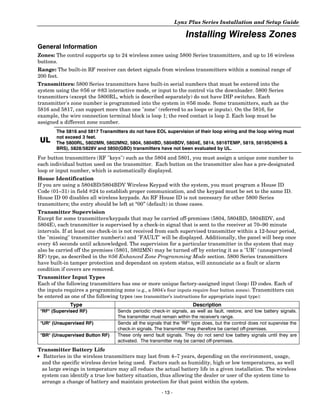
        The 5816 and 5817 Transmitters do not have EOL supervision of their loop wiring and the loop wiring must
        not exceed 3 feet.
 UL     The 5800RL, 5802MN, 5802MN2, 5804, 5804BD, 5804BDV, 5804E, 5814, 5816TEMP, 5819, 5819S(WHS &
        BRS), 5828/5828V and 5850(GBD) transmitters have not been evaluated by UL.

For button transmitters (RF "keys") such as the 5804 and 5801, you must assign a unique zone number to
each individual button used on the transmitter. Each button on the transmitter also has a pre-designated
loop or input number, which is automatically displayed.
House Identification
If you are using a 5804BD/5804BDV Wireless Keypad with the system, you must program a House ID
Code (01–31) in field 624 to establish proper communication, and the keypad must be set to the same ID.
House ID 00 disables all wireless keypads. An RF House ID is not necessary for other 5800 Series
transmitters; the entry should be left at “00” (default) in those cases.
Transmitter Supervision
Except for some transmitters/keypads that may be carried off-premises (5804, 5804BD, 5804BDV, and
5804E), each transmitter is supervised by a check-in signal that is sent to the receiver at 70–90 minute
intervals. If at least one check-in is not received from each supervised transmitter within a 12-hour period,
the "missing" transmitter number(s) and "FAULT" will be displayed. Additionally, the panel will beep once
every 45 seconds until acknowledged. The supervision for a particular transmitter in the system that may
also be carried off the premises (5801, 5802MN) may be turned off by entering it as a "UR" (unsupervised
RF) type, as described in the 656 Enhanced Zone Programming Mode section. 5800 Series transmitters
have built-in tamper protection and dependant on system status, will annunciate as a fault or alarm
condition if covers are removed.
Transmitter Input Types
Each of the following transmitters has one or more unique factory-assigned input (loop) ID codes. Each of
the inputs requires a programming zone (e.g., a 5804's four inputs require four button zones). Transmitters can
be entered as one of the following types (see transmitter’s instructions for appropriate input type):
              Type                                                   Description
 "RF" (Supervised RF)             Sends periodic check-in signals, as well as fault, restore, and low battery signals.
                                  The transmitter must remain within the receiver's range.
 "UR" (Unsupervised RF)           Sends all the signals that the "RF" type does, but the control does not supervise the
                                  check-in signals. The transmitter may therefore be carried off-premises.
 "BR" (Unsupervised Button RF)    These only send fault signals. They do not send low battery signals until they are
                                  activated. The transmitter may be carried off-premises.
Transmitter Battery Life
• Batteries in the wireless transmitters may last from 4–7 years, depending on the environment, usage,
  and the specific wireless device being used. Factors such as humidity, high or low temperatures, as well
  as large swings in temperature may all reduce the actual battery life in a given installation. The wireless
  system can identify a true low battery situation, thus allowing the dealer or user of the system time to
  arrange a change of battery and maintain protection for that point within the system.

                                                      - 13 -
Lynx Plus Series Installation and Setup Guide

Installing Wireless Zones
• Button-type transmitters should be periodically tested for battery life. The 5801, 5802MN, 5802MN2,
  5804, 5804BD, 5804BDV, and 5804E button transmitters have replaceable batteries.
Using the Transmitter Sniffer Mode
Use this mode after all transmitters have been entered to check that all transmitters have been properly
programmed.
1. Enter Installer code (4112) + [#] + 3.
Note: If the communicator is in the process of sending a report to the central station, the system will not go into the Sniffer
      mode. If so, wait a few minutes and try again.
2. The keypad will display all zone numbers, which have a non-zero Zone Type (even if serial numbers
   were not learned yet). Fault each transmitter in turn, causing each one to send a signal. As the system
   receives a signal from each of the transmitters, the zone number of that transmitter will disappear
   from the display. The transmitters may be checked upon installation, or in an installed system.
3. When all transmitters have been checked, exit Sniffer mode. Enter Installer Code (4112) + OFF.
Notes: (1) Sniffer mode does not automatically expire. You must manually exit (Installer Code + OFF) Sniffer
           mode to return to normal operation.
       (2) All BR-type units must physically be activated to clear the display, since they do not automatically send
           check-in signals.
       (3) When one button of a transmitter (RF, UR, or BR) is activated, all zones assigned to other buttons on that
           transmitter are cleared. This also applies to 5816 and 5817 transmitters that have multiple loops (zones).
       (4) Any transmitter that is not “entered” will not turn off its zone number.
       (5) For SIA installations, the following devices may be used as specified for panic (24-hour) alarm response:
           • wireless keys which have two-button panic pairs available (e.g., 5804BDV), on which only the two-button
              panic pairs may be programmed for any 24-hour alarm response
           • wireless keypads (e.g., 5828/5828V) keypads that have a two-second delay on the special function keys, or
              two-button panic pairs
           • built-in keypad’s two-button panic pairs
Go/No Go Test Mode
          5804E encrypted (High-Security) devices must be activated while the system is in Go/No Go Test Mode.
          Refer to the transmitter’s installation instructions for complete details. The system will confirm
          enrollment of the encrypted device by beeping two times
The Go/No Go tests will verify adequate RF signal strength from the proposed transmitter location, and
allow you to reorient or relocate transmitters if necessary, before mounting the transmitters permanently.
This mode is similar to the transmitter Test mode, except that the wireless receiver gain is reduced. This
will enable you to make sure that the RF signal from each transmitter is received with sufficient signal
amplitude when the system is in the normal operating mode.
1. Enter Installer Code (4112) + [#] + 8.
2. Once you have placed transmitters in their desired locations and the approximate length of wire to be
    run to sensors is connected to the transmitter's screw terminals (if used), fault each transmitter.
           Conducting this test with your hand wrapped around the transmitter will cause inaccurate results.
           On button type transmitters that have been programmed to set ARM AWAY, ARM STAY, or DISARM,
           pressing a button will take the system out of the Go/No Go Test mode causing the programmed action to
           occur.
   a. The keypad will beep three times indicating signal reception and will display the appropriate zone
        number.
   b. If the keypad does not beep, reorient or move the transmitter to another location. Usually a few
        inches in either direction is all that is required.
3. If each transmitter produces the proper keypad response when it is faulted, you can then permanently
   mount each of the transmitters according to the instructions provided with them.
4. Exit the Go/No Go Test mode by entering: Installer Code (4112) + OFF.


                                                             - 14 -
Lynx Plus Series Installation and Setup Guide

                                                                                                                                      Installing Wireless Zones
5800 Series Transmitter Loop Numbers (Refer to this information when programming transmitters)
The following illustration shows the compatible transmitters, their associated input types and loop
designations.


                                                                                                                                LOOP 1                                                LOOP 1
                                                                                                                                (LOW                                                  (LOW
                                                                                                                                SENSITIVITY                                           SENSITIVITY

                  LOOP                                                                                                          LOOP 2                                                LOOP 2
                    1                                                                        LOOP 1                             (HIGH                                                 (HIGH
                                                                                                                                SENSITIVITY)                                          SENSITIVITY)

                                                                                                                                LOOP 3 (TEMP)                                         LOOP 3 (TEMP)

                                                                                                                                LOOP 4 (TAMPER)                                       LOOP 4 (TAMPER)
   5800CO                           5800Micra                                 5800PIR-RES                         5800PIR/                               5800PIR-OD                                                            5800RL
ENROLL AS "RF"                    ENROLL AS "RF"                             ENROLL AS "RF"                     5800PIR-COM                            ENROLL AS "RF"                                                           SET
                                                                                                               ENROLL AS "RF"                                                                                                 HOUSE ID


                                                                                          LOOP 3                                                                                    LOOP 3
                                                                                                                                                                                                                      LOOP 2
                                                                    LOOP 4                                                                         LOOP 4
                                                                                                                                                YOU MUST    ON                                                                LOOP 4
                                                                 YOU MUST                                                                                         OFF
                                                                                                                                                                                    LOOP 2                                    YOU MUST
                                                                   ENROLL                 LOOP 2                                                  ENROLL
                                                                                          LOOP 1                                                     THIS                           LOOP 1                                    ENROLL
                                                                      THIS                                                                                                                                                    THIS BUTTON
                                                                   BUTTON                             LOOP 1                 LOOP 1               BUTTON
                                                                                                                                                                                             LOOP
                                                                                                                                                                                               3        ••
                                                                                                                                                                                                          •
                                                                                                                                                                                                                              LOOP 1
                                                                                                                                                                                                         •• •
                                                                                                                                                                                                         •
                                                                                                                                                                                                         •• •••
                                                                                                                                                                                                        ••• ••
                                                                                                                                                                                                          ••


     5800SS1                        5 8 0 0 WAV E                            5801                            5802MN                   5802MN2            5804/5804E                          5 8 0 4 B D / 5 8 0 4 B DV
E N RO L L A S " R F "              P RO G R A M                         E N RO L L A S                     ENROLL AS                 ENROLL AS        ENROLL AS "BR"                          ENROLL AS "BR"
                                    HOUSE ID                             "UR OR"RF"                        "UR" OR "RF"              "UR" OR "RF"                                            PROGRAM HOUSE ID


                                                                                                                                                                        LOOP 2
                                                                                                                                                                        (REED)
       ON                                                                                                                                                                                                                    LOOP 2
        1
            OF
              F                                                                                                                                                                                                              (REED)
             2
                                                                                          LOOP 1                                                                         LOOP 1
                                              LOOP 1                                                                                                                     (TERMINALS)                                         LOOP 1
        3
             4                                                                                                                                                                                                               (TERMINALS)
                                                                                                                            LOOP 1                                                           ALTERNATE
                                                                                                                                                                                              POSITION
                                                                                                                                                                                             FOR LOOP 2
   5805-6                      5806/5806W3/5807                             5809                       5811                       5814                   5816                                      5816MN
ENROLL AS "BR"               5808/5808LST/5808W3                        ENROLL AS "RF"             ENROLL AS "RF"                ENROLL              ENROLL AS "RF"                             ENROLL AS "RF"
                                ENROLL AS "RF"                                                                                   AS "RF"

                                          LOOP 1                                               LOOP 2
                                          (PRIMARY)                                            (REED)                        LOOP 2
                                                                                                                             (REED)
                                                                                                                                                                                                                     AR


                                          LOOP 2
                                                                                                                                                                                                                       ME
                                                                                                                                                                                                                         D


                                                                                                                           LOOP 3                                                                                    RE
                                                                                                                                                                                                                       AD


                                          (AUX.
                                                                                                                                                                                                                         Y


                                                                                                                      (TERMINALS)
                  LOOP 1                  CENTER)                                              LOOP 3
                  (TEMP                                                      LOOP 1
                                          LOOP 3                                          (TERMINALS)                          LOOP 1
                  SENSOR)
                                          (AUX.                                                                            (INTERNAL
                                          RIGHT)                                               LOOP 1                          SHOCK
                                                                                          (TERMINALS)                         SENSOR
  5816TEMP                          5817                               5818                         5819                  5819S (WHS & BRS)           5820/5820L                          5821                               5828/5828V
ENROLL AS "RF"                  ENROLL AS "RF"                     ENROLL AS "RF"               ENROLL AS "RF"                ENROLL AS "RF"         ENROLL AS "RF"                   ENROLL AS "RF"                         P RO G R A M
                                                                                                                                                                                                                              HOUSE ID

                                                                                                                                                      SERIAL #1                                                                  LOOP 1
                                                                                                                              LOOP 1                    LOOP 3                                                                   (MOTION)
                                                                                                                              (HIGH                                     AW
                                                                                                                                                                          AY             SERIAL #1
                                                                                                                              SECURITY)               SERIAL #1                ST
                                                                                                                                                                                 AY      LOOP 2
                    LOOP 1                                                                                                                              LOOP 4           1


                    (SOUND)                                                                                                   LOOP 2                                            2

                                                                                                                                                                                         SERIAL #1
                                                                                                                              (STANDARD               SERIAL #2          3

                                                                                                                                                                                         LOOP 1
                                                                                                                              SECURITY)                 LOOP 3
                                                                                                                                                                                4


                                                    (G


                                                                                                                                                                                         SERIAL #2
                                                         ree
                                                    (R n)
                                                      ed
                                                          )
                                                    (Yell


                                                                                                                              LOOP 3 (TILT MODE)
                                                          ow


                                                                                                                                                                                         LOOP 2
                                                             )


    5849                                5850 (GBD)                                5853                       5870API          LOOP 4 (TAMPER)                    5878                                              5890/5890PI
ENROLL AS "RF"                         ENROLL AS "RF"                         ENROLL AS "RF"              ENROLL AS "RF"                                     ENROLL AS "BR"                                       ENROLL AS "RF"


                                                                                                                                                                                                                                            5800-002-V0


   5894PI                                  5897
ENROLL AS "RF"                         ENROLL AS "RF"


Notes: (1) Loop 4 must be enrolled on the 5801, 5804, 5804BD, 5804BDV and 5804E transmitters, whether or not the
           loop is used.
       (2) 5804E encrypted (High-Security) devices must be activated while the system is in Go/No Go Test Mode. Refer
           to the transmitter’s installation instructions for complete details. The system will confirm enrollment of the
           encrypted device by beeping two times.
       (3) The 5806W3 smoke detector must be used in SIA applications.

                            The 5800PIR, 5800PIR-RES, 5800PIR-COM, 5800PIR-OD, 5800RL, 5802MN, 5802MN2, 5804, 5804BD, 5804BDV,
   UL                       5804E, 5811, 5814, 5816TEMP, 5819, 5819S(WHS & BRS), 5828/5828V, 5850(GBD) and 5870APIwireless
                            transmitters have not been evaluated by UL.


                                                                                                                 - 15 -
Lynx Plus Series Installation and Setup Guide

Mechanics of Programming
General Programming Information
Programming options are stored in non-removable, electrically erasable, nonvolatile EEROM memory. The
system can be programmed at any time, even at the installer's premises prior to the actual installation.
Simply apply power temporarily to the Control and then program the unit as desired. There are four
programming modes:
• Data field programming (used for setting various system options).
• Interactive menu mode programming (used for programming zone information, programming
    Powerline Carrier Devices, and for entering transmitter serial numbers).
• Voice Prompt programming (used for setting various system options).
The system can also be programmed remotely, using an IBM PC compatible Personal Computer, and
Compass Downloader and modem or via capable GSM or IP communications modules. See the Remote
Programming/Control (Downloading) section.
Note: You may find it convenient to adjust the volume setting before entering the Program Mode. This will allow you to
      clearly hear the feedback announcements or system beeps in the Programming Mode, of the system’s built-in
      speaker. To adjust the volume, press FUNCTION + VOLUME+ [3] or [6]. Upon exiting the Program Mode, the
      system will reset the volume to the default value (mid level).

Entering Program Mode
Use one of the following methods to enter Programming Mode:
1. Press both the [6] and [#] keys at the same time, within 50 seconds after power is applied to the
   Control or from exiting Programming mode, OR
2. After power-up, enter the Installer Code (4112) + 800 to enter Expert Programming mode OR
   enter Installer Code (4112) + 888 to enter Voice Prompt Programming mode. This method is
   disabled if Program mode is exited using 698.

        If a different Installer Code has been programmed, use that code to enter the Programming mode.

3. Upon entering programming mode, the control will initially display “Entering Programming Mode”.
4. Once you have entered the Program mode, data field “20 INSTALLER CODE” (the first data field in
   the system) will be displayed and both keypad LEDs will flash. If you have entered the Voice Prompt
   Programming mode. “Pro” will be displayed and the system will announce “Programming, use arrows
   to scroll choices. Press select to accept, press escape to quit”.

Programming a Data Field
1. Press [6] + Field No. (for example, 621), followed by the required entry.
2. When you have completely programmed a data field, the keypad will “beep” three times and then
   automatically display the next data field in sequence. To go to a different field, press [6] plus the
   desired field number.
3. If the number of digits that will be entered in a data field is less than the maximum number of digits
   available (e.g. phone number field), enter the desired data, then press [6] to advance to the next data
   field.
4. If a nonexistent field has been entered, the keypad will display “EE Invalid Entry”. Simply re-enter [6]
   plus a valid field number.
Viewing a data field (without making changes):
Enter [#] + Field No. The system will beep three times and data programmed for that field will be displayed to the
right of the field number. The system will scroll through the data for longer numbers and a beep will sound after
each number is displayed or three times after the final digit is displayed.
Deleting an entry in a field
Enter [6] + Field No. + [6]. (Applies only to fields 640–644, 688 and 694).


                                                        - 16 -
Lynx Plus Series Installation and Setup Guide

                                                                    Mechanics of Programming
Interactive Menu Mode Programming (656, 680, 681, 683, 684, 685)
Press [6] + interactive mode No. (i.e., 656). The keypad will display the first of a series of prompts. A detailed
procedure (with displays of prompts) is provided in later sections of this manual.
656 Enhanced Zone Programming Mode
    Interactive menu mode used for programming zone attributes and report codes. Refer to the 656
    Enhanced Zone Programming Mode section for procedure.
680 Device Programming Menu Mode
    Interactive menu mode for programming Powerline Carrier Devices. Refer to the 680 Device
    Programming Menu Mode section for detailed procedure.
681 Zone Lists Menu Mode
    Interactive menu mode for programming zone lists for Powerline Carrier Devices. Refer to the 681
    Zone List Menu Mode section for detailed procedure.
683 Enhanced Sequential Mode
    Interactive menu mode used to enter RF transmitter serial numbers. Refer to the 683 Enhanced
    Sequential Mode section for detailed procedure.
684 Assign Zone Voice Descriptors
    Interactive menu mode used to assign descriptors to each zone. These descriptors will be announced
    whenever the system announces an event involving a zone.
685 Record Custom Voice Descriptors
    Interactive menu mode used to record custom descriptors for use with each zone.
696 Initialize Download ID and Subscriber Account Number for Downloading
    Entering 696 resets all subscriber account numbers and CSID in preparation for an initial download.
Loading Factory Defaults
       If a default table is loaded, any data that has already been programmed into the system will be changed
       according to the default table selected!
697 To load the factory defaults, enter 697, then press number 1, 2, 3, or 4 to select from default tables 1-4,
      or press “0” if you are not selecting a default table. Refer to the Programming Default Tables section of this
      manual to view the tables.
Exiting Program Mode
       Do not exit Program Mode via *98 if you intend to enter LRR Communication Device Diagnostic Mode.

698 Exits program mode and inhibits re-entry into the Expert or Voice Prompt Programming modes using
    the Installer Code.
699 Exits program mode but allows re-entry into the Expert Program mode using Installer Code (4112) +
      800 or into the Voice Prompt Programming mode using Installer Code (4112) + 888.
Note: After exiting program mode (or upon power-up), the system takes up to a minute to reset. To bypass the reset
      delay, press [#] + [0].


                                                           - 17 -
Lynx Plus Series Installation and Setup Guide

Zone Response Type Definitions
General Information
During programming, you must assign a zone type to each zone, which defines the way in which the system
responds to faults in that zone. Zone types are defined below.
Type 00            Zone type 00 is used to program a zone that is not used.
Zone Not Used
Type 01            Zone type 01 is usually assigned to sensors or contacts on primary entry and exit doors.
Entry/Exit         Zone Characteristics:
Burglary #1        • Entry delay #1 is programmable (field 635).
                   • Exit delay is independently programmable (field 634).
                   • Exit and entry delays when armed in AWAY or STAY mode.
                   • No entry delay when armed in STAY NO DELAY or AWAY NO DELAY mode.
                   • Exit delay regardless of the arming mode selected.
Type 02            Zone type 02 is usually assigned to sensors or contacts on secondary entry and exit doors that
Entry/Exit         might be further from the keypad (typically used for a garage, loading dock, or basement door).
Burglary #2        Zone Characteristics:
                   • Entry delay #2 is programmable from (field 636).
                   • Exit delay is independently programmable from (field 634).
                   • Secondary entry delay, if armed in the AWAY or STAY mode.
                   • No entry delay when armed in the STAY NO DELAY or AWAY NO DELAY mode.
                   • Exit delay begins regardless of the arming mode selected.
Type 03            Zone type 03 is usually assigned to all sensors or contacts on exterior doors and windows.
Perimeter          Zone Characteristics:
Burglary           • Instant alarm, when armed in AWAY, STAY, STAY NO DELAY, or AWAY NO DELAY mode.
Type 04            Zone type 04 is usually assigned to a zone covering an entry area (i.e.: foyer, lobby, or hallway)
Interior,          that one must pass upon entry (after faulting the entry/exit zone) to reach the keypad. It provides
Follower           an instant alarm if the entry/exit zone is not violated first, and protects an area in the event an
                   intruder has hidden on the premises before the system is armed, or gains access to the premises
                   through an unprotected area.
                   Zone Characteristics:
                   • Delayed alarm (using the programmed entry/exit time) if entry/exit (types 01 or 02) or interior-
                     with-delay (type 10) zone is faulted first.
                   • Instant alarm in all other situations.
                   • Active when armed in AWAY or AWAY NO DELAY mode.
                   • Bypassed automatically when armed in STAY or STAY NO DELAY mode.
Type 05            Zone type 05 is usually assigned to a zone that contains foil-protected doors or windows or covers a
Trouble by Day/    sensitive area (i.e.: stock room, drug supply room, etc.) It can also be used on a sensor or contact in
Alarm by Night     an area where immediate notification of an entry is desired.
                   Zone Characteristics:
                   • Instant alarm, when armed in AWAY, STAY, STAY NO DELAY, or AWAY NO DELAY (night)
                     mode.
                   • Provides a latched trouble sounding from the keypad and, if desired, a central station report
                     during the disarmed state (day).
Type 06            Zone type 06 is usually assigned to a zone containing an Emergency button (silent emergency).
24-hour            Zone Characteristics:
Silent Alarm       • Sends a report to the central station but provides no keypad display or sounding.
Type 07            Zone type 07 is usually assigned to a zone containing an Emergency button (audible emergency).
24-hour            Zone Characteristics:
Audible Alarm      • Sends a report to the central station, and provides alarm sounds externally and at the keypad.
Type 08            Zone type 08 is usually assigned to a zone containing a button for use in personal emergencies
24-hour            or to a zone containing monitoring devices (i.e.: water or temperature sensors, etc.).
Auxiliary Alarm    Zone Characteristics:
                   • Sends a report to the central station and provides an alarm sound at the keypad. (No bell
                     output is provided and there is no keypad timeout.)


                                                        - 18 -
Lynx Plus Series Installation and Setup Guide

                                                      Zone Response Type Definitions
Type 09              Zone type 09 can be assigned to any wireless zone used as a fire zone. This zone type
Supervised Fire      is always active and cannot be bypassed.
                     Zone Characteristics:
                     • Bell output will pulse when this zone type is alarmed.
Type 10              Zone type 10 is bypassed when the panel is armed in the STAY or STAY NO DELAY mode.
Interior with        Zone Characteristics:
Delay                • Entry delay #1 (with programmed entry time) when armed in the AWAY mode.
                     • Entry delay begins whenever sensors in this zone are violated, regardless of whether an
                       entry/exit delay zone was tripped first.
                     • No entry delay when armed in the AWAY NO DELAY mode.
                     • Exit delay regardless of the arming mode selected.
Type 14              Zone type 14 can be assigned to any wireless zone with a carbon monoxide detector. This zone type
24-hour Carbon       is always active and cannot be bypassed.
Monoxide             Zone Characteristics:
Monitor              Local keypad and detector will sound when this zone type is alarmed.

          ZT16 is only available on the LynxSIA Plus version of the control panel.

Type 16              Zone type 16 can be assigned to any wireless zone. It can not be used with heat detectors,
Supervised Fire      combination heat/smoke detectors, wireless sensors or fire pull stations. This zone type is always
with Verification    active and can not be bypassed.
                     Zone Characteristics:
                     • Provides a fire alarm when zone is alarmed, but only after the alarm has been verified.
                     • System verifies alarm by delaying reporting and control panel alarm sounding for 30 seconds
                       after alarm is detected. If the zone remains faulted after 30 seconds a fire alarm is provided. If
                       any other fire zone is faulted during the 30 second delay window a fire alarm is immediately
                       provided for that zone. An alarm for original fire zone will also be provided if that zone is still
                       faulted afterward. If there are no fire alarms after the 30 second delay expires, the system will
                       open a 60 second window. If any fire zone is faulted during that window a fire alarm will
                       immediately be provided for that zone.
                     • Bell output will pulse following alarm verification
Type 20              Zone type 20 is a special-purpose zone type used with 5800 Series wireless pushbutton units.
Arm–Stay             Zone Characteristics:
                     • Exit delay regardless of the arming mode selected.
                     • System is armed in the STAY mode when the zone is activated.
                     • Zone number is sent to the central station as a user number when arming or disarming.
Type 21              Zone type 21 is a special-purpose zone type used with 5800 Series wireless pushbutton units.
Arm–Away             Zone Characteristics:
                     • System is armed in the AWAY mode when the zone is activated.
                     • Zone number is sent to the central station as a user number when arming or disarming.
Type 22              Zone type 22 is a special-purpose zone type used with 5800 series wireless pushbutton.
Disarm               Zone Characteristics:
                     • Disarms the system when the zone is activated.
Type 23              Zone type 23 can be used on a zone when a Powerline Carrier Device (e.g., X10) action is desired,
No Alarm             but with no accompanying alarm (e.g., front door light).
Response
Type 24              Zone type 24 is usually assigned sensors or contacts on exterior doors and windows where bells
Silent Burglary      and/or sirens are NOT desired.
                     Zone Characteristics:
                     • Instant alarm, with NO audible indication when is armed in the AWAY, STAY, STAY NO
                       DELAY, or AWAY NO DELAY mode.
                     • Report sent to the central station.
                     Note: The Keypad beeps if the zone is faulted when system is disarmed and Chime mode is on.


                                                         - 19 -
Lynx Plus Series Installation and Setup Guide

Data Field Descriptions
The following pages list all data fields in this Control (in numerical order). Use the blank programming form
to record the data for this installation. Specific fields include options for programming that are unique to
the LynxSIA Plus version. Note that both keypad LEDs flash while in Programming mode. The LynxSIA
Plus version validates the data entry for the Fields listed below. If data entered is not within valid range,
the control will emit a long beep indicating that entry is rejected and will substitute the default value for the
invalid entry. The default value will be displayed on the keypad, and the control advance to the next field.
Field             Name                              Default Value        Valid Range
*34               Exit Delay                        60                 45-97
*35               Entry Delay 01                    30                 30-99
*36               Entry Delay 02                    30                 30-99
*50               Burglary Dial Delay               2                  1-3
*57               False Alarm Options               7                  0-7
*59               Exit Error Report Code            1                  1-F
*64               Test Report Code                  10                 10-FF
*68               Cancel Report Code                10                 10-FF
*69               Recent Closing Report Code        1                  1-F
*76               Test Restore Report               10                 10-FF
*92               Swinger Shutdown                  1                  1-2
Note: Entering a number other than the one specified will give unpredictable results.

                                Installer Code
     20                         The Installer Code is used to enter the 4-digit Master Security Code. See "Master Code"
  INSTALLER CODE                in the System Operation section for procedure.
                                Note: LynxSIA Plus does not allow duplication of Installer code. If a duplicate code is
                                     entered the entry is rejected and LYNX issues single long beep indicating rejection.
                                     The old installer code remains unchanged.
                                SELECTIONS
                                Enter 4 digits (0-9)
                                Quick Arm Enable
    21                          If enabled, security code is not required to arm the system. The user simply presses and
  QUICK ARM ENABLE              holds down the AWAY or STAY key to arm.
                                SELECTIONS
                                0 = do not allow quick arm
                                1 = allow quick arm
                                Keypad Backlight Timeout
    22                          This option allows the choice of either always backlighting the keypad or turning the
  KEYPAD BACKLIGHT
   EYP    ACKLIGHT              backlighting off after 10 seconds of keypad inactivity.
                                SELECTIONS
                                0 = no timeout; always backlight keys
                                1 = turn backlighting off after inactivity
                                Forced Bypass
    23                          All zones bypassed by this function will be displayed after the bypass is initiated.
  FORCED BYPASS                 UL installations: must be 0 (no forced bypass)
                                SELECTIONS
                                0 = no forced bypass
                                1 = provide automatic bypass of all open (faulted) zones
                               RF House ID Code
    24                          The House ID identifies receivers and wireless keypads. If a 5804BD/5804BDV
  RF HOUSE ID CODE              Transmitter is to be used, a House ID Code MUST be entered, and the keypad should
                                be set to the same ID.
                                SELECTIONS
                                00 = disable all wireless keypad usage
                                01-31 = House ID


                                                           - 20 -
Lynx Plus Series Installation and Setup Guide

                                                               Data Field Descriptions
                   Powerline Carrier Device (X10) House ID
   25              Powerline Carrier Devices require a House ID. This field identifies this House ID to the
X10 HOUSE CODE     Control. The Powerline Carrier Devices are programmed in field 680.
                   SELECTIONS
                    0=A        3=D         6=G        9=J            # + 12 = M          # + 15 = P
                    1=B        4=E         7=H        # + 10 = K     # + 13 = N
                    2=C        5=F         8=I        # + 11 = L     # + 14 = O
                   Chime by Zone
   26              This option allows the installer to define the specific zones intended to chime when
CHIME BY ZONE      faulted while the system is in Chime mode. If enabled, these zones are defined in zone
                   list 3 (see 681 Zone List Menu Mode).
                   SELECTIONS
                   0 = no (chimes on fault of any entry/exit or perimeter zone when Chime mode is activated)
                   1 = yes (chimes on fault of those zones assigned to Zone List 3 when Chime mode on)
                   Real Time Clock Display
  27               Refer to the User’s Manual for setting the clock time and date.
CLOCK DISPLAY      SELECTIONS
                   0 = do not display the time
                   1 = display the time
                   Daylight Savings Time Start/End Month
  29               Enter # + 10 for 10, # + 11 for 11, and # + 12 for 12.
         STR/END
DST MNTH STR END   SELECTIONS
                   0, 0 = no daylight saving time used
                   1-12 = start month and end month
                   Daylight Savings Time Start/End Month
  30               Enter the appropriate start and end weekend of the month.
         STR/END
DST WEEK STR END   SELECTIONS
                    0 = disable                   4 = fourth weekend
                    1 = first weekend of month    5 = last weekend
                    2 = second weekend            6 = next to last
                    3 = third weekend             7 = 3rd from last
                   Single Alarm sounding Per Zone (per armed period)
   31              This field applies only to burglary zones (zone response types 1-5, 10). It applies only to
SINGLE ALARM SND   the bell and does not affect keypad sounds.
                   UL installations: must be 0 (no limit)
                   Lynx Plus SELECTIONS
                   0 = no limit on alarm sounding per zone
                   1 = limit alarm sounding to once per arming period for a given zone
                   LynxSIA Plus SELECTIONS
                   0 = alarm sounding per zone will be the same as Swinger Shutdown set in field 692
                   1 = limit alarm sounding to once per arming period for a given zone
                   Sounder Timeout
   32              This Control complies with NFPA requirements for temporal pulse sounding of fire and
FIRE SND TIMEOUT   carbon monoxide (CO) notification appliances. Temporal pulse sounding for a fire alarm
                   consists of the following:
                   3 pulses – pause – 3 pulses – pause – 3 pulses. . .
                   Temporal pulse sounding for a CO alarm consists of the following:
                   4 pulses – pause – 4 pulses – pause – 4 pulses –pause. . .
                   SELECTIONS
                   0 = yes, sounder timeout after time programmed in field 633
                   1 = no sounder timeout; continue sounding until manually turned off


                                              - 21 -
Lynx Plus Series Installation and Setup Guide

Data Field Descriptions
                                  Alarm Bell Timeout
    33                            This field determines whether the external sounder will shut off after a selected time, or
  ALRM SND TIMEOUT                allowed to continue until manually turned off.
                                  UL installations: must be set for a minimum of 4 min (option 1)
                                  SELECTIONS
                                   0 = No timeout    2 = 8 minutes       4 = 16 minutes
                                   1 = 4 minutes     3 = 12 minutes
Fields 634–636: Fields *34, *35 and *36 are used to program different options in the Lynx Plus and LynxSIA Plus
controls. Please be sure that you use the correct field for the control being installed.
Note: The LynxSIA Plus control validates the data entered in fields *34 - *36. If the selection is not valid the control will emit a
      single long beep indicating that the selection has been rejected. The control replaces the selection with the default
      value which is displayed on the keypad and advances to the next field.
                                  Exit Delay
    34                            The system will wait the time entered before sounding an alarm if the exit door is left
  EXIT DELAY TIME                 open after the system has been armed.
                                  UL installations: Exit Delay must be set for a maximum of 60 seconds
                                  SIA: Exit Delay must be set to a minimum of 45 seconds.
                                  Lynx Plus SELECTIONS                    LynxSIA Plus SELECTIONS (Entries from 45-97)
                                   00-99 = exit delay in seconds          Entered Value       Exit Delay in Seconds
                                                                          45-96               45-96
                                                                          97                  120
                                  Entry Delay 01
    35
                                  The system will wait the time entered before sounding alarm upon entering if system is
  ENTRY DELAY 1                   not disarmed.
                                  UL installations: The Entry Delay must be set for a maximum of 45 seconds
                                  SIA The Entry delay must be set to a minimum of 30 seconds. The sum of entry delay 1,
                                        entered in Field 635, and the burglary abort window, entered in Field 650, should
                                        not exceed 1 minute.
                                  Lynx Plus SELECTIONS                    LynxSIA Plus SELECTIONS (Entries from 30-99)
                                   00-99 = entry delay in seconds         Entered Value       Entry Delay in Seconds
                                                                          30-96               30-96
                                                                          97                  120
                                                                          98                  180
                                                                          99                  240
                                  Entry Delay 02
    36                            The system will wait the time entered before sounding alarm upon entering if the
  ENTRY DELAY 2                   system is not disarmed.
                                  UL installations: must be set for a maximum of 45 seconds
                                  SIA The Entry delay must be set to a minimum of 30 seconds. The sum of entry delay 2
                                        entered in Field 636 and the burglary abort window entered in 650 should not
                                        exceed 1 minute.
                                  Lynx Plus SELECTIONS                    LynxSIA Plus SELECTIONS (Entries from 30-99)
                                   00-99 = entry delay in seconds         Entered Value       Entry Delay in Seconds
                                                                          30-96               30-96
                                                                          97                  120
                                                                          98                  180
                                                                          99                  240


                                                               - 22 -
Lynx Plus Series Installation and Setup Guide

                                                                               Data Field Descriptions
Field 637-639: Field 637 is not available on the LynxSIA Plus control. Fields 638 and 639 are used to program different
features in the Lynx Plus and LynxSIA Plus controls. Please be sure that you use the correct field for the control being
installed.
                                   Audible Exit Warning/Quick Exit
     37                            Audible Exit Warning: Sound consists of slow continuous beeps until last 5 seconds,
  EXIT SND/QK EXIT
  EXI SND/                         when it changes to fast beeps. The warning sound will end at the termination of exit
                                   delay.
                                   Quick Exit: If enabled, the user can restart the exit delay time after arming in STAY
                                   mode by entering the User Code and pressing the STAY key, or by pressing the STAY
                                   key if Quick Arm is enabled. This avoids having the user disarm then re-arm the
                                   system after allowing someone to enter or exit.
                                   SELECTIONS
                                   Exit Warning                                            Quick Exit
                                   0 = no exit warning sound                               0 = no quick exit
                                   1 = provide exit warning sound when armed AWAY          1 = allow quick exit
                                   Confirmation of Arming Ding
    38
                                   Lynx Plus - Confirmation of arming is provided by a 1/2 second external sounder “ding”
       ARMING
  CONF ARMING DING                 that sounds when closing report is sent, or at the end of exit delay. If Option 2 is selected
                                   the external sounder “ding” occurs immediately after the system receives the RF
                                   transmission.
                                   LynxSIA Plus - Confirmation of arming is provided by a 1/2 second external sounder
                                   “ding”. The ding only sounds when control is Armed Away or disarmed after being Armed
                                   Away.
                                   If Option 1 is selected, confirmation of arming is provided by a 1/2 second sounder
                                   “ding” that sounds when closing report is sent, or at the end of exit delay. If Option 2 is
                                   selected the external sounder “ding” occurs immediately after arming from an RF
                                   keypad.
                                   Note: If LynxSIA Plus is armed by RF button (key fob), a confirmation ding occurs
                                          immediately after arming regardless of field *38 settings. If control is disarmed by RF
                                          button, an additional disarming confirmation ding is provided. The ding occurs
                                          immediately after disarming and is longer than arming confirmation ding.
                                    Lynx Plus SELECTIONS                       LynxSIA Plus SELECTIONS
                                    0 = no ding                                0 = no arming confirmation ding after arming
                                    1 = confirmation ding after arming             system by Lynx Plus keypad or RF
                                        system                                     keypad
                                    2 = confirmation ding after arming from    1 = arming confirmation ding after arming
                                        RF button or RF keypad only                system by Lynx Plus keypad or RF
                                                                                   keypad
                                                                               2 = arming confirmation ding after arming
                                                                                   from RF keypad only
                                   Power Up In Previous State (This field applies only to the Lynx Plus control)
    39                             When the system powers up armed, an alarm will occur 1 minute after arming if a zone
  PWR UP PRV STATE                 is faulted, and any bypassed zones will be unbypassed.
 (This field applies only to the   Note: If the previous state was Armed Away or Stay, the system will not respond to sensor
 Lynx Plus control)                       changes for 1 minute. This allows time for sensors such as PIRs to stabilize.
                                   UL installations: must be 1 (power up in previous state)
                                   Lynx Plus SELECTIONS
                                   0 = always power up in a disarmed state
                                   1 = assume the system status prior to power-down


                                                              - 23 -
Lynx Plus Series Installation and Setup Guide

Data Field Descriptions
                                   Cross Zone Timer (This field applies only to the LynxSIA Plus control)
    39                             Sets the maximum amount of time in which two cross zones must be tripped in an
  CROSS ZONE TIMER                 armed system to send an alarm message to the Central Station. If only one cross zone is
 (This field applies only to the
                                   tripped during this time, a trouble message (CID code 380) for that zone is sent to the
 LynxSIA Plus control)             Central Station. Program Zone list 2 (using *81 Zone List Menu Mode) with the two
                                   zones that are to be cross zoned.
                                   Notes: (1) If option 639 is set to “0” (no cross zoning), Zone List 2 can be used for other
                                              purposes.
                                          (2) Cross zoning will be disabled during entry and exit delays, or if one or both of
                                              the 2 cross zones is bypassed or there is already an alarm in the system.
                                              If one of the 2 cross zones faults and remains faulted after the cross zone time
                                              interval, the second cross zone can go into alarm immediately, even after the
                                              cross zone time. This is to detect scenarios involving multiple break-ins of a
                                              premises.
                                   UL This option is not for use in UL installations.
                                   LynxSIA Plus SELECTIONS
                                      Value   Time Window                      Value   Time Window
                                        0=    No Cross Zoning                    8=    2 minutes
                                        1=    15 seconds                         9=    2 minute, 15 seconds
                                        2=    30 seconds                    # + 10 =   2 minute, 30 seconds
                                        3=    45 seconds                    # + 11 =   2 minute, 45 seconds
                                        4=    60 seconds                    # + 12 =   3 minutes
                                        5=    1 minute, 15 seconds          # + 13 =   3 minute, 15 seconds
                                        6=    1 minute, 30 seconds          # + 14 =   3 minute, 30 seconds
                                        7=    1 minute, 45 seconds          # + 15 =   3 minute, 45 seconds

DIALER PROGRAMMING (640–650)
Fields 640, 641, 642: Enter up to the number of digits shown. Enter 0–9, # + 11 for ‘6’; # + 12 for ‘#’; # + 13
for a pause (2 seconds). Field 640 is used to program different features in the Lynx Plus and LynxSIA Plus
controls. Please be sure that you use the correct field for the control being installed.
Notes: Whenever AAV is used, primary (Field 641) and secondary (Field 642) phone numbers should be preceded with the
       call waiting disable command. Otherwise, there is the possibility of connection of the third party to Lynx Plus Series
       during AAV mode. The PABX phone number entered in field 640 is not dialed on GSM/IP (Digital Communication
       with AAV). However, it is used for dialing on Telco Line.
                                   PABX Access Code (This field applies only to the Lynx Plus control.)
    40                             If fewer than 6 digits will be entered, exit by pressing [6]. To clear entries, press 6406.
  PABX ACCESS CODE                 Lynx Plus SELECTIONS
  (This field applies only to      PABX Access Code
  the Lynx Plus control)           Enter up to 6 digits if PABX is needed to access an outside line.
                                   PABX Access Code/Call Waiting Disable (This field applies only to the LynxSIA Plus
    40                             control)
  PABX ACCESS CODE                 If fewer than 6 digits need to be entered, exit by pressing [6]. To clear entries from
  (This field applies only to      field, press 6406. If the subscriber does not have “call waiting” and is not using PABX,
  the LynxSIA Plus control)        make no entry in this field.
                                   Call Waiting: If the subscriber’s phone service has “call waiting” (and is not using
                                   PABX), enter the touch-tone sequence“670” (or similar depending on the phone service).
                                   By programming “# + 11 + 7 + 0” as the PABX entry to disable “call waiting” during
                                   control panel calls. You must also enable the Call Waiting Cancel option in field 647.
                                   Important Note: If Call Wait Cancel is disabled in Field 647, and Call Wait Disable
                                   command is entered in Field 640, this will prevent successful communication to the central
                                   station when used on a non-call waiting line.
                                   Note: PABX number and operation of the control panel with a PBX system cannot be used
                                          if the Call Waiting Cancel Disable option has been enabled in Field 647.
                                   LynxSIA Plus SELECTIONS
                                   PABX Access Code/Call Waiting Disable
                                   Enter up to 6 digits if PABX is needed to access an outside line. OR
                                   Enter“# + 11+ 7+ 0” to program touch-tone sequence “670” and cancel call waiting.


                                                               - 24 -
Lynx Plus Series Installation and Setup Guide

                                                                               Data Field Descriptions
          If the LRR/IP (Digital Communication with AAV) feature is used (options 5 in 655), there may be restrictions when dialing
          the numbers entered in 641, 642 and 646 (i.e.; #, 6, pause may not be allowed, or phone number extensions may not
          be dialed, etc) depending on the service provider.

                                Primary Phone Number
    41                          Enter the Primary Phone Number
  PRIMARY TEL NUM               If fewer than 20 digits entered, exit by pressing [6]. To clear entries from field, press
                                6416.
                                Note: Backup reporting (8 attempts are made to the secondary phone number if no kissoff
                                       is received after 8 attempts to the primary number) is automatic only if there is a
                                       secondary phone number (field 642).
                                SELECTIONS
                                Enter up to 20 digits.
                                Secondary Phone Number
    42                          Enter the Primary Phone Number
  SECOND TEL NUM                If fewer than 24 digits entered, exit by pressing [6]. To clear entries from field, press
                                6426. See backup reporting note for field 641.
                                SELECTIONS
                                Enter up to 24 digits.

          All four digits of the Subscriber Account number must be entered in Fields 643 and 644. If ten-digit format is
          selected in 648 (option 5), all ten digits of the Subscriber Account number must be entered.

Fields 643 and 644:
Enter [6] as the fourth digit if a 3-digit account number (for 3+1 dialer reporting format) is used. Enter 0 as
the first digit of a 4-digit account number for Nos. 0000–0999. Enter [6] as the fifth digit if a 4-digit account
number (for 4+1, 4+2 CID®) is used. Exit field by pressing [6] if only 3 digits are used. See blank
Programming Form for examples of account number entries. Enter digits 0–9; # +11=B; # +12=C; # +13=D; #
+14=E; or # +15=F.
                                Primary Subscriber Account Number
    43                          Enter the primary subscriber account number. To clear entries from field, press 6436.
  PRIMARY ACCOUNT#
          ACCOUN
             OUNT               SELECTIONS
                                Enter a 4 or 10- digit account number
                                Secondary Subscriber Account Number
    44                          Enter the primary subscriber account number. To clear entries from field, press 6446.
  SECNDRY ACCOUNT#
  SECNDRY                       SELECTIONS
                                Enter a 4 or 10- digit account number

Field 646: Enter up to 24 digits. Do not fill unused spaces. Enter 0-9, #+11 for ‘6’; #+12 for’#’; #+13 for a
pause (2 seconds).
                                “Follow Me Reminder” Phone Number
    46                          This option allows the user to schedule a time driven message. When activated the
  FOLLOW ME PHONE#              system will dial the phone number programmed and deliver a voice message (custom
                                words 72, 73 and 74). This option is only supported when the follow me feature is
                                enabled in field 649 (option 6-9 or 10-13).
                                If using the Follow Me Reminder feature, enter the phone number here. If fewer than
                                24 digits are entered, exit by pressing [6]. To clear entries from the field press 6466.
                                The telephone message can be terminated (acknowledged) by pressing any key on the
                                telephone keypad. Pressing any key on the local Lynx Plus Series keypad will terminate
                                (acknowledge) both the follow me and the local reminder announcements.
                                Note: The follow me reminder announcement will be terminated if any other event requires
                                       the system to dial out or if an audible alarm has occurred.
                                SELECTIONS
                                Enter up to 24 digits.


                                                             - 25 -
Lynx Plus Series Installation and Setup Guide

Data Field Descriptions
Fields 647: Field 647 is used to program different options in the Lynx Plus and LynxSIA Plus controls.
Please be sure that you use the correct field for the control being installed.
                             Phone System Select
    47                       This option is used to enter the correct type of phone dialing (pulse or tone), and to
            SELECT
  PHONE SYS SELECT           select the correct WATS line option for the Central Station. This option is used to
                             activate the Speaker Phone option. For the LynxSIA Plus it is also used to disable call
                             waiting.
                             Note: If using pulse dialing, you must enter the numbers slowly in order to allow the pulse
                                    dialer time to operate.
                             LynxSIA Plus ONLY
                             Call waiting warning tones can interfere with Central stations reporting. The Call
                             Waiting Cancel option should be selected if the reporting phone line has call waiting
                             service. The Call Waiting Cancel command must also be programmed in Field 640. If
                             the Call Waiting Cancel feature is enabled, make sure to enter Call Waiting Cancel
                             command in Field 640. The command depends on a telephone service provider.
                             Important Note: If Call Wait Cancel is disabled in Field 647, and Call Waiting Disable
                             command is entered in Field 640, this will prevent successful communication to the central
                             station when used on a non-call waiting line.
                             Note: PABX number and operation of the control panel with a PBX system cannot be used
                                    if the Call Waiting Cancel option has been enabled in Field 647.
                             Lynx Plus SELECTIONS
                                 Central                                   Dialing Mode
                                 Station           Pulse               Tone            Pulse               Tone
                                 No WATS      0 = No Speaker     1 = No Speaker    4 = Speaker        5 = Speaker
                                              Phone              Phone             Phone              Phone
                                  WATS        2 = No Speaker     3 = No Speaker    6 = Speaker        7 = Speaker
                                              Phone              Phone             Phone              Phone

                             LynxSIA Plus SELECTIONS
                                 Central                                   Dialing Mode
                                 Station           Pulse               Tone            Pulse               Tone
                                 No WATS      0 = No Speaker     1 = No Speaker    4 = Speaker     5 = Speaker
                                              Phone/Call Wait    Phone/Call Wait   Phone/Call Wait Phone/Call Wait
                                              Cancel Disabled    Cancel Disabled   Cancel Disabled Cancel Disabled
                                  WATS        2 = No Speaker     3 = No Speaker    6 = Speaker        7 = Speaker
                                              Phone/Call Wait    Phone/Call Wait   Phone/Call Wait    Phone/Call Wait
                                              Cancel Disabled    Cancel Disabled   Cancel Disabled    Cancel Disabled
                                 No WATS      8 = No Speaker     9 = No Speaker    12 = with          13 = Speaker
                                              Phone/Call Wait    Phone/Call Wait   Speaker Phone      Phone/Call Wait
                                              Cancel Enabled     Cancel Enabled    Call Wait Cancel   Cancel Enabled
                                                                                   Enabled
                                  WATS        10 = No Speaker 11 = No Speaker      14 = Speaker       15 = Speaker
                                              Phone/Call Wait Phone/Call Wait      Phone/Call Wait    Phone/Call Wait
                                              Cancel Enabled  Cancel Enabled       Cancel Enabled     Cancel Enabled


                                                        - 26 -
Lynx Plus Series Installation and Setup Guide

                                                                     Data Field Descriptions
                   Report Format for Primary/Secondary
  48               This field is used to select the Primary and Secondary Report Format. (For an
         PRI/SEC
REP FRMT PRI/SEC   explanation of these formats, see the System Communication section of this manual).
                   Notes: (1) The maximum number of alarm and alarm restore reports during one armed
                               period is determined by field 692.
                           (2) If 3+1 dialer reporting is to be used, Enter 6 as the 4th digit of 643 through 644.
                           (3) If Option 5 is selected a 10-digit account number must be entered in Fields 643
                               or 644.
                           (4) Option 5 or 7 (ADEMCO Contact ID® Reporting) must be selected for AAV.
                   SELECTIONS
                   Primary                                  Secondary
                   See choices below                  See choices below
                   0 = 3+1; 4+1 ADEMCO Low Speed Standard
                   1 = 3+1; 4+1 Radionics Standard
                   2 = 4+2 ADEMCO Low Speed Standard
                   3 = 4+2 Radionics Standard
                   5 = ADEMCO Contact ID® Reporting with 10-digit subscriber account number
                   6 = 4+2 ADEMCO Express
                   7 = ADEMCO Contact ID® Reporting with 4-digit subscriber account number
                   8 = 3+1; 4+1 ADEMCO Low Speed Expanded
                   9 = 3+1; 4+1 Radionics Expanded

                   Split/Dual Reporting
  49
                   This field is used to select a reporting option as follows:
SPLIT/DUAL REP     Enter: 0 - 5 when reporting to telephone receivers.
                           6 - 9 when reporting to a pager is desired
                           10 - 13 when reporting to an aux telephone receiver.
                   Note: If you are installing a communications module that has voice communications
                          capability (i.e.; GSMVL), refer to Field 655 notes for additional information.
                   Pager Report Format
                   Options 6-9 send reports to the primary phone number, in a format defined in Field
                   648, and send reports to a pager, which has its phone number entered as the secondary
                   phone number in Field 642. The pager report is a 7-digit code, with optional 16-digit
                   prefix. For an explanation of the pager format, refer to the User Guide.
                   Follow Me System Report Format
                   Options 10-13 send reports to the primary phone number, in a format defined in Field
                   648, and sends voice message to the secondary phone number entered in Field 642.
                   The message is a repeatable system status announcement. If the manual paging option
                   has been programmed in Field 687, the message will repeat “system, system…..”. The
                   message can be terminated by pressing any key on the telephone keypad.
                    To Primary                                      To Secondary
                    0 = All reports                                 None, unless primary fails, then all
                    1 = Alarms, Restore, Cancel*                    Others
                    2 = All except Open/Close, Test                 Open/Close, Test
                    3 = Alarms, Restore, Cancel                     All
                    4 = All except Open/Close, Test                 All
                    5 = All reports                                 All
                    To Primary                                      To Paging Number
                    6= All reports except Open/Close                Alarms, Open/Close ‡, Troubles
                    7= All reports                                  Alarms, Troubles
                    8= All reports                                  Alarms, Open/Close ‡, Troubles
                    9= All reports except Open/Close                Open/Close ‡,
                    To Primary                                      To Follow Me System Phone Number
                    10= All reports except Open/Close               Alarms, Open/Close ‡, Troubles
                    11 = All reports                                Alarms, Troubles
                    12= All reports                                 Alarms, Open/Close ‡, Troubles
                    13= All reports except Open/Close               Open/Close ‡
                   *Recent close report is sent to primary number (LynxSIA Plus only)
                   ‡ Will report Users 0, 5-8, and, if using wireless button-type devices, will report the zone number of the
                   arm or disarm button 26-33. All other zones and users are not reported.

                                                   - 27 -
Lynx Plus Series Installation and Setup Guide

Data Field Descriptions
Field 650: Field *50 is used to program different features in the Lynx Plus and LynxSIA Plus controls.
Please be sure that you use the correct field for the control being installed.
                               15-Second Dialer Delay (Burglary) (This field applies only to the Lynx Plus control)
    50                         If enabled, provides delay of burglary report to the central station, and allows time for
 15 SEC DIAL DLY               the subscriber to avoid a false alarm transmission. The delay applies only to zone type 3
(This field applies only to    and 5 alarms and not to zone type 24 alarms (silent burglary) or to 24-hour zone types
the Lynx Plus control)         6, 7, and 8 (silent panic, audible alarm, auxiliary alarm), which are always sent as soon
                               as they occur.
                               UL installations: must be 0 (no delay)
                               Lynx Plus SELECTIONS
                               0 = no dialer delay
                               1 = provide 15-second delay of burglary alarm report when armed away
                               Burglary Abort Window (This field applies only to the LynxSIA Plus control)
   50                          This field provides the option for an Abort Window for Burglary zone types that report
 ABORT WINDOW                  to the central station. This feature allows time for the subscriber to avoid a false alarm
 (This field applies only to   transmission. This feature does not apply to zone type 9 or 16 alarms (Supervised Fire)
 the LynxSIA Plus control)     or to 24-hour zone types 6, 7, and 8 (silent panic, audible alarm, auxiliary alarm), which
                               are always sent as soon as they occur.
                               SIA The burglary abort window must be set to a minimum of 15 seconds. The sum of the
                                     burglary abort window entered in 650 and the entry delays entered in either Field 635
                                     or 636 should not exceed 1 minute.
                               Note: The LynxSIA Plus control validates the data entered in this field. If the selection is not
                                     valid the control will emit a single long beep indicating that the selection has been
                                     rejected. The control replaces the selection with the default value “2”, which is
                                     displayed on the keypad, and advances to the next field.
                               LynxSIA Plus SELECTIONS
                               1 = 15-second abort window
                               2 = 30-second abort window
                               3 = 45-second abort window
                               Periodic Test Report
   51                          Test report code entered in field 664 is sent.
 PERIOD TEST REP               SELECTIONS
                               0 = no test report
                               1 = once every 24 hrs
                               2 = weekly
                               3 = once every 30 days
                               First Test Report Offset
   52                          Select the time for the first report following pwer-up/programming or downloading.
 TEST REP OFFSET               SELECTIONS
                               0 = 24 hrs after exit program mode or download
                               1 = 6 hours after exit program mode or download
                               2 = 12 hrs after exit program mode or download
                               3 = 18 hrs after exit program mode or download
                               Sescoa/Radionics Select
   53                          If disabled, selects Radionics, which uses hexadecimal 0-9, B-F reporting.
 SESCOA/RADIONICS
 SESCOA RADIONICS              If enabled, selects Sescoa, which uses only numeric reporting (0-9). Select 0 for all other
                               formats.
                               SELECTIONS
                               0 = Radionics (0–9, B–F reporting)
                               1 = SESCOA (0–9 only reporting)


                                                            - 28 -
Lynx Plus Series Installation and Setup Guide

                                                                                    Data Field Descriptions
                                   Lack of Usage Notification
    54                             If enabled, notifies the central station if an end user is not operating their security
  LACK OF USAGE                    system by sending a System Inactivity report 654. The report will be sent only to the
                                   Primary phone number and only if Contact ID® format was selected.
                                   Note: The report will follow the 649 = 0 rules, no matter which selection was made in 649.
                                   SELECTIONS
                                     0 = Disabled           2 = 7 days             4 = 90 days           6 = 365 days
                                     1 = 1 day              3 = 27 days            5 = 180 days
                                   Note: There is no local annunciation indicating that this report has been sent to the Central
                                          Station.

Field 655: If AAV is enabled in 691, depending on Communication Channels programmed in 655, only the Reporting
options from the table below are available. They should be programmed as described in Dynamic Signaling (field 677). If
AAV is disabled in field 691, reporting option 5 is not available.
            If Follow Me System or Pager features are selected, AAV will not be available even if enabled in 691 UNLESS
            option 5 is selected in 655 (Radio only). If option 5 is selected in 655, AAV will be established on the primary
            channel because Follow me System and Pager are not available on the radio’s audio channel.
The following table shows the only valid combinations of communication channels and reporting options. It is the
responsibility of the installer to ensure that a valid combination is programmed.
                                               AAV
            Reporting Option                 Enabled?                             655 Communication Channel
 Primary Phone only                            Y/N        0 = Telco Line only (no radio) (see Note 1)
 Redundant reports to both channels             Y/N       1 = LRR/IP (Digital Communication only) and Telco Line (see Note 1)
 Primary Phone is the preferred channel         Y/N       1 = LRR/IP (Digital Communication only) and Telco Line (see Note 1)
 LRR/IP is the preferred channel                Y/N       1 = LRR/IP (Digital Communication only) and Telco Line (see Note 1)
 LRR/IP Only                                     N        3 = LRR/IP (Digital Communication only) (no Telco Line) (see Notes 2 & 3)
                                                 Y        5 = LRR/IP (Digital Communication w/AAV) (Telco Line connections for 2-way
                                                             voice session only, if applicable) (see Notes 2, 3, 4)

NOTES
1. AAV mode can be established only on Telco Line.
2. Follow me System and Follow me Reminder and Pager features are not supported. These features will not work if
   selected in 649.
3. Speaker Phone and Remote Phone Access are not available. These features should be disabled in 647 and 691.
   Download over the Phone Line feature is also unavailable.
4. AAV mode can be established only on LRR/IP (Digital Communication with AAV Capabilities)
Legend
LRR/IP (Digital Communication only) = Digital GSM Communication Channel
LRR/IP (Digital Communication with AAV) = GSM Communication Channel with voice capabilities (a radio with voice capabilities is required
to use the voice capabilities)
Telco Line = Land Phone Line

                                   Reporting Channels
    55                             This option is used to enable/disable Central Station reporting via the LRR/IP
  REPORT CHANNELS                  Communications Device (See Field 677). Upload/ download via the Internet IP module
                                   is not affected by this entry. The option specifies the channel that the control will use
                                   when sending reports to the Central Station (Follow Me Phone and Pager). Select some
                                   or all channels as required.
                                   IMPORTANT NOTE: Make sure that selected channels are physically available and
                                   functional.
                                   SELECTIONS
                                   0 = Telco Line (no Radio)
                                   1 = LRR/IP(Digital Communication only) and Telco Line
                                   3 = LRR/IP (Digital Communication only) (no Telco Line)
                                   5 = LRR/IP (Digital Communication with AAV) (Telco Line Connections for 2-way voice
                                   session only, if applicable)


                                                                  - 29 -
Lynx Plus Series Installation and Setup Guide

Data Field Descriptions
Field 657: Field *57 only applies to the LynxSIA Plus control. The control validates the data entered in this field. If
the selection is not valid the control will emit a single long beep indicating that the selection has been rejected. The
control replaces the selection with the default value, which is displayed on the keypad, and advances to the next field.
                                   False Alarm Options (This field applies only to the LynxSIA Plus control)
    57                             Cancel Alarm Display
  FALSE ALRM OPTS                  This option enables the display of aborted and cancelled alarms on the LynxSIA Plus
 (This field applies only to the   keypad. “CA” will be displayed.
 LynxSIA Plus control)             Notes: (1) An abort occurs if the alarm panel is disarmed before it dials the alarm report to
                                                the central station.
                                            (2) A cancel occurs if the alarm panel is disarmed after the alarm is reported.
                                            (3) Zone types 5, 6 and 7 (panic zone types) and 24 (silent burglary) cannot be
                                                cancelled.
                                   Auto Stay Arming
                                   If this feature is enabled and the control panel has been armed “Armed Away” at the
                                   Lynx Plus keypad or RF keypad, the system will switch to the “Armed Stay” mode if the
                                   Exit Time has expired and no exit has been made.
                                   Exit Time Restart-Exit Delay Restart/Reset
                                   This option allows the control to restart the exit delay time
                                   after arming in STAY mode by entering the User Code and pressing the STAY key (if
                                   quick arming is disabled) or by pressing the STAY key (if quick arming is enabled).
                                   This option also enables automatic exit delay reset, which resets exit delay if the
                                   entry/exit door is re-opened and closed before exit delay time expires after arming.
                                   Notes: (1) This avoids the need to disarm and then re-arm the system after allowing
                                                someone to enter or exit.
                                            (2) Automatic Exit Delay Reset occurs only once during an armed period.
                                   LynxSIA Plus SELECTIONS
                                                  Cancel           Auto Stay        Exit Time
                                     Value     Alarm Display        Arming        Restart/Reset
                                      0=          Disabled         Disabled         Disabled
                                      1=          Disabled         Disabled         Enabled
                                      2=          Disabled          Enabled         Disabled
                                      3=          Disabled          Enabled         Enabled
                                      4=          Enabled          Disabled         Disabled
                                      5=          Enabled          Disabled         Enabled
                                      6=          Enabled           Enabled         Disabled
                                      7=          Enabled           Enabled         Enabled
                                   RF Jam Detection
    58                             For Event Logging, Option 2 must be selected. If the control detects an RF Jam
         DETECTION
  RF JAM DETECTION                 condition, a “FAULT” message appears for zone 90. The Contact ID® code for RF Jam is
                                   344.
                                   SELECTIONS
                                   0 = no jam detection
                                   1 = RF jam detection with event logging, but no central station report
                                   2 = RF jam detection with event logging and with central station report (if trouble/restore
                                       report is enabled in fields 660, 671)
SYSTEM STATUS AND RESTORE REPORT CODES PROGRAMMING (659 – 676, & 689)
Report Codes can be programmed using the interactive 656 Enhanced Zone Programming Mode, or entered in data
fields 659-676 and 689. Use the following guidelines when programming report codes. The actual report code digits
entered depend upon the particular installation, and should be in agreement with you and the Central Station that will
receive the signals. Field 659 is used to program different features in the Lynx Plus and LynxSIA Plus controls. Field
669 applies only to LynxSIA Plus controls. Please be sure that you use the correct field for the control being
installed.
With a 3+1 or 4+1 Standard Format: Enter a code in the first box: 1–9, A, B, C, D, E, or F. Enter "#+10" for A
(reports a “0” on some receivers), "#+11" for B, "#+12" for C, "#+13" for D, "#+14" for E, "#+15" for F. Entering "0" in the
first box will disable a report. Entering "0" in the second box results in automatic advance to the next field.
With an Expanded or 4+2 Format: Enter codes in both boxes (1st and 2nd digits) for 1–9, or A–F, as described above.
Entering "0" in the first box will disable a report. Entering "0" in the second box will eliminate the expanded message for
that report.

                                                               - 30 -
Lynx Plus Series Installation and Setup Guide

                                                                             Data Field Descriptions
With ADEMCO Contact ID® Reporting: Enter a digit in the first box to enable the zone to report. Use a different
digit for each zone until you have used up available digits. If the number of zones exceeds the number of available
digits, begin with digit 1 again. This is an "enabling" code only and is not the actual code sent to the central station
office. Entries in the second boxes will be ignored. For system status (non-alarm) codes, enter a “1” in the first box for all
the system conditions you want to send to the central station. A "0" in the first box disables the report.

           For the LynxSIA Plus control, the 659 Exit Error Report Code and 668 Cancel Report Code options are
           always enabled. A report code can be entered if reporting formats other than Contact ID ® are used.

SYSTEM STATUS REPORT CODES (659–668)
                                Exit Error Report Code (See notes above)
    59                          Lynx Plus ONLY
  EXIT ERROR REP                If the system is armed and an entry/exit or interior zone is still open after the exit delay
                                time has expired, an alarm will sound at the keypad and external sounder. If the system
                                is disarmed before the end of the entry delay that immediately follows, the alarm
                                sounding will stop and no message will be sent to the central station. The keypad will
                                display “CA Canceled Alarm”.
                                If an Exit Error report code is selected in this field and the system is not disarmed before
                                the end of the entry delay, and an entry/exit or interior zone is still open, an “exit alarm”
                                message will be sent to the central station. The keypad will display “EA Exit Error”, and
                                the alarm sounding will continue until the system is disarmed (or timeout occurs).
                                An Exit Alarm condition will also result if a fault occurs in an exit or interior zone within
                                2 minutes following the end of the exit delay, and an “Exit Alarm” message will be sent
                                to the central station.
                                If Contact ID® format has been programmed, the message will contain the zone number
                                and error code 374 (Trouble–Exit Error). If 4+2 format is used, the digit entered in this
                                field will be sent followed by the second digit of the programmed alarm code for that
                                zone.
                                If 3+1 or 4+1 format is used, only the digit entered in this field will be sent. This message
                                will go to the Primary Phone Number. No restore message will be sent under any of
                                these conditions,.
                                If “0” is entered in this field, no special message will be sent, only the regular alarm and
                                alarm restore code for the zone.
                                LynxSIA Plus ONLY
                                Always enabled however, a report code can be entered if reporting formats other than
                                Contact ID ® are used.
                                Note: The LynxSIA Plus control validates the data entered in this field. If the selection is not
                                       valid the control will emit a single long beep indicating that the selection has been
                                       rejected. The control replaces the selection with the default value “1”, which is
                                       displayed on the keypad, and advances to the next field.
                                If the system is armed and an entry/exit or interior zone is still open, after the exit delay
                                time has expired, an alarm will sound at the keypad and external sounder, the keypad
                                will display “EA Exit Error” and the entry delay begins. If the system is disarmed before
                                the end of the entry delay that immediately follows, the alarm sounding will stop and no
                                message will be sent to the central station. Additionally, if the cancel display option was
                                enabled in field 657, the keypad will display “CA Canceled Alarm”.
                                If the system is not disarmed before the end of the entry delay, and an entry/exit or
                                interior zone is still open, an “Exit Error” message and a “Zone Alarm” message will be
                                sent to the central station. The keypad will display “EA Exit Error”, and the alarm
                                sounding will continue until the system is disarmed (or timeout occurs).
                                If Contact ID® format has been programmed, the message will contain the zone number
                                and error code 374 (Alarm–Exit Error).
                                Trouble Report Code (See notes above)
    60                          A Trouble Report will be sent if a zone goes into trouble.
  TROUBLE REP CODE

                                                            - 31 -
Lynx Plus Series Installation and Setup Guide

Data Field Descriptions
    61                             Bypass Report Code (See notes above)
                                   A Bypass Report will be sent when a zone is manually bypassed.
  BYPASS REP CODE
             CODE
    62                             AC Loss Report Code (See notes above)
                                   Timing of the AC Loss Report is random with up to a 4-hour delay. If AC restores before
  AC LOSS REP CODE                 the report goes out, there is no AC restore report.

    63                             Low Battery Report Code (See notes above)
                                   Low Battery Report will be sent when a low battery condition exists in the system’s
  LOW BAT REP CODE                 standby battery.

    64                             Test Report Code (See notes above)
                                   Test Report is sent periodically to test that the communicator and phone lines are
       REPORT
  TEST REPORT CODE                 operational (frequency of report is selected in field 651).
                                   Note: The LynxSIA Plus control validates the data entered in this field. If the selection is not
                                         valid the control will emit a single long beep indicating that the selection has been
                                         rejected. The control replaces the selection with the default value “10”, which is
                                         displayed on the keypad, and advances to the next field.

    65                             Opening Report Code (See notes above)
                                   This report is sent upon disarming of the system. If expanded or 4+2 reporting is
       REPORT
  OPEN REPORT CODE                 selected, the 2nd digit = user number.

    66                             Arm Away Report Code (See notes above)
                                   This option allows for independent programming of Away and Stay reports. If expanded
  AWAY/STAY REP ORT
  AWAY STAY                        or 4+2 reporting is selected, the 2nd digit = user number.
                                   Note: OPEN reports are not sent if the associated closing report is not enabled.

    67                             RF Transmitter Low Battery Report Code (See notes above)
                                   This report is sent in the event that a wireless transmitter low battery condition exists.
  RF TRANS LB REP
Field 668-69: LynxSIA Plus Only - The control validates the data entered in fields 668-69. If the selection is not
valid the control will emit a single long beep indicating that the selection has been rejected. The control replaces the
selection with the default value, which is displayed on the keypad, and advances to the next field. Field 668 & 669 are
always enabled however, a report code can be entered if reporting formats other than Contact ID ® are used

    68                             Cancel Report Code (See notes above)
                                   This report is sent upon disarming of the system after an alarm condition was reported.
  CANCEL REP CODE
                                   Recent Closing Report Code (This field applies only to the LynxSIA Plus control)
    69                             Recent Closing Report is sent when an alarm occurs within two minutes after exit
  RECENT CLOS REP                  delay expires. Disarming the system within the two minutes stops the alarm sound and
 (This field applies only to the   the keypad displays the faulted zone number and “CA” if the cancel display option was
 LynxSIA Plus control)             enabled in field *57. No messages are sent to the Central Station.
                                   If the system is not disarmed within two minutes, the alarm sound continues and a
                                   “Recent Closing” and a “Zone Alarm” message are sent to the Central Station (after dial
                                   delay expires).
RESTORE REPORT CODES (670–676)

    70                             Alarm Restore Report Code (See notes above)
                                   1st digit is sent when the zone that caused an alarm is restored to its non-faulted
  ALARM RES REPORT                 condition. If expanded or 4+2 reporting is selected, 2nd digit is automatically sent as
                                   the 2nd digit of the zone alarm report code programmed in field 656.

    71                             Trouble Restore Report Code (See notes above)
                                   Report is sent when a trouble in a zone is restored.
  TROUBLE RES REP
    72                             Bypass Restore Report Code (See notes above)
                                   Report is sent when a zone that has been bypassed is unbypassed.
  BYPASS RES REP
                                                               - 32 -
Lynx Plus Series Installation and Setup Guide

                                                                                       Data Field Descriptions
                                    AC Restore Report Code (See notes above)
    73                              Report is sent when AC power has been restored after an AC power outage.
  AC RESTORE REP
    74                              Low Battery Restore Report Code (See notes above)
                                    Report is sent when a system low battery condition is restored to normal.
  LO BAT RES REP
    75                              RF Transmitter Low Battery Restore Report Code (See notes above)
                                    Report is sent when a transmitter that previously sent in a “low battery” message has
     LOBAT
  RF LOBAT RES REP                  sent a message indicating it no longer has a low battery condition.
                                    Test Restore Report Code (See notes above)
    76                              Report is sent when the test mode is exited. A restore code entered here will cause a
  TEST RES REPORT                   restore message to be sent when Test mode is exited.
                                    Note: The LynxSIA Plus validates the data entered in this field. If the selection is not valid
                                           the control will emit a single long beep indicating that the selection has been
                                           rejected. The control replaces the selection with the default value, which is
                                           displayed on the keypad, and advances to the next field.

         To ensure that the Lynx Plus Series properly transmits its reports to the Central Station via the proper channel you must
         program a Primary Phone Number in Field 641 and/or activate/deactivate the LRR/IP Communications Module in Field 655.
         The 15-Second Dialer Delay (Burglary), programmed in Field in 650 is independent of the delay selected in Field 677 and
         applies to both telephone and communications device.

DYNAMIC SIGNALING DELAY/DYNAMIC SIGNALING PRIORITY FIELD 677
Two report channels are used by the Lynx Plus Series to support the LRR/IP communications device and
dynamic signaling. For the primary channel the device can communicate via AlarmNet GSM/IP or Cellular
communications devices. Secondary phone is not affected by dynamic signaling scheme. Two programming
options are used to define dynamic signaling behavior. Field 655 is used to enable/disable the LRR/IP
communications device and allows it to supervise the communications module. The two-digit option
programmed in Field 677 defines how dynamic signaling will function. The Dynamic signaling options are
shown as follows:
                                                                    Enable/Disable        Dynamic Signaling Delay/Dynamic Signaling
                      Reporting Option                            Device (Field 655)                         (Field 677)
 Primary Phone only                                               0 = Disable           1st Entry
 Report is sent to Primary phone with No Dynamic Signaling                              * = Enter any digit
 Delay                                                                                  2nd Entry
                                                                                        * = Enter any digit except “2” as the second entry
 LRR/IP only                                                      3 = Enable OR         1st Entry
 Report sent to communications device with No Delay               5 = Enable            * = enter any non zero digit as a first entry
                                                                                        2nd Entry
                                                                                        2 = LRR/IP reporting only
 Redundant reports to both channels                               1 = Enable            1st Entry
 Report independently goes to the Primary phone and LRR/IP                              0 = Redundant reporting on dialer and
 communications device with No Delay                                                    communication device
                                                                                        2nd Entry
                                                                                        * = enter any number as a second entry
 Primary Phone is the preferred channel                           1 = Enable            1st Entry
 First report is sent to the primary phone. If primary phone                            * = Enter a delay for the first entry
 fails to deliver report within the delay window defined in *77                         2nd Entry
 all following reports go to both primary phone and                                     0 = Primary Dialer is the preferred channel
 communications device with no delay. When report goes
 through the primary phone, the control stops reporting to
 communications device.
 Note: The delay must be set to at least 30 seconds if Remote
         Phone Control and/or AAV is enabled.
 LRR/IP is the preferred channel                                  1 = Enable            1st Entry
 First report is sent to the communications device. If device                           * = Enter any delay for the first entry
 fails to deliver report within the time window defined in *77,                         2nd Entry
 all following reports go to both LRR/IP device and primary                             1 = LRR/IP is the preferred channel
 phone with no delay. When report goes through the LRR/IP
 device, the control stops reporting to primary phone.


                                                                   - 33 -
Lynx Plus Series Installation and Setup Guide

Data Field Descriptions
       If the LRR/IP communications device is selected as the preferred channel option and the control detects a communication
       failure or supervision failure, reports will be sent to the Primary Phone without any delay.

                              Dynamic Signaling Delay/ Dynamic Signaling Priority
   77                         Intended for use with LRR/IP communication device reporting.
 DYNAMIC
 DYNAMIC SIG OPTS             1st Entry
                              Enables Dynamic Signaling Delay and allows you select the time-out period the panel
                              will wait for acknowledgment from the first reporting destination (preferred channel)
                              before it attempts to send a message to the second destination. This delay is per
                              message. Delays can be selected from 0 to 225 seconds, in 15-second increments. If 0 is
                              entered, the control panel will send redundant reports to both Primary Dialer and the
                              LRR/IP communications device. For LRR radio reporting enter any non-zero digit for
                              the first entry.
                              2nd Entry
                              The second entry determines the alternate Central Station communication path that
                              will be initiated after the time-out period. It allows you to select the (Dynamic
                              Signaling Priority) preferred reporting channel.
                              Notes: (1) You must also enable/disable LRR/IP Device in field 655.
                                      (2) If Remote Phone Access is enabled, and Primary Phone is used as a Preferred
                                          Channel, Dynamic Signaling Delay should be at least 30 sec in order to prevent
                                          duplicate reports.
                                      (3) For UL installations Dynamic Signaling Delay cannot exceed 15 sec. If Primary
                                          Phone is used as a Preferred Channel, duplicate reports may sent.
                              SELECTIONS
                              1st Entry (delay before switching Central Station reporting path)
                               0 = Redundant reporting         4 = 60 seconds          #10 = 150 seconds
                                    on dialer and LRR/IP       5 = 75 seconds          #11 = 165 seconds
                                    comm..device               6 = 90 seconds          #12 = 180 seconds
                               1 = 15 seconds                  7 = 105 seconds         #13 = 195 seconds
                               2 = 30 seconds                  8 = 120 seconds         #14 = 210 seconds
                               3 = 45 seconds                  9 = 135 seconds         #15 = 225 seconds
                              2nd Entry
                              0 = Primary Dialer Preferred Channel
                              1 = LRR/IP Preferred Channel
                              2 = LRR/IP reporting only
                              Programmable Tone Generation Time
   78                         This field is used to set the time delay between when a connection is established on a
 PRO
 PROG TONE GEN TM             Radio (digital communication with voice capabilities) session to when the 2100 Hz
                              “training” tone is terminated. Enter any digit between 00 and 99.
                              Note: This field only applies when a GSMVL radio is installed in the control. Otherwise, enter “00” to
                                    disable.
                              SELECTIONS
                              00 = Disabled
                              01-09 = 100-900 ms
                              10-99 = 1.0 – 9.9 secs.
                              Multi-mode (E-mail notification)
   86                         Note: RIS is always enabled
 MULTI-
 MULTI-MODE EMAIL             Enable if using AlarmNet Remote Services e-mail notification (multi-mode) feature.
                              The address(es) used must also be enabled in the AlarmNet communication device. For
                              more information refer to the instructions provided with the communications device
                              being installed.
                              SELECTIONS
                              0 = Disable multi-mode devices (RIS enabled)
                              1 = Enable multi-mode device address #6 only (RIS enabled)
                              2 = Enable multi-mode device address #7 only (RIS enabled)
                              3 = Enable multi-mode addresses #6 & #7 (RIS enabled)


                                                             - 34 -
Lynx Plus Series Installation and Setup Guide

                                                                      Data Field Descriptions
                   AUX Function/1-Button Paging
  87               If “0” is entered, user can define a macro function for the AUX key. See user manual for
AUX FUNC 1BTN PG   description of the use of this key.
                   If “1” is entered, you must also select an option in field 649. The options are 6-9 for the
                   pager or 10-13 for the follow me system announcement. The actual pager message is
                   999-9999. Note that the hyphen may not be displayed, depending on the pager service.
                   The manual follow me system announcement is a repeatable “System, System…..”.
                   Note: A macro cannot be run from the Test mode.
                   SELECTIONS
                   0 = Aux key performs defined function (macro)
                   1 = Aux key sends a voice message to Follow Me system phone number
                   Pager Characters
  88               If entered, these digits will appear in front of the 7-digit pager message sent by the
PAGER CHARACTERS   control (either upon a system event or upon pressing the AUX key, if programmed for
                   paging), and during latch key report (if enabled during scheduling). These digits can
                   consist of a PIN number, account number, pauses or special digits needed by the pager
                   (these types of characters are not displayed), or any other characters the user chooses
                   that will be displayed (e.g., using a character code to distinguish between control panel
                   messages and other pager messages).
                   You do not need to fill all 16 digits. Press [6] + next field number to exit the field. To
                   clear the field, press 6886.
                   Notes: 1. The AUX key Paging feature is enabled in field 687. For an explanation of the
                               pager format, refer to the User Guide.
                           2. Verify that the pager supports [*] and [#] characters before using them. Some
                               pagers require an additional delay [pause] in order to receive the entire
                               message.
                   SELECTIONS
                   Enter up to 16 digits that will appear in front of the 7-digit pager message.
                   Enter [#] + [11] for “*”
                   Enter [#] + [12] for “#”
                   Enter [#] + [13] for 2-second pause

                   Event Log 80% Full Report Code (See notes above)
  89               If an Event Logging selection is made in field 690, a message can be sent to the central
         80%
EVNT LOG 80% REP   station receiver when the log is 80% full. If the log becomes full, a new message will
                   overwrite the oldest message in the log.
                   Note: All control and readout from the log, aside from the selection made by the installer in
                         field 690, is accomplished via the downloader.
                   Event Logging Options
  90               The system has the ability to record various events in a history log (84-event capacity).
EVNT     OPTION
            IONS
EVNT LOG OPTIONS   The types of events to be logged can be selected as indicated. At any time, the
                   downloader operator can then upload the log and view or print out all or selected
                   categories of the log. The log can also be cleared by the download operator.
                   The display/printout at the central station will show the date, time, event, and
                   description of the occurrences.
                   Note: System messages are logged when any non-zero selection is made.
                   Example: To select “Alarm/Alarm Restore” and “Open/Close,” enter 9 (1 + 8); to select
                   all events, enter #15.
                   Default “3” = alarm/alarm restore (1) plus trouble/trouble restore (2).
                   SELECTIONS
                    0 = No event logging                 4 = log Bypass/Bypass Restore
                    1 = log Alarm/Alarm Restore          8 = log Open/Close
                    2 = log Trouble/Trouble Restore      x = log combination of events (add value of
                                                             entries)


                                                   - 35 -
Lynx Plus Series Installation and Setup Guide

Data Field Descriptions
                               Audio Alarm Verification (AAV)/ Remote Phone Control
    91                         This option is used to enable the Audio Alarm Verification and/or the Remote Phone
  AAV/REM PHN CTRL             Control features.
                               Notes: (1) In order to activate the Remote Phone Control feature and defeat an answering
                                          machine, ensure that the correct ring detection count (“15”) has been
                                          programmed in field 695.
                                       (2) Remote phone session will be terminated if a report must be sent.
                                       (3) Alarm Audio Verification will only function when Contact ID® is selected. AAV
                                            cannot be used for UL installations.
                                       (4) If an alarm will be reported to primary and secondary phone numbers, AAV
                                            can only function via the secondary number.
                                       (5) If an alarm will be reported to a pager (6-8 in field 649), or to a follow me
                                            phone number (10-12 in field 649) AAV cannot be used.

                               SELECTIONS
                               0 = none
                               1 = AAV and remote phone control
                               2 = remote phone control only
                               4 = AAV only
 Field 692: Field *92 is used to program different features in the Lynx Plus and LynxSIA Plus controls. Please be sure
that you use the correct field for the control being installed.
                               Number of Reports In Armed Period (This field applies only to the Lynx Plus control)
    92                         This option can be used to limit the number of messages (alarm & alarm restore
  # REPS ARMED PER
         ARMED                 reports) sent by the Lynx Plus to the central station in an armed period.
 (This field applies only to   UL installations: must be 1 (unlimited reports)
 the Lynx Plus control)        Lynx Plus SELECTIONS
                               0 = reports limited to a total of 10
                               1 = unlimited number of reports
                               Swinger Shutdown (This field applies only to the LynxSIA Plus control)
    92                         This option is used to define number of alarm reports sent for non-fire zones, after
  SWINGER SHUTDOWN             which the LynxSIA Plus ignores subsequent alarms of the zone during the same armed
                               period. The zone swinger counter is reset after the zone alarm is erased from alarm
 (This field applies only to
 the LynxSIA Plus control)     memory (after two CODE + OFF).
                               Note: The LynxSIA Plus control validates the data entered in this field. If the selection is not
                                     valid the control will emit a single long beep indicating that the selection has been
                                     rejected. The control replaces the selection with the default value, which is displayed
                                     on the keypad, and advances to the next field.
                               LynxSIA Plus SELECTIONS
                               1 = shutdown after one alarm
                               2 = shutdown after two alarms


                                                            - 36 -
Lynx Plus Series Installation and Setup Guide

                                                               Data Field Descriptions
                    Flexible Callback
   93
                    Note: This feature only applies to telephone downloading
 FLEXBLE CALLBACK   If enabled, the control will ignore the last 1, 2, or 3 digits of the programmed callback
                    number (field 694) during a single download session. This allows the download operator
                    to temporarily change the callback phone number by the number of digits selected,
                    which allows the control to call back similar, but different numbers during a single
                    session. For example, if downloading to a large number of controls, the operator can
                    command the controls to call back phone numbers 555-1111, 555-1112, 555-1113, etc.,
                    thus spreading the communications among several computers.
                    SELECTIONS
                    0 = no flexible callback
                    1 = last digit flexible
                    2 = last 2 digits flexible
                    3 = last 3 digits flexible

DOWNLOAD INFORMATION (694, 695)
                    Download Call Back Phone Number
   94
                    This is the phone number the control will use to call back the downloading computer.
 DOWNLOAD PHONE #   Do not fill unused spaces. End field by pressing 6. To clear entries from field, press
                    6946.
                    SELECTIONS
                    Enter up to 20 digits as follows: 0–9, # +11 for “*”, # + 12 for “#”, # + 13 for a pause.
                    Ring Detection Count for Downloading/Remote Phone Control Mode
    95
                    Enter “15” to select defeat answering machine mode. If an answering machine is on the
           OUNT
 RING DET COUNT     premises, you need to dial the premises and hang up on the first ring. Wait at least five
                    (5) seconds (but no more than 22 seconds) and dial the premises phone number again.
                    The control will pick up and announce “SYSTEM ENTER CODE” every three seconds.
                    Note: To enter a number higher than 9 you must first press the [#] key.
                    SELECTIONS
                    0 = disable station initiated download and remote phone
                    1-14 = number of rings before control picks up phone line
                    15 = defeat answering machine


                                                 - 37 -
Lynx Plus Series Installation and Setup Guide

656 Enhanced Zone Programming Mode
This is an interactive menu mode that is used to program zone numbers, zone types, alarm and report codes,
and to identify the type of loop input device. This mode can also be used for entering 5800 Series transmitter
serial numbers.
Note: There are two methods for entering transmitter serial numbers. The first method is by using 656 Enhanced Zone
      Programming Mode (described below). The second method is by using 683 Enhanced Sequential Mode. Note that the
      683 Enhanced Sequential Mode requires that all zone information first be entered using 656 Enhanced Zone
      Programming mode.
While in Program mode, press 656 to enter Zone Programming Menu Mode. The following explains the 656
prompts in detail. The left column identifies the prompts and the right column provides an explanation of
the entries and lists the available entries.
        1. ZT16 is only available on the LynxSIA Plus version of the control panel.
        2. Prompts d, E, F, 1A, 1b, 1C, 1d, 1E, AND 1F do not apply to Zones 92, 95, 96 or 99.
        3. Prompts d, E, F, 1A and 1b do not apply to Zone 1 (hardwire zone).

                             Zone Number
 A01                         Enter the 2-digit zone number to be programmed and the Voice Descriptor for the selected
ZONE NUMBER                  zone number will be announced, if it is programmed. Press [6] to advance to the next
                             field. Pressing 00 exits mode, upon which the prompt “56” blinks, indicating the mode is
                             inactive. Press [6] + any field number to go to that field.
                             SELECTIONS
                               00 = Exit Zone Programming       26-41 = Button zones (only)
                               01 = Hardwire Zone               92 = Duress
                               02-25 = RF zones (only)          95, 96, 99 = Panic zones
                             Zone Type
 b                           Each zone must be assigned to a 2-digit zone type, which defines the way in which the
ZONE TYPE                    system responds to faults in that zone. Press [6] to advance to the next field or [#] to
                             return to previous prompt.
                             Notes: (1) ZT16 is only available on the LynxSIA Plus version
                                     (2) ZT16 is not for use with manually actuated devices including fire, keypad or key
                                         fob zones, or fire pull stations, or for heat detectors.
                                     (3) If 00 is accepted as a zone type, save the 00 zone type and advance to the
                                         confirm delete prompt (F).
                             SIA ZT 16 must be used in SIA fire applications.
                             SELECTIONS
                              00 = Not Used                        09 = Fire without verification
                              01 = Entry/Exit #1                   10 = Interior w/Delay
                              02 = Entry/Exit #2                   14 = Carbon Monoxide
                              03 = Perimeter                       16 = Fire with verification
                              04 = Interior Follower               20 = Arm–Stay
                              05 = Trouble Day/Alarm Night         21 = Arm–Away
                              06 = 24 Hr Silent                    22 = Disarm
                              07 = 24 Hr Audible                   23 = No Alarm Response
                              08 = 24 Hr Aux                       24 = Silent Burglary
                             -


                             Report Code
 C                           Enter the report code for this zone. The report code consists of 2 hexadecimal digits, each
REPORT CODE                  in turn consisting of 2 numerical digits. For example, for a report code of "3C", enter
                             [0][3] for "3" and [1][2] for "C". If this is Zone 95, 96 or 99, the system skips to the VOICE
                             DESCRIPTOR prompt (1C). Press [6] to advance to the next field or [#] to return to
                             previous prompt.
                             Note: If “00” is entered as the first digit, there will be no report for that zone.
                             SELECTIONS
                              00-09 = 0-9          12 = C               14 = E
                              10 = A               13 = D               15 = F
                              11 = B


                                                          - 38 -
Lynx Plus Series Installation and Setup Guide

                         656 Enhanced Zone Programming Mode
                   Input Type
  d                Enter the input type for the transmitter assigned to this zone. Refer to the transmitter’s
INPUT TYPE         instructions for input types of each transmitter. Press [6] to advance to the next field or
                   [#] to return to previous prompt.
                   Notes: (1) RF type transmitters must remain within range of the receiver, otherwise a
                                supervision failure signal will occur.
                            (2) UR and BR type transmitters may be carried off premises (out of range without
                                causing a supervision failure.
                            (3) Zones 2-25 should be assigned Input Type 3 or 4. Zones 26-41 should be
                                assigned Input Type 5 only.
                   SELECTIONS
                   3 =RF (supervised RF) – sends periodic check-in signals, faults, restore and low battery
                      signals
                   4 = UR (unsupervised RF) – sends same as “RF” type, but control does not supervise the
                      check-in signals
                   5 = BR (button type) – sends only fault and low battery signals; does not send restores or
                      check-in signals
                   Enroll Loop Number or Loop and Serial Number via RF Learning
 E                 This prompt is used to enroll the transmitter loop number and serial number via RF
LOOP#/AUTO LEARN
      AUTO         transmission (if using RF Learning). If using the RF Learning Mode, there is no need
                   to manually enter a loop number. If entering the serial and loop number manually,
                   refer to Enter Loop Number or Loop & Serial Number via Manual Entry.
                   Note: Once encrypted (high-security) devices have been enrolled they must be activated.
                          Refer to the device’s Installation Instructions to activate the High-Security Mode.
                   For BR type devices (device type 5), two (2) transmissions (two key depressions at least
                   five seconds apart) are required. For RF and UR device types (device type 3 and 4), four
                   (4) transmissions are required (fault, restore and fault, restore). The device should be at
                   least 5 feet away from the control when enrolling via RF learning.

                   Note: There is a 52-second time-out for RF enrolling. At the end of the time-out, the system
                          returns to the INPUT TYPE prompt (d). If enrolled, loop number and “LEARNED” will
                          be displayed.
                   Depress the key of the BR type device two times (two transmissions) or fault and
                   restore the RF or UR type device two times (four transmissions).
                   Two beeps will sound after the second transmission of the BR type device or the fourth
E2L LEARNED        transmission of the RF or UR type device confirming that the loop number and serial
LOOP#/AUTO LEARN
       AUTO        number have been learned. The loop number that has been learned will be displayed
                   (loop 2 shown) and the system will announce the Voice Descriptor for the zone.
                   Press [6] to continue.
                   The serial number of the device that has been learned will be displayed. “1AL” will be
    A094-
1AL A094-4129      displayed in front of the serial number.
ENROLL MODE        Fault and restore the sensor again to confirm the serial number.
                   The system will announce the Voice Descriptor for the zone and “1ALC” will be displayed in
     A094-
1ALC A094-4129     front of the serial number and three beeps will sound.
ENROLL MODE        Press [6] to continue. System will advance to Prompt “1C”
                   Note: In order for all parameters to be accepted, you must advance to prompt (1C).


                                              - 39 -
Lynx Plus Series Installation and Setup Guide

656 Enhanced Zone Programming Mode
                        Enroll Loop Number or Loop and Serial Number Manually
   E                    This prompt is used to enroll the transmitter loop number and serial number via
  LOOP#/AUTO LEARN
        AUTO            Manual Entry.
                        Notes: (1) BR type devices cannot be enrolled by using UR or RF type. Likewise, UR or RF
                                    type devices cannot be enrolled by using a BR type device. There is a 52-
                                    second time-out for RF enrolling. At the end of the time-out, the system returns
                                    to the INPUT TYPE prompt (d). If enrolled, the loop number and “LEARNED”
                                    are displayed.
                                (2) Once encrypted (high-security) devices have been enrolled they must be
                                    activated. Refer to the device’s Installation Instructions to activate the High-
                                    Security Mode.
                        Enter the desired loop number and press [6] to continue (see the transmitter’s
                        Installation Instructions for specific loop designations). If “LEARNED” is displayed, the
                        zone’s serial number has already been enrolled.
                        Note: The loop number can be changed even if the zone has already been entered. Care
                              should be taken when using this feature as it has the capability to make zones
                              inoperable by creating a mismatch of a working serial number/loop number
                              combination. This should be re-confirmed if the loop number is changed.
                        SELECTIONS
                        1-4 = loop number for the zone of the transmitter being entered.
                        0 = Delete Serial Number prompt (F)
                        [6] = continue to the ENROLL MODE prompt (1A)
                        [#] = return to previous prompt
                        Delete Zone Parameters Confirmation
   F                    This function deletes either the serial number or all zone information that is
 DELETE ZONE            programmed for the zone. If “00” was entered in the zone type, the confirmation of the
                        delete request will delete all information associated with the zone currently being
                        programmed. If “0” was entered in the loop number, the confirmation of the delete
                        request will delete the serial number of the zone currently being programmed.
                        SELECTIONS
                        0 = discard the delete request
                        1 = confirm requested delete
                        Note: If 00 was entered as a zone type in prompt (b), 00 will be retained and system will
                               advance to prompt (1C).
                        Enroll Mode
   IA                   This prompt can be used to confirm or enter a serial number. If “L” is displayed
 ENROLL MODE            following “1A”, the serial number for this transmitter has already been entered. It may,
                        however, still be viewed, confirmed (only if in listen mode), or deleted. If “L” is not
                        displayed following “1A”, the serial number for this transmitter has not been previously
                        entered. You may enter the serial number manually, copy the previous serial number,
                        return to Prompt (E) or enter the serial number later using the 683 Enhanced
                        Sequential Mode.
                        Confirm serial number - The serial number/loop number combination can be
                        confirmed after one transmission from a BR type device or two transmissions (fault and
                        restore) from a UR or RF type device. If a transmission is received that matches the
                        serial number and loop number entered, the system will confirm the reception by
                        announcing the Voice Descriptor for the zone, (if programmed), followed by three beeps,
                        and a “C” will appear on the display indicating the received serial number and loop
                        number have been confirmed. No further transmissions will be received.
                        Delete serial number - The serial number can be deleted by entering “9”.
                        Manual entry - Enter "1" to advance to Serial number prompt (1b).
                        Copy the previous serial number - Enter “2” to copy the previous serial number
                        entered.
                        Return to Prompt (E) - Enter “#” to return to Loop Number prompt (E).
                        Enter transmitter later - Enter “0” or “6” if you wish to enter the transmitter later,
                        using the 683 Enhanced Sequential Mode described later in this manual.


                                                   - 40 -
Lynx Plus Series Installation and Setup Guide

                       656 Enhanced Zone Programming Mode
                 Enroll Mode (Continued)
                 Notes: (1) Option 1 is not applicable if the serial number is already present.
                        (2) If Option 2 is entered and this is the 1st zone, no serial will be in the buffer and
                            the panel will emit a long beep. Not valid if serial number is already present.
                        (3) Options 3 and 9 are only valid if “L” is displayed. If “L” is not displayed, panel
                            will emit a long beep.
                        (4) The panel will listen only when it is in the idle loop waiting for key entry and a
                            serial number has been entered. If a key is entered, the function must be
                            completed and the panel will listen again.
                        (5) A long beep indicates illegal entry or duplicate serial number/loop entry.
                 SELECTIONS
                 0 = advance to the VOICE DESCRIPTOR prompt (1C) and save all zone parameters.
                 1 = enter now and proceed to SERIAL NUMBER prompt (1b).
                 2 = copy the last serial number entered into local ram.
                 9 = advance to F; delete existing serial number.
                 [6] = advance to the VOICE DESCRIPTOR prompt (1C). This will save all zone parameters.
                 [#] = return to the LOOP NUMBER prompt (E).
                 Serial Number (this prompt applies to Manual enrollment only)
 Ib              This prompt can be used only to manually enroll a serial number. RF enrollment will be
SERIAL NUMBER    rejected and the current zone descriptor will be announced, followed by a single long
                 beep and the system will return to prompt (1A).
                 Manually enter the 7-digit serial number printed on the transmitter. If an incorrect
                 digit is entered, press the [#] key to backup to prompt (1A) and start over. When all 7
                 digits are entered, press the [6] key.
                 If 52 seconds passes and no entry has been made, the system returns to prompt (1A).
                 Notes: (1) If the serial and loop number combination is already present the keypad will
                             emit a single long beep and the system will return to the (1A) prompt and “L” will
                             be displayed.
                         (2) If less than 7 digits have been entered, the keypad will emit a single long beep
                             and return to the (1A) prompt without displaying the “L”.
                         (3) If more than 7 digits have been entered, the first 6 digits will be saved along with
                             the last digit that was entered (entering 123456789 yields the serial number
                             1234569).
                 SELECTIONS
                 Enter the transmitter’s 7-digit serial number.
                  [6] = return to prompt 1A, (if a valid serial number has been entered, the "L" is displayed
                        and the serial number will be copied into EEROM from the last serial entered into the
                        buffer.)
                 [#] = return to prompt 1A and reject any serial numbers entries that have been made.
                 The serial number of the device that has been learned will be displayed. “1AL” will be
    A094-
1AL A094-4129    displayed in front of the serial number.
ENROLL MODE      Fault and restore the sensor again to confirm the serial number.
                 The system will announce the Voice Descriptor for the zone and “1ALC” will be displayed in
     A094-
1ALC A094-4129   front of the serial number and three beeps will sound
ENROLL MODE      Press [6] to continue. System will advance to Prompt “1C”
                 Note: In order for all parameters to be accepted, you must advance to prompt (1C).
                 Voice Descriptor
 IC              This prompt is used to select a voice descriptor. Each zone can have a voice descriptor of
ZONE DECRIPTOR   up to 3 words that will be announced whenever the system announces status for that
                 zone.
                 SELECTIONS
                 0 = skip to next zone (A)
                 1 = enter descriptor mode; existing descriptor for this zone will be announced


                                             - 41 -
Lynx Plus Series Installation and Setup Guide

656 Enhanced Zone Programming Mode
                             Descriptor 1
   Id                        This prompt is used to enter a Voice Descriptor. Enter [#] + 2-digit vocabulary index
                             number † of first descriptor word for this zone. Use the [6] or [8] key to advance to
                             descriptor 2 or to next zone. To change the entered index number before pressing [6] or
 Note: System displays 2-
                             [8], simply press [#] + desired 2-digit vocabulary index number. If descriptor 1 is not
       digit selection &
                             desired, enter [#] + 99 (blank), then press [8] to return to zone number prompt.
       alpha descriptor OR
                             † see 684 Assign Zone Voice Descriptors section for vocabulary index
       99 “No selection”
                             SELECTIONS
                             Enter [#] + 2-digit vocabulary index number † of first descriptor word for this zone.
                             6 = accept word and advance to descriptor 2 (descriptor 2 will be announced)
                             8 = accept word and advance to next zone (prompt A) – entire zone descriptor will be announced
                             Press any other key to repeat the selected word

                             Descriptor 2
   IE
                             This prompt is used to enter a Voice Descriptor. Enter [#] + 2-digit vocabulary index
                             number † of second descriptor word for this zone. Use the [6] or [8] key to advance to
 Note: System displays 2-    descriptor 2 or to next zone. To change the entered index number before pressing [6] or
       digit selection &     [8], simply press [#] + desired 2-digit vocabulary index number. If descriptor 2 is not
       alpha descriptor OR   desired, enter [#] + 99 (blank), then press [8] to return to zone number prompt.
       99 “No selection”     † see 684 Assign Zone Voice Descriptors section for vocabulary index
                             SELECTIONS
                             Enter [#] + 2-digit vocabulary index number † of first descriptor word for this zone.
                             6 = accept word and advance to descriptor 2 (descriptor 2 will be announced)
                             8 = accept word and advance to next zone (prompt A) – entire zone descriptor will be announced
                             Press any other key to repeat the selected word
                             Descriptor 3
     IF
                             This prompt is used to enter a Voice Descriptor. Enter [#] + 2-digit vocabulary index
                             number † of third descriptor word for this zone. Use the [6] or [8] key to advance to
 Note: System displays 2-    descriptor 2 or to next zone. To change the entered index number before pressing [6] or
       digit selection &     [8], simply press [#] + desired 2-digit vocabulary index number. If descriptor 2 is not
       alpha descriptor OR   desired, enter [#] + 99 (blank), then press [8] to return to zone number prompt.
       99 “No selection”     † see 684 Assign Zone Voice Descriptors section for vocabulary index
                             SELECTIONS
                             Enter [#] + 2-digit vocabulary index number † of first descriptor word for this zone.
                             6 = accept word and advance to descriptor 2 (descriptor 2 will be announced)
                             8 = accept word and advance to next zone (prompt A) – entire zone descriptor will be announced
                             Press any other key to repeat the selected word


                                                          - 42 -
Lynx Plus Series Installation and Setup Guide

                                680 Device Programming Menu Mode
Powerline Carrier Devices (e.g.; X10 brand devices) are programmable switches that can be used to perform
many different functions, such as turning lights on and off, controlling sounders, or for status indications.
In this system, each device must be programmed to perform a function (ACTION), when to activate
(START), and when to deactivate (STOP). Each function is described below. Signals from the control panel
are sent via the K10145X10 transformer or the PL513 Powerline Interface Module through the premises AC
wiring to the Powerline Carrier Devices (which are plugged into AC outlets). Devices plugged into Powerline
Carrier Devices can then be made to perform various functions in response to commands entered at the
keypads in the security system. The control supports a total of 8 output devices. This mode is also used to
program Remote Services Multi-mode (e-mail) event triggers.

 UL       Powerline Carrier Devices have not been evaluated by UL.

Programming Options Defined
The following will help you understand the programming of output devices when using 680 and 681 modes.
ACTION – The “ACTION” programming determines how the device will respond when it is activated by the
“START” programming. There are four different choices of actions:
   • ACTIVATE for 2 SECONDS and then reset.
   • ACTIVATE and REMAIN ACTIVATED until stopped by some other event.
   • PULSE ON and OFF until stopped by some other event.
   • NOT USED when the device is not used.
START - The “START” programming determines when and under what conditions the device will be
activated. The following “START” options are available:
Start by Event - An event is the condition (alarm, fault, trouble) that must occur to a zone or group of zones
(zone list) in order to activate the device. These conditions apply only when a zone list is used. The different
choices for “EVENT” are listed below and in the “Programming Powerline Carrier Devices” paragraph that
follows.
     • ALARM - Device activates upon any alarm in an assigned zone in the zone list.
     • FAULT - Device activates upon any opening or short in an assigned zone in the zone list.
     • TROUBLE - Device activates upon any trouble condition in an assigned zone in the zone list.
     • NOT USED - Device action is not dependent upon one of the above events.
A zone list is a group of zones to which the “EVENT” applies in order to activate a particular device. There
are a total of 3 output device-related zone lists that can be programmed in 681 menu mode. When the
selected EVENT (alarm, fault or trouble) occurs in any zone in the selected “Start” ZONE LIST (1, 2, or 3),
activation of the selected device will START.
Start by Zone Type or System Operation
If a system operation, such as “DISARMING” or “ANY FIRE ALARM,” is to activate the device, the
appropriate choice would also be entered under the “ZONE TYPE” option. “ZONE TYPE” is used
independently of the “EVENT/ZONE LIST” combination.
If a “ZONE TYPE” is chosen, any zone of that response type going into alarm, trouble, or fault will cause the
device to activate as selected in “ACTION.” If the same “ZONE TYPE” is also chosen for the STOP
programming, any zone of that type that restores will de-activate the device.
If a “SYSTEM OPERATION” is chosen (e.g., End of Exit Time), that operation will cause the device to
activate as selected in “ACTION”. The different choices for “ZONE TYPE” and “SYSTEM OPERATION” are
listed in the “Start zone type” paragraphs later in this section, and in the Programming Form.
STOP - The “STOP” programming determines when and under what conditions the device will be deacti-
vated. The following options are available:
Upon Restore of a Zone List - Restore Zone List: If a “ZONE LIST” is used as the “Stop” event, the device
will de-activate when all the zones in that list restore from a previous fault, trouble, or alarm condition.
This will occur regardless of what is programmed to "START" the device; therefore, a “RESTORE ZONE
LIST” would normally only be used when a “ZONE LIST” is used to start the device.


                                                     - 43 -
Lynx Plus Series Installation and Setup Guide

680 Device Programming Menu Mode
Upon a Zone Type or System Operation - Zone Type/System Operation: Instead of using a “RESTORE
ZONE LIST”, a specific zone (response) type or system operation action can be selected to de-activate the
device.
If a specific “ZONE TYPE” is chosen, any zone of that response type that restores from a previous alarm,
trouble, or fault condition will cause the device to de-activate.
If a “SYSTEM OPERATION” is chosen, that operation will cause the device to de-activate.
During normal system operation, any devices may be:
    • Manually started by keypad entry of: Code* + [#] + 4 + “nn;” OR
    • Manually stopped by keypad entry of: Code* + [#] + 7 + “nn,” where “nn” = the 2-digit device
        number to be controlled.
* Code is required for devices 07 and 08. For devices 01-06, code is not required. See User Manual for more
information.

Programming Powerline Carrier Devices
While in Program mode, press 680 to enter Device Programming Menu Mode. This mode is used to
program all output devices used in the system. Refer to the output device table for 680 on the
separate programming form when programming output devices.
Note: The House ID of the Powerline Carrier Devices must be entered in data field 625.
The following explains these prompts in detail. The left two columns identify the prompts and list the
available entries. The right-most column provides a further explanation of the entries.
Note: Entering a number other than one specified will give unpredictable results.


           ZT16 is only available on the LynxSIA Plus version of the control panel.


                                 Powerline Carrier Device Programming
    80                           Entering “0” exits mode, upon which this prompt blinks, indicating that the mode is
  DEVICE PROG MENU               inactive. Entering “1” advances to the next prompt below.
                                 SELECTIONS
                                 0 = exit mode
                                 1 = enter mode
                                 Device Number
    A01                          Enter the 2-digit device number to be programmed.
  DEVICE NUMBER                  SELECTIONS
                                 01-08 = X10 device number to be programmed
                                 09-16 = Multi-mode (e-mail) event triggers
                                 [6] = continue
                                 00 = exit Device Programming mode
                                 Device Action
    b                            Enter the 1-digit device action (0-3) for the device being programmed (current action is
  DEVICE ACTION                  displayed).
                                 Notes: (1) If “3” is entered (pulse), only up to 3 different devices can be pulsed if one of
                                             the devices is a siren/horn (X10 Powerhouse Security model SH10A). In
                                             addition, the siren/horn cannot be manually activated using the lights on/lights
                                             off keypad commands.
                                        (2) If using an X10 Powerhouse Security SH10A siren, you must use device action
                                             “3” and change the device action default to “3” (if using default table 2 or 4).
                                 SELECTIONS
                                 0= No response
                                 1 = Close for 2 seconds
                                 2 = Close and Stay Closed
                                 3 = Continuous Pulse on & off (1 sec ON, 1 sec OFF)
                                 [6] = continue
                                 [#] = return to previous prompt


                                                             - 44 -
Lynx Plus Series Installation and Setup Guide

                                   680 Device Programming Menu Mode
                   Start Event Type
  C                Enter the 1-digit start event type (0-3) to activate the device being programmed. A zone
START EVENT TYPE   list must be used in conjunction with an event. If a zone type/system operation is to be
                   used instead of an event, enter “0”.
                   SELECTIONS
                   0 = Not used
                   1 = Alarm
                   2 = Fault
                   3 = Trouble
                   [6] = continue
                   [#] = return to previous prompt
                   Start Zone List
  d                If a zone list will be used to start the device action, enter the 1-digit zone list number for
START ZONE LIST    the device being programmed.
                   SELECTIONS
                   1-3 = zone list number (to be programmed in field ,81)
                   0 = zone list not used for this device
                   [6] = continue
                   [#] = return to previous prompt
                   Start Zone Type
  E                If a zone type or system operation will be used to start the device action, enter the
START ZONE TYPE    appropriate 2-digit code for the device being programmed (see table that follows).
                                             Choices for zone types
                    00 = Not Used                                   07 = 24 Hr Audible
                    01 = Entry/Exit #1                              08 = 24 Hr Aux
                    02 = Entry/Exit #2                              09 = Fire without verification
                    03 = Perimeter                                  10 = Interior w/Delay
                    04 = Interior Follower                          14 = Carbon Monoxide
                    05 = Trouble Day/Alarm Night                    16 = Fire with verification (SIA Only)
                    06 = 24 Hr Silent                               24 = Silent Burglary
                                              Choices for system operation
                    20 = Arming–Stay                                   38 = Chime
                    21 = Arming–Away                                   52 = Kissoff
                    22 = Disarm. (Code + OFF)                          39 = Any Fire Alarm
                    31 = End of Exit Time                              40 = Bypassing
                    32 = Start of Entry Time                           42 = System Battery Low
                    33 = Any Alarm (except ZT 08, 09, 14 or 16)        43 = Communications Failure
                    36 = At Bell Timeout**                             58 = Duress
                   ** Or at Disarming (which ever occurs earlier)

                   SIA ZT 16 must be used in SIA fire applications.
                   SELECTIONS
                   01-58 = zone type to start this device action (select only those that are applicable
                   00 = zone type not used for this device
                   [6] = continue
                   [#] = return to previous prompt
                   Stop Zone List
  F                If a zone list will be used to STOP, or restore, the device action, enter the zone list
STOP ZONE LIST     number 1, 2, or 3 (to be programmed in 681 mode). If not used, enter “0”.
                   SELECTIONS
                   1-3 = zone list to stop this device action
                   0 = zone list not used
                   [6] = continue
                   [#] = return to previous prompt


                                                    - 45 -
Lynx Plus Series Installation and Setup Guide

680 Device Programming Menu Mode
                         Stop Zone Type
   1A                    If a zone type or system operation will be used to STOP the device action, enter the
 STOP
 STOP ZONE TYPE          appropriate 2-digit code (see the "ZT" choices listed above). If not, enter 00. The display
                         then returns to the DEVICE NUMBER prompt (A) so that you can enter the next device
                         number to be programmed, or enter [0][0] to end device programming.
                         SELECTIONS
                         01-58 = zone type to stop this device action (select only those that are applicable
                         00 = zone type not used for this device
                         [6] = continue
                         [#] = return to previous prompt


                                                    - 46 -
Lynx Plus Series Installation and Setup Guide

                                                                      681 Zone List Menu Mode
While in Program mode, press 681 to enter Zone List Menu Mode. This mode is used to program zone lists
for output devices (programmed in 680 Device Programming Menu Mode) or Chime-by-Zone in Zone List 3.
The following explains these prompts in detail. The left two columns identify the prompts and list the
available entries. The right-most column provides a further explanation of the entries.
Notes: (1)   Any list may include any or all of the systems zone numbers
       (2)   A zone list can be assigned to more than one Powerline Carrier Device
       (3)   Entering a number other than one specified will give unpredictable results.
       (4)   Do not assign zones with zone types 20, 21 or 22 to a zone list.
       (5)   LynxSIA Plus ONLY
             Zone List 2 should be used for Cross Zoning. When creating zone list 2 for cross zoning, include only 2
             zones assigned to zone types 3, 4, or 5. If interior zones (zone type 4) are cross zoned, then both
             zones in zone list 2 must be interior zones. Do not cross zone more than 2 zones, or zone types that
             have delays (entry/exit zones, interior w/delay), or 24-hour zones, as these choices may produce
             unpredictable operation and may not function as intended. If cross zoning is used, zone list 2 should
             not be used for other purposes, such as triggering powerline carrier devices. If field 639 has been set
             to “0” (no cross zoning), then Zone List 2 can be used for other purposes.

                                Zone List Programming
    81                          Entering “1” advances to the next prompt below. Entering “0” exits mode, upon which
  ZONE LISTS MENU               this prompt blinks, indicating the mode is inactive.
                                SELECTIONS
                                0 = exit mode
                                1 = enter mode
                                Zone List Number
    A01                         Enter the Zone List Number 01, 02, or 03 to program (or 00 if no zone lists are used).
  ZONE LIST NUMBER              Note: Use Zone List 3 for Chime by Zone feature.
                                SELECTIONS
                                01-03 = zone list number to be programmed
                                00 = exit Zone List mode
                                [6] = continue
                                Zone entry to list
    b                           Enter the 2-digit zone number for each zone number to add to the zone list by first
                                entering the zone number, then the [6] key (for example, 016 026 036). The system will
  ZN ENTRY TO LIST              announce the Voice Descriptor for the selected zone, if it is programmed. After all
                                desired zones are enrolled, enter “00” to advance.
                                SELECTIONS
                                01-41, 95, 96, 99 = zone numbers to add to zone list
                                [6] = accept zone number and enter the next zone number
                                00 = accept zone number(s) and continue to next prompt
                                Delete Entire Zone List
    C                           Enter “1” to delete the zone list. All zones in the zone list will be deleted automatically
  DEL WHOLE ZN LST              and programming will return to the ZONE LIST NUMBER prompt. Enter “0” to save the
                                zone list or delete specific zones from the list.
                                SELECTIONS
                                0 = don’t delete; continue to next prompt
                                1 = delete the current zone list
                                Delete Zones from List?
    d                           Enter “0” to save the entire zone list. Programming will return to the ZONE LIST
  DEL 1 ZN FRM LST              NUMBER prompt. Enter “1” to delete a zone or zones in a zone list.
                                SELECTIONS
                                1 = continue to delete zones prompt
                                0 = don’t delete; continue to next zone list number prompt (A01)
                                [#] = return to zone list number prompt (A01)


                                                           - 47 -
Lynx Plus Series Installation and Setup Guide

681 Zone List Menu Mode
                         Delete Zones
   E                     Enter each 2-digit zone number to be deleted from the current zone list, followed by the
 DELETE ZONES            [6] key. When deleting a zone(s) from the zone list, if the selected zone has a Voice
                         Descriptor programmed, upon deletion it will be announced as a confirmation that it has
                         been deleted. After all zones to be deleted are entered, enter “00” to return to the ZONE
                         LIST NUMBER prompt so that another list can be programmed, if desired.
                         SELECTIONS
                          [6] = delete zone and enter next zone to be deleted
                         00 = delete zone and return to next zone list number prompt (A01) desired)


                                                   - 48 -
Lynx Plus Series Installation and Setup Guide

                                                          683 Enhanced Sequential Mode
By using this mode, you can add, delete, or change the serial number of a transmitter in a zone, but retain
all other existing data that has been programmed for that zone. Note that the 683 Enhanced Sequential
mode requires that all zone information must first be entered using the 656 Enhanced Zone Programming
mode for all zones below zone number 26 (4 button key area).
Certain button-type transmitters have more than one button (e.g., 5804). Note that each button must be
assigned to a different zone. Similarly, the 5816 Transmitter has contact terminals and a reed switch for use
with a magnet. If using both, each must also be assigned to a different zone.
This means that the procedures that follow must be repeated for each button-type zone below zone number
26 or contact on the transmitter. Four zone button-type devices are held in zones 26 and above. They will be
started on boundaries of zones 26, 30, 34, and 38. These four zone button-type devices will have the option to
have all information entered in this field. One entry will set the loop number, report code, zone type, and
input device type for all 4 buttons, and a second entry will enter one serial number into four zones.
The following explains these prompts in detail. The left column identifies the prompts and lists the available
entries. The right column provides a further explanation of the entries.
Notes: (1) Use this mode only after all other zone information has been programmed, including transmitter loop numbers
           except for button-type zones over zone number 26. The panel will stop at zones 26, 30, 34 and 38 and zone data
           can be entered as a default here
       (2) Any zone which already has a serial number learned in will not be accessible in 683 Enhanced Sequential mode.
       (3) Entry of a number other than one specified will give unpredictable results.
       (4) In Enhanced Sequential Mode, 4 button type keys will always be enrolled simultaneously. They will be stopped at
           the 4 button boundaries of 26, 30, 34 and 38, provided the zone is free of a serial number. If the first zone of the
           key has a serial number enrolled, the remaining keys cannot be programmed in sequential mode. In addition, if
           the zone has not been set up (duplicate loop, missing zone type, etc.) only entries 0 (skip to the next zone) and 4
           (copy the key template) will be allowed.
       (5) You may find it convenient to adjust the volume setting before entering the Programming Mode. This will allow
           you to clearly hear feedback announcements or system beeps.

                                 Zone Number
    A02
    A02                          Enter the 2-digit zone number of the first transmitter to have its serial number entered.
  ZONE NUMBER                    The system will announce the Voice Descriptor for the selected zone number, if it is
                                 programmed.
                                 Press [6] to continue. Starting with this zone number, the system will search for the first
                                 transmitter that has all of the following attributes pre-programmed in 656 ENHANCED
                                 ZONE PROGRAMMING:
                                 a) The appropriate input type was selected in 656 (RF, UR, or BR programmed)
                                 b) The appropriate loop number was selected in 656.
                                 c) No serial number has been programmed
                                 d) Zone type
                                 If the first zone number entered does not have one or more of the above attributes, the
                                 system will search its database for the first zone that does, and will display it at the
                                 enroll SERIAL NUMBER prompt (1b).
                                 Enter 00 to exit. Prompt “83” blinks, indicating the mode is inactive.
                                 Note: Two exceptions to the requirement above exist for keys. Four zone button type
                                        devices (zone numbers 26, 30, 34, and 38) will be stopped only if there are no serial
                                        numbers enrolled in all 4 zones of the key, regardless of the attributes that have been
                                        entered. In addition, zone types are not required to be present. In this case, 1A,
                                        Option 4 must be selected prior to “Learn”.
                                 SELECTIONS
                                 Enter 2-digit zone number.
                                 [6] = continue; system searches for zones not yet entered (for zones 2 through 25 a zone
                                     type must be entered), then advances to ENROLL SERIAL NUMBER prompt “1b”
                                 00 = exit Sequential mode


                                                            - 49 -
Lynx Plus Series Installation and Setup Guide

683 Enhanced Sequential Mode
                         Enroll Mode
   IA                    This prompt is used to enter, view or confirm a serial number. If “L” is displayed, the
 ENROLL MODE             serial number for this transmitter has already been entered; however, it may still be
                         confirmed, viewed or deleted.
                         Enter serial number - If the transmitter’s serial number has not been previously
                         entered, you may enter the enroll serial number mode (1A) by entering “1”.
                         Copy serial number - Enter “2” to copy the last serial number that was entered. A
                         serial number must be entered in order to be copied. If no serial is stored in the buffer
                         and a copy is attempted the panel will emit a long beep indicating an invalid operation.
                         View serial number - If the transmitter’s serial number has been previously entered,
                         you may, view the present serial number by entering “3”. If view is selected each digit
                         will be re-displayed, and the keypad will beep once for digits 1-6, and three times for the
                         last digit. Once the serial number has been entered by either selecting a “1” or a “2”, you
                         will return to this prompt with the “L” on the display. The serial number/loop number
                         combination that was entered can be confirmed by getting two transmissions (fault and
                         restore) from the RF or UR device or one transmission from the BR device. If a
                         transmission is received that matches the serial number and loop number entered, the
                         system will announce the Voice Descriptor for the loop followed by three beeps, and a “C”
                         will be displayed indicating that the received serial number and loop number trans-
                         mission has been confirmed to match. No further transmissions will be received. When
                         confirming a 4 button key, only the serial number is confirmed, since it assumed that all
                         loops are used. Pressing any key will allow a confirmation.
                         *Long beep indicates illegal entries, or duplicate serial number/loop entry*
                        When the last zone has been entered, the display will remain on that zone. To exit this
                        mode and return to data field program mode, enter 00 at the ZONE NUMBER prompt.
                        When all zones have been programmed, test each zone using the system’s Test mode. Do
                        not use the Transmitter ID Sniffer mode for this, since it will only check for transmission
                        of one zone on a particular transmitter, and not the zones assigned to each additional
                        loop.
                        For Zones 26-29, 30-33, 34-37, and 38-41 any loop can be used for RF enrollment. If
                        enrolling via RF, it will be confirmed without additional transmissions.
                        Notes:
                        (1) A valid template or key has 4 existing zones, each with a zone type, unique loop
                            number.
                        (2) Option 2 is not applicable for 4 button key zones 26-29, 30-33, 34-37, & 38-41.
                        (3) If the display automatically returns to "1A" rather than "1b" the configuration of the key is
                            not valid. At that point copy template, skip, or return are the only legal entries.
                        (4) If option 3 or 9 is selected, the serial number can be viewed or deleted but only if “L” is
                            displayed. If the “L” is not displayed the panel will emit a long beep.
                        (5) If option 4 is selected template acceptance is indicated by two beeps after copying. A
                            single long beep, emitted when copying indicates the template is not valid.
                         SELECTIONS
                         0 = advance to next zone to be enrolled
                         1 = enter now and proceed to SERIAL NUMBER prompt (1b). For 4 button keys (zones 26-
                         29, 30-33, 34-37, & 38-41) the serial number will be enrolled to all four buttons. If enrolling a
                         key, the panel will emit a long beep when entering a 1 to indicate that the present key set up
                         is invalid.
                         2 = copy the previous serial number entry from the buffer.
                         3 = view existing serial number.
                         4 = copy the 4 button key template that has been set in zone numbers 26-29 (all zone
                         parameters except serial numbers). (Only valid on zones 30-33, 34-37, & 38-41 that do not
                         have serial numbers enrolled.)
                         9 = delete existing serial. Go to the (1A) prompt. For 4-button key, zones 26-29, 30-33, 34-
                         37, & 38-41 have serial numbers. Delete all four at one time.
                         [6] = advance to next zone to be enrolled
                         [#] = return to previous prompt (A)


                                                     - 50 -
Lynx Plus Series Installation and Setup Guide

                                                          683 Enhanced Sequential Mode
                                 Serial Number
    Ib                           This prompt can be used to enroll the transmitter serial number via RF transmission or
 SERIAL NUMBER                   manually. If using the RF Learning Mode there is no need to manually enter a serial
                                 number. Proceed directly to RF Learning. Upon entering the Serial Number mode, the
                                 Zone Descriptors will be announced.
                                 Note: BR type devices can be enrolled only by transmission from BR devices. Likewise, UR
                                        and RF devices can only be enrolled by transmission from a UR or RF device
                                 RF Learning
                                 Two (2) transmissions (2 key depressions) at least five seconds apart, will be required for
                                 BR type or four (4) transmissions (fault, restore and fault, restore) for UR or RF type. If
                                 the learned serial number has a different loop number than that entered in 656 the
                                 system will announce the Voice Descriptor, if it is programmed, followed by two beeps
                                 and will return to Prompt (1A) and “L” will be displayed.
                                 If the loop number captured by RF transmission and that entered in 656 mode match,
                                 the system will announce the Voice Descriptor, if it is programmed, followed by three
                                 beeps and return to Prompt (1A) and “LC” will be displayed.                 No additional
                                 transmissions are needed for confirmation.
                                 Manual Entry
                                 Enter the 7-digit serial number printed on the transmitter. If you enter an incorrect
                                 digit, press the [#] key to backup to prompt (1A) and start over. When all 7 digits are
                                 entered, press the [6] key. If less than 7 digits are entered, the keypad will emit a single
                                 long beep and return to the (1A) prompt without displaying the “L”.
                                 If more than 7 digits have been entered, the first 6 digits will be saved along with the
                                 last digit that was entered (entering 123456789 yields the serial number 1234569).
                                 Note: The system will return to prompt (1A) if an entry is not made within 52 seconds.
                                 SELECTIONS
                                 Enter transmitter’s 7- digit serial number via RF learning or manually.
                                 [#] = return to (1A) prompt and reject whatever serial number entries have been made.
                                 [6] = return to (1A) prompt (if a valid serial number has been enrolled, “L” is displayed and
                                        the serial number will be copied into EEROM and the last serial entered buffer.
                                 Note: For zones 26, 30, 34 and 38 only BR type devices can be used.
                                 Delete Serial Number
    F                            This function deletes only the serial number. Entering a “9” at prompt (1A).
 DELETE ZONE CONF                Confirmation of the delete request will cause deletion of the serial number pertaining to
                                 the zone being programmed.
                                 Note: Entering a “9” at prompt (1A) will cause the panel to return to prompt (1A) regardless
                                       of the confirmation answer.
                                 SELECTIONS
                                 0 = discard the delete request
                                 1 = confirm requested delete

Note: In Enhanced Sequential Learn Mode, 4 button type keys will always be learned simultaneously. They will be stopped at
      the 4 button boundaries of 26, 30, 34 and 38, provided the zone is free of a serial number. If the first zone of the key
      has a serial number learned, the remaining keys cannot be programmed in sequential learn mode. In addition, if the
      zone has not been set up (duplicate loop, missing zone type, etc.) only entries 0 (skip to the next zone) and 4 (copy
      the key template) will be allowed.


                                                            - 51 -
Lynx Plus Series Installation and Setup Guide

684 Assign Zone Voice Descriptors
Use this mode to assign voice descriptors for each zone. These are the descriptors that are announced
when the system announces any event involving a zone number. Each descriptor can consist of up to
3 words. To access this mode, Enter 684 while in Programming mode. The following explains these
prompts in detail. The left column identifies the prompts and lists the available entries. The right
column provides a further explanation of the entries.
Note: Entering a number other than the one specified will give unpredictable results.
                                 Assign Zone Voice Descriptors
    84                           Entering “1” advances to the next prompt below. Entering “0” exits mode, upon which
  ZONE VOICE DESC                prompt “84” blinks, indicating the mode is inactive.
                                 SELECTIONS
                                 0 = exit mode
                                 1 = enter mode
                                 Zone Number
    A                            Enter the 2-digit zone number for which this descriptor is being assigned, then press [6].
  ZONE NUMBER                    The Voice Descriptor for the selected zone will be announced, if it is programmed.
                                 SELECTIONS
                                 [6] = continue to next prompt (any existing descriptors will be announced, then descriptor
                                     1 will be repeated)
                                 00 = exit voice descriptor mode
                                 Descriptor 1
    b                            Enter the first word of the descriptor for the selected zone. Use the [6] or [8] key to
  DESCRIPTOR 1                   advance as described. To change the entered index number before pressing [6] or [8],
  .
                                 simply press [#] + desired 2-digit vocabulary index number. If descriptor 1 is not
                                 desired, enter [#] + 99 (blank), then press [8] to return to zone number prompt.
                                 SELECTIONS
                                 Enter [#] + 2-digit vocabulary index number of first descriptor word for this zone.
                                 6 = accept word and advance to descriptor 2 (descriptor 2 will be announced)
                                 8 = accept word and advance to prompt (A) for next zone. Press any other key to repeat the
                                    selected word.
                                 Descriptor 2
    C                            Enter the second word of the descriptor for the selected zone. Use the [6] or [8] key to
  DESCRIPTOR 2                   advance as described. To change the entered index number before pressing [6] or [8],
                                 simply press [#] + desired 2-digit vocabulary index number. If descriptor 1 is not desired,
                                 enter [#] + 99 (blank), then press [8] to return to zone number prompt.
                                 SELECTIONS
                                 Enter [#] + 2-digit vocabulary index number of second descriptor word for this zone.
                                 6 = accept word and advance to descriptor 3 (descriptor 3 will be announced)
                                 8 = accept word and advance to prompt (A) for next zone. Press any other key to repeat the
                                    selected word.
                                 Descriptor 3
    d                            Enter the last word of the descriptor for the selected zone. Use the [6] or [8] key to
  DESCRIPTOR 3                   advance as described. To change the entered index number before pressing [6] or [8],
                                 simply press [#] + desired 2-digit vocabulary index number. If descriptor 3 is not desired,
                                 enter [#] + 99 (blank), then press [8] to return to zone number prompt.
                                 SELECTIONS
                                 Enter [#] + 2-digit vocabulary index number of third descriptor word for this zone.
                                 6 or 8 = accept word and advance to prompt (A) for next zone. Zone descriptor will be announced.
                                 Press any other key to repeat the selected word.


                                                              - 52 -
Lynx Plus Series Installation and Setup Guide

                                                       684 Assign Zone Voice Descriptor
                                        VOICE VOCABULARY INDEX
00   ½ second pause             G                            P                          Z                 SYSTEM WORDS
                          48 GARAGE                  61   PATIO                 81   ZERO                 AC LOSS
        A                 49 GUEST ROOM              62   POLICE                86   ZONES                ARMED
82   ALARM                09 GUN                     18   POOL                                            AWAY
                                                                                29 1st
32   ATTIC                                                                                                BYPASSED
                                                             R                  30 2nd
                                                                                                          CARBON MONOXIDE
                                 H                   63   REAR                  31 3rd
       B                                                                                                  CHIME
                          50   HALL                  19   ROOM                                            DISARMED
01   BABY
                                                                                70 Custom Word #1
33   BACK                         I                                                                       DISARM SYSTEM
                                                              S                 71 Custom Word #2
34   BASEMENT             10   INSIDE                                                                     NOW
                                                     64   SECOND FLOOR          72 Custom Word #3
35   BATHROOM                                                                                             EXIT NOW
                                                     65   SEVEN                 73 Custom Word #4
36   BEDROOM                      K                                                                       FAULT
                                                     20   SHED                  74 Custom Word #5
                          51   KITCHEN                                                                    INSTANT
       C                                             21   SHOP                                            LOW BATTERY
                                                     66   SIDE                  99 Blank
83   CHECK                         L                                                                      NOT
                                                     67   SILENT POLICE         (for erasing a previously
                          11   LAUNDRY                                                                    READY TO ARM
                                                     68   SIX                   programmed word)
        D                 52   LAUNDRY ROOM                                                               STAY
                                                     69   SLIDING
37   DELAY DOOR           12   LIBRARY               22   SMOKE
38   DEN                  13   LIVING                23   SOUTH
02   DETECTOR             53   LIVING ROOM           24   STORAGE
03   DINING
                                                     85   SYSTEM
39   DINING ROOM               M
04   DOOR                 14 MAIN                             T
40   DOWNSTAIRS           15 MASTER                  25   THIRD FLOOR
05   DRIVEWAY             54 MASTER                  75   THREE
                             BEDROOM                 76   TRANSMITTER
        E                 55 MEDICAL                 77   TWO
06   EAST                 84 MESSAGE
41   EIGHT                56 MOTION                          U
42   EMERGENCY               DETECTOR                78   UPSTAIRS
        F                                            26   UTILITY
43   FAMILY ROOM                N                    79   UTILITY ROOM
87   FIRE                 57 NINE
44   FIRE DETECTION       16 NORTH                           W
07   FIRST FLOOR          58 NURSERY                 27   WEST
45   FIVE                                            80   WINDOW
08   FLOOR                       O
46   FOUR                 59 OFFICE                          Y
47   FRONT                60 ONE                     28   YARD
                          17 OUTSIDE

Notes: (1) If button type device is used to Arm Away, Arm Stay, and disarm the system it is recommended to assign
            “Check” and “Zones” voice descriptors to each of the three zones. This will allow the system to announce
            “Check Zones” “Low Battery” if the button device has a low battery.
        (2) If a Wireless Keypad is being installed along with this system, not all the voice descriptors shown on this list can
            be announced by keypad. (Refer to the Wireless Keypad documentation for further information).


                                                              - 53 -
Lynx Plus Series Installation and Setup Guide

685 Record Custom Voice Descriptors
Use this mode to record up to 5 custom voice descriptors. To enter this mode, enter 685 while in
Programming mode.
Note: Entering a number other than one specified will give unpredictable results.
                               Assign Custom Voice Descriptors
    85                         Entering “1” advances to the next prompt below. Entering “0” exits mode, upon which
  REC VOICE DESCR              “85” prompt blinks, indicating the mode is inactive.
                               SELECTIONS
                               0 = exit mode
                               1 = enter mode
                               Custom Descriptor Number
    A                          Record up to 5 custom words. Enter 7 + d + [6]
  CUSTOM DESC #                Note: d = 0-4, each representing custom word 70, 71, 72, 73, or 74, respectively. Any
                                     existing word will be announced
                               Press [#] to start recorder. Begin speaking immediately after the third beep. Speak the
                               desired word clearly near the microphone. Recording stops after 1.5 seconds.
                               SELECTIONS
                               0 = exit mode
                               1 = enter mode
                               6 = accept word and ready to record next descriptor prompt (A….7d)
                               [#] = re-record descriptor
                               00 = exit Record mode after pressing 6 to accept word
                               Press any key to repeat the recorded word.


                                                            - 54 -
Lynx Plus Series Installation and Setup Guide

                           Remote Programming/Control (Downloading)
General Information
The control panel can be remotely programmed from an IBM-compatible Personal Computer (PC), Compass
Downloader, a HAYES Modem or via a capable GSM or IP communications device.

 UL      Downloading may only be performed if a technician is at the site.

Multiple security levels protect remote programming against compromise by attempts to defeat the system.
1. Security Code Handshake: An 8-digit download ID code must be matched between the Control and
   downloader.
2. Site-Initiated Remote Programming: The installer or subscriber initiates the call from the subscriber
   premises by entering the Installer Code + # + 1, while the system is disarmed. All parameters can then be
   downloaded via the phone lines using a personal computer.
3. Station-Initiated Remote Programming: The operator calls the site from your office to initiate the
   download call. The Control hangs up and then calls back the PC via the preprogrammed telephone
   number. The unit can then be uploaded, downloaded, or controlled from your office.
4. Telco Handoff: The installer or subscriber performs a download session on the call initiated from the
   site or from local laptop computer by entering the Installer or Master Code + # + 1 at the control panel.
5. Data Encryption: Data passed between the PC and the Control is encrypted for security so that it is
   very difficult for a foreign device tapped into the phone line to take over communication and substitute
   system-compromising information.
Equipment required to download to a system at the premises
• An IBM PC compatible computer and appropriate interconnecting cables.
• Either a HAYES brand SMARTMODEM 1200 (Level 1.2 or higher external or Level 1.1 or higher [with 4
    position DIP switch] internal style), a HAYES brand Optima 336 external, a HAYES brand Optima 24
    Plus FAX96, or an Ademco CIA Modem or via a capable GSM or IP communications device.
• Compass Downloader for Windows (at revision level supporting Lynx Plus Series).
Initial Download: Enter Installer Code + # + 5. This sets field 695 to 4 rings, and system to “no call-back”
option. The download computer can then call the subscriber, make connection, and download all
programming data.
Flexible Callback: If enabled in field 693, the download operator can temporarily change the last 1, 2, or 3
digits (depending on selection) of the call back number. This allows the control to call back a computer other
than the one programmed, which may be helpful at times of high computer traffic. Refer to 93 Flexible
Callback programming field for additional information.
Remote Programming Information
        If using Remote Programming, the Lynx Plus Series must be connected to the telephone line or to the
        Internet, as applicable.

The downloading system can perform many functions when in communication with the Control. Besides
uploading and downloading, the status of the system can be observed and various commands can be
initiated, as follows:
• Arm the system in the away mode; disarm the system.
• Bypass a zone.
• Force the system to accept a new program download.
• Shut down communication functions (for nonpayment of monitoring fees in an owned system).
• Shut down all security system functions (for nonpayment for a leased system).
• Inhibit local keypad programming (prevents account takeover).
• Command the system to upload a copy of its resident program to the office.
• Set the time
• View/Modify
• X10/ Scheduling


                                                            - 55 -
Lynx Plus Series Installation and Setup Guide

Remote Programming/Control (Downloading)
•   Read: arming status, AC power status, lists of faulted zones, bypassed zones, zones currently in alarm,
    zones currently in trouble, and RF sensors with low battery conditions; read control’s time.
Notes: (1)   After the control and the PC have established valid communication, the keypad will become inactive and will
             display “CC Modem Comm.”
       (2)   The keypad will become active after the download communication is terminated.
       (3)   The detailed operation of the download functions is covered in the installation instructions for the Compass
             Downloader for Windows.

Remote Programming Advisory Notes
•   Keypad entries are ignored during the time interval stated above.
•   A copy of the program downloaded may be printed using the IBM PC-compatible computer’s internal
    report generator, when an optional printer is connected (consult your PC manual for proper printer and
    connections).
•   Program upload or download time is approximately one minute, fifteen seconds for a complete program.


Zone Discovery Mode
        Zone Discovery Mode requires Installer supervision when in use. The system is not fully operational for fire
        or life safety while Zone Discovery Mode is active.

Zone discovery mode can be used to view all zones that have been programmed in the system for operation.
The displayed zones must have a zone type programmed (and not set to 00), and in the case of RF zones,
must also have a serial number programmed.
All zones programmed (except for duress) will be displayed.

Enter Zone Discovery Mode
1. Confirm the system is disarmed and ready to arm (no alarms, check conditions, faults or dialer activity).
2. Enter the Installer Code + # + 6 + 6, either at the control panel keypad, or via remote services from a
   Personal Computer.
   “Zone Discovery Mode” will be displayed on the control panel display along with the number of zones
   already programmed in the system. The information can also be viewed on the remote services display
   from a Personal Computer. All zones programmed (except for duress) will be displayed.
    Notes: 1. The period is used to indicate that the system is in Zone Discovery Mode.
           2. In the example shown below, four zone are programmed.
    ZONE       DISCOVERY
    MODE                          04
    3. After displaying the number of zones, each of these programmed zone numbers will display in
       sequence followed by a period “.”, and the programmed zone descriptors.
    02. FRONT DOOR


Exit Zone Discovery Mode
Enter any User Code + OFF.
If you do not exit zone discovery mode manually, the system will automatically exit zone discovery mode in
approximately 1-4 minutes dependant upon the number of zones that are programmed.


                                                          - 56 -
Lynx Plus Series Installation and Setup Guide

                                                                                System Operation
Keypad Operation
The keypad allows the user to arm and disarm the system, and perform other system functions, such as
bypassing zones. Zone and system conditions (ALARM, trouble, bypass) are displayed on the keypad. When
an alarm occurs, keypad sounding and external sounding will occur, and the zone(s) in alarm will be
displayed on the keypad. Pressing any key will silence the keypad sounder for 10 seconds (only once).
Disarming the system will silence both keypad and external sounders. When the system is disarmed, any
zones that were in an alarm condition during the armed period will be displayed (memory of alarm). To
clear this display, simply repeat the disarm sequence by entering the Security Code and pressing the OFF
key. The keypad also features chime annunciation, and 3 panic key pairs for silent, audible, fire or personal
emergency alarms. These keys can notify the central station of an alarm condition, if that service is
connected.

Panic Keys
There are three panic key pairs that, if programmed, can be used to manually initiate alarms and send a
report to the central station. Each can be individually programmed for 24-hour silent, audible, personal or
fire emergency responses. The panic function is activated when both keys of the appropriate key pair are
pressed at the same time. The panic functions are identified by the system as follows:
   Keys        Displayed as Zone
  [1] & [6]           95                 Important: For the silent panic functions
                                         to be of practical value, the system must be
  [6] & [#]           99                 connected to a central station.
  [3] & [#]           96

Security Codes
Installer Code
The installer programs the 4-digit Installer Code initially as part of the programming procedure. The
factory default Installer Code is 4-1-1-2, but may be changed in field 620. The Installer Code is the
only code that allows entry into Programming mode and also, in normal operation mode, is used to
enter the Master Code, which allows access to the normal functions of the system.
Master Code
In normal operation mode, the Installer Code is used to enter the 4-digit Master Security Code.
   Enter/change the Master code by installer.
   At the keypad enter: Installer Code + [CODE key] + [02] + desired 4-digit Master Code
   Change the Master code by master user.
   At the keypad enter: Current Master Code + [CODE key] + [02] + new Master Code + new Master Code
   again
Secondary User Codes
In normal operation mode, the Master Security Code can be used to assign up to 6 secondary 4-digit security
codes, including a Babysitter Code and a Duress Code. The Master Code can also be used to remove
secondary codes from the system (individually).
   Assign (or change) a secondary security code.
   At the keypad enter: Master Code + [CODE key] + User # (03–08) + desired Secondary Code
   The system will emit a single beep when each secondary code has been successfully entered.
   Delete a secondary security code.
   At the keypad enter: Master Code + [CODE key] + User # (03–08)


                                                     - 57 -
Lynx Plus Series Installation and Setup Guide

System Operation
                                                  Security Code Notes
  •   The Master and Secondary security codes permit access to the system for arming, disarming, etc.
  •   The Installer Code can disarm the system only if it was used to arm it. In addition, the Installer Code cannot
      disarm the system if it was armed by pressing and holding a Quick-Arm button.
  •   The Babysitter Code (User Code No. 7) can disarm the system only if it was used to arm it. In addition, the
      Babysitter Code cannot disarm the system if it was armed by pressing and holding a Quick-Arm button.
  •   Duress code (User Code No. 8) sends a special code to the monitoring station when used to perform any system
      operation. Instruct users to be careful not to use this code for normal usage. If the duress code is programmed, you
      must enter a report code for Zone 92 (duress).
  •   If a secondary code is inadvertently repeated for different users, the lower user number will take priority.
  •   Opening/closing reports are sent for the Installer Code as No. 01, with the appropriate subscriber number. Master
      Code and set of secondary user codes are sent as Nos. 02 and 03–08, respectively, in Contact ID® format (with the
      appropriate user number); in 4 + 2, it is 1–8. Quick arming (and open/close executed by downloader) is reported as
      user 00.

“Follow Me” Reminder Feature
This feature allows the user to schedule a time driven message. When activated, the system will dial a phone
number that the installer programs in Field 646, and deliver a voice message (custom words 72, 73, and 74).
The Lynx Plus Series will immediately begin transmitting the voice message and will repeat the message for
45 seconds. Pressing any touch-tone key on the answering phone will acknowledge the message ending the
session and preventing the system from redialing the programmed number. Delivery of a reminder message
on the local Lynx Plus Series keypad will continue. If the message has timed out the system will redial the
programmed number a maximum of seven additional times or until it is acknowledged. Pressing any key on
the Lynx Plus Series keypad will terminate (acknowledge) both the follow me reminder and the local
reminder announcements.
Notes: (1) This feature is only supported if programmed in field 649.
       (2) The follow me reminder will be terminated if any other event requires the system to dial out, or if an audible
           alarm has occurred, however, delivery of the local schedule reminder message will continue.

“Follow Me” System Announcement Feature
This feature allows the Lynx Plus Series to deliver a voice system message to the secondary phone number
programmed by the installer. The Lynx Plus Series will first transmit reports to the Central Station and
after receiving its kiss-off the system will dial the secondary phone number and begin transmitting the voice
message. This message is a repeatable system status announcement. Like the Follow Me reminder, pressing
any key on the answering telephone or the local Lynx Plus Series keypad will terminate (acknowledge) the
message. The system will dial the secondary phone number a maximum of eight times. The Follow Me alarm
functions may be triggered by a variety of events depending upon the selections made during programming
in field 649.
Note: The follow me system announcement will be terminated if any other event requires the system to dial out or if an
      audible alarm has occurred.

Remote Phone Control Feature
The remote phone control feature, which must be enabled in field 691, allows the user to access the security
system from any off-site touch-tone telephone. The control will pick up the incoming call, based on the ring
count specified in field 695, and will announce “SYSTEM ENTER CODE” every three (3) seconds for the
next eight (8) seconds. During this period the panel will wait for a valid User Code to be entered. If a valid
User Code is not entered or the eight (8) second period expires a modem tone will be generated for remote
programming (Compass Downloading). If a valid User Code has been entered, the control will announce the
current system status and/or beeping sounds. Refer to the User Guide for additional information regarding
this feature.


                                                           - 58 -
Lynx Plus Series Installation and Setup Guide

                                                                                  System Operation
Exit Error Alarm Displays
The system will display the following if programmed in Field *59. Entering a second Code + OFF sequence will
clear the display.
     Display                                               Meaning
                         Appears along with a zone indication if an exit or interior zone contained a fault during
   CA
                         closing at the time the exit delay ended (e.g., exit door left open), but the system was
 Alarm Cancelled
                         disarmed during the entry delay time. The alarm sounder and keypad sound
                         continuously, but stop when the system is disarmed. No message will be transmitted to the
                         central station.
                         Appears along with a zone indication if an exit or interior zone contained a fault during
   EA
                         closing when the exit delay ended, but the system was NOT disarmed during the entry
 Exit Error
                         delay time. The alarm sounder and keypad sound continuously until the system is disarmed
                         (or timeout occurs). An Exit Alarm message is sent to the central station. OR if an alarm
                         from an exit or interior zone occurs within two minutes after the end of an exit delay

System Displays
    Display                                                      Meaning
                         Remote Phone Control feature is active (Appears in place of the clock).
  PC
 Remote Phone
                         System Speaker Phone mode is active (Appears in place of the clock).
  PH
 Speakerphone
                         Displayed when an invalid entry is made.
   EE
 Invalid Entry
                         Displayed when programming a Follow Me Phone Number.
   Phn
 Follow Me Phone#
   EE                    Data entry error (invalid field number entered while programming. Re-enter a valid field
  Invalid Entry          number).

System Trouble Displays
    Display                                                      Meaning
   CC                    Appears when the system is communicating with the central station for change of function or
  Modem Comm             status verification.

   d1                    Displayed approximately 4 seconds after power-up. After approximately 1 minute* the green
  StandBy                “READY” LED should light and the real-time clock will appear. If the “d1” remains displayed
                         for more than 1 minute, the system is disabled.
                         *To bypass the 1-minute delay, press [#] + [0].
                          Important: Do not try to bypass 1minute delay before “d1” is displayed!
   FC                    Appears when a communication failure has occurred. This message clears only when the
  Comm Fail              system is subsequently armed.

   90                    Appears when the system has detected an RF jamming condition or excessive interference.
  RF Jam

   00                    Indicates a problem with an RF keypad (i.e.; keypad low battery).
  RF Keypad
 No display              If there is no keypad display at all, and the LED indicators are not lit, operating power for
                         the system has stopped and the system is inoperative.
                         If the display is lit and the AC display is off, the system is operating on battery power only.
                         During an AC power loss, the backlighting will turn off and the indicators will flicker slightly
                         to minimize deep discharge of the battery.


                                                       - 59 -
Lynx Plus Series Installation and Setup Guide

System Operation
The following words or phrases define conditions on specific zones or individually displayed system status
conditions.
    Display                                                  Meaning
 Fault                   A malfunction is discovered in the system; or an open is detected in a fire zone; or a fault
                           in a day/night burglary zone is discovered during a disarmed period. Accompanied by a
                           display of the zone number in trouble. The fault condition may also be caused by some
                           change in the environment that prevents the built-in receiver from receiving signals from
                           a particular wireless sensor.
                           After correcting the problem, the display can be cleared by entering the security code plus
                           the OFF key twice.
 Fault 103                 Indicates one of the following:
                           • control panel lost communication with the communications module
                           • communications module tamper detected (cover removed)
                           • primary communications path failure
                           • radio is not registered; account not activated
                           • primary power loss
                           • secondary communications path failure
                           • battery charger failure
                           • low battery
 ALARM                     System is armed and an intrusion has been detected (also appears during a Fire Alarm or
                           audible emergency alarm). Accompanied by the protection zone that is in alarm.
 FIRE                      A Fire Alarm or Fire Fault is present. Accompanied by a display of the zone that
                           is in alarm
 CO                        Displayed when a Carbon Monoxide Alarm or Fault is present.
 No AC                     AC power is not present. If displayed, the system is operating on backup battery power.
 Stay                      Perimeter Burglary zones, such as protected windows and doors, are armed
 Away                      All burglary zones, interior and perimeter, are armed.
 StayInst or AwayInst      Entry delay is turned off.
 Bypass                    One or more burglary protection zones have been bypassed.
 Chime                     Chime feature is active (displayed only when the system is disarmed)
 Lowbat                    Displayed with no zone number indicates that the system’s backup battery is weak.
                           Displayed with a zone number and a once-per-45 seconds “beeping” at the keypad indicates
                           that a low battery condition exists in the wireless sensor displayed (zone “00” indicates a
                           wireless button/keypad). If the battery is not replaced within 30 days, a “FAULT” display
                           may occur.
 Msg                       A message has been recorded and has not yet been played back.
 Rec                       The system is in Recording mode.
 Test in Progress          System is in Test mode.
 4 Hr End of Test          LynxSIA Plus Only – Displayed during the final five minutes of the system test.
 Ready or NotReady         System status displayed only when the system is disarmed
 Exit Now                  System has been armed and the exit delay is active
 bF                        Indicates Communications Module failure (displayed on RF Keypad only)


                                                         - 60 -
Lynx Plus Series Installation and Setup Guide

                                                                                    System Operation
 UL     Audio alarm verification has not been evaluated by UL.

Audio Alarm Verification (Two-Way Voice Feature)
This feature allows the central station operator to listen, talk to or conduct a two-way conversation with an
individual(s) at the premises. It also assists the operator in gathering information about the nature and
location of the alarm that may be helpful in responding to police and fire departments. All Lynx Plus Series
control panels are capable of supporting the Two-Way Voice feature. The Lynx Plus Series does not make
system announcements when the Two-Way voice feature is active.
Activation
        Fire and CO alarms will not trigger an AAV session. A new Fire or CO alarm will end an AAV session that is
        in progress.

The Lynx Plus Series sends the “alarm message” followed by a “Listen-in-to-Follow message” (Contact ID®
code 606) to the Central Station. The Listen-in-to-Follow message causes the Central Station’s digital
receiver to temporarily hold the phone line for approximately 1-minute. When the Lynx Plus Series receives
the “kissoff” from the central station, indicating that the alarm message has been received, the Two-Way
Voice (AAV) feature is activated in the (default) “Listen Mode” and sirens and keypad sounds are
discontinued. The Lynx Plus Series transmits a beep acknowledgment to the Central Station, once per
second. The beep alternates between two tones and indicates that the Lynx Plus Series is waiting for a
session command from the Central Station operator. Once a command is issued the beep acknowledgement
is discontinued, however, if a command is not issued within two minutes the system will “time out” and the
call will be terminated.

Operator Commands
The Central Station operator begins the session, which last 5 minutes, by entering one of the valid AAV
commands shown in the table below. The session may be extended 5 minutes, without changing the
operating mode, by pressing the [7] key on the touch-tone phone. Selecting another operating mode also
resets the session an additional 5 minutes. During the last minute of the 5 minute, session, the Lynx Plus
Series generates two beeps every 30 seconds to alert the Central Station operator that the session is about to
time out. The Central Station operator may then extend the session by pressing the [7] key on the touch-tone
phone. If the session is not extended the phone line is disconnected, and the session is ended. Sessions may
be ended at any time by pressing the [9] key on the touch-tone phone. The AAV modes are described as
follows:
Note: When entering AAV commands make sure the Central Station receiver has been disconnected from the
      phone line, otherwise AAV commands may not go through.

  Key                                                        Function
   1    Talk Mode: Pressing the [1] key on the touch tone phone, enables one-way voice communication from the
        central station to the violated premises, and allows the operator to talk communicate through the Lynx Plus
        Series speaker. In this mode the ARMED (red) and READY (green) LEDs blink alternately.

  2     VOX (Voice) Mode: Pressing the [2] key on the touch-tone phone, enables two-way voice communications
        between the central station and the violated premises. In this mode the ARMED (red) and READY (green)
        LEDs blink alternately.

  3     Listen Mode: Pressing the [3] key on the touch-tone phone, enables one-way audio from the violated premises
        to the central station. The Listen Mode is the start up default mode of the voice feature and allows the
        operator to listen through the Lynx Plus Series microphone. This mode does not affect the existing LED
        pattern.

  7     Extends the session 5 minutes without changing its operating mode.

  9     Ends the session and disconnects the phone line.


                                                           - 61 -
Lynx Plus Series Installation and Setup Guide

Testing the System
Test Mode
After installation is completed, the security system should be carefully tested, as follows.
1. With the system in the disarmed state, check that all zones are intact. If the READY LED is not lit,
   press the [ 6] key to display the faulted zone(s). Restore faulted zone(s), if necessary, so that the
   READY LED lights. Fault and restore every sensor individually to assure that it is being monitored by
   the system.
2. Enter the security code and press the TEST key. The outside sounder will sound for 1 second. “Test
   in Progress” will subsequently be displayed on the keypad. The control announces the zone’s voice
   descriptor (if programmed) followed by 3 beeps, each time a contact is faulted. A test report should be
   transmitted (if programmed) to the central station immediately. If the backup battery is discharged or
   missing, the sounder may not turn on and a LOW BATTERY report will be transmitted with a TEST
   report. The keypad will beep once every 45 seconds as a reminder that the system is in the Test mode.
3. To turn off the Test mode enter security code and press the OFF key.
Notes: (1) Triggering a zone set to Arm AWAY, Arm STAY, or Disarm will take the system out of Test and cause that
           action.
       (2) BR type transmitters do not display during Test mode (keypad beeps only)
       (3) Macros cannot be run from the Test mode.
       (4) Test mode automatically ends after 4 hours.
       LynxSIA Plus ONLY
       (5) During the final 5 minutes (after 3 hours 55 minutes of Test mode), “4 Hr End of Test” is displayed on the
           keypad indicating that the end of Test mode is nearing.
       (6) Upon termination of a test mode all faulted 24-hour zones are treated as a trouble zones.
       (7) Fire verification is disabled when the system is in Test mode.


Armed System Test
Alarm messages will be sent to the central station during the following tests 1 and 2. Notify
them in advance that tests will be in progress.
1. Arm the system and fault one or more zones. After 15 seconds (if optional dialer delay is selected),
   silence alarm sounder(s) by entering the code and pressing OFF. Check entry/exit delay zones.
2. Check the keypad-initiated alarms that are in the system by pressing the Panic key pairs. If the system
   has been programmed for audible emergency, the keypad will emit a steady alarm sound, and
   “ALARM” and zone number will be displayed. For Lynx Plus, silence the alarm by entering the
   security code and pressing OFF. For LynxSIA Plus, silence the alarm by entering the security code.
   If the system has been programmed for silent emergency, there will be no audible alarms or displays,
   but a report will be sent to the central station.
3. If Powerline Carrier Devices have been installed, test their programmed action.
4. Notify the central station when all tests are finished, and verify results with them.
5. To test the wireless part of the system and the RF receiver, perform the two additional tests described
   in the Installing Wireless Zones section: Sniffer mode and Go/No Go Test.
Note: System Test mode (installer/master code + test) and Go/No Go Test (installer code + # + 8) will be
      automatically terminated after 3-1/2 to 4 hours if the installer or user does not manually terminate it. This
      ensures that fire and panic zones will not remain disabled. However, Sniffer mode (installer code + # + 3) does
      not automatically expire. You must manually exit (Installer/User Code + OFF) Sniffer mode to
      return to normal operation.

                                                          TO THE INSTALLER
Regular maintenance and inspection (at least annually) by the installer and frequent testing by the user are vital to continuous satisfactory
operation of any alarm system.
The installer should assume the responsibility of developing and offering a regular maintenance program to the user as well as
acquainting the user with the proper operation and limitations of the alarm system and its component parts. Recommendations must be
included for a specific program of frequent testing (at least weekly) to ensure the system’s proper operation at all times.


                                                                    - 62 -
Lynx Plus Series Installation and Setup Guide

                                                                              System Communication
This section provides an explanation of formats this system accommodates for reporting alarms and other
system conditions to the central station. The process of a successful transmission consists of both the
method of communication between the control panel and the central station receiver, and the actual way the
information is sent and displayed at the central station.

Communication Overview
When the panel calls the central station receiver, it waits to hear a “handshake” frequency from the receiver
to confirm that the receiver is on-line and ready to receive its message. Once the panel hears the handshake
it is programmed to listen for, it sends its message. The panel then waits for a “kissoff” frequency from the
receiver acknowledging that the message was received and understood.
If the handshake frequency is not given or is not understood by the panel, the panel will not send its
message. Once the handshake frequency is received and understood by the panel, the panel will send its
message. If there is an error in the transmission (the receiver does not receive a “valid” message), the kissoff
frequency will not be given by the central station receiver.
The panel will make eight attempts to the primary telephone number and eight attempts to the secondary
telephone number (if programmed) to get a valid message through. If the panel is not successful after its
numerous attempts, the keypad will display “FC Comm Failure.” If the secondary number is a pager, “FC
Comm Failure” displays after the first 8 attempts to the primary number.
The following chart defines the (handshake/kissoff) frequencies that the panel supports, and the different
formats that can be sent for each.
         FORMAT                HANDSHAKE             TRANSMITS DATA               KISSOFF               TRANSMIT TIME
 Low Speed                    1400Hz               1900Hz (10PPS)               1400Hz            Under 15 seconds
 3+1, 4+1, 4+2                                     (Standard report)
 Sescoa/Radionics             2300Hz               1900Hz (20PPS)               2300Hz            Under 10 seconds
 3+1, 4+1, 4+2                                     (Standard report)
 Express                      1400–2300Hz          DTMF (10 cps)                1400Hz            Under 3 seconds
 4+2
 Contact ID®                  1400–2300Hz          DTMF (10 cps)                1400Hz            Under 3 seconds

Report Code Formats
 3+1 and 4+1 Standard Formats               Comprise a 3- (or 4-) digit subscriber number and a single digit report code (e.g.
                                            alarm, trouble, restore, open, close, etc).
 3+1 and 4+1 Expanded Formats               Comprise a 3- (or 4-) digit subscriber number, and a 2-digit report code. The first
                                            digit is displayed on the first line, followed by a second line where the first digit is
                                            repeated 3 (or 4) times and followed by the second digit. This is the “expanded”
                                            digit.
 4+2 Format                                 Comprises a 4-digit subscriber number and 2-digit report code.
 ADEMCO Contact ID®                         Comprises a 4-digit subscriber number, 1-digit event qualifier
 Reporting Format                           (“new” or “restore”), 3-digit event code, and 3-digit zone number, user number,
                                            or system status number (see the following page)
The following table shows the message formats for 3+1, 4+1 and 4+2 reports, where:
 SSS or SSSS = Subscriber ID                                            C = Close Code (1st Digit)
            A = Alarm Code (1st digit)                                  U = User Number (in hex)
            Z = Typically Zone Number* (2nd digit)                    G g = Test Code (1st & 2nd digits)
           T t = Trouble Code (1st & 2nd digits)                        R = Alarm Restore Code
          B b = Bypass Code (1st & 2nd digits)                       R T t = Trouble Restore Code (1st & 2nd digits)
        E A C = AC Loss Code (1st & 2nd digits)                          R B b = Bypass Restore Code (1st & 2nd digits)
        L L B = Low Battery Code (1st & 2nd digits)                    R A A C = AC Restore Code (1st & 2nd digits)
            O = Open Code (1st Digit)                                    R L L B = Battery Restore Code (1st & 2nd digits)
*Zone numbers for: [*] & [#] = 99; [1] + [*] = 95; [3] + [#] = 96; Duress = 92


                                                              - 63 -
Lynx Plus Series Installation and Setup Guide

System Communication
.

    Report                      3+1/4+1 Standard             3+1/4+1 Expanded                4+2
    Alarm                       SSS(S) A                     SSS(S) A                        SSSS AZ
                                                             AAA(A) Z
    Trouble                     SSS(S) T                     SSS(S) T                        SSSS Tt
                                                             TTT(T) t
    Bypass                      SSS(S) B                     SSS(S) B                        SSSS Bb
                                                             BBB(B) b
    AC Loss                     SSS(S) E                     SSS(S) E                        SSSS EAC
                                                             EEE(E) AC
    Low Battery                 SSS(S) L                     SSS(S) L                        SSSS LLB
                                                             LLL(L) LB
    Open                        SSS(S) O                     SSS(S) O                        SSSS OU
                                                             OOO(O) U
    Close                       SSS(S) C                     SSS(S) C                        SSSS CU
                                                             CCC(C) U
    Test                        SSS(S) G                     SSS(S) G                        SSSS Gg
                                                             GGG(G)g
    Restore Alarm               SSS(S) R                     SSS(S) R                        SSSS RZ
                                                             RRR(R) Z
    AC Restore                  SSS(S) RA                    SSS(S) RA                       SSSSRA Ac
                                                             RARARA(RA)Ac
    Low Battery Restore         SSS(S) RL                    SSS(S) RL                       SSSS RLLB
                                                             RLRLRL(RL)LB
    Trouble Restore             SSS(S) RT                    SSS(S) RT                       SSSS RTt
                                                             RTRTRT (RT)t
    Bypass Restore              SSS(S) RB                    SSS(S) RB                       SSSS RBb
                                                             RBRBRB (RB)b

ADEMCO Contact ID® Reporting takes the following format: CCCC Q EEE GG ZZZ where:
    CCCC      =   Customer (subscriber) ID
       Q      =   Event qualifier, where: E = new event, and R = restore
     EEE      =   Event code (3 hex digits) (for a complete list of event codes, refer to the central office receiver manual)
      GG      =   Always “00”
     ZZZ      =   Zone/Contact ID® number reporting the alarm, or user number for open/close reports. System status
                  messages (AC Loss, Walk Test, etc.) contain zeroes in the ZZZ location.

                                                 CONTACT ID® EVENT CODES
    Code                            Definition                                 Code                          Definition
     110      Fire Alarm                                                        380   Global Trouble, Trouble Day/Night
     121      Duress                                                            381   RF Supervision Trouble
     122      Alarm, 24-hour Silent                                             383   RF Sensor Tamper (Trouble)
     123      Alarm, 24-hour Audible                                            384   RF Sensor Low Battery
     131      Alarm, Perimeter                                                  401   Disarmed, Armed AWAY (NO DELAY), Armed AWAY
     132      Alarm, Interior                                                   403   Scheduled Auto Arm
     134      Alarm, Entry/Exit                                                 406   Cancel by User
     135      Alarm, Day/Night                                                  407   Remote Arm/Disarm (Downloading)
     146      Silent Burglary                                                   408   Quick Arm AWAY/NO DELAY
     150      Alarm, 24-Hour Auxiliary                                          441   Disarmed/Armed Stay/No Delay, Quick Arm Stay/No
     162      Alarm, Carbon Monoxide Detector                                         Delay
     301      AC Power                                                         459    Recent Close
     302      Low System Battery/Battery Test Fail                             570    Bypass
     344      RF Jam Detected                                                  602    Periodic Test
     353      ECP Communication/Supervision failure, case                      606    AAV to follow
              tamper or low battery                                            607    System Test
    373       Fire Loop Trouble                                                623    Event Log 80% Full
    374       Exit Error Alarm                                                 654    System Inactivity
    Notes: (1)      The following codes are logged in the event log upon occurrence, but are not reported:
                    305 = System Reset
                    627 = Keypad Program Mode Entry
              (2)   LRR/IP Communications Module Low Battery and Low Battery restore reports are sent real time. LRR/IP Communications
                    Module trouble restore report is sent after two CODE + OFF (only if physically restored).


                                                                      - 64 -
Lynx Plus Series Installation and Setup Guide

                                                                              Troubleshooting Guide
Trouble Conditions
The word “Fault” on the keypad’s display, accompanied by a rapid “beeping” at the keypad, indicates that
there is a trouble condition in the system. Pressing any key can silence the audible warning sound. Instruct
users to call for service immediately upon seeing any “Fault” messages.

System (including Wireless)
       SYMPTOM                          POSSIBLE CAUSE                                           REMEDY
1.   Transmitter signal      1a. Transmitter not properly powered.       1a Check or change transmitter's battery.
     not received at         1b. Transmitter is located too far from RF 1b. Move transmitter or RF receiver.
     control.                    receiver.
                             1c. There is metal shielding between        1c. Check for large metal obstructions, then relocate
                                 transmitter and RF receiver.                transmitter if necessary.
                             1d. Transmitter is malfunctioning.          1d. Verify by activating control with another,
                                                                             similar transmitter. If O.K. now, return
                                                                             defective transmitter.
                             1e. Transmitter No. (zone) is not           1e. Verify programming.
                                 programmed.
2.   Transmitter zone        2a. Transmitter zone type (ZT) is set to 00 2a. Set ZT to a valid active zone type in field 656.
     number appears              (Not Used).
     during Transmitter      2b. Transmitter battery not installed.      2b. Install proper battery.
     Sniffer mode, but       2c. 5800 System transmitter not "enrolled"  2c. "Enter" unit in field 656 or 683.
     does not clear.             in system.
3.  Low battery message
    on keypad.
3a. "Low Bat" (no zone Nos.) 3a. System battery is low or missing.           3a. Replace system battery.
3b. "Low Bat" + "00".        3b. Remote RF keypad/button battery is low.     3b. Replace battery in the RF keypad.
3c. "Low Bat" + "nn".        3c. Transmitter for zone “nn” has a low         3c. Replace the battery in the displayed
                                 battery.                                        transmitter.
                             3d. Standard- or High-Capacity battery          3d. Ensure that battery is properly connected.
                                 connected to wrong receptacle.
4. Periodic beep(s) from 4a. System is in Test mode.                         4a. Enter Code + OFF to exit Test mode.
    keypad.                  4b. A transmitter low battery has occurred      4b. Enter Code + OFF and replace the battery.
                                 and is displayed.
                             4c. A supervision fault has occurred.           4c. Check the transmitter indicated. Restore
                                                                                 communication to the receiver to cancel the
                                                                                 condition.
                             4d. System low battery                          4d. Replace system battery
5.   There is no response    Put control in Test mode. If zone does not
     to a transmitter in     respond, try operating the tamper switch or
     normal operation,       another input to the transmitter.
     although zone           5a. If another input causes the zone to be      5a. Delete input's serial number (not the zone), and
     number clears during         displayed, the wrong input was "entered"       enter the proper input (see field 656).
     Transmitter Sniffer          when programming.
     mode.                   5b. If no response at all from this             5b. Determine which transmitter is programmed for
                                  transmitter, this physical transmitter         this zone and reprogram as necessary.
                                  has not been entered by the system.
                                  Transmitter Sniffer display is being
                                  cleared by another unit programmed for
                                  this zone.
6.   Nuisance or phantom     6a. Sensors not properly installed, wired, or   6a. Check installation to see if in accordance with
     alarm.                       monitored.                                     established procedure.
                             6b. Universal transmitter (5817)                6b. Check programming switches on transmitter.
                                  programmed wrong.
7.   Intrusion alarm for     7a. Protected door or window opened while       7a. Check with all occupants of protected home.
     no apparent reason.          system armed.
                             7b. Improper user operation of exit/entry       7b. Check setting of entry and exit delays.
                                  delays.
                             7c. Magnets located too far from switches,      7c. Check all openings for proper switch and
                                  and/or doors and windows not properly          magnet orientation.
                                  aligned.


                                                            - 65 -
Lynx Plus Series Installation and Setup Guide

Troubleshooting Guide
Control
        SYMPTOM                        POSSIBLE CAUSE                                          REMEDY
1.   “No AC” is displayed.   1a. Interrupted AC power supply.                  1a. Check transformer connection and
                                                                                   powerline circuit breaker.
2.   Digital communicator    2a. System in Test mode.                          2a. Remove from Test mode.
     message not being       2b. Telephone connection not secure.              2b. Check all connections.
     received.               2c. Digital communicator malfunctioning.          2c. Check with a different CONTROL PANEL.
                             2d. Telephone number in program needs             2d. Program prefix or access code into the
                                 prefix or access code.                            CONTROL PANEL.
                             2e. Telephone call to central monitoring          2e. System cannot work in this situation.
                                 station requires operator assistance.
3.   Does not arm            3a. Open or faulted zone(s)                       3a. Check for faulted zones and make intact, or
     properly. READY light                                                         use Bypass arming, if desired.
     not on.
4.   System doesn't
     respond to keystrokes
     on keypad.
     4a. "CC" displayed.     4a. System is in communication with               4a. Wait until download session is finished.
                                 downloader at central station.
     4b. "d1" displayed.     4b. System has just been powered and is in        4b. Wait for initialization to finish, or bypass
                                 its one minute initialization.                    this time by pressing '#' + '0.'


Smoke Detectors
        SYMPTOM                        POSSIBLE CAUSE                                          REMEDY
1.   Detector alarms, no     1a. Dust, dirt in sensing chamber.           1a. Clean unit's sensing chamber with vacuum
     apparent reason.                                                         cleaner per unit's instructions.
                             1b. Improper location.                       1b. See unit's instructions for locations to avoid.
                                                                              Relocate as necessary.
                             1c. Unit malfunctioning.                     1c. Replace detector.
2.   Detector's siren        2a. Unit not receiving required power.       2a. Check for proper installation of battery. Try new
     sounds.                                                                  battery.
                             2b. Unit malfunctioning.                     2b. Replace detector.


                                                           - 66 -
Lynx Plus Series Installation and Setup Guide

                                                               Programming Default Tables
Lynx Plus Control Defaults
(boldface indicates defaults that differ between tables)
Function                                                        Table 1         Table 2         Table 3         Table 4
*20 Installer code                                               4112            4112            4112            4112
*21 Quick arm enable                                               1               1               1                1
*22 Keypad backlight timeout                                       0               0               0                0
*23 Forced bypass                                                  0               0               0                0
*24 RF house ID code                                              0,0             0,0             0,0             0,0
*25 Powerline carrier device house code                            0               0               0                0
*26 Chime-by-zone                                                  0               0               0                0
*27 Real-time clock display                                        1               1               1                1
*29 Daylight saving time start/end month                         3,11            3,11            3,11            3,11
*30 Daylight saving time start/end weekend                        2,1             2,1             2,1             2, 1
*31 Single alarm sounding per zone                                 0               0               0                0
*32 Sounder timeout                                                0               0               0                0
*33 Alarm bell timeout                                             1               1               1                1
*34 Exit delay                                                    7,0             6,0             7,0             7,0
*35 Entry delay 1 (zone type 01)                                  3,0             4,5             3,0             3,0
*36 Entry delay 2 (zone type 02)                                  6,0             6,0             6,0             6,0
*37 Audible exit warning/quick exit                               1,1             0,1             1,1             1,1
*38 Confirmation of arming ding                                    0               0               0                0
*39 Power up in previous state                                     1               1               1                1
*40 PABX access code                                              ---             ---             ---              ---
*41 Primary phone number                                          ---             ---             ---              ---
*42 Secondary phone number                                        ---             ---             ---              ---
*43 Primary subscriber account number                         15,15,15,15     15,15,15,15     15,15,15,15     15,15,15,15
*44 Secondary subscriber account number                       15,15,15,15     15,15,15,15     15,15,15,15     15,15,15,15
*46 “Follow Me Reminder” Phone Number                             ---             ---             ---              ---
*47 Phone system select                                            5               5               5                5
*48 Report format                                                 7,7             7,7             7,7             7,7
*49 Split/dual reporting                                           0               0               0                9
*50 15 second dialer delay (burglary)                              0               1               0                0
*51 Periodic test report                                           0               3               0                0
*52 First test report offset                                       2               2               2                2
*53 Sescoa/radionics select                                        0               0               0                0
*54 Lack of usage notification                                     0               0               0                0
*55 Reporting Channels                                             0               0               0                0
*56 Enhanced Zone programming                                See *56 table   See *56 table   See *56 table   See *56 table
*58 RF jam detection                                               0               0               0                0
*59 Exit error report code                                         1               0               1                1
*60 Trouble report code                                           1,0             1,0             1,0             1,0
*61 Bypass report code                                            0,0             0,0             0,0             0,0
*62 AC loss report code                                           0,0             0,0             0,0             0,0
*63 Low battery Report code                                       1,0             1,0             1,0             1,0
*64 Test report code                                              1,0             1,0             1,0             1,0
*65 Open report code                                               0               0               0                0
*66 Arm away/stay report code                                     0,0             0,0             0,0             0,0
*67 RF transmitter low battery report code                        1,0             1,0             1,0             1,0
*68 Cancel report code                                            1,0             1,0             1,0             1,0
*70 Alarm restore codes                                            1               1               1                1
*71 Trouble restore report code                                   1,0             1,0             1,0             1,0
*72 Bypass restore report code                                    0,0             0,0             0,0             0,0
*73 AC restore report code                                        0,0             0,0             0,0             0,0
*74 Low battery restore report code                               1,0             1,0             1,0             1,0
*75 RF transmitter low battery restore report code                1,0             1,0             1,0             1,0
*76 Test restore report code                                      0,0             1,0             0,0             0,0
*77 Dynamic Signaling Delay/ Dynamic Signaling Priority           0,0             0,0             0,0             0,0
*78 Programmable Tone Generation Time                             0,0             0,0             0,0             0,0
*80 Powerline Carrier Devices                                See *80 table   See *80 table        ---        See *80 table
*81 Zone lists for devices                                   See *81 table   See *81 table   See *81 table   See *81 table
*84 Assign zone voice descriptors                                              Refer to *84 Programming
*86 Multi-mode (E-mail notification)                                 0             0               0              0


                                                          - 67 -
Lynx Plus Series Installation and Setup Guide

Programming Default Tables
Lynx Plus Control Defaults
(boldface indicates defaults that differ between tables)
 Function                                                                     Table 1   Table 2   Table 3   Table 4
 *87 Auxiliary Function/ 1-button paging                                         0         1         0         1
 *88 Pager characters                                                           ---       ---       ---       ---
 *89 Event log 80% full report code                                             0,0       0,0       0,0       0,0
 *90 Event logging                                                               3        15         3         3
 *91 Alarm audio verification/remote phone control                               2         2         2         2
 *92 Number of reports in armed period                                           0         0         0         0
 *93 Flexible call back                                                          0         0         0         0
 *94 Download phone number                                                      ---       ---       ---       ---
 *95 Ring detect count for downloading/remote phone control                     15        15        15        15
 Default Master Code                                                          1,2,3,4   1,2,3,4   1,2,3,4   1,2,3,4
 Default Duress Code                                                            ---       ---       ---       ---
By activating *96, Field 43, and 44 will be changed to 15, 15, 15, 15.


                                                                     - 68 -
Lynx Plus Series Installation and Setup Guide

                                                               Programming Default Tables
LynxSIA Plus Control Defaults
(boldface indicates defaults that differ between tables)
Function                                                        Table 1         Table 2         Table 3         Table 4
*20 Installer code                                               4112            4112            4112            4112
*21 Quick arm enable                                               1               1               1               1
*22 Keypad backlight timeout                                       0               0               0               0
*23 Forced bypass                                                  0               0               0               0
*24 RF house ID code                                              0,0             0,0             0,0             0,0
*25 Powerline carrier device house code                            0               0               0               0
*26 Chime-by-zone                                                  0               0               0               0
*27 Real-time clock display                                        1               1               1               1
*29 Daylight saving time start/end month                         3,11            3,11            3,11            3,11
*30 Daylight saving time start/end weekend                        2,1             2,1             2,1             2,1
*31 Single alarm sounding per zone                                 0               0               0               0
*32 Fire sounder timeout                                           0               0               0               0
*33 Alarm bell timeout                                             1               1               1               1
*34 Exit delay                                                    6,0             6,0             6,0             7,0
*35 Entry delay 1 (zone type 01)                                  3,0             3,0             3,0             3,0
*36 Entry delay 2 (zone type 02)                                  3,0             3,0             3,0             3,0
*38 Confirmation of arming ding                                    0               0               0               0
*39 Cross zone timer                                               0               0               0               0
*40 PABX access code/Call waiting disable                         ---             ---             ---             ---
*41 Primary phone number                                          ---             ---             ---             ---
*42 Secondary phone number                                        ---             ---             ---             ---
*43 Primary subscriber account number                         15,15,15,15     15,15,15,15     15,15,15,15     15,15,15,15
*44 Secondary subscriber account number                       15,15,15,15     15,15,15,15     15,15,15,15     15,15,15,15
*46 “Follow Me Reminder” Phone Number                             ---             ---             ---             ---
*47 Phone system select                                            5               5               5               5
*48 Report format for primary/secondary                           7,7             7,7             7,7             7,7
*49 Split/dual reporting                                           0               0               0               9
*50 Burglary abort window                                          2               2               2               2
*51 Periodic test report                                           0               3               0               0
*52 First test report offset                                       2               2               2               2
*53 Sescoa/radionics select                                        0               0               0               0
*54 Lack of usage notification                                     0               0               0               0
*55 Reporting channels                                             0               0               0               0
*56 Enhanced zone programming                                See *56 table   See *56 table   See *56 table   See *56 table
*57 False alarm options                                            7               7               7               7
*58 RF jam detection                                               0               0               0               0
*59 Exit error report code                                         1               1               1               1
*60 Trouble report code                                           1,0             1,0             1,0             1,0
*61 Bypass report code                                            0,0             0,0             0,0             0,0
*62 AC loss report code                                           0,0             0,0             0,0             0,0
*63 Low battery Report code                                       1,0             1,0             1,0             1,0
*64 Test report code                                              1,0             1,0             1,0             1,0
*65 Open report code                                               0               0               0               0
*66 Arm away/stay report code                                     0,0             0,0             0,0             0,0
*67 RF transmitter low battery report code                        1,0             1,0             1,0             1,0
*68 Cancel report code                                            1,0             1,0             1,0             1,0
*69 Recent close report code                                       1               1               1               1
*70 Alarm restore codes                                            1               1               1               1
*71 Trouble restore report code                                   1,0             1,0             1,0             1,0
*72 Bypass restore report code                                    0,0             0,0             0,0             0,0
*73 AC restore report code                                        0,0             0,0             0,0             0,0
*74 Low battery restore report code                               1,0             1,0             1,0             1,0
*75 RF transmitter low battery restore report code                1,0             1,0             1,0             1,0
*76 Test restore report code                                      1,0             1,0             1,0             1,0
*77 Dynamic Signaling Delay/ Dynamic Signaling Priority           0,0             0,0             0,0             0,0
*78 Programmable Tone Generation Time                             0,0             0,0             0,0             0,0
*80 Powerline Carrier Devices                                See *80 table   See *80 table        ---        See *80 table
*81 Zone lists for devices                                   See *81 table   See *81 table   See *81 table   See *81 table


                                                          - 69 -
Lynx Plus Series Installation and Setup Guide

Programming Default Tables
LynxSIA Plus Control Defaults
(boldface indicates defaults that differ between tables)
 Function                                                                     Table 1   Table 2         Table 3    Table 4
 *84 Assign zone voice descriptors                                                      Refer to *84 Programming
 *86 Multi-mode (E-mail notification)                                            0          0               0         0
 *87 Auxiliary Function/ 1-button paging                                         0          1               0         1
 *88 Pager characters                                                           ---        ---             ---       ---
 *89 Event log 80% full report code                                             0,0        0,0             0,0       0,0
 *90 Event logging                                                               3         15               3         3
 *91 Alarm audio verification/remote phone control                               2          2               2         2
 *92 Swinger shutdown                                                            1          1               1         1
 *93 Flexible call back                                                          0          0               0         0
 *94 Download phone number                                                      ---        ---             ---       ---
 *95 Ring detect count for downloading/remote phone control                     15         15              15        15
 Default Master Code                                                          1,2,3,4    1,2,3,4         1,2,3,4   1,2,3,4
 Default Duress Code                                                            ---        ---             ---       ---
By activating *96, Field 43, and 44 will be changed to 15, 15, 15, 15.


                                                                     - 70 -
Lynx Plus Series Installation and Setup Guide

                                         Programming Default Tables
656 ZONE ASSIGNMENT/ALARM REPORT CODES FOR TABLE 1
 Zone No. Zone Type Alarm Code           Input Type     Loop Number               Zone Descriptor
    1            00           0,0             ---             ---
    2            01           1,0           3 (RF)             2         47, 04 (FRONT DOOR)
    3            01           1,0           3 (RF)             2         33, 04 (BACK DOOR)
    4            03           1,0           3 (RF)             2         80 (WINDOW)
    5            10           1,0           3 (RF)             1         56 (MOTION DETECTOR)
    26           21           1,0          5 (BR)              3
    27           22           1,0          5 (BR)              2
    28           20           1,0          5 (BR)              4
    29           23           0,0          5 (BR)              1
    30           21           1,0          5 (BR)              3
    31           22           1,0          5 (BR)              2
    32           20           1,0          5 (BR)              4
    33           23           0,0          5 (BR)              1
    92           ---          1,0             ---             ---
    99           06           1,0             ---             ---
NOTE: Zone 1 is a hardwire zone; Zone 2 to 41 are RF zones; Zone 92 is Duress; Zone 99 is keypad panic

656 ZONE ASSIGNMENT/ALARM REPORT CODES FOR TABLE 2
 Zone No. Zone Type Alarm Code           Input Type     Loop Number              Zone Descriptor
     1           00           0,0             ---             ---
     2           01           1,0           3 (RF)             2            47, 04 (FRONT DOOR)
     3           01           1,0           3 (RF)             2            33, 04 (BACK DOOR)
     4           01           1,0           3 (RF)             2            48, 04 (GARAGE DOOR))
     5           04           1,0           3 (RF)             1            56 (MOTION DETECTOR)
     6           09           1,0           3 (RF)             1            22, 02 (SMOKE DETECTOR)
    26           21           1,0          5 (BR)              3
    27           22           1,0          5 (BR)              2
    28           20           1,0          5 (BR)              4
    29           23           0,0          5 (BR)              1
    30           21           1,0          5 (BR)              3
    31           22           1,0          5 (BR)              2
    32           20           1,0          5 (BR)              4
    33           23           0,0          5 (BR)              1
    92           ---          1,0             ---             ---
    95           08           1,0             ---             ---
    96           09           1,0             ---             ---
    99           07           1,0             ---             ---
NOTE: Zone 1 is a hardwire zone; Zone 2 to 41 are RF zones; Zone 92 is
Duress; Zones 95, 96 and 99 are keypad panics

656 ZONE ASSIGNMENT/ALARM REPORT CODES FOR TABLES 3 & 4
 Zone No. Zone Type Alarm Code           Input Type     Loop Number               Zone Descriptor
    1            00           0,0             ---             ---
    2            01           1,0           3 (RF)             2            47, 04 (FRONT DOOR)
    3            01           1,0           3 (RF)             2            33, 04 (BACK DOOR)
    4            03           1,0           3 (RF)             2            80 (WINDOW)
    5            03           1,0           3 (RF)             2            80 (WINDOW)
    6            03           1,0           3 (RF)             2            80 (WINDOW)
    7            03           1,0           3 (RF)             2            80 (WINDOW)
    8            10           1,0           3 (RF)             1            56 (MOTION DETECTOR)
    9            09           1,0           3 (RF)             1            22, 02 (SMOKE DETECTOR)
    26           21           1,0          5 (BR)              3
    27           22           1,0          5 (BR)              2
    28           23           0,0          5 (BR)              4
    29           23           0,0          5 (BR)              1
    30           21           1,0          5 (BR)              3
    31           22           1,0          5 (BR)              2
    32           23           0,0          5 (BR)              4
    33           23           0,0          5 (BR)              1
    92           ---          1,0             ---             ---
    99           06           1,0             ---             ---
NOTE: Zone 1 is a hardwire zone; Zone 2 to 41 are RF zones; Zone 92 is Duress; Zone 99 is keypad panic

                                   - 71 -
Lynx Plus Series Installation and Setup Guide

Programming Default Tables
680 DEFAULT TABLE: Applies to Default Tables 1 and 2
(devices 01-07 have no default values, devices 09-15 have all default values set to 00)
                                                              Start                                          Stop
                                                                            Zone Type        Restore of           Zone type
     Device Number           Action       Event       Zone List          System Operation    Zone List         System operation
          08**                 2                                               33                                    36
           16                  2                                               33                                    36


680 DEFAULT TABLE: Applies to Default Table 4
(devices 02-07 have no default values, devices 10-15 have all default values set to 00)
                                                              Start                                          Stop
                                                                            Zone Type        Restore of           Zone type
     Device Number           Action       Event       Zone List          System Operation    Zone List         System operation
           01                  2            2            1                                       2
          08**                 2                                               33                                     36
           09                  2            2             1                                       2
           16                  2                                               33                                     36
** NOTE: If using an X10 Powerhouse Security SH10A siren as device 08, you must change the device action default to “3”.


681 DEFAULT TABLE: Applies to Default Tables 1 - 4
ZONE LIST FOR OUTPUT DEVICES
                     Zone List 1 28, 32
                     Zone List 2 29, 33
                     Zone List 3 2, 3


                                                                      - 72 -
Lynx Plus Series Installation and Setup Guide

                                                                      Regulatory Agency Statements

                                                         FCC STATEMENTS
                             Federal Communications Commission (FCC) Part 15 Statement
The user shall not make any changes or modifications to the equipment unless authorized by the Installation Instructions or User's Manual.
Unauthorized changes or modifications could void the user's authority to operate the equipment.

CLASS B DIGITAL DEVICE STATEMENT
NOTE: This equipment has been tested and found to comply with the limits for a Class B digital device, pursuant to part 15 of the FCC Rules.
These limits are designed to provide reasonable protection against harmful interference in a residential installation. This equipment generates,
uses and can radiate radio frequency energy and, if not installed and used in accordance with the instructions, may cause harmful interference
to radio communications. However, there is no guarantee that interference will not occur in a particular installation. If this equipment does
cause harmful interference to radio or television reception, which can be determined by turning the equipment off and on, the user is
encouraged to try to correct the interference by one or more of the following measures:
•    Reorient or relocate the receiving antenna.
•    Increase the separation between the equipment and receiver.
•    Connect the equipment into an outlet on a circuit different from that to which the receiver is connected.
•    Consult the dealer or an experienced radio/TV technician for help.
INDUSTRY CANADA (IC) STATEMENTS
This device complies with RSS210 of Industry Canada. Operation is subject to the following two conditions: (1) This device may not cause
harmful interference, and (2) This device must accept any interference received, including interference that may cause undesired operation.
This Class B digital apparatus complies with Canadian ICES-003.
Cet appareil numérique de la classe B est conforme à la norme NMB-003 du Canada.

                                    Federal Communications Commission (FCC) Part 68
This equipment complies with Part 68 of the FCC rules. On the front cover of this equipment is a label that contains the FCC
registration number and Ringer Equivalence Number (REN). You must provide this information to the telephone company when
requested.
This equipment uses the following USOC jack: RJ31X
This equipment may not be used on telephone-company-provided coin service. Connection to party lines is subject to state tariffs.
This equipment is hearing-aid compatible.

Industry Canada
NOTICE: The Industry Canada Label identifies certified equipment. This certification means that the equipment meets
telecommunications network protective, operational and safety requirements as prescribed in the appropriate Terminal Equipment
Technical Requirements document(s). The Department does not guarantee the equipment will operate to the user’s satisfaction.
Before installing this equipment, users should ensure that it is permissible to be connected to the facilities of the local
telecommunications company. The equipment must also be installed using an acceptable method of connection. The customer
should be aware that compliance with the above conditions may not prevent degradation of service in some situations.
Repairs to certified equipment should be coordinated by a representative designated by the supplier. Any repairs or alterations made
by the user to this equipment, or equipment malfunctions, may give the telecommunications company to request the user to
disconnect the equipment.
Users should ensure for their own protection that the electrical ground connections of the power utility, telephone lines and internal
metallic water pipe system, if present, are connected together, This precaution may be particularly important in rural areas.
Caution: Users should not attempt to make such connections themselves but should contact appropriate electric inspection
authority, or electrician, as appropriate.
Ringer Equivalence Number Notice:
The Ringer Equivalence Number (REN) assigned to each terminal device provides an indication of the maximum number of
terminals allowed to be connected to a telephone interface. The termination on an interface may consist of any combination of
devices subject only to the requirement that the sum of the Ringer Equivalence Numbers of all the devices does not exceed 5.


                                                                      RF Exposure
            WARNING: The antenna(s) used for this transmitter must be installed to provide a separation distance of at
            least 20 cm from all persons and must not be co-located or operating in conjunction with any other
            antenna(s) or transmitter.


                                                                     - 73 -
Lynx Plus Series Installation and Setup Guide


                                                WARNING
                                  THE LIMITATIONS OF THIS ALARM SYSTEM
While this System is an advanced design security system, it does not offer guaranteed protection against burglary, fire or
other emergency. Any alarm system, whether commercial or residential, is subject to compromise or failure to warn for a
variety of reasons. For example:
•    Intruders may gain access through unprotected openings or have the technical sophistication to bypass an alarm sensor or
     disconnect an alarm warning device.
•    Intrusion detectors (e.g., passive infrared detectors), smoke detectors, and many other sensing devices will not work
     without power. Battery-operated devices will not work without batteries, with dead batteries, or if the batteries are not put
     in properly. Devices powered solely by AC will not work if their AC power supply is cut off for any reason, however briefly.
•    Signals sent by wireless transmitters may be blocked or reflected by metal before they reach the alarm receiver. Even if the
     signal path has been recently checked during a weekly test, blockage can occur if a metal object is moved into the path.
•    A user may not be able to reach a panic or emergency button quickly enough.
•    While smoke detectors have played a key role in reducing residential fire deaths in the United States, they may not
     activate or provide early warning for a variety of reasons in as many as 35% of all fires, according to data published by the
     Federal Emergency Management Agency. Some of the reasons smoke detectors used in conjunction with this System may
     not work are as follows. Smoke detectors may have been improperly installed and positioned. Smoke detectors may not
     sense fires that start where smoke cannot reach the detectors, such as in chimneys, in walls, or roofs, or on the other side of
     closed doors. Smoke detectors also may not sense a fire on another level of a residence or building. A second floor detector,
     for example, may not sense a first floor or basement fire. Finally, smoke detectors have sensing limitations. No smoke
     detector can sense every kind of fire every time. In general, detectors may not always warn about fires caused by
     carelessness and safety hazards like smoking in bed, violent explosions, escaping gas, improper storage of flammable
     materials, overloaded electrical circuits, children playing with matches, or arson. Depending on the nature of the fire
     and/or location of the smoke detectors, the detector, even if it operates as anticipated, may not provide sufficient warning to
     allow all occupants to escape in time to prevent injury or death.
•    Passive Infrared Motion Detectors can only detect intrusion within the designed ranges as diagrammed in their
     installation manual. Passive Infrared Detectors do not provide volumetric area protection. They do create multiple beams
     of protection, and intrusion can only be detected in unobstructed areas covered by those beams. They cannot detect motion
     or intrusion that takes place behind walls, ceilings, floors, closed doors, glass partitions, glass doors, or windows.
     Mechanical tampering, masking, painting or spraying of any material on the mirrors, windows or any part of the optical
     system can reduce their detection ability. Passive Infrared Detectors sense changes in temperature; however, as the
     ambient temperature of the protected area approaches the temperature range of 90° to 105°F (32° to 40°C), the detection
     performance can decrease.
•    Alarm warning devices such as sirens, bells or horns may not alert people or wake up sleepers if they are located on the
     other side of closed or partly open doors. If warning devices are located on a different level of the residence from the
     bedrooms, then they are less likely to waken or alert people inside the bedrooms. Even persons who are awake may not
     hear the warning if the alarm is muffled by noise from a stereo, radio, air conditioner or other appliance, or by passing
     traffic. Finally, alarm warning devices, however loud, may not warn hearing-impaired people.
•    Telephone lines needed to transmit alarm signals from a premises to a central monitoring station may be out of service or
     temporarily out of service. Telephone lines are also subject to compromise by sophisticated intruders.
•    Even if the system responds to the emergency as intended, however, occupants may have insufficient time to protect
     themselves from the emergency situation. In the case of a monitored alarm system, authorities may not respond
     appropriately.
•    This equipment, like other electrical devices, is subject to component failure. Even though this equipment is designed to
     last as long as 10 years, the electronic components could fail at any time.
The most common cause of an alarm system not functioning when an intrusion or fire occurs is inadequate maintenance. This
alarm system should be tested weekly to make sure all sensors and transmitters are working properly. The security keypad
(and remote keypad) should be tested as well.
Wireless transmitters (used in some systems) are designed to provide long battery life under normal operating conditions.
Longevity of batteries may be as much as 4 to 7 years, depending on the environment, usage, and the specific wireless device
being used. External factors such as humidity, high or low temperatures, as well as large swings in temperature, may all reduce
the actual battery life in a given installation. This wireless system, however, can identify a true low battery situation, thus
allowing time to arrange a change of battery to maintain protection for that given point within the system.
Installing an alarm system may make the owner eligible for a lower insurance rate, but an alarm system is not a substitute for
insurance. Homeowners, property owners and renters should continue to act prudently in protecting themselves and continue to
insure their lives and property.
We continue to develop new and improved protection devices. Users of alarm systems owe it to themselves and their loved ones
to learn about these developments.


                                                               - 74 -
Lynx Plus Series Installation and Setup Guide


                                          UL NOTICES
1. For UL Residential Burglar Alarm installations with line security, total exit delay time must
   not exceed 60 seconds. For UL Burglar Alarm installations without line security, total exit
   delay time must not exceed 120 seconds.
2. Periodic testing (see scheduling mode) must be at least every 24 hours.
3. Alarm Sounder plus Auxiliary Power currents must not exceed 600mA total for UL
   installations (Aux power 500mA max.).
4. Remote downloading without an alarm company technician on-site (unattended
   downloading) is not permissible for UL installations.
5. Auto-disarming is not a UL Listed feature.
6. As SIA limits for delay of alarm reporting and sounding can exceed UL limits for commercial
   and residential applications, the following UL requirements per UL681 are provided:
   The maximum time that a control unit shall be programmed to delay the transmission of a
   signal to a remote monitoring location, or to delay the energizing of a local alarm sounding
   device to permit the alarm system user to enter and disarm the system, or to arm the system
   and exit shall not exceed:
   a) 60 seconds for a system with standard line security or encrypted line security,
   b) 120 seconds for a system without standard line security or encrypted line security, or
   c) 120 seconds for a system that does not transmit an alarm signal to a remote monitoring
      location.


                                 SIA Quick Reference Guide
1. *31 Single Alarm Sounding per Zone: If “0” selected, “alarm sounding per zone” will be the
    same as the “number of reports in armed period” set in field *92 (1 if 1 report, 2 if 2 reports).
2. *34 Exit Delay: Options include 45-96 and 120 seconds. Minimum exit delay is 45 seconds.
3. *35/*36 Entry Delay 1 and 2: Options include 30-96, 120, 180, and 240 seconds. Minimum
    entry delay is 30 seconds. When added together the entry delay plus the dialer delay should
    not exceed 1 minute.
4. *39 Cross Zone Timer: Options include No cross zoning or selections between 15 seconds and
    3 minutes, 45 seconds (in 15 second increments). Default is “0” no cross zoning
5. *40 PABX Access Code/Call Waiting Disable: If call waiting is used, call waiting cancel
    option in field *47 must be set.
6. *47 Phone system Select: If call waiting is used, Call Waiting Disable must be enabled.
7. *50 Burglary Abort Window: Options include 15, 30 and 45 seconds. Delay must be a
    minimum of 15 seconds.
8. *57 False Alarm Options: Default is “7” cancel alarm display, auto stay arming and exit time
    restart/reset enabled.
9. *59 Exit Error Alarm Report Code: Always enabled.
10 *68 Cancel Report Code: Default is “code enabled.”
11. *69 Recent Closing Report Code: Always enabled.
12. *92 Swinger Shutdown: Default is “1” shutdown after one trip.


                                            - 75 -
Lynx Plus Series Installation and Setup Guide

Specifications
Lynx Plus Series Security Controls
1. Physical: 8-3/4” W x 6-3/4” H x 1-3/4” D
2. Electrical:
   VOLTAGE INPUT: 9VAC from plug-in 25VA transformer.
   RECHARGEABLE BACKUP BATTERY: Nickel-metal hydride battery pack rated at 7.7Vdc.
   ALARM SOUNDER: Bell = 6-14VDC, 120mA max (e.g., ADEMCO’s WAVE2EX).
3. Communication:
   FORMATS SUPPORTED:
   ADEMCO Express, 10 characters/sec, DTMF (TouchTone) Data Tones, 1400/2300Hz ACK, 1400Hz
   KISSOFF.
   ADEMCO Contact ID® Reporting, 10 characters/sec., DTMF (TouchTone) Data Tones, 1400/2300Hz
   ACK, 1400Hz KISSOFF.
   ADEMCO Low Speed, 10 pulses/sec, 1900Hz Data Tone,
   1400Hz ACK/KISSOFF.
   Radionics/SESCOA, 20 pulses/sec, 1800Hz Data Tone, 2300Hz ACK/KISSOFF. Can report 0–9, B–F.
   Line Seize: Double Pole
   Ringer Equivalence: 0.6B
   FCC Registration No.: 5GBUSA-25623-AL-E


Contacting Technical Support
PLEASE, before you call Technical Support, be sure you:
• READ THE INSTRUCTIONS!
• Check all wiring connections.
• Determine that the power supply and/or backup battery are supplying proper
    voltages.
• Verify your programming information where applicable.
• Note the proper model number of this product, and the version level (if known) along
    with any documentation that came with the product.
• Note your Honeywell customer number and/or company name.
Having this information handy will make it easier for us to serve you quickly and
effectively.

Technical Support: ......................................................................................................... 1-800-645-7492 (8 a.m.-10 p.m. E.S.T.)
MyWebTech: ............................................................................. http:// www.honeywell.com/security/hsc/resources/MyWebTech


                                                   WARRANTY INFORMATION
                                              Fort the latest warranty information, please go to:

                                               www.honeywell.com/security/hsc/resources/wa


                                                                              - 76 -
Lynx Plus Series Installation and Setup Guide

                                                                                         – Index –
*56 Enhanced zone programming mode...............13, 17, 38                                                    Change the master code ...........................................................57
*80 Device programming menu mode ...................... 17, 43                                                 Chime mode..............................................................................21
*81 Zone list menu mode ........................................... 17, 47                                     Chime-by-zone ....................................................................67, 69
*83 Enhanced sequential mode ......................17, 38, 40, 49                                              Closing report ...........................................................................23
*84 Assign zone voice descriptors............. 17, 41, 42, 52, 53                                              Communication overview.........................................................63
*85 Record custom voice descriptors ......................... 17, 54                                           Confirmation of arming ding..............................................67, 69
*96 Initialize download ID and subscriber account                                                              Connecting/configuring communication modules ................9, 10
  number for downloading ............................................. 17                                      Contact ID event codes.............................................................64
15 Second dialer delay ..........................................28, 30, 67                                    Contact ID format ....................................................................31
24-Hour audible alarm .................................................... 18                                  Contact ID reporting ..........................................................64, 76
24-Hour carbon monoxide monitor.................................. 19                                           Contacting technical support ...................................................76
24-Hour silent alarm ................................................. 18, 57                                  Custom voice descriptors....................................................17, 54
5800 Series transmitters ................................................. 13
5800RL............................................................................. 13                                                                     D
5801.................................................................................. 13                      Data encryption........................................................................55
5802MN...................................................................... 13, 14                            Data field ..................................................................................16
5802MN2.......................................................................... 14                           Data field descriptions .............................................................20
5804............................................................................ 13, 14                        Daylight savings time start/end.........................................67, 69
5804BD .................................................................13, 14, 20                             Default master code ...........................................................68, 70
5804BDV ...............................................................13, 14, 20                              Delete a secondary security code .............................................57
5804E ......................................................................... 13, 14                         Delete zone parameters confirmation ......................................40
5806.................................................................................. 15                      Desktop mounting ......................................................................6
5816.................................................................................. 13                      Dip switches .............................................................................13
5817.................................................................................. 13                      Disable local sounder .................................................................8
5827.................................................................................. 13                      Disarm ......................................................................................19
                                                                                                               Download phone number ...................................................68, 70
                                            A                                                                  Download, initial ......................................................................55
AC loss report code ............................................................ 67, 69                        Downloader...............................................................................35
AC power............................................................................ 11, 12                    Duress code...............................................................................57
AC power and rechargeable backup battery ........................... 12                                        Dynamic signaling delay ....................................................33, 34
AC power loss........................................................................... 11                    Dynamic signaling priority ......................................................33
AC restore report code ....................................................... 67, 69
Ademco express.................................................................. 27, 76                                                                      E
Ademco low speed .............................................................. 27, 76                         Encrypted (high-security) devices................................ 14, 15, 39
Alarm bell timeout............................................................. 67, 69                         Enter/change the master code..................................................57
Alarm restore codes ........................................................... 67, 69                         Entering program mode ...........................................................16
Alarm sounder ......................................................................... 76                     Entry delay .........................................................................67, 69
Arm away/stay report code ................................................ 67, 69                              Entry/exit burglary...................................................................18
Arm–away................................................................................ 19                    Error code 374 ..........................................................................31
Armed system test ................................................................... 62                       Event log 80% full report code ...........................................68, 70
Arm–stay.................................................................................. 19                  Event logging................................................................ 35, 68, 70
Assign (or change) a secondary security code ......................... 57                                      Exit alarm.................................................................................31
Assign zone voice descriptors .......................................52, 67, 70                                Exit delay...................................................................... 23, 67, 69
Audible exit warning/quick exit ........................................ 67, 69                                Exit door ...................................................................................22
Audio alarm verification (two-way voice feature) ................... 61                                        Exit error alarm displays .........................................................59
Aux function/1-button paging............................................ 68, 70                                Exit error report code .........................................................67, 69
Aux key .................................................................................... 35                Exit warning.............................................................................23
                                                                                                               Exiting program mode..............................................................17
                                                B                                                              Expert programming ................................................................16
Babysitter code ........................................................................ 57                    External sounder......................................................................22
Backlighting............................................................................. 20                   External sounder connections ....................................................8
Backup battery .................................................................. 11, 12                       Fault ...................................................................................60, 65
Backup reporting ..................................................................... 25
Battery life ............................................................................... 13                                                               F
Bell ........................................................................................... 76            FC .............................................................................................63
BR ...................................................................................... 13, 39               FCC statement .........................................................................73
Burglary zones ......................................................................... 21                    Features......................................................................................5
Busy-standby ........................................................................... 59                    Fire sounder timeout..........................................................67, 69
Button transmitters........................................................... 13, 14                          First test report offset ........................................................67, 69
Button type .............................................................................. 39                  Flexible callback........................................................... 55, 68, 70
Bypass ...................................................................................... 60               Follow me reminder feature.....................................................58
Bypass report code............................................................. 67, 69                         Follow me system announcement ............................................58
Bypass restore report code................................................. 67, 69                             Forced bypass .....................................................................67, 69
                                                                                                               Full line seizure..........................................................................7
                                       C
Call waiting disable ................................................................. 24                                                                G
Callback number...................................................................... 37                       General programming information..........................................16
Cancel report code ............................................................. 67, 69                        Go/no go test .............................................................................14
Canceled alarm ........................................................................ 31
                                                                                                      - 77 -
Lynx Plus Series Installation and Setup Guide
                                             H                                                                                                          Q
Handshake frequency.............................................................. 63                         Quick arm enable ............................................................... 67, 69
Hardwired zone connections...................................................... 8                           Quick exit ................................................................................. 23
Hayes ....................................................................................... 55
House ID .................................................................................. 20                                                               R
House identification................................................................. 13                     Radionics .................................................................................. 27
                                                                                                             Radionics/sescoa....................................................................... 76
                                            I                                                                Range........................................................................................ 13
Input type ...........................................................................13, 39                 Real-time clock display ...................................................... 67, 69
Installer code ................................................................57, 67, 69                    Rec ............................................................................................ 60
Interactive menu mode programming..................................... 17                                    Redundant reporting/dynamic signaling delay ................. 67, 69
Interior with delay................................................................... 19                    Remote phone control............................................................... 58
                                                                                                             Remote programming............................................................... 55
                                              K                                                              Remote programming/control .................................................. 55
K10145WH/K10145X10........................................................... 11                             Replacing the rechargeable battery ......................................... 12
K10145CN ............................................................................... 11                  Report code formats ................................................................. 63
Keypad backlight timeout ..................................................67, 69                            Report codes ............................................................................. 30
Keypad operation..................................................................... 57                     Report format ..................................................................... 67, 69
Keys ......................................................................................... 13            RF ............................................................................................. 39
Kissoff frequency ..................................................................... 63                   RF (supervised RF) .................................................................. 13
                                                                                                             RF house ID code ............................................................... 67, 69
                                          L                                                                  RF transmitter low battery report code............................. 67, 69
Loading factory defaults.......................................................... 17                        RF transmitter low battery restore ................................... 67, 69
Local seizure .............................................................................. 7               Ring detect count for downloading .................................... 68, 70
Long range radio and internet communication devices............ 9
Loop and serial number........................................................... 39                                                                     S
Loop number............................................................................ 39                   Scheduling................................................................................ 55
Low battery report code......................................................67, 69                          Secondary phone number................................................... 67, 69
Low battery restore report code .........................................67, 69                              Secondary subscriber account number .............................. 67, 69
LYNXRCHKIT-HC .................................................................. 12                          Secondary user codes ............................................................... 57
LYNXRCHKIT-SC................................................................... 12                          Security code handshake ......................................................... 55
LYNXRCHKIT-SHA................................................................ 12                            Security codes..................................................................... 20, 57
                                                                                                             Serial number............................................................... 17, 38, 40
                                           M                                                                 Sescoa/radionics select ....................................................... 67, 69
Macro function......................................................................... 35                   SH10A ...................................................................................... 44
Master code.............................................................................. 57                 Silent burglary ......................................................................... 19
Master security code................................................................ 20                      Single alarm sounding per zone......................................... 67, 69
Memory of alarm ..................................................................... 57                     Siren/horn................................................................................. 44
Message ................................................................................... 60               Site-initiated remote programming ......................................... 55
                                                                                                             Smartmodem 1200 ................................................................... 55
                                    N                                                                        Sniffer mode ................................................................. 14, 62, 65
No alarm response................................................................... 19                      Split/dual reporting............................................................ 67, 69
Number of reports in armed period......................................... 68                                Start by zone type .................................................................... 43
                                                                                                             Station-initiated remote programming.................................... 55
                                      O                                                                      Supervised fire ......................................................................... 19
Open report code.................................................................67, 69                      Supervised fire with verification.............................................. 19
Operator commands ................................................................ 61                        Supervised RF .................................................................... 13, 39
Optima 24 plus fax96 modem.................................................. 55                              System battery ......................................................................... 65
                                                                                                             System communication ............................................................ 63
                                          P                                                                  System displays........................................................................ 59
PABX access code .........................................................24, 67, 69                         System features..........................................................................5
Pager characters.................................................................68, 70                      System operation.......................................................... 43, 57, 72
Pager message ......................................................................... 35                   System words ........................................................................... 53
Pager report format ................................................................. 27
Paging feature ......................................................................... 35                                                             T
Panic keys................................................................................ 57                Technical support..................................................................... 76
Perimeter burglary .................................................................. 18                     Telco handoff ............................................................................ 55
Periodic test report .............................................................67, 69                     Temporal pulse......................................................................... 21
Phone system select............................................................67, 69                        Test mode ..................................................................... 62, 65, 66
Plug-in transformer................................................................. 11                      Test report code.................................................................. 67, 69
Power up in previous state .................................................67, 69                           Test restore report code ..................................................... 67, 69
Powerline carrier device .........................................21, 43, 67, 69                             Testing the system ................................................................... 62
Powerline carrier device connections ........................................ 8                              Transmitter loop numbers ....................................................... 15
Powerline carrier device house code...................................67, 69                                 Transmitter supervision .......................................................... 13
Powerline carrier device programming ................................... 44                                  Transmitters ............................................................................ 13
Primary phone number ......................................................67, 69                            Trouble by day/......................................................................... 18
Primary subscriber account number..................................67, 69                                    Trouble conditions.................................................................... 65
Programming default tables...............................................67, 69                              Trouble report code ............................................................ 67, 69
                                                                                                             Trouble restore report code................................................ 67, 69
                                                                                                             Troubleshooting guide.............................................................. 65


                                                                                                    - 78 -
Lynx Plus Series Installation and Setup Guide
                                     U                                                                                                                X
Unsupervised button RF ......................................................... 13                     X10......................................................................................43, 55
Unsupervised RF ..................................................................... 13
Ur (unsupervised RF) ........................................................ 13, 39                                                                 Z
                                                                                                        Zone discovery mode.................................................................56
                                         V                                                              Zone entry to list ......................................................................47
Voice descriptor.................................................................. 38, 52               Zone list .................................................................. 17, 67, 69, 72
Voice prompt programming mode ........................................... 16                            Zone number.............................................................................38
Voltage input ........................................................................... 76            Zone programming .............................................................67, 69
                                                                                                        Zone response type ...................................................................18
                                        W                                                               Zone type ..................................................................................38
Wall mounting ........................................................................... 6
WAVE2EX................................................................................ 76
Wireless buttons ...................................................................... 13
Wireless transmitter................................................................ 32
Wireless zones.......................................................................... 13
Wiring connections .................................................................... 7
World wide web address .......................................................... 76


                                                                                               - 79 -
UL INSTALLATIONS
                                                                                                                                                                                                                                                                  THE MINIMUM WIRE
                                                                                                                                                                                                                                                                    SIZE USED FOR                   EXTERNAL SOUNDERS AND POWERLINE CARRIER DEVICES HAVE NOT BEEN EVALUATED BY UL.
                                                                                                                                                                                                                                                                      TELEPHONE
                                                                                                                                                                                                                                                                    INSTALLATIONS
                                                                                                                                                                                                                                                                  MUST BE #26 GAGE
                                                                                                                                                                                                                                                                                                              POWER SHUTDOWN NOTE: AT 6.0VDC THE SYSTEM WILL NOT OPERATE.
                                                                                                                                                                                                                                                                                                                                                                                                             TO 24HR 110VAC
                                                                                                                                                                                                                                                                                                                                                           HARD         6-14VDC                               UNSWITCHED


800-03857V3
                                                                                                                                                                                                                                                                      WARNING
                                                                                                                                                                                                                                                                TO PREVENT RISK OF                                                                         WIRED       120mA max.                                OUTLET
                                                                                                                                                                                                                                                                SHOCK, DISCONNECT                                                                          ZONE
                                                                                                                                                                                                                                                                  TELEPHONE LINE                                                                                                                                                     K10145WH/K10145X10
                                                                                                                                                                                                                                                                  AT TELECOM JACK                                                                           2k                                                                       OR K10145CN PLUG-IN
                                                                                                                                                                                                                                                                 BEFORE SERVICING                                 EARTH                                    OHMS            BELL
                                                                                                                                                                                                                                                                                                                 GROUND                                                                                                              TRANSFORMER
                                                                                                                                                                                                                                                                      THIS UNIT                                                                            EOLR
                                                                                                                                                                                                                                                                                                                                                                                                                                     9VAC, 25VA
                                                                                                                                                                                                                                                                                                                           INCOMING
                                                                                                                                                                                                                                                                                                                          TELEPHONE      PREMISES
                                                                                                                                                                                                                                                                                                                              LINE      TELEPHONE                                                                         NOTE
                                                                                                                                                                                                                                                                                                                                                                                                                      USE ONLY THE


8/10 Rev. A
                                                                                                                                                                                                                                                                                                                                                                                                                   K10145WH/K10145X10
                                                                                                                                                                                                                                                                                                                                                                                                                   OR K10145CN CLASS 2
                                                                                                                                                                                                                                                                                                                                 RING    TIP   RING                                                                  TRANSFORMERS
                                                                                                                                                                                                                                                                                                                          TIP
                                                                                                                                                                                                                                                                                                                                                                                                                        PROVIDED

                                                                                                                                                                                                                                                                                                         8                                                                   SOUND
                                                                                                                                                                                                                                                                                                                           T      R      T      R                HWZ          OUT     AC    AC
                                                                                                                                                                                                                                                                                                       POS                                                                                                             SUPER HIGH-CAPACITY
                                                                                                                                                                                                                                                                                                       JACK                                                                                                            BATTERY CONNECTOR
                                                                                                                                                                                                                                                                                                                   1       2      3      4      5      6           7   8          9   10    11
                                                                                                                                                                                                                                                                                                                                                                                                                       STANDARD/HIGH-CAPACITY
                                                                                                                                                                                                                                                                                                                                                                                                                       BATTERY CONNECTOR
                                                                                                                                                                                                                                                                                                      INCOMING
                                                                                                                                                                                                                                                                                                                                                                                                                       GSML/GSMVL


                               Ê800-03857V3ÆŠ
                                                                                                                                                                                                                                                                                                        PHONE     EARTH               PHONE                ZONE        SOUNDERS            AC
                                                                                                                                                                                                                                                                                                                 GROUND                                                                                                COMMUNICATIONS PORT
                                                                                                                                                                                                                                                                                                         LINE


                                                                                                                                                                                                                                                                                  ON

                                                                                                                                                                                                                                                                  85dB
                                                                                                                                                                                                                                                                 SIREN
                                                                                                                                                                                                                                                               DISABLE                                             ALL OUTPUT CIRCUITS ARE POWER LIMITED.
                                                                                                                                                                                                                                                               SWITCH


                                                                                                                                                                                                                                                                                                                                                                                                                                      FCC ID: CFS8DLLYNXPLUS
                                                                                                                                                                                                                                                                                                                                                                       POWERLINE             GSMVL                                    (LYNX PLUS SERIES)
                                                                                                                                                                                                                                               THIS EQUIPMENT SHOULD BE INSTALLED IN ACCORDANCE                                                                         CARRIER              AUDIO                                    COMPLIES WITH FCC RULES,
                                                                                                                                                                                                                                               WITH THE NATIONAL FIRE PROTECTION ASSOCIATION                                                                             DEVICE              CABLE                                    PART 68 FCC REGISTRATION
                                                                                                                                                                                                                                               STANDARDS ANSI/NFPA 70 NATONAL ELECTRIC CODE AND                                                                        CONNECTOR           CONNECTOR                                  No. 5GBUSA-25623-AL-E
                                                                                                                                                                                                                                               NFPA 72 NATIONAL FIRE ALARM CODE, CHAPTER 2                                                                                                                                            RINGER EQUIVALENCE: 0.6B
                                                                                                                                                                                                                                               (NATIONAL FIRE PROTECTION ASSOC., BATTERY MARCH
                                                                                                                                                                                                                                               PARK, QUINCY, MA 02169). PRINTED INFORMATION
                                                                                                                                                                                                                                               DESCRIBING PROPER INSTALLATION, EVACUATION
                                                                                                                                                                                                                                               PLANNING AND REPAIR SERVICE IS TO BE PROVIDED WITH
                                                                                                                                                                                                                                               THIS EQUIPMENT.


                                                                                                                                                                                                                                                                                                                                                                                                                                WARNING
                                                                                                                                                                                                                                               THIS DEVICE COMPLIES WITH PART 15 OF FCC RULES.                              THE LYNX PLUS SERIES CONTROLS ARE
                                                                                                                                                                                                                                                                                                                              COMPATIBLE WITH THE FOLLOWING                                            THIS UNIT MAY BE PROGRAMMED TO INCLUDE AN ALARM
                                                                                                                                                                                                                                               OPERATION IS SUBJECT TO THE FOLLOWING TWO
                                                                                                                                                                                                                                                                                                                          INTEGRAL RECHARGEABLE BATTERY PACKS:                                         VERIFICATION FEATURE THAT WILL RESULT IN A DELAY OF THE
                                                                                                                                                                                                                                               CONDITIONS: (1) THIS DEVICE MAY NOT CAUSE HARMFUL
                                                                                                                                                                                                                                                                                                                                                                                                       SYSTEM ALARM SIGNAL FROM THE INDICATED FIRE CIRCUITS.
                                                                                                                                                                                                                                               INTERFERENCE, AND (2) THIS DEVICE MUST ACCEPT ANY                                   P/N LYNXRCHKIT-SC                                                   THE TOTAL DELAY (CONTROL UNIT PLUS SMOKE DETECTORS)
                                                                                                                                                                                                                                               INTERFERENCE RECEIVED, INCLUDING INTERFERENCE                                      P/N LYNXRCHKIT-HC                                                    SHALL NOT EXCEED 60 SECONDS. NO OTHER INITIATING
                                                                                                                                                                                                                                               THAT MAY CAUSE UNDESIRED OPERATION.                                                P/N LYNXRCHKIT-SHA                                                   DEVICES SHALL BE CONNECTED TO THESE CIRCUITS UNLESS
                                                                                                                                                                                                                                                                                                                                                                             WEEKLY TESTING IS
                                                                                                                                                                                                                                                                                                                                REPLACE EVERY FOUR YEARS                                               APPROVED BY THE LOCAL AUTHORITY HAVING JURISDICTION.
                                                                                                                                                                                                                                                                                                                                                                            REQUIRED TO ENSURE
                                                                                                                                                                                                                                                                                                                                                                             PROPER OPERATION           CIRCUIT       CONTROL UNIT          SMOKE DETECTOR
                                                                                                                                                                                                                                               LYNX PLUS SERIES ALSO COMPLIES WITH THE FOLLOWING:                                                                              OF THIS SYSTEM           (ZONE)         DELAY-SEC         MODEL       DELAY-SEC
                                                                                                                                                                                                                                               CANADIAN STANDARDS ASSOCIATION (CSA) C22.1,                                                                                                               02 - 25        30 seconds         5806      10 seconds
                                                                                                                                                                                                                                               CANADIAN ELECTRICAL CODE, PART 1, SAFETY STANDARD                                                                                                          ZT16
                                                                                                                                                                                                                                               FOR ELECTRICAL INSTALLATIONS AND CAN/ULC-S540


                                                                                                                           emergency number. The System must be checked by a qualified technician once every three years
                                                                                                                                                                                                                                               INSTALLATION OF RESIDENTIAL FIRE WARNING SYSTEMS.


                                                                                                                                                                                                                                                                                                        LYNX PLUS SERIES SUMMARY OF CONNECTIONS                                                                                                      1000-300-SOC-V1


                                                                                                                           approval of the local authority having jurisdiction. The burglar alarm signal shall not be connected to a police
                                                                                                                    Notes: Connection of the fire alarm signal to a fire alarm headquarters or a central station shall be permitted with the


 www.honeywell.com/security
                                                                               P.O. Box 9040, Melville, NY 11747
                              Copyright © 2010 Honeywell International Inc.
                                                                              2 Corporate Center Drive, Suite 100

Honeywell L3000 Install Guide

  • 1.
    Lynx Plus Series Security Systems Installation and Setup Guide ARMED READY OFF 1 2 3 STAY ESCAPE RECORD VOLUME PLAY DELETE AWAY 4 5 6 AUX ADD LIGHTS ON TEST BYPASS SELECT 7 8 9 LIGHTS OFF CODE CHIME 0 STATUS NO DELAY FUNCTION 800-03857V3 8/10 Rev. A
  • 2.
    RECOMMENDATIONS FOR PROPERPROTECTION The Following Recommendations for the Location of Fire and Burglary Detection Devices Help Provide Proper Coverage for the Protected Premises. Recommendations for Smoke and Heat Detectors With regard to the number and placement of smoke/heat detectors, we subscribe to the recommendations contained in the National Fire Protection Association's (NFPA) Standard #72 noted below. • Early warning fire detection is best achieved by the installation of fire detection equipment in all rooms and areas of the household as follows: For minimum protection a smoke detector should be installed outside of each separate sleeping area, and on each additional floor of a multi-floor family living unit, including basements. The installation of smoke detectors in kitchens, attics (finished or unfinished), or in garages is not normally recommended. • For additional protection the NFPA recommends that you install heat or smoke detectors in the living room, dining room, bedroom(s), kitchen, hallway(s), attic, furnace room, utility and storage rooms, basements and attached garages. In addition, we recommend the following: • Install a smoke detector inside every bedroom where a smoker sleeps. • Install a smoke detector inside every bedroom where someone sleeps with the door partly or completely closed. Smoke could be blocked by the closed door. Also, an alarm in the hallway outside may not wake up the sleeper if the door is closed. • Install a smoke detector inside bedrooms where electrical appliances (such as portable heaters, air conditioners or humidifiers) are used. • Install a smoke detector at both ends of a hallway if the hallway is more than 40 feet (12 meters) long. • Install smoke detectors in any room where an alarm control is located, or in any room where alarm control connections to an AC source or phone lines are made. If detectors are not so located, a fire within the room could prevent the control from reporting a fire or an intrusion. THIS CONTROL COMPLIES WITH NFPA REQUIREMENTS FOR TEMPORAL PULSE SOUNDING OF FIRE NOTIFICATION APPLIANCES. KITCHEN BEDROOM BEDROOM TV ROOM KITCHEN DINING BDRM DINING LIVING ROOM BDRM BEDROOM BEDROOM LIVING ROOM Smoke Detectors for Minimum Protection Smoke Detectors for Additional Protection BEDROOM Heat-Activated Detectors TO BEDROOM BR BEDROOM KTCHN GARAGE LVNG RM . CLOSED DOOR BASEMENT floor_plan-001-V1 Recommendations For Proper Intrusion Protection • For proper intrusion coverage, sensors should be located at every possible point of entry to a home or premises. This would include any skylights that may be present, and the upper windows in a multi-level building. • In addition, we recommend that radio backup be used in a security system. This will ensure that alarm signals can be sent to the alarm monitoring station in the event that the telephone lines are out of order (alarm signals are normally sent over the phone lines, if connected to an alarm monitoring station). -2-
  • 3.
    Table of Contents SYSTEMFEATURES..................................................................................................................................5 MOUNTING THE CONTROL ....................................................................................................................6 WIRING CONNECTIONS ..........................................................................................................................7 CONNECTING/CONFIGURING COMMUNICATIONS DEVICES........................................................9 AC POWER AND BACKUP BATTERY ...................................................................................................11 INSTALLING WIRELESS ZONES ..........................................................................................................13 MECHANICS OF PROGRAMMING ........................................................................................................16 ZONE RESPONSE TYPE DEFINITIONS ...............................................................................................18 DATA FIELD DESCRIPTIONS................................................................................................................20 656 ENHANCED ZONE PROGRAMMING MODE................................................................................38 680 DEVICE PROGRAMMING MENU MODE......................................................................................43 681 ZONE LIST MENU MODE ...............................................................................................................47 683 ENHANCED SEQUENTIAL MODE ................................................................................................49 684 ASSIGN ZONE VOICE DESCRIPTORS ..........................................................................................52 685 RECORD CUSTOM VOICE DESCRIPTORS ..................................................................................54 REMOTE PROGRAMMING/CONTROL (DOWNLOADING) ................................................................55 SYSTEM OPERATION..............................................................................................................................56 TESTING THE SYSTEM ..........................................................................................................................62 SYSTEM COMMUNICATION..................................................................................................................63 TROUBLESHOOTING GUIDE ................................................................................................................65 PROGRAMMING DEFAULT TABLES....................................................................................................67 LYNX PLUS CONTROL DEFAULTS................................................................................................67 LYNXSIA PLUS CONTROL DEFAULTS .........................................................................................69 REGULATORY AGENCY STATEMENTS ..............................................................................................73 LIMITATIONS OF THIS SYSTEM STATEMENT .................................................................................75 UL NOTICES .............................................................................................................................................75 SIA QUICK REFERENCE GUDE............................................................................................................75 SPECIFICATIONS ....................................................................................................................................76 CONTACTING TECHNICAL SUPPORT ................................................................................................76 WARRANTY INFORMATION .................................................................................................................76 INDEX ........................................................................................................................................................77 SUMMARY OF CONNECTIONS DIAGRAM........................................................................... Rear Cover -3-
  • 4.
  • 5.
    Lynx Plus SeriesInstallation and Setup Guide System Features The Lynx Plus Series control is a self-contained, rechargeable wireless control/communicator that features easy installation and usage. A built-in speaker provides voice annunciation of system status along with voice descriptors of each zone. An internal module (if provided) allows the Lynx Plus Series to communicate with the Central Station via the Internet. Lynx Plus Series is not intended for UL985 Household Fire applications unless a 24-hour backup battery UL (P/N LYNXRCHKIT-HC or LYNXRCHKIT-SHA) is installed. Powerline Carrier Devices have not been evaluated by UL. Features System Features Alarm Output • Real-time clock display and 2 line by 16 • Built-in sounder character alpha display • Bell output (120mA max.) • Message center (for user recorded messages) • Steady output for burglary/panic • Voice announcement of system and zone status • Temporal pulse output for fire and carbon • Voice chime monoxide alarms • Alarm clock • Long range radio/audio alarm verification • Reminder Programming • X10 scheduling • Options stored in EEROM • Latch key reports • Can be downloaded or controlled via IBM- • Automatic stay arming compatible computer using Compass • Remote phone control downloader software and specified HAYES- • Speaker phone operation compatible modem or via capable GSM or IP • “Follow me” reminder and system announcements communications module • 8 User Codes (Installer, Master, 5 Secondary, • Voice prompt programming mode Duress) Other Features • 3 Panic Functions • Exit error feature (detects difference between an Zones and Devices actual alarm and exit alarm caused by leaving a • 1 Hardwire zone door open after the exit delay expires) • Up to 24 Wireless zones (5800 Series • Event log stores up to 84 events transmitters) • Macro/ 1-button paging • Up to 16 Wireless button zones • RF jam detection • Up to 8 Powerline carrier devices • Compatible with encrypted (high-security) • Supports wireless keypads devices Communication System Power • Ademco Low Speed • Primary Power: K10145WH or K10145X10 plug- • Sescoa/Radionics in transformer, 110VAC to 9VAC, 25VA output (K10145CN in Canada) • Ademco Express • Backup battery: Rechargeable nickel-metal • Ademco Contact ID hydride battery pack rated at 7.7Vdc. • Internet central station communication • GSM cellular central station communication • Two-way voice communication Supports AlarmNet remote services -5-
  • 6.
    Lynx Plus SeriesInstallation and Setup Guide Mounting the Control Wall Mounting 1. Release the front assembly from the back case by depressing the two locking tabs at the top of the unit with the blade of a medium size MOUNTING screwdriver. HOOKS 2. Separate the front and back case assemblies by rotating the front case so that it is perpendicular to the back case and unsnapping BACK CASE (releasing) the two hooks from the back case. 3. Feed the field wiring through the appropriate openings in the back case. Use tie-wraps to secure the wiring to the built-in wire loops as ROTATE FRONT CASE needed. UPWARD TO RELEASE 4. Mount the back case to a sturdy HOOKS wall. 5. Attach the front and back cases by connecting the hooks on the front FRONT case to the attachments on the rear CASE case. Once attached, the hooks will support the front case and allow you to make the wiring connections. 6. After all wiring connections have been made, snap the front case and back case closed and ensure that the control is secured by the locking LOCKING TABS 1000-300-009-V1 tabs. Desktop Mounting For desktop mounting, the optional mounting base (model L3000DM, purchased separately) must be used. 1. Slide the control panel onto the mounting base locking tabs. ARMED READY OFF 1 2 3 ESCAPE 2. Bring all wiring through the bottom STAY RECORD AWAY 4 5 VOLUME PLAY ADD LIGHTS 6 DELETE of the mounting base, using one of ON AUX 7 8 TEST BYPASS LIGHTS 9 SELECT the wire entry locations, before OFF CODE 0 CHIME STATUS making connections to the control NO DEL AY FUNCTI ON panel. 3. Use tie-wraps to secure the wiring to the built-in wire loops as needed. 4. Use the supplied screws to secure the control panel to the mounting 1000-300-016-V0 base. -6-
  • 7.
    Lynx Plus SeriesInstallation and Setup Guide Wiring Connections Wiring Overview The following summarizes the connections required. Refer to the Wiring Connections paragraph and the Summary of Connections diagram on the inside back cover when making connections. Ensure that the battery cable is routed as shown in the figure below. WIRE ROUTING TUNNELS TIE-WRAP POINT TIE WRAP TIE WRAP MOUNT MOUNTING HOOKS TERMINAL STRIP NOTE ENSURE ALL WIRING IS ROUTED THROUGH TELEPHONE WIRE STRAIN CONNECTION RELIEF CLIP WIRE STRAIN RELIEF CLIP LOCAL SOUNDER DISABLE SWITCH BATTERY CABLE POWERLINE CARRIER DEVICE CONNECTOR 1000-300-006-V2 Wiring Connections 1. Make Earth Ground Connection - The designated earth ground terminal (1) must be terminated in a good earth ground for the lightning transient protective devices in this product to be effective. The following are examples of good earth grounds available at most installations: Metal Cold Water Pipe - Secure a non-corrosive metal strap (copper is recommended) to the pipe that is electrically connected and secured to which the ground lead is electrically connected and secured. AC Power Outlet Ground - Available from 3-prong, 120VAC power outlets only. To test the integrity of the ground terminal, use a three-wire circuit tester with neon lamp indicators, such as the UL Listed Ideal Model 61–035, or equivalent, available at most electrical supply stores. a. Connect terminal 1 to a good earth ground. 2. Make Phone Line Connections - For local or full line seizure follow the appropriate steps below. Local Seizure a. Connect the incoming phone line to either the 8-position jack or terminals 2 (TIP) and 3 (RING) on the Lynx Plus. b. Connect the handset phone lines to terminals 4 (TIP) and 5 (RING). Full Line Seizure: The control must be placed in series with the incoming phone line. Plugging the Direct Connect Cord directly into the RJ31X jack, allows the control to seize the phone line when an alarm occurs and normal phone line usage by the premises phones if the plug needs to be removed. a. Cut the incoming RING and TIP phone lines (typically red and green, respectively) and connect them to RJ31X terminals 4 (red) and 5 (green). b. Connect the premises end of the cut RING and TIP wires to RJ31X terminals 1 (grey) and 8 (brown) respectively. -7-
  • 8.
    Lynx Plus SeriesInstallation and Setup Guide Wiring Connections c. Wire the flying leads of a Direct Connect Cord to the control’s phone terminals as shown in the diagram or plug into the 8-position jack. d. Plug the Direct Connect Cord into the RJ31X jack. INCOMING PHONE LINE RING TIP RED 4 5 GREEN 3 6 TO RJ31X PREMISES PHONES RING 2 7 TIP GREY 1 8 BROWN DIRECT CONNECT CORD OR BROWN GREEN GREY RED 8-POSITION JACK TIP RING TIP RING } } INCOMING TO PHONE LINE PREMISES PHONES 01000-008-V0 Full Line Seizure Connections The local sounder disable switch must be set to “ON” position. UL External sounders and powerline carrier devices have not been evaluated by UL LOCAL SOUNDER DISABLE: The Master Keypad’s built-in piezo sounder can be disabled by setting the sounder disable switch to OFF. If disabled, however, no sounding will occur upon AC loss, since the external sounder does not operate when AC power is lost. HARDWIRED ZONE: If the EOLR is not at the end of the loop, the zone will not be properly supervised, and the system may not respond to an open circuit on the zone. 3. Hardwired Zone Connections Zone 1 is an EOLR supervised zone that supports both open circuit and closed circuit devices and has a response time of 350msec. Maximum zone resistance: 300 ohms, plus EOLR Note: The hardwire zone cannot be used as a fire or CO zone. a. Connect sensors/contacts to the hardwired zone terminals 6 (-) and 7 (+). Refer to the Summary of Connections diagram. b. Connect closed circuit devices in series in the high (+) side of the loop. The EOL resistor must be connected in series with the devices, following the last device. c. Connect open circuit devices in parallel across the loop. The 2000-ohm EOLR must be connected across the loop at the last device. 4. Make External Sounder Connections - The control panel a 6-14VDC bell (120mA max.; e.g. ADEMCO WAVE2EX). a. Connect a bell to terminals 8 (-) and 9 (+). 5. Disable Local Sounder Option - If required, the Master Keypad’s built-in piezo sounder can be disabled. a. Set the Local Sounder Disable Switch to OFF. 6. Make Powerline Carrier Device Connections - The control panel supports up to 8 Powerline Carrier Devices. If using these devices, they must be connected to the control via a K10145X10 transformer. a. Connect the com/data/sync/ lines from the K10145X10 transformer to the Powerline Carrier Device Connector using the provided cable. Refer to the 680 Device Programming Menu Mode section to program the Powerline Carrier Devices. -8-
  • 9.
    Lynx Plus SeriesInstallation and Setup Guide Connecting/Configuring Communication Modules General This Lynx Plus Series control supports central station reporting via the internet using wireless (GSM) and hardwire (IP) communications modules. It also supports upload/download programming capability via the Internet or a Private local area network (Intranet). This allows site maintenance independent of central station monitoring, and modification to sites globally via the Internet or through a private LAN. Refer to the instructions provided with the LRR/IP Communications Device being installed for additional information regarding its installation, programming, and registration. The control is compatible with the following AlarmNet Communications Modules: • 7847i-L Internet Communications Module • GSMVLP GSM Communications Module with 2-Way Voice Connecting Long Range Radio and Internet Communication Devices Connect and configure the communications device (refer to the Installation Instructions for device that you are installing for additional information). LRR/IP Communications Device 24-Hour Standby Power If you are installing the AlarmNet 7847i-L, and require 24-hour standby, you must install the Super High Capacity battery P/N WALYNX-RCHB-SHA in the control. Configuring Long Range Radio and Internet Communication Devices 1. Enable the communications device in programming field 755 and configure alarm reporting and module supervision in programming field 777. 2. Program the device as required using the 7720P programmer (refer to the Installation Instruction for the device that you are installing). Note that the device address must be set to 3. The device must be registered before downloading or alarm reporting can take place. LRR Communications Device Diagnostic Mode This mode provides a method to verify the LRR signal strength. 1. Enter the Installer Code (4112) + 899. The system will initially display “Entering programming mode”. 2. The LRR Communications Module’s Signal Level (Primary Site Received Signal Strength Indication [PriRSSI]) will be displayed in dBm. The system will also display GPRS connection and registration indications (refer to the example that follows). 3. If “FAIL” or “POOR” signal levels are displayed during the test, the control should be relocated to find a location that provides better signal strength. If a ‘searching for coverage’ message is displayed or the radio is not connected and no signal indication is displayed, the installer should check radio programming, panel programming, etc., before entering this mode again. Signal strength may vary 4. The Lynx Plus will automatically exit this mode after approximately 1-minute or if any key is pressed. The system will display “Exiting programming mode” when the test is complete. -9-
  • 10.
    Lynx Plus SeriesInstallation and Setup Guide Connecting/Configuring Communication Modules Example: SIGNAL GPRS REG -86 GOOD Y H Diagnostic Mode Definitions SIGNAL = Communications Module’s Signal Level (RSSI) will be displayed in dBm, where: -01 to -93 GOOD = Good signal level -94 to -95 POOR = Poor signal level, move unit for better signal level -96 (and lower) FAIL = Fail signal level, do not install, move unit for better signal level. If “FAIL” condition persists, do not install 0 or “Searching for Coverage” = Waiting for signal. Try again in a few minutes. If no signal persists, move unit for better signal level, check all connections and SIM activation. GPRS = GPRS Service availability where: Y = GPRS is available N = GPRS is Not available REG = Registration status from radio module where N = Not Registered (contact AlarmNet) H = Registered Home (functioning normally) S = Searching (wait or move unit to another location)* D = Registration Denied (contact AlarmNet) R = Registered Roaming (no problem) ? = Unknown Registration State (wait or move unit to another location)* * If the unit is in an area of known cellular coverage for 3 – 5 min and these conditions do not clear contact AlarmNet for assistance. - 10 -
  • 11.
    Lynx Plus SeriesInstallation and Setup Guide AC Power and Backup Battery The system is powered by a 9VAC, 25VA Plug-in Transformer, K10145WH or K10145X10 (K10145CN in Canada). Refer to the wiring table below for wire gauge and length. Distance between Transformer and Control Wire Gauge Up to 75 feet #20 75 to 150 feet #18 150 to 300 feet #16 Use only the provided ADEMCO K10145WH/K10145X10 or K10145CN Transformer. Wiring to the AC Transformer must not exceed 300 feet using 16-gauge wire. The voltage reading between terminals 10 and 11 of the control must not fall below 9.00VAC. Do not plug the transformer into the AC outlet until after all wiring connections have been made. Ensure the cover is snapped closed prior to applying AC power Backup battery In the event of an AC power loss, the system is supported by a long life backup battery that is supervised for connection and for low voltage conditions. If the battery is missing, or a low battery condition is detected, a “low battery” message is displayed and a report is sent to the central station. In addition, the system will beep once every 45 seconds to audibly indicate a low battery condition (press any key to stop the beeping). AC Power and Rechargeable Backup Battery Connecting AC Power and backup battery 1. Connect wires from the K10145WH or K10145X10 (K10145CN in Canada) AC Transformer to terminals 10 and 11 as shown on the summary of connections diagram. 2. Remove battery retainer. 3. Insert battery pack into back plate. 4. Install battery retainer. 5. Secure battery retainer with the provided screw. 6. Connect battery pack connector to the receptacle on the PC board. 7. After all wiring connections have been made, snap the case closed and plug the transformer into a 24-hour, 110VAC unswitched outlet. Note: Rechargeable batteries may take up to 48-hours to fully charge. The “LOW BAT” message should clear within four hours or by entering Test Mode. SCREW NOTE WALYNXRCHKIT-SC BATTERY PACK SHOWN RETAINER LYNXRCHKIT-SC BATTERY PACK 1000-300-027-V0 - 11 -
  • 12.
    Lynx Plus SeriesInstallation and Setup Guide AC Power and Backup Battery AC Power and Rechargeable Backup Battery The Lynx Plus Series is equipped with an integral, replaceable, rechargeable battery pack rated at 7.7Vdc. Select the appropriate battery pack, based on the installation’s requirement, and install the battery pack. Battery Part Number Battery StandbyTime Low Battery Notification LYNXRCHKIT-SC 4-hours (minimum) Approximately 1-hour before battery depletion LYNXRCHKIT-HC 24-hours (minimum) At least 1-hour before battery depletion LYNXRCHKIT-SHA 24-hours (minimum) At least 1-hour before battery depletion Replacing the Rechargeable Battery 1. When battery replacement is required, unplug the transformer from the wall outlet, and open the control panel cover. 2. Remove the screw that secures the battery retainer. 3. Remove the battery retainer and disconnect the battery pack connector from the receptacle on the PC board. 4. Remove the battery pack from the back plate. 5. Install a replacement battery pack (P/N LYNXRCHKIT-SC, LYNXRCHKIT-HC or LYNXRCHKIT-SHA) into the back plate. 6. Install the battery retainer. 7. Secure battery retainer with the provided screw as shown below. 8. Connect the battery connector to the appropriate receptacle on the PC board. 9. After the wiring connection has been made, snap the front assembly and the back plate closed. 10. Plug the transformer into a 24-hour, 110VAC unswitched outlet. 11. Rechargeable batteries may take up to 48-hours to fully charge. The “LOW BAT” message should clear within four hours or by entering Test Mode. SCREW SCREW RETAINER RETAINER LYNXRCHKIT-SHA/ LYNXRCHKIT-HC OR LYNXRCHKIT-SC 1000-300-010-V0 Ensure the control panel assembly is snapped closed prior to applying AC power. - 12 -
  • 13.
    Lynx Plus SeriesInstallation and Setup Guide Installing Wireless Zones General Information Zones: The control supports up to 24 wireless zones using 5800 Series transmitters, and up to 16 wireless buttons. Range: The built-in RF receiver can detect signals from wireless transmitters within a nominal range of 200 feet. Transmitters: 5800 Series transmitters have built-in serial numbers that must be entered into the system using the 656 or 683 interactive mode, or input to the control via the downloader. 5800 Series transmitters (except the 5800RL, which is described separately) do not have DIP switches. Each transmitter's zone number is programmed into the system in 656 mode. Some transmitters, such as the 5816 and 5817, can support more than one "zone" (referred to as loops or inputs). On the 5816, for example, the wire connection terminal block is loop 1; the reed contact is loop 2. Each loop must be assigned a different zone number. The 5816 and 5817 Transmitters do not have EOL supervision of their loop wiring and the loop wiring must not exceed 3 feet. UL The 5800RL, 5802MN, 5802MN2, 5804, 5804BD, 5804BDV, 5804E, 5814, 5816TEMP, 5819, 5819S(WHS & BRS), 5828/5828V and 5850(GBD) transmitters have not been evaluated by UL. For button transmitters (RF "keys") such as the 5804 and 5801, you must assign a unique zone number to each individual button used on the transmitter. Each button on the transmitter also has a pre-designated loop or input number, which is automatically displayed. House Identification If you are using a 5804BD/5804BDV Wireless Keypad with the system, you must program a House ID Code (01–31) in field 624 to establish proper communication, and the keypad must be set to the same ID. House ID 00 disables all wireless keypads. An RF House ID is not necessary for other 5800 Series transmitters; the entry should be left at “00” (default) in those cases. Transmitter Supervision Except for some transmitters/keypads that may be carried off-premises (5804, 5804BD, 5804BDV, and 5804E), each transmitter is supervised by a check-in signal that is sent to the receiver at 70–90 minute intervals. If at least one check-in is not received from each supervised transmitter within a 12-hour period, the "missing" transmitter number(s) and "FAULT" will be displayed. Additionally, the panel will beep once every 45 seconds until acknowledged. The supervision for a particular transmitter in the system that may also be carried off the premises (5801, 5802MN) may be turned off by entering it as a "UR" (unsupervised RF) type, as described in the 656 Enhanced Zone Programming Mode section. 5800 Series transmitters have built-in tamper protection and dependant on system status, will annunciate as a fault or alarm condition if covers are removed. Transmitter Input Types Each of the following transmitters has one or more unique factory-assigned input (loop) ID codes. Each of the inputs requires a programming zone (e.g., a 5804's four inputs require four button zones). Transmitters can be entered as one of the following types (see transmitter’s instructions for appropriate input type): Type Description "RF" (Supervised RF) Sends periodic check-in signals, as well as fault, restore, and low battery signals. The transmitter must remain within the receiver's range. "UR" (Unsupervised RF) Sends all the signals that the "RF" type does, but the control does not supervise the check-in signals. The transmitter may therefore be carried off-premises. "BR" (Unsupervised Button RF) These only send fault signals. They do not send low battery signals until they are activated. The transmitter may be carried off-premises. Transmitter Battery Life • Batteries in the wireless transmitters may last from 4–7 years, depending on the environment, usage, and the specific wireless device being used. Factors such as humidity, high or low temperatures, as well as large swings in temperature may all reduce the actual battery life in a given installation. The wireless system can identify a true low battery situation, thus allowing the dealer or user of the system time to arrange a change of battery and maintain protection for that point within the system. - 13 -
  • 14.
    Lynx Plus SeriesInstallation and Setup Guide Installing Wireless Zones • Button-type transmitters should be periodically tested for battery life. The 5801, 5802MN, 5802MN2, 5804, 5804BD, 5804BDV, and 5804E button transmitters have replaceable batteries. Using the Transmitter Sniffer Mode Use this mode after all transmitters have been entered to check that all transmitters have been properly programmed. 1. Enter Installer code (4112) + [#] + 3. Note: If the communicator is in the process of sending a report to the central station, the system will not go into the Sniffer mode. If so, wait a few minutes and try again. 2. The keypad will display all zone numbers, which have a non-zero Zone Type (even if serial numbers were not learned yet). Fault each transmitter in turn, causing each one to send a signal. As the system receives a signal from each of the transmitters, the zone number of that transmitter will disappear from the display. The transmitters may be checked upon installation, or in an installed system. 3. When all transmitters have been checked, exit Sniffer mode. Enter Installer Code (4112) + OFF. Notes: (1) Sniffer mode does not automatically expire. You must manually exit (Installer Code + OFF) Sniffer mode to return to normal operation. (2) All BR-type units must physically be activated to clear the display, since they do not automatically send check-in signals. (3) When one button of a transmitter (RF, UR, or BR) is activated, all zones assigned to other buttons on that transmitter are cleared. This also applies to 5816 and 5817 transmitters that have multiple loops (zones). (4) Any transmitter that is not “entered” will not turn off its zone number. (5) For SIA installations, the following devices may be used as specified for panic (24-hour) alarm response: • wireless keys which have two-button panic pairs available (e.g., 5804BDV), on which only the two-button panic pairs may be programmed for any 24-hour alarm response • wireless keypads (e.g., 5828/5828V) keypads that have a two-second delay on the special function keys, or two-button panic pairs • built-in keypad’s two-button panic pairs Go/No Go Test Mode 5804E encrypted (High-Security) devices must be activated while the system is in Go/No Go Test Mode. Refer to the transmitter’s installation instructions for complete details. The system will confirm enrollment of the encrypted device by beeping two times The Go/No Go tests will verify adequate RF signal strength from the proposed transmitter location, and allow you to reorient or relocate transmitters if necessary, before mounting the transmitters permanently. This mode is similar to the transmitter Test mode, except that the wireless receiver gain is reduced. This will enable you to make sure that the RF signal from each transmitter is received with sufficient signal amplitude when the system is in the normal operating mode. 1. Enter Installer Code (4112) + [#] + 8. 2. Once you have placed transmitters in their desired locations and the approximate length of wire to be run to sensors is connected to the transmitter's screw terminals (if used), fault each transmitter. Conducting this test with your hand wrapped around the transmitter will cause inaccurate results. On button type transmitters that have been programmed to set ARM AWAY, ARM STAY, or DISARM, pressing a button will take the system out of the Go/No Go Test mode causing the programmed action to occur. a. The keypad will beep three times indicating signal reception and will display the appropriate zone number. b. If the keypad does not beep, reorient or move the transmitter to another location. Usually a few inches in either direction is all that is required. 3. If each transmitter produces the proper keypad response when it is faulted, you can then permanently mount each of the transmitters according to the instructions provided with them. 4. Exit the Go/No Go Test mode by entering: Installer Code (4112) + OFF. - 14 -
  • 15.
    Lynx Plus SeriesInstallation and Setup Guide Installing Wireless Zones 5800 Series Transmitter Loop Numbers (Refer to this information when programming transmitters) The following illustration shows the compatible transmitters, their associated input types and loop designations. LOOP 1 LOOP 1 (LOW (LOW SENSITIVITY SENSITIVITY LOOP LOOP 2 LOOP 2 1 LOOP 1 (HIGH (HIGH SENSITIVITY) SENSITIVITY) LOOP 3 (TEMP) LOOP 3 (TEMP) LOOP 4 (TAMPER) LOOP 4 (TAMPER) 5800CO 5800Micra 5800PIR-RES 5800PIR/ 5800PIR-OD 5800RL ENROLL AS "RF" ENROLL AS "RF" ENROLL AS "RF" 5800PIR-COM ENROLL AS "RF" SET ENROLL AS "RF" HOUSE ID LOOP 3 LOOP 3 LOOP 2 LOOP 4 LOOP 4 YOU MUST ON LOOP 4 YOU MUST OFF LOOP 2 YOU MUST ENROLL LOOP 2 ENROLL LOOP 1 THIS LOOP 1 ENROLL THIS THIS BUTTON BUTTON LOOP 1 LOOP 1 BUTTON LOOP 3 •• • LOOP 1 •• • • •• ••• ••• •• •• 5800SS1 5 8 0 0 WAV E 5801 5802MN 5802MN2 5804/5804E 5 8 0 4 B D / 5 8 0 4 B DV E N RO L L A S " R F " P RO G R A M E N RO L L A S ENROLL AS ENROLL AS ENROLL AS "BR" ENROLL AS "BR" HOUSE ID "UR OR"RF" "UR" OR "RF" "UR" OR "RF" PROGRAM HOUSE ID LOOP 2 (REED) ON LOOP 2 1 OF F (REED) 2 LOOP 1 LOOP 1 LOOP 1 (TERMINALS) LOOP 1 3 4 (TERMINALS) LOOP 1 ALTERNATE POSITION FOR LOOP 2 5805-6 5806/5806W3/5807 5809 5811 5814 5816 5816MN ENROLL AS "BR" 5808/5808LST/5808W3 ENROLL AS "RF" ENROLL AS "RF" ENROLL ENROLL AS "RF" ENROLL AS "RF" ENROLL AS "RF" AS "RF" LOOP 1 LOOP 2 (PRIMARY) (REED) LOOP 2 (REED) AR LOOP 2 ME D LOOP 3 RE AD (AUX. Y (TERMINALS) LOOP 1 CENTER) LOOP 3 (TEMP LOOP 1 LOOP 3 (TERMINALS) LOOP 1 SENSOR) (AUX. (INTERNAL RIGHT) LOOP 1 SHOCK (TERMINALS) SENSOR 5816TEMP 5817 5818 5819 5819S (WHS & BRS) 5820/5820L 5821 5828/5828V ENROLL AS "RF" ENROLL AS "RF" ENROLL AS "RF" ENROLL AS "RF" ENROLL AS "RF" ENROLL AS "RF" ENROLL AS "RF" P RO G R A M HOUSE ID SERIAL #1 LOOP 1 LOOP 1 LOOP 3 (MOTION) (HIGH AW AY SERIAL #1 SECURITY) SERIAL #1 ST AY LOOP 2 LOOP 1 LOOP 4 1 (SOUND) LOOP 2 2 SERIAL #1 (STANDARD SERIAL #2 3 LOOP 1 SECURITY) LOOP 3 4 (G SERIAL #2 ree (R n) ed ) (Yell LOOP 3 (TILT MODE) ow LOOP 2 ) 5849 5850 (GBD) 5853 5870API LOOP 4 (TAMPER) 5878 5890/5890PI ENROLL AS "RF" ENROLL AS "RF" ENROLL AS "RF" ENROLL AS "RF" ENROLL AS "BR" ENROLL AS "RF" 5800-002-V0 5894PI 5897 ENROLL AS "RF" ENROLL AS "RF" Notes: (1) Loop 4 must be enrolled on the 5801, 5804, 5804BD, 5804BDV and 5804E transmitters, whether or not the loop is used. (2) 5804E encrypted (High-Security) devices must be activated while the system is in Go/No Go Test Mode. Refer to the transmitter’s installation instructions for complete details. The system will confirm enrollment of the encrypted device by beeping two times. (3) The 5806W3 smoke detector must be used in SIA applications. The 5800PIR, 5800PIR-RES, 5800PIR-COM, 5800PIR-OD, 5800RL, 5802MN, 5802MN2, 5804, 5804BD, 5804BDV, UL 5804E, 5811, 5814, 5816TEMP, 5819, 5819S(WHS & BRS), 5828/5828V, 5850(GBD) and 5870APIwireless transmitters have not been evaluated by UL. - 15 -
  • 16.
    Lynx Plus SeriesInstallation and Setup Guide Mechanics of Programming General Programming Information Programming options are stored in non-removable, electrically erasable, nonvolatile EEROM memory. The system can be programmed at any time, even at the installer's premises prior to the actual installation. Simply apply power temporarily to the Control and then program the unit as desired. There are four programming modes: • Data field programming (used for setting various system options). • Interactive menu mode programming (used for programming zone information, programming Powerline Carrier Devices, and for entering transmitter serial numbers). • Voice Prompt programming (used for setting various system options). The system can also be programmed remotely, using an IBM PC compatible Personal Computer, and Compass Downloader and modem or via capable GSM or IP communications modules. See the Remote Programming/Control (Downloading) section. Note: You may find it convenient to adjust the volume setting before entering the Program Mode. This will allow you to clearly hear the feedback announcements or system beeps in the Programming Mode, of the system’s built-in speaker. To adjust the volume, press FUNCTION + VOLUME+ [3] or [6]. Upon exiting the Program Mode, the system will reset the volume to the default value (mid level). Entering Program Mode Use one of the following methods to enter Programming Mode: 1. Press both the [6] and [#] keys at the same time, within 50 seconds after power is applied to the Control or from exiting Programming mode, OR 2. After power-up, enter the Installer Code (4112) + 800 to enter Expert Programming mode OR enter Installer Code (4112) + 888 to enter Voice Prompt Programming mode. This method is disabled if Program mode is exited using 698. If a different Installer Code has been programmed, use that code to enter the Programming mode. 3. Upon entering programming mode, the control will initially display “Entering Programming Mode”. 4. Once you have entered the Program mode, data field “20 INSTALLER CODE” (the first data field in the system) will be displayed and both keypad LEDs will flash. If you have entered the Voice Prompt Programming mode. “Pro” will be displayed and the system will announce “Programming, use arrows to scroll choices. Press select to accept, press escape to quit”. Programming a Data Field 1. Press [6] + Field No. (for example, 621), followed by the required entry. 2. When you have completely programmed a data field, the keypad will “beep” three times and then automatically display the next data field in sequence. To go to a different field, press [6] plus the desired field number. 3. If the number of digits that will be entered in a data field is less than the maximum number of digits available (e.g. phone number field), enter the desired data, then press [6] to advance to the next data field. 4. If a nonexistent field has been entered, the keypad will display “EE Invalid Entry”. Simply re-enter [6] plus a valid field number. Viewing a data field (without making changes): Enter [#] + Field No. The system will beep three times and data programmed for that field will be displayed to the right of the field number. The system will scroll through the data for longer numbers and a beep will sound after each number is displayed or three times after the final digit is displayed. Deleting an entry in a field Enter [6] + Field No. + [6]. (Applies only to fields 640–644, 688 and 694). - 16 -
  • 17.
    Lynx Plus SeriesInstallation and Setup Guide Mechanics of Programming Interactive Menu Mode Programming (656, 680, 681, 683, 684, 685) Press [6] + interactive mode No. (i.e., 656). The keypad will display the first of a series of prompts. A detailed procedure (with displays of prompts) is provided in later sections of this manual. 656 Enhanced Zone Programming Mode Interactive menu mode used for programming zone attributes and report codes. Refer to the 656 Enhanced Zone Programming Mode section for procedure. 680 Device Programming Menu Mode Interactive menu mode for programming Powerline Carrier Devices. Refer to the 680 Device Programming Menu Mode section for detailed procedure. 681 Zone Lists Menu Mode Interactive menu mode for programming zone lists for Powerline Carrier Devices. Refer to the 681 Zone List Menu Mode section for detailed procedure. 683 Enhanced Sequential Mode Interactive menu mode used to enter RF transmitter serial numbers. Refer to the 683 Enhanced Sequential Mode section for detailed procedure. 684 Assign Zone Voice Descriptors Interactive menu mode used to assign descriptors to each zone. These descriptors will be announced whenever the system announces an event involving a zone. 685 Record Custom Voice Descriptors Interactive menu mode used to record custom descriptors for use with each zone. 696 Initialize Download ID and Subscriber Account Number for Downloading Entering 696 resets all subscriber account numbers and CSID in preparation for an initial download. Loading Factory Defaults If a default table is loaded, any data that has already been programmed into the system will be changed according to the default table selected! 697 To load the factory defaults, enter 697, then press number 1, 2, 3, or 4 to select from default tables 1-4, or press “0” if you are not selecting a default table. Refer to the Programming Default Tables section of this manual to view the tables. Exiting Program Mode Do not exit Program Mode via *98 if you intend to enter LRR Communication Device Diagnostic Mode. 698 Exits program mode and inhibits re-entry into the Expert or Voice Prompt Programming modes using the Installer Code. 699 Exits program mode but allows re-entry into the Expert Program mode using Installer Code (4112) + 800 or into the Voice Prompt Programming mode using Installer Code (4112) + 888. Note: After exiting program mode (or upon power-up), the system takes up to a minute to reset. To bypass the reset delay, press [#] + [0]. - 17 -
  • 18.
    Lynx Plus SeriesInstallation and Setup Guide Zone Response Type Definitions General Information During programming, you must assign a zone type to each zone, which defines the way in which the system responds to faults in that zone. Zone types are defined below. Type 00 Zone type 00 is used to program a zone that is not used. Zone Not Used Type 01 Zone type 01 is usually assigned to sensors or contacts on primary entry and exit doors. Entry/Exit Zone Characteristics: Burglary #1 • Entry delay #1 is programmable (field 635). • Exit delay is independently programmable (field 634). • Exit and entry delays when armed in AWAY or STAY mode. • No entry delay when armed in STAY NO DELAY or AWAY NO DELAY mode. • Exit delay regardless of the arming mode selected. Type 02 Zone type 02 is usually assigned to sensors or contacts on secondary entry and exit doors that Entry/Exit might be further from the keypad (typically used for a garage, loading dock, or basement door). Burglary #2 Zone Characteristics: • Entry delay #2 is programmable from (field 636). • Exit delay is independently programmable from (field 634). • Secondary entry delay, if armed in the AWAY or STAY mode. • No entry delay when armed in the STAY NO DELAY or AWAY NO DELAY mode. • Exit delay begins regardless of the arming mode selected. Type 03 Zone type 03 is usually assigned to all sensors or contacts on exterior doors and windows. Perimeter Zone Characteristics: Burglary • Instant alarm, when armed in AWAY, STAY, STAY NO DELAY, or AWAY NO DELAY mode. Type 04 Zone type 04 is usually assigned to a zone covering an entry area (i.e.: foyer, lobby, or hallway) Interior, that one must pass upon entry (after faulting the entry/exit zone) to reach the keypad. It provides Follower an instant alarm if the entry/exit zone is not violated first, and protects an area in the event an intruder has hidden on the premises before the system is armed, or gains access to the premises through an unprotected area. Zone Characteristics: • Delayed alarm (using the programmed entry/exit time) if entry/exit (types 01 or 02) or interior- with-delay (type 10) zone is faulted first. • Instant alarm in all other situations. • Active when armed in AWAY or AWAY NO DELAY mode. • Bypassed automatically when armed in STAY or STAY NO DELAY mode. Type 05 Zone type 05 is usually assigned to a zone that contains foil-protected doors or windows or covers a Trouble by Day/ sensitive area (i.e.: stock room, drug supply room, etc.) It can also be used on a sensor or contact in Alarm by Night an area where immediate notification of an entry is desired. Zone Characteristics: • Instant alarm, when armed in AWAY, STAY, STAY NO DELAY, or AWAY NO DELAY (night) mode. • Provides a latched trouble sounding from the keypad and, if desired, a central station report during the disarmed state (day). Type 06 Zone type 06 is usually assigned to a zone containing an Emergency button (silent emergency). 24-hour Zone Characteristics: Silent Alarm • Sends a report to the central station but provides no keypad display or sounding. Type 07 Zone type 07 is usually assigned to a zone containing an Emergency button (audible emergency). 24-hour Zone Characteristics: Audible Alarm • Sends a report to the central station, and provides alarm sounds externally and at the keypad. Type 08 Zone type 08 is usually assigned to a zone containing a button for use in personal emergencies 24-hour or to a zone containing monitoring devices (i.e.: water or temperature sensors, etc.). Auxiliary Alarm Zone Characteristics: • Sends a report to the central station and provides an alarm sound at the keypad. (No bell output is provided and there is no keypad timeout.) - 18 -
  • 19.
    Lynx Plus SeriesInstallation and Setup Guide Zone Response Type Definitions Type 09 Zone type 09 can be assigned to any wireless zone used as a fire zone. This zone type Supervised Fire is always active and cannot be bypassed. Zone Characteristics: • Bell output will pulse when this zone type is alarmed. Type 10 Zone type 10 is bypassed when the panel is armed in the STAY or STAY NO DELAY mode. Interior with Zone Characteristics: Delay • Entry delay #1 (with programmed entry time) when armed in the AWAY mode. • Entry delay begins whenever sensors in this zone are violated, regardless of whether an entry/exit delay zone was tripped first. • No entry delay when armed in the AWAY NO DELAY mode. • Exit delay regardless of the arming mode selected. Type 14 Zone type 14 can be assigned to any wireless zone with a carbon monoxide detector. This zone type 24-hour Carbon is always active and cannot be bypassed. Monoxide Zone Characteristics: Monitor Local keypad and detector will sound when this zone type is alarmed. ZT16 is only available on the LynxSIA Plus version of the control panel. Type 16 Zone type 16 can be assigned to any wireless zone. It can not be used with heat detectors, Supervised Fire combination heat/smoke detectors, wireless sensors or fire pull stations. This zone type is always with Verification active and can not be bypassed. Zone Characteristics: • Provides a fire alarm when zone is alarmed, but only after the alarm has been verified. • System verifies alarm by delaying reporting and control panel alarm sounding for 30 seconds after alarm is detected. If the zone remains faulted after 30 seconds a fire alarm is provided. If any other fire zone is faulted during the 30 second delay window a fire alarm is immediately provided for that zone. An alarm for original fire zone will also be provided if that zone is still faulted afterward. If there are no fire alarms after the 30 second delay expires, the system will open a 60 second window. If any fire zone is faulted during that window a fire alarm will immediately be provided for that zone. • Bell output will pulse following alarm verification Type 20 Zone type 20 is a special-purpose zone type used with 5800 Series wireless pushbutton units. Arm–Stay Zone Characteristics: • Exit delay regardless of the arming mode selected. • System is armed in the STAY mode when the zone is activated. • Zone number is sent to the central station as a user number when arming or disarming. Type 21 Zone type 21 is a special-purpose zone type used with 5800 Series wireless pushbutton units. Arm–Away Zone Characteristics: • System is armed in the AWAY mode when the zone is activated. • Zone number is sent to the central station as a user number when arming or disarming. Type 22 Zone type 22 is a special-purpose zone type used with 5800 series wireless pushbutton. Disarm Zone Characteristics: • Disarms the system when the zone is activated. Type 23 Zone type 23 can be used on a zone when a Powerline Carrier Device (e.g., X10) action is desired, No Alarm but with no accompanying alarm (e.g., front door light). Response Type 24 Zone type 24 is usually assigned sensors or contacts on exterior doors and windows where bells Silent Burglary and/or sirens are NOT desired. Zone Characteristics: • Instant alarm, with NO audible indication when is armed in the AWAY, STAY, STAY NO DELAY, or AWAY NO DELAY mode. • Report sent to the central station. Note: The Keypad beeps if the zone is faulted when system is disarmed and Chime mode is on. - 19 -
  • 20.
    Lynx Plus SeriesInstallation and Setup Guide Data Field Descriptions The following pages list all data fields in this Control (in numerical order). Use the blank programming form to record the data for this installation. Specific fields include options for programming that are unique to the LynxSIA Plus version. Note that both keypad LEDs flash while in Programming mode. The LynxSIA Plus version validates the data entry for the Fields listed below. If data entered is not within valid range, the control will emit a long beep indicating that entry is rejected and will substitute the default value for the invalid entry. The default value will be displayed on the keypad, and the control advance to the next field. Field Name Default Value Valid Range *34 Exit Delay 60 45-97 *35 Entry Delay 01 30 30-99 *36 Entry Delay 02 30 30-99 *50 Burglary Dial Delay 2 1-3 *57 False Alarm Options 7 0-7 *59 Exit Error Report Code 1 1-F *64 Test Report Code 10 10-FF *68 Cancel Report Code 10 10-FF *69 Recent Closing Report Code 1 1-F *76 Test Restore Report 10 10-FF *92 Swinger Shutdown 1 1-2 Note: Entering a number other than the one specified will give unpredictable results. Installer Code 20 The Installer Code is used to enter the 4-digit Master Security Code. See "Master Code" INSTALLER CODE in the System Operation section for procedure. Note: LynxSIA Plus does not allow duplication of Installer code. If a duplicate code is entered the entry is rejected and LYNX issues single long beep indicating rejection. The old installer code remains unchanged. SELECTIONS Enter 4 digits (0-9) Quick Arm Enable 21 If enabled, security code is not required to arm the system. The user simply presses and QUICK ARM ENABLE holds down the AWAY or STAY key to arm. SELECTIONS 0 = do not allow quick arm 1 = allow quick arm Keypad Backlight Timeout 22 This option allows the choice of either always backlighting the keypad or turning the KEYPAD BACKLIGHT EYP ACKLIGHT backlighting off after 10 seconds of keypad inactivity. SELECTIONS 0 = no timeout; always backlight keys 1 = turn backlighting off after inactivity Forced Bypass 23 All zones bypassed by this function will be displayed after the bypass is initiated. FORCED BYPASS UL installations: must be 0 (no forced bypass) SELECTIONS 0 = no forced bypass 1 = provide automatic bypass of all open (faulted) zones RF House ID Code 24 The House ID identifies receivers and wireless keypads. If a 5804BD/5804BDV RF HOUSE ID CODE Transmitter is to be used, a House ID Code MUST be entered, and the keypad should be set to the same ID. SELECTIONS 00 = disable all wireless keypad usage 01-31 = House ID - 20 -
  • 21.
    Lynx Plus SeriesInstallation and Setup Guide Data Field Descriptions Powerline Carrier Device (X10) House ID 25 Powerline Carrier Devices require a House ID. This field identifies this House ID to the X10 HOUSE CODE Control. The Powerline Carrier Devices are programmed in field 680. SELECTIONS 0=A 3=D 6=G 9=J # + 12 = M # + 15 = P 1=B 4=E 7=H # + 10 = K # + 13 = N 2=C 5=F 8=I # + 11 = L # + 14 = O Chime by Zone 26 This option allows the installer to define the specific zones intended to chime when CHIME BY ZONE faulted while the system is in Chime mode. If enabled, these zones are defined in zone list 3 (see 681 Zone List Menu Mode). SELECTIONS 0 = no (chimes on fault of any entry/exit or perimeter zone when Chime mode is activated) 1 = yes (chimes on fault of those zones assigned to Zone List 3 when Chime mode on) Real Time Clock Display 27 Refer to the User’s Manual for setting the clock time and date. CLOCK DISPLAY SELECTIONS 0 = do not display the time 1 = display the time Daylight Savings Time Start/End Month 29 Enter # + 10 for 10, # + 11 for 11, and # + 12 for 12. STR/END DST MNTH STR END SELECTIONS 0, 0 = no daylight saving time used 1-12 = start month and end month Daylight Savings Time Start/End Month 30 Enter the appropriate start and end weekend of the month. STR/END DST WEEK STR END SELECTIONS 0 = disable 4 = fourth weekend 1 = first weekend of month 5 = last weekend 2 = second weekend 6 = next to last 3 = third weekend 7 = 3rd from last Single Alarm sounding Per Zone (per armed period) 31 This field applies only to burglary zones (zone response types 1-5, 10). It applies only to SINGLE ALARM SND the bell and does not affect keypad sounds. UL installations: must be 0 (no limit) Lynx Plus SELECTIONS 0 = no limit on alarm sounding per zone 1 = limit alarm sounding to once per arming period for a given zone LynxSIA Plus SELECTIONS 0 = alarm sounding per zone will be the same as Swinger Shutdown set in field 692 1 = limit alarm sounding to once per arming period for a given zone Sounder Timeout 32 This Control complies with NFPA requirements for temporal pulse sounding of fire and FIRE SND TIMEOUT carbon monoxide (CO) notification appliances. Temporal pulse sounding for a fire alarm consists of the following: 3 pulses – pause – 3 pulses – pause – 3 pulses. . . Temporal pulse sounding for a CO alarm consists of the following: 4 pulses – pause – 4 pulses – pause – 4 pulses –pause. . . SELECTIONS 0 = yes, sounder timeout after time programmed in field 633 1 = no sounder timeout; continue sounding until manually turned off - 21 -
  • 22.
    Lynx Plus SeriesInstallation and Setup Guide Data Field Descriptions Alarm Bell Timeout 33 This field determines whether the external sounder will shut off after a selected time, or ALRM SND TIMEOUT allowed to continue until manually turned off. UL installations: must be set for a minimum of 4 min (option 1) SELECTIONS 0 = No timeout 2 = 8 minutes 4 = 16 minutes 1 = 4 minutes 3 = 12 minutes Fields 634–636: Fields *34, *35 and *36 are used to program different options in the Lynx Plus and LynxSIA Plus controls. Please be sure that you use the correct field for the control being installed. Note: The LynxSIA Plus control validates the data entered in fields *34 - *36. If the selection is not valid the control will emit a single long beep indicating that the selection has been rejected. The control replaces the selection with the default value which is displayed on the keypad and advances to the next field. Exit Delay 34 The system will wait the time entered before sounding an alarm if the exit door is left EXIT DELAY TIME open after the system has been armed. UL installations: Exit Delay must be set for a maximum of 60 seconds SIA: Exit Delay must be set to a minimum of 45 seconds. Lynx Plus SELECTIONS LynxSIA Plus SELECTIONS (Entries from 45-97) 00-99 = exit delay in seconds Entered Value Exit Delay in Seconds 45-96 45-96 97 120 Entry Delay 01 35 The system will wait the time entered before sounding alarm upon entering if system is ENTRY DELAY 1 not disarmed. UL installations: The Entry Delay must be set for a maximum of 45 seconds SIA The Entry delay must be set to a minimum of 30 seconds. The sum of entry delay 1, entered in Field 635, and the burglary abort window, entered in Field 650, should not exceed 1 minute. Lynx Plus SELECTIONS LynxSIA Plus SELECTIONS (Entries from 30-99) 00-99 = entry delay in seconds Entered Value Entry Delay in Seconds 30-96 30-96 97 120 98 180 99 240 Entry Delay 02 36 The system will wait the time entered before sounding alarm upon entering if the ENTRY DELAY 2 system is not disarmed. UL installations: must be set for a maximum of 45 seconds SIA The Entry delay must be set to a minimum of 30 seconds. The sum of entry delay 2 entered in Field 636 and the burglary abort window entered in 650 should not exceed 1 minute. Lynx Plus SELECTIONS LynxSIA Plus SELECTIONS (Entries from 30-99) 00-99 = entry delay in seconds Entered Value Entry Delay in Seconds 30-96 30-96 97 120 98 180 99 240 - 22 -
  • 23.
    Lynx Plus SeriesInstallation and Setup Guide Data Field Descriptions Field 637-639: Field 637 is not available on the LynxSIA Plus control. Fields 638 and 639 are used to program different features in the Lynx Plus and LynxSIA Plus controls. Please be sure that you use the correct field for the control being installed. Audible Exit Warning/Quick Exit 37 Audible Exit Warning: Sound consists of slow continuous beeps until last 5 seconds, EXIT SND/QK EXIT EXI SND/ when it changes to fast beeps. The warning sound will end at the termination of exit delay. Quick Exit: If enabled, the user can restart the exit delay time after arming in STAY mode by entering the User Code and pressing the STAY key, or by pressing the STAY key if Quick Arm is enabled. This avoids having the user disarm then re-arm the system after allowing someone to enter or exit. SELECTIONS Exit Warning Quick Exit 0 = no exit warning sound 0 = no quick exit 1 = provide exit warning sound when armed AWAY 1 = allow quick exit Confirmation of Arming Ding 38 Lynx Plus - Confirmation of arming is provided by a 1/2 second external sounder “ding” ARMING CONF ARMING DING that sounds when closing report is sent, or at the end of exit delay. If Option 2 is selected the external sounder “ding” occurs immediately after the system receives the RF transmission. LynxSIA Plus - Confirmation of arming is provided by a 1/2 second external sounder “ding”. The ding only sounds when control is Armed Away or disarmed after being Armed Away. If Option 1 is selected, confirmation of arming is provided by a 1/2 second sounder “ding” that sounds when closing report is sent, or at the end of exit delay. If Option 2 is selected the external sounder “ding” occurs immediately after arming from an RF keypad. Note: If LynxSIA Plus is armed by RF button (key fob), a confirmation ding occurs immediately after arming regardless of field *38 settings. If control is disarmed by RF button, an additional disarming confirmation ding is provided. The ding occurs immediately after disarming and is longer than arming confirmation ding. Lynx Plus SELECTIONS LynxSIA Plus SELECTIONS 0 = no ding 0 = no arming confirmation ding after arming 1 = confirmation ding after arming system by Lynx Plus keypad or RF system keypad 2 = confirmation ding after arming from 1 = arming confirmation ding after arming RF button or RF keypad only system by Lynx Plus keypad or RF keypad 2 = arming confirmation ding after arming from RF keypad only Power Up In Previous State (This field applies only to the Lynx Plus control) 39 When the system powers up armed, an alarm will occur 1 minute after arming if a zone PWR UP PRV STATE is faulted, and any bypassed zones will be unbypassed. (This field applies only to the Note: If the previous state was Armed Away or Stay, the system will not respond to sensor Lynx Plus control) changes for 1 minute. This allows time for sensors such as PIRs to stabilize. UL installations: must be 1 (power up in previous state) Lynx Plus SELECTIONS 0 = always power up in a disarmed state 1 = assume the system status prior to power-down - 23 -
  • 24.
    Lynx Plus SeriesInstallation and Setup Guide Data Field Descriptions Cross Zone Timer (This field applies only to the LynxSIA Plus control) 39 Sets the maximum amount of time in which two cross zones must be tripped in an CROSS ZONE TIMER armed system to send an alarm message to the Central Station. If only one cross zone is (This field applies only to the tripped during this time, a trouble message (CID code 380) for that zone is sent to the LynxSIA Plus control) Central Station. Program Zone list 2 (using *81 Zone List Menu Mode) with the two zones that are to be cross zoned. Notes: (1) If option 639 is set to “0” (no cross zoning), Zone List 2 can be used for other purposes. (2) Cross zoning will be disabled during entry and exit delays, or if one or both of the 2 cross zones is bypassed or there is already an alarm in the system. If one of the 2 cross zones faults and remains faulted after the cross zone time interval, the second cross zone can go into alarm immediately, even after the cross zone time. This is to detect scenarios involving multiple break-ins of a premises. UL This option is not for use in UL installations. LynxSIA Plus SELECTIONS Value Time Window Value Time Window 0= No Cross Zoning 8= 2 minutes 1= 15 seconds 9= 2 minute, 15 seconds 2= 30 seconds # + 10 = 2 minute, 30 seconds 3= 45 seconds # + 11 = 2 minute, 45 seconds 4= 60 seconds # + 12 = 3 minutes 5= 1 minute, 15 seconds # + 13 = 3 minute, 15 seconds 6= 1 minute, 30 seconds # + 14 = 3 minute, 30 seconds 7= 1 minute, 45 seconds # + 15 = 3 minute, 45 seconds DIALER PROGRAMMING (640–650) Fields 640, 641, 642: Enter up to the number of digits shown. Enter 0–9, # + 11 for ‘6’; # + 12 for ‘#’; # + 13 for a pause (2 seconds). Field 640 is used to program different features in the Lynx Plus and LynxSIA Plus controls. Please be sure that you use the correct field for the control being installed. Notes: Whenever AAV is used, primary (Field 641) and secondary (Field 642) phone numbers should be preceded with the call waiting disable command. Otherwise, there is the possibility of connection of the third party to Lynx Plus Series during AAV mode. The PABX phone number entered in field 640 is not dialed on GSM/IP (Digital Communication with AAV). However, it is used for dialing on Telco Line. PABX Access Code (This field applies only to the Lynx Plus control.) 40 If fewer than 6 digits will be entered, exit by pressing [6]. To clear entries, press 6406. PABX ACCESS CODE Lynx Plus SELECTIONS (This field applies only to PABX Access Code the Lynx Plus control) Enter up to 6 digits if PABX is needed to access an outside line. PABX Access Code/Call Waiting Disable (This field applies only to the LynxSIA Plus 40 control) PABX ACCESS CODE If fewer than 6 digits need to be entered, exit by pressing [6]. To clear entries from (This field applies only to field, press 6406. If the subscriber does not have “call waiting” and is not using PABX, the LynxSIA Plus control) make no entry in this field. Call Waiting: If the subscriber’s phone service has “call waiting” (and is not using PABX), enter the touch-tone sequence“670” (or similar depending on the phone service). By programming “# + 11 + 7 + 0” as the PABX entry to disable “call waiting” during control panel calls. You must also enable the Call Waiting Cancel option in field 647. Important Note: If Call Wait Cancel is disabled in Field 647, and Call Wait Disable command is entered in Field 640, this will prevent successful communication to the central station when used on a non-call waiting line. Note: PABX number and operation of the control panel with a PBX system cannot be used if the Call Waiting Cancel Disable option has been enabled in Field 647. LynxSIA Plus SELECTIONS PABX Access Code/Call Waiting Disable Enter up to 6 digits if PABX is needed to access an outside line. OR Enter“# + 11+ 7+ 0” to program touch-tone sequence “670” and cancel call waiting. - 24 -
  • 25.
    Lynx Plus SeriesInstallation and Setup Guide Data Field Descriptions If the LRR/IP (Digital Communication with AAV) feature is used (options 5 in 655), there may be restrictions when dialing the numbers entered in 641, 642 and 646 (i.e.; #, 6, pause may not be allowed, or phone number extensions may not be dialed, etc) depending on the service provider. Primary Phone Number 41 Enter the Primary Phone Number PRIMARY TEL NUM If fewer than 20 digits entered, exit by pressing [6]. To clear entries from field, press 6416. Note: Backup reporting (8 attempts are made to the secondary phone number if no kissoff is received after 8 attempts to the primary number) is automatic only if there is a secondary phone number (field 642). SELECTIONS Enter up to 20 digits. Secondary Phone Number 42 Enter the Primary Phone Number SECOND TEL NUM If fewer than 24 digits entered, exit by pressing [6]. To clear entries from field, press 6426. See backup reporting note for field 641. SELECTIONS Enter up to 24 digits. All four digits of the Subscriber Account number must be entered in Fields 643 and 644. If ten-digit format is selected in 648 (option 5), all ten digits of the Subscriber Account number must be entered. Fields 643 and 644: Enter [6] as the fourth digit if a 3-digit account number (for 3+1 dialer reporting format) is used. Enter 0 as the first digit of a 4-digit account number for Nos. 0000–0999. Enter [6] as the fifth digit if a 4-digit account number (for 4+1, 4+2 CID®) is used. Exit field by pressing [6] if only 3 digits are used. See blank Programming Form for examples of account number entries. Enter digits 0–9; # +11=B; # +12=C; # +13=D; # +14=E; or # +15=F. Primary Subscriber Account Number 43 Enter the primary subscriber account number. To clear entries from field, press 6436. PRIMARY ACCOUNT# ACCOUN OUNT SELECTIONS Enter a 4 or 10- digit account number Secondary Subscriber Account Number 44 Enter the primary subscriber account number. To clear entries from field, press 6446. SECNDRY ACCOUNT# SECNDRY SELECTIONS Enter a 4 or 10- digit account number Field 646: Enter up to 24 digits. Do not fill unused spaces. Enter 0-9, #+11 for ‘6’; #+12 for’#’; #+13 for a pause (2 seconds). “Follow Me Reminder” Phone Number 46 This option allows the user to schedule a time driven message. When activated the FOLLOW ME PHONE# system will dial the phone number programmed and deliver a voice message (custom words 72, 73 and 74). This option is only supported when the follow me feature is enabled in field 649 (option 6-9 or 10-13). If using the Follow Me Reminder feature, enter the phone number here. If fewer than 24 digits are entered, exit by pressing [6]. To clear entries from the field press 6466. The telephone message can be terminated (acknowledged) by pressing any key on the telephone keypad. Pressing any key on the local Lynx Plus Series keypad will terminate (acknowledge) both the follow me and the local reminder announcements. Note: The follow me reminder announcement will be terminated if any other event requires the system to dial out or if an audible alarm has occurred. SELECTIONS Enter up to 24 digits. - 25 -
  • 26.
    Lynx Plus SeriesInstallation and Setup Guide Data Field Descriptions Fields 647: Field 647 is used to program different options in the Lynx Plus and LynxSIA Plus controls. Please be sure that you use the correct field for the control being installed. Phone System Select 47 This option is used to enter the correct type of phone dialing (pulse or tone), and to SELECT PHONE SYS SELECT select the correct WATS line option for the Central Station. This option is used to activate the Speaker Phone option. For the LynxSIA Plus it is also used to disable call waiting. Note: If using pulse dialing, you must enter the numbers slowly in order to allow the pulse dialer time to operate. LynxSIA Plus ONLY Call waiting warning tones can interfere with Central stations reporting. The Call Waiting Cancel option should be selected if the reporting phone line has call waiting service. The Call Waiting Cancel command must also be programmed in Field 640. If the Call Waiting Cancel feature is enabled, make sure to enter Call Waiting Cancel command in Field 640. The command depends on a telephone service provider. Important Note: If Call Wait Cancel is disabled in Field 647, and Call Waiting Disable command is entered in Field 640, this will prevent successful communication to the central station when used on a non-call waiting line. Note: PABX number and operation of the control panel with a PBX system cannot be used if the Call Waiting Cancel option has been enabled in Field 647. Lynx Plus SELECTIONS Central Dialing Mode Station Pulse Tone Pulse Tone No WATS 0 = No Speaker 1 = No Speaker 4 = Speaker 5 = Speaker Phone Phone Phone Phone WATS 2 = No Speaker 3 = No Speaker 6 = Speaker 7 = Speaker Phone Phone Phone Phone LynxSIA Plus SELECTIONS Central Dialing Mode Station Pulse Tone Pulse Tone No WATS 0 = No Speaker 1 = No Speaker 4 = Speaker 5 = Speaker Phone/Call Wait Phone/Call Wait Phone/Call Wait Phone/Call Wait Cancel Disabled Cancel Disabled Cancel Disabled Cancel Disabled WATS 2 = No Speaker 3 = No Speaker 6 = Speaker 7 = Speaker Phone/Call Wait Phone/Call Wait Phone/Call Wait Phone/Call Wait Cancel Disabled Cancel Disabled Cancel Disabled Cancel Disabled No WATS 8 = No Speaker 9 = No Speaker 12 = with 13 = Speaker Phone/Call Wait Phone/Call Wait Speaker Phone Phone/Call Wait Cancel Enabled Cancel Enabled Call Wait Cancel Cancel Enabled Enabled WATS 10 = No Speaker 11 = No Speaker 14 = Speaker 15 = Speaker Phone/Call Wait Phone/Call Wait Phone/Call Wait Phone/Call Wait Cancel Enabled Cancel Enabled Cancel Enabled Cancel Enabled - 26 -
  • 27.
    Lynx Plus SeriesInstallation and Setup Guide Data Field Descriptions Report Format for Primary/Secondary 48 This field is used to select the Primary and Secondary Report Format. (For an PRI/SEC REP FRMT PRI/SEC explanation of these formats, see the System Communication section of this manual). Notes: (1) The maximum number of alarm and alarm restore reports during one armed period is determined by field 692. (2) If 3+1 dialer reporting is to be used, Enter 6 as the 4th digit of 643 through 644. (3) If Option 5 is selected a 10-digit account number must be entered in Fields 643 or 644. (4) Option 5 or 7 (ADEMCO Contact ID® Reporting) must be selected for AAV. SELECTIONS Primary Secondary See choices below See choices below 0 = 3+1; 4+1 ADEMCO Low Speed Standard 1 = 3+1; 4+1 Radionics Standard 2 = 4+2 ADEMCO Low Speed Standard 3 = 4+2 Radionics Standard 5 = ADEMCO Contact ID® Reporting with 10-digit subscriber account number 6 = 4+2 ADEMCO Express 7 = ADEMCO Contact ID® Reporting with 4-digit subscriber account number 8 = 3+1; 4+1 ADEMCO Low Speed Expanded 9 = 3+1; 4+1 Radionics Expanded Split/Dual Reporting 49 This field is used to select a reporting option as follows: SPLIT/DUAL REP Enter: 0 - 5 when reporting to telephone receivers. 6 - 9 when reporting to a pager is desired 10 - 13 when reporting to an aux telephone receiver. Note: If you are installing a communications module that has voice communications capability (i.e.; GSMVL), refer to Field 655 notes for additional information. Pager Report Format Options 6-9 send reports to the primary phone number, in a format defined in Field 648, and send reports to a pager, which has its phone number entered as the secondary phone number in Field 642. The pager report is a 7-digit code, with optional 16-digit prefix. For an explanation of the pager format, refer to the User Guide. Follow Me System Report Format Options 10-13 send reports to the primary phone number, in a format defined in Field 648, and sends voice message to the secondary phone number entered in Field 642. The message is a repeatable system status announcement. If the manual paging option has been programmed in Field 687, the message will repeat “system, system…..”. The message can be terminated by pressing any key on the telephone keypad. To Primary To Secondary 0 = All reports None, unless primary fails, then all 1 = Alarms, Restore, Cancel* Others 2 = All except Open/Close, Test Open/Close, Test 3 = Alarms, Restore, Cancel All 4 = All except Open/Close, Test All 5 = All reports All To Primary To Paging Number 6= All reports except Open/Close Alarms, Open/Close ‡, Troubles 7= All reports Alarms, Troubles 8= All reports Alarms, Open/Close ‡, Troubles 9= All reports except Open/Close Open/Close ‡, To Primary To Follow Me System Phone Number 10= All reports except Open/Close Alarms, Open/Close ‡, Troubles 11 = All reports Alarms, Troubles 12= All reports Alarms, Open/Close ‡, Troubles 13= All reports except Open/Close Open/Close ‡ *Recent close report is sent to primary number (LynxSIA Plus only) ‡ Will report Users 0, 5-8, and, if using wireless button-type devices, will report the zone number of the arm or disarm button 26-33. All other zones and users are not reported. - 27 -
  • 28.
    Lynx Plus SeriesInstallation and Setup Guide Data Field Descriptions Field 650: Field *50 is used to program different features in the Lynx Plus and LynxSIA Plus controls. Please be sure that you use the correct field for the control being installed. 15-Second Dialer Delay (Burglary) (This field applies only to the Lynx Plus control) 50 If enabled, provides delay of burglary report to the central station, and allows time for 15 SEC DIAL DLY the subscriber to avoid a false alarm transmission. The delay applies only to zone type 3 (This field applies only to and 5 alarms and not to zone type 24 alarms (silent burglary) or to 24-hour zone types the Lynx Plus control) 6, 7, and 8 (silent panic, audible alarm, auxiliary alarm), which are always sent as soon as they occur. UL installations: must be 0 (no delay) Lynx Plus SELECTIONS 0 = no dialer delay 1 = provide 15-second delay of burglary alarm report when armed away Burglary Abort Window (This field applies only to the LynxSIA Plus control) 50 This field provides the option for an Abort Window for Burglary zone types that report ABORT WINDOW to the central station. This feature allows time for the subscriber to avoid a false alarm (This field applies only to transmission. This feature does not apply to zone type 9 or 16 alarms (Supervised Fire) the LynxSIA Plus control) or to 24-hour zone types 6, 7, and 8 (silent panic, audible alarm, auxiliary alarm), which are always sent as soon as they occur. SIA The burglary abort window must be set to a minimum of 15 seconds. The sum of the burglary abort window entered in 650 and the entry delays entered in either Field 635 or 636 should not exceed 1 minute. Note: The LynxSIA Plus control validates the data entered in this field. If the selection is not valid the control will emit a single long beep indicating that the selection has been rejected. The control replaces the selection with the default value “2”, which is displayed on the keypad, and advances to the next field. LynxSIA Plus SELECTIONS 1 = 15-second abort window 2 = 30-second abort window 3 = 45-second abort window Periodic Test Report 51 Test report code entered in field 664 is sent. PERIOD TEST REP SELECTIONS 0 = no test report 1 = once every 24 hrs 2 = weekly 3 = once every 30 days First Test Report Offset 52 Select the time for the first report following pwer-up/programming or downloading. TEST REP OFFSET SELECTIONS 0 = 24 hrs after exit program mode or download 1 = 6 hours after exit program mode or download 2 = 12 hrs after exit program mode or download 3 = 18 hrs after exit program mode or download Sescoa/Radionics Select 53 If disabled, selects Radionics, which uses hexadecimal 0-9, B-F reporting. SESCOA/RADIONICS SESCOA RADIONICS If enabled, selects Sescoa, which uses only numeric reporting (0-9). Select 0 for all other formats. SELECTIONS 0 = Radionics (0–9, B–F reporting) 1 = SESCOA (0–9 only reporting) - 28 -
  • 29.
    Lynx Plus SeriesInstallation and Setup Guide Data Field Descriptions Lack of Usage Notification 54 If enabled, notifies the central station if an end user is not operating their security LACK OF USAGE system by sending a System Inactivity report 654. The report will be sent only to the Primary phone number and only if Contact ID® format was selected. Note: The report will follow the 649 = 0 rules, no matter which selection was made in 649. SELECTIONS 0 = Disabled 2 = 7 days 4 = 90 days 6 = 365 days 1 = 1 day 3 = 27 days 5 = 180 days Note: There is no local annunciation indicating that this report has been sent to the Central Station. Field 655: If AAV is enabled in 691, depending on Communication Channels programmed in 655, only the Reporting options from the table below are available. They should be programmed as described in Dynamic Signaling (field 677). If AAV is disabled in field 691, reporting option 5 is not available. If Follow Me System or Pager features are selected, AAV will not be available even if enabled in 691 UNLESS option 5 is selected in 655 (Radio only). If option 5 is selected in 655, AAV will be established on the primary channel because Follow me System and Pager are not available on the radio’s audio channel. The following table shows the only valid combinations of communication channels and reporting options. It is the responsibility of the installer to ensure that a valid combination is programmed. AAV Reporting Option Enabled? 655 Communication Channel Primary Phone only Y/N 0 = Telco Line only (no radio) (see Note 1) Redundant reports to both channels Y/N 1 = LRR/IP (Digital Communication only) and Telco Line (see Note 1) Primary Phone is the preferred channel Y/N 1 = LRR/IP (Digital Communication only) and Telco Line (see Note 1) LRR/IP is the preferred channel Y/N 1 = LRR/IP (Digital Communication only) and Telco Line (see Note 1) LRR/IP Only N 3 = LRR/IP (Digital Communication only) (no Telco Line) (see Notes 2 & 3) Y 5 = LRR/IP (Digital Communication w/AAV) (Telco Line connections for 2-way voice session only, if applicable) (see Notes 2, 3, 4) NOTES 1. AAV mode can be established only on Telco Line. 2. Follow me System and Follow me Reminder and Pager features are not supported. These features will not work if selected in 649. 3. Speaker Phone and Remote Phone Access are not available. These features should be disabled in 647 and 691. Download over the Phone Line feature is also unavailable. 4. AAV mode can be established only on LRR/IP (Digital Communication with AAV Capabilities) Legend LRR/IP (Digital Communication only) = Digital GSM Communication Channel LRR/IP (Digital Communication with AAV) = GSM Communication Channel with voice capabilities (a radio with voice capabilities is required to use the voice capabilities) Telco Line = Land Phone Line Reporting Channels 55 This option is used to enable/disable Central Station reporting via the LRR/IP REPORT CHANNELS Communications Device (See Field 677). Upload/ download via the Internet IP module is not affected by this entry. The option specifies the channel that the control will use when sending reports to the Central Station (Follow Me Phone and Pager). Select some or all channels as required. IMPORTANT NOTE: Make sure that selected channels are physically available and functional. SELECTIONS 0 = Telco Line (no Radio) 1 = LRR/IP(Digital Communication only) and Telco Line 3 = LRR/IP (Digital Communication only) (no Telco Line) 5 = LRR/IP (Digital Communication with AAV) (Telco Line Connections for 2-way voice session only, if applicable) - 29 -
  • 30.
    Lynx Plus SeriesInstallation and Setup Guide Data Field Descriptions Field 657: Field *57 only applies to the LynxSIA Plus control. The control validates the data entered in this field. If the selection is not valid the control will emit a single long beep indicating that the selection has been rejected. The control replaces the selection with the default value, which is displayed on the keypad, and advances to the next field. False Alarm Options (This field applies only to the LynxSIA Plus control) 57 Cancel Alarm Display FALSE ALRM OPTS This option enables the display of aborted and cancelled alarms on the LynxSIA Plus (This field applies only to the keypad. “CA” will be displayed. LynxSIA Plus control) Notes: (1) An abort occurs if the alarm panel is disarmed before it dials the alarm report to the central station. (2) A cancel occurs if the alarm panel is disarmed after the alarm is reported. (3) Zone types 5, 6 and 7 (panic zone types) and 24 (silent burglary) cannot be cancelled. Auto Stay Arming If this feature is enabled and the control panel has been armed “Armed Away” at the Lynx Plus keypad or RF keypad, the system will switch to the “Armed Stay” mode if the Exit Time has expired and no exit has been made. Exit Time Restart-Exit Delay Restart/Reset This option allows the control to restart the exit delay time after arming in STAY mode by entering the User Code and pressing the STAY key (if quick arming is disabled) or by pressing the STAY key (if quick arming is enabled). This option also enables automatic exit delay reset, which resets exit delay if the entry/exit door is re-opened and closed before exit delay time expires after arming. Notes: (1) This avoids the need to disarm and then re-arm the system after allowing someone to enter or exit. (2) Automatic Exit Delay Reset occurs only once during an armed period. LynxSIA Plus SELECTIONS Cancel Auto Stay Exit Time Value Alarm Display Arming Restart/Reset 0= Disabled Disabled Disabled 1= Disabled Disabled Enabled 2= Disabled Enabled Disabled 3= Disabled Enabled Enabled 4= Enabled Disabled Disabled 5= Enabled Disabled Enabled 6= Enabled Enabled Disabled 7= Enabled Enabled Enabled RF Jam Detection 58 For Event Logging, Option 2 must be selected. If the control detects an RF Jam DETECTION RF JAM DETECTION condition, a “FAULT” message appears for zone 90. The Contact ID® code for RF Jam is 344. SELECTIONS 0 = no jam detection 1 = RF jam detection with event logging, but no central station report 2 = RF jam detection with event logging and with central station report (if trouble/restore report is enabled in fields 660, 671) SYSTEM STATUS AND RESTORE REPORT CODES PROGRAMMING (659 – 676, & 689) Report Codes can be programmed using the interactive 656 Enhanced Zone Programming Mode, or entered in data fields 659-676 and 689. Use the following guidelines when programming report codes. The actual report code digits entered depend upon the particular installation, and should be in agreement with you and the Central Station that will receive the signals. Field 659 is used to program different features in the Lynx Plus and LynxSIA Plus controls. Field 669 applies only to LynxSIA Plus controls. Please be sure that you use the correct field for the control being installed. With a 3+1 or 4+1 Standard Format: Enter a code in the first box: 1–9, A, B, C, D, E, or F. Enter "#+10" for A (reports a “0” on some receivers), "#+11" for B, "#+12" for C, "#+13" for D, "#+14" for E, "#+15" for F. Entering "0" in the first box will disable a report. Entering "0" in the second box results in automatic advance to the next field. With an Expanded or 4+2 Format: Enter codes in both boxes (1st and 2nd digits) for 1–9, or A–F, as described above. Entering "0" in the first box will disable a report. Entering "0" in the second box will eliminate the expanded message for that report. - 30 -
  • 31.
    Lynx Plus SeriesInstallation and Setup Guide Data Field Descriptions With ADEMCO Contact ID® Reporting: Enter a digit in the first box to enable the zone to report. Use a different digit for each zone until you have used up available digits. If the number of zones exceeds the number of available digits, begin with digit 1 again. This is an "enabling" code only and is not the actual code sent to the central station office. Entries in the second boxes will be ignored. For system status (non-alarm) codes, enter a “1” in the first box for all the system conditions you want to send to the central station. A "0" in the first box disables the report. For the LynxSIA Plus control, the 659 Exit Error Report Code and 668 Cancel Report Code options are always enabled. A report code can be entered if reporting formats other than Contact ID ® are used. SYSTEM STATUS REPORT CODES (659–668) Exit Error Report Code (See notes above) 59 Lynx Plus ONLY EXIT ERROR REP If the system is armed and an entry/exit or interior zone is still open after the exit delay time has expired, an alarm will sound at the keypad and external sounder. If the system is disarmed before the end of the entry delay that immediately follows, the alarm sounding will stop and no message will be sent to the central station. The keypad will display “CA Canceled Alarm”. If an Exit Error report code is selected in this field and the system is not disarmed before the end of the entry delay, and an entry/exit or interior zone is still open, an “exit alarm” message will be sent to the central station. The keypad will display “EA Exit Error”, and the alarm sounding will continue until the system is disarmed (or timeout occurs). An Exit Alarm condition will also result if a fault occurs in an exit or interior zone within 2 minutes following the end of the exit delay, and an “Exit Alarm” message will be sent to the central station. If Contact ID® format has been programmed, the message will contain the zone number and error code 374 (Trouble–Exit Error). If 4+2 format is used, the digit entered in this field will be sent followed by the second digit of the programmed alarm code for that zone. If 3+1 or 4+1 format is used, only the digit entered in this field will be sent. This message will go to the Primary Phone Number. No restore message will be sent under any of these conditions,. If “0” is entered in this field, no special message will be sent, only the regular alarm and alarm restore code for the zone. LynxSIA Plus ONLY Always enabled however, a report code can be entered if reporting formats other than Contact ID ® are used. Note: The LynxSIA Plus control validates the data entered in this field. If the selection is not valid the control will emit a single long beep indicating that the selection has been rejected. The control replaces the selection with the default value “1”, which is displayed on the keypad, and advances to the next field. If the system is armed and an entry/exit or interior zone is still open, after the exit delay time has expired, an alarm will sound at the keypad and external sounder, the keypad will display “EA Exit Error” and the entry delay begins. If the system is disarmed before the end of the entry delay that immediately follows, the alarm sounding will stop and no message will be sent to the central station. Additionally, if the cancel display option was enabled in field 657, the keypad will display “CA Canceled Alarm”. If the system is not disarmed before the end of the entry delay, and an entry/exit or interior zone is still open, an “Exit Error” message and a “Zone Alarm” message will be sent to the central station. The keypad will display “EA Exit Error”, and the alarm sounding will continue until the system is disarmed (or timeout occurs). If Contact ID® format has been programmed, the message will contain the zone number and error code 374 (Alarm–Exit Error). Trouble Report Code (See notes above) 60 A Trouble Report will be sent if a zone goes into trouble. TROUBLE REP CODE - 31 -
  • 32.
    Lynx Plus SeriesInstallation and Setup Guide Data Field Descriptions 61 Bypass Report Code (See notes above) A Bypass Report will be sent when a zone is manually bypassed. BYPASS REP CODE CODE 62 AC Loss Report Code (See notes above) Timing of the AC Loss Report is random with up to a 4-hour delay. If AC restores before AC LOSS REP CODE the report goes out, there is no AC restore report. 63 Low Battery Report Code (See notes above) Low Battery Report will be sent when a low battery condition exists in the system’s LOW BAT REP CODE standby battery. 64 Test Report Code (See notes above) Test Report is sent periodically to test that the communicator and phone lines are REPORT TEST REPORT CODE operational (frequency of report is selected in field 651). Note: The LynxSIA Plus control validates the data entered in this field. If the selection is not valid the control will emit a single long beep indicating that the selection has been rejected. The control replaces the selection with the default value “10”, which is displayed on the keypad, and advances to the next field. 65 Opening Report Code (See notes above) This report is sent upon disarming of the system. If expanded or 4+2 reporting is REPORT OPEN REPORT CODE selected, the 2nd digit = user number. 66 Arm Away Report Code (See notes above) This option allows for independent programming of Away and Stay reports. If expanded AWAY/STAY REP ORT AWAY STAY or 4+2 reporting is selected, the 2nd digit = user number. Note: OPEN reports are not sent if the associated closing report is not enabled. 67 RF Transmitter Low Battery Report Code (See notes above) This report is sent in the event that a wireless transmitter low battery condition exists. RF TRANS LB REP Field 668-69: LynxSIA Plus Only - The control validates the data entered in fields 668-69. If the selection is not valid the control will emit a single long beep indicating that the selection has been rejected. The control replaces the selection with the default value, which is displayed on the keypad, and advances to the next field. Field 668 & 669 are always enabled however, a report code can be entered if reporting formats other than Contact ID ® are used 68 Cancel Report Code (See notes above) This report is sent upon disarming of the system after an alarm condition was reported. CANCEL REP CODE Recent Closing Report Code (This field applies only to the LynxSIA Plus control) 69 Recent Closing Report is sent when an alarm occurs within two minutes after exit RECENT CLOS REP delay expires. Disarming the system within the two minutes stops the alarm sound and (This field applies only to the the keypad displays the faulted zone number and “CA” if the cancel display option was LynxSIA Plus control) enabled in field *57. No messages are sent to the Central Station. If the system is not disarmed within two minutes, the alarm sound continues and a “Recent Closing” and a “Zone Alarm” message are sent to the Central Station (after dial delay expires). RESTORE REPORT CODES (670–676) 70 Alarm Restore Report Code (See notes above) 1st digit is sent when the zone that caused an alarm is restored to its non-faulted ALARM RES REPORT condition. If expanded or 4+2 reporting is selected, 2nd digit is automatically sent as the 2nd digit of the zone alarm report code programmed in field 656. 71 Trouble Restore Report Code (See notes above) Report is sent when a trouble in a zone is restored. TROUBLE RES REP 72 Bypass Restore Report Code (See notes above) Report is sent when a zone that has been bypassed is unbypassed. BYPASS RES REP - 32 -
  • 33.
    Lynx Plus SeriesInstallation and Setup Guide Data Field Descriptions AC Restore Report Code (See notes above) 73 Report is sent when AC power has been restored after an AC power outage. AC RESTORE REP 74 Low Battery Restore Report Code (See notes above) Report is sent when a system low battery condition is restored to normal. LO BAT RES REP 75 RF Transmitter Low Battery Restore Report Code (See notes above) Report is sent when a transmitter that previously sent in a “low battery” message has LOBAT RF LOBAT RES REP sent a message indicating it no longer has a low battery condition. Test Restore Report Code (See notes above) 76 Report is sent when the test mode is exited. A restore code entered here will cause a TEST RES REPORT restore message to be sent when Test mode is exited. Note: The LynxSIA Plus validates the data entered in this field. If the selection is not valid the control will emit a single long beep indicating that the selection has been rejected. The control replaces the selection with the default value, which is displayed on the keypad, and advances to the next field. To ensure that the Lynx Plus Series properly transmits its reports to the Central Station via the proper channel you must program a Primary Phone Number in Field 641 and/or activate/deactivate the LRR/IP Communications Module in Field 655. The 15-Second Dialer Delay (Burglary), programmed in Field in 650 is independent of the delay selected in Field 677 and applies to both telephone and communications device. DYNAMIC SIGNALING DELAY/DYNAMIC SIGNALING PRIORITY FIELD 677 Two report channels are used by the Lynx Plus Series to support the LRR/IP communications device and dynamic signaling. For the primary channel the device can communicate via AlarmNet GSM/IP or Cellular communications devices. Secondary phone is not affected by dynamic signaling scheme. Two programming options are used to define dynamic signaling behavior. Field 655 is used to enable/disable the LRR/IP communications device and allows it to supervise the communications module. The two-digit option programmed in Field 677 defines how dynamic signaling will function. The Dynamic signaling options are shown as follows: Enable/Disable Dynamic Signaling Delay/Dynamic Signaling Reporting Option Device (Field 655) (Field 677) Primary Phone only 0 = Disable 1st Entry Report is sent to Primary phone with No Dynamic Signaling * = Enter any digit Delay 2nd Entry * = Enter any digit except “2” as the second entry LRR/IP only 3 = Enable OR 1st Entry Report sent to communications device with No Delay 5 = Enable * = enter any non zero digit as a first entry 2nd Entry 2 = LRR/IP reporting only Redundant reports to both channels 1 = Enable 1st Entry Report independently goes to the Primary phone and LRR/IP 0 = Redundant reporting on dialer and communications device with No Delay communication device 2nd Entry * = enter any number as a second entry Primary Phone is the preferred channel 1 = Enable 1st Entry First report is sent to the primary phone. If primary phone * = Enter a delay for the first entry fails to deliver report within the delay window defined in *77 2nd Entry all following reports go to both primary phone and 0 = Primary Dialer is the preferred channel communications device with no delay. When report goes through the primary phone, the control stops reporting to communications device. Note: The delay must be set to at least 30 seconds if Remote Phone Control and/or AAV is enabled. LRR/IP is the preferred channel 1 = Enable 1st Entry First report is sent to the communications device. If device * = Enter any delay for the first entry fails to deliver report within the time window defined in *77, 2nd Entry all following reports go to both LRR/IP device and primary 1 = LRR/IP is the preferred channel phone with no delay. When report goes through the LRR/IP device, the control stops reporting to primary phone. - 33 -
  • 34.
    Lynx Plus SeriesInstallation and Setup Guide Data Field Descriptions If the LRR/IP communications device is selected as the preferred channel option and the control detects a communication failure or supervision failure, reports will be sent to the Primary Phone without any delay. Dynamic Signaling Delay/ Dynamic Signaling Priority 77 Intended for use with LRR/IP communication device reporting. DYNAMIC DYNAMIC SIG OPTS 1st Entry Enables Dynamic Signaling Delay and allows you select the time-out period the panel will wait for acknowledgment from the first reporting destination (preferred channel) before it attempts to send a message to the second destination. This delay is per message. Delays can be selected from 0 to 225 seconds, in 15-second increments. If 0 is entered, the control panel will send redundant reports to both Primary Dialer and the LRR/IP communications device. For LRR radio reporting enter any non-zero digit for the first entry. 2nd Entry The second entry determines the alternate Central Station communication path that will be initiated after the time-out period. It allows you to select the (Dynamic Signaling Priority) preferred reporting channel. Notes: (1) You must also enable/disable LRR/IP Device in field 655. (2) If Remote Phone Access is enabled, and Primary Phone is used as a Preferred Channel, Dynamic Signaling Delay should be at least 30 sec in order to prevent duplicate reports. (3) For UL installations Dynamic Signaling Delay cannot exceed 15 sec. If Primary Phone is used as a Preferred Channel, duplicate reports may sent. SELECTIONS 1st Entry (delay before switching Central Station reporting path) 0 = Redundant reporting 4 = 60 seconds #10 = 150 seconds on dialer and LRR/IP 5 = 75 seconds #11 = 165 seconds comm..device 6 = 90 seconds #12 = 180 seconds 1 = 15 seconds 7 = 105 seconds #13 = 195 seconds 2 = 30 seconds 8 = 120 seconds #14 = 210 seconds 3 = 45 seconds 9 = 135 seconds #15 = 225 seconds 2nd Entry 0 = Primary Dialer Preferred Channel 1 = LRR/IP Preferred Channel 2 = LRR/IP reporting only Programmable Tone Generation Time 78 This field is used to set the time delay between when a connection is established on a PRO PROG TONE GEN TM Radio (digital communication with voice capabilities) session to when the 2100 Hz “training” tone is terminated. Enter any digit between 00 and 99. Note: This field only applies when a GSMVL radio is installed in the control. Otherwise, enter “00” to disable. SELECTIONS 00 = Disabled 01-09 = 100-900 ms 10-99 = 1.0 – 9.9 secs. Multi-mode (E-mail notification) 86 Note: RIS is always enabled MULTI- MULTI-MODE EMAIL Enable if using AlarmNet Remote Services e-mail notification (multi-mode) feature. The address(es) used must also be enabled in the AlarmNet communication device. For more information refer to the instructions provided with the communications device being installed. SELECTIONS 0 = Disable multi-mode devices (RIS enabled) 1 = Enable multi-mode device address #6 only (RIS enabled) 2 = Enable multi-mode device address #7 only (RIS enabled) 3 = Enable multi-mode addresses #6 & #7 (RIS enabled) - 34 -
  • 35.
    Lynx Plus SeriesInstallation and Setup Guide Data Field Descriptions AUX Function/1-Button Paging 87 If “0” is entered, user can define a macro function for the AUX key. See user manual for AUX FUNC 1BTN PG description of the use of this key. If “1” is entered, you must also select an option in field 649. The options are 6-9 for the pager or 10-13 for the follow me system announcement. The actual pager message is 999-9999. Note that the hyphen may not be displayed, depending on the pager service. The manual follow me system announcement is a repeatable “System, System…..”. Note: A macro cannot be run from the Test mode. SELECTIONS 0 = Aux key performs defined function (macro) 1 = Aux key sends a voice message to Follow Me system phone number Pager Characters 88 If entered, these digits will appear in front of the 7-digit pager message sent by the PAGER CHARACTERS control (either upon a system event or upon pressing the AUX key, if programmed for paging), and during latch key report (if enabled during scheduling). These digits can consist of a PIN number, account number, pauses or special digits needed by the pager (these types of characters are not displayed), or any other characters the user chooses that will be displayed (e.g., using a character code to distinguish between control panel messages and other pager messages). You do not need to fill all 16 digits. Press [6] + next field number to exit the field. To clear the field, press 6886. Notes: 1. The AUX key Paging feature is enabled in field 687. For an explanation of the pager format, refer to the User Guide. 2. Verify that the pager supports [*] and [#] characters before using them. Some pagers require an additional delay [pause] in order to receive the entire message. SELECTIONS Enter up to 16 digits that will appear in front of the 7-digit pager message. Enter [#] + [11] for “*” Enter [#] + [12] for “#” Enter [#] + [13] for 2-second pause Event Log 80% Full Report Code (See notes above) 89 If an Event Logging selection is made in field 690, a message can be sent to the central 80% EVNT LOG 80% REP station receiver when the log is 80% full. If the log becomes full, a new message will overwrite the oldest message in the log. Note: All control and readout from the log, aside from the selection made by the installer in field 690, is accomplished via the downloader. Event Logging Options 90 The system has the ability to record various events in a history log (84-event capacity). EVNT OPTION IONS EVNT LOG OPTIONS The types of events to be logged can be selected as indicated. At any time, the downloader operator can then upload the log and view or print out all or selected categories of the log. The log can also be cleared by the download operator. The display/printout at the central station will show the date, time, event, and description of the occurrences. Note: System messages are logged when any non-zero selection is made. Example: To select “Alarm/Alarm Restore” and “Open/Close,” enter 9 (1 + 8); to select all events, enter #15. Default “3” = alarm/alarm restore (1) plus trouble/trouble restore (2). SELECTIONS 0 = No event logging 4 = log Bypass/Bypass Restore 1 = log Alarm/Alarm Restore 8 = log Open/Close 2 = log Trouble/Trouble Restore x = log combination of events (add value of entries) - 35 -
  • 36.
    Lynx Plus SeriesInstallation and Setup Guide Data Field Descriptions Audio Alarm Verification (AAV)/ Remote Phone Control 91 This option is used to enable the Audio Alarm Verification and/or the Remote Phone AAV/REM PHN CTRL Control features. Notes: (1) In order to activate the Remote Phone Control feature and defeat an answering machine, ensure that the correct ring detection count (“15”) has been programmed in field 695. (2) Remote phone session will be terminated if a report must be sent. (3) Alarm Audio Verification will only function when Contact ID® is selected. AAV cannot be used for UL installations. (4) If an alarm will be reported to primary and secondary phone numbers, AAV can only function via the secondary number. (5) If an alarm will be reported to a pager (6-8 in field 649), or to a follow me phone number (10-12 in field 649) AAV cannot be used. SELECTIONS 0 = none 1 = AAV and remote phone control 2 = remote phone control only 4 = AAV only Field 692: Field *92 is used to program different features in the Lynx Plus and LynxSIA Plus controls. Please be sure that you use the correct field for the control being installed. Number of Reports In Armed Period (This field applies only to the Lynx Plus control) 92 This option can be used to limit the number of messages (alarm & alarm restore # REPS ARMED PER ARMED reports) sent by the Lynx Plus to the central station in an armed period. (This field applies only to UL installations: must be 1 (unlimited reports) the Lynx Plus control) Lynx Plus SELECTIONS 0 = reports limited to a total of 10 1 = unlimited number of reports Swinger Shutdown (This field applies only to the LynxSIA Plus control) 92 This option is used to define number of alarm reports sent for non-fire zones, after SWINGER SHUTDOWN which the LynxSIA Plus ignores subsequent alarms of the zone during the same armed period. The zone swinger counter is reset after the zone alarm is erased from alarm (This field applies only to the LynxSIA Plus control) memory (after two CODE + OFF). Note: The LynxSIA Plus control validates the data entered in this field. If the selection is not valid the control will emit a single long beep indicating that the selection has been rejected. The control replaces the selection with the default value, which is displayed on the keypad, and advances to the next field. LynxSIA Plus SELECTIONS 1 = shutdown after one alarm 2 = shutdown after two alarms - 36 -
  • 37.
    Lynx Plus SeriesInstallation and Setup Guide Data Field Descriptions Flexible Callback 93 Note: This feature only applies to telephone downloading FLEXBLE CALLBACK If enabled, the control will ignore the last 1, 2, or 3 digits of the programmed callback number (field 694) during a single download session. This allows the download operator to temporarily change the callback phone number by the number of digits selected, which allows the control to call back similar, but different numbers during a single session. For example, if downloading to a large number of controls, the operator can command the controls to call back phone numbers 555-1111, 555-1112, 555-1113, etc., thus spreading the communications among several computers. SELECTIONS 0 = no flexible callback 1 = last digit flexible 2 = last 2 digits flexible 3 = last 3 digits flexible DOWNLOAD INFORMATION (694, 695) Download Call Back Phone Number 94 This is the phone number the control will use to call back the downloading computer. DOWNLOAD PHONE # Do not fill unused spaces. End field by pressing 6. To clear entries from field, press 6946. SELECTIONS Enter up to 20 digits as follows: 0–9, # +11 for “*”, # + 12 for “#”, # + 13 for a pause. Ring Detection Count for Downloading/Remote Phone Control Mode 95 Enter “15” to select defeat answering machine mode. If an answering machine is on the OUNT RING DET COUNT premises, you need to dial the premises and hang up on the first ring. Wait at least five (5) seconds (but no more than 22 seconds) and dial the premises phone number again. The control will pick up and announce “SYSTEM ENTER CODE” every three seconds. Note: To enter a number higher than 9 you must first press the [#] key. SELECTIONS 0 = disable station initiated download and remote phone 1-14 = number of rings before control picks up phone line 15 = defeat answering machine - 37 -
  • 38.
    Lynx Plus SeriesInstallation and Setup Guide 656 Enhanced Zone Programming Mode This is an interactive menu mode that is used to program zone numbers, zone types, alarm and report codes, and to identify the type of loop input device. This mode can also be used for entering 5800 Series transmitter serial numbers. Note: There are two methods for entering transmitter serial numbers. The first method is by using 656 Enhanced Zone Programming Mode (described below). The second method is by using 683 Enhanced Sequential Mode. Note that the 683 Enhanced Sequential Mode requires that all zone information first be entered using 656 Enhanced Zone Programming mode. While in Program mode, press 656 to enter Zone Programming Menu Mode. The following explains the 656 prompts in detail. The left column identifies the prompts and the right column provides an explanation of the entries and lists the available entries. 1. ZT16 is only available on the LynxSIA Plus version of the control panel. 2. Prompts d, E, F, 1A, 1b, 1C, 1d, 1E, AND 1F do not apply to Zones 92, 95, 96 or 99. 3. Prompts d, E, F, 1A and 1b do not apply to Zone 1 (hardwire zone). Zone Number A01 Enter the 2-digit zone number to be programmed and the Voice Descriptor for the selected ZONE NUMBER zone number will be announced, if it is programmed. Press [6] to advance to the next field. Pressing 00 exits mode, upon which the prompt “56” blinks, indicating the mode is inactive. Press [6] + any field number to go to that field. SELECTIONS 00 = Exit Zone Programming 26-41 = Button zones (only) 01 = Hardwire Zone 92 = Duress 02-25 = RF zones (only) 95, 96, 99 = Panic zones Zone Type b Each zone must be assigned to a 2-digit zone type, which defines the way in which the ZONE TYPE system responds to faults in that zone. Press [6] to advance to the next field or [#] to return to previous prompt. Notes: (1) ZT16 is only available on the LynxSIA Plus version (2) ZT16 is not for use with manually actuated devices including fire, keypad or key fob zones, or fire pull stations, or for heat detectors. (3) If 00 is accepted as a zone type, save the 00 zone type and advance to the confirm delete prompt (F). SIA ZT 16 must be used in SIA fire applications. SELECTIONS 00 = Not Used 09 = Fire without verification 01 = Entry/Exit #1 10 = Interior w/Delay 02 = Entry/Exit #2 14 = Carbon Monoxide 03 = Perimeter 16 = Fire with verification 04 = Interior Follower 20 = Arm–Stay 05 = Trouble Day/Alarm Night 21 = Arm–Away 06 = 24 Hr Silent 22 = Disarm 07 = 24 Hr Audible 23 = No Alarm Response 08 = 24 Hr Aux 24 = Silent Burglary - Report Code C Enter the report code for this zone. The report code consists of 2 hexadecimal digits, each REPORT CODE in turn consisting of 2 numerical digits. For example, for a report code of "3C", enter [0][3] for "3" and [1][2] for "C". If this is Zone 95, 96 or 99, the system skips to the VOICE DESCRIPTOR prompt (1C). Press [6] to advance to the next field or [#] to return to previous prompt. Note: If “00” is entered as the first digit, there will be no report for that zone. SELECTIONS 00-09 = 0-9 12 = C 14 = E 10 = A 13 = D 15 = F 11 = B - 38 -
  • 39.
    Lynx Plus SeriesInstallation and Setup Guide 656 Enhanced Zone Programming Mode Input Type d Enter the input type for the transmitter assigned to this zone. Refer to the transmitter’s INPUT TYPE instructions for input types of each transmitter. Press [6] to advance to the next field or [#] to return to previous prompt. Notes: (1) RF type transmitters must remain within range of the receiver, otherwise a supervision failure signal will occur. (2) UR and BR type transmitters may be carried off premises (out of range without causing a supervision failure. (3) Zones 2-25 should be assigned Input Type 3 or 4. Zones 26-41 should be assigned Input Type 5 only. SELECTIONS 3 =RF (supervised RF) – sends periodic check-in signals, faults, restore and low battery signals 4 = UR (unsupervised RF) – sends same as “RF” type, but control does not supervise the check-in signals 5 = BR (button type) – sends only fault and low battery signals; does not send restores or check-in signals Enroll Loop Number or Loop and Serial Number via RF Learning E This prompt is used to enroll the transmitter loop number and serial number via RF LOOP#/AUTO LEARN AUTO transmission (if using RF Learning). If using the RF Learning Mode, there is no need to manually enter a loop number. If entering the serial and loop number manually, refer to Enter Loop Number or Loop & Serial Number via Manual Entry. Note: Once encrypted (high-security) devices have been enrolled they must be activated. Refer to the device’s Installation Instructions to activate the High-Security Mode. For BR type devices (device type 5), two (2) transmissions (two key depressions at least five seconds apart) are required. For RF and UR device types (device type 3 and 4), four (4) transmissions are required (fault, restore and fault, restore). The device should be at least 5 feet away from the control when enrolling via RF learning. Note: There is a 52-second time-out for RF enrolling. At the end of the time-out, the system returns to the INPUT TYPE prompt (d). If enrolled, loop number and “LEARNED” will be displayed. Depress the key of the BR type device two times (two transmissions) or fault and restore the RF or UR type device two times (four transmissions). Two beeps will sound after the second transmission of the BR type device or the fourth E2L LEARNED transmission of the RF or UR type device confirming that the loop number and serial LOOP#/AUTO LEARN AUTO number have been learned. The loop number that has been learned will be displayed (loop 2 shown) and the system will announce the Voice Descriptor for the zone. Press [6] to continue. The serial number of the device that has been learned will be displayed. “1AL” will be A094- 1AL A094-4129 displayed in front of the serial number. ENROLL MODE Fault and restore the sensor again to confirm the serial number. The system will announce the Voice Descriptor for the zone and “1ALC” will be displayed in A094- 1ALC A094-4129 front of the serial number and three beeps will sound. ENROLL MODE Press [6] to continue. System will advance to Prompt “1C” Note: In order for all parameters to be accepted, you must advance to prompt (1C). - 39 -
  • 40.
    Lynx Plus SeriesInstallation and Setup Guide 656 Enhanced Zone Programming Mode Enroll Loop Number or Loop and Serial Number Manually E This prompt is used to enroll the transmitter loop number and serial number via LOOP#/AUTO LEARN AUTO Manual Entry. Notes: (1) BR type devices cannot be enrolled by using UR or RF type. Likewise, UR or RF type devices cannot be enrolled by using a BR type device. There is a 52- second time-out for RF enrolling. At the end of the time-out, the system returns to the INPUT TYPE prompt (d). If enrolled, the loop number and “LEARNED” are displayed. (2) Once encrypted (high-security) devices have been enrolled they must be activated. Refer to the device’s Installation Instructions to activate the High- Security Mode. Enter the desired loop number and press [6] to continue (see the transmitter’s Installation Instructions for specific loop designations). If “LEARNED” is displayed, the zone’s serial number has already been enrolled. Note: The loop number can be changed even if the zone has already been entered. Care should be taken when using this feature as it has the capability to make zones inoperable by creating a mismatch of a working serial number/loop number combination. This should be re-confirmed if the loop number is changed. SELECTIONS 1-4 = loop number for the zone of the transmitter being entered. 0 = Delete Serial Number prompt (F) [6] = continue to the ENROLL MODE prompt (1A) [#] = return to previous prompt Delete Zone Parameters Confirmation F This function deletes either the serial number or all zone information that is DELETE ZONE programmed for the zone. If “00” was entered in the zone type, the confirmation of the delete request will delete all information associated with the zone currently being programmed. If “0” was entered in the loop number, the confirmation of the delete request will delete the serial number of the zone currently being programmed. SELECTIONS 0 = discard the delete request 1 = confirm requested delete Note: If 00 was entered as a zone type in prompt (b), 00 will be retained and system will advance to prompt (1C). Enroll Mode IA This prompt can be used to confirm or enter a serial number. If “L” is displayed ENROLL MODE following “1A”, the serial number for this transmitter has already been entered. It may, however, still be viewed, confirmed (only if in listen mode), or deleted. If “L” is not displayed following “1A”, the serial number for this transmitter has not been previously entered. You may enter the serial number manually, copy the previous serial number, return to Prompt (E) or enter the serial number later using the 683 Enhanced Sequential Mode. Confirm serial number - The serial number/loop number combination can be confirmed after one transmission from a BR type device or two transmissions (fault and restore) from a UR or RF type device. If a transmission is received that matches the serial number and loop number entered, the system will confirm the reception by announcing the Voice Descriptor for the zone, (if programmed), followed by three beeps, and a “C” will appear on the display indicating the received serial number and loop number have been confirmed. No further transmissions will be received. Delete serial number - The serial number can be deleted by entering “9”. Manual entry - Enter "1" to advance to Serial number prompt (1b). Copy the previous serial number - Enter “2” to copy the previous serial number entered. Return to Prompt (E) - Enter “#” to return to Loop Number prompt (E). Enter transmitter later - Enter “0” or “6” if you wish to enter the transmitter later, using the 683 Enhanced Sequential Mode described later in this manual. - 40 -
  • 41.
    Lynx Plus SeriesInstallation and Setup Guide 656 Enhanced Zone Programming Mode Enroll Mode (Continued) Notes: (1) Option 1 is not applicable if the serial number is already present. (2) If Option 2 is entered and this is the 1st zone, no serial will be in the buffer and the panel will emit a long beep. Not valid if serial number is already present. (3) Options 3 and 9 are only valid if “L” is displayed. If “L” is not displayed, panel will emit a long beep. (4) The panel will listen only when it is in the idle loop waiting for key entry and a serial number has been entered. If a key is entered, the function must be completed and the panel will listen again. (5) A long beep indicates illegal entry or duplicate serial number/loop entry. SELECTIONS 0 = advance to the VOICE DESCRIPTOR prompt (1C) and save all zone parameters. 1 = enter now and proceed to SERIAL NUMBER prompt (1b). 2 = copy the last serial number entered into local ram. 9 = advance to F; delete existing serial number. [6] = advance to the VOICE DESCRIPTOR prompt (1C). This will save all zone parameters. [#] = return to the LOOP NUMBER prompt (E). Serial Number (this prompt applies to Manual enrollment only) Ib This prompt can be used only to manually enroll a serial number. RF enrollment will be SERIAL NUMBER rejected and the current zone descriptor will be announced, followed by a single long beep and the system will return to prompt (1A). Manually enter the 7-digit serial number printed on the transmitter. If an incorrect digit is entered, press the [#] key to backup to prompt (1A) and start over. When all 7 digits are entered, press the [6] key. If 52 seconds passes and no entry has been made, the system returns to prompt (1A). Notes: (1) If the serial and loop number combination is already present the keypad will emit a single long beep and the system will return to the (1A) prompt and “L” will be displayed. (2) If less than 7 digits have been entered, the keypad will emit a single long beep and return to the (1A) prompt without displaying the “L”. (3) If more than 7 digits have been entered, the first 6 digits will be saved along with the last digit that was entered (entering 123456789 yields the serial number 1234569). SELECTIONS Enter the transmitter’s 7-digit serial number. [6] = return to prompt 1A, (if a valid serial number has been entered, the "L" is displayed and the serial number will be copied into EEROM from the last serial entered into the buffer.) [#] = return to prompt 1A and reject any serial numbers entries that have been made. The serial number of the device that has been learned will be displayed. “1AL” will be A094- 1AL A094-4129 displayed in front of the serial number. ENROLL MODE Fault and restore the sensor again to confirm the serial number. The system will announce the Voice Descriptor for the zone and “1ALC” will be displayed in A094- 1ALC A094-4129 front of the serial number and three beeps will sound ENROLL MODE Press [6] to continue. System will advance to Prompt “1C” Note: In order for all parameters to be accepted, you must advance to prompt (1C). Voice Descriptor IC This prompt is used to select a voice descriptor. Each zone can have a voice descriptor of ZONE DECRIPTOR up to 3 words that will be announced whenever the system announces status for that zone. SELECTIONS 0 = skip to next zone (A) 1 = enter descriptor mode; existing descriptor for this zone will be announced - 41 -
  • 42.
    Lynx Plus SeriesInstallation and Setup Guide 656 Enhanced Zone Programming Mode Descriptor 1 Id This prompt is used to enter a Voice Descriptor. Enter [#] + 2-digit vocabulary index number † of first descriptor word for this zone. Use the [6] or [8] key to advance to descriptor 2 or to next zone. To change the entered index number before pressing [6] or Note: System displays 2- [8], simply press [#] + desired 2-digit vocabulary index number. If descriptor 1 is not digit selection & desired, enter [#] + 99 (blank), then press [8] to return to zone number prompt. alpha descriptor OR † see 684 Assign Zone Voice Descriptors section for vocabulary index 99 “No selection” SELECTIONS Enter [#] + 2-digit vocabulary index number † of first descriptor word for this zone. 6 = accept word and advance to descriptor 2 (descriptor 2 will be announced) 8 = accept word and advance to next zone (prompt A) – entire zone descriptor will be announced Press any other key to repeat the selected word Descriptor 2 IE This prompt is used to enter a Voice Descriptor. Enter [#] + 2-digit vocabulary index number † of second descriptor word for this zone. Use the [6] or [8] key to advance to Note: System displays 2- descriptor 2 or to next zone. To change the entered index number before pressing [6] or digit selection & [8], simply press [#] + desired 2-digit vocabulary index number. If descriptor 2 is not alpha descriptor OR desired, enter [#] + 99 (blank), then press [8] to return to zone number prompt. 99 “No selection” † see 684 Assign Zone Voice Descriptors section for vocabulary index SELECTIONS Enter [#] + 2-digit vocabulary index number † of first descriptor word for this zone. 6 = accept word and advance to descriptor 2 (descriptor 2 will be announced) 8 = accept word and advance to next zone (prompt A) – entire zone descriptor will be announced Press any other key to repeat the selected word Descriptor 3 IF This prompt is used to enter a Voice Descriptor. Enter [#] + 2-digit vocabulary index number † of third descriptor word for this zone. Use the [6] or [8] key to advance to Note: System displays 2- descriptor 2 or to next zone. To change the entered index number before pressing [6] or digit selection & [8], simply press [#] + desired 2-digit vocabulary index number. If descriptor 2 is not alpha descriptor OR desired, enter [#] + 99 (blank), then press [8] to return to zone number prompt. 99 “No selection” † see 684 Assign Zone Voice Descriptors section for vocabulary index SELECTIONS Enter [#] + 2-digit vocabulary index number † of first descriptor word for this zone. 6 = accept word and advance to descriptor 2 (descriptor 2 will be announced) 8 = accept word and advance to next zone (prompt A) – entire zone descriptor will be announced Press any other key to repeat the selected word - 42 -
  • 43.
    Lynx Plus SeriesInstallation and Setup Guide 680 Device Programming Menu Mode Powerline Carrier Devices (e.g.; X10 brand devices) are programmable switches that can be used to perform many different functions, such as turning lights on and off, controlling sounders, or for status indications. In this system, each device must be programmed to perform a function (ACTION), when to activate (START), and when to deactivate (STOP). Each function is described below. Signals from the control panel are sent via the K10145X10 transformer or the PL513 Powerline Interface Module through the premises AC wiring to the Powerline Carrier Devices (which are plugged into AC outlets). Devices plugged into Powerline Carrier Devices can then be made to perform various functions in response to commands entered at the keypads in the security system. The control supports a total of 8 output devices. This mode is also used to program Remote Services Multi-mode (e-mail) event triggers. UL Powerline Carrier Devices have not been evaluated by UL. Programming Options Defined The following will help you understand the programming of output devices when using 680 and 681 modes. ACTION – The “ACTION” programming determines how the device will respond when it is activated by the “START” programming. There are four different choices of actions: • ACTIVATE for 2 SECONDS and then reset. • ACTIVATE and REMAIN ACTIVATED until stopped by some other event. • PULSE ON and OFF until stopped by some other event. • NOT USED when the device is not used. START - The “START” programming determines when and under what conditions the device will be activated. The following “START” options are available: Start by Event - An event is the condition (alarm, fault, trouble) that must occur to a zone or group of zones (zone list) in order to activate the device. These conditions apply only when a zone list is used. The different choices for “EVENT” are listed below and in the “Programming Powerline Carrier Devices” paragraph that follows. • ALARM - Device activates upon any alarm in an assigned zone in the zone list. • FAULT - Device activates upon any opening or short in an assigned zone in the zone list. • TROUBLE - Device activates upon any trouble condition in an assigned zone in the zone list. • NOT USED - Device action is not dependent upon one of the above events. A zone list is a group of zones to which the “EVENT” applies in order to activate a particular device. There are a total of 3 output device-related zone lists that can be programmed in 681 menu mode. When the selected EVENT (alarm, fault or trouble) occurs in any zone in the selected “Start” ZONE LIST (1, 2, or 3), activation of the selected device will START. Start by Zone Type or System Operation If a system operation, such as “DISARMING” or “ANY FIRE ALARM,” is to activate the device, the appropriate choice would also be entered under the “ZONE TYPE” option. “ZONE TYPE” is used independently of the “EVENT/ZONE LIST” combination. If a “ZONE TYPE” is chosen, any zone of that response type going into alarm, trouble, or fault will cause the device to activate as selected in “ACTION.” If the same “ZONE TYPE” is also chosen for the STOP programming, any zone of that type that restores will de-activate the device. If a “SYSTEM OPERATION” is chosen (e.g., End of Exit Time), that operation will cause the device to activate as selected in “ACTION”. The different choices for “ZONE TYPE” and “SYSTEM OPERATION” are listed in the “Start zone type” paragraphs later in this section, and in the Programming Form. STOP - The “STOP” programming determines when and under what conditions the device will be deacti- vated. The following options are available: Upon Restore of a Zone List - Restore Zone List: If a “ZONE LIST” is used as the “Stop” event, the device will de-activate when all the zones in that list restore from a previous fault, trouble, or alarm condition. This will occur regardless of what is programmed to "START" the device; therefore, a “RESTORE ZONE LIST” would normally only be used when a “ZONE LIST” is used to start the device. - 43 -
  • 44.
    Lynx Plus SeriesInstallation and Setup Guide 680 Device Programming Menu Mode Upon a Zone Type or System Operation - Zone Type/System Operation: Instead of using a “RESTORE ZONE LIST”, a specific zone (response) type or system operation action can be selected to de-activate the device. If a specific “ZONE TYPE” is chosen, any zone of that response type that restores from a previous alarm, trouble, or fault condition will cause the device to de-activate. If a “SYSTEM OPERATION” is chosen, that operation will cause the device to de-activate. During normal system operation, any devices may be: • Manually started by keypad entry of: Code* + [#] + 4 + “nn;” OR • Manually stopped by keypad entry of: Code* + [#] + 7 + “nn,” where “nn” = the 2-digit device number to be controlled. * Code is required for devices 07 and 08. For devices 01-06, code is not required. See User Manual for more information. Programming Powerline Carrier Devices While in Program mode, press 680 to enter Device Programming Menu Mode. This mode is used to program all output devices used in the system. Refer to the output device table for 680 on the separate programming form when programming output devices. Note: The House ID of the Powerline Carrier Devices must be entered in data field 625. The following explains these prompts in detail. The left two columns identify the prompts and list the available entries. The right-most column provides a further explanation of the entries. Note: Entering a number other than one specified will give unpredictable results. ZT16 is only available on the LynxSIA Plus version of the control panel. Powerline Carrier Device Programming 80 Entering “0” exits mode, upon which this prompt blinks, indicating that the mode is DEVICE PROG MENU inactive. Entering “1” advances to the next prompt below. SELECTIONS 0 = exit mode 1 = enter mode Device Number A01 Enter the 2-digit device number to be programmed. DEVICE NUMBER SELECTIONS 01-08 = X10 device number to be programmed 09-16 = Multi-mode (e-mail) event triggers [6] = continue 00 = exit Device Programming mode Device Action b Enter the 1-digit device action (0-3) for the device being programmed (current action is DEVICE ACTION displayed). Notes: (1) If “3” is entered (pulse), only up to 3 different devices can be pulsed if one of the devices is a siren/horn (X10 Powerhouse Security model SH10A). In addition, the siren/horn cannot be manually activated using the lights on/lights off keypad commands. (2) If using an X10 Powerhouse Security SH10A siren, you must use device action “3” and change the device action default to “3” (if using default table 2 or 4). SELECTIONS 0= No response 1 = Close for 2 seconds 2 = Close and Stay Closed 3 = Continuous Pulse on & off (1 sec ON, 1 sec OFF) [6] = continue [#] = return to previous prompt - 44 -
  • 45.
    Lynx Plus SeriesInstallation and Setup Guide 680 Device Programming Menu Mode Start Event Type C Enter the 1-digit start event type (0-3) to activate the device being programmed. A zone START EVENT TYPE list must be used in conjunction with an event. If a zone type/system operation is to be used instead of an event, enter “0”. SELECTIONS 0 = Not used 1 = Alarm 2 = Fault 3 = Trouble [6] = continue [#] = return to previous prompt Start Zone List d If a zone list will be used to start the device action, enter the 1-digit zone list number for START ZONE LIST the device being programmed. SELECTIONS 1-3 = zone list number (to be programmed in field ,81) 0 = zone list not used for this device [6] = continue [#] = return to previous prompt Start Zone Type E If a zone type or system operation will be used to start the device action, enter the START ZONE TYPE appropriate 2-digit code for the device being programmed (see table that follows). Choices for zone types 00 = Not Used 07 = 24 Hr Audible 01 = Entry/Exit #1 08 = 24 Hr Aux 02 = Entry/Exit #2 09 = Fire without verification 03 = Perimeter 10 = Interior w/Delay 04 = Interior Follower 14 = Carbon Monoxide 05 = Trouble Day/Alarm Night 16 = Fire with verification (SIA Only) 06 = 24 Hr Silent 24 = Silent Burglary Choices for system operation 20 = Arming–Stay 38 = Chime 21 = Arming–Away 52 = Kissoff 22 = Disarm. (Code + OFF) 39 = Any Fire Alarm 31 = End of Exit Time 40 = Bypassing 32 = Start of Entry Time 42 = System Battery Low 33 = Any Alarm (except ZT 08, 09, 14 or 16) 43 = Communications Failure 36 = At Bell Timeout** 58 = Duress ** Or at Disarming (which ever occurs earlier) SIA ZT 16 must be used in SIA fire applications. SELECTIONS 01-58 = zone type to start this device action (select only those that are applicable 00 = zone type not used for this device [6] = continue [#] = return to previous prompt Stop Zone List F If a zone list will be used to STOP, or restore, the device action, enter the zone list STOP ZONE LIST number 1, 2, or 3 (to be programmed in 681 mode). If not used, enter “0”. SELECTIONS 1-3 = zone list to stop this device action 0 = zone list not used [6] = continue [#] = return to previous prompt - 45 -
  • 46.
    Lynx Plus SeriesInstallation and Setup Guide 680 Device Programming Menu Mode Stop Zone Type 1A If a zone type or system operation will be used to STOP the device action, enter the STOP STOP ZONE TYPE appropriate 2-digit code (see the "ZT" choices listed above). If not, enter 00. The display then returns to the DEVICE NUMBER prompt (A) so that you can enter the next device number to be programmed, or enter [0][0] to end device programming. SELECTIONS 01-58 = zone type to stop this device action (select only those that are applicable 00 = zone type not used for this device [6] = continue [#] = return to previous prompt - 46 -
  • 47.
    Lynx Plus SeriesInstallation and Setup Guide 681 Zone List Menu Mode While in Program mode, press 681 to enter Zone List Menu Mode. This mode is used to program zone lists for output devices (programmed in 680 Device Programming Menu Mode) or Chime-by-Zone in Zone List 3. The following explains these prompts in detail. The left two columns identify the prompts and list the available entries. The right-most column provides a further explanation of the entries. Notes: (1) Any list may include any or all of the systems zone numbers (2) A zone list can be assigned to more than one Powerline Carrier Device (3) Entering a number other than one specified will give unpredictable results. (4) Do not assign zones with zone types 20, 21 or 22 to a zone list. (5) LynxSIA Plus ONLY Zone List 2 should be used for Cross Zoning. When creating zone list 2 for cross zoning, include only 2 zones assigned to zone types 3, 4, or 5. If interior zones (zone type 4) are cross zoned, then both zones in zone list 2 must be interior zones. Do not cross zone more than 2 zones, or zone types that have delays (entry/exit zones, interior w/delay), or 24-hour zones, as these choices may produce unpredictable operation and may not function as intended. If cross zoning is used, zone list 2 should not be used for other purposes, such as triggering powerline carrier devices. If field 639 has been set to “0” (no cross zoning), then Zone List 2 can be used for other purposes. Zone List Programming 81 Entering “1” advances to the next prompt below. Entering “0” exits mode, upon which ZONE LISTS MENU this prompt blinks, indicating the mode is inactive. SELECTIONS 0 = exit mode 1 = enter mode Zone List Number A01 Enter the Zone List Number 01, 02, or 03 to program (or 00 if no zone lists are used). ZONE LIST NUMBER Note: Use Zone List 3 for Chime by Zone feature. SELECTIONS 01-03 = zone list number to be programmed 00 = exit Zone List mode [6] = continue Zone entry to list b Enter the 2-digit zone number for each zone number to add to the zone list by first entering the zone number, then the [6] key (for example, 016 026 036). The system will ZN ENTRY TO LIST announce the Voice Descriptor for the selected zone, if it is programmed. After all desired zones are enrolled, enter “00” to advance. SELECTIONS 01-41, 95, 96, 99 = zone numbers to add to zone list [6] = accept zone number and enter the next zone number 00 = accept zone number(s) and continue to next prompt Delete Entire Zone List C Enter “1” to delete the zone list. All zones in the zone list will be deleted automatically DEL WHOLE ZN LST and programming will return to the ZONE LIST NUMBER prompt. Enter “0” to save the zone list or delete specific zones from the list. SELECTIONS 0 = don’t delete; continue to next prompt 1 = delete the current zone list Delete Zones from List? d Enter “0” to save the entire zone list. Programming will return to the ZONE LIST DEL 1 ZN FRM LST NUMBER prompt. Enter “1” to delete a zone or zones in a zone list. SELECTIONS 1 = continue to delete zones prompt 0 = don’t delete; continue to next zone list number prompt (A01) [#] = return to zone list number prompt (A01) - 47 -
  • 48.
    Lynx Plus SeriesInstallation and Setup Guide 681 Zone List Menu Mode Delete Zones E Enter each 2-digit zone number to be deleted from the current zone list, followed by the DELETE ZONES [6] key. When deleting a zone(s) from the zone list, if the selected zone has a Voice Descriptor programmed, upon deletion it will be announced as a confirmation that it has been deleted. After all zones to be deleted are entered, enter “00” to return to the ZONE LIST NUMBER prompt so that another list can be programmed, if desired. SELECTIONS [6] = delete zone and enter next zone to be deleted 00 = delete zone and return to next zone list number prompt (A01) desired) - 48 -
  • 49.
    Lynx Plus SeriesInstallation and Setup Guide 683 Enhanced Sequential Mode By using this mode, you can add, delete, or change the serial number of a transmitter in a zone, but retain all other existing data that has been programmed for that zone. Note that the 683 Enhanced Sequential mode requires that all zone information must first be entered using the 656 Enhanced Zone Programming mode for all zones below zone number 26 (4 button key area). Certain button-type transmitters have more than one button (e.g., 5804). Note that each button must be assigned to a different zone. Similarly, the 5816 Transmitter has contact terminals and a reed switch for use with a magnet. If using both, each must also be assigned to a different zone. This means that the procedures that follow must be repeated for each button-type zone below zone number 26 or contact on the transmitter. Four zone button-type devices are held in zones 26 and above. They will be started on boundaries of zones 26, 30, 34, and 38. These four zone button-type devices will have the option to have all information entered in this field. One entry will set the loop number, report code, zone type, and input device type for all 4 buttons, and a second entry will enter one serial number into four zones. The following explains these prompts in detail. The left column identifies the prompts and lists the available entries. The right column provides a further explanation of the entries. Notes: (1) Use this mode only after all other zone information has been programmed, including transmitter loop numbers except for button-type zones over zone number 26. The panel will stop at zones 26, 30, 34 and 38 and zone data can be entered as a default here (2) Any zone which already has a serial number learned in will not be accessible in 683 Enhanced Sequential mode. (3) Entry of a number other than one specified will give unpredictable results. (4) In Enhanced Sequential Mode, 4 button type keys will always be enrolled simultaneously. They will be stopped at the 4 button boundaries of 26, 30, 34 and 38, provided the zone is free of a serial number. If the first zone of the key has a serial number enrolled, the remaining keys cannot be programmed in sequential mode. In addition, if the zone has not been set up (duplicate loop, missing zone type, etc.) only entries 0 (skip to the next zone) and 4 (copy the key template) will be allowed. (5) You may find it convenient to adjust the volume setting before entering the Programming Mode. This will allow you to clearly hear feedback announcements or system beeps. Zone Number A02 A02 Enter the 2-digit zone number of the first transmitter to have its serial number entered. ZONE NUMBER The system will announce the Voice Descriptor for the selected zone number, if it is programmed. Press [6] to continue. Starting with this zone number, the system will search for the first transmitter that has all of the following attributes pre-programmed in 656 ENHANCED ZONE PROGRAMMING: a) The appropriate input type was selected in 656 (RF, UR, or BR programmed) b) The appropriate loop number was selected in 656. c) No serial number has been programmed d) Zone type If the first zone number entered does not have one or more of the above attributes, the system will search its database for the first zone that does, and will display it at the enroll SERIAL NUMBER prompt (1b). Enter 00 to exit. Prompt “83” blinks, indicating the mode is inactive. Note: Two exceptions to the requirement above exist for keys. Four zone button type devices (zone numbers 26, 30, 34, and 38) will be stopped only if there are no serial numbers enrolled in all 4 zones of the key, regardless of the attributes that have been entered. In addition, zone types are not required to be present. In this case, 1A, Option 4 must be selected prior to “Learn”. SELECTIONS Enter 2-digit zone number. [6] = continue; system searches for zones not yet entered (for zones 2 through 25 a zone type must be entered), then advances to ENROLL SERIAL NUMBER prompt “1b” 00 = exit Sequential mode - 49 -
  • 50.
    Lynx Plus SeriesInstallation and Setup Guide 683 Enhanced Sequential Mode Enroll Mode IA This prompt is used to enter, view or confirm a serial number. If “L” is displayed, the ENROLL MODE serial number for this transmitter has already been entered; however, it may still be confirmed, viewed or deleted. Enter serial number - If the transmitter’s serial number has not been previously entered, you may enter the enroll serial number mode (1A) by entering “1”. Copy serial number - Enter “2” to copy the last serial number that was entered. A serial number must be entered in order to be copied. If no serial is stored in the buffer and a copy is attempted the panel will emit a long beep indicating an invalid operation. View serial number - If the transmitter’s serial number has been previously entered, you may, view the present serial number by entering “3”. If view is selected each digit will be re-displayed, and the keypad will beep once for digits 1-6, and three times for the last digit. Once the serial number has been entered by either selecting a “1” or a “2”, you will return to this prompt with the “L” on the display. The serial number/loop number combination that was entered can be confirmed by getting two transmissions (fault and restore) from the RF or UR device or one transmission from the BR device. If a transmission is received that matches the serial number and loop number entered, the system will announce the Voice Descriptor for the loop followed by three beeps, and a “C” will be displayed indicating that the received serial number and loop number trans- mission has been confirmed to match. No further transmissions will be received. When confirming a 4 button key, only the serial number is confirmed, since it assumed that all loops are used. Pressing any key will allow a confirmation. *Long beep indicates illegal entries, or duplicate serial number/loop entry* When the last zone has been entered, the display will remain on that zone. To exit this mode and return to data field program mode, enter 00 at the ZONE NUMBER prompt. When all zones have been programmed, test each zone using the system’s Test mode. Do not use the Transmitter ID Sniffer mode for this, since it will only check for transmission of one zone on a particular transmitter, and not the zones assigned to each additional loop. For Zones 26-29, 30-33, 34-37, and 38-41 any loop can be used for RF enrollment. If enrolling via RF, it will be confirmed without additional transmissions. Notes: (1) A valid template or key has 4 existing zones, each with a zone type, unique loop number. (2) Option 2 is not applicable for 4 button key zones 26-29, 30-33, 34-37, & 38-41. (3) If the display automatically returns to "1A" rather than "1b" the configuration of the key is not valid. At that point copy template, skip, or return are the only legal entries. (4) If option 3 or 9 is selected, the serial number can be viewed or deleted but only if “L” is displayed. If the “L” is not displayed the panel will emit a long beep. (5) If option 4 is selected template acceptance is indicated by two beeps after copying. A single long beep, emitted when copying indicates the template is not valid. SELECTIONS 0 = advance to next zone to be enrolled 1 = enter now and proceed to SERIAL NUMBER prompt (1b). For 4 button keys (zones 26- 29, 30-33, 34-37, & 38-41) the serial number will be enrolled to all four buttons. If enrolling a key, the panel will emit a long beep when entering a 1 to indicate that the present key set up is invalid. 2 = copy the previous serial number entry from the buffer. 3 = view existing serial number. 4 = copy the 4 button key template that has been set in zone numbers 26-29 (all zone parameters except serial numbers). (Only valid on zones 30-33, 34-37, & 38-41 that do not have serial numbers enrolled.) 9 = delete existing serial. Go to the (1A) prompt. For 4-button key, zones 26-29, 30-33, 34- 37, & 38-41 have serial numbers. Delete all four at one time. [6] = advance to next zone to be enrolled [#] = return to previous prompt (A) - 50 -
  • 51.
    Lynx Plus SeriesInstallation and Setup Guide 683 Enhanced Sequential Mode Serial Number Ib This prompt can be used to enroll the transmitter serial number via RF transmission or SERIAL NUMBER manually. If using the RF Learning Mode there is no need to manually enter a serial number. Proceed directly to RF Learning. Upon entering the Serial Number mode, the Zone Descriptors will be announced. Note: BR type devices can be enrolled only by transmission from BR devices. Likewise, UR and RF devices can only be enrolled by transmission from a UR or RF device RF Learning Two (2) transmissions (2 key depressions) at least five seconds apart, will be required for BR type or four (4) transmissions (fault, restore and fault, restore) for UR or RF type. If the learned serial number has a different loop number than that entered in 656 the system will announce the Voice Descriptor, if it is programmed, followed by two beeps and will return to Prompt (1A) and “L” will be displayed. If the loop number captured by RF transmission and that entered in 656 mode match, the system will announce the Voice Descriptor, if it is programmed, followed by three beeps and return to Prompt (1A) and “LC” will be displayed. No additional transmissions are needed for confirmation. Manual Entry Enter the 7-digit serial number printed on the transmitter. If you enter an incorrect digit, press the [#] key to backup to prompt (1A) and start over. When all 7 digits are entered, press the [6] key. If less than 7 digits are entered, the keypad will emit a single long beep and return to the (1A) prompt without displaying the “L”. If more than 7 digits have been entered, the first 6 digits will be saved along with the last digit that was entered (entering 123456789 yields the serial number 1234569). Note: The system will return to prompt (1A) if an entry is not made within 52 seconds. SELECTIONS Enter transmitter’s 7- digit serial number via RF learning or manually. [#] = return to (1A) prompt and reject whatever serial number entries have been made. [6] = return to (1A) prompt (if a valid serial number has been enrolled, “L” is displayed and the serial number will be copied into EEROM and the last serial entered buffer. Note: For zones 26, 30, 34 and 38 only BR type devices can be used. Delete Serial Number F This function deletes only the serial number. Entering a “9” at prompt (1A). DELETE ZONE CONF Confirmation of the delete request will cause deletion of the serial number pertaining to the zone being programmed. Note: Entering a “9” at prompt (1A) will cause the panel to return to prompt (1A) regardless of the confirmation answer. SELECTIONS 0 = discard the delete request 1 = confirm requested delete Note: In Enhanced Sequential Learn Mode, 4 button type keys will always be learned simultaneously. They will be stopped at the 4 button boundaries of 26, 30, 34 and 38, provided the zone is free of a serial number. If the first zone of the key has a serial number learned, the remaining keys cannot be programmed in sequential learn mode. In addition, if the zone has not been set up (duplicate loop, missing zone type, etc.) only entries 0 (skip to the next zone) and 4 (copy the key template) will be allowed. - 51 -
  • 52.
    Lynx Plus SeriesInstallation and Setup Guide 684 Assign Zone Voice Descriptors Use this mode to assign voice descriptors for each zone. These are the descriptors that are announced when the system announces any event involving a zone number. Each descriptor can consist of up to 3 words. To access this mode, Enter 684 while in Programming mode. The following explains these prompts in detail. The left column identifies the prompts and lists the available entries. The right column provides a further explanation of the entries. Note: Entering a number other than the one specified will give unpredictable results. Assign Zone Voice Descriptors 84 Entering “1” advances to the next prompt below. Entering “0” exits mode, upon which ZONE VOICE DESC prompt “84” blinks, indicating the mode is inactive. SELECTIONS 0 = exit mode 1 = enter mode Zone Number A Enter the 2-digit zone number for which this descriptor is being assigned, then press [6]. ZONE NUMBER The Voice Descriptor for the selected zone will be announced, if it is programmed. SELECTIONS [6] = continue to next prompt (any existing descriptors will be announced, then descriptor 1 will be repeated) 00 = exit voice descriptor mode Descriptor 1 b Enter the first word of the descriptor for the selected zone. Use the [6] or [8] key to DESCRIPTOR 1 advance as described. To change the entered index number before pressing [6] or [8], . simply press [#] + desired 2-digit vocabulary index number. If descriptor 1 is not desired, enter [#] + 99 (blank), then press [8] to return to zone number prompt. SELECTIONS Enter [#] + 2-digit vocabulary index number of first descriptor word for this zone. 6 = accept word and advance to descriptor 2 (descriptor 2 will be announced) 8 = accept word and advance to prompt (A) for next zone. Press any other key to repeat the selected word. Descriptor 2 C Enter the second word of the descriptor for the selected zone. Use the [6] or [8] key to DESCRIPTOR 2 advance as described. To change the entered index number before pressing [6] or [8], simply press [#] + desired 2-digit vocabulary index number. If descriptor 1 is not desired, enter [#] + 99 (blank), then press [8] to return to zone number prompt. SELECTIONS Enter [#] + 2-digit vocabulary index number of second descriptor word for this zone. 6 = accept word and advance to descriptor 3 (descriptor 3 will be announced) 8 = accept word and advance to prompt (A) for next zone. Press any other key to repeat the selected word. Descriptor 3 d Enter the last word of the descriptor for the selected zone. Use the [6] or [8] key to DESCRIPTOR 3 advance as described. To change the entered index number before pressing [6] or [8], simply press [#] + desired 2-digit vocabulary index number. If descriptor 3 is not desired, enter [#] + 99 (blank), then press [8] to return to zone number prompt. SELECTIONS Enter [#] + 2-digit vocabulary index number of third descriptor word for this zone. 6 or 8 = accept word and advance to prompt (A) for next zone. Zone descriptor will be announced. Press any other key to repeat the selected word. - 52 -
  • 53.
    Lynx Plus SeriesInstallation and Setup Guide 684 Assign Zone Voice Descriptor VOICE VOCABULARY INDEX 00 ½ second pause G P Z SYSTEM WORDS 48 GARAGE 61 PATIO 81 ZERO AC LOSS A 49 GUEST ROOM 62 POLICE 86 ZONES ARMED 82 ALARM 09 GUN 18 POOL AWAY 29 1st 32 ATTIC BYPASSED R 30 2nd CARBON MONOXIDE H 63 REAR 31 3rd B CHIME 50 HALL 19 ROOM DISARMED 01 BABY 70 Custom Word #1 33 BACK I DISARM SYSTEM S 71 Custom Word #2 34 BASEMENT 10 INSIDE NOW 64 SECOND FLOOR 72 Custom Word #3 35 BATHROOM EXIT NOW 65 SEVEN 73 Custom Word #4 36 BEDROOM K FAULT 20 SHED 74 Custom Word #5 51 KITCHEN INSTANT C 21 SHOP LOW BATTERY 66 SIDE 99 Blank 83 CHECK L NOT 67 SILENT POLICE (for erasing a previously 11 LAUNDRY READY TO ARM 68 SIX programmed word) D 52 LAUNDRY ROOM STAY 69 SLIDING 37 DELAY DOOR 12 LIBRARY 22 SMOKE 38 DEN 13 LIVING 23 SOUTH 02 DETECTOR 53 LIVING ROOM 24 STORAGE 03 DINING 85 SYSTEM 39 DINING ROOM M 04 DOOR 14 MAIN T 40 DOWNSTAIRS 15 MASTER 25 THIRD FLOOR 05 DRIVEWAY 54 MASTER 75 THREE BEDROOM 76 TRANSMITTER E 55 MEDICAL 77 TWO 06 EAST 84 MESSAGE 41 EIGHT 56 MOTION U 42 EMERGENCY DETECTOR 78 UPSTAIRS F 26 UTILITY 43 FAMILY ROOM N 79 UTILITY ROOM 87 FIRE 57 NINE 44 FIRE DETECTION 16 NORTH W 07 FIRST FLOOR 58 NURSERY 27 WEST 45 FIVE 80 WINDOW 08 FLOOR O 46 FOUR 59 OFFICE Y 47 FRONT 60 ONE 28 YARD 17 OUTSIDE Notes: (1) If button type device is used to Arm Away, Arm Stay, and disarm the system it is recommended to assign “Check” and “Zones” voice descriptors to each of the three zones. This will allow the system to announce “Check Zones” “Low Battery” if the button device has a low battery. (2) If a Wireless Keypad is being installed along with this system, not all the voice descriptors shown on this list can be announced by keypad. (Refer to the Wireless Keypad documentation for further information). - 53 -
  • 54.
    Lynx Plus SeriesInstallation and Setup Guide 685 Record Custom Voice Descriptors Use this mode to record up to 5 custom voice descriptors. To enter this mode, enter 685 while in Programming mode. Note: Entering a number other than one specified will give unpredictable results. Assign Custom Voice Descriptors 85 Entering “1” advances to the next prompt below. Entering “0” exits mode, upon which REC VOICE DESCR “85” prompt blinks, indicating the mode is inactive. SELECTIONS 0 = exit mode 1 = enter mode Custom Descriptor Number A Record up to 5 custom words. Enter 7 + d + [6] CUSTOM DESC # Note: d = 0-4, each representing custom word 70, 71, 72, 73, or 74, respectively. Any existing word will be announced Press [#] to start recorder. Begin speaking immediately after the third beep. Speak the desired word clearly near the microphone. Recording stops after 1.5 seconds. SELECTIONS 0 = exit mode 1 = enter mode 6 = accept word and ready to record next descriptor prompt (A….7d) [#] = re-record descriptor 00 = exit Record mode after pressing 6 to accept word Press any key to repeat the recorded word. - 54 -
  • 55.
    Lynx Plus SeriesInstallation and Setup Guide Remote Programming/Control (Downloading) General Information The control panel can be remotely programmed from an IBM-compatible Personal Computer (PC), Compass Downloader, a HAYES Modem or via a capable GSM or IP communications device. UL Downloading may only be performed if a technician is at the site. Multiple security levels protect remote programming against compromise by attempts to defeat the system. 1. Security Code Handshake: An 8-digit download ID code must be matched between the Control and downloader. 2. Site-Initiated Remote Programming: The installer or subscriber initiates the call from the subscriber premises by entering the Installer Code + # + 1, while the system is disarmed. All parameters can then be downloaded via the phone lines using a personal computer. 3. Station-Initiated Remote Programming: The operator calls the site from your office to initiate the download call. The Control hangs up and then calls back the PC via the preprogrammed telephone number. The unit can then be uploaded, downloaded, or controlled from your office. 4. Telco Handoff: The installer or subscriber performs a download session on the call initiated from the site or from local laptop computer by entering the Installer or Master Code + # + 1 at the control panel. 5. Data Encryption: Data passed between the PC and the Control is encrypted for security so that it is very difficult for a foreign device tapped into the phone line to take over communication and substitute system-compromising information. Equipment required to download to a system at the premises • An IBM PC compatible computer and appropriate interconnecting cables. • Either a HAYES brand SMARTMODEM 1200 (Level 1.2 or higher external or Level 1.1 or higher [with 4 position DIP switch] internal style), a HAYES brand Optima 336 external, a HAYES brand Optima 24 Plus FAX96, or an Ademco CIA Modem or via a capable GSM or IP communications device. • Compass Downloader for Windows (at revision level supporting Lynx Plus Series). Initial Download: Enter Installer Code + # + 5. This sets field 695 to 4 rings, and system to “no call-back” option. The download computer can then call the subscriber, make connection, and download all programming data. Flexible Callback: If enabled in field 693, the download operator can temporarily change the last 1, 2, or 3 digits (depending on selection) of the call back number. This allows the control to call back a computer other than the one programmed, which may be helpful at times of high computer traffic. Refer to 93 Flexible Callback programming field for additional information. Remote Programming Information If using Remote Programming, the Lynx Plus Series must be connected to the telephone line or to the Internet, as applicable. The downloading system can perform many functions when in communication with the Control. Besides uploading and downloading, the status of the system can be observed and various commands can be initiated, as follows: • Arm the system in the away mode; disarm the system. • Bypass a zone. • Force the system to accept a new program download. • Shut down communication functions (for nonpayment of monitoring fees in an owned system). • Shut down all security system functions (for nonpayment for a leased system). • Inhibit local keypad programming (prevents account takeover). • Command the system to upload a copy of its resident program to the office. • Set the time • View/Modify • X10/ Scheduling - 55 -
  • 56.
    Lynx Plus SeriesInstallation and Setup Guide Remote Programming/Control (Downloading) • Read: arming status, AC power status, lists of faulted zones, bypassed zones, zones currently in alarm, zones currently in trouble, and RF sensors with low battery conditions; read control’s time. Notes: (1) After the control and the PC have established valid communication, the keypad will become inactive and will display “CC Modem Comm.” (2) The keypad will become active after the download communication is terminated. (3) The detailed operation of the download functions is covered in the installation instructions for the Compass Downloader for Windows. Remote Programming Advisory Notes • Keypad entries are ignored during the time interval stated above. • A copy of the program downloaded may be printed using the IBM PC-compatible computer’s internal report generator, when an optional printer is connected (consult your PC manual for proper printer and connections). • Program upload or download time is approximately one minute, fifteen seconds for a complete program. Zone Discovery Mode Zone Discovery Mode requires Installer supervision when in use. The system is not fully operational for fire or life safety while Zone Discovery Mode is active. Zone discovery mode can be used to view all zones that have been programmed in the system for operation. The displayed zones must have a zone type programmed (and not set to 00), and in the case of RF zones, must also have a serial number programmed. All zones programmed (except for duress) will be displayed. Enter Zone Discovery Mode 1. Confirm the system is disarmed and ready to arm (no alarms, check conditions, faults or dialer activity). 2. Enter the Installer Code + # + 6 + 6, either at the control panel keypad, or via remote services from a Personal Computer. “Zone Discovery Mode” will be displayed on the control panel display along with the number of zones already programmed in the system. The information can also be viewed on the remote services display from a Personal Computer. All zones programmed (except for duress) will be displayed. Notes: 1. The period is used to indicate that the system is in Zone Discovery Mode. 2. In the example shown below, four zone are programmed. ZONE DISCOVERY MODE 04 3. After displaying the number of zones, each of these programmed zone numbers will display in sequence followed by a period “.”, and the programmed zone descriptors. 02. FRONT DOOR Exit Zone Discovery Mode Enter any User Code + OFF. If you do not exit zone discovery mode manually, the system will automatically exit zone discovery mode in approximately 1-4 minutes dependant upon the number of zones that are programmed. - 56 -
  • 57.
    Lynx Plus SeriesInstallation and Setup Guide System Operation Keypad Operation The keypad allows the user to arm and disarm the system, and perform other system functions, such as bypassing zones. Zone and system conditions (ALARM, trouble, bypass) are displayed on the keypad. When an alarm occurs, keypad sounding and external sounding will occur, and the zone(s) in alarm will be displayed on the keypad. Pressing any key will silence the keypad sounder for 10 seconds (only once). Disarming the system will silence both keypad and external sounders. When the system is disarmed, any zones that were in an alarm condition during the armed period will be displayed (memory of alarm). To clear this display, simply repeat the disarm sequence by entering the Security Code and pressing the OFF key. The keypad also features chime annunciation, and 3 panic key pairs for silent, audible, fire or personal emergency alarms. These keys can notify the central station of an alarm condition, if that service is connected. Panic Keys There are three panic key pairs that, if programmed, can be used to manually initiate alarms and send a report to the central station. Each can be individually programmed for 24-hour silent, audible, personal or fire emergency responses. The panic function is activated when both keys of the appropriate key pair are pressed at the same time. The panic functions are identified by the system as follows: Keys Displayed as Zone [1] & [6] 95 Important: For the silent panic functions to be of practical value, the system must be [6] & [#] 99 connected to a central station. [3] & [#] 96 Security Codes Installer Code The installer programs the 4-digit Installer Code initially as part of the programming procedure. The factory default Installer Code is 4-1-1-2, but may be changed in field 620. The Installer Code is the only code that allows entry into Programming mode and also, in normal operation mode, is used to enter the Master Code, which allows access to the normal functions of the system. Master Code In normal operation mode, the Installer Code is used to enter the 4-digit Master Security Code. Enter/change the Master code by installer. At the keypad enter: Installer Code + [CODE key] + [02] + desired 4-digit Master Code Change the Master code by master user. At the keypad enter: Current Master Code + [CODE key] + [02] + new Master Code + new Master Code again Secondary User Codes In normal operation mode, the Master Security Code can be used to assign up to 6 secondary 4-digit security codes, including a Babysitter Code and a Duress Code. The Master Code can also be used to remove secondary codes from the system (individually). Assign (or change) a secondary security code. At the keypad enter: Master Code + [CODE key] + User # (03–08) + desired Secondary Code The system will emit a single beep when each secondary code has been successfully entered. Delete a secondary security code. At the keypad enter: Master Code + [CODE key] + User # (03–08) - 57 -
  • 58.
    Lynx Plus SeriesInstallation and Setup Guide System Operation Security Code Notes • The Master and Secondary security codes permit access to the system for arming, disarming, etc. • The Installer Code can disarm the system only if it was used to arm it. In addition, the Installer Code cannot disarm the system if it was armed by pressing and holding a Quick-Arm button. • The Babysitter Code (User Code No. 7) can disarm the system only if it was used to arm it. In addition, the Babysitter Code cannot disarm the system if it was armed by pressing and holding a Quick-Arm button. • Duress code (User Code No. 8) sends a special code to the monitoring station when used to perform any system operation. Instruct users to be careful not to use this code for normal usage. If the duress code is programmed, you must enter a report code for Zone 92 (duress). • If a secondary code is inadvertently repeated for different users, the lower user number will take priority. • Opening/closing reports are sent for the Installer Code as No. 01, with the appropriate subscriber number. Master Code and set of secondary user codes are sent as Nos. 02 and 03–08, respectively, in Contact ID® format (with the appropriate user number); in 4 + 2, it is 1–8. Quick arming (and open/close executed by downloader) is reported as user 00. “Follow Me” Reminder Feature This feature allows the user to schedule a time driven message. When activated, the system will dial a phone number that the installer programs in Field 646, and deliver a voice message (custom words 72, 73, and 74). The Lynx Plus Series will immediately begin transmitting the voice message and will repeat the message for 45 seconds. Pressing any touch-tone key on the answering phone will acknowledge the message ending the session and preventing the system from redialing the programmed number. Delivery of a reminder message on the local Lynx Plus Series keypad will continue. If the message has timed out the system will redial the programmed number a maximum of seven additional times or until it is acknowledged. Pressing any key on the Lynx Plus Series keypad will terminate (acknowledge) both the follow me reminder and the local reminder announcements. Notes: (1) This feature is only supported if programmed in field 649. (2) The follow me reminder will be terminated if any other event requires the system to dial out, or if an audible alarm has occurred, however, delivery of the local schedule reminder message will continue. “Follow Me” System Announcement Feature This feature allows the Lynx Plus Series to deliver a voice system message to the secondary phone number programmed by the installer. The Lynx Plus Series will first transmit reports to the Central Station and after receiving its kiss-off the system will dial the secondary phone number and begin transmitting the voice message. This message is a repeatable system status announcement. Like the Follow Me reminder, pressing any key on the answering telephone or the local Lynx Plus Series keypad will terminate (acknowledge) the message. The system will dial the secondary phone number a maximum of eight times. The Follow Me alarm functions may be triggered by a variety of events depending upon the selections made during programming in field 649. Note: The follow me system announcement will be terminated if any other event requires the system to dial out or if an audible alarm has occurred. Remote Phone Control Feature The remote phone control feature, which must be enabled in field 691, allows the user to access the security system from any off-site touch-tone telephone. The control will pick up the incoming call, based on the ring count specified in field 695, and will announce “SYSTEM ENTER CODE” every three (3) seconds for the next eight (8) seconds. During this period the panel will wait for a valid User Code to be entered. If a valid User Code is not entered or the eight (8) second period expires a modem tone will be generated for remote programming (Compass Downloading). If a valid User Code has been entered, the control will announce the current system status and/or beeping sounds. Refer to the User Guide for additional information regarding this feature. - 58 -
  • 59.
    Lynx Plus SeriesInstallation and Setup Guide System Operation Exit Error Alarm Displays The system will display the following if programmed in Field *59. Entering a second Code + OFF sequence will clear the display. Display Meaning Appears along with a zone indication if an exit or interior zone contained a fault during CA closing at the time the exit delay ended (e.g., exit door left open), but the system was Alarm Cancelled disarmed during the entry delay time. The alarm sounder and keypad sound continuously, but stop when the system is disarmed. No message will be transmitted to the central station. Appears along with a zone indication if an exit or interior zone contained a fault during EA closing when the exit delay ended, but the system was NOT disarmed during the entry Exit Error delay time. The alarm sounder and keypad sound continuously until the system is disarmed (or timeout occurs). An Exit Alarm message is sent to the central station. OR if an alarm from an exit or interior zone occurs within two minutes after the end of an exit delay System Displays Display Meaning Remote Phone Control feature is active (Appears in place of the clock). PC Remote Phone System Speaker Phone mode is active (Appears in place of the clock). PH Speakerphone Displayed when an invalid entry is made. EE Invalid Entry Displayed when programming a Follow Me Phone Number. Phn Follow Me Phone# EE Data entry error (invalid field number entered while programming. Re-enter a valid field Invalid Entry number). System Trouble Displays Display Meaning CC Appears when the system is communicating with the central station for change of function or Modem Comm status verification. d1 Displayed approximately 4 seconds after power-up. After approximately 1 minute* the green StandBy “READY” LED should light and the real-time clock will appear. If the “d1” remains displayed for more than 1 minute, the system is disabled. *To bypass the 1-minute delay, press [#] + [0]. Important: Do not try to bypass 1minute delay before “d1” is displayed! FC Appears when a communication failure has occurred. This message clears only when the Comm Fail system is subsequently armed. 90 Appears when the system has detected an RF jamming condition or excessive interference. RF Jam 00 Indicates a problem with an RF keypad (i.e.; keypad low battery). RF Keypad No display If there is no keypad display at all, and the LED indicators are not lit, operating power for the system has stopped and the system is inoperative. If the display is lit and the AC display is off, the system is operating on battery power only. During an AC power loss, the backlighting will turn off and the indicators will flicker slightly to minimize deep discharge of the battery. - 59 -
  • 60.
    Lynx Plus SeriesInstallation and Setup Guide System Operation The following words or phrases define conditions on specific zones or individually displayed system status conditions. Display Meaning Fault A malfunction is discovered in the system; or an open is detected in a fire zone; or a fault in a day/night burglary zone is discovered during a disarmed period. Accompanied by a display of the zone number in trouble. The fault condition may also be caused by some change in the environment that prevents the built-in receiver from receiving signals from a particular wireless sensor. After correcting the problem, the display can be cleared by entering the security code plus the OFF key twice. Fault 103 Indicates one of the following: • control panel lost communication with the communications module • communications module tamper detected (cover removed) • primary communications path failure • radio is not registered; account not activated • primary power loss • secondary communications path failure • battery charger failure • low battery ALARM System is armed and an intrusion has been detected (also appears during a Fire Alarm or audible emergency alarm). Accompanied by the protection zone that is in alarm. FIRE A Fire Alarm or Fire Fault is present. Accompanied by a display of the zone that is in alarm CO Displayed when a Carbon Monoxide Alarm or Fault is present. No AC AC power is not present. If displayed, the system is operating on backup battery power. Stay Perimeter Burglary zones, such as protected windows and doors, are armed Away All burglary zones, interior and perimeter, are armed. StayInst or AwayInst Entry delay is turned off. Bypass One or more burglary protection zones have been bypassed. Chime Chime feature is active (displayed only when the system is disarmed) Lowbat Displayed with no zone number indicates that the system’s backup battery is weak. Displayed with a zone number and a once-per-45 seconds “beeping” at the keypad indicates that a low battery condition exists in the wireless sensor displayed (zone “00” indicates a wireless button/keypad). If the battery is not replaced within 30 days, a “FAULT” display may occur. Msg A message has been recorded and has not yet been played back. Rec The system is in Recording mode. Test in Progress System is in Test mode. 4 Hr End of Test LynxSIA Plus Only – Displayed during the final five minutes of the system test. Ready or NotReady System status displayed only when the system is disarmed Exit Now System has been armed and the exit delay is active bF Indicates Communications Module failure (displayed on RF Keypad only) - 60 -
  • 61.
    Lynx Plus SeriesInstallation and Setup Guide System Operation UL Audio alarm verification has not been evaluated by UL. Audio Alarm Verification (Two-Way Voice Feature) This feature allows the central station operator to listen, talk to or conduct a two-way conversation with an individual(s) at the premises. It also assists the operator in gathering information about the nature and location of the alarm that may be helpful in responding to police and fire departments. All Lynx Plus Series control panels are capable of supporting the Two-Way Voice feature. The Lynx Plus Series does not make system announcements when the Two-Way voice feature is active. Activation Fire and CO alarms will not trigger an AAV session. A new Fire or CO alarm will end an AAV session that is in progress. The Lynx Plus Series sends the “alarm message” followed by a “Listen-in-to-Follow message” (Contact ID® code 606) to the Central Station. The Listen-in-to-Follow message causes the Central Station’s digital receiver to temporarily hold the phone line for approximately 1-minute. When the Lynx Plus Series receives the “kissoff” from the central station, indicating that the alarm message has been received, the Two-Way Voice (AAV) feature is activated in the (default) “Listen Mode” and sirens and keypad sounds are discontinued. The Lynx Plus Series transmits a beep acknowledgment to the Central Station, once per second. The beep alternates between two tones and indicates that the Lynx Plus Series is waiting for a session command from the Central Station operator. Once a command is issued the beep acknowledgement is discontinued, however, if a command is not issued within two minutes the system will “time out” and the call will be terminated. Operator Commands The Central Station operator begins the session, which last 5 minutes, by entering one of the valid AAV commands shown in the table below. The session may be extended 5 minutes, without changing the operating mode, by pressing the [7] key on the touch-tone phone. Selecting another operating mode also resets the session an additional 5 minutes. During the last minute of the 5 minute, session, the Lynx Plus Series generates two beeps every 30 seconds to alert the Central Station operator that the session is about to time out. The Central Station operator may then extend the session by pressing the [7] key on the touch-tone phone. If the session is not extended the phone line is disconnected, and the session is ended. Sessions may be ended at any time by pressing the [9] key on the touch-tone phone. The AAV modes are described as follows: Note: When entering AAV commands make sure the Central Station receiver has been disconnected from the phone line, otherwise AAV commands may not go through. Key Function 1 Talk Mode: Pressing the [1] key on the touch tone phone, enables one-way voice communication from the central station to the violated premises, and allows the operator to talk communicate through the Lynx Plus Series speaker. In this mode the ARMED (red) and READY (green) LEDs blink alternately. 2 VOX (Voice) Mode: Pressing the [2] key on the touch-tone phone, enables two-way voice communications between the central station and the violated premises. In this mode the ARMED (red) and READY (green) LEDs blink alternately. 3 Listen Mode: Pressing the [3] key on the touch-tone phone, enables one-way audio from the violated premises to the central station. The Listen Mode is the start up default mode of the voice feature and allows the operator to listen through the Lynx Plus Series microphone. This mode does not affect the existing LED pattern. 7 Extends the session 5 minutes without changing its operating mode. 9 Ends the session and disconnects the phone line. - 61 -
  • 62.
    Lynx Plus SeriesInstallation and Setup Guide Testing the System Test Mode After installation is completed, the security system should be carefully tested, as follows. 1. With the system in the disarmed state, check that all zones are intact. If the READY LED is not lit, press the [ 6] key to display the faulted zone(s). Restore faulted zone(s), if necessary, so that the READY LED lights. Fault and restore every sensor individually to assure that it is being monitored by the system. 2. Enter the security code and press the TEST key. The outside sounder will sound for 1 second. “Test in Progress” will subsequently be displayed on the keypad. The control announces the zone’s voice descriptor (if programmed) followed by 3 beeps, each time a contact is faulted. A test report should be transmitted (if programmed) to the central station immediately. If the backup battery is discharged or missing, the sounder may not turn on and a LOW BATTERY report will be transmitted with a TEST report. The keypad will beep once every 45 seconds as a reminder that the system is in the Test mode. 3. To turn off the Test mode enter security code and press the OFF key. Notes: (1) Triggering a zone set to Arm AWAY, Arm STAY, or Disarm will take the system out of Test and cause that action. (2) BR type transmitters do not display during Test mode (keypad beeps only) (3) Macros cannot be run from the Test mode. (4) Test mode automatically ends after 4 hours. LynxSIA Plus ONLY (5) During the final 5 minutes (after 3 hours 55 minutes of Test mode), “4 Hr End of Test” is displayed on the keypad indicating that the end of Test mode is nearing. (6) Upon termination of a test mode all faulted 24-hour zones are treated as a trouble zones. (7) Fire verification is disabled when the system is in Test mode. Armed System Test Alarm messages will be sent to the central station during the following tests 1 and 2. Notify them in advance that tests will be in progress. 1. Arm the system and fault one or more zones. After 15 seconds (if optional dialer delay is selected), silence alarm sounder(s) by entering the code and pressing OFF. Check entry/exit delay zones. 2. Check the keypad-initiated alarms that are in the system by pressing the Panic key pairs. If the system has been programmed for audible emergency, the keypad will emit a steady alarm sound, and “ALARM” and zone number will be displayed. For Lynx Plus, silence the alarm by entering the security code and pressing OFF. For LynxSIA Plus, silence the alarm by entering the security code. If the system has been programmed for silent emergency, there will be no audible alarms or displays, but a report will be sent to the central station. 3. If Powerline Carrier Devices have been installed, test their programmed action. 4. Notify the central station when all tests are finished, and verify results with them. 5. To test the wireless part of the system and the RF receiver, perform the two additional tests described in the Installing Wireless Zones section: Sniffer mode and Go/No Go Test. Note: System Test mode (installer/master code + test) and Go/No Go Test (installer code + # + 8) will be automatically terminated after 3-1/2 to 4 hours if the installer or user does not manually terminate it. This ensures that fire and panic zones will not remain disabled. However, Sniffer mode (installer code + # + 3) does not automatically expire. You must manually exit (Installer/User Code + OFF) Sniffer mode to return to normal operation. TO THE INSTALLER Regular maintenance and inspection (at least annually) by the installer and frequent testing by the user are vital to continuous satisfactory operation of any alarm system. The installer should assume the responsibility of developing and offering a regular maintenance program to the user as well as acquainting the user with the proper operation and limitations of the alarm system and its component parts. Recommendations must be included for a specific program of frequent testing (at least weekly) to ensure the system’s proper operation at all times. - 62 -
  • 63.
    Lynx Plus SeriesInstallation and Setup Guide System Communication This section provides an explanation of formats this system accommodates for reporting alarms and other system conditions to the central station. The process of a successful transmission consists of both the method of communication between the control panel and the central station receiver, and the actual way the information is sent and displayed at the central station. Communication Overview When the panel calls the central station receiver, it waits to hear a “handshake” frequency from the receiver to confirm that the receiver is on-line and ready to receive its message. Once the panel hears the handshake it is programmed to listen for, it sends its message. The panel then waits for a “kissoff” frequency from the receiver acknowledging that the message was received and understood. If the handshake frequency is not given or is not understood by the panel, the panel will not send its message. Once the handshake frequency is received and understood by the panel, the panel will send its message. If there is an error in the transmission (the receiver does not receive a “valid” message), the kissoff frequency will not be given by the central station receiver. The panel will make eight attempts to the primary telephone number and eight attempts to the secondary telephone number (if programmed) to get a valid message through. If the panel is not successful after its numerous attempts, the keypad will display “FC Comm Failure.” If the secondary number is a pager, “FC Comm Failure” displays after the first 8 attempts to the primary number. The following chart defines the (handshake/kissoff) frequencies that the panel supports, and the different formats that can be sent for each. FORMAT HANDSHAKE TRANSMITS DATA KISSOFF TRANSMIT TIME Low Speed 1400Hz 1900Hz (10PPS) 1400Hz Under 15 seconds 3+1, 4+1, 4+2 (Standard report) Sescoa/Radionics 2300Hz 1900Hz (20PPS) 2300Hz Under 10 seconds 3+1, 4+1, 4+2 (Standard report) Express 1400–2300Hz DTMF (10 cps) 1400Hz Under 3 seconds 4+2 Contact ID® 1400–2300Hz DTMF (10 cps) 1400Hz Under 3 seconds Report Code Formats 3+1 and 4+1 Standard Formats Comprise a 3- (or 4-) digit subscriber number and a single digit report code (e.g. alarm, trouble, restore, open, close, etc). 3+1 and 4+1 Expanded Formats Comprise a 3- (or 4-) digit subscriber number, and a 2-digit report code. The first digit is displayed on the first line, followed by a second line where the first digit is repeated 3 (or 4) times and followed by the second digit. This is the “expanded” digit. 4+2 Format Comprises a 4-digit subscriber number and 2-digit report code. ADEMCO Contact ID® Comprises a 4-digit subscriber number, 1-digit event qualifier Reporting Format (“new” or “restore”), 3-digit event code, and 3-digit zone number, user number, or system status number (see the following page) The following table shows the message formats for 3+1, 4+1 and 4+2 reports, where: SSS or SSSS = Subscriber ID C = Close Code (1st Digit) A = Alarm Code (1st digit) U = User Number (in hex) Z = Typically Zone Number* (2nd digit) G g = Test Code (1st & 2nd digits) T t = Trouble Code (1st & 2nd digits) R = Alarm Restore Code B b = Bypass Code (1st & 2nd digits) R T t = Trouble Restore Code (1st & 2nd digits) E A C = AC Loss Code (1st & 2nd digits) R B b = Bypass Restore Code (1st & 2nd digits) L L B = Low Battery Code (1st & 2nd digits) R A A C = AC Restore Code (1st & 2nd digits) O = Open Code (1st Digit) R L L B = Battery Restore Code (1st & 2nd digits) *Zone numbers for: [*] & [#] = 99; [1] + [*] = 95; [3] + [#] = 96; Duress = 92 - 63 -
  • 64.
    Lynx Plus SeriesInstallation and Setup Guide System Communication . Report 3+1/4+1 Standard 3+1/4+1 Expanded 4+2 Alarm SSS(S) A SSS(S) A SSSS AZ AAA(A) Z Trouble SSS(S) T SSS(S) T SSSS Tt TTT(T) t Bypass SSS(S) B SSS(S) B SSSS Bb BBB(B) b AC Loss SSS(S) E SSS(S) E SSSS EAC EEE(E) AC Low Battery SSS(S) L SSS(S) L SSSS LLB LLL(L) LB Open SSS(S) O SSS(S) O SSSS OU OOO(O) U Close SSS(S) C SSS(S) C SSSS CU CCC(C) U Test SSS(S) G SSS(S) G SSSS Gg GGG(G)g Restore Alarm SSS(S) R SSS(S) R SSSS RZ RRR(R) Z AC Restore SSS(S) RA SSS(S) RA SSSSRA Ac RARARA(RA)Ac Low Battery Restore SSS(S) RL SSS(S) RL SSSS RLLB RLRLRL(RL)LB Trouble Restore SSS(S) RT SSS(S) RT SSSS RTt RTRTRT (RT)t Bypass Restore SSS(S) RB SSS(S) RB SSSS RBb RBRBRB (RB)b ADEMCO Contact ID® Reporting takes the following format: CCCC Q EEE GG ZZZ where: CCCC = Customer (subscriber) ID Q = Event qualifier, where: E = new event, and R = restore EEE = Event code (3 hex digits) (for a complete list of event codes, refer to the central office receiver manual) GG = Always “00” ZZZ = Zone/Contact ID® number reporting the alarm, or user number for open/close reports. System status messages (AC Loss, Walk Test, etc.) contain zeroes in the ZZZ location. CONTACT ID® EVENT CODES Code Definition Code Definition 110 Fire Alarm 380 Global Trouble, Trouble Day/Night 121 Duress 381 RF Supervision Trouble 122 Alarm, 24-hour Silent 383 RF Sensor Tamper (Trouble) 123 Alarm, 24-hour Audible 384 RF Sensor Low Battery 131 Alarm, Perimeter 401 Disarmed, Armed AWAY (NO DELAY), Armed AWAY 132 Alarm, Interior 403 Scheduled Auto Arm 134 Alarm, Entry/Exit 406 Cancel by User 135 Alarm, Day/Night 407 Remote Arm/Disarm (Downloading) 146 Silent Burglary 408 Quick Arm AWAY/NO DELAY 150 Alarm, 24-Hour Auxiliary 441 Disarmed/Armed Stay/No Delay, Quick Arm Stay/No 162 Alarm, Carbon Monoxide Detector Delay 301 AC Power 459 Recent Close 302 Low System Battery/Battery Test Fail 570 Bypass 344 RF Jam Detected 602 Periodic Test 353 ECP Communication/Supervision failure, case 606 AAV to follow tamper or low battery 607 System Test 373 Fire Loop Trouble 623 Event Log 80% Full 374 Exit Error Alarm 654 System Inactivity Notes: (1) The following codes are logged in the event log upon occurrence, but are not reported: 305 = System Reset 627 = Keypad Program Mode Entry (2) LRR/IP Communications Module Low Battery and Low Battery restore reports are sent real time. LRR/IP Communications Module trouble restore report is sent after two CODE + OFF (only if physically restored). - 64 -
  • 65.
    Lynx Plus SeriesInstallation and Setup Guide Troubleshooting Guide Trouble Conditions The word “Fault” on the keypad’s display, accompanied by a rapid “beeping” at the keypad, indicates that there is a trouble condition in the system. Pressing any key can silence the audible warning sound. Instruct users to call for service immediately upon seeing any “Fault” messages. System (including Wireless) SYMPTOM POSSIBLE CAUSE REMEDY 1. Transmitter signal 1a. Transmitter not properly powered. 1a Check or change transmitter's battery. not received at 1b. Transmitter is located too far from RF 1b. Move transmitter or RF receiver. control. receiver. 1c. There is metal shielding between 1c. Check for large metal obstructions, then relocate transmitter and RF receiver. transmitter if necessary. 1d. Transmitter is malfunctioning. 1d. Verify by activating control with another, similar transmitter. If O.K. now, return defective transmitter. 1e. Transmitter No. (zone) is not 1e. Verify programming. programmed. 2. Transmitter zone 2a. Transmitter zone type (ZT) is set to 00 2a. Set ZT to a valid active zone type in field 656. number appears (Not Used). during Transmitter 2b. Transmitter battery not installed. 2b. Install proper battery. Sniffer mode, but 2c. 5800 System transmitter not "enrolled" 2c. "Enter" unit in field 656 or 683. does not clear. in system. 3. Low battery message on keypad. 3a. "Low Bat" (no zone Nos.) 3a. System battery is low or missing. 3a. Replace system battery. 3b. "Low Bat" + "00". 3b. Remote RF keypad/button battery is low. 3b. Replace battery in the RF keypad. 3c. "Low Bat" + "nn". 3c. Transmitter for zone “nn” has a low 3c. Replace the battery in the displayed battery. transmitter. 3d. Standard- or High-Capacity battery 3d. Ensure that battery is properly connected. connected to wrong receptacle. 4. Periodic beep(s) from 4a. System is in Test mode. 4a. Enter Code + OFF to exit Test mode. keypad. 4b. A transmitter low battery has occurred 4b. Enter Code + OFF and replace the battery. and is displayed. 4c. A supervision fault has occurred. 4c. Check the transmitter indicated. Restore communication to the receiver to cancel the condition. 4d. System low battery 4d. Replace system battery 5. There is no response Put control in Test mode. If zone does not to a transmitter in respond, try operating the tamper switch or normal operation, another input to the transmitter. although zone 5a. If another input causes the zone to be 5a. Delete input's serial number (not the zone), and number clears during displayed, the wrong input was "entered" enter the proper input (see field 656). Transmitter Sniffer when programming. mode. 5b. If no response at all from this 5b. Determine which transmitter is programmed for transmitter, this physical transmitter this zone and reprogram as necessary. has not been entered by the system. Transmitter Sniffer display is being cleared by another unit programmed for this zone. 6. Nuisance or phantom 6a. Sensors not properly installed, wired, or 6a. Check installation to see if in accordance with alarm. monitored. established procedure. 6b. Universal transmitter (5817) 6b. Check programming switches on transmitter. programmed wrong. 7. Intrusion alarm for 7a. Protected door or window opened while 7a. Check with all occupants of protected home. no apparent reason. system armed. 7b. Improper user operation of exit/entry 7b. Check setting of entry and exit delays. delays. 7c. Magnets located too far from switches, 7c. Check all openings for proper switch and and/or doors and windows not properly magnet orientation. aligned. - 65 -
  • 66.
    Lynx Plus SeriesInstallation and Setup Guide Troubleshooting Guide Control SYMPTOM POSSIBLE CAUSE REMEDY 1. “No AC” is displayed. 1a. Interrupted AC power supply. 1a. Check transformer connection and powerline circuit breaker. 2. Digital communicator 2a. System in Test mode. 2a. Remove from Test mode. message not being 2b. Telephone connection not secure. 2b. Check all connections. received. 2c. Digital communicator malfunctioning. 2c. Check with a different CONTROL PANEL. 2d. Telephone number in program needs 2d. Program prefix or access code into the prefix or access code. CONTROL PANEL. 2e. Telephone call to central monitoring 2e. System cannot work in this situation. station requires operator assistance. 3. Does not arm 3a. Open or faulted zone(s) 3a. Check for faulted zones and make intact, or properly. READY light use Bypass arming, if desired. not on. 4. System doesn't respond to keystrokes on keypad. 4a. "CC" displayed. 4a. System is in communication with 4a. Wait until download session is finished. downloader at central station. 4b. "d1" displayed. 4b. System has just been powered and is in 4b. Wait for initialization to finish, or bypass its one minute initialization. this time by pressing '#' + '0.' Smoke Detectors SYMPTOM POSSIBLE CAUSE REMEDY 1. Detector alarms, no 1a. Dust, dirt in sensing chamber. 1a. Clean unit's sensing chamber with vacuum apparent reason. cleaner per unit's instructions. 1b. Improper location. 1b. See unit's instructions for locations to avoid. Relocate as necessary. 1c. Unit malfunctioning. 1c. Replace detector. 2. Detector's siren 2a. Unit not receiving required power. 2a. Check for proper installation of battery. Try new sounds. battery. 2b. Unit malfunctioning. 2b. Replace detector. - 66 -
  • 67.
    Lynx Plus SeriesInstallation and Setup Guide Programming Default Tables Lynx Plus Control Defaults (boldface indicates defaults that differ between tables) Function Table 1 Table 2 Table 3 Table 4 *20 Installer code 4112 4112 4112 4112 *21 Quick arm enable 1 1 1 1 *22 Keypad backlight timeout 0 0 0 0 *23 Forced bypass 0 0 0 0 *24 RF house ID code 0,0 0,0 0,0 0,0 *25 Powerline carrier device house code 0 0 0 0 *26 Chime-by-zone 0 0 0 0 *27 Real-time clock display 1 1 1 1 *29 Daylight saving time start/end month 3,11 3,11 3,11 3,11 *30 Daylight saving time start/end weekend 2,1 2,1 2,1 2, 1 *31 Single alarm sounding per zone 0 0 0 0 *32 Sounder timeout 0 0 0 0 *33 Alarm bell timeout 1 1 1 1 *34 Exit delay 7,0 6,0 7,0 7,0 *35 Entry delay 1 (zone type 01) 3,0 4,5 3,0 3,0 *36 Entry delay 2 (zone type 02) 6,0 6,0 6,0 6,0 *37 Audible exit warning/quick exit 1,1 0,1 1,1 1,1 *38 Confirmation of arming ding 0 0 0 0 *39 Power up in previous state 1 1 1 1 *40 PABX access code --- --- --- --- *41 Primary phone number --- --- --- --- *42 Secondary phone number --- --- --- --- *43 Primary subscriber account number 15,15,15,15 15,15,15,15 15,15,15,15 15,15,15,15 *44 Secondary subscriber account number 15,15,15,15 15,15,15,15 15,15,15,15 15,15,15,15 *46 “Follow Me Reminder” Phone Number --- --- --- --- *47 Phone system select 5 5 5 5 *48 Report format 7,7 7,7 7,7 7,7 *49 Split/dual reporting 0 0 0 9 *50 15 second dialer delay (burglary) 0 1 0 0 *51 Periodic test report 0 3 0 0 *52 First test report offset 2 2 2 2 *53 Sescoa/radionics select 0 0 0 0 *54 Lack of usage notification 0 0 0 0 *55 Reporting Channels 0 0 0 0 *56 Enhanced Zone programming See *56 table See *56 table See *56 table See *56 table *58 RF jam detection 0 0 0 0 *59 Exit error report code 1 0 1 1 *60 Trouble report code 1,0 1,0 1,0 1,0 *61 Bypass report code 0,0 0,0 0,0 0,0 *62 AC loss report code 0,0 0,0 0,0 0,0 *63 Low battery Report code 1,0 1,0 1,0 1,0 *64 Test report code 1,0 1,0 1,0 1,0 *65 Open report code 0 0 0 0 *66 Arm away/stay report code 0,0 0,0 0,0 0,0 *67 RF transmitter low battery report code 1,0 1,0 1,0 1,0 *68 Cancel report code 1,0 1,0 1,0 1,0 *70 Alarm restore codes 1 1 1 1 *71 Trouble restore report code 1,0 1,0 1,0 1,0 *72 Bypass restore report code 0,0 0,0 0,0 0,0 *73 AC restore report code 0,0 0,0 0,0 0,0 *74 Low battery restore report code 1,0 1,0 1,0 1,0 *75 RF transmitter low battery restore report code 1,0 1,0 1,0 1,0 *76 Test restore report code 0,0 1,0 0,0 0,0 *77 Dynamic Signaling Delay/ Dynamic Signaling Priority 0,0 0,0 0,0 0,0 *78 Programmable Tone Generation Time 0,0 0,0 0,0 0,0 *80 Powerline Carrier Devices See *80 table See *80 table --- See *80 table *81 Zone lists for devices See *81 table See *81 table See *81 table See *81 table *84 Assign zone voice descriptors Refer to *84 Programming *86 Multi-mode (E-mail notification) 0 0 0 0 - 67 -
  • 68.
    Lynx Plus SeriesInstallation and Setup Guide Programming Default Tables Lynx Plus Control Defaults (boldface indicates defaults that differ between tables) Function Table 1 Table 2 Table 3 Table 4 *87 Auxiliary Function/ 1-button paging 0 1 0 1 *88 Pager characters --- --- --- --- *89 Event log 80% full report code 0,0 0,0 0,0 0,0 *90 Event logging 3 15 3 3 *91 Alarm audio verification/remote phone control 2 2 2 2 *92 Number of reports in armed period 0 0 0 0 *93 Flexible call back 0 0 0 0 *94 Download phone number --- --- --- --- *95 Ring detect count for downloading/remote phone control 15 15 15 15 Default Master Code 1,2,3,4 1,2,3,4 1,2,3,4 1,2,3,4 Default Duress Code --- --- --- --- By activating *96, Field 43, and 44 will be changed to 15, 15, 15, 15. - 68 -
  • 69.
    Lynx Plus SeriesInstallation and Setup Guide Programming Default Tables LynxSIA Plus Control Defaults (boldface indicates defaults that differ between tables) Function Table 1 Table 2 Table 3 Table 4 *20 Installer code 4112 4112 4112 4112 *21 Quick arm enable 1 1 1 1 *22 Keypad backlight timeout 0 0 0 0 *23 Forced bypass 0 0 0 0 *24 RF house ID code 0,0 0,0 0,0 0,0 *25 Powerline carrier device house code 0 0 0 0 *26 Chime-by-zone 0 0 0 0 *27 Real-time clock display 1 1 1 1 *29 Daylight saving time start/end month 3,11 3,11 3,11 3,11 *30 Daylight saving time start/end weekend 2,1 2,1 2,1 2,1 *31 Single alarm sounding per zone 0 0 0 0 *32 Fire sounder timeout 0 0 0 0 *33 Alarm bell timeout 1 1 1 1 *34 Exit delay 6,0 6,0 6,0 7,0 *35 Entry delay 1 (zone type 01) 3,0 3,0 3,0 3,0 *36 Entry delay 2 (zone type 02) 3,0 3,0 3,0 3,0 *38 Confirmation of arming ding 0 0 0 0 *39 Cross zone timer 0 0 0 0 *40 PABX access code/Call waiting disable --- --- --- --- *41 Primary phone number --- --- --- --- *42 Secondary phone number --- --- --- --- *43 Primary subscriber account number 15,15,15,15 15,15,15,15 15,15,15,15 15,15,15,15 *44 Secondary subscriber account number 15,15,15,15 15,15,15,15 15,15,15,15 15,15,15,15 *46 “Follow Me Reminder” Phone Number --- --- --- --- *47 Phone system select 5 5 5 5 *48 Report format for primary/secondary 7,7 7,7 7,7 7,7 *49 Split/dual reporting 0 0 0 9 *50 Burglary abort window 2 2 2 2 *51 Periodic test report 0 3 0 0 *52 First test report offset 2 2 2 2 *53 Sescoa/radionics select 0 0 0 0 *54 Lack of usage notification 0 0 0 0 *55 Reporting channels 0 0 0 0 *56 Enhanced zone programming See *56 table See *56 table See *56 table See *56 table *57 False alarm options 7 7 7 7 *58 RF jam detection 0 0 0 0 *59 Exit error report code 1 1 1 1 *60 Trouble report code 1,0 1,0 1,0 1,0 *61 Bypass report code 0,0 0,0 0,0 0,0 *62 AC loss report code 0,0 0,0 0,0 0,0 *63 Low battery Report code 1,0 1,0 1,0 1,0 *64 Test report code 1,0 1,0 1,0 1,0 *65 Open report code 0 0 0 0 *66 Arm away/stay report code 0,0 0,0 0,0 0,0 *67 RF transmitter low battery report code 1,0 1,0 1,0 1,0 *68 Cancel report code 1,0 1,0 1,0 1,0 *69 Recent close report code 1 1 1 1 *70 Alarm restore codes 1 1 1 1 *71 Trouble restore report code 1,0 1,0 1,0 1,0 *72 Bypass restore report code 0,0 0,0 0,0 0,0 *73 AC restore report code 0,0 0,0 0,0 0,0 *74 Low battery restore report code 1,0 1,0 1,0 1,0 *75 RF transmitter low battery restore report code 1,0 1,0 1,0 1,0 *76 Test restore report code 1,0 1,0 1,0 1,0 *77 Dynamic Signaling Delay/ Dynamic Signaling Priority 0,0 0,0 0,0 0,0 *78 Programmable Tone Generation Time 0,0 0,0 0,0 0,0 *80 Powerline Carrier Devices See *80 table See *80 table --- See *80 table *81 Zone lists for devices See *81 table See *81 table See *81 table See *81 table - 69 -
  • 70.
    Lynx Plus SeriesInstallation and Setup Guide Programming Default Tables LynxSIA Plus Control Defaults (boldface indicates defaults that differ between tables) Function Table 1 Table 2 Table 3 Table 4 *84 Assign zone voice descriptors Refer to *84 Programming *86 Multi-mode (E-mail notification) 0 0 0 0 *87 Auxiliary Function/ 1-button paging 0 1 0 1 *88 Pager characters --- --- --- --- *89 Event log 80% full report code 0,0 0,0 0,0 0,0 *90 Event logging 3 15 3 3 *91 Alarm audio verification/remote phone control 2 2 2 2 *92 Swinger shutdown 1 1 1 1 *93 Flexible call back 0 0 0 0 *94 Download phone number --- --- --- --- *95 Ring detect count for downloading/remote phone control 15 15 15 15 Default Master Code 1,2,3,4 1,2,3,4 1,2,3,4 1,2,3,4 Default Duress Code --- --- --- --- By activating *96, Field 43, and 44 will be changed to 15, 15, 15, 15. - 70 -
  • 71.
    Lynx Plus SeriesInstallation and Setup Guide Programming Default Tables 656 ZONE ASSIGNMENT/ALARM REPORT CODES FOR TABLE 1 Zone No. Zone Type Alarm Code Input Type Loop Number Zone Descriptor 1 00 0,0 --- --- 2 01 1,0 3 (RF) 2 47, 04 (FRONT DOOR) 3 01 1,0 3 (RF) 2 33, 04 (BACK DOOR) 4 03 1,0 3 (RF) 2 80 (WINDOW) 5 10 1,0 3 (RF) 1 56 (MOTION DETECTOR) 26 21 1,0 5 (BR) 3 27 22 1,0 5 (BR) 2 28 20 1,0 5 (BR) 4 29 23 0,0 5 (BR) 1 30 21 1,0 5 (BR) 3 31 22 1,0 5 (BR) 2 32 20 1,0 5 (BR) 4 33 23 0,0 5 (BR) 1 92 --- 1,0 --- --- 99 06 1,0 --- --- NOTE: Zone 1 is a hardwire zone; Zone 2 to 41 are RF zones; Zone 92 is Duress; Zone 99 is keypad panic 656 ZONE ASSIGNMENT/ALARM REPORT CODES FOR TABLE 2 Zone No. Zone Type Alarm Code Input Type Loop Number Zone Descriptor 1 00 0,0 --- --- 2 01 1,0 3 (RF) 2 47, 04 (FRONT DOOR) 3 01 1,0 3 (RF) 2 33, 04 (BACK DOOR) 4 01 1,0 3 (RF) 2 48, 04 (GARAGE DOOR)) 5 04 1,0 3 (RF) 1 56 (MOTION DETECTOR) 6 09 1,0 3 (RF) 1 22, 02 (SMOKE DETECTOR) 26 21 1,0 5 (BR) 3 27 22 1,0 5 (BR) 2 28 20 1,0 5 (BR) 4 29 23 0,0 5 (BR) 1 30 21 1,0 5 (BR) 3 31 22 1,0 5 (BR) 2 32 20 1,0 5 (BR) 4 33 23 0,0 5 (BR) 1 92 --- 1,0 --- --- 95 08 1,0 --- --- 96 09 1,0 --- --- 99 07 1,0 --- --- NOTE: Zone 1 is a hardwire zone; Zone 2 to 41 are RF zones; Zone 92 is Duress; Zones 95, 96 and 99 are keypad panics 656 ZONE ASSIGNMENT/ALARM REPORT CODES FOR TABLES 3 & 4 Zone No. Zone Type Alarm Code Input Type Loop Number Zone Descriptor 1 00 0,0 --- --- 2 01 1,0 3 (RF) 2 47, 04 (FRONT DOOR) 3 01 1,0 3 (RF) 2 33, 04 (BACK DOOR) 4 03 1,0 3 (RF) 2 80 (WINDOW) 5 03 1,0 3 (RF) 2 80 (WINDOW) 6 03 1,0 3 (RF) 2 80 (WINDOW) 7 03 1,0 3 (RF) 2 80 (WINDOW) 8 10 1,0 3 (RF) 1 56 (MOTION DETECTOR) 9 09 1,0 3 (RF) 1 22, 02 (SMOKE DETECTOR) 26 21 1,0 5 (BR) 3 27 22 1,0 5 (BR) 2 28 23 0,0 5 (BR) 4 29 23 0,0 5 (BR) 1 30 21 1,0 5 (BR) 3 31 22 1,0 5 (BR) 2 32 23 0,0 5 (BR) 4 33 23 0,0 5 (BR) 1 92 --- 1,0 --- --- 99 06 1,0 --- --- NOTE: Zone 1 is a hardwire zone; Zone 2 to 41 are RF zones; Zone 92 is Duress; Zone 99 is keypad panic - 71 -
  • 72.
    Lynx Plus SeriesInstallation and Setup Guide Programming Default Tables 680 DEFAULT TABLE: Applies to Default Tables 1 and 2 (devices 01-07 have no default values, devices 09-15 have all default values set to 00) Start Stop Zone Type Restore of Zone type Device Number Action Event Zone List System Operation Zone List System operation 08** 2 33 36 16 2 33 36 680 DEFAULT TABLE: Applies to Default Table 4 (devices 02-07 have no default values, devices 10-15 have all default values set to 00) Start Stop Zone Type Restore of Zone type Device Number Action Event Zone List System Operation Zone List System operation 01 2 2 1 2 08** 2 33 36 09 2 2 1 2 16 2 33 36 ** NOTE: If using an X10 Powerhouse Security SH10A siren as device 08, you must change the device action default to “3”. 681 DEFAULT TABLE: Applies to Default Tables 1 - 4 ZONE LIST FOR OUTPUT DEVICES Zone List 1 28, 32 Zone List 2 29, 33 Zone List 3 2, 3 - 72 -
  • 73.
    Lynx Plus SeriesInstallation and Setup Guide Regulatory Agency Statements FCC STATEMENTS Federal Communications Commission (FCC) Part 15 Statement The user shall not make any changes or modifications to the equipment unless authorized by the Installation Instructions or User's Manual. Unauthorized changes or modifications could void the user's authority to operate the equipment. CLASS B DIGITAL DEVICE STATEMENT NOTE: This equipment has been tested and found to comply with the limits for a Class B digital device, pursuant to part 15 of the FCC Rules. These limits are designed to provide reasonable protection against harmful interference in a residential installation. This equipment generates, uses and can radiate radio frequency energy and, if not installed and used in accordance with the instructions, may cause harmful interference to radio communications. However, there is no guarantee that interference will not occur in a particular installation. If this equipment does cause harmful interference to radio or television reception, which can be determined by turning the equipment off and on, the user is encouraged to try to correct the interference by one or more of the following measures: • Reorient or relocate the receiving antenna. • Increase the separation between the equipment and receiver. • Connect the equipment into an outlet on a circuit different from that to which the receiver is connected. • Consult the dealer or an experienced radio/TV technician for help. INDUSTRY CANADA (IC) STATEMENTS This device complies with RSS210 of Industry Canada. Operation is subject to the following two conditions: (1) This device may not cause harmful interference, and (2) This device must accept any interference received, including interference that may cause undesired operation. This Class B digital apparatus complies with Canadian ICES-003. Cet appareil numérique de la classe B est conforme à la norme NMB-003 du Canada. Federal Communications Commission (FCC) Part 68 This equipment complies with Part 68 of the FCC rules. On the front cover of this equipment is a label that contains the FCC registration number and Ringer Equivalence Number (REN). You must provide this information to the telephone company when requested. This equipment uses the following USOC jack: RJ31X This equipment may not be used on telephone-company-provided coin service. Connection to party lines is subject to state tariffs. This equipment is hearing-aid compatible. Industry Canada NOTICE: The Industry Canada Label identifies certified equipment. This certification means that the equipment meets telecommunications network protective, operational and safety requirements as prescribed in the appropriate Terminal Equipment Technical Requirements document(s). The Department does not guarantee the equipment will operate to the user’s satisfaction. Before installing this equipment, users should ensure that it is permissible to be connected to the facilities of the local telecommunications company. The equipment must also be installed using an acceptable method of connection. The customer should be aware that compliance with the above conditions may not prevent degradation of service in some situations. Repairs to certified equipment should be coordinated by a representative designated by the supplier. Any repairs or alterations made by the user to this equipment, or equipment malfunctions, may give the telecommunications company to request the user to disconnect the equipment. Users should ensure for their own protection that the electrical ground connections of the power utility, telephone lines and internal metallic water pipe system, if present, are connected together, This precaution may be particularly important in rural areas. Caution: Users should not attempt to make such connections themselves but should contact appropriate electric inspection authority, or electrician, as appropriate. Ringer Equivalence Number Notice: The Ringer Equivalence Number (REN) assigned to each terminal device provides an indication of the maximum number of terminals allowed to be connected to a telephone interface. The termination on an interface may consist of any combination of devices subject only to the requirement that the sum of the Ringer Equivalence Numbers of all the devices does not exceed 5. RF Exposure WARNING: The antenna(s) used for this transmitter must be installed to provide a separation distance of at least 20 cm from all persons and must not be co-located or operating in conjunction with any other antenna(s) or transmitter. - 73 -
  • 74.
    Lynx Plus SeriesInstallation and Setup Guide WARNING THE LIMITATIONS OF THIS ALARM SYSTEM While this System is an advanced design security system, it does not offer guaranteed protection against burglary, fire or other emergency. Any alarm system, whether commercial or residential, is subject to compromise or failure to warn for a variety of reasons. For example: • Intruders may gain access through unprotected openings or have the technical sophistication to bypass an alarm sensor or disconnect an alarm warning device. • Intrusion detectors (e.g., passive infrared detectors), smoke detectors, and many other sensing devices will not work without power. Battery-operated devices will not work without batteries, with dead batteries, or if the batteries are not put in properly. Devices powered solely by AC will not work if their AC power supply is cut off for any reason, however briefly. • Signals sent by wireless transmitters may be blocked or reflected by metal before they reach the alarm receiver. Even if the signal path has been recently checked during a weekly test, blockage can occur if a metal object is moved into the path. • A user may not be able to reach a panic or emergency button quickly enough. • While smoke detectors have played a key role in reducing residential fire deaths in the United States, they may not activate or provide early warning for a variety of reasons in as many as 35% of all fires, according to data published by the Federal Emergency Management Agency. Some of the reasons smoke detectors used in conjunction with this System may not work are as follows. Smoke detectors may have been improperly installed and positioned. Smoke detectors may not sense fires that start where smoke cannot reach the detectors, such as in chimneys, in walls, or roofs, or on the other side of closed doors. Smoke detectors also may not sense a fire on another level of a residence or building. A second floor detector, for example, may not sense a first floor or basement fire. Finally, smoke detectors have sensing limitations. No smoke detector can sense every kind of fire every time. In general, detectors may not always warn about fires caused by carelessness and safety hazards like smoking in bed, violent explosions, escaping gas, improper storage of flammable materials, overloaded electrical circuits, children playing with matches, or arson. Depending on the nature of the fire and/or location of the smoke detectors, the detector, even if it operates as anticipated, may not provide sufficient warning to allow all occupants to escape in time to prevent injury or death. • Passive Infrared Motion Detectors can only detect intrusion within the designed ranges as diagrammed in their installation manual. Passive Infrared Detectors do not provide volumetric area protection. They do create multiple beams of protection, and intrusion can only be detected in unobstructed areas covered by those beams. They cannot detect motion or intrusion that takes place behind walls, ceilings, floors, closed doors, glass partitions, glass doors, or windows. Mechanical tampering, masking, painting or spraying of any material on the mirrors, windows or any part of the optical system can reduce their detection ability. Passive Infrared Detectors sense changes in temperature; however, as the ambient temperature of the protected area approaches the temperature range of 90° to 105°F (32° to 40°C), the detection performance can decrease. • Alarm warning devices such as sirens, bells or horns may not alert people or wake up sleepers if they are located on the other side of closed or partly open doors. If warning devices are located on a different level of the residence from the bedrooms, then they are less likely to waken or alert people inside the bedrooms. Even persons who are awake may not hear the warning if the alarm is muffled by noise from a stereo, radio, air conditioner or other appliance, or by passing traffic. Finally, alarm warning devices, however loud, may not warn hearing-impaired people. • Telephone lines needed to transmit alarm signals from a premises to a central monitoring station may be out of service or temporarily out of service. Telephone lines are also subject to compromise by sophisticated intruders. • Even if the system responds to the emergency as intended, however, occupants may have insufficient time to protect themselves from the emergency situation. In the case of a monitored alarm system, authorities may not respond appropriately. • This equipment, like other electrical devices, is subject to component failure. Even though this equipment is designed to last as long as 10 years, the electronic components could fail at any time. The most common cause of an alarm system not functioning when an intrusion or fire occurs is inadequate maintenance. This alarm system should be tested weekly to make sure all sensors and transmitters are working properly. The security keypad (and remote keypad) should be tested as well. Wireless transmitters (used in some systems) are designed to provide long battery life under normal operating conditions. Longevity of batteries may be as much as 4 to 7 years, depending on the environment, usage, and the specific wireless device being used. External factors such as humidity, high or low temperatures, as well as large swings in temperature, may all reduce the actual battery life in a given installation. This wireless system, however, can identify a true low battery situation, thus allowing time to arrange a change of battery to maintain protection for that given point within the system. Installing an alarm system may make the owner eligible for a lower insurance rate, but an alarm system is not a substitute for insurance. Homeowners, property owners and renters should continue to act prudently in protecting themselves and continue to insure their lives and property. We continue to develop new and improved protection devices. Users of alarm systems owe it to themselves and their loved ones to learn about these developments. - 74 -
  • 75.
    Lynx Plus SeriesInstallation and Setup Guide UL NOTICES 1. For UL Residential Burglar Alarm installations with line security, total exit delay time must not exceed 60 seconds. For UL Burglar Alarm installations without line security, total exit delay time must not exceed 120 seconds. 2. Periodic testing (see scheduling mode) must be at least every 24 hours. 3. Alarm Sounder plus Auxiliary Power currents must not exceed 600mA total for UL installations (Aux power 500mA max.). 4. Remote downloading without an alarm company technician on-site (unattended downloading) is not permissible for UL installations. 5. Auto-disarming is not a UL Listed feature. 6. As SIA limits for delay of alarm reporting and sounding can exceed UL limits for commercial and residential applications, the following UL requirements per UL681 are provided: The maximum time that a control unit shall be programmed to delay the transmission of a signal to a remote monitoring location, or to delay the energizing of a local alarm sounding device to permit the alarm system user to enter and disarm the system, or to arm the system and exit shall not exceed: a) 60 seconds for a system with standard line security or encrypted line security, b) 120 seconds for a system without standard line security or encrypted line security, or c) 120 seconds for a system that does not transmit an alarm signal to a remote monitoring location. SIA Quick Reference Guide 1. *31 Single Alarm Sounding per Zone: If “0” selected, “alarm sounding per zone” will be the same as the “number of reports in armed period” set in field *92 (1 if 1 report, 2 if 2 reports). 2. *34 Exit Delay: Options include 45-96 and 120 seconds. Minimum exit delay is 45 seconds. 3. *35/*36 Entry Delay 1 and 2: Options include 30-96, 120, 180, and 240 seconds. Minimum entry delay is 30 seconds. When added together the entry delay plus the dialer delay should not exceed 1 minute. 4. *39 Cross Zone Timer: Options include No cross zoning or selections between 15 seconds and 3 minutes, 45 seconds (in 15 second increments). Default is “0” no cross zoning 5. *40 PABX Access Code/Call Waiting Disable: If call waiting is used, call waiting cancel option in field *47 must be set. 6. *47 Phone system Select: If call waiting is used, Call Waiting Disable must be enabled. 7. *50 Burglary Abort Window: Options include 15, 30 and 45 seconds. Delay must be a minimum of 15 seconds. 8. *57 False Alarm Options: Default is “7” cancel alarm display, auto stay arming and exit time restart/reset enabled. 9. *59 Exit Error Alarm Report Code: Always enabled. 10 *68 Cancel Report Code: Default is “code enabled.” 11. *69 Recent Closing Report Code: Always enabled. 12. *92 Swinger Shutdown: Default is “1” shutdown after one trip. - 75 -
  • 76.
    Lynx Plus SeriesInstallation and Setup Guide Specifications Lynx Plus Series Security Controls 1. Physical: 8-3/4” W x 6-3/4” H x 1-3/4” D 2. Electrical: VOLTAGE INPUT: 9VAC from plug-in 25VA transformer. RECHARGEABLE BACKUP BATTERY: Nickel-metal hydride battery pack rated at 7.7Vdc. ALARM SOUNDER: Bell = 6-14VDC, 120mA max (e.g., ADEMCO’s WAVE2EX). 3. Communication: FORMATS SUPPORTED: ADEMCO Express, 10 characters/sec, DTMF (TouchTone) Data Tones, 1400/2300Hz ACK, 1400Hz KISSOFF. ADEMCO Contact ID® Reporting, 10 characters/sec., DTMF (TouchTone) Data Tones, 1400/2300Hz ACK, 1400Hz KISSOFF. ADEMCO Low Speed, 10 pulses/sec, 1900Hz Data Tone, 1400Hz ACK/KISSOFF. Radionics/SESCOA, 20 pulses/sec, 1800Hz Data Tone, 2300Hz ACK/KISSOFF. Can report 0–9, B–F. Line Seize: Double Pole Ringer Equivalence: 0.6B FCC Registration No.: 5GBUSA-25623-AL-E Contacting Technical Support PLEASE, before you call Technical Support, be sure you: • READ THE INSTRUCTIONS! • Check all wiring connections. • Determine that the power supply and/or backup battery are supplying proper voltages. • Verify your programming information where applicable. • Note the proper model number of this product, and the version level (if known) along with any documentation that came with the product. • Note your Honeywell customer number and/or company name. Having this information handy will make it easier for us to serve you quickly and effectively. Technical Support: ......................................................................................................... 1-800-645-7492 (8 a.m.-10 p.m. E.S.T.) MyWebTech: ............................................................................. http:// www.honeywell.com/security/hsc/resources/MyWebTech WARRANTY INFORMATION Fort the latest warranty information, please go to: www.honeywell.com/security/hsc/resources/wa - 76 -
  • 77.
    Lynx Plus SeriesInstallation and Setup Guide – Index – *56 Enhanced zone programming mode...............13, 17, 38 Change the master code ...........................................................57 *80 Device programming menu mode ...................... 17, 43 Chime mode..............................................................................21 *81 Zone list menu mode ........................................... 17, 47 Chime-by-zone ....................................................................67, 69 *83 Enhanced sequential mode ......................17, 38, 40, 49 Closing report ...........................................................................23 *84 Assign zone voice descriptors............. 17, 41, 42, 52, 53 Communication overview.........................................................63 *85 Record custom voice descriptors ......................... 17, 54 Confirmation of arming ding..............................................67, 69 *96 Initialize download ID and subscriber account Connecting/configuring communication modules ................9, 10 number for downloading ............................................. 17 Contact ID event codes.............................................................64 15 Second dialer delay ..........................................28, 30, 67 Contact ID format ....................................................................31 24-Hour audible alarm .................................................... 18 Contact ID reporting ..........................................................64, 76 24-Hour carbon monoxide monitor.................................. 19 Contacting technical support ...................................................76 24-Hour silent alarm ................................................. 18, 57 Custom voice descriptors....................................................17, 54 5800 Series transmitters ................................................. 13 5800RL............................................................................. 13 D 5801.................................................................................. 13 Data encryption........................................................................55 5802MN...................................................................... 13, 14 Data field ..................................................................................16 5802MN2.......................................................................... 14 Data field descriptions .............................................................20 5804............................................................................ 13, 14 Daylight savings time start/end.........................................67, 69 5804BD .................................................................13, 14, 20 Default master code ...........................................................68, 70 5804BDV ...............................................................13, 14, 20 Delete a secondary security code .............................................57 5804E ......................................................................... 13, 14 Delete zone parameters confirmation ......................................40 5806.................................................................................. 15 Desktop mounting ......................................................................6 5816.................................................................................. 13 Dip switches .............................................................................13 5817.................................................................................. 13 Disable local sounder .................................................................8 5827.................................................................................. 13 Disarm ......................................................................................19 Download phone number ...................................................68, 70 A Download, initial ......................................................................55 AC loss report code ............................................................ 67, 69 Downloader...............................................................................35 AC power............................................................................ 11, 12 Duress code...............................................................................57 AC power and rechargeable backup battery ........................... 12 Dynamic signaling delay ....................................................33, 34 AC power loss........................................................................... 11 Dynamic signaling priority ......................................................33 AC restore report code ....................................................... 67, 69 Ademco express.................................................................. 27, 76 E Ademco low speed .............................................................. 27, 76 Encrypted (high-security) devices................................ 14, 15, 39 Alarm bell timeout............................................................. 67, 69 Enter/change the master code..................................................57 Alarm restore codes ........................................................... 67, 69 Entering program mode ...........................................................16 Alarm sounder ......................................................................... 76 Entry delay .........................................................................67, 69 Arm away/stay report code ................................................ 67, 69 Entry/exit burglary...................................................................18 Arm–away................................................................................ 19 Error code 374 ..........................................................................31 Armed system test ................................................................... 62 Event log 80% full report code ...........................................68, 70 Arm–stay.................................................................................. 19 Event logging................................................................ 35, 68, 70 Assign (or change) a secondary security code ......................... 57 Exit alarm.................................................................................31 Assign zone voice descriptors .......................................52, 67, 70 Exit delay...................................................................... 23, 67, 69 Audible exit warning/quick exit ........................................ 67, 69 Exit door ...................................................................................22 Audio alarm verification (two-way voice feature) ................... 61 Exit error alarm displays .........................................................59 Aux function/1-button paging............................................ 68, 70 Exit error report code .........................................................67, 69 Aux key .................................................................................... 35 Exit warning.............................................................................23 Exiting program mode..............................................................17 B Expert programming ................................................................16 Babysitter code ........................................................................ 57 External sounder......................................................................22 Backlighting............................................................................. 20 External sounder connections ....................................................8 Backup battery .................................................................. 11, 12 Fault ...................................................................................60, 65 Backup reporting ..................................................................... 25 Battery life ............................................................................... 13 F Bell ........................................................................................... 76 FC .............................................................................................63 BR ...................................................................................... 13, 39 FCC statement .........................................................................73 Burglary zones ......................................................................... 21 Features......................................................................................5 Busy-standby ........................................................................... 59 Fire sounder timeout..........................................................67, 69 Button transmitters........................................................... 13, 14 First test report offset ........................................................67, 69 Button type .............................................................................. 39 Flexible callback........................................................... 55, 68, 70 Bypass ...................................................................................... 60 Follow me reminder feature.....................................................58 Bypass report code............................................................. 67, 69 Follow me system announcement ............................................58 Bypass restore report code................................................. 67, 69 Forced bypass .....................................................................67, 69 Full line seizure..........................................................................7 C Call waiting disable ................................................................. 24 G Callback number...................................................................... 37 General programming information..........................................16 Cancel report code ............................................................. 67, 69 Go/no go test .............................................................................14 Canceled alarm ........................................................................ 31 - 77 -
  • 78.
    Lynx Plus SeriesInstallation and Setup Guide H Q Handshake frequency.............................................................. 63 Quick arm enable ............................................................... 67, 69 Hardwired zone connections...................................................... 8 Quick exit ................................................................................. 23 Hayes ....................................................................................... 55 House ID .................................................................................. 20 R House identification................................................................. 13 Radionics .................................................................................. 27 Radionics/sescoa....................................................................... 76 I Range........................................................................................ 13 Input type ...........................................................................13, 39 Real-time clock display ...................................................... 67, 69 Installer code ................................................................57, 67, 69 Rec ............................................................................................ 60 Interactive menu mode programming..................................... 17 Redundant reporting/dynamic signaling delay ................. 67, 69 Interior with delay................................................................... 19 Remote phone control............................................................... 58 Remote programming............................................................... 55 K Remote programming/control .................................................. 55 K10145WH/K10145X10........................................................... 11 Replacing the rechargeable battery ......................................... 12 K10145CN ............................................................................... 11 Report code formats ................................................................. 63 Keypad backlight timeout ..................................................67, 69 Report codes ............................................................................. 30 Keypad operation..................................................................... 57 Report format ..................................................................... 67, 69 Keys ......................................................................................... 13 RF ............................................................................................. 39 Kissoff frequency ..................................................................... 63 RF (supervised RF) .................................................................. 13 RF house ID code ............................................................... 67, 69 L RF transmitter low battery report code............................. 67, 69 Loading factory defaults.......................................................... 17 RF transmitter low battery restore ................................... 67, 69 Local seizure .............................................................................. 7 Ring detect count for downloading .................................... 68, 70 Long range radio and internet communication devices............ 9 Loop and serial number........................................................... 39 S Loop number............................................................................ 39 Scheduling................................................................................ 55 Low battery report code......................................................67, 69 Secondary phone number................................................... 67, 69 Low battery restore report code .........................................67, 69 Secondary subscriber account number .............................. 67, 69 LYNXRCHKIT-HC .................................................................. 12 Secondary user codes ............................................................... 57 LYNXRCHKIT-SC................................................................... 12 Security code handshake ......................................................... 55 LYNXRCHKIT-SHA................................................................ 12 Security codes..................................................................... 20, 57 Serial number............................................................... 17, 38, 40 M Sescoa/radionics select ....................................................... 67, 69 Macro function......................................................................... 35 SH10A ...................................................................................... 44 Master code.............................................................................. 57 Silent burglary ......................................................................... 19 Master security code................................................................ 20 Single alarm sounding per zone......................................... 67, 69 Memory of alarm ..................................................................... 57 Siren/horn................................................................................. 44 Message ................................................................................... 60 Site-initiated remote programming ......................................... 55 Smartmodem 1200 ................................................................... 55 N Sniffer mode ................................................................. 14, 62, 65 No alarm response................................................................... 19 Split/dual reporting............................................................ 67, 69 Number of reports in armed period......................................... 68 Start by zone type .................................................................... 43 Station-initiated remote programming.................................... 55 O Supervised fire ......................................................................... 19 Open report code.................................................................67, 69 Supervised fire with verification.............................................. 19 Operator commands ................................................................ 61 Supervised RF .................................................................... 13, 39 Optima 24 plus fax96 modem.................................................. 55 System battery ......................................................................... 65 System communication ............................................................ 63 P System displays........................................................................ 59 PABX access code .........................................................24, 67, 69 System features..........................................................................5 Pager characters.................................................................68, 70 System operation.......................................................... 43, 57, 72 Pager message ......................................................................... 35 System words ........................................................................... 53 Pager report format ................................................................. 27 Paging feature ......................................................................... 35 T Panic keys................................................................................ 57 Technical support..................................................................... 76 Perimeter burglary .................................................................. 18 Telco handoff ............................................................................ 55 Periodic test report .............................................................67, 69 Temporal pulse......................................................................... 21 Phone system select............................................................67, 69 Test mode ..................................................................... 62, 65, 66 Plug-in transformer................................................................. 11 Test report code.................................................................. 67, 69 Power up in previous state .................................................67, 69 Test restore report code ..................................................... 67, 69 Powerline carrier device .........................................21, 43, 67, 69 Testing the system ................................................................... 62 Powerline carrier device connections ........................................ 8 Transmitter loop numbers ....................................................... 15 Powerline carrier device house code...................................67, 69 Transmitter supervision .......................................................... 13 Powerline carrier device programming ................................... 44 Transmitters ............................................................................ 13 Primary phone number ......................................................67, 69 Trouble by day/......................................................................... 18 Primary subscriber account number..................................67, 69 Trouble conditions.................................................................... 65 Programming default tables...............................................67, 69 Trouble report code ............................................................ 67, 69 Trouble restore report code................................................ 67, 69 Troubleshooting guide.............................................................. 65 - 78 -
  • 79.
    Lynx Plus SeriesInstallation and Setup Guide U X Unsupervised button RF ......................................................... 13 X10......................................................................................43, 55 Unsupervised RF ..................................................................... 13 Ur (unsupervised RF) ........................................................ 13, 39 Z Zone discovery mode.................................................................56 V Zone entry to list ......................................................................47 Voice descriptor.................................................................. 38, 52 Zone list .................................................................. 17, 67, 69, 72 Voice prompt programming mode ........................................... 16 Zone number.............................................................................38 Voltage input ........................................................................... 76 Zone programming .............................................................67, 69 Zone response type ...................................................................18 W Zone type ..................................................................................38 Wall mounting ........................................................................... 6 WAVE2EX................................................................................ 76 Wireless buttons ...................................................................... 13 Wireless transmitter................................................................ 32 Wireless zones.......................................................................... 13 Wiring connections .................................................................... 7 World wide web address .......................................................... 76 - 79 -
  • 80.
    UL INSTALLATIONS THE MINIMUM WIRE SIZE USED FOR EXTERNAL SOUNDERS AND POWERLINE CARRIER DEVICES HAVE NOT BEEN EVALUATED BY UL. TELEPHONE INSTALLATIONS MUST BE #26 GAGE POWER SHUTDOWN NOTE: AT 6.0VDC THE SYSTEM WILL NOT OPERATE. TO 24HR 110VAC HARD 6-14VDC UNSWITCHED 800-03857V3 WARNING TO PREVENT RISK OF WIRED 120mA max. OUTLET SHOCK, DISCONNECT ZONE TELEPHONE LINE K10145WH/K10145X10 AT TELECOM JACK 2k OR K10145CN PLUG-IN BEFORE SERVICING EARTH OHMS BELL GROUND TRANSFORMER THIS UNIT EOLR 9VAC, 25VA INCOMING TELEPHONE PREMISES LINE TELEPHONE NOTE USE ONLY THE 8/10 Rev. A K10145WH/K10145X10 OR K10145CN CLASS 2 RING TIP RING TRANSFORMERS TIP PROVIDED 8 SOUND T R T R HWZ OUT AC AC POS SUPER HIGH-CAPACITY JACK BATTERY CONNECTOR 1 2 3 4 5 6 7 8 9 10 11 STANDARD/HIGH-CAPACITY BATTERY CONNECTOR INCOMING GSML/GSMVL Ê800-03857V3ÆŠ PHONE EARTH PHONE ZONE SOUNDERS AC GROUND COMMUNICATIONS PORT LINE ON 85dB SIREN DISABLE ALL OUTPUT CIRCUITS ARE POWER LIMITED. SWITCH FCC ID: CFS8DLLYNXPLUS POWERLINE GSMVL (LYNX PLUS SERIES) THIS EQUIPMENT SHOULD BE INSTALLED IN ACCORDANCE CARRIER AUDIO COMPLIES WITH FCC RULES, WITH THE NATIONAL FIRE PROTECTION ASSOCIATION DEVICE CABLE PART 68 FCC REGISTRATION STANDARDS ANSI/NFPA 70 NATONAL ELECTRIC CODE AND CONNECTOR CONNECTOR No. 5GBUSA-25623-AL-E NFPA 72 NATIONAL FIRE ALARM CODE, CHAPTER 2 RINGER EQUIVALENCE: 0.6B (NATIONAL FIRE PROTECTION ASSOC., BATTERY MARCH PARK, QUINCY, MA 02169). PRINTED INFORMATION DESCRIBING PROPER INSTALLATION, EVACUATION PLANNING AND REPAIR SERVICE IS TO BE PROVIDED WITH THIS EQUIPMENT. WARNING THIS DEVICE COMPLIES WITH PART 15 OF FCC RULES. THE LYNX PLUS SERIES CONTROLS ARE COMPATIBLE WITH THE FOLLOWING THIS UNIT MAY BE PROGRAMMED TO INCLUDE AN ALARM OPERATION IS SUBJECT TO THE FOLLOWING TWO INTEGRAL RECHARGEABLE BATTERY PACKS: VERIFICATION FEATURE THAT WILL RESULT IN A DELAY OF THE CONDITIONS: (1) THIS DEVICE MAY NOT CAUSE HARMFUL SYSTEM ALARM SIGNAL FROM THE INDICATED FIRE CIRCUITS. INTERFERENCE, AND (2) THIS DEVICE MUST ACCEPT ANY P/N LYNXRCHKIT-SC THE TOTAL DELAY (CONTROL UNIT PLUS SMOKE DETECTORS) INTERFERENCE RECEIVED, INCLUDING INTERFERENCE P/N LYNXRCHKIT-HC SHALL NOT EXCEED 60 SECONDS. NO OTHER INITIATING THAT MAY CAUSE UNDESIRED OPERATION. P/N LYNXRCHKIT-SHA DEVICES SHALL BE CONNECTED TO THESE CIRCUITS UNLESS WEEKLY TESTING IS REPLACE EVERY FOUR YEARS APPROVED BY THE LOCAL AUTHORITY HAVING JURISDICTION. REQUIRED TO ENSURE PROPER OPERATION CIRCUIT CONTROL UNIT SMOKE DETECTOR LYNX PLUS SERIES ALSO COMPLIES WITH THE FOLLOWING: OF THIS SYSTEM (ZONE) DELAY-SEC MODEL DELAY-SEC CANADIAN STANDARDS ASSOCIATION (CSA) C22.1, 02 - 25 30 seconds 5806 10 seconds CANADIAN ELECTRICAL CODE, PART 1, SAFETY STANDARD ZT16 FOR ELECTRICAL INSTALLATIONS AND CAN/ULC-S540 emergency number. The System must be checked by a qualified technician once every three years INSTALLATION OF RESIDENTIAL FIRE WARNING SYSTEMS. LYNX PLUS SERIES SUMMARY OF CONNECTIONS 1000-300-SOC-V1 approval of the local authority having jurisdiction. The burglar alarm signal shall not be connected to a police Notes: Connection of the fire alarm signal to a fire alarm headquarters or a central station shall be permitted with the www.honeywell.com/security P.O. Box 9040, Melville, NY 11747 Copyright © 2010 Honeywell International Inc. 2 Corporate Center Drive, Suite 100