Git Playground
Shinho
Contents
Key concepts
Basic level
Advanced level
Additional tips that you don’t want (need) to use(know) YET
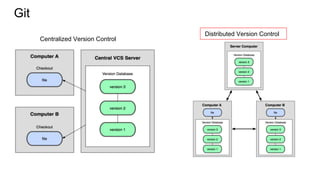
Git
Centralized Version Control
Distributed Version Control
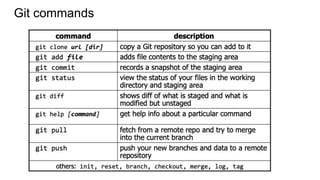
Git commands
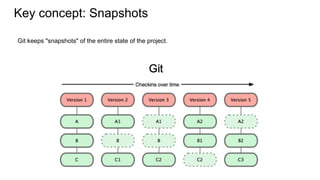
Key concept: Snapshots
Git keeps "snapshots" of the entire state of the project.
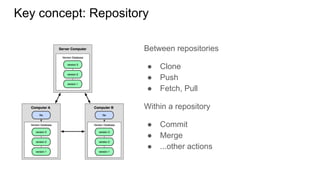
Key concept: Repository
Between repositories
● Clone
● Push
● Fetch, Pull
Within a repository
● Commit
● Merge
● ...other actions
Basic: Within a Repo
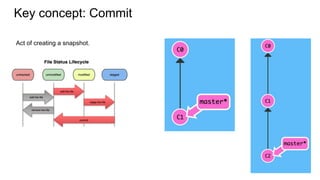
Key concept: Commit
Act of creating a snapshot.
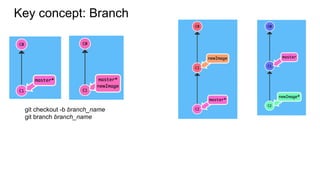
Key concept: Branch
git checkout -b branch_name
git branch branch_name
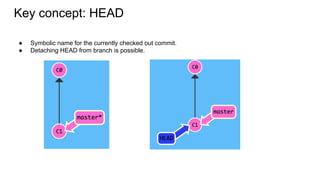
Key concept: HEAD
● Symbolic name for the currently checked out commit.
● Detaching HEAD from branch is possible.
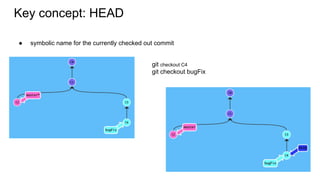
Key concept: HEAD
● symbolic name for the currently checked out commit
git checkout C4
git checkout bugFix
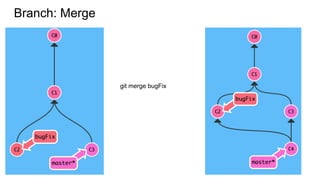
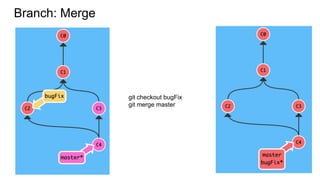
Branch: Merge
git merge bugFix
Branch: Merge
git checkout bugFix
git merge master
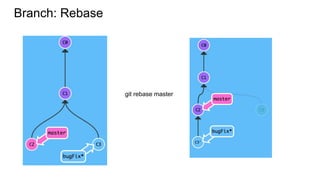
Branch: Rebase
git rebase master
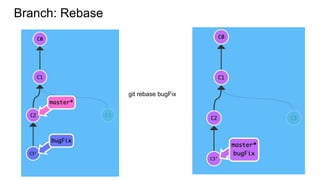
Branch: Rebase
git rebase bugFix
Basic: Between Repos
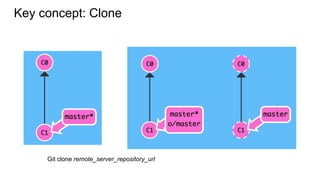
Key concept: Clone
Git clone remote_server_repository_url
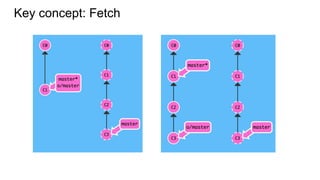
Key concept: Fetch
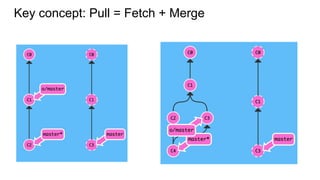
Key concept: Pull = Fetch + Merge
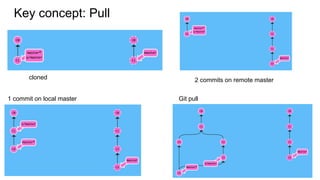
Key concept: Pull
cloned 2 commits on remote master
1 commit on local master Git pull
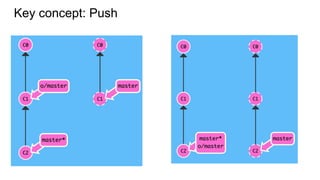
Key concept: Push
Advanced:
Working Together
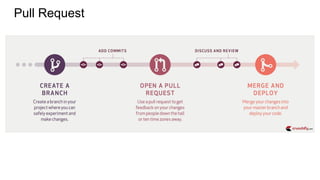
Pull Request
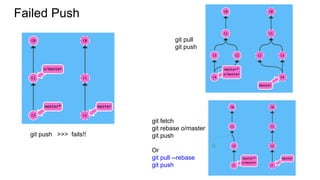
Failed Push
git pull
git push
git fetch
git rebase o/master
git push
Or
git pull --rebase
git push
git push >>> fails!!
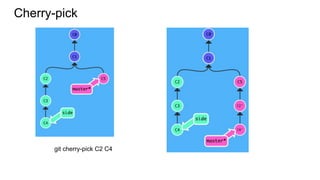
Cherry-pick
git cherry-pick C2 C4
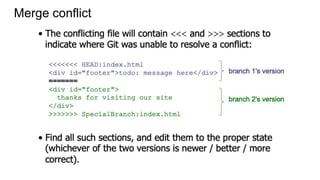
Merge conflict
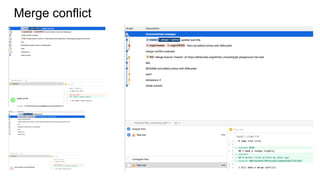
Merge conflict
Advanced:
Nice and neat history
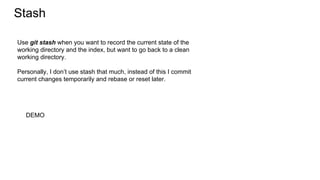
Stash
DEMO
Use git stash when you want to record the current state of the
working directory and the index, but want to go back to a clean
working directory.
Personally, I don’t use stash that much, instead of this I commit
current changes temporarily and rebase or reset later.
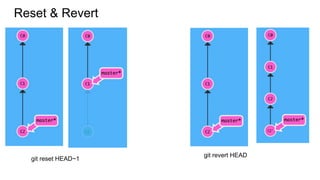
Reset & Revert
git reset HEAD~1
git revert HEAD
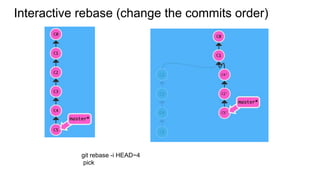
Interactive rebase (change the commits order)
git rebase -i HEAD~4
pick
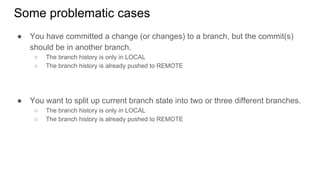
Some problematic cases
● You have committed a change (or changes) to a branch, but the commit(s)
should be in another branch.
○ The branch history is only in LOCAL
○ The branch history is already pushed to REMOTE
● You want to split up current branch state into two or three different branches.
○ The branch history is only in LOCAL
○ The branch history is already pushed to REMOTE
Additional tips that you
don’t want (need) to
use(know) YET
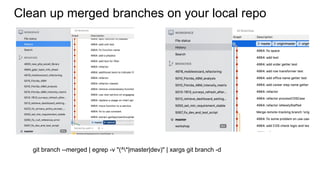
Clean up merged branches on your local repo
git branch --merged | egrep -v "(^*|master|dev)" | xargs git branch -d
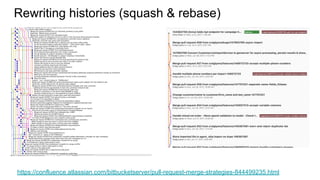
Rewriting histories (squash & rebase)
https://confluence.atlassian.com/bitbucketserver/pull-request-merge-strategies-844499235.html
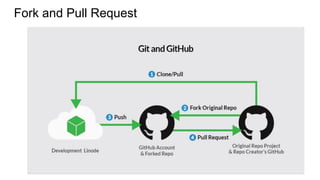
Fork and Pull Request
References
https://www.slideshare.net/HubSpot/git-101-git-and-github-for-beginners
https://courses.cs.washington.edu/courses/cse403/13au/lectures/git.ppt.pdf
https://learngitbranching.js.org/
https://blog.carbonfive.com/2017/08/28/always-squash-and-rebase-your-git-commi
ts/
https://git-scm.com/book/en/v2/Git-Tools-Rewriting-History
Cheat sheet
If you want to use alias for git, install zsh and set plugin for git.
e.g. ‘ga’ instead of ‘git add’, ‘gp’ for ‘git push’...,
● Install ZSH: https://github.com/robbyrussell/oh-my-zsh/wiki/Installing-ZSH
● Install Oh-My-ZSH: sh -c "$(curl -fsSL
https://raw.githubusercontent.com/robbyrussell/oh-my-zsh/master/tools/inst
all.sh)"
● Set plugin: https://github.com/robbyrussell/oh-my-zsh#plugins
If you want to add additional alias for yourself.
● vi ~/.zshrc
● Put this on any line (usually the last line)
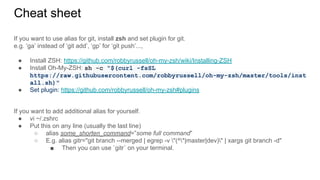
○ alias some_shorten_command=”some full command”
○ E.g. alias gitr="git branch --merged | egrep -v "(^*|master|dev)" | xargs git branch -d"
■ Then you can use `gitr` on your terminal.
Cheat sheet
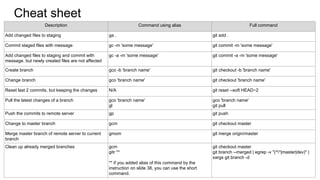
Description Command using alias Full command
Add changed files to staging ga . git add .
Commit staged files with message gc -m 'some message' git commit -m 'some message'
Add changed files to staging and commit with
message. but newly created files are not affected
gc -a -m 'some message' git commit -a -m 'some message'
Create branch gco -b 'branch name' git checkout -b 'branch name'
Change branch gco 'branch name' git checkout 'branch name'
Reset last 2 commits, but keeping the changes N/A git reset --soft HEAD~2
Pull the latest changes of a branch gco 'branch name'
gl
gco 'branch name'
git pull
Push the commits to remote server gp git push
Change to master branch gcm git checkout master
Merge master branch of remote server to current
branch
gmom git merge origin/master
Clean up already merged branches gcm
gitr **
** if you added alias of this command by the
instruction on slide 38, you can use the short
command.
git checkout master
git branch --merged | egrep -v "(^*|master|dev)" |
xargs git branch -d

Honestly Git Playground 20190221