1
2
Thank you for purchasing LS Variable Frequency Drives!
SAFETY INSTRUCTIONS
 Always follow safety instructions to prevent accidents and potential hazards from occurring.
 In this manual, safety messages are classified as follows:
WARNING
CAUTION
 Throughout this manual we use the following two illustrations to make you aware of safety
considerations:
Identifies potential hazards under certain conditions.
Read the message and follow the instructions carefully.
Identifies shock hazards under certain conditions.
Particular attention should be directed because dangerous voltage may be present.
 Keep operating instructions handy for quick reference.
 Read this manual carefully to maximize the performance of SV-iG5A series inverter and ensure
its safe use.
WARNING
 Do not remove the cover while power is applied or the unit is in operation.
Otherwise, electric shock could occur.
 Do not run the inverter with the front cover removed.
Otherwise, you may get an electric shock due to high voltage terminals or charged capacitor
exposure.
 Do not remove the cover except for periodic inspections or wiring, even if
the input power is not applied.
Otherwise, you may access the charged circuits and get an electric shock.
Improper operation may result in slight to medium personal injury
or property damage.
Improper operation may result in serious personal injury or death.
3
 Wiring and periodic inspections should be performed at least 10 minutes
after disconnecting the input power and after checking the DC link voltage
is discharged with a meter (below DC 30V).
Otherwise, you may get an electric shock.
 Operate the switches with dry hands.
Otherwise, you may get an electric shock.
 Do not use the cable when its insulating tube is damaged.
Otherwise, you may get an electric shock.
 Do not subject the cables to scratches, excessive stress, heavy loads or
pinching.
Otherwise, you may get an electric shock.
CAUTION
 Install the inverter on a non-flammable surface. Do not place flammable
material nearby.
Otherwise, fire could occur.
 Disconnect the input power if the inverter gets damaged.
Otherwise, it could result in a secondary accident and fire.
 After the input power is applied or removed, the inverter will remain hot for
a couple of minutes.
Otherwise, you may get bodily injuries such as skin-burn or damage.
 Do not apply power to a damaged inverter or to an inverter with parts
missing even if the installation is complete.
Otherwise, electric shock could occur.
 Do not allow lint, paper, wood chips, dust, metallic chips or other foreign
matter into the drive.
Otherwise, fire or accident could occur.
4
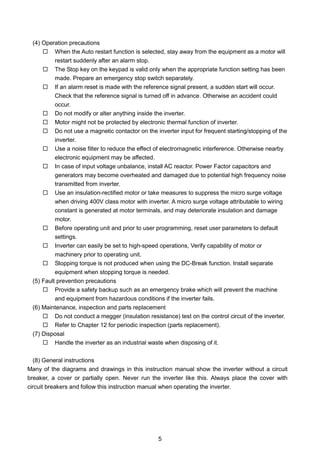
OPERATING PRECAUTIONS
(1) Handling and installation
 Handle according to the weight of the product.
 Do not stack the inverter boxes higher than the number recommended.
 Install according to instructions specified in this manual.
 Do not open the cover during delivery.
 Do not place heavy items on the inverter.
 Check the inverter mounting orientation is correct.
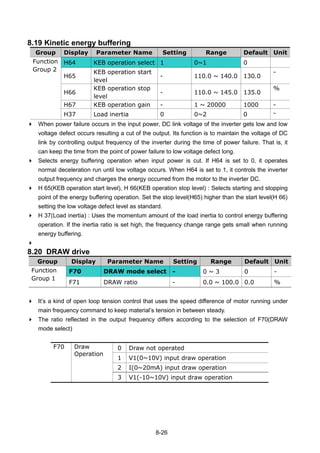
 Do not drop the inverter, or subject it to impact.
 Follow your national electrical code for grounding. Recommended Ground impedance for
200 V Class is below 100 ohm and for 400V class below 10 ohm.
 iG5A series contains ESD (Electrostatic Discharge) sensitive parts. Take protective
measures against ESD before touching the pcb for inspection or installation.
 Use the inverter under the following environmental conditions:
Environment
Surrounding temperature - 10 ~ 50 ℃ (non-freezing)
Relative humidity 90% RH or less (non-condensing)
Storage temperature - 20 ~ 65 ℃
Location
Protected from corrosive gas, combustible gas,
oil mist or dust
Altitude, Vibration
Max. 1,000m above sea level, Max. 5.9m/sec2
(0.6G) or less
Atmospheric pressure 70 ~ 106 kPa
(2) Wiring
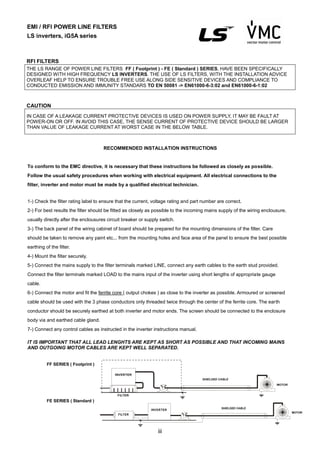
 Do not connect a power factor correction capacitor, surge suppressor, or RFI filter to the
output of the inverter.
 The connection orientation of the output cables U, V, W to the motor will affect the
direction of rotation of the motor.
 Incorrect terminal wiring could result in the equipment damage.
 Reversing the polarity (+/-) of the terminals could damage the inverter.
 Only authorized personnel familiar with LS inverter should perform wiring and
inspections.
 Always install the inverter before wiring. Otherwise, you may get an electric shock or
have bodily injury.
(3) Trial run
 Check all parameters during operation. Changing parameter values might be required
depending on the load.
 Always apply permissible range of voltage to the each terminal as indicated in this
manual. Otherwise, it could lead to inverter damage.
5
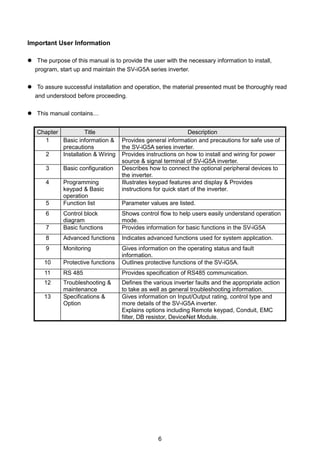
(4) Operation precautions
 When the Auto restart function is selected, stay away from the equipment as a motor will
restart suddenly after an alarm stop.
 The Stop key on the keypad is valid only when the appropriate function setting has been
made. Prepare an emergency stop switch separately.
 If an alarm reset is made with the reference signal present, a sudden start will occur.
Check that the reference signal is turned off in advance. Otherwise an accident could
occur.
 Do not modify or alter anything inside the inverter.
 Motor might not be protected by electronic thermal function of inverter.
 Do not use a magnetic contactor on the inverter input for frequent starting/stopping of the
inverter.
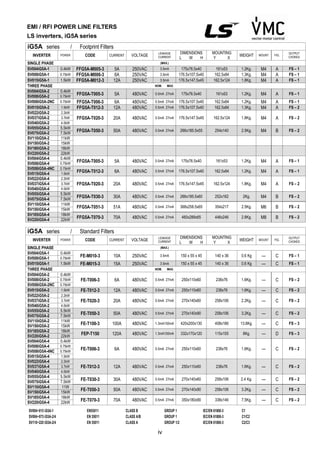
 Use a noise filter to reduce the effect of electromagnetic interference. Otherwise nearby
electronic equipment may be affected.
 In case of input voltage unbalance, install AC reactor. Power Factor capacitors and
generators may become overheated and damaged due to potential high frequency noise
transmitted from inverter.
 Use an insulation-rectified motor or take measures to suppress the micro surge voltage
when driving 400V class motor with inverter. A micro surge voltage attributable to wiring
constant is generated at motor terminals, and may deteriorate insulation and damage
motor.
 Before operating unit and prior to user programming, reset user parameters to default
settings.
 Inverter can easily be set to high-speed operations, Verify capability of motor or
machinery prior to operating unit.
 Stopping torque is not produced when using the DC-Break function. Install separate
equipment when stopping torque is needed.
(5) Fault prevention precautions
 Provide a safety backup such as an emergency brake which will prevent the machine
and equipment from hazardous conditions if the inverter fails.
(6) Maintenance, inspection and parts replacement
 Do not conduct a megger (insulation resistance) test on the control circuit of the inverter.
 Refer to Chapter 12 for periodic inspection (parts replacement).
(7) Disposal
 Handle the inverter as an industrial waste when disposing of it.
(8) General instructions
Many of the diagrams and drawings in this instruction manual show the inverter without a circuit
breaker, a cover or partially open. Never run the inverter like this. Always place the cover with
circuit breakers and follow this instruction manual when operating the inverter.
6
Important User Information
 The purpose of this manual is to provide the user with the necessary information to install,
program, start up and maintain the SV-iG5A series inverter.
 To assure successful installation and operation, the material presented must be thoroughly read
and understood before proceeding.
 This manual contains…
Chapter Title Description
1 Basic information &
precautions
Provides general information and precautions for safe use of
the SV-iG5A series inverter.
2 Installation & Wiring Provides instructions on how to install and wiring for power
source & signal terminal of SV-iG5A inverter.
3 Basic configuration Describes how to connect the optional peripheral devices to
the inverter.
4 Programming
keypad & Basic
operation
Illustrates keypad features and display & Provides
instructions for quick start of the inverter.
5 Function list Parameter values are listed.
6 Control block
diagram
Shows control flow to help users easily understand operation
mode.
7 Basic functions Provides information for basic functions in the SV-iG5A
8 Advanced functions Indicates advanced functions used for system application.
9 Monitoring Gives information on the operating status and fault
information.
10 Protective functions Outlines protective functions of the SV-iG5A.
11 RS 485 Provides specification of RS485 communication.
12 Troubleshooting &
maintenance
Defines the various inverter faults and the appropriate action
to take as well as general troubleshooting information.
13 Specifications &
Option
Gives information on Input/Output rating, control type and
more details of the SV-iG5A inverter.
Explains options including Remote keypad, Conduit, EMC
filter, DB resistor, DeviceNet Module.
7
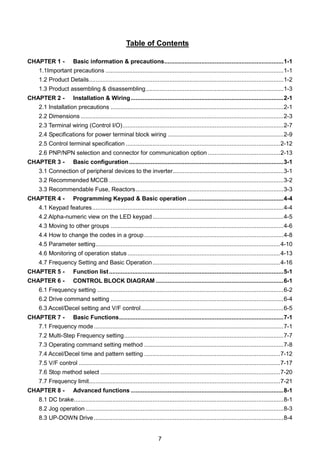
Table of Contents
CHAPTER 1 - Basic information & precautions.......................................................................1-1
1.1Important precautions ..........................................................................................................1-1
1.2 Product Details....................................................................................................................1-2
1.3 Product assembling & disassembling..................................................................................1-3
CHAPTER 2 - Installation & Wiring...........................................................................................2-1
2.1 Installation precautions .......................................................................................................2-1
2.2 Dimensions.........................................................................................................................2-3
2.3 Terminal wiring (Control I/O)................................................................................................2-7
2.4 Specifications for power terminal block wiring .....................................................................2-9
2.5 Control terminal specification ............................................................................................2-12
2.6 PNP/NPN selection and connector for communication option ...........................................2-13
CHAPTER 3 - Basic configuration............................................................................................3-1
3.1 Connection of peripheral devices to the inverter..................................................................3-1
3.2 Recommended MCCB ........................................................................................................3-2
3.3 Recommendable Fuse, Reactors........................................................................................3-3
CHAPTER 4 - Programming Keypad & Basic operation .........................................................4-4
4.1 Keypad features..................................................................................................................4-4
4.2 Alpha-numeric view on the LED keypad..............................................................................4-5
4.3 Moving to other groups .......................................................................................................4-6
4.4 How to change the codes in a group...................................................................................4-8
4.5 Parameter setting..............................................................................................................4-10
4.6 Monitoring of operation status...........................................................................................4-13
4.7 Frequency Setting and Basic Operation............................................................................4-16
CHAPTER 5 - Function list........................................................................................................5-1
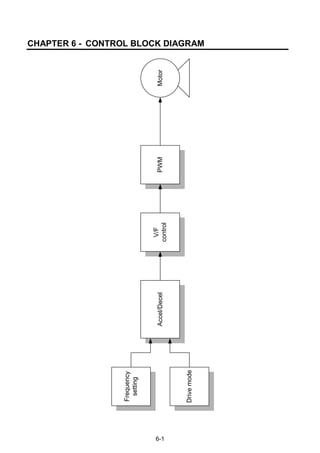
CHAPTER 6 - CONTROL BLOCK DIAGRAM ............................................................................6-1
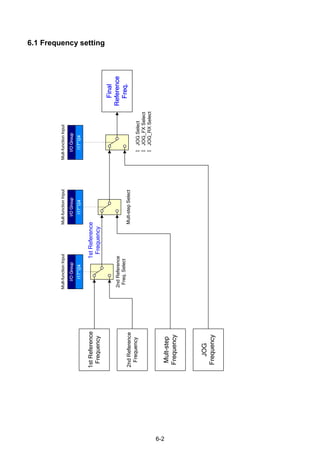
6.1 Frequency setting ...............................................................................................................6-2
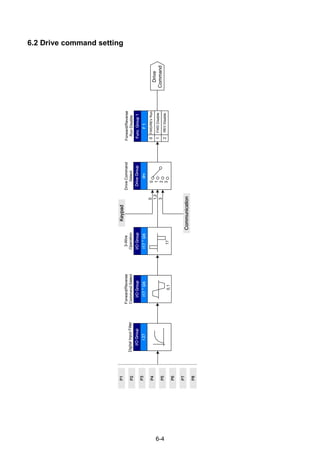
6.2 Drive command setting .......................................................................................................6-4
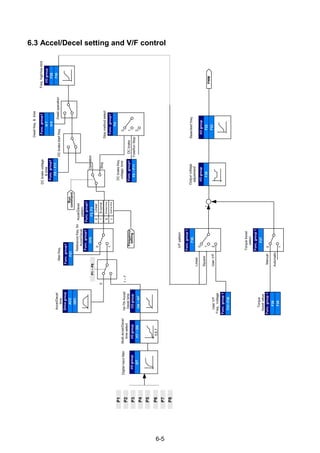
6.3 Accel/Decel setting and V/F control.....................................................................................6-5
CHAPTER 7 - Basic Functions..................................................................................................7-1
7.1 Frequency mode.................................................................................................................7-1
7.2 Multi-Step Frequency setting...............................................................................................7-7
7.3 Operating command setting method ...................................................................................7-8
7.4 Accel/Decel time and pattern setting .................................................................................7-12
7.5 V/F control ........................................................................................................................7-17
7.6 Stop method select ...........................................................................................................7-20
7.7 Frequency limit..................................................................................................................7-21
CHAPTER 8 - Advanced functions ...........................................................................................8-1
8.1 DC brake.............................................................................................................................8-1
8.2 Jog operation ......................................................................................................................8-3
8.3 UP-DOWN Drive .................................................................................................................8-4
8
8.4 3-Wire .................................................................................................................................8-7
8.5 Dwell operation ...................................................................................................................8-7
8.6 Slip compensation...............................................................................................................8-8
8.7 PID control..........................................................................................................................8-9
8.8 Auto-tuning........................................................................................................................8-13
8.9 Sensorless Vector Control.................................................................................................8-14
8.10 Energy-saving operation .................................................................................................8-15
8.11 Speed search ..................................................................................................................8-16
8.12 Auto restart try.................................................................................................................8-18
8.13 Operating sound select (Carrier frequency change) ........................................................8-19
8.14 2nd
motor operation .........................................................................................................8-19
8.15 Self-Diagnostic function ..................................................................................................8-21
8.16 Frequency setting and 2nd
drive method select................................................................8-22
8.17 Over voltage trip prevention deceleration and Power Braking .........................................8-24
8.18 External brake control ....................................................................................................8-24
8.19 Kinetic energy buffering...................................................................................................8-26
8.20 DRAW drive ...................................................................................................................8-26
8.21 2 Phase PWM drive ........................................................................................................8-28
8.22 Cooling fan control ..........................................................................................................8-28
8.23 Operating mode select when cooling fan trip occurs .......................................................8-28
8.24 Parameter read/write.......................................................................................................8-30
8.25 Parameter Initialize / Lock...............................................................................................8-31
CHAPTER 9 - Monitoring...........................................................................................................9-1
9.1 Operating status monitoring ................................................................................................9-1
9.2 Monitoring the I/O terminal..................................................................................................9-3
9.3 Monitoring fault condition ....................................................................................................9-4
9.4 Analog Output .....................................................................................................................9-6
9.5 Multi-function output terminal (MO) and Relay (3AC) ..........................................................9-7
9.6 Output terminal select at loder communication error .........................................................9-12
CHAPTER 10 - Protective functions.........................................................................................10-1
10.1 Electronic Thermal ..........................................................................................................10-1
10.2 Overload Warning and trip ..............................................................................................10-2
10.3 Stall prevention ...............................................................................................................10-3
10.4 Output phase loss protection...........................................................................................10-5
10.5 External trip signal...........................................................................................................10-5
10.6 Inverter Overload ............................................................................................................10-6
10.7 Speed command loss......................................................................................................10-6
10.8 DB Resistor Enable Duty setting .....................................................................................10-7
CHAPTER 11 - RS485 communication .....................................................................................11-1
11.1 Introduction .....................................................................................................................11-1
11.2 Specification....................................................................................................................11-1
11.3 Installation.......................................................................................................................11-2
9
11.4 Operation ........................................................................................................................11-2
11.5 Communication protocol (MODBUS-RTU).......................................................................11-3
11.6 Communication protocol (LS BUS)..................................................................................11-3
11.7 Parameter code list <Common area> (Note1) ................................................................11-6
11.8 Troubleshooting.............................................................................................................11-12
11.9 Miscellaneous ...............................................................................................................11-12
CHAPTER 12 - Troubleshooting & Maintenance .....................................................................12-1
12.1 Protective functions.........................................................................................................12-1
12.2 Fault remedy...................................................................................................................12-3
12.3 Precautions for maintenance and inspection...................................................................12-6
12.4Check points ....................................................................................................................12-6
12.5 Part replacements...........................................................................................................12-6
CHAPTER 13 - Specifications ...................................................................................................13-1
13.1 Technical data .................................................................................................................13-1
13.2 Temperature Derating Information...................................................................................13-4
13.3 Remote option.................................................................................................................13-4
13.4 Conduit Kit ......................................................................................................................13-6
13.5 Braking resistor...............................................................................................................13-7
13.6 DeviceNet Communication Module .................................................................................13-8
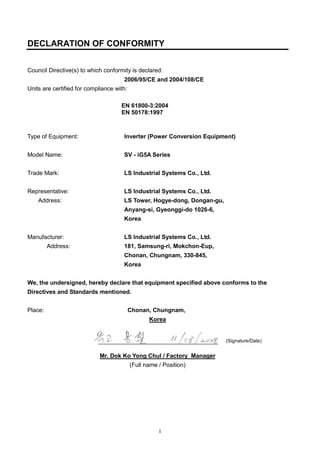
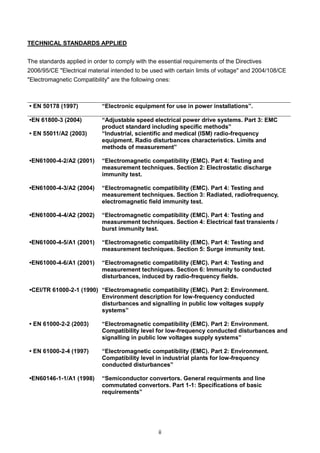
DECLARATION OF CONFORMITY ....................................................................................................i
1-1
CHAPTER 1 - BASIC INFORMATION & PRECAUTIONS
1.1Important precautions
Unpacking and
inspection
 Inspect the inverter for any damage that may have occurred during shipping.
To verify the inverter unit is the correct one for the application you need,
check the inverter type, output ratings on the nameplate and the inverter is
intact.
SV 075 iG5A - 2 (N)
LSInverter
Motor rating
Series
Name
Input power Keypad
004 0.4 [kW]
iG5A
1
Single Phase
200~230[V]
NON loader I/O
Products
008 0.75 [kW]
015 1.5 [kW]
022 2.2 [kW]
037 3.7 [kW]
2
Three Phase
200~230[V]
040 4.0 [kW]
055 5.5 [kW]
075 7.5 [kW]
110 11.0[kW]
4
Three Phase
380~480[V]
150 15.0[kW]
185 18.5[kW]
220 22.0[kW]
 Accessories
If you have found any discrepancy, damage, etc., contact your sales
representative.
Preparations
of instruments
and parts
required for
operation
Instruments and parts to be prepared depend on how the inverter is operated.
Prepare equipment and parts as necessary.
Installation To operate the inverter with high performance for a long time, install the inverter
in a proper place in the correct direction and with proper clearances
Wiring Connect the power supply, motor and operation signals (control signals) to the
terminal block. Note that incorrect connection may damage the inverter and
peripheral devices
Input power rating
Inverter Type
Output Power Rating
Rated output current, frequency
Inverter Capacity (kVA)
Bar Code and Serial Number
1-2
1.2 Product Details
 Appearance
 Inside view after front cover is removed
Refer to “1.3 To remove the front cover” for details.
Front cover:
Removed when
wiring
Bottom cover:
Removed when
wiring input power
and a motor
Status LED Display
Inverter
nameplate
4-Way button for
parameter setting
(Up/Down/Left/Right)
Control signal
Terminal
NPN, PNP
Select Switch
[ENT]
button
STOP/RESET
button
Inverter Ground
Terminal
RUN button
Power terminal
Cooling fan
1-3
1.3 Product assembling & disassembling
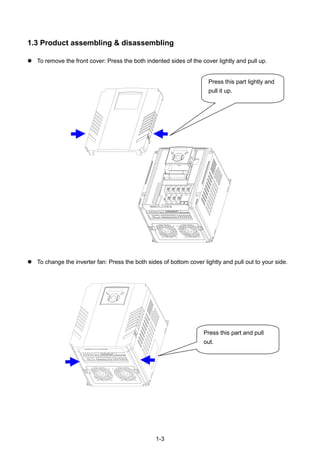
 To remove the front cover: Press the both indented sides of the cover lightly and pull up.
 To change the inverter fan: Press the both sides of bottom cover lightly and pull out to your side.
Press this part lightly and
pull it up.
Press this part and pull
out.
1-4
Notes:
2-1
CHAPTER 2 - INSTALLATION & WIRING
2.1 Installation precautions
CAUTION
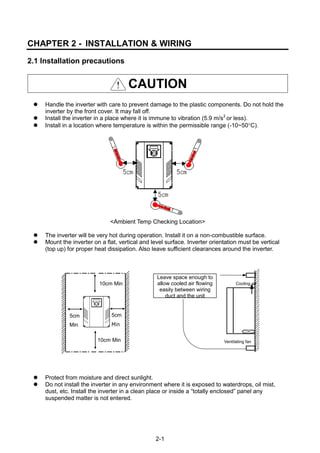
 Handle the inverter with care to prevent damage to the plastic components. Do not hold the
inverter by the front cover. It may fall off.
 Install the inverter in a place where it is immune to vibration (5.9 m/s2
or less).
 Install in a location where temperature is within the permissible range (-10~50C).
<Ambient Temp Checking Location>
 The inverter will be very hot during operation. Install it on a non-combustible surface.
 Mount the inverter on a flat, vertical and level surface. Inverter orientation must be vertical
(top up) for proper heat dissipation. Also leave sufficient clearances around the inverter.
 Protect from moisture and direct sunlight.
 Do not install the inverter in any environment where it is exposed to waterdrops, oil mist,
dust, etc. Install the inverter in a clean place or inside a “totally enclosed” panel any
suspended matter is not entered.
5cm
Min
10cm Min
5cm
Min
10cm Min Ventilating fan
Cooling air
Leave space enough to
allow cooled air flowing
easily between wiring
duct and the unit
2-2
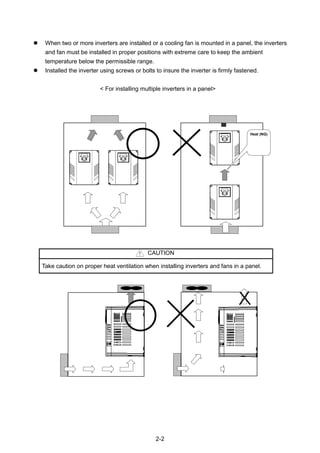
 When two or more inverters are installed or a cooling fan is mounted in a panel, the inverters
and fan must be installed in proper positions with extreme care to keep the ambient
temperature below the permissible range.
 Installed the inverter using screws or bolts to insure the inverter is firmly fastened.
< For installing multiple inverters in a panel>
CAUTION
Take caution on proper heat ventilation when installing inverters and fans in a panel.
Heat (NG)
2-3
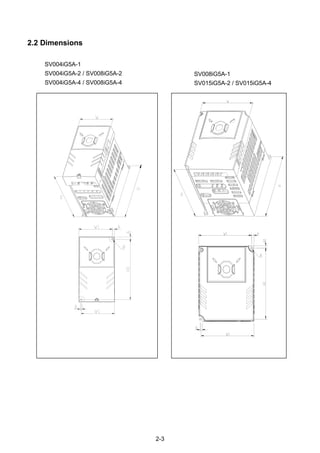
2.2 Dimensions
SV004iG5A-1
SV004iG5A-2 / SV008iG5A-2
SV004iG5A-4 / SV008iG5A-4
SV008iG5A-1
SV015iG5A-2 / SV015iG5A-4
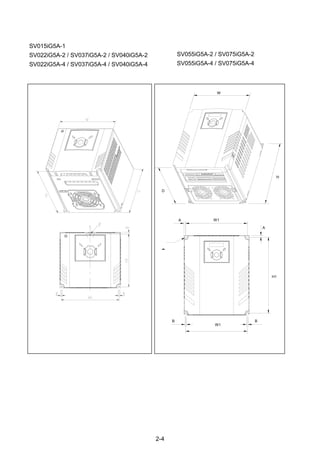
2-4
SV055iG5A-2 / SV075iG5A-2
SV055iG5A-4 / SV075iG5A-4
H
W
D
W1A
A
H1
W1
B B
Φ
SV015iG5A-1
SV022iG5A-2 / SV037iG5A-2 / SV040iG5A-2
SV022iG5A-4 / SV037iG5A-4 / SV040iG5A-4
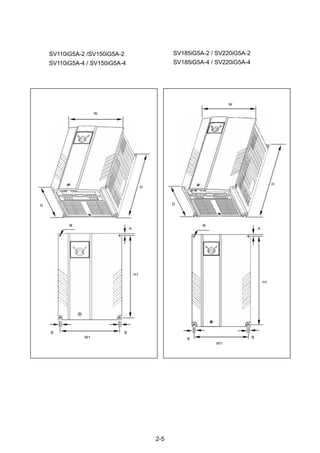
2-5
H
W
D
Φ
B
W1
B
A
H1
D
H
W
Φ
W1
B B
A
H1
SV110iG5A-2 /SV150iG5A-2
SV110iG5A-4 / SV150iG5A-4
SV185iG5A-2 / SV220iG5A-2
SV185iG5A-4 / SV220iG5A-4
2-6
Inverter [kW]
W
[mm]
W1
[mm]
H
[mm]
H1
[mm]
D
[mm]
Φ A
[mm]
B
[mm]
[Kg]
SV004iG5A-1 0.4 70 65.5 128 119 130 4.0 4.5 4.0 0.76
SV008iG5A-1 0.75 100 95.5 128 120 130 4.5 4.5 4.5 1.12
SV015iG5A-1 1.5 140 132 128 120.5 155 4.5 4.5 4.5 1.84
SV004iG5A-2 0.4 70 65.5 128 119 130 4.0 4.5 4.0 0.76
SV008iG5A-2 0.75 70 65.5 128 119 130 4.0 4.5 4.0 0.77
SV015iG5A-2 1.5 100 95.5 128 120 130 4.5 4.5 4.5 1.12
SV022iG5A-2 2.2 140 132 128 120.5 155 4.5 4.5 4.5 1.84
SV037iG5A-2 3.7 140 132 128 120.5 155 4.5 4.5 4.5 1.89
SV040iG5A-2 4.0 140 132 128 120.5 155 4.5 4.5 4.5 1.89
SV055iG5A-2 5.5 180 170 220 210 170 4.5 5.0 4.5 3.66
SV075iG5A-2 7.5 180 170 220 210 170 4.5 5.0 4.5 3.66
SV110iG5A-2 11.0 235 219 320 304 189.5 7.0 8.0 7.0 9.00
SV150iG5A-2 15.0 235 219 320 304 189.5 7.0 8.0 7.0 9.00
SV185iG5A-2 18.5 260 240 410 392 208.5 10.0 10.0 10.0 13.3
SV220iG5A-2 22.0 260 240 410 392 208.5 10.0 10.0 10.0 13.3
SV004iG5A-4 0.4 70 65.5 128 119 130 4.0 4.5 4.0 0.76
SV008iG5A-4 0.75 70 65.5 128 119 130 4.0 4.5 4.0 0.77
SV015iG5A-4 1.5 100 95.5 128 120 130 4.5 4.5 4.5 1.12
SV022iG5A-4 2.2 140 132 128 120.5 155 4.5 4.5 4.5 1.84
SV037iG5A-4 3.7 140 132 128 120.5 155 4.5 4.5 4.5 1.89
SV040iG5A-4 4.0 140 132 128 120.5 155 4.5 4.5 4.5 1.89
SV055iG5A-4 5.5 180 170 220 210 170 4.5 5.0 4.5 3.66
SV075iG5A-4 7.5 180 170 220 210 170 4.5 5.0 4.5 3.66
SV110iG5A-4 11.0 235 219 320 304 189.5 7.0 8.0 7.0 9.00
SV150iG5A-4 15.0 235 219 320 304 189.5 7.0 8.0 7.0 9.00
SV185iG5A-4 18.5 260 240 410 392 208.5 10.0 10.0 10.0 13.3
SV220iG5A-4 22.0 260 240 410 392 208.5 10.0 10.0 10.0 13.3
2-7
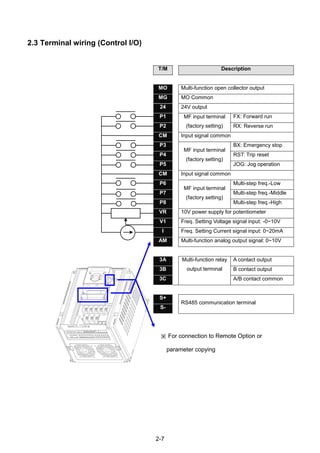
2.3 Terminal wiring (Control I/O)
T/M Description
MO Multi-function open collector output
MG MO Common
24 24V output
P1 MF input terminal
(factory setting)
FX: Forward run
P2 RX: Reverse run
CM Input signal common
P3
MF input terminal
(factory setting)
BX: Emergency stop
P4 RST: Trip reset
P5 JOG: Jog operation
CM Input signal common
P6
MF input terminal
(factory setting)
Multi-step freq.-Low
P7 Multi-step freq.-Middle
P8 Multi-step freq.-High
VR 10V power supply for potentiometer
V1 Freq. Setting Voltage signal input: -0~10V
I Freq. Setting Current signal input: 0~20mA
AM Multi-function analog output signal: 0~10V
3A Multi-function relay
output terminal
A contact output
3B B contact output
3C A/B contact common
S+
RS485 communication terminal
S-
※ For connection to Remote Option or
parameter copying
2-8
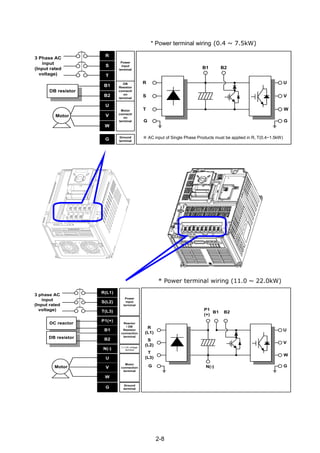
* Power terminal wiring (0.4 ~ 7.5kW)
R
S
T
B1
B2
U
V
W
3 Phase AC
input
(Input rated
voltage)
Power
input
terminal
DB
Resistor
connecti
on
terminal
Motor
connecti
on
terminal
DB resistor
Motor
G Ground
terminal
R
B1 B2
U
V
W
G
S
T
G
* Power terminal wiring (11.0 ~ 22.0kW)
R(L1)
S(L2)
T(L3)
B2
N(-)
U
V
W
3 phase AC
input
(Input rated
voltage)
Power
input
terminal
Reactor
/ DB
Resistor
connection
terminal
Motor
connection
terminal
Motor
G
Ground
terminal
R
(L1)
P1
(+)
U
V
W
G
S
(L2)
T
(L3)
G
P1(+)
B1
DC reactor
DB resistor
(-) DC voltage
terminal
N(-)
B1 B2
※ AC input of Single Phase Products must be applied in R, T(0.4~1.5kW)
2-9
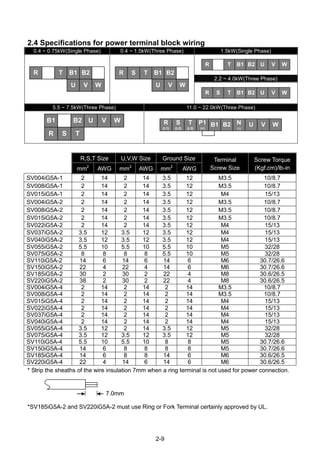
2.4 Specifications for power terminal block wiring
0.4 ~ 0.75kW(Single Phase) 0.4 ~ 1.5kW(Three Phase) 1.5kW(Single Phase)
R T B1 B2
U V W
R S T B1 B2
U V W
R T B1 B2 U V W
2.2 ~ 4.0kW(Three Phase)
R S T B1 B2 U V W
5.5 ~ 7.5kW(Three Phase) 11.0 ~ 22.0kW(Three Phase)
B1 B2 U V W
R S T
R
(L1)
S
(L2)
T
(L3)
P1
(+)
B1 B2 N
(-)
U V W
R,S,T Size U,V,W Size Ground Size Terminal
Screw Size
Screw Torque
(Kgf.cm)/lb-inmm2
AWG mm2
AWG mm2
AWG
SV004iG5A-1 2 14 2 14 3.5 12 M3.5 10/8.7
SV008iG5A-1 2 14 2 14 3.5 12 M3.5 10/8.7
SV015iG5A-1 2 14 2 14 3.5 12 M4 15/13
SV004iG5A-2 2 14 2 14 3.5 12 M3.5 10/8.7
SV008iG5A-2 2 14 2 14 3.5 12 M3.5 10/8.7
SV015iG5A-2 2 14 2 14 3.5 12 M3.5 10/8.7
SV022iG5A-2 2 14 2 14 3.5 12 M4 15/13
SV037iG5A-2 3.5 12 3.5 12 3.5 12 M4 15/13
SV040iG5A-2 3.5 12 3.5 12 3.5 12 M4 15/13
SV055iG5A-2 5.5 10 5.5 10 5.5 10 M5 32/28
SV075iG5A-2 8 8 8 8 5.5 10 M5 32/28
SV110iG5A-2 14 6 14 6 14 6 M6 30.7/26.6
SV150iG5A-2 22 4 22 4 14 6 M6 30.7/26.6
SV185iG5A-2 30 2 30 2 22 4 M8 30.6/26.5
SV220iG5A-2 38 2 30 2 22 4 M8 30.6/26.5
SV004iG5A-4 2 14 2 14 2 14 M3.5 10/8.7
SV008iG5A-4 2 14 2 14 2 14 M3.5 10/8.7
SV015iG5A-4 2 14 2 14 2 14 M4 15/13
SV022iG5A-4 2 14 2 14 2 14 M4 15/13
SV037iG5A-4 2 14 2 14 2 14 M4 15/13
SV040iG5A-4 2 14 2 14 2 14 M4 15/13
SV055iG5A-4 3.5 12 2 14 3.5 12 M5 32/28
SV075iG5A-4 3.5 12 3.5 12 3.5 12 M5 32/28
SV110iG5A-4 5.5 10 5.5 10 8 8 M5 30.7/26.6
SV150iG5A-4 14 6 8 8 8 8 M5 30.7/26.6
SV185iG5A-4 14 6 8 8 14 6 M6 30.6/26.5
SV220iG5A-4 22 4 14 6 14 6 M6 30.6/26.5
* Strip the sheaths of the wire insulation 7mm when a ring terminal is not used for power connection.
*SV185iG5A-2 and SV220iG5A-2 must use Ring or Fork Terminal certainly approved by UL.
7.0mm
2-10
CAUTION
 Apply the rated torque to terminal screws. Loosen screws can cause of short circuit and
malfunction. Tightening the screw too much can damage the terminals and cause short
circuit and malfunction.
 Use copper wires only with 600V, 75℃ ratings for wiring.
 Make sure the input power is off before wiring.
 When power supply is switched off following operation, wait at least 10 minutes after LED
keypad display is off before you start working on it.
 Applying input power supply to the output terminals U, V and W causes internal inverter
damage.
 Use ring terminals with insulated caps when wiring the input power and motor wiring.
 Do not leave wire fragments inside the inverter. Wire fragments can cause faults,
breakdowns and malfunctions.
 When more than one motor is connected to one inverter, total wire length should be less
than 200m (656ft). Do not use a 3-wire cable for long distances. Due to increased leakage
capacitance between wires, over-current protective feature may operate or equipment
connected to the output side may malfunction. In case of long wire length, it should be
required to lower carrier frequency or use Micro Surge Filter.
Length between Inverter and Motor Up to 50m Up to 100m More than 100m
Allowable Carrier Frequency Less than 15kHz Less than 5kHz Less than 2.5kHz
(For products of less than 3.7kW, the wire length should be less than 100m(328ft)).
 Never short B1 and B2 terminals. Shorting terminals may cause internal inverter damage.
 Do not install a power factor capacitor, surge suppressor or RFI filters in the output side of
the inverter. Doing so may damage these components.
[WARNING]
Power supply must be connected to the R, S, and T Terminals.
Connecting it to the U, V, W terminals causes internal damages to the inverter. Arranging the
phase sequence is not necessary.
Motor should be connected to the U, V, and W Terminals.
If the forward command (FX) is on, the motor should rotate counter clockwise when viewed from
the load side of the motor. If the motor rotates in the reverse, switch the U and V terminals.
2-11
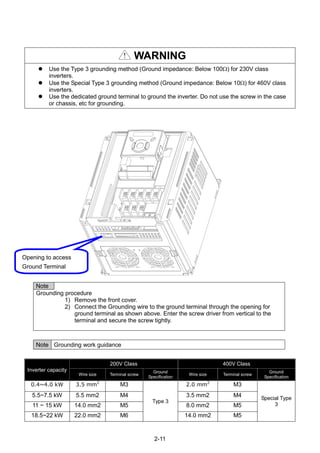
Opening to access
Ground Terminal
WARNING
 Use the Type 3 grounding method (Ground impedance: Below 100) for 230V class
inverters.
 Use the Special Type 3 grounding method (Ground impedance: Below 10) for 460V class
inverters.
 Use the dedicated ground terminal to ground the inverter. Do not use the screw in the case
or chassis, etc for grounding.
Note
Grounding procedure
1) Remove the front cover.
2) Connect the Grounding wire to the ground terminal through the opening for
ground terminal as shown above. Enter the screw driver from vertical to the
terminal and secure the screw tightly.
Note Grounding work guidance
Inverter capacity
200V Class 400V Class
Wire size Terminal screw
Ground
Specification
Wire size Terminal screw
Ground
Specification
0.4~4.0 kW 3.5 mm2
M3
Type 3
2.0 mm2
M3
Special Type
3
5.5~7.5 kW 5.5 mm2 M4 3.5 mm2 M4
11 ~ 15 kW 14.0 mm2 M5 8.0 mm2 M5
18.5~22 kW 22.0 mm2 M6 14.0 mm2 M5
2-12
2.5 Control terminal specification
T/M Terminal Description
Wire size[mm
2
]
Screw
size
Torque
[Nm]
Specificationsingle
wire
Stranded
P1~P8 Multi-function input T/M 1-8 1.0 1.5 M2.6 0.4
CM Common Terminal 1.0 1.5 M2.6 0.4
VR Power supply for external
potentiometer
1.0 1.5 M2.6 0.4 Output voltage: 12V
Max output current:
100mA
Potentiometer:1 ~ 5kohm
V1 Input terminal for Voltage
operation
1.0 1.5 M2.6 0.4 Max input voltage:
-10V ~ +10V input
I Input terminal for Current
operation
1.0 1.5 M2.6 0.4 0 ~ 20mA input
Internal resistor: 250
ohm
AM Multi-function analog output
terminal
1.0 1.5 M2.6 0.4 Max output voltage: 11[V]
Max output current:
10mA
MO Multi-function terminal for
open collector
1.0 1.5 M2.6 0.4 Below DC 26V,100mA
MG Ground terminal for
external power supply
1.0 1.5 M2.6 0.4
24 24V External Power Supply 1.0 1.5 M2.6 0.4 Max output current:
100mA
3A Multi-function relay output A
contact
1.0 1.5 M2.6 0.4 Below AC 250V, 1A
3B Multi-function relay output
B contact
1.0 1.5 M2.6 0.4 Below DC 30V, 1A
3C Common for Multi-function
relays
1.0 1.5 M2.6 0.4
Note 1) Tie the control wires more than 15cm away from the control terminals. Otherwise, it interferes
front cover reinstallation.
Note 2) Use Copper wires rated 600V, 75 ℃ and higher.
Note 3) Use the recommended tightening torque when securing terminal screws.
Note
When you use external power supply (24V) for multi-function input terminal (P1~P8), terminals will
be active above 12V level. Take caution not to drop the voltage below 12V.
3A 3B 3C P5 CM P6 P7 P8 VR V1 I AM
MO MG 24 P1 P2 CM P3 P4 S- S+
2-13
2.6 PNP/NPN selection and connector for communication option
2. When using external DC 24V [PNP]
1. When using DC 24V inside inverter [NPN]
SW S8
DC 24 V
P1
CM
CM
S8
NPNSW S8
R
R
R
CM
CPU
(inside inverter)
DC 24 V
P1
CM
CM
S8
DC24V
PNP
SW S8
R
R
R
CM
CPU
(inside inverter)
3-1
CHAPTER 3 - BASIC CONFIGURATION
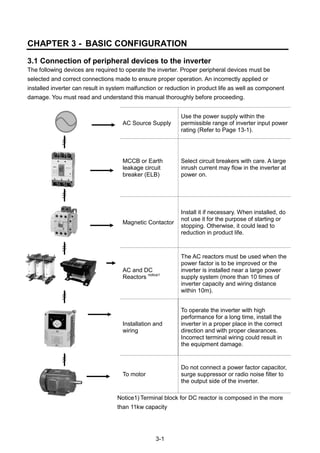
3.1 Connection of peripheral devices to the inverter
The following devices are required to operate the inverter. Proper peripheral devices must be
selected and correct connections made to ensure proper operation. An incorrectly applied or
installed inverter can result in system malfunction or reduction in product life as well as component
damage. You must read and understand this manual thoroughly before proceeding.
AC Source Supply
Use the power supply within the
permissible range of inverter input power
rating (Refer to Page 13-1).
MCCB or Earth
leakage circuit
breaker (ELB)
Select circuit breakers with care. A large
inrush current may flow in the inverter at
power on.
Magnetic Contactor
Install it if necessary. When installed, do
not use it for the purpose of starting or
stopping. Otherwise, it could lead to
reduction in product life.
AC and DC
Reactors notice1
The AC reactors must be used when the
power factor is to be improved or the
inverter is installed near a large power
supply system (more than 10 times of
inverter capacity and wiring distance
within 10m).
Installation and
wiring
To operate the inverter with high
performance for a long time, install the
inverter in a proper place in the correct
direction and with proper clearances.
Incorrect terminal wiring could result in
the equipment damage.
To motor
Do not connect a power factor capacitor,
surge suppressor or radio noise filter to
the output side of the inverter.
Notice1) Terminal block for DC reactor is composed in the more
than 11kw capacity
3-2
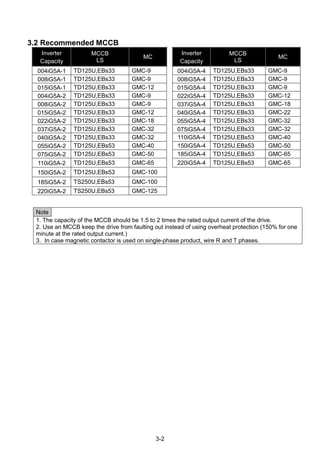
3.2 Recommended MCCB
Inverter
Capacity
MCCB
LS
MC
Inverter
Capacity
MCCB
LS
MC
004iG5A-1 TD125U,EBs33 GMC-9 004iG5A-4 TD125U,EBs33 GMC-9
008iG5A-1 TD125U,EBs33 GMC-9 008iG5A-4 TD125U,EBs33 GMC-9
015iG5A-1 TD125U,EBs33 GMC-12 015iG5A-4 TD125U,EBs33 GMC-9
004iG5A-2 TD125U,EBs33 GMC-9 022iG5A-4 TD125U,EBs33 GMC-12
008iG5A-2 TD125U,EBs33 GMC-9 037iG5A-4 TD125U,EBs33 GMC-18
015iG5A-2 TD125U,EBs33 GMC-12 040iG5A-4 TD125U,EBs33 GMC-22
022iG5A-2 TD125U,EBs33 GMC-18 055iG5A-4 TD125U,EBs33 GMC-32
037iG5A-2 TD125U,EBs33 GMC-32 075iG5A-4 TD125U,EBs33 GMC-32
040iG5A-2 TD125U,EBs33 GMC-32 110iG5A-4 TD125U,EBs53 GMC-40
055iG5A-2 TD125U,EBs53 GMC-40 150iG5A-4 TD125U,EBs53 GMC-50
075iG5A-2 TD125U,EBs53 GMC-50 185iG5A-4 TD125U,EBs53 GMC-65
110iG5A-2 TD125U,EBs53 GMC-65 220iG5A-4 TD125U,EBs53 GMC-65
150iG5A-2 TD125U,EBs53 GMC-100
185iG5A-2 TS250U,EBs53 GMC-100
220iG5A-2 TS250U,EBs53 GMC-125
Note
1. The capacity of the MCCB should be 1.5 to 2 times the rated output current of the drive.
2. Use an MCCB keep the drive from faulting out instead of using overheat protection (150% for one
minute at the rated output current.)
3. In case magnetic contactor is used on single-phase product, wire R and T phases.
3-3
3.3 Recommendable Fuse, Reactors
Inverter Capacity
AC Input fuse [External Fuse]
AC Reactor DC Reactor
Current Voltage
004iG5A-1 10 A 600 V 4.20 mH, 3.5A -
008iG5A-1 10 A 600 V 2.13 mH, 5.7A -
015iG5A-1 15 A 600 V 1.20 mH, 10A
004iG5A-2 10 A 600 V 4.20 mH, 3.5A
008iG5A-2 10 A 600 V 2.13 mH, 5.7A
015iG5A-2 15 A 600 V 1.20 mH, 10A -
022iG5A-2 25 A 600 V 0.88 mH, 14A -
037iG5A-2 30 A 600 V 0.56 mH, 20A -
040iG5A-2 30 A 600 V 0.56 mH, 20A -
055iG5A-2 30 A 600 V 0.39 mH, 30A -
075iG5A-2 50 A 600 V 0.28 mH, 40A -
110iG5A-2 70 A 600 V 0.20 mH, 59 A 0.74 mH, 56 A
150iG5A-2 100 A 600 V 0.15 mH, 75 A 0.57 mH, 71 A
185iG5A-2 100 A 600 V 0.12 mH, 96 A 0.49 mH, 91 A
220iG5A-2 125 A 600 V 0.10 mH, 112 A 0.42mH, 107 A
004iG5A-4 5 A 600 V 18.0 mH, 1.3A -
008iG5A-4 10 A 600 V 8.63 mH, 2.8A -
015iG5A-4 10 A 600 V 4.81 mH, 4.8A -
022iG5A-4 10 A 600 V 3.23 mH, 7.5A -
037iG5A-4 20 A 600 V 2.34 mH, 10A -
040iG5A-4 20 A 600 V 2.34 mH, 10A -
055iG5A-4 20 A 600 V 1.22 mH, 15A -
075iG5A-4 30 A 600 V 1.14 mH, 20A -
110iG5A-4 35 A 600 V 0.81 mH, 30 A 2.76 mH, 29 A
150iG5A-4 45 A 600 V 0.61 mH, 38 A 2.18 mH, 36 A
185iG5A-4 60 A 600 V 0.45 mH, 50 A 1.79 mH, 48 A
220iG5A-4 70 A 600 V 0.39 mH, 58 A 1.54 mH, 55 A
 Short Circuit Rating
“Suitable For Use ON A Circuit Capable Of Delivering Not More Than 65KA
Symmetrical Amperes. 240V drives or 480V drives Volts Maximum,”
 Short Circuit FUSE/BREAKER Marking
Use Class H or RK5 UL Listed Input Fuse and UL Listed Breaker Only. See the table above
For the Voltage and Current rating of the fuse and the breaker
4-4
CHAPTER 4 - PROGRAMMING KEYPAD & BASIC OPERATION
4.1 Keypad features
Display
FWD Lit during forward run Blinks when a fault occurs
REV Lit during reverse run
RUN Lit during Operation
SET Lit during parameter setting
7 segment Displays operation status and parameter information
Keys
RUN Run command
STOP/RESET STOP: Stop command during operation,
RESET: Reset command when fault occurs.
 UP Used to scroll through codes or increase parameter value
 Down Used to scroll through codes or decrease parameter value
 Left Used to jump to other parameter groups or move a cursor to the left to
change the parameter value
 Right Used to jump to other parameter groups or move cursor to the right to
change the parameter value
 ENT Used to set the parameter value or save the changed parameter value
Display
 SET/RUN LED
 FWD/REV LED
 7 Segment LED
Key
 RUN
 STOP/RESET
 Up/Down
 Left/Right
 Enter [ENT]
4-5
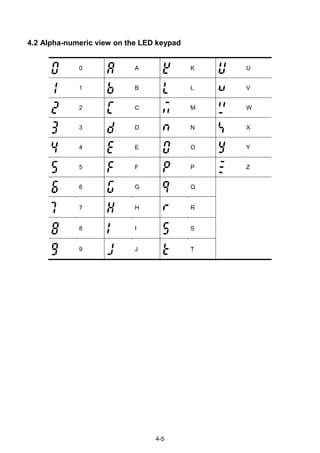
4.2 Alpha-numeric view on the LED keypad
0 A K U
1 B L V
2 C M W
3 D N X
4 E O Y
5 F P Z
6 G Q
7 H R
8 I S
9 J T
4-6
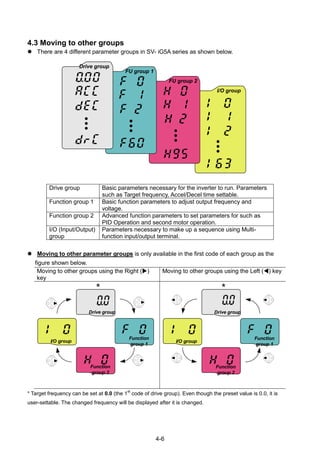
4.3 Moving to other groups
 There are 4 different parameter groups in SV- iG5A series as shown below.
Drive group Basic parameters necessary for the inverter to run. Parameters
such as Target frequency, Accel/Decel time settable.
Function group 1 Basic function parameters to adjust output frequency and
voltage.
Function group 2 Advanced function parameters to set parameters for such as
PID Operation and second motor operation.
I/O (Input/Output)
group
Parameters necessary to make up a sequence using Multi-
function input/output terminal.
 Moving to other parameter groups is only available in the first code of each group as the
figure shown below.
Moving to other groups using the Right ()
key
Moving to other groups using the Left () key
Function
group 1
Function
group 2
I/O group
Drive group
*
Function
group 1
Function
group 2
I/O group
Drive group
*
* Target frequency can be set at 0.0 (the 1
st
code of drive group). Even though the preset value is 0.0, it is
user-settable. The changed frequency will be displayed after it is changed.
I/O group
FU group 2
FU group 1
Drive group
4-7
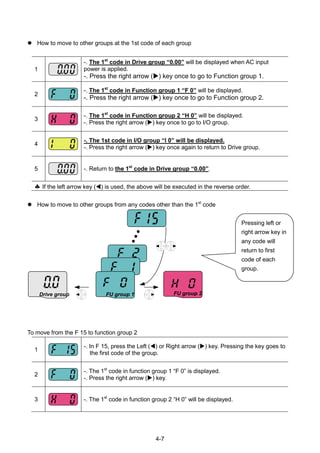
 How to move to other groups at the 1st code of each group
1
-. The 1st
code in Drive group “0.00” will be displayed when AC input
power is applied.
-. Press the right arrow () key once to go to Function group 1.
2
-. The 1st
code in Function group 1 “F 0” will be displayed.
-. Press the right arrow () key once to go to Function group 2.
3
-. The 1st
code in Function group 2 “H 0” will be displayed.
-. Press the right arrow () key once to go to I/O group.
4
-. The 1st code in I/O group “I 0” will be displayed.
-. Press the right arrow () key once again to return to Drive group.
5 -. Return to the 1st
code in Drive group “0.00”.
 If the left arrow key () is used, the above will be executed in the reverse order.
 How to move to other groups from any codes other than the 1st
code
To move from the F 15 to function group 2
1
-. In F 15, press the Left () or Right arrow () key. Pressing the key goes to
the first code of the group.
2
-. The 1st
code in function group 1 “F 0” is displayed.
-. Press the right arrow () key.
3 -. The 1st
code in function group 2 “H 0” will be displayed.
Pressing left or
right arrow key in
any code will
return to first
code of each
group.
FU group 1 FU group 2Drive group
4-8
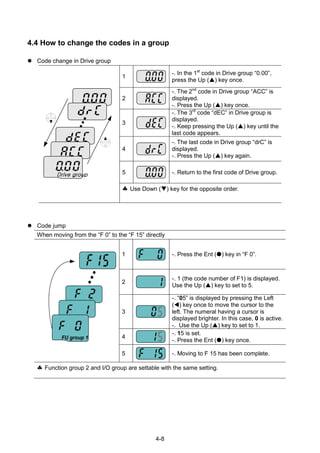
4.4 How to change the codes in a group
 Code change in Drive group
Drive group
1
-. In the 1st
code in Drive group “0.00”,
press the Up () key once.
2
-. The 2nd
code in Drive group “ACC” is
displayed.
-. Press the Up () key once.
3
-. The 3rd
code “dEC” in Drive group is
displayed.
-. Keep pressing the Up () key until the
last code appears.
4
-. The last code in Drive group “drC” is
displayed.
-. Press the Up () key again.
5 -. Return to the first code of Drive group.
 Use Down () key for the opposite order.
 Code jump
When moving from the “F 0” to the “F 15” directly
FU group 1
1 -. Press the Ent () key in “F 0”.
2
-. 1 (the code number of F1) is displayed.
Use the Up () key to set to 5.
3
-. “05” is displayed by pressing the Left
() key once to move the cursor to the
left. The numeral having a cursor is
displayed brighter. In this case, 0 is active.
-. Use the Up () key to set to 1.
4
-. 15 is set.
-. Press the Ent () key once.
5 -. Moving to F 15 has been complete.
 Function group 2 and I/O group are settable with the same setting.
4-9
 Navigating codes in a group
When moving from F 1 to F 15 in Function group 1
1
-. In F 1, continue pressing the Up ()
key until F15 is displayed.
2 -. Moving to F15 has been complete.
 The same applies to Function group 2 and I/O group.
Note: Some codes will be skipped in the middle of increment ()/decrement () for code
change. That is because it is programmed that some codes are intentionally left blank for
future use or the codes user does not use are invisible.
Refer to the Ch.5 for more specific contents
For example, when F24 [High/low frequency limit select] is set to “O (No) ”, F25 [High
frequency limit] and F26 [Low frequency limit] are not displayed during code change. But
When F24 is set to “1(Yes)”, F25 and F26 will appear on the display.
4-10
4.5 Parameter setting
 Changing parameter values in Drive Group
When changing ACC time from 5.0 sec to 16.0 sec
Drive group
1
-. In the first code “0.00”, press the Up () key once to go to the second
code.
2
-. ACC [Accel time] is displayed.
-. Press the Ent key () once.
3
-. Preset value is 5.0, and the cursor is in the digit 0.
-. Press the Left () key once to move the cursor to the left.
4 -. The digit 5 in 5.0 is active. Then press the Up () key once.
5
-. The value is increased to 6.0
-. Press the Left () key to move the cursor to the left.
6
-. 0.60 is displayed. The first 0 in 0.60 is active.
-. Press the Up () key once.
7
-. 16.0 is set.
-. Press the Ent () key once.
-. 16.0 is blinking.
-. Press the Ent () key once again to return to the parameter name.
8 -. ACC is displayed. Accel time is changed from 5.0 to 16.0 sec.
♣ In step 7, pressing the Left () or Right () key while 16.0 is blinking will disable the
setting.
Note 1) Pressing the Left ()/ Right () /Up () /Down () key while cursor is blinking will cancel
the parameter value change. Pressing the Enter key () in this status will enter the value into
memory.
4-11
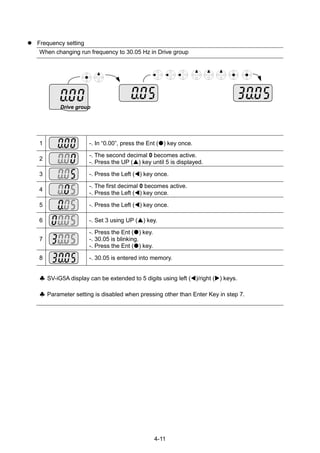
 Frequency setting
When changing run frequency to 30.05 Hz in Drive group
Drive group
1 -. In “0.00”, press the Ent () key once.
2
-. The second decimal 0 becomes active.
-. Press the UP () key until 5 is displayed.
3 -. Press the Left () key once.
4
-. The first decimal 0 becomes active.
-. Press the Left () key once.
5 -. Press the Left () key once.
6 -. Set 3 using UP () key.
7
-. Press the Ent () key.
-. 30.05 is blinking.
-. Press the Ent () key.
8 -. 30.05 is entered into memory.
 SV-iG5A display can be extended to 5 digits using left ()/right () keys.
 Parameter setting is disabled when pressing other than Enter Key in step 7.
4-12
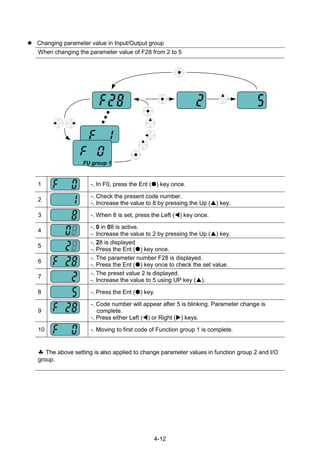
 Changing parameter value in Input/Output group
When changing the parameter value of F28 from 2 to 5
FU group 1
1 -. In F0, press the Ent () key once.
2
-. Check the present code number.
-. Increase the value to 8 by pressing the Up () key.
3 -. When 8 is set, press the Left () key once.
4
-. 0 in 08 is active.
-. Increase the value to 2 by pressing the Up () key.
5
-. 28 is displayed
-. Press the Ent () key once.
6
-. The parameter number F28 is displayed.
-. Press the Ent () key once to check the set value.
7
-. The preset value 2 is displayed.
-. Increase the value to 5 using UP key ().
8 -. Press the Ent () key.
9
-. Code number will appear after 5 is blinking. Parameter change is
complete.
-. Press either Left () or Right () keys.
10 -. Moving to first code of Function group 1 is complete.
 The above setting is also applied to change parameter values in function group 2 and I/O
group.
4-13
4.6 Monitoring of operation status
 Output current display
Monitoring output current in Drive group
Drive group
1
-. In [0.0], continue pressing the Up () or Down () key until [CUr] is
displayed.
2
-. Monitoring output current is provided in this parameter.
-. Press the Enter () key once to check the current.
3
-. Present output current is 5 A.
-. Press the Enter () key once to return to the parameter name.
4 -. Return to the output current monitoring code.
 Other parameters in Drive group such as dCL (Inverter DC link voltage) or vOL (Inverter
output voltage) can be monitored via the same method.
4-14
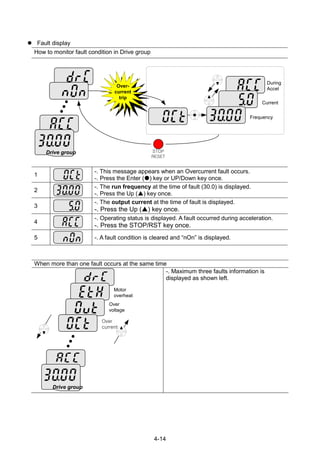
 Fault display
How to monitor fault condition in Drive group
Frequency
Current
During
Accel
Drive group STOP
RESET
Over-
current
trip
1
-. This message appears when an Overcurrent fault occurs.
-. Press the Enter () key or UP/Down key once.
2
-. The run frequency at the time of fault (30.0) is displayed.
-. Press the Up () key once.
3
-. The output current at the time of fault is displayed.
-. Press the Up () key once.
4
-. Operating status is displayed. A fault occurred during acceleration.
-. Press the STOP/RST key once.
5 -. A fault condition is cleared and “nOn” is displayed.
When more than one fault occurs at the same time
Drive group
Over
current
Over
voltage
Motor
overheat
-. Maximum three faults information is
displayed as shown left.
4-15
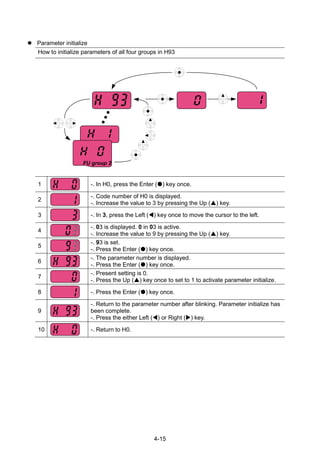
 Parameter initialize
How to initialize parameters of all four groups in H93
FU group 2
1 -. In H0, press the Enter () key once.
2
-. Code number of H0 is displayed.
-. Increase the value to 3 by pressing the Up () key.
3 -. In 3, press the Left () key once to move the cursor to the left.
4
-. 03 is displayed. 0 in 03 is active.
-. Increase the value to 9 by pressing the Up () key.
5
-. 93 is set.
-. Press the Enter () key once.
6
-. The parameter number is displayed.
-. Press the Enter () key once.
7
-. Present setting is 0.
-. Press the Up () key once to set to 1 to activate parameter initialize.
8 -. Press the Enter () key once.
9
-. Return to the parameter number after blinking. Parameter initialize has
been complete.
-. Press the either Left () or Right () key.
10 -. Return to H0.
4-16
4.7 Frequency Setting and Basic Operation
☞ Caution : The following instructions are given based on the fact that all parameters are set to
factory defaults. Results could be different if parameter values are changed. In this case, initialize
parameter values (see page 10-21) back to factory defaults and follow the instructions below.
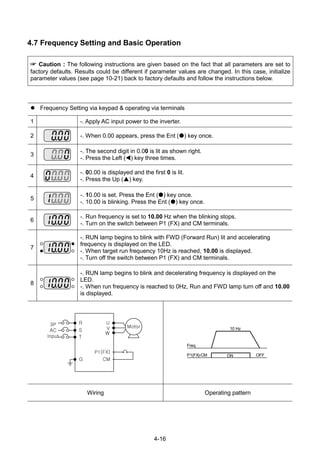
 Frequency Setting via keypad & operating via terminals
1 -. Apply AC input power to the inverter.
2 -. When 0.00 appears, press the Ent () key once.
3
-. The second digit in 0.00 is lit as shown right.
-. Press the Left () key three times.
4
-. 00.00 is displayed and the first 0 is lit.
-. Press the Up () key.
5
-. 10.00 is set. Press the Ent () key once.
-. 10.00 is blinking. Press the Ent () key once.
6
-. Run frequency is set to 10.00 Hz when the blinking stops.
-. Turn on the switch between P1 (FX) and CM terminals.
7
-. RUN lamp begins to blink with FWD (Forward Run) lit and accelerating
frequency is displayed on the LED.
-. When target run frequency 10Hz is reached, 10.00 is displayed.
-. Turn off the switch between P1 (FX) and CM terminals.
8
-. RUN lamp begins to blink and decelerating frequency is displayed on the
LED.
-. When run frequency is reached to 0Hz, Run and FWD lamp turn off and 10.00
is displayed.
3P
AC
Input
R
S
G
P1(FX)
CM
U
V
W
Motor
T
Freq.
P1(FX)-CM ON OFF
10 Hz
Wiring Operating pattern
4-17
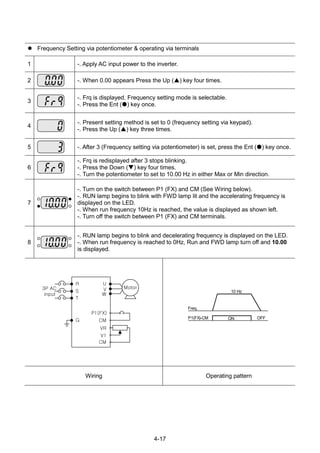
 Frequency Setting via potentiometer & operating via terminals
1 -. Apply AC input power to the inverter.
2 -. When 0.00 appears Press the Up () key four times.
3
-. Frq is displayed. Frequency setting mode is selectable.
-. Press the Ent () key once.
4
-. Present setting method is set to 0 (frequency setting via keypad).
-. Press the Up () key three times.
5 -. After 3 (Frequency setting via potentiometer) is set, press the Ent () key once.
6
-. Frq is redisplayed after 3 stops blinking.
-. Press the Down () key four times.
-. Turn the potentiometer to set to 10.00 Hz in either Max or Min direction.
7
-. Turn on the switch between P1 (FX) and CM (See Wiring below).
-. RUN lamp begins to blink with FWD lamp lit and the accelerating frequency is
displayed on the LED.
-. When run frequency 10Hz is reached, the value is displayed as shown left.
-. Turn off the switch between P1 (FX) and CM terminals.
8
-. RUN lamp begins to blink and decelerating frequency is displayed on the LED.
-. When run frequency is reached to 0Hz, Run and FWD lamp turn off and 10.00
is displayed.
3P AC
input
R
S
G
P1(FX)
CM
U
V
W
Motor
T
VR
V1
CM
Freq.
P1(FX)-CM ON OFF
10 Hz
Wiring Operating pattern
4-18
 Frequency setting via potentiometer & operating via the Run key
1 -. Apply AC input power to the inverter.
2 -. When 0.00 is displayed, press the Up () key three times.
3
-. “drv” is displayed. Operating method is selectable.
-. Press the Ent () key.
4
-. Check the present operating method (“1”: Run via control terminal).
-. Down () key once.
5
-. After setting “0”, press the Ent () key. When 0 is blinking, press the Ent
again.
6
-. “drv” is displayed after “0” is blinking. Operation method is set via the Run key
on the keypad. -. Press the Up () key once.
7
-. Different frequency setting method is selectable.
-. Press the Ent () key.
8
-. Check the present frequency setting method (“0” is run via keypad).
-. Press the Up () key three times.
9 -. After checking “3” (frequency setting via potentiometer), press the Ent () key.
10
-. “Frq” is displayed after “3” is blinking. Frequency setting is set via the
potentiometer on the keypad.
-. Press the Down () key four times.
-. Turn the potentiometer to set to 10.0 Hz in either Max or Min direction.
11
-. Press the Run key on the keypad.
-. RUN lamp begins to blink with FWD lamp lit and accelerating frequency is
displayed on the LED.
-. When run frequency 10Hz is reached, 10.00 is displayed as shown left.
-. Press the STOP/RST key.
12
-. RUN lamp begins to blink and decelerating frequency is displayed on the
LED.
-. When run frequency is reached to 0Hz, Run and FWD lamp turn off and 10.00
is displayed.
R
S
G
U
V
W
T
Keypad
Motor
VR
V1
CM
Freq.
Run key
10 Hz
STOP/RST key
Wiring Operating pattern
4-19
Notes:
5-1
CHAPTER 5 - FUNCTION LIST
 Drive Group
LED
display
Address
for
communi
cation
Parameter
name
Min/
Max
range
Description
Factory
defaults
Adj.
during
run
Page
0.00 A100 [Frequency
command]
0 ~
400
[Hz]
This parameter sets the frequency that the
inverter is commanded to output.
During Stop: Frequency Command
During Run: Output Frequency
During Multi-step operation:
Multi-step frequency 0.
It cannot be set greater than F21- [Max
frequency].
0.00 O 7-1
ACC A101 [Accel
time]
0 ~
6000
[Sec]
During Multi-Accel/Decel operation, this
parameter serves as Accel/Decel time 0.
5.0 O 7-12
dEC A102 [Decel
time]
10.0 O 7-12
drv A103 [Drive
mode]
0 ~ 4 0 Run/Stop via Run/Stop key on the keypad 1 X 7-8
1
Terminal
operation
FX: Motor forward run
RX: Motor reverse run
7-8
2
FX: Run/Stop enable
RX: Reverse rotation select
3 RS485 communication 7-9
4 Set to Field Bus communication
1) -
Frq A104 [Frequency
setting
method]
0 ~ 9 0 Digital Keypad setting 1 0 X 7-1
1 Keypad setting 2 7-1
2
Analog
V1 1: -10 ~ +10 [V] 7-2
3 V1 2: 0 ~ +10 [V] 7-3
4 Terminal I: 0 ~ 20 [mA] 7-4
5
Terminal V1 setting 1 +
Terminal I
7-5
6
Terminal V1 setting 2+
Terminal I
7-6
7 RS485 communication 7-5
8 Digital Volume 7-6
9 Set to Field Bus communication
1) -
St1 A105 [Multi-Step
frequency
1]
0 ~
400
[Hz]
Sets Multi-Step frequency 1 during Multi-step
operation.
10.00 O 7-7
St2 A106 [Multi-Step
frequency
2]
Sets Multi-Step frequency 2 during Multi-step
operation.
20.00 O 7-7
St3 A107 [Multi-Step
frequency
3]
Sets Multi-Step frequency 3 during Multi-step
operation.
30.00 O 7-7
CUr A108 [Output
current]
Displays the output current to the motor. - - 9-1
rPM A109 [Motor
RPM]
Displays the number of Motor RPM. - - 9-1
dCL A10A [Inverter
DC link
voltage]
Displays DC link voltage inside the inverter. - - 9-1
1)
: This function can be available with iG5A Communication Option Module.
5-2
 Drive Group
LED
display
Address
for
communi
cation
Parameter
name
Min/
Max
range
Description
Factory
defaults
Adj.
during
run
Page
vOL A10B [User
display
select]
This parameter displays the item selected at
H73- [Monitoring item select].
vOL - 9-2
vOL Output voltage
POr Output power
tOr Torque
nOn A10C [Fault
Display]
Displays the types of faults, frequency and
operating status at the time of the fault
- - 9-4
drC A10D [Direction
of motor
rotation
select]
F, r Sets the direction of motor rotation when drv -
[Drive mode] is set to either 0 or 1.
F O 7-8
F Forward
r Reverse
drv2 A10E [Drive
mode 2]
0 ~ 4 0 Run/Stop via Run/Stop key on the keypad 1 X 8-24
1
Terminal
operation
FX: Motor forward run
RX: Motor reverse run
2
FX: Run/Stop enable
RX: Reverse rotation select
3 RS-485 communication
4 Set to Filed Bus Communication
3)
Frq2
1)
A10F [Frequency
setting
method 2]
0 ~ 9 0 Digital Keypad setting 1 0 X 8-24
1 Keypad setting 2
2 Analog V1 1: -10 ~ +10 [V]
3 V1 2: 0 ~ +10 [V]
4 Terminal I: 0 ~ 20 [mA]
5
Terminal V1 setting 1 +
Terminal I
6
Terminal V1 setting 2+
Terminal I
7 RS485 communication
8 Digital Volume
9 Set to Filed Bus Communication
3)
rEF
2)
A110 PID control
standard
value
setting
0~400
[Hz] or
0~100
[%]
If H58 is 0, it is expressed as a [Hz] unit.
If H58 is 1, it is expressed as a [%] unit.
In [Hz] unit, you can‟t set Max. frequency
more than (F21).
In [%] unit, 100% means Max. frequency.
0.00 0 8-11
Fbk
2)
A111 PID control
feedback
amount
It indicates a feedback amount in PID
control.
If H58 is 0, it is expressed as a [Hz] unit.
If H58 is 1, it is expressed as a [%] unit.
- - 8-11
1)
: Only displayed when one of the Multi-function input terminals 1-8 [I17~I24] is set to “22”.
2)
: It is indicated when H49(PID control selection) is 1.
3)
: This function can be available with iG5A Communication Option Module.
5-3
 Function group 1
LED
display
Address
for
communi
cation
Paramet
er name
Min/Max
range
Description
Factory
defaults
Adj.
during
run
Page
F 0 A200 [Jump
code]
0 ~ 71 Sets the parameter code number to jump. 1 O 4-5
F 1
A201
[Forwar
d/
Reverse
run
disable]
0 ~ 2 0 Fwd and rev run enable 0 X 7-10
1 Forward run disable
2 Reverse run disable
F 2 A202 [Accel
pattern]
0 ~ 1
0 Linear
0 X 7-15
F 3 A203 [Decel
pattern]
1 S-curve
F 4 A204 [Stop
mode
select]
0 ~ 3 0 Decelerate to stop 0 X 7-20
1 DC brake to stop
2 Free run to stop
3 Power Braking stop 8-26
F 8
1)
A208 [DC
Brake
start
frequen
cy]
0.1 ~ 60
[Hz]
This parameter sets DC brake start
frequency.
It cannot be set below F23 - [Start
frequency].
5.00 X 8-1
F 9 A209 [DC
Brake
wait
time]
0 ~ 60
[sec]
When DC brake frequency is reached,
the inverter holds the output for the
setting time before starting DC brake.
0.1 X
F10 A20A [DC
Brake
voltage]
0 ~ 200
[%]
This parameter sets the amount of DC
voltage applied to a motor.
It is set in percent of H33 – [Motor rated
current].
50 X
F11 A20B [DC
Brake
time]
0 ~ 60
[sec]
This parameter sets the time taken to
apply DC current to a motor while motor
is at a stop.
1.0 X
F12 A20C [DC
Brake
start
voltage]
0 ~ 200
[%]
This parameter sets the amount of DC
voltage before a motor starts to run.
It is set in percent of H33 – [Motor rated
current].
50 X 8-2
F13 A20D [DC
Brake
start
time]
0 ~ 60
[sec]
DC voltage is applied to the motor for DC
Brake start time before motor
accelerates.
0 X
F14 A20E [Time
for
magneti
zing a
motor]
0 ~ 60
[sec]
This parameter applies the current to a
motor for the set time before motor
accelerates during Sensorless vector
control.
0.1 X 8-15
F20 A214 [Jog
frequen
cy]
0 ~ 400
[Hz]
This parameter sets the frequency for
Jog operation.
It cannot be set above F21 – [Max
frequency].
10.00 O 8-3
1)
: Only displayed when F 4 is set to 1 (DC brake to stop).
5-4
 Function group 1
LED
display
Address
for
communi
cation
Paramete
r name
Min/Max
range
Description
Factory
defaults
Adj.
during
run
Page
F21
1)
A215 [Max
frequency
]
40 ~ 400
[Hz]
This parameter sets the highest frequency
the inverter can output.
It is frequency reference for Accel/Decel
(See H70)
60.00 X 7-21
Caution
Any frequency cannot be set above Max
frequency except Base frequency
F22 A216 [Base
frequency
]
30 ~ 400
[Hz]
The inverter outputs its rated voltage to the
motor at this frequency (see motor
nameplate).
60.00 X 7-17
F23 A217 [Start
frequency
]
0.1 ~ 10
[Hz]
The inverter starts to output its voltage at
this frequency.
It is the frequency low limit.
0.50 X 7-21
F24 A218 [Frequen
cy
high/low
limit
select]
0 ~ 1 This parameter sets high and low limit of
run frequency.
0 X 7-21
F25
2)
A219 [Frequen
cy high
limit]
0 ~ 400
[Hz]
This parameter sets high limit of the run
frequency.
It cannot be set above F21 – [Max
frequency].
60.00 X
F26 A21A [Frequen
cy low
limit]
0 ~ 400
[Hz]
This parameter sets low limit of the run
frequency.
It cannot be set above F25 - [Frequency
high limit] and below F23 – [Start
frequency].
0.50 X
F27 A21B [Torque
Boost
select]
0 ~ 1 0 Manual torque boost 0 X 7-19
1 Auto torque boost
F28 A21C [Torque
boost in
forward
direction]
0 ~ 15
[%]
This parameter sets the amount of torque
boost applied to a motor during forward
run.
It is set in percent of Max output voltage.
2 X 7-19
F29 A21D [Torque
boost in
reverse
direction]
This parameter sets the amount of torque
boost applied to a motor during reverse
run.
It is set as a percent of Max output voltage
2 X 7-19
1)
: If H40 is set to 3 (Sensorless vector), Max. frequency is settable up to 300Hz.
2)
: Only displayed when F24 (Frequency high/low limit select) is set to 1.
5-5
 Function group 1
LED
display
Address
for
commu
nication
Parameter
name
Min/Max
range
Description
Factory
defaults
Adj.
during
run
Page
F30 A21E [V/F
pattern]
0 ~ 2 0 {Linear} 0 X 7-17
1 {Square} 7-17
2 {User V/F} 7-18
F31
1)
A21F [User V/F
frequency
1]
0 ~ 400
[Hz]
It is used only when V/F pattern is set to
2(User V/F)
It cannot be set above F21 – [Max
frequency].
The value of voltage is set in percent of
H70 – [Motor rated voltage].
The values of the lower-numbered
parameters cannot be set above those of
higher-numbered.
15.00 X 7-18
F32 A220 [User V/F
voltage 1]
0 ~ 100
[%]
25 X
F33 A221 [User V/F
frequency
2]
0 ~ 400
[Hz]
30.00 X
F34 A222 [User V/F
voltage 2]
0 ~ 100
[%]
50 X
F35 A223 [User V/F
frequency
3]
0 ~ 400
[Hz]
45.00 X
F36 A224 [User V/F
voltage 3]
0 ~ 100
[%]
75 X
F37 A225 [User V/F
frequency
4]
0 ~ 400
[Hz]
60.00 X
F38 A226 [User V/F
voltage 4]
0 ~ 100
[%]
100 X
F39 A227 [Output
voltage
adjustment
]
40 ~ 110
[%]
This parameter adjusts the amount of
output voltage.
The set value is the percentage of input
voltage.
100 X 7-18
F40 A228 [Energy-
saving
level]
0 ~ 30
[%]
This parameter decreases output voltage
according to load status.
0 0 8-17
F50 A232 [Electronic
thermal
select]
0 ~ 1 This parameter is activated when the
motor is overheated (time-inverse).
0 0 10-1
1)
: Set F30 to 2(User V/F) to display this parameter.
5-6
 Function group 1
LED
display
Address
for
commu
nication
Parameter
name
Min/Max
range
Description
Factory
defaults
Adj.
during
run
Page
F51
1)
A233 [Electronic
thermal
level for 1
minute]
50 ~ 200
[%]
This parameter sets max current capable of
flowing to the motor continuously for 1 minute.
The set value is the percentage of H33 –
[Motor rated current].
It cannot be set below F52 –[Electronic thermal
level for continuous].
150 0 10-1
F52 A234 [Electronic
thermal
level for
continuous]
50 ~ 150
[%]
This parameter sets the amount of current to
keep the motor running continuously.
It cannot be set higher than F51 – [Electronic
thermal level for 1 minute].
100 0
F53 A235 [Motor
cooling
method]
0 ~ 1 0 Standard motor having cooling fan
directly connected to the shaft
0 0
1 A motor using a separate motor to
power a cooling fan.
F54 A236 [Overload
warning
level]
30 ~ 150
[%]
This parameter sets the amount of current to
issue an alarm signal at a relay or multi-
function output terminal (see I54, I55).
The set value is the percentage of H33- [Motor
rated current].
150 0 10-2
F55 A237 [Overload
warning
time]
0 ~ 30 [Sec] This parameter issues an alarm signal when
the current greater than F54- [Overload
warning level] flows to the motor for F55-
[Overload warning time].
10 0
F56 A238 [Overload
trip select]
0 ~ 1 This parameter turns off the inverter output
when motor is overloaded.
1 0 10-2
F57 A239 [Overload
trip level]
30 ~ 200
[%]
This parameter sets the amount of overload
current.
The value is the percentage of H33- [Motor
rated current].
180 0
F58 A23A [Overload
trip time]
0 ~ 60 [Sec] This parameter turns off the inverter output
when the F57- [Overload trip level] of current
flows to the motor for F58- [Overload trip time].
60 0
1)
: Set F50 to 1 to display this parameter.
5-7
 Function group 1
LED
display
Address
for
commun
ication
Paramete
r name
Min/Max
range
Description
Factory
defaults
Adj.
during
run
Page
F59 A23B [Stall
preventio
n select]
0 ~ 7 This parameter stops accelerating during
acceleration, decelerating during constant
speed run and stops decelerating during
deceleration.
0 X 10-3
During
Decel
During
constant
run
During Accel
Bit 2 Bit 1 Bit 0
0 - - -
1 - - 
2 -  -
3 -  
4  - -
5  - 
6   -
7   
F60 A23C [Stall
preventio
n level]
30 ~
200
[%]
This parameter sets the amount of current to
activate stall prevention function during Accel,
Constant or Decel run.
The set value is the percentage of the H33-
[Motor rated current].
150 X 10-3
F61
1)
A23D [When
Stall
preventio
n during
decelerati
on,
voltage
limit
select
0~1 In Stall prevention run during deceleration, if
you want to limit output voltage, select 1
0 X 8-26
F63 A23F [Save
up/down
frequency
select]
0 ~ 1 This parameter decides whether to save the
specified frequency during up/down
operation.
When 1 is selected, the up/down frequency is
saved in F64.
0 X 8-4
F64
2)
A240 [Save
up/down
frequency
]
If „Save up/down frequency‟ is selected at
F63, this parameter saves the frequency
before the inverter stops or decelerated.
0.00 X 8-4
F65 A241 [Up-down
mode
select]
0~2 We can select up-down mode among three
thing
0 X 8-5
0 Increases goal frequency as a
standard of Max. frequency/Min.
frequency
1 Increases as many as step
frequency according to edge input
2 Available to combine 1 and 2
1)
: It is indicated when setting bit 2 of F59 as 1
2)
: Set F63 to 1 to display this parameter.
5-8
 Function group 1
LED
display
Address
for
commun
ication
Parameter
name
Min/Max
range
Description
Factory
defaults
Adj.
during
run
Page
F66 A242 [Up-down
step
frequency]
0~400
[Hz]
In case of choosing F65 as a 1 or 2, it means
increase or decrease of frequency according
to up-down input
0.00 X 8-5
F70 A246 [Draw run
mode
select]
0~3 0 Inverter doesn‟t run as a draw
mode
0 X 8-28
1 V1(0~10V) input draw run
2 I(0~20mA) input draw run
3 V1(-10~10V) input draw run
F71 A247 [Draw rate] 0~100
[%]
Sets rate of draw 0.00 0 8-28
5-9
 Function group 2
LED
display
Address
for
commu
nication
Parameter
name
Min/Max
range
Description
Factory
defaults
Adj.
during
run
Page
H 0 A300 [Jump
code]
0~95 Sets the code number to jump. 1
O
4-5
H 1 A301 [Fault
history 1]
- Stores information on the types of faults,
the frequency, the current and the
Accel/Decel condition at the time of fault.
The latest fault is automatically stored in
the H 1- [Fault history 1].
nOn
-
9-4
H 2 A302 [Fault
history 2]
- nOn
-
H 3 A303 [Fault
history 3]
- nOn
-
H 4 A304 [Fault
history 4]
- nOn
-
H 5 A305 [Fault
history 5]
- nOn
-
H 6 A306 [Reset
fault
history]
0~1 Clears the fault history saved in H 1-5. 0
O
H 7 A307 [Dwell
frequency]
0.1~400
[Hz]
When run frequency is issued, motor
starts to accelerate after dwell frequency
is applied to the motor during H8- [Dwell
time].
[Dwell frequency] can be set within the
range of F21- [Max frequency] and F23-
[Start frequency].
5.00 X 8-7
H 8 A308 [Dwell
time]
0~10
[sec]
Sets the time for dwell operation. 0.0 X
H10 A30A [Skip
frequency
select]
0 ~ 1 Sets the frequency range to skip to
prevent undesirable resonance and
vibration on the structure of the machine.
0 X 7-22
H11
1)
A30B [Skip
frequency
low limit 1]
0.1~400
[Hz]
Run frequency cannot be set within the
range of H11 thru H16. The frequency
values of the low numbered parameters
cannot be set above those of the high
numbered ones. Settable within the
range of F21 and F23.
10.00 X
H12 A30C [Skip
frequency
high limit
1]
15.00 X
H13 A30D [Skip
frequency
low limit 2]
20.00 X
H14 A30E [Skip
frequency
high limit
2]
25.00 X
H15 A30F [Skip
frequency
low limit 3]
30.00 X
H16 A310 [Skip
frequency
high limit
3]
35.00 X
1)
: only displayed when H10 is set to 1. # H17, H18 are used when F2, F3 are set to 1 (S-curve).
5-10
 Function group 2
LED
display
Address for
communication
Parameter
name
Min/Max
range
Description
Factory
defaults
Adj.
during
run
Page
H17 A311 [S-Curve
accel/decel
start side]
1~100
[%]
Set the speed reference value to form a
curve at the start during accel/decel. If it is
set higher, linear zone gets smaller.
40 X 7-15
H18 A312 [S-Curve
accel/decel
end side]
1~100
[%]
Set the speed reference value to form a
curve at the end during accel/decel. If it is set
higher, linear zone gets smaller.
40 X
H19 A313 [Input/output
phase loss
protection
select]
0 ~ 3 0 Disabled 1 Output phase
protection
0 O 10-4
2 Input
phase
protection
3 Input/output phase
protection
H20 A314 [Power On
Start select]
0 ~ 1 This parameter is activated when drv is set to
1 or 2 (Run/Stop via Control terminal).
Motor starts acceleration after AC power is
applied while FX or RX terminal is ON.
0 O 7-11
H21 A315 [Restart
after fault
reset
selection]
0 ~1 This parameter is activated when drv is set to
1 or 2 (Run/Stop via Control terminal).
Motor accelerates after the fault condition is
reset while the FX or RX terminal is ON.
0 O 7-11
H22
1)
A316 [Speed
Search
Select]
0 ~ 15 This parameter is active to prevent any
possible fault when the inverter outputs its
voltage to the running motor.
0 X 8-17
1. H20-
[Power
On start]
2.
Restar
t after
instant
power
failure
3.
Operatio
n after
fault
4.
Normal
accel
Bit 3 Bit 2 Bit 1 Bit 0
0 - - - -
1 - - - 
2 - -  -
3 - -  
4 -  - -
1)
Normal acceleration has first priority. Even though #4 is selected along with other bits, Inverter performs Speed search
#4.
5-11
 Function group 2
LED
display
Address
for
communic
ation
Paramete
r name
Min/Max
range
Description
Factor
y
default
s
Adj.
during
run
Page
H22
1)
A316 1. H20-
[Power
On
start]
2.
Restart
after
instant
power
failure
3.
Operati
on after
fault
4.
Nor
mal
accel
O 8-17
Bit 3 Bit 2 Bit 1 Bit 0
5 -  - 
6 -   -
7 -   
8  - - -
9  - - 
10  -  -
11  -  
12   - -
13   - 
14    -
15    
H23 A317 [Current
level
during
Speed
search]
80~200
[%]
This parameter limits the amount of current
during speed search.
The set value is the percentage of the H33-
[Motor rated current].
100 O 8-17
H24 A318 [P gain
during
Speed
search]
0~9999 It is the Proportional gain used for Speed
Search PI controller.
100 O
H25 A319 [I gain
during
speed
search]
0~9999 It is the Integral gain used for Speed search
PI controller.
200 O
H26 A31A [Number
of Auto
Restart
try]
0 ~10 This parameter sets the number of restart
tries after a fault occurs.
Auto Restart is deactivated if the fault
outnumbers the restart tries.
This function is active when [drv] is set to 1 or
2 {Run/Stop via control terminal}.
Deactivated during active protection function
(OHT, LVT, EXT, HWT etc.).
0 O 8-20
5-12
 Function group 2
LED
display
Address
for
communi
cation
Parameter
name
Min/Max
range
Description
Factory
defaults
Adj.
during run
Page
H27 A31B [Auto Restart
time]
0~60 [sec] This parameter sets the time
between restart tries.
1.0 O 8-20
H30 A31E [Motor type
select]
0.2~ 22.0 0.2 0.2kW 7.5
1)
X 8-16
~ ~
22.0 22.0kW
H31 A31F [Number of
motor poles]
2 ~ 12 This setting is displayed via rPM
in drive group.
4 X
H32 A320 [Rated slip
frequency]
0 ~ 10
[Hz] 




 

120
Prpm
ff rs
Where, sf = Rated slip frequency
rf = Rated frequency
rpm= Motor nameplate
RPM
P = Number of Motor
poles
2.33
2)
X
H33 A321 [Motor rated
current]
0.5~150
[A]
Enter motor rated current on the
nameplate.
26.3 X
H34 A322 [No Load
Motor Current]
0.1~ 100 [A] Enter the current value detected
when the motor is rotating in rated
rpm after the load connected to
the motor shaft is removed.
Enter the 50% of the rated current
value when it is difficult to
measure H34 – [No Load Motor
Current].
11 X
H36 A324 [Motor
efficiency]
50~100
[%]
Enter the motor efficiency (see
motor nameplate).
87 X
H37 A325 [Load inertia
rate]
0 ~ 2 Select one of the following
according to motor inertia.
0 X 8-1
0 Less than 10 times
1 About 10 times
2 More than 10 times
1)
: H30 is preset based on inverter rating.
2)
: H32 ~ H36 factory default values are set based on OTIS-LG motor.
5-13
 Function group 2
LED
display
Address
for
communi
cation
Paramet
er name
Min/Max
range
Description
Factory
defaults
Adj.
during
run
Page
H39 A327 [Carrier
frequen
cy
select]
1 ~ 15
[kHz]
This parameter affects the audible sound
of the motor, noise emission from the
inverter, inverter temp, and leakage
current. If the set value is higher, the
inverter sound is quieter but the noise
from the inverter and leakage current will
become greater.
3 O 8-21
H40 A328 [Control
mode
select]
0 ~ 3 0 {Volts/frequency Control} 0 X 7-17
1 {Slip compensation control} 8-8
3 {Sensorless vector control} 8-15
H41 A329 [Auto
tuning]
0 ~ 1 If this parameter is set to 1, it
automatically measures parameters of
the H42 and H44.
0 X 8-14
H42 A32A [Stator
resistan
ce (Rs)]
0 ~ 28
[]
This is the value of the motor stator
resistance.
- X
H44 A32C [Leakage
inductanc
e (L)]
0~ 300.0
[mH]
This is leakage inductance of the stator
and rotor of the motor.
- X
H45
1)
A32D [Sensorl
ess P
gain]
0~ 32767 P gain for Sensorless control 1000 O
H46 A32E [Sensorl
ess I
gain]
I gain for Sensorless control 100 O
H47 A32F [Sensorl
ess
torque
limit]
100~220[
%]
Limits output torque in sensorless mode,. 180.0 X
H48 A330 PWM
mode
select
0~1 If you want to limit a inverter leakage
current, select 2 phase PWM mode.
It has more noise in comparison to
Normal PWM mode.
0 X 8-30
0 Normal PWM mode
1 2 phase PWM mode
H49 A331 PID
select
0~1 Selects whether using PID control or not 0 X 8-10
H50
2)
A332 [PID F/B
select]
0 ~ 2 0 Terminal I input (0 ~ 20 mA) 0 X 8-10
1 Terminal V1 input (0 ~ 10 V)
2 RS-485 communication feedback
H51 A333 [P gain
for PID]
0~ 999.9
[%]
This parameter sets the gains for the PID
controller.
300.0 O
H52 A334 [Integral
time for
PID
0.1~32.0
[sec]
1.0 O
H53 A335 [Differen
tial time
for PID
(Dgain)]
0 ~ 30.0
[sec]
0.0 O
H54 A336 [PID
control
mode
select]
0~1 Selects PID control mode 0 X 8-10
0 Normal PID control
1 Process PID control
1)
: Set H40 to 3 (Sensorless vector control) to display this parameter.
2)
: Set H49 to 1 (PID control) to display this parameter.
5-14
 Function group 2
LED
display
Address
for
commu-
nication
Parameter
name
Min/Max
range
Description
Factory
defaults
Adj.
during
run
Page
H55 A337 [PID output
frequency
high limit]
0.1 ~
400
[Hz]
This parameter limits the amount of the
output frequency through the PID control.
The value is settable within the range of
F21 – [Max frequency] and F23 – [Start
frequency].
60.00 O 8-10
H56 A338 [PID output
frequency
low limit]
0.1 ~
400
[Hz]
0.50 O
H57 A339 [PID
standard
value select]
0~4 Selects PID standard value.
Standard value is indicated in “rEF” of
Drive group.
0 X 8-10
0 Loader digital setting 1
1 Loader digital setting 2
2 V1 terminal setting 2: 0~10V
3 I terminal setting: 0~20mA
4 Setting as a RS-485
communication
H58 A33A PID control
unit select
0~1 Selects a unit of the standard value or
feedback amount.
0 X
0 Frequency[Hz]
1 Percentage[%]
H60 A33C [Self-
diagnostic
select]
0 ~ 3 0 Self-diagnostic disabled 0 X 8-22
1 IGBT fault/Ground fault
2 Output phase short & open/
Ground fault
3 Ground fault (This setting is
unable when more than 11kW)
H61
1)
A33D [Sleep delay
time]
0~2000
[s]
Sets a sleep delay time in PID drive. 60.0 X 8-13
H62 A33E [Sleep
frequency]
0~400
[Hz]
Sets a sleep frequency when executing a
sleep function in PID control drive.
You can‟t set more than Max.
frequency(F21)
0.00 O
H63 A33F [Wake up
level]
0~100
[%]
Sets a wake up level in PID control drive. 35.0 O
H64 A340 [KEB drive
select]
0~1 Sets KEB drive. 0 X 8-28
H65 A341 [KEB action
start level]
110~140
[%]
Sets KEB action start level according to
level.
125.0 X
H66 A342 [KEB action
stop level]
110~145
[%]
Sets KEB action stop level according to
level.
130.0 X
1):
Set H49 as a 1
2):
it is indicated when setting H64(KEB drive select) as a 1
(KEB does not operate when cut power after loading ting input (about 10%).
5-15
 Function group 2
LED
display
Address
for
commu-
nication
Parameter
name
Min/Max
range
Description
Factory
defaults
Adj.
during
run
Page
H67 A343 [KEB action
gain]
1~2000
0
Sets KEB action gain. 1000 X 8-28
H70 A346 [Frequency
Reference
for
Accel/Decel]
0 ~ 1 0 Based on Max freq (F21) 0 X 7-12
1 Based on Delta freq.
H71 A347 [Accel/Decel
time scale]
0 ~ 2 0 Settable unit: 0.01 second. 1 O 7-13
1 Settable unit: 0.1 second.
2 Settable unit: 1 second.
H72 A348 [Power on
display]
0 ~ 17 This parameter selects the parameter to
be displayed on the keypad when the
input power is first applied.
0 O 9-2
0 Frequency command
1 Accel time
2 Decel time
3 Drive mode
4 Frequency mode
5 Multi-Step frequency 1
6 Multi-Step frequency 2
7 Multi-Step frequency 3
8 Output current
9 Motor rpm
10 Inverter DC link voltage
11 User display select (H73)
12 Fault display
13 Direction of motor rotation
select
14 Output current 2
15 Motor rpm 2
16 Inverter DC link voltage 2
17 User display select 2
H73 A349 [Monitoring
item select]
0 ~ 2 One of the following can be monitored
via vOL - [User display select].
0 O 9-2
0 Output voltage [V]
1 Output power [kW]
2 Torque [kgf  m]
H74 A34A [Gain for
Motor rpm
display]
1 ~
1000
[%]
This parameter is used to change the
motor rotating speed (r/min) to
mechanical speed (m/mi) and display it.
100 O 9-1
H75 A34B [DB resistor
operating
rate limit
select]
0 ~ 1 0 Unlimited 1 O 10-8
1 Use DB resistor for the H76 set
time.
5-16
H76 A34C [DB resistor
operating
rate]
0 ~
30[%]
Set the percent of DB resistor operating
rate to be activated during one sequence
of operation.
10 O
H77
1)
A34D [Cooling fan
control]
0 ~ 1 0 Always ON 0 O 8-30
1 Keeps ON when its temp is
higher than inverter protection
limit temp.
Activated only during operation
when its temp is below that of
inverter protection limit.
H78 A34E [Operating
method
select when
cooling fan
malfunctions
]
0 ~ 1 0 Continuous operation when
cooling fan malfunctions.
0 O 8-31
1 Operation stopped when
cooling fan malfunctions.
H79 A34F [S/W
version]
x.xx This parameter displays the inverter
software version.
x.xx X -
H81
2)
A351 [2
nd
motor
Accel time]
0 ~
6000
[sec]
This parameter actives when the
selected terminal is ON after I17-I24 is
set to 12 {2
nd
motor select}.
5.0 O 8-21
H82 A352 [2
nd
motor
Decel time]
10.0 O
H83 A353 [2
nd
motor
base
frequency]
30 ~
400 [Hz]
60.00 X
H84 A354 [2
nd
motor
V/F pattern]
0 ~ 2 0 X
H85 A355 [2
nd
motor
forward
torque
boost]
0 ~ 15
[%]
5 X
H86 A356 [2
nd
motor
reverse
torque
boost]
5 X
H87 A357 [2
nd
motor
stall
prevention
level]
30~150
[%]
150 X 8-21
1)
Exception: Since SV004iG5A-2/SV004iG5A-4 is Natural convection type, this code is hidden.
2)
: It is indicated when choosing I17~I24 as a 12 (2
nd
motor select).
H88 A358 [2
nd
motor
Electronic
thermal
level for 1
min]
50~200
[%]
150 O
H89 A359 [2
nd
motor
Electronic
thermal
level for
continuous]
50~150
[%]
100 O
H90 A35A [2
nd
motor
rated
current]
0.1~100
[A]
26.3 X
H91
1)
A35B [Parameter
read]
0 ~ 1 Copy the parameters from inverter and
save them into remote loader.
0 X 8-32
H92 A35C [Parameter
write]
0 ~ 1 Copy the parameters from remote loader
and save them into inverter.
0 X
5-17
H93 A35D [Parameter
initialize]
0 ~ 5 This parameter is used to initialize
parameters back to the factory default
value.
0 X 8-32
0 -
1 All parameter groups are
initialized to factory default
value.
2 Only Drive group is initialized.
3 Only Function group 1 is
initialized.
4 Only Function group 2 is
initialized.
5 Only I/O group is initialized.
H94 A35E [Password
register]
0 ~
FFFF
Password for H95-[Parameter lock]. Set
as Hexa value.
0 O 8-33
H95 A35F [Parameter
lock]
0 ~
FFFF
This parameter is able to lock or unlock
parameters by typing password
registered in H94.
0 O 8-33
UL (Unlock) Parameter change
enable
L (Lock) Parameter change
disable
1)
H91,H92 parameters are displayed when Remote option is installed.
5-18
 Input/output group
LED
display
Address
for
communi
cation
Parameter
name
Min/Max
range
Description
Factory
defaults
Adj.
during
run
Page
I 0 A400 [Jump code] 0 ~ 87 Sets the code number to jump. 1 O 4-5
I 2 A402 [NV input
Min voltage]
0 ~ -10
[V]
Sets the minimum voltage of the NV (-
10V~0V) input.
0.00 O 7-2
I 3 A403 [Frequency
correspondi
ng to I 2]
0 ~ 400
[Hz]
Sets the inverter output minimum
frequency at minimum voltage of the NV
input.
0.00 O
I 4 A404 [NV input
Max
voltage]
0 ~ -10
[V]
Sets the maximum voltage of the NV
input.
10.0 O
I 5 A405 [Frequency
correspondi
ng to I 4]
0 ~ 400
[Hz]
Sets the inverter output maximum
frequency at maximum voltage of the
NV input.
60.00 O
I 6 A406 [Filter time
constant for
V1 input]
0 ~ 9999 Adjusts the responsiveness of V1 input
(0 ~ +10V).
10 O 7-2
I 7 A407 [V1 input
Min voltage]
0 ~ 10
[V]
Sets the minimum voltage of the V1
input.
0 O
I 8 A408 [Frequency
correspondi
ng to I 7]
0 ~ 400
[Hz]
Sets the inverter output minimum
frequency at minimum voltage of the V1
input.
0.00 O
I 9 A409 [V1 input
Max
voltage]
0 ~ 10
[V]
Sets the maximum voltage of the V1
input.
10 O
I10 A40A [Frequency
correspondi
ng to I 9]
0 ~ 400
[Hz]
Sets the inverter output maximum
frequency at maximum voltage of the
V1 input.
60.00 O
I11 A40B [Filter time
constant for
I input]
0 ~ 9999 Sets the input section‟s internal filter
constant for I input.
10 O 7-4
I12 A40C [I input Min
current]
0 ~ 20
[mA]
Sets the minimum current of I input. 4.00 O
I13 A40D [Frequency
correspondi
ng to I 12]
0 ~ 400
[Hz]
Sets the inverter output minimum
frequency at minimum current of I input.
0.00 O
I14 A40E [I input Max
current]
0 ~ 20
[mA]
Sets the Maximum current of I input. 20.00 O
I15 A40F [Frequency
correspondi
ng to I 14]
0 ~ 400
[Hz]
Sets the inverter output maximum
frequency at maximum current of I
input.
60.00 O 7-4
I16 A410 [Criteria for
Analog Input
Signal loss]
0 ~ 2 0: Disabled
1: activated below half of set value.
2: activated below set value.
0 O 10-7
I17 A411 [Multi-
function
input
terminal P1
define]
0 ~ 27 0 Forward run command 0 O 7-8
1 Reverse run command
I18 A412 [Multi-
function
input
terminal P2
define]
2 Emergency Stop Trip 1 O -
3 Reset when a fault occurs {RST} -
5-19
 Input/output group
LED
display
Address
for
communi
cation
Parameter
name
Min/Max
range
Description
Factory
defaults
Adj.
during
run
Page
I19 A413 [Multi-
function
input
terminal P3
define]
4 Jog operation command 2 O 8-3
5 Multi-Step freq – Low 7-7
I20 A414 [Multi-
function
input
terminal P4
define]
6 Multi-Step freq – Mid 3 O
7 Multi-Step freq – High
I21 A415 [Multi-
function
input
terminal P5
define]
8 Multi Accel/Decel – Low 4 O 7-14
9 Multi Accel/Decel – Mid
I22 A416 [Multi-
function
input
terminal P6
define]
10 Multi Accel/Decel – High 5 O
11 DC brake during stop 8-2
I23 A417 [Multi-
function
input
terminal P7
define]
12 2nd motor select 6 O 8-21
13 -Reserved- -
I24 A418 [Multi-
function
input
terminal P8
define]
14 -Reserved- 7 O -
15 Up-
down
Frequency increase
(UP)
command
8-4
16 Frequency decrease
command (DOWN)
17 3-wire operation 8-7
18 External trip: A Contact (EtA) 10-5
19 External trip: B Contact (EtB)
20 Self-diagnostic function 8-22
21 Change from PID operation to
V/F operation
8-10
22 2
nd
Source 8-24
23 Analog Hold 7-6
24 Accel/Decel Disable 7-16
25 Up/Down Save Freq. Initialization 8-4
26 JOG-FX 8-3
27 JOG-RX
* See “Chapter 14 Troubleshooting and maintenance” for External trip A/B contact.
* Each multi-function input terminal must be set differently.
5-20
 Input/output group
LED
display
Address
for
communic
ation
Parameter
name
Min/Max
range
Description
Factory
default
Adj.
during
run
Page
I25 A419 [Input
terminal
status
display]
BIT
7
BIT
6
BIT
5
BIT
4
BIT
3
BIT
2
BIT
1
BIT
0
- - 9-3
P8 P7 P6 P5 P4 P3 P2 P1
I26 A41A [Output
terminal
status
display]
BIT1 BIT0
- -
9-3
3AC MO
I27 A41B [Filtering
time
constant
for Multi-
function
Input
terminal]
1 ~ 15 If the value is set higher, the
responsiveness of the Input terminal is
getting slower.
4 O -
I30 A41E [Multi-
Step
frequency
4]
0 ~ 400
[Hz]
It cannot be set greater than F21 – [Max
frequency].
30.00
O
7-7
I31 A41F [Multi-
Step
frequency
5]
25.00
O
I32 A420 [Multi-
Step
frequency
6]
20.00
O
I33 A421 [Multi-
Step
frequency
7]
15.00
O
I34 A422 [Multi-
Accel time
1]
0~ 6000
[sec]
3.0 O 7-14
I35 A423 [Multi-
Decel
time 1]
3.0
I36 A424 [Multi-
Accel time
2]
4.0
I37 A425 [Multi-
Decel
time 2]
4.0
I38 A426 [Multi-
Accel time
3]
5.0
I39 A427 [Multi-
Decel
time 3]
5.0
I40 A428 [Multi-
Accel time
4]
6.0
I41 A429 [Multi-
Decel
time 4]
6.0
5-21
 Input/output group
LED
display
Address
for
communic
ation
Parameter
name
Min/Max
range
Description
Factory
default
Adj.
during
run
Page
I42 A42A [Multi-
Accel time
5]
7.0
I43 A42B [Multi-
Decel
time 5]
7.0
I44 A42C [Multi-
Accel time
6]
8.0
I45 A42D [Multi-
Decel
time 6]
8.0
I46 A42E [Multi-
Accel time
7]
9.0
I47 A42F [Multi-
Decel
time 7]
9.0
I50 A432 [Analog
output
item
select]
0 ~ 3 Output
item
Output to 10[V] 0 O 9-6
200V 400V
0 Output
freq.
Max frequency
1 Output
current
150 %
2 Output
voltage
AC 282V AC 564V
3 Inverter
DC link
voltage
DC 400V DC 800V
I51 A433 [Analog
output
level
adjustmen
t]
10~200
[%]
Based on 10V. 100 O 9-6
I52 A434 [Frequenc
y
detection
level]
0 ~ 400
[Hz]
Used when I54 or I55 is set to 0-4.
Cannot be set higher than F21.
30.00
O
9-7
I53 A435 [Frequenc
y
detection
bandwidth
]
10.00
O
I54 A436 [Multi-
function
output
terminal
select]
0 ~ 19 0 FDT-1 12 O 9-8
1 FDT-2
2 FDT-3 9-9
3 FDT-4 17
I55 A437 [Multi-
function
relay
select]
4 FDT-5 9-10
5 Overload (OLt) 9-10
6 Inverter Overload (IOLt)
7 Motor stall (STALL)
5-22
 Input/output group
LED
display
Address
for
communic
ation
Parameter
name
Min/Max
range
Description
Factory
default
Adj.
during
run
Page
8 Over voltage trip (Ovt)
9 Low voltage trip (Lvt)
10 Inverter Overheat (OHt)
11 Command loss
12 During Run 9-11
13 During Stop
14 During constant run
15 During speed searching
16 Wait time for run signal input
17 Multi-function relay select
18 Warning for cooling fan trip
19 Brake signal select
5-23
 Input/Output Group
LED
display
Address
for
commun
ication
Paramet
er name
Min/Max
range
Description
Factory
defaults
Adj.
during
run
Page
I56 A438 [Fault
relay
output]
0 ~ 7 When
setting the
H26–
[Number of
auto
restart try]
When the
trip other
than low
voltage trip
occurs
When the
low voltage
trip occurs
2 O 9-7
Bit 2 Bit 1 Bit 0
0 - - -
1 - - 
2 -  -
3 -  
4  - -
5  - 
6   -
7   
I57 A439 [Output
terminal
select
when
commun
ication
error
occurs]
0 ~ 3 Multi-function
relay
Multi-function
output terminal
0 O 9-12
Bit 1 Bit 0
0 - -
1 - 
2  -
3  
I59 A43B [Commu
nication
protocol
select]
0 ~ 1 Set communication protocol. 0 X 11-2
0 Modbus RTU
1 LS BUS
I60 A43C [Inverter
number]
1 ~ 250 Set for RS485 communication 1 O 11-2
I61 A43D [Baud
rate]
0 ~ 4 Select the Baud rate of the RS485. 3 O 11-2
0 1200 [bps]
1 2400 [bps]
2 4800 [bps]
3 9600 [bps]
4 19200 [bps]
I62 A43E [Drive
mode
select
after
loss of
frequenc
y
comman
d]
0 ~ 2 It is used when freq command is given via
V1 /I terminal or RS485.
0 O 10-7
0 Continuous operation at the frequency
before its command is lost.
1 Free Run stop (Output cut-off)
2 Decel to stop
I63 A43F [Wait
time
after
loss of
frequenc
y
comman
d]
0.1 ~ 120
[sec]
This is the time inverter determines
whether there is the input frequency
command or not. If there is no frequency
command input during this time, inverter
starts operation via the mode selected at
I62.
1.0 O 10-7
5-24
I64 A440 [Commu
nication
time
setting]
2 ~ 100
[ms]
Frame communication time 5 O -
I65 A441 [Parity/st
op bit
setting]
0~3
When the protocol is set, the
communication format can be set.
O O -
0 Parity: None, Stop Bit: 1
1 Parity: None, Stop Bit: 2
2 Parity: Even, Stop Bit: 1
3 Parity: Odd, Stop Bit: 1
I66 A442 [Read
address
register
1]
0~42239
The user can register up to 8
discontinuous addresses and read them all
with one Read command.
5 O 11-11
I67 A443 [Read
address
register
2]
6
I68 A444 [Read
address
register
3]
7
I69 A445 [Read
address
register
4]
8
I70 A446 [Read
address
register
5]
9
I71 A447 [Read
address
register
6]
10
I72 A448 [Read
address
register
7]
11
I73 A449 [Read
address
register
8]
12
I74 A44A [Write
address
register
1]
0~42239
The user can register up to 8
discontinuous addresses and write them
all with one Write command
5 O 11-11
I75 A44B [Write
address
register
2]
6
I76 A44C [Write
address
register
3]
7
I77 A44D [Write
address
register
4]
8
I78 A44E [Write
address
register
5]
5
5-25
I79 A44F [Write
address
register
6]
6
I80 A450 [Write
address
register
7]
7
I81 A451 [Write
address
register
8]
8
182
1)
A452 [Brake
open
current]
0~180
[%]
Sets current level to open the brake.
It is set according to H33‟s (motor rated
current) size
50.0 O 8-26
183 A453 [Brake
open
delay
time]
0~10
[s]
Sets Brake open delay time. 1.00 X
184 A454 [Brake
open FX
frequenc
y]
0~400
[Hz]
Sets FX frequency to open the brake 1.00 X
185 A455 [Brake
open RX
frequenc
y]
0~400
[Hz]
Sets RX frequency to open the brake 1.00 X
186 A456 [Brake
close
delay
time]
0~19
[s]
Sets delay time to close the brake 1.00 X
187 A457 [Brake
close
frequenc
y
0~400
[Hz]
Sets frequency to close the brake 2.00 X
1):
It is indicated when choosing I54~I55 as a 19 (Brake signal).
6-1
CHAPTER 6 - CONTROL BLOCK DIAGRAM
Frequency
setting
Drivemode
Accel/Decel
V/F
control
PWMMotor
6-2
6.1 Frequency setting
1stReference
Frequency
2ndReference
Frequency
Mult-step
Frequency
JOG
Frequency
Final
Reference
Freq.
2ndReference
Freq.Select
Mult-stepSelect
①JOGSelect
①JOG_FXSelect
①JOG_RXSelect
1stReference
Frequency
I17~I24
Mult-functionInput
I/OGroup
I17~I24
I/OGroup
I17~I24
I/OGroup
Mult-functionInputMult-functionInput
6-3
1stFreq.
Select
DigitalVolume
Communication
Mult-step
Freq.
2ndFreq.
Select
Mult-stepFreq.
Select
Mult-step
OperationSelect
Digital
InputFilterP1
P2
P3
P4
P5
P6
P7
P8
I/OGroup
I1,6,11
Analog
InputFilter
I/OGroup
I2~I15
Analog
InputScale
V1_2
0~+10[V]
V1_1
-10~+10[V]
I
0~20[mA]
Keypador
RemoteKeypad
DRVGroup
Frq
012
3
4
5
6
7
8
DRVGroup
Frq
012
3
4
5
6
7
KeypadSetting2
V1_1:-10~10V
V1_2:0~10V
I:0~20mA
V1_1+I
V1_2+I
1
2
3
4
5
6
7
KeypadSetting10
Communication
8Up-DownOperation
8
1stReferenceFreq.
2ndReferenceFreq.
Communication
V1_2
0~+10[V]
V1_1
-10~+10[V]
I
0~20[mA]
Keypador
RemoteKeypad
KeypadSetting2
V1_1:-10~10V
V1_2:0~10V
I:0~20mA
V1_1+I
V1_2+I
1
2
3
4
5
6
7
KeypadSetting10
Communication
I/OGroup
I1,6,11
I/OGroup
I2~I15
Analog
InputFilter
Analog
InputScale
I27
I/OGroup
I17~I24
5,6,7
I/OGroup
St1
I30
I31
I32
I33
DRVGroup
St2
St3
I/OGroup
6-4
6.2 Drive command setting
I/OGroup
I27
DigitalInputFilter
P1
P2
P3
P4
P5
I/OGroup
I17~I24
Forward/Reverse
CommandSelect
I/OGroup
I17~I24
3-Wire
Operation
Func.Group1
F1
Forward/Reverse
RunDisable
DriveGroup
drv
DriveCommand
Select
Keypad
1,2
FWDDisable
REVDisable
FWD/REVRun
Drive
Command
P6
P7
P8
0,117
0
1
2
3
Communication
0
3
0
1
2
6-5
6.3 Accel/Decel setting and V/F control
Referencefreq.for
Accel/Decel
Accel/Decel
time
P1
P2
P3
P4
P5
DigitalinputfilterMulti-Accel/Decel
timeselect
5,6,7
P1~P8
Maxfreq.
0
1
Accel/Decel
pattern
S-curve1
Linear0
Stopmethodselect
0
1
2
DCbrake
FreeRunStop
DCbrakefreq.
voltage,time
DCbrakestartfreq.
Func.group1
H7
Dwelloperation
H8
I/Ogroup
F25
Freq.high/lowlimit
F26
0
1~7
Run
command
DCbrakevoltage
&time
Dwellfreq.&time
V/Fpattern
0
1
2
Square
UserV/F
Freq.,Voltage
Torqueboost
select
Torque
boostvalue
0
1
Automatic
Manual
Linear
UserV/F
Outputvoltage
adjustment
+
Base/startfreq.
PWM
Operation
Stop
Frequency
setting
Func.group1
F8~F11
Func.group1
F4
Func.group1
F2,F3
Func.group1
H70
Func.group1
F21
Drivegroup
ACC
DEC
1st-7thAccel/
Deceltime
I/Ogroup
I34~I47
I/Ogroup
I17~I24
I/Ogroup
I27
Func.group1
F8~F11
I/Ogroup
F22
F23
I/Ogroup
F39
Func.group1
F30
Func.group1
F27
Func.group1
F31~F38
Func.group1
F28
F29
P6
P7
P8
Optimaltime1
Shortesttime0
6-6
Notes:
7-1
CHAPTER 7 - BASIC FUNCTIONS
7.1 Frequency mode
 Keypad Frequency setting 1
Group Code Parameter Name Setting Range Initial Unit
Drive group 0.00 [Frequency Command] - 0 ~ 400 0.00 Hz
Frq [Frequency mode] 0 0 ~ 9 0
 Set Frq – [Frequency mode] to 0 {Frequency setting via Keypad 1}.
 Set the desired frequency in 0.00 and press the Prog/Ent () key to enter the value into
memory.
 The value is settable less than F21 – [Max frequency].
 When remote keypad is connected, keypad keys on the body are deactivated.
 Keypad Frequency setting 2
Group Code Parameter Name Setting Range Initial Unit
Drive group 0.00 [Frequency Command] - 0 ~ 400 0.00 Hz
Frq [Frequency mode] 1 0 ~ 9 0
 Set Frq – [Frequency mode] to 1{Frequency setting via Keypad 2}.
 In 0.00, frequency is changed upon pressing the Up ()/Down () key. In this case,
UP/Down keys serve as a potentiometer.
 The value is settable less than F21 – [Max frequency].
 When remote keypad is connected, keypad keys on the body are deactivated.
7-2
 Frequency setting via –10 ~ +10[V] input
Group Code Parameter Name Setting Range Initial Unit
Drive group 0.00 [Frequency Command] - 0 ~400 0.00 Hz
Frq [Frequency Mode] 2 0 ~ 9 0
I/O group I 2 [NV input minimum voltage] - 0 ~ -10 0.0 V
I 3 [Frequency corresponding to I2] - 0 ~ 400 0.00 Hz
I 4 [NV input max voltage] - 0 ~ 10 10.00 V
I 5 [Frequency corresponding to I4] - 0 ~ 400 60.00 Hz
I6 ~ I10 [V1 input]
 Set Frq – [Frequency Mode] to 2.
 The set frequency can be monitored in 0.00 - [Frequency Command].
 Apply –10V ~ +10V signal between V1 and CM terminal.
 Output frequency corresponding to –10V ~ +10V input voltage to V1 terminal
 I 2 ~ I 5: Setting input range and corresponding frequency to -10V ~ 0V V1 input voltage
Ex) when minimum (-) input voltage is -2V with corresponding frequency 10Hz and Max
voltage is –8V with run freq. 50Hz.
V1
CM
When using -10 ~ 10V from external
circuit
-10 ~ +10 V
Output freq
(Positive)
Output freq
(Negative)
Input
voltage
0~10[V]-10~0[V]
I 2I 4
I 3
I 5
Set freq.
V1 input
-8V -2V
10Hz
50Hz
7-3
 I6 ~ I10: Setting input range and corresponding frequency to 0 ~ +10V V1 input voltage
Ex) when minimum (+) input voltage is 2V with corresponding frequency 10Hz and Max
voltage is 8V with run freq.
 Frequency setting via 0 ~ 10 [V] input or Terminal Potentiometer
Group Code Parameter Name Setting Range Initial Unit
Drive group 0.00 [Frequency Command] - 0 ~400 0.00 Hz
Frq [Frequency Mode] 3 0 ~ 9 0
I/O group I 6
[Filter time constant for V1
input]
10 0 ~ 9999 10
I 7 [V1 input Min voltage] - 0 ~ 10 0 V
I 8
[Frequency corresponding
to I 7]
- 0 ~ 400 0.00 Hz
I 9 [V1 input max voltage] - 0 ~ 10 10 V
I10
[Frequency corresponding
to I 9]
- 0 ~ 400 60.00 Hz
 Select 3 in Frq code of Drive group.
 0-10V can be directly applied from an external controller or a potentiometer connected on
terminals VR, V1 and CM.
 Wire the terminals as shown below and refer to I 6 ~ I 10.
VR
V1
CM
Wiring of potentiometer
V1
CM
0 ~ 10V input via external controller
Set freq.
V1 input
I 7 I 9
I 8
I 10
2V 8V
10Hz
50Hz
7-4
 Frequency setting via 0 ~ 20 [mA] input
Group Code Parameter Name Setting Range Initial Unit
Drive
group
0.00 [Frequency Command] - 0 ~400 0.00 Hz
Frq [Frequency Mode] 4 0 ~ 9 0
I/O
group
I11
[Filter time constant for I input]
10 0 ~ 9999 10
I12 [I input minimum current] - 0 ~ 20 4 mA
I13 [Frequency corresponding to I12] - 0 ~ 400 0.00 Hz
I14 [I input max current] - 0 ~ 20 20 mA
I15 [Frequency corresponding to I14] - 0 ~ 400 60.00 Hz
 Select 4 in Frq code of Drive group.
 Frequency is set via 0~20mA input between I and CM terminal.
 Frequency setting via -10 ~ +10[V] voltage input + 0 ~ 20[mA] input
Group Code Parameter Name Setting Range Initial Unit
Drive
group
0.00 [Frequency Command] - 0 ~400 0.00 Hz
Frq [Frequency Mode] 5 0 ~ 9 0
 Select 5 in Frq code of Drive group.
 Override function available using Main/Auxiliary speed adjustment
 Related code: I 2 ~ I 5, I 6 ~ I10, I11 ~ I15
 Override function is to gain precise control and fast response by combining Main and Auxiliary
speed input. Fast response can be achieved by Main speed and precise control can be
accomplished by Aux. speed if the accuracy of Main/Aux speed is set differently.
 Follow the setting below when Main speed is given via 0 ~ 20mA with Aux. speed via V1 terminal
(–10 ~ 10V).
 When override function is used, select the Main/Aux. speed according to loads used.
7-5
Group Code Parameter Name Setting Unit
I/O group I 2 [NV input Min voltage] 0 V
I 3 [Frequency corresponding to I 2] 0.00 Hz
I 4 [NV input Max voltage] 10.00 V
I 5 [Frequency corresponding to I 4] 5.00 Hz
I7 [V1 input Min voltage] 0.00 V
I 8 [Frequency corresponding to I 7] 0.00 Hz
I 9 [V1 input max voltage] 10.00 V
I10 [Frequency corresponding to I 9] 5.00 Hz
I12 [I input minimum current] 4.00 mA
I13 [Frequency corresponding to I 12] 0.00 Hz
I14 [I input max current] 20.00 mA
I15 [Frequency corresponding to I 14] 60.00 Hz
 After the above setting is made, if 5V is applied to V1 with 12mA given to terminal I, output
frequency would be 32.5Hz. If –5V is applied to V1 terminal with 12mA given to terminal I, output
frequency would be 27.5Hz.

 Frequency setting via 0 ~ 10[V] + 0 ~ 20[mA] input
Group Code Parameter Name Setting Range Initial Unit
Drive
group
0.00 [Frequency Command] - 0 ~400 0.00 Hz
Frq [Frequency Mode] 6 0 ~ 9 0
 Select 6 in Frq code of Drive group.
 Related code: I 6 ~ I 10, I 11 ~ I 15
 Refer to Frequency setting via -10 ~ +10V voltage input + 0 ~ 20mA input.
 Frequency setting via RS 485 communication
Group Code Parameter Name Setting Range Initial Unit
Drive
group
0.0 [Frequency Command] - 0 ~400 0.00 Hz
Frq [Frequency Mode] 7 0 ~ 9 0
 Select 7 in Frq code of Drive group.
 Related code: I 59, I 60, I 61
 Refer to Chapter 13. RS485 communication.
7-6
 Frequency setting via Digital Volume (up-down)
Group Code Parameter Name Setting Range Initial Unit
Drive
group
0.0 [Frequency Command] - 0 ~400 0.00 Hz
Frq [Frequency Mode] 8 0 ~ 9 0
 Select 7 in Frq code of Drive group.
 Related code: I 59, I 60, I 61
 Refer to Chapter 13. RS485 communication.
 Analog Hold
Group Code Parameter Name Setting Range Initial Unit
Drive
group
Frq [Frequency Mode] 2 ~ 7 0 ~ 9 0
I/O group I17
[Multi-function input terminal
P1 define]
-
0 ~25
0
~ ~
I24
[Multi-function input
terminal P8 define]
23 7
 It is available when Frq code setting is 2 ~ 7.
 Select one terminal to use for Analog Hold command among Multi-function input terminal
(P1 ~ P8).
 When P8 terminal is selected,
Frequency
P8
Operation
command
Set freq.
7-7
7.2 Multi-Step Frequency setting
Group Code Parameter Name Setting Range Initial Unit
Drive group 0.0 [Frequency Command] 5.0 0 ~ 400 0.00 Hz
Frq [Frequency Mode] 0 0 ~ 9 0 -
St1 [Multi-Step frequency 1] - 0 ~ 400 10.00 Hz
St2 [Multi-Step frequency 2] - 20.00
St3 [Multi-Step frequency 3] - 30.00
I/O group I22
[Multi-function input
terminal P6 define]
5
0 ~ 24
5 -
I23
[Multi-function input
terminal P7 define]
6 6 -
I24
[Multi-function input
terminal P8 define]
7 7 -
I30 [Multi-Step frequency 4] - 0 ~ 400 30.00 Hz
I31 [Multi-Step frequency 5] - 25.00
I32 [Multi-Step frequency 6] - 20.00
I33 [Multi-Step frequency 7] - 15.00
 Select a terminal to give Multi-step frequency command among P1-P8 terminals.
 If terminals P6-P8 are selected, set I22-I24 to 5-7 to give Multi-step frequency command.
 Multi-step frequency 0 is settable in Frq – [Frequency mode] and 0.00 – [Frequency
command].
 Multi-step frequency 1-3 are set at St1-St3 in Drive group, while Step frequency 4-7 are
set at I30-I33 in I/O group.
Step
freq.
FX or RX P8 P7 P6
0  - - -
1  - - 
2  -  -
3  -  
4   - -
5   - 
6    -
7    
Freq.
P6
P7
P8
FX
RX
Step
0
Step
1
Step
2
Step
3
Step
4
Step
5
Step
6
Step
7
Step
0
7-8
7.3 Operating command setting method
 Operation via keypad RUN key and STOP/RST key
Group Code Parameter Name Setting Range Initial Unit
Drive group drv [Drive mode] 0 0 ~ 4 1
drC
[Direction of motor rotation
select]
- F, r F
 Set drv – [Drive mode] to 0.
 Acceleration is started upon pressing the Run key while operating frequency is set. Motor
decelerates to stop by pressing the STOP/RST key.
 Selecting rotation direction is available at drC - [Direction of motor rotation select] when
operating command is issued via keypad.
drC
[Direction of
motor rotation
select]
F Forward
r Reverse
 When remote keypad is connected, body-embedded keypad
is deactivated.
 Operating command via FX, RX terminal 1
Group Code Parameter Name Setting Range Initial Unit
Drive group drv [Drive mode] 1 0 ~ 4 1
I/O group I17
[Multi-function input
terminal P1 define]
0 0 ~ 27 0
I18
[Multi-function input
terminal P2 define]
1 0 ~ 27 1
 Set drv – [Drive mode] to 1.
 Set I17 and I18 to 0 and 1 to use P1 and P2 as FX and RX terminals.
 “FX” is Forward run command and “RX” Reverse run.
 Motor is stopped when FX/RX terminal is
ON/OFF at the same time.
Forward :
Counter-clockwise
FX
RX
Freq.
7-9
 Operating command via FX, RX terminal 2
Group Code Parameter Name Setting Range Initial Unit
Drive group drv [Drive mode] 2 0 ~ 4 1
I/O group I17
[Multi-function input
terminal P1 define]
0 0 ~ 27 0
I18
[Multi-function input
terminal P2 define]
1 0 ~ 27 1
 Set the drv to 2.
 Set I17 and I18 to 0 and 1 to use P1 and P2 as FX and RX terminals.
 FX: Operating command setting. Motor runs in forward direction when RX terminal (P2) is
OFF.
 RX: Direction of motor rotation select. Motor runs in reverse direction when RX terminal
(P2) is ON.
 Operating command via RS485 communication
Group Code Parameter Name Setting Range Initial Unit
Drive group drv [Drive mode] 3 0 ~ 4 1
I/O group I59
[Communication protocol
select]
- 0 ~ 1 0
I60 [Inverter number] - 1 ~ 250 1
I61 [Baud rate] - 0 ~ 4 3
 Set the drv to 3.
 Set I59, I60 and I61correctly.
 Inverter operation is performed via RS485 communication.
 Refer to Chapter. 13, RS485 communication.
FX
RX
Freq.
7-10
 Rotating direction select via –10 ~ +10[V] input of V1 terminal
Group Code Parameter Name Setting Range Initial Unit
Drive group frq [Frequency setting] 2 0 ~ 8 0
drv [Drive mode] - 0 ~ 4 1
 Set frq to 2.
 Inverter is operating as the table below regardless of Drive mode setting.
FWD RUN Command REV RUN Command
0 ~ +10 [V] FWD RUN REV RUN
-10 ~ 0 [V] REV RUN FWD RUN
 Motor runs in Forward direction when input voltage to V1-CM is 0~10[V] and FWD RUN
command is active. When input voltage polarity is reversed to –10~0[V] during FWD RUN, motor
decelerates to stop and runs in reverse direction.
 When input voltage to V1-CM is 0~10[V] and REV RUN command is active, motor runs in
Reverse direction and if -10~0[V] is input, motor rotating direction is reverse.
 FX/RX Run Disable
Group Code Parameter Name Setting Range Initial Unit
Drive group drC
[Direction of motor
rotation select]
- F, r F
Function group 1 F 1
[Forward/Reverse run
disable]
- 0 ~ 2 0
 Select the direction of motor rotation.
 0: Forward and Reverse run enable
 1: Forward run disable
 2: Reverse run disable
7-11
 Power On Start select
Group Code Parameter Name Setting Range Initial Unit
Drive group drv [Drive mode] 1, 2 0 ~ 4 1
Function group 2 H20 [Power On Start select] 1 0 ~ 1 0
 Set H20 to 1.
 When AC input power is applied to the inverter with drv set to 1 or 2 {Run via control
terminal} ON, motor starts acceleration.
 This parameter is inactive when drv is set to 0 {Run via keypad} or 3 {RS485
communication}.
CAUTION
Particular attention must be directed to this function due to potential hazard as motor starts to
run suddenly upon applying AC input power.
Run
command
Frequency
Input voltage
When H20 is 0 When H20 is 1
 Restart after fault reset
Group Code Parameter Name Setting Range Initial Unit
Drive group drv [Drive mode] 1, 2 0 ~ 4 1
Function group 2 H21
[Restart after fault reset
selection]
1 0 ~ 1 0
 Set H21 to 1.
 Motor starts acceleration if drv is set to 1 or 2 and the selected terminal is ON when a fault
is cleared.
 This parameter is inactive when drv is set to 0 {Run via keypad} or 3 {RS485
communication}.
CAUTION
Particular attention must be directed to this function due to potential hazard as motor starts to
run suddenly after the fault is cleared.
7-12
Run
command
Reset
Frequency
When H21 is 0 When H21 is 1
7.4 Accel/Decel time and pattern setting
 Accel/Decel time setting based on Max frequency
Group Code Parameter Name Setting Range Initial Unit
Drive group ACC [Accel time] - 0 ~ 6000 5.0 Sec
dEC [Decel time] - 0 ~ 6000 10.0 Sec
Function group1 F21 [Max Frequency] - 40 ~ 400 60.00 Hz
Function group2 H70
[Frequency
Reference for
Accel/Decel]
0 0 ~ 1 0
H71
[Accel/Decel time
scale]
- 0 ~ 2 1
 Set the desired Accel/Decel time at ACC/dEC in Drive group.
 If H70 is set to 0 {Max frequency}, Accel/Decel time is the time that takes to reach the max
freq from 0 Hz.
 Desired Accel/Decel time unit is settable at the H71.
 Accel/Decel time is set based on F21 – [Max frequency]. For instance, if F21 is set to 60Hz,
Accel/Decel time 5 sec, and run frequency 30Hz, time to reach 30Hz would be 2.5 sec.
Run
command
Run Freq.
30Hz
Accel time Decel time
Max. freq.
60Hz
7-13
 More precise time unit can be set corresponding to load characteristics as shown below.
 In SV-iG5A, number display is available up to 5. Therefore, if time unit is set to 0.01 sec, Max
Accel/Decel time would be 600.00 sec.
Code Name
Set
value
Setting range Description
H71 [Accel/Decel
time scale]
0 0.01~600.00 Setting Unit: 0.01 sec
1 0.1~6000.0 Setting Unit: 0.1 sec
2 1~60000 Setting Unit: 1 sec
 Accel/Decel time setting based on Operating Frequency
Group Code Parameter Name Setting Range Initial Unit
Drive group ACC [Accel time] - 0 ~ 6000 5.0 Sec
dEC [Decel time] - 0 ~ 6000 10.0 Sec
Function group 2 H70
[Frequency
Reference for
Accel/Decel]
1 0 ~ 1 0
 Accel/Decel time is set at the ACC/dEC.
 If you set H70 to 1 {Delta frequency}, Accel/Decel time is the time that takes to reach a
target freq from constant run freq (Current operating freq.).
 When H70 and Accel time are set to 1 {Delta frequency} and 5 sec, respectively,
 The below graph in Section A shows the change in operating frequency when target frequency is
set to 10Hz at first and then changed to 30Hz.
Operating
command
Operating
freq.
5 7 12
Time
[Sec]
5 sec 5 sec
10Hz
30Hz
Section A
7-14
 Multi-Accel/Decel time setting via Multi-function terminals
Group Code Parameter Name Set Range Initial Unit
Drive
group
ACC
[Accel time]
-
0 ~
6000
5.0 Sec
dEC
[Decel time]
-
0 ~
6000
10.0 Sec
I/O
group
I17 [Multi-function input terminal P1 define] 0
0 ~ 27
0
I18 [Multi-function input terminal P12 define] 1 1
I19
[Multi-function input terminal P3
define]
8 2
I20
[Multi-function input terminal P4
define]
9 3
I21
[Multi-function input terminal P5
define]
10 4
I34 [Multi-Accel time 1] - 0 ~
6000
3.0 Sec
~ ~
I47 [Multi-Decel time 7] - 9.0
 Set I19, I20, I21 to 8, 9, 10 if you want to set Multi - Accel/Decel time via P3-P5 terminals.
 Multi-Accel/Decel time 0 is settable at ACC and dEC.
 Multi-Accel/Decel time 1-7 is settable at I34-I47.
Accel/Decel
time
P5 P4 P3
0 - - -
1 - - 
2 -  -
3 -  
4  - -
5  - 
6   -
7   
Frequency
P3
P4
P5
FX
Accel
Time 0
Accel
time 1
Accel
time 2
Accel
time 3
Decel
time 4
Decel
time 5 Decel
time 6
Decel
time 7
7-15
 Accel/Decel pattern setting
Group Code Parameter Name Setting range Initial Unit
Function
group 1
F 2 [Accel pattern] 0 Linear
0
F 3 [Decel pattern] 1 S-curve
Function
group 2
H17
[S-Curve Accel/Decel start
side] 0~
100
40 %
H18
[S-Curve Accel/Decel end
side]
40 %
 Accel/Decel pattern is settable at F2 and F3.
 Linear: This is a general pattern for constant torque applications.
 S-curve: This curve allows the motor to accelerate and decelerate smoothly.
CAUTION
For S-curve, the actual Accel/Decel time takes longer than the time set by user.
 H17 sets the starting ratio between S-curve and Linear in 1/2 of Accel/Decel Ref. Frequency. For
smooth Accel/Decel starting, increase H17 to extend S-curve ratio.
 H18 sets the ending ratio between S-curve and Linear in 1/2 of Accel/Decel Ref. Frequency. For
smooth and accurate speed arrival and stopping, increase H18 to extend S-curve ratio.
Operating
command
Freq.
Accel
time
Decel
time
Freq
H17 H17H18 H18
Accel/Decel
Ref. Freq.
Accel
Start
Accel
End
Decel
Start
Decel
End
1/2 of
Accel/Decel
Ref. Freq
7-16
 Note that setting Frequency Ref. for Accel/decel (H70) is set to Max Freq and target freq is set
below Max freq. the shape of S-curve may be distorted.
 Accel time for S-curve setting
2
18
2
17 H
ACC
H
ACCACC 
 Decel time for S-curve setting
2
18
2
17 H
dEC
H
dECdEC 
 ACC, dEC indicate the set time in Drive group.
 Accel/Decel Disable
Group Code Parameter Name Setting Range Initial Unit
I/O group I17
[Multi-function input terminal
P1 define]
-
0 ~27
0
~ ~
I24
[Multi-function input
terminal P8 define]
24 7
 Select one terminal among Multi-function input terminals 1-8 to define Accel/Decel disable.
 If P8 is selected, set I24 to 24 to activate this function.
CAUTION
If Target Frequency is
below Max Frequency, the
waveform will be shown
with the top portion cut out.
Freq
H17 H17H18 H18
Accel/decel
Ref Freq
(H70)
Target Freq
Freq.
P8
Operating
command
7-17
7.5 V/F control
 Linear V/F pattern operation
Group Code Parameter Name Setting Range Initial Unit
Function group 1 F22 [Base frequency] - 30 ~ 400 60.00 Hz
F23 [Start frequency] - 0.1 ~ 10.0 0.50 Hz
F30 [V/F pattern] 0 0 ~ 2 0
Function group 2 H40 [Control mode select] - 0 ~ 3 0
 Set F30 to 0 {Linear}.
 This pattern maintains a linear Volts/frequency ratio from F23 - [Start frequency] to F22-
[Base frequency]. This is appropriate for constant torque applications.
 Base Frequency: Inverter outputs its rated voltage at this level. Enter the motor nameplate
frequency.
 Start Frequency: Inverter starts to output its voltage at this level.
 Square V/F pattern
Group Code Parameter Name Setting Range Initial Unit
Function
group 1
F30 [V/F pattern] 1 0 ~ 2 0
 Set F30 to 1{Square}.
 This pattern maintains squared volts/hertz ratio. Appropriate applications are fans, pumps,
etc.
Run
command
Freq.
Start freq.
Base freq.
Voltage
Inverter rated
voltage
Freq.
Base freq.
100%
Voltage
7-18
 User V/F pattern operation
Group Code Parameter Name Setting Range Initial Unit
Function group 1 F30 [V/F pattern] 2 0 ~ 2 0
F31 [User V/F frequency 1] - 0 ~ 400 15.00 Hz
~ ~
F38 [User V/F voltage 4] - 0 ~ 100 100 %
 Select F30 to 2 {User V/F}.
 User can adjust the Volt/Frequency ratio according to V/F pattern of specialized motors
and load characteristics.
CAUTION
In case of using a standard induction motor, if this value is set much higher than linear V/F
pattern, it could result in torque shortage or motor overheating due to over-energizing.
When User V/F pattern is active, F28 - [Torque Boost in forward direction] and F29 - [Torque
Boost in reverse direction] are deactivated.
 Output voltage adjustment
Group Code Parameter Name Setting Range Initial Unit
Function group 1 F39
[Output voltage
adjustment]
- 40 ~ 110 100 %
 This function is used to adjust the output voltage of the inverter. This is useful when you
use a motor that has a rated voltage lower than the input voltage.
Freq.
Voltage
Start
freq.
F31 F33 F35 F37 Base
freq.
F32
F34
F36
F38
100%
Linear
V/F
Freq.
Voltage
Base freq.
100%
70%
100% setting
70% setting
7-19
 Manual torque boost
Group Code Parameter Name Setting Range Initial Unit
Function
group 1
F27 [Torque Boost select] 0 0 ~ 1 0
F28 [Torque boost in forward direction] - 0 ~ 15 2 %
F29 [Torque boost in reverse direction]
 Set F27 to 0 {Manual torque boost}.
 The values of [Torque boost in forward/reverse direction] are set separately in F28 and
F29.
CAUTION
 If the boost value is set much higher than required, it may cause motor overheating due to
over-energizing.
 Auto torque boost
Group Code Parameter Name Setting Range Initial Unit
Function group 1 F27 [Torque Boost select] 1 0 ~ 1 0
Function group 2 H34
[No load motor
Current]
- 0.1 ~ 100 - A
H41 [Auto tuning] 0 0 ~ 1 0
H42 [Stator resistance (Rs)] - 0 ~ 28 - 
 Before Auto Torque Boost setting, H34 and H42 should be set correctly (See page 10-6,
10-10).
 Select 1{Auto torque boost} in F27.
 Inverter automatically calculates torque boost value using motor parameters and outputs
the corresponding voltage.
FX
Time
RX
Voltage
FXtorque
boost
No torque boost
100%
RXtorque
boost
7-20
7.6 Stop method select
 Decel to stop
Group Code Parameter Name Setting Range Initial Unit
Function group 1 F4 [Stop mode select] 0 0 ~ 3 0
 Select 0 {decel to stop} in F4 code.
 Motor decelerates to 0 Hz and stops during the setting time.
 DC braking to stop
Group Code Parameter Name Setting Range Initial Unit
Function group 1 F4 [Stop mode select] 1 0 ~ 3 0
 Select 1 {DC brake to stop} in F4 code.
 Refer to page 8-1.
 Free run stop
Group Code Parameter Name Setting Range Initial Unit
Function group 1 F4 [Stop mode select] 2 0 ~ 3 0
 Select 2 {Free run stop} in F4 code.
 When operating command is turned OFF, Output Frequency and voltage are shut down.
Operating
command
Freq.
Decel
time
Operating
command
Freq, Voltage
7-21
7.7 Frequency limit
 Frequency limit using Max Frequency and Start Frequency
Group Code Parameter Name Setting Range Initial Unit
Function
group 1
F21 [Max frequency] - 0 ~ 400 60.00 Hz
F23 [Start frequency] - 0.1 ~ 10 0.50 Hz
 Max Frequency: Frequency highest limit. Any frequency cannot be set above [Max
frequency] except for F22 [Base frequency].
 Start Frequency: Frequency lowest limit. If a frequency is set lower than this, 0.00 is
automatically set.
 Frequency command limit using High/Low limit
Group Code Parameter Name Setting Range Initial Unit
Function
group 1
F24
[Frequency high/low
limit select]
1 0 ~ 1 0
F25 [Frequency high limit] - 0 ~ 400 60.00 Hz
F26 [Frequency low limit] - 0 ~ 400 0.50 Hz
 Set F24 to 1.
 Active run frequency can be set within the range of F25 and F26.
 When frequency setting is done via Analog input (voltage or current input), the inverter operates
within the range of high and low limit frequency as shown below.
 This setting is also valid when frequency setting is done via keypad.
Freq.
V1(Voltage input)
Max freq.
0 20mA
10V
I (Current input)
High limit
freq.
Low limit
freq.
When freq. limit is not
selected
7-22
 Skip frequency
Group Code Parameter Name Setting Range Initial Unit
Function
group 2
H10 [Skip frequency select] 1 0 ~ 1 0
H11 [Skip frequency low limit 1] - 0.1 ~ 400 10.00 Hz
~ ~
H16 [Skip frequency low limit 3] - 0.1 ~ 400 35.00 Hz
 Set H10 to 1.
 Run frequency setting is not available within the skip frequency range of H11-H16.
 Skip frequency is settable within the range of F21 – [Max frequency] and F23 – [Start
frequency].
 When it is desired to avoid resonance attributable to the natural frequency of a mechanical
system, these parameters allow resonant frequencies to be skipped. Three different areas of
[Skip frequency High/Low limit] can be set with the skip frequencies set to either the top or bottom
point of each area. However, during acceleration or deceleration, the run frequency within the set
area is valid.
 In the case of increasing frequency setting as shown above, if frequency set value (Analog
setting via voltage, current, or digital setting via keypad) is within the range of Skip frequency, it
maintains Skip freq RS485 communication, frequency low limit value. If the set value is outside
the range, it increases the frequency.
 In the case of decreasing frequency setting, if frequency set value (Analog setting via voltage,
current, RS485 communication, or Digital setting via keypad) is within the range of Skip frequency,
it maintains Skip frequency high limit value. If the set value is outside the range, it decreases the
frequency.
Run
command
Freq.
H11
H12
H13
H14
H15
H16
V1(Voltage input)
0 20mA
10V
I (Current input)
Freq. Up setting
Freq. Down
setting
8-1
CHAPTER 8 - ADVANCED FUNCTIONS
8.1 DC brake
 Stopping motor by DC brake
Group Display Parameter Name Setting Range Default Unit
Function
group 1
F 4 [Stop mode select] 1 0 ~ 3 0
F 8 [DC Brake start frequency] - 0.1 ~ 60 5.00 Hz
F 9 [DC Brake wait time] - 0 ~ 60 0.1 sec
F10 [DC Brake voltage] - 0 ~ 200 50 %
F11 [DC Brake time] - 0 ~ 60 1.0 sec
 Set F4 - [Stop mode select] to 1.
 F 8: The frequency at which the DC brake will become active.
 F 9: Inverter output will hold for this time after F8 - [DC Brake start frequency] before
applying F10 - [DC Brake voltage].
 F10: Set this value as a percent of H33 – [Motor rated current].
 F11: It sets the time for F10 - [DC Brake voltage] to be applied to the motor after F 9 - [DC
Brake wait time].
CAUTION
If excessive DC Brake voltage is set or DC Brake time is set too long, it may cause motor
overheating and damage to the motor.
 Setting F10 or F11 to 0 will disable DC brake.
 F 9 – [DC Brake Wait time]: When load inertia is large
or F 8 – [DC Brake Start Frequency] is high, over
current trip may occur. It can be prevented using F9.
 In case of DC brake at high load inertia and frequency, change the DC brake controller gain
according to H37 set value.
H37 Load inertia
ratio
0
Less than 10 times motor
inertia
1 10 times motor inertia
2
Greater than 10 times motor
inertia
Freq.
Run
command
Voltage
Current
F 8
F9 F11
F10
8-2
 Starting DC brake
Group Display Parameter Name Setting Range Default Unit
Function
group 1
F12 [DC Brake start voltage] - 0 ~ 200 50 %
F13 [DC Brake start time] - 0 ~ 60 0 sec
 F12: It sets the level as a percent of H33 – [Motor rated current].
 F13: Motor accelerates after DC voltage is applied for the set time.
CAUTION
If excessive DC Brake voltage is set or DC Brake time is set too long, it may cause motor
overheating and damage to the motor.
 Setting F12 or F13 to 0 will disable Starting DC brake.
 t: After F13 - [DC Brake start time], the frequency is increasing after DC voltage is applied until
the time t.
 DC brake at a stop
Group Display Parameter Name Setting Range Default Unit
Function
group 1
F12 [DC Brake start voltage] - 0 ~ 200 50 %
I/O group I19
[Multi-function Input
terminal P3 Function select]
11 0 ~ 25 2
 F12: It sets the level as a percent of H33 – [Motor rated current].
 Select a terminal to issue a command of DC brake at a stop among P1 to P8.
 If P3 terminal is set for this function, set I19 to 11 {DC brake during stop}.
CAUTION
If excessive DC Brake voltage is set or DC Brake time is set too long, it may cause motor
overheating and damage to the motor.
Freq.
Voltage
Run
command
F13 t
F12
Voltage
Run
command
F12
P3
8-3
8.2 Jog operation
 Terminal jog operation
Group Display Parameter Name Setting Range Default Unit
Function
group 1
F20 [Jog frequency] - 0 ~ 400 10.00 Hz
I/O
group
I21
[Multi-function input
terminal P5 define]
4 0 ~ 25 4
 Set the desired jog frequency in F20.
 Select a terminal from P1 - P8 to use for this setting.
 If P5 is set for Jog operation, set I21 to 4 {Jog}.
 Jog frequency can be set within the range of F21 - [Max frequency] and F23 – [Start
frequency].
 Jog operation overrides all other operations except Dwell operation. Therefore, if Jog frequency
command is entered in the middle of Multi-Step, Up-Down or 3-wire operation, operation is
executed at Jog frequency.
 The above diagram is an example when Multi-function input is set to NPN mode.
 Terminal jog operation
 Terminal JOG FX/RX operation
Group Display Parameter Name Setting Range Default Unit
Function
group 1
F20 [Jog frequency] - 0 ~ 400 10.00 Hz
I/O
group
I23
[Multi-function input
terminal P7 define]
26 0 ~ 27 6
I24
[Multi-function input
terminal P8 define]
27 0 ~ 27 7
 Set the desired jog frequency in F20.
 Select a terminal from P1 - P8 to use for this setting.
 If P7 is set for Jog operation, set I23 to 26 {Jog}.
 Jog frequency„s setting range can be set between Max. frequency (F21) and start frequency
(F23).
 The following diagram is an example when reference frequency is 30Hz and Jog frequency is
10 Hz.
P1
P5
CM
FX : I17 = 0
JOG : I21=4
P5 (JOG)
Run
command(FX)
Frequency
F20
8-4
P1
P7
CM
FX :I 17 =0
JOG :I23=26
P 7( JOG-FX )
Drive
commend(FX)
Frequency
F20
30Hz
8.3 UP-DOWN Drive
 Up-down storage function
Group Display Parameter Name Setting Range Default Unit
Drive
group
Frq [Frequency setting method] 8 0~8 0
I/O
group
I17
[Multi-function input
terminal P1 define]
0
0 ~ 27
0
I22
[Multi-function input
terminal P6 define]
25 5
I23
[Multi-function input
terminal P7define]
15 6
I24
[Multi-function input
terminal P8define]
16 7
Function
group 1
F63
[Up-down frequency Save
select]
- 0~1 0
F64
[Up-down frequency
storage]
- 0.00
 Select 8 in Frq code of drive group
 Select the terminal which uses as a up-down drive among multi-function input (P1~P8)
 If you select P7 and P8 as an up-down drive terminal, select each 15 (frequency increase
command) and 16 (frequency decrease command) in the I23 and I24 of I/O group.
 If you select P6 terminal as an up-own save initial terminal, select 25 (up-down save
initialization) as above.
 Up/down Save function: If F63, „Save up/down frequency‟, is set to 1, the frequency before
the inverter was stopped or decelerated is saved in F64.
 While up-down save operates, the user can initialize the saved up-down frequency by setting
multi-function input terminal as a up-down frequency save initialization.
F63 Save up/down frequency select 0 Remove „save up/down frequency‟
1 Set „save up/down frequency‟
F64 Save up/down frequency Up/down frequency saved
 If „Up/Down Save Frequency Initialization‟ signal is input while the multi-function input „Up‟ or
„Down‟ function is applied, this signal is ignored.
8-5
 Up-down mode select
Group Display Parameter Name Setting Range Default Unit
Drive
group
Frq [Frequency setting method] 8 0~8 0
I/O
group
I17
[Multi-function input
terminal P1 define]
0
0 ~ 27
0
I23
[Multi-function input
terminal P7define]
15 6
I24
[Multi-function input
terminal P8define]
16 7
Function
group 1
F65 [Up-down mode select] - 0~2 0
F66 [Up-down step frequency] - 0~400 0.00 Hz
 Select 8 in Frq code of drive group
 Select the terminal which uses as a up-down drive among multi-function input (P1~P8)
 Operates in selected mode as a step frequency set in F66.
 The up-down mode is Select as follows
F65 Up/down select 0
The reference frequency is increased according to base of
Max./Min. frequency.
(Initial value)
1
Increased as many as step frequency (F66) according to
edge input
2 Combination of 0 and 1
F66 Step frequency Frequency increased according to edge input
 When F65 is 0: If you press UP, it is increased up to Max. frequency as a speed set in the
above. (If frequency limit exist, speed is increased up to upper limit.) If press DOWN, It is
decreased as a speed set in the above regardless of stop method. (If frequency limit exist,
speed is decreased up to lower limit.)
P6
P7
P8
I22 = 25
I23 = 15
CM
I24 = 16
P1 I17 = 0
P7 (UP)
P6(CLEAR)
Output
Frequency
Drive
commend (FX)
Saved
Frequency
P7 (UP)
P8 (DOWN)
Frequency
Run
command(FX)
8-6
 When F65 is 1: It is increased as many as step frequency set as F66 at the rising edge of multi-
function input set as UP and when up-down is defined, it saves frequency at the falling edge. It
is decreased as many as step frequency set as F66 at the falling edge of rising edge of multi-
function input set as DOWN and when up-down is defined, it saves frequency as the falling
edge. In this case, while multi-function input set as UP or DOWN is defined, if stop command is
inputted, previous falling edge value is saved and if multi-function input is not defined, present
frequency is not saved. The accel/decel time is same with when stetted as “0”.

 When F65 is 2: It is increased as many as step frequency set as F66 at the rising edge of multi-
function input set as UP and if it is activated for 3 second, it operates like something set as “0”.
It is decreased as many as step frequency set as F66 at the rising edge of multi-function input
set as DOWN and if it is activated for 3 second, it operates like something set as “0” and the
accel/decel time is same with when stetted as “0”.
CAUTION
Because of UP or DOWN, when the input is entered again before it is increased as
many as 1 step frequency, the input is ignored and the saved frequency is also
frequency of the inactivated moment
Fx or Rx
Up
Down
Output
Frequency
Up/Dn Clr
Over 3sec
Memorized
Frequency
Fx or Rx
Up
Down
Up/Dn Clr
3sec
Output
Frequency
Memorized
Frequency
8-7
8.4 3-Wire
Group Display Parameter Name Setting Range Default Unit
I/O
group
I17
[Multi-function Input terminal
P1 select]
0
0 ~ 27
0
~ ~
I24
[Multi-function Input
terminal P8 select]
17 7
 Select the terminal from P1-P8 for use as 3-Wire operation.
 If P8 is selected, set I24 to 17 {3-Wire operation}.
 Input signal is latched (saved) in 3-Wire operation. Therefore, inverter can be operated by
Push-button switch.
 The bandwidth of pulse (t) should not be less than 50msec.
8.5 Dwell operation
Group Display Parameter Name Setting Range Default Unit
Function
group 2
H 7 [Dwell frequency] - 0.1 ~ 400 5.00
Hz
H 8 [Dwell time] - 0 ~ 10 0.0 sec
 In this setting, motor begins to accelerate after dwell operation is executed for dwell time
at the dwell frequency.
 It is mainly used to release mechanical brake in elevators after operating at dwell
frequency.
 Dwell frequency: This function is used to output torque in an intended direction. It is useful in
hoisting applications to get enough torque before releasing a mechanical brake. Rated Slip
frequency is calculated by the formula shown below.
P1
P2
P8
CM
FX : I17 = 0
RX : I18 = 1
3-Wire : I24 = 17
FX
RX
Frequency
P8 (3-Wire)
t
8-8
8.6 Slip compensation
Group Display Parameter Name Setting Range Default Unit
Function
group 2
H30
[Motor type select]
- 0.2 ~ 22 7.5
H31 [Number of motor poles] - 2 ~ 12 4
H32 [Rated slip frequency] - 0 ~ 10 2.33 Hz
H33 [Motor rated current] - 0.5 ~ 150 26.3 A
H34 [Motor No Load Current] - 0.1 ~ 50 11.0 A
H36 [Motor efficiency] - 50 ~ 100 87 %
H37 [Load inertia rate] - 0 ~ 2 0
H40 [Control mode select] 1 0 ~ 3 0
 Set H40 – [Control mode select] to 1 {Slip compensation}.
 This function enables the motor to run in constant speed by compensating inherent slip in
an induction motor.
 H30: Set the motor type connected to the inverter output side.
H30 [Motor type select] 0.2 0.2kW
~
22.0 22.0kW
 H31: Enter the pole number on the Motor nameplate.
 H32: Enter the slip frequency in accordance with the following formula and motor nameplate.





 

120
Prpm
ff rs
Where, sf = Rated slip frequency
rf = Rated frequency
rpm = Motor rated RPM
P = Motor pole number
Ex) Rated freq.: 60Hz, Rated RPM: 1740rpm, Poles: 4,
Hzfs 2
120
41740
60 




 

Frequency
Run
command
Dwell time
Dwell freq.
Start freq.
8-9
 H33: Enter the motor nameplate rated current.
 H34: Enter the measured current when the motor is running at rated frequency after the load is
removed. Enter 50% of the rated motor current when it is difficult to measure the motor no load
current.
 H36: Enter motor efficiency on the nameplate.
 H37: Select load inertia based on motor inertia as shown below.
H37 [Load inertia
rate] 0
Less than 10 times motor
inertia
1
About 10 times motor
inertia
2
Greater than 10 times motor
inertia
 As the loads are heavier, the speed gap between rated RPM and synchronous speed is
widening (see the figure below). This function compensates for this inherent slip.
Synchronous
speed
Motor rated
RPM
RPM
Load
Slip
compensation
8.7 PID control
Group Display Parameter Name Setting Range Default
Uni
t
Function
group 2
H49 [PID Operation select] 1 0 ~ 1 0 -
H50 [PID Feedback select] - 0 ~ 1 0 -
H51 [P gain for PID controller] - 0 ~ 999.9 300.0 %
H52
[Integral time for PID controller
(I gain)]
- 0.1~ 32.0 1.0 sec
H53
[Differential time for PID
controller (D gain)]
- 0.0~30.0 0 sec
H54 [PID mode select] - 0 ~ 1 0 -
H55 [PID output frequency high limit] - 0.1 ~ 400 60.0 Hz
H56 [PID output frequency low limit] - 0.1 ~ 400 0.50 Hz
H57 [PID reference select] - 0~4 0 Hz
H58 [PID unit select] - 0~1 0 -
H61 [Sleep delay time] - 0.0~2000.0 60.0 -
H62 [Sleep frequency] - 0.00~400 0.00 Hz
H63 [Wake-up level] - 0.0~100.0 35.0 %
8-10
Group Display Parameter Name Setting Range Default
Uni
t
I/O
group
I17~
I24
[Multi-function input terminal
P1-P8 define]
21 0 ~ 27 - -
Drive
group
rEF [PID reference] -
0~400
/0~100
0.00
/0.0
Hz
/%
Fbk [PID feedback] -
0~400
/0~100
0.00
/0.0
Hz
/%
 In order to control the amount of following water, pressure and temperature, do PID
control to inverter output frequency.
 Select H49 of function group 2 as a 1 (PID drive select). Then REF and FBK category
show. Set PID reference value in REF and real PID feedback amount is monitored at the
FBK
 PID drive is classified as two which are Normal PID mode and Process PID mode. It can
be set in the H54 (PID mode select)
 H50: Select the feedback type of PID controller.
H50 [PID Feedback
select]
0 Terminal I input (0 ~ 20[mA] )
1 Terminal V1 input (0 ~ 10[V])
 H51: Set the percentage of output to error. If P Gain is set to 50%, 50% of the error value will
be output. Higher value can reach the target control value faster but it may cause oscillation.
 H52: Set the time to output the accumulated error value. Set the time required to output 100%
when the error value is 100%. If H52 - [Integral time for PID controller (I gain)] is set to 1 sec
and the error becomes 100%, 100% will be output in 1 sec. Adjusting the value may reduce the
nominal error. If the value is reduced, response will be faster but setting too low may lead to
controller oscillation.
 H53: Set the output value to the variation of the error. The error is detected by 0.01 sec in SV-
iG5A. If differential time is set to 0.01 sec and the percentage variation of error per 1 sec is
100%, 1% per 10msec is output.
 H54: PID Feed Forward Gain. Set the gain to add the target value to the PID controller output.
 H55, H56: It limits the output of the PID controller.
 H57: selects PID Reference
 H58: PID Reference and PID feedback‟s units are classified as two which is [Hz] and [%].
H58=0: [Hz], H58=1: [%]
 I17 ~ I24: To exchange PID to normal operation, set one of P1-P8 terminal to 21 and turn ON.
 rPM: Calculates the feedback from H50 into Motor frequency and displays it.
 rEF: indicates PID controller‟s command value.
 Fbk: converts feedback amount set in H50 to motor frequency.
8-11
 Normal PID drive (H54=0)
PID control diagram
0
1
2
H50:PID F/B
PID F/B Select
Func. Group 2
Communi-
cation 3)
V1_2
0 ~ +10 [V]
I
0 ~ 20 [mA]
KP
KI/s
KDs
H51 : P Gain
PID Gain
Func. Group 2
H52 : I Gain
H53 : D Gain
H55 : H-Limit
PID Limit
Func. Group 2
H56 : L-Limit
I/O Group
I 1, 6, 11
I/O Group
I 2 ~ I15
Analog Input
Filter
Analog Input
Scale
V1_2 : 0 ~ 10V
I : 0 ~ 20mA
1
0
2 Communication
PID Command
Select
Communi-
cation
I/O Group
I 1, 6, 11
Analog Input
Filter
I/O Group
I 2 ~ I15
Analog Input
Scale
V1_2
0 ~ +10 [V]
I
0 ~ 20 [mA]
Keypad or
Remote Keypad
Func. Group 2
H 57
Keypad Setting 2
V1_2 : 0 ~ 10V
I : 0 ~ 20mA
1
2
3
4
Keypad Setting 10
Communication
H58 = 0 : Frequency Operation Concept
H58 = 1 : % Operation Concept 9)
PID REF 4)
PID FBK 5)
Frequency Conversion 6)
PID Output
Frequency 7)
PID Operation
Change 6)
01
2
3
4
PID OUT 8)
I17~I24
Mult Function
Input
I/O Group
3) Adds RS-485 communications to PID Feedback category.
4) PID REF value can be changed and checked in the “rEF” of the DRV group.
Unit is [Hz] when H58=0 and [%] when H58=1
5) PID FBK value cab be checked in the “Fbk” of the DRV group
Unit is sane with the “rEF”
6) If PID switching is inputted to the multi-input (P1~P8), though H58 is 1, [%] is converted into [Hz].
7) Output frequency is displayed in the “SPD” of DRV group.
8) PID OUT of Normal PID is single polarity and it is limited by H55 (H-Limit) and H56 (L-Limit).
9) 100% is F21 (Max. frequency)
8-12
 Process PID drive (H54=1)
0
1
2
H50:PID F/B
PID F/B Select
Func. Group 2
H51 : P Gain
PID Gain
Func. Group 2
H52 : I Gain
H53 : D Gain
H55 : H-Limit
PID Limit
Func. Group 2
F21 : maxFreq
PID Command
Select
Func. Group 2
H 57
H58 = 0 : Frequency Operation Concept
H58 = 1 : % Operation Concept 9)
PID REF
PID FBK
PID Output
Frequency
PID Operation
Change 2)
01
2
3
4
KeyPad-1/-2
V1_2(0~10V)
I(0~20mA)
Communication
V1_2(0~10V)
I(0~20mA)
Communication
1st/2nd
Frequency Select
Drive Group
Frq
KeyPad-1/-2
V1_1(-10~10V)
V1_2(0~10V)
I(0~20mA)
V1_1 + I
V1_2 + I
Communication
Output Freq. Limit
Func. Group 2
H56 : L-Limit
Func. Group 1
Main Frequency
Command 1)
PID OUT1 3)
PID OUT2 4)
KP
KI/s
KDs
I17~I24
Mult Function
Input
I/O Group
0
1
2
3
4
5
6
7
1) Speed command is the frequency (FRQ=8, except Up/Down) set by FRQ/FRQ2 and real output
frequency is sum of speed command, PID OUT1 and PID OUT2.
2) If PID switching drive is selected,
3) PID OUT1‟s polarity is double. It is limited H55 (PID upper Limit).
4) Real output frequency PID OUT2 is limited by F21 (MaxFreq) and H56 (PID lower Limit)
Other operation is same with the Normal PID.
 Sleep & Wake-up
 In the night for example, if output frequency of PID control is maintained over sleep delay
time(H61) due to not enough flux, Sleep function becomes sleep mode automatically and
inverter is stop. Under sleep mode, if error of PID Reference and Feedback is over H63(Wake-
up Level), Sleep mode is released and the inverter restarts.
 If stop command is input, Sleep mode is released
8-13
Sleep Freq Wake up level
PID Reference
PID Feedback
Output
frequency
RUN command
PID Active
Sleep Delay
8.8 Auto-tuning
Group Display Parameter Name Setting Range Default Unit
Function
group 2
H41 [Auto tuning] 1 0 ~ 1 0 -
H42 [Stator resistance (Rs)] - 0 ~ 28 - 
H44 [Leakage inductance (L)] - 0 ~ 300.00 - mH
 Automatic measuring of the motor parameters is provided.
 The measured motor parameters in H41 can be used in Auto Torque Boost and
Sensorless Vector Control.
CAUTION
Auto tuning should be executed after stopping the motor. Motor shaft must not run by the load
during H41 – [Auto tuning].
 H41: When H41 is set to 1 and press the Enter () key, Auto tuning is activated and “TUn” will
appear on the LED keypad. When finished, “H41” will be displayed.
 H42, H44: The values of motor stator resistance and leakage inductance detected in H41 are
displayed, respectively. When Auto tuning is skipped or H93 – [Parameter initialize] is done, the
default value corresponding to motor type (H30) will be displayed.
 Press the STOP/RST key on the keypad or turn on the EST terminal to stop the Auto Tuning.
 If Auto tuning of H42 and H44 is interrupted, the default value will be set. If H42 and H44 are
finished and auto-tuning of leakage inductance is interrupted, the measured value of H42 and
H44 are used and the default of leakage inductance is set.
 See page 8-16 for motor parameter default values.
CAUTION
Do not enter any incorrect value as stator resistance and leakage inductance. Otherwise,
the function of Sensorless vector control and Auto torque boost could be deteriorated.
8-14
8.9 Sensorless Vector Control
Group Display Parameter Name Setting Range Default Unit
Function
group 2
H40 [Control mode select] 3 0 ~ 3 0 -
H30 [Motor type select] - 0.2 ~ 22.0 - kW
H32
[Rated
slip frequency]
- 0 ~ 10 - Hz
H33 [Motor rated current] - 0.5 ~ 150 - A
H34 [Motor No Load Current] - 0.1 ~ 20 - A
H42 [Stator resistance (Rs)] - 0 ~ 28 - 
H44
[Leakage inductance
(L)]
- 0~300.00 - mH
Function
group 1
F14
[Time for energizing a
motor]
- 0.0~60.0 0.1 sec
 If H40 – [Control mode select] is set to 3, Sensorless vector control will become active.
CAUTION
Motor parameters should be measured for high performance. It is highly recommended H41 –
[Auto tuning] be done prior to proceeding operation via Sensorless vector control.
 Ensure that the following parameters are entered correctly for high performance in Sensorless
vector control.
 H30: Select motor type connected to inverter output.
 H32: Enter rated slip frequency based on motor nameplate RPM and rated frequency (See 8-8).
 H33: Enter motor nameplate rated current.
 H34: After removing the load, select H40 – [Control mode select] to 0 {V/F control} and run the
motor at 60Hz. Enter the current displayed in Cur-[Output current] as motor no load current. If it
is difficult to remove the load from the motor shaft, enter the value either 40 to 50% of the H33
– [Motor rated current] or the factory default.
 In case that occur torque riffle while high speed driving, lower H34-[No load current] to 30%.
 H42, H44: Enter the value of the parameter measured during H41 – [Auto tuning] or the factory
default.
 F14: This parameter accelerates the motor after pre-exciting the motor for the set time. The
amount of the pre-exciting current is set in H34- [Motor no load current].
 Directly enter the motor nameplate value except motor rating when 0.2kW is used.
8-15
 Factory default by motor ratings
Input
voltage
Motor rating
[kW]
Current
rating
[A]
No-load
current
[A]
Rated slip
freq
[Hz]
Stator
resistance
[]
Leakage
inductance
[mH]
200
0.2 1.1 0.6 2.33 14.0 122.00
0.4 1.8 1.2 3.00 6.70 61.00
0.75 3.5 2.1 2.33 2.46 28.14
1.5 6.5 3.0 2.33 1.13 14.75
2.2 8.8 4.4 2.00 0.869 11.31
3.7 12.9 4.9 2.33 0.500 5.41
5.5 19.7 6.6 2.33 0.314 3.60
7.5 26.3 11.0 2.33 0.196 2.89
11.0 37.0 12.5 1.33 0.120 2.47
15.0 50.0 17.5 1.67 0.084 1.12
18.5 62.0 19.4 1.33 0.068 0.82
22.0 76.0 25.3 1.33 0.056 0.95
400
0.2 0.7 0.4 2.33 28.00 300.00
0.4 1.1 0.7 3.0 14.0 177.86
0.75 2.0 1.3 2.33 7.38 88.44
1.5 3.7 2.1 2.33 3.39 44.31
2.2 5.1 2.6 2.00 2.607 34.21
3.7 6.5 3.3 2.33 1.500 16.23
5.5 11.3 3.9 2.33 0.940 10.74
7.5 15.2 5.7 2.33 0.520 8.80
11.0 22.6 7.5 1.33 0.360 7.67
15.0 25.2 10.1 1.67 0.250 3.38
18.5 33.0 11.6 1.33 0.168 2.46
22.0 41.0 13.6 1.33 0.168 2.84
8.10 Energy-saving operation
Group Display Parameter Name Setting Range Default Unit
Function
group 1
F40
[Energy-saving
operation]
- 0 ~ 30 0 %
 Set the amount of output voltage to be reduced in F40.
 Set as the percent of Max output voltage.
 For fan or pump applications, energy consumption can be dramatically reduced by
decreasing the output voltage when light or no load is connected.
Current
Output voltage
F40
8-16
8.11 Speed search
Group Display Parameter Name Setting Range Default Unit
Function
group 2
H22 [Speed search select] - 0 ~ 15 0
H23 [Current level] - 80 ~ 200 100 %
H24 [Speed search P gain] -
0 ~ 9999
100
H25 [Speed search I gain] - 200
I/O group I54
[Multi-function output
terminal select]
15
0 ~ 19
12
I55 [Multi-function relay select] 15 17
 This is used to prevent possible fault from occurring if the inverter outputs the voltage
during operation after the load is removed.
 The inverter estimates the motor rpm based on output current. Therefore, detecting exact
speed is difficult.
The following table shows 4 types of Speed search selection.
H22 Speed search
during H20 –
[Power ON start]
Speed search
during Instant
Power Failure
restart
Speed search
during H21-
[Restart after
fault reset]
Speed search
during
Acceleration
Bit 3 Bit 2 Bit 1 Bit 0
0 - - - -
1 - - - 
2 - -  -
3 - -  
4 -  - -
5 -  - 
6 -   -
7 -   
8  - - -
9  - - 
10  -  -
11  -  
12   - -
13   - 
14    -
15    
 H23: Limits current during Speed search. Set as the percent of H33.
 H24, H25: Speed search is activated via PI control. Adjust P gain and I gain corresponding to
the load characteristics.
 I54, I55: Signal of active Speed search is given to external sequence via Multi-function output
terminal (MO) and Multi-function relay output (3ABC).
8-17
 EX) Speed search during Instant Power Failure restart
 When the input power is cut off due to instant power failure, the inverter
outputs Low voltage trip (LV) to hold the output.
 When the power is restored, the inverter outputs the frequency before the
low voltage trip and the voltage is increased due to PI control.
 t1: If current is increasing over the preset level in H23, the rise in voltage
will stop and the frequency is decreased.
 t2: If the opposite of t1 occurs, the increase in voltage starts again and the
decrease in frequency stops.
 When the frequency and voltage are restored back to the nominal level,
acceleration will continue at the frequency before trip.
 Speed search operation is suitable for loads with high inertia. Stop the motor and restart when
friction in load is high.
 SV-iG5A keeps normal operation when instant power failure occurs and power is restored in
15msec for the use of its inverter rating.
 Inverter DC link voltage can vary depending on output load quantity. Therefore, Low Voltage
trip may occur when instant power failure is maintained over 15msec or output is higher than its
rating.
 Instant power failure specification is applied when input voltage to Inverter is 200~230V AC for
200V class, or 380~480V AC for 400V class.
Input
voltage
Frequency
Voltage
Current
H23
t1 t2
Multi-function
output or
Relay
8-18
8.12 Auto restart try
Group Display Parameter Name Setting Range Default Unit
Function
group 2
H26 [Number of Auto Restart try] - 0 ~ 10 0
H27 [Auto Restart time] - 0 ~ 60 1.0 sec
 This parameter sets the number of times auto restart is activated in H26.
 It is used to prevent the system down caused by internal protection function activated by
the causes such as noise.
 H26: Auto restart will become active after the H27. H26 – [Number of Auto restart try] is
reduced by 1 when it is active. If the trip outnumbers the preset restart try, auto restart function
is deactivated. If the setting is reset via the control terminal or the STOP/RST key on the
keypad, the number of auto restart try set by user is automatically entered.
 If there is no more trip occurring for 30 sec after Auto restart operation, the H26 is restored to
the preset value.
 When operation is stopped due to Low voltage {Lvt} or Emergency stop {EST}, Inverter
Overheat {Oht}, and Hardware Trip {HWt}, Auto restart will be deactivated.
 After the H27- [Auto Restart time], the motor starts acceleration automatically via speed search
(H22-25).
 The following pattern is shown when the H26 – [Number of auto restart try] is set to 2.
Run
Command
Constant
Run
Number of Auto
restart try
2 1 2 1 0 2
Freq
Voltage
Reset
30Sec
Speed Search
operation
Trip occurred
H27
8-19
8.13 Operating sound select (Carrier frequency change)
Group Display Parameter Name Setting Range Default Unit
Function
group 2
H39 [Carrier frequency] - 1 ~ 15 3 kHz
 This parameter affects the sound of the inverter during operation.
H39 When setting carrier frequency
high,
Motor sound reduced
Inverter heat loss increased
Inverter noise increased
Inverter leakage current
increased
8.14 2nd
motor operation
Group Display Parameter Name Setting Range Default Unit
Function
group 2
H81 [2nd motor accel time] - 0 ~ 6000 5.0 sec
H82 [2nd motor decel time] - 0 ~ 6000 10.0 sec
H83 [2nd motor base freq.] - 30 ~ 400 60.00 Hz
H84 [2nd motor V/F pattern] - 0 ~ 2 0
H85
[2nd motor Positive torque
boost]
- 0 ~ 15 5 %
H86
[2nd motor Negative torque
boost]
- 0 ~ 15 5 %
H87
[2nd motor stall prevention
level]
- 30 ~ 150 150 %
H88
[2nd motor electronic thermal
level for 1 min]
- 50 ~ 200 150 %
H89
[2nd motor electronic thermal
level for continuous operation]
- 50 ~ 150 100 %
H90 [2nd motor rated current] - 0.1~100 26.3 A
I/O
group
I17
[Multi-function Input terminal
P1Function select]
-
0 ~ 27
0
~ ~
I24
[Multi-function Input
terminal P8Function select]
12 7
 Set the terminal among Multi-function input P1 thru P5 for second motor operation.
 To define the terminal P5 as second motor operation, set I24 to 12.
8-20
 Used when an inverter operates 2 motors connected to two different types of the loads.
 2nd
motor operation does not drive 2 motors at the same time.
 As the figure below, when using two motors with an inverter by exchanging them, select one
motor from 2 motors connected. When 1st
selected motor operation is stopped, select a
terminal for 2nd
motor and define H81-H90 parameters to drive the 2nd
motor.
 Define the 2nd motor select when a motor is stopped.
 H81 ~ H90 parameters function the same as 1st
motor.
IM 1
IM 2
iG5+
P8
IG5A
8-21
8.15 Self-Diagnostic function
 How to use Self-Diagnostic function
Group Display Parameter Name Setting Range Default Unit
Function
group 2
H60 Self-Diagnostic Selection - 0 ~ 3 0 -
I/O group I17
Multi-function input
terminal P1 selection
-
0 ~ 27
0 -
~ ~
I24
Multi-function input
terminal P8 selection
20 7 -
 Select Self-Diagnostic function in H60, Function group 2.
 Define one terminal among P1~P8 terminals for this function.
 To define P8 for this function, set I24 to “20”.
CAUTION
Take caution not to touch the inverter by hand or other objects while performing this
function because current is flowing to the inverter output.
 Perform Self-diagnostic function after input/output wiring of the inverter is finished.
 This function enables the user to safely check for the IGBT fault, output phase open and short,
and Ground fault without disconnecting the inverter wiring.
 There are 4 ways to select.
H601)
Self-
Diagnostic
function
0 Self-Diagnostic disabled
1 IGBT fault and Ground fault 2)
2
Output phase short & open circuit and
Ground fault
3
Ground fault (IGBT fault, Output
phase short and open circuit)
1) Selecting the higher number performs the lower number‟s function.
2) Ground fault of U phase in 2.2KW ~ 4.0KW inverters and ground fault of V phase in other
rating inverters may not be detected when selecting “1”. Select 3 to make sure to detect all
phase of U, V, W.
 When setting H60 to a specific value from 1 to 3 and turn the terminal defined for this function
among P1 ~ P8 terminals ON, the corresponding function is conducted, displaying “dIAG” and
the previous menu will be displayed when this function is completed.
 To stop this function, press STOP/RESET key on the keypad, turn the defined terminal OFF or
turn the EST terminal ON.
 When error occurs during this function, “FLtL” will be displayed. While this message is
displayed, press Enter key (), the fault type is displayed and pressing the UP() or Down()
key shows When the fault occurs while this function is being performed, press Stop/Reset key
or turn the RESET-defined terminal ON to reset the fault.
8-22
 The following table shows the fault type while this function is active.
No. Display Fault type Diagnosis
1 UPHF Switch above IGBT‟s U phase fault Contact LSIS sales
representatives.2 UPLF Switch below IGBT‟s U phase fault
3 vPHF Switch above IGBT‟s V phase fault
4 vPLF Switch below IGBT‟s V phase fault
5 WPHF Switch above IGBT‟s W phase fault
6 WPLF Switch below IGBT‟s W phase fault
7 UWSF Output short between U and W Check for the short of inverter
output terminal, motor
connection terminal or the
proper motor connection.
8 vUSF Output short between U and V
9 WvSF Output short between V and W
10 UPGF Ground fault at U phase Check for the ground fault
occurred at inverter output
cable or motor or motor
insulation damage.
11 vPGF Ground fault at V phase
12 WPGF Ground fault at W phase
13 UPOF Output open at U phase Check for proper connection of
the motor to the inverter output
or proper motor connection.
14 vPOF Output open at V phase
15 WPOF Output open at W phase
8.16 Frequency setting and 2nd
drive method select
Group Display Parameter Name Setting Range Default Unit
Drive
group
drv Drive mode 1 - 0 ~ 4 1 -
Frq Frequency mode 1 - 0 ~ 9 0 -
drv2 Drive mode 2 - 0 ~ 4 1
Frq2 Frequency mode 2 - 0 ~ 9 0
I/O
group
I17~I24
Multi-function input
terminal P1 select
22
0 ~ 27
 Drive mode 1 is used when the input set as 2nd
source is not entered into multi-input
(I17~I24)
 Drive mode 2 can input frequency setting and drive command as a 2nd
setting value by
using multi-input terminal. In case of driving away from inverter by communication, it is
used when quit the communication and operate by inverter.
 The switching method for Drive mode 1 and Drive mode 2 is as follows
 If multi-input terminal set as Drive mode 2 is off, it used as Drive mode 1. If multi-input
terminal set as Drive mode 2 is on, it used as Drive mode2.

 Selects the self drive in the 2nd
switching of drv2 among the followings
drv2 Drive mode 2 0 Operation via Run/Stop key on the Keypad
1
Terminal
operation
FX: Forward Run command
RX: Reverse Run command
2
FX: Run/Stop command
RX: Forward/Reverse command
3 Operation via communication
4 Set to Field Bus communication
8-23
 Selects the self drive in the 2nd
switching of Frq2 among the followings
Frq2 Frequency mode
2
0
Digital
Keypad digital frequency mode1
1 Keypad digital frequency mode2
2
Analog
V1 terminal setting1: -10 ~ +10V
3 V1 terminal setting2: 0 ~ +10V
4 I terminal: 0 ~ 20mA
5 V1 terminal setting1 + I terminal
6 V1 terminal setting2 + I terminal
7 Setting via RS-485 communication
8 Up-Down (Digital Volume) run
9 Set to FieldBus communication
 The following is example for switching of drv1 and drv2.
Group Display Parameter Name Setting Range Default Unit
Drive
group
drv Drive mode 1 3 0 ~ 4 1 -
Frq Frequency mode 1 0 0 ~ 9 0 -
drv2 Drive mode 2 1 0 ~ 4 1
Frq2 Frequency mode 2 0 0 ~ 9 0
I/O
group
I24
Multi-function input
terminal P8 input terminal
22 0 ~ 27 7
 The following figure is drawn when setting is like the above and command frequency is 30 [Hz],
F4 [stop method]=0
FX
Output Freq.
1 2
30.00
Communication FX
P8 : 2nd Change
3 4 5
① Accelerate for accel time up to setting frequency by Drive 1 mode, FX signal.
② Drive continuously under FX is ON because DRV2 is 1 when P8 terminal input is ON and
change into 2nd
.
③ Stop gradually as stop command because DRV is communication drive when P8 terminal
input is OFF and change into 1st.
④ Accelerate up to setting frequency for Drive 1 mode, FX signal is ON.
⑤ Stop gradually under FX is OFF because DRV2 is 1 when P8 terminal input is ON and
change into 2nd
.
CAUTION
If you press ON while multi-function input terminal (P1 ~ P8) is set to 2nd
Source,
frequency command and drive command is changed to Drive mode 2. So you
should check Drive mode 2 before input multi-function terminal.
8-24
8.17 Over voltage trip prevention deceleration and Power Braking
Group Display Parameter Name Setting Range Default Unit
Function
group 1
F 4 Select stop method 3 0 ~ 3 0
F 59 BIT 0: stall prevention
under Accel
BIT 1: stall prevention
under constant speed
BIT 2: stall prevention
under Decel
- 0 ~ 7 0
F 61
Select voltage limit under
Decel
- 0 ~ 1 0
 To prevent overvoltage trip when reducing speed, set BIT2 of F59 to 1 and set 3 of F4 for
Power Braking.
 Overvoltage trip prevention when reducing speed: a function preventing overvoltage trip when
reducing speed or at stop by using the regeneration braking power.
 Power Braking : Adjusting the deceleration slope or accelerate again, when inverter‟s DC
voltage rises above a certain level by the electric motor‟s regeneration energy. It can be used
when short deceleration time without braking resistance is needed. However, be aware that the
deceleration time can get longer than the set one and when it‟s used at a load that frequently
decelerates, be cautious of damage caused by the motor‟s over heating.
Caution
Stall prevention and Power Braking only operate when decelerating, and Power
Braking has the precedence. That is, when BIT2 of F59 and Power Braking of F4 are
both set, Power Braking operates.
F61(selecting voltage restriction when decelerating) is visible when BIT2 of F59 is
set.
Overvoltage trip may occur, if the deceleration time is too short or the inertia too big.
8.18 External brake control
Group Code Name Set nr. Limit Default Unit
Function
Group 2
H 40 Controlling method select 0 0~3 0
In/Output
Group
I 82 Brake open current - 0~180.0 50.0 %
I 83 Brake open delay time - 0~10.00 1.00 Sec.
I 84 Brake open CW Freq. - 0~400 1.00 Hz
I 85 Brake open CCW Freq. - 0~400 1.00 Hz
I 86 Brake close delay time - 0~10.00 1.00 Sec.
I 87 Brake close Freq. - 0~400 2.00 Hz
I 54
Multi-function output
terminal select
19 0~ 19 12
I 55 Multi-function relay select 19 0~ 19 17
 I82~87 is visible only when I 54 or I 55 is set to 19.
8-25
 Used to control on, off operation of electronic brake of a load system. It only operates when set
value of control mode(H 40) is 0 (V/F control). Build sequence after checking set control mode.
 When brake control is in operation, DC brake and dwell run do not operate when starting up.
 Brake open Sequence
 When the electric motor is given instructions to run, the inverter accelerates CW or CCW to the
brake open frequency (I 84, I 85). After reaching the brake open frequency, the current running
through the motor reaches brake open current(I82) and puts out brake open signals to multi-
function output terminals or output relays that are set for brake control.
 Brake close sequence
 During run, the electric motor decelerates when stop instruction is given. When output
frequency reaches brake close frequency, it stops decelerating and puts out brake close signal
to the set output terminal. Frequency turns “0” after keeping the frequency for brake close delay
time(I86).
Output Freq.
Drive Command
I 82
I 83
I 86
I 87
Output Current
Motor Speed
Brake Output Terminal
Brake Close Interval
Brake Open Interval
Brake Close Interval
In Case of V/F Constant Control on Control Mode Select
I 84,I 85
Caution
External Brake control is only used in V/F uniform control, and the brake open
frequency has to be set smaller than close frequency.
8-26
8.19 Kinetic energy buffering
Group Display Parameter Name Setting Range Default Unit
Function
Group 2
H64 KEB operation select 1 0~1 0
H65
KEB operation start
level
- 110.0 ~ 140.0 130.0
-
H66
KEB operation stop
level
- 110.0 ~ 145.0 135.0
%
H67 KEB operation gain - 1 ~ 20000 1000 -
H37 Load inertia 0 0~2 0 -
 When power failure occurs in the input power, DC link voltage of the inverter gets low and low
voltage defect occurs resulting a cut of the output. Its function is to maintain the voltage of DC
link by controlling output frequency of the inverter during the time of power failure. That is, it
can keep the time from the point of power failure to low voltage defect long.
 Selects energy buffering operation when input power is cut. If H64 is set to 0, it operates
normal deceleration run until low voltage occurs. When H64 is set to 1, it controls the inverter
output frequency and charges the energy occurred from the motor to the inverter DC.
 H 65(KEB operation start level), H 66(KEB operation stop level) : Selects starting and stopping
point of the energy buffering operation. Set the stop level(H65) higher than the start level(H 66)
setting the low voltage defect level as standard.
 H 37(Load inertia) : Uses the momentum amount of the load inertia to control energy buffering
operation. If the inertia ratio is set high, the frequency change range gets small when running
energy buffering.

8.20 DRAW drive
Group Display Parameter Name Setting Range Default Unit
Function
Group 1
F70 DRAW mode select - 0 ~ 3 0 -
F71 DRAW ratio - 0.0 ~ 100.0 0.0 %
 It‟s a kind of open loop tension control that uses the speed difference of motor running under
main frequency command to keep material‟s tension in between steady.
 The ratio reflected in the output frequency differs according to the selection of F70(DRAW
mode select)
F70 Draw
Operation
0 Draw not operated
1 V1(0~10V) input draw operation
2 I(0~20mA) input draw operation
3 V1(-10~10V) input draw operation
8-27
 Select 1 and 2 for F70
The center value of analogue input (selected by the set value of I6~I15) as
standard, if the input is big it gets (+), if small (-) and gets reflected in the
output frequency as the ratio set in F71.
 Select 3 for F70
OV as standard, if analog input voltage is big, it gets (+), if small (-) and gets
reflected in the output frequency as the ratio set in F71.
1st/2nd
Frequency Select
Communi-
cation
I/O Group
I 6, 11
Analog Input
Filter
I/O Group
I 7 ~ I15
Analog Input
Scale
V1_2
0 ~ +10 [V]
I
0 ~ 20 [mA]
Keypad or
Remote Keypad
Drive Group
Frq/Frq2
012
3
4
5
6
7
8
Keypad Setting 2
V1_2 : 0 ~ 10V
I : 0 ~ 20mA
1
3
4
7
Keypad Setting 10
Communication
8
Mult-step Freq.
Mult-step
Freq. Select
Digital Input
FilterP1
P2
P3
P4
P5
P6
P7
P8
I 27
I/O Group
I17 ~ I24
5,6,7
I/O Group
St1~St3
I30~I33
Drive Group
I/O Group
V1_2 Mode
I Mode
1
2
NONE0
Func. Group 1
F70 : DRAWMODE
V1_2
0 ~ +10 [V]
I
0 ~ 20 [mA]
I/O Group
I 6, 11
I/O Group
I3 ~ I15
Center Freq.
Func. Group 1
F71
K
Final Reference
Frequency
V1_1 Mode3
V1_1
-10 ~ 10 [V]
Func. Group 1
F70
Func. Group 1
F70
F70 = 3
I17~I24
I/O Group
JOG FrequencyV1_1 : -10 ~ 10V2
 DRAW operation example
If draw operation is set to 30Hz, F70=3(V1: -10V ~10V), F71=10.0% selected,
(I3~I15 = plant shipment) Frequency that gets changed by DRAW operation is
27Hz(V1=-10V) ~33Hz(V1=10V)
Caution
When operating DRAW, set command frequency to FRQ/FRQ2 and set the
rest of it from F70(DRAW mode select). For example, if FRQ=2(V1) and
F70=1(V1), it does not operate.
8-28
8.21 2 Phase PWM drive
Group Display Parameter Name Setting Range Default Unit
Function
Group 2
H48 PWM controlling mode
0: NORMAL PWM
1: 2 phase PWM
1 0 ~ 2 0
 Heat loss and leakage current from inverter can be reduced when H48 is set to 1(2 phase
PWM) according to the ratio of load.
8.22 Cooling fan control
Group Display Parameter Name Setting Range Default Unit
Function
group 2
H77 [Cooling fan control] 1 0 ~ 1 0
 Control the On/ Off of the cooling fan to cool the Inverter heatsink.
 When it is set to 0:
-. Cooling fan begins to operate when power ON.
-. Cooling fan is stopped when inverter main circuit voltage becomes low voltage due to power off.
 When it is set to 1:
-. Cooling fan begins to operate when power is turned ON with operating command ON.
-. Cooling fan is stopped when operating command is turned Off with inverter output shut off.
-. Cooling fan keeps operating when heat sink temperature exceeds a certain limit regardless of
operating command.
-. Used when frequent Run/Stop or quite stop is required. This may make the cooling fan life
longer.
8.23 Operating mode select when cooling fan trip occurs
Group Display Parameter Name Setting Range Default Unit
Function
group 2
H78
[Operating mode when
cooling fan trip occurs]
- 0 ~ 1 0 -
I/O group I54
[Multi-function output
terminal select]
18 0 ~ 19 12 -
I55 [Multi-function relay select] 18 0 ~ 19 17 -
 Select 0 or 1 in H78 code.
 If H78 code is set to 0 (continuous operation), alarm can be output in I54 or I55.
 0: continuous operation when cooling fan trip occurs.
-. Operation is not stopped regardless of cooling fan trip.
-. When I54 or I55 is set to 18 (cooling fan fault alarm), fault alarm signal can be output using
Multi-function output terminal or Multi-function relay.
8-29
CAUTION
If operation is continued after cooling fan trip occurs, Overheat trip may happen and protective
function be activated. It also reduces the life of main components due to rise in inverter inner
temperature.
 1: operation stopped at cooling fan fault
-. When cooling fan fault occurs, message is displayed on the LED and operation is
stopped.
-. If I54 or I55 is set to 17(Fault output), fault message is displayed.
8-30
8.24 Parameter read/write
Group Display Parameter Name Setting Range Default Unit
Function
group 2
H91 [Parameter read] 1 0 ~ 1 0
H92 [Parameter write] 1 0 ~ 1 0
 Used to read/write Inverter Parameters using remote keypad.
CAUTION
Take caution when Parameter write (H92) is executed. By doing this, parameters in inverter
are cleared and parameters in remote keypad are copied to inverter.
 Parameter read
Step Note Keypad display
1 Move to H91 code. H91
2 Press Enter () key once. 0
3 Press Up () key once. Rd
4 Press Enter () key twice. rd
5 H91 is displayed when Parameter read is finished. H91
 Parameter write
Step Note Keypad display
1 Move to H92 code. H92
2 Press Enter () key once. 0
3 Press Up () key once. Wr
4 Press Enter () key twice. Wr
5 H91 is displayed when Parameter read is finished. H92
Inverter
Remote
keypad
Parameter Write(H92)
Parameter Read(H91)
8-31
8.25 Parameter Initialize / Lock
 Parameter initialize
Group Display Parameter Name Range Default
Function
group 2
H93 [Parameter initialize] 0 - 0
1 4 groups initialize
2 Drive group initialize
3 F 1 group initialize
4 F 2 group initialize
5 I/O group initialize
 Select the group to be initialized and perform it in H93 code.
 Press Enter () key after setting in H93. H93 will be displayed again after initialization is
complete.
 Password register
Group Display Parameter Name Setting Range Default Unit
Function
group 2
H94 [Password register] - 0 ~ FFFF 0
H95 [Parameter lock] - 0 ~ FFFF 0
 Register password for Parameter lock (H95).
 Password should be Hex decimal. (0 ~ 9, A, B, C, D, E, F)
CAUTION
After setting modification lock function of H95, Do not forget the registered
password. if you try to release lock, you need the registered password.
 Factory default password is 0. Enter the new password except 0.
 Follow the steps below when you register the password for the first time.
Step Note Keypad display
1 Move to H94 code. H94
2 Press Enter () key twice. 0
3 Register password. (Ex: 123) 123
4 123 will blink when Enter () key is pressed. 123
5 Press Enter () key. H94
8-32
 Follow the table below to change the password. (Current PW: 123 -> New PW: 456)
Step Note Keypad display
1 Move to H94 code. H94
2 Press Enter () key. 0
3 Enter any number (e.g.: 122). 122
4
Press the Enter () key. 0 is displayed because
wrong value was entered. Password cannot be
changed in this status.
0
5 Enter the right password. 123
6 Press Enter () key. 123
7 Enter the new password. 456
8 Press the Enter () key. Then “456” will blink. 456
9 Press Enter () key. H94
9-1
CHAPTER 9 - MONITORING
9.1 Operating status monitoring
 Output current
Group Display Parameter Name Setting Range Default Unit
Drive group CUr [Output current] -
 Inverter output current can be monitored in Cur.
 Motor RPM
Group Display Parameter Name Setting Range Default Unit
Drive group rPM [Motor RPM] -
Function
group 2
H31 [Number of motor poles] - 2 ~ 12 4
H49 [PID control select] - 0 ~ 1 0
H74
[Gain for Motor rpm
display]
- 1 ~ 1000 100 %
 Motor rpm can be monitored in rPM.
 When H40 is set to 0 {V/F control} or 1 {PID control}, the Inverter output frequency (f) is
displayed in RPM using the formula below. Motor slip is not considered.
 In case that H49 code is 1, Feed back amount is converted into frequency.
 H31: Enter the number of rated motor poles on the nameplate.
 H74: This parameter is used to change the motor speed display to rotating speed (r/min) or
mechanical speed (m/min).
 Inverter DC Link Voltage
Group Display Parameter Name Setting Range Default Unit
Drive group dCL [Inverter DC Link Voltage] -
 Inverter DC link voltage can be monitored in dCL.
 2 times the value of input voltage is displayed while motor is at a stop.
100
74
31
120 H
H
f
RPM 




 

9-2
 User display select
Group Display Parameter Name Setting Range Default Unit
Drive group vOL [User display select] -
Function
group 2
H73 [Monitoring item select] - 0 ~ 2 0
 The selected item in H73- [Monitoring item select] can be monitored in vOL- [User display
select.
 If output power or torque is selected, Por or tOr will be displayed.
 H73: Select one of the desired item numbers.
H73 [Monitoring item
select]
0 Output voltage [V]
1
Output power
[kW]
2 Torque [kgf  m]
 Enter motor efficiency indicated on motor nameplate to H36 to display correct torque.
 Power on display
Group Code Parameter Setting range Initial
Function
group 2
H72 [Power on display] 0 Frequency command (0.00) 0
`
1 Accel time (ACC)
2 Decel time (DEC)
3 Drive mode (drv)
4 Frequency mode (Frq)
5 Multi-step frequency 1(St1)
6 Multi-step frequency 2(St2)
7 Multi-step frequency 3(St3)
8 Output current (CUr)
9 Motor rpm (rPM)
10 Inverter DC link voltage (dCL)
11 User display select (vOL)
12 Fault display 1(nOn)
13 Operating direction select (drC)
14 Output current 2
15 Motor rpm 2
16 Inverter DC link voltage 2
17 User display select 2
 Select the parameter to be displayed on the keypad when Power ON.
 The output current, motor rpm, DC link voltage and User display select are displayed
directly when 14~17 are set.
9-3
9.2 Monitoring the I/O terminal
 Input terminal status monitoring
Group Display Parameter Name Setting Range Default Unit
I/O group I25
[Input terminals status
display]
-
 Current input terminal status (ON/Off) can be monitored in I25.
 The following is displayed when P1, P3, P4 are ON and P2, P5 are OFF.
 Output terminal status monitoring
Group Display Parameter Name Setting Range Default Unit
I/O group I26
[Output terminals status
display]
-
 Current output terminals (MO, relays) status (ON/Off) can be monitored in I26.
 The followings are displayed when Multi-function output terminal (MO) is ON with Multi-function
relay OFF.
P8 P7 P6 P5 P4 P3 P2 P1
(ON)
(OFF)
3AC MO
(ON)
(OFF)
9-4
9.3 Monitoring fault condition
 Monitoring current fault status
Group Display Parameter Name Setting Range Default Unit
Drive group nOn [Current Fault Display] -
 Fault occurred during operation is displayed in nOn.
 Up to 3 kinds of faults can be monitored.
 This parameter gives information on fault types and the operating status at the time of the fault.
Refer to Page 4-11 or 9-5 for keypad setting.
Fault
types
Frequency
Current
Accel/Decel
Information Fault during Accel
Fault during Decel
Fault during constant run
 Refer to Page 12-1 on fault types.
 Fault History Monitoring
Group Display Parameter Name Setting Range Default Unit
Function
group 2
H 1 [Fault history 1] -
~ ~
H 5 [Fault history 5]
H 6 [Reset fault history] - 0 ~ 1 0
 H 1 ~ H 5: Up to 5 faults information is stored.
 H 6: Previous fault information stored in the code H1 thru H5 is all cleared.
 When a fault occurs during operation, it can be monitored in the nOn.
9-5
 When the fault condition is reset via the STOP/RST key or multi-function terminal, information
displayed in the nOn will be moved to H1. In addition, the previous fault info stored in H1 will
be automatically moved to H2. Therefore, the updated fault info will be stored in the H1.
 When more than 1 fault occurred at the same time, up to 3 types of faults will be stored in one
code.
Fault types Operating status at fault
9-6
9.4 Analog Output
Group Display Parameter Name Setting Range Default Unit
I/O group I50 [Analog output item select] - 0 ~ 3 0
I51
[Analog output level
adjustment]
- 10 ~ 200 100 %
 Output item and the level from the AM terminal are selectable and adjustable.
 I50: The selected item will be output to Analog output terminal (AM).
I50 Analog output
item select
Item corresponding to 10V
200V 400V
0 Output frequency. Max Frequency (F21)
1 Output current
150% of Inverter rated
current
2 Output voltage 282Vac 564Vac
3
Inverter DC link
voltage
400Vdc 800Vdc
 I51: If you want to use Analog output value as a gauge input, the value can be adjustable
according to various gauge specifications.
AM
CM
0 ~ 10Vdc
9-7
9.5 Multi-function output terminal (MO) and Relay (3AC)
Group Code Parameter Setting range Initial
I/O
group
I54
[Multi-function
output terminal
select]
0 FDT-1 12
1 FDT-2
I55
[Multi-function
relay select]
2 FDT-3 17
3 FDT-4
4 FDT-5
5 Overload {OLt}
6 Inverter Overload {IOLt}
7 Motor stall {STALL}
8 Over voltage trip {OV}
9 Low voltage trip {LV}
10 Inverter overheat {OH}
11 Command loss
12 During run
13 During stop
14 During constant run
15 During speed searching
16 Wait time for run signal input
17 Fault output
18 Cooling fan trip alarm
19 Brake control signal
I56
[Fault relay
output]
When
setting the
H26–
[Number
of auto
restart
tries]
When the
trip other
than low
voltage
trip occurs
When the
low
voltage
trip occurs
Bit 2 Bit 1 Bit 0
0 - - - 2
1 - - 
2 -  -
3 -  
4  - -
5  - 
6   -
7   
 Select the desired item to be output via MO terminal and relay (30AC).
9-8
 I56: When 17 {Fault display} is selected in I54 and I55, Multi-function output terminal and relay
will be activated with the value in I56.
 0: FDT-1
 Check whether the output frequency matches the user-setting frequency.
 Active condition: Absolute value (preset frequency - output frequency) <= Frequency Detection
Bandwidth/2
Group Display Parameter Name Setting Range Default Unit
I/O group I53
[Detected Frequency
Bandwidth]
- 0 ~ 400 10.00 Hz
 Cannot be set above Max frequency (F21).
 When setting I53 to 10.0
 1: FDT-2
 Activated when the preset frequency matches frequency detection level (I52) and FDT-
1 condition is met.
 Active condition: (Preset frequency = FDT level) & FDT-1
Group Display Parameter Name Setting Range Default Unit
I/O group I52
[Detected Frequency
level]
-
0 ~ 400
30.00
Hz
I53
[Detected Frequency
Bandwidth]
- 10.00
 Cannot be set above Max frequency (F21).
 When setting I52 and I53 to 30.0 Hz and 10.0 Hz, respectively
15Hz
Freq.
setting
Freq.
MO
20Hz
40Hz
20Hz
40Hz
35Hz
Run
command
25Hz
Freq.
setting
Freq.
MO
30Hz
50Hz
Run
command
9-9
 2: FDT-3
 Activated when run frequency meets the following condition.
 Active condition: Absolute value (FDT level - run frequency) <= FDT Bandwidth/2
Group Display Parameter Name Setting Range Default Unit
I/O group I52
[Detected Frequency
level]
-
0 ~ 400
30.00
Hz
I53
[Detected Frequency
Bandwidth]
- 10.00
 Cannot be set above Max frequency (F21).
 When setting I52 and I53 to 30.0Hz and 10.0 Hz, respectively
 3: FDT-4
 Activated when run frequency meets the following condition.
Active condition:
Accel time: Run Frequency >= FDT Level
Decel time: Run Frequency > (FDT Level – FDT Bandwidth/2)
Group Display Parameter Name Setting Range Default Unit
I/O group I52
[Detected Frequency
level]
-
0 ~ 400
30.00
Hz
I53
[Detected Frequency
Bandwidth]
- 10.00
 Cannot be set above Max frequency (F21).
 When setting I52 and I53 to 30.0Hz and 10.0 Hz, respectively
Freq.
MO
Run
command
25Hz
30Hz
35Hz
Freq.
MO
Run
command
25Hz
30Hz
9-10
 4: FDT-5
 Activated as B contact contrast to FDT-4.
Active condition:
Accel time: Run Frequency >= FDT Level
Decel time: Run Frequency > (FDT Level – FDT Bandwidth/2)
Group Display Parameter Name Setting Range Default Unit
I/O group I52
[Detected Frequency
level]
-
0 ~ 400
30.00
Hz
I53
[Detected Frequency
Bandwidth]
- 10.00
 Cannot be set above Max frequency (F21).
 When setting I52 and I53 to 30.0Hz and 10.0 Hz, respectively
 5: Overload (OLt)
 Refer to page 10-2.
 6: Inverter Overload (IOLt)
 Refer to page 10-6.
 7: Motor stall (STALL)
 Refer to page 10-3.
 8: Over voltage trip (Ovt)
 Activated when over voltage trip occurs due to DC link voltage exceeded 400Vdc for
200V class and 820Vdc for 400V class.
 9: Low voltage trip (Lvt)
 Activated when low voltage trip occurs due to DC link voltage under 180Vdc for 200V
class and 360Vdc for 400V class.
 10: Inverter heatsink overheat (OHt)
 Activated when the heatsink is overheated.
 11: Command loss
 Activated when Analog (V1,I) and RS485 communication commands are lost.
Freq.
MO
Run
command
25Hz
30Hz
9-11
 12: During operation
 Activated when run command is input and inverter outputs its voltage.
 13: During stop
 Activated during stop without active command.
 14: during constant run
 Activated during constant speed operation.
 15: During speed searching
 Refer to page 8-17.
 16: Wait time for run signal input
 This function becomes active during normal operation and that the inverter waits for
active run command from external sequence.
 17: Fault output
 The parameter set in I56 is activated.
 For example, if setting I55, I56 to 17 and 2, respectively, Multi-function output relay
will become active when trip other than “Low voltage trip” occurred.
 18: Cooling fan trip alarm
 Used to output alarm signal when H78 is set to 0(constant operation at cooling fan
trip). Refer to page 8-31.
 19: Brake signal
 It is used for signal output when set for use of external brake signal. Refer to the page
8-26.
Freq.
MO
Run
command
Freq.
MO
Run
command
Freq.
MO
Run
command
9-12
9.6 Output terminal select at loder communication error
Group Display Parameter Name Setting Range Default Unit
I/O group I57
[Output terminal select
when communication
error with keypad]
- 0 ~ 3 0
 Select relay output or open collector output when keypad-inverter communication fails.
 Keypad and inverter CPU communication is made by serial communication, delivering
information. When communication error occurs for a certain time, will be
displayed and error signal can be output to MO or relays.
MFI output relay MFI output terminal
Bit 1 Bit 0
0 - -
1 - 
2  -
3  
 0: Not used
 1: Signal output to MO
 2: Signal output to 3A, 3B contacts
 3: Signal output to MO, 3A, 3B
10-1
CHAPTER 10 - PROTECTIVE FUNCTIONS
10.1 Electronic Thermal
Group Code Parameter Set Range Initial Unit
Function
group 1
F50
[ETH (Electronic thermal)
select]
1 0 ~ 1 0
F51
[Electronic thermal level for 1
minute]
- 50 ~ 200 150 %
F52
[Electronic thermal level for
continuous]
- 50 ~ 150 100 %
F53 [Motor type] - 0 ~ 1 0
 Select F50 – [Electronic thermal select] to 1.
 It activates when the motor is overheated (time-inverse). If current greater than set in F51
flows, inverter output is turned off for the preset time in F51- [Electronic thermal level for 1
minute].
 F51: Enter the value of max current that is capable of flowing to the motor continuously for one
minute. It is set in percent of motor rated current. The value cannot be set lower than F52.
 F52: Enter the amount of current for continuous operation. Normally motor rated current is
used. It cannot be set greater than F51.
 F53: For an inductance motor, cooling effects decrease when a motor is running at low speed.
A special motor is a motor that uses a separately powered cooling fan maximize cooling effect
even in low speed.
F53 [Motor type]
0
Standard motors having a cooling fan directly
connected to the shaft
1
Special motor that uses a separately powered
cooling fan.
Current for
continuous [%]
100
95
65
20 60
Freq [Hz]
F53 = 1
F53 = 2
10-2
10.2 Overload Warning and trip
 Overload warning
Group Code Parameter Set Range Initial Unit
Function
group 1
F54 [Overload warning level] - 30 ~ 150 150 %
F55 [Overload warning time] - 0 ~ 30 10 Sec
I/O
group
I54
[Multi-function output
terminal select]
5
0 ~ 19
12
I55 [Multi-function relay select] 5 17
 Select one output terminal for this function between MO and 3ABC.
 If selecting MO as output terminal, set I54 to 5 {Overload: OL}
 F54: Set the value as a percent of motor rated current.
Current [%]
F51
F52
60 ETH trip time [sec]
Current
Multi-function
output
F54
t : Overload
warning timet t
10-3
 Overload trip
Group Code Parameter Set Range Initial Unit
Function
group 1
F56 [Overload trip select] 1 0 ~ 1 1
F57 [Overload trip level] - 30 ~ 200 180 %
F58 [Overload trip time] - 0 ~ 60 60 sec
 Set F56 to 1.
 Inverter output is turned off when motor is overloaded.
 Inverter output is turned off when excessive current flows to the motor for F58 – [Overload
trip time].
10.3 Stall prevention
Group Code Parameter Set Range Initial Unit
Function
group 1
F59 [Stall prevention select] - 0 ~ 7 0
F60 [Stall prevention level] - 30 ~ 200 150 %
I/O
group
I54
[Multi-function output terminal
select]
7
0 ~19
12
I55 [Multi-function relay select] 7 17
 During acceleration: Motor starts deceleration when current exceeding the value set in
F60 flows.
 During constant run: Motor decelerates when current exceeding the value set in F60
flows.
 During deceleration: Motor deceleration is stopped when inverter DC link voltage rises
above a certain voltage level.
 F60: The value is set as the percent of motor rated current (H33).
 I54, I55: Inverter outputs signals through multi-function output terminal (MO) or relay
output (3ABC) or external sequence when stall prevention function is activated. Motor stall
status still can be monitored in these codes though F59 is not selected (000).
 F59: Stall prevention can be set as the table below.
F59 Stall prevention
Setting
During
Deceleration
During
constant
speed
During
Acceleration
Bit 2 Bit 1 Bit 0
0 - - -
1 - - 
2 -  -
3 -  
4  - -
5  - 
6   -
7   
10-4
 For example, set F59 to 3 to make stall prevention active during Acceleration and constant run.
 When stall prevention is executed during acceleration or deceleration, Accel/Decel time may
take longer than the user-setting time.
 When stall prevention is activated during constant run, t1, t2 executed in accordance with the
value set in ACC - [Accel time] and dEC - [Decel time].
Current
Freq.
During
acceleration
During
constant run
F60
t1 t2
Multi-function
output or relay
DC
voltage
Freq.
During
deceleration
Multi-function
output or relay
10-5
10.4 Output phase loss protection
Group Code Parameter Set Range Initial Unit
Function
group 2
H19
[Input/Output phase loss
protection select]
1 0 ~ 3 0
 Set H19 value to 1.
 Output phase loss: Inverter output is shut off at the event of more than one phase loss
among U, V and W.
 Input phase loss: Inverter output is blocked at the event of more than one phase loss
among R, S and T. If there is no input phase loss, output is shut off when it is time to replace
DC link capacitor.
CAUTION
Set H33 [Motor rated current] correctly. If the actual motor rated current and the value of H33
are different, output phase loss protection function could not be activated.
H19 [Input/Output
phase loss
protection select]
0 Not used
1 Output phase loss protection
2 Input phase loss protection
3 Input/output phase loss protection
10.5 External trip signal
Group Code Parameter Set Range Initial Unit
I/O
group
I17
[Multi-function input terminal P1
define]
0 ~ 27
0
~ ~
I23
[Multi-function input terminal
P7 define]
18 6
I24
[Multi-function input terminal
P8 define]
19 7
 Select a terminal among P1 thru P8 to output external trip signal.
 Set I23 and I24 to 18 and 19 to define P7 and P8 as External A contact and B contact.
 External trip signal input A contact (N.O.): Normal open contact input. When a P7 terminal set
to “Ext trip-A” is ON (Closed), inverter displays the fault and turns off its output.
 External trip signal input B contact (N.C.): Normal close contact input. When a P8 terminal set
to “Ext trip-B” is OFF (Open), inverter displays the fault and turns off its output.
10-6
10.6 Inverter Overload
Group Code Parameter Set Range Initial Unit
I/O
group
I54
[Multi-function output terminal
select]
6
0 ~ 19
12
I55 [Multi-function relay select] 6 17
 Inverter overload prevention function is activated when the current above inverter rated current
flows.
 Multi-function output terminal (MO) or Multi-function relay (3ABC) is used as the alarm signal
output during inverter overload trip.
10.7 Speed command loss
Group Code Parameter Set Range Initial Unit
I/O
group
I16
[Select criteria for analog speed
command loss]
0 0 ~ 2 0
I62
[Drive mode select at loss of
speed command]
- 0 ~ 2 0
I63
[Wait time after loss of speed
command]
- 0.1 ~ 120 1.0 sec
I54
[Multi-function output terminal
select]
11
0 ~ 19
12
I55 [Multi-function relay select] 11 17
 Select the Drive mode when frequency reference set via Analog (V1, I) input terminal or
communication option is lost.
 I16: This is to set the criteria for analog input signal loss.
I16 [Criteria for analog
input signal loss] 0
Disabled (Does not check the analog input
signal loss)
1
When half the value set in I2, I7, I12 is
entered
2
When less than the value set in I 2, I 7, I 12
is entered
P1
P7
P8
FX : I17 = 0
N.O. : I23 = 18
CM
N.C. : I24 = 19
P4(A contact)
Frequency
Run
command
P5(B contact)
10-7
Ex 1) The inverter determines the freq reference is lost when DRV- Frq is set to 3 (Analog
V1 input), I 16 to 1 and analog input signal is less than half the value set in I 7.
Ex 2) The inverter determines the freq reference is lost when DRV- Frq is set to 6 (V1+I), I
16 to 2 and V1 input signal is either below the value set in I 7 or I input value is less than
the I 12 value.
 I62: When no frequency command is given for the time set in I63, set the drive mode as the
table below.
I62 [Drive mode select
after loss of
frequency command]
0
Continuous operation with the frequency
before command loss occurs
1 Free run stop (output cut off)
2 Decel to stop
 I54, I55: Multi-function output terminal (MO) or Multi-function relay output (3ABC) is used to
output information on loss of frequency command to external sequence.
Ex) when I16 is set to 2, I62 to 2, I63 to 5.0 sec and I54 to 11, respectively,
10.8 DB Resistor Enable Duty setting
Group Code Parameter Set Range Initial Unit
Function
group 2
H75 [Enable duty limit] 1 0 ~ 1 1
H76 [Enable duty] - 0 ~ 30 10 %
 Set H75 to 1.
 Set %ED (Enable Duty) in H76.
Freq
MO
Run
command
Set
freq
5 sec
10-8
 H75: DB resistor ED limit setting
0 No limit
Caution
Take caution when DB resistor is used over its Watt rating. Fire may
result from resistor overheat. When resistor having heat detection sensor
is used, sensor output can be used as external trip signal in multi-
function input.
1 ED is limited as the setting in H 76.
 H76: set the resistor operating rate(%ED) in one sequence of operation. Continuous usage
reate is Max 15 sec and usage signal is not issued over 15 sec.
Ex 1)
[%]100
____
_
76 


stopTdecTsteadyTaccT
decT
H
Where,
T_acc: Acceleration time to reach a setting freq.
T_steady: Time for constant speed operation at setting freq.
T_dec: Time to decelerate to lower freq. than that in constant speed
or time to stop from freq. in constant speed.
T_stop: waiting time at a stop before operation is resumed.
Freq.
T_acc T_steady T_dec T_stop
Ex 2)
[%]100
2__1__
_
76 


steadyTaccTsteadyTdecT
decT
H
Freq.
T_acc
T_steady1
T_dec
T_steady2
11-1
CHAPTER 11 - RS485 COMMUNICATION
11.1 Introduction
Inverter can be controlled and monitored by the sequence program of the PLC or other master
module.
Drives or other slave devices may be connected in a multi-drop fashion on the RS-485 network and
may be monitored or controlled by a single PLC or PC. Parameter setting and change are available
through PC.
 Features
Inverter can be easily applied for factory automation because operation and monitoring is available
by User-program.
* Parameter change and monitoring is available via computer.
(Ex: Accel/Decel time, Freq. Command etc.)
* Interface type of RS485 reference:
1) Allows the drive to communicate with any other computers.
2) Allows connection of up to 31 drives with multi-drop link system.
3) Noise-resistant interface.
Users can use any kind of RS232-485 converters. The specifications of converters depend on the
manufacturers. Refer to the converter manual for detailed specifications.
 Before installation
Before installation and operation, this should be read thoroughly. If not, it can cause personal injury
or damage to other equipment.
11.2 Specification
Item Specification
Communication method RS485
Transmission form Bus method, Multi drop Link System
Applicable inverter SV-iG5A series
Converter RS232 converter
Connectable drives Max 16
Transmission distance Max. 1,200m (Within 700m Recommend)
Communication speed 19,200/9,600/4,800/2,400/1,200 bps selectable
Control procedure Asynchronous communication system
Communication system Half duplex system
Character system ASCII (8 bit)
Stop bit length Modbus-RTU: 2 bit LS Bus: 1 bit
Sum check 2 byte
Parity check None
Installation Use S+, S- terminals on control terminal block
Power supply Use Insulated power from the inverter power supply
11-2
11.3 Installation
 Connecting the communication line
Connect the RS-485 communication line to the inverter‟s (S+), (S-) terminals of the control
terminals.
Check the connection and turn ON the inverter.
If the communication line is connected correctly set the communication-related parameters as the
following: DRV-03 [Drive mode]: 3(RS485)
DRV-04 [Freq. mode]: 7(RS485)
I/O-60 [Inv. Number]: 1~250 (If more than 1 inverters are connected,
be sure to use different numbers for each inverter)
I/O-61 [Baud-rate]: 3 (9,600 bps as Factory default)
I/O-62 [Lost Mode]: 0 - No action (Factory default)
I/O-63 [Time-Out]: 1.0 sec (Factory default)
I/O-59 [Comm. Prot]: 0 - Modbus-RTU, 1 – LS BUS
 Computer and inverter connection
System configuration
- The number of drives to be connected is up to 16 drives.
- The specification of length of communication line is max. 1200m. To ensure stable communication,
limit the length below 700m.
11.4 Operation
 Operating steps
Check whether the computer and the inverter are connected correctly.
Turn ON the inverter. But do not connect the load until stable communication between the computer
and the inverter is verified.
Start the operating program for the inverter from the computer.
Operate the inverter using the operating program for the inverter.
Refer to “Troubleshooting” if the communication is not operating normally.
*User program or the “DriveView” program supplied from LS Industrial Systems can be used as the
operating program for the inverter.
PC
Inverter
#1
Inverter
#2
Inverter
#n
RS232/485
Converter
11-3
11.5 Communication protocol (MODBUS-RTU)
Use Modbus-RTU protocol (Open protocol).
Computer or other hosts can be Master and inverters Slave. Inverter responds to Read/Write
command from Master.
Code Description
Function
Code
0x03 Read Hold Register
0x04 Read Input Register
0x06 Preset Single Register
0x10 Preset Multiple Register
Exception
Code
0x01 ILLEGAL FUNCTION
0x02 ILLEGAL DATA ADDRESS
0x03 ILLEGAL DATA VALUE
0x06 SLAVE DEVICE BUSY
User define 0x14
1.Write Disable (Address 0x0004 value is 0).
2.Read Only or Not Program during Running.
11.6 Communication protocol (LS BUS)
 Basic format
Command message (Request):
Command message
(Request):
ENQ Drive No. CMD Data SUM EOT
1 byte 2 bytes 1 byte n bytes 2 bytes 1 byte
Normal response
(Acknowledge Response)
ACK Drive No. CMD Data SUM EOT
1 byte 2 bytes 1 byte n * 4 bytes 2 bytes 1 byte
Negative response
(Negative Acknowledge
Response)
NAK Drive No. CMD Error code SUM EOT
1 byte 2 bytes 1 byte 2 bytes 2 bytes 1 byte
Description:
Request starts with “ENQ” and ends with “EOT”.
Acknowledge Response starts with “ACK” and ends with “EOT”.
Negative Acknowledge Response starts with ”NAK” and ends with “EOT”.
“Drive Number” is the number of drives and indicated in 2 bite ASCII-HEX.
(ASCII-HEX: Hexadecimal consists of „0‟ ~ „9‟, „A‟ ~ „F)
CMD: Capital letter
Character ASCII-HEX Command
„R‟ 52h Read
„W‟ 57h Write
„X‟ 58h Request for monitoring
„Y‟ 59h Action for monitoring
Data: ASCII-HEX
Ex) when data value is 3000: 3000 (dec) → „0‟ ‟B‟ ‟B‟ ‟8‟h → 30h 42h 42h 38h
11-4
Error code: ASCII (20h ~ 7Fh)
Receive/Send buffer size: Receive= 39 bite, Send=44 bite
Monitor register buffer: 8 Word
SUM: to check the communication error
SUM= ASCII-HEX format of lower 8 bit of (Drive No. + CMD + DATA)
Ex) Command Message (Request) for reading one address from address “3000”
ENQ Drive No CMD Address
Number of
address to read
SUM EOT
05h “01” “R” “3000” “1” “A7” 04h
1 byte 2 bytes 1 byte 4 bytes 1 byte 2 bytes 1 byte
SUM = „0‟ + „1‟ + ‟R‟ + „3‟ + „0‟ + „0‟ + „0‟ + „1‟
= 30h + 31h + 52h + 33h + 30h + 30h + 30h + 31h
= 1A7h (Control values such as ENQ/ACK/NAK are excluded.)
 Detail communication protocol
1) Request for Read: Request for read successive „N‟ numbers of WORD from address “XXXX”
ENQ
Drive
No
CMD Address
Number of
address to read
SUM EOT
05h
“01” ~
“1F”
“R” “XXXX” “1” ~ “8” = n “XX” 04h
1 byte 2 bytes 1 byte 4 bytes 1 byte 2 bytes 1 byte
Total bite = 12
The quotation marks (“ ”) means character.
1.1) Acknowledge Response:
ACK Drive No CMD Data SUM EOT
06h “01” ~ “1F” “R” “XXXX” “XX” 04h
1 byte 2 bytes 1 byte N * 4 bytes 2 byte 1 byte
Total bite = 7 + n * 4 = Max 39
1.2) Negative Acknowledge Response:
NAK Drive No CMD Error code SUM EOT
15h “01” ~ “1F” “R” “**” “XX” 04h
1 byte 2 bytes 1 byte 2 bytes 2 bytes 1 byte
Total bite = 9
2) Request for Write:
ENQ Drive No CMD Address
Number of
address to
read
Data SUM EOT
05h “01”~ “1F” “W” “XXXX” “1” ~ “8” = n “XXXX…” “XX” 04h
1 byte 2 bytes 1 byte 4 bytes 1 byte n * 4 bytes 2 byte 1 byte
Total bite = 12 + n * 4 = Max 44
11-5
2.1) Acknowledge response:
ACK Drive No CMD Data SUM EOT
06h “01” ~ “1F” “W” “XXXX…” “XX” 04h
1:byte 2:bytes 1:byte n * 4 bytes 2 bytes 1 byte
Total bite = 7 + n * 4 = Max 39
2.2) Negative response:
NAK Drive No CMD Error code SUM EOT
15h “01” ~ “1F” “W” “**” “XX” 04h
1 byte 2 bytes 1 byte 2 bytes 2 bytes 1 byte
Total bite = 9
3) Request for Monitor Register
This is useful when constant parameter monitoring and data updates are required.
Request for Register of „n‟ numbers of Address (not consecutive)
ENQ Drive No CMD
Number of
address to read
Address SUM EOT
05h “01” ~ “1F” “X” “1” ~ “8”=n “XXXX…” “XX” 04h
1 byte 2 bytes 1 byte 1 byte n * 4 byte 2 byte 1 byte
Total bite = 8 + n * 4 = Max 40
3.1) Acknowledge Response:
ACK Drive No CMD SUM EOT
06h “01” ~ “1F” “X” “XX” 04h
1 byte 2 bytes 1 byte 2 bytes 1 byte
Total bite = 7
3.2) Negative Acknowledge Response:
NAK Drive No CMD Error code SUM EOT
15h “01” ~ “1F” “X” “**” “XX” 04h
1 byte 2 bytes 1 byte 2 bytes 2 bytes 1 byte
Total bite = 9
Note
When Request for Write and Acknowledge Response is exchanged between PC and
Inverter for the first time, previous data is returned. From the second time of transmission,
the current data will be returned.
11-6
4) Action Request for monitor register: Request for read of address registered by monitor register.
ENQ Drive No CMD SUM EOT
05h “01” ~ “1F” “Y” “XX” 04h
1 byte 2 bytes 1 byte 2 bytes 1 byte
Total bite = 7
4.1) Acknowledge response:
ACK Drive No CMD Data SUM EOT
06h “01” ~ “1F” “Y” “XXXX…” “XX” 04h
1 byte 2 bytes 1 byte n * 4 bytes 2 bytes 1 byte
Total bite= 7 + n * 4 = Max 39
4.2) Negative response:
NAK Drive No CMD Error code SUM EOT
15h “01” ~ “1F” “Y” “**” “XX” 04h
1 byte 2 bytes 1 byte 2 bytes 2 bytes 1 byte
Total bite = 9
5) Error code
Error code Description
“IF” When master is sending codes other than Function code (R, W, X, Y).
“IA” When parameter address does not exist
“ID” When Data value exceeds its permissible range during „W‟ (Write).
“WM”
When the specific parameters cannot be written during „W‟ (Write).
(For example, in the case of Read Only, Write disabled during Run)
“FE”
When frame size of specific function is not correct and Checksum field is
wrong.
11.7 Parameter code list <Common area> (Note1)
<Common area>: Area accessible regardless of inverter models (Note 2)
Address Parameter Scale Unit R/W Allotment for Bits
0x0000 Inverter model - - R A : iG5A
0x0001 Inverter capacity - - R
FFFF :
0.4kW
0000 :
0.75kW
0002 :
1.5kW
0003 :
2.2kW
0004 :
3.7kW
0005 :
4.0kW
0006 :
5.5kW
0007 :
7.5kW
0008 :
11kW
0009 :
15kW
000A :
18.5kW
000B :
22kW
11-7
Address Parameter Scale Unit R/W Allotment for Bits
0x0002
Inverter Input
Voltage
- - R
0 : 220V,
1 : 440V
0x0003 S/W version - - R (Ex) 0x0022 : Version 2.2
0x0004 Parameter Lock - - R/W 0 : Lock(default), 1: Unlock
0x0005 Freq. Reference 0.01 Hz R/W Starting freq. ~ Max. freq.
0x0006 Run Command - -
R
B15, B14, B13 : Reserved
B12, B11, B10, B9, B8 : Freq. command
0 : DRV-00, 1 : Not Used,
2~8 : Multi-Step frequency 1~7
9 : Up, 10 : Down, 11 : Up-Down Zero
12 : V0, 13 : V1, 14 : I,
15 : V0+I, 16 : V1+I, 17 : JOG,
18 : PID, 19 : Communication,
20~31 : Reserved
B7, B6 : Run Command
0 : Terminal, 1 : Keypad, 3 : Communication
R/W
B5 Reserved
B4 Emergency stop (0->1)
B3 Fault reset (0->1)
B2 Reverse run (0->1)
B1 Forward run (0->1)
B0 Stop (0->1)
0x0007 Acceleration Time 0.1 sec R/W See Function List
0x0008 Deceleration Time 0.1 sec R/W See Function List
0x0009 Output Current 0.1 A R See Function List
0x000A Output Frequency 0.01 Hz R See Function List
0x000B Output Voltage 0.1 V R See Function List
0x000C DC Link Voltage 0.1 V R See Function List
0x000D Output Power 0.1 kW R See Function List
0x000E Inverter Status - - -
B0 Stop
B1 Forward running
B2 Reverse running
B3 Fault (Trip)
B4 Acceleration
B5 Deceleration
B6 Speed arrived
B7 DC Braking
B8 Stopping
B9 Not Used
B10 Brake open
B11 Forward run command
B12 Reverse run command
B13 REM. R/S
B14 REM. Freq.
B15 Reserved
11-8
Note 1) The changed value in Common area affects the current setting but returns to the previous
setting when power is cycled or Inverter is reset. However, changing value is immediately reflected
in other parameter groups even in the case of Reset or Power On/Off.
Note 2) S/W version of Common area is displayed in Hexadecimal, while that of parameter area is
displayed in decimal.
Note 3) User can register up to Read address 8 ea/Write address 8 ea of discontinuous addresses
and read/write them n data(s) with one Read/Write command. Input/Output group I66 through I73
are registered in the common read addresses 0x0100 through 0x0107 and it can be read the
discontinuous n data(s) (less than 8 ea) with a read command. Input/Output group I74 through I81
are registered in the common write addresses 0x0108 through 0x010F and it can be written
discontinuous n data(s) (less than 8 ea) with a write command.
Address Parameter Scale Unit R/W Allotment for Bits
0x000F Trip information-A - - R
B15 LVT B14 IOLT B13 POT
B12 FAN B11 EEP B10 EXT-B
B9 HW-Diag B8 OLT B7 ETH
B6 OHT B5 GFT B4 COL
B3 EST(BX) B2 EXT-A B1 OVT
B0 OCT
0x0010
Input terminal
status
- - R
B15, B14, B13, B12, B11, B10, B9, B8 : Reserved
B7 P8 B6 P7 B5 P6
B4 P5 B3 P4 B2 P3
B1 P2 B0 P1
0x0011
Output terminal
status
- - R
B7 3ABC B4 MO
Others : Reserved
0x0012 V1 - - R Value corresponding to 0 ~ + 10V input
0x0013 V2 - - R
Value corresponding to 0 ~ - 10V input when setting
Freq Mode to 2
0x0014 I1 - - R Value corresponding to 0 ~ 20mA input
0x0015 RPM - - R See Function List
0x001A Unit display - - R Not Used
0x001B Pole number - - R Not Used
0x001C Custom Version - - R Not Used
0x001D Trip information-B - - R
B5 NBR B4 OC2 B3 REEP
B2 NTC B1 FLTL B0 COM
Others : Reserved
0x001E PID Feedback 0.1 % R/W
Writes feedback amount when feedback is set by
communication in PID drive.
0x001F Output torque 0.01
kgf
m
R Motor output torque display
0x0100
~
0x0107
Read address
register (Note3)
- - R
0x0100 : I66 0x0101 : I67
0x0102 : I68 0x0103 : I69
0x0104 : I70 0x0105 : I71
0x0106 : I72 0x0107 : I73
0x0108
~
0x010F
Write address
register (Note3)
- - W
0x0108 : I74 0x0109 : I75
0x010A : I76 0x010B : I77
0x010C : I78 0x010D : I79
0x010E : I80 0x010F : I81
11-9
2) Extended Common Area :
2.1) Inverter Monitoring Area Parameters (Reading Only)
Address Parameter Scale Unit Allotment for Bits
0x0300 Inverter Model - - iG5A : 0x000A
0x0301 Inverter capacity - -
0.4kW : 0x0019 0.75kW : 0x3200 1.5kW : 0x4015
2.2kW : 0x4022 3.7kW : 0x4037 4.0kW : 0x4040
5.5kW : 0x4055 7.5kW : 0x4075 11kW : 0x40B0
15kW : 0x40F0 18.5kW : 0x4125 22kW : 0x4160
0x0302
Inverter input
voltage /power
supply type
(1-phase, 3-phase)
/ cooling method
- -
200V single phase open air cooling : 0x0220
200V 3 phase open air cooling : 0x0230
200V single phase forced cooling : 0x0221
200V 3 phase forced cooling : 0x0231
400V single phase open air cooling : 0x0420
400V 3 phase open air cooling : 0x0430
400V single phase forced cooling : 0x0421
400V 3 phase forced cooling : 0x0431
0x0303 S/W version - - (Ex) 0x0023 : Version 2.3
0x0305
Inverter operating
status
- -
B15, B14, B13, B12 :
0 : Normal status, 8 : Fault status
B11, B10, B9, B8 : Reserved
B7, B6, B5, B4 :
1 : Speed search, 2 : Accelerating
3 : Steady speed, 4 : Decelerating
5 : Decelerating stop 6 : H/W OCS
7 : S/W OCS 8 : Dwell operating
B3, B2, B1, B0 :
0 : Stop 1 : Forward operating
2 : Reverse operating 3 : DC operating
0x0306
Inverter operating,
frequency
command source
- -
B15 ~ B8 : Operating command source
0 : Keypad 1 : Reserved
2 : Reserved 3 : Built-in 485
4 : Terminal
B7 ~ B0 : Frequency command source
0 : Keypad 1 : Reserved
2~4 : Up/Down operating speed
5 : V1 6 : I
7 : Built-in 485
26~32 : Multi-step frequency 1~7
0x0310 Output current 0.1 A -
0x0311 Output frequency 0.01 Hz -
0x0312 Output RPM 1 RPM -
0x0314 Output voltage 1 V -
0x0315 DC Link voltage 1 V -
0x0316 Output power 0.1 kW -
0x0318 PID reference 0.1 % -
0x0319 PID feedback 0.1 % -
0x031A Poles of motor - - -
11-10
2.2) Inverter Control Area Parameters (Reading and Writing Available)
Note 1) Writing available, when frequency command is communication.
Note 2) Writing available, when run command is communication mode.
Note 3) Writing available, when PID Reference (H57 = 4) is communication mode.
Note 4) Writing available, PID Feedback(H50 = 2) is communication mode.
Address Parameter Scale Unit Allotment for Bits
0x320
Digital input
Information
- -
B15 ~ B8 : Reserved
B7 : P8 B6 : P7 B5 : P6 B4 : P5
B3 : P4 B2 : P3 B1 : P2 B0 : P1
0x321
Digital output
information
- -
B15 ~ B2 : Reserved
B1 : MO B0 : 3ABC
0x0323 Select motor - - 0 : First motor, 1 : Second motor
0x0324 V1 0.01 % Analog voltage input
0x0325 I 0.01 % Analog current input
0x0328 AO 0.01 % Analog output
0x0330
Latch type
trip information-1
- -
B15 : Reserved B14 : OHT B13 : OC2
B12 : EXT B11 : OVT B10 : OCT
B9 : NTC B8 : Reserved B7 : Reserved
B6 : COL B5 : POT B4 : GFT
B3 : ETH B2 : IOLT B1 : Reserved
B0 : OLT
0x0331
Latch type
trip information-2
- -
Others : Reserved
B3 : FAN
0x0332
Latch type
trip information-3
- -
Others : Reserved
B2 : Lost command B1 : LVT
B0 : BX
0x0333
H/W diagnosis trip
information
- -
Others : Reserved
B0 : HW-diag
0x0334 Warning -
Others : Reserved
B4 : FAN working B2 : Inverter overload
B0 : Overload
Address Parameter Scale Unit Allotment for Bits
0x0380
Frequency
command(Note1)
0.01 Hz Command frequency setting
0x0381
RPM
command(Note1)
1 rpm Command RPM setting
0x0382
Operating
command(Note2)
- -
Others : Reserved
B3 : Free run stop (0->1) B2 : Trip reset (0->1)
B1 : Reverse command (0), Forward command (1)
B0 : Stop command (0), Run command (1)
0x0383 Acceleration time 0.1 sec Acceleration time setting
0x0384 Deceleration time 0.1 sec Deceleration time setting
0x0388
PID
reference(Note3)
0.1 % PID reference command released
0x0389
PID feedback
value(Note4)
0.1 % PID feedback value
11-11
2.3) Inverter Memory Control Area (Reading and Writing Available)
Address Parameter Scale Unit Allotment for Bits
0x03E2
Parameter
initialization
- -
0 : No 1 : All group
2 : Drv group 3 : Function group 1
4 : Function group 2 5 : Input/Output group
* no setting during trip
0x03E5
All history of failure
deleted
- - 0 : NO, 1 : YES
11-12
11.8 Troubleshooting
Refer to Troubleshooting when RS-485 communication error occurs.
Check points Corrective measures
Is the power provided to the converter? Provide electric power to the converter.
Are the connections between converter and
computer correct?
Refer to converter manual.
Is Master not polling? Verify the master is polling the inverter.
Is baud rate of computer and inverter correctly
set?
Set the correct value in accordance with“11.3
Installation”.
Is the data format of user program* right? Revise User Program (Note1).
Is the connection between converter and
communication card right?
Check for GF the correct wiring in accordance
with“11.3 Installation”.
(Note 1) User program is User-made S/W for PC.
11.9 Miscellaneous
ASCII Code List
Character Hex Character Hex Character Hex Character Hex Character Hex
A
B
C
D
E
F
G
H
I
J
K
L
M
N
O
P
Q
R
S
T
U
V
W
X
Y
Z
41
42
43
44
45
46
47
48
49
4A
4B
4C
4D
4E
4F
50
51
52
53
54
55
56
57
58
59
5A
a
b
c
d
e
f
g
h
i
J
k
l
m
n
o
p
q
r
s
t
u
v
w
x
y
z
61
62
63
64
65
66
67
68
69
6A
6B
6C
6D
6E
6F
70
71
72
73
74
75
76
77
78
79
7A
0
1
2
3
4
5
6
7
8
9
space
!
"
#
$
%
&
'
(
)
*
+
,
-
.
/
30
31
32
33
34
35
36
37
38
39
20
21
22
23
24
25
26
27
28
29
2A
2B
2C
2D
2E
2F
:
;
<
=
>
?
@
[

]
{
|
}
~
BEL
BS
CAN
CR
DC1
DC2
DC3
DC4
DEL
3A
3B
3C
3D
3E
3F
40
5B
5C
5D
5E
5F
60
7B
7C
7D
7E
07
08
18
0D
11
12
13
14
7F
DLE
EM
ACK
ENQ
EOT
ESC
ETB
ETX
FF
FS
GS
HT
LF
NAK
NUL
RS
S1
SO
SOH
STX
SUB
SYN
US
VT
10
19
06
05
04
1B
17
03
0C
1C
1D
09
0A
15
00
1E
0F
0E
01
02
1A
16
1F
0B
12-1
CHAPTER 12 - TROUBLESHOOTING & MAINTENANCE
12.1 Protective functions.
WARNING
When a fault occurs, the cause must be corrected before the fault can be cleared. If
protective function keeps active, it could lead to reduction in product life and
damage to the equipment.
 Fault Display and information
Keypad
display
Protective
functions
Descriptions
Overcurrent
The inverter turns off its output when the output current of the inverter
flows more than the inverter rated current.
Overcurrent2
When IGBT‟s Arm is short and output short occurs, the inverter turns off
its output
Ground fault
current
The inverter turns off its output when a ground fault occurs and the
ground fault current is more than the internal setting value of the
inverter.
Inverter
Overload
The inverter turns off its output when the output current of the inverter
flows more than the rated level (150% for 1 minute).
Overload trip
The inverter turns off its output if the output current of the inverter flows
at 150% of the inverter rated current for more than the current limit time
(1 min).
Inverter
overheat
The inverter turns off its output if the heat sink overheats due to a
damaged cooling fan or an alien substance in the cooling fan by
detecting the temperature of the heat sink.
Output
Phase loss
The inverter turns off its output when the one or more of the output (U,
V, W) phase is open. The inverter detects the output current to check
the phase loss of the output.
Over voltage
The inverter turns off its output if the DC voltage of the main circuit
increases higher than 400 V when the motor decelerates. This fault
can also occur due to a surge voltage generated at the power supply
system.
Low voltage
The inverter turns off its output if the DC voltage is below 180V
because insufficient torque or overheating of the motor can occur when
the input voltage of the inverter drops.
Electronic
Thermal
The internal electronic thermal of the inverter determines the
overheating of the motor. If the motor is overloaded the inverter turns
off the output. The inverter cannot protect the motor when driving a
motor having more than 4 poles or multi motors.
Input phase
loss
Inverter output is blocked when one of R, S, T is open or the electrolytic
capacitor needs to be replaced.
12-2
 Fault Display and Information
Keypad
display
Protective
functions
Descriptions
Self-diagnostic
malfunction
Displayed when IGBT damage, output phase short, output phase
ground fault or output phase open occurs.
Parameter save
error
Displayed when user-setting parameters fails to be entered into
memory.
Inverter
hardware fault
Displayed when an error occurs in the control circuitry of the
inverter.
Communication
Error
Displayed when the inverter cannot communicate with the
keypad.
Remote keypad
communication
error
Displayed when inverter and remote keypad does not
communicate each other. It does not stop Inverter operation.
Keypad error
Displayed after Inverter resets keypad when keypad error occurs
and this status is maintained for a certain time.
Cooling fan fault
Displayed when a fault condition occurs in the inverter cooling
fan.
Instant cut off
Used for the emergency stop of the inverter. The inverter instantly
turns off the output when the EST terminal is turned on.
Caution
The inverter starts to regular operation when turning off the EST
terminal while FX or RX terminal is ON.
External fault A
contact input
When multi-function input terminal (I17-I24) is set to 18 {External
fault signal input: A (Normal Open Contact)}, the inverter turns off
the output.
External fault B
contact input
When multi-function input terminal (I17-I24) is set to 19 {External
fault signal input: B (Normal Close Contact)}, the inverter turns off
the output.
Operating
method when the
frequency
command is lost
When inverter operation is set via Analog input (0-10V or 0-20mA
input) or option (RS485) and no signal is applied, operation is
done according to the method set in I62 (Operating method when
the frequency reference is lost).
NTC open When NTC is not connected, outputs are cut off.
Brake control
error
When Break control, if rating current flows below than set value,
cut off the output without break open.
12-3
12.2 Fault remedy
Keypad
display
Cause Remedy
Overcurrent
Caution
When an overcurrent fault occurs, operation must be started after the cause is
removed to avoid damage to IGBT inside the inverter.
Accel/Decel time is too short compared
to the GD2
of the load.
Load is greater than the inverter rating.
Inverter output is issued when the motor
is free running.
Output short circuit or ground fault has
occurred.
Mechanical brake of the motor is
operating too fast.
 Increase the Accel/Decel time.
 Replace the inverter with appropriate
capacity.
 Resume operation after stopping the
motor or use H22 (Speed search).
 Check output wiring.
 Check the mechanical brake.
Overcurrent2
Short occurs between up and down of
IGBT
Inverter output short occurs.
Accel/Decel time is very fast comparing
with GD2
 Check the IGBT.
 Check output Wring.
 Increase the Accel/Decel time.
Ground fault
current
Ground fault has occurred at the output
wiring of the inverter
The insulation of the motor is damaged
due to heat
 Check the wiring of the output
terminal.
 Replace the motor.
Inverter
overload
Load is greater than the inverter rating.
Torque boost scale is set too large.
 Upgrade the capacity of motor and
inverter or reduce the load weight.
 Reduce torque boost scale.
Overload trip
Inverter
overheat
Cooling system has faults.
An old cooling fan is not replaced with a
new one.
Ambient temperature is too high.
 Check for alien substances clogged
in the heat sink.
 Replace the old cooling fan with a
new one.
 Keep ambient temperature under
50C.
Output
Phase loss
Faulty contact of magnetic switch at
output
Faulty output wiring
 Make connection of magnetic switch
at output of the inverter securely.
 Check output wiring.
Cooling fan
fault
An alien substance is clogged in a
ventilating slot.
Inverter has been in use without
changing a cooling fan.
 Check the ventilating slot and remove
the clogged substances.
 Replace the cooling fan.
12-4
 Fault remedy
Keypad
display
Cause Remedy
Over voltage
Decel time is too short compared to the
GD2
of the load.
Regenerative load is at the inverter
output.
Line voltage is too high.
 Increase the Decel time.
 Use Dynamic Brake Unit.
 Check whether line voltage exceeds
its rating.
Low voltage
Line voltage is low.
Load larger than line capacity is
connected to line (ex: welding machine,
motor with high starting current
connected to the commercial line).
Faulty magnetic switch at the input side
of the inverter.
 Check whether line voltage is below
its rating.
 Check the incoming AC line. Adjust
the line capacity corresponding to the
load.
 Change a magnetic switch.
Electronic
thermal
Motor has overheated.
Load is greater than inverter rating.
ETH level is set too low.
Inverter capacity is incorrectly selected.
Inverter has been operated at low speed
for too long.
 Reduce load weight and operating
duty.
 Change inverter with higher
capacity.
 Adjust ETH level to an appropriate
level.
 Select correct inverter capacity.
 Install a cooling fan with a separate
power supply.
External fault A
contact input
The terminal set to “18 (External fault-
A)” or “19 (External fault-B)” in I20-I24 in
I/O group is ON.
 Eliminate the cause of fault at circuit
connected to external fault terminal or
cause of external fault input.
External fault
B contact input
Operating
method when
the frequency
command is
lost
No frequency command is applied to V1
and I.
 Check the wiring of V1 and I and
frequency reference level.
Remote
keypad
communication
error
Communication error between inverter
keypad and remote keypad
 Check for connection of
communication line and connector.
Brake control
error
Break open current is not flow any
more.
Check the Motor Capacity & Wiring
12-5
 Fault remedy
Protective functions & cause Descriptions
EEP : Parameter save error
HWT : Hardware fault
Err : Communication error
COM : Keypad error
NTC : NTC error
 Contact your local LSIS sales
representative.
 Overload Protection
IOLT : IOLT(inverter Overload Trip) protection is activated at 150% of the inverter rated current for 1
minute and greater.
OLT : OLT is selected when F56 is set to 1 and activated at 200% of F57[Motor rated current] for 60
sec in F58. This can be programmable.
iG5A is not provided with “Overspeed Protection.”
12-6
12.3 Precautions for maintenance and inspection
WARNING
Make sure to remove the input power while performing maintenance.
Make sure to perform maintenance after checking the DC link capacitor has discharged. The bus
capacitors in the inverter main circuit can still be charged even after the power is turned off. Check
the voltage between terminal P or P1 and N using a tester before proceeding.
SV-iG5A series inverter has ESD (Electrostatic Discharge) sensitive components. Take protective
measures against ESD before touching them for inspection or installation.
Do not change any inner parts and connectors. Never modify the inverter.
12.4Check points
 Daily inspections
 Proper installation environment
 Cooling system fault
 Unusual vibration and noise
 Unusual overheating and discoloration
 Periodic inspection
 Screws and bolts may become loose due to vibration, temperature changes, etc.
 Check that they are tightened securely and retighten as necessary.
 Alien substances are clogged in the cooling system.
 Clean it using the air.
 Check the rotating condition of the cooling fan, the condition of capacitors and the
connections with the magnetic contactor.
 Replace them if there are any abnormalities.
12.5 Part replacements
The inverter consists of many electronic parts such as semiconductor devices. The following parts
may deteriorate with age because of their structures or physical characteristics, leading to reduced
performance or failure of the inverter. For preventive maintenance, the parts must be changed
periodically. The parts replacement guidelines are indicated in the following table. Lamps and other
short-life parts must also be changed during periodic inspection.
Part name Change period (unit: Year) Description
Cooling fan 3 Exchange (as required)
DC link capacitor in main
circuit
4 Exchange (as required)
Electrolytic capacitor on
control board
4 Exchange (as required)
Relays - Exchange (as required)
13-1
CHAPTER 13 - SPECIFICATIONS
13.1 Technical data
 Input & output ratings: Single Phase 200V Class

 Input & output ratings: Three Phase 200V Class
SV ■■■iG5A –2 ■■ 004 008 015 022 037 040 055 075 110 150 185 220
Max capacity1
[HP] 0.5 1 2 3 5 5.4 7.5 10 15 20 25 30
[kW] 0.4 0.75 1.5 2.2 3.7 4.0 5.5 7.5 11 15 18.5 22
Output
ratings
Capacity [kVA] 2
0.95 1.9 3.0 4.5 6.1 6.5 9.1 12.2 17.5 22.9 28.2 33.5
FLA [A] 3
2.5 5 8 12 16 17 24 32 46 60 74 88
Max
Frequency
400 [Hz] 4
Max Voltage 3Φ 200 ~ 230V 5
Input
ratings
Rated Voltage 3Φ 200 ~ 230 VAC (+10%, -15%)
Rated
Frequency
50 ~ 60 [Hz] (5%)
Cooling method N/C6
Forced cooling
Weight [kg] 0.76 0.77 1.12 1.84 1.89 1.89 3.66 3.66 9.0 9.0 13.3 13.3
1) Indicates the maximum applicable motor capacity when using a 4-pole standard motor.
2) Rated capacity is based on 220V for 200V class and 440V for 400V class.
3) Refer to 13-4 when Carrier frequency setting (H39) is above 3kHz.
4) Max frequency setting range is extended to 300Hz when H40 (Control mode select) is set to 3
(Sensorless vector control).
5) Maximum output voltage cannot be higher than the input voltage. It can be programmable below
input voltage.
6) N/C: Natural Convention
SV ■■■iG5A –1 ■■ 004 008 015
Max capacity1
[HP] 0.5 1 2
[kW] 0.4 0.75 1.5
Output
ratings
Capacity [kVA] 2
0.95 1.9 3.0
FLA [A] 3
2.5 5 8
Max Frequency 400 [Hz] 4
Max Voltage 3Φ 200 ~ 230V 5
Input
ratings
Rated Voltage 1Φ 200 ~ 230 VAC (+10%, -15%)
Rated Frequency 50 ~ 60 [Hz] (5%)
Cooling method Forced cooling
Weight [kg] 0.77 1.12 1.84
13-2
 Input & output ratings: Three Phase 400V Class
SV ■■■ iG5A – 4 ■■ 004 008 015 022 037 040 055 075 110 150 185 220
Max capacity
[HP] 0.5 1 2 3 5 5.4 7.5 10 15 20 25 30
[kW] 0.4 0.75 1.5 2.2 3.7 4.0 5.5 7.5 11 15 18.5 22
Output
ratings
Capacity [kVA] 2
0.95 1.9 3.0 4.5 6.1 6.9 9.1 12.2 18.3 22.9 29.7 34.3
FLA [A] 3
1.25 2.5 4 6 8 9 12 16 24 30 39 45
Max
Frequency
400 [Hz] 4
Max Voltage 3Φ 380 ~ 480V 5
Input
ratings
Rated Voltage 3Φ 380 ~ 480 VAC (+10%, -15%)
Rated
Frequency
50 ~ 60 [Hz] (5%)
Cooling method N/C Forced cooling
Weight [kg] 0.76 0.77 1.12 1.84 1.89 1.89 3.66 3.66 9.0 9.0 13.3 13.3
1) Indicates the maximum applicable motor capacity when using a 4-pole standard motor.
2) Rated capacity is based on 220V for 200V class and 440V for 400V class.
3) Refer to 13-4 when Carrier frequency setting (H39) is above 3kHz.
4) Max frequency setting range is extended to 300Hz when H40 (Control mode select) is set to 3
(Sensorless vector control).
5) Maximum output voltage cannot be higher than the input voltage. It can be programmable below
input voltage.
6) N/C: Natural Convention
 Control
Control method V/F, Sensorless vector control
Frequency setting resolution
Digital command: 0.01Hz
Analog command: 0.06Hz (Max freq.: 60Hz)
Frequency accuracy
Digital command: 0.01% of Max output frequency
Analog command: 0.1% of Max output frequency
V/F pattern Linear, Squared, User V/F
Overload capacity 150% per 1 min.
Torque boost Manual/Auto torque boost
Dynamic
Braking
Max braking
torque
20% 1)
Time/%ED 150% 2) when using optional DB resistor
1) Means average braking torque during Decel to stop of a motor.
2) Refer to page 13-8 for DB resistor specification.
13-3
 Operation
Operation mode
Keypad/ Terminal/ Communication option/ Remote keypad
selectable
Frequency setting
Analog: 0 ~ 10[V], -10 ~ 10[V], 0 ~ 20[mA]
Digital: Keypad
Operation features PID, Up-down, 3-wire
Input
Multi-function terminal
P1 ~ P8
NPN / PNP selectable (See page 2-13)
FWD/REV RUN, Emergency stop, Fault reset,
Jog operation, Multi-step Frequency-High, Mid, Low, Multi-step
Accel/Decel-High, Mid, Low, DC braking at stop, 2nd
motor
select, Frequency UP/Down, 3-wire operation, External trip A, B,
PID-Inverter (v/f) operation bypass, Option-inverter (v/f)
operation bypass, 2nd
Source, Analog Hold, Accel/Decel stop,
Up/Down Save Freq, Jog FX/RX
Output
Open collector terminal
Fault output and
inverter status output
Less than DC 24V 50mA
Multi-function relay
(N.O., N.C.) Less than AC250V 1A,
Less than DC 30V 1A
Analog output
0 ~ 10 Vdc (less than10mA): Output Freq, Output Current,
Output Voltage, DC link selectable
 Protective function
Trip
Over Voltage, Under Voltage, Over Current, Over Current 2, Ground Fault current
detection, Inverter Overheat, Motor Overheat, Output Phase Open, Overload
Protection, Communication Error, Loss of Speed Command, Hardware Fault, Fan trip,
Brake error.
Alarm Stall prevention, overload
Momentary
Power
Loss1)
Below 15 msec: Continuous operation (should be within rated input voltage, rated
output power.)
Above 15 msec: Auto restart enable
1) Single Phase products: Continuous operation (should be within rated input voltage, rated output
power)
 Environment
Protection
degree
IP 20, UL TYPE1 (Ambient Temperature 40 C) 2)
Ambient temp -10C ~ 50C
Storage temp -20C ~ 65C
Humidity Below 90% RH (no condensation)
Altitude/Vibration Below 1,000m, 5.9m/sec2
(0.6G)
Atmospheric
pressure
70~106 kPa
Location Protected from corrosive gas, combustible gas, oil mist or dust
2) UL TYPE1 with top cover and conduit box installed.
13-4
13.2 Temperature Derating Information
 Load and ambient temperature classified by the Carrier Frequency
Caution
1) The above graph is only applied when the inverter is operated in the allowable temperature. Pay
attention to the air cooling when the inverter is installed in a panel box, and the inside
temperature should be within an allowable temperature range.
2) This derating curve is based on inverter current rating when rated motor is connected.
13.3 Remote option
 Parts
1) Remote Keypad
% of Drive
Rated Amps
100%
90%
80%
70%
60%
50%
40%
30%
20%
10%
0
Carrier Frequency in kHz
1 2 3 4 5 6 7 8 9 10 11 12 13 14 15
72%
58%
40℃ Rating
41℃ ~ 50℃ Rating
13-5
2) Remote Cable (1M,2M,3M,5M)
 Remote Cable Model Number
Model number Specification
64100022 INV, REMOTE 1M (SV-iG5A)
64100001 INV, REMOTE 2M (SV-iG5A)
64100002 INV, REMOTE 3M (SV-iG5A)
64100003 INV, REMOTE 5M (SV-iG5A)
 Installation
1) Take off the top cover of the I/O board kit and remove the hole cover to connect remote cable
on the side.
2) Attach the top cover of the I/O board kit and connect the remote cable as shown below.
3) Connect the other side of the remote cable to the remote keypad as shown below.
13-6
 Without Parameter Read(H91), Parameter Write(H92) is not available since the Remote
memory is empty when the Remote keypad is first used.
 Do not use the remote cable other than standard LS‟. Otherwise, malfunction may occur due
to noise input or voltage drop in the keypad.
 Check for disconnection of the communication cable and/or poor cable connection if “----“ is
displayed on the 7-segment display of the Remote keypad.
 When Parameter Read(H91) is executed, “rd”(Read) and “wr”(Verifiy) is displayed
successively on the 7-segment display of the Remote keypad. On the other hand, when
Parameter Write(H92) is executed, “wr”(Write) is displayed only.
13.4 Conduit Kit
Installation
1) SV004IG5A-1, SV008IG5A-1, SV015IG5A-1, SV004IG5A-2, SV008IG5A-2, SV015IG5A-2,
SV022IG5A-2, SV037IG5A-2, SV040IG5A-2, SV004IG5A-4, SV008IG5A-4, SV015IG5A-4,
SV022IG5A-4, SV037IG5A-4, SV040IG5A-4
2) SV055IG5A-2, SV055IG5A-4, SV075IG5A-2, SV075IG5A-4, SV110IG5A-2, SV110IG5A-4,
SV150IG5A-2, SV150IG5A-4, SV185IG5A-2, SV185IG5A-4, SV220IG5A-2, SV220IG5A-4
CAUTION
13-7
Conduit Kit
Conduit Kit Model
Inverter Conduit Kit 1 SV004IG5A-2/4, SV008IG5A-2/4, SV004IG5A-1
Inverter Conduit Kit 2 SV015IG5A-2/4, SV008IG5A-1
Inverter Conduit Kit 3
SV022IG5A-2/4, SV037IG5A-2/4, SV040IG5A-2/4,
SV015IG5A-1
Inverter Conduit Kit 4 SV055IG5A-2/4, SV075IG5A-2/4
Inverter Conduit Kit 5 SV110IG5A-2/4, SV150IG5A-2/4
Inverter Conduit Kit 6 SV185IG5A-2/4, SV220IG5A-2/4
13.5 Braking resistor
Input
Voltage
Inverter capacity
[kW]
100 % braking 150% braking
[] [W]* [] [W]*
200V 0.4 400 50 300 100
0.75 200 100 150 150
1.5 100 200 60 300
2.2 60 300 50 400
3.7 40 500 33 600
5.5 30 700 20 800
7.5 20 1000 15 1200
11.0 15 1400 10 2400
15.0 11 2000 8 2400
18.5 9 2400 5 3600
22.0 8 2800 5 3600
400V 0.4 1800 50 1200 100
0.75 900 100 600 150
1.5 450 200 300 300
2.2 300 300 200 400
3.7 200 500 130 600
5.5 120 700 85 1000
7.5 90 1000 60 1200
11.0 60 1400 40 2000
15.0 45 2000 30 2400
18.5 35 2400 20 3600
22.0 30 2800 20 3600
* The wattage is based on Enable duty (%ED) 5% with continuous braking time 15 sec.
13-8
13.6 DeviceNet/Ethernet Communication Module
 iG5A for Communication
1) iG5A for communication type has to be used for using DeviceNet and Ethernet
communication option modules.
2) Please refer to „Installation of communication module‟ in user‟s manual for installation for
iG5A DeviceNet and Ethernet communication.
3) iG5A for communication has been designed to install the communication option module
easily.
4) Production name of communication type is as follows.
<Production name of communication type>
SV xxx iG5A - 2 FB
LS Inverter
Capacity
Note1) Type - Input Voltage Note2) iG5A for
Communication
Note 1) The capacity range is applied from 0.4 to 22 kW products.
Note 2) Input Voltage is classified as 1 (Single phase 200V class),
2 (Three phase 200V class) and 4 (Three phase 400V class).
Remark
 To use the communication option module for iG5A, you must be use the iG5A for
communication.
 The name of iG5A for communication is indicated as „FB‟.
 Communication function supports above the iG5A for communication‟s version of software
2.3 (DeviceNet) and 2.4 (DeviceNet, Ethernet).
 Communication option
1) Please use the option user‟s manual contained in package for using option module for
iG5A .
2) Communication option code
Product Code Product Name
64100019 iG5A DeviceNet Module
61400020 iG5A Ethernet Module
i
DECLARATION OF CONFORMITY
Council Directive(s) to which conformity is declared:
2006/95/CE and 2004/108/CE
Units are certified for compliance with:
EN 61800-3:2004
EN 50178:1997
Type of Equipment: Inverter (Power Conversion Equipment)
Model Name: SV - iG5A Series
Trade Mark: LS Industrial Systems Co., Ltd.
Representative: LS Industrial Systems Co., Ltd.
Address: LS Tower, Hogye-dong, Dongan-gu,
Anyang-si, Gyeonggi-do 1026-6,
Korea
Manufacturer: LS Industrial Systems Co., Ltd.
Address: 181, Samsung-ri, Mokchon-Eup,
Chonan, Chungnam, 330-845,
Korea
We, the undersigned, hereby declare that equipment specified above conforms to the
Directives and Standards mentioned.
Place: Chonan, Chungnam,
Korea
Mr. Dok Ko Yong Chul / Factory Manager
(Full name / Position)
(Signature/Date)
ii
TECHNICAL STANDARDS APPLIED
The standards applied in order to comply with the essential requirements of the Directives
2006/95/CE "Electrical material intended to be used with certain limits of voltage" and 2004/108/CE
"Electromagnetic Compatibility" are the following ones:
• EN 50178 (1997) “Electronic equipment for use in power installations”.
•EN 61800-3 (2004) “Adjustable speed electrical power drive systems. Part 3: EMC
product standard including specific methods”
• EN 55011/A2 (2003) “Industrial, scientific and medical (ISM) radio-frequency
equipment. Radio disturbances characteristics. Limits and
methods of measurement”
•EN61000-4-2/A2 (2001) “Electromagnetic compatibility (EMC). Part 4: Testing and
measurement techniques. Section 2: Electrostatic discharge
immunity test.
•EN61000-4-3/A2 (2004) “Electromagnetic compatibility (EMC). Part 4: Testing and
measurement techniques. Section 3: Radiated, radiofrequency,
electromagnetic field immunity test.
•EN61000-4-4/A2 (2002) “Electromagnetic compatibility (EMC). Part 4: Testing and
measurement techniques. Section 4: Electrical fast transients /
burst immunity test.
•EN61000-4-5/A1 (2001) “Electromagnetic compatibility (EMC). Part 4: Testing and
measurement techniques. Section 5: Surge immunity test.
•EN61000-4-6/A1 (2001) “Electromagnetic compatibility (EMC). Part 4: Testing and
measurement techniques. Section 6: Immunity to conducted
disturbances, induced by radio-frequency fields.
•CEI/TR 61000-2-1 (1990) “Electromagnetic compatibility (EMC). Part 2: Environment.
Environment description for low-frequency conducted
disturbances and signalling in public low voltages supply
systems”
• EN 61000-2-2 (2003) “Electromagnetic compatibility (EMC). Part 2: Environment.
Compatibility level for low-frequency conducted disturbances and
signalling in public low voltages supply systems”
• EN 61000-2-4 (1997) “Electromagnetic compatibility (EMC). Part 2: Environment.
Compatibility level in industrial plants for low-frequency
conducted disturbances”
•EN60146-1-1/A1 (1998) “Semiconductor convertors. General requirments and line
commutated convertors. Part 1-1: Specifications of basic
requirements”
iii
RECOMMENDED INSTALLATION INSTRUCTIONS
To conform to the EMC directive, it is necessary that these instructions be followed as closely as possible.
Follow the usual safety procedures when working with electrical equipment. All electrical connections to the
filter, inverter and motor must be made by a qualified electrical technician.
1-) Check the filter rating label to ensure that the current, voltage rating and part number are correct.
2-) For best results the filter should be fitted as closely as possible to the incoming mains supply of the wiring enclousure,
usually directly after the enclousures circuit breaker or supply switch.
3-) The back panel of the wiring cabinet of board should be prepared for the mounting dimensions of the filter. Care
should be taken to remove any paint etc... from the mounting holes and face area of the panel to ensure the best possible
earthing of the filter.
4-) Mount the filter securely.
5-) Connect the mains supply to the filter terminals marked LINE, connect any earth cables to the earth stud provided.
Connect the filter terminals marked LOAD to the mains input of the inverter using short lengths of appropriate gauge
cable.
6-) Connect the motor and fit the ferrite core ( output chokes ) as close to the inverter as possible. Armoured or screened
cable should be used with the 3 phase conductors only threaded twice through the center of the ferrite core. The earth
conductor should be securely earthed at both inverter and motor ends. The screen should be connected to the enclosure
body via and earthed cable gland.
7-) Connect any control cables as instructed in the inverter instructions manual.
IT IS IMPORTANT THAT ALL LEAD LENGHTS ARE KEPT AS SHORT AS POSSIBLE AND THAT INCOMING MAINS
AND OUTGOING MOTOR CABLES ARE KEPT WELL SEPARATED.
FF SERIES ( Footprint )
FE SERIES ( Standard )
RFI FILTERS
THE LS RANGE OF POWER LINE FILTERS FF ( Footprint ) - FE ( Standard ) SERIES, HAVE BEEN SPECIFICALLY
DESIGNED WITH HIGH FREQUENCY LS INVERTERS. THE USE OF LS FILTERS, WITH THE INSTALLATION ADVICE
OVERLEAF HELP TO ENSURE TROUBLE FREE USE ALONG SIDE SENSITIVE DEVICES AND COMPLIANCE TO
CONDUCTED EMISSION AND IMMUNITY STANDARS TO EN 50081 -> EN61000-6-3:02 and EN61000-6-1:02
CAUTION
IN CASE OF A LEAKAGE CURRENT PROTECTIVE DEVICES IS USED ON POWER SUPPLY, IT MAY BE FAULT AT
POWER-ON OR OFF. IN AVOID THIS CASE, THE SENSE CURRENT OF PROTECTIVE DEVICE SHOULD BE LARGER
THAN VALUE OF LEAKAGE CURRENT AT WORST CASE IN THE BELOW TABLE.
EMI / RFI POWER LINE FILTERS
LS inverters, iG5A series
FILTER
INVERTER
MOTOR
SHIELDED CABLE
INVERTER
FILTER
MOTOR
SHIELDED CABLE
iv
iG5A series / Footprint Filters
INVERTER POWER CODE CURRENT VOLTAGE
LEAKAGE
CURRENT
DIMENSIONS
L W H
MOUNTING
Y X
WEIGHT MOUNT FIG.
OUTPUT
CHOKES
SINGLE PHASE (MAX.)
SV004iG5A-1 0.4kW FFG5A-M005-3 5A 250VAC 3.5mA 175x76.5x40 161x53 1.2Kg. M4 A FS – 1
SV008iG5A-1 0.75kW FFG5A-M006-3 6A 250VAC 3.5mA 176.5x107.5x40 162.5x84 1.3Kg. M4 A FS – 1
SV015iG5A-1 1.5kW FFG5A-M012-3 12A 250VAC 3.5mA 176.5x147.5x45 162.5x124 1.8Kg. M4 A FS – 1
THREE PHASE NOM. MAX.
SV004iG5A-2 0.4kW
FFG5A-T005-3 5A 480VAC 0.5mA 27mA 175x76.5x40 161x53 1.2Kg. M4 A FS – 1
SV008iG5A-2 0.75kW
SV008iG5A-2NC 0.75kW FFG5A-T006-3 6A 480VAC 0.5mA 27mA 176.5x107.5x40 162.5x84 1.2Kg. M4 A FS – 1
SV015iG5A-2 1.5kW FFG5A-T012-3 12A 480VAC 0.5mA 27mA 176.5x107.5x40 162.5x84 1.3Kg. M4 A FS – 2
SV022iG5A-2 2.2kW
FFG5A-T020-3 20A 480VAC 0.5mA 27mA 176.5x147.5x45 162.5x124 1.8Kg. M4 A FS – 2SV037iG5A-2 3.7kW
SV040iG5A-2 4.0kW
SV055iG5A-2 5.5kW
FFG5A-T050-3 50A 480VAC 0.5mA 27mA 266x185.5x55 254x140 2.5Kg. M4 B FS – 2
SV075iG5A-2 7.5kW
SV110iG5A-2 11kW
SV150iG5A-2 15kW
SV180iG5A-2 18kW
SV220iG5A-2 22kW
SV004iG5A-4 0.4kW
FFG5A-T005-3 5A 480VAC 0.5mA 27mA 175x76.5x40 161x53 1.2Kg. M4 A FS – 1
SV008iG5A-4 0.75kW
SV008iG5A-4NC 0.75kW
FFG5A-T012-3 6A 480VAC 0.5mA 27mA 176.5x107.5x40 162.5x84 1.2Kg. M4 A FS – 1
SV015iG5A-4 1.5kW
SV022iG5A-4 2.2kW
FFG5A-T020-3 20A 480VAC 0.5mA 27mA 176.5x147.5x45 162.5x124 1.8Kg. M4 A FS – 2SV037iG5A-4 3.7kW
SV040iG5A-4 4.0kW
SV055iG5A-4 5.5kW
FFG5A-T030-3 30A 480VAC 0.5mA 27mA 266x185.5x60 252x162 2Kg. M4 B FS – 2
SV075iG5A-4 7.5kW
SV110iG5A-4 11kW
FFG5A-T051-3 51A 480VAC 0.5mA 27mA 368x258.5x65 354x217 2.5Kg. M6 B FS – 2
SV150iG5A-4 15kW
SV185iG5A-4 18kW
FFG5A-T070-3 70A 480VAC 0.5mA 27mA 460x288x65 446x246 2.8Kg. M8 B FS – 2
SV220iG5A-4 22kW
iG5A series / Standard Filters
INVERTER POWER CODE CURRENT VOLTAGE
LEAKAGE
CURRENT
DIMENSIONS
L W H
MOUNTING
Y X
WEIGHT MOUNT FIG.
OUTPUT
CHOKES
SINGLE PHASE (MAX.)
SV004iG5A-1 0.4kW
FE-M010-3 10A 250VAC 3.5mA 150 x 55 x 45 140 x 36 0.6 Kg --- C FS – 1
SV008iG5A-1 0.75kW
SV015iG5A-1 1.5kW FE-M015-3 15A 250VAC 3.5mA 150 x 55 x 45 140 x 36 0.6 Kg --- C FS – 1
THREE PHASE NOM. MAX.
SV004iG5A-2 0.4kW
FE-T006-3 6A 480VAC 0.5mA 27mA 250x110x60 238x76 1.6Kg. --- C FS – 2SV008iG5A-2 0.75kW
SV008iG5A-2NC 0.75kW
SV015iG5A-2 1.5kW FE-T012-3 12A 480VAC 0.5mA 27mA 250x110x60 238x76 1.6Kg. --- C FS – 2
SV022iG5A-2 2.2kW
FE-T020-3 20A 480VAC 0.5mA 27mA 270x140x60 258x106 2.2Kg. --- C FS – 2SV037iG5A-2 3.7kW
SV040iG5A-2 4.0kW
SV055iG5A-2 5.5kW
FE-T050-3 50A 480VAC 0.5mA 27mA 270x140x90 258x106 3.2Kg. --- C FS – 2
SV075iG5A-2 7.5kW
SV110iG5A-2 11kW
FE-T100-3 100A 480VAC 1.3mA150mA 420x200x130 408x166 13.8Kg. --- C FS – 3
SV150iG5A-2 15kW
SV185iG5A-2 18kW
FEP-T150 120A 480VAC 1.3mA150mA 332x170x120 115x155 8Kg. --- D FS – 3
SV220iG5A-2 22kW
SV004iG5A-4 0.4kW
FE-T006-3 6A 480VAC 0.5mA 27mA 250x110x60 238x76 1.6Kg. --- C FS – 2
SV008iG5A-4 0.75kW
SV008iG5A-4NC 0.75kW
SV015iG5A-4 1.5kW
SV022iG5A-4 2.2kW
FE-T012-3 12A 480VAC 0.5mA 27mA 250x110x60 238x76 1.6Kg. --- C FS – 2SV037iG5A-4 3.7kW
SV040iG5A-4 4.0kW
SV055iG5A-4 5.5kW
FE-T030-3 30A 480VAC 0.5mA 27mA 270x140x60 258x106 2.4 Kg. --- C FS – 2
SV075iG5A-4 7.5kW
SV110iG5A-4 11W
FE-T050-3 50A 480VAC 0.5mA 27mA 270x140x90 258x106 3.2Kg. --- C FS – 2
SV150iG5A-4 15kW
SV185iG5A-4 18kW
FE-T070-3 70A 480VAC 0.5mA 27mA 350x180x90 338x146 7.5Kg. --- C FS – 2
SV220iG5A-4 22kW
EMI / RFI POWER LINE FILTERS
LS inverters, iG5A series
SV004~015 iG5A-1 EN55011 CLASS B GROUP 1 IEC/EN 61800-3 C1
SV004~075 iG5A-2/4 EN 55011 CLASS A/B GROUP 1 IEC/EN 61800-3 C1/C2
SV110~220 iG5A-2/4 EN 55011 CLASS A GROUP 1/2 IEC/EN 61800-3 C2/C3
v
i
Maker LS Industrial Systems Co., Ltd.
Installation
(Start-up)
Date
Model No. SV-iG5A
Warranty
Period
Customer
Information
Name
Address
Tel.
Sales Office
(Distributor)
Name
Address
Tel.
Warranty period is 12 months after installation or 18 months after manufactured when the
installation date is unidentified. However, the guarantee term may vary on the sales term.
IN-WARRANTY service information
If the defective part has been identified under normal and proper use within the guarantee term,
contact your local authorized LS distributor or LS Service center.
OUT-OF WARRANTY service information
The guarantee will not apply in the following cases, even if the guarantee term has not expired.
 Damage was caused by misuse, negligence or accident.
 Damage was caused by abnormal voltage and peripheral devices‟ malfunction (failure).
 Damage was caused by an earthquake, fire, flooding, lightning, or other natural calamities.
 When LS nameplate is not attached.
 When the warranty period has expired.
Revision History
No Date Edition Changes
1 2004. 2 First Release Only 5.5, 7.5kW included
2 2004. 9 2nd
Edition 0.4~4.0kW added to first release
3 2005. 6 4th
Edition CI changed
4 2006. 5 5th
Edition S/W Version up (V1.7)
5 2007. 11 6th
Edition S/W Version up (V2.0)
6 2008. 4 7th
Edition S/W Version up (V2.2)
7 2008. 11 8th
Edition Contents of EMI / RFI POWER LINE FILTERS updated
8 2009. 7 9th
Edition S/W Version up (V2.3)
9 2010.12 10th
Edition Contents of EMI / RFI POWER LINE FILTERS changed
Warranty

I g5a manual_v2.4_+110131

  • 1.
  • 2.
    2 Thank you forpurchasing LS Variable Frequency Drives! SAFETY INSTRUCTIONS  Always follow safety instructions to prevent accidents and potential hazards from occurring.  In this manual, safety messages are classified as follows: WARNING CAUTION  Throughout this manual we use the following two illustrations to make you aware of safety considerations: Identifies potential hazards under certain conditions. Read the message and follow the instructions carefully. Identifies shock hazards under certain conditions. Particular attention should be directed because dangerous voltage may be present.  Keep operating instructions handy for quick reference.  Read this manual carefully to maximize the performance of SV-iG5A series inverter and ensure its safe use. WARNING  Do not remove the cover while power is applied or the unit is in operation. Otherwise, electric shock could occur.  Do not run the inverter with the front cover removed. Otherwise, you may get an electric shock due to high voltage terminals or charged capacitor exposure.  Do not remove the cover except for periodic inspections or wiring, even if the input power is not applied. Otherwise, you may access the charged circuits and get an electric shock. Improper operation may result in slight to medium personal injury or property damage. Improper operation may result in serious personal injury or death.
  • 3.
    3  Wiring andperiodic inspections should be performed at least 10 minutes after disconnecting the input power and after checking the DC link voltage is discharged with a meter (below DC 30V). Otherwise, you may get an electric shock.  Operate the switches with dry hands. Otherwise, you may get an electric shock.  Do not use the cable when its insulating tube is damaged. Otherwise, you may get an electric shock.  Do not subject the cables to scratches, excessive stress, heavy loads or pinching. Otherwise, you may get an electric shock. CAUTION  Install the inverter on a non-flammable surface. Do not place flammable material nearby. Otherwise, fire could occur.  Disconnect the input power if the inverter gets damaged. Otherwise, it could result in a secondary accident and fire.  After the input power is applied or removed, the inverter will remain hot for a couple of minutes. Otherwise, you may get bodily injuries such as skin-burn or damage.  Do not apply power to a damaged inverter or to an inverter with parts missing even if the installation is complete. Otherwise, electric shock could occur.  Do not allow lint, paper, wood chips, dust, metallic chips or other foreign matter into the drive. Otherwise, fire or accident could occur.
  • 4.
    4 OPERATING PRECAUTIONS (1) Handlingand installation  Handle according to the weight of the product.  Do not stack the inverter boxes higher than the number recommended.  Install according to instructions specified in this manual.  Do not open the cover during delivery.  Do not place heavy items on the inverter.  Check the inverter mounting orientation is correct.  Do not drop the inverter, or subject it to impact.  Follow your national electrical code for grounding. Recommended Ground impedance for 200 V Class is below 100 ohm and for 400V class below 10 ohm.  iG5A series contains ESD (Electrostatic Discharge) sensitive parts. Take protective measures against ESD before touching the pcb for inspection or installation.  Use the inverter under the following environmental conditions: Environment Surrounding temperature - 10 ~ 50 ℃ (non-freezing) Relative humidity 90% RH or less (non-condensing) Storage temperature - 20 ~ 65 ℃ Location Protected from corrosive gas, combustible gas, oil mist or dust Altitude, Vibration Max. 1,000m above sea level, Max. 5.9m/sec2 (0.6G) or less Atmospheric pressure 70 ~ 106 kPa (2) Wiring  Do not connect a power factor correction capacitor, surge suppressor, or RFI filter to the output of the inverter.  The connection orientation of the output cables U, V, W to the motor will affect the direction of rotation of the motor.  Incorrect terminal wiring could result in the equipment damage.  Reversing the polarity (+/-) of the terminals could damage the inverter.  Only authorized personnel familiar with LS inverter should perform wiring and inspections.  Always install the inverter before wiring. Otherwise, you may get an electric shock or have bodily injury. (3) Trial run  Check all parameters during operation. Changing parameter values might be required depending on the load.  Always apply permissible range of voltage to the each terminal as indicated in this manual. Otherwise, it could lead to inverter damage.
  • 5.
    5 (4) Operation precautions When the Auto restart function is selected, stay away from the equipment as a motor will restart suddenly after an alarm stop.  The Stop key on the keypad is valid only when the appropriate function setting has been made. Prepare an emergency stop switch separately.  If an alarm reset is made with the reference signal present, a sudden start will occur. Check that the reference signal is turned off in advance. Otherwise an accident could occur.  Do not modify or alter anything inside the inverter.  Motor might not be protected by electronic thermal function of inverter.  Do not use a magnetic contactor on the inverter input for frequent starting/stopping of the inverter.  Use a noise filter to reduce the effect of electromagnetic interference. Otherwise nearby electronic equipment may be affected.  In case of input voltage unbalance, install AC reactor. Power Factor capacitors and generators may become overheated and damaged due to potential high frequency noise transmitted from inverter.  Use an insulation-rectified motor or take measures to suppress the micro surge voltage when driving 400V class motor with inverter. A micro surge voltage attributable to wiring constant is generated at motor terminals, and may deteriorate insulation and damage motor.  Before operating unit and prior to user programming, reset user parameters to default settings.  Inverter can easily be set to high-speed operations, Verify capability of motor or machinery prior to operating unit.  Stopping torque is not produced when using the DC-Break function. Install separate equipment when stopping torque is needed. (5) Fault prevention precautions  Provide a safety backup such as an emergency brake which will prevent the machine and equipment from hazardous conditions if the inverter fails. (6) Maintenance, inspection and parts replacement  Do not conduct a megger (insulation resistance) test on the control circuit of the inverter.  Refer to Chapter 12 for periodic inspection (parts replacement). (7) Disposal  Handle the inverter as an industrial waste when disposing of it. (8) General instructions Many of the diagrams and drawings in this instruction manual show the inverter without a circuit breaker, a cover or partially open. Never run the inverter like this. Always place the cover with circuit breakers and follow this instruction manual when operating the inverter.
  • 6.
    6 Important User Information The purpose of this manual is to provide the user with the necessary information to install, program, start up and maintain the SV-iG5A series inverter.  To assure successful installation and operation, the material presented must be thoroughly read and understood before proceeding.  This manual contains… Chapter Title Description 1 Basic information & precautions Provides general information and precautions for safe use of the SV-iG5A series inverter. 2 Installation & Wiring Provides instructions on how to install and wiring for power source & signal terminal of SV-iG5A inverter. 3 Basic configuration Describes how to connect the optional peripheral devices to the inverter. 4 Programming keypad & Basic operation Illustrates keypad features and display & Provides instructions for quick start of the inverter. 5 Function list Parameter values are listed. 6 Control block diagram Shows control flow to help users easily understand operation mode. 7 Basic functions Provides information for basic functions in the SV-iG5A 8 Advanced functions Indicates advanced functions used for system application. 9 Monitoring Gives information on the operating status and fault information. 10 Protective functions Outlines protective functions of the SV-iG5A. 11 RS 485 Provides specification of RS485 communication. 12 Troubleshooting & maintenance Defines the various inverter faults and the appropriate action to take as well as general troubleshooting information. 13 Specifications & Option Gives information on Input/Output rating, control type and more details of the SV-iG5A inverter. Explains options including Remote keypad, Conduit, EMC filter, DB resistor, DeviceNet Module.
  • 7.
    7 Table of Contents CHAPTER1 - Basic information & precautions.......................................................................1-1 1.1Important precautions ..........................................................................................................1-1 1.2 Product Details....................................................................................................................1-2 1.3 Product assembling & disassembling..................................................................................1-3 CHAPTER 2 - Installation & Wiring...........................................................................................2-1 2.1 Installation precautions .......................................................................................................2-1 2.2 Dimensions.........................................................................................................................2-3 2.3 Terminal wiring (Control I/O)................................................................................................2-7 2.4 Specifications for power terminal block wiring .....................................................................2-9 2.5 Control terminal specification ............................................................................................2-12 2.6 PNP/NPN selection and connector for communication option ...........................................2-13 CHAPTER 3 - Basic configuration............................................................................................3-1 3.1 Connection of peripheral devices to the inverter..................................................................3-1 3.2 Recommended MCCB ........................................................................................................3-2 3.3 Recommendable Fuse, Reactors........................................................................................3-3 CHAPTER 4 - Programming Keypad & Basic operation .........................................................4-4 4.1 Keypad features..................................................................................................................4-4 4.2 Alpha-numeric view on the LED keypad..............................................................................4-5 4.3 Moving to other groups .......................................................................................................4-6 4.4 How to change the codes in a group...................................................................................4-8 4.5 Parameter setting..............................................................................................................4-10 4.6 Monitoring of operation status...........................................................................................4-13 4.7 Frequency Setting and Basic Operation............................................................................4-16 CHAPTER 5 - Function list........................................................................................................5-1 CHAPTER 6 - CONTROL BLOCK DIAGRAM ............................................................................6-1 6.1 Frequency setting ...............................................................................................................6-2 6.2 Drive command setting .......................................................................................................6-4 6.3 Accel/Decel setting and V/F control.....................................................................................6-5 CHAPTER 7 - Basic Functions..................................................................................................7-1 7.1 Frequency mode.................................................................................................................7-1 7.2 Multi-Step Frequency setting...............................................................................................7-7 7.3 Operating command setting method ...................................................................................7-8 7.4 Accel/Decel time and pattern setting .................................................................................7-12 7.5 V/F control ........................................................................................................................7-17 7.6 Stop method select ...........................................................................................................7-20 7.7 Frequency limit..................................................................................................................7-21 CHAPTER 8 - Advanced functions ...........................................................................................8-1 8.1 DC brake.............................................................................................................................8-1 8.2 Jog operation ......................................................................................................................8-3 8.3 UP-DOWN Drive .................................................................................................................8-4
  • 8.
    8 8.4 3-Wire .................................................................................................................................8-7 8.5Dwell operation ...................................................................................................................8-7 8.6 Slip compensation...............................................................................................................8-8 8.7 PID control..........................................................................................................................8-9 8.8 Auto-tuning........................................................................................................................8-13 8.9 Sensorless Vector Control.................................................................................................8-14 8.10 Energy-saving operation .................................................................................................8-15 8.11 Speed search ..................................................................................................................8-16 8.12 Auto restart try.................................................................................................................8-18 8.13 Operating sound select (Carrier frequency change) ........................................................8-19 8.14 2nd motor operation .........................................................................................................8-19 8.15 Self-Diagnostic function ..................................................................................................8-21 8.16 Frequency setting and 2nd drive method select................................................................8-22 8.17 Over voltage trip prevention deceleration and Power Braking .........................................8-24 8.18 External brake control ....................................................................................................8-24 8.19 Kinetic energy buffering...................................................................................................8-26 8.20 DRAW drive ...................................................................................................................8-26 8.21 2 Phase PWM drive ........................................................................................................8-28 8.22 Cooling fan control ..........................................................................................................8-28 8.23 Operating mode select when cooling fan trip occurs .......................................................8-28 8.24 Parameter read/write.......................................................................................................8-30 8.25 Parameter Initialize / Lock...............................................................................................8-31 CHAPTER 9 - Monitoring...........................................................................................................9-1 9.1 Operating status monitoring ................................................................................................9-1 9.2 Monitoring the I/O terminal..................................................................................................9-3 9.3 Monitoring fault condition ....................................................................................................9-4 9.4 Analog Output .....................................................................................................................9-6 9.5 Multi-function output terminal (MO) and Relay (3AC) ..........................................................9-7 9.6 Output terminal select at loder communication error .........................................................9-12 CHAPTER 10 - Protective functions.........................................................................................10-1 10.1 Electronic Thermal ..........................................................................................................10-1 10.2 Overload Warning and trip ..............................................................................................10-2 10.3 Stall prevention ...............................................................................................................10-3 10.4 Output phase loss protection...........................................................................................10-5 10.5 External trip signal...........................................................................................................10-5 10.6 Inverter Overload ............................................................................................................10-6 10.7 Speed command loss......................................................................................................10-6 10.8 DB Resistor Enable Duty setting .....................................................................................10-7 CHAPTER 11 - RS485 communication .....................................................................................11-1 11.1 Introduction .....................................................................................................................11-1 11.2 Specification....................................................................................................................11-1 11.3 Installation.......................................................................................................................11-2
  • 9.
    9 11.4 Operation ........................................................................................................................11-2 11.5Communication protocol (MODBUS-RTU).......................................................................11-3 11.6 Communication protocol (LS BUS)..................................................................................11-3 11.7 Parameter code list <Common area> (Note1) ................................................................11-6 11.8 Troubleshooting.............................................................................................................11-12 11.9 Miscellaneous ...............................................................................................................11-12 CHAPTER 12 - Troubleshooting & Maintenance .....................................................................12-1 12.1 Protective functions.........................................................................................................12-1 12.2 Fault remedy...................................................................................................................12-3 12.3 Precautions for maintenance and inspection...................................................................12-6 12.4Check points ....................................................................................................................12-6 12.5 Part replacements...........................................................................................................12-6 CHAPTER 13 - Specifications ...................................................................................................13-1 13.1 Technical data .................................................................................................................13-1 13.2 Temperature Derating Information...................................................................................13-4 13.3 Remote option.................................................................................................................13-4 13.4 Conduit Kit ......................................................................................................................13-6 13.5 Braking resistor...............................................................................................................13-7 13.6 DeviceNet Communication Module .................................................................................13-8 DECLARATION OF CONFORMITY ....................................................................................................i
  • 11.
    1-1 CHAPTER 1 -BASIC INFORMATION & PRECAUTIONS 1.1Important precautions Unpacking and inspection  Inspect the inverter for any damage that may have occurred during shipping. To verify the inverter unit is the correct one for the application you need, check the inverter type, output ratings on the nameplate and the inverter is intact. SV 075 iG5A - 2 (N) LSInverter Motor rating Series Name Input power Keypad 004 0.4 [kW] iG5A 1 Single Phase 200~230[V] NON loader I/O Products 008 0.75 [kW] 015 1.5 [kW] 022 2.2 [kW] 037 3.7 [kW] 2 Three Phase 200~230[V] 040 4.0 [kW] 055 5.5 [kW] 075 7.5 [kW] 110 11.0[kW] 4 Three Phase 380~480[V] 150 15.0[kW] 185 18.5[kW] 220 22.0[kW]  Accessories If you have found any discrepancy, damage, etc., contact your sales representative. Preparations of instruments and parts required for operation Instruments and parts to be prepared depend on how the inverter is operated. Prepare equipment and parts as necessary. Installation To operate the inverter with high performance for a long time, install the inverter in a proper place in the correct direction and with proper clearances Wiring Connect the power supply, motor and operation signals (control signals) to the terminal block. Note that incorrect connection may damage the inverter and peripheral devices Input power rating Inverter Type Output Power Rating Rated output current, frequency Inverter Capacity (kVA) Bar Code and Serial Number
  • 12.
    1-2 1.2 Product Details Appearance  Inside view after front cover is removed Refer to “1.3 To remove the front cover” for details. Front cover: Removed when wiring Bottom cover: Removed when wiring input power and a motor Status LED Display Inverter nameplate 4-Way button for parameter setting (Up/Down/Left/Right) Control signal Terminal NPN, PNP Select Switch [ENT] button STOP/RESET button Inverter Ground Terminal RUN button Power terminal Cooling fan
  • 13.
    1-3 1.3 Product assembling& disassembling  To remove the front cover: Press the both indented sides of the cover lightly and pull up.  To change the inverter fan: Press the both sides of bottom cover lightly and pull out to your side. Press this part lightly and pull it up. Press this part and pull out.
  • 14.
  • 15.
    2-1 CHAPTER 2 -INSTALLATION & WIRING 2.1 Installation precautions CAUTION  Handle the inverter with care to prevent damage to the plastic components. Do not hold the inverter by the front cover. It may fall off.  Install the inverter in a place where it is immune to vibration (5.9 m/s2 or less).  Install in a location where temperature is within the permissible range (-10~50C). <Ambient Temp Checking Location>  The inverter will be very hot during operation. Install it on a non-combustible surface.  Mount the inverter on a flat, vertical and level surface. Inverter orientation must be vertical (top up) for proper heat dissipation. Also leave sufficient clearances around the inverter.  Protect from moisture and direct sunlight.  Do not install the inverter in any environment where it is exposed to waterdrops, oil mist, dust, etc. Install the inverter in a clean place or inside a “totally enclosed” panel any suspended matter is not entered. 5cm Min 10cm Min 5cm Min 10cm Min Ventilating fan Cooling air Leave space enough to allow cooled air flowing easily between wiring duct and the unit
  • 16.
    2-2  When twoor more inverters are installed or a cooling fan is mounted in a panel, the inverters and fan must be installed in proper positions with extreme care to keep the ambient temperature below the permissible range.  Installed the inverter using screws or bolts to insure the inverter is firmly fastened. < For installing multiple inverters in a panel> CAUTION Take caution on proper heat ventilation when installing inverters and fans in a panel. Heat (NG)
  • 17.
    2-3 2.2 Dimensions SV004iG5A-1 SV004iG5A-2 /SV008iG5A-2 SV004iG5A-4 / SV008iG5A-4 SV008iG5A-1 SV015iG5A-2 / SV015iG5A-4
  • 18.
    2-4 SV055iG5A-2 / SV075iG5A-2 SV055iG5A-4/ SV075iG5A-4 H W D W1A A H1 W1 B B Φ SV015iG5A-1 SV022iG5A-2 / SV037iG5A-2 / SV040iG5A-2 SV022iG5A-4 / SV037iG5A-4 / SV040iG5A-4
  • 19.
    2-5 H W D Φ B W1 B A H1 D H W Φ W1 B B A H1 SV110iG5A-2 /SV150iG5A-2 SV110iG5A-4/ SV150iG5A-4 SV185iG5A-2 / SV220iG5A-2 SV185iG5A-4 / SV220iG5A-4
  • 20.
    2-6 Inverter [kW] W [mm] W1 [mm] H [mm] H1 [mm] D [mm] Φ A [mm] B [mm] [Kg] SV004iG5A-10.4 70 65.5 128 119 130 4.0 4.5 4.0 0.76 SV008iG5A-1 0.75 100 95.5 128 120 130 4.5 4.5 4.5 1.12 SV015iG5A-1 1.5 140 132 128 120.5 155 4.5 4.5 4.5 1.84 SV004iG5A-2 0.4 70 65.5 128 119 130 4.0 4.5 4.0 0.76 SV008iG5A-2 0.75 70 65.5 128 119 130 4.0 4.5 4.0 0.77 SV015iG5A-2 1.5 100 95.5 128 120 130 4.5 4.5 4.5 1.12 SV022iG5A-2 2.2 140 132 128 120.5 155 4.5 4.5 4.5 1.84 SV037iG5A-2 3.7 140 132 128 120.5 155 4.5 4.5 4.5 1.89 SV040iG5A-2 4.0 140 132 128 120.5 155 4.5 4.5 4.5 1.89 SV055iG5A-2 5.5 180 170 220 210 170 4.5 5.0 4.5 3.66 SV075iG5A-2 7.5 180 170 220 210 170 4.5 5.0 4.5 3.66 SV110iG5A-2 11.0 235 219 320 304 189.5 7.0 8.0 7.0 9.00 SV150iG5A-2 15.0 235 219 320 304 189.5 7.0 8.0 7.0 9.00 SV185iG5A-2 18.5 260 240 410 392 208.5 10.0 10.0 10.0 13.3 SV220iG5A-2 22.0 260 240 410 392 208.5 10.0 10.0 10.0 13.3 SV004iG5A-4 0.4 70 65.5 128 119 130 4.0 4.5 4.0 0.76 SV008iG5A-4 0.75 70 65.5 128 119 130 4.0 4.5 4.0 0.77 SV015iG5A-4 1.5 100 95.5 128 120 130 4.5 4.5 4.5 1.12 SV022iG5A-4 2.2 140 132 128 120.5 155 4.5 4.5 4.5 1.84 SV037iG5A-4 3.7 140 132 128 120.5 155 4.5 4.5 4.5 1.89 SV040iG5A-4 4.0 140 132 128 120.5 155 4.5 4.5 4.5 1.89 SV055iG5A-4 5.5 180 170 220 210 170 4.5 5.0 4.5 3.66 SV075iG5A-4 7.5 180 170 220 210 170 4.5 5.0 4.5 3.66 SV110iG5A-4 11.0 235 219 320 304 189.5 7.0 8.0 7.0 9.00 SV150iG5A-4 15.0 235 219 320 304 189.5 7.0 8.0 7.0 9.00 SV185iG5A-4 18.5 260 240 410 392 208.5 10.0 10.0 10.0 13.3 SV220iG5A-4 22.0 260 240 410 392 208.5 10.0 10.0 10.0 13.3
  • 21.
    2-7 2.3 Terminal wiring(Control I/O) T/M Description MO Multi-function open collector output MG MO Common 24 24V output P1 MF input terminal (factory setting) FX: Forward run P2 RX: Reverse run CM Input signal common P3 MF input terminal (factory setting) BX: Emergency stop P4 RST: Trip reset P5 JOG: Jog operation CM Input signal common P6 MF input terminal (factory setting) Multi-step freq.-Low P7 Multi-step freq.-Middle P8 Multi-step freq.-High VR 10V power supply for potentiometer V1 Freq. Setting Voltage signal input: -0~10V I Freq. Setting Current signal input: 0~20mA AM Multi-function analog output signal: 0~10V 3A Multi-function relay output terminal A contact output 3B B contact output 3C A/B contact common S+ RS485 communication terminal S- ※ For connection to Remote Option or parameter copying
  • 22.
    2-8 * Power terminalwiring (0.4 ~ 7.5kW) R S T B1 B2 U V W 3 Phase AC input (Input rated voltage) Power input terminal DB Resistor connecti on terminal Motor connecti on terminal DB resistor Motor G Ground terminal R B1 B2 U V W G S T G * Power terminal wiring (11.0 ~ 22.0kW) R(L1) S(L2) T(L3) B2 N(-) U V W 3 phase AC input (Input rated voltage) Power input terminal Reactor / DB Resistor connection terminal Motor connection terminal Motor G Ground terminal R (L1) P1 (+) U V W G S (L2) T (L3) G P1(+) B1 DC reactor DB resistor (-) DC voltage terminal N(-) B1 B2 ※ AC input of Single Phase Products must be applied in R, T(0.4~1.5kW)
  • 23.
    2-9 2.4 Specifications forpower terminal block wiring 0.4 ~ 0.75kW(Single Phase) 0.4 ~ 1.5kW(Three Phase) 1.5kW(Single Phase) R T B1 B2 U V W R S T B1 B2 U V W R T B1 B2 U V W 2.2 ~ 4.0kW(Three Phase) R S T B1 B2 U V W 5.5 ~ 7.5kW(Three Phase) 11.0 ~ 22.0kW(Three Phase) B1 B2 U V W R S T R (L1) S (L2) T (L3) P1 (+) B1 B2 N (-) U V W R,S,T Size U,V,W Size Ground Size Terminal Screw Size Screw Torque (Kgf.cm)/lb-inmm2 AWG mm2 AWG mm2 AWG SV004iG5A-1 2 14 2 14 3.5 12 M3.5 10/8.7 SV008iG5A-1 2 14 2 14 3.5 12 M3.5 10/8.7 SV015iG5A-1 2 14 2 14 3.5 12 M4 15/13 SV004iG5A-2 2 14 2 14 3.5 12 M3.5 10/8.7 SV008iG5A-2 2 14 2 14 3.5 12 M3.5 10/8.7 SV015iG5A-2 2 14 2 14 3.5 12 M3.5 10/8.7 SV022iG5A-2 2 14 2 14 3.5 12 M4 15/13 SV037iG5A-2 3.5 12 3.5 12 3.5 12 M4 15/13 SV040iG5A-2 3.5 12 3.5 12 3.5 12 M4 15/13 SV055iG5A-2 5.5 10 5.5 10 5.5 10 M5 32/28 SV075iG5A-2 8 8 8 8 5.5 10 M5 32/28 SV110iG5A-2 14 6 14 6 14 6 M6 30.7/26.6 SV150iG5A-2 22 4 22 4 14 6 M6 30.7/26.6 SV185iG5A-2 30 2 30 2 22 4 M8 30.6/26.5 SV220iG5A-2 38 2 30 2 22 4 M8 30.6/26.5 SV004iG5A-4 2 14 2 14 2 14 M3.5 10/8.7 SV008iG5A-4 2 14 2 14 2 14 M3.5 10/8.7 SV015iG5A-4 2 14 2 14 2 14 M4 15/13 SV022iG5A-4 2 14 2 14 2 14 M4 15/13 SV037iG5A-4 2 14 2 14 2 14 M4 15/13 SV040iG5A-4 2 14 2 14 2 14 M4 15/13 SV055iG5A-4 3.5 12 2 14 3.5 12 M5 32/28 SV075iG5A-4 3.5 12 3.5 12 3.5 12 M5 32/28 SV110iG5A-4 5.5 10 5.5 10 8 8 M5 30.7/26.6 SV150iG5A-4 14 6 8 8 8 8 M5 30.7/26.6 SV185iG5A-4 14 6 8 8 14 6 M6 30.6/26.5 SV220iG5A-4 22 4 14 6 14 6 M6 30.6/26.5 * Strip the sheaths of the wire insulation 7mm when a ring terminal is not used for power connection. *SV185iG5A-2 and SV220iG5A-2 must use Ring or Fork Terminal certainly approved by UL. 7.0mm
  • 24.
    2-10 CAUTION  Apply therated torque to terminal screws. Loosen screws can cause of short circuit and malfunction. Tightening the screw too much can damage the terminals and cause short circuit and malfunction.  Use copper wires only with 600V, 75℃ ratings for wiring.  Make sure the input power is off before wiring.  When power supply is switched off following operation, wait at least 10 minutes after LED keypad display is off before you start working on it.  Applying input power supply to the output terminals U, V and W causes internal inverter damage.  Use ring terminals with insulated caps when wiring the input power and motor wiring.  Do not leave wire fragments inside the inverter. Wire fragments can cause faults, breakdowns and malfunctions.  When more than one motor is connected to one inverter, total wire length should be less than 200m (656ft). Do not use a 3-wire cable for long distances. Due to increased leakage capacitance between wires, over-current protective feature may operate or equipment connected to the output side may malfunction. In case of long wire length, it should be required to lower carrier frequency or use Micro Surge Filter. Length between Inverter and Motor Up to 50m Up to 100m More than 100m Allowable Carrier Frequency Less than 15kHz Less than 5kHz Less than 2.5kHz (For products of less than 3.7kW, the wire length should be less than 100m(328ft)).  Never short B1 and B2 terminals. Shorting terminals may cause internal inverter damage.  Do not install a power factor capacitor, surge suppressor or RFI filters in the output side of the inverter. Doing so may damage these components. [WARNING] Power supply must be connected to the R, S, and T Terminals. Connecting it to the U, V, W terminals causes internal damages to the inverter. Arranging the phase sequence is not necessary. Motor should be connected to the U, V, and W Terminals. If the forward command (FX) is on, the motor should rotate counter clockwise when viewed from the load side of the motor. If the motor rotates in the reverse, switch the U and V terminals.
  • 25.
    2-11 Opening to access GroundTerminal WARNING  Use the Type 3 grounding method (Ground impedance: Below 100) for 230V class inverters.  Use the Special Type 3 grounding method (Ground impedance: Below 10) for 460V class inverters.  Use the dedicated ground terminal to ground the inverter. Do not use the screw in the case or chassis, etc for grounding. Note Grounding procedure 1) Remove the front cover. 2) Connect the Grounding wire to the ground terminal through the opening for ground terminal as shown above. Enter the screw driver from vertical to the terminal and secure the screw tightly. Note Grounding work guidance Inverter capacity 200V Class 400V Class Wire size Terminal screw Ground Specification Wire size Terminal screw Ground Specification 0.4~4.0 kW 3.5 mm2 M3 Type 3 2.0 mm2 M3 Special Type 3 5.5~7.5 kW 5.5 mm2 M4 3.5 mm2 M4 11 ~ 15 kW 14.0 mm2 M5 8.0 mm2 M5 18.5~22 kW 22.0 mm2 M6 14.0 mm2 M5
  • 26.
    2-12 2.5 Control terminalspecification T/M Terminal Description Wire size[mm 2 ] Screw size Torque [Nm] Specificationsingle wire Stranded P1~P8 Multi-function input T/M 1-8 1.0 1.5 M2.6 0.4 CM Common Terminal 1.0 1.5 M2.6 0.4 VR Power supply for external potentiometer 1.0 1.5 M2.6 0.4 Output voltage: 12V Max output current: 100mA Potentiometer:1 ~ 5kohm V1 Input terminal for Voltage operation 1.0 1.5 M2.6 0.4 Max input voltage: -10V ~ +10V input I Input terminal for Current operation 1.0 1.5 M2.6 0.4 0 ~ 20mA input Internal resistor: 250 ohm AM Multi-function analog output terminal 1.0 1.5 M2.6 0.4 Max output voltage: 11[V] Max output current: 10mA MO Multi-function terminal for open collector 1.0 1.5 M2.6 0.4 Below DC 26V,100mA MG Ground terminal for external power supply 1.0 1.5 M2.6 0.4 24 24V External Power Supply 1.0 1.5 M2.6 0.4 Max output current: 100mA 3A Multi-function relay output A contact 1.0 1.5 M2.6 0.4 Below AC 250V, 1A 3B Multi-function relay output B contact 1.0 1.5 M2.6 0.4 Below DC 30V, 1A 3C Common for Multi-function relays 1.0 1.5 M2.6 0.4 Note 1) Tie the control wires more than 15cm away from the control terminals. Otherwise, it interferes front cover reinstallation. Note 2) Use Copper wires rated 600V, 75 ℃ and higher. Note 3) Use the recommended tightening torque when securing terminal screws. Note When you use external power supply (24V) for multi-function input terminal (P1~P8), terminals will be active above 12V level. Take caution not to drop the voltage below 12V. 3A 3B 3C P5 CM P6 P7 P8 VR V1 I AM MO MG 24 P1 P2 CM P3 P4 S- S+
  • 27.
    2-13 2.6 PNP/NPN selectionand connector for communication option 2. When using external DC 24V [PNP] 1. When using DC 24V inside inverter [NPN] SW S8 DC 24 V P1 CM CM S8 NPNSW S8 R R R CM CPU (inside inverter) DC 24 V P1 CM CM S8 DC24V PNP SW S8 R R R CM CPU (inside inverter)
  • 29.
    3-1 CHAPTER 3 -BASIC CONFIGURATION 3.1 Connection of peripheral devices to the inverter The following devices are required to operate the inverter. Proper peripheral devices must be selected and correct connections made to ensure proper operation. An incorrectly applied or installed inverter can result in system malfunction or reduction in product life as well as component damage. You must read and understand this manual thoroughly before proceeding. AC Source Supply Use the power supply within the permissible range of inverter input power rating (Refer to Page 13-1). MCCB or Earth leakage circuit breaker (ELB) Select circuit breakers with care. A large inrush current may flow in the inverter at power on. Magnetic Contactor Install it if necessary. When installed, do not use it for the purpose of starting or stopping. Otherwise, it could lead to reduction in product life. AC and DC Reactors notice1 The AC reactors must be used when the power factor is to be improved or the inverter is installed near a large power supply system (more than 10 times of inverter capacity and wiring distance within 10m). Installation and wiring To operate the inverter with high performance for a long time, install the inverter in a proper place in the correct direction and with proper clearances. Incorrect terminal wiring could result in the equipment damage. To motor Do not connect a power factor capacitor, surge suppressor or radio noise filter to the output side of the inverter. Notice1) Terminal block for DC reactor is composed in the more than 11kw capacity
  • 30.
    3-2 3.2 Recommended MCCB Inverter Capacity MCCB LS MC Inverter Capacity MCCB LS MC 004iG5A-1TD125U,EBs33 GMC-9 004iG5A-4 TD125U,EBs33 GMC-9 008iG5A-1 TD125U,EBs33 GMC-9 008iG5A-4 TD125U,EBs33 GMC-9 015iG5A-1 TD125U,EBs33 GMC-12 015iG5A-4 TD125U,EBs33 GMC-9 004iG5A-2 TD125U,EBs33 GMC-9 022iG5A-4 TD125U,EBs33 GMC-12 008iG5A-2 TD125U,EBs33 GMC-9 037iG5A-4 TD125U,EBs33 GMC-18 015iG5A-2 TD125U,EBs33 GMC-12 040iG5A-4 TD125U,EBs33 GMC-22 022iG5A-2 TD125U,EBs33 GMC-18 055iG5A-4 TD125U,EBs33 GMC-32 037iG5A-2 TD125U,EBs33 GMC-32 075iG5A-4 TD125U,EBs33 GMC-32 040iG5A-2 TD125U,EBs33 GMC-32 110iG5A-4 TD125U,EBs53 GMC-40 055iG5A-2 TD125U,EBs53 GMC-40 150iG5A-4 TD125U,EBs53 GMC-50 075iG5A-2 TD125U,EBs53 GMC-50 185iG5A-4 TD125U,EBs53 GMC-65 110iG5A-2 TD125U,EBs53 GMC-65 220iG5A-4 TD125U,EBs53 GMC-65 150iG5A-2 TD125U,EBs53 GMC-100 185iG5A-2 TS250U,EBs53 GMC-100 220iG5A-2 TS250U,EBs53 GMC-125 Note 1. The capacity of the MCCB should be 1.5 to 2 times the rated output current of the drive. 2. Use an MCCB keep the drive from faulting out instead of using overheat protection (150% for one minute at the rated output current.) 3. In case magnetic contactor is used on single-phase product, wire R and T phases.
  • 31.
    3-3 3.3 Recommendable Fuse,Reactors Inverter Capacity AC Input fuse [External Fuse] AC Reactor DC Reactor Current Voltage 004iG5A-1 10 A 600 V 4.20 mH, 3.5A - 008iG5A-1 10 A 600 V 2.13 mH, 5.7A - 015iG5A-1 15 A 600 V 1.20 mH, 10A 004iG5A-2 10 A 600 V 4.20 mH, 3.5A 008iG5A-2 10 A 600 V 2.13 mH, 5.7A 015iG5A-2 15 A 600 V 1.20 mH, 10A - 022iG5A-2 25 A 600 V 0.88 mH, 14A - 037iG5A-2 30 A 600 V 0.56 mH, 20A - 040iG5A-2 30 A 600 V 0.56 mH, 20A - 055iG5A-2 30 A 600 V 0.39 mH, 30A - 075iG5A-2 50 A 600 V 0.28 mH, 40A - 110iG5A-2 70 A 600 V 0.20 mH, 59 A 0.74 mH, 56 A 150iG5A-2 100 A 600 V 0.15 mH, 75 A 0.57 mH, 71 A 185iG5A-2 100 A 600 V 0.12 mH, 96 A 0.49 mH, 91 A 220iG5A-2 125 A 600 V 0.10 mH, 112 A 0.42mH, 107 A 004iG5A-4 5 A 600 V 18.0 mH, 1.3A - 008iG5A-4 10 A 600 V 8.63 mH, 2.8A - 015iG5A-4 10 A 600 V 4.81 mH, 4.8A - 022iG5A-4 10 A 600 V 3.23 mH, 7.5A - 037iG5A-4 20 A 600 V 2.34 mH, 10A - 040iG5A-4 20 A 600 V 2.34 mH, 10A - 055iG5A-4 20 A 600 V 1.22 mH, 15A - 075iG5A-4 30 A 600 V 1.14 mH, 20A - 110iG5A-4 35 A 600 V 0.81 mH, 30 A 2.76 mH, 29 A 150iG5A-4 45 A 600 V 0.61 mH, 38 A 2.18 mH, 36 A 185iG5A-4 60 A 600 V 0.45 mH, 50 A 1.79 mH, 48 A 220iG5A-4 70 A 600 V 0.39 mH, 58 A 1.54 mH, 55 A  Short Circuit Rating “Suitable For Use ON A Circuit Capable Of Delivering Not More Than 65KA Symmetrical Amperes. 240V drives or 480V drives Volts Maximum,”  Short Circuit FUSE/BREAKER Marking Use Class H or RK5 UL Listed Input Fuse and UL Listed Breaker Only. See the table above For the Voltage and Current rating of the fuse and the breaker
  • 32.
    4-4 CHAPTER 4 -PROGRAMMING KEYPAD & BASIC OPERATION 4.1 Keypad features Display FWD Lit during forward run Blinks when a fault occurs REV Lit during reverse run RUN Lit during Operation SET Lit during parameter setting 7 segment Displays operation status and parameter information Keys RUN Run command STOP/RESET STOP: Stop command during operation, RESET: Reset command when fault occurs.  UP Used to scroll through codes or increase parameter value  Down Used to scroll through codes or decrease parameter value  Left Used to jump to other parameter groups or move a cursor to the left to change the parameter value  Right Used to jump to other parameter groups or move cursor to the right to change the parameter value  ENT Used to set the parameter value or save the changed parameter value Display  SET/RUN LED  FWD/REV LED  7 Segment LED Key  RUN  STOP/RESET  Up/Down  Left/Right  Enter [ENT]
  • 33.
    4-5 4.2 Alpha-numeric viewon the LED keypad 0 A K U 1 B L V 2 C M W 3 D N X 4 E O Y 5 F P Z 6 G Q 7 H R 8 I S 9 J T
  • 34.
    4-6 4.3 Moving toother groups  There are 4 different parameter groups in SV- iG5A series as shown below. Drive group Basic parameters necessary for the inverter to run. Parameters such as Target frequency, Accel/Decel time settable. Function group 1 Basic function parameters to adjust output frequency and voltage. Function group 2 Advanced function parameters to set parameters for such as PID Operation and second motor operation. I/O (Input/Output) group Parameters necessary to make up a sequence using Multi- function input/output terminal.  Moving to other parameter groups is only available in the first code of each group as the figure shown below. Moving to other groups using the Right () key Moving to other groups using the Left () key Function group 1 Function group 2 I/O group Drive group * Function group 1 Function group 2 I/O group Drive group * * Target frequency can be set at 0.0 (the 1 st code of drive group). Even though the preset value is 0.0, it is user-settable. The changed frequency will be displayed after it is changed. I/O group FU group 2 FU group 1 Drive group
  • 35.
    4-7  How tomove to other groups at the 1st code of each group 1 -. The 1st code in Drive group “0.00” will be displayed when AC input power is applied. -. Press the right arrow () key once to go to Function group 1. 2 -. The 1st code in Function group 1 “F 0” will be displayed. -. Press the right arrow () key once to go to Function group 2. 3 -. The 1st code in Function group 2 “H 0” will be displayed. -. Press the right arrow () key once to go to I/O group. 4 -. The 1st code in I/O group “I 0” will be displayed. -. Press the right arrow () key once again to return to Drive group. 5 -. Return to the 1st code in Drive group “0.00”.  If the left arrow key () is used, the above will be executed in the reverse order.  How to move to other groups from any codes other than the 1st code To move from the F 15 to function group 2 1 -. In F 15, press the Left () or Right arrow () key. Pressing the key goes to the first code of the group. 2 -. The 1st code in function group 1 “F 0” is displayed. -. Press the right arrow () key. 3 -. The 1st code in function group 2 “H 0” will be displayed. Pressing left or right arrow key in any code will return to first code of each group. FU group 1 FU group 2Drive group
  • 36.
    4-8 4.4 How tochange the codes in a group  Code change in Drive group Drive group 1 -. In the 1st code in Drive group “0.00”, press the Up () key once. 2 -. The 2nd code in Drive group “ACC” is displayed. -. Press the Up () key once. 3 -. The 3rd code “dEC” in Drive group is displayed. -. Keep pressing the Up () key until the last code appears. 4 -. The last code in Drive group “drC” is displayed. -. Press the Up () key again. 5 -. Return to the first code of Drive group.  Use Down () key for the opposite order.  Code jump When moving from the “F 0” to the “F 15” directly FU group 1 1 -. Press the Ent () key in “F 0”. 2 -. 1 (the code number of F1) is displayed. Use the Up () key to set to 5. 3 -. “05” is displayed by pressing the Left () key once to move the cursor to the left. The numeral having a cursor is displayed brighter. In this case, 0 is active. -. Use the Up () key to set to 1. 4 -. 15 is set. -. Press the Ent () key once. 5 -. Moving to F 15 has been complete.  Function group 2 and I/O group are settable with the same setting.
  • 37.
    4-9  Navigating codesin a group When moving from F 1 to F 15 in Function group 1 1 -. In F 1, continue pressing the Up () key until F15 is displayed. 2 -. Moving to F15 has been complete.  The same applies to Function group 2 and I/O group. Note: Some codes will be skipped in the middle of increment ()/decrement () for code change. That is because it is programmed that some codes are intentionally left blank for future use or the codes user does not use are invisible. Refer to the Ch.5 for more specific contents For example, when F24 [High/low frequency limit select] is set to “O (No) ”, F25 [High frequency limit] and F26 [Low frequency limit] are not displayed during code change. But When F24 is set to “1(Yes)”, F25 and F26 will appear on the display.
  • 38.
    4-10 4.5 Parameter setting Changing parameter values in Drive Group When changing ACC time from 5.0 sec to 16.0 sec Drive group 1 -. In the first code “0.00”, press the Up () key once to go to the second code. 2 -. ACC [Accel time] is displayed. -. Press the Ent key () once. 3 -. Preset value is 5.0, and the cursor is in the digit 0. -. Press the Left () key once to move the cursor to the left. 4 -. The digit 5 in 5.0 is active. Then press the Up () key once. 5 -. The value is increased to 6.0 -. Press the Left () key to move the cursor to the left. 6 -. 0.60 is displayed. The first 0 in 0.60 is active. -. Press the Up () key once. 7 -. 16.0 is set. -. Press the Ent () key once. -. 16.0 is blinking. -. Press the Ent () key once again to return to the parameter name. 8 -. ACC is displayed. Accel time is changed from 5.0 to 16.0 sec. ♣ In step 7, pressing the Left () or Right () key while 16.0 is blinking will disable the setting. Note 1) Pressing the Left ()/ Right () /Up () /Down () key while cursor is blinking will cancel the parameter value change. Pressing the Enter key () in this status will enter the value into memory.
  • 39.
    4-11  Frequency setting Whenchanging run frequency to 30.05 Hz in Drive group Drive group 1 -. In “0.00”, press the Ent () key once. 2 -. The second decimal 0 becomes active. -. Press the UP () key until 5 is displayed. 3 -. Press the Left () key once. 4 -. The first decimal 0 becomes active. -. Press the Left () key once. 5 -. Press the Left () key once. 6 -. Set 3 using UP () key. 7 -. Press the Ent () key. -. 30.05 is blinking. -. Press the Ent () key. 8 -. 30.05 is entered into memory.  SV-iG5A display can be extended to 5 digits using left ()/right () keys.  Parameter setting is disabled when pressing other than Enter Key in step 7.
  • 40.
    4-12  Changing parametervalue in Input/Output group When changing the parameter value of F28 from 2 to 5 FU group 1 1 -. In F0, press the Ent () key once. 2 -. Check the present code number. -. Increase the value to 8 by pressing the Up () key. 3 -. When 8 is set, press the Left () key once. 4 -. 0 in 08 is active. -. Increase the value to 2 by pressing the Up () key. 5 -. 28 is displayed -. Press the Ent () key once. 6 -. The parameter number F28 is displayed. -. Press the Ent () key once to check the set value. 7 -. The preset value 2 is displayed. -. Increase the value to 5 using UP key (). 8 -. Press the Ent () key. 9 -. Code number will appear after 5 is blinking. Parameter change is complete. -. Press either Left () or Right () keys. 10 -. Moving to first code of Function group 1 is complete.  The above setting is also applied to change parameter values in function group 2 and I/O group.
  • 41.
    4-13 4.6 Monitoring ofoperation status  Output current display Monitoring output current in Drive group Drive group 1 -. In [0.0], continue pressing the Up () or Down () key until [CUr] is displayed. 2 -. Monitoring output current is provided in this parameter. -. Press the Enter () key once to check the current. 3 -. Present output current is 5 A. -. Press the Enter () key once to return to the parameter name. 4 -. Return to the output current monitoring code.  Other parameters in Drive group such as dCL (Inverter DC link voltage) or vOL (Inverter output voltage) can be monitored via the same method.
  • 42.
    4-14  Fault display Howto monitor fault condition in Drive group Frequency Current During Accel Drive group STOP RESET Over- current trip 1 -. This message appears when an Overcurrent fault occurs. -. Press the Enter () key or UP/Down key once. 2 -. The run frequency at the time of fault (30.0) is displayed. -. Press the Up () key once. 3 -. The output current at the time of fault is displayed. -. Press the Up () key once. 4 -. Operating status is displayed. A fault occurred during acceleration. -. Press the STOP/RST key once. 5 -. A fault condition is cleared and “nOn” is displayed. When more than one fault occurs at the same time Drive group Over current Over voltage Motor overheat -. Maximum three faults information is displayed as shown left.
  • 43.
    4-15  Parameter initialize Howto initialize parameters of all four groups in H93 FU group 2 1 -. In H0, press the Enter () key once. 2 -. Code number of H0 is displayed. -. Increase the value to 3 by pressing the Up () key. 3 -. In 3, press the Left () key once to move the cursor to the left. 4 -. 03 is displayed. 0 in 03 is active. -. Increase the value to 9 by pressing the Up () key. 5 -. 93 is set. -. Press the Enter () key once. 6 -. The parameter number is displayed. -. Press the Enter () key once. 7 -. Present setting is 0. -. Press the Up () key once to set to 1 to activate parameter initialize. 8 -. Press the Enter () key once. 9 -. Return to the parameter number after blinking. Parameter initialize has been complete. -. Press the either Left () or Right () key. 10 -. Return to H0.
  • 44.
    4-16 4.7 Frequency Settingand Basic Operation ☞ Caution : The following instructions are given based on the fact that all parameters are set to factory defaults. Results could be different if parameter values are changed. In this case, initialize parameter values (see page 10-21) back to factory defaults and follow the instructions below.  Frequency Setting via keypad & operating via terminals 1 -. Apply AC input power to the inverter. 2 -. When 0.00 appears, press the Ent () key once. 3 -. The second digit in 0.00 is lit as shown right. -. Press the Left () key three times. 4 -. 00.00 is displayed and the first 0 is lit. -. Press the Up () key. 5 -. 10.00 is set. Press the Ent () key once. -. 10.00 is blinking. Press the Ent () key once. 6 -. Run frequency is set to 10.00 Hz when the blinking stops. -. Turn on the switch between P1 (FX) and CM terminals. 7 -. RUN lamp begins to blink with FWD (Forward Run) lit and accelerating frequency is displayed on the LED. -. When target run frequency 10Hz is reached, 10.00 is displayed. -. Turn off the switch between P1 (FX) and CM terminals. 8 -. RUN lamp begins to blink and decelerating frequency is displayed on the LED. -. When run frequency is reached to 0Hz, Run and FWD lamp turn off and 10.00 is displayed. 3P AC Input R S G P1(FX) CM U V W Motor T Freq. P1(FX)-CM ON OFF 10 Hz Wiring Operating pattern
  • 45.
    4-17  Frequency Settingvia potentiometer & operating via terminals 1 -. Apply AC input power to the inverter. 2 -. When 0.00 appears Press the Up () key four times. 3 -. Frq is displayed. Frequency setting mode is selectable. -. Press the Ent () key once. 4 -. Present setting method is set to 0 (frequency setting via keypad). -. Press the Up () key three times. 5 -. After 3 (Frequency setting via potentiometer) is set, press the Ent () key once. 6 -. Frq is redisplayed after 3 stops blinking. -. Press the Down () key four times. -. Turn the potentiometer to set to 10.00 Hz in either Max or Min direction. 7 -. Turn on the switch between P1 (FX) and CM (See Wiring below). -. RUN lamp begins to blink with FWD lamp lit and the accelerating frequency is displayed on the LED. -. When run frequency 10Hz is reached, the value is displayed as shown left. -. Turn off the switch between P1 (FX) and CM terminals. 8 -. RUN lamp begins to blink and decelerating frequency is displayed on the LED. -. When run frequency is reached to 0Hz, Run and FWD lamp turn off and 10.00 is displayed. 3P AC input R S G P1(FX) CM U V W Motor T VR V1 CM Freq. P1(FX)-CM ON OFF 10 Hz Wiring Operating pattern
  • 46.
    4-18  Frequency settingvia potentiometer & operating via the Run key 1 -. Apply AC input power to the inverter. 2 -. When 0.00 is displayed, press the Up () key three times. 3 -. “drv” is displayed. Operating method is selectable. -. Press the Ent () key. 4 -. Check the present operating method (“1”: Run via control terminal). -. Down () key once. 5 -. After setting “0”, press the Ent () key. When 0 is blinking, press the Ent again. 6 -. “drv” is displayed after “0” is blinking. Operation method is set via the Run key on the keypad. -. Press the Up () key once. 7 -. Different frequency setting method is selectable. -. Press the Ent () key. 8 -. Check the present frequency setting method (“0” is run via keypad). -. Press the Up () key three times. 9 -. After checking “3” (frequency setting via potentiometer), press the Ent () key. 10 -. “Frq” is displayed after “3” is blinking. Frequency setting is set via the potentiometer on the keypad. -. Press the Down () key four times. -. Turn the potentiometer to set to 10.0 Hz in either Max or Min direction. 11 -. Press the Run key on the keypad. -. RUN lamp begins to blink with FWD lamp lit and accelerating frequency is displayed on the LED. -. When run frequency 10Hz is reached, 10.00 is displayed as shown left. -. Press the STOP/RST key. 12 -. RUN lamp begins to blink and decelerating frequency is displayed on the LED. -. When run frequency is reached to 0Hz, Run and FWD lamp turn off and 10.00 is displayed. R S G U V W T Keypad Motor VR V1 CM Freq. Run key 10 Hz STOP/RST key Wiring Operating pattern
  • 47.
  • 49.
    5-1 CHAPTER 5 -FUNCTION LIST  Drive Group LED display Address for communi cation Parameter name Min/ Max range Description Factory defaults Adj. during run Page 0.00 A100 [Frequency command] 0 ~ 400 [Hz] This parameter sets the frequency that the inverter is commanded to output. During Stop: Frequency Command During Run: Output Frequency During Multi-step operation: Multi-step frequency 0. It cannot be set greater than F21- [Max frequency]. 0.00 O 7-1 ACC A101 [Accel time] 0 ~ 6000 [Sec] During Multi-Accel/Decel operation, this parameter serves as Accel/Decel time 0. 5.0 O 7-12 dEC A102 [Decel time] 10.0 O 7-12 drv A103 [Drive mode] 0 ~ 4 0 Run/Stop via Run/Stop key on the keypad 1 X 7-8 1 Terminal operation FX: Motor forward run RX: Motor reverse run 7-8 2 FX: Run/Stop enable RX: Reverse rotation select 3 RS485 communication 7-9 4 Set to Field Bus communication 1) - Frq A104 [Frequency setting method] 0 ~ 9 0 Digital Keypad setting 1 0 X 7-1 1 Keypad setting 2 7-1 2 Analog V1 1: -10 ~ +10 [V] 7-2 3 V1 2: 0 ~ +10 [V] 7-3 4 Terminal I: 0 ~ 20 [mA] 7-4 5 Terminal V1 setting 1 + Terminal I 7-5 6 Terminal V1 setting 2+ Terminal I 7-6 7 RS485 communication 7-5 8 Digital Volume 7-6 9 Set to Field Bus communication 1) - St1 A105 [Multi-Step frequency 1] 0 ~ 400 [Hz] Sets Multi-Step frequency 1 during Multi-step operation. 10.00 O 7-7 St2 A106 [Multi-Step frequency 2] Sets Multi-Step frequency 2 during Multi-step operation. 20.00 O 7-7 St3 A107 [Multi-Step frequency 3] Sets Multi-Step frequency 3 during Multi-step operation. 30.00 O 7-7 CUr A108 [Output current] Displays the output current to the motor. - - 9-1 rPM A109 [Motor RPM] Displays the number of Motor RPM. - - 9-1 dCL A10A [Inverter DC link voltage] Displays DC link voltage inside the inverter. - - 9-1 1) : This function can be available with iG5A Communication Option Module.
  • 50.
    5-2  Drive Group LED display Address for communi cation Parameter name Min/ Max range Description Factory defaults Adj. during run Page vOLA10B [User display select] This parameter displays the item selected at H73- [Monitoring item select]. vOL - 9-2 vOL Output voltage POr Output power tOr Torque nOn A10C [Fault Display] Displays the types of faults, frequency and operating status at the time of the fault - - 9-4 drC A10D [Direction of motor rotation select] F, r Sets the direction of motor rotation when drv - [Drive mode] is set to either 0 or 1. F O 7-8 F Forward r Reverse drv2 A10E [Drive mode 2] 0 ~ 4 0 Run/Stop via Run/Stop key on the keypad 1 X 8-24 1 Terminal operation FX: Motor forward run RX: Motor reverse run 2 FX: Run/Stop enable RX: Reverse rotation select 3 RS-485 communication 4 Set to Filed Bus Communication 3) Frq2 1) A10F [Frequency setting method 2] 0 ~ 9 0 Digital Keypad setting 1 0 X 8-24 1 Keypad setting 2 2 Analog V1 1: -10 ~ +10 [V] 3 V1 2: 0 ~ +10 [V] 4 Terminal I: 0 ~ 20 [mA] 5 Terminal V1 setting 1 + Terminal I 6 Terminal V1 setting 2+ Terminal I 7 RS485 communication 8 Digital Volume 9 Set to Filed Bus Communication 3) rEF 2) A110 PID control standard value setting 0~400 [Hz] or 0~100 [%] If H58 is 0, it is expressed as a [Hz] unit. If H58 is 1, it is expressed as a [%] unit. In [Hz] unit, you can‟t set Max. frequency more than (F21). In [%] unit, 100% means Max. frequency. 0.00 0 8-11 Fbk 2) A111 PID control feedback amount It indicates a feedback amount in PID control. If H58 is 0, it is expressed as a [Hz] unit. If H58 is 1, it is expressed as a [%] unit. - - 8-11 1) : Only displayed when one of the Multi-function input terminals 1-8 [I17~I24] is set to “22”. 2) : It is indicated when H49(PID control selection) is 1. 3) : This function can be available with iG5A Communication Option Module.
  • 51.
    5-3  Function group1 LED display Address for communi cation Paramet er name Min/Max range Description Factory defaults Adj. during run Page F 0 A200 [Jump code] 0 ~ 71 Sets the parameter code number to jump. 1 O 4-5 F 1 A201 [Forwar d/ Reverse run disable] 0 ~ 2 0 Fwd and rev run enable 0 X 7-10 1 Forward run disable 2 Reverse run disable F 2 A202 [Accel pattern] 0 ~ 1 0 Linear 0 X 7-15 F 3 A203 [Decel pattern] 1 S-curve F 4 A204 [Stop mode select] 0 ~ 3 0 Decelerate to stop 0 X 7-20 1 DC brake to stop 2 Free run to stop 3 Power Braking stop 8-26 F 8 1) A208 [DC Brake start frequen cy] 0.1 ~ 60 [Hz] This parameter sets DC brake start frequency. It cannot be set below F23 - [Start frequency]. 5.00 X 8-1 F 9 A209 [DC Brake wait time] 0 ~ 60 [sec] When DC brake frequency is reached, the inverter holds the output for the setting time before starting DC brake. 0.1 X F10 A20A [DC Brake voltage] 0 ~ 200 [%] This parameter sets the amount of DC voltage applied to a motor. It is set in percent of H33 – [Motor rated current]. 50 X F11 A20B [DC Brake time] 0 ~ 60 [sec] This parameter sets the time taken to apply DC current to a motor while motor is at a stop. 1.0 X F12 A20C [DC Brake start voltage] 0 ~ 200 [%] This parameter sets the amount of DC voltage before a motor starts to run. It is set in percent of H33 – [Motor rated current]. 50 X 8-2 F13 A20D [DC Brake start time] 0 ~ 60 [sec] DC voltage is applied to the motor for DC Brake start time before motor accelerates. 0 X F14 A20E [Time for magneti zing a motor] 0 ~ 60 [sec] This parameter applies the current to a motor for the set time before motor accelerates during Sensorless vector control. 0.1 X 8-15 F20 A214 [Jog frequen cy] 0 ~ 400 [Hz] This parameter sets the frequency for Jog operation. It cannot be set above F21 – [Max frequency]. 10.00 O 8-3 1) : Only displayed when F 4 is set to 1 (DC brake to stop).
  • 52.
    5-4  Function group1 LED display Address for communi cation Paramete r name Min/Max range Description Factory defaults Adj. during run Page F21 1) A215 [Max frequency ] 40 ~ 400 [Hz] This parameter sets the highest frequency the inverter can output. It is frequency reference for Accel/Decel (See H70) 60.00 X 7-21 Caution Any frequency cannot be set above Max frequency except Base frequency F22 A216 [Base frequency ] 30 ~ 400 [Hz] The inverter outputs its rated voltage to the motor at this frequency (see motor nameplate). 60.00 X 7-17 F23 A217 [Start frequency ] 0.1 ~ 10 [Hz] The inverter starts to output its voltage at this frequency. It is the frequency low limit. 0.50 X 7-21 F24 A218 [Frequen cy high/low limit select] 0 ~ 1 This parameter sets high and low limit of run frequency. 0 X 7-21 F25 2) A219 [Frequen cy high limit] 0 ~ 400 [Hz] This parameter sets high limit of the run frequency. It cannot be set above F21 – [Max frequency]. 60.00 X F26 A21A [Frequen cy low limit] 0 ~ 400 [Hz] This parameter sets low limit of the run frequency. It cannot be set above F25 - [Frequency high limit] and below F23 – [Start frequency]. 0.50 X F27 A21B [Torque Boost select] 0 ~ 1 0 Manual torque boost 0 X 7-19 1 Auto torque boost F28 A21C [Torque boost in forward direction] 0 ~ 15 [%] This parameter sets the amount of torque boost applied to a motor during forward run. It is set in percent of Max output voltage. 2 X 7-19 F29 A21D [Torque boost in reverse direction] This parameter sets the amount of torque boost applied to a motor during reverse run. It is set as a percent of Max output voltage 2 X 7-19 1) : If H40 is set to 3 (Sensorless vector), Max. frequency is settable up to 300Hz. 2) : Only displayed when F24 (Frequency high/low limit select) is set to 1.
  • 53.
    5-5  Function group1 LED display Address for commu nication Parameter name Min/Max range Description Factory defaults Adj. during run Page F30 A21E [V/F pattern] 0 ~ 2 0 {Linear} 0 X 7-17 1 {Square} 7-17 2 {User V/F} 7-18 F31 1) A21F [User V/F frequency 1] 0 ~ 400 [Hz] It is used only when V/F pattern is set to 2(User V/F) It cannot be set above F21 – [Max frequency]. The value of voltage is set in percent of H70 – [Motor rated voltage]. The values of the lower-numbered parameters cannot be set above those of higher-numbered. 15.00 X 7-18 F32 A220 [User V/F voltage 1] 0 ~ 100 [%] 25 X F33 A221 [User V/F frequency 2] 0 ~ 400 [Hz] 30.00 X F34 A222 [User V/F voltage 2] 0 ~ 100 [%] 50 X F35 A223 [User V/F frequency 3] 0 ~ 400 [Hz] 45.00 X F36 A224 [User V/F voltage 3] 0 ~ 100 [%] 75 X F37 A225 [User V/F frequency 4] 0 ~ 400 [Hz] 60.00 X F38 A226 [User V/F voltage 4] 0 ~ 100 [%] 100 X F39 A227 [Output voltage adjustment ] 40 ~ 110 [%] This parameter adjusts the amount of output voltage. The set value is the percentage of input voltage. 100 X 7-18 F40 A228 [Energy- saving level] 0 ~ 30 [%] This parameter decreases output voltage according to load status. 0 0 8-17 F50 A232 [Electronic thermal select] 0 ~ 1 This parameter is activated when the motor is overheated (time-inverse). 0 0 10-1 1) : Set F30 to 2(User V/F) to display this parameter.
  • 54.
    5-6  Function group1 LED display Address for commu nication Parameter name Min/Max range Description Factory defaults Adj. during run Page F51 1) A233 [Electronic thermal level for 1 minute] 50 ~ 200 [%] This parameter sets max current capable of flowing to the motor continuously for 1 minute. The set value is the percentage of H33 – [Motor rated current]. It cannot be set below F52 –[Electronic thermal level for continuous]. 150 0 10-1 F52 A234 [Electronic thermal level for continuous] 50 ~ 150 [%] This parameter sets the amount of current to keep the motor running continuously. It cannot be set higher than F51 – [Electronic thermal level for 1 minute]. 100 0 F53 A235 [Motor cooling method] 0 ~ 1 0 Standard motor having cooling fan directly connected to the shaft 0 0 1 A motor using a separate motor to power a cooling fan. F54 A236 [Overload warning level] 30 ~ 150 [%] This parameter sets the amount of current to issue an alarm signal at a relay or multi- function output terminal (see I54, I55). The set value is the percentage of H33- [Motor rated current]. 150 0 10-2 F55 A237 [Overload warning time] 0 ~ 30 [Sec] This parameter issues an alarm signal when the current greater than F54- [Overload warning level] flows to the motor for F55- [Overload warning time]. 10 0 F56 A238 [Overload trip select] 0 ~ 1 This parameter turns off the inverter output when motor is overloaded. 1 0 10-2 F57 A239 [Overload trip level] 30 ~ 200 [%] This parameter sets the amount of overload current. The value is the percentage of H33- [Motor rated current]. 180 0 F58 A23A [Overload trip time] 0 ~ 60 [Sec] This parameter turns off the inverter output when the F57- [Overload trip level] of current flows to the motor for F58- [Overload trip time]. 60 0 1) : Set F50 to 1 to display this parameter.
  • 55.
    5-7  Function group1 LED display Address for commun ication Paramete r name Min/Max range Description Factory defaults Adj. during run Page F59 A23B [Stall preventio n select] 0 ~ 7 This parameter stops accelerating during acceleration, decelerating during constant speed run and stops decelerating during deceleration. 0 X 10-3 During Decel During constant run During Accel Bit 2 Bit 1 Bit 0 0 - - - 1 - -  2 -  - 3 -   4  - - 5  -  6   - 7    F60 A23C [Stall preventio n level] 30 ~ 200 [%] This parameter sets the amount of current to activate stall prevention function during Accel, Constant or Decel run. The set value is the percentage of the H33- [Motor rated current]. 150 X 10-3 F61 1) A23D [When Stall preventio n during decelerati on, voltage limit select 0~1 In Stall prevention run during deceleration, if you want to limit output voltage, select 1 0 X 8-26 F63 A23F [Save up/down frequency select] 0 ~ 1 This parameter decides whether to save the specified frequency during up/down operation. When 1 is selected, the up/down frequency is saved in F64. 0 X 8-4 F64 2) A240 [Save up/down frequency ] If „Save up/down frequency‟ is selected at F63, this parameter saves the frequency before the inverter stops or decelerated. 0.00 X 8-4 F65 A241 [Up-down mode select] 0~2 We can select up-down mode among three thing 0 X 8-5 0 Increases goal frequency as a standard of Max. frequency/Min. frequency 1 Increases as many as step frequency according to edge input 2 Available to combine 1 and 2 1) : It is indicated when setting bit 2 of F59 as 1 2) : Set F63 to 1 to display this parameter.
  • 56.
    5-8  Function group1 LED display Address for commun ication Parameter name Min/Max range Description Factory defaults Adj. during run Page F66 A242 [Up-down step frequency] 0~400 [Hz] In case of choosing F65 as a 1 or 2, it means increase or decrease of frequency according to up-down input 0.00 X 8-5 F70 A246 [Draw run mode select] 0~3 0 Inverter doesn‟t run as a draw mode 0 X 8-28 1 V1(0~10V) input draw run 2 I(0~20mA) input draw run 3 V1(-10~10V) input draw run F71 A247 [Draw rate] 0~100 [%] Sets rate of draw 0.00 0 8-28
  • 57.
    5-9  Function group2 LED display Address for commu nication Parameter name Min/Max range Description Factory defaults Adj. during run Page H 0 A300 [Jump code] 0~95 Sets the code number to jump. 1 O 4-5 H 1 A301 [Fault history 1] - Stores information on the types of faults, the frequency, the current and the Accel/Decel condition at the time of fault. The latest fault is automatically stored in the H 1- [Fault history 1]. nOn - 9-4 H 2 A302 [Fault history 2] - nOn - H 3 A303 [Fault history 3] - nOn - H 4 A304 [Fault history 4] - nOn - H 5 A305 [Fault history 5] - nOn - H 6 A306 [Reset fault history] 0~1 Clears the fault history saved in H 1-5. 0 O H 7 A307 [Dwell frequency] 0.1~400 [Hz] When run frequency is issued, motor starts to accelerate after dwell frequency is applied to the motor during H8- [Dwell time]. [Dwell frequency] can be set within the range of F21- [Max frequency] and F23- [Start frequency]. 5.00 X 8-7 H 8 A308 [Dwell time] 0~10 [sec] Sets the time for dwell operation. 0.0 X H10 A30A [Skip frequency select] 0 ~ 1 Sets the frequency range to skip to prevent undesirable resonance and vibration on the structure of the machine. 0 X 7-22 H11 1) A30B [Skip frequency low limit 1] 0.1~400 [Hz] Run frequency cannot be set within the range of H11 thru H16. The frequency values of the low numbered parameters cannot be set above those of the high numbered ones. Settable within the range of F21 and F23. 10.00 X H12 A30C [Skip frequency high limit 1] 15.00 X H13 A30D [Skip frequency low limit 2] 20.00 X H14 A30E [Skip frequency high limit 2] 25.00 X H15 A30F [Skip frequency low limit 3] 30.00 X H16 A310 [Skip frequency high limit 3] 35.00 X 1) : only displayed when H10 is set to 1. # H17, H18 are used when F2, F3 are set to 1 (S-curve).
  • 58.
    5-10  Function group2 LED display Address for communication Parameter name Min/Max range Description Factory defaults Adj. during run Page H17 A311 [S-Curve accel/decel start side] 1~100 [%] Set the speed reference value to form a curve at the start during accel/decel. If it is set higher, linear zone gets smaller. 40 X 7-15 H18 A312 [S-Curve accel/decel end side] 1~100 [%] Set the speed reference value to form a curve at the end during accel/decel. If it is set higher, linear zone gets smaller. 40 X H19 A313 [Input/output phase loss protection select] 0 ~ 3 0 Disabled 1 Output phase protection 0 O 10-4 2 Input phase protection 3 Input/output phase protection H20 A314 [Power On Start select] 0 ~ 1 This parameter is activated when drv is set to 1 or 2 (Run/Stop via Control terminal). Motor starts acceleration after AC power is applied while FX or RX terminal is ON. 0 O 7-11 H21 A315 [Restart after fault reset selection] 0 ~1 This parameter is activated when drv is set to 1 or 2 (Run/Stop via Control terminal). Motor accelerates after the fault condition is reset while the FX or RX terminal is ON. 0 O 7-11 H22 1) A316 [Speed Search Select] 0 ~ 15 This parameter is active to prevent any possible fault when the inverter outputs its voltage to the running motor. 0 X 8-17 1. H20- [Power On start] 2. Restar t after instant power failure 3. Operatio n after fault 4. Normal accel Bit 3 Bit 2 Bit 1 Bit 0 0 - - - - 1 - - -  2 - -  - 3 - -   4 -  - - 1) Normal acceleration has first priority. Even though #4 is selected along with other bits, Inverter performs Speed search #4.
  • 59.
    5-11  Function group2 LED display Address for communic ation Paramete r name Min/Max range Description Factor y default s Adj. during run Page H22 1) A316 1. H20- [Power On start] 2. Restart after instant power failure 3. Operati on after fault 4. Nor mal accel O 8-17 Bit 3 Bit 2 Bit 1 Bit 0 5 -  -  6 -   - 7 -    8  - - - 9  - -  10  -  - 11  -   12   - - 13   -  14    - 15     H23 A317 [Current level during Speed search] 80~200 [%] This parameter limits the amount of current during speed search. The set value is the percentage of the H33- [Motor rated current]. 100 O 8-17 H24 A318 [P gain during Speed search] 0~9999 It is the Proportional gain used for Speed Search PI controller. 100 O H25 A319 [I gain during speed search] 0~9999 It is the Integral gain used for Speed search PI controller. 200 O H26 A31A [Number of Auto Restart try] 0 ~10 This parameter sets the number of restart tries after a fault occurs. Auto Restart is deactivated if the fault outnumbers the restart tries. This function is active when [drv] is set to 1 or 2 {Run/Stop via control terminal}. Deactivated during active protection function (OHT, LVT, EXT, HWT etc.). 0 O 8-20
  • 60.
    5-12  Function group2 LED display Address for communi cation Parameter name Min/Max range Description Factory defaults Adj. during run Page H27 A31B [Auto Restart time] 0~60 [sec] This parameter sets the time between restart tries. 1.0 O 8-20 H30 A31E [Motor type select] 0.2~ 22.0 0.2 0.2kW 7.5 1) X 8-16 ~ ~ 22.0 22.0kW H31 A31F [Number of motor poles] 2 ~ 12 This setting is displayed via rPM in drive group. 4 X H32 A320 [Rated slip frequency] 0 ~ 10 [Hz]         120 Prpm ff rs Where, sf = Rated slip frequency rf = Rated frequency rpm= Motor nameplate RPM P = Number of Motor poles 2.33 2) X H33 A321 [Motor rated current] 0.5~150 [A] Enter motor rated current on the nameplate. 26.3 X H34 A322 [No Load Motor Current] 0.1~ 100 [A] Enter the current value detected when the motor is rotating in rated rpm after the load connected to the motor shaft is removed. Enter the 50% of the rated current value when it is difficult to measure H34 – [No Load Motor Current]. 11 X H36 A324 [Motor efficiency] 50~100 [%] Enter the motor efficiency (see motor nameplate). 87 X H37 A325 [Load inertia rate] 0 ~ 2 Select one of the following according to motor inertia. 0 X 8-1 0 Less than 10 times 1 About 10 times 2 More than 10 times 1) : H30 is preset based on inverter rating. 2) : H32 ~ H36 factory default values are set based on OTIS-LG motor.
  • 61.
    5-13  Function group2 LED display Address for communi cation Paramet er name Min/Max range Description Factory defaults Adj. during run Page H39 A327 [Carrier frequen cy select] 1 ~ 15 [kHz] This parameter affects the audible sound of the motor, noise emission from the inverter, inverter temp, and leakage current. If the set value is higher, the inverter sound is quieter but the noise from the inverter and leakage current will become greater. 3 O 8-21 H40 A328 [Control mode select] 0 ~ 3 0 {Volts/frequency Control} 0 X 7-17 1 {Slip compensation control} 8-8 3 {Sensorless vector control} 8-15 H41 A329 [Auto tuning] 0 ~ 1 If this parameter is set to 1, it automatically measures parameters of the H42 and H44. 0 X 8-14 H42 A32A [Stator resistan ce (Rs)] 0 ~ 28 [] This is the value of the motor stator resistance. - X H44 A32C [Leakage inductanc e (L)] 0~ 300.0 [mH] This is leakage inductance of the stator and rotor of the motor. - X H45 1) A32D [Sensorl ess P gain] 0~ 32767 P gain for Sensorless control 1000 O H46 A32E [Sensorl ess I gain] I gain for Sensorless control 100 O H47 A32F [Sensorl ess torque limit] 100~220[ %] Limits output torque in sensorless mode,. 180.0 X H48 A330 PWM mode select 0~1 If you want to limit a inverter leakage current, select 2 phase PWM mode. It has more noise in comparison to Normal PWM mode. 0 X 8-30 0 Normal PWM mode 1 2 phase PWM mode H49 A331 PID select 0~1 Selects whether using PID control or not 0 X 8-10 H50 2) A332 [PID F/B select] 0 ~ 2 0 Terminal I input (0 ~ 20 mA) 0 X 8-10 1 Terminal V1 input (0 ~ 10 V) 2 RS-485 communication feedback H51 A333 [P gain for PID] 0~ 999.9 [%] This parameter sets the gains for the PID controller. 300.0 O H52 A334 [Integral time for PID 0.1~32.0 [sec] 1.0 O H53 A335 [Differen tial time for PID (Dgain)] 0 ~ 30.0 [sec] 0.0 O H54 A336 [PID control mode select] 0~1 Selects PID control mode 0 X 8-10 0 Normal PID control 1 Process PID control 1) : Set H40 to 3 (Sensorless vector control) to display this parameter. 2) : Set H49 to 1 (PID control) to display this parameter.
  • 62.
    5-14  Function group2 LED display Address for commu- nication Parameter name Min/Max range Description Factory defaults Adj. during run Page H55 A337 [PID output frequency high limit] 0.1 ~ 400 [Hz] This parameter limits the amount of the output frequency through the PID control. The value is settable within the range of F21 – [Max frequency] and F23 – [Start frequency]. 60.00 O 8-10 H56 A338 [PID output frequency low limit] 0.1 ~ 400 [Hz] 0.50 O H57 A339 [PID standard value select] 0~4 Selects PID standard value. Standard value is indicated in “rEF” of Drive group. 0 X 8-10 0 Loader digital setting 1 1 Loader digital setting 2 2 V1 terminal setting 2: 0~10V 3 I terminal setting: 0~20mA 4 Setting as a RS-485 communication H58 A33A PID control unit select 0~1 Selects a unit of the standard value or feedback amount. 0 X 0 Frequency[Hz] 1 Percentage[%] H60 A33C [Self- diagnostic select] 0 ~ 3 0 Self-diagnostic disabled 0 X 8-22 1 IGBT fault/Ground fault 2 Output phase short & open/ Ground fault 3 Ground fault (This setting is unable when more than 11kW) H61 1) A33D [Sleep delay time] 0~2000 [s] Sets a sleep delay time in PID drive. 60.0 X 8-13 H62 A33E [Sleep frequency] 0~400 [Hz] Sets a sleep frequency when executing a sleep function in PID control drive. You can‟t set more than Max. frequency(F21) 0.00 O H63 A33F [Wake up level] 0~100 [%] Sets a wake up level in PID control drive. 35.0 O H64 A340 [KEB drive select] 0~1 Sets KEB drive. 0 X 8-28 H65 A341 [KEB action start level] 110~140 [%] Sets KEB action start level according to level. 125.0 X H66 A342 [KEB action stop level] 110~145 [%] Sets KEB action stop level according to level. 130.0 X 1): Set H49 as a 1 2): it is indicated when setting H64(KEB drive select) as a 1 (KEB does not operate when cut power after loading ting input (about 10%).
  • 63.
    5-15  Function group2 LED display Address for commu- nication Parameter name Min/Max range Description Factory defaults Adj. during run Page H67 A343 [KEB action gain] 1~2000 0 Sets KEB action gain. 1000 X 8-28 H70 A346 [Frequency Reference for Accel/Decel] 0 ~ 1 0 Based on Max freq (F21) 0 X 7-12 1 Based on Delta freq. H71 A347 [Accel/Decel time scale] 0 ~ 2 0 Settable unit: 0.01 second. 1 O 7-13 1 Settable unit: 0.1 second. 2 Settable unit: 1 second. H72 A348 [Power on display] 0 ~ 17 This parameter selects the parameter to be displayed on the keypad when the input power is first applied. 0 O 9-2 0 Frequency command 1 Accel time 2 Decel time 3 Drive mode 4 Frequency mode 5 Multi-Step frequency 1 6 Multi-Step frequency 2 7 Multi-Step frequency 3 8 Output current 9 Motor rpm 10 Inverter DC link voltage 11 User display select (H73) 12 Fault display 13 Direction of motor rotation select 14 Output current 2 15 Motor rpm 2 16 Inverter DC link voltage 2 17 User display select 2 H73 A349 [Monitoring item select] 0 ~ 2 One of the following can be monitored via vOL - [User display select]. 0 O 9-2 0 Output voltage [V] 1 Output power [kW] 2 Torque [kgf  m] H74 A34A [Gain for Motor rpm display] 1 ~ 1000 [%] This parameter is used to change the motor rotating speed (r/min) to mechanical speed (m/mi) and display it. 100 O 9-1 H75 A34B [DB resistor operating rate limit select] 0 ~ 1 0 Unlimited 1 O 10-8 1 Use DB resistor for the H76 set time.
  • 64.
    5-16 H76 A34C [DBresistor operating rate] 0 ~ 30[%] Set the percent of DB resistor operating rate to be activated during one sequence of operation. 10 O H77 1) A34D [Cooling fan control] 0 ~ 1 0 Always ON 0 O 8-30 1 Keeps ON when its temp is higher than inverter protection limit temp. Activated only during operation when its temp is below that of inverter protection limit. H78 A34E [Operating method select when cooling fan malfunctions ] 0 ~ 1 0 Continuous operation when cooling fan malfunctions. 0 O 8-31 1 Operation stopped when cooling fan malfunctions. H79 A34F [S/W version] x.xx This parameter displays the inverter software version. x.xx X - H81 2) A351 [2 nd motor Accel time] 0 ~ 6000 [sec] This parameter actives when the selected terminal is ON after I17-I24 is set to 12 {2 nd motor select}. 5.0 O 8-21 H82 A352 [2 nd motor Decel time] 10.0 O H83 A353 [2 nd motor base frequency] 30 ~ 400 [Hz] 60.00 X H84 A354 [2 nd motor V/F pattern] 0 ~ 2 0 X H85 A355 [2 nd motor forward torque boost] 0 ~ 15 [%] 5 X H86 A356 [2 nd motor reverse torque boost] 5 X H87 A357 [2 nd motor stall prevention level] 30~150 [%] 150 X 8-21 1) Exception: Since SV004iG5A-2/SV004iG5A-4 is Natural convection type, this code is hidden. 2) : It is indicated when choosing I17~I24 as a 12 (2 nd motor select). H88 A358 [2 nd motor Electronic thermal level for 1 min] 50~200 [%] 150 O H89 A359 [2 nd motor Electronic thermal level for continuous] 50~150 [%] 100 O H90 A35A [2 nd motor rated current] 0.1~100 [A] 26.3 X H91 1) A35B [Parameter read] 0 ~ 1 Copy the parameters from inverter and save them into remote loader. 0 X 8-32 H92 A35C [Parameter write] 0 ~ 1 Copy the parameters from remote loader and save them into inverter. 0 X
  • 65.
    5-17 H93 A35D [Parameter initialize] 0~ 5 This parameter is used to initialize parameters back to the factory default value. 0 X 8-32 0 - 1 All parameter groups are initialized to factory default value. 2 Only Drive group is initialized. 3 Only Function group 1 is initialized. 4 Only Function group 2 is initialized. 5 Only I/O group is initialized. H94 A35E [Password register] 0 ~ FFFF Password for H95-[Parameter lock]. Set as Hexa value. 0 O 8-33 H95 A35F [Parameter lock] 0 ~ FFFF This parameter is able to lock or unlock parameters by typing password registered in H94. 0 O 8-33 UL (Unlock) Parameter change enable L (Lock) Parameter change disable 1) H91,H92 parameters are displayed when Remote option is installed.
  • 66.
    5-18  Input/output group LED display Address for communi cation Parameter name Min/Max range Description Factory defaults Adj. during run Page I0 A400 [Jump code] 0 ~ 87 Sets the code number to jump. 1 O 4-5 I 2 A402 [NV input Min voltage] 0 ~ -10 [V] Sets the minimum voltage of the NV (- 10V~0V) input. 0.00 O 7-2 I 3 A403 [Frequency correspondi ng to I 2] 0 ~ 400 [Hz] Sets the inverter output minimum frequency at minimum voltage of the NV input. 0.00 O I 4 A404 [NV input Max voltage] 0 ~ -10 [V] Sets the maximum voltage of the NV input. 10.0 O I 5 A405 [Frequency correspondi ng to I 4] 0 ~ 400 [Hz] Sets the inverter output maximum frequency at maximum voltage of the NV input. 60.00 O I 6 A406 [Filter time constant for V1 input] 0 ~ 9999 Adjusts the responsiveness of V1 input (0 ~ +10V). 10 O 7-2 I 7 A407 [V1 input Min voltage] 0 ~ 10 [V] Sets the minimum voltage of the V1 input. 0 O I 8 A408 [Frequency correspondi ng to I 7] 0 ~ 400 [Hz] Sets the inverter output minimum frequency at minimum voltage of the V1 input. 0.00 O I 9 A409 [V1 input Max voltage] 0 ~ 10 [V] Sets the maximum voltage of the V1 input. 10 O I10 A40A [Frequency correspondi ng to I 9] 0 ~ 400 [Hz] Sets the inverter output maximum frequency at maximum voltage of the V1 input. 60.00 O I11 A40B [Filter time constant for I input] 0 ~ 9999 Sets the input section‟s internal filter constant for I input. 10 O 7-4 I12 A40C [I input Min current] 0 ~ 20 [mA] Sets the minimum current of I input. 4.00 O I13 A40D [Frequency correspondi ng to I 12] 0 ~ 400 [Hz] Sets the inverter output minimum frequency at minimum current of I input. 0.00 O I14 A40E [I input Max current] 0 ~ 20 [mA] Sets the Maximum current of I input. 20.00 O I15 A40F [Frequency correspondi ng to I 14] 0 ~ 400 [Hz] Sets the inverter output maximum frequency at maximum current of I input. 60.00 O 7-4 I16 A410 [Criteria for Analog Input Signal loss] 0 ~ 2 0: Disabled 1: activated below half of set value. 2: activated below set value. 0 O 10-7 I17 A411 [Multi- function input terminal P1 define] 0 ~ 27 0 Forward run command 0 O 7-8 1 Reverse run command I18 A412 [Multi- function input terminal P2 define] 2 Emergency Stop Trip 1 O - 3 Reset when a fault occurs {RST} -
  • 67.
    5-19  Input/output group LED display Address for communi cation Parameter name Min/Max range Description Factory defaults Adj. during run Page I19A413 [Multi- function input terminal P3 define] 4 Jog operation command 2 O 8-3 5 Multi-Step freq – Low 7-7 I20 A414 [Multi- function input terminal P4 define] 6 Multi-Step freq – Mid 3 O 7 Multi-Step freq – High I21 A415 [Multi- function input terminal P5 define] 8 Multi Accel/Decel – Low 4 O 7-14 9 Multi Accel/Decel – Mid I22 A416 [Multi- function input terminal P6 define] 10 Multi Accel/Decel – High 5 O 11 DC brake during stop 8-2 I23 A417 [Multi- function input terminal P7 define] 12 2nd motor select 6 O 8-21 13 -Reserved- - I24 A418 [Multi- function input terminal P8 define] 14 -Reserved- 7 O - 15 Up- down Frequency increase (UP) command 8-4 16 Frequency decrease command (DOWN) 17 3-wire operation 8-7 18 External trip: A Contact (EtA) 10-5 19 External trip: B Contact (EtB) 20 Self-diagnostic function 8-22 21 Change from PID operation to V/F operation 8-10 22 2 nd Source 8-24 23 Analog Hold 7-6 24 Accel/Decel Disable 7-16 25 Up/Down Save Freq. Initialization 8-4 26 JOG-FX 8-3 27 JOG-RX * See “Chapter 14 Troubleshooting and maintenance” for External trip A/B contact. * Each multi-function input terminal must be set differently.
  • 68.
    5-20  Input/output group LED display Address for communic ation Parameter name Min/Max range Description Factory default Adj. during run Page I25A419 [Input terminal status display] BIT 7 BIT 6 BIT 5 BIT 4 BIT 3 BIT 2 BIT 1 BIT 0 - - 9-3 P8 P7 P6 P5 P4 P3 P2 P1 I26 A41A [Output terminal status display] BIT1 BIT0 - - 9-3 3AC MO I27 A41B [Filtering time constant for Multi- function Input terminal] 1 ~ 15 If the value is set higher, the responsiveness of the Input terminal is getting slower. 4 O - I30 A41E [Multi- Step frequency 4] 0 ~ 400 [Hz] It cannot be set greater than F21 – [Max frequency]. 30.00 O 7-7 I31 A41F [Multi- Step frequency 5] 25.00 O I32 A420 [Multi- Step frequency 6] 20.00 O I33 A421 [Multi- Step frequency 7] 15.00 O I34 A422 [Multi- Accel time 1] 0~ 6000 [sec] 3.0 O 7-14 I35 A423 [Multi- Decel time 1] 3.0 I36 A424 [Multi- Accel time 2] 4.0 I37 A425 [Multi- Decel time 2] 4.0 I38 A426 [Multi- Accel time 3] 5.0 I39 A427 [Multi- Decel time 3] 5.0 I40 A428 [Multi- Accel time 4] 6.0 I41 A429 [Multi- Decel time 4] 6.0
  • 69.
    5-21  Input/output group LED display Address for communic ation Parameter name Min/Max range Description Factory default Adj. during run Page I42A42A [Multi- Accel time 5] 7.0 I43 A42B [Multi- Decel time 5] 7.0 I44 A42C [Multi- Accel time 6] 8.0 I45 A42D [Multi- Decel time 6] 8.0 I46 A42E [Multi- Accel time 7] 9.0 I47 A42F [Multi- Decel time 7] 9.0 I50 A432 [Analog output item select] 0 ~ 3 Output item Output to 10[V] 0 O 9-6 200V 400V 0 Output freq. Max frequency 1 Output current 150 % 2 Output voltage AC 282V AC 564V 3 Inverter DC link voltage DC 400V DC 800V I51 A433 [Analog output level adjustmen t] 10~200 [%] Based on 10V. 100 O 9-6 I52 A434 [Frequenc y detection level] 0 ~ 400 [Hz] Used when I54 or I55 is set to 0-4. Cannot be set higher than F21. 30.00 O 9-7 I53 A435 [Frequenc y detection bandwidth ] 10.00 O I54 A436 [Multi- function output terminal select] 0 ~ 19 0 FDT-1 12 O 9-8 1 FDT-2 2 FDT-3 9-9 3 FDT-4 17 I55 A437 [Multi- function relay select] 4 FDT-5 9-10 5 Overload (OLt) 9-10 6 Inverter Overload (IOLt) 7 Motor stall (STALL)
  • 70.
    5-22  Input/output group LED display Address for communic ation Parameter name Min/Max range Description Factory default Adj. during run Page 8Over voltage trip (Ovt) 9 Low voltage trip (Lvt) 10 Inverter Overheat (OHt) 11 Command loss 12 During Run 9-11 13 During Stop 14 During constant run 15 During speed searching 16 Wait time for run signal input 17 Multi-function relay select 18 Warning for cooling fan trip 19 Brake signal select
  • 71.
    5-23  Input/Output Group LED display Address for commun ication Paramet ername Min/Max range Description Factory defaults Adj. during run Page I56 A438 [Fault relay output] 0 ~ 7 When setting the H26– [Number of auto restart try] When the trip other than low voltage trip occurs When the low voltage trip occurs 2 O 9-7 Bit 2 Bit 1 Bit 0 0 - - - 1 - -  2 -  - 3 -   4  - - 5  -  6   - 7    I57 A439 [Output terminal select when commun ication error occurs] 0 ~ 3 Multi-function relay Multi-function output terminal 0 O 9-12 Bit 1 Bit 0 0 - - 1 -  2  - 3   I59 A43B [Commu nication protocol select] 0 ~ 1 Set communication protocol. 0 X 11-2 0 Modbus RTU 1 LS BUS I60 A43C [Inverter number] 1 ~ 250 Set for RS485 communication 1 O 11-2 I61 A43D [Baud rate] 0 ~ 4 Select the Baud rate of the RS485. 3 O 11-2 0 1200 [bps] 1 2400 [bps] 2 4800 [bps] 3 9600 [bps] 4 19200 [bps] I62 A43E [Drive mode select after loss of frequenc y comman d] 0 ~ 2 It is used when freq command is given via V1 /I terminal or RS485. 0 O 10-7 0 Continuous operation at the frequency before its command is lost. 1 Free Run stop (Output cut-off) 2 Decel to stop I63 A43F [Wait time after loss of frequenc y comman d] 0.1 ~ 120 [sec] This is the time inverter determines whether there is the input frequency command or not. If there is no frequency command input during this time, inverter starts operation via the mode selected at I62. 1.0 O 10-7
  • 72.
    5-24 I64 A440 [Commu nication time setting] 2~ 100 [ms] Frame communication time 5 O - I65 A441 [Parity/st op bit setting] 0~3 When the protocol is set, the communication format can be set. O O - 0 Parity: None, Stop Bit: 1 1 Parity: None, Stop Bit: 2 2 Parity: Even, Stop Bit: 1 3 Parity: Odd, Stop Bit: 1 I66 A442 [Read address register 1] 0~42239 The user can register up to 8 discontinuous addresses and read them all with one Read command. 5 O 11-11 I67 A443 [Read address register 2] 6 I68 A444 [Read address register 3] 7 I69 A445 [Read address register 4] 8 I70 A446 [Read address register 5] 9 I71 A447 [Read address register 6] 10 I72 A448 [Read address register 7] 11 I73 A449 [Read address register 8] 12 I74 A44A [Write address register 1] 0~42239 The user can register up to 8 discontinuous addresses and write them all with one Write command 5 O 11-11 I75 A44B [Write address register 2] 6 I76 A44C [Write address register 3] 7 I77 A44D [Write address register 4] 8 I78 A44E [Write address register 5] 5
  • 73.
    5-25 I79 A44F [Write address register 6] 6 I80A450 [Write address register 7] 7 I81 A451 [Write address register 8] 8 182 1) A452 [Brake open current] 0~180 [%] Sets current level to open the brake. It is set according to H33‟s (motor rated current) size 50.0 O 8-26 183 A453 [Brake open delay time] 0~10 [s] Sets Brake open delay time. 1.00 X 184 A454 [Brake open FX frequenc y] 0~400 [Hz] Sets FX frequency to open the brake 1.00 X 185 A455 [Brake open RX frequenc y] 0~400 [Hz] Sets RX frequency to open the brake 1.00 X 186 A456 [Brake close delay time] 0~19 [s] Sets delay time to close the brake 1.00 X 187 A457 [Brake close frequenc y 0~400 [Hz] Sets frequency to close the brake 2.00 X 1): It is indicated when choosing I54~I55 as a 19 (Brake signal).
  • 75.
    6-1 CHAPTER 6 -CONTROL BLOCK DIAGRAM Frequency setting Drivemode Accel/Decel V/F control PWMMotor
  • 76.
  • 77.
    6-3 1stFreq. Select DigitalVolume Communication Mult-step Freq. 2ndFreq. Select Mult-stepFreq. Select Mult-step OperationSelect Digital InputFilterP1 P2 P3 P4 P5 P6 P7 P8 I/OGroup I1,6,11 Analog InputFilter I/OGroup I2~I15 Analog InputScale V1_2 0~+10[V] V1_1 -10~+10[V] I 0~20[mA] Keypador RemoteKeypad DRVGroup Frq 012 3 4 5 6 7 8 DRVGroup Frq 012 3 4 5 6 7 KeypadSetting2 V1_1:-10~10V V1_2:0~10V I:0~20mA V1_1+I V1_2+I 1 2 3 4 5 6 7 KeypadSetting10 Communication 8Up-DownOperation 8 1stReferenceFreq. 2ndReferenceFreq. Communication V1_2 0~+10[V] V1_1 -10~+10[V] I 0~20[mA] Keypador RemoteKeypad KeypadSetting2 V1_1:-10~10V V1_2:0~10V I:0~20mA V1_1+I V1_2+I 1 2 3 4 5 6 7 KeypadSetting10 Communication I/OGroup I1,6,11 I/OGroup I2~I15 Analog InputFilter Analog InputScale I27 I/OGroup I17~I24 5,6,7 I/OGroup St1 I30 I31 I32 I33 DRVGroup St2 St3 I/OGroup
  • 78.
    6-4 6.2 Drive commandsetting I/OGroup I27 DigitalInputFilter P1 P2 P3 P4 P5 I/OGroup I17~I24 Forward/Reverse CommandSelect I/OGroup I17~I24 3-Wire Operation Func.Group1 F1 Forward/Reverse RunDisable DriveGroup drv DriveCommand Select Keypad 1,2 FWDDisable REVDisable FWD/REVRun Drive Command P6 P7 P8 0,117 0 1 2 3 Communication 0 3 0 1 2
  • 79.
    6-5 6.3 Accel/Decel settingand V/F control Referencefreq.for Accel/Decel Accel/Decel time P1 P2 P3 P4 P5 DigitalinputfilterMulti-Accel/Decel timeselect 5,6,7 P1~P8 Maxfreq. 0 1 Accel/Decel pattern S-curve1 Linear0 Stopmethodselect 0 1 2 DCbrake FreeRunStop DCbrakefreq. voltage,time DCbrakestartfreq. Func.group1 H7 Dwelloperation H8 I/Ogroup F25 Freq.high/lowlimit F26 0 1~7 Run command DCbrakevoltage &time Dwellfreq.&time V/Fpattern 0 1 2 Square UserV/F Freq.,Voltage Torqueboost select Torque boostvalue 0 1 Automatic Manual Linear UserV/F Outputvoltage adjustment + Base/startfreq. PWM Operation Stop Frequency setting Func.group1 F8~F11 Func.group1 F4 Func.group1 F2,F3 Func.group1 H70 Func.group1 F21 Drivegroup ACC DEC 1st-7thAccel/ Deceltime I/Ogroup I34~I47 I/Ogroup I17~I24 I/Ogroup I27 Func.group1 F8~F11 I/Ogroup F22 F23 I/Ogroup F39 Func.group1 F30 Func.group1 F27 Func.group1 F31~F38 Func.group1 F28 F29 P6 P7 P8 Optimaltime1 Shortesttime0
  • 80.
  • 81.
    7-1 CHAPTER 7 -BASIC FUNCTIONS 7.1 Frequency mode  Keypad Frequency setting 1 Group Code Parameter Name Setting Range Initial Unit Drive group 0.00 [Frequency Command] - 0 ~ 400 0.00 Hz Frq [Frequency mode] 0 0 ~ 9 0  Set Frq – [Frequency mode] to 0 {Frequency setting via Keypad 1}.  Set the desired frequency in 0.00 and press the Prog/Ent () key to enter the value into memory.  The value is settable less than F21 – [Max frequency].  When remote keypad is connected, keypad keys on the body are deactivated.  Keypad Frequency setting 2 Group Code Parameter Name Setting Range Initial Unit Drive group 0.00 [Frequency Command] - 0 ~ 400 0.00 Hz Frq [Frequency mode] 1 0 ~ 9 0  Set Frq – [Frequency mode] to 1{Frequency setting via Keypad 2}.  In 0.00, frequency is changed upon pressing the Up ()/Down () key. In this case, UP/Down keys serve as a potentiometer.  The value is settable less than F21 – [Max frequency].  When remote keypad is connected, keypad keys on the body are deactivated.
  • 82.
    7-2  Frequency settingvia –10 ~ +10[V] input Group Code Parameter Name Setting Range Initial Unit Drive group 0.00 [Frequency Command] - 0 ~400 0.00 Hz Frq [Frequency Mode] 2 0 ~ 9 0 I/O group I 2 [NV input minimum voltage] - 0 ~ -10 0.0 V I 3 [Frequency corresponding to I2] - 0 ~ 400 0.00 Hz I 4 [NV input max voltage] - 0 ~ 10 10.00 V I 5 [Frequency corresponding to I4] - 0 ~ 400 60.00 Hz I6 ~ I10 [V1 input]  Set Frq – [Frequency Mode] to 2.  The set frequency can be monitored in 0.00 - [Frequency Command].  Apply –10V ~ +10V signal between V1 and CM terminal.  Output frequency corresponding to –10V ~ +10V input voltage to V1 terminal  I 2 ~ I 5: Setting input range and corresponding frequency to -10V ~ 0V V1 input voltage Ex) when minimum (-) input voltage is -2V with corresponding frequency 10Hz and Max voltage is –8V with run freq. 50Hz. V1 CM When using -10 ~ 10V from external circuit -10 ~ +10 V Output freq (Positive) Output freq (Negative) Input voltage 0~10[V]-10~0[V] I 2I 4 I 3 I 5 Set freq. V1 input -8V -2V 10Hz 50Hz
  • 83.
    7-3  I6 ~I10: Setting input range and corresponding frequency to 0 ~ +10V V1 input voltage Ex) when minimum (+) input voltage is 2V with corresponding frequency 10Hz and Max voltage is 8V with run freq.  Frequency setting via 0 ~ 10 [V] input or Terminal Potentiometer Group Code Parameter Name Setting Range Initial Unit Drive group 0.00 [Frequency Command] - 0 ~400 0.00 Hz Frq [Frequency Mode] 3 0 ~ 9 0 I/O group I 6 [Filter time constant for V1 input] 10 0 ~ 9999 10 I 7 [V1 input Min voltage] - 0 ~ 10 0 V I 8 [Frequency corresponding to I 7] - 0 ~ 400 0.00 Hz I 9 [V1 input max voltage] - 0 ~ 10 10 V I10 [Frequency corresponding to I 9] - 0 ~ 400 60.00 Hz  Select 3 in Frq code of Drive group.  0-10V can be directly applied from an external controller or a potentiometer connected on terminals VR, V1 and CM.  Wire the terminals as shown below and refer to I 6 ~ I 10. VR V1 CM Wiring of potentiometer V1 CM 0 ~ 10V input via external controller Set freq. V1 input I 7 I 9 I 8 I 10 2V 8V 10Hz 50Hz
  • 84.
    7-4  Frequency settingvia 0 ~ 20 [mA] input Group Code Parameter Name Setting Range Initial Unit Drive group 0.00 [Frequency Command] - 0 ~400 0.00 Hz Frq [Frequency Mode] 4 0 ~ 9 0 I/O group I11 [Filter time constant for I input] 10 0 ~ 9999 10 I12 [I input minimum current] - 0 ~ 20 4 mA I13 [Frequency corresponding to I12] - 0 ~ 400 0.00 Hz I14 [I input max current] - 0 ~ 20 20 mA I15 [Frequency corresponding to I14] - 0 ~ 400 60.00 Hz  Select 4 in Frq code of Drive group.  Frequency is set via 0~20mA input between I and CM terminal.  Frequency setting via -10 ~ +10[V] voltage input + 0 ~ 20[mA] input Group Code Parameter Name Setting Range Initial Unit Drive group 0.00 [Frequency Command] - 0 ~400 0.00 Hz Frq [Frequency Mode] 5 0 ~ 9 0  Select 5 in Frq code of Drive group.  Override function available using Main/Auxiliary speed adjustment  Related code: I 2 ~ I 5, I 6 ~ I10, I11 ~ I15  Override function is to gain precise control and fast response by combining Main and Auxiliary speed input. Fast response can be achieved by Main speed and precise control can be accomplished by Aux. speed if the accuracy of Main/Aux speed is set differently.  Follow the setting below when Main speed is given via 0 ~ 20mA with Aux. speed via V1 terminal (–10 ~ 10V).  When override function is used, select the Main/Aux. speed according to loads used.
  • 85.
    7-5 Group Code ParameterName Setting Unit I/O group I 2 [NV input Min voltage] 0 V I 3 [Frequency corresponding to I 2] 0.00 Hz I 4 [NV input Max voltage] 10.00 V I 5 [Frequency corresponding to I 4] 5.00 Hz I7 [V1 input Min voltage] 0.00 V I 8 [Frequency corresponding to I 7] 0.00 Hz I 9 [V1 input max voltage] 10.00 V I10 [Frequency corresponding to I 9] 5.00 Hz I12 [I input minimum current] 4.00 mA I13 [Frequency corresponding to I 12] 0.00 Hz I14 [I input max current] 20.00 mA I15 [Frequency corresponding to I 14] 60.00 Hz  After the above setting is made, if 5V is applied to V1 with 12mA given to terminal I, output frequency would be 32.5Hz. If –5V is applied to V1 terminal with 12mA given to terminal I, output frequency would be 27.5Hz.   Frequency setting via 0 ~ 10[V] + 0 ~ 20[mA] input Group Code Parameter Name Setting Range Initial Unit Drive group 0.00 [Frequency Command] - 0 ~400 0.00 Hz Frq [Frequency Mode] 6 0 ~ 9 0  Select 6 in Frq code of Drive group.  Related code: I 6 ~ I 10, I 11 ~ I 15  Refer to Frequency setting via -10 ~ +10V voltage input + 0 ~ 20mA input.  Frequency setting via RS 485 communication Group Code Parameter Name Setting Range Initial Unit Drive group 0.0 [Frequency Command] - 0 ~400 0.00 Hz Frq [Frequency Mode] 7 0 ~ 9 0  Select 7 in Frq code of Drive group.  Related code: I 59, I 60, I 61  Refer to Chapter 13. RS485 communication.
  • 86.
    7-6  Frequency settingvia Digital Volume (up-down) Group Code Parameter Name Setting Range Initial Unit Drive group 0.0 [Frequency Command] - 0 ~400 0.00 Hz Frq [Frequency Mode] 8 0 ~ 9 0  Select 7 in Frq code of Drive group.  Related code: I 59, I 60, I 61  Refer to Chapter 13. RS485 communication.  Analog Hold Group Code Parameter Name Setting Range Initial Unit Drive group Frq [Frequency Mode] 2 ~ 7 0 ~ 9 0 I/O group I17 [Multi-function input terminal P1 define] - 0 ~25 0 ~ ~ I24 [Multi-function input terminal P8 define] 23 7  It is available when Frq code setting is 2 ~ 7.  Select one terminal to use for Analog Hold command among Multi-function input terminal (P1 ~ P8).  When P8 terminal is selected, Frequency P8 Operation command Set freq.
  • 87.
    7-7 7.2 Multi-Step Frequencysetting Group Code Parameter Name Setting Range Initial Unit Drive group 0.0 [Frequency Command] 5.0 0 ~ 400 0.00 Hz Frq [Frequency Mode] 0 0 ~ 9 0 - St1 [Multi-Step frequency 1] - 0 ~ 400 10.00 Hz St2 [Multi-Step frequency 2] - 20.00 St3 [Multi-Step frequency 3] - 30.00 I/O group I22 [Multi-function input terminal P6 define] 5 0 ~ 24 5 - I23 [Multi-function input terminal P7 define] 6 6 - I24 [Multi-function input terminal P8 define] 7 7 - I30 [Multi-Step frequency 4] - 0 ~ 400 30.00 Hz I31 [Multi-Step frequency 5] - 25.00 I32 [Multi-Step frequency 6] - 20.00 I33 [Multi-Step frequency 7] - 15.00  Select a terminal to give Multi-step frequency command among P1-P8 terminals.  If terminals P6-P8 are selected, set I22-I24 to 5-7 to give Multi-step frequency command.  Multi-step frequency 0 is settable in Frq – [Frequency mode] and 0.00 – [Frequency command].  Multi-step frequency 1-3 are set at St1-St3 in Drive group, while Step frequency 4-7 are set at I30-I33 in I/O group. Step freq. FX or RX P8 P7 P6 0  - - - 1  - -  2  -  - 3  -   4   - - 5   -  6    - 7     Freq. P6 P7 P8 FX RX Step 0 Step 1 Step 2 Step 3 Step 4 Step 5 Step 6 Step 7 Step 0
  • 88.
    7-8 7.3 Operating commandsetting method  Operation via keypad RUN key and STOP/RST key Group Code Parameter Name Setting Range Initial Unit Drive group drv [Drive mode] 0 0 ~ 4 1 drC [Direction of motor rotation select] - F, r F  Set drv – [Drive mode] to 0.  Acceleration is started upon pressing the Run key while operating frequency is set. Motor decelerates to stop by pressing the STOP/RST key.  Selecting rotation direction is available at drC - [Direction of motor rotation select] when operating command is issued via keypad. drC [Direction of motor rotation select] F Forward r Reverse  When remote keypad is connected, body-embedded keypad is deactivated.  Operating command via FX, RX terminal 1 Group Code Parameter Name Setting Range Initial Unit Drive group drv [Drive mode] 1 0 ~ 4 1 I/O group I17 [Multi-function input terminal P1 define] 0 0 ~ 27 0 I18 [Multi-function input terminal P2 define] 1 0 ~ 27 1  Set drv – [Drive mode] to 1.  Set I17 and I18 to 0 and 1 to use P1 and P2 as FX and RX terminals.  “FX” is Forward run command and “RX” Reverse run.  Motor is stopped when FX/RX terminal is ON/OFF at the same time. Forward : Counter-clockwise FX RX Freq.
  • 89.
    7-9  Operating commandvia FX, RX terminal 2 Group Code Parameter Name Setting Range Initial Unit Drive group drv [Drive mode] 2 0 ~ 4 1 I/O group I17 [Multi-function input terminal P1 define] 0 0 ~ 27 0 I18 [Multi-function input terminal P2 define] 1 0 ~ 27 1  Set the drv to 2.  Set I17 and I18 to 0 and 1 to use P1 and P2 as FX and RX terminals.  FX: Operating command setting. Motor runs in forward direction when RX terminal (P2) is OFF.  RX: Direction of motor rotation select. Motor runs in reverse direction when RX terminal (P2) is ON.  Operating command via RS485 communication Group Code Parameter Name Setting Range Initial Unit Drive group drv [Drive mode] 3 0 ~ 4 1 I/O group I59 [Communication protocol select] - 0 ~ 1 0 I60 [Inverter number] - 1 ~ 250 1 I61 [Baud rate] - 0 ~ 4 3  Set the drv to 3.  Set I59, I60 and I61correctly.  Inverter operation is performed via RS485 communication.  Refer to Chapter. 13, RS485 communication. FX RX Freq.
  • 90.
    7-10  Rotating directionselect via –10 ~ +10[V] input of V1 terminal Group Code Parameter Name Setting Range Initial Unit Drive group frq [Frequency setting] 2 0 ~ 8 0 drv [Drive mode] - 0 ~ 4 1  Set frq to 2.  Inverter is operating as the table below regardless of Drive mode setting. FWD RUN Command REV RUN Command 0 ~ +10 [V] FWD RUN REV RUN -10 ~ 0 [V] REV RUN FWD RUN  Motor runs in Forward direction when input voltage to V1-CM is 0~10[V] and FWD RUN command is active. When input voltage polarity is reversed to –10~0[V] during FWD RUN, motor decelerates to stop and runs in reverse direction.  When input voltage to V1-CM is 0~10[V] and REV RUN command is active, motor runs in Reverse direction and if -10~0[V] is input, motor rotating direction is reverse.  FX/RX Run Disable Group Code Parameter Name Setting Range Initial Unit Drive group drC [Direction of motor rotation select] - F, r F Function group 1 F 1 [Forward/Reverse run disable] - 0 ~ 2 0  Select the direction of motor rotation.  0: Forward and Reverse run enable  1: Forward run disable  2: Reverse run disable
  • 91.
    7-11  Power OnStart select Group Code Parameter Name Setting Range Initial Unit Drive group drv [Drive mode] 1, 2 0 ~ 4 1 Function group 2 H20 [Power On Start select] 1 0 ~ 1 0  Set H20 to 1.  When AC input power is applied to the inverter with drv set to 1 or 2 {Run via control terminal} ON, motor starts acceleration.  This parameter is inactive when drv is set to 0 {Run via keypad} or 3 {RS485 communication}. CAUTION Particular attention must be directed to this function due to potential hazard as motor starts to run suddenly upon applying AC input power. Run command Frequency Input voltage When H20 is 0 When H20 is 1  Restart after fault reset Group Code Parameter Name Setting Range Initial Unit Drive group drv [Drive mode] 1, 2 0 ~ 4 1 Function group 2 H21 [Restart after fault reset selection] 1 0 ~ 1 0  Set H21 to 1.  Motor starts acceleration if drv is set to 1 or 2 and the selected terminal is ON when a fault is cleared.  This parameter is inactive when drv is set to 0 {Run via keypad} or 3 {RS485 communication}. CAUTION Particular attention must be directed to this function due to potential hazard as motor starts to run suddenly after the fault is cleared.
  • 92.
    7-12 Run command Reset Frequency When H21 is0 When H21 is 1 7.4 Accel/Decel time and pattern setting  Accel/Decel time setting based on Max frequency Group Code Parameter Name Setting Range Initial Unit Drive group ACC [Accel time] - 0 ~ 6000 5.0 Sec dEC [Decel time] - 0 ~ 6000 10.0 Sec Function group1 F21 [Max Frequency] - 40 ~ 400 60.00 Hz Function group2 H70 [Frequency Reference for Accel/Decel] 0 0 ~ 1 0 H71 [Accel/Decel time scale] - 0 ~ 2 1  Set the desired Accel/Decel time at ACC/dEC in Drive group.  If H70 is set to 0 {Max frequency}, Accel/Decel time is the time that takes to reach the max freq from 0 Hz.  Desired Accel/Decel time unit is settable at the H71.  Accel/Decel time is set based on F21 – [Max frequency]. For instance, if F21 is set to 60Hz, Accel/Decel time 5 sec, and run frequency 30Hz, time to reach 30Hz would be 2.5 sec. Run command Run Freq. 30Hz Accel time Decel time Max. freq. 60Hz
  • 93.
    7-13  More precisetime unit can be set corresponding to load characteristics as shown below.  In SV-iG5A, number display is available up to 5. Therefore, if time unit is set to 0.01 sec, Max Accel/Decel time would be 600.00 sec. Code Name Set value Setting range Description H71 [Accel/Decel time scale] 0 0.01~600.00 Setting Unit: 0.01 sec 1 0.1~6000.0 Setting Unit: 0.1 sec 2 1~60000 Setting Unit: 1 sec  Accel/Decel time setting based on Operating Frequency Group Code Parameter Name Setting Range Initial Unit Drive group ACC [Accel time] - 0 ~ 6000 5.0 Sec dEC [Decel time] - 0 ~ 6000 10.0 Sec Function group 2 H70 [Frequency Reference for Accel/Decel] 1 0 ~ 1 0  Accel/Decel time is set at the ACC/dEC.  If you set H70 to 1 {Delta frequency}, Accel/Decel time is the time that takes to reach a target freq from constant run freq (Current operating freq.).  When H70 and Accel time are set to 1 {Delta frequency} and 5 sec, respectively,  The below graph in Section A shows the change in operating frequency when target frequency is set to 10Hz at first and then changed to 30Hz. Operating command Operating freq. 5 7 12 Time [Sec] 5 sec 5 sec 10Hz 30Hz Section A
  • 94.
    7-14  Multi-Accel/Decel timesetting via Multi-function terminals Group Code Parameter Name Set Range Initial Unit Drive group ACC [Accel time] - 0 ~ 6000 5.0 Sec dEC [Decel time] - 0 ~ 6000 10.0 Sec I/O group I17 [Multi-function input terminal P1 define] 0 0 ~ 27 0 I18 [Multi-function input terminal P12 define] 1 1 I19 [Multi-function input terminal P3 define] 8 2 I20 [Multi-function input terminal P4 define] 9 3 I21 [Multi-function input terminal P5 define] 10 4 I34 [Multi-Accel time 1] - 0 ~ 6000 3.0 Sec ~ ~ I47 [Multi-Decel time 7] - 9.0  Set I19, I20, I21 to 8, 9, 10 if you want to set Multi - Accel/Decel time via P3-P5 terminals.  Multi-Accel/Decel time 0 is settable at ACC and dEC.  Multi-Accel/Decel time 1-7 is settable at I34-I47. Accel/Decel time P5 P4 P3 0 - - - 1 - -  2 -  - 3 -   4  - - 5  -  6   - 7    Frequency P3 P4 P5 FX Accel Time 0 Accel time 1 Accel time 2 Accel time 3 Decel time 4 Decel time 5 Decel time 6 Decel time 7
  • 95.
    7-15  Accel/Decel patternsetting Group Code Parameter Name Setting range Initial Unit Function group 1 F 2 [Accel pattern] 0 Linear 0 F 3 [Decel pattern] 1 S-curve Function group 2 H17 [S-Curve Accel/Decel start side] 0~ 100 40 % H18 [S-Curve Accel/Decel end side] 40 %  Accel/Decel pattern is settable at F2 and F3.  Linear: This is a general pattern for constant torque applications.  S-curve: This curve allows the motor to accelerate and decelerate smoothly. CAUTION For S-curve, the actual Accel/Decel time takes longer than the time set by user.  H17 sets the starting ratio between S-curve and Linear in 1/2 of Accel/Decel Ref. Frequency. For smooth Accel/Decel starting, increase H17 to extend S-curve ratio.  H18 sets the ending ratio between S-curve and Linear in 1/2 of Accel/Decel Ref. Frequency. For smooth and accurate speed arrival and stopping, increase H18 to extend S-curve ratio. Operating command Freq. Accel time Decel time Freq H17 H17H18 H18 Accel/Decel Ref. Freq. Accel Start Accel End Decel Start Decel End 1/2 of Accel/Decel Ref. Freq
  • 96.
    7-16  Note thatsetting Frequency Ref. for Accel/decel (H70) is set to Max Freq and target freq is set below Max freq. the shape of S-curve may be distorted.  Accel time for S-curve setting 2 18 2 17 H ACC H ACCACC   Decel time for S-curve setting 2 18 2 17 H dEC H dECdEC   ACC, dEC indicate the set time in Drive group.  Accel/Decel Disable Group Code Parameter Name Setting Range Initial Unit I/O group I17 [Multi-function input terminal P1 define] - 0 ~27 0 ~ ~ I24 [Multi-function input terminal P8 define] 24 7  Select one terminal among Multi-function input terminals 1-8 to define Accel/Decel disable.  If P8 is selected, set I24 to 24 to activate this function. CAUTION If Target Frequency is below Max Frequency, the waveform will be shown with the top portion cut out. Freq H17 H17H18 H18 Accel/decel Ref Freq (H70) Target Freq Freq. P8 Operating command
  • 97.
    7-17 7.5 V/F control Linear V/F pattern operation Group Code Parameter Name Setting Range Initial Unit Function group 1 F22 [Base frequency] - 30 ~ 400 60.00 Hz F23 [Start frequency] - 0.1 ~ 10.0 0.50 Hz F30 [V/F pattern] 0 0 ~ 2 0 Function group 2 H40 [Control mode select] - 0 ~ 3 0  Set F30 to 0 {Linear}.  This pattern maintains a linear Volts/frequency ratio from F23 - [Start frequency] to F22- [Base frequency]. This is appropriate for constant torque applications.  Base Frequency: Inverter outputs its rated voltage at this level. Enter the motor nameplate frequency.  Start Frequency: Inverter starts to output its voltage at this level.  Square V/F pattern Group Code Parameter Name Setting Range Initial Unit Function group 1 F30 [V/F pattern] 1 0 ~ 2 0  Set F30 to 1{Square}.  This pattern maintains squared volts/hertz ratio. Appropriate applications are fans, pumps, etc. Run command Freq. Start freq. Base freq. Voltage Inverter rated voltage Freq. Base freq. 100% Voltage
  • 98.
    7-18  User V/Fpattern operation Group Code Parameter Name Setting Range Initial Unit Function group 1 F30 [V/F pattern] 2 0 ~ 2 0 F31 [User V/F frequency 1] - 0 ~ 400 15.00 Hz ~ ~ F38 [User V/F voltage 4] - 0 ~ 100 100 %  Select F30 to 2 {User V/F}.  User can adjust the Volt/Frequency ratio according to V/F pattern of specialized motors and load characteristics. CAUTION In case of using a standard induction motor, if this value is set much higher than linear V/F pattern, it could result in torque shortage or motor overheating due to over-energizing. When User V/F pattern is active, F28 - [Torque Boost in forward direction] and F29 - [Torque Boost in reverse direction] are deactivated.  Output voltage adjustment Group Code Parameter Name Setting Range Initial Unit Function group 1 F39 [Output voltage adjustment] - 40 ~ 110 100 %  This function is used to adjust the output voltage of the inverter. This is useful when you use a motor that has a rated voltage lower than the input voltage. Freq. Voltage Start freq. F31 F33 F35 F37 Base freq. F32 F34 F36 F38 100% Linear V/F Freq. Voltage Base freq. 100% 70% 100% setting 70% setting
  • 99.
    7-19  Manual torqueboost Group Code Parameter Name Setting Range Initial Unit Function group 1 F27 [Torque Boost select] 0 0 ~ 1 0 F28 [Torque boost in forward direction] - 0 ~ 15 2 % F29 [Torque boost in reverse direction]  Set F27 to 0 {Manual torque boost}.  The values of [Torque boost in forward/reverse direction] are set separately in F28 and F29. CAUTION  If the boost value is set much higher than required, it may cause motor overheating due to over-energizing.  Auto torque boost Group Code Parameter Name Setting Range Initial Unit Function group 1 F27 [Torque Boost select] 1 0 ~ 1 0 Function group 2 H34 [No load motor Current] - 0.1 ~ 100 - A H41 [Auto tuning] 0 0 ~ 1 0 H42 [Stator resistance (Rs)] - 0 ~ 28 -   Before Auto Torque Boost setting, H34 and H42 should be set correctly (See page 10-6, 10-10).  Select 1{Auto torque boost} in F27.  Inverter automatically calculates torque boost value using motor parameters and outputs the corresponding voltage. FX Time RX Voltage FXtorque boost No torque boost 100% RXtorque boost
  • 100.
    7-20 7.6 Stop methodselect  Decel to stop Group Code Parameter Name Setting Range Initial Unit Function group 1 F4 [Stop mode select] 0 0 ~ 3 0  Select 0 {decel to stop} in F4 code.  Motor decelerates to 0 Hz and stops during the setting time.  DC braking to stop Group Code Parameter Name Setting Range Initial Unit Function group 1 F4 [Stop mode select] 1 0 ~ 3 0  Select 1 {DC brake to stop} in F4 code.  Refer to page 8-1.  Free run stop Group Code Parameter Name Setting Range Initial Unit Function group 1 F4 [Stop mode select] 2 0 ~ 3 0  Select 2 {Free run stop} in F4 code.  When operating command is turned OFF, Output Frequency and voltage are shut down. Operating command Freq. Decel time Operating command Freq, Voltage
  • 101.
    7-21 7.7 Frequency limit Frequency limit using Max Frequency and Start Frequency Group Code Parameter Name Setting Range Initial Unit Function group 1 F21 [Max frequency] - 0 ~ 400 60.00 Hz F23 [Start frequency] - 0.1 ~ 10 0.50 Hz  Max Frequency: Frequency highest limit. Any frequency cannot be set above [Max frequency] except for F22 [Base frequency].  Start Frequency: Frequency lowest limit. If a frequency is set lower than this, 0.00 is automatically set.  Frequency command limit using High/Low limit Group Code Parameter Name Setting Range Initial Unit Function group 1 F24 [Frequency high/low limit select] 1 0 ~ 1 0 F25 [Frequency high limit] - 0 ~ 400 60.00 Hz F26 [Frequency low limit] - 0 ~ 400 0.50 Hz  Set F24 to 1.  Active run frequency can be set within the range of F25 and F26.  When frequency setting is done via Analog input (voltage or current input), the inverter operates within the range of high and low limit frequency as shown below.  This setting is also valid when frequency setting is done via keypad. Freq. V1(Voltage input) Max freq. 0 20mA 10V I (Current input) High limit freq. Low limit freq. When freq. limit is not selected
  • 102.
    7-22  Skip frequency GroupCode Parameter Name Setting Range Initial Unit Function group 2 H10 [Skip frequency select] 1 0 ~ 1 0 H11 [Skip frequency low limit 1] - 0.1 ~ 400 10.00 Hz ~ ~ H16 [Skip frequency low limit 3] - 0.1 ~ 400 35.00 Hz  Set H10 to 1.  Run frequency setting is not available within the skip frequency range of H11-H16.  Skip frequency is settable within the range of F21 – [Max frequency] and F23 – [Start frequency].  When it is desired to avoid resonance attributable to the natural frequency of a mechanical system, these parameters allow resonant frequencies to be skipped. Three different areas of [Skip frequency High/Low limit] can be set with the skip frequencies set to either the top or bottom point of each area. However, during acceleration or deceleration, the run frequency within the set area is valid.  In the case of increasing frequency setting as shown above, if frequency set value (Analog setting via voltage, current, or digital setting via keypad) is within the range of Skip frequency, it maintains Skip freq RS485 communication, frequency low limit value. If the set value is outside the range, it increases the frequency.  In the case of decreasing frequency setting, if frequency set value (Analog setting via voltage, current, RS485 communication, or Digital setting via keypad) is within the range of Skip frequency, it maintains Skip frequency high limit value. If the set value is outside the range, it decreases the frequency. Run command Freq. H11 H12 H13 H14 H15 H16 V1(Voltage input) 0 20mA 10V I (Current input) Freq. Up setting Freq. Down setting
  • 103.
    8-1 CHAPTER 8 -ADVANCED FUNCTIONS 8.1 DC brake  Stopping motor by DC brake Group Display Parameter Name Setting Range Default Unit Function group 1 F 4 [Stop mode select] 1 0 ~ 3 0 F 8 [DC Brake start frequency] - 0.1 ~ 60 5.00 Hz F 9 [DC Brake wait time] - 0 ~ 60 0.1 sec F10 [DC Brake voltage] - 0 ~ 200 50 % F11 [DC Brake time] - 0 ~ 60 1.0 sec  Set F4 - [Stop mode select] to 1.  F 8: The frequency at which the DC brake will become active.  F 9: Inverter output will hold for this time after F8 - [DC Brake start frequency] before applying F10 - [DC Brake voltage].  F10: Set this value as a percent of H33 – [Motor rated current].  F11: It sets the time for F10 - [DC Brake voltage] to be applied to the motor after F 9 - [DC Brake wait time]. CAUTION If excessive DC Brake voltage is set or DC Brake time is set too long, it may cause motor overheating and damage to the motor.  Setting F10 or F11 to 0 will disable DC brake.  F 9 – [DC Brake Wait time]: When load inertia is large or F 8 – [DC Brake Start Frequency] is high, over current trip may occur. It can be prevented using F9.  In case of DC brake at high load inertia and frequency, change the DC brake controller gain according to H37 set value. H37 Load inertia ratio 0 Less than 10 times motor inertia 1 10 times motor inertia 2 Greater than 10 times motor inertia Freq. Run command Voltage Current F 8 F9 F11 F10
  • 104.
    8-2  Starting DCbrake Group Display Parameter Name Setting Range Default Unit Function group 1 F12 [DC Brake start voltage] - 0 ~ 200 50 % F13 [DC Brake start time] - 0 ~ 60 0 sec  F12: It sets the level as a percent of H33 – [Motor rated current].  F13: Motor accelerates after DC voltage is applied for the set time. CAUTION If excessive DC Brake voltage is set or DC Brake time is set too long, it may cause motor overheating and damage to the motor.  Setting F12 or F13 to 0 will disable Starting DC brake.  t: After F13 - [DC Brake start time], the frequency is increasing after DC voltage is applied until the time t.  DC brake at a stop Group Display Parameter Name Setting Range Default Unit Function group 1 F12 [DC Brake start voltage] - 0 ~ 200 50 % I/O group I19 [Multi-function Input terminal P3 Function select] 11 0 ~ 25 2  F12: It sets the level as a percent of H33 – [Motor rated current].  Select a terminal to issue a command of DC brake at a stop among P1 to P8.  If P3 terminal is set for this function, set I19 to 11 {DC brake during stop}. CAUTION If excessive DC Brake voltage is set or DC Brake time is set too long, it may cause motor overheating and damage to the motor. Freq. Voltage Run command F13 t F12 Voltage Run command F12 P3
  • 105.
    8-3 8.2 Jog operation Terminal jog operation Group Display Parameter Name Setting Range Default Unit Function group 1 F20 [Jog frequency] - 0 ~ 400 10.00 Hz I/O group I21 [Multi-function input terminal P5 define] 4 0 ~ 25 4  Set the desired jog frequency in F20.  Select a terminal from P1 - P8 to use for this setting.  If P5 is set for Jog operation, set I21 to 4 {Jog}.  Jog frequency can be set within the range of F21 - [Max frequency] and F23 – [Start frequency].  Jog operation overrides all other operations except Dwell operation. Therefore, if Jog frequency command is entered in the middle of Multi-Step, Up-Down or 3-wire operation, operation is executed at Jog frequency.  The above diagram is an example when Multi-function input is set to NPN mode.  Terminal jog operation  Terminal JOG FX/RX operation Group Display Parameter Name Setting Range Default Unit Function group 1 F20 [Jog frequency] - 0 ~ 400 10.00 Hz I/O group I23 [Multi-function input terminal P7 define] 26 0 ~ 27 6 I24 [Multi-function input terminal P8 define] 27 0 ~ 27 7  Set the desired jog frequency in F20.  Select a terminal from P1 - P8 to use for this setting.  If P7 is set for Jog operation, set I23 to 26 {Jog}.  Jog frequency„s setting range can be set between Max. frequency (F21) and start frequency (F23).  The following diagram is an example when reference frequency is 30Hz and Jog frequency is 10 Hz. P1 P5 CM FX : I17 = 0 JOG : I21=4 P5 (JOG) Run command(FX) Frequency F20
  • 106.
    8-4 P1 P7 CM FX :I 17=0 JOG :I23=26 P 7( JOG-FX ) Drive commend(FX) Frequency F20 30Hz 8.3 UP-DOWN Drive  Up-down storage function Group Display Parameter Name Setting Range Default Unit Drive group Frq [Frequency setting method] 8 0~8 0 I/O group I17 [Multi-function input terminal P1 define] 0 0 ~ 27 0 I22 [Multi-function input terminal P6 define] 25 5 I23 [Multi-function input terminal P7define] 15 6 I24 [Multi-function input terminal P8define] 16 7 Function group 1 F63 [Up-down frequency Save select] - 0~1 0 F64 [Up-down frequency storage] - 0.00  Select 8 in Frq code of drive group  Select the terminal which uses as a up-down drive among multi-function input (P1~P8)  If you select P7 and P8 as an up-down drive terminal, select each 15 (frequency increase command) and 16 (frequency decrease command) in the I23 and I24 of I/O group.  If you select P6 terminal as an up-own save initial terminal, select 25 (up-down save initialization) as above.  Up/down Save function: If F63, „Save up/down frequency‟, is set to 1, the frequency before the inverter was stopped or decelerated is saved in F64.  While up-down save operates, the user can initialize the saved up-down frequency by setting multi-function input terminal as a up-down frequency save initialization. F63 Save up/down frequency select 0 Remove „save up/down frequency‟ 1 Set „save up/down frequency‟ F64 Save up/down frequency Up/down frequency saved  If „Up/Down Save Frequency Initialization‟ signal is input while the multi-function input „Up‟ or „Down‟ function is applied, this signal is ignored.
  • 107.
    8-5  Up-down modeselect Group Display Parameter Name Setting Range Default Unit Drive group Frq [Frequency setting method] 8 0~8 0 I/O group I17 [Multi-function input terminal P1 define] 0 0 ~ 27 0 I23 [Multi-function input terminal P7define] 15 6 I24 [Multi-function input terminal P8define] 16 7 Function group 1 F65 [Up-down mode select] - 0~2 0 F66 [Up-down step frequency] - 0~400 0.00 Hz  Select 8 in Frq code of drive group  Select the terminal which uses as a up-down drive among multi-function input (P1~P8)  Operates in selected mode as a step frequency set in F66.  The up-down mode is Select as follows F65 Up/down select 0 The reference frequency is increased according to base of Max./Min. frequency. (Initial value) 1 Increased as many as step frequency (F66) according to edge input 2 Combination of 0 and 1 F66 Step frequency Frequency increased according to edge input  When F65 is 0: If you press UP, it is increased up to Max. frequency as a speed set in the above. (If frequency limit exist, speed is increased up to upper limit.) If press DOWN, It is decreased as a speed set in the above regardless of stop method. (If frequency limit exist, speed is decreased up to lower limit.) P6 P7 P8 I22 = 25 I23 = 15 CM I24 = 16 P1 I17 = 0 P7 (UP) P6(CLEAR) Output Frequency Drive commend (FX) Saved Frequency P7 (UP) P8 (DOWN) Frequency Run command(FX)
  • 108.
    8-6  When F65is 1: It is increased as many as step frequency set as F66 at the rising edge of multi- function input set as UP and when up-down is defined, it saves frequency at the falling edge. It is decreased as many as step frequency set as F66 at the falling edge of rising edge of multi- function input set as DOWN and when up-down is defined, it saves frequency as the falling edge. In this case, while multi-function input set as UP or DOWN is defined, if stop command is inputted, previous falling edge value is saved and if multi-function input is not defined, present frequency is not saved. The accel/decel time is same with when stetted as “0”.   When F65 is 2: It is increased as many as step frequency set as F66 at the rising edge of multi- function input set as UP and if it is activated for 3 second, it operates like something set as “0”. It is decreased as many as step frequency set as F66 at the rising edge of multi-function input set as DOWN and if it is activated for 3 second, it operates like something set as “0” and the accel/decel time is same with when stetted as “0”. CAUTION Because of UP or DOWN, when the input is entered again before it is increased as many as 1 step frequency, the input is ignored and the saved frequency is also frequency of the inactivated moment Fx or Rx Up Down Output Frequency Up/Dn Clr Over 3sec Memorized Frequency Fx or Rx Up Down Up/Dn Clr 3sec Output Frequency Memorized Frequency
  • 109.
    8-7 8.4 3-Wire Group DisplayParameter Name Setting Range Default Unit I/O group I17 [Multi-function Input terminal P1 select] 0 0 ~ 27 0 ~ ~ I24 [Multi-function Input terminal P8 select] 17 7  Select the terminal from P1-P8 for use as 3-Wire operation.  If P8 is selected, set I24 to 17 {3-Wire operation}.  Input signal is latched (saved) in 3-Wire operation. Therefore, inverter can be operated by Push-button switch.  The bandwidth of pulse (t) should not be less than 50msec. 8.5 Dwell operation Group Display Parameter Name Setting Range Default Unit Function group 2 H 7 [Dwell frequency] - 0.1 ~ 400 5.00 Hz H 8 [Dwell time] - 0 ~ 10 0.0 sec  In this setting, motor begins to accelerate after dwell operation is executed for dwell time at the dwell frequency.  It is mainly used to release mechanical brake in elevators after operating at dwell frequency.  Dwell frequency: This function is used to output torque in an intended direction. It is useful in hoisting applications to get enough torque before releasing a mechanical brake. Rated Slip frequency is calculated by the formula shown below. P1 P2 P8 CM FX : I17 = 0 RX : I18 = 1 3-Wire : I24 = 17 FX RX Frequency P8 (3-Wire) t
  • 110.
    8-8 8.6 Slip compensation GroupDisplay Parameter Name Setting Range Default Unit Function group 2 H30 [Motor type select] - 0.2 ~ 22 7.5 H31 [Number of motor poles] - 2 ~ 12 4 H32 [Rated slip frequency] - 0 ~ 10 2.33 Hz H33 [Motor rated current] - 0.5 ~ 150 26.3 A H34 [Motor No Load Current] - 0.1 ~ 50 11.0 A H36 [Motor efficiency] - 50 ~ 100 87 % H37 [Load inertia rate] - 0 ~ 2 0 H40 [Control mode select] 1 0 ~ 3 0  Set H40 – [Control mode select] to 1 {Slip compensation}.  This function enables the motor to run in constant speed by compensating inherent slip in an induction motor.  H30: Set the motor type connected to the inverter output side. H30 [Motor type select] 0.2 0.2kW ~ 22.0 22.0kW  H31: Enter the pole number on the Motor nameplate.  H32: Enter the slip frequency in accordance with the following formula and motor nameplate.         120 Prpm ff rs Where, sf = Rated slip frequency rf = Rated frequency rpm = Motor rated RPM P = Motor pole number Ex) Rated freq.: 60Hz, Rated RPM: 1740rpm, Poles: 4, Hzfs 2 120 41740 60         Frequency Run command Dwell time Dwell freq. Start freq.
  • 111.
    8-9  H33: Enterthe motor nameplate rated current.  H34: Enter the measured current when the motor is running at rated frequency after the load is removed. Enter 50% of the rated motor current when it is difficult to measure the motor no load current.  H36: Enter motor efficiency on the nameplate.  H37: Select load inertia based on motor inertia as shown below. H37 [Load inertia rate] 0 Less than 10 times motor inertia 1 About 10 times motor inertia 2 Greater than 10 times motor inertia  As the loads are heavier, the speed gap between rated RPM and synchronous speed is widening (see the figure below). This function compensates for this inherent slip. Synchronous speed Motor rated RPM RPM Load Slip compensation 8.7 PID control Group Display Parameter Name Setting Range Default Uni t Function group 2 H49 [PID Operation select] 1 0 ~ 1 0 - H50 [PID Feedback select] - 0 ~ 1 0 - H51 [P gain for PID controller] - 0 ~ 999.9 300.0 % H52 [Integral time for PID controller (I gain)] - 0.1~ 32.0 1.0 sec H53 [Differential time for PID controller (D gain)] - 0.0~30.0 0 sec H54 [PID mode select] - 0 ~ 1 0 - H55 [PID output frequency high limit] - 0.1 ~ 400 60.0 Hz H56 [PID output frequency low limit] - 0.1 ~ 400 0.50 Hz H57 [PID reference select] - 0~4 0 Hz H58 [PID unit select] - 0~1 0 - H61 [Sleep delay time] - 0.0~2000.0 60.0 - H62 [Sleep frequency] - 0.00~400 0.00 Hz H63 [Wake-up level] - 0.0~100.0 35.0 %
  • 112.
    8-10 Group Display ParameterName Setting Range Default Uni t I/O group I17~ I24 [Multi-function input terminal P1-P8 define] 21 0 ~ 27 - - Drive group rEF [PID reference] - 0~400 /0~100 0.00 /0.0 Hz /% Fbk [PID feedback] - 0~400 /0~100 0.00 /0.0 Hz /%  In order to control the amount of following water, pressure and temperature, do PID control to inverter output frequency.  Select H49 of function group 2 as a 1 (PID drive select). Then REF and FBK category show. Set PID reference value in REF and real PID feedback amount is monitored at the FBK  PID drive is classified as two which are Normal PID mode and Process PID mode. It can be set in the H54 (PID mode select)  H50: Select the feedback type of PID controller. H50 [PID Feedback select] 0 Terminal I input (0 ~ 20[mA] ) 1 Terminal V1 input (0 ~ 10[V])  H51: Set the percentage of output to error. If P Gain is set to 50%, 50% of the error value will be output. Higher value can reach the target control value faster but it may cause oscillation.  H52: Set the time to output the accumulated error value. Set the time required to output 100% when the error value is 100%. If H52 - [Integral time for PID controller (I gain)] is set to 1 sec and the error becomes 100%, 100% will be output in 1 sec. Adjusting the value may reduce the nominal error. If the value is reduced, response will be faster but setting too low may lead to controller oscillation.  H53: Set the output value to the variation of the error. The error is detected by 0.01 sec in SV- iG5A. If differential time is set to 0.01 sec and the percentage variation of error per 1 sec is 100%, 1% per 10msec is output.  H54: PID Feed Forward Gain. Set the gain to add the target value to the PID controller output.  H55, H56: It limits the output of the PID controller.  H57: selects PID Reference  H58: PID Reference and PID feedback‟s units are classified as two which is [Hz] and [%]. H58=0: [Hz], H58=1: [%]  I17 ~ I24: To exchange PID to normal operation, set one of P1-P8 terminal to 21 and turn ON.  rPM: Calculates the feedback from H50 into Motor frequency and displays it.  rEF: indicates PID controller‟s command value.  Fbk: converts feedback amount set in H50 to motor frequency.
  • 113.
    8-11  Normal PIDdrive (H54=0) PID control diagram 0 1 2 H50:PID F/B PID F/B Select Func. Group 2 Communi- cation 3) V1_2 0 ~ +10 [V] I 0 ~ 20 [mA] KP KI/s KDs H51 : P Gain PID Gain Func. Group 2 H52 : I Gain H53 : D Gain H55 : H-Limit PID Limit Func. Group 2 H56 : L-Limit I/O Group I 1, 6, 11 I/O Group I 2 ~ I15 Analog Input Filter Analog Input Scale V1_2 : 0 ~ 10V I : 0 ~ 20mA 1 0 2 Communication PID Command Select Communi- cation I/O Group I 1, 6, 11 Analog Input Filter I/O Group I 2 ~ I15 Analog Input Scale V1_2 0 ~ +10 [V] I 0 ~ 20 [mA] Keypad or Remote Keypad Func. Group 2 H 57 Keypad Setting 2 V1_2 : 0 ~ 10V I : 0 ~ 20mA 1 2 3 4 Keypad Setting 10 Communication H58 = 0 : Frequency Operation Concept H58 = 1 : % Operation Concept 9) PID REF 4) PID FBK 5) Frequency Conversion 6) PID Output Frequency 7) PID Operation Change 6) 01 2 3 4 PID OUT 8) I17~I24 Mult Function Input I/O Group 3) Adds RS-485 communications to PID Feedback category. 4) PID REF value can be changed and checked in the “rEF” of the DRV group. Unit is [Hz] when H58=0 and [%] when H58=1 5) PID FBK value cab be checked in the “Fbk” of the DRV group Unit is sane with the “rEF” 6) If PID switching is inputted to the multi-input (P1~P8), though H58 is 1, [%] is converted into [Hz]. 7) Output frequency is displayed in the “SPD” of DRV group. 8) PID OUT of Normal PID is single polarity and it is limited by H55 (H-Limit) and H56 (L-Limit). 9) 100% is F21 (Max. frequency)
  • 114.
    8-12  Process PIDdrive (H54=1) 0 1 2 H50:PID F/B PID F/B Select Func. Group 2 H51 : P Gain PID Gain Func. Group 2 H52 : I Gain H53 : D Gain H55 : H-Limit PID Limit Func. Group 2 F21 : maxFreq PID Command Select Func. Group 2 H 57 H58 = 0 : Frequency Operation Concept H58 = 1 : % Operation Concept 9) PID REF PID FBK PID Output Frequency PID Operation Change 2) 01 2 3 4 KeyPad-1/-2 V1_2(0~10V) I(0~20mA) Communication V1_2(0~10V) I(0~20mA) Communication 1st/2nd Frequency Select Drive Group Frq KeyPad-1/-2 V1_1(-10~10V) V1_2(0~10V) I(0~20mA) V1_1 + I V1_2 + I Communication Output Freq. Limit Func. Group 2 H56 : L-Limit Func. Group 1 Main Frequency Command 1) PID OUT1 3) PID OUT2 4) KP KI/s KDs I17~I24 Mult Function Input I/O Group 0 1 2 3 4 5 6 7 1) Speed command is the frequency (FRQ=8, except Up/Down) set by FRQ/FRQ2 and real output frequency is sum of speed command, PID OUT1 and PID OUT2. 2) If PID switching drive is selected, 3) PID OUT1‟s polarity is double. It is limited H55 (PID upper Limit). 4) Real output frequency PID OUT2 is limited by F21 (MaxFreq) and H56 (PID lower Limit) Other operation is same with the Normal PID.  Sleep & Wake-up  In the night for example, if output frequency of PID control is maintained over sleep delay time(H61) due to not enough flux, Sleep function becomes sleep mode automatically and inverter is stop. Under sleep mode, if error of PID Reference and Feedback is over H63(Wake- up Level), Sleep mode is released and the inverter restarts.  If stop command is input, Sleep mode is released
  • 115.
    8-13 Sleep Freq Wakeup level PID Reference PID Feedback Output frequency RUN command PID Active Sleep Delay 8.8 Auto-tuning Group Display Parameter Name Setting Range Default Unit Function group 2 H41 [Auto tuning] 1 0 ~ 1 0 - H42 [Stator resistance (Rs)] - 0 ~ 28 -  H44 [Leakage inductance (L)] - 0 ~ 300.00 - mH  Automatic measuring of the motor parameters is provided.  The measured motor parameters in H41 can be used in Auto Torque Boost and Sensorless Vector Control. CAUTION Auto tuning should be executed after stopping the motor. Motor shaft must not run by the load during H41 – [Auto tuning].  H41: When H41 is set to 1 and press the Enter () key, Auto tuning is activated and “TUn” will appear on the LED keypad. When finished, “H41” will be displayed.  H42, H44: The values of motor stator resistance and leakage inductance detected in H41 are displayed, respectively. When Auto tuning is skipped or H93 – [Parameter initialize] is done, the default value corresponding to motor type (H30) will be displayed.  Press the STOP/RST key on the keypad or turn on the EST terminal to stop the Auto Tuning.  If Auto tuning of H42 and H44 is interrupted, the default value will be set. If H42 and H44 are finished and auto-tuning of leakage inductance is interrupted, the measured value of H42 and H44 are used and the default of leakage inductance is set.  See page 8-16 for motor parameter default values. CAUTION Do not enter any incorrect value as stator resistance and leakage inductance. Otherwise, the function of Sensorless vector control and Auto torque boost could be deteriorated.
  • 116.
    8-14 8.9 Sensorless VectorControl Group Display Parameter Name Setting Range Default Unit Function group 2 H40 [Control mode select] 3 0 ~ 3 0 - H30 [Motor type select] - 0.2 ~ 22.0 - kW H32 [Rated slip frequency] - 0 ~ 10 - Hz H33 [Motor rated current] - 0.5 ~ 150 - A H34 [Motor No Load Current] - 0.1 ~ 20 - A H42 [Stator resistance (Rs)] - 0 ~ 28 -  H44 [Leakage inductance (L)] - 0~300.00 - mH Function group 1 F14 [Time for energizing a motor] - 0.0~60.0 0.1 sec  If H40 – [Control mode select] is set to 3, Sensorless vector control will become active. CAUTION Motor parameters should be measured for high performance. It is highly recommended H41 – [Auto tuning] be done prior to proceeding operation via Sensorless vector control.  Ensure that the following parameters are entered correctly for high performance in Sensorless vector control.  H30: Select motor type connected to inverter output.  H32: Enter rated slip frequency based on motor nameplate RPM and rated frequency (See 8-8).  H33: Enter motor nameplate rated current.  H34: After removing the load, select H40 – [Control mode select] to 0 {V/F control} and run the motor at 60Hz. Enter the current displayed in Cur-[Output current] as motor no load current. If it is difficult to remove the load from the motor shaft, enter the value either 40 to 50% of the H33 – [Motor rated current] or the factory default.  In case that occur torque riffle while high speed driving, lower H34-[No load current] to 30%.  H42, H44: Enter the value of the parameter measured during H41 – [Auto tuning] or the factory default.  F14: This parameter accelerates the motor after pre-exciting the motor for the set time. The amount of the pre-exciting current is set in H34- [Motor no load current].  Directly enter the motor nameplate value except motor rating when 0.2kW is used.
  • 117.
    8-15  Factory defaultby motor ratings Input voltage Motor rating [kW] Current rating [A] No-load current [A] Rated slip freq [Hz] Stator resistance [] Leakage inductance [mH] 200 0.2 1.1 0.6 2.33 14.0 122.00 0.4 1.8 1.2 3.00 6.70 61.00 0.75 3.5 2.1 2.33 2.46 28.14 1.5 6.5 3.0 2.33 1.13 14.75 2.2 8.8 4.4 2.00 0.869 11.31 3.7 12.9 4.9 2.33 0.500 5.41 5.5 19.7 6.6 2.33 0.314 3.60 7.5 26.3 11.0 2.33 0.196 2.89 11.0 37.0 12.5 1.33 0.120 2.47 15.0 50.0 17.5 1.67 0.084 1.12 18.5 62.0 19.4 1.33 0.068 0.82 22.0 76.0 25.3 1.33 0.056 0.95 400 0.2 0.7 0.4 2.33 28.00 300.00 0.4 1.1 0.7 3.0 14.0 177.86 0.75 2.0 1.3 2.33 7.38 88.44 1.5 3.7 2.1 2.33 3.39 44.31 2.2 5.1 2.6 2.00 2.607 34.21 3.7 6.5 3.3 2.33 1.500 16.23 5.5 11.3 3.9 2.33 0.940 10.74 7.5 15.2 5.7 2.33 0.520 8.80 11.0 22.6 7.5 1.33 0.360 7.67 15.0 25.2 10.1 1.67 0.250 3.38 18.5 33.0 11.6 1.33 0.168 2.46 22.0 41.0 13.6 1.33 0.168 2.84 8.10 Energy-saving operation Group Display Parameter Name Setting Range Default Unit Function group 1 F40 [Energy-saving operation] - 0 ~ 30 0 %  Set the amount of output voltage to be reduced in F40.  Set as the percent of Max output voltage.  For fan or pump applications, energy consumption can be dramatically reduced by decreasing the output voltage when light or no load is connected. Current Output voltage F40
  • 118.
    8-16 8.11 Speed search GroupDisplay Parameter Name Setting Range Default Unit Function group 2 H22 [Speed search select] - 0 ~ 15 0 H23 [Current level] - 80 ~ 200 100 % H24 [Speed search P gain] - 0 ~ 9999 100 H25 [Speed search I gain] - 200 I/O group I54 [Multi-function output terminal select] 15 0 ~ 19 12 I55 [Multi-function relay select] 15 17  This is used to prevent possible fault from occurring if the inverter outputs the voltage during operation after the load is removed.  The inverter estimates the motor rpm based on output current. Therefore, detecting exact speed is difficult. The following table shows 4 types of Speed search selection. H22 Speed search during H20 – [Power ON start] Speed search during Instant Power Failure restart Speed search during H21- [Restart after fault reset] Speed search during Acceleration Bit 3 Bit 2 Bit 1 Bit 0 0 - - - - 1 - - -  2 - -  - 3 - -   4 -  - - 5 -  -  6 -   - 7 -    8  - - - 9  - -  10  -  - 11  -   12   - - 13   -  14    - 15      H23: Limits current during Speed search. Set as the percent of H33.  H24, H25: Speed search is activated via PI control. Adjust P gain and I gain corresponding to the load characteristics.  I54, I55: Signal of active Speed search is given to external sequence via Multi-function output terminal (MO) and Multi-function relay output (3ABC).
  • 119.
    8-17  EX) Speedsearch during Instant Power Failure restart  When the input power is cut off due to instant power failure, the inverter outputs Low voltage trip (LV) to hold the output.  When the power is restored, the inverter outputs the frequency before the low voltage trip and the voltage is increased due to PI control.  t1: If current is increasing over the preset level in H23, the rise in voltage will stop and the frequency is decreased.  t2: If the opposite of t1 occurs, the increase in voltage starts again and the decrease in frequency stops.  When the frequency and voltage are restored back to the nominal level, acceleration will continue at the frequency before trip.  Speed search operation is suitable for loads with high inertia. Stop the motor and restart when friction in load is high.  SV-iG5A keeps normal operation when instant power failure occurs and power is restored in 15msec for the use of its inverter rating.  Inverter DC link voltage can vary depending on output load quantity. Therefore, Low Voltage trip may occur when instant power failure is maintained over 15msec or output is higher than its rating.  Instant power failure specification is applied when input voltage to Inverter is 200~230V AC for 200V class, or 380~480V AC for 400V class. Input voltage Frequency Voltage Current H23 t1 t2 Multi-function output or Relay
  • 120.
    8-18 8.12 Auto restarttry Group Display Parameter Name Setting Range Default Unit Function group 2 H26 [Number of Auto Restart try] - 0 ~ 10 0 H27 [Auto Restart time] - 0 ~ 60 1.0 sec  This parameter sets the number of times auto restart is activated in H26.  It is used to prevent the system down caused by internal protection function activated by the causes such as noise.  H26: Auto restart will become active after the H27. H26 – [Number of Auto restart try] is reduced by 1 when it is active. If the trip outnumbers the preset restart try, auto restart function is deactivated. If the setting is reset via the control terminal or the STOP/RST key on the keypad, the number of auto restart try set by user is automatically entered.  If there is no more trip occurring for 30 sec after Auto restart operation, the H26 is restored to the preset value.  When operation is stopped due to Low voltage {Lvt} or Emergency stop {EST}, Inverter Overheat {Oht}, and Hardware Trip {HWt}, Auto restart will be deactivated.  After the H27- [Auto Restart time], the motor starts acceleration automatically via speed search (H22-25).  The following pattern is shown when the H26 – [Number of auto restart try] is set to 2. Run Command Constant Run Number of Auto restart try 2 1 2 1 0 2 Freq Voltage Reset 30Sec Speed Search operation Trip occurred H27
  • 121.
    8-19 8.13 Operating soundselect (Carrier frequency change) Group Display Parameter Name Setting Range Default Unit Function group 2 H39 [Carrier frequency] - 1 ~ 15 3 kHz  This parameter affects the sound of the inverter during operation. H39 When setting carrier frequency high, Motor sound reduced Inverter heat loss increased Inverter noise increased Inverter leakage current increased 8.14 2nd motor operation Group Display Parameter Name Setting Range Default Unit Function group 2 H81 [2nd motor accel time] - 0 ~ 6000 5.0 sec H82 [2nd motor decel time] - 0 ~ 6000 10.0 sec H83 [2nd motor base freq.] - 30 ~ 400 60.00 Hz H84 [2nd motor V/F pattern] - 0 ~ 2 0 H85 [2nd motor Positive torque boost] - 0 ~ 15 5 % H86 [2nd motor Negative torque boost] - 0 ~ 15 5 % H87 [2nd motor stall prevention level] - 30 ~ 150 150 % H88 [2nd motor electronic thermal level for 1 min] - 50 ~ 200 150 % H89 [2nd motor electronic thermal level for continuous operation] - 50 ~ 150 100 % H90 [2nd motor rated current] - 0.1~100 26.3 A I/O group I17 [Multi-function Input terminal P1Function select] - 0 ~ 27 0 ~ ~ I24 [Multi-function Input terminal P8Function select] 12 7  Set the terminal among Multi-function input P1 thru P5 for second motor operation.  To define the terminal P5 as second motor operation, set I24 to 12.
  • 122.
    8-20  Used whenan inverter operates 2 motors connected to two different types of the loads.  2nd motor operation does not drive 2 motors at the same time.  As the figure below, when using two motors with an inverter by exchanging them, select one motor from 2 motors connected. When 1st selected motor operation is stopped, select a terminal for 2nd motor and define H81-H90 parameters to drive the 2nd motor.  Define the 2nd motor select when a motor is stopped.  H81 ~ H90 parameters function the same as 1st motor. IM 1 IM 2 iG5+ P8 IG5A
  • 123.
    8-21 8.15 Self-Diagnostic function How to use Self-Diagnostic function Group Display Parameter Name Setting Range Default Unit Function group 2 H60 Self-Diagnostic Selection - 0 ~ 3 0 - I/O group I17 Multi-function input terminal P1 selection - 0 ~ 27 0 - ~ ~ I24 Multi-function input terminal P8 selection 20 7 -  Select Self-Diagnostic function in H60, Function group 2.  Define one terminal among P1~P8 terminals for this function.  To define P8 for this function, set I24 to “20”. CAUTION Take caution not to touch the inverter by hand or other objects while performing this function because current is flowing to the inverter output.  Perform Self-diagnostic function after input/output wiring of the inverter is finished.  This function enables the user to safely check for the IGBT fault, output phase open and short, and Ground fault without disconnecting the inverter wiring.  There are 4 ways to select. H601) Self- Diagnostic function 0 Self-Diagnostic disabled 1 IGBT fault and Ground fault 2) 2 Output phase short & open circuit and Ground fault 3 Ground fault (IGBT fault, Output phase short and open circuit) 1) Selecting the higher number performs the lower number‟s function. 2) Ground fault of U phase in 2.2KW ~ 4.0KW inverters and ground fault of V phase in other rating inverters may not be detected when selecting “1”. Select 3 to make sure to detect all phase of U, V, W.  When setting H60 to a specific value from 1 to 3 and turn the terminal defined for this function among P1 ~ P8 terminals ON, the corresponding function is conducted, displaying “dIAG” and the previous menu will be displayed when this function is completed.  To stop this function, press STOP/RESET key on the keypad, turn the defined terminal OFF or turn the EST terminal ON.  When error occurs during this function, “FLtL” will be displayed. While this message is displayed, press Enter key (), the fault type is displayed and pressing the UP() or Down() key shows When the fault occurs while this function is being performed, press Stop/Reset key or turn the RESET-defined terminal ON to reset the fault.
  • 124.
    8-22  The followingtable shows the fault type while this function is active. No. Display Fault type Diagnosis 1 UPHF Switch above IGBT‟s U phase fault Contact LSIS sales representatives.2 UPLF Switch below IGBT‟s U phase fault 3 vPHF Switch above IGBT‟s V phase fault 4 vPLF Switch below IGBT‟s V phase fault 5 WPHF Switch above IGBT‟s W phase fault 6 WPLF Switch below IGBT‟s W phase fault 7 UWSF Output short between U and W Check for the short of inverter output terminal, motor connection terminal or the proper motor connection. 8 vUSF Output short between U and V 9 WvSF Output short between V and W 10 UPGF Ground fault at U phase Check for the ground fault occurred at inverter output cable or motor or motor insulation damage. 11 vPGF Ground fault at V phase 12 WPGF Ground fault at W phase 13 UPOF Output open at U phase Check for proper connection of the motor to the inverter output or proper motor connection. 14 vPOF Output open at V phase 15 WPOF Output open at W phase 8.16 Frequency setting and 2nd drive method select Group Display Parameter Name Setting Range Default Unit Drive group drv Drive mode 1 - 0 ~ 4 1 - Frq Frequency mode 1 - 0 ~ 9 0 - drv2 Drive mode 2 - 0 ~ 4 1 Frq2 Frequency mode 2 - 0 ~ 9 0 I/O group I17~I24 Multi-function input terminal P1 select 22 0 ~ 27  Drive mode 1 is used when the input set as 2nd source is not entered into multi-input (I17~I24)  Drive mode 2 can input frequency setting and drive command as a 2nd setting value by using multi-input terminal. In case of driving away from inverter by communication, it is used when quit the communication and operate by inverter.  The switching method for Drive mode 1 and Drive mode 2 is as follows  If multi-input terminal set as Drive mode 2 is off, it used as Drive mode 1. If multi-input terminal set as Drive mode 2 is on, it used as Drive mode2.   Selects the self drive in the 2nd switching of drv2 among the followings drv2 Drive mode 2 0 Operation via Run/Stop key on the Keypad 1 Terminal operation FX: Forward Run command RX: Reverse Run command 2 FX: Run/Stop command RX: Forward/Reverse command 3 Operation via communication 4 Set to Field Bus communication
  • 125.
    8-23  Selects theself drive in the 2nd switching of Frq2 among the followings Frq2 Frequency mode 2 0 Digital Keypad digital frequency mode1 1 Keypad digital frequency mode2 2 Analog V1 terminal setting1: -10 ~ +10V 3 V1 terminal setting2: 0 ~ +10V 4 I terminal: 0 ~ 20mA 5 V1 terminal setting1 + I terminal 6 V1 terminal setting2 + I terminal 7 Setting via RS-485 communication 8 Up-Down (Digital Volume) run 9 Set to FieldBus communication  The following is example for switching of drv1 and drv2. Group Display Parameter Name Setting Range Default Unit Drive group drv Drive mode 1 3 0 ~ 4 1 - Frq Frequency mode 1 0 0 ~ 9 0 - drv2 Drive mode 2 1 0 ~ 4 1 Frq2 Frequency mode 2 0 0 ~ 9 0 I/O group I24 Multi-function input terminal P8 input terminal 22 0 ~ 27 7  The following figure is drawn when setting is like the above and command frequency is 30 [Hz], F4 [stop method]=0 FX Output Freq. 1 2 30.00 Communication FX P8 : 2nd Change 3 4 5 ① Accelerate for accel time up to setting frequency by Drive 1 mode, FX signal. ② Drive continuously under FX is ON because DRV2 is 1 when P8 terminal input is ON and change into 2nd . ③ Stop gradually as stop command because DRV is communication drive when P8 terminal input is OFF and change into 1st. ④ Accelerate up to setting frequency for Drive 1 mode, FX signal is ON. ⑤ Stop gradually under FX is OFF because DRV2 is 1 when P8 terminal input is ON and change into 2nd . CAUTION If you press ON while multi-function input terminal (P1 ~ P8) is set to 2nd Source, frequency command and drive command is changed to Drive mode 2. So you should check Drive mode 2 before input multi-function terminal.
  • 126.
    8-24 8.17 Over voltagetrip prevention deceleration and Power Braking Group Display Parameter Name Setting Range Default Unit Function group 1 F 4 Select stop method 3 0 ~ 3 0 F 59 BIT 0: stall prevention under Accel BIT 1: stall prevention under constant speed BIT 2: stall prevention under Decel - 0 ~ 7 0 F 61 Select voltage limit under Decel - 0 ~ 1 0  To prevent overvoltage trip when reducing speed, set BIT2 of F59 to 1 and set 3 of F4 for Power Braking.  Overvoltage trip prevention when reducing speed: a function preventing overvoltage trip when reducing speed or at stop by using the regeneration braking power.  Power Braking : Adjusting the deceleration slope or accelerate again, when inverter‟s DC voltage rises above a certain level by the electric motor‟s regeneration energy. It can be used when short deceleration time without braking resistance is needed. However, be aware that the deceleration time can get longer than the set one and when it‟s used at a load that frequently decelerates, be cautious of damage caused by the motor‟s over heating. Caution Stall prevention and Power Braking only operate when decelerating, and Power Braking has the precedence. That is, when BIT2 of F59 and Power Braking of F4 are both set, Power Braking operates. F61(selecting voltage restriction when decelerating) is visible when BIT2 of F59 is set. Overvoltage trip may occur, if the deceleration time is too short or the inertia too big. 8.18 External brake control Group Code Name Set nr. Limit Default Unit Function Group 2 H 40 Controlling method select 0 0~3 0 In/Output Group I 82 Brake open current - 0~180.0 50.0 % I 83 Brake open delay time - 0~10.00 1.00 Sec. I 84 Brake open CW Freq. - 0~400 1.00 Hz I 85 Brake open CCW Freq. - 0~400 1.00 Hz I 86 Brake close delay time - 0~10.00 1.00 Sec. I 87 Brake close Freq. - 0~400 2.00 Hz I 54 Multi-function output terminal select 19 0~ 19 12 I 55 Multi-function relay select 19 0~ 19 17  I82~87 is visible only when I 54 or I 55 is set to 19.
  • 127.
    8-25  Used tocontrol on, off operation of electronic brake of a load system. It only operates when set value of control mode(H 40) is 0 (V/F control). Build sequence after checking set control mode.  When brake control is in operation, DC brake and dwell run do not operate when starting up.  Brake open Sequence  When the electric motor is given instructions to run, the inverter accelerates CW or CCW to the brake open frequency (I 84, I 85). After reaching the brake open frequency, the current running through the motor reaches brake open current(I82) and puts out brake open signals to multi- function output terminals or output relays that are set for brake control.  Brake close sequence  During run, the electric motor decelerates when stop instruction is given. When output frequency reaches brake close frequency, it stops decelerating and puts out brake close signal to the set output terminal. Frequency turns “0” after keeping the frequency for brake close delay time(I86). Output Freq. Drive Command I 82 I 83 I 86 I 87 Output Current Motor Speed Brake Output Terminal Brake Close Interval Brake Open Interval Brake Close Interval In Case of V/F Constant Control on Control Mode Select I 84,I 85 Caution External Brake control is only used in V/F uniform control, and the brake open frequency has to be set smaller than close frequency.
  • 128.
    8-26 8.19 Kinetic energybuffering Group Display Parameter Name Setting Range Default Unit Function Group 2 H64 KEB operation select 1 0~1 0 H65 KEB operation start level - 110.0 ~ 140.0 130.0 - H66 KEB operation stop level - 110.0 ~ 145.0 135.0 % H67 KEB operation gain - 1 ~ 20000 1000 - H37 Load inertia 0 0~2 0 -  When power failure occurs in the input power, DC link voltage of the inverter gets low and low voltage defect occurs resulting a cut of the output. Its function is to maintain the voltage of DC link by controlling output frequency of the inverter during the time of power failure. That is, it can keep the time from the point of power failure to low voltage defect long.  Selects energy buffering operation when input power is cut. If H64 is set to 0, it operates normal deceleration run until low voltage occurs. When H64 is set to 1, it controls the inverter output frequency and charges the energy occurred from the motor to the inverter DC.  H 65(KEB operation start level), H 66(KEB operation stop level) : Selects starting and stopping point of the energy buffering operation. Set the stop level(H65) higher than the start level(H 66) setting the low voltage defect level as standard.  H 37(Load inertia) : Uses the momentum amount of the load inertia to control energy buffering operation. If the inertia ratio is set high, the frequency change range gets small when running energy buffering.  8.20 DRAW drive Group Display Parameter Name Setting Range Default Unit Function Group 1 F70 DRAW mode select - 0 ~ 3 0 - F71 DRAW ratio - 0.0 ~ 100.0 0.0 %  It‟s a kind of open loop tension control that uses the speed difference of motor running under main frequency command to keep material‟s tension in between steady.  The ratio reflected in the output frequency differs according to the selection of F70(DRAW mode select) F70 Draw Operation 0 Draw not operated 1 V1(0~10V) input draw operation 2 I(0~20mA) input draw operation 3 V1(-10~10V) input draw operation
  • 129.
    8-27  Select 1and 2 for F70 The center value of analogue input (selected by the set value of I6~I15) as standard, if the input is big it gets (+), if small (-) and gets reflected in the output frequency as the ratio set in F71.  Select 3 for F70 OV as standard, if analog input voltage is big, it gets (+), if small (-) and gets reflected in the output frequency as the ratio set in F71. 1st/2nd Frequency Select Communi- cation I/O Group I 6, 11 Analog Input Filter I/O Group I 7 ~ I15 Analog Input Scale V1_2 0 ~ +10 [V] I 0 ~ 20 [mA] Keypad or Remote Keypad Drive Group Frq/Frq2 012 3 4 5 6 7 8 Keypad Setting 2 V1_2 : 0 ~ 10V I : 0 ~ 20mA 1 3 4 7 Keypad Setting 10 Communication 8 Mult-step Freq. Mult-step Freq. Select Digital Input FilterP1 P2 P3 P4 P5 P6 P7 P8 I 27 I/O Group I17 ~ I24 5,6,7 I/O Group St1~St3 I30~I33 Drive Group I/O Group V1_2 Mode I Mode 1 2 NONE0 Func. Group 1 F70 : DRAWMODE V1_2 0 ~ +10 [V] I 0 ~ 20 [mA] I/O Group I 6, 11 I/O Group I3 ~ I15 Center Freq. Func. Group 1 F71 K Final Reference Frequency V1_1 Mode3 V1_1 -10 ~ 10 [V] Func. Group 1 F70 Func. Group 1 F70 F70 = 3 I17~I24 I/O Group JOG FrequencyV1_1 : -10 ~ 10V2  DRAW operation example If draw operation is set to 30Hz, F70=3(V1: -10V ~10V), F71=10.0% selected, (I3~I15 = plant shipment) Frequency that gets changed by DRAW operation is 27Hz(V1=-10V) ~33Hz(V1=10V) Caution When operating DRAW, set command frequency to FRQ/FRQ2 and set the rest of it from F70(DRAW mode select). For example, if FRQ=2(V1) and F70=1(V1), it does not operate.
  • 130.
    8-28 8.21 2 PhasePWM drive Group Display Parameter Name Setting Range Default Unit Function Group 2 H48 PWM controlling mode 0: NORMAL PWM 1: 2 phase PWM 1 0 ~ 2 0  Heat loss and leakage current from inverter can be reduced when H48 is set to 1(2 phase PWM) according to the ratio of load. 8.22 Cooling fan control Group Display Parameter Name Setting Range Default Unit Function group 2 H77 [Cooling fan control] 1 0 ~ 1 0  Control the On/ Off of the cooling fan to cool the Inverter heatsink.  When it is set to 0: -. Cooling fan begins to operate when power ON. -. Cooling fan is stopped when inverter main circuit voltage becomes low voltage due to power off.  When it is set to 1: -. Cooling fan begins to operate when power is turned ON with operating command ON. -. Cooling fan is stopped when operating command is turned Off with inverter output shut off. -. Cooling fan keeps operating when heat sink temperature exceeds a certain limit regardless of operating command. -. Used when frequent Run/Stop or quite stop is required. This may make the cooling fan life longer. 8.23 Operating mode select when cooling fan trip occurs Group Display Parameter Name Setting Range Default Unit Function group 2 H78 [Operating mode when cooling fan trip occurs] - 0 ~ 1 0 - I/O group I54 [Multi-function output terminal select] 18 0 ~ 19 12 - I55 [Multi-function relay select] 18 0 ~ 19 17 -  Select 0 or 1 in H78 code.  If H78 code is set to 0 (continuous operation), alarm can be output in I54 or I55.  0: continuous operation when cooling fan trip occurs. -. Operation is not stopped regardless of cooling fan trip. -. When I54 or I55 is set to 18 (cooling fan fault alarm), fault alarm signal can be output using Multi-function output terminal or Multi-function relay.
  • 131.
    8-29 CAUTION If operation iscontinued after cooling fan trip occurs, Overheat trip may happen and protective function be activated. It also reduces the life of main components due to rise in inverter inner temperature.  1: operation stopped at cooling fan fault -. When cooling fan fault occurs, message is displayed on the LED and operation is stopped. -. If I54 or I55 is set to 17(Fault output), fault message is displayed.
  • 132.
    8-30 8.24 Parameter read/write GroupDisplay Parameter Name Setting Range Default Unit Function group 2 H91 [Parameter read] 1 0 ~ 1 0 H92 [Parameter write] 1 0 ~ 1 0  Used to read/write Inverter Parameters using remote keypad. CAUTION Take caution when Parameter write (H92) is executed. By doing this, parameters in inverter are cleared and parameters in remote keypad are copied to inverter.  Parameter read Step Note Keypad display 1 Move to H91 code. H91 2 Press Enter () key once. 0 3 Press Up () key once. Rd 4 Press Enter () key twice. rd 5 H91 is displayed when Parameter read is finished. H91  Parameter write Step Note Keypad display 1 Move to H92 code. H92 2 Press Enter () key once. 0 3 Press Up () key once. Wr 4 Press Enter () key twice. Wr 5 H91 is displayed when Parameter read is finished. H92 Inverter Remote keypad Parameter Write(H92) Parameter Read(H91)
  • 133.
    8-31 8.25 Parameter Initialize/ Lock  Parameter initialize Group Display Parameter Name Range Default Function group 2 H93 [Parameter initialize] 0 - 0 1 4 groups initialize 2 Drive group initialize 3 F 1 group initialize 4 F 2 group initialize 5 I/O group initialize  Select the group to be initialized and perform it in H93 code.  Press Enter () key after setting in H93. H93 will be displayed again after initialization is complete.  Password register Group Display Parameter Name Setting Range Default Unit Function group 2 H94 [Password register] - 0 ~ FFFF 0 H95 [Parameter lock] - 0 ~ FFFF 0  Register password for Parameter lock (H95).  Password should be Hex decimal. (0 ~ 9, A, B, C, D, E, F) CAUTION After setting modification lock function of H95, Do not forget the registered password. if you try to release lock, you need the registered password.  Factory default password is 0. Enter the new password except 0.  Follow the steps below when you register the password for the first time. Step Note Keypad display 1 Move to H94 code. H94 2 Press Enter () key twice. 0 3 Register password. (Ex: 123) 123 4 123 will blink when Enter () key is pressed. 123 5 Press Enter () key. H94
  • 134.
    8-32  Follow thetable below to change the password. (Current PW: 123 -> New PW: 456) Step Note Keypad display 1 Move to H94 code. H94 2 Press Enter () key. 0 3 Enter any number (e.g.: 122). 122 4 Press the Enter () key. 0 is displayed because wrong value was entered. Password cannot be changed in this status. 0 5 Enter the right password. 123 6 Press Enter () key. 123 7 Enter the new password. 456 8 Press the Enter () key. Then “456” will blink. 456 9 Press Enter () key. H94
  • 135.
    9-1 CHAPTER 9 -MONITORING 9.1 Operating status monitoring  Output current Group Display Parameter Name Setting Range Default Unit Drive group CUr [Output current] -  Inverter output current can be monitored in Cur.  Motor RPM Group Display Parameter Name Setting Range Default Unit Drive group rPM [Motor RPM] - Function group 2 H31 [Number of motor poles] - 2 ~ 12 4 H49 [PID control select] - 0 ~ 1 0 H74 [Gain for Motor rpm display] - 1 ~ 1000 100 %  Motor rpm can be monitored in rPM.  When H40 is set to 0 {V/F control} or 1 {PID control}, the Inverter output frequency (f) is displayed in RPM using the formula below. Motor slip is not considered.  In case that H49 code is 1, Feed back amount is converted into frequency.  H31: Enter the number of rated motor poles on the nameplate.  H74: This parameter is used to change the motor speed display to rotating speed (r/min) or mechanical speed (m/min).  Inverter DC Link Voltage Group Display Parameter Name Setting Range Default Unit Drive group dCL [Inverter DC Link Voltage] -  Inverter DC link voltage can be monitored in dCL.  2 times the value of input voltage is displayed while motor is at a stop. 100 74 31 120 H H f RPM        
  • 136.
    9-2  User displayselect Group Display Parameter Name Setting Range Default Unit Drive group vOL [User display select] - Function group 2 H73 [Monitoring item select] - 0 ~ 2 0  The selected item in H73- [Monitoring item select] can be monitored in vOL- [User display select.  If output power or torque is selected, Por or tOr will be displayed.  H73: Select one of the desired item numbers. H73 [Monitoring item select] 0 Output voltage [V] 1 Output power [kW] 2 Torque [kgf  m]  Enter motor efficiency indicated on motor nameplate to H36 to display correct torque.  Power on display Group Code Parameter Setting range Initial Function group 2 H72 [Power on display] 0 Frequency command (0.00) 0 ` 1 Accel time (ACC) 2 Decel time (DEC) 3 Drive mode (drv) 4 Frequency mode (Frq) 5 Multi-step frequency 1(St1) 6 Multi-step frequency 2(St2) 7 Multi-step frequency 3(St3) 8 Output current (CUr) 9 Motor rpm (rPM) 10 Inverter DC link voltage (dCL) 11 User display select (vOL) 12 Fault display 1(nOn) 13 Operating direction select (drC) 14 Output current 2 15 Motor rpm 2 16 Inverter DC link voltage 2 17 User display select 2  Select the parameter to be displayed on the keypad when Power ON.  The output current, motor rpm, DC link voltage and User display select are displayed directly when 14~17 are set.
  • 137.
    9-3 9.2 Monitoring theI/O terminal  Input terminal status monitoring Group Display Parameter Name Setting Range Default Unit I/O group I25 [Input terminals status display] -  Current input terminal status (ON/Off) can be monitored in I25.  The following is displayed when P1, P3, P4 are ON and P2, P5 are OFF.  Output terminal status monitoring Group Display Parameter Name Setting Range Default Unit I/O group I26 [Output terminals status display] -  Current output terminals (MO, relays) status (ON/Off) can be monitored in I26.  The followings are displayed when Multi-function output terminal (MO) is ON with Multi-function relay OFF. P8 P7 P6 P5 P4 P3 P2 P1 (ON) (OFF) 3AC MO (ON) (OFF)
  • 138.
    9-4 9.3 Monitoring faultcondition  Monitoring current fault status Group Display Parameter Name Setting Range Default Unit Drive group nOn [Current Fault Display] -  Fault occurred during operation is displayed in nOn.  Up to 3 kinds of faults can be monitored.  This parameter gives information on fault types and the operating status at the time of the fault. Refer to Page 4-11 or 9-5 for keypad setting. Fault types Frequency Current Accel/Decel Information Fault during Accel Fault during Decel Fault during constant run  Refer to Page 12-1 on fault types.  Fault History Monitoring Group Display Parameter Name Setting Range Default Unit Function group 2 H 1 [Fault history 1] - ~ ~ H 5 [Fault history 5] H 6 [Reset fault history] - 0 ~ 1 0  H 1 ~ H 5: Up to 5 faults information is stored.  H 6: Previous fault information stored in the code H1 thru H5 is all cleared.  When a fault occurs during operation, it can be monitored in the nOn.
  • 139.
    9-5  When thefault condition is reset via the STOP/RST key or multi-function terminal, information displayed in the nOn will be moved to H1. In addition, the previous fault info stored in H1 will be automatically moved to H2. Therefore, the updated fault info will be stored in the H1.  When more than 1 fault occurred at the same time, up to 3 types of faults will be stored in one code. Fault types Operating status at fault
  • 140.
    9-6 9.4 Analog Output GroupDisplay Parameter Name Setting Range Default Unit I/O group I50 [Analog output item select] - 0 ~ 3 0 I51 [Analog output level adjustment] - 10 ~ 200 100 %  Output item and the level from the AM terminal are selectable and adjustable.  I50: The selected item will be output to Analog output terminal (AM). I50 Analog output item select Item corresponding to 10V 200V 400V 0 Output frequency. Max Frequency (F21) 1 Output current 150% of Inverter rated current 2 Output voltage 282Vac 564Vac 3 Inverter DC link voltage 400Vdc 800Vdc  I51: If you want to use Analog output value as a gauge input, the value can be adjustable according to various gauge specifications. AM CM 0 ~ 10Vdc
  • 141.
    9-7 9.5 Multi-function outputterminal (MO) and Relay (3AC) Group Code Parameter Setting range Initial I/O group I54 [Multi-function output terminal select] 0 FDT-1 12 1 FDT-2 I55 [Multi-function relay select] 2 FDT-3 17 3 FDT-4 4 FDT-5 5 Overload {OLt} 6 Inverter Overload {IOLt} 7 Motor stall {STALL} 8 Over voltage trip {OV} 9 Low voltage trip {LV} 10 Inverter overheat {OH} 11 Command loss 12 During run 13 During stop 14 During constant run 15 During speed searching 16 Wait time for run signal input 17 Fault output 18 Cooling fan trip alarm 19 Brake control signal I56 [Fault relay output] When setting the H26– [Number of auto restart tries] When the trip other than low voltage trip occurs When the low voltage trip occurs Bit 2 Bit 1 Bit 0 0 - - - 2 1 - -  2 -  - 3 -   4  - - 5  -  6   - 7     Select the desired item to be output via MO terminal and relay (30AC).
  • 142.
    9-8  I56: When17 {Fault display} is selected in I54 and I55, Multi-function output terminal and relay will be activated with the value in I56.  0: FDT-1  Check whether the output frequency matches the user-setting frequency.  Active condition: Absolute value (preset frequency - output frequency) <= Frequency Detection Bandwidth/2 Group Display Parameter Name Setting Range Default Unit I/O group I53 [Detected Frequency Bandwidth] - 0 ~ 400 10.00 Hz  Cannot be set above Max frequency (F21).  When setting I53 to 10.0  1: FDT-2  Activated when the preset frequency matches frequency detection level (I52) and FDT- 1 condition is met.  Active condition: (Preset frequency = FDT level) & FDT-1 Group Display Parameter Name Setting Range Default Unit I/O group I52 [Detected Frequency level] - 0 ~ 400 30.00 Hz I53 [Detected Frequency Bandwidth] - 10.00  Cannot be set above Max frequency (F21).  When setting I52 and I53 to 30.0 Hz and 10.0 Hz, respectively 15Hz Freq. setting Freq. MO 20Hz 40Hz 20Hz 40Hz 35Hz Run command 25Hz Freq. setting Freq. MO 30Hz 50Hz Run command
  • 143.
    9-9  2: FDT-3 Activated when run frequency meets the following condition.  Active condition: Absolute value (FDT level - run frequency) <= FDT Bandwidth/2 Group Display Parameter Name Setting Range Default Unit I/O group I52 [Detected Frequency level] - 0 ~ 400 30.00 Hz I53 [Detected Frequency Bandwidth] - 10.00  Cannot be set above Max frequency (F21).  When setting I52 and I53 to 30.0Hz and 10.0 Hz, respectively  3: FDT-4  Activated when run frequency meets the following condition. Active condition: Accel time: Run Frequency >= FDT Level Decel time: Run Frequency > (FDT Level – FDT Bandwidth/2) Group Display Parameter Name Setting Range Default Unit I/O group I52 [Detected Frequency level] - 0 ~ 400 30.00 Hz I53 [Detected Frequency Bandwidth] - 10.00  Cannot be set above Max frequency (F21).  When setting I52 and I53 to 30.0Hz and 10.0 Hz, respectively Freq. MO Run command 25Hz 30Hz 35Hz Freq. MO Run command 25Hz 30Hz
  • 144.
    9-10  4: FDT-5 Activated as B contact contrast to FDT-4. Active condition: Accel time: Run Frequency >= FDT Level Decel time: Run Frequency > (FDT Level – FDT Bandwidth/2) Group Display Parameter Name Setting Range Default Unit I/O group I52 [Detected Frequency level] - 0 ~ 400 30.00 Hz I53 [Detected Frequency Bandwidth] - 10.00  Cannot be set above Max frequency (F21).  When setting I52 and I53 to 30.0Hz and 10.0 Hz, respectively  5: Overload (OLt)  Refer to page 10-2.  6: Inverter Overload (IOLt)  Refer to page 10-6.  7: Motor stall (STALL)  Refer to page 10-3.  8: Over voltage trip (Ovt)  Activated when over voltage trip occurs due to DC link voltage exceeded 400Vdc for 200V class and 820Vdc for 400V class.  9: Low voltage trip (Lvt)  Activated when low voltage trip occurs due to DC link voltage under 180Vdc for 200V class and 360Vdc for 400V class.  10: Inverter heatsink overheat (OHt)  Activated when the heatsink is overheated.  11: Command loss  Activated when Analog (V1,I) and RS485 communication commands are lost. Freq. MO Run command 25Hz 30Hz
  • 145.
    9-11  12: Duringoperation  Activated when run command is input and inverter outputs its voltage.  13: During stop  Activated during stop without active command.  14: during constant run  Activated during constant speed operation.  15: During speed searching  Refer to page 8-17.  16: Wait time for run signal input  This function becomes active during normal operation and that the inverter waits for active run command from external sequence.  17: Fault output  The parameter set in I56 is activated.  For example, if setting I55, I56 to 17 and 2, respectively, Multi-function output relay will become active when trip other than “Low voltage trip” occurred.  18: Cooling fan trip alarm  Used to output alarm signal when H78 is set to 0(constant operation at cooling fan trip). Refer to page 8-31.  19: Brake signal  It is used for signal output when set for use of external brake signal. Refer to the page 8-26. Freq. MO Run command Freq. MO Run command Freq. MO Run command
  • 146.
    9-12 9.6 Output terminalselect at loder communication error Group Display Parameter Name Setting Range Default Unit I/O group I57 [Output terminal select when communication error with keypad] - 0 ~ 3 0  Select relay output or open collector output when keypad-inverter communication fails.  Keypad and inverter CPU communication is made by serial communication, delivering information. When communication error occurs for a certain time, will be displayed and error signal can be output to MO or relays. MFI output relay MFI output terminal Bit 1 Bit 0 0 - - 1 -  2  - 3    0: Not used  1: Signal output to MO  2: Signal output to 3A, 3B contacts  3: Signal output to MO, 3A, 3B
  • 147.
    10-1 CHAPTER 10 -PROTECTIVE FUNCTIONS 10.1 Electronic Thermal Group Code Parameter Set Range Initial Unit Function group 1 F50 [ETH (Electronic thermal) select] 1 0 ~ 1 0 F51 [Electronic thermal level for 1 minute] - 50 ~ 200 150 % F52 [Electronic thermal level for continuous] - 50 ~ 150 100 % F53 [Motor type] - 0 ~ 1 0  Select F50 – [Electronic thermal select] to 1.  It activates when the motor is overheated (time-inverse). If current greater than set in F51 flows, inverter output is turned off for the preset time in F51- [Electronic thermal level for 1 minute].  F51: Enter the value of max current that is capable of flowing to the motor continuously for one minute. It is set in percent of motor rated current. The value cannot be set lower than F52.  F52: Enter the amount of current for continuous operation. Normally motor rated current is used. It cannot be set greater than F51.  F53: For an inductance motor, cooling effects decrease when a motor is running at low speed. A special motor is a motor that uses a separately powered cooling fan maximize cooling effect even in low speed. F53 [Motor type] 0 Standard motors having a cooling fan directly connected to the shaft 1 Special motor that uses a separately powered cooling fan. Current for continuous [%] 100 95 65 20 60 Freq [Hz] F53 = 1 F53 = 2
  • 148.
    10-2 10.2 Overload Warningand trip  Overload warning Group Code Parameter Set Range Initial Unit Function group 1 F54 [Overload warning level] - 30 ~ 150 150 % F55 [Overload warning time] - 0 ~ 30 10 Sec I/O group I54 [Multi-function output terminal select] 5 0 ~ 19 12 I55 [Multi-function relay select] 5 17  Select one output terminal for this function between MO and 3ABC.  If selecting MO as output terminal, set I54 to 5 {Overload: OL}  F54: Set the value as a percent of motor rated current. Current [%] F51 F52 60 ETH trip time [sec] Current Multi-function output F54 t : Overload warning timet t
  • 149.
    10-3  Overload trip GroupCode Parameter Set Range Initial Unit Function group 1 F56 [Overload trip select] 1 0 ~ 1 1 F57 [Overload trip level] - 30 ~ 200 180 % F58 [Overload trip time] - 0 ~ 60 60 sec  Set F56 to 1.  Inverter output is turned off when motor is overloaded.  Inverter output is turned off when excessive current flows to the motor for F58 – [Overload trip time]. 10.3 Stall prevention Group Code Parameter Set Range Initial Unit Function group 1 F59 [Stall prevention select] - 0 ~ 7 0 F60 [Stall prevention level] - 30 ~ 200 150 % I/O group I54 [Multi-function output terminal select] 7 0 ~19 12 I55 [Multi-function relay select] 7 17  During acceleration: Motor starts deceleration when current exceeding the value set in F60 flows.  During constant run: Motor decelerates when current exceeding the value set in F60 flows.  During deceleration: Motor deceleration is stopped when inverter DC link voltage rises above a certain voltage level.  F60: The value is set as the percent of motor rated current (H33).  I54, I55: Inverter outputs signals through multi-function output terminal (MO) or relay output (3ABC) or external sequence when stall prevention function is activated. Motor stall status still can be monitored in these codes though F59 is not selected (000).  F59: Stall prevention can be set as the table below. F59 Stall prevention Setting During Deceleration During constant speed During Acceleration Bit 2 Bit 1 Bit 0 0 - - - 1 - -  2 -  - 3 -   4  - - 5  -  6   - 7   
  • 150.
    10-4  For example,set F59 to 3 to make stall prevention active during Acceleration and constant run.  When stall prevention is executed during acceleration or deceleration, Accel/Decel time may take longer than the user-setting time.  When stall prevention is activated during constant run, t1, t2 executed in accordance with the value set in ACC - [Accel time] and dEC - [Decel time]. Current Freq. During acceleration During constant run F60 t1 t2 Multi-function output or relay DC voltage Freq. During deceleration Multi-function output or relay
  • 151.
    10-5 10.4 Output phaseloss protection Group Code Parameter Set Range Initial Unit Function group 2 H19 [Input/Output phase loss protection select] 1 0 ~ 3 0  Set H19 value to 1.  Output phase loss: Inverter output is shut off at the event of more than one phase loss among U, V and W.  Input phase loss: Inverter output is blocked at the event of more than one phase loss among R, S and T. If there is no input phase loss, output is shut off when it is time to replace DC link capacitor. CAUTION Set H33 [Motor rated current] correctly. If the actual motor rated current and the value of H33 are different, output phase loss protection function could not be activated. H19 [Input/Output phase loss protection select] 0 Not used 1 Output phase loss protection 2 Input phase loss protection 3 Input/output phase loss protection 10.5 External trip signal Group Code Parameter Set Range Initial Unit I/O group I17 [Multi-function input terminal P1 define] 0 ~ 27 0 ~ ~ I23 [Multi-function input terminal P7 define] 18 6 I24 [Multi-function input terminal P8 define] 19 7  Select a terminal among P1 thru P8 to output external trip signal.  Set I23 and I24 to 18 and 19 to define P7 and P8 as External A contact and B contact.  External trip signal input A contact (N.O.): Normal open contact input. When a P7 terminal set to “Ext trip-A” is ON (Closed), inverter displays the fault and turns off its output.  External trip signal input B contact (N.C.): Normal close contact input. When a P8 terminal set to “Ext trip-B” is OFF (Open), inverter displays the fault and turns off its output.
  • 152.
    10-6 10.6 Inverter Overload GroupCode Parameter Set Range Initial Unit I/O group I54 [Multi-function output terminal select] 6 0 ~ 19 12 I55 [Multi-function relay select] 6 17  Inverter overload prevention function is activated when the current above inverter rated current flows.  Multi-function output terminal (MO) or Multi-function relay (3ABC) is used as the alarm signal output during inverter overload trip. 10.7 Speed command loss Group Code Parameter Set Range Initial Unit I/O group I16 [Select criteria for analog speed command loss] 0 0 ~ 2 0 I62 [Drive mode select at loss of speed command] - 0 ~ 2 0 I63 [Wait time after loss of speed command] - 0.1 ~ 120 1.0 sec I54 [Multi-function output terminal select] 11 0 ~ 19 12 I55 [Multi-function relay select] 11 17  Select the Drive mode when frequency reference set via Analog (V1, I) input terminal or communication option is lost.  I16: This is to set the criteria for analog input signal loss. I16 [Criteria for analog input signal loss] 0 Disabled (Does not check the analog input signal loss) 1 When half the value set in I2, I7, I12 is entered 2 When less than the value set in I 2, I 7, I 12 is entered P1 P7 P8 FX : I17 = 0 N.O. : I23 = 18 CM N.C. : I24 = 19 P4(A contact) Frequency Run command P5(B contact)
  • 153.
    10-7 Ex 1) Theinverter determines the freq reference is lost when DRV- Frq is set to 3 (Analog V1 input), I 16 to 1 and analog input signal is less than half the value set in I 7. Ex 2) The inverter determines the freq reference is lost when DRV- Frq is set to 6 (V1+I), I 16 to 2 and V1 input signal is either below the value set in I 7 or I input value is less than the I 12 value.  I62: When no frequency command is given for the time set in I63, set the drive mode as the table below. I62 [Drive mode select after loss of frequency command] 0 Continuous operation with the frequency before command loss occurs 1 Free run stop (output cut off) 2 Decel to stop  I54, I55: Multi-function output terminal (MO) or Multi-function relay output (3ABC) is used to output information on loss of frequency command to external sequence. Ex) when I16 is set to 2, I62 to 2, I63 to 5.0 sec and I54 to 11, respectively, 10.8 DB Resistor Enable Duty setting Group Code Parameter Set Range Initial Unit Function group 2 H75 [Enable duty limit] 1 0 ~ 1 1 H76 [Enable duty] - 0 ~ 30 10 %  Set H75 to 1.  Set %ED (Enable Duty) in H76. Freq MO Run command Set freq 5 sec
  • 154.
    10-8  H75: DBresistor ED limit setting 0 No limit Caution Take caution when DB resistor is used over its Watt rating. Fire may result from resistor overheat. When resistor having heat detection sensor is used, sensor output can be used as external trip signal in multi- function input. 1 ED is limited as the setting in H 76.  H76: set the resistor operating rate(%ED) in one sequence of operation. Continuous usage reate is Max 15 sec and usage signal is not issued over 15 sec. Ex 1) [%]100 ____ _ 76    stopTdecTsteadyTaccT decT H Where, T_acc: Acceleration time to reach a setting freq. T_steady: Time for constant speed operation at setting freq. T_dec: Time to decelerate to lower freq. than that in constant speed or time to stop from freq. in constant speed. T_stop: waiting time at a stop before operation is resumed. Freq. T_acc T_steady T_dec T_stop Ex 2) [%]100 2__1__ _ 76    steadyTaccTsteadyTdecT decT H Freq. T_acc T_steady1 T_dec T_steady2
  • 155.
    11-1 CHAPTER 11 -RS485 COMMUNICATION 11.1 Introduction Inverter can be controlled and monitored by the sequence program of the PLC or other master module. Drives or other slave devices may be connected in a multi-drop fashion on the RS-485 network and may be monitored or controlled by a single PLC or PC. Parameter setting and change are available through PC.  Features Inverter can be easily applied for factory automation because operation and monitoring is available by User-program. * Parameter change and monitoring is available via computer. (Ex: Accel/Decel time, Freq. Command etc.) * Interface type of RS485 reference: 1) Allows the drive to communicate with any other computers. 2) Allows connection of up to 31 drives with multi-drop link system. 3) Noise-resistant interface. Users can use any kind of RS232-485 converters. The specifications of converters depend on the manufacturers. Refer to the converter manual for detailed specifications.  Before installation Before installation and operation, this should be read thoroughly. If not, it can cause personal injury or damage to other equipment. 11.2 Specification Item Specification Communication method RS485 Transmission form Bus method, Multi drop Link System Applicable inverter SV-iG5A series Converter RS232 converter Connectable drives Max 16 Transmission distance Max. 1,200m (Within 700m Recommend) Communication speed 19,200/9,600/4,800/2,400/1,200 bps selectable Control procedure Asynchronous communication system Communication system Half duplex system Character system ASCII (8 bit) Stop bit length Modbus-RTU: 2 bit LS Bus: 1 bit Sum check 2 byte Parity check None Installation Use S+, S- terminals on control terminal block Power supply Use Insulated power from the inverter power supply
  • 156.
    11-2 11.3 Installation  Connectingthe communication line Connect the RS-485 communication line to the inverter‟s (S+), (S-) terminals of the control terminals. Check the connection and turn ON the inverter. If the communication line is connected correctly set the communication-related parameters as the following: DRV-03 [Drive mode]: 3(RS485) DRV-04 [Freq. mode]: 7(RS485) I/O-60 [Inv. Number]: 1~250 (If more than 1 inverters are connected, be sure to use different numbers for each inverter) I/O-61 [Baud-rate]: 3 (9,600 bps as Factory default) I/O-62 [Lost Mode]: 0 - No action (Factory default) I/O-63 [Time-Out]: 1.0 sec (Factory default) I/O-59 [Comm. Prot]: 0 - Modbus-RTU, 1 – LS BUS  Computer and inverter connection System configuration - The number of drives to be connected is up to 16 drives. - The specification of length of communication line is max. 1200m. To ensure stable communication, limit the length below 700m. 11.4 Operation  Operating steps Check whether the computer and the inverter are connected correctly. Turn ON the inverter. But do not connect the load until stable communication between the computer and the inverter is verified. Start the operating program for the inverter from the computer. Operate the inverter using the operating program for the inverter. Refer to “Troubleshooting” if the communication is not operating normally. *User program or the “DriveView” program supplied from LS Industrial Systems can be used as the operating program for the inverter. PC Inverter #1 Inverter #2 Inverter #n RS232/485 Converter
  • 157.
    11-3 11.5 Communication protocol(MODBUS-RTU) Use Modbus-RTU protocol (Open protocol). Computer or other hosts can be Master and inverters Slave. Inverter responds to Read/Write command from Master. Code Description Function Code 0x03 Read Hold Register 0x04 Read Input Register 0x06 Preset Single Register 0x10 Preset Multiple Register Exception Code 0x01 ILLEGAL FUNCTION 0x02 ILLEGAL DATA ADDRESS 0x03 ILLEGAL DATA VALUE 0x06 SLAVE DEVICE BUSY User define 0x14 1.Write Disable (Address 0x0004 value is 0). 2.Read Only or Not Program during Running. 11.6 Communication protocol (LS BUS)  Basic format Command message (Request): Command message (Request): ENQ Drive No. CMD Data SUM EOT 1 byte 2 bytes 1 byte n bytes 2 bytes 1 byte Normal response (Acknowledge Response) ACK Drive No. CMD Data SUM EOT 1 byte 2 bytes 1 byte n * 4 bytes 2 bytes 1 byte Negative response (Negative Acknowledge Response) NAK Drive No. CMD Error code SUM EOT 1 byte 2 bytes 1 byte 2 bytes 2 bytes 1 byte Description: Request starts with “ENQ” and ends with “EOT”. Acknowledge Response starts with “ACK” and ends with “EOT”. Negative Acknowledge Response starts with ”NAK” and ends with “EOT”. “Drive Number” is the number of drives and indicated in 2 bite ASCII-HEX. (ASCII-HEX: Hexadecimal consists of „0‟ ~ „9‟, „A‟ ~ „F) CMD: Capital letter Character ASCII-HEX Command „R‟ 52h Read „W‟ 57h Write „X‟ 58h Request for monitoring „Y‟ 59h Action for monitoring Data: ASCII-HEX Ex) when data value is 3000: 3000 (dec) → „0‟ ‟B‟ ‟B‟ ‟8‟h → 30h 42h 42h 38h
  • 158.
    11-4 Error code: ASCII(20h ~ 7Fh) Receive/Send buffer size: Receive= 39 bite, Send=44 bite Monitor register buffer: 8 Word SUM: to check the communication error SUM= ASCII-HEX format of lower 8 bit of (Drive No. + CMD + DATA) Ex) Command Message (Request) for reading one address from address “3000” ENQ Drive No CMD Address Number of address to read SUM EOT 05h “01” “R” “3000” “1” “A7” 04h 1 byte 2 bytes 1 byte 4 bytes 1 byte 2 bytes 1 byte SUM = „0‟ + „1‟ + ‟R‟ + „3‟ + „0‟ + „0‟ + „0‟ + „1‟ = 30h + 31h + 52h + 33h + 30h + 30h + 30h + 31h = 1A7h (Control values such as ENQ/ACK/NAK are excluded.)  Detail communication protocol 1) Request for Read: Request for read successive „N‟ numbers of WORD from address “XXXX” ENQ Drive No CMD Address Number of address to read SUM EOT 05h “01” ~ “1F” “R” “XXXX” “1” ~ “8” = n “XX” 04h 1 byte 2 bytes 1 byte 4 bytes 1 byte 2 bytes 1 byte Total bite = 12 The quotation marks (“ ”) means character. 1.1) Acknowledge Response: ACK Drive No CMD Data SUM EOT 06h “01” ~ “1F” “R” “XXXX” “XX” 04h 1 byte 2 bytes 1 byte N * 4 bytes 2 byte 1 byte Total bite = 7 + n * 4 = Max 39 1.2) Negative Acknowledge Response: NAK Drive No CMD Error code SUM EOT 15h “01” ~ “1F” “R” “**” “XX” 04h 1 byte 2 bytes 1 byte 2 bytes 2 bytes 1 byte Total bite = 9 2) Request for Write: ENQ Drive No CMD Address Number of address to read Data SUM EOT 05h “01”~ “1F” “W” “XXXX” “1” ~ “8” = n “XXXX…” “XX” 04h 1 byte 2 bytes 1 byte 4 bytes 1 byte n * 4 bytes 2 byte 1 byte Total bite = 12 + n * 4 = Max 44
  • 159.
    11-5 2.1) Acknowledge response: ACKDrive No CMD Data SUM EOT 06h “01” ~ “1F” “W” “XXXX…” “XX” 04h 1:byte 2:bytes 1:byte n * 4 bytes 2 bytes 1 byte Total bite = 7 + n * 4 = Max 39 2.2) Negative response: NAK Drive No CMD Error code SUM EOT 15h “01” ~ “1F” “W” “**” “XX” 04h 1 byte 2 bytes 1 byte 2 bytes 2 bytes 1 byte Total bite = 9 3) Request for Monitor Register This is useful when constant parameter monitoring and data updates are required. Request for Register of „n‟ numbers of Address (not consecutive) ENQ Drive No CMD Number of address to read Address SUM EOT 05h “01” ~ “1F” “X” “1” ~ “8”=n “XXXX…” “XX” 04h 1 byte 2 bytes 1 byte 1 byte n * 4 byte 2 byte 1 byte Total bite = 8 + n * 4 = Max 40 3.1) Acknowledge Response: ACK Drive No CMD SUM EOT 06h “01” ~ “1F” “X” “XX” 04h 1 byte 2 bytes 1 byte 2 bytes 1 byte Total bite = 7 3.2) Negative Acknowledge Response: NAK Drive No CMD Error code SUM EOT 15h “01” ~ “1F” “X” “**” “XX” 04h 1 byte 2 bytes 1 byte 2 bytes 2 bytes 1 byte Total bite = 9 Note When Request for Write and Acknowledge Response is exchanged between PC and Inverter for the first time, previous data is returned. From the second time of transmission, the current data will be returned.
  • 160.
    11-6 4) Action Requestfor monitor register: Request for read of address registered by monitor register. ENQ Drive No CMD SUM EOT 05h “01” ~ “1F” “Y” “XX” 04h 1 byte 2 bytes 1 byte 2 bytes 1 byte Total bite = 7 4.1) Acknowledge response: ACK Drive No CMD Data SUM EOT 06h “01” ~ “1F” “Y” “XXXX…” “XX” 04h 1 byte 2 bytes 1 byte n * 4 bytes 2 bytes 1 byte Total bite= 7 + n * 4 = Max 39 4.2) Negative response: NAK Drive No CMD Error code SUM EOT 15h “01” ~ “1F” “Y” “**” “XX” 04h 1 byte 2 bytes 1 byte 2 bytes 2 bytes 1 byte Total bite = 9 5) Error code Error code Description “IF” When master is sending codes other than Function code (R, W, X, Y). “IA” When parameter address does not exist “ID” When Data value exceeds its permissible range during „W‟ (Write). “WM” When the specific parameters cannot be written during „W‟ (Write). (For example, in the case of Read Only, Write disabled during Run) “FE” When frame size of specific function is not correct and Checksum field is wrong. 11.7 Parameter code list <Common area> (Note1) <Common area>: Area accessible regardless of inverter models (Note 2) Address Parameter Scale Unit R/W Allotment for Bits 0x0000 Inverter model - - R A : iG5A 0x0001 Inverter capacity - - R FFFF : 0.4kW 0000 : 0.75kW 0002 : 1.5kW 0003 : 2.2kW 0004 : 3.7kW 0005 : 4.0kW 0006 : 5.5kW 0007 : 7.5kW 0008 : 11kW 0009 : 15kW 000A : 18.5kW 000B : 22kW
  • 161.
    11-7 Address Parameter ScaleUnit R/W Allotment for Bits 0x0002 Inverter Input Voltage - - R 0 : 220V, 1 : 440V 0x0003 S/W version - - R (Ex) 0x0022 : Version 2.2 0x0004 Parameter Lock - - R/W 0 : Lock(default), 1: Unlock 0x0005 Freq. Reference 0.01 Hz R/W Starting freq. ~ Max. freq. 0x0006 Run Command - - R B15, B14, B13 : Reserved B12, B11, B10, B9, B8 : Freq. command 0 : DRV-00, 1 : Not Used, 2~8 : Multi-Step frequency 1~7 9 : Up, 10 : Down, 11 : Up-Down Zero 12 : V0, 13 : V1, 14 : I, 15 : V0+I, 16 : V1+I, 17 : JOG, 18 : PID, 19 : Communication, 20~31 : Reserved B7, B6 : Run Command 0 : Terminal, 1 : Keypad, 3 : Communication R/W B5 Reserved B4 Emergency stop (0->1) B3 Fault reset (0->1) B2 Reverse run (0->1) B1 Forward run (0->1) B0 Stop (0->1) 0x0007 Acceleration Time 0.1 sec R/W See Function List 0x0008 Deceleration Time 0.1 sec R/W See Function List 0x0009 Output Current 0.1 A R See Function List 0x000A Output Frequency 0.01 Hz R See Function List 0x000B Output Voltage 0.1 V R See Function List 0x000C DC Link Voltage 0.1 V R See Function List 0x000D Output Power 0.1 kW R See Function List 0x000E Inverter Status - - - B0 Stop B1 Forward running B2 Reverse running B3 Fault (Trip) B4 Acceleration B5 Deceleration B6 Speed arrived B7 DC Braking B8 Stopping B9 Not Used B10 Brake open B11 Forward run command B12 Reverse run command B13 REM. R/S B14 REM. Freq. B15 Reserved
  • 162.
    11-8 Note 1) Thechanged value in Common area affects the current setting but returns to the previous setting when power is cycled or Inverter is reset. However, changing value is immediately reflected in other parameter groups even in the case of Reset or Power On/Off. Note 2) S/W version of Common area is displayed in Hexadecimal, while that of parameter area is displayed in decimal. Note 3) User can register up to Read address 8 ea/Write address 8 ea of discontinuous addresses and read/write them n data(s) with one Read/Write command. Input/Output group I66 through I73 are registered in the common read addresses 0x0100 through 0x0107 and it can be read the discontinuous n data(s) (less than 8 ea) with a read command. Input/Output group I74 through I81 are registered in the common write addresses 0x0108 through 0x010F and it can be written discontinuous n data(s) (less than 8 ea) with a write command. Address Parameter Scale Unit R/W Allotment for Bits 0x000F Trip information-A - - R B15 LVT B14 IOLT B13 POT B12 FAN B11 EEP B10 EXT-B B9 HW-Diag B8 OLT B7 ETH B6 OHT B5 GFT B4 COL B3 EST(BX) B2 EXT-A B1 OVT B0 OCT 0x0010 Input terminal status - - R B15, B14, B13, B12, B11, B10, B9, B8 : Reserved B7 P8 B6 P7 B5 P6 B4 P5 B3 P4 B2 P3 B1 P2 B0 P1 0x0011 Output terminal status - - R B7 3ABC B4 MO Others : Reserved 0x0012 V1 - - R Value corresponding to 0 ~ + 10V input 0x0013 V2 - - R Value corresponding to 0 ~ - 10V input when setting Freq Mode to 2 0x0014 I1 - - R Value corresponding to 0 ~ 20mA input 0x0015 RPM - - R See Function List 0x001A Unit display - - R Not Used 0x001B Pole number - - R Not Used 0x001C Custom Version - - R Not Used 0x001D Trip information-B - - R B5 NBR B4 OC2 B3 REEP B2 NTC B1 FLTL B0 COM Others : Reserved 0x001E PID Feedback 0.1 % R/W Writes feedback amount when feedback is set by communication in PID drive. 0x001F Output torque 0.01 kgf m R Motor output torque display 0x0100 ~ 0x0107 Read address register (Note3) - - R 0x0100 : I66 0x0101 : I67 0x0102 : I68 0x0103 : I69 0x0104 : I70 0x0105 : I71 0x0106 : I72 0x0107 : I73 0x0108 ~ 0x010F Write address register (Note3) - - W 0x0108 : I74 0x0109 : I75 0x010A : I76 0x010B : I77 0x010C : I78 0x010D : I79 0x010E : I80 0x010F : I81
  • 163.
    11-9 2) Extended CommonArea : 2.1) Inverter Monitoring Area Parameters (Reading Only) Address Parameter Scale Unit Allotment for Bits 0x0300 Inverter Model - - iG5A : 0x000A 0x0301 Inverter capacity - - 0.4kW : 0x0019 0.75kW : 0x3200 1.5kW : 0x4015 2.2kW : 0x4022 3.7kW : 0x4037 4.0kW : 0x4040 5.5kW : 0x4055 7.5kW : 0x4075 11kW : 0x40B0 15kW : 0x40F0 18.5kW : 0x4125 22kW : 0x4160 0x0302 Inverter input voltage /power supply type (1-phase, 3-phase) / cooling method - - 200V single phase open air cooling : 0x0220 200V 3 phase open air cooling : 0x0230 200V single phase forced cooling : 0x0221 200V 3 phase forced cooling : 0x0231 400V single phase open air cooling : 0x0420 400V 3 phase open air cooling : 0x0430 400V single phase forced cooling : 0x0421 400V 3 phase forced cooling : 0x0431 0x0303 S/W version - - (Ex) 0x0023 : Version 2.3 0x0305 Inverter operating status - - B15, B14, B13, B12 : 0 : Normal status, 8 : Fault status B11, B10, B9, B8 : Reserved B7, B6, B5, B4 : 1 : Speed search, 2 : Accelerating 3 : Steady speed, 4 : Decelerating 5 : Decelerating stop 6 : H/W OCS 7 : S/W OCS 8 : Dwell operating B3, B2, B1, B0 : 0 : Stop 1 : Forward operating 2 : Reverse operating 3 : DC operating 0x0306 Inverter operating, frequency command source - - B15 ~ B8 : Operating command source 0 : Keypad 1 : Reserved 2 : Reserved 3 : Built-in 485 4 : Terminal B7 ~ B0 : Frequency command source 0 : Keypad 1 : Reserved 2~4 : Up/Down operating speed 5 : V1 6 : I 7 : Built-in 485 26~32 : Multi-step frequency 1~7 0x0310 Output current 0.1 A - 0x0311 Output frequency 0.01 Hz - 0x0312 Output RPM 1 RPM - 0x0314 Output voltage 1 V - 0x0315 DC Link voltage 1 V - 0x0316 Output power 0.1 kW - 0x0318 PID reference 0.1 % - 0x0319 PID feedback 0.1 % - 0x031A Poles of motor - - -
  • 164.
    11-10 2.2) Inverter ControlArea Parameters (Reading and Writing Available) Note 1) Writing available, when frequency command is communication. Note 2) Writing available, when run command is communication mode. Note 3) Writing available, when PID Reference (H57 = 4) is communication mode. Note 4) Writing available, PID Feedback(H50 = 2) is communication mode. Address Parameter Scale Unit Allotment for Bits 0x320 Digital input Information - - B15 ~ B8 : Reserved B7 : P8 B6 : P7 B5 : P6 B4 : P5 B3 : P4 B2 : P3 B1 : P2 B0 : P1 0x321 Digital output information - - B15 ~ B2 : Reserved B1 : MO B0 : 3ABC 0x0323 Select motor - - 0 : First motor, 1 : Second motor 0x0324 V1 0.01 % Analog voltage input 0x0325 I 0.01 % Analog current input 0x0328 AO 0.01 % Analog output 0x0330 Latch type trip information-1 - - B15 : Reserved B14 : OHT B13 : OC2 B12 : EXT B11 : OVT B10 : OCT B9 : NTC B8 : Reserved B7 : Reserved B6 : COL B5 : POT B4 : GFT B3 : ETH B2 : IOLT B1 : Reserved B0 : OLT 0x0331 Latch type trip information-2 - - Others : Reserved B3 : FAN 0x0332 Latch type trip information-3 - - Others : Reserved B2 : Lost command B1 : LVT B0 : BX 0x0333 H/W diagnosis trip information - - Others : Reserved B0 : HW-diag 0x0334 Warning - Others : Reserved B4 : FAN working B2 : Inverter overload B0 : Overload Address Parameter Scale Unit Allotment for Bits 0x0380 Frequency command(Note1) 0.01 Hz Command frequency setting 0x0381 RPM command(Note1) 1 rpm Command RPM setting 0x0382 Operating command(Note2) - - Others : Reserved B3 : Free run stop (0->1) B2 : Trip reset (0->1) B1 : Reverse command (0), Forward command (1) B0 : Stop command (0), Run command (1) 0x0383 Acceleration time 0.1 sec Acceleration time setting 0x0384 Deceleration time 0.1 sec Deceleration time setting 0x0388 PID reference(Note3) 0.1 % PID reference command released 0x0389 PID feedback value(Note4) 0.1 % PID feedback value
  • 165.
    11-11 2.3) Inverter MemoryControl Area (Reading and Writing Available) Address Parameter Scale Unit Allotment for Bits 0x03E2 Parameter initialization - - 0 : No 1 : All group 2 : Drv group 3 : Function group 1 4 : Function group 2 5 : Input/Output group * no setting during trip 0x03E5 All history of failure deleted - - 0 : NO, 1 : YES
  • 166.
    11-12 11.8 Troubleshooting Refer toTroubleshooting when RS-485 communication error occurs. Check points Corrective measures Is the power provided to the converter? Provide electric power to the converter. Are the connections between converter and computer correct? Refer to converter manual. Is Master not polling? Verify the master is polling the inverter. Is baud rate of computer and inverter correctly set? Set the correct value in accordance with“11.3 Installation”. Is the data format of user program* right? Revise User Program (Note1). Is the connection between converter and communication card right? Check for GF the correct wiring in accordance with“11.3 Installation”. (Note 1) User program is User-made S/W for PC. 11.9 Miscellaneous ASCII Code List Character Hex Character Hex Character Hex Character Hex Character Hex A B C D E F G H I J K L M N O P Q R S T U V W X Y Z 41 42 43 44 45 46 47 48 49 4A 4B 4C 4D 4E 4F 50 51 52 53 54 55 56 57 58 59 5A a b c d e f g h i J k l m n o p q r s t u v w x y z 61 62 63 64 65 66 67 68 69 6A 6B 6C 6D 6E 6F 70 71 72 73 74 75 76 77 78 79 7A 0 1 2 3 4 5 6 7 8 9 space ! " # $ % & ' ( ) * + , - . / 30 31 32 33 34 35 36 37 38 39 20 21 22 23 24 25 26 27 28 29 2A 2B 2C 2D 2E 2F : ; < = > ? @ [ ] { | } ~ BEL BS CAN CR DC1 DC2 DC3 DC4 DEL 3A 3B 3C 3D 3E 3F 40 5B 5C 5D 5E 5F 60 7B 7C 7D 7E 07 08 18 0D 11 12 13 14 7F DLE EM ACK ENQ EOT ESC ETB ETX FF FS GS HT LF NAK NUL RS S1 SO SOH STX SUB SYN US VT 10 19 06 05 04 1B 17 03 0C 1C 1D 09 0A 15 00 1E 0F 0E 01 02 1A 16 1F 0B
  • 167.
    12-1 CHAPTER 12 -TROUBLESHOOTING & MAINTENANCE 12.1 Protective functions. WARNING When a fault occurs, the cause must be corrected before the fault can be cleared. If protective function keeps active, it could lead to reduction in product life and damage to the equipment.  Fault Display and information Keypad display Protective functions Descriptions Overcurrent The inverter turns off its output when the output current of the inverter flows more than the inverter rated current. Overcurrent2 When IGBT‟s Arm is short and output short occurs, the inverter turns off its output Ground fault current The inverter turns off its output when a ground fault occurs and the ground fault current is more than the internal setting value of the inverter. Inverter Overload The inverter turns off its output when the output current of the inverter flows more than the rated level (150% for 1 minute). Overload trip The inverter turns off its output if the output current of the inverter flows at 150% of the inverter rated current for more than the current limit time (1 min). Inverter overheat The inverter turns off its output if the heat sink overheats due to a damaged cooling fan or an alien substance in the cooling fan by detecting the temperature of the heat sink. Output Phase loss The inverter turns off its output when the one or more of the output (U, V, W) phase is open. The inverter detects the output current to check the phase loss of the output. Over voltage The inverter turns off its output if the DC voltage of the main circuit increases higher than 400 V when the motor decelerates. This fault can also occur due to a surge voltage generated at the power supply system. Low voltage The inverter turns off its output if the DC voltage is below 180V because insufficient torque or overheating of the motor can occur when the input voltage of the inverter drops. Electronic Thermal The internal electronic thermal of the inverter determines the overheating of the motor. If the motor is overloaded the inverter turns off the output. The inverter cannot protect the motor when driving a motor having more than 4 poles or multi motors. Input phase loss Inverter output is blocked when one of R, S, T is open or the electrolytic capacitor needs to be replaced.
  • 168.
    12-2  Fault Displayand Information Keypad display Protective functions Descriptions Self-diagnostic malfunction Displayed when IGBT damage, output phase short, output phase ground fault or output phase open occurs. Parameter save error Displayed when user-setting parameters fails to be entered into memory. Inverter hardware fault Displayed when an error occurs in the control circuitry of the inverter. Communication Error Displayed when the inverter cannot communicate with the keypad. Remote keypad communication error Displayed when inverter and remote keypad does not communicate each other. It does not stop Inverter operation. Keypad error Displayed after Inverter resets keypad when keypad error occurs and this status is maintained for a certain time. Cooling fan fault Displayed when a fault condition occurs in the inverter cooling fan. Instant cut off Used for the emergency stop of the inverter. The inverter instantly turns off the output when the EST terminal is turned on. Caution The inverter starts to regular operation when turning off the EST terminal while FX or RX terminal is ON. External fault A contact input When multi-function input terminal (I17-I24) is set to 18 {External fault signal input: A (Normal Open Contact)}, the inverter turns off the output. External fault B contact input When multi-function input terminal (I17-I24) is set to 19 {External fault signal input: B (Normal Close Contact)}, the inverter turns off the output. Operating method when the frequency command is lost When inverter operation is set via Analog input (0-10V or 0-20mA input) or option (RS485) and no signal is applied, operation is done according to the method set in I62 (Operating method when the frequency reference is lost). NTC open When NTC is not connected, outputs are cut off. Brake control error When Break control, if rating current flows below than set value, cut off the output without break open.
  • 169.
    12-3 12.2 Fault remedy Keypad display CauseRemedy Overcurrent Caution When an overcurrent fault occurs, operation must be started after the cause is removed to avoid damage to IGBT inside the inverter. Accel/Decel time is too short compared to the GD2 of the load. Load is greater than the inverter rating. Inverter output is issued when the motor is free running. Output short circuit or ground fault has occurred. Mechanical brake of the motor is operating too fast.  Increase the Accel/Decel time.  Replace the inverter with appropriate capacity.  Resume operation after stopping the motor or use H22 (Speed search).  Check output wiring.  Check the mechanical brake. Overcurrent2 Short occurs between up and down of IGBT Inverter output short occurs. Accel/Decel time is very fast comparing with GD2  Check the IGBT.  Check output Wring.  Increase the Accel/Decel time. Ground fault current Ground fault has occurred at the output wiring of the inverter The insulation of the motor is damaged due to heat  Check the wiring of the output terminal.  Replace the motor. Inverter overload Load is greater than the inverter rating. Torque boost scale is set too large.  Upgrade the capacity of motor and inverter or reduce the load weight.  Reduce torque boost scale. Overload trip Inverter overheat Cooling system has faults. An old cooling fan is not replaced with a new one. Ambient temperature is too high.  Check for alien substances clogged in the heat sink.  Replace the old cooling fan with a new one.  Keep ambient temperature under 50C. Output Phase loss Faulty contact of magnetic switch at output Faulty output wiring  Make connection of magnetic switch at output of the inverter securely.  Check output wiring. Cooling fan fault An alien substance is clogged in a ventilating slot. Inverter has been in use without changing a cooling fan.  Check the ventilating slot and remove the clogged substances.  Replace the cooling fan.
  • 170.
    12-4  Fault remedy Keypad display CauseRemedy Over voltage Decel time is too short compared to the GD2 of the load. Regenerative load is at the inverter output. Line voltage is too high.  Increase the Decel time.  Use Dynamic Brake Unit.  Check whether line voltage exceeds its rating. Low voltage Line voltage is low. Load larger than line capacity is connected to line (ex: welding machine, motor with high starting current connected to the commercial line). Faulty magnetic switch at the input side of the inverter.  Check whether line voltage is below its rating.  Check the incoming AC line. Adjust the line capacity corresponding to the load.  Change a magnetic switch. Electronic thermal Motor has overheated. Load is greater than inverter rating. ETH level is set too low. Inverter capacity is incorrectly selected. Inverter has been operated at low speed for too long.  Reduce load weight and operating duty.  Change inverter with higher capacity.  Adjust ETH level to an appropriate level.  Select correct inverter capacity.  Install a cooling fan with a separate power supply. External fault A contact input The terminal set to “18 (External fault- A)” or “19 (External fault-B)” in I20-I24 in I/O group is ON.  Eliminate the cause of fault at circuit connected to external fault terminal or cause of external fault input. External fault B contact input Operating method when the frequency command is lost No frequency command is applied to V1 and I.  Check the wiring of V1 and I and frequency reference level. Remote keypad communication error Communication error between inverter keypad and remote keypad  Check for connection of communication line and connector. Brake control error Break open current is not flow any more. Check the Motor Capacity & Wiring
  • 171.
    12-5  Fault remedy Protectivefunctions & cause Descriptions EEP : Parameter save error HWT : Hardware fault Err : Communication error COM : Keypad error NTC : NTC error  Contact your local LSIS sales representative.  Overload Protection IOLT : IOLT(inverter Overload Trip) protection is activated at 150% of the inverter rated current for 1 minute and greater. OLT : OLT is selected when F56 is set to 1 and activated at 200% of F57[Motor rated current] for 60 sec in F58. This can be programmable. iG5A is not provided with “Overspeed Protection.”
  • 172.
    12-6 12.3 Precautions formaintenance and inspection WARNING Make sure to remove the input power while performing maintenance. Make sure to perform maintenance after checking the DC link capacitor has discharged. The bus capacitors in the inverter main circuit can still be charged even after the power is turned off. Check the voltage between terminal P or P1 and N using a tester before proceeding. SV-iG5A series inverter has ESD (Electrostatic Discharge) sensitive components. Take protective measures against ESD before touching them for inspection or installation. Do not change any inner parts and connectors. Never modify the inverter. 12.4Check points  Daily inspections  Proper installation environment  Cooling system fault  Unusual vibration and noise  Unusual overheating and discoloration  Periodic inspection  Screws and bolts may become loose due to vibration, temperature changes, etc.  Check that they are tightened securely and retighten as necessary.  Alien substances are clogged in the cooling system.  Clean it using the air.  Check the rotating condition of the cooling fan, the condition of capacitors and the connections with the magnetic contactor.  Replace them if there are any abnormalities. 12.5 Part replacements The inverter consists of many electronic parts such as semiconductor devices. The following parts may deteriorate with age because of their structures or physical characteristics, leading to reduced performance or failure of the inverter. For preventive maintenance, the parts must be changed periodically. The parts replacement guidelines are indicated in the following table. Lamps and other short-life parts must also be changed during periodic inspection. Part name Change period (unit: Year) Description Cooling fan 3 Exchange (as required) DC link capacitor in main circuit 4 Exchange (as required) Electrolytic capacitor on control board 4 Exchange (as required) Relays - Exchange (as required)
  • 173.
    13-1 CHAPTER 13 -SPECIFICATIONS 13.1 Technical data  Input & output ratings: Single Phase 200V Class   Input & output ratings: Three Phase 200V Class SV ■■■iG5A –2 ■■ 004 008 015 022 037 040 055 075 110 150 185 220 Max capacity1 [HP] 0.5 1 2 3 5 5.4 7.5 10 15 20 25 30 [kW] 0.4 0.75 1.5 2.2 3.7 4.0 5.5 7.5 11 15 18.5 22 Output ratings Capacity [kVA] 2 0.95 1.9 3.0 4.5 6.1 6.5 9.1 12.2 17.5 22.9 28.2 33.5 FLA [A] 3 2.5 5 8 12 16 17 24 32 46 60 74 88 Max Frequency 400 [Hz] 4 Max Voltage 3Φ 200 ~ 230V 5 Input ratings Rated Voltage 3Φ 200 ~ 230 VAC (+10%, -15%) Rated Frequency 50 ~ 60 [Hz] (5%) Cooling method N/C6 Forced cooling Weight [kg] 0.76 0.77 1.12 1.84 1.89 1.89 3.66 3.66 9.0 9.0 13.3 13.3 1) Indicates the maximum applicable motor capacity when using a 4-pole standard motor. 2) Rated capacity is based on 220V for 200V class and 440V for 400V class. 3) Refer to 13-4 when Carrier frequency setting (H39) is above 3kHz. 4) Max frequency setting range is extended to 300Hz when H40 (Control mode select) is set to 3 (Sensorless vector control). 5) Maximum output voltage cannot be higher than the input voltage. It can be programmable below input voltage. 6) N/C: Natural Convention SV ■■■iG5A –1 ■■ 004 008 015 Max capacity1 [HP] 0.5 1 2 [kW] 0.4 0.75 1.5 Output ratings Capacity [kVA] 2 0.95 1.9 3.0 FLA [A] 3 2.5 5 8 Max Frequency 400 [Hz] 4 Max Voltage 3Φ 200 ~ 230V 5 Input ratings Rated Voltage 1Φ 200 ~ 230 VAC (+10%, -15%) Rated Frequency 50 ~ 60 [Hz] (5%) Cooling method Forced cooling Weight [kg] 0.77 1.12 1.84
  • 174.
    13-2  Input &output ratings: Three Phase 400V Class SV ■■■ iG5A – 4 ■■ 004 008 015 022 037 040 055 075 110 150 185 220 Max capacity [HP] 0.5 1 2 3 5 5.4 7.5 10 15 20 25 30 [kW] 0.4 0.75 1.5 2.2 3.7 4.0 5.5 7.5 11 15 18.5 22 Output ratings Capacity [kVA] 2 0.95 1.9 3.0 4.5 6.1 6.9 9.1 12.2 18.3 22.9 29.7 34.3 FLA [A] 3 1.25 2.5 4 6 8 9 12 16 24 30 39 45 Max Frequency 400 [Hz] 4 Max Voltage 3Φ 380 ~ 480V 5 Input ratings Rated Voltage 3Φ 380 ~ 480 VAC (+10%, -15%) Rated Frequency 50 ~ 60 [Hz] (5%) Cooling method N/C Forced cooling Weight [kg] 0.76 0.77 1.12 1.84 1.89 1.89 3.66 3.66 9.0 9.0 13.3 13.3 1) Indicates the maximum applicable motor capacity when using a 4-pole standard motor. 2) Rated capacity is based on 220V for 200V class and 440V for 400V class. 3) Refer to 13-4 when Carrier frequency setting (H39) is above 3kHz. 4) Max frequency setting range is extended to 300Hz when H40 (Control mode select) is set to 3 (Sensorless vector control). 5) Maximum output voltage cannot be higher than the input voltage. It can be programmable below input voltage. 6) N/C: Natural Convention  Control Control method V/F, Sensorless vector control Frequency setting resolution Digital command: 0.01Hz Analog command: 0.06Hz (Max freq.: 60Hz) Frequency accuracy Digital command: 0.01% of Max output frequency Analog command: 0.1% of Max output frequency V/F pattern Linear, Squared, User V/F Overload capacity 150% per 1 min. Torque boost Manual/Auto torque boost Dynamic Braking Max braking torque 20% 1) Time/%ED 150% 2) when using optional DB resistor 1) Means average braking torque during Decel to stop of a motor. 2) Refer to page 13-8 for DB resistor specification.
  • 175.
    13-3  Operation Operation mode Keypad/Terminal/ Communication option/ Remote keypad selectable Frequency setting Analog: 0 ~ 10[V], -10 ~ 10[V], 0 ~ 20[mA] Digital: Keypad Operation features PID, Up-down, 3-wire Input Multi-function terminal P1 ~ P8 NPN / PNP selectable (See page 2-13) FWD/REV RUN, Emergency stop, Fault reset, Jog operation, Multi-step Frequency-High, Mid, Low, Multi-step Accel/Decel-High, Mid, Low, DC braking at stop, 2nd motor select, Frequency UP/Down, 3-wire operation, External trip A, B, PID-Inverter (v/f) operation bypass, Option-inverter (v/f) operation bypass, 2nd Source, Analog Hold, Accel/Decel stop, Up/Down Save Freq, Jog FX/RX Output Open collector terminal Fault output and inverter status output Less than DC 24V 50mA Multi-function relay (N.O., N.C.) Less than AC250V 1A, Less than DC 30V 1A Analog output 0 ~ 10 Vdc (less than10mA): Output Freq, Output Current, Output Voltage, DC link selectable  Protective function Trip Over Voltage, Under Voltage, Over Current, Over Current 2, Ground Fault current detection, Inverter Overheat, Motor Overheat, Output Phase Open, Overload Protection, Communication Error, Loss of Speed Command, Hardware Fault, Fan trip, Brake error. Alarm Stall prevention, overload Momentary Power Loss1) Below 15 msec: Continuous operation (should be within rated input voltage, rated output power.) Above 15 msec: Auto restart enable 1) Single Phase products: Continuous operation (should be within rated input voltage, rated output power)  Environment Protection degree IP 20, UL TYPE1 (Ambient Temperature 40 C) 2) Ambient temp -10C ~ 50C Storage temp -20C ~ 65C Humidity Below 90% RH (no condensation) Altitude/Vibration Below 1,000m, 5.9m/sec2 (0.6G) Atmospheric pressure 70~106 kPa Location Protected from corrosive gas, combustible gas, oil mist or dust 2) UL TYPE1 with top cover and conduit box installed.
  • 176.
    13-4 13.2 Temperature DeratingInformation  Load and ambient temperature classified by the Carrier Frequency Caution 1) The above graph is only applied when the inverter is operated in the allowable temperature. Pay attention to the air cooling when the inverter is installed in a panel box, and the inside temperature should be within an allowable temperature range. 2) This derating curve is based on inverter current rating when rated motor is connected. 13.3 Remote option  Parts 1) Remote Keypad % of Drive Rated Amps 100% 90% 80% 70% 60% 50% 40% 30% 20% 10% 0 Carrier Frequency in kHz 1 2 3 4 5 6 7 8 9 10 11 12 13 14 15 72% 58% 40℃ Rating 41℃ ~ 50℃ Rating
  • 177.
    13-5 2) Remote Cable(1M,2M,3M,5M)  Remote Cable Model Number Model number Specification 64100022 INV, REMOTE 1M (SV-iG5A) 64100001 INV, REMOTE 2M (SV-iG5A) 64100002 INV, REMOTE 3M (SV-iG5A) 64100003 INV, REMOTE 5M (SV-iG5A)  Installation 1) Take off the top cover of the I/O board kit and remove the hole cover to connect remote cable on the side. 2) Attach the top cover of the I/O board kit and connect the remote cable as shown below. 3) Connect the other side of the remote cable to the remote keypad as shown below.
  • 178.
    13-6  Without ParameterRead(H91), Parameter Write(H92) is not available since the Remote memory is empty when the Remote keypad is first used.  Do not use the remote cable other than standard LS‟. Otherwise, malfunction may occur due to noise input or voltage drop in the keypad.  Check for disconnection of the communication cable and/or poor cable connection if “----“ is displayed on the 7-segment display of the Remote keypad.  When Parameter Read(H91) is executed, “rd”(Read) and “wr”(Verifiy) is displayed successively on the 7-segment display of the Remote keypad. On the other hand, when Parameter Write(H92) is executed, “wr”(Write) is displayed only. 13.4 Conduit Kit Installation 1) SV004IG5A-1, SV008IG5A-1, SV015IG5A-1, SV004IG5A-2, SV008IG5A-2, SV015IG5A-2, SV022IG5A-2, SV037IG5A-2, SV040IG5A-2, SV004IG5A-4, SV008IG5A-4, SV015IG5A-4, SV022IG5A-4, SV037IG5A-4, SV040IG5A-4 2) SV055IG5A-2, SV055IG5A-4, SV075IG5A-2, SV075IG5A-4, SV110IG5A-2, SV110IG5A-4, SV150IG5A-2, SV150IG5A-4, SV185IG5A-2, SV185IG5A-4, SV220IG5A-2, SV220IG5A-4 CAUTION
  • 179.
    13-7 Conduit Kit Conduit KitModel Inverter Conduit Kit 1 SV004IG5A-2/4, SV008IG5A-2/4, SV004IG5A-1 Inverter Conduit Kit 2 SV015IG5A-2/4, SV008IG5A-1 Inverter Conduit Kit 3 SV022IG5A-2/4, SV037IG5A-2/4, SV040IG5A-2/4, SV015IG5A-1 Inverter Conduit Kit 4 SV055IG5A-2/4, SV075IG5A-2/4 Inverter Conduit Kit 5 SV110IG5A-2/4, SV150IG5A-2/4 Inverter Conduit Kit 6 SV185IG5A-2/4, SV220IG5A-2/4 13.5 Braking resistor Input Voltage Inverter capacity [kW] 100 % braking 150% braking [] [W]* [] [W]* 200V 0.4 400 50 300 100 0.75 200 100 150 150 1.5 100 200 60 300 2.2 60 300 50 400 3.7 40 500 33 600 5.5 30 700 20 800 7.5 20 1000 15 1200 11.0 15 1400 10 2400 15.0 11 2000 8 2400 18.5 9 2400 5 3600 22.0 8 2800 5 3600 400V 0.4 1800 50 1200 100 0.75 900 100 600 150 1.5 450 200 300 300 2.2 300 300 200 400 3.7 200 500 130 600 5.5 120 700 85 1000 7.5 90 1000 60 1200 11.0 60 1400 40 2000 15.0 45 2000 30 2400 18.5 35 2400 20 3600 22.0 30 2800 20 3600 * The wattage is based on Enable duty (%ED) 5% with continuous braking time 15 sec.
  • 180.
    13-8 13.6 DeviceNet/Ethernet CommunicationModule  iG5A for Communication 1) iG5A for communication type has to be used for using DeviceNet and Ethernet communication option modules. 2) Please refer to „Installation of communication module‟ in user‟s manual for installation for iG5A DeviceNet and Ethernet communication. 3) iG5A for communication has been designed to install the communication option module easily. 4) Production name of communication type is as follows. <Production name of communication type> SV xxx iG5A - 2 FB LS Inverter Capacity Note1) Type - Input Voltage Note2) iG5A for Communication Note 1) The capacity range is applied from 0.4 to 22 kW products. Note 2) Input Voltage is classified as 1 (Single phase 200V class), 2 (Three phase 200V class) and 4 (Three phase 400V class). Remark  To use the communication option module for iG5A, you must be use the iG5A for communication.  The name of iG5A for communication is indicated as „FB‟.  Communication function supports above the iG5A for communication‟s version of software 2.3 (DeviceNet) and 2.4 (DeviceNet, Ethernet).  Communication option 1) Please use the option user‟s manual contained in package for using option module for iG5A . 2) Communication option code Product Code Product Name 64100019 iG5A DeviceNet Module 61400020 iG5A Ethernet Module
  • 181.
    i DECLARATION OF CONFORMITY CouncilDirective(s) to which conformity is declared: 2006/95/CE and 2004/108/CE Units are certified for compliance with: EN 61800-3:2004 EN 50178:1997 Type of Equipment: Inverter (Power Conversion Equipment) Model Name: SV - iG5A Series Trade Mark: LS Industrial Systems Co., Ltd. Representative: LS Industrial Systems Co., Ltd. Address: LS Tower, Hogye-dong, Dongan-gu, Anyang-si, Gyeonggi-do 1026-6, Korea Manufacturer: LS Industrial Systems Co., Ltd. Address: 181, Samsung-ri, Mokchon-Eup, Chonan, Chungnam, 330-845, Korea We, the undersigned, hereby declare that equipment specified above conforms to the Directives and Standards mentioned. Place: Chonan, Chungnam, Korea Mr. Dok Ko Yong Chul / Factory Manager (Full name / Position) (Signature/Date)
  • 182.
    ii TECHNICAL STANDARDS APPLIED Thestandards applied in order to comply with the essential requirements of the Directives 2006/95/CE "Electrical material intended to be used with certain limits of voltage" and 2004/108/CE "Electromagnetic Compatibility" are the following ones: • EN 50178 (1997) “Electronic equipment for use in power installations”. •EN 61800-3 (2004) “Adjustable speed electrical power drive systems. Part 3: EMC product standard including specific methods” • EN 55011/A2 (2003) “Industrial, scientific and medical (ISM) radio-frequency equipment. Radio disturbances characteristics. Limits and methods of measurement” •EN61000-4-2/A2 (2001) “Electromagnetic compatibility (EMC). Part 4: Testing and measurement techniques. Section 2: Electrostatic discharge immunity test. •EN61000-4-3/A2 (2004) “Electromagnetic compatibility (EMC). Part 4: Testing and measurement techniques. Section 3: Radiated, radiofrequency, electromagnetic field immunity test. •EN61000-4-4/A2 (2002) “Electromagnetic compatibility (EMC). Part 4: Testing and measurement techniques. Section 4: Electrical fast transients / burst immunity test. •EN61000-4-5/A1 (2001) “Electromagnetic compatibility (EMC). Part 4: Testing and measurement techniques. Section 5: Surge immunity test. •EN61000-4-6/A1 (2001) “Electromagnetic compatibility (EMC). Part 4: Testing and measurement techniques. Section 6: Immunity to conducted disturbances, induced by radio-frequency fields. •CEI/TR 61000-2-1 (1990) “Electromagnetic compatibility (EMC). Part 2: Environment. Environment description for low-frequency conducted disturbances and signalling in public low voltages supply systems” • EN 61000-2-2 (2003) “Electromagnetic compatibility (EMC). Part 2: Environment. Compatibility level for low-frequency conducted disturbances and signalling in public low voltages supply systems” • EN 61000-2-4 (1997) “Electromagnetic compatibility (EMC). Part 2: Environment. Compatibility level in industrial plants for low-frequency conducted disturbances” •EN60146-1-1/A1 (1998) “Semiconductor convertors. General requirments and line commutated convertors. Part 1-1: Specifications of basic requirements”
  • 183.
    iii RECOMMENDED INSTALLATION INSTRUCTIONS Toconform to the EMC directive, it is necessary that these instructions be followed as closely as possible. Follow the usual safety procedures when working with electrical equipment. All electrical connections to the filter, inverter and motor must be made by a qualified electrical technician. 1-) Check the filter rating label to ensure that the current, voltage rating and part number are correct. 2-) For best results the filter should be fitted as closely as possible to the incoming mains supply of the wiring enclousure, usually directly after the enclousures circuit breaker or supply switch. 3-) The back panel of the wiring cabinet of board should be prepared for the mounting dimensions of the filter. Care should be taken to remove any paint etc... from the mounting holes and face area of the panel to ensure the best possible earthing of the filter. 4-) Mount the filter securely. 5-) Connect the mains supply to the filter terminals marked LINE, connect any earth cables to the earth stud provided. Connect the filter terminals marked LOAD to the mains input of the inverter using short lengths of appropriate gauge cable. 6-) Connect the motor and fit the ferrite core ( output chokes ) as close to the inverter as possible. Armoured or screened cable should be used with the 3 phase conductors only threaded twice through the center of the ferrite core. The earth conductor should be securely earthed at both inverter and motor ends. The screen should be connected to the enclosure body via and earthed cable gland. 7-) Connect any control cables as instructed in the inverter instructions manual. IT IS IMPORTANT THAT ALL LEAD LENGHTS ARE KEPT AS SHORT AS POSSIBLE AND THAT INCOMING MAINS AND OUTGOING MOTOR CABLES ARE KEPT WELL SEPARATED. FF SERIES ( Footprint ) FE SERIES ( Standard ) RFI FILTERS THE LS RANGE OF POWER LINE FILTERS FF ( Footprint ) - FE ( Standard ) SERIES, HAVE BEEN SPECIFICALLY DESIGNED WITH HIGH FREQUENCY LS INVERTERS. THE USE OF LS FILTERS, WITH THE INSTALLATION ADVICE OVERLEAF HELP TO ENSURE TROUBLE FREE USE ALONG SIDE SENSITIVE DEVICES AND COMPLIANCE TO CONDUCTED EMISSION AND IMMUNITY STANDARS TO EN 50081 -> EN61000-6-3:02 and EN61000-6-1:02 CAUTION IN CASE OF A LEAKAGE CURRENT PROTECTIVE DEVICES IS USED ON POWER SUPPLY, IT MAY BE FAULT AT POWER-ON OR OFF. IN AVOID THIS CASE, THE SENSE CURRENT OF PROTECTIVE DEVICE SHOULD BE LARGER THAN VALUE OF LEAKAGE CURRENT AT WORST CASE IN THE BELOW TABLE. EMI / RFI POWER LINE FILTERS LS inverters, iG5A series FILTER INVERTER MOTOR SHIELDED CABLE INVERTER FILTER MOTOR SHIELDED CABLE
  • 184.
    iv iG5A series /Footprint Filters INVERTER POWER CODE CURRENT VOLTAGE LEAKAGE CURRENT DIMENSIONS L W H MOUNTING Y X WEIGHT MOUNT FIG. OUTPUT CHOKES SINGLE PHASE (MAX.) SV004iG5A-1 0.4kW FFG5A-M005-3 5A 250VAC 3.5mA 175x76.5x40 161x53 1.2Kg. M4 A FS – 1 SV008iG5A-1 0.75kW FFG5A-M006-3 6A 250VAC 3.5mA 176.5x107.5x40 162.5x84 1.3Kg. M4 A FS – 1 SV015iG5A-1 1.5kW FFG5A-M012-3 12A 250VAC 3.5mA 176.5x147.5x45 162.5x124 1.8Kg. M4 A FS – 1 THREE PHASE NOM. MAX. SV004iG5A-2 0.4kW FFG5A-T005-3 5A 480VAC 0.5mA 27mA 175x76.5x40 161x53 1.2Kg. M4 A FS – 1 SV008iG5A-2 0.75kW SV008iG5A-2NC 0.75kW FFG5A-T006-3 6A 480VAC 0.5mA 27mA 176.5x107.5x40 162.5x84 1.2Kg. M4 A FS – 1 SV015iG5A-2 1.5kW FFG5A-T012-3 12A 480VAC 0.5mA 27mA 176.5x107.5x40 162.5x84 1.3Kg. M4 A FS – 2 SV022iG5A-2 2.2kW FFG5A-T020-3 20A 480VAC 0.5mA 27mA 176.5x147.5x45 162.5x124 1.8Kg. M4 A FS – 2SV037iG5A-2 3.7kW SV040iG5A-2 4.0kW SV055iG5A-2 5.5kW FFG5A-T050-3 50A 480VAC 0.5mA 27mA 266x185.5x55 254x140 2.5Kg. M4 B FS – 2 SV075iG5A-2 7.5kW SV110iG5A-2 11kW SV150iG5A-2 15kW SV180iG5A-2 18kW SV220iG5A-2 22kW SV004iG5A-4 0.4kW FFG5A-T005-3 5A 480VAC 0.5mA 27mA 175x76.5x40 161x53 1.2Kg. M4 A FS – 1 SV008iG5A-4 0.75kW SV008iG5A-4NC 0.75kW FFG5A-T012-3 6A 480VAC 0.5mA 27mA 176.5x107.5x40 162.5x84 1.2Kg. M4 A FS – 1 SV015iG5A-4 1.5kW SV022iG5A-4 2.2kW FFG5A-T020-3 20A 480VAC 0.5mA 27mA 176.5x147.5x45 162.5x124 1.8Kg. M4 A FS – 2SV037iG5A-4 3.7kW SV040iG5A-4 4.0kW SV055iG5A-4 5.5kW FFG5A-T030-3 30A 480VAC 0.5mA 27mA 266x185.5x60 252x162 2Kg. M4 B FS – 2 SV075iG5A-4 7.5kW SV110iG5A-4 11kW FFG5A-T051-3 51A 480VAC 0.5mA 27mA 368x258.5x65 354x217 2.5Kg. M6 B FS – 2 SV150iG5A-4 15kW SV185iG5A-4 18kW FFG5A-T070-3 70A 480VAC 0.5mA 27mA 460x288x65 446x246 2.8Kg. M8 B FS – 2 SV220iG5A-4 22kW iG5A series / Standard Filters INVERTER POWER CODE CURRENT VOLTAGE LEAKAGE CURRENT DIMENSIONS L W H MOUNTING Y X WEIGHT MOUNT FIG. OUTPUT CHOKES SINGLE PHASE (MAX.) SV004iG5A-1 0.4kW FE-M010-3 10A 250VAC 3.5mA 150 x 55 x 45 140 x 36 0.6 Kg --- C FS – 1 SV008iG5A-1 0.75kW SV015iG5A-1 1.5kW FE-M015-3 15A 250VAC 3.5mA 150 x 55 x 45 140 x 36 0.6 Kg --- C FS – 1 THREE PHASE NOM. MAX. SV004iG5A-2 0.4kW FE-T006-3 6A 480VAC 0.5mA 27mA 250x110x60 238x76 1.6Kg. --- C FS – 2SV008iG5A-2 0.75kW SV008iG5A-2NC 0.75kW SV015iG5A-2 1.5kW FE-T012-3 12A 480VAC 0.5mA 27mA 250x110x60 238x76 1.6Kg. --- C FS – 2 SV022iG5A-2 2.2kW FE-T020-3 20A 480VAC 0.5mA 27mA 270x140x60 258x106 2.2Kg. --- C FS – 2SV037iG5A-2 3.7kW SV040iG5A-2 4.0kW SV055iG5A-2 5.5kW FE-T050-3 50A 480VAC 0.5mA 27mA 270x140x90 258x106 3.2Kg. --- C FS – 2 SV075iG5A-2 7.5kW SV110iG5A-2 11kW FE-T100-3 100A 480VAC 1.3mA150mA 420x200x130 408x166 13.8Kg. --- C FS – 3 SV150iG5A-2 15kW SV185iG5A-2 18kW FEP-T150 120A 480VAC 1.3mA150mA 332x170x120 115x155 8Kg. --- D FS – 3 SV220iG5A-2 22kW SV004iG5A-4 0.4kW FE-T006-3 6A 480VAC 0.5mA 27mA 250x110x60 238x76 1.6Kg. --- C FS – 2 SV008iG5A-4 0.75kW SV008iG5A-4NC 0.75kW SV015iG5A-4 1.5kW SV022iG5A-4 2.2kW FE-T012-3 12A 480VAC 0.5mA 27mA 250x110x60 238x76 1.6Kg. --- C FS – 2SV037iG5A-4 3.7kW SV040iG5A-4 4.0kW SV055iG5A-4 5.5kW FE-T030-3 30A 480VAC 0.5mA 27mA 270x140x60 258x106 2.4 Kg. --- C FS – 2 SV075iG5A-4 7.5kW SV110iG5A-4 11W FE-T050-3 50A 480VAC 0.5mA 27mA 270x140x90 258x106 3.2Kg. --- C FS – 2 SV150iG5A-4 15kW SV185iG5A-4 18kW FE-T070-3 70A 480VAC 0.5mA 27mA 350x180x90 338x146 7.5Kg. --- C FS – 2 SV220iG5A-4 22kW EMI / RFI POWER LINE FILTERS LS inverters, iG5A series SV004~015 iG5A-1 EN55011 CLASS B GROUP 1 IEC/EN 61800-3 C1 SV004~075 iG5A-2/4 EN 55011 CLASS A/B GROUP 1 IEC/EN 61800-3 C1/C2 SV110~220 iG5A-2/4 EN 55011 CLASS A GROUP 1/2 IEC/EN 61800-3 C2/C3
  • 185.
  • 187.
    i Maker LS IndustrialSystems Co., Ltd. Installation (Start-up) Date Model No. SV-iG5A Warranty Period Customer Information Name Address Tel. Sales Office (Distributor) Name Address Tel. Warranty period is 12 months after installation or 18 months after manufactured when the installation date is unidentified. However, the guarantee term may vary on the sales term. IN-WARRANTY service information If the defective part has been identified under normal and proper use within the guarantee term, contact your local authorized LS distributor or LS Service center. OUT-OF WARRANTY service information The guarantee will not apply in the following cases, even if the guarantee term has not expired.  Damage was caused by misuse, negligence or accident.  Damage was caused by abnormal voltage and peripheral devices‟ malfunction (failure).  Damage was caused by an earthquake, fire, flooding, lightning, or other natural calamities.  When LS nameplate is not attached.  When the warranty period has expired. Revision History No Date Edition Changes 1 2004. 2 First Release Only 5.5, 7.5kW included 2 2004. 9 2nd Edition 0.4~4.0kW added to first release 3 2005. 6 4th Edition CI changed 4 2006. 5 5th Edition S/W Version up (V1.7) 5 2007. 11 6th Edition S/W Version up (V2.0) 6 2008. 4 7th Edition S/W Version up (V2.2) 7 2008. 11 8th Edition Contents of EMI / RFI POWER LINE FILTERS updated 8 2009. 7 9th Edition S/W Version up (V2.3) 9 2010.12 10th Edition Contents of EMI / RFI POWER LINE FILTERS changed Warranty