Silber-Partner: Veranstalter:
High-Trust App Add-In Model
for On-Premises Development
Edin Kapić
Edin Kapić
• SharePoint Senior
Architect & Team Lead
in Sogeti, Barcelona
• President of SharePoint
User Group Catalonia
(SUG.CAT)
• Writer at Pluralsight
• SharePoint Server Office
Servers and Services
MVP
• Tinker & geek
Email : mail@edinkapic.com
Twitter : @ekapic
LinkedIn : edinkapic
Disclaimer
„besonders vertrauenswürdiger
Add-Ins für SharePoint“
Agenda
 SharePoint app model review
 High-trust apps mechanism
 DEMO
 Advanced scenarios
SharePoint “cloud apps model”
 SharePoint-hosted
apps
 Provider-hosted
apps (remote apps)
Provider-hosted apps
 The code runs in a separate
server
 Uses REST/CSOM API to call
SharePoint
 Uses OAuth for authorization
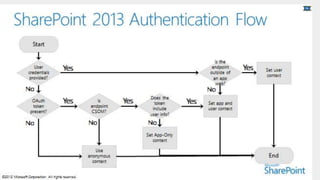
App authentication
 Apps are now first-class
security principals
 They have their own identity
and permissions
 App authentication only
happens on REST/CSOM
endpoints
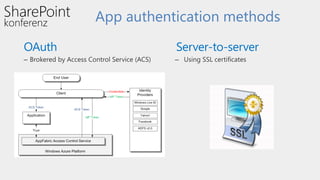
App authentication methods
 OAuth
– Brokered by Access Control Service (ACS)
• Server-to-server
– Using SSL certificates
Low-trust app authentication
Provider Hosted
Add-Ins
Access Control
System
SharePoint
2013
Context Token
Access Token
SharePoint Online
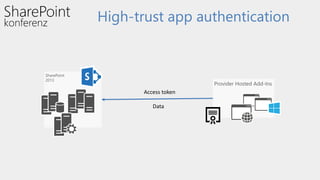
High-trust app authentication
Provider Hosted Add-Ins
SharePoint
2013
Access token
Data
High-trust app prerequisites
 SSL certificate
 Configure Trusted Root Authority
 Configure Trusted Token Issuer
 Secure Token Service
 User profiles
High-trust mechanism
 App has x.509 certificate with public/private key pair
 Private key used to sign certain aspects in access token
 Public key registered with SharePoint farm
 This creates a trusted security token issuer
 App creates access token to call into SharePoint
 App creates access token with a specific client ID and signs it with private key
 Trusted security token issuer validates signature
 SharePoint establishes app identity
 App identity maps to a specific client ID
 You can have many client IDs associated with a single x.509 certificate
Source:TedPattisonSPC12talk
Gotchas
 Provider-hosted app authentication (Windows,
SAML, fixed…)
 SharePoint host web application mode (Claims,
Classic-Windows) can cause auth failures
 TokenHelper uses Active Directory SID as the
identifier
 App-only tokens are not supported by all API
areas
Other Authentication Methods
 TokenHelper uses WindowsIdentity under the
covers
 Custom code for SAML Federated
Authentication contributed by Wictor Wilén
(http://bit.ly/1aFponK)
 FBA is also supported
Using other technology stacks
 Overview of options by
Kirk Evans
http://bit.ly/1jK3Evh
 Java, PHP, Node.js
 JWT token creation
 Token signing with X.509
certificate
Extending the TokenHelper code
 TokenHelper is just code, you can edit and
extend it
 Retrieving app parameters from a database
 Caching access tokens
 Creating custom user identity
 Extending token lifetime
 Retrieving certificates from a repository
My recent project
 3 provider-hosted apps (2 MVC, 1 Lightswitch)
 SharePoint 2013 back-end platform
 2 types of users
 Windows
 Online Banking
High-trust apps in SharePoint 2013
 Alternative for on-premises
app development
 Cloud-ready code
 More flexible than the low-
trust apps
Useful information about HTA
 Kirk Evans
http://blogs.msdn.com/b/kaevans/
 Steve Peschka
http://blogs.technet.com/b/speschka/
 Wictor Wilén
http://www.wictorwilen.se
FRAGEN?
Ich freue mich auf Ihr Feedback!
Silber-Partner: Veranstalter:
Vielen Dank!
Edin Kapić

High-Trust Add-Ins SharePoint for On-Premises Development

  • 1.
    Silber-Partner: Veranstalter: High-Trust AppAdd-In Model for On-Premises Development Edin Kapić
  • 2.
    Edin Kapić • SharePointSenior Architect & Team Lead in Sogeti, Barcelona • President of SharePoint User Group Catalonia (SUG.CAT) • Writer at Pluralsight • SharePoint Server Office Servers and Services MVP • Tinker & geek Email : mail@edinkapic.com Twitter : @ekapic LinkedIn : edinkapic
  • 3.
  • 4.
  • 5.
    Agenda  SharePoint appmodel review  High-trust apps mechanism  DEMO  Advanced scenarios
  • 6.
    SharePoint “cloud appsmodel”  SharePoint-hosted apps  Provider-hosted apps (remote apps)
  • 7.
    Provider-hosted apps  Thecode runs in a separate server  Uses REST/CSOM API to call SharePoint  Uses OAuth for authorization
  • 10.
    App authentication  Appsare now first-class security principals  They have their own identity and permissions  App authentication only happens on REST/CSOM endpoints
  • 11.
    App authentication methods OAuth – Brokered by Access Control Service (ACS) • Server-to-server – Using SSL certificates
  • 12.
    Low-trust app authentication ProviderHosted Add-Ins Access Control System SharePoint 2013 Context Token Access Token SharePoint Online
  • 13.
    High-trust app authentication ProviderHosted Add-Ins SharePoint 2013 Access token Data
  • 16.
    High-trust app prerequisites SSL certificate  Configure Trusted Root Authority  Configure Trusted Token Issuer  Secure Token Service  User profiles
  • 17.
    High-trust mechanism  Apphas x.509 certificate with public/private key pair  Private key used to sign certain aspects in access token  Public key registered with SharePoint farm  This creates a trusted security token issuer  App creates access token to call into SharePoint  App creates access token with a specific client ID and signs it with private key  Trusted security token issuer validates signature  SharePoint establishes app identity  App identity maps to a specific client ID  You can have many client IDs associated with a single x.509 certificate Source:TedPattisonSPC12talk
  • 19.
    Gotchas  Provider-hosted appauthentication (Windows, SAML, fixed…)  SharePoint host web application mode (Claims, Classic-Windows) can cause auth failures  TokenHelper uses Active Directory SID as the identifier  App-only tokens are not supported by all API areas
  • 21.
    Other Authentication Methods TokenHelper uses WindowsIdentity under the covers  Custom code for SAML Federated Authentication contributed by Wictor Wilén (http://bit.ly/1aFponK)  FBA is also supported
  • 22.
    Using other technologystacks  Overview of options by Kirk Evans http://bit.ly/1jK3Evh  Java, PHP, Node.js  JWT token creation  Token signing with X.509 certificate
  • 23.
    Extending the TokenHelpercode  TokenHelper is just code, you can edit and extend it  Retrieving app parameters from a database  Caching access tokens  Creating custom user identity  Extending token lifetime  Retrieving certificates from a repository
  • 24.
    My recent project 3 provider-hosted apps (2 MVC, 1 Lightswitch)  SharePoint 2013 back-end platform  2 types of users  Windows  Online Banking
  • 26.
    High-trust apps inSharePoint 2013  Alternative for on-premises app development  Cloud-ready code  More flexible than the low- trust apps
  • 27.
    Useful information aboutHTA  Kirk Evans http://blogs.msdn.com/b/kaevans/  Steve Peschka http://blogs.technet.com/b/speschka/  Wictor Wilén http://www.wictorwilen.se
  • 28.
  • 29.
    Ich freue michauf Ihr Feedback!
  • 30.