Copyright © 2013, Oracle and/or its affiliates. All rights reserved. Proprietary and Confidential – Distributed to Authorized Customers Subject to Safe Harbor1
Exporting Data
ORACLE FUSION HCM IMPLEMENTATION
PARTNER WORKSHOP
Oracle Fusion Human Capital Management
Copyright © 2013, Oracle and/or its affiliates. All rights reserved. Proprietary and Confidential – Distributed to Authorized Customers Subject to Safe Harbor2
The following is intended to outline our general product direction. It is intended
for information purposes only, and may not be incorporated into any contract.
It is not a commitment to deliver any material, code, or functionality, and
should not be relied upon in making purchasing decisions.
The development, release, and timing of any features or functionality
described for Oracle’s products remains at the sole discretion of Oracle.
Safe Harbor Statement
Copyright © 2013, Oracle and/or its affiliates. All rights reserved. Proprietary and Confidential – Distributed to Authorized Customers Subject to Safe Harbor3
The information in this presentation is correct as of the presentation date.
However, Oracle Fusion HCM continues to evolve and software patches are
applied frequently; therefore this information is subject to change.
Check with your Oracle Representative for updates. This content is not
warranted to be error-free.
Content Subject to Change
Copyright © 2013, Oracle and/or its affiliates. All rights reserved. Proprietary and Confidential – Distributed to Authorized Customers Subject to Safe Harbor4
Objectives
 Overview On Fusion Extract Tools.
 Extract Definition Elements : -
Parameters | Blocks | Records | Data Elements | Validations | Delivery Options
 Overview on Handling Extracts Using BI Publisher.
 Detailed Product Demonstrations.
 Future Enhancements.
Copyright © 2013, Oracle and/or its affiliates. All rights reserved. Proprietary and Confidential – Distributed to Authorized Customers Subject to Safe Harbor5
Overview
Fusion HCM Extract Tools
Copyright © 2013, Oracle and/or its affiliates. All rights reserved. Proprietary and Confidential – Distributed to Authorized Customers Subject to Safe Harbor6
Overview – Fusion HCM Extract Tools
 There are two major tools available for
exporting data from Fusion Human Capital
Management
 Using HCM Extracts.
 Using Oracle Transactional Business
Intelligence. (OTBI)
 Using HCM Extracts -
 Extracts are used to export large volumes of
complex data into an output file (XML).
 The XML file can then be passed/transposed onto
another application such as BI Publisher and can be
sent to a 3rd party application for data processing.
 The HCM extract process can :-
1. Extract metadata based on a definition setup.
2. Extract metadata based on given parameter values set up.
3. Integrate with BI Publisher for output delivery.
4. Handle outputs in a variety of acceptable formats such as
PDF, CSV, EFT, XML, MS Excel etc.
5. Handle delivery in various modes such as FTP, Emails, Fax
etc.
6. Help archive historical data.
7. Can be used to extract only the changed data (the delta)
between 2 specific dates.
8. Provide with log files for de-bugging.
9. Can help extract multiple reports using a single extract
process.
10. Extracts can be scheduled to run on a specific date-time
also.
Copyright © 2013, Oracle and/or its affiliates. All rights reserved. Proprietary and Confidential – Distributed to Authorized Customers Subject to Safe Harbor7
Overview – Fusion HCM Extract Tools
 There are two major tools available for
exporting data from Fusion Human Capital
Management
 Using HCM Extracts.
 Using Oracle Transactional Business
Intelligence. (OTBI)
 Examples of Extracts used for outbound
interfaces -
 HR & Payroll or Benefits data to 3rd party service
providers.
 HR & Payroll data sent to another application in a co-
existence scenario. *
 Examples for complex processes where Extracts
can be used -
1. Send pay slips to employees **
2. Extract data and send letters for mass processing such as
promotions or salary reviews.
3. Handle Statutory reporting.
4. Data archiving.
**Note Before
* 1. In a co-existence scenario a combination of file based imports &
exports using the ETL tool can be used depending on the business
scenario. ETL Tool requires an additional license.
** 2. Done using the bursting option available in the OTBI section.
Copyright © 2013, Oracle and/or its affiliates. All rights reserved. Proprietary and Confidential – Distributed to Authorized Customers Subject to Safe Harbor8
Fusion HCM Extract Process
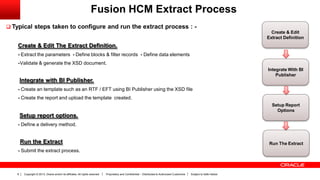
 Typical steps taken to configure and run the extract process : -
Create & Edit The Extract Definition.
- Extract the parameters - Define blocks & filter records - Define data elements
-Validate & generate the XSD document.
Integrate with BI Publisher.
- Create an template such as an RTF / EFT using BI Publisher using the XSD file
- Create the report and upload the template created.
Setup report options.
- Define a delivery method.
Run the Extract
- Submit the extract process.
Create & Edit
Extract Definition
Integrate With BI
Publisher
Setup Report
Options
Run The Extract
Copyright © 2013, Oracle and/or its affiliates. All rights reserved. Proprietary and Confidential – Distributed to Authorized Customers Subject to Safe Harbor9
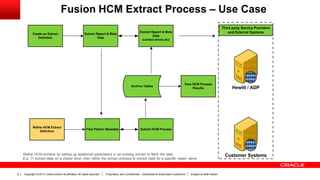
Fusion HCM Extract Process – Use Case
Create an Extract
Definition
Extract Report & Meta
Data
Extract Report & Meta
Data
(correct errors etc)
Hewitt / ADP
Customer Systems
Archive Tables
View HCM Process
Results
Refine HCM Extract
Definition
Flow Pattern Metadata Submit HCM Process
Third party Service Providers
and External Systems
Refine HCM extracts by setting up additional parameters in an existing extract to fetch the data.
E.g. 1st extract data on a Global level, then refine the extract process to extract data for a specific region alone.
Copyright © 2013, Oracle and/or its affiliates. All rights reserved. Proprietary and Confidential – Distributed to Authorized Customers Subject to Safe Harbor10
Elements to a HCM Extract
Definition
Copyright © 2013, Oracle and/or its affiliates. All rights reserved. Proprietary and Confidential – Distributed to Authorized Customers Subject to Safe Harbor11
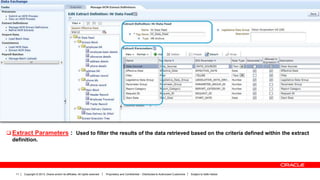
 Extract Parameters : Used to filter the results of the data retrieved based on the criteria defined within the extract
definition.
Copyright © 2013, Oracle and/or its affiliates. All rights reserved. Proprietary and Confidential – Distributed to Authorized Customers Subject to Safe Harbor12
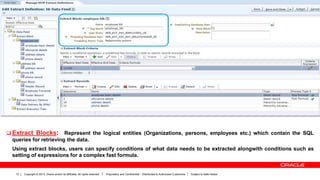
 Extract Blocks: Represent the logical entities (Organizations, persons, employees etc.) which contain the SQL
queries for retrieving the data.
Using extract blocks, users can specify conditions of what data needs to be extracted alongwith conditions such as
setting of expressions for a complex fast formula.
Copyright © 2013, Oracle and/or its affiliates. All rights reserved. Proprietary and Confidential – Distributed to Authorized Customers Subject to Safe Harbor13
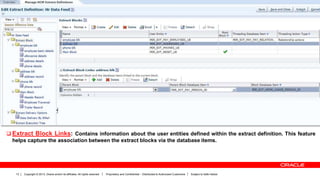
 Extract Block Links: Contains information about the user entities defined within the extract definition. This feature
helps capture the association between the extract blocks via the database items.
Copyright © 2013, Oracle and/or its affiliates. All rights reserved. Proprietary and Confidential – Distributed to Authorized Customers Subject to Safe Harbor14
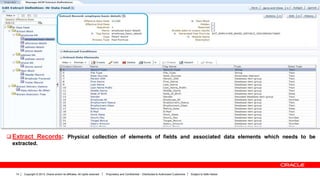
 Extract Records: Physical collection of elements of fields and associated data elements which needs to be
extracted.
Copyright © 2013, Oracle and/or its affiliates. All rights reserved. Proprietary and Confidential – Distributed to Authorized Customers Subject to Safe Harbor15
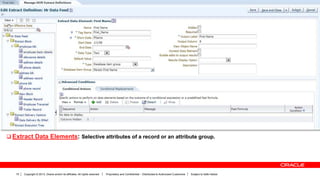
 Extract Data Elements: Selective attributes of a record or an attribute group.
Copyright © 2013, Oracle and/or its affiliates. All rights reserved. Proprietary and Confidential – Distributed to Authorized Customers Subject to Safe Harbor16
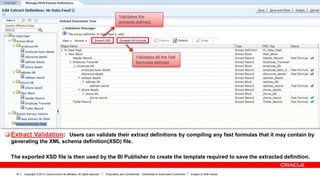
 Extract Validation: Users can validate their extract definitions by compiling any fast formulas that it may contain by
generating the XML schema definition(XSD) file.
The exported XSD file is then used by the BI Publisher to create the template required to save the extracted definition.
Validates the
extracts defined.
Validates all the fast
formulas defined.
Copyright © 2013, Oracle and/or its affiliates. All rights reserved. Proprietary and Confidential – Distributed to Authorized Customers Subject to Safe Harbor17
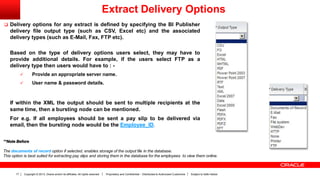
 Delivery options for any extract is defined by specifying the BI Publisher
delivery file output type (such as CSV, Excel etc) and the associated
delivery types (such as E-Mail, Fax, FTP etc).
Based on the type of delivery options users select, they may have to
provide additional details. For example, if the users select FTP as a
delivery type then users would have to : -
 Provide an appropriate server name.
 User name & password details.
If within the XML the output should be sent to multiple recipients at the
same time, then a bursting node can be mentioned.
For e.g. If all employees should be sent a pay slip to be delivered via
email, then the bursting node would be the Employee_ID.
**Note Before
The documents of record option if selected, enables storage of the output file in the database.
This option is best suited for extracting pay slips and storing them in the database for the employees to view them online.
Extract Delivery Options
Copyright © 2013, Oracle and/or its affiliates. All rights reserved. Proprietary and Confidential – Distributed to Authorized Customers Subject to Safe Harbor18
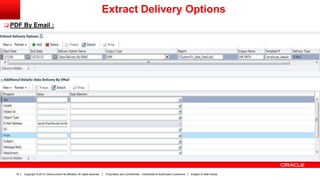
 PDF By Email :
Extract Delivery Options
Copyright © 2013, Oracle and/or its affiliates. All rights reserved. Proprietary and Confidential – Distributed to Authorized Customers Subject to Safe Harbor19
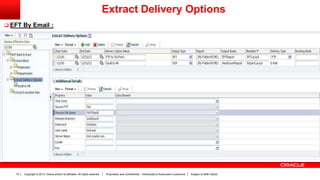
 EFT By Email :
Extract Delivery Options
Copyright © 2013, Oracle and/or its affiliates. All rights reserved. Proprietary and Confidential – Distributed to Authorized Customers Subject to Safe Harbor20
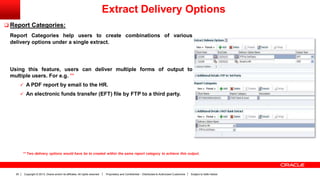
 Report Categories:
Report Categories help users to create combinations of various
delivery options under a single extract.
Using this feature, users can deliver multiple forms of output to
multiple users. For e.g. **
 A PDF report by email to the HR.
 An electronic funds transfer (EFT) file by FTP to a third party.
Extract Delivery Options
** Two delivery options would have be to created within the same report category to achieve this output.
Copyright © 2013, Oracle and/or its affiliates. All rights reserved. Proprietary and Confidential – Distributed to Authorized Customers Subject to Safe Harbor21
Demo # 1 – Create & Manage HCM Extracts
 Create A Simple HCM Extract With Blocks
 Employee
 Departments
 Add Criteria’s & Records To The Extracts Block.
 Department
 Employee
 Create a Summary Record.
 Compile Formulas & Generate The XSD File.
Copyright © 2013, Oracle and/or its affiliates. All rights reserved. Proprietary and Confidential – Distributed to Authorized Customers Subject to Safe Harbor22
Overview – Fusion HCM Extract Tools
 There are two major tools available for
exporting data from Fusion Human Capital
Management
 Using HCM Extracts.
 Using Oracle Transactional Business
Intelligence. (OTBI)
We will now use the XSD file generated &
BI Publisher desktop to create a report
template.
 We have already discussed on these topics
during the BI & Reports Lesson: -
 The BI Process Flow.
 BI Publisher Elements :-
 Data models.
 Data sources.
 Briefing books.
 Reporting agents.
Pre Requisites :
Users need to install JDK v7.0 or later along with BI Publisher Desktop.
BI Publisher Desktop can be downloaded from www.oracle.com or users
can use Google to search for the tool and navigate to the download page.
Please use the 32-bit installer for BI Publisher Desktop even if you have a
64-bit operating system installed.
Copyright © 2013, Oracle and/or its affiliates. All rights reserved. Proprietary and Confidential – Distributed to Authorized Customers Subject to Safe Harbor23
Demo # 2 – Convert XML Data To Create A Template
Using BI Publisher
 Create the RTF Template
 Create a BI Publisher Report Template
 Use the RTF template as a schema to create a BI Publisher template.
 Set the Extract Delivery Options.
 Run the Extract Process.
(Navigator  Payroll  Checklists)
Copyright © 2013, Oracle and/or its affiliates. All rights reserved. Proprietary and Confidential – Distributed to Authorized Customers Subject to Safe Harbor24
Oracle Enterprise Repository
(OER)
Copyright © 2013, Oracle and/or its affiliates. All rights reserved. Proprietary and Confidential – Distributed to Authorized Customers Subject to Safe Harbor25
Oracle Enterprise Repository (O.E.R.)
 Oracle Enterprise Repository (OER) is a unified
repository for integration assets, cataloging the
following:
 Web services
 Service data objects
 SOA composites
 Interface tables
 Events, etc.
 All integration assets and their details are
documented in OER.
 O.E.R is available for Fusion HCM SaaS customers
and aims to ease integration efforts by:
 Simplifying application integration SOA projects
 Supporting end-to-end management of application
integration
 Enabling consumption and govern usage
 Providing visibility and impact analysis of interfaces
used in projects
 Facilitating changes and upgrades
https://fusionappsoer.oracle.com
Copyright © 2013, Oracle and/or its affiliates. All rights reserved. Proprietary and Confidential – Distributed to Authorized Customers Subject to Safe Harbor26
Future Enhancements
Copyright © 2013, Oracle and/or its affiliates. All rights reserved. Proprietary and Confidential – Distributed to Authorized Customers Subject to Safe Harbor27
Future Enhancements
 Usability Enhancements :
 Easy access to complete the DBI lists.
 New UI to drag and drop layout editor for DB
groups.
 Automated formula generation & compilation.
 Support for scheduling extract runs on a recurring
basis.
 Enhanced data dictionary organized in
hierarchy/groups.
 Web Services :
 Various web services to include payment methods
for Payment Migrations
( Personal, Organizational & Third party services)
Copyright © 2013, Oracle and/or its affiliates. All rights reserved. Proprietary and Confidential – Distributed to Authorized Customers Subject to Safe Harbor28

Hcm export data rahul vishwanath

  • 1.
    Copyright © 2013,Oracle and/or its affiliates. All rights reserved. Proprietary and Confidential – Distributed to Authorized Customers Subject to Safe Harbor1 Exporting Data ORACLE FUSION HCM IMPLEMENTATION PARTNER WORKSHOP Oracle Fusion Human Capital Management
  • 2.
    Copyright © 2013,Oracle and/or its affiliates. All rights reserved. Proprietary and Confidential – Distributed to Authorized Customers Subject to Safe Harbor2 The following is intended to outline our general product direction. It is intended for information purposes only, and may not be incorporated into any contract. It is not a commitment to deliver any material, code, or functionality, and should not be relied upon in making purchasing decisions. The development, release, and timing of any features or functionality described for Oracle’s products remains at the sole discretion of Oracle. Safe Harbor Statement
  • 3.
    Copyright © 2013,Oracle and/or its affiliates. All rights reserved. Proprietary and Confidential – Distributed to Authorized Customers Subject to Safe Harbor3 The information in this presentation is correct as of the presentation date. However, Oracle Fusion HCM continues to evolve and software patches are applied frequently; therefore this information is subject to change. Check with your Oracle Representative for updates. This content is not warranted to be error-free. Content Subject to Change
  • 4.
    Copyright © 2013,Oracle and/or its affiliates. All rights reserved. Proprietary and Confidential – Distributed to Authorized Customers Subject to Safe Harbor4 Objectives  Overview On Fusion Extract Tools.  Extract Definition Elements : - Parameters | Blocks | Records | Data Elements | Validations | Delivery Options  Overview on Handling Extracts Using BI Publisher.  Detailed Product Demonstrations.  Future Enhancements.
  • 5.
    Copyright © 2013,Oracle and/or its affiliates. All rights reserved. Proprietary and Confidential – Distributed to Authorized Customers Subject to Safe Harbor5 Overview Fusion HCM Extract Tools
  • 6.
    Copyright © 2013,Oracle and/or its affiliates. All rights reserved. Proprietary and Confidential – Distributed to Authorized Customers Subject to Safe Harbor6 Overview – Fusion HCM Extract Tools  There are two major tools available for exporting data from Fusion Human Capital Management  Using HCM Extracts.  Using Oracle Transactional Business Intelligence. (OTBI)  Using HCM Extracts -  Extracts are used to export large volumes of complex data into an output file (XML).  The XML file can then be passed/transposed onto another application such as BI Publisher and can be sent to a 3rd party application for data processing.  The HCM extract process can :- 1. Extract metadata based on a definition setup. 2. Extract metadata based on given parameter values set up. 3. Integrate with BI Publisher for output delivery. 4. Handle outputs in a variety of acceptable formats such as PDF, CSV, EFT, XML, MS Excel etc. 5. Handle delivery in various modes such as FTP, Emails, Fax etc. 6. Help archive historical data. 7. Can be used to extract only the changed data (the delta) between 2 specific dates. 8. Provide with log files for de-bugging. 9. Can help extract multiple reports using a single extract process. 10. Extracts can be scheduled to run on a specific date-time also.
  • 7.
    Copyright © 2013,Oracle and/or its affiliates. All rights reserved. Proprietary and Confidential – Distributed to Authorized Customers Subject to Safe Harbor7 Overview – Fusion HCM Extract Tools  There are two major tools available for exporting data from Fusion Human Capital Management  Using HCM Extracts.  Using Oracle Transactional Business Intelligence. (OTBI)  Examples of Extracts used for outbound interfaces -  HR & Payroll or Benefits data to 3rd party service providers.  HR & Payroll data sent to another application in a co- existence scenario. *  Examples for complex processes where Extracts can be used - 1. Send pay slips to employees ** 2. Extract data and send letters for mass processing such as promotions or salary reviews. 3. Handle Statutory reporting. 4. Data archiving. **Note Before * 1. In a co-existence scenario a combination of file based imports & exports using the ETL tool can be used depending on the business scenario. ETL Tool requires an additional license. ** 2. Done using the bursting option available in the OTBI section.
  • 8.
    Copyright © 2013,Oracle and/or its affiliates. All rights reserved. Proprietary and Confidential – Distributed to Authorized Customers Subject to Safe Harbor8 Fusion HCM Extract Process  Typical steps taken to configure and run the extract process : - Create & Edit The Extract Definition. - Extract the parameters - Define blocks & filter records - Define data elements -Validate & generate the XSD document. Integrate with BI Publisher. - Create an template such as an RTF / EFT using BI Publisher using the XSD file - Create the report and upload the template created. Setup report options. - Define a delivery method. Run the Extract - Submit the extract process. Create & Edit Extract Definition Integrate With BI Publisher Setup Report Options Run The Extract
  • 9.
    Copyright © 2013,Oracle and/or its affiliates. All rights reserved. Proprietary and Confidential – Distributed to Authorized Customers Subject to Safe Harbor9 Fusion HCM Extract Process – Use Case Create an Extract Definition Extract Report & Meta Data Extract Report & Meta Data (correct errors etc) Hewitt / ADP Customer Systems Archive Tables View HCM Process Results Refine HCM Extract Definition Flow Pattern Metadata Submit HCM Process Third party Service Providers and External Systems Refine HCM extracts by setting up additional parameters in an existing extract to fetch the data. E.g. 1st extract data on a Global level, then refine the extract process to extract data for a specific region alone.
  • 10.
    Copyright © 2013,Oracle and/or its affiliates. All rights reserved. Proprietary and Confidential – Distributed to Authorized Customers Subject to Safe Harbor10 Elements to a HCM Extract Definition
  • 11.
    Copyright © 2013,Oracle and/or its affiliates. All rights reserved. Proprietary and Confidential – Distributed to Authorized Customers Subject to Safe Harbor11  Extract Parameters : Used to filter the results of the data retrieved based on the criteria defined within the extract definition.
  • 12.
    Copyright © 2013,Oracle and/or its affiliates. All rights reserved. Proprietary and Confidential – Distributed to Authorized Customers Subject to Safe Harbor12  Extract Blocks: Represent the logical entities (Organizations, persons, employees etc.) which contain the SQL queries for retrieving the data. Using extract blocks, users can specify conditions of what data needs to be extracted alongwith conditions such as setting of expressions for a complex fast formula.
  • 13.
    Copyright © 2013,Oracle and/or its affiliates. All rights reserved. Proprietary and Confidential – Distributed to Authorized Customers Subject to Safe Harbor13  Extract Block Links: Contains information about the user entities defined within the extract definition. This feature helps capture the association between the extract blocks via the database items.
  • 14.
    Copyright © 2013,Oracle and/or its affiliates. All rights reserved. Proprietary and Confidential – Distributed to Authorized Customers Subject to Safe Harbor14  Extract Records: Physical collection of elements of fields and associated data elements which needs to be extracted.
  • 15.
    Copyright © 2013,Oracle and/or its affiliates. All rights reserved. Proprietary and Confidential – Distributed to Authorized Customers Subject to Safe Harbor15  Extract Data Elements: Selective attributes of a record or an attribute group.
  • 16.
    Copyright © 2013,Oracle and/or its affiliates. All rights reserved. Proprietary and Confidential – Distributed to Authorized Customers Subject to Safe Harbor16  Extract Validation: Users can validate their extract definitions by compiling any fast formulas that it may contain by generating the XML schema definition(XSD) file. The exported XSD file is then used by the BI Publisher to create the template required to save the extracted definition. Validates the extracts defined. Validates all the fast formulas defined.
  • 17.
    Copyright © 2013,Oracle and/or its affiliates. All rights reserved. Proprietary and Confidential – Distributed to Authorized Customers Subject to Safe Harbor17  Delivery options for any extract is defined by specifying the BI Publisher delivery file output type (such as CSV, Excel etc) and the associated delivery types (such as E-Mail, Fax, FTP etc). Based on the type of delivery options users select, they may have to provide additional details. For example, if the users select FTP as a delivery type then users would have to : -  Provide an appropriate server name.  User name & password details. If within the XML the output should be sent to multiple recipients at the same time, then a bursting node can be mentioned. For e.g. If all employees should be sent a pay slip to be delivered via email, then the bursting node would be the Employee_ID. **Note Before The documents of record option if selected, enables storage of the output file in the database. This option is best suited for extracting pay slips and storing them in the database for the employees to view them online. Extract Delivery Options
  • 18.
    Copyright © 2013,Oracle and/or its affiliates. All rights reserved. Proprietary and Confidential – Distributed to Authorized Customers Subject to Safe Harbor18  PDF By Email : Extract Delivery Options
  • 19.
    Copyright © 2013,Oracle and/or its affiliates. All rights reserved. Proprietary and Confidential – Distributed to Authorized Customers Subject to Safe Harbor19  EFT By Email : Extract Delivery Options
  • 20.
    Copyright © 2013,Oracle and/or its affiliates. All rights reserved. Proprietary and Confidential – Distributed to Authorized Customers Subject to Safe Harbor20  Report Categories: Report Categories help users to create combinations of various delivery options under a single extract. Using this feature, users can deliver multiple forms of output to multiple users. For e.g. **  A PDF report by email to the HR.  An electronic funds transfer (EFT) file by FTP to a third party. Extract Delivery Options ** Two delivery options would have be to created within the same report category to achieve this output.
  • 21.
    Copyright © 2013,Oracle and/or its affiliates. All rights reserved. Proprietary and Confidential – Distributed to Authorized Customers Subject to Safe Harbor21 Demo # 1 – Create & Manage HCM Extracts  Create A Simple HCM Extract With Blocks  Employee  Departments  Add Criteria’s & Records To The Extracts Block.  Department  Employee  Create a Summary Record.  Compile Formulas & Generate The XSD File.
  • 22.
    Copyright © 2013,Oracle and/or its affiliates. All rights reserved. Proprietary and Confidential – Distributed to Authorized Customers Subject to Safe Harbor22 Overview – Fusion HCM Extract Tools  There are two major tools available for exporting data from Fusion Human Capital Management  Using HCM Extracts.  Using Oracle Transactional Business Intelligence. (OTBI) We will now use the XSD file generated & BI Publisher desktop to create a report template.  We have already discussed on these topics during the BI & Reports Lesson: -  The BI Process Flow.  BI Publisher Elements :-  Data models.  Data sources.  Briefing books.  Reporting agents. Pre Requisites : Users need to install JDK v7.0 or later along with BI Publisher Desktop. BI Publisher Desktop can be downloaded from www.oracle.com or users can use Google to search for the tool and navigate to the download page. Please use the 32-bit installer for BI Publisher Desktop even if you have a 64-bit operating system installed.
  • 23.
    Copyright © 2013,Oracle and/or its affiliates. All rights reserved. Proprietary and Confidential – Distributed to Authorized Customers Subject to Safe Harbor23 Demo # 2 – Convert XML Data To Create A Template Using BI Publisher  Create the RTF Template  Create a BI Publisher Report Template  Use the RTF template as a schema to create a BI Publisher template.  Set the Extract Delivery Options.  Run the Extract Process. (Navigator  Payroll  Checklists)
  • 24.
    Copyright © 2013,Oracle and/or its affiliates. All rights reserved. Proprietary and Confidential – Distributed to Authorized Customers Subject to Safe Harbor24 Oracle Enterprise Repository (OER)
  • 25.
    Copyright © 2013,Oracle and/or its affiliates. All rights reserved. Proprietary and Confidential – Distributed to Authorized Customers Subject to Safe Harbor25 Oracle Enterprise Repository (O.E.R.)  Oracle Enterprise Repository (OER) is a unified repository for integration assets, cataloging the following:  Web services  Service data objects  SOA composites  Interface tables  Events, etc.  All integration assets and their details are documented in OER.  O.E.R is available for Fusion HCM SaaS customers and aims to ease integration efforts by:  Simplifying application integration SOA projects  Supporting end-to-end management of application integration  Enabling consumption and govern usage  Providing visibility and impact analysis of interfaces used in projects  Facilitating changes and upgrades https://fusionappsoer.oracle.com
  • 26.
    Copyright © 2013,Oracle and/or its affiliates. All rights reserved. Proprietary and Confidential – Distributed to Authorized Customers Subject to Safe Harbor26 Future Enhancements
  • 27.
    Copyright © 2013,Oracle and/or its affiliates. All rights reserved. Proprietary and Confidential – Distributed to Authorized Customers Subject to Safe Harbor27 Future Enhancements  Usability Enhancements :  Easy access to complete the DBI lists.  New UI to drag and drop layout editor for DB groups.  Automated formula generation & compilation.  Support for scheduling extract runs on a recurring basis.  Enhanced data dictionary organized in hierarchy/groups.  Web Services :  Various web services to include payment methods for Payment Migrations ( Personal, Organizational & Third party services)
  • 28.
    Copyright © 2013,Oracle and/or its affiliates. All rights reserved. Proprietary and Confidential – Distributed to Authorized Customers Subject to Safe Harbor28