Copyright © 2013, Oracle and/or its affiliates. All rights reserved. Proprietary and Confidential – Distributed to Authorized Customers Subject to Safe Harbor1
Define Workforce Records
ORACLE FUSION HCM IMPLEMENTATION
PARTNER WORKSHOP
Oracle Fusion Human Capital Management
Copyright © 2013, Oracle and/or its affiliates. All rights reserved. Proprietary and Confidential – Distributed to Authorized Customers Subject to Safe Harbor2
The following is intended to outline our general product direction. It is intended
for information purposes only, and may not be incorporated into any contract.
It is not a commitment to deliver any material, code, or functionality, and
should not be relied upon in making purchasing decisions.
The development, release, and timing of any features or functionality
described for Oracle’s products remains at the sole discretion of Oracle.
Safe Harbor Statement
Copyright © 2013, Oracle and/or its affiliates. All rights reserved. Proprietary and Confidential – Distributed to Authorized Customers Subject to Safe Harbor3
The information in this presentation is correct as of the presentation date.
However, Oracle Fusion HCM continues to evolve and software patches are
applied frequently; therefore this information is subject to change.
Check with your Oracle Representative for updates. This content is not
warranted to be error-free.
Content Subject to Change
Copyright © 2013, Oracle and/or its affiliates. All rights reserved. Proprietary and Confidential – Distributed to Authorized Customers Subject to Safe Harbor4
Objectives
 Define Availability.
 Define Person Record Values.
 Define Employment Records.
 Define Documents.
Copyright © 2013, Oracle and/or its affiliates. All rights reserved. Proprietary and Confidential – Distributed to Authorized Customers Subject to Safe Harbor5
Defining Availability
Copyright © 2013, Oracle and/or its affiliates. All rights reserved. Proprietary and Confidential – Distributed to Authorized Customers Subject to Safe Harbor6
Defining Availability – An Overview
 Following aspects determine the workers availability
 Absences recorded for that time.
 His/her work schedule.
 Calendar events such as national holidays etc.
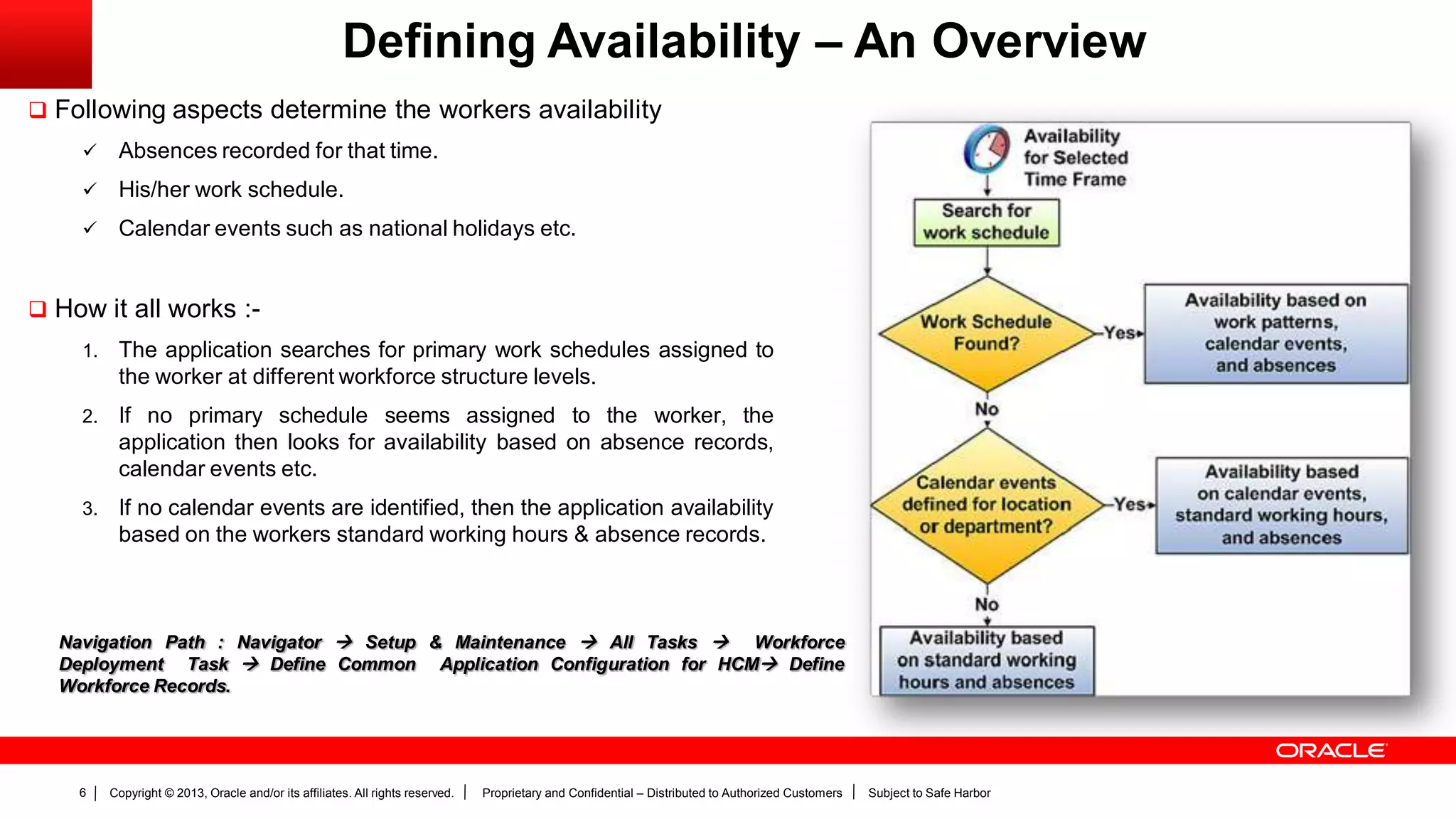
 How it all works :-
1. The application searches for primary work schedules assigned to
the worker at different workforce structure levels.
2. If no primary schedule seems assigned to the worker, the
application then looks for availability based on absence records,
calendar events etc.
3. If no calendar events are identified, then the application availability
based on the workers standard working hours & absence records.
Navigation Path : Navigator  Setup & Maintenance  All Tasks  Workforce
Deployment Task  Define Common Application Configuration for HCM Define
Workforce Records.
Copyright © 2013, Oracle and/or its affiliates. All rights reserved. Proprietary and Confidential – Distributed to Authorized Customers Subject to Safe Harbor7
Defining Availability – Primary Work Schedules
 Workers can be associated with multiple work schedules.
However, users must select one primary work schedule to
determine the worker’s availability.
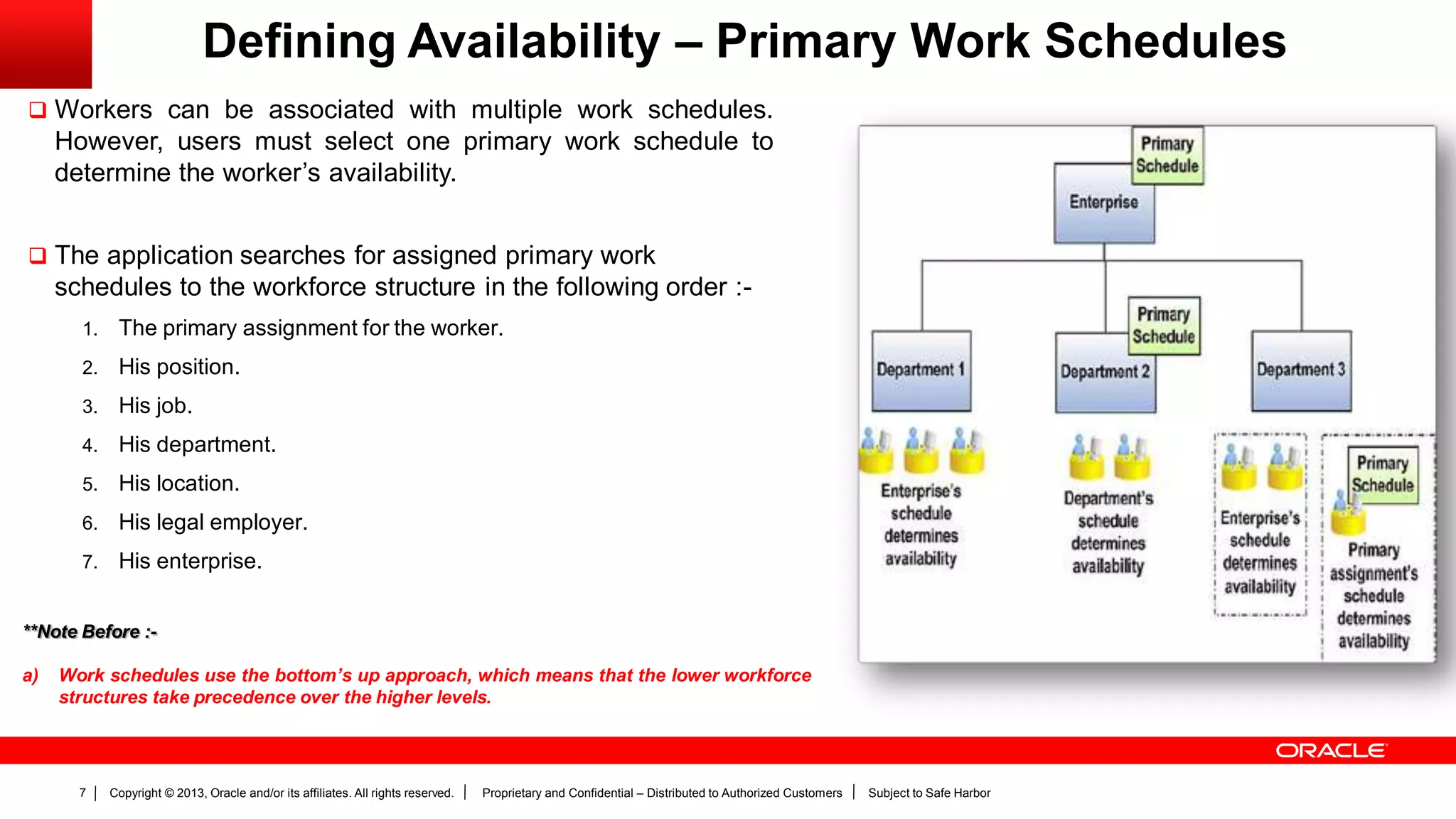
 The application searches for assigned primary work
schedules to the workforce structure in the following order :-
1. The primary assignment for the worker.
2. His position.
3. His job.
4. His department.
5. His location.
6. His legal employer.
7. His enterprise.
**Note Before :-
a) Work schedules use the bottom’s up approach, which means that the lower workforce
structures take precedence over the higher levels.
Copyright © 2013, Oracle and/or its affiliates. All rights reserved. Proprietary and Confidential – Distributed to Authorized Customers Subject to Safe Harbor8
Defining Availability – Calendar Events
 A calendar event indicates a period that signifies an
event. E.g. a public holiday etc.
 When you set a calendar event, you specify which set
of workers the event must consider. Users can do so
in the following manner :-
 Use an organizational hierarchy to select which organization
the event must be associated with.
OR
 Use a geographical hierarchy to select specific
regions/locations to associate the event with respect to.
 When users use geographical hierarchy for a calendar
event coverage, they can select the nodes where this has
to be excluded from.
 Calendar Event Categories
Helps users to group related calendar events. For e.g.
users may wish to group all public holidays using the pre-
defined public holiday calendar.
In addition to the pre-defined public holiday calendar, users
can also create their own calendar events by adding
relevant values to the calendar event category lookup.
**Note Before :-
a) When users add the calendar event category as an exception to a work
schedule, all calendar events associated to that category are
automatically included.
b) If Public holidays as a category is not visible in the category list, users can
navigate to the manage availability lookups task in the setup &
maintenance area to extend the end date for the public holiday look up
value.
Copyright © 2013, Oracle and/or its affiliates. All rights reserved. Proprietary and Confidential – Distributed to Authorized Customers Subject to Safe Harbor9
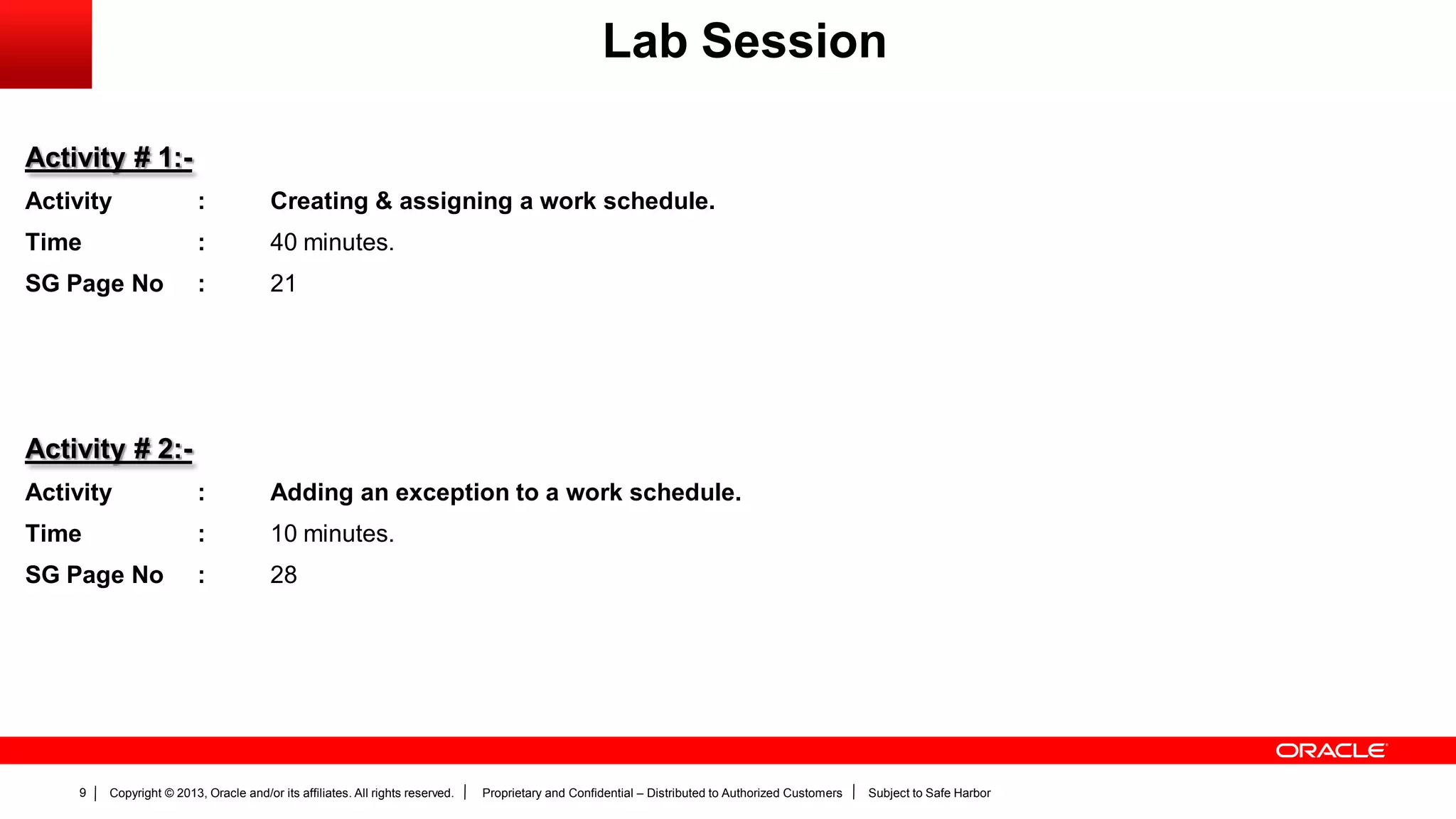
Activity # 1:-
Activity : Creating & assigning a work schedule.
Time : 40 minutes.
SG Page No : 21
Activity # 2:-
Activity : Adding an exception to a work schedule.
Time : 10 minutes.
SG Page No : 28
Lab Session
Copyright © 2013, Oracle and/or its affiliates. All rights reserved. Proprietary and Confidential – Distributed to Authorized Customers Subject to Safe Harbor10
Defining Person Record
Values
Copyright © 2013, Oracle and/or its affiliates. All rights reserved. Proprietary and Confidential – Distributed to Authorized Customers Subject to Safe Harbor11
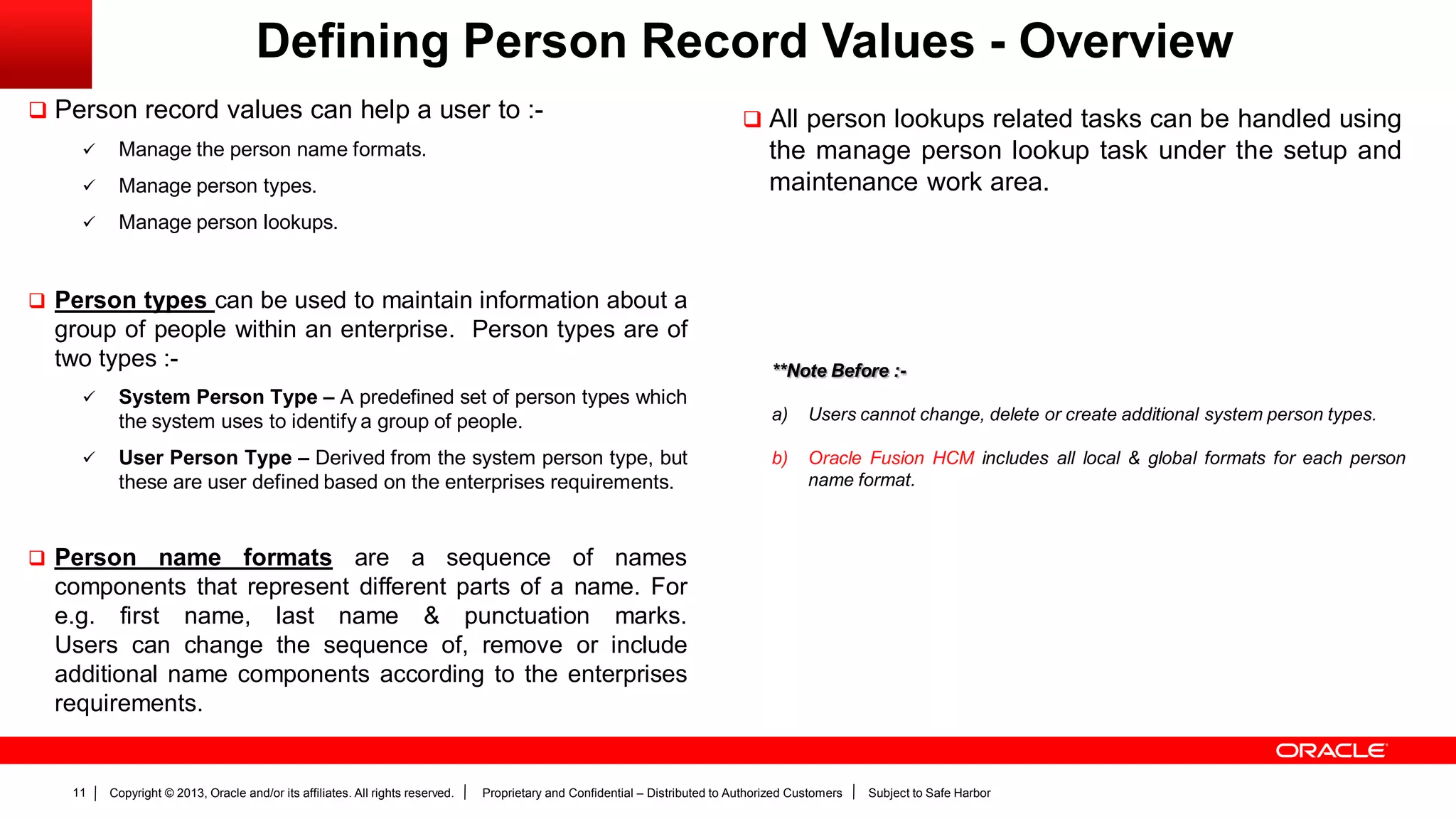
Defining Person Record Values - Overview
 Person record values can help a user to :-
 Manage the person name formats.
 Manage person types.
 Manage person lookups.
 Person types can be used to maintain information about a
group of people within an enterprise. Person types are of
two types :-
 System Person Type – A predefined set of person types which
the system uses to identify a group of people.
 User Person Type – Derived from the system person type, but
these are user defined based on the enterprises requirements.
 Person name formats are a sequence of names
components that represent different parts of a name. For
e.g. first name, last name & punctuation marks.
Users can change the sequence of, remove or include
additional name components according to the enterprises
requirements.
 All person lookups related tasks can be handled using
the manage person lookup task under the setup and
maintenance work area.
**Note Before :-
a) Users cannot change, delete or create additional system person types.
b) Oracle Fusion HCM includes all local & global formats for each person
name format.
Copyright © 2013, Oracle and/or its affiliates. All rights reserved. Proprietary and Confidential – Distributed to Authorized Customers Subject to Safe Harbor12
Person Types
Copyright © 2013, Oracle and/or its affiliates. All rights reserved. Proprietary and Confidential – Distributed to Authorized Customers Subject to Safe Harbor13
Person Types
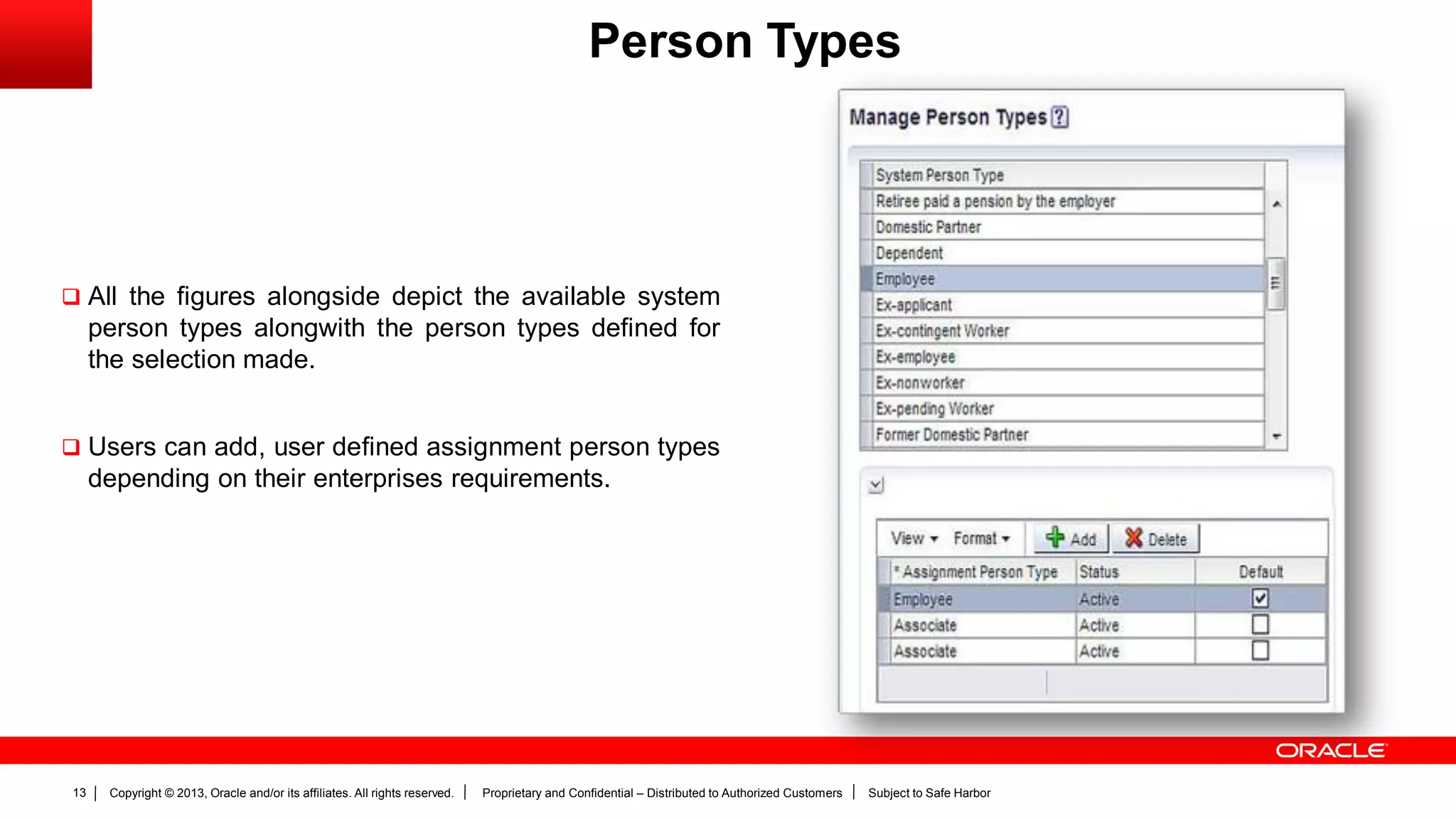
 All the figures alongside depict the available system
person types alongwith the person types defined for
the selection made.
 Users can add, user defined assignment person types
depending on their enterprises requirements.
Copyright © 2013, Oracle and/or its affiliates. All rights reserved. Proprietary and Confidential – Distributed to Authorized Customers Subject to Safe Harbor14
Person Name Formats
Copyright © 2013, Oracle and/or its affiliates. All rights reserved. Proprietary and Confidential – Distributed to Authorized Customers Subject to Safe Harbor15
Person Name Formats
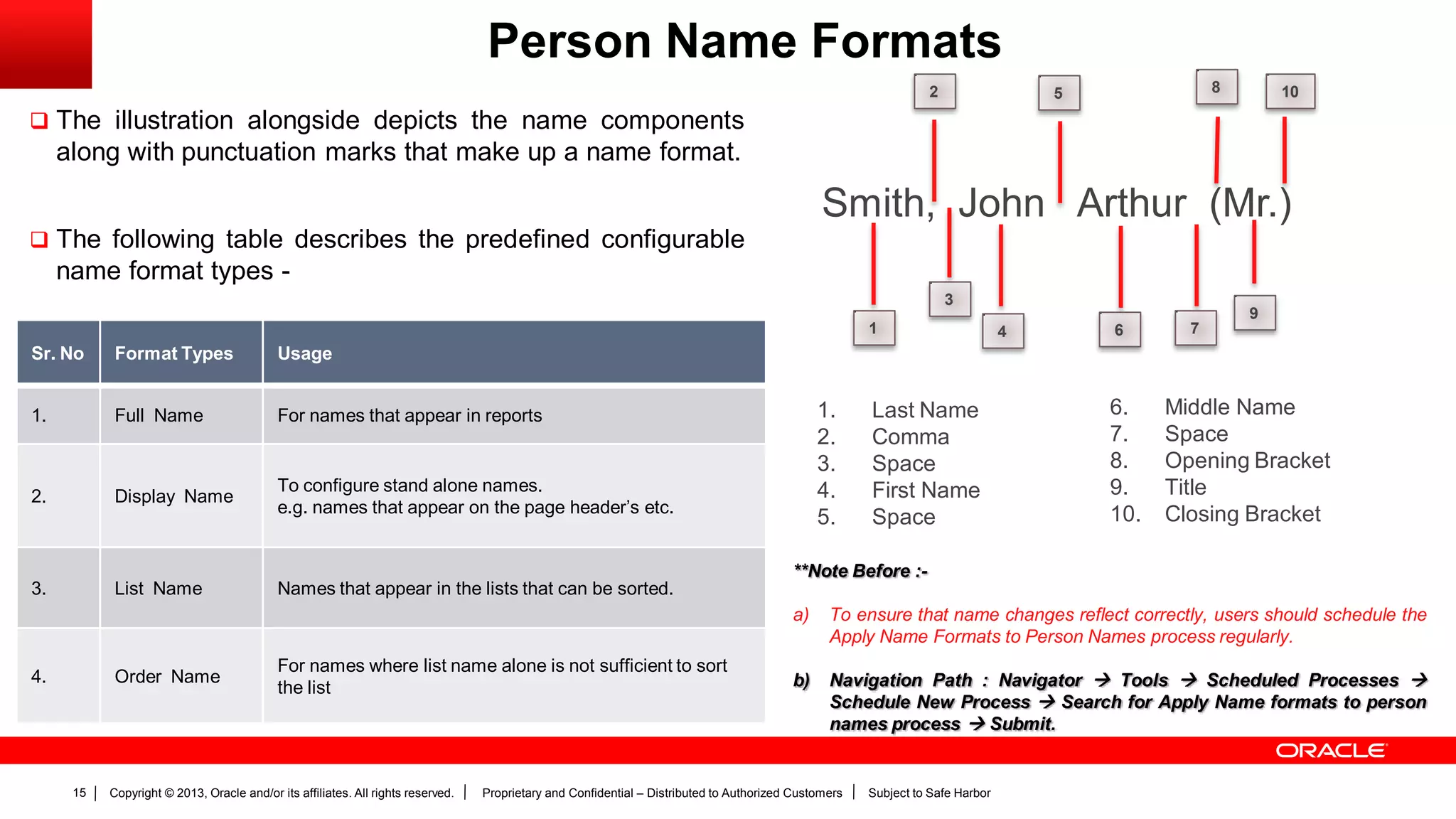
 The illustration alongside depicts the name components
along with punctuation marks that make up a name format.
 The following table describes the predefined configurable
name format types -
Smith, John Arthur (Mr.)
1
2
3
4
5
6 7
8
9
10
1. Last Name
2. Comma
3. Space
4. First Name
5. Space
6. Middle Name
7. Space
8. Opening Bracket
9. Title
10. Closing Bracket
Sr. No Format Types Usage
1. Full Name For names that appear in reports
2. Display Name
To configure stand alone names.
e.g. names that appear on the page header’s etc.
3. List Name Names that appear in the lists that can be sorted.
4. Order Name
For names where list name alone is not sufficient to sort
the list
**Note Before :-
a) To ensure that name changes reflect correctly, users should schedule the
Apply Name Formats to Person Names process regularly.
b) Navigation Path : Navigator  Tools  Scheduled Processes 
Schedule New Process  Search for Apply Name formats to person
names process  Submit.
Copyright © 2013, Oracle and/or its affiliates. All rights reserved. Proprietary and Confidential – Distributed to Authorized Customers Subject to Safe Harbor16
Person Lookups
Copyright © 2013, Oracle and/or its affiliates. All rights reserved. Proprietary and Confidential – Distributed to Authorized Customers Subject to Safe Harbor17
Person Name Formats
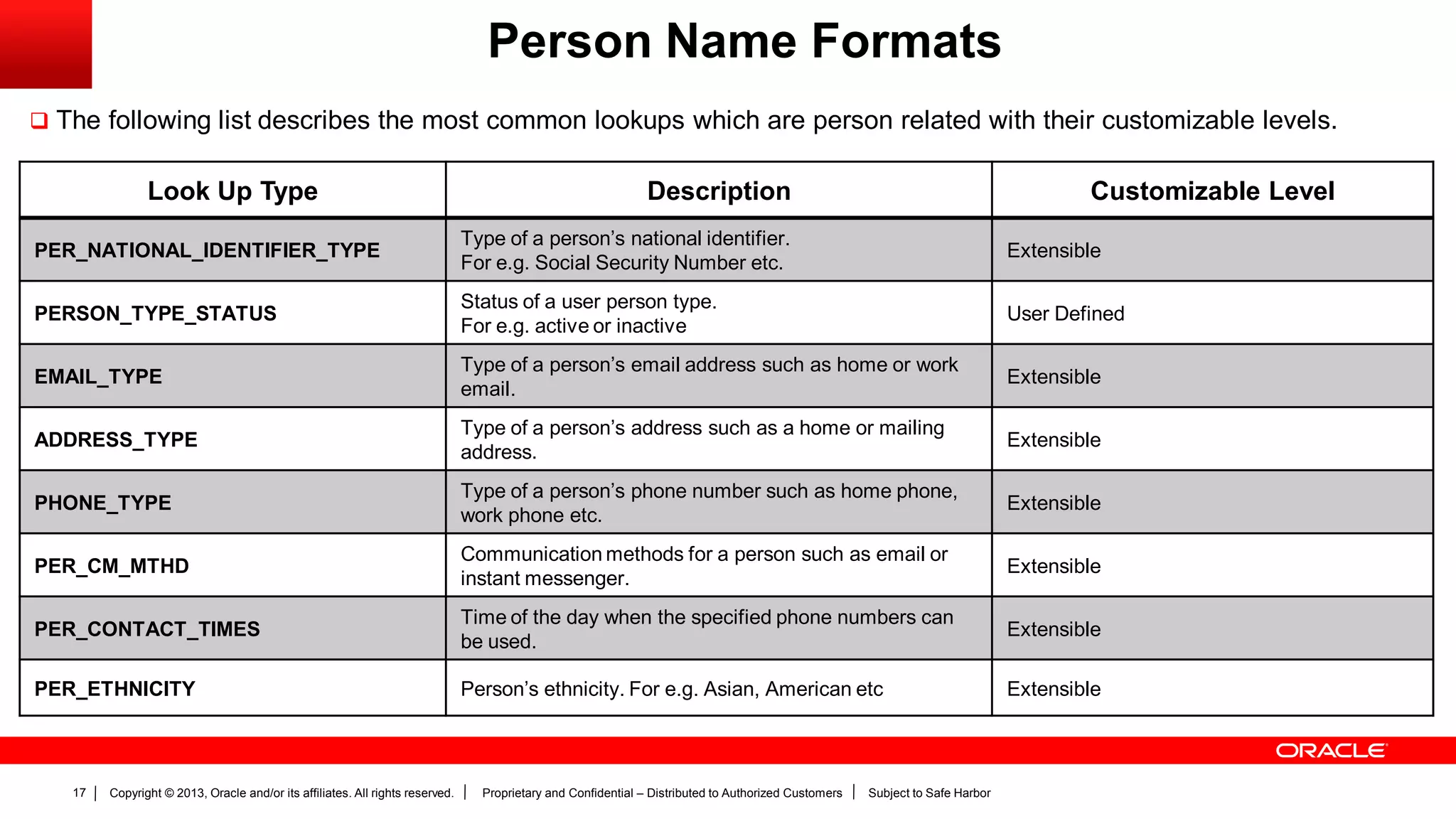
 The following list describes the most common lookups which are person related with their customizable levels.
Look Up Type Description Customizable Level
PER_NATIONAL_IDENTIFIER_TYPE
Type of a person’s national identifier.
For e.g. Social Security Number etc.
Extensible
PERSON_TYPE_STATUS
Status of a user person type.
For e.g. active or inactive
User Defined
EMAIL_TYPE
Type of a person’s email address such as home or work
email.
Extensible
ADDRESS_TYPE
Type of a person’s address such as a home or mailing
address.
Extensible
PHONE_TYPE
Type of a person’s phone number such as home phone,
work phone etc.
Extensible
PER_CM_MTHD
Communication methods for a person such as email or
instant messenger.
Extensible
PER_CONTACT_TIMES
Time of the day when the specified phone numbers can
be used.
Extensible
PER_ETHNICITY Person’s ethnicity. For e.g. Asian, American etc Extensible
Copyright © 2013, Oracle and/or its affiliates. All rights reserved. Proprietary and Confidential – Distributed to Authorized Customers Subject to Safe Harbor18
Person Name Formats
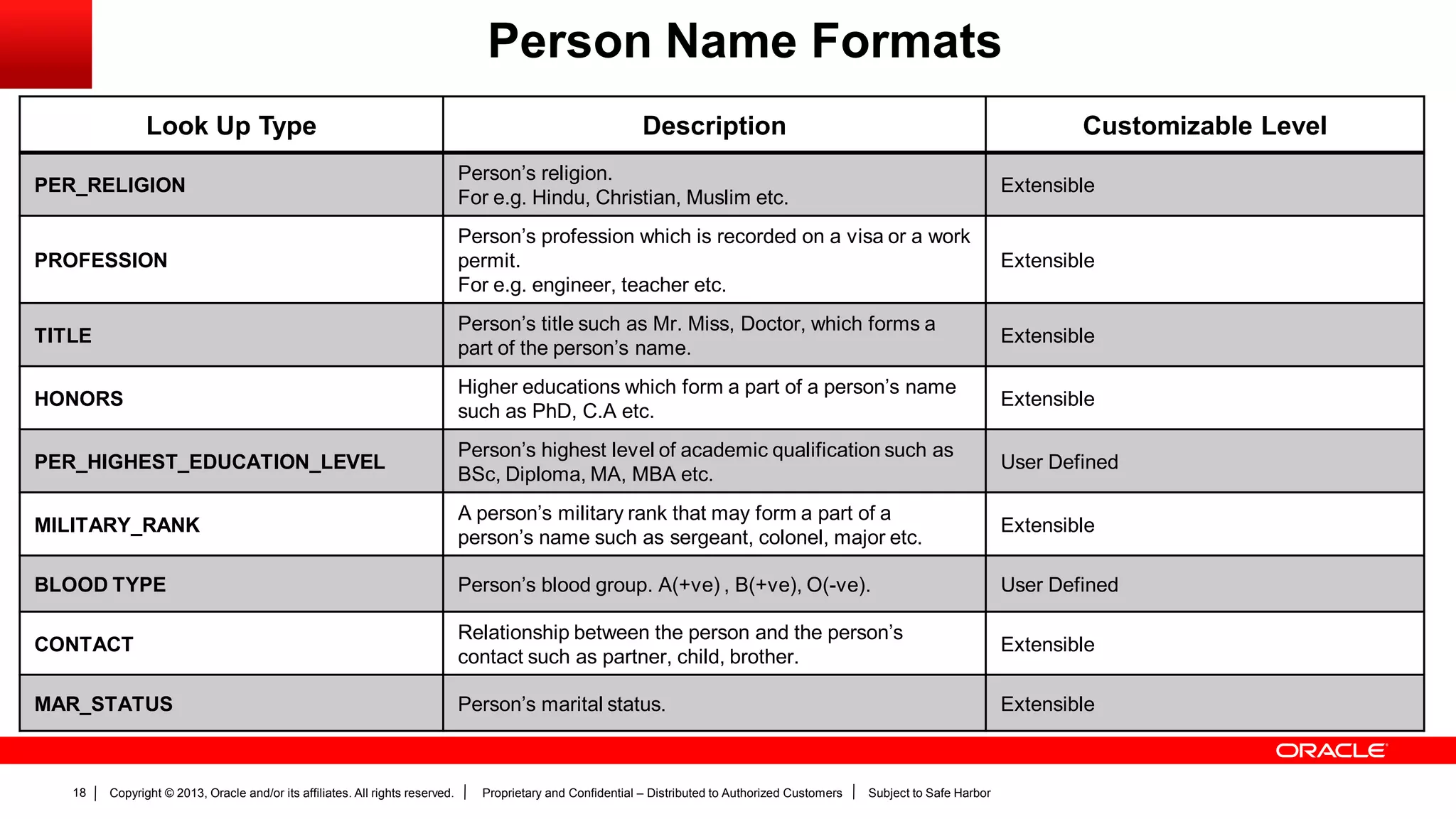
Look Up Type Description Customizable Level
PER_RELIGION
Person’s religion.
For e.g. Hindu, Christian, Muslim etc.
Extensible
PROFESSION
Person’s profession which is recorded on a visa or a work
permit.
For e.g. engineer, teacher etc.
Extensible
TITLE
Person’s title such as Mr. Miss, Doctor, which forms a
part of the person’s name.
Extensible
HONORS
Higher educations which form a part of a person’s name
such as PhD, C.A etc.
Extensible
PER_HIGHEST_EDUCATION_LEVEL
Person’s highest level of academic qualification such as
BSc, Diploma, MA, MBA etc.
User Defined
MILITARY_RANK
A person’s military rank that may form a part of a
person’s name such as sergeant, colonel, major etc.
Extensible
BLOOD TYPE Person’s blood group. A(+ve) , B(+ve), O(-ve). User Defined
CONTACT
Relationship between the person and the person’s
contact such as partner, child, brother.
Extensible
MAR_STATUS Person’s marital status. Extensible
Copyright © 2013, Oracle and/or its affiliates. All rights reserved. Proprietary and Confidential – Distributed to Authorized Customers Subject to Safe Harbor19
Define Employment
Records
Copyright © 2013, Oracle and/or its affiliates. All rights reserved. Proprietary and Confidential – Distributed to Authorized Customers Subject to Safe Harbor20
Defining Employment Records - Overview
 Defining employment record values can help a user to -
 Manage the assignment status.
 Manage lookups.
 Managing Assignment Statuses -
Predefined assignment status values help indicate whether
the assignment is active, inactive, suspended or eligible for
payroll processing.
 Managing Lookup’s -
All employee related lookup’s can be managed using this task.
**Note Before :-
a) If the assignment values originate from the source application, users need
to map equivalent values within Oracle Fusion.
b) To help support this, users can follow the steps :-
i. Rename the user status values associated with the pre-defined
status values.
ii. Create new assignment values.
Copyright © 2013, Oracle and/or its affiliates. All rights reserved. Proprietary and Confidential – Distributed to Authorized Customers Subject to Safe Harbor21
Manage Assignment Statuses
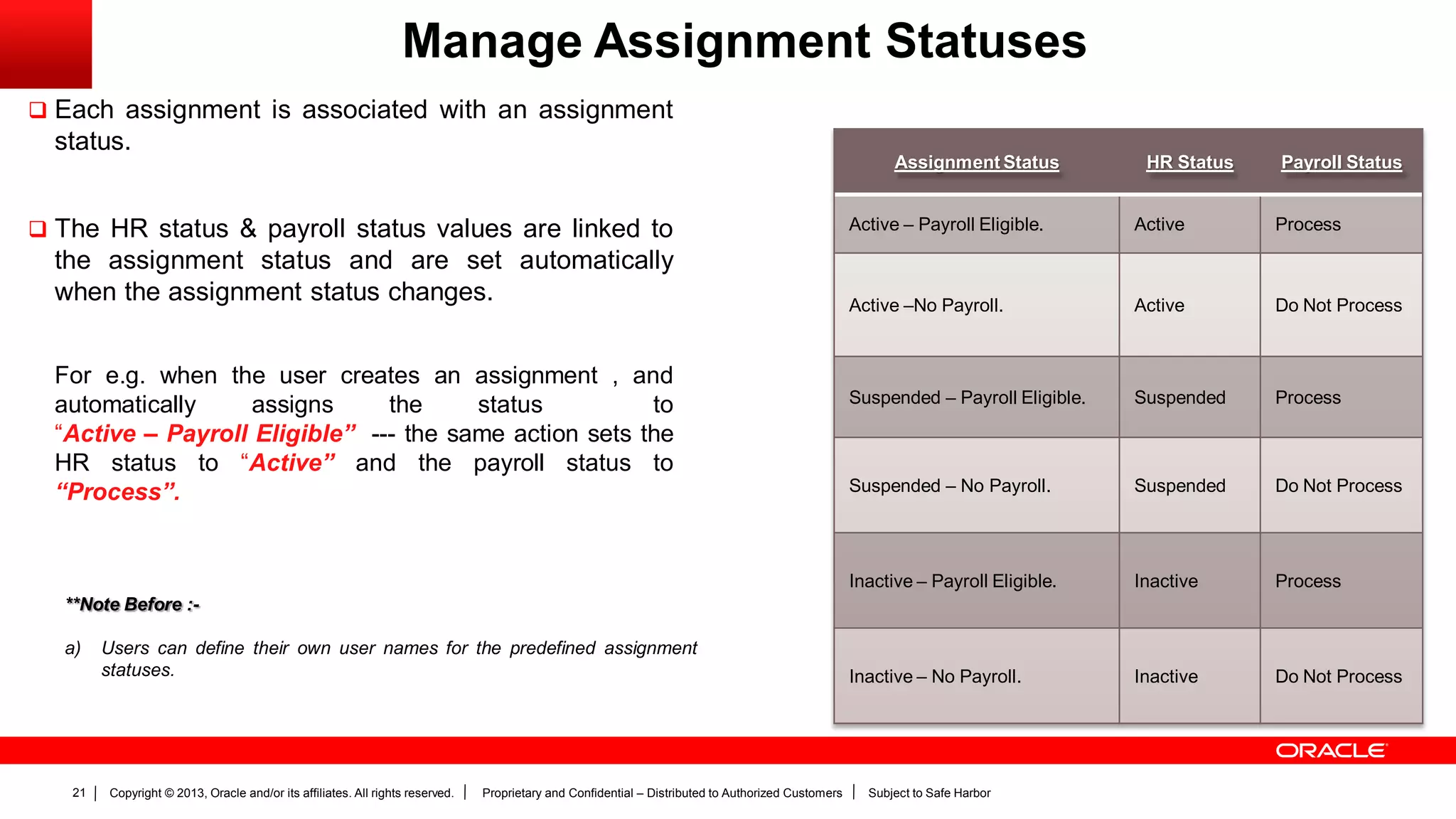
 Each assignment is associated with an assignment
status.
 The HR status & payroll status values are linked to
the assignment status and are set automatically
when the assignment status changes.
For e.g. when the user creates an assignment , and
automatically assigns the status to
“Active – Payroll Eligible” --- the same action sets the
HR status to “Active” and the payroll status to
“Process”.
Assignment Status HR Status Payroll Status
Active – Payroll Eligible. Active Process
Active –No Payroll. Active Do Not Process
Suspended – Payroll Eligible. Suspended Process
Suspended – No Payroll. Suspended Do Not Process
Inactive – Payroll Eligible. Inactive Process
Inactive – No Payroll. Inactive Do Not Process
**Note Before :-
a) Users can define their own user names for the predefined assignment
statuses.
Copyright © 2013, Oracle and/or its affiliates. All rights reserved. Proprietary and Confidential – Distributed to Authorized Customers Subject to Safe Harbor22
Employee Lookup’s
Copyright © 2013, Oracle and/or its affiliates. All rights reserved. Proprietary and Confidential – Distributed to Authorized Customers Subject to Safe Harbor23
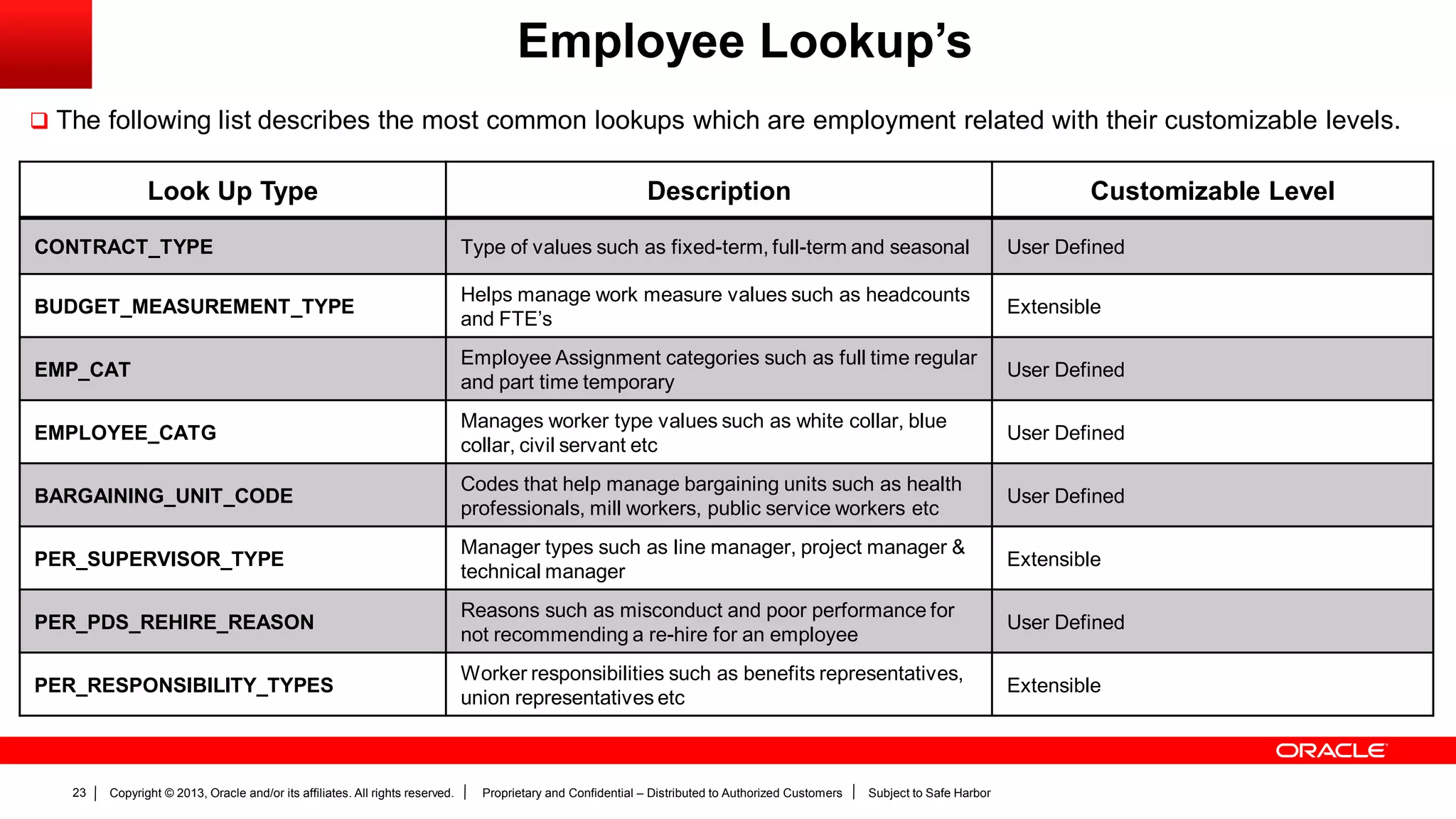
Employee Lookup’s
 The following list describes the most common lookups which are employment related with their customizable levels.
Look Up Type Description Customizable Level
CONTRACT_TYPE Type of values such as fixed-term, full-term and seasonal User Defined
BUDGET_MEASUREMENT_TYPE
Helps manage work measure values such as headcounts
and FTE’s
Extensible
EMP_CAT
Employee Assignment categories such as full time regular
and part time temporary
User Defined
EMPLOYEE_CATG
Manages worker type values such as white collar, blue
collar, civil servant etc
User Defined
BARGAINING_UNIT_CODE
Codes that help manage bargaining units such as health
professionals, mill workers, public service workers etc
User Defined
PER_SUPERVISOR_TYPE
Manager types such as line manager, project manager &
technical manager
Extensible
PER_PDS_REHIRE_REASON
Reasons such as misconduct and poor performance for
not recommending a re-hire for an employee
User Defined
PER_RESPONSIBILITY_TYPES
Worker responsibilities such as benefits representatives,
union representatives etc
Extensible
Copyright © 2013, Oracle and/or its affiliates. All rights reserved. Proprietary and Confidential – Distributed to Authorized Customers Subject to Safe Harbor24
Define Documents
Copyright © 2013, Oracle and/or its affiliates. All rights reserved. Proprietary and Confidential – Distributed to Authorized Customers Subject to Safe Harbor25
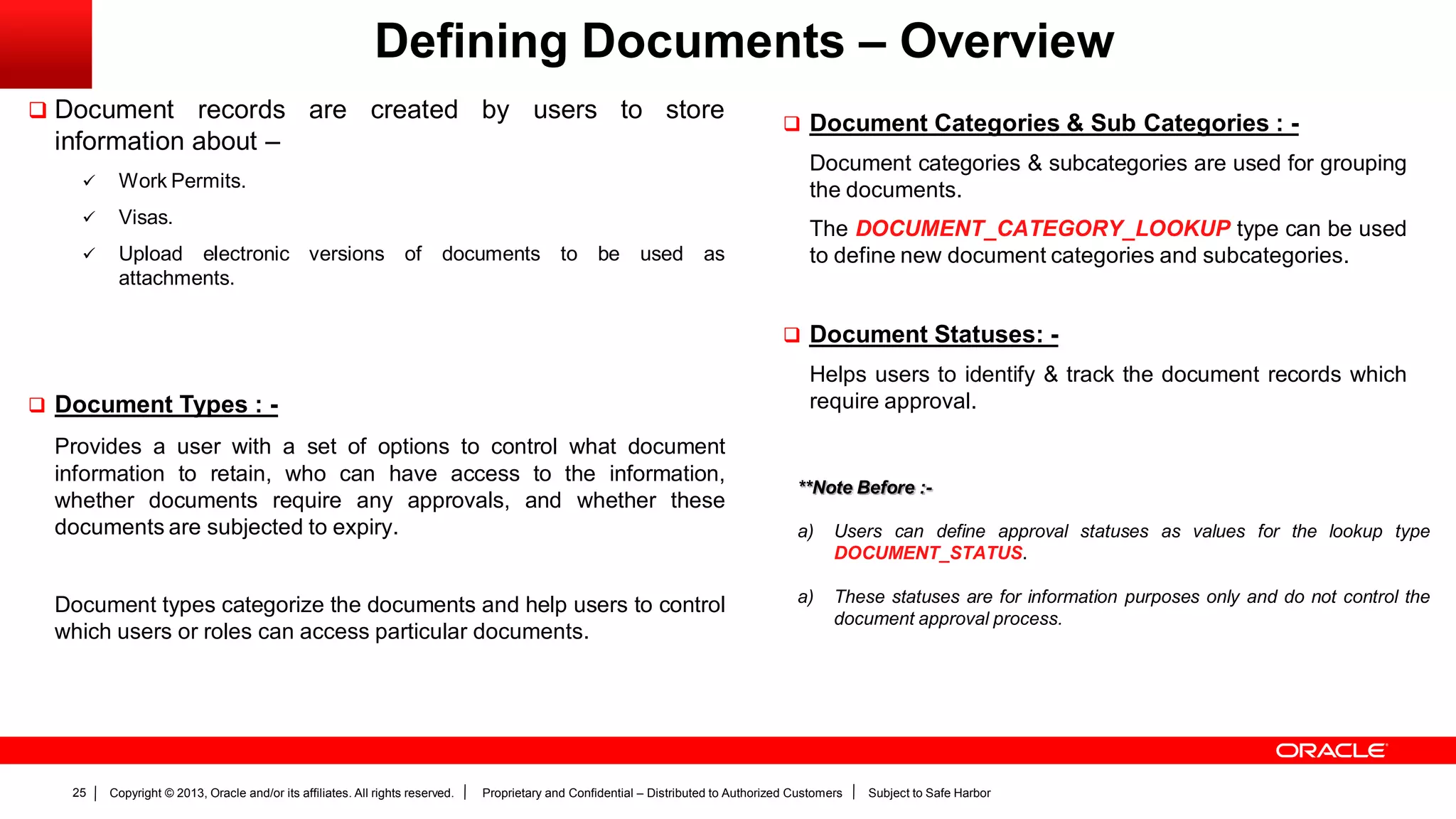
Defining Documents – Overview
 Document records are created by users to store
information about –
 Work Permits.
 Visas.
 Upload electronic versions of documents to be used as
attachments.
 Document Types : -
Provides a user with a set of options to control what document
information to retain, who can have access to the information,
whether documents require any approvals, and whether these
documents are subjected to expiry.
Document types categorize the documents and help users to control
which users or roles can access particular documents.
 Document Categories & Sub Categories : -
Document categories & subcategories are used for grouping
the documents.
The DOCUMENT_CATEGORY_LOOKUP type can be used
to define new document categories and subcategories.
 Document Statuses: -
Helps users to identify & track the document records which
require approval.
**Note Before :-
a) Users can define approval statuses as values for the lookup type
DOCUMENT_STATUS.
a) These statuses are for information purposes only and do not control the
document approval process.
Copyright © 2013, Oracle and/or its affiliates. All rights reserved. Proprietary and Confidential – Distributed to Authorized Customers Subject to Safe Harbor26
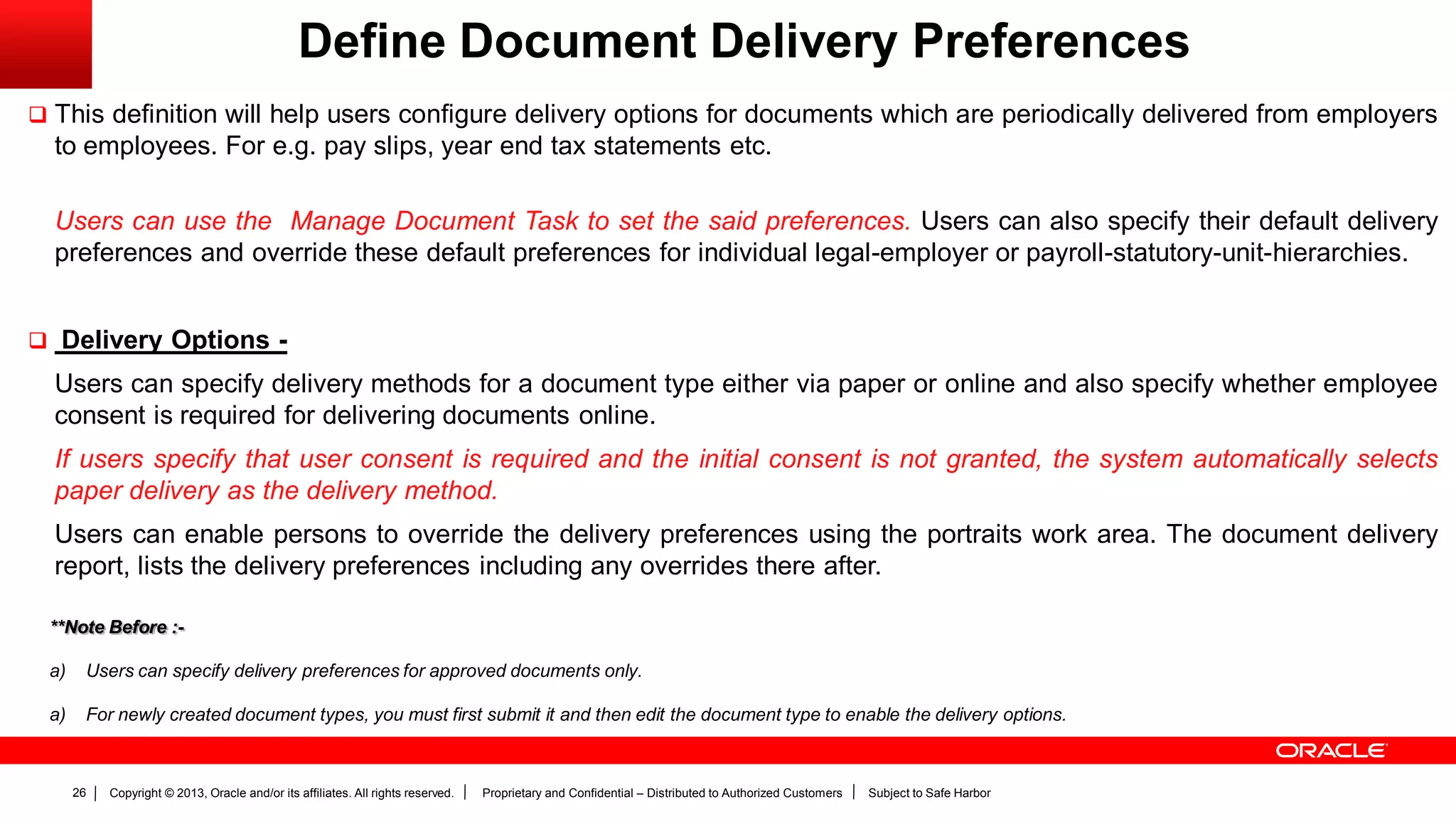
Define Document Delivery Preferences
 This definition will help users configure delivery options for documents which are periodically delivered from employers
to employees. For e.g. pay slips, year end tax statements etc.
Users can use the Manage Document Task to set the said preferences. Users can also specify their default delivery
preferences and override these default preferences for individual legal-employer or payroll-statutory-unit-hierarchies.
 Delivery Options -
Users can specify delivery methods for a document type either via paper or online and also specify whether employee
consent is required for delivering documents online.
If users specify that user consent is required and the initial consent is not granted, the system automatically selects
paper delivery as the delivery method.
Users can enable persons to override the delivery preferences using the portraits work area. The document delivery
report, lists the delivery preferences including any overrides there after.
**Note Before :-
a) Users can specify delivery preferences for approved documents only.
a) For newly created document types, you must first submit it and then edit the document type to enable the delivery options.
Copyright © 2013, Oracle and/or its affiliates. All rights reserved. Proprietary and Confidential – Distributed to Authorized Customers Subject to Safe Harbor27
Copyright © 2013, Oracle and/or its affiliates. All rights reserved. Proprietary and Confidential – Distributed to Authorized Customers Subject to Safe Harbor28
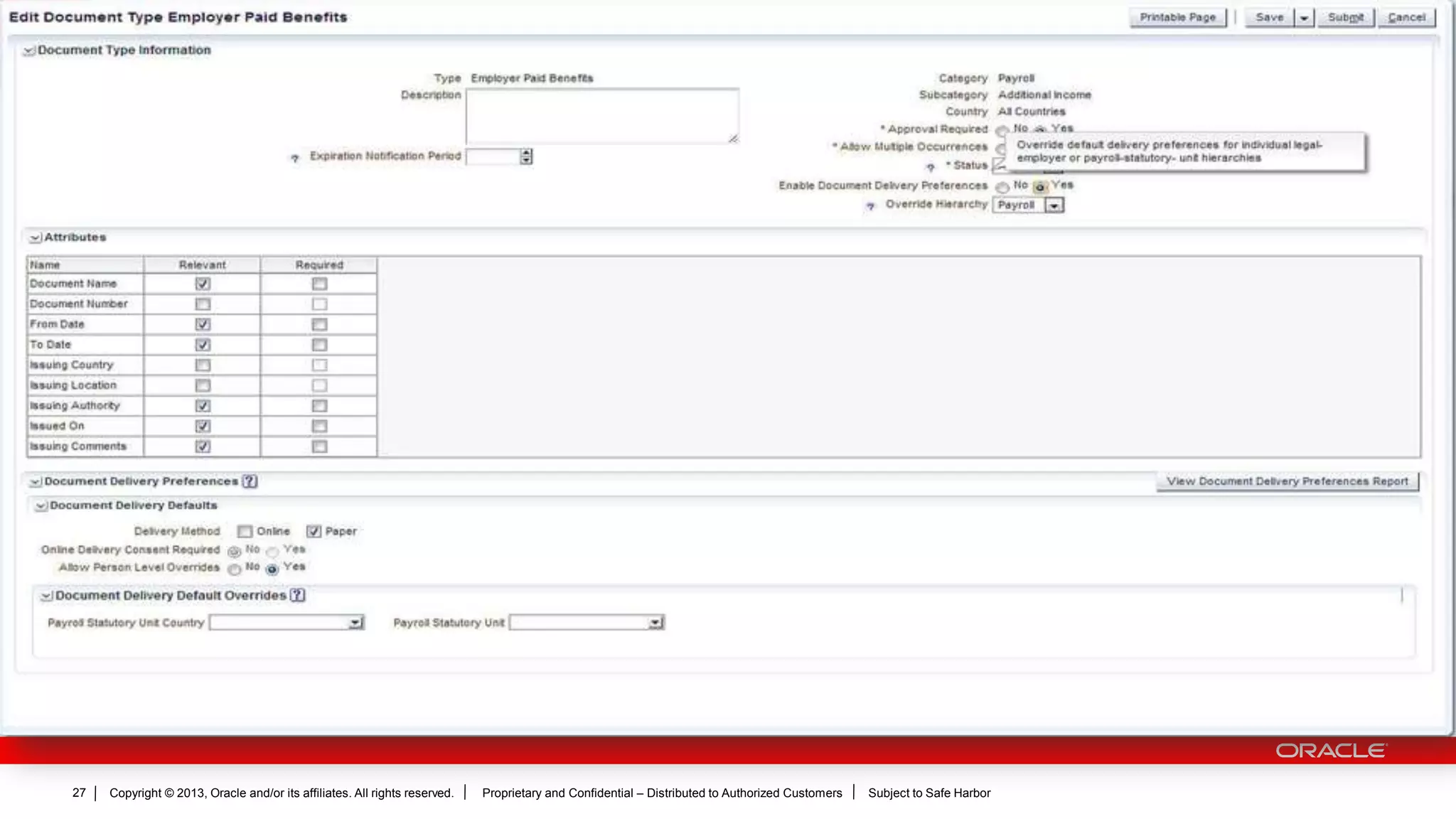
Overriding Document Delivery Preferences
 Users can setup delivery preferences on the document type and respective overrides on associated work structures.
Users can override the default delivery preferences at various levels for a payroll statutory unit (for all payroll
documents) or legal employer (for other document categories).
 The default delivery option set, applies to all the documents until such time that the user goes and modifies the entry.
 Delivery documents are arranged in a hierarchy.
 Delivery preferences set for location overrides those set for a department.
 Delivery preferences set for a department overrides those set for a legal employer.
 Person Overrides –
Persons can override the delivery preferences for their documents using the personal information card within their portraits. The delivery preferences set
in the portraits override the delivery preferences specified anywhere else within the document type.
Copyright © 2013, Oracle and/or its affiliates. All rights reserved. Proprietary and Confidential – Distributed to Authorized Customers Subject to Safe Harbor29
Activity # 3:-
Activity : Creating a document type.
Time : 10 minutes.
SG Page No : 65
Lab Session
Copyright © 2013, Oracle and/or its affiliates. All rights reserved. Proprietary and Confidential – Distributed to Authorized Customers Subject to Safe Harbor30

17 define workforce records

  • 1.
    Copyright © 2013,Oracle and/or its affiliates. All rights reserved. Proprietary and Confidential – Distributed to Authorized Customers Subject to Safe Harbor1 Define Workforce Records ORACLE FUSION HCM IMPLEMENTATION PARTNER WORKSHOP Oracle Fusion Human Capital Management
  • 2.
    Copyright © 2013,Oracle and/or its affiliates. All rights reserved. Proprietary and Confidential – Distributed to Authorized Customers Subject to Safe Harbor2 The following is intended to outline our general product direction. It is intended for information purposes only, and may not be incorporated into any contract. It is not a commitment to deliver any material, code, or functionality, and should not be relied upon in making purchasing decisions. The development, release, and timing of any features or functionality described for Oracle’s products remains at the sole discretion of Oracle. Safe Harbor Statement
  • 3.
    Copyright © 2013,Oracle and/or its affiliates. All rights reserved. Proprietary and Confidential – Distributed to Authorized Customers Subject to Safe Harbor3 The information in this presentation is correct as of the presentation date. However, Oracle Fusion HCM continues to evolve and software patches are applied frequently; therefore this information is subject to change. Check with your Oracle Representative for updates. This content is not warranted to be error-free. Content Subject to Change
  • 4.
    Copyright © 2013,Oracle and/or its affiliates. All rights reserved. Proprietary and Confidential – Distributed to Authorized Customers Subject to Safe Harbor4 Objectives  Define Availability.  Define Person Record Values.  Define Employment Records.  Define Documents.
  • 5.
    Copyright © 2013,Oracle and/or its affiliates. All rights reserved. Proprietary and Confidential – Distributed to Authorized Customers Subject to Safe Harbor5 Defining Availability
  • 6.
    Copyright © 2013,Oracle and/or its affiliates. All rights reserved. Proprietary and Confidential – Distributed to Authorized Customers Subject to Safe Harbor6 Defining Availability – An Overview  Following aspects determine the workers availability  Absences recorded for that time.  His/her work schedule.  Calendar events such as national holidays etc.  How it all works :- 1. The application searches for primary work schedules assigned to the worker at different workforce structure levels. 2. If no primary schedule seems assigned to the worker, the application then looks for availability based on absence records, calendar events etc. 3. If no calendar events are identified, then the application availability based on the workers standard working hours & absence records. Navigation Path : Navigator  Setup & Maintenance  All Tasks  Workforce Deployment Task  Define Common Application Configuration for HCM Define Workforce Records.
  • 7.
    Copyright © 2013,Oracle and/or its affiliates. All rights reserved. Proprietary and Confidential – Distributed to Authorized Customers Subject to Safe Harbor7 Defining Availability – Primary Work Schedules  Workers can be associated with multiple work schedules. However, users must select one primary work schedule to determine the worker’s availability.  The application searches for assigned primary work schedules to the workforce structure in the following order :- 1. The primary assignment for the worker. 2. His position. 3. His job. 4. His department. 5. His location. 6. His legal employer. 7. His enterprise. **Note Before :- a) Work schedules use the bottom’s up approach, which means that the lower workforce structures take precedence over the higher levels.
  • 8.
    Copyright © 2013,Oracle and/or its affiliates. All rights reserved. Proprietary and Confidential – Distributed to Authorized Customers Subject to Safe Harbor8 Defining Availability – Calendar Events  A calendar event indicates a period that signifies an event. E.g. a public holiday etc.  When you set a calendar event, you specify which set of workers the event must consider. Users can do so in the following manner :-  Use an organizational hierarchy to select which organization the event must be associated with. OR  Use a geographical hierarchy to select specific regions/locations to associate the event with respect to.  When users use geographical hierarchy for a calendar event coverage, they can select the nodes where this has to be excluded from.  Calendar Event Categories Helps users to group related calendar events. For e.g. users may wish to group all public holidays using the pre- defined public holiday calendar. In addition to the pre-defined public holiday calendar, users can also create their own calendar events by adding relevant values to the calendar event category lookup. **Note Before :- a) When users add the calendar event category as an exception to a work schedule, all calendar events associated to that category are automatically included. b) If Public holidays as a category is not visible in the category list, users can navigate to the manage availability lookups task in the setup & maintenance area to extend the end date for the public holiday look up value.
  • 9.
    Copyright © 2013,Oracle and/or its affiliates. All rights reserved. Proprietary and Confidential – Distributed to Authorized Customers Subject to Safe Harbor9 Activity # 1:- Activity : Creating & assigning a work schedule. Time : 40 minutes. SG Page No : 21 Activity # 2:- Activity : Adding an exception to a work schedule. Time : 10 minutes. SG Page No : 28 Lab Session
  • 10.
    Copyright © 2013,Oracle and/or its affiliates. All rights reserved. Proprietary and Confidential – Distributed to Authorized Customers Subject to Safe Harbor10 Defining Person Record Values
  • 11.
    Copyright © 2013,Oracle and/or its affiliates. All rights reserved. Proprietary and Confidential – Distributed to Authorized Customers Subject to Safe Harbor11 Defining Person Record Values - Overview  Person record values can help a user to :-  Manage the person name formats.  Manage person types.  Manage person lookups.  Person types can be used to maintain information about a group of people within an enterprise. Person types are of two types :-  System Person Type – A predefined set of person types which the system uses to identify a group of people.  User Person Type – Derived from the system person type, but these are user defined based on the enterprises requirements.  Person name formats are a sequence of names components that represent different parts of a name. For e.g. first name, last name & punctuation marks. Users can change the sequence of, remove or include additional name components according to the enterprises requirements.  All person lookups related tasks can be handled using the manage person lookup task under the setup and maintenance work area. **Note Before :- a) Users cannot change, delete or create additional system person types. b) Oracle Fusion HCM includes all local & global formats for each person name format.
  • 12.
    Copyright © 2013,Oracle and/or its affiliates. All rights reserved. Proprietary and Confidential – Distributed to Authorized Customers Subject to Safe Harbor12 Person Types
  • 13.
    Copyright © 2013,Oracle and/or its affiliates. All rights reserved. Proprietary and Confidential – Distributed to Authorized Customers Subject to Safe Harbor13 Person Types  All the figures alongside depict the available system person types alongwith the person types defined for the selection made.  Users can add, user defined assignment person types depending on their enterprises requirements.
  • 14.
    Copyright © 2013,Oracle and/or its affiliates. All rights reserved. Proprietary and Confidential – Distributed to Authorized Customers Subject to Safe Harbor14 Person Name Formats
  • 15.
    Copyright © 2013,Oracle and/or its affiliates. All rights reserved. Proprietary and Confidential – Distributed to Authorized Customers Subject to Safe Harbor15 Person Name Formats  The illustration alongside depicts the name components along with punctuation marks that make up a name format.  The following table describes the predefined configurable name format types - Smith, John Arthur (Mr.) 1 2 3 4 5 6 7 8 9 10 1. Last Name 2. Comma 3. Space 4. First Name 5. Space 6. Middle Name 7. Space 8. Opening Bracket 9. Title 10. Closing Bracket Sr. No Format Types Usage 1. Full Name For names that appear in reports 2. Display Name To configure stand alone names. e.g. names that appear on the page header’s etc. 3. List Name Names that appear in the lists that can be sorted. 4. Order Name For names where list name alone is not sufficient to sort the list **Note Before :- a) To ensure that name changes reflect correctly, users should schedule the Apply Name Formats to Person Names process regularly. b) Navigation Path : Navigator  Tools  Scheduled Processes  Schedule New Process  Search for Apply Name formats to person names process  Submit.
  • 16.
    Copyright © 2013,Oracle and/or its affiliates. All rights reserved. Proprietary and Confidential – Distributed to Authorized Customers Subject to Safe Harbor16 Person Lookups
  • 17.
    Copyright © 2013,Oracle and/or its affiliates. All rights reserved. Proprietary and Confidential – Distributed to Authorized Customers Subject to Safe Harbor17 Person Name Formats  The following list describes the most common lookups which are person related with their customizable levels. Look Up Type Description Customizable Level PER_NATIONAL_IDENTIFIER_TYPE Type of a person’s national identifier. For e.g. Social Security Number etc. Extensible PERSON_TYPE_STATUS Status of a user person type. For e.g. active or inactive User Defined EMAIL_TYPE Type of a person’s email address such as home or work email. Extensible ADDRESS_TYPE Type of a person’s address such as a home or mailing address. Extensible PHONE_TYPE Type of a person’s phone number such as home phone, work phone etc. Extensible PER_CM_MTHD Communication methods for a person such as email or instant messenger. Extensible PER_CONTACT_TIMES Time of the day when the specified phone numbers can be used. Extensible PER_ETHNICITY Person’s ethnicity. For e.g. Asian, American etc Extensible
  • 18.
    Copyright © 2013,Oracle and/or its affiliates. All rights reserved. Proprietary and Confidential – Distributed to Authorized Customers Subject to Safe Harbor18 Person Name Formats Look Up Type Description Customizable Level PER_RELIGION Person’s religion. For e.g. Hindu, Christian, Muslim etc. Extensible PROFESSION Person’s profession which is recorded on a visa or a work permit. For e.g. engineer, teacher etc. Extensible TITLE Person’s title such as Mr. Miss, Doctor, which forms a part of the person’s name. Extensible HONORS Higher educations which form a part of a person’s name such as PhD, C.A etc. Extensible PER_HIGHEST_EDUCATION_LEVEL Person’s highest level of academic qualification such as BSc, Diploma, MA, MBA etc. User Defined MILITARY_RANK A person’s military rank that may form a part of a person’s name such as sergeant, colonel, major etc. Extensible BLOOD TYPE Person’s blood group. A(+ve) , B(+ve), O(-ve). User Defined CONTACT Relationship between the person and the person’s contact such as partner, child, brother. Extensible MAR_STATUS Person’s marital status. Extensible
  • 19.
    Copyright © 2013,Oracle and/or its affiliates. All rights reserved. Proprietary and Confidential – Distributed to Authorized Customers Subject to Safe Harbor19 Define Employment Records
  • 20.
    Copyright © 2013,Oracle and/or its affiliates. All rights reserved. Proprietary and Confidential – Distributed to Authorized Customers Subject to Safe Harbor20 Defining Employment Records - Overview  Defining employment record values can help a user to -  Manage the assignment status.  Manage lookups.  Managing Assignment Statuses - Predefined assignment status values help indicate whether the assignment is active, inactive, suspended or eligible for payroll processing.  Managing Lookup’s - All employee related lookup’s can be managed using this task. **Note Before :- a) If the assignment values originate from the source application, users need to map equivalent values within Oracle Fusion. b) To help support this, users can follow the steps :- i. Rename the user status values associated with the pre-defined status values. ii. Create new assignment values.
  • 21.
    Copyright © 2013,Oracle and/or its affiliates. All rights reserved. Proprietary and Confidential – Distributed to Authorized Customers Subject to Safe Harbor21 Manage Assignment Statuses  Each assignment is associated with an assignment status.  The HR status & payroll status values are linked to the assignment status and are set automatically when the assignment status changes. For e.g. when the user creates an assignment , and automatically assigns the status to “Active – Payroll Eligible” --- the same action sets the HR status to “Active” and the payroll status to “Process”. Assignment Status HR Status Payroll Status Active – Payroll Eligible. Active Process Active –No Payroll. Active Do Not Process Suspended – Payroll Eligible. Suspended Process Suspended – No Payroll. Suspended Do Not Process Inactive – Payroll Eligible. Inactive Process Inactive – No Payroll. Inactive Do Not Process **Note Before :- a) Users can define their own user names for the predefined assignment statuses.
  • 22.
    Copyright © 2013,Oracle and/or its affiliates. All rights reserved. Proprietary and Confidential – Distributed to Authorized Customers Subject to Safe Harbor22 Employee Lookup’s
  • 23.
    Copyright © 2013,Oracle and/or its affiliates. All rights reserved. Proprietary and Confidential – Distributed to Authorized Customers Subject to Safe Harbor23 Employee Lookup’s  The following list describes the most common lookups which are employment related with their customizable levels. Look Up Type Description Customizable Level CONTRACT_TYPE Type of values such as fixed-term, full-term and seasonal User Defined BUDGET_MEASUREMENT_TYPE Helps manage work measure values such as headcounts and FTE’s Extensible EMP_CAT Employee Assignment categories such as full time regular and part time temporary User Defined EMPLOYEE_CATG Manages worker type values such as white collar, blue collar, civil servant etc User Defined BARGAINING_UNIT_CODE Codes that help manage bargaining units such as health professionals, mill workers, public service workers etc User Defined PER_SUPERVISOR_TYPE Manager types such as line manager, project manager & technical manager Extensible PER_PDS_REHIRE_REASON Reasons such as misconduct and poor performance for not recommending a re-hire for an employee User Defined PER_RESPONSIBILITY_TYPES Worker responsibilities such as benefits representatives, union representatives etc Extensible
  • 24.
    Copyright © 2013,Oracle and/or its affiliates. All rights reserved. Proprietary and Confidential – Distributed to Authorized Customers Subject to Safe Harbor24 Define Documents
  • 25.
    Copyright © 2013,Oracle and/or its affiliates. All rights reserved. Proprietary and Confidential – Distributed to Authorized Customers Subject to Safe Harbor25 Defining Documents – Overview  Document records are created by users to store information about –  Work Permits.  Visas.  Upload electronic versions of documents to be used as attachments.  Document Types : - Provides a user with a set of options to control what document information to retain, who can have access to the information, whether documents require any approvals, and whether these documents are subjected to expiry. Document types categorize the documents and help users to control which users or roles can access particular documents.  Document Categories & Sub Categories : - Document categories & subcategories are used for grouping the documents. The DOCUMENT_CATEGORY_LOOKUP type can be used to define new document categories and subcategories.  Document Statuses: - Helps users to identify & track the document records which require approval. **Note Before :- a) Users can define approval statuses as values for the lookup type DOCUMENT_STATUS. a) These statuses are for information purposes only and do not control the document approval process.
  • 26.
    Copyright © 2013,Oracle and/or its affiliates. All rights reserved. Proprietary and Confidential – Distributed to Authorized Customers Subject to Safe Harbor26 Define Document Delivery Preferences  This definition will help users configure delivery options for documents which are periodically delivered from employers to employees. For e.g. pay slips, year end tax statements etc. Users can use the Manage Document Task to set the said preferences. Users can also specify their default delivery preferences and override these default preferences for individual legal-employer or payroll-statutory-unit-hierarchies.  Delivery Options - Users can specify delivery methods for a document type either via paper or online and also specify whether employee consent is required for delivering documents online. If users specify that user consent is required and the initial consent is not granted, the system automatically selects paper delivery as the delivery method. Users can enable persons to override the delivery preferences using the portraits work area. The document delivery report, lists the delivery preferences including any overrides there after. **Note Before :- a) Users can specify delivery preferences for approved documents only. a) For newly created document types, you must first submit it and then edit the document type to enable the delivery options.
  • 27.
    Copyright © 2013,Oracle and/or its affiliates. All rights reserved. Proprietary and Confidential – Distributed to Authorized Customers Subject to Safe Harbor27
  • 28.
    Copyright © 2013,Oracle and/or its affiliates. All rights reserved. Proprietary and Confidential – Distributed to Authorized Customers Subject to Safe Harbor28 Overriding Document Delivery Preferences  Users can setup delivery preferences on the document type and respective overrides on associated work structures. Users can override the default delivery preferences at various levels for a payroll statutory unit (for all payroll documents) or legal employer (for other document categories).  The default delivery option set, applies to all the documents until such time that the user goes and modifies the entry.  Delivery documents are arranged in a hierarchy.  Delivery preferences set for location overrides those set for a department.  Delivery preferences set for a department overrides those set for a legal employer.  Person Overrides – Persons can override the delivery preferences for their documents using the personal information card within their portraits. The delivery preferences set in the portraits override the delivery preferences specified anywhere else within the document type.
  • 29.
    Copyright © 2013,Oracle and/or its affiliates. All rights reserved. Proprietary and Confidential – Distributed to Authorized Customers Subject to Safe Harbor29 Activity # 3:- Activity : Creating a document type. Time : 10 minutes. SG Page No : 65 Lab Session
  • 30.
    Copyright © 2013,Oracle and/or its affiliates. All rights reserved. Proprietary and Confidential – Distributed to Authorized Customers Subject to Safe Harbor30