Copyright © 2013, Oracle and/or its affiliates. All rights reserved. Proprietary and Confidential – Distributed to Authorized Customers Subject to Safe Harbor1
Fusion Applications - Extensibility
Platform Technology Solutions
Copyright © 2013, Oracle and/or its affiliates. All rights reserved. Proprietary and Confidential – Distributed to Authorized Customers Subject to Safe Harbor2
The following is intended to outline our general product direction. It is intended
for information purposes only, and may not be incorporated into any contract.
It is not a commitment to deliver any material, code, or
functionality, and should not be relied upon in making
purchasing decisions. The development, release, and timing of
any features or functionality described for Oracle’s products
remains at the sole discretion of Oracle.
Safe Harbor Statement
Copyright © 2013, Oracle and/or its affiliates. All rights reserved. Proprietary and Confidential – Distributed to Authorized Customers Subject to Safe Harbor3
The information in this presentation is correct as of the presentation date.
However, Oracle Sales Cloud continues to evolve and software patches are
applied frequently; therefore this information is subject to
change. Check with your Oracle Representative for updates.
This content is not warranted to be error-free.
Content Subject to Change
Copyright © 2013, Oracle and/or its affiliates. All rights reserved. Proprietary and Confidential – Distributed to Authorized Customers Subject to Safe Harbor4
Topics
 Extensibility Capabilities
 Sandboxes
 Conflict Resolution
 Customization
 Personalization
Copyright © 2013, Oracle and/or its affiliates. All rights reserved. Proprietary and Confidential – Distributed to Authorized Customers Subject to Safe Harbor5
Overview: What is Extensibility?
 Modify existing applications
 Extend existing applications
 See modifications immediately
 Add new modules
All within the standards-based Oracle Fusion Middleware Platform
Copyright © 2013, Oracle and/or its affiliates. All rights reserved. Proprietary and Confidential – Distributed to Authorized Customers Subject to Safe Harbor6
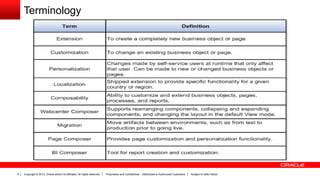
Terminology
Copyright © 2013, Oracle and/or its affiliates. All rights reserved. Proprietary and Confidential – Distributed to Authorized Customers Subject to Safe Harbor7
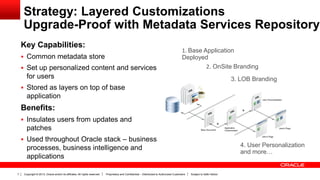
Strategy: Layered Customizations
Upgrade-Proof with Metadata Services Repository
Key Capabilities:
 Common metadata store
 Set up personalized content and services
for users
 Stored as layers on top of base
application
Benefits:
 Insulates users from updates and
patches
 Used throughout Oracle stack – business
processes, business intelligence and
applications
1. Base Application
Deployed
2. OnSite Branding
3. LOB Branding
4. User Personalization
and more…
Copyright © 2013, Oracle and/or its affiliates. All rights reserved. Proprietary and Confidential – Distributed to Authorized Customers Subject to Safe Harbor8
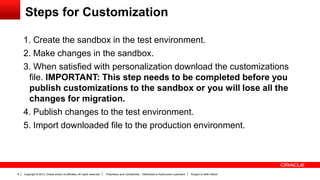
Steps for Customization
1. Create the sandbox in the test environment.
2. Make changes in the sandbox.
3. When satisfied with personalization download the customizations
file. IMPORTANT: This step needs to be completed before you
publish customizations to the sandbox or you will lose all the
changes for migration.
4. Publish changes to the test environment.
5. Import downloaded file to the production environment.
Copyright © 2013, Oracle and/or its affiliates. All rights reserved. Proprietary and Confidential – Distributed to Authorized Customers Subject to Safe Harbor9
Sandboxes
Copyright © 2013, Oracle and/or its affiliates. All rights reserved. Proprietary and Confidential – Distributed to Authorized Customers Subject to Safe Harbor10
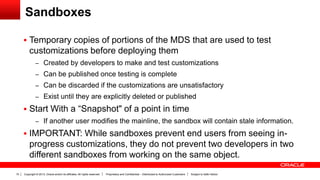
Sandboxes
 Temporary copies of portions of the MDS that are used to test
customizations before deploying them
– Created by developers to make and test customizations
– Can be published once testing is complete
– Can be discarded if the customizations are unsatisfactory
– Exist until they are explicitly deleted or published
 Start With a “Snapshot" of a point in time
– If another user modifies the mainline, the sandbox will contain stale information.

 IMPORTANT: While sandboxes prevent end users from seeing in-
progress customizations, they do not prevent two developers in two
different sandboxes from working on the same object.
Copyright © 2013, Oracle and/or its affiliates. All rights reserved. Proprietary and Confidential – Distributed to Authorized Customers Subject to Safe Harbor11
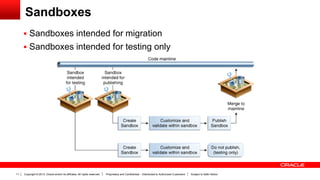
Sandboxes
 Sandboxes intended for migration
 Sandboxes intended for testing only
Copyright © 2013, Oracle and/or its affiliates. All rights reserved. Proprietary and Confidential – Distributed to Authorized Customers Subject to Safe Harbor12
Sandbox Manager
A tool for managing the different types of customization changes that
can be applied to an application.
The different types of sandboxes are:
• Metadata - The metadata sandbox supports making changes to the
application's metadata stored in the MDS.
• Security - The security-enabled sandbox supports making data
security changes.
• Flexfield - Use the flexfield pages to make changes to flexfields and
deploy the flexfield to the sandbox.
Copyright © 2013, Oracle and/or its affiliates. All rights reserved. Proprietary and Confidential – Distributed to Authorized Customers Subject to Safe Harbor13
Active Sandboxes
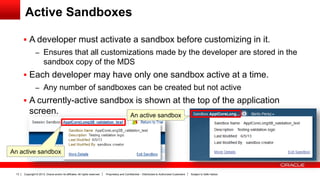
 A developer must activate a sandbox before customizing in it.
– Ensures that all customizations made by the developer are stored in the
sandbox copy of the MDS
 Each developer may have only one sandbox active at a time.
– Any number of sandboxes can be created but not active
 A currently-active sandbox is shown at the top of the application
screen.
An active sandbox
An active sandbox
Copyright © 2013, Oracle and/or its affiliates. All rights reserved. Proprietary and Confidential – Distributed to Authorized Customers Subject to Safe Harbor14
Publishing Sandboxes
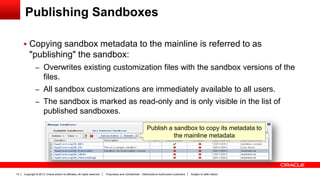
 Copying sandbox metadata to the mainline is referred to as
"publishing" the sandbox:
– Overwrites existing customization files with the sandbox versions of the
files.
– All sandbox customizations are immediately available to all users.
– The sandbox is marked as read-only and is only visible in the list of
published sandboxes.
Publish a sandbox to copy its metadata to
the mainline metadata
Copyright © 2013, Oracle and/or its affiliates. All rights reserved. Proprietary and Confidential – Distributed to Authorized Customers Subject to Safe Harbor15
Integration Sandboxes
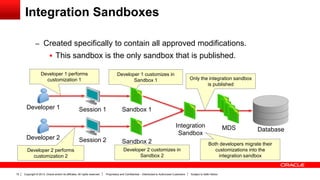
– Created specifically to contain all approved modifications.
 This sandbox is the only sandbox that is published.
Developer 1
Developer 2
Session 1
Session 2
MDS Database
Developer 1 performs
customization 1
Developer 2 performs
customization 2
Both developers migrate their
customizations into the
integration sandbox
Sandbox 2
Sandbox 1
Developer 1 customizes in
Sandbox 1
Developer 2 customizes in
Sandbox 2
Integration
Sandbox
Only the integration sandbox
is published
Copyright © 2013, Oracle and/or its affiliates. All rights reserved. Proprietary and Confidential – Distributed to Authorized Customers Subject to Safe Harbor16
Working with Integration Sandboxes
 With an integration sandbox:
– Each developer uses a dedicated sandbox to make his or her own
customizations.
– Once those customizations are completed, tested, and approved, each
developer re-keys his or her customizations into the integration
sandbox.
– The integration sandbox is the only sandbox published.
Copyright © 2013, Oracle and/or its affiliates. All rights reserved. Proprietary and Confidential – Distributed to Authorized Customers Subject to Safe Harbor17
Conflict Resolution
 2 types of conflicts:
– Conflicts within a sandbox:
 Users overwriting changes created by other users, either directly by
changing the same artifact, or indirectly by affecting files that are
shared between the artifacts.
– Conflicts between sandboxes (intended for publishing only):
 Multiple sandboxes with the same customized artifact publishing to
the mainline.
Copyright © 2013, Oracle and/or its affiliates. All rights reserved. Proprietary and Confidential – Distributed to Authorized Customers Subject to Safe Harbor18
Conflict Resolution
 Managed at several levels:
– If two developers in the same sandbox both try to update the same
object, the second developer is warned that the object is in use and his
or her modifications will not be saved.
 Violated recommended practice of one developer per sandbox
– If one developer publishes a sandbox and a second developer tries to
publish a sandbox that modifies one of the already-modified objects,
that developer receives a warning that the object has been updated
outside of the sandbox.
 The developer can choose to ignore the warning and publish
anyway, overwriting the original developer's modifications.
Copyright © 2013, Oracle and/or its affiliates. All rights reserved. Proprietary and Confidential – Distributed to Authorized Customers Subject to Safe Harbor19
Tips for Success: Sandboxes
 Create an "Integration Sandbox" before starting development.
– This sandbox will be the "master repository" of approved changes.
 One developer per sandbox.
– Each developer has their own private sandbox that will never be published.
 Everyone works on separate objects.
– Developers working on the same object in different sandboxes will not see each
other's modifications.
 Sandboxes should exist for a short period of time.
– Minimizes the risk of stale data in sandboxes
 Never work against the mainline.
Copyright © 2013, Oracle and/or its affiliates. All rights reserved. Proprietary and Confidential – Distributed to Authorized Customers Subject to Safe Harbor20
Customization
Copyright © 2013, Oracle and/or its affiliates. All rights reserved. Proprietary and Confidential – Distributed to Authorized Customers Subject to Safe Harbor21
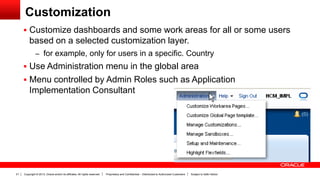
Customization
 Customize dashboards and some work areas for all or some users
based on a selected customization layer.
– for example, only for users in a specific. Country
 Use Administration menu in the global area
 Menu controlled by Admin Roles such as Application
Implementation Consultant
Copyright © 2013, Oracle and/or its affiliates. All rights reserved. Proprietary and Confidential – Distributed to Authorized Customers Subject to Safe Harbor22
Customization
 Add Components to a Page.
 Create a Site-Level Saved Search for All Users.
 Change the Layout of a Page.
 Move Components on a Page.
 Customize a Page Title.
 Customize a Task List Menu.
 Customize Attributes for a Flexfield on a Page.
 Customize UI Shell template.
Copyright © 2013, Oracle and/or its affiliates. All rights reserved. Proprietary and Confidential – Distributed to Authorized Customers Subject to Safe Harbor23
Customization Layers
 Customization layers allow you to make customizations that affect
only certain instances of an application
 Layers within HCM include :
Site - Customizations made in the Site layer affect users all users.
Country - This layer is used to create customizations for all users
of a specific country.
Organization - Customizations made for a particular organization.
(Legal Entity, Business Unit)
Copyright © 2013, Oracle and/or its affiliates. All rights reserved. Proprietary and Confidential – Distributed to Authorized Customers Subject to Safe Harbor24
Global Page Template
 Use the Page Composer to edit the UI Shell template
– For example, you might want to edit the links available in the global
area (such as removing the Tags link from the header area) or add
company contact information to the footer
 You can add, edit, or delete components on the global template.
Use the component catalog; select ADF Faces Components, to
display the list of available components
– For Example, Box (A box in which content can flow vertically or
horizontally ), Hyperlink (Link to a page or a website ), Text, Webpage
 Editable components display a blue outline when you place your
cursor over them.
Copyright © 2013, Oracle and/or its affiliates. All rights reserved. Proprietary and Confidential – Distributed to Authorized Customers Subject to Safe Harbor25
Managing Customizations
 Used to view and diagnose runtime customizations that have been
made to application pages
– By default, the Manage Customizations dialog displays the customizations
that have been performed by the logged-in user.
 To view customizations:
1. Go to the page for which you wish to view customizations.
2. From the Administration menu, choose Manage Customizations.
3. Change the page for which you are viewing customizations using the
Search field.
4. From the Layer Name dropdown list for the Current Context column,
select the customization layer for which you want to see the
customizations as the user (or users) see it.
Copyright © 2013, Oracle and/or its affiliates. All rights reserved. Proprietary and Confidential – Distributed to Authorized Customers Subject to Safe Harbor26
Managing Customizations
 Rolling Back
– To roll back the customizations for a specific page, use the Manage
Customizations dialog.
– You are rolling back only the customizations for the page, you are not
rolling back the other customizations made at the label's save point.
 Downloading and Uploading
– Use the Manage Customizations dialog to download and upload
customization files.
– You may need to download or upload a customization file for the following
reasons
 Diagnose issues seen in the test environment
 Send files to Oracle Support Services for further diagnosing
Copyright © 2013, Oracle and/or its affiliates. All rights reserved. Proprietary and Confidential – Distributed to Authorized Customers Subject to Safe Harbor27
Personalization
Copyright © 2013, Oracle and/or its affiliates. All rights reserved. Proprietary and Confidential – Distributed to Authorized Customers Subject to Safe Harbor28
Personalization
 Users can customize dashboard pages, which are visible only to the
user who made them.
 Personalization tasks are available only in Design Edit mode, in the
Page Composer - Personalization menu
Copyright © 2013, Oracle and/or its affiliates. All rights reserved. Proprietary and Confidential – Distributed to Authorized Customers Subject to Safe Harbor29
Page Composer – What you can do?
– Change the local area layout. For example, change a two-column layout
to a three-column layout. In all, eight layouts are available for selection.
– Add, rename, or remove subtabs. You cannot rename or remove
predefined tabs or home tabs.
– Expand or collapse the dashboard regional pane. You can do this by
moving the page splitter location.
– Add or remove panel boxes from the dashboard local area.
– Edit the dashboard panel box properties: show or hide a box, reorder
child regions, or change the display and style options.
– Add, remove, and edit dashboard ADF components: regions,
hyperlinks, images, text boxes, movable boxes, and Web pages.
Copyright © 2013, Oracle and/or its affiliates. All rights reserved. Proprietary and Confidential – Distributed to Authorized Customers Subject to Safe Harbor30
Migration
Copyright © 2013, Oracle and/or its affiliates. All rights reserved. Proprietary and Confidential – Distributed to Authorized Customers Subject to Safe Harbor31
Page Composer Migration
– Migrate from Test to Production
– Use a single sandbox for all customizations that you intend to publish and
migrate.
– Ensure the source and target environments are at the same patch level.
– Ensure you do not publish the sandbox in your test environment before
downloading the customization file for migration.
Copyright © 2013, Oracle and/or its affiliates. All rights reserved. Proprietary and Confidential – Distributed to Authorized Customers Subject to Safe Harbor32
Page Composer Migration - Steps
1. In the sandbox, select Manage Sandboxes from the Administration menu.
2. Download the unpublished sandbox in which your customizations have
been saved.
3. Save the file to your local drive.
4. Publish the sandbox.
5. Log into the production environment, select Manage Sandboxes from the
Administration menu.
6. Import the sandbox file you just downloaded.
7. Set this sandbox as active, and validate the migration was successful.
8. Publish the sandbox to the production environment.
9. Verify all changes were applied in the production environment.
Copyright © 2013, Oracle and/or its affiliates. All rights reserved. Proprietary and Confidential – Distributed to Authorized Customers Subject to Safe Harbor33
Customization Set Migration
 Used to move customizations from one environment to another.
 Personalizations are not included.
 Access the Customization Set Migration dialog by navigating to the
Navigation menu, Customization Set Migration menu item under the Tools
work area
Copyright © 2013, Oracle and/or its affiliates. All rights reserved. Proprietary and Confidential – Distributed to Authorized Customers Subject to Safe Harbor34
Customization Set Migration
– includes only the customizations and extensions that you make using the
following tools and features
 Page Composer
 Tasks and dialogs for configuring descriptive and extensible flexfields
and value sets
 Manage Menu Customizations task
 Manage Oracle Social Network Objects task
 Manage Standard Lookups task
 Manage Common Lookups task
 Data security policies created or customized using Oracle
Authorization Policy Manager
Copyright © 2013, Oracle and/or its affiliates. All rights reserved. Proprietary and Confidential – Distributed to Authorized Customers Subject to Safe Harbor35

Extensibility

  • 1.
    Copyright © 2013,Oracle and/or its affiliates. All rights reserved. Proprietary and Confidential – Distributed to Authorized Customers Subject to Safe Harbor1 Fusion Applications - Extensibility Platform Technology Solutions
  • 2.
    Copyright © 2013,Oracle and/or its affiliates. All rights reserved. Proprietary and Confidential – Distributed to Authorized Customers Subject to Safe Harbor2 The following is intended to outline our general product direction. It is intended for information purposes only, and may not be incorporated into any contract. It is not a commitment to deliver any material, code, or functionality, and should not be relied upon in making purchasing decisions. The development, release, and timing of any features or functionality described for Oracle’s products remains at the sole discretion of Oracle. Safe Harbor Statement
  • 3.
    Copyright © 2013,Oracle and/or its affiliates. All rights reserved. Proprietary and Confidential – Distributed to Authorized Customers Subject to Safe Harbor3 The information in this presentation is correct as of the presentation date. However, Oracle Sales Cloud continues to evolve and software patches are applied frequently; therefore this information is subject to change. Check with your Oracle Representative for updates. This content is not warranted to be error-free. Content Subject to Change
  • 4.
    Copyright © 2013,Oracle and/or its affiliates. All rights reserved. Proprietary and Confidential – Distributed to Authorized Customers Subject to Safe Harbor4 Topics  Extensibility Capabilities  Sandboxes  Conflict Resolution  Customization  Personalization
  • 5.
    Copyright © 2013,Oracle and/or its affiliates. All rights reserved. Proprietary and Confidential – Distributed to Authorized Customers Subject to Safe Harbor5 Overview: What is Extensibility?  Modify existing applications  Extend existing applications  See modifications immediately  Add new modules All within the standards-based Oracle Fusion Middleware Platform
  • 6.
    Copyright © 2013,Oracle and/or its affiliates. All rights reserved. Proprietary and Confidential – Distributed to Authorized Customers Subject to Safe Harbor6 Terminology
  • 7.
    Copyright © 2013,Oracle and/or its affiliates. All rights reserved. Proprietary and Confidential – Distributed to Authorized Customers Subject to Safe Harbor7 Strategy: Layered Customizations Upgrade-Proof with Metadata Services Repository Key Capabilities:  Common metadata store  Set up personalized content and services for users  Stored as layers on top of base application Benefits:  Insulates users from updates and patches  Used throughout Oracle stack – business processes, business intelligence and applications 1. Base Application Deployed 2. OnSite Branding 3. LOB Branding 4. User Personalization and more…
  • 8.
    Copyright © 2013,Oracle and/or its affiliates. All rights reserved. Proprietary and Confidential – Distributed to Authorized Customers Subject to Safe Harbor8 Steps for Customization 1. Create the sandbox in the test environment. 2. Make changes in the sandbox. 3. When satisfied with personalization download the customizations file. IMPORTANT: This step needs to be completed before you publish customizations to the sandbox or you will lose all the changes for migration. 4. Publish changes to the test environment. 5. Import downloaded file to the production environment.
  • 9.
    Copyright © 2013,Oracle and/or its affiliates. All rights reserved. Proprietary and Confidential – Distributed to Authorized Customers Subject to Safe Harbor9 Sandboxes
  • 10.
    Copyright © 2013,Oracle and/or its affiliates. All rights reserved. Proprietary and Confidential – Distributed to Authorized Customers Subject to Safe Harbor10 Sandboxes  Temporary copies of portions of the MDS that are used to test customizations before deploying them – Created by developers to make and test customizations – Can be published once testing is complete – Can be discarded if the customizations are unsatisfactory – Exist until they are explicitly deleted or published  Start With a “Snapshot" of a point in time – If another user modifies the mainline, the sandbox will contain stale information.  IMPORTANT: While sandboxes prevent end users from seeing in- progress customizations, they do not prevent two developers in two different sandboxes from working on the same object.
  • 11.
    Copyright © 2013,Oracle and/or its affiliates. All rights reserved. Proprietary and Confidential – Distributed to Authorized Customers Subject to Safe Harbor11 Sandboxes  Sandboxes intended for migration  Sandboxes intended for testing only
  • 12.
    Copyright © 2013,Oracle and/or its affiliates. All rights reserved. Proprietary and Confidential – Distributed to Authorized Customers Subject to Safe Harbor12 Sandbox Manager A tool for managing the different types of customization changes that can be applied to an application. The different types of sandboxes are: • Metadata - The metadata sandbox supports making changes to the application's metadata stored in the MDS. • Security - The security-enabled sandbox supports making data security changes. • Flexfield - Use the flexfield pages to make changes to flexfields and deploy the flexfield to the sandbox.
  • 13.
    Copyright © 2013,Oracle and/or its affiliates. All rights reserved. Proprietary and Confidential – Distributed to Authorized Customers Subject to Safe Harbor13 Active Sandboxes  A developer must activate a sandbox before customizing in it. – Ensures that all customizations made by the developer are stored in the sandbox copy of the MDS  Each developer may have only one sandbox active at a time. – Any number of sandboxes can be created but not active  A currently-active sandbox is shown at the top of the application screen. An active sandbox An active sandbox
  • 14.
    Copyright © 2013,Oracle and/or its affiliates. All rights reserved. Proprietary and Confidential – Distributed to Authorized Customers Subject to Safe Harbor14 Publishing Sandboxes  Copying sandbox metadata to the mainline is referred to as "publishing" the sandbox: – Overwrites existing customization files with the sandbox versions of the files. – All sandbox customizations are immediately available to all users. – The sandbox is marked as read-only and is only visible in the list of published sandboxes. Publish a sandbox to copy its metadata to the mainline metadata
  • 15.
    Copyright © 2013,Oracle and/or its affiliates. All rights reserved. Proprietary and Confidential – Distributed to Authorized Customers Subject to Safe Harbor15 Integration Sandboxes – Created specifically to contain all approved modifications.  This sandbox is the only sandbox that is published. Developer 1 Developer 2 Session 1 Session 2 MDS Database Developer 1 performs customization 1 Developer 2 performs customization 2 Both developers migrate their customizations into the integration sandbox Sandbox 2 Sandbox 1 Developer 1 customizes in Sandbox 1 Developer 2 customizes in Sandbox 2 Integration Sandbox Only the integration sandbox is published
  • 16.
    Copyright © 2013,Oracle and/or its affiliates. All rights reserved. Proprietary and Confidential – Distributed to Authorized Customers Subject to Safe Harbor16 Working with Integration Sandboxes  With an integration sandbox: – Each developer uses a dedicated sandbox to make his or her own customizations. – Once those customizations are completed, tested, and approved, each developer re-keys his or her customizations into the integration sandbox. – The integration sandbox is the only sandbox published.
  • 17.
    Copyright © 2013,Oracle and/or its affiliates. All rights reserved. Proprietary and Confidential – Distributed to Authorized Customers Subject to Safe Harbor17 Conflict Resolution  2 types of conflicts: – Conflicts within a sandbox:  Users overwriting changes created by other users, either directly by changing the same artifact, or indirectly by affecting files that are shared between the artifacts. – Conflicts between sandboxes (intended for publishing only):  Multiple sandboxes with the same customized artifact publishing to the mainline.
  • 18.
    Copyright © 2013,Oracle and/or its affiliates. All rights reserved. Proprietary and Confidential – Distributed to Authorized Customers Subject to Safe Harbor18 Conflict Resolution  Managed at several levels: – If two developers in the same sandbox both try to update the same object, the second developer is warned that the object is in use and his or her modifications will not be saved.  Violated recommended practice of one developer per sandbox – If one developer publishes a sandbox and a second developer tries to publish a sandbox that modifies one of the already-modified objects, that developer receives a warning that the object has been updated outside of the sandbox.  The developer can choose to ignore the warning and publish anyway, overwriting the original developer's modifications.
  • 19.
    Copyright © 2013,Oracle and/or its affiliates. All rights reserved. Proprietary and Confidential – Distributed to Authorized Customers Subject to Safe Harbor19 Tips for Success: Sandboxes  Create an "Integration Sandbox" before starting development. – This sandbox will be the "master repository" of approved changes.  One developer per sandbox. – Each developer has their own private sandbox that will never be published.  Everyone works on separate objects. – Developers working on the same object in different sandboxes will not see each other's modifications.  Sandboxes should exist for a short period of time. – Minimizes the risk of stale data in sandboxes  Never work against the mainline.
  • 20.
    Copyright © 2013,Oracle and/or its affiliates. All rights reserved. Proprietary and Confidential – Distributed to Authorized Customers Subject to Safe Harbor20 Customization
  • 21.
    Copyright © 2013,Oracle and/or its affiliates. All rights reserved. Proprietary and Confidential – Distributed to Authorized Customers Subject to Safe Harbor21 Customization  Customize dashboards and some work areas for all or some users based on a selected customization layer. – for example, only for users in a specific. Country  Use Administration menu in the global area  Menu controlled by Admin Roles such as Application Implementation Consultant
  • 22.
    Copyright © 2013,Oracle and/or its affiliates. All rights reserved. Proprietary and Confidential – Distributed to Authorized Customers Subject to Safe Harbor22 Customization  Add Components to a Page.  Create a Site-Level Saved Search for All Users.  Change the Layout of a Page.  Move Components on a Page.  Customize a Page Title.  Customize a Task List Menu.  Customize Attributes for a Flexfield on a Page.  Customize UI Shell template.
  • 23.
    Copyright © 2013,Oracle and/or its affiliates. All rights reserved. Proprietary and Confidential – Distributed to Authorized Customers Subject to Safe Harbor23 Customization Layers  Customization layers allow you to make customizations that affect only certain instances of an application  Layers within HCM include : Site - Customizations made in the Site layer affect users all users. Country - This layer is used to create customizations for all users of a specific country. Organization - Customizations made for a particular organization. (Legal Entity, Business Unit)
  • 24.
    Copyright © 2013,Oracle and/or its affiliates. All rights reserved. Proprietary and Confidential – Distributed to Authorized Customers Subject to Safe Harbor24 Global Page Template  Use the Page Composer to edit the UI Shell template – For example, you might want to edit the links available in the global area (such as removing the Tags link from the header area) or add company contact information to the footer  You can add, edit, or delete components on the global template. Use the component catalog; select ADF Faces Components, to display the list of available components – For Example, Box (A box in which content can flow vertically or horizontally ), Hyperlink (Link to a page or a website ), Text, Webpage  Editable components display a blue outline when you place your cursor over them.
  • 25.
    Copyright © 2013,Oracle and/or its affiliates. All rights reserved. Proprietary and Confidential – Distributed to Authorized Customers Subject to Safe Harbor25 Managing Customizations  Used to view and diagnose runtime customizations that have been made to application pages – By default, the Manage Customizations dialog displays the customizations that have been performed by the logged-in user.  To view customizations: 1. Go to the page for which you wish to view customizations. 2. From the Administration menu, choose Manage Customizations. 3. Change the page for which you are viewing customizations using the Search field. 4. From the Layer Name dropdown list for the Current Context column, select the customization layer for which you want to see the customizations as the user (or users) see it.
  • 26.
    Copyright © 2013,Oracle and/or its affiliates. All rights reserved. Proprietary and Confidential – Distributed to Authorized Customers Subject to Safe Harbor26 Managing Customizations  Rolling Back – To roll back the customizations for a specific page, use the Manage Customizations dialog. – You are rolling back only the customizations for the page, you are not rolling back the other customizations made at the label's save point.  Downloading and Uploading – Use the Manage Customizations dialog to download and upload customization files. – You may need to download or upload a customization file for the following reasons  Diagnose issues seen in the test environment  Send files to Oracle Support Services for further diagnosing
  • 27.
    Copyright © 2013,Oracle and/or its affiliates. All rights reserved. Proprietary and Confidential – Distributed to Authorized Customers Subject to Safe Harbor27 Personalization
  • 28.
    Copyright © 2013,Oracle and/or its affiliates. All rights reserved. Proprietary and Confidential – Distributed to Authorized Customers Subject to Safe Harbor28 Personalization  Users can customize dashboard pages, which are visible only to the user who made them.  Personalization tasks are available only in Design Edit mode, in the Page Composer - Personalization menu
  • 29.
    Copyright © 2013,Oracle and/or its affiliates. All rights reserved. Proprietary and Confidential – Distributed to Authorized Customers Subject to Safe Harbor29 Page Composer – What you can do? – Change the local area layout. For example, change a two-column layout to a three-column layout. In all, eight layouts are available for selection. – Add, rename, or remove subtabs. You cannot rename or remove predefined tabs or home tabs. – Expand or collapse the dashboard regional pane. You can do this by moving the page splitter location. – Add or remove panel boxes from the dashboard local area. – Edit the dashboard panel box properties: show or hide a box, reorder child regions, or change the display and style options. – Add, remove, and edit dashboard ADF components: regions, hyperlinks, images, text boxes, movable boxes, and Web pages.
  • 30.
    Copyright © 2013,Oracle and/or its affiliates. All rights reserved. Proprietary and Confidential – Distributed to Authorized Customers Subject to Safe Harbor30 Migration
  • 31.
    Copyright © 2013,Oracle and/or its affiliates. All rights reserved. Proprietary and Confidential – Distributed to Authorized Customers Subject to Safe Harbor31 Page Composer Migration – Migrate from Test to Production – Use a single sandbox for all customizations that you intend to publish and migrate. – Ensure the source and target environments are at the same patch level. – Ensure you do not publish the sandbox in your test environment before downloading the customization file for migration.
  • 32.
    Copyright © 2013,Oracle and/or its affiliates. All rights reserved. Proprietary and Confidential – Distributed to Authorized Customers Subject to Safe Harbor32 Page Composer Migration - Steps 1. In the sandbox, select Manage Sandboxes from the Administration menu. 2. Download the unpublished sandbox in which your customizations have been saved. 3. Save the file to your local drive. 4. Publish the sandbox. 5. Log into the production environment, select Manage Sandboxes from the Administration menu. 6. Import the sandbox file you just downloaded. 7. Set this sandbox as active, and validate the migration was successful. 8. Publish the sandbox to the production environment. 9. Verify all changes were applied in the production environment.
  • 33.
    Copyright © 2013,Oracle and/or its affiliates. All rights reserved. Proprietary and Confidential – Distributed to Authorized Customers Subject to Safe Harbor33 Customization Set Migration  Used to move customizations from one environment to another.  Personalizations are not included.  Access the Customization Set Migration dialog by navigating to the Navigation menu, Customization Set Migration menu item under the Tools work area
  • 34.
    Copyright © 2013,Oracle and/or its affiliates. All rights reserved. Proprietary and Confidential – Distributed to Authorized Customers Subject to Safe Harbor34 Customization Set Migration – includes only the customizations and extensions that you make using the following tools and features  Page Composer  Tasks and dialogs for configuring descriptive and extensible flexfields and value sets  Manage Menu Customizations task  Manage Oracle Social Network Objects task  Manage Standard Lookups task  Manage Common Lookups task  Data security policies created or customized using Oracle Authorization Policy Manager
  • 35.
    Copyright © 2013,Oracle and/or its affiliates. All rights reserved. Proprietary and Confidential – Distributed to Authorized Customers Subject to Safe Harbor35