Using Expression Language in
Fusion Applications
An Oracle White Paper
January 2014
Using Expression Language in Fusion Applications Page 2
Using Expression Language in Fusion Applications
Introduction ....................................................................................................... 3
What is Expression language? ......................................................................... 4
Use Case Examples........................................................................................... 4
Combination examples..................................................................................... 8
References .......................................................................................................... 9
Using Expression Language in Fusion Applications Page 3
Using Expression Language in Fusion Applications
INTRODUCTION
This document forms a basic guide on using Expression Language (EL) inside
customizations made to Fusion Applications. This feature support comes as part
of the embedded Oracle WebCenter Page Composer, and the underlying ADF
technology.
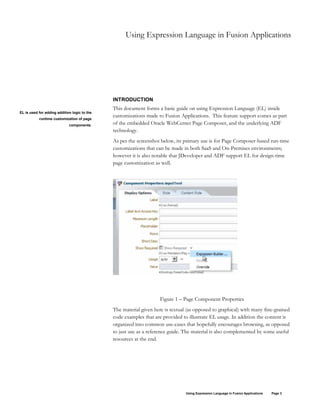
As per the screenshot below, its primary use is for Page Composer-based run-time
customizations that can be made in both SaaS and On-Premises environments;
however it is also notable that JDeveloper and ADF support EL for design-time
page customization as well.
Figure 1 – Page Component Properties
The material given here is textual (as opposed to graphical) with many fine-grained
code examples that are provided to illustrate EL usage. In addition the content is
organized into common use-cases that hopefully encourages browsing, as opposed
to just use as a reference guide. The material is also complemented by some useful
resources at the end.
EL is used for adding addition logic to the
runtime customization of page
components.
Using Expression Language in Fusion Applications Page 4
WHAT IS EXPRESSION LANGUAGE?
The examples provided in this document serve the following basic customization
needs, and whilst more advanced logic is possible venturing into great complexity
may take your customization beyond the scope that page composer is designed to
support.
• Dynamically set a field to default a specific value
• Dynamically set the display properties of a specific field
• Conditionally hide or disable a field or region
Generally EL statements return either a value such as ‘Richard’, or a Boolean such
as TRUE if the test is a success. These are then used in setting ADF page
component properties, such as Value, Required, or Visible. The examples in this
document include a mixture of return values used for setting various properties.
In ADF a partial page refresh is used to fire the EL logic, and careful testing in a
safe environment is needed to ensure your EL executes at the expected places. An
example might be properly defaulting values for fields upon actions such as create,
edit, and re-edit.
In addition, please be aware that not every page is intended to be fully
customizable, and even those that are may not always expose the component
properties against which you might wish to add custom expression logic. As such
expectations of what is possible should be set based on careful testing of each case,
and not on any broad assumptions.
USE CASE EXAMPLES
The following table contains EL examples that cover many of the common
requirements for customizing page component properties at runtime. It is not
intended to be exhaustive, but to give a good starting point for developing
effective EL expressions.
Each row is a requirement and they illustrate both syntax and some common utility
functions available. They have also been specifically tested with Fusion
Applications, as opposed to generic examples or those that use functions that may
not be available.
If you have any other examples that could be useful for our community please
provide feedback to the Developer Relations team at
http://blogs.oracle.com/fadevrel.
Title Short
Description
• Examples
Basic
Operators
Simple operators
available in EL,
#{4>3}
Always test and verify the support for EL in
each page component you wish to
customize.
Using Expression Language in Fusion Applications Page 5
returning TRUE
or a result value.
#{100.0 == 100}
#{(10*10) ne 200}
#{‘a’ < ‘b’}
#{‘hip’ gt ‘hit’}
#{bindings.MinReleaseAmt.inputValue * 10}
Conditional
Logic
If-Then-Else
syntax is: #{
[test] ? [then1] :
[else2] }
Also the
extended logical
operators are
“&&” (and),
“||” (or) and “!”
(is not)
#{customer.balance < 0 ? ‘red’: ‘black’)
#{row.FlowTemplateName == ‘New Hire’ ?
‘color:#0000FF’ : ‘color:#000000’}
#{row.FlowTemplateName ==’New Hire’ ||
row.FlowTemplateName==’Retire’ ? ‘color:#0000FF’ :
‘color:#000000’}
Using with
Add
Content
Include EL
inside the Value
property of an
added HTML
region.
Uses the
webCenterProfile
API for returning
user information.
<html> <body> <h1>Benefits URL</h1><script>
var x=””;
if
(“#{webCenterProfile[securityContext.userName].busin
essState}” == “California”) {
x=”<a href=’http://www.uhc.com’
target=’_blank’>United Health Care</a>";
} else
{ x="<a href='http://www.bcbs.com'
target='_blank'>Blue Cross Blue Shield</a>";
}
document.write(x);
</script> </body> </html>
Create
Dynamic
Content
Links
Set the value for
a URL to include
an EL
expression.
http://www.yourcompany.com/#{webCenterProfile[se
curityContext.userName].businessState}.pdf
/personImage?personId=#{pageFlowScope.personId}
Access Skin
Details
Adjust your
content
properties based
on the underlying
custom CSS skin.
#{applCorePrefs.skinFamily}
#{requestContext.skinFamily}
#{adfFacesContext.skinFamily}
#{changeModeBean.inEditMode ? 'medium' : 'light'}
User Get the value of
the current user
#{applCorePrefs.displayNameLanguage}
#{securityContext.userName}
Using Expression Language in Fusion Applications Page 6
Information properties from
the session.
#{generalSettings.userTimeZone}
#{generalSettings.preferredDateStyle}
#{generalSettings.preferredAccessibilityMode}
#{generalSettings.formattedCurrentDate}
#{facesContext.viewRoot.locale.language}
#{WebCenterProfile[securityContext.userName].Manag
erDisplayName}
Dates and
Times
Return the
current date,
time, or both.
Useful in writing
conditions such
as preventing
post-dated
entries.
#{generalSettings.formattedCurrentDate}
#{generalSettings.formattedCurrentTime}
#{generalSettings.formattedCurrentDateTime}
#{applCorePrefs.locale}
Resource
Bundles
Return the
proper translated
text strings.
Useful for
defaulting values
and labels.
Examples
illustrate various
bundles in use
for different
pages.
#{HcmPerformanceTopGenBundle['Header.Performan
ceWorkerOverview']}
#{prcpoeditdocumentpublicuiBundle['Header.General.
GeneralInformation']}
#{prcpoeditdocumentpublicuiBundle['AltTxt.Search.Sea
rchanLOV']}: #{bindings.VendorSiteCode1.hints.label}
#{var.index == 0 ?
hcmgoalcorepublicuiBundle['OLabel.IncludeinGoalPlan'
] : null}
#{applcoreBundle.NONE}
#{ResourcesGenBundle['AltTxt.Add.Addanobject']}
ADF
Bindings
The ‘bindings’
object is
essentially the
link between the
UI and the
backend data
model.
#{bindings.Comments.inputValue}
#{bindings.ChangeOrderFlag.inputValue == 'Y' ||
pageFlowScope.poRole != 'BUYER' ||
bindings.IsRateDateReadOnly.inputValue}
#{ bindings.StatusCode.inputValue == 'CANCEL' ||
bindings.StatusCode.inputValue == 'OVERDUE'}
#{node.bindings.GoalIncludedInPlan.attributeValue}
#{bindings.GoalUrl.inputValue != null}
ADF Tables Table rows are
referred using
row.[columnNa
me].
#{row.Weighting != null ? row.Weighting : '0'}
#{row.bindings.IsEmpRatingGiven.inputValue == "Y"
? true : false}
Using Expression Language in Fusion Applications Page 7
Page
Structure
Properties
Some pages
support the use
of native
Webcenter
object
components.
Test yourself to
verify.
#{node.GoalPlanAssignmentId != null}
#{node.EnableWeightingFlag == 'Y'}
#{attrs.view eq 'imageLink'}
Page Flow
Scope
The
pageFlowScope
object is a
commonly
available JSF
bean for
accessing context
variables. More
here.
#{pageFlowScope.poRole != 'BUYER'}
#{pageFlowScope.pTaskName == 'Manager Approval'
? true : false}
#{pageFlowScope.pGoalProfiles['HRG_ENABLE_GO
AL_LIBRARY'] == 'Y'}
#{pageFlowScope.accessCode eq 'FULL_ACCESS' ?
false : true}
#{pageFlowScope.searchDocumentManagedBean.navig
ateToDocumentHistoryPageFromHeader} (in
documentCommandLink for redirect)
Security
Context
The
securityContext
object provides
access to
functions for
checking the
users security
access at
runtime.
This does not
replace properly
customizing the
security roles to
control security.
#{securityContext.userGrantedPermission['permissionC
lass=oracle.adf.share.security.authorization.MethodPerm
ission;target=oracle.apps.prc.pon.permission.createSupp
lierNeg; action=invoke']}
#{securityContext.userGrantedPermission['permissionC
lass=oracle.adf.share.security.authorization.MethodPerm
ission;target=oracle.apps.prc.po.permission.changeSuppl
ierSite;action=invoke']}
#{securityContext.taskflowViewable['/WEB-
INF/audit-expense-report.xml#audit-expense-report']}
#{securityContext.authenticated}
#{securityContext.userName}
#{securityContext.userInRole['roleList']}
#{securityContext.userInAllRoles['roleList']}
#{securityContext.taskflowViewable['target']}
#{securityContext.regionViewable['target']}
#{securityContext.userGrantedResource['permission']}
#{securityContext.userGrantedPermission['permission']
}
Accessing
View
In some cases it
is possible to
access the
#{bindings.GoalPlanAssignmentVO.hints.PriorityCode.
mandatory}
Using Expression Language in Fusion Applications Page 8
Objects ADFbc View
Objects to
interrogate
additional data
that may not be
displayed on the
page (via the
backing bean).
#{!GlobalAreaBackingBean.anonymousUser}
#{finUiUtil:containsMoreThanOneRow(bindings.Enter
PurchasingDocumentBUAccessUiVO.viewObject)}
#{finUiUtil:containsNoRows(bindings.CompensationIt
em1Iterator.viewObject)}
#{backingBeanScope.GoalOverviewBean.keyAttrRead
Only}
#{backingBeanScope.PerfDocGoalBean.keyAttrReadO
nly}
#{bindings.ComponentPropertiesVO.viewable ?
applcoreBundle.TABLE_EMPTY_TEXT_NO_ROWS
_YET :
applcoreBundle.TABLE_EMPTY_TEXT_ACCESS_D
ENIED}
#{backingBeanScope.PersonSearchParams.professional
QueryMode ?
adfBundleForPersonSearch['Header.AdvancedSearch']:
adfBundleForPersonSearch['Header.Search']} (text for
search region)
Firing
Methods
On some pages it
may be possible
to call methods
from the backing
bean through
EL, such as a
buttons
actionListener.
Note: This is
predominantly a
design-time
customization.
#{backingBean.<Bean Name>.<bean method>}
#{myBean.addNewOrder('orderName')}
#{backingBeanScope.GoalInformationBean.handleDele
teGoalURL} (from commandImageLink actionListener
property)
#{backingBeanScope.GoalBean.launchWorkerRemove
GoalWarningPopup} (also actionListener)
COMBINATION EXAMPLES
The following few examples illustrate some more examples of EL usage in
determining the correct property for a component based on the runtime
environment.
These are intended to illustrate how you can combine some of the items from the
table above.
Using Expression Language in Fusion Applications Page 9
#{ pageFlowScope.pShowPageReadOnly == 'Y' ||
bindings.StatusCode.inputValue == 'CANCEL' ||
bindings.StatusCode.inputValue == 'OVERDUE' ||
pageFlowScope.pGoalEditMode == 'PENDING_GOAL' ||
bindings.StatusCode.inputValue == 'COMPLETED'}
#{pageFlowScope.pGoalEditMode != 'CREATE_GOAL' &&
(pageFlowScope.pShowPageReadOnly == 'Y' ||
backingBeanScope.GoalInformationBean.keyAttrReadOnly ||
bindings.StatusCode.inputValue == 'CANCEL' ||
bindings.StatusCode.inputValue == 'OVERDUE' )}
#{pageFlowScope.pParentFlow != 'MANAGER_HOME' &&
pageFlowScope.pGoalUIContext !='ProfileUI' &&
pageFlowScope.pGoalEditMode == 'CREATE_GOAL' &&
pageFlowScope.pGoalUIContext != 'MassRequestUI'}
#{(pageFlowScope.pGoalProfiles['HRG_GOAL_COMPLN_REQ_APPR'] ==
'Y' || pageFlowScope.pGoalProfiles['HRG_KEY_ATTR_CHG_REQ_APPR']
== 'Y') ? HcmGoalTopGenBundle['OLabel.SubmitandAddAnother']:
HcmGoalTopGenBundle['Action.SaveandAddAnother']}
#{pageFlowScope.pReadOnlyDetails || (bindings.MandatoryFlag.inputValue ==
"Y" ? true : false)}
#{(pageFlowScope.pPerfDocTab4Name != null and
pageFlowScope.pPerfDocTab4Name != '') ?
(pageFlowScope.pPerfDocTab4SectionTypeCode == 'WFF' ?
pageFlowScope.pShowEmpFeedbackSection :
(pageFlowScope.pPerfDocTab4SectionTypeCode == 'MFF' ?
pageFlowScope.pShowMgrFeedbackSection :
(pageFlowScope.pPerfDocTab4SectionTypeCode == 'OS' ?
pageFlowScope.pShowOverallSummarySection :
(pageFlowScope.pPerfDocTab4SectionTypeCode == 'QUESTIONNAIRE' ?
pageFlowScope.pShowQstnrSection :
(pageFlowScope.pPerfDocTab4SectionTypeCode == 'GOAL' ?
pageFlowScope.pShowGoalSection :
(pageFlowScope.pPerfDocTab4SectionTypeCode == 'REG' ?
pageFlowScope.pShowCompetencySection : true)))))) : false}
REFERENCES
The following are three EL resources where further information can be found to
support specific requirements or provide a general background.
• JavaEE Expression Language Tutorial
Using Expression Language in Fusion Applications Page 10
• Webcenter Expression Language Reference Guide
• Developer Relations YouTube channel for demonstrations and examples
Using Expression Lanaugage in Fusion Applications
January 2014
Author: Richard Bingham, Developer Relations
Oracle Corporation
World Headquarters
500 Oracle Parkway
Redwood Shores, CA 94065
U.S.A.
Worldwide Inquiries:
Phone: +1.650.506.7000
Fax: +1.650.506.7200
oracle.com
Copyright © 2014, Oracle. All rights reserved.
This document is provided for information purposes only and the
contents hereof are subject to change without notice.
This document is not warranted to be error-free, nor subject to any
other warranties or conditions, whether expressed orally or implied
in law, including implied warranties and conditions of merchantability
or fitness for a particular purpose. We specifically disclaim any
liability with respect to this document and no contractual obligations
are formed either directly or indirectly by this document. This document
may not be reproduced or transmitted in any form or by any means,
electronic or mechanical, for any purpose, without our prior written permission.
Oracle, JD Edwards, PeopleSoft, and Siebel are registered trademarks of Oracle
Corporation and/or its affiliates. Other names may be trademarks
of their respective owners.

Em wp

  • 1.
    Using Expression Languagein Fusion Applications An Oracle White Paper January 2014
  • 2.
    Using Expression Languagein Fusion Applications Page 2 Using Expression Language in Fusion Applications Introduction ....................................................................................................... 3 What is Expression language? ......................................................................... 4 Use Case Examples........................................................................................... 4 Combination examples..................................................................................... 8 References .......................................................................................................... 9
  • 3.
    Using Expression Languagein Fusion Applications Page 3 Using Expression Language in Fusion Applications INTRODUCTION This document forms a basic guide on using Expression Language (EL) inside customizations made to Fusion Applications. This feature support comes as part of the embedded Oracle WebCenter Page Composer, and the underlying ADF technology. As per the screenshot below, its primary use is for Page Composer-based run-time customizations that can be made in both SaaS and On-Premises environments; however it is also notable that JDeveloper and ADF support EL for design-time page customization as well. Figure 1 – Page Component Properties The material given here is textual (as opposed to graphical) with many fine-grained code examples that are provided to illustrate EL usage. In addition the content is organized into common use-cases that hopefully encourages browsing, as opposed to just use as a reference guide. The material is also complemented by some useful resources at the end. EL is used for adding addition logic to the runtime customization of page components.
  • 4.
    Using Expression Languagein Fusion Applications Page 4 WHAT IS EXPRESSION LANGUAGE? The examples provided in this document serve the following basic customization needs, and whilst more advanced logic is possible venturing into great complexity may take your customization beyond the scope that page composer is designed to support. • Dynamically set a field to default a specific value • Dynamically set the display properties of a specific field • Conditionally hide or disable a field or region Generally EL statements return either a value such as ‘Richard’, or a Boolean such as TRUE if the test is a success. These are then used in setting ADF page component properties, such as Value, Required, or Visible. The examples in this document include a mixture of return values used for setting various properties. In ADF a partial page refresh is used to fire the EL logic, and careful testing in a safe environment is needed to ensure your EL executes at the expected places. An example might be properly defaulting values for fields upon actions such as create, edit, and re-edit. In addition, please be aware that not every page is intended to be fully customizable, and even those that are may not always expose the component properties against which you might wish to add custom expression logic. As such expectations of what is possible should be set based on careful testing of each case, and not on any broad assumptions. USE CASE EXAMPLES The following table contains EL examples that cover many of the common requirements for customizing page component properties at runtime. It is not intended to be exhaustive, but to give a good starting point for developing effective EL expressions. Each row is a requirement and they illustrate both syntax and some common utility functions available. They have also been specifically tested with Fusion Applications, as opposed to generic examples or those that use functions that may not be available. If you have any other examples that could be useful for our community please provide feedback to the Developer Relations team at http://blogs.oracle.com/fadevrel. Title Short Description • Examples Basic Operators Simple operators available in EL, #{4>3} Always test and verify the support for EL in each page component you wish to customize.
  • 5.
    Using Expression Languagein Fusion Applications Page 5 returning TRUE or a result value. #{100.0 == 100} #{(10*10) ne 200} #{‘a’ < ‘b’} #{‘hip’ gt ‘hit’} #{bindings.MinReleaseAmt.inputValue * 10} Conditional Logic If-Then-Else syntax is: #{ [test] ? [then1] : [else2] } Also the extended logical operators are “&&” (and), “||” (or) and “!” (is not) #{customer.balance < 0 ? ‘red’: ‘black’) #{row.FlowTemplateName == ‘New Hire’ ? ‘color:#0000FF’ : ‘color:#000000’} #{row.FlowTemplateName ==’New Hire’ || row.FlowTemplateName==’Retire’ ? ‘color:#0000FF’ : ‘color:#000000’} Using with Add Content Include EL inside the Value property of an added HTML region. Uses the webCenterProfile API for returning user information. <html> <body> <h1>Benefits URL</h1><script> var x=””; if (“#{webCenterProfile[securityContext.userName].busin essState}” == “California”) { x=”<a href=’http://www.uhc.com’ target=’_blank’>United Health Care</a>"; } else { x="<a href='http://www.bcbs.com' target='_blank'>Blue Cross Blue Shield</a>"; } document.write(x); </script> </body> </html> Create Dynamic Content Links Set the value for a URL to include an EL expression. http://www.yourcompany.com/#{webCenterProfile[se curityContext.userName].businessState}.pdf /personImage?personId=#{pageFlowScope.personId} Access Skin Details Adjust your content properties based on the underlying custom CSS skin. #{applCorePrefs.skinFamily} #{requestContext.skinFamily} #{adfFacesContext.skinFamily} #{changeModeBean.inEditMode ? 'medium' : 'light'} User Get the value of the current user #{applCorePrefs.displayNameLanguage} #{securityContext.userName}
  • 6.
    Using Expression Languagein Fusion Applications Page 6 Information properties from the session. #{generalSettings.userTimeZone} #{generalSettings.preferredDateStyle} #{generalSettings.preferredAccessibilityMode} #{generalSettings.formattedCurrentDate} #{facesContext.viewRoot.locale.language} #{WebCenterProfile[securityContext.userName].Manag erDisplayName} Dates and Times Return the current date, time, or both. Useful in writing conditions such as preventing post-dated entries. #{generalSettings.formattedCurrentDate} #{generalSettings.formattedCurrentTime} #{generalSettings.formattedCurrentDateTime} #{applCorePrefs.locale} Resource Bundles Return the proper translated text strings. Useful for defaulting values and labels. Examples illustrate various bundles in use for different pages. #{HcmPerformanceTopGenBundle['Header.Performan ceWorkerOverview']} #{prcpoeditdocumentpublicuiBundle['Header.General. GeneralInformation']} #{prcpoeditdocumentpublicuiBundle['AltTxt.Search.Sea rchanLOV']}: #{bindings.VendorSiteCode1.hints.label} #{var.index == 0 ? hcmgoalcorepublicuiBundle['OLabel.IncludeinGoalPlan' ] : null} #{applcoreBundle.NONE} #{ResourcesGenBundle['AltTxt.Add.Addanobject']} ADF Bindings The ‘bindings’ object is essentially the link between the UI and the backend data model. #{bindings.Comments.inputValue} #{bindings.ChangeOrderFlag.inputValue == 'Y' || pageFlowScope.poRole != 'BUYER' || bindings.IsRateDateReadOnly.inputValue} #{ bindings.StatusCode.inputValue == 'CANCEL' || bindings.StatusCode.inputValue == 'OVERDUE'} #{node.bindings.GoalIncludedInPlan.attributeValue} #{bindings.GoalUrl.inputValue != null} ADF Tables Table rows are referred using row.[columnNa me]. #{row.Weighting != null ? row.Weighting : '0'} #{row.bindings.IsEmpRatingGiven.inputValue == "Y" ? true : false}
  • 7.
    Using Expression Languagein Fusion Applications Page 7 Page Structure Properties Some pages support the use of native Webcenter object components. Test yourself to verify. #{node.GoalPlanAssignmentId != null} #{node.EnableWeightingFlag == 'Y'} #{attrs.view eq 'imageLink'} Page Flow Scope The pageFlowScope object is a commonly available JSF bean for accessing context variables. More here. #{pageFlowScope.poRole != 'BUYER'} #{pageFlowScope.pTaskName == 'Manager Approval' ? true : false} #{pageFlowScope.pGoalProfiles['HRG_ENABLE_GO AL_LIBRARY'] == 'Y'} #{pageFlowScope.accessCode eq 'FULL_ACCESS' ? false : true} #{pageFlowScope.searchDocumentManagedBean.navig ateToDocumentHistoryPageFromHeader} (in documentCommandLink for redirect) Security Context The securityContext object provides access to functions for checking the users security access at runtime. This does not replace properly customizing the security roles to control security. #{securityContext.userGrantedPermission['permissionC lass=oracle.adf.share.security.authorization.MethodPerm ission;target=oracle.apps.prc.pon.permission.createSupp lierNeg; action=invoke']} #{securityContext.userGrantedPermission['permissionC lass=oracle.adf.share.security.authorization.MethodPerm ission;target=oracle.apps.prc.po.permission.changeSuppl ierSite;action=invoke']} #{securityContext.taskflowViewable['/WEB- INF/audit-expense-report.xml#audit-expense-report']} #{securityContext.authenticated} #{securityContext.userName} #{securityContext.userInRole['roleList']} #{securityContext.userInAllRoles['roleList']} #{securityContext.taskflowViewable['target']} #{securityContext.regionViewable['target']} #{securityContext.userGrantedResource['permission']} #{securityContext.userGrantedPermission['permission'] } Accessing View In some cases it is possible to access the #{bindings.GoalPlanAssignmentVO.hints.PriorityCode. mandatory}
  • 8.
    Using Expression Languagein Fusion Applications Page 8 Objects ADFbc View Objects to interrogate additional data that may not be displayed on the page (via the backing bean). #{!GlobalAreaBackingBean.anonymousUser} #{finUiUtil:containsMoreThanOneRow(bindings.Enter PurchasingDocumentBUAccessUiVO.viewObject)} #{finUiUtil:containsNoRows(bindings.CompensationIt em1Iterator.viewObject)} #{backingBeanScope.GoalOverviewBean.keyAttrRead Only} #{backingBeanScope.PerfDocGoalBean.keyAttrReadO nly} #{bindings.ComponentPropertiesVO.viewable ? applcoreBundle.TABLE_EMPTY_TEXT_NO_ROWS _YET : applcoreBundle.TABLE_EMPTY_TEXT_ACCESS_D ENIED} #{backingBeanScope.PersonSearchParams.professional QueryMode ? adfBundleForPersonSearch['Header.AdvancedSearch']: adfBundleForPersonSearch['Header.Search']} (text for search region) Firing Methods On some pages it may be possible to call methods from the backing bean through EL, such as a buttons actionListener. Note: This is predominantly a design-time customization. #{backingBean.<Bean Name>.<bean method>} #{myBean.addNewOrder('orderName')} #{backingBeanScope.GoalInformationBean.handleDele teGoalURL} (from commandImageLink actionListener property) #{backingBeanScope.GoalBean.launchWorkerRemove GoalWarningPopup} (also actionListener) COMBINATION EXAMPLES The following few examples illustrate some more examples of EL usage in determining the correct property for a component based on the runtime environment. These are intended to illustrate how you can combine some of the items from the table above.
  • 9.
    Using Expression Languagein Fusion Applications Page 9 #{ pageFlowScope.pShowPageReadOnly == 'Y' || bindings.StatusCode.inputValue == 'CANCEL' || bindings.StatusCode.inputValue == 'OVERDUE' || pageFlowScope.pGoalEditMode == 'PENDING_GOAL' || bindings.StatusCode.inputValue == 'COMPLETED'} #{pageFlowScope.pGoalEditMode != 'CREATE_GOAL' && (pageFlowScope.pShowPageReadOnly == 'Y' || backingBeanScope.GoalInformationBean.keyAttrReadOnly || bindings.StatusCode.inputValue == 'CANCEL' || bindings.StatusCode.inputValue == 'OVERDUE' )} #{pageFlowScope.pParentFlow != 'MANAGER_HOME' && pageFlowScope.pGoalUIContext !='ProfileUI' && pageFlowScope.pGoalEditMode == 'CREATE_GOAL' && pageFlowScope.pGoalUIContext != 'MassRequestUI'} #{(pageFlowScope.pGoalProfiles['HRG_GOAL_COMPLN_REQ_APPR'] == 'Y' || pageFlowScope.pGoalProfiles['HRG_KEY_ATTR_CHG_REQ_APPR'] == 'Y') ? HcmGoalTopGenBundle['OLabel.SubmitandAddAnother']: HcmGoalTopGenBundle['Action.SaveandAddAnother']} #{pageFlowScope.pReadOnlyDetails || (bindings.MandatoryFlag.inputValue == "Y" ? true : false)} #{(pageFlowScope.pPerfDocTab4Name != null and pageFlowScope.pPerfDocTab4Name != '') ? (pageFlowScope.pPerfDocTab4SectionTypeCode == 'WFF' ? pageFlowScope.pShowEmpFeedbackSection : (pageFlowScope.pPerfDocTab4SectionTypeCode == 'MFF' ? pageFlowScope.pShowMgrFeedbackSection : (pageFlowScope.pPerfDocTab4SectionTypeCode == 'OS' ? pageFlowScope.pShowOverallSummarySection : (pageFlowScope.pPerfDocTab4SectionTypeCode == 'QUESTIONNAIRE' ? pageFlowScope.pShowQstnrSection : (pageFlowScope.pPerfDocTab4SectionTypeCode == 'GOAL' ? pageFlowScope.pShowGoalSection : (pageFlowScope.pPerfDocTab4SectionTypeCode == 'REG' ? pageFlowScope.pShowCompetencySection : true)))))) : false} REFERENCES The following are three EL resources where further information can be found to support specific requirements or provide a general background. • JavaEE Expression Language Tutorial
  • 10.
    Using Expression Languagein Fusion Applications Page 10 • Webcenter Expression Language Reference Guide • Developer Relations YouTube channel for demonstrations and examples
  • 11.
    Using Expression Lanaugagein Fusion Applications January 2014 Author: Richard Bingham, Developer Relations Oracle Corporation World Headquarters 500 Oracle Parkway Redwood Shores, CA 94065 U.S.A. Worldwide Inquiries: Phone: +1.650.506.7000 Fax: +1.650.506.7200 oracle.com Copyright © 2014, Oracle. All rights reserved. This document is provided for information purposes only and the contents hereof are subject to change without notice. This document is not warranted to be error-free, nor subject to any other warranties or conditions, whether expressed orally or implied in law, including implied warranties and conditions of merchantability or fitness for a particular purpose. We specifically disclaim any liability with respect to this document and no contractual obligations are formed either directly or indirectly by this document. This document may not be reproduced or transmitted in any form or by any means, electronic or mechanical, for any purpose, without our prior written permission. Oracle, JD Edwards, PeopleSoft, and Siebel are registered trademarks of Oracle Corporation and/or its affiliates. Other names may be trademarks of their respective owners.