HARDWARE & ITS TYPES
What Is Hardware?
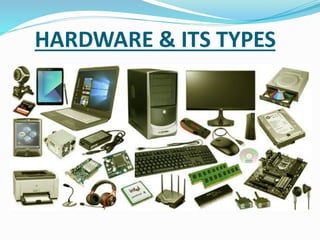
A hardware is the physical touchable parts of a system.
The hardware makes the main structural unit of the
system.
The hardware is mainly classified into the followings:
IV. Communication
III. Storage
II. Input/output Devices
I. System Unit
I. SYSTEM UNIT
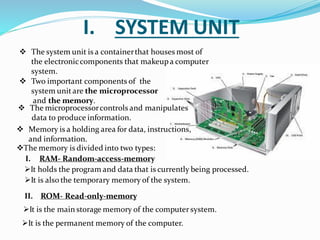
❖ The system unit is a containerthat houses most of
the electroniccomponents that makeupa computer
system.
➢It is the permanent memory of the computer.
➢It is the main storage memory of the computer system.
II. ROM- Read-only-memory
➢It is also the temporary memory of the system.
➢It holds the program and data that is currently being processed.
I. RAM- Random-access-memory
❖The memory is divided into two types:
❖ Memory is a holding area for data, instructions,
and information.
❖ The microprocessorcontrols and manipulates
data to produce information.
❖ Two important components of the
system unitare the microprocessor
and the memory.
II. INPUT & OUTPUT DEVICES
I. INPUT DEVICES-
➢The most common input devicesare keyboard & mouse.
➢Thesedevices translatedata & programs that humans can understand into
a form that computer can process.
II. INPUT & OUTPUT DEVICES
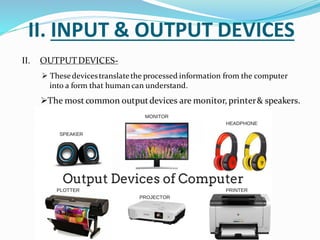
II. OUTPUTDEVICES-
➢The most common outputdevices are monitor, printer& speakers.
➢ Thesedevicestranslatethe processed information from the computer
into a form that human can understand.
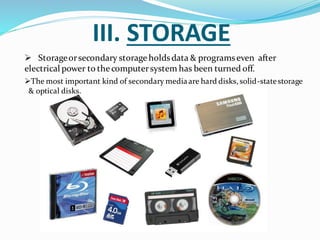
III. STORAGE
➢ Storageorsecondary storageholdsdata & programseven after
electrical power to the computersystem has been turned off.
➢The most important kind of secondary mediaare hard disks, solid-statestorage
& optical disks.
HARD DISKS
➢Hard disks are typically used to store programs & very
large data files.
➢Using rigid metallic platters & red/write heads that move
across the platters, data & information is stored using magnetic
charges of the disk’s surface
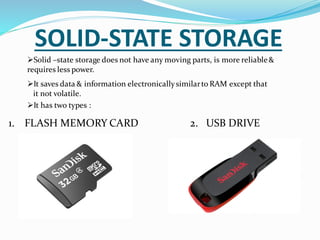
SOLID-STATE STORAGE
➢Solid –state storage does not have any moving parts, is more reliable&
requires less power.
1. FLASH MEMORY CARD 2. USB DRIVE
➢It has two types :
➢It saves data & information electronicallysimilarto RAM except that
it not volatile.
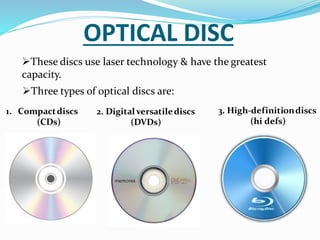
OPTICAL DISC
➢These discs use laser technology & have the greatest
capacity.
1. Compactdiscs
(CDs)
2. Digital versatilediscs
(DVDs)
3. High-definitiondiscs
(hi defs)
➢Three types of optical discs are:
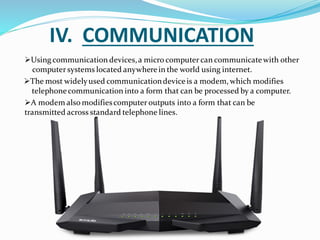
IV. COMMUNICATION
➢Using communication devices,a micro computer can communicatewith other
computer systems located anywherein the world using internet.
➢A modem also modifiescomputer outputs into a form that can be
transmitted across standard telephone lines.
➢The most widelyused communicationdeviceis a modem, which modifies
telephonecommunication into a form that can be processed by a computer.

Hardware of computer | System Unit

  • 1.
  • 2.
    What Is Hardware? Ahardware is the physical touchable parts of a system. The hardware makes the main structural unit of the system. The hardware is mainly classified into the followings: IV. Communication III. Storage II. Input/output Devices I. System Unit
  • 3.
    I. SYSTEM UNIT ❖The system unit is a containerthat houses most of the electroniccomponents that makeupa computer system. ➢It is the permanent memory of the computer. ➢It is the main storage memory of the computer system. II. ROM- Read-only-memory ➢It is also the temporary memory of the system. ➢It holds the program and data that is currently being processed. I. RAM- Random-access-memory ❖The memory is divided into two types: ❖ Memory is a holding area for data, instructions, and information. ❖ The microprocessorcontrols and manipulates data to produce information. ❖ Two important components of the system unitare the microprocessor and the memory.
  • 4.
    II. INPUT &OUTPUT DEVICES I. INPUT DEVICES- ➢The most common input devicesare keyboard & mouse. ➢Thesedevices translatedata & programs that humans can understand into a form that computer can process.
  • 5.
    II. INPUT &OUTPUT DEVICES II. OUTPUTDEVICES- ➢The most common outputdevices are monitor, printer& speakers. ➢ Thesedevicestranslatethe processed information from the computer into a form that human can understand.
  • 6.
    III. STORAGE ➢ Storageorsecondarystorageholdsdata & programseven after electrical power to the computersystem has been turned off. ➢The most important kind of secondary mediaare hard disks, solid-statestorage & optical disks.
  • 7.
    HARD DISKS ➢Hard disksare typically used to store programs & very large data files. ➢Using rigid metallic platters & red/write heads that move across the platters, data & information is stored using magnetic charges of the disk’s surface
  • 8.
    SOLID-STATE STORAGE ➢Solid –statestorage does not have any moving parts, is more reliable& requires less power. 1. FLASH MEMORY CARD 2. USB DRIVE ➢It has two types : ➢It saves data & information electronicallysimilarto RAM except that it not volatile.
  • 9.
    OPTICAL DISC ➢These discsuse laser technology & have the greatest capacity. 1. Compactdiscs (CDs) 2. Digital versatilediscs (DVDs) 3. High-definitiondiscs (hi defs) ➢Three types of optical discs are:
  • 10.
    IV. COMMUNICATION ➢Using communicationdevices,a micro computer can communicatewith other computer systems located anywherein the world using internet. ➢A modem also modifiescomputer outputs into a form that can be transmitted across standard telephone lines. ➢The most widelyused communicationdeviceis a modem, which modifies telephonecommunication into a form that can be processed by a computer.