PARTS OF A COMPUTER
PRESENTED BY:
GROUP FOUR
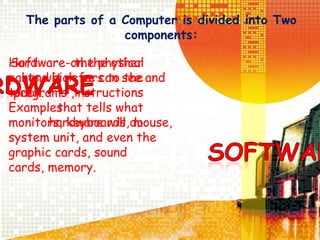
The parts of a Computer is divided into Two
components:
Hardware- the physical
parts which we can see and
touch.
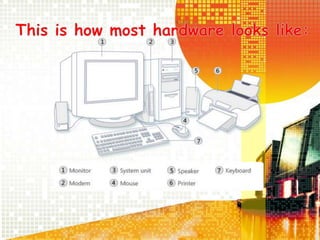
Examples:
monitors, keyboards, mouse,
system unit, and even the
graphic cards, sound
cards, memory.
Software-on the other
hand it refers to the
programs ,instructions
that tells what
hardware will do
System Unit
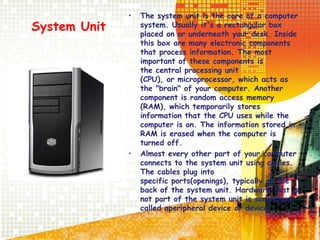
• The system unit is the core of a computer
system. Usually it's a rectangular box
placed on or underneath your desk. Inside
this box are many electronic components
that process information. The most
important of these components is
the central processing unit
(CPU), or microprocessor, which acts as
the "brain" of your computer. Another
component is random access memory
(RAM), which temporarily stores
information that the CPU uses while the
computer is on. The information stored in
RAM is erased when the computer is
turned off.
• Almost every other part of your computer
connects to the system unit using cables.
The cables plug into
specific ports(openings), typically on the
back of the system unit. Hardware that is
not part of the system unit is sometimes
called aperipheral device or device.
Mouse
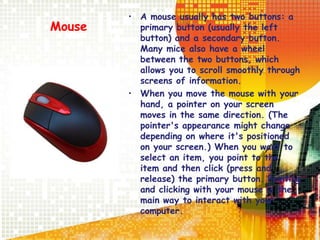
• A mouse usually has two buttons: a
primary button (usually the left
button) and a secondary button.
Many mice also have a wheel
between the two buttons, which
allows you to scroll smoothly through
screens of information.
• When you move the mouse with your
hand, a pointer on your screen
moves in the same direction. (The
pointer's appearance might change
depending on where it's positioned
on your screen.) When you want to
select an item, you point to the
item and then click (press and
release) the primary button. Pointing
and clicking with your mouse is the
main way to interact with your
computer.
Keyboard
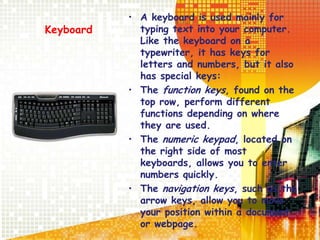
• A keyboard is used mainly for
typing text into your computer.
Like the keyboard on a
typewriter, it has keys for
letters and numbers, but it also
has special keys:
• The function keys, found on the
top row, perform different
functions depending on where
they are used.
• The numeric keypad, located on
the right side of most
keyboards, allows you to enter
numbers quickly.
• The navigation keys, such as the
arrow keys, allow you to move
your position within a document
or webpage.
Monitor
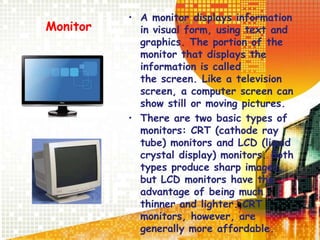
• A monitor displays information
in visual form, using text and
graphics. The portion of the
monitor that displays the
information is called
the screen. Like a television
screen, a computer screen can
show still or moving pictures.
• There are two basic types of
monitors: CRT (cathode ray
tube) monitors and LCD (liquid
crystal display) monitors. Both
types produce sharp images,
but LCD monitors have the
advantage of being much
thinner and lighter. CRT
monitors, however, are
generally more affordable.
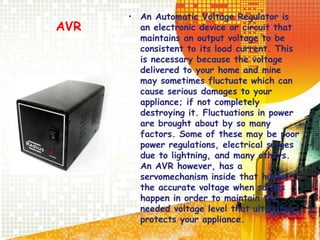
AVR
• An Automatic Voltage Regulator is
an electronic device or circuit that
maintains an output voltage to be
consistent to its load current. This
is necessary because the voltage
delivered to your home and mine
may sometimes fluctuate which can
cause serious damages to your
appliance; if not completely
destroying it. Fluctuations in power
are brought about by so many
factors. Some of these may be poor
power regulations, electrical surges
due to lightning, and many others.
An AVR however, has a
servomechanism inside that hunts
the accurate voltage when surges
happen in order to maintain the
needed voltage level that ultimately
protects your appliance.
Concepts of Computer Hardware
• Input/Output (I/O): Refers to the process of
getting information into and out of the computer.
– Input: Those parts of the computer receiving
information to programs.
– Output: Those parts of the computer that
provide results of computation to the person
using the computer.
Input Hardwares
• Input hardware: Those that deal with
original data.
– Keyboard
– Mouse
– Voice recognition hardware
– Scanner
– Digital camera
– Microphone
Storage Devices
• Electronic Circuits
– Most expensive of the three forms for storing binary information.
– A flip-flop circuit has either one electronic status or the other. It is said to
flip-flop from one to the other.
– Electronic circuits come in two forms:
• Permanent
• Non-permanent
• Magnetic Technology
– Two parts to most of the magnetic forms of information storage:
• The medium that stores the magnetic information.
– Example: Floppy disk. Tiny spots on the disk are magnetized to
represent 0s and 1s.
– The device that can “read” that information from the medium.
– The drive spins the disk.
– It has a magnetic sensing arm that moves over the disk.
– Performs nondestructive reading
• Optical
– Uses lasers to “read” the binary information from the medium, usually a disc.
• Millions of tiny holes are “burned” into the surface of the disc.
• The holes are interpreted as 1s. The absence of holes are interpreted as
0s.
Input w/ Output Devices
• (I/O)- devices that can handle both
input and output function.
– Floppy disk drive
– Hard disk drive
– Modem
– Network card
– CD recorder
Output Devices
• Output hardware: displays result for
the user.
- printer
- monitor
- plotter
- speakers
Leader: Jee Anne Tongol
Jennifer Mendoza
Lovely Castaneda
Daniella Guzman
Mikee Cordero
Justine Maglambayan
Nina Joy Urban0
IV-Del Mundo

Jeeanneproject

  • 1.
    PARTS OF ACOMPUTER PRESENTED BY: GROUP FOUR
  • 2.
    The parts ofa Computer is divided into Two components: Hardware- the physical parts which we can see and touch. Examples: monitors, keyboards, mouse, system unit, and even the graphic cards, sound cards, memory. Software-on the other hand it refers to the programs ,instructions that tells what hardware will do
  • 4.
    System Unit • Thesystem unit is the core of a computer system. Usually it's a rectangular box placed on or underneath your desk. Inside this box are many electronic components that process information. The most important of these components is the central processing unit (CPU), or microprocessor, which acts as the "brain" of your computer. Another component is random access memory (RAM), which temporarily stores information that the CPU uses while the computer is on. The information stored in RAM is erased when the computer is turned off. • Almost every other part of your computer connects to the system unit using cables. The cables plug into specific ports(openings), typically on the back of the system unit. Hardware that is not part of the system unit is sometimes called aperipheral device or device.
  • 5.
    Mouse • A mouseusually has two buttons: a primary button (usually the left button) and a secondary button. Many mice also have a wheel between the two buttons, which allows you to scroll smoothly through screens of information. • When you move the mouse with your hand, a pointer on your screen moves in the same direction. (The pointer's appearance might change depending on where it's positioned on your screen.) When you want to select an item, you point to the item and then click (press and release) the primary button. Pointing and clicking with your mouse is the main way to interact with your computer.
  • 6.
    Keyboard • A keyboardis used mainly for typing text into your computer. Like the keyboard on a typewriter, it has keys for letters and numbers, but it also has special keys: • The function keys, found on the top row, perform different functions depending on where they are used. • The numeric keypad, located on the right side of most keyboards, allows you to enter numbers quickly. • The navigation keys, such as the arrow keys, allow you to move your position within a document or webpage.
  • 7.
    Monitor • A monitordisplays information in visual form, using text and graphics. The portion of the monitor that displays the information is called the screen. Like a television screen, a computer screen can show still or moving pictures. • There are two basic types of monitors: CRT (cathode ray tube) monitors and LCD (liquid crystal display) monitors. Both types produce sharp images, but LCD monitors have the advantage of being much thinner and lighter. CRT monitors, however, are generally more affordable.
  • 8.
    AVR • An AutomaticVoltage Regulator is an electronic device or circuit that maintains an output voltage to be consistent to its load current. This is necessary because the voltage delivered to your home and mine may sometimes fluctuate which can cause serious damages to your appliance; if not completely destroying it. Fluctuations in power are brought about by so many factors. Some of these may be poor power regulations, electrical surges due to lightning, and many others. An AVR however, has a servomechanism inside that hunts the accurate voltage when surges happen in order to maintain the needed voltage level that ultimately protects your appliance.
  • 9.
    Concepts of ComputerHardware • Input/Output (I/O): Refers to the process of getting information into and out of the computer. – Input: Those parts of the computer receiving information to programs. – Output: Those parts of the computer that provide results of computation to the person using the computer.
  • 10.
    Input Hardwares • Inputhardware: Those that deal with original data. – Keyboard – Mouse – Voice recognition hardware – Scanner – Digital camera – Microphone
  • 11.
    Storage Devices • ElectronicCircuits – Most expensive of the three forms for storing binary information. – A flip-flop circuit has either one electronic status or the other. It is said to flip-flop from one to the other. – Electronic circuits come in two forms: • Permanent • Non-permanent • Magnetic Technology – Two parts to most of the magnetic forms of information storage: • The medium that stores the magnetic information. – Example: Floppy disk. Tiny spots on the disk are magnetized to represent 0s and 1s. – The device that can “read” that information from the medium. – The drive spins the disk. – It has a magnetic sensing arm that moves over the disk. – Performs nondestructive reading • Optical – Uses lasers to “read” the binary information from the medium, usually a disc. • Millions of tiny holes are “burned” into the surface of the disc. • The holes are interpreted as 1s. The absence of holes are interpreted as 0s.
  • 12.
    Input w/ OutputDevices • (I/O)- devices that can handle both input and output function. – Floppy disk drive – Hard disk drive – Modem – Network card – CD recorder
  • 13.
    Output Devices • Outputhardware: displays result for the user. - printer - monitor - plotter - speakers
  • 14.
    Leader: Jee AnneTongol Jennifer Mendoza Lovely Castaneda Daniella Guzman Mikee Cordero Justine Maglambayan Nina Joy Urban0 IV-Del Mundo