Handling Lifecycles
in a Jetpack way
Han Yin @ Oct, 2018
TOC
Problem
Solution
LifeCycle
ViewModel
LiveData
CodeLab
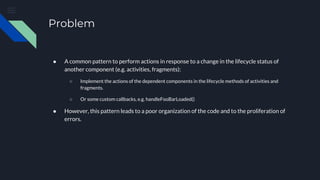
Problem
● A common pattern to perform actions in response to a change in the lifecycle status of
another component (e.g. activities, fragments):
○ Implement the actions of the dependent components in the lifecycle methods of activities and
fragments.
○ Or some custom callbacks, e.g. handleFooBarLoaded()
● However, this pattern leads to a poor organization of the code and to the proliferation of
errors.
Problem
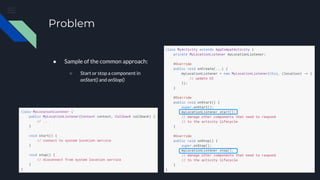
● Sample of the common approach:
○ Start or stop a component in
onStart() and onStop()
Problem
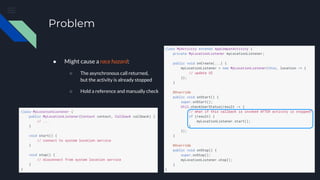
● Might cause a race hazard:
○ The asynchronous call returned,
but the activity is already stopped
○ Hold a reference and manually check
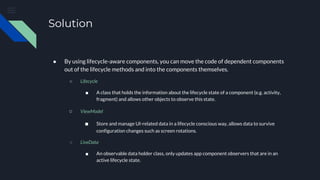
Solution
● By using lifecycle-aware components, you can move the code of dependent components
out of the lifecycle methods and into the components themselves.
○ Lifecycle
■ A class that holds the information about the lifecycle state of a component (e.g. activity,
fragment) and allows other objects to observe this state.
○ ViewModel
■ Store and manage UI-related data in a lifecycle conscious way, allows data to survive
configuration changes such as screen rotations.
○ LiveData
■ An observable data holder class, only updates app component observers that are in an
active lifecycle state.
Solution
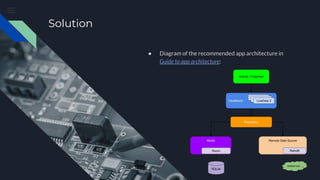
● Diagram of the recommended app architecture in
Guide to app architecture:
Lifecycle
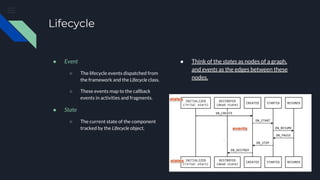
● Event
○ The lifecycle events dispatched from
the framework and the Lifecycle class.
○ These events map to the callback
events in activities and fragments.
● State
○ The current state of the component
tracked by the Lifecycle object.
● Think of the states as nodes of a graph,
and events as the edges between these
nodes.
Lifecycle
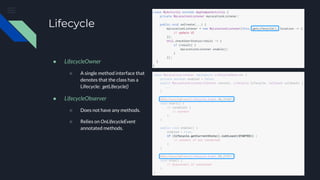
● LifecycleOwner
○ A single method interface that
denotes that the class has a
Lifecycle: getLifecycle()
● LifecycleObserver
○ Does not have any methods.
○ Relies on OnLifecycleEvent
annotated methods.
ViewModel
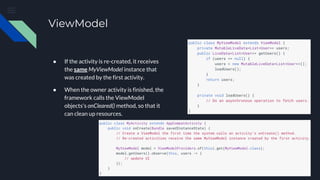
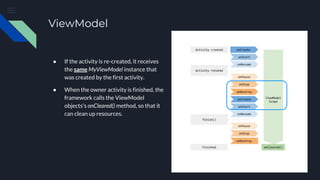
● If the activity is re-created, it receives
the same MyViewModel instance that
was created by the first activity.
● When the owner activity is finished, the
framework calls the ViewModel
objects's onCleared() method, so that it
can clean up resources.
ViewModel
● If the activity is re-created, it receives
the same MyViewModel instance that
was created by the first activity.
● When the owner activity is finished, the
framework calls the ViewModel
objects's onCleared() method, so that it
can clean up resources.
ViewModel
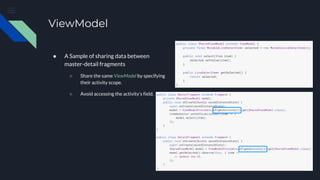
● A Sample of sharing data between
master-detail fragments
○ Share the same ViewModel by specifying
their activity scope.
○ Avoid accessing the activity’s field.
LiveData
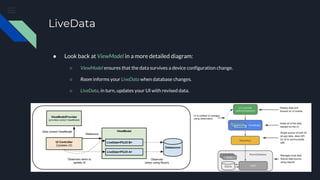
● Look back at ViewModel in a more detailed diagram:
○ ViewModel ensures that the data survives a device configuration change.
○ Room informs your LiveData when database changes.
○ LiveData, in turn, updates your UI with revised data.
LiveData
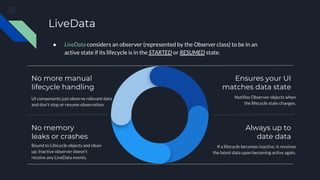
UI components just observe relevant data
and don’t stop or resume observation.
No more manual
lifecycle handling
No memory
leaks or crashes
Bound to Lifecycle objects and clean
up; Inactive observer doesn’t
receive any LiveData events.
Ensures your UI
matches data state
Notifies Observer objects when
the lifecycle state changes.
Always up to
date data
If a lifecycle becomes inactive, it receives
the latest data upon becoming active again.
● LiveData considers an observer (represented by the Observer class) to be in an
active state if its lifecycle is in the STARTED or RESUMED state.
LiveData
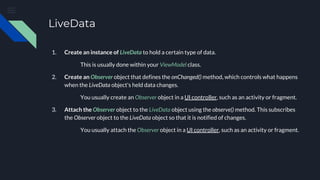
1. Create an instance of LiveData to hold a certain type of data.
This is usually done within your ViewModel class.
2. Create an Observer object that defines the onChanged() method, which controls what happens
when the LiveData object's held data changes.
You usually create an Observer object in a UI controller, such as an activity or fragment.
3. Attach the Observer object to the LiveData object using the observe() method. This subscribes
the Observer object to the LiveData object so that it is notified of changes.
You usually attach the Observer object in a UI controller, such as an activity or fragment.
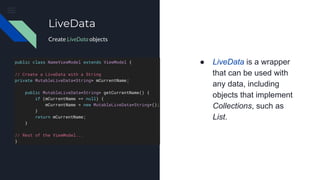
● LiveData is a wrapper
that can be used with
any data, including
objects that implement
Collections, such as
List.
LiveData
Create LiveData objects
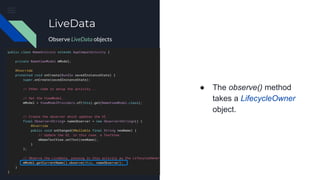
● The observe() method
takes a LifecycleOwner
object.
LiveData
Observe LiveData objects
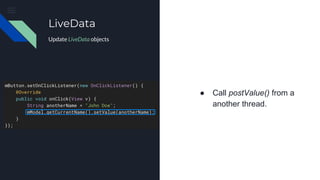
● Call postValue() from a
another thread.
LiveData
Update LiveData objects
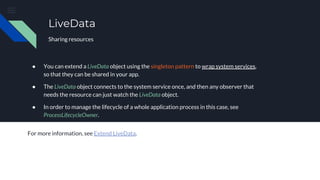
● You can extend a LiveData object using the singleton pattern to wrap system services,
so that they can be shared in your app.
● The LiveData object connects to the system service once, and then any observer that
needs the resource can just watch the LiveData object.
● In order to manage the lifecycle of a whole application process in this case, see
ProcessLifecycleOwner.
For more information, see Extend LiveData.
LiveData
Sharing resources
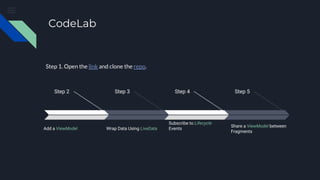
CodeLab
Step 2
Add a ViewModel
Step 3
Wrap Data Using LiveData
Step 4
Subscribe to Lifecycle
Events
Step 5
Share a ViewModel between
Fragments
Step 1. Open the link and clone the repo.
Thank you!
Q & A session

Handling Lifecycles in a Jetpack way

  • 1.
    Handling Lifecycles in aJetpack way Han Yin @ Oct, 2018
  • 2.
  • 3.
    Problem ● A commonpattern to perform actions in response to a change in the lifecycle status of another component (e.g. activities, fragments): ○ Implement the actions of the dependent components in the lifecycle methods of activities and fragments. ○ Or some custom callbacks, e.g. handleFooBarLoaded() ● However, this pattern leads to a poor organization of the code and to the proliferation of errors.
  • 4.
    Problem ● Sample ofthe common approach: ○ Start or stop a component in onStart() and onStop()
  • 5.
    Problem ● Might causea race hazard: ○ The asynchronous call returned, but the activity is already stopped ○ Hold a reference and manually check
  • 6.
    Solution ● By usinglifecycle-aware components, you can move the code of dependent components out of the lifecycle methods and into the components themselves. ○ Lifecycle ■ A class that holds the information about the lifecycle state of a component (e.g. activity, fragment) and allows other objects to observe this state. ○ ViewModel ■ Store and manage UI-related data in a lifecycle conscious way, allows data to survive configuration changes such as screen rotations. ○ LiveData ■ An observable data holder class, only updates app component observers that are in an active lifecycle state.
  • 7.
    Solution ● Diagram ofthe recommended app architecture in Guide to app architecture:
  • 8.
    Lifecycle ● Event ○ Thelifecycle events dispatched from the framework and the Lifecycle class. ○ These events map to the callback events in activities and fragments. ● State ○ The current state of the component tracked by the Lifecycle object. ● Think of the states as nodes of a graph, and events as the edges between these nodes.
  • 9.
    Lifecycle ● LifecycleOwner ○ Asingle method interface that denotes that the class has a Lifecycle: getLifecycle() ● LifecycleObserver ○ Does not have any methods. ○ Relies on OnLifecycleEvent annotated methods.
  • 10.
    ViewModel ● If theactivity is re-created, it receives the same MyViewModel instance that was created by the first activity. ● When the owner activity is finished, the framework calls the ViewModel objects's onCleared() method, so that it can clean up resources.
  • 11.
    ViewModel ● If theactivity is re-created, it receives the same MyViewModel instance that was created by the first activity. ● When the owner activity is finished, the framework calls the ViewModel objects's onCleared() method, so that it can clean up resources.
  • 12.
    ViewModel ● A Sampleof sharing data between master-detail fragments ○ Share the same ViewModel by specifying their activity scope. ○ Avoid accessing the activity’s field.
  • 13.
    LiveData ● Look backat ViewModel in a more detailed diagram: ○ ViewModel ensures that the data survives a device configuration change. ○ Room informs your LiveData when database changes. ○ LiveData, in turn, updates your UI with revised data.
  • 14.
    LiveData UI components justobserve relevant data and don’t stop or resume observation. No more manual lifecycle handling No memory leaks or crashes Bound to Lifecycle objects and clean up; Inactive observer doesn’t receive any LiveData events. Ensures your UI matches data state Notifies Observer objects when the lifecycle state changes. Always up to date data If a lifecycle becomes inactive, it receives the latest data upon becoming active again. ● LiveData considers an observer (represented by the Observer class) to be in an active state if its lifecycle is in the STARTED or RESUMED state.
  • 15.
    LiveData 1. Create aninstance of LiveData to hold a certain type of data. This is usually done within your ViewModel class. 2. Create an Observer object that defines the onChanged() method, which controls what happens when the LiveData object's held data changes. You usually create an Observer object in a UI controller, such as an activity or fragment. 3. Attach the Observer object to the LiveData object using the observe() method. This subscribes the Observer object to the LiveData object so that it is notified of changes. You usually attach the Observer object in a UI controller, such as an activity or fragment.
  • 16.
    ● LiveData isa wrapper that can be used with any data, including objects that implement Collections, such as List. LiveData Create LiveData objects
  • 17.
    ● The observe()method takes a LifecycleOwner object. LiveData Observe LiveData objects
  • 18.
    ● Call postValue()from a another thread. LiveData Update LiveData objects
  • 19.
    ● You canextend a LiveData object using the singleton pattern to wrap system services, so that they can be shared in your app. ● The LiveData object connects to the system service once, and then any observer that needs the resource can just watch the LiveData object. ● In order to manage the lifecycle of a whole application process in this case, see ProcessLifecycleOwner. For more information, see Extend LiveData. LiveData Sharing resources
  • 20.
    CodeLab Step 2 Add aViewModel Step 3 Wrap Data Using LiveData Step 4 Subscribe to Lifecycle Events Step 5 Share a ViewModel between Fragments Step 1. Open the link and clone the repo.
  • 21.
    Thank you! Q &A session