Model – View - View Model
Brief Intro
By : Suraj Kulkarni
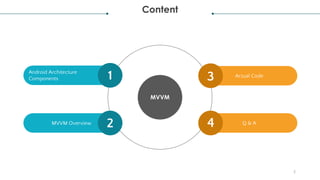
Content
MVVM
Actual Code
Q & A
Android Architecture
Components
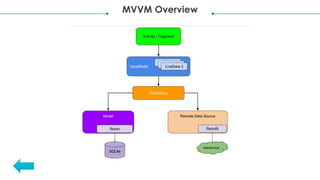
MVVM Overview
2
1
2
3
4
3
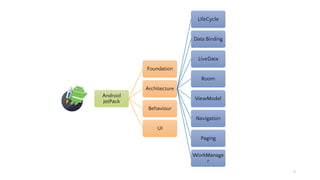
Android
JetPack
Foundation
Architecture
LifeCycle
Data Binding
LiveData
Room
ViewModel
Navigation
Paging
WorkManage
r
Behaviour
UI
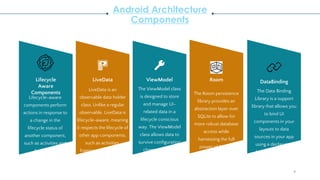
Android Architecture
Components
Lifecycle
Aware
Components
LiveData ViewModel Room
Lifecycle-aware
components perform
actions in response to
a change in the
lifecycle status of
another component,
such as activities and
fragments.
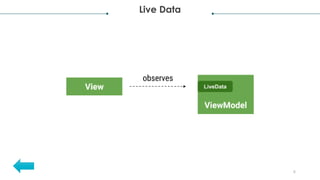
LiveData is an
observable data holder
class. Unlike a regular
observable, LiveData is
lifecycle-aware, meaning
it respects the lifecycle of
other app components,
such as activities,
fragments, or services.
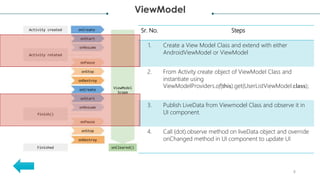
The ViewModel class
is designed to store
and manage UI-
related data in a
lifecycle conscious
way. The ViewModel
class allows data to
survive configuration
changes such as
screen rotations.
The Room persistence
library provides an
abstraction layer over
SQLite to allow for
more robust database
access while
harnessing the full
power of SQLite.
4
DataBinding
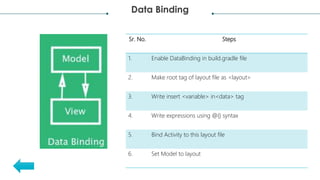
The Data Binding
Library is a support
library that allows you
to bind UI
components in your
layouts to data
sources in your app
using a declarative
format rather than
programmatically.
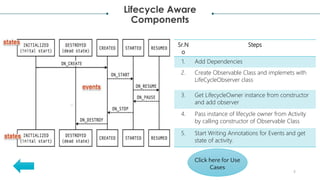
Lifecycle Aware
Components
5
Sr.N
o
Steps
1. Add Dependencies
2. Create Observable Class and implemets with
LifeCycleObserver class
3. Get LifecycleOwner instance from constructor
and add observer
4. Pass instance of lifecycle owner from Activity
by calling constructor of Observable Class
5. Start Writing Annotations for Events and get
state of activity.
Click here for Use
Cases
Live Data
6
Data Binding
Sr. No. Steps
1. Enable DataBinding in build.gradle file
2. Make root tag of layout file as <layout>
3. Write insert <variable> in<data> tag
4. Write expressions using @{} syntax
5. Bind Activity to this layout file
6. Set Model to layout
ViewModel
8
Sr. No. Steps
1. Create a View Model Class and extend with either
AndroidViewModel or ViewModel
2. From Activity create object of ViewModel Class and
instantiate using
ViewModelProviders.of(this).get(UserListViewModel.class);
3. Publish LiveData from Viewmodel Class and observe it in
UI component.
4. Call (dot).observe method on liveData object and override
onChanged method in UI component to update UI
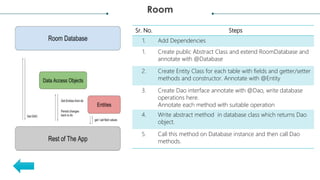
Room
Sr. No. Steps
1. Add Dependencies
1. Create public Abstract Class and extend RoomDatabase and
annotate with @Database
2. Create Entity Class for each table with fields and getter/setter
methods and constructor. Annotate with @Entity
3. Create Dao interface annotate with @Dao, write database
operations here.
Annotate each method with suitable operation
4. Write abstract method in database class which returns Dao
object.
5. Call this method on Database instance and then call Dao
methods.
MVVM Overview
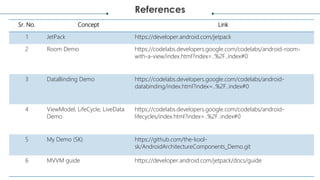
References
Sr. No. Concept Link
1 JetPack https://developer.android.com/jetpack
2 Room Demo https://codelabs.developers.google.com/codelabs/android-room-
with-a-view/index.html?index=..%2F..index#0
3 DataBinding Demo https://codelabs.developers.google.com/codelabs/android-
databinding/index.html?index=..%2F..index#0
4 ViewModel, LifeCycle, LiveData
Demo
https://codelabs.developers.google.com/codelabs/android-
lifecycles/index.html?index=..%2F..index#0
5 My Demo (SK) https://github.com/the-kool-
sk/AndroidArchitectureComponents_Demo.git
6 MVVM guide https://developer.android.com/jetpack/docs/guide

Model viewviewmodel2

  • 1.
    Model – View- View Model Brief Intro By : Suraj Kulkarni
  • 2.
    Content MVVM Actual Code Q &A Android Architecture Components MVVM Overview 2 1 2 3 4
  • 3.
  • 4.
    Android Architecture Components Lifecycle Aware Components LiveData ViewModelRoom Lifecycle-aware components perform actions in response to a change in the lifecycle status of another component, such as activities and fragments. LiveData is an observable data holder class. Unlike a regular observable, LiveData is lifecycle-aware, meaning it respects the lifecycle of other app components, such as activities, fragments, or services. The ViewModel class is designed to store and manage UI- related data in a lifecycle conscious way. The ViewModel class allows data to survive configuration changes such as screen rotations. The Room persistence library provides an abstraction layer over SQLite to allow for more robust database access while harnessing the full power of SQLite. 4 DataBinding The Data Binding Library is a support library that allows you to bind UI components in your layouts to data sources in your app using a declarative format rather than programmatically.
  • 5.
    Lifecycle Aware Components 5 Sr.N o Steps 1. AddDependencies 2. Create Observable Class and implemets with LifeCycleObserver class 3. Get LifecycleOwner instance from constructor and add observer 4. Pass instance of lifecycle owner from Activity by calling constructor of Observable Class 5. Start Writing Annotations for Events and get state of activity. Click here for Use Cases
  • 6.
  • 7.
    Data Binding Sr. No.Steps 1. Enable DataBinding in build.gradle file 2. Make root tag of layout file as <layout> 3. Write insert <variable> in<data> tag 4. Write expressions using @{} syntax 5. Bind Activity to this layout file 6. Set Model to layout
  • 8.
    ViewModel 8 Sr. No. Steps 1.Create a View Model Class and extend with either AndroidViewModel or ViewModel 2. From Activity create object of ViewModel Class and instantiate using ViewModelProviders.of(this).get(UserListViewModel.class); 3. Publish LiveData from Viewmodel Class and observe it in UI component. 4. Call (dot).observe method on liveData object and override onChanged method in UI component to update UI
  • 9.
    Room Sr. No. Steps 1.Add Dependencies 1. Create public Abstract Class and extend RoomDatabase and annotate with @Database 2. Create Entity Class for each table with fields and getter/setter methods and constructor. Annotate with @Entity 3. Create Dao interface annotate with @Dao, write database operations here. Annotate each method with suitable operation 4. Write abstract method in database class which returns Dao object. 5. Call this method on Database instance and then call Dao methods.
  • 10.
  • 11.
    References Sr. No. ConceptLink 1 JetPack https://developer.android.com/jetpack 2 Room Demo https://codelabs.developers.google.com/codelabs/android-room- with-a-view/index.html?index=..%2F..index#0 3 DataBinding Demo https://codelabs.developers.google.com/codelabs/android- databinding/index.html?index=..%2F..index#0 4 ViewModel, LifeCycle, LiveData Demo https://codelabs.developers.google.com/codelabs/android- lifecycles/index.html?index=..%2F..index#0 5 My Demo (SK) https://github.com/the-kool- sk/AndroidArchitectureComponents_Demo.git 6 MVVM guide https://developer.android.com/jetpack/docs/guide