Testing and Debugging
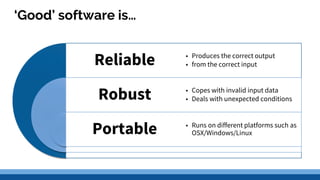
‘Good’ software is…
Robust
Portable
• Produces the correct output
• from the correct input
• Copes with invalid input data
• Deals with unexpected conditions
• Runs on different platforms such as
OSX/Windows/Linux
Reliable
Testing
Lesson Aims
By the end of this lesson all pupils will be able to:
❏ Describe the types of errors that may be discovered
❏ Explain what is meant by systematic testing
❏ Explain what is meant by comprehensive testing
❏ Explain the importance for documentation at every stage of the project
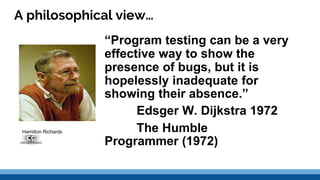
A philosophical view…
“Program testing can be a very
effective way to show the
presence of bugs, but it is
hopelessly inadequate for
showing their absence.”
Edsger W. Dijkstra 1972
The Humble
Programmer (1972)
Hamilton Richards
Testing
What is the purpose of testing any product?
❏ Is it Fit for purpose - does it meet the specification
❏ Is it robust
❏ Is it reliable
MURPHY’s LAW 1
The quicker program coding is
started the longer the project will
take
MURPHY’s LAW 2
Murphy’s Law 1 is correct!
Aspects of Testing
Testing has to follow a plan.
It has to be systematic
it has to be comprehensive
What are we testing?
What is the function we want to test
What data/actions do we need to perform to test this?
What is the expected (correct) output?
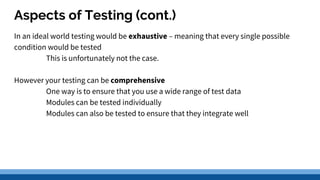
Aspects of Testing (cont.)
In an ideal world testing would be exhaustive – meaning that every single possible
condition would be tested
This is unfortunately not the case.
However your testing can be comprehensive
One way is to ensure that you use a wide range of test data
Modules can be tested individually
Modules can also be tested to ensure that they integrate well
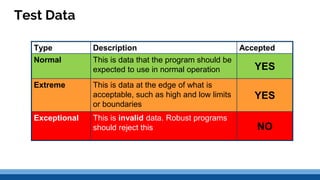
Test Data
Type Description Accepted
Normal This is data that the program should be
expected to use in normal operation YES
Extreme This is data at the edge of what is
acceptable, such as high and low limits
or boundaries
YES
Exceptional This is invalid data. Robust programs
should reject this NO
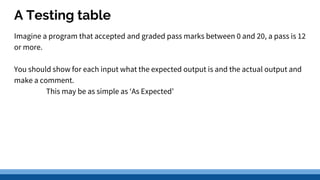
A Testing table
Imagine a program that accepted and graded pass marks between 0 and 20, a pass is 12
or more.
You should show for each input what the expected output is and the actual output and
make a comment.
This may be as simple as ‘As Expected’
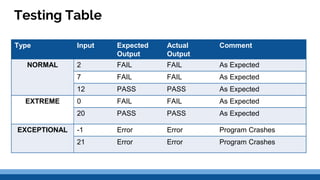
Testing Table
Type Input Expected
Output
Actual
Output
Comment
NORMAL 2 FAIL FAIL As Expected
7 FAIL FAIL As Expected
12 PASS PASS As Expected
EXTREME 0 FAIL FAIL As Expected
20 PASS PASS As Expected
EXCEPTIONAL -1 Error Error Program Crashes
21 Error Error Program Crashes
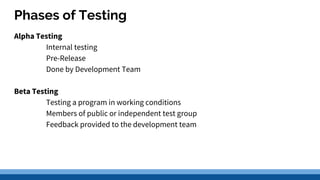
Phases of Testing
Alpha Testing
Internal testing
Pre-Release
Done by Development Team
Beta Testing
Testing a program in working conditions
Members of public or independent test group
Feedback provided to the development team
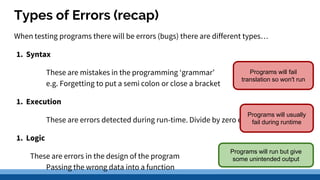
Types of Errors (recap)
When testing programs there will be errors (bugs) there are different types…
1. Syntax
These are mistakes in the programming ‘grammar’
e.g. Forgetting to put a semi colon or close a bracket
1. Execution
These are errors detected during run-time. Divide by zero etc.
1. Logic
These are errors in the design of the program
Passing the wrong data into a function
Programs will fail
translation so won't run
Programs will run but give
some unintended output
Programs will usually
fail during runtime
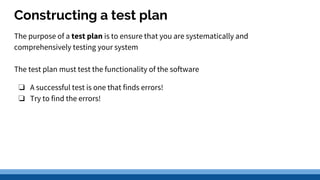
Constructing a test plan
The purpose of a test plan is to ensure that you are systematically and
comprehensively testing your system
The test plan must test the functionality of the software
❏ A successful test is one that finds errors!
❏ Try to find the errors!
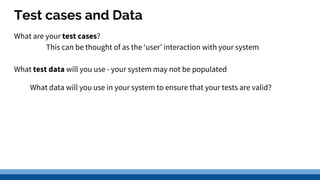
Test cases and Data
What are your test cases?
This can be thought of as the ‘user’ interaction with your system
What test data will you use - your system may not be populated
What data will you use in your system to ensure that your tests are valid?
Debugging Techniques
Debugging tools
What if it finds an error?
There are various debugging techniques/tools
❏ Dry Runs
❏ Trace Tables/Tools
❏ Breakpoints
❏ Watchpoints
Dry Runs
A dry run is when you manually stepping through the lines of code without the need
for executing the program. Can be useful for logic errors.
Trace table
When you use a trace table you step through the code recording changes to variables.
The changes can then be used to track when and what it is being changed to.
Breakpoints
You set breakpoints to stop execution of the code at specified lines of code.
At this point the contents of variables can be examined
This can be a method to ascertain if a piece of code is actually being executed,
obviously useful for debugging conditional statements.
As you can check if the variables match the conditions you think they do
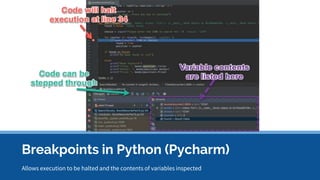
Allows execution to be halted and the contents of variables inspected
Breakpoints in Python (Pycharm)
Watchpoints
Watchpoints are similar to breakpoints but they are assigned to variables
They then stop the execution of the program only when the contents of a specific
variable(s) meet a particular condition.
This can be at any point in the execution of the code
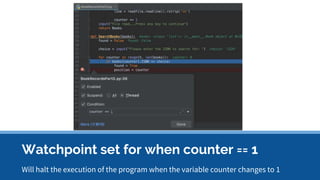
Watchpoint set for when counter == 1
Will halt the execution of the program when the variable counter changes to 1

H testing and debugging

  • 1.
  • 2.
    ‘Good’ software is… Robust Portable •Produces the correct output • from the correct input • Copes with invalid input data • Deals with unexpected conditions • Runs on different platforms such as OSX/Windows/Linux Reliable
  • 3.
  • 4.
    Lesson Aims By theend of this lesson all pupils will be able to: ❏ Describe the types of errors that may be discovered ❏ Explain what is meant by systematic testing ❏ Explain what is meant by comprehensive testing ❏ Explain the importance for documentation at every stage of the project
  • 5.
    A philosophical view… “Programtesting can be a very effective way to show the presence of bugs, but it is hopelessly inadequate for showing their absence.” Edsger W. Dijkstra 1972 The Humble Programmer (1972) Hamilton Richards
  • 6.
    Testing What is thepurpose of testing any product? ❏ Is it Fit for purpose - does it meet the specification ❏ Is it robust ❏ Is it reliable MURPHY’s LAW 1 The quicker program coding is started the longer the project will take MURPHY’s LAW 2 Murphy’s Law 1 is correct!
  • 7.
    Aspects of Testing Testinghas to follow a plan. It has to be systematic it has to be comprehensive What are we testing? What is the function we want to test What data/actions do we need to perform to test this? What is the expected (correct) output?
  • 8.
    Aspects of Testing(cont.) In an ideal world testing would be exhaustive – meaning that every single possible condition would be tested This is unfortunately not the case. However your testing can be comprehensive One way is to ensure that you use a wide range of test data Modules can be tested individually Modules can also be tested to ensure that they integrate well
  • 9.
    Test Data Type DescriptionAccepted Normal This is data that the program should be expected to use in normal operation YES Extreme This is data at the edge of what is acceptable, such as high and low limits or boundaries YES Exceptional This is invalid data. Robust programs should reject this NO
  • 10.
    A Testing table Imaginea program that accepted and graded pass marks between 0 and 20, a pass is 12 or more. You should show for each input what the expected output is and the actual output and make a comment. This may be as simple as ‘As Expected’
  • 11.
    Testing Table Type InputExpected Output Actual Output Comment NORMAL 2 FAIL FAIL As Expected 7 FAIL FAIL As Expected 12 PASS PASS As Expected EXTREME 0 FAIL FAIL As Expected 20 PASS PASS As Expected EXCEPTIONAL -1 Error Error Program Crashes 21 Error Error Program Crashes
  • 12.
    Phases of Testing AlphaTesting Internal testing Pre-Release Done by Development Team Beta Testing Testing a program in working conditions Members of public or independent test group Feedback provided to the development team
  • 13.
    Types of Errors(recap) When testing programs there will be errors (bugs) there are different types… 1. Syntax These are mistakes in the programming ‘grammar’ e.g. Forgetting to put a semi colon or close a bracket 1. Execution These are errors detected during run-time. Divide by zero etc. 1. Logic These are errors in the design of the program Passing the wrong data into a function Programs will fail translation so won't run Programs will run but give some unintended output Programs will usually fail during runtime
  • 14.
    Constructing a testplan The purpose of a test plan is to ensure that you are systematically and comprehensively testing your system The test plan must test the functionality of the software ❏ A successful test is one that finds errors! ❏ Try to find the errors!
  • 15.
    Test cases andData What are your test cases? This can be thought of as the ‘user’ interaction with your system What test data will you use - your system may not be populated What data will you use in your system to ensure that your tests are valid?
  • 16.
  • 17.
    Debugging tools What ifit finds an error? There are various debugging techniques/tools ❏ Dry Runs ❏ Trace Tables/Tools ❏ Breakpoints ❏ Watchpoints
  • 18.
    Dry Runs A dryrun is when you manually stepping through the lines of code without the need for executing the program. Can be useful for logic errors.
  • 19.
    Trace table When youuse a trace table you step through the code recording changes to variables. The changes can then be used to track when and what it is being changed to.
  • 20.
    Breakpoints You set breakpointsto stop execution of the code at specified lines of code. At this point the contents of variables can be examined This can be a method to ascertain if a piece of code is actually being executed, obviously useful for debugging conditional statements. As you can check if the variables match the conditions you think they do
  • 21.
    Allows execution tobe halted and the contents of variables inspected Breakpoints in Python (Pycharm)
  • 22.
    Watchpoints Watchpoints are similarto breakpoints but they are assigned to variables They then stop the execution of the program only when the contents of a specific variable(s) meet a particular condition. This can be at any point in the execution of the code
  • 23.
    Watchpoint set forwhen counter == 1 Will halt the execution of the program when the variable counter changes to 1

Editor's Notes

  • #6 Edsger Wybe Dijkstra (11 May 1930 – 6 August 2002) was a Dutch computer scientist. He received the 1972 Turing Award for fundamental contributions to developing programming languages, and was the Schlumberger Centennial Chair of Computer Sciences at The University of Texas at Austin from 1984 until 2000. Shortly before his death in 2002, he received the ACM PODC Influential Paper Award in distributed computing for his work on self-stabilization of program computation. This annual award was renamed the Dijkstra Prize the following year, in his honor. (http://en.wikipedia.org/wiki/Edsger_W._Dijkstra)