Preface
Targeted audience
Get the code
Why Arquillian?
The first test
Creating the archive
Create the archive using
ShrinkWrap
Create the archive using
maven
Configuring Arquillian
Configuring the runtime modes of arquillian
Managed container config
Embedded container config
Including persistency (extension)
Creating test data manually
Creating test data by SQL script
Creating test data by means of JSON/XML (or YML)
Some kind of round trip
Copyright and all intellectual property belongs to Brockhaus Group 1
Preface
This is a paper provided by Brockhaus Group for free. All
content was checked and all code was tested carefully; in
case of questions of suggestions to improve we will be
happy to receive you email at:
getKnowledge@brockhaus-group.com
Targeted audience
People interested in using Arquillian with a sound knowledge in Java EE technologies, this paper
won’t explain the details of the Java EE platform. The examples have been tested using JBoss EAP
6.1.1 and the H2 database.
Get the code
All code used for this examples can be found here (zipped Maven project):
● ftp:www.brockhaus-gruppe.de
● /getKnowledge/arquillian
● user: ftpguest
● pwd: ftpguest789
Download, unpack, you’re done
Copyright and all intellectual property belongs to Brockhaus Group 2
Why Arquillian?
Testing of complex. multi-layered Java EE applications still is pretty difficult as in many cases the
services offered by the container needs to be in place. Just think of CDI, various annotations,
datasources and so on. One might say, that mocking might replace these concerns and partially
this is correct but still there is a gap between what is provided and what is expected. Arquillian
tries to close this gap by:
● maintaining the life-cycle of of a container (and despite the fact Arquillian is a JBoss project
there are more containers supported than just JBoss )1
● combining all resources to a deployable artifact and providing some facilities to deploy
these
Several plugins are available:
● Drone (includes Selenium to test the UI as well)
● Persistence (to create test data out of various formats like XML and JSON)
● Jacoco (to get some metrics about code coverage)
The first test
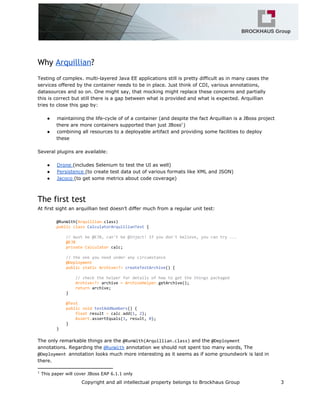
At first sight an arquillian test doesn’t differ much from a regular unit test:
@RunWith(Arquillian.class)
publicclassCalculatorArquillianTest{
//mustbe@EJB,can'tbe@Inject!Ifyoudon'tbelieve,youcantry...
@EJB
privateCalculatorcalc;
//theoneyouneedunderanycircumstance
@Deployment
publicstaticArchive<?>createTestArchive(){
//checkthehelperfordetailsofhowtogetthethingspackaged
Archive<?>archive=ArchiveHelper.getArchive();
returnarchive;
}
@Test
publicvoidtestAddNumbers(){
floatresult=calc.add(1,2);
Assert.assertEquals(3,result,0);
}
}
The only remarkable things are the @RunWith(Arquillian.class)and the @Deployment
annotations. Regarding the @RunWithannotation we should not spent too many words, The
@Deploymentannotation looks much more interesting as it seems as if some groundwork is laid in
there.
1
This paper will cover JBoss EAP 6.1.1 only
Copyright and all intellectual property belongs to Brockhaus Group 3
Creating the archive
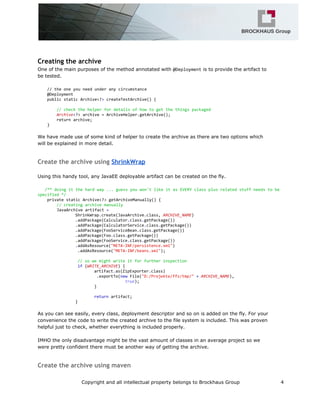
One of the main purposes of the method annotated with @Deploymentis to provide the artifact to
be tested.
//theoneyouneedunderanycircumstance
@Deployment
publicstaticArchive<?>createTestArchive(){
//checkthehelperfordetailsofhowtogetthethingspackaged
Archive<?>archive=ArchiveHelper.getArchive();
returnarchive;
}
We have made use of some kind of helper to create the archive as there are two options which
will be explained in more detail.
Create the archive using ShrinkWrap
Using this handy tool, any JavaEE deployable artifact can be created on the fly.
/**doingitthehardway...guessyouwon'tlikeitasEVERYclassplusrelatedstuffneedstobe
specified*/
privatestaticArchive<?>getArchiveManually(){
//creatingarchivemanually
JavaArchiveartifact=
ShrinkWrap.create(JavaArchive.class,ARCHIVE_NAME)
.addPackage(Calculator.class.getPackage())
.addPackage(CalculatorService.class.getPackage())
.addPackage(FooServiceBean.class.getPackage())
.addPackage(Foo.class.getPackage())
.addPackage(FooService.class.getPackage())
.addAsResource("META-INF/persistence.xml")
.addAsResource("META-INF/beans.xml");
//sowemightwriteitforfurtherinspection
if(WRITE_ARCHIVE){
artifact.as(ZipExporter.class)
.exportTo(newFile("D:/Projekte/ffz/tmp/"+ARCHIVE_NAME),
true);
}
returnartifact;
}
As you can see easily, every class, deployment descriptor and so on is added on the fly. For your
convenience the code to write the created archive to the file system is included. This was proven
helpful just to check, whether everything is included properly.
IMHO the only disadvantage might be the vast amount of classes in an average project so we
were pretty confident there must be another way of getting the archive.
Create the archive using maven
Copyright and all intellectual property belongs to Brockhaus Group 4
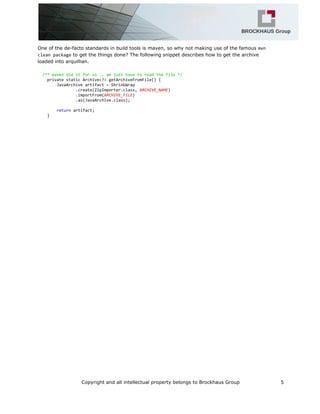
One of the de-facto standards in build tools is maven, so why not making use of the famous mvn
cleanpackageto get the things done? The following snippet describes how to get the archive
loaded into arquillian.
/**mavendiditforus..wejusthavetoreadthefile*/
privatestaticArchive<?>getArchiveFromFile(){
JavaArchiveartifact=ShrinkWrap
.create(ZipImporter.class,ARCHIVE_NAME)
.importFrom(ARCHIVE_FILE)
.as(JavaArchive.class);
returnartifact;
}
Copyright and all intellectual property belongs to Brockhaus Group 5
Configuring Arquillian
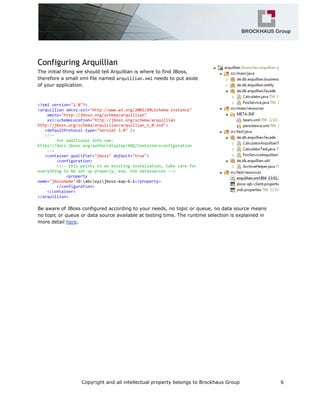
The initial thing we should tell Arquillian is where to find JBoss,
therefore a small xml file named arquillian.xmlneeds to put aside
of your application.
<?xmlversion="1.0"?>
<arquillianxmlns:xsi="http://www.w3.org/2001/XMLSchema-instance"
xmlns="http://jboss.org/schema/arquillian"
xsi:schemaLocation="http://jboss.org/schema/arquillian
http://jboss.org/schema/arquillian/arquillian_1_0.xsd">
<defaultProtocoltype="Servlet3.0"/>
<!--
foradditionalinfosee:
https://docs.jboss.org/author/display/ARQ/Container+configuration
-->
<containerqualifier="jboss"default="true">
<configuration>
<!--thispointstoanexistinginstallation,takecarefor
everythingtobesetupproperly,esp.thedatasources-->
<property
name="jbossHome">D:abcxyzjboss-eap-6.1</property>
</configuration>
</container>
</arquillian>
Be aware of JBoss configured according to your needs, no topic or queue, no data source means
no topic or queue or data source available at testing time. The runtime selection is explained in
more detail here.
Copyright and all intellectual property belongs to Brockhaus Group 6
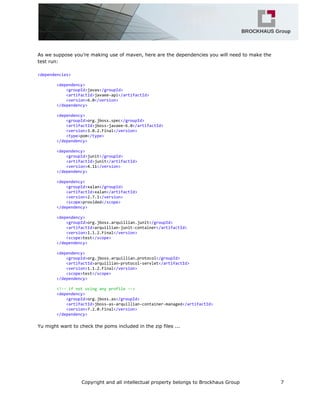
As we suppose you’re making use of maven, here are the dependencies you will need to make the
test run:
<dependencies>
<dependency>
<groupId>javax</groupId>
<artifactId>javaee-api</artifactId>
<version>6.0</version>
</dependency>
<dependency>
<groupId>org.jboss.spec</groupId>
<artifactId>jboss-javaee-6.0</artifactId>
<version>3.0.2.Final</version>
<type>pom</type>
</dependency>
<dependency>
<groupId>junit</groupId>
<artifactId>junit</artifactId>
<version>4.11</version>
</dependency>
<dependency>
<groupId>xalan</groupId>
<artifactId>xalan</artifactId>
<version>2.7.1</version>
<scope>provided</scope>
</dependency>
<dependency>
<groupId>org.jboss.arquillian.junit</groupId>
<artifactId>arquillian-junit-container</artifactId>
<version>1.1.2.Final</version>
<scope>test</scope>
</dependency>
<dependency>
<groupId>org.jboss.arquillian.protocol</groupId>
<artifactId>arquillian-protocol-servlet</artifactId>
<version>1.1.2.Final</version>
<scope>test</scope>
</dependency>
<!--ifnotusinganyprofile-->
<dependency>
<groupId>org.jboss.as</groupId>
<artifactId>jboss-as-arquillian-container-managed</artifactId>
<version>7.2.0.Final</version>
</dependency>
Yu might want to check the poms included in the zip files ...
Copyright and all intellectual property belongs to Brockhaus Group 7
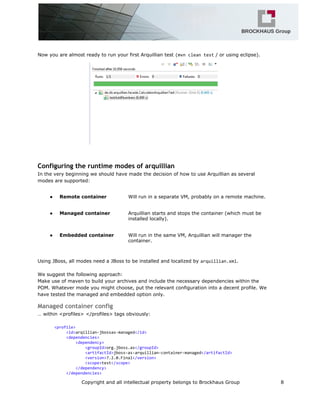
Now you are almost ready to run your first Arquillian test (mvncleantest/ or using eclipse).
Configuring the runtime modes of arquillian
In the very beginning we should have made the decision of how to use Arquillian as several
modes are supported:
● Remote container Will run in a separate VM, probably on a remote machine.
● Managed container Arquillian starts and stops the container (which must be
installed locally).
● Embedded container Will run in the same VM, Arquillian will manager the
container.
Using JBoss, all modes need a JBoss to be installed and localized by arquillian.xml.
We suggest the following approach:
Make use of maven to build your archives and include the necessary dependencies within the
POM. Whatever mode you might choose, put the relevant configuration into a decent profile. We
have tested the managed and embedded option only.
Managed container config
… within <profiles> </profiles> tags obviously:
<profile>
<id>arqillian-jbossas-managed</id>
<dependencies>
<dependency>
<groupId>org.jboss.as</groupId>
<artifactId>jboss-as-arquillian-container-managed</artifactId>
<version>7.2.0.Final</version>
<scope>test</scope>
</dependency>
</dependencies>
Copyright and all intellectual property belongs to Brockhaus Group 8
</profile>
Embedded container config
<!--forembeddedoptionsee:https://community.jboss.org/thread/236562
quoted:TheonlythingEmbeddeddoesistostartuptheContainerwithin
thesameJVM.Itstillneedstoknowwherethejars/configurationis,via
jbossHome(seearquillian.xml).-->
<profile>
<id>arquillian-jbossas-embedded</id>
<dependencies>
<dependency>
<groupId>org.jboss.as</groupId>
<artifactId>jboss-as-arquillian-container-embedded</artifactId>
<version>7.2.0.Final</version>
</dependency>
</dependencies>
<build>
<plugins>
<plugin>
<groupId>org.apache.maven.plugins</groupId>
<artifactId>maven-surefire-plugin</artifactId>
<configuration>
<systemPropertyVariables>
<!--needstobedefinedfortheembeddedoption-->
<java.util.logging.manager>org.jboss.logmanager.LogManager</java.util.logging.manager>
</systemPropertyVariables>
</configuration>
</plugin>
</plugins>
</build>
</profile>
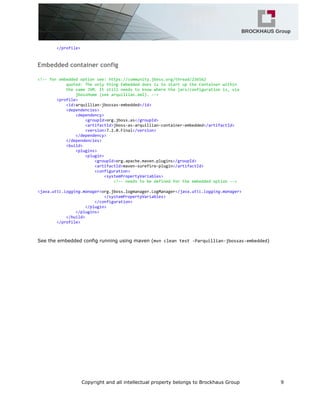
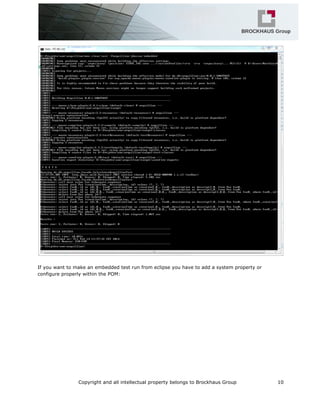
See the embedded config running using maven (mvncleantest-Parquillian-jbossas-embedded)
Copyright and all intellectual property belongs to Brockhaus Group 9
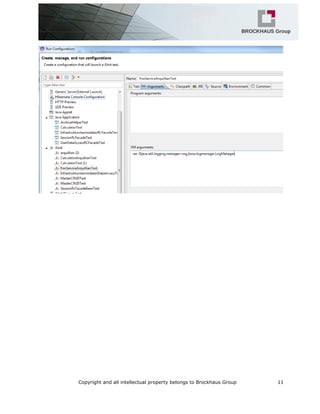
If you want to make an embedded test run from eclipse you have to add a system property or
configure properly within the POM:
Copyright and all intellectual property belongs to Brockhaus Group 10
Copyright and all intellectual property belongs to Brockhaus Group 11
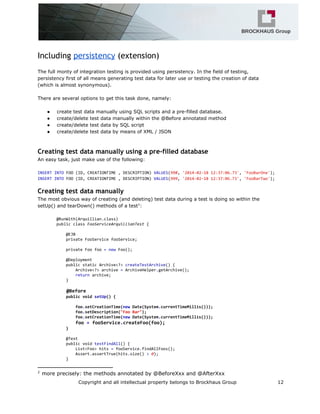
Including persistency (extension)
The full monty of integration testing is provided using persistency. In the field of testing,
persistency first of all means generating test data for later use or testing the creation of data
(which is almost synonymous).
There are several options to get this task done, namely:
● create test data manually using SQL scripts and a pre-filled database.
● create/delete test data manually within the @Before annotated method
● create/delete test data by SQL script
● create/delete test data by means of XML / JSON
Creating test data manually using a pre-filled database
An easy task, just make use of the following:
INSERTINTOFOO(ID,CREATIONTIME,DESCRIPTION)VALUES(998,'2014-02-1812:37:06.73','FooBarOne');
INSERTINTOFOO(ID,CREATIONTIME,DESCRIPTION)VALUES(999,'2014-02-1812:37:06.73','FooBarTwo');
Creating test data manually
The most obvious way of creating (and deleting) test data during a test is doing so within the
setUp() and tearDown() methods of a test :2
@RunWith(Arquillian.class)
publicclassFooServiceArquillianTest{
@EJB
privateFooServicefooService;
privateFoofoo=newFoo();
@Deployment
publicstaticArchive<?>createTestArchive(){
Archive<?>archive=ArchiveHelper.getArchive();
returnarchive;
}
@Before
publicvoidsetUp(){
foo.setCreationTime(newDate(System.currentTimeMillis()));
foo.setDescription("FooBar");
foo.setCreationTime(newDate(System.currentTimeMillis()));
foo=fooService.createFoo(foo);
}
@Test
publicvoidtestFindAll(){
List<Foo>hits=fooService.findAllFoos();
Assert.assertTrue(hits.size()>0);
}
2
more precisely: the methods annotated by @BeforeXxx and @AfterXxx
Copyright and all intellectual property belongs to Brockhaus Group 12
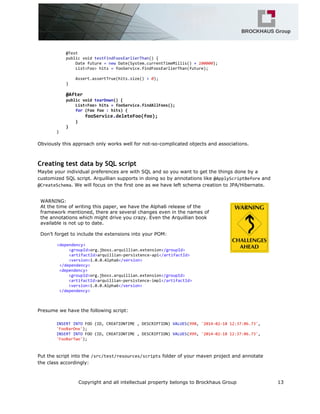
@Test
publicvoidtestFindFoosEarlierThan(){
Datefuture=newDate(System.currentTimeMillis()+100000);
List<Foo>hits=fooService.findFoosEarlierThan(future);
Assert.assertTrue(hits.size()>0);
}
@After
publicvoidtearDown(){
List<Foo>hits=fooService.findAllFoos();
for(Foofoo:hits){
fooService.deleteFoo(foo);
}
}
}
Obviously this approach only works well for not-so-complicated objects and associations.
Creating test data by SQL script
Maybe your individual preferences are with SQL and so you want to get the things done by a
customized SQL script. Arquillian supports in doing so by annotations like @ApplyScriptBeforeand
@CreateSchema. We will focus on the first one as we have left schema creation to JPA/Hibernate.
WARNING:
At the time of writing this paper, we have the Alpha6 release of the
framework mentioned, there are several changes even in the names of
the annotations which might drive you crazy. Even the Arquillian book
available is not up to date.
Don’t forget to include the extensions into your POM:
<dependency>
<groupId>org.jboss.arquillian.extension</groupId>
<artifactId>arquillian-persistence-api</artifactId>
<version>1.0.0.Alpha6</version>
</dependency>
<dependency>
<groupId>org.jboss.arquillian.extension</groupId>
<artifactId>arquillian-persistence-impl</artifactId>
<version>1.0.0.Alpha6</version>
</dependency>
Presume we have the following script:
INSERTINTOFOO(ID,CREATIONTIME,DESCRIPTION)VALUES(998,'2014-02-1812:37:06.73',
'FooBarOne');
INSERTINTOFOO(ID,CREATIONTIME,DESCRIPTION)VALUES(999,'2014-02-1812:37:06.73',
'FooBarTwo');
Put the script into the /src/test/resources/scriptsfolder of your maven project and annotate
the class accordingly:
Copyright and all intellectual property belongs to Brockhaus Group 13
@RunWith(Arquillian.class)
@ApplyScriptBefore("scripts/CreateFoo.sql")
publicclassFooServiceArquillianSQLScriptTest{
@EJB
privateFooServicefooService;
@Deployment
publicstaticArchive<?>createTestArchive(){
Archive<?>archive=ArchiveHelper.getArchive();
returnarchive;
}
@Test
publicvoidtestFindAll(){
List<Foo>hits=fooService.findAllFoos();
Assert.assertTrue(hits.size()>0);
}
@Test
publicvoidtestFindFoosEarlierThan(){
Datefuture=newDate(System.currentTimeMillis()+100000);
List<Foo>hits=fooService.findFoosEarlierThan(future);
Assert.assertTrue(hits.size()>0);
}
}
Everything should work fine now …
Obviously this model works fine for not-so-complicated objects and associations. If complex
objects respective their associations exist, there might be better options.
Creating test data by means of JSON/XML (or YML)
Presumed, the Foos are described using JSON, one can import them easily using a specific
notation. The whole thing is based upon DBUnit.
The JSON file (preferably stored in /src/test/resources/datasets):
{
"foo":[{
"id":998,
"description":"FooOne",
"creationTime":"2014-02-1909:31:33"
},{
"id":999,
"description":"FooTwo",
"creationTime":"2014-02-1909:31:33"
}]
}
The test itself:
@RunWith(Arquillian.class)
@UsingDataSet("datasets/Foos.json")
Copyright and all intellectual property belongs to Brockhaus Group 14
publicclassFooServiceArquillianDataSetTest{
@EJB
privateFooServicefooService;
@Deployment
publicstaticArchive<?>createTestArchive(){
Archive<?>archive=ArchiveHelper.getArchive();
returnarchive;
}
@Test
publicvoidtestFindAll(){
List<Foo>hits=fooService.findAllFoos();
Assert.assertTrue(hits.size()>0);
}
@Test
publicvoidtestFindFoosEarlierThan(){
Datefuture=newDate(System.currentTimeMillis()+100000);
List<Foo>hits=fooService.findFoosEarlierThan(future);
Assert.assertTrue(hits.size()>0);
}
}
Some kind of round trip
Maybe you consider it a bright idea to serialize your object in JSON and to load these objects -
maybe after some changes - into the database or utilize them as test data. Well there are several
options available to do so, the most popular frameworks are Google’s gson and Jackson. The
following explains how to do so using Jackson but keep in mind, there is still a lot to discover.
To convert / serialize your objects some kind of utility class might be of help:
publicclassJSONParser{
/**selfreference*/
privatestaticfinalJSONParserTHIS=newJSONParser();
privateObjectMapperobjectMapper=newObjectMapper();
//Singleton
privateJSONParser(){
//see:http://wiki.fasterxml.com/JacksonFAQDateHandling
DateFormatdf=newSimpleDateFormat("yyyy-MM-ddHH:mm:ss");
objectMapper.setDateFormat(df);
objectMapper.getDeserializationConfig().withDateFormat(df);
}
publicstaticJSONParsergetInstance(){
returnTHIS;
}
publicStringtoJSON(Objecto){
Stringret=null;
try{
ret=objectMapper.writerWithDefaultPrettyPrinter().writeValueAsString(o);
Copyright and all intellectual property belongs to Brockhaus Group 15
}catch(JsonGenerationExceptione){
e.printStackTrace();
}catch(JsonMappingExceptione){
e.printStackTrace();
}catch(IOExceptione){
e.printStackTrace();
}
returnret;
}
public<T>TfromJSON(Class<T>clazz,Stringjson){
Tret=null;
try{
ret=objectMapper.readValue(json,clazz);
}catch(JsonParseExceptione){
e.printStackTrace();
}catch(JsonMappingExceptione){
e.printStackTrace();
}catch(IOExceptione){
e.printStackTrace();
}
returnret;
}
}
This class serves perfectly as long as you want to serialize just one foo, if you want to serialize
more of them, you need a so-called wrapper class (note the field name of the collection, it’s a
singular, leave it like this to get the expected result):
publicclassFooWrapper{
List<Foo>foo=newArrayList<Foo>();
publicList<Foo>getFoo(){
returnfoo;
}
publicvoidsetFoo(List<Foo>foo){
this.foo=foo;
}
}
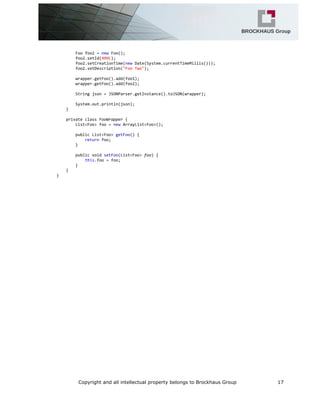
Creating the JSON representation is simple like this (think of combining it with a findAll() method of
the DAO layer):
publicclassJSONParserTest{
publicstaticvoidmain(String[]args){
JSONParserTesttest=newJSONParserTest();
test.serializeFoos();
}
privatevoidserializeFoos(){
FooWrapperwrapper=newJSONParserTest.FooWrapper();
Foofoo1=newFoo();
foo1.setId(998l);
foo1.setCreationTime(newDate(System.currentTimeMillis()));
foo1.setDescription("FooOne");
Copyright and all intellectual property belongs to Brockhaus Group 16
Foofoo2=newFoo();
foo2.setId(999l);
foo2.setCreationTime(newDate(System.currentTimeMillis()));
foo2.setDescription("FooTwo");
wrapper.getFoo().add(foo1);
wrapper.getFoo().add(foo2);
Stringjson=JSONParser.getInstance().toJSON(wrapper);
System.out.println(json);
}
privateclassFooWrapper{
List<Foo>foo=newArrayList<Foo>();
publicList<Foo>getFoo(){
returnfoo;
}
publicvoidsetFoo(List<Foo>foo){
this.foo=foo;
}
}
}
Copyright and all intellectual property belongs to Brockhaus Group 17

Arquillian in a nutshell

  • 1.
    Preface Targeted audience Get thecode Why Arquillian? The first test Creating the archive Create the archive using ShrinkWrap Create the archive using maven Configuring Arquillian Configuring the runtime modes of arquillian Managed container config Embedded container config Including persistency (extension) Creating test data manually Creating test data by SQL script Creating test data by means of JSON/XML (or YML) Some kind of round trip Copyright and all intellectual property belongs to Brockhaus Group 1
  • 2.
    Preface This is apaper provided by Brockhaus Group for free. All content was checked and all code was tested carefully; in case of questions of suggestions to improve we will be happy to receive you email at: getKnowledge@brockhaus-group.com Targeted audience People interested in using Arquillian with a sound knowledge in Java EE technologies, this paper won’t explain the details of the Java EE platform. The examples have been tested using JBoss EAP 6.1.1 and the H2 database. Get the code All code used for this examples can be found here (zipped Maven project): ● ftp:www.brockhaus-gruppe.de ● /getKnowledge/arquillian ● user: ftpguest ● pwd: ftpguest789 Download, unpack, you’re done Copyright and all intellectual property belongs to Brockhaus Group 2
  • 3.
    Why Arquillian? Testing ofcomplex. multi-layered Java EE applications still is pretty difficult as in many cases the services offered by the container needs to be in place. Just think of CDI, various annotations, datasources and so on. One might say, that mocking might replace these concerns and partially this is correct but still there is a gap between what is provided and what is expected. Arquillian tries to close this gap by: ● maintaining the life-cycle of of a container (and despite the fact Arquillian is a JBoss project there are more containers supported than just JBoss )1 ● combining all resources to a deployable artifact and providing some facilities to deploy these Several plugins are available: ● Drone (includes Selenium to test the UI as well) ● Persistence (to create test data out of various formats like XML and JSON) ● Jacoco (to get some metrics about code coverage) The first test At first sight an arquillian test doesn’t differ much from a regular unit test: @RunWith(Arquillian.class) publicclassCalculatorArquillianTest{ //mustbe@EJB,can'tbe@Inject!Ifyoudon'tbelieve,youcantry... @EJB privateCalculatorcalc; //theoneyouneedunderanycircumstance @Deployment publicstaticArchive<?>createTestArchive(){ //checkthehelperfordetailsofhowtogetthethingspackaged Archive<?>archive=ArchiveHelper.getArchive(); returnarchive; } @Test publicvoidtestAddNumbers(){ floatresult=calc.add(1,2); Assert.assertEquals(3,result,0); } } The only remarkable things are the @RunWith(Arquillian.class)and the @Deployment annotations. Regarding the @RunWithannotation we should not spent too many words, The @Deploymentannotation looks much more interesting as it seems as if some groundwork is laid in there. 1 This paper will cover JBoss EAP 6.1.1 only Copyright and all intellectual property belongs to Brockhaus Group 3
  • 4.
    Creating the archive Oneof the main purposes of the method annotated with @Deploymentis to provide the artifact to be tested. //theoneyouneedunderanycircumstance @Deployment publicstaticArchive<?>createTestArchive(){ //checkthehelperfordetailsofhowtogetthethingspackaged Archive<?>archive=ArchiveHelper.getArchive(); returnarchive; } We have made use of some kind of helper to create the archive as there are two options which will be explained in more detail. Create the archive using ShrinkWrap Using this handy tool, any JavaEE deployable artifact can be created on the fly. /**doingitthehardway...guessyouwon'tlikeitasEVERYclassplusrelatedstuffneedstobe specified*/ privatestaticArchive<?>getArchiveManually(){ //creatingarchivemanually JavaArchiveartifact= ShrinkWrap.create(JavaArchive.class,ARCHIVE_NAME) .addPackage(Calculator.class.getPackage()) .addPackage(CalculatorService.class.getPackage()) .addPackage(FooServiceBean.class.getPackage()) .addPackage(Foo.class.getPackage()) .addPackage(FooService.class.getPackage()) .addAsResource("META-INF/persistence.xml") .addAsResource("META-INF/beans.xml"); //sowemightwriteitforfurtherinspection if(WRITE_ARCHIVE){ artifact.as(ZipExporter.class) .exportTo(newFile("D:/Projekte/ffz/tmp/"+ARCHIVE_NAME), true); } returnartifact; } As you can see easily, every class, deployment descriptor and so on is added on the fly. For your convenience the code to write the created archive to the file system is included. This was proven helpful just to check, whether everything is included properly. IMHO the only disadvantage might be the vast amount of classes in an average project so we were pretty confident there must be another way of getting the archive. Create the archive using maven Copyright and all intellectual property belongs to Brockhaus Group 4
  • 5.
    One of thede-facto standards in build tools is maven, so why not making use of the famous mvn cleanpackageto get the things done? The following snippet describes how to get the archive loaded into arquillian. /**mavendiditforus..wejusthavetoreadthefile*/ privatestaticArchive<?>getArchiveFromFile(){ JavaArchiveartifact=ShrinkWrap .create(ZipImporter.class,ARCHIVE_NAME) .importFrom(ARCHIVE_FILE) .as(JavaArchive.class); returnartifact; } Copyright and all intellectual property belongs to Brockhaus Group 5
  • 6.
    Configuring Arquillian The initialthing we should tell Arquillian is where to find JBoss, therefore a small xml file named arquillian.xmlneeds to put aside of your application. <?xmlversion="1.0"?> <arquillianxmlns:xsi="http://www.w3.org/2001/XMLSchema-instance" xmlns="http://jboss.org/schema/arquillian" xsi:schemaLocation="http://jboss.org/schema/arquillian http://jboss.org/schema/arquillian/arquillian_1_0.xsd"> <defaultProtocoltype="Servlet3.0"/> <!-- foradditionalinfosee: https://docs.jboss.org/author/display/ARQ/Container+configuration --> <containerqualifier="jboss"default="true"> <configuration> <!--thispointstoanexistinginstallation,takecarefor everythingtobesetupproperly,esp.thedatasources--> <property name="jbossHome">D:abcxyzjboss-eap-6.1</property> </configuration> </container> </arquillian> Be aware of JBoss configured according to your needs, no topic or queue, no data source means no topic or queue or data source available at testing time. The runtime selection is explained in more detail here. Copyright and all intellectual property belongs to Brockhaus Group 6
  • 7.
    As we supposeyou’re making use of maven, here are the dependencies you will need to make the test run: <dependencies> <dependency> <groupId>javax</groupId> <artifactId>javaee-api</artifactId> <version>6.0</version> </dependency> <dependency> <groupId>org.jboss.spec</groupId> <artifactId>jboss-javaee-6.0</artifactId> <version>3.0.2.Final</version> <type>pom</type> </dependency> <dependency> <groupId>junit</groupId> <artifactId>junit</artifactId> <version>4.11</version> </dependency> <dependency> <groupId>xalan</groupId> <artifactId>xalan</artifactId> <version>2.7.1</version> <scope>provided</scope> </dependency> <dependency> <groupId>org.jboss.arquillian.junit</groupId> <artifactId>arquillian-junit-container</artifactId> <version>1.1.2.Final</version> <scope>test</scope> </dependency> <dependency> <groupId>org.jboss.arquillian.protocol</groupId> <artifactId>arquillian-protocol-servlet</artifactId> <version>1.1.2.Final</version> <scope>test</scope> </dependency> <!--ifnotusinganyprofile--> <dependency> <groupId>org.jboss.as</groupId> <artifactId>jboss-as-arquillian-container-managed</artifactId> <version>7.2.0.Final</version> </dependency> Yu might want to check the poms included in the zip files ... Copyright and all intellectual property belongs to Brockhaus Group 7
  • 8.
    Now you arealmost ready to run your first Arquillian test (mvncleantest/ or using eclipse). Configuring the runtime modes of arquillian In the very beginning we should have made the decision of how to use Arquillian as several modes are supported: ● Remote container Will run in a separate VM, probably on a remote machine. ● Managed container Arquillian starts and stops the container (which must be installed locally). ● Embedded container Will run in the same VM, Arquillian will manager the container. Using JBoss, all modes need a JBoss to be installed and localized by arquillian.xml. We suggest the following approach: Make use of maven to build your archives and include the necessary dependencies within the POM. Whatever mode you might choose, put the relevant configuration into a decent profile. We have tested the managed and embedded option only. Managed container config … within <profiles> </profiles> tags obviously: <profile> <id>arqillian-jbossas-managed</id> <dependencies> <dependency> <groupId>org.jboss.as</groupId> <artifactId>jboss-as-arquillian-container-managed</artifactId> <version>7.2.0.Final</version> <scope>test</scope> </dependency> </dependencies> Copyright and all intellectual property belongs to Brockhaus Group 8
  • 9.
    </profile> Embedded container config <!--forembeddedoptionsee:https://community.jboss.org/thread/236562 quoted:TheonlythingEmbeddeddoesistostartuptheContainerwithin thesameJVM.Itstillneedstoknowwherethejars/configurationis,via jbossHome(seearquillian.xml).--> <profile> <id>arquillian-jbossas-embedded</id> <dependencies> <dependency> <groupId>org.jboss.as</groupId> <artifactId>jboss-as-arquillian-container-embedded</artifactId> <version>7.2.0.Final</version> </dependency> </dependencies> <build> <plugins> <plugin> <groupId>org.apache.maven.plugins</groupId> <artifactId>maven-surefire-plugin</artifactId> <configuration> <systemPropertyVariables> <!--needstobedefinedfortheembeddedoption--> <java.util.logging.manager>org.jboss.logmanager.LogManager</java.util.logging.manager> </systemPropertyVariables> </configuration> </plugin> </plugins> </build> </profile> Seethe embedded config running using maven (mvncleantest-Parquillian-jbossas-embedded) Copyright and all intellectual property belongs to Brockhaus Group 9
  • 10.
    If you wantto make an embedded test run from eclipse you have to add a system property or configure properly within the POM: Copyright and all intellectual property belongs to Brockhaus Group 10
  • 11.
    Copyright and allintellectual property belongs to Brockhaus Group 11
  • 12.
    Including persistency (extension) Thefull monty of integration testing is provided using persistency. In the field of testing, persistency first of all means generating test data for later use or testing the creation of data (which is almost synonymous). There are several options to get this task done, namely: ● create test data manually using SQL scripts and a pre-filled database. ● create/delete test data manually within the @Before annotated method ● create/delete test data by SQL script ● create/delete test data by means of XML / JSON Creating test data manually using a pre-filled database An easy task, just make use of the following: INSERTINTOFOO(ID,CREATIONTIME,DESCRIPTION)VALUES(998,'2014-02-1812:37:06.73','FooBarOne'); INSERTINTOFOO(ID,CREATIONTIME,DESCRIPTION)VALUES(999,'2014-02-1812:37:06.73','FooBarTwo'); Creating test data manually The most obvious way of creating (and deleting) test data during a test is doing so within the setUp() and tearDown() methods of a test :2 @RunWith(Arquillian.class) publicclassFooServiceArquillianTest{ @EJB privateFooServicefooService; privateFoofoo=newFoo(); @Deployment publicstaticArchive<?>createTestArchive(){ Archive<?>archive=ArchiveHelper.getArchive(); returnarchive; } @Before publicvoidsetUp(){ foo.setCreationTime(newDate(System.currentTimeMillis())); foo.setDescription("FooBar"); foo.setCreationTime(newDate(System.currentTimeMillis())); foo=fooService.createFoo(foo); } @Test publicvoidtestFindAll(){ List<Foo>hits=fooService.findAllFoos(); Assert.assertTrue(hits.size()>0); } 2 more precisely: the methods annotated by @BeforeXxx and @AfterXxx Copyright and all intellectual property belongs to Brockhaus Group 12
  • 13.
    @Test publicvoidtestFindFoosEarlierThan(){ Datefuture=newDate(System.currentTimeMillis()+100000); List<Foo>hits=fooService.findFoosEarlierThan(future); Assert.assertTrue(hits.size()>0); } @After publicvoidtearDown(){ List<Foo>hits=fooService.findAllFoos(); for(Foofoo:hits){ fooService.deleteFoo(foo); } } } Obviously this approachonly works well for not-so-complicated objects and associations. Creating test data by SQL script Maybe your individual preferences are with SQL and so you want to get the things done by a customized SQL script. Arquillian supports in doing so by annotations like @ApplyScriptBeforeand @CreateSchema. We will focus on the first one as we have left schema creation to JPA/Hibernate. WARNING: At the time of writing this paper, we have the Alpha6 release of the framework mentioned, there are several changes even in the names of the annotations which might drive you crazy. Even the Arquillian book available is not up to date. Don’t forget to include the extensions into your POM: <dependency> <groupId>org.jboss.arquillian.extension</groupId> <artifactId>arquillian-persistence-api</artifactId> <version>1.0.0.Alpha6</version> </dependency> <dependency> <groupId>org.jboss.arquillian.extension</groupId> <artifactId>arquillian-persistence-impl</artifactId> <version>1.0.0.Alpha6</version> </dependency> Presume we have the following script: INSERTINTOFOO(ID,CREATIONTIME,DESCRIPTION)VALUES(998,'2014-02-1812:37:06.73', 'FooBarOne'); INSERTINTOFOO(ID,CREATIONTIME,DESCRIPTION)VALUES(999,'2014-02-1812:37:06.73', 'FooBarTwo'); Put the script into the /src/test/resources/scriptsfolder of your maven project and annotate the class accordingly: Copyright and all intellectual property belongs to Brockhaus Group 13
  • 14.
    @RunWith(Arquillian.class) @ApplyScriptBefore("scripts/CreateFoo.sql") publicclassFooServiceArquillianSQLScriptTest{ @EJB privateFooServicefooService; @Deployment publicstaticArchive<?>createTestArchive(){ Archive<?>archive=ArchiveHelper.getArchive(); returnarchive; } @Test publicvoidtestFindAll(){ List<Foo>hits=fooService.findAllFoos(); Assert.assertTrue(hits.size()>0); } @Test publicvoidtestFindFoosEarlierThan(){ Datefuture=newDate(System.currentTimeMillis()+100000); List<Foo>hits=fooService.findFoosEarlierThan(future); Assert.assertTrue(hits.size()>0); } } Everything should workfine now … Obviously this model works fine for not-so-complicated objects and associations. If complex objects respective their associations exist, there might be better options. Creating test data by means of JSON/XML (or YML) Presumed, the Foos are described using JSON, one can import them easily using a specific notation. The whole thing is based upon DBUnit. The JSON file (preferably stored in /src/test/resources/datasets): { "foo":[{ "id":998, "description":"FooOne", "creationTime":"2014-02-1909:31:33" },{ "id":999, "description":"FooTwo", "creationTime":"2014-02-1909:31:33" }] } The test itself: @RunWith(Arquillian.class) @UsingDataSet("datasets/Foos.json") Copyright and all intellectual property belongs to Brockhaus Group 14
  • 15.
    publicclassFooServiceArquillianDataSetTest{ @EJB privateFooServicefooService; @Deployment publicstaticArchive<?>createTestArchive(){ Archive<?>archive=ArchiveHelper.getArchive(); returnarchive; } @Test publicvoidtestFindAll(){ List<Foo>hits=fooService.findAllFoos(); Assert.assertTrue(hits.size()>0); } @Test publicvoidtestFindFoosEarlierThan(){ Datefuture=newDate(System.currentTimeMillis()+100000); List<Foo>hits=fooService.findFoosEarlierThan(future); Assert.assertTrue(hits.size()>0); } } Some kind ofround trip Maybe you consider it a bright idea to serialize your object in JSON and to load these objects - maybe after some changes - into the database or utilize them as test data. Well there are several options available to do so, the most popular frameworks are Google’s gson and Jackson. The following explains how to do so using Jackson but keep in mind, there is still a lot to discover. To convert / serialize your objects some kind of utility class might be of help: publicclassJSONParser{ /**selfreference*/ privatestaticfinalJSONParserTHIS=newJSONParser(); privateObjectMapperobjectMapper=newObjectMapper(); //Singleton privateJSONParser(){ //see:http://wiki.fasterxml.com/JacksonFAQDateHandling DateFormatdf=newSimpleDateFormat("yyyy-MM-ddHH:mm:ss"); objectMapper.setDateFormat(df); objectMapper.getDeserializationConfig().withDateFormat(df); } publicstaticJSONParsergetInstance(){ returnTHIS; } publicStringtoJSON(Objecto){ Stringret=null; try{ ret=objectMapper.writerWithDefaultPrettyPrinter().writeValueAsString(o); Copyright and all intellectual property belongs to Brockhaus Group 15
  • 16.
    }catch(JsonGenerationExceptione){ e.printStackTrace(); }catch(JsonMappingExceptione){ e.printStackTrace(); }catch(IOExceptione){ e.printStackTrace(); } returnret; } public<T>TfromJSON(Class<T>clazz,Stringjson){ Tret=null; try{ ret=objectMapper.readValue(json,clazz); }catch(JsonParseExceptione){ e.printStackTrace(); }catch(JsonMappingExceptione){ e.printStackTrace(); }catch(IOExceptione){ e.printStackTrace(); } returnret; } } This class servesperfectly as long as you want to serialize just one foo, if you want to serialize more of them, you need a so-called wrapper class (note the field name of the collection, it’s a singular, leave it like this to get the expected result): publicclassFooWrapper{ List<Foo>foo=newArrayList<Foo>(); publicList<Foo>getFoo(){ returnfoo; } publicvoidsetFoo(List<Foo>foo){ this.foo=foo; } } Creating the JSON representation is simple like this (think of combining it with a findAll() method of the DAO layer): publicclassJSONParserTest{ publicstaticvoidmain(String[]args){ JSONParserTesttest=newJSONParserTest(); test.serializeFoos(); } privatevoidserializeFoos(){ FooWrapperwrapper=newJSONParserTest.FooWrapper(); Foofoo1=newFoo(); foo1.setId(998l); foo1.setCreationTime(newDate(System.currentTimeMillis())); foo1.setDescription("FooOne"); Copyright and all intellectual property belongs to Brockhaus Group 16
  • 17.