TALKING WITH DB2
    Today’s connectivity options


                                   CRISTIAN MOLARO
                                      IBM Information Champion
                                                 Belgium 2009

0
Agenda


   ONNECTIVITY
   C
 
   EST PRACTICES
   B
 
   OOLING
   P
 
   YSPLEX SUPPORT
   S
 
   ONCLUSIONS
   C
CONNECTIVITY
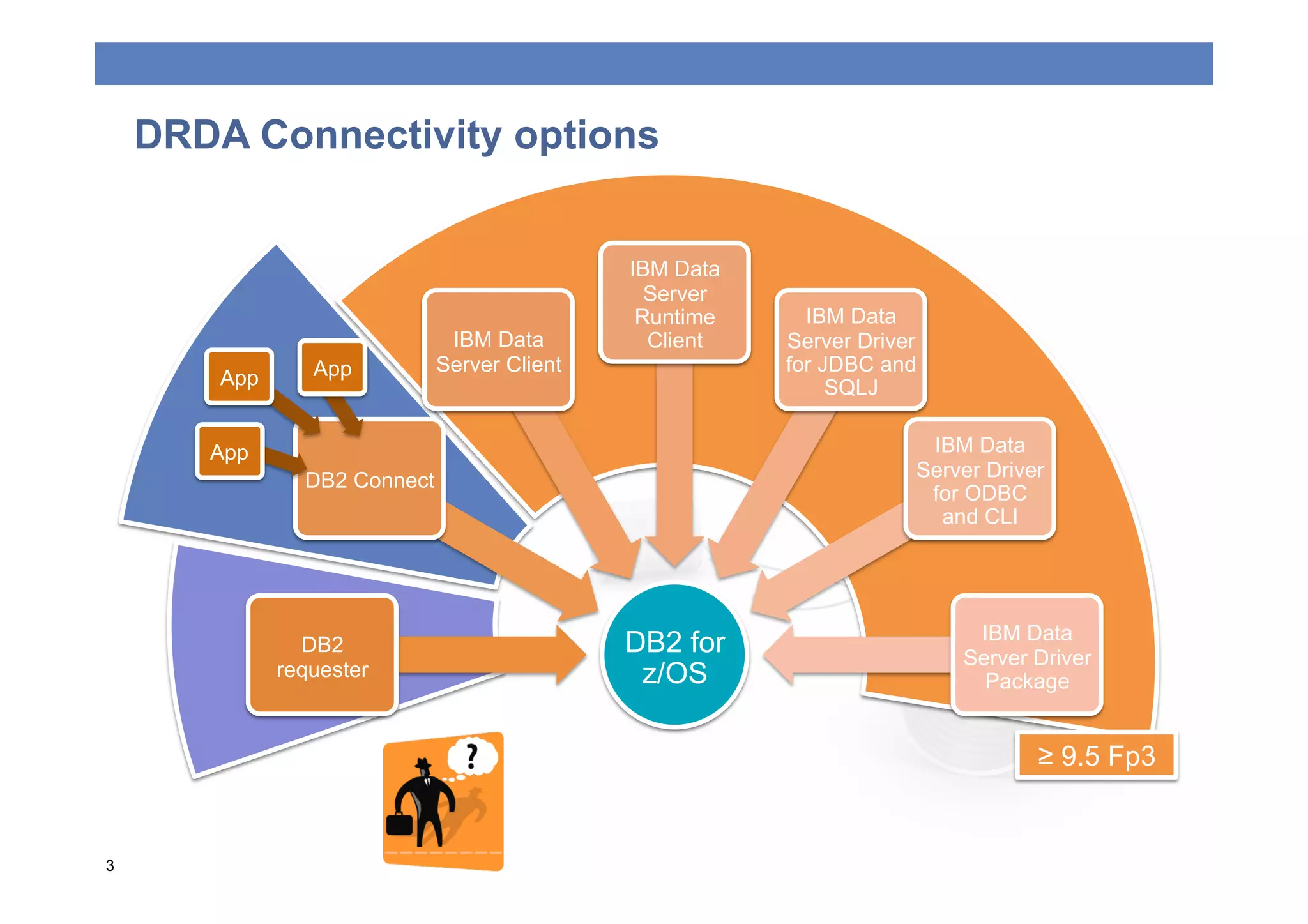
DRDA Connectivity options


                                              IBM Data
                                                Server
                                               Runtime     IBM Data
                               IBM Data         Client   Server Driver
                 App          Server Client              for JDBC and
        App                                                   SQLJ

       App                                                            IBM Data
                DB2 Connect                                          Server Driver
                                                                      for ODBC
                                                                       and CLI


                                                                          IBM Data
                DB2                           DB2 for                    Server Driver
              requester                        z/OS                        Package


                                                                                 ≥ 9.5 Fp3


3
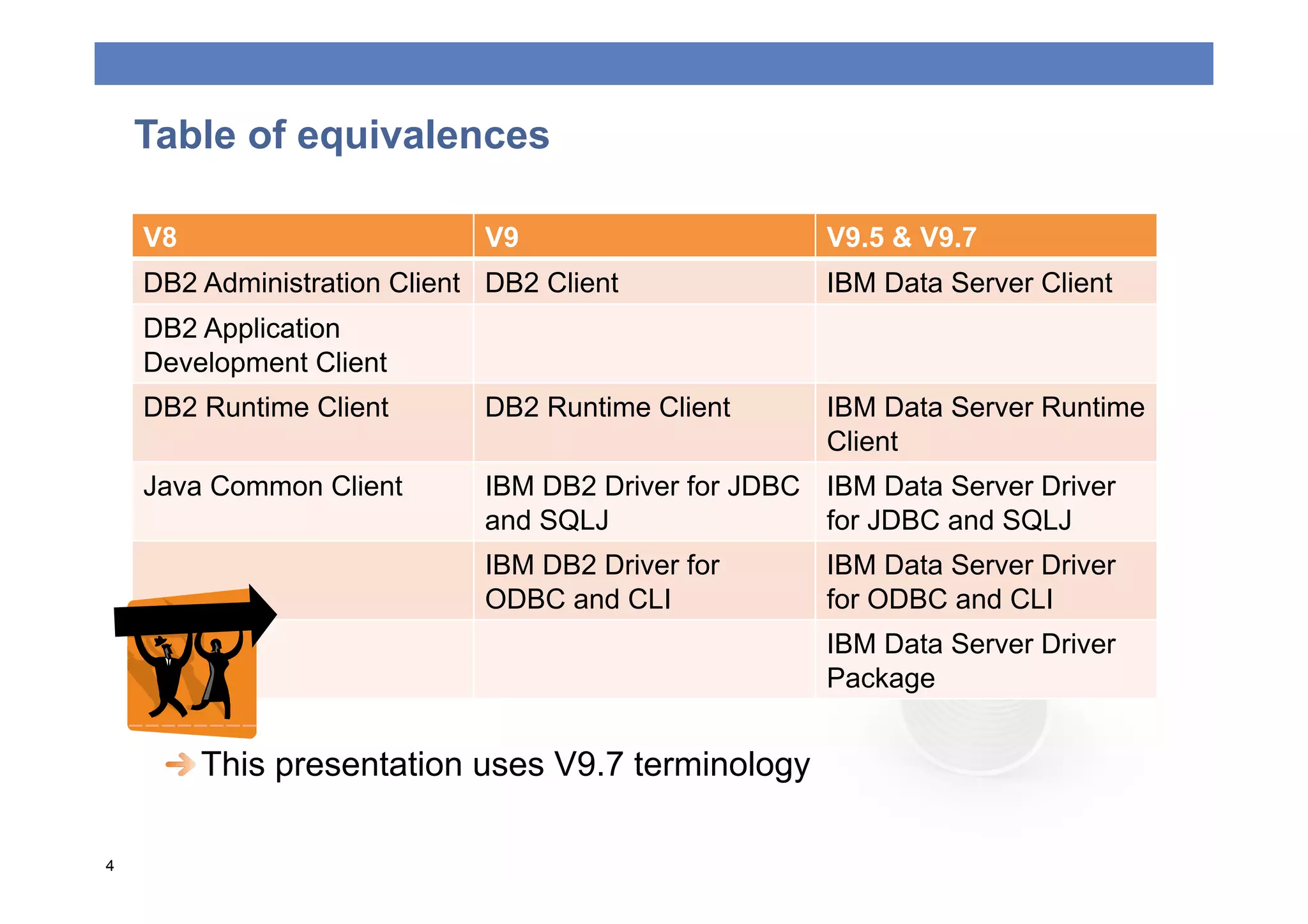
Table of equivalences

    V8                       V9                      V9.5 & V9.7
    DB2 Administration Client DB2 Client             IBM Data Server Client
    DB2 Application
    Development Client
    DB2 Runtime Client       DB2 Runtime Client      IBM Data Server Runtime
                                                     Client
    Java Common Client       IBM DB2 Driver for JDBC IBM Data Server Driver
                             and SQLJ                for JDBC and SQLJ
                             IBM DB2 Driver for      IBM Data Server Driver
                             ODBC and CLI            for ODBC and CLI
                                                     IBM Data Server Driver
                                                     Package


  This presentation uses V9.7 terminology

4
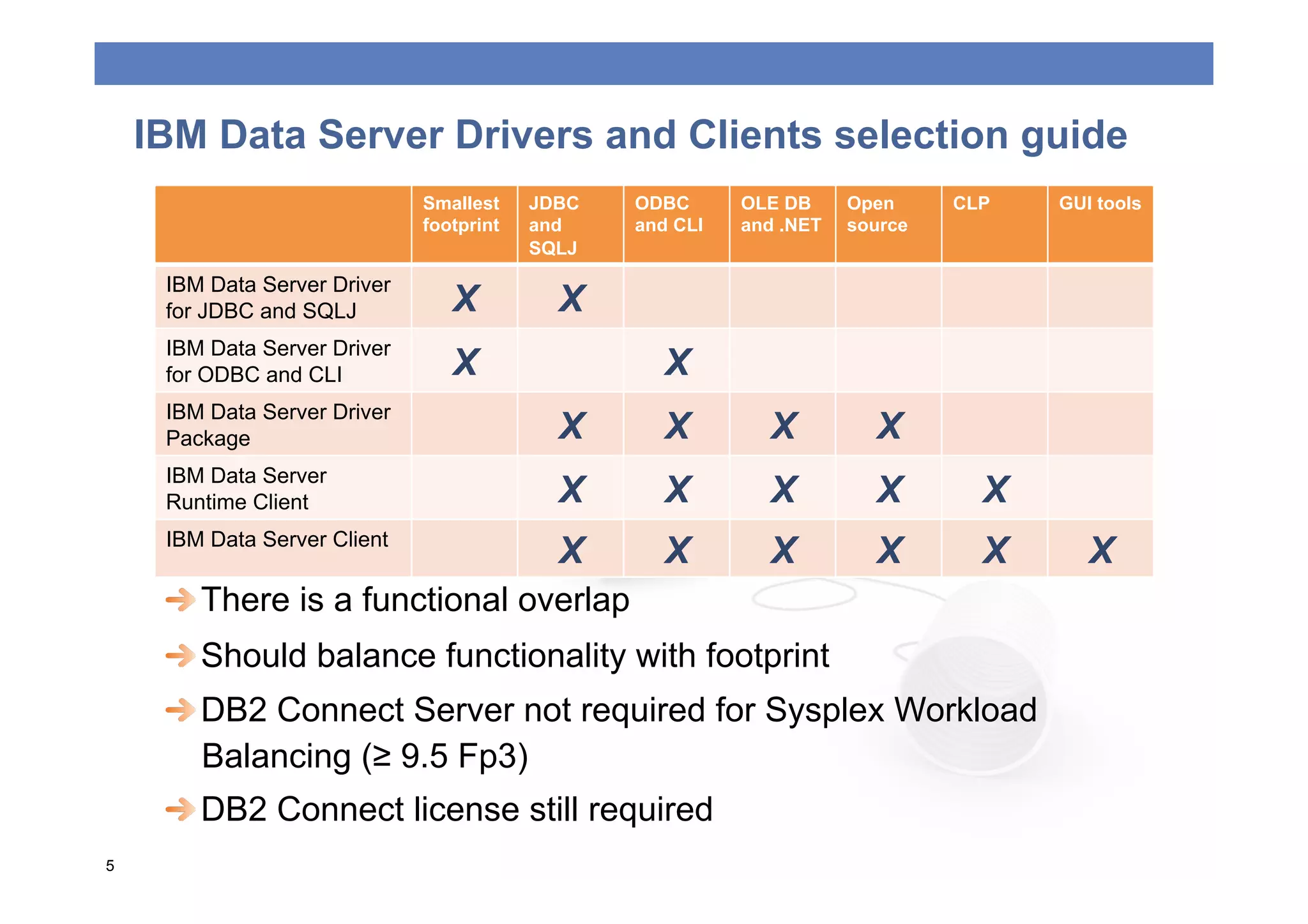
IBM Data Server Drivers and Clients selection guide
                              Smallest    JDBC   ODBC      OLE DB     Open     CLP   GUI tools
                              footprint   and    and CLI   and .NET   source
                                          SQLJ

     IBM Data Server Driver
     for JDBC and SQLJ           X          X
     IBM Data Server Driver
     for ODBC and CLI            X                  X
     IBM Data Server Driver
     Package                                X       X        X          X
     IBM Data Server
     Runtime Client                         X       X        X          X        X
     IBM Data Server Client
                                            X       X        X          X        X      X
     
  There is a functional overlap
     
  Should balance functionality with footprint
     
  DB2 Connect Server not required for Sysplex Workload
        Balancing (≥ 9.5 Fp3)
     
  DB2 Connect license still required
5
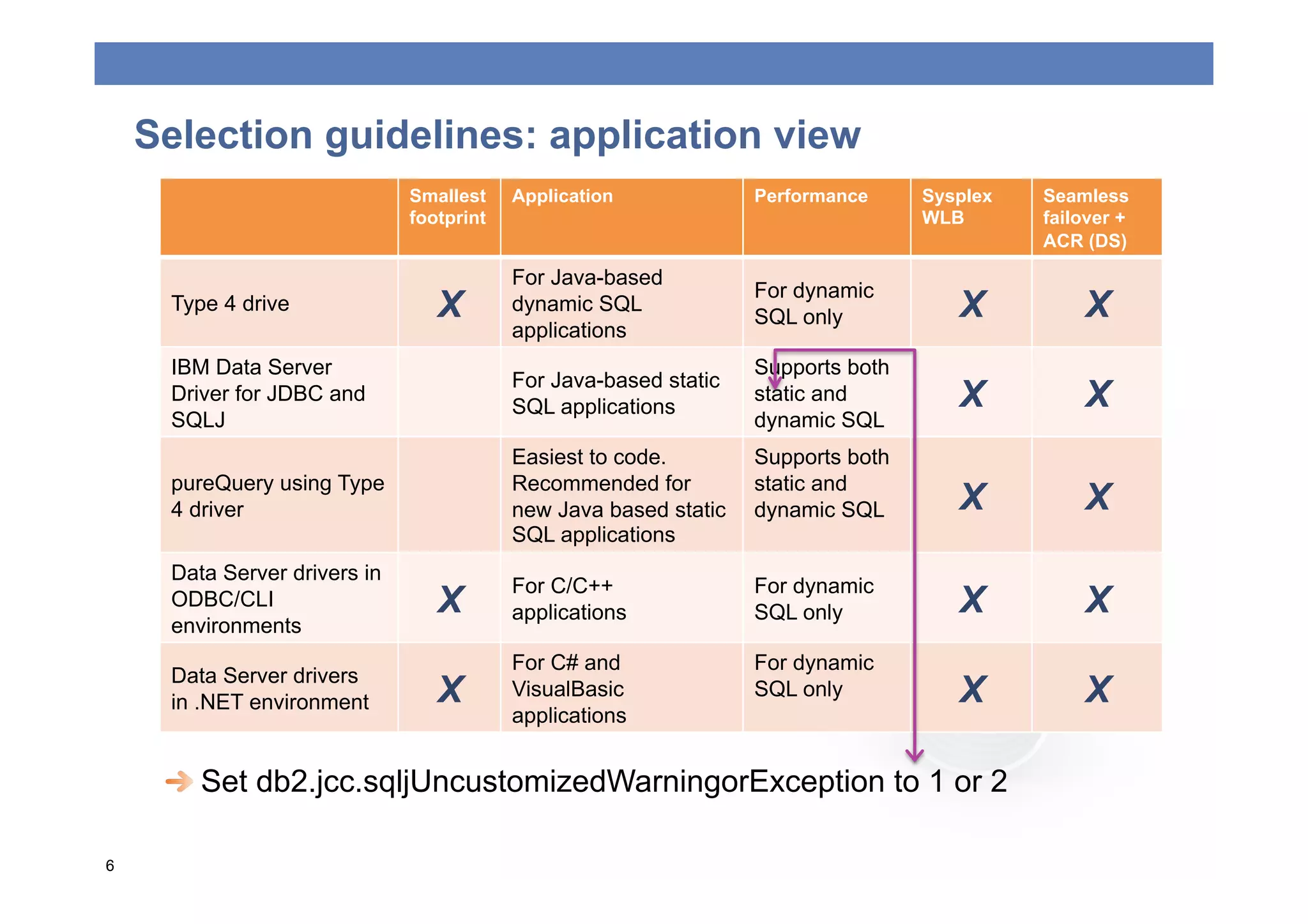
Selection guidelines: application view
                              Smallest    Application             Performance     Sysplex   Seamless
                              footprint                                           WLB       failover +
                                                                                            ACR (DS)

                                          For Java-based
                                                                  For dynamic
     Type 4 drive                X        dynamic SQL
                                                                  SQL only           X          X
                                          applications
     IBM Data Server                                              Supports both
                                          For Java-based static
     Driver for JDBC and
                                          SQL applications
                                                                  static and         X          X
     SQLJ                                                         dynamic SQL
                                          Easiest to code.        Supports both
     pureQuery using Type                 Recommended for         static and
     4 driver                             new Java based static   dynamic SQL        X          X
                                          SQL applications
     Data Server drivers in
                                          For C/C++               For dynamic
     ODBC/CLI                    X        applications            SQL only           X          X
     environments
                                          For C# and              For dynamic
     Data Server drivers
     in .NET environment         X        VisualBasic             SQL only           X          X
                                          applications


  Set db2.jcc.sqljUncustomizedWarningorException to 1 or 2

6
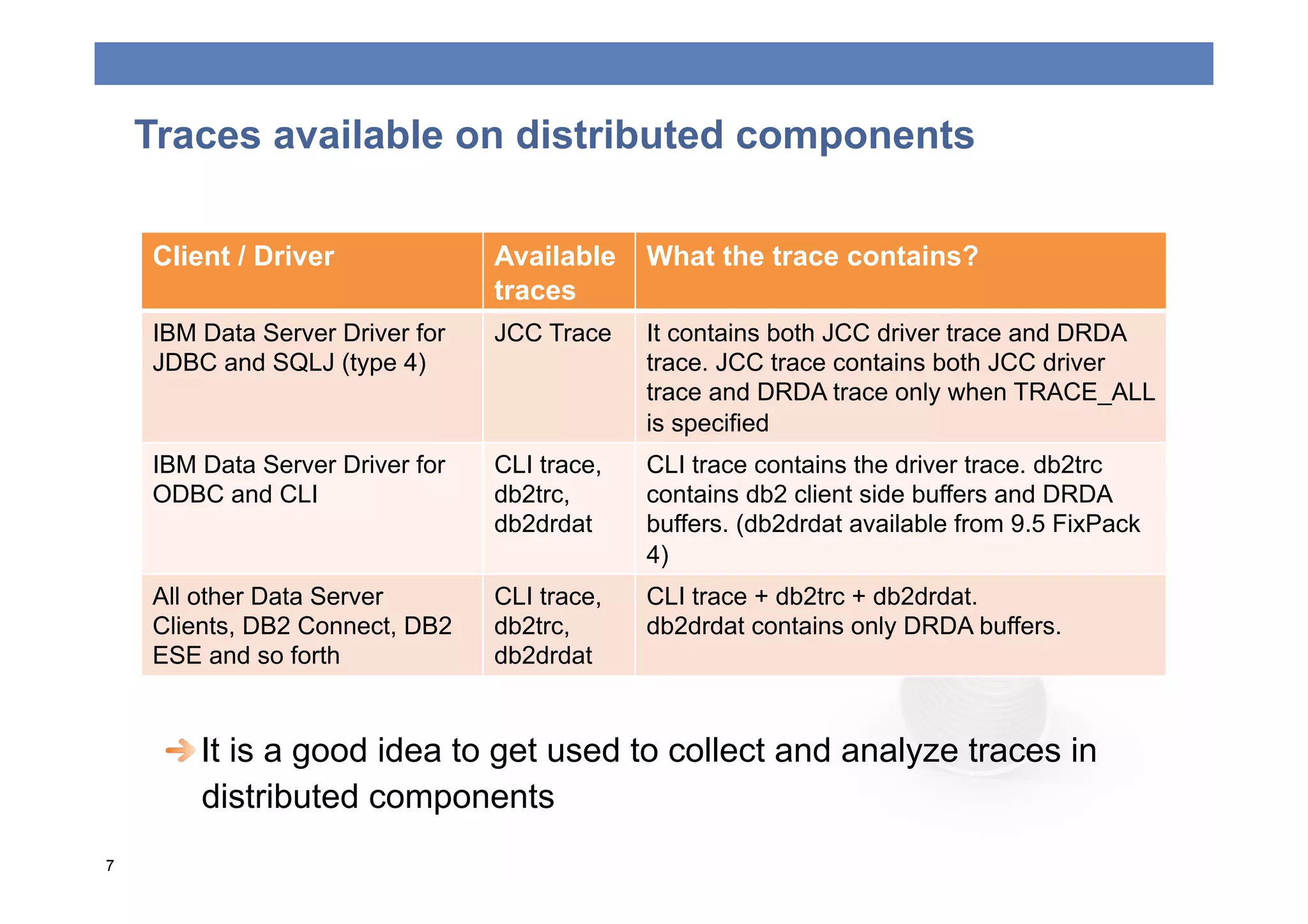
Traces available on distributed components

    Client / Driver              Available    What the trace contains?
                                 traces
    IBM Data Server Driver for   JCC Trace    It contains both JCC driver trace and DRDA
    JDBC and SQLJ (type 4)                    trace. JCC trace contains both JCC driver
                                              trace and DRDA trace only when TRACE_ALL
                                              is specified
    IBM Data Server Driver for   CLI trace,   CLI trace contains the driver trace. db2trc
    ODBC and CLI                 db2trc,      contains db2 client side buffers and DRDA
                                 db2drdat     buffers. (db2drdat available from 9.5 FixPack
                                              4)
    All other Data Server        CLI trace,   CLI trace + db2trc + db2drdat.
    Clients, DB2 Connect, DB2    db2trc,      db2drdat contains only DRDA buffers.
    ESE and so forth             db2drdat


  It is a good idea to get used to collect and analyze traces in
        distributed components
7
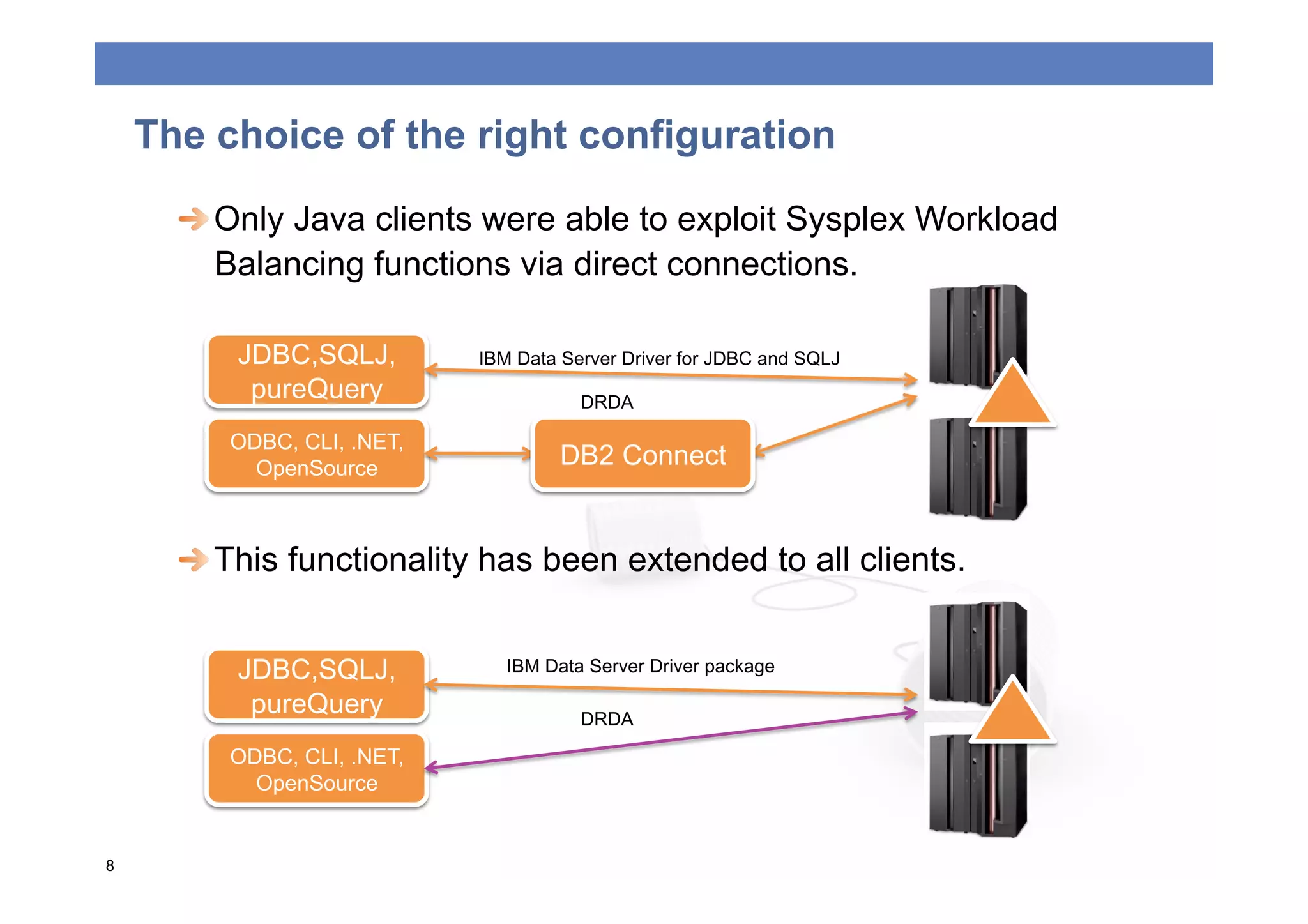
The choice of the right configuration

      
  Only Java clients were able to exploit Sysplex Workload
         Balancing functions via direct connections.

          JDBC,SQLJ,        IBM Data Server Driver for JDBC and SQLJ
           pureQuery                   DRDA

         ODBC, CLI, .NET,
           OpenSource                DB2 Connect


  This functionality has been extended to all clients.


          JDBC,SQLJ,           IBM Data Server Driver package

           pureQuery                   DRDA

         ODBC, CLI, .NET,
           OpenSource


8
The choice of the right configuration
     
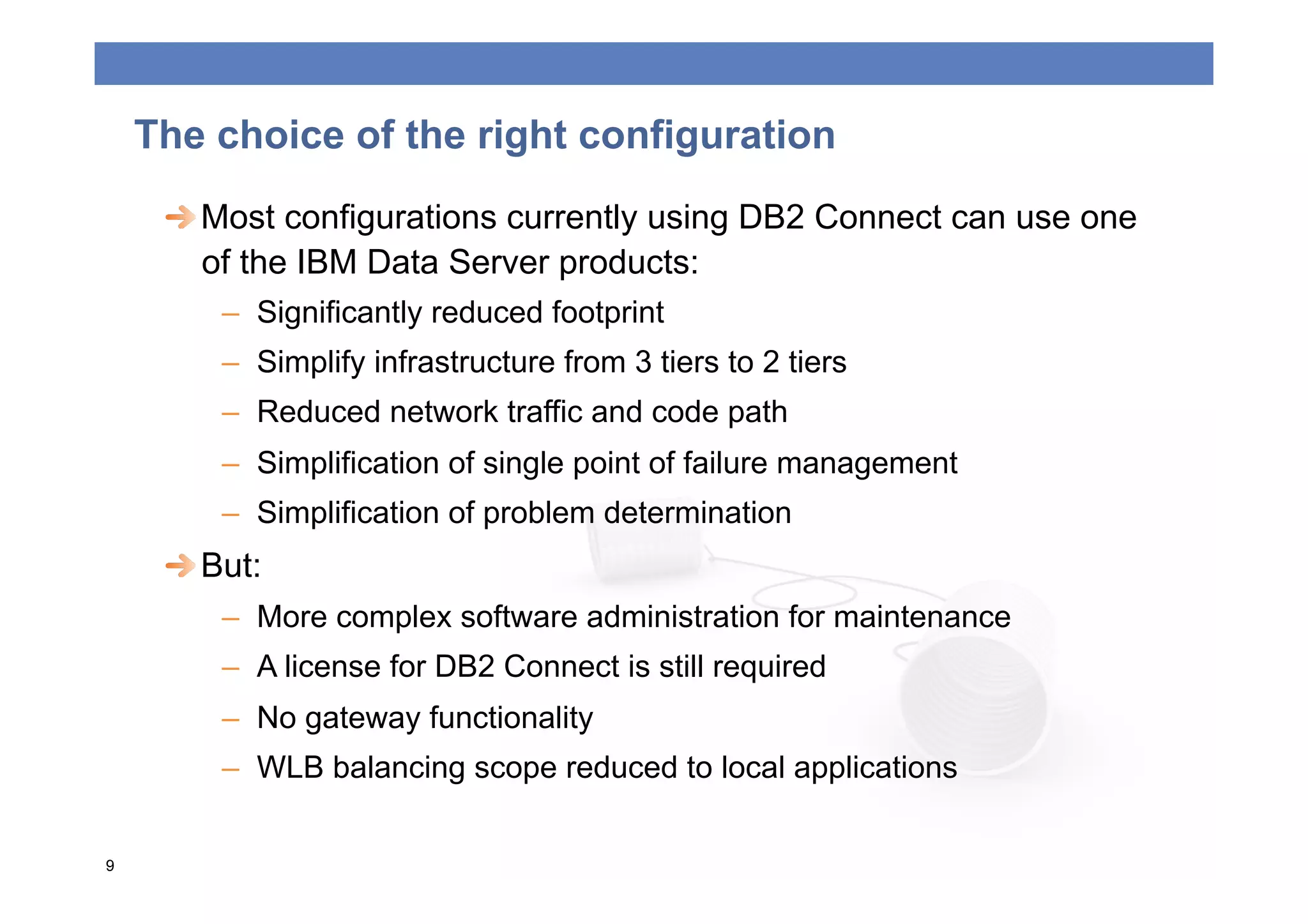
  Most configurations currently using DB2 Connect can use one
        of the IBM Data Server products:
         –  Significantly reduced footprint
         –  Simplify infrastructure from 3 tiers to 2 tiers
         –  Reduced network traffic and code path
         –  Simplification of single point of failure management
         –  Simplification of problem determination
     
  But:
         –  More complex software administration for maintenance
         –  A license for DB2 Connect is still required
         –  No gateway functionality
         –  WLB balancing scope reduced to local applications

9
Replacing DB2 Connect by Clients: Considerations

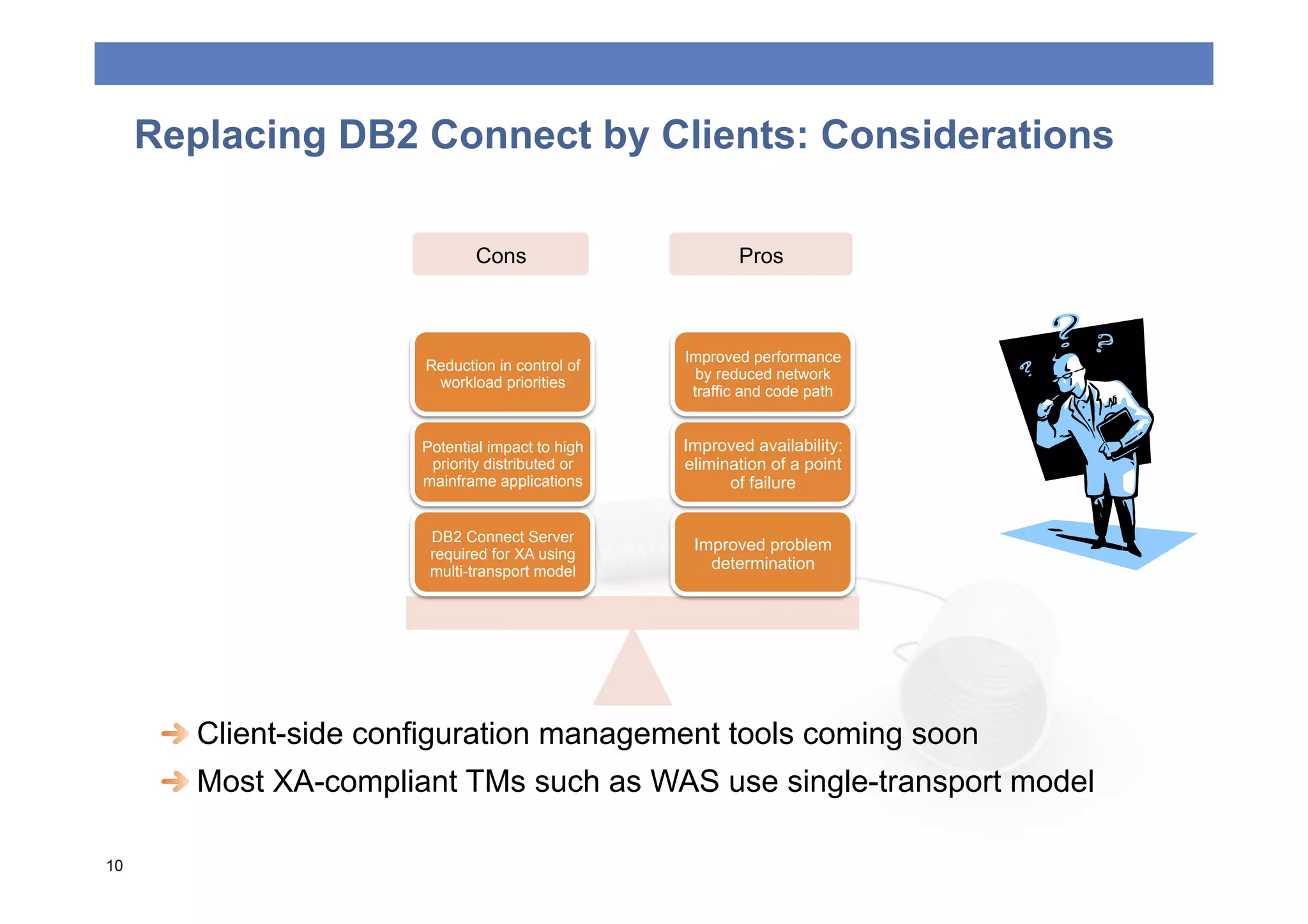
                               Cons                       Pros


                                                   Improved performance
                        Reduction in control of
                                                     by reduced network
                         workload priorities
                                                    traffic and code path


                        Potential impact to high   Improved availability:
                         priority distributed or   elimination of a point
                        mainframe applications           of failure


                         DB2 Connect Server
                                                    Improved problem
                         required for XA using
                         multi-transport model        determination


  Client-side configuration management tools coming soon
      
  Most XA-compliant TMs such as WAS use single-transport model

10
Some DB2 Connect reserved functionalities
      
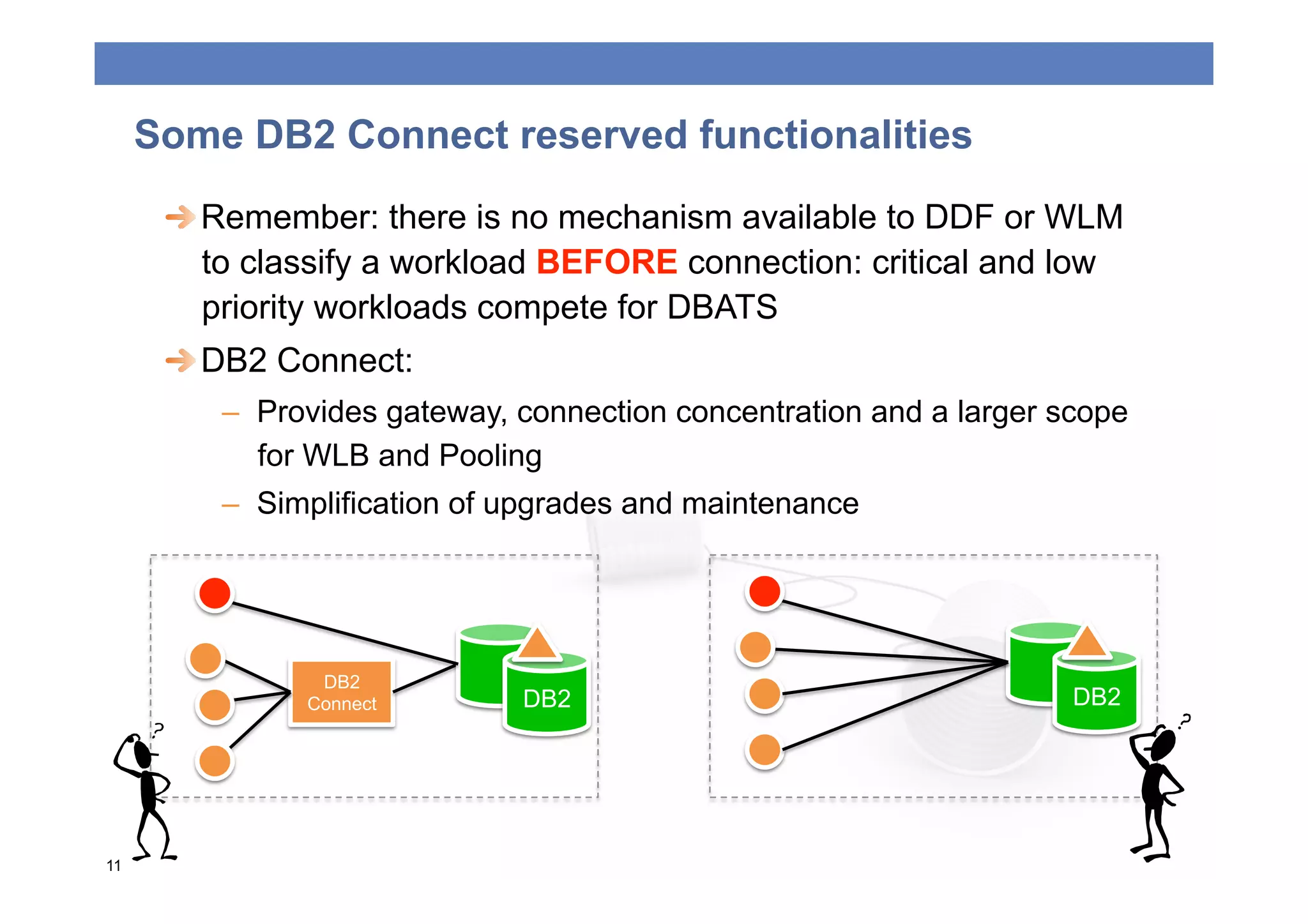
  Remember: there is no mechanism available to DDF or WLM
         to classify a workload BEFORE connection: critical and low
         priority workloads compete for DBATS
      
  DB2 Connect:
         –  Provides gateway, connection concentration and a larger scope
            for WLB and Pooling
         –  Simplification of upgrades and maintenance


                DB2
               Connect        DB2                                    DB2


11
DB2 Connect and Hipersockets
      
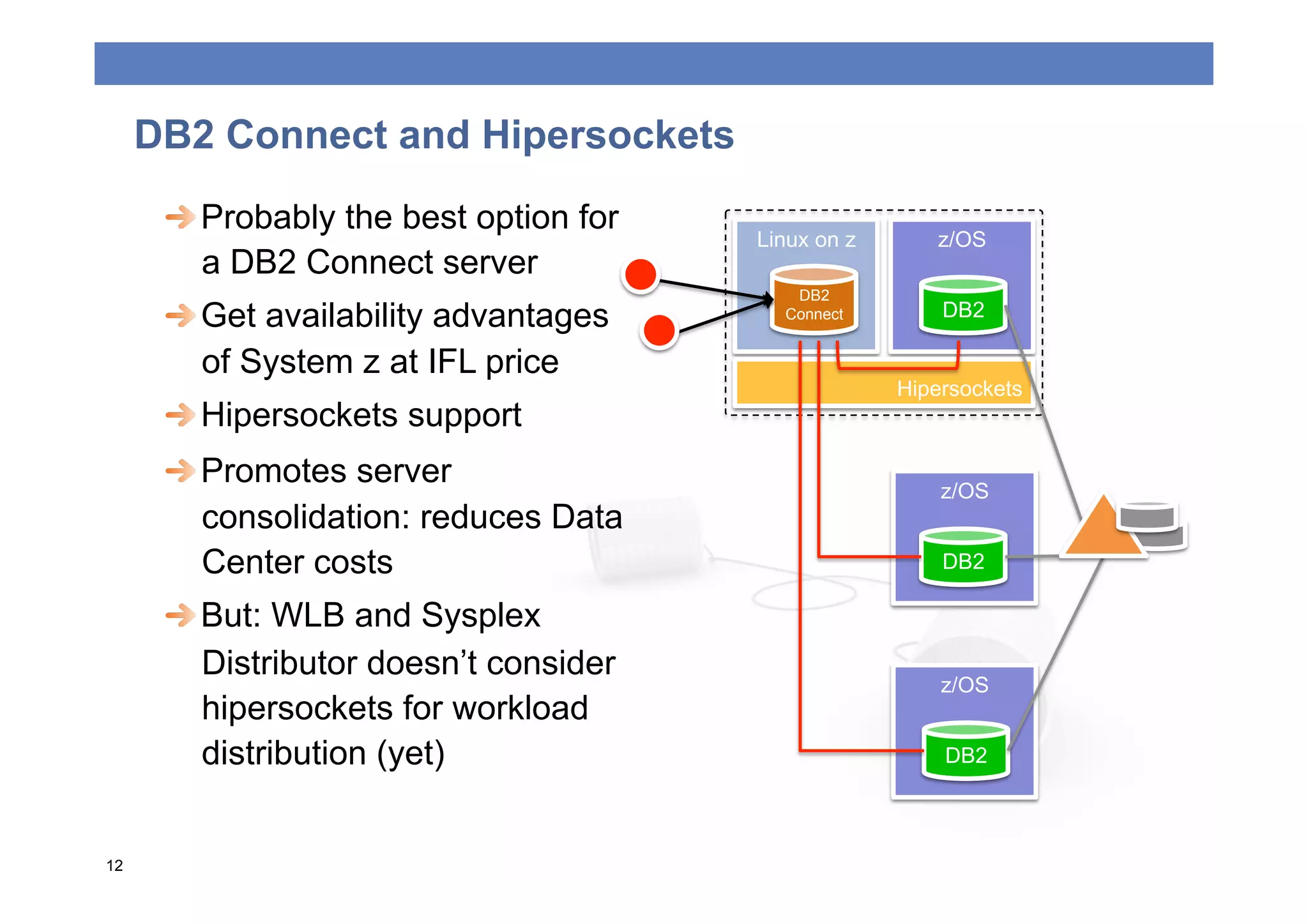
  Probably the best option for
                                        Linux on z      z/OS
         a DB2 Connect server
                                           DB2
      
  Get availability advantages      Connect        DB2

         of System z at IFL price
                                                     Hipersockets
      
  Hipersockets support
      
  Promotes server                                 z/OS
         consolidation: reduces Data
         Center costs                                    DB2

      
  But: WLB and Sysplex
         Distributor doesn’t consider
                                                         z/OS
         hipersockets for workload
         distribution (yet)                              DB2


12
DB2 Private Protocol
      
  DB2 to DB2 PP still supported but officially deprecated in V9
      
  Anyway:
         –  No changes since V5 (10 years)
         –  Not zIIP eligible: CICS transactions are if TCP/IP + DRDA
         –  Lots of functions only available trough DRDA, like Static SQL,
            thread pooling and Stored procedures
         –  Today there is no technical reason to still keep using PP
      
  DBPROTCL zParm removed from V9
         –  DBPROTOCOL(DRDA) assumed for any BIND/REBIND if not
            specified DBPROTOCOL
         –  You may need to change existing BIND/REBIND processes
         –  If specified, DSNT226I and warning RC (4):
            OPTION IS NOT RECOMMENDED WHEN BINDING PLANS OR PACKAGES

13
DB2 PP would NOT WORK on V?!


  Migration shouldn’t require application changes
     
  It has an impact on existing BIND/REBIND processes
     
  Creation of ALIASES is required
     
  Use the PP to DRDA Catalog Analysis Tool DSNTP2DP

14
The private to DRDA protocol REXX tool
      
  Creates local and remote BIND commands for PLANS and
         PACKAGES and build CREATE ALIAS statements
      
  You need to change current BIND/REBIND to include remote
      
  Uses catalog information to determine applications having a
         remote location dependency: embedded dynamic SQL will
         usually NOT be indentified
      
  For DB2 V9: highly recommended APAR PK78553
      
  Support for DB2 V7 and V8: APAR PK40433
      
  Shipped with V9, for older versions: http://www.ibm.com/
         developerworks/exchange/dw_entryView.jspa?
         externalID=213&categoryID=32
      
  More information: DB2 for z/OS Installation Guide

15
BEST PRACTICES


16
Application Programming Best Practices
 
  Limit the size of your result set:
     –  Use the WHERE, GROUP BY, and HAVING clauses
     –  setFetchSize() can be a hint to Java driver for scrollable rowset
        cursors
 
   Help the server use limited block fetch (and extra blocks)
     –  Use OPTIMIZE for n ROWS and FETCH FIRST n ROWS
     –  Declare your cursor with FOR FETCH ONLY, or FOR READ
        ONLY, and INSENSITIVE STATIC
     –  Use CURRENTDATA(NO) and ISOLATION(CS) when possible
        and avoid ISOLATION(RR)
     –  Avoid using WITH HOLD cursor: CLI applications
        use with hold cursor by default
Application Programming Best Practices
 
  Use Remote Stored procedures to minimize network traffic.
    –  Native SQL procedures called via DRDA TCP/IP clients are zIIP-
       eligible (V9)
    –  Use result set cursors to return data
    –  Use COMMIT on RETURN clause for stored procedures that do
       not return result sets
 
  Explicitly close your cursors after you have fetched all data
 
  COMMIT often but avoid the use auto-commit
 
  Use KEEPDYNAMIC(YES) where necessary to avoid
    excessive prepares but remember that it prevents the
    connection from being inactivated
Application Programming Best Practices
 
  Data Server Drivers use Dynamic Data Format
    (Progressive Streaming) by default for LOBs
    and XML data.
 
  Java drivers use multi-row fetch by default for
    scrollable cursors. CLI driver uses
    DB2BulkOperations.
 
  Data Server Drivers support both atomic and
    non-atomic multi-row insert (addBatch (Java),
    array input chaining (CLI) and DB2BulkCopy
    (.NET))
 
  Consider using static SQL (pureQuery/SQLJ)
    to get performance and security benefits over
    dynamic SQL.
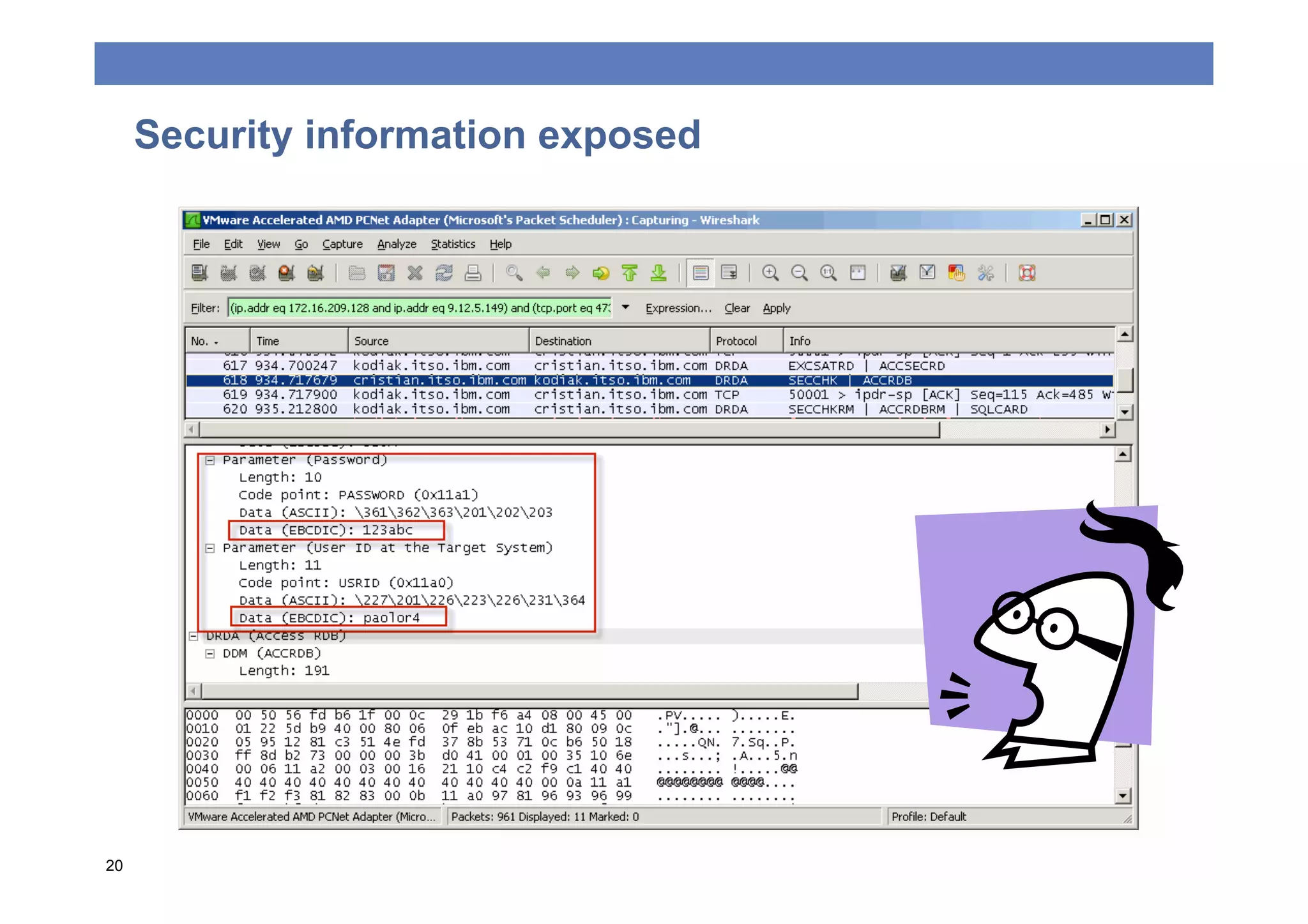
Security information exposed


20
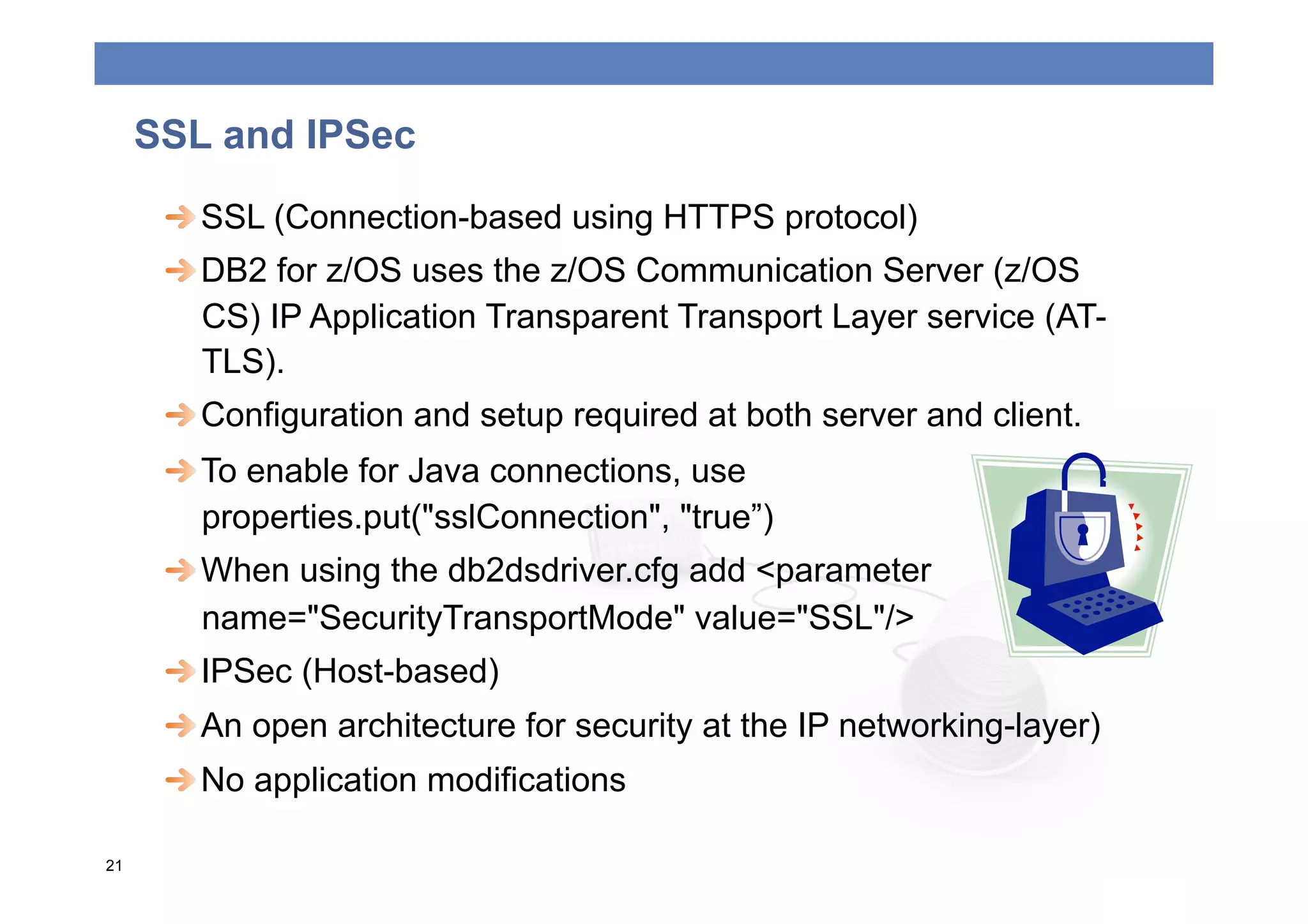
SSL and IPSec
      
  SSL (Connection-based using HTTPS protocol)
      
  DB2 for z/OS uses the z/OS Communication Server (z/OS
         CS) IP Application Transparent Transport Layer service (AT-
         TLS).
      
  Configuration and setup required at both server and client.
      
  To enable for Java connections, use
         properties.put("sslConnection", "true”)
      
  When using the db2dsdriver.cfg add <parameter
         name="SecurityTransportMode" value="SSL"/>
      
  IPSec (Host-based)
      
  An open architecture for security at the IP networking-layer)
      
  No application modifications

21
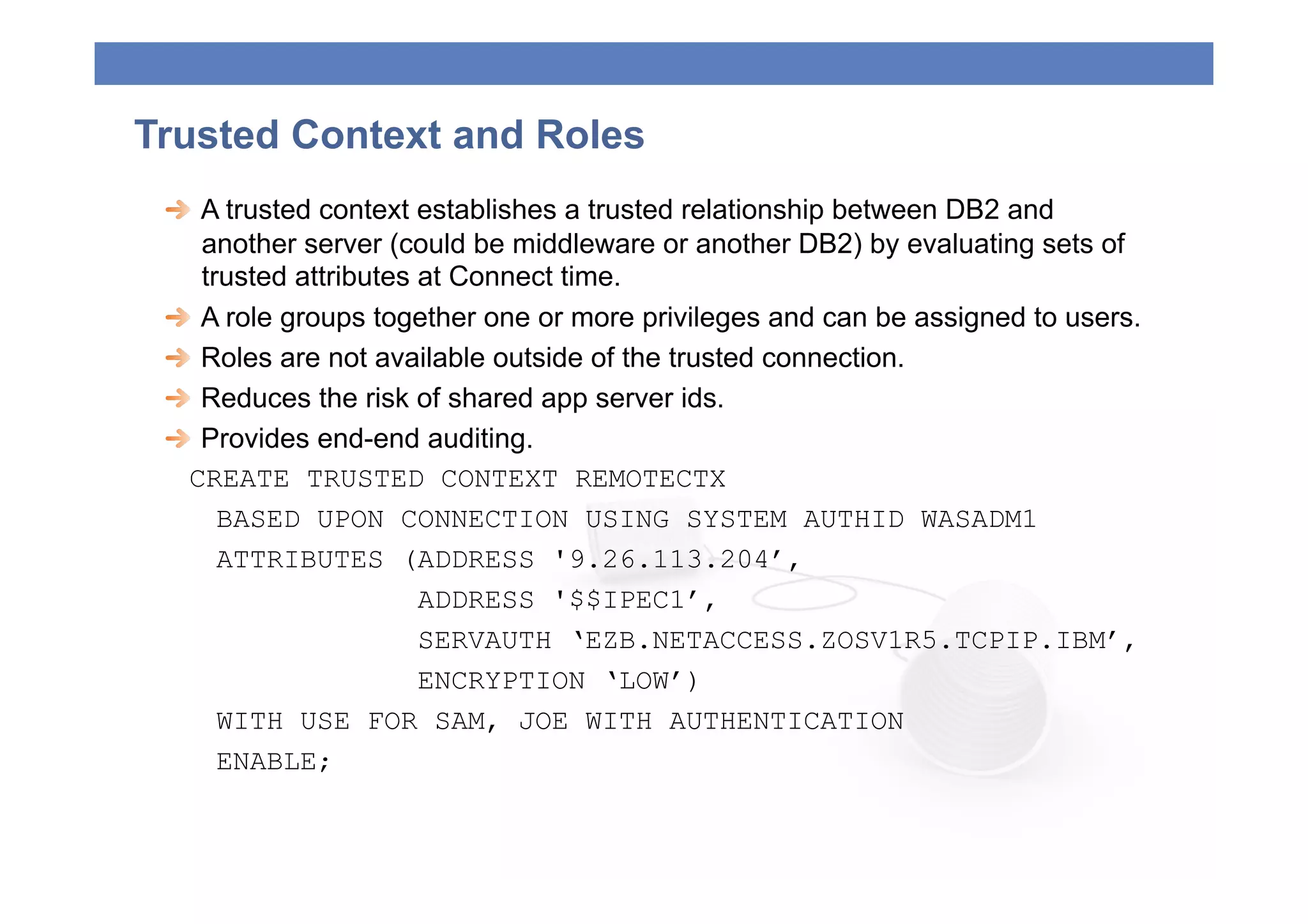
Trusted Context and Roles
 
   A trusted context establishes a trusted relationship between DB2 and
     another server (could be middleware or another DB2) by evaluating sets of
     trusted attributes at Connect time.
 
   A role groups together one or more privileges and can be assigned to users.
 
   Roles are not available outside of the trusted connection.
 
   Reduces the risk of shared app server ids.
 
   Provides end-end auditing.
   CREATE TRUSTED CONTEXT REMOTECTX
       BASED UPON CONNECTION USING SYSTEM AUTHID WASADM1
       ATTRIBUTES (ADDRESS '9.26.113.204’,
                        ADDRESS '$$IPEC1’,
                        SERVAUTH ‘EZB.NETACCESS.ZOSV1R5.TCPIP.IBM’,
                        ENCRYPTION ‘LOW’)
       WITH USE FOR SAM, JOE WITH AUTHENTICATION
       ENABLE;
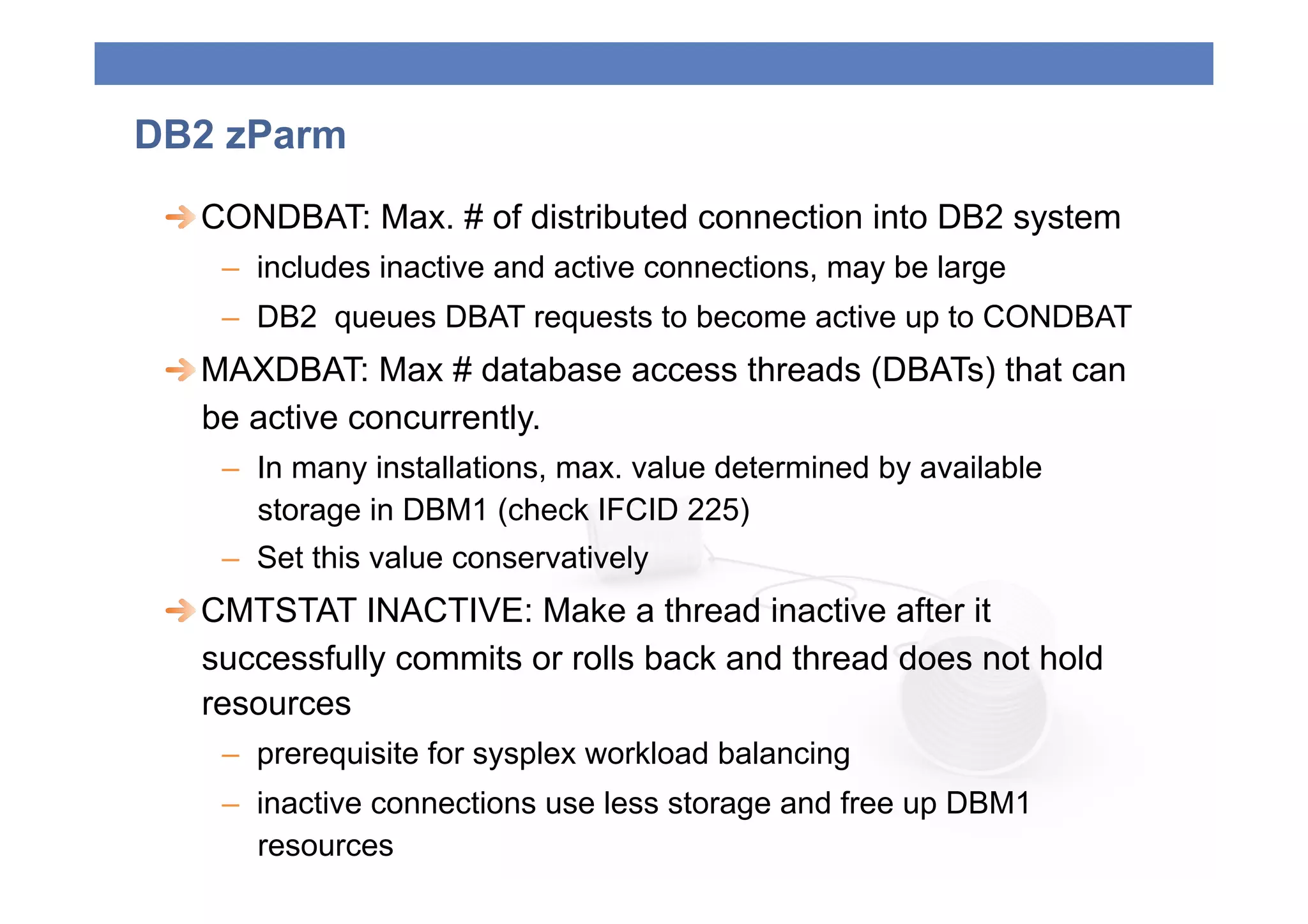
DB2 zParm
 
  CONDBAT: Max. # of distributed connection into DB2 system
    –  includes inactive and active connections, may be large
    –  DB2 queues DBAT requests to become active up to CONDBAT
 
  MAXDBAT: Max # database access threads (DBATs) that can
    be active concurrently.
    –  In many installations, max. value determined by available
       storage in DBM1 (check IFCID 225)
    –  Set this value conservatively
 
  CMTSTAT INACTIVE: Make a thread inactive after it
    successfully commits or rolls back and thread does not hold
    resources
    –  prerequisite for sysplex workload balancing
    –  inactive connections use less storage and free up DBM1
       resources
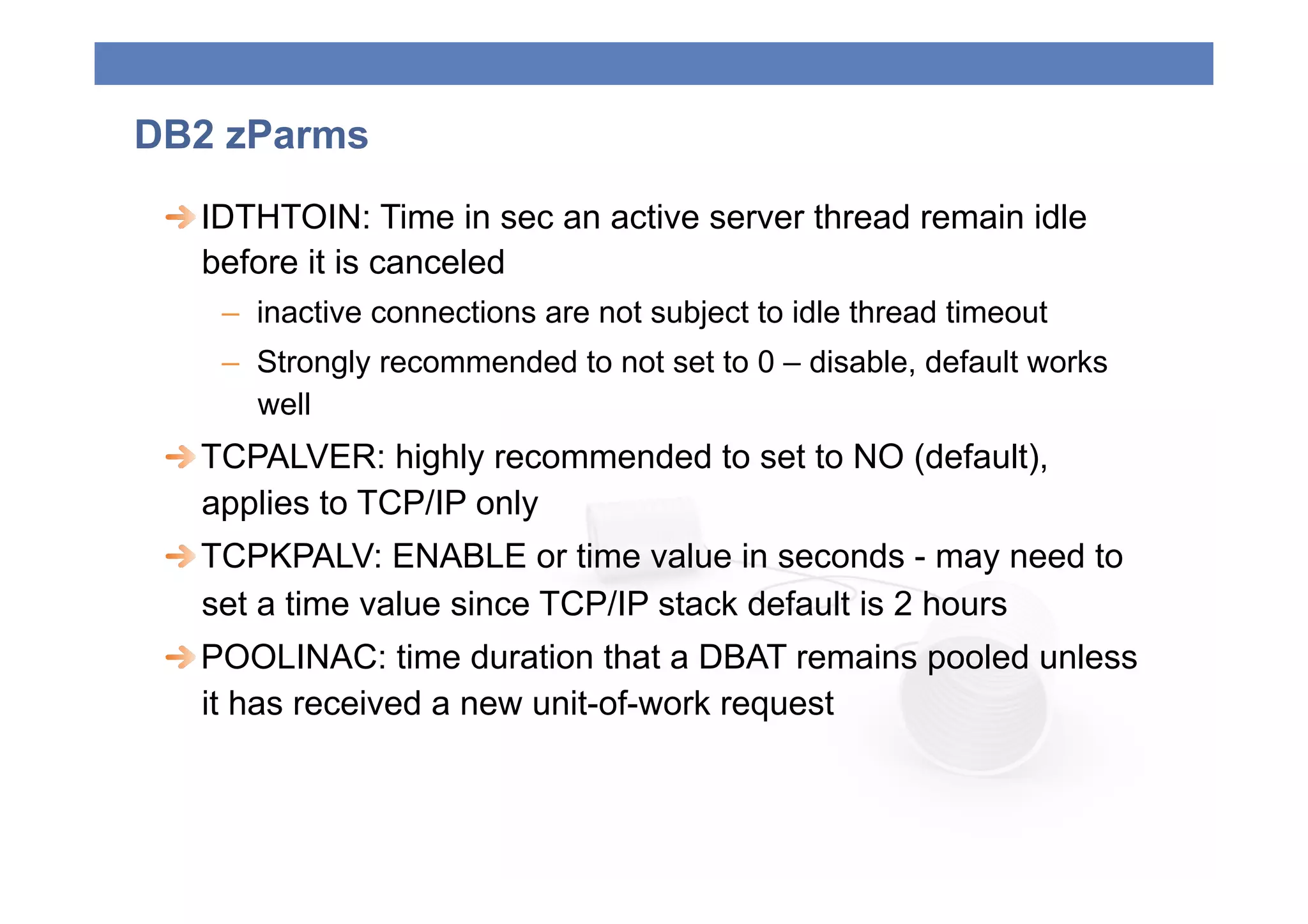
DB2 zParms
 
  IDTHTOIN: Time in sec an active server thread remain idle
    before it is canceled
    –  inactive connections are not subject to idle thread timeout
    –  Strongly recommended to not set to 0 – disable, default works
       well
 
  TCPALVER: highly recommended to set to NO (default),
    applies to TCP/IP only
 
  TCPKPALV: ENABLE or time value in seconds - may need to
    set a time value since TCP/IP stack default is 2 hours
 
  POOLINAC: time duration that a DBAT remains pooled unless
    it has received a new unit-of-work request
POOLING


25
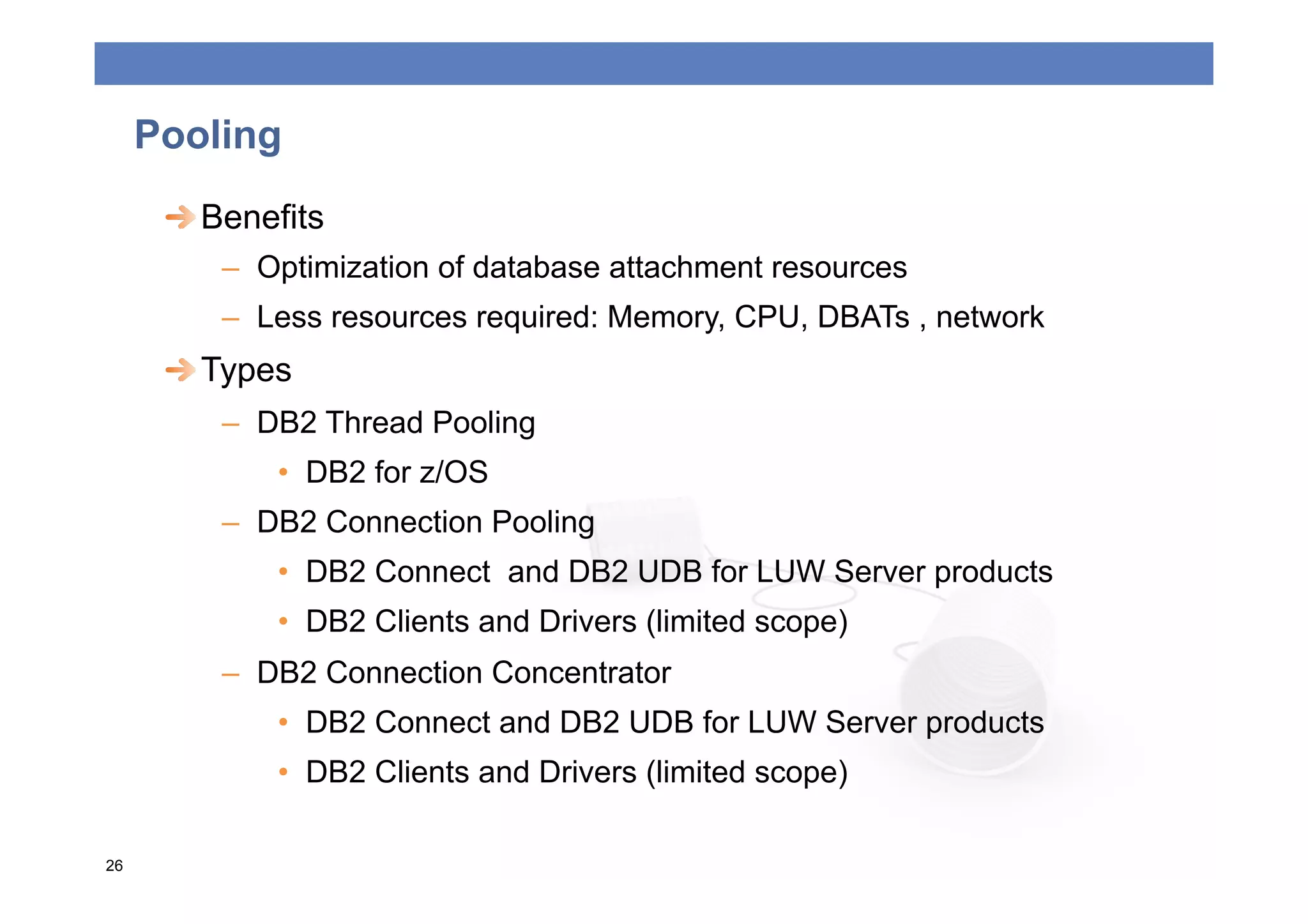
Pooling
      
  Benefits
         –  Optimization of database attachment resources
         –  Less resources required: Memory, CPU, DBATs , network
      
  Types
         –  DB2 Thread Pooling
             •  DB2 for z/OS
         –  DB2 Connection Pooling
             •  DB2 Connect and DB2 UDB for LUW Server products
             •  DB2 Clients and Drivers (limited scope)
         –  DB2 Connection Concentrator
             •  DB2 Connect and DB2 UDB for LUW Server products
             •  DB2 Clients and Drivers (limited scope)

26
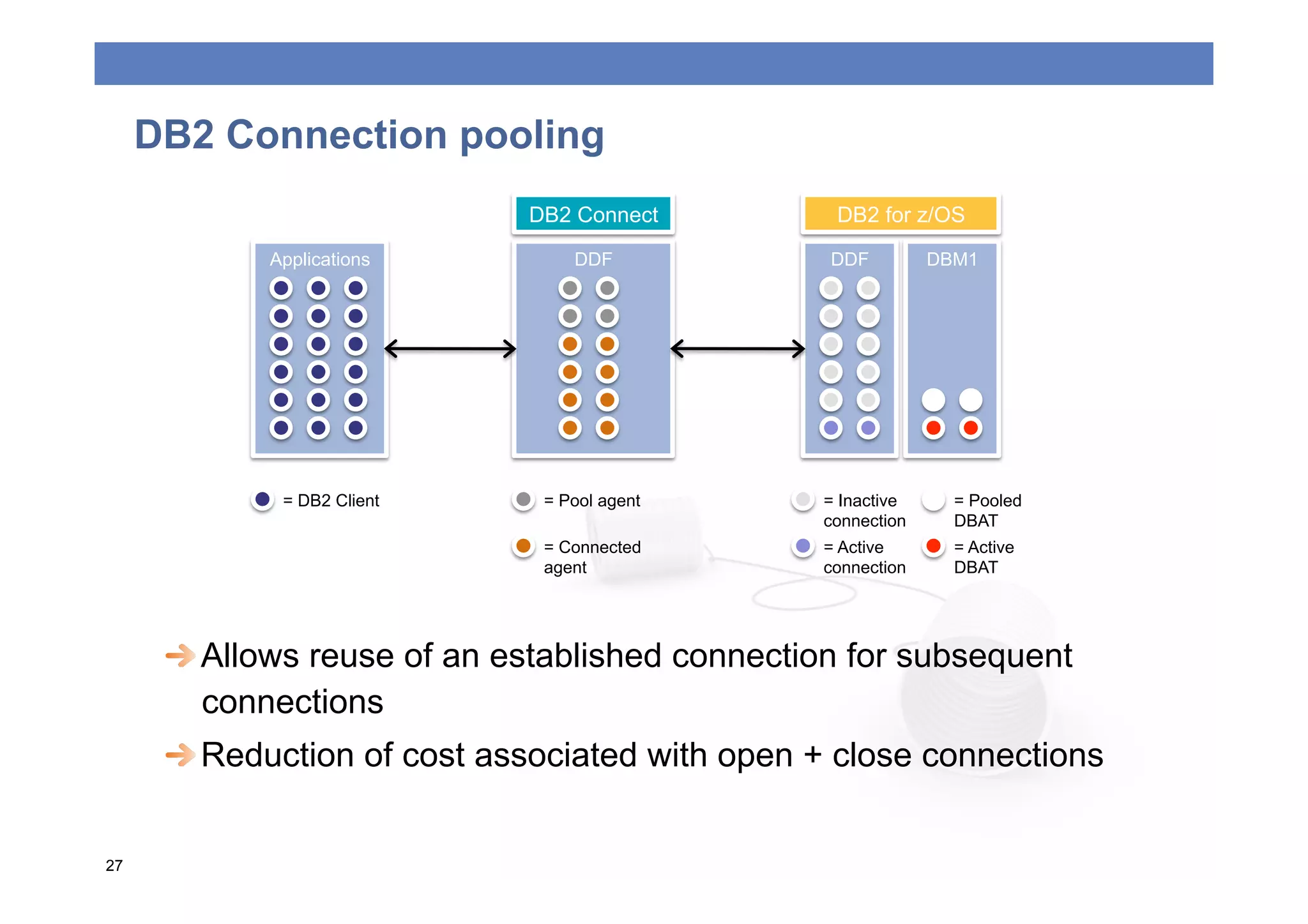
DB2 Connection pooling
                             DB2 Connect         DB2 for z/OS

            Applications         DDF             DDF         DBM1


             = DB2 Client     = Pool agent      = Inactive     = Pooled
                                                connection     DBAT
                              = Connected       = Active       = Active
                              agent             connection     DBAT


  Allows reuse of an established connection for subsequent
         connections
      
  Reduction of cost associated with open + close connections


27
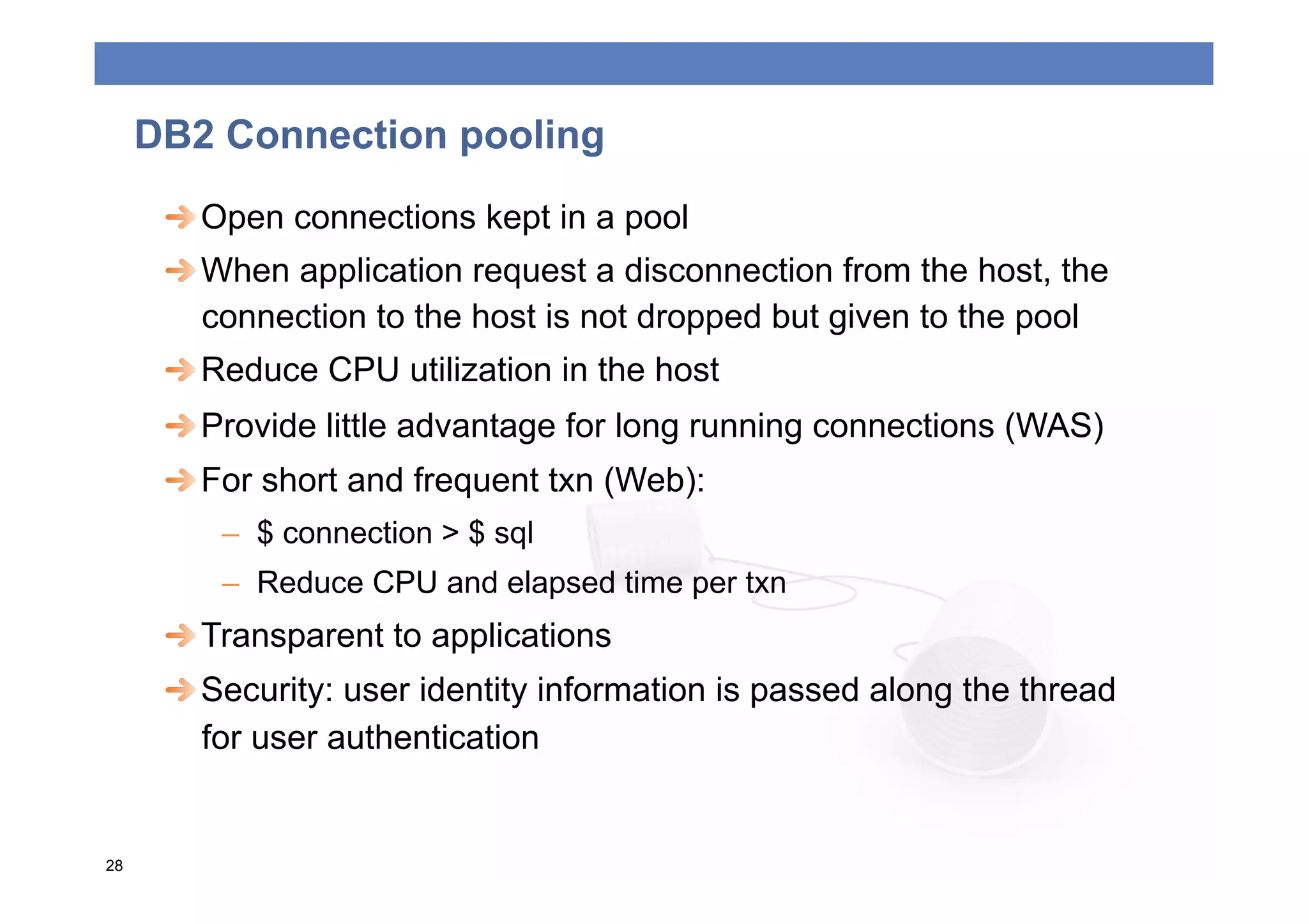
DB2 Connection pooling
      
  Open connections kept in a pool
      
  When application request a disconnection from the host, the
         connection to the host is not dropped but given to the pool
      
  Reduce CPU utilization in the host
      
  Provide little advantage for long running connections (WAS)
      
  For short and frequent txn (Web):
         –  $ connection > $ sql
         –  Reduce CPU and elapsed time per txn
      
  Transparent to applications
      
  Security: user identity information is passed along the thread
         for user authentication


28
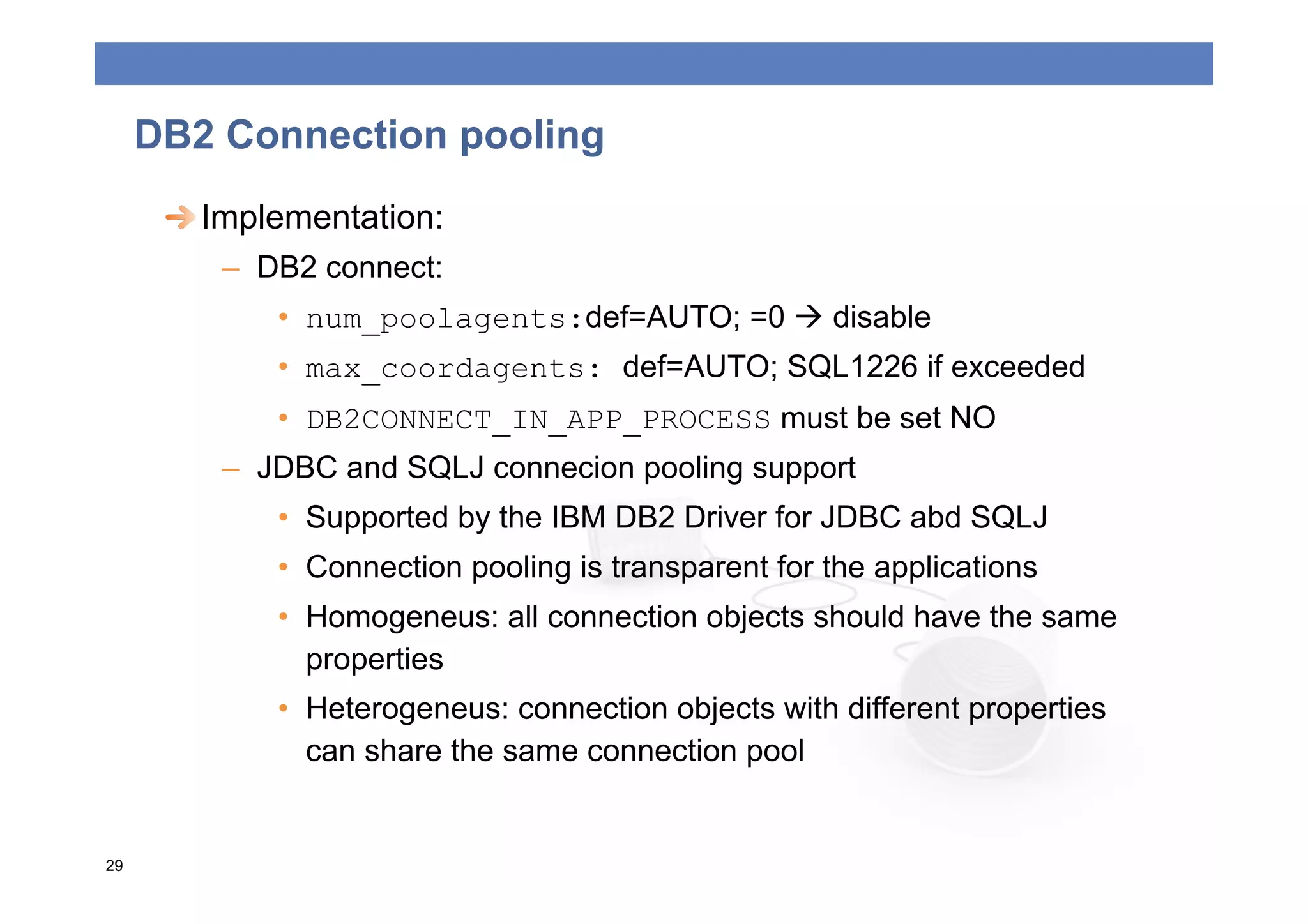
DB2 Connection pooling
      
  Implementation:
         –  DB2 connect:
             •  num_poolagents:def=AUTO; =0  disable
             •  max_coordagents: def=AUTO; SQL1226 if exceeded
             •  DB2CONNECT_IN_APP_PROCESS must be set NO
         –  JDBC and SQLJ connecion pooling support
             •  Supported by the IBM DB2 Driver for JDBC abd SQLJ
             •  Connection pooling is transparent for the applications
             •  Homogeneus: all connection objects should have the same
                properties
             •  Heterogeneus: connection objects with different properties
                can share the same connection pool


29
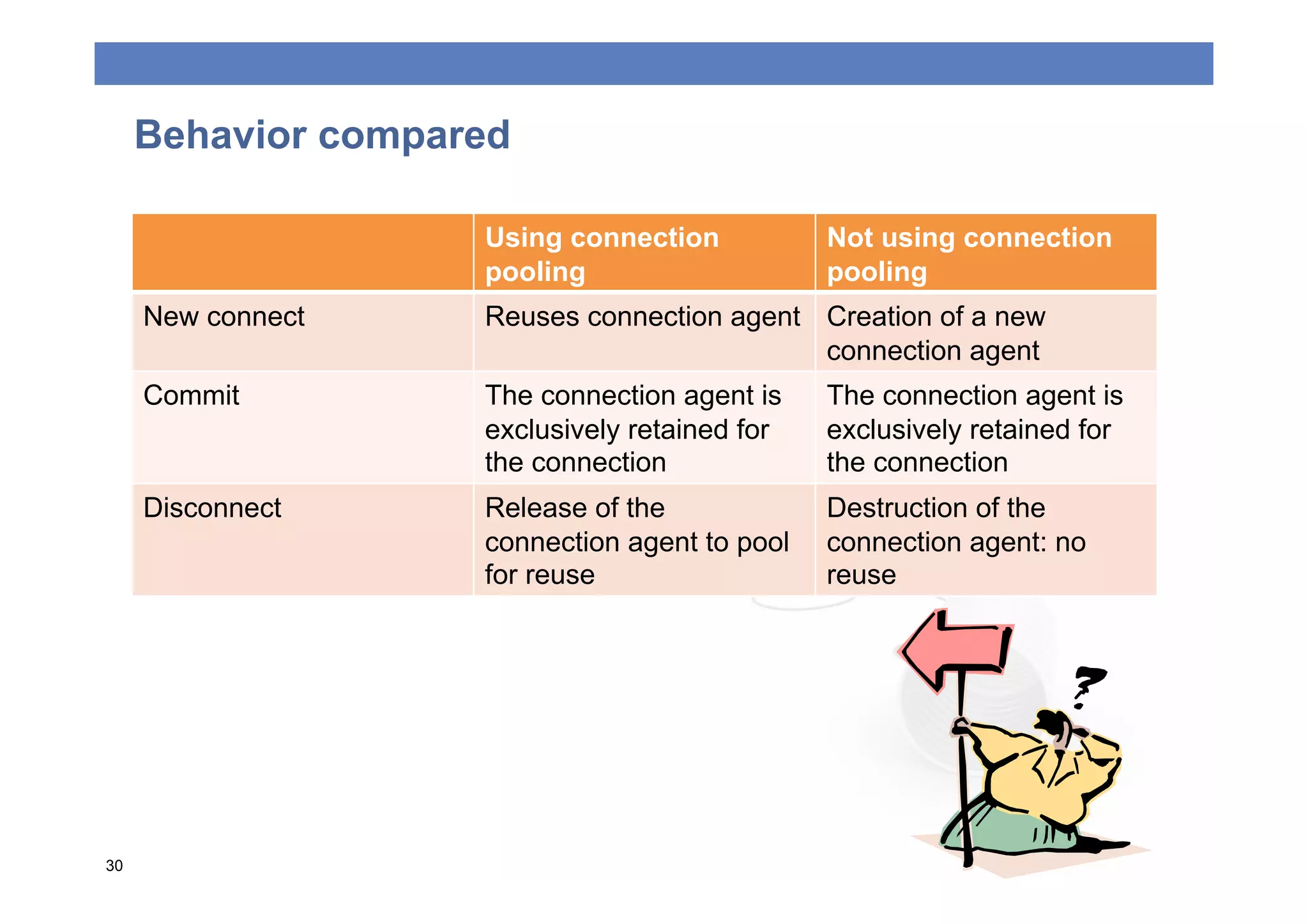
Behavior compared

                    Using connection           Not using connection
                    pooling                    pooling
     New connect    Reuses connection agent Creation of a new
                                            connection agent
     Commit         The connection agent is    The connection agent is
                    exclusively retained for   exclusively retained for
                    the connection             the connection
     Disconnect     Release of the             Destruction of the
                    connection agent to pool   connection agent: no
                    for reuse                  reuse


30
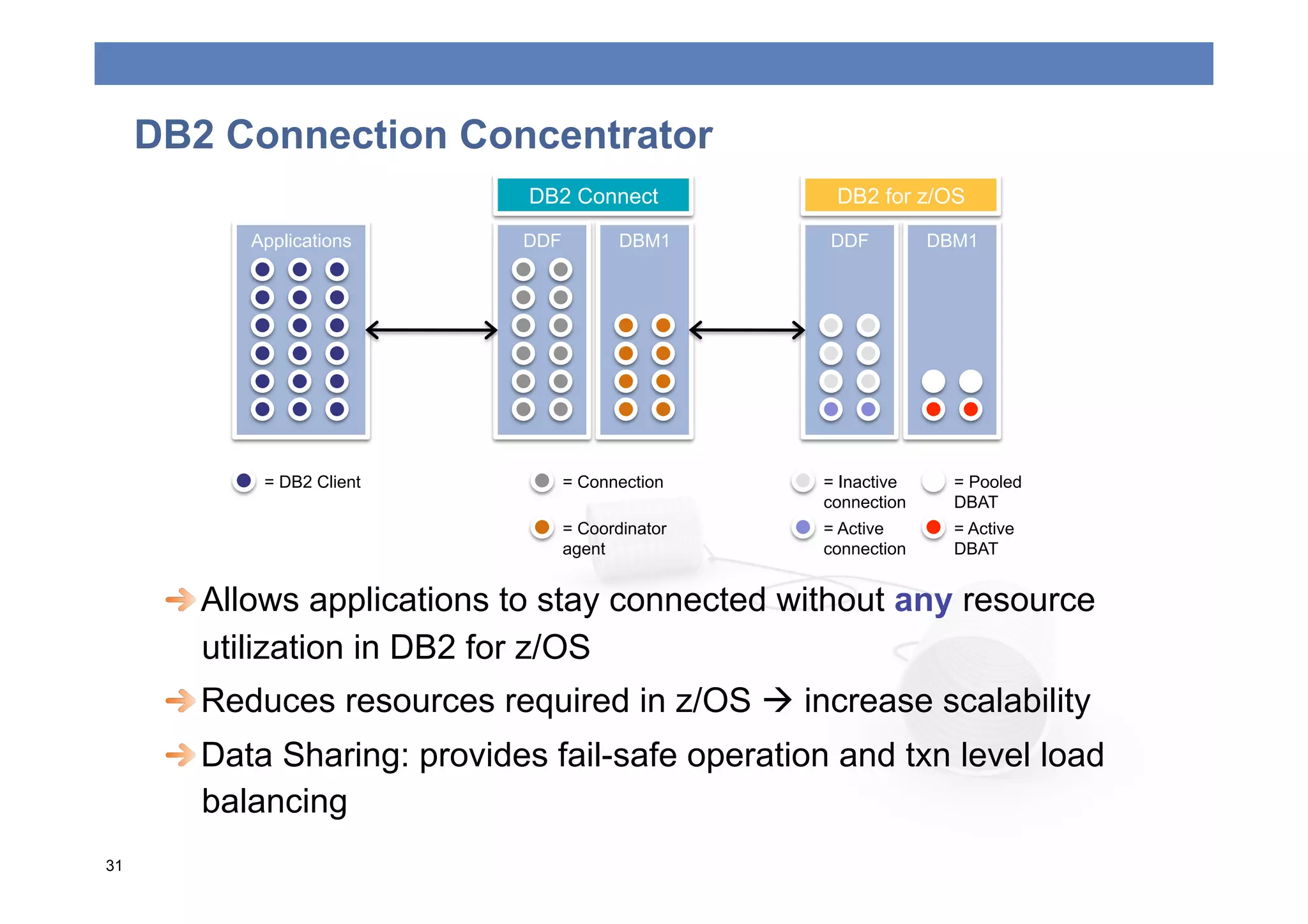
DB2 Connection Concentrator
                              DB2 Connect            DB2 for z/OS

           Applications       DDF          DBM1     DDF          DBM1


            = DB2 Client            = Connection    = Inactive     = Pooled
                                                    connection     DBAT
                                    = Coordinator   = Active       = Active
                                    agent           connection     DBAT


  Allows applications to stay connected without any resource
         utilization in DB2 for z/OS
      
  Reduces resources required in z/OS  increase scalability
      
  Data Sharing: provides fail-safe operation and txn level load
         balancing
31
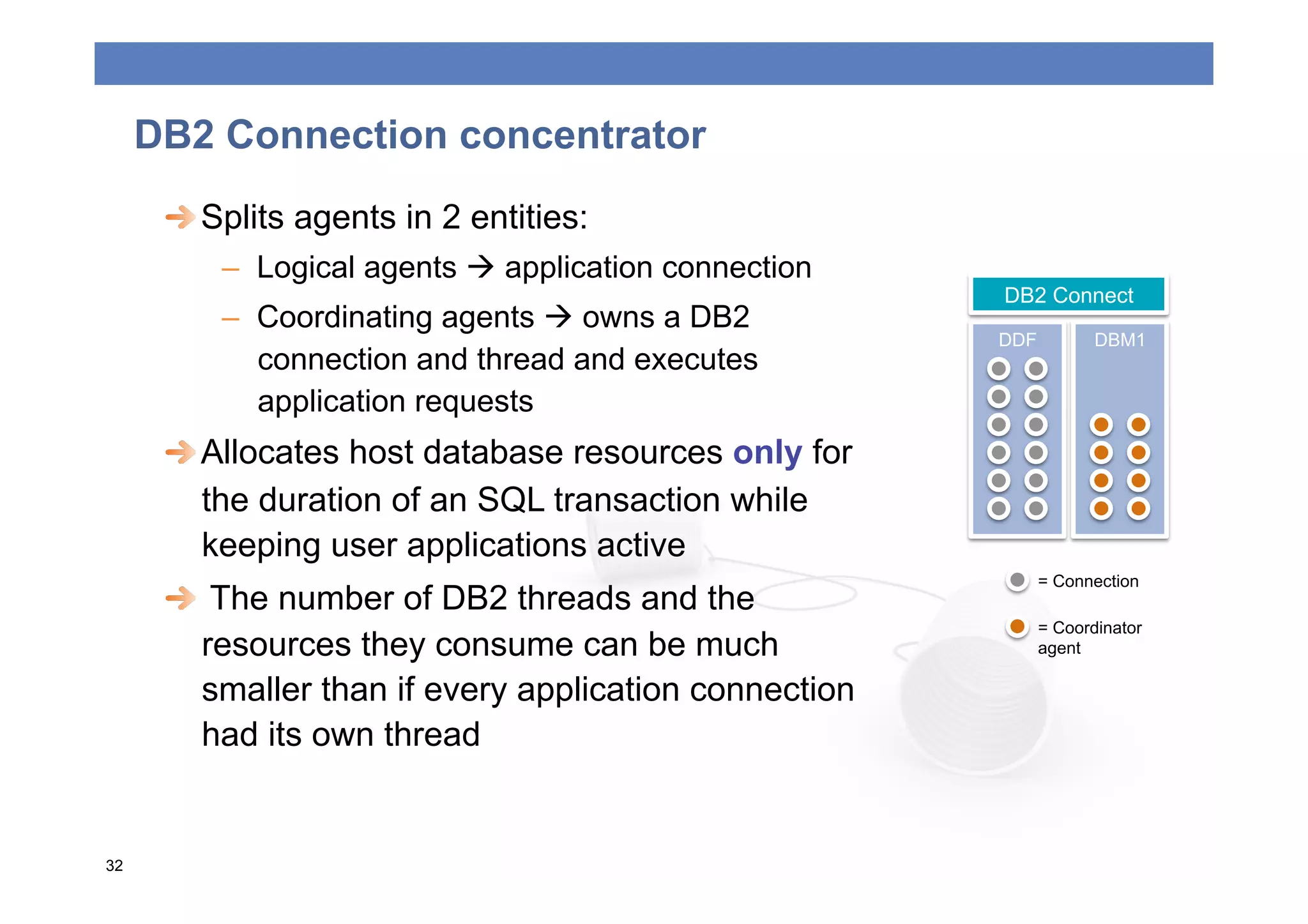
DB2 Connection concentrator
      
  Splits agents in 2 entities:
          –  Logical agents  application connection
                                                        DB2 Connect
          –  Coordinating agents  owns a DB2
                                                        DDF          DBM1
             connection and thread and executes
             application requests
      
  Allocates host database resources only for
         the duration of an SQL transaction while
         keeping user applications active
                                                              = Connection
      
   The number of DB2 threads and the
                                                              = Coordinator
         resources they consume can be much                   agent

         smaller than if every application connection
         had its own thread


32
DB2 Connection concentrator
      
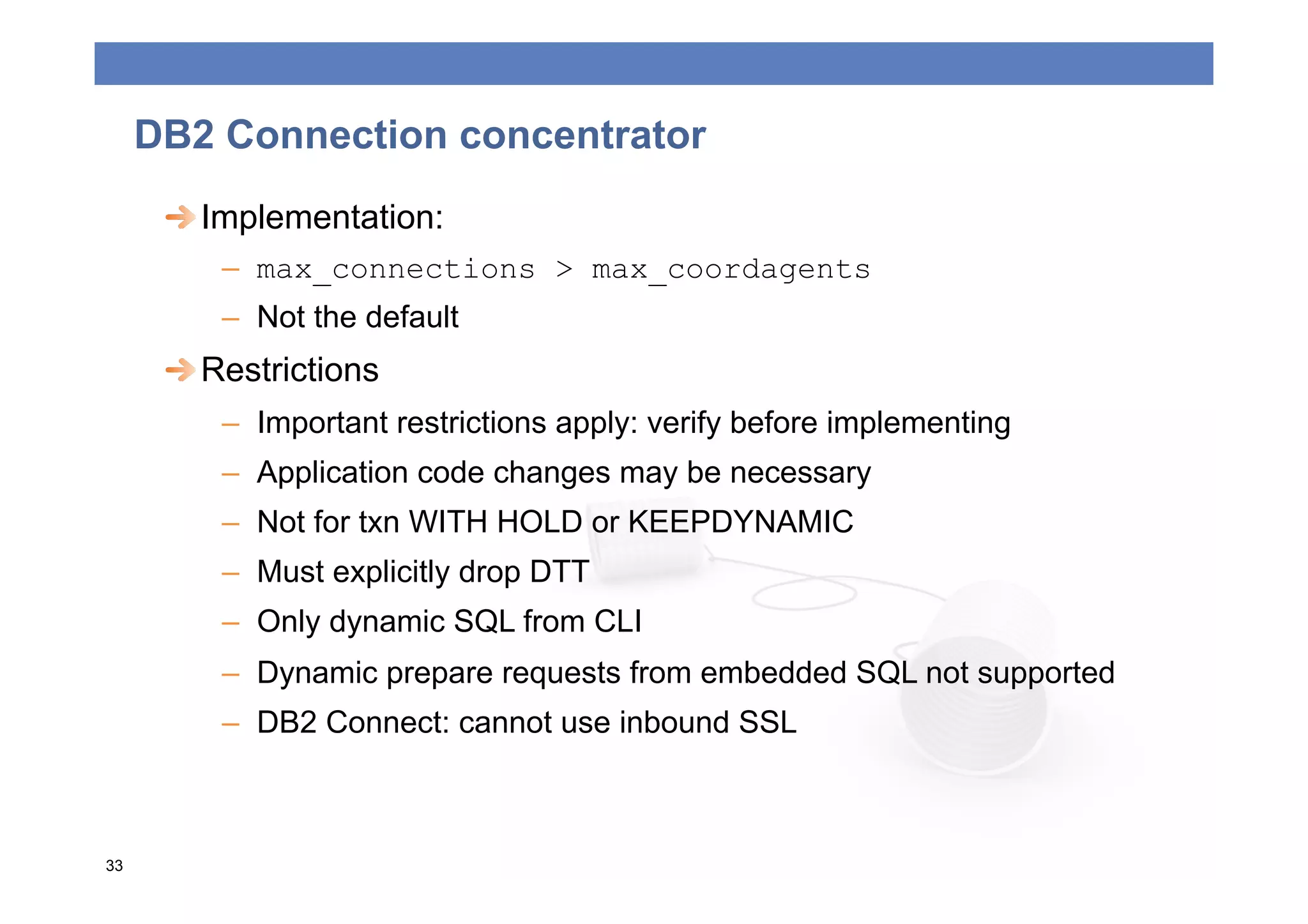
  Implementation:
         –  max_connections > max_coordagents
         –  Not the default
      
  Restrictions
         –  Important restrictions apply: verify before implementing
         –  Application code changes may be necessary
         –  Not for txn WITH HOLD or KEEPDYNAMIC
         –  Must explicitly drop DTT
         –  Only dynamic SQL from CLI
         –  Dynamic prepare requests from embedded SQL not supported
         –  DB2 Connect: cannot use inbound SSL


33
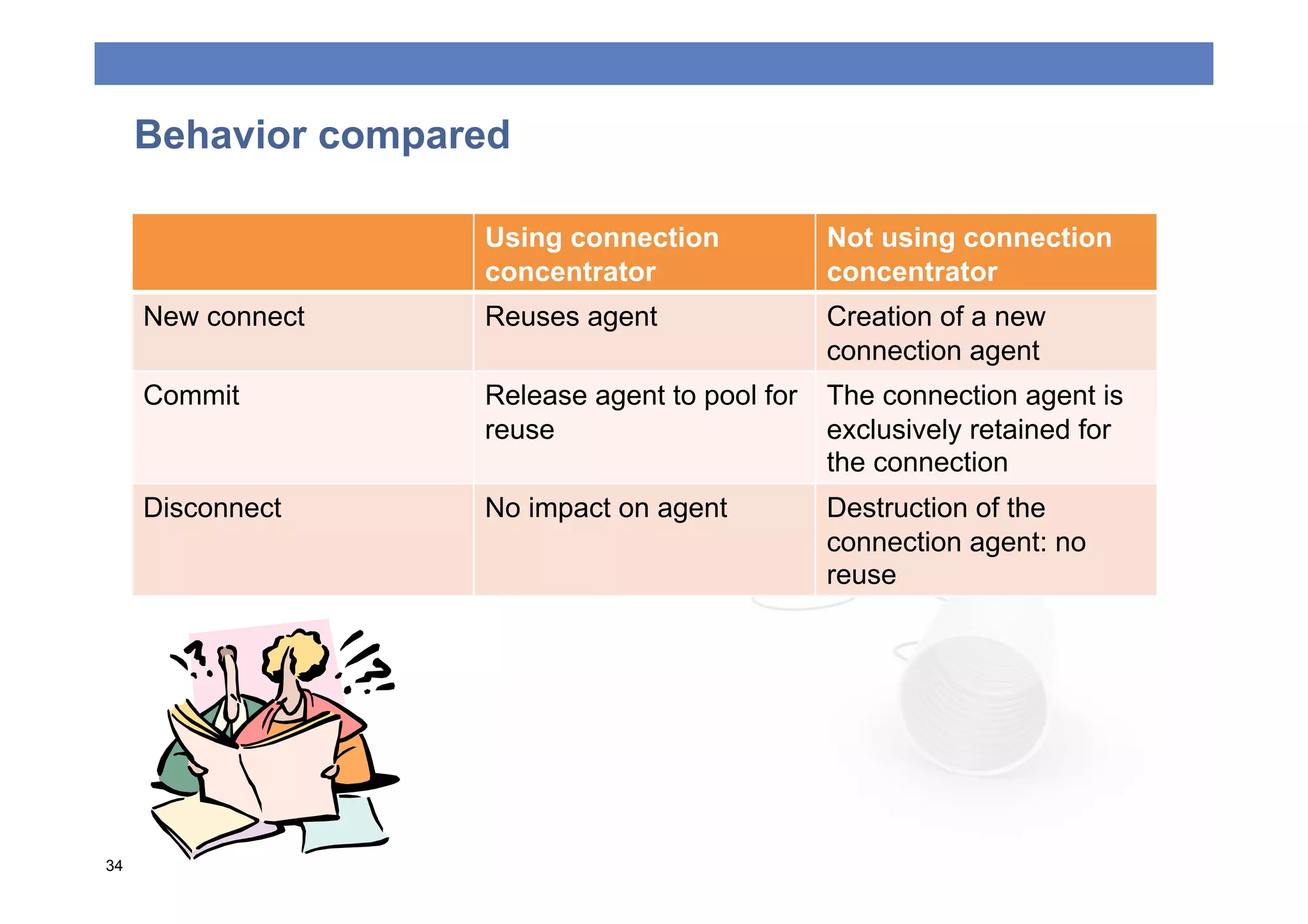
Behavior compared

                    Using connection            Not using connection
                    concentrator                concentrator
     New connect    Reuses agent                Creation of a new
                                                connection agent
     Commit         Release agent to pool for   The connection agent is
                    reuse                       exclusively retained for
                                                the connection
     Disconnect     No impact on agent          Destruction of the
                                                connection agent: no
                                                reuse


34
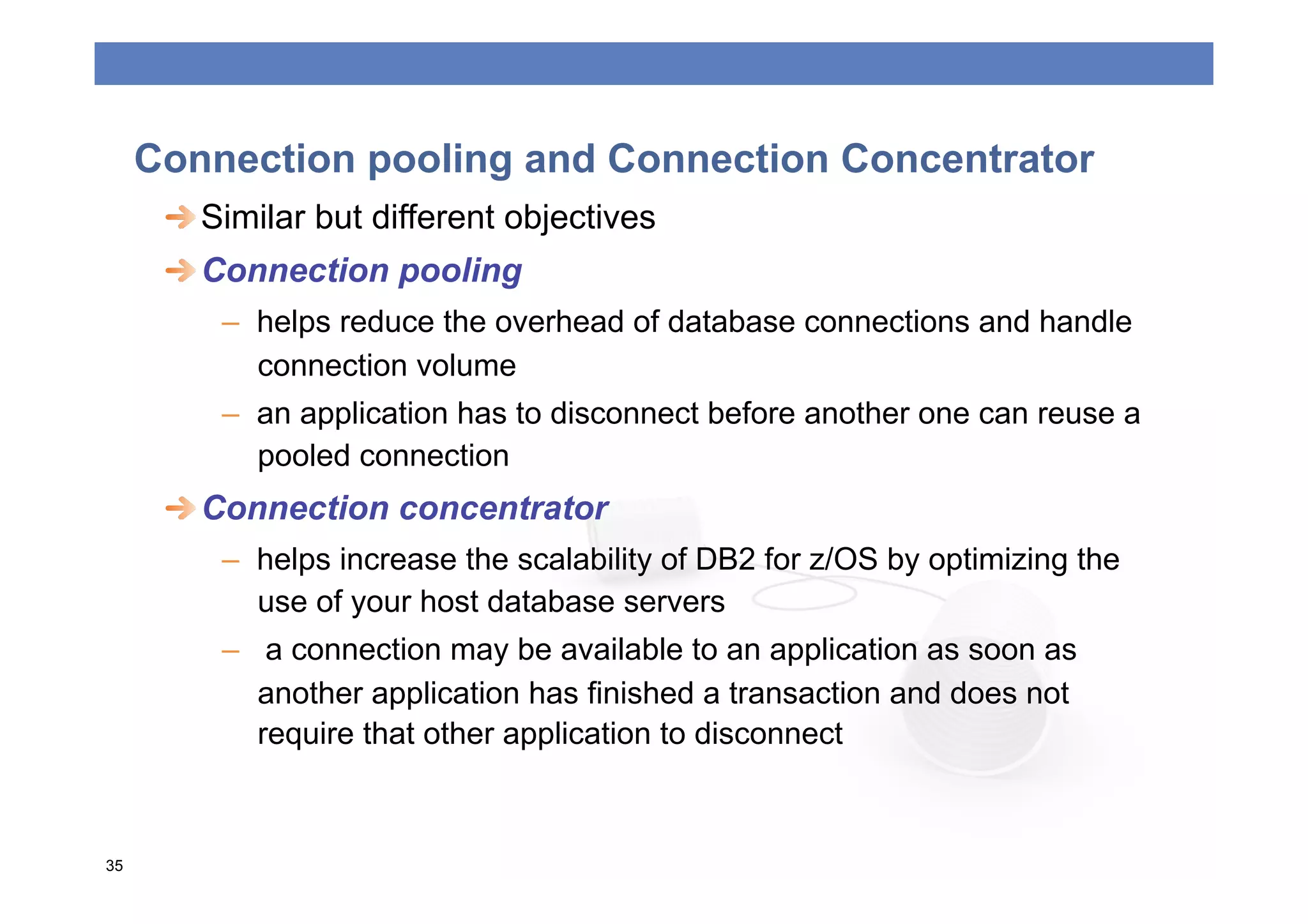
Connection pooling and Connection Concentrator
      
  Similar but different objectives
      
  Connection pooling
         –  helps reduce the overhead of database connections and handle
            connection volume
         –  an application has to disconnect before another one can reuse a
            pooled connection
      
  Connection concentrator
         –  helps increase the scalability of DB2 for z/OS by optimizing the
            use of your host database servers
         –  a connection may be available to an application as soon as
            another application has finished a transaction and does not
            require that other application to disconnect


35
SYSPLEX SUPPORT
Sysplex support
 
  Challenge: a distributed application server needs to find the
    best available path to the data
 
  Dynamic virtual IP address (DVIPA):
    –  allows servers to be made available independently of hardware
       or software failures
    –  allows multiple LPARs to appear to be a single, highly available
       network host
    –  applications can be seamlessly moved from one LPAR to
       another
 
  Sysplex distributor (SD):
    –  combination of the high availability features of DVIPA and the
       workload optimization capabilities of WLM
    –  work distribution based on a dynamically build priority list
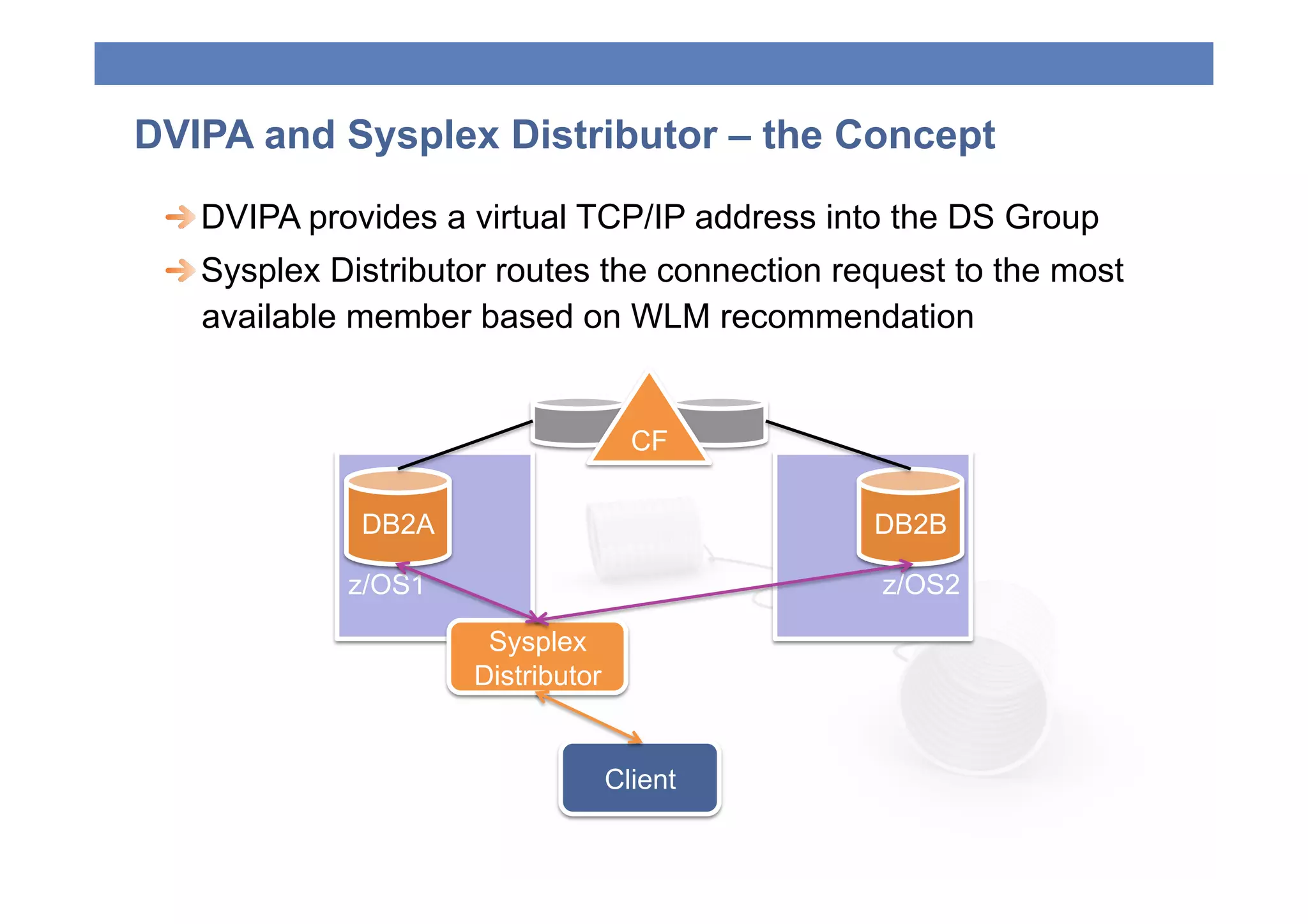
DVIPA and Sysplex Distributor – the Concept
 
  DVIPA provides a virtual TCP/IP address into the DS Group
 
  Sysplex Distributor routes the connection request to the most
    available member based on WLM recommendation


                                     CF

              DB2A                              DB2B

             z/OS1                              z/OS2

                      Sysplex
                     Distributor


                                   Client
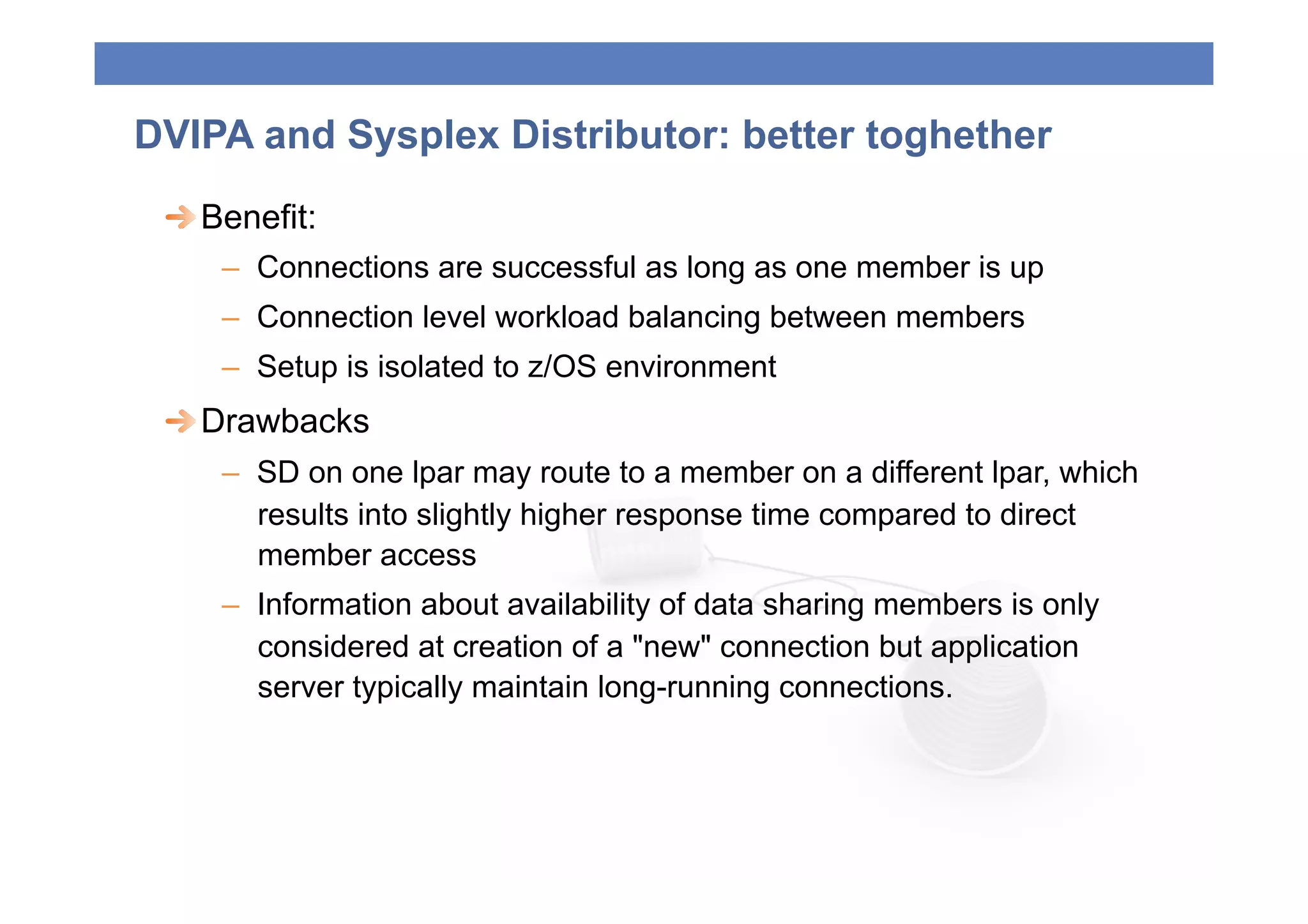
DVIPA and Sysplex Distributor: better toghether
 
  Benefit:
     –  Connections are successful as long as one member is up
     –  Connection level workload balancing between members
     –  Setup is isolated to z/OS environment
 
  Drawbacks
     –  SD on one lpar may route to a member on a different lpar, which
        results into slightly higher response time compared to direct
        member access
     –  Information about availability of data sharing members is only
        considered at creation of a "new" connection but application
        server typically maintain long-running connections.
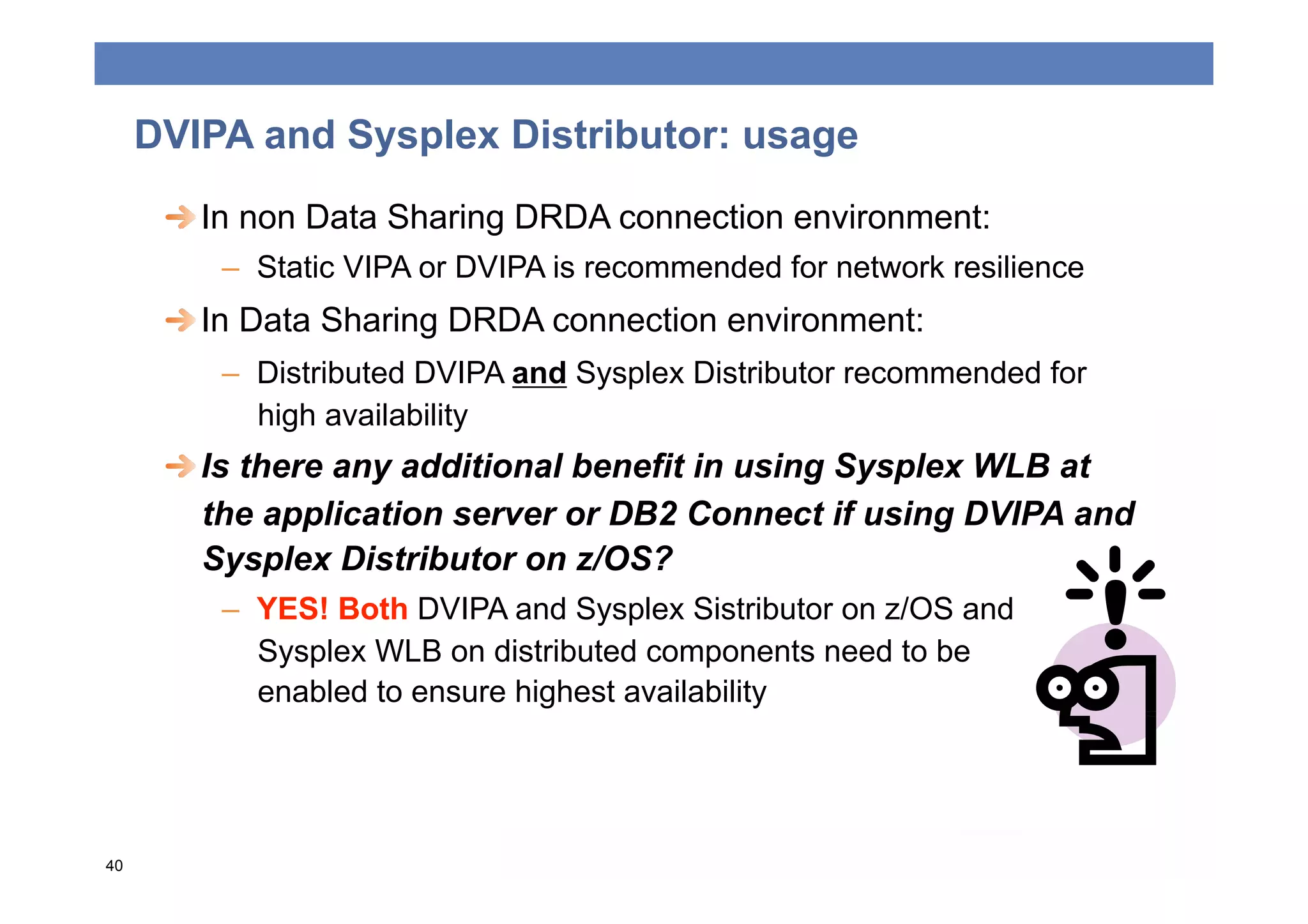
DVIPA and Sysplex Distributor: usage
      
  In non Data Sharing DRDA connection environment:
         –  Static VIPA or DVIPA is recommended for network resilience
      
  In Data Sharing DRDA connection environment:
         –  Distributed DVIPA and Sysplex Distributor recommended for
            high availability
      
  Is there any additional benefit in using Sysplex WLB at
         the application server or DB2 Connect if using DVIPA and
         Sysplex Distributor on z/OS?
         –  YES! Both DVIPA and Sysplex Sistributor on z/OS and
            Sysplex WLB on distributed components need to be
            enabled to ensure highest availability


40
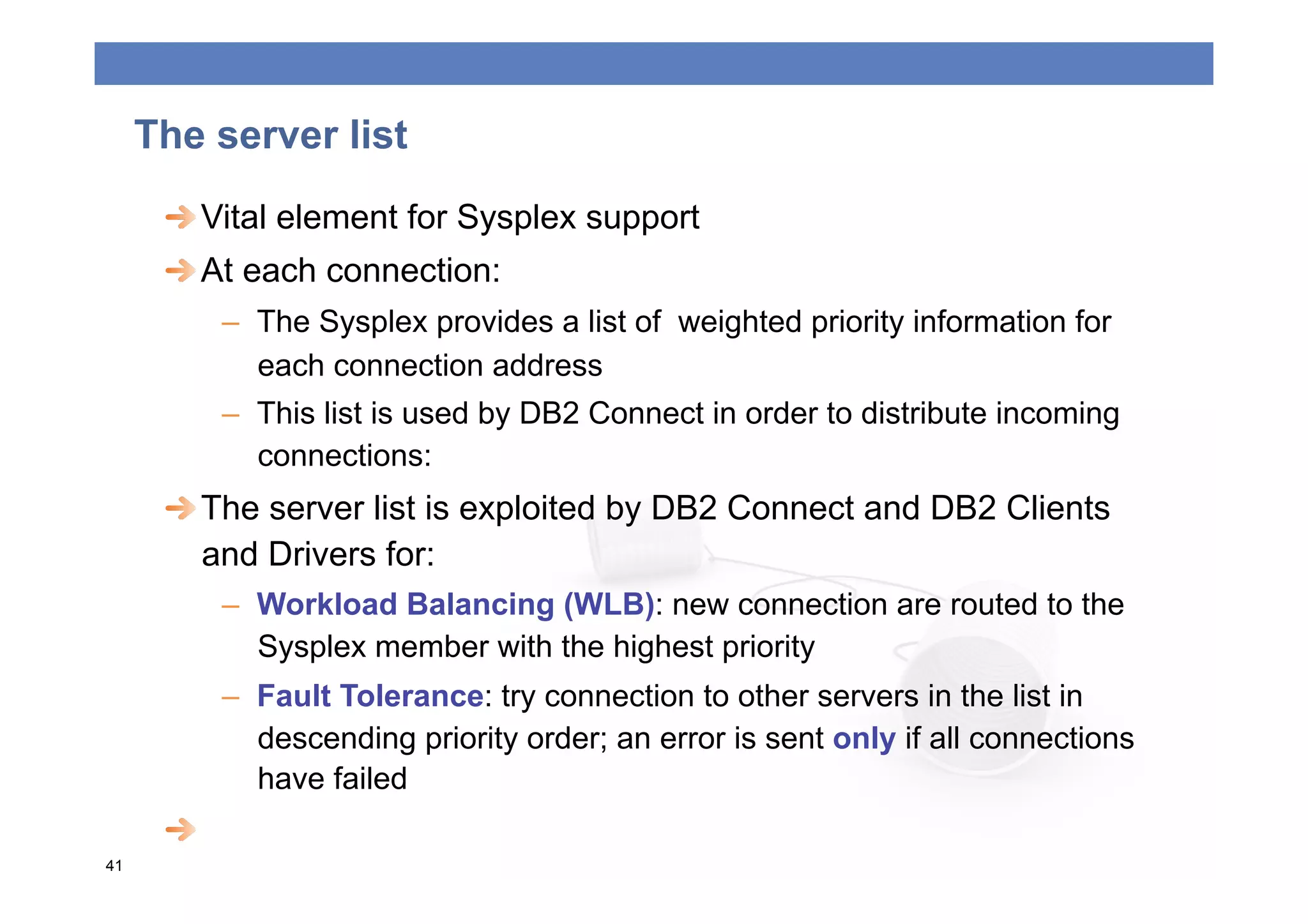
The server list
      
  Vital element for Sysplex support
      
  At each connection:
         –  The Sysplex provides a list of weighted priority information for
            each connection address
         –  This list is used by DB2 Connect in order to distribute incoming
            connections:
      
  The server list is exploited by DB2 Connect and DB2 Clients
         and Drivers for:
         –  Workload Balancing (WLB): new connection are routed to the
            Sysplex member with the highest priority
         –  Fault Tolerance: try connection to other servers in the list in
            descending priority order; an error is sent only if all connections
            have failed

41
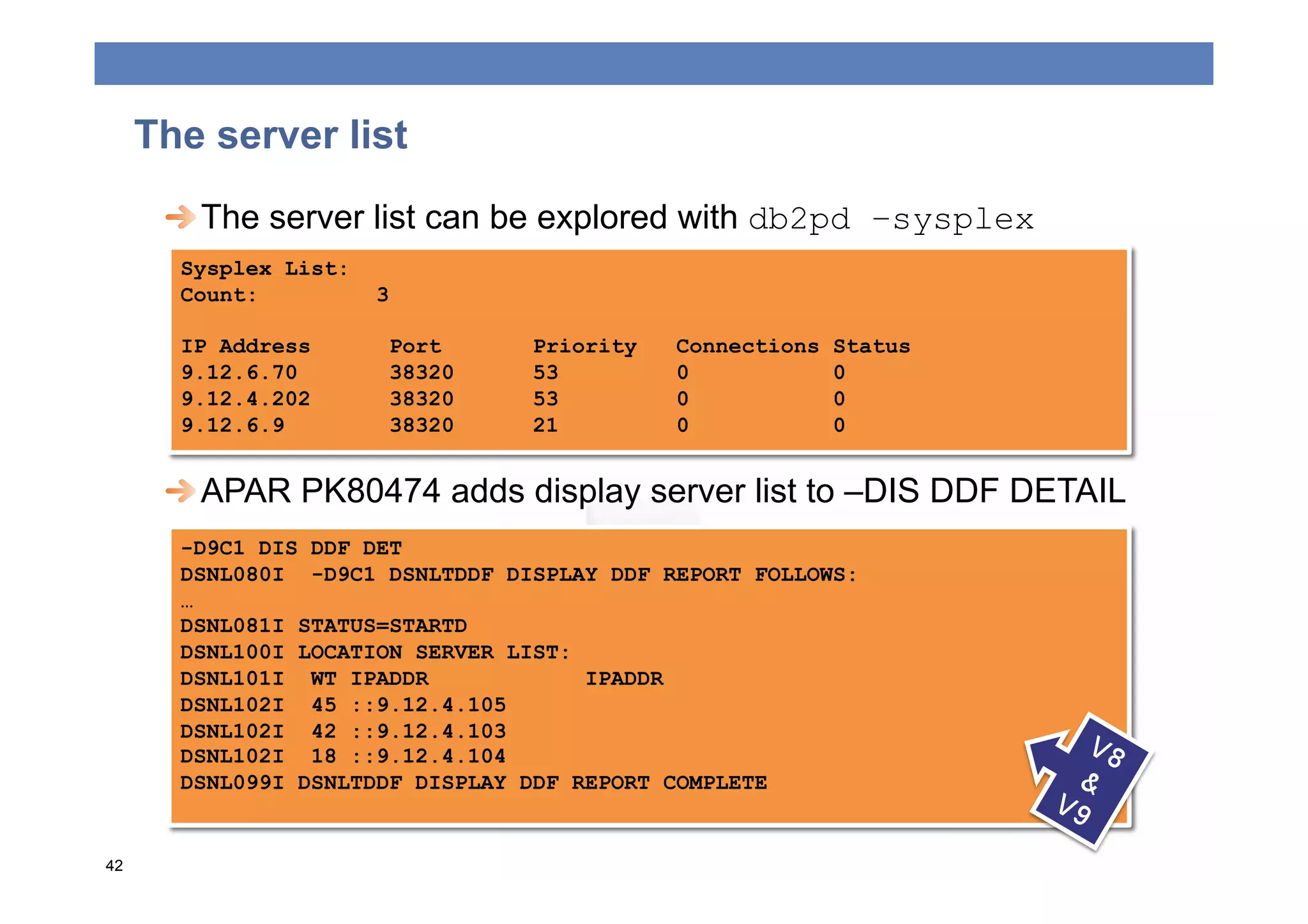
The server list
      
  The server list can be explored with db2pd –sysplex
       Sysplex List:
       Count:          3

       IP Address       Port     Priority   Connections   Status
       9.12.6.70        38320    53         0             0
       9.12.4.202       38320    53         0             0
       9.12.6.9         38320    21         0             0


  APAR PK80474 adds display server list to –DIS DDF DETAIL
       -D9C1 DIS DDF DET
       DSNL080I -D9C1 DSNLTDDF DISPLAY DDF REPORT FOLLOWS:
       …
       DSNL081I STATUS=STARTD
       DSNL100I LOCATION SERVER LIST:
       DSNL101I WT IPADDR             IPADDR
       DSNL102I 45 ::9.12.4.105
       DSNL102I 42 ::9.12.4.103
       DSNL102I 18 ::9.12.4.104
       DSNL099I DSNLTDDF DISPLAY DDF REPORT COMPLETE


42
The server list exploitation
      
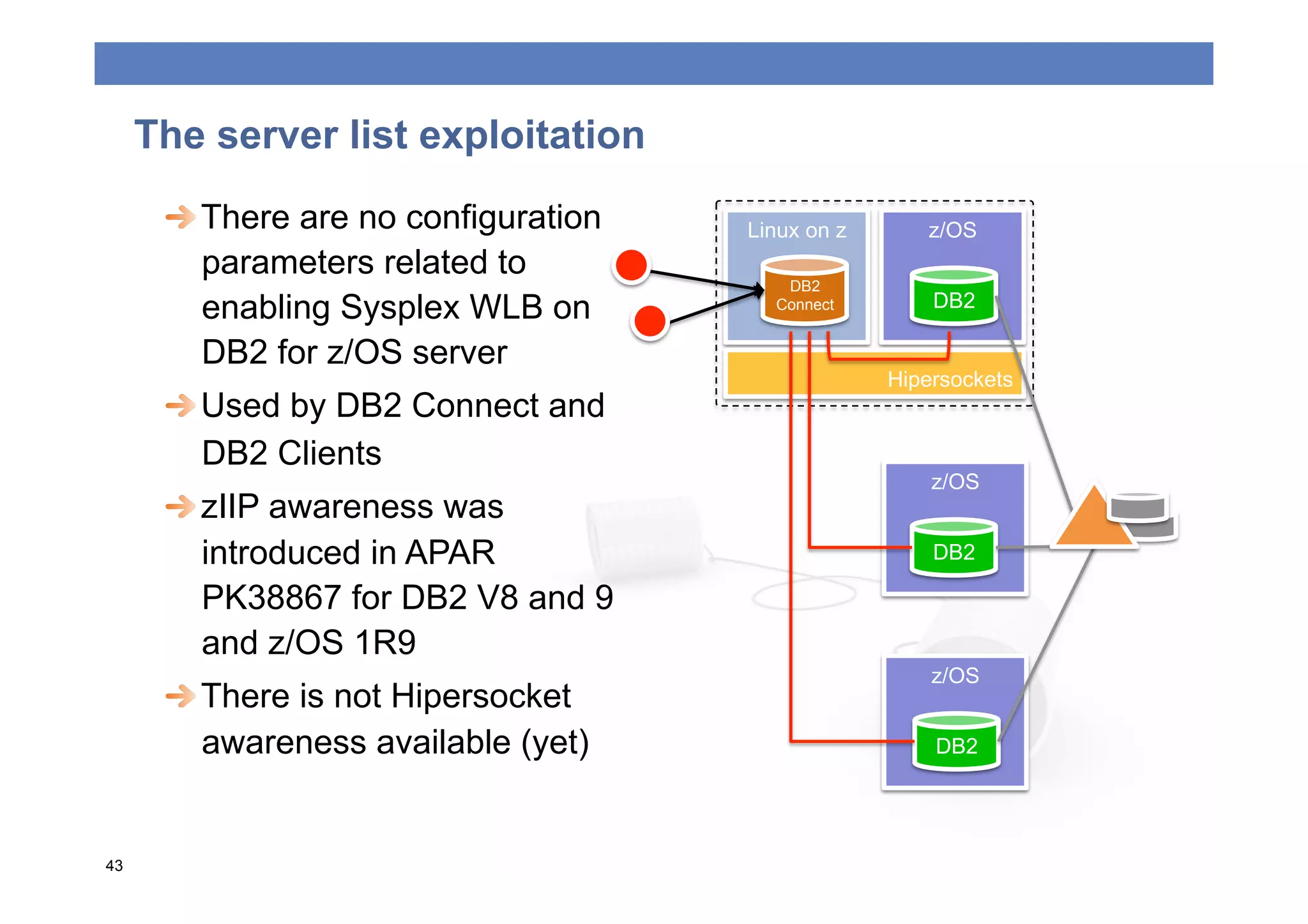
  There are no configuration   Linux on z      z/OS
         parameters related to
                                         DB2
         enabling Sysplex WLB on        Connect        DB2

         DB2 for z/OS server
                                                   Hipersockets
      
  Used by DB2 Connect and
         DB2 Clients
                                                       z/OS
      
  zIIP awareness was
         introduced in APAR                            DB2

         PK38867 for DB2 V8 and 9
         and z/OS 1R9
                                                       z/OS
      
  There is not Hipersocket
         awareness available (yet)                     DB2


43
DB2 Connect Sysplex support
      
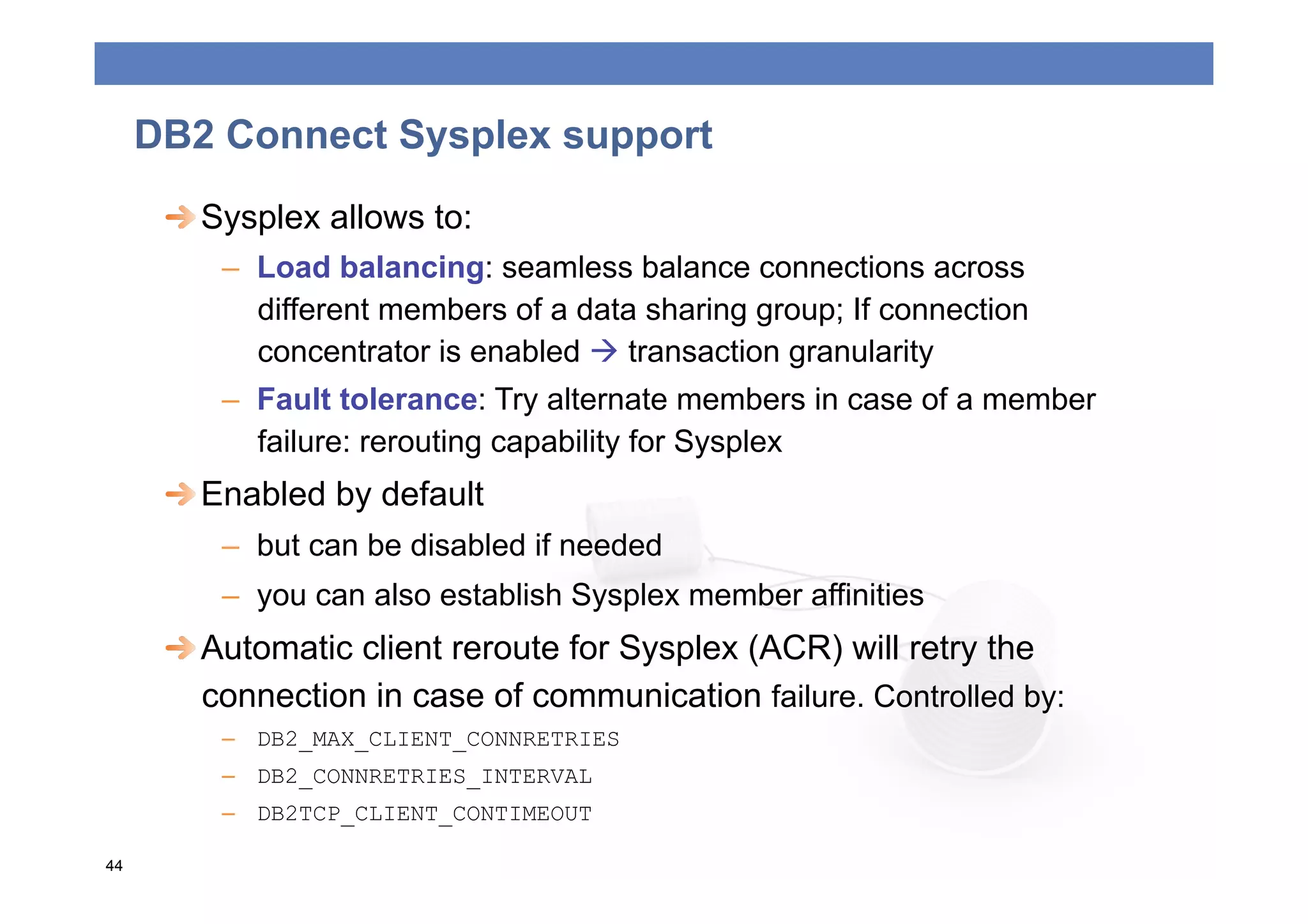
  Sysplex allows to:
         –  Load balancing: seamless balance connections across
            different members of a data sharing group; If connection
            concentrator is enabled  transaction granularity
         –  Fault tolerance: Try alternate members in case of a member
            failure: rerouting capability for Sysplex
      
  Enabled by default
         –  but can be disabled if needed
         –  you can also establish Sysplex member affinities
      
  Automatic client reroute for Sysplex (ACR) will retry the
         connection in case of communication failure. Controlled by:
         –  DB2_MAX_CLIENT_CONNRETRIES
         –  DB2_CONNRETRIES_INTERVAL
         –  DB2TCP_CLIENT_CONTIMEOUT

44
Client Sysplex support
 
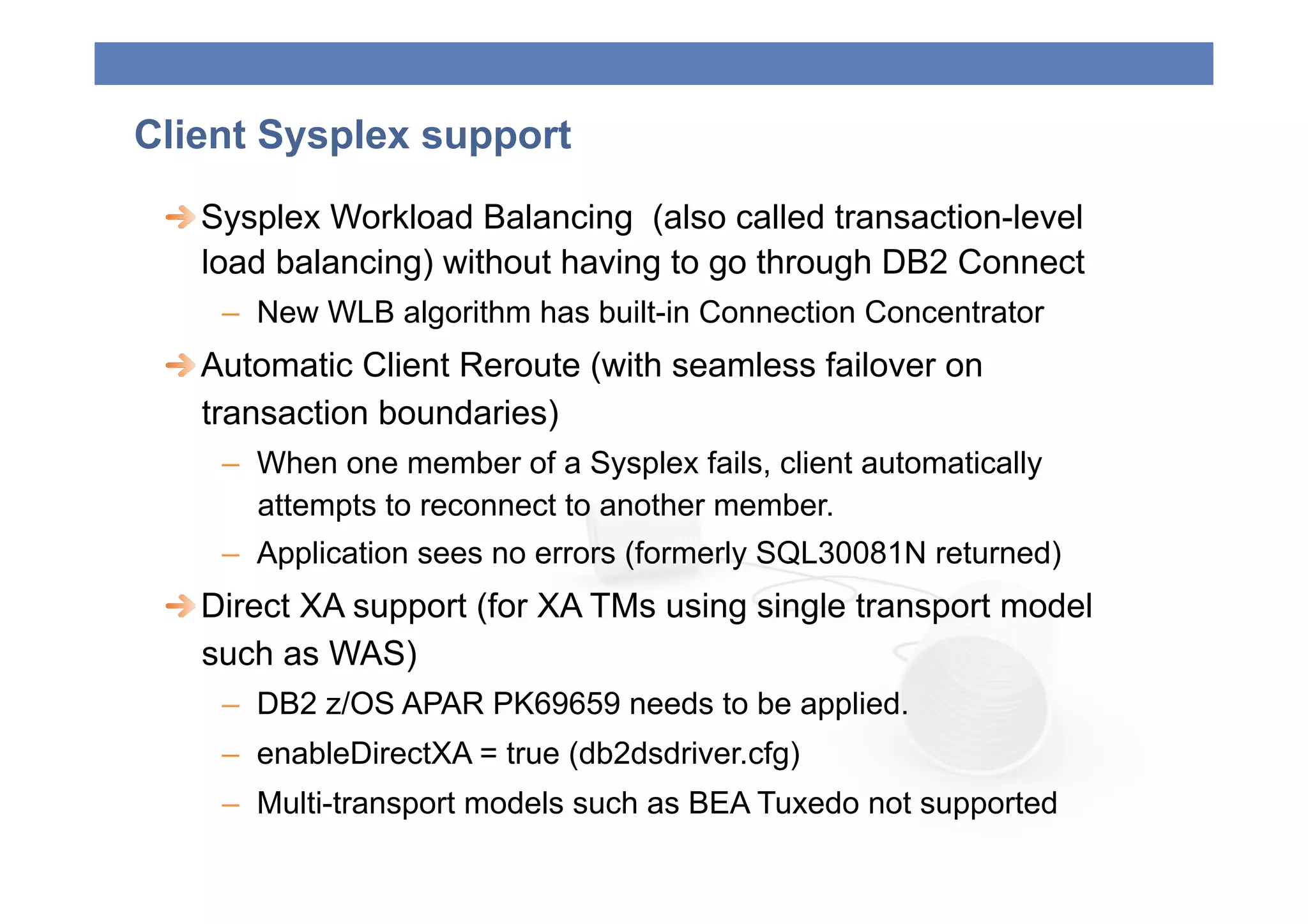
  Sysplex Workload Balancing (also called transaction-level
    load balancing) without having to go through DB2 Connect
    –  New WLB algorithm has built-in Connection Concentrator
 
  Automatic Client Reroute (with seamless failover on
    transaction boundaries)
    –  When one member of a Sysplex fails, client automatically
       attempts to reconnect to another member.
    –  Application sees no errors (formerly SQL30081N returned)
 
  Direct XA support (for XA TMs using single transport model
    such as WAS)
    –  DB2 z/OS APAR PK69659 needs to be applied.
    –  enableDirectXA = true (db2dsdriver.cfg)
    –  Multi-transport models such as BEA Tuxedo not supported
Client Sysplex support
      
  Sysplex support is configured using the db2dsdriver
         configuration file. Use CA (GUI) with IBM Data Server Client
      
  DB2 Connect migration  the command db2dsgcfgfill
         will create a db2dsdriver.cfg file with most of the
         required information
      
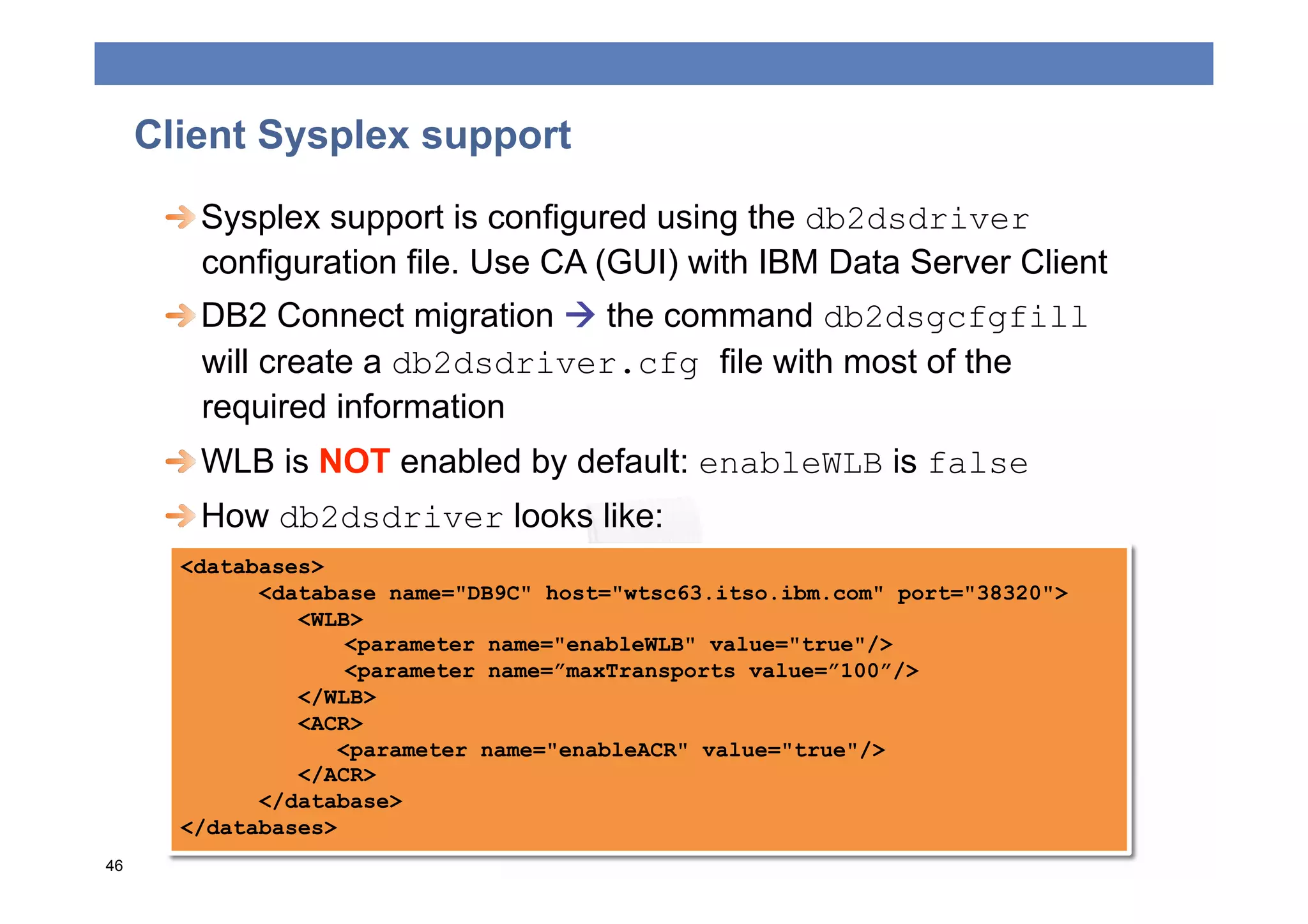
  WLB is NOT enabled by default: enableWLB is false
      
  How db2dsdriver looks like:
       <databases>
             <database name="DB9C" host="wtsc63.itso.ibm.com" port="38320">
                <WLB>
                     <parameter name="enableWLB" value="true"/>
                     <parameter name=”maxTransports value=”100”/>
                </WLB>
                <ACR>
                    <parameter name="enableACR" value="true"/>
                </ACR>
             </database>
       </databases>
46
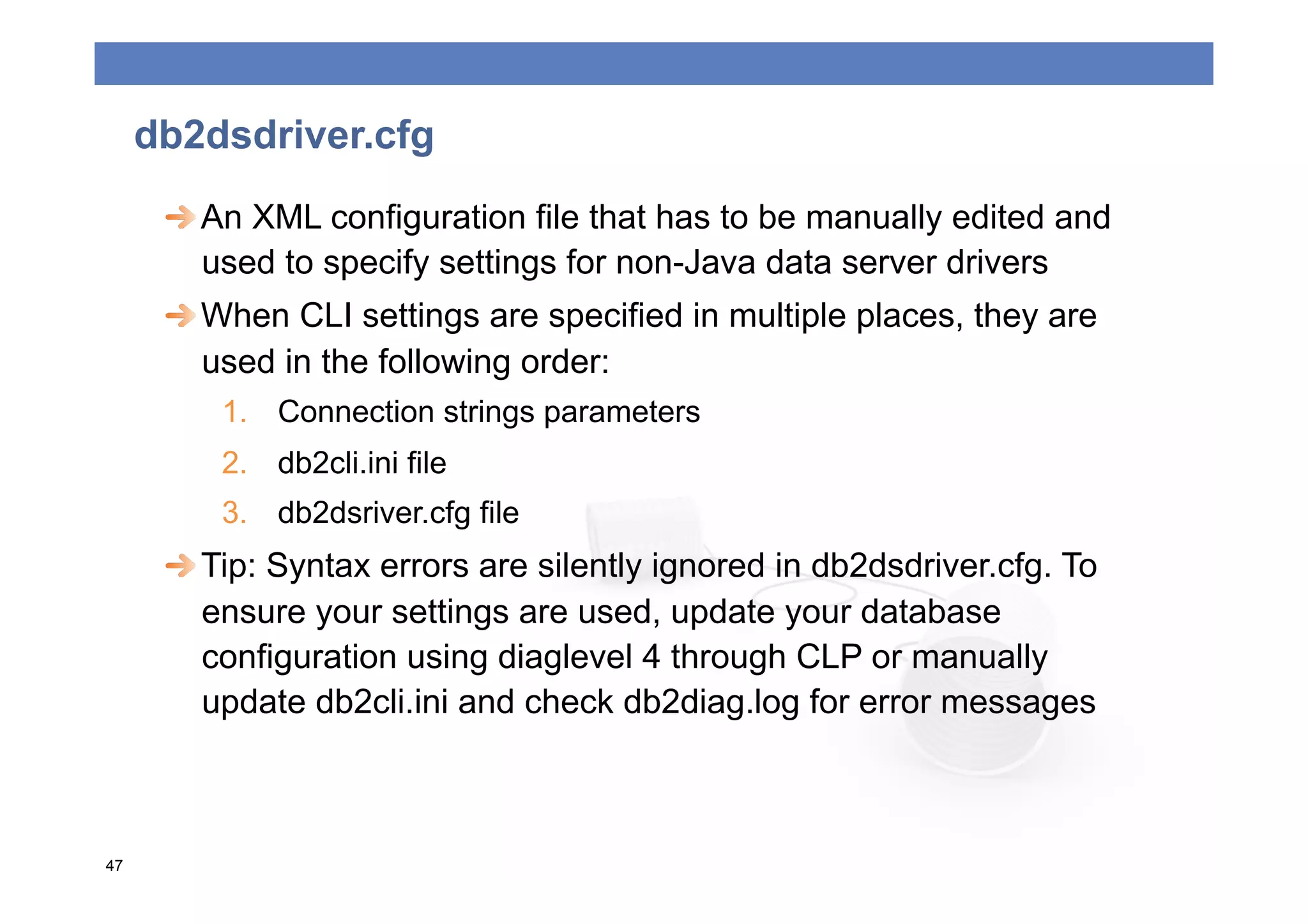
db2dsdriver.cfg
      
  An XML configuration file that has to be manually edited and
         used to specify settings for non-Java data server drivers
      
  When CLI settings are specified in multiple places, they are
         used in the following order:
         1.  Connection strings parameters
         2.  db2cli.ini file
         3.  db2dsriver.cfg file
      
  Tip: Syntax errors are silently ignored in db2dsdriver.cfg. To
         ensure your settings are used, update your database
         configuration using diaglevel 4 through CLP or manually
         update db2cli.ini and check db2diag.log for error messages


47
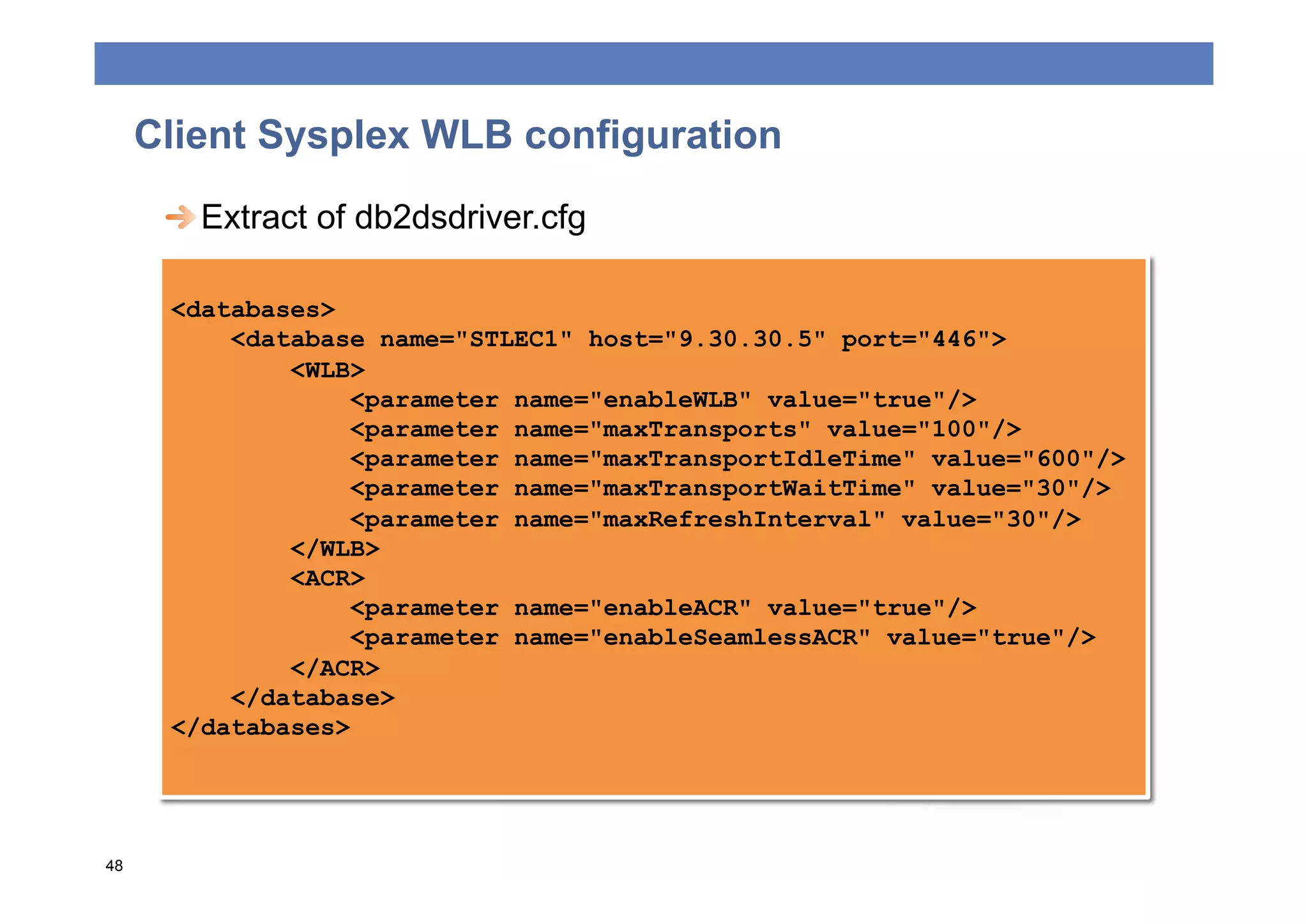
Client Sysplex WLB configuration
      
  Extract of db2dsdriver.cfg

      <databases>
          <database name="STLEC1" host="9.30.30.5" port="446">
              <WLB>
                  <parameter name="enableWLB" value="true"/>
                  <parameter name="maxTransports" value="100"/>
                  <parameter name="maxTransportIdleTime" value="600"/>
                  <parameter name="maxTransportWaitTime" value="30"/>
                  <parameter name="maxRefreshInterval" value="30"/>
              </WLB>
              <ACR>
                  <parameter name="enableACR" value="true"/>
                  <parameter name="enableSeamlessACR" value="true"/>
              </ACR>
          </database>
      </databases>


48
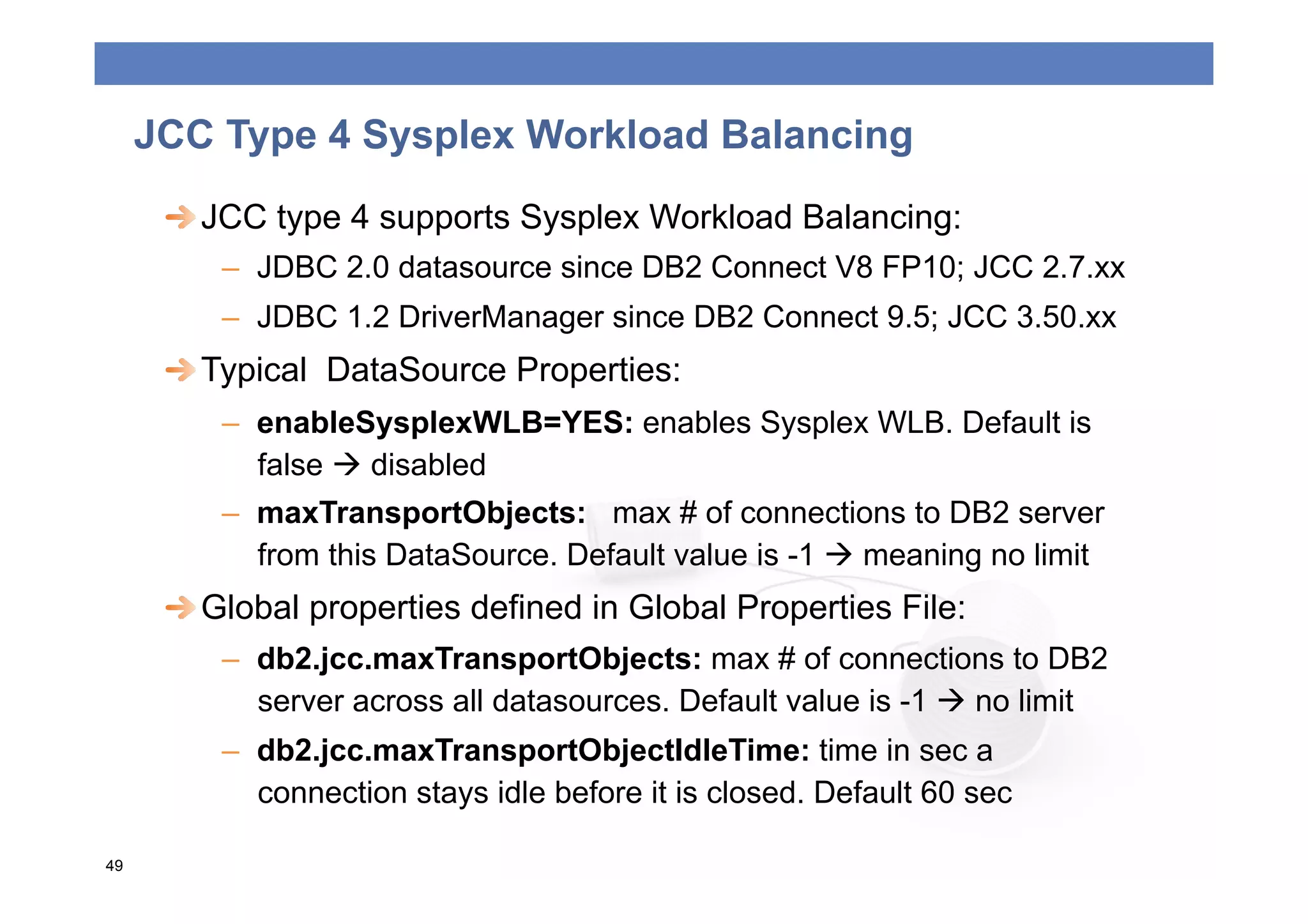
JCC Type 4 Sysplex Workload Balancing
      
  JCC type 4 supports Sysplex Workload Balancing:
         –  JDBC 2.0 datasource since DB2 Connect V8 FP10; JCC 2.7.xx
         –  JDBC 1.2 DriverManager since DB2 Connect 9.5; JCC 3.50.xx
      
  Typical DataSource Properties:
         –  enableSysplexWLB=YES: enables Sysplex WLB. Default is
            false  disabled
         –  maxTransportObjects: max # of connections to DB2 server
            from this DataSource. Default value is -1  meaning no limit
      
  Global properties defined in Global Properties File:
         –  db2.jcc.maxTransportObjects: max # of connections to DB2
            server across all datasources. Default value is -1  no limit
         –  db2.jcc.maxTransportObjectIdleTime: time in sec a
            connection stays idle before it is closed. Default 60 sec

49
CONCLUSIONS
Agenda


   ONNECTIVITY
   C
 
   EST PRACTICES
   B
 
   OOLING
   P
 
   YSPLEX SUPPORT
   S
 
   ONCLUSIONS
   C
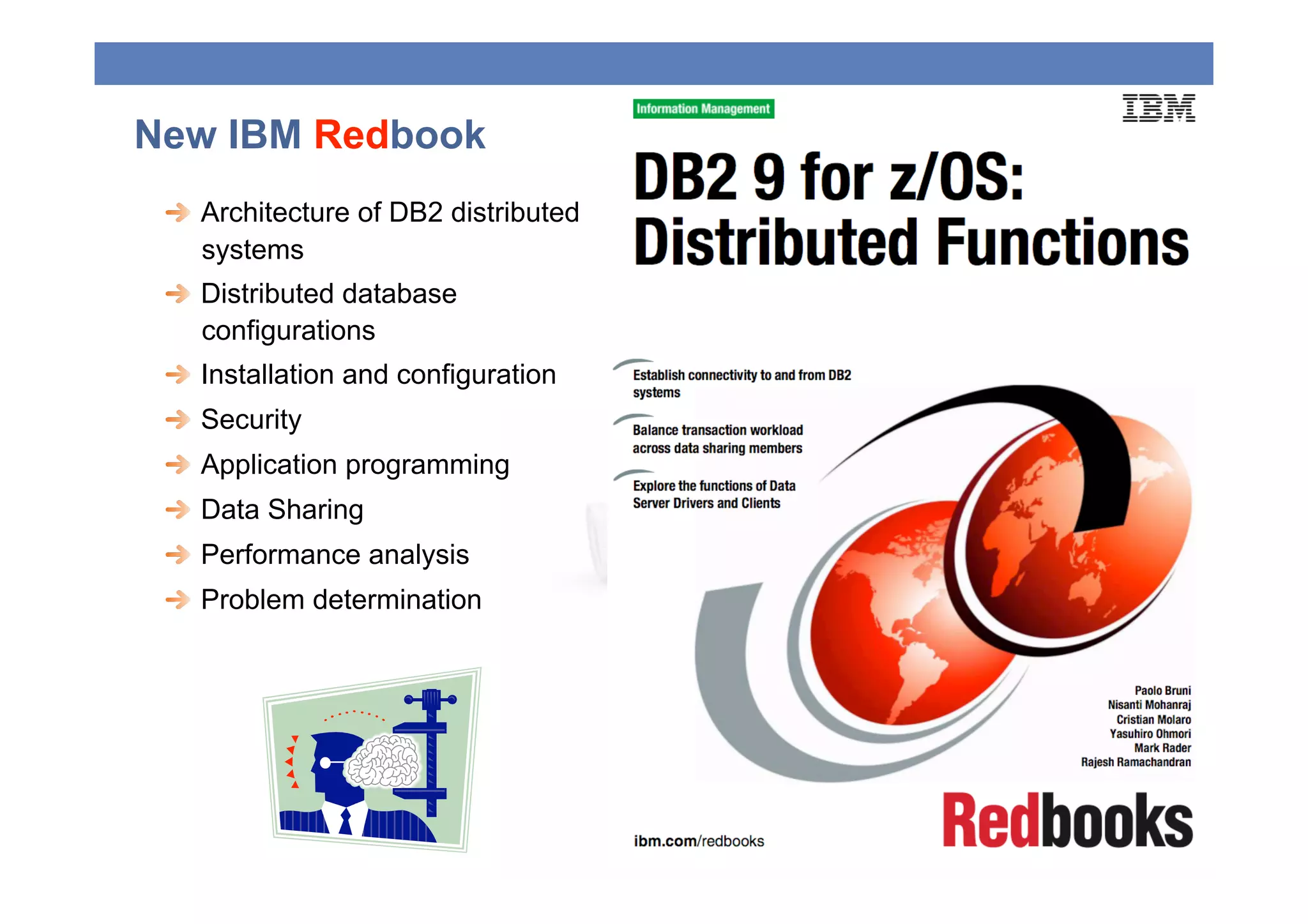
New IBM Redbook
 
   Architecture of DB2 distributed
     systems
 
   Distributed database
     configurations
 
   Installation and configuration
 
   Security
 
   Application programming
 
   Data Sharing
 
   Performance analysis
 
   Problem determination
Cristian Molaro - cristian@molaro.be

THANKS!

Gse 2009 Cmolaro Final02 1

  • 1.
    TALKING WITH DB2 Today’s connectivity options CRISTIAN MOLARO IBM Information Champion Belgium 2009 0
  • 2.
    Agenda  ONNECTIVITY C   EST PRACTICES B   OOLING P   YSPLEX SUPPORT S   ONCLUSIONS C
  • 3.
  • 4.
    DRDA Connectivity options IBM Data Server Runtime IBM Data IBM Data Client Server Driver App Server Client for JDBC and App SQLJ App IBM Data DB2 Connect Server Driver for ODBC and CLI IBM Data DB2 DB2 for Server Driver requester z/OS Package ≥ 9.5 Fp3 3
  • 5.
    Table of equivalences V8 V9 V9.5 & V9.7 DB2 Administration Client DB2 Client IBM Data Server Client DB2 Application Development Client DB2 Runtime Client DB2 Runtime Client IBM Data Server Runtime Client Java Common Client IBM DB2 Driver for JDBC IBM Data Server Driver and SQLJ for JDBC and SQLJ IBM DB2 Driver for IBM Data Server Driver ODBC and CLI for ODBC and CLI IBM Data Server Driver Package  This presentation uses V9.7 terminology 4
  • 6.
    IBM Data ServerDrivers and Clients selection guide Smallest JDBC ODBC OLE DB Open CLP GUI tools footprint and and CLI and .NET source SQLJ IBM Data Server Driver for JDBC and SQLJ X X IBM Data Server Driver for ODBC and CLI X X IBM Data Server Driver Package X X X X IBM Data Server Runtime Client X X X X X IBM Data Server Client X X X X X X  There is a functional overlap  Should balance functionality with footprint  DB2 Connect Server not required for Sysplex Workload Balancing (≥ 9.5 Fp3)  DB2 Connect license still required 5
  • 7.
    Selection guidelines: applicationview Smallest Application Performance Sysplex Seamless footprint WLB failover + ACR (DS) For Java-based For dynamic Type 4 drive X dynamic SQL SQL only X X applications IBM Data Server Supports both For Java-based static Driver for JDBC and SQL applications static and X X SQLJ dynamic SQL Easiest to code. Supports both pureQuery using Type Recommended for static and 4 driver new Java based static dynamic SQL X X SQL applications Data Server drivers in For C/C++ For dynamic ODBC/CLI X applications SQL only X X environments For C# and For dynamic Data Server drivers in .NET environment X VisualBasic SQL only X X applications  Set db2.jcc.sqljUncustomizedWarningorException to 1 or 2 6
  • 8.
    Traces available ondistributed components Client / Driver Available What the trace contains? traces IBM Data Server Driver for JCC Trace It contains both JCC driver trace and DRDA JDBC and SQLJ (type 4) trace. JCC trace contains both JCC driver trace and DRDA trace only when TRACE_ALL is specified IBM Data Server Driver for CLI trace, CLI trace contains the driver trace. db2trc ODBC and CLI db2trc, contains db2 client side buffers and DRDA db2drdat buffers. (db2drdat available from 9.5 FixPack 4) All other Data Server CLI trace, CLI trace + db2trc + db2drdat. Clients, DB2 Connect, DB2 db2trc, db2drdat contains only DRDA buffers. ESE and so forth db2drdat  It is a good idea to get used to collect and analyze traces in distributed components 7
  • 9.
    The choice ofthe right configuration  Only Java clients were able to exploit Sysplex Workload Balancing functions via direct connections. JDBC,SQLJ, IBM Data Server Driver for JDBC and SQLJ pureQuery DRDA ODBC, CLI, .NET, OpenSource DB2 Connect  This functionality has been extended to all clients. JDBC,SQLJ, IBM Data Server Driver package pureQuery DRDA ODBC, CLI, .NET, OpenSource 8
  • 10.
    The choice ofthe right configuration  Most configurations currently using DB2 Connect can use one of the IBM Data Server products: –  Significantly reduced footprint –  Simplify infrastructure from 3 tiers to 2 tiers –  Reduced network traffic and code path –  Simplification of single point of failure management –  Simplification of problem determination  But: –  More complex software administration for maintenance –  A license for DB2 Connect is still required –  No gateway functionality –  WLB balancing scope reduced to local applications 9
  • 11.
    Replacing DB2 Connectby Clients: Considerations Cons Pros Improved performance Reduction in control of by reduced network workload priorities traffic and code path Potential impact to high Improved availability: priority distributed or elimination of a point mainframe applications of failure DB2 Connect Server Improved problem required for XA using multi-transport model determination  Client-side configuration management tools coming soon  Most XA-compliant TMs such as WAS use single-transport model 10
  • 12.
    Some DB2 Connectreserved functionalities  Remember: there is no mechanism available to DDF or WLM to classify a workload BEFORE connection: critical and low priority workloads compete for DBATS  DB2 Connect: –  Provides gateway, connection concentration and a larger scope for WLB and Pooling –  Simplification of upgrades and maintenance DB2 Connect DB2 DB2 11
  • 13.
    DB2 Connect andHipersockets  Probably the best option for Linux on z z/OS a DB2 Connect server DB2  Get availability advantages Connect DB2 of System z at IFL price Hipersockets  Hipersockets support  Promotes server z/OS consolidation: reduces Data Center costs DB2  But: WLB and Sysplex Distributor doesn’t consider z/OS hipersockets for workload distribution (yet) DB2 12
  • 14.
    DB2 Private Protocol  DB2 to DB2 PP still supported but officially deprecated in V9  Anyway: –  No changes since V5 (10 years) –  Not zIIP eligible: CICS transactions are if TCP/IP + DRDA –  Lots of functions only available trough DRDA, like Static SQL, thread pooling and Stored procedures –  Today there is no technical reason to still keep using PP  DBPROTCL zParm removed from V9 –  DBPROTOCOL(DRDA) assumed for any BIND/REBIND if not specified DBPROTOCOL –  You may need to change existing BIND/REBIND processes –  If specified, DSNT226I and warning RC (4): OPTION IS NOT RECOMMENDED WHEN BINDING PLANS OR PACKAGES 13
  • 15.
    DB2 PP wouldNOT WORK on V?!  Migration shouldn’t require application changes  It has an impact on existing BIND/REBIND processes  Creation of ALIASES is required  Use the PP to DRDA Catalog Analysis Tool DSNTP2DP 14
  • 16.
    The private toDRDA protocol REXX tool  Creates local and remote BIND commands for PLANS and PACKAGES and build CREATE ALIAS statements  You need to change current BIND/REBIND to include remote  Uses catalog information to determine applications having a remote location dependency: embedded dynamic SQL will usually NOT be indentified  For DB2 V9: highly recommended APAR PK78553  Support for DB2 V7 and V8: APAR PK40433  Shipped with V9, for older versions: http://www.ibm.com/ developerworks/exchange/dw_entryView.jspa? externalID=213&categoryID=32  More information: DB2 for z/OS Installation Guide 15
  • 17.
  • 18.
    Application Programming BestPractices  Limit the size of your result set: –  Use the WHERE, GROUP BY, and HAVING clauses –  setFetchSize() can be a hint to Java driver for scrollable rowset cursors   Help the server use limited block fetch (and extra blocks) –  Use OPTIMIZE for n ROWS and FETCH FIRST n ROWS –  Declare your cursor with FOR FETCH ONLY, or FOR READ ONLY, and INSENSITIVE STATIC –  Use CURRENTDATA(NO) and ISOLATION(CS) when possible and avoid ISOLATION(RR) –  Avoid using WITH HOLD cursor: CLI applications use with hold cursor by default
  • 19.
    Application Programming BestPractices  Use Remote Stored procedures to minimize network traffic. –  Native SQL procedures called via DRDA TCP/IP clients are zIIP- eligible (V9) –  Use result set cursors to return data –  Use COMMIT on RETURN clause for stored procedures that do not return result sets  Explicitly close your cursors after you have fetched all data  COMMIT often but avoid the use auto-commit  Use KEEPDYNAMIC(YES) where necessary to avoid excessive prepares but remember that it prevents the connection from being inactivated
  • 20.
    Application Programming BestPractices  Data Server Drivers use Dynamic Data Format (Progressive Streaming) by default for LOBs and XML data.  Java drivers use multi-row fetch by default for scrollable cursors. CLI driver uses DB2BulkOperations.  Data Server Drivers support both atomic and non-atomic multi-row insert (addBatch (Java), array input chaining (CLI) and DB2BulkCopy (.NET))  Consider using static SQL (pureQuery/SQLJ) to get performance and security benefits over dynamic SQL.
  • 21.
  • 22.
    SSL and IPSec  SSL (Connection-based using HTTPS protocol)  DB2 for z/OS uses the z/OS Communication Server (z/OS CS) IP Application Transparent Transport Layer service (AT- TLS).  Configuration and setup required at both server and client.  To enable for Java connections, use properties.put("sslConnection", "true”)  When using the db2dsdriver.cfg add <parameter name="SecurityTransportMode" value="SSL"/>  IPSec (Host-based)  An open architecture for security at the IP networking-layer)  No application modifications 21
  • 23.
    Trusted Context andRoles   A trusted context establishes a trusted relationship between DB2 and another server (could be middleware or another DB2) by evaluating sets of trusted attributes at Connect time.   A role groups together one or more privileges and can be assigned to users.   Roles are not available outside of the trusted connection.   Reduces the risk of shared app server ids.   Provides end-end auditing. CREATE TRUSTED CONTEXT REMOTECTX BASED UPON CONNECTION USING SYSTEM AUTHID WASADM1 ATTRIBUTES (ADDRESS '9.26.113.204’, ADDRESS '$$IPEC1’, SERVAUTH ‘EZB.NETACCESS.ZOSV1R5.TCPIP.IBM’, ENCRYPTION ‘LOW’) WITH USE FOR SAM, JOE WITH AUTHENTICATION ENABLE;
  • 24.
    DB2 zParm  CONDBAT: Max. # of distributed connection into DB2 system –  includes inactive and active connections, may be large –  DB2 queues DBAT requests to become active up to CONDBAT  MAXDBAT: Max # database access threads (DBATs) that can be active concurrently. –  In many installations, max. value determined by available storage in DBM1 (check IFCID 225) –  Set this value conservatively  CMTSTAT INACTIVE: Make a thread inactive after it successfully commits or rolls back and thread does not hold resources –  prerequisite for sysplex workload balancing –  inactive connections use less storage and free up DBM1 resources
  • 25.
    DB2 zParms  IDTHTOIN: Time in sec an active server thread remain idle before it is canceled –  inactive connections are not subject to idle thread timeout –  Strongly recommended to not set to 0 – disable, default works well  TCPALVER: highly recommended to set to NO (default), applies to TCP/IP only  TCPKPALV: ENABLE or time value in seconds - may need to set a time value since TCP/IP stack default is 2 hours  POOLINAC: time duration that a DBAT remains pooled unless it has received a new unit-of-work request
  • 26.
  • 27.
    Pooling  Benefits –  Optimization of database attachment resources –  Less resources required: Memory, CPU, DBATs , network  Types –  DB2 Thread Pooling •  DB2 for z/OS –  DB2 Connection Pooling •  DB2 Connect and DB2 UDB for LUW Server products •  DB2 Clients and Drivers (limited scope) –  DB2 Connection Concentrator •  DB2 Connect and DB2 UDB for LUW Server products •  DB2 Clients and Drivers (limited scope) 26
  • 28.
    DB2 Connection pooling DB2 Connect DB2 for z/OS Applications DDF DDF DBM1 = DB2 Client = Pool agent = Inactive = Pooled connection DBAT = Connected = Active = Active agent connection DBAT  Allows reuse of an established connection for subsequent connections  Reduction of cost associated with open + close connections 27
  • 29.
    DB2 Connection pooling  Open connections kept in a pool  When application request a disconnection from the host, the connection to the host is not dropped but given to the pool  Reduce CPU utilization in the host  Provide little advantage for long running connections (WAS)  For short and frequent txn (Web): –  $ connection > $ sql –  Reduce CPU and elapsed time per txn  Transparent to applications  Security: user identity information is passed along the thread for user authentication 28
  • 30.
    DB2 Connection pooling  Implementation: –  DB2 connect: •  num_poolagents:def=AUTO; =0  disable •  max_coordagents: def=AUTO; SQL1226 if exceeded •  DB2CONNECT_IN_APP_PROCESS must be set NO –  JDBC and SQLJ connecion pooling support •  Supported by the IBM DB2 Driver for JDBC abd SQLJ •  Connection pooling is transparent for the applications •  Homogeneus: all connection objects should have the same properties •  Heterogeneus: connection objects with different properties can share the same connection pool 29
  • 31.
    Behavior compared Using connection Not using connection pooling pooling New connect Reuses connection agent Creation of a new connection agent Commit The connection agent is The connection agent is exclusively retained for exclusively retained for the connection the connection Disconnect Release of the Destruction of the connection agent to pool connection agent: no for reuse reuse 30
  • 32.
    DB2 Connection Concentrator DB2 Connect DB2 for z/OS Applications DDF DBM1 DDF DBM1 = DB2 Client = Connection = Inactive = Pooled connection DBAT = Coordinator = Active = Active agent connection DBAT  Allows applications to stay connected without any resource utilization in DB2 for z/OS  Reduces resources required in z/OS  increase scalability  Data Sharing: provides fail-safe operation and txn level load balancing 31
  • 33.
    DB2 Connection concentrator  Splits agents in 2 entities: –  Logical agents  application connection DB2 Connect –  Coordinating agents  owns a DB2 DDF DBM1 connection and thread and executes application requests  Allocates host database resources only for the duration of an SQL transaction while keeping user applications active = Connection   The number of DB2 threads and the = Coordinator resources they consume can be much agent smaller than if every application connection had its own thread 32
  • 34.
    DB2 Connection concentrator  Implementation: –  max_connections > max_coordagents –  Not the default  Restrictions –  Important restrictions apply: verify before implementing –  Application code changes may be necessary –  Not for txn WITH HOLD or KEEPDYNAMIC –  Must explicitly drop DTT –  Only dynamic SQL from CLI –  Dynamic prepare requests from embedded SQL not supported –  DB2 Connect: cannot use inbound SSL 33
  • 35.
    Behavior compared Using connection Not using connection concentrator concentrator New connect Reuses agent Creation of a new connection agent Commit Release agent to pool for The connection agent is reuse exclusively retained for the connection Disconnect No impact on agent Destruction of the connection agent: no reuse 34
  • 36.
    Connection pooling andConnection Concentrator  Similar but different objectives  Connection pooling –  helps reduce the overhead of database connections and handle connection volume –  an application has to disconnect before another one can reuse a pooled connection  Connection concentrator –  helps increase the scalability of DB2 for z/OS by optimizing the use of your host database servers –  a connection may be available to an application as soon as another application has finished a transaction and does not require that other application to disconnect 35
  • 37.
  • 38.
    Sysplex support  Challenge: a distributed application server needs to find the best available path to the data  Dynamic virtual IP address (DVIPA): –  allows servers to be made available independently of hardware or software failures –  allows multiple LPARs to appear to be a single, highly available network host –  applications can be seamlessly moved from one LPAR to another  Sysplex distributor (SD): –  combination of the high availability features of DVIPA and the workload optimization capabilities of WLM –  work distribution based on a dynamically build priority list
  • 39.
    DVIPA and SysplexDistributor – the Concept  DVIPA provides a virtual TCP/IP address into the DS Group  Sysplex Distributor routes the connection request to the most available member based on WLM recommendation CF DB2A DB2B z/OS1 z/OS2 Sysplex Distributor Client
  • 40.
    DVIPA and SysplexDistributor: better toghether  Benefit: –  Connections are successful as long as one member is up –  Connection level workload balancing between members –  Setup is isolated to z/OS environment  Drawbacks –  SD on one lpar may route to a member on a different lpar, which results into slightly higher response time compared to direct member access –  Information about availability of data sharing members is only considered at creation of a "new" connection but application server typically maintain long-running connections.
  • 41.
    DVIPA and SysplexDistributor: usage  In non Data Sharing DRDA connection environment: –  Static VIPA or DVIPA is recommended for network resilience  In Data Sharing DRDA connection environment: –  Distributed DVIPA and Sysplex Distributor recommended for high availability  Is there any additional benefit in using Sysplex WLB at the application server or DB2 Connect if using DVIPA and Sysplex Distributor on z/OS? –  YES! Both DVIPA and Sysplex Sistributor on z/OS and Sysplex WLB on distributed components need to be enabled to ensure highest availability 40
  • 42.
    The server list  Vital element for Sysplex support  At each connection: –  The Sysplex provides a list of weighted priority information for each connection address –  This list is used by DB2 Connect in order to distribute incoming connections:  The server list is exploited by DB2 Connect and DB2 Clients and Drivers for: –  Workload Balancing (WLB): new connection are routed to the Sysplex member with the highest priority –  Fault Tolerance: try connection to other servers in the list in descending priority order; an error is sent only if all connections have failed 41
  • 43.
    The server list  The server list can be explored with db2pd –sysplex Sysplex List: Count: 3 IP Address Port Priority Connections Status 9.12.6.70 38320 53 0 0 9.12.4.202 38320 53 0 0 9.12.6.9 38320 21 0 0  APAR PK80474 adds display server list to –DIS DDF DETAIL -D9C1 DIS DDF DET DSNL080I -D9C1 DSNLTDDF DISPLAY DDF REPORT FOLLOWS: … DSNL081I STATUS=STARTD DSNL100I LOCATION SERVER LIST: DSNL101I WT IPADDR IPADDR DSNL102I 45 ::9.12.4.105 DSNL102I 42 ::9.12.4.103 DSNL102I 18 ::9.12.4.104 DSNL099I DSNLTDDF DISPLAY DDF REPORT COMPLETE 42
  • 44.
    The server listexploitation  There are no configuration Linux on z z/OS parameters related to DB2 enabling Sysplex WLB on Connect DB2 DB2 for z/OS server Hipersockets  Used by DB2 Connect and DB2 Clients z/OS  zIIP awareness was introduced in APAR DB2 PK38867 for DB2 V8 and 9 and z/OS 1R9 z/OS  There is not Hipersocket awareness available (yet) DB2 43
  • 45.
    DB2 Connect Sysplexsupport  Sysplex allows to: –  Load balancing: seamless balance connections across different members of a data sharing group; If connection concentrator is enabled  transaction granularity –  Fault tolerance: Try alternate members in case of a member failure: rerouting capability for Sysplex  Enabled by default –  but can be disabled if needed –  you can also establish Sysplex member affinities  Automatic client reroute for Sysplex (ACR) will retry the connection in case of communication failure. Controlled by: –  DB2_MAX_CLIENT_CONNRETRIES –  DB2_CONNRETRIES_INTERVAL –  DB2TCP_CLIENT_CONTIMEOUT 44
  • 46.
    Client Sysplex support  Sysplex Workload Balancing (also called transaction-level load balancing) without having to go through DB2 Connect –  New WLB algorithm has built-in Connection Concentrator  Automatic Client Reroute (with seamless failover on transaction boundaries) –  When one member of a Sysplex fails, client automatically attempts to reconnect to another member. –  Application sees no errors (formerly SQL30081N returned)  Direct XA support (for XA TMs using single transport model such as WAS) –  DB2 z/OS APAR PK69659 needs to be applied. –  enableDirectXA = true (db2dsdriver.cfg) –  Multi-transport models such as BEA Tuxedo not supported
  • 47.
    Client Sysplex support  Sysplex support is configured using the db2dsdriver configuration file. Use CA (GUI) with IBM Data Server Client  DB2 Connect migration  the command db2dsgcfgfill will create a db2dsdriver.cfg file with most of the required information  WLB is NOT enabled by default: enableWLB is false  How db2dsdriver looks like: <databases> <database name="DB9C" host="wtsc63.itso.ibm.com" port="38320"> <WLB> <parameter name="enableWLB" value="true"/> <parameter name=”maxTransports value=”100”/> </WLB> <ACR> <parameter name="enableACR" value="true"/> </ACR> </database> </databases> 46
  • 48.
    db2dsdriver.cfg  An XML configuration file that has to be manually edited and used to specify settings for non-Java data server drivers  When CLI settings are specified in multiple places, they are used in the following order: 1.  Connection strings parameters 2.  db2cli.ini file 3.  db2dsriver.cfg file  Tip: Syntax errors are silently ignored in db2dsdriver.cfg. To ensure your settings are used, update your database configuration using diaglevel 4 through CLP or manually update db2cli.ini and check db2diag.log for error messages 47
  • 49.
    Client Sysplex WLBconfiguration  Extract of db2dsdriver.cfg <databases> <database name="STLEC1" host="9.30.30.5" port="446"> <WLB> <parameter name="enableWLB" value="true"/> <parameter name="maxTransports" value="100"/> <parameter name="maxTransportIdleTime" value="600"/> <parameter name="maxTransportWaitTime" value="30"/> <parameter name="maxRefreshInterval" value="30"/> </WLB> <ACR> <parameter name="enableACR" value="true"/> <parameter name="enableSeamlessACR" value="true"/> </ACR> </database> </databases> 48
  • 50.
    JCC Type 4Sysplex Workload Balancing  JCC type 4 supports Sysplex Workload Balancing: –  JDBC 2.0 datasource since DB2 Connect V8 FP10; JCC 2.7.xx –  JDBC 1.2 DriverManager since DB2 Connect 9.5; JCC 3.50.xx  Typical DataSource Properties: –  enableSysplexWLB=YES: enables Sysplex WLB. Default is false  disabled –  maxTransportObjects: max # of connections to DB2 server from this DataSource. Default value is -1  meaning no limit  Global properties defined in Global Properties File: –  db2.jcc.maxTransportObjects: max # of connections to DB2 server across all datasources. Default value is -1  no limit –  db2.jcc.maxTransportObjectIdleTime: time in sec a connection stays idle before it is closed. Default 60 sec 49
  • 51.
  • 52.
    Agenda  ONNECTIVITY C   EST PRACTICES B   OOLING P   YSPLEX SUPPORT S   ONCLUSIONS C
  • 53.
    New IBM Redbook   Architecture of DB2 distributed systems   Distributed database configurations   Installation and configuration   Security   Application programming   Data Sharing   Performance analysis   Problem determination
  • 54.
    Cristian Molaro -cristian@molaro.be THANKS!