Chapter Five
JDBC
By:-
Aragaw W and Sadiki A.
Email :-
amanwassie4272@gmail.com
Discussions
 What JDBC?
 Architecture of JDBC.
 Steps to connect to DB.
 Types of JDBC driver available.
 Types of Statement.
 JDBC Data Source.
What is JDBC ?
 JDBC acronym of java Database connectivity; though
Sun Microsystems claims that it is not the fullform.
 JDBC is a standard java API for independent database
connection between a java program and wide range of
relational database.
 It is present in the “java.sql”package
 It Simplifies the creation and execution of SQL statements.
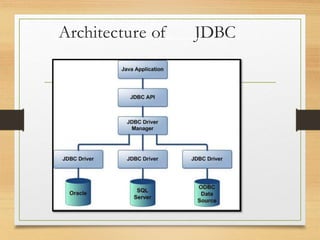
java.sql.DriverManager - Manages the loading and
unloading of database drivers from the underlying system.
Cont.…
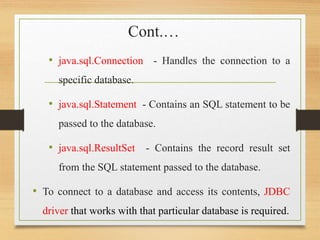
• java.sql.Connection - Handles the connection to a
specific database.
• java.sql.Statement - Contains an SQL statement to be
passed to the database.
• java.sql.ResultSet - Contains the record result set
from the SQL statement passed to the database.
• To connect to a database and access its contents, JDBC
driver that works with that particular database is required.
What is API
• API (Application programming interface) is a
document that contains description of all the features
of a product or software. It represents classes and
interfaces that software programs can follow to
communicate with each other. An API can be created
for applications, libraries, operating systems, etc
Architecture of JDBC
Steps to connect JDBC?
1. Load the JDBC driver
2. Define the connection URL.
3. Established the connection.
4. Create the Statement object.
5. Execute a query.
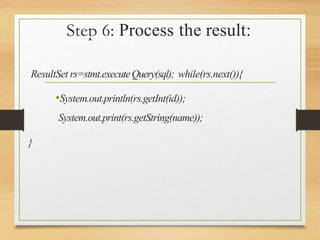
6. Process the results.
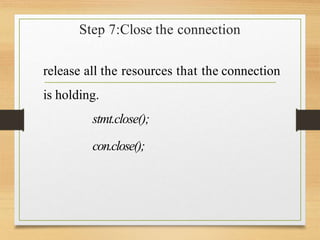
7. Close the connection.
Step 1. load JDBC drivers
 JDBC drivers implement the defined interfaces in the
JDBC API for interacting with your database server.
For example, using JDBC drivers enable you to open
database connections and to interact with it by sending SQL
or database commands then receiving results with Java.
Once you obtain a JDBC driver you should only have to
worry about registering it using DriverManager objects and
creating the proper JDBC URL in order to use it.
8
Types of JDBC driver
 JDBC driver implementations vary because of the wide variety
of operating systems and hardware platforms in which Java
operates.
 JDBC Driver is a software component that enables java
application to interact with the database. There are 4 types of
JDBC drivers:
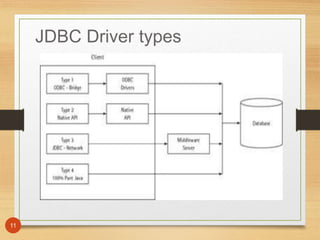
 Type 1: jdbc-odbc bridge driver
 Type 2: native API partly java driver.
 Type 3: net protocols all java driver.
 Type 4: native protocols all java driver.
9
Cont....
 Types 1 and 2 rely heavily on additional software
(typically C/C++ DLLs) installed on the client computer
to provide database connectivity. Java and JDBC use
these components to interact with the database.
 Types 3 and 4 are pure Java implementations and require
no additional software to be installed on the client,
except for the JDBC driver. Fortunately, packaging the
JDBC driver with your software distribution is trivial.
JDBC Driver types
11
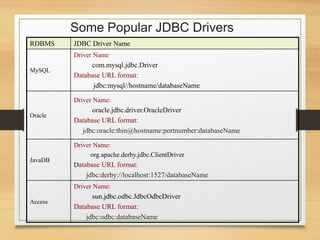
Some Popular JDBC Drivers
RDBMS JDBC Driver Name
MySQL
Driver Name
com.mysql.jdbc.Driver
Database URL format:
jdbc:mysql//hostname/databaseName
Oracle
Driver Name:
oracle.jdbc.driver.OracleDriver
Database URL format:
jdbc:oracle:thin@hostname:portnumber:databaseName
JavaDB
Driver Name:
org.apache.derby.jdbc.ClientDriver
Database URL format:
jdbc:derby://localhost:1527/databaseName
Access
Driver Name:
sun.jdbc.odbc.JdbcOdbcDriver
Database URL format:
jdbc:odbc:databaseName
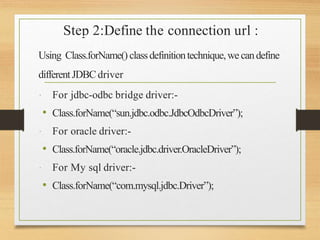
Step 2:Define the connection url :
Using Class.forName() classdefinitiontechnique,wecandefine
differentJDBCdriver
 For jdbc-odbc bridge driver:-
• Class.forName(“sun.jdbc.odbc.JdbcOdbcDriver”);
 For oracle driver:-
• Class.forName(“oracle.jdbc.driver.OracleDriver”);
 For My sql driver:-
• Class.forName(“com.mysql.jdbc.Driver”);
Step 3:Established the connection:
Connectioncon=DriverManager
.getConnection(“url”,”user_name”,”pass”);
Example
try {
Class.forName("com.mysql.jdbc.Driver");
Connection conn =
DriverManager.getConnection("jdbc:mysql://localhost:3306/itstud","root",""); return conn;
}
catch (ClassNotFoundException | SQLException e) {
JOptionPane.showMessageDialog(null, "DB Connection failed");
return null;}
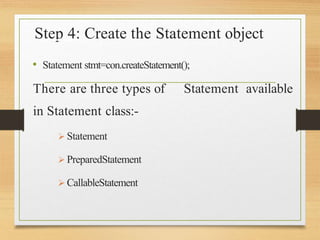
Step 4: Create the Statement object
• Statement stmt=con.createStatement();
There are three types of Statement available
in Statement class:-
 Statement
 PreparedStatement
 CallableStatement
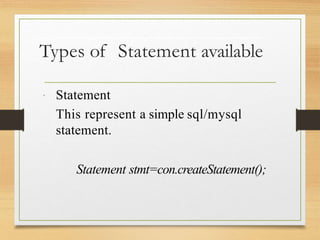
Types of Statement available
 Statement
This represent a simple sql/mysql
statement.
Statement stmt=con.createStatement();
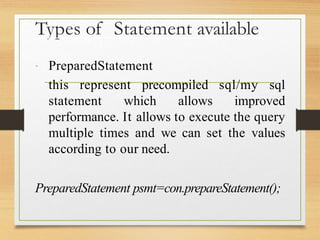
Types of Statement available
 PreparedStatement
this represent precompiled sql/my sql
statement which allows improved
performance. It allows to execute the query
multiple times and we can set the values
according to our need.
PreparedStatement psmt=con.prepareStatement();
Types of Statement available
 CallableStatement
This allows the access of stored procedures;
that are stored on the database.
CallableStatement csmt=con.prepareCall();
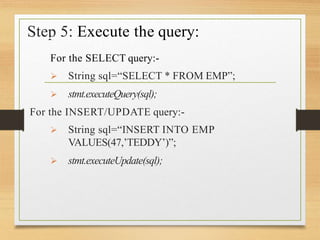
Step 5: Execute the query:
For the SELECT query:-
 String sql=“SELECT * FROM EMP”;
 stmt.executeQuery(sql);
For the INSERT/UPDATE query:-
 String sql=“INSERT INTO EMP
VALUES(47,’TEDDY’)”;
 stmt.executeUpdate(sql);
Step 6: Process the result:
ResultSet rs=stmt.executeQuery(sql); while(rs.next()){
•System.out.println(rs.getInt(id));
System.out.print(rs.getString(name));
}
Step 7:Close the connection
release all the resources that the connection
is holding.
stmt.close();
con.close();
Cont….
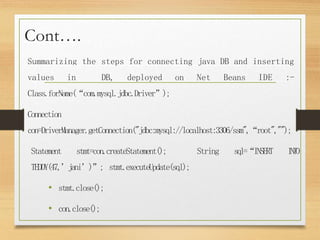
Summarizing the steps for connecting java DB and inserting
values in DB, deployed on Net Beans IDE :-
Class.forName(“com.mysql.jdbc.Driver”);
Connection
con=DriverManager.getConnection("jdbc:mysql://localhost:3306/ssm",“root","");
Statement stmt=con.createStatement(); String sql=“INSERT I
N
T
O
TEDDY(47,’jani’)”; stmt.executeUpdate(sql);
• stmt.close();
• con.close();
Thank You !!!
Question ?

chapter 5 java.pptx

  • 1.
    Chapter Five JDBC By:- Aragaw Wand Sadiki A. Email :- amanwassie4272@gmail.com
  • 2.
    Discussions  What JDBC? Architecture of JDBC.  Steps to connect to DB.  Types of JDBC driver available.  Types of Statement.  JDBC Data Source.
  • 3.
    What is JDBC?  JDBC acronym of java Database connectivity; though Sun Microsystems claims that it is not the fullform.  JDBC is a standard java API for independent database connection between a java program and wide range of relational database.  It is present in the “java.sql”package  It Simplifies the creation and execution of SQL statements. java.sql.DriverManager - Manages the loading and unloading of database drivers from the underlying system.
  • 4.
    Cont.… • java.sql.Connection -Handles the connection to a specific database. • java.sql.Statement - Contains an SQL statement to be passed to the database. • java.sql.ResultSet - Contains the record result set from the SQL statement passed to the database. • To connect to a database and access its contents, JDBC driver that works with that particular database is required.
  • 5.
    What is API •API (Application programming interface) is a document that contains description of all the features of a product or software. It represents classes and interfaces that software programs can follow to communicate with each other. An API can be created for applications, libraries, operating systems, etc
  • 6.
  • 7.
    Steps to connectJDBC? 1. Load the JDBC driver 2. Define the connection URL. 3. Established the connection. 4. Create the Statement object. 5. Execute a query. 6. Process the results. 7. Close the connection.
  • 8.
    Step 1. loadJDBC drivers  JDBC drivers implement the defined interfaces in the JDBC API for interacting with your database server. For example, using JDBC drivers enable you to open database connections and to interact with it by sending SQL or database commands then receiving results with Java. Once you obtain a JDBC driver you should only have to worry about registering it using DriverManager objects and creating the proper JDBC URL in order to use it. 8
  • 9.
    Types of JDBCdriver  JDBC driver implementations vary because of the wide variety of operating systems and hardware platforms in which Java operates.  JDBC Driver is a software component that enables java application to interact with the database. There are 4 types of JDBC drivers:  Type 1: jdbc-odbc bridge driver  Type 2: native API partly java driver.  Type 3: net protocols all java driver.  Type 4: native protocols all java driver. 9
  • 10.
    Cont....  Types 1and 2 rely heavily on additional software (typically C/C++ DLLs) installed on the client computer to provide database connectivity. Java and JDBC use these components to interact with the database.  Types 3 and 4 are pure Java implementations and require no additional software to be installed on the client, except for the JDBC driver. Fortunately, packaging the JDBC driver with your software distribution is trivial.
  • 11.
  • 12.
    Some Popular JDBCDrivers RDBMS JDBC Driver Name MySQL Driver Name com.mysql.jdbc.Driver Database URL format: jdbc:mysql//hostname/databaseName Oracle Driver Name: oracle.jdbc.driver.OracleDriver Database URL format: jdbc:oracle:thin@hostname:portnumber:databaseName JavaDB Driver Name: org.apache.derby.jdbc.ClientDriver Database URL format: jdbc:derby://localhost:1527/databaseName Access Driver Name: sun.jdbc.odbc.JdbcOdbcDriver Database URL format: jdbc:odbc:databaseName
  • 13.
    Step 2:Define theconnection url : Using Class.forName() classdefinitiontechnique,wecandefine differentJDBCdriver  For jdbc-odbc bridge driver:- • Class.forName(“sun.jdbc.odbc.JdbcOdbcDriver”);  For oracle driver:- • Class.forName(“oracle.jdbc.driver.OracleDriver”);  For My sql driver:- • Class.forName(“com.mysql.jdbc.Driver”);
  • 14.
    Step 3:Established theconnection: Connectioncon=DriverManager .getConnection(“url”,”user_name”,”pass”); Example try { Class.forName("com.mysql.jdbc.Driver"); Connection conn = DriverManager.getConnection("jdbc:mysql://localhost:3306/itstud","root",""); return conn; } catch (ClassNotFoundException | SQLException e) { JOptionPane.showMessageDialog(null, "DB Connection failed"); return null;}
  • 15.
    Step 4: Createthe Statement object • Statement stmt=con.createStatement(); There are three types of Statement available in Statement class:-  Statement  PreparedStatement  CallableStatement
  • 16.
    Types of Statementavailable  Statement This represent a simple sql/mysql statement. Statement stmt=con.createStatement();
  • 17.
    Types of Statementavailable  PreparedStatement this represent precompiled sql/my sql statement which allows improved performance. It allows to execute the query multiple times and we can set the values according to our need. PreparedStatement psmt=con.prepareStatement();
  • 18.
    Types of Statementavailable  CallableStatement This allows the access of stored procedures; that are stored on the database. CallableStatement csmt=con.prepareCall();
  • 19.
    Step 5: Executethe query: For the SELECT query:-  String sql=“SELECT * FROM EMP”;  stmt.executeQuery(sql); For the INSERT/UPDATE query:-  String sql=“INSERT INTO EMP VALUES(47,’TEDDY’)”;  stmt.executeUpdate(sql);
  • 20.
    Step 6: Processthe result: ResultSet rs=stmt.executeQuery(sql); while(rs.next()){ •System.out.println(rs.getInt(id)); System.out.print(rs.getString(name)); }
  • 21.
    Step 7:Close theconnection release all the resources that the connection is holding. stmt.close(); con.close();
  • 22.
    Cont…. Summarizing the stepsfor connecting java DB and inserting values in DB, deployed on Net Beans IDE :- Class.forName(“com.mysql.jdbc.Driver”); Connection con=DriverManager.getConnection("jdbc:mysql://localhost:3306/ssm",“root",""); Statement stmt=con.createStatement(); String sql=“INSERT I N T O TEDDY(47,’jani’)”; stmt.executeUpdate(sql); • stmt.close(); • con.close();
  • 23.