© Copyright SELA Software & Education Labs Ltd. | 14-18 Baruch Hirsch St Bnei Brak, 51202 Israel | www.selagroup.com
SELA DEVELOPER PRACTICE
JUNE 19-23, 2016
Nir Noy
Consultant, Web, Sela
@noynir
Bringing Javascript to the Desktop with Electron
Why Desktop?
Offline
Local hardware
(printers, devices etc…)
Security
On-premise
App store
Local Access
Kiosk
It Just ”Feels Right”
Desktop Apps
Development Tools
Tasks
Media players
Email client
Calendar
Time management
Mapping
Social media clients
File management
Backup
Audio and Video Conferencing
Gaming
What is Electron
A framework for building cross
platform Desktop Applications
using web technologies
What is Electron
Created by GitHub as the shell
for the Atom text editor.
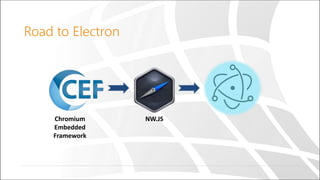
Road to Electron
Chromium
Embedded
Framework
NW.JS
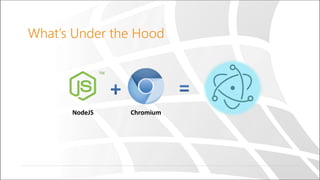
What’s Under the Hood
NodeJS Chromium
Cool Stuff
Web Technologies – No Native Skills needed
Javascript, HTML, CSS only.
One Browser
Chrome compatible only
Latest Features – ES 2015 & Chrome goodies.
Built-In NodeJS
All Node Capabilities - File system, networking etc..
npm ecosystem
Cross platform
Packaging for Windows, OS X, Linux
Native UX
Native Dialogs, Menus, Notifications etc…
Uncool Stuff
Web Technologies
Seriously it’s Javascript, HTML and CSS all the way.
Native Modules
Native Modules are written in C/C++ .
Debugging
Certain parts of the application are hard to debug.
Tooling
Some of the tooling is immature.
How Does it Work?
A Tale Of Two processes
Main
Application lifecycle
Browser window ipc
Node.js menu dialog
Renderer
Web page
ipc webFrame
Node.js
DOM remote
Creates
A Tale Of Two processes
Main
Application lifecycle
Browser window ipc
Node.js menu dialog
Renderer
Web page
ipc webFrame
Node.js
DOM remote
Creates
A Tale Of Two processes
Main
Application lifecycle
Renderer
Web page
Renderer
Web page
Renderer
Background Worker
Getting Started
Hello Electron App
Getting Started
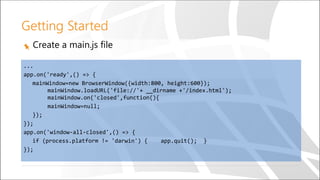
Create a main.js file
...
app.on('ready',() => {
mainWindow=new BrowserWindow({width:800, height:600});
mainWindow.loadURL('file://'+ __dirname +'/index.html');
mainWindow.on('closed',function(){
mainWindow=null;
});
});
app.on('window-all-closed',() => {
if (process.platform != 'darwin') { app.quit(); }
});
Getting Started
Create an index.html file
...
<body>
<h1>Hello Electron!</h1>
We are using node
<script>
var dv=document.createElement('div');
dv.innerHTML=`We are using node ${process.versions.node}
<br/>Chrome ${process.versions.chrome}<br/>
Electron ${process.versions.electron}`;
document.body.appendChild(dv);
</script>
</body>
...
Project Setup
Create a Package.json file
{
"name" : "your-app",
"version" : "0.1.0",
"main" : "main.js"
}
Running Your App
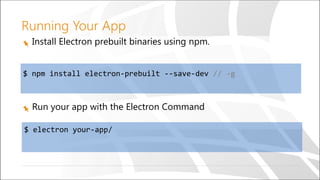
Install Electron prebuilt binaries using npm.
$ npm install electron-prebuilt --save-dev // -g
Run your app with the Electron Command
$ electron your-app/
Demo
Hello Electron
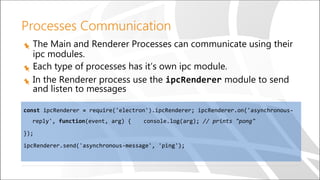
Processes Communication
The Main and Renderer Processes can communicate using their
ipc modules.
Each type of processes has it’s own ipc module.
In the Renderer process use the ipcRenderer module to send
and listen to messages
const ipcRenderer = require('electron').ipcRenderer; ipcRenderer.on('asynchronous-
reply', function(event, arg) { console.log(arg); // prints "pong"
});
ipcRenderer.send('asynchronous-message', 'ping');
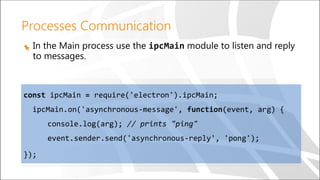
Processes Communication
In the Main process use the ipcMain module to listen and reply
to messages.
const ipcMain = require('electron').ipcMain;
ipcMain.on('asynchronous-message', function(event, arg) {
console.log(arg); // prints "ping"
event.sender.send('asynchronous-reply', 'pong');
});
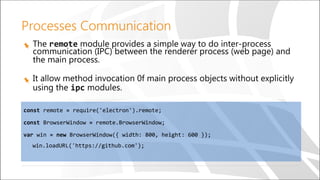
Processes Communication
The remote module provides a simple way to do inter-process
communication (IPC) between the renderer process (web page) and
the main process.
It allow method invocation 0f main process objects without explicitly
using the ipc modules.
const remote = require('electron').remote;
const BrowserWindow = remote.BrowserWindow;
var win = new BrowserWindow({ width: 800, height: 600 });
win.loadURL('https://github.com');
Demo
Advanced Demo
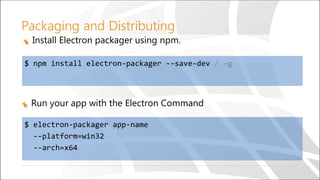
Packaging and Distributing
Install Electron packager using npm.
$ npm install electron-packager --save-dev / -g
Run your app with the Electron Command
$ electron-packager app-name
--platform=win32
--arch=x64
Built With Electron
Visual Studio Code
Atom
SlackWhat’s App
Electron Tools
Electron API Demos app
Electron App for interactively exploring the Electron API.
Devtron
Electron Extension for Chrome’s Devtools.
Allow inspection and monitoring of your app.
Spectron
Framework for writing integrations tests.
Built on top of ChromeDriver and WebDriverIO.
Community Electron Tools & Resources
electron-builder - Create installers.
electron-boilerplate
generator-electron - yeoman generator
Awesome electron
https://github.com/sindresorhus/awesome-electron
Questions
Thank you
Nir Noy | @noynir | nirn@sela.co.il
https://github.com/noynir/ElectronExamples

Bringing Javascript to the Desktop with Electron

  • 1.
    © Copyright SELASoftware & Education Labs Ltd. | 14-18 Baruch Hirsch St Bnei Brak, 51202 Israel | www.selagroup.com SELA DEVELOPER PRACTICE JUNE 19-23, 2016 Nir Noy Consultant, Web, Sela @noynir Bringing Javascript to the Desktop with Electron
  • 2.
    Why Desktop? Offline Local hardware (printers,devices etc…) Security On-premise App store Local Access Kiosk It Just ”Feels Right”
  • 3.
    Desktop Apps Development Tools Tasks Mediaplayers Email client Calendar Time management Mapping Social media clients File management Backup Audio and Video Conferencing Gaming
  • 4.
    What is Electron Aframework for building cross platform Desktop Applications using web technologies
  • 5.
    What is Electron Createdby GitHub as the shell for the Atom text editor.
  • 6.
  • 7.
    What’s Under theHood NodeJS Chromium
  • 8.
    Cool Stuff Web Technologies– No Native Skills needed Javascript, HTML, CSS only. One Browser Chrome compatible only Latest Features – ES 2015 & Chrome goodies. Built-In NodeJS All Node Capabilities - File system, networking etc.. npm ecosystem Cross platform Packaging for Windows, OS X, Linux Native UX Native Dialogs, Menus, Notifications etc…
  • 9.
    Uncool Stuff Web Technologies Seriouslyit’s Javascript, HTML and CSS all the way. Native Modules Native Modules are written in C/C++ . Debugging Certain parts of the application are hard to debug. Tooling Some of the tooling is immature.
  • 10.
    How Does itWork? A Tale Of Two processes
  • 11.
    A Tale OfTwo processes Main Application lifecycle Browser window ipc Node.js menu dialog Renderer Web page ipc webFrame Node.js DOM remote Creates
  • 12.
    A Tale OfTwo processes Main Application lifecycle Browser window ipc Node.js menu dialog Renderer Web page ipc webFrame Node.js DOM remote Creates
  • 13.
    A Tale OfTwo processes Main Application lifecycle Renderer Web page Renderer Web page Renderer Background Worker
  • 14.
  • 15.
    Getting Started Create amain.js file ... app.on('ready',() => { mainWindow=new BrowserWindow({width:800, height:600}); mainWindow.loadURL('file://'+ __dirname +'/index.html'); mainWindow.on('closed',function(){ mainWindow=null; }); }); app.on('window-all-closed',() => { if (process.platform != 'darwin') { app.quit(); } });
  • 16.
    Getting Started Create anindex.html file ... <body> <h1>Hello Electron!</h1> We are using node <script> var dv=document.createElement('div'); dv.innerHTML=`We are using node ${process.versions.node} <br/>Chrome ${process.versions.chrome}<br/> Electron ${process.versions.electron}`; document.body.appendChild(dv); </script> </body> ...
  • 17.
    Project Setup Create aPackage.json file { "name" : "your-app", "version" : "0.1.0", "main" : "main.js" }
  • 18.
    Running Your App InstallElectron prebuilt binaries using npm. $ npm install electron-prebuilt --save-dev // -g Run your app with the Electron Command $ electron your-app/
  • 19.
  • 20.
    Processes Communication The Mainand Renderer Processes can communicate using their ipc modules. Each type of processes has it’s own ipc module. In the Renderer process use the ipcRenderer module to send and listen to messages const ipcRenderer = require('electron').ipcRenderer; ipcRenderer.on('asynchronous- reply', function(event, arg) { console.log(arg); // prints "pong" }); ipcRenderer.send('asynchronous-message', 'ping');
  • 21.
    Processes Communication In theMain process use the ipcMain module to listen and reply to messages. const ipcMain = require('electron').ipcMain; ipcMain.on('asynchronous-message', function(event, arg) { console.log(arg); // prints "ping" event.sender.send('asynchronous-reply', 'pong'); });
  • 22.
    Processes Communication The remotemodule provides a simple way to do inter-process communication (IPC) between the renderer process (web page) and the main process. It allow method invocation 0f main process objects without explicitly using the ipc modules. const remote = require('electron').remote; const BrowserWindow = remote.BrowserWindow; var win = new BrowserWindow({ width: 800, height: 600 }); win.loadURL('https://github.com');
  • 23.
  • 24.
    Packaging and Distributing InstallElectron packager using npm. $ npm install electron-packager --save-dev / -g Run your app with the Electron Command $ electron-packager app-name --platform=win32 --arch=x64
  • 25.
    Built With Electron VisualStudio Code Atom SlackWhat’s App
  • 26.
    Electron Tools Electron APIDemos app Electron App for interactively exploring the Electron API. Devtron Electron Extension for Chrome’s Devtools. Allow inspection and monitoring of your app. Spectron Framework for writing integrations tests. Built on top of ChromeDriver and WebDriverIO.
  • 27.
    Community Electron Tools& Resources electron-builder - Create installers. electron-boilerplate generator-electron - yeoman generator Awesome electron https://github.com/sindresorhus/awesome-electron
  • 28.
  • 29.
    Thank you Nir Noy| @noynir | nirn@sela.co.il https://github.com/noynir/ElectronExamples