Gradle Ex Machina
Andres Almiray
@aalmiray
The preceding is intended to outline our general product direction. It is intended for information purposes
only, and may not be incorporated into any contract. It is not a commitment to deliver any material, code,
or functionality, and should not be relied upon in making purchasing decisions. The development,
release, timing, and pricing of any features or functionality described for Oracle’s products may change
and remains at the sole discretion of Oracle Corporation.
Statements in this presentation relating to Oracle’s future plans, expectations, beliefs, intentions and
prospects are “forward-looking statements” and are subject to material risks and uncertainties. A detailed
discussion of these factors and other risks that affect our business is contained in Oracle’s Securities
and Exchange Commission (SEC) filings, including our most recent reports on Form 10-K and Form 10-
Q under the heading “Risk Factors.” These filings are available on the SEC’s website or on Oracle’s
website at http://www.oracle.com/investor. All information in this presentation is current as of September
2019 and Oracle undertakes no duty to update any statement in light of new information or future
events.
Safe Harbor
Copyright © 2019 Oracle and/or its affiliates.
pom.xml
• POM stands for Project Object Model.
• A POM file defines both how a project should be built and how
consumers may interact with the published artifacts.
• Maven delivers lots of features out of the box thanks to the
hierarchical nature of the POM.
• The Maven Super POM provides default configuration for
common plugins such as compiler, resources, surefire, etc.
• The strict nature of the structure found in the POM allows anyone
to understand the configuration.
build.gradle
• Gradle build files only specify how projects should be built.
• The definition for consumers is delivered through a generated
POM file.
• Gradle builds are highly customizable, resulting in a wider range
of build patterns.
Can we have a maven-like
structure on top of gradle?
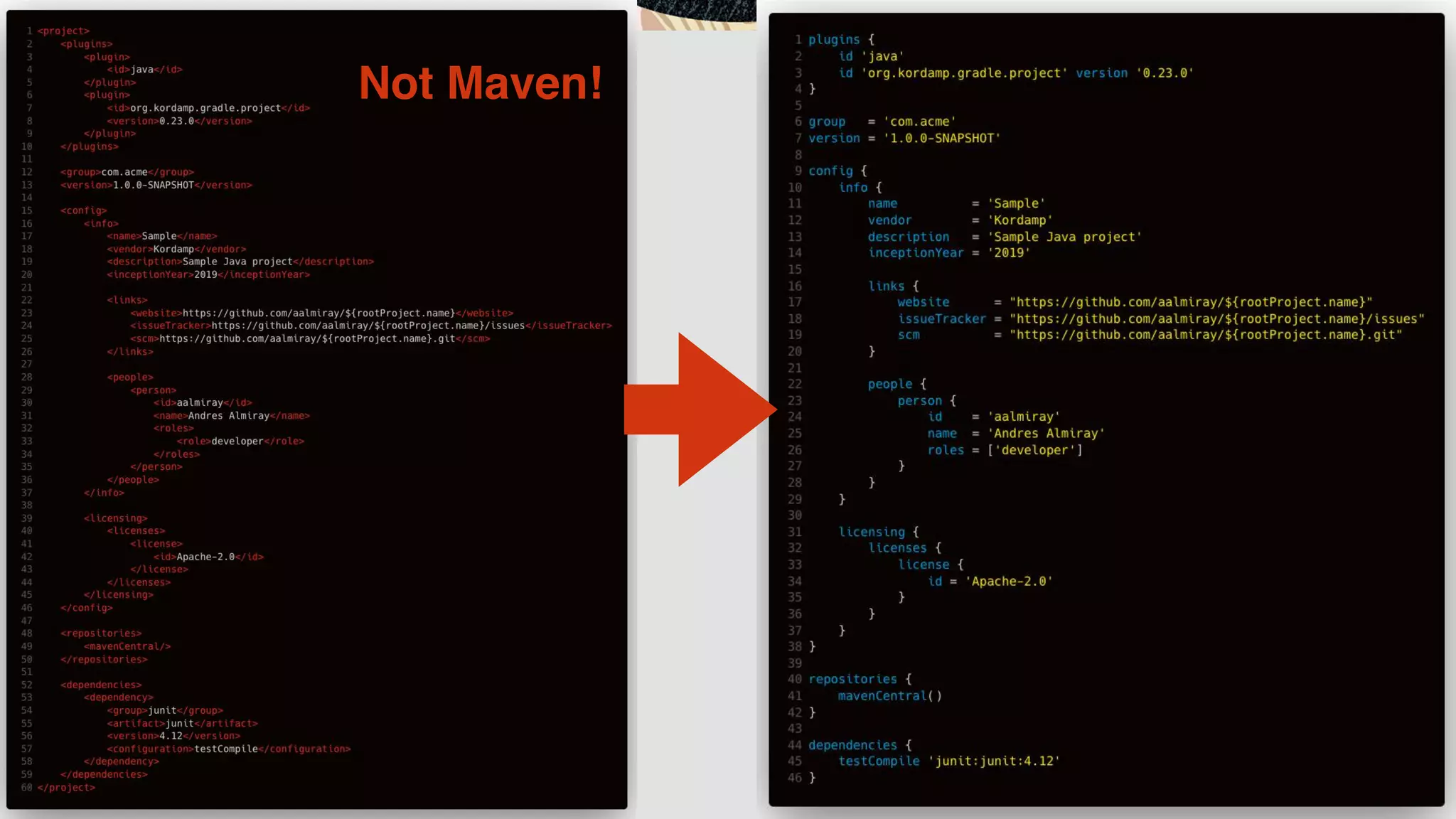
Not Maven!
http://github.com/aalmiray/kordamp-gradle-plugins
https://aalmiray.github.io/kordamp-gradle-plugins
Project DSL
The project plugin
plugins {

id 'org.kordamp.gradle.project' version ‘0.29.0’
}


config {

release = (rootProject.findProperty('release') ?: false).toBoolean()


info {

name = 'Sample'

vendor = 'Acme'

description = 'Sample project'


links {

website = 'https://github.com/joecool/sample'

issueTracker = 'https://github.com/joecool/sample/issues'

scm = 'https://github.com/joecool/sample.git'

}


people {

person {

id = 'joecool'

name = 'Joe Cool'

roles = ['developer']

}

}

}
…
}
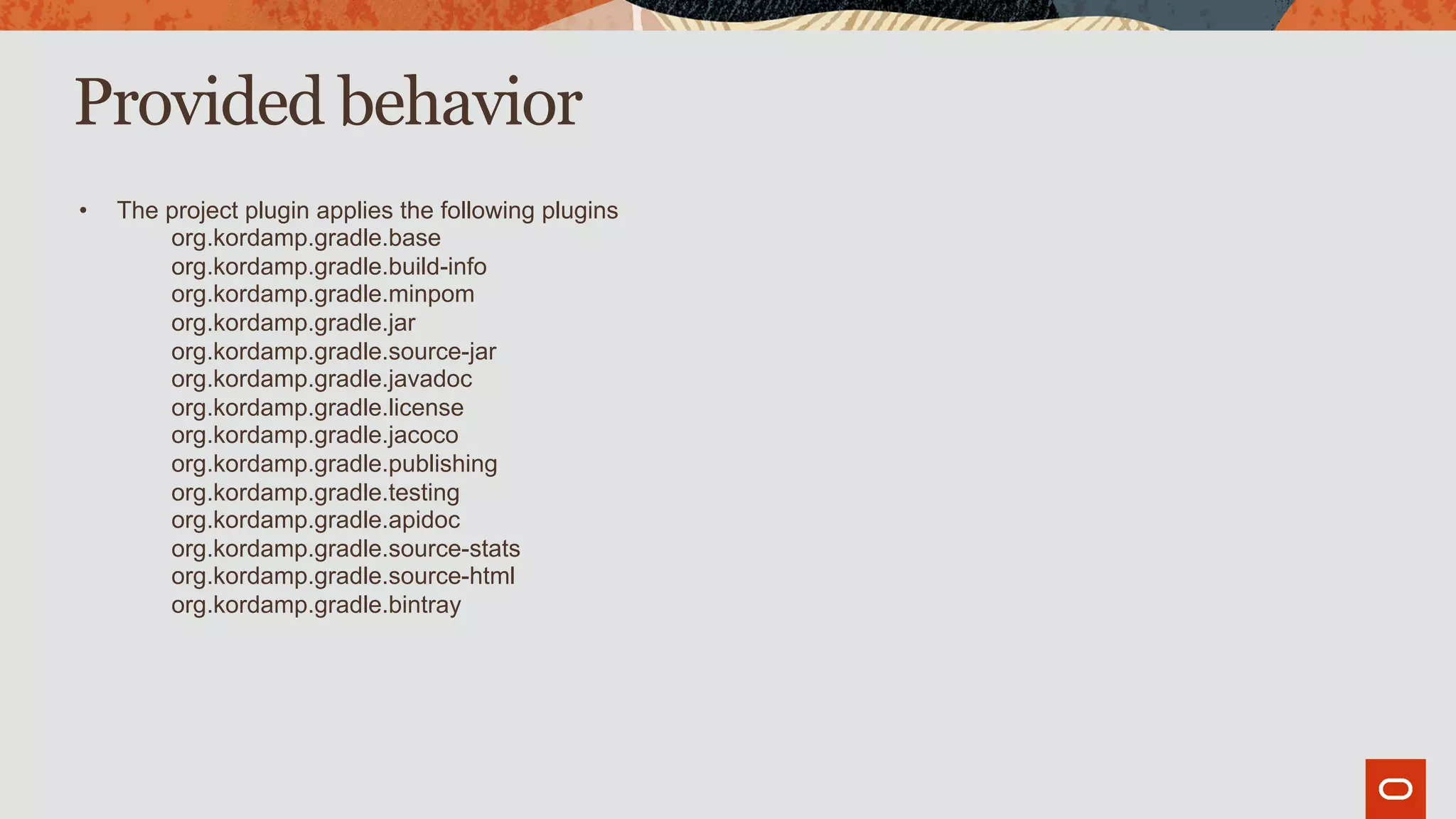
Provided behavior
• The project plugin applies the following plugins
org.kordamp.gradle.base
org.kordamp.gradle.build-info
org.kordamp.gradle.minpom
org.kordamp.gradle.jar
org.kordamp.gradle.source-jar
org.kordamp.gradle.javadoc
org.kordamp.gradle.license
org.kordamp.gradle.jacoco
org.kordamp.gradle.publishing
org.kordamp.gradle.testing
org.kordamp.gradle.apidoc
org.kordamp.gradle.source-stats
org.kordamp.gradle.source-html
org.kordamp.gradle.bintray
org.kordamp.gradle.base
Default tasks
• Gradle provides the following tasks
projects
dependencies
properties
tasks
Additional tasks
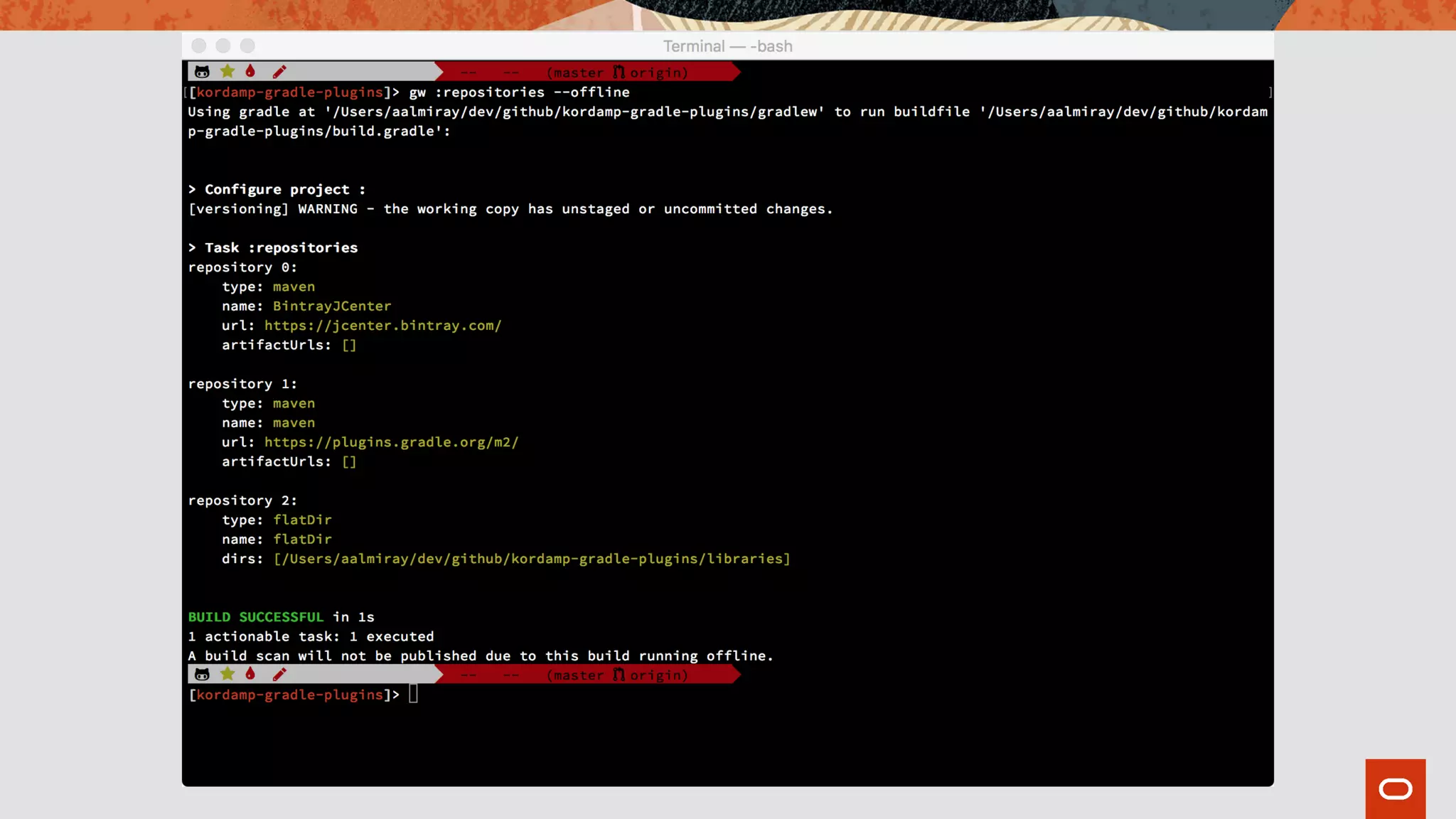
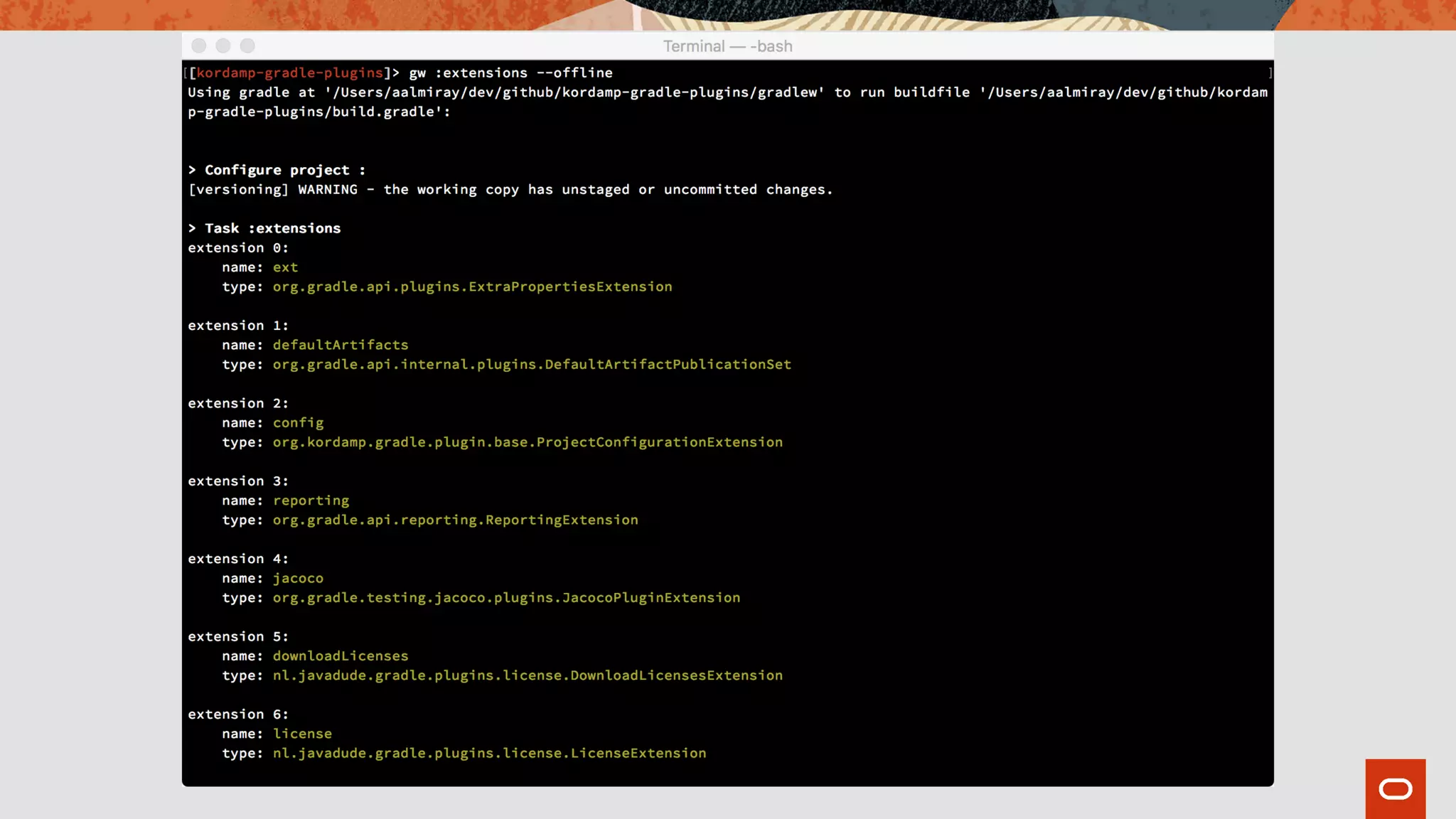
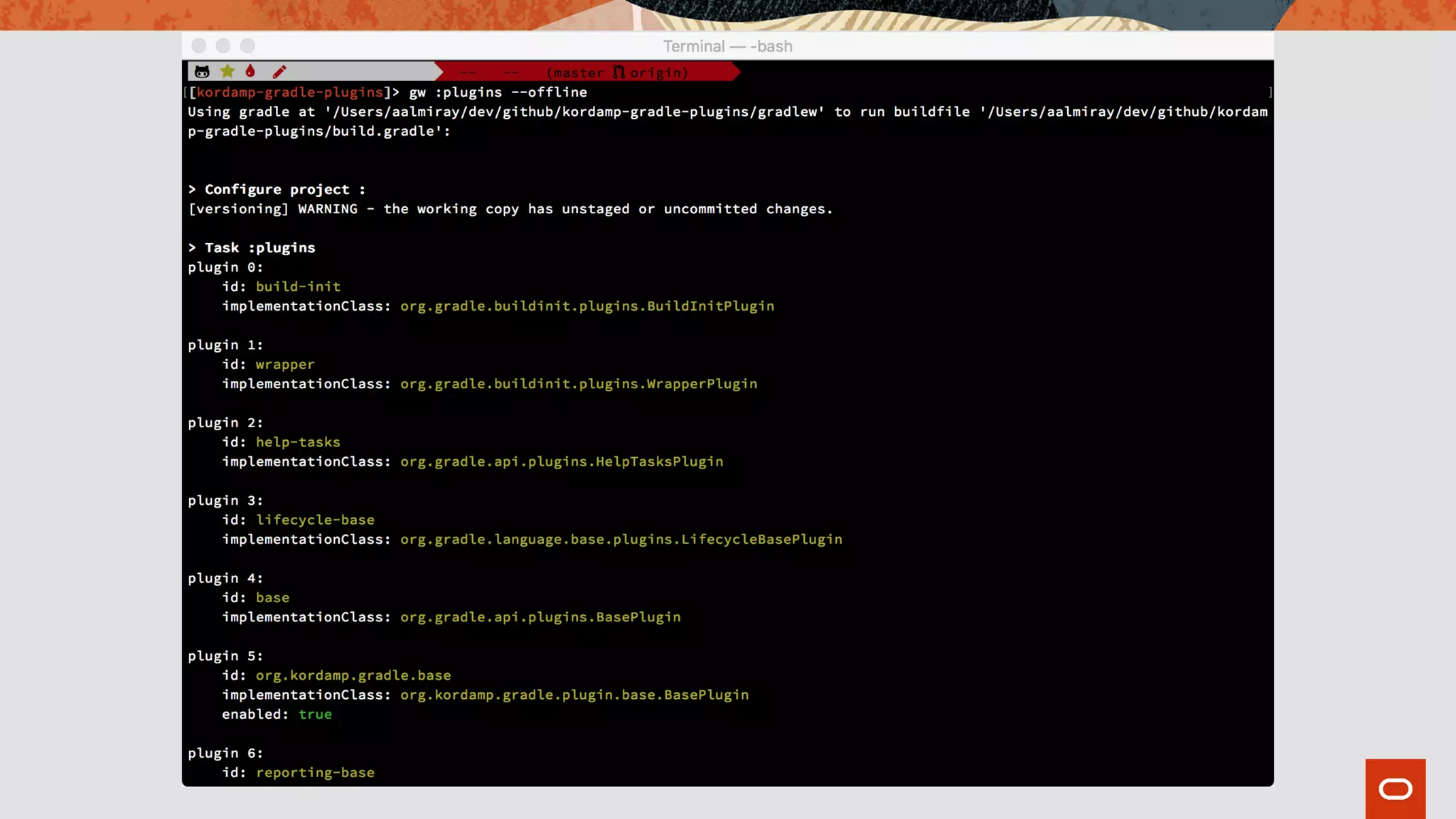
• The base plugin provides the following tasks
extensions
plugins
repositories
configurations
repositories
sourceSets
projectProperties
effectiveSettings
java/groovy/scala compileSettings
testSettings
publicationSettings
Demo
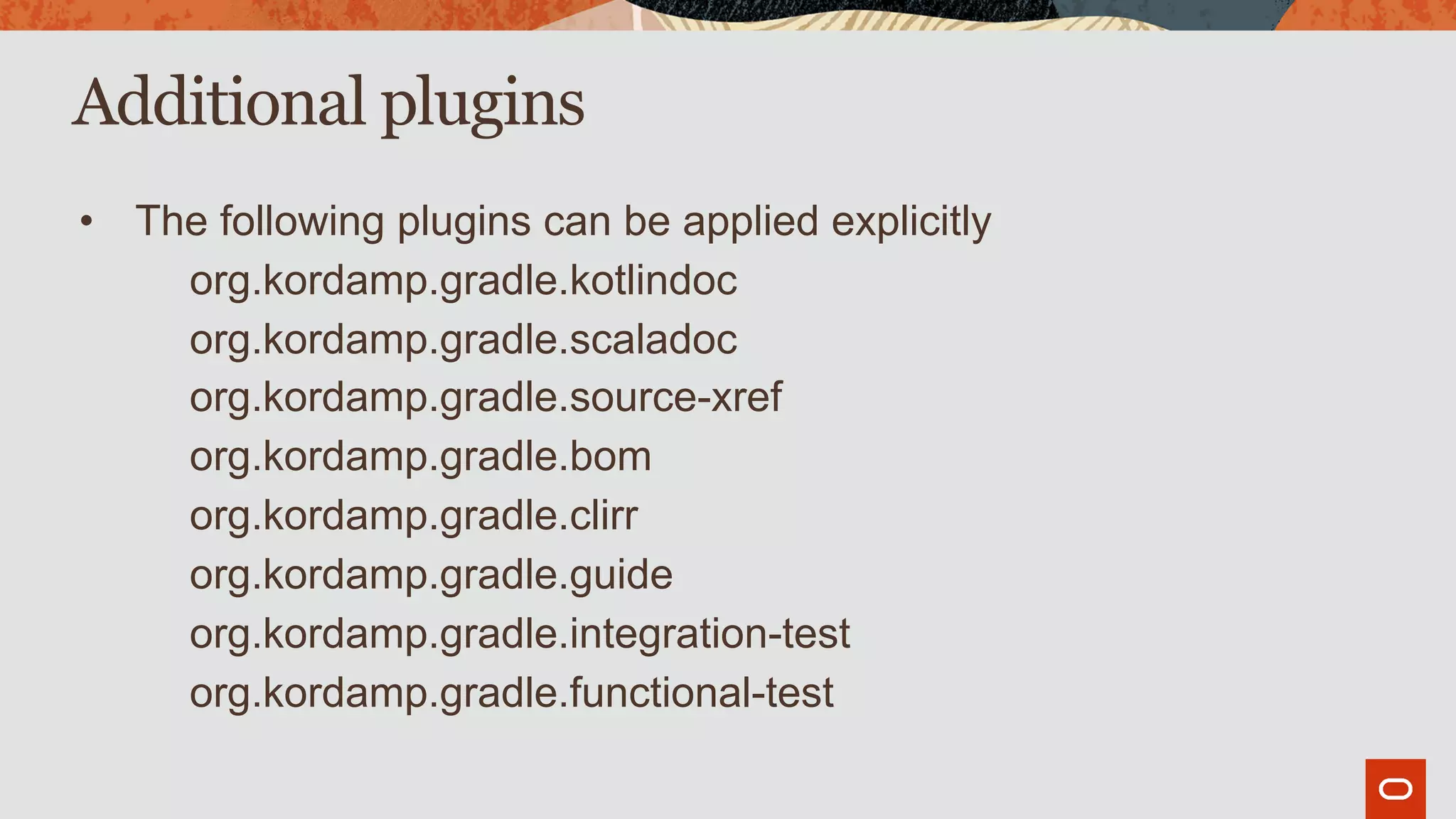
Additional plugins
• The following plugins can be applied explicitly
org.kordamp.gradle.kotlindoc
org.kordamp.gradle.scaladoc
org.kordamp.gradle.source-xref
org.kordamp.gradle.bom
org.kordamp.gradle.clirr
org.kordamp.gradle.guide
org.kordamp.gradle.integration-test
org.kordamp.gradle.functional-test
Super POM
The Maven super POM
• POMs are hierarchical.
• The chain resolves all the way to the top where you find the
Maven Super POM.
• Super POM configures lots of default & useful behavior.
The Gradle super POM
• Gradle does not offer this behavior out of the box.
• But it can be “faked” using a custom plugin.
• The plugin applies the default behavior that consuming projects
require.
Gradle Super POM
demo
File structure
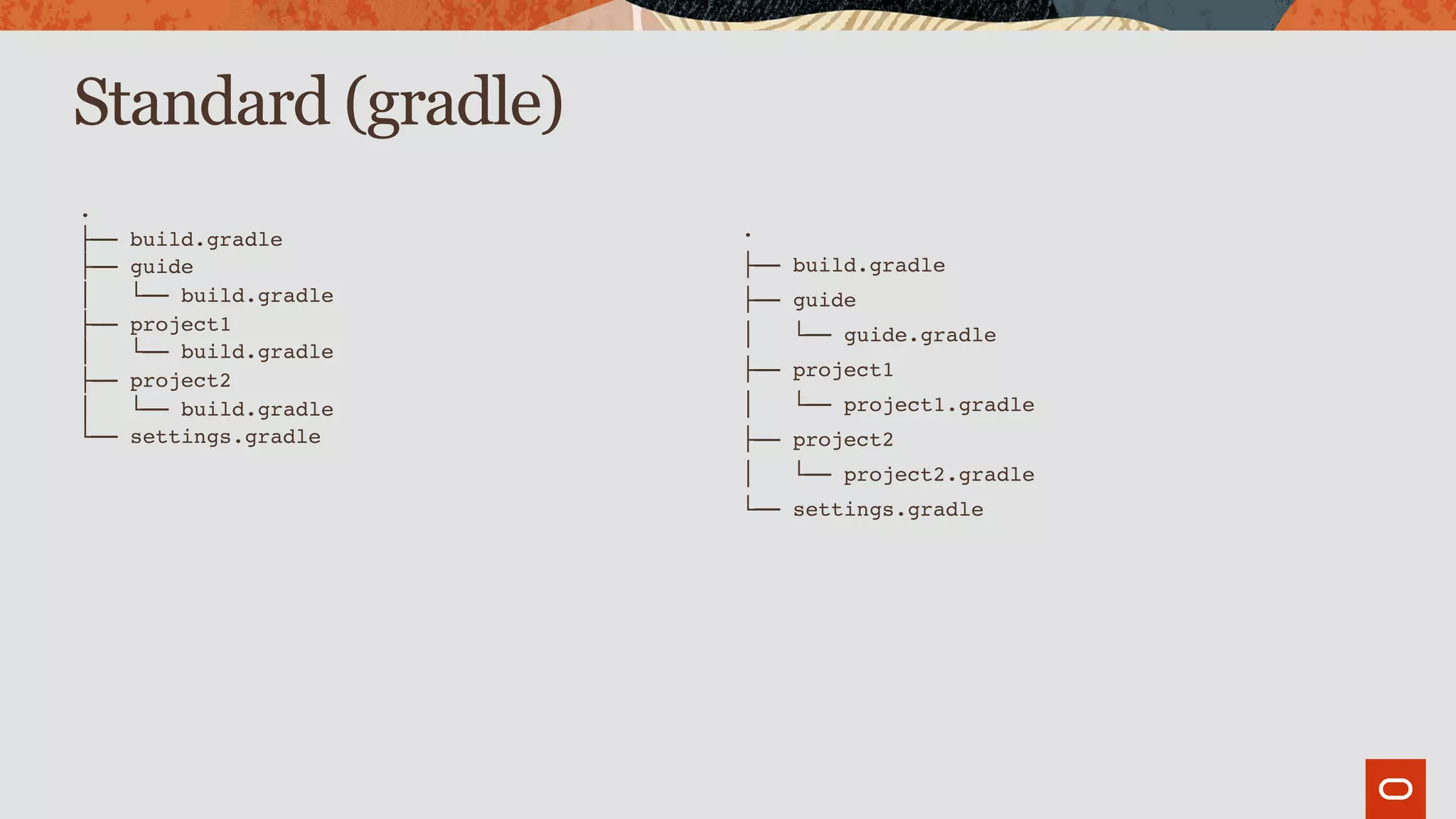
Standard (gradle)
.
├── build.gradle
├── guide
│   └── build.gradle
├── project1
│   └── build.gradle
├── project2
│   └── build.gradle
└── settings.gradle
.
├── build.gradle
├── guide
│   └── guide.gradle
├── project1
│   └── project1.gradle
├── project2
│   └── project2.gradle
└── settings.gradle
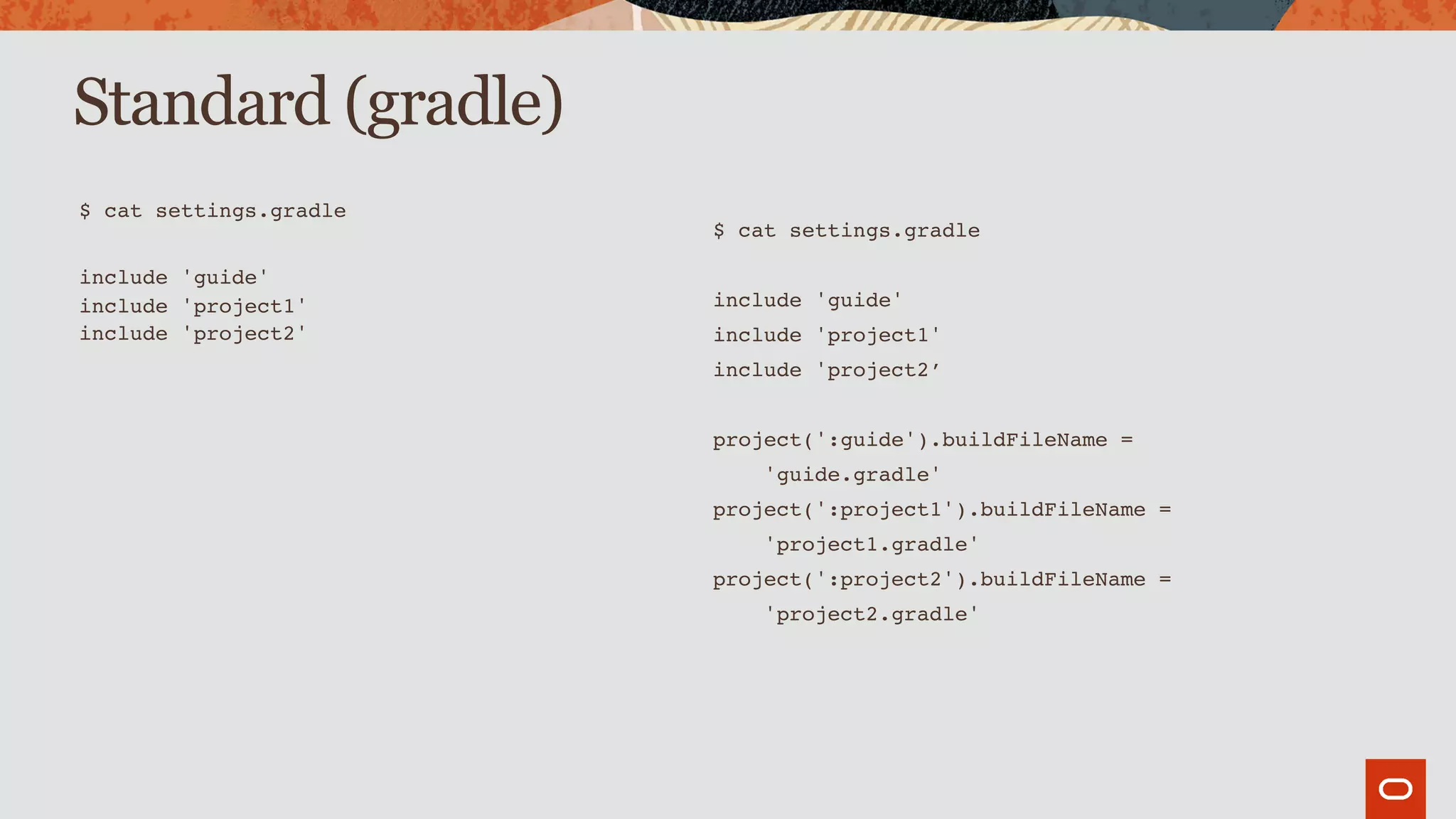
Standard (gradle)
$ cat settings.gradle
include 'guide'
include 'project1'
include 'project2'
$ cat settings.gradle
include 'guide'
include 'project1'
include 'project2’
project(':guide').buildFileName =
'guide.gradle'
project(':project1').buildFileName =
'project1.gradle'
project(':project2').buildFileName =
'project2.gradle'
Standard (gradle)
$ cat settings.gradle
buildscript {

repositories {

gradlePluginPortal()

}

dependencies {

classpath 'org.kordamp.gradle:settings-gradle-plugin:0.29.0

}

}


apply plugin: 'org.kordamp.gradle.settings'


projects {

layout = 'standard'

}
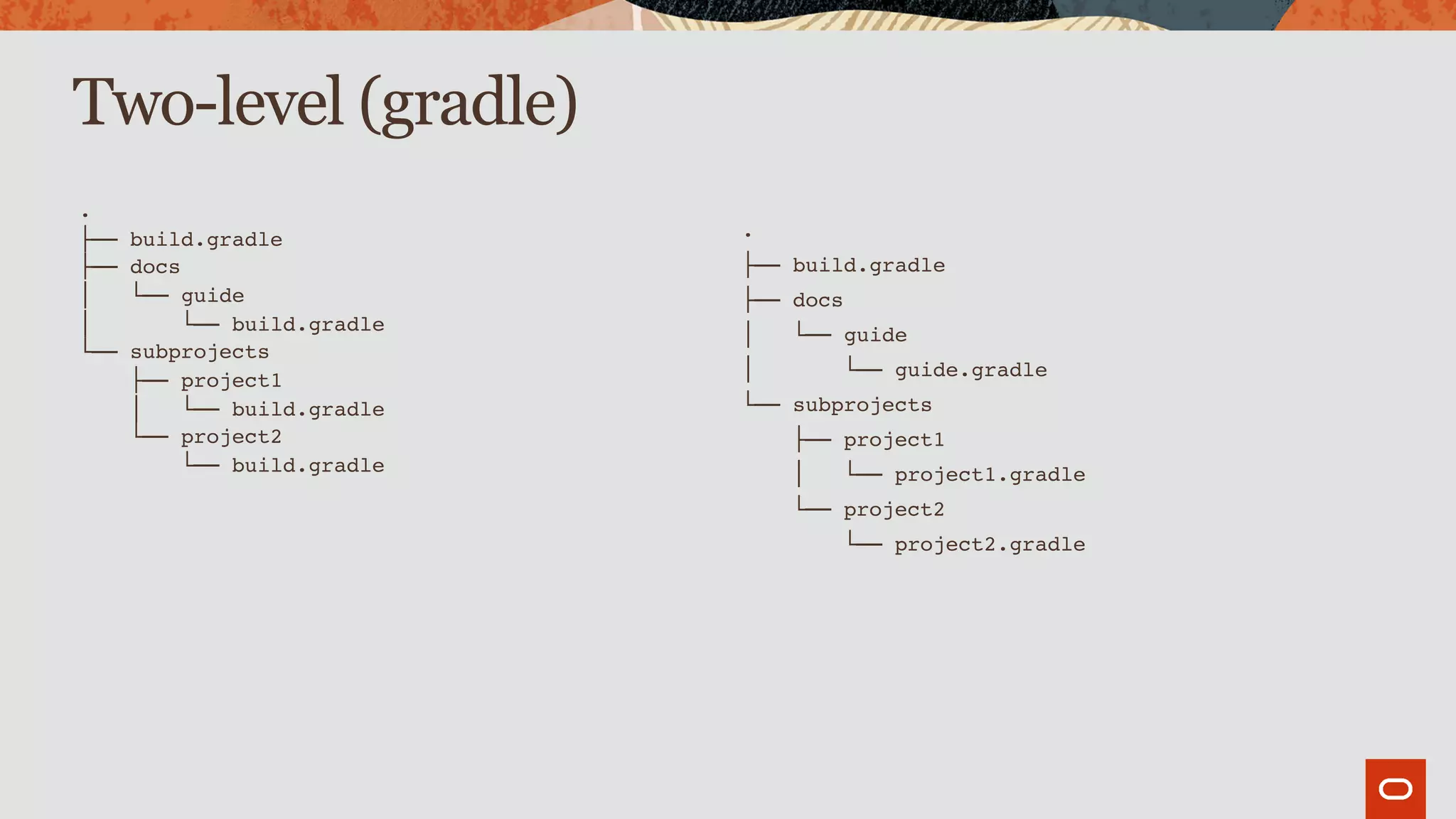
Two-level (gradle)
.
├── build.gradle
├── docs
│   └── guide
│       └── build.gradle
└── subprojects
    ├── project1
    │   └── build.gradle
    └── project2
        └── build.gradle
.
├── build.gradle
├── docs
│   └── guide
│       └── guide.gradle
└── subprojects
    ├── project1
    │   └── project1.gradle
    └── project2
        └── project2.gradle
Two-level (gradle)
$ cat settings.gradle
include 'guide'
include 'project1'
include 'project2'
project(':guide').projectDir = new File(“$settingsDir/docs/guide”)
project(':project1').projectDir = new File(“$settingsDir/subprojects/project1”)
project(':project2').projectDir = new File(“$settingsDir/subprojects/project2”)
// update names if required
project(':guide').buildFileName = 'guide.gradle'
project(':project1').buildFileName = 'project1.gradle'
project(':project2').buildFileName = 'project2.gradle'
Two-level (gradle)
$ cat settings.gradle
buildscript {

repositories {

gradlePluginPortal()

}

dependencies {

classpath 'org.kordamp.gradle:settings-gradle-plugin:0.29.0

}

}


apply plugin: 'org.kordamp.gradle.settings'


projects {

layout = 'two-level'
directories = ['docs', 'subprojects']

}
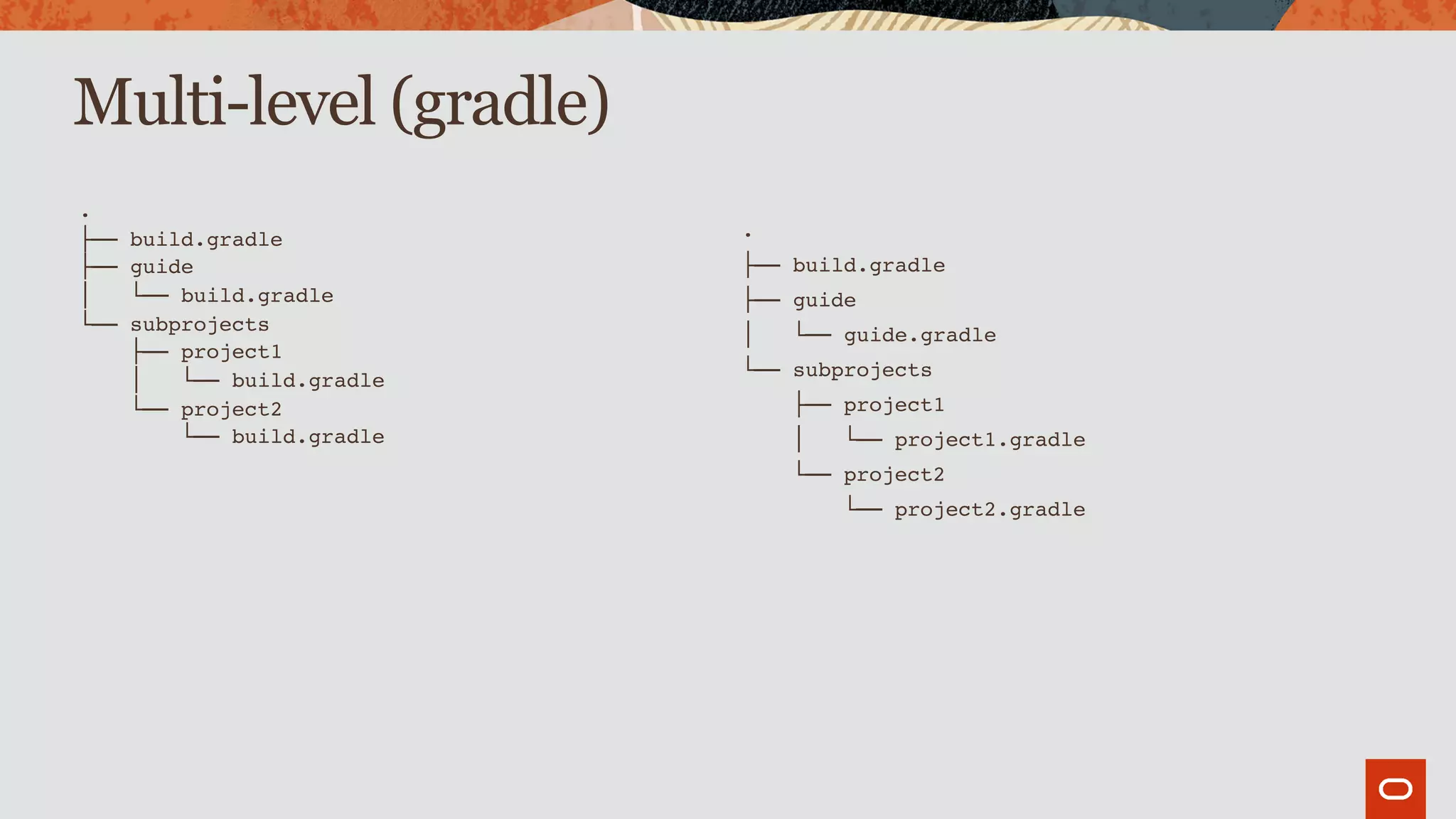
Multi-level (gradle)
.
├── build.gradle
├── guide
│   └── build.gradle
└── subprojects
    ├── project1
    │   └── build.gradle
    └── project2
        └── build.gradle
.
├── build.gradle
├── guide
│   └── guide.gradle
└── subprojects
    ├── project1
    │   └── project1.gradle
    └── project2
        └── project2.gradle
Multi-level (gradle)
$ cat settings.gradle
buildscript {

repositories {

gradlePluginPortal()

}

dependencies {

classpath 'org.kordamp.gradle:settings-gradle-plugin:0.29.0

}

}


apply plugin: 'org.kordamp.gradle.settings'


projects {

layout = 'multi-level'

directories = [

'guide',

'subprojects/project1',

'subprojects/project2'

]

}
http://andresalmiray.com/newsletter
http://andresalmiray.com/editorial
Thank you!
ANDRES ALMIRAY
@AALMIRAY
ANDRESALMIRAY.COM

Gradle Ex Machina - Devoxx 2019

  • 1.
    Gradle Ex Machina AndresAlmiray @aalmiray
  • 3.
    The preceding isintended to outline our general product direction. It is intended for information purposes only, and may not be incorporated into any contract. It is not a commitment to deliver any material, code, or functionality, and should not be relied upon in making purchasing decisions. The development, release, timing, and pricing of any features or functionality described for Oracle’s products may change and remains at the sole discretion of Oracle Corporation. Statements in this presentation relating to Oracle’s future plans, expectations, beliefs, intentions and prospects are “forward-looking statements” and are subject to material risks and uncertainties. A detailed discussion of these factors and other risks that affect our business is contained in Oracle’s Securities and Exchange Commission (SEC) filings, including our most recent reports on Form 10-K and Form 10- Q under the heading “Risk Factors.” These filings are available on the SEC’s website or on Oracle’s website at http://www.oracle.com/investor. All information in this presentation is current as of September 2019 and Oracle undertakes no duty to update any statement in light of new information or future events. Safe Harbor Copyright © 2019 Oracle and/or its affiliates.
  • 5.
    pom.xml • POM standsfor Project Object Model. • A POM file defines both how a project should be built and how consumers may interact with the published artifacts. • Maven delivers lots of features out of the box thanks to the hierarchical nature of the POM. • The Maven Super POM provides default configuration for common plugins such as compiler, resources, surefire, etc. • The strict nature of the structure found in the POM allows anyone to understand the configuration.
  • 7.
    build.gradle • Gradle buildfiles only specify how projects should be built. • The definition for consumers is delivered through a generated POM file. • Gradle builds are highly customizable, resulting in a wider range of build patterns.
  • 8.
    Can we havea maven-like structure on top of gradle?
  • 9.
  • 10.
  • 11.
  • 12.
    The project plugin plugins{
 id 'org.kordamp.gradle.project' version ‘0.29.0’ }
 
 config {
 release = (rootProject.findProperty('release') ?: false).toBoolean()
 
 info {
 name = 'Sample'
 vendor = 'Acme'
 description = 'Sample project'
 
 links {
 website = 'https://github.com/joecool/sample'
 issueTracker = 'https://github.com/joecool/sample/issues'
 scm = 'https://github.com/joecool/sample.git'
 }
 
 people {
 person {
 id = 'joecool'
 name = 'Joe Cool'
 roles = ['developer']
 }
 }
 } … }
  • 13.
    Provided behavior • Theproject plugin applies the following plugins org.kordamp.gradle.base org.kordamp.gradle.build-info org.kordamp.gradle.minpom org.kordamp.gradle.jar org.kordamp.gradle.source-jar org.kordamp.gradle.javadoc org.kordamp.gradle.license org.kordamp.gradle.jacoco org.kordamp.gradle.publishing org.kordamp.gradle.testing org.kordamp.gradle.apidoc org.kordamp.gradle.source-stats org.kordamp.gradle.source-html org.kordamp.gradle.bintray
  • 14.
  • 15.
    Default tasks • Gradleprovides the following tasks projects dependencies properties tasks
  • 16.
    Additional tasks • Thebase plugin provides the following tasks extensions plugins repositories configurations repositories sourceSets projectProperties effectiveSettings java/groovy/scala compileSettings testSettings publicationSettings
  • 17.
  • 21.
    Additional plugins • Thefollowing plugins can be applied explicitly org.kordamp.gradle.kotlindoc org.kordamp.gradle.scaladoc org.kordamp.gradle.source-xref org.kordamp.gradle.bom org.kordamp.gradle.clirr org.kordamp.gradle.guide org.kordamp.gradle.integration-test org.kordamp.gradle.functional-test
  • 22.
  • 23.
    The Maven superPOM • POMs are hierarchical. • The chain resolves all the way to the top where you find the Maven Super POM. • Super POM configures lots of default & useful behavior.
  • 24.
    The Gradle superPOM • Gradle does not offer this behavior out of the box. • But it can be “faked” using a custom plugin. • The plugin applies the default behavior that consuming projects require.
  • 25.
  • 26.
  • 27.
    Standard (gradle) . ├── build.gradle ├──guide │   └── build.gradle ├── project1 │   └── build.gradle ├── project2 │   └── build.gradle └── settings.gradle . ├── build.gradle ├── guide │   └── guide.gradle ├── project1 │   └── project1.gradle ├── project2 │   └── project2.gradle └── settings.gradle
  • 28.
    Standard (gradle) $ catsettings.gradle include 'guide' include 'project1' include 'project2' $ cat settings.gradle include 'guide' include 'project1' include 'project2’ project(':guide').buildFileName = 'guide.gradle' project(':project1').buildFileName = 'project1.gradle' project(':project2').buildFileName = 'project2.gradle'
  • 29.
    Standard (gradle) $ catsettings.gradle buildscript {
 repositories {
 gradlePluginPortal()
 }
 dependencies {
 classpath 'org.kordamp.gradle:settings-gradle-plugin:0.29.0
 }
 } 
 apply plugin: 'org.kordamp.gradle.settings'
 
 projects {
 layout = 'standard'
 }
  • 30.
    Two-level (gradle) . ├── build.gradle ├──docs │   └── guide │       └── build.gradle └── subprojects     ├── project1     │   └── build.gradle     └── project2         └── build.gradle . ├── build.gradle ├── docs │   └── guide │       └── guide.gradle └── subprojects     ├── project1     │   └── project1.gradle     └── project2         └── project2.gradle
  • 31.
    Two-level (gradle) $ catsettings.gradle include 'guide' include 'project1' include 'project2' project(':guide').projectDir = new File(“$settingsDir/docs/guide”) project(':project1').projectDir = new File(“$settingsDir/subprojects/project1”) project(':project2').projectDir = new File(“$settingsDir/subprojects/project2”) // update names if required project(':guide').buildFileName = 'guide.gradle' project(':project1').buildFileName = 'project1.gradle' project(':project2').buildFileName = 'project2.gradle'
  • 32.
    Two-level (gradle) $ catsettings.gradle buildscript {
 repositories {
 gradlePluginPortal()
 }
 dependencies {
 classpath 'org.kordamp.gradle:settings-gradle-plugin:0.29.0
 }
 } 
 apply plugin: 'org.kordamp.gradle.settings'
 
 projects {
 layout = 'two-level' directories = ['docs', 'subprojects']
 }
  • 33.
    Multi-level (gradle) . ├── build.gradle ├──guide │   └── build.gradle └── subprojects     ├── project1     │   └── build.gradle     └── project2         └── build.gradle . ├── build.gradle ├── guide │   └── guide.gradle └── subprojects     ├── project1     │   └── project1.gradle     └── project2         └── project2.gradle
  • 34.
    Multi-level (gradle) $ catsettings.gradle buildscript {
 repositories {
 gradlePluginPortal()
 }
 dependencies {
 classpath 'org.kordamp.gradle:settings-gradle-plugin:0.29.0
 }
 } 
 apply plugin: 'org.kordamp.gradle.settings'
 
 projects {
 layout = 'multi-level'
 directories = [
 'guide',
 'subprojects/project1',
 'subprojects/project2'
 ]
 }
  • 36.
  • 38.