Performance Tools for
Computer Vision Applications
@denkiwakame
1
2018/12/15 コンピュータビジョン勉強会 @関東
Performance Tools for CV - Agenda
● NVIDIA GPU Profiler
○ nvprof
○ nvvp
○ NVIDIA NSight systems
● Tensorflow / Keras
○ tf.timeline
● Others
○ perf, gperftools, ….
○ cProfile, yep, ...
2
_人人人人人人人人人人人人人人_
> GPUに絞ってお話しします <
 ̄Y^Y^Y^Y^Y^Y^Y^Y^Y^Y^Y^Y ̄
What is Profiling ?
WHY YOU NEED TO PROFILE YOUR APPLICATION ?
3
What is Profiling ?
● Application の Performance を計測すること
● Simple Profiling
○ 各部の処理時間を計測する
● Advanced Profiling
○ 何故その処理が遅いのか を分析する
4
timer 差し込みなど
専用のツールが必要
nvprofNVIDIA PROFILER
5
● Command-line profiler
○ /usr/local/cuda/bin/nvprof
● Usage
nvprof
6
$ nvprof [npprof-options] <app> [arguments]
==17126== Profiling result:
Type Time(%) Time Calls Avg Min Max Name
GPU activities: 28.09% 9.6689ms 32 302.15us 231.69us 544.94us maxwell_scudnn_winograd_128x128_ldg1_ldg4_tile148n_nt
8.13% 2.7997ms 34 82.344us 42.145us 121.09us maxwell_scudnn_128x128_relu_interior_nn
7.46% 2.5673ms 72 35.657us 4.6720us 569.87us normalize_kernel(int, float*, float*, float*, int, int, int)
7.01% 2.4122ms 104 23.194us 1.7600us 243.82us copy_kernel(int, float*, int, int, float*, int, int)
6.96% 2.3956ms 116 20.651us 1.1840us 242.98us activate_array_kernel(float*, int, ACTIVATION)
6.46% 2.2237ms 75 29.649us 3.0400us 301.03us add_bias_kernel(float*, float*, int, int, int)
6.24% 2.1489ms 72 29.846us 3.3600us 299.91us scale_bias_kernel(float*, float*, int, int)
5.98% 2.0587ms 184 11.188us 1.4080us 112.64us fill_kernel(int, float, float*, int)
5.87% 2.0187ms 3 672.90us 28.960us 1.8676ms [CUDA memcpy DtoH]
5.16% 1.7760ms 4 444.00us 414.16us 516.91us maxwell_scudnn_128x128_relu_small_nn
5.10% 1.7553ms 32 54.854us 7.2320us 163.24us void cudnn::winograd::generateWinogradTilesKernel<int=0, float,
float>(cudnn::winograd::GenerateWinogradTilesParams<float, float>)
4つのprofiling mode
● summary mode (default)
● trace mode
● event/metric summary mode
● event/metric trace mode
7
$ nvprof --print-gpu-trace --print-api-trace
$ nvprof --events <event-name> --metrics <metric-name>
$ nvprof --aggregate-mode off [event|metric]
$ nvprof <application>
GPUで発生する全てのアクティビティ
CUDA Runtime API + Driver API 呼出
● summary mode (default)
nvprof
==17126== Profiling result:
Type Time(%) Time Calls Avg Min Max Name
GPU activities: 28.09% 9.6689ms 32 302.15us 231.69us 544.94us maxwell_scudnn_winograd_128x128_ldg1_ldg4_tile148n_nt
8.13% 2.7997ms 34 82.344us 42.145us 121.09us maxwell_scudnn_128x128_relu_interior_nn
7.46% 2.5673ms 72 35.657us 4.6720us 569.87us normalize_kernel(int, float*, float*, float*, int, int, int)
7.01% 2.4122ms 104 23.194us 1.7600us 243.82us copy_kernel(int, float*, int, int, float*, int, int)
6.96% 2.3956ms 116 20.651us 1.1840us 242.98us activate_array_kernel(float*, int, ACTIVATION)
6.46% 2.2237ms 75 29.649us 3.0400us 301.03us add_bias_kernel(float*, float*, int, int, int)
6.24% 2.1489ms 72 29.846us 3.3600us 299.91us scale_bias_kernel(float*, float*, int, int)
5.98% 2.0587ms 184 11.188us 1.4080us 112.64us fill_kernel(int, float, float*, int)
5.87% 2.0187ms 3 672.90us 28.960us 1.8676ms [CUDA memcpy DtoH]
5.16% 1.7760ms 4 444.00us 414.16us 516.91us maxwell_scudnn_128x128_relu_small_nn
5.10% 1.7553ms 32 54.854us 7.2320us 163.24us void cudnn::winograd::generateWinogradTilesKernel<int=0, float,
float>(cudnn::winograd::GenerateWinogradTilesParams<float, float>)
4.00% 1.3780ms 23 59.912us 18.272us 250.79us shortcut_kernel(int, int, int, int, int, int, int, int, int, int, float*, int, int, int,
float, float, float*)
1.36% 467.82us 1 467.82us 467.82us 467.82us maxwell_scudnn_128x64_relu_small_nn
0.86% 296.90us 1 296.90us 296.90us 296.90us maxwell_scudnn_128x32_relu_small_nn
0.48% 165.99us 2 82.994us 82.882us 83.106us maxwell_scudnn_128x64_relu_interior_nn
0.39% 134.98us 1 134.98us 134.98us 134.98us maxwell_scudnn_128x32_relu_interior_nn
0.26% 89.508us 43 2.0810us 1.7280us 9.3440us
cudnn::maxwell::gemm::computeOffsetsKernel(cudnn::maxwell::gemm::ComputeOffsetsParams)
0.17% 58.018us 2 29.009us 19.809us 38.209us upsample_kernel(unsigned long, float*, int, int, int, int, int, int, float, float*)
API calls: 90.08% 285.51ms 798 357.78us 3.4690us 282.40ms cudaLaunch
9.68% 30.674ms 3 10.225ms 1.6737ms 24.491ms cudaMemcpy
0.11% 363.03us 3540 102ns 86ns 1.5170us cudaSetupArgument
8
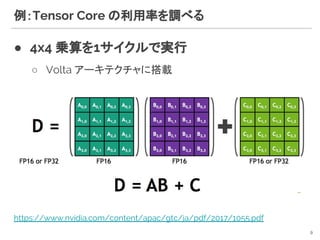
例:Tensor Core の利用率を調べる
● 4x4 乗算を1サイクルで実行
○ Volta アーキテクチャに搭載
9
https://www.nvidia.com/content/apac/gtc/ja/pdf/2017/1055.pdf
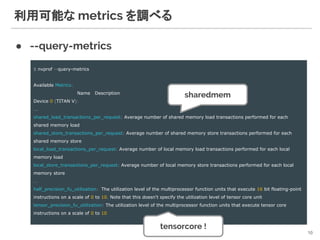
利用可能な metrics を調べる
● --query-metrics
10
$ nvprof --query-metrics
Available Metrics:
Name Description
Device 0 (TITAN V):
...
shared_load_transactions_per_request: Average number of shared memory load transactions performed for each
shared memory load
shared_store_transactions_per_request: Average number of shared memory store transactions performed for each
shared memory store
local_load_transactions_per_request: Average number of local memory load transactions performed for each local
memory load
local_store_transactions_per_request: Average number of local memory store transactions performed for each local
memory store
…
half_precision_fu_utilization: The utilization level of the multiprocessor function units that execute 16 bit floating-point
instructions on a scale of 0 to 10. Note that this doesn't specify the utilization level of tensor core unit
tensor_precision_fu_utilization: The utilization level of the multiprocessor function units that execute tensor core
instructions on a scale of 0 to 10
sharedmem
tensorcore !
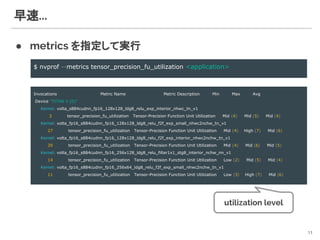
早速...
● metrics を指定して実行
11
$ nvprof --metrics tensor_precision_fu_utilization <application>
Invocations Metric Name Metric Description Min Max Avg
Device "TITAN V (0)"
Kernel: volta_s884cudnn_fp16_128x128_ldg8_relu_exp_interior_nhwc_tn_v1
3 tensor_precision_fu_utilization Tensor-Precision Function Unit Utilization Mid (4) Mid (5) Mid (4)
Kernel: volta_fp16_s884cudnn_fp16_128x128_ldg8_relu_f2f_exp_small_nhwc2nchw_tn_v1
27 tensor_precision_fu_utilization Tensor-Precision Function Unit Utilization Mid (4) High (7) Mid (6)
Kernel: volta_fp16_s884cudnn_fp16_128x128_ldg8_relu_f2f_exp_interior_nhwc2nchw_tn_v1
20 tensor_precision_fu_utilization Tensor-Precision Function Unit Utilization Mid (4) Mid (6) Mid (5)
Kernel: volta_fp16_s884cudnn_fp16_256x128_ldg8_relu_filter1x1_stg8_interior_nchw_nn_v1
14 tensor_precision_fu_utilization Tensor-Precision Function Unit Utilization Low (2) Mid (5) Mid (4)
Kernel: volta_fp16_s884cudnn_fp16_256x64_ldg8_relu_f2f_exp_small_nhwc2nchw_tn_v1
11 tensor_precision_fu_utilization Tensor-Precision Function Unit Utilization Low (3) High (7) Mid (6)
utilization level
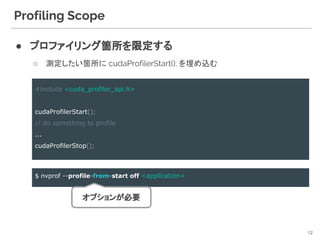
Profiling Scope
● プロファイリング箇所を限定する
○ 測定したい箇所に cudaProfilerStart(); を埋め込む
12
#include <cuda_profiler_api.h>
cudaProfilerStart();
// do something to profile
...
cudaProfilerStop();
$ nvprof --profile-from-start off <application>
オプションが必要
Python 越しに CUDA API を呼ぶ場合は?
● 普通に nvprof にかける
● ctypes を使うことも
13
$ nvprof [npprof-options] python ...
Python Script
import ctypes
_cudart = ctypes.CDLL('libcudart.so')
ret = _cudart.cudaProfilerStart()
# call cuda-based methods
ret = _cudart.cudaProfilerStop()
https://docs.python.jp/3/library/ctypes.html
xxxlib.cpython-35m-x86_64-linux-gnu.so
libcuda…...so
CUDA を使った Python 拡張ライブラリ
nvvpNVIDIA VISUAL PROFILER
14
nvvp : nvidia visual profiler
● GUI 版の Profiler
○ navigation に従ってぽちぽちすると使える
15
$ nvvp
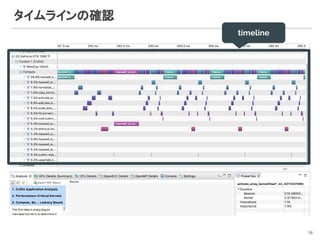
タイムラインの確認
16
timeline
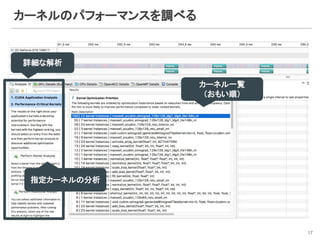
カーネルのパフォーマンスを調べる
17
詳細な解析
カーネル一覧
(おもい順)
指定カーネルの分析
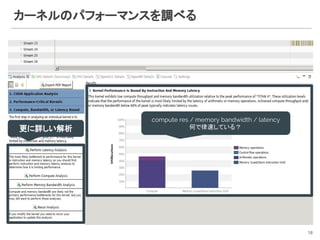
カーネルのパフォーマンスを調べる
18
compute res / memory bandwidth / latency
何で律速している?更に詳しい解析
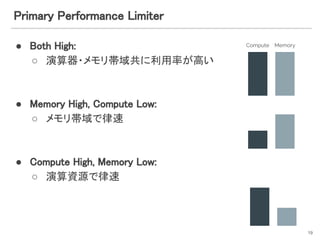
Primary Performance Limiter
● Both High:
○ 演算器・メモリ帯域共に利用率が高い
● Memory High, Compute Low:
○ メモリ帯域で律速
● Compute High, Memory Low:
○ 演算資源で律速
19
Compute Memory
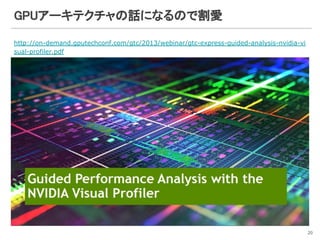
GPUアーキテクチャの話になるので割愛
http://on-demand.gputechconf.com/gtc/2013/webinar/gtc-express-guided-analysis-nvidia-vi
sual-profiler.pdf
20
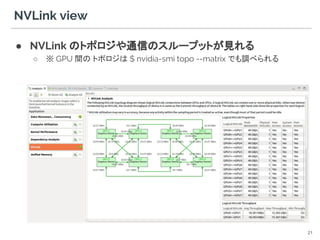
NVLink view
● NVLink のトポロジや通信のスループットが見れる
○ ※ GPU 間の トポロジは $ nvidia-smi topo --matrix でも調べられる
21
Remote Profiling
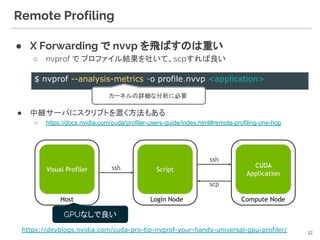
● X Forwarding で nvvp を飛ばすのは重い
○ nvprof で プロファイル結果を吐いて、scpすれば良い
● 中継サーバにスクリプトを置く方法もある
○ https://docs.nvidia.com/cuda/profiler-users-guide/index.html#remote-profiling-one-hop
22
$ nvprof --analysis-metrics -o profile.nvvp <application>
カーネルの詳細な分析に必要
https://devblogs.nvidia.com/cuda-pro-tip-nvprof-your-handy-universal-gpu-profiler/
GPUなしで良い
Remote Profiling
● しかし...
23
$ nvprof -o profile.nvvp <application>
Timeline ぐらいしか見えない
$ nvprof --analysis-metrics -o profile.nvvp <application>
Kernel を リプレイしまくる
不便...
--kernel で限定する … ?
ちょっと複雑なアプリケーションだと
無限に重い
Remote Profiling
● *.nvvp を dump して飛ばさなくても Remote から直接プロ
ファイリングできる
24
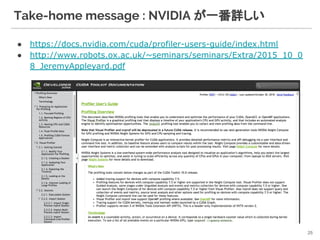
Take-home message : NVIDIA が一番詳しい
● https://docs.nvidia.com/cuda/profiler-users-guide/index.html
● http://www.robots.ox.ac.uk/~seminars/seminars/Extra/2015_10_0
8_JeremyAppleyard.pdf
25
> Note that Visual Profiler and nvprof will be
deprecated in a future CUDA release.
> It is recommended to use next-generation tools NVIDIA Nsight Compute for GPU profiling
> and NVIDIA Nsight Systems for GPU and CPU sampling and tracing.
26
NSight systems
NVIDIA NSight Systems for GPU and CPU sampling and Tracing
27
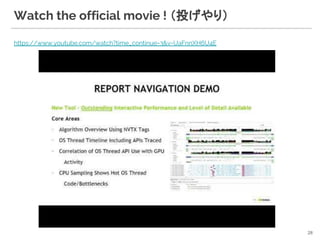
https://www.youtube.com/watch?time_continue=3&v=UaFnnXH6U4E
Watch the official movie ! (投げやり)
28
Question:
29
Question:
30
1. 普段の研究/開発で GPU を使っている
2. CUDA カーネルを書いたことがある
3. プロファイルをきちんと取っている
4. GPUアーキテクチャ完全に理解した
tf.timeline
tensorflow/Keras
31
Tensorflow timeline
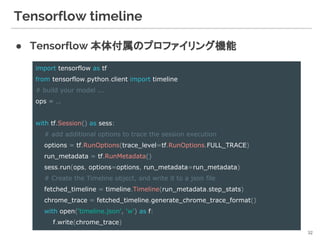
● Tensorflow 本体付属のプロファイリング機能
32
import tensorflow as tf
from tensorflow.python.client import timeline
# build your model ...
ops = …
with tf.Session() as sess:
# add additional options to trace the session execution
options = tf.RunOptions(trace_level=tf.RunOptions.FULL_TRACE)
run_metadata = tf.RunMetadata()
sess.run(ops, options=options, run_metadata=run_metadata)
# Create the Timeline object, and write it to a json file
fetched_timeline = timeline.Timeline(run_metadata.step_stats)
chrome_trace = fetched_timeline.generate_chrome_trace_format()
with open('timeline.json', 'w') as f:
f.write(chrome_trace)
tf.timeline from Keras
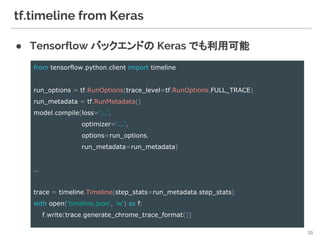
● Tensorflow バックエンドの Keras でも利用可能
33
from tensorflow.python.client import timeline
run_options = tf.RunOptions(trace_level=tf.RunOptions.FULL_TRACE)
run_metadata = tf.RunMetadata()
model.compile(loss='...',
optimizer='...',
options=run_options,
run_metadata=run_metadata)
…
trace = timeline.Timeline(step_stats=run_metadata.step_stats)
with open('timeline.json', 'w') as f:
f.write(trace.generate_chrome_trace_format())
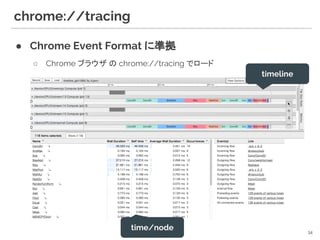
chrome://tracing
● Chrome Event Format に準拠
○ Chrome ブラウザ の chrome://tracing でロード
34
timeline
time/node
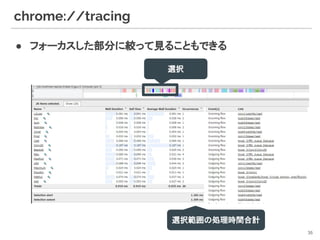
chrome://tracing
● フォーカスした部分に絞って見ることもできる
35
選択
選択範囲の処理時間合計
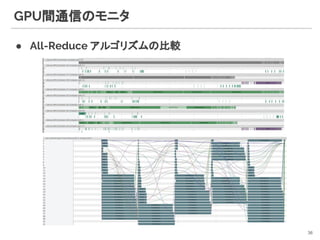
GPU間通信のモニタ
● All-Reduce アルゴリズムの比較
36
Catapult
● Chrome Performance tools*
○ https://github.com/catapult-project/catapult
○ Chrome / Go / Android で利用
○ Trace Event Format 詳細
■ https://docs.google.com/document/d/1CvAClvFfyA5R-PhYUmn5OOQtYMH4h6
I0nSsKchNAySU/preview
● Projects
○ Trace-viewer Javascript codebase that loads trace files and creates the UI
○ Telemetry
○ Performance Dashboard
○ Systrace
○ Web Page Replay
37
[*] https://docs.google.com/document/d/1QADiFe0ss7Ydq-LUNOPpIf6z4KXGuWs_ygxiJxoMZKo/edit
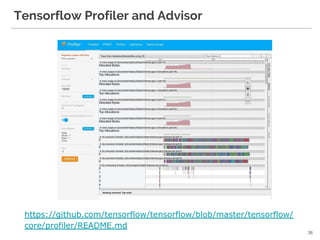
Tensorflow Profiler and Advisor
 
38
https://github.com/tensorflow/tensorflow/blob/master/tensorflow/
core/profiler/README.md
まとめ
● 多少浮いている気はするが ...
○ GPU のプロファイリングツールを簡単に紹介
○ ツールを使いこなし,世界最速を目指そう !!!
39

GPU profiling for computer vision applications

  • 1.
    Performance Tools for ComputerVision Applications @denkiwakame 1 2018/12/15 コンピュータビジョン勉強会 @関東
  • 2.
    Performance Tools forCV - Agenda ● NVIDIA GPU Profiler ○ nvprof ○ nvvp ○ NVIDIA NSight systems ● Tensorflow / Keras ○ tf.timeline ● Others ○ perf, gperftools, …. ○ cProfile, yep, ... 2 _人人人人人人人人人人人人人人_ > GPUに絞ってお話しします <  ̄Y^Y^Y^Y^Y^Y^Y^Y^Y^Y^Y^Y ̄
  • 3.
    What is Profiling? WHY YOU NEED TO PROFILE YOUR APPLICATION ? 3
  • 4.
    What is Profiling? ● Application の Performance を計測すること ● Simple Profiling ○ 各部の処理時間を計測する ● Advanced Profiling ○ 何故その処理が遅いのか を分析する 4 timer 差し込みなど 専用のツールが必要
  • 5.
  • 6.
    ● Command-line profiler ○/usr/local/cuda/bin/nvprof ● Usage nvprof 6 $ nvprof [npprof-options] <app> [arguments] ==17126== Profiling result: Type Time(%) Time Calls Avg Min Max Name GPU activities: 28.09% 9.6689ms 32 302.15us 231.69us 544.94us maxwell_scudnn_winograd_128x128_ldg1_ldg4_tile148n_nt 8.13% 2.7997ms 34 82.344us 42.145us 121.09us maxwell_scudnn_128x128_relu_interior_nn 7.46% 2.5673ms 72 35.657us 4.6720us 569.87us normalize_kernel(int, float*, float*, float*, int, int, int) 7.01% 2.4122ms 104 23.194us 1.7600us 243.82us copy_kernel(int, float*, int, int, float*, int, int) 6.96% 2.3956ms 116 20.651us 1.1840us 242.98us activate_array_kernel(float*, int, ACTIVATION) 6.46% 2.2237ms 75 29.649us 3.0400us 301.03us add_bias_kernel(float*, float*, int, int, int) 6.24% 2.1489ms 72 29.846us 3.3600us 299.91us scale_bias_kernel(float*, float*, int, int) 5.98% 2.0587ms 184 11.188us 1.4080us 112.64us fill_kernel(int, float, float*, int) 5.87% 2.0187ms 3 672.90us 28.960us 1.8676ms [CUDA memcpy DtoH] 5.16% 1.7760ms 4 444.00us 414.16us 516.91us maxwell_scudnn_128x128_relu_small_nn 5.10% 1.7553ms 32 54.854us 7.2320us 163.24us void cudnn::winograd::generateWinogradTilesKernel<int=0, float, float>(cudnn::winograd::GenerateWinogradTilesParams<float, float>)
  • 7.
    4つのprofiling mode ● summarymode (default) ● trace mode ● event/metric summary mode ● event/metric trace mode 7 $ nvprof --print-gpu-trace --print-api-trace $ nvprof --events <event-name> --metrics <metric-name> $ nvprof --aggregate-mode off [event|metric] $ nvprof <application> GPUで発生する全てのアクティビティ CUDA Runtime API + Driver API 呼出
  • 8.
    ● summary mode(default) nvprof ==17126== Profiling result: Type Time(%) Time Calls Avg Min Max Name GPU activities: 28.09% 9.6689ms 32 302.15us 231.69us 544.94us maxwell_scudnn_winograd_128x128_ldg1_ldg4_tile148n_nt 8.13% 2.7997ms 34 82.344us 42.145us 121.09us maxwell_scudnn_128x128_relu_interior_nn 7.46% 2.5673ms 72 35.657us 4.6720us 569.87us normalize_kernel(int, float*, float*, float*, int, int, int) 7.01% 2.4122ms 104 23.194us 1.7600us 243.82us copy_kernel(int, float*, int, int, float*, int, int) 6.96% 2.3956ms 116 20.651us 1.1840us 242.98us activate_array_kernel(float*, int, ACTIVATION) 6.46% 2.2237ms 75 29.649us 3.0400us 301.03us add_bias_kernel(float*, float*, int, int, int) 6.24% 2.1489ms 72 29.846us 3.3600us 299.91us scale_bias_kernel(float*, float*, int, int) 5.98% 2.0587ms 184 11.188us 1.4080us 112.64us fill_kernel(int, float, float*, int) 5.87% 2.0187ms 3 672.90us 28.960us 1.8676ms [CUDA memcpy DtoH] 5.16% 1.7760ms 4 444.00us 414.16us 516.91us maxwell_scudnn_128x128_relu_small_nn 5.10% 1.7553ms 32 54.854us 7.2320us 163.24us void cudnn::winograd::generateWinogradTilesKernel<int=0, float, float>(cudnn::winograd::GenerateWinogradTilesParams<float, float>) 4.00% 1.3780ms 23 59.912us 18.272us 250.79us shortcut_kernel(int, int, int, int, int, int, int, int, int, int, float*, int, int, int, float, float, float*) 1.36% 467.82us 1 467.82us 467.82us 467.82us maxwell_scudnn_128x64_relu_small_nn 0.86% 296.90us 1 296.90us 296.90us 296.90us maxwell_scudnn_128x32_relu_small_nn 0.48% 165.99us 2 82.994us 82.882us 83.106us maxwell_scudnn_128x64_relu_interior_nn 0.39% 134.98us 1 134.98us 134.98us 134.98us maxwell_scudnn_128x32_relu_interior_nn 0.26% 89.508us 43 2.0810us 1.7280us 9.3440us cudnn::maxwell::gemm::computeOffsetsKernel(cudnn::maxwell::gemm::ComputeOffsetsParams) 0.17% 58.018us 2 29.009us 19.809us 38.209us upsample_kernel(unsigned long, float*, int, int, int, int, int, int, float, float*) API calls: 90.08% 285.51ms 798 357.78us 3.4690us 282.40ms cudaLaunch 9.68% 30.674ms 3 10.225ms 1.6737ms 24.491ms cudaMemcpy 0.11% 363.03us 3540 102ns 86ns 1.5170us cudaSetupArgument 8
  • 9.
    例:Tensor Core の利用率を調べる ●4x4 乗算を1サイクルで実行 ○ Volta アーキテクチャに搭載 9 https://www.nvidia.com/content/apac/gtc/ja/pdf/2017/1055.pdf
  • 10.
    利用可能な metrics を調べる ●--query-metrics 10 $ nvprof --query-metrics Available Metrics: Name Description Device 0 (TITAN V): ... shared_load_transactions_per_request: Average number of shared memory load transactions performed for each shared memory load shared_store_transactions_per_request: Average number of shared memory store transactions performed for each shared memory store local_load_transactions_per_request: Average number of local memory load transactions performed for each local memory load local_store_transactions_per_request: Average number of local memory store transactions performed for each local memory store … half_precision_fu_utilization: The utilization level of the multiprocessor function units that execute 16 bit floating-point instructions on a scale of 0 to 10. Note that this doesn't specify the utilization level of tensor core unit tensor_precision_fu_utilization: The utilization level of the multiprocessor function units that execute tensor core instructions on a scale of 0 to 10 sharedmem tensorcore !
  • 11.
    早速... ● metrics を指定して実行 11 $nvprof --metrics tensor_precision_fu_utilization <application> Invocations Metric Name Metric Description Min Max Avg Device "TITAN V (0)" Kernel: volta_s884cudnn_fp16_128x128_ldg8_relu_exp_interior_nhwc_tn_v1 3 tensor_precision_fu_utilization Tensor-Precision Function Unit Utilization Mid (4) Mid (5) Mid (4) Kernel: volta_fp16_s884cudnn_fp16_128x128_ldg8_relu_f2f_exp_small_nhwc2nchw_tn_v1 27 tensor_precision_fu_utilization Tensor-Precision Function Unit Utilization Mid (4) High (7) Mid (6) Kernel: volta_fp16_s884cudnn_fp16_128x128_ldg8_relu_f2f_exp_interior_nhwc2nchw_tn_v1 20 tensor_precision_fu_utilization Tensor-Precision Function Unit Utilization Mid (4) Mid (6) Mid (5) Kernel: volta_fp16_s884cudnn_fp16_256x128_ldg8_relu_filter1x1_stg8_interior_nchw_nn_v1 14 tensor_precision_fu_utilization Tensor-Precision Function Unit Utilization Low (2) Mid (5) Mid (4) Kernel: volta_fp16_s884cudnn_fp16_256x64_ldg8_relu_f2f_exp_small_nhwc2nchw_tn_v1 11 tensor_precision_fu_utilization Tensor-Precision Function Unit Utilization Low (3) High (7) Mid (6) utilization level
  • 12.
    Profiling Scope ● プロファイリング箇所を限定する ○測定したい箇所に cudaProfilerStart(); を埋め込む 12 #include <cuda_profiler_api.h> cudaProfilerStart(); // do something to profile ... cudaProfilerStop(); $ nvprof --profile-from-start off <application> オプションが必要
  • 13.
    Python 越しに CUDAAPI を呼ぶ場合は? ● 普通に nvprof にかける ● ctypes を使うことも 13 $ nvprof [npprof-options] python ... Python Script import ctypes _cudart = ctypes.CDLL('libcudart.so') ret = _cudart.cudaProfilerStart() # call cuda-based methods ret = _cudart.cudaProfilerStop() https://docs.python.jp/3/library/ctypes.html xxxlib.cpython-35m-x86_64-linux-gnu.so libcuda…...so CUDA を使った Python 拡張ライブラリ
  • 14.
  • 15.
    nvvp : nvidiavisual profiler ● GUI 版の Profiler ○ navigation に従ってぽちぽちすると使える 15 $ nvvp
  • 16.
  • 17.
  • 18.
    カーネルのパフォーマンスを調べる 18 compute res /memory bandwidth / latency 何で律速している?更に詳しい解析
  • 19.
    Primary Performance Limiter ●Both High: ○ 演算器・メモリ帯域共に利用率が高い ● Memory High, Compute Low: ○ メモリ帯域で律速 ● Compute High, Memory Low: ○ 演算資源で律速 19 Compute Memory
  • 20.
  • 21.
    NVLink view ● NVLinkのトポロジや通信のスループットが見れる ○ ※ GPU 間の トポロジは $ nvidia-smi topo --matrix でも調べられる 21
  • 22.
    Remote Profiling ● XForwarding で nvvp を飛ばすのは重い ○ nvprof で プロファイル結果を吐いて、scpすれば良い ● 中継サーバにスクリプトを置く方法もある ○ https://docs.nvidia.com/cuda/profiler-users-guide/index.html#remote-profiling-one-hop 22 $ nvprof --analysis-metrics -o profile.nvvp <application> カーネルの詳細な分析に必要 https://devblogs.nvidia.com/cuda-pro-tip-nvprof-your-handy-universal-gpu-profiler/ GPUなしで良い
  • 23.
    Remote Profiling ● しかし... 23 $nvprof -o profile.nvvp <application> Timeline ぐらいしか見えない $ nvprof --analysis-metrics -o profile.nvvp <application> Kernel を リプレイしまくる 不便... --kernel で限定する … ? ちょっと複雑なアプリケーションだと 無限に重い
  • 24.
    Remote Profiling ● *.nvvpを dump して飛ばさなくても Remote から直接プロ ファイリングできる 24
  • 25.
    Take-home message :NVIDIA が一番詳しい ● https://docs.nvidia.com/cuda/profiler-users-guide/index.html ● http://www.robots.ox.ac.uk/~seminars/seminars/Extra/2015_10_0 8_JeremyAppleyard.pdf 25
  • 26.
    > Note thatVisual Profiler and nvprof will be deprecated in a future CUDA release. > It is recommended to use next-generation tools NVIDIA Nsight Compute for GPU profiling > and NVIDIA Nsight Systems for GPU and CPU sampling and tracing. 26
  • 27.
    NSight systems NVIDIA NSightSystems for GPU and CPU sampling and Tracing 27
  • 28.
  • 29.
  • 30.
    Question: 30 1. 普段の研究/開発で GPUを使っている 2. CUDA カーネルを書いたことがある 3. プロファイルをきちんと取っている 4. GPUアーキテクチャ完全に理解した
  • 31.
  • 32.
    Tensorflow timeline ● Tensorflow本体付属のプロファイリング機能 32 import tensorflow as tf from tensorflow.python.client import timeline # build your model ... ops = … with tf.Session() as sess: # add additional options to trace the session execution options = tf.RunOptions(trace_level=tf.RunOptions.FULL_TRACE) run_metadata = tf.RunMetadata() sess.run(ops, options=options, run_metadata=run_metadata) # Create the Timeline object, and write it to a json file fetched_timeline = timeline.Timeline(run_metadata.step_stats) chrome_trace = fetched_timeline.generate_chrome_trace_format() with open('timeline.json', 'w') as f: f.write(chrome_trace)
  • 33.
    tf.timeline from Keras ●Tensorflow バックエンドの Keras でも利用可能 33 from tensorflow.python.client import timeline run_options = tf.RunOptions(trace_level=tf.RunOptions.FULL_TRACE) run_metadata = tf.RunMetadata() model.compile(loss='...', optimizer='...', options=run_options, run_metadata=run_metadata) … trace = timeline.Timeline(step_stats=run_metadata.step_stats) with open('timeline.json', 'w') as f: f.write(trace.generate_chrome_trace_format())
  • 34.
    chrome://tracing ● Chrome EventFormat に準拠 ○ Chrome ブラウザ の chrome://tracing でロード 34 timeline time/node
  • 35.
  • 36.
  • 37.
    Catapult ● Chrome Performancetools* ○ https://github.com/catapult-project/catapult ○ Chrome / Go / Android で利用 ○ Trace Event Format 詳細 ■ https://docs.google.com/document/d/1CvAClvFfyA5R-PhYUmn5OOQtYMH4h6 I0nSsKchNAySU/preview ● Projects ○ Trace-viewer Javascript codebase that loads trace files and creates the UI ○ Telemetry ○ Performance Dashboard ○ Systrace ○ Web Page Replay 37 [*] https://docs.google.com/document/d/1QADiFe0ss7Ydq-LUNOPpIf6z4KXGuWs_ygxiJxoMZKo/edit
  • 38.
    Tensorflow Profiler andAdvisor   38 https://github.com/tensorflow/tensorflow/blob/master/tensorflow/ core/profiler/README.md
  • 39.
    まとめ ● 多少浮いている気はするが ... ○GPU のプロファイリングツールを簡単に紹介 ○ ツールを使いこなし,世界最速を目指そう !!! 39