GUIDED BY:
Prof. Mrs. SHALU
SARASWAT
P.D.E.A’s College Of Engineering Manjri(Bk) Hadapsar
Pune
SUBMITTED BY:
SUMEDH THOOL
CLASS: T.E [I.T]
ROLL NO:37
Road Map
• Introduction
• What is Google wallet
• Need of Google wallet
• How to use Google wallet
• Where I can use Google wallet?
• Technologies
• Advantages
• Conclusion
INTRODUCTION
 In the past few thousand years, the way we pay has changed just three times—
from coins, to paper money, to plastic cards.
 Now we’re on the brink of the next big shift that is GOOGLE WALLET
 Google Wallet is an Android app that makes your phone your wallet.
 It stores virtual versions of your existing plastic cards on your phone.
 Simply tap your phone to pay and redeem offers using Near Field
Communication (NFC)
What is Google wallet?
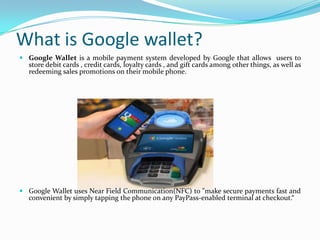
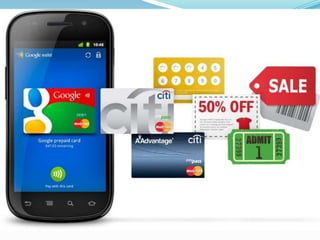
 Google Wallet is a mobile payment system developed by Google that allows users to
store debit cards , credit cards, loyalty cards , and gift cards among other things, as well as
redeeming sales promotions on their mobile phone.
 Google Wallet uses Near Field Communication(NFC) to "make secure payments fast and
convenient by simply tapping the phone on any PayPass-enabled terminal at checkout.“
Need Of Google wallet
• Just as every thing is getting under the shadow of “e” today we have paper currency being
replaced by electronic money or e-cash.
• Google wallet is fast convenient way to pay which makes savings simple.
• Google point out that unlike a card in your wallet, your cards in your phone will be
protected by a pin number.
• We don’t need to carry all cards like loyalty cards ,reward coupons etc.
• Google wallet has huge benefit that will make many users very happy. It can also be used
as a loyalty card system, negating the need for a wallet full of Coffee chain loyalty cards
and swipes. All you will need is your phone in any place that offers the payment system
How it works
Steps
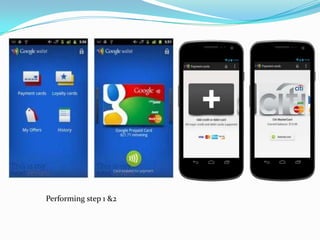
1.Get the Google wallet application on your smart phone
2. Start the application
3.Select payment cards and then add that card.
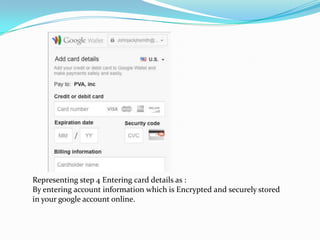
4.Enter card details
Performing step 1 &2
Representing step 4 Entering card details as :
By entering account information which is Encrypted and securely stored
in your google account online.
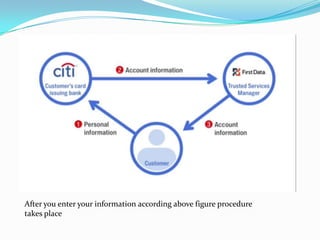
After you enter your information according above figure procedure
takes place
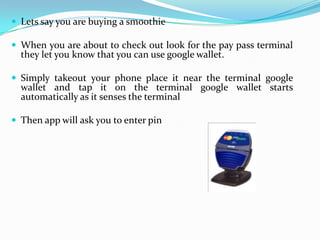
 Lets say you are buying a smoothie
 When you are about to check out look for the pay pass terminal
they let you know that you can use google wallet.
 Simply takeout your phone place it near the terminal google
wallet and tap it on the terminal google wallet starts
automatically as it senses the terminal
 Then app will ask you to enter pin
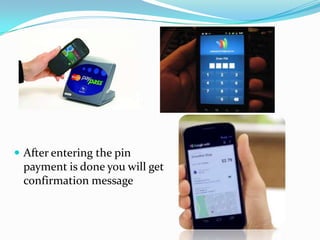
 After entering the pin
payment is done you will get
confirmation message
Of course security will be big concern
The credit and debit cards you store in Google Wallet are safely encrypted on secure
servers in a secure location.
When you pay in-store, Google actually pays the merchant, and then processes the
transaction with your selected credit or debit card.
So neither the merchant nor the Android operating system ever gets your real
payment card information.
Google Wallet always keeps the account numbers on your cards hidden. When your
cards appear on your phone's screen in-store, the numbers are not visible
Google wallet cannot be used until the phones screen is unlocked.
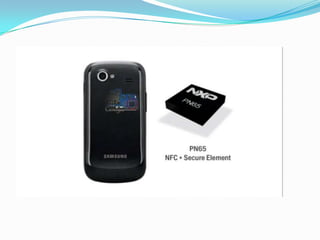
Phones that work with google wallet have a special micro chip secure element.
Security
TECHNOLOGIES
 Secure Element
 Your Google Wallet device has a chip called the Secure Element
that stores encrypted payment card information. Additionally,
because Google Wallet enforces a PIN, the only way to transmit
payment credentials is if you first enter the PIN.
 The Secure Element has many features designed to protect the security of the
data it stores. It's separate from the phone's main operating system and
hardware, which enables encrypted protocols to enforce access control. Only
authorized programs like Google Wallet can access the Secure Element to
initiate a transaction. There are multiple levels of protection for data stored on
the Secure Element and it is protected at the hardware level from snooping or
tampering.
 Near Field communication(NFC)
 An NFC enabled device creates a radio wave that connects with another NFC device or an
object that has the NFC tag. While two NFC enabled smartphones can read and exchange
data, items that hold NFC tags are mainly passive devices and provide one way
communication. Only users can fetch data from them, but they can’t read phone data
 Near field communication (NFC) is a set of standards for smart phones and similar
devices to establish radio communication with each other by touching them together or
bringing them into close proximity, usually no more than a few centimeters.
 NFC is a set of short-range wireless technologies, typically requiring a distance of 10 cm
or less. NFC operates at 13.56 MHz ranging from 106 kbit/s to 424 kbit/s.
Advantages
A fast way to pay
• Saving made simple: With Google Wallet you can redeem Google
Offers automatically at participating stores.
 Google Offers are deals on products and services at local and online
merchants. When you buy or save an offer, it automatically syncs to
your Google Wallet so it's always with you wherever you go.
• Safer wallet, safer shopping: Thanks to the Google Wallet PIN,
encrypted storage of card numbers of the payment cards stored online,
and the ability to remotely disable a lost wallet, you're safe and secure
when shopping with Google Wallet.
Conclusion
 Google Wallet is great, magical, impressive, and all sorts of
other positive adjectives
 Google Wallet will be a popular payment method in the
future because more people will own a Smartphone. I
believe if this mobile payment service is convenient, secure
and efficient to customers, people will start using it and
never leave it just like our hand phones.
Refrences
 http://techcrunch.com/2011/09/19/techcrunch-review-google-
wallet/
 http://www.google.co.in/wallet/
 http://en.wikipedia.org/wiki/Google_Wallet
 http://mashable.com/2011/05/26/google-mobile-payment-
system-liveblog/
 http://news.cnet.com/8301-1001_3-20108541-92/this-day-in-tech-
google-wallet-launches/
 https://www.cdt.org/blogs/harley-geiger/nfc-phones-raise-
opportunities-privacy-and-security-issues
THANK YOU
 ANY QUESTIONS

Google wallet

  • 1.
    GUIDED BY: Prof. Mrs.SHALU SARASWAT P.D.E.A’s College Of Engineering Manjri(Bk) Hadapsar Pune SUBMITTED BY: SUMEDH THOOL CLASS: T.E [I.T] ROLL NO:37
  • 2.
    Road Map • Introduction •What is Google wallet • Need of Google wallet • How to use Google wallet • Where I can use Google wallet? • Technologies • Advantages • Conclusion
  • 3.
    INTRODUCTION  In thepast few thousand years, the way we pay has changed just three times— from coins, to paper money, to plastic cards.  Now we’re on the brink of the next big shift that is GOOGLE WALLET  Google Wallet is an Android app that makes your phone your wallet.  It stores virtual versions of your existing plastic cards on your phone.  Simply tap your phone to pay and redeem offers using Near Field Communication (NFC)
  • 4.
    What is Googlewallet?  Google Wallet is a mobile payment system developed by Google that allows users to store debit cards , credit cards, loyalty cards , and gift cards among other things, as well as redeeming sales promotions on their mobile phone.  Google Wallet uses Near Field Communication(NFC) to "make secure payments fast and convenient by simply tapping the phone on any PayPass-enabled terminal at checkout.“
  • 6.
    Need Of Googlewallet • Just as every thing is getting under the shadow of “e” today we have paper currency being replaced by electronic money or e-cash. • Google wallet is fast convenient way to pay which makes savings simple. • Google point out that unlike a card in your wallet, your cards in your phone will be protected by a pin number. • We don’t need to carry all cards like loyalty cards ,reward coupons etc. • Google wallet has huge benefit that will make many users very happy. It can also be used as a loyalty card system, negating the need for a wallet full of Coffee chain loyalty cards and swipes. All you will need is your phone in any place that offers the payment system
  • 7.
    How it works Steps 1.Getthe Google wallet application on your smart phone 2. Start the application 3.Select payment cards and then add that card. 4.Enter card details
  • 8.
  • 9.
    Representing step 4Entering card details as : By entering account information which is Encrypted and securely stored in your google account online.
  • 10.
    After you enteryour information according above figure procedure takes place
  • 11.
     Lets sayyou are buying a smoothie  When you are about to check out look for the pay pass terminal they let you know that you can use google wallet.  Simply takeout your phone place it near the terminal google wallet and tap it on the terminal google wallet starts automatically as it senses the terminal  Then app will ask you to enter pin
  • 12.
     After enteringthe pin payment is done you will get confirmation message
  • 13.
    Of course securitywill be big concern The credit and debit cards you store in Google Wallet are safely encrypted on secure servers in a secure location. When you pay in-store, Google actually pays the merchant, and then processes the transaction with your selected credit or debit card. So neither the merchant nor the Android operating system ever gets your real payment card information. Google Wallet always keeps the account numbers on your cards hidden. When your cards appear on your phone's screen in-store, the numbers are not visible Google wallet cannot be used until the phones screen is unlocked. Phones that work with google wallet have a special micro chip secure element. Security
  • 14.
    TECHNOLOGIES  Secure Element Your Google Wallet device has a chip called the Secure Element that stores encrypted payment card information. Additionally, because Google Wallet enforces a PIN, the only way to transmit payment credentials is if you first enter the PIN.  The Secure Element has many features designed to protect the security of the data it stores. It's separate from the phone's main operating system and hardware, which enables encrypted protocols to enforce access control. Only authorized programs like Google Wallet can access the Secure Element to initiate a transaction. There are multiple levels of protection for data stored on the Secure Element and it is protected at the hardware level from snooping or tampering.
  • 16.
     Near Fieldcommunication(NFC)  An NFC enabled device creates a radio wave that connects with another NFC device or an object that has the NFC tag. While two NFC enabled smartphones can read and exchange data, items that hold NFC tags are mainly passive devices and provide one way communication. Only users can fetch data from them, but they can’t read phone data  Near field communication (NFC) is a set of standards for smart phones and similar devices to establish radio communication with each other by touching them together or bringing them into close proximity, usually no more than a few centimeters.  NFC is a set of short-range wireless technologies, typically requiring a distance of 10 cm or less. NFC operates at 13.56 MHz ranging from 106 kbit/s to 424 kbit/s.
  • 17.
    Advantages A fast wayto pay • Saving made simple: With Google Wallet you can redeem Google Offers automatically at participating stores.  Google Offers are deals on products and services at local and online merchants. When you buy or save an offer, it automatically syncs to your Google Wallet so it's always with you wherever you go. • Safer wallet, safer shopping: Thanks to the Google Wallet PIN, encrypted storage of card numbers of the payment cards stored online, and the ability to remotely disable a lost wallet, you're safe and secure when shopping with Google Wallet.
  • 18.
    Conclusion  Google Walletis great, magical, impressive, and all sorts of other positive adjectives  Google Wallet will be a popular payment method in the future because more people will own a Smartphone. I believe if this mobile payment service is convenient, secure and efficient to customers, people will start using it and never leave it just like our hand phones.
  • 19.
    Refrences  http://techcrunch.com/2011/09/19/techcrunch-review-google- wallet/  http://www.google.co.in/wallet/ http://en.wikipedia.org/wiki/Google_Wallet  http://mashable.com/2011/05/26/google-mobile-payment- system-liveblog/  http://news.cnet.com/8301-1001_3-20108541-92/this-day-in-tech- google-wallet-launches/  https://www.cdt.org/blogs/harley-geiger/nfc-phones-raise- opportunities-privacy-and-security-issues
  • 20.