PRESENTATION BY: KRUTI
MEHTA
-Google Search Console was originally known
as Google Webmaster Tools, was launched in
2005.
-GSC is free, in-depth tool from Google that
allows webmasters to monitor their site's
performance on Google Search results pages.
-It enables users to get in-depth information
on how Google views your site, find technical
issues to fix, track organic search
performance, and much more.
INTRODUCTION
-How Google Views Your Site: Find out what Google has to say
about your website and catch potential issues the search engine
may have with ranking.
-Technical SEO: Improve the technical settings of your site for
better factors like site speed, mobile-friendliness, or better crawl
accessibility.
-Organic Search performance: Monitor the performance of your
website over time. Identify what you can improve on.
-Optimize for Better Visibility: Your SEO decisions should also be
based on data from Google Search Console.
Use Google Search Console efficiently and thereby improve your
website's visibility in the search engine to attract more organic
traffic to your site.
Why Google Search Console Matters?
KEY FEATURES OF GOOGLE SEARCH CONSOLE
1. Performance-Total Clicks, Total Impression, Avg. CTR, Avg. Position
2. URL Inspection
3. Indexing- Pages, Video Pages, Sitemaps, Removals
4. Experience- Page experience, Core web vital, Mobile Usability, HTTPS
5. Enhancement- Sitelink Search Box, Bread Crumbs
6. Security issues& Manual action
7. Links- Internal, External Links
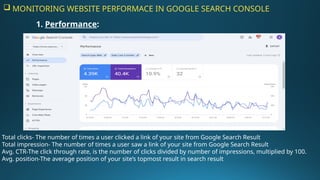
 MONITORING WEBSITE PERFORMACE IN GOOGLE SEARCH CONSOLE
Total clicks- The number of times a user clicked a link of your site from Google Search Result
Total impression- The number of times a user saw a link of your site from Google Search Result
Avg. CTR-The click through rate, is the number of clicks divided by number of impressions, multiplied by 100.
Avg. position-The average position of your site’s topmost result in search result
1. Performance:
2- URL Inspection
o Here we can request Google to index a page for the first time or after making changes in any URL.
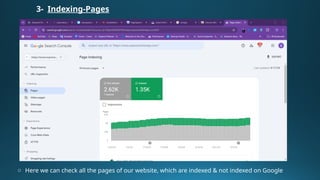
3- Indexing-Pages
o Here we can check all the pages of our website, which are indexed & not indexed on Google
o As we can see above, we can check the reason of pages why they are not indexed on Google
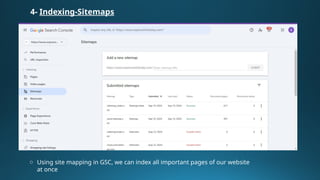
4- Indexing-Sitemaps
o Using site mapping in GSC, we can index all important pages of our website
at once
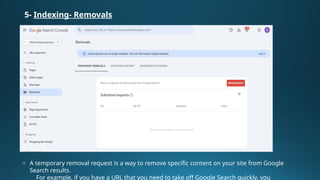
5- Indexing- Removals
o A temporary removal request is a way to remove specific content on your site from Google
Search results.
For example, if you have a URL that you need to take off Google Search quickly, you
6- Experience-Page experience
o Page Experience is not a standalone ranking factor. It's part of a comprehensive ranking system that
includes Core Web Vitals, HTTPS and helpful content
o All these signals complement each other and are used together to rank websites.
Core Web Vitals
o Core Web Vitals: Core Web Vitals tests the speed, responsiveness, and stability of the page loading
experience for users in mobile & desktop
HTTPS
o HTTPS usage: A page must be served over HTTPS to be reported as "Good" status in Search Console.
o So here we can check that all the URLs of our website has HTTPS or not
7- Enhancement-Sitelinks searchbox
o A sitelinks search box is a quick way for people to search your site or app immediately on the search results pa
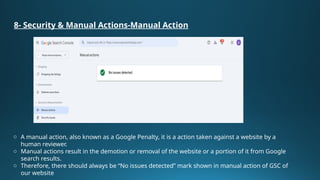
8- Security & Manual Actions-Manual Action
o A manual action, also known as a Google Penalty, it is a action taken against a website by a
human reviewer.
o Manual actions result in the demotion or removal of the website or a portion of it from Google
search results.
o Therefore, there should always be “No issues detected” mark shown in manual action of GSC of
our website
Security issues
o The Security Issues report lists indications that your site was hacked, or behavior on your site that
could potentially harm a visitor or their computer
o So there should always be “No issues detected” mark should be shown on Security issues of GSC of
your website
9- Links
o It shows how other sites link to your site and how your site links internally.
o Tracking external links, or backlinks, and internal links is important.
o Their importance lies in their ability to guide search engines and users through this vast
network, enhancing your website's visibility and authority.
o By understanding and effectively using different types of links, you can substantially
improve your SEO strategy.
 Google Search Console is an essential tool for
anyone serious about improving their website's
performance and maximizing its potential.
 By leveraging its features and data, you can
enhance your search engine visibility, provide a
better user experience, and drive more traffic and
conversions.
CONCLUSION
THANK YOU

Google Search Console Overview - Presentation

  • 1.
  • 2.
    -Google Search Consolewas originally known as Google Webmaster Tools, was launched in 2005. -GSC is free, in-depth tool from Google that allows webmasters to monitor their site's performance on Google Search results pages. -It enables users to get in-depth information on how Google views your site, find technical issues to fix, track organic search performance, and much more. INTRODUCTION
  • 3.
    -How Google ViewsYour Site: Find out what Google has to say about your website and catch potential issues the search engine may have with ranking. -Technical SEO: Improve the technical settings of your site for better factors like site speed, mobile-friendliness, or better crawl accessibility. -Organic Search performance: Monitor the performance of your website over time. Identify what you can improve on. -Optimize for Better Visibility: Your SEO decisions should also be based on data from Google Search Console. Use Google Search Console efficiently and thereby improve your website's visibility in the search engine to attract more organic traffic to your site. Why Google Search Console Matters?
  • 4.
    KEY FEATURES OFGOOGLE SEARCH CONSOLE 1. Performance-Total Clicks, Total Impression, Avg. CTR, Avg. Position 2. URL Inspection 3. Indexing- Pages, Video Pages, Sitemaps, Removals 4. Experience- Page experience, Core web vital, Mobile Usability, HTTPS 5. Enhancement- Sitelink Search Box, Bread Crumbs 6. Security issues& Manual action 7. Links- Internal, External Links
  • 5.
     MONITORING WEBSITEPERFORMACE IN GOOGLE SEARCH CONSOLE Total clicks- The number of times a user clicked a link of your site from Google Search Result Total impression- The number of times a user saw a link of your site from Google Search Result Avg. CTR-The click through rate, is the number of clicks divided by number of impressions, multiplied by 100. Avg. position-The average position of your site’s topmost result in search result 1. Performance:
  • 6.
    2- URL Inspection oHere we can request Google to index a page for the first time or after making changes in any URL.
  • 7.
    3- Indexing-Pages o Herewe can check all the pages of our website, which are indexed & not indexed on Google
  • 8.
    o As wecan see above, we can check the reason of pages why they are not indexed on Google
  • 9.
    4- Indexing-Sitemaps o Usingsite mapping in GSC, we can index all important pages of our website at once
  • 10.
    5- Indexing- Removals oA temporary removal request is a way to remove specific content on your site from Google Search results. For example, if you have a URL that you need to take off Google Search quickly, you
  • 11.
    6- Experience-Page experience oPage Experience is not a standalone ranking factor. It's part of a comprehensive ranking system that includes Core Web Vitals, HTTPS and helpful content o All these signals complement each other and are used together to rank websites.
  • 12.
    Core Web Vitals oCore Web Vitals: Core Web Vitals tests the speed, responsiveness, and stability of the page loading experience for users in mobile & desktop
  • 13.
    HTTPS o HTTPS usage:A page must be served over HTTPS to be reported as "Good" status in Search Console. o So here we can check that all the URLs of our website has HTTPS or not
  • 14.
    7- Enhancement-Sitelinks searchbox oA sitelinks search box is a quick way for people to search your site or app immediately on the search results pa
  • 15.
    8- Security &Manual Actions-Manual Action o A manual action, also known as a Google Penalty, it is a action taken against a website by a human reviewer. o Manual actions result in the demotion or removal of the website or a portion of it from Google search results. o Therefore, there should always be “No issues detected” mark shown in manual action of GSC of our website
  • 16.
    Security issues o TheSecurity Issues report lists indications that your site was hacked, or behavior on your site that could potentially harm a visitor or their computer o So there should always be “No issues detected” mark should be shown on Security issues of GSC of your website
  • 17.
    9- Links o Itshows how other sites link to your site and how your site links internally. o Tracking external links, or backlinks, and internal links is important. o Their importance lies in their ability to guide search engines and users through this vast network, enhancing your website's visibility and authority. o By understanding and effectively using different types of links, you can substantially improve your SEO strategy.
  • 18.
     Google SearchConsole is an essential tool for anyone serious about improving their website's performance and maximizing its potential.  By leveraging its features and data, you can enhance your search engine visibility, provide a better user experience, and drive more traffic and conversions. CONCLUSION
  • 19.