What is Google Search Console?
 Google Search Console (GSC) is a free tool provided by Google
that helps website owners, SEO professionals, and developers
monitor and maintain their site's presence in Google Search
results.
 It allows you to:
1. Track how Google views your website
2. Submit new content for indexing
3. Identify and fix technical issues
4. Analyse traffic data such as clicks, impressions, and rankings
 Originally called Google Webmaster Tools, it was rebranded
as GSC in 2015 to better reflect its broader use.
 GSC is not required to appear in search results, but it helps
improve performance by offering detailed insights.
 It is especially useful for SEO specialists, marketers,
developers, and site owners.
Why is Google Search Console Important?
 Helps you understand Google’s view of your website, including
how pages are crawled, indexed, and ranked.
 Alerts you when Google encounters errors or penalties on
your site.
 Let’s you track search traffic trends over time.
 Essential for maintaining:
1. Site health (technical performance)
2. Search visibility (ranking)
3. User experience (especially mobile usability)
 GSC is crucial for proactive site optimization, rather than
reacting to performance drops after they happen.
Key Features of Google Search Console
1. Performance Report – See how your site performs in search
(clicks, impressions, CTR, position).
2. Index Coverage – Find out which pages are indexed and
which have errors.
3. URL Inspection Tool – Analyse and test how Google crawls
individual pages.
4. Sitemaps – Submit and manage your XML sitemaps to
guide Google's crawling.
5. Mobile Usability Report – Check for mobile-specific issues
affecting usability.
6. Core Web Vitals – Review performance metrics like speed
and stability.
7. Security Issues & Manual Actions – See if your site has
been hacked or penalized.
8. Link Reports – Understand internal linking and which sites
are linking to you.
Performance Report
 Displays how users interact with your site on Google Search.
 Key metrics:
1. Clicks: Number of users who clicked your listing.
2. Impressions: How often your site appeared in search results.
3. CTR (Click Through Rate): Ratio of clicks to impressions.
4. Average Position: The typical ranking of your site for a
keyword.
 You can filter the data by:
1. Query (keywords users search)
2. Page (which pages get traffic)
3. Country
4. Device (desktop, mobile, tablet)
5. Search Appearance (e.g., video, rich result)
 Use case: Identify underperforming pages and optimize
titles/descriptions to improve CTR.
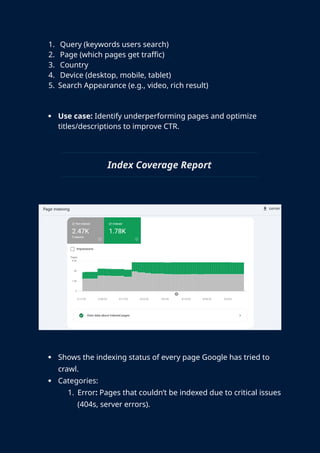
Index Coverage Report
 Shows the indexing status of every page Google has tried to
crawl.
 Categories:
1. Error: Pages that couldn’t be indexed due to critical issues
(404s, server errors).
2. Valid with warnings: Pages indexed but have issues.
3. Valid: Successfully indexed pages.
4. Excluded: Pages not indexed (deliberate or due to
settings).
 Helps answer:
1. Why is a page not appearing on Google?
2. Are redirects working properly?
3. Are important pages blocked by robots.txt or noindex
tags?
 Regularly reviewing this ensures maximum visibility of
content.
URL Inspection Tool
 Checks how Google views a specific page.
 View current index status, last crawl date, any crawl issues.
 Features:
1. Live Test the URL to see real-time crawlability.
2. See if the page is mobile-friendly.
3. Check structured data (Schema Markup)
4. Allows you to request indexing for new or updated
pages.
 Useful when:
1. You’ve fixed a page and want it re-crawled quickly.
2. A URL is not appearing in search, and you need to
troubleshoot.
 Essential for technical SEO audits.
Sitemaps and robots.txt
Sitemaps:
 XML files that list your important URLs.
 Helps Google discover new pages faster, especially on large
websites.
 Submit via GSC Sitemaps Enter URL.
→ →
robots.txt Tester:
 Checks whether specific URLs are being blocked by your site’s
robots.txt file.
 Useful for diagnosing crawling issues.
Best practices:
 Keep your sitemap updated.
 Don’t block important resources like JavaScript or CSS.
 Crucial for crawl efficiency and discoverability.
Core Web Vitals
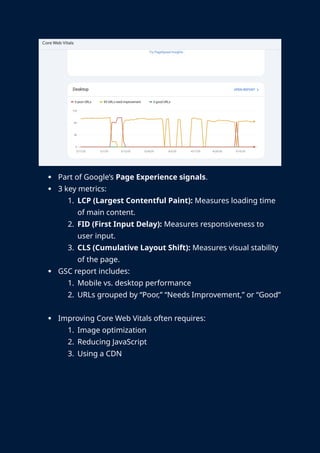
 Part of Google’s Page Experience signals.
 3 key metrics:
1. LCP (Largest Contentful Paint): Measures loading time
of main content.
2. FID (First Input Delay): Measures responsiveness to
user input.
3. CLS (Cumulative Layout Shift): Measures visual stability
of the page.
 GSC report includes:
1. Mobile vs. desktop performance
2. URLs grouped by “Poor,” “Needs Improvement,” or “Good”
 Improving Core Web Vitals often requires:
1. Image optimization
2. Reducing JavaScript
3. Using a CDN
Manual Actions and Security Issues
 Manual Actions
1. Applied when Google reviews a site and finds violations
of its quality guidelines.
2. Examples: keyword stuffing, unnatural backlinks, hidden
text.
3. Sites may be demoted or removed from search results.
 Security Issues:
1. Google flags problems like: Malware, Phising Attacks,
Hacked Content.
 Critical to maintain site credibility and rankings.
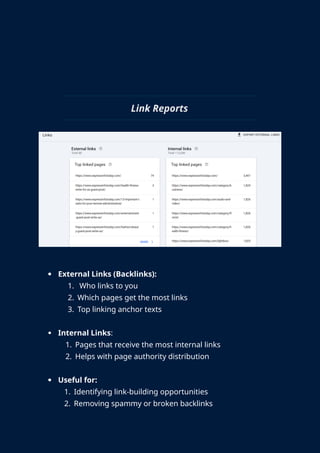
Link Reports
 External Links (Backlinks):
1. Who links to you
2. Which pages get the most links
3. Top linking anchor texts
 Internal Links:
1. Pages that receive the most internal links
2. Helps with page authority distribution
 Useful for:
1. Identifying link-building opportunities
2. Removing spammy or broken backlinks
3. Optimizing internal navigation
Best Practices for GSC Usage
 Log in weekly to catch issues early.
 Check both desktop and mobile performance.
 Submit sitemap after:
1. New content launches
2. Major structural changes
 Regularly audit:
1. Crawl errors
2. Mobile usability
3. Core Web Vitals
 Integrate with tools like:
1. Google Tag Manager
2. Google Analytics
3. SEO platforms (e.g., SEMrush, Ahrefs)
 Stay updated with Google Search Central blog.
CONCLUSION
Google Search Console is a powerful and essential tool for
anyone managing a website. It provides valuable insights into
how your site appears in Google Search and helps identify
issues that could affect visibility and performance. With
features to monitor traffic, fix indexing problems, and enhance
user experience, GSC supports continuous improvement of
your website’s SEO and technical health. Using it regularly can
lead to better rankings, more traffic, and a stronger online
presence.

Google Search Console's Beginners Guide.docx

  • 2.
    What is GoogleSearch Console?  Google Search Console (GSC) is a free tool provided by Google that helps website owners, SEO professionals, and developers monitor and maintain their site's presence in Google Search results.  It allows you to: 1. Track how Google views your website 2. Submit new content for indexing 3. Identify and fix technical issues 4. Analyse traffic data such as clicks, impressions, and rankings  Originally called Google Webmaster Tools, it was rebranded as GSC in 2015 to better reflect its broader use.  GSC is not required to appear in search results, but it helps improve performance by offering detailed insights.  It is especially useful for SEO specialists, marketers, developers, and site owners.
  • 3.
    Why is GoogleSearch Console Important?  Helps you understand Google’s view of your website, including how pages are crawled, indexed, and ranked.  Alerts you when Google encounters errors or penalties on your site.  Let’s you track search traffic trends over time.  Essential for maintaining: 1. Site health (technical performance) 2. Search visibility (ranking) 3. User experience (especially mobile usability)  GSC is crucial for proactive site optimization, rather than reacting to performance drops after they happen.
  • 4.
    Key Features ofGoogle Search Console 1. Performance Report – See how your site performs in search (clicks, impressions, CTR, position). 2. Index Coverage – Find out which pages are indexed and which have errors. 3. URL Inspection Tool – Analyse and test how Google crawls individual pages. 4. Sitemaps – Submit and manage your XML sitemaps to guide Google's crawling. 5. Mobile Usability Report – Check for mobile-specific issues affecting usability. 6. Core Web Vitals – Review performance metrics like speed and stability. 7. Security Issues & Manual Actions – See if your site has been hacked or penalized. 8. Link Reports – Understand internal linking and which sites are linking to you.
  • 5.
    Performance Report  Displayshow users interact with your site on Google Search.  Key metrics: 1. Clicks: Number of users who clicked your listing. 2. Impressions: How often your site appeared in search results. 3. CTR (Click Through Rate): Ratio of clicks to impressions. 4. Average Position: The typical ranking of your site for a keyword.  You can filter the data by:
  • 6.
    1. Query (keywordsusers search) 2. Page (which pages get traffic) 3. Country 4. Device (desktop, mobile, tablet) 5. Search Appearance (e.g., video, rich result)  Use case: Identify underperforming pages and optimize titles/descriptions to improve CTR. Index Coverage Report  Shows the indexing status of every page Google has tried to crawl.  Categories: 1. Error: Pages that couldn’t be indexed due to critical issues (404s, server errors).
  • 7.
    2. Valid withwarnings: Pages indexed but have issues. 3. Valid: Successfully indexed pages. 4. Excluded: Pages not indexed (deliberate or due to settings).  Helps answer: 1. Why is a page not appearing on Google? 2. Are redirects working properly? 3. Are important pages blocked by robots.txt or noindex tags?  Regularly reviewing this ensures maximum visibility of content. URL Inspection Tool
  • 8.
     Checks howGoogle views a specific page.  View current index status, last crawl date, any crawl issues.  Features: 1. Live Test the URL to see real-time crawlability. 2. See if the page is mobile-friendly. 3. Check structured data (Schema Markup) 4. Allows you to request indexing for new or updated pages.  Useful when: 1. You’ve fixed a page and want it re-crawled quickly. 2. A URL is not appearing in search, and you need to troubleshoot.  Essential for technical SEO audits. Sitemaps and robots.txt
  • 9.
    Sitemaps:  XML filesthat list your important URLs.  Helps Google discover new pages faster, especially on large websites.  Submit via GSC Sitemaps Enter URL. → → robots.txt Tester:  Checks whether specific URLs are being blocked by your site’s robots.txt file.  Useful for diagnosing crawling issues. Best practices:  Keep your sitemap updated.  Don’t block important resources like JavaScript or CSS.  Crucial for crawl efficiency and discoverability. Core Web Vitals
  • 10.
     Part ofGoogle’s Page Experience signals.  3 key metrics: 1. LCP (Largest Contentful Paint): Measures loading time of main content. 2. FID (First Input Delay): Measures responsiveness to user input. 3. CLS (Cumulative Layout Shift): Measures visual stability of the page.  GSC report includes: 1. Mobile vs. desktop performance 2. URLs grouped by “Poor,” “Needs Improvement,” or “Good”  Improving Core Web Vitals often requires: 1. Image optimization 2. Reducing JavaScript 3. Using a CDN
  • 11.
    Manual Actions andSecurity Issues  Manual Actions 1. Applied when Google reviews a site and finds violations of its quality guidelines. 2. Examples: keyword stuffing, unnatural backlinks, hidden text. 3. Sites may be demoted or removed from search results.  Security Issues: 1. Google flags problems like: Malware, Phising Attacks, Hacked Content.  Critical to maintain site credibility and rankings.
  • 12.
    Link Reports  ExternalLinks (Backlinks): 1. Who links to you 2. Which pages get the most links 3. Top linking anchor texts  Internal Links: 1. Pages that receive the most internal links 2. Helps with page authority distribution  Useful for: 1. Identifying link-building opportunities 2. Removing spammy or broken backlinks
  • 13.
    3. Optimizing internalnavigation Best Practices for GSC Usage  Log in weekly to catch issues early.  Check both desktop and mobile performance.  Submit sitemap after: 1. New content launches 2. Major structural changes  Regularly audit: 1. Crawl errors 2. Mobile usability 3. Core Web Vitals  Integrate with tools like: 1. Google Tag Manager 2. Google Analytics 3. SEO platforms (e.g., SEMrush, Ahrefs)  Stay updated with Google Search Central blog.
  • 14.
    CONCLUSION Google Search Consoleis a powerful and essential tool for anyone managing a website. It provides valuable insights into how your site appears in Google Search and helps identify issues that could affect visibility and performance. With features to monitor traffic, fix indexing problems, and enhance user experience, GSC supports continuous improvement of your website’s SEO and technical health. Using it regularly can lead to better rankings, more traffic, and a stronger online presence.