GOOGLE SEARCH
CONSOLE
THINGS NEEDED TO KNOW ABOUT GCS
• Google Search Console is a Tool of Google Itself, Presenting you a Free Service.
• It Helps To Monitor, Maintain & Troubleshoot your Site’s Presence in Google Search
results.
• There are Lots of Functions in this Tool to Understand the Performance of the
Website.
BASIC SEARCH RESULTS
• The Basic Search Results Optimized by Google of your Website Like :
• Impressions, Clicks, Average CTR, Etc.
• The Impressions means that In How Many User Search Results Your Website is
Shown & Scrolls in the List.
• Clicks Means How Many Users Click or Open Your Website according to their need.
• The Average CTR is Calculated on the Basis of Impressions divided by Clicks and
Then We Get the Avg. CTR Score.
IN TAB
• In Tab Option There are many actions are like :
• 1. PERFOMANCE
• 2. URL INSPECTION
• 3. PAGES
• 4. SITEMAP
• 5. REMOVALS
• 6. PAGE EXPERIENCE
PERFORMANCE
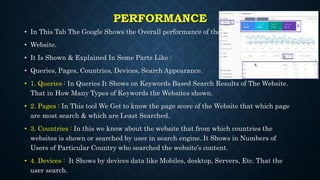
• In This Tab The Google Shows the Overall performance of the
• Website.
• It Is Shown & Explained In Some Parts Like :
• Queries, Pages, Countries, Devices, Search Appearance.
• 1. Queries : In Queries It Shows on Keywords Based Search Results of The Website.
That in How Many Types of Keywords the Websites shown.
• 2. Pages : In This tool We Get to know the page score of the Website that which page
are most search & which are Least Searched.
• 3. Countries : In this we know about the website that from which countries the
websites is shown or searched by user in search engine. It Shows in Numbers of
Users of Particular Country who searched the website’s content.
• 4. Devices : It Shows by devices data like Mobiles, desktop, Servers, Etc. That the
user search.
URL INSPECTION
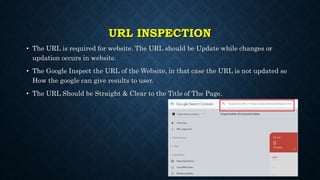
• The URL is required for website. The URL should be Update while changes or
updation occurs in website.
• The Google Inspect the URL of the Website, in that case the URL is not updated so
How the google can give results to user.
• The URL Should be Straight & Clear to the Title of The Page.
PAGES
• In Google Search Console we can also know that how many pages of website the
Google Know in their Database.
• In this tool we get to know the indexed or unindexed pages in google database.
• If In Case There are pages that is Unindexed in Database of some error that should
be re-index it.
• Each & Every Page Details are Shown.
SITEMAP
• The Website Should be indexed in XML-Sitemap.com, and that xml sitemap link is
to be putted in google search console.
• So that the google know about the allowed & disallowed pages of website.
• By Submitting The XML Sitemap in google search console the benefits is that the
website will auto update on google as per the sitemap. There is no need to regularly
update the changes of website in the URL Inspection. The Changes or Updates will
Automatically saves in sitemap, & Then Link it Google Search Console so it is
automatically gives information to google of changes or updation in website.
REMOVALS
• In Case In Our Website There Is a Product or services which is not existing, so then
to inform google that not to show it to a user. We Put A Request In Google Search
Console’s tool in the Tab Of Removals.
• So It is creating a request to google for a particular thing that is not existing in
website. That has remove By Giving URL of that product/service.
PAGE EXPERIENCE
• In this the Website’s Page Experience is Shown in Categoreis
• Devices Like Mobiles, Desktop, HTTPS, etc.
• It Shows the websites Page Loading speed according to device.
• It Shows the Page User Experience According to Devices.
SECURITY & MANUAL ACTION
• This is Very Important Tab in Google Search Console, it Shows the security issues or
penalty issues of the website.
• It Should be Regularly Checked By The Owner Of Website.
• In This we get to know that our Website is Hacked or Virus Is occurred or HTTPS
secured or not, if There is any issues of above the website will be removed from the
google. So It Is Needed To Be Cheked.
• Every time It Should Be checked that Both The Columns Should have Green Ticked.
THANK YOU
• To know More about Google Search console & About Digital Marketing Digital
Pundit is there to help you.

GOOGLE SEARCH CONSOLE-1.pptx

  • 1.
  • 2.
    THINGS NEEDED TOKNOW ABOUT GCS • Google Search Console is a Tool of Google Itself, Presenting you a Free Service. • It Helps To Monitor, Maintain & Troubleshoot your Site’s Presence in Google Search results. • There are Lots of Functions in this Tool to Understand the Performance of the Website.
  • 3.
    BASIC SEARCH RESULTS •The Basic Search Results Optimized by Google of your Website Like : • Impressions, Clicks, Average CTR, Etc. • The Impressions means that In How Many User Search Results Your Website is Shown & Scrolls in the List. • Clicks Means How Many Users Click or Open Your Website according to their need. • The Average CTR is Calculated on the Basis of Impressions divided by Clicks and Then We Get the Avg. CTR Score.
  • 4.
    IN TAB • InTab Option There are many actions are like : • 1. PERFOMANCE • 2. URL INSPECTION • 3. PAGES • 4. SITEMAP • 5. REMOVALS • 6. PAGE EXPERIENCE
  • 5.
    PERFORMANCE • In ThisTab The Google Shows the Overall performance of the • Website. • It Is Shown & Explained In Some Parts Like : • Queries, Pages, Countries, Devices, Search Appearance. • 1. Queries : In Queries It Shows on Keywords Based Search Results of The Website. That in How Many Types of Keywords the Websites shown. • 2. Pages : In This tool We Get to know the page score of the Website that which page are most search & which are Least Searched. • 3. Countries : In this we know about the website that from which countries the websites is shown or searched by user in search engine. It Shows in Numbers of Users of Particular Country who searched the website’s content. • 4. Devices : It Shows by devices data like Mobiles, desktop, Servers, Etc. That the user search.
  • 6.
    URL INSPECTION • TheURL is required for website. The URL should be Update while changes or updation occurs in website. • The Google Inspect the URL of the Website, in that case the URL is not updated so How the google can give results to user. • The URL Should be Straight & Clear to the Title of The Page.
  • 7.
    PAGES • In GoogleSearch Console we can also know that how many pages of website the Google Know in their Database. • In this tool we get to know the indexed or unindexed pages in google database. • If In Case There are pages that is Unindexed in Database of some error that should be re-index it. • Each & Every Page Details are Shown.
  • 8.
    SITEMAP • The WebsiteShould be indexed in XML-Sitemap.com, and that xml sitemap link is to be putted in google search console. • So that the google know about the allowed & disallowed pages of website. • By Submitting The XML Sitemap in google search console the benefits is that the website will auto update on google as per the sitemap. There is no need to regularly update the changes of website in the URL Inspection. The Changes or Updates will Automatically saves in sitemap, & Then Link it Google Search Console so it is automatically gives information to google of changes or updation in website.
  • 9.
    REMOVALS • In CaseIn Our Website There Is a Product or services which is not existing, so then to inform google that not to show it to a user. We Put A Request In Google Search Console’s tool in the Tab Of Removals. • So It is creating a request to google for a particular thing that is not existing in website. That has remove By Giving URL of that product/service.
  • 10.
    PAGE EXPERIENCE • Inthis the Website’s Page Experience is Shown in Categoreis • Devices Like Mobiles, Desktop, HTTPS, etc. • It Shows the websites Page Loading speed according to device. • It Shows the Page User Experience According to Devices.
  • 11.
    SECURITY & MANUALACTION • This is Very Important Tab in Google Search Console, it Shows the security issues or penalty issues of the website. • It Should be Regularly Checked By The Owner Of Website. • In This we get to know that our Website is Hacked or Virus Is occurred or HTTPS secured or not, if There is any issues of above the website will be removed from the google. So It Is Needed To Be Cheked. • Every time It Should Be checked that Both The Columns Should have Green Ticked.
  • 12.
    THANK YOU • Toknow More about Google Search console & About Digital Marketing Digital Pundit is there to help you.